In 2026, the owner of an ordinary home router, smart TV, or TV box is a prime target for cybercriminals. These devices are readily recruited into botnets and residential proxy networks, which we’ve covered before.
Criminals “sublease” the infected device by letting outsiders pay to visit any website from the victim’s IP address, so it looks like the device’s owner is doing it. The service is in demand across all kinds of shady schemes: from ad fraud and spam campaigns to password bruteforcing and account hacking. In our previous post, we described how home routers get recruited into these proxy networks; today we take a look at an even more vulnerable, and equally ubiquitous category of devices: smart TVs and TV boxes.
These appeal to criminals for two reasons. First, unlike computers and smartphones, TVs are almost always plugged into the power and have a fast internet connection. A dark screen doesn’t mean the device is switched off. On top of that, the limited user interface and monitoring tools mean suspicious background processes can easily slip unnoticed past users.
The threat is evolving and growing more aggressive. A recent study found that once proxyware turns up on a set-top box, the risks to its owner go well beyond having their traffic siphoned off.
SuperBox’s marketing leans heavily on the promise of providing thousands of TV channels, with no subscription or monthly fees. But out of the box, the device can’t actually do anything of the sort. To get access to pirated content, you need to install the brand’s proprietary app store.
When you launch it and install additional apps, the thousands of TV channels do appear. Meanwhile behind the scenes, with no warnings or permission prompts, the device floods external sites with unauthorized requests, and network traffic spikes sharply.
The researchers uncovered several alarming facts. First, the victim gets enrolled into as many as five botnets at once. The SuperBox runs clients for several proxyware networks simultaneously, which even try to compete with one another by blocking rival software from being installed.
But the real shock was the attacks on the internal network. The TV box’s proxyware places no limits on what its paying clients can actually do on the network. They can reach not only external sites but also devices inside your home network.
Normally, your home router and ISP settings protect you from outside attacks. But proxyware bypasses these barriers because it operates from inside the network. During an experiment, the researchers confirmed that an attacker on the internet can easily leverage the infected set-top box to open the admin panel of a home router, such as a Linksys, which is supposed to be accessible only to its owner when connected to the home Wi-Fi network. This means hackers can try to steal data from other devices in the same household, or even encrypt home network storage (NAS).
At the same time, flaws in SuperBox’s factory firmware let hackers remotely install and run any application with superuser privileges, and the threat is anything but hypothetical. Over three weeks of monitoring, the test set-top box was hit by more than 1300 attacks through the home proxy network. Attackers installed three different types of malware, including a module for launching DDoS attacks.
The malware uses several methods to gain a foothold in the system, and it survives reboots and power failures alike.
How to tell if your set-top box is working for hackers
If you have a cheap TV set-top box or Android TV from a little-known brand, it’s worth checking it for anomalies.
The most reliable method is to review the network traffic. Use the statistics in your router’s control panel, but note that some budget models may lack this feature. This feature is called Traffic Analyzer on Asus routers, Traffic Usage on TP-Link, and Traffic Monitor on Keenetic. Find your TV or set-top box in the device list and check the ratio of downloaded to uploaded data. They should consume a lot of traffic to download video while sending very little. If your box is quietly pushing gigabytes of data out or staying chatty on the network even while idle, that’s a telltale sign it’s infected.
If traffic statistics aren’t available, look for indirect signs:
The network and memory activity LEDs won’t stop blinking even though no one’s using the device.
The set-top box’s casing is constantly warm or hot.
The interface lags behind the remote, and the box freezes at random moments that have nothing to do with heavy video playback.
Your other devices (computers or phones) are seeing a real drop in internet speed.
When trying to visit familiar sites over your home Wi-Fi, you’re constantly hit with a CAPTCHA — a sign your network may be compromised and flagged as a spam source.
Your ISP’s tech support calls you asking about suspicious network loads.
What to do with an infected device
The best solution is to disconnect the device from the internet and dispose of it. If you have to keep using it, follow these steps to minimize the risks:
Do a factory (hard) reset. Restore the set-top box to its original state.
Take it offline before setting up again. The first time you turn it on after a reset, skip the Wi-Fi setup step and don’t plug in the Ethernet cable.
Block app installation. Go to Android settings and disable installation of apps from unknown sources. Be sure to turn off any debugging features if enabled: USB debugging, Wireless debugging, and ADB. Menu item names may differ depending on your Android version and device manufacturer.
Isolate it on the network. Set up a guest Wi-Fi network on your router and connect the TV box to it. Enable Client Isolation in your router’s settings, if it has it. This will stop the box from seeing other devices on your home network, which protects your computers and network storage.
Check for updates. Once the box is connected to the guest network, check for official firmware updates: manufacturers sometimes patch known vulnerabilities, though with lesser-known brands, you shouldn’t count on it.
Your most reliable safeguards
Buying cheap devices with pirate streaming features and installing software from shady sources is a surefire way to compromise your home network. Your IP address will become a source of malicious activity, which at best gets you blocked by your ISP and at worst puts you on law enforcement’s radar. What’s more, hackers can use the box as a launchpad to attack your home computers and NAS, which can lead to personal data theft or a ransomware attack.
The best protection is to buy devices from trusted brands and pay for legal content. And to rule out someone hijacking control of your network, make sure your router’s admin panel and other home devices are protected with unique, strong passwords. To avoid having to remember them all, use a reliable password manager such as Kaspersky Password Manager. Additionally, the Smart Home Monitor feature included in Kaspersky Premium lets you keep all your devices fully under control.
There may be more things you don’t know about your smart home devices:
While monitoring Android threats in June 2026, we discovered a new piece of Android malware. What struck us as unusual was that it installed like an ordinary user app yet made no attempt to disguise itself as legitimate software: it had no user interface at all. This led us to suspect the app might be reaching users’ devices without their knowledge. Further investigation confirmed that hypothesis and allowed us to reconstruct the entire infection chain.
Key findings:
We identified new Android malware: a multi-stage downloader whose ultimate purpose is ad fraud and creation of a proxy botnet.
The malware spread through the built-in updaters of Android-based automotive head unit firmware. This is the first documented case of malware found on a car head unit with an infection chain specific to that type of device.
We attribute this activity, with high confidence, to the MoYu Group, an actor linked to the BADBOX botnet.
Kaspersky solutions detect the threats described below under the following detection names:
HEUR:Trojan-Dropper.AndroidOS.Agent.vu
HEUR:Trojan-Downloader.AndroidOS.Agent.ov
HEUR:Trojan-Proxy.AndroidOS.Zhima.*
HEUR:Trojan.AndroidOS.Vo1d.*
Head unit firmware overview
A head unit is a system that combines multimedia functions with partial control over certain vehicle functions. Head units may come as part of a car’s factory equipment or as an aftermarket upgrade. The main attack vectors for these systems are compromise via physical access and vulnerabilities in the head unit’s OS or components, both of which we’ve covered previously.
In some cases, head units run on Android, primarily because it’s convenient for manufacturers: Android’s source code already accounts for use cases within automotive head units. Android also allows manufacturers to add their own system applications during the build process, which they can use for a range of purposes: customizing the UI, adding system components tailored to the vendor’s needs, and more.
Most apps developed for Android devices can also run on an Android-based head unit, and that is true for malware as well. That said, it’s hard to imagine certain categories of smartphone-targeted malware being used to attack a head unit. Banking Trojans are a good example: since mobile banking is used almost exclusively on smartphones, infecting a head unit with a banking Trojan would be a waste of the attacker’s resources.
It’s worth noting that head units often include SIM card slots and can connect to the internet, enabling features like navigation and software updates. Since a head unit typically holds nothing of value to an attacker, one of the more likely attack scenarios using “classic” Android malware is infecting the device to recruit it into a botnet – similar to attacks on IoT devices.
During our research, we found exactly that kind of malware. The design of firmware for DoFun head units enabled attackers to distribute malware. We notified the vendor about the distribution scheme, and they subsequently reported fixing the security issues.
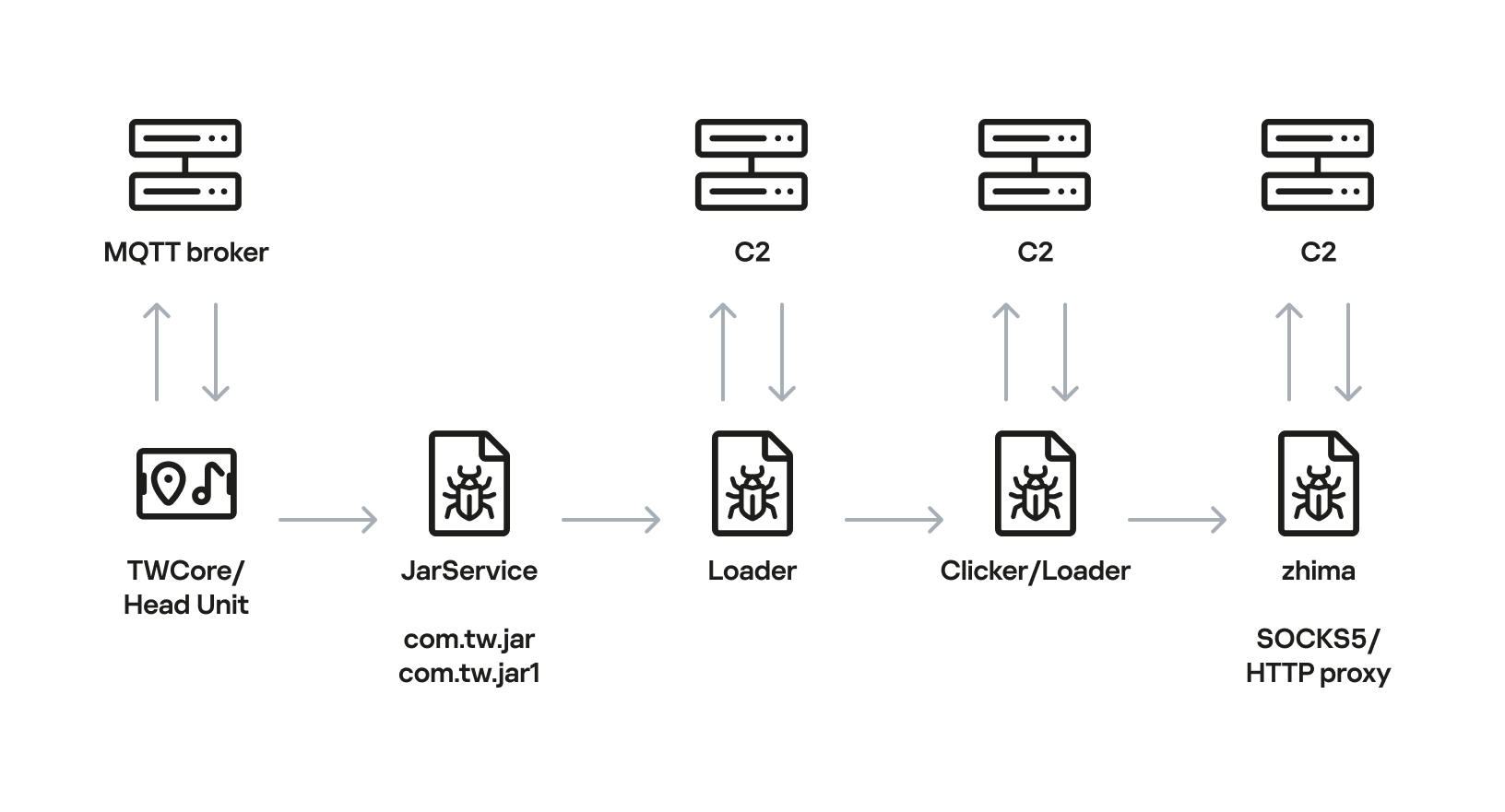
Below is the entire infection chain:
Head unit infection scheme
Let’s look at exactly how these head units became infected.
The TWCore app
TWCore is a legitimate system application responsible for collecting analytics data and updating the head unit software. Let’s take a closer look at how the update function works.
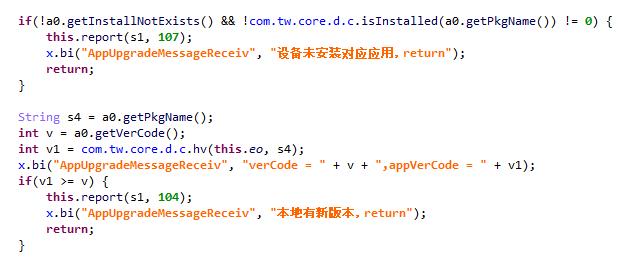
The process is fairly simple. An MQTT message broker hosted on the subdomain cardoor[.]cn sends a message containing information about the APK files that need to be downloaded and installed on the head unit. Notably, the object describing this message includes an installNotExists field, a Boolean flag that can be set to true or false. This flag allows TWCore to install apps that weren’t originally present on the device.
TWCore only checks whether an app is already installed on the device when installNotExists = false
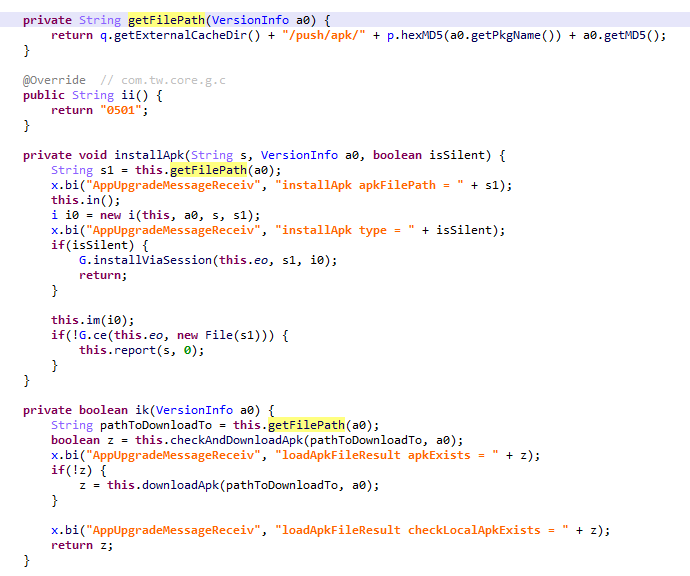
The APK file is downloaded to <TWCore external cache dir>/push/apk/ for installation.
The path TWCore uses to download APK files
Our telemetry revealed previously unknown malware at these file paths. On top of that, our data indicates that in every observed case, the malware was installed by an app with the package name com.tw.core, which matches the TWCore package name.
Next, we’ll break down the malware installed by TWCore: the JarService dropper.
Stage 1: the JarService dropper
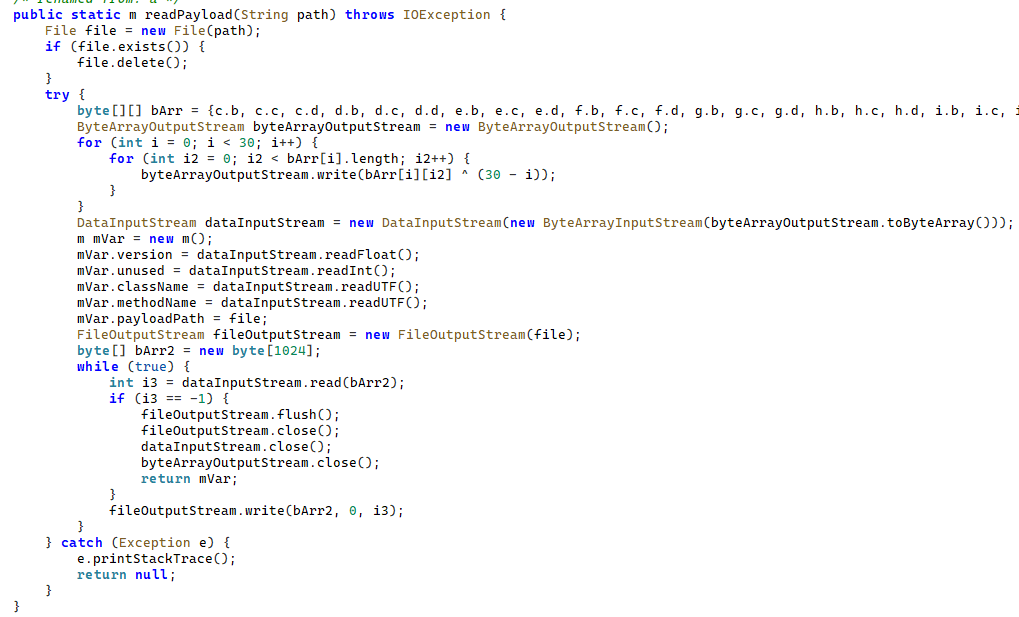
As mentioned earlier, JarService is a small dropper app with no UI of any kind. It decrypts data stored as encrypted blocks within the Trojan’s code. Each block is XOR-encrypted with a single-byte key that shifts linearly from block to block. The decrypted data contains serialized information about the payload version and entry point, along with the malware’s own code for further loading.
Decrypting and deserializing information about the stage 2 payload
In the version of JarService we analyzed, the entry point for the next-stage payload was the wa method of the com.c.j.qbh class.
Stage 2: the loader
This stage’s payload is a malicious loader. Its code contains encrypted strings that are later used as class names to execute the stage 3 payload using the reflection mechanism. The loader sends implant information to one of the attackers’ servers via a POST request. Example of a request to the C2 server:
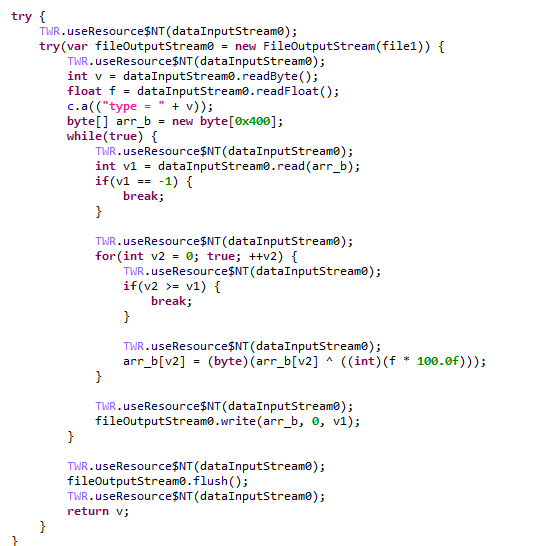
The Trojan uses the link in the dexUrl field of the data object to download serialized data for loading the next stage. This data begins with a single-byte integer, a key used to decrypt the strings in the loader’s code. Immediately following this number is a four-byte floating-point value used to XOR-decrypt the stage 3 payload, which itself is located after these keys.
Decrypting the stage 3 payload
In the decrypted payload, the entry point is the init method of the com.ast.sdk.BillingMain class, shown in the screenshot below.
Entry point of the stage 3 payload
While analyzing this stage, we noticed that the download link for the next-stage payload includes a version number. We decided to try other version numbers to retrieve different payload versions, and ultimately obtained seven distinct variants, which we list under “Indicators of Compromise” at the end of this report. The earliest version, numbered 3.57, uses a different decoding algorithm than the one described above. This may indicate that an earlier version of the infection chain used a different loader between JarService and the stage 3 payload.
Stage 3: clicker / reverse proxy loader
In this stage, the malware sends a POST request to /cpc/api/task every 90 minutes by default, containing information about the infected device (display resolution, device model, the SSID of the connected Wi-Fi network, MAC address, and so on) along with the Trojan’s configuration version. If the configuration is outdated, the C2 server returns an updated configuration containing new C2 addresses and new paths for sending HTTP requests. An example of a response is shown below. Note that at the time of our research, the most up-to-date configuration version was 3.82.
If the configuration version doesn’t need updating, the C2 server instead returns integer command identifiers, which the attackers refer to as productId. The Trojan maps each identifier to command information, which it stores as a serialized JSON object using the SharedPreferences API. Each identifier also has its own version, expressed as a UNIX timestamp. If the C2 response includes an unknown productId or one whose version is outdated, the malware sends a GET request to the attackers’ server at /cpc/api/xml to retrieve the command contents for all such identifiers. The C2 server responds with command information for each unknown identifier. An example of a response is shown below.
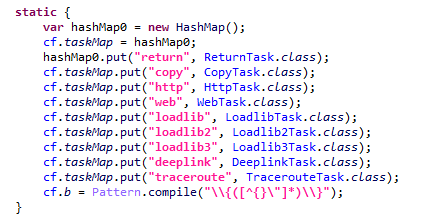
The command information includes a tagName field, which is the command name. The code maps each name to the corresponding class responsible for executing it.
List of executable commands
At the time of our research, the attackers had implemented nine commands. The table below lists command names, brief descriptions, and arguments. The functionality of these commands suggests that the malware can be used to display ads, commit ad fraud (serving as a clicker), and download additional malicious code.
Command name
Description
Arguments
return
Return a value from SharedPreferences.
key: the key whose value should be returned
copy
Set the contents of the clipboard.
text: the key whose value from SharedPreferences is returned as the clipboard contents url: a link for downloading gzip-compressed data (optional); this data is then concatenated with the value of the text key, with (5 spaces) used as a separator
http
Make a POST/GET HTTP request to a specified resource and, if instructed, save the response in SharedPreferences under a specified key.
url: the resource address method: the HTTP method name (optional) startLabel: a marker for the start of the data to save from the resource (optional) endLabel: a marker for the end of the data to save from the resource (optional) valueLabel: the key under which to save the value (optional) header: a dictionary of headers for the HTTP request (optional) content: the content of the POST request (optional)
web
Open a link in the WebView and execute arbitrary JavaScript code within it.
url: the link to open in the WebView js: base64-encoded JavaScript code to execute in the WebView; used when the url parameter is empty or absent corejs: JavaScript code to execute when the resource loads in the WebView (optional) param: a string dictionary of parameters for launching the WebView client: if this key is present, WebViewClient is used to handle redirects manually time: task timeout
loadlib
Not fully implemented at the time of publishing this report.
–
loadlib2
Download and execute arbitrary code.
url: the address to download the payload from name: the name of the module being downloaded md5: the MD5 hash of the payload clear: a comma-separated list of payload names to delete (optional) params: an array of parameters to launch the payload with className: the class name of the payload entry point method: the name of the virtual method at the payload entry point cmethod: the name of the static method used to instantiate the entry-point class (optional) thread: a flag; the payload runs in a separate thread if this flag is not set reload: a flag that, when set, restarts already loaded modules
loadlib3
Not fully implemented at the time of publishing this report.
–
deeplink
Open a resource in the browser.
url: a link to the resource
traceroute
Check resource availability via an ICMP ping.
host: comma-separated list of resources to check
However, attackers use only a relatively small subset of these commands in real-world attacks. As shown in the example C2 response above, at the time of publishing this report the attackers were using the loadlib2 and http commands. The payload downloaded via the loadlib2 command is a reverse proxy module named “zhima”, which researchers from the Nokia Deepfield Emergency Response Team independently discovered in TV set-top boxes around the same time as we did and also described in their report. This confirms that the attackers’ ultimate goal is building a proxy botnet.
While investigating this stage of the attack chain, we noticed that the zhima download link also included a version number. As with the previous stage, we tried other possible version numbers and found eight variants of the zhima module, the earliest of which was version 57. The complete list of identified zhima modules is provided under “Indicators of Compromise” below.
Attribution
While analyzing the complete infection chain, we noticed that the stage 2 loader created a thread with the meaningful name mosdk-host-loader. We decided to investigate what mosdk referred to in that name. This led us to a malicious app installed on various TV set-top boxes with the package name com.abc.nexus (3AD4BF5A86D26FFBF09CAE42AF330A98). It consists of several components (including a dropper similar to JarService), each used by the attackers to covertly monetize the device’s computing power. Each malicious component in the app corresponds to its own service, and the service containing the launch code for the JarService-like dropper is named AdmoyuService. In light of this and the name of the malicious thread found in the payload code, we concluded that moyu in the service name referred to MoYu Group, one of the actors linked to the BADBOX malware platform, which had been described by researchers at HUMAN. This assessment is further supported by extensive overlap between the malware’s network infrastructure and that of MoYu Group, which was independently identified by researchers from the Nokia Deepfield Emergency Response Team around the same time as our own research. Based on these similar naming patterns and prominent infrastructure overlap between the activity of MoYu Group and the attacks described in this report, we attribute it to the same actor with high confidence.
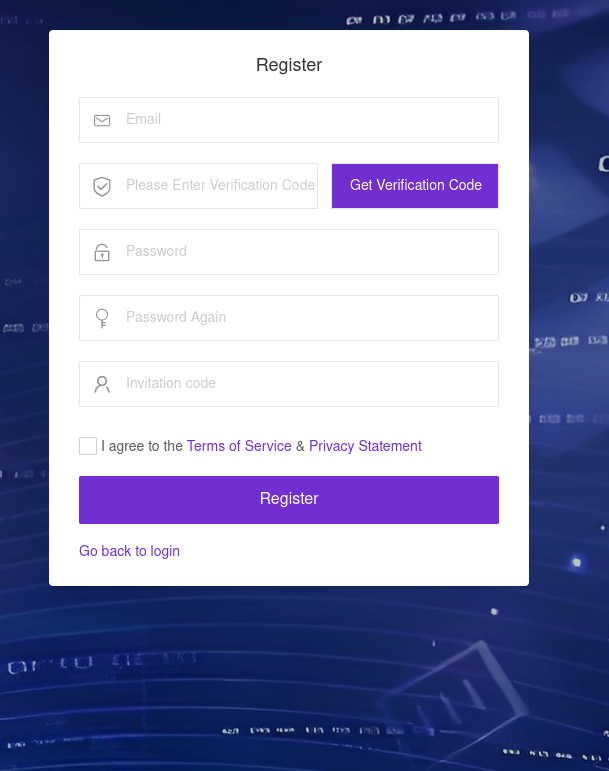
While investigating the malware downloaded by TWCore, we noticed that the domain admin.uipoxy[.]com resolved to the IP address 128.14.210[.]58, one of the C2 servers for the zhima reverse proxy module. It appears that the URL hxxp://admin.uipoxy[.]com/proxy/u/login hosts the zhima admin panel. Interestingly, this panel allows anyone to register as long as they have a valid invite code.
The malware operator registration page
During registration, users are prompted to review the terms of use and privacy policy. Both documents are hosted on links under the pxyedge[.]com domain, which belongs to PXYEDGE, a vendor specializing in the sale of residential proxies.
We found several similarities in the authentication APIs across all of these sites:
The sign-in page was hosted on an admin.* subdomain.
The sign-in page was located at /proxy/u/login.
The signup page was located at /proxy/register?channelKey=<invitation code>.
Based on this, we believe these services are connected to MoYu Group.
Conclusion
Despite efforts by cybersecurity professionals and law enforcement to shut down the BADBOX botnet, individual actors linked to it continue their malicious activity, infecting devices worldwide. Delivery methods for this kind of malware vary widely, from downloads via pre-installed backdoors to infected builds of IPTV apps. The case examined here demonstrates an even more sophisticated delivery method: distribution through the legitimate update functionality of a system application. Attackers are also actively expanding into new platforms. This malware is the first known malicious app targeting head units, which means these platforms now require protection against malware as well.
In February 2026, we discovered a set of malicious activities that had been ongoing since late 2025. These activities involved a RAT module written in Go with proxy capabilities, which served as the main stage of the attack. The attack targeted government and diplomatic entities in Southeast Asia and showed a level of sophistication that caught our attention.
During the attack, the main malware, dubbed GoSerpent, received an encrypted argument and started communicating with a remote server. It was also used to deploy further malicious tools to collect sensitive data and dump credentials on the system.
Monitoring the activities of this threat actor revealed that in May 2026, they came back with an evolved set of malicious tools: a new RAT and proxy tool, Stowaway, which resembled the initial malware, as well as an additional stealthy tool to exfiltrate sensitive data collected in the previous few months through network shares.
We found earlier versions of the GoSerpent backdoor used since 2021 against victims in Southeast Asia with relatively simpler code that received command-line arguments in plain text. Even though the newer variant is stealthier, the attackers continued using the simpler version alongside the latest one in their recent attacks.
What makes this threat particularly concerning is the strategic deployment of various tools with sophisticated data collection and exfiltration capabilities.
In this article, we introduce the malicious tools uncovered by us, which have been used since late 2025.
Technical details
Initial phase of the attacks
The initial phase of the attacks involved deployment of the GoSerpent backdoor, followed by additional malicious tools. During this phase, the main goal was to collect sensitive files and store them for future exfiltration, which was done by a data collecting tool, ThumbcacheService. The attackers also needed system credentials to exfiltrate the collected data through network drives at a later stage. This was achieved through a number of credential dumping tools deployed in this phase via the GoSerpent backdoor.
GoSerpent backdoor
The primary weapon in this campaign is the GoSerpent backdoor, a sophisticated Go-based remote access Trojan that has been active since at least 2021, with the most recent variant deployed in 2026.
This malware receives encrypted and base64-encoded command-line arguments containing a C2 server address and communication password, which are decrypted using AES-CBC mode with a fixed IV (31323334353637383930616263646566) and keys derived from predefined strings.
The backdoor connects to command-and-control servers using ChaCha20 encryption for communications, with the SHA256 hash of the communication password serving as the encryption key.
GoSerpent supports multiple C2 commands by receiving special command values. The commands include the following:
Command
Symbol (as derived from corresponding function names)
Description
2BA1
Sync
Respond to the server to show the infection is active
3BA2
Exit
Exit process
4BA3
Ls
Start listening on a port
5BA4
Connect
Connect to a remote server
6BA5
Hello
Create a shell on the infected machine
7BA6
Ul
Upload a file or directory to the server
8BA7
Dl
Download from the server
9BA8
Ss5
Start a SOCKS5 proxy on the infected machine
ABA9
Cl
Close a listening port
CBAB
RF
Forward to a connected node
GoSerpent can establish SOCKS5 proxy servers to route traffic through compromised hosts, enabling attackers to access other networks while masking their true IP addresses. The backdoor is capable of deploying additional malicious tools, including ThumbcacheService for file collection, Mimikatz for credential dumping, and QuarksDumpLocalHash for local account password hash extraction. The malware exhibits strong persistence mechanisms and uses filenames that mimic legitimate system processes such as lass.exe and updates.exe to evade detection.
McMx RAT
McMx is a basic Go-based proxy and remote access tool that represents a simpler variant of the GoSerpent backdoor, apparently compiled from a different GitHub repository path.
Unlike the latest variant of GoSerpent, which uses encrypted command-line arguments, McMx receives input parameters from text files in plaintext format — in a way that resembles older versions of GoSerpent. The malware features similar function names with apparent typos present in both tools.
Before executing McMx, attackers manipulate batch files to generate configuration files containing C2 parameters. The patterns observed show the use of echo commands to create configuration files with parameters like remote host addresses, ports, and secret keys. The McMx malware is then deployed with this configuration.
The tool shares core functionalities with GoSerpent, including:
SOCKS5 proxying
port forwarding
file transfer
remote shell capabilities
Data collection and credential dumping tools
Following initial deployment of the GoSerpent backdoor, attackers typically wait several days before utilizing it to download and execute additional malware components for data collection and credential dumping.
ThumbcacheService
ThumbcacheService is a malicious DLL deployed as a Windows service that functions as a sophisticated file collection mechanism within the GoSerpent ecosystem. The malware employs XOR encryption with a single-byte key of 0x13 for string obfuscation. It decrypts embedded strings and creates a database file named thumbcache_605a.db in the C:\Users\Public\ directory to store collected sensitive files. It specifically targets documents with the following extensions: .doc, .docx, .pdf, .xls and .xlsx.
The targeted files are then archived using 7-Zip and protected with a predefined password @vx0a9n5W2M0c3D6.#, enforcing a 20MB size limit for archives.
The malicious service also monitors the $Recycle.Bin directory for deleted files with the extensions of interest, ensuring comprehensive data collection.
Credential dumping tools
The threat actor deploys the following tools via GoSerpent backdoor to dump credentials:
Mimikatz — dumps memory from the LSASS process to extract credential material, including cached credentials and Kerberos tickets.
QuarksDumpLocalHash — extracts local account password hashes from the SAM registry hive, allowing for offline password cracking attacks.
These tools work together to maximize information extraction from compromised systems. The stolen credentials were used in later stages of the attack to facilitate the exfiltration of sensitive files collected by ThumbcacheService.
Second stage of the attacks
After the initial phase of the malware deployments, the attackers allowed a few weeks for the ThumbcacheService to silently collect sensitive files without exfiltrating them. In the meantime, the credential dumping tools also continued to steal credentials. In May 2026, the threat actor came back with a set of new tools. The main malware of this round of activity was another Go-based RAT and proxy tool, Stowaway. It was used to deploy the two-stage data exfiltration tool TmcLoader/TmcPayload, which was the last piece of the data theft puzzle.
Stowaway
Stowaway is a proxy and remote access tool compiled from an open-source framework with customized functions to make the infection stealthier. This malware features both network admin and agent capabilities, enabling attackers to establish chained proxy paths across multiple hosts with the following functionalities:
SOCKS5 proxying
port forwarding
reverse tunneling
remote shell access
file transfer
SSH-based tunneling
Communications are transported over TCP, HTTP, or WebSocket channels protected by AES-256-GCM or TLS encryption.
As the next step, the attackers deliver two files to the victim machine via Stowaway:
TmcLoader with an embedded payload
{BBF061R2-BE25-4F6D-8B2D-1A6A39C3FSA2}.db — an encrypted configuration file
TmcLoader/TmcPayload
TmcLoader is a stealthy C++ loader module registered as a Windows service. The malware embeds an encrypted payload dubbed TmcPayload within its .data section, which is decrypted and loaded into the memory space of the svchost process to maintain persistence and avoid detection.
TmcLoader employs dynamic API resolution through a circular XOR encryption, where each byte is XORed with the value of the subsequent byte, combined with Base64 encoding for string obfuscation to hide API names.
The loader creates a unique event to prevent multiple infections on the same system. After that, it extracts and decrypts the embedded TmcPayload. This payload component is responsible for exfiltrating sensitive data from the victim’s machine.
TmcPayload generates a file path from an obfuscated string:
C:\Users\Public\Libraries\{BBF061R2-BE25-4F6D-8B2D-1A6A39C3FSA2}.db.
It then checks for the existence of this configuration file. If the file doesn’t exist, it delays execution for a random period of time before rechecking. The configuration file contains encrypted network share credentials and destination paths for data exfiltration. It specifically references the thumbcache_605a.db file created by ThumbcacheService as the file to be exfiltrated, demonstrating the integrated nature of the attack chain.
Toolset integration
What distinguishes this threat actor’s approach is the deliberate integration between different components of their toolset. The chain from ThumbcacheService to TmcLoader/TmcPayload demonstrates sophisticated operational planning:
ThumbcacheService: deployed via GoSerpent, collects and archives sensitive files into the thumbcache_605a.db database file.
Credential dumping tools: deployed via GoSerpent to retrieve system credentials.
Configuration file: delivered via Stowaway, contains credentials and file paths for data exfiltration.
TmcLoader/TmcPayload: deployed via Stowaway, reads the configuration file for data exfiltration.
Data transfer: using network credentials and destination paths from the configuration file, TmcPayload transfers the exact same thumbcache_605a.db.
This integration shows that the threat actor has carefully orchestrated their tools to work together seamlessly, ensuring that data collected by one component is available for exfiltration by another component.
Infrastructure
The malware operators leverage legitimate hosting providers, including Alibaba Cloud and UCLOUD HK, for their command-and-control infrastructure. The use of legitimate hosting platforms demonstrates operational security awareness, making detection more challenging.
The technical similarities between GoSerpent and the newer Stowaway tools strongly suggest the threat actor’s deep familiarity with network proxy technologies. The consistent use of legitimate domain names as secret keys, with GoSerpent employing www.microsoft.com and www.spacex.com and Stowaway utilizing github.code, indicates a standardized operational methodology.
Attribution
While the exact attribution of the GoSerpent campaign remains uncertain, there are indications of a potential link to the TetrisPhantom threat actor. The similarities in victim targeting, technical capabilities, and operational methodologies suggest a possible connection. However, further investigation is necessary to confirm this association.
Conclusion
The GoSerpent campaign represents a sophisticated and evolving threat to government and diplomatic entities in Southeast Asia. The threat actor’s use of customized tools, such as the GoSerpent backdoor, Stowaway, and TmcLoader, demonstrates a high degree of technical expertise and operational planning. The integration of these tools to collect and exfiltrate sensitive data highlights the actor’s focus on long-term access and intelligence gathering. As the threat landscape continues to shift, it is essential for organizations to remain vigilant and implement robust security measures to detect and prevent such attacks. By understanding the tactics, techniques, and procedures (TTPs) employed by this threat actor, defenders can better prepare themselves to counter similar threats in the future.
This is a foolproof guide to intercepting traffic from mobile applications built on Flutter, which historically have been especially challenging to intercept.
Darin Roberts// IP-Go-Round – Source IP Rotation I was on an engagement recently that was blocking my password sprays based on my IP address. If I made 3 incorrect requests […]

 Login