

Normal view

Toy Ghouls’ new toy: the GenieLocker ransomware

30 July 2026 at 10:00

Introduction

The new GenieLocker ransomware family has been active since March 2026. It has been used in attacks against organizations in the Russian Federation, primarily in the manufacturing sector, and attributed to the Toy Ghouls group by open-source intelligence (link in Russian).

The Toy Ghouls, also known as Bearlyfy, Labubu and Laboo.boo, is a financially motivated extortion group, which previously relied on third-party encryption Trojans like RedAlert, LockBit, and Babuk. GenieLocker, apparently a custom design, upgrades their toolkit and reduces their reliance on third-party software. We discovered multiple samples of this Trojan in two variants: PE builds for Windows and ELF builds for Linux and ESXi.

Technical details

Modus operandi

We described typical TTPs and modus operandi of the Toy Ghouls threat actor in the previous post (link in Russian).

In this article, we aim to thoroughly describe the capabilities of Windows and Linux builds of the custom encryption Trojan GenieLocker. To give more context, we will also provide a brief overview of the attack that took place at the end of March 2026, where GenieLocker was deployed on the victim’s systems.

Initial Access

During the incident, the attackers first entered the environment through an OpenVPN connection originating from an external partner’s network. They likely exploited the trusted relationship with that partner and used stolen, yet still valid, credentials to connect.

Discovery and Credential Access

After breaching the target’s network, the attackers installed additional tools on the compromised hosts, including OpenSSH, socks5.exe, SoftPerfect Network Scanner, and Mimikatz. They employed SoftPerfect Network Scanner for discovery and used Mimikatz to dump credentials. Forensic analysis also shows that they accessed the KeePassXC password manager already installed on several compromised machines, likely attempting to extract the stored credentials from the KeePass databases.

Lateral Movement and Command and Control

Lateral movement was performed by using RDP to reach Windows machines and SSH for Linux servers. The widespread deployment of the encryption Trojan was conducted with the legitimate utilities PsExec and PAExec. Additionally, the attackers established a reverse SSH tunnel to communicate with their command‑and‑control server.

Impact

During the impact phase, the attackers encrypted files on the compromised Windows machines with the PE version of the GenieLocker ransomware. On the compromised Linux and ESXi servers, they stopped active virtual machines and encrypted their disks using the ELF version of GenieLocker.

The tactics, techniques, and procedures seen here match those documented in earlier attacks attributed to the Toy Ghouls group. As in those prior incidents, forensic analysis found no evidence of data exfiltration, which is typical behavior for this threat actor. Toy Ghouls have not employed a double‑extortion model and do not run a data‑leak website.

Encryption Trojan for Windows

The Windows version of GenieLocker (MD5: 5d62c1349b8981c396c9a23f4f8f053c) is primarily written in C, but compiled with the C++ libraries using Microsoft Visual C/C++. The malware incorporates several ransom‑related capabilities, including process termination, service shutdown, debugger evasion, and a sophisticated encryption routine. For its cryptographic operations, it relies on the open‑source libsodium library.

Aligned with the recent trend supported by our expertise, as observed in attacks of some other ransomware strains, GenieLocker doesn’t save the ransom notes on the victim’s system. The Trojan doesn’t contain any attackers’ contact info or negotiation addresses. Instead, the attackers will need to deliver the ransom demands and contacts manually during the attack. This approach may be an attempt by the GenieLocker developers to avoid proactive detection of the ransomware process being triggered by the creation of multiple readme files.
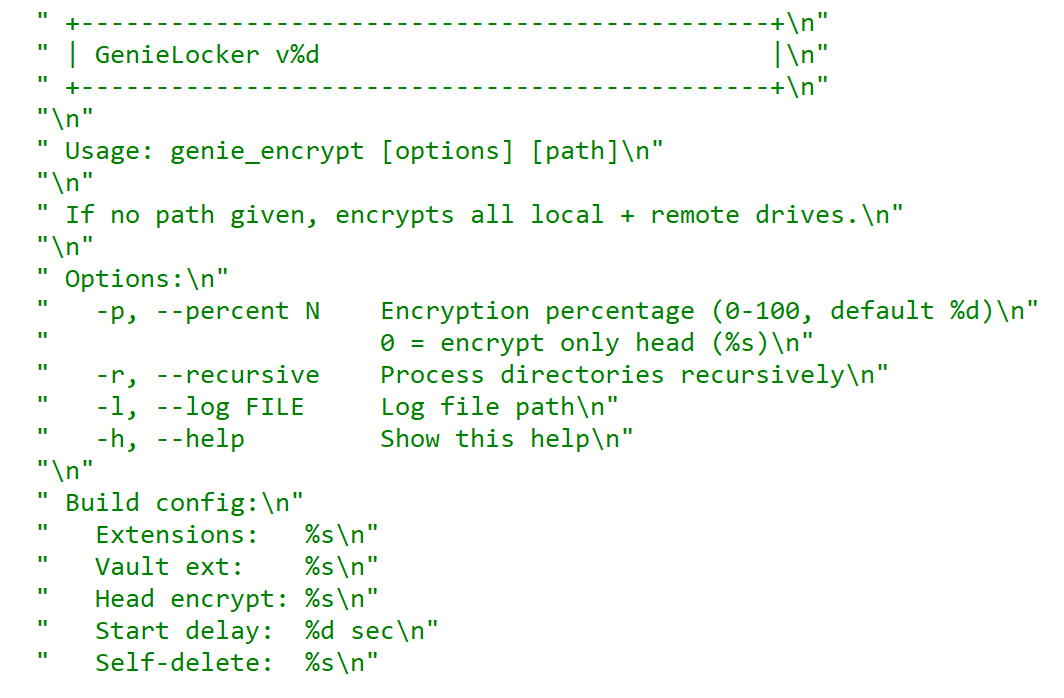
GenieLocker help message

GenieLocker help message

Arguments and launch

GenieLocker supports multiple arguments for configuring its behavior.

Argument Description
First argument “Secret” argument, hex string value
-p, –percent N Percentage of file content to encrypt
-r, –recursive Process directories recursively
-l, –log <filename> Set path for log file
-h, –help Show help message
Last argument Path to encrypt

GenieLocker expects the first argument to be a hex string referred to in the malware code as the “secret argument”, which is required for the ransomware to start. Most likely, the purpose of this is to avoid execution on sandboxes and other automated analysis environments. Another reason may be to prevent unauthorized usage by other threat actors.
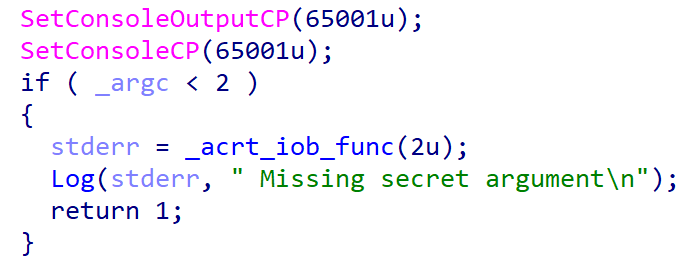
Checking the secret argument

Checking the secret argument

The secret argument is a hex value with a variable size that does not exceed 4096 bytes. This hex string value is converted to bytes and hashed with the SHA‑256 algorithm. The result is compared to a hardcoded value. If they match, the literal string session is appended to the secret value, and the whole string is hashed with BLAKE2b‑256, but the resulting hash is never used. This may be a part of a feature still in development.

Secret value hashing

Secret value hashing

Anti-debugging

GenieLocker contains multiple methods to inspect if its process is under debugging. After launch it makes the first check named Environment check and uses WinAPI functions IsDebuggerPresent and CheckRemoteDebuggerPresent to detect the debugger.
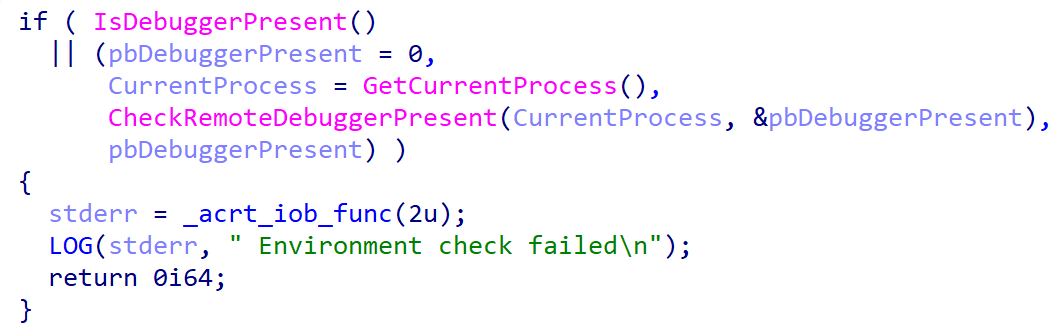
Environment check

Environment check

After the secret argument validation, GenieLocker starts a new parallel thread called watchdog. It runs in an infinite loop that performs a number of checks to detect well-known debuggers every 500 milliseconds. If at least one of the checks fails, the whole GenieLocker process immediately terminates.
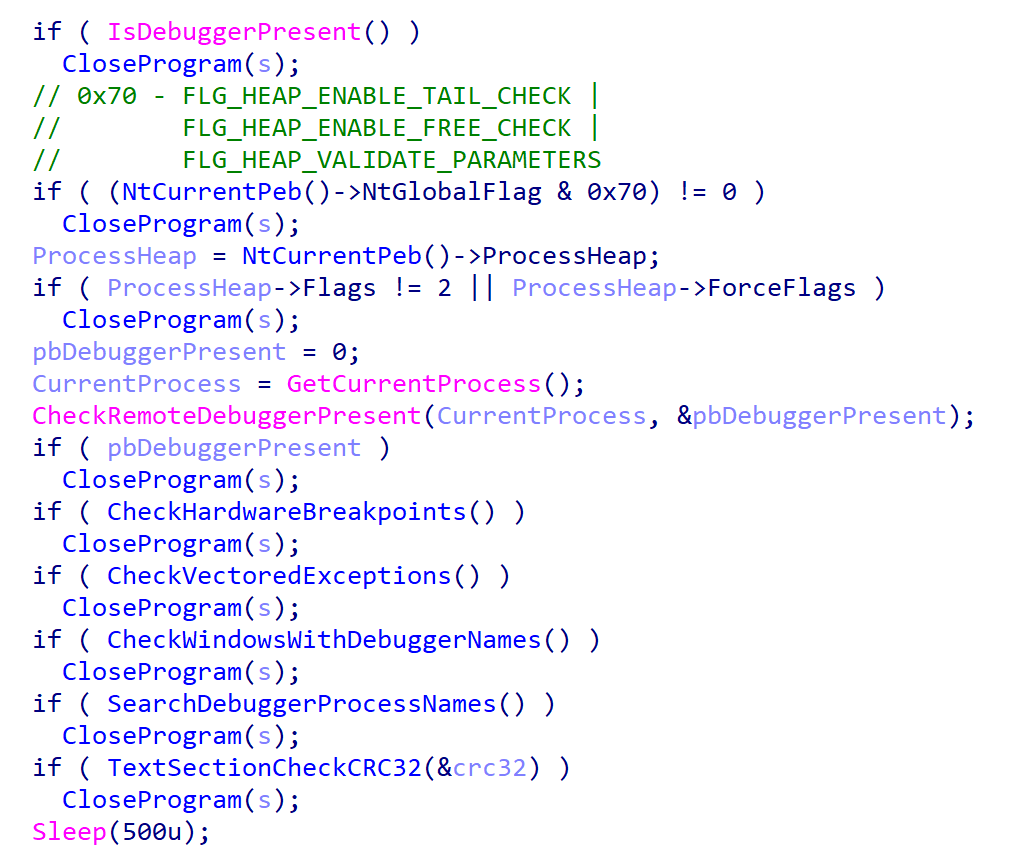
Watchdog checks

Watchdog checks

The only thing worth elaborating on is that the GenieLocker process calculates the CRC32 of its .text section when the watchdog thread is starting, saves the resulting hash, and then recalculates it again in every loop and compares with the initial value. In case the code in this section is modified by the debugger or other program, this method allows the Trojan to detect this modification.

Preparing for encryption

GenieLocker contains multiple exclusion lists. For example, it does not encrypt folders with names from the list below. Among those, there are mostly system folders, which are skipped to avoid corrupting the OS.

$recycle.bin;config.msi;$windows.~bt;$windows.~ws;windows;boot;program files;program files (x86);programdata;system volume information;tor browser;windows.old;intel;msocache;perflogs;x64dbg;public;all users;default;microsoft;appdata

The Trojan also avoids encrypting the following system Windows files.

autorun.inf;boot.ini;bootfont.bin;bootsect.bak;desktop.ini;iconcache.db;ntldr;ntuser.dat;ntuser.dat.log;ntuser.ini;thumbs.db;GDIPFONTCACHEV1.DAT;d3d9caps.dat

The file extensions below are excluded from encryption as well.

386;adv;ani;bat;bin;cab;cmd;com;cpl;cur;deskthemepack;diagcab;diagcfg;diagpkg;dll;drv;exe;hlp;icl;icns;ico;ics;idx;ldf;lnk;mod;mpa;msc;msp;msstyles;msu;nls;nomedia;ocx;prf;ps1;rom;rtp;scr;shs;spl;sys;theme;themepack;wpx;lock;key;hta;msi;pdb;search-ms;MD

Furthermore, the Trojan contains an exclusion list for host names. The malware retrieves the computer name using GetComputerNameA and checks it against this list, but in the sample in question, the list is empty.

Output for whitelisted hosts

Output for whitelisted hosts

If the host name is not excluded, GenieLocker starts to kill processes that could be using the files of interest and therefore prevent the Trojan from encrypting them. These processes are listed below. The Trojan stops them by using the TerminateProcess function.

sql;oracle;ocssd;dbsnmp;synctime;agntsvc;isqlplussvc;xfssvccon;mydesktopservice;ocautoupds;encsvc;firefox;tbirdconfig;mydesktopqos;ocomm;dbeng50;sqbcoreservice;excel;infopath;msaccess;mspub;onenote;outlook;powerpnt;steam;thebat;thunderbird;visio;winword;wordpad;notepad;calc;wuauclt;onedrive;1c;vmwp;vmms;vmcompute;mssqlserver

Additionally, the Trojan stops the following services using ControlService with the SERVICE_CONTROL_STOP control code.

vss;sql;svc$;memtas;mepocs;msexchange;sophos;veeam;backup;GxVss;GxBlr;GxFWD;GxCVD;GxCIMgr;1c;Mssqlserver;vmwp;vmms;vmcompute;mssqlserver;agent_ovpnconnect

Finally, GenieLocker starts encryption threads and searches for all available drives, including network shares, to encrypt them.
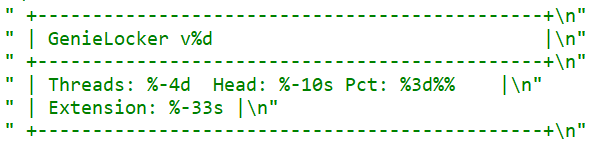
Threads info output

Threads info output

File encryption and cryptography

The extension for the encrypted files is hardcoded in the Trojan’s body. In the sample under review, it is .03ffc1c4a3da0f02. Before starting to encrypt each file, GenieLocker creates two auxiliary files:

  • a lock file: <filename.fileext>.03ffc1c4a3da0f02.lock
  • a journal: <fileext>.03ffc1c4a3da0f02.journal

The lock file helps to protect files from double encryption by other threads or instances. Inside this file, the Trojan stores the current PID obtained from the GetCurrentProcessId function.

The journal file contains the hardcoded string VCJOURN, value 1 (possibly version), some unused zeroed fields, total blocks to encrypt, and the count of blocks that are actually encrypted. The last field is a CRC32 hash sum for the integrity check of the journal content.
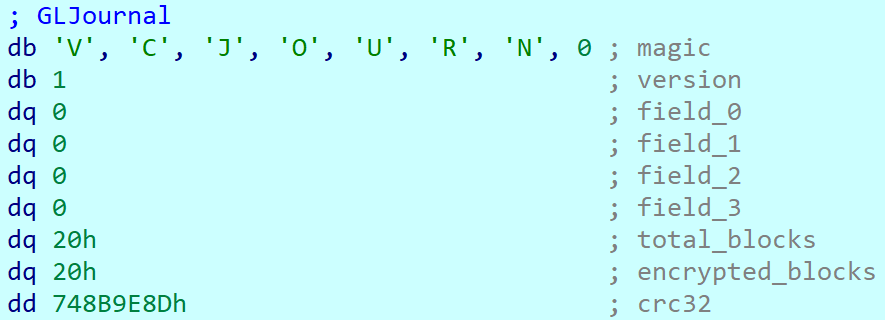
Journal content

Journal content

By default GenieLocker encrypts files using 0x1000000-byte chunks. If the argument -p is passed (it sets the percentage of the file contents to be encrypted), the ransomware calculates how many chunks with 0x1000000 size are necessary to encrypt the specified percentage. Each chunk has a random position inside the file. Regardless of whether the percentage is set, even if it is zero, the first chunk in the beginning of the file will be encrypted anyway.

The Trojan encrypts the file content using the Authenticated Encryption with Associated Data (AEAD) algorithm XChaCha20-Poly1305, with a unique key and nonce for each file. The Trojan also adds a footer that contains the data necessary for future decryption and metadata. The metadata parts are encrypted using the same cipher and key as the file contents, but with a different nonce. The file key is encrypted using the Curve25519-XSalsa20-Poly1305 scheme, with the attackers’ master public key hardcoded in the Trojan’s body.

The metadata of each encrypted file contains the following fields.

Value or name Size (bytes) Description
version 1 Hardcoded byte with value 1, most likely the version.
encryption_percent 1 Percentage of file content to encrypt, value from -p argument.
file_nonce 24 Nonce used during encryption of the file content.
original_filesize 8 Original size of the file before encryption.
total_chunk_count 8 Max count of chunks inside the current file.
chunk_size 4 Size of a single encrypted chunk (by default, 0x1000000 bytes on Windows and 0x400000 on ESXi and Linux).
remain_size 4 The number of bytes remaining after splitting the file content into chunks.
blake2b_digest_of_chunks 32 BLAKE2b-256 hash calculated from the original data of all chunks before they are encrypted. Used for integrity checks.
chunk_count 4 Number of chunks that were encrypted.
extension 64 A string with the additional ransomware extension.
poly1305_tags (array) 16 bytes per chunk Array of Poly1305 tags of encrypted chunks.
bitmask varies, one bit per each chunk Chunks bitmask; if set, the chunk is encrypted; otherwise, it is not.

The chunks bitmask contains as many bits as the maximum number of chunks inside a file at 100%. If a bit at a specific index is set to 1, the chunk is encrypted. The value 0 means that the chunk is not encrypted. Since the Trojan encrypts files based on the percentage value, it needs to know which chunks were encrypted.
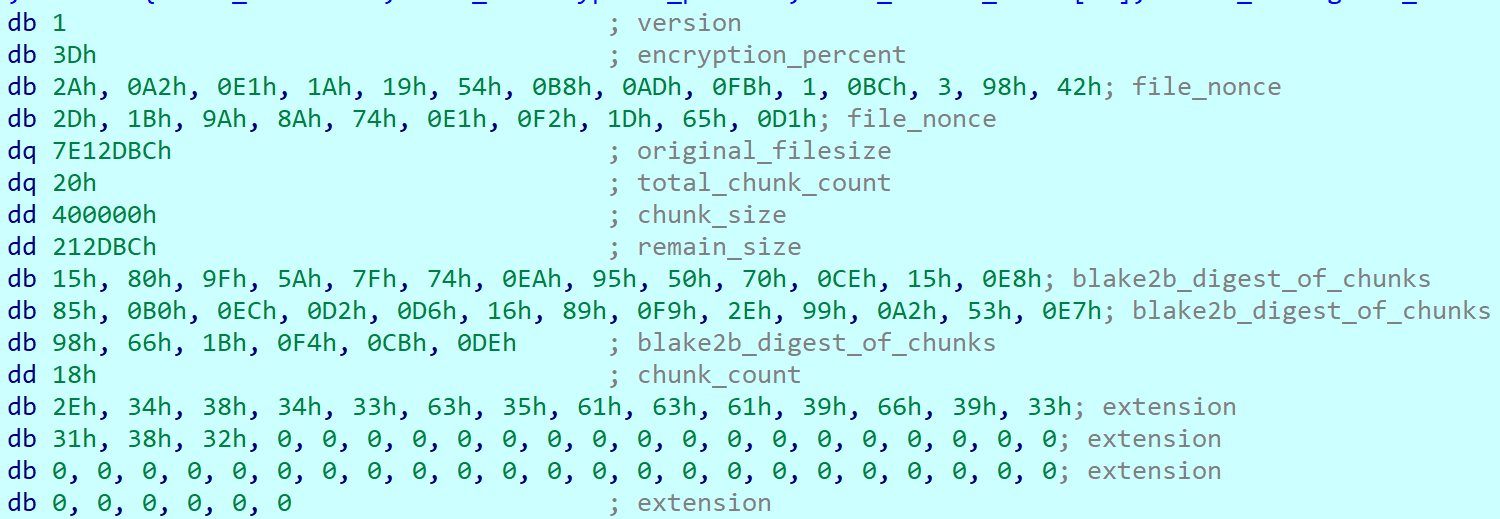
Metadata structure at the end of an encrypted file (without a Poly1305 tags array or bitmask)

Metadata structure at the end of an encrypted file (without a Poly1305 tags array or bitmask)

Encryption Trojan for ESXi and Linux

Compared with its Windows counterpart, the Linux and ESXi version of GenieLocker (MD5: 9201e35e2993612612919a3c71302cab) is simpler: there is no secret argument, anti‑debugging techniques, or exclusion lists. However, the sample has ESXi-specific features, such as double‑fork support and the ability to modify the Welcome Message. The sample has the version v1 and, similarly to the Windows version, uses the libsodium library for cryptography.
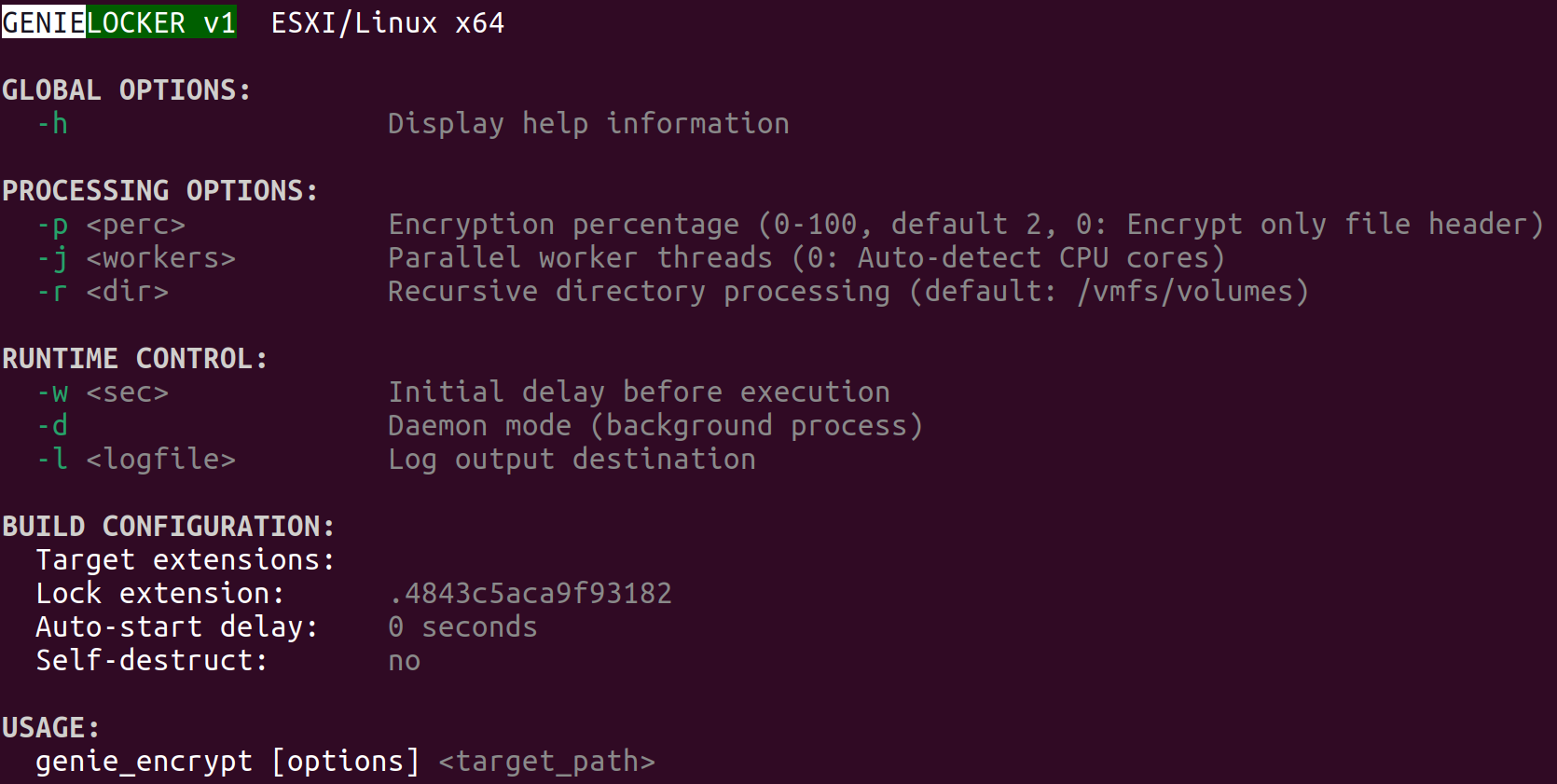
ESXi version description

ESXi version description

The command‑line help output mirrors LockBit’s styling, reinforcing the theory that GenieLocker’s creators set out to craft a LockBit‑style replacement for their own operations.
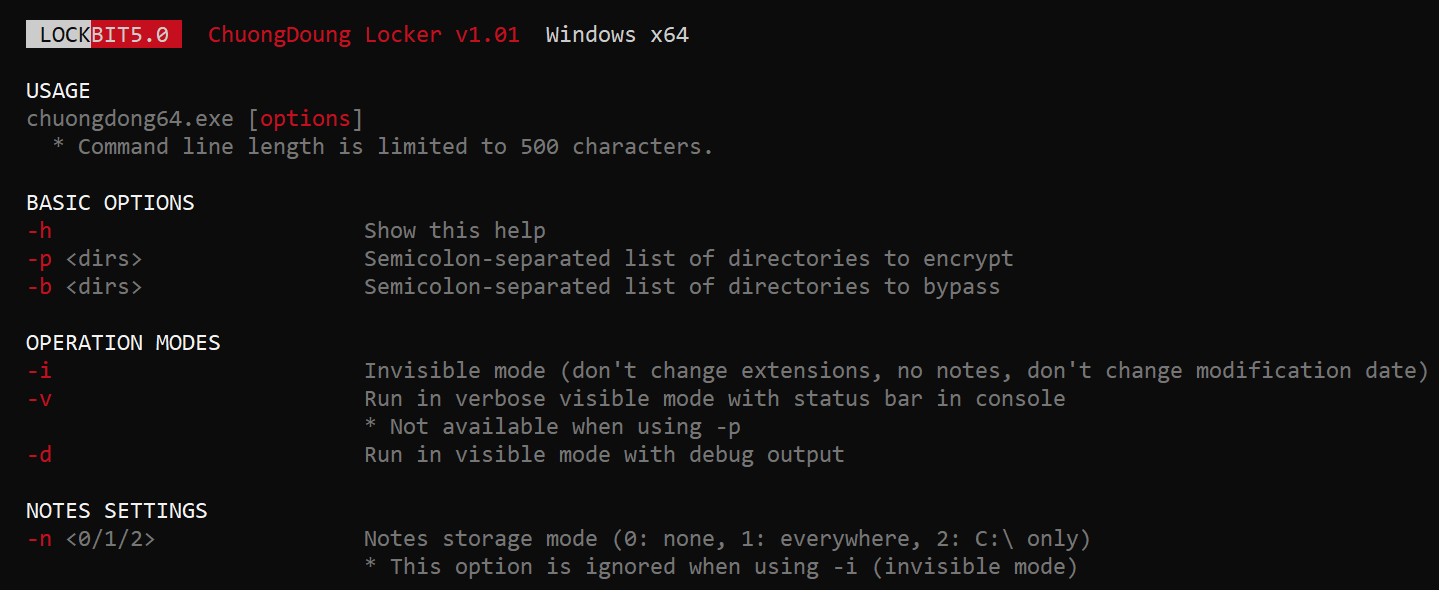
LockBit output design, possibly the source layout for the GenieLocker ESXi variant

LockBit output design, possibly the source layout for the GenieLocker ESXi variant

Based on the default path of the encryption directory /vmfs/volumes, we can assume that this version is intended primarily for ESXi. Nonetheless, it can still be executed on Linux distributions.

Argument Description
-p <perc> Percentage of file content to encrypt
-j <workers> Number of encryption threads
-r <dir> Process directories recursively
-w <sec> Delay before start
-d Daemonizing the process
-l <logfile> Path to log file

ESXi and Linux features

This build allows daemonizing its process with the -d flag, employing the classic double‑fork method so the new process becomes fully detached from its parent.

This variant also modifies the /etc/vmware/welcome file, which contains the Welcome Message (Message of the Day) on the ESXi operating system. On Linux distributions, it does not change anything, because they use different paths for the Message of the Day. In the GenieLocker sample examined here, the message is left empty.

Additionally, the ESXi version supports a few basic features that are not included in the Windows version. For instance, there is a launch‑delay option and the ability to set the number of encryption worker threads. This build also includes several features that already exist in the Windows variant, such as configuring the percentage of a file to encrypt, choosing the target directory, and setting the log file location.

File encryption

The encryption scheme for files is identical to the Windows version. The Trojan uses XChaCha20-Poly1305 to encrypt the file content and metadata, and Curve25519-XSalsa20-Poly1305 for key encryption.
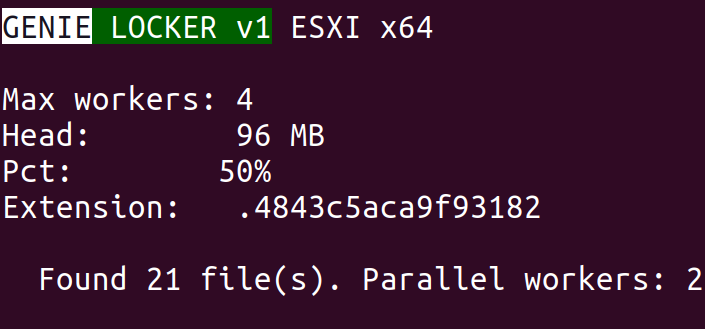
File encryption summary

File encryption summary

Victims

According to KSN telemetry, GenieLocker detections are overwhelmingly concentrated on endpoints located in the Russian Federation. In the March 2026 campaign, the primary sector under siege was manufacturing, with construction trailing closely, followed by financial services, retail, and technology.

Conclusions

Toy Ghouls are ramping up their campaign against Russian enterprises. The rollout of their home‑grown encryption Trojan GenieLocker marks a major upgrade to the group’s ransomware toolkit. By engineering bespoke ransomware that runs natively on Windows, Linux, and ESXi, the actor has cut their dependence on off‑the‑shelf ransomware families and unified the cryptographic backbone across all targeted platforms.

Kaspersky’s products detect this malware as Trojan-Ransom.Win64.Agent.genie, HEUR:TrojanRansom.Win64.Generic, Trojan-Ransom.Linux.Agent.genie.

Indicators of compromise

Additional information about this threat is available to customers of the Kaspersky Threat Intelligence Reporting service. Contact: intelreports@kaspersky.com.

GenieLocker for Windows

A50EAAF514F4F84E61CA2455A8789753 kftd.exe, genie_encrypt.exe
F08F476F26B01D142CA73923DE65FC0C
FD46A80C2F45577263328984EDF7F4DC
DE3CFBB50F66079BFEE20A6F64E59433
780C8F4C6F077DA4DA96582987920362
D87D0B01D95ACC936B7DC47B8F41937A run.exe, genie_encrypt.exe
34A7F28E0BB69B0D49BACC88BDF20AC1 run.exe, run2.exe, genie.exe
5D62C1349B8981C396C9A23F4F8F053C genie_encrypt.exe
A8842616C9057D5CF6E1FE1FA8C3C160
34B8828635F88078735799A3C1AC8E28
D3E06EB34D8EEE7EF92CAC3AD0A20FF5
C68B6862725777651085650DB34947FC consultant.exe
9CD514FF2809CE0B993E3B8649E82A94
824CA1E906CC073EE5B0F3519DF69A8F
25480DAD40152EF3D0C6D38EECC9BD9B
7DAD78584795AA5C160520CC6ACCF260
18F61C6D686CFFD131C9FD3F3437064B tempo.exe, kernel.exe
9969A8221312DBA70DD5CBDDF83A146C
F7B9E36E94163A9A303160945F99267A
B893EAFED0659F70D4AC250F09073723
D661CF666B9ACBAB7CFEAE1127A261A9 genie.exe
3A4479B51890373BFC4A011EF41FE376
58C0DDA52B8F069660166D61FD74F911

GenieLocker for Linux and ESXi

9201E35E2993612612919A3C71302CAB vzdump

C2
89[.]125.66.101

Toy Ghouls’ new toy: the GenieLocker ransomware

30 July 2026 at 10:00

Introduction

The new GenieLocker ransomware family has been active since March 2026. It has been used in attacks against organizations in the Russian Federation, primarily in the manufacturing sector, and attributed to the Toy Ghouls group by open-source intelligence (link in Russian).

The Toy Ghouls, also known as Bearlyfy, Labubu and Laboo.boo, is a financially motivated extortion group, which previously relied on third-party encryption Trojans like RedAlert, LockBit, and Babuk. GenieLocker, apparently a custom design, upgrades their toolkit and reduces their reliance on third-party software. We discovered multiple samples of this Trojan in two variants: PE builds for Windows and ELF builds for Linux and ESXi.

Technical details

Modus operandi

We described typical TTPs and modus operandi of the Toy Ghouls threat actor in the previous post (link in Russian).

In this article, we aim to thoroughly describe the capabilities of Windows and Linux builds of the custom encryption Trojan GenieLocker. To give more context, we will also provide a brief overview of the attack that took place at the end of March 2026, where GenieLocker was deployed on the victim’s systems.

Initial Access

During the incident, the attackers first entered the environment through an OpenVPN connection originating from an external partner’s network. They likely exploited the trusted relationship with that partner and used stolen, yet still valid, credentials to connect.

Discovery and Credential Access

After breaching the target’s network, the attackers installed additional tools on the compromised hosts, including OpenSSH, socks5.exe, SoftPerfect Network Scanner, and Mimikatz. They employed SoftPerfect Network Scanner for discovery and used Mimikatz to dump credentials. Forensic analysis also shows that they accessed the KeePassXC password manager already installed on several compromised machines, likely attempting to extract the stored credentials from the KeePass databases.

Lateral Movement and Command and Control

Lateral movement was performed by using RDP to reach Windows machines and SSH for Linux servers. The widespread deployment of the encryption Trojan was conducted with the legitimate utilities PsExec and PAExec. Additionally, the attackers established a reverse SSH tunnel to communicate with their command‑and‑control server.

Impact

During the impact phase, the attackers encrypted files on the compromised Windows machines with the PE version of the GenieLocker ransomware. On the compromised Linux and ESXi servers, they stopped active virtual machines and encrypted their disks using the ELF version of GenieLocker.

The tactics, techniques, and procedures seen here match those documented in earlier attacks attributed to the Toy Ghouls group. As in those prior incidents, forensic analysis found no evidence of data exfiltration, which is typical behavior for this threat actor. Toy Ghouls have not employed a double‑extortion model and do not run a data‑leak website.

Encryption Trojan for Windows

The Windows version of GenieLocker (MD5: 5d62c1349b8981c396c9a23f4f8f053c) is primarily written in C, but compiled with the C++ libraries using Microsoft Visual C/C++. The malware incorporates several ransom‑related capabilities, including process termination, service shutdown, debugger evasion, and a sophisticated encryption routine. For its cryptographic operations, it relies on the open‑source libsodium library.

Aligned with the recent trend supported by our expertise, as observed in attacks of some other ransomware strains, GenieLocker doesn’t save the ransom notes on the victim’s system. The Trojan doesn’t contain any attackers’ contact info or negotiation addresses. Instead, the attackers will need to deliver the ransom demands and contacts manually during the attack. This approach may be an attempt by the GenieLocker developers to avoid proactive detection of the ransomware process being triggered by the creation of multiple readme files.

GenieLocker help message

GenieLocker help message

Arguments and launch

GenieLocker supports multiple arguments for configuring its behavior.

Argument Description
First argument “Secret” argument, hex string value
-p, –percent N Percentage of file content to encrypt
-r, –recursive Process directories recursively
-l, –log <filename> Set path for log file
-h, –help Show help message
Last argument Path to encrypt

GenieLocker expects the first argument to be a hex string referred to in the malware code as the “secret argument”, which is required for the ransomware to start. Most likely, the purpose of this is to avoid execution on sandboxes and other automated analysis environments. Another reason may be to prevent unauthorized usage by other threat actors.

Checking the secret argument

Checking the secret argument

The secret argument is a hex value with a variable size that does not exceed 4096 bytes. This hex string value is converted to bytes and hashed with the SHA‑256 algorithm. The result is compared to a hardcoded value. If they match, the literal string session is appended to the secret value, and the whole string is hashed with BLAKE2b‑256, but the resulting hash is never used. This may be a part of a feature still in development.

Secret value hashing

Secret value hashing

Anti-debugging

GenieLocker contains multiple methods to inspect if its process is under debugging. After launch it makes the first check named Environment check and uses WinAPI functions IsDebuggerPresent and CheckRemoteDebuggerPresent to detect the debugger.

Environment check

Environment check

After the secret argument validation, GenieLocker starts a new parallel thread called watchdog. It runs in an infinite loop that performs a number of checks to detect well-known debuggers every 500 milliseconds. If at least one of the checks fails, the whole GenieLocker process immediately terminates.

Watchdog checks

Watchdog checks

The only thing worth elaborating on is that the GenieLocker process calculates the CRC32 of its .text section when the watchdog thread is starting, saves the resulting hash, and then recalculates it again in every loop and compares with the initial value. In case the code in this section is modified by the debugger or other program, this method allows the Trojan to detect this modification.

Preparing for encryption

GenieLocker contains multiple exclusion lists. For example, it does not encrypt folders with names from the list below. Among those, there are mostly system folders, which are skipped to avoid corrupting the OS.

$recycle.bin;config.msi;$windows.~bt;$windows.~ws;windows;boot;program files;program files (x86);programdata;system volume information;tor browser;windows.old;intel;msocache;perflogs;x64dbg;public;all users;default;microsoft;appdata

The Trojan also avoids encrypting the following system Windows files.

autorun.inf;boot.ini;bootfont.bin;bootsect.bak;desktop.ini;iconcache.db;ntldr;ntuser.dat;ntuser.dat.log;ntuser.ini;thumbs.db;GDIPFONTCACHEV1.DAT;d3d9caps.dat

The file extensions below are excluded from encryption as well.

386;adv;ani;bat;bin;cab;cmd;com;cpl;cur;deskthemepack;diagcab;diagcfg;diagpkg;dll;drv;exe;hlp;icl;icns;ico;ics;idx;ldf;lnk;mod;mpa;msc;msp;msstyles;msu;nls;nomedia;ocx;prf;ps1;rom;rtp;scr;shs;spl;sys;theme;themepack;wpx;lock;key;hta;msi;pdb;search-ms;MD

Furthermore, the Trojan contains an exclusion list for host names. The malware retrieves the computer name using GetComputerNameA and checks it against this list, but in the sample in question, the list is empty.

Output for whitelisted hosts

Output for whitelisted hosts

If the host name is not excluded, GenieLocker starts to kill processes that could be using the files of interest and therefore prevent the Trojan from encrypting them. These processes are listed below. The Trojan stops them by using the TerminateProcess function.

sql;oracle;ocssd;dbsnmp;synctime;agntsvc;isqlplussvc;xfssvccon;mydesktopservice;ocautoupds;encsvc;firefox;tbirdconfig;mydesktopqos;ocomm;dbeng50;sqbcoreservice;excel;infopath;msaccess;mspub;onenote;outlook;powerpnt;steam;thebat;thunderbird;visio;winword;wordpad;notepad;calc;wuauclt;onedrive;1c;vmwp;vmms;vmcompute;mssqlserver

Additionally, the Trojan stops the following services using ControlService with the SERVICE_CONTROL_STOP control code.

vss;sql;svc$;memtas;mepocs;msexchange;sophos;veeam;backup;GxVss;GxBlr;GxFWD;GxCVD;GxCIMgr;1c;Mssqlserver;vmwp;vmms;vmcompute;mssqlserver;agent_ovpnconnect

Finally, GenieLocker starts encryption threads and searches for all available drives, including network shares, to encrypt them.

Threads info output

Threads info output

File encryption and cryptography

The extension for the encrypted files is hardcoded in the Trojan’s body. In the sample under review, it is .03ffc1c4a3da0f02. Before starting to encrypt each file, GenieLocker creates two auxiliary files:

  • a lock file: <filename.fileext>.03ffc1c4a3da0f02.lock
  • a journal: <fileext>.03ffc1c4a3da0f02.journal

The lock file helps to protect files from double encryption by other threads or instances. Inside this file, the Trojan stores the current PID obtained from the GetCurrentProcessId function.

The journal file contains the hardcoded string VCJOURN, value 1 (possibly version), some unused zeroed fields, total blocks to encrypt, and the count of blocks that are actually encrypted. The last field is a CRC32 hash sum for the integrity check of the journal content.

Journal content

Journal content

By default GenieLocker encrypts files using 0x1000000-byte chunks. If the argument -p is passed (it sets the percentage of the file contents to be encrypted), the ransomware calculates how many chunks with 0x1000000 size are necessary to encrypt the specified percentage. Each chunk has a random position inside the file. Regardless of whether the percentage is set, even if it is zero, the first chunk in the beginning of the file will be encrypted anyway.

The Trojan encrypts the file content using the Authenticated Encryption with Associated Data (AEAD) algorithm XChaCha20-Poly1305, with a unique key and nonce for each file. The Trojan also adds a footer that contains the data necessary for future decryption and metadata. The metadata parts are encrypted using the same cipher and key as the file contents, but with a different nonce. The file key is encrypted using the Curve25519-XSalsa20-Poly1305 scheme, with the attackers’ master public key hardcoded in the Trojan’s body.

The metadata of each encrypted file contains the following fields.

Value or name Size (bytes) Description
version 1 Hardcoded byte with value 1, most likely the version.
encryption_percent 1 Percentage of file content to encrypt, value from -p argument.
file_nonce 24 Nonce used during encryption of the file content.
original_filesize 8 Original size of the file before encryption.
total_chunk_count 8 Max count of chunks inside the current file.
chunk_size 4 Size of a single encrypted chunk (by default, 0x1000000 bytes on Windows and 0x400000 on ESXi and Linux).
remain_size 4 The number of bytes remaining after splitting the file content into chunks.
blake2b_digest_of_chunks 32 BLAKE2b-256 hash calculated from the original data of all chunks before they are encrypted. Used for integrity checks.
chunk_count 4 Number of chunks that were encrypted.
extension 64 A string with the additional ransomware extension.
poly1305_tags (array) 16 bytes per chunk Array of Poly1305 tags of encrypted chunks.
bitmask varies, one bit per each chunk Chunks bitmask; if set, the chunk is encrypted; otherwise, it is not.

The chunks bitmask contains as many bits as the maximum number of chunks inside a file at 100%. If a bit at a specific index is set to 1, the chunk is encrypted. The value 0 means that the chunk is not encrypted. Since the Trojan encrypts files based on the percentage value, it needs to know which chunks were encrypted.

Metadata structure at the end of an encrypted file (without a Poly1305 tags array or bitmask)

Metadata structure at the end of an encrypted file (without a Poly1305 tags array or bitmask)

Encryption Trojan for ESXi and Linux

Compared with its Windows counterpart, the Linux and ESXi version of GenieLocker (MD5: 9201e35e2993612612919a3c71302cab) is simpler: there is no secret argument, anti‑debugging techniques, or exclusion lists. However, the sample has ESXi-specific features, such as double‑fork support and the ability to modify the Welcome Message. The sample has the version v1 and, similarly to the Windows version, uses the libsodium library for cryptography.

ESXi version description

ESXi version description

The command‑line help output mirrors LockBit’s styling, reinforcing the theory that GenieLocker’s creators set out to craft a LockBit‑style replacement for their own operations.

LockBit output design, possibly the source layout for the GenieLocker ESXi variant

LockBit output design, possibly the source layout for the GenieLocker ESXi variant

Based on the default path of the encryption directory /vmfs/volumes, we can assume that this version is intended primarily for ESXi. Nonetheless, it can still be executed on Linux distributions.

Argument Description
-p <perc> Percentage of file content to encrypt
-j <workers> Number of encryption threads
-r <dir> Process directories recursively
-w <sec> Delay before start
-d Daemonizing the process
-l <logfile> Path to log file

ESXi and Linux features

This build allows daemonizing its process with the -d flag, employing the classic double‑fork method so the new process becomes fully detached from its parent.

This variant also modifies the /etc/vmware/welcome file, which contains the Welcome Message (Message of the Day) on the ESXi operating system. On Linux distributions, it does not change anything, because they use different paths for the Message of the Day. In the GenieLocker sample examined here, the message is left empty.

Additionally, the ESXi version supports a few basic features that are not included in the Windows version. For instance, there is a launch‑delay option and the ability to set the number of encryption worker threads. This build also includes several features that already exist in the Windows variant, such as configuring the percentage of a file to encrypt, choosing the target directory, and setting the log file location.

File encryption

The encryption scheme for files is identical to the Windows version. The Trojan uses XChaCha20-Poly1305 to encrypt the file content and metadata, and Curve25519-XSalsa20-Poly1305 for key encryption.

File encryption summary

File encryption summary

Victims

According to KSN telemetry, GenieLocker detections are overwhelmingly concentrated on endpoints located in the Russian Federation. In the March 2026 campaign, the primary sector under siege was manufacturing, with construction trailing closely, followed by financial services, retail, and technology.

Conclusions

Toy Ghouls are ramping up their campaign against Russian enterprises. The rollout of their home‑grown encryption Trojan GenieLocker marks a major upgrade to the group’s ransomware toolkit. By engineering bespoke ransomware that runs natively on Windows, Linux, and ESXi, the actor has cut their dependence on off‑the‑shelf ransomware families and unified the cryptographic backbone across all targeted platforms.

Kaspersky’s products detect this malware as Trojan-Ransom.Win64.Agent.genie, HEUR:TrojanRansom.Win64.Generic, Trojan-Ransom.Linux.Agent.genie.

Indicators of compromise

Additional information about this threat is available to customers of the Kaspersky Threat Intelligence Reporting service. Contact: intelreports@kaspersky.com.

GenieLocker for Windows

A50EAAF514F4F84E61CA2455A8789753 kftd.exe, genie_encrypt.exe
F08F476F26B01D142CA73923DE65FC0C
FD46A80C2F45577263328984EDF7F4DC
DE3CFBB50F66079BFEE20A6F64E59433
780C8F4C6F077DA4DA96582987920362
D87D0B01D95ACC936B7DC47B8F41937A run.exe, genie_encrypt.exe
34A7F28E0BB69B0D49BACC88BDF20AC1 run.exe, run2.exe, genie.exe
5D62C1349B8981C396C9A23F4F8F053C genie_encrypt.exe
A8842616C9057D5CF6E1FE1FA8C3C160
34B8828635F88078735799A3C1AC8E28
D3E06EB34D8EEE7EF92CAC3AD0A20FF5
C68B6862725777651085650DB34947FC consultant.exe
9CD514FF2809CE0B993E3B8649E82A94
824CA1E906CC073EE5B0F3519DF69A8F
25480DAD40152EF3D0C6D38EECC9BD9B
7DAD78584795AA5C160520CC6ACCF260
18F61C6D686CFFD131C9FD3F3437064B tempo.exe, kernel.exe
9969A8221312DBA70DD5CBDDF83A146C
F7B9E36E94163A9A303160945F99267A
B893EAFED0659F70D4AC250F09073723
D661CF666B9ACBAB7CFEAE1127A261A9 genie.exe
3A4479B51890373BFC4A011EF41FE376
58C0DDA52B8F069660166D61FD74F911

GenieLocker for Linux and ESXi

9201E35E2993612612919A3C71302CAB vzdump

C2

89[.]125.66.101

Secure your npm and pip package updates in Amazon Linux

29 July 2026 at 16:53

If you use and install packages from npm or PyPI, the first hours after a package is published are the riskiest because scanners can’t analyze packages before publication. Recent supply chain events affecting NodeJS and Python packages have been detected and removed within hours. However, while those packages were available to the general public, it’s possible that they were installed by users, creating the potential for a security incident. As you will see from the data that follows, if users had waited 1 day before accessing those packages, none of the recent supply chain security events would have had an impact.

In this post, I show you a one-line configuration that you can use to eliminate this exposure in your environment: a dependency cooldown for npm and pip. This change tells your package manager to skip versions published in the last 24 hours, giving the security community time to detect and remove unexpected packages before they reach your systems. These settings secure the default setup. There’s another use case of package updates: receiving security fixes to address security risks. This process involves updating packages to a more recent version. I also show you how to override the cooldown configuration so you can install the latest security patches while newly installed package updates are delayed. We recommend that you assess the severity of code defects and apply security fixes if there’s known risk. Handling security fixes based on their severity—and how to specify SLAs for these fixes based on severity—is beyond the scope of this blog post.

Background: Two risks pull in opposite directions

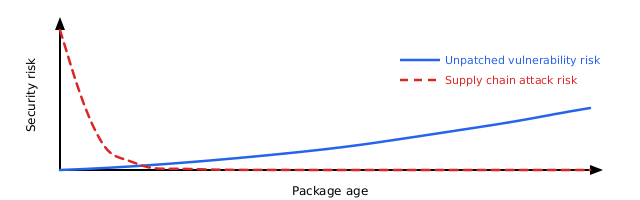
Software delivered by Amazon Linux packages go through review by Amazon package maintainers and pass guardrails before release. Open source software is developed and maintained with similar processes and guardrails. The npm and PyPI registries have open publishing access and don’t enforce reviews. Unexpected packages are potentially added to the registries because of risks like impersonation or stolen credentials. You’re caught between two risks: older software accumulates unpatched vulnerabilities, while new packages potentially contain unexpected vulnerabilities that haven’t been detected yet. The best approach is to stay current without adopting the newest releases immediately, while applying recommended security fixes. The following diagram illustrates the relation between the two types of risks in an abstract way, where the supply chain risk is highest immediately after a package is published, because unexpected updates can potentially bypass guardrails. After a package is published, auditing can review it and identify potential defects over time. If no security fixes are applied, the risk of all the code defects adds up.

Figure 1: Software risk over lifetime. Unpatched vulnerabilities risk increases over time. Very recent software also carries more supply chain risk.

Figure 1: Software risk over lifetime. Unpatched vulnerabilities risk increases over time. Very recent software also carries more supply chain risk.

The problem: The first day presents the highest risk

Supply chain events follow a consistent pattern. An unexpected author publishes an unexpected package or package version and waits for automated systems and users to pull it in. Security researchers and automated scanners typically detect and remove these packages within hours, but by then, systems have been exposed to the risk.

Datadog’s 2026 State of DevSecOps report found that 54% of JavaScript applications install at least one dependency within a day of its release. That’s the time window that presents the highest supply chain risk. Recent events show how fast detection happens:

Event Exposure window
Nx s1ngularity (Aug 2025) 4–5 hours
axios (Mar 2026) 2–3 hours
Bitwarden CLI (Apr 2026) 93 minutes
TanStack (May 2026) 30 minutes
node-ipc (May 2026) less than 24 hours

The solution: Skip packages published today

A dependency cooldown tells your package manager to skip recently published versions. If a version hasn’t existed on the registry for the configured timespan, for example, 1 day, it won’t be installed, giving the security community time to detect and remove unexpected versions.

A 1-day cooldown blocks each event listed in the preceding table. Notably, several of these events produced valid provenance attestations and passed build verification. These provenance checks alone didn’t stop them. A cooldown works independently of authorization mechanisms, because it blocks by age rather than by trust.

Both npm (v11.10.0+) and pip (v26.1+) support cooldowns . Amazon Linux 2023 ships these packages in NodeJS 24 and Python 3.14 since release 2023.11.20260608.

If you use lockfile-based installations through npm ci or pip install -r requirements.txt with pinned versions, you won’t pull latest package updates. The cooldown doesn’t apply to those installations. The cooldown only affects resolution of new or updated packages. See the Lockfile-based installs and the cooldown section for details.

Prerequisites

To implement the following solution, you first need to have the following prerequisites in place:

  • Node.js 24 with npm 11.10.0 or later (in nodejs24-24.14.1-1.amzn2023.0.1 or later).
  • Python 3.14 with pip 26.1 (in python3.14-pip-26.1.1-1.amzn2023.0.1 or later)
  • pip-audit (tool to scan python packages required for defect-based override scripts). Use python3.14 -m pip install pip-audit to install.

Future versions of Node.js and Python will bring new commands. The following tool commands work for Amazon Linux 2023 with Node.js 24 and Python 3.14. The provided commands target specific package versions. Adjust the commands if you use later releases.

To set up the npm cooldown

  1. Create the global configuration directory, depending on your NodeJS version.
    sudo mkdir -p /usr/lib/nodejs24/etc
  2. Add the npm configuration file with the cooldown setting.
    sudo npm-24 config set min-release-age 1 --location=global
  3. Check that the cooldown is active by running the next command.
    npm-24 config list

You will see before = "<timestamp from 24 hours ago>" in the output, confirming npm converted the 1-day cooldown into a date filter.
For more information, see the npm min-release-age documentation.

To set up the pip cooldown

  1. Create the system-wide pip configuration file with the cooldown setting.
    sudo python3.14 -m pip config set --global global.uploaded-prior-to P1D
  2. Verify the configuration (for Python 3.14 and pip 26.1+).
    python3.14 -m pip config list

You will see global.uploaded-prior-to='P1D' in the output.

This configuration is safe to deploy immediately, because older pip versions (25.x) silently ignore the setting.

To install a package’s latest version without cooldown

What if you want to install the latest version of a package, for example to receive security fixes? The following sections describe how to override the flag using the tool command line. To identify which packages need urgent updates, run the appropriate audit command for your package manager.

npm auditor python3.14 -m pip_audit

For npm packages

Install the package with the cooldown override.
npm-24 install <package-name> --min-release-age=0

For pip packages

Install the package with the cooldown override.
python3.14 -m pip install <package-name> --uploaded-prior-to="P0D"

Update packages that need urgent updates

We recommend that you apply security fixes for packages that have known security risks. You don’t need to turn off the cooldown entirely to apply security fixes. Use the audit tools to identify packages with known issues, then override the cooldown for only these packages.

Prerequisites: Ensure you have Python 3 and pip-audit installed (python3.14 -m pip install pip-audit).

Important: These scripts demonstrate the concept. For production use, add error handling, logging, and testing. Review packages before updating them in automated pipelines.

For npm packages

The following script demonstrates the required steps to identify npm packages with a known security fix. The npm audit command prints these packages as JSON. Next, packages in this list are updated with an npm install command, where their cooldown is overridden so that the latest version is picked up.

npm audit --json | python3 -c "
import json, sys, subprocess
data = json.load(sys.stdin)
for pkg in data.get('vulnerabilities', {}):
    subprocess.run(['npm-24', 'install', f'{pkg}@latest', '--min-release-age=0'])
"

For pip packages

The following script demonstrates the required steps to identify pip packages with a known security fix. The pip_audit command prints these packages as JSON. Next, all packages in this list are updated with an pip install command that overrides the cooldown so that the latest version can be picked up.

python3.14 -m pip_audit --format=json | python3.14 -c "
import json, sys, subprocess
from packaging.version import Version
data = json.load(sys.stdin)
for dep in data.get('dependencies', []):
    pkg = dep['name']
    vulns = dep.get('vulns', [])
    if not vulns:
        continue
    fix_versions = [v for vuln in vulns for v in vuln.get('fix_versions', [])]
    if not fix_versions:
        print(f'{pkg}: vulnerable but no fix published, skipping')
        continue
    fix = max(fix_versions, key=Version)
    print(f'Updating {pkg} -> {fix}')
    subprocess.run(['python3.14', '-m', 'pip', 'install', f'{pkg}=={fix}', '--uploaded-prior-to=P0D'])
"

Lockfile-based installs and the cooldown

If you use npm ci or pip install -r requirements.txt with pinned versions, the cooldown doesn’t apply. These commands install what the lockfile specifies, regardless of package age. The cooldown only affects resolution of new or updated packages.

Industry adoption: Cooldowns are now used across PyPI and NodeJS

Major package managers and enterprises have started to adopt dependency cooldowns. As of May 2026, several popular package management tools now include cooldown features: pnpm (a fast Node.js package manager), Renovate (an automated dependency update tool), and StepSecurity (a supply chain security platform).

  • pnpm 11 ships with minimumReleaseAge enabled by default. It’s one of the first major package manager to make cooldowns opt-out rather than opt-in.
  • Renovate’s config best-practices preset has included a 3-day npm cooldown since 2025 and is widely adopted across enterprises.
  • StepSecurity Secure Registry uses a configurable cooldown period for enterprise customers. StepSecurity recommends a 10 day delay as default.

How AWS is helping protect the open source supply chain

AWS scans upstream package registries to catch unexpected packages before they reach customers.

Unexpected packages are typically caught within hours of publication. A 1-day cooldown ensures you don’t install them during that detection window.

Recommendations

To secure your Amazon Linux 2023 configuration:

  1. Set a 1-day cooldown for npm and pip as shown in the preceding sections. External registries don’t have human review, so give the defenders time to catch problems.
  2. Override when needed for urgent security patches using the per-command flags.
  3. Run npm audit or pip_audit regularly to identify packages that need immediate attention.

Set up the cooldown with one line of configuration, and the protection is immediate.

Conclusion

By implementing the solutions presented in the post, you secure your npm and PyPI environment from most instances of unexpected code. The update delay of 1 day protects your environment, while still allowing to apply the latest security fixes. To learn about how to protect your environment further, see the following resources:

If you have feedback about this post, submit comments in the Comments section below.


Norbert Manthey

Norbert Manthey

Norbert is a Security Engineer in the Amazon Linux team, focusing on proactive security across hypervisors and operating systems in Amazon EC2. His work includes hardening operating system defaults, detecting code issues early through static and AI-driven analysis, and improving supply chain security for packages shipped with Amazon Linux. Norbert advocates for automating these process improvements, injecting them into the software development lifecycle, and shifting left.

❌