The HIPAA Security Rule’s Technical Safeguards (§164.312) define five standards and nine implementation specifications covering access control, audit controls, integrity, authentication, and transmission security.
The guidance also covers the 2025 NPRM proposed changes,including encryption at rest and in transit becoming required, multi-factor authentication (MFA) becoming mandatory for all electronic Personal Health Information (ePHI) access, and new specifications for network segmentation, configuration management, anti-malware protection, patch management, software removal, incident response and breach notification.
Key topics included
Shared responsibility for HIPAA on AWS – A responsibility matrix mapping each §164.312 specification to what AWS manages nd what the customer must configure and operate.
ePHI boundary architecture – Guidance on establishing a defined ePHI boundary
ePHI data flow and encryption – A reference architecture tracing ePHI with the applicable §164.312 specification
Foundation checklist – Prerequisite recommendation before configuring individual Technical Safeguard controls.
This guidance is written for cloud architects, security engineers, CISOs, and compliance teams at covered entities and business associates building or operating AWS healthcare workloads. It assumes familiarity with AWS services and is intended as a practical implementation reference, not a legal or regulatory interpretation. This guidance focuses exclusively on Technical Safeguards.
HHS published a Notice of Proposed Rulemakingin January 2025, proposing significant updates to the HIPAA Security Rule—including eliminating the Addressable designation, making encryption, MFA, and asset inventory mandatory, and introducing new technical requirements not present in the current rule. As of June 2026, the final rule has not been published. This guidance covers both the current rule and the proposed changes and recommends treating all specifications as Required for new workloads.
For questions about HIPAA readiness on AWS, including Administrative Safeguards, Physical Safeguards, risk analysis, and assessment preparation, contact the AWS Security Assurance Services teamor your AWS account representative.
This guidance is provided by AWS Security Assurance Services, LLC, a HITRUST External Assessor Firm and PCI-QSAC along with contribution from AWS HCLS, AWS Compliance teams. It is for informational and guidance purposes only and does not constitute legal, regulatory, or compliance advice. Recipients are solely responsible for determining applicability to their specific environments and legal obligations.
If you have feedback about this post, submit comments in the Comments section below.
Amazon Inspector is an automated vulnerability management service that continually scans Amazon Web Services (AWS) workloads for software vulnerabilities. The vulnerability management capabilities of Amazon Inspector are powered by an asset inventory engine known as the Amazon Inspector SBOM Generator (inspector-sbomgen), a standalone command-line tool that produces a software bill of materials (SBOM) from container images, directories, archives, local systems, compiled binaries, and more. Over the past two years, we’ve expanded inspector-sbomgen’s coverage across dozens of programming language ecosystems, operating systems, and widely deployed applications.
We’re pleased to announce a new capability for builders using inspector-sbomgen: a plugin system for writing your own custom package collectors that you can use right away, without requiring source code compilation nor waiting for an official release.
In this post, we walk you through what the inspector-sbomgen plugin system does, why we built it, and how you can write your first plugin in a few minutes. Along the way, we also cover how plugin-generated package components integrate with Amazon Inspector for vulnerability scanning, and we explore the plugin safety model, which helps ensure security-hardened and predictable plugin behavior.
Why we built a plugin system
Software ecosystems are dynamic. New language package managers, lockfile formats, and end user applications ship constantly, and many are adopted quickly, in some cases with little security scrutiny. That leaves security teams with a visibility gap: production workloads running software that their SBOM tooling doesn’t yet recognize. Customers have asked us to inventory many of these ecosystems directly, and until recently, the only path to support was to open a feature request and wait for the inspector-sbomgen team to onboard the ecosystem and deploy a new release.
The inspector-sbomgen plugin system changes that. With plugins, you can:
Onboard ecosystems that inspector-sbomgen doesn’t support out of the box. New open source ecosystems, niche or fast-moving package formats, and internal or proprietary tooling can all be inventoried without modifying inspector-sbomgen.
Prototype detection for an ecosystem quickly. We designed a plugin system that is friendly to developers and AI coding assistants alike. Plugins are written in Lua, loaded at runtime, and require no Go toolchain nor compilation. You can use the built in test harness to iterate on a plugin and see results immediately.
Build on a stable foundation. The plugin API abstracts away artifact-type differences, so you write your detection logic once and it works seamlessly across container images, archives, local systems, and more. And because plugins stay decoupled from the internals of sbomgen, the core tool’s regression surface stays small.
Internally, we’ve used the plugin system to ship new ecosystem coverage faster than before. In our 1.13 release, more than 20 ecosystems that were previously implemented in Go, including Apache Tomcat, NGINX, MySQL, Redis, WordPress, and the OpenSSH toolchain, are now embedded as plugins inside the sbomgen binary. The same release also added more than ten brand-new ecosystems as plugins, including Apache Cassandra, Apache Struts, Conda, Swift packages, and AI-agent collectors (Amazon Q Developer, Kiro CLI, Claude Code, GitHub Copilot, and Ollama).
How inspector-sbomgen plugins work
Sbomgen plugins follow a two-step pipeline:
Discovery – Scan the artifact’s file system to identify files that contain installed package metadata.
Collection –Open each discovered file, parse file contents, and publish findings into the SBOM.
Under the hood, an event bus connects discovery and collection plugins. Discovery plugins publish events listing discovered files, and one or more collection plugins subscribe to these events, triggering package collection. Developers might recognize this behavior as the observer pattern.
This decoupling lets a single discovery plugin feed multiple collectors, for example, one extracting package metadata, another scanning for secrets, and another checking policy. Each collection plugin works from the same file list without re-walking the artifact filesystem, a computationally expensive operation.
Write your first plugin in 5 minutes
Inspector-sbomgen makes it straightforward to bootstrap a plugin environment. The plugin new command tells sbomgen to create a new plugin workspace, and the —-with-example flag populates the workspace with a discovery-collection plugin pair, that you can run immediately.
inspector-sbomgen plugin new --with-example
After invoking the preceding command, you will be prompted to provide a plugin name and a directory that will contain your plugin workspace. You can provide custom values or use the default values:
Plugin name (identifies the software ecosystem your plugin will inventory, e.g. debian-dpkg, rhel-rpm, python-pip, cmake) [my-custom-ecosystem]: <enter>
Project directory [my-sbomgen-plugins]: <enter>

Created plugin "my-custom-ecosystem" in my-sbomgen-plugins/
Note that you can skip interactive prompts by specifying the plugin name and directory using the corresponding command line interface (CLI) arguments:
After creating your plugin workspace, inspector-sbomgen will display a next steps screen, which guides developers and AI code assistants to the source files they need to change and to supporting documentation:
Next steps:

  Get started:
    1. Open plugin folder in a code editor (VS Code recommended)
    2. Add test files that your plugin will discover and parse
       (e.g., config files, lockfiles, binaries, etc.):
       my-sbomgen-plugins/discovery/cross-platform/extra-ecosystems/my-custom-ecosystem/_testdata/

  Develop:
    3. Edit discovery:    my-sbomgen-plugins/discovery/cross-platform/extra-ecosystems/my-custom-ecosystem/init.lua
    4. Edit collection:   my-sbomgen-plugins/collection/cross-platform/extra-ecosystems/my-custom-ecosystem/init.lua

  Test:
    5. Write unit tests:  my-sbomgen-plugins/discovery/cross-platform/extra-ecosystems/my-custom-ecosystem/init_test.lua
    6. Run unit tests:    inspector-sbomgen plugin test --path my-sbomgen-plugins

  Deploy:
    7. Distribute your plugin directory wherever you run inspector-sbomgen:
       inspector-sbomgen <arguments> --plugin-dir /path/to/my-sbomgen-plugins

       Example:
       inspector-sbomgen container --image alpine:latest -o /tmp/sbom.json --plugin-dir /path/to/my-sbomgen-plugins

For code completion, install the VS Code Lua language server extension:
  https://luals.github.io/#vscode-install

For more information:
  - Plugin guide:    my-sbomgen-plugins/docs/sbomgen-plugin-developer-guide.md
  - Testing guide:   my-sbomgen-plugins/docs/sbomgen-plugin-testing-guide.md
  - API reference:   my-sbomgen-plugins/docs/sbomgen-plugin-api-reference.md
  - Documentation:   https://docs.aws.amazon.com/inspector/latest/user/sbom-generator.html
Now that you have a plugin workspace, let’s explore its contents in greater detail:
The scaffolded project includes a working discovery and collection plugin pair, passing unit tests with test fixtures under _testdata/, a .vscode/settings.json for integrated development environment (IDE) integration, and a local copy of the developer documentation.
The scaffolding is deliberately succinct and complete, so it reads well for both humans and AI coding assistants. Every file has clear comments that explain what each function does and what the plugin author needs to fill in.
To test a plugin, you first need something to scan, such as a package lock file or a compiled binary. The example plugin inventories a fictional example.lock with the following contents:
The provided discovery plugin knows how to look for instances of example.lock within the artifact file system:
-- my-custom-ecosystem discovery plugin
-- Discovers example.lock files in the artifact file list.

function discover()
    return sbomgen.find_files_by_name({"example.lock"})
end
And the provided collection plugin knows how to parse the contents of example.lock and publish package findings to the output SBOM.
-- my-custom-ecosystem collection plugin
-- Parses example.lock files and extracts package name and version.

function collect(file_path)
    local content = sbomgen.read_file(file_path)
    if content == nil then
        return
    end

    for line in content:gmatch("[^\n]+") do
        local name, ver = line:match("^(.+)==(.+)$")
        if name and ver then
            sbomgen.push_package({
                name = name,
                version = ver,
                purl_type = "generic",
                namespace = "my-custom-ecosystem",
                component_type = sbomgen.component_types.APPLICATION,
            })
        end
    end
end
Run the tests
Plugins ship with a built-in test framework so you can validate your logic before scanning a real artifact. Tests are written in Lua, live next to the plugin in init_test.lua, and reference fixture data in _testdata/:
function test_discovers_packages()
    local result = testing.scan_directory("_testdata")
    testing.assert_equals(3, #result.findings)
    testing.assert_equals("my-package-alpha", result.findings[1].name)
    testing.assert_equals("1.0.0", result.findings[1].version)
end

function test_no_findings_for_empty_directory()
    local result = testing.scan_directory("_testdata/empty")
    testing.assert_equals(0, #result.findings)
end
Run the tests with the following command:
inspector-sbomgen plugin test --path my-sbomgen-plugins -v

=== RUN   my-custom-ecosystem/discovery/init_test/test_discovers_packages
--- PASS: my-custom-ecosystem/discovery/init_test/test_discovers_packages (0.04s)
=== RUN   my-custom-ecosystem/discovery/init_test/test_no_findings_for_empty_directory
--- PASS: my-custom-ecosystem/discovery/init_test/test_no_findings_for_empty_directory (0.04s)
ok    2 tests passed
This is the tightest development loop we could design: no Go toolchain, no rebuild, no container spin-up. Write a test, run it, iterate.
Scan a real artifact
For plugins to produce findings, inspector-sbomgen needs an artifact that contains the files your plugin looks for. For the example plugin, any directory with an example.lock file works. The fixture we generated earlier is a good stand-in:
The --plugin-dir flag tells inspector-sbomgen where to load your Lua plugins from. The resulting SBOM contains a CycloneDX component for each of the three packages in example.lock, for example:
Every plugin-generated component carries an amazon:inspector:sbom_generator:source_path property that records the file the component was collected from, so you can always trace a component back to the artifact that produced it.
Vulnerability scanning with Amazon Inspector
Plugin-generated findings are first-class SBOM components. They work with every downstream consumer that reads CycloneDX SBOMs, including Amazon Inspector. To send an SBOM to Amazon Inspector for vulnerability analysis, add the --scan-sbom flag (this requires an active AWS account):
An important caveat when you onboard a brand-new ecosystem: Plugin authors can inventory arbitrary ecosystems, but Amazon Inspector can only report vulnerabilities for components it has advisories for. When you point Amazon Inspector at a component whose ecosystem isn’t in its advisory feeds yet, Inspector will return the component with a property, Component skipped: no supported rules found. For example:
This is expected behavior, not an error. The SBOM is still generated correctly, the component is still tracked, and the source_path tells you exactly which file produced it. If and when Amazon Inspector adds advisory coverage for the ecosystem, the same SBOM will start producing vulnerability findings without any change to your plugin. For ecosystems Inspector already supports, plugin-generated components are indistinguishable from components produced by built-in scanners.
First class IDE support
We care about productivity and efficiency when writing plugins. Writing Lua without modern conveniences such as autocomplete isn’t fun, so every plugin project scaffolded with the plugin new command ships with a library/sbomgen.lua definition file and a .vscode/settings.json that automatically wires it up to the Lua Language Server extension for VS Code.
For code completion and IDE support, first install the sumneko.lua extension, open your plugin project in VS Code, and every sbomgen.* function will get:
Parameter hints with types.
Hover documentation.
Autocomplete for constants (sbomgen.component_types.*, sbomgen.groups.*, sbomgen.platform.*).
Type checking on function calls.
Inline warnings when required fields are missing from push_package().
The same definition file makes plugin development work well with AI coding assistants. The types and documentation are embedded in a form that tools can read, so assistants can generate correct plugin code with far less monitoring than writing against a raw language would require.
A safe foundation
Plugins run real code inside the same process as inspector-sbomgen, so we designed the execution environment to keep that code stable and security-hardened. Every Lua plugin runs in an isolated sandbox. Every Lua virtual machine (VM) has access to a restricted subset of the Lua standard library to ensure only safe operations are permitted:
No direct filesystem access. The Lua io library isn’t loaded. All file operations go through sbomgen.* functions, which route through sbomgen’s internals so your plugin behaves identically whether it’s scanning a directory on disk, a container image, a compressed archive, or a mounted volume.
No subprocess execution or environment mutation. The Lua os library is blocked, so plugins can’t spawn processes, modify environment variables, or touch files outside the artifact.
No VM introspection. The Lua debug library is blocked.
No unbounded code loading.dofile, loadfile, and loadstring are removed. require() is available but restricted to the plugin’s own directory tree, so plugins can share helper modules with themselves but cannot load code from other plugins or system paths.
If a plugin raises an unhandled Lua error, inspector-sbomgen logs a warning and continues with the next file or plugin; one faulty plugin does not prevent other plugins from running. Plugins never override inspector-sbomgen’s built-in package collectors. Every plugin must declare a unique name. If a custom plugin uses a name that’s already claimed by an official built-in plugin, the custom plugin is skipped with a warning. Built-in plugins always take precedence, so a custom plugin can never silently replace or shadow the tool’s own detection behavior.
Whether you’re adding support for an internal lockfile format, prototyping detection for a new open source ecosystem, or replacing a home-grown scanner with something your whole organization can run at scale, the plugin system is designed to make the path from idea to working SBOM as short as possible. We can’t wait to see what you build with it. If you have feedback about this post, submit comments in the Comments section below. If you have questions about this post, contact AWS Support.
The new IRAP report includes four additional AWS services that are now assessed at the PROTECTED level under IRAP. This brings the total number of services assessed at the PROTECTED level to 167.
We have developed an IRAP documentation pack to help our Australian customers and their partners plan, architect, and assess risk for their workloads when they use AWS cloud services.
The IRAP pack on AWS Artifact also includes newly updated versions of the AWS Consumer Guide and the whitepaper Reference Architectures for ISM PROTECTED Workloads in the AWS Cloud.
Reach out to your AWS representatives to let us know which additional services you want to see in scope for upcoming IRAP assessments. We strive to bring more services into scope at the PROTECTED level under IRAP to support your requirements.
July 29, 2026: We’ve updated this post to clarify the AWS Firewall Manager migration path.
Application-layer distributed denial of service (DDoS) attacks are difficult to detect because they closely resemble legitimate traffic. HTTP request floods are now among the most common vectors targeting web applications, using valid-looking requests that blend in with normal user activity.
In June 2025, AWS launched the AWS WAF Anti-DDoS managed rule group, built specifically for application-layer (L7) DDoS protection. AWS Shield Advanced is adopting it as the default application-layer protection, and in time as the only one. On July 27, AWS Shield Advanced begins adding the Anti-DDoS managed rule group to eligible web access control lists (ACLs) in Count mode. It will not cause any interruption to your traffic alongside your existing L7 automatic mitigation and WAF rules. In this blog post, we provide details regarding the Anti-DDoS managed rule group and when the change is expected to reach your web ACLs. You will understand the phases and steps that you need to take before the finish date, including how the monitoring and metrics will change.
Anti-DDoS managed rule group features
The Anti-DDoS managed rule group builds on what Shield Advanced automatic mitigation already provides. It profiles your traffic, learns what normal traffic looks like for your application, and establishes a baseline in minutes rather than hours. When an attack starts, it reacts within seconds and there are no health checks to configure. The rule group adds a Challenge action to the Block and Count actions you already use. Challenge decisions are driven by the AMR labels that mark the suspicion level of each inspected request. One option is a silent browser challenge, which has a background verification that runs in the visitor’s browser with no interstitial page, so legitimate users are never interrupted while automated traffic is filtered out. You can also exclude workload paths that don’t support Challenge, which fall back to Block mitigations instead. Sensitivity is configurable to Low, Medium, or High, and you set it separately for Block and Challenge. Block and Challenge are tuned independently; meaning you can run Challenge at high sensitivity to catch more suspicious traffic while keeping Block low to avoid dropping legitimate requests or reverse it for a stricter posture.
The rest is about cost and visibility:
It uses less capacity than before. The rule group needs 50 web ACL capacity units (WCUs), down from the 150 the previous protection required, providing you with capacity for the rest of your rules.
The dashboard ships in the AWS Management Console for AWS WAF. It’s there now, showing live DDoS events, match metrics, and the top URIs, geographies, and IP addresses driving traffic.
It labels everything it inspects. Requests get labels for event-detected, graduated suspicion levels, and specific rules. Match on those labels in your own AWS WAF rules when you need logic the rule group doesn’t cover.
You don’t pay for the attack traffic. During active mitigation, blocked DDoS requests drop out of your monthly count. That exclusion covers AWS WAF request fees, Anti-DDoS managed rule group request fees, and Shield Advanced request charges.
AWS Shield Advanced isn’t required to use any of these features. Shield Advanced subscribers get the rule group included with AWS WAF and any customer can turn it on independently. See AWS WAF pricing for more information on costs.
Implementation details
Shield Advanced upgrades application-layer DDoS protection in five phases. The following dates are when AWS will act automatically, not the earliest date when you can act. After the rule group is deployed in Count mode on July 27, 2026, you can begin migrating right away rather than waiting for the October auto-upgrade. There’s no window where protection lapses. Your current automatic mitigation stays active through every phase until the Anti-DDoS managed rule group takes over. That handoff happens in a single operation, with no cutover window and no gap for your traffic flows.
Phase 1: Anti-DDoS managed rule group deployed in Count mode (rolling out July 27–August 7, 2026)
AWS adds the Anti-DDoS managed rule group in Count mode to every web ACL eligible for this rollout. Eligible means any Shield Advanced web ACL with at least one resource using application-layer automatic mitigation that isn’t already running the Anti-DDoS rule group. This is a broader set than the web ACLs eligible for the October auto-upgrade (Phase 3), which applies a stricter test. The deployment rolls out gradually, starting July 27 and expected to finish by August 7, 2026, so different web ACLs might be updated on different days. There’s no impact to your traffic because the rule group watches and labels requests without acting on them while your existing automatic mitigation keeps running. Throughout the evaluation period, you receive DDoS events, metrics, and AWS WAF labels at no additional charge.
Phase 2: Free evaluation period (July 27–September 30, 2026)
The existing automatic mitigation and the Anti-DDoS managed rule group run side by side each detecting independently. Automatic mitigation continues to protect your resources while the rule group operates in Count mode. To compare their detection results, use the DDoSAttackRequests metric, AWS WAF labels, and the Anti-DDoS dashboard. All Anti-DDoS managed rule group charges are waived during this period, including the subscription fee, per-request fees, and WCU consumption costs for the eligible web ACLs from phase 1.
Phase 3: Auto-upgrade begins (October 1, 2026)
For eligible web ACLs, the auto-upgrade mirrors your existing automatic mitigation configuration. The rule group inherits your current setting, so a Block configuration comes up in Block mode and a Count configuration comes up in Count mode in a single, atomic operation. The rule group takes over in the same step that disables automatic mitigation, so protection never drops for an instant. This is a handoff rather than a cutover with no window where your resources are unprotected. If you’d rather not upgrade you can opt out by contacting AWS Support before the auto-upgrade date.
Phase 4: Guided migration (available July 27–December 31, 2026)
You don’t have to wait for the October auto-upgrade to migrate. As soon as the rule group is deployed in Count mode between July 27 and August 7, 2026, you can move to it on your own schedule. This is the path to use for web ACLs that aren’t eligible for the Phase 3 auto-upgrade, meaning mixed-mode web ACLs or ones with resources that don’t have automatic mitigation enabled. Work with your AWS account team and AWS Support at any point in this window to plan and complete the migration. Eligible web ACLs are also upgraded automatically starting October 1 (Phase 3), so guided migration is mainly for the web ACLs the auto-upgrade can’t cover.
As of January 1, 2027, the Shield Advanced application-layer automatic mitigation feature will no longer be available. Resources that haven’t migrated to the Anti-DDoS managed rule group will lose automatic application-layer DDoS mitigation.
The existing automatic mitigation and the Anti-DDoS managed rule group use separate Amazon CloudWatch namespaces and metric structures. The rule group gives you three tiers of observability: tier 1 tells you an attack is happening, tier 2 shows which requests it flagged and why, and tier 3 shows what it did about them. You don’t need all three on day 1 because most customer teams start at tier 1 to confirm detection is working, then add the others as they tune.
Tier 1: Event detection alarms
You can detect DDoS events using two CloudWatch metrics, each with its own namespace.
DDoSDetected (Shield)
DDoSAttackRequests (Anti-DDoS managed rule group)
Namespace
AWS/DDoSProtection
AWS/WAFV2
Requires Shield Advanced
Yes
No
Scope
L3, L4, and L7 events
L7 events only
Value during event
Binary (0 or 1)
Count of requests observed
Value outside event
Reported once daily (keeps metric alive)
Absent (no data points)
Dimensions
ResourceArn
Resource, ResourceType
What this means for your existing alarms:
After the application-layer automatic mitigation feature is sunset, DDoSDetected still fires for infrastructure layer 3 and layer 4 events, so your existing network layer and transport layer alarms remain valid. For the full list, see AWS Shield Advanced metrics.
DDoSAttackRequests is the Anti-DDoS managed rule group equivalent for application-layer event detection. Alarm on Sum >= 1 to detect any event, or set a volume threshold (for example, more than 10,000 requests per minute) for severity-based alerting.
During the evaluation period, both metrics fire independently and you can validate detection parity before migrating your application-layer alarms.
Because DDoSAttackRequests is absent when there are no active DDoS events, set treat-missing-data to missing or notBreaching for alarms on this metric.
Tier 2: Detection labels for custom monitoring
Every request the Anti-DDoS managed rule group evaluates gets a label. Where tier 1 tells you an attack started, tier 2 shows which requests looked suspicious and how confident the rule group was. The labels surface as AWS WAF metrics in the AWS/WAFV2 namespace: AllowedRequests, BlockedRequests, and CountRuleMatch. Each carries the LabelName and LabelNamespace dimensions under the awswaf:managed:aws:anti-ddos: namespace.
event-detected – Requests observed during a detected DDoS event
ddos-request – Requests identified as part of the attack
challengeable-request – Requests eligible for browser challenge
Chart suspicion-level trends on a CloudWatch dashboard to see how an attack builds. Match on the labels in your own AWS WAF rules or dig into them in your AWS WAF logs with CloudWatch Logs Insights or Amazon Athena when you need to understand a specific event after the fact.
Tier 3: Mitigation action metrics
Where tier 2 shows what the rule group flagged, tier 3 shows what it did about those requests during an event. You’ll find these metrics as ChallengeRequests, BlockedRequests, and CountRuleMatch, each scoped by the rule label that produced it.
ChallengeAllDuringEvent – Requests challenged during an active event
ChallengeDDoSRequests – Suspected DDoS requests challenged based on suspicion level
DDoSRequests – Requests blocked (or counted in Count mode)
Watch these during a live event to see whether mitigation is keeping up. If you’re challenging far more requests than you’re blocking, your configuration might be too cautious, and you can raise the sensitivity level after you trust the numbers.
Observability summary
Tier
Automatic mitigation
Anti-DDoS managed rule group
Event alarm
DDoSDetected in AWS/DDoSProtection (binary, L3/L4/L7)
DDoSAttackRequests in AWS/WAFV2 (request count, L7)
Your Shield Advanced subscription includes the Anti-DDoS managed rule group for up to 50 billion requests per month, counted across your whole organization at the payer account level. For most customers that ceiling is well above normal traffic, so you won’t see a line item here unless you’re operating at very high volume. For the exact rates, see AWS WAF pricing and Shield Advanced pricing.
You aren’t charged for DDoS traffic while the Anti-DDoS managed rule group is actively mitigating, which means Block or Challenge mode rather than Count. This applies to AWS WAF request fees, Anti-DDoS managed rule group request fees, and Shield Advanced request charges. Leaving the rule group in Count mode past the evaluation period costs you the protection without the billing relief, so avoid staying in Count mode longer than you need to validate.
During the evaluation period (July 27 to September 30, 2026), the eligible web ACLs AWS auto-enrolled don’t incur per-request fees or WCU consumption, even when configured in Count mode.
The Anti-DDoS managed rule group works at the web ACL level, so every resource you associate with a web ACL shares that coverage. Before assuming a single resource accounts for the whole cost, look at how many resources sit behind each web ACL. A web ACL fronting 20 resources bills differently from one fronting 2, so check that count first and familiarize yourself with the workload protected by each web ACL.
Adding the Anti-DDoS managed rule group to a web ACL yourself isn’t part of the upgrade path, so standard pricing applies from the moment you enable it. The same is true for any resource that was already running the rule group before the rollout. To get the free evaluation, let the automatic rollout reach your web ACLs rather than adding the rule group ahead of it. There’s no penalty for adding it yourself; you just don’t receive the waiver on that web ACL.
Update your infrastructure as code
If you manage web ACLs with AWS CloudFormation, AWS Cloud Development Kit (AWS CDK), Terraform, or other infrastructure as code (IaC), the auto-upgrade changes your infrastructure configuration outside your templates. Your code is still the source of truth, so you need to do two things. First, change where the protection is declared. Today you enable application-layer automatic mitigation through the Shield API (EnableApplicationLayerAutomaticResponse), configured per protected resource. The Anti-DDoS managed rule group is configured through the AWS WAF API instead (CreateWebACL and UpdateWebACL), as a managed rule group statement inside the web ACL, scoped per web ACL rather than per resource. In IaC terms, you remove the Shield automatic-response block (for example, Terraform’s aws_shield_application_layer_automatic_response) and add the WAF managed rule group statement shown in the following section. Second, pull the upgraded web ACL back into your tooling before your next deploy, or your pipeline will try to revert the change.
For the full statement in Terraform, CloudFormation, and the AWS CDK, plus how to sync state after the auto-upgrade (terraform plan, CloudFormation drift detection, cdk diff), see the iac-webacl-examples helper.
Update your AWS Firewall Manager policy
If you’re currently running a Shield Advanced policy in AWS Firewall Manager, check its Automatic application layer DDoS mitigation setting before you start, because that setting decides how much of this section applies to you. Where it reads Ignore or Disable, the policy isn’t managing that mitigation at all: whatever mitigation your resources have was enabled on the resources themselves, or through Shield, and that’s where you turn it off when the time comes.
If the Shield Advanced policy reads Enable, you first need to add or reuse an AWS WAF Firewall Manager policy, put the Anti-DDoS managed rule group in it and scope that policy to the same accounts and resources your Shield Advanced policy covers.
Keep the Shield Advanced policy in place throughout the process. Don’t remove accounts or resources from its scope, and don’t delete it. Firewall Manager revokes the Shield Advanced protections it created for anything that leaves scope, which ends L3 and L4 coverage, along with the application-layer mitigation you’re replacing. Instead, use a setting change to retire the older mitigation: when the new rule group is live and you’ve compared the two, set Automatic application layer DDoS mitigation to Disable on the Shield Advanced policy that currently reads Enable.
Set up the AWS WAF Firewall Manager policy
You can make this change in the console or as code. If you manage your Firewall Manager policies as code, don’t edit them in the console: add a new AWS WAF policy or update an existing one in your templates with the Anti-DDoS managed rule group included, and deploy it using the following Firewall Manager policies using IaC steps. Otherwise, use the console.
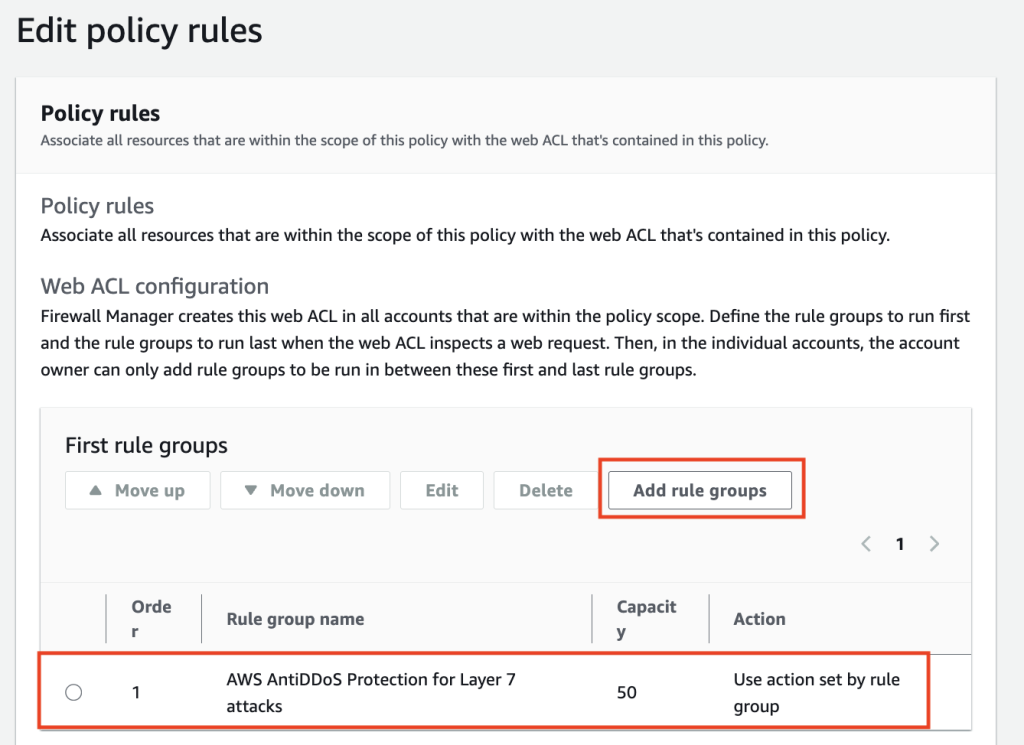
In the console, follow Creating an AWS Firewall Manager policy for AWS WAF to create the policy and reach the Edit policy rules page. Add the Anti-DDoS rule group, listed there as AWS AntiDDoS Protection for Layer 7 attacks (AWSManagedRulesAntiDDoSRuleSet), as a new rule group under First rule groups so it evaluates before your other managed groups, but below any Allow custom rules you use to fast-path known-good traffic.
If you protect CloudFront distributions, make this change in your Global policy, and repeat it in each AWS Regional policy for regional resources. Save the policy, and Firewall Manager rolls the change out to in-scope accounts, which can take a few minutes.
After being added, the rule group appears as the first rule group in the policy, as shown in the following screenshot:
Figure 1: AntiDDoS enabled
Firewall Manager policies using IaC
If you manage Firewall Manager policies as code, make the change in your template instead of the console. The Anti-DDoS managed rule group goes into the AWS WAF policy’s ManagedServiceData, a WAFV2 policy definition carried as a JSON string, added to the first rule groups so it evaluates early. For the ManagedServiceData JSON with CloudFormation, Terraform, and AWS CDK examples, see the firewall-manager-examples helper.
Whichever path you take, scope the policy to the same accounts and resources your Shield Advanced policy already covers, so no resource loses application-layer protection during the move.
Getting started
Between July 27 and August 7, 2026, AWS will add the Anti-DDoS managed rule group in Count mode to Shield Advanced web ACLs that have resources using application layer automatic mitigation but not yet the Anti-DDoS rule group. After it reaches your web ACL, you can evaluate it, and migrate whenever you’re ready, without waiting for the October auto-upgrade.
Review the Anti-DDoS dashboard in the AWS WAF console. The dashboard shows real-time DDoS events, match metrics, and top traffic sources.
Compare event detection side by side. During Count mode, both systems detect independently. Check the DDoSDetected metric in AWS/DDoSProtection alongside DDoSAttackRequests in AWS/WAFV2 to validate detection parity for your resources. You can deploy the CloudWatch comparison dashboard from the AWS Samples repository to view both systems on a single dashboard.
Explore AWS WAF labels. Enable AWS WAF logging and query for labels in the awswaf:managed:aws:anti-ddos: namespace. Look at suspicion levels (low-suspicion-ddos-request, medium-suspicion-ddos-request, high-suspicion-ddos-request), event-detected, and challengeable-request to see per-request visibility into detected events.
Start with Low sensitivity for Block actions during evaluation to minimize false positive risk. Tune up as you gain confidence from the Anti-DDoS dashboard and AWS WAF label data.
Plan your configuration. Review sensitivity levels, URI exemptions for non-HTML paths, and web ACL priority placement. The Anti-DDoS managed rule group should run at the highest priority in your web ACL, or right below any custom rules with the Allow action.
Sync your IaC templates. After the auto-upgrade adds the Anti-DDoS managed rule group to your web ACL, fetch the current state into your IaC tooling (Terraform refresh, CloudFormation drift detection, AWS CDK import) before your next deployment.
Conclusion
The Anti-DDoS managed rule group profiles your traffic within minutes and mitigates within seconds, where the automatic mitigation it builds on established its baseline over hours, and it gives you granular visibility into what it’s doing. The evaluation period exists so you can watch both systems run on your own traffic before anything changes. Spend the first few weeks in Count mode confirming the new detection matches what you see today, then move your alarms over and pick a sensitivity level you’re comfortable with. If you run a web ACL across several resources, or you manage rules through AWS Firewall Manager, contact AWS Support before you start so you don’t have to unwind anything later. The Shield Advanced application-layer automatic mitigation feature retires on January 1, 2027, and anything still relying on it needs to be migrated by then.
AWS Security Assurance Services is announcing the release of the Cloud Security Alliance (CSA) Compliance Guide on Amazon Web Service (AWS), a new resource that maps the 17 control domains and 207 control objectives of the Cloud Controls Matrix v4.1 (CCM) to AWS services and recommended implementation practices. The guide is intended to help organizations using AWS plan, implement, and evidence the controls relevant to their CCM scope, including those pursuing or maintaining CSA STAR certification.
What is the Cloud Controls Matrix?
The Cloud Security Alliance is a not-for-profit organization dedicated to defining and raising awareness of best practices for cloud security. AWS maintains CSA STAR Level 2 certification, which couples the requirements of ISO/IEC 27001:2022 with the CCM. The CSA STAR documentation and the AWS Consensus Assessments Initiative Questionnaire (CAIQ) are available to AWS customers through AWS Artifact.
The CSA Cloud Controls Matrix is a cybersecurity controls framework developed by the CSA that provides a detailed set of security controls mapped across multiple domains (such as audit and assurance, identity and access management, and encryption and key management) specifically designed to assess and manage security risks in cloud computing environments. The CCM is cloud agnostic, designed to be applicable to any cloud service provider or deployment model, such as infrastructure as a service (IaaS), platform as a service (PaaS), and software as a service (SaaS), regardless of the underlying technology or vendor, providing universal security controls that organizations can apply across cloud platforms.
Responsibility models
CCM defines its own Shared Security Responsibility Model (SSRM) with three categories: Cloud service provider (CSP)-owned, customer-owned, and shared (independent or dependent). The guide recommends using the SSRM together with the AWS Shared Responsibility Model. For controls that AWS owns, the guide points to AWS attestations available through AWS Artifact (for example, SOC reports, ISO certificates, and the CSA STAR attestation) as inherited evidence. For controls that customers own or share, the guide describes how to implement and evidence them using AWS services. Using a CSA STAR–certified AWS service doesn’t by itself make a customer workload compliant. Customers remain responsible for configuring services, managing access, protecting data, and implementing additional controls based on their environment, risk assessments, and regulatory obligations. The guide is informational and doesn’t replace the AWS compliance documentation and certifications available through AWS Artifact.
What’s inside the guide
For each control, the guide states applicability, describes how organizations can implement the control on AWS, identifies common pitfalls, and lists examples that can be used as evidence during an assessment.
Black Hat 2026 (Aug 1-6, 2026) brings together over 22,000 security practitioners, researchers, and CISOs who build, break, and defend enterprise infrastructure. They’re security professionals who push the limits of offensive and defensive security and demand proof over promises. As frontier security models like Mythos reshape the enterprise landscape, they need security that operates at the same speed as the events they face. This August, Amazon Web Services (AWS) returns to Las Vegas to meet with our customers and partners to show how we’re delivering enterprise security at machine speed.
At Black Hat USA 2026, connect with AWS through live demos, a practitioner session on autonomous security operations, and an executive roundtable on building durable AI security architectures, plus networking receptions with customers and partners. Here’s where to find us and what you’ll take away.
Experience AWS security innovation in action
Visit us at Booth #1648 to explore five interactive demo pedestals, each aligned to a pillar of our AI-powered security story:
Post-Mythos enterprise security: AWS uses multiple frontier AI reasoning models to find issues, validate exploitability, and autonomously fix exposures, compressing mean-time-to-remediation from days to minutes. Learn how AWS Continuum helps you find risks before you ship, prioritize by real business impact, and remediate at machine speed while you stay in control.
AI-powered investigations: Amazon GuardDuty AI-powered investigations automatically analyze findings and the accounts around them to separate true threats from benign activity at scale. Drawing on log activity, resource configuration, internet reachability, and historical findings, it delivers triage reports that match expert-level accuracy, freeing your team to focus on what matters.
Purpose-built AI workload security: AWS extends the enterprise security controls you already trust to address the unique demands of AI workloads. Amazon Bedrock helps you build and deploy generative AI applications, with hundreds of top foundation models plus built-in safety controls, guardrails, and evaluation tools. Amazon Bedrock AgentCore Identity keeps you in full control of what your AI agents can access.
Full-stack multicloud security: AWS Security Hub Extended delivers full-stack security by integrating AWS services with 21 curated partner solutions across nine categories, from endpoint and identity to AI, with pay-as-you-go pricing, one console, and one bill. All findings flow in OCSF format with zero integration work, and a risk correlation engine traces paths across multicloud so your team fixes root causes rather than chasing symptoms.
AWS Partner solutions: A dedicated partner demo pedestal runs live demonstrations from select AWS Partners, showing how their solutions integrate with AWS to address your most critical security challenges. With over 25 partners rotating throughout Business Hall hours, you get a firsthand view of how these integrations work together to strengthen your security posture.
Theater sessions: Want to go deeper on a specific topic without committing to a full session? During expo hours, our theater hosts 15-minute AWS and partner talks curated around the challenges enterprise security teams face today. Topics range from enabling AI adoption securely, to unifying visibility across clouds, to automating response. Subject matter experts from AWS and our partners lead each session and give you insights you can bring back to your team. Featured sessions include:
From finding to fix at machine speed with AWS Continuum
Securing the agentic AI stack
Architecting defense-in-depth for AI workloads
Network security strategies for the post-Mythos era
One console for unified full-stack security
For the latest theater session schedule, including dates and times, visit AWS at Black Hat 2026.
Engagement Zone: Take a quick break and test your detection skills in a gamified, hands-on challenge. Race the clock to resolve security issues and collect power-ups that speed your mission to secure the environment. Rack up your score, lock in your percentile rank, and see how you stack up against every other player.
Beyond the booth: Sessions and executive roundtable
AWS security experts share insights at speaking sessions and host an executive roundtable at Black Hat USA 2026.
Speaking Session | Machine-Speed Defense: Building an Autonomous Security Operations Loop for the AI Era Wednesday, August 5, 10:15–10:35 AM PDT Pulse Stage 2 In a post-Mythos world, organizations need to use AI-powered reasoning to discover, correlate, validate, and remediate security exposures at machine speed. This session provides a blueprint for building an autonomous security operations loop, using business-context graphs and sandbox validation, to unlock machine-speed defense as a durable competitive edge.
Executive Roundtable | Autonomous Defense at Cloud Scale: Critical Choices for Security Leaders Today Wednesday, August 5, 11:00 AM–12:00 PM PDT Breakers F As agentic AI and frontier models reshape the threat landscape, foundational security remains essential, and organizations that layer autonomous workload governance on top can turn AI into a true security force multiplier. This executive roundtable explores how to build a durable, adaptive security harness that accounts for the real economics of AI-powered defense and evolves alongside rapidly advancing models and techniques.
Briefing | ThreatForest: Automated Attack Trees from Source Code Thursday, August 6, 2:35–3:15 PM PDT Jasmine, Level 3 Threat modeling is critical, but manual processes can’t keep pace with cloud-focused architectures. This briefing will dive into how ThreatForest uses six specialized AI agents to automatically analyze source code and produce validated attack trees mapped to MITRE ATT&CK with actionable mitigations. Attendees walk away with the open source tool and a reusable multi-agent architecture pattern.
AWS activities and events
Beyond the expo floor, AWS hosts a portfolio of ancillary events built for focused conversations and networking across the security community. Join us at:
Catch Security LIVE! on-site at Mandalay Bay on Wednesday, August 5 and Thursday, August 6. This infotainment-style broadcast brings AWS and AWS Partners together to solve real security challenges for customers across 20-minute conversational segments, covering everything from data protection and compliance to application and perimeter security. With over 30 segments, Security LIVE! showcases the breadth of the AWS security partner ecosystem. Stop by the set to watch it unfold live.
Join us in Las Vegas
Whether you’re exploring how to secure AI workloads, adopting autonomous remediation as frontier models like Mythos reshape the landscape, or unifying security across domains and clouds, the AWS team at Black Hat USA 2026 is ready to help.
Amazon Web Services (AWS) successfully completed an onboarding audit with no findings for ISO 9001:2015, 27001:2022, 27017:2015, 27018:2019, 27701:2019, 20000-1:2018, and 22301:2019, and Cloud Security Alliance (CSA) STAR Cloud Controls Matrix (CCM) v4.0. EY Certify Point auditors conducted the audit and reissued the certificates on May 31, 2026. The objective of the audit was to enable AWS to expand their ISO and CSA STAR certifications to include two additional services. The ISO standards cover areas including quality management, information security, cloud security, privacy protection, service management, and business continuity. The certifications demonstrate AWS’s commitment to maintaining robust security controls and protecting customer data across our services.
During this onboarding audit, we added two additional AWS services to the scope since the last certification issued on February 25, 2026. Following are the two additional services:
For a full list of AWS services that are certified under ISO and CSA Star, see the AWS ISO and CSA STAR Certified page. Customers can also access the certifications in the AWS Management Console through AWS Artifact.
If you have feedback about this post, submit comments in the Comments section below.

 Login
Login