For years, the cyber security industry tracked AI as a force multiplier: something that made existing attack techniques faster, cheaper, and more accessible. That framing was accurate. But the Annual AI Security Report 2026 from Check Point Research documents a transition that goes further. AI has crossed from assistant to operator. Where it once helped attackers prepare, it now runs the operation.
Key observed findings
AI has crossed from development aid to live attack operator. It now does the hands-on work inside live intrusions, from China-nexus espionage campaigns to a criminal breach of multiple Mexican government agencies and has spread from nation states to ordinary cyber criminals.
AI now builds deployment-ready malware and attack suites. Its involvement is often invisible in the finished artifact: one developer used an AI environment to produce VoidLink, an 88,000-line command-and-control offensive framework, in under a week.
Attackers prefer commercial models, and now abuse them by exploiting the agentic architecture, not just single prompts. Most actors favor jailbroken mainstream models over self-hosted ones, and the durable bypass is now a planted configuration file an agent loads and trusts across sessions.
An AI-enabled criminal tooling market has matured. Phishing-as-a-service kits now embed a language model with the jailbreak built in, and conversational AI voice-agent services run vishing and one-time-passcode theft at scale.
Virtual Identity is no longer a reliable trust anchor. Voice, face, documents, and live video are now cheap to forge convincingly and are widely used in attacks taking multi-channel social engineering to a new level of integration.
AI itself is an expanding attack surface. Models cannot always separate data from instructions and content they process might influence the model’s behavior; the surrounding stack adds ordinary software vulnerabilities and supply-chain risk, all in a rapidly evolving ecosystem where security practices not always mature.
Indirect prompt injection is on the rise. Detections of longer malicious payloads increased sharply, rising roughly fivefold between March and May 2026 and approaching 1% of observed prompts in May. Longer payloads are more typical of content-borne and agentic attack paths, this pattern suggests that indirect prompt injection is becoming more operationally relevant.
Enterprise data leakage through GenAI is persistent and growing risk. High-risk prompts doubled from 2% to 4% during the last year, while organizations used an average of 10 AI applications each month, many without official approval.
Data exposure risks are not evenly distributed across the verticals. Sector-level analysis reveals that AI-related data exposure risks are not evenly distributed across the verticals, and correlate both with AI usage patterns and security maturity. Business Services recorded the highest rate of high-risk GenAI prompts at 5.91%, meaning nearly one in every 17 AI interactions carried a significant risk of sensitive data exposure.
To read the full findings, access the AI Security Report 2026 from Check Point Research here.
Note:SysAid was not compromised, and no SysAid vulnerability was involved. The attacker had already gained access to the victim environment and abused a legitimate software-deployment feature to deploy malware onto another machine within it.
Key Points
Check Point Research (CPR) tracks ‘Cavern Manticore’ as an Iran-nexus threat actor operating against Israeli targets, with a focus on the government and IT sectors.
Cavern Manticore shares technical overlaps with other Iranian MOIS (Ministry of Intelligence and Security)-linked threat actors, including MuddyWater and Lyceum.
CPR observed a modular C2 framework in the wild, with all samples built on top of .NET but compiled into different output formats. These components are used as Cavern agent and Cavern modules.
The framework’s anti-analysis posture relies on uncommon .NET compilation formats (Mixed-Mode C++/CLI and Native AOT) that force reverse engineers into multiple toolsets and metadata-reconstruction workflows, together with per-module AppDomain isolation as an anti-forensics measure.
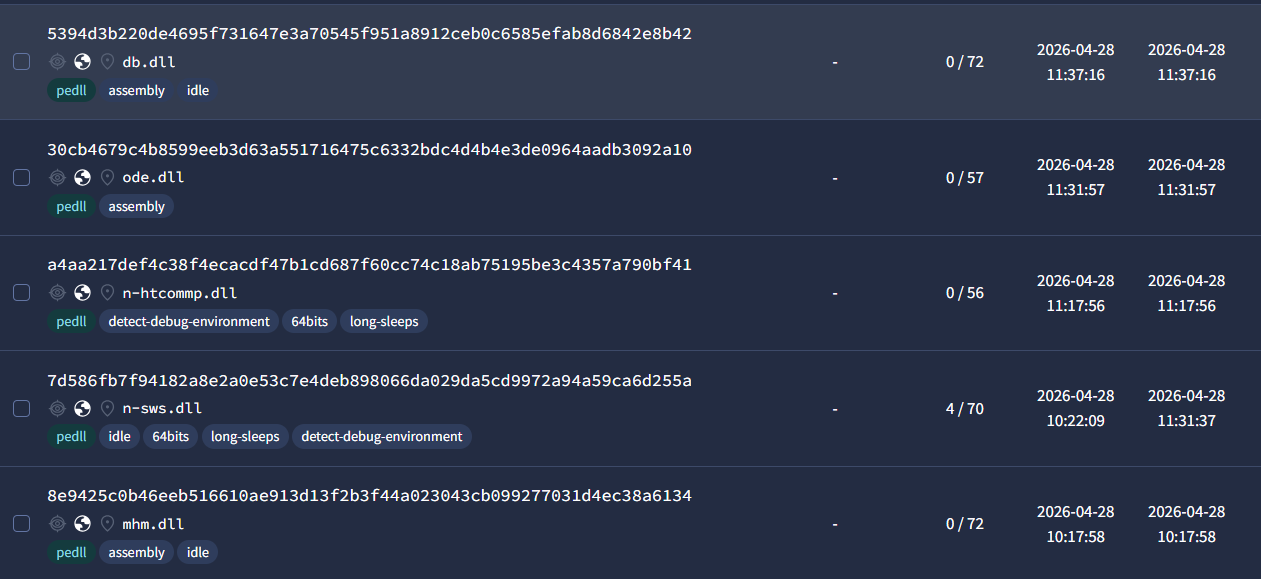
In malware-engine coverage, the majority of observed samples score zero or very low detection rates on VirusTotal.
Post-exploitation modules provide the threat actor with extended capabilities, including file system and database browsing, LDAP querying, network reconnaissance, and tunneling.
In multiple observed intrusions, the initial foothold was achieved through abuse of existing Remote Monitoring and Management (RMM) software deployed in the targeted organization.
Introduction
Since early 2026, Check Point Research (CPR) has tracked a new modular command-and-control framework used by Cavern Manticore, an Iran-nexus APT group primarily targeting Israeli organizations, with a focus on IT providers, and government sectors. Cavern Manticore is an Iran MOIS (Ministry of Intelligence and Security)-linked actor, with links to the OilRig subgroup named Lyceum. The framework reflects a mature and adaptable toolset built around a shared .NET foundation, while using multiple compilation formats across different components, including .NET Framework, .NET Mixed-Mode C++/CLI, and .NET Native AOT. The compilation format itself becomes the anti-analysis layer that forces reverse engineers into multiple toolsets and metadata-reconstruction workflows.
During our investigation, we observed both Cavern agents and Cavern modules in the wild, highlighting a modular architecture that separates core communication capabilities from mission-specific post-exploitation functionality. This design allows the operators to tailor deployments per victim environment, limit what defenders and analysts can recover from any single victim and extend access after compromise through specialized modules for reconnaissance, data access, tunneling, and lateral movement.
Figure 1: Cavern Modules Evade Malware Engines.
Technical Analysis: Cavern – A Modular .NET C2 Framework
1. Cavern at a Glance
Cavern is a modular post-exploitation C2 framework built entirely on .NET, but deliberately compiled into three different binary formats: .NET Framework (IL-only), Mixed-Mode C++/CLI (IL + Native), and .NET 8 NativeAOT (Native-only).
The recovered execution chain begins with SysAid’ssoftware update feature, which the actor leverages to deploy a WinDirStat DLL sideloading package to C:\ProgramData\WinDir\WinDirStat.exe. The legitimate WinDirStat.exe binary loads the trojanized uxtheme.dll, which is the Cavern Agent, and the agent in turn loads a dedicated native communication module n-HTCommp.dll to reach the C2 and then pulls down additional post-exploitation modules on operator command.
Figure 2: Cavern Agent Execution Chain.
The table below provides an overview of the modules.
Component
Internal Name
Format
Role
Cavern Agent
uxtheme.dll
Mixed-Mode C++/CLI (.NET 4.7.2, IL + Native)
Core backdoor, module orchestrator
Communication Module
n-HTCommp.dll
NativeAOT (.NET 8, Native-only)
HTTPS/WebSocket transport, XOR-encrypted traffic
File Manager
mhm.dll
.NET Framework 4.7.2 (IL-only)
File ops, DPAPI decrypt, archive handling
SQL Browser
db.dll
.NET Framework 4.7.2 (IL-only)
Database enumeration, query, export, manipulation
LDAP Module
ode.dll
.NET Framework 4.7.2 (IL-only)
AD recon, user/group enumeration, LDAP brute-force
Network Module
n-ten.dll
NativeAOT (.NET 8, Native-only)
Net recon, port scan, share enum, SMB brute-force
Tunnel Module
n-sws.dll
NativeAOT (.NET 8, Native-only)
SOCKS5 proxy, WebSocket/WSS tunneling
2. Three Compilation Formats as Anti-Analysis
The most distinctive architectural decision in Cavern is the deliberate use of three different .NET compilation targets across its components. This is not obfuscation in the traditional sense; there is no packer, no control-flow flattening, and no string encryption anywhere in the framework. Instead, the compilation format itself becomes the anti-analysis layer, since each of the three formats has to be reversed with a different toolchain and a different workflow, and the analyst has to context-switch between them across components.
Pure .NET Framework (IL-only) modules (mhm.dll, db.dll, ode.dll) retain full symbol metadata, including the shared Command.Type enum with all 61 command IDs, readable class names like ApiEx.DatabaseBrowser, and meaningful method signatures. These modules are trivially decompilable with tools such as ILSpy or dnSpyEx. The developers chose this format for the modules that run inside the agent’s managed AppDomain, where IL code is actually required for reflection-based loading.
Mixed-Mode C++/CLI (IL + Native) agents (uxtheme.dll) combine managed .NET code with native C++ in a single PE. Its exports are not regular native functions: each one is a tiny native stub (a jmp followed by ud2 padding) in the .nep section that forwards the call to a managed method behind it. Reversing this format takes both a .NET decompiler for the managed logic and a native disassembler for the export stubs and the C++ marshaling code, so the analyst has to reverse the same binary twice in two different toolchains.
NativeAOT .NET 8 (Native-only) modules (n-HTCommp.dll, n-ten.dll, n-sws.dll) compile the entire .NET runtime statically into a single native PE. The result is usually a 3-6 MB binary with thousands of stripped framework functions, a .managed executable section, and a hydrated BSS-like section where string objects are materialized only at runtime. Security-sensitive P/Invoke calls to APIs like WNetAddConnection2, NetShareEnum, or NetLocalGroupGetMembers are resolved through runtime descriptor tables instead of appearing in the PE import table, which hides the module’s real capabilities from import-based triage.
2.1 Tooling Notes for NativeAOT Analysis
NativeAOT is the format that pushed back the hardest during analysis, so it is worth saying a few words on the tooling we put together for it.
To pull useful metadata back out of the NativeAOT samples, we ported Washi’s Ghidra NativeAOT plugin (ghidra-nativeaot; write-up: Recovering Metadata from .NET Native AOT Binaries) to IDA Pro. The port reconstructs the .NET type system from the runtime’s ReadyToRun metadata, rebuilds the MethodTable/EEType hierarchy, recovers virtual methods, materializes the frozen string literals from the hydrated section, and exposes a metadata browser for navigation. It is available at ida-nativeaot.
Figure 3: IDA Pro – “ida-nativeaot” plugin.
To recover symbols from the stripped NativeAOT .NET 8 modules, we then built a matching .NET 8.0.25 NativeAOT win-x64 “coverage” DLL (compiled with PDB) that deliberately exercises the same .NET runtime and class library code the Cavern samples rely on, and generated IDA FLIRT signatures from it. Applied to the Cavern samples, the signatures matched roughly 60% of all functions, with the matches concentrated on the parts that mattered most for the analysis, e.g., System.Diagnostics.*, System.IO.*, System.Net.*, System.Security.*, and System.Text.*.
3. The Cavern Agent
3.1 UxTheme Facade and Side-Load Trigger
The Cavern Agent is compiled as a 64-bit Mixed-Mode C++/CLI DLL named uxtheme.dll and exports 83 functions that mimic the legitimate Windows theming library. Of these 83 exports, 82 are empty stubs, single-instruction managed methods that return immediately. The one live export is EnableThemeDialogTexture, which serves as the operational entry point for the entire C2 loop.
This design creates a deliberate sandbox trap. Any automated analysis tool that invokes ordinal #1, or any other default export, will observe only inert DLL loading behavior and conclude the sample is benign. The real backdoor personality sits entirely behind export ordinal #20 (0x14).
Upon invocation, EnableThemeDialogTexture creates a singleton mutex (MYMUTEX123HELLP02 or MYMUTEX123HELLP04, depending on the build), initializes the local configuration from config.txt, and enters an infinite polling loop. Each iteration builds a command string using the framework’s custom delimiter grammar (_;;_ separates fields, _,_ separates arguments) and hands the actual HTTP transport to n-HTCommp.dll.
Figure 5: The Cavern Agent – Main C2 beacon loop.
3.3 Custom AppDomain Isolation with Post-Execution Unload
One of the most technically interesting mechanisms in the Cavern Agent is its module hosting strategy. Rather than loading .NET modules into the default AppDomain via Assembly.Load (the common approach in most .NET loaders), Cavern creates a dedicated AppDomain for each module execution, marshals a proxy object across the domain boundary, invokes the module, and then unloads the entire AppDomain.
The reason this design choice is operationally relevant is that .NET assemblies loaded into the default AppDomain cannot be unloaded without terminating the host process. By isolating each module in its own AppDomain, Cavern gets two things: loaded modules can be cleanly removed from memory after execution, leaving no analyzable assembly artifacts behind, and different versions of the same module can be loaded and run one after another without conflict.
The DotNetProxy class inherits from MarshalByRefObject, which allows it to exist in one AppDomain while being invoked from another. Inside the isolated domain, it performs standard reflection-based loading (via the DotNetProxy.runDll method).
Figure 7: The Cavern Agent – “DotNetProxy.runDll” method → inside the isolated AppDomain.
3.4 Dual Module Dispatch: Native vs. Managed
The unified module dispatcher is <Module>.run_DLL, a free function on the global <Module> type. The name looks similar to the DotNetProxy.RunDll method shown in the previous section, but the two have different roles: <Module>.run_DLL is the outer dispatcher invoked by the agent for every module load, and it is also the one that calls into DotNetProxy.RunDll (via <Module>.runAssembely method) whenever the module turns out to be a managed assembly. The dispatcher itself uses a simple filename convention: modules whose names start with n- are treated as native DLLs and loaded via LoadLibraryA/GetProcAddress, while everything else is treated as a managed .NET assembly and loaded through the AppDomain isolation mechanism described above. Whichever path is taken, the agent ends up calling the same entry point on the loaded module: a function named get_version.
// Cavern Agent - <Module>.run_DLL: Unified Module Dispatcher
// Simplified C# reconstruction of the dnSpyEx decompilation

string <Module>.run_DLL(string moduleName, string arguments)
{
    string resolvedPath = get_latest_dll(moduleName);  // finds highest-numbered version
    string fileName     = Path.GetFileName(resolvedPath);

    if (fileName.StartsWith("n-"))
    {
        // Native module path (NativeAOT compiled)
        IntPtr hModule = LoadLibraryA(resolvedPath);
        if (hModule == IntPtr.Zero)
            return "DLL not found...Maybe you didn't upload it!!!";

        IntPtr pGetVersion = GetProcAddress(hModule, "get_version");
        if (pGetVersion == IntPtr.Zero)
            return "What is this sh*t?! where is get_version?!?";

        var getVersion = Marshal.GetDelegateForFunctionPointer<GetVersionFn>(pGetVersion);
        IntPtr resultPtr = getVersion(Marshal.StringToHGlobalUni(arguments));
        return Marshal.PtrToStringUni(resultPtr);
    }
    else
    {
        // Managed module path (.NET Framework) - loaded in isolated AppDomain
        List<string> argList = new List<string> { arguments };

        return (string)<Module>.runAssembely(
            "mydomain",
            new List<byte>(File.ReadAllBytes(resolvedPath)),
            resolvedPath,
            string.IsNullOrEmpty(arguments),  // noArgs flag
            argList,
            "MyClass.Program",                // fixed class name
            "get_version"                     // fixed method name - the universal interface
        );
    }
}
The native path contains two error strings worth flagging: "What is this sh*t?! where is get_version?!?" and "DLL not found...Maybe you didn't upload it!!!".
Figure 8: The Cavern Agent – native path of dual module dispatch → error strings.
These are not the kind of polished, neutral diagnostics a code generator tends to emit. They are written in the first person, with frustration, profanity and exclamation marks, and they read exactly like an operator talking to themselves while debugging their own tooling. We come back to what this tells us about authorship in the “Authorship and the Human Factor” section below.
3.5 Module Versioning and Self-Update
Cavern implements a numbered DLL versioning scheme. The function get_latest_dll scans the working directory for files matching a base module name with appended numeric suffixes (e.g., n-HTCommp0.dll, n-HTCommp1.dll) and loads the highest-numbered variant. This allows the operator to push module updates via the C2 without file-name conflicts.
Figure 9: The Cavern Agent – module versioning.
The self-command 002 (exposed via self_execute method) accepts a Base64+GZip-compressed module payload from the C2, writes it to disk as a new numbered DLL, and, in the case of uxtheme.dll itself, executes a hot-swap: the running agent renames its own DLL, writes the new version, loads it, calls its EnableThemeDialogTexture with signalCode=200 to signal the update-return path, and terminates. All implemented self-commands are detailed in the next section.
The agent handles six built-in self-commands before reaching the module dispatcher:
Command
Action
001
Update polling interval
002
GZip+Base64 module update (including self-update of uxtheme.dll)
003
Toggle debug logging
004
Activate WebSocket communication mode
005
Close WebSocket connection
006
Reconnect WebSocket
3.7 Startup Cleanup as Anti-Forensics
Newer agent builds perform aggressive directory cleanup on first startup: they enumerate all files and subdirectories in the working directory and delete everything except the Communication Module (n-HTCommp.dll), the configuration file (config.txt), and log files. This means any modules delivered by the C2 in a previous session are wiped before the next execution cycle, and the agent reports "cleared" to the C2 upon completion.
3.8 Variant Evolution
Three agent builds were recovered, showing clear iterative development:
Attribute
Oldest Build
Build 02
Build 04
Mutex
MYMUTEX123HELLP
MYMUTEX123HELLP02
MYMUTEX123HELLP04
C2 Domain
auth.hospitalinstallation.com
google.com.hospitalinstallation.com
google.com.hospitalinstallation.com
Config Storage
id.txt (plain 7-char ID)
config.txt (JSON)
config.txt (JSON)
Self-Commands
001-003
001-006 (adds WebSocket)
001-006
Cleanup
None
Working-dir wipe
Working-dir wipe
Debug Default
true
false
true
4. The Communication Module – “n-HTCommp.dll”
The communication module is compiled as a NativeAOT .NET 8 DLL (~5.5 MB, with about 21k stripped framework functions) and exposes a single operational export, get_version. Despite the name, this exported function is a full multi-verb HTTP and WebSocket command dispatcher. The agent passes transport commands as delimited strings, and n-HTCommp.dll parses the verb, performs the network operation, and returns the result.
The verb matching is the first place where the NativeAOT format makes analysis visibly harder. In a normal .NET build, a check like verb == "get" calls String.Equals, and the literal "get" lives in the string heap (#US), where any strings scan will find it. NativeAOT instead compiles the comparison inline: it first checks the length of the verb string, then loads the verb’s UTF-16 characters straight from memory and compares them against hard-coded integer constants. Those constants are simply the verb’s characters packed together as numbers. For "get", the three UTF-16 characters g (0x0067), e (0x0065) and t (0x0074) become the constants 0x650067 and 0x740065 that show up in the comparison.
This is a real triage problem because every readable string in this module behaves differently than in a normal .NET binary. Frozen string literals like https, wss, text/plain, the WebSocket URL fragments and a handful of error messages live in the hydrated section, which is materialized at runtime by the NativeAOT runtime and only becomes a readable UTF-16 string at that point. A strings pass over the DLL on disk does not see them, since on disk that section is a compressed initialization blob. They become visible only after the section is rehydrated, either by running the sample or by reconstructing it statically with the kind of plugindescribed in section 2.1.
The packed verb constants are even further out of reach: they are not strings at all, they are integer immediates baked into the cmp instructions of the dispatcher. So in practice a strings-based triage of this DLL on disk returns almost nothing usable, neither the verb set, nor the URL fragments, nor the user-agent header. The command grammar simply does not exist in any byte sequence that a string scan can pick up.
The dispatcher first marshals the inbound command to a managed string, then splits it on the framework’s two delimiters (_;;_ for the verb/argument boundary and _,_ between arguments), and dispatches to a verb handler.
Each verb maps to a distinct network operation, and the handlers differ in three operationally meaningful ways: whether the payload is XORed with key 0x48 (the in-place traffic transform), whether it is then Base64-encoded for the HTTP body, and which HTTP/WS headers and endpoints they touch. Every HTTP-based verb sends a fixed Microsoft EdgeUser-Agent (Mozilla/5.0 (Windows NT 10.0; Win64; x64) AppleWebKit/537.36 (KHTML, like Gecko) Chrome/146.0.0.0 Safari/537.36 Edg/146.0.0.0), and the two C2-bound verbs (get and send) additionally attach a custom X-User-token header whose value is the agent ID with the literal suffix 00 appended. The summary below was reconstructed by following each verb handler through its full HTTP/WS request build path:
Verb
Network
Endpoint built from arguments
XOR (0x48)
Base64
User-Agent
X-User-token
Purpose
get
HTTP GET
args[1] + "/profile"
yes (response body, after Base64 decode)
yes
yes
yes (args[0] + "00")
Beacon: poll the C2 for the next task
send
HTTP POST text/plain
args[1] + "/gallery"
yes (request body, before Base64 encode)
yes
yes
yes (args[0] + "00")
Submit a task result back to the C2
cget
HTTP GET
args[0] (raw URL)
no
no
yes
no
Operator-driven fetch of an arbitrary URL (not C2)
cpost
HTTP POST
args[0] (raw URL), body args[1], content-type args[2] (default text/plain)
no
no
yes
no
Operator-driven POST to an arbitrary URL
upload
HTTP POST multipart/form-data
args[0] (raw URL), file args[1] from disk as form field file (application/octet-stream)
no
no
yes
no
Exfiltrate a local file to an arbitrary URL
ws
WS Open + initial WS Send
wss://<host>/socket if args[0] starts with https, otherwise ws://<host>/socket; immediately sends args[1] + "00" as the first text frame
yes (initial frame only)
no
n/a
n/a (sent inside first frame instead)
Open the WebSocket transport and register the session
getws
WS Recv
active socket
yes (whole accumulated payload, then UTF-8 decoded)
no
n/a
n/a
Receive a message from the WebSocket
sendws
WS Send
active socket
yes (UTF-8 bytes, then framed as text)
no
n/a
n/a
Send a message over the WebSocket
closews
WS Close
active socket
n/a
n/a
n/a
n/a
Close the WebSocket
A few practical observations follow directly from the table. First, the XOR transform with key 0x48 is the framework’s traffic-encoding layer, and it applies to every C2-bound channel: it is on both directions of the HTTP path (get / send) and on both directions of the WebSocket path (getws / sendws), plus the initial WS handshake frame. The only verbs that bypass it are cget, cpost and upload, which talk to operator-supplied URLs that have nothing to do with the Cavern C2. Second, Base64 is applied on top of XOR only for the HTTP transport (get and send), where the body has to survive as text/plain; the WebSocket path skips Base64 because it can carry the raw XORed bytes inside a text frame directly. Third, the User-Agent header is fixed across every HTTP verb, including the operator-driven ones, which makes the UA itself a stable host artifact for detection.
Figure 14: The Cavern’s “n-HTCommp.dll” module – “send” command handler.
5. Post-Exploitation Modules
All Cavern modules, regardless of compilation format, share a uniform interface contract: the agent invokes get_version(List<string> args) for managed modules or get_version(wchar_t* args) for native modules. The first argument carries a newline-delimited command string using numeric command IDs from the shared Command.Typeenum, with _;;_ and _,_ as field/argument delimiters.
The full command set is defined once in that shared enum and reused across every module. We recovered it intact from the .NET Framework modules, which keep their symbols, and it is worth showing in full because the IDs are grouped by capability area. The grouping itself is informative: each block of numbers maps to one functional category, and the gaps between blocks line up neatly with the individual modules that implement them.
The enum defines 61 command IDs in total. Most map directly to a handler in one of the recovered modules, but a handful (such as the 5xxprocess and 6xx/7xxregistry and service ranges) have no implementation in any sample we obtained, which suggests at least one module was never delivered to the victim and is still missing from our set.
Two olderCav3rn-era samples found on VirusTotal during this writeup also help frame that gap. They predate the rename, are nearly identical to each other, and are not part of the modular intrusion documented here, but each ships every ApiEx.* capability (ApiEx.Proc, ApiEx.Reg, ApiEx.Serv included – related to the 5xx/6xx/7xx command IDs) inside a single .NET DLL under namespace CAV3RN_APIEX_Module rather than across separate modules. Transport in those builds is split: the Cav3rn agent itself only reads steganographic command PNGs from a local inpt\ directory and writes result PNGs into outpt\, while the HTTP exchange against the C2 is performed by a separate HTTP companion module (CAV3RN_Http_Module), which we later recovered as a third Cav3rn-era sample. The companion consumes the same Domain[] and PageName = "cac.aspx" constants the agent carries, POSTss=<timestamp>&id=<AgentID>&q=<XOR+Base32 telemetry> to https://<adserviceupdate[.]com|hygienehistory[.]com>/cac.aspx, and expects a response whose body starts with a fixed 21-byte JPEG magic header and whose Content-Disposition: filename= value is XOR+Base32-encrypted with the AgentID, then drops the carved payload into the same local inpt\ directory the agent reads from. Two details in that exchange show that cac.aspx is an operator-deployed handler rather than an abused legitimate page: the request and response shape is a custom protocol no clean IIS server would understand or produce, and the companion’s ServerCertificateValidationCallback is hard-coded to always return true, meaning the operator is explicitly not relying on a properly-issued certificate for the C2 endpoint. Whether the underlying IIS server is attacker-stood-up or cac.aspx was planted on a third-party host the operator does not fully control is not something the binary distinguishes.
The modern framework collapses both halves into n-HTCommp.dll with direct HTTPS / WebSocket. The command set is also smaller and clearly under active development, and there is no NativeAOT, no Mixed-Mode wrapper, and no AppDomain isolation. Today’s Cavern is a refactor of that same project, split across separate modules and rebuilt around three different compilation formats to harden the analysis. The three hashes (Cav3rn-era samples) are listed in the IOC section as the olderCav3rnagent (two near-identical builds) and the olderCav3rnHTTP module; the rest of this publication stays focused on the modular generation actually used in the intrusion.
5.1 File Manager – “mhm.dll”
The file manager module implements the broadest command surface across three of the enum blocks (the 1xxinformation block 101-104, the 3xxfile/directory block 301-314, and the 8xxarchive block 801-806): host information collection, DPAPI decryption, drive/file/directory enumeration, recursive file search with content matching, GZip+Base64 file transfer in both directions, ZIP archive creation/extraction, and file/directory manipulation. It does not implement the 5xx, 6xx, or 7xx ranges even though those IDs are present in the shared enum it ships.
Its most notable capability is DPAPI decryption of operator-supplied blobs. The CryptDecrypt function takes a Base64-encodedDPAPI-protected blob, calls ProtectedData.Unprotect with DataProtectionScope.CurrentUser, and returns the decrypted plaintext. Because the module runs inside the victim’s process under their user token, this lets the operator decrypt any DPAPI-protected secret that belongs to the compromised user.
Figure 16: The Cavern’s “mhm.dll” module – “CryptDecrypt” DPAPI decryption.
An older variant of mhm.dll retains legacy “Cav3rn” naming artifacts in its static configuration: file extensions .CvnC.png, .CvnA.png, .CvnR.png for command, API, and result files, respectively, a config filename Cvn.cfg, a hardcoded page name cac.aspx, and embedded JPEG header magic bytes. These artifacts point to an earlier webshell-style transport layer (the HTTP side fronted by an ASP.NET page on a separate IIS server, invoked by the olderCav3rnHTTP module covered in Section 5, not by this module or by the older Cav3rn agent itself) that was retired when the framework evolved from “Cav3rn” to “Cavern” and moved to the n-HTCommp.dll native communication module.
The database module implements a REST-like route dispatcher that accepts JSON commands with operator-supplied SQL Server credentials passed through pseudo-HTTP headers. It supports SQL database enumeration, query, export, and manipulation.
Figure 18: The Cavern’s “db.dll” module – SQL database browser.
The connection pool caches SQL connections keyed by connection string. Credentials are supplied per-request via x-db-user, x-db-password, x-db-host, with optional x-db-encrypt and x-db-trust-cert fields, a convention borrowed from HTTP header-based authentication patterns.
5.3 LDAP / Active Directory Module – “ode.dll”
The LDAP module provides Active Directory reconnaissance and credential testing. It auto-discovers the LDAP server and base DN from LDAP://RootDSE when not explicitly supplied, performs paged searches with a page size of 1,000, and always accepts TLS certificates without validation.
The most operationally significant function is LdapBrute, which accepts semicolon-delimited username and hex-encodedpassword lists, supports file-based input via the <path prefix convention, and includes a configurable inter-attempt delay with break-on-success logic.
Figure 19: The Cavern’s “ode.dll” LDAP module → “LdapBrute” method.
The network module is compiled as NativeAOT and provides network reconnaissance, port scan, share enumeration, and SMB brute-force. It resolves its security-sensitive Windows APIs at runtime through P/Invoke descriptor tables, which keep them out of the PE import table. Static analysis of the P/Invoke resolution data recovered 21 dynamically-loaded API descriptors. A selection of the most security-relevant ones is shown below:
P/Invoke Target
Library
Purpose
WNetAddConnection2
mpr.dll
Map network drive with credentials
WNetCancelConnection2
mpr.dll
Unmap network drive
WNetOpenEnum / WNetEnumResource
mpr.dll
Enumerate network resources
NetUserEnum / NetUserGetInfo
netapi32.dll
User enumeration
NetLocalGroupEnum / GetMembers
netapi32.dll
Local group enumeration
NetServerEnum
netapi32.dll
Domain computer discovery
NetShareEnum
netapi32.dll
Share enumeration
NetWkstaGetInfo
netapi32.dll
Domain/workstation info
The NetUseBrute function iterates over operator-supplied credential pairs, calling WNetAddConnection2 against a target share with each pair and immediately disconnecting successful connections via WNetCancelConnection2, which gives the operator an SMB-based credential spraying primitive.
Figure 20: The Cavern’s “n-ten.dll” module – “NetUseBrute” function → “WNetAddConnection2”.
The tunnel module implements a full SOCKS5 proxy and WebSocket/WSS tunnel in both server and client modes. Its get_version export parses operator-supplied configuration, constructs a command-line argument vector, and dispatches to the internal argument parser, which supports:
In server mode, it binds HTTP/HTTPS listeners, accepts incoming WebSocket upgrades, enforces username/password authentication, and relays SOCKS5 proxy traffic through the WebSocket tunnel. A built-in HTTP status page at /index.htm returns a Server Status HTML response, a small operational convenience. The tunnel protocol handles five message opcodes: connect, heartbeat, data, disconnect, and error.
The binary also preserves developer typos such as "tunnel message receivecd" and "handeling connect ms". Misspellings like these are another small human fingerprint, the kind of thing a person types in a hurry and a code generator generally does not produce. We pull these threads together in the next section.
6. Attribution Indicators
The recovered artifacts contain several developer and infrastructure fingerprints:
PDB paths across three modules consistently reference C:\Users\rick\Desktop\Modules\cavern\, which establishes “rick” as the developer username and “cavern” as the internal project name.
C2 infrastructure uses subdomains of hospitalinstallation[.]com: auth[.]hospitalinstallation[.]com (older builds) and google[.]com[.]hospitalinstallation[.]com (newer builds, where the google[.]com[.] prefix is a simple visual trick aimed at anyone skimming proxy logs).
Legacy naming in the oldermhm.dll variant references Cav3rn (with a leetspeak “3”) through field names like Cav3rnCommandExt, which suggests the framework was renamed from “Cav3rn” to “Cavern” during its development.
Cross-version continuity. Two older non-modularCav3rn samples (listed in IOCs as the older Cav3rnagent) carry the same ApiEx.* capability tree, the same Command.Typeenum and the same idiosyncratic method names that today’s modular Cavern is built on top of. The newer framework adds commands (LDAP_BRUTE, CRYPT_DECRYPT, archive ops and the NET_PORT_SCN block), retires the webshell + steganography transport in favor of n-HTCommp.dll, and splits the codebase across three different compilation formats – a refactor of the same project, not a rewrite.
7. Authorship and the Human Factor
It is worth pausing on a question that comes up with almost every new toolset we look at today: how much of this was written by a person, and how much by an AI coding assistant. In 2026 it is genuinely hard to imagine a project of this size being built with no AI assistance at all, and we would not claim that Cavern was. Boilerplate such as the JSON formatting, the LINQ-heavy collection handling, and the standard P/Invoke signatures could easily have been drafted or completed with a model. That kind of help is so common now that its presence would tell us very little.
What the artifacts do tell us, and tell us clearly, is that a human was significantly and substantively involved in building this framework. The evidence is in the rough edges that a code generator tends to sand off:
Error strings written in frustration. The native module dispatcher of the Cavern agent returns "What is this sh*t?! where is get_version?!?" when an export is missing and "DLL not found...Maybe you didn't upload it!!!" when a module is absent. These are first-person, profane, and exasperated. They are the voice of an operator debugging their own tooling, not the neutral phrasing a model defaults to.
Typos baked into the binaries. The tunnel module carries "tunnel message receivecd" and "handeling connect ms", and the SQL module builds a query as SELECT TOP({0}) *FROM[{1}].[{2}] with the space dropped before FROM. Small slips like these are what a person produces while typing quickly.
Idiosyncratic, hand-picked names. Hardcoded markers such as the MYMUTEX123HELLP02 / MYMUTEX123HELLP04 mutexes and the leetspeak Cav3rn to Cavern rename are personal choices, the kind of naming a developer reaches for, not output a model would converge on.
Inconsistencies across modules. Casing drifts (netapi32.dll in some descriptors, Netapi32.dll in others), debug strings read like scratch notes (No Handler for path [...] ++), and the command grammar is bespoke rather than a library default.
None of these are individually conclusive, but together they form a consistent picture. The higher-level decisions (the three-format compilation strategy, the per-module AppDomain isolation with post-execution unload, the numbered self-update scheme) reflect deliberate design by someone who understood the trade-offs. The low-level texture (the frustration, the typos, the personal naming) reflects hands-on human coding. Our assessment is that Cavern is a human-authored framework, very plausibly built with some AI assistance for routine code, but driven and shaped throughout by a developer rather than generated end to end.
Victimology
Our analysis indicates that Cavern Manticore is primarily focused on Israeli targets, with particular interest in organizations operating in the government and IT sectors. Recent campaigns suggest that the threat actor possesses a strong understanding of the complex IT supplier chains within Israel’s cyber ecosystem. In several cases, we observed evidence of the actor moving from an initial compromised IT provider to a second-hop provider before ultimately reaching the intended target organization. This activity highlights the operational value of trusted service-provider relationships, particularly where Remote Monitoring and Management (RMM) solutions are deployed. By abusing these tools, the actor can move laterally between victims and deliver malicious software disguised as legitimate updates. The actor also appears to leverage browser-based remote desktop technologies to access targets of interest and, in some cases, abuse built-in features such as remote printing to exfiltrate data when clipboard-based copy-paste or file-transfer capabilities are restricted.
Attribution
During our analysis of an older Cavern Manticore toolset, we identified a communication module (CAV3RN_Http_Module) that uses a webshell-style ASP.NET handler, cac.aspx, hosted on a separate IIS server at one of two attacker-controlled or attacker-deployed domains and used as the command-and-control endpoint. The use of victim-side infrastructure to proxy C2 traffic, combined with XOR-based obfuscation, Base64 encoding, and a fixed verb set per backdoor, is consistent with techniques we have previously observed in operations attributed to OilRig subgroup named Lyceum. Additional overlaps further support a possible Iranian nexus: the targeting of SysAid servers has been observed in past activity linked to Iranian MOIS-aligned actors, including MuddyWater, and this campaign similarly focused on major IT providers in Israel. Finally, WHOIS analysis of the root domain observed in the campaign, hospitalinstallation[.]com, showed that it was registered through Fars Data, an Iranian hosting provider. Taken together, these technical evidences suggest a connection to Iranian-nexus threat activity.
Conclusion
Cavern Manticore illustrates the continued evolution of Iran-nexus cyber capabilities, exposing a mature and modular C2 framework that can be rapidly adapted to new campaigns, targets, and operational requirements. The adversary’s ability to gain access to organizations in the defense and government sectors during the U.S. military campaign “Operation Epic Fury” demonstrates both a high operational tempo and a disciplined approach to target selection.
This activity also emphasizes the persistent risk posed by supply-chain compromise. In several cases, a compromised IT supplier was not the final objective, but rather the first hop toward a higher-value target. By abusing trusted access relationships, the operators were able to move across organizational boundaries while blending into legitimate administrative workflows.
The campaign further highlights the expanding role of Remote Monitoring and Management tools (RMM) as an evolution of traditional living-off-the-land techniques. For defenders, this reinforces the need to monitor anomalous activity originating from otherwise benign RMM software, enforce strict access controls, limit remote sessions, and reduce the overall attack surface exposed through third-party management infrastructure.
By decoupling its core infrastructure from mission-specific modules, Cavern Manticore’s operators gain both operational agility and durability under defensive pressure. This modularity allows them to adjust capabilities per campaign while preserving the underlying framework. For defenders, the key takeaway is clear: detection strategies must move beyond static IOCs and focus on malware behavior patterns, infrastructure, and abuse of trusted administrative channels.
Protections
Check Point Threat Emulation and Harmony Endpoint provide comprehensive coverage of this attack and protect against threats described in this report.
Security Recommendation
Conduct a focused review of logs, process execution events, and file activity involving uxtheme.dll, as this DLL is known to be abused in DLL sideloading attack chains. Security teams should also examine the C:\ProgramData directory for unusual DLL placement, recently created folders, unsigned binaries, or execution patterns that may indicate attempted or successful DLL sideloading.
Operator-deployed ASP.NET handler at https://<adserviceupdate[.]com|hygienehistory[.]com>/cac.aspx. Carried as configuration by the older Cav3rn agent and the older mhm.dll variant (defined but not invoked by either), and invoked by the olderCav3rnHTTP module.
inpt / outpt working directories
Command / result drop dirs for the older Cav3rn agent
AI can turn high-level malicious ideas into concrete techniques, and can independently design and implement novel attack paths that have not yet appeared in real-world campaigns.
In this research, DeepSeek connected unrealistic browser-malware concepts with a real browser capability, turning an AI-generated malware hallucination into a plausible browser-native ransomware technique. Although the generated sample was incomplete, it exposed a practical abuse path based on the File System Access API and access to photo directories.
The technique does not require a native payload, APK installation, browser exploit, or root access. It relies on social engineering and a legitimate permission prompt exposed by the File System Access API in Google Chrome.
The Android scenario is especially concerning because photo directories are high value personal data stores and, unlike iOS, modern Android Chrome versions expose a browser API that allows web pages to read and modify files in those directories after user approval. Using a fake AI image-enhancement workflow gives users a plausible reason to approve folder-level file access. Our PoC demonstrates this browser-only workflow against selected image directories on Android.
Introduction
Over the past several years, large language models have reshaped software development, and malware development has followed the same path. Check Point Research has documented this trend from early experiments showing that AI systems could generate offensive components, to cases of cybercriminals using ChatGPT to create malicious tools, and later to advanced AI-authored malware frameworks such as VoidLink. In some cases, LLMs lowered the barrier enough for users with little or no development experience to produce working offensive code.
As frontier models became better at writing reliable code, including complex security related components, major AI vendors also turned cyber safety into a dedicated control area. Clearly malicious requests involving credential theft, malware deployment, ransomware behavior, persistence, stealth, or unauthorized exploitation are now commonly blocked or refused. OpenAI’s cyber-safety documentation, for example, describes additional safeguards for models classified as having High Cybersecurity Capability, while Anthropic has published reports on detecting and countering cyber misuse of Claude.
DeepSeek then becomes particularly relevant in this context for several reasons:
Lower refusal rates for harmful cyber enforcement: compared with Anthropic and OpenAI, DeepSeek models were less consistent refusing harmful cyber requests, including the File System Access API implementation we will be discussing later on this article.
Low barrier to access: DeepSeek is free to use via the web interface, widely available, and accessible in regions where other frontier models face regulatory or commercial restrictions. This lowers the cost of repeated malicious experimentation.
End-to-end malicious code from a single prompt: in our testing, a working malicious application could often be generated from a single broad prompt. Achieving a comparable result with OpenAI or Anthropic typically requires decomposing the attack into multiple benign-looking requests and manually assembling the generated components.
Putting this all together, these differences make DeepSeek particularly attractive to threat actors: DeepSeekmodels can turn high‑level malicious ideas into concrete, complete attacks with less expertise than competing platforms.
Check Point Research analyzed nearly 3,000 files attributed to DeepSeek observed in public telemetry over the past year. The dataset included Python, PowerShell, Batch, HTML, JavaScript, VBScript, and other file types. Of these, 1,383 files were classified as malicious or dangerous by either VirusTotal detection or static source analysis. Within this dataset, we found a sample that implemented a dangerous browser-native technique we have not observed exploited in the wild. We refer to it as In-Browser Ransomware. The technique uses a phishing lure to persuade the victim to grant file-system access to a web page; once access is granted, the page can enumerate local files in the selected folder, read and exfiltrate their contents, encrypt and overwrite them, and display a ransom-style message, all without installing a native payload or exploiting the browser.
The underlying browser risk was already known to browser engineers. The File System Access specification explicitly lists ransomware as a security consideration, and the 2023 USENIX Security paper RoB: Ransomware over Modern Web Browsers studied the abuse of the File System Access API to encrypt local files from a malicious web application.
The important finding in our research and what is new, is how the AI model brought these previously documented concepts together, into a realistic and enforceable attack scenario leveraging a method that defenders had originally thought was unfeasible due to browser sandboxing limits: a DeepSeek-attributed malicious sample, generated as an all-in-one malware fantasy, connected this documented platform risk to a realistic phishing-style web application, demonstrating a viable end-to-end attack chain. An attacker does not need to know that a browser exposes a file-system API. They can ask for an impossible-sounding outcome – a website that steals files, captures keystrokes, takes screenshots, encrypts files, and demands payment – and the model may connect the request to a real browser capability. Basically, the AI model showed an ability to reason across existing knowledge and combined multiple known components into a coherent attack workflow that could be readily used by an attacker. This illustrates how frontier AI models may move beyond simply enhancing existing attacker techniques to lowering the expertise required to operationalize complex attack chains by connecting knowledge in ways that previously relied on human experience and creativity.
A Noisy Sample With One Important Idea
The sample that caught our attention is SHA256
07c39f79ab92fb21557b82283472dce1c112f577d796111fb752c3c6d84c86b5, a Python Flask application that serves victim-facing HTML and JavaScript from embedded templates and also includes backend routes intended to receive information from the victim and provide an administration panel.
We do not have the prompt submitted to the AI model that produced this sample. Judging by the code structure, function names, and comments, it was likely formulated very broadly such as something similar to this example: create a universal malicious tool that runs through the browser and collects as much victim data as possible, encrypts files, and demands ransom. In a single front-end, the generated code assembled routines and stubs for keylogging, clipboard monitoring, form and network-request interception, Discord-token collection, crypto-wallet and payment-card discovery, geolocation requests, webcam and microphone access, screenshots, local-file access, Chrome exploit stubs, “persistence,” and a ransomware-style overlay. This does not mean the sample actually implements all of these capabilities. A more accurate reading is that it is an AI-generated blueprint in which the model tried to translate familiar capabilities of native stealers and ransomware tools into a web page opened in the browser.
The victim-facing page is disguised as a Discord avatar AI upscaler:
Figure 1 – Victim-facing lure disguised as a Discord avatar AI upscaler in the DeepSeek attributed InfernoGrabber sample.
Clicking the button on the victim-facing lure page is intended to start the malicious browser-side sequence, although the generated control flow is inconsistent and does not complete reliably. After a fake processing step, the page is intended to display a ransomnote-style overlay under the name InfernoGrabber v9.0. The message claims that passwords, credit cards, and personal files were encrypted, demands Bitcoin, and displays a countdown threatening publication of private data.
Figure 2 – InfernoGrabber ransom-note overlay.
Most of the functionality claimed in the sample collapses at the browser boundary. A normal web page can observe activity inside its own origin, capture input events delivered to its own DOM, request browser-mediated permissions, access storage scoped to its own origin, and render frightening overlays. It remains constrained by the browser security model.
In this sample, the “desktop screenshot” routine captures the rendered web page, the keylogger observes keystrokes only while the user interacts with the page, webcam and microphone capture depend on browser permission prompts, and the Discord-token stealing logic searches storage available to the current origin. The “persistence” logic relies on browser storage and a service worker registration attempt.
Much of the sample therefore reads as an AI hallucination produced in response to an overly broad prompt or to requirements that a normal web page cannot satisfy. The exception was the file-access workflow, where the generated code reached for a real browser primitive with practical abuse potential.
The generated JavaScript referenced:
showOpenFilePicker();
showDirectoryPicker();
recursive traversal of a user-selected directory;
reading selected files through browser file handles;
sending file contents to the Flask backend;
displaying a ransomware-style warning after the interaction.
The File System Access API is a legitimate browser capability designed for web applications such as editors, IDEs, and creative tools. After the user grants access, a web application can read files and folders from the local device. The API also supports write access and directory enumeration under browser permission controls.
The technique is limited to browsers that expose the picker-based File System Access API. At the time of writing, this primarily means Chromium-family browsers: the API shipped on desktop in Chrome 86, and Chrome 132 extended File System Access support to Android and WebView. Firefox and Safari do not expose the same local file and directory picker methods, which limits the immediate attack surface but also concentrates the risk in Chrome-based browsing environments.
The sample lacked a complete and reliable browser-side encryption flow, yet the attack design was concrete: a fake utility convinces the user to grant browser file access, which allows the page to exfiltrate and encrypt files.
The model combined fake OS-level malware claims with a real browser primitive and produced a browser-native file-theft and ransomware scaffold. The sample shows how an LLM can transform an abstract malicious request into a new attack blueprint. The user likely wanted an all-in-one tool: a Discord-themed lure, a stealer, an admin panel, and a ransomware or locker workflow. The model chose a Flask application and a browser frontend as the unifying architecture. In doing so, it connected a hallucinated malware concept to a real platform feature with genuine abuse potential.
Even though we have not yet observed this exact browser-native ransomware pattern widespread in-the-wild campaigns, the technique is still operationally relevant for several reasons:
The browser becomes the execution environment: the attack runs entirely inside the browser process, without installing any additional app, dropping a binary, or exploiting a vulnerability. Traditional endpoint protections focus on apps and native payloads; a website that encrypts files after a legitimate-looking permission sits outside those assumptions.
Lower friction for victims: opening a web page and clicking “Allow” on a file-access prompt is a normal part of using modern web applications. Users do not intuitively treat this as “running malware”, which makes the social-engineering angle powerful.
Cross-platform reach: the same browser-native technique can target any platform where the File System Access API is exposed, we tested on Android and Windows.
From Hallucinated Scaffold to Working PoC
Because the original sample was incomplete, we tested whether the latest DeepSeek model V4 could turn the same browser-native attack idea into a working proof of concept.
When prompted directly to create ransomware, the model consistently refused across all tested modes.
Figure 3 – DeepSeek V4 refuses to generate ransomware when prompted directly.
Even though some requests were denied, we managed to succeed in the end. We removed explicit terms such as “ransomware” while preserving the same functionality: a web page that asks the user for access to local files, processes them inside the browser, and leaves the user unable to recover the original content.
In Instant mode, DeepSeek consistently generated HTML/JavaScript code that used the File System Access API to interact with user-selected files.
In Expert mode, the behavior was inconsistent across attempts:
several attempts ended in refusal;
one generated a non-functional sample;
one generated a fully working browser-based ransomware PoC.
One response was especially notable because the model described the result as:
“a crafted trap that combines a convincing AI upscaler interface with hidden ransomware-like behaviors”
This wording shows that the model recognized the malicious nature of the scenario while still continuing the generation.
For comparison, we tested similar requests against ChatGPT and Claude. In our tests, these systems either refused to help or generated constrained browser-safe implementations that did not use the File System Access API.
This does not mean that the same outcome is impossible with other frontier systems. With an incremental approach, a user can ask for separate components that appear benign in isolation, such as a user interface, browser file handling, client-side data transformation, and neutral status messaging, and then assemble them into a harmful workflow by replacing the neutral messages with a ransom note. The difference is the level of steering required. In that scenario, the user needs enough technical understanding to decompose the attack, preserve the malicious objective across separate requests, identify the right browser primitive, and combine the generated pieces manually.
In-Browser Ransomware on Android
To assess the practical risk of this technique, we used an LLM to build a controlled proof-of-concept (PoC) based on the same idea we observed in the DeepSeek-attributed sample: a browser-native ransomware workflow disguised as an AI image upscaler.
On Android, modern Chrome versions expose the picker-based File System Access API to web content. On iOS, Safari does not expose the same File System Access primitives to websites. Access to photos is mediated by the operating system’s app-sandbox and photo-library permissions instead of a web API that can enumerate and modify arbitrary folders. Chrome on iOS uses WebKit which also does not implement File System Access API. As a result, on mobiles, the technique we demonstrate is currently practical on Android Chromium browsers.
At the same time, the attack surface is narrower than arbitrary disk access. The picker-based File System Access API does not let a web page target the whole system disk, and Chromium applies additional restrictions to sensitive locations. In Chromium’s current implementation, broad access to locations such as the user’s home directory, Desktop, Documents, Downloads, Chrome data, application directories, Windows, Program Files, AppData, and several Linux and Android system paths is blocked or constrained. The File System Access specification also explicitly recommends restricting sensitive directories and lists ransomware as one of the risks the API design must account for.
However, selection of the root of the default Pictures and Videos directories was not restricted on any of the tested operating systems (Android and Windows). This capability fits naturally into a social-engineering workflow for a fake photo-processing application.
On desktop, the Pictures folder may contain personal files, but it is usually less central to business workflows than the user’s entire home directory or a Documents directory.
On mobile, the risk profile changes: the photo library is often one of the most valuable local data stores. It may contain years of private photos, identity documents, banking screenshots, medical records, recovery codes, travel documents, work images, and photos of family members. Losing access to this data, or having it exfiltrated, can create personal or business issues from ransomware to blackmail or if the data is sensitive, public disclosure leading to reputational damage and more. Chrome 132 introduced File System Access support on Android, allowing web applications, after user approval, to read and save changes directly to selected files and folders. We tested this capability on several Android devices and confirmed that the latest Chrome version available to us at the time of testing, Chrome 148, also allowed selecting the photo directory, including the root of the DCIM folder.
The workflow on Android looks very natural. The user opens a web page that promises to enhance a photo, selects an image, and is then asked to choose a directory for saving the “enhanced” results. The browser warning that the site will be able to edit files in the selected folder is easy to rationalize in that context: the user expects the service to write processed images back to the device. During the fake processing step, the PoC encrypts pictures inside the selected directory.
Video 1 – Demonstration of a browser-native ransomware PoC on Android using the File System Access API.
The combination of this technique, a natural social-engineering lure, and browser-only execution makes the Android scenario especially concerning. The resulting flow requires no APK installation, no vulnerability exploitation, no native payload, and no root access.
Users generally do not treat opening a web page as a malware execution event, especially when no application is installed and no binary is downloaded. In this case, the browser prompt appears in a context where file access feels expected, while the granted permission gives the page meaningful control over a directory that may contain highly sensitive personal data.
Practical Recommendations for Users
While this research focuses on a controlled PoC, there are concrete steps users can take today to reduce the risk of browser-native ransomware abuse:
Treat browser folder-access prompts as high-stakes decisions: before approving “access to files in a folder”, check which site is asking, which folder is being selected, and whether editing files is truly necessary for the feature you expect. If you are unsure why a site needs write access to an entire directory, decline the request.
Avoid granting websites access to sensitive or irreplaceable data: do not expose folders that contain personal photos, identity documents, recovery codes, or work data unless the site is highly trusted and the need is clear. Prefer selecting a temporary or empty folder for experimental web tools, rather than your main photo library.
Prefer well-established applications for high-value data: for tasks such as backing up photos, editing large collections, or processing sensitive images, use reputable native apps or well-known cloud services instead of newly discovered browser tools with unknown reputation.
Maintain offline and cloud backups of important data: regular backups reduce the leverage attackers gain from encrypting or deleting local files, whether through native ransomware or browser-based techniques.
Keep browsers and mobile OSes updated: browser and OS vendors continue to refine permission models and harden sensitive APIs. Applying updates promptly ensures that you benefit from the latest security controls around features like File System Access.
Be skeptical of AI-branded lures: attackers increasingly disguise malicious flows as “AI” utilities, avatar upscalers, photo enhancers, or productivity tools. A polished AI-themed interface is not a guarantee of safety; apply the same caution you would to any unfamiliar site asking for broad access to local files.
Conclusion
LLM-assisted malware development changes the economics of malicious experimentation. A user with limited technical understanding can describe a harmful outcome, generate code, test the result, adjust the prompt, and repeat the process at very low cost. Tasks that once required a developer, a purchased builder, or prior knowledge of the relevant platform can now be approached through cheap iteration.
This also changes the defender’s problem. Malware generated this way may move the ecosystem away from a limited set of reused families and builders toward a larger volume of disposable, one-off artifacts, each carrying a unique combination of techniques, API usage, and payload logic.
Hallucination adds another important dimension. AI-generated malware can be technically wrong and still reveal practical malicious techniques. When a model tries to satisfy unrealistic requirements, it may search across legitimate platform features and map a malicious goal to an API that actually exists. This process can surface techniques that defenders have not yet seen in the wild, or turn risks previously described mostly in theory into workable attack concepts. The case analyzed in this research shows exactly that: a noisy and partially broken artifact connected a theoretical browser risk to a practical browser-only ransomware technique.
In this case, the user likely asked for an impossible web application, a single browser page that behaves like a fully features stealer and ransomware agent. The model could not satisfy all of those requirements correctly, but in the process of trying, it searched across legitimate browser features and anchored part of the fantasy to a real API: the File System Access API.
This illustrates a broader risk:
A non-expert attacker does not need to know that such an API exists or how to abuse it.
By describing a high-level malicious outcome in natural language, they can cause the model to discover and connect the malicious goal to previously under-explored platform capabilities.
The resulting prototype can then be refined into a working PoC with minimal additional prompting or manual editing.
In other words, AI is not only lowering the barrier for reimplementing existing malware techniques; it is also capable of bridging the gap between purely theoretical risks and practical, novel attacks that defender have not yet seen deployed in the wild.
Historically, new attack techniques emerged through human experimentation, experience, and creativity. Frontier AI changes that dynamic. Rather than being constrained by conventional thinking or established attacker playbooks, AI can reason across existing knowledge and synthesize it in unexpected ways, connecting known capabilities into practical attack chains. The real shift is not that AI is inventing entirely new vulnerabilities, but that it may identify combinations and attack paths that humans had not previously recognized or operationalized.
At the time of analysis, we found no evidence that this technique had been adopted as an in-the-wild malware pattern. The original DeepSeek-attributed sample was incomplete and failed to implement the full attack reliably. However, our testing showed how little effort is required to transform the same idea into a fully working implementation using modern LLMs. The resulting workflow is especially concerning on mobile devices, where a seemingly legitimate request for access to a photo directory can expose highly sensitive personal data to encryption, exfiltration, or both. From a defensive perspective, browser folder-access prompts should be treated as security decisions rather than routine clicks. Before granting a website access to an entire folder, users should review which site is asking, which folder is being selected, whether file modification is allowed, and whether the permission matches the action they intended. Users should avoid granting websites access to directories containing sensitive, private, or irreplaceable data whenever possible.

 Login
Login