Login
Login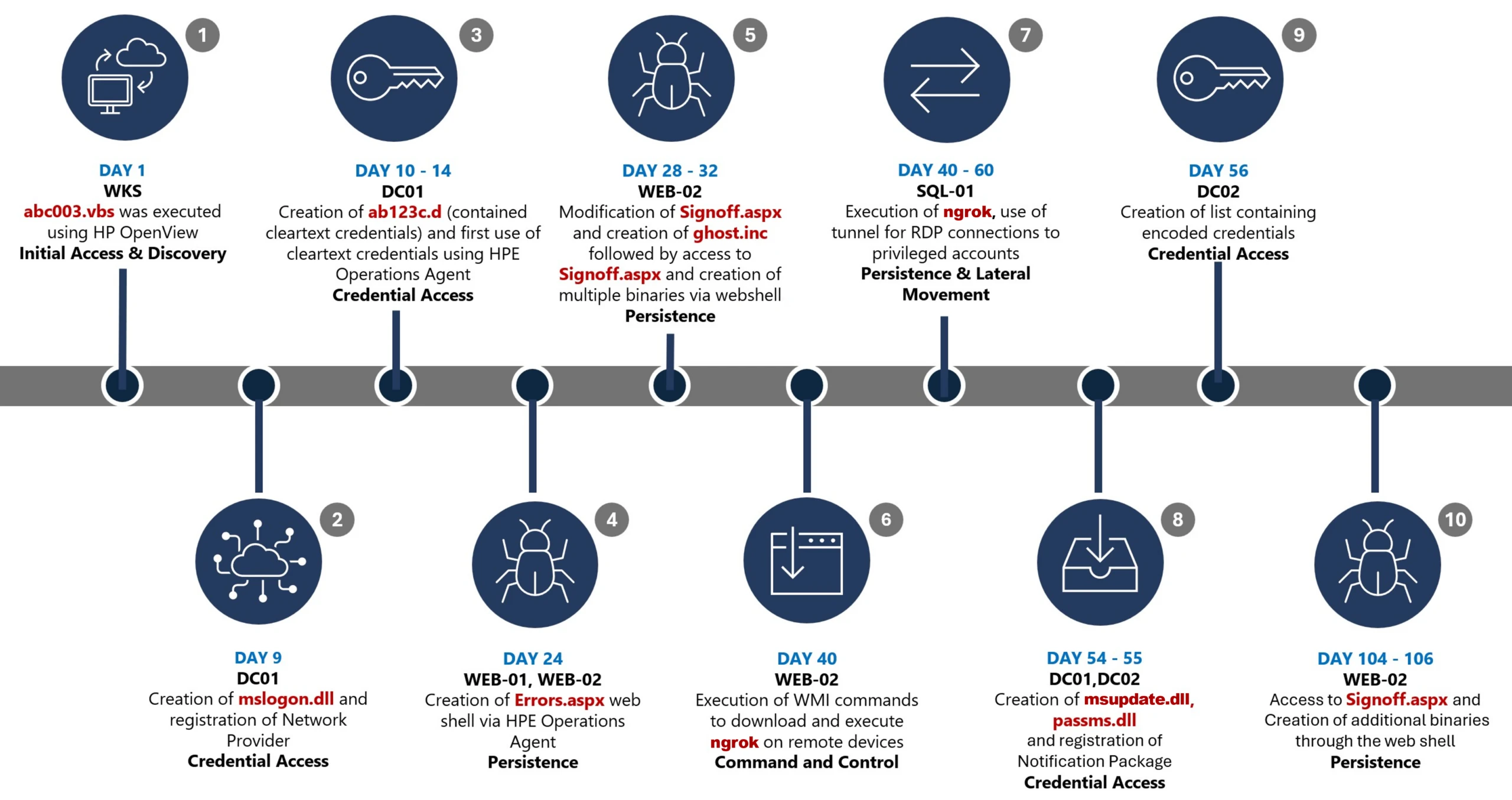


Undermining the trust boundary: Investigating a stealthy intrusion through third-party compromise
In recent years, many sophisticated intrusions have increasingly avoided using noisy exploits, obvious malware, or custom tooling, instead leveraging systems that organizations already trust within their environments. By operating through legitimate and trusted administrative mechanisms, threat actors could more easily blend seamlessly into routine operations and remain undetected.
Microsoft Incident Response investigated an intrusion that followed this pattern. What initially appeared as routine administrative activity was instead found to be a coordinated campaign abusing trusted operational relationships and authentication processes to establish durable access. The threat actor in this incident leveraged a compromised third-party IT services provider and legitimate IT management tools to conduct a stealthy campaign focusing on long-term access, credential theft, and establishing a persistent foothold.
Microsoft Incident Response
This blog walks through how the intrusion unfolded, why it was difficult to detect, and how trusted systems, including identity infrastructure, operational tooling, and third-party management relationships were leveraged to sustain access. By examining the investigation end to end, we highlight how modern intrusions succeed without reliance on malware-heavy techniques and what defenders can learn from identifying abuse in environments where trust is implicit. We also provide mitigation and protection recommendations, as well as Microsoft Defender detection and hunting guidance to help identify and investigate related activity.
Abuse of trusted relationships as an attack delivery mechanism
Rather than relying on exploits or malware-based delivery, this attack leveraged an existing trusted operational relationship for malicious activity across the environment. The investigation identified HPE Operations Agent (OA), an approved and signed enterprise management tool commonly used for monitoring and administrative automation, as the primary delivery mechanism. Importantly, this did not involve any vulnerability or flaw in HPE OA itself.
Analysis during the incident response process revealed that management of this operational platform had been delegated to a third-party IT services provider, expanding the trust boundary beyond the organization itself. While such arrangements are operationally common, they introduce implicit trust paths that, if compromised, could be leveraged by threat actors to move within the environment using legitimate access and tooling.
By operating through the HPE OA framework, the threat actor executed scripts and binaries in a manner indistinguishable from normal operations, allowing malicious activity to blend seamlessly into expected behavior and delaying detection.
This technique aligns with MITRE ATT&CK T1199 – Trusted Relationship, in which threat actors exploit established trust relationships to extend access. In this case, the threat actor’s ability to operate entirely through trusted systems allowed them to establish a foothold and execute follow-on actions without relying on exploit-driven techniques.
Attack timeline
This timeline provides a high-level summary of the intrusion, highlighting key phases of the attack. A detailed analysis of each stage is presented in the sections that follow.

Day 1: Initial foothold established
The threat actor gained initial access to the environment by compromising a third-party IT services provider and began operating through trusted systems, enabling execution without triggering immediate alerts.
Days 9–14: Credential access achieved
Credential interception capabilities were introduced on domain infrastructure, allowing the threat actor to harvest and reuse credentials to expand access across devices.
Days 24–32: Web-based persistence established
Persistent access was established on internet-facing servers, enabling the threat actor to maintain repeated access even if individual artifacts were removed.
Days 40–60: Lateral movement and remote access
The threat actor leveraged harvested credentials and covert connectivity to move laterally across devices, including highly sensitive assets.
Days 54–55: Additional credential interception deployed
Credential harvesting was further expanded on domain controllers, ensuring continued access during authentication and password change events.
Days 104–106: Persistence reestablished
Following initial detection, the threat actor returned to previously established access points to reenable persistence and deploy additional tooling.
Day 123: Incident response engagement
Microsoft Incident Response was engaged to investigate the intrusion.
Methods, tools, and access strategies
Initial access
During the investigation, two internet-exposed web servers, WEB-01 and WEB-02, were identified as the earliest known compromised assets. A web shell, Errors.aspx, was discovered on both of these devices; however, there was no indication that the servers had been previously exploited, and the mechanism that deployed the web shells couldn’t be determined.
Using intelligence from Microsoft Threat Intelligence regarding a known malicious domain, Microsoft Incident Response was able to identify a workstation communicating with this infrastructure. This led to the discovery of an execution path involving this domain, which revealed another execution path in which VBScripts (abc003.vbs) were deployed through HPE Operations Manager (HPOM).
HPOM and HPE OA form a distributed IT infrastructure monitoring platform. HPOM functions as a centralized management console for monitoring devices’ health, performance, and availability, while HPE OA is deployed on managed hosts to collect telemetry and execute automated, scheduled, or operator-initiated actions across the environment. In this case, the HPOM was operated by a third-party service provider responsible for managing the customer’s infrastructure.
The threat actor, operating HPOM, executed VBScripts on multiple servers, including the web server and a domain controller. The VBScripts had the following functionality:
- System network configuration discovery
- Active Directory discovery
- External IP address discovery through PowerShell
Credential access
After gaining initial access, the threat actor shifted focus to credential harvesting. The threat actor registered a legitimate network provider named mslogon on the domain controller DC01 through the same HP OA to hijack the authentication process. Network providers integrate into the Windows authentication mechanism, allowing the threat actor to capture cleartext user credentials during user sign-in and password changes. By delivering the component through a trusted and legitimate management channel, the threat actor was able to blend in with routine administrative activity and remain undetected for an extended period.
Analysis of the deployed network provider dynamic link library (DLL), mslogon.dll, revealed the deliberate abuse of Windows Credential Manager APIs, specifically NPLogonNotify and NPPasswordChangeNotify. These APIs are designed to notify registered providers during authentication events.
NPLogonNotify is triggered when a user performs an interactive sign in. When triggered, the DLL captures the submitted username and password in cleartext.
NPPasswordChangeNotify is invoked when a user changes their password using secure attention sequence (Ctrl+Alt+Delete). When triggered, the DLL captured both the old and new credential pairs. These passwords are stored in cleartext under C:\Users\Public\Music\abc123c.d. This file enabled the threat actors to reuse both the current valid credentials and historical passwords for lateral movement.
Later in the intrusion, on DC01 and DC02, the threat actor registered a malicious password filter, passms.dll, into the Windows authentication process by adding it to the Local Security Authority (LSA) notification packageconfiguration. Password filters are loaded by the Local Security Authority Subsystem Service (LSASS) on domain controllers and are invoked whenever a password is set or changed. This abused a legitimate Windows extensibility mechanism, which helped the threat actor blend in and remain undetected for an extended period; similar tactics were observed earlier in the intrusion.
During a password change operation, LSASS calls the PasswordFilter() API for each DLL listed under the Notification Packages registry value (Figure 5). The function receives the username and password in cleartext as input parameters. By registering a malicious password filter, the threat actor gained visibility into password modification events at the system level, allowing credential capture during normal authentication workflows.
When triggered, passms.dll intercepted the credential data and wrote the output toC:\ProgramData\WindowsUpdateService\UpdateDir\Ipd. The captured data was not stored in cleartext. Instead, it was double encoded, first by using Base64, followed by a custom encoding routine embedded within the DLL.
A second module, msupdate.dll, was created on DC01 and DC02 which operated alongside passms.dll. It was invoked using the following command:
Once invoked, the module read the contents of the Ipd file and transferred the encoded data over Server Message Block (SMB) to remote shares. The data was written into a file named icon02.jpeg, likely intended to blend with legitimate image assets.
In addition to SMB-based staging, msupdate.dll also contained email exfiltration capabilities. The module could send messages with the subject line “Update Service” using a predefined Simple Mail Transfer Protocol (SMTP) server, recipient address, and credentials retrieved from local files.
Execution
Execution was achieved through the abuse of an existing enterprise automation channel, allowing malicious VBScript and PowerShell scripts to run under the context of trusted system processes. By leveraging HPE OA to launch abc003.vbs, the threat actor performed system, network, and Active Directory discovery, while maintaining a low-noise execution profile.
On internet-facing web servers, execution was achieved through web shells (Errors.aspx and modified Signoff.aspx), which were used to run PowerShell scripts, deploy binaries, and trigger follow-on activity such as credential access and tunnelling tools.
Persistence
Web shells were the primary persistence mechanisms deployed on internet-facing web servers, WEB-01 and WEB-02. An initial web shell, Errors.aspx,allowed the threat actor to write files to disk. This was later used to modify a legitimate application page, Signoff.aspx, to load a secondary web shell, ghost.inc, from the Windows temporary directory. The secondary web shell provided command execution, file upload, and download capabilities, enabling repeated access even if individual artifacts were removed. This persistence relied on modifying existing application files rather than introducing new services, reducing the likelihood of detection.
The HPE OA was present on both servers and was highly likely used to deploy the web shell. However, because neither server had endpoint detection and response (EDR) coverage, Microsoft Incident Response was unable to confirm this. As a result, the origin and creation mechanism of the web shell, Errors.aspx, on the web server remain unknown.
Persistence was reinforced through the registration of malicious authentication components on domain controllers, DC01 and DC02, ensuring credential interception continued across reboot and credential reset events.
Prior to establishing persistent access, the threat actor first identified internal servers with outbound internet connectivity that could support tunneling. This discovery led to subsequent deployment of ngrok as a persistence mechanism. Instances of ngrok were launched on these internal servers, exposing them through encrypted tunnels to the threat actor’s infrastructure. These tunnels enabled continued inbound access for Remote Desktop Protocol (RDP) sessions without requiring exposed firewall ports, allowing persistence even in environments with restrictive perimeter controls.
Lateral movement
After establishing credential access, execution, and persistence, the threat actor moved laterally using a combination of valid credentials, remote management protocols, and covert network tunnelling using ngrok.
A compromised high-privileged account was used to initiate RDP sessions across the environment, enabling interactive access to critical devices including SQL servers and domain controllers.
To conceal the true source of these connections, the threat actor deployed ngrok, creating encrypted tunnels that exposed internal devices to the internet while bypassing perimeter-based monitoring. Evidence showed RDP connections originating from the ngrok tunnel hosted on SQL-01, masking the threat actor’s real infrastructure and complicating network-based detection.
Lateral movement was further supported by Windows Management Instrumentation (WMI)-based remote execution, which was used to deploy and launch ngrok on additional devices from compromised web servers.
Compromised credentials harvested using password filter DLLs and malicious network provider DLLs on domain controllers enabled continued access and movement without the need for exploit-based techniques.
Campaign conclusion
This campaign demonstrated sustained operational maturity, reinforcing a consistent pattern: long-term access, commonly used tools, and campaigns designed to achieve strategic impact.
A recurring lesson from this activity is the abuse of trusted relationships. Third-party service providers and integrated management tools can become enforcement gaps when visibility is limited or validation is assumed. Threat actors understand this. They leverage legitimate components, trusted update paths, and approved integrations to anchor themselves inside environments that appear compliant on the surface.
Defenders should adopt a posture of deliberate verification. Trust your vendors and tooling but validate their behavior within your environment. Organizations operating in sensitive sectors should assume that threat actors with this level of tradecraft will continue refining third party abuse, credential interception, and stealthy persistence mechanisms to maintain strategic access.
Mitigation and protection guidance
Microsoft recommends the following mitigation measures to defend against such stealthy campaigns described in this blog.
- Turn on cloud-delivered protection in Microsoft Defender Antivirus or the equivalent for your antivirus product to cover rapidly evolving attacker tools and techniques. Cloud-based machine learning protections block a majority of new and unknown variants.
- Deploy endpoint detection and response (EDR) across all endpoints to strengthen visibility, accelerate detection, and improve response to malicious activity.
- Adopt a default-deny egress filtering model so servers only allow explicitly approved outbound traffic, reducing opportunities for communication with malicious command-and-control and data exfiltration.
- Remove unnecessary software and tools from systems to reduce the attack surface and limit opportunities for attacker abuse.
- Enable detailed logging and monitoring on web servers and actively watch for anomalies (such as unexpected file changes or suspicious web requests).
- Implement the enterprise access model to contain privilege escalation and enforce stronger access controls across the environment.
- Strengthen security operations center (SOC) monitoring and incident response by addressing detection, response, and operational gaps identified during the incident.
Microsoft Defender detection and hunting guidance
Microsoft Defender customers can refer to the list of applicable detections below. Microsoft Defender XDR coordinates detection, prevention, investigation, and response across endpoints, identities, email, apps to provide integrated protection against attacks like the threat discussed in this blog.
| Tactic | Observed activity | Microsoft Defender coverage |
| Command and Control | Decoding the binary data within the events revealed the hostname WKS, indicating it was likely carrying out suspicious activities, a VBScript abc003.vbs was responsible for reaching out to dREDEACTEDe.net, at least in the form of a DNS request | Microsoft Defender for Endpoint – Command-and-control network traffic |
| Persistence | On internet-facing web servers, execution was achieved through web shells (Errors.aspx and modified Signoff.aspx), which were used to run PowerShell scripts, deploy binaries, and trigger follow-on activity such as credential access and tunnelling tools. | Microsoft Defender for Endpoint – ‘WebShell’ malware was detected and was active – An active ‘Webshell’ backdoor process was detected while executing and terminated |
Microsoft Security Copilot
Microsoft Security Copilot is embedded in Microsoft Defender and provides security teams with AI-powered capabilities to summarize incidents, analyze files and scripts, summarize identities, use guided responses, and generate device summaries, hunting queries, and incident reports.
Customers can also deploy AI agents, including the following Microsoft Security Copilot agents, to perform security tasks efficiently:
- Threat Intelligence Briefing agent
- Phishing Triage agent
- Threat Hunting agent
- Dynamic Threat Detection agent
Security Copilot is also available as a standalone experience where customers can perform specific security-related tasks, such as incident investigation, user analysis, and vulnerability impact assessment. In addition, Security Copilot offers developer scenarios that allow customers to build, test, publish, and integrate AI agents and plugins to meet unique security needs.
Hunting queries
Microsoft Defender XDR customers can run the following advanced hunting queries to find related activity in their networks:
Password filters DLL
Look for unsigned / unverified DLLs configured as LSA notification packages.
DeviceRegistryEvents
| where RegistryKey has @"control\LSA"  and RegistryValueName has "Notification Packages" // Filter to LSA registry path
| project DeviceName, RegistryKey, RegistryValueName, RegistryValueData
| extend NotificationPackage = split(RegistryValueData, " ")
| mv-expand NotificationPackage
| extend NotificationPackage = tostring(NotificationPackage)
| extend Path = tolower(strcat(@"c:\windows\system32\", NotificationPackage, ".dll")) // Construct full DLL path in lower-case
| join kind=leftouter (
    DeviceFileEvents
    | extend Path = tolower(strcat(FolderPath)
    | project DeviceName, SHA1, Path
) on DeviceName, Path
| invoke FileProfile(SHA1) // Retrieve file signing information
| where SignatureState in~ ("SignedInvalid", "Unsigned") // Filter for files that are unsigned or have invalid signature
| project-away DeviceName1, SHA11
| distinct *
Network provider DLL
Look for custom network provider DLLs that are not signed and configured for Windows sign in.
let NetworkProviders = DeviceRegistryEvents
| where RegistryKey has @'\Control\NetworkProvider\Order' and RegistryValueName has 'ProviderOrder' // Filtering on 'ProviderOrder' entries
| extend Providers = split(RegistryValueData, ',')
| mv-expand Providers
| extend Providers = trim(@' ', tostring(Providers)) // Trim spaces around each provider name
| where Providers !in~ ('RDPNP','LanmanWorkstation') // Excluding default provider names
| distinct Providers; // Collect unique suspicious provider names
DeviceRegistryEvents
| where RegistryKey has_all (@'\Services\', @'\NetworkProvider') // Only registry keys under a service's NetworkProvider
and RegistryKey has_any (NetworkProviders) and
RegistryValueName =~ 'ProviderPath'
| project DeviceName, RegistryKey, RegistryValueName, RegistryValueData
| extend Path = tolower(replace_string(RegistryValueData, '%SystemRoot%', @'C:\Windows')) // Normalize path: replace environment variable and use lower-case
| join kind=leftouter (
    DeviceFileEvents
    | extend Path = tolower(strcat(FolderPath))
    | project DeviceName, SHA1, Path
) on DeviceName, Path
| invoke FileProfile(SHA1,1000)
| where SignatureState in~ ("SignedInvalid", "Unsigned")
| distinct *
Learn more
For the latest security research from the Microsoft Threat Intelligence community, check out the Microsoft Threat Intelligence Blog.
To get notified about new publications and to join discussions on social media, follow us on LinkedIn, X (formerly Twitter), and Bluesky.
To hear stories and insights from the Microsoft Threat Intelligence community about the ever-evolving threat landscape, listen to the Microsoft Threat Intelligence podcast.
The post Undermining the trust boundary: Investigating a stealthy intrusion through third-party compromise appeared first on Microsoft Security Blog.