❌

Normal view

​​​​​​​​What’s new in Microsoft Security: September 2026​​

24 September 2026 at 18:00

AI agents are now running on employee devices, cloud platforms, and across developer workflows. Security teams need to see those agents, govern what they can reach, and contain them when something goes wrong. This month’s updates help you discover and control local AI agents, extend Zero Trust to agent traffic, and strengthen the security operations center (SOC) foundations that AI-era operations depend on.

Here’s what’s new:

Extend protection and support investigations with Microsoft Defender

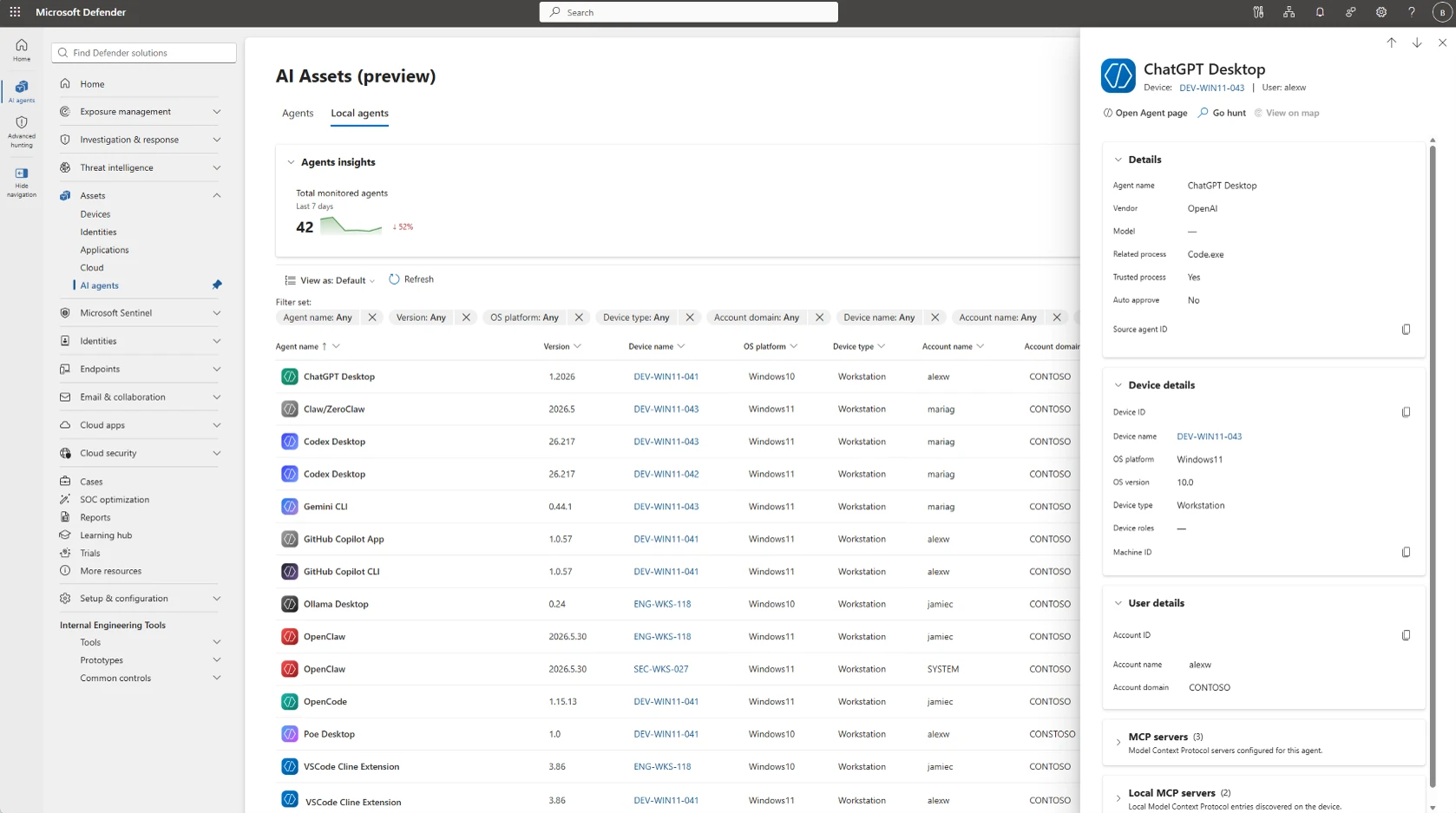
Screenshot showing the local AI agents inventory in the Microsoft Defender portal with discovered agents listed.

Bring more context into email investigation and hunting with Microsoft Security Copilot

Available for organizations using both Microsoft Defender and Microsoft Security Copilot, a new email detonation summary delivers AI-generated explanations of URL and file sandboxing results, helping SOC teams investigate faster by reducing the manual effort required to correlate detonation evidence and contextual signals.

Screenshot of Microsoft security portal showing β€œDetonation test” investigation within Email collaboration > Explorer, with detection details and timeline events for reviewing suspicious email activity. Left navigation lists detection attributes, center table organizes events by timestamp and source, and right Copilot panel provides Email Summary and Detonation Summary cards.

Protect sensitive data in motion with Microsoft Purview and Microsoft Entra

Stop sensitive data from reaching shadow AI over the network

Now generally available, Microsoft Purview and Microsoft Entra Global Secure Access bring data security to the network across human actions and on-behalf-of (OBO) agentic traffic. Context-aware Microsoft Purview classification and policies are enforced by Entra at the network layer. Organizations can discover sensitive files and text in real time and block them from being shared to risky destinations. For example, if an employee or OBO agent tries to upload a sensitive document to an unsanctioned AI tool, the policy can stop the transfer before the data leaves.

Screenshot of ChatGPT web interface showing a conversation requesting a 400-word technical briefing, with sidebar navigation and assistant response text visible. Red error banner and pink retry notice indicate response-generation failure, while a Microsoft Copilot notification appears in lower-right corner.
Prevent employees from sharing proprietary or sensitive organizational data to potentially risky locations such as consumer AI apps.

Protect, investigate, and clean up enterprise data with Microsoft Purview

Manage labeling at enterprise scale with less administrative overhead

Microsoft Purview auto-labeling helps organizations automatically apply data security controls to sensitive content at enterprise scale. New auto-labeling enhancements improve policy scale, admin experience, and reporting. Policies now support simulations of up to 20 million items and up to 50,000 sites through adaptive scopes. Administrators can edit a policy without re-running simulation. New audit insights and reporting show policy coverage and processing activity. Together, these enhancements help organizations scale auto-labeling across larger environments with less administrative effort.

Investigate content created in Copilot apps such as Microsoft Loop, Copilot pages through established compliance processes

Microsoft Purview eDiscovery now supports search, hold, review, and export content in user-owned SharePoint embedded containers, to help streamline eDiscovery processes for legal, regulatory, and internal investigations. Investigators can find content from AI-powered experiences, including Microsoft Loop, Copilot Pages, Copilot Notebooks, and applications, such as Outlook newsletters, mapped to a user without requesting the container URL from a SharePoint administrator. An optional HTML conversion produces a more readable version for downstream legal tools, improving the review and export experience for experts.

Archive and permanently remove inactive content to improve AI readiness

With Microsoft Purview Data Lifecycle Management, administrators can now archive inactive SharePoint content without archiving the entire site. Archived content remains subject to retention and legal hold policies, and remains discoverable for eDiscovery, while dropping out of Microsoft 365 Copilot indexing (until reactivated). Organizations can also use Priority Cleanup to permanently delete approved content, including stale Teams recordings and transcripts, so it is no longer discoverable in eDiscovery, SharePoint search, or Microsoft 365 Copilot. Together, these capabilities help organizations meet compliance regulations, including those in highly regulated industries.

Advanced endpoint management extends to GCC High and DoD with Microsoft Intune

Bring modern endpoint management to regulated environments

Microsoft Intune Enterprise Application Management, Microsoft Cloud PKI, and Intune Remote Help are coming to Government Community Cloud with High security needs (GCC High), with Enterprise Application Management also being offered to organizations of the Department of Defense (DoD). These capabilities help government and defense organizations simplify application management, modernize certificate lifecycle management, resolve device issues faster, and reduce total cost of ownership, all while operating within their accredited cloud environment.

Stay in the Loop

Microsoft Security continually ships meaningful innovations across our portfolio, as well as research-driven insights and reports for the security community. In the Loop posts are your reliable source of what’s new across Microsoft Security and what it means for your security strategy. Check back for the next drop.

And join us at Microsoft Ignite, from November 17 to 20, 2026, in San Francisco or online, to see Microsoft Security innovations in action and go hands-on with the team that built it.

To learn more about Microsoft Security solutions, visit our website. Bookmark the Security blog to keep up with our expert coverage on security matters. Also, follow us on LinkedIn (Microsoft Security) and X (@MSFTSecurity) for the latest news and updates on cybersecurity.

The post ​​​​​​​​What’s new in Microsoft Security: September 2026​​ appeared first on Microsoft Security Blog.
​​​​What’s new in Microsoft Security: July 2026

30 July 2026 at 18:00

Every organization needs security that protects end to end with the speed and scale of AI. Microsoft’s vision is simple: security should be ambient and autonomous, just like the AI it protects.

As organizations scale AI and expand across environments, security teams need protection that covers every surface. This month’s updates help security and IT teams secure their AI environments, use AI to defend at speed and scale, and strengthen the foundations that AI-powered operations depend on. Here’s what’s new:

Project Perception brings agentic defense to security operations

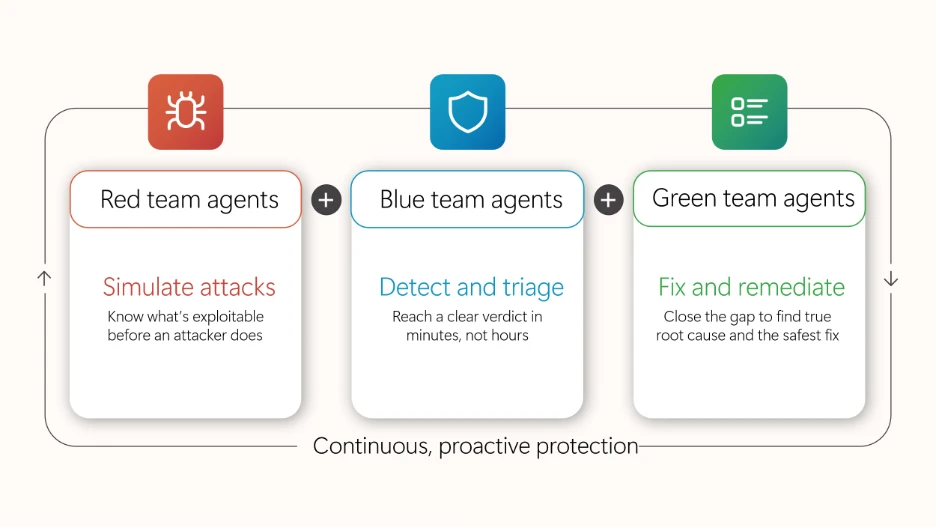
Project Perception, newly announced, is a coordinated system of specialized agents, cybersecurity-focused models, and enterprise-wide signals that transform how security operates. The agents work as a team: red team agents expose weaknesses, blue team agents investigate cyberthreats, and green agents harden what’s found. These multi-agent autonomous workflows work as a team to operate in continuous loops to execute end-to-end security workflows.

Diagram illustrating roles of Red, Blue, and Green team agents in continuous, proactive protection. Red team simulates attacks to identify exploits, Blue team detects and triages threats quickly, and Green team fixes and remediates issues to close gaps and ensure safe resolution.

Microsoft Defender secures the full AI attack surface, from inbox to cloud

Expanded Microsoft Defender protections are designed to reduce risks associated with day-to-day AI interactions, from email inboxes to cloud agent environments. New prompt injection protection in Microsoft Defender, now in preview, identifies and isolates emails containing malicious AI instructions before delivery, reducing the risk of prompt injection attacks reaching the inbox. Unified Defender posture and runtime protection for cloud agents in Microsoft Agent 365 consolidates security posture assessment and runtime protection for Microsoft Foundry, Microsoft Copilot Studio, and third party-managed agents, helping teams reduce AI-specific risk across the agent estate.

Accelerate detection, prioritization, and response with AI embedded in SecOps workflows

Security teams can accelerate detection, prioritization, and response to cyberthreats with AI embedded directly into security operations (SecOps) workflows through Microsoft Defender. Threat intelligence enhancements, including Microsoft Defender Threat Intelligence convergence and an enhanced Threat Intelligence Agent, bring more out-of-the-box intelligence and automation into the unified SecOps workflow, so teams can move from summary to action.

Strengthen the cloud, code, and identity foundations AI depends on

Microsoft Defender is strengthening the foundational protections that AI-era operations depend on across cloud, code, and identity. Cloud Security Posture Management extends coverage to serverless containers, giving teams visibility and continuous posture assessment across containerized workloads running on Azure Container Apps, Azure Container Instances, and Amazon Web Services Elastic Container Service (AWS ECS) on Fargate. New interconnected experiences between Defender and Microsoft Entra empower the security operations center (SOC) to disable compromised identities directly using a role-based access control (RBAC) mode that maintains least privilege. Microsoft Defender Experts services are also expanding: Microsoft Defender Experts Threat Intelligence delivers human-led, curated insight into the cyberthreats most relevant to each organization, and Microsoft Defender Experts MDR extends expert-run detection and response beyond the Microsoft estate into third-party and multicloud signals through Microsoft Sentinel.

Microsoft Entra strengthens identity across the AI-powered enterprise

Strengthen identity foundations for AI-powered operations

New capabilities in Microsoft Entra are designed to strengthen the identity foundations that AI-powered operations depend on. Tenant governance helps organizations discover, manage, and govern tenants across their environment with centralized policies and cross-tenant delegated administration. Microsoft Entra ID is making passkeys the default authentication experience, which helps reduce reliance on SMS and voice, strengthens phishing-resistant security, and makes for an easier transition away from Microsoft-provided telecom delivery, which will retire in 2027. Through new interconnected Entra and Defender experiences, identity and access management and SOC teams share user experience, RBAC, and agentic workflows that eliminate product seams so identity and security operations can work together.

Protect sensitive data in motion across software as a service (SaaS) and AI apps with Microsoft Purview and Microsoft Entra

Microsoft Purview now integrates with Microsoft Entra Internet Access to extend data security to the network layer, enabling real-time protection of sensitive data shared with unmanaged cloud and AI apps over the network. For example, when an employee attempts to upload sensitive customer data or proprietary information, including text and files, into shadow AI apps, sharing is detected and blocked before the data is leaked from the organization. Organizations now have a unified Microsoft solution to gain visibility into where organizational data is shared externally, to detect and block sensitive data in transit, and to enable consistent data protection across their environment without relying on third-party solutions.

Microsoft Purview strengthens data security, compliance, and investigation for AI

A new Microsoft Purview Data Loss Prevention (DLP) for Microsoft 365 Copilot protection, available in preview, now gives data security teams greater control over how Copilot leverages email content, given external sources can introduce sensitive, third-party, or unvetted information that organizations may not want to rely on. Now admins can exclude emails from external senders from being referenced, summarized, or used as grounding data for Copilot. For example, with this DLP policy in place, an employee working with an external collaborator can still rely on Copilot to leverage internal insights, while external conversations are automatically excluded from Copilot-generated responses. With the native integration between Microsoft Purview and Microsoft 365 Copilot, organizations can extend controls to AI interactions with minimal additional configuration, resulting in a more predictable and policy-aligned AI environment.

A new centralized Microsoft Purview Insider Risk Management alert experience simplifies the prioritization of the most pressing data risks by bringing agentic alert triage, enriched user details, and expanded analysis capabilities (such as notes infused on the Insider Risk Management case) into a single view. Helping power this experience, the Data Security Triage Agent includes an advanced AI reasoning layer, now generally available, that performs deeper, multi-step analysis across user, device, and data activity signals to surface the incidents most likely to require investigation while reducing noise. Analysts can filter across classic and Data Security Triage Agent attributes on a single page, preview agent summaries and user details without switching views, and document findings while the system automatically records status changes and escalations to maintain a clear investigation history. Together, the Insider Risk Management alert experience and Data Security Triage Agent help security teams investigate faster and with greater confidence.

The unified Insider Risk Management alerts list, showing inline agent summaries, the new Categorization column, and combined classic and agent filtering on a single page.

Advanced endpoint management now broadly available

As of July 1, 2026, the capabilities of the Microsoft Intune Suite are included in Microsoft 365 E5, with select capabilities also available in Microsoft 365 E3, bringing advanced endpoint management to more organizations without added cost. IT and security teams can now apply advanced endpoint management capabilities to reduce standing admin rights, modernize certificate management, resolve issues quickly, streamline app delivery, and bring AI into workflows with Microsoft Security Copilot in Intune. Together, these capabilities strengthen the endpoint foundations that AI-powered operations depend on. See everything that’s now included in your plan and how to start putting it to work.

Stay In the Loop

Microsoft Security is focused on delivering innovations across our portfolio, along with research-driven insights and reports for the security community. In the Loop posts are your reliable source of what’s new across Microsoft Security and what it means for your security strategy. Check back for the next drop.

To learn more about Microsoft Security solutions, visit ourΒ website.Β Bookmark theΒ Security blogΒ to keep up with our expert coverage on security matters. Also, follow us on LinkedIn (Microsoft Security) and X (@MSFTSecurity)Β for the latest news and updates on cybersecurity.

The post ​​​​What’s new in Microsoft Security: July 2026 appeared first on Microsoft Security Blog.

❌