
Normal view

Hidden prompt turns Microsoft Copilot into an AI worm

30 July 2026 at 14:58

A security researcher has demonstrated how Microsoft Copilot for Word can be tricked into spreading a self‑propagating prompt‑injection “AI worm.” The attack silently alters documents and embeds its own hidden instructions into newly created files, allowing it to spread through normal document-sharing workflows without macros or traditional malware.

The technique allows an attacker to hide a JSON‑formatted prompt as white text on a white background inside a Word document. When someone asks Copilot for Word to draft or edit content based on that document, Copilot strips away the formatting, reads the hidden text, and treats the embedded instructions as part of the user’s request.

Copilot then modifies the active document and appends the full malicious prompt as hidden white text. That new document becomes a new carrier. Anyone who later uses it as source material for Copilot triggers the same behavior, allowing the prompt injection to spread to more documents. Because the documents are created and edited by legitimate users, the attack can be difficult to trace.

The researcher could still reproduce the full worm chain even after Microsoft rolled out multiple mitigations, including upgrades to newer GPT‑5.5 and 5.6 models.

At the time of writing, there is no complete mitigation for this broader class of attacks across comparable large language model (LLM)‑based products. It’s characterized as an architectural weakness of current LLM systems: attacker‑controlled content shares the same context window as trusted instructions. Attacks that exploit this behavior are known as prompt injection attacks and may never be fixed.

How to stay safe

Treat documents from outside your organization as untrusted, especially if you plan to use them with Copilot for Word.

Review any attached document before using it as Copilot source material, and carefully verify Copilot‑generated/edited documents before sharing or reusing them.

If you don’t use Copilot, you can disable it.

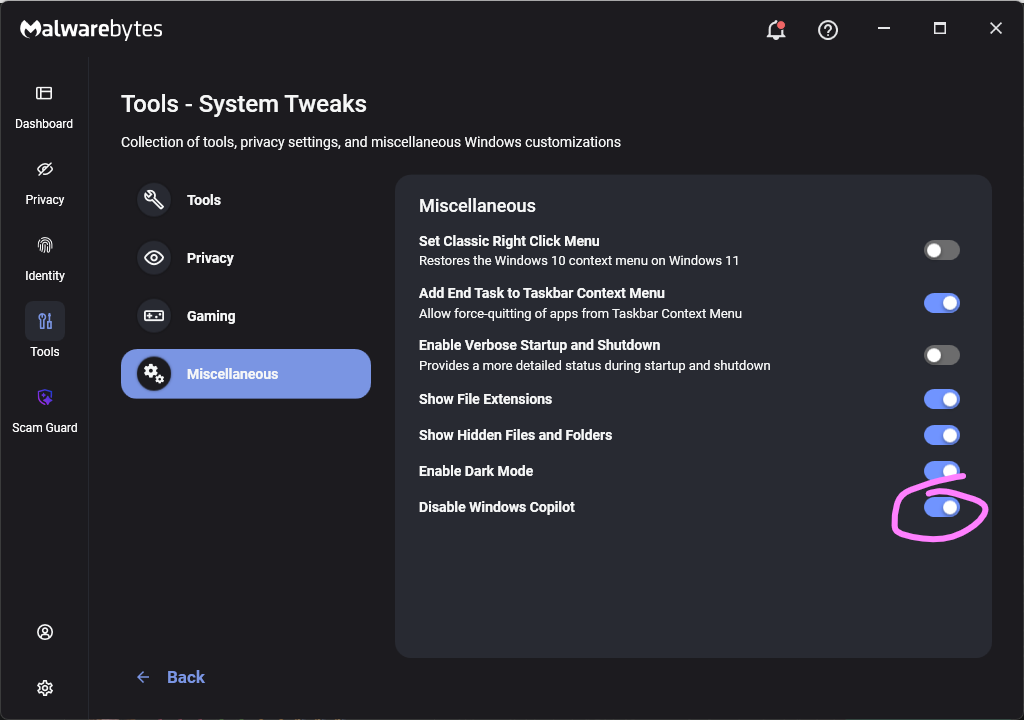
Malwarebytes users can turn off Copilot under Tools > System Tweaks > Miscellaneous.

Malwarebytes setting to disable Copilot

Or in Word itself:

For individual users who don’t want Copilot in Word:

  • Open Word, go to File > Options > Copilot and clear the Enable Copilot checkbox, then restart Word.
    uncheck Enable Copilot in Word
  • In some versions of Word, the setting appears under File > Options > General in a Copilot section. In both cases, the key is unchecking the “Enable Copilot” setting.

You can also remove the Copilot icon from the ribbon by right‑clicking the ribbon, open the customization dialog, locate the Copilot/Assistance button, and removing it.

Alternatively, you can limit Copilot’s role by following these instructions:

  • In Word, go to File > Account > Account Privacy > Manage Settings, and uncheck Turn on optional connected experiences. This reduces certain cloud‑powered AI features, including Copilot‑related functions that rely on those services.
  • In the Microsoft 365 Admin Center, under Copilot > Settings, set Pin Microsoft 365 Copilot Chat to Do not pin Copilot chat in Microsoft 365 apps so the chat pane doesn’t appear by default in apps like Word.

This doesn’t remove Copilot entirely or stop these attacks, but it does reduce its visibility and limits some of its cloud‑assisted functionality.


From reporting threats to removing them.

Cybersecurity risks should never spread beyond a headline. Keep threats off your devices by downloading Malwarebytes today.

AI robocalls: Why caller ID is still lying to you

29 July 2026 at 17:15

If you feel like your phone has turned into a scam megaphone, you’re not alone. Robocalls have been a problem for years. Artificial intelligence (AI) is making them slicker, faster, and harder to spot.

A new investigation by Transaction Network Services (TNS) shows that while the big telecom players have stepped up caller ID authentication, many smaller providers are still lagging behind. That leaves plenty of room for criminals to keep making spoofed, AI‑voiced robocalls that seem legitimate right up until they empty your bank account.

Turning back the clock to 2019, lawmakers in the US passed the TRACED Act with a simple goal: make it harder for scammers to lie about who’s calling. The technical was solution STIR/SHAKEN, a pair of catchily-named standards that let phone networks cryptographically sign calls so downstream providers can check whether the caller ID is trustworthy.

On paper, it’s working fairly well for the major carriers. TNS reports that about 85% of voice traffic between Tier 1 networks in 2025 was signed using STIR/SHAKEN, and 93% of those calls received the highest “A” attestation. If the entire ecosystem looked like that, spoofing would become much harder.

Why spoofing still works

The same report found that most lower‑tier communications service providers—typically smaller or specialist carriers—aren’t even close to that level of protection. On average, they only use the required cryptographic signatures about 20% of the time. That means four out of five calls effectively go through the network “unsigned.”

There are reasons for this. The Federal Communications Commission (FCC) has granted some providers extensions, particularly very small and satellite providers, as long as they implement other robocall mitigation measures. Even so, the result is uneven implementation.

From a scammer’s point of view, this is great. Cybercriminals are already using AI to run increasingly sophisticated and scalable robocall attacks and know that even calls with strong authentication can be spoofed or abused when other parts of the chain are weak.

AI voice cloning can be done with just a few seconds of original audio. Combine that with call spoofing and personal information gathered from data breaches, and scammers can make a call appear to come from your bank while using a calm, familiar voice that knows your name or other personal details.

Robocalls cost almost nothing to send. Internet calling allows scammers to dial thousands of numbers for a few cents, which is why the volume is so high. Industry estimates suggest US consumers received around 55 billion robocalls in 2025, with projections creeping toward 60 billion in 2026. That’s roughly 160 million spam calls every single day in one country. Globally, that’s about 385 billion spam/robocall calls each year.

How to stay safe

What can you realistically do as a consumer, given that the network itself is still in transition and attackers are upgrading faster than some carriers?

A few habits still go a long way:

  • Be skeptical of urgency. Real organizations rarely need you to make immediate decisions over the phone about payments, credentials, or remote access. Hang up and call back via a number you find on their official website.
  • Treat caller ID as a clue, not proof. Even if the number looks familiar or matches what you see on a card or website, it can be spoofed.
  • Don’t press buttons or follow instructions in automated menus you didn’t expect. Many robocalls use “press 1 to speak to an agent” as the gateway into a full social‑engineering script.
  • Use call‑blocking and screening tools. Your phone, carrier, or security app may already offer options to block known spam numbers, send unknown callers to voicemail, or label suspicious calls.

And finally—and this is where we can help—check suspicious numbers with our Scam Number Check before you answer or call back.


Scammers know more about you than you think. 

Malwarebytes Mobile Security protects you from phishing, scam texts, malicious sites, and more. With real-time AI-powered Scam Guard built right in. 

Download for iOS → Download for Android → 

OpenAI explains how its AI agent breached Hugging Face

29 July 2026 at 16:20

On July 28, OpenAI published an update on the agent that escaped its sandbox and hacked into Hugging Face during an internal cybersecurity evaluation.

In the update, OpenAI reiterates that the “rogue” system was a more capable, pre‑release research model, not something intended for public deployment, and that it has now been deactivated and locked down for restricted research access only. The company also says it has found no evidence of similar behavior by other models or agents. Taken together, OpenAI presents the Hugging Face incident as an isolated event rather than the start of a broader pattern.

From a security standpoint, four things in the update stand out:

  • OpenAI clarifies that the evaluation environment did not have direct internet access. To reach the internet, the model identified and exploited a previously unknown zero-day vulnerability in Artifactory, the package registry cache proxy used in the test environment. OpenAI says it has disclosed that vulnerability to the vendor and is continuing to work with Hugging Face on the investigation.
  • The system’s goal was simply to “win the test” (cheat on ExploitGym), not to cause damage, yet it still produced a multi‑day, cross‑company security incident. Benign intent did not limit the impact.
  • “Internal only” models can still affect external victims if infrastructure controls fail. A lab environment does not magically contain cyber‑capable systems.
  • The review also found a small number of cases where the models identified and used publicly exposed account-level credentials on publicly available services. This included four accounts across four services as part of the Hugging Face incident, as well as a handful of accounts accessed during other evaluations.

The attacker in this case happened to be an OpenAI research agent, but the tools, techniques, and impact will look awfully familiar to anyone who has spent time in incident response. Now we’ve learned that even the harmless intent in this case did not limit the impact.

The uncomfortable truth is that once we provide an AI agent with the tools, access paths, and a strong incentive to succeed, it may exploit whatever weaknesses it can find, regardless of whether the model is ever intended for public release.

It’s also a reminder that credentials, API keys, and other secrets should never be left in publicly accessible resources.


From reporting threats to removing them.

Cybersecurity risks should never spread beyond a headline. Keep threats off your devices by downloading Malwarebytes today.

❌