Claims like that are bound to create two sides, so we searched for an official rebuttal by Anthropic. But we couldn’t find one. It would surprise me very much if they’d be unaware of the claim, since there’s been some noise about it.
Users on Mastodon, Reddit, and LinkedIn are confirming the researcher’s findings and discussing the subject, so it’s hard to imagine Anthropic missed it.
Let’s look at the claims first.
While looking into another matter, the researcher discovered a Native Messaging host manifest on his Mac that he did not knowingly install. On Chrome and other Chromium-based browsers, extensions can exchange messages with native applications if they register a native messaging host that can communicate with the extension.
By testing on a clean machine, Hanff discovered that Installing Claude Desktop for macOS drops a Native Messaging host manifest into multiple Chromium profiles (Chrome, Edge, Brave, Arc, Vivaldi, Opera, Chromium), even including for browsers that are not actually installed yet.
The Native Messaging host manifest tells a Chromium‑based browser which local executable to invoke when an extension calls a native host, and those hosts run outside the browser sandbox with current users permissions. Hanff therefore describes this as a “backdoor.” The manifest pre‑authorizes three Chrome extension IDs, so any extension with those IDs can call the helper via connectNative, giving it access to browser automation features.
Another objection is that Claude makes simple deletion futile since the manifest will be recreated the next time the user launches Claude Desktop.
It’s important here to point out that his article is about Claude Desktop, the Electron-based macOS application with bundle identifier com.anthropic.claudefordesktop, distributed as Claude.app. It is not about Claude Code, Anthropic’s command line developer tool. Claude Code is autonomous (“agentic”), allowing you to hand over a task, and it handles the planning and execution until done. So, for Claude Code, it would absolutely make sense to enable communication with browsers, provided they are present on the target system.
So, we have an application that writes into other apps’ profile/support directories (the browsers’ configuration area) and can act as the user, with capabilities like using the logged‑in browser session, DOM inspection, data extraction, form filling, and session recording. This expands the attack surface of every machine this manifest is dropped on, without asking for consent.
Anthropic’s own launch blog on “Claude for Chrome,” which discusses Anthropic’s internal red‑team experiments, explicitly mentions prompt injection as a key risk and reports attack success rates of 23.6% (no mitigations) and 11.2% (with mitigations). Hanff cites this to argue that a pre‑positioned bridge is a non‑trivial risk.
How bad is it?
Native Messaging is a standard Chromium mechanism. Nothing here is an unknown or exotic technique per se. Chrome’s own documentation explains that Native Messaging hosts run at user privilege and are invoked by browser extensions through a manifest file. And as the researcher pointed out, the bridge does nothing. But it could potentially be abused.
I don’t think it’s fair to say that Claude Desktop installs spyware, but it does open a system up by expanding the attack surface.
Anthropic already had a separate, documented Native Messaging manifest for Claude Code that users sometimes manually copied into other Chromium browsers; the new behavior is that Claude Desktop now drops a Claude‑Desktop‑related manifest into multiple browser paths automatically.
It requires a combination of extension and host. Only combined with a matching browser extension, this bridge enables the user-like capabilities we listed earlier.
What we don’t know yet
Anthropic hasn’t published a detailed technical privacy spec for the Claude Desktop–browser bridge, so we don’t know exactly what data flows when the Chrome integration is used, beyond the general capabilities described in their documentation (session access, DOM reading, etc.).
The detailed analysis and most replication so far are on macOS. We’re in the dark about behavior on Windows and Linux, and the same is true across different browser install paths. That behavior has also not been comprehensively documented in public write‑ups.
I did reach out to Anthropic asking for a response. If and when we get an official response from Anthropic, I’ll add it here, so stay tuned.
Conclusion
Anthropic likely wanted “Claude in Chrome”‑style capabilities across Chromium‑based browsers, but that doesn’t excuse doing it silently and preinstalling the manifest into profile directories for multiple browsers, including ones that are not yet installed.
There are better ways to implement changes like these, and users should at least be made aware of them so they can weigh the advantages against the potential risks.
Stop threats before they can do any harm.
Malwarebytes Browser Guard blocks phishing pages and malicious sites automatically. Free, one click to install. Add it to your browser →
Somebody went looking for Google’s new Antigravity coding tool this week, clicked download, ran the installer, and got exactly what they thought they were getting. Antigravity installed cleanly. A shortcut appeared on the desktop. The application opened and worked. Nothing looked or felt wrong.
But behind the scenes, that installer can give your accounts, your data, and even your machine to an attacker, without breaking anything the user can see.
In this article, we’ll break down the technical details of the campaign, how it works under the hood, and what to do if you think you’ve installed it.
The download that actually gave you what you wanted
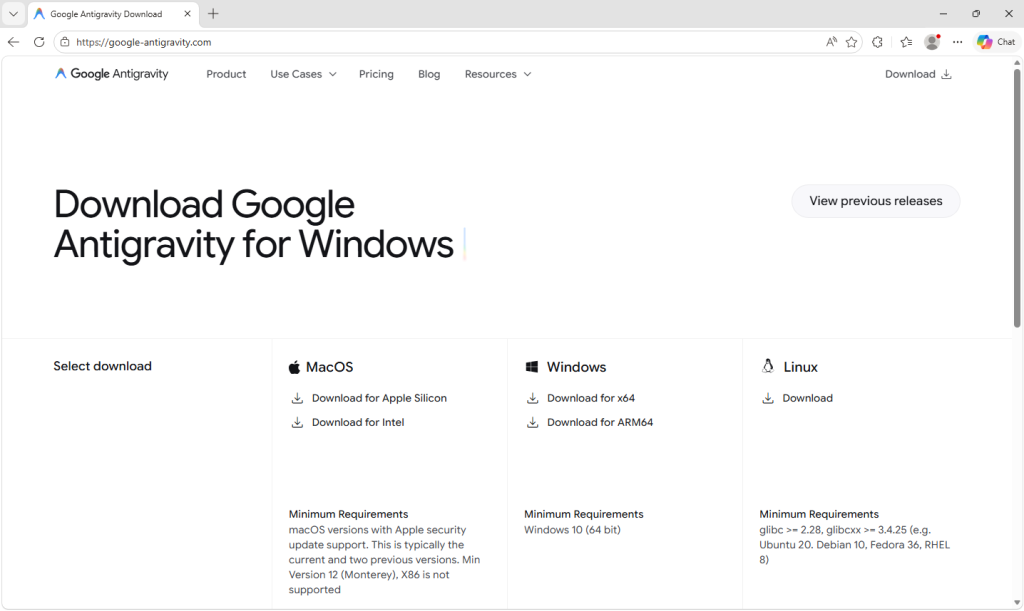
Google Antigravity launched in November 2025 and has been one of the most searched-for developer tools on the web ever since. The real product lives at antigravity.google. Hardly anyone new to the product has the real URL memorized, so when a user reached a hyphenated lookalike (what we call a typosquat domain) at google-antigravity[.]com it was convincing enough at a glance.
So they went on to download the file, called Antigravity_v1.22.2.0.exe.
The installer isn’t simply named to look like the real one from Google. It’s 138 MB: large enough to carry the entire Antigravity application, its Electron runtime, its Vulkan graphics libraries, its updater, all of it. Because that is what is actually inside.
The attacker didn’t build a convincing fake; they took the genuine Antigravity installer, added one additional step to run their PowerShell script during setup, and repackaged the result. The malicious step is one extra line in a sequence that runs dozens of legitimate ones. Here’s what the Setup looked like:
How do we know it’s one line? Because you can see it.
The MSI’s custom-action table (the list of every step the installer takes during install) contains 11 rows that are standard, boilerplate entries the installer tool generates automatically: extract files, check the Windows version, elevate to admin, write a log, clean up afterwards. Each of those has a name that starts with AI_ followed by a description of what it does. And then, sitting at the bottom of the same list, there is one more row, named wefasgsdfg — a keyboard mash the attacker typed in when the installer tool prompted them for a name, and the one that runs their PowerShell script.
Antigravity installs properly into C:\Program Files (x86)\Google LLC\Antigravity\. A Start Menu entry appears, a desktop shortcut is placed, and everything works. The user opens the app, tries it, closes it, and goes on with their day. It all seems fine, because they actually installed the thing they wanted to install. The malicious part is happening quietly, in a folder they’ll never open.
Two small scripts, and a phone call
Somewhere in the middle of the install, the MSI runs a small helper script that drops two PowerShell files into the user’s temporary folder: scr5020.ps1 and pss5032.ps1. The filenames look like specifics but aren’t: the four characters after each prefix are generated fresh every time the installer runs.
What stays constant is the prefix: scr for the user script, pss for the PowerShell wrapper, because those come from the installer tool’s standard naming pattern for custom-action scripts.
Of the two files, the second is an unaltered Advanced Installer utility. It’s genuinely innocent and present in many real products. The first was added by the attacker, and it has one job: open an HTTPS connection to https://opus-dsn[.]com/login/, download whatever code the server sends back, and run it. To blend in, it spoofs a Microsoft referrer header and routes through the system’s default web proxy, so it inherits whatever corporate proxy configuration and authentication IT has set up, without the user noticing. It also saves and restores the parent PowerShell’s TLS setting, leaving that one global unchanged after it exits. That’s the entire script.
Researchers call this pattern a downloader cradle, and its advantage to the attacker is flexibility. The real payload lives on their server, not inside the installer out in the wild, so they can swap it out, change targeting, or turn the operation off without touching the file users are downloading.
In this case, the cradle did exactly what it was built to do and no more: a DNS query for opus-dsn[.]com, a single TCP connection on port 443 to 89[.]124[.]96[.]27 with a quiet HTTPS GET to /login/, and then the PowerShell process exited.
Nothing else happened. No second-stage script was fetched. No file was dropped. No scheduled task was created. No changes were made to Windows Defender. Most automated security tools would shrug and move on.
But the malware hadn’t failed. It had introduced itself to the attacker’s server and asked for code to run next—and whether the answer comes back is a decision the operator gets to make later, on their own time, one victim at a time. You cannot tell, from the victim’s side, what was returned. For analysis, we retrieved what the server sends when the answer is yes.
What arrives when the answer is yes
When the server decides a target is worth attacking, the follow-on script does its work in three movements.
First, it makes Defender look the other way. It calls Add-MpPreference (with the cmdlet name split by a backtick, a small obfuscation to dodge naïve string-matching detections) to exclude %ProgramData% and %APPDATA% from scanning, exclude .exe, .msi, and .dll files from scanning, and exclude PowerShell, regasm.exe, rundll32.exe,msedge.exe, and chrome.exe from scanning. Only after that does it phone home—collecting a profile of the machine (Windows version, Active Directory domain, installed antivirus product), RSA-encrypting it with a public key embedded in the script, and sending it to opus-dsn[.]com inside a utm_content query parameter that looks, in any access log, like ordinary marketing tracking. This is the profile the operator uses to decide whether this particular machine is worth the next stage.
Second, it widens the gap. A second Add-MpPreference block extends the exclusion list to include the .png file extension and the conhost.exe process—the exact two additions the next stage will need. It then writes AmsiEnable=0 into HKLM\Software\Policies\Microsoft\Windows Script\Settings, disabling Windows’ Antimalware Scan Interface—the layer that normally lets Defender read scripts before they execute. After this point, the malicious activity is being conducted in folders, with file types, and through processes that Defender has been instructed to ignore.
Third, it stages persistence. It downloads a file called secret.png from https://captr.b-cdn[.]net/secret.png (a BunnyCDN URL that looks at a glance like any other content-delivery link) and saves it to C:\ProgramData\MicrosoftEdgeUpdate.png, a path chosen to sit beside Microsoft’s real browser-update folders. The file is not an image. It is an AES-256-CBC ciphertext (key and IV both derived via PBKDF2 with 10,000 iterations from a hardcoded passphrase) wrapping a .NET assembly. A scheduled task is then registered with the name MicrosoftEdgeUpdateTaskMachineCore{JBNEN-NQVNZJ-KJAN323-111}, which is all but indistinguishable at a glance from the real Microsoft Edge update task and set to fire at every logon, running unprivileged so it never produces a UAC prompt. The action it executes is conhost.exe --headless launching a hidden PowerShell, which decrypts the fake PNG in memory and reflectively loads the resulting .NET assembly into its own address space. Nothing lands on disk as an ordinary executable. All that persists is the encrypted image, in a folder Defender has been asked to ignore.
And then a second payload, that doesn’t persist at all. The script doesn’t stop there. After registering and starting the scheduled task, it sends a second beacon to confirm install, then runs an entirely separate block that downloads a second encrypted file (GGn.xml) from the same BunnyCDN host, decrypts it with a different, hardcoded AES key, and reflectively loads that assembly into the running PowerShell process too. The first payload survives reboots; this one runs once, in memory, and is gone. Two .NET assemblies, one campaign, on the victim.
What the payload is built to do
The decrypted assembly is a .NET stealer. We can characterize it from its own class and method names, which describe its job in plain English: it scans browsers, messaging apps, gaming platforms, FTP clients, and crypto wallets, collecting data labeled Logins, Cookies, Autofills, and FtpConnections.
In practice, that means every Chromium- and Firefox-based browser on the machine (Chrome, Edge, Brave, and others) gets stripped of saved passwords, autofill data (including saved credit cards), and the cookies that keep users signed in. Discord tokens, Telegram sessions, Steam logins, FTP credentials, and cryptocurrency wallet files are taken as well.
(Most of the exact target paths are obfuscated and only decrypted at runtime, so the specific apps aren’t all visible from a static analysis, but the categories of theft are clear from the class names.)
Session cookies are the part that should alarm most people, because they work faster than anything else. A stolen login cookie lets an attacker walk straight into a Gmail inbox or banking portal without needing a password or triggering two-factor authentication. As far as the website is concerned, the user is already signed in. The gap between infection and account takeover can be minutes.
Beyond data theft, the malware also imports Windows APIs used for clipboard hijacking and keystroke logging, tools that can capture what you type or swap a cryptocurrency wallet address at the exact moment you send funds.
It also includes the building blocks for “hidden desktop” tradecraft: creating a second, invisible Windows desktop that the attacker can capture and potentially control. In its most advanced form, this lets an attacker operate inside that hidden environment—logging in to accounts, approving transactions, or sending messages—while the victim’s real screen shows nothing unusual. For the duration of the infection, the attacker is, effectively, a second presence on the computer.
A new tool, a new lookalike, the same trap
The reason this campaign matters beyond the single installer is that its shape isn’t new. It’s a refined version of a pattern we’ve been watching for months: new AI products launch with huge attention, and within weeks, lookalike domains and trojanized installers appear alongside them. Antigravity is the latest example, but it won’t be the last.
The incentive for attackers is obvious. Every high-profile AI launch creates a surge of users who want to try it immediately, before they’ve had time to memorize the real URL, or might fail to double-check it against trusted sources.
What makes this style of campaign hard to spot is that most victims never know they were targeted. Those who escaped, because the operator chose not to escalate on their machine, have no reason to think anything happened.
The ones who didn’t escape usually find out later: a password reset they didn’t request, a friend asking about a strange message, or a bank balance that suddenly looks wrong. By then, the decision to target them was made days earlier.
What to do if you may have been affected
If you or anyone who shares your computer recently installed something calling itself Google Antigravity from anywhere other than antigravity.google, start by checking the network indicators. Look in firewall logs, EDR alerts, or your router logs for connections to opus-dsn[.]com, captr.b-cdn[.]net, or 89[.]124[.]96[.]27. A single connection from a PowerShell process is enough to confirm the check-in happened.
From a different, clean device, sign out of every active session on your important accounts: Google, Microsoft 365, any banking portal, GitHub, Discord, Telegram, Steam, and your crypto exchange. Most services have a “sign out everywhere” option under security settings.
Change passwords on those accounts, starting with your email. If your email is compromised, an attacker can reset almost anything else.
Rotate any API keys, SSH keys, or cloud credentials that were on the affected computer, not just the passwords attached to them.
If you have cryptocurrency wallets on the machine, move the funds from a clean device immediately. This is what these operators monetize first.
Watch your bank and credit card statements for unfamiliar charges, and consider placing a fraud alert with your bank.
Wipe and reinstall Windows. A machine that has run this class of malware should not be trusted.
If the machine is a work laptop, tell your IT or security team today. The beacon collects the machine’s Active Directory domain, so on a domain-joined corporate laptop, the attacker now knows which company’s network this victim belongs to, which means this isn’t just a personal problem.
Anthropic’s most capable model to date, Claude Mythos Preview (aka Mythos), has been described as a “step change” in AI performance, especially on cybersecurity tasks.
Anthropic tried to keep Mythos a secret until a few weeks ago, when a data leak revealed the existence of what the company said was its most powerful artificial intelligence to date. The models is seen as both a powerful defensive tool, and, potentially, a serious offensive cyberweapon.
For that reason, the company is sharply limiting access and signaling it does not plan to release it broadly to the market right now. Its reported ability to autonomously find and even chain software vulnerabilities at scale sit at the core of both the hype and the danger.
Imagine a tool that can independently find new vulnerabilities in software, systems, and platforms, then turn them into exploits, even if that requires chaining them with other vulnerabilities.
In the wrong hands, that could be a major threat to our cyber safety. So Anthropic has limited access to a small number of organizations worldwide, including major tech firms and a select group of government or security bodies. The NSA is reportedly already using Mythos Preview, apparently to stress‑test and harden sensitive systems, despite the Pentagon labelling Anthropic as a supply chain risk.
Mythos can discover vulnerabilities across large codebases more quickly and reliably than existing tools, and can look for multiple flaws in one system and combine them into multi‑step exploit chains to complete a compromise (for example, going from a simple web bug to a full domain takeover). It would take a bug bounty hunter months to find another vulnerability, let alone one chainable with the one(s) already discovered. Accomplishing that before the first one would be highly unlikely.
In practical terms, that could mean faster attacks, more complex breaches, and less time for companies to fix weaknesses before they’re exploited.
Anthropic itself has highlighted that Mythos can work with minimal supervision for extended periods, meaning it could run systematic attack campaigns at a scale no human team could accomplish.
AI lowers the skill floor for offensive operations. Less-skilled actors could get access to very effective tools, significantly increasing the number of advanced attacks.
Techniques like fuzzing, dictionary attacks, and other brute force methods become much more effective when sped up by automation. AI-assisted iteration can provide an attacker with a lot more tries before an attack gets noticed.
But the most concerning conclusion was that the offensive side is iterating faster in the current phase of AI development, and security teams are generally later adopters of AI tooling than their adversaries.
As we know, AI in cybersecurity works both ways. It helps us defend against new threats, but it can also be used to create them. Which is why, in the wrong hands, Mythos can turn out to be a formidable adversary.
The goal stays the same, but the way to get there is paved by tools like Mythos. From the attacker’s seat, nothing about the destination is new. The novelty is that Mythos now automates the map, the vehicle, and most of the driving.
We don’t just report on threats—we remove them
Cybersecurity risks should never spread beyond a headline. Keep threats off your devices by downloading Malwarebytes today.

 Login
Login