❌

Normal view

Google’s new search redirects make links harder to check before you click

14 September 2026 at 16:17

Google is changing how some links in its search results work.

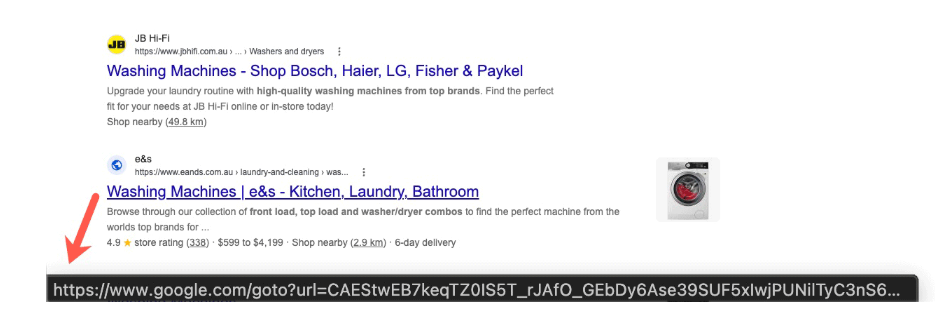
Instead of linking directly to the destination, Google has started routing some search result links through opaque google.com/goto?url=... redirects. The url parameter does not show a readable version of the destination but uses a custom, Google-specific encoding.

Google confirmed the rollout to Search Engine Roundtable:

“We have a long history of deploying technical measures against evolving forms of abuse, and we regularly take steps to protect our services and users.”

Google has not said precisely what abuse the change is intended to prevent. However, the most likely reason is that the redirects are designed to make bulk extraction of destination URLs from Google search results more difficult and costly. Automated tools must now ask Google to resolve each result separately.

Since the rollout has apparently not reached my neck of the woods yet, I had to grab an image from another source.

New URL structure
Image courtesy of seroundtable.com

Some Reddit users find the change ironic: Google built its search business by automatically collecting information from other websites, but is now making it harder for others to collect information from Google.

Other users have complained about the collateral damage to legitimate tools. Rank tracking, SEO auditing, research, archival, accessibility, and alternate-index services may all face the same rate limits and costs as abusive scrapers.

Search results data provider Autom reports that the final destination is viewable only through the redirect response’s Location header. This means bulk collectors must make an additional request for every result.

Security

The first thing that popped into my one-track mind was the security downside. We often tell users to hover over a link before clicking it so they can check where it leads. That advice is less useful when hovering reveals an encoded Google redirect rather than the destination website.

Google still displays the claimed destination above each search result, but users can no longer use the link preview as an independent check.

So, Google, where does this leave our advice? We already tell people not to click Sponsored search results. Should we now tell them to avoid goto?url links too? Or will you give users an easy way to check where a link leads before they click it?


Safer. Cleaner. Ad-free browsing.


Shared Claude chats were searchable on Google

28 July 2026 at 14:33

Reddit users found that by using a specific Google search query, it was possible to find Claude conversations that users had shared.

This exposed sensitive material, including crypto wallet keys, names, addresses, work notes, and even erotic or otherwise policy-violating chats. Fortune says Anthropic appears to have fixed the Google indexing issue, but the shared links themselves were still live for people who already had them.

The exposure was tied to Claude’s Share feature, which creates a public web link to a snapshot of a conversation rather than leaving it inside a user’s private account. Reddit users found a search query that surfaced many of these shared chats, plus Claude Artifacts (interactive documents, apps, and other content created by Claude) in Google results. Wired reports that this is still true for Bing.

The main risk is that people use chatbots to think through work, health, legal, or personal matters without realizing that a shared link can behave like ordinary public web content.

This isn’t unique to Claude. We’ve previously seen Grok chats show up in Google search results, and Meta AI conversations can also become public by design. We have also written about the share option in ChatGPT that was swiftly removed after users unintentionally made thousands of conversations searchable.

Anthropic says Claude chats are private by default, and only conversations users explicitly chose to share were affected. But the incident is a reminder that a “share” button on an AI chat can be more like publishing than messaging, especially if search engines can discover the resulting URL.

How to stay safe

The easy way out here is not to share your AI chatbot conversations with anyone, because you could end up reaching more people than you intended.

That’s because it’s harder to stop pages from being indexed than you might expect. And you don’t have those controls aren’t in your hands. The AI provider should take care of that.

But there are a few things you can do:

  • Don’t share Personally Identifiable Information (PII) with a chatbot, so that if a conversation is ever exposed it can’t be easily linked back to you.
  • To review or stop sharing conversations in Claude, go to Settings > Privacy > Shared chats.
  • If you’re using an AI service from a social media company, such as Meta AI, Grok, or Gemini), remember that your conversations could be tied to your account—which might contain a lot of personal information.
  • When using AI, make sure you understand how to keep your conversations private. Many services offer temporary or incognito chats that aren’t saved to your history, but they aren’t a guarantee against bugs, leaks, or data breaches. Only use the share feature when you’re comfortable with anyone potentially seeing that conversation.
  • Read the privacy policy so you understand how your conversations are stored and shared. If it’s too long, you can always ask an AI to summarise the important points.

Let’s face it, an incognito window can only do so much. 
 
Breaches, dark web trading, credit fraud. Malwarebytes Identity Theft Protection monitors for all of it, alerts you fast, and comes with identity theft insurance. 

❌