❌

Normal view

Deploying AI agents securely: how Kaspersky products mitigate AI threats

Introduction

AI agents and associated tooling are becoming increasingly common in corporate infrastructure. Agents can perform a range of actions with the user’s privileges, such as accessing data, running commands, and interacting with external services. This creates new security risks, especially when these tools are used without the security team’s oversight or well-designed policies.

Detecting, tracking, and controlling AI agents is becoming one of the most pressing tasks for security teams today. We closely follow technological developments and continuously update our solutions to respond to new threats in a timely manner amid a rapidly changing technology landscape. This post describes new expertise built into Kaspersky products that helps counter the threats posed by the proliferation of AI agents. We approach this problem from several angles.

First, you need to thoroughly understand the threat you are dealing with. To this end, we added profiles to the Kaspersky Threat Intelligence Portal that describe various AI agents and how attackers exploit them. At their core, AI agents are programs (processes) that run in the operating system on endpoints and can also launch other processes. This means that Endpoint Detection and Response solutions are among the key endpoint controls for this threat. These solutions detect the presence and launch of AI agents, track their activity, and identify potentially dangerous behavior. When needed, they also take action, such as stopping a suspicious process, blocking the activity, or isolating the host, to reduce the likelihood of an incident escalating. For this purpose, we developed specially adapted detection rules.

You can use Kaspersky Endpoint Security, now also available as Kaspersky Next, to control and restrict the launch of AI agents. This solution uses two components to detect AI agents and control how they are used. Application Control categorizes the application processes launched on endpoints, and Web Control manages access to specific categories of web resources for users on endpoints.

Finally, even harmless AI agents can contain malicious instructions (skills), such as those downloaded from unsafe external sources. Kaspersky Scan Engine analyzes installed applications to detect these threats and also checks LLM files for malicious code. Let’s take a closer look at these solutions and technologies.

Popular AI applications and services in organizations

Tools from Anthropic and OpenAI take the top spots in the September 2026 ranking of AI agents by popularity among Kaspersky users. This list is based on telemetry from Kaspersky solutions. It shows the number of users who had the relevant AI vendors’ products installed at the time of the study.

# AI product
1 Claude
2 Claude Code
3 Codex
4 OpenCode
5 Zed
6 Wispr Flow
7 LM Studio
8 ZCode
9 Chatbox
10 Cherry Studio

The data shows that agentic systems, especially AI agents for software development, are the most popular AI applications. The TOP 10 also includes an application for running large language models locally (LM Studio) and a voice note-taking app (Wispr Flow).

According to open sources, these are the most widely used AI services in 2026:

# AI service
1 ChatGPT
2 Google Gemini
3 Claude
4 Grammarly
5 DeepSeek

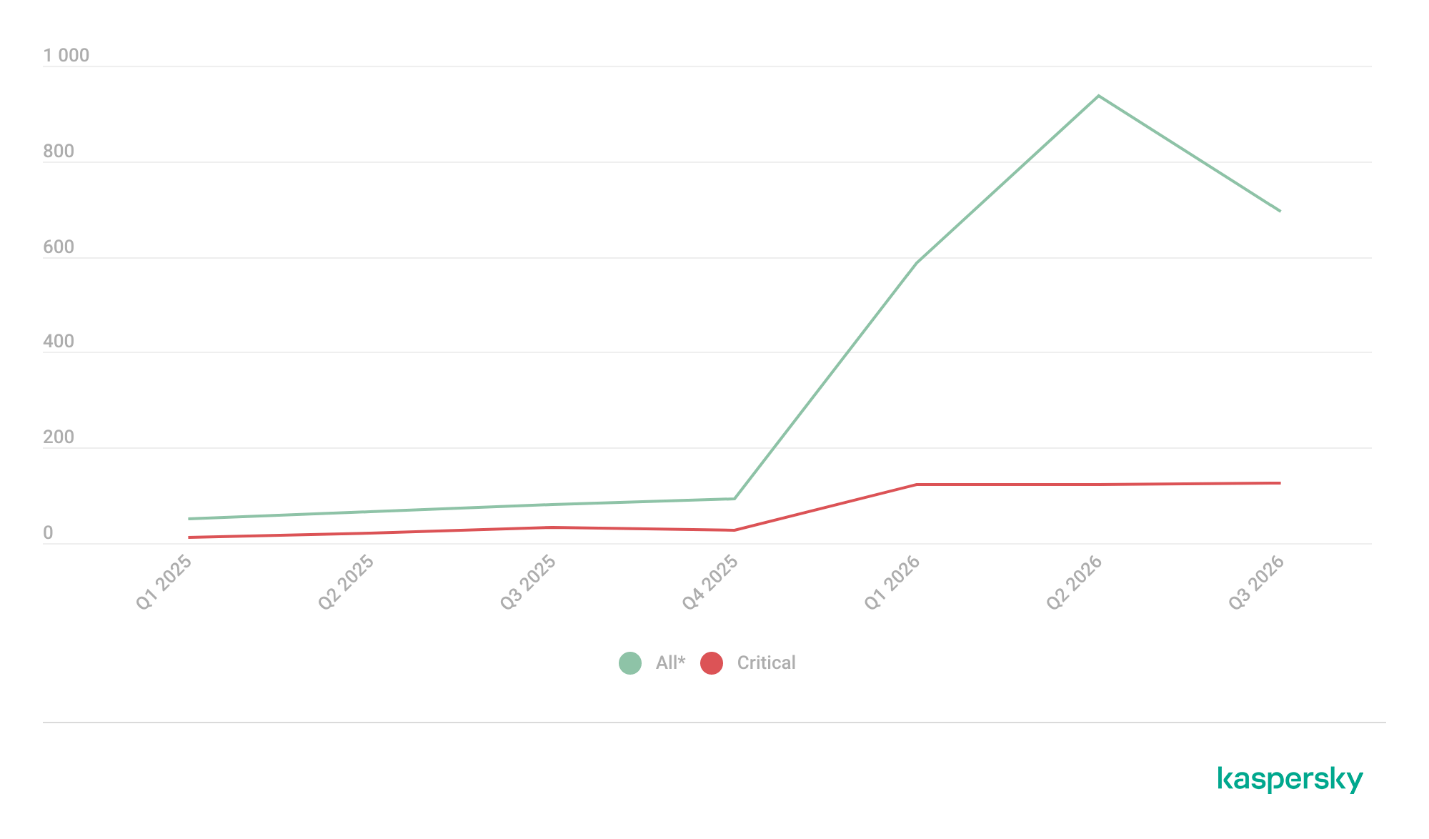
While analyzing the most popular and widely used apps, our experts also noticed a sharp rise in vulnerable versions of AI-related software and services. From 2025 to date, more than 2500 vulnerabilities have been published:

Number of published vulnerabilities in LLMs, AI tools, and plugins with similar functionality, 2025–2026 (download)

* Data for previous quarters was updated and may differ slightly from previously published data.

Application Control and Web Control

To enforce the organization’s security policy for AI agents and other AI applications on the corporate network, Kaspersky products offer application control based on KL categories. These categories classify installed software and give you granular control over which approved applications can run in the organization.

Application Control analyzes the processes launched on endpoints, tracking which AI agents are running in corporate systems at any given moment, on which hosts, and under which accounts. Application Control also shows how long a given program has been in use.

This makes it easier for the Kaspersky Security Center (KSC) administrator to control applications. Administrators can use KL categories to allow or block AI agents inside the company for specific groups of employees.

Here is what this functionality looks like to KSC administrators:
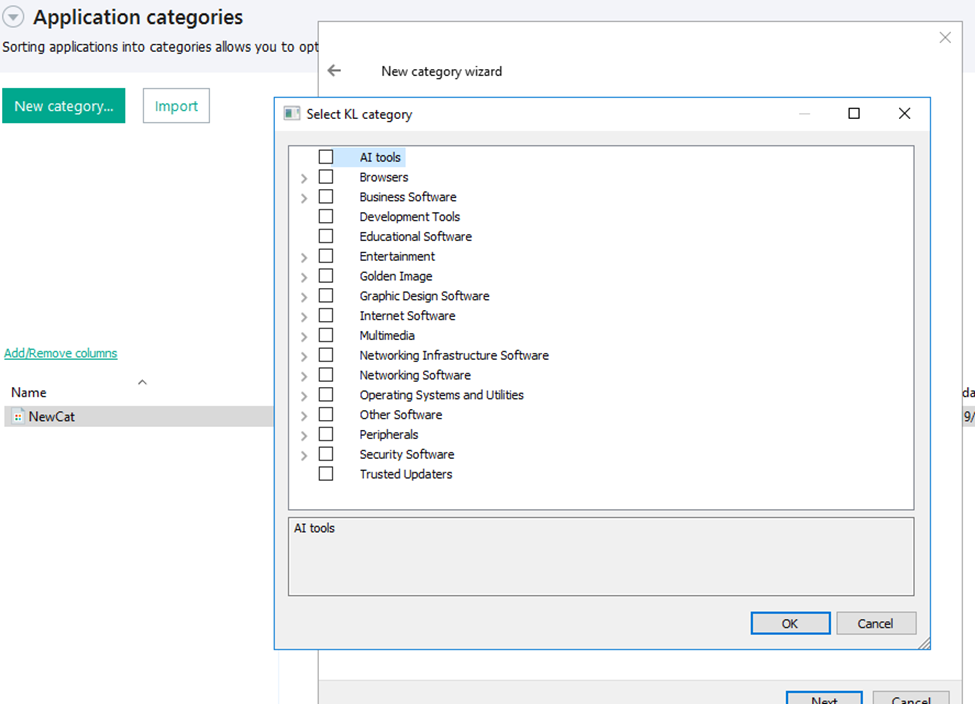
KL categories available when configuring Application Control

KL categories available when configuring Application Control

For details on how to configure Application Control in KSC, follow this link.

In Kaspersky Endpoint Security (KES), Application Control can operate in two modes:

  • Denylist. In this mode, Application Control lets users run any applications except those blocked by Application Control rules. This is the default mode.
  • Allowlist. In this mode, Application Control blocks users from running any applications except those explicitly allowed by Application Control rules.

Below are the steps to configure Application Control to block AI tools.

Configuring Application Control for the AI Tools category in KES

Configuring Application Control for the AI Tools category in KES

With this setup, when a user tries to launch an AI agent, they get a notification and the agent doesn’t start.
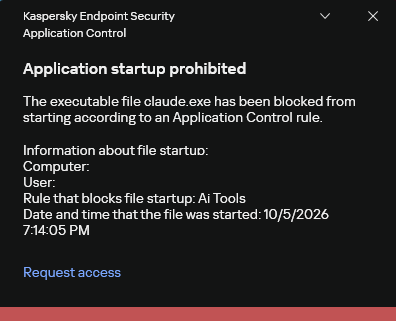
KES notification about an attempt to launch an AI agent

KES notification about an attempt to launch an AI agent

For more on how to configure Application Control in KES, follow this link. Our public portal also lets you explore information on KL categories and the applications that fall under them, in particular details on how AI agents are categorized and how popular they are.
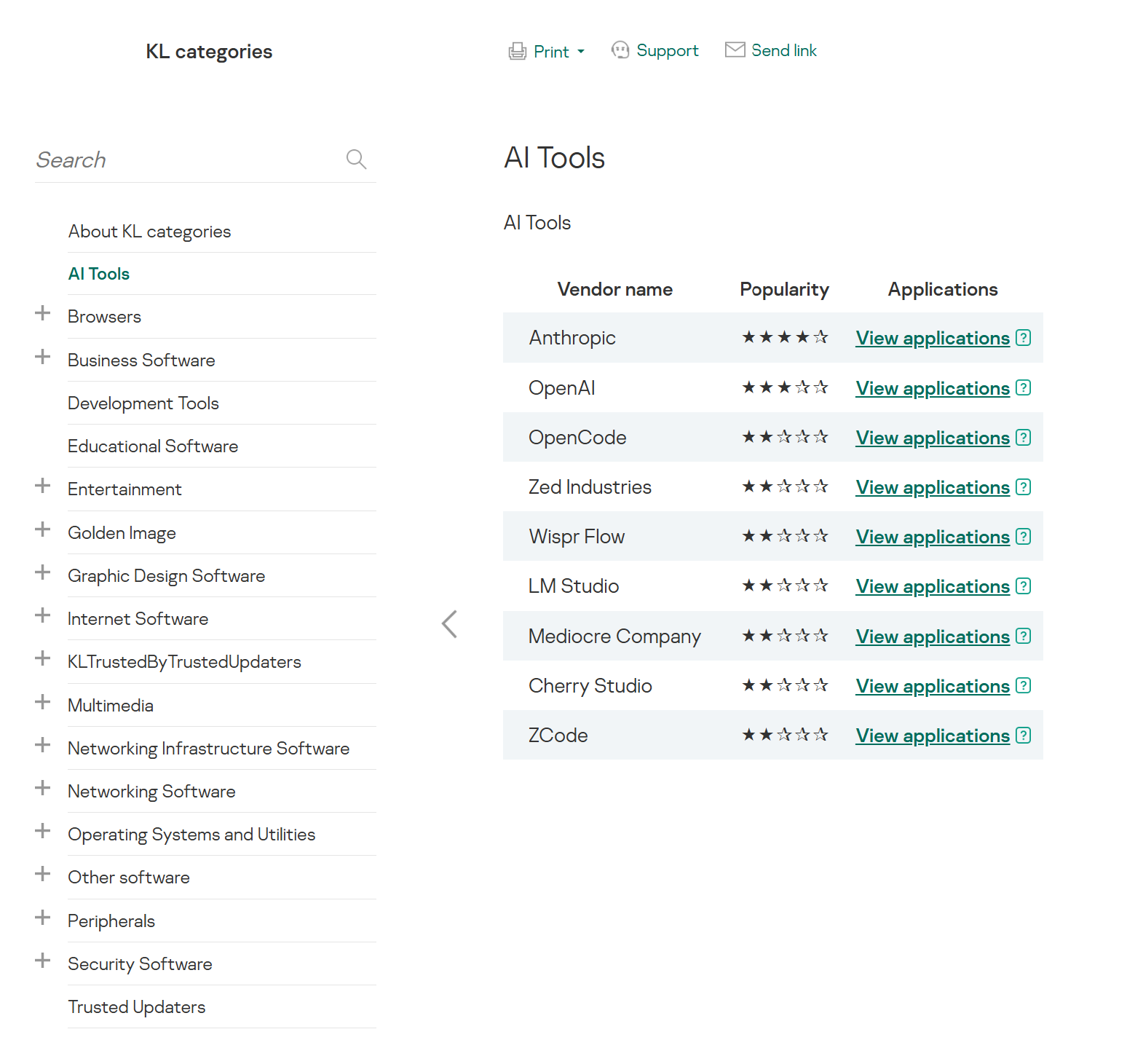
AI Tools KL category

AI Tools KL category

The View applications drop-down list shows products for a specific vendor.

Similarly, Web Control lets you manage user access to web resources. If a user tries to open a denylisted website, KES blocks access and shows a warning.
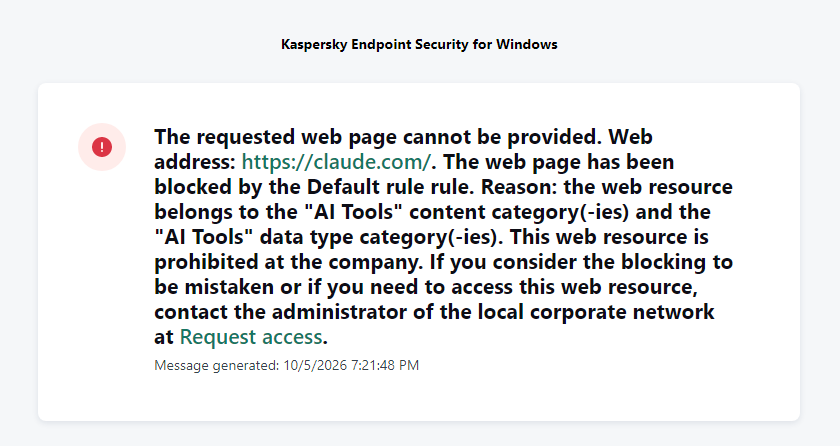
KES notification about an attempt to access a prohibited web resource

KES notification about an attempt to access a prohibited web resource

When configuring access, the administrator can block websites that provide AI as a service.
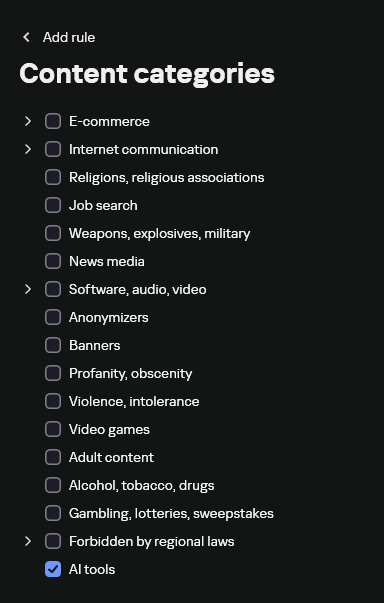
Website categories

Website categories

For more on configuring Web Control, follow this link. The help portal also provides information on website categories that can be assigned to resources to configure access control.

Kaspersky Endpoint Detection and Response

To an EDR solution, an AI agent is a regular process. It has its own executable, a tree of child processes, and network communications, all of which need to be monitored for suspicious activity. An attacker can use an AI agent as an automation tool. An AI agent installed as a legitimate user tool can also be leveraged in a ClickFix attack, where it executes a malicious instruction received from an untrusted source, such as a document, web page, or email. That said, unsafe actions by an agent do not always indicate an attack. There may be no malicious intent in the chain at all. An incident can result from what looks like an ordinary instruction from a user who doesn’t fully understand the consequences of having it executed. The mere fact that an agent was launched does not reveal whether it is being used in an attack. That is why Kaspersky EDR (KEDR) uses both conventional behavioral rules and rules written and adapted to detect AI tools. The latter identify risky agent actions and settings, and help determine which AI tool was involved in suspicious activity.

Conventional KEDR rules detect the vast majority of familiar malicious techniques, including when performed by an AI agent. A suspicious PowerShell launch, persistence via Task Scheduler, or an attempt to steal credentials leaves clear, identifiable traces. These traces look the same no matter what initiated the actions. The rules analyze launch parameters, process relationships, affected files, network activity, and other telemetry events.

For example, in a recent Armored Likho campaign, we found signs that AI had been used to create loader and dropper samples, which were later compiled with NSIS (Nullsoft Scriptable Install System). The key telltale artifacts were icons in the scripts and excessive comments on every function, which is uncharacteristic of human-written code. In addition, the group continues to generate new modules for its BusySnake Stealer and BusySnake RAT samples. For example, the attackers used AI to develop a module that runs multiple checks for virtual environment artifacts and calculates a score. Depending on the score, the sample either runs or exits with code 0. Even though the initial access samples, payloads, and their modules were AI-generated, the commands they execute via rundll32 and PowerShell are detected by the shell_creation_by_rundll32 and suspicious_powershell_cmd_or_script_spawning rules.

So, for detecting an attack like this, it is not important who wrote the loader, the payload, or its modules: they are given away by the commands they execute, process relationships, and other traces of activity in the system. AI can be involved both in preparing the code and in carrying out the attack directly on the device.

In the latter case, the attacker uses the agent to carry out their tasks and lets it choose and run the required commands within the privileges it has. For effective protection, it is critical to link suspicious actions back to the AI tool and the conditions under which it operates. In KEDR, several specialized rules handle this task.

We have created separate rules for popular AI agents, ai_agent_*_access_to_sensitive_file_**, where * is the tool name and ** is the operating system. They generate alerts when an agent accesses files that contain credentials, tokens, or keys.
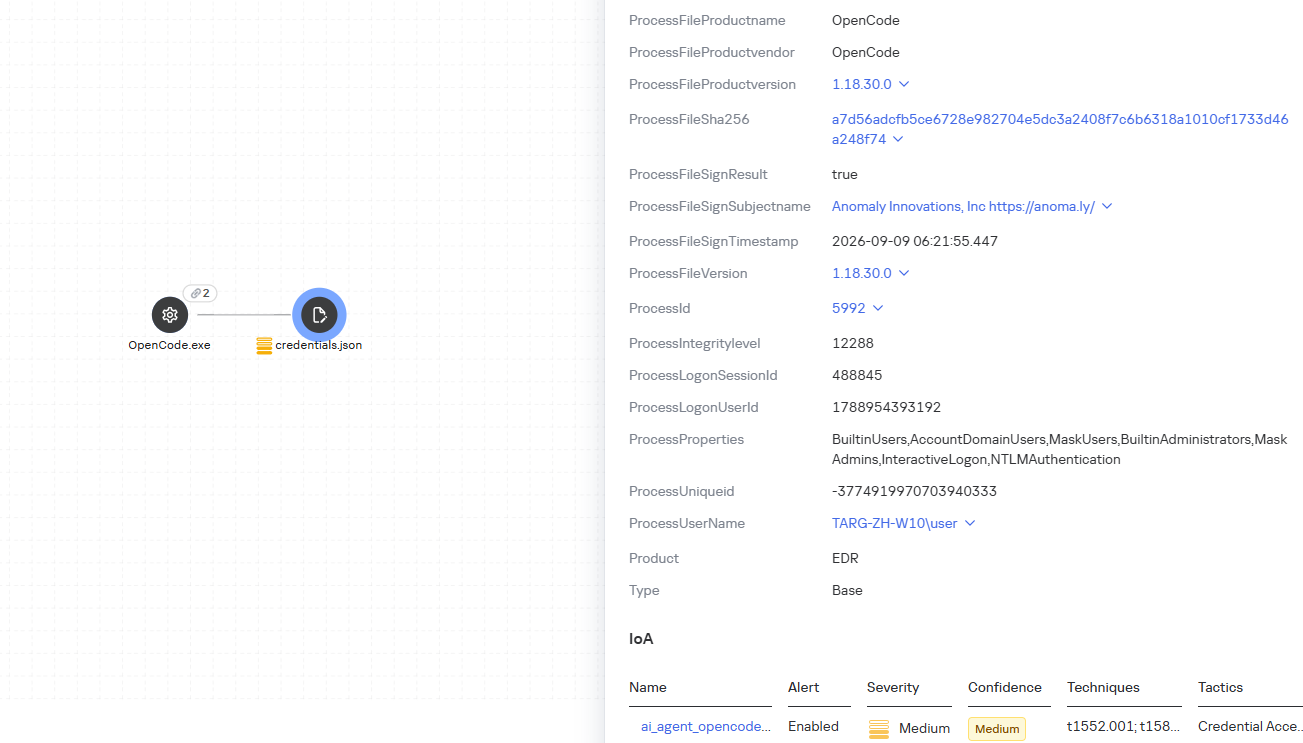
The ai_agent_dangerous_execution_mode rule detects agents launched with auto-approval of all actions (so-called YOLO mode) or with the sandbox disabled. These settings do not indicate an attack on their own, but they let the agent perform dangerous actions without user confirmation.
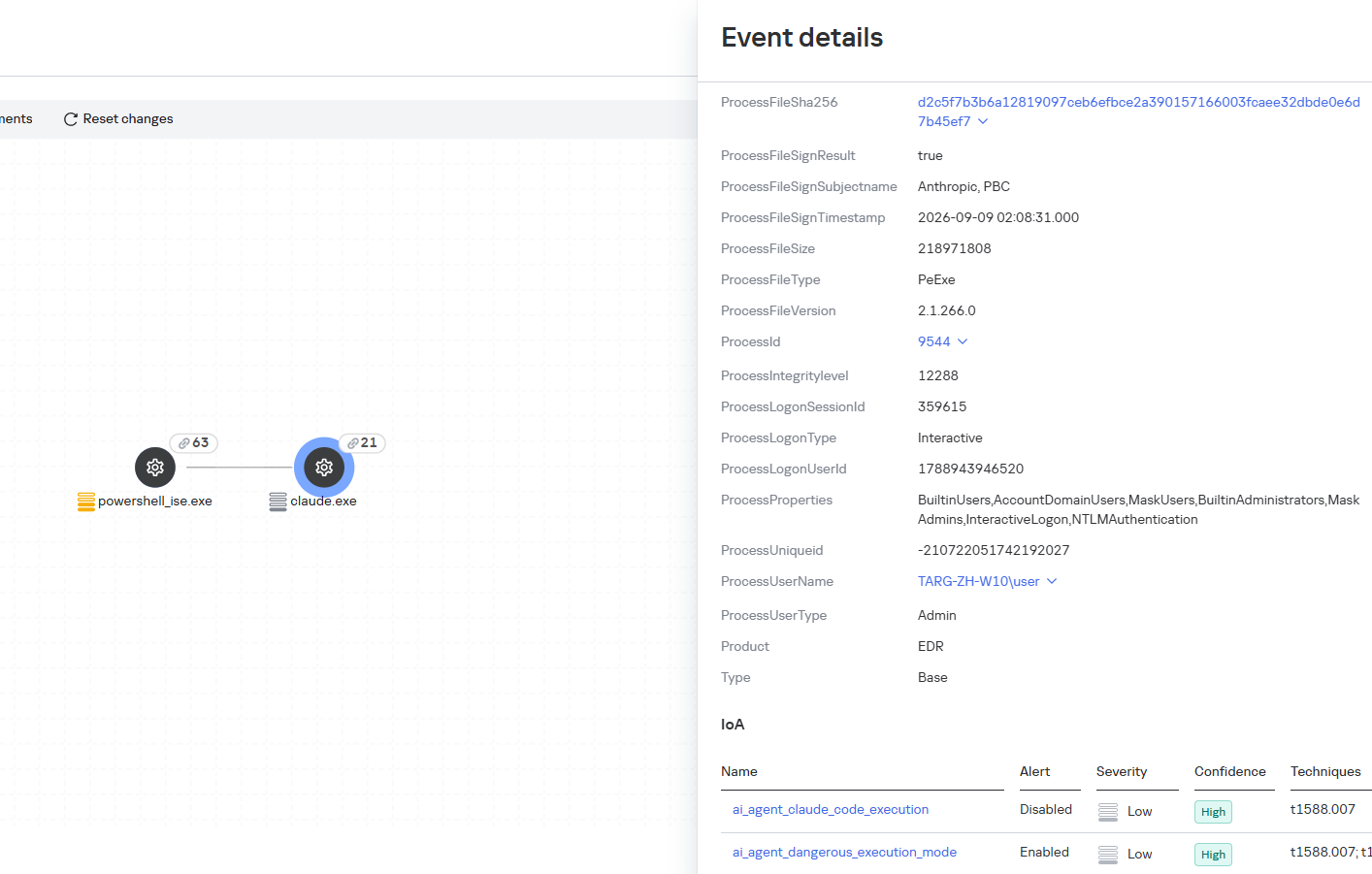
ai_agent_dangerous_execution_mode

The suspicious_mcp_server_artifact rule triggers when MCP server scripts are created or modified in hidden, temporary, or cache directories. Attackers can place an MCP server in these locations to quietly connect it to the agent: through the MCP server, they can pass instructions to the agent, call third-party tools, and access the user’s data.
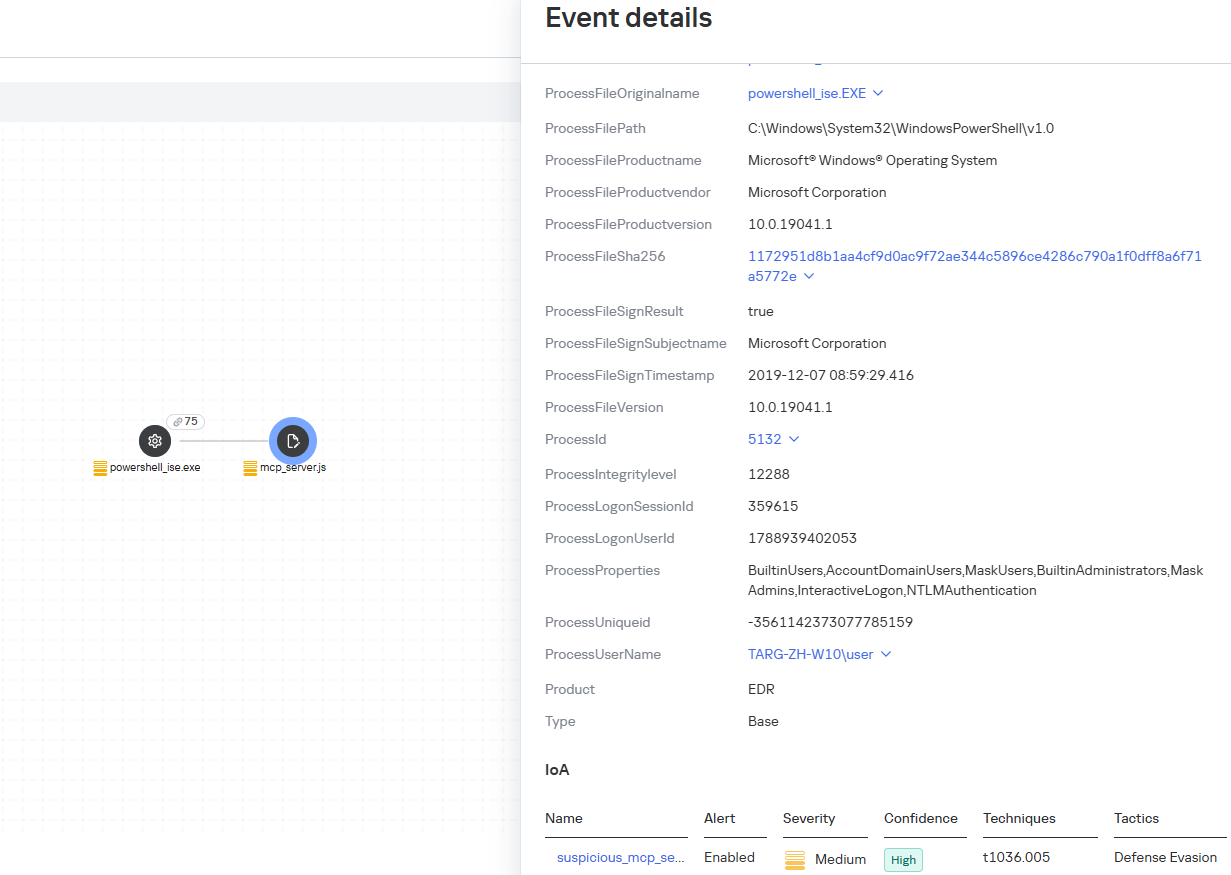
suspicious_mcp_server_artifact

The llm_api_access_by_unusual_apps rule generates an alert when an application on Windows, Linux, or macOS connects to the API of a known external LLM service, unless this activity falls under predefined exclusions. This helps spot model access by applications that do not normally behave this way.
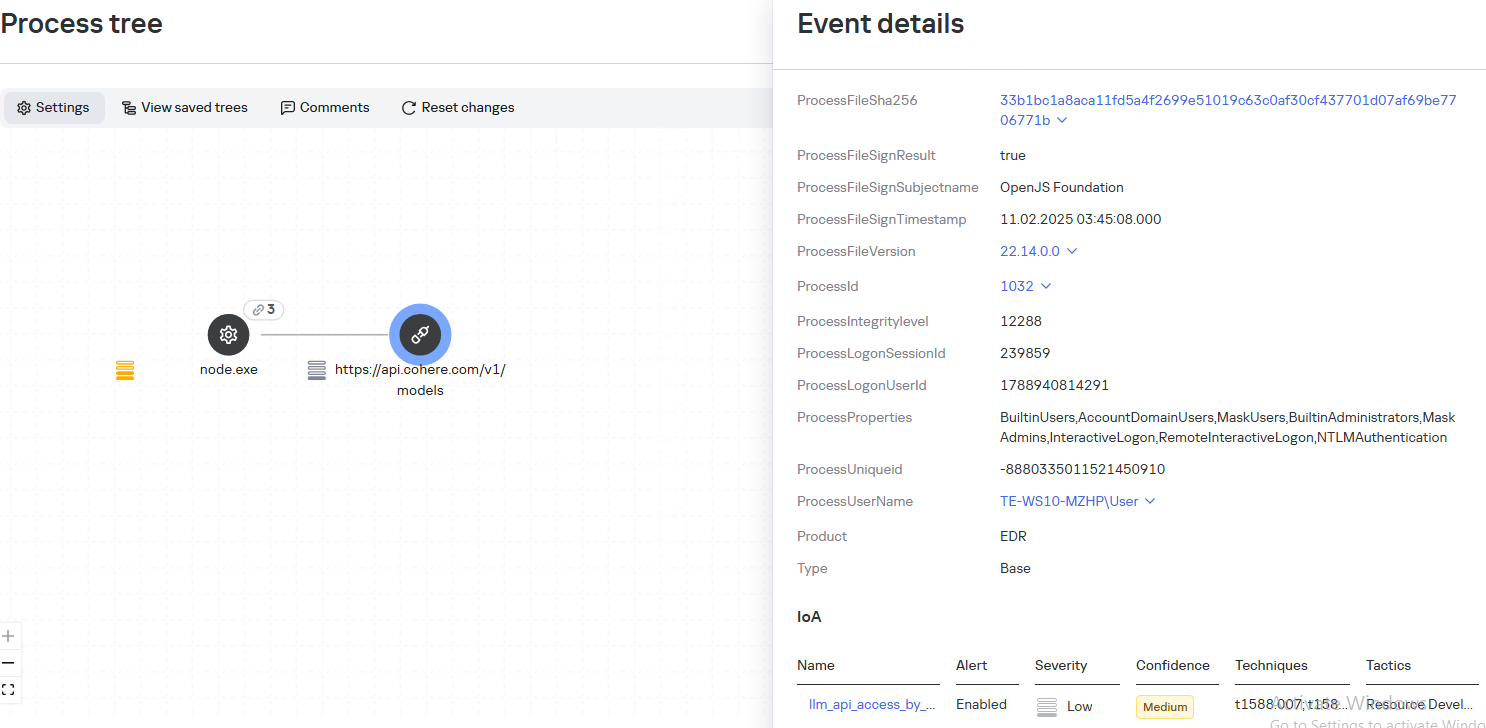
llm_api_access_by_unusual_apps

Some Kaspersky EDR rules tag events for investigation but do not generate alerts. For example, the ai_agent_**_execution rules flag launches of known agents on Windows, Linux, and macOS. The local_ai_model_artifact rule records the creation or modification of AI model files in typical application, runtime, and cache directories. These events reveal AI tools on the device, including tools that run on local models and never call an external API.
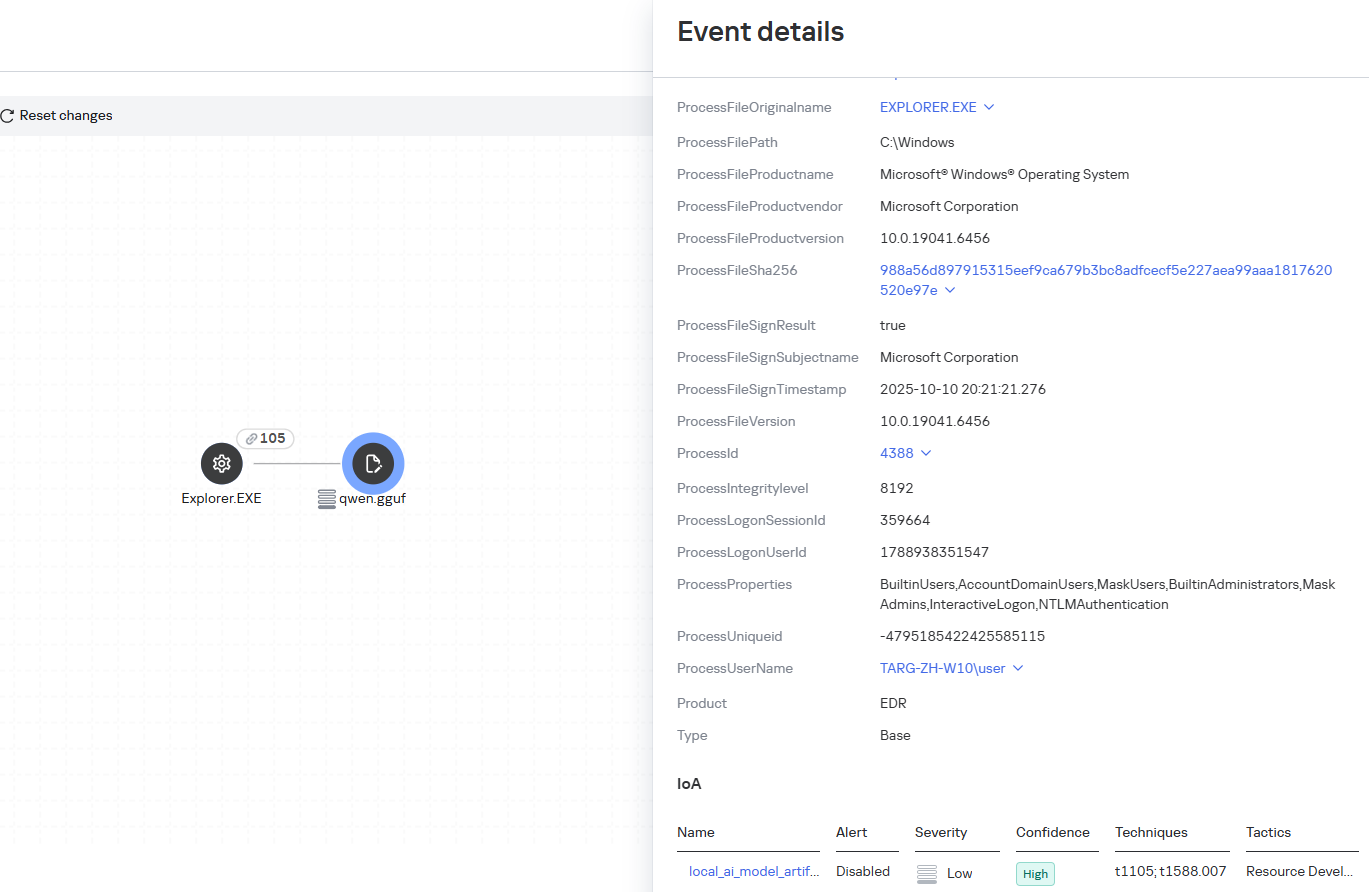
local_ai_model_artifact

Kaspersky Threat Intelligence Portal

AI agent profiles

The Kaspersky Threat Intelligence Portal offers a large number of software profiles, including profiles of AI agents. You can sort them by the ai_ prefix:
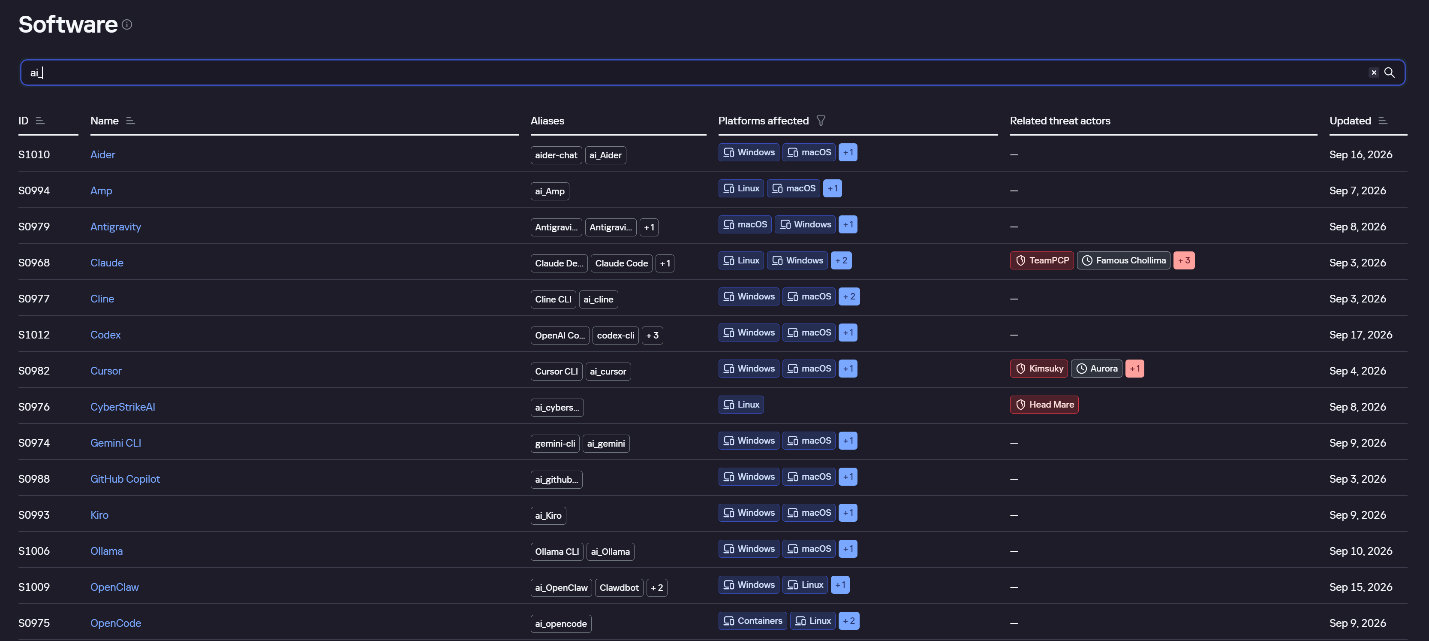
AI agent profiles on Kaspersky TIP

AI agent profiles on Kaspersky TIP

The profile of an AI agent such as Claude Desktop includes a detailed description of the software, the privilege level required to run it, supported platforms, and threat actor groups known to use it. It also lists tactics and techniques mapped to the MITRE ATT&CK framework, with descriptions of the procedures the tool can be used for.
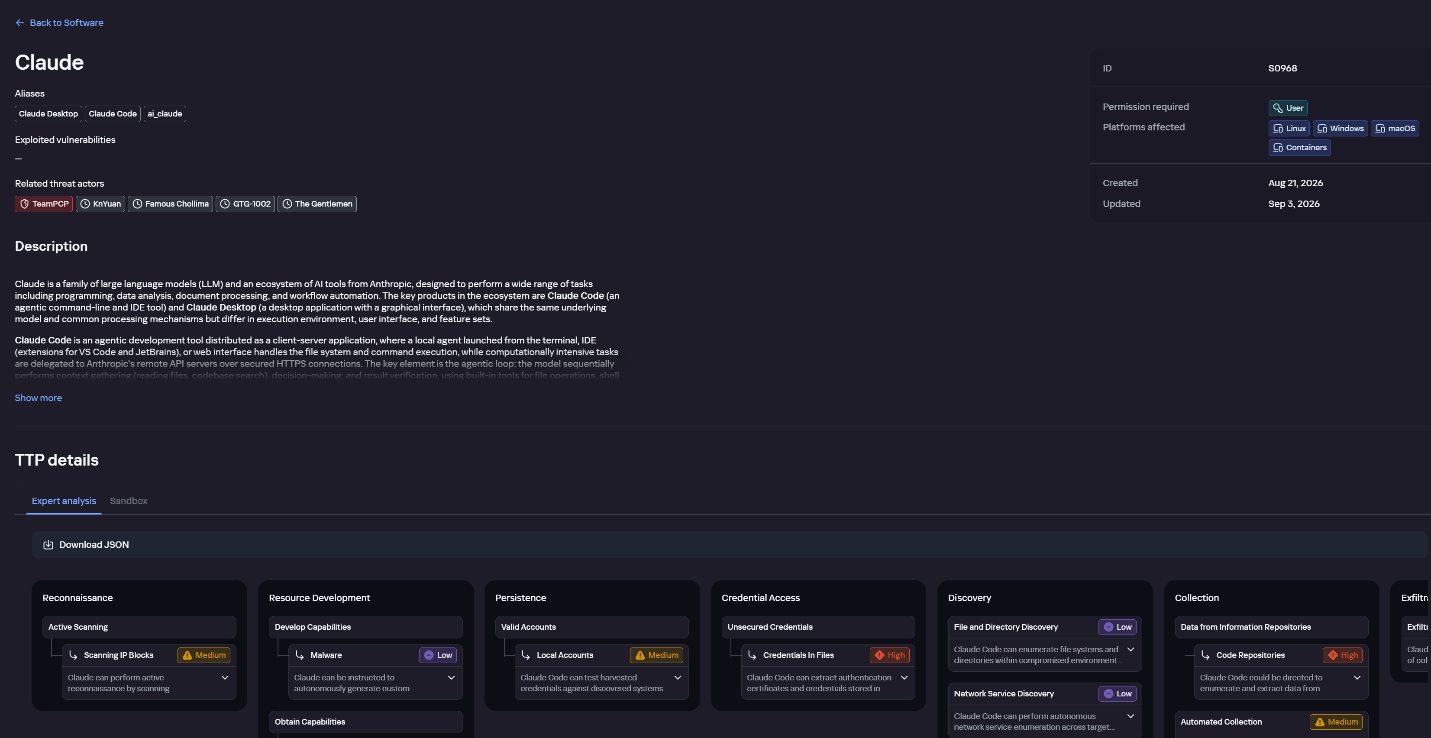
Claude profile on Kaspersky TIP

Claude profile on Kaspersky TIP

The description also lists ways to detect the software through standard system auditing mechanisms:

  • Windows: events from standard audit logs and Sysmon events
  • Linux: syscall audit events and Sysmon events
  • Network auditing: a set of protocols and the traffic generated by the software

The detection section lists the main artifacts the software leaves in the system: command lines, possible launch parameters, names of the services and scheduled tasks it creates, and the key network artifacts.
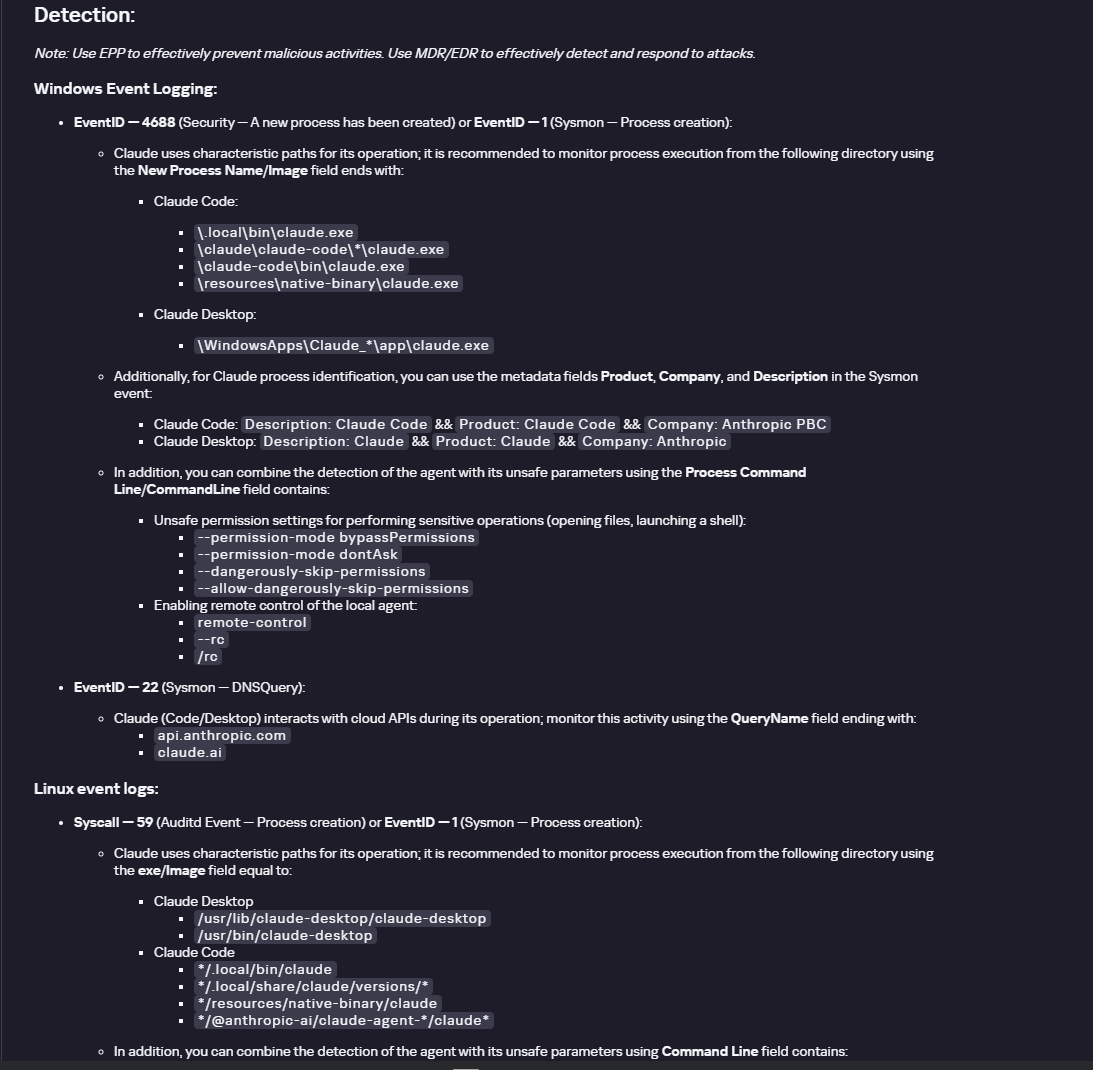
Detection section in the Claude profile

Detection section in the Claude profile

Hunt Hub

In December 2025, the Kaspersky Threat Intelligence Portal added Hunt Hub (HH), a repository of detection rules. This is a unique Kaspersky project, and we developed it in response to growing market demand.

This functionality is available in the Threat Landscape section of the portal. It gives analysts access to detection rules: their descriptions and their mapping to MITRE ATT&CK tactics and techniques, as well as to the associated cybercriminal groups.

In the Hunt Hub section, customers can explore the detection logic of EDR, NDR, and NGFW products, including the logic for detecting AI agents.
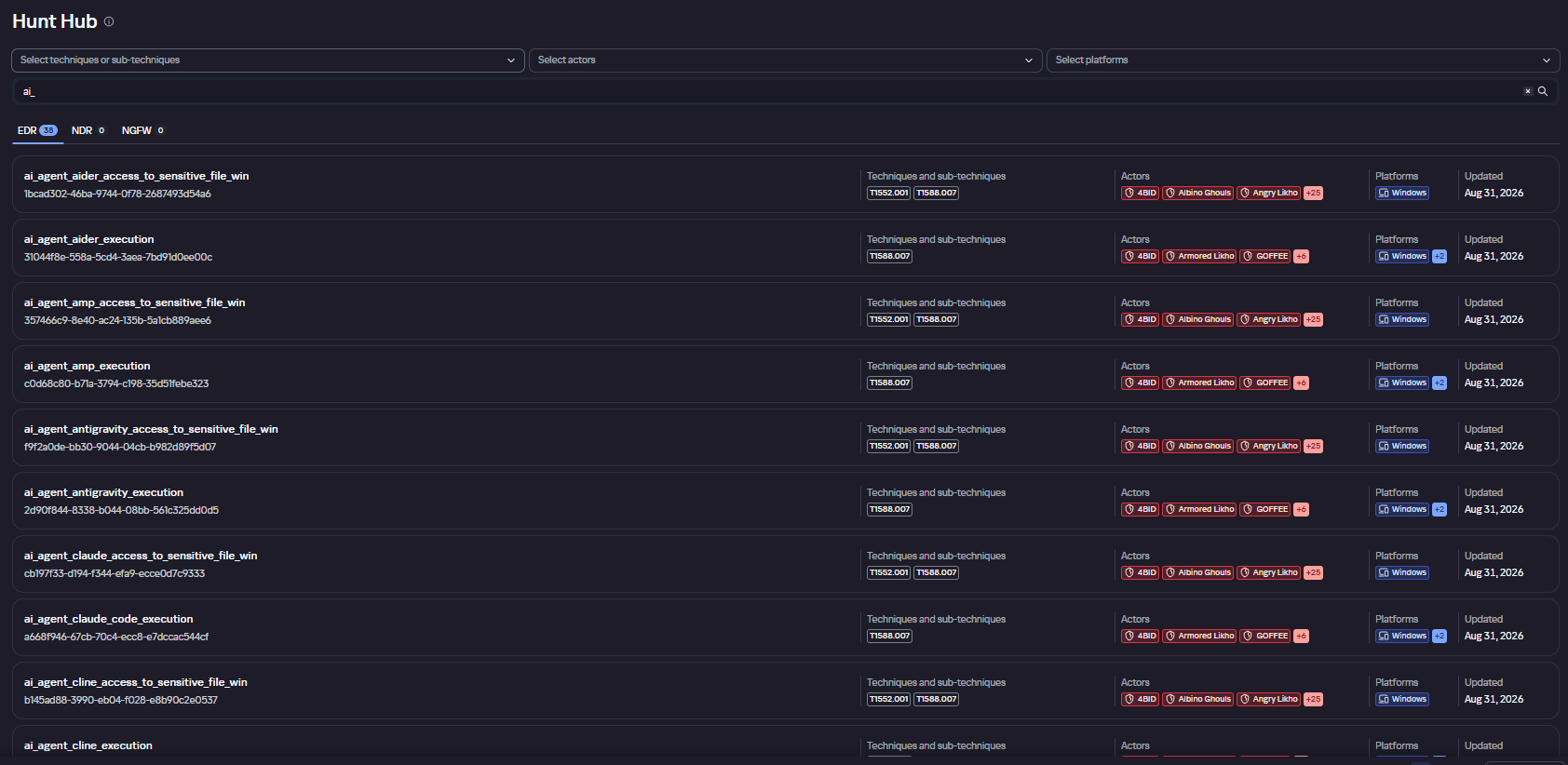
Rules in the Hunt Hub repository

Rules in the Hunt Hub repository

The rule card provides:

  • Detailed description
  • Rule’s severity level, confidence level, and alert format
  • Detection tips
  • Description of possible false positives
  • Platforms the rule can run on
  • Tactics, techniques, and sub-techniques covered by the rule
  • Groups that use the technique covered by the rule
  • Detection logic that shows what exactly triggers the rule
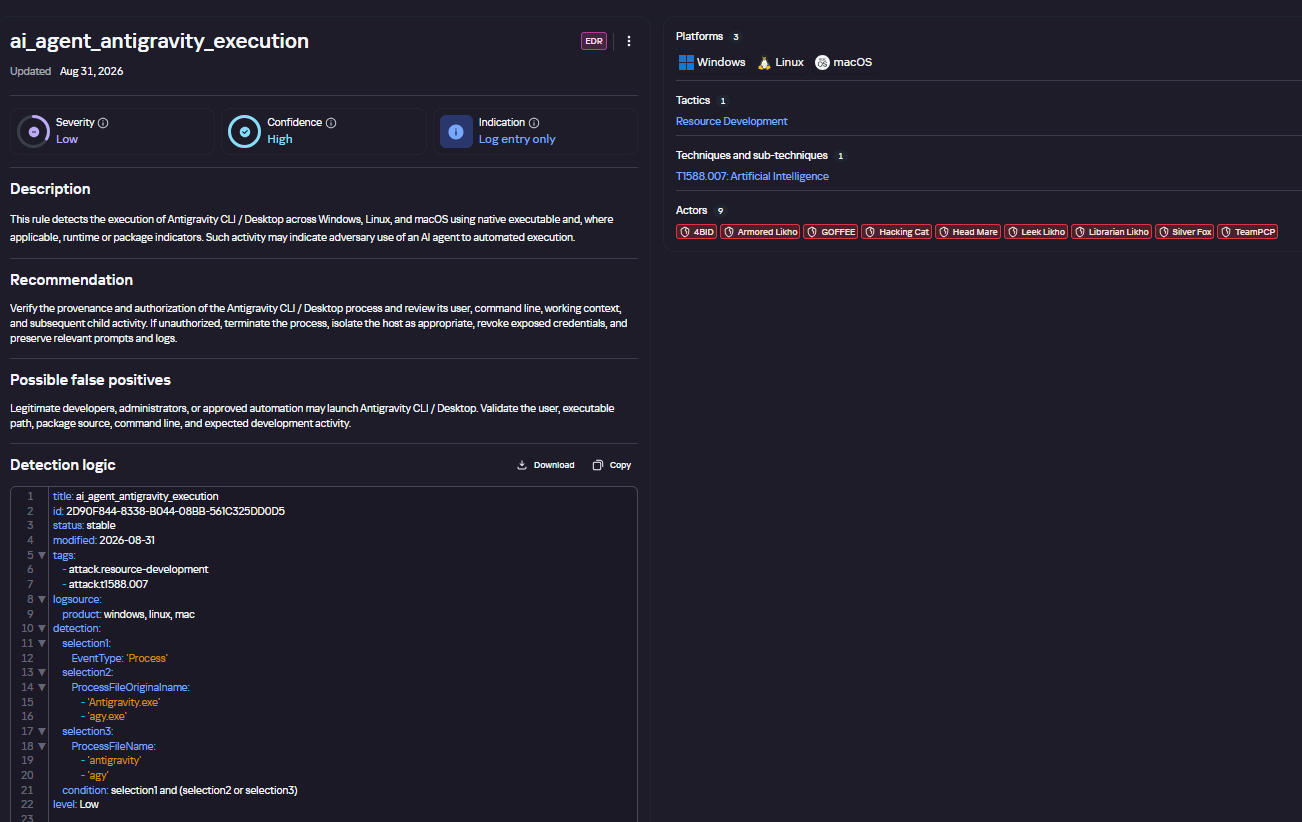
Detection rule card in Hunt Hub

Detection rule card in Hunt Hub

Kaspersky Scan Engine

Skills are a key component of the AI agent ecosystem. They’re prewritten sets of natural-language instructions that extend agent functionality. We previously covered the risks that malicious skills pose to agent users. A skill can require the usage of additional programs and services, come with helper scripts (for example, written in Python), or contain a malicious command embedded right in the instruction text. This means that adding skills to an originally harmless AI agent opens up several new ways for malicious code to enter the system. To prevent this, any skills obtained from external sources must be scanned. Kaspersky Scan Engine is well suited for this task. This is a cyberthreat detection and response solution that seamlessly integrates with various applications. It can detect malicious code in agent skills, associated scripts, and in files generated by running agents.
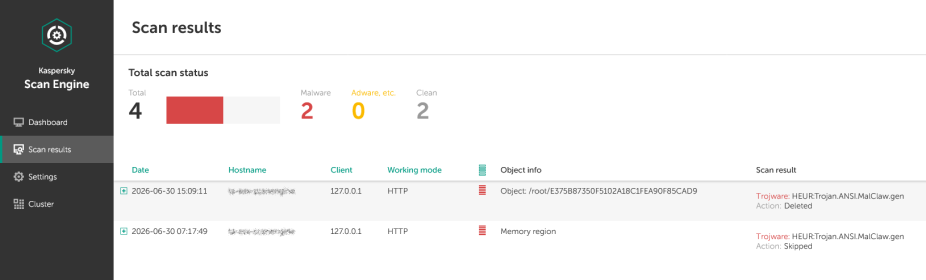
Detection of a malicious agent skill in Kaspersky Scan Engine

Detection of a malicious agent skill in Kaspersky Scan Engine


Trained LLMs come in many formats. Some of them (PTH, PT, PKL, KERS, and others) also store parameters and weights (training datasets). These files can also contain malicious code, so it’s critical to scan them before running and using them. Kaspersky Scan Engine scans potentially dangerous LLM formats for infected data. It can deserialize and analyze models to detect malicious code regardless of model size.
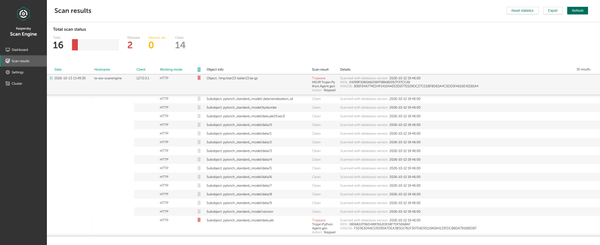
Detection of an LLM with malicious code in Kaspersky Scan Engine

Detection of an LLM with malicious code in Kaspersky Scan Engine

Conclusion

AI agents are rapidly making their way into corporate environments: they help employees work faster and take on a wide range of tasks, but they also open up new opportunities for attackers. To take advantage of this technology without compromising security, organizations need to build multi-layered protection and minimize risks. A range of Kaspersky solutions can help with this:

  • Kaspersky TIP keeps you up to date on current scenarios in which attackers use AI agents, and its Hunt Hub section provides rules for detecting suspicious AI agent activity.
  • Kaspersky EDR detects AI agents in the infrastructure and monitors their activity on endpoints. If it detects potentially dangerous actions, the product can log the event, notify the SOC, and take response actions, such as stopping the process or isolating the host.
  • Application Control in Kaspersky products can fully restrict the use of AI agents within the company by using application categorization. The Web Control component can restrict access to AIaaS web resources.
  • Kaspersky Scan Engine can be integrated into various company processes to detect malicious code in any files, including AI agent skills and LLMs.

When companies combine the tools described above in a comprehensive approach, they can adopt AI agents in an informed way: with an understanding of the associated risks and effective means of minimizing them.

What’s in the container? Analyzing vulnerabilities, risks and protection with Kaspersky Container Security and the KIRA AI assistant

Introduction

Containerization using Docker has become firmly established in modern development standards, significantly increasing the speed and convenience of deploying various services. Developers often use ready-made Docker images, making only minimal changes. The largest repository of container images is the Docker Hub service.

Container-hosted infrastructure is an attractive target for attackers. At a minimum, a compromised container can be used for DDoS attacks, cryptocurrency mining, or traffic proxying. The list of threats does not end there: once an attacker gains control of a container, they can steal or destroy data directly from it, access neighboring containers, or even attempt to escape the container, compromising the entire enterprise network.

At the same time, the infrastructure inside containers is typically updated less frequently and may contain outdated and vulnerable software versions. When deploying third-party images or modifying them for a specific environment, it is easy to make configuration errors that attackers can later exploit. And due to the architectural characteristics of containers, developers often face constraints when preparing images; to overcome these, they may resort to insecure solutions they find online.

In other words, containerized infrastructure can be both the simplest and the most lucrative target to exploit. Therefore, its security requires heightened attention. To minimize the risk of successful attacks on container infrastructure, it is essential to check the final Docker images, including all underlying layers, for vulnerabilities and misconfigurations. The easiest way to do this is by analyzing the Dockerfile; however, it is not always available for inspection. Moreover, it typically defines how to build layers on top of a base image from an external repository whose reliability cannot be guaranteed.

Image analysis results in Kaspersky Container Security

Image analysis results in Kaspersky Container Security

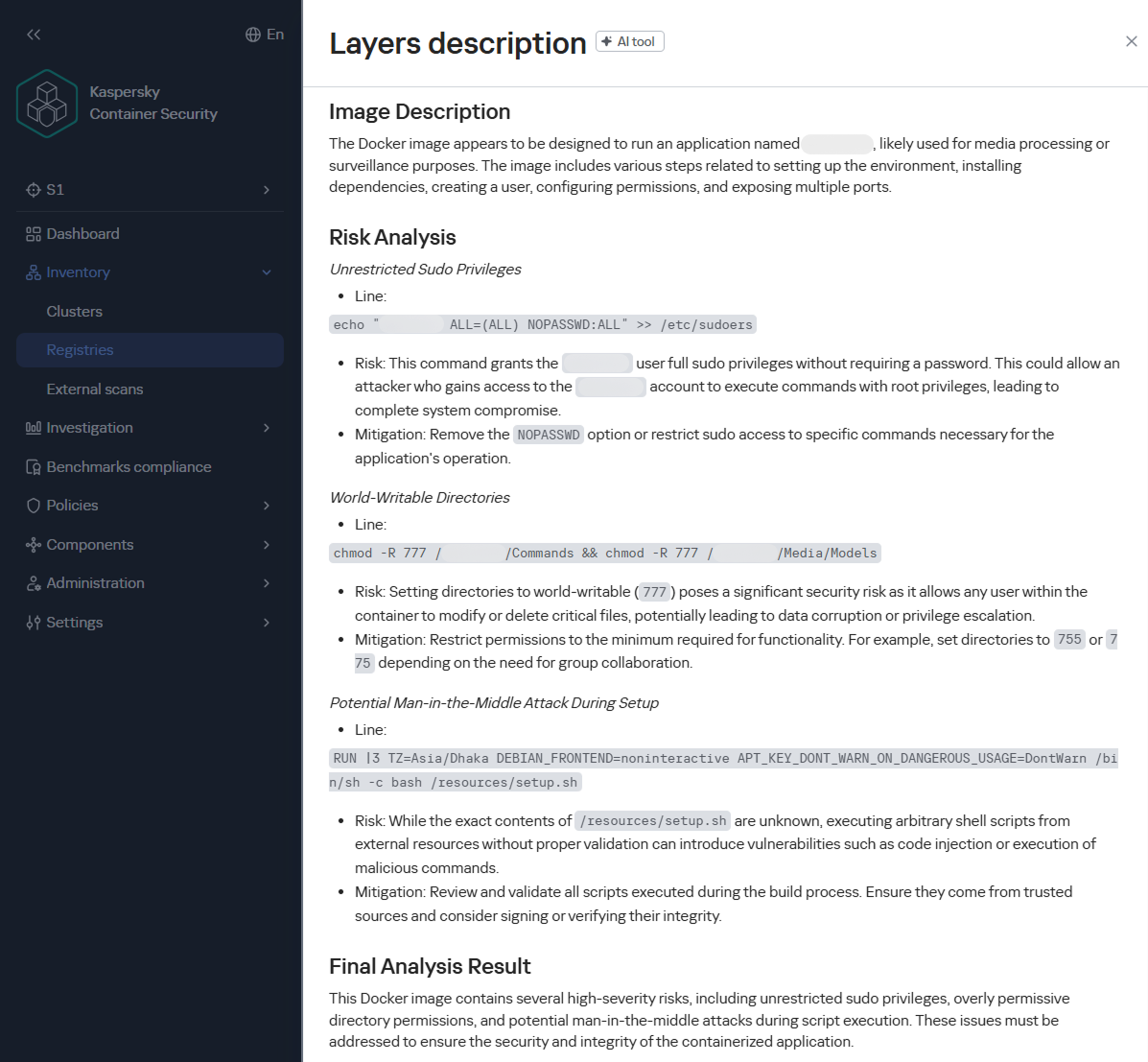
To help users identify insecure configurations and potential vulnerabilities within them, we have added our AI assistant to Kaspersky Container Security.KIRA (the assistant’s name) uses artificial intelligence to analyze the image and identify potential issues within, along with recommendations on how to fix them.

As part of this study, we asked KIRA to analyze a number of popular community images, and later in this article, we’ll show you the results.

Software vulnerabilities and compromise of update sources

One of the key security issues with using pre-built images is that developers do not update them in a timely manner. A Docker image is, by its very nature, a snapshot of a specific Linux distribution after packages have been installed on it. However, in most cases, it does not receive security updates on its own, unlike traditional Linux servers, where these updates are automatically installed by specialized services, such as unattended-upgrades in Debian-based distributions and dnf-automatic in RedHat-based distributions.

To apply updates to a Docker image, it must be rebuilt and redeployed. Often, this process is not automated, and some updates require additional effort to verify their correct operation, modify configurations when upgrading to new software versions, and so on. As a result, many popular images do not receive timely updates, which significantly increases the risks associated with their use.

An image that was secure at build time accumulates vulnerabilities as they are discovered in the packages installed within it, which over time significantly increases the opportunities for a successful attack on the container.

Vulnerable versions of web applications and network services accessible from the internet immediately become targets of various malicious campaigns. For example, just one day after the discovery of the CVE-2025-55182 vulnerability in React Server Components, our honeypots recorded numerous attack attempts related to this vulnerability. It was adopted by operators of many malicious campaigns, ranging from classic cryptocurrency miners to variants of Mirai and Gafgyt. Attackers are constantly adding new distribution methods and can use dozens of exploits targeting various vulnerabilities and configuration errors in popular services. Often, the same vulnerabilities are used in self-propagation mechanisms from already compromised hosts. For example, in a malicious campaign to spread the Dero miner, attackers use infected containers to automatically search for and infect new targets.

In addition to vulnerabilities that can be exploited remotely, attackers are rapidly adding local vulnerabilities to their arsenal, used to gain root privileges and escape the container: in the Kinsing malware campaign, attackers used CVE-2023-4911 (Looney Tunables) to elevate privileges, and in the perfctl campaign, the CVE-2021-4034 (PwnKit) vulnerability was used for the same purpose. The access gained was used to install a rootkit that hides the presence of perfctl on the system.

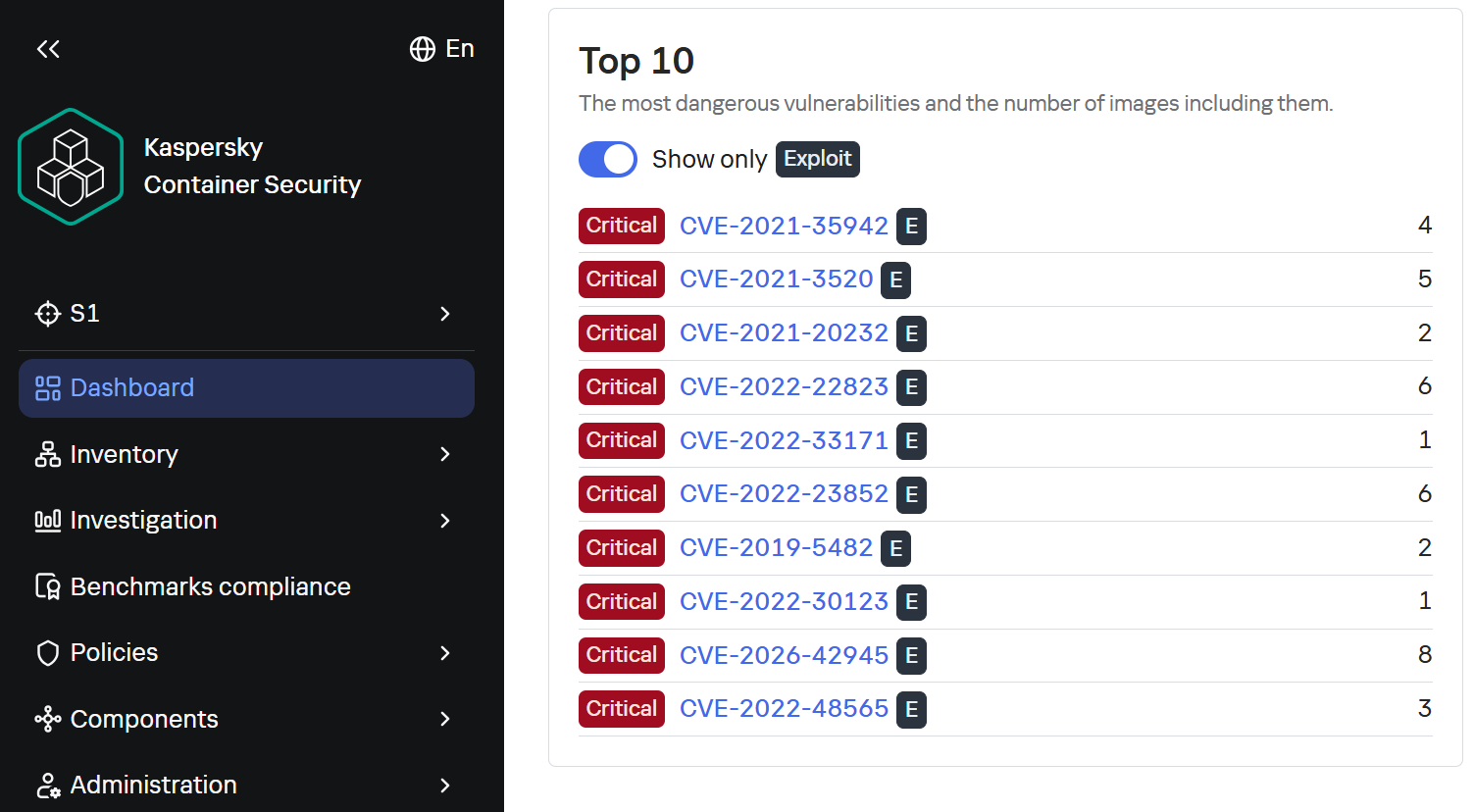
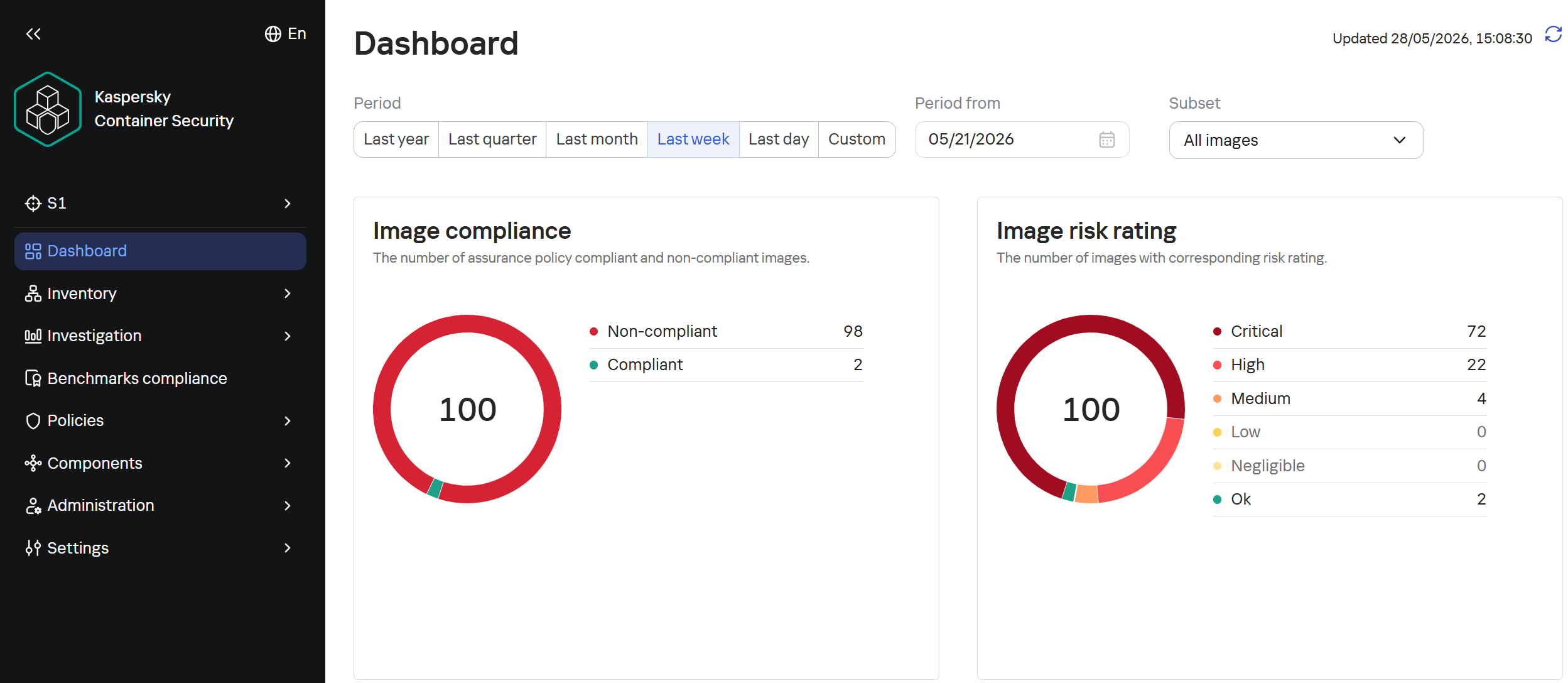
To assess the situation with unpatched vulnerabilities in containers, we took a random sample of 100 images, which included various popular solutions with 10,000 to 1 million downloads on DockerHub. In the 64 images we scanned, we found outdated software versions with critical vulnerabilities. For example, some images contained the CVE-2025-49844 vulnerability in the Redis server, leading to RCE by leveraging a vulnerability in the Lua parser; the current CVE-2026-24061 vulnerability in nginx, which in some configurations leads to a server process crash, and with ASLR disabled, again, to RCE; vulnerabilities CVE-2025-32463 in sudo and CVE-2023-4911 in glibc, allowing an attacker to gain root privileges with local access. At the same time, only one in ten Docker images from the analyzed sample is fully up to date.

TOP 10 Critical Vulnerabilities with PoC/Exploits available as shown in the Kaspersky Container Security Dashboard

TOP 10 Critical Vulnerabilities with PoC/Exploits available as shown in the Kaspersky Container Security Dashboard

It is worth noting that, of course, not every discovered vulnerability can be directly exploited by attackers. A practical risk arises when the vulnerable application or library is actually in use, and the conditions necessary for exploitation – which vary significantly from vulnerability to vulnerability – are met. Nevertheless, updates must not be ignored, as the risk of vulnerabilities being exploited – both individually and in various combinations – cannot be predicted in each specific case, and even vulnerabilities that seem harmless at first glance can ultimately pose a serious risk of compromise.

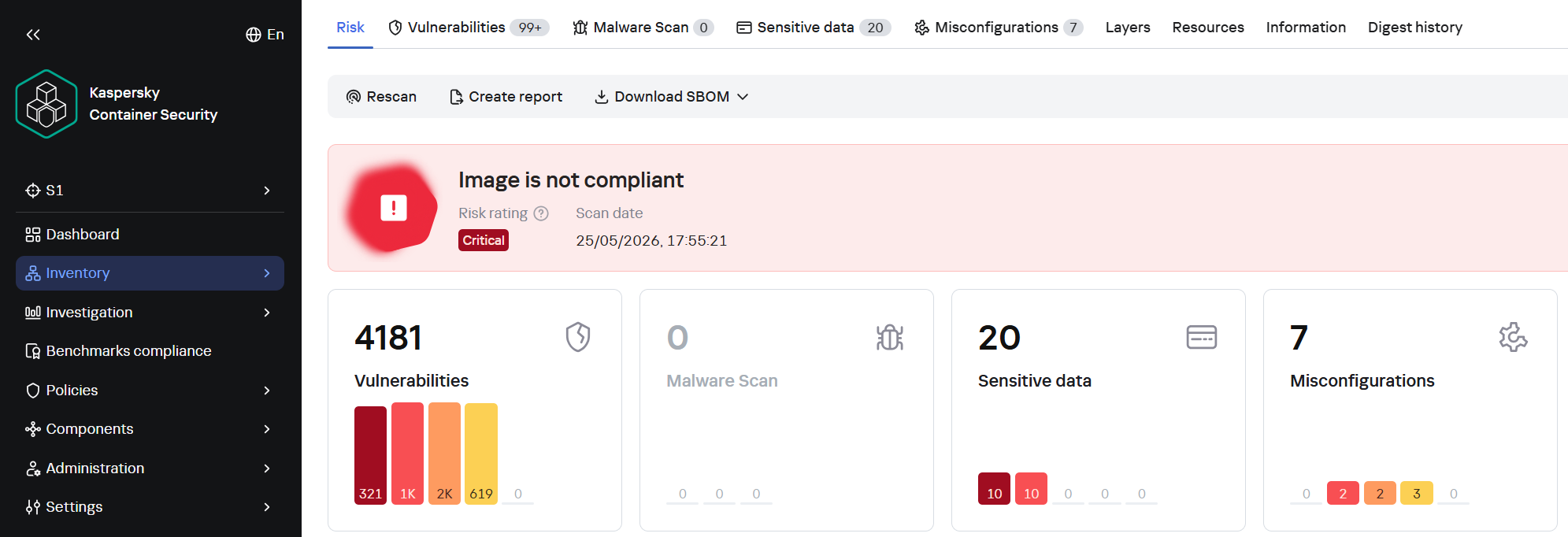
A record number of vulnerabilities in a single image

A record number of vulnerabilities in a single image

However, frequent updates have a downside. Every rebuild that downloads new packages from source repositories introduces an additional risk of a supply chain attack – a compromised dependency or a modified base image could silently inject malicious code into your environment precisely through an update. During our analysis of images from the sample, we did not find any signs of supply chain attacks. However, in March 2026, a supply chain incident occurred in the Trivy and LiteLLM projects. In the case of Trivy, the infected file was injected directly into the container image in the official repositories.

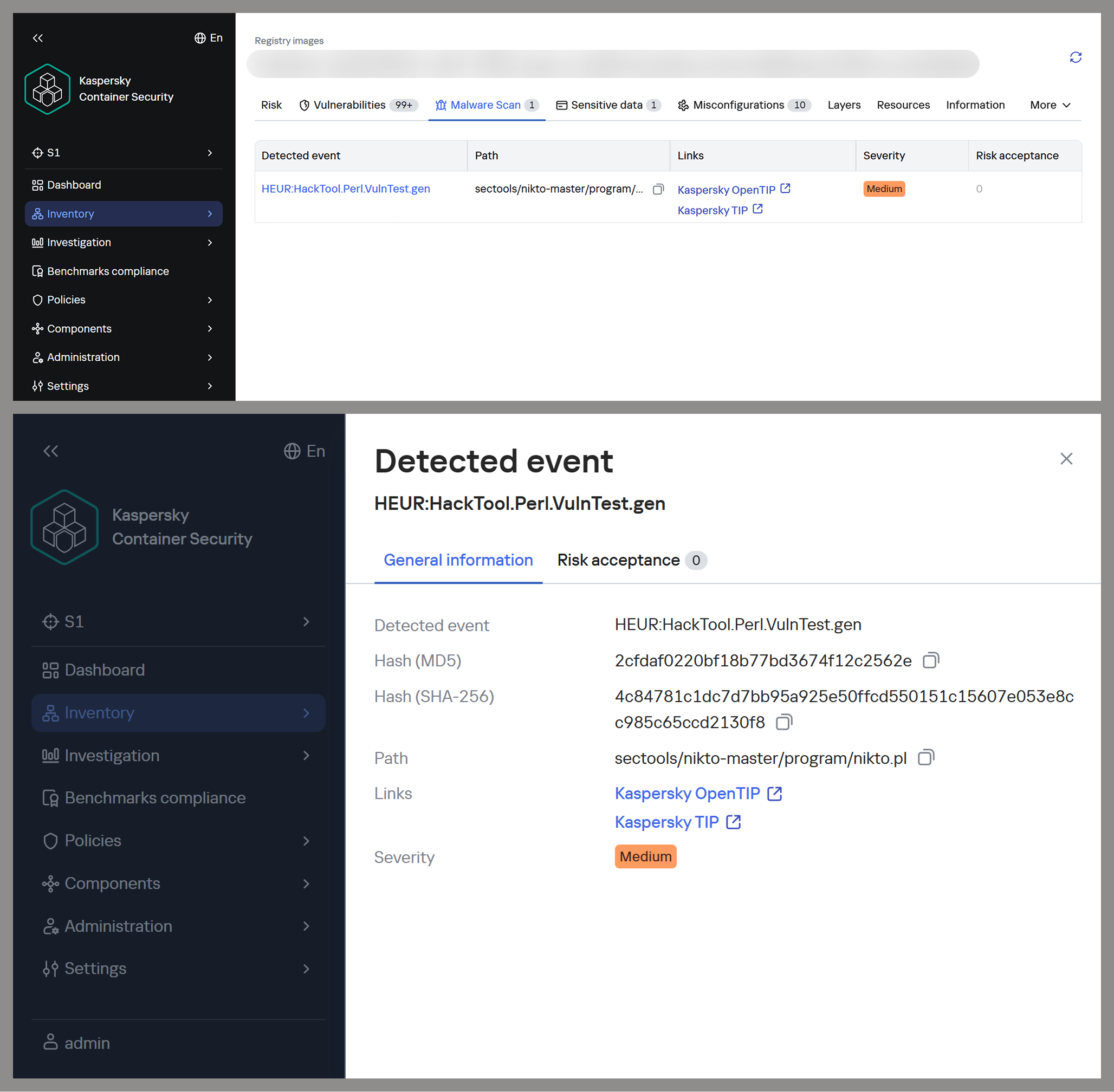
Detecting potentially malicious software using one of the images as an example

Detecting potentially malicious software using one of the images as an example

This leads to a difficult choice: infrequent updates leave known vulnerabilities unpatched within the image, while frequent updates increase the risk of supply chain compromise. Therefore, to protect your infrastructure, you need not only to regularly update base images but also to take a more comprehensive approach, specifically by pinning dependencies to known-good versions and scanning the resulting images for malware upon update.

Configuration vulnerabilities

Even a container with a fully updated image can be compromised if it is configured incorrectly. Embedding keys and secrets in the image, disabling authentication in network services, default passwords, and insecure file access permissions – all of these can be exploited by attackers in one way or another to achieve their goals.

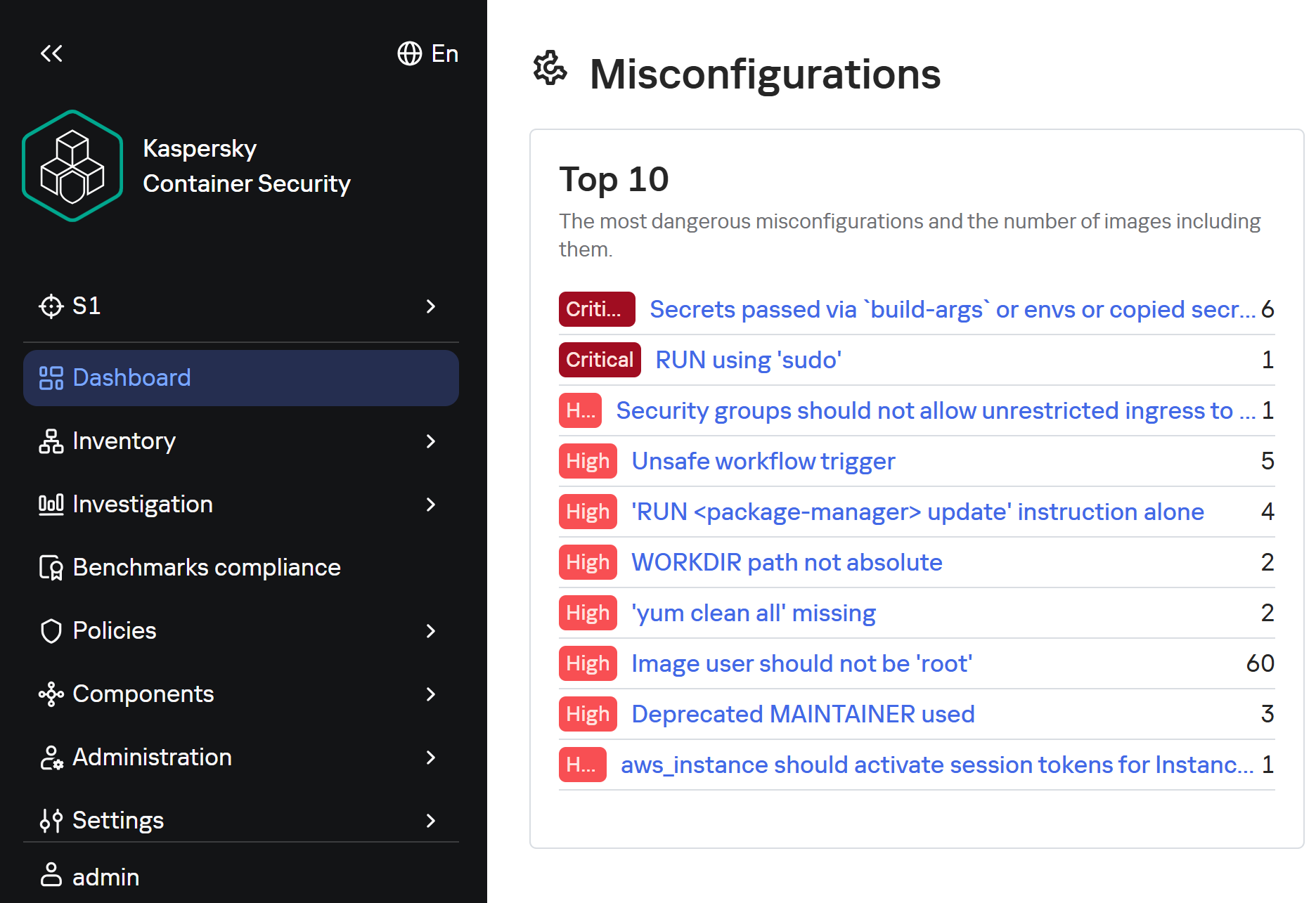
Insecure image configurations detected by KCS based on rules

Insecure image configurations detected by KCS based on rules

The situation is exacerbated by the fact that errors may be introduced by the authors of the original image, which complicates their detection, as this requires analyzing every layer and the command that generated it. As with vulnerabilities, not every configuration error leads to compromise: it all depends on the container’s role, its network accessibility, and many other factors. But the very use of insecure settings will sooner or later lead to errors appearing in images where their consequences will be significantly more dangerous.

Standard rules are often insufficient for analyzing problematic configurations. To gain a deeper understanding of the context and assess potential risks, AI tools can be used. Later in this section, we will examine examples of typical insecure configurations we discovered while scanning public images from Docker Hub, along with the descriptions of issues and risk mitigation methods provided by the KIRA AI assistant.

Example of container analysis using KIRA

Example of container analysis using KIRA

Insecure handling of credentials

Use of default passwords

In some cases, containers may use default passwords set via environment variables or directly in Dockerfile. If these passwords are not overridden, attackers will be able to access the application by using the default password.

RUN |1 DEBIAN_FRONTEND=noninteractive /bin/sh -c echo [removed]:[removed] | chpasswd

According to KIRA’s analysis, the user’s password is stored in plain text in the image layer history. Anyone who gains access to the image – whether through a public registry, a compromised build environment, or other means – will be able to extract the password. If SSH or another form of interactive access is enabled in the container, this could lead to its complete compromise and allow attackers to move laterally within the infrastructure.

Passwords may be present in environment variables. Consider the following Dockerfile snippet:

ENV SERVERNAME=localhost WWW_PATH_CONF=/etc/apache2/apache2.conf WWW_PATH_ROOT=/var/www HTTPS=on PKP_CLI_INSTALL=0 PKP_DB_HOST=db PKP_DB_NAME=pkp PKP_DB_USER=pkp PKP_DB_PASSWORD=changeMePlease PKP_WEB_CONF=/etc/apache2/conf-enabled/pkp.conf PKP_CONF=config.inc.php PKP_CMD=/usr/local/bin/pkp-start

In this example, the environment variable PKP_DB_PASSWORD is set to changeMePlease. If the user forgets to override it, the application will use the password that can be obtained from Dockerfile.

Let’s look at another image:

/bin/sh -c #(nop)  ENV MOODLE_URL=<a href="http://0.0.0.0/">http://0.0.0.0</a> MOODLE_ADMIN admin       MOODLE_ADMIN_PASSWORD [removed]      MOODLE_ADMIN_EMAIL admin@example.com MOODLE_DB_HOST     MOODLE_DB_PASSWORD       MOODLE_DB_USER     MOODLE_DB_NAME    MOODLE_DB_PORT 3306

For this image, Dockerfile specifies that the administrator password is hardcoded in the ENV directive and remains in the image metadata (layer history, docker inspect). Anyone who gains access to the image (registry, build cache) will be able to extract this secret and compromise the account.

To eliminate these risks, ensure that no passwords are specified in Dockerfile. If authentication is required, you can use orchestrator mechanisms (secrets) or generate a temporary password when starting the container via the entrypoint script, without saving it in the layers. We also recommend using mechanisms for securely passing secrets at runtime (Docker secrets, Kubernetes Secrets) or, as a last resort, passing them via --secret during the build with BuildKit, but under no circumstances should they be left in the final image.

Passing passwords via command arguments

In some cases, passwords may be exposed when passed via command-line arguments, as these arguments are visible to all users on the system:

/bin/sh -c #(nop)  HEALTHCHECK &amp;{[""CMD-SHELL"" ""mysql --protocol TCP -u\""root\"" -p\""$MYSQL_ROOT_PASSWORD\"" -e \""SELECT 1;\""""] ""15s"" ""30s"" ""0s"" '\x05'}

In the example provided, the MySQL superuser password is passed into the healthcheck command in plaintext, making it visible when viewing the process list (ps aux), in audit logs, and in monitoring systems. If the attacker gains read access to the container’s processes or logs, they can extract the password and gain full control of the database.

To fix this issue, the healthcheck should use a local connection via a Unix socket with default authentication (if the auth_socket plugin is configured for root), or create a dedicated user with minimal privileges (e.g., only USAGE), without a password or with a password passed via a secure file (--defaults-file with restricted permissions). You can also use the MYSQL_PWD environment variable for healthcheck authentication, but it remains visible in /proc.

Privilege escalation in the container

One of the most common vectors for initial compromise of Linux systems is RCE in web applications and network services. Typically, these services have minimal privileges, which complicates attackers’ subsequent actions: dumping credentials, covering their tracks, attempting to escape the container, and much more.

The situation worsens significantly if the attacker gains root privileges, as this allows them to fully control all processes within the container, conceal their activity, and use methods to escape the container. For example, they can compromise the host if the container is privileged, a Docker socket is mounted inside it, or other insecure configurations and vulnerabilities exist that cannot be exploited with standard user privileges.

Similarly, this simplifies network attacks on neighboring containers, the orchestrator, and various internal services, making this configuration error a potential link in the chain for compromising the entire network.

Attacks on sudo

One of the simplest privilege escalation methods is executing arbitrary commands as root using sudo without entering a password. Consider the following example:

/bin/sh -c set -xe;     apt-get update &amp;&amp;       apt-get -y install sudo;       echo ""solr ALL=(ALL) NOPASSWD: ALL"" &gt;/etc/sudoers.d/solr;

Analyzing this configuration using KIRA immediately highlights the main issue: by installing the sudo package and setting NOPASSWD: ALL for the solr, the user severely violates the principle of least privilege. The Solr platform does not require such broad privileges to run within a container; instead, they create an easy path for escalating to root.

echo 'postgres ALL=(ALL:ALL) NOPASSWD:ALL' &gt;&gt; /etc/sudoers

In another example of an insecure configuration, NOPASSWD:ALL privileges are granted to a PostgreSQL database user, which is a direct and severe weakening of the access control policy. If an attacker gains the ability to execute code on behalf of the postgres user – through a vulnerability in a network service, an SQL injection, or by compromising of one of the processes – they will immediately and unconditionally be able to execute any commands on behalf of the root user. This is equivalent to the entire container running as root.

As a risk mitigation measure, we recommend completely removing this directive. The minimum necessary commands requiring privileges should be delegated on a case-by-case basis via sudoers with explicit specification of allowed executables and parameters, using NOPASSWD only as a last resort and for specific utilities.

Our AI assistant KIRA can identify even more complex insecure configurations, such as allowing passwordless sudo for the entire sudo group — by modifying existing rules.

perl -i -pe 's/\bALL$/NOPASSWD:ALL/g' /etc/sudoers

The risk in this example is that the command replaces standard declarations requiring authentication with passwordless execution of all commands for any user within the sudo group – potentially including postgres, should it be assigned to that group. This expands the attack surface to all group members, turning each of them into a potential point for instant privilege escalation.

To mitigate the risks, we recommend not modifying the global sudoers policy, keeping the standard password requirement, or using a more secure escalation mechanism – such as gosu to run a specific process on behalf of another user without permanent privileges.

Insecure file permissions

Another common vector for privilege escalation is insecurely configured file and directory permissions. Most often, for convenience, container image authors use 777 permissions, which allow anyone – including unprivileged users – to freely create and delete files, as well as modify their contents. This can lead to both privilege escalation and the ability for an unprivileged attacker to delete or modify logs, among other undesirable consequences.

Consider the following command:

chmod 0777 /usr/share/cargo /usr/share/cargo/bin

The risk is that directories containing binary files and scripts will become writable by any container user. This allows a low-privileged attacker to replace utilities included in cargo or add new malicious executables. When these tools are subsequently invoked, especially as the root user or via sudo, the attacker’s code will execute with the inherited privileges of the calling process, leading directly to a local privilege escalation.

To mitigate the risks, you can set the minimum necessary permissions: chmod 0755 for directories and chmod 0755/0644 for the corresponding files. The owner should be root, and only the owner should be allowed to write. Do not use chmod 777 on any system paths.

Lack of integrity checks

Downloading software without verifying its integrity can make the infrastructure vulnerable to software tampering.

For example, this risk may arise when downloading a distribution via HTTP:

RUN /bin/sh -c wget -qO- ""<a href="http://acestream.org/downloads/linux/acestream_3.1.49_debian_9.9_x86_64.tar.gz">http://acestream.org/downloads/linux/acestream_3.1.49_debian_9.9_x86_64.tar.gz</a>"" | tar --extract --gzip -C /opt/acestream

Using HTTP without verifying the archive’s integrity creates conditions for a man-in-the-middle attack during the image build phase. An attacker controlling the communication channel or DNS can replace the archive with malicious content, which will compromise the container and the entire environment in which it runs.

To mitigate the risks, you can configure connections to web resources to use HTTPS only — if the resource supports this protocol. You can also download the archive without extracting it, compare its checksum (SHA256) with the checksum from a trusted source, and only then extract it. It is advisable to store the verified archive in an internal artifact repository to avoid direct downloads from the network.

There will still be a MitM risk even if certificate verification is disabled:

wget --no-check-certificate<a href="https://github.com/phpvirtualbox/phpvirtualbox/archive/refs/heads/7.2-dev.zip"> https://github.com/phpvirtualbox/phpvirtualbox/archive/refs/heads/7.2-dev.zip</a> -O phpvirtualbox.zip

The absence of TLS certificate verification allows an attacker controlling the network segment to replace the downloaded ZIP archive with malicious content. Since the archive contains PHP code that will be executed by the web server, compromise during the build phase will result in the deployment of a backdoor or data leakage.

To mitigate the risks, remove the --no-check-certificate flag; after downloading, calculate the SHA256 hash of the archive and verify it against a known reference value (the release page or a local repository of trusted hashes). Additionally, consider using a fixed release (tag) rather than the floating 7.2-dev branch.

Conclusion

Docker containers have become a very popular means of deploying software, and attackers are by no means oblivious to this trend. They are rapidly adding software vulnerabilities and configuration errors to their arsenal and carrying out attacks on supply chains. They can compromise container infrastructure for a wide variety of purposes, from cryptocurrency mining to encrypting data for ransom or stealing information critical to the company.

Our research found that 64 out of 100 container images for popular applications contain critically vulnerable software, and only 10% are fully up to date. We also identified numerous insecure configurations, including passwords stored in plaintext in Dockerfiles and excessive privileges granted to users and processes.

To detect and prevent these threats, it is essential to strictly adhere to security measures: audit image configurations, securely manage secrets used in images, apply security updates in a timely manner, scan their contents for malware with every update, and follow industry-standard best practices for enhancing security.

This approach requires specialized solutions built to accommodate the unique characteristics of container environments. Kaspersky Container Security ensures the security of containerized applications at every stage of their lifecycle, from development to operation. The product protects an organization’s business processes, helps ensure compliance with industry standards and security regulations, and enables the implementation of secure software development practices.

❌