
Normal view

Received — 29 January 2026 Microsoft Security Blog

New Microsoft Data Security Index report explores secure AI adoption to protect sensitive data

29 January 2026 at 18:00

Generative AI and agentic AI are redefining how organizations innovate and operate, unlocking new levels of productivity, creativity and collaboration across industry teams. From accelerating content creation to streamlining workflows, AI offers transformative benefits that empower organizations to work smarter and faster. These capabilities, however, also introduce new dimensions of data risk—as AI adoption grows, so does the urgency for effective data security that keeps pace with AI innovation. In the 2026 Microsoft Data Security Index report, we explored one of the most pressing questions facing today’s organizations: How can we harness the power of AI while safeguarding sensitive data?

47% of surveyed organizations are​ implementing controls focused on generative AI workloads

To fully realize the potential of AI, organizations must pair innovation with responsibility and robust data security. This year, the Data Security Index report builds upon the responses of more than 1,700 security leaders to highlight three critical priorities for protecting organizational data and securing AI adoption:

  1. Moving from fragmented tools to unified data security.
  2. Managing AI-powered productivity securely.
  3. Strengthening data security with generative AI itself.

By consolidating solutions for better visibility and governance controls, implementing robust controls processes to protect data in AI-powered workflows, and using generative AI agents and automation to enhance security programs, organizations can build a resilient foundation for their next wave of generative AI-powered productivity and innovation. The result is a future where AI both drives efficiency and acts as a powerful ally in defending against data risk, unlocking growth without compromising protection.

In this article we will delve into some of the Data Security Index report’s key findings that relate to generative AI and how they are being operationalized at Microsoft. The report itself has a much broader focus and depth of insight.

1. From fragmented tools to unified data security

Many organizations still rely on disjointed tools and siloed controls, creating blind spots that hinder the efficacy of security teams. According to the 2026 Data Security Index, decision-makers cite poor integration, lack of a unified view across environments, and disparate dashboards as their top challenges in maintaining proper visibility and governance. These gaps make it harder to connect insights and respond quickly to risks—especially as data volumes and data environment complexity surge. Security leaders simply aren’t getting the oversight they need.

Why it matters
Consolidating tools into integrated platforms improves visibility, governance, and proactive risk management.

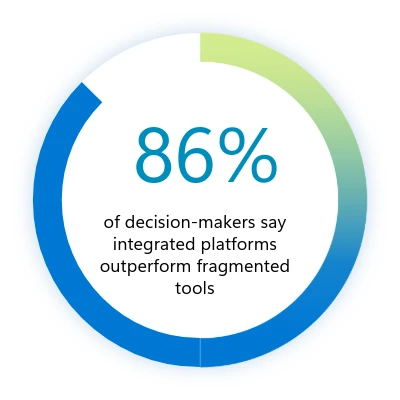
To address these challenges, organizations are consolidating tools, investing in unified platforms like Microsoft Purview that bring operations together while improving holistic visibility and control. These integrated solutions frequently outperform fragmented toolsets, enabling better detection and response, streamlined management, and stronger governance.

As organizations adopt new AI-powered technologies, many are also leaning into emerging disciplines like Microsoft Purview Data Security Posture Management (DSPM) to keep pace with evolving risks. Effective DSPM programs help teams identify and prioritize data‑exposure risks, detect access to sensitive information, and enforce consistent controls while reducing complexity through unified visibility. When DSPM provides proactive, continuous oversight, it becomes a critical safeguard—especially as AI‑powered data flows grow more dynamic across core operations.

More than 80% of surveyed organizations are implementing or developing DSPM strategies

We’re trying to use fewer vendors. If we need 15 tools, we’d rather not manage 15 vendor solutions. We’d prefer to get that down to five, with each vendor handling three tools.”

—Global information security director in the hospitality and travel industry

2. Managing AI-powered productivity securely

Generative AI is already influencing data security incident patterns: 32% of surveyed organizations’ data security incidents involve the use of generative AI tools. Understandably, surveyed security leaders have responded to this trend rapidly. Nearly half (47%) the security leaders surveyed in the 2026 Data Security Index are implementing generative AI-specific controls—an increase of 8% since the 2025 report. This helps enable innovation through the confident adoption of generative AI apps and agents while maintaining security.

A banner chart that says "32% of surveyed organizations' data security incidents involve use of AI tools."

Why it matters
Generative AI boosts productivity and innovation, but both unsanctioned and sanctioned AI tools must be managed. It’s essential to control tool use and monitor how data is accessed and shared with AI.

In the full report, we explore more deeply how AI-powered productivity is changing the risk profile of enterprises. We also explore several mechanisms, both technical and cultural, already helping maintain trust and reduce risk without sacrificing productivity gains or compliance.

3. Strengthening data security with generative AI

The 2026 Data Security Index indicates that 82% of organizations have developed plans to embed generative AI into their data security operations, up from 64% the previous year. From discovering sensitive data and detecting critical risks to investigating and triaging incidents, as well as refining policies, generative AI is being deployed for both proactive and reactive use cases at scale. The report explores how AI is changing the day-to-day operations across security teams, including the emergence of AI-assisted automation and agents.

alt text

Why it matters
Generative AI automates risk detection, scales protection, and accelerates response—amplifying human expertise while maintaining oversight.

Our generative AI systems are constantly observing, learning, and making recommendations for modifications with far more data than would be possible with any kind of manual or quasi-manual process.”

—Director of IT in the energy industry

Turning recommendations into action

As organizations confront the challenges of data security in the age of AI, the 2026 Data Security Index report offers three clear imperatives: unifying data security, increasing generative AI oversight, and using AI solutions to improve data security effectiveness.

  1. Unified data security requires continuous oversight and coordinated enforcement across your data estate. Achieving this scenario demands mechanisms that can discover, classify, and protect sensitive information at scale while extending safeguards to endpoints and workloads. Microsoft Purview DSPM operationalizes this principle through continuous discovery, classification, and protection of sensitive data across cloud, software as a service (SaaS), and on-premises assets.
  2. Responsible AI adoption depends on strict (but dynamic) controls and proactive data risk management. Organizations must enforce automated mechanisms that prevent unauthorized data exposure, monitor for anomalous usage, and guide employees toward sanctioned tools and responsible practices. Microsoft enforces these principles through governance policies supported by Microsoft Purview Data Loss Prevention and Microsoft Defender for Cloud Apps. These solutions detect, prevent, and respond to risky generative AI behaviors that increase the likelihood of data exposure, policy violations, or unsafe outputs, ensuring innovation aligns with security and compliance requirements.
  3. Modern security operations benefit from automation that accelerate detection and response alongside strong oversight. AI-powered agents can streamline threat investigation, recommend policies, and reduce manual workload while maintaining human oversight for accountability. We deliver this capability through Microsoft Security Copilot, embedded across Microsoft Sentinel, Microsoft Entra, Microsoft Intune, Microsoft Purview, and Microsoft Defender. These agents automate threat detection, incident investigation, and policy recommendations, enabling faster response and continuous improvement of security posture.

Stay informed, stay productive, stay protected

The insights we’ve covered here only scratch the surface of what the Microsoft Data Security Index reveals.The full report dives deeper into global trends, detailed metrics, and real-world perspectives from security leaders across industries and the globe. It provides specificity and context to help you shape your generative AI strategy with confidence.

If you want to explore the data behind these findings, see how priorities vary by region, and uncover actionable recommendations for secure AI adoption, read the full 2026 Microsoft Data Security Index to access comprehensive research, expert commentary, and practical guidance for building a security-first foundation for innovation.

Learn more

Learn more about the Microsoft Purview unified data security solutions.

To learn more about Microsoft Security solutions, visit our website. Bookmark the Security blog to keep up with our expert coverage on security matters. Also, follow us on LinkedIn (Microsoft Security) and X (@MSFTSecurity) for the latest news and updates on cybersecurity.

The post New Microsoft Data Security Index report explores secure AI adoption to protect sensitive data appeared first on Microsoft Security Blog.
Resurgence of a multi‑stage AiTM phishing and BEC campaign abusing SharePoint 

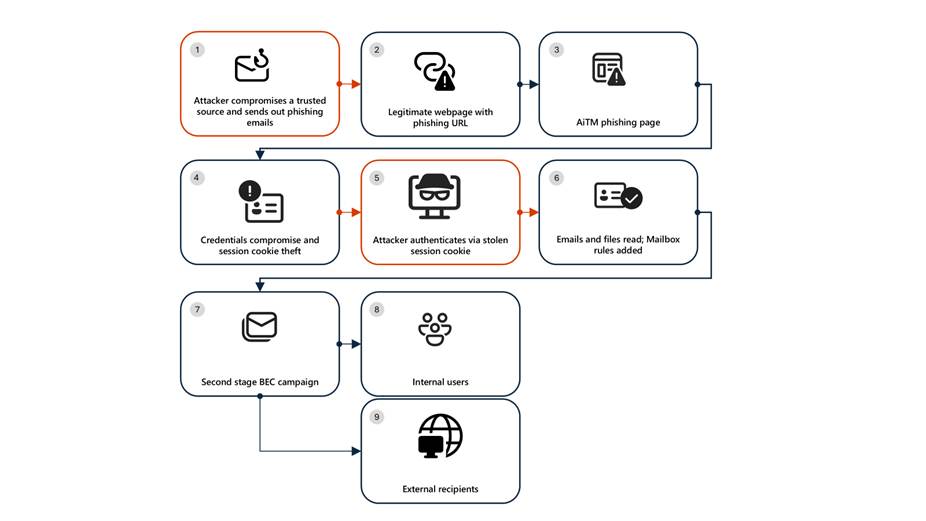
Microsoft Defender Researchers uncovered a multi‑stage adversary‑in‑the‑middle (AiTM) phishing and business email compromise (BEC) campaign targeting multiple organizations in the energy sector, resulting in the compromise of various user accounts. The campaign abused SharePoint file‑sharing services to deliver phishing payloads and relied on inbox rule creation to maintain persistence and evade user awareness. The attack transitioned into a series of AiTM attacks and follow-on BEC activity spanning multiple organizations.

Following the initial compromise, the attackers leveraged trusted internal identities from the target to conduct large‑scale intra‑organizational and external phishing, significantly expanding the scope of the campaign. Defender detections surfaced the activity to all affected organizations.

This attack demonstrates the operational complexity of AiTM campaigns and the need for remediation beyond standard identity compromise responses. Password resets alone are insufficient. Impacted organizations in the energy sector must additionally revoke active session cookies and remove attacker-created inbox rules used to evade detection.

Attack chain: AiTM phishing attack

Stage 1: Initial access via trusted vendor compromise

Analysis of the initial access vector indicates that the campaign leveraged a phishing email sent from an email address belonging to a trusted organization, likely compromised before the operation began. The lure employed a SharePoint URL requiring user authentication and used subject‑line mimicry consistent with legitimate SharePoint document‑sharing workflows to increase credibility.

Threat actors continue to leverage trusted cloud collaboration platforms particularly Microsoft SharePoint and OneDrive due to their ubiquity in enterprise environments. These services offer built‑in legitimacy, flexible file‑hosting capabilities, and authentication flows that adversaries can repurpose to obscure malicious intent. This widespread familiarity enables attackers to deliver phishing links and hosted payloads that frequently evade traditional email‑centric detection mechanisms.

Stage 2: Malicious URL clicks

Threat actors often abuse legitimate services and brands to avoid detection. In this scenario, we observed that the attacker leveraged the SharePoint service for the phishing campaign. While threat actors may attempt to abuse widely trusted platforms, Microsoft continuously invests in safeguards, detections, and abuse prevention to limit misuse of our services and to rapidly detect and disrupt malicious activity

Stage 3: AiTM attack

Access to the URL redirected users to a credential prompt, but visibility into the attack flow did not extend beyond the landing page.

Stage 4: Inbox rule creation

The attacker later signed in with another IP address and created an Inbox rule with parameters to delete all incoming emails on the user’s mailbox and marked all the emails as read.

Stage 5: Phishing campaign

Followed by Inbox rule creation, the attacker initiated a large-scale phishing campaign involving more than 600 emails with another phishing URL. The emails were sent to the compromised user’s contacts, both within and outside of the organization, as well as distribution lists. The recipients were identified based on the recent email threads in the compromised user’s inbox.

Stage 6: BEC tactics

The attacker then monitored the victim user’s mailbox for undelivered and out of office emails and deleted them from the Archive folder. The attacker read the emails from the recipients who raised questions regarding the authenticity of the phishing email and responded, possibly to falsely confirm that the email is legitimate. The emails and responses were then deleted from the mailbox. These techniques are common in any BEC attacks and are intended to keep the victim unaware of the attacker’s operations, thus helping in persistence.

Stage 7: Accounts compromise

The recipients of the phishing emails from within the organization who clicked on the malicious URL were also targeted by another AiTM attack. Microsoft Defender Experts identified all compromised users based on the landing IP and the sign-in IP patterns. 

Mitigation and protection guidance

Microsoft Defender XDR detects suspicious activities related to AiTM phishing attacks and their follow-on activities, such as sign-in attempts on multiple accounts and creation of malicious rules on compromised accounts. To further protect themselves from similar attacks, organizations should also consider complementing MFA with conditional access policies, where sign-in requests are evaluated using additional identity-driven signals like user or group membership, IP location information, and device status, among others.

Defender Experts also initiated rapid response with Microsoft Defender XDR to contain the attack including:

  • Automatically disrupting the AiTM attack on behalf of the impacted users based on the signals observed in the campaign.
  • Initiating zero-hour auto purge (ZAP) in Microsoft Defender XDR to find and take automated actions on the emails that are a part of the phishing campaign.

Defender Experts further worked with customers to remediate compromised identities through the following recommendations:

  • Revoking session cookies in addition to resetting passwords.
  • Revoking the MFA setting changes made by the attacker on the compromised user’s accounts.
  • Deleting suspicious rules created on the compromised accounts.

Mitigating AiTM phishing attacks

The general remediation measure for any identity compromise is to reset the password for the compromised user. However, in AiTM attacks, since the sign-in session is compromised, password reset is not an effective solution. Additionally, even if the compromised user’s password is reset and sessions are revoked, the attacker can set up persistence methods to sign-in in a controlled manner by tampering with MFA. For instance, the attacker can add a new MFA policy to sign in with a one-time password (OTP) sent to attacker’s registered mobile number. With these persistence mechanisms in place, the attacker can have control over the victim’s account despite conventional remediation measures.

While AiTM phishing attempts to circumvent MFA, implementation of MFA still remains an essential pillar in identity security and highly effective at stopping a wide variety of threats. MFA is the reason that threat actors developed the AiTM session cookie theft technique in the first place. Organizations are advised to work with their identity provider to ensure security controls like MFA are in place. Microsoft customers can implement MFA through various methods, such as using the Microsoft Authenticator, FIDO2 security keys, and certificate-based authentication.

Defenders can also complement MFA with the following solutions and best practices to further protect their organizations from such attacks:

  • Use security defaults as a baseline set of policies to improve identity security posture. For more granular control, enable conditional access policies, especially risk-based access policies. Conditional access policies evaluate sign-in requests using additional identity-driven signals like user or group membership, IP location information, and device status, among others, and are enforced for suspicious sign-ins. Organizations can protect themselves from attacks that leverage stolen credentials by enabling policies such as compliant devices, trusted IP address requirements, or risk-based policies with proper access control.
  • Implement continuous access evaluation.
  • Invest in advanced anti-phishing solutions that monitor and scan incoming emails and visited websites. For example, organizations can leverage web browsers that automatically identify and block malicious websites, including those used in this phishing campaign, and solutions that detect and block malicious emails, links, and files.
  • Continuously monitor suspicious or anomalous activities. Hunt for sign-in attempts with suspicious characteristics (for example, location, ISP, user agent, and use of anonymizer services).

Detections

Because AiTM phishing attacks are complex threats, they require solutions that leverage signals from multiple sources. Microsoft Defender XDR uses its cross-domain visibility to detect malicious activities related to AiTM, such as session cookie theft and attempts to use stolen cookies for signing in.

Using Microsoft Defender for Cloud Apps connectors, Microsoft Defender XDR raises AiTM-related alerts in multiple scenarios. For Microsoft Entra ID customers using Microsoft Edge, attempts by attackers to replay session cookies to access cloud applications are detected by Defender for Cloud Apps connectors for Microsoft 365 and Azure. In such scenarios, Microsoft Defender XDR raises the following alert:

  • Stolen session cookie was used

In addition, signals from these Defender for Cloud Apps connectors, combined with data from the Defender for Endpoint network protection capabilities, also triggers the following Microsoft Defender XDR alert on Microsoft Entra ID. environments:

  • Possible AiTM phishing attempt

A specific Defender for Cloud Apps connector for Okta, together with Defender for Endpoint, also helps detect AiTM attacks on Okta accounts using the following alert:

  • Possible AiTM phishing attempt in Okta

Other detections that show potentially related activity are the following:

Microsoft Defender for Office 365

  • Email messages containing malicious file removed after delivery
  • Email messages from a campaign removed after delivery
  • A potentially malicious URL click was detected
  • A user clicked through to a potentially malicious URL
  • Suspicious email sending patterns detected

Microsoft Defender for Cloud Apps

  • Suspicious inbox manipulation rule
  • Impossible travel activity
  • Activity from infrequent country
  • Suspicious email deletion activity

Microsoft Entra ID Protection

  • Anomalous Token
  • Unfamiliar sign-in properties
  • Unfamiliar sign-in properties for session cookies

Microsoft Defender XDR

  • BEC-related credential harvesting attack
  • Suspicious phishing emails sent by BEC-related user

Indicators of Compromise

  • Network Indicators
    • 178.130.46.8 – Attacker infrastructure
    • 193.36.221.10 – Attacker infrastructure

Recommended actions

Microsoft recommends the following mitigations to reduce the impact of this threat:

Hunting queriesMicrosoft XDR

AHQ#1 – Phishing Campaign:

EmailEvents

| where Subject has “NEW PROPOSAL – NDA”

AHQ#2 – Sign-in activity from the suspicious IP Addresses

AADSignInEventsBeta

| where Timestamp >= ago(7d)

| where IPAddress startswith “178.130.46.” or IPAddress startswith “193.36.221.”

Microsoft Sentinel

Microsoft Sentinel customers can use the following analytic templates to find BEC related activities similar to those described in this post:

In addition to the analytic templates listed above, Microsoft Sentinel customers can use the following hunting content to perform Hunts for BEC related activities:


The post Resurgence of a multi‑stage AiTM phishing and BEC campaign abusing SharePoint  appeared first on Microsoft Security Blog.

❌