Login
Login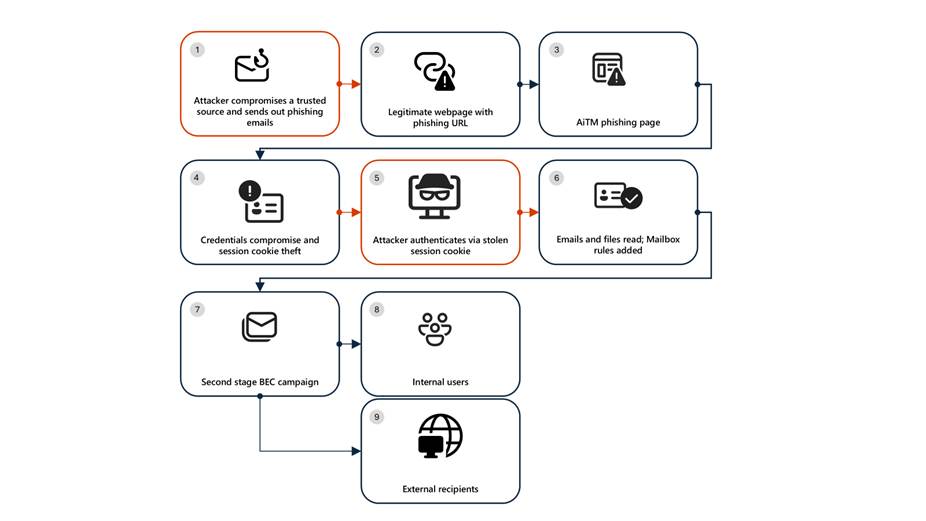


Resurgence of a multi‑stage AiTM phishing and BEC campaign abusing SharePoint
Microsoft Defender Researchers uncovered a multi‑stage adversary‑in‑the‑middle (AiTM) phishing and business email compromise (BEC) campaign targeting multiple organizations in the energy sector, resulting in the compromise of various user accounts. The campaign abused SharePoint file‑sharing services to deliver phishing payloads and relied on inbox rule creation to maintain persistence and evade user awareness. The attack transitioned into a series of AiTM attacks and follow-on BEC activity spanning multiple organizations.
Following the initial compromise, the attackers leveraged trusted internal identities from the target to conduct large‑scale intra‑organizational and external phishing, significantly expanding the scope of the campaign. Defender detections surfaced the activity to all affected organizations.
This attack demonstrates the operational complexity of AiTM campaigns and the need for remediation beyond standard identity compromise responses. Password resets alone are insufficient. Impacted organizations in the energy sector must additionally revoke active session cookies and remove attacker-created inbox rules used to evade detection.
Attack chain: AiTM phishing attack

Stage 1: Initial access via trusted vendor compromise
Analysis of the initial access vector indicates that the campaign leveraged a phishing email sent from an email address belonging to a trusted organization, likely compromised before the operation began. The lure employed a SharePoint URL requiring user authentication and used subject‑line mimicry consistent with legitimate SharePoint document‑sharing workflows to increase credibility.
Threat actors continue to leverage trusted cloud collaboration platforms particularly Microsoft SharePoint and OneDrive due to their ubiquity in enterprise environments. These services offer built‑in legitimacy, flexible file‑hosting capabilities, and authentication flows that adversaries can repurpose to obscure malicious intent. This widespread familiarity enables attackers to deliver phishing links and hosted payloads that frequently evade traditional email‑centric detection mechanisms.
Stage 2: Malicious URL clicks
Threat actors often abuse legitimate services and brands to avoid detection. In this scenario, we observed that the attacker leveraged the SharePoint service for the phishing campaign. While threat actors may attempt to abuse widely trusted platforms, Microsoft continuously invests in safeguards, detections, and abuse prevention to limit misuse of our services and to rapidly detect and disrupt malicious activity
Stage 3: AiTM attack
Access to the URL redirected users to a credential prompt, but visibility into the attack flow did not extend beyond the landing page.
Stage 4: Inbox rule creation
The attacker later signed in with another IP address and created an Inbox rule with parameters to delete all incoming emails on the user’s mailbox and marked all the emails as read.
Stage 5: Phishing campaign
Followed by Inbox rule creation, the attacker initiated a large-scale phishing campaign involving more than 600 emails with another phishing URL. The emails were sent to the compromised user’s contacts, both within and outside of the organization, as well as distribution lists. The recipients were identified based on the recent email threads in the compromised user’s inbox.
Stage 6: BEC tactics
The attacker then monitored the victim user’s mailbox for undelivered and out of office emails and deleted them from the Archive folder. The attacker read the emails from the recipients who raised questions regarding the authenticity of the phishing email and responded, possibly to falsely confirm that the email is legitimate. The emails and responses were then deleted from the mailbox. These techniques are common in any BEC attacks and are intended to keep the victim unaware of the attacker’s operations, thus helping in persistence.
Stage 7: Accounts compromise
The recipients of the phishing emails from within the organization who clicked on the malicious URL were also targeted by another AiTM attack. Microsoft Defender Experts identified all compromised users based on the landing IP and the sign-in IP patterns.
Mitigation and protection guidance
Microsoft Defender XDR detects suspicious activities related to AiTM phishing attacks and their follow-on activities, such as sign-in attempts on multiple accounts and creation of malicious rules on compromised accounts. To further protect themselves from similar attacks, organizations should also consider complementing MFA with conditional access policies, where sign-in requests are evaluated using additional identity-driven signals like user or group membership, IP location information, and device status, among others.
Defender Experts also initiated rapid response with Microsoft Defender XDR to contain the attack including:
- Automatically disrupting the AiTM attack on behalf of the impacted users based on the signals observed in the campaign.
- Initiating zero-hour auto purge (ZAP) in Microsoft Defender XDR to find and take automated actions on the emails that are a part of the phishing campaign.
Defender Experts further worked with customers to remediate compromised identities through the following recommendations:
- Revoking session cookies in addition to resetting passwords.
- Revoking the MFA setting changes made by the attacker on the compromised user’s accounts.
- Deleting suspicious rules created on the compromised accounts.
Mitigating AiTM phishing attacks
The general remediation measure for any identity compromise is to reset the password for the compromised user. However, in AiTM attacks, since the sign-in session is compromised, password reset is not an effective solution. Additionally, even if the compromised user’s password is reset and sessions are revoked, the attacker can set up persistence methods to sign-in in a controlled manner by tampering with MFA. For instance, the attacker can add a new MFA policy to sign in with a one-time password (OTP) sent to attacker’s registered mobile number. With these persistence mechanisms in place, the attacker can have control over the victim’s account despite conventional remediation measures.
While AiTM phishing attempts to circumvent MFA, implementation of MFA still remains an essential pillar in identity security and highly effective at stopping a wide variety of threats. MFA is the reason that threat actors developed the AiTM session cookie theft technique in the first place. Organizations are advised to work with their identity provider to ensure security controls like MFA are in place. Microsoft customers can implement MFA through various methods, such as using the Microsoft Authenticator, FIDO2 security keys, and certificate-based authentication.
Defenders can also complement MFA with the following solutions and best practices to further protect their organizations from such attacks:
- Use security defaults as a baseline set of policies to improve identity security posture. For more granular control, enable conditional access policies, especially risk-based access policies. Conditional access policies evaluate sign-in requests using additional identity-driven signals like user or group membership, IP location information, and device status, among others, and are enforced for suspicious sign-ins. Organizations can protect themselves from attacks that leverage stolen credentials by enabling policies such as compliant devices, trusted IP address requirements, or risk-based policies with proper access control.
- Implement continuous access evaluation.
- Invest in advanced anti-phishing solutions that monitor and scan incoming emails and visited websites. For example, organizations can leverage web browsers that automatically identify and block malicious websites, including those used in this phishing campaign, and solutions that detect and block malicious emails, links, and files.
- Continuously monitor suspicious or anomalous activities. Hunt for sign-in attempts with suspicious characteristics (for example, location, ISP, user agent, and use of anonymizer services).
Detections
Because AiTM phishing attacks are complex threats, they require solutions that leverage signals from multiple sources. Microsoft Defender XDR uses its cross-domain visibility to detect malicious activities related to AiTM, such as session cookie theft and attempts to use stolen cookies for signing in.
Using Microsoft Defender for Cloud Apps connectors, Microsoft Defender XDR raises AiTM-related alerts in multiple scenarios. For Microsoft Entra ID customers using Microsoft Edge, attempts by attackers to replay session cookies to access cloud applications are detected by Defender for Cloud Apps connectors for Microsoft 365 and Azure. In such scenarios, Microsoft Defender XDR raises the following alert:
- Stolen session cookie was used
In addition, signals from these Defender for Cloud Apps connectors, combined with data from the Defender for Endpoint network protection capabilities, also triggers the following Microsoft Defender XDR alert on Microsoft Entra ID. environments:
- Possible AiTM phishing attempt
A specific Defender for Cloud Apps connector for Okta, together with Defender for Endpoint, also helps detect AiTM attacks on Okta accounts using the following alert:
- Possible AiTM phishing attempt in Okta
Other detections that show potentially related activity are the following:
Microsoft Defender for Office 365
- Email messages containing malicious file removed after delivery
- Email messages from a campaign removed after delivery
- A potentially malicious URL click was detected
- A user clicked through to a potentially malicious URL
- Suspicious email sending patterns detected
Microsoft Defender for Cloud Apps
- Suspicious inbox manipulation rule
- Impossible travel activity
- Activity from infrequent country
- Suspicious email deletion activity
Microsoft Entra ID Protection
- Anomalous Token
- Unfamiliar sign-in properties
- Unfamiliar sign-in properties for session cookies
Microsoft Defender XDR
- BEC-related credential harvesting attack
- Suspicious phishing emails sent by BEC-related user
Indicators of Compromise
- Network Indicators
- 178.130.46.8 – Attacker infrastructure
- 193.36.221.10 – Attacker infrastructure
Recommended actions
Microsoft recommends the following mitigations to reduce the impact of this threat:
- Enable Conditional Access policies in Microsoft Entra, especially risk-based access policies. Conditional access policies evaluate sign-in requests using additional identity-driven signals like user or group membership, IP address location information, and device status, among others, are enforced for suspicious sign-ins. Organizations can protect themselves from attacks that leverage stolen credentials by enabling policies such as compliant devices, Azure trusted IP address requirements, or risk-based policies with proper access control. If you are still evaluating Conditional Access, use security defaults as an initial baseline set of policies to improve identity security posture.
- Implement continuous access evaluation.
- Implement Microsoft Entra passwordless sign-in with FIDO2 security keys.
- Turn on network protection in Microsoft Defender for Endpoint to block connections to malicious domains and IP addresses.
- Implement Microsoft Defender for Endpoint – Mobile Threat Defense on mobile devices used to access enterprise assets.
- Leverage Microsoft Edge automatically identify and block malicious websites, including those used in this phishing campaign, and Microsoft Defender for Office 365 to detect and block malicious emails, links, and files. Monitor suspicious or anomalous activities in Microsoft Entra ID Protection. Investigate sign-in attempts with suspicious characteristics (such as the location, ISP, user agent, and use of anonymizer services). Educate users about the risks of secure file sharing and emails from trusted vendors.
Hunting queries – Microsoft XDR
AHQ#1 – Phishing Campaign:
EmailEvents
| where Subject has “NEW PROPOSAL – NDA”
AHQ#2 – Sign-in activity from the suspicious IP Addresses
AADSignInEventsBeta
| where Timestamp >= ago(7d)
| where IPAddress startswith “178.130.46.” or IPAddress startswith “193.36.221.”
Microsoft Sentinel
Microsoft Sentinel customers can use the following analytic templates to find BEC related activities similar to those described in this post:
- Exchange workflow MailItemsAccessed operation anomaly
- Malicious Inbox Rule
- SharePointFileOperation via previously unseen IPs
- SharePointFileOperation via devices with previously unseen user agents
- User login from different countries within 3 hours
- TI Matching Analytics
In addition to the analytic templates listed above, Microsoft Sentinel customers can use the following hunting content to perform Hunts for BEC related activities:
- Possible AiTM phishing attempt against Microsoft Entra ID
- Unfamiliar Signin Correlation with AzurePortal Signin Attempts and AuditLogs
- Multiple users email forwarded to same destination
- Sign-ins From VPS providers
The post Resurgence of a multi‑stage AiTM phishing and BEC campaign abusing SharePoint appeared first on Microsoft Security Blog.