
Normal view

Received — 22 January 2026 Microsoft Security Blog

Microsoft Security success stories: Why integrated security is the foundation of AI transformation

22 January 2026 at 18:00

AI is transforming how organizations operate and how they approach security. In this new era of agentic AI, every interaction, digital or human, must be built on trust. As businesses modernize, they’re not just adopting AI tools, they’re rearchitecting their digital foundations. And that means security can’t be an afterthought. It must be woven in from the beginning into every layer of the stack—ubiquitous, ambient, and autonomous—just like the AI it protects. 

In this blog, we spotlight three global organizations that are leading the way. Each is taking a proactive, platform-first approach to security—moving beyond fragmented defenses and embedding protection across identity, data, devices, and cloud infrastructure. Their stories show that when security is deeply integrated from the start, it becomes a strategic enabler of resilience, agility, and innovation. And by choosing Microsoft Security, these customers are securing the foundation of their AI transformation from end to end.

Why security transformation matters to decision makers

Security is a board-level priority. The following customer stories show how strategic investments in security platforms can drive cost savings, operational efficiency, and business agility, not just risk reduction. Read on to learn how Ford, Icertis, and TriNet transformed their operations with support from Microsoft.

Ford builds trust across global operations

In the automotive industry, a single cyberattack can ripple across numerous aspects of the business. Ford recognized that rising ransomware and targeted cyberattacks demanded a different approach. The company made a deliberate shift away from fragmented, custom-built security tools toward a unified Microsoft security platform, adopting a Zero Trust approach and prioritizing security embedded into every layer of its hybrid environment—from endpoints to data centers and cloud infrastructure.

Unified protection and measurable impact

Partnering with Microsoft, Ford deployed Microsoft Defender, Microsoft Sentinel, Microsoft Purview, and Microsoft Entra to strengthen defenses, centralize threat detection, and enforce data governance. AI-powered telemetry and automation improved visibility and accelerated incident response, while compliance certifications supported global scaling. By building a security-first culture and leveraging Microsoft’s integrated stack, Ford reduced vulnerabilities, simplified operations, and positioned itself for secure growth across markets.

Read the full customer story to discover more about Ford’s security modernization collaboration with Microsoft.

Icertis cuts security operations center (SOC) incidents by 50%

As a global leader in contract intelligence, Icertis introduced generative AI to transform enterprise contracting, launching applications built on Microsoft Azure OpenAI and its Vera platform. These innovations brought new security challenges, including prompt injection risks and compliance demands across more than 300 Azure subscriptions. To address these, Icertis adopted Microsoft Defender for Cloud for AI posture management, threat detection, and regulatory alignment, ensuring sensitive contract data remains protected.

Driving security efficiency and resilience

By integrating Microsoft Security solutions—Defender for Cloud, Microsoft Sentinel, Purview, Entra, and Microsoft Security Copilot—Icertis strengthened governance and accelerated incident response. AI-powered automation reduced alert triage time by up to 80%, cut mean time to resolution to 25 minutes, and lowered incident volume by 50%. With Zero Trust principles and embedded security practices, Icertis scales innovation securely while maintaining compliance, setting a new standard for trust in AI-powered contracting.

Read the full customer story to learn how Icertis secures sensitive contract data, accelerates AI innovation, and achieves measurable risk reduction with Microsoft’s unified security platform.

TriNet moves to Microsoft 365 E5, achieves annual savings in security spend

Facing growing complexity from multiple point solutions, TriNet sought to reduce operational overhead and strengthen its security posture. The company’s leadership recognized that consolidating tools could improve visibility, reduce risk, and align security with its broader digital strategy. After evaluating providers, TriNet chose Microsoft 365 E5 for its integrated security platform, delivering advanced threat protection, identity management, and compliance capabilities.

Streamlined operations and improved efficiencies

By adopting Microsoft Defender XDR, Purview, Entra, Microsoft Sentinel, and Microsoft 365 Copilot, TriNet unified security across endpoints, cloud apps, and data governance. Automation and centralized monitoring reduced alert fatigue, accelerated incident response, and improved Secure Score. The platform blocked a spear phishing attempt targeting executives, demonstrating the value of Zero Trust and advanced safeguards. With cost savings from tool consolidation and improved efficiency, TriNet is building a secure foundation for future innovation.

Read the full customer story to see how TriNet consolidated its security stack with Microsoft 365 E5, reduced complexity, and strengthened defenses against advanced threats.

How to plan, adopt, and operationalize a Microsoft Security strategy 

Ford, Icertis, and TriNet each began their transformation by assessing legacy systems and identifying gaps that created complexity and risk. Ford faced fragmented tools across a global manufacturing footprint, Icertis needed to secure sensitive contract data while adopting generative AI, and TriNet aimed to reduce operational complexity caused by managing multiple point solutions, seeking a more streamlined and integrated approach. These assessments revealed the need for a unified, risk-based strategy to simplify operations and strengthen protection.

Building on Zero Trust and deploying integrated solutions

All three organizations aligned on Zero Trust principles as the foundation for modernization. They consolidated security into Microsoft’s integrated platform, deploying Defender for endpoint and cloud protection, Microsoft Sentinel for centralized monitoring, Purview for data governance, Entra for identity management, and Security Copilot for AI-powered insights. This phased rollout allowed each company to embed security into daily operations while reducing manual processes and improving visibility.

Measuring impact and sharing best practices

The results were tangible: Ford accelerated threat detection and governance across its hybrid environment, Icertis cut incident volume by 50% and reduced triage time by 80%, and TriNet improved Secure Score while achieving cost savings through tool consolidation. Automation and AI-powered workflows delivered faster response times and reduced complexity. Each organization now shares learnings internally and with industry peers—whether through executive briefings, training programs, or participation in cybersecurity forums—helping set new standards for resilience and innovation.

Working towards a more secure future

The future of enterprise security is being redefined by AI, by innovation, and by the bold choices organizations make today. Modernization, automation, and collaboration are no longer optional—they’re foundational. As AI reshapes how we work, build, and protect, security must evolve in lockstep: not as an add-on, but as a fabric woven through every layer of the enterprise. 

These customer stories show us that building a security-first approach isn’t just possible; it’s imperative. From cloud-native disruptors to global institutions modernizing complex environments, leading organizations are showing what’s possible when security and AI move together. By unifying their tools, automating what once was manual, and using AI to stay ahead of emerging cyberthreats, they’re not just protecting today, they’re securing the future and shaping what comes next. 

Share your thoughts

Are you a regular user of Microsoft Security products? Share your insights and experiences on Gartner Peer Insights™.

Learn more

To learn more about Microsoft Security solutions, visit our website. Bookmark the Security blog to keep up with our expert coverage on security matters. Also, follow us on LinkedIn (Microsoft Security) and X (@MSFTSecurity) for the latest news and updates on cybersecurity.

The post Microsoft Security success stories: Why integrated security is the foundation of AI transformation appeared first on Microsoft Security Blog.
Resurgence of a multi‑stage AiTM phishing and BEC campaign abusing SharePoint 

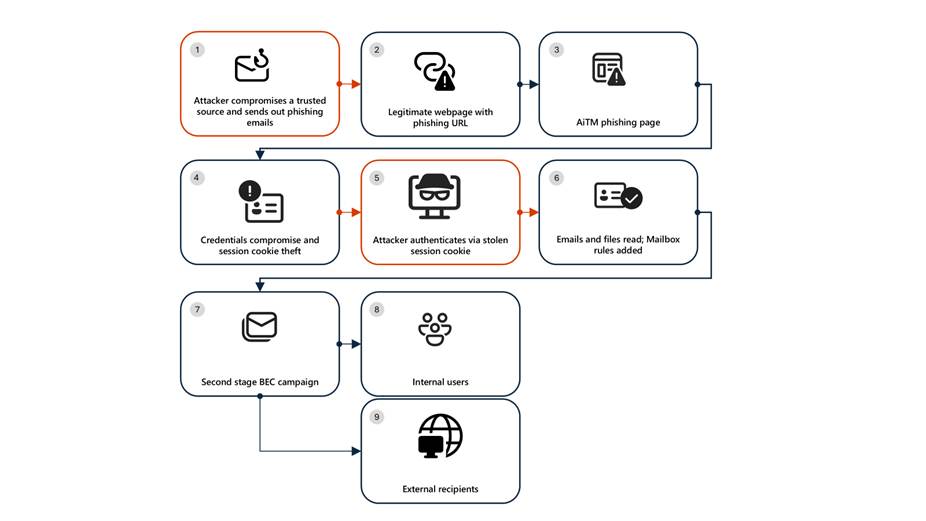
Microsoft Defender Researchers uncovered a multi‑stage adversary‑in‑the‑middle (AiTM) phishing and business email compromise (BEC) campaign targeting multiple organizations in the energy sector, resulting in the compromise of various user accounts. The campaign abused SharePoint file‑sharing services to deliver phishing payloads and relied on inbox rule creation to maintain persistence and evade user awareness. The attack transitioned into a series of AiTM attacks and follow-on BEC activity spanning multiple organizations.

Following the initial compromise, the attackers leveraged trusted internal identities from the target to conduct large‑scale intra‑organizational and external phishing, significantly expanding the scope of the campaign. Defender detections surfaced the activity to all affected organizations.

This attack demonstrates the operational complexity of AiTM campaigns and the need for remediation beyond standard identity compromise responses. Password resets alone are insufficient. Impacted organizations in the energy sector must additionally revoke active session cookies and remove attacker-created inbox rules used to evade detection.

Attack chain: AiTM phishing attack

Stage 1: Initial access via trusted vendor compromise

Analysis of the initial access vector indicates that the campaign leveraged a phishing email sent from an email address belonging to a trusted organization, likely compromised before the operation began. The lure employed a SharePoint URL requiring user authentication and used subject‑line mimicry consistent with legitimate SharePoint document‑sharing workflows to increase credibility.

Threat actors continue to leverage trusted cloud collaboration platforms particularly Microsoft SharePoint and OneDrive due to their ubiquity in enterprise environments. These services offer built‑in legitimacy, flexible file‑hosting capabilities, and authentication flows that adversaries can repurpose to obscure malicious intent. This widespread familiarity enables attackers to deliver phishing links and hosted payloads that frequently evade traditional email‑centric detection mechanisms.

Stage 2: Malicious URL clicks

Threat actors often abuse legitimate services and brands to avoid detection. In this scenario, we observed that the attacker leveraged the SharePoint service for the phishing campaign. While threat actors may attempt to abuse widely trusted platforms, Microsoft continuously invests in safeguards, detections, and abuse prevention to limit misuse of our services and to rapidly detect and disrupt malicious activity

Stage 3: AiTM attack

Access to the URL redirected users to a credential prompt, but visibility into the attack flow did not extend beyond the landing page.

Stage 4: Inbox rule creation

The attacker later signed in with another IP address and created an Inbox rule with parameters to delete all incoming emails on the user’s mailbox and marked all the emails as read.

Stage 5: Phishing campaign

Followed by Inbox rule creation, the attacker initiated a large-scale phishing campaign involving more than 600 emails with another phishing URL. The emails were sent to the compromised user’s contacts, both within and outside of the organization, as well as distribution lists. The recipients were identified based on the recent email threads in the compromised user’s inbox.

Stage 6: BEC tactics

The attacker then monitored the victim user’s mailbox for undelivered and out of office emails and deleted them from the Archive folder. The attacker read the emails from the recipients who raised questions regarding the authenticity of the phishing email and responded, possibly to falsely confirm that the email is legitimate. The emails and responses were then deleted from the mailbox. These techniques are common in any BEC attacks and are intended to keep the victim unaware of the attacker’s operations, thus helping in persistence.

Stage 7: Accounts compromise

The recipients of the phishing emails from within the organization who clicked on the malicious URL were also targeted by another AiTM attack. Microsoft Defender Experts identified all compromised users based on the landing IP and the sign-in IP patterns. 

Mitigation and protection guidance

Microsoft Defender XDR detects suspicious activities related to AiTM phishing attacks and their follow-on activities, such as sign-in attempts on multiple accounts and creation of malicious rules on compromised accounts. To further protect themselves from similar attacks, organizations should also consider complementing MFA with conditional access policies, where sign-in requests are evaluated using additional identity-driven signals like user or group membership, IP location information, and device status, among others.

Defender Experts also initiated rapid response with Microsoft Defender XDR to contain the attack including:

  • Automatically disrupting the AiTM attack on behalf of the impacted users based on the signals observed in the campaign.
  • Initiating zero-hour auto purge (ZAP) in Microsoft Defender XDR to find and take automated actions on the emails that are a part of the phishing campaign.

Defender Experts further worked with customers to remediate compromised identities through the following recommendations:

  • Revoking session cookies in addition to resetting passwords.
  • Revoking the MFA setting changes made by the attacker on the compromised user’s accounts.
  • Deleting suspicious rules created on the compromised accounts.

Mitigating AiTM phishing attacks

The general remediation measure for any identity compromise is to reset the password for the compromised user. However, in AiTM attacks, since the sign-in session is compromised, password reset is not an effective solution. Additionally, even if the compromised user’s password is reset and sessions are revoked, the attacker can set up persistence methods to sign-in in a controlled manner by tampering with MFA. For instance, the attacker can add a new MFA policy to sign in with a one-time password (OTP) sent to attacker’s registered mobile number. With these persistence mechanisms in place, the attacker can have control over the victim’s account despite conventional remediation measures.

While AiTM phishing attempts to circumvent MFA, implementation of MFA still remains an essential pillar in identity security and highly effective at stopping a wide variety of threats. MFA is the reason that threat actors developed the AiTM session cookie theft technique in the first place. Organizations are advised to work with their identity provider to ensure security controls like MFA are in place. Microsoft customers can implement MFA through various methods, such as using the Microsoft Authenticator, FIDO2 security keys, and certificate-based authentication.

Defenders can also complement MFA with the following solutions and best practices to further protect their organizations from such attacks:

  • Use security defaults as a baseline set of policies to improve identity security posture. For more granular control, enable conditional access policies, especially risk-based access policies. Conditional access policies evaluate sign-in requests using additional identity-driven signals like user or group membership, IP location information, and device status, among others, and are enforced for suspicious sign-ins. Organizations can protect themselves from attacks that leverage stolen credentials by enabling policies such as compliant devices, trusted IP address requirements, or risk-based policies with proper access control.
  • Implement continuous access evaluation.
  • Invest in advanced anti-phishing solutions that monitor and scan incoming emails and visited websites. For example, organizations can leverage web browsers that automatically identify and block malicious websites, including those used in this phishing campaign, and solutions that detect and block malicious emails, links, and files.
  • Continuously monitor suspicious or anomalous activities. Hunt for sign-in attempts with suspicious characteristics (for example, location, ISP, user agent, and use of anonymizer services).

Detections

Because AiTM phishing attacks are complex threats, they require solutions that leverage signals from multiple sources. Microsoft Defender XDR uses its cross-domain visibility to detect malicious activities related to AiTM, such as session cookie theft and attempts to use stolen cookies for signing in.

Using Microsoft Defender for Cloud Apps connectors, Microsoft Defender XDR raises AiTM-related alerts in multiple scenarios. For Microsoft Entra ID customers using Microsoft Edge, attempts by attackers to replay session cookies to access cloud applications are detected by Defender for Cloud Apps connectors for Microsoft 365 and Azure. In such scenarios, Microsoft Defender XDR raises the following alert:

  • Stolen session cookie was used

In addition, signals from these Defender for Cloud Apps connectors, combined with data from the Defender for Endpoint network protection capabilities, also triggers the following Microsoft Defender XDR alert on Microsoft Entra ID. environments:

  • Possible AiTM phishing attempt

A specific Defender for Cloud Apps connector for Okta, together with Defender for Endpoint, also helps detect AiTM attacks on Okta accounts using the following alert:

  • Possible AiTM phishing attempt in Okta

Other detections that show potentially related activity are the following:

Microsoft Defender for Office 365

  • Email messages containing malicious file removed after delivery
  • Email messages from a campaign removed after delivery
  • A potentially malicious URL click was detected
  • A user clicked through to a potentially malicious URL
  • Suspicious email sending patterns detected

Microsoft Defender for Cloud Apps

  • Suspicious inbox manipulation rule
  • Impossible travel activity
  • Activity from infrequent country
  • Suspicious email deletion activity

Microsoft Entra ID Protection

  • Anomalous Token
  • Unfamiliar sign-in properties
  • Unfamiliar sign-in properties for session cookies

Microsoft Defender XDR

  • BEC-related credential harvesting attack
  • Suspicious phishing emails sent by BEC-related user

Indicators of Compromise

  • Network Indicators
    • 178.130.46.8 – Attacker infrastructure
    • 193.36.221.10 – Attacker infrastructure

Recommended actions

Microsoft recommends the following mitigations to reduce the impact of this threat:

Hunting queriesMicrosoft XDR

AHQ#1 – Phishing Campaign:

EmailEvents

| where Subject has “NEW PROPOSAL – NDA”

AHQ#2 – Sign-in activity from the suspicious IP Addresses

AADSignInEventsBeta

| where Timestamp >= ago(7d)

| where IPAddress startswith “178.130.46.” or IPAddress startswith “193.36.221.”

Microsoft Sentinel

Microsoft Sentinel customers can use the following analytic templates to find BEC related activities similar to those described in this post:

In addition to the analytic templates listed above, Microsoft Sentinel customers can use the following hunting content to perform Hunts for BEC related activities:


The post Resurgence of a multi‑stage AiTM phishing and BEC campaign abusing SharePoint  appeared first on Microsoft Security Blog.
A new era of agents, a new era of posture 

The rise of AI Agents marks one of the most exciting shifts in technology today. Unlike traditional applications or cloud resources, these agents are not passive components- they reason, make decisions, invoke tools, and interact with other agents and systems on behalf of users. This autonomy brings powerful opportunities, but it also introduces a new set of risks, especially given how easily AI agents can be created, even by teams who may not fully understand the security implications. 

This fundamentally changes the security equation, making securing AI agent a uniquely complex challenge – and this is where AI agents posture becomes critical. The goal is not to slow innovation or restrict adoption, but to enable the business to build and deploy AI agents securely by design.  

A strong AI agents posture starts with comprehensive visibility across all AI assets and goes further by providing contextual insights – understanding what each agent can do and what it connected to, the risks it introduces, how it can be harden, and how to prioritize and mitigate issues before they turn into incidents. 

In this blog, we’ll explore the unique security challenges introduced by AI agents and how Microsoft Defender helps organizations reduce risk and attack surface through AI security posture management across multi-cloud environments. 

Understanding the unique challenges  

The attack surface of an AI agent is inherently broad. By design, agents are composed of multiple interconnected layers – models, platforms, tools, knowledge sources, guardrails, identities, and more. 

Across this layered architecture, threats can emerge at multiple points, including prompt-based attacks, poisoning of grounding data, abuse of agent tools, manipulation of coordinating agents, etc. As a result, securing AI agents demands a holistic approach. Every layer of this multi-tiered ecosystem introduces its own risks, and overlooking any one of them can leave the agent exposed. 

Let’s explore several unique scenarios where Defender’s contextual insights help address these challenges across the entire AI agent stack. 

Scenario 1: Finding agents connected to sensitive data 

Agents are often connected to data sources, and sometimes -whether by design or by mistake- they are granted access to sensitive organizational information, including PII. Such agents are typically intended for internal use – for example, processing customer transaction records or financial data. While they deliver significant value, they also represent a critical point of exposure. If an attacker compromises one of these agents, they could gain access to highly sensitive information that was never meant to leave the organization. Moreover, unlike direct access to a database – which can be easily logged and monitored – data exfiltration through an agent may blend in with normal agent activity, making it much harder to detect. This makes data-connected agents especially important to monitor, protect, and isolate, as the consequences of their misuse can be severe. 

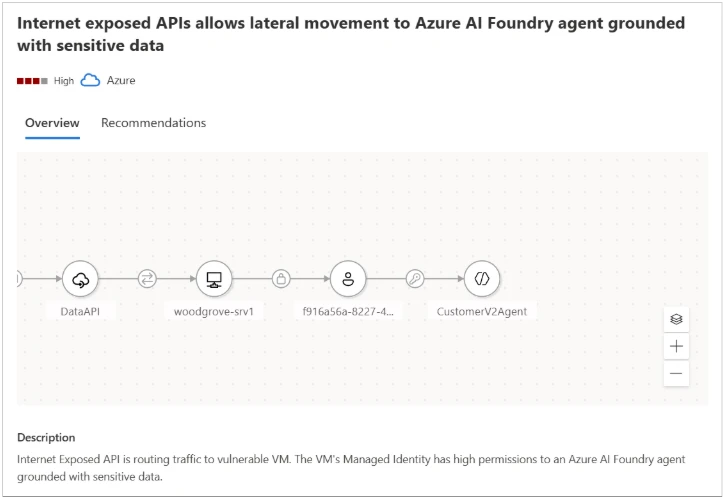
Microsoft Defender provides visibility for those agents connected to sensitive data and help security teams mitigate such risks. In the example shown in Figure 1, the attack path demonstrates how an attacker could leverage an Internet-exposed API to gain access to an AI agent grounded with sensitive data. The attack path highlights the source of the agent’s sensitive data (e.g., a blob container) and outlines the steps required to remediate the threat. 

Figure1 – The attack path illustrates how an attacker could leverage an Internet exposed API to gain access to an AI agent grounded with sensitive data  

Scenario 2: Identifying agents with indirect prompt injection risk 

AI agents regularly interact with external data – user messages, retrieved documents, third-party APIs, and various data pipelines. While these inputs are usually treated as trustworthy, they can become a stealthy delivery mechanism for Indirect Prompt Injection (XPIA), an emerging class of AI-specific attacks. Unlike direct prompt injection, where an attacker issues harmful instructions straight to the model, XPIA occurs where malicious instructions are hidden in external data source that an agent processes, such as a webpage fetched through a browser tool or an email being summarized. The agent unknowingly ingests this crafted content, which embeds hidden or obfuscated commands that are executed simply because the agent trusts the source and operates autonomously. 

This makes XPIA particularly dangerous for agents performing high-privilege operations – modifying databases, triggering workflows, accessing sensitive data, or performing autonomous actions at scale. In these cases, a single manipulated data source can silently influence an agent’s behavior, resulting in unauthorized access, data exfiltration, or internal system compromise. This makes identifying agents suspectable to XPIA a critical security requirement. 

By analyzing an agent’s tool combinations and configurations, Microsoft Defender identifies agents that carry elevated exposure to indirect prompt injection, based on both the functionality of their tools and the potential impact of misuse. Defender then generates tailored security recommendations for these agents and assigns them a dedicated Risk Factor, that help prioritize them. 

in Figure 2, we can see a recommendation generated by the Defender for an agent with Indirect prompt injection risk and lacking proper guardrails – controls that are essential for reducing the possibility of an XPIA event. 

Figure 2 – Recommendation generated by the Defender for an agent with Indirect prompt injection risk and lacking proper guardrails.

In Figure 3, we can see a recommendation generated by the Defender for an agent with both high autonomy and a high risk of indirect prompt injection, a combination that significantly increases the probability of a successful attack.  

In both cases, Defender provides detailed and actionable remediation steps. For example, adding human-in-the-loop control is recommended for an agent with both high autonomy and a high indirect prompt injection risk, helping reduce the potential impact of XPIA-driven actions. 

Figure 3 – Recommendation generated by the Defender for an agent with both high autonomy and a high risk of indirect prompt injection.

Scenario 3: Identifying coordinator agents 

In a multi-agent architecture, not every agent carries the same level of risk. Each agent may serve a different role – some handle narrow, task-specific functions, while others operate as coordinator agents, responsible for managing and directing multiple sub-agents. These coordinator agents are particularly critical because they effectively act as command centers within the system. A compromise of such an agent doesn’t just affect a single workflow – it cascades into every sub agent under its control. Unlike sub-agents, coordinators might also be customer-facing, which further amplifies their risk profile. This combination of broad authority and potential exposure makes coordinator agents potentially more powerful and more attractive targets for attackers, making comprehensive visibility and dedicated security controls essential for their safe operation 

Microsoft Defender accounts for the role of each agent within a multi-agent architecture, providing visibility into coordinator agents and dedicated security controls. Defender also leverages attack path analysis to identify how agent-related risks can form an exploitable path for attackers, mapping weak links with context. 

For example, as illustrated in Figure 4, an attack path can demonstrate how an attacker might utilize an Internet- exposed API to gain access to Azure AI Foundry coordinator agent. This visualization helps security admin teams to take preventative actions, safeguarding the AI agents from potential breaches.  

Figure 4 – The attack path illustrates how an attacker could leverage an Internet exposed API to gain access to a coordinator agent.

Hardening AI agents: reducing the attack surface 

Beyond addressing individual risk scenarios, Microsoft Defender offers broad, foundational hardening guidance designed to reduce the overall attack surface of any AI agent. In addition, a new set of dedicated agents like Risk Factors further helps teams prioritize which weaknesses to mitigate first, ensuring the right issues receive the right level of attention. 

Together, these controls significantly limit the blast radius of any attempted compromise. Even if an attacker identifies a manipulation path, a properly hardened and well-configured agent will prevent escalation. 

By adopting Defender’s general security guidance, organizations can build AI agents that are not only capable and efficient, but resilient against both known and emerging attack techniques. 

Figure 5 – Example of an agent’s recommendations.

Build AI agents security from the ground up 

To address these challenges across the different AI Agents layers, Microsoft Defender provides a suite of security tools tailored for AI workloads. By enabling AI Security Posture Management (AI-SPM) within the Defender for Cloud Defender CSPM plan, organizations gain comprehensive multi-cloud posture visibility and risk prioritization across platforms such as Microsoft Foundry, AWS Bedrock, and GCP Vertex AI. This multi-cloud approach ensures critical vulnerabilities and potential attack paths are effectively identified and mitigated, creating a unified and secure AI ecosystem. 

Together, these integrated solutions empower enterprises to build, deploy, and operate AI technologies securely, even within a diverse and evolving threat landscape. 

To learn more about Security for AI with Defender for Cloud, visit our website and documentation

This research is provided by Microsoft Defender Security Research with contributions by Hagai Ran Kestenberg. 

The post A new era of agents, a new era of posture  appeared first on Microsoft Security Blog.

❌