
Normal view

Received — 14 January 2026 Microsoft Security Blog

Inside RedVDS: How a single virtual desktop provider fueled worldwide cybercriminal operations

Over the past year, Microsoft Threat Intelligence observed the proliferation of RedVDS, a virtual dedicated server (VDS) provider used by multiple financially motivated threat actors to commit business email compromise (BEC), mass phishing, account takeover, and financial fraud. Microsoft’s investigation into RedVDS services and infrastructure uncovered a global network of disparate cybercriminals purchasing and using to target multiple sectors, including legal, construction, manufacturing, real estate, healthcare, and education in the United States, Canada, United Kingdom, France, Germany, Australia, and countries with substantial banking infrastructure targets that have a higher potential for financial gain. In collaboration with law enforcement agencies worldwide, Microsoft’s Digital Crimes Unit (DCU) recently facilitated a disruption of RedVDS infrastructure and related operations.

RedVDS is a criminal marketplace selling illegal software and services that facilitated and enabled cybercrime. The marketplace offers a simple and feature-rich user interface for purchasing unlicensed and inexpensive Windows-based Remote Desktop Protocol (RDP) servers with full administrator control and no usage limits – a combination eagerly exploited by cybercriminals. Microsoft’s investigation into RedVDS revealed a single, cloned Windows host image being reused across the service, leaving unique technical fingerprints that defenders could leverage for detection.

Microsoft tracks the threat actor who develops and operates RedVDS as Storm-2470. We have observed multiple cybercriminal actors, including Storm-0259, Storm-2227, Storm-1575, Storm-1747, and phishing actors who used the RacoonO365 phishing service prior its coordinated takedown, leveraging RedVDS infrastructure. RedVDS launched their website in 2019 and has been operating publicly since to offer servers in locations including the United States, United Kingdom, Canada, France, Netherlands, and Germany. The primary website used the redvds[.]com domain, with secondary domains at redvds[.]pro and vdspanel[.]space.

RedVDS uses a fictitious entity claiming to operate and be governed by Bahamian Law​. RedVDS customers purchased the service through cryptocurrency, primarily Bitcoin and Litecoin, adding another layer of obfuscation to illicit activity. Additionally, RedVDS supports a broad range of digital currency, including Monero, Binance Coin, Avalanche, Dogecoin, and TRON.

The mass scale of operations facilitated by RedVDS infrastructure and roughly US $40 million in reported fraud losses driven by RedVDS‑enabled activity in the United States alone since March 2025 underscore the threat of an invisible infrastructure providing scalability and ease for cybercriminals to access target networks. In this blog, we share our analysis of the technical aspects of RedVDS: its infrastructure, provisioning methods, and the malware and tools deployed on RedVDS hosts. We also provide recommendations to protect against RedVDS-related threats such as phishing attacks.

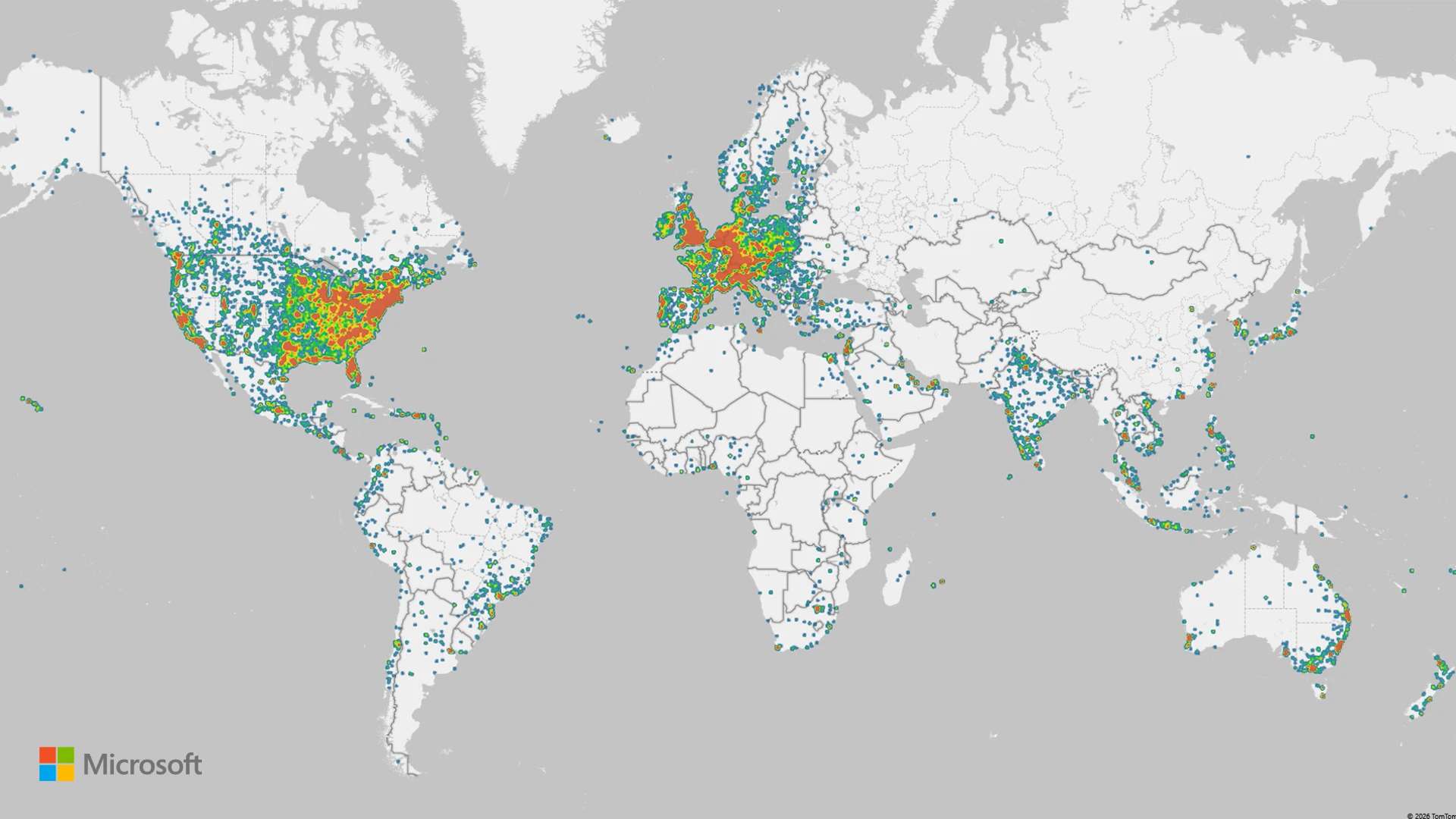
Heat map showing location of attacks leveraging the RedVDS infrastructure
Figure 1: Heat map of attacks leveraging RedVDS infrastructure

Uncovering the RedVDS Infrastructure

Microsoft Threat Intelligence investigations revealed that RedVDS has become a prolific tool for cybercriminals in the past year, facilitating thousands of attacks including credential theft, account takeovers, and mass phishing. RedVDS offers its services for a nominal fee, making it accessible for cybercriminals worldwide.

Over time, Microsoft Threat Intelligence identified attacks showing thousands of stolen credentials, invoices stolen from target organizations, mass mailers, and phish kits, indicating that multiple Windows hosts were all created from the same base Windows installation. Additional investigations revealed that most of the hosts were created using a single computer ID, signifying that the same Windows Eval 2022 license was used to create these hosts. By using the stolen license to make images, Storm-2470 provided its services at a substantially lower cost, making it attractive for threat actors to purchase or acquire RedVDS services.

Anatomy of RedVDS Infrastructure

Diagram showing the RedVDS tool infrastructure and how multiple threat actors use it for various campaigns
Figure 2. RedVDS tool infrastructure
Screenshot of the RedVDS user interface
Figure 3. RedVDS user interface

Service model and base image: RedVDS provided virtual Windows cloud servers, which were generated from a single Windows Server 2022 image, through RDP. All RedVDS instances identified by Microsoft used the same computer name, WIN-BUNS25TD77J, an anomaly that stood out because legitimate cloud providers randomize hostnames. This host fingerprint appears in RDP certificates and system telemetry, serving as a core indicator of RedVDS activity. The underlying trick is that Storm-2470 created one Windows virtual machine (VM) and repeatedly cloned it without customizing the system identity. 

Screenshot of the RedVDS Remote Desktop connection with certificate
Figure 4. RedVDS Remote Desktop connection with certificate
Screenshot of the Remote Desktop Image
Figure 5. Remote Desktop Image

Automated provisioning: The RedVDS operator employed Quick Emulator (QEMU) virtualization combined with VirtIO drivers to rapidly generate cloned Windows instances on demand. When a customer ordered a server, an automated process copied the master VM image (with the pre-set hostname and configuration) onto a new host. This yielded new servers that are clones of the original, using the same hostname and baseline hardware IDs, differing only by IP address and hostname prefix in some cases. This uniform deployment strategy allowed RedVDS to stand up fresh RDP hosts within minutes, a scalability advantage for cybercriminals. It also meant that all RedVDS hosts shared certain low-level identifiers (for example, identical OS installation IDs and product keys), which defenders could potentially pivot on if exposed in telemetry. 

Screenshot of the RedVDS user interface
Figure 6. RedVDS user interface

Payment and access: The RedVDS service operated using an online portal, RedVDS[.]com, where access was sold for cryptocurrency, often Bitcoin, to preserve anonymity. After payment, customers received credentials to sign in using Remote Desktop. Notably, RedVDS did not impose usage caps or maintain activity logs (according to its own terms of service), making it attractive for illicit use.  Additionally, the use of unlicensed software allowed RedVDS to offer its services at a nominal cost, making it more accessible for threat actors as a prolific tool for cybercriminal activity.

Hosting footprint: RedVDS did not own physical datacenters; instead, it rented servers from third-party hosting providers to run its service. We traced RedVDS nodes to at least five hosting companies in the United States, Canada, United Kingdom, France, and Netherlands. These providers offer bare-metal or virtual private server (VPS) infrastructure. By distributing across multiple providers and countries, RedVDS could provision IP addresses in geolocations close to targets (for example, a US victim might be attacked from a US-based  IP address), helping cybercriminals evade geolocation-based security filters. It also meant that RedVDS traffic blended with normal data center traffic, requiring defenders to rely on deeper fingerprints (like the host name or usage patterns) rather than IP address alone. 

Map showing location of RedVDS hosting providers
Figure 7: Footprint of RedVDS hosting providers December 2025

We observed RedVDS most commonly hosted within the following AS/ASNs from December 5 to 19, 2025:

Bar chart showing top ASNs that host RedVDS
Figure 8. AS/ASNs hosting RedVDS

Malware and tooling on RedVDS hosts

RedVDS is an infrastructure service that facilitated malicious activity, but unlike malware, it did not perform harmful actions itself; the threat came from how criminals used the servers after provisioning. Our investigation found that RedVDS customers consistently set up a standard toolkit of malicious or dual-use software on their rented servers to facilitate their campaigns. By examining multiple RedVDS instances, we identified a recurring set of tools: 

  • Mass mailer utilities: A variety of spam/phishing email tools were installed to send bulk emails. We observed examples like SuperMailer, UltraMailer, BlueMail, SquadMailer, and Email Sorter Pro/Ultimate on RedVDS machines. These programs are designed to import lists of email addresses and blast out phishing emails or scam communications at scale. They often include features to randomize content or schedule sends, helping cybercriminals manage large phishing campaigns directly from the RedVDS host. 
  • Email address harvesters: We found tools, such as Sky Email Extractor, that allowed cybercriminals to scrape or validate large numbers of email addresses. These helped build victim lists for phishing. We also found evidence of scripts or utilities to sort and clean email lists (to remove bounces, duplicates, and others), indicating that RedVDS users were managing mass email operations end-to-end on these servers. 
  • Privacy and OPSEC tools: RedVDS hosts had numerous applications to keep the operators’ activities under the radar. For example, we observed installations of privacy-focused web browsers (likeWaterfox, Avast Secure Browser, Norton Private Browser), and multiple virtual private network (VPN) clients (such as NordVPN and ExpressVPN). Cybercriminals likely used these to route traffic through other channels (or to access criminal forums safely) from their RedVDS server, and to ensure any browsing or additional communications from the server were masked. Also present was SocksEscort, a proxy/socksifier tool, hinting that some RedVDS tenants ran malware that required SOCKS proxies to reach targets. 
  • Remote access and management: Many RedVDS instances had AnyDesk installed. AnyDesk is a legitimate remote desktop tool, suggesting that criminals might have used it to sign in to and control their RedVDS boxes more conveniently or even share access among co-conspirators. 
  • Automation and scripting: We found evidence of scripting environments and attempts to use automation services. For example, Python was installed on some RedVDS hosts (with scripts for tasks like parsing data), and one actor attempted to use Microsoft Power Automate (Flow) to programmatically send emails using Excel, though their attempt was not fully successful. Additionally, some RedVDS users leveraged ChatGPT or other OpenAI tools to overcome language barriers when writing phishing lures. Consequently, non‑English‑speaking operators could generate more polished English‑language lure emails by using AI tools on the compromised RedVDS host.
Screenshot of phishing lure
Figure 9. Proposal invitation rendered by Power Automate using RedVDS infrastructure

Below is a summary table of tool categories observed on RedVDS hosts and their primary purpose: 

Category Examples Primary use 
Mass mailing SuperMailer, UltraMailer, BlueMail, SquadMailerBulk phishing email distribution and campaign management
Email address harvesting Sky Email Extractor, Email Sorter Pro/Ultimate Harvesting target emails and cleaning email lists (list hygiene)
Privacy and VPN Waterfox, Avast Secure Browser, Norton Private Browser, NordVPN, Express VPNOperational security (OPSEC): anonymizing browsing, hiding server’s own traffic, geolocation spoofing
Remote admin AnyDesk Convenient multi-host access for cybercriminals; remote control of RedVDS servers beyond RDP (or sharing access)
Table 1. Common tools observed on RedVDS servers
WebsiteBusiness or service 
www.apollo.ioBusiness-to-business (B2B) sales lead generator
www.copilot.microsoft.comMicrosoft Copilot
www.quillbot.comWriting assistant
www.veed.ioVideo editing
www.grammarly.comWriting assistant
www.braincert.comE-learning tools
login.seamless.aiB2B sales lead generator
Table 2. AI tools seen used on RedVDS

Mapping the RedVDS attack chain

Threat actors used RedVDS because it provided a highly permissive, low-cost, resilient environment where they could launch and conceal multiple stages of their operation. Once provisioned, these cloned Windows hosts gave actors a ready‑made platform to research targets, stage phishing infrastructure, steal credentials, hijack mailboxes, and execute impersonation‑based financial fraud with minimal friction. Threat actors benefited from RedVDS’s unrestricted administrative access and negligible logging, allowing them to operate without meaningful oversight. The uniform, disposable nature of RedVDS servers allowed cybercriminals to rapidly iterate campaigns, automate delivery at scale, and move quickly from initial targeting to financial theft.

Diagram showing a sample RedVDS attack chain
Figure 10. Example of RedVDS attack chain

Reconnaissance

RedVDS operators leveraged their provisioned server to gather intelligence on fraud targets and suppliers, collecting organizational details, payment workflows, and identifying key personnel involved in financial transactions. This information helped craft convincing spear-phishing emails tailored to the victim’s business context.

During this phase, cybercriminals also researched tools and methods to optimize their campaigns. For example, Microsoft observed RedVDS customers experimenting with Microsoft Power Automate to attempt to automate the delivery of phishing emails directly from Excel files containing personal attachments. These attempts were unsuccessful, but their exploration of automation tools showed a clear intent to streamline delivery workflows and scale their attacks.

Resource development and delivery

Next, RedVDS operators developed their phishing capabilities by transforming its permissive virtual servers into a full operational infrastructure. They did this by purchasing phishing-as-a-service (PhaaS) infrastructure or manually assembling their own tooling, including installing and configuring phishing kits, using mass mailer tools, email address harvesters, and evasion capabilities, such as VPNs and remote desktop tools. Operators then built automation pipelines by writing scripts to import target lists, generating PDF or HTML lure attachments, and automating sending cycles to support high-volume delivery. While RedVDS itself only provided permissive VDS hosting, operators deployed their own automation tooling on these servers to enable large-scale phishing email delivery.

Once their tooling is in place, operators began staging their phishing infrastructure by registering domains that often masqueraded as legitimate domains, setting up phishing pages and credential collectors, and testing the end-to-end delivery before launching their attacks.

Account compromise

RedVDS operators gained initial access through successful phishing attacks. Targets received phishing emails crafted to appear legitimate. When a recipient clicked the malicious link or opened the lure, they are redirected to a phishing page that mimicked a trusted sign-in portal. Here, credentials are harvested, and in some cases, cybercriminals triggered multifactor authentication (MFA) prompts that victims approved, granting full access to accounts.

Credential theft and mailbox takeover

Once credentials were captured through phishing, RedVDS facilitated the extraction and storage of replay tokens or session cookies. These artifacts allowed cybercriminals to bypass MFA and maintain persistent access without triggering additional verification, streamlining account takeover.

With valid credentials or tokens, cybercriminals signed in to the compromised mailbox. They searched for financial conversations, pending invoices, and supplier details, copying relevant emails to prepare for impersonation and fraud. This stage often included monitoring ongoing threads to identify the most opportune moment to intervene.

Impersonation infrastructure development

Building on the initial RedVDS footprint, operators expanded their infrastructure to large-volume phishing and impersonation activity. A critical component of this phase was the registration and deployment of homoglyph domains, lookalike domains crafted to mimic legitimate supplier or business partners with near-indistinguishable character substitutions. During the investigation, Microsoft uncovered over 7,300 IP addresses linked to RedVDS infrastructure that collectively hosted more than 3,700 homoglyph domains within a 30-day period.

Using these domains, operators created impersonation mailboxes and inserted themselves into ongoing email threads, effectively hijacking trusted communications channels. This combination of homoglyph domain infrastructure, mailbox impersonation, and thread hijacking formed the backbone of highly convincing BEC operations and enabled seamless social engineering that pressured victims into completing fraudulent financial transactions.

Social engineering

Using the impersonation setup, cybercriminals further injected themselves into legitimate conversations with suppliers or internal finance teams. They sent payment change requests or fraudulent invoices, leveraging urgency and trust to manipulate targets into transferring funds. For example, Microsoft Threat Intelligence observed multiple actors, including Storm-0259, using RedVDS to deliver fake unpaid invoices to businesses that directed the recipient to make a same day payment to resolve the debt. The email included PDF attachments of the fake invoice, banking details to make the payment, and contact details of the impersonator.

Payment fraud

Finally, the victim processed the fraudulent payment, transferring funds to an attacker-controlled mule account. These accounts were often part of a larger laundering network, making recovery difficult.

Common attacks using RedVDS infrastructure

Mass phishing: In most cases, Microsoft observed RedVDS customers using RedVDS as primary infrastructure to conduct mass phishing. Prior to sending out emails, cybercriminals linked to RedVDS infrastructure abused Microsoft 365 services to register fake tenants posing as legitimate local businesses or organizations. These cybercriminals also installed additional legitimate applications on RedVDS server, including Brave browser, likely to mask browsing activity; Telegram Desktop, Signal Desktop, and AnyTime Desktop to facilitate their operations; as well as mass mailer tools such as SuperMailer, UltraMailer, and BlueMail.

Password spray: Microsoft observed actors conducting password spray attacks using RedVDS infrastructure to gain initial access to target systems.

Spoofed phishing attacks: Microsoft has observed actors using RedVDS infrastructure to send phishing messages that appear as internally sent email communications by spoofing the organizations’ domains. Threat actors exploit complex routing scenarios and misconfigured spoof protections to carry out these email campaigns, with RedVDS providing the means to send the phishing emails in majority of cases. This phishing attack vector does not affect customers whose Microsoft Exchange mail exchanger (MX) records point to Office 365; these tenants are protected by native built-in spoofing detections.

Lures used in these attacks are themed around voicemails, shared documents, communications from human resources (HR) departments, password resets or expirations, and others, leading to credential phishing. Microsoft has also observed a campaign leveraging this vector to conduct financial scams against organizations, attempting to trick them into paying false invoices to fraudulently created banking accounts. Phishing messages sent through this method might seem like internal communications, making them more effective. Compromised credentials could result in data theft, business email compromise, or financial loss, all requiring significant remediation.

Business email compromise/Account takeover: Microsoft observed RedVDS customers using the infrastructure to conduct BEC attacks that included account takeovers of organizations or businesses. In several cases, these actors also created homoglyph domains to appear legitimate in payment fraud operations. During email takeover operations, RedVDS customers used compromised accounts in BEC operations to conduct follow-on activity. In addition to mass mailers, these cybercriminals signed in to user mailboxes and used those accounts to conduct lateral movement within the targeted organization’s environment and look for other possible users or contacts, allowing them to conduct reconnaissance and craft more convincing phishing emails. Following successful account compromise, the cybercriminals often created an invitation lure and uploaded it to the victim’s SharePoint. In these cases, Microsoft observed the cybercriminals exfiltrating financial data, namely banking information from the same organizations that were impersonated in addition to mass downloading of invoices, and credential theft.

Defending against RedVDS-related operations

RedVDS is an infrastructure provider that facilitated criminal activity, and it is not by itself a malware tool that deploys malicious code. This activity is not exclusively abusing Microsoft services but likely other providers as well.

While Microsoft notes that the organizations at most risk for RedVDS-related operations are legal, construction, manufacturing, real estate, healthcare, and education, the activity conducted by malicious actors using RedVDS are common attacks that could affect any business or consumers, especially with an established relationship where high volume of transactions are exchanged.

The overwhelming majority of RedVDS-related activity comprises social engineering, phishing operations, and business email compromise. Microsoft recommends the following recommendations to mitigate the impact of RedVDS-related threats.

Preventing phishing attacks

Defending against phishing attacks begins at the primary gateways: email and other communication platforms.

  • Review our recommended settings for Exchange Online Protection and Microsoft Defender for Office 365 to ensure your organization has established essential defenses and knows how to monitor and respond to threat activity.
  • Invest in user awareness training and phishing simulations. Attack simulation training in Microsoft Defender for Office 365, which also includes simulating phishing messages in Microsoft Teams, is one approach to running realistic attack scenarios in your organization.
  • Follow Microsoft’s security best practices for Microsoft Teams.
  • Configure the Microsoft Defender for Office 365 Safe Links policy to apply to internal recipients.

Hardening credentials and cloud identities is also necessary to defend against phishing attacks, which seek to gain valid credentials and access tokens.  As an initial step, use passwordless solutions like passkeys and implement MFA throughout your environment:

Preventing business email compromise (BEC)

Organizations can mitigate BEC risks by focusing on key defense measures, such as implementing comprehensive social engineering training for employees and enhancing awareness of phishing tactics. Educating users about identifying and reporting suspicious emails is critical. Essential technical measures include securing device services, including email settings through services like Microsoft Defender XDR, enabling MFA, and promoting strong password protection. Additionally, using secure payment platforms and tightening controls around financial processes can help reduce risks related to fraudulent transactions. Collectively, these proactive measures strengthen defenses against BEC attacks.

  • Ensure that admin and user accounts are distinct by using Privileged Identity Management or dedicated accounts for privileged tasks, limiting overprivileged permissions. Adaptive Protection can automatically apply strict security controls on high-risk users, minimizing the impact of potential data security incidents.
  • Avoid opening emails, attachments, and links from suspicious sources. Verify sender identities before interacting with any links or attachments. In most RedVDS-related BEC cases, once the actor took over an email account, the victim’s inbox was studied and used to learn about existing relationships with other vendors or contacts, making this step extra crucial. Educate employees on data security best practices through regular training on phishing indicators, domain mismatches, and other BEC red flags. Leverage Microsoft curated resources and training and deploy phishing risk-reduction tool to conduct simulations and targeted education. Encourage users to browse securely with Microsoft Edge or other SmartScreen-enabled browsers to block malicious websites, including phishing domains.
  • Enforcing robust email security settings is critical for preventing spoofing, impersonation, and account compromise, which are key tactics in BEC attacks. Most domains sending mail to Office 365 lack valid DMARC enforcement, making them susceptible to spoofing. Microsoft 365 and Exchange Online Protection (EOP) mitigate this risk by detecting forged “From” headers to block spoofed emails and prevent credential theft. Spoof intelligence, enabled by default, adds an extra layer of security by identifying spoofed senders.

Microsoft Defender XDR detections

Microsoft Defender XDR detects a wide variety of post-compromise activity leveraging the RedVDS service, including:

  • Possible BEC-related inbox rule (Microsoft Defender for Cloud apps)
  • Compromised user account in a recognized attack pattern (Microsoft Defender XDR)
  • Risky sign in attempt following a possible phishing campaign (Microsoft Defender for Office 365)
  • Risky sign-in attempt following access to malicious phishing email (Microsoft Defender for Cloud Apps)
  • Suspicious AnyDesk installation (Microsoft Defender for Endpoint)
  • Password spraying (Microsoft Defender for Endpoint)

Microsoft Defender XDR coordinates detection, prevention, investigation, and response across endpoints, identities, email, apps to provide integrated protection against threats. Customers with provisioned access can also use Microsoft Security Copilot in Microsoft Defender to investigate and respond to incidents, hunt for threats, and protect their organization with relevant threat intelligence.

Microsoft Security Copilot

Security Copilot customers can use the standalone experience to create their own prompts or run the following prebuilt promptbooks to automate incident response or investigation tasks related to this threat:

  • Incident investigation
  • Microsoft User analysis
  • Threat actor profile
  • Threat Intelligence 360 report based on MDTI article
  • Vulnerability impact assessment

Note that some promptbooks require access to plugins for Microsoft products such as Microsoft Defender XDR or Microsoft Sentinel.

Threat intelligence reports

Microsoft Defender XDR customers can use the following threat analytics reports in the Defender portal (requires license for at least one Defender XDR product) to get the most up-to-date information about the threat actor, malicious activity, and techniques discussed in this blog. These reports provide the intelligence, protection information, and recommended actions to prevent, mitigate, or respond to associated threats found in customer environments.

Microsoft Defender XDR threat analytics

Microsoft Security Copilot customers can also use the Microsoft Security Copilot integration in Microsoft Defender Threat Intelligence, either in the Security Copilot standalone portal or in the embedded experience in the Microsoft Defender portal to get more information about this threat actor.

Indicators of compromise

The following table lists the domain variants belonging to RedVDS provider.

IndicatorTypeDescription
Redvds[.]comDomainMain website
Redvds[.]proDomainBackup site
Redvdspanel[.]spaceDomainSub-panel
hxxps://rd[.]redvds[.]comURLRedVDS dashboard
WIN-BUNS25TD77JHost nameHost name where RedVDS activity originates from

Learn more

For the latest security research from the Microsoft Threat Intelligence community, check out the Microsoft Threat Intelligence Blog.

To get notified about new publications and to join discussions on social media, follow us on LinkedIn, X (formerly Twitter), and Bluesky.

To hear stories and insights from the Microsoft Threat Intelligence community about the ever-evolving threat landscape, listen to the Microsoft Threat Intelligence podcast.

The post Inside RedVDS: How a single virtual desktop provider fueled worldwide cybercriminal operations appeared first on Microsoft Security Blog.
Received — 13 January 2026 Microsoft Security Blog

Phishing actors exploit complex routing and misconfigurations to spoof domains

Phishing actors are exploiting complex routing scenarios and misconfigured spoof protections to effectively spoof organizations’ domains and deliver phishing emails that appear, superficially, to have been sent internally. Threat actors have leveraged this vector to deliver a wide variety of phishing messages related to various phishing-as-a-service (PhaaS) platforms such as Tycoon2FA. These include messages with lures themed around voicemails, shared documents, communications from human resources (HR) departments, password resets or expirations, and others, leading to credential phishing.

This attack vector is not new but has seen increased visibility and use since May 2025. The phishing campaigns Microsoft has observed using this attack vector are opportunistic rather than targeted in nature, with messages sent to a wide variety of organizations across several industries and verticals. Notably, Microsoft has also observed a campaign leveraging this vector to conduct financial scams against organizations. While these attacks share many characteristics with other credential phishing email campaigns, the attack vector abusing complex routing and improperly configured spoof protections distinguishes these campaigns. The phishing attack vector covered in this blog post does not affect customers whose Microsoft Exchange mail exchanger (MX) records point to Office 365; these tenants are protected by native built-in spoofing detections.

Phishing messages sent through this vector may be more effective as they appear to be internally sent messages. Successful credential compromise through phishing attacks may lead to data theft or business email compromise (BEC) attacks against the affected organization or partners and may require extensive remediation efforts, and/or lead to loss of funds in the case of financial scams. While Microsoft detects the majority of these phishing attack attempts, organizations can further reduce risk by properly configuring spoof protections and any third-party connectors to prevent spoofed phish or scam messages sent through this attack vector from reaching inboxes.

In this blog, we explain how threat actors are exploiting these routing scenarios and provide observations from related attacks. We provide specific examples—including technical analysis of phishing messages, spoof protections, and email headers—to help identify this attack vector. This blog also provides additional resources with information on how to set up mail flow rules, enforce spoof protections, and configure third-party connectors to prevent spoofed phishing messages from reaching user inboxes.

Spoofed phishing attacks

In cases where a tenant has configured a complex routing scenario, where the MX records are not pointed to Office 365, and the tenant has not configured strictly enforced spoof protections, threat actors may be able to send spoofed phishing messages that appear to have come from the tenant’s own domain. Setting strict Domain-based Message Authentication, Reporting, and Conformance (DMARC) reject and SPF hard fail (rather than soft fail) policies and properly configuring any third-party connectors will prevent phishing attacks spoofing organizations’ domains.

This vector is not, as has been publicly reported, a vulnerability of Direct Send, a mail flow method in Microsoft 365 Exchange Online that allows devices (like printers, scanners), applications, or third-party services to send email without authentication using the organization’s accepted domain, but rather takes advantage of complex routing scenarios and misconfigured spoof protections. Tenants with MX records pointed directly to Office 365 are not vulnerable to this attack vector of sending spoofed phishing messages.

As with most other phishing attacks observed by Microsoft Threat intelligence throughout 2025, the bulk of phishing campaigns observed using this attack vector employ the Tycoon2FA PhaaS platform, in addition to several other phishing services in use as well. In October 2025, Microsoft Defender for Office 365 blocked more than 13 million malicious emails linked to Tycoon2FA, including many attacks spoofing organizations’ domains. PhaaS platforms such as Tycoon2FA provide threat actors with a suite of capabilities, support, and ready-made lures and infrastructure to carry out phishing attacks and compromise credentials. These capabilities include adversary-in-the-middle (AiTM) phishing, which is intended to circumvent multifactor authentication (MFA) protections. Credential phishing attacks sent through this method employ a variety of themes such as voicemail notifications, password resets, HR communications, among others.

Microsoft Threat Intelligence has also observed emails intended to trick organizations into paying fake invoices, potentially leading to financial losses. Generally, in these spoofed phishing attacks, the recipient email address is used in both the “To” and “From” fields of the email, though some attacks will change the display name of the sender to make the attack more convincing and the “From” field could contain any valid internal email address.

Credential phishing with spoofed emails

The bulk of phishing messages sent through this attack vector uses the same lures as conventionally sent phishing messages, masquerading as services such as Docusign, or communications from HR regarding salary or benefits changes, password resets, and so on. They may employ clickable links in the email body or QR codes in attachments or other means of getting the recipient to navigate to a phish landing page. The appearance of having been sent from an internal email address is the most visible distinction to an end user, often with the same email address used in the “To” and “From” fields.

Email headers provide more information regarding the delivery of spoofed phishing emails, such as the appearance of an external IP address used by the threat actor to initiate the phishing attack. Depending on the configuration of the tenant, there will be SPF soft or hard fail, DMARC fail, and DKIM will equal none as both the sender and recipient appear to be in the same domain. At a basic level of protection, these should cause a message to land in a spam folder, but a user may retrieve and interact with phishing messages routed to spam. The X-MS-Exchange-Organization-InternalOrgSender will be set to True, but X-MS-Exchange-Organization-MessageDirectionality will be set to Incoming and X-MS-Exchange-Organization-ASDirectionalityType will have a value of “1”, indicating that the message was sent from outside of the organization. The combination of internal organization sender and incoming directionality is indicative of a message spoofed to appear as an internal communication, but not necessarily indicative of maliciousness. X-MS-Exchange-Organization-AuthAs will be set to Anonymous, indicating that the message came from an external source.

The Authentication-Results header example provided below illustrates the result of enforced authentication. 000 is an explicit DMARC failure. The resultant action is either reject or quarantine. The headers shown here are examples of properly configured environments, effectively blocking phishing emails sent through this attack vector:

spf=fail (sender IP is 51.89.59[.]188) smtp.mailfrom=contoso.com; dkim=none (message not signed) header.d=none;dmarc=fail action=quarantine header.from=contoso.com;compauth=fail reason=000
spf=fail (sender IP is 51.68.182[.]101) smtp.mailfrom= contoso.com; dkim=none (message not signed) header.d=none;dmarc=fail action=oreject header.from=contoso.com;

Any third-party connectors—such as a spam filtering service, security solution, or archiving service—must be configured properly or spoof detections cannot be calculated correctly, allowing phishing emails such as the examples below to be delivered. The first of these examples indicate the expected authentication failures in the header, but no action is taken due to reason 905, which indicates that the tenant has set up complex routing where the mail exchanger record (MX record) points to either an on-premises Exchange environment or a third-party service before reaching Microsoft 365:

spf=fail (sender IP is 176.111.219[.]85) smtp.mailfrom= contoso.com; dkim=none (message not signed) header.d=none;dmarc=fail action=none header.from= contoso.com;compauth=none reason=905

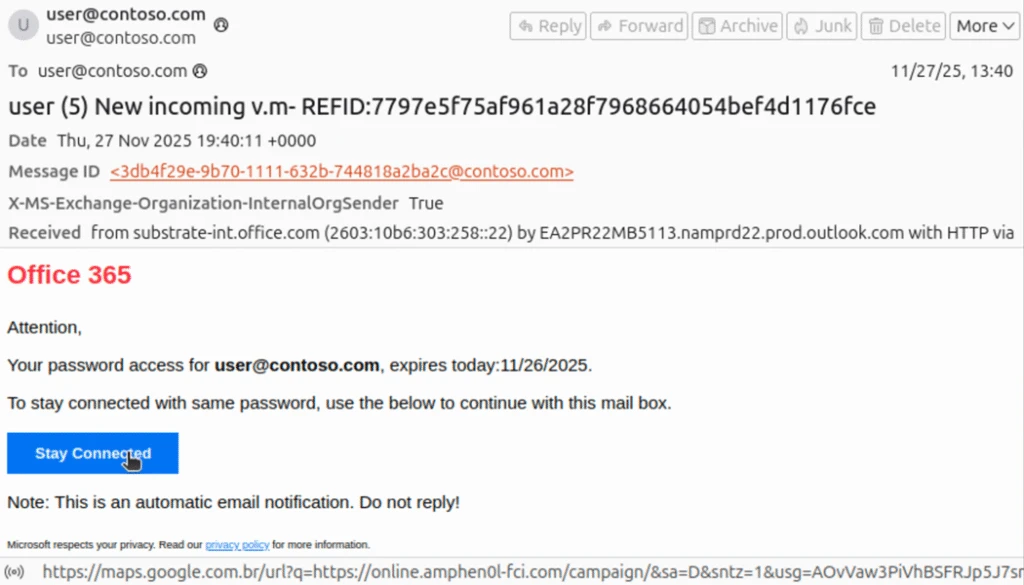
The phishing message masquerades as a notification from Microsoft Office 365 informing the recipient that their password will soon expire, although the subject line appears to be intended for a voicemail themed lure. The link in the email is a nested Google Maps URL pointing to an actor-controlled domain at online.amphen0l-fci[.]com.

Figure 1. This phishing message uses a “password expiration” lure masquerading as a communication from Microsoft.

The second example also shows the expected authentication failures, but with an action of “oreject” with reason 451, indicating complex routing and that the message was delivered to the spam folder.

spf=softfail (sender IP is 162.19.129[.]232) smtp.mailfrom=contoso.com; dkim=none (message not signed) header.d=none;dmarc=fail action=oreject header.from=contoso.com;compauth=none reason=451

This email masquerades as a SharePoint communication asking the recipient to review a shared document. The sender and recipient addresses are the same, though the threat actor has set the display name of the sender to “Pending Approval”. The InternalOrgSender header is set to True. On the surface, this appears to be an internally sent email, though the use of the recipient’s address in both the “To” and “From” fields may alert an end user that this message is not legitimate.

Phishing email impersonating SharePoint requesting the user to review and verify a shared document called Drafts of Agreement (Buyers Signature)
Figure 2. This phishing message uses a “shared document” lure masquerading as SharePoint.

The nested Google URL in the email body points to actor-controlled domain scanuae[.]com. This domain acts as a redirector, loading a script that constructs a URL using the recipient’s Base64-encoded email before loading a custom CAPTCHA page on the Tycoon2FA domain valoufroo.in[.]net. A sample of the script loaded on scanuae[.]com is shown here:

Screenshot of script that crafts and redirects to a URL on a Tycoon2FA PhaaS domain
Figure 3. This script crafts and redirects to a URL on a Tycoon2FA PhaaS domain.

The below example of the custom CAPTCHA page is loaded at the Tycoon2FA domain goorooyi.yoshemo.in[.]net. The CAPTCHA is one of many similar CAPTCHAs observed in relation to Tycoon2FA phishing sequences. Clicking through it leads to a Tycoon2FA phish landing page where the recipient is prompted to input their credentials. Alternatively, clicking through the CAPTCHA may lead to a benign page on a legitimate domain, a tactic intended to evade detection and analysis.

Custom CAPTCHA requesting the user confirm they are not a robot
Figure 4. A custom CAPTCHA loaded on the Tycoon2FA PhaaS domain.

Spoofed email financial scams

Microsoft Threat Intelligence has also observed financial scams sent through spoofed emails. These messages are crafted to look like an email thread between a highly placed employee at the targeted organization, often the CEO of the organization, an individual requesting payment for services rendered, or the accounting department at the targeted organization. In this example, the message was initiated from 163.5.169[.]67 and authentication failures were not enforced, as DMARC is set to none and action is set to none, a permissive mode that does not protect against spoofed messages, allowing the message to reach the inbox on a tenant whose MX record is not pointed to Office 365.

Authentication-Results	spf=fail (sender IP is 163.5.169[.]67) smtp.mailfrom=contoso.com; dkim=none (message not signed) header.d=none;dmarc=none action=none header.from=contoso.com;compauth=fail reason=601

The scam message is crafted to appear as an email thread with a previous message between the CEO of the targeted organization, using the CEO’s real name, and an individual requesting payment of an invoice. The name of the individual requesting payment (here replaced with “John Doe”) appears to be a real person, likely a victim of identity theft. The “To” and “From” fields both use the address for the accounting department at the targeted organization, but with the CEO’s name used as the display name in the “From” field. As with our previous examples, this email superficially appears to be internal to the organization, with only the use of the same address as sender and recipient indicating that the message may not be legitimate. The body of the message also attempts to instill a sense of urgency, asking for prompt payment to retain a discount.

Phishing email requesting the company's accounting department pay an invoice and not reply to this email
Figure 5. An email crafted to appear as part of an ongoing thread directing a company’s accounting department to pay a fake invoice.
Part of the same email thread which appears to be the company's CEO CCing the accounting department to pay any incoming invoices
Figure 6. Included as part of the message shown above, this is crafted to appear as an earlier communication between the CEO of the company and an individual seeking payment.

Most of the emails observed as part of this campaign include three attached files. The first is the fake invoice requesting several thousand dollars to be sent through ACH payment to a bank account at an online banking company. The name of the individual requesting payment is also listed along with a fake company name and address. The bank account was likely set up using the individual’s stolen personally identifiable information.

A fake invoice requesting $9,860 for services like Business System Integration and Remote Strategy Consultation.
Figure 7. A fake invoice including banking information attached to the scam messages.

The second attachment (not pictured) is an IRS W-9 form that lists the name and social security number of the individual used to set up the bank account. The third attachment is a fake “bank letter” ostensibly provided by an employee at the online bank used to set up the fraudulent account. The letter provides the same banking information as the invoice and attempts to add another layer of believability to the scam.

A fake bank letter requesting account and bank routing number information of the target.
Figure 8. A fake “bank letter” also attached to the scam messages.

Falling victim to this scam could result in significant financial losses that may not be recoverable as the funds will likely be moved quickly by the actor in control of the fraudulent bank account.  

Mitigation and protection guidance

Preventing spoofed email attacks

The following links provide information for customers whose MX records are not pointed to Office 365 on how to configure mail flow connectors and rules to prevent spoofed emails from reaching inboxes.

Mitigating AiTM phishing attacks

Microsoft Threat Intelligence recommends the following mitigations, which are effective against a range of phishing threats.

  • Review our recommended settings for Exchange Online Protection and Microsoft Defender for Office 365.
  • Configure Microsoft Defender for Office 365 to recheck links on click. Safe Links provides URL scanning and rewriting of inbound email messages in mail flow, and time-of-click verification of URLs and links in email messages, other Microsoft 365 applications such as Teams, and other locations such as SharePoint Online. Safe Links scanning occurs in addition to the regular anti-spam and anti-malware protection in inbound email messages in Microsoft Exchange Online Protection (EOP). Safe Links scanning can help protect your organization from malicious links used in phishing and other attacks.
  • Turn on Zero-hour auto purge (ZAP) in Defender for Office 365 to quarantine sent mail in response to newly-acquired threat intelligence and retroactively neutralize malicious phishing, spam, or malware messages that have already been delivered to mailboxes.
  • Encourage users to use Microsoft Edge and other web browsers that support Microsoft Defender SmartScreen, which identifies and blocks malicious websites, including phishing sites, scam sites, and sites that host malware.
  • Turn on cloud-delivered protection in Microsoft Defender Antivirus or the equivalent for your antivirus product to cover rapidly evolving attack tools and techniques. Cloud-based machine learning protections block a majority of new and unknown variants
  • Configure Microsoft Entra with increased security.
  • Pilot and deploy phishing-resistant authentication methods for users.
  • Implement Entra ID Conditional Access authentication strength to require phishing-resistant authentication for employees and external users for critical apps.

Mitigating threats from phishing actors begins with securing user identity by eliminating traditional credentials and adopting passwordless, phishing-resistant MFA methods such as FIDO2 security keys, Windows Hello for Business, and Microsoft Authenticator passkeys.

Microsoft recommends enforcing phishing-resistant MFA for privileged roles in Microsoft Entra ID to significantly reduce the risk of account compromise. Learn how to require phishing-resistant MFA for admin roles and plan a passwordless deployment.

Passwordless authentication improves security as well as enhances user experience and reduces IT overhead. Explore Microsoft’s overview of passwordless authentication and authentication strength guidance to understand how to align your organization’s policies with best practices. For broader strategies on defending against identity-based attacks, refer to Microsoft’s blog on evolving identity attack techniques.

If Microsoft Defender alerts indicate suspicious activity or confirmed compromised account or a system, it’s essential to act quickly and thoroughly. Below are recommended remediation steps for each affected identity:

  1. Reset credentials – Immediately reset the account’s password and revoke any active sessions or tokens. This ensures that any stolen credentials can no longer be used.
  2. Re-register or remove MFA devices – Review users MFA devices, specifically those recently added or updated.
  3. Revert unauthorized payroll or financial changes – If the attacker modified payroll or financial configurations, such as direct deposit details, revert them to their original state and notify the appropriate internal teams.
  4. Remove malicious inbox rules – Attackers often create inbox rules to hide their activity or forward sensitive data. Review and delete any suspicious or unauthorized rules.
  5. Verify MFA reconfiguration – Confirm that the user has successfully reconfigured MFA and that the new setup uses secure, phishing-resistant methods.

Microsoft Defender XDR detections

Microsoft Defender XDR coordinates detection, prevention, investigation, and response across endpoints, identities, email, apps to provide integrated protection against attacks like the threat discussed in this blog.

Customers with provisioned access can also use Microsoft Security Copilot in Microsoft Defender to investigate and respond to incidents, hunt for threats, and protect their organization with relevant threat intelligence.

TacticObserved activityMicrosoft Defender coverage
Initial accessThreat actor gains access to account through phishingMicrosoft Defender for Office 365
– A potentially malicious URL click was detected
– Email messages containing malicious file removed after delivery
– Email messages containing malicious URL removed after delivery
– Email messages from a campaign removed after delivery.

Microsoft Defender XDR
– Compromised user account in a recognized attack pattern
– Anonymous IP address
– Suspicious activity likely indicative of a connection to an adversary-in-the-middle (AiTM) phishing site
Defense evasionThreat actor creates an inbox rule post compromiseMicrosoft Defender for Cloud apps

– Possible BEC-related inbox rule
– Suspicious inbox manipulation rule

Microsoft Security Copilot

Security Copilot customers can use the standalone experience to create their own prompts or run the following prebuilt promptbooks to automate incident response or investigation tasks related to this threat:

  • Incident investigation
  • Microsoft User analysis
  • Threat actor profile
  • Threat Intelligence 360 report based on MDTI article
  • Vulnerability impact assessment

Note that some promptbooks require access to plugins for Microsoft products such as Microsoft Defender XDR or Microsoft Sentinel.

Threat intelligence reports

Microsoft customers can use the following reports in Microsoft products to get the most up-to-date information about the threat actor, malicious activity, and techniques discussed in this blog. These reports provide the intelligence, protection information, and recommended actions to prevent, mitigate, or respond to associated threats found in customer environments.

Microsoft Defender XDR threat analytics

Microsoft Security Copilot customers can also use the Microsoft Security Copilot integration in Microsoft Defender Threat Intelligence, either in the Security Copilot standalone portal or in the embedded experience in the Microsoft Defender portal to get more information about this threat actor.

Hunting queries

Microsoft Defender XDR

Microsoft Defender XDR customers can run the following query to find related activity in their networks:

Finding potentially spoofed emails:

EmailEvents
| where Timestamp >= ago(30d)
| where EmailDirection == "Inbound"
| where Connectors == ""  // No connector used
| where SenderFromDomain in ("contoso.com")  // Replace with your domain(s)
| project Timestamp, NetworkMessageId, InternetMessageId, SenderMailFromAddress,
          SenderFromAddress, SenderDisplayName, SenderFromDomain, SenderIPv4,
          RecipientEmailAddress, Subject, DeliveryAction, DeliveryLocation

Finding more suspicious, potentially spoofed emails:

EmailEvents
| where EmailDirection == "Inbound"
| where Connectors == ""  // No connector used
| where SenderFromDomain in ("contoso.com", "fabrikam.com") // Replace with your accepted domains
| where AuthenticationDetails !contains "SPF=pass" // SPF failed or missing
| where AuthenticationDetails !contains "DKIM=pass" // DKIM failed or missing
| where AuthenticationDetails !contains "DMARC=pass" // DMARC failed or missing
| where SenderIPv4 !in ("") // Exclude known relay IPs
| where ThreatTypes has_any ("Phish", "Spam") or ConfidenceLevel == "High" // 
| project Timestamp, NetworkMessageId, InternetMessageId, SenderMailFromAddress,
          SenderFromAddress, SenderDisplayName, SenderFromDomain, SenderIPv4,
          RecipientEmailAddress, Subject, AuthenticationDetails, DeliveryAction

Microsoft Sentinel

Microsoft Sentinel customers can use the TI Mapping analytics (a series of analytics all prefixed with ‘TI map’) to automatically match the malicious domain indicators mentioned in this blog post with data in their workspace. If the TI Map analytics are not currently deployed, customers can install the Threat Intelligence solution from the Microsoft Sentinel Content Hub to have the analytics rule deployed in their Sentinel workspace.

The below hunting queries can also be found in the Microsoft Defender portal for customers who have Microsoft Defender XDR installed from the Content Hub, or accessed directly from GitHub.

Below are the queries using Sentinel Advanced Security Information Model (ASIM) functions to hunt threats across both Microsoft first-party and third-party data sources. ASIM also supports deploying parsers to specific workspaces from GitHub, using an ARM template or manually.

Detect network IP and domain indicators of compromise using ASIM

The following query checks domain and URL IOCs across data sources supported by ASIM web session parser:

//IP list and domain list- _Im_NetworkSession
let lookback = 30d;
let ioc_ip_addr = dynamic(["162.19.196.13", "163.5.221.110", "51.195.94.194", "51.89.59.188"]);
let ioc_domains = dynamic(["2fa.valoufroo.in.net", "valoufroo.in.net", "integralsm.cl", "absoluteprintgroup.com"]);
_Im_NetworkSession(starttime=todatetime(ago(lookback)), endtime=now())
| where DstIpAddr in (ioc_ip_addr) or DstDomain has_any (ioc_domains)
| summarize imNWS_mintime=min(TimeGenerated), imNWS_maxtime=max(TimeGenerated),
  EventCount=count() by SrcIpAddr, DstIpAddr, DstDomain, Dvc, EventProduct, EventVendor

Detect web sessions IP and file hash indicators of compromise using ASIM

The following query checks domain and URL IOCs across data sources supported by ASIM web session parser:

//IP list - _Im_WebSession
let lookback = 30d;
let ioc_ip_addr = dynamic(["162.19.196.13", "163.5.221.110", "51.195.94.194", "51.89.59.188"]);
_Im_WebSession(starttime=todatetime(ago(lookback)), endtime=now())
| where DstIpAddr in (ioc_ip_addr)
| summarize imWS_mintime=min(TimeGenerated), imWS_maxtime=max(TimeGenerated),
  EventCount=count() by SrcIpAddr, DstIpAddr, Url, Dvc, EventProduct, EventVendor

Detect domain and URL indicators of compromise using ASIM

The following query checks domain and URL IOCs across data sources supported by ASIM web session parser:

// file hash list - imFileEvent
// Domain list - _Im_WebSession
let ioc_domains = dynamic(["2fa.valoufroo.in.net", "valoufroo.in.net", "integralsm.cl", "absoluteprintgroup.com"]);
_Im_WebSession (url_has_any = ioc_domains)

Spoofing attempts from specific domains

// Add the list of domains to search for.
let DomainList = dynamic(["2fa.valoufroo.in.net", "valoufroo.in.net", "integralsm.cl", "absoluteprintgroup.com"]); 
EmailEvents 
| where TimeGenerated > ago (1d) and DetectionMethods has "spoof" and SenderFromDomain in~ (DomainList)
| project TimeGenerated, AR=parse_json(AuthenticationDetails) , NetworkMessageId, EmailDirection, Subject, SenderFromAddress, SenderIPv4, ThreatTypes, DetectionMethods, ThreatNames  
| evaluate bag_unpack(AR)  
| where column_ifexists('SPF','') =~ "fail" or  column_ifexists('DMARC','') =~ "fail" or column_ifexists('DKIM','') =~ "fail" or column_ifexists('CompAuth','') =~ "fail"
| extend Name = tostring(split(SenderFromAddress, '@', 0)[0]), UPNSuffix = tostring(split(SenderFromAddress, '@', 1)[0])
| extend Account_0_Name = Name
| extend Account_0_UPNSuffix = UPNSuffix
| extend IP_0_Address = SenderIPv4

Indicators of compromise

IndicatorTypeDescriptionFirst seenLast seen
162.19.196[.]13IPv4An IP address used by an actor to initiate spoofed phishing emails.2025-10-082025-11-21
163.5.221[.]110IPv4An IP address used by an actor to initiate spoofed phishing emails.2025-09-102025-11-20
51.195.94[.]194IPv4An IP address used by an actor to initiate spoofed phishing emails.2025-06-152025-12-07
51.89.59[.]188  IPv4An IP address used by an actor to initiate spoofed phishing emails.2025-09-242025-11-20
2fa.valoufroo.in[.]netDomainA Tycoon2FA PhaaS domain  
valoufroo.in[.]netDomainA Tycoon2FA PhaaS domain  
integralsm[.]clDomainA redirection domain leading to phishing infrastructure.  
absoluteprintgroup[.]comDomainA redirection domain leading to phishing infrastructure.  

References

Learn more

For the latest security research from the Microsoft Threat Intelligence community, check out the Microsoft Threat Intelligence Blog.

To get notified about new publications and to join discussions on social media, follow us on LinkedIn, X (formerly Twitter), and Bluesky. To hear stories and insights from the Microsoft Threat Intelligence community about the ever-evolving threat landscape, listen to the Microsoft Threat Intelligence podcast.

The post Phishing actors exploit complex routing and misconfigurations to spoof domains appeared first on Microsoft Security Blog.

Received — 11 January 2026 Microsoft Security Blog

Phishing actors exploit complex routing and misconfigurations to spoof domains

Phishing actors are exploiting complex routing scenarios and misconfigured spoof protections to effectively spoof organizations’ domains and deliver phishing emails that appear, superficially, to have been sent internally. Threat actors have leveraged this vector to deliver a wide variety of phishing messages related to various phishing-as-a-service (PhaaS) platforms such as Tycoon2FA. These include messages with lures themed around voicemails, shared documents, communications from human resources (HR) departments, password resets or expirations, and others, leading to credential phishing.

This attack vector is not new but has seen increased visibility and use since May 2025. The phishing campaigns Microsoft has observed using this attack vector are opportunistic rather than targeted in nature, with messages sent to a wide variety of organizations across several industries and verticals. Notably, Microsoft has also observed a campaign leveraging this vector to conduct financial scams against organizations. While these attacks share many characteristics with other credential phishing email campaigns, the attack vector abusing complex routing and improperly configured spoof protections distinguishes these campaigns. The phishing attack vector covered in this blog post does not affect customers whose Microsoft Exchange mail exchanger (MX) records point to Office 365; these tenants are protected by native built-in spoofing detections.

Phishing messages sent through this vector may be more effective as they appear to be internally sent messages. Successful credential compromise through phishing attacks may lead to data theft or business email compromise (BEC) attacks against the affected organization or partners and may require extensive remediation efforts, and/or lead to loss of funds in the case of financial scams. While Microsoft detects the majority of these phishing attack attempts, organizations can further reduce risk by properly configuring spoof protections and any third-party connectors to prevent spoofed phish or scam messages sent through this attack vector from reaching inboxes.

In this blog, we explain how threat actors are exploiting these routing scenarios and provide observations from related attacks. We provide specific examples—including technical analysis of phishing messages, spoof protections, and email headers—to help identify this attack vector. This blog also provides additional resources with information on how to set up mail flow rules, enforce spoof protections, and configure third-party connectors to prevent spoofed phishing messages from reaching user inboxes.

Spoofed phishing attacks

In cases where a tenant has configured a complex routing scenario, where the MX records are not pointed to Office 365, and the tenant has not configured strictly enforced spoof protections, threat actors may be able to send spoofed phishing messages that appear to have come from the tenant’s own domain. Setting strict Domain-based Message Authentication, Reporting, and Conformance (DMARC) reject and SPF hard fail (rather than soft fail) policies and properly configuring any third-party connectors will prevent phishing attacks spoofing organizations’ domains.

This vector is not, as has been publicly reported, a vulnerability of Direct Send, a mail flow method in Microsoft 365 Exchange Online that allows devices (like printers, scanners), applications, or third-party services to send email without authentication using the organization’s accepted domain, but rather takes advantage of complex routing scenarios and misconfigured spoof protections. Tenants with MX records pointed directly to Office 365 are not vulnerable to this attack vector of sending spoofed phishing messages.

As with most other phishing attacks observed by Microsoft Threat intelligence throughout 2025, the bulk of phishing campaigns observed using this attack vector employ the Tycoon2FA PhaaS platform, in addition to several other phishing services in use as well. In October 2025, Microsoft Defender for Office 365 blocked more than 13 million malicious emails linked to Tycoon2FA, including many attacks spoofing organizations’ domains. PhaaS platforms such as Tycoon2FA provide threat actors with a suite of capabilities, support, and ready-made lures and infrastructure to carry out phishing attacks and compromise credentials. These capabilities include adversary-in-the-middle (AiTM) phishing, which is intended to circumvent multifactor authentication (MFA) protections. Credential phishing attacks sent through this method employ a variety of themes such as voicemail notifications, password resets, HR communications, among others.

Microsoft Threat Intelligence has also observed emails intended to trick organizations into paying fake invoices, potentially leading to financial losses. Generally, in these spoofed phishing attacks, the recipient email address is used in both the “To” and “From” fields of the email, though some attacks will change the display name of the sender to make the attack more convincing and the “From” field could contain any valid internal email address.

Credential phishing with spoofed emails

The bulk of phishing messages sent through this attack vector uses the same lures as conventionally sent phishing messages, masquerading as services such as Docusign, or communications from HR regarding salary or benefits changes, password resets, and so on. They may employ clickable links in the email body or QR codes in attachments or other means of getting the recipient to navigate to a phish landing page. The appearance of having been sent from an internal email address is the most visible distinction to an end user, often with the same email address used in the “To” and “From” fields.

Email headers provide more information regarding the delivery of spoofed phishing emails, such as the appearance of an external IP address used by the threat actor to initiate the phishing attack. Depending on the configuration of the tenant, there will be SPF soft or hard fail, DMARC fail, and DKIM will equal none as both the sender and recipient appear to be in the same domain. At a basic level of protection, these should cause a message to land in a spam folder, but a user may retrieve and interact with phishing messages routed to spam. The X-MS-Exchange-Organization-InternalOrgSender will be set to True, but X-MS-Exchange-Organization-MessageDirectionality will be set to Incoming and X-MS-Exchange-Organization-ASDirectionalityType will have a value of “1”, indicating that the message was sent from outside of the organization. The combination of internal organization sender and incoming directionality is indicative of a message spoofed to appear as an internal communication, but not necessarily indicative of maliciousness. X-MS-Exchange-Organization-AuthAs will be set to Anonymous, indicating that the message came from an external source.

The Authentication-Results header example provided below illustrates the result of enforced authentication. 000 is an explicit DMARC failure. The resultant action is either reject or quarantine. The headers shown here are examples of properly configured environments, effectively blocking phishing emails sent through this attack vector:

spf=fail (sender IP is 51.89.59[.]188) smtp.mailfrom=contoso.com; dkim=none (message not signed) header.d=none;dmarc=fail action=quarantine header.from=contoso.com;compauth=fail reason=000
spf=fail (sender IP is 51.68.182[.]101) smtp.mailfrom= contoso.com; dkim=none (message not signed) header.d=none;dmarc=fail action=oreject header.from=contoso.com;

Any third-party connectors—such as a spam filtering service, security solution, or archiving service—must be configured properly or spoof detections cannot be calculated correctly, allowing phishing emails such as the examples below to be delivered. The first of these examples indicate the expected authentication failures in the header, but no action is taken due to reason 905, which indicates that the tenant has set up complex routing where the mail exchanger record (MX record) points to either an on-premises Exchange environment or a third-party service before reaching Microsoft 365:

spf=fail (sender IP is 176.111.219[.]85) smtp.mailfrom= contoso.com; dkim=none (message not signed) header.d=none;dmarc=fail action=none header.from= contoso.com;compauth=none reason=905

The phishing message masquerades as a notification from Microsoft Office 365 informing the recipient that their password will soon expire, although the subject line appears to be intended for a voicemail themed lure. The link in the email is a nested Google Maps URL pointing to an actor-controlled domain at online.amphen0l-fci[.]com.

Figure 1. This phishing message uses a “password expiration” lure masquerading as a communication from Microsoft.

The second example also shows the expected authentication failures, but with an action of “oreject” with reason 451, indicating complex routing and that the message was delivered to the spam folder.

spf=softfail (sender IP is 162.19.129[.]232) smtp.mailfrom=contoso.com; dkim=none (message not signed) header.d=none;dmarc=fail action=oreject header.from=contoso.com;compauth=none reason=451

This email masquerades as a SharePoint communication asking the recipient to review a shared document. The sender and recipient addresses are the same, though the threat actor has set the display name of the sender to “Pending Approval”. The InternalOrgSender header is set to True. On the surface, this appears to be an internally sent email, though the use of the recipient’s address in both the “To” and “From” fields may alert an end user that this message is not legitimate.

Phishing email impersonating SharePoint requesting the user to review and verify a shared document called Drafts of Agreement (Buyers Signature)
Figure 2. This phishing message uses a “shared document” lure masquerading as SharePoint.

The nested Google URL in the email body points to actor-controlled domain scanuae[.]com. This domain acts as a redirector, loading a script that constructs a URL using the recipient’s Base64-encoded email before loading a custom CAPTCHA page on the Tycoon2FA domain valoufroo.in[.]net. A sample of the script loaded on scanuae[.]com is shown here:

Screenshot of script that crafts and redirects to a URL on a Tycoon2FA PhaaS domain
Figure 3. This script crafts and redirects to a URL on a Tycoon2FA PhaaS domain.

The below example of the custom CAPTCHA page is loaded at the Tycoon2FA domain goorooyi.yoshemo.in[.]net. The CAPTCHA is one of many similar CAPTCHAs observed in relation to Tycoon2FA phishing sequences. Clicking through it leads to a Tycoon2FA phish landing page where the recipient is prompted to input their credentials. Alternatively, clicking through the CAPTCHA may lead to a benign page on a legitimate domain, a tactic intended to evade detection and analysis.

Custom CAPTCHA requesting the user confirm they are not a robot
Figure 4. A custom CAPTCHA loaded on the Tycoon2FA PhaaS domain.

Spoofed email financial scams

Microsoft Threat Intelligence has also observed financial scams sent through spoofed emails. These messages are crafted to look like an email thread between a highly placed employee at the targeted organization, often the CEO of the organization, an individual requesting payment for services rendered, or the accounting department at the targeted organization. In this example, the message was initiated from 163.5.169[.]67 and authentication failures were not enforced, as DMARC is set to none and action is set to none, a permissive mode that does not protect against spoofed messages, allowing the message to reach the inbox on a tenant whose MX record is not pointed to Office 365.

Authentication-Results	spf=fail (sender IP is 163.5.169[.]67) smtp.mailfrom=contoso.com; dkim=none (message not signed) header.d=none;dmarc=none action=none header.from=contoso.com;compauth=fail reason=601

The scam message is crafted to appear as an email thread with a previous message between the CEO of the targeted organization, using the CEO’s real name, and an individual requesting payment of an invoice. The name of the individual requesting payment (here replaced with “John Doe”) appears to be a real person, likely a victim of identity theft. The “To” and “From” fields both use the address for the accounting department at the targeted organization, but with the CEO’s name used as the display name in the “From” field. As with our previous examples, this email superficially appears to be internal to the organization, with only the use of the same address as sender and recipient indicating that the message may not be legitimate. The body of the message also attempts to instill a sense of urgency, asking for prompt payment to retain a discount.

Phishing email requesting the company's accounting department pay an invoice and not reply to this email
Figure 5. An email crafted to appear as part of an ongoing thread directing a company’s accounting department to pay a fake invoice.
Part of the same email thread which appears to be the company's CEO CCing the accounting department to pay any incoming invoices
Figure 6. Included as part of the message shown above, this is crafted to appear as an earlier communication between the CEO of the company and an individual seeking payment.

Most of the emails observed as part of this campaign include three attached files. The first is the fake invoice requesting several thousand dollars to be sent through ACH payment to a bank account at an online banking company. The name of the individual requesting payment is also listed along with a fake company name and address. The bank account was likely set up using the individual’s stolen personally identifiable information.

A fake invoice requesting $9,860 for services like Business System Integration and Remote Strategy Consultation.
Figure 7. A fake invoice including banking information attached to the scam messages.

The second attachment (not pictured) is an IRS W-9 form that lists the name and social security number of the individual used to set up the bank account. The third attachment is a fake “bank letter” ostensibly provided by an employee at the online bank used to set up the fraudulent account. The letter provides the same banking information as the invoice and attempts to add another layer of believability to the scam.

A fake bank letter requesting account and bank routing number information of the target.
Figure 8. A fake “bank letter” also attached to the scam messages.

Falling victim to this scam could result in significant financial losses that may not be recoverable as the funds will likely be moved quickly by the actor in control of the fraudulent bank account.  

Mitigation and protection guidance

Preventing spoofed email attacks

The following links provide information for customers whose MX records are not pointed to Office 365 on how to configure mail flow connectors and rules to prevent spoofed emails from reaching inboxes.

Mitigating AiTM phishing attacks

Microsoft Threat Intelligence recommends the following mitigations, which are effective against a range of phishing threats.

  • Review our recommended settings for Exchange Online Protection and Microsoft Defender for Office 365.
  • Configure Microsoft Defender for Office 365 to recheck links on click. Safe Links provides URL scanning and rewriting of inbound email messages in mail flow, and time-of-click verification of URLs and links in email messages, other Microsoft 365 applications such as Teams, and other locations such as SharePoint Online. Safe Links scanning occurs in addition to the regular anti-spam and anti-malware protection in inbound email messages in Microsoft Exchange Online Protection (EOP). Safe Links scanning can help protect your organization from malicious links used in phishing and other attacks.
  • Turn on Zero-hour auto purge (ZAP) in Defender for Office 365 to quarantine sent mail in response to newly-acquired threat intelligence and retroactively neutralize malicious phishing, spam, or malware messages that have already been delivered to mailboxes.
  • Encourage users to use Microsoft Edge and other web browsers that support Microsoft Defender SmartScreen, which identifies and blocks malicious websites, including phishing sites, scam sites, and sites that host malware.
  • Turn on cloud-delivered protection in Microsoft Defender Antivirus or the equivalent for your antivirus product to cover rapidly evolving attack tools and techniques. Cloud-based machine learning protections block a majority of new and unknown variants
  • Configure Microsoft Entra with increased security.
  • Pilot and deploy phishing-resistant authentication methods for users.
  • Implement Entra ID Conditional Access authentication strength to require phishing-resistant authentication for employees and external users for critical apps.

Mitigating threats from phishing actors begins with securing user identity by eliminating traditional credentials and adopting passwordless, phishing-resistant MFA methods such as FIDO2 security keys, Windows Hello for Business, and Microsoft Authenticator passkeys.

Microsoft recommends enforcing phishing-resistant MFA for privileged roles in Microsoft Entra ID to significantly reduce the risk of account compromise. Learn how to require phishing-resistant MFA for admin roles and plan a passwordless deployment.

Passwordless authentication improves security as well as enhances user experience and reduces IT overhead. Explore Microsoft’s overview of passwordless authentication and authentication strength guidance to understand how to align your organization’s policies with best practices. For broader strategies on defending against identity-based attacks, refer to Microsoft’s blog on evolving identity attack techniques.

If Microsoft Defender alerts indicate suspicious activity or confirmed compromised account or a system, it’s essential to act quickly and thoroughly. Below are recommended remediation steps for each affected identity:

  1. Reset credentials – Immediately reset the account’s password and revoke any active sessions or tokens. This ensures that any stolen credentials can no longer be used.
  2. Re-register or remove MFA devices – Review users MFA devices, specifically those recently added or updated.
  3. Revert unauthorized payroll or financial changes – If the attacker modified payroll or financial configurations, such as direct deposit details, revert them to their original state and notify the appropriate internal teams.
  4. Remove malicious inbox rules – Attackers often create inbox rules to hide their activity or forward sensitive data. Review and delete any suspicious or unauthorized rules.
  5. Verify MFA reconfiguration – Confirm that the user has successfully reconfigured MFA and that the new setup uses secure, phishing-resistant methods.

Microsoft Defender XDR detections

Microsoft Defender XDR coordinates detection, prevention, investigation, and response across endpoints, identities, email, apps to provide integrated protection against attacks like the threat discussed in this blog.

Customers with provisioned access can also use Microsoft Security Copilot in Microsoft Defender to investigate and respond to incidents, hunt for threats, and protect their organization with relevant threat intelligence.

TacticObserved activityMicrosoft Defender coverage
Initial accessThreat actor gains access to account through phishingMicrosoft Defender for Office 365
– A potentially malicious URL click was detected
– Email messages containing malicious file removed after delivery
– Email messages containing malicious URL removed after delivery
– Email messages from a campaign removed after delivery.

Microsoft Defender XDR
– Compromised user account in a recognized attack pattern
– Anonymous IP address
– Suspicious activity likely indicative of a connection to an adversary-in-the-middle (AiTM) phishing site
Defense evasionThreat actor creates an inbox rule post compromiseMicrosoft Defender for Cloud apps

– Possible BEC-related inbox rule
– Suspicious inbox manipulation rule

Microsoft Security Copilot

Security Copilot customers can use the standalone experience to create their own prompts or run the following prebuilt promptbooks to automate incident response or investigation tasks related to this threat:

  • Incident investigation
  • Microsoft User analysis
  • Threat actor profile
  • Threat Intelligence 360 report based on MDTI article
  • Vulnerability impact assessment

Note that some promptbooks require access to plugins for Microsoft products such as Microsoft Defender XDR or Microsoft Sentinel.

Threat intelligence reports

Microsoft customers can use the following reports in Microsoft products to get the most up-to-date information about the threat actor, malicious activity, and techniques discussed in this blog. These reports provide the intelligence, protection information, and recommended actions to prevent, mitigate, or respond to associated threats found in customer environments.

Microsoft Defender XDR threat analytics

Microsoft Security Copilot customers can also use the Microsoft Security Copilot integration in Microsoft Defender Threat Intelligence, either in the Security Copilot standalone portal or in the embedded experience in the Microsoft Defender portal to get more information about this threat actor.

Hunting queries

Microsoft Defender XDR

Microsoft Defender XDR customers can run the following query to find related activity in their networks:

Finding potentially spoofed emails:

EmailEvents
| where Timestamp >= ago(30d)
| where EmailDirection == "Inbound"
| where Connectors == ""  // No connector used
| where SenderFromDomain in ("contoso.com")  // Replace with your domain(s)
| project Timestamp, NetworkMessageId, InternetMessageId, SenderMailFromAddress,
          SenderFromAddress, SenderDisplayName, SenderFromDomain, SenderIPv4,
          RecipientEmailAddress, Subject, DeliveryAction, DeliveryLocation

Finding more suspicious, potentially spoofed emails:

EmailEvents
| where EmailDirection == "Inbound"
| where Connectors == ""  // No connector used
| where SenderFromDomain in ("contoso.com", "fabrikam.com") // Replace with your accepted domains
| where AuthenticationDetails !contains "SPF=pass" // SPF failed or missing
| where AuthenticationDetails !contains "DKIM=pass" // DKIM failed or missing
| where AuthenticationDetails !contains "DMARC=pass" // DMARC failed or missing
| where SenderIPv4 !in ("") // Exclude known relay IPs
| where ThreatTypes has_any ("Phish", "Spam") or ConfidenceLevel == "High" // 
| project Timestamp, NetworkMessageId, InternetMessageId, SenderMailFromAddress,
          SenderFromAddress, SenderDisplayName, SenderFromDomain, SenderIPv4,
          RecipientEmailAddress, Subject, AuthenticationDetails, DeliveryAction

Microsoft Sentinel

Microsoft Sentinel customers can use the TI Mapping analytics (a series of analytics all prefixed with ‘TI map’) to automatically match the malicious domain indicators mentioned in this blog post with data in their workspace. If the TI Map analytics are not currently deployed, customers can install the Threat Intelligence solution from the Microsoft Sentinel Content Hub to have the analytics rule deployed in their Sentinel workspace.

The below hunting queries can also be found in the Microsoft Defender portal for customers who have Microsoft Defender XDR installed from the Content Hub, or accessed directly from GitHub.

Below are the queries using Sentinel Advanced Security Information Model (ASIM) functions to hunt threats across both Microsoft first-party and third-party data sources. ASIM also supports deploying parsers to specific workspaces from GitHub, using an ARM template or manually.

Detect network IP and domain indicators of compromise using ASIM

The following query checks domain and URL IOCs across data sources supported by ASIM web session parser:

//IP list and domain list- _Im_NetworkSession
let lookback = 30d;
let ioc_ip_addr = dynamic(["162.19.196.13", "163.5.221.110", "51.195.94.194", "51.89.59.188"]);
let ioc_domains = dynamic(["2fa.valoufroo.in.net", "valoufroo.in.net", "integralsm.cl", "absoluteprintgroup.com"]);
_Im_NetworkSession(starttime=todatetime(ago(lookback)), endtime=now())
| where DstIpAddr in (ioc_ip_addr) or DstDomain has_any (ioc_domains)
| summarize imNWS_mintime=min(TimeGenerated), imNWS_maxtime=max(TimeGenerated),
  EventCount=count() by SrcIpAddr, DstIpAddr, DstDomain, Dvc, EventProduct, EventVendor

Detect web sessions IP and file hash indicators of compromise using ASIM

The following query checks domain and URL IOCs across data sources supported by ASIM web session parser:

//IP list - _Im_WebSession
let lookback = 30d;
let ioc_ip_addr = dynamic(["162.19.196.13", "163.5.221.110", "51.195.94.194", "51.89.59.188"]);
_Im_WebSession(starttime=todatetime(ago(lookback)), endtime=now())
| where DstIpAddr in (ioc_ip_addr)
| summarize imWS_mintime=min(TimeGenerated), imWS_maxtime=max(TimeGenerated),
  EventCount=count() by SrcIpAddr, DstIpAddr, Url, Dvc, EventProduct, EventVendor

Detect domain and URL indicators of compromise using ASIM

The following query checks domain and URL IOCs across data sources supported by ASIM web session parser:

// file hash list - imFileEvent
// Domain list - _Im_WebSession
let ioc_domains = dynamic(["2fa.valoufroo.in.net", "valoufroo.in.net", "integralsm.cl", "absoluteprintgroup.com"]);
_Im_WebSession (url_has_any = ioc_domains)

Spoofing attempts from specific domains

// Add the list of domains to search for.
let DomainList = dynamic(["2fa.valoufroo.in.net", "valoufroo.in.net", "integralsm.cl", "absoluteprintgroup.com"]); 
EmailEvents 
| where TimeGenerated > ago (1d) and DetectionMethods has "spoof" and SenderFromDomain in~ (DomainList)
| project TimeGenerated, AR=parse_json(AuthenticationDetails) , NetworkMessageId, EmailDirection, Subject, SenderFromAddress, SenderIPv4, ThreatTypes, DetectionMethods, ThreatNames  
| evaluate bag_unpack(AR)  
| where column_ifexists('SPF','') =~ "fail" or  column_ifexists('DMARC','') =~ "fail" or column_ifexists('DKIM','') =~ "fail" or column_ifexists('CompAuth','') =~ "fail"
| extend Name = tostring(split(SenderFromAddress, '@', 0)[0]), UPNSuffix = tostring(split(SenderFromAddress, '@', 1)[0])
| extend Account_0_Name = Name
| extend Account_0_UPNSuffix = UPNSuffix
| extend IP_0_Address = SenderIPv4

Indicators of compromise

IndicatorTypeDescriptionFirst seenLast seen
162.19.196[.]13IPv4An IP address used by an actor to initiate spoofed phishing emails.2025-10-082025-11-21
163.5.221[.]110IPv4An IP address used by an actor to initiate spoofed phishing emails.2025-09-102025-11-20
51.195.94[.]194IPv4An IP address used by an actor to initiate spoofed phishing emails.2025-06-152025-12-07
51.89.59[.]188  IPv4An IP address used by an actor to initiate spoofed phishing emails.2025-09-242025-11-20
2fa.valoufroo.in[.]netDomainA Tycoon2FA PhaaS domain  
valoufroo.in[.]netDomainA Tycoon2FA PhaaS domain  
integralsm[.]clDomainA redirection domain leading to phishing infrastructure.  
absoluteprintgroup[.]comDomainA redirection domain leading to phishing infrastructure.  

References

Learn more

For the latest security research from the Microsoft Threat Intelligence community, check out the Microsoft Threat Intelligence Blog.

To get notified about new publications and to join discussions on social media, follow us on LinkedIn, X (formerly Twitter), and Bluesky. To hear stories and insights from the Microsoft Threat Intelligence community about the ever-evolving threat landscape, listen to the Microsoft Threat Intelligence podcast.

The post Phishing actors exploit complex routing and misconfigurations to spoof domains appeared first on Microsoft Security Blog.

❌