
Normal view

Received — 13 January 2026 Microsoft Security Blog

Phishing actors exploit complex routing and misconfigurations to spoof domains

Phishing actors are exploiting complex routing scenarios and misconfigured spoof protections to effectively spoof organizations’ domains and deliver phishing emails that appear, superficially, to have been sent internally. Threat actors have leveraged this vector to deliver a wide variety of phishing messages related to various phishing-as-a-service (PhaaS) platforms such as Tycoon2FA. These include messages with lures themed around voicemails, shared documents, communications from human resources (HR) departments, password resets or expirations, and others, leading to credential phishing.

This attack vector is not new but has seen increased visibility and use since May 2025. The phishing campaigns Microsoft has observed using this attack vector are opportunistic rather than targeted in nature, with messages sent to a wide variety of organizations across several industries and verticals. Notably, Microsoft has also observed a campaign leveraging this vector to conduct financial scams against organizations. While these attacks share many characteristics with other credential phishing email campaigns, the attack vector abusing complex routing and improperly configured spoof protections distinguishes these campaigns. The phishing attack vector covered in this blog post does not affect customers whose Microsoft Exchange mail exchanger (MX) records point to Office 365; these tenants are protected by native built-in spoofing detections.

Phishing messages sent through this vector may be more effective as they appear to be internally sent messages. Successful credential compromise through phishing attacks may lead to data theft or business email compromise (BEC) attacks against the affected organization or partners and may require extensive remediation efforts, and/or lead to loss of funds in the case of financial scams. While Microsoft detects the majority of these phishing attack attempts, organizations can further reduce risk by properly configuring spoof protections and any third-party connectors to prevent spoofed phish or scam messages sent through this attack vector from reaching inboxes.

In this blog, we explain how threat actors are exploiting these routing scenarios and provide observations from related attacks. We provide specific examples—including technical analysis of phishing messages, spoof protections, and email headers—to help identify this attack vector. This blog also provides additional resources with information on how to set up mail flow rules, enforce spoof protections, and configure third-party connectors to prevent spoofed phishing messages from reaching user inboxes.

Spoofed phishing attacks

In cases where a tenant has configured a complex routing scenario, where the MX records are not pointed to Office 365, and the tenant has not configured strictly enforced spoof protections, threat actors may be able to send spoofed phishing messages that appear to have come from the tenant’s own domain. Setting strict Domain-based Message Authentication, Reporting, and Conformance (DMARC) reject and SPF hard fail (rather than soft fail) policies and properly configuring any third-party connectors will prevent phishing attacks spoofing organizations’ domains.

This vector is not, as has been publicly reported, a vulnerability of Direct Send, a mail flow method in Microsoft 365 Exchange Online that allows devices (like printers, scanners), applications, or third-party services to send email without authentication using the organization’s accepted domain, but rather takes advantage of complex routing scenarios and misconfigured spoof protections. Tenants with MX records pointed directly to Office 365 are not vulnerable to this attack vector of sending spoofed phishing messages.

As with most other phishing attacks observed by Microsoft Threat intelligence throughout 2025, the bulk of phishing campaigns observed using this attack vector employ the Tycoon2FA PhaaS platform, in addition to several other phishing services in use as well. In October 2025, Microsoft Defender for Office 365 blocked more than 13 million malicious emails linked to Tycoon2FA, including many attacks spoofing organizations’ domains. PhaaS platforms such as Tycoon2FA provide threat actors with a suite of capabilities, support, and ready-made lures and infrastructure to carry out phishing attacks and compromise credentials. These capabilities include adversary-in-the-middle (AiTM) phishing, which is intended to circumvent multifactor authentication (MFA) protections. Credential phishing attacks sent through this method employ a variety of themes such as voicemail notifications, password resets, HR communications, among others.

Microsoft Threat Intelligence has also observed emails intended to trick organizations into paying fake invoices, potentially leading to financial losses. Generally, in these spoofed phishing attacks, the recipient email address is used in both the “To” and “From” fields of the email, though some attacks will change the display name of the sender to make the attack more convincing and the “From” field could contain any valid internal email address.

Credential phishing with spoofed emails

The bulk of phishing messages sent through this attack vector uses the same lures as conventionally sent phishing messages, masquerading as services such as Docusign, or communications from HR regarding salary or benefits changes, password resets, and so on. They may employ clickable links in the email body or QR codes in attachments or other means of getting the recipient to navigate to a phish landing page. The appearance of having been sent from an internal email address is the most visible distinction to an end user, often with the same email address used in the “To” and “From” fields.

Email headers provide more information regarding the delivery of spoofed phishing emails, such as the appearance of an external IP address used by the threat actor to initiate the phishing attack. Depending on the configuration of the tenant, there will be SPF soft or hard fail, DMARC fail, and DKIM will equal none as both the sender and recipient appear to be in the same domain. At a basic level of protection, these should cause a message to land in a spam folder, but a user may retrieve and interact with phishing messages routed to spam. The X-MS-Exchange-Organization-InternalOrgSender will be set to True, but X-MS-Exchange-Organization-MessageDirectionality will be set to Incoming and X-MS-Exchange-Organization-ASDirectionalityType will have a value of “1”, indicating that the message was sent from outside of the organization. The combination of internal organization sender and incoming directionality is indicative of a message spoofed to appear as an internal communication, but not necessarily indicative of maliciousness. X-MS-Exchange-Organization-AuthAs will be set to Anonymous, indicating that the message came from an external source.

The Authentication-Results header example provided below illustrates the result of enforced authentication. 000 is an explicit DMARC failure. The resultant action is either reject or quarantine. The headers shown here are examples of properly configured environments, effectively blocking phishing emails sent through this attack vector:

spf=fail (sender IP is 51.89.59[.]188) smtp.mailfrom=contoso.com; dkim=none (message not signed) header.d=none;dmarc=fail action=quarantine header.from=contoso.com;compauth=fail reason=000
spf=fail (sender IP is 51.68.182[.]101) smtp.mailfrom= contoso.com; dkim=none (message not signed) header.d=none;dmarc=fail action=oreject header.from=contoso.com;

Any third-party connectors—such as a spam filtering service, security solution, or archiving service—must be configured properly or spoof detections cannot be calculated correctly, allowing phishing emails such as the examples below to be delivered. The first of these examples indicate the expected authentication failures in the header, but no action is taken due to reason 905, which indicates that the tenant has set up complex routing where the mail exchanger record (MX record) points to either an on-premises Exchange environment or a third-party service before reaching Microsoft 365:

spf=fail (sender IP is 176.111.219[.]85) smtp.mailfrom= contoso.com; dkim=none (message not signed) header.d=none;dmarc=fail action=none header.from= contoso.com;compauth=none reason=905

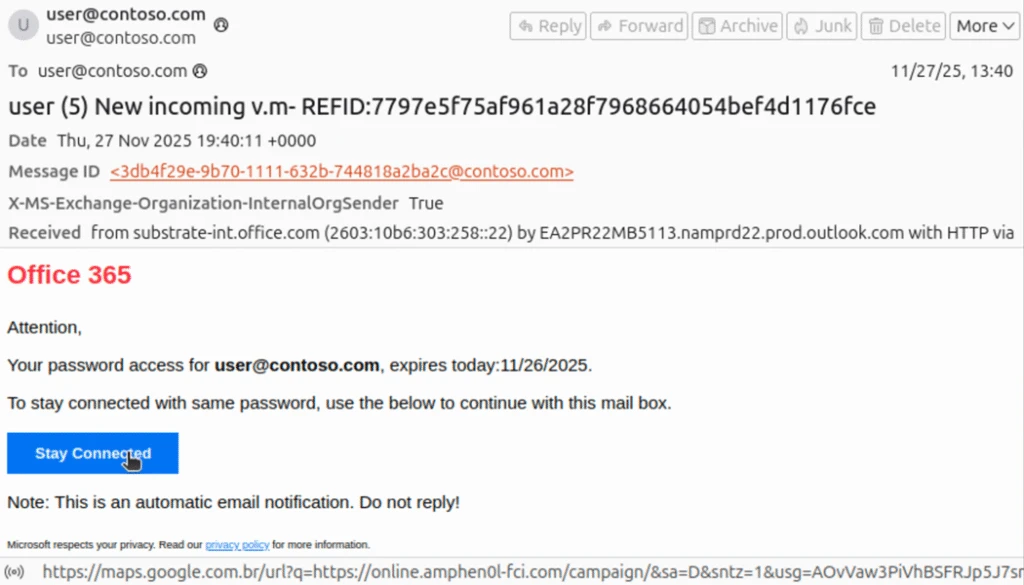
The phishing message masquerades as a notification from Microsoft Office 365 informing the recipient that their password will soon expire, although the subject line appears to be intended for a voicemail themed lure. The link in the email is a nested Google Maps URL pointing to an actor-controlled domain at online.amphen0l-fci[.]com.

Figure 1. This phishing message uses a “password expiration” lure masquerading as a communication from Microsoft.

The second example also shows the expected authentication failures, but with an action of “oreject” with reason 451, indicating complex routing and that the message was delivered to the spam folder.

spf=softfail (sender IP is 162.19.129[.]232) smtp.mailfrom=contoso.com; dkim=none (message not signed) header.d=none;dmarc=fail action=oreject header.from=contoso.com;compauth=none reason=451

This email masquerades as a SharePoint communication asking the recipient to review a shared document. The sender and recipient addresses are the same, though the threat actor has set the display name of the sender to “Pending Approval”. The InternalOrgSender header is set to True. On the surface, this appears to be an internally sent email, though the use of the recipient’s address in both the “To” and “From” fields may alert an end user that this message is not legitimate.

Phishing email impersonating SharePoint requesting the user to review and verify a shared document called Drafts of Agreement (Buyers Signature)
Figure 2. This phishing message uses a “shared document” lure masquerading as SharePoint.

The nested Google URL in the email body points to actor-controlled domain scanuae[.]com. This domain acts as a redirector, loading a script that constructs a URL using the recipient’s Base64-encoded email before loading a custom CAPTCHA page on the Tycoon2FA domain valoufroo.in[.]net. A sample of the script loaded on scanuae[.]com is shown here:

Screenshot of script that crafts and redirects to a URL on a Tycoon2FA PhaaS domain
Figure 3. This script crafts and redirects to a URL on a Tycoon2FA PhaaS domain.

The below example of the custom CAPTCHA page is loaded at the Tycoon2FA domain goorooyi.yoshemo.in[.]net. The CAPTCHA is one of many similar CAPTCHAs observed in relation to Tycoon2FA phishing sequences. Clicking through it leads to a Tycoon2FA phish landing page where the recipient is prompted to input their credentials. Alternatively, clicking through the CAPTCHA may lead to a benign page on a legitimate domain, a tactic intended to evade detection and analysis.

Custom CAPTCHA requesting the user confirm they are not a robot
Figure 4. A custom CAPTCHA loaded on the Tycoon2FA PhaaS domain.

Spoofed email financial scams

Microsoft Threat Intelligence has also observed financial scams sent through spoofed emails. These messages are crafted to look like an email thread between a highly placed employee at the targeted organization, often the CEO of the organization, an individual requesting payment for services rendered, or the accounting department at the targeted organization. In this example, the message was initiated from 163.5.169[.]67 and authentication failures were not enforced, as DMARC is set to none and action is set to none, a permissive mode that does not protect against spoofed messages, allowing the message to reach the inbox on a tenant whose MX record is not pointed to Office 365.

Authentication-Results	spf=fail (sender IP is 163.5.169[.]67) smtp.mailfrom=contoso.com; dkim=none (message not signed) header.d=none;dmarc=none action=none header.from=contoso.com;compauth=fail reason=601

The scam message is crafted to appear as an email thread with a previous message between the CEO of the targeted organization, using the CEO’s real name, and an individual requesting payment of an invoice. The name of the individual requesting payment (here replaced with “John Doe”) appears to be a real person, likely a victim of identity theft. The “To” and “From” fields both use the address for the accounting department at the targeted organization, but with the CEO’s name used as the display name in the “From” field. As with our previous examples, this email superficially appears to be internal to the organization, with only the use of the same address as sender and recipient indicating that the message may not be legitimate. The body of the message also attempts to instill a sense of urgency, asking for prompt payment to retain a discount.

Phishing email requesting the company's accounting department pay an invoice and not reply to this email
Figure 5. An email crafted to appear as part of an ongoing thread directing a company’s accounting department to pay a fake invoice.
Part of the same email thread which appears to be the company's CEO CCing the accounting department to pay any incoming invoices
Figure 6. Included as part of the message shown above, this is crafted to appear as an earlier communication between the CEO of the company and an individual seeking payment.

Most of the emails observed as part of this campaign include three attached files. The first is the fake invoice requesting several thousand dollars to be sent through ACH payment to a bank account at an online banking company. The name of the individual requesting payment is also listed along with a fake company name and address. The bank account was likely set up using the individual’s stolen personally identifiable information.

A fake invoice requesting $9,860 for services like Business System Integration and Remote Strategy Consultation.
Figure 7. A fake invoice including banking information attached to the scam messages.

The second attachment (not pictured) is an IRS W-9 form that lists the name and social security number of the individual used to set up the bank account. The third attachment is a fake “bank letter” ostensibly provided by an employee at the online bank used to set up the fraudulent account. The letter provides the same banking information as the invoice and attempts to add another layer of believability to the scam.

A fake bank letter requesting account and bank routing number information of the target.
Figure 8. A fake “bank letter” also attached to the scam messages.

Falling victim to this scam could result in significant financial losses that may not be recoverable as the funds will likely be moved quickly by the actor in control of the fraudulent bank account.  

Mitigation and protection guidance

Preventing spoofed email attacks

The following links provide information for customers whose MX records are not pointed to Office 365 on how to configure mail flow connectors and rules to prevent spoofed emails from reaching inboxes.

Mitigating AiTM phishing attacks

Microsoft Threat Intelligence recommends the following mitigations, which are effective against a range of phishing threats.

  • Review our recommended settings for Exchange Online Protection and Microsoft Defender for Office 365.
  • Configure Microsoft Defender for Office 365 to recheck links on click. Safe Links provides URL scanning and rewriting of inbound email messages in mail flow, and time-of-click verification of URLs and links in email messages, other Microsoft 365 applications such as Teams, and other locations such as SharePoint Online. Safe Links scanning occurs in addition to the regular anti-spam and anti-malware protection in inbound email messages in Microsoft Exchange Online Protection (EOP). Safe Links scanning can help protect your organization from malicious links used in phishing and other attacks.
  • Turn on Zero-hour auto purge (ZAP) in Defender for Office 365 to quarantine sent mail in response to newly-acquired threat intelligence and retroactively neutralize malicious phishing, spam, or malware messages that have already been delivered to mailboxes.
  • Encourage users to use Microsoft Edge and other web browsers that support Microsoft Defender SmartScreen, which identifies and blocks malicious websites, including phishing sites, scam sites, and sites that host malware.
  • Turn on cloud-delivered protection in Microsoft Defender Antivirus or the equivalent for your antivirus product to cover rapidly evolving attack tools and techniques. Cloud-based machine learning protections block a majority of new and unknown variants
  • Configure Microsoft Entra with increased security.
  • Pilot and deploy phishing-resistant authentication methods for users.
  • Implement Entra ID Conditional Access authentication strength to require phishing-resistant authentication for employees and external users for critical apps.

Mitigating threats from phishing actors begins with securing user identity by eliminating traditional credentials and adopting passwordless, phishing-resistant MFA methods such as FIDO2 security keys, Windows Hello for Business, and Microsoft Authenticator passkeys.

Microsoft recommends enforcing phishing-resistant MFA for privileged roles in Microsoft Entra ID to significantly reduce the risk of account compromise. Learn how to require phishing-resistant MFA for admin roles and plan a passwordless deployment.

Passwordless authentication improves security as well as enhances user experience and reduces IT overhead. Explore Microsoft’s overview of passwordless authentication and authentication strength guidance to understand how to align your organization’s policies with best practices. For broader strategies on defending against identity-based attacks, refer to Microsoft’s blog on evolving identity attack techniques.

If Microsoft Defender alerts indicate suspicious activity or confirmed compromised account or a system, it’s essential to act quickly and thoroughly. Below are recommended remediation steps for each affected identity:

  1. Reset credentials – Immediately reset the account’s password and revoke any active sessions or tokens. This ensures that any stolen credentials can no longer be used.
  2. Re-register or remove MFA devices – Review users MFA devices, specifically those recently added or updated.
  3. Revert unauthorized payroll or financial changes – If the attacker modified payroll or financial configurations, such as direct deposit details, revert them to their original state and notify the appropriate internal teams.
  4. Remove malicious inbox rules – Attackers often create inbox rules to hide their activity or forward sensitive data. Review and delete any suspicious or unauthorized rules.
  5. Verify MFA reconfiguration – Confirm that the user has successfully reconfigured MFA and that the new setup uses secure, phishing-resistant methods.

Microsoft Defender XDR detections

Microsoft Defender XDR coordinates detection, prevention, investigation, and response across endpoints, identities, email, apps to provide integrated protection against attacks like the threat discussed in this blog.

Customers with provisioned access can also use Microsoft Security Copilot in Microsoft Defender to investigate and respond to incidents, hunt for threats, and protect their organization with relevant threat intelligence.

TacticObserved activityMicrosoft Defender coverage
Initial accessThreat actor gains access to account through phishingMicrosoft Defender for Office 365
– A potentially malicious URL click was detected
– Email messages containing malicious file removed after delivery
– Email messages containing malicious URL removed after delivery
– Email messages from a campaign removed after delivery.

Microsoft Defender XDR
– Compromised user account in a recognized attack pattern
– Anonymous IP address
– Suspicious activity likely indicative of a connection to an adversary-in-the-middle (AiTM) phishing site
Defense evasionThreat actor creates an inbox rule post compromiseMicrosoft Defender for Cloud apps

– Possible BEC-related inbox rule
– Suspicious inbox manipulation rule

Microsoft Security Copilot

Security Copilot customers can use the standalone experience to create their own prompts or run the following prebuilt promptbooks to automate incident response or investigation tasks related to this threat:

  • Incident investigation
  • Microsoft User analysis
  • Threat actor profile
  • Threat Intelligence 360 report based on MDTI article
  • Vulnerability impact assessment

Note that some promptbooks require access to plugins for Microsoft products such as Microsoft Defender XDR or Microsoft Sentinel.

Threat intelligence reports

Microsoft customers can use the following reports in Microsoft products to get the most up-to-date information about the threat actor, malicious activity, and techniques discussed in this blog. These reports provide the intelligence, protection information, and recommended actions to prevent, mitigate, or respond to associated threats found in customer environments.

Microsoft Defender XDR threat analytics

Microsoft Security Copilot customers can also use the Microsoft Security Copilot integration in Microsoft Defender Threat Intelligence, either in the Security Copilot standalone portal or in the embedded experience in the Microsoft Defender portal to get more information about this threat actor.

Hunting queries

Microsoft Defender XDR

Microsoft Defender XDR customers can run the following query to find related activity in their networks:

Finding potentially spoofed emails:

EmailEvents
| where Timestamp >= ago(30d)
| where EmailDirection == "Inbound"
| where Connectors == ""  // No connector used
| where SenderFromDomain in ("contoso.com")  // Replace with your domain(s)
| project Timestamp, NetworkMessageId, InternetMessageId, SenderMailFromAddress,
          SenderFromAddress, SenderDisplayName, SenderFromDomain, SenderIPv4,
          RecipientEmailAddress, Subject, DeliveryAction, DeliveryLocation

Finding more suspicious, potentially spoofed emails:

EmailEvents
| where EmailDirection == "Inbound"
| where Connectors == ""  // No connector used
| where SenderFromDomain in ("contoso.com", "fabrikam.com") // Replace with your accepted domains
| where AuthenticationDetails !contains "SPF=pass" // SPF failed or missing
| where AuthenticationDetails !contains "DKIM=pass" // DKIM failed or missing
| where AuthenticationDetails !contains "DMARC=pass" // DMARC failed or missing
| where SenderIPv4 !in ("") // Exclude known relay IPs
| where ThreatTypes has_any ("Phish", "Spam") or ConfidenceLevel == "High" // 
| project Timestamp, NetworkMessageId, InternetMessageId, SenderMailFromAddress,
          SenderFromAddress, SenderDisplayName, SenderFromDomain, SenderIPv4,
          RecipientEmailAddress, Subject, AuthenticationDetails, DeliveryAction

Microsoft Sentinel

Microsoft Sentinel customers can use the TI Mapping analytics (a series of analytics all prefixed with ‘TI map’) to automatically match the malicious domain indicators mentioned in this blog post with data in their workspace. If the TI Map analytics are not currently deployed, customers can install the Threat Intelligence solution from the Microsoft Sentinel Content Hub to have the analytics rule deployed in their Sentinel workspace.

The below hunting queries can also be found in the Microsoft Defender portal for customers who have Microsoft Defender XDR installed from the Content Hub, or accessed directly from GitHub.

Below are the queries using Sentinel Advanced Security Information Model (ASIM) functions to hunt threats across both Microsoft first-party and third-party data sources. ASIM also supports deploying parsers to specific workspaces from GitHub, using an ARM template or manually.

Detect network IP and domain indicators of compromise using ASIM

The following query checks domain and URL IOCs across data sources supported by ASIM web session parser:

//IP list and domain list- _Im_NetworkSession
let lookback = 30d;
let ioc_ip_addr = dynamic(["162.19.196.13", "163.5.221.110", "51.195.94.194", "51.89.59.188"]);
let ioc_domains = dynamic(["2fa.valoufroo.in.net", "valoufroo.in.net", "integralsm.cl", "absoluteprintgroup.com"]);
_Im_NetworkSession(starttime=todatetime(ago(lookback)), endtime=now())
| where DstIpAddr in (ioc_ip_addr) or DstDomain has_any (ioc_domains)
| summarize imNWS_mintime=min(TimeGenerated), imNWS_maxtime=max(TimeGenerated),
  EventCount=count() by SrcIpAddr, DstIpAddr, DstDomain, Dvc, EventProduct, EventVendor

Detect web sessions IP and file hash indicators of compromise using ASIM

The following query checks domain and URL IOCs across data sources supported by ASIM web session parser:

//IP list - _Im_WebSession
let lookback = 30d;
let ioc_ip_addr = dynamic(["162.19.196.13", "163.5.221.110", "51.195.94.194", "51.89.59.188"]);
_Im_WebSession(starttime=todatetime(ago(lookback)), endtime=now())
| where DstIpAddr in (ioc_ip_addr)
| summarize imWS_mintime=min(TimeGenerated), imWS_maxtime=max(TimeGenerated),
  EventCount=count() by SrcIpAddr, DstIpAddr, Url, Dvc, EventProduct, EventVendor

Detect domain and URL indicators of compromise using ASIM

The following query checks domain and URL IOCs across data sources supported by ASIM web session parser:

// file hash list - imFileEvent
// Domain list - _Im_WebSession
let ioc_domains = dynamic(["2fa.valoufroo.in.net", "valoufroo.in.net", "integralsm.cl", "absoluteprintgroup.com"]);
_Im_WebSession (url_has_any = ioc_domains)

Spoofing attempts from specific domains

// Add the list of domains to search for.
let DomainList = dynamic(["2fa.valoufroo.in.net", "valoufroo.in.net", "integralsm.cl", "absoluteprintgroup.com"]); 
EmailEvents 
| where TimeGenerated > ago (1d) and DetectionMethods has "spoof" and SenderFromDomain in~ (DomainList)
| project TimeGenerated, AR=parse_json(AuthenticationDetails) , NetworkMessageId, EmailDirection, Subject, SenderFromAddress, SenderIPv4, ThreatTypes, DetectionMethods, ThreatNames  
| evaluate bag_unpack(AR)  
| where column_ifexists('SPF','') =~ "fail" or  column_ifexists('DMARC','') =~ "fail" or column_ifexists('DKIM','') =~ "fail" or column_ifexists('CompAuth','') =~ "fail"
| extend Name = tostring(split(SenderFromAddress, '@', 0)[0]), UPNSuffix = tostring(split(SenderFromAddress, '@', 1)[0])
| extend Account_0_Name = Name
| extend Account_0_UPNSuffix = UPNSuffix
| extend IP_0_Address = SenderIPv4

Indicators of compromise

IndicatorTypeDescriptionFirst seenLast seen
162.19.196[.]13IPv4An IP address used by an actor to initiate spoofed phishing emails.2025-10-082025-11-21
163.5.221[.]110IPv4An IP address used by an actor to initiate spoofed phishing emails.2025-09-102025-11-20
51.195.94[.]194IPv4An IP address used by an actor to initiate spoofed phishing emails.2025-06-152025-12-07
51.89.59[.]188  IPv4An IP address used by an actor to initiate spoofed phishing emails.2025-09-242025-11-20
2fa.valoufroo.in[.]netDomainA Tycoon2FA PhaaS domain  
valoufroo.in[.]netDomainA Tycoon2FA PhaaS domain  
integralsm[.]clDomainA redirection domain leading to phishing infrastructure.  
absoluteprintgroup[.]comDomainA redirection domain leading to phishing infrastructure.  

References

Learn more

For the latest security research from the Microsoft Threat Intelligence community, check out the Microsoft Threat Intelligence Blog.

To get notified about new publications and to join discussions on social media, follow us on LinkedIn, X (formerly Twitter), and Bluesky. To hear stories and insights from the Microsoft Threat Intelligence community about the ever-evolving threat landscape, listen to the Microsoft Threat Intelligence podcast.

The post Phishing actors exploit complex routing and misconfigurations to spoof domains appeared first on Microsoft Security Blog.


Imposter for hire: How fake people can gain very real access

In the latest edition of our Cyberattack Series, we dive into a real-world case of fake employees. Cybercriminals are no longer just breaking into networks—they’re gaining access by posing as legitimate employees. This form of cyberattack involves operatives posing as legitimate remote hires, slipping past human resources checks and onboarding processes to gain trusted access. Once inside, they exploit corporate systems to steal sensitive data, deploy malicious tools, and funnel profits to state-sponsored programs. In this blog, we unpack how this cyberattack unfolded, the tactics employed, and how Microsoft Incident Response—the Detection and Response Team (DART)—swiftly stepped in with forensic insights and actionable guidance. Download the full report to learn more.

Insight
Recent Gartner research reveals surveyed employers report they are increasingly concerned about candidate fraud. Gartner predicts that by 2028, one in four candidate profiles worldwide will be fake, with possible security repercussions far beyond simply making “a bad hire.”1

What happened?

What began as a routine onboarding turned into a covert operation. In this case, four compromised user accounts were discovered connecting PiKVM devices to employer-issued workstations—hardware that enables full remote control as if the threat actor were physically present. This allowed unknown third parties to bypass normal access controls and extract sensitive data directly from the network. With support from Microsoft Threat Intelligence, we quickly traced the activity to the North Korean remote IT workforce known as Jasper Sleet.

 
TACTIC
PiKVM devices—low-cost, hardware-based remote access tools—were utilized as egress channels. These devices allowed threat actors to maintain persistent, out-of-band access to systems, bypassing traditional endpoint detection and response (EDR) controls. In one case, an identity linked to Jasper Sleet authenticated into the environment through PiKVM, enabling covert data exfiltration.

DART quickly pivoted from proactive threat hunting to full-scale investigation, leveraging numerous specialized tools and techniques. These included, but were not limited to, Cosmic and Arctic for Azure and Active Directory analysis, Fennec for forensic evidence collection across multiple operating system platforms, and telemetry from Microsoft Entra ID protection and Microsoft Defender solutions for endpoint, identity, and cloud apps. Together, these tools and capabilities helped trace the intrusion, contain the threat, and restore operational integrity.

How did Microsoft respond?

Once the scope of the compromise was clear, DART acted immediately to contain and disrupt the cyberattack. The team disabled compromised accounts, restored affected devices to clean backups, and analyzed Unified Audit Logs—a feature of Microsoft 365 within the Microsoft Purview Compliance Manager portal—to trace the threat actor’s movements. Advanced detection tools, including Microsoft Defender for Identity and Microsoft Defender for Endpoint, were deployed to uncover lateral movement and credential misuse. To blunt the broader campaign, Microsoft also suspended thousands of accounts linked to North Korean IT operatives.

What can customers do to strengthen their defenses?

This cyberthreat is challenging, but it’s not insurmountable. By combining strong security operations center (SOC) practices with insider risk strategies, companies can close the gaps that threat actors exploit. Many organizations start by improving visibility through Microsoft 365 Defender and Unified Audit Log integration and protecting sensitive data with Microsoft Purview Data Loss Prevention policies. Additionally, Microsoft Purview Insider Risk Management can help organizations identify risky behaviors before they escalate, while strict pre-employment vetting and enforcing the principle of least privilege reduce exposure from the start. Finally, monitor for unapproved IT tools like PiKVM devices and stay informed through the Threat Analytics dashboard in Microsoft Defender. These cybersecurity practices and real-world strategies, paired with proactive alert management, can give your defenders the confidence to detect, disrupt, and prevent similar attacks.

What is the Cyberattack Series?

In our Cyberattack Series, customers discover how DART investigates unique and notable attacks. For each cyberattack story, we share:

  • How the cyberattack happened.
  • How the breach was discovered.
  • Microsoft’s investigation and eviction of the threat actor.
  • Strategies to avoid similar cyberattacks.

DART is made up of highly skilled investigators, researchers, engineers, and analysts who specialize in handling global security incidents. We’re here for customers with dedicated experts to work with you before, during, and after a cybersecurity incident.

Learn more

To learn more about DART capabilities, please visit our website, or reach out to your Microsoft account manager or Premier Support contact. To learn more about the cybersecurity incidents described above, including more insights and information on how to protect your own organization, download the full report.

To learn more about Microsoft Security solutions, visit our website. Bookmark the Security blog to keep up with our expert coverage on security matters. Also, follow us on LinkedIn (Microsoft Security) and X (@MSFTSecurity) for the latest news and updates on cybersecurity.


1AI Fuels Mistrust Between Employers and Job Candidates; Recruiters Worry About Fraud, Candidates Fear Bias

The post Imposter for hire: How fake people can gain very real access appeared first on Microsoft Security Blog.

Received — 11 January 2026 Microsoft Security Blog

Explore the latest Microsoft Incident Response proactive services for enhanced resilience

7 January 2026 at 18:00

As cyberthreats become faster, harder to detect, and more sophisticated, organizations must focus on building resilience—strengthening their ability to prevent, withstand, and recover from cybersecurity incidents. Resilience can mean the difference between containing an incident with minimal disruption and becoming the next headline.

For more than a decade, Microsoft Incident Response has been at the forefront of the world’s most complex cyberattacks, helping organizations investigate, contain, and recover from incidents. That real-world experience also informs our proactive services, which help organizations improve readiness before an incident occurs. To further help organizations before, during, and after a cyber incident, we’re excited to introduce new proactive incident response services designed to help organizations build resilience and minimize disruption.

Microsoft Incident Response

Strengthen your security with intelligence-driven incident response from Microsoft.

CISO (chief information security officer) collaborating with practitioners in a security operations center.

Expanded proactive services to enhance resilience

Delivered by the same experts who handle real-world crises, Microsoft proactive services equip security teams with insights and skills to be informed, resilient, and ready—because the best response is one you never need to make.

  • Incident response plan development: We assist organizations in developing their own incident response plan, using lessons from real-world incidents.
  • Major event support: We provide dedicated teams during critical events—such as corporate conferences or sporting events—actively monitoring emerging cyberthreats and acting instantly to prevent incidents and interruptions.
  • Cyber range: Microsoft Incident Response delivers simulations that provide high-fidelity, hands-on experience in a controlled environment. Security teams engage directly with threat actor tactics, using Microsoft security tools to detect, investigate, and contain cyberthreats in real time. This immersive approach builds confidence, muscle memory, and validates playbooks before an actual incident occurs using tools customers already own.
  • Advisory: We offer one-on-one, customized engagements, offering strategic recommendations, industry-specific consulting, and expert guidance informed by current threat actor activity and the latest incident response engagements. These services provide on-demand access to Microsoft Incident Response and cybersecurity experts, empowering leadership and technical teams to make informed decisions that reduce risk and accelerate resilience.
  • Mergers and acquisitions compromise assessment: Microsoft Incident Response offers a targeted compromise assessment performed during or around a merger, acquisition, or divestiture to determine whether the organization being acquired—or the environment being integrated—has been previously or is currently compromised by threat actors.

Building on a strong proactive foundation

These new services build on Microsoft Incident Response’s established proactive offerings, which are trusted by organizations of all sizes and across industries.

  • Our popular compromise assessment delivers deep forensic investigations to identify indicators of compromise (IOCs), threat actor activity, and vulnerabilities hidden in your environment. This service includes advanced threat hunting and forensic examination, providing actionable recommendations to harden your security posture.
  • Identity assessment offers a targeted evaluation of the identity control plane, pinpointing weaknesses in authentication and access policies. By addressing these gaps early, organizations reduce exposure to credential-based attacks and help ensure identity systems remain resilient against evolving cyberthreats.
  • Identity hardening works with organizations to deploy policies and configurations that block unauthorized access and strengthen authentication mechanisms. Engineers provide proven containment and recovery strategies to secure the identity control plane.
  • Tabletop exercises go beyond theory by immersing leadership, legal, and technical teams in realistic scenarios involving an incident. These sessions expose gaps in defenses and response plans, sharpen decision-making under pressure, and foster alignment on regulatory obligations and executive communications.

Make resilience your strongest defense

Incident response isn’t just about reacting to incidents—it’s giving organizations the confidence and capabilities needed to prevent them. Microsoft Incident Response helps customers move from security uncertainty to clarity and readiness with expert-led preparation, gap detection, defense hardening, and tailored threat insights. By investing in proactive services, you reduce risk, accelerate recovery, and strengthen your security posture before threats strike. Don’t wait for an incident to test your resilience—invest in proactive defense today.

To learn more about Microsoft Security solutions, visit our website. Bookmark the Security blog to keep up with our expert coverage on security matters. Also, follow us on LinkedIn (Microsoft Security) and X (@MSFTSecurity) for the latest news and updates on cybersecurity.

The post Explore the latest Microsoft Incident Response proactive services for enhanced resilience appeared first on Microsoft Security Blog.

Phishing actors exploit complex routing and misconfigurations to spoof domains

Phishing actors are exploiting complex routing scenarios and misconfigured spoof protections to effectively spoof organizations’ domains and deliver phishing emails that appear, superficially, to have been sent internally. Threat actors have leveraged this vector to deliver a wide variety of phishing messages related to various phishing-as-a-service (PhaaS) platforms such as Tycoon2FA. These include messages with lures themed around voicemails, shared documents, communications from human resources (HR) departments, password resets or expirations, and others, leading to credential phishing.

This attack vector is not new but has seen increased visibility and use since May 2025. The phishing campaigns Microsoft has observed using this attack vector are opportunistic rather than targeted in nature, with messages sent to a wide variety of organizations across several industries and verticals. Notably, Microsoft has also observed a campaign leveraging this vector to conduct financial scams against organizations. While these attacks share many characteristics with other credential phishing email campaigns, the attack vector abusing complex routing and improperly configured spoof protections distinguishes these campaigns. The phishing attack vector covered in this blog post does not affect customers whose Microsoft Exchange mail exchanger (MX) records point to Office 365; these tenants are protected by native built-in spoofing detections.

Phishing messages sent through this vector may be more effective as they appear to be internally sent messages. Successful credential compromise through phishing attacks may lead to data theft or business email compromise (BEC) attacks against the affected organization or partners and may require extensive remediation efforts, and/or lead to loss of funds in the case of financial scams. While Microsoft detects the majority of these phishing attack attempts, organizations can further reduce risk by properly configuring spoof protections and any third-party connectors to prevent spoofed phish or scam messages sent through this attack vector from reaching inboxes.

In this blog, we explain how threat actors are exploiting these routing scenarios and provide observations from related attacks. We provide specific examples—including technical analysis of phishing messages, spoof protections, and email headers—to help identify this attack vector. This blog also provides additional resources with information on how to set up mail flow rules, enforce spoof protections, and configure third-party connectors to prevent spoofed phishing messages from reaching user inboxes.

Spoofed phishing attacks

In cases where a tenant has configured a complex routing scenario, where the MX records are not pointed to Office 365, and the tenant has not configured strictly enforced spoof protections, threat actors may be able to send spoofed phishing messages that appear to have come from the tenant’s own domain. Setting strict Domain-based Message Authentication, Reporting, and Conformance (DMARC) reject and SPF hard fail (rather than soft fail) policies and properly configuring any third-party connectors will prevent phishing attacks spoofing organizations’ domains.

This vector is not, as has been publicly reported, a vulnerability of Direct Send, a mail flow method in Microsoft 365 Exchange Online that allows devices (like printers, scanners), applications, or third-party services to send email without authentication using the organization’s accepted domain, but rather takes advantage of complex routing scenarios and misconfigured spoof protections. Tenants with MX records pointed directly to Office 365 are not vulnerable to this attack vector of sending spoofed phishing messages.

As with most other phishing attacks observed by Microsoft Threat intelligence throughout 2025, the bulk of phishing campaigns observed using this attack vector employ the Tycoon2FA PhaaS platform, in addition to several other phishing services in use as well. In October 2025, Microsoft Defender for Office 365 blocked more than 13 million malicious emails linked to Tycoon2FA, including many attacks spoofing organizations’ domains. PhaaS platforms such as Tycoon2FA provide threat actors with a suite of capabilities, support, and ready-made lures and infrastructure to carry out phishing attacks and compromise credentials. These capabilities include adversary-in-the-middle (AiTM) phishing, which is intended to circumvent multifactor authentication (MFA) protections. Credential phishing attacks sent through this method employ a variety of themes such as voicemail notifications, password resets, HR communications, among others.

Microsoft Threat Intelligence has also observed emails intended to trick organizations into paying fake invoices, potentially leading to financial losses. Generally, in these spoofed phishing attacks, the recipient email address is used in both the “To” and “From” fields of the email, though some attacks will change the display name of the sender to make the attack more convincing and the “From” field could contain any valid internal email address.

Credential phishing with spoofed emails

The bulk of phishing messages sent through this attack vector uses the same lures as conventionally sent phishing messages, masquerading as services such as Docusign, or communications from HR regarding salary or benefits changes, password resets, and so on. They may employ clickable links in the email body or QR codes in attachments or other means of getting the recipient to navigate to a phish landing page. The appearance of having been sent from an internal email address is the most visible distinction to an end user, often with the same email address used in the “To” and “From” fields.

Email headers provide more information regarding the delivery of spoofed phishing emails, such as the appearance of an external IP address used by the threat actor to initiate the phishing attack. Depending on the configuration of the tenant, there will be SPF soft or hard fail, DMARC fail, and DKIM will equal none as both the sender and recipient appear to be in the same domain. At a basic level of protection, these should cause a message to land in a spam folder, but a user may retrieve and interact with phishing messages routed to spam. The X-MS-Exchange-Organization-InternalOrgSender will be set to True, but X-MS-Exchange-Organization-MessageDirectionality will be set to Incoming and X-MS-Exchange-Organization-ASDirectionalityType will have a value of “1”, indicating that the message was sent from outside of the organization. The combination of internal organization sender and incoming directionality is indicative of a message spoofed to appear as an internal communication, but not necessarily indicative of maliciousness. X-MS-Exchange-Organization-AuthAs will be set to Anonymous, indicating that the message came from an external source.

The Authentication-Results header example provided below illustrates the result of enforced authentication. 000 is an explicit DMARC failure. The resultant action is either reject or quarantine. The headers shown here are examples of properly configured environments, effectively blocking phishing emails sent through this attack vector:

spf=fail (sender IP is 51.89.59[.]188) smtp.mailfrom=contoso.com; dkim=none (message not signed) header.d=none;dmarc=fail action=quarantine header.from=contoso.com;compauth=fail reason=000
spf=fail (sender IP is 51.68.182[.]101) smtp.mailfrom= contoso.com; dkim=none (message not signed) header.d=none;dmarc=fail action=oreject header.from=contoso.com;

Any third-party connectors—such as a spam filtering service, security solution, or archiving service—must be configured properly or spoof detections cannot be calculated correctly, allowing phishing emails such as the examples below to be delivered. The first of these examples indicate the expected authentication failures in the header, but no action is taken due to reason 905, which indicates that the tenant has set up complex routing where the mail exchanger record (MX record) points to either an on-premises Exchange environment or a third-party service before reaching Microsoft 365:

spf=fail (sender IP is 176.111.219[.]85) smtp.mailfrom= contoso.com; dkim=none (message not signed) header.d=none;dmarc=fail action=none header.from= contoso.com;compauth=none reason=905

The phishing message masquerades as a notification from Microsoft Office 365 informing the recipient that their password will soon expire, although the subject line appears to be intended for a voicemail themed lure. The link in the email is a nested Google Maps URL pointing to an actor-controlled domain at online.amphen0l-fci[.]com.

Figure 1. This phishing message uses a “password expiration” lure masquerading as a communication from Microsoft.

The second example also shows the expected authentication failures, but with an action of “oreject” with reason 451, indicating complex routing and that the message was delivered to the spam folder.

spf=softfail (sender IP is 162.19.129[.]232) smtp.mailfrom=contoso.com; dkim=none (message not signed) header.d=none;dmarc=fail action=oreject header.from=contoso.com;compauth=none reason=451

This email masquerades as a SharePoint communication asking the recipient to review a shared document. The sender and recipient addresses are the same, though the threat actor has set the display name of the sender to “Pending Approval”. The InternalOrgSender header is set to True. On the surface, this appears to be an internally sent email, though the use of the recipient’s address in both the “To” and “From” fields may alert an end user that this message is not legitimate.

Phishing email impersonating SharePoint requesting the user to review and verify a shared document called Drafts of Agreement (Buyers Signature)
Figure 2. This phishing message uses a “shared document” lure masquerading as SharePoint.

The nested Google URL in the email body points to actor-controlled domain scanuae[.]com. This domain acts as a redirector, loading a script that constructs a URL using the recipient’s Base64-encoded email before loading a custom CAPTCHA page on the Tycoon2FA domain valoufroo.in[.]net. A sample of the script loaded on scanuae[.]com is shown here:

Screenshot of script that crafts and redirects to a URL on a Tycoon2FA PhaaS domain
Figure 3. This script crafts and redirects to a URL on a Tycoon2FA PhaaS domain.

The below example of the custom CAPTCHA page is loaded at the Tycoon2FA domain goorooyi.yoshemo.in[.]net. The CAPTCHA is one of many similar CAPTCHAs observed in relation to Tycoon2FA phishing sequences. Clicking through it leads to a Tycoon2FA phish landing page where the recipient is prompted to input their credentials. Alternatively, clicking through the CAPTCHA may lead to a benign page on a legitimate domain, a tactic intended to evade detection and analysis.

Custom CAPTCHA requesting the user confirm they are not a robot
Figure 4. A custom CAPTCHA loaded on the Tycoon2FA PhaaS domain.

Spoofed email financial scams

Microsoft Threat Intelligence has also observed financial scams sent through spoofed emails. These messages are crafted to look like an email thread between a highly placed employee at the targeted organization, often the CEO of the organization, an individual requesting payment for services rendered, or the accounting department at the targeted organization. In this example, the message was initiated from 163.5.169[.]67 and authentication failures were not enforced, as DMARC is set to none and action is set to none, a permissive mode that does not protect against spoofed messages, allowing the message to reach the inbox on a tenant whose MX record is not pointed to Office 365.

Authentication-Results	spf=fail (sender IP is 163.5.169[.]67) smtp.mailfrom=contoso.com; dkim=none (message not signed) header.d=none;dmarc=none action=none header.from=contoso.com;compauth=fail reason=601

The scam message is crafted to appear as an email thread with a previous message between the CEO of the targeted organization, using the CEO’s real name, and an individual requesting payment of an invoice. The name of the individual requesting payment (here replaced with “John Doe”) appears to be a real person, likely a victim of identity theft. The “To” and “From” fields both use the address for the accounting department at the targeted organization, but with the CEO’s name used as the display name in the “From” field. As with our previous examples, this email superficially appears to be internal to the organization, with only the use of the same address as sender and recipient indicating that the message may not be legitimate. The body of the message also attempts to instill a sense of urgency, asking for prompt payment to retain a discount.

Phishing email requesting the company's accounting department pay an invoice and not reply to this email
Figure 5. An email crafted to appear as part of an ongoing thread directing a company’s accounting department to pay a fake invoice.
Part of the same email thread which appears to be the company's CEO CCing the accounting department to pay any incoming invoices
Figure 6. Included as part of the message shown above, this is crafted to appear as an earlier communication between the CEO of the company and an individual seeking payment.

Most of the emails observed as part of this campaign include three attached files. The first is the fake invoice requesting several thousand dollars to be sent through ACH payment to a bank account at an online banking company. The name of the individual requesting payment is also listed along with a fake company name and address. The bank account was likely set up using the individual’s stolen personally identifiable information.

A fake invoice requesting $9,860 for services like Business System Integration and Remote Strategy Consultation.
Figure 7. A fake invoice including banking information attached to the scam messages.

The second attachment (not pictured) is an IRS W-9 form that lists the name and social security number of the individual used to set up the bank account. The third attachment is a fake “bank letter” ostensibly provided by an employee at the online bank used to set up the fraudulent account. The letter provides the same banking information as the invoice and attempts to add another layer of believability to the scam.

A fake bank letter requesting account and bank routing number information of the target.
Figure 8. A fake “bank letter” also attached to the scam messages.

Falling victim to this scam could result in significant financial losses that may not be recoverable as the funds will likely be moved quickly by the actor in control of the fraudulent bank account.  

Mitigation and protection guidance

Preventing spoofed email attacks

The following links provide information for customers whose MX records are not pointed to Office 365 on how to configure mail flow connectors and rules to prevent spoofed emails from reaching inboxes.

Mitigating AiTM phishing attacks

Microsoft Threat Intelligence recommends the following mitigations, which are effective against a range of phishing threats.

  • Review our recommended settings for Exchange Online Protection and Microsoft Defender for Office 365.
  • Configure Microsoft Defender for Office 365 to recheck links on click. Safe Links provides URL scanning and rewriting of inbound email messages in mail flow, and time-of-click verification of URLs and links in email messages, other Microsoft 365 applications such as Teams, and other locations such as SharePoint Online. Safe Links scanning occurs in addition to the regular anti-spam and anti-malware protection in inbound email messages in Microsoft Exchange Online Protection (EOP). Safe Links scanning can help protect your organization from malicious links used in phishing and other attacks.
  • Turn on Zero-hour auto purge (ZAP) in Defender for Office 365 to quarantine sent mail in response to newly-acquired threat intelligence and retroactively neutralize malicious phishing, spam, or malware messages that have already been delivered to mailboxes.
  • Encourage users to use Microsoft Edge and other web browsers that support Microsoft Defender SmartScreen, which identifies and blocks malicious websites, including phishing sites, scam sites, and sites that host malware.
  • Turn on cloud-delivered protection in Microsoft Defender Antivirus or the equivalent for your antivirus product to cover rapidly evolving attack tools and techniques. Cloud-based machine learning protections block a majority of new and unknown variants
  • Configure Microsoft Entra with increased security.
  • Pilot and deploy phishing-resistant authentication methods for users.
  • Implement Entra ID Conditional Access authentication strength to require phishing-resistant authentication for employees and external users for critical apps.

Mitigating threats from phishing actors begins with securing user identity by eliminating traditional credentials and adopting passwordless, phishing-resistant MFA methods such as FIDO2 security keys, Windows Hello for Business, and Microsoft Authenticator passkeys.

Microsoft recommends enforcing phishing-resistant MFA for privileged roles in Microsoft Entra ID to significantly reduce the risk of account compromise. Learn how to require phishing-resistant MFA for admin roles and plan a passwordless deployment.

Passwordless authentication improves security as well as enhances user experience and reduces IT overhead. Explore Microsoft’s overview of passwordless authentication and authentication strength guidance to understand how to align your organization’s policies with best practices. For broader strategies on defending against identity-based attacks, refer to Microsoft’s blog on evolving identity attack techniques.

If Microsoft Defender alerts indicate suspicious activity or confirmed compromised account or a system, it’s essential to act quickly and thoroughly. Below are recommended remediation steps for each affected identity:

  1. Reset credentials – Immediately reset the account’s password and revoke any active sessions or tokens. This ensures that any stolen credentials can no longer be used.
  2. Re-register or remove MFA devices – Review users MFA devices, specifically those recently added or updated.
  3. Revert unauthorized payroll or financial changes – If the attacker modified payroll or financial configurations, such as direct deposit details, revert them to their original state and notify the appropriate internal teams.
  4. Remove malicious inbox rules – Attackers often create inbox rules to hide their activity or forward sensitive data. Review and delete any suspicious or unauthorized rules.
  5. Verify MFA reconfiguration – Confirm that the user has successfully reconfigured MFA and that the new setup uses secure, phishing-resistant methods.

Microsoft Defender XDR detections

Microsoft Defender XDR coordinates detection, prevention, investigation, and response across endpoints, identities, email, apps to provide integrated protection against attacks like the threat discussed in this blog.

Customers with provisioned access can also use Microsoft Security Copilot in Microsoft Defender to investigate and respond to incidents, hunt for threats, and protect their organization with relevant threat intelligence.

TacticObserved activityMicrosoft Defender coverage
Initial accessThreat actor gains access to account through phishingMicrosoft Defender for Office 365
– A potentially malicious URL click was detected
– Email messages containing malicious file removed after delivery
– Email messages containing malicious URL removed after delivery
– Email messages from a campaign removed after delivery.

Microsoft Defender XDR
– Compromised user account in a recognized attack pattern
– Anonymous IP address
– Suspicious activity likely indicative of a connection to an adversary-in-the-middle (AiTM) phishing site
Defense evasionThreat actor creates an inbox rule post compromiseMicrosoft Defender for Cloud apps

– Possible BEC-related inbox rule
– Suspicious inbox manipulation rule

Microsoft Security Copilot

Security Copilot customers can use the standalone experience to create their own prompts or run the following prebuilt promptbooks to automate incident response or investigation tasks related to this threat:

  • Incident investigation
  • Microsoft User analysis
  • Threat actor profile
  • Threat Intelligence 360 report based on MDTI article
  • Vulnerability impact assessment

Note that some promptbooks require access to plugins for Microsoft products such as Microsoft Defender XDR or Microsoft Sentinel.

Threat intelligence reports

Microsoft customers can use the following reports in Microsoft products to get the most up-to-date information about the threat actor, malicious activity, and techniques discussed in this blog. These reports provide the intelligence, protection information, and recommended actions to prevent, mitigate, or respond to associated threats found in customer environments.

Microsoft Defender XDR threat analytics

Microsoft Security Copilot customers can also use the Microsoft Security Copilot integration in Microsoft Defender Threat Intelligence, either in the Security Copilot standalone portal or in the embedded experience in the Microsoft Defender portal to get more information about this threat actor.

Hunting queries

Microsoft Defender XDR

Microsoft Defender XDR customers can run the following query to find related activity in their networks:

Finding potentially spoofed emails:

EmailEvents
| where Timestamp >= ago(30d)
| where EmailDirection == "Inbound"
| where Connectors == ""  // No connector used
| where SenderFromDomain in ("contoso.com")  // Replace with your domain(s)
| project Timestamp, NetworkMessageId, InternetMessageId, SenderMailFromAddress,
          SenderFromAddress, SenderDisplayName, SenderFromDomain, SenderIPv4,
          RecipientEmailAddress, Subject, DeliveryAction, DeliveryLocation

Finding more suspicious, potentially spoofed emails:

EmailEvents
| where EmailDirection == "Inbound"
| where Connectors == ""  // No connector used
| where SenderFromDomain in ("contoso.com", "fabrikam.com") // Replace with your accepted domains
| where AuthenticationDetails !contains "SPF=pass" // SPF failed or missing
| where AuthenticationDetails !contains "DKIM=pass" // DKIM failed or missing
| where AuthenticationDetails !contains "DMARC=pass" // DMARC failed or missing
| where SenderIPv4 !in ("") // Exclude known relay IPs
| where ThreatTypes has_any ("Phish", "Spam") or ConfidenceLevel == "High" // 
| project Timestamp, NetworkMessageId, InternetMessageId, SenderMailFromAddress,
          SenderFromAddress, SenderDisplayName, SenderFromDomain, SenderIPv4,
          RecipientEmailAddress, Subject, AuthenticationDetails, DeliveryAction

Microsoft Sentinel

Microsoft Sentinel customers can use the TI Mapping analytics (a series of analytics all prefixed with ‘TI map’) to automatically match the malicious domain indicators mentioned in this blog post with data in their workspace. If the TI Map analytics are not currently deployed, customers can install the Threat Intelligence solution from the Microsoft Sentinel Content Hub to have the analytics rule deployed in their Sentinel workspace.

The below hunting queries can also be found in the Microsoft Defender portal for customers who have Microsoft Defender XDR installed from the Content Hub, or accessed directly from GitHub.

Below are the queries using Sentinel Advanced Security Information Model (ASIM) functions to hunt threats across both Microsoft first-party and third-party data sources. ASIM also supports deploying parsers to specific workspaces from GitHub, using an ARM template or manually.

Detect network IP and domain indicators of compromise using ASIM

The following query checks domain and URL IOCs across data sources supported by ASIM web session parser:

//IP list and domain list- _Im_NetworkSession
let lookback = 30d;
let ioc_ip_addr = dynamic(["162.19.196.13", "163.5.221.110", "51.195.94.194", "51.89.59.188"]);
let ioc_domains = dynamic(["2fa.valoufroo.in.net", "valoufroo.in.net", "integralsm.cl", "absoluteprintgroup.com"]);
_Im_NetworkSession(starttime=todatetime(ago(lookback)), endtime=now())
| where DstIpAddr in (ioc_ip_addr) or DstDomain has_any (ioc_domains)
| summarize imNWS_mintime=min(TimeGenerated), imNWS_maxtime=max(TimeGenerated),
  EventCount=count() by SrcIpAddr, DstIpAddr, DstDomain, Dvc, EventProduct, EventVendor

Detect web sessions IP and file hash indicators of compromise using ASIM

The following query checks domain and URL IOCs across data sources supported by ASIM web session parser:

//IP list - _Im_WebSession
let lookback = 30d;
let ioc_ip_addr = dynamic(["162.19.196.13", "163.5.221.110", "51.195.94.194", "51.89.59.188"]);
_Im_WebSession(starttime=todatetime(ago(lookback)), endtime=now())
| where DstIpAddr in (ioc_ip_addr)
| summarize imWS_mintime=min(TimeGenerated), imWS_maxtime=max(TimeGenerated),
  EventCount=count() by SrcIpAddr, DstIpAddr, Url, Dvc, EventProduct, EventVendor

Detect domain and URL indicators of compromise using ASIM

The following query checks domain and URL IOCs across data sources supported by ASIM web session parser:

// file hash list - imFileEvent
// Domain list - _Im_WebSession
let ioc_domains = dynamic(["2fa.valoufroo.in.net", "valoufroo.in.net", "integralsm.cl", "absoluteprintgroup.com"]);
_Im_WebSession (url_has_any = ioc_domains)

Spoofing attempts from specific domains

// Add the list of domains to search for.
let DomainList = dynamic(["2fa.valoufroo.in.net", "valoufroo.in.net", "integralsm.cl", "absoluteprintgroup.com"]); 
EmailEvents 
| where TimeGenerated > ago (1d) and DetectionMethods has "spoof" and SenderFromDomain in~ (DomainList)
| project TimeGenerated, AR=parse_json(AuthenticationDetails) , NetworkMessageId, EmailDirection, Subject, SenderFromAddress, SenderIPv4, ThreatTypes, DetectionMethods, ThreatNames  
| evaluate bag_unpack(AR)  
| where column_ifexists('SPF','') =~ "fail" or  column_ifexists('DMARC','') =~ "fail" or column_ifexists('DKIM','') =~ "fail" or column_ifexists('CompAuth','') =~ "fail"
| extend Name = tostring(split(SenderFromAddress, '@', 0)[0]), UPNSuffix = tostring(split(SenderFromAddress, '@', 1)[0])
| extend Account_0_Name = Name
| extend Account_0_UPNSuffix = UPNSuffix
| extend IP_0_Address = SenderIPv4

Indicators of compromise

IndicatorTypeDescriptionFirst seenLast seen
162.19.196[.]13IPv4An IP address used by an actor to initiate spoofed phishing emails.2025-10-082025-11-21
163.5.221[.]110IPv4An IP address used by an actor to initiate spoofed phishing emails.2025-09-102025-11-20
51.195.94[.]194IPv4An IP address used by an actor to initiate spoofed phishing emails.2025-06-152025-12-07
51.89.59[.]188  IPv4An IP address used by an actor to initiate spoofed phishing emails.2025-09-242025-11-20
2fa.valoufroo.in[.]netDomainA Tycoon2FA PhaaS domain  
valoufroo.in[.]netDomainA Tycoon2FA PhaaS domain  
integralsm[.]clDomainA redirection domain leading to phishing infrastructure.  
absoluteprintgroup[.]comDomainA redirection domain leading to phishing infrastructure.  

References

Learn more

For the latest security research from the Microsoft Threat Intelligence community, check out the Microsoft Threat Intelligence Blog.

To get notified about new publications and to join discussions on social media, follow us on LinkedIn, X (formerly Twitter), and Bluesky. To hear stories and insights from the Microsoft Threat Intelligence community about the ever-evolving threat landscape, listen to the Microsoft Threat Intelligence podcast.

The post Phishing actors exploit complex routing and misconfigurations to spoof domains appeared first on Microsoft Security Blog.
Introducing the Microsoft Defender Experts Suite: Elevate your security with expert-led services

Security teams are being pushed to their limits as AI‑powered cyberattacks grow in speed, scale, and sophistication—and only 14% of organizations surveyed by the World Economic Forum report they feel confident they have the right people and skills needed to meet their cybersecurity objectives.1 As cyberthreats evolve faster than many teams can hire or train, pressure mounts to strengthen defenses, increase resilience, and achieve security outcomes faster. We’re here to help. Introducing the new Microsoft Defender Experts Suite, a new security offering that provides expert-led services that help organizations defend against advanced cyberthreats, build long‑term resilience, and modernize security operations with confidence.

Microsoft Defender Experts Suite

Get integrated security services that protect your organization and accelerate security outcomes in the new security offering from Microsoft.

A group of workers sitting at computers.

Elevate your security with expert-led services

Even as today’s security challenges feel overwhelming, you don’t have to face them alone. The Microsoft Defender Experts Suite combines managed extended detection and response (MXDR), end-to-end proactive and reactive incident response, and direct access to a designated Microsoft security advisor to help you protect your organization and accelerate security outcomes.

Graphic showing the three benefits of the Microsoft Defender Experts Suite: Defending against cyberthreats, building cyber resilience, and modernizing security operations.

The Defender Experts Suite can help you do the following:

Defend against cyberthreats

Microsoft Defender Experts for XDR delivers round-the-clock MXDR, natively integrated with Microsoft Defender. Our seasoned analysts—bringing more than 600 years of combined experience—triage, investigate, and respond to incidents across endpoints, identities, email, cloud apps, and cloud workloads, helping to reduce alert fatigue and improve security operations center (SOC) efficiency. Defender Experts for XDR includes Microsoft Defender Experts for Hunting, which provides around-the-clock, proactive threat hunting across domains to help uncover emerging cyberthreats earlier.

With Defender Experts for XDR, you gain access to a designated service delivery engineer who helps you get the full value of the service and provides ongoing recommendations to strengthen your security posture. You can also connect with our experts on-demand for deeper insight into specific incidents, attack vectors, or nation-state cyberthreats.

Build cyber resilience

Microsoft Incident Response offers proactive and reactive services that help organizations prevent, withstand, and recover from cyber incidents. Backed by extensive threat intelligence, proprietary investigation tools, and direct engagement with Microsoft product engineering, Microsoft Incident Response strengthens resilience and delivers rapid response. Proactive services—such as incident response planning, assessments, simulation exercises, and advisory services—enhance incident response readiness, improve response capabilities, and provide tailored insights on the cyberthreat landscape.

When an incident does occur, Microsoft Incident Response rapidly investigates, removes the cyberattacker, and helps accelerates recovery. Operating on the frontlines of the world’s most complex cyberattacks since 2008, the Microsoft Incident Response team provides speed, precision, and confidence in the moments that matter most.

Modernize security operations

Microsoft Enhanced Designated Engineering provides direct access to Microsoft security advisors who partner with customers to strengthen security posture and operational maturity. Our experts work with you to help ensure Microsoft security technologies are properly architected, configured, and used effectively to achieve desired security outcomes, supported by ongoing assessments and continuous improvement. They also collaborate with security teams to optimize operations, modernize processes, and apply Microsoft best practices and real world threat intelligence to improve detection, response, and resilience—helping organizations operate with confidence as cyberthreats evolve.

Better together—integrated security services

With the Defender Experts Suite, organizations get more than standalone expertise—they gain integrated security services that reduce complexity and simplify operations. With shared intelligence and connected workflows, investigations can move faster, recommendations land in context, and improvements compound over time. Instead of managing multiple providers, security teams benefit from streamlined communication, consistent guidance, and comprehensive expertise from Microsoft security experts. This can result in a more resilient, more efficient, and more confident security operation that matures steadily rather than reacting in silos.

End-to-end, expert-led protection

Let’s look at the Microsoft Defender Experts Suite in action. When you first get started with the Microsoft Defender Experts Suite, Enhanced Designated Engineering guides you through deploying Defender workloads securely and helps ensure Defender Experts for XDR is configured correctly. Once operational, Defender Experts for XDR provides constant MXDR and threat hunting to protect your environment. Defender Experts for XDR will provide ongoing recommendations to improve your security posture, and your designated Microsoft security advisor helps you act on those recommendations as your environment evolves.

Assessments delivered by Microsoft Incident Response may uncover vulnerabilities or gaps. The Microsoft security advisor will step in to help you address them and strengthen resilience. And if an incident occurs, Defender Experts for XDR will work hand-in-hand with the Microsoft Incident Response team to help you respond and recover quickly. With end-to-end services delivered by Microsoft, you can benefit from reduced complexity, streamlined communication, comprehensive expertise, and continuous improvement.

A circle graph illustrating the benefits of Microsoft Enhanced Designated Engineering.

Get started with the Microsoft Defender Experts Suite today and save

For a limited time, organizations can unlock the full value of expert-led services with a promotional offer. From January 1, 2026, through December 31, 2026, eligible customers can save up to 66% on the Microsoft Defender Experts Suite.2 Read more about the Microsoft Defender Experts Suite and get started now.

To learn more about Microsoft Security solutions, visit our website. Bookmark the Security blog to keep up with our expert coverage on security matters. Also, follow us on LinkedIn (Microsoft Security) and X (@MSFTSecurity) for the latest news and updates on cybersecurity.


1Bridging the Cyber Skills Gap, World Economic Forum, 2025.

2Eligible customers must purchase a minimum of 1,500 seats of the Microsoft Defender Experts Suite and have either Microsoft 365 E5 or Microsoft Defender and Purview  Frontline Workers (formerly Microsoft 365 F5).

The post Introducing the Microsoft Defender Experts Suite: Elevate your security with expert-led services appeared first on Microsoft Security Blog.

New Microsoft e-book: 3 reasons point solutions are holding you back

18 December 2025 at 18:00

While patchwork tools slow defenders down and impact visibility into potential cyberthreats, they’re an unfortunate reality for many organizations. As digital risk accelerates and attack surfaces multiply, security leaders are doing their best to stitch together point solutions while trying to avoid blind spots that cyberattackers can exploit. But point solutions can only go so far. For protection that keeps up with today’s fast-evolving cyberthreats, the way forward is a unified, AI-ready security platform that consolidates telemetry, analytics, and automation across detection, response, exposure management, and cloud security.

In our new e-book, 3 reasons point solutions are holding you back, we share how a unified, AI-ready platform can transform your security operations to help keep your organization safe. Read on to learn more about the key concepts in our new e-book.

What you’ll learn:

  1. The hidden costs of fragmented tools: How disconnected solutions inflate operational costs, slow investigations, and prevent AI from delivering its full potential.
  2. The power of unification: Why a unified platform delivers full-spectrum visibility, predictive defense, and agentic assistance—helping teams respond faster and more effectively.
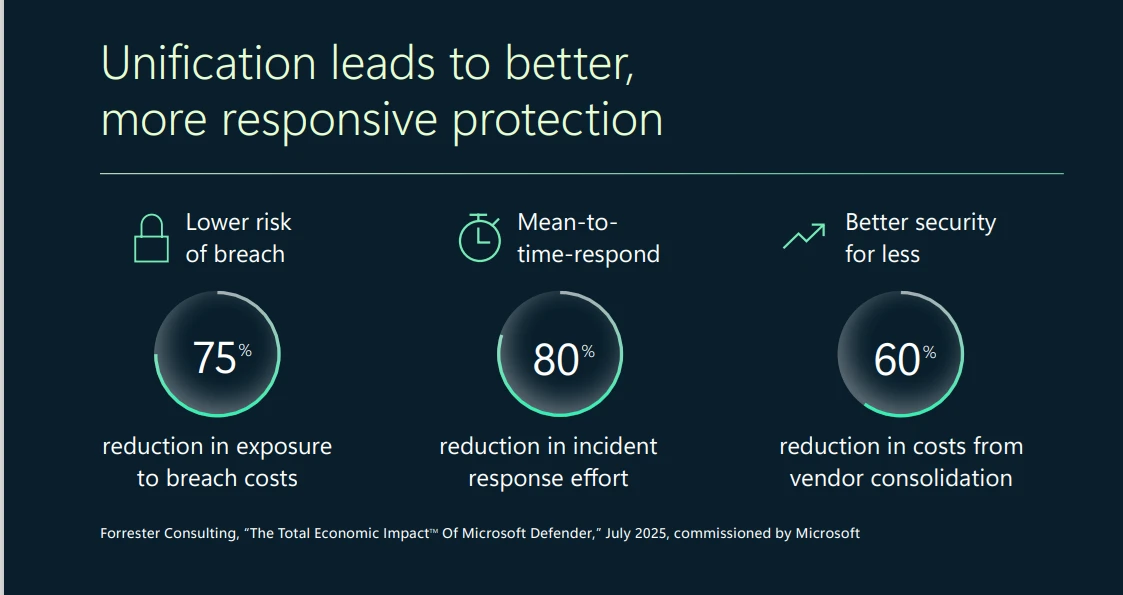
  3. Real-world results: See how organizations are reducing breach exposure, cutting incident response effort, and lowering costs through consolidation.

Rethinking security for the AI era

AI is transforming cybersecurity for both defenders and threat actors. But disconnected tools prevent defenders from seeing the full picture and block AI from delivering its full value. Without unified data and context, AI models can’t detect subtle patterns or anticipate evolving cyberthreats. Imagine a security approach that doesn’t just react but predicts—one that turns fragmented signals into actionable insight. An AI-ready platform unifies security data into a scalable, intelligent data lake enriched with threat intelligence and mapped into a living security graph. In our e-book, we explore how this shift transforms security from a patchwork of disparate tools to a strategic advantage for organizations—delivering clarity, speed, and resilience in ways point solutions simply can’t match.

The e-book shares more about how AI-ready unity includes the ability to:

  • Predict attack paths and prevent breaches with exposure management.
  • Rapidly remediate with AI-powered protection and improved mean time to resolution (MTTR).
  • Detect emerging cyberthreats using cyberattacker-level intelligence.
  • Continuously optimize security operations center (SOC) operations with centralized data and advanced analytics.

Measurable benefits of a unified security platform

By moving away from fragmented portfolios, organizations see dramatic improvements in efficiency and resilience. Instead of drowning in alert triage, security teams can redirect their focus to proactive remediation and prevention. And AI-powered detection shortens containment from hours to minutes—often halting ransomware before encryption begins.

A chart showing that a unified security strategy leads to better and more responsive protection.
Figure 1. A graphic showing three measurable impacts of Microsoft Defender.

Stay ahead of accelerating cyberthreats

Microsoft Defender, powered by Microsoft Sentinel, unifies prevention, detection, and response across ransomware, phishing, malware, and other advanced cyberthreats. Together with Microsoft Security Copilot, the stack brings AI-powered guidance and autonomous protection to investigations and response.

The e-book shares more about the key benefits, including:

  • Unified foundation: Security information and event management (SIEM), data lake, and graph in one platform.
  • Proactive resilience: Continuous exposure management and prioritized prevention.
  • AI-accelerated defense: Generative guidance and autonomous response.
  • Operational efficiency: Simplified onboarding, connectors, and workflows.
  • Strategic value: Lower costs through consolidation and higher return on investment.

Ready to move beyond point solutions?

Download the 3 reasons point solutions are holding you back e-book and discover how a unified, AI-ready platform can help your team stay ahead of cyberthreats and prepare for the future.

Envision a future where defenders and AI agents work together. Hear Charlie Bell, Executive Vice President of Microsoft Security, and Vasu Jakkal, Corporate Vice President of Microsoft Security Business, share how leading organizations are securing AI innovation at scale—plus get demos and actionable steps. Watch now!

Learn more

To learn more about Microsoft Security solutions, visit our website. Bookmark the Security blog to keep up with our expert coverage on security matters. Also, follow us on LinkedIn (Microsoft Security) and X (@MSFTSecurity) for the latest news and updates on cybersecurity. 

The post New Microsoft e-book: 3 reasons point solutions are holding you back appeared first on Microsoft Security Blog.
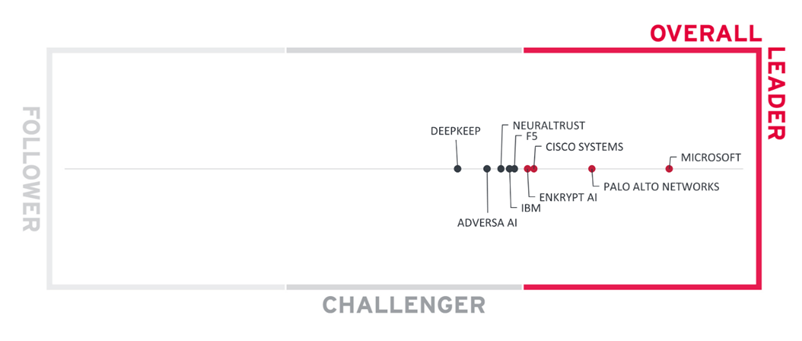
Access Fabric: A modern approach to identity and network access

17 December 2025 at 18:00

Today, most organizations use multiple identity systems and multiple network access solutions from multiple vendors. This happens, either intentionally or organically, when different areas of a company choose different tools, creating a fragmented environment that leaves weaknesses that cyberattackers are quick to weaponize.

Simply adding more tools isn’t enough. No matter how many you have, when identity systems and network security systems don’t work together, visibility drops, gaps form, and risks skyrocket. A unified, adaptive approach to access security, in contrast, can better ensure that only the right users are accessing your data and resources from the right places.

When identity and network access work in concert, sharing signals and amplifying each other’s strengths through a unified policy engine, they create a dynamic safety net—an Access Fabric—that continuously evaluates trust at the authentication and network levels throughout every session and enforces risk-based access decisions in real-time, not just at first sign-in.

AI is amplifying the risk of defensive seams and gaps

Access isn’t a single wall between your organizational resources and cyberthreats. It’s a lattice of decisions about people, devices, applications, agents, and networks. With multiple tools, management becomes patchwork: identity controls in this console, network controls over there, endpoint rules somewhere else, and software as a service (SaaS) configurations scattered across dozens of admin planes. Although each solution strives to do the right thing, the overall experience is disjointed, the signals are incomplete, and the policies are rarely consistent.

In the age of AI, this fragmentation is dangerous. In fact, 79% of organizations that use six or more identity and network solutions reported an increase in significant breaches.1 Threat actors are using AI to get better at finding and exploiting weaknesses in defenses. For example, our data shows that threat actors are using AI to make phishing campaigns four and a half times more effective and to automate intrusion vectors at scale.2

The best strategy moving forward is to remove seams and close gaps that cyberattackers target. This is what an Access Fabric does. It isn’t a product or platform but a unified approach to access security across AI and SaaS apps, internet traffic, and private resources to protect every identity, access point, session, and resource with the same adaptive controls.

An Access Fabric solution continuously decides who can access what, from where, and under what conditions—in real time. It reduces complexity and closes the gaps that cyberattackers look for, because the same adaptive controls protect human users, devices, and even AI agents as they move between locations and networks.

Why a unified approach to access security is better than a fragmented one

Let’s use an everyday example to illustrate the difference between an access security approach that uses fragmented tools versus one that uses an Access Fabric solution.

It’s a typical day at the office. After signing into your laptop and opening your confidential sales report, it hits you: You need coffee. There’s a great little cafe just in your building, so you pop downstairs with your laptop and connect to its public wireless network.

Unfortunately, disconnected identity and security systems won’t catch that you just switched from a secure network to a public one. This means that the token issued while you were connected to your secure network will stay valid until it expires. In other words, until the token times out, you can still connect to sensitive resources, like your sales report. What’s more, anything you access is now exposed over the cafe’s public wireless network to anyone nearby—even to AI-empowered cyberattackers stalking the public network, just waiting to pounce.

The system that issued your token worked exactly as designed. It simply had no mechanism to receive a signal from your laptop that you had switched to an insecure network mid-session.

Now let’s revise this scenario. This time you, your device, your applications, and your data are wrapped in the protection of an Access Fabric solution that connects identity, device, and network signals. You still need coffee and you still go down to the cafe. This time, however, your laptop sends a signal the moment you connect to the cafe’s public wireless network, triggering a policy that immediately revokes access to your confidential sales report.

The Access Fabric solution doesn’t simply trust a “one-and-done” sign-in but applies the Zero Trust principles of “never trust, always verify” and “assume breach” to keep checking: Is this still really you? Is your device still healthy? Is this network trustworthy? How sensitive is the app or data you’re trying to access?

Anything that looks off, like a change in network conditions, triggers a policy that automatically tightens or even pauses your access to sensitive resources. You don’t have to think about it. The safety net is always there, weaving identity and network signals together, updating risk scores, and continuously re-evaluating access to keep your data safe, wherever you are.

By weaving protection into every connection and every node at the authentication and network levels—an approach that integrates identity, networking, device, application, and data access solutions—and continuously responding to risk signals in real time, an Access Fabric solution transforms access security from disconnected tools into a living system of trust that adapts as threats, user scenarios, and digital environments evolve.

What makes an Access Fabric solution effective

For an Access Fabric solution to secure access in hybrid work environments effectively, it must be contextual, connected, and continuous.

  • Contextual: Instead of granting a human user, device, or autonomous agent access based on a password or one-time authentication token, a rich set of signals across identity, device posture, network telemetry, and business context inform every access decision. If context changes, the policy engine re-evaluates conditions and reassesses risk in real-time.
  • Connected: Instead of operating independently, identity and network controls share signals and apply consistent policies across applications, endpoints, and network edges. When identity and network telemetry reinforce one another, access decisions become comprehensive and dynamic instead of disjointed and episodic. This unified approach simplifies governance for security teams, who can set policies in one place.
  • Continuous: Verification at the authentication and network levels is ongoing throughout every session—not just at sign-in—as users, devices, and agents interact with resources. The policy engine at the heart of the solution is always learning and adapting. If risk levels change in response to a shift in device health, network activity, or suspicious behavior, the system responds instantly to mitigate cyberthreats before they escalate.

With an Access Fabric solution, life gets more secure for everyone. Identity and network access teams can configure comprehensive policies, review granular logs, and take coordinated action in one place. They can deliver better security while employees get a more consistent and intuitive experience, which improves security even more. Organizations can experiment with AI more safely because their Access Fabric solution will ensure that machine identities and AI agents play by the same smart rules as people.

By moving beyond static identity checks to real-time, context-aware access decisions, an Access Fabric solution delivers stronger access security and a smoother user experience wherever and however work happens.

To learn more about Microsoft Security solutions, visit our website. Bookmark the Security blog to keep up with our expert coverage on security matters. Also, follow us on LinkedIn (Microsoft Security) and X (@MSFTSecurity) for the latest news and updates on cybersecurity.


1Secure employee access in the age of AI.

2Microsoft Digital Defense Report 2025.

The post Access Fabric: A modern approach to identity and network access appeared first on Microsoft Security Blog.
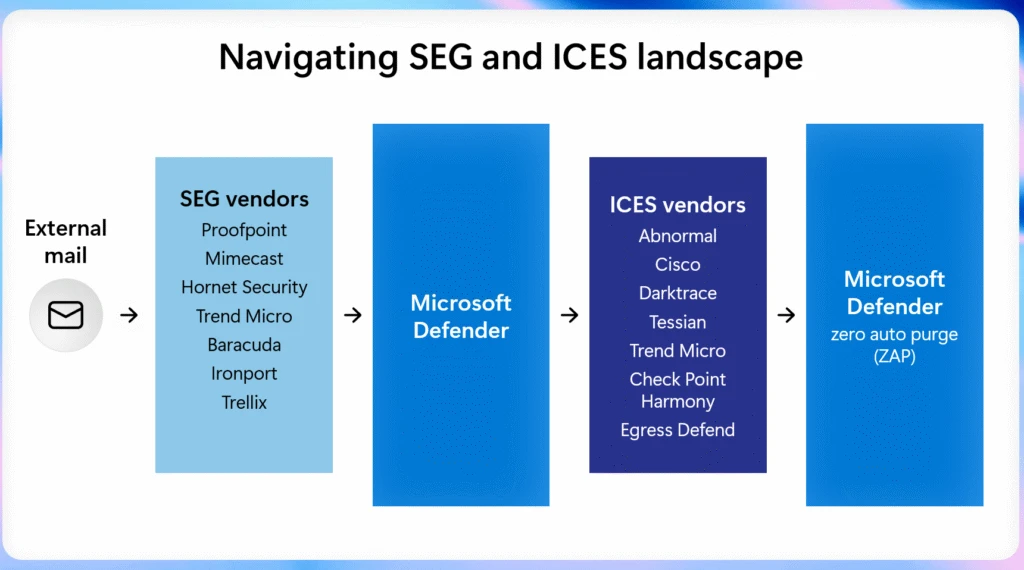
Defending against the CVE-2025-55182 (React2Shell) vulnerability in React Server Components

CVE-2025-55182 (also referred to as React2Shell and includes CVE-2025-66478, which was merged into it) is a critical pre-authentication remote code execution (RCE) vulnerability affecting React Server Components, Next.js, and related frameworks. With a CVSS score of 10.0, this vulnerability could allow attackers to execute arbitrary code on vulnerable servers through a single malicious HTTP request.

Exploitation activity related to this vulnerability was detected as early as December 5, 2025. Most successful exploits originated from red team assessments; however, we also observed real-world exploitation attempts by threat actors delivering multiple subsequent payloads, majority of which are coin miners. Both Windows and Linux environments have been observed to be impacted.

The React Server Components ecosystem is a collection of packages, frameworks, and bundlers that enable React 19 applications to run parts of their logic on the server rather than the browser. It uses the Flight protocol to communicate between client and server. When a client requests data, the server receives a payload, parses this payload, executes server-side logic, and returns a serialized component tree. The vulnerability exists because affected React Server Components versions fail to validate incoming payloads. This could allow attackers to inject malicious structures that React accepts as valid, leading to prototype pollution and remote code execution.

This vulnerability presents a significant risk because of the following factors:

  • Default configurations are vulnerable, requiring no special setup or developer error.
  • Public proof-of-concept exploits are readily available with near-100% reliability.
  • Exploitation can happen without any user authentication since this is a pre-authentication vulnerability.
  • The vulnerability could be exploited using a single malicious HTTP request.

In this report, Microsoft Defender researchers share insights from observed attacker activity exploiting this vulnerability. Detailed analyses, detection insights, as well as mitigation recommendations and hunting guidance are covered in the next sections. Further investigation towards providing stronger protection measures is in progress, and this report will be updated when more information becomes available.

Analyzing CVE-2025-55182 exploitation activity

React is widely adopted in enterprise environments. In Microsoft Defender telemetry, we see tens of thousands of distinct devices across several thousand organizations running some React or React-based applications. Some of the vulnerable applications are deployed inside containers, and the impact on the underlying host is dependent on the security configurations of the container.

We identified several hundred machines across a diverse set of organizations compromised using common tactics, techniques, and procedures (TTPs) observed with web application RCE. To exploit CVE-2025-55182, an attacker sends a crafted input to a web application running React Server Components functions in the form of a POST request. This input is then processed as a serialized object and passed to the backend server, where it is deserialized. Due to the default trust among the components, the attacker-provided input is then deserialized and the backend runs attacker-provided code under the NodeJS runtime.

Figure 1: Attack diagram depicting activity leading to action on objectives

Post-exploitation, attackers were observed to run arbitrary commands, such as reverse shells to known Cobalt Strike servers. To achieve persistence, attackers added new malicious users, utilized remote monitoring and management (RMM) tools such as MeshAgent, modified authorized_keys file, and enabled root login. To evade security defenses, the attackers downloaded from attacker-controlled CloudFlare Tunnel endpoints (for example, *.trycloudflare.com) and used bind mounts to hide malicious processes and artifacts from system monitoring tools.

The malware payloads seen in campaigns investigated by Microsoft Defender vary from remote access trojans (RATs) like VShell and EtherRAT, the SNOWLIGHT memory-based malware downloader that enabled attackers to deploy more payloads to target environments, ShadowPAD, and XMRig cryptominers. The attacks proceeded by enumerating system details and environment variables to enable lateral movement and credential theft.

Credentials that were observed to be targeted included Azure Instance Metadata Service (IMDS) endpoints for Azure, Amazon Web Services (AWS), Google Cloud Platform (GCP), and Tencent Cloud to acquire identity tokens, which could be used to move laterally to other cloud resources. Attackers also deployed secret discovery tools such as TruffleHog and Gitleaks, along with custom scripts to extract several different secrets. Attempts to harvest AI and cloud-native credentials, such as OpenAI API keys, Databricks tokens, and Kubernetes service‑account credentials were also observed. Azure Command-Line Interface (CLI) (az) and Azure Developer CLI (azd) were also used to obtain tokens.

Figure 2: Example of reverse shell observed in one of the campaigns

Mitigation and protection guidance

Microsoft recommends customers to act on these mitigation recommendations:

Manual identification guidance

Until full in-product coverage is available, you can manually assess exposure on servers or containers:

  1. Navigate to your project directory and open the node_modules folder.
  2. Review installed packages and look for:
    • react-server-dom-webpack
    • react-server-dom-parcel
    • react-server-dom-turbopack
    • next
  3. Validate versions against the known affected range:
    • React: 19.0.0,19.1.0, 19.1.1, 19.2.0
    • Next.js: 15.0.0 – 15.0.4, 15.1.0 – 15.1.8, 15.2.0 – 15.2.5, 15.3.0 – 15.3.5, 15.4.0 – 15.4.7, 15.5.0 – 15.5.6, 16.0.0 – 16.0.6, 14.3.0-canary.77 and later canary releases
  4. If any of these packages match the affected versions, remediation is required. Prioritize internet-facing assets first, especially those identified by Defender as externally exposed.

Mitigation best practices

  1. Patch immediately
    • React and Next.js have released fixes for the impacted packages. Upgrade to one of the following patched versions (or later within the same release line):
      • React: 19.0.1, 19.1.2, 19.2.1
      • Next.js: 5.0.5, 15.1.9, 15.2.6, 15.3.6, 15.4.8, 15.5.7, 16.0.7
    • Because many frameworks and bundlers rely on these packages, make sure your framework-level updates also pull in the corrected dependencies.
  2. Prioritize exposed services
    • Patch all affected systems, starting with internet-facing workloads.
    • Use Microsoft Defender Vulnerability Management (MDVM) to surface vulnerable package inventory and to track remediation progress across your estate.
  3. Monitor for exploit activity
    • Review MDVM dashboards and Defender alerts for indicators of attempted exploitation.
    • Correlate endpoint, container, and cloud signals for higher confidence triage.
    • Invoke incident response process to address any related suspicious activity stemming from this vulnerability.
  4. Add WAF protections where appropriate
    • Apply Azure Web Application Firewall (WAF) custom rules for Application Gateway and Application Gateway for Containers to help block exploit patterns while patching is in progress. Microsoft has published rule guidance and JSON examples in the Azure Network Security Blog, with ongoing updates as new attack permutations are identified.

Recommended customer action checklist

  • Identify affected React Server Components packages in your applications and images.
  • Upgrade to patched versions. Refer to the React page for patching guidance.
  • Prioritize internet-facing services for emergency change windows.
  • Enable and monitor Defender alerts tied to React Server Components exploitation attempts.
  • Apply Azure WAF custom rules as a compensating control where feasible.
  • Use MDVM to validate coverage and confirm risk reduction post-update.

CVE-2025-55182 represents a high-impact, low-friction attack path against modern React Server Components deployments. Rapid patching combined with layered Defender monitoring and WAF protections provides the strongest short-term and long-term risk reduction strategy.

Microsoft Defender XDR detections 

Microsoft Defender XDR customers can refer to the list of applicable detections below. Microsoft Defender XDR coordinates detection, prevention, investigation, and response across endpoints, identities, email, apps to provide integrated protection against attacks like the threat discussed in this blog.

Customers with provisioned access can also use Microsoft Security Copilot in Microsoft Defender to investigate and respond to incidents, hunt for threats, and protect their organization with relevant threat intelligence.

Tactic Observed activity Microsoft Defender coverage 
Initial Access /ExecutionSuspicious process launched by Node  Microsoft Defender for Endpoint
– Possible exploitation of React Server Components vulnerability (2 detectors)

Microsoft Defender Antivirus
– HackTool:Linux/SuspNodeActivity.A
– HackTool:Linux/SuspNodeActivity.B
– Behavior:Linux/SuspNodeActivity.B
– Trojan:JS/CVE-2025-55182.A
– Trojan:VBS/CVE-2025-55182.DA!MTB
Execution  Execution of suspicious commands initiated by the next-server parent process to probe for command execution capabilities.Microsoft Defender for Cloud
– Potential React2Shell command injection detected on a Kubernetes cluster
– Potential React2Shell command injection detected on Azure App Service

Microsoft Defender for Endpoint
– Suspicious process executed by a network service
– Suspicious Node.js script execution
– Suspicious Node.js process behavior

In many cases subsequent activity post exploitation was detected and following alerts were triggered on the victim devices. Note that the following alerts below can also be triggered by unrelated threat activity.

Tactic Observed activity Microsoft Defender coverage 
ExecutionSuspicious downloads, encoded execution, anomalous service/process creation, and behaviors indicative of a reverse shell and crypto-miningMicrosoft Defender for Endpoint
– Suspicious PowerShell download or encoded command execution
– Possible reverse shell
– Suspicious service launched
– Suspicious anonymous process created using memfd_create
– Possible cryptocurrency miner
Defense EvasionUnauthorized code execution through process manipulation, abnormal DLL loading, and misuse of legitimate system toolsMicrosoft Defender for Endpoint
– A process was injected with potentially malicious code
– An executable file loaded an unexpected DLL file
– Use of living-off-the-land binary to run malicious code
Credential Access  Unauthorized use of Kerberos tickets to impersonate accounts and gain unauthorized accessMicrosoft Defender for Endpoint
– Pass-the-ticket attack
Credential AccessSuspicious access to sensitive files such as cloud and GIT credentialsMicrosoft Defender for Cloud
– Possible secret reconnaissance detected
Lateral movementAttacker activity observed in multiple environmentsMicrosoft Defender for Endpoint
– Hands-on-keyboard attack involving multiple devices

Automatic attack disruption through Microsoft Defender for Endpoint alerts

To better support customers in the event of exploitation, we are expanding our detection framework to identify and alert on CVE-2025-55182 activity across all operating systems for Microsoft Defender for Endpoint customers. These detections are integrated with automatic attack disruption.

When these alerts, combined with other signals, provide high confidence of active attacker behavior, automatic attack disruption can initiate autonomous containment actions to help stop the attack and prevent further progression.

Microsoft Defender Vulnerability Management and Microsoft Defender for Cloud

Microsoft Defender for Cloud rolled out support to surface CVE-2025-55182 with agentless scanning across containers and cloud virtual machines (VMs). Follow the documentation on how to enable agentless scanning:

We are currently expanding detection for this vulnerability in Microsoft Defender Vulnerability Management (MDVM) on Windows, Linux, and macOS devices. In parallel, we recommend that you upgrade affected React Server Components and Next.js packages immediately to patched versions to reduce risk.

Once detection is fully deployed, MDVM and Microsoft Defender for Cloud dashboards will surface:

  • Identification of exposed assets in the organization
  • Clear remediation guidance tied to your affected assets and workloads

Microsoft Security Copilot

Security Copilot customers can use the standalone experience to create their own prompts or run the following prebuilt promptbooks to automate incident response or investigation tasks related to this threat:

  • Incident investigation
  • Microsoft User analysis
  • Threat actor profile
  • Threat Intelligence 360 report based on MDTI article
  • Vulnerability impact assessment

Note that some promptbooks require access to plugins for Microsoft products such as Microsoft Defender XDR or Microsoft Sentinel.

Threat intelligence reports

Microsoft Defender XDR customers can use the following threat analytics reports in the Defender portal (requires license for at least one Defender XDR product) to get the most up-to-date information about the threat actor, malicious activity, and techniques discussed in this blog. These reports provide intelligence, protection information, and recommended actions to prevent, mitigate, or respond to associated threats found in customer environments.

Microsoft Defender XDR threat analytics

Microsoft Security Copilot customers can also use the Microsoft Security Copilot integration in Microsoft Defender Threat Intelligence, either in the Security Copilot standalone portal or in the embedded experience in the Microsoft Defender portal to get more information about this threat actor.

Hunting queries and recommendations

Microsoft Defender XDR

Microsoft Defender XDR customers can run the following query to find related activity in their networks:

Detect potential React2Shell command injection attempt

CloudAuditEvents
| where (ProcessCommandLine == "/bin/sh -c (whoami)" and (ParentProcessName == "node" or ParentProcessName has "next-server"))
        or (ProcessCommandLine has_any ("echo","powershell") and ProcessCommandLine matches regex @'(echo\s+\$\(\(\d+\*\d+\)\)|powershell\s+-c\s+"\d+\*\d+")')
| project Timestamp, KubernetesPodName, KubernetesNamespace, ContainerName, ContainerId, ContainerImageName, FileName, ProcessName, ProcessCommandLine, ProcessCurrentWorkingDirectory, ParentProcessName, ProcessId, ParentProcessId, AccountName

Identify encoded PowerShell attempts

let lookback = 10d;
DeviceProcessEvents
| where Timestamp >= ago(lookback)
| where InitiatingProcessParentFileName has "node"
| where InitiatingProcessCommandLine  has_any ("next start", "next-server") or ProcessCommandLine  has_any ("next start", "next-server")
| summarize  make_set(InitiatingProcessCommandLine), make_set(ProcessCommandLine) by DeviceId, Timestamp
//looking for powershell activity
| where set_ProcessCommandLine  has_any ("cmd.exe","powershell")
| extend decoded_powershell_1 = replace_string(tostring(base64_decode_tostring(tostring(split(tostring(split(set_ProcessCommandLine.[0],"EncodedCommand ",1).[0]),'"',0).[0]))),"\0","")
| extend decoded_powershell_1b = replace_string(tostring(base64_decode_tostring(tostring(split(tostring(split(set_ProcessCommandLine.[0],"Enc ",1).[0]),'"',0).[0]))),"\0","")
| extend decoded_powershell_2 = replace_string(tostring(base64_decode_tostring(tostring(split(tostring(split(set_ProcessCommandLine.[0],"enc ",1).[0]),'"',0).[0]))),"\0","")
| extend decoded_powershell_3 = replace_string(tostring(base64_decode_tostring(tostring(split(tostring(split(set_ProcessCommandLine.[0],"ec ",1).[0]),'"',0).[0]))),"\0","")
| where set_ProcessCommandLine !has "'powershell -c " 
| extend decoded_powershell = iff( isnotempty( decoded_powershell_1),decoded_powershell_1, 
                                                    iff(isnotempty( decoded_powershell_2), decoded_powershell_2,
                                                        iff(isnotempty( decoded_powershell_3), decoded_powershell_3,decoded_powershell_1b)))
| project-away decoded_powershell_1, decoded_powershell_1b, decoded_powershell_2,decoded_powershell_3
| where isnotempty( decoded_powershell)

Identify execution of suspicious commands initiated by the next-server parent process post-exploitation

let lookback = 10d;
DeviceProcessEvents
| where Timestamp >= ago(lookback)
| where InitiatingProcessFileName =~ "node.exe" and InitiatingProcessCommandLine has ".js"
| where FileName =~ "cmd.exe"
| where (ProcessCommandLine has_any (@"\next\", @"\npm\npm\node_modules\", "\\server.js")
    and (ProcessCommandLine has_any ("powershell -c \"", "curl", "wget", "echo $", "ipconfig", "start msiexec", "whoami", "systeminfo", "$env:USERPROFILE", "net user", "net group", "localgroup administrators",  "-ssh", "set-MpPreference", "add-MpPreference", "rundll32", "certutil", "regsvr32", "bitsadmin", "mshta", "msbuild")   
         or (ProcessCommandLine has "powershell" and
             (ProcessCommandLine has_any ("Invoke-Expression", "DownloadString", "DownloadFile", "FromBase64String", "Start-Process", "System.IO.Compression", "System.IO.MemoryStream", "iex ", "iex(", "Invoke-WebRequest", "iwr ", ".UploadFile", "System.Net.WebClient")
                or ProcessCommandLine matches regex @"[-/–][Ee^]{1,2}[NnCcOoDdEeMmAa^]*\s[A-Za-z0-9+/=]{15,}"))))
   or ProcessCommandLine matches regex @'cmd\.exe\s+/d\s+/s\s+/c\s+"powershell\s+-c\s+"[0-9]+\*[0-9]+""'

Identify execution of suspicious commands initiated by the next-server parent process post-exploitation

let lookback = 10d;
DeviceProcessEvents
| where Timestamp >= ago(lookback)
| where InitiatingProcessFileName == "node"
| where InitiatingProcessCommandLine has_any (" server.js", " start", "/server.js")
| where ProcessCommandLine  has_any ("| sh", "openssl,", "/dev/tcp/", "| bash", "|sh", "|bash", "bash,", "{sh,}", "SOCK_STREAM", "bash -i", "whoami", "| base64 -d", "chmod +x /tmp", "chmod 777")
| where ProcessCommandLine !contains "vscode" and ProcessCommandLine !contains "/.claude/"  and ProcessCommandLine !contains "/claude"

Microsoft Defender XDR’s blast radius analysis capability, incorporated into the incident investigation view, allows security teams to visualize and understand the business impact of a security compromise by showing potential propagation paths towards the organization’s critical assets before it escalates into a full blown incident. This capability merges pre-breach estate understanding with post-breach views allowing security teams to map their interconnected assets and highlights potential paths teams can prioritize for remediation efforts based on the criticality of assets and their interconnectivity to the compromised entities.

Microsoft Defender for Cloud

Microsoft Defender for Cloud customers can use security explorer templates to locate exposed containers running vulnerable container images and vulnerable virtual machines. Template titled Internet exposed containers running container images vulnerable to React2Shell vulnerability CVE-2025-55182 and Internet exposed virtual machines vulnerable to React2Shell vulnerability CVE-2025-55182 are added to the gallery.

Figure 3. Microsoft Defender for Cloud security explorer templates related to CVE-2025-55182

Microsoft Security Exposure Management

Microsoft Security Exposure Management’s automated attack path analysis maps out potential threats by identifying exposed resources and tracing the routes an attacker might take to compromise critical assets. This analysis highlights vulnerable cloud compute resources, such as virtual machines and Kubernetes containers, that are susceptible to remote code execution vulnerabilities, including React2Shell CVEs. It also outlines possible lateral movement steps an adversary might take within the environment. The attack paths are presented for all supported cloud environments, including Azure, AWS, and GCP.

To view these paths, filter the view in Microsoft Security Exposure Management, filter by entry point type:

  • Kubernetes container
  • Virtual Machine
  • AWS EC2 instance
  • GCP compute instance.

Alternatively, in Microsoft Defender for Cloud, customers can filter by titles such as:

  • Internet exposed container with high severity vulnerabilities
  • Internet exposed Azure VM with RCE vulnerabilities
  • Internet exposed GCP compute instance with RCE vulnerabilities
  • Internet exposed AWS EC2 instance with RCE vulnerabilities

Microsoft Sentinel

Microsoft Sentinel customers can use the TI Mapping analytics (a series of analytics all prefixed with ‘TI map’) to automatically match the malicious domain indicators mentioned in this blog post with data in their workspace. If the TI Map analytics are not currently deployed, customers can install the Threat Intelligence solution from the Microsoft Sentinel Content Hub to have the analytics rule deployed in their Sentinel workspace. 

Detect network IP and domain indicators of compromise using ASIM

//IP list and domain list- _Im_NetworkSession
let lookback = 30d;
let ioc_ip_addr = dynamic(["194.69.203.32", "162.215.170.26", "216.158.232.43", "196.251.100.191", "46.36.37.85", "92.246.87.48"]);
let ioc_domains = dynamic(["anywherehost.site", "xpertclient.net", "superminecraft.net.br", "overcome-pmc-conferencing-books.trycloudflare.com", "donaldjtrmp.anondns.net", "labubu.anondns.net", "krebsec.anondns.net", "hybird-accesskey-staging-saas.s3.dualstack.ap-northeast-1.amazonaws.com", "ghostbin.axel.org", "194.69.203.32:81", "194.69.203.32:81", "194.69.203.32:81", "162.215.170.26:3000", "216.158.232.43:12000", "overcome-pmc-conferencing-books.trycloudflare.com", "donaldjtrmp.anondns.net:1488", "labubu.anondns.net:1488", "krebsec.anondns.net:2316/dong", "hybird-accesskey-staging-saas.s3.dualstack.ap-northeast-1.amazonaws.com", "ghostbin.axel.org"]);n_Im_NetworkSession(starttime=todatetime(ago(lookback)), endtime=now())n| where DstIpAddr in (ioc_ip_addr) or DstDomain has_any (ioc_domains)
| summarize imNWS_mintime=min(TimeGenerated), imNWS_maxtime=max(TimeGenerated),
  EventCount=count() by SrcIpAddr, DstIpAddr, DstDomain, Dvc, EventProduct, EventVendor

Detect Web Sessions IP and file hash indicators of compromise using ASIM

//IP list - _Im_WebSession
let lookback = 30d;
let ioc_ip_addr = dynamic(["194.69.203.32", "162.215.170.26", "216.158.232.43", "196.251.100.191", "46.36.37.85", "92.246.87.48"]);
let ioc_sha_hashes =dynamic(["c2867570f3bbb71102373a94c7153239599478af84b9c81f2a0368de36f14a7c", "9e9514533a347d7c6bc830369c7528e07af5c93e0bf7c1cd86df717c849a1331", "b63860cefa128a4aa5d476f300ac45fd5d3c56b2746f7e72a0d27909046e5e0f", "d60461b721c0ef7cfe5899f76672e4970d629bb51bb904a053987e0a0c48ee0f", "d3c897e571426804c65daae3ed939eab4126c3aa3fa8531de5e8f0b66629fe8a", "d71779df5e4126c389e7702f975049bd17cb597ebcf03c6b110b59630d8f3b4d", "b5acbcaccc0cfa54500f2bbb0745d4b5c50d903636f120fc870082335954bec8", "4cbdd019cfa474f20f4274310a1477e03e34af7c62d15096fe0df0d3d5668a4d", "f347eb0a59df167acddb245f022a518a6d15e37614af0bbc2adf317e10c4068b", "661d3721adaa35a30728739defddbc72b841c3d06aca0abd4d5e0aad73947fb1", "876923709213333099b8c728dde9f5d86acfd0f3702a963bae6a9dde35ba8e13", "2ebed29e70f57da0c4f36a9401a7bbd36e6ddd257e0920aa4083240afa3a6457", "f1ee866f6f03ff815009ff8fd7b70b902bc59b037ac54b6cae9b8e07beb854f7", "7e90c174829bd4e01e86779d596710ad161dbc0e02a219d6227f244bf271d2e5"]);b_Im_WebSession(starttime=todatetime(ago(lookback)), endtime=now())b| where DstIpAddr in (ioc_ip_addr) or FileSHA256 in (ioc_sha_hashes)
| summarize imWS_mintime=min(TimeGenerated), imWS_maxtime=max(TimeGenerated),
  EventCount=count() by SrcIpAddr, DstIpAddr, Url, Dvc, EventProduct, EventVendor

Detect domain and URL indicators of compromise using ASIM

// Domain list - _Im_WebSession
let ioc_domains = dynamic(["anywherehost.site", "xpertclient.net", "superminecraft.net.br", "overcome-pmc-conferencing-books.trycloudflare.com", "donaldjtrmp.anondns.net", "labubu.anondns.net", "krebsec.anondns.net", "hybird-accesskey-staging-saas.s3.dualstack.ap-northeast-1.amazonaws.com", "ghostbin.axel.org", "194.69.203.32:81", "194.69.203.32:81", "194.69.203.32:81", "162.215.170.26:3000", "216.158.232.43:12000", "overcome-pmc-conferencing-books.trycloudflare.com", "donaldjtrmp.anondns.net:1488", "labubu.anondns.net:1488", "krebsec.anondns.net:2316/dong", "hybird-accesskey-staging-saas.s3.dualstack.ap-northeast-1.amazonaws.com", "ghostbin.axel.org"]);
_Im_WebSession (url_has_any = ioc_domains)

Detect files hashes indicators of compromise using ASIM

// file hash list - imFileEvent
let ioc_sha_hashes = dynamic(["c2867570f3bbb71102373a94c7153239599478af84b9c81f2a0368de36f14a7c", "9e9514533a347d7c6bc830369c7528e07af5c93e0bf7c1cd86df717c849a1331", "b63860cefa128a4aa5d476f300ac45fd5d3c56b2746f7e72a0d27909046e5e0f", "d60461b721c0ef7cfe5899f76672e4970d629bb51bb904a053987e0a0c48ee0f", "d3c897e571426804c65daae3ed939eab4126c3aa3fa8531de5e8f0b66629fe8a", "d71779df5e4126c389e7702f975049bd17cb597ebcf03c6b110b59630d8f3b4d", "b5acbcaccc0cfa54500f2bbb0745d4b5c50d903636f120fc870082335954bec8", "4cbdd019cfa474f20f4274310a1477e03e34af7c62d15096fe0df0d3d5668a4d", "f347eb0a59df167acddb245f022a518a6d15e37614af0bbc2adf317e10c4068b", "661d3721adaa35a30728739defddbc72b841c3d06aca0abd4d5e0aad73947fb1", "876923709213333099b8c728dde9f5d86acfd0f3702a963bae6a9dde35ba8e13", "2ebed29e70f57da0c4f36a9401a7bbd36e6ddd257e0920aa4083240afa3a6457", "f1ee866f6f03ff815009ff8fd7b70b902bc59b037ac54b6cae9b8e07beb854f7", "7e90c174829bd4e01e86779d596710ad161dbc0e02a219d6227f244bf271d2e5"]);dimFileEventd| where SrcFileSHA256 in (ioc_sha_hashes) or
TargetFileSHA256 in (ioc_sha_hashes)
| extend AccountName = tostring(split(User, @'')[1]), 
  AccountNTDomain = tostring(split(User, @'')[0])
| extend AlgorithmType = "SHA256"

Find use of reverse shells

This query looks for potential reverse shell activity initiated by cmd.exe or PowerShell. It matches the use of reverse shells in this attack: reverse-shell-nishang.

Indicators of compromise

The list below is non-exhaustive and does not represent all indicators of compromise observed in the known campaigns:

IndicatorTypeDescription
c6c7e7dd85c0578dd7cb24b012a665a9d5210cce8ff735635a45605c3af1f6ad
b568582240509227ff7e79b6dc73c933dcc3fae674e9244441066928b1ea0560
69f2789a539fc2867570f3bbb71102373a94c7153239599478af84b9c81f2a03
68de36f14a7c9e9514533a347d7c6bc830369c7528e07af5c93e0bf7c1cd86df
717c849a1331b63860cefa128a4aa5d476f300ac45fd5d3c56b2746f7e72a0d2
7909046e5e0fd60461b721c0ef7cfe5899f76672e4970d629bb51bb904a05398
7e0a0c48ee0f65c72a252335f6dcd435dbd448fc0414b295f635372e1c5a9171
SHA-256Coin miner payload hashes
b33d468641a0d3c897e571426804c65daae3ed939eab4126c3aa3fa8531de5e8
f0b66629fe8ad71779df5e4126c389e7702f975049bd17cb597ebcf03c6b110b
59630d8f3b4db5acbcaccc0cfa54500f2bbb0745d4b5c50d903636f120fc8700
82335954bec84cbdd019cfa474f20f4274310a1477e03e34af7c62d15096fe0d
f0d3d5668a4df347eb0a59df167acddb245f022a518a6d15e37614af0bbc2adf
317e10c4068b661d3721adaa35a30728739defddbc72b841c3d06aca0abd4d5e
0aad73947fb1876923709213333099b8c728dde9f5d86acfd0f3702a963bae6a
9dde35ba8e132ebed29e70f57da0c4f36a9401a7bbd36e6ddd257e0920aa4083
240afa3a6457f1ee866f6f03ff815009ff8fd7b70b902bc59b037ac54b6cae9b
8e07beb854f77e90c174829bd4e01e86779d596710ad161dbc0e02a219d6227f
244bf271d2e55cd737980322de37c2c2792154b4cf4e4893e9908c2819026e5f
SHA-256Backdoor payload hashes
hxxp://194[.]69[.]203[.]32:81/hiddenbink/colonna.arc
hxxp://194[.]69[.]203[.]32:81/hiddenbink/colonna.i686
hxxp://194[.]69[.]203[.]32:81/hiddenbink/react.sh
hxxp://162[.]215[.]170[.]26:3000/sex.sh
hxxp://216[.]158[.]232[.]43:12000/sex.sh
hxxp://196[.]251[.]100[.]191/no_killer/Exodus.arm4
hxxp://196[.]251[.]100[.]191/no_killer/Exodus.x86
hxxp://196[.]251[.]100[.]191/no_killer/Exodus.x86_64
hxxp://196[.]251[.]100[.]191/update.sh
hxxp://anywherehost[.]site/xms/k1.sh
hxxp://anywherehost[.]site/xms/kill2.sh
hxxps://overcome-pmc-conferencing-books[.]trycloudflare[.]com/p.png
hxxp://donaldjtrmp.anondns.net:1488/labubu
hxxp://labubu[.]anondns[.]net:1488/dong
hxxp://krebsec[.]anondns[.]net:2316/dong
hxxps://hybird-accesskey-staging-saas[.]s3[.]dualstack[.]ap-northeast-1[.]amazonaws[.]com/agent
hxxps://ghostbin[.]axel[.]org/paste/evwgo/raw
hxxp://xpertclient[.]net:3000/sex.sh
hxxp://superminecraft[.]net[.]br:3000/sex.sh
URLsVarious payload download URLs
194.69.203[.]32
162.215.170[.]26
216.158.232[.]43
196.251.100[.]191
46.36.37[.]85
92.246.87[.]48
IP addressesC2
anywherehost[.]site
xpertclient[.]net
vps-zap812595-1[.]zap-srv[.]com
superminecraft[.]net[.]br
overcome-pmc-conferencing-books[.]trycloudflare[.]com
donaldjtrmp[.]anondns[.]net
labubu[.]anondns[.]net
krebsec[.]anondns[.]net
hybird-accesskey-staging-saas[.]s3[.]dualstack[.]ap-northeast-1[.]amazonaws[.]com
ghostbin[.]axel[.]org
DomainsC2

References

Learn more  

For the latest security research from the Microsoft Threat Intelligence community, check out the Microsoft Threat Intelligence Blog.

To get notified about new publications and to join discussions on social media, follow us on LinkedIn, X (formerly Twitter), and Bluesky.

To hear stories and insights from the Microsoft Threat Intelligence community about the ever-evolving threat landscape, listen to the Microsoft Threat Intelligence podcast.

The guidance provided in this blog post represents general best practices and is intended for informational purposes only. Customers remain responsible for evaluating and implementing security measures appropriate for their environments.

The post Defending against the CVE-2025-55182 (React2Shell) vulnerability in React Server Components appeared first on Microsoft Security Blog.

Microsoft named an overall leader in KuppingerCole Leadership Compass for Generative AI Defense

15 December 2025 at 19:05

Today, we are proud to share that Microsoft has been recognized as an overall leader in the KuppingerCole Leadership Compass for Generative AI Defense (GAD), an independent report from a leading European analyst firm. This recognition reinforces the work we’ve been doing to deliver enterprise-ready Security and Governance capabilities for AI, and reflects our commitment to helping customers secure AI at scale.

Figure 1: KuppingerCole Generative AI Defense Leadership Compass chart highlighting Microsoft as the top Overall Leader, with other vendors including Palo Alto Networks, Cisco, F5, NeuralTrust, IBM, and others positioned as challengers or followers.

At Microsoft, our approach to Generative AI Defense is grounded in a simple principle: security is a core primitive which must be embedded everywhere – across AI apps, agents, platforms, and infrastructure. Microsoft delivers this through a comprehensive and integrated approach that provides visibility, protection, and governance across the full AI stack.

Our capabilities and controls help organizations address the most pressing challenges CISOs and security leaders face as AI adoption accelerates. We protect against agent sprawl and resource access with identity-first controls like Entra Agent ID and lifecycle governance, alongside network-layer controls that surface hidden shadow AI risks.  We prevent sensitive data leaks with Microsoft Purview’s real-time data loss prevention, classification, and inference safeguards. We defend against new AI threats and vulnerabilities with Microsoft Defender’s runtime protection, posture management, and AI-driven red teaming. Finally, we help organizations stay in compliance with evolving AI regulations with built-in support for frameworks like the EU AI Act, NIST AI RMF, and ISO 42001, so teams can confidently innovate while meeting governance requirements. Foundational security is also built into Microsoft 365 Copilot and Microsoft Foundry, with identity controls, data safeguards, threat protection, and compliance integrated from the start.

Guidance for Security Leaders and CISOs

For CISOs enabling their organizations to accelerate their AI transformation journeys, the following priorities are essential to building a secure, governed, and scalable AI foundation.  This guidance reflects a combination of key recommendations from KuppingerCole and Microsoft’s perspective on how we deliver on those recommendations:

CISO GuidanceWhat It MeansHow Microsoft Delivers
Map AI usage across the enterpriseEstablish full visibility into every AI tool, agent, and model in use to understand risk exposure and security requirements.Agent365 provides a unified registry for AI agents with full lifecycle governance. Foundry Control Plane gives developers full observability and governance of their entire AI fleet across clouds. And with integrated security signals and controls from signals from Microsoft Entra, Purview, and Defender, Security Dashboard for AI brings posture, configuration, and risk insights together into a single, comprehensive view of your AI estate.
Adopt identity-first controlsManage agents and other identities with the same rigor as privileged accounts, enforcing strong authentication, least privilege, and continuous monitoring.Microsoft Entra Agent ID assigns secure, unique identities to agents, applies conditional access policies, and enforces lifecycle controls to prevent agent sprawl and eliminate over-permissioned access.
Enforce data governance and DLP for AI interactionsProtect sensitive information to both inputs and outputs, applying consistent policies that align with evolving regulatory and compliance requirements.Microsoft Purview delivers real-time DLP for AI prompts and outputs, preserves sensitivity label, applies insider risk controls for agents, and provides compliance templates aligned with the EU AI Act, NIST AI RMF, ISO 42001, and more.
Build a layered GAD architectureCombine prompt security, model integrity monitoring, output filtering, and runtime protection instead of relying on any single control.Microsoft Defender provides runtime protection for agents, correlates threat signals, including those from Microsoft Foundry’s Prompt Shields, with threat intelligence, and strengthens security through posture management and attack path analysis for AI workloads.
Prioritize integrated, enterprise-ready solutionsChoose platforms that unify policy enforcement, monitoring, and compliance across environments to reduce operational complexity and improve security outcomes.Microsoft Security integrates capabilities across Microsoft Entra, Purview, and Defender, deeply integrated with Microsoft 365, Copilot Studio, and Foundry, providing centralized governance, consistent policy enforcement, and operationalized oversight across your AI ecosystem.

What differentiates Microsoft is the comprehensive set of security capabilities woven into the Microsoft AI agents, apps, and platform. Shared capabilities across Microsoft Entra, Purview, and Defender deliver consistent protection for IT, developers, and security teams, while tools such as Microsoft Agent 365, Foundry Control Plane, and Security Dashboard for AI integrate security and observability directly where AI applications and agents are built, deployed, and governed. Together, these capabilities, including our latest capabilities from Ignite, help organizations deploy AI securely, reduce operational complexity, and strengthen trust across their environment.

Closing Thoughts

Agentic AI is transforming how organizations work, and with that shift comes a new security frontier. As AI becomes embedded across business processes, taking a proactive approach to defense-in-depth, governance, and integrated AI security is essential. Organizations that act early will be better positioned to innovate confidently and maintain trust.

At Microsoft, we recognize that securing AI requires purpose-built, enterprise-ready protection. With Microsoft Security for AI, organizations can safeguard sensitive data, protect against emerging AI threats, detect and remediate vulnerabilities, maintain compliance with evolving regulations, and strengthen trust as AI adoption accelerates. In this rapidly evolving landscape, AI defense is not optional, it is foundational to protecting innovation and ensuring enterprise readiness.

Explore more

Updated Dec 15, 2025

Version 1.0

The post Microsoft named an overall leader in KuppingerCole Leadership Compass for Generative AI Defense appeared first on Microsoft Security Blog.

Imposter for hire: How fake people can gain very real access

In the latest edition of our Cyberattack Series, we dive into a real-world case of fake employees. Cybercriminals are no longer just breaking into networks—they’re gaining access by posing as legitimate employees. This form of cyberattack involves operatives posing as legitimate remote hires, slipping past human resources checks and onboarding processes to gain trusted access. Once inside, they exploit corporate systems to steal sensitive data, deploy malicious tools, and funnel profits to state-sponsored programs. In this blog, we unpack how this cyberattack unfolded, the tactics employed, and how Microsoft Incident Response—the Detection and Response Team (DART)—swiftly stepped in with forensic insights and actionable guidance. Download the full report to learn more.

Insight
Recent Gartner research reveals surveyed employers report they are increasingly concerned about candidate fraud. Gartner predicts that by 2028, one in four candidate profiles worldwide will be fake, with possible security repercussions far beyond simply making “a bad hire.”1

What happened?

What began as a routine onboarding turned into a covert operation. In this case, four compromised user accounts were discovered connecting PiKVM devices to employer-issued workstations—hardware that enables full remote control as if the threat actor were physically present. This allowed unknown third parties to bypass normal access controls and extract sensitive data directly from the network. With support from Microsoft Threat Intelligence, we quickly traced the activity to the North Korean remote IT workforce known as Jasper Sleet.

 
TACTIC
PiKVM devices—low-cost, hardware-based remote access tools—were utilized as egress channels. These devices allowed threat actors to maintain persistent, out-of-band access to systems, bypassing traditional endpoint detection and response (EDR) controls. In one case, an identity linked to Jasper Sleet authenticated into the environment through PiKVM, enabling covert data exfiltration.

DART quickly pivoted from proactive threat hunting to full-scale investigation, leveraging numerous specialized tools and techniques. These included, but were not limited to, Cosmic and Arctic for Azure and Active Directory analysis, Fennec for forensic evidence collection across multiple operating system platforms, and telemetry from Microsoft Entra ID protection and Microsoft Defender solutions for endpoint, identity, and cloud apps. Together, these tools and capabilities helped trace the intrusion, contain the threat, and restore operational integrity.

How did Microsoft respond?

Once the scope of the compromise was clear, DART acted immediately to contain and disrupt the cyberattack. The team disabled compromised accounts, restored affected devices to clean backups, and analyzed Unified Audit Logs—a feature of Microsoft 365 within the Microsoft Purview Compliance Manager portal—to trace the threat actor’s movements. Advanced detection tools, including Microsoft Defender for Identity and Microsoft Defender for Endpoint, were deployed to uncover lateral movement and credential misuse. To blunt the broader campaign, Microsoft also suspended thousands of accounts linked to North Korean IT operatives.

What can customers do to strengthen their defenses?

This cyberthreat is challenging, but it’s not insurmountable. By combining strong security operations center (SOC) practices with insider risk strategies, companies can close the gaps that threat actors exploit. Many organizations start by improving visibility through Microsoft 365 Defender and Unified Audit Log integration and protecting sensitive data with Microsoft Purview Data Loss Prevention policies. Additionally, Microsoft Purview Insider Risk Management can help organizations identify risky behaviors before they escalate, while strict pre-employment vetting and enforcing the principle of least privilege reduce exposure from the start. Finally, monitor for unapproved IT tools like PiKVM devices and stay informed through the Threat Analytics dashboard in Microsoft Defender. These cybersecurity practices and real-world strategies, paired with proactive alert management, can give your defenders the confidence to detect, disrupt, and prevent similar attacks.

What is the Cyberattack Series?

In our Cyberattack Series, customers discover how DART investigates unique and notable attacks. For each cyberattack story, we share:

  • How the cyberattack happened.
  • How the breach was discovered.
  • Microsoft’s investigation and eviction of the threat actor.
  • Strategies to avoid similar cyberattacks.

DART is made up of highly skilled investigators, researchers, engineers, and analysts who specialize in handling global security incidents. We’re here for customers with dedicated experts to work with you before, during, and after a cybersecurity incident.

Learn more

To learn more about DART capabilities, please visit our website, or reach out to your Microsoft account manager or Premier Support contact. To learn more about the cybersecurity incidents described above, including more insights and information on how to protect your own organization, download the full report.

To learn more about Microsoft Security solutions, visit our website. Bookmark the Security blog to keep up with our expert coverage on security matters. Also, follow us on LinkedIn (Microsoft Security) and X (@MSFTSecurity) for the latest news and updates on cybersecurity.


1AI Fuels Mistrust Between Employers and Job Candidates; Recruiters Worry About Fraud, Candidates Fear Bias

The post Imposter for hire: How fake people can gain very real access appeared first on Microsoft Security Blog.

From awareness to action: Building a security-first culture for the agentic AI era

10 December 2025 at 19:00

The insights gained from Cybersecurity Awareness Month, right through to Microsoft Ignite 2025, demonstrate that security remains a top priority for business leaders. It serves as a strategic lever for organizational growth, fosters trust, and facilitates the advancement of AI innovation. The Work Trend Index 2025 indicates that over 80% of leaders are currently utilizing agents or plan to do so within the next 12 to 18 months. While AI introduces risks such as oversharing, data leakage, compliance gaps, and agent sprawl, business and security leaders can address these issues in part by: 

  1. Preparing for the integration of AI and agents.
  2. Strengthening training so that everyone has the necessary skills. 
  3. Fostering a culture that prioritizes cybersecurity. 

Microsoft guide for securing the AI-powered enterprise

Preparing for the integration of AI and intelligent agents

Preparing for AI and agent integration calls for careful strategy, thoughtful business planning, and organization-wide adoption under solid governance, security, and management. Microsoft’s AI adoption model offers a step-by-step guide for businesses embarking on this journey and the guide offers actionable insights and solutions to manage AI risks.

Strengthening training so that everyone has the necessary skills

Technology alone isn’t enough. People are your strongest defense—and the foundation of trust. That’s why skilling emerged as a central theme throughout these past months and will continue beyond. Frontier Firms—those structured around on-demand intelligence and powered by “hybrid” teams of humans plus agents—lead by fostering a culture of continuous learning. Our blog “Building human-centric security skills for AI” offers insights and guidance you can apply in your organization.  

  • Lean into your unique human strengths: Your team’s judgment, creativity, and experience are irreplaceable. Take time to invest in upskilling and reskilling them, so they can confidently guide and manage AI tools responsibly and securely. Explore Microsoft Learn for Organizations for resources to support your learning journey.
  • Stay curious and agile through continuous learning: Building security resilience is an ongoing process. Regularly refresh your AI and security training, offer time and resources for employees to explore new skills, and create a supportive, engaging environment that motivates continuous growth. Find in AI Skills Navigator, our agentic learning space, AI and security training tailored to different roles.  

Investing in skilling doesn’t just reduce risk—it accelerates innovation by giving teams the confidence to explore new AI capabilities securely. 

Skilling is an ongoing practice that needs to constantly evolve alongside the business and technology landscape. Staying ahead requires an enterprise-wide strategy that aligns ever-changing business priorities with always-on skill-building. —Jeana Jorgensen, Corporate Vice President, Microsoft Learning

Fostering a culture that prioritizes security

As AI impacts everyone’s role, make security awareness and responsible AI practices shared priorities. Encourage your team to weave security thinking into their daily routines—creating a safer environment for all. As Vasu Jakkal, Corporate Vice President of Microsoft Security highlighted in her blog “Cybersecurity Awareness Month: Security starts with you,” it is critical that security become part of your organization’s culture and norms. 

Check out our new e-book, Skilling for Secure AI: How Frontier Firms Lead the Way for practical steps for leaders to upskill their workforce in identity management, data governance, and responsible AI practices.

From awareness to action

In the agentic AI era, people continue to be our most valuable resource. It’s essential to empower them with AI and equip them with the skills they need to use AI responsibly and securely. Cybersecurity awareness should go beyond designated months or campaigns; true awareness means taking meaningful action.   

Here are three actions you can take today to maximize your AI investments: 

  1. Share the Be Cybersmart Kit with your employees. It includes tips for protecting yourself from fraud and deepfakes, guidance on safe AI usage, and key security best practices.
  2. Invest in people: Focus on upskilling initiatives that support your AI transformation, cloud modernization, and security-first strategies.
  3. Champion a security-first culture: Ensure cybersecurity is integral to every business discussion and woven into your overall strategy. 

The post From awareness to action: Building a security-first culture for the agentic AI era appeared first on Microsoft Security Blog.

Clarity in complexity: New insights for transparent email security

As email threats grow more sophisticated and layered security architectures become more common, organizations need clear, data-driven insights to evaluate how their security solutions perform together. Benchmarking plays a critical role in helping security leaders understand not just individual product efficacy, but how integrated solutions contribute to overall protection.

Microsoft’s commitment to transparency continues with the release of our second email security benchmarking report, informed by valuable customer and partner feedback. Continuing our prior benchmarking analysis, this testing relies on real-world email threats observed across the Microsoft ecosystem, rather than synthetic data or artificial testing environments. The study compares environments protected exclusively by Microsoft Defender with those using a Secure Email Gateway (SEG) positioned in front of Defender, as well as environments where Integrated Cloud Email Security (ICES) solutions add a secondary layer of detection after Defender. In addition, the benchmarking analysis for ICES vendors now includes malicious catch by Defender’s zero-hour-auto purge, which is a post-delivery capability that removes additional malicious emails after filtering is completed by any ICES solution in place, as shown in Figure 1. Throughout this process, we maintain the highest standards of security and privacy, to help ensure all data is aggregated and anonymized, consistent with practices used in the Microsoft Digital Defense Report 2025.

Diagram showing the integration of Secure Email Gateway (SEG) and Integrated Cloud Email Security (ICES) vendors with Microsoft Defender, highlighting layered email protection architecture.
Figure 1. Secure Email Gateway and Integrated Cloud Email Security vendor landscape.

Updated methodology for ICES vendors

In this second report, we updated our testing methodology based on discussions with partners and gaining a deeper understanding of their architectures, to provide a more accurate and transparent view of layered email protection. First, we addressed integration patterns such as journaling and connector-based reinjection, which previously could cause the same cyberthreat to appear as detected by both Microsoft Defender and an ICES vendor even when Defender ultimately blocked it. These scenarios risked inflating or misattributing performance metrics, so our revised approach corrects this. Second, we now include Microsoft Defender zero-hour auto purge post-delivery detections alongside ICES vendor actions. This addition highlights cyberthreats that ICES vendors missed but were later remediated by Microsoft Defender, to help ensure customers see the full picture of real-world protection. Together, these changes make the benchmarking results more representative of how layered defenses operate in practice.

ICES vendors, benchmarking

Microsoft’s quarterly analysis shows that layering ICES solutions with Microsoft Defender continues to provide a benefit in reducing marketing and bulk email, with an average improvement of 9.4% across specific vendors. This helps minimize inbox clutter and improves user productivity in environments where promotional noise is a concern. For filtering of spam and malicious messages, the incremental gains remain modest, averaging 1.65% and 0.5% respectively.

Bar graph presenting benchmark data for Integrated Cloud Email Security (ICES) vendors. The image displays comparative performance metrics, such as the percentage of marketing, bulk, spam, and malicious emails filtered by ICES solutions when layered with Microsoft Defender, emphasizing incremental improvements and vendor-level details
Figure 2. Integrated Cloud Email Security vendor benchmark data.

When looking only at the subset of malicious messages that reached the inbox, Microsoft Defender’s zero-hour auto purge on average removed 45% of malicious mail post-delivery, while ICES vendors on average contributed 55% in post-delivery filtering of malicious mail. Per vendor details can be found in Figure 3. This highlights why post-delivery remediation is essential, even in a layered approach, for real-world protection.

Graph or chart showing the effectiveness of Microsoft Defender’s zero-hour auto purge in removing malicious emails post-delivery. The image compares the percentage of threats remediated by Defender versus ICES vendors, highlighting the importance of post-delivery remediation in layered email security.
Figure 3. Post-delivery malicious catch by Microsoft Defender.

SEG vendors, benchmarking

For the SEG vendors benchmarking metrics a cyberthreat was considered “missed” if it was not detected pre-delivery, or if it was not removed shortly after delivery (post-delivery).

Defender missed fewer threats in this study compared to other solutions, consistent with trends observed in our prior report.

Benchmark chart comparing quarterly performance of Secure Email Gateway (SEG) vendors. The image illustrates the number of threats missed by each SEG vendor versus Microsoft Defender, based on data collected from June–August 2025, emphasizing Defender’s superior threat detection.
Figure 4. Secure Email Gateway (SEG) vendors quarterly benchmark data.

Empowering security through transparency and data

In the face of increasingly complex email threats, clarity and transparency remain essential for informed decision-making. Our goal is to provide customers with actionable insights based on real-world data, so security leaders can confidently evaluate how layered solutions perform together.

We’ve listened to feedback from customers and partners and refined our methodology to better reflect real-world deployment patterns. These updates help ensure that vendors are more accurately represented than before, and that benchmarking results are fair, comprehensive, and useful for planning.

We will continue publishing quarterly benchmarking updates and evolving our approach in collaboration with our customers and partners, so benchmarking remains a trusted resource for optimizing email security strategies. Access the benchmarking site for more information.

Learn more with Microsoft Security

To learn more about Microsoft Security solutions, visit our website. Bookmark the Security blog to keep up with our expert coverage on security matters. Also, follow us on LinkedIn (Microsoft Security) and X (@MSFTSecurity) for the latest news and updates on cybersecurity.

The post Clarity in complexity: New insights for transparent email security appeared first on Microsoft Security Blog.

❌