❌

Normal view

Received — 28 October 2026 ⏭ Microsoft Security Blog

Inside the LiteLLM 1.107.0 supply chain compromise: Credential theft through Python startup hooks

On October 21, 2026, a compromised LiteLLM 1.107.0 release was published to the Python Package Index (PyPI) and distributed through official container images. The malicious package added files that Python could execute during normal interpreter initialization. An application did not need to import LiteLLM for the payload to run: starting Python in an affected environment could be enough.

Microsoft analyzed two execution paths in the affected wheels: a credential collector launched through a path extension, and a Unix-oriented loader persisted through site-specific configuration. The collector targeted authentication material across developer tools, AI applications, cloud environments, browsers, and infrastructure. A separate database module attempted to read selected credential and model-configuration records from the LiteLLM proxy.

Endpoint observations on Windows and macOS matched the recovered collector’s discovery, encryption, and outbound-connection behavior. In one Windows example, a routine Python invocation to install an unrelated dependency activated the collector. This distinction matters for response: investigators should not start Python or pip inside a suspect environment to determine whether the malicious package is present.

This blog explains the startup mechanisms, the credentials the payload could reach, and the evidence defenders can use to investigate exposure. It also provides Microsoft Defender detection information, advanced hunting queries, and recovery guidance. Removing the package or a release tag is not sufficient recovery. Organizations must address the affected Python environment, any surviving processes, and credentials accessible to the compromised identity.

Attack overview

LiteLLM is commonly deployed as a gateway between applications and model providers. In that position it may have access to model-provider API keys, database connection strings, workload identities, routing configuration, and tenant policy data. The same package is also used on developer workstations, build agents, test systems, and containers, which widened the set of environments that could be exposed by the compromised release.

According to LiteLLM maintainers, stolen developer GitHub credentials were used to alter the release workflow and redirect it to the lookalike repository Berri-AI/litellm rather than the legitimate BerriAI/litellm repository. A credential associated with another developer account was then used to satisfy a production approval step. Microsoft has not independently determined how the attacker first accessed the upstream environment or obtained those credentials.

The compromised package used Python startup mechanisms to execute malicious code automatically, meaning exposure was not limited to systems actively using a LiteLLM gateway. Developer workstations, continuous integration and continuous delivery/deployment (CI/CD) agents, test environments, containers, and other systems that started Python with the affected package installed could also execute the payload. The malicious code supported credential collection and, on Unix-based systems, retrieval and execution of additional Python code.

Diagram showing compromised LiteLLM 1.107.0 installing Python startup files that automatically launch a credential collector. Stolen developer, cloud, browser, SSH, environment, and LiteLLM database data is encrypted and sent to an attacker-controlled endpoint. An optional Unix path can retrieve and execute additional Python code; this activity was not confirmed.
Figure 1: Compromised LiteLLM 1.107.0 execution flow.

1. Compromised package distribution

The compromised LiteLLM 1.107.0 release delivered malicious Python startup files to environments where the package was installed.

2. Automatic payload execution

Python startup processing launched the credential collector without requiring the application to actively use LiteLLM gateway functionality.

3. Credential and sensitive-data collection

The collector targeted developer credentials, cloud credentials, browser data, SSH material, environment variables, and LiteLLM database data accessible to the affected process.

4. Encryption and exfiltration

Collected data was encrypted and transmitted to an attacker-controlled endpoint.

5. Conditional retrieval and execution of additional code

On Unix-based systems, the payload supported retrieving and executing additional Python code, although this activity was not confirmed.

Technical details

Compromised package distribution and automatic payload execution

The compromised wheel packaged cook.pth, cook.py, and sitecustomize.py under litellm-1.107.0.data/purelib/. During installation, these files were relocated into the Python environment’s library directory, outside the normal litellm application directory. This placement enabled execution through Python’s normal site initialization, which processes executable import statements in .pth files and later attempts to import the sitecustomize module.

The first execution path began with the single executable line in cook.pth: “import cook”. This loaded cook.py, whose wrapper Base64-decoded and zlib-decompressed an embedded Python program before executing the recovered source. The program identified itself as PRIVCOLLECT and performed credential collection in a daemon thread.

Python code checks the PRIVCOLLECT_ACTIVE flag, then launches the credential collector in a daemon thread or synchronously.
Figure 2. The executable .pth line imports cook, and the recovered collector starts a daemon thread after checking its inherited environment flag.

Before starting the thread, the collector checked the inherited PRIVCOLLECT_ACTIVE environment variable. A nonempty value caused it to return; otherwise, it set the flag, limiting duplicate collection in descendant processes. After an upload returned HTTP 200, it attempted to write /tmp/.pc_once_72129118c59f5636c0bb. These duplicate-suppression gates were not containment controls: startup alone did not prove collection or upload completed, because a short-lived process could exit before the thread finished, while write failures or temporary-storage changes could leave the marker absent.

Python code decodes and executes an embedded Base64- and zlib-encoded payload. The recovered Linux collector configuration specifies an upload endpoint and RSA key, and enables asynchronous collection of system, browser, SSH, shell-history, and cloud-credential data.
Figure 3. Encode Cook.py file and decoded PRIVCOLLECT credential Stealer configuration.

A second startup mechanism used sitecustomize.py, providing a separate Unix-oriented execution path with an embedded collector and functionality to retrieve and execute additional Python code from a remote host. Remote retrieval and execution through this path were not confirmed.

Together, these mechanisms extended potential exposure beyond active LiteLLM deployments: simply starting Python in an affected environment could activate the malicious code, even when LiteLLM itself was never imported. Because the startup files resided outside the litellm application directory, removing only the application files could leave the malicious startup components behind.

Credential and sensitive-data collection

The recovered collector was designed to gather sensitive authentication material across developer tools, AI applications, cloud environments, browsers, and infrastructure. It runs multiple collection modules sequentially with independent error handling, allowing collection to continue even when individual targets are unavailable or inaccessible.

TargetRecovered collection behavior
Developer and AI toolsReads selected authentication and configuration files for AI assistants, integrated development environments (IDEs) , GitHub Copilot, VS Code, and MCP integrations. Collects fixed paths and top-level JSON files in selected tool directories under a collection budget.
Source control and package ecosystemsSearches Git credentials, package-manager configuration, selected dotenv files, and private-key extensions. Shallow directory walks and file-size limits constrain these searches.
Cloud and workload credentialsReads AWS, Azure CLI, and Google Cloud configuration or credential caches; Kubernetes service-account files; Docker configuration; and mounted secrets. It also attempts AWS and GCP metadata credential retrieval.
Browsers and user historiesAccesses Chromium-family and Firefox credential-related data and browsing history, plus shell, database-client, and interactive-tool histories. Password decryption is platform- and format-dependent.
Process environmentsCollects its own environment and, on Linux, other process environments readable through procfs. This can expose secrets beyond variables explicitly configured for the LiteLLM process.
Private keys and infrastructureTargets readable Secure Shell (SSH) material and selected GNU Privacy Guard (GPG), Transport Layor Security (TLS), CI/CD, Vault, and infrastructure-tool configuration. A target appearing in the code does not establish successful access.
LiteLLM proxy dataWhen its prerequisites are satisfied, starts a Python child using Prisma to read selected fields from two proxy database tables, with a 500-row limit for each query

Encryption and exfiltration

After collection, the payload serializes module results and host metadata as JSON. Each run generates a 32-byte AES key and a 16-byte initialization vector. AES-256-CBC encrypts the collection document; an embedded 4,096-bit RSA public key wraps the AES key using OAEP. The OpenSSL path tries SHA-256 and then SHA-1 for OAEP, and the resulting metadata records the selected digest.

Python code encrypts collected data with AES, wraps the key with RSA, packages the results in a gzip archive, and uploads it.
Figure 4. The collector generates a fresh AES key and IV, wraps the key with RSA, and packages the encrypted collection in a gzip tar archive before attempting upload. Selected code excerpts are wrapped for readability.

The collector places three members in a gzip-compressed tar archive: data.bin, containing the initialization vector (IV) and encrypted collection; key.bin, containing the wrapped AES key; and hdr.json, containing plaintext envelope metadata. It then attempts an HTTP POST to hxxp://www[.]litellm[.]dev/healthcheck, using application/octet-stream, a fixed browser-like User-Agent, and a body checksum in an X-SHA256 header. The upload routine retries and treats only HTTP 200 as success.

The OpenSSL backend creates temporary directories beginning with .pc_e_, stages input and output files and removes them after use.

Conditional retrieval and execution of additional code

In addition to the credential collector, the compromised package contained a separate Unix-oriented loader in sitecustomize.py, designed to retrieve and execute additional Python code. When Python starts, the loader takes an exclusive lock on /tmp/remote_code_loader.lock so that only one instance runs per host and detaches into the background. Each cycle reads a GitHub-hosted domain.txt file, which acts as a mutable pointer to an attacker-controlled server.

Figure 5. The remote-loader path checks the pointer and DNS before retrieving code, then compiles and executes the response without a content-signature check.

If a valid server address is returned and successfully resolved, the loader is designed to request /codepy from that server, compile the returned content, and execute it as Python code within the affected environment. This gives the attacker a mechanism to change the second-stage payload without publishing another compromised LiteLLM package. This loader is separate from the credential collector delivered directly in the compromised package.

At the time the cited researchers examined domain.txt, it was empty and no second-stage retrieval or execution was confirmed. Because the file could be changed, the loader remained a re-armable remote-code execution mechanism.

Mitigation and protection guidance

Microsoft recommends the following actions for organizations that installed, mirrored, or built images with LiteLLM 1.107.0:

  • Find and contain every affected copy. Identify LiteLLM 1.107.0 across installed environments, uv and pip caches, internal package mirrors, lock files, build outputs, and container images. Scope mutable container tags and the relevant exposure windows once validated and compare artifacts with the customer-ready hashes in the indicators of compromise section. For background, see secure software supply chain practices and Docker image digests. Digests are preferable to mutable tags because they identify immutable image content.
  • Prevent Python execution and investigate from outside the environment. Isolate affected developer workstations, build agents, test systems, containers, and AI gateway hosts. Where operationally safe, stop running Python processes and prevent automation from restarting them. Do not run python, pip, or other commands that invoke the affected interpreter during evidence collection; inspect the environment with trusted tools from a known-clean system. Python normally processes site configuration, including executable import lines in .pth files, during initialization.
  • Rebuild from verified artifacts. Confirm that cook.pth, cook.py, and sitecustomize.py were removed from the environment library path. Rebuilding is more reliable than assuming that deleting the litellm directory cleaned the top-level startup files.
  • Rotate reachable credentials from a known-clean machine. Include model-provider keys, cloud and workload credentials, CI/CD secrets, source-control and registry tokens, SSH and GPG keys, AI coding-tool tokens, and browser sessions available to the affected identity. On proxy hosts, include stored provider credentials and DATABASE_URL. Revoke affected identity sessions rather than assuming password or key rotation immediately invalidates every active token or application session. See revoke user access in Microsoft Entra ID.
  • Correlate before declaring compromise. Combine file hashes, Python process ancestry, .pc_e_ cryptographic staging, network destination, workload identity, and subsequent cloud or identity use. Do not use package presence or a generic filename as the sole verdict.
  • Restrict outbound access. Developer workstations, build agents, test systems, containers, and AI gateway hosts should not have unrestricted outbound HTTP access unless required. Route outbound traffic through managed egress controls, deny unnecessary destinations, and allowlist required services. See control outbound internet access from Azure.
  • Enable Microsoft Defender for Endpoint protections. Onboard supported developer workstations, build agents, and AI gateway servers to Microsoft Defender for Endpoint, and enable Microsoft Defender Antivirus real-time and cloud-delivered protection where supported. See configure always-on protection and configure cloud protection.

Microsoft Defender XDR detections

As of October 22, 2026, the following Microsoft Defender Antivirus signatures and Microsoft Defender for Endpoint alerts were available for activity associated with the compromised LiteLLM 1.107.0 release. Detection names and availability may change as protection is updated.

Tactic Observed activity Microsoft Defender coverage
Initial Access / ExecutionMalicious components associated with the compromised package are detected and blocked; related suspicious script and network activity is identified across endpoints and cloud workloads.Microsoft Defender Antivirus
– Trojan:PyPI/Stealer.SA
– Trojan:PyPI/LiteLlmSupplyChain.A
– Trojan:PyPI/LiteLlmSupplyChain.B
– Backdoor:PyPI/LiteLlmSupplyChain.C

Microsoft Defender for Endpoint
– Suspicious script launched
– Suspicious network connection observed
Command and Control / Credential AccessCredential-like data is staged by Python and followed by network activity to a public destination, including malicious-domain lookups and OpenSSL activity associated with the compromise.Microsoft Defender for Endpoint
– Possible theft of passwords and other sensitive web browser information
– Suspicious OpenSSL command launch

Microsoft Defender for Cloud
Microsoft Defender for Cloud triggers below detections for related activity in Azure App Service and Kubernetes workloads:

– OpenSSL activity associated with possible LiteLLM compromise detected
– DNS lookup of a known malicious domain
Vulnerability ManagementDevices vulnerable to this security issue are surfaced for remediation.Microsoft Defender Vulnerability Management
– Endpoints exposure tab in the Microsoft Defender portal: TVM-2026-0003

Threat intelligence reports

Microsoft customers can use the following reports in Microsoft products to get the most up-to-date information about the threat actor, malicious activity, and techniques discussed in this blog. This report provides intelligence, protection information, and recommended actions to prevent, mitigate, or respond to associated threats found in customer environments.

Microsoft Defender XDR Threat analytics

Inside the LiteLLM 1.107.0 supply chain compromise: Credential theft through Python startup hooks

Advanced hunting

These queries support investigation of the stages discussed above. Select the appropriate lookback in Defender XDR and correlate results with environment, process and identity evidence. They are investigation leads, not standalone verdicts.

Connections to the collector domain

Normalize URL/hostname observations before matching the campaign domain. The query rejects suffix lookalikes such as www[.]litellm[.]dev[.]example; a match still needs process and workload context.

DeviceNetworkEvents
| extend UrlForParsing = iff(RemoteUrl contains "://",
    RemoteUrl, strcat("http://", RemoteUrl))
| extend RemoteHost = trim_end(@"\.",
    tolower(tostring(parse_url(UrlForParsing).Host)))
| where RemoteHost in ("www.litellm.dev", "litellm.dev")
| project Timestamp, DeviceId, DeviceName, ActionType,
    RemoteUrl, RemoteIP, RemotePort, InitiatingProcessFileName,
    InitiatingProcessId, InitiatingProcessCreationTime, ReportId

Known startup-file hashes

The four hashes cover LF and CRLF variants. A missing SHA-256 field limits this hunt; a generic filename is not an equivalent match.

DeviceFileEvents
| where SHA256 in~ (
    "9dd0a3926f96a37eb86cf1ee2310d9be93139cc4ebef3ef9e2efe9531390be25",
    "03ac2a8b752605d1d7710979c17ff18b03dd978203ba23ba97fd8ce3d6f897ea",
    "34bef04fe88ac9d0aae0475630b1738681d15b94f233ac8aa46eacf5968305fa",
    "b6122440d0d9cb1eb1ade9933f49214da8c31288de7710c076c2680dfa528465",
    "7f191632e7320705d154b85204f1ae546b543acbd7e8861229b76f5042b92bdb",
    "84dc8c82c0a4a4a62552ef826b49fcc86d1a5c4a5d0f2c06665723f93d129d7d")
| project Timestamp, DeviceId, DeviceName, ActionType,
    FileName, FolderPath, SHA256, InitiatingProcessFileName,
    InitiatingProcessId, InitiatingProcessCreationTime, ReportId

Inline database-collection program

Look for the sensitive table/field pair together with the query API, serialization and complete output-suppression pattern. Legitimate exports may overlap. The recovered parent’s /proc prerequisite limits its applicability; raw arguments are omitted because they can contain a database secret.

DeviceProcessEvents
| where FileName startswith "python" or FileName startswith "platform-python"
| where strlen(ProcessCommandLine) 

Collector-like encryption staging

The staging prefix plus encryption operation identifies a behavioral lead, not an upload or a uniquely malicious OpenSSL invocation. Alternate backends are outside this query, and key-bearing arguments are not projected.

DeviceProcessEvents
| where FileName in~ ("openssl", "openssl.exe")
| where ProcessCommandLine contains_cs ".pc_e_"
| where (ProcessCommandLine contains_cs " enc "
        and ProcessCommandLine contains_cs "-aes-256-cbc")
    or ProcessCommandLine contains_cs " pkeyutl "
    or ProcessCommandLine contains_cs " rsautl "
| extend CryptoOperation = iff(
    ProcessCommandLine contains_cs " enc ", "AES packaging", "RSA wrapping")
| project Timestamp, DeviceId, DeviceName, FileName, CryptoOperation,
    ProcessId, ProcessCreationTime, InitiatingProcessFileName,
    InitiatingProcessId, InitiatingProcessCreationTime, ReportId

Vulnerability/Posture Check | Is the device potentially exposed to the affected Litellm?

Use this query to identify devices potentially exposed to TVM-2026-0003. A match indicates potential exposure, not confirmed exploitation or compromise.

DeviceTvmSoftwareVulnerabilities
| where CveId == "TVM-2026-0003"

CloudProcessEvents query to detect encryption before exfiltration

Identifies OpenSSL public-key encryption using /tmp/.pc_ staging paths, consistent with key wrapping before potential exfiltration.

CloudProcessEvents
| where ProcessName == 'openssl' and ProcessCurrentWorkingDirectory has_any ('/runner/','/app','/tmp/')
    and ProcessCommandLine has_all ('pkeyutl','-encrypt','-pubin') and ProcessCommandLine contains '/tmp/.pc_'

MITRE ATT&CK techniques observed

Microsoft mapped the following techniques based on observed activity and analysis of the recovered malicious components; individual entries note where behavior was not confirmed. For standard industry documentation, refer to the MITRE ATT&CK framework.

Initial Access

Persistence

Execution

Defense Evasion

Credential Access

Discovery

Collection

Command and Control

Indicators of compromise

URLs are defanged. Use precise roles and context rather than blocking shared infrastructure indiscriminately.

IndicatorTypeRole
www[.]litellm[.]devDomainExfiltration Domain
hxxp://www[.]litellm[.]dev/healthcheckURLExfiltration URL
hxxps://raw[.]githubusercontent[.]com/letters9813/pythonclient-test/main/domain.txtURLC2 dead-drop URL
9dd0a3926f96a37eb86cf1ee2310d9be93139cc4ebef3ef9e2efe9531390be25SHA-256cook.py, variant
03ac2a8b752605d1d7710979c17ff18b03dd978203ba23ba97fd8ce3d6f897eaSHA-256cook.py, Windows wheel variant
34bef04fe88ac9d0aae0475630b1738681d15b94f233ac8aa46eacf5968305faSHA-256sitecustomize.py, variant
b6122440d0d9cb1eb1ade9933f49214da8c31288de7710c076c2680dfa528465SHA-256sitecustomize.py, Windows wheel variant
7f191632e7320705d154b85204f1ae546b543acbd7e8861229b76f5042b92bdbSHA-256cook.pth
84dc8c82c0a4a4a62552ef826b49fcc86d1a5c4a5d0f2c06665723f93d129d7dSHA-256cook.pth, variant
/tmp/remote_code_loader.lockfileLock file created by the background loader.
/tmp/.pc_once_72129118c59f5636c0bbfileMarker written after stolen data was sent.
7598727f209d717041db37f7dca271d3a7d328a279890e0e1d55375729aeb86dSHA-256litellm-1.107.0-cp310-abi3-macosx_10_12_x86_64.whl
0aaf7ba346d41ef2f40390436738b001180d5a1c03aa093f121078a9969d9a1aSHA-256litellm-1.107.0-cp310-abi3-macosx_11_0_arm64.whl
668169d35b87bf51324080390b1b1c5ab12bd335cfe5f1a99e3689abd5e02ae6SHA-256litellm-1.107.0-cp310-abi3-manylinux_2_28_aarch64.whl
462d0c9f67ca522d9e0e4acd245e90b36ce0d5353604a66bb7c43a1ec4a6fcf7SHA-256litellm-1.107.0-cp310-abi3-manylinux_2_28_x86_64.whl
c2e32d0ce2548aa662c18bf5001911a79fe5b30cf8357132275add02fdcde054SHA-256litellm-1.107.0-cp310-abi3-musllinux_1_2_aarch64.whl
1bbce8caa94f01c0aaa0b7ddae51553a8a32e1ce53d96d44fe583272aff7ad00SHA-256litellm-1.107.0-cp310-abi3-musllinux_1_2_x86_64.whl
12d4ccc5c6f8d35cf4f2cf233b7f3e418e863e657d81ff5f5fc9e210005b9484SHA-256litellm-1.107.0-cp310-abi3-win_amd64.whl

References

Learn More

For the latest security research from the Microsoft Threat Intelligence community, check out the Microsoft Threat Intelligence Blog.

To get notified about new publications and to join discussions on social media, follow us on LinkedIn, X (formerly Twitter), and Bluesky.

To hear stories and insights from the Microsoft Threat Intelligence community about the ever-evolving threat landscape, listen to the Microsoft Threat Intelligence podcast.

Review our documentation to learn more about our real-time protection capabilities and see how to enable them within your organization.  

The post Inside the LiteLLM 1.107.0 supply chain compromise: Credential theft through Python startup hooks appeared first on Microsoft Security Blog.
Received — 3 October 2026 ⏭ Microsoft Security Blog

Unauthenticated command injection on internet-facing mail servers: tracking CVE-2026-73570

Microsoft Threat Intelligence identified and tracked exploitation of CVE-2026-73570, an unauthenticated OS command injection vulnerability in the Zimbra Collaboration Suite SNMP notification path. Exploitation can be triggered by a specially crafted email against internet-facing Zimbra servers when the optional zimbra-snmp package is installed and SNMP notifications are enabled, without requiring authentication or user interaction.

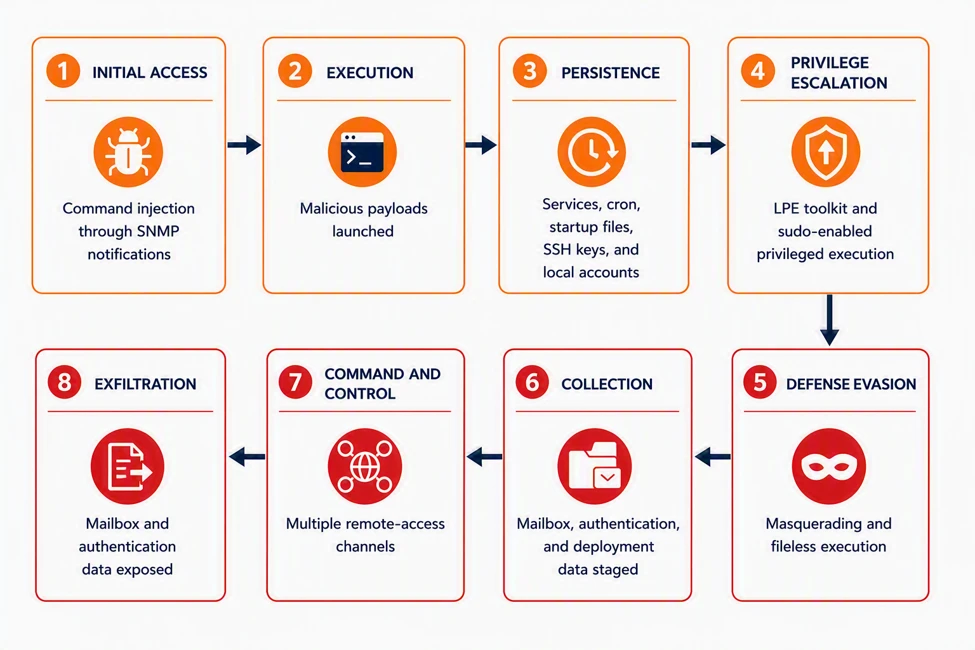
Following successful exploitation, observed activity included deployment of JSP web shells and reverse shells, privilege escalation, persistent remote-access tooling, and memory-backed execution. Threat actors also accessed email and collected authentication and mailbox data, with archive creation and subsequent transfer activity observed. The activity included both automated payload delivery and hands-on-keyboard operations on compromised mail servers. Microsoft observed affected organizations in more than one region and industry. Based on the environments investigated, exploitation was not limited to a single sector or geographic area. The diagram combines behaviors observed across multiple confirmed compromises; no single host necessarily exhibited every stage.

From remediation to public disclosure

CVE-2026-73570 is an unauthenticated OS command-injection vulnerability in the Zimbra Collaboration Suite SNMP notification path. An attacker can send a specially crafted SMTP request that introduces untrusted input into SNMP notification processing. If the input is not sufficiently sanitized, embedded shell commands can execute with the privileges of the zimbra service account. Exploitation requires the optional zimbra-snmp package to be installed and SNMP notifications to be enabled.

Zimbra version 10.1.20, released July 20, 2026, contains the relevant remediation. CVE-2026-73570 was publicly disclosed on August 13, 2026. Microsoft telemetry identified activity targeting the same injection path during the interval between those events.

Attack chain overview

Figure 1. CVE-2026-73570 attack chain, mapped to MITRE ATT&CK tactics and composited across all confirmed compromises.

Pre-disclosure reconnaissance and pre-exploitation probing

Between July 28 and August 7, after a fix became available on July 20 but before public disclosure on August 13, Microsoft observed two distinct out-of-band scanning tools probing the vulnerable injection point. The activity used the same swatchdog-to-snmptrap execution path later observed during exploitation.

The operators first validated command execution using lightweight out-of-band probes to unique subdomains hosted on public interaction and collaborator services, including oast[.]fun, oast[.]online, dnslog[.]pp[.]ua, requestrepo[.]com, and campaign-associated infrastructure under bypass[.]eu[.]org. The probes included HTTP requests and DNS, ICMP, and in-band identity checks, using commands such as curl, wget, ping, nslookup, and id. HTTP requests used the CVE-specific ZB73570 User-Agent, while DNS and ICMP requests used randomized callback subdomains.

The probes were designed to confirm execution without delivering a payload by performing local identity checks or dropping a small system fingerprint script, demonstrating both command execution and external access to the server’s webroot.

Figure 2. Out-of-band command-execution validation using HTTP, DNS, and ICMP callbacks to unique collaborator subdomains.

Initial access

CVE-2026-73570 allows a crafted SMTP request containing shell metacharacters to reach Zimbra’s SNMP notification processing. When a service-state change triggers health monitoring, swatchdog incorporates the attacker-controlled value into a snmptrap shell invocation, enabling command execution.

Figure 3. CVE-2026-73570 command-injection sequence that changes webroot permissions, reconstructs encoded fragments, and deploys a JSP webshell.
Figure 4. JSP webshell artifacts placement across Zimbra application and servlet-work directories.
Figure 5. Remote content retrieved with wget or curl and piped to a shell for execution.

Exploitation of the Zimbra vulnerability provided attackers with direct command execution as the zimbra service account. In observed cases, attackers used this access to deploy JSP webshells by changing webroot permissions, reconstructing an encoded and compressed payload from staged fragments, and writing the decoded payload to publicly accessible application directories. The staging fragments were then removed, leaving the webshell available for subsequent HTTP-based access.

Attackers also used the initial command execution to download and execute content directly through wget or curl, launch background processes, and establish interactive reverse shells. Other execution chains used cron, systemd, or memfd_create to maintain recurring or memory-backed execution.

Multiple JSP webshells were deployed across Jetty and mailboxd application paths, including additional copies on peer mailbox nodes. This provided alternative access paths across different Zimbra configurations and reduced reliance on a single webshell. In some cases, attackers temporarily enabled write access to a public directory to deploy the webshell and then restored the directory permissions, limiting the visibility of the change during basic permission checks.

Reconnaissance — Cluster mapping and environment discovery
The actor first mapped the Zimbra deployment using zmprov to identify mailbox and MTA nodes. This provided an overview of the server roles within the environment and helped identify systems of interest for subsequent activity.

The actor also checked for the presence of the Zimbra SSH identity, likely to determine whether existing administrative trust could enable movement between Zimbra hosts. In parallel, DNS-based callbacks were used to transmit environment details, including mailbox-server counts and other host-specific information.

Figure 6. Cluster-aware reconnaissance using Zimbra provisioning commands to enumerate mailbox and MTA nodes and test administrative SSH trust.

Application and host persistence

Microsoft observed a privilege-escalation technique that abused Zimbra’s legitimate, sudo-authorized service helpers and the interaction between zmmailboxdmgr, its writable log directory, the sudo PAM configuration, pam_exec, and zmstat-fd.

The attacker first verified that the server exposed the required Zimbra helpers and that the mailbox manager’s log directory was writable. They then backed up /etc/pam.d/sudo, replaced the legitimate zmmailboxd.out log with a symlink to the PAM configuration, and invoked the privileged zmmailboxdmgr process. This caused the PAM file to become owned by the zimbra service account, allowing the attacker to modify it.

The attacker added a pam_exec session hook that invoked a local script, then triggered a sudo session through the legitimate zmstat-fd helper. The hook executed as root and created a NOPASSWD: ALL entry for the zimbra account, providing unrestricted sudo access. The attacker subsequently restored the original PAM content and removed temporary files and other staging artifacts, while retaining the newly created sudoers entry.

The resulting root access was confirmed through subsequent passwordless sudo operations, including system configuration and file ownership changes. The controller also contained fallback paths involving Postfix, a Java agent, zmstat-fd, and nginx; however, the observed child processes indicate that the mailbox-manager/PAM path was the escalation technique successfully exercised on this server.

Figure 7. Privilege-escalation sequence using a writable Zimbra log path, zmstat-fd, pam_exec, and a sudoers entry for the zimbra account.

A second persistence mechanism was established through a systemd service named zimlog.service. The name was consistent with a Zimbra logging component, but the payload was manually installed in /etc/systemd/system/, outside the Zimbra application directories. The service file was moved from /tmp into the system-wide systemd directory using sudo and assigned to the Zimbra service account. Its timestamps were then modified to match existing systemd services, including rsync.service and sshd.service. The service was enabled with systemctl enable, establishing execution at system boot, and its status was subsequently checked.

Figure 8. Disguised zimlog.service systemd unit installed for host persistence and timestomped to resemble an older file.

Zimbra service credential and authentication-key collection

The actor targeted Zimbra’s centralized service and authentication secrets rather than individual mailbox passwords. The zmlocalconfig -s command exposed credentials used by LDAP, MySQL, Postfix, Amavis, and replication services. The actor then used the recovered credentials for authenticated LDAP queries that retrieved high-value attributes, including zimbraPreAuthKey, zimbraAuthTokenKey, and zimbraTwoFactorAuthSecret. Portions of the collected data were compressed into hidden archives.

Figure 9. Zimbra credential and authentication-secret discovery, including service credentials, token material, and preauthentication keys.

The combined zmlocalconfig -s and authenticated ldapsearch sequence was observed across multiple compromised Zimbra servers. A separate credential-dumping malware family observed in another affected environment extended this tactic by collecting Zimbra configuration credentials and authentication material through an automated backdoor.

Lateral movement across the Zimbra cluster

The observed activity used Zimbra’s existing SSH identity at /opt/zimbra/.ssh/zimbra_identity to access other trusted nodes in the cluster. SSH was invoked in noninteractive mode with host-key verification disabled, enabling automated connections between peer systems. rsync was then used to move staged payload fragments, helper scripts, and JSP webshells between nodes. The transfer workflow included validation of the received fragments and removal of source files after transfer, supporting payload reconstruction on the destination while reducing artifacts left on the originating system.

This activity enabled the same tooling and webshells to be deployed across multiple Zimbra nodes, extending access beyond the initially compromised host.

Figure 10. Lateral movement across trusted Zimbra cluster nodes using the existing zimbra SSH identity and rsync-based artifact transfer.

Command and control

The actor used HTTP and HTTPS callbacks to validate command execution, retrieve payloads, and return command output. DNS-label callbacks provided an additional channel for execution confirmation and limited host-data transfer. The observed activity established a reverse shell using standard Linux utilities. A named pipe at /tmp/s was used to connect an interactive /bin/sh session to openssl s_client, which maintained an encrypted connection to a remote endpoint. This allowed commands received over the connection to be passed to the shell and their output returned through the same channel.

Figure 11. Command-and-control activity using an OpenSSL-encrypted reverse shell to attacker-controlled infrastructure.

Remote-access agents and Zimbra Implants

In one campaign, the attackers used a multi-stage payload chain beginning with agent2.sh, a lightweight shell downloader that retrieved Stage 1 malware from a dynamic DNS domain and staged it within Zimbra’s log-directory structure. The same chain was observed across multiple hosts in separate environments. The downloaded zimdown2 Go binary acted as an installer for the final zimclient2 remote-access agent. It retrieved and verified the agent using its SHA-256 hash, supported multiple download methods, and reported installation status over a separate WebSocket channel. It also selected writable installation paths and runtime-generated filenames based on the host environment.

The final zimclient2 payload was a full remote-access agent providing interactive shell access, bidirectional file operations, and SOCKS5 proxying. It supported WebSocket, TLS, and raw TCP transports, providing resilient remote access and potential network pivoting through compromised Zimbra servers. Evidence identified several persistence mechanisms associated with the payload, including systemd services, OpenRC, cron, shell startup files, SSH authorized keys, and local account creation:

Persistence mechanismEvidence
SystemdUnit files, daemon-reload, enable, and start
OpenRC/etc/init.d/ scripts, rc-update, rc-service
Cron/etc/cron.d/, crontab, @reboot, and scheduled entries
Shell startup/etc/profile, /etc/bashrc, .bash_profile, .zprofile
SSH keys.ssh/authorized_keys creation or modification
Local accountsuseradd, adduser, and password-setting activity

Zimbra Credential and Mailbox Exfiltration-Attempt Implant

The observed activity also included Zimbra-specific payloads. In one case, a Go executable contained the embedded module path zimbra-exfil/client-dump, indicating that it was specifically designed to operate against Zimbra Collaboration Suite installations. The payload was intended to run under the Zimbra service account, which has broad read access across the Zimbra installation.

Figure 12. zimbra-exfil client-dump binary workflow for reading localconfig.xml and extracting Zimbra service-account credentials.

Upon execution, the binary reads /opt/zimbra/conf/localconfig.xml – Zimbra’s primary configuration file and extracts a defined set of service account credentials including mysql_root_password, zimbra_mysql_password, ldap_root_password, zimbra_ldap_password, ldap_postfix_password, ldap_amavis_password, ldap_nginx_password, ldap_replication_password, and ldap_bes_searcher_password.

These values are then populated to construct pre-formatted MySQL and LDAP connection strings to the local Zimbra MySQL instance via Unix socket and exports full table contents from mailbox, mailbox_metadata, mobile_devices, and out_of_office, along with all tables under the zimbra.* namespace.

Figure 13. Automated export of Zimbra mailbox, metadata, mobile-device, out-of-office, and related database content using recovered credentials.

A dedicated function, identified in analysis as dumpSecrets, handles collection from both the local filesystem and the LDAP directory service. From the filesystem, the binary stages SSL certificate and private key files and Postfix LDAP configuration files. From the LDAP directory, the binary performs authenticated queries targeting specific attributes of significant sensitivity. The zimbraAuthTokenKey attribute, retrieved from cn=config,cn=zimbra, is the key material Zimbra uses to sign user session tokens across the platform; access to this value enables session token generation for arbitrary accounts without requiring account credentials. The pre-authentication key allows construction of pre-authenticated login URLs for any user account. The full collection breakdown is as follows:

Figure 14. Credential, certificate, LDAP secret, mail-rule, and configuration artifacts collected and staged by the Zimbra exfiltration-attempt implant.

Collected files are staged in a timestamped working directory under /tmp/zimbra_dump_YYYYMMDD_HHMMSS/, compressed into a ZIP archive, and

prepared for attempted transfer to a remote endpoint whose address is supplied as a hex-encoded command-line argument.

Collection and exfiltration attempt

On one compromised Zimbra server, the actor archived recent mailbox-backup content into /opt/zimbra/final.tar.gz. The actor then downloaded AzCopy from hxxps://aka[.]ms/downloadazcopy-v10-linux and invoked it with an operator-supplied Azure Blob SAS URL targeting wsweb03[.]blob[.]core[.]windows[.]net/log/windows.log. This activity shows mailbox-data collection, local archive staging, and an exfiltration attempt using cloud-storage tooling; available evidence does not confirm that the transfer completed successfully.

Figure 15. Mailbox-backup collection staged as /opt/zimbra/final.tar.gz and transferred with AzCopy to Azure Blob.

Mitigation and protection guidance

Microsoft Defender surfaced malicious activity across every observed attack path. A tactical detector built for the SNMP command-injection pattern recognized every confirmed exploitation event while operating in evaluation mode. Independently of that detector, Microsoft Defender Antivirus detected and quarantined Chopper, GodzillaWebShell, CoinMiner, Looptik, SuspGoLang, and Dirtelti payloads, and behavioral protection alerted on suspicious permission changes, background execution, dropped-and-launched files, anonymous memfd_create execution, and reverse-shell activity.

Endpoint detection and response telemetry preserved the process lineage, network connections, and file activity used to reconstruct the attack paths, and Advanced Hunting pivots across process lineage, command-and-control infrastructure, file hashes, and the S3-hosted dropper URL expanded a ten-day seed query into a fleet-wide hunt across the full advanced hunting retention window, identifying additional affected hosts.

Patch and reduce exposure

  • Patch immediately. Upgrade all Zimbra Collaboration Suite instances to version 10.1.20 or later, which remediates CVE-2026-73570.
  • Mitigate where patching must wait. Uninstall the optional zimbra-snmp package, disable SNMP notifications, and restrict SNMP and SMTP access to trusted hosts only.

2. Scope and contain

  • Treat reverse-shell alerts on internet-facing mail servers as priority incidents. A confirmed reverse-shell connection indicates attacker access even when no payload is quarantined, making rapid scoping, containment, and credential review essential.
  • Do not rely solely on named-malware detections. Several of the most consequential outcomes in this campaign, including full mail-store staging for an exfiltration attempt, involved no malware family at all, only a plain interactive shell.

3. Rotate secrets and review persistence

  • Rotate Zimbra authentication secrets and inspect system services. Rotate all domain zimbraPreAuthKey values and review systemd units for unexpected ownership, enablement, or timestamp changes, including units that resemble Zimbra or operating-system logging components.
  • Hunt for redundant webshell persistence. Inspect active Zimbra application directories and servlet work directories across every mailbox node for unexpected JSP files, generated *_jsp.java or compiled servlet artifacts, and recent permission changes on publicly served directories. Do not assume that removing one known JSP eliminates access.
  • Limit the blast radius of mail-server service accounts. Where feasible, confine them with namespace, seccomp, or AppArmor controls to reduce the impact of any future command-injection-class vulnerability in the mail stack.

4. Deploy and verify Microsoft Defender protections

  • Enable Microsoft Defender for Endpoint protections on Linux servers. Real-time protection, behavior monitoring, and endpoint detection and response telemetry work together to quarantine malicious payloads, surface suspicious behaviors, preserve evidence for investigation, and support proactive hunting.

5. Hunt for related activity

  • Look for the injection signature itself. A legitimate snmptrap invocation immediately followed by shell metacharacters and a wget or curl call, wrapped in a trailing ‘#’ comment that swallows the remaining legitimate arguments.
  • Hunt beyond the advanced hunting window. Microsoft Defender XDR advanced hunting retains 30 days of raw event data, which no longer covers the pre-disclosure reconnaissance and early exploitation described here. For activity older than that window, search the second-stage infrastructure listed in the appendix in Microsoft Sentinel or archived logs, and pivot every recovered indicator across the entire device fleet rather than only the hosts that triggered an initial alert.
TacticObserved activityMicrosoft Defender coverage
Initial AccessExploitation of an unauthenticated command-injection vulnerability in a Zimbra service-monitoring component (CVE-2026-73570), enabling remote command execution without credentials.Microsoft Defender for Endpoint
Exploit:Linux/SnmpTrapCmdInject.A
Possible CVE-2026-73570 vulnerability exploitation
ExecutionA second-stage payload is retrieved over HTTP using standard download utilities with fallbacks, then launched as a detached background process.Microsoft Defender for Endpoint
Trojan:Linux/ShellDropper.AA
HackTool:Linux/SuspFetchExecFallback.A

Suspicious command execution via Java application Suspicious file dropped and launched Process launched in the background Suspicious piped command launched
PersistenceWrite access is granted to a Zimbra web-application directory, and a base64/gzip-encoded payload is decoded directly into a .jsp file inside it.Microsoft Defender for Endpoint
Exploit:Linux/SnmpTrapJspDrop.A
Privilege EscalationA symbolic link is created into the system’s PAM configuration directory (/etc/pam.d/) in conjunction with the Zimbra mailbox process (zmmailboxd).Microsoft Defender for Endpoint
HackTool:Linux/ZimbraPLE.A

Suspicious execution of elevated process Possible post-exploitation activity on a Zimbra mail server
Defense EvasionThe payload checks for specific legitimate processes before proceeding, disguises itself under trusted system component names, removes staging artifacts, and terminates competing malicious processes.Microsoft Defender for Endpoint
Trojan:Linux/FakeSysResolved.AA
HackTool:Linux/SuspKworkerMasqStage.A
Trojan:Linux/SuspKworkerImplant.B Trojan:Linux/FakeChronydMiner.A

Suspicious file or information obfuscation detected Suspicious anonymous process created using memfd_create Suspicious timestamp modification
Credential AccessA dropped JSP tool reads Zimbra’s local config file for LDAP/admin credentials and self-deletes afterward; companion tools invoke Zimbra’s zmlocalconfig utility and craft ldapsearch queries against admin accounts and Zimbra-specific password/auth-token attributes.Microsoft Defender for Endpoint
Backdoor:Java/ConfigCredDumper.A
HackTool:Linux/ZimbraLeakSecreat.A
HackTool:Linux/ZimbraSuspLDAP.A

Enumeration of files with sensitive data Possible post-exploitation activity on a Zimbra mail server
Command and ControlBackdoor components communicate over web-based channels disguised as mail-server traffic on dynamically-resolved domains, with a follow-on stage using separate infrastructure.Microsoft Defender for Endpoint
Backdoor:Linux/FakeZimDownloader.A
Backdoor:Linux/FakeZimClient.A

Possible reverse shell Suspicious communication with a remote target Suspicious file or content ingress

Microsoft Security Copilot

Microsoft Security Copilot is embedded in Microsoft Defender and provides security teams with AI-powered capabilities to summarize incidents, analyze files and scripts, summarize identities, use guided responses, and generate device summaries, hunting queries, and incident reports.

Security Copilot customers can also use the standalone experience to create their own prompts or run prebuilt promptbooks to automate investigation and response tasks related to this activity:

  • Incident investigation: correlate the snmptrap injection, dropper execution, privilege escalation, persistence, and outbound C2 signals on an affected mail server into a single timeline.
  • Script and file analysis: summarize the behavior of recovered dropper scripts and stripped Go binaries, including the downloader fallbacks, masquerade filenames, and persistence mechanisms they select at runtime.
  • Device summary: assess whether a mail server that triggered a reverse-shell or memfd_create alert shows further staging, persistence, or beacon activity.
  • Vulnerability impact assessment: identify internet-facing Zimbra Collaboration Suite hosts still running a version earlier than 10.1.20.

Microsoft Defender XDR

Microsoft Defender XDR customers can run the following behavior-based queries to identify confirmed exploitation and post-exploitation activity associated with CVE-2026-73570 on Linux Zimbra servers. The queries intentionally avoid incomplete static IOC lists and use public Device* tables. Tune results for approved Zimbra maintenance and administrative activity.

The queries cover the confirmed SNMP command-injection boundary, suspicious Zimbra web-shell writes and Java-launched native shells, memory-backed execution, persistence and privilege-escalation artifacts, DNS callbacks, and collection or cloud-transfer activity. A command, file operation, or connection must be interpreted according to the evidence it actually provides; it does not automatically prove every downstream outcome.

Advanced hunting queries

Confirmed shell-mediated Zimbra SNMP command injection

This query identifies the high-confidence exploitation boundary where Perl running a generated Zimbra swatchdog script creates a Unix shell containing the SNMP command and shell grammar inside the service value. A match confirms shell-mediated command execution; nested payload outcomes require separate evidence.

let lookback = 30d;
 DeviceProcessEvents
 | where Timestamp > ago(lookback)
 | where FileName in~ ("sh", "bash", "dash")
 | where InitiatingProcessFileName =~ "perl"
 | where InitiatingProcessCommandLine contains ".swatchdog_script"
 | extend Cmd = tolower(ProcessCommandLine)
 | where Cmd contains "snmptrap"
 | where Cmd matches regex @"(^|\s)-c(\s|$)"
 | where Cmd matches regex @"::zmservicename\s+s\s+.*[;&|`$].*\s+\S+-mib::zmservicestatus"
 | project Timestamp, DeviceId, DeviceName, AccountName, FileName, FolderPath,
           ProcessCommandLine, ProcessId, ProcessCreationTime,
           InitiatingProcessFileName, InitiatingProcessFolderPath,
           InitiatingProcessCommandLine, InitiatingProcessId,
           InitiatingProcessCreationTime, SHA1, SHA256, ReportId
 | order by Timestamp desc;

Suspicious JSP writes in Zimbra webroots

This query identifies JSP or generated JSP-source writes in Zimbra web application and servlet-work directories when the initiating process is associated with shell execution, transfer, decoding, Java, jspawnhelper, Perl, or the SNMP injection path. Review each result to distinguish deployment from later activation.

let lookback = 30d;
 DeviceFileEvents
 | where Timestamp > ago(lookback)
 | where FileName endswith ".jsp" or FileName endswith "_jsp.java"
 | where FolderPath contains "/jetty_base/webapps/"
     or FolderPath contains "/jetty/webapps/"
     or FolderPath contains "/mailboxd/webapps/"
     or FolderPath contains "/work/zimbra/jsp/"
 | where InitiatingProcessFileName in~
     ("sh", "bash", "dash", "curl", "wget", "tee", "base64",
      "rsync", "java", "jspawnhelper", "perl")
     or InitiatingProcessCommandLine contains "snmptrap"
     or InitiatingProcessCommandLine contains "Runtime.getRuntime().exec"
 | project Timestamp, DeviceId, DeviceName, ActionType, FolderPath, FileName,
           SHA1, SHA256, InitiatingProcessAccountName,
           InitiatingProcessFileName, InitiatingProcessFolderPath,
           InitiatingProcessCommandLine, ReportId
 | order by Timestamp desc;

Zimbra Java or jspawnhelper launching native shells

This query finds native shells, FIFO creation, and OpenSSL execution launched by Zimbra Java or jspawnhelper context. These events can reveal web-shell or application-mediated native command execution, including reverse-shell behavior.

let lookback = 30d;
 DeviceProcessEvents
 | where Timestamp > ago(lookback)
 | where FileName in~ ("sh", "bash", "dash", "mkfifo", "openssl")
 | where InitiatingProcessFileName in~ ("java", "jspawnhelper")
     or InitiatingProcessFolderPath contains "/opt/zimbra/"
 | where ProcessCommandLine contains " -c "
     or ProcessCommandLine contains " -i"
     or ProcessCommandLine contains "mkfifo"
     or ProcessCommandLine contains "s_client"
 | project Timestamp, DeviceId, DeviceName, AccountName, FileName, FolderPath,
           ProcessCommandLine, ProcessId, ProcessCreationTime,
           InitiatingProcessFileName, InitiatingProcessFolderPath,
           InitiatingProcessCommandLine, InitiatingProcessId,
           InitiatingProcessCreationTime, ReportId
 | order by Timestamp desc;

Campaign-context anonymous memory-backed execution

This query finds anonymous memfd or file-descriptor-backed process execution only when Zimbra exploit ancestry or known campaign process context is present. It identifies memory-backed execution behavior, not the exact syscall or process injection.

let lookback = 30d;
 DeviceProcessEvents
 | where Timestamp > ago(lookback)
 | extend FullPath = strcat(FolderPath, "/", FileName)
 | where FileName startswith "memfd:"
     or FullPath contains "/memfd:"
     or FullPath startswith "/proc/self/fd/"
     or ProcessCommandLine contains "/proc/self/fd/"
 | where InitiatingProcessCommandLine contains ".swatchdog_script"
     or InitiatingProcessCommandLine contains "snmptrap"
     or ProcessCommandLine has_any
         (".kworker_sys", ".lpe_core", "softwaretech", "ksmd",
          "/tmp/init", "/dev/shm/systemd-resolved",
          "chronyd-helper.service", "syslog_init.service")
     or InitiatingProcessCommandLine has_any
         (".kworker_sys", ".lpe_core", "softwaretech", "ksmd",
          "/tmp/init", "/dev/shm/systemd-resolved")
 | project Timestamp, DeviceId, DeviceName, AccountName, FileName, FolderPath,
           ProcessCommandLine, ProcessId, ProcessCreationTime,
           InitiatingProcessFileName, InitiatingProcessFolderPath,
           InitiatingProcessCommandLine, InitiatingProcessId,
           InitiatingProcessCreationTime, SHA1, SHA256, ReportId
 | order by Timestamp desc;

Zimbra persistence and privilege-escalation artifacts

This query combines process and file evidence for the systemd units, pre-authentication changes, PAM/sudo manipulation, and related artifacts observed in the investigation. Commands and file events must be correlated with runtime evidence before claiming durable persistence or successful privilege escalation.

let lookback = 30d;
 union
 (
     DeviceProcessEvents
     | where Timestamp > ago(lookback)
     | where ProcessCommandLine contains "zimlog.service"
         or ProcessCommandLine contains "chronyd-helper.service"
         or ProcessCommandLine contains "syslog_init.service"
         or ProcessCommandLine contains "zimbraPreAuthKey"
         or ProcessCommandLine contains "pam_exec"
         or ProcessCommandLine contains "zmstat-fd"
         or ProcessCommandLine contains "/etc/sudoers.d/81_metric"
     | project Timestamp, DeviceId, DeviceName, EvidenceType="Process",
               ActionType, FileName, FolderPath, ProcessCommandLine,
               InitiatingProcessFileName, InitiatingProcessCommandLine, ReportId
 ),
 (
     DeviceFileEvents
     | where Timestamp > ago(lookback)
     | where FileName in~
         ("zimlog.service", "chronyd-helper.service", "syslog_init.service", "81_metric")
         or FolderPath == "/etc/pam.d"
         or FolderPath == "/etc/sudoers.d"
     | project Timestamp, DeviceId, DeviceName, EvidenceType="File",
               ActionType, FileName, FolderPath,
               ProcessCommandLine=InitiatingProcessCommandLine,
               InitiatingProcessFileName, InitiatingProcessCommandLine, ReportId
 )
 | order by Timestamp desc;

DNS and out-of-band callbacks from the Zimbra injection path

This query finds nslookup, dig, host, or ping callback commands executed through the confirmed Zimbra swatchdog and SNMP shell lineage. It remains useful when callback domains rotate because it detects the behavior rather than a static domain list.

let lookback = 30d;
 DeviceProcessEvents
 | where Timestamp > ago(lookback)
 | where FileName in~ ("sh", "bash", "dash")
 | where InitiatingProcessFileName =~ "perl"
 | where InitiatingProcessCommandLine contains ".swatchdog_script"
 | extend Cmd = tolower(ProcessCommandLine)
 | where Cmd contains "snmptrap"
 | where Cmd matches regex @"(^|\s)-c(\s|$)"
 | where Cmd has_any ("nslookup", "dig", "host", "ping")
 | where Cmd contains "zmservicename" and Cmd contains "zmservicestatus"
 | project Timestamp, DeviceId, DeviceName, AccountName, FileName, FolderPath,
           ProcessCommandLine, ProcessId, ProcessCreationTime,
           InitiatingProcessFileName, InitiatingProcessFolderPath,
           InitiatingProcessCommandLine, InitiatingProcessId,
           InitiatingProcessCreationTime, ReportId
 | order by Timestamp desc;

Zimbra collection, archive staging, and cloud-transfer invocation

This query identifies Zimbra LDAP export, archive creation and staging, and AzCopy invocation associated with collection activity. Archive creation and transfer invocation do not by themselves prove that exfiltration completed.

let lookback = 30d;
 DeviceProcessEvents
 | where Timestamp > ago(lookback)
 | where FileName in~
     ("zmslapcat", "slapcat", "tar", "gzip", "find", "wget",
      "curl", "azcopy", "bash", "sh", "nohup")
 | where ProcessCommandLine contains "zmslapcat"
     or ProcessCommandLine contains "/opt/zimbra/backup/"
     or ProcessCommandLine contains "/opt/zimbra/final.tar.gz"
     or ProcessCommandLine contains "downloadazcopy-v10-linux"
     or ProcessCommandLine contains "azcopy copy"
     or ProcessCommandLine contains "HISTFILE=/dev/null"
 | project Timestamp, DeviceId, DeviceName, AccountName, FileName, FolderPath,
           ProcessCommandLine, ProcessId, ProcessCreationTime, SHA1, SHA256,
           InitiatingProcessFileName, InitiatingProcessFolderPath,
           InitiatingProcessCommandLine, InitiatingProcessId,
           InitiatingProcessCreationTime, ReportId
 | order by Timestamp desc;

MITRE ATT&CK techniques observed

TacticTechniqueObserved activity
ReconnaissanceT1595.002 Active Scanning: Vulnerability ScanningCanary subdomains in ping and nslookup callbacks; no payload.
Initial AccessT1190 Exploit Public-Facing ApplicationCrafted SMTP request into SNMP notification processing, running as the zimbra account.
ExecutionT1059.004 Command and Scripting Interpreter: Unix Shellperl to dash or bash; de.sh, agent2.sh, and aliyun_update.tar.gz piped into a shell.
ExecutionT1105 Ingress Tool Transfercurl, wget, python3, python, perl, and /dev/tcp download fallbacks.
Privilege EscalationT1068 Exploitation for Privilege EscalationGitHub LPE toolkit staged as .lpe_core in tmpfs; quarantined as Looptik.
PersistenceT1053.003 Scheduled Task/Job: CronCrontab ‘* * * * *’ and ‘@reboot’ entries relaunching .kworker_sys.
PersistenceT1543.002 Create or Modify System Process: Systemd Servicezimlog.service installed, enabled, assigned to the Zimbra account, and timestomped on one server; a separate payload installed chronyd-helper.service as a root service.
PersistenceT1505.003 Server Software Component: Web ShellMultiple JSP webshells deployed across Zimbra application paths and propagated to peer mailbox nodes to provide redundant HTTP-accessible command execution.
Defense EvasionT1036.005 Masquerading: Match Legitimate Name or Locationsystemd-resolved, _chronyd, .kworker_sys, and a mail archive saved as .ico.
Defense EvasionT1620 Reflective Code LoadingXOR-decoded ELF run from memfd_create via /proc/self/fd.
DiscoveryT1083 File and Directory DiscoveryTen operator directory listings; droppers probing writable, executable staging paths.
Command and ControlT1071.001 Application Layer Protocol: Web ProtocolsWebSocket tasking at psk1zim[.]abrdns[.]com/agentws, with TLS and raw TCP fallbacks.
Command and ControlT1102.001 Web Service: Dead Drop ResolverEncrypted commands polled from a Base mainnet contract over public JSON-RPC.
CollectionT1560.001 Archive Collected Data: Archive via Utilitytar zcvf of the full Zimbra mail store, run twice.
CollectionT1074.001 Data Staged: Local Data StagingArchive written as five.ico into the public Zimbra web directory.
ImpactT1496 Resource HijackingMiner staged as .kworker_sys; rival miners killed and pools sinkholed via /etc/hosts.

Indicators of compromise

Network indicators

IndicatorTypeRole
117.107.25[.]243:7071IPv4 (C2)Dropper C2, serving de.sh
192.255.193[.]111:9004IPv4 (C2)Miner C2, serving the build_amd64 cryptominer staged as .kworker_sys
transzimbra[.]linkpc[.]netDynamic-DNS domainDropper C2, serving agent.sh/agent2.sh/zimdown2
psk1zim[.]abrdns[.]com/agentwsDynamic-DNS domainzimclient2 WebSocket (port 80, /agentws) and raw TCP (8080) command channel
tls[.]psk1zim[.]abrdns[.]comDomain (C2)zimclient2 TLS command channel (port 443)
wslogzimbra[.]linkpc[.]net/wsstatWebSocket URLzimdown2 installer status reporting; separate from payload hosting
mexico-cashpay-test.s3.dualstack.mx-central-1.amazonaws[.]com/pakistan/2026/aliyun_update.tar.gzS3-hosted URLTarball dropper; confirmed executed on one host, retried elsewhere
45.32.30[.]235:8081IPv4:port (C2)Reverse shell; earliest confirmed C2 in this campaign
45.32.30[.]235:8080IPv4:port (C2)Same C2 IP, different port; interactive session + mail-store staging
193.42.40[.]135:443IPv4:port (C2)Organization-wide reverse-shell/recon wave
3.209.137[.]175:443IPv4:port (C2)Secondary C2, rotated-infrastructure event
github[.]com/<redacted>/lpe-toolkitPublic GitHub releaseLegitimate public tool repurposed as an attacker privilege-escalation payload
0x25bdA7Feb3553995AD68a9A8Ed8c731b73a71586Base contract addressCommand channel for the memfd-executed stage; block on JSON-RPC bodies rather than the public RPC providers

File hashes (SHA-256)

IndicatorTypeRole
dee5af1c0f76b45d28bafd6e60c07bb8e391d98addf81ef8f13d073acdb3c48aSHA-256de.sh
aea991f694911e321b0ab97534f2ad0291c392c0a43dabff664c563618bd036dSHA-256build_amd64
6ab7de2509038edf580aef6229c1c3db17f4da8f2d7d940818faf617d1938244SHA-256agent2.sh
bf28f38122bf20d5fac969cc414daa6a890cdea872d389ca93d2092b6b7773cfSHA-256zimdown2
b594a42b8f1c6f090327bb9a3361c2d3515537fb7ac8da6b9061b9a3f330e159SHA-256Zimclient2
65A7576C389326B6CDF9C993D0BE6E5D50FED9655D1CDF2A3A50F2C21C8EC435SHA-256‘Looptik’ hacktool (GitHub-hosted LPE toolkit)
22EF852F6EBC39EE71235B90648B4B200B385C47D25C79545986493F8C70DB69SHA-256Loader staged as ‘systemd-resolved’; installs /usr/sbin/_chronyd and decodes the in-memory stage 2
518FE65DD349180191D9B258AB24876AAED6613CD657D0B626D1FC24E03A22B6SHA-256Decoded in-memory stage 2; Base-chain command agent

References

Learn More

For the latest security research from the Microsoft Threat Intelligence community, check out the Microsoft Threat Intelligence Blog.

To get notified about new publications and to join discussions on social media, follow us on LinkedIn, X (formerly Twitter), and Bluesky.

To hear stories and insights from the Microsoft Threat Intelligence community about the ever-evolving threat landscape, listen to the Microsoft Threat Intelligence podcast.

Review our documentation to learn more about our real-time protection capabilities and see how to enable them within your organization.  

The post Unauthenticated command injection on internet-facing mail servers: tracking CVE-2026-73570 appeared first on Microsoft Security Blog.

❌