Login


Extend your data perimeter to the AWS Management Console with Private Access
Organizations in regulated industries such as financial services, government, defense, and healthcare restrict their sensitive workloads to isolated network environments with no access to the public internet. Until now, customers could restrict AWS Management Console access to authorized AWS accounts and corporate networks, but the console itself required internet connectivity. This was creating tension between operational convenience and network security controls.
We’re happy to announce that AWS Management Console Private Access is now generally available with support for virtual private clouds (VPCs) without internet connectivity. Organizations in regulated industries that restrict workloads to isolated network environments can now route all traffic for supported service consoles—including authentication flows, static assets (JavaScript, CSS, images), console-only APIs, and AWS service API calls—through AWS PrivateLink VPC endpoints, eliminating the need for an internet gateway, NAT gateway, or any route to the public internet. This capability is available in all AWS commercial Regions for a select set of supported service consoles.
In 2023, we launched AWS Management Console Private Access, which you can use to connect to the console by routing console, sign-in, and service API calls through VPC endpoints. However, accessing the console required internet connectivity for static assets and console-only APIs. This meant security teams faced a choice: allow internet connectivity to use the console or deny console access to operators working in network-isolated environments.
With this launch, AWS Management Console Private Access addresses two common scenarios:
- Console traffic over internet restricted networks: Traffic for supported service consoles now flows entirely through your VPC endpoints—no proxy allowlists to maintain, no TLS-intercepting proxies to operate, and no CLI-only workflows to accept as a compromise. The same path works seamlessly from Amazon WorkSpaces, Amazon Elastic Compute Cloud (Amazon EC2) instances, and on-premises networks connected through AWS Direct Connect or AWS Site-to-Site VPN. Combined with sign-in resource control policies (RCPs) and sign-in resource policies, you can ensure that console authentication only succeeds from expected networks—even if valid credentials are presented elsewhere, the session is denied. Teams that previously relied on restricted egress rules or manual domain allowlists now get full console access with the same network controls they already trust.
- Data-exfiltration prevention: Private Access enables you to restrict which AWS accounts and organizational identities can use the AWS Management Console from within your VPC. This prevents access from personal accounts and from accounts outside your organization. Attach a VPC endpoint policy with an
aws:ResourceOrgIDcondition, and console actions are automatically scoped to resources inside your organization. Sign-in RCPs add a second layer by ensuring authentication only succeeds from networks within your perimeter. Together, these controls prevent supported service consoles from being used to access resources in accounts outside your organization—such as personal accounts—without requiring complex network-layer workarounds.
In this post, you will learn how AWS Management Console Private Access works in environments without internet connectivity, and how to layer access controls using VPC endpoint policies and sign-in resource control policies (RCPs) to strengthen your data perimeter.
Solution overview
AWS Management Console Private Access and sign-in resource control policies are a natural extension of the service control policies (SCPs), resource control policies, and VPC endpoint policies you already use for API traffic; now applied to the console session itself. The same data perimeter controls for identity, resource, and network that protect your programmatic access now protect interactive browser sessions too.
| Perimeter | Control objective | Policy construct | Implementation Steps |
| Identity | Only trusted identities can access my resources | Sign-In RCPs and RBPs | Restrict which principals can sign in to the console. Before authentication, signin:PrincipalArn is available for exemptions only. After authentication, RCPs restrict at the organization, account, or principal level (aws:PrincipalOrgID, aws:PrincipalAccount, aws:PrincipalArn); RBPs restrict at the account or principal level. |
| Identity | Only trusted identities are allowed from my network | Console VPC endpoint policy and Sign-In VPC endpoint policy | Console endpoint: aws:PrincipalOrgID or aws:PrincipalAccount on signed-in identities. Sign-In endpoint: aws:ResourceOrgID or aws:ResourceAccount before authentication, principal and resource keys after authentication. Blocks sign-in to accounts outside your organization, such as personal accounts, from your network. |
| Resource | My identities can access only trusted resources | SCP | Resource perimeter SCP with aws:ResourceOrgID follows your principals into every console session; each service API call the console makes on their behalf is denied if the target resource is outside your organization. |
| Resource | Only trusted resources can be accessed from my network | Console VPC endpoint policy and service VPC endpoint policies | Console endpoint policy with aws:ResourceOrgID and aws:ResourceAccount scopes what the console can reach through your network. |
| Network | My identities can access resources only from expected networks | SCP | Network perimeter SCPs that use aws:SourceVpc deny your principals’ service calls from outside expected networks. With Private Access, requests proxied by the console to supported services carry aws:SourceVpc set to the VPC hosting your Private Access endpoints. Direct browser requests carry VPC context only when the service has its own VPC endpoint, so configure endpoints for every service you use. AWS recommends conditioning on aws:SourceVpc rather than specific aws:SourceVpce values. |
| Network | My resources can only be accessed from expected networks | Sign-In RBPs and RCPs and network perimeter RCPs | Sign-In policies deny console authentication from unexpected networks using aws:SourceIp, aws:SourceVpc, aws:SourceVpce, and aws:VpcSourceIp in both pre-authentication and post-authentication statements. Network perimeter RCPs apply the same network conditions to your data resources for any access path. |
With this launch, Console Private Access routes browser traffic for supported service consoles through VPC endpoints, including:
- Authentication flows – Sign-in, credential exchange, and session token requests
- Static assets – JavaScript, CSS, and images that render the console UI
- Service console API calls – The backend requests made when users interact with service consoles
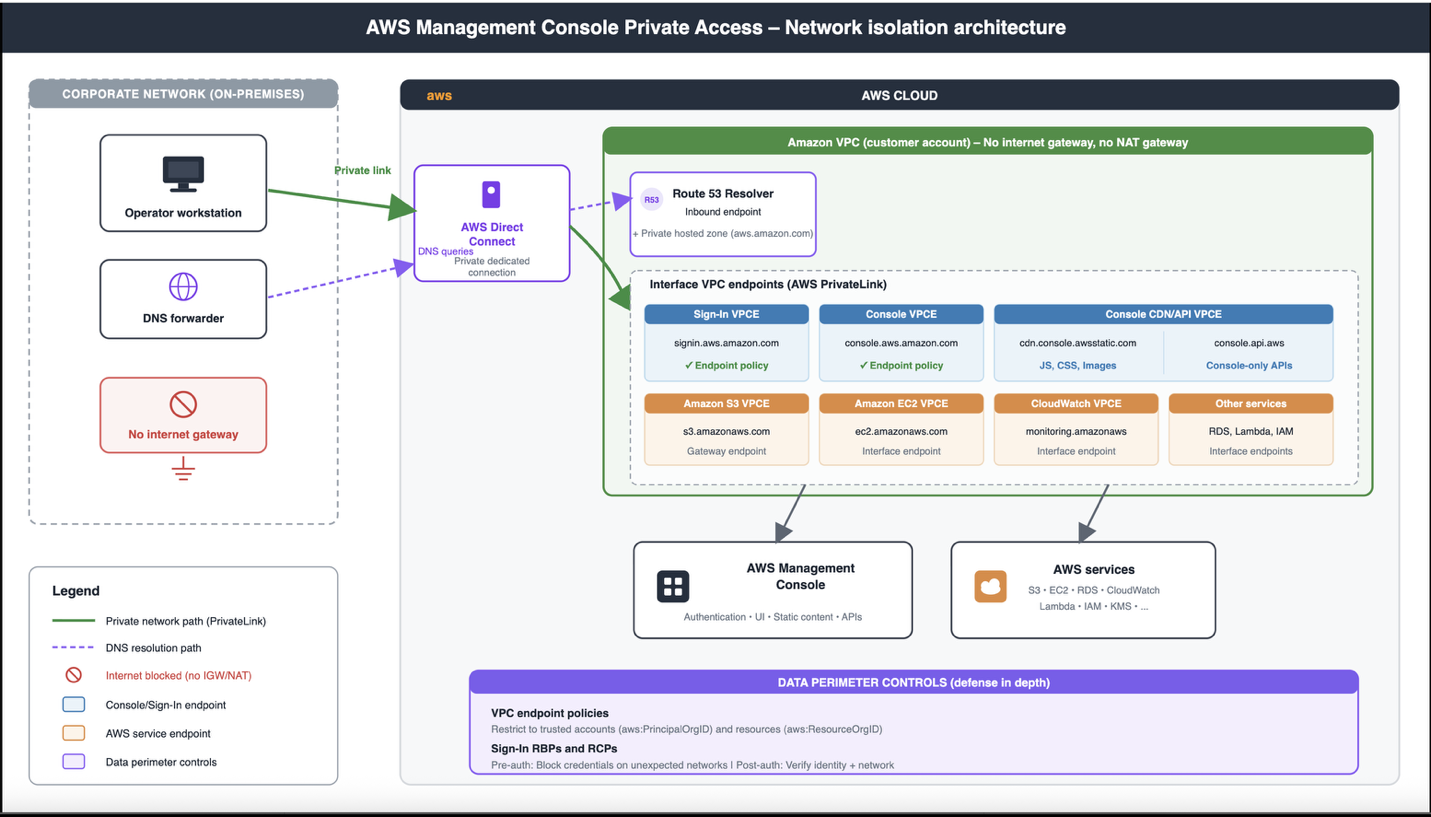
How traffic flows from a workload in a private VPC through the three Private Access endpoints, with no path to the public internet (shown in Figure 1):
- The operator’s browser requests
<region>.console.aws.amazon.com. - The corporate DNS forwarder forwards the query to an Amazon Route 53 Resolver inbound endpoint configured within the VPC, which forwards the traffic to the console VPC endpoint.
- Browser traffic flows from on-premises through Direct Connect (or AWS Site-to-Site VPN) to the VPC, and the VPC endpoint routes traffic to the console service over the AWS private network.
- The console service redirects to the SignIn endpoint
<region>.signin.aws.amazon.comto establish a browser session. - The DNS now resolves to the SignIn VPC endpoint’s private IP addresses, and browser traffic flows to the SignIn service over the AWS private network.
- After entering credentials, the SignIn service evaluates VPC endpoint policies, in addition to resource-based policies (RBPs) and RCPs, then redirects back to the console.
- The console evaluates VPC endpoint policies, loads static content from the console API VPC endpoint, and enforces identity and resource restrictions when making calls to AWS service APIs.
- Users can now access the AWS Management Console over Private Access.

Figure 1: Network isolation architecture
Deploy a pilot of AWS Management Console Private Access
This high-level walkthrough sets up AWS Management Console Private Access for a single AWS Region within one organizational unit (OU). We recommend rolling out incrementally; validate each step before you expand to additional Regions and OUs.
If you want to validate the mechanics of a Private Access deployment before you build out the full solution, the Getting started with a test environment guide walks you through a minimal configuration: a single VPC with the three Private Access endpoints and a permissive policy. This gives you a working setup to experiment with, independent of the deployment described in the rest of this post. To understand how sign-in policies can verify a user’s network location when they access the console, see Controlling console access with resource-based policies and resource control policies.
Prerequisites
You must have the following prerequisites:
- An AWS account that’s a member of an organization within AWS Organizations. The example RCP in Step 4 requires the management account access.
- A VPC in your chosen AWS Region with optional connectivity from your corporate network. This can be an AWS Direct Connect connection, an AWS Site-to-Site VPN, or workloads running directly in the VPC such as Amazon WorkSpaces or Amazon EC2 browsing instances.
- AWS CloudTrail enabled in the same Region to view
ConsoleLoginevents captured. - Familiarity with AWS PrivateLink interface endpoints and AWS Identity and Access Management (IAM) policy evaluation.
Step 1: Baseline current console access
Before changing anything, use CloudTrail to map how your users access the console today. Search for eventName = ConsoleLogin over a representative window (we recommend 30 days) and review the sourceIPAddress, vpcEndpointId, and awsRegion fields. Identify which identity types are in use: root user, IAM user, SAML federation, and AWS IAM Identity Center. Decide which OU or account you will pilot with.
Note: A misconfigured sign-in policy can lock users out of the console. Avoid piloting in a production or shared account. Instead, use a dedicated test account and configure a break-glass principal (covered in Step 5) before enabling access enforcement.
Step 2: Create the Private Access VPC endpoints
In your chosen Region, create or identify a VPC to host the endpoints, then create three interface VPC endpoints in that VPC:
com.amazonaws.<region>.consolefor the console.com.amazonaws.<region>.signinfor AWS Sign-In.com.amazonaws.<region>.console-staticfor console-only APIs. This endpoint is required only if your VPC has no internet path.
Step 3: Configure private DNS for AWS Management Console Private Access
To use AWS Management Console Private Access, you must configure private DNS so that the console domains—.console.aws.amazon.com, .signin.aws.amazon.com, and the associated static-content domains—resolve to your interface endpoints’ network interfaces within your VPC.
- For workloads inside your VPC: If the workloads in your VPC use the default Amazon Route 53 Resolver, no additional DNS configuration is required. When you create each interface endpoint, enable the private DNS name option (set PrivateDnsEnabled = true). The public console domains will then resolve automatically to the endpoint network interfaces inside your VPC. If you use a custom DNS resolver or a private hosted zone, you must configure it explicitly to map the console domains to the endpoint addresses. See Working with private hosted zones for more information. For the complete list of domains and detailed DNS configuration steps, see the AWS Management Console Private Access required endpoints documentation.
- For workloads outside your VPC: For workloads that reach the endpoints from outside the VPC—such as corporate offices connecting over AWS Direct Connect or AWS Site-to-Site VPN—ensure that your corporate DNS resolver returns the endpoint addresses for these domains. See Simplify DNS management in a multi-account environment with Route 53 Resolver for more information.
Step 4: Verify private connectivity
Sign in to the console from a workload inside your VPC. The console should load normally. To confirm that traffic is routing through your VPC endpoints, look for the lock icon in the console navigation bar, shown in Figure 2.
Figure 2: Console Private Access
You can also verify in CloudTrail that recent ConsoleLogin events show the vpcEndpointId field populated with one of your endpoint IDs. Here’s an example CloudTrail ConsoleLogin event snippet showing the vpcEndpointId field:
{
  "eventVersion": "1.08",
  "userIdentity": {
    "type": "AssumedRole",
    "principalId": "AROA3XFRBF23EXAMPLE:john.doe",
    "arn": "arn:aws:sts::123456789012:assumed-role/Admin/john.doe",
    "accountId": "123456789012"
  },
  "eventTime": "2026-07-08T19:15:32Z",
  "eventSource": "signin.amazonaws.com",
  "eventName": "ConsoleLogin",
  "awsRegion": "us-east-1",
  "sourceIPAddress": "10.0.1.47",
  "userAgent": "Mozilla/5.0 (Macintosh; Intel Mac OS X 10_15_7)...",
  "requestParameters": null,
  "responseElements": {
    "ConsoleLogin": "Success"
  },
  "additionalEventData": {
    "LoginTo": "https://console.aws.amazon.com/console/home",
    "MobileVersion": "No",
    "MFAUsed": "Yes",
    "vpcEndpointId": "vpce-0abc123def456789a"
  },
  "eventID": "a1b2c3d4-5678-90ab-cdef-EXAMPLE11111",
  "eventType": "AwsConsoleSignIn",
  "recipientAccountId": "123456789012"
}
If the AWS Management Console doesn’t load, work through the following checks.
Private DNS is enabled on each interface endpoint (or your custom resolver returns the endpoint addresses)
When Private DNS is enabled, AWS automatically creates the DNS entries that resolve the service domains (such as console.aws.amazon.com) to the private IP addresses of your VPC endpoints. Without it, your browser still routes to the public AWS endpoints, bypassing your private access setup entirely.
- Confirm that each endpoint shows
PrivateDnsEnabled:aws ec2 describe-vpc-endpoints \ --filters "Name=vpc-endpoint-type,Values=Interface" \ --query "VpcEndpoints[].{Id:VpcEndpointId,Service:ServiceName,PrivateDns:PrivateDnsEnabled}" \ --output table - Then, from within your VPC, verify that the domains resolve to private addresses:
nslookup console.aws.amazon.com
nslookup signin.aws.amazon.com

# Should return a private IP (e.g., 10.x.x.x), not a public one
Each query should return a private IP address from your VPC CIDR range. If you use a custom DNS resolver instead of the Amazon-provided DNS, ensure your forwarding rules direct the AWS domain queries to the Route 53 Resolver inbound endpoints in your VPC.
The endpoint security groups allow HTTPS (TCP 443) from your workload subnets
Each VPC endpoint creates elastic network interfaces (ENIs) in your subnets, and these ENIs are governed by security groups. If those security groups don’t permit inbound HTTPS traffic from your workloads, the connection fails silently.
- Identify the security groups attached to your endpoints:
aws ec2 describe-vpc-endpoints --vpc-endpoint-ids vpce-0abc123def456789a \ --query "VpcEndpoints[].Groups[].GroupId" --output text - Then verify that each security group allows inbound TCP 443 from your workload subnets:
aws ec2 describe-security-groups --group-ids sg-xxxxxxxx \
  --query "SecurityGroups[].IpPermissions[?ToPort==\`443\`]" \
  --output json
For traffic from outside the VPC (Direct Connect or Site-to-Site VPN), corporate DNS returns the endpoint IPs and the route propagates correctly
If you access the console from an on-premises workstation connected over AWS Direct Connect or AWS Site-to-Site VPN, two additional conditions must be met.
- Your corporate DNS must resolve the AWS domains to the VPC endpoint private IPs. From your on-premises machine, run:
nslookup console.aws.amazon.comIf this returns public AWS IPs, your corporate DNS isn’t forwarding queries through Route 53 Resolver. Configure conditional forwarding for the
aws.amazon.comandamazonaws.comdomains to your Resolver inbound endpoint IPs. - Second, network routes must propagate correctly. Ensure the route table associated with your endpoint subnets has propagated routes from your virtual private gateway (VGW) or transit gateway, so return traffic can reach your on-premises network. Verify this with:
aws ec2 describe-route-tables \
  --filters "Name=association.subnet-id,Values=subnet-xxxxx" \
  --query "RouteTables[].PropagatingVgws"
A quick end-to-end validation: Run traceroute console.aws.amazon.com from your workstation and confirm the path uses private hops only—no traffic should traverse the public internet.
If the console loads but the lock icon is missing
If the console loads but the connection isn’t private (for example, the lock icon is missing), the browser is reaching the console over the public internet instead of through your VPC endpoints.
- Run
nslookup console.aws.amazon.comfrom a workload inside the VPC. The result should be a private IP from your VPC CIDR range. A public IP means DNS is bypassing the endpoint, which usually happens because Private DNS has not been enabled on the interface endpoint (setPrivateDnsEnabled = true). - For workloads outside the VPC, make sure your corporate DNS forwards the console domains into the VPC, for example, through an Amazon Route 53 Resolver inbound endpoint.
Step 5: Apply VPC endpoint policies
Attach an endpoint policy to the console and AWS Sign-In endpoints that limits access to identities in your organization. The static-content endpoint doesn’t support endpoint policies.
Begin with a permissive Allow * policy and confirm that traffic routes through the endpoints (you should see the vpcEndpointId field populated in CloudTrail console events). After confirming the routing, add restrictions to your VPC endpoint policy and observe the traffic.
A starter policy uses two condition keys: aws:PrincipalOrgID to restrict identities to your organization and aws:ResourceOrgID to restrict the resources the console can reach to your organization’s resources. The full reference, including additional condition keys and resource-restriction patterns, is in the AWS Management Console Private Access user guide.
For policies beyond the pilot, see Data perimeters on AWS. The data perimeter policy examples GitHub repository covers service-specific considerations for implementing data perimeters in your environment.
Step 6: Apply a Sign-In policy
Sign-In policies deny console authentication requests that don’t match your network or principal conditions. The policy is composed of a pre-authentication statement covering signin:Authenticate and a post-authentication statement covering signin:AuthorizeOAuth2Access and signin:CreateOAuth2Token. Include both statements.
For your pilot, deploy the policy as an RCP from your AWS Organizations management account. When enabled, the RCP applies to all accounts in your organization, so we recommend piloting in a dedicated test organization before rolling it out broadly. Activate enforcement by calling the signin:PutConsoleAuthorizationConfiguration API for the organization in the us-east-1 Region (AWS Sign-In replicates policies globally from there). Resource permission statements have no effect until console authorization is enabled.
Important: Configure at least one excluded principal as a break-glass path before you enable the RCP. The recommended principal is a dedicated IAM role.
- Write the permission statements that define the network conditions:
Example – Restrict access to corporate VPC:aws signin put-resource-permission-statement \ --source-vpc vpc-0abc123def456789 \ --requested-region us-west-2 \ --excluded-principal "arn:aws:iam::123456789012:user/EmergencyAdmin" \ --region us-east-1Example – Restrict access to specific IP range:
aws signin put-resource-permission-statement \ --source-ip "IP_ADDRESS" \ --excluded-principal "arn:aws:iam::123456789012:role/BreakGlassRole" \ --region us-east-1 - Enable console authorization for the organization to start enforcing the policy.
aws signin put-console-authorization-configuration \ --target-id <your-target-id> \ --region us-east-1 - Review the consolidated policy that’s now in effect:
aws signin get-resource-policy --region us-east-1
For policy examples, the AWS Command Line Interface (AWS CLI) reference, and the lockout-recovery procedure, see the sign-in RBP blog post and the Controlling console access with resource-based policies documentation. The same documentation also covers the per-account alternative, which uses an RBP attached to a single account instead of an organization-wide RCP.
Step 7: Add a service VPC endpoint
So far, the console shell loads, the lock icon appears, and your Sign-In policy lets approved identities through. If you sign in to a service console such as the AWS Key Management Service (AWS KMS) console, the page might fail to load resources or hang. The Private Access endpoints carry the console shell, not the service API calls that the console makes on your behalf. In a VPC without an internet gateway, those calls have nowhere to go.
Add a VPC endpoint for the service itself. For the pilot, create an AWS KMS interface endpoint (com.amazonaws.<region>.kms) in the same VPC, with Private DNS enabled. Open the AWS KMS console from inside the VPC and confirm the list of keys loads. Repeat for each service your users need on day one. Please note that a single service console often calls more than one AWS service API. If a console loads but parts of the page show errors or stay empty, the most common cause is a missing endpoint for one of the services it depends on.
The current list of services that support PrivateLink is in the AWS PrivateLink documentation. Service consoles whose services don’t support PrivateLink will not work in a no-internet VPC and need to be handled separately.
Step 8: Hide Regions and services you haven’t configured (optional)
Console links to a service or Region that you don’t have endpoints for will fail inside your VPC. To prevent users from navigating to broken pages, use User Experience Customization (UXC) to hide Regions and services that aren’t part of your Private Access deployment. UXC is configured at the account level and applies to navigation, search results, and service-selection drop-downs.
Step 9: Validate, then expand
After applying the endpoint policies and the Sign-In RCP to one pilot account:
- Sign in from inside the corporate network. The session should succeed.
- Sign in from outside the corporate network. The session should be denied at the Sign-In step, before reaching the console.
- In CloudTrail, confirm
ConsoleLoginevents showvpcEndpointIdpopulated for traffic from inside the network. - For unexpected denials, look in CloudTrail for
ConsoleLoginevents with the error messageAuthorization denied because of a resource-based policyorAuthorization denied because of a resource control policyto identify which statement was responsible.
Considerations
A few items worth mentioning before you commit to this design:
- AWS IAM Identity Center: IAM Identity Center sign-in support isn’t yet available through a VPC endpoint. Initial single sign-on (SSO) authentication must still transit over the internet.
- Programmatic access: Sign-In RBPs and RCPs gate interactive console sign-in. AWS SDK and AWS CLI requests signed with SigV4 aren’t affected. This is also your recovery path: a principal with
signin:DeleteConsoleAuthorizationConfigurationpermission can disable enforcement programmatically if console authorization is misconfigured. - Apps integrated with AWS Sign-In: Sign-In policies also apply to Amazon Connect, Amazon WorkSpaces, Amazon QuickSight, AWS Health Dashboard, Amazon AppStream 2.0, and Amazon Lightsail when those applications use AWS Sign-In to authenticate.
- AWS Management Console Private Access is available in all commercial AWS Regions but supports only a subset of AWS service consoles. See Supported AWS Regions, service consoles, and features in Private Access documentation for more information.
- For services that aren’t supported, you can still navigate to other consoles, but will require internet connectivity for the unsupported service consoles and console-only APIs.
- Costs: You pay regular AWS PrivateLink endpoint pricing and data processing for each endpoint and each Region you deploy in. The three Private Access endpoints (
console,signin, andconsole-static) plus the service endpoints you already use are the relevant line items.
Conclusion
In this post, we showed you how to extend the AWS data perimeter framework to the AWS Management Console. You routed console traffic through VPC endpoints with AWS Management Console Private Access, restricted console sign-in by network and organization with Sign-In RBPs and RCPs, and configured the console to operate in a VPC without an internet gateway. The four control objectives that you already enforce for API traffic now also apply to the console.
To get started, see the AWS Management Console Private Access documentation. For deployment patterns and Region-by-Region considerations, see the AWS Management Console Private Access reference architectures. For background on the broader pattern, see Establishing a data perimeter on AWS.
If you have feedback about this post, submit comments in the Comments section below. If you have questions about this post, start a new thread on the IAM forum on AWS re:Post or contact AWS Support.