Login
Login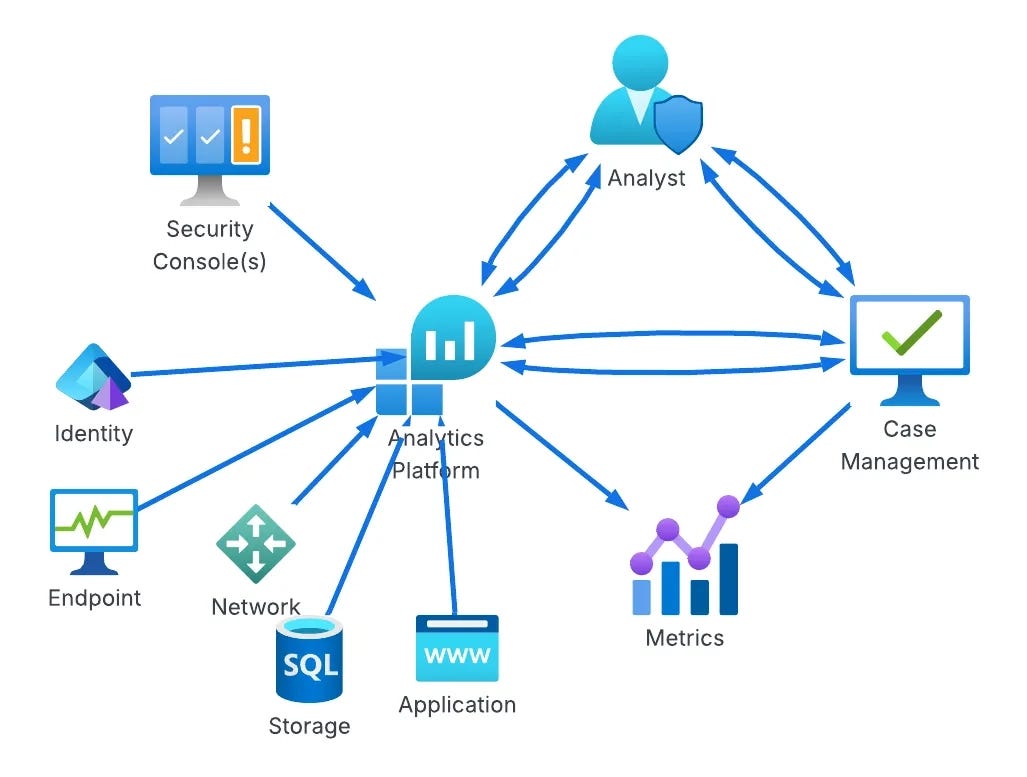


DEW #148 - Detection Pipeline Maturity, GenUI for Log Analysis and Hunting Kali in Splunk
Welcome to Issue #148 of Detection Engineering Weekly!
✍️ Musings from the life of Zack:
I have some exciting news! In about a week, you’ll see some new branding for Detection Engineering Weekly. This will be the second brand uplift of the newsletter, and I can’t wait to don the new colors and logo. It’s more professional and understated, and it captures much of the energy of what I think this newsletter brings to your inboxes. I’ll be handing out stickers and potentially some t-shirts at BSidesSF in a few weeks!
Speaking of BSidesSF, I’m interested in how many of you are going to be there. I am organizing a happy hour and doing a sticker order, so please vote Yes here, ping me, or honestly just find me in the hallway (I’ll be shilling the newsletter with tshirts) and say hello!
Sponsor: Spectrum Security
Detection is Broken.
Measuring coverage means wrangling spreadsheets, BAS tools, and weeks of manual work. By the time you finish, the data is out of date.
But finding blind spots is only half the battle. There’s never enough time to close them. You’re on an endless treadmill: writing new rules, fixing broken ones, and tuning out noise.
We built the end of the manual grind.
Get an early look at the AI platform transforming how teams identify, build, & deploy detections
Every week, I read, watch and listen to all the Detection Engineering content so you can consume it all in 10 minutes. Subscribe and get a weekly digest of the latest and greatest in threat detection engineering!
💎 Detection Engineering Gem 💎
Detection Pipeline Maturity Model by Scott Plastine
I’m a huge fan of maturity models, and in the early days of my writing, I frequently referenced the work of Haider Dost and Kyle Bailey when discussing the maturity of detection engineering programs. As this space matured, technology matured with it, and we now have complex systems within each part of the Detection Engineering Lifecycle. So, to me, it makes sense that we now have folks like Plastine helping us understand what it means to measure the maturity of a Detection Pipeline.
Plastine outlines six different levels of maturity, starting with a classic favorite, no maturity! This involves having a security tool stack with no centralization, and analysts have dozens to hundreds of Google Chrome tabs open which gives me anxiety. The fundamental issues Plastine outlines and continues to improve here include:
Several security tools with their own alerting and detection systems
The need to log into and investigate each alert on each individual tool, so managing screen sprawl
The analyst manually building cases in some case management or ticketing tool, such as JIRA or ServiceNow
The next maturity step, Basic, addresses some of these issues by essentially placing the Case Management tool between the tools and the analyst, rather than being out of band. As maturity levels progress, so does the architecture of this setup. For example, the “Standard+” architecture has a much saner pipeline setup:
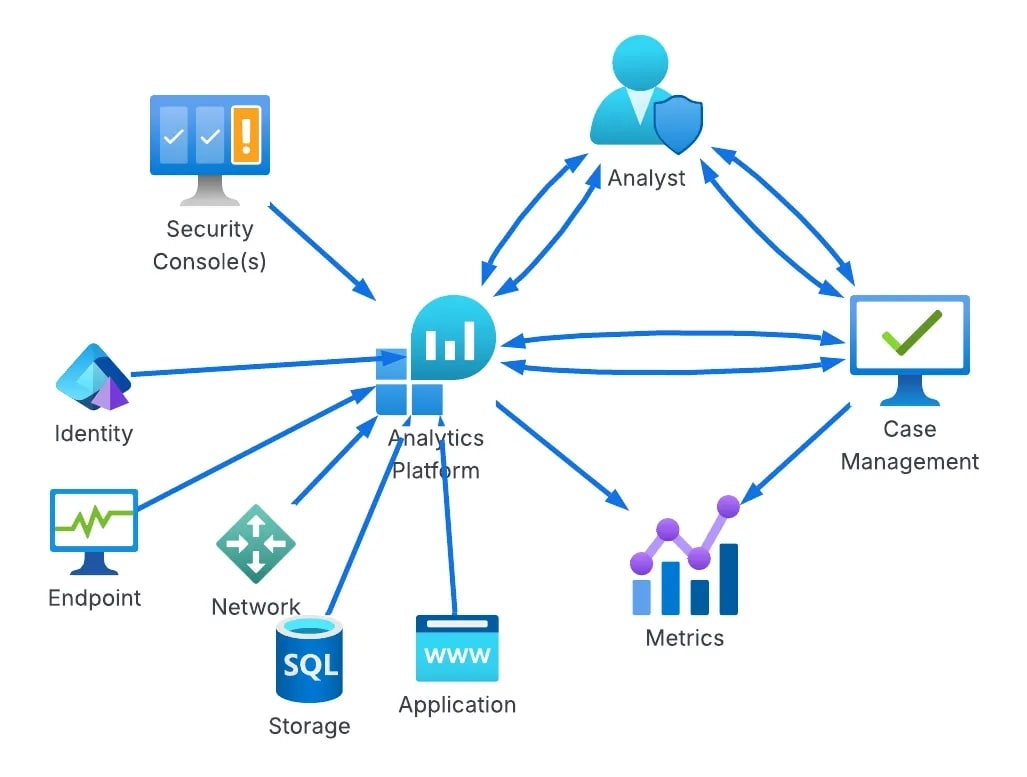
The cool part at this point in the maturity journey is switching from architecture improvements to more advanced concepts in the analytics platform. Custom telemetry, log normalization, and a risk-based alerting engine ideally surface only relevant alerts and reduce false positives. Teams begin to build composite rules, leveraging commercial detections alongside their own internal detection and risk alerting systems, and they all take advantage of learning from their data to inform their rule sets, not just their environment.
This diagram drove it home for me, and became my favorite:
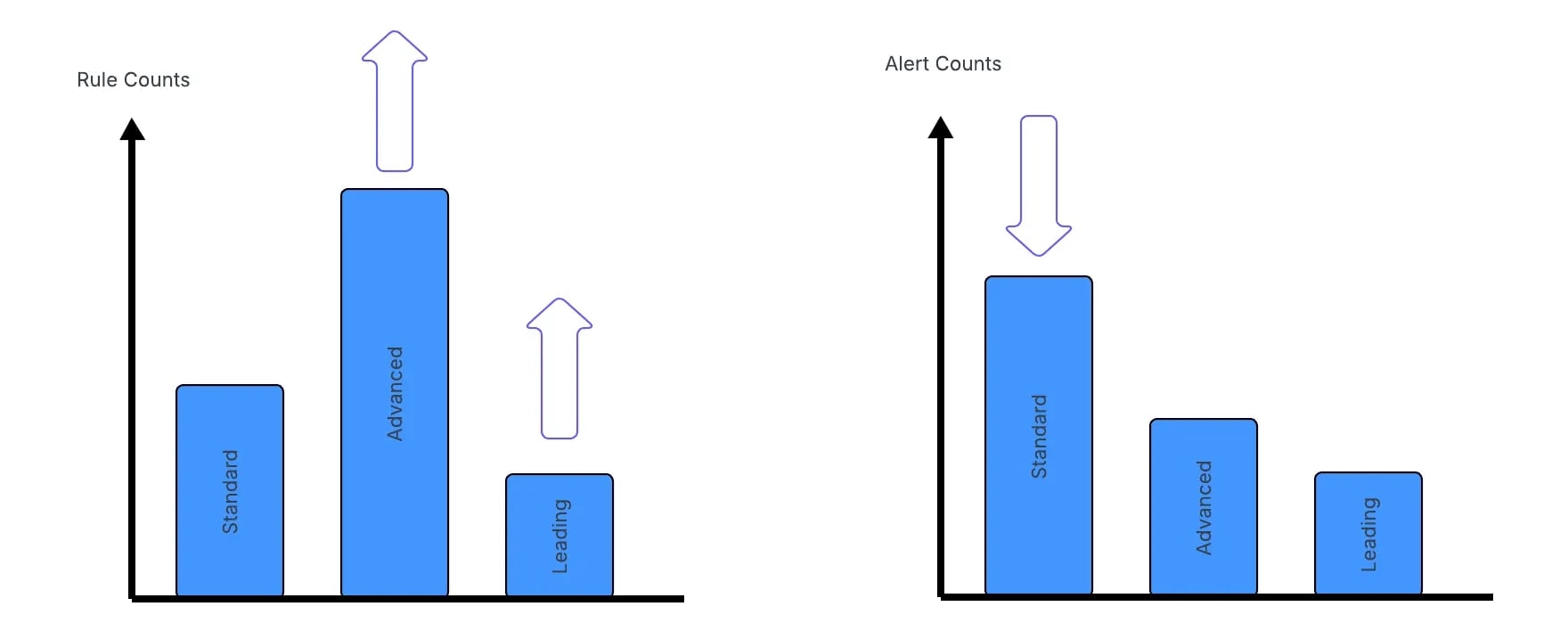
As you progress through maturity, the trap teams fall into is more rules is better. I think the measure of a Leading detection function is reducing rule count thereby reducing the complexity of managing rule sprawl.
Plastine posits that this can be achieved by using data-science-based rules, risk-based detection, and leveraging as much entity-based correlation as possible.
🔬 State of the Art
Whose endpoint is this… kali?! by Alex Teixeira
I love reading Alex’s detection and hunting blogs because he always stuffs a ton of knowledge around query optimization and hunting. When you manage massive amounts of data in a SIEM, especially Splunk, you need to query it in a way that doesn’t cause a ton of load on the system. This is especially helpful when you are researching new detection rules.
In this post, Alex addresses query optimization and discovery for post-exploitation tools. I typically see a lot of teams worry, for good reason, about malware that is the beginning stages of a breach. Alex references loaders in this scenario: malware designed as an initial beachhead for infection, which is then upgraded into a more reliable malware tool. Cobalt Strike is a leading example, but there are hundreds at this point.
Post-exploitation tools are aptly named to help threat actors navigate the MITRE ATT&CK chain toward a specific objective, such as data exfiltration or ransomware. Persistence, lateral movement, and privilege escalation are all built-in to these types of tools. So if you assume these exist, how do you catch them?
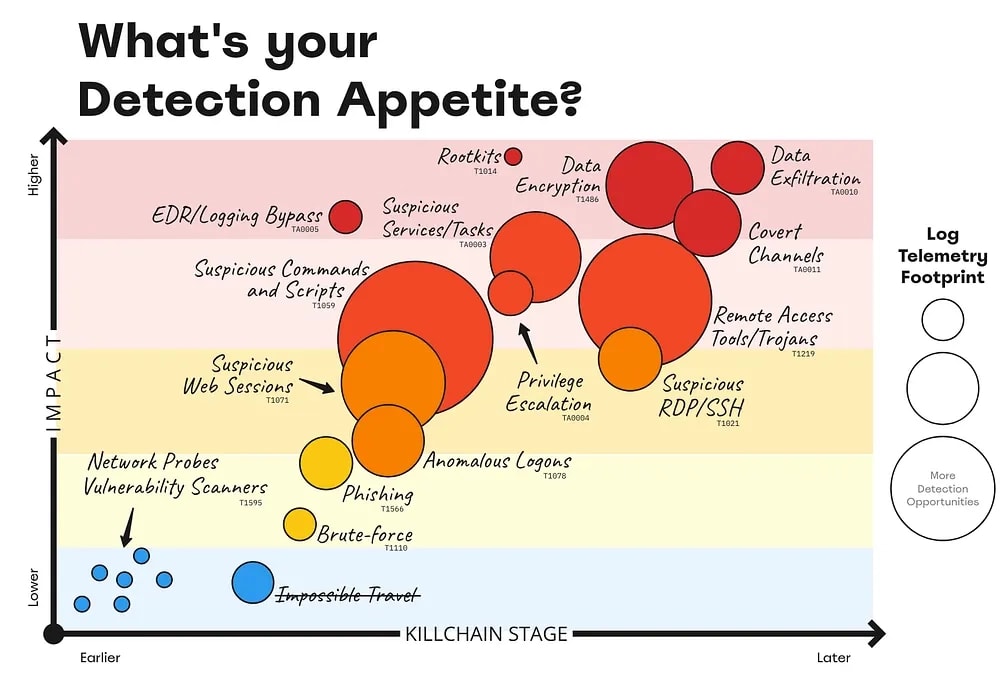
His strategy is to “reduce the dataset” as you are hunting. Instead of performing blind searches over logs, you can first focus on terms within the index and the Windows sourcetype itself. So, he begins his hunt looking for the term kali in Windows Event Logs. This is because these tools can leak their internal hostnames, and finding kali in the hostname with some threat activity is a great hunting lead.
Through a combination of hostname detection and observing a network event with the same name, he narrows the dataset to a meaningful set of events to respond to an infection and write rules for afterward.
Tracking DPRK operator IPs over time by Kieran Miyamoto
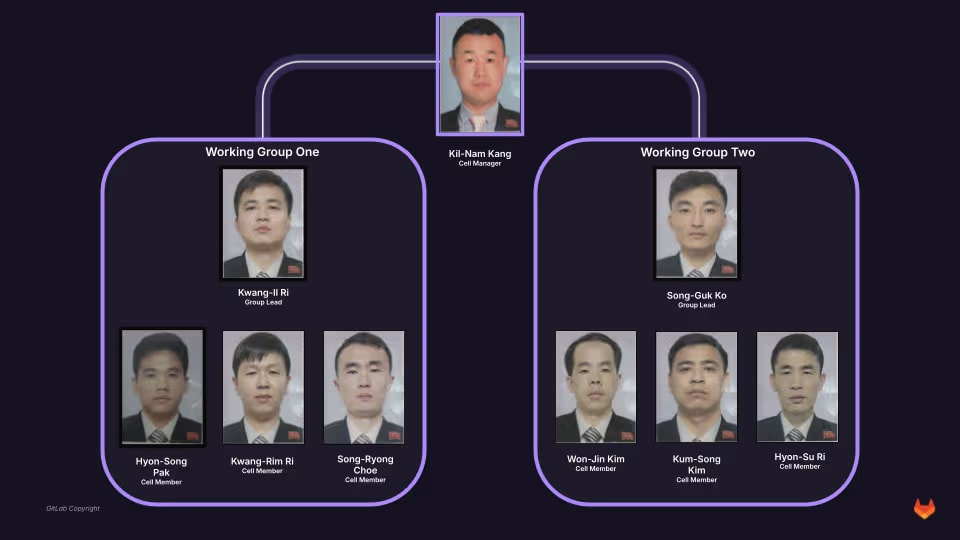
Threat research is such a fun, dynamic field within security because it examines both the technical and human elements of threat actors. This post is Miyamoto's “Part 3” on tracking DPRK threat actors via OPSEC failures, and it’s brilliant in its simplicity. Basically, FAMOUS CHOLLIMA, which has Contagious Interview and some WageMole overlaps, uses email to maintain its personas, register accounts, and issue fake employment-scam communications. The technical elements of this are interesting because they try to deploy malware on victim machines or obtain legitimate jobs as fake IT workers.
The human element of this operation is that humans tend to optimize for reducing the time it takes to do their job as efficiently as possible. So, why would you go through a ton of work to get legitimate email inboxes like Gmail or Yahoo if you only need the email address to send scam messages or register an npm account to publish malware? Miyamoto found that this group had the same question, and answered it by using temporary email addresses.
The subsequent finding is that, as long as you know the email address, you can also view the inbox! Miyamoto started with malicious npm packages containing maintainer emails and began logging into DPRK-controlled temporary email accounts to glean additional intelligence, including source IP addresses and potential victim targets.
From GenAI to GenUI: Why Your AI CTI Agent Is Sh*T by Thomas Roccia
TIL there’s a concept called Generative UI, where agents decide how to render the UI in real time based on your queries. In this post, Roccia uses this concept to build out use cases for cyber threat intelligence analysis. The idea here is that visually representing threat intelligence can help a researcher understand the underlying data much better than blobs of text. Roccia argues that most CTI Agents focus on ingesting unstructured threat intelligence and producing large volumes of output tailored to your environment or prompt. This setup can be helpful to some, but adding a visual component to aid your understanding makes it more attractive.
Roccia outlines two GenUI styles: MCPUI and A2UI. Both focus on delivering a graphical representation of a prompt response. MCPUI returns dynamic elements from an MCP server in response to a prompt, but it’s mostly contained within a UI that the developer creates. A2UI takes it a step further by delivering the entire UI experience in a container, making the agent the arbiter of the experience.
Roccia’s A2UI implementation was more interesting to me from a detection standpoint because he built a log analyzer on top of a log stream. Each element is supposedly dynamic, and you can click into and investigate logs while allowing the A2UI protocol do its thing and present data and experiences to you, all driven by an agent. Here’s a demo video from his blog:
Wild times!
How we built high speed threat hunting for email security by Hugh Oh
I love it when security product companies show how they’ve engineered their product. In this post, Oh reveals how Sublime Security designed its massive email-detection and threat-hunting architecture. Their platform is built on MQL, their domain-specific language for rule writing and alerting. When you think about email as a telemetry source, there are some inherent issues you have to worry about unlike other sources:
Unstructured body content, since, by design, it is human-generated and human-readable
In Internet standards, email is a pretty ancient concept, so additional designs and RFCs were layered on top of it for decades, which can introduce some sharp edges
Attachments, integrations and user-experience elements are a huge vector for abuse, so you need to be able to parse those
This is a security and engineering problem to parse at scale.
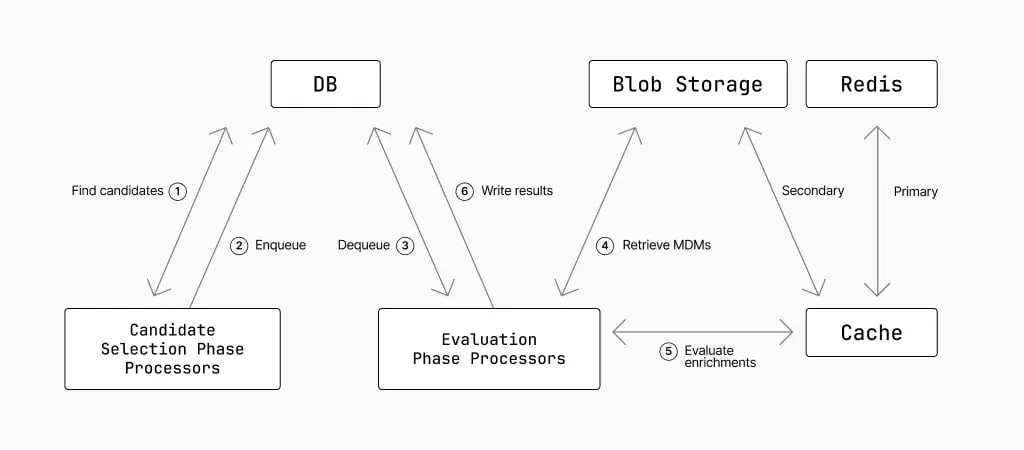
The Sublime product parses incoming emails into EML format and stores metadata in fast storage and the full contents in blob storage. They split email selection into several phases. Candidate selection focuses on fast metadata lookups; evaluation performs a deeper analysis to determine whether these candidates are truly worth a blob storage query; and, when the full email is retrieved, they can perform enrichments and ultimately decide whether to generate a result.
A Practical Blue Team Project: SSH Log Analysis with Python by Edson Encinas
This is a great introductory post on researching a singular log source, SSH authentication logs, and building a research plan to implement detection rules. I think sometimes people breaking into this industry want to jump right into a SIEM and write rules, which can take time, energy, and potentially cost a lot to set up, whereas in this post, Encinas leveraged Python. It’s a good learning exercise: you can see where Python excels at detection, especially in a risk-based alerting scenario.
The architecture for the SSH alerting pipeline includes parsing, normalization, rule writing, risk calculation, and de-duplication. Their GitHub project was pretty easy to follow alongside the blog. Again, demonstrating these concepts in pure Python can accelerate understanding more than setting up massive environments.
☣️ Threat Landscape
I’m glad to see more individual interviews from Ryan on the Three Buddy Problem podcast! In this “Security Conversations” segment, Ryan interviews threat-hunting and intelligence expert Greg Linares. Greg has all kinds of visibility working at an MDR and recently released a year-in-review report on some of the intrusions Huntress is seeing.
The most interesting sections for me were around the intersection of ransomware and nation-state threat actors, as well as the use of RMM tools and the complete lack of audit logging and visibility they provide defenders. Imagine onboarding any other critical IT tool, such as an Enterprise Email provider or a Cloud tool, and being told there will be little to no telemetry available to help you defend the application against a compromise. That’s RMM in a nutshell!
Investigating Suspected DPRK-Linked Crypto Intrusions by CTRL-Alt-Intel
I talk a lot about DPRK-related threat activity in this newsletter for several reasons. One, DPRK tends to focus on cloud technologies, and IMHO, they were way ahead of their other nation-state peers. Two, they are just so damn crafty and are willing to move fast and break things. Third, because of point two, they have a ton of OPSEC failures that lead to some hilarious findings
In this post, CTRL-Alt-Intel follows an intrusion by a DPRK actor who began with an Application exploit a la React2Shell, found AWS credentials, pivoted to AWS, and ultimately stole source code. The author says this focus was mostly on cryptocurrency companies, so if we believe this intrusion targeted one of those organizations, then the intelligence value for them would be discovering secrets and vulnerabilities in proprietary code for further attacks.
Uncovering agent logging gaps in Copilot Studio by Katie Knowles
~ Note, Datadog is my employer and Katie is my colleague / friend! ~
Microsoft Copilot Studio is Microsoft’s offering for creating and managing AI agents. During Katie’s previous research on how to abuse Copilot Studio for OAuth phishing, she found that Copilot wasn’t logging certain administrative actions. This is especially concerning if you rely on audit logs for threat detection. A victim agent could be abused to retrieve sensitive information from your organization and you’d have no visibility into the attack itself.
Katie provides excellent security recommendations towards the end, including identifying which M365 users are using Copilot, and what searches and rules you could write to detect anomalous activity in Copilot.
This was a fun read for those who are interested in phishing-related threat research. Ceukelaire got a phishing text message, accessed the phishing page, and began poking holes in it. He found a vulnerability where he set the X-Forwarded-For header to a localhost address (Substack won’t let me publish it?) and it was an auto bypass of the administrator login panel.
From there, he started rendering the kit useless by removing its functionality and its ability to communicate with a Telegram-controlled channel. He was able to stop victim exfiltration and prevent further victims from visiting the website. Luckily, it was a poorly designed phishing kit, riddled with vulnerabilities, but not all kits are this insecure.
Clearing the Water: Unmasking an Attack Chain of MuddyWater by Harlan Carvey and Jamie Levy
In this post, Huntress researchers Carvey and Levy detailed findings related to what appears to be a hands-on-keyboard MuddyWater campaign targeting one of their customers. They first found intelligence from a Hunt.io report and worked backwards into their own customer reports. Some interesting findings they made include:
Typos in the terminal commands MuddyWater ran, indicating an actor who was typing in real time during the intrusion
Tradecraft learnings, such as opening PowerShell from the Explorer, making it seem like a more legitimate activity than running it from the commandline
Troubleshooting in real-time by cURLing ifconfig.me to make sure they have Internet connectivity
It turns out that threat actors make mistakes too!
🔗 Open Source
Yet another awesome-* list of 300+ Command and Control frameworks. This is a fun list if you want to test adversary simulation in a lab environment, or statically analyze the post-exploitation code for detection opportunities.
Encina’s pure Python “SIEM” used in his SSH log analyzer blog post listed above in the State of the Art section. What’s nice about this is it reduces the complexity of standing up an environment, and instead you can focus on the concepts of detection in a contained programming language.
Not really detection related, but this was something my colleague Matt Muller sent me as I was vibecoding out a fully STIXv2 compliant Threat Intelligence Platform. Spec Kit is a framework for spec-driven development using agents. You create a constitution that sets guidelines for development principles. You then specify what you want to build, how you want to plan to build it with certain technologies, build a task list and then have the agent go to work.
I kept my speckit separate from my code, so my agent would read and update my local spec and then go into the target project directory for development.
Self-hosted virtual browser using containers and WebRTC. These technologies are always super interesting from an OPSEC perspective, because you can literally embed a browser in a website that you host that also hosts neko. This makes it easy to make non-attributable and disposable infrastructure for things like threat intelligence research or for interacting with threat actor infrastructure.
Open-source database of default credentials across 100s of manufacturers. You can download this and take the credentials yourself, or run their self-contained web application, or just visit the hosted web application and find some hilarious default creds.
Every week, I read, watch and listen to all the Detection Engineering content so you can consume it all in 10 minutes. Subscribe and get a weekly digest of the latest and greatest in threat detection engineering!