❌

Normal view

Malwarebytes earns another Top Product award in independent testing

1 October 2026 at 12:51

Every few months, Malwarebytes gets a chance to test its mettle against real-world threats in an independent laboratory setting. And the latest round of results gives us plenty to celebrate.  

Malwarebytes earned a perfect 18 out of 18 and received another Top Product award from AV-TEST. We also achieved Level 1 Certification from MRG Effitas, and we stopped 100% of threats before they could run in the two latest tests from AVLab Cybersecurity Foundation. 

AV-TEST Windows Consumer Security Product Test

With 18 out of 18 points in AV-TEST’s latest Windows Consumer Security Product Test, Malwarebytes nabbed the organization’s Top Product award for the July/August test cycle.

AV-TEST evaluates security products across three key areas: protection against malware, impact on device performance, and the frequency of false positives. Products need at least 17.5 out of 18 points to earn AV-TEST’s Top Product award, and Malwarebytes received full marks across the board.

Since we first began participating in the test in 2018, we’ve secured the Top Product award more than a dozen times.

MRG Effitas Consumer Assessment 

Malwarebytes also received a Level 1 Certification in MRG Effitas’ July 2026 Consumer Assessment & Certification Programme, which tested eight security products against malware, phishing, and false positives.  

The malware test used 300 live, in-the-wild samples, including Trojans, spyware, ransomware, backdoors, malicious scripts, and financial malware. Malwarebytes blocked every one of them, stopping 99% before they had the chance to run, and the remaining 1% after they began behaving maliciously.  

Our product also generated zero false positives across 100 legitimate apps and blocked all five live phishing sites included in the test. 

Malwarebytes was one of just two products to earn Level 1 Certification, the highest level awarded in the assessment. 

AVLab Cybersecurity Foundation Advanced In-the-Wild Malware Test 

Meanwhile, the results from AVLab Cybersecurity Foundation’s Advanced In-the-Wild Malware Test brought more good news: Malwarebytes keeps getting better at stopping threats before they can run. 

As part of the test, AVLab Cybersecurity Foundation uses threats circulating online and delivers them in ways designed to replicate how people encounter attacks in the real world. 

During both the May and July 2026 tests, Malwarebytes stopped 100% of threats before they could run. 

These latest results join a growing list of honors, including a Best of CNET award and ZDNET’s Editor’s Choice award.

Independent testing helps keep us sharp. We’re proud to see our work recognized, and even prouder to keep delivering the top-notch protection our customers have come to rely on. 


CNET Editors' Choice Award 2026

“One of the best cybersecurity suites on the planet.” 

According to CNET. Read their review →

New Browser Guard features add protection before and after you click

24 September 2026 at 14:45

Most of us click on search results without knowing much about the website we’re about to visit. And once we’re there, it’s not always obvious when something isn’t quite right.  

Now, we’ve added two new features to Malwarebytes Browser Guard that will do even more to keep you safe online.  

Search Reputation gives you a quick read on your search results, before you even click on anything. And with Scam Guard Lite, you can analyze the contents of a webpage directly from the Browser Guard extension in Google Chrome. 

These new features build on Browser Guard’s existing protections against scams, malware, ads, trackers, and plenty of other threats while you browse. So, from the moment you begin a search to when you land on a website, we’ve got you covered.  

Check a website before you click 

Search results don’t always make it easy to tell a legitimate website from a malicious one. Scam sites are uncannily good at imitating brands, and one misleading link can send you down a dangerous rabbit hole. 

Browser Guard’s new Search Reputation feature gives you more information before you click.  

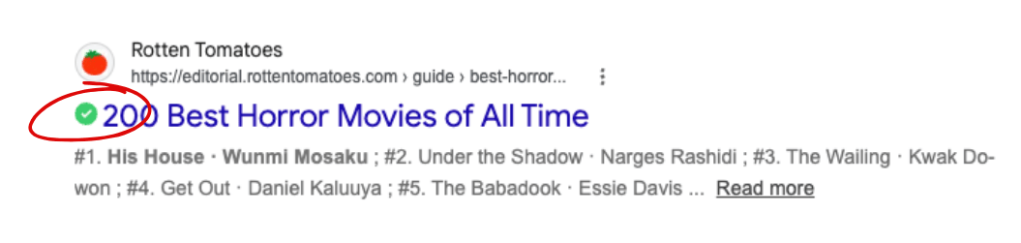
When you use Google, DuckDuckGo, Brave, or Bing, Search Reputation will display a rating alongside your search results. A green “Good” rating means the website appears safe based on Malwarebytes’ reputation database, while a red “Malicious” rating tells you Malwarebytes has identified the site as unsafe. 

Google result showing a green rating from Browser Guard

But that green check mark is only the first layer of protection. 

A “Good” rating isn’t a guarantee that a website is safe. New threats appear all the time, and no reputation database can catalog every malicious site on the internet. For as long as you’re online, Browser Guard will continue working in the background and checking for other signs of danger. It may block or warn you about a site even if Search Reputation initially gave it a “Good” rating. 

Already on a website? Ask Scam Guard Lite 

If you’re already on a website and something feels off, Scam Guard Lite can help you take a closer look. 

Available directly in the Browser Guard extension on Google Chrome, Scam Guard Lite analyzes the contents of the webpage you’re viewing without asking you to copy a link, take a screenshot, or leave the page. 

Just open Browser Guard, select Scam Guard Lite, and it will immediately examine the page for signs of a scam. (The first time you use the feature, Browser Guard will download Gemini to your device to power it.) 

The analysis happens on your device using a large language model (LLM). And if you’re concerned about privacy, we’ve got your back: Your browsing history isn’t saved or sent to an AI cloud.

More questions? Open the full Scam Guard 

If you have other security concerns, you can open the Browser Guard dashboard and use the full version of Scam Guard. There, you can ask Scam Guard to review suspicious emails and links, or ask questions about something you’ve encountered online. 


Something feel off? Check it before you click.  

Malwarebytes Scam Guard helps you analyze suspicious links, texts, and screenshots instantly.  

Available with Malwarebytes Premium Security for all your devices, and in the Malwarebytes app for iOS and Android.  

Try it free → 

Malwarebytes for Windows, now available on the Microsoft Store 

30 July 2026 at 18:01

When you’re setting up a new PC or looking for an app you already know, the Microsoft Store is often the easiest place to start. It’s built into Windows and lets you find, install, and update apps in one place. Malwarebytes for Windows is now available there too. 

Malwarebytes for Windows is still available from our website and trusted partners. The Microsoft Store simply gives you another trusted way to get it. 

If you’ve ever helped someone set up a new PC over the phone, you’ll know how much simpler it is to say, “Open the Microsoft Store, search for Malwarebytes, and click Get.” There are no web addresses to type, and no worrying whether you’ve landed on the right download page.  

That’s important because cybercriminals use fake download pages and bogus security software to trick people into installing malware instead of the product they intended to download. Searching for Malwarebytes in the Microsoft Store gives you another straightforward way to make sure you are installing the genuine app. 

The same Malwarebytes, now in the Microsoft Store 

Installing Malwarebytes from the Microsoft Store gives you the same Malwarebytes for Windows you know and love, not a limited Store edition. 

Some desktop apps available through app stores have fewer features or capabilities than versions downloaded directly from the developer. Malwarebytes is not one of them. You get the same real-time protection, the same Windows integration, and the same features. The Microsoft Store changes where the installation begins, not what the product can do. 

That’s especially important for security software. Malwarebytes needs to run continuously in the background and work closely with Windows to help protect your PC. The Microsoft Store version isn’t a scanner-only companion app or a browser shortcut; it’s the full Malwarebytes for Windows. 

No compromises. No missing features.  

  • The full Malwarebytes. You get the complete app, not a limited Store edition.  
  • The same protection. Real-time security and all the features you’d expect.  
  • Your choice of subscription. You’re not locked into Microsoft Store-only billing.  
  • Automatic updates. Malwarebytes continues to update seamlessly, just as it always has. 

The Microsoft Store listing also gives you app information, screenshots, and another trusted place to install Malwarebytes. 

Already using Malwarebytes from our website? There’s nothing to reinstall or change. You’re already protected. 

How to get it 

Open the Microsoft Store from the Start menu or taskbar, search for Malwarebytes, and click Get. Windows handles the installation. Once it’s installed, Malwarebytes will open, ready for you to get started.  

Malwarebytes for Windows is available on the Microsoft Store now. Whether you install it from the Store, malwarebytes.com, or a trusted partner, you’ll get the same Malwarebytes protection for your Windows PC. 


From reporting threats to removing them.

Cybersecurity risks should never spread beyond a headline. Keep threats off your devices by downloading Malwarebytes today.

We rebuilt Malwarebytes Mobile Security for the scams of today 

28 July 2026 at 14:40

Nearly half of people encounter a scam on their phone every single day. Malwarebytes is doing something about it.  

That figure comes from a 2025 Malwarebytes survey of 1,300 respondents across the US and Europe. The results paint a troubling picture. A quarter of the victims surveyed reported being harassed or blackmailed, while nearly one in five had private information exposed, and 15% lost money.  

“I felt like I was in a horror movie,” said one survey respondent. “I never thought it would happen to me like this.”  

Your phone is a scammer’s dream. You use it to bank, message, shop, and more. It’s an ideal gateway for anyone looking to take advantage of you. And today’s scams aren’t limited to just one app or program. They show up as texts and delivery notifications, as calls that spoof a trusted number, and as social media DMs. 

Increasingly, AI is making all of this much harder to detect. Malwarebytes research found that half of people feel unprepared for the sophistication of these AI-driven threats. Phone scams now rank among the top five scam types people encounter, according to Malwarebytes Scam Guard data.  

Part of the problem is misplaced trust. According to Malwarebytes’ data, roughly half of people—55% of iPhone owners and 50% of Android owners—said they believe their phone’s security is enough to keep them safe. But relying on those protections alone can leave people vulnerable. 

Malwarebytes detected more than 800,000 distinct strains of Android malware last year and expects that number to cross 1 million in 2026. 

Your phone needs more than just a lock screen to stay safe. That’s why we’ve rebuilt Malwarebytes Mobile Security. It puts scam protection first, and it’s backed by all our other tools to keep your phone secure. 

Built for today’s scams 

Here’s how Malwarebytes Mobile Security helps keep scams away from you and your data. 

Scam Guard is a free AI-powered tool built into Mobile Security for both Android and iOS. Got a suspicious text, email, phone number, link, or message? Drop it into Scam Guard and get an instant read on whether it’s a scam, along with guidance on what to do next.  

Text and Call Protection now catches significantly more junk and scam messages than before. Updated filtering that reviews shortened links more closely and flags suspicious content, like romance-scam language or unexpected money requests, before it reaches your inbox. Call Protection checks every incoming call against known scam and spam numbers, so you can block or flag them automatically instead of gambling on whether to pick up. It’s live now on iOS, with Android rolling out later this summer. 

Malwarebytes Digital Footprint Portal’s free scanner shows you which of your personal details—passwords, Social Security numbers, and more—are already exposed and offers straightforward steps to keep them safe. 

Trusted Advisor gives your device a Protection Score and recommends simple steps to strengthen your security, from adjusting settings and permissions to running a scan or updating your device. 

Expanded ad blocking on iOS now lets you filter Google Sponsored Ads in Safari—a browser that scammers frequently abuse to make fraudulent campaigns look legitimate. 

Android Junk Cleaner removes leftover files, temporary data, and outdated cache files that build up on your device over time. A cleaner, faster phone is easier to manage and gives you the space you need to install important security updates.

  • Malwarebytes Mobile Security
  • Malwarebytes Mobile Security
  • Malwarebytes Mobile Security
  • Malwarebytes Mobile Security
  • Malwarebytes Mobile Security
  • Malwarebytes Mobile Security
  • Malwarebytes Mobile Security
  • Malwarebytes Mobile Security
  • Malwarebytes Mobile Security
  • Malwarebytes Mobile Security

There’s more 

Here’s everything else Mobile Security protects you from: 

Our Malware Scanner (Android) scans for and removes malware and potentially unwanted programs, including screen lockers and adware. 

Real-Time Protection (Android) proactively defends against ransomware, PUPs, and phishing attempts in real time. 

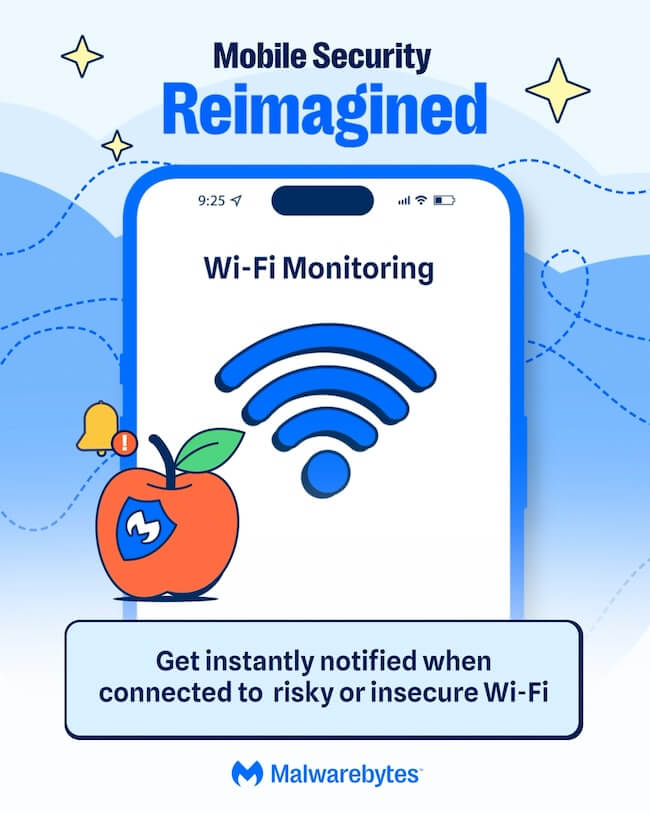
Wi-Fi Monitoring (iOS) warns you when you connect to an insecure network so you can take action by turning on your VPN. 

Malwarebytes Privacy VPN keeps your browsing private with a fast WireGuard connection and a strict no-logs policy supported by diskless, RAM-only server infrastructure. 

Phone scams aren’t going anywhere, but protecting yourself doesn’t have to be complicated. Malwarebytes Mobile Security brings together the tools you need to recognize scams, protect your privacy, and keep your phone safer, all in one app. 

Download Malwarebytes Mobile Security for iOS or Android and use your phone with more confidence. 

❌