Normal view

How Hola Browser was weaponized to spread a Monero miner | Kaspersky official blog

In early June, cybersecurity researchers discovered that a compromised version of the Israel-based Hola Browser for Windows (version 1.251.91.0) was secretly downloading a Monero crypto miner to users’ devices. Shortly after the discovery, Hola confirmed that it had fallen victim to a supply chain attack. In this article, we break down how the attack went down, how the crypto miner works, and what it means for affected users.

What is Hola Browser, and how was the malware discovered?

The Israeli company Hola is best known for its VPN service, which users primarily rely on to bypass geo-restrictions and access region-locked content. In addition to the VPN, the company develops Hola Browser — a Chromium-based browser that comes with built-in VPN and proxy features.

Researchers first spotted signs of trouble during a standard compliance check for the AppEsteem Windows Certified Application program. As part of this certification process, independent cybersecurity firms audit software to ensure it only contains the components it claims to have and is free of unwanted or malicious features. Even after a certificate is granted, apps are regularly re-evaluated to ensure they continue to meet AppEsteem’s strict guidelines.

It was during one of these routine follow-up checks that experts noticed an unauthorized file bundling itself with version 1.251.91.0 of Hola Browser for Windows. Once installed, the file saved itself to the hard drive at C:\Program Files\Hola\me{.}exe. The file immediately raised red flags for researchers due to a laundry list of suspicious characteristics: it wasn’t on the list of approved application files, lacked a timestamp, and had no digital signature. On top of that, its code was heavily obfuscated, and it possessed the ability to inject itself directly into system memory.

Interestingly, researchers noted that the file didn’t show up in every single installation. Because the infection wasn’t widespread across all users, experts suspected early on that a specific stage in the Hola Browser distribution pipeline had been compromised. Hola later confirmed this theory, admitting it had fallen victim to a supply chain attack.

As for the suspicious me{.}exe file itself, closer analysis revealed that it was a stealthy crypto miner configured to mine Monero. We’ll now dive into the technical details of how it works.

How did attackers use Hola Browser to mine Monero?

Crypto miners are programs that harness a computer’s processing power to mine cryptocurrency. While some users install this software intentionally to generate a bit of income, miners that run on a machine without the owner’s knowledge are typically classified as unwanted.

Running a hidden miner can noticeably slow down the device, spike the user’s electricity bill, and shorten the hardware’s lifespan. That being said, it’s worth noting that a crypto miner infection will not actually steal the owner’s cryptocurrency; the damage is strictly limited to the hijackers leeching your computer’s hardware resources to line their own pockets.

As we mentioned above, the malicious download bundled with Hola Browser sneaked a Monero crypto miner onto victims’ devices. Launched in 2014 and built on the CryptoNote protocol, Monero currently trades at around US$330 per coin.

Compared to heavyweights like Bitcoin or Ethereum, Monero is a bit exotic and lesser-known to the general public. This niche status shows in its relatively modest price growth and smaller market capitalization — which is roughly 200 times lower than Bitcoin’s. However, Monero has one defining feature: privacy. While Bitcoin and Ethereum operate on fully transparent, public blockchains, where anyone can trace transactions, Monero is a “privacy coin”. It uses advanced cryptographic mechanisms to mask the sender, receiver, and transaction amounts. This extreme anonymity is exactly why hackers love hidden Monero miners — it makes it difficult for law enforcement and cybersecurity professionals to follow the money trail.

Additionally, Monero’s underlying algorithm is explicitly designed to mine efficiently using standard computer processors (CPUs). This stands in stark contrast to many other popular cryptocurrencies, which require specialized ASIC hardware or high-end graphics cards (GPUs) to be profitable.

But let’s look closer at how this played out with Hola Browser. When researchers dissected the malicious me{.}exe code, they found it was automatically adding its own files to the Microsoft Defender exclusion list. By allowlisting itself, the malware successfully blinded Windows’ built-in antivirus, allowing the crypto miner to run in the background completely unhindered.

Once inside, the program made a copy of itself under the name HolaMonitorService{.}exe, and set up a persistent Windows background service called hola_monitor_svc. This maneuver allowed the malware to entrench itself in the system, automatically launching every time the computer restarted. To avoid raising any red flags with sudden massive performance drops, the miner was programmed to stay dormant, kicking into gear only when the computer was idle.

How to protect your device from crypto miners and malware

To their credit, Hola’s development team responded swiftly to the initial reports of the suspicious file. They confirmed the supply chain breach, but stated that the incident only impacted 0.1% of their user base. The company has since tightened up security around its update distribution pipeline to guarantee that users only receive approved, certified, and digitally-signed software components moving forward.

In light of this incident, we highly recommend that all Hola Browser users update to the latest version immediately — especially those running the application on Windows.

More broadly, this situation is a textbook reminder of why it’s so critical to keep all your software up to date and run a robust cybersecurity solution on all your gadgets. For instance, Kaspersky Premium provides real-time alerts about suspicious software behavior and blocks threats instantly. As an added bonus, a Kaspersky Premium subscription includes a secure and reliable VPN.

Don’t forget that malicious crypto miners don’t just target PCs; they also go after smartphones, often disguising themselves as anything from popular mobile games to official government service apps. Check out our previous posts to learn more:

Argamal RAT: attackers distributing a remote access Trojan through hentai games | Kaspersky official blog

By: GReAT
9 June 2026 at 18:57

In April 2026, we discovered a new campaign targeting users of hentai games. Attackers are embedding a remote access Trojan named Argamal into game installers. While concealing its presence, it can remotely control the computer and steal files and personal data.

Here’s how to avoid falling victim to this new Trojan — and how to safely and anonymously enjoy spicy content with (or without) anime girls.

How computers get infected with Argamal

Most of the infected games are distributed through adult game and torrent sites. In some cases, they are posted for download on file-sharing services and linked on gaming websites.

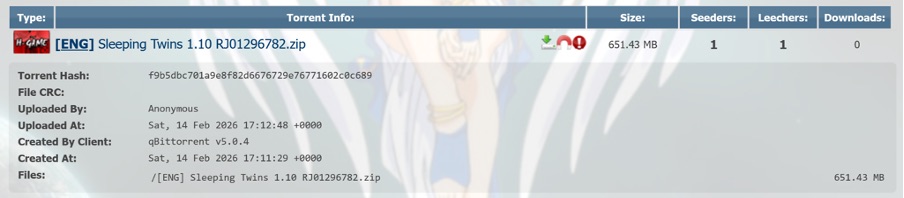
Trojanized hentai game Sleeping Twins hosted on AniRena

Example of a trojanized game hosted on the AniRena torrent tracker

Interestingly, instead of finding a dummy file inside the archive — as is often the case — the user gets the actual game built on popular engines like RenPy or RPG Maker. Infected pirated versions usually turn out to be scams: games fail to launch, folders are full of files with bizarre extensions, making it rather easy to put two and two together. Here, however, the user gets the actual gameplay they expected. Meanwhile, the Trojan lets itself in and keeps a completely low profile.

Malicious website featuring a library of trojanized hentai games

Example of a trojanized game hosted on the AniRena torrent tracker

Tucked right alongside the legitimate files in the archive is a DLL that the game relies on to run, but it’s been rigged: as soon as the user launches the game, the infected DLL automatically loads into memory. There are no outward signs of infection: neither an installer popping up in the background, nor a scary window or prompt asking you to disable your antivirus.

Argamal takes things real slow: instead of immediately rushing to steal files and passwords or throwing a digital rager on your computer, the Trojan first checks whether it’s running in a virtual machine or sandbox, and then goes into standby mode.

During this time, the malware writes hidden parameters to the system, conceals the paths to its DLLs, and delays its own execution. Three days later, the computer connects to GitHub, downloads an encrypted file, decrypts it, and turns it into a working Trojan module.

To ensure persistence, the attackers register the malware under the WindowsColorSystem Calibration Loader system task, a built-in Windows feature that triggers at every user logon to load monitor color profiles. Before shutting down, the malware deletes temporary files and covers its tracks to make it even harder to detect.

What makes Argamal dangerous?

Argamal is a remote access Trojan (RAT), which means attackers can use it to remotely control the victim’s computer. Here’s just a short list of what it may entail:

  • Executing arbitrary commands on the computer
  • Downloading and running files
  • Checking if an antivirus is installed on the PC (by the way, our security solution detects and neutralizes Argamal before it can harm you)
  • Searching for and exfiltrating sensitive data from files and system settings
  • Taking screenshots and streaming video from the device
  • Sending data to the attackers’ server
  • Monitoring user activity
  • Shutting down or restarting the device

Essentially, the infected computer turns into a remotely controlled machine. The owner may keep calmly going about their day, completely unaware that their device has been compromised. Yet the consequences of such an infection can be devastating.

For example, a single password stolen from a text note can lead to multiple compromised accounts at once if the victim reuses the same credentials across different sites. That’s why we recommend storing strong and unique passwords in an encrypted vault of a password manager rather than in plain text files.

Beyond hijacking accounts, the Trojan lets attackers literally spy on the user — reading their chats, digging into secret files, studying their sexual preferences… The cybercriminals can then use this highly sensitive information for subsequent attacks, blackmail, and extortion. We’ve covered what to do if you find yourself being targeted by extortionists in a previous post.

Another common scenario involves quietly stealing or substituting financial data — for instance, intercepting credentials from banking apps or replacing crypto-wallet addresses in the clipboard, which sends all your money straight to the attackers’ accounts.

In short, there’s a whole laundry list of ways attackers can exploit a victim’s device and data.

Argamal, yamete kudasai! How to protect yourself from similar threats

If you’ve decided to become the proud owner of “Waifu Simulator Ultra Definitive Edition”, stay on your guard:

  • Use security software that runs in real time and catches sophisticated malware. Despite the attackers’ best efforts to make the Trojan invisible, Kaspersky Premium instantly detects and removes Argamal from users’ devices.
  • Avoid downloading adult apps, installation files, and spicy content from untrusted sources. Clicking a “free XXX game, no signup needed” is a surefire way to invite malware onto your device. That said, even official platforms like Google Play and the App Store unfortunately let infected apps slip through the cracks at times. To stop worrying about accidentally downloading a Trojan or an infostealer, use Kaspersky Premium on all your devices.
  • Don’t share more data than you absolutely have to. If an adult game or website insists you sign up, enter personal data, or link third-party accounts instead of just checking your birth date, that’s a huge red flag. Sites rarely collect sensitive data for no reason. In the best-case scenario, it ends up with marketers and ad trackers. In the worst-case, it falls into the hands of bad actors who will use it for blackmail, phishing, or breaking into your other accounts.
  • Don’t click ad banners on adult websites. Even the most popular platforms like Pornhub occasionally host ads laced with malware. If you find it hard to hold back, use a security solution that will block malware downloads and prevent redirects to suspicious sites.

How fake Android IPTV apps are stealing users’ money and data | Kaspersky official blog

Threat actors are already gearing up for this year’s biggest football (soccer) event, the World Cup 2026. With millions of fans looking for ways to stream matches online, many will turn to IPTV apps to watch live TV broadcasts over the internet. It’s no surprise, then, that cybersecurity researchers have discovered multiple campaigns over the past few months where malware was disguised as fake Android IPTV apps.

In this post, we discuss what IPTV apps are, how criminals use fake versions to spread malware, what this malware is capable of, and, most importantly, how to avoid becoming a victim.

What are IPTV apps?

IPTV stands for Internet Protocol Television. This technology delivers TV content over the internet instead of through cable, over-the-air antennas, or satellites. Naturally, the simplest and most common examples of IPTV are the official platforms of TV networks, which can include both websites and dedicated apps.

However, alongside official options, pirate IPTV services also exist. They usually lure users with free or dirt-cheap access to content that can otherwise be hard to find without expensive subscriptions — most notably broadcasts of various sporting events; football matches in particular.

As is typically the case with pirated content, these apps are blocked from official app stores, forcing users to download them from third-party sites. Consequently, the risk of using these services isn’t tied to IPTV technology itself, but rather to the fake apps and modified APK files distributed under the guise of well-known platforms — both official and pirated.

Massiv banking Trojan disguised as IPTV apps

For instance, in February researchers found the Massiv banking Trojan distributed under the guise of fake IPTV apps. Even then, experts noted that this wasn’t the only malware leveraging this tactic — several others were also spotted in the wild. The primary targets of these IPTV-mimicking malicious fakes have mostly been users in Portugal, Spain, France, and Türkiye.

In most cases, the discovered fake IPTV apps lacked the advertised functionality, so users didn’t get access to any content after installing the apps. Instead, the fake app would open the website of a legitimate IPTV service in a built-in browser to mimic normal functioning and avoid raising user suspicion.

Of course, the most interesting activity happened out of the user’s sight. These are some of the features the malware did have:

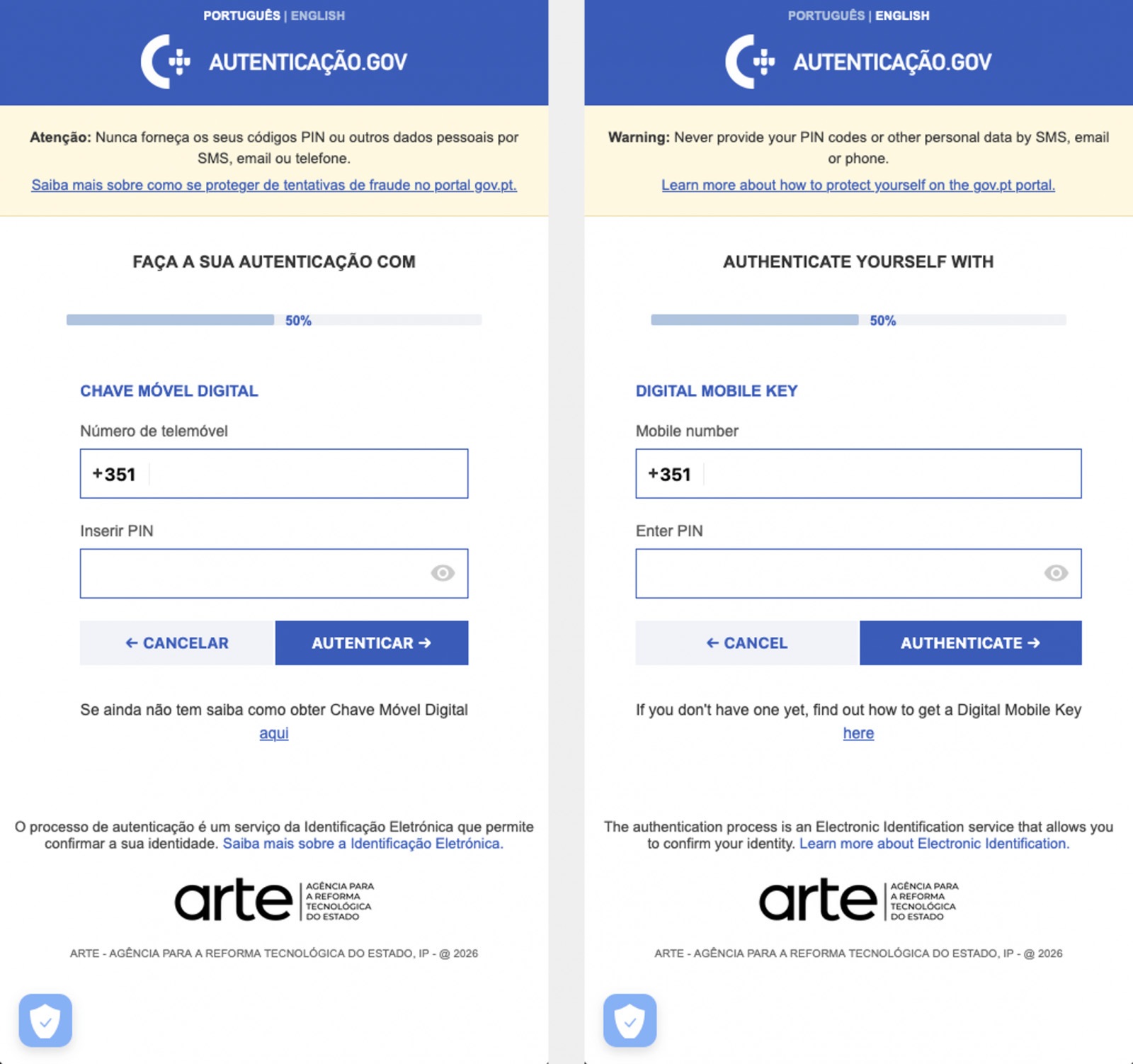
  • Displaying fake windows on top of legitimate ones: fake forms for entering bank details or signing in to official services, as shown in the screenshot below.
  • Activating a keylogger: recording and transmitting screen keyboard taps to the attackers.
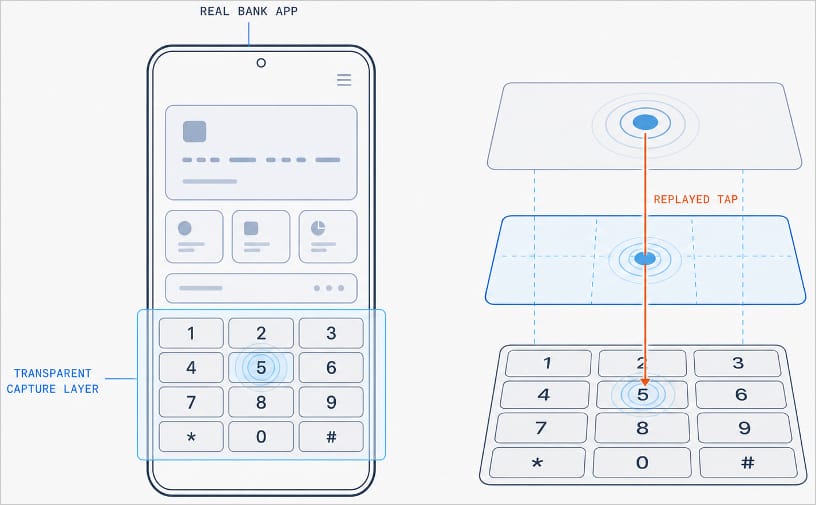
  • Hijacking control of the compromised device.
Massiv Trojan steals Chave Móvel Digital data

The Massiv banking Trojan mimics the interface of the Portuguese government app Chave Móvel Digital in a fake pop-up window, looking even more convincing than the official version from Google Play. Source

Perseus steals valuable information from users’ notes

In March, researchers reported on a new campaign where several fake IPTV apps were used to distribute an even more advanced and feature-rich malware strain: Perseus.

Research into Perseus shows that the malware is based on the source code of an Android banking Trojan called Cerberus, which leaked nearly six years ago. Perseus comes in two different versions: Turkish and English. The English-language version is more advanced and shows clear signs of AI-driven refinement.

Perseus abuses Accessibility Services, a set of Android features originally designed to make life easier for users with severe visual impairments. Fraudsters learned long ago how to leverage this tool to steal data from Android devices — a topic we’ve covered in detail across several of our posts.

Fake IPTV app used for distributing Perseus

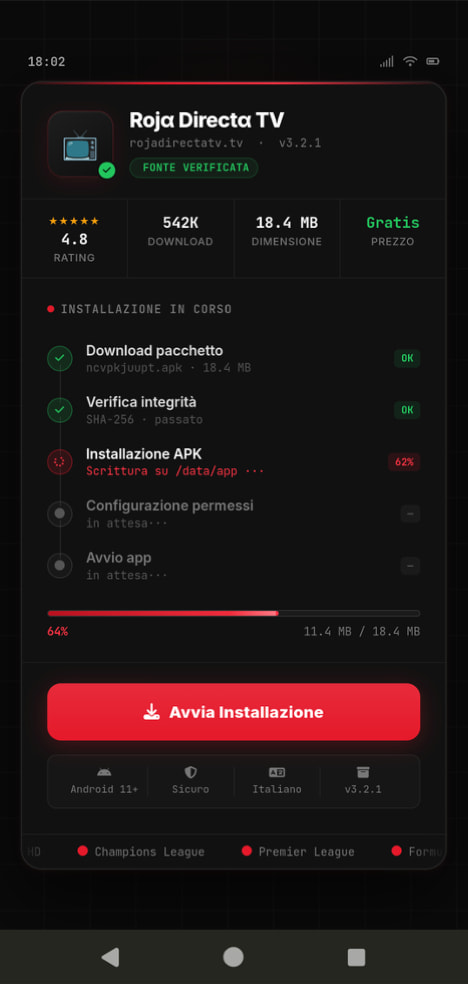
An example of a malicious APK disguised as Roja Directa TV, another IPTV app. Source

By abusing Accessibility Services, Perseus gains remote control over the victim’s device. Here’s what it can do:

  • Continuously capture and exfiltrate screenshots.
  • Send a structured map of the device’s UI for remote manipulation.
  • Mimic taps, swipes, text input, long presses, and other UI interactions.
  • Turn on the screen, launch apps, and block them from running.
  • Trigger a pitch-black screen overlay to hide its activities.
  • Log keystrokes.

On top of that, the English-language version of Perseus boasts another notable feature. The malware can hunt for sensitive information like passwords, recovery phrases, and financial data across an entire range of note-taking apps: Google Keep, Xiaomi Notes, Samsung Notes, ColorNote, Evernote, Microsoft OneNote, and Simple Notes.

All of these capabilities help criminals drain football fans’ money not just from various banking services, but from cryptocurrency apps as well.

How not to let cybercrooks ruin your World Cup

The World Cup is just around the corner, and millions of fans worldwide will definitely want to tune in to this year’s premier football event. Past experience shows that cybercriminals frequently cash in on major spectacles like this. So, how can you watch the  matches safely?

  • Don’t download apps from unofficial stores.
  • Even when downloading an app from an official store — since malware occasionally slips through the cracks there, too— read the reviews carefully. Users who have been burned by fakes and malware often leave comments to warn others.
  • Install a robust security app to keep all your devices safe from malware.
  • Avoid storing passwords or other sensitive information in note-taking apps. To ensure your data and finances stay secure, use a reliable password manager. By the way, Kaspersky Password Manager includes an encrypted note-taking feature, allowing you to store your valuable information safely.

You can’t even watch TV safely anymore these days! Check out other threats facing TV lovers:

Malicious TV boxes: how a cheap “SuperBox” turns your home into a proxy node for cybercriminals | Kaspersky official blog

20 May 2026 at 17:35

Netflix, Apple TV+, Disney+, Hulu, Amazon Prime, YouTube Premium… The average law-abiding family today pays for five to 10 subscriptions just to watch their shows of choice, with the monthly bill easily crossing the hundred-dollar mark. It’s no surprise, then, that social media and online marketplaces are seeing a surge in demand for the “magic boxes” that popped up at the end of 2025: Android-powered TV boxes that promise to unlock thousands of channels and every streaming service subscription-free for a one-time purchase.

Ads for these devices are flooding TikTok and Instagram: smiling influencers unbox the SuperBoxes, plug them into a TV, and browse endlessly through channels. It looks like the ultimate life hack against subscription fatigue, right? In reality, it’s one of the easiest ways to invite a botnet into your home network.

Screenshot of a TikTok video showing a SuperBox in action

A promotional video on TikTok explaining how great it is when the cheese is free you can just go ahead and cancel all your subscriptions

What’s wrong with these cheap TV boxes?

Stories about malicious TV boxes have surfaced before, but right now, their marketing has reached a truly alarming scale.

At the end of 2025, analysts examined several models of the popular SuperBox device available from major retail stores and online marketplaces. The findings were deeply concerning: immediately upon powering up, the devices began pinging the servers of the Chinese messaging app Tencent QQ, as well as the Grass proxy service — effectively renting out the owner’s internet bandwidth to third parties.

Inside the firmware, researchers discovered applications completely uncharacteristic of a media player: a network scanner, a traffic analyzer, and tools for DNS hijacking. Consequently, the device not only streams pirated content but also scans the local network for other targets (including industrial SCADA interfaces), and stands ready to participate in DDoS attacks. The SuperBoxes were also found to contain folders with the telltale name “secondstage”, a textbook indication of multi-stage malware.

More recently, in April 2026, the Darknet Diaries podcast featured an interview with a security researcher known by the alias D3ada55, who shared plenty of intriguing details about these boxes — including the fact that they were still openly sold on major platforms like Amazon, Walmart, and Best Buy.

The infection chronicles: BADBOX to Keenadu

The SuperBox case is far from the only instance where Android devices have been turned into botnet nodes — or sold infected right out of the box. Here’s a look at the most recent cases:

  • BADBOX 2.0. In July 2025, Google filed a lawsuit against the operators of a botnet that compromised over 10 million Android devices — mostly cheap TV boxes, tablets, and projectors lacking Google Play Protect certification. As we reported earlier, BADBOX 2.0 specifically targets TV boxes, operating simultaneously as a proxy network and an ad fraud engine.
  • Kimwolf. In December 2025, the QiAnXin XLab team uncovered a DDoS botnet that had hijacked around 1.8 million Android devices. The infected hardware included generic models from off-brand manufacturers sporting high-profile names like TV BOX, SuperBox, XBOX, SmartTV, and others. The infection footprint was massive, with compromised devices shipped worldwide. Among the hardest-hit countries were Brazil, India, the U.S., Argentina, South Africa, the Philippines, and Mexico.
  • Keenadu. Our experts discovered this malware lurking in the firmware of brand-new devices back November 2025, though it didn’t gain widespread attention until after we published a study about it in February 2026. Keenadu masquerades as legitimate system components, embedding itself even into facial-recognition unlock apps, potentially granting attackers access to biometrics, banking data, and personal messages.

All of these stories share the same origin: the Triada Trojan, first documented by our researchers back in 2016 and dubbed at the time “one of the most advanced mobile Trojans”. Over the past decade it has evolved from a standard piece of malware into a modular backdoor baked directly into firmware during manufacturing.

How the infection scheme works

Manufacturers of cheap TV boxes cut corners on absolutely everything: Google Play Protect certification, firmware audits, and security updates. Many of these devices run on the Android Open Source Project without any security guarantees whatsoever. Somewhere along the supply chain — whether at the factory, through a middleman, or at a distributor — a backdoor gets injected into the firmware image. Our experts suspect that the manufacturer itself might not even be aware of the compromise.

The sheer scale of the infection turns millions of identical boxes into the perfect foundation for a botnet: every compromised device represents a unique IP address that can be rented out to anyone. Botnet operators like Kimwolf monetize this not only through distributed DDoS attacks but also by reselling the bandwidth of infected smart TVs and streaming boxes.

What this means for you

An infected TV box sits right in your living room, connected to your home Wi-Fi. That means it can see smartphones running banking apps, network-attached storage (NAS) units holding family archives, IP cameras, smart locks, work laptops, and any other the devices connected to your Wi-Fi network.

With this kind of beachhead inside your home network, an attacker can intercept unencrypted traffic, spoof DNS requests, scan ports, and hunt for vulnerabilities on neighboring devices. On top of that, they can use your IP address for fraudulent activity. As a result, in the best-case scenario, your IP will end up blacklisted, and legitimate services will start blocking you for suspicious activity; in the worst-case scenario, law enforcement could come knocking on your door.

How to spot a potentially dangerous gadget

You should be on alert if a device:

  • Is sold under a no-name brand like T95, X96Q, MX10, TV BOX, SuperBox, or some such
  • Promises free lifetime access to paid premium services for a one-time fee
  • Requires you to disable Google Play Protect, or install third-party APK files during the initial setup
  • Lacks Play Protect certification entirely
  • Is promoted through aggressive spam campaigns on social media

How to avoid hosting a botnet node

  • Buy certified TV boxes that feature Google Play Protect, or purchase devices directly from reputable telecom operators and internet service providers.
  • Isolate all smart home devices. Set up a separate Wi-Fi network on your home router for TV boxes, cameras, smart speakers, robot vacuums, and similar gear, while keeping smartphones, NAS units, and computers on the main network. This prevents malware from spreading to your critical gadgets.
  • Regularly update the firmware on all your devices, and don’t forget about your router — it’s another vulnerable link in the chain.
  • Remove any applications from your Android TV box that you didn’t install yourself, especially alternative app stores, Wi-Fi “boosters”, and “system cleaners”.
  • Monitor your traffic. Modern routers and Kaspersky Premium can display which devices are connecting to where. Frequent connections from a media player to servers in China are a major security red flag.
  • Install Kaspersky Premiumon all your devices — it protects against Trojans, and blocks the phishing pages often used to distribute infected APK files.
  • Don’t disable Google Play Protect, and avoid installing APKs from shady sources — this is the primary infection vector that bypasses the official app store.
  • If in doubt, return the TV box. A cheap streaming device isn’t worth risking your biometrics, banking data, or the reputation of your IP address.

Want to know how else to protect your smart home devices? Read more in our related posts:

How VoidStealer bypasses Chrome’s protections to hijack sessions and steal data | Kaspersky official blog

Malicious actors have developed a new way to steal data stored by Chrome for Windows. Researchers discovered the technique while analyzing a fresh build of an infostealer known as VoidStealer. The new method allows the malware to bypass Chrome’s Application-Bound (App-Bound) Encryption (ABE), a mechanism intended to protect session cookies and other valuable information stored in the browser.

Google hoped this mechanism would secure the master key Chrome uses to encrypt all sensitive data. Unfortunately, this isn’t the first time malware authors have found a workaround for this defense — leaving secrets stored in Chrome vulnerable once again.

How App-Bound Encryption works in Chrome

Google introduced App-Bound Encryption in July 2024 with the release of Chrome version 127. The company’s announcement mentioned infostealers snatching cookies from Chrome users on Windows as the primary problem ABE was intended to solve. We’ve already covered in detail what these files are and the consequences of their theft, so we’ll only briefly recap the main facts here.

Cookies are small files that the browser saves to the user’s device at a website’s request to remember various site settings. Of particular value to attackers are session cookies, which are used for automatic authentication on websites. It’s thanks to these files that we don’t have to enter a username and password every time we revisit a site.

But this convenience carries a risk: stealing these files allows an attacker to use an already-authenticated session without entering a username or password. This allows them to impersonate the user, which can lead to account hijacking, theft of personal or financial data, and other adverse consequences.

Infostealer Trojans are particularly dangerous for Chrome users on Windows. This is because, on this OS, Chrome previously relied solely on the standard built-in Data Protection API (DPAPI). With this system encryption mechanism, applications don’t need to create and store encryption keys to protect data.

The limitation of DPAPI is that it doesn’t protect data from malware that’s already successfully compromised the system and is capable of executing code on behalf of the logged-in user. This is exactly what stealers exploit: since they typically run with the user’s privileges, they can simply request DPAPI to decrypt the browser’s protected data.

The ABE mechanism was designed to solve that specific problem. The core idea is right in the name: App-Bound Encryption means the encryption is tied to a specific application. To achieve this, a separate service running with system privileges is responsible for protecting the key used to encrypt Chrome’s data. It verifies which application is requesting access to the key, and denies the request if it doesn’t originate from Chrome.

How Chrome's App-Bound Encryption (ABE) works

Chrome’s App-Bound Encryption (ABE) was designed so that only Chrome itself could retrieve the master key needed to decrypt the browser’s stored data. Source

As a result, the architects of this feature assumed that to access ABE-protected browser data, an infostealer would either need to escalate its privileges to system-level, or inject malicious code directly into Chrome. In theory, this should have made attacking Chrome significantly harder and reduced the effectiveness of mass-market infostealers. As you might have guessed, things didn’t go quite that smoothly in practice.

Previous successful bypasses of Chrome’s ABE

Just a couple of months after Google announced the implementation of App-Bound Encryption in Chrome, many infostealer developers claimed they’d already bypassed the protection. Among them were the creators of Meduza Stealer, Whitesnake, Lumma Stealer, and Lumar (also known as PovertyStealer).

Announcement of a new version of the Lumma stealer

Lumma stealer developers announce a bypass for Chrome’s App-Bound Encryption in a new version of the malware

Of course, you shouldn’t take malware developers at their word, but legitimate security researchers were able to confirm at least some of the claims. Bypasses for Google Chrome’s new data protection feature did become available almost immediately after its release.

A month later, in October 2024, tech enthusiast Alex Hagenah published a tool on GitHub called Chrome-App-Bound-Encryption-Decryption to bypass Google’s new security mechanism. Analysis of the tool’s code revealed that its author used roughly the same methods that attackers were already heavily exploiting.

What followed was a game of cat and mouse: security researchers and stealer developers came up with new tricks to circumvent App-Bound Encryption, while Google patched the newly discovered loopholes with varying degrees of success.

VoidStealer — a new data-nabbing menace

This brings us to recent events: in March 2026, news broke about a stealer named VoidStealer, which utilizes a brand-new and, by all accounts, highly effective method for bypassing ABE.

Announcement of a new VoidStealer version

VoidStealer developers advertising a new method for bypassing ABE. Source

The malware authors developed an attack technique that targets the brief moment when the master key sits in the browser’s memory in plaintext. This occurs because, at a certain point, the browser inevitably has to decrypt its data to actually use it — for instance, to automatically sign in to a website with the relevant session cookie or to access saved credentials.

To exploit this window of opportunity, the malware attaches itself to the Chrome process as a debugger — a tool that allows one to control a program’s execution, pause it, and inspect its memory. In legitimate scenarios, these tools are used by developers to find and fix bugs, analyze application behavior, and test performance.

The malware identifies the specific section of code where data decryption takes place. It then sets a breakpoint at that location; when the program’s execution reaches that point, the browser effectively freezes. This is how the malware catches the exact moment the master key is sitting in RAM in plaintext; it then reads the key directly from memory.

It’s worth noting that everything mentioned above also applies to other Chromium-based browsers that use ABE, including Microsoft Edge, Brave, Opera, Vivaldi, and others.

How to avoid falling victim to infostealers

The scale of VoidStealer’s reach could be significant, as its developers operate under the malware-as-a-service (MaaS) model. This means they rent out the ready-made tool to other attackers, so they don’t need to develop custom malware from scratch.

This situation demonstrates that relying solely on built-in security mechanisms isn’t enough. Unfortunately, stealer developers are coming up with new workarounds faster than browser and operating system developers can roll out patches.

Here’s what users can do about it:

  • Avoid installing programs from suspicious sources. This will minimize the chances of malware infiltrating your system.
  • Learn how ClickFix attacks Lately, stealers have frequently been distributed using this specific malicious tactic.
  • Keep your OS and software updated on all devices. Timely updates help patch many of the vulnerabilities that malware exploits.
  • Install a robust security solution on all your devices. It’ll block suspicious activity in real time and alert you to potential threats.

As an added precaution, avoid storing passwords and bank card info in Google Chrome or your Notes app, as these are the first places any self-respecting stealer looks. Instead, use a secure password manager.

Stealers are hunting for your data, finding ways to infiltrate both computers and smartphones alike. To protect yourself from theft, check out our other related posts:

Phishing crypto-wallet clones in the App Store and other attacks on iOS and macOS crypto owners | Kaspersky official blog

27 April 2026 at 18:05

Even if you keep your crypto assets in a cold wallet and use Apple devices — which enjoy a strong reputation for security — cybercriminals may still find a way to swipe your funds. These bad actors are combining well-known tricks into new attack chains — including baiting victims right inside the App Store.

Crypto-wallet clones

This past March, we discovered phishing apps at the top of the Chinese App Store charts with icons and names mimicking popular crypto-wallet management tools. Because regional restrictions block several official wallet apps from the Chinese App Store, attackers have stepped in to fill the void. They created fake apps using icons similar to the originals and names with intentional typos — likely to bypass App Store moderation and deceive users.

Phishing apps in the App Store appearing in search results for Ledger Wallet (formerly Ledger Live)

Phishing apps in the App Store appearing in search results for Ledger Wallet (formerly Ledger Live)

Beyond these, we found a number of apps with names and icons that had nothing to do with cryptocurrency. However, their promotional banners claimed they could be used to download and install official wallet apps that are otherwise unavailable in the regional App Store.

Banners on app pages claiming they can be used to download the official TokenPocket app, which is missing from the local App Store

Banners on app pages claiming they can be used to download the official TokenPocket app, which is missing from the local App Store

In total, we identified 26 phishing apps mimicking the following popular wallets:

  • MetaMask
  • Ledger
  • Trust Wallet
  • Coinbase
  • TokenPocket
  • imToken
  • Bitpie

A few other very similar apps didn’t contain phishing functionality yet, but all signs point to them being linked to the same attackers. It’s likely they plan to add malicious features in future updates.

To get these apps cleared for the App Store, the developers added basic functionality, such as a game, a calculator, or a task planner.

Installing any of these clones is the first step toward losing your crypto assets. While the apps themselves don’t steal cryptocurrency, seed phrases, or passwords, they serve as bait that builds user trust by virtue of being listed on the official App Store. Once installed and launched, however, the app opens a phishing site in the victim’s browser, designed to look like the App Store, which then prompts the user to install a compromised version of the relevant crypto wallet. The attackers have created multiple versions of these malicious modules, each tailored to a specific wallet. You can find a detailed technical breakdown of this attack in our Securelist post.

A victim who falls for the ruse is first prompted to install a provisioning profile, which allows apps to be sideloaded onto an iPhone outside the App Store. The profile is then used to install the malicious app itself.

A fake App Store site prompting the user to install an app masquerading as Ledger Wallet

A fake App Store site prompting the user to install an app masquerading as Ledger Wallet

In the example above, the malware is built on the original Ledger app with integrated Trojan functionality. The app looks identical to the original, but when connected to a hardware wallet, it displays a window requiring a seed phrase, supposedly to restore access. This is not standard procedure: typically, you only need to enter a PIN — never a recovery phrase. If a victim is deceived by the app’s apparent legitimacy and enters their seed phrase, it’s immediately sent to the attackers’ server — granting them full access to the victim’s crypto assets.

Sideloading outside the App Store

A critical component of this scheme involves installing malware on the victim’s iPhone by bypassing the App Store and its verification process. This is executed much like the SparkKitty iOS infostealer we discovered previously. The attackers managed to gain access to the Apple Developer Enterprise Program. For just US$299 a year — and following an interview and corporate verification — this program allows entities to issue their own configuration profiles and apps for direct download to user devices without ever publishing them in the App Store.

To install the app, the victim must first install a configuration profile that enables the malware to be downloaded directly, bypassing the App Store. Note the green verification checkmark

To install the app, the victim must first install a configuration profile that enables the malware to be downloaded directly, bypassing the App Store. Note the green verification checkmark


In general, enterprise profiles are designed to allow organizations to deploy internal apps to employees’ devices. These apps don’t require App Store publication and can be installed on an unlimited number of devices. Unfortunately, this feature is often abused. These profiles are frequently used for software that fails to meet Apple’s policies, such as online casinos, pirated mods, and, of course, malware.

This is precisely why the fake site mimicking the Apple Store prompts the user to install a configuration profile before delivering the app signed by that profile.

Stealing cryptocurrency via macOS apps and extensions

Many crypto owners prefer managing their wallets on a computer rather than a smartphone — often choosing Macs for the task. It’s no surprise, then, that most popular macOS infostealers target crypto-wallet data in one way or another. Recently, however, a new malicious tactic has been gaining traction: in addition to stealing saved data, attackers are embedding phishing dialogs directly into legitimate wallet applications already installed on users’ computers. Earlier this year, the MacSync infostealer adopted this functionality. It infiltrates systems via ClickFix attacks: users searching for software are lured to fake sites with fraudulent instructions to install the app by running commands in Terminal. This executes the infostealer, which scrapes passwords and cookies saved in Chrome, chats from popular messengers, and data from browser-based crypto-wallet extensions.

But the most interesting part is what happens next. If the victim already has a legitimate Trezor or Ledger app installed, the infostealer downloads additional modules and… swaps out fragments of the app with its own trojanized code. The malware then re-signs the modified file so that after these “fixes” are made, Gatekeeper (a built-in protection mechanism in macOS) allows the application to run without an additional permission request from the user. While this trick doesn’t always work, it’s effective for simpler apps built on the popular Electron framework.

The trojanized app prompts the user for the seed phrase of their wallet

The trojanized app prompts the user for the seed phrase of their wallet

When the trojanized app is opened, it fakes an error and initiates a “recovery process”, prompting the user for their wallet seed phrase.

Besides MacSync, the developers behind other popular macOS infostealers have adopted this same trojanization approach. We previously detailed a similar mechanism used to compromise Exodus and Bitcoin-Qt wallets.

How to keep your crypto assets safe

Time and again, attackers have proved that no gadget is truly invincible. With so many developers and cryptocurrency users preferring macOS and iOS, threat actors have designed and deployed industrial-scale attacks for both platforms. Staying safe requires in-depth defense backed by skepticism and vigilance.

  • Download apps only from trusted sources: either the developer’s official website or their App Store page. Since malware can slip even into official stores, always verify the app’s publisher.
  • Check the app’s rating, publication date, and download counter.
  • Read the reviews — especially the negative ones. Sort reviews by date to evaluate the latest version. Attackers often start with a perfectly innocent app that earns high ratings before introducing malicious functionality in a later update.
  • Never copy and paste commands into your Terminal unless you’re 100% certain what they do. These attacks have become very popular lately, often disguised as installation steps for AI apps like Claude Code or OpenClaw.
  • Use a comprehensive security system on all your computers and smartphones. We recommend Kaspersky Premium. This goes a long way to mitigate the risk of visiting phishing sites or installing malicious apps.
  • Never enter your seed phrase into a hardware wallet app, on a website, or in a chat. In every scenario, whether migrating to a new wallet, reinstalling apps, or recovering a wallet, the seed phrase should be entered exclusively on the hardware device itself — never in a mobile or desktop app.
  • Always verify the recipient’s address on the hardware wallet’s screen to prevent attacks involving address swapping.
  • Store your seed phrases in the most secure way possible, such as on a metal plate or in a sealed envelope in a safe deposit box. It’s best not to store them on a computer at all, but if that’s your only option, use a secure, encrypted vault like Kaspersky Password Manager.

Still believe that Apple devices are bulletproof? Think again as you read the following:

Predator spyware disables iOS camera and microphone indicators | Kaspersky official blog

20 March 2026 at 12:17

Cybersecurity researchers have taken a close look at the inner workings of the Predator spyware, developed by the Cyprus-based company Intellexa. Rather than focusing on how the spyware initially infects a device, this latest research zooms in on how the malware behaves once a device has already been compromised.

The most fascinating discovery involves the mechanisms the Trojan uses to hide iOS camera and microphone indicators. By doing so, it can covertly spy on the infected user. In today’s post, we break down what Predator spyware actually is, how the iOS indicator system is designed to work, and how this malware manages to disable these indicators.

What Predator is, how it works, and what… Alien has to do with it

We previously took a deep dive into the most notorious commercial spyware out there in a dedicated feature — where we discussed the star of today’s post, Predator, among the others. You can check out that earlier post for a detailed review of this spyware, but for now, here’s a quick refresher on the essentials.

Predator was originally developed by a North Macedonian company named Cytrox. It was later acquired by the aforementioned Intellexa, a Cyprus-registered firm owned by a former Israeli intelligence officer — a truly international spy games collaboration.

Strictly speaking, Predator is the second half of a spyware duo designed to monitor iOS and Android users. The first component is named Alien; it’s responsible for compromising a device and installing Predator. As you might’ve guessed, these pieces of malware are named after the famous Alien vs. Predator franchise.

An attack using Intellexa’s software typically begins with a message containing a malicious link. When the victim clicks it, they’re directed to a site that leverages a chain of browser and OS vulnerabilities to infect the device. To keep things looking normal and avoid raising suspicion, the user is then redirected to a legitimate website.

Besides Alien, Intellexa offers several other delivery vehicles for landing Predator on a target’s device. These include the Mars and Jupiter systems, which are installed on the service provider’s side to infect devices through a man-in-the-middle attack.

Predator spyware for iOS comes packed with a wide array of surveillance tools. Most notably, it can record and transmit data from the device’s camera and microphone. Naturally, to keep the user from catching on to this suspicious activity, the system’s built-in recording indicators — the green and orange dots at the top of the screen — must be disabled. While it’s been known for some time that Predator could somehow hide these alerts, it’s only thanks to this research that we know how exactly it pulls it off.

How the iOS camera and microphone indicator system works

To understand how Predator disables these indicators, we first need to look at how iOS handles them. Since the release of iOS 14 in 2020, Apple devices have alerted users whenever the microphone or camera is active by displaying an orange or green dot at the top of the screen. If both are running simultaneously, only the green dot is shown.

Microphone usage indicator in iOS

In iOS 14 and later, an orange dot appears at the top of the screen when the microphone is in use. Source

Just like other iOS user interface elements, recording indicators are managed by a process called SpringBoard, which is responsible for the device’s system-wide UI. When an app starts using the camera or microphone, the system registers the change in that specific module’s state. This activity data is then gathered by an internal system component, which passes the information to SpringBoard for processing. Once SpringBoard receives word that the camera or microphone is active, it toggles the green or orange dot on or off based on that data.

Camera usage indicator in iOS

If the camera is in use (or both the camera and microphone are), a green dot appears. Source

From an app’s perspective, the process works like this: first, the app requests permission to access the camera or microphone through the standard iOS permission mechanism. When the app actually needs to use one or both of these modules, it calls the iOS system API. If the user has granted permission, iOS activates the requested module and automatically updates the status indicator. These indicators are strictly controlled by the operating system; third-party apps have no direct access to them.

How Predator interferes with the iOS camera and microphone indicators

Cybersecurity researchers analyzed a captured version of Predator and uncovered traces of multiple techniques used by the spyware’s creators to bypass built-in iOS mechanisms and disable recording indicators.

In the first approach — which appears to have been used during early development — the malware attempted to interfere with the indicators at the display stage right after SpringBoard received word that the camera or microphone was active. However, this method was likely deemed too complex and unreliable by the developers. As a result, this specific function remains in the Trojan as dead code — it’s never actually executed.

Ultimately, Predator settled on a simpler, more effective method that operates at the very level where the system receives data about the camera or microphone being turned on. To do this, Predator intercepts the communication between SpringBoard and the specific component responsible for collecting activity data from these modules.

By exploiting the specific characteristics of Objective-C — the programming language used to write the SpringBoard application — the malware completely blocks the signals indicating that the camera or microphone has been activated. As a result, SpringBoard never receives the signal that the module’s status has changed, so it never triggers the recording indicators.

How to lower your risk of spyware infection

Predator-grade spyware is quite expensive, and typically reserved for high-stakes industrial or state-sponsored espionage. On one hand, this means defending against such a high-tier threat is difficult — and achieving 100% protection is likely impossible. On the other hand, for these same reasons, the average user is statistically unlikely to be targeted.

However, if you’ve reason to believe you’re at risk from Predator or Pegasus-class spyware, here are a few steps you can take to make an attacker’s job much harder:

  • Don’t click suspicious links from unknown senders.
  • Regularly update your operating system, browsers, and messaging apps.
  • Reboot your device occasionally. A simple restart can often help “lose the tail”, forcing attackers to reinfect the device from scratch.
  • Install a reliable security solution on all the devices you use.

For a deeper dive into staying safe, check out security expert Costin Raiu’s post: Staying safe from Pegasus, Chrysaor and other APT mobile malware.

Curious about other ways your smartphone might be used to spy on you? Check out our related posts:

BeatBanker and BTMOB trojans: infection techniques and how to stay safe | Kaspersky official blog

By: GReAT
11 March 2026 at 12:24

To achieve their malign aims, Android malware developers have to address several challenges in a row: trick users to get inside their smartphones, dodge security software, talk victims into granting various system permissions, keep away from built-in battery optimizers that kill resource hogs, and, after all that, make sure their malware actually turns a profit. The creators of the BeatBanker — an Android‑based malware campaign recently discovered by our experts — have come up with something new for each one of these steps. The attack is (for now) aimed at Brazilian users, but the developers’ ambitions will almost certainly push them toward international expansion, so it’s worth staying on guard and studying the threat actor’s tricks. You can find a full technical analysis of the malware on Securelist.

How BeatBanker infiltrates a smartphone

The malware is distributed through specially crafted phishing pages that mimic the Google Play Store. A page that’s easily mistaken for the official app marketplace invites users to download a seemingly useful app. In one campaign, the trojan disguised itself as the Brazilian government services app, INSS Reembolso; in another, it posed as the Starlink app.

The malicious site cupomgratisfood{.}shop does an excellent job imitating an app store. It's just unclear why the fake INSS Reembolso appears all of three times. To be extra sure, perhaps?!

The malicious site cupomgratisfood{.}shop does an excellent job imitating an app store. It’s just unclear why the fake INSS Reembolso appears all of three times. To be extra sure, perhaps?!

The installation takes place in several stages to avoid requesting too many permissions at once and to further lull the victim’s vigilance. After the first app is downloaded and launched, it displays an interface that also resembles Google Play and simulates an update for the decoy app — requesting the user’s permission to install apps, which doesn’t look out-of-the-ordinary in context. If you grant this permission, the malware downloads additional malicious modules to your smartphone.

After installation, the trojan simulates a decoy app update via Google Play by requesting permission to install applications while downloading additional malicious modules in the process

After installation, the trojan simulates a decoy app update via Google Play by requesting permission to install applications while downloading additional malicious modules in the process

All components of the trojan are encrypted. Before decrypting and proceeding to the next stages of infection, it checks to ensure it’s on a real smartphone and in the target country. BeatBanker immediately terminates its own process if it finds any discrepancies or detects that it’s running in emulated or analysis environments. This complicates dynamic analysis of the malware. Incidentally, the fake update downloader injects modules directly into RAM to avoid creating files on the smartphone that would be visible to security software.

All these tricks are nothing new and frequently used in complex malware for desktop computers. However, for smartphones, such sophistication is still a rarity, and not every security tool will spot it. Users of Kaspersky products are protected from this threat.

Playing audio as a shield

Once established on the smartphone, BeatBanker downloads a module for mining Monero cryptocurrency. The authors were very concerned that the smartphone’s aggressive battery optimization systems might shut down the miner, so they came up with a trick: playing an all-but-inaudible sound at all times. Power consumption control systems typically spare apps that are playing audio or video to avoid cutting off background music or podcast players. In this way, the malware can run continuously. Additionally, it displays a persistent notification in the status bar, asking the user to keep the phone on for a system update.

Example of a persistent system update notification from another malicious app masquerading as the Starlink app

Example of a persistent system update notification from another malicious app masquerading as the Starlink app

Control via Google

To manage the trojan, the authors leverage Google’s legitimate Firebase Cloud Messaging (FCM) — a system for receiving notifications and sending data from a smartphone. This feature is available to all apps and it’s the most popular method for sending and receiving data. Thanks to FCM, attackers can monitor the device’s status and change its settings as needed.

Nothing bad happens for a while after the malware is installed: the attackers wait it out. Then they trigger the miner, but they’re careful to throttle it back if the phone overheats, the battery starts dipping, or the owner happens to be using the device. All of this is handled via FCM.

Theft and espionage

In addition to the crypto miner, BeatBanker installs extra modules to spy on the user and rob them at the right moment. The spyware module requests Accessibility Services permission, and if this is granted, begins monitoring everything that’s happening on the smartphone.

If the owner opens the Binance or Trust Wallet app to send USDT, the malware overlays a fake screen on top of the wallet interface, effectively swapping the recipient’s address for its own. All transfers go to the attackers.

The trojan features an advanced remote control system and is capable of executing many other commands:

  • Intercepting one-time codes from Google Authenticator
  • Recording audio from the microphone
  • Streaming the screen in real-time
  • Monitoring the clipboard and intercept keystrokes
  • Sending SMS messages
  • Simulating taps on specific areas of the screen and text input according to a script sent by the attacker, and much more

All of this makes it possible to rob the victim when they use any other banking or payment services — not just crypto payments.

Sometimes victims are infected with a different module for espionage and remote smartphone control — the BTMOB remote access trojan. Its malicious capabilities are even broader, including:

  • Automatic acquisition of certain permissions on Android 13–15
  • Continuous geolocation tracking
  • Access to the front and rear cameras
  • Obtaining PIN codes and passwords for screen unlocking
  • Capturing keyboard input

How to protect yourself from BeatBanker

Cybercriminals are constantly refining their attacks and coming up with new ways to profit from their victims. Despite this, you can protect yourself by following a few simple precautions:

  • Download apps from official sources only, such as Google Play or the app store preinstalled by the vendor. If you find an app while searching the internet, don’t open it via a link from your browser; instead, head to the Google Play app or another branded store on your smartphone to search for it there. While you’re at it, check the number of downloads, the app’s age, and look at the ratings and reviews. Avoid new apps, apps with low ratings, and those with a small number of downloads.
  • Check any permissions you grant. Don’t grant permissions if you’re not sure what they do or why that specific app requires them. Be extra careful with permissions like Install unknown apps, Accessibility, Superuser, and Display over other apps. We’ve written about these in detail in a separate article.
  • Equip your device with a comprehensive anti-malware solution. We, naturally, recommend Kaspersky for Android. Users of Kaspersky products are protected from BeatBanker — detected with the verdicts HEUR:Trojan-Dropper.AndroidOS.BeatBanker and HEUR:Trojan-Dropper.AndroidOS.Banker.*.
  • Regularly update both your operating system and security software. For Kaspersky for Android, which is currently unavailable on Google Play, please review our detailed instructions on installing and updating the app.

Threats to Android users have been going through the roof lately. Check out our other posts on the most relevant and widespread Android attacks and tips for keeping you and your loved ones safe:

The Stealka stealer hijacks accounts and steals crypto while masquerading as pirated software | Kaspersky official blog

18 December 2025 at 14:34

In November 2025, Kaspersky experts uncovered a new stealer named Stealka, which targets Windows users’ data. Attackers are using Stealka to hijack accounts, steal cryptocurrency, and install a crypto miner on their victims’ devices. Most frequently, this infostealer disguises itself as game cracks, cheats and mods.

Here’s how the attackers are spreading the stealer, and how you can protect yourself.

How Stealka spreads

A stealer is a type of malware that collects confidential information stored on the victim’s device and sends it to the attackers’ server. Stealka is primarily distributed via popular platforms like GitHub, SourceForge, Softpedia, sites.google.com, and others, disguised as cracks for popular software, or cheats and mods for games. For the malware to be activated, the user must run the file manually.

Here’s an example: a malicious Roblox mod published on SourceForge.

Attackers exploited SourceForge, a legitimate website, to upload a mod containing Stealka

Attackers exploited SourceForge, a legitimate website, to upload a mod containing Stealka

And here’s one on GitHub posing as a crack for Microsoft Visio.

A pirated version of Microsoft Visio containing the stealer, hosted on GitHub

A pirated version of Microsoft Visio containing the stealer, hosted on GitHub

Sometimes, however, attackers go a step further (and possibly use AI tools) to create entire fake websites that look quite professional. Without the help of a robust antivirus, the average user is unlikely to realize anything is amiss.

A fake website pretending to offer Roblox scripts

A fake website pretending to offer Roblox scripts

Admittedly, the cracks and software advertised on these fake sites can sometimes look a bit off. For example, here the attackers are offering a download for Half-Life 3, while at the same time claiming it’s not actually a game but some kind of “professional software solution designed for Windows”.

Malware disguised as Half-Life 3

Malware disguised as Half-Life 3, which is also somehow “a professional software solution designed for Windows”. A lot of professionals clearly spent their best years on this software…

The truth is that both the page title and the filename are just bait. The attackers simply use popular search terms to lure users into downloading the malware. The actual file content has nothing to do with what’s advertised — inside, it’s always the same infostealer.

The site also claimed that all hosted files were scanned for viruses. When the user decides to download, say, a pirated game, the site displays a banner saying the file is being scanned by various antivirus engines. Of course, no such scanning actually takes place; the attackers are merely trying to create an illusion of trustworthiness.

The pirated file pretends to be scanned by a dozen antivirus tools

The pirated file pretends to be scanned by a dozen antivirus tools

What makes Stealka dangerous

Stealka has a fairly extensive arsenal of capabilities, but its prime target is data from browsers built on the Chromium and Gecko engines. This puts over a hundred different browsers at risk, including popular ones like Chrome, Firefox, Opera, Yandex Browser, Edge, Brave, as well as many, many others.

Browsers store a huge amount of sensitive information, which attackers use to hijack accounts and continue their attacks. The main targets are autofill data, such as sign-in credentials, addresses, and payment card details. We’ve warned repeatedly that saving passwords in your browser is risky — attackers can extract them in seconds. Cookies and session tokens are perhaps even more valuable to hackers, as they can allow criminals to bypass two-factor authentication and hijack accounts without entering the password.

The story doesn’t end with the account hack. Attackers use these compromised accounts to spread the malware further. For example, we discovered the stealer in a GTAV mod posted on a dedicated site by an account that had previously been compromised.

Beyond stealing browser data, Stealka also targets the settings and databases of 115 browser extensions for crypto wallets, password managers, and 2FA services. Here are some of the most popular extensions now at risk:

  • Crypto wallets: Binance, Coinbase, Crypto.com, SafePal, Trust Wallet, MetaMask, Ton, Phantom, Exodus
  • Two-factor authentication: Authy, Google Authenticator, Bitwarden
  • Password management: 1Password, Bitwarden, LastPass, KeePassXC, NordPass

Finally, the stealer also downloads local settings, account data, and service files from a wide variety of applications:

  • Crypto wallets. Wallet configurations may contain encrypted private keys, seed-phrase data, wallet file paths, and encryption parameters. That’s enough to at least make an attempt at stealing your cryptocurrency. At risk are 80 wallet applications, including Binance, Bitcoin, BitcoinABC, Dogecoin, Ethereum, Exodus, Mincoin, MyCrypto, MyMonero, Monero, Nexus, Novacoin, Solar, and many others.
  • Messaging apps. Messaging app service files store account data, device identifiers, authentication tokens, and the encryption parameters for your conversations. In theory, a malicious actor could gain access to your account and read your chats. At risk are Discord, Telegram, Unigram, Pidgin, Tox, and others.
  • Password managers. Even if the passwords themselves are encrypted, the configuration files often contain information that makes cracking the vault significantly easier: encryption parameters, synchronization tokens, and details about the vault version and structure. At risk are 1Password, Authy, Bitwarden, KeePass, LastPass, and NordPass.
  • Email clients. These are where your account credentials, mail server connection settings, authentication tokens, and local copies of your emails can be found. With access to your email, an attacker will almost certainly attempt to reset passwords for your other services. At risk are Gmail Notifier Pro, Claws, Mailbird, Outlook, Postbox, The Bat!, Thunderbird, and TrulyMail.
  • Note-taking apps. Instead of shopping lists or late-night poetry, some users store information in their notes that has no business being there, like seed phrases or passwords. At risk are NoteFly, Notezilla, SimpleStickyNotes, and Microsoft StickyNotes.
  • Gaming services and clients. The local files of gaming platforms and launchers store account data, linked service information, and authentication tokens. At risk are Steam, Roblox, Intent Launcher, Lunar Client, TLauncher, Feather Client, Meteor Client, Impact Client, Badlion Client, and WinAuth for battle.net.
  • VPN clients. By gaining access to configuration files, attackers can hijack the victim’s VPN account to mask their own malicious activities. At risk are AzireVPN, OpenVPN, ProtonVPN, Surfshark, and WindscribeVPN.

That’s an extensive list — and we haven’t even named all of them! In addition to local files, this infostealer also harvests general system data: a list of installed programs, the OS version and language, username, computer hardware information, and miscellaneous settings. And as if that weren’t enough, the malware also takes screenshots.

How to protect yourself from Stealka and other infostealers

  • Secure your device with reliable antivirus software. Even downloading files from legitimate websites is no guarantee of safety — attackers leverage trusted platforms to distribute stealers all the time. Kaspersky Premium detects malware on your computer in time and alerts you to the threat.
  • Don’t store sensitive information in browsers. It’s handy — no one can argue with that. But unfortunately browsers aren’t the most secure environment for your data. Sign-in credentials, bank card details, secret notes, and other confidential information are better kept in a securely encrypted format in Kaspersky Password Manager, which is immune to the exploits used by Stealka.
  • Be careful with game cheats, mods, and especially pirated software. It’s better to pay up for official software than to chase the false savings offered by software cracks, and end up losing all your money.
  • Enable two-factor authentication or use backup codes wherever possible. Two-factor authentication (2FA) makes life much harder for attackers, while backup codes help you regain access to your critical accounts if compromised. Just be sure not to store backup codes in text documents, notes, or your browser. For all your backup codes and 2FA tokens, use a reliable password manager.

Curious what other stealers are out there, and what they’re capable of? Read more in our other posts:

❌